Login

New RatHat Android malware uses AI to automate device control
A new Android malware called RatHat has been discovered, targeting users with an AI-powered subsystem that helps operators remotely navigate compromised devices. [...]

Researchers at Zimperium’s zLabs have analyzed an Android Trojan that uses an automated, multi-stage infection process.
What’s new is that RatHat gives a live AI assistant the keys to the accessibility tree of the infected device and uses it to determine where to tap or scroll, rather than following a hardcoded script.
The variable attack path makes it harder for signature- and rule-based mobile security tools to detect this Trojan.
It also abuses Android Debug Bridge (ADB), a legitimate tool that lets a computer communicate with an Android device. By turning on Wireless Debugging, RatHat can escape the normal app sandbox.
The infection chain is unusually elaborate for a mobile threat, combining social engineering, accessibility abuse, and remote AI decision-making into a single pipeline.
Other capabilities include intercepting SMS messages, a form of semi-autonomous device control provided by the AI service, and the ability to restore the malicious app after it has been uninstalled using a hidden background program.
Most of RatHat’s tricks depend on convincing someone to sideload an app and grant it accessibility permissions, which means the usual mobile security advice remains the strongest defense.
If your device is infected with RatHat, you will need to perform a factory reset because its persistence mechanism can survive normal app removal.
Scammers know more about you than you think.
Malwarebytes Mobile Security protects you from phishing, scam texts, malicious sites, and more. With real-time AI-powered Scam Guard built right in.
Researchers at Zimperium’s zLabs have analyzed an Android Trojan that uses an automated, multi-stage infection process.
What’s new is that RatHat gives a live AI assistant the keys to the accessibility tree of the infected device and uses it to determine where to tap or scroll, rather than following a hardcoded script.
The variable attack path makes it harder for signature- and rule-based mobile security tools to detect this Trojan.
It also abuses Android Debug Bridge (ADB), a legitimate tool that lets a computer communicate with an Android device. By turning on Wireless Debugging, RatHat can escape the normal app sandbox.
The infection chain is unusually elaborate for a mobile threat, combining social engineering, accessibility abuse, and remote AI decision-making into a single pipeline.
Other capabilities include intercepting SMS messages, a form of semi-autonomous device control provided by the AI service, and the ability to restore the malicious app after it has been uninstalled using a hidden background program.
Most of RatHat’s tricks depend on convincing someone to sideload an app and grant it accessibility permissions, which means the usual mobile security advice remains the strongest defense.
If your device is infected with RatHat, you will need to perform a factory reset because its persistence mechanism can survive normal app removal.
Scammers know more about you than you think.
Malwarebytes Mobile Security protects you from phishing, scam texts, malicious sites, and more. With real-time AI-powered Scam Guard built right in.
Since early May 2026, we’ve been monitoring a large phishing campaign based on T-Mobile rewards points.
The messages falsely warn that a customer’s rewards points are about to expire. They aren’t legitimate account notices: They use urgency, invented point balances, and phishing links to push recipients into acting before they can verify the claim.
A typical message says that a T-Mobile Rewards account holds 18,400 points, gives an imminent expiry date, and states that unused points will be removed under the program’s terms. These details make the message look as though it was written specifically for the recipient, even though it was sent to many people.
“T-Mobile Rewards Points Reminder: Your Points Are About to Expire
Dear Customer,
We are hereby reminding you that your T-Mobile Rewards account points are about to expire. You currently have 18,400 points, which will expire on June 4, 2026, if unused.
Your Points Overview:
Current Balance: 18,400 Points
Expiry Date: {today or tomorrow}
Points will not be recovered after this date.
Redeem Points:
Visit:
https://t-mobile.{rotating domains}.top/pay
Use the T-Mobile App: Account > Rewards & Benefits
Our points expiry policy aims to ensure the fairness of the program and encourage active participation. Please don’t let these valuable points go to waste.
Thank you for choosing T-Mobile.
Customer Service Team”
This phishing operation does not rely on a single, identical SMS. We found more than 1,000 closely related campaign templates with a semantic similarity score of at least 0.60. The 199 closest matches all scored at least 0.95.
This means the variations only change superficial elements, such as the salutation, headline, expiry date, point balance, and whether the message is called a “reminder,” “alert,” or “important update.” The central story remains the same: T-Mobile rewards points are supposedly expiring, and the recipient must follow a link to redeem them as soon as possible.
The messages use formal but generic language, such as “Dear T-Mobile Customer,” “Dear Valued Customer,” or “T-Mobile User,” rather than naming the recipient or providing verifiable account information.
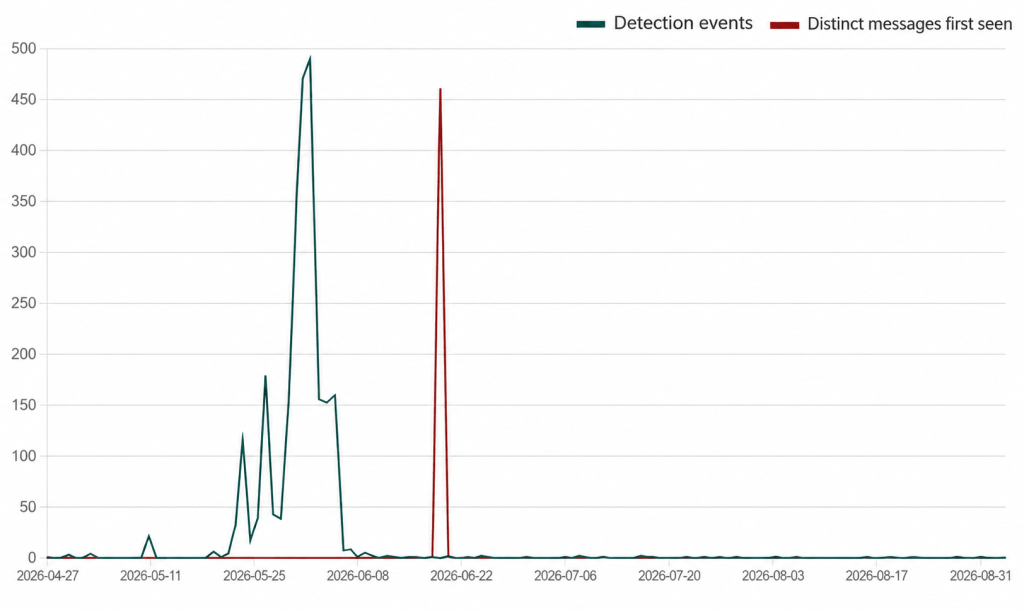
The campaign began slowly before producing two huge spikes in activity. The green line shows detections of message variants seen previously, while the red line shows messages detected on the first day that particular variant appeared. We’re still seeing messages from the campaign, although activity has fallen considerably since those spikes.
The scam relies on a familiar social engineering formula: a valuable-looking reward, a deadline, and a simple action that supposedly protects the customer from losing out. A recipient who has a T-Mobile account may click first and question the message later.
The links use rotating domains designed to look as though they belong to T-Mobile. Their purpose is to persuade recipients to follow the link to supposedly redeem their points. Do not enter login credentials, personal information, payment details, or verification codes after following a link in an unsolicited message.
The anonymized data used in this analysis was gathered through Text Protection in Malwarebytes Mobile Security, which alerts users to potentially malicious or scam text messages.
You can also reduce your risk by following these tips:
The URLs in this campaign are very short-lived. The criminals used at least 81 domains over four months, but the domains follow a recognizable pattern that is blocked in Malwarebytes Browser Guard.
Example domains showing the pattern used by the campaign:
t-mobile.biktpw[.]top
t-mobile.cugbjl[.]top
t-mobile.cymfjd[.]top
t-mobile.gdikxv[.]top
t-mobile.hdzcnb[.]top
t-mobile.koxetp[.]top
t-mobile.nxdcfp[.]top
t-mobile.pkrbai[.]top
t-mobile.qfrhkt[.]top
t-mobile.qscizj[.]top
t-mobile.tmfncb[.]top
t-mobile.vmnqsu[.]top
Stop threats before they can do any harm.
Malwarebytes Browser Guard blocks phishing pages and malicious sites automatically. Free, one click to install. Add it to your browser →
Since early May 2026, we’ve been monitoring a large phishing campaign based on T-Mobile rewards points.
The messages falsely warn that a customer’s rewards points are about to expire. They aren’t legitimate account notices: They use urgency, invented point balances, and phishing links to push recipients into acting before they can verify the claim.
A typical message says that a T-Mobile Rewards account holds 18,400 points, gives an imminent expiry date, and states that unused points will be removed under the program’s terms. These details make the message look as though it was written specifically for the recipient, even though it was sent to many people.
“T-Mobile Rewards Points Reminder: Your Points Are About to Expire
Dear Customer,
We are hereby reminding you that your T-Mobile Rewards account points are about to expire. You currently have 18,400 points, which will expire on June 4, 2026, if unused.
Your Points Overview:
Current Balance: 18,400 Points
Expiry Date: {today or tomorrow}
Points will not be recovered after this date.
Redeem Points:
Visit:
https://t-mobile.{rotating domains}.top/pay
Use the T-Mobile App: Account > Rewards & Benefits
Our points expiry policy aims to ensure the fairness of the program and encourage active participation. Please don’t let these valuable points go to waste.
Thank you for choosing T-Mobile.
Customer Service Team”
This phishing operation does not rely on a single, identical SMS. We found more than 1,000 closely related campaign templates with a semantic similarity score of at least 0.60. The 199 closest matches all scored at least 0.95.
This means the variations only change superficial elements, such as the salutation, headline, expiry date, point balance, and whether the message is called a “reminder,” “alert,” or “important update.” The central story remains the same: T-Mobile rewards points are supposedly expiring, and the recipient must follow a link to redeem them as soon as possible.
The messages use formal but generic language, such as “Dear T-Mobile Customer,” “Dear Valued Customer,” or “T-Mobile User,” rather than naming the recipient or providing verifiable account information.
The campaign began slowly before producing two huge spikes in activity. The green line shows detections of message variants seen previously, while the red line shows messages detected on the first day that particular variant appeared. We’re still seeing messages from the campaign, although activity has fallen considerably since those spikes.
The scam relies on a familiar social engineering formula: a valuable-looking reward, a deadline, and a simple action that supposedly protects the customer from losing out. A recipient who has a T-Mobile account may click first and question the message later.
The links use rotating domains designed to look as though they belong to T-Mobile. Their purpose is to persuade recipients to follow the link to supposedly redeem their points. Do not enter login credentials, personal information, payment details, or verification codes after following a link in an unsolicited message.
The anonymized data used in this analysis was gathered through Text Protection in Malwarebytes Mobile Security, which alerts users to potentially malicious or scam text messages.
You can also reduce your risk by following these tips:
The URLs in this campaign are very short-lived. The criminals used at least 81 domains over four months, but the domains follow a recognizable pattern that is blocked in Malwarebytes Browser Guard.
Example domains showing the pattern used by the campaign:
t-mobile.biktpw[.]top
t-mobile.cugbjl[.]top
t-mobile.cymfjd[.]top
t-mobile.gdikxv[.]top
t-mobile.hdzcnb[.]top
t-mobile.koxetp[.]top
t-mobile.nxdcfp[.]top
t-mobile.pkrbai[.]top
t-mobile.qfrhkt[.]top
t-mobile.qscizj[.]top
t-mobile.tmfncb[.]top
t-mobile.vmnqsu[.]top
Stop threats before they can do any harm.
Malwarebytes Browser Guard blocks phishing pages and malicious sites automatically. Free, one click to install. Add it to your browser →
Google has released its September 2026 Pixel Update Bulletin, fixing 110 vulnerabilities, including one that it says “may be under limited, targeted exploitation.”
The bug is not described as a simple remote takeover, but as a vulnerability that could give an attacker who already has a foothold on a phone more power than they should have.
Although Pixel devices also run Android, they receive separate security updates and bug fixes from the standard monthly patches distributed to Android manufacturers because of the unique hardware platform Google controls directly and its exclusive features and capabilities.
To apply this month’s security updates, Pixel users should go to Settings > Security & privacy > System & updates > Security update, tap Install, and restart their device to complete the update process.
A supported device with the 2026-09-05 patch level is up to date. After updating, check that the Android security update level shows September 5, 2026, or later.
Google says it there are indications that the vulnerability, tracked as CVE-2026-58704, may be under limited, targeted exploitation. Found in the cellular modem, it is a possible permission bypass caused by a logic error in the code. This could lead to remote escalation of privilege (EoP) with no additional execution privileges or user interaction needed.
The vulnerability affects the modem component of Pixel devices and is rated high severity. The modem is the part of a smartphone that handles communication with mobile networks. It allows a phone to connect for calls, texts, and mobile data. Because it is such an important component, a flaw affecting it deserves attention, even if the conditions needed to exploit it limit the number of potential victims.
The vulnerability does not mean every unpatched Pixel can be hacked from anywhere on the internet, nor has Google said that simply being within wireless range of a phone is enough. The available information indicates that an attacker needs access to an adjacent network and basic privileges on the targeted device, but it does not explain how those privileges are obtained.
Attackers commonly need more than one step to compromise a well-protected device. One weakness may give them a limited foothold, while another lets them escape restrictions and gain access to more sensitive functions or data.
This is why bugs like this can be especially useful in targeted operations. An attacker may combine the modem vulnerability with another exploit, a malicious app, stolen credentials, or physical access to the device. Each part of the chain brings the attacker one step closer to compromising the device: getting in, gaining more privileges, and accessing the information or functions they’re after.
While Android users should always install the latest update offered by their device manufacturer, this particular zero-day appears in the Pixel-specific bulletin. Google’s Pixel phones use hardware and software components that other Android manufacturers do not necessarily share, including the affected modem component. If you have another Android brand, you won’t receive this specific Pixel fix, but you should still check for your manufacturer’s latest monthly security update.
Scammers know more about you than you think.
Malwarebytes Mobile Security protects you from phishing, scam texts, malicious sites, and more. With real-time AI-powered Scam Guard built right in.
Google has released its September 2026 Pixel Update Bulletin, fixing 110 vulnerabilities, including one that it says “may be under limited, targeted exploitation.”
The bug is not described as a simple remote takeover, but as a vulnerability that could give an attacker who already has a foothold on a phone more power than they should have.
Although Pixel devices also run Android, they receive separate security updates and bug fixes from the standard monthly patches distributed to Android manufacturers because of the unique hardware platform Google controls directly and its exclusive features and capabilities.
To apply this month’s security updates, Pixel users should go to Settings > Security & privacy > System & updates > Security update, tap Install, and restart their device to complete the update process.
A supported device with the 2026-09-05 patch level is up to date. After updating, check that the Android security update level shows September 5, 2026, or later.
Google says it there are indications that the vulnerability, tracked as CVE-2026-58704, may be under limited, targeted exploitation. Found in the cellular modem, it is a possible permission bypass caused by a logic error in the code. This could lead to remote escalation of privilege (EoP) with no additional execution privileges or user interaction needed.
The vulnerability affects the modem component of Pixel devices and is rated high severity. The modem is the part of a smartphone that handles communication with mobile networks. It allows a phone to connect for calls, texts, and mobile data. Because it is such an important component, a flaw affecting it deserves attention, even if the conditions needed to exploit it limit the number of potential victims.
The vulnerability does not mean every unpatched Pixel can be hacked from anywhere on the internet, nor has Google said that simply being within wireless range of a phone is enough. The available information indicates that an attacker needs access to an adjacent network and basic privileges on the targeted device, but it does not explain how those privileges are obtained.
Attackers commonly need more than one step to compromise a well-protected device. One weakness may give them a limited foothold, while another lets them escape restrictions and gain access to more sensitive functions or data.
This is why bugs like this can be especially useful in targeted operations. An attacker may combine the modem vulnerability with another exploit, a malicious app, stolen credentials, or physical access to the device. Each part of the chain brings the attacker one step closer to compromising the device: getting in, gaining more privileges, and accessing the information or functions they’re after.
While Android users should always install the latest update offered by their device manufacturer, this particular zero-day appears in the Pixel-specific bulletin. Google’s Pixel phones use hardware and software components that other Android manufacturers do not necessarily share, including the affected modem component. If you have another Android brand, you won’t receive this specific Pixel fix, but you should still check for your manufacturer’s latest monthly security update.
Scammers know more about you than you think.
Malwarebytes Mobile Security protects you from phishing, scam texts, malicious sites, and more. With real-time AI-powered Scam Guard built right in.
Researchers at Group-IB found that the Android banking Trojan Gigabud can create a separate work profile on an infected phone and run a cloned banking app inside it. The attacker can then carry out fraudulent transactions in the new profile, potentially separating them from signs of malware detected elsewhere on the device.
To do this, Gigabud installs Vwork, a malicious version of the legitimate open-source tool Shelter. Shelter normally lets Android users isolate apps or run second copies of them in a work profile. Vwork modifies those functions so that Gigabud can control them remotely.
The aim is to clone a target banking app into the new work profile, then let the operator commit fraud there. Group-IB says this can break the connection between malware detected in the personal profile and a risky transaction originating from the work profile, potentially weakening bank-side anti-fraud or in-app malware-detection systems that do not correlate activity across Android profiles.
Android work profiles are normally used to keep work apps and data separate from personal ones. Because apps in different profiles are isolated from each other, a banking app or security tool may not connect malware detected in the personal profile with something taking place in a cloned app in the work profile.
Victims are lured into sideloading a fake airline, tax, or government app through phishing sites, messages, or social media.
To take over the device, Gigabud asks for Accessibility access, overlay permission to display over other apps, and an exemption from battery-optimization. These permissions enable remote interaction and credential-theft techniques such as overlays.
The sideloaded app checks which other apps are installed and tells the operator which relevant banking targets are present.
Fake banking-login overlays steal both banking credentials and the device’s PIN.
The operator installs Vwork, which creates a new work profile on the device and clones the selected banking app. Vwork differs from Shelter in ways that make it useful to malware. It removes protections on cross-profile interaction, exposes components that can be used to set up a profile, clone and list apps, and open apps, and hides its launcher icon.
The operator can then remotely carry out transactions from the newly created profile, with the option to hide activity behind a black screen.
This is how Gigabud turns Android’s profile separation into a fraud tool: after compromising a phone, it creates a second profile, places a cloned banking app inside it, and performs the transaction from there. The result can be a dangerous gap between a malware alert in one profile and a fraudulent banking session in another.
The immediate protection advice is familiar but important:
Sideloading. Install banking and other apps only from the official store or a direct link to the publisher’s website.
Install requests. Treat unsolicited requests to install an APK as a likely scam. If you’re unsure whether something’s a scam, run it through Malwarebytes Scam Guard.
Permissions. Do not enable Accessibility or “display over other apps” for a supposed airline, tax, delivery, or government app. Overlays require explicit user approval on modern Android, so a request like this is a red flag.
Protection. Use an up-to-date real-time anti-malware solution for your Android devices. Malwarebytes detects components of Gigabud as Android/Trojan.Banker.ACR577B2BA2H61, Android/Trojan.Banker.ACRF6CE8D30H46, Android/Trojan.Banker.ACR6C67829FH20, Android/Trojan.Banker.SIB02FFFFFF1112H106, Android/Trojan.Banker.SIB0181193e44H71, Android/Trojan.Banker.AUR2f2f4fb5C95, and Android/Trojan.Spy.Gigabud.xc.
Anyone who has installed a suspicious APK and granted it Accessibility access should contact their bank through a trusted channel, revoke the app’s special permissions, uninstall it, and consider a factory reset after preserving only known-good data.
A second instance of a banking app merits particular scrutiny. A separate work profile by itself is not proof of compromise because work profiles also have legitimate uses. But the presence of a cloned banking app definitely is suspicious.
Scammers know more about you than you think.
Malwarebytes Mobile Security protects you from phishing, scam texts, malicious sites, and more. With real-time AI-powered Scam Guard built right in.
Researchers at Group-IB found that the Android banking Trojan Gigabud can create a separate work profile on an infected phone and run a cloned banking app inside it. The attacker can then carry out fraudulent transactions in the new profile, potentially separating them from signs of malware detected elsewhere on the device.
To do this, Gigabud installs Vwork, a malicious version of the legitimate open-source tool Shelter. Shelter normally lets Android users isolate apps or run second copies of them in a work profile. Vwork modifies those functions so that Gigabud can control them remotely.
The aim is to clone a target banking app into the new work profile, then let the operator commit fraud there. Group-IB says this can break the connection between malware detected in the personal profile and a risky transaction originating from the work profile, potentially weakening bank-side anti-fraud or in-app malware-detection systems that do not correlate activity across Android profiles.
Android work profiles are normally used to keep work apps and data separate from personal ones. Because apps in different profiles are isolated from each other, a banking app or security tool may not connect malware detected in the personal profile with something taking place in a cloned app in the work profile.
Victims are lured into sideloading a fake airline, tax, or government app through phishing sites, messages, or social media.
To take over the device, Gigabud asks for Accessibility access, overlay permission to display over other apps, and an exemption from battery-optimization. These permissions enable remote interaction and credential-theft techniques such as overlays.
The sideloaded app checks which other apps are installed and tells the operator which relevant banking targets are present.
Fake banking-login overlays steal both banking credentials and the device’s PIN.
The operator installs Vwork, which creates a new work profile on the device and clones the selected banking app. Vwork differs from Shelter in ways that make it useful to malware. It removes protections on cross-profile interaction, exposes components that can be used to set up a profile, clone and list apps, and open apps, and hides its launcher icon.
The operator can then remotely carry out transactions from the newly created profile, with the option to hide activity behind a black screen.
This is how Gigabud turns Android’s profile separation into a fraud tool: after compromising a phone, it creates a second profile, places a cloned banking app inside it, and performs the transaction from there. The result can be a dangerous gap between a malware alert in one profile and a fraudulent banking session in another.
The immediate protection advice is familiar but important:
Sideloading. Install banking and other apps only from the official store or a direct link to the publisher’s website.
Install requests. Treat unsolicited requests to install an APK as a likely scam. If you’re unsure whether something’s a scam, run it through Malwarebytes Scam Guard.
Permissions. Do not enable Accessibility or “display over other apps” for a supposed airline, tax, delivery, or government app. Overlays require explicit user approval on modern Android, so a request like this is a red flag.
Protection. Use an up-to-date real-time anti-malware solution for your Android devices. Malwarebytes detects components of Gigabud as Android/Trojan.Banker.ACR577B2BA2H61, Android/Trojan.Banker.ACRF6CE8D30H46, Android/Trojan.Banker.ACR6C67829FH20, Android/Trojan.Banker.SIB02FFFFFF1112H106, Android/Trojan.Banker.SIB0181193e44H71, Android/Trojan.Banker.AUR2f2f4fb5C95, and Android/Trojan.Spy.Gigabud.xc.
Anyone who has installed a suspicious APK and granted it Accessibility access should contact their bank through a trusted channel, revoke the app’s special permissions, uninstall it, and consider a factory reset after preserving only known-good data.
A second instance of a banking app merits particular scrutiny. A separate work profile by itself is not proof of compromise because work profiles also have legitimate uses. But the presence of a cloned banking app definitely is suspicious.
Scammers know more about you than you think.
Malwarebytes Mobile Security protects you from phishing, scam texts, malicious sites, and more. With real-time AI-powered Scam Guard built right in.
Apple’s tagline for its App Store says, “The apps you love. From a place you can trust.” You might love the apps, but can you trust the store? A federal lawsuit filed in the Northern District of California last week suggests not.
Three people have accused Apple of promoting a fake version of the Sparrow Wallet cryptocurrency app through its App Store, even though the real app’s developer had spent over a year telling Apple that he hadn’t produced a version for the mobile platform.
The fake app drained a combined $1.8 million from the victims’ wallets between May and August 2025, and now they’re furious with Apple for allowing it to happen.
According to the legal complaint published courtesy of BleepingComputer, James Ramirez, Christopher Ellis, and Jalen Delgado downloaded a fake version of Sparrow Wallet from Apple’s App Store. It asked users to enter their recovery phrase (the 12 or 24 words that restore access to a crypto wallet), which is something a legitimate wallet app may also ask for during setup.
Instead of keeping that information private, though, the app handed it to the criminals running the scam. Once someone else has your recovery phrase, they have access to your wallet. If they transfer your cryptocurrency to another address, you cannot get it back.
Ramirez, Ellis, and Delgado say they lost approximately $875,000, $840,000, and $120,000 in Bitcoin, respectively.
The real Sparrow Wallet is a desktop application for Windows, macOS, and Linux. It has never had an official iPhone app.
Craig Raw, the developer of the actual Sparrow Wallet, reported fake versions to Apple in the weeks leading up to January 2024 and publicly confirmed that month that the fake app was still live despite repeated reports.
About a year later, he tried a workaround to stop people from downloading the fake app by submitting a placeholder iOS app with screenshots explicitly warning users that Sparrow Wallet was not available on iOS. Apple responded by terminating his developer account. Thankfully it reversed it later, otherwise he would have been unable to maintain the macOS version.
The complaint also alleges that Apple featured the fake app in curated cryptocurrency collections alongside legitimate products, and allowed additional fake Sparrow Wallet apps onto the App Store even after consumers complained.
Apple’s official response, per TechCrunch, is that:
“apps impersonating others are a violation of its guidelines and it takes swift action to remove them.” Not swift enough, apparently.
The three users are now suing Apple, alleging that it misrepresented the App Store as trustworthy despite knowing about the fake apps. The complaint includes claims of fraudulent concealment, among others, and seeks a jury trial. The plaintiffs are seeking compensation for their losses, along with additional damages permitted under California law.
Fake cryptocurrency apps are a trend. Kaspersky researchers recently identified 26 crypto wallet impersonators inside Apple’s ecosystem, all targeting seed phrases and recovery keys.
Rather than including malicious code directly inside the app, many of these scams direct users to a convincing fake App Store webpage, where they’re prompted to install another version of the app. That malicious version steals cryptocurrency recovery phrases or private keys by abusing enterprise distribution certificates intended for internal company apps.
Apple points to its enforcement volume: it terminated 193,000 developer accounts and rejected more than 371,000 copycat submissions in 2025. Those figures come from Apple itself, with no mention of an independent audit. The company says that it uses a mixture of human review and machine learning to spot malicious apps.
If you use cryptocurrency on an iPhone, don’t assume that an App Store listing guarantees an app is genuine. Download apps using links from the developer’s official website whenever possible, and check that the developer actually offers an iPhone version before installing it.
The App Store is generally safer than downloading apps from elsewhere, but this case is a reminder that it is not infallible.
Scammers know more about you than you think.
Malwarebytes Mobile Security protects you from phishing, scam texts, malicious sites, and more. With real-time AI-powered Scam Guard built right in.
Apple’s tagline for its App Store says, “The apps you love. From a place you can trust.” You might love the apps, but can you trust the store? A federal lawsuit filed in the Northern District of California last week suggests not.
Three people have accused Apple of promoting a fake version of the Sparrow Wallet cryptocurrency app through its App Store, even though the real app’s developer had spent over a year telling Apple that he hadn’t produced a version for the mobile platform.
The fake app drained a combined $1.8 million from the victims’ wallets between May and August 2025, and now they’re furious with Apple for allowing it to happen.
According to the legal complaint published courtesy of BleepingComputer, James Ramirez, Christopher Ellis, and Jalen Delgado downloaded a fake version of Sparrow Wallet from Apple’s App Store. It asked users to enter their recovery phrase (the 12 or 24 words that restore access to a crypto wallet), which is something a legitimate wallet app may also ask for during setup.
Instead of keeping that information private, though, the app handed it to the criminals running the scam. Once someone else has your recovery phrase, they have access to your wallet. If they transfer your cryptocurrency to another address, you cannot get it back.
Ramirez, Ellis, and Delgado say they lost approximately $875,000, $840,000, and $120,000 in Bitcoin, respectively.
The real Sparrow Wallet is a desktop application for Windows, macOS, and Linux. It has never had an official iPhone app.
Craig Raw, the developer of the actual Sparrow Wallet, reported fake versions to Apple in the weeks leading up to January 2024 and publicly confirmed that month that the fake app was still live despite repeated reports.
About a year later, he tried a workaround to stop people from downloading the fake app by submitting a placeholder iOS app with screenshots explicitly warning users that Sparrow Wallet was not available on iOS. Apple responded by terminating his developer account. Thankfully it reversed it later, otherwise he would have been unable to maintain the macOS version.
The complaint also alleges that Apple featured the fake app in curated cryptocurrency collections alongside legitimate products, and allowed additional fake Sparrow Wallet apps onto the App Store even after consumers complained.
Apple’s official response, per TechCrunch, is that:
“apps impersonating others are a violation of its guidelines and it takes swift action to remove them.” Not swift enough, apparently.
The three users are now suing Apple, alleging that it misrepresented the App Store as trustworthy despite knowing about the fake apps. The complaint includes claims of fraudulent concealment, among others, and seeks a jury trial. The plaintiffs are seeking compensation for their losses, along with additional damages permitted under California law.
Fake cryptocurrency apps are a trend. Kaspersky researchers recently identified 26 crypto wallet impersonators inside Apple’s ecosystem, all targeting seed phrases and recovery keys.
Rather than including malicious code directly inside the app, many of these scams direct users to a convincing fake App Store webpage, where they’re prompted to install another version of the app. That malicious version steals cryptocurrency recovery phrases or private keys by abusing enterprise distribution certificates intended for internal company apps.
Apple points to its enforcement volume: it terminated 193,000 developer accounts and rejected more than 371,000 copycat submissions in 2025. Those figures come from Apple itself, with no mention of an independent audit. The company says that it uses a mixture of human review and machine learning to spot malicious apps.
If you use cryptocurrency on an iPhone, don’t assume that an App Store listing guarantees an app is genuine. Download apps using links from the developer’s official website whenever possible, and check that the developer actually offers an iPhone version before installing it.
The App Store is generally safer than downloading apps from elsewhere, but this case is a reminder that it is not infallible.
Scammers know more about you than you think.
Malwarebytes Mobile Security protects you from phishing, scam texts, malicious sites, and more. With real-time AI-powered Scam Guard built right in.
If you feel like your phone has turned into a scam megaphone, you’re not alone. Robocalls have been a problem for years. Artificial intelligence (AI) is making them slicker, faster, and harder to spot.
A new investigation by Transaction Network Services (TNS) shows that while the big telecom players have stepped up caller ID authentication, many smaller providers are still lagging behind. That leaves plenty of room for criminals to keep making spoofed, AI‑voiced robocalls that seem legitimate right up until they empty your bank account.
Turning back the clock to 2019, lawmakers in the US passed the TRACED Act with a simple goal: make it harder for scammers to lie about who’s calling. The technical was solution STIR/SHAKEN, a pair of catchily-named standards that let phone networks cryptographically sign calls so downstream providers can check whether the caller ID is trustworthy.
On paper, it’s working fairly well for the major carriers. TNS reports that about 85% of voice traffic between Tier 1 networks in 2025 was signed using STIR/SHAKEN, and 93% of those calls received the highest “A” attestation. If the entire ecosystem looked like that, spoofing would become much harder.
The same report found that most lower‑tier communications service providers—typically smaller or specialist carriers—aren’t even close to that level of protection. On average, they only use the required cryptographic signatures about 20% of the time. That means four out of five calls effectively go through the network “unsigned.”
There are reasons for this. The Federal Communications Commission (FCC) has granted some providers extensions, particularly very small and satellite providers, as long as they implement other robocall mitigation measures. Even so, the result is uneven implementation.
From a scammer’s point of view, this is great. Cybercriminals are already using AI to run increasingly sophisticated and scalable robocall attacks and know that even calls with strong authentication can be spoofed or abused when other parts of the chain are weak.
AI voice cloning can be done with just a few seconds of original audio. Combine that with call spoofing and personal information gathered from data breaches, and scammers can make a call appear to come from your bank while using a calm, familiar voice that knows your name or other personal details.
Robocalls cost almost nothing to send. Internet calling allows scammers to dial thousands of numbers for a few cents, which is why the volume is so high. Industry estimates suggest US consumers received around 55 billion robocalls in 2025, with projections creeping toward 60 billion in 2026. That’s roughly 160 million spam calls every single day in one country. Globally, that’s about 385 billion spam/robocall calls each year.
What can you realistically do as a consumer, given that the network itself is still in transition and attackers are upgrading faster than some carriers?
A few habits still go a long way:
And finally—and this is where we can help—check suspicious numbers with our Scam Number Check before you answer or call back.
Scammers know more about you than you think.
Malwarebytes Mobile Security protects you from phishing, scam texts, malicious sites, and more. With real-time AI-powered Scam Guard built right in.
If you feel like your phone has turned into a scam megaphone, you’re not alone. Robocalls have been a problem for years. Artificial intelligence (AI) is making them slicker, faster, and harder to spot.
A new investigation by Transaction Network Services (TNS) shows that while the big telecom players have stepped up caller ID authentication, many smaller providers are still lagging behind. That leaves plenty of room for criminals to keep making spoofed, AI‑voiced robocalls that seem legitimate right up until they empty your bank account.
Turning back the clock to 2019, lawmakers in the US passed the TRACED Act with a simple goal: make it harder for scammers to lie about who’s calling. The technical was solution STIR/SHAKEN, a pair of catchily-named standards that let phone networks cryptographically sign calls so downstream providers can check whether the caller ID is trustworthy.
On paper, it’s working fairly well for the major carriers. TNS reports that about 85% of voice traffic between Tier 1 networks in 2025 was signed using STIR/SHAKEN, and 93% of those calls received the highest “A” attestation. If the entire ecosystem looked like that, spoofing would become much harder.
The same report found that most lower‑tier communications service providers—typically smaller or specialist carriers—aren’t even close to that level of protection. On average, they only use the required cryptographic signatures about 20% of the time. That means four out of five calls effectively go through the network “unsigned.”
There are reasons for this. The Federal Communications Commission (FCC) has granted some providers extensions, particularly very small and satellite providers, as long as they implement other robocall mitigation measures. Even so, the result is uneven implementation.
From a scammer’s point of view, this is great. Cybercriminals are already using AI to run increasingly sophisticated and scalable robocall attacks and know that even calls with strong authentication can be spoofed or abused when other parts of the chain are weak.
AI voice cloning can be done with just a few seconds of original audio. Combine that with call spoofing and personal information gathered from data breaches, and scammers can make a call appear to come from your bank while using a calm, familiar voice that knows your name or other personal details.
Robocalls cost almost nothing to send. Internet calling allows scammers to dial thousands of numbers for a few cents, which is why the volume is so high. Industry estimates suggest US consumers received around 55 billion robocalls in 2025, with projections creeping toward 60 billion in 2026. That’s roughly 160 million spam calls every single day in one country. Globally, that’s about 385 billion spam/robocall calls each year.
What can you realistically do as a consumer, given that the network itself is still in transition and attackers are upgrading faster than some carriers?
A few habits still go a long way:
And finally—and this is where we can help—check suspicious numbers with our Scam Number Check before you answer or call back.
Scammers know more about you than you think.
Malwarebytes Mobile Security protects you from phishing, scam texts, malicious sites, and more. With real-time AI-powered Scam Guard built right in.
Nearly half of people encounter a scam on their phone every single day. Malwarebytes is doing something about it.
That figure comes from a 2025 Malwarebytes survey of 1,300 respondents across the US and Europe. The results paint a troubling picture. A quarter of the victims surveyed reported being harassed or blackmailed, while nearly one in five had private information exposed, and 15% lost money.
“I felt like I was in a horror movie,” said one survey respondent. “I never thought it would happen to me like this.”
Your phone is a scammer’s dream. You use it to bank, message, shop, and more. It’s an ideal gateway for anyone looking to take advantage of you. And today’s scams aren’t limited to just one app or program. They show up as texts and delivery notifications, as calls that spoof a trusted number, and as social media DMs.
Increasingly, AI is making all of this much harder to detect. Malwarebytes research found that half of people feel unprepared for the sophistication of these AI-driven threats. Phone scams now rank among the top five scam types people encounter, according to Malwarebytes Scam Guard data.
Part of the problem is misplaced trust. According to Malwarebytes’ data, roughly half of people—55% of iPhone owners and 50% of Android owners—said they believe their phone’s security is enough to keep them safe. But relying on those protections alone can leave people vulnerable.
Malwarebytes detected more than 800,000 distinct strains of Android malware last year and expects that number to cross 1 million in 2026.
Your phone needs more than just a lock screen to stay safe. That’s why we’ve rebuilt Malwarebytes Mobile Security. It puts scam protection first, and it’s backed by all our other tools to keep your phone secure.
Here’s how Malwarebytes Mobile Security helps keep scams away from you and your data.
Scam Guard is a free AI-powered tool built into Mobile Security for both Android and iOS. Got a suspicious text, email, phone number, link, or message? Drop it into Scam Guard and get an instant read on whether it’s a scam, along with guidance on what to do next.
Text and Call Protection now catches significantly more junk and scam messages than before. Updated filtering that reviews shortened links more closely and flags suspicious content, like romance-scam language or unexpected money requests, before it reaches your inbox. Call Protection checks every incoming call against known scam and spam numbers, so you can block or flag them automatically instead of gambling on whether to pick up. It’s live now on iOS, with Android rolling out later this summer.
Malwarebytes Digital Footprint Portal’s free scanner shows you which of your personal details—passwords, Social Security numbers, and more—are already exposed and offers straightforward steps to keep them safe.
Trusted Advisor gives your device a Protection Score and recommends simple steps to strengthen your security, from adjusting settings and permissions to running a scan or updating your device.
Expanded ad blocking on iOS now lets you filter Google Sponsored Ads in Safari—a browser that scammers frequently abuse to make fraudulent campaigns look legitimate.
Android Junk Cleaner removes leftover files, temporary data, and outdated cache files that build up on your device over time. A cleaner, faster phone is easier to manage and gives you the space you need to install important security updates.
Our Malware Scanner (Android) scans for and removes malware and potentially unwanted programs, including screen lockers and adware.
Real-Time Protection (Android) proactively defends against ransomware, PUPs, and phishing attempts in real time.
Wi-Fi Monitoring (iOS) warns you when you connect to an insecure network so you can take action by turning on your VPN.
Malwarebytes Privacy VPN keeps your browsing private with a fast WireGuard connection and a strict no-logs policy supported by diskless, RAM-only server infrastructure.
Phone scams aren’t going anywhere, but protecting yourself doesn’t have to be complicated. Malwarebytes Mobile Security brings together the tools you need to recognize scams, protect your privacy, and keep your phone safer, all in one app.
Download Malwarebytes Mobile Security for iOS or Android and use your phone with more confidence.
Nearly half of people encounter a scam on their phone every single day. Malwarebytes is doing something about it.
That figure comes from a 2025 Malwarebytes survey of 1,300 respondents across the US and Europe. The results paint a troubling picture. A quarter of the victims surveyed reported being harassed or blackmailed, while nearly one in five had private information exposed, and 15% lost money.
“I felt like I was in a horror movie,” said one survey respondent. “I never thought it would happen to me like this.”
Your phone is a scammer’s dream. You use it to bank, message, shop, and more. It’s an ideal gateway for anyone looking to take advantage of you. And today’s scams aren’t limited to just one app or program. They show up as texts and delivery notifications, as calls that spoof a trusted number, and as social media DMs.
Increasingly, AI is making all of this much harder to detect. Malwarebytes research found that half of people feel unprepared for the sophistication of these AI-driven threats. Phone scams now rank among the top five scam types people encounter, according to Malwarebytes Scam Guard data.
Part of the problem is misplaced trust. According to Malwarebytes’ data, roughly half of people—55% of iPhone owners and 50% of Android owners—said they believe their phone’s security is enough to keep them safe. But relying on those protections alone can leave people vulnerable.
Malwarebytes detected more than 800,000 distinct strains of Android malware last year and expects that number to cross 1 million in 2026.
Your phone needs more than just a lock screen to stay safe. That’s why we’ve rebuilt Malwarebytes Mobile Security. It puts scam protection first, and it’s backed by all our other tools to keep your phone secure.
Here’s how Malwarebytes Mobile Security helps keep scams away from you and your data.
Scam Guard is a free AI-powered tool built into Mobile Security for both Android and iOS. Got a suspicious text, email, phone number, link, or message? Drop it into Scam Guard and get an instant read on whether it’s a scam, along with guidance on what to do next.
Text and Call Protection now catches significantly more junk and scam messages than before. Updated filtering that reviews shortened links more closely and flags suspicious content, like romance-scam language or unexpected money requests, before it reaches your inbox. Call Protection checks every incoming call against known scam and spam numbers, so you can block or flag them automatically instead of gambling on whether to pick up. It’s live now on iOS, with Android rolling out later this summer.
Malwarebytes Digital Footprint Portal’s free scanner shows you which of your personal details—passwords, Social Security numbers, and more—are already exposed and offers straightforward steps to keep them safe.
Trusted Advisor gives your device a Protection Score and recommends simple steps to strengthen your security, from adjusting settings and permissions to running a scan or updating your device.
Expanded ad blocking on iOS now lets you filter Google Sponsored Ads in Safari—a browser that scammers frequently abuse to make fraudulent campaigns look legitimate.
Android Junk Cleaner removes leftover files, temporary data, and outdated cache files that build up on your device over time. A cleaner, faster phone is easier to manage and gives you the space you need to install important security updates.
Our Malware Scanner (Android) scans for and removes malware and potentially unwanted programs, including screen lockers and adware.
Real-Time Protection (Android) proactively defends against ransomware, PUPs, and phishing attempts in real time.
Wi-Fi Monitoring (iOS) warns you when you connect to an insecure network so you can take action by turning on your VPN.
Malwarebytes Privacy VPN keeps your browsing private with a fast WireGuard connection and a strict no-logs policy supported by diskless, RAM-only server infrastructure.
Phone scams aren’t going anywhere, but protecting yourself doesn’t have to be complicated. Malwarebytes Mobile Security brings together the tools you need to recognize scams, protect your privacy, and keep your phone safer, all in one app.
Download Malwarebytes Mobile Security for iOS or Android and use your phone with more confidence.
Aftercall is a wave of deceptive Android apps on Google Play that pose as everyday tools while bombarding users with pop-up ads after every phone call.
When an unexpected ad pops up every time you hang up a call, it will slowly drive you crazy, especially if you can’t figure out what’s causing it. The ads appear outside the app’s normal context, making it difficult for users to identify and remove the culprit.
Researchers investigating the campaign discovered a collection of these apps that masquerade as alarm clocks, calendars, and other seemingly harmless apps. After installation, they ask for permission to “appear on top” of other apps. That means they can show a full-screen ad every time you end a call, then hide themselves, making them difficult for users to find and uninstall.
Because the ads appear after you end a call, the researchers dubbed the campaign “Aftercall.”
Think of these apps as fake helpers that piggyback on your phone calls purely to generate ad impressions.
The apps disguise themselves as alarm clocks, calendars, note-taking apps, cleaners, or “super fast” messaging apps and are distributed through the Google Play Store. Researchers found dozens of new apps released every month, collectively responsible for hundreds of millions of ad impressions.
They trick users into granting overlay permissions. Because Android doesn’t allow this permission to be granted through a standard pop-up, the app has to direct users into Settings, where they must enable it manually. To persuade them, the apps invent plausible reasons. One researcher explained:
“In one example, the alarm app explains that it needs to go off even when the phone is locked – without granting permission, alarms might not appear correctly. Another app, a calendar, doesn’t even leave users a choice – it simply closes, unless they grant the permission.”
Some of these apps also request full-screen notification permissions, allowing them to show ads even when the device is locked.
Aftercall apps monitor the phone’s call state. When it changes from “ringing” to “idle,” indicating that a call has ended, they immediately launch an activity using their overlay permission to pop a screen over everything else and show an ad.
To make the ads seem more legitimate, they wrap them in a fake “call info” screen, complete with caller details, a fake profile picture, and text suggesting the ad relates to the app’s functionality. For the user, this feels like some new post-call feature rather than an unrelated app showing adverts.
They hide to avoid detection and removal. Aftercall apps remove themselves from the “Recent apps” list so when users try the usual “swipe away the suspicious app” approach, they don’t see anything obvious.
Besides being incredibly annoying for users, the Aftercall campaign also wastes advertisers’ money. After all, would you buy something pushed in this way?
If you see ads pop up right after you end a call, especially alongside fake “call info,” check which apps have the “appear on top” or overlay permissions.
The exact steps vary depending on your phone manufacturer and Android version, but you can usually find them by looking at Settings > Apps > More options (3 vertical dots) > Special access > Appear on top.
Look for apps you don’t recognize, rarely use, or that shouldn’t need overlay access, such as a simple notes app, clock, or cleaner. Disable their “Allow to appear on top” or “Display over other apps” permission. If you’re confident you’ve identified the culprit, uninstall it.
Use an up-to-date, real-time anti-malware app for your device to detect and remove malicious apps.
When installing apps, think carefully before granting permissions. Does the app really need the access it’s asking for to perform its function?
Finally, make sure Google Play Protect is enabled so it can regularly scan apps for known malicious behavior.
Scammers know more about you than you think.
Malwarebytes Mobile Security protects you from phishing, scam texts, malicious sites, and more. With real-time AI-powered Scam Guard built right in.
Aftercall is a wave of deceptive Android apps on Google Play that pose as everyday tools while bombarding users with pop-up ads after every phone call.
When an unexpected ad pops up every time you hang up a call, it will slowly drive you crazy, especially if you can’t figure out what’s causing it. The ads appear outside the app’s normal context, making it difficult for users to identify and remove the culprit.
Researchers investigating the campaign discovered a collection of these apps that masquerade as alarm clocks, calendars, and other seemingly harmless apps. After installation, they ask for permission to “appear on top” of other apps. That means they can show a full-screen ad every time you end a call, then hide themselves, making them difficult for users to find and uninstall.
Because the ads appear after you end a call, the researchers dubbed the campaign “Aftercall.”
Think of these apps as fake helpers that piggyback on your phone calls purely to generate ad impressions.
The apps disguise themselves as alarm clocks, calendars, note-taking apps, cleaners, or “super fast” messaging apps and are distributed through the Google Play Store. Researchers found dozens of new apps released every month, collectively responsible for hundreds of millions of ad impressions.
They trick users into granting overlay permissions. Because Android doesn’t allow this permission to be granted through a standard pop-up, the app has to direct users into Settings, where they must enable it manually. To persuade them, the apps invent plausible reasons. One researcher explained:
“In one example, the alarm app explains that it needs to go off even when the phone is locked – without granting permission, alarms might not appear correctly. Another app, a calendar, doesn’t even leave users a choice – it simply closes, unless they grant the permission.”
Some of these apps also request full-screen notification permissions, allowing them to show ads even when the device is locked.
Aftercall apps monitor the phone’s call state. When it changes from “ringing” to “idle,” indicating that a call has ended, they immediately launch an activity using their overlay permission to pop a screen over everything else and show an ad.
To make the ads seem more legitimate, they wrap them in a fake “call info” screen, complete with caller details, a fake profile picture, and text suggesting the ad relates to the app’s functionality. For the user, this feels like some new post-call feature rather than an unrelated app showing adverts.
They hide to avoid detection and removal. Aftercall apps remove themselves from the “Recent apps” list so when users try the usual “swipe away the suspicious app” approach, they don’t see anything obvious.
Besides being incredibly annoying for users, the Aftercall campaign also wastes advertisers’ money. After all, would you buy something pushed in this way?
If you see ads pop up right after you end a call, especially alongside fake “call info,” check which apps have the “appear on top” or overlay permissions.
The exact steps vary depending on your phone manufacturer and Android version, but you can usually find them by looking at Settings > Apps > More options (3 vertical dots) > Special access > Appear on top.
Look for apps you don’t recognize, rarely use, or that shouldn’t need overlay access, such as a simple notes app, clock, or cleaner. Disable their “Allow to appear on top” or “Display over other apps” permission. If you’re confident you’ve identified the culprit, uninstall it.
Use an up-to-date, real-time anti-malware app for your device to detect and remove malicious apps.
When installing apps, think carefully before granting permissions. Does the app really need the access it’s asking for to perform its function?
Finally, make sure Google Play Protect is enabled so it can regularly scan apps for known malicious behavior.
Scammers know more about you than you think.
Malwarebytes Mobile Security protects you from phishing, scam texts, malicious sites, and more. With real-time AI-powered Scam Guard built right in.
Researchers have analyzed a new Android banking Trojan called Rokarolla. It can effectively take over a device, steal banking and crypto login details from more than 200 apps, and quietly monitor much of what you do on your phone.
On an infected device, Rokarolla steals banking and crypto login details. It also uses fake lock-screen overlays to capture your PIN, pattern, or password.
When you open one of the banking or crypto apps on Rokarolla’s target list, the malware downloads and displays a matching fake login page over the real app. Anything you type into the fake page, including usernames, passwords, and card numbers, is sent to the attackers.
Separately, Rokarolla abuses Android’s Accessibility features to monitor activity across the device. It can recognize WhatsApp screens by looking for familiar labels such as “Chats” and “Calls,” extract contact information, read SMS messages, and send new ones. These capabilities can help it intercept one-time passwords (OTPs) and two-factor authentication (2FA) codes.
Rokarolla can take control of text messages and phone calls, helping it block security alerts and hide signs of fraud.
It can also record everything you type and see on the screen. If you copy and paste a cryptocurrency wallet address, the malware can secretly replace it with one belonging to the attackers.
Other features help the malware stay hidden, including the ability to hide its icon, silence the device, turn off Google Play Protect, and prevent the screen from going to sleep.
Rokarolla is distributed through rogue websites, where it is offered as fake versions of popular apps like TikTok or Chrome.
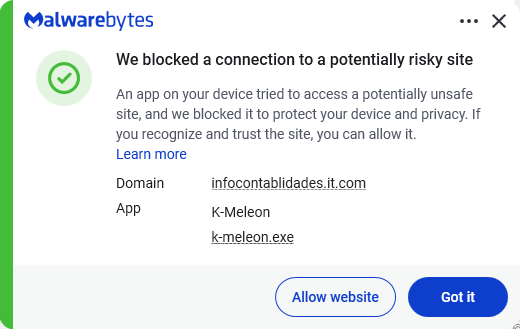
Instead of sending you to the official Google Play Store, these malicious sites push you to download the app directly, a process known as sideloading. After you install it, the fake app poses as Google Play Protect and quietly downloads and installs the malware that carries out the attack.
To gain the access it needs, the fake app asks for powerful permissions, including Accessibility access, the permission to read SMS messages, and access to notifications. Because these requests can look legitimate, many users may approve them without realizing the risks.
To avoid banking Trojans like Rokarolla, there are a few guidelines you should follow:
Scammers know more about you than you think.
Malwarebytes Mobile Security protects you from phishing, scam texts, malicious sites, and more. With real-time AI-powered Scam Guard built right in.