The FTC alleges that the company shared consumers’ sensitive health information with third‑party advertising platforms despite promising strong privacy protections.
Hims & Hers is a telehealth and digital health platform that connects users with licensed medical providers for online consultations, prescription medications, and personal care products.
The complaint also accuses Hims & Hers of deceptive billing and subscription practices that made it hard for users to avoid charges or cancel subscriptions.
According to the FTC’s complaint, filed in federal court in California, Hims & Hers:
Shared sensitive health data, including details about medical conditions, with ad platforms such as Meta and Snap despite privacy promises.
Charged before consultations. The company promised users they could consult a medical provider before being charged, but the FTC says many consumers were enrolled in recurring prescription subscriptions shortly after they submitted an intake form, often without first having a consultation.
Made cancellation difficult. Before 2023, cancellation reportedly required contacting customer service by phone, email, or chat. Even after an online cancellation option appeared, the FTC alleges the button was hidden behind multiple steps and confusing options.
From a cybersecurity and privacy research perspective, this isn’t just about a single telehealth brand. It highlights three broader trends we see repeatedly in consumer programs:
Privacy policies versus reality. A company can market itself as privacy‑focused while still integrating third‑party advertising and analytics software development kits (SDKs) that leak sensitive information. This becomes especially concerning when health‑related events are linked to user accounts or tracking cookies.
Friction as a feature. Hard‑to‑find cancellation flows and unclear billing practices are examples of “dark patterns” that nudge users into paying for services they might not have chosen given all relevant information.
Regulatory pressure is growing. Health‑related services are under increasing scrutiny, especially when they handle sensitive data and combine it with advertising platforms.
The court will ultimately decide whether Hims & Hers violated the law, but the FTC’s action sends a clear signal: regulators are paying close attention to how health‑related services collect, use, and share sensitive data.
For anyone who values online privacy, the Hims & Hers case is a reminder that “health tech” does not automatically mean “privacy first.”
How to stay safe
More often than not, the privacy loopholes are hidden in the privacy policy somewhere.
Pro tip: one thing AI is good at is reading between the lines. Ask an AI chatbot to summarize a privacy policy and identify when your information may be shared with third parties. AI makes it much easier to understand lengthy privacy policies without reading every word yourself. If companies fail to follow their own privacy policies, regulators and consumers can hold them accountable.
Other than that:
Don’t share sensitive information unless it’s genuinely needed to provide the service.
Use strong, unique passwords and multifactor authentication (MFA). Even if a company is compliant, breaches happen. Unique passwords and two‑factor authentication limit the damage if your account details are exposed.
Your name, address, and phone number may already be for sale.
Data brokers collect and sell your personal details to anyone willing to pay. Malwarebytes Personal Data Remover finds them and gets your information removed, then keeps watch so it stays that way.
The FTC alleges that the company shared consumers’ sensitive health information with third‑party advertising platforms despite promising strong privacy protections.
Hims & Hers is a telehealth and digital health platform that connects users with licensed medical providers for online consultations, prescription medications, and personal care products.
The complaint also accuses Hims & Hers of deceptive billing and subscription practices that made it hard for users to avoid charges or cancel subscriptions.
According to the FTC’s complaint, filed in federal court in California, Hims & Hers:
Shared sensitive health data, including details about medical conditions, with ad platforms such as Meta and Snap despite privacy promises.
Charged before consultations. The company promised users they could consult a medical provider before being charged, but the FTC says many consumers were enrolled in recurring prescription subscriptions shortly after they submitted an intake form, often without first having a consultation.
Made cancellation difficult. Before 2023, cancellation reportedly required contacting customer service by phone, email, or chat. Even after an online cancellation option appeared, the FTC alleges the button was hidden behind multiple steps and confusing options.
From a cybersecurity and privacy research perspective, this isn’t just about a single telehealth brand. It highlights three broader trends we see repeatedly in consumer programs:
Privacy policies versus reality. A company can market itself as privacy‑focused while still integrating third‑party advertising and analytics software development kits (SDKs) that leak sensitive information. This becomes especially concerning when health‑related events are linked to user accounts or tracking cookies.
Friction as a feature. Hard‑to‑find cancellation flows and unclear billing practices are examples of “dark patterns” that nudge users into paying for services they might not have chosen given all relevant information.
Regulatory pressure is growing. Health‑related services are under increasing scrutiny, especially when they handle sensitive data and combine it with advertising platforms.
The court will ultimately decide whether Hims & Hers violated the law, but the FTC’s action sends a clear signal: regulators are paying close attention to how health‑related services collect, use, and share sensitive data.
For anyone who values online privacy, the Hims & Hers case is a reminder that “health tech” does not automatically mean “privacy first.”
How to stay safe
More often than not, the privacy loopholes are hidden in the privacy policy somewhere.
Pro tip: one thing AI is good at is reading between the lines. Ask an AI chatbot to summarize a privacy policy and identify when your information may be shared with third parties. AI makes it much easier to understand lengthy privacy policies without reading every word yourself. If companies fail to follow their own privacy policies, regulators and consumers can hold them accountable.
Other than that:
Don’t share sensitive information unless it’s genuinely needed to provide the service.
Use strong, unique passwords and multifactor authentication (MFA). Even if a company is compliant, breaches happen. Unique passwords and two‑factor authentication limit the damage if your account details are exposed.
Your name, address, and phone number may already be for sale.
Data brokers collect and sell your personal details to anyone willing to pay. Malwarebytes Personal Data Remover finds them and gets your information removed, then keeps watch so it stays that way.
Leveraging legitimate software is one of cybercriminals’ tactics of choice, with remote management tools ranking among their top tools. A recent example involves the remote administration utility ScreenConnect. It’s designed for IT support teams to troubleshoot systems and configure software seamlessly in the background. However, when weaponized by threat actors, ScreenConnect becomes a versatile attack vehicle used to harvest data, deploy malware, and move laterally across corporate networks.
During a recent incident detected by Kaspersky Managed Detection and Response, our experts identified an attempt to use ScreenConnect in an attack. This allowed a detailed study of how attackers used this application in a large-scale malware distribution campaign. The following breakdown illustrates the mechanics of ScreenConnect-assisted attacks, and outlines key strategies to defend your organization against them.
How ScreenConnect reaches target computers
In the campaign analyzed by our experts, the attackers bundled ScreenConnect with legitimate free business software. They established a network of phishing websites to spoof popular tools, including OBS Studio, DS4Windows, DNS Jumper, Glary Utilities, Bandizip, Process Hacker, and others.
These rogue websites featured high-quality designs that could be taken for the official pages, making them highly convincing to unsuspecting users. Once the victim clicks the download button for the software, an archive is downloaded to their computer that contains additional files alongside the requested application:
A legitimately signed Microsoft executable (exe), renamed to match the expected application installer (for example, OBS-Studio-Installer.exe)
A malicious library named res.1033.dll
An Assets directory containing installers for both ScreenConnect and the intended application
Launching the renamed file disguised as the app installer triggers DLL sideloading of a malicious library. This library silently runs the ScreenConnect installation without restarting the system, while using the standard Windows installer to set up the software the user originally tried to install.
The attackers used search engine optimization techniques to drive traffic to their fake websites. As a result, these malicious pages appeared at the top of search results for certain free software utilities on major search engines.
Our experts discovered over 90 domain names translated into more than 10 different languages. While most of these websites targeted English, Russian, and Chinese speakers, several domains catered to German, French, Spanish, Arabic, and other regional audiences.
A detailed analysis of the IP addresses and associated spoofed domains is available in our technical research article on Securelist, along with full indicators of compromise.
Why the attackers exploited ScreenConnect
In this campaign, attackers leveraged ScreenConnect to generate and execute malicious scripts on victim machines. These scripts served several key functions: they created exclusions for specific drives, directories, and processes within Windows Defender, disabled the User Account Control (UAC) security mechanism, and delivered and deployed AsyncRAT – a remote access Trojan.
To maintain persistence, the scripts configured a Windows scheduled task to run the malicious code at preset intervals. AsyncRAT then established a connection with the attackers’ command-and-control server to receive further instructions.
The primary objective of this campaign appears to be gaining unauthorized access to enterprise systems, likely to then resell it on cybercrime marketplaces.
How to secure corporate infrastructure
Although ScreenConnect in and of itself is a legitimate tool, its presence poses a security risk to corporate environments. Consequently, Kaspersky security solutions detect this application as not-a-virus:HEUR:RemoteAdmin.MSIL.ConnectWise.gen.
Security teams should implement the following controls:
Enforce strict application control policies, including software allowlisting and restrictions on MSI package installations from unverified sources
Monitor for newly installed remote management utilities and scheduled tasks
Filter outbound network traffic from workstations to unknown IP addresses and domains
by Dan “Haircutfish” Rearden | haircutfish.com | Guest Author Working in the SOC can be a grind. Whether triaging alerts, escalating to clients, or just trying to understand why users […]
When an administrator introduces a rule change in AWS Network Firewall and network connectivity is disrupted, pinpointing the cause requires inspecting multiple points in the traffic path. The firewall gives you stateless and stateful rule engines, domain rules, and routing to the firewall endpoint inside your Amazon Virtual Private Cloud (Amazon VPC). A network drop looks the same from the workload no matter where it started. Isolating the cause means correlating the alert and flow logs with the firewall configuration, route tables, and recent API calls in AWS CloudTrail that might have changed them. That manual correlation is exactly where AWS DevOps Agent helps, accelerating root cause analysis so you can restore connectivity in minutes instead of hours.
AWS DevOps Agent does that correlation for you. As your always-available operations teammate, it resolves and proactively prevents operational issues across AWS, multicloud, and on-premises environments. When an Amazon CloudWatch alarm triggers, it reaches the agent through a webhook. The agent then reads the firewall configuration and logs through AWS APIs, ties the drop to recent API activity, and returns a root cause with a mitigation plan you review before you apply it.
This post connects CloudWatch monitoring to DevOps Agent. It walks through three Network Firewall failures from end to end. The first is a domain deny list blocking a legitimate endpoint. The second is a stateless rule priority misconfiguration. The third is an asymmetric cross Availability Zone (AZ) routing drop. Each maps to a different layer, so each leads down a different investigation path. An AWS Cloud Development Kit (AWS CDK) app deploys the whole environment in your own account so you can reproduce each failure and follow along.
The sample workload
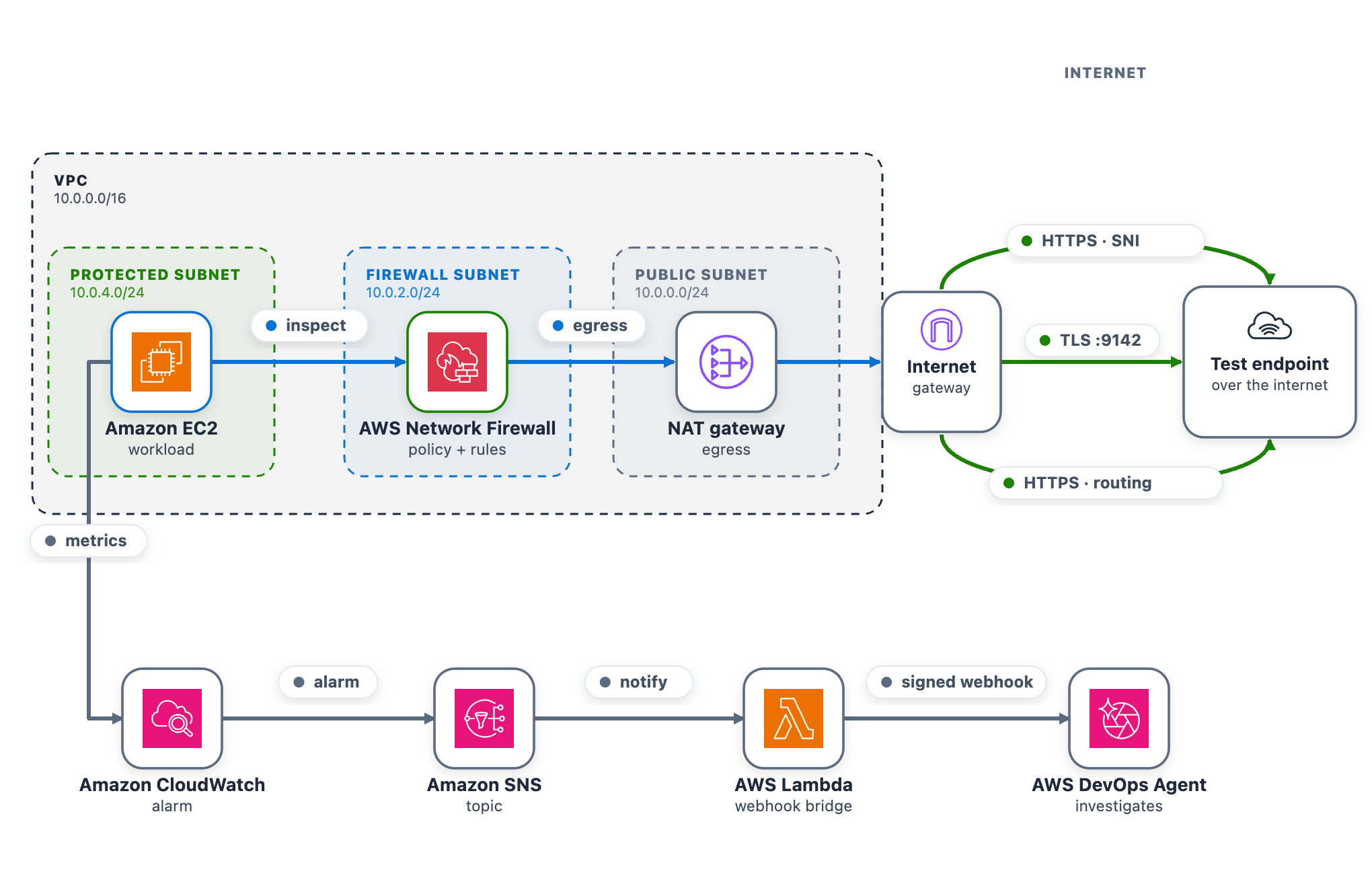
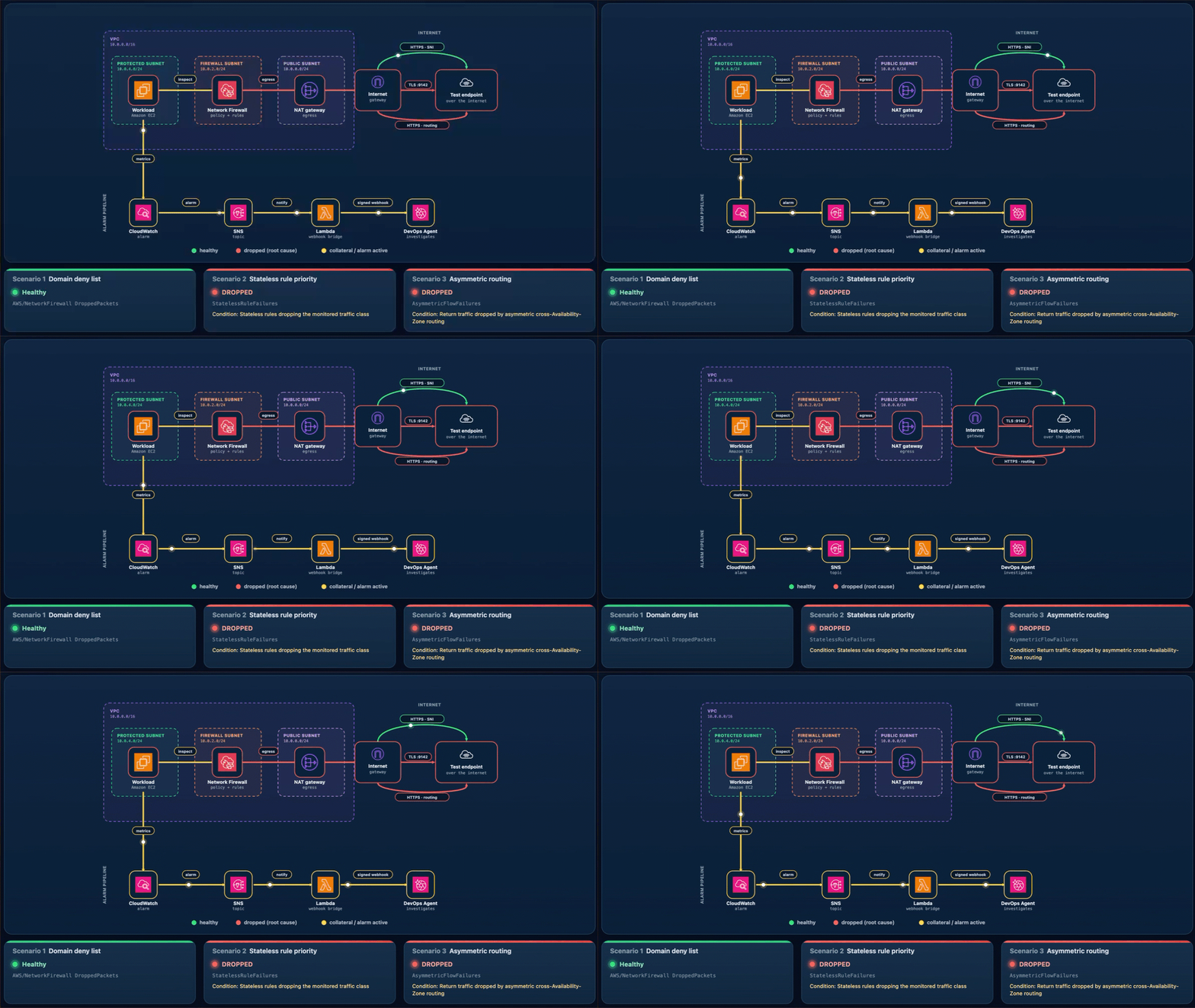
As part of this blog post, we provide a CDK stack that deploys both the AWS DevOps Agent Space and a sample workload used to walk through three separate troubleshooting scenarios. A single t3.micro instance in a protected subnet checks its connectivity to a test endpoint on a continuous loop and publishes results to CloudWatch. Traffic takes the internet egress path through Network Firewall, the NAT gateway, and the internet gateway, so the firewall can intercept or drop it. After completing the walkthrough, you can apply the same troubleshooting techniques with DevOps Agent against your own Network Firewall deployments.
The test endpoint runs in a separate VPC deployed by the same CDK app. It serves HTTPS on port 443 and TCP on port 9142, giving each scenario a different protocol layer to exercise: Scenario 1 targets a TLS connection on 443 (matched by Server Name Indication), Scenario 2 targets a TCP connection on 9142, and Scenario 3 exercises the whole egress path.
A live status page shows one card per scenario plus the network topology. The whole stack deploys from a single CDK app across two Availability Zones, each with a firewall endpoint and NAT gateway, which is what makes Scenario 3 possible.
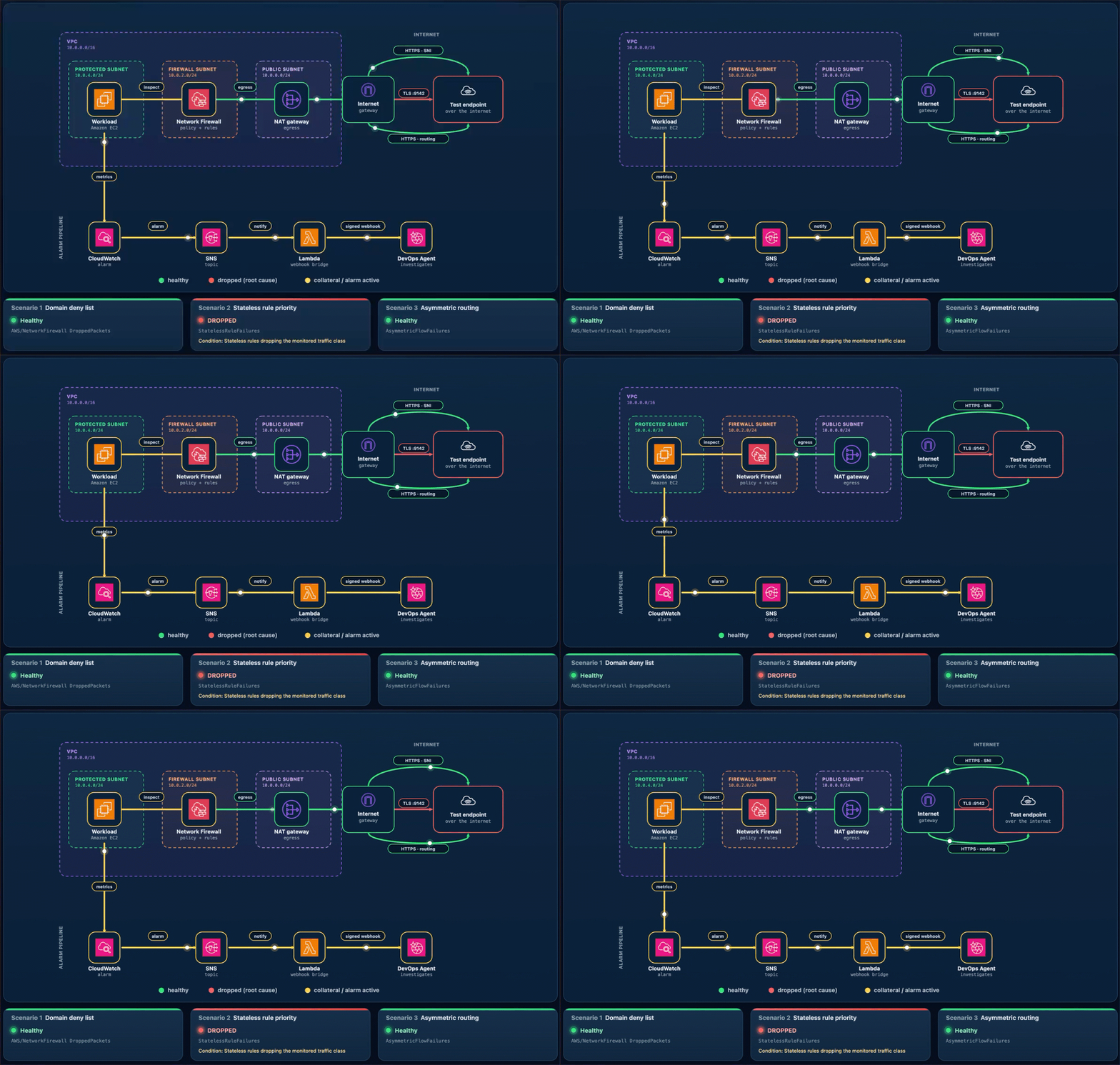
As shown in the following figure, the egress data path runs from the workload through Network Firewall and the NAT and internet gateways to the test endpoint. The alarm pipeline runs from CloudWatch through Amazon Simple Notification Service (Amazon SNS) and the webhook AWS Lambda function to DevOps Agent.
Figure 1: The sample workload
To use this with your own workload, you need a CloudWatch alarm that detects the connectivity problem and the webhook pipeline (SNS topic and Lambda function) that delivers it to DevOps Agent. The agent reads your firewall configuration, logs, and CloudTrail through AWS APIs, so no additional instrumentation is needed on the firewall side.
AWS CDK 2.x is required. You can use it through the project’s npx dependency, or install it globally:
npm install -g aws-cdk
Deploy the sample workload
Clone the project and deploy it into us-east-1 with one command (set awsRegion to use another AWS Region).
git clone https://github.com/aws-samples/sample-accelerating-aws-network-firewall-troubleshooting-with-aws-devops-agent.git
cd sample-accelerating-aws-network-firewall-troubleshooting-with-aws-devops-agent
bash scripts/deploy.sh
The script checks prerequisites, installs dependencies, compiles and tests, and bootstraps the CDK if needed. It then deploys all the stacks from a clean baseline and prints the outputs, including the status-page URL and sign-in details.
Open the status-page link (an https://<random-id>.cloudfront.net address).
Sign in using the username and password provided from the CDK output and confirm all three cards show the green Healthy status.
Keep the page open while you run the scenarios.
Connect AWS DevOps Agent
To connect AWS DevOps Agent to the alarm pipeline
In the AWS DevOps Agent console, open the nf-devops-agent-space Agent Space created by the CDK deployment.
On the status page, choose Configure webhook, paste the URL and signing secret, and save. The page writes them to the nf-devops-agent-webhook-credentialsAWS Secrets Manager secret, so there is no AWS CLI or console step. Until you set it, the bridge Lambda function sees a placeholder and skips delivery.
Verify the path before you run a scenario. In the Lambda console, open nf-devops-agent-webhook and use the Test tab with this event.
{
  "Records": [
    {
      "Sns": {
        "Message": "{\"AlarmName\":\"TEST-webhook-verification\",\"AlarmDescription\":\"[TEST] Webhook integration test - not a real alarm.\",\"NewStateValue\":\"ALARM\",\"NewStateReason\":\"[TEST] Manual webhook connectivity test. Safe to ignore.\",\"Region\":\"us-east-1\"}"
      }
    }
  ]
}
A 200 response confirms the path, and a test investigation appears in the DevOps Agent Operator Web App view.
How the alarm pipeline works
Every scenario reaches DevOps Agent the same way. A CloudWatch alarm moves to ALARM and notifies the SNS topic. Amazon SNS invokes a Lambda function. The function reads the webhook URL and signing secret from Secrets Manager, signs an alarm payload, and POSTs it to the DevOps Agent webhook (as shown in Figure 1). Amazon SNS also provides delivery retries, fan-out to other subscribers, and cross-account publishing.
Prebuilt Network Firewall metric (Scenario 1) – Alarm-1 watches the DroppedPackets metric, summed across the stateful streams, and triggers when drops rise above a baseline threshold. This requires no workload or custom metric and works on an already-deployed firewall. However, it only tells you that the firewall is dropping packets, not which rule is responsible.
Application health metric (Scenarios 2 and 3) – Alarm-2 and Alarm-3 watch a custom metric from a connectivity check. Use this for an alarm tied to user-facing impact or to tell one traffic path from another, which requires running a component that emits the metric.
Alarm
Source
Triggers when
Alarm-1
Native AWS/NetworkFirewall DroppedPackets
The firewall’s dropped-packet count rises above the baseline
Alarm-2
Custom application health metric
The port 9142 (TCP) connectivity check to the test endpoint is being dropped
Alarm-3
Custom application health metric
The cross Availability Zone connectivity check is being dropped
Run the scenarios
Work through each of the scenarios one at a time, following the same cycle. Interrupt network connectivity, watch the alarm trigger, let DevOps Agent investigate, apply the recommended fix, and confirm recovery before moving on.
The status-page cards follow the live CloudWatch alarm state. A card shows a green dot and the word Healthy when its alarm is clear, and a red dot and the word DROPPED when its alarm triggers. In the DROPPED state the card also adds a Condition: line describing what’s being dropped, which isn’t shown when the card is healthy. Network Firewall applies changes to new flows, so a change shows within a minute or two. Recovery comes from the mitigation DevOps Agent recommends, which you review and apply.
Scenario 1. Domain deny list blocking a legitimate endpoint
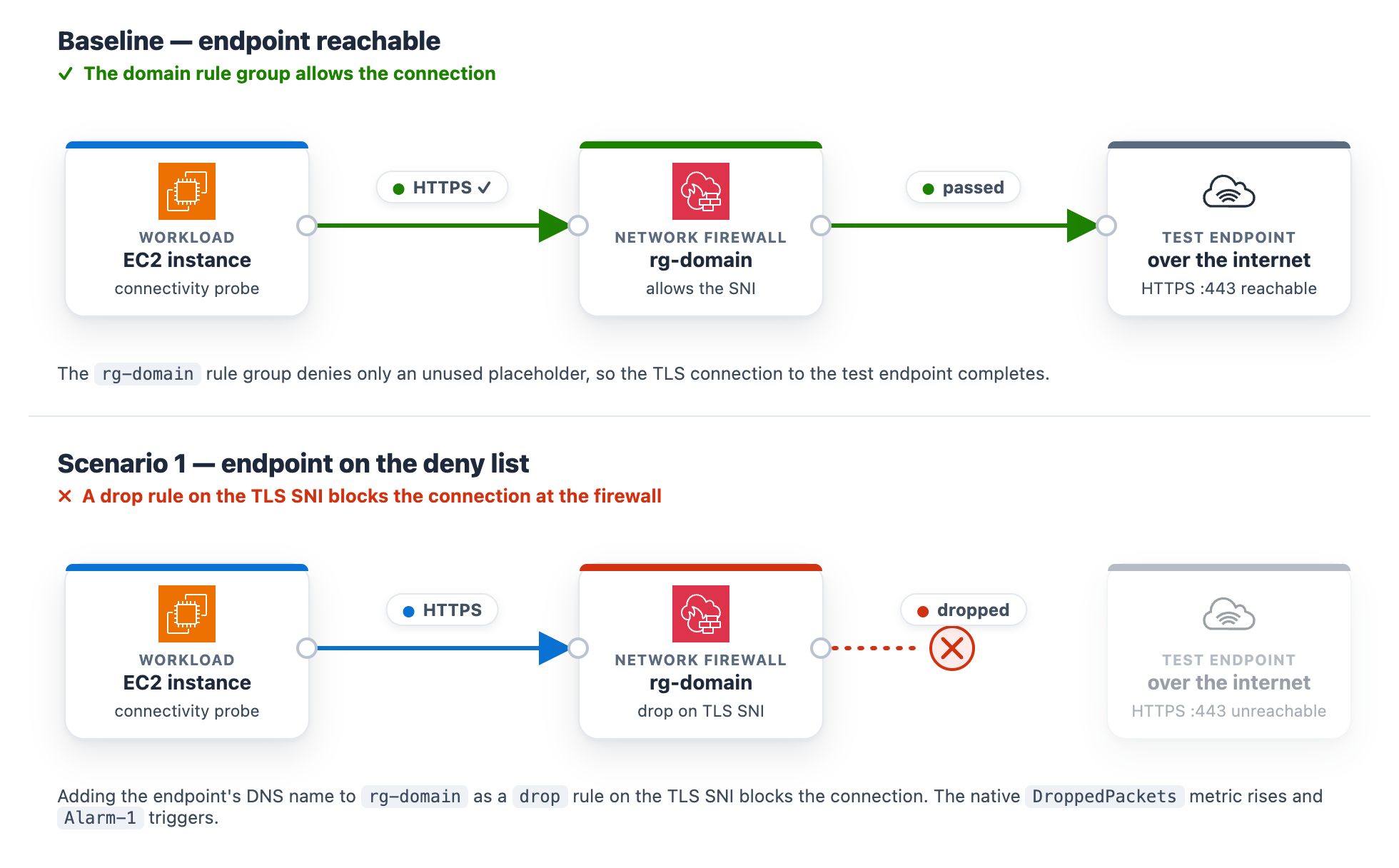
At baseline, the rg-domain Suricata domain rule group denies only an unused placeholder, so the test endpoint stays reachable. The rule group inspects the TLS Server Name Indication (SNI) on each outbound connection and drops any that matches a denied domain. The exact rule syntax and console steps follow.
In the navigation pane, under Network Firewall, choose Network Firewall rule groups.
Choose the rg-domain rule group to open its details page.
In the Rules section, choose Edit.
The rules box already contains two baseline placeholder rules (they match blocked.placeholder.invalid, so nothing real is denied). Leave those in place. Find the <app-endpoint-dns> value for Scenario 1 in the deployment script output (a Nework Load Balancer (NLB) DNS name such as NfTest-AppNl-a1b2C3dEf4G5-1234abcd5678efgh.elb.us-east-1.amazonaws.com). On a new line below the existing rules, add a drop rule that matches that DNS name on the TLS SNI, then choose Save.
drop tls $HOME_NET any -> $EXTERNAL_NET any (ssl_state:client_hello; tls.sni; content:"<app-endpoint-dns>"; startswith; nocase; endswith; msg:"S1 domain denylist"; flow:to_server, established; sid:2000002; rev:1;)
After saving, the rules box holds all three lines. The two placeholders remain, plus the new drop rule for the endpoint DNS name (note the distinct sid 2000002).
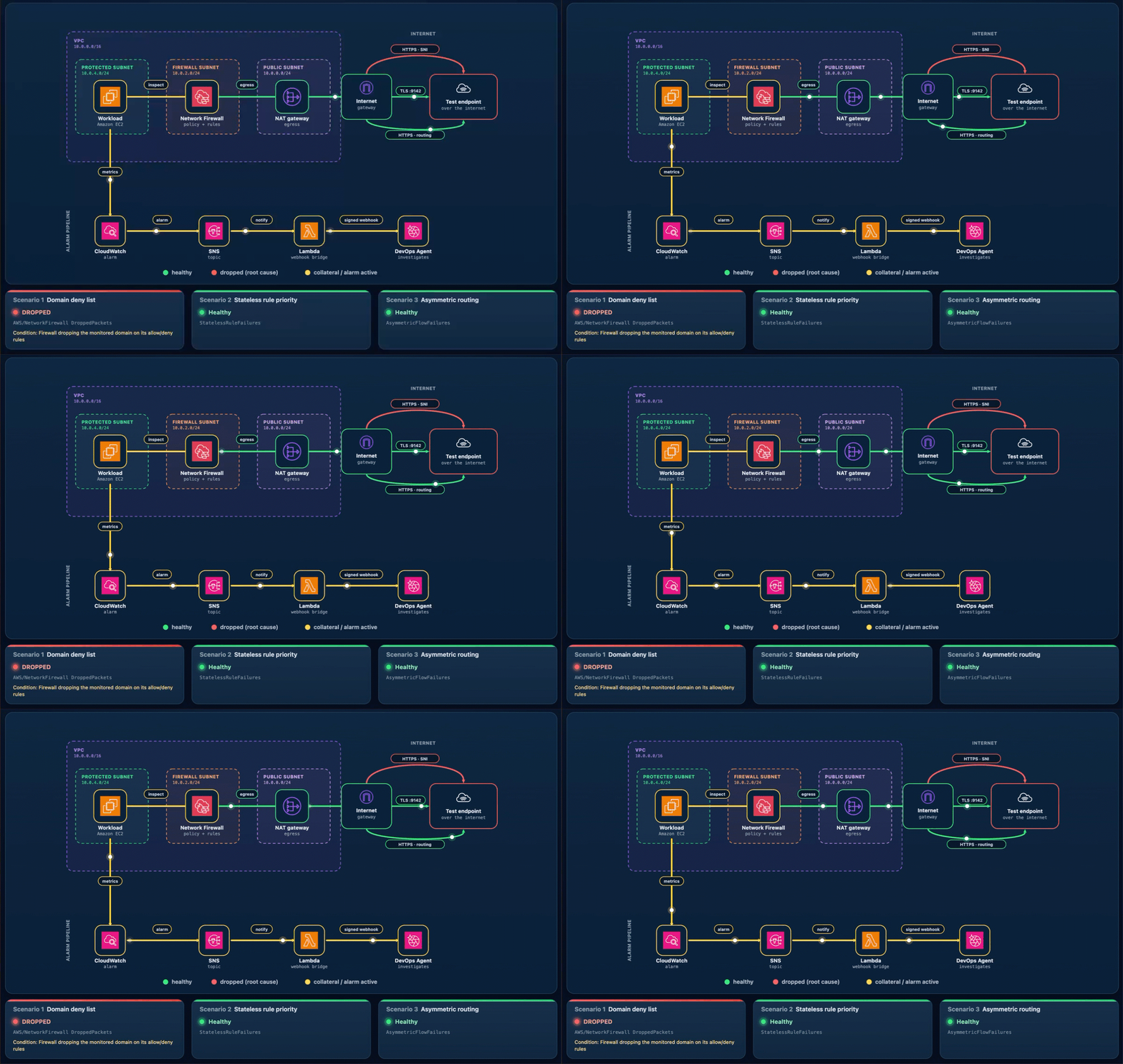
What happens. The workload’s HTTPS check to the test endpoint times out, the “AWS/NetworkFirewall DroppedPackets metric climbs above baseline, and Alarm-1 moves to ALARM. The Scenario 1 card reads DROPPED (with the condition Firewall dropping the monitored domain on its allow/deny rules), while the Scenario 2 and Scenario 3 cards stay Healthy (Figure 3). On the topology, the alarm pipeline from CloudWatch through Amazon SNS and Lambda to DevOps Agent and the workload-to-firewall inspect lines both turn amber, which the legend defines as collateral / alarm active, because the packets are now dropped at the firewall. To demonstrate the resulting failure, the HTTPS · SNI line from the internet gateway to the test endpoint is shown in red, which the legend defines as dropped (root cause).
Figure 3: Scenario 1 active – Traffic blocked at the firewall
Let DevOps Agent investigate. The agent runs several lines of investigation in parallel and correlates them:
Reads the DroppedPackets metric and correlates the spike with a simultaneous drop in passed packets, confirming the firewall is actively blocking traffic.
Reads the ALERT log and finds the workload’s TLS connections to the test endpoint blocked by the S1 domain denylist rule.
Compares the current state against a baseline window, where the same endpoint was reachable with no alerts, which shows the block is new.
Searches CloudTrail and surfaces the UpdateRuleGroup call that added the deny rule, identifying the user, role, and timestamp approximately one minute before the drops began.
Reports the root cause as that manual rule-group change. Recommends removing the deny entry or adding an allow exception and enabling FirewallPolicyChangeProtection to prevent unauthorized changes.
Presents this as a plan you review and apply, not an automatic change.
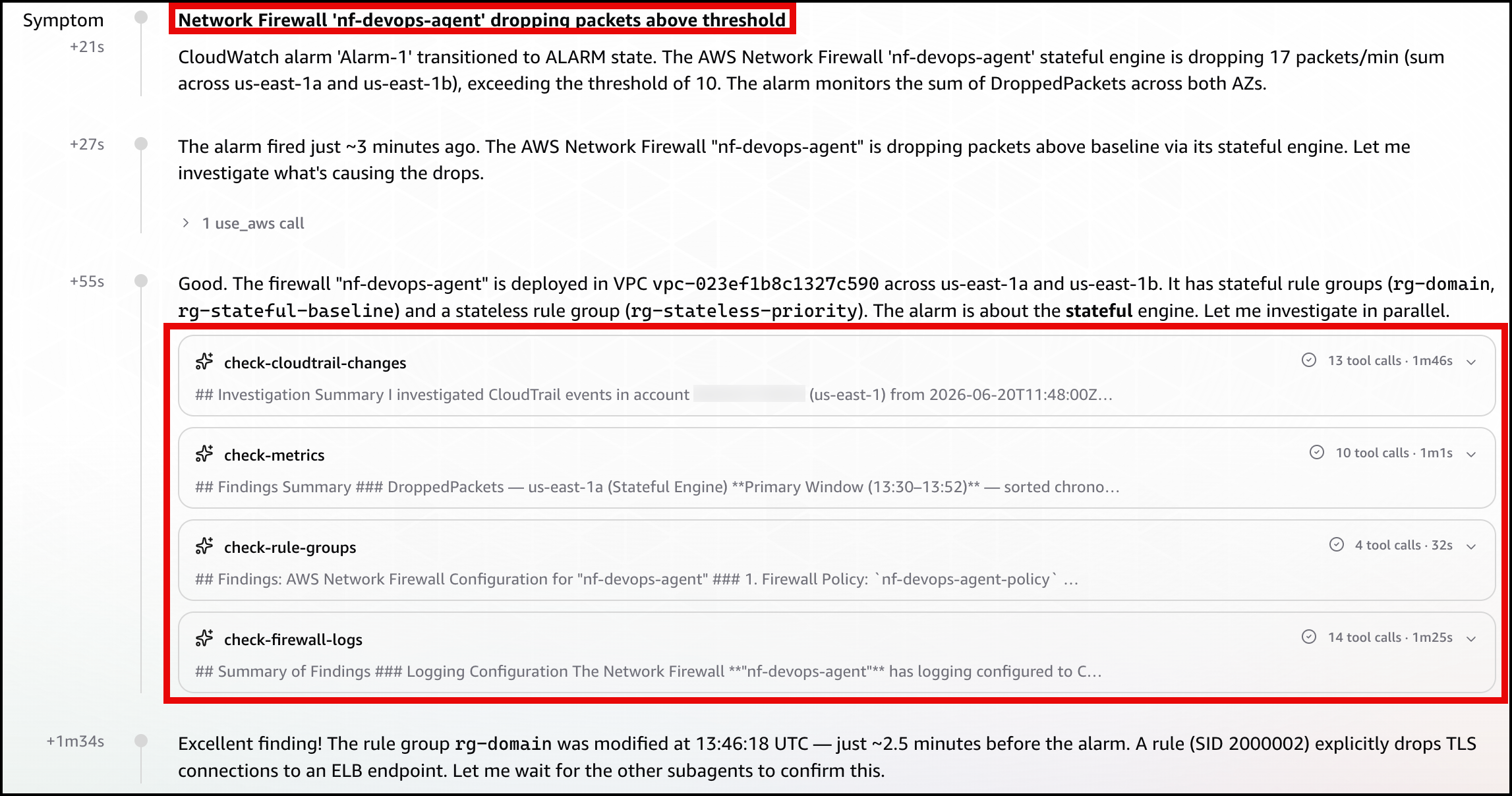
In the DevOps Agent Operator Web App view, the agent first restates the Alarm-1 trigger and confirms the firewall is dropping packets above the threshold (Figure 4).
Figure 4: Scenario 1 – The symptom
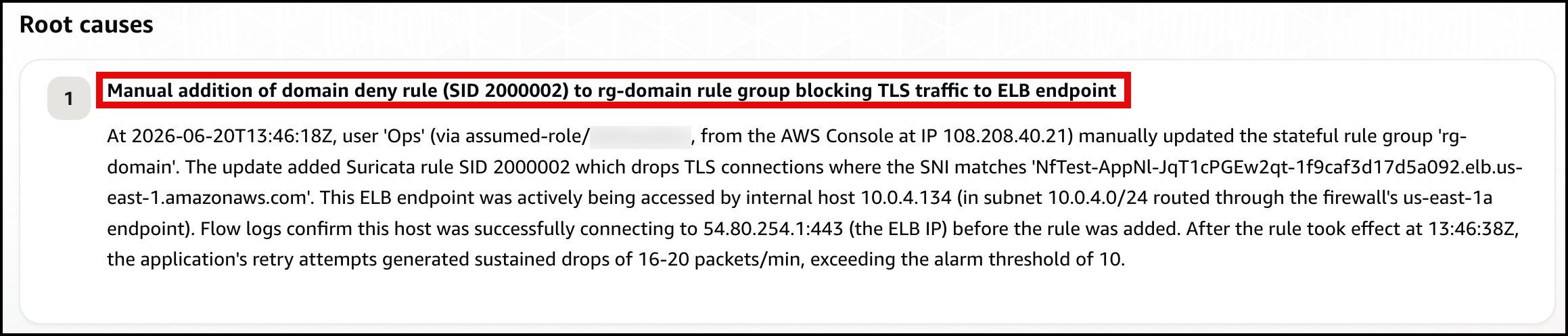
Next, the agent identifies the root cause: a manual update to the rg-domain rule group that added a domain deny rule (SID 2000002) shortly before the alarm fired, blocking TLS connections to the ELB endpoint (Figure 5).
Figure 5: Scenario 1 – The root cause
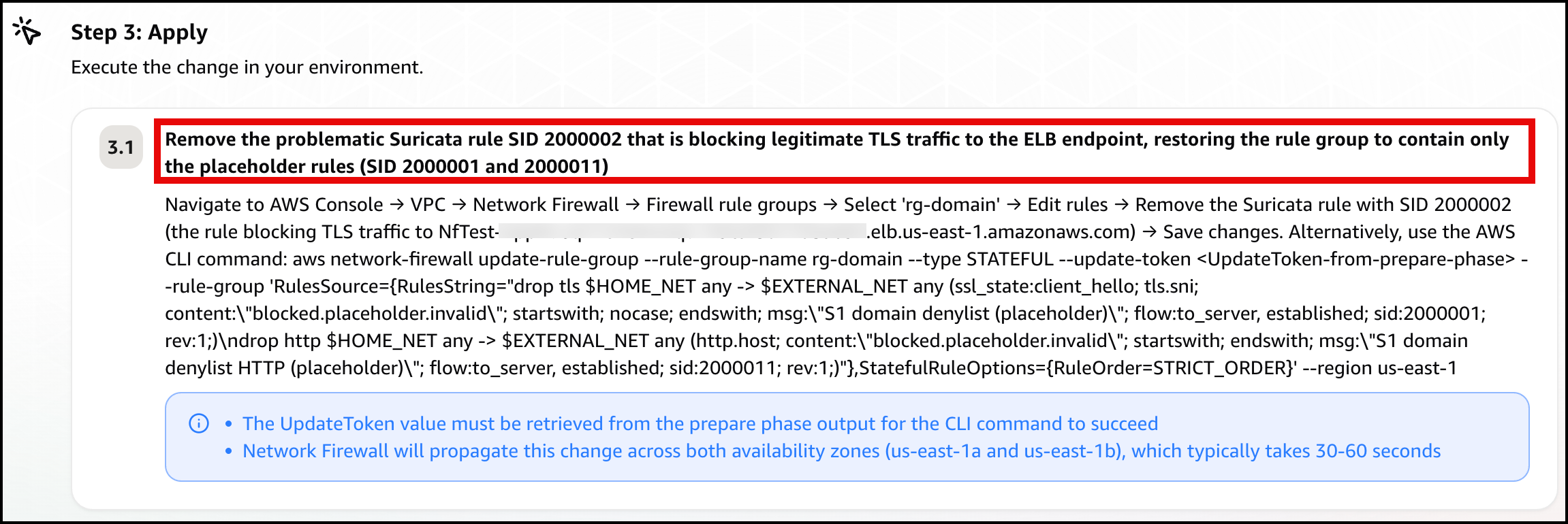
Finally, the agent presents a mitigation plan, recommending you remove the problematic deny rule (SID 2000002) to restore connectivity (Figure 6).
Figure 6: Scenario 1 – The mitigation plan
Note: In a real-world environment, this type of rule typically exists for a reason. Before removing it, verify whether it was intentional but scoped too broadly. If so, refine the rule to block only unauthorized endpoints rather than removing it entirely.
Confirm recovery. Apply the change the agent recommends. After the deny entry is gone, DroppedPackets falls back to baseline, Alarm-1 clears, and the card returns to green. Move on to Scenario 2.
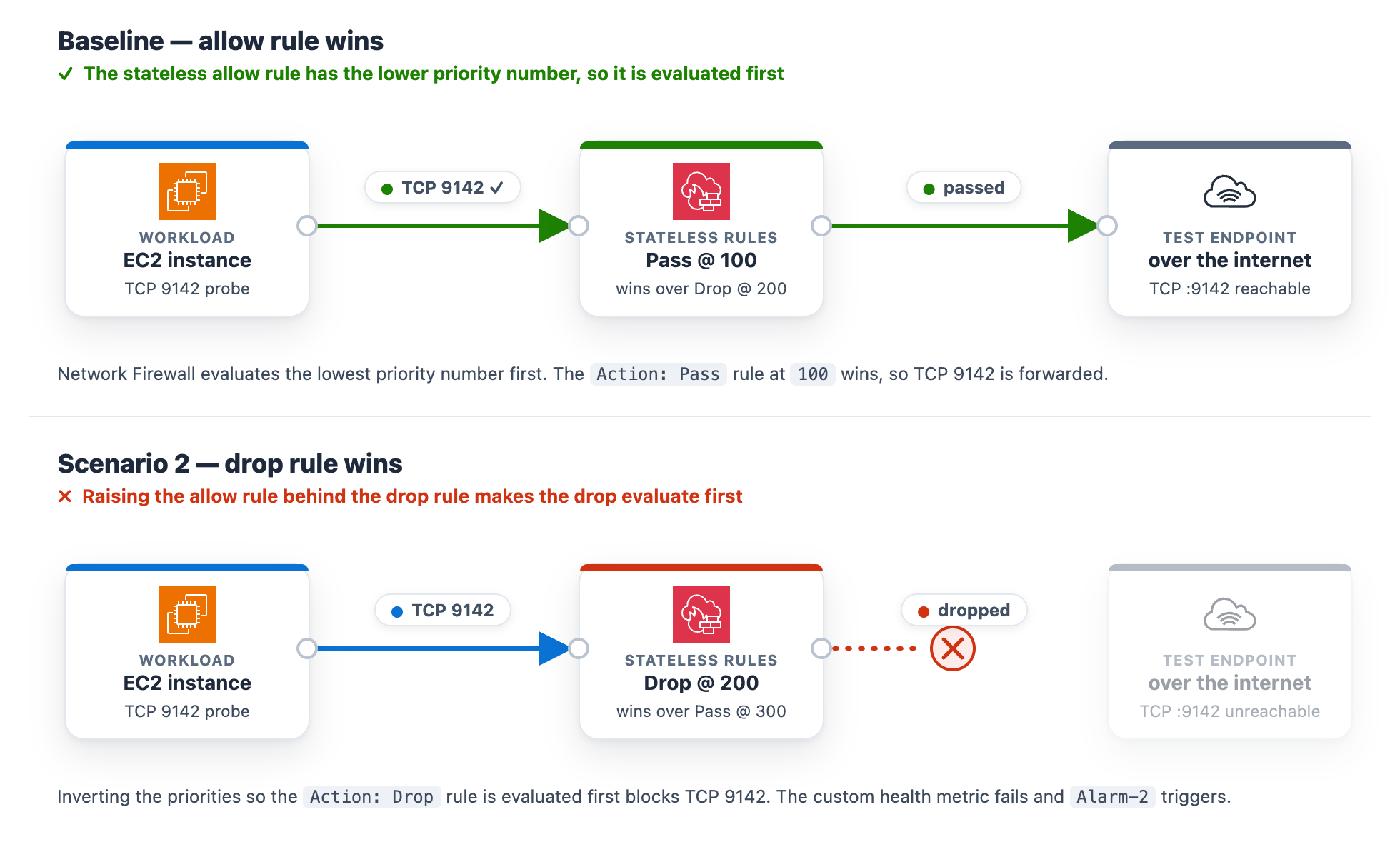
At baseline, the rg-stateless-priority stateless rule group keeps the allow rule at priority 100 and the drop rule at 200 for the test class, TCP destination port 9142. The workload opens a TCP connection to the test endpoint on this port. Lower priority numbers evaluate first, so the allow rule wins. This scenario uses port 9142 instead of 443 to demonstrate a stateless rule, which matches on the packet’s 5-tuple (protocol, ports, addresses) rather than application content.
Introduce the change. Invert the two rule priorities so the drop rule evaluates before the allow rule. This is the kind of change a rushed rule edit can introduce.
In the navigation pane, under Network Firewall, choose Network Firewall rule groups.
Choose the rg-stateless-priority rule group to open its details page.
In the Rules section, choose Edit.
Raise the (Action: Pass) rule’s priority number so it sits after the (Action: Drop) rule, then choose Save. For example, change the (Action: Pass) rule from 100 to 300 (any number higher than the drop rule’s 200 works). You only need to move one rule, and using 300 avoids a clash with the drop rule that already sits at 200. Network Firewall evaluates the lowest priority number first, so the (Action: Drop) rule at 200 now wins for this traffic class, ahead of the (Action: Pass) rule at 300.
Figure 7: Scenario 2 – Rule priority change blocking the traffic class
What happens. The drop rule now wins, the TCP connection to the test endpoint on port 9142 times out, the StatelessRuleFailures metric climbs above baseline, and Alarm-2 moves to ALARM. The Scenario 2 card reads DROPPED (with the condition Stateless rules dropping the monitored traffic class), while the Scenario 1 and Scenario 3 cards stay Healthy (Figure 8). On the topology, the alarm pipeline from CloudWatch through Amazon SNS and Lambda to DevOps Agent and the workload-to-firewall inspect lines both turn amber, which the legend defines as collateral / alarm active, because the packets are now dropped at the firewall. To demonstrate the resulting failure, the TLS :9142 line from the internet gateway to the test endpoint is shown in red, which the legend defines as dropped (root cause).
Figure 8: Scenario 2 active
Let DevOps Agent investigate. A stateless drop happens before traffic reaches the stateful inspection engine, so it produces no ALERT log entries. The agent turns to configuration and flow logs instead:
Reads the stateless rule group state and finds the drop rule at the lower priority number, ahead of the pass rule, so the drop evaluates first.
Reads the flow logs and sees passed packets drop to zero within a minute of the change.
Searches CloudTrail and surfaces the UpdateRuleGroup call that inverted the priorities, identifying the user, role, and timestamp about a minute before the alarm.
Reports the root cause as that priority inversion. Recommends removing the redundant drop rule and managing the rule group through infrastructure-as-code (IaC) to prevent manual misconfigurations.
Presents this as a plan you review and apply, not an automatic change.
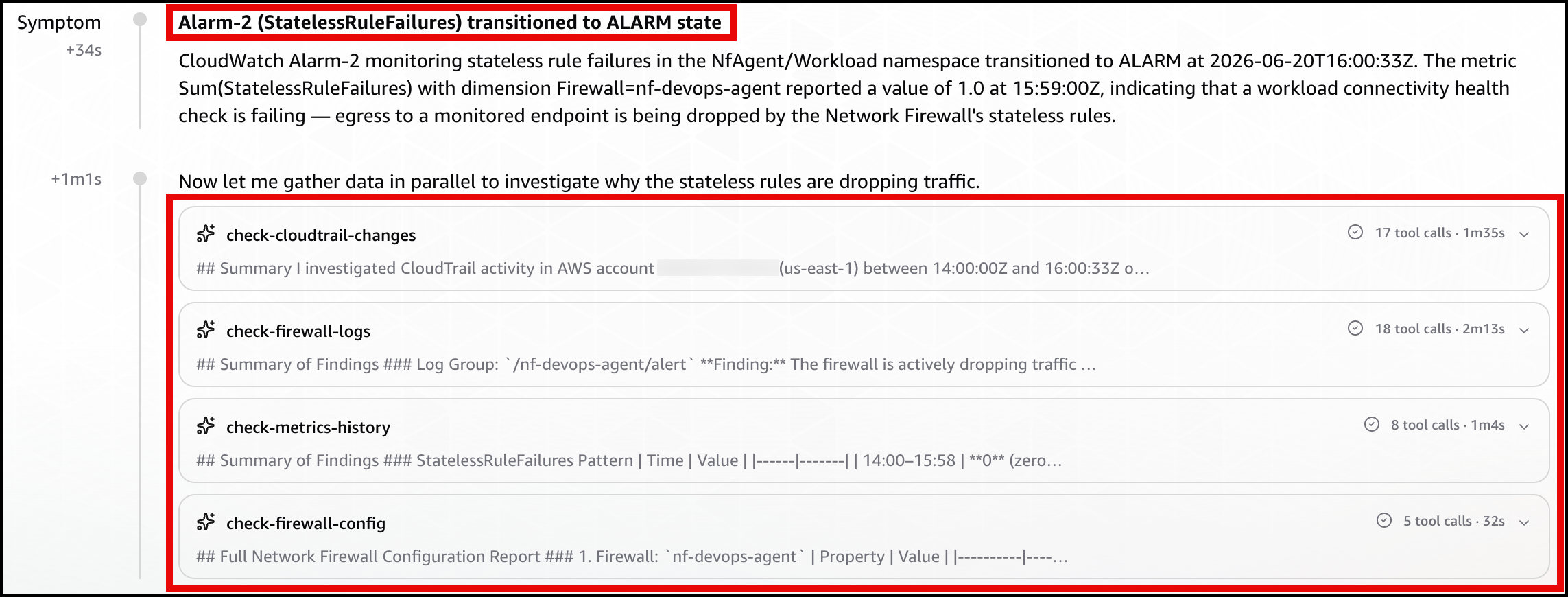
In the DevOps Agent Operator Web App view, the agent first restates the Alarm-2 trigger and confirms that a workload connectivity health check is failing because the firewall’s stateless rules are dropping egress (Figure 9).
Figure 9: Scenario 2 – The symptom
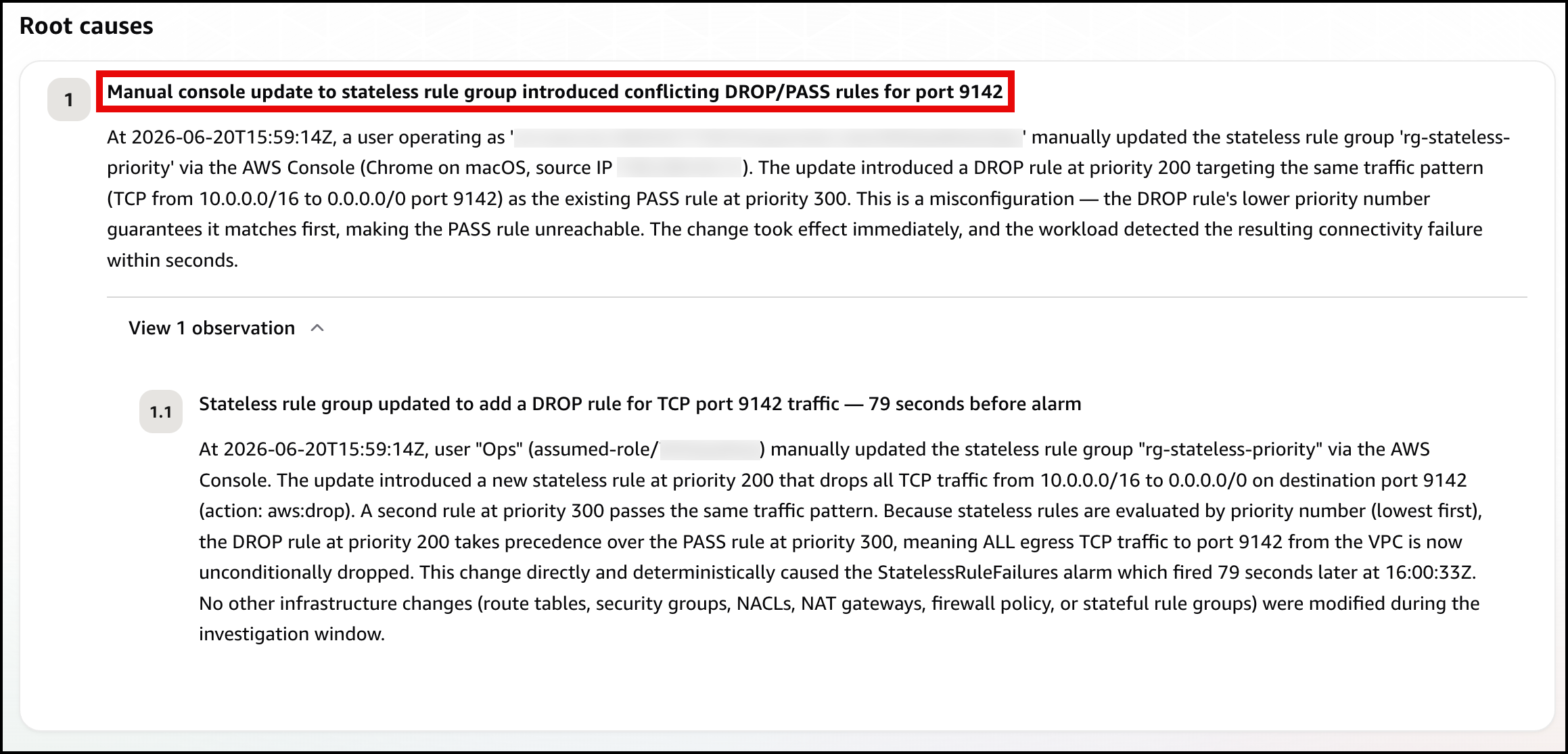
Next, the agent identifies the root cause, using the rule-group state and CloudTrail to pinpoint the conflicting DROP/PASS rules, where the new DROP rule’s lower priority number makes it match first (Figure 10).
Figure 10: Scenario 2 – The root cause
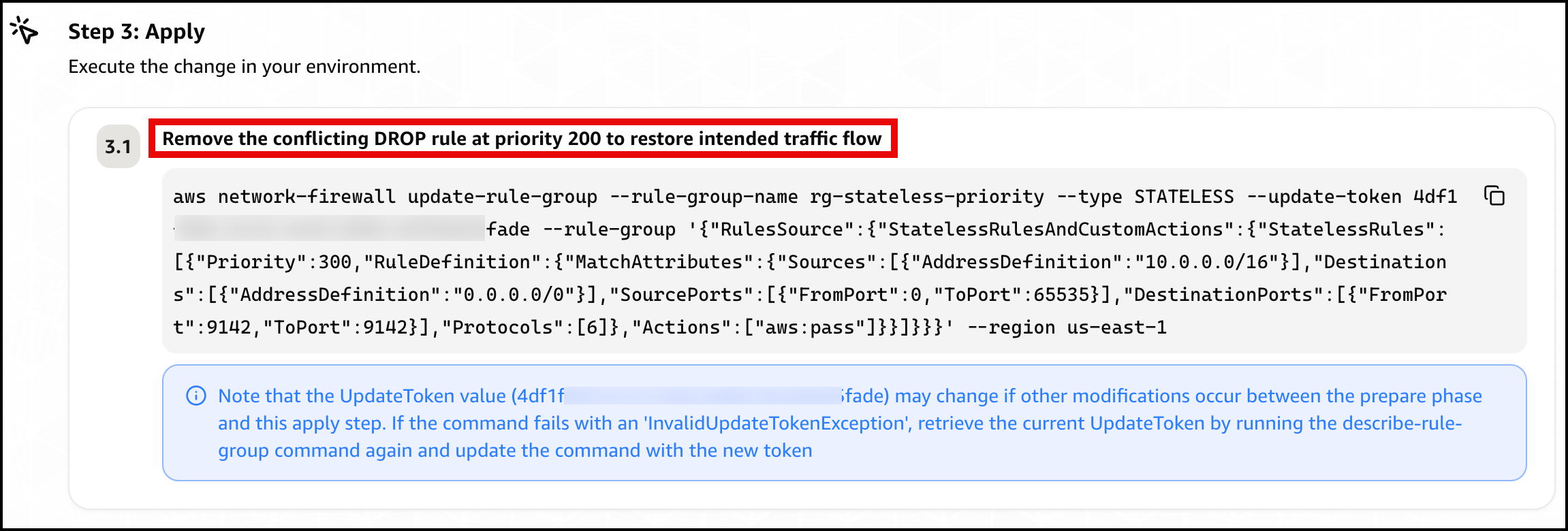
Finally, the agent presents a mitigation plan, recommending you remove the conflicting DROP rule at priority 200 to restore traffic flow (Figure 11).
Figure 11: Scenario 2 – The mitigation plan
Confirm recovery. Apply the change the agent recommends. After the allow rule is ahead of the drop rule again, Alarm-2 clears and the card returns to green. Move on to Scenario 3.
Scenario 3. Asymmetric cross Availability Zone routing drop
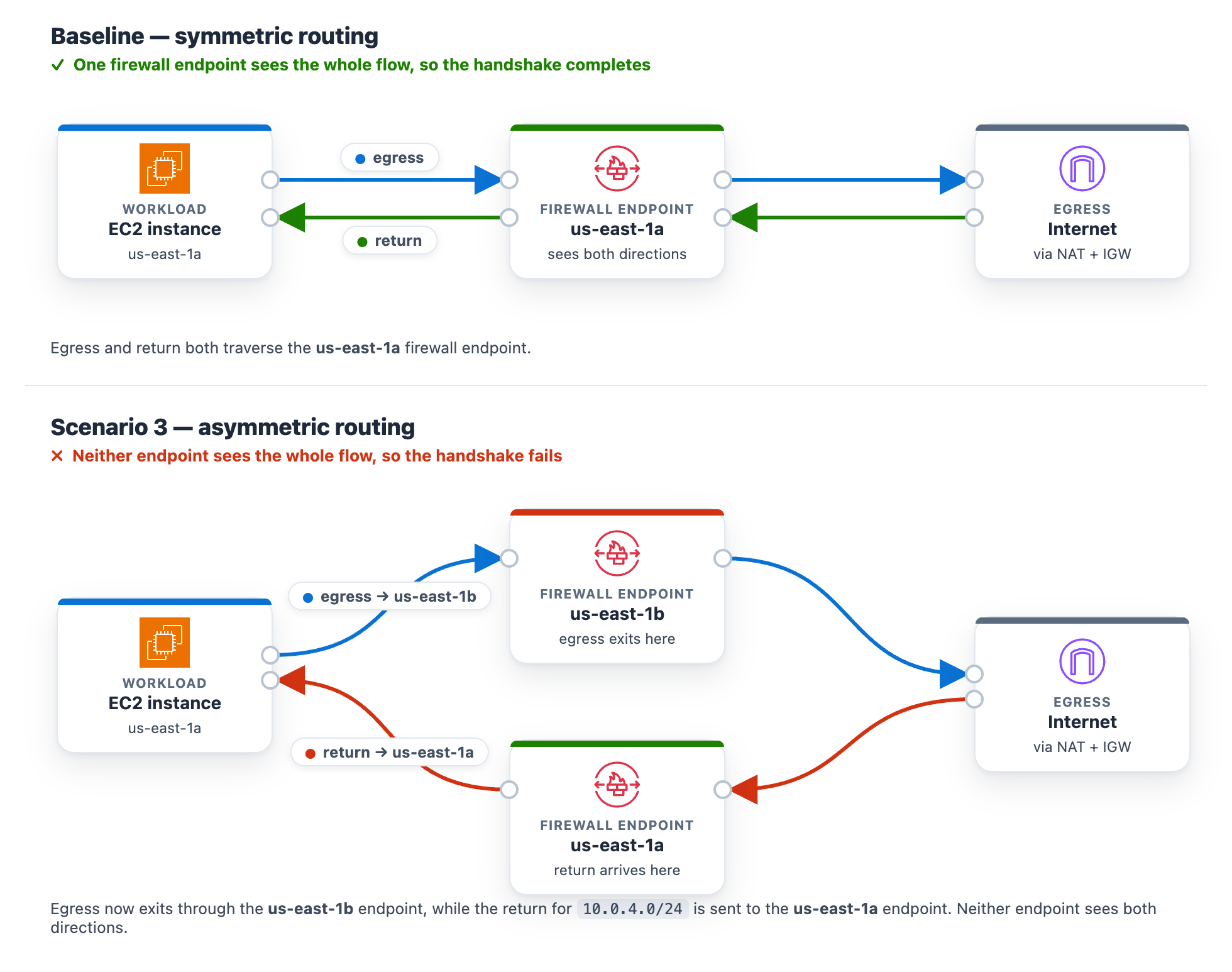
At baseline, the protected subnet in each Availability Zone routes its egress through the firewall endpoint in that same Availability Zone , and the matching return route uses that same endpoint. One endpoint sees both directions of the flow, so the stateful engine completes the handshake. The workload runs in the protected subnet in us-east-1a (CIDR 10.0.4.0/24), so at baseline its egress and its return both use the us-east-1a firewall endpoint.
Introduce the change. Make the flow asymmetric by sending egress out one Availability Zone endpoint while the return comes back through the other. This takes two route edits, and both are required. With only the first edit the flow can still complete, so the alarm will not trigger until both are saved. It makes no firewall-policy change, mirroring a real multi-Availability-Zone routing mistake.
To create asymmetric cross Availability Zone routing
Go to the Amazon VPC console and choose Route tables in the navigation pane.
Flip the egress. Select the NfNetworkStack/SampleVpc/protectedSubnet1 route table (the us-east-1a protected subnet, where the workload runs). On the Routes tab, choose Edit routes. Its 0.0.0.0/0 route currently targets the us-east-1a firewall endpoint. For the target, choose Gateway Load Balancer Endpoint and select the us-east-1b firewall endpoint, then choose Save changes.
Move the return. Select the NfNetworkStack/SampleVpc/publicSubnet2 route table (the us-east-1b public subnet, where egress now exits). Choose Edit routes, then Add route. For the destination enter the workload CIDR 10.0.4.0/24. For the target, choose Gateway Load Balancer Endpoint and select the us-east-1a firewall endpoint. Choose Save changes.
After both edits, a flow’s egress leaves through the us-east-1b endpoint while its return is directed to the us-east-1a endpoint. Neither endpoint sees the whole flow.
Figure 12: Scenario 3 routing change breaking the flow’s symmetry
What happens. A new connection leaves through one endpoint. Its return arrives at the other endpoint, which never saw the connection open, so the handshake fails. Unlike Scenarios 1 and 2, this affects the whole subnet, so all egress stops and Alarm-2 and Alarm-3 both move to ALARM. The AWS/NetworkFirewall DroppedPackets alarm (Alarm-1) stays quiet because no endpoint is making a drop decision. The flow is lost to asymmetric routing rather than counted as a firewall drop. This is why monitoring application connectivity matters. A routing fault is invisible to the firewall’s own drop counter. On the status page, the Scenario 2 card reads DROPPED (with the condition “Stateless rules dropping the monitored traffic class”) and the Scenario 3 card reads DROPPED (with the condition Return traffic dropped by asymmetric cross-Availability-Zone routing), while the Scenario 1 card stays Healthy (Figure 13). On the topology, the alarm pipeline from CloudWatch through Amazon SNS and Lambda to DevOps Agent and the workload-to-firewall inspect lines both turn amber, which the legend defines as collateral / alarm active, while the egress path from the firewall through the NAT gateway and the TLS :9142 and HTTPS · routing lines to the test endpoint turn red, which the legend defines as dropped (root cause).
Figure 13: Scenario 3 – The status page during a path-wide outage
Let DevOps Agent investigate. Both Alarm-2 and Alarm-3 fire in the same datapoint. DevOps Agent recognizes them as linked and merges them into a single investigation:
Reads the flow logs and sees bidirectional TLS connections stop abruptly, with only one-way traffic remaining and no flows reaching the established state.
Reads the firewall metrics and sees received and passed packets shift from one Availability Zone to the other at the moment of the change.
Calls DescribeRouteTables and finds the egress route pointing at one Availability Zone firewall endpoint while the return route points at the other.
Searches CloudTrail and surfaces the ReplaceRoute and CreateRoute calls by the same user, about a minute before both alarms fired.
Reports the root cause as that asymmetric routing change. Recommends restoring symmetric same-Availability-Zone routing so egress and return traverse the same endpoint.
Presents this as a plan you review and apply, not an automatic change.
A mitigation plan is a recommendation you review, not an automatic change, and the right fix depends on the intended design. Restoring symmetric routing can mean sending the workload subnet’s egress back through its own-Availability-Zone firewall endpoint (this sample’s architecture) or, in a design that doesn’t inspect this path, back through a NAT gateway. The agent infers a plausible target from what it can observe, so review the specific route it proposes against your intended topology before you apply it. (Connecting your pipeline or infrastructure-as-code, covered in the next section, lets the agent recommend the target that matches your design.)
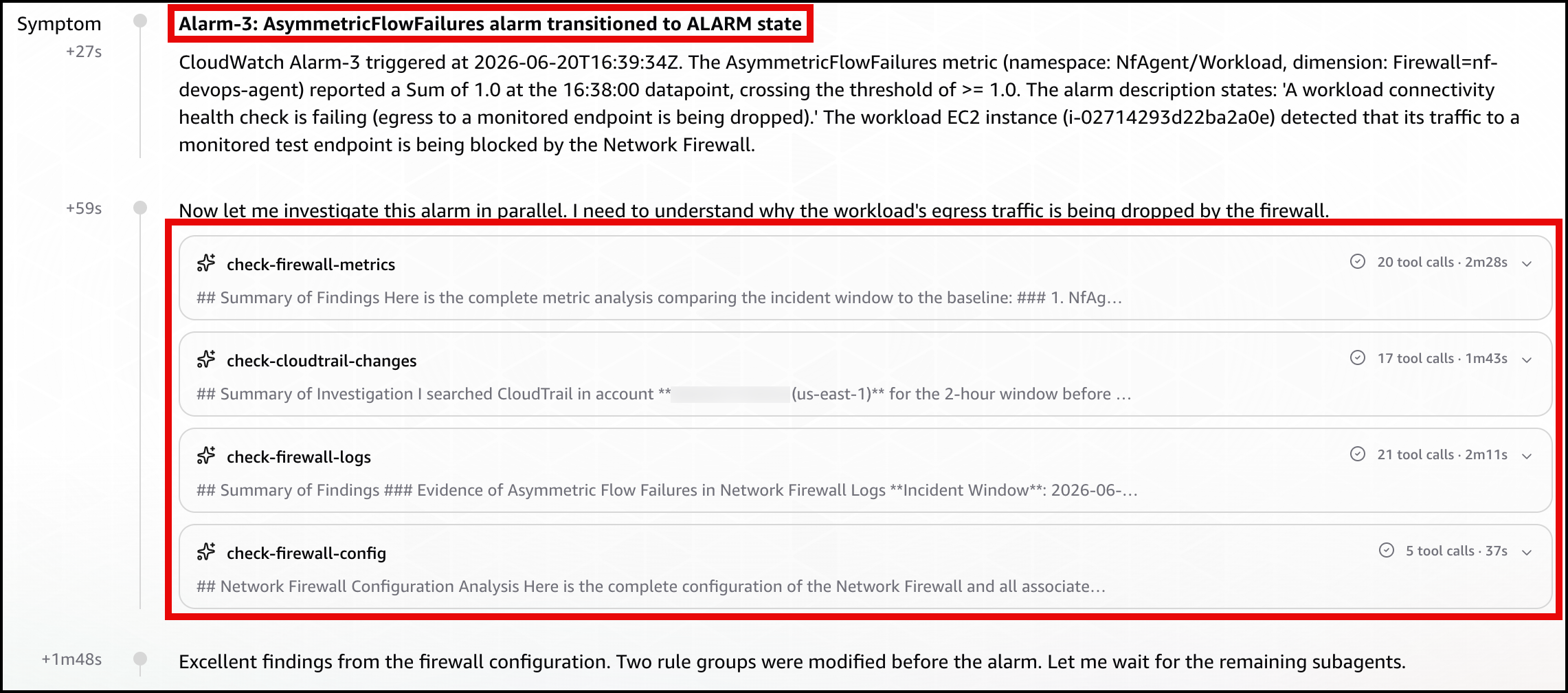
In the DevOps Agent Operator Web App view, the agent restates the Alarm-3 (AsymmetricFlowFailures) trigger and confirms the workload’s egress to a monitored endpoint is being blocked by the Network Firewall (Figure 14).
Figure 14: Scenario 3 – The symptom
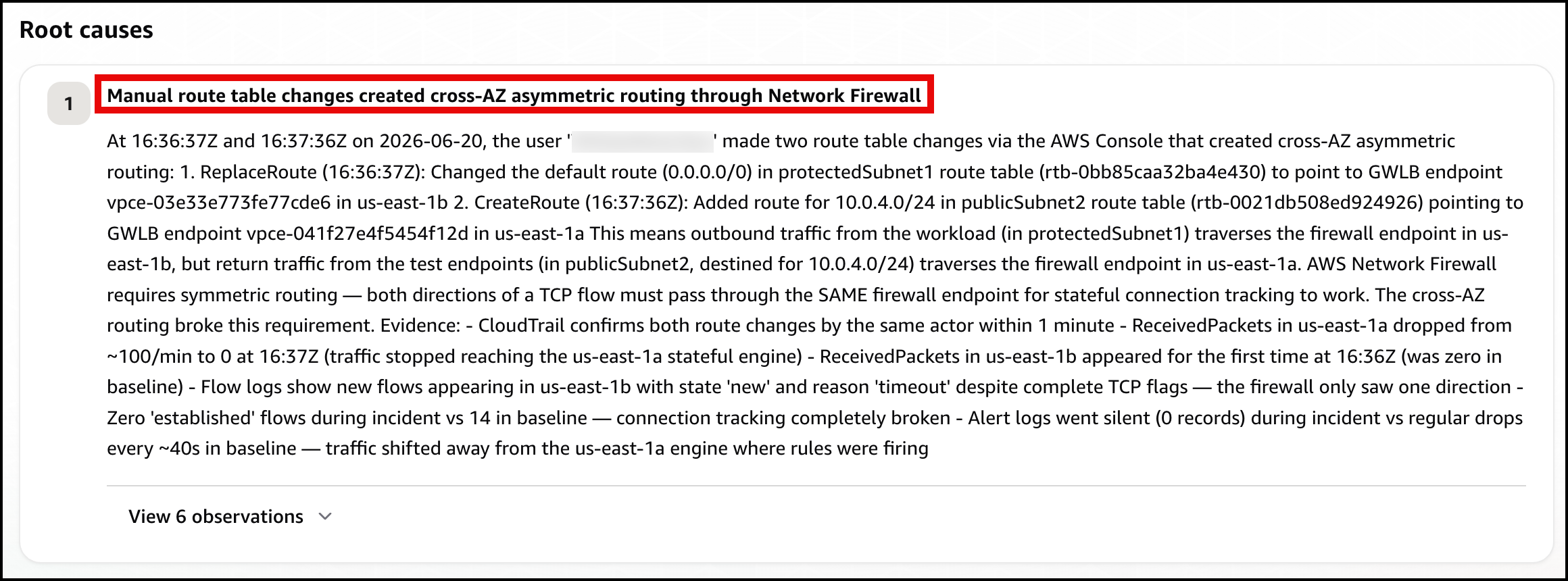
Next, the agent identifies the root cause: manual route table changes that created cross-AZ asymmetric routing through the network firewall, breaking its symmetric routing requirement (Figure 15)
Figure 15: Scenario 3 – The root cause
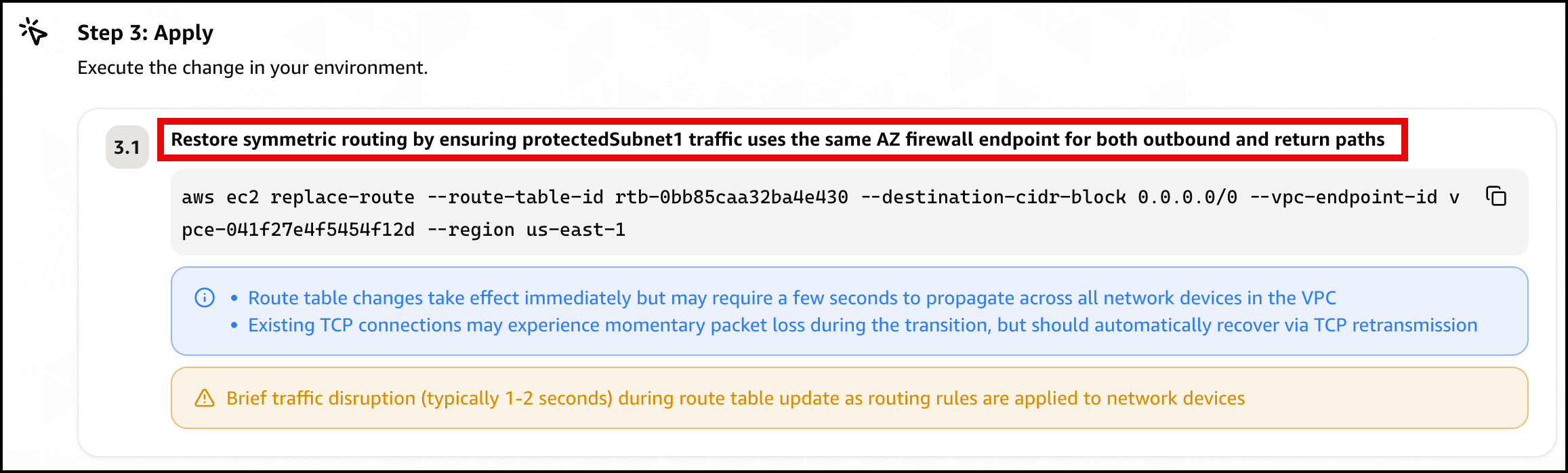
Finally, the agent presents a mitigation plan, recommending you restore symmetric routing by pointing protectedSubnet1‘s default route back to the same Availability Zone firewall endpoint, so one endpoint sees both directions of the flow again (Figure 16).
Figure 16: Scenario 3 – The mitigation plan
Confirm recovery. Apply the change the agent recommends, after checking the route target matches your intended design. After the workload subnet’s egress and return use the same Availability Zone firewall endpoint again, the control probe recovers, the alarms clear, and every card returns to green.
Further considerations
In production a single change can trigger several alarms at the same time, as Scenario 3 shows. DevOps Agent links related investigations and works them as one, so you review a single root cause. You can validate the linked findings or unlink an alarm to investigate it independently. If you would rather collapse alarms before they reach the agent, you can add correlation logic in the bridge Lambda function, buffering and grouping by firewall. You can also add email, Amazon Simple Queue Service (Amazon SQS), or HTTP subscribers to the SNS topic, or add the webhook Lambda function to a topic you already run. DevOps Agent produces a mitigation plan but does not change your environment on its own.
You can also give the agent more to work with. DevOps Agent connects to source repositories and CI/CD pipelines, integrating with GitHub (including GitHub Enterprise Server and GitLab Self-Managed through a private connection). It can associate AWS resources with deployments of AWS CloudFormation, AWS CDK, Amazon Elastic Container Registry (Amazon ECR) images, and Terraform. With deployed configuration and recent deployment events in view, the agent correlates the disruption against the change that introduced it and recommends a fix matching your intended design. For this sample, that means recommending the workload subnet’s own Availability Zone firewall endpoint rather than a generic symmetric path.
DevOps Agent also supports proactive incident prevention. It analyzes patterns across past investigations and delivers recommendations to prevent similar issues from recurring, including governance recommendations that strengthen deployment processes and pipeline controls. For Network Firewall rule changes, this means the agent can recommend guardrails for your CI/CD pipeline based on the classes of misconfigurations it has already resolved. You can access these recommendations through the Improvements page in the DevOps Agent Operator Web App.
Clean up
Clean up the environment with one command.
bash scripts/destroy.sh
It reverts any active scenario, runs cdk destroy for all stacks, and sweeps for stragglers by the Project = nf-devops-agent tag. The main cost drivers are the two Network Firewall endpoints, the NAT gateways (one in the main VPC for each Availability Zone, one in the test-endpoint VPC), and the test endpoint’s load balancers. Each of these bills at an hourly rate for as long as it’s provisioned, whether or not traffic is flowing, so a stack left running continues to accrue charges around the clock even while idle. Running the scenarios and tearing the stack down the same day limits the cost to a few active hours rather than days of idle hourly charges.
Conclusion
In this post, we showed you how AWS DevOps Agent accelerates troubleshooting for three common network firewall connectivity issues. The first was a domain deny list. The second was a stateless priority inversion. The third was an asymmetric cross-AZ routing drop. For each one, DevOps Agent investigated the drop and returned a root cause with a mitigation plan you approve before applying. The first scenario triggered on a prebuilt Network Firewall metric, and the other two on application health metrics. That shows both ways to alarm on a firewall problem through one pipeline.
Security Operations Centers (SOCs) serve as a critical line of defense against today's constantly evolving cybersecurity threats. At the heart of these teams are SOC analysts, who monitor, detect, and respond around the clock to potential attacks.
The conversation around AI-powered threats has focused heavily on the attacker side. What models can do, what vulnerabilities they can find, how fast they can chain exploits together. But the more important question for security practitioners is simpler and harder. Is your detection posture ready for what’s already happening?
AI has lowered the barrier to entry for sophisticated attacks. Threat actors don’t need to be experts to leverage LLMs for obfuscation, exploit development, or chaining attack steps that previously required deep manual skill. The speed and volume of attacks is increasing as a result. Detection engineering is part of how defenders respond. And most organizations are further behind than they realize, especially because many detection engineering programs live in their own siloed “ivory tower”, detached from the realities of what SOC analysts are handling.
At Intezer, AI-powered detection engineering runs as part of a closed loop with automated, forensic triage and investigation. Every alert investigated across the environment feeds new signal back into detection logic, so coverage improves continuously instead of drifting between quarterly tuning cycles. Detection working in concert with triage and investigation is what a fully optimized security environment looks like against AI-powered attackers. In this article, we’ll focus on how to improve detection engineering practices in general.
Why your current detection posture isn’t keeping pace
The fundamental problem is that most detection programs were built for a world where attack volume was bounded by attacker expertise. That constraint is being removed. LLM-augmented attacks can move faster, produce more permutations, and adapt more readily to your environment than traditional campaigns. A detection posture built on static indicators and periodic tuning cycles can’t keep up.
There are three places this shows up in practice.
Covering one sub-technique doesn’t cover the technique
First, most organizations are only covering technique-level MITRE ATT&CK mappings, not sub-techniques. When you claim T1059 is covered because you have a rule for T1059.001, you’re exposing yourself to real risk hiding beneath that coverage number. Sub-techniques carry distinct behaviors that may exist in your environment and go completely undetected. High-level coverage scores look good in reports and obscure what’s actually happening. The risk lives at the sub-technique level.
IOCs are brittle indicators
Second, IOC-based detections are becoming a liability at scale. IP addresses, file hashes, domains are valuable in incident response but brittle as primary detection logic. Their half-life is short, adversaries burn them readily, and maintaining a large list of active IOCs creates noise without proportionate signal. Organizations that lead with IOCs end up toggling rules on and off constantly, adding friction without improving coverage. The maintenance cost compounds without a meaningful security return.
Pulling logs is not the same as pulling useful logs
Third, telemetry that looks healthy often isn’t. A Windows Event ID 4688 without command-line logging enabled is an example. You’re paying to ingest it, it shows up in your coverage maps, but it provides no actionable data when something fires. Unmapped or broken telemetry creates the appearance of coverage where none actually exists. Before you write a new rule, validate that the data it depends on actually contains what you think it does.
What behavioral detection actually means in practice
Behavioral detections are built around what attackers do across a campaign, not what artifacts they happened to leave behind in a specific incident. Techniques, sequences, tool patterns, execution chains persist across campaigns, across threat actors, and even across malware families. A behavioral detection written well today has a much longer useful life than any IOC-based rule.
The shift to behavioral detection isn’t just a philosophy, it requires specific changes to how rules are built and maintained.
Score based detection
Score-based detection logic is one of the most underused approaches in enterprise SIEMs. If you’re running Splunk, Sumo Logic, or Cortex XDR, score-based rules let you assign weighted values to individual signals and alert when combinations cross a threshold. Individual signals that are weak in isolation, a process executing from an unusual path, a network connection to an uncommon destination, a scheduled task created outside business hours, become meaningful together. Noise goes down. True positive rate goes up. And the system stays tunable as your environment changes.
Permutation testing
Permutation testing is the other discipline most detection programs skip. LLMs make it straightforward to generate attack variants at volume. Defenders should be doing the same before releasing rules. If a detection rule only catches one specific implementation of a technique, an attacker using a slightly different toolchain or execution order will evade it. Testing rules against a range of permutations before production deployment closes gaps that post-deployment tuning will miss.
The detection engineering cycle has to get faster
The traditional cycle, write a rule, deploy it, wait for something to fire, tune reactively when it generates too many false positives, is too slow for the current threat environment. By the time you’ve finished tuning a rule for last quarter’s threat, new attack patterns are already in the wild.
The cycle needs to compress at every stage. Prototype rules should be tested in isolated environments before they reach production. Sandboxes and virtual machines can be spun up quickly in the same pipeline as rule development, giving you a controlled validation environment. Rules that are tuned before deployment don’t flood the SOC on their first day, and analysts who aren’t buried in false positives from new rules are analysts who can actually investigate real threats.
Continuous monitoring closes the loop. Every alert that fires, every verdict and every outcome feeds information back into the detection posture. Which rules are generating signal? Which ones are generating noise? Where are the coverage gaps that no existing rule addresses? Without this feedback loop, detection engineering becomes a periodic exercise rather than a continuously improving system.
A well integrated feedback loop investigates every single alert a detection creates, resolves false positives from critically important detections while continuously tuning the behavioral model to secure your organization and security detection pipeline.
Coverage benchmarks worth using
Coverage benchmarks help set realistic expectations and give teams a concrete target. Based on what we see across enterprise environments:
Less than 30% MITRE ATT&CK coverage is immature. Organizations in this range typically have out-of-the-box rules, minimal customization, and significant gaps across Initial Access, Execution, and Lateral Movement.
30 to 45% represents a decent in-house SOC. Rules exist, there’s some customization, but detection engineering is not a dedicated discipline and tuning is reactive.
45 to 60% is strong. Dedicated attention to detection posture, some behavioral logic, and active management of the detection lifecycle.
60 to 70% is top-tier. Behavioral detection is primary, coverage is continuously maintained, and the feedback loop between investigation and detection is functioning.
Anything above 70% is usually inflated. Scores at this level typically reflect mapping sprawl across multiple MITRE versions, technique-level claims that obscure sub-technique gaps, or rules that are mapped but broken. Validate the underlying data before trusting the number.
The goal isn’t 100% coverage. That number isn’t achievable or meaningful. The goal is systematic, maintainable coverage of the techniques most relevant to your environment and your crown jewels, with the sub-technique depth to catch how those techniques are actually executed.
How AI changes things for attackers and defenders
Mythos focused attention on a specific capability and that is autonomous chaining of exploit steps that previously required human guidance at each stage. A skilled researcher can still walk an LLM through finding a vulnerability, reaching exploit code, and overtaking an instruction pointer, but that process requires human direction at each transition. What makes autonomous chaining meaningful is that it removes the human from the loop on the attacker side.
The detection engineering response isn’t a new category of rule. It’s the same disciplines applied with more rigor and at higher speed. Attackers using LLMs are still executing against endpoints, still writing to disk or running in memory, still making network connections, still creating processes. The behaviors are recognizable. What changes is the volume of variants and the speed at which new campaigns emerge.
Score-based logic handles volume well because it doesn’t require a rule per variant. Permutation testing handles new variants better than reactive tuning because gaps are found before deployment rather than after. Behavioral coverage handles campaign evolution better than IOC maintenance because the underlying techniques persist even as the tooling changes.
This is where an integrated model matters most. AI-powered detection engineering delivers the most value when it doesn’t operate in isolation, and at Intezer it runs on the same loop as automated triage and investigation. The platform investigates 100% of alerts across endpoint, identity, cloud, network, and SIEM, and every verdict feeds directly back into detection, surfacing noisy rules, broken telemetry, and coverage gaps as they happen rather than at the next review. Detection, triage, and investigation reinforcing one another is what produces a fully optimized security environment, one that keeps pace as attacker AI accelerates.
The organizations that fare best against AI-powered threats will be the ones that already had a functioning detection engineering program, one built on behavioral logic, continuous feedback, and validated telemetry, before the threat landscape changed. Catching up under pressure is possible, but it’s harder and slower than building the discipline now.
The attacker’s AI is getting faster. The detection engineering cycle should be too.
Email remains the primary entry point for phishing, fraud, malware, and Business Email Compromise (BEC) attacks. While Microsoft 365 provides a strong foundation, organizations need additional layers of protection to defend against increasingly sophisticated threats
Intezer already investigates 100% of your alerts and escalates fewer than 2% of them for human review. That part is handled.
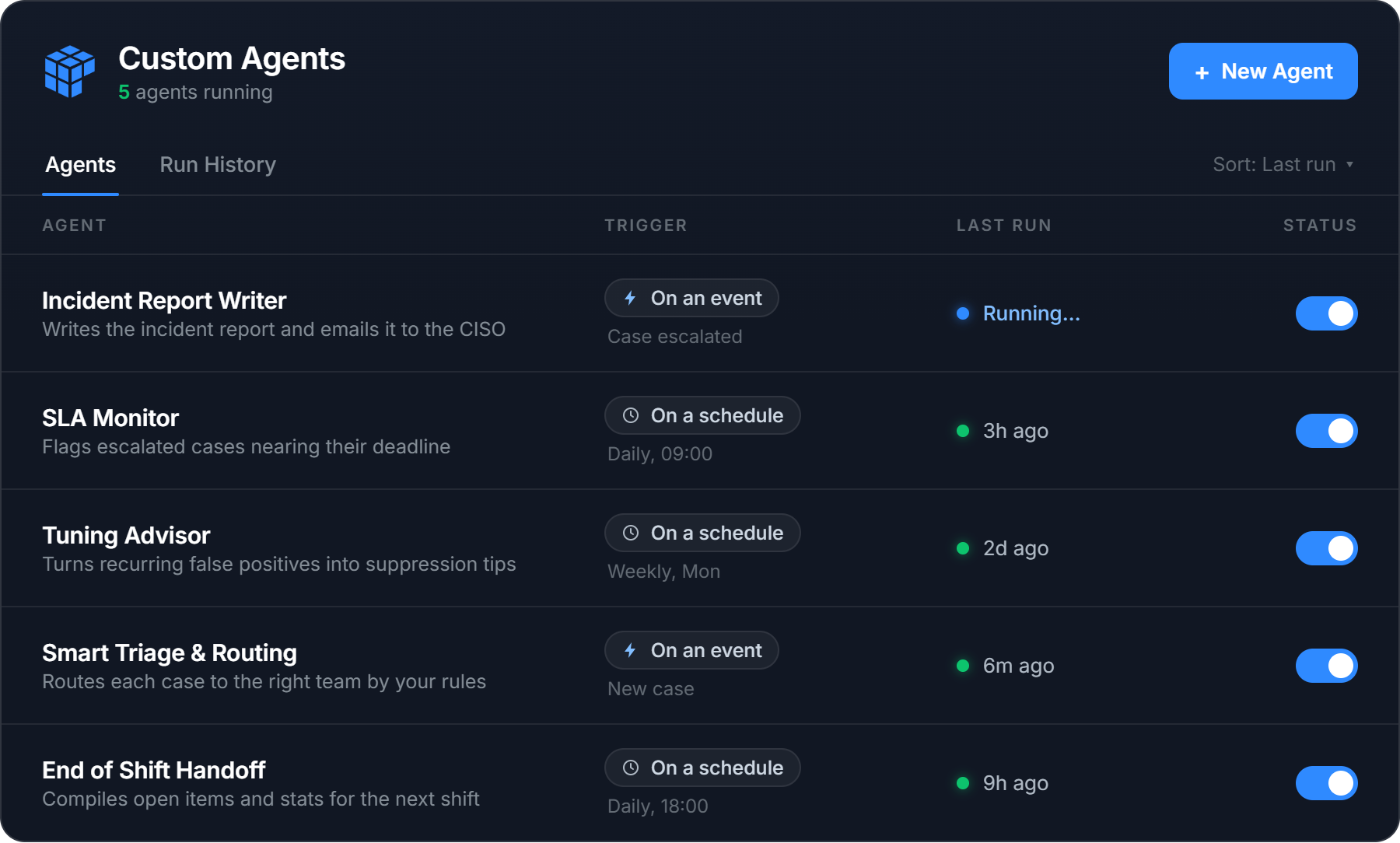
The work does not stop there, though. Every SOC has its own routines wrapped around the investigation itself. The incident reports written in a particular format, the closure notes, the shift handoffs, the rules that decide who picks up which case. When we looked at how teams actually use AI Chat, our in-product investigation agent, more than a third of those conversations turned out to be the same repetitive tasks asked again and again. The same summaries. The same reports. The same closure notes.
Intezer’s AI SOC already runs agents around the clock to triage, investigate, and respond to your alerts on their own. Custom Agents is the next step. Now you can shape how that AI SOC works for your team. Add your own agents and automations on top of the ones Intezer runs out of the box, take more of the manual work off your analysts, and tailor the whole thing to the way your team actually operates.
Meet Custom Agents
Intezer ships with a set of agents and automations that handle triage, investigation, and response from day one. Custom Agents lets you build your own on top of them.
An agent is made up of three components:
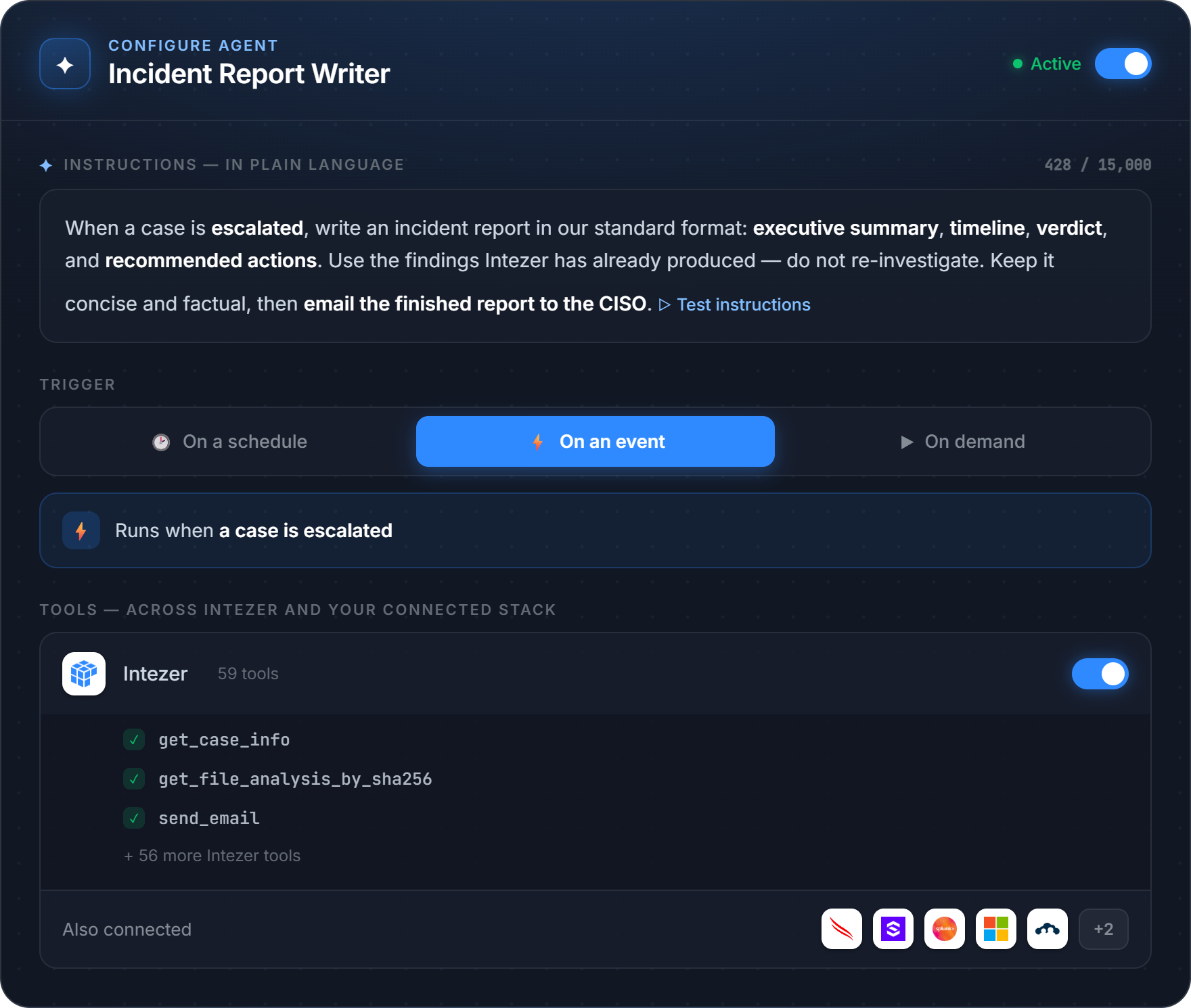
Your instructions
A trigger
The tools it is allowed to use
You describe what you want done in plain language, choose when it should run, and pick what it can touch. It then runs on its own inside your Intezer environment, on the same engine that powers our investigation Agent (Chat).
Build an agent in minutes
1. Tell it what to do, in plain language. Write the instructions the way you would brief a new analyst. “Every morning, review the open case queue, close the clear false positives per our playbook, and leave a handoff note on the rest.” That is an agent.
2. Choose when it runs. Three trigger types cover most workflows:
On a schedule: every day, week, or month. For example, a 9:00 report.
On an event: the moment a case is closed, a verdict is set, or an alert meets your conditions.
On demand: run it yourself, or call it from the API.
3. Give it the right tools. Agents work across your whole stack which includes Intezer’s built-in toolset plus the SIEM, EDR, and identity tools you have already connected, including CrowdStrike, SentinelOne, Splunk, Microsoft Sentinel, and Entra ID. They do more than summarize. They take action by updating, commenting on, closing cases, and emailing a finished report to your team.
See it in action
Take an Incident Report Writer agent illustrated above. We deliberately never shipped a single “Generate report” button, because no two teams want the same report. One team wants an executive summary up top, another wants the full timeline, another has a compliance format it has to match. So instead of a button, you put your format into the agent’s instructions, and it writes every report that way, every time.
The agent triggers on every escalated case an analyst has confirmed as a real threat. It reads the case, writes the report in your format, and emails it to your team’s inbox. The analyst makes the call. The paperwork writes itself.
That’s one agent. The point of Custom Agents is that you decide what they are.
Nothing runs blind
Security teams do not trust black boxes, and they are right not to. Custom Agents is built so you can see and control everything an agent does.
Every run is visible. You see the agent’s reasoning, every tool call and its result, and the final output. Each run is logged, and you can export it.
Test safely with Dry Run. Dry Run executes the agent for real but mocks every write action, so you can watch exactly what it would do before it does anything. Iterate on the instructions until it is right, then turn it on.
Guardrails are built in. Action tools are limited by design. An agent can only email active members of your organization, for example. It cannot reach outside your walls.
You stay in control. You choose which tools an agent gets, you review its output, and you can switch it off in one click.
This is how everything at Intezer works. AI executes, humans supervise. Custom Agents lets you decide what it executes.
What security teams are already building with it
We opened Custom Agents to a small group of alpha customers, and the best part has been watching what they build. Alongside the Incident Report Writer above, a few of the agents already running in production:
SLA Monitor (daily): a morning email listing every escalated case that has been sitting too long, so nothing critical slips past its deadline.
Tuning Advisor (weekly): takes the alerts your detection tools fired that Intezer judged to be false positives and turns them into suppression recommendations for the week ahead.
Threat Hunter (weekly): proactively sweeps your environment for the latest threats instead of waiting for an alert to fire. It pulls the new malware families, campaigns, and indicators Intezer is tracking, queries your connected SIEM and EDR for matches across historical data, and opens a case for anything it surfaces.
Smart Triage and Routing: for organizations with multiple entities, subsidiaries, and stakeholders, the agent reads each case and works out which team should own it, using your own escalation rules. It either leaves a comment with the routing, or assigns the case to the right analyst directly. Analysts stop digging through a separate list or knowledge base to figure out where a case goes.
End of Shift Handoff: built to match what a real SOC handover looks like. At the end of a shift the agent compiles the open items, the escalations still waiting for attention, the shift’s statistics, and any open system events or configuration issues, then writes the handoff so the next shift starts with the full picture.
The AI SOC, built for your team
We are on a mission to build the AI SOC the industry has been promised but never delivered. One that does the work and earns the trust to do it. It runs autonomously, around the clock. It works alongside the people who supervise it, not over their heads. And it is never a black box. You can always open it up, question what it did, and change how it behaves.
Custom Agents is central to that vision. Triage, investigation, and response come built in. Everything particular to how your team operates, you build yourself. Because the strongest security teams have always run on their own playbooks, their own logic, and their own standards, and an AI SOC should be no different. It should not ship the same to everyone. No two SOCs are the same, and no two should be.
That is the point of Custom Agents. You decide what they are.
Available now
Custom Agents is available now in beta to Intezer customers, and it is free during the beta period. This is the moment to build, test, and tell us what you want it to do next.
One particular aspect of an agentic or AI-powered SOC (but NOT “humanless SOC”) has bothered me over the last few months: specifically, the people and process side of such a SOC. If you recall my blog posts (part 1, part 2 and this video) about AI SOC readiness, I hinted at certain elements of a traditional process stack and legacy personnel profiles (both technical and leadership) that make AI adoption inside SOC incredibly difficult.
So we (me and Augusto Barros @ Prophet Security) want to create a modernized people and process framework for a SOC powered by AI and intelligent agents. Otherwise, what I am observing is a lot of “robotic horse pulls a buggy” kind of operations — where everything is kept exactly the same as it was in 2003, but “AI SOC” tools are simply tacked on to perform some of the tasks.
Gemini visual of old SOC with “AI SOC” tools
I believe that people and process components must change far more dramatically, and such changes are a critical requirement for achieving “step change” SOC with AI capabilities. Simply adding AI tools and Ai agents to a 2003-style SOC will produce, at best, marginal results. Things would get better, but not better enough to counter the feared “bad guy with AI.”
The SOAR Analogy
The analogy I want to use here is SOAR adoption from 10+ years ago. Back then, organizations simply shifted a few processes — or even just specific tasks — to a machine, and then kept the rest of their operations exactly the same. Because of that, I observed a lot of SOAR tools being used strictly for alert enrichment or for dealing with one specific, isolated type of alert, like phishing. To follow this analogy to the present day, I now frequently see an “AI SOC” being utilized only for EDR alerts or only for phishing alerts (wow, what a coincidence!)
A First-Principles Approach
What I really want to build is a first-principles approach to the specific personnel, skills, processes, and practices required to run a true agentic SOC in the late 2020s.
Now, if you prefer incremental change, that is OK, I won’t judge. However, you must be aware that the same principles caused organizations to struggle with cloud adoption. People often hear that “lift and shift” is bad. Most consultants will tell you that “lift and shift” is fine as a first step, but you eventually need to modernize and take more steps. Unfortunately, many organizations never make that second step. The same risk applies to the AI SOC. 2003 SOC + AI = somewhat better 2003 SOC.
BTW, many artifacts of the modern, engineering-powered SOC — which we covered in our now-famous ASO (Autonomic Security Operations)paper back in 2021s — apply here as well. In fact, if you recall, one of our core principles was: Humans build machines; machines do the work.
In the context of an agentic SOC, that evolves into:
Today, humans build the machines with the help of other machines, and then the machines do the heavy lifting.
So, our questions so far:
What do humans do in an agentic SOC?
What do entry-level humans do?
What SOC processes stay the same despite AI?
What SOC processes can just go and vanish (triage)?
What processes get handed to machines?
Are there new processes for humans?
What is the new human role for validation?
How do we check AI quality without fully redoing the work?
How SOC metrics must change due to AI and agents? (some ideas)
What do humans and machines do jointly? What does it mean, practically?
How to HITL in a SOC without breaking the humans or machines?
What is the effective mechanism for the human-to-AI feedback loop so that corrections actually improve future SOC performance?
Is “fully automated” detection engineering a realistic goal, or does the dependency on local, inconsistent environment context make it inherently a hybrid human-machine effort?
What do humans do before SOC (TI) and after SOC (IR)?
What is the first step to move from a legacy SOC to an agentic SOC?
Can we run legacy and agentic SOC structures in parallel during transition, or does this duplication create operational friction?
Is it easier to move from a modern non-AI SOC (aka “SOCless D&R”) to an AI SOC?
Looking Ahead
This blog post is just the first part of the series. My goal here is simply to collect the right questions we need to be asking, but I promise we will provide concrete answers in upcoming posts. This research is being undertaken together with my former colleague, Augusto Barros, now at Prophet Security
The email landscape has fundamentally changed — and in 2026, there is no ambiguity left:
DMARC is no longer optional. It is enforced.
Over the past two years, the world’s largest mailbox providers — Google, Yahoo, and Microsoft — have implemented strict authentication requirements. Today, any domain sending bulk email must have properly configured SPF, DKIM, and DMARC, or risk outright rejection. [mailcop.net], [redsift.com]
This shift marks the end of the “open email era” and the beginning of a trust-based ecosystem where authentication is mandatory.
Unit 42's analysis of ClawHub revealed evasive malicious skills bypassing automated scanners to deploy infostealers and execute agentic financial fraud.
A cybersecurity startup dangling millions of dollars to acquire zero-day security vulnerabilities in popular software is run by a pair of far-right conspiracy theorists and convicted felons whose most recent ventures included fake intelligence companies and a now-defunct AI-based lobbying platform they operated under assumed names.
The X/Twitter account IRIS C2 (@C2IRIS) has gained more than 4,000 followers since its creation in January 2025, posting frequently about security vulnerabilities, AI and software exploits. IRIS C2 says it is a company in McLean, Va. that sells offensive cybersecurity capabilities.
The IRIS C2 website dangles the possibility of million-dollar payouts for exploits to attract talent.
“Our business model is this,” reads a pinned post on top of the IRIS C2 account on X. “Attract the very best vulnerability researchers and exploit developers in the world to join our company. This mostly revolves around junior engineers with raw talent/extremely high IQ. We don’t care if they have a college degree/industry experience.”
The website linked in that profile — irisc2[.]com — says the company is hiring for a number of open positions, and a recent post on its LinkedIn page enthuses about an overwhelming number of applications from potential employees. The website claims IRIS C2 is in the business of acquiring “zero-day exploits, individual primitives, partial chains, and full capabilities across all major platforms. Payouts range from $10,000 to $7 million depending on target, reliability, and operational value.”
The government contracting portal g2exchange.comreports that irisc2[.]com is operated by a business based in Virginia called Calvexa Group LLC. The “contact” link on the website for Calvexa Group — calvexagroup[.]com — forwards visitors to irisc2[.]com. G2Exchange shows that while Calvexa Group LLC is registered as a federal contractor, it does not appear to be working on any direct government contracts.
A search on the Arlington, Va. address listed in the incorporation records for Calvexa Group LLC finds the property is occupied by Jack Burkman, the 60-year-old founder and managing partner of the lobbying firm Burkman & Associates. When approached with questions about IRIS C2, Burkman referred further inquiries to his longtime associate, 28-year-old Jacob Wohl.
Jack Burkman (left) and Jacob Wohl, at a press conference in August 2020. Image: Wikipedia.
Burkman and Wohl have a storied history of creating fake intelligence companies and using them to spread false claims about and frame public figures, including fabricated sexual assault claims against then FBI director Robert Mueller, and Pete Buttigieg, then mayor of South Bend, Indiana and a Democratic candidate for the presidency. In 2019, Burkman and Wohl held press conferences falsely alleging extramarital affairs by Sen. Elizabeth Warren (D-Mass.) and then-2020 presidential candidate Kamala Harris.
In the wake of the 2020 presidential election, Wohl and Burkman were prosecuted by multiple U.S. states for making thousands of robocalls to residents of battleground states and disseminating false claims about mail-in ballots. They were indicted in Cleveland on 15 felony counts of orchestrating a robocall scheme aimed at suppressing the black vote in Detroit, and were sentenced in late 2025 to probation after their appeals to dismiss the charges were rejected.
In 2022, Wohl and Burkman both pleaded guilty to a single felony charge of telecommunications fraud in Ohio, and sentenced to a fine, probation, and community service. In March 2023, a judge in a New York civil case ruled that Wohl and Burkman had violated federal and state civil rights laws, and the two agreed to pay a $1 million settlement.
In June 2023, the Federal Communications Commission (FCC) imposed a $5.1 million fine against Wohl and Burkman for their robocall campaigns, at the time the largest fine ever sought by the FCC under the Telephone Consumer Protection Act.
Jacob “Jay” Wohl’s GitHub account.
By the age of 17, Wohl had started multiple investment firms, and cultivated the nickname “Wohl of Wall Street” after appearing on Fox News in 2015 to discuss his new hedge funds. In 2017, the Arizona Corporation Commission charged Wohl and his investment funds with 14 counts of securities fraud, and ordered him to pay $35,000 in restitution. In 2019, Wohl pleaded guilty in California to four felony counts of selling unregistered securities and was sentenced to two years of probation.
The market for previously unknown security vulnerabilities has always been populated by a colorful mix of researchers, academics, charlatans, clout-chasers and people actively involved in cybercrime communities. But the market for selling offensive security services to the U.S. government tends to be far more circumspect. Plenty of government contractors recruit vulnerability researchers and pay for the exclusive rights to novel software exploits, yet none of them do so quite as brazenly and openly as IRIS C2.
Recent posts from the Twitter/X account IRISC2 (@c2iris).
Indeed, KrebsOnSecurity was unaware of IRIS C2 until last month, when an attendee at a regional cybersecurity conference shared that Wohl and Calvexa Group were pestering people at the conference about selling their vulnerability research.
In an interview with KrebsOnSecurity, Wohl said Mr. Burkman was not involved in the day-to-day operations of IRIS C2. Wohl shared that IRIS C2 originally began as a penetration testing company, but shifted its focus recently to selling phone-hacking services to the government. Several times throughout the interview, Mr. Wohl mentioned working on federal government contracts, but when pressed for specifics said he was not at liberty to speak publicly about them.
Mr. Wohl said he does not have any formal education or training in computer science or information security, and that most of his knowledge on the matter is self-taught.
“I know more about tech than anyone,” Wohl bragged. “My background has always been extremely technical, and I’ve always been deeply into tech. People know me as someone who is able to create spectacularly exquisite capabilities that would make your head spin.”
Wohl said security researchers bring the company unique vulnerability findings “on a regular basis,” but that in many cases those findings are preliminary and not fully fleshed-out.
“Let’s say someone finds a flaw in a media decoder on a phone,” Wohl said. “A lot of times what we receive is an exploit primitive, where the idea is there but the [execution] needs work. You need that exploit to be stable and reliable, and that’s what we do.”
Wohl claims IRIS C2 has approximately 40 employees, although he said none of them are allowed to list their employment on LinkedIn for operational security reasons. In May, the author of the IRIS C2 account on X said that his girlfriend had no idea what he did for a living. But if IRIS C2 has any other employees, they may be similarly unaware of Mr. Wohl’s history of outright fabrications — or even his real name.
In September 2024, Politicoreported that Burkman and Wohl were bragging about big companies supposedly buying services from their now-defunct company LobbyMatic, which claimed to use artificial intelligence to assist in political lobbying efforts. However, Politico found the pair were running the company using pseudonyms, with Wohl reportedly adopting the name “Jay Klein” and Burkman using the moniker “Bill Sanders.” Politico reported that two of the former LobbyMatic employees resigned after learning of their true identities, while other employees only learned after they had left the company.
Update, July 9, 9:44 a.m. ET: Several readers pointed our attention to a March 31 publication from journalist Molly White, which reported that Burkman and Wohl were paid a $300,000 retainer by a Canadian cryptocurrency fraudster wanted by the United States and several other countries for allegedly stealing $65 million from the crypto platforms KyberSwap and Indexed Finance. According to that report, the two were hired to pursue a “presidential pardon to avert a miscarriage of justice” on behalf of the accused hacker, who has not yet been convicted.
Two men pleaded guilty in the United Kingdom this week to criminal charges stemming from an August 2024 cyberattack that crippled Transport for London, the entity responsible for the public transport network in the Greater London area. The duo were key members of a prolific cybercrime group known as Scattered Spider, and their guilty pleas came on the first day of what was expected to be a six-week trial.
Owen Flowers (left) 18, and Thalha Jubair, 20. Image: UK National Crime Agency (NCA).
Thalha Jubair, 20, of East London and 18-year-old Owen Flowers of Walsall admitted conspiring to commit unauthorized acts against Transport for London computer systems and causing risk of serious damage to human welfare. According to a report from the BBC, Flowers alone admitted to being part of a conspiracy to hack into U.S. based healthcare providers SSM Health Care Corporation and Sutter Health in September 2024.
Jubair is also wanted by U.S. law enforcement agencies. In September 2025, prosecutors in New Jersey unsealed an indictment alleging Jubair and other Scattered Spider members committed computer fraud, wire fraud, and money laundering in relation to 120 computer network intrusions involving 47 U.S. entities between May 2022 and September 2025, and that the group’s victims paid at least $115 million in ransom payments.
In July 2025, KrebsOnSecurity reported that Flowers and Jubair were arrested in the United Kingdom in connection with Scattered Spider ransom attacks against the retailers Marks & Spencer and Harrods, and the British food retailer Co-op Group. Multiple sources familiar with those investigations said Flowers was the Scattered Spider member who anonymously gave interviews to the media in the days after the group’s September 2023 ransomware attacks disrupted operations at Las Vegas casinos operated by MGM Resorts and Caesars Entertainment.
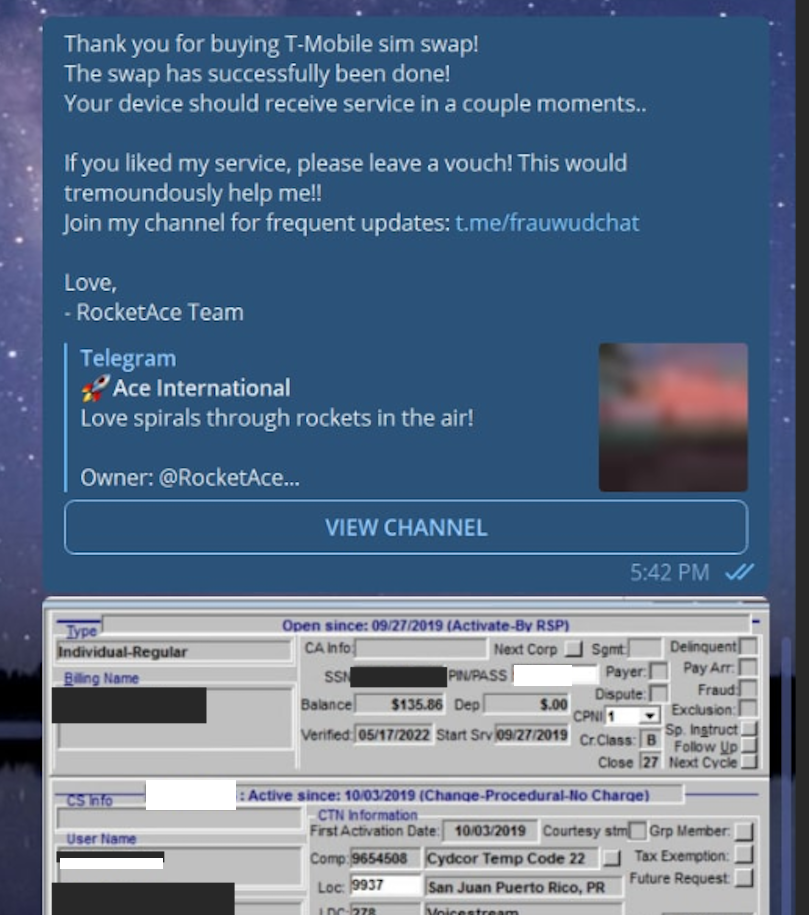
According to prosecutors, Jubair co-ran a bustling Telegram channel called Star Chat, the home of a SIM-swapping group that used voice- and SMS-based phishing attacks to steal credentials from employees at the major wireless providers in the U.S. and U.K. The group would then use that access to sell a service that could redirect a target’s phone number to a device the attackers controlled and intercept the victim’s calls and text messages (including one-time codes for multi-factor authentication).
A receipt from Star Fraud Chat’s SIM-swapping service targeting a T-Mobile customer after the group gained access to internal T-Mobile employee tools. “Rocket Ace” was one of Jubair’s hacker handles, according to U.S. prosecutors.
New Jersey prosecutors also allege Jubair also was involved in a mass SMS phishing campaign during the summer of 2022 that stole single sign-on credentials from employees at hundreds of companies. That weeks-long SMS phishing campaign led to intrusions and data thefts at more than 130 organizations, including LastPass, DoorDash, Mailchimp, Plex and Signal.
KrebsOnSecurity reported last year that one of Jubair’s alter egos at age 15 was “Everlynn,” a hacker who sold fraudulent “emergency data requests” that used compromised police and government email addresses to demand subscriber data (e.g. username, IP/email address) from major tech companies, claiming the requests concerned urgent matters of life and death and could not wait for a court order.
In April 2026, 24-year-old British national and Scattered Spider member Tyler “Tylerb” Buchananpleaded guilty to wire fraud conspiracy and aggravated identity theft for participating in the group’s SMS phishing spree in the summer of 2022. The government said Buchanan, Jubair and others used the credentials harvested in that phishing campaign to steal at least $8 million in cryptocurrency from victims throughout the United States. Buchanan is currently scheduled to be sentenced on October 2.
In August 2025, 20-year-old Scattered Spider member from Florida named Noah Michael Urban was sentenced to 10 years in federal prison and ordered to pay $13 million in restitution, after pleading guilty to charges of wire fraud and conspiracy.
The U.S. Department of Justice says three alleged Scattered Spider defendants indicted along with Buchanan still face charges, including Ahmed Hossam Eldin Elbadawy, 24, a.k.a. “AD,” of College Station, Texas; Evans Onyeaka Osiebo, 21, of Dallas, Texas; and Joel Martin Evans, 26, a.k.a. “joeleoli,” of Jacksonville, North Carolina.
Flowers and Jubair are slated to be sentenced in a London court on July 15, 2026.
We're all petrified about missing a critical event or misclassifying an alert, but when we're talking about incident response (IR), there are often hundreds if not thousands of alerts to parse through. It's easy to get caught up with one alert because it feels "too hot" or maybe not spend enough time looking into something that initially seems "too cold."
Attackers can move from access to exfiltration in 72 minutes. Learn how modern SOC teams close the speed gap with Unit 42's AI-driven automation, threat hunting, MDR and Managed XSIAM.
Amazon Web Services (AWS) is pleased to announce that the Spring 2026 System and Organization Controls (SOC) 1, 2, and 3 reports are now available. The reports cover 188 services over the 12-month period from April 1, 2025–March 31, 2026, giving customers a full year of assurance. These reports demonstrate our continuous commitment to adhering to the heightened expectations of cloud service providers.
AWS strives to continuously bring services into the scope of its compliance programs to help customers meet their architectural and regulatory needs. You can view the current list of services in scope on our Services in Scope page. As an AWS customer, you can reach out to your AWS account team if you have any questions or feedback about SOC compliance.

 Login
Login