
Reading view

Fake Claude search results lure Mac users into ClickFix attack

Researchers found that cybercriminals are using sponsored search results and shared Claude chats to lure victims into a typical ClickFix attack to install malware on macOS devices.

ClickFix is a social engineering method that tricks users into infecting their own device with malware. Users are instructed to run specific commands that will download malware, usually an infostealer.

The researchers found that when users search for terms like “Claude Mac download,” they may see sponsored Google results that appear to go to the legitimate claude.ai domain.

In reality, the ads resolve to real Claude shared chats, set up to look like official “Claude Code on Mac” or Apple Support guides. Independent research by BleepingComputer found another chat serving the same purpose. The chat instructs victims to open Terminal and paste a base64‑encoded command, which pulls a loader shell script from attacker‑controlled infrastructure and runs it in memory.

The script then profiles the system, pulls down a second-stage payload and runs it through osascript, macOS’s built-in scripting engine. This gives the attacker remote code execution (RCE) without ever dropping a traditional application or binary.

This results in a MacSync‑style payload that harvests browser credentials, cookies, Keychain contents, and crypto wallet data, bundles it, and sends all that information over HTTP to attacker servers.

How to stay safe

Users running macOS Tahoe 26.4 and later will see warnings about possible ClickFix attacks, but other users still have to rely on common sense.

With ClickFix running rampant and inventing new methods all the time, it’s important to stay aware, cautious, and protected.

  • Slow down. Don’t rush to follow instructions on a webpage or prompt, especially if it asks you to run commands on your device or copy and paste code. Attackers rely on urgency to bypass your critical thinking, so be cautious of pages urging immediate action. Sophisticated ClickFix pages add countdowns, user counters, or other pressure tactics to make you act quickly.
  • Avoid running commands or scripts from untrusted sources. Never run code or commands copied from websites, emails, or messages unless you trust the source and understand what the action does.
  • Verify instructions independently. If a website tells you to execute a command or perform a technical action, check through official documentation or contact support before proceeding.
  • Limit copy and paste for commands. Manually typing commands instead of copy and paste can reduce the risk of unknowingly running malicious payloads hidden in copied text.
  • Secure your devices. Use an up-to-date, real-time anti-malware solution with web protection. Malwarebytes blocks connections to unsafe sites like these.
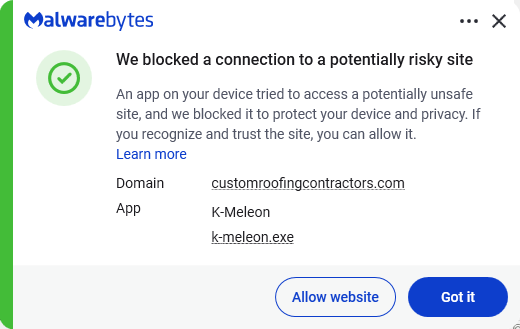
    Malwarebytes blocks one of the domains still active
  • Educate yourself on evolving attack techniques. Understanding that attacks may come from unexpected places helps maintain vigilance. Keep reading our blog!
  • Stay away from sponsored ads in search results. Anyone can buy them and make them look legitimate.

Pro tip: The free Malwarebytes Browser Guard extension warns you when a website tries to copy something to your clipboard.


Stop threats before they can do any harm.

Malwarebytes Browser Guard blocks phishing pages and malicious sites automatically. Free, one click to install. Add it to your browser →


  •  

Fake Claude search results lure Mac users into ClickFix attack

Researchers found that cybercriminals are using sponsored search results and shared Claude chats to lure victims into a typical ClickFix attack to install malware on macOS devices.

ClickFix is a social engineering method that tricks users into infecting their own device with malware. Users are instructed to run specific commands that will download malware, usually an infostealer.

The researchers found that when users search for terms like “Claude Mac download,” they may see sponsored Google results that appear to go to the legitimate claude.ai domain.

In reality, the ads resolve to real Claude shared chats, set up to look like official “Claude Code on Mac” or Apple Support guides. Independent research by BleepingComputer found another chat serving the same purpose. The chat instructs victims to open Terminal and paste a base64‑encoded command, which pulls a loader shell script from attacker‑controlled infrastructure and runs it in memory.

The script then profiles the system, pulls down a second-stage payload and runs it through osascript, macOS’s built-in scripting engine. This gives the attacker remote code execution (RCE) without ever dropping a traditional application or binary.

This results in a MacSync‑style payload that harvests browser credentials, cookies, Keychain contents, and crypto wallet data, bundles it, and sends all that information over HTTP to attacker servers.

How to stay safe

Users running macOS Tahoe 26.4 and later will see warnings about possible ClickFix attacks, but other users still have to rely on common sense.

With ClickFix running rampant and inventing new methods all the time, it’s important to stay aware, cautious, and protected.

  • Slow down. Don’t rush to follow instructions on a webpage or prompt, especially if it asks you to run commands on your device or copy and paste code. Attackers rely on urgency to bypass your critical thinking, so be cautious of pages urging immediate action. Sophisticated ClickFix pages add countdowns, user counters, or other pressure tactics to make you act quickly.
  • Avoid running commands or scripts from untrusted sources. Never run code or commands copied from websites, emails, or messages unless you trust the source and understand what the action does.
  • Verify instructions independently. If a website tells you to execute a command or perform a technical action, check through official documentation or contact support before proceeding.
  • Limit copy and paste for commands. Manually typing commands instead of copy and paste can reduce the risk of unknowingly running malicious payloads hidden in copied text.
  • Secure your devices. Use an up-to-date, real-time anti-malware solution with web protection. Malwarebytes blocks connections to unsafe sites like these.
    Malwarebytes blocks one of the domains still active
  • Educate yourself on evolving attack techniques. Understanding that attacks may come from unexpected places helps maintain vigilance. Keep reading our blog!
  • Stay away from sponsored ads in search results. Anyone can buy them and make them look legitimate.

Pro tip: The free Malwarebytes Browser Guard extension warns you when a website tries to copy something to your clipboard.


Stop threats before they can do any harm.

Malwarebytes Browser Guard blocks phishing pages and malicious sites automatically. Free, one click to install. Add it to your browser →

  •  

Windows Event Logs for Red Teams

Tim Fowler // Do you know what could be lurking in your Windows event logs? In May of 2022, I was sent a Threat Post article about a new technique […]

The post Windows Event Logs for Red Teams appeared first on Black Hills Information Security, Inc..

  •  

When Infosec and Weed Collide: Handling Administrative Actions Safely

BB King//* The state of Ohio recently validated a webapp pentest finding that sometimes goes overlooked. It relates to the details of administrative functions, how they can be abused, and […]

The post When Infosec and Weed Collide: Handling Administrative Actions Safely appeared first on Black Hills Information Security, Inc..

  •  

How to Pull Wireless Credentials with the Bash Bunny

Sally Vandeven // All of the BHIS testers are pretty geeked about Hak5’s newest toy — the Bash Bunny. Last week, Jordan blogged about the USB Exfiltration payload. Today I […]

The post How to Pull Wireless Credentials with the Bash Bunny appeared first on Black Hills Information Security, Inc..

  •  

How to Get USB_Exfiltration Payload Using the Bash Bunny

Jordan Drysdale // This is a super quick write-up on the first very useful payload we tested and confirmed as 100% reliable on all Windows systems (XP-SP3+) with PowerShell enabled. […]

The post How to Get USB_Exfiltration Payload Using the Bash Bunny appeared first on Black Hills Information Security, Inc..

  •  
❌