
Reading view

Authenticate legitimate AI agent traffic with AWS WAF Bot Control

As AI agents and automated tools increasingly access web applications, distinguishing legitimate bot traffic from malicious attempts has become a critical security challenge. Traditional approaches such as IP-based filtering and reverse DNS lookups fail in multi-tenant systems (such as Amazon Bedrock AgentCore) where thousands of distinct workloads share the same IP space. Attackers can easily spoof user agents, and manual allowlists don’t scale with growing demand.

Web Bot Authentication (WBA), available in AWS WAF Bot Control since November 2025, solves this challenge by implementing cryptographic signatures that provide tamper-proof verification of bot identities. WBA uses asymmetric cryptography to verify that a request comes from an authorized automated agent, relying on two active Internet Engineering Task Force (IETF) drafts: a directory draft for sharing public keys, and a protocol draft defining how keys attach crawler identity to HTTP requests.

With WBA, you can confidently identify trusted automated access while maintaining granular control through WAF labels, creating a more secure and manageable ecosystem for both bot operators and website owners. AWS WAF Bot Control respects WBA verification status by default, automatically allowing verified AI agent traffic.

This post provides a deeper technical guide to implementing WBA with AWS WAF. You learn how WBA works, explore the new labels and capabilities it introduces, and walk through a step-by-step implementation—including signing code—to authenticate bot traffic using cryptographic signatures.

How Web Bot Authentication works with AWS WAF

WBA uses asymmetric cryptography to verify bot identities through HTTP message signatures. The process works as follows:

  1. Bot registration – Bot operators publish their public keys in a signature directory. AWS WAF regularly polls these directories and maintains a valid key registry.
  2. Request signing – Each bot operator’s request is signed using their private key following the IETF standard HTTP Message Signatures (RFC 9421).
  3. Verification – AWS WAF verifies signatures against known public keys associated with the bot operator and appends labels related to verification status.

A typical WBA-signed request includes headers like the following:

Signature-Agent: https://signature-agent.test
Signature-Input: sig2=("@authority" "signature-agent")
;created=1735689600
;keyid="poqkLGiymh_W0uP6PZFw-dvez3QJT5SolqXBCW38r0U"
;alg="ed25519"
;expires=1735693200
;nonce="e8N7S2MFd/qrd6T2R3tdfA..."
;tag="web-bot-auth"
Signature: sig2=:jdq0SqOwHdyHr9+r5jw3iYZH6aNGKijYp/EstF4RQ..

The following sequence diagram shows how AWS WAF verifies bot signatures and applies labels for allow or block decisions.
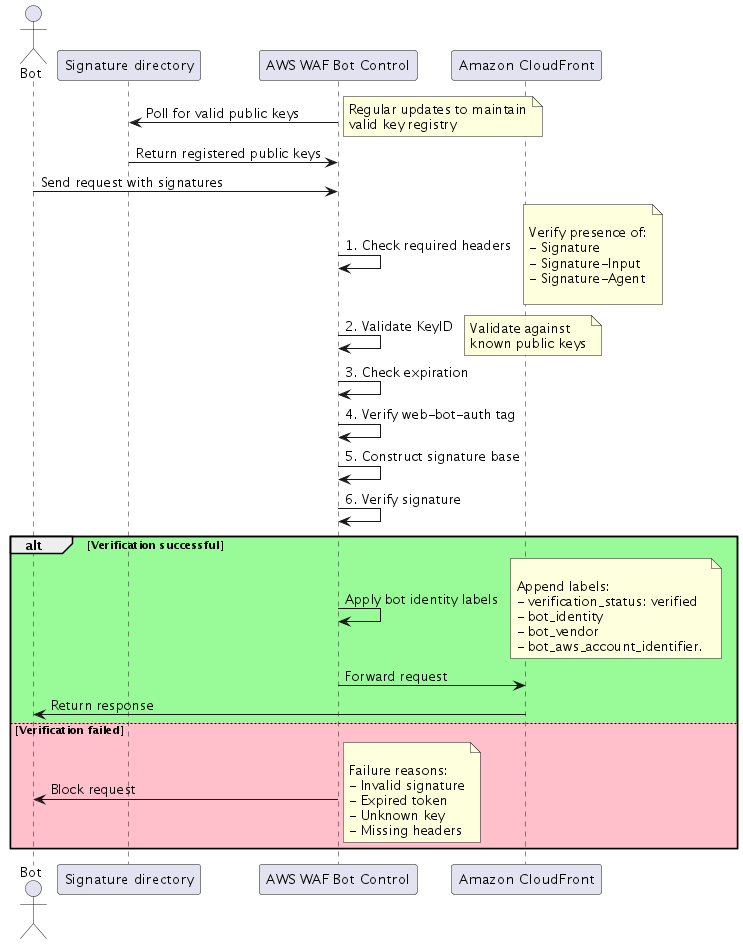
Figure 1 – AWS WAF Web Bot Authentication verification flow

Figure 1 – AWS WAF Web Bot Authentication verification flow

The workflow shown in figure 1 includes the following steps:

  1. A bot sends a signed request to Amazon CloudFront and is inspected by AWS WAF Bot Control
  2. AWS WAF Bot Control retrieves the bot operator’s public key from the signature directory
  3. AWS WAF Bot Control verifies the ed25519 signature
  4. AWS WAF Bot Control appends a verification label (verified, invalid, expired, or unknown_bot)

AWS WAF Bot Control evaluates rules using the label to allow or block the request.

New capabilities added to AWS WAF

With the addition of WBA, the following capabilities were added to AWS WAF.

Cryptographic bot verification

When a bot sends a request, it includes HTTP message signatures that AWS WAF validates at the edge using the AWS WAF Bot Control rule group (version 4.0 and later). This validation process adds minimal latency to requests while providing cryptographic certainty about the bot’s identity. HTTP Message Signatures is an open IETF standard (RFC 9421) that defines a mechanism for signing and verifying HTTP messages using asymmetric keys—in practice, this means a bot cryptographically signs specific headers and metadata of each request, and the receiver can verify the signature using the bot’s published public key.

New labels within AWS WAF for granular control

AWS WAF automatically validates signatures, and successfully validated traffic is immediately marked as verified. This verification status can be used in WAF rules and bot management policies, giving you the ability to write your own rules based on the new functionality.

The following table describes the new labels.

Label Meaning Suggested action
awswaf:managed:aws:bot-control:bot:web_bot_auth:verified Successful cryptographic verification Allow
awswaf:managed:aws:bot-control:bot:web_bot_auth:invalid Failed verification attempt Block or rate-limit
awswaf:managed:aws:bot-control:bot:web_bot_auth:expired Expired key used Block and alert
awswaf:managed:aws:bot-control:bot:web_bot_auth:unknown_bot Unrecognized key Monitor or block
awswaf:managed:aws:bot-control:bot:vendor:<vendor_name> Bot vendor or operator Use for vendor-specific rules
awswaf:managed:aws:bot-control:bot:name:<rfc_name> Bot name (RFC token from WBA) Use for bot-specific rules
awswaf:managed:aws:bot-control:bot:account:<hash> AWS account identifier (Amazon Bedrock AgentCore agents only) Use for account-level controls

AWS WAF now automatically allows verified AI agent traffic

AWS WAF Bot Control now respects WBA verification status by default, automatically allowing verified AI agent traffic. This includes two specific behavior changes:

  • Category:AI rule update – Previously, the Category:AI rule under common Bot Control blocked unverified bots. Bot Control now checks WBA verification status before applying this rule.
  • TGT_TokenAbsent rule update – The TGT_TokenAbsent rule, which detects requests without a WAF token, no longer matches requests that carry the web_bot_auth:verified label.

Key benefits for AWS WAF customers

WBA with AWS WAF delivers several advantages for organizations managing automated traffic at scale.

  • Enhanced bot visibility – Clear identification of distinct bots operating from multi-tenant platforms like Amazon Bedrock AgentCore, providing transparency into automated traffic sources. The AWS WAF console includes a new AI activity dashboard that provides a centralized view of AI bot and agent traffic across your protected resources.
  • Enhanced security – Cryptographic verification of bot identities using industry-standard signing mechanisms.
  • Reduced false positives – Accurate distinction between legitimate and malicious automated traffic, particularly in shared IP environments.
  • Industry alignment – Alignment with industry standards and major content delivery network (CDN) providers for consistent bot authentication across platforms.

Customer use cases for WBA with AWS WAF

Across industries, organizations use WBA to grant automated agents secure, controlled access to their web applications. The following scenarios highlight where this capability delivers real-world value:

  • Verified customer support agents – Authenticate AI-powered chat and support bots so websites can recognize them as approved, registered agents. This enables seamless customer service automation while maintaining security controls and audit trails.
  • Automated crawling and indexing – Allow search engine crawlers and content indexers to fetch pages with clear identity and scoped permissions. This reduces false-positive blocks, improves crawl efficiency, and helps legitimate bots access your content without triggering security controls.
  • Partner integrations – Third-party agents can access customer portals and APIs with explicit consent and granular, scoped access controls. This facilitates secure business-to-business (B2B) integrations while maintaining visibility into partner bot activity.
  • Enterprise automations and agents – Internal automation tools—including monitoring systems, QA bots, continuous integration and delivery (CI/CD) pipelines, and robotic process automation (RPA) solutions—get authenticated access to web applications with least-privilege access principles and full auditability.

Availability

WBA was introduced in Bot Control rule group Version_4.0 (November 2025) for Amazon CloudFront distributions, with continued support in later versions. With Version_6.0, WBA is available for resource types supported by AWS WAF across standard commercial AWS Regions.

Getting started: Developers or agents quick start

Whether you’re implementing WBA yourself or working with an AI coding assistant, the following steps walk you through deploying WBA, signing requests, and writing custom rules.

Step 1: Deploy the WBA-enabled Bot Control

Add the AWS WAF Bot Control rule group to your CloudFront-associated web ACL using static Version_4.0 or Version_5.0—both include WBA support for cryptographic bot verification. Version_5.0 (released February 2026) covers more than 650 unique bots and agents spanning categories including AI search engine crawlers, AI data collectors, AI assistants, and large language model (LLM) training crawlers.

Important: You must explicitly select one of these static versions.

The following example CloudFormation YAML snippet shows a bot control rule set configuration:

# Bot Control rule group with WBA support
ManagedRuleGroupStatement:
  VendorName: AWS
  Name: AWSManagedRulesBotControlRuleSet
  # Use Version_4.0 or higher for WBA support
  Version: Version_5.0
  ManagedRuleGroupConfigs:
    - AWSManagedRulesBotControlRuleSet:
        # COMMON level provides WBA verification
        # TARGETED level adds additional bot-specific protections
        InspectionLevel: COMMON

Step 2: Sign requests from your bot

If your agent runs on Amazon Bedrock AgentCore Browser, request signing is handled automatically—no additional configuration is required.

For agents running outside of AgentCore, registration APIs are on the roadmap that you can use to sign requests independently by:

  1. Generating an ed25519 key pair
  2. Hosting your public key in a signature directory
  3. Signing outbound HTTP requests using the Signature-Input and Signature headers with the web-bot-auth tag. For language-specific signing implementations, see the HTTP Message Signatures RFC (RFC 9421) and the AWS WAF Bot Control documentation.

Step 3: Write custom rules using WBA labels

Use the verification labels in custom WAF rules for granular traffic control, for example:

  • Allow – awswaf:managed:aws:bot-control:bot:web_bot_auth:verified
  • Rate-limit – awswaf:managed:aws:bot-control:bot:web_bot_auth:invalid
  • Alert on – awswaf:managed:aws:bot-control:bot:web_bot_auth:expired

Step 4: Monitor WBA traffic

Use AWS WAF metrics and logs to monitor authenticated bot traffic:

  • Review Amazon CloudWatch metrics for Bot Control rule group matches and set up alarms for anomalous or unexpected spikes in invalid or expired verification attempts.
  • Analyze AWS WAF logs to identify patterns in bot authentication attempts and filter on web_bot_auth labels.
  • Use the AI Activity Dashboard in the AWS WAF console for a centralized view of AI bot traffic. Visualize traffic trends, identify top bots and frequently targeted paths, and filter by verification status to decide which bots to allow, rate-limit, or block.

Conclusion

WBA with AWS WAF provides a cryptographically secure, standards-based approach to authenticating legitimate AI agent traffic. By moving from IP-based allowlisting to signature-based verification, you gain accurate bot identification that works across multi-tenant environments.

Looking ahead, our focus is to simplify bot authentication and make it safer by default. Registration APIs that agent owners can use to cryptographically verify bot identity and intent are on the roadmap, helping website owners quickly distinguish trusted automation from unknown traffic.

If you own an agent, adopt WBA and register your agent to receive verified status. In parallel, AWS continues to actively participate in the IETF web-bot-auth working group, advocating for complementary approaches—using both identifying and anonymous verification protocols—and will incorporate these standards into products as they mature to help your deployments stay aligned with the broader ecosystem.

To get started, see the AWS WAF Bot Control documentation and the HTTP Message Signatures RFC (RFC 9421).

If you have feedback about this post, submit comments in the Comments section below.

Harith Gaddamanugu

Harith Shantan Gaddamanugu

Harith is a Sr Edge Specialist Solutions Architect at AWS, where he architects critical infrastructure and security solutions that serve millions of users globally. With a decade of expertise in cloud perimeter protection and web acceleration, he guides large enterprises building resilient architectures. Outside work, Harith enjoys hiking and landscape photography with his family.

Author

Kaustubh Phatak

Kaustubh is a product leader specializing in AI/ML systems and enterprise security solutions. He has led cross-functional teams in deploying AI-powered products at scale, working closely with security architects and CISOs to address the intersection of AI innovation and cybersecurity risk. His work focuses on translating complex technical capabilities into business value, particularly in emerging technology domains where traditional frameworks don’t apply.

  •  

Complimentary virtual training: Get hands-on with AWS Security Services

If you’re looking to strengthen your organization’s security posture on Amazon Web Services (AWS) but aren’t sure where to start, then we’re here to help. Security Activation Days are complimentary, virtual, hands-on workshops designed to help you get practical experience with AWS security services in a single session.

What to expect

Each Security Activation Day is a 3–6 hour virtual workshop where you work directly with AWS security services in real-world scenarios. Through a combination of presentations, demos, and workshops, you will get hands-on practice guided by AWS security specialists either in your own environment or in an AWS-provided sandbox.

Topics rotate across the full spectrum of AWS security, identity, and governance services, including threat detection and response, identity and access management, network and application protection, data protection, and governance and compliance. You will leave with actionable knowledge you can apply to your workloads immediately—not a to-do list of things to research later.

Who should attend

Security Activation Days are made for builders—security engineers, cloud architects, and DevOps teams who want to go deeper on specific AWS security capabilities. Whether you’re evaluating a service for the first time or looking to operationalize something you’ve already deployed, these sessions meet you where you are.

What attendees are saying

With over 6,400 attendees across 90 events so far in 2026, Security Activation Days consistently earn a 4.8 out of 5 satisfaction rating. Participants tell us the hands-on format is what makes the difference: there’s no substitute for actually configuring a service and seeing the results in real time.

How to register

We run Security Activation Days year-round across all time zones, with new sessions added regularly. Find a session, show up ready to learn, and start building today.

If you have feedback about this post, submit comments in the Comments section below.

Ashley Nelson

Ashley Nelson

Ashley is a Sr. WW Security Specialist at AWS, where she leads worldwide customer enablement programs for Security, Identity, and Governance services.

  •  

Introducing AI traffic analysis dashboards for AWS WAF

As AI agents, bots, and programmatic access become an increasingly significant portion of web traffic, organizations need better tools to understand, analyze, and manage this activity. Today, we’re excited to announce AI Traffic Analysis dashboards for AWS WAF protection packs—also known as web access control lists (web ACLs)—providing comprehensive visibility into AI bot and agent behavior across your applications.

The challenge: Understanding AI bot traffic

The rapid proliferation of AI bots—from search engine crawlers to research agents—has fundamentally changed the nature of web traffic. Organizations across industries are discovering that AI agents now represent 30–60% of their total traffic, driving significant infrastructure costs without always generating business value.

Traditional bot management tools weren’t designed for the nuances of AI traffic. Teams need to answer critical questions such as: Which AI organizations are accessing our content? What are they trying to accomplish? Which endpoints are most frequently targeted? How has this activity changed over time? Most importantly, how can we turn this visibility into actionable business decisions?

Introducing the AI Traffic Analysis dashboard

The new AI Traffic Analysis dashboard provides specialized visibility into AI bot and agent activity, available directly within your AWS WAF protection pack (web ACL) console. With this launch, AWS WAF Bot Control expands its detection coverage to track more than 650 unique bots and agents, offering one of the most comprehensive AI bot detection catalogs available. A detection catalog that will keep growing and be updated to align with the pace of the industry’s changes.

This dashboard goes beyond standard security metrics to deliver AI-specific insights that help you understand and manage this critical traffic segment.

Key capabilities

  • Bot identification and verification: See which AI bots are accessing your applications, including bot names, owning organizations, and verification status. Quickly distinguish between legitimate AI agents from known organizations and potentially suspicious activity.
  • Intent classification: Understand the purpose behind AI bot requests. The dashboard categorizes bot behavior patterns—whether crawling for search indexing, conducting research, gathering training data, or other activities—helping you align access policies with business objectives.
  • Access pattern analysis: Identify your most frequently accessed URLs and endpoints by AI agents. This visibility helps you understand which content is most valuable to AI organizations and optimize your infrastructure accordingly.
  • Temporal trends and historical analysis: Track AI bot activity patterns by time of day and analyze historical trends over the past 14 days. Detect anomalies, understand peak usage periods, and identify emerging patterns in AI traffic.
  • Organization breakdown: View traffic volume segmented by bot owner organization, giving you clear visibility into which AI companies are accessing your content and at what scale.

How it works

AI Traffic Analysis dashboards integrate seamlessly with AWS WAF Bot Control for common bots using the same traffic evaluation engine while providing specialized analytics for AI-specific patterns. The dashboards display near real-time summaries based on Amazon CloudWatch metrics collected as AWS WAF evaluates your web traffic.

To access the AI Traffic Analysis dashboard:

  1. Navigate to your protection pack (web ACL) in the AWS Management Console for AWS WAF.
  2. Select the AI Traffic Analysis tab.
  3. Apply filters for bot organization, intent type, or verification status as needed.
  4. Analyze the comprehensive visualizations across bot identity, intent classification, access patterns, and temporal trends.

The dashboard populates automatically once your protection pack begins receiving AI bot traffic, so you have visibility exactly when you need it.

From visibility to action

This new capability addresses a critical need as organizations navigate the evolving landscape of AI-driven web traffic. With detailed insights into AI bot behavior, you can:

  • Make informed access decisions: Understand bot intent before implementing allow or block rules.
  • Optimize infrastructure investment: Identify high-traffic endpoints and plan capacity accordingly. Know whether your infrastructure costs are supporting business value or used without programmatic compensation mechanism.
  • Implement tiered access strategies: Serve different content or pricing based on AI agent verification and intent.
  • Detect anomalies and emerging patterns: Spot unusual patterns that might indicate emerging threats or opportunities. Real-time visibility helps you respond quickly to changes in AI bot behavior.
  • Support cross-organizational strategy: Provide data to stakeholders across security, product, and business teams for informed decisions about AI bot access policies and monetization opportunities.
  • Customize as needed: AI Traffic analyses are emitted as CloudWatch metrics that an organization can use to customize CloudWatch or another supported observability product as needed. Moreover, by using CloudWatch metrics, an organization can build proactive measures such as alerts or business actions such as rate or limit changes.
  • Monetize AI traffic at the edge: For a reference architecture that combines WAF Bot Control AI visibility, traffic control, and content monetization using the x402 payment protocol, see the sample-x402-content-monetization-with-cloudfront-and-waf project on GitHub. It demonstrates how to classify AI bot traffic, enforce per-path pricing policies, and settle payments at the edge using Amazon CloudFront and Lambda@Edge – with zero changes to your existing origins.

    Note: This AWS Samples solution is not a supported product in their own right, but educational examples to help our customers use our products for their applications. As our customer, any applications you integrate this example into should be thoroughly tested, secured, and optimized according to your business’s security standards & policies before deploying to production or handling production workloads. Deploying it will provision resources that incur additional AWS charges, so review costs before deploying and delete the stack when no longer needed.

Programmatic access: Automate your AI traffic insights

In addition to the console dashboard, you can programmatically query AI bot traffic data using the GetTopPathStatisticsByTraffic action, available through the AWS WAF API, AWS SDKs, and AWS CLI. This action returns the top URI paths by bot traffic volume for a given web ACL and time window. Each path in the response includes request counts, traffic percentages, and the top bots accessing it. You can filter results by bot category (for example, ai), organization, or specific bot name, and use a URI path prefix (for example, /api/) to drill down into specific areas of your application. The following AWS CLI example shows how to query the top paths accessed by AI bots for a specific web ACL.

The following AWS CLI example shows how to query the top paths accessed by AI bots for a specific web ACL:

aws wafv2 get-top-path-statistics-by-traffic \
  --web-acl-arn "arn:aws:wafv2:us-east-1:123456789012:global/webacl/ExampleWebACL/a1b2c3d4-5678-90ab-cdef-EXAMPLE11111" \
  --scope "CLOUDFRONT" \
  --time-window StartTime=2026-02-25T00:00:00Z,EndTime=2026-02-26T00:00:00Z \
  --bot-category "ai" \
  --uri-path-prefix "/api/" \
  --limit 5 \
  --number-of-top-traffic-bots-per-path 3

A sample response:

{
  "TopPathStatistics": [
    {
      "Path": "/api/v1/products",
      "RequestCount": 145320,
      "TrafficPercentage": 32.4,
      "TopBots": [
        { "BotName": "ExampleBotA", "Organization": "ExampleOrgA", "RequestCount": 98210 },
        { "BotName": "ExampleBotB", "Organization": "ExampleOrgB", "RequestCount": 47110 },
        { "BotName": "ExampleBotC", "Organization": "ExampleOrgC", "RequestCount": 0 }
      ]
    },
    {
      "Path": "/api/v2/search",
      "RequestCount": 87650,
      "TrafficPercentage": 19.5,
      "TopBots": [
        { "BotName": "ExampleBotA", "Organization": "ExampleOrgA", "RequestCount": 52300 },
        { "BotName": "ExampleBotC", "Organization": "ExampleOrgC", "RequestCount": 35350 },
        { "BotName": "ExampleBotB", "Organization": "ExampleOrgB", "RequestCount": 0 }
      ]
    }
  ],
  "TimeWindow": {
    "StartTime": "2026-02-25T00:00:00Z",
    "EndTime": "2026-02-26T00:00:00Z"
  }
}

Programmatic access enables you to:

  • Build custom dashboards or integrate AI traffic data into existing observability platforms.
  • Automate alerting when specific paths see unusual bot traffic spikes.
  • Feed traffic data into business intelligence pipelines for content monetization decisions.
  • Investigate and debug AI bot activity within a specific timeframe to identify the root cause of traffic anomalies or incidents.

For detailed usage information, see the GetTopPathStatisticsByTraffic API reference and the AWS CLI command reference. This API pairs naturally with the CloudWatch metrics approach described above, giving you both real-time metric streams and on-demand path-level analytics for comprehensive AI traffic management.

Availability

For customers on flat-rate pricing plans, the AI Traffic Analysis dashboard is included with all paid plans. Read more about CloudFront flat-rate pricing in the launch blog post. For AWS WAF customers not subscribed to flat-rate plans, the AI traffic analysis dashboard is available at no additional cost. See AWS WAF pricing for details.

Get started today

The AI Traffic Analysis dashboard represents a significant step forward in managing the intersection of AI and web security. As AI agents continue to grow as a percentage of overall web traffic, having the right visibility tools becomes essential for both security and business success.

To learn more about AWS WAF Bot Control and AI Traffic Analysis dashboards, visit the AWS WAF Developer Guide or explore the feature directly in your AWS WAF console.

If you have feedback about this post, submit comments in the Comments section below.

Christopher Jen

Christopher Jen

Christopher is a go-to-market leader at Amazon Web Services (AWS), specializing in Edge Services, Cyber Security, AI Security, and Agentic Identification. Based in London, he’s a seasoned business development and partnerships executive with a track record of driving growth across cloud, security, and emerging technology domains.

Eitav Arditti

Eitav Arditti

Eitav is an AWS Senior Solutions Architect with over 15 years of experience in the AdTech industry. He specializes in Edge computing, Serverless, Containers, and Platform Engineering. Eitav helps organizations design cost-efficient, large-scale AWS architectures that integrate cloud-focused and Edge services such as CloudFront and WAF to deliver secure, performant, and globally scalable solutions that accelerate business growth.

Author

Kaustubh Phatak

Kaustubh is a product leader specializing in AI/ML systems and enterprise security solutions. He has led cross-functional teams in deploying AI-powered products at scale, working closely with security architects and CISOs to address the intersection of AI innovation and cybersecurity risk. His work focuses on translating complex technical capabilities into business value, particularly in emerging technology domains where traditional frameworks don’t apply.

  •  

Security posture improvement in the AI era

It’s only been a few weeks since Anthropic announced the Claude Mythos Preview model and launched Project Glasswing with AWS and other leading organizations. This has generated a lot of discussion about the future of cybersecurity and what the ever-increasing capabilities of foundation models mean to organizations.

As AWS CISO Amy Herzog pointed out in the Project Glasswing announcement, “At AWS, we build defenses before threats emerge, from our custom silicon up through the technology stack. Security isn’t a phase for us; it’s continuous and embedded in everything we do.”

Read more from Amy about this in Building AI defenses at scale: Before the threats emerge.

While the discussion around the future of cybersecurity is important, the only thing we know for certain is that organizations need to be able to react quickly to the rapid changes AI is bringing to technology and business in general. And you can’t react quickly if your security fundamentals aren’t dialed in.

The security hygiene gap

It’s easy to assume you have the foundational security elements covered, or to overlook some completely. Basic security use cases like identity management, threat detection, vulnerability management, data protection, and network security can be inconsistently implemented across cloud environments. While AI is reshaping the security landscape, strong security fundamentals continue to be essential for every organization, regardless of size or industry.

These are the security basics that matter whether or not you’re adopting AI: patching consistently, enforcing least-privilege access, enabling logging and monitoring, encrypting data at rest and in transit, and reviewing security configurations regularly. When these fundamentals are in place, you’re better positioned to take advantage of AI-driven tools and respond to newly discovered vulnerabilities, wherever they come from.

While the concepts that drive security fundamentals are universal, implementing them in your environment is best done with an understanding of the context unique to your organization. That’s why we have a multitude of freely available materials—like the AWS Well-Architected Framework—that you can use to help ask the right questions and implement changes in your environment. We also offer programs like the Security Health Improvement Program (SHIP) to help you improve your security posture through prescriptive guidance and continuous improvement.

What is the Security Health Improvement Program (SHIP)?

SHIP is a no-cost program available to every AWS customer, regardless of support tier. SHIP provides a proven, data-driven methodology to:

  • Assess your current security posture using data from your AWS environment
  • Identify specific opportunities to improve across 10 core security use cases
  • Build a prioritized action plan tailored to your environment
  • Establish a mechanism for continuous security improvement

The program is led by AWS Solutions Architects and Technical Account Managers who take you through a personalized report, contextualize findings for your environment, and help you build a prioritized action plan.

Why SHIP matters in the AI era

Project Glasswing highlights an important shift: AI-powered tools are accelerating the pace of vulnerability discovery, which means organizations need to be prepared to assess and respond to findings and changing situations faster than before. In addition to external factors, as organizations adopt AI—whether deploying foundation models, building agentic workflows, or using AI-powered services—how they implement their security controls must change as well. A strong security foundation is what makes confident AI adoption possible.

Here’s how SHIP helps:

Address foundational security gaps proactively

SHIP uses a data-driven methodology to identify opportunities to improve and optimize across 10 core security use cases: threat detection, cloud security posture management, application security testing, configuration management, access governance, vulnerability management, application protection, network security, encryption, and secrets management. The program includes a SHIP assessment to identify critical security findings related to your current security posture, so your team can build a prioritized roadmap for improvement tailored to your environment.

Establish the security baseline AI workloads require

Before you deploy your first model on Amazon Bedrock or build agentic workflows with Amazon Bedrock AgentCore, you need confidence that your underlying infrastructure follows security best practices. SHIP uses actual data from your environment to provide prescriptive, specific guidance rather than generic security recommendations. This is especially relevant as AI-driven vulnerability discovery tools become more widely available: organizations with strong baselines will be able to act on new findings quickly and effectively.

Build a mechanism for continuous security improvement

As AI capabilities evolve, organizations benefit from having a repeatable process to assess and strengthen their security posture over time. SHIP establishes the methodology and mechanisms for your team to continuously assess, prioritize, and improve. By building this operational capability, you’re strengthening your organization’s ability to adapt and contributing to broader industry resilience. As the cybersecurity community integrates AI into defense strategies, SHIP helps you maintain foundational best practices so you can adopt these innovations effectively and with confidence.

Getting started is straightforward

SHIP is available today, at no cost, to every AWS customer. Here’s how to get started:

  1. Talk to your AWS account team. Ask about scheduling a SHIP engagement, or request one directly on the SHIP page.
  2. Attend a SHIP Activation Day. AWS regularly hosts hands-on workshops where you can run the SHIP assessment with AWS Solutions Architects and start building your improvement plan.
  3. Explore the prescriptive guidance. Consult the AWS Well-Architected Framework – Security Lens for documentation, reference architectures, and implementation guides you can start using today.

Take the next step together

AWS is committed to being the most secure cloud, from our participation in Project Glasswing to the security embedded in every layer of our infrastructure. Security is a shared responsibility, and programs like SHIP give customers the tools, guidance, and support to strengthen their security foundations so they can build confidently, no matter what comes next.

Ready to improve your security posture? Contact your AWS account team to schedule a SHIP engagement, or visit the SHIP resources page to learn more.

Celeste Bishop

Celeste Bishop

Celeste is a Senior Security Specialist at AWS, based in Austin, Texas. Over the past five years, she has held a range of security-focused roles spanning field and product marketing, developer relations, and executive engagement. She partners closely with customers, security leaders, and field teams to help organizations operate securely in the cloud. Celeste holds a Bachelor’s in Economics from the University of Texas at Austin.

  •  

Bypassing WAFs Using Oversized Requests

Many web application firewalls (WAFs) can be bypassed by simply sending large amounts of extra data in the request body along with your payload. Most WAFs will only process requests up to a certain size limit. How the WAF is configured to handle these large requests determines exploitability, but some common WAFs will allow it by default.

The post Bypassing WAFs Using Oversized Requests appeared first on Black Hills Information Security, Inc..

  •  
❌