Attackers can move from access to exfiltration in 72 minutes. Learn how modern SOC teams close the speed gap with Unit 42's AI-driven automation, threat hunting, MDR and Managed XSIAM.
Amazon Web Services (AWS) is pleased to announce that the Spring 2026 System and Organization Controls (SOC) 1, 2, and 3 reports are now available. The reports cover 188 services over the 12-month period from April 1, 2025–March 31, 2026, giving customers a full year of assurance. These reports demonstrate our continuous commitment to adhering to the heightened expectations of cloud service providers.
AWS strives to continuously bring services into the scope of its compliance programs to help customers meet their architectural and regulatory needs. You can view the current list of services in scope on our Services in Scope page. As an AWS customer, you can reach out to your AWS account team if you have any questions or feedback about SOC compliance.
On May 22, 2026, Dutch financial-crime investigators walked into data centers in Dronten and Schiphol-Rijk and seized approximately 800 servers. The target was WorkTitans B.V., a hosting provider that, on the surface, looked like any other internet infrastructure company. What investigators uncovered, however, was something far more significant: a ghost operation built on sanctioned infrastructure, quietly serving as the backbone for some of Iran’s most active cyber espionage campaigns. The story starts a year earlier. In May 2025, the European Union sanctioned Stark Industries, an internet service provider linked to Russian information-warfare operations. Rather than shutting down, the people behind […]
AWS Network Firewall now supports native attachment to AWS Transit Gateway. Customers commonly use Transit Gateway to route traffic from Amazon Virtual Private Cloud (Amazon VPC) networks to a centralized inspection VPC (a VPC dedicated to hosting firewall endpoints for traffic inspection) where their network firewall endpoints are deployed. This centralized deployment model reduces the need to have Network Firewall endpoints in each VPC, optimizing costs and providing a centralized point of network security control.
Customers deploying Network Firewall in a centralized deployment model using Transit Gateway have traditionally set up a dedicated inspection VPC with firewall subnets and managed the associated routing to direct traffic through the firewall. With native attachment, Network Firewall attaches directly to Transit Gateway, eliminating the need for the inspection VPC and enabling capabilities such as flexible cost allocation through Transit Gateway metering policies.
In this post, we explain what a Transit Gateway-attached network firewall is, the technical capabilities it unlocks, reasons to migrate to it, and how to perform the migration. For detailed step-by-step guidance on how to perform the migration using Terraform, AWS CloudFormation, or manually in the AWS Management Console, see the accompanying migration guide repository.
What is a Transit Gateway-attached network firewall?
A Transit Gateway-attached network firewall simplifies your network architecture by eliminating the need for a dedicated inspection VPC. Instead of creating an inspection VPC with firewall subnets and configuring the associated routing, you create your network firewall and specify which Transit Gateway instance you want to attach it to. AWS deploys the firewall endpoints into an AWS-managed VPC on your behalf. You don’t own or manage that VPC. From your perspective, the firewall appears as a Transit Gateway network function attachment that you route traffic to, similar to other Transit Gateway attachments.
Why migrate to a Transit Gateway-attached network firewall?
You might want to migrate to a Transit Gateway-attached network firewall for the following reasons:
Access to flexible cost allocation: With native attachment, you can use Transit Gateway metering policies to charge back account owners for traffic they send through the centralized firewall. Flexible cost allocation for Network Firewall traffic over a Transit Gateway is only available with a Transit Gateway-attached firewall. Without native attachment, you can only allocate Transit Gateway data processing charges, not the Network Firewall charges.
Reduced architectural complexity: You can eliminate the inspection VPC, leaving one less VPC to manage along with its associated routing tables and subnets.
Preparing for the change
Before migrating to a Transit Gateway-attached network firewall, gather the following information and keep these key considerations in mind.
Prerequisites
When you create your new Transit Gateway-attached network firewall, you will need:
Transit Gateway ID: The ID of the Transit Gateway instance you will attach your network firewall to.
Logging configuration: Create a new logging configuration (such as new Amazon CloudWatch log groups) for the new firewall. During migration, you will be running both firewalls simultaneously. Keeping the logs separate simplifies monitoring and troubleshooting each firewall during the migration period. After migration is complete, you can point the new firewall to your existing logging destinations.
Firewall policy: Create a new firewall policy for the new firewall rather than reusing your existing one. During the migration period, a separate policy lets you make changes to the new firewall’s policy without affecting the existing firewall while both are running simultaneously. After migration is complete, you can attach your existing production policy to the new firewall.
Key considerations
There are some important considerations to address while planning for this change.
Transit Gateway encryption: Check if you’re using Transit Gateway encryption support. If encryption is enabled and required for your security posture, native attachment to Network Firewall doesn’t currently support this capability. You will need to continue using your current firewall configuration.
NAT gateway Elastic IPs: If you need to maintain the same public IPs (for example, for partner allowlisting), plan for this during migration. For more information, see the Preserving your NAT gateway Elastic IPs during migration section later in this post.
Maintenance window: Plan to perform this migration during a dedicated maintenance window. Brief network outages will occur during parts of the process, such as when swapping Transit Gateway route table associations and replacing NAT gateways.
Performing the migration
Leave your existing Network Firewall setup unchanged while setting up the new Transit Gateway-attached firewall. With this approach, you can minimize potential downtime and test the new configuration before migrating production traffic.
The migration process varies depending on your current architecture. The following sections walk through the two most common centralized Network Firewall architectures and the high-level migration process for each. For detailed step-by-step guidance on how to perform the migration using Terraform, CloudFormation, or manually in the console, see the migration guide repository.
Architecture 1: Dedicated inspection VPC with separate egress VPC
In this architecture, shown in the following diagram, you have a dedicated inspection VPC with your network firewall endpoints, and a separate dedicated egress VPC with your NAT gateways.
Figure 1: Centralized egress traffic inspection with Network Firewall and Transit Gateway, with inspection and egress separated into two VPCs.
The high-level migration process for this architecture is:
Deploy a new egress VPC with a temporary NAT gateway. Creating a new VPC lets you leave the existing deployment unchanged while working on the migration.
Create your new network firewall with native attachment to your Transit Gateway.
Configure three new Transit Gateway route tables to define the traffic path through the new firewall: an inspection route table (associated with the new firewall), an egress route table (associated with the new egress VPC), and a temporary migrated spoke route table (for testing individual spoke VPCs on the new path).
Test the new firewall by moving a single spoke VPC to the new path. Verify connectivity and confirm the firewall is inspecting traffic by checking the alert logs for layer 7 (application layer) details. Layer 7 information in the alert logs indicates the firewall is seeing both directions of the traffic flow. If asymmetric routing were occurring, the firewall would only see one direction and would not be able to perform application-layer inspection, so the presence of layer 7 details confirms traffic is flowing symmetrically through the new firewall.
Migrate the remaining spoke VPCs. You can migrate VPCs incrementally, or when you’re confident in the new firewall deployment, update the default route in your existing spoke route table to point to the new Network Firewall network function attachment, which moves all remaining spokes that share that route table at once.
Figure 2: Post-migration architecture for Architecture 1, with the inspection VPC eliminated and traffic flowing through the Transit Gateway-attached Network Firewall to a dedicated egress VPC.
For the complete walkthrough of how to perform this migration:
Architecture 2: Combined inspection and egress VPC
In this architecture, shown in the following diagram, you have a single VPC that contains both your network firewall endpoints and your NAT gateways.
Figure 3: Centralized egress traffic inspection with Network Firewall and Transit Gateway, with inspection and egress combined in one VPC.
The migration process for this architecture follows the same high-level steps as Architecture 1.
Deploy a new dedicated egress VPC with a temporary NAT gateway. Creating a new VPC lets you leave the existing deployment unchanged while working on the migration.
Create your new network firewall with native attachment to your Transit Gateway.
Configure three new Transit Gateway route tables to define the traffic path through the new firewall: an inspection route table, an egress route table, and a temporary migrated spoke route table.
Test the new firewall by moving a single spoke VPC to the new path. Verify connectivity and confirm the firewall is inspecting traffic by checking the alert logs for layer 7 (application layer) details. Layer 7 information in the alert logs indicates the firewall is seeing both directions of the traffic flow. If asymmetric routing were occurring, the firewall would only see one direction and would not be able to perform application-layer inspection, so the presence of layer 7 details confirms traffic is flowing symmetrically through the new firewall.
Migrate the remaining spoke VPCs. You can migrate VPCs incrementally, or once you are confident in the new firewall deployment, update the default route in your existing spoke route table to point to the new Network Firewall network function attachment, which moves all remaining spokes that share that route table at once.
Optionally, preserve your original NAT gateway Elastic IPs by transferring them to the new egress VPC.
Decommission the old combined VPC after you’ve verified that traffic is flowing correctly.
Figure 4: Post-migration architecture for Architecture 2, with the combined VPC eliminated and traffic flowing through the Transit Gateway-attached Network Firewall to a dedicated egress VPC.
For the complete walkthrough of how to perform this migration, see:
Both architectures deploy the same new resources and use the same phased cutover approach. The differences are in the starting Transit Gateway routing structure (Architecture 1 has three route tables across two VPCs, Architecture 2 has two route tables in one VPC) and what you clean up at the end (two old VPCs instead of one). Both architectures converge to the same end state. For a detailed comparison, see the migration guide repository.
Minimizing downtime and testing your migration
Regardless of which architecture you’re migrating from, follow these best practices to minimize risk.
The migration guide repository includes starting architecture CloudFormation and Terraform templates for both architectures, so you can deploy the exact starting environment in a development or test account and run through the entire migration process before touching production.
Test before you migrate. Create your new Transit Gateway-attached firewall in parallel with your existing setup. Use a test VPC to validate the new configuration. Verify that logging is working correctly and that the firewall alert logs show layer 7 traffic details, which confirms there is no asymmetric routing. Test both allowed and blocked traffic scenarios before migrating production traffic.
Migrate in phases. Start with a single, non-critical workload VPC. Update only that VPC’s routes to use the new firewall attachment. Monitor and verify application behavior and performance with the application owner before proceeding. When planning your migration order, migrate spoke VPCs that have east-west traffic between each other at the same time. During the phased migration, spokes on different firewall paths will have their east-west traffic traverse two stateful firewalls. Because each stateful firewall independently tracks connection state, traffic that enters through one firewall and returns through another appears as untracked, causing the firewalls to drop or incorrectly handle the return traffic. When you’re confident in the new firewall deployment, you can update the default route in your existing spoke route table to point to the new firewall, which moves all remaining spokes that share that route table at once. Keep your old firewall configuration active until all traffic is migrated.
Prepare a rollback plan. Document your current route table configurations before making changes. Keep your existing firewall and inspection VPC active during migration. If issues arise, revert the route table changes to restore the previous configuration. Decommission old resources after you’ve verified applications are operating as expected.
Preserving your NAT gateway Elastic IPs during migration
An important consideration during migration is maintaining your existing NAT gateway Elastic IP addresses. Many organizations have these IPs allowlisted with external partners, third-party services, or in firewall rules. Changing these IPs would require coordination with multiple stakeholders and could disrupt business operations.
During migration, you need both your old and new deployments to operate simultaneously, so you can validate the new setup without impacting production traffic. This means creating temporary NAT gateways with temporary Elastic IPs in the new egress VPC.
After you’ve confirmed the new firewall deployment is stable and production traffic has been successfully migrated, you can restore your original Elastic IPs. The process differs depending on your architecture:
For Architecture 1 (separate inspection and egress VPCs), your existing egress VPC and its NAT gateways are independent of the inspection VPC being decommissioned. You can keep them by re-associating the existing egress VPC’s Transit Gateway attachment with the new egress route table and updating the inspection route table to route traffic there instead of the temporary egress VPC. This is a Transit Gateway routing change that takes seconds, doesn’t require deleting or creating any NAT gateways, and doesn’t increase in complexity with the number of Availability Zones. After the re-association, you delete the temporary egress VPC.
For Architecture 2 (combined inspection and egress VPC), the old VPC contains both the firewall endpoints and the NAT gateways. The simplest path is to decommission it and move the Elastic IPs to the new egress VPC. To do this, you delete the old NAT gateways to free the Elastic IPs, then create new NAT gateways in the new egress VPC with the original Elastic IPs. This requires a brief maintenance window while the new NAT gateways provision and must be repeated for each Availability Zone.
For the detailed step-by-step procedure, see the EIP preservation steps in the migration guide repository.
Conclusion
In this post, we explained what a Transit Gateway-attached network firewall is and how it differs from the traditional inspection VPC model, the reasons to migrate including reduced architectural complexity and flexible cost allocation, what to prepare before starting, and the high-level migration process for the two most common centralized inspection architectures. We also covered best practices for minimizing downtime, handling east-west traffic between spokes during phased migration, and preserving your existing NAT gateway Elastic IPs.
With a Transit Gateway-attached network firewall, AWS manages the firewall endpoints and the underlying VPC on your behalf, eliminating the inspection VPC from your architecture and enabling flexible cost allocation through Transit Gateway metering policies. The phased migration approach covered in this post lets you run both firewalls in parallel, validate the new path with a single spoke VPC, and cut over the rest of your traffic when you are ready.
For detailed step-by-step guidance using Terraform, CloudFormation, or the AWS Management Console for both architectures covered in this post, see the migration guide repository. The repository includes starting architecture templates so you can practice the full migration end-to-end in a test account before migrating your production environment.
If you have feedback about this post, submit comments in the Comments section below.
ANTISOC uses a mix of techniques from traditional penetration tests like red teams, cloud, web applications, externals, internals, and, of course, social engineering. We combine this mix of techniques with a wide-open scope, with the goal of going beyond what a typical pentest can discover.
There is a certain kind of conversation that doesn’t get written up in a post-mortem, doesn’t generate a ticket, and never makes it into an end-of-quarter report. It happens on the margins—at a conference, in a hallway, or, in this case, at 30,000 feet above sea level. It’s the conversation where two people who are solving the same problem from opposite ends of the table finally sit down next to each other.
Not by name, but Laurie Anderson quotes me in one of the tracks of her new album:
My favorite quote is from a cryptologist who said “If you think technology will solve your problems, you don’t understand technology and you don’t understand your problems.”
“Of course, it’s ridiculous, outrageous, blah, blah, blah,” Anderson says about the ad. ‘But, I mean, my favorite quote on this is from a cryptologist who said, ‘If you think technology will solve your problems, you don’t understand technology  and you don’t understand your problems.’ And I think I’m completely on board with that.”
People are telling me that she has been reciting this quote in performances for years. (I lost track of her since college and her 1981 hit “O Superman.”)
If you think cryptography can solve your problem, you don’t understand your problem and you don’t understand cryptography.
I modified the quote in the preface to my 2000 book Secrets and Lies:
A few years ago I heard a quotation, and I am going to modify it here: If you think technology can solve your security problems, then you don’t understand the problems and you don’t understand the technology.
I can’t tell you why me in 2000 didn’t credit Needham by name. I should have.
I have used the quote pretty consistently since then. Somewhere along the line I dropped “security” from the phrase, and now say it more like Anderson quotes me:
If you think technology will solve your problem, you don’t understand your problem and you don’t understand technology.
I sometimes use singular and sometimes use plural. Sometimes I say “the problem” and “the technology.” But I think the quote flows better ending with just the word “technology.”
The financial services industry (FSI) is using AI to transform how financial institutions serve their customers. AI solutions can help proactively manage portfolios, automatically refinance mortgages when rates decrease, and negotiate insurance premiums for customers.
As the regulatory environment and leading practices continue to evolve, we will provide further updates on the AWS Security Blog and AWS Compliance Center. You can also reach out to your AWS account team for help finding the resources you need.
In the ever-evolving world of cybersecurity, staying ahead of the curve is not just a goal—it’s a necessity. As new vulnerabilities emerge, the race to identify and mitigate them begins. But how do we, the guardians of the digital realm, rapidly pinpoint these threats as they become public? Let’s dive into the fascinating world of vulnerability identification and see how the magic happens.
Artificial intelligence platforms may be just as susceptible to social engineering as human beings, but they are proving remarkably good at finding security vulnerabilities in human-made computer code. That reality is on full display this month with some of the more widely-used software makers — including Apple, Google, Microsoft, Mozilla and Oracle — fixing near record volumes of security bugs, and/or quickening the tempo of their patch releases.
As it does on the second Tuesday of every month, Microsoft today released software updates to address at least 118 security vulnerabilities in its various Windows operating systems and other products. Remarkably, this is the first Patch Tuesday in nearly two years that Microsoft is not shipping any fixes to deal with emergency zero-day flaws that are already being exploited. Nor have any of the flaws fixed today been previously disclosed (potentially giving attackers a heads up in how to exploit the weakness).
Sixteen of the vulnerabilities earned Microsoft’s most-dire “critical” label, meaning malware or miscreants could abuse these bugs to seize remote control over a vulnerable Windows device with little or no help from the user. Rapid7 has done much of the heavy lifting in identifying some of the more concerning critical weaknesses this month, including:
CVE-2026-41089: A critical stack-based buffer overflow in Windows Netlogon that offers an attacker SYSTEM privileges on the domain controller. No privileges or user interaction are required, and attack complexity is low. Patches are available for all versions of Windows Server from 2012 onwards.
CVE-2026-41096: A critical RCE in the Windows DNS client implementation worthy of attention despite Microsoft assessing exploitation as less likely.
CVE-2026-41103: A critical elevation of privilege vulnerability that allows an unauthorized attacker to impersonate an existing user by presenting forged credentials, thus bypassing Entra ID. Microsoft expects that exploitation is more likely.
May’s Patch Tuesday is a welcome respite from April, which saw Microsoft fix a near-record 167 security flaws. Microsoft was among a few dozen tech giants given access to a “Project Glasswing,” a much-hyped AI capability developed by Anthropic that appears quite effective at unearthing security vulnerabilities in code.
Apple, another early participant in Project Glasswing, typically fixes an average of 20 vulnerabilities each time it ships a security update for iOS devices, said Chris Goettl, vice president of product management at Ivanti. On May 11, Apple shipped updates to address at least 52 vulnerabilities and backported the changes all the way to iPhone 6s and iOS 15.
Last month, Mozilla released Firefox 150, which resolved a whopping 271 vulnerabilities that were reportedly discovered during the Glasswing evaluation.
“Since Firefox 150.0.0 released, they have been on a more aggressive weekly cadence for security updates including the release of Firefox 150.0.3 on May Patch Tuesday resolving between three to five CVEs in each release,” Goettl said.
The software giant Oracle likewise recently increased its patch pace in response to their work with Glasswing. In its most recent quarterly patch update, Oracle addressed at least 450 flaws, including more than 300 fixes for remotely exploitable, unauthenticated flaws. But at the end of April, Oracle announced it was switching to a monthly update cycle for critical security issues.
On May 8, Google started rolling out updates to its Chrome browser that fixed an astonishing 127 security flaws (up from just 30 the previous month). Chrome automagically downloads available security updates, but installing them requires fully restarting the browser.
If you encounter any weirdness applying the updates from Microsoft or any other vendor mentioned here, feel free to sound off in the comments below. Meantime, if you haven’t backed up your data and/or drive lately, doing that before updating is generally sound advice. For a more granular look at the Microsoft updates released today, checkout this inventory by the SANS Internet Storm Center.
The Evolution of the Geotag: How AI is Bridging the Gap in Location-Based OSINT
In this post, we explore how the decline of geotagged data is reshaping location-based OSINT, the intelligence gaps it creates for analysts, and how AI-driven keyword generation and geofencing are restoring visibility into real-world events.
For years, location-based open-source intelligence (OSINT) has relied heavily on a steady stream of user-generated geographic data. Geotagged social media posts with embedded latitude and longitude coordinates have long been a goldmine for tracking regional trends, monitoring real-time events, and understanding on-the-ground public sentiment. Intelligence professionals and data scientists have historically used this passively-generated location-based data to aggregate real-time insights for everything from tracking public sentiment to monitoring natural disasters.
However, the era of effortless geographic tracking is coming to an end. Geotagged social media data is becoming increasingly scarce, making it significantly harder for security teams to gather a complete picture of location-based intelligence.
The Decline of Location Sharing
The primary driver behind the diminishing use of geotags is a massive shift in digital privacy standards. For instance, major platform-level policy interventions, such as Apple’s November 2021 iOS privacy update, changed the default consent model for device tracking. Instead of requiring users to actively opt out of location tracking, iPhone users must now explicitly opt in.
As a result of these strengthened privacy controls, a massive behavioral shift occurred: within a year of the iOS update, 62% of affected users chose to opt out of location tracking entirely. This platform-mediated behavioral barrier has drastically reduced the availability and visibility of granular location traces, creating complex new blind spots for researchers and intelligence analysts.
The Intelligence Gap
With precise coordinates disappearing from social feeds, security practitioners and OSINT investigators are left facing a major data void. Relying purely on traditional keyword or hashtag searches to find location-specific events is highly inefficient. In fact, as little as 7% of social media posts actually contain hashtags. If an analyst is scanning 10,000 posts a day looking for a specific hashtag, they could be missing up to 9,300 posts that hold critical intelligence.
To compensate for missing geotags, security practitioners have traditionally had to spend valuable time performing manual, tedious searches for specific local details like street names, landmarks, and local businesses to figure out where an event is taking place.
Bridging the Gap with AI
To overcome the increasing scarcity of explicit location data, the intelligence industry is leveraging artificial intelligence and spatial technologies.
AI-powered keyword optimization tools like Echosec’s new AI-powered “Optimize” feature are designed specifically to bridge this data gap. Instead of relying on users to share their precise coordinates, AI automatically generates hyper-relevant, location-based keywords for an investigator’s search. If an analyst is looking into a specific neighborhood, the AI will suggest relevant landmarks, tourist attractions, schools, government buildings, and businesses to monitor. This instantly converts manual, time-consuming research into an automated process, significantly increasing the volume and relevance of the data collected.
Geo-Based OSINT 2.0
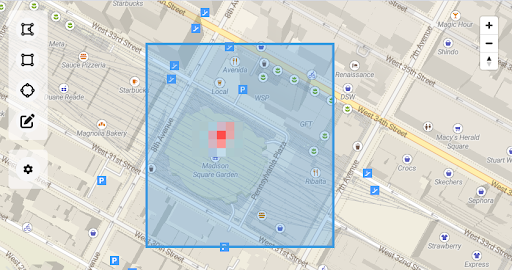
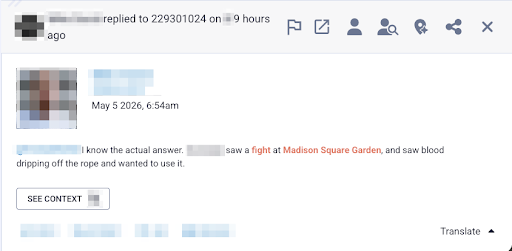
Geo-based search combined with AI keyword generation is taking OSINT to the next level. Geofencing allows teams to draw virtual perimeters around physical sites, such as corporate offices, foreign meeting sites, or public gatherings, to monitor digital activity strictly within those areas. This means you don’t need to know what keywords or hashtags you are looking for; you only need to know where to look. This is incredibly valuable for real-time executive protection and monitoring civil unrest, as it surfaces visual intelligence and early warnings directly from the scene, cutting out irrelevant noise.
The Future of OSINT for Situational Awareness
The decline of the geotag is a victory for consumer privacy, but it isn’t the end of location-based intelligence. By leveraging AI-driven keywords and hyper-local geofencing, security teams can move beyond broad geographic searches. These smart tools alleviate research bottlenecks, allowing analysts to redirect their expertise away from exhaustive data hunting and toward the critical analysis needed to respond to threats before they escalate. The geotag may be fading, but our situational awareness remains sharper than ever.
Don’t let the intelligence gap compromise your situational awareness. Ready to move from tedious manual searches to immediate, actionable insights? Book your Echosec demo today and empower your team with the next generation of location-based insight.
Many security leader are asking the same question right now. We already pay for Microsoft Copilot, ChatGPT Enterprise, or Claude. Why buy anything else?
It is a fair question. These are genuinely impressive platforms. And the honest answer is that they can help with some things. Just not the things that matter most for most SOC teams.
This post is a practical guide to where generalist AI earns its place in a SOC and where it runs out of road.
Where generalist AI platforms actually add value
Let’s be direct about what generalist AI platforms do well in a security context.
They are good at drafting, incident summaries, policy documentation, communication templates, and post-mortems. If an analyst needs to translate a technical finding into plain language for an executive, a general-purpose LLM can accelerate that substantially.
They are useful for on-demand research. Asking a question about a CVE, looking up MITRE ATT&CK techniques, or getting a quick primer on an unfamiliar attack class. These are real productivity wins.
They can assist with simple scripting and query construction. Writing a KQL query for a Sentinel rule, generating a Python snippet to parse a log format. Useful, time-saving work.
The common thread is that these are assistance tasks. A human still needs to initiate the process while the AI is a capable co-pilot. And for these use cases, a general-purpose tool is perfectly appropriate.
Where generalist AI runs out of road
The problem is that none of those use cases address the actual constraint facing most SOC teams.
Security teams are not failing because analysts lack knowledge or work too slowly. They are constrained by investigative capacity. Alert volumes are rising. Environments are growing. Attacks are moving faster. And the operating model still assumes humans will triage and investigate the majority of what comes in.
When that assumption breaks down, investigation becomes selective. High-severity alerts get attention. Medium alerts accumulate. Low-severity alerts are deferred or auto-closed. And the uncomfortable truth is that real attacks frequently begin as weak signals. Credential misuse, living-off-the-land techniques, early-stage lateral movement. They rarely present as critical alerts. They appear ordinary until someone actually investigates them.
Generic AI does not fix this. Here is why.
Generalist AI is built for breadth, not depth
ChatGPT and Microsoft Copilot are built for general-purpose text generation. Forensic investigation of a suspicious process execution chain, or a cloud misconfiguration alert at 3am, requires domain-specific knowledge and structured reasoning those platforms were not designed to provide.
Generalist AI assists but does not execute
Even with a great prompt, a general-purpose AI is accelerating an analyst’s workflow, not replacing the need for one. The investigation still depends on human capacity. And human capacity does not scale as fast as the alert surface grows.
Generalist AI KPIs are increased token usage
Microsoft’s KPI, for example, is token usage. More engagement equals more revenue, regardless of whether your security outcomes improved. That is not a subtle difference. It shapes every product decision, every definition of success. And this can result in very high costs for SOC teams heavily relying on these platforms. This is in stark contrast to Intezer AI SOC which selectively uses LLMs while primarily executing forensic investigations with highly scalable tools and processes.
The task requires drafting or synthesizing text and security context is not critical to the output
An analyst is researching something unfamiliar and needs a starting point
The work is advisory and a human will validate and act on every output
Speed of completion matters more than forensic accuracy
Consider purpose-built AI when:
You need investigation to happen without an analyst driving every step
Alert volume has outpaced the team’s capacity to investigate manually
Medium and low-severity alerts are going uninvestigated because there simply is not time
You need verdicts accurate enough to act on, not just suggestions to review
The line between these two categories comes down to one question. Do you need AI assistance, or do you need AI execution?
What autonomous execution actually requires
This distinction matters because it shapes what you need from a platform.
Assistance is achievable with a good LLM and a capable prompt. Execution requires something harder: accuracy and forensic depth at investigation time.
General-purpose AI tools and many first-generation AI SOC products rely primarily on LLM analysis and SIEM queries. That is not enough to produce verdicts you can trust without a human checking every one.
Intezer AI SOC is built for the execution side of that line. Automated evidence collection, threat intelligence correlation, network forensics, endpoint forensics, and reverse engineering. That additional depth is what generates the high-confidence verdicts that allow organizations to trust the outcome without a human reviewing every decision.
Below a certain threshold of accuracy and depth, AI assists humans. Above it, organizations can safely offload Tier 1 and Tier 2 work entirely. The threshold is not crossed through breadth. It is crossed through domain specialization and forensic rigor.
Intezer’s investigations produce evidence-based verdicts with 98% accuracy. Up to 2% of alerts are escalated as real incidents while the rest are resolved automatically. That is not a productivity improvement. That is a fundamentally different operating model.
The closed loop of triage and detection engineering
There is one more dimension where general-purpose tools fall short and that is detection engineering.
When a generic AI tool helps an analyst triage an alert, that interaction is largely isolated. The outcome does not feed back into your SIEM rules. It does not surface coverage gaps. It does not help you get better at detecting the same class of threat next time.
Intezer’s investigation outcomes feed directly into detection engineering at the source, continuously identifying broken or noisy rules, flagging coverage gaps against the MITRE ATT&CK framework, and generating deployment-ready detection rules informed by real investigation results. The system improves with every alert it processes. Detection gets better based on evidence, not assumptions.
That closed loop is the difference between a productivity tool and an operating model.
Is a single generalist interface with multiple plugins the answer?
There is also an important architectural point worth making. Generalist AI platforms are increasingly effective at consolidating workflows into a single interface, and in theory, you could extend them into security operations through plugins and MCPs. The building blocks exist.
But in practice, stitching together the specialist capabilities needed for real alert triage such as forensic evidence collection, threat intelligence correlation, reverse engineering, network analysis, etc. means sourcing, integrating, and maintaining a patchwork of plugins across multiple providers. Each one has its own update cycle, its own failure modes, and its own gaps. The integration burden falls on your team, and keeping it all working reliably over time is its own operational overhead.
At some point the question becomes whether the effort of assembling and maintaining a DIY investigation pipeline inside a generalist platform is worth it — or whether it makes more sense to use a purpose-built system where those capabilities are already unified, tested, and working together out of the box.
The bottom line
Generalist AI platforms have a real role to play in the SOC. Use them for drafting, research, and analyst-driven assistance tasks. It is good at those things and it is likely already paid for.
But do not confuse that with solving the capacity problem. When investigation still depends on human bandwidth, the alert backlog does not disappear. It just accumulates more slowly.
The future SOC is one where AI executes investigation and humans supervise outcomes. Getting there requires technology purpose-built for that job.
The primary goal for attackers in a phishing campaign is to bypass email security and trick the potential victim into revealing their data. To achieve this, scammers employ a wide range of tactics, from redirect links to QR codes. Additionally, they heavily rely on legitimate sources for malicious email campaigns. Specifically, we’ve recently observed an uptick in phishing attacks leveraging Amazon SES.
The dangers of Amazon SES abuse
Amazon Simple Email Service (Amazon SES) is a cloud-based email platform designed for highly reliable transactional and marketing message delivery. It integrates seamlessly with other products in Amazon’s cloud ecosystem, AWS.
At first glance, it might seem like just another delivery channel for email phishing, but that isn’t the case. The insidious nature of Amazon SES attacks lies in the fact that attackers aren’t using suspicious or dangerous domains; instead, they are leveraging infrastructure that both users and security systems have grown to trust. These emails utilize SPF, DKIM, and DMARC authentication protocols, passing all standard provider checks, and almost always contain .amazonses.com in the Message-ID headers. Consequently, from a technical standpoint, every email sent via Amazon SES – even a phishing one – looks completely legitimate.
Phishing URLs can be masked with redirects: a user sees a link like amazonaws.com in the email and clicks it with confidence, only to be sent to a phishing site rather than a legitimate one. Amazon SES also allows for custom HTML templates, which attackers use to craft more convincing emails. Because this is legitimate infrastructure, the sender’s IP address won’t end up on reputation-based blocklists. Blocking it would restrict all incoming mail sent through Amazon SES. For major services, that kind of measure is ineffective, as it would significantly disrupt user workflows due to a massive number of false positives.
How compromise happens
In most cases, attackers gain access to Amazon SES through leaked IAM (AWS Identity and Access Management) access keys. Developers frequently leave these keys exposed in public GitHub repositories, ENV files, Docker images, configuration backups, or even in publicly accessible S3 buckets. To hunt for these IAM keys, phishers use various tools, such as automated bots based on the open-source utility TruffleHog, which is designed for detecting leaked secrets. After verifying the key’s permissions and email sending limits, attackers are equipped to spread a massive volume of phishing messages.
Examples of phishing with Amazon SES
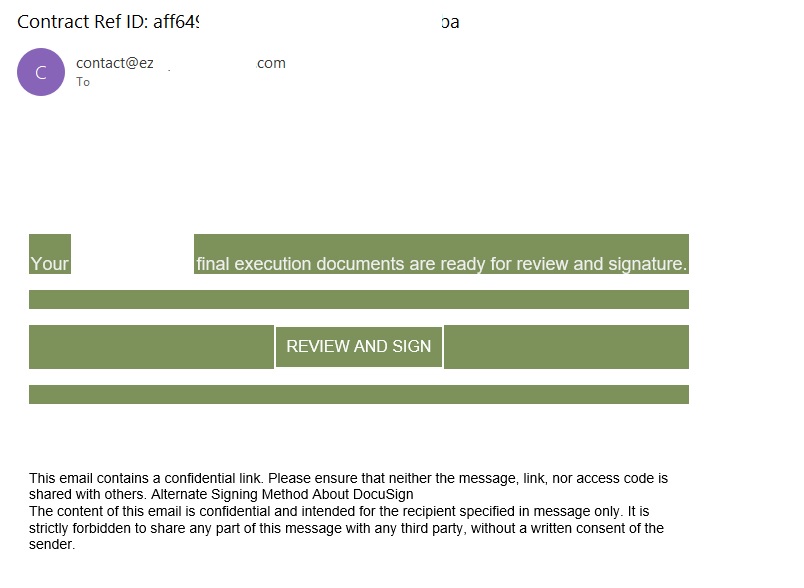
In early 2026, one of the most common themes in phishing emails sent with Amazon SES was fake notifications from electronic signature services.
Phishing email imitating a Docusign notification
The email’s technical headers confirm that it was sent with Amazon SES. At first glance, it all looks legitimate enough.
Phishing email headers
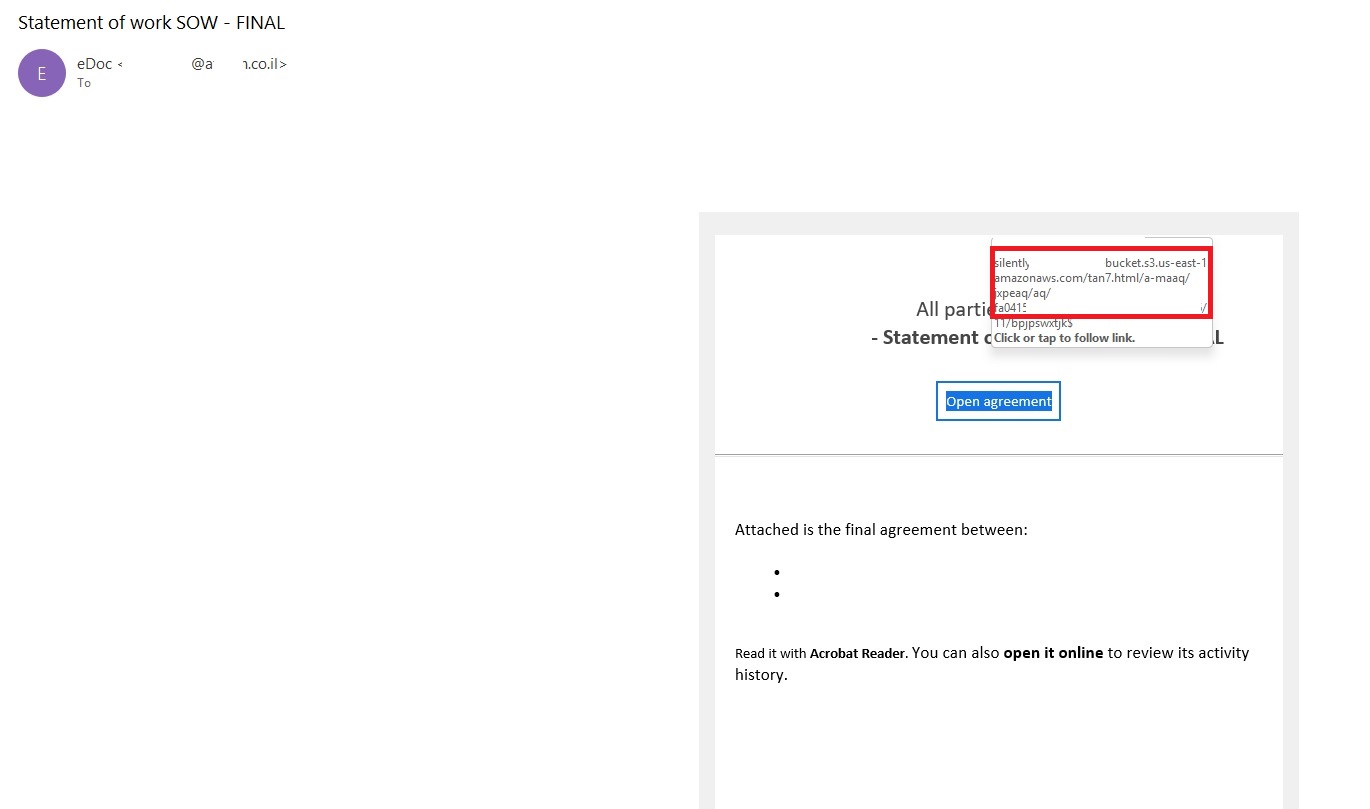
In these emails, the victim is typically asked to click a link to review and sign a specific document.
Phishing email with a “document”
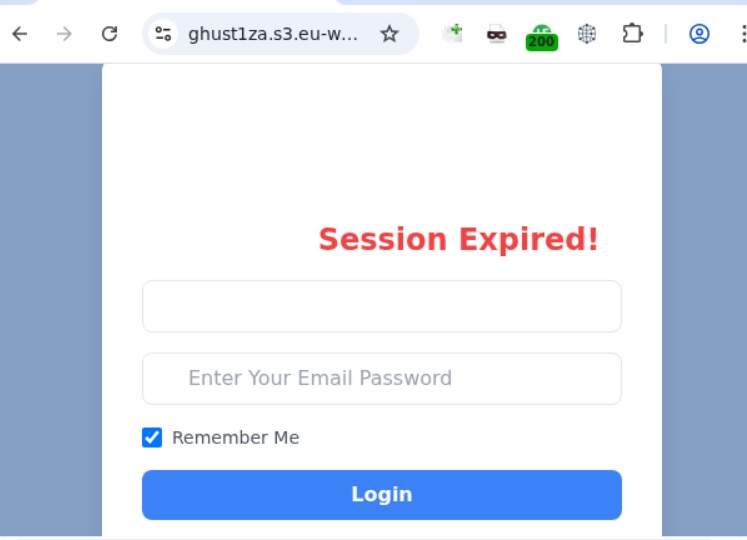
Upon clicking the link, the user is directed to a sign-in form hosted on amazonaws.com. This can easily mislead the victim, convincing them that what they’re doing is safe.
Phishing sign-in form
The resulting form is, of course, a phishing page, and any data entered into it goes directly to the attackers.
Amazon SES and BEC
However, Amazon SES is used for more than just standard phishing; it’s also a vehicle for a very sophisticated type of BEC campaigns. In one case we investigated, a fraudulent email appeared to contain a series of messages exchanged between an employee of the target organization and a service provider about an outstanding invoice. The email was sent as if from that employee to the company’s finance department, requesting urgent payment.
BEC email featuring a fake conversation between an employee and a vendor
The PDF attachments didn’t contain any malicious phishing URLs or QR codes, only payment details and supporting documentation.
Forged financial documents
Naturally, the email didn’t originate with the employee, but with an attacker impersonating them. The entire thread quoted within the email was actually fabricated, with the messages formatted to appear as a legitimate forwarded thread to a cursory glance. This type of attack aims to lower the user’s guard and trick them into transferring funds to the scammers’ account.
Takeaways
Phishing via Amazon SES experienced an uptick in January 2026 and has remained relatively steady through Q1. By weaponizing this service, attackers avoid the effort of building dubious domains and mail infrastructure from scratch. Instead, they hijack existing access keys to gain the ability to blast out thousands of phishing emails. These messages pass email authentication, originate from IP addresses that are unlikely to be blocklisted, and contain links to phishing forms that look entirely legitimate.
Since these Amazon SES phishing attacks stem from compromised or leaked AWS credentials, prioritizing the security of these accounts is critical. To mitigate these risks, we recommend following these guidelines:
Implement the principle of least privilege when configuring IAM access keys, granting elevated permissions only to users who require them for specific tasks.
Transition from IAM access keys to roles when configuring AWS; these are profiles with specific permissions that can be assigned to one or several users.
Enable multi-factor authentication, an ever-relevant step.
Configure IP-based access restrictions.
Set up automated key rotation and run regular security audits.
Use the AWS Key Management Service to encrypt data with unique cryptographic keys and manage them from a centralized location.
We recommend that users remain vigilant when handling email. Do not determine whether an email is safe based solely on the From field. If you receive unexpected documents via email, a prudent precaution is to verify the request with the sender through a different communication channel. Always carefully inspect where links in the body of an email actually lead. Additionally, robust email security solutions can provide an essential layer of protection for both corporate and personal correspondence.
The primary goal for attackers in a phishing campaign is to bypass email security and trick the potential victim into revealing their data. To achieve this, scammers employ a wide range of tactics, from redirect links to QR codes. Additionally, they heavily rely on legitimate sources for malicious email campaigns. Specifically, we’ve recently observed an uptick in phishing attacks leveraging Amazon SES.
The dangers of Amazon SES abuse
Amazon Simple Email Service (Amazon SES) is a cloud-based email platform designed for highly reliable transactional and marketing message delivery. It integrates seamlessly with other products in Amazon’s cloud ecosystem, AWS.
At first glance, it might seem like just another delivery channel for email phishing, but that isn’t the case. The insidious nature of Amazon SES attacks lies in the fact that attackers aren’t using suspicious or dangerous domains; instead, they are leveraging infrastructure that both users and security systems have grown to trust. These emails utilize SPF, DKIM, and DMARC authentication protocols, passing all standard provider checks, and almost always contain .amazonses.com in the Message-ID headers. Consequently, from a technical standpoint, every email sent via Amazon SES – even a phishing one – looks completely legitimate.
Phishing URLs can be masked with redirects: a user sees a link like amazonaws.com in the email and clicks it with confidence, only to be sent to a phishing site rather than a legitimate one. Amazon SES also allows for custom HTML templates, which attackers use to craft more convincing emails. Because this is legitimate infrastructure, the sender’s IP address won’t end up on reputation-based blocklists. Blocking it would restrict all incoming mail sent through Amazon SES. For major services, that kind of measure is ineffective, as it would significantly disrupt user workflows due to a massive number of false positives.
How compromise happens
In most cases, attackers gain access to Amazon SES through leaked IAM (AWS Identity and Access Management) access keys. Developers frequently leave these keys exposed in public GitHub repositories, ENV files, Docker images, configuration backups, or even in publicly accessible S3 buckets. To hunt for these IAM keys, phishers use various tools, such as automated bots based on the open-source utility TruffleHog, which is designed for detecting leaked secrets. After verifying the key’s permissions and email sending limits, attackers are equipped to spread a massive volume of phishing messages.
Examples of phishing with Amazon SES
In early 2026, one of the most common themes in phishing emails sent with Amazon SES was fake notifications from electronic signature services.
Phishing email imitating a Docusign notification
The email’s technical headers confirm that it was sent with Amazon SES. At first glance, it all looks legitimate enough.
Phishing email headers
In these emails, the victim is typically asked to click a link to review and sign a specific document.
Phishing email with a “document”
Upon clicking the link, the user is directed to a sign-in form hosted on amazonaws.com. This can easily mislead the victim, convincing them that what they’re doing is safe.
Phishing sign-in form
The resulting form is, of course, a phishing page, and any data entered into it goes directly to the attackers.
Amazon SES and BEC
However, Amazon SES is used for more than just standard phishing; it’s also a vehicle for a very sophisticated type of BEC campaigns. In one case we investigated, a fraudulent email appeared to contain a series of messages exchanged between an employee of the target organization and a service provider about an outstanding invoice. The email was sent as if from that employee to the company’s finance department, requesting urgent payment.
BEC email featuring a fake conversation between an employee and a vendor
The PDF attachments didn’t contain any malicious phishing URLs or QR codes, only payment details and supporting documentation.
Forged financial documents
Naturally, the email didn’t originate with the employee, but with an attacker impersonating them. The entire thread quoted within the email was actually fabricated, with the messages formatted to appear as a legitimate forwarded thread to a cursory glance. This type of attack aims to lower the user’s guard and trick them into transferring funds to the scammers’ account.
Takeaways
Phishing via Amazon SES experienced an uptick in January 2026 and has remained relatively steady through Q1. By weaponizing this service, attackers avoid the effort of building dubious domains and mail infrastructure from scratch. Instead, they hijack existing access keys to gain the ability to blast out thousands of phishing emails. These messages pass email authentication, originate from IP addresses that are unlikely to be blocklisted, and contain links to phishing forms that look entirely legitimate.
Since these Amazon SES phishing attacks stem from compromised or leaked AWS credentials, prioritizing the security of these accounts is critical. To mitigate these risks, we recommend following these guidelines:
Implement the principle of least privilege when configuring IAM access keys, granting elevated permissions only to users who require them for specific tasks.
Transition from IAM access keys to roles when configuring AWS; these are profiles with specific permissions that can be assigned to one or several users.
Enable multi-factor authentication, an ever-relevant step.
Configure IP-based access restrictions.
Set up automated key rotation and run regular security audits.
Use the AWS Key Management Service to encrypt data with unique cryptographic keys and manage them from a centralized location.
We recommend that users remain vigilant when handling email. Do not determine whether an email is safe based solely on the From field. If you receive unexpected documents via email, a prudent precaution is to verify the request with the sender through a different communication channel. Always carefully inspect where links in the body of an email actually lead. Additionally, robust email security solutions can provide an essential layer of protection for both corporate and personal correspondence.
To deliver this critical edge, our Unit 42 Frontier AI Defense will now leverage Anthropic’s Claude Security, powered by Opus 4.7. By integrating one of the world’s most advanced AI models, we are empowering our customers to outpace automated threats. Through Frontier AI Defense, organizations can rapidly assess their security posture, remediate vulnerabilities and harden their infrastructure against next-generation, AI-driven attacks.
We are utilizing Claude Security’s deep technical reasoning to enable our customers to find and fix vulnerabilities with unprecedented speed. This includes:
AI-Driven Exposure Analysis – Identifying complex exploit chains that turn minor findings into critical risks.
Scalable Application Analysis – Performing deep-stack code reviews at a scale and depth previously unavailable.
Agentic Defense – Powering autonomous workflows that detect and remediate threats at machine speed, backed by human oversight.
Palo Alto Networks is also participating in Anthropic's Cyber Verification Program, which credentials security teams for legitimate defensive use of frontier models.
The threat timeline is accelerating. Within months, AI-driven attack capabilities will become a standard fixture of the threat landscape. Palo Alto Networks is dedicated to ensuring our global customers are equipped with the modern frontier AI models necessary to stay secure both today and tomorrow.
PhantomRPC involves Windows Remote Procedure Call (RPC), the core of communication between Windows processes. The vulnerability lets a process with impersonation rights escalate to SYSTEM by impersonating high‑privileged clients that connect to a fake RPC server.
The researcher presented a detailed technical report outlining five exploitation paths, including coercion, user interaction, or background services. They warned that potential vectors are “effectively unlimited” because the root issue is architectural.
Microsoft, however, classified the issue as “moderate,” refused a bounty, declined to assign a CVE (a spot in the list of Common Vulnerabilities and Exposures), and closed the case without tracking. Its position is that the technique requires an already‑compromised machine and does not provide unauthenticated or remote access.
Experts disagreed with Microsoft’s assessment. Their concern is that Microsoft is downplaying a systemic local privilege escalation technique that exists in all supported Windows versions.
The issue
At the core of this issue is that the Windows RPC runtime does not sufficiently verify that the server a high‑privileged client connects to is the intended legitimate endpoint.
If a legitimate RPC server is not reachable (for example because the service stopped, was misconfigured, not installed, or due to a race condition), an attacker with SeImpersonatePrivilege can spin up a fake RPC server that “fills the gap” using the same interface and endpoint.
When a SYSTEM or high‑privileged client connects to this fake server, using an impersonation level that allows the server to impersonate the client, the attacker can call RpcImpersonateClient and immediately escalate their privileges to SYSTEM.
From Microsoft’s perspective, the ability to run a rogue RPC server in this way falls under the category of “already compromised.”
SeImpersonatePrivilege
To understand the issue better, we need to dig into what SeImpersonatePrivilege does.
Basically, SeImpersonatePrivilege is the Windows permission that lets a program “pretend to be you” after you’ve already logged in, so it can do things on your behalf using your level of access.
It’s needed because many system services and server‑type apps (file sharing, RPC servers, COM servers, web apps) have to perform actions on behalf of a user, like reading their files or applying group policy.
If an attacker gains this privilege, they can create a fake service or server and wait for a more powerful account to talk to it. When that high‑privilege service connects, the attacker can grab its security token and impersonate it, effectively upgrading from an account with lower privileges to full SYSTEM control on that machine.
Protection
A Microsoft spokesperson provided the following statement:
“This technique requires an already-compromised machine and does not grant unauthenticated or remote access. Any update is a balance between existing compatibility and customer risk, and we remain committed to continually hardening our products. We recommend customers follow security best practices, including limiting administrative privileges and applying the principle of least privilege.”
In our opinion, mitigating PhantomRPC properly would require deep changes to the RPC architecture, which is hard to do on existing Windows versions without breaking compatibility. It’s maybe something we’ll see in future versions, given the scale of change needed.
What you can do:
As PhantomRPC is a piece in a larger chain, it is still very important to keep Windows updated.
Use your admin account sparingly and only for the tasks that need that kind of privilege.
Avoid disabling or “hardening” services blindly since a malicious service might step in their place.
To answer the question in the title: it looks like a “feature” that can be abused in many ways; one that has outlived its original threat model. Defenders have to treat them as ongoing risks, rather than one‑off CVEs.
“One of the best cybersecurity suites on the planet.”

 Login
Login


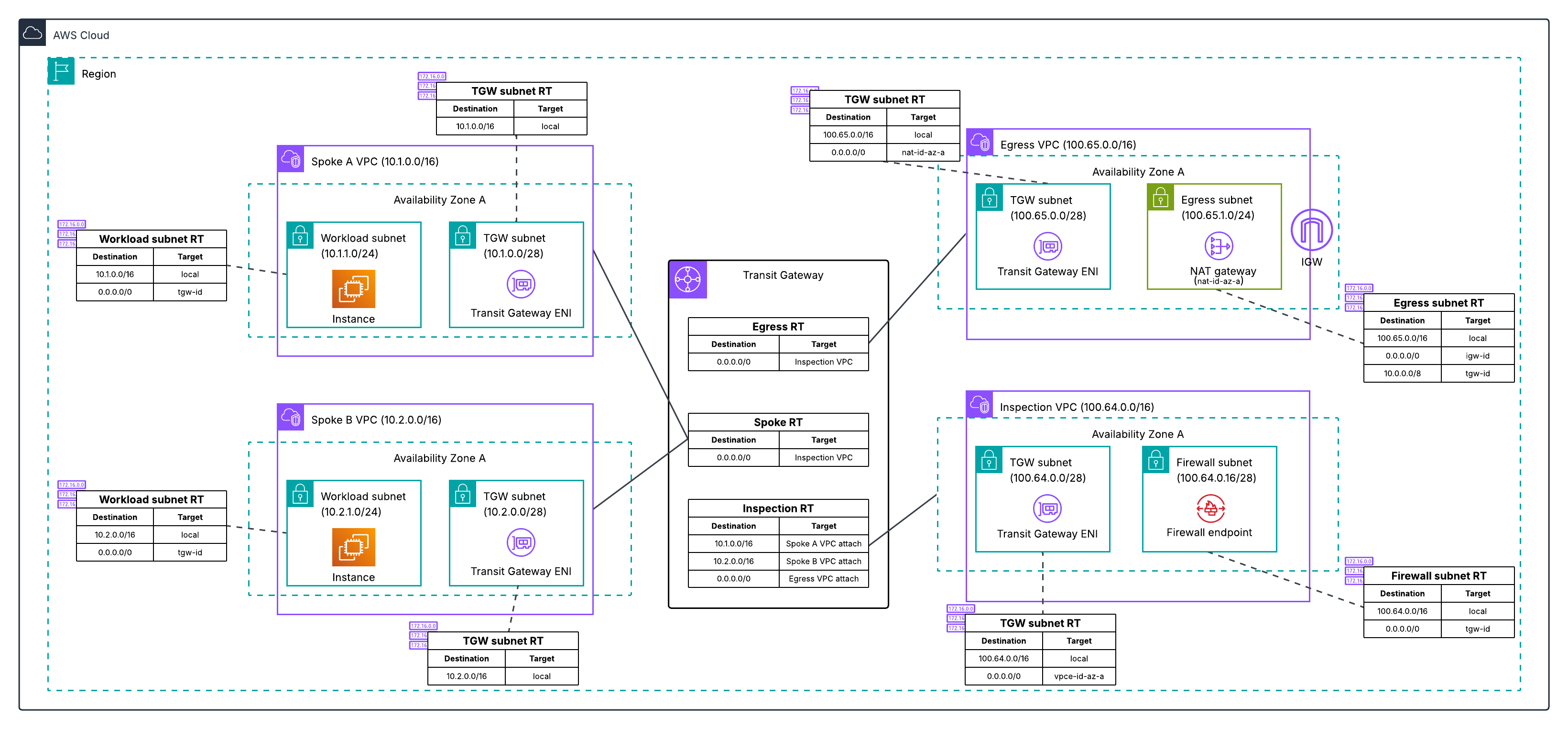
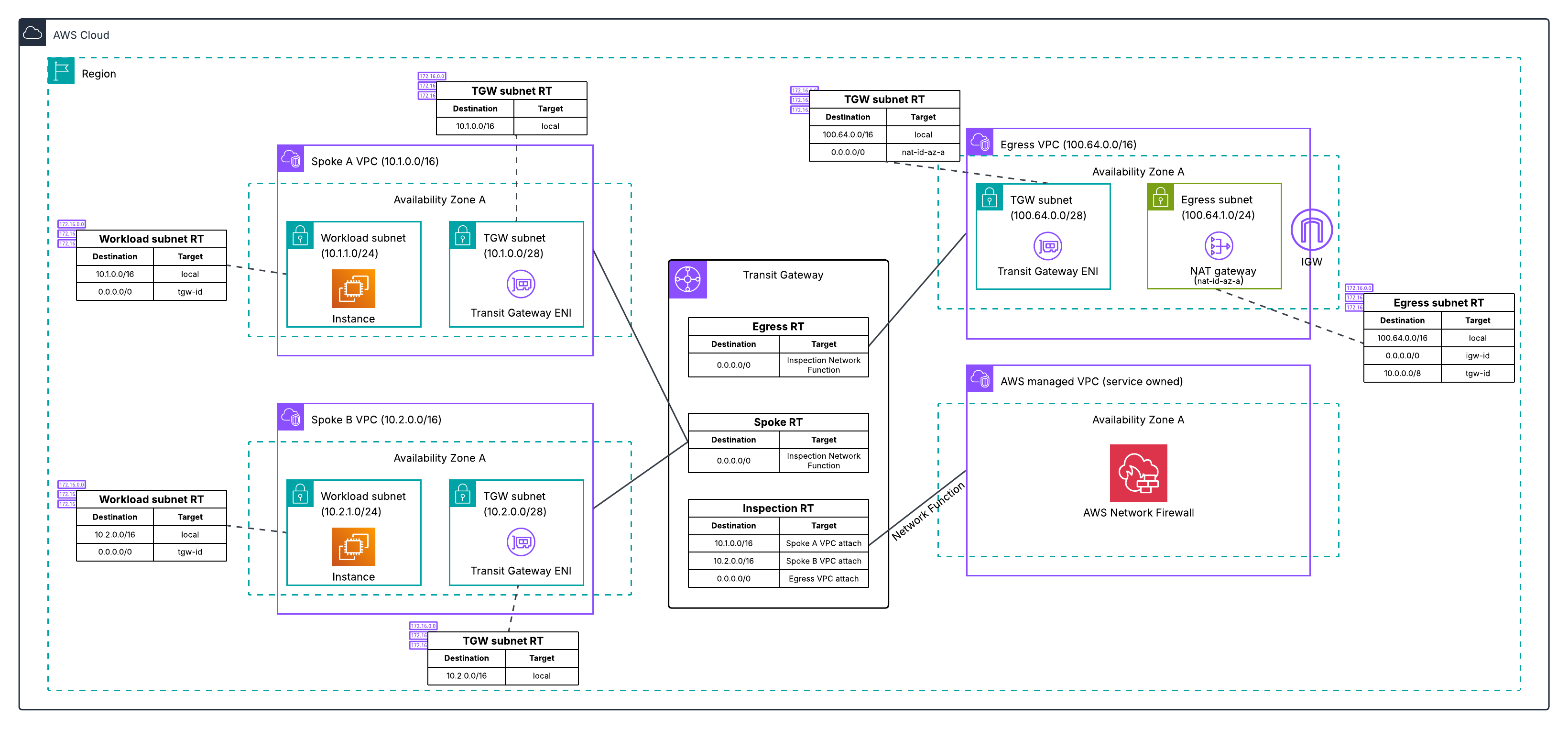
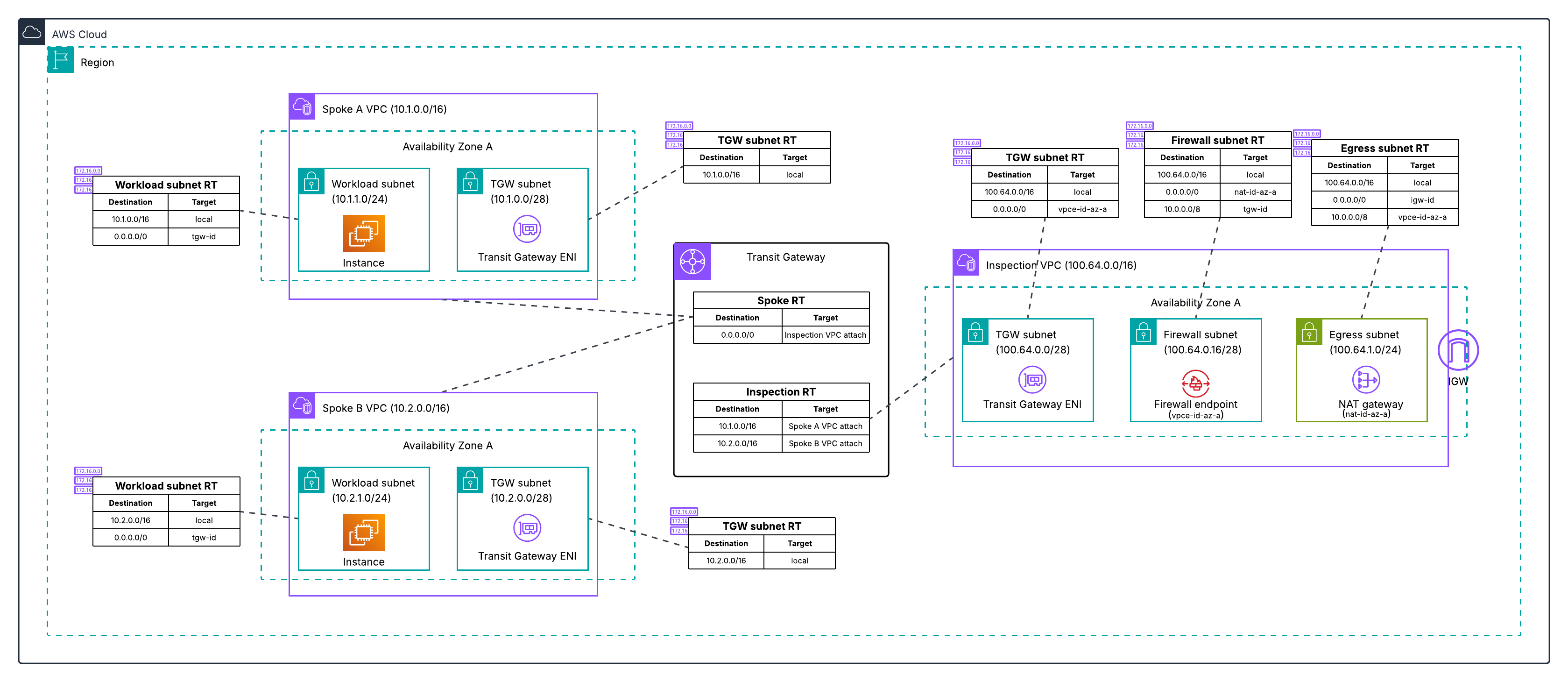
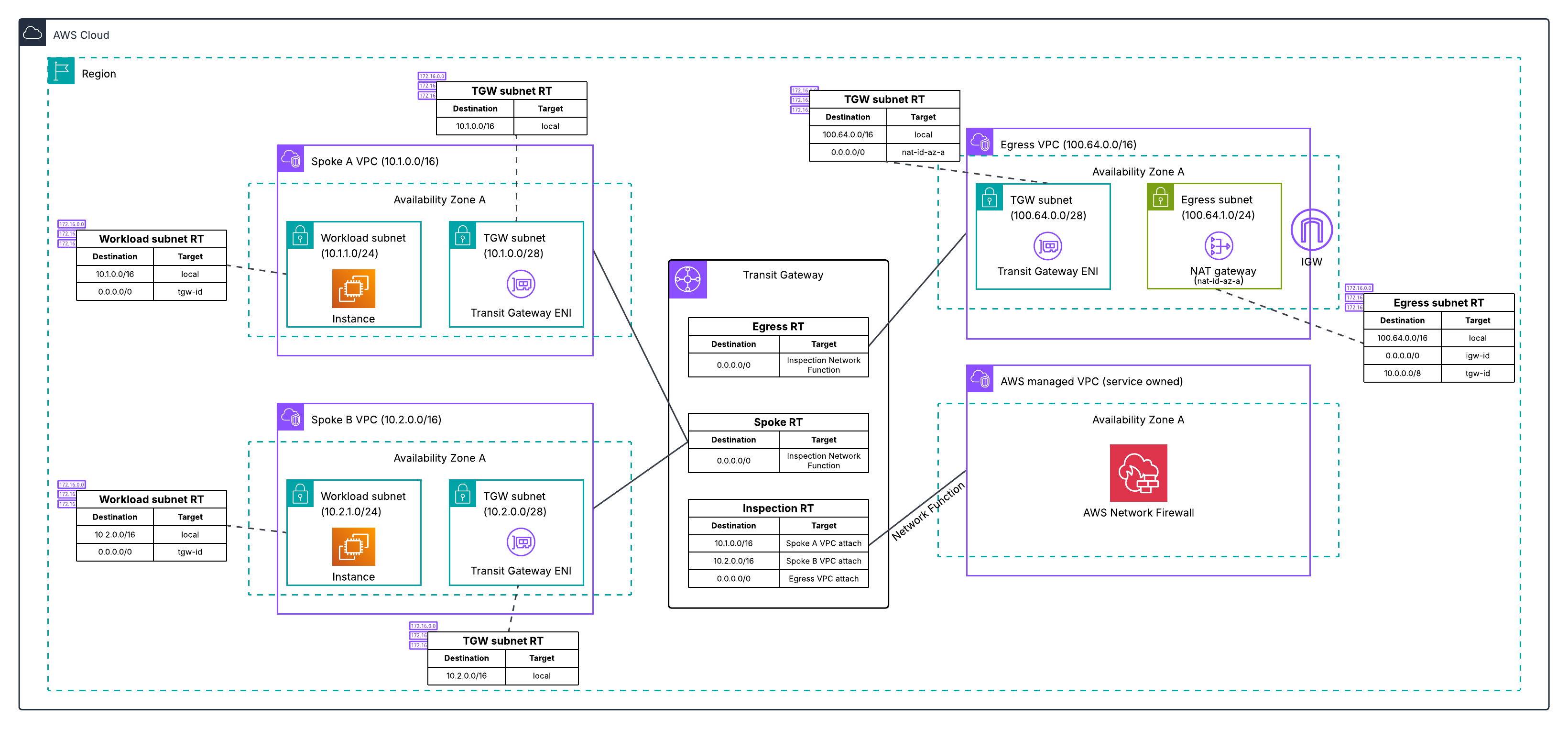




 Table Of Contents