Firefox krijgt een eigen adblocker, bevestigt Firefox-topman Ajit Varma. Tegelijkertijd is er nog niet veel duidelijkheid over hoe de adblocker werkt en wanneer deze uitkomt. Firefox experimenteert nu met een geïntegreerde Brave-adblocker, maar dat is niet de definitieve implementatie.
Google publiceerde exploitcode voor een openstaande kwetsbaarheid in Chromium-browsers waarvoor nog altijd geen patch is. De kwetsbaarheid werd eind 2022 gemeld door een externe beveiligingsonderzoeker. Google haalde zijn exploitcode offline, maar deze is al gekopieerd.
OpenAI en ElevenLabs gaan Google SynthID gebruiken om AI-beeldmateriaal watermerken te geven. Dat heeft Google bekendgemaakt op de eigen ontwikkelaarsconferentie I/O. Google gebruikt dat zelf al enkele jaren, Nvidia doet dat ook.
Perplexity introduceert een nieuwe agentapp voor zijn AI-dienst genaamd Personal Computer. Hiermee kunnen gebruikers de dienst toegang geven tot lokale bestanden van hun Mac-systeem. Ondersteuning voor de huidige Perplexity-app voor Mac stopt 'in de komende weken'. Personal Computer vereist een Pro- of Max-abonnement.
Malicious actors have developed a new way to steal data stored by Chrome for Windows. Researchers discovered the technique while analyzing a fresh build of an infostealer known as VoidStealer. The new method allows the malware to bypass Chrome’s Application-Bound (App-Bound) Encryption (ABE), a mechanism intended to protect session cookies and other valuable information stored in the browser.
Google hoped this mechanism would secure the master key Chrome uses to encrypt all sensitive data. Unfortunately, this isn’t the first time malware authors have found a workaround for this defense — leaving secrets stored in Chrome vulnerable once again.
How App-Bound Encryption works in Chrome
Google introduced App-Bound Encryption in July 2024 with the release of Chrome version 127. The company’s announcement mentioned infostealers snatching cookies from Chrome users on Windows as the primary problem ABE was intended to solve. We’ve already covered in detail what these files are and the consequences of their theft, so we’ll only briefly recap the main facts here.
Cookies are small files that the browser saves to the user’s device at a website’s request to remember various site settings. Of particular value to attackers are session cookies, which are used for automatic authentication on websites. It’s thanks to these files that we don’t have to enter a username and password every time we revisit a site.
But this convenience carries a risk: stealing these files allows an attacker to use an already-authenticated session without entering a username or password. This allows them to impersonate the user, which can lead to account hijacking, theft of personal or financial data, and other adverse consequences.
Infostealer Trojans are particularly dangerous for Chrome users on Windows. This is because, on this OS, Chrome previously relied solely on the standard built-in Data Protection API (DPAPI). With this system encryption mechanism, applications don’t need to create and store encryption keys to protect data.
The limitation of DPAPI is that it doesn’t protect data from malware that’s already successfully compromised the system and is capable of executing code on behalf of the logged-in user. This is exactly what stealers exploit: since they typically run with the user’s privileges, they can simply request DPAPI to decrypt the browser’s protected data.
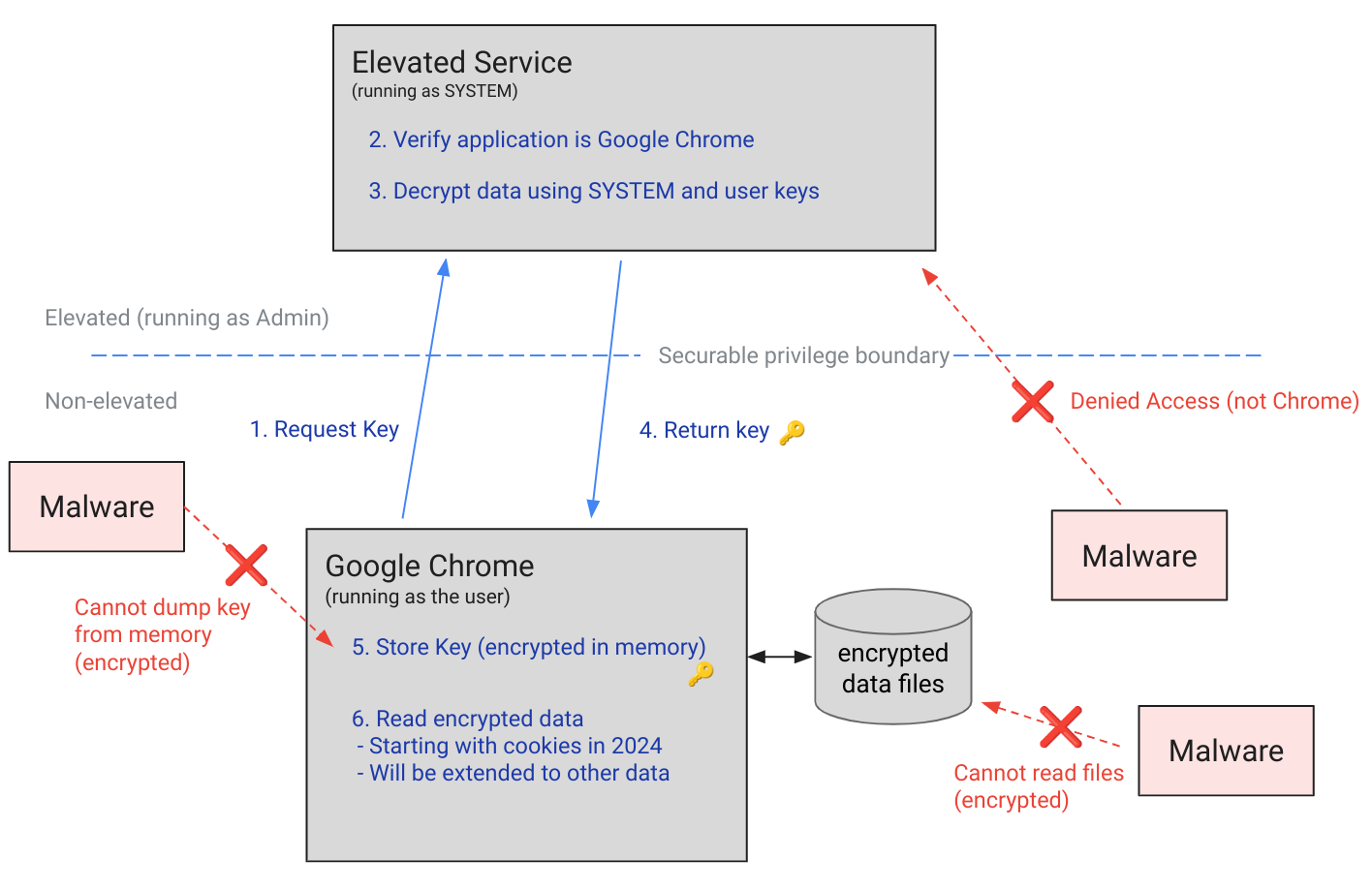
The ABE mechanism was designed to solve that specific problem. The core idea is right in the name: App-Bound Encryption means the encryption is tied to a specific application. To achieve this, a separate service running with system privileges is responsible for protecting the key used to encrypt Chrome’s data. It verifies which application is requesting access to the key, and denies the request if it doesn’t originate from Chrome.
Chrome’s App-Bound Encryption (ABE) was designed so that only Chrome itself could retrieve the master key needed to decrypt the browser’s stored data. Source
As a result, the architects of this feature assumed that to access ABE-protected browser data, an infostealer would either need to escalate its privileges to system-level, or inject malicious code directly into Chrome. In theory, this should have made attacking Chrome significantly harder and reduced the effectiveness of mass-market infostealers. As you might have guessed, things didn’t go quite that smoothly in practice.
Previous successful bypasses of Chrome’s ABE
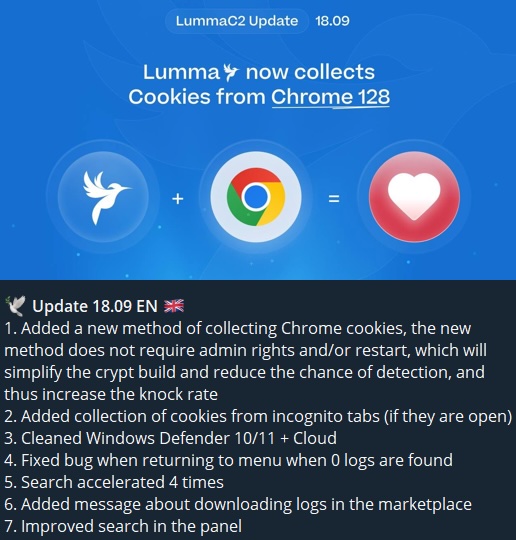
Just a couple of months after Google announced the implementation of App-Bound Encryption in Chrome, many infostealer developers claimed they’d already bypassed the protection. Among them were the creators of Meduza Stealer, Whitesnake, Lumma Stealer, and Lumar (also known as PovertyStealer).
Lumma stealer developers announce a bypass for Chrome’s App-Bound Encryption in a new version of the malware
Of course, you shouldn’t take malware developers at their word, but legitimate security researchers were able to confirm at least some of the claims. Bypasses for Google Chrome’s new data protection feature did become available almost immediately after its release.
A month later, in October 2024, tech enthusiast Alex Hagenah published a tool on GitHub called Chrome-App-Bound-Encryption-Decryption to bypass Google’s new security mechanism. Analysis of the tool’s code revealed that its author used roughly the same methods that attackers were already heavily exploiting.
What followed was a game of cat and mouse: security researchers and stealer developers came up with new tricks to circumvent App-Bound Encryption, while Google patched the newly discovered loopholes with varying degrees of success.
VoidStealer — a new data-nabbing menace
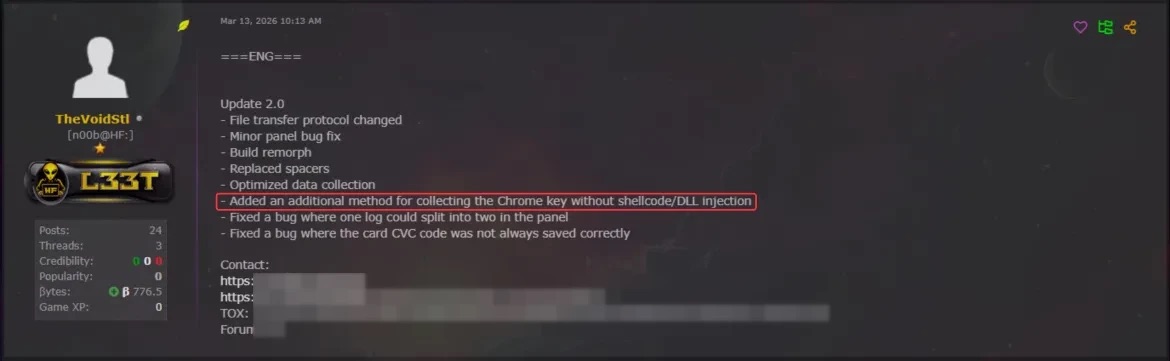
This brings us to recent events: in March 2026, news broke about a stealer named VoidStealer, which utilizes a brand-new and, by all accounts, highly effective method for bypassing ABE.
VoidStealer developers advertising a new method for bypassing ABE. Source
The malware authors developed an attack technique that targets the brief moment when the master key sits in the browser’s memory in plaintext. This occurs because, at a certain point, the browser inevitably has to decrypt its data to actually use it — for instance, to automatically sign in to a website with the relevant session cookie or to access saved credentials.
To exploit this window of opportunity, the malware attaches itself to the Chrome process as a debugger — a tool that allows one to control a program’s execution, pause it, and inspect its memory. In legitimate scenarios, these tools are used by developers to find and fix bugs, analyze application behavior, and test performance.
The malware identifies the specific section of code where data decryption takes place. It then sets a breakpoint at that location; when the program’s execution reaches that point, the browser effectively freezes. This is how the malware catches the exact moment the master key is sitting in RAM in plaintext; it then reads the key directly from memory.
It’s worth noting that everything mentioned above also applies to other Chromium-based browsers that use ABE, including Microsoft Edge, Brave, Opera, Vivaldi, and others.
How to avoid falling victim to infostealers
The scale of VoidStealer’s reach could be significant, as its developers operate under the malware-as-a-service (MaaS) model. This means they rent out the ready-made tool to other attackers, so they don’t need to develop custom malware from scratch.
This situation demonstrates that relying solely on built-in security mechanisms isn’t enough. Unfortunately, stealer developers are coming up with new workarounds faster than browser and operating system developers can roll out patches.
Here’s what users can do about it:
Avoid installing programs from suspicious sources. This will minimize the chances of malware infiltrating your system.
Learn how ClickFix attacks Lately, stealers have frequently been distributed using this specific malicious tactic.
Keep your OS and software updated on all devices. Timely updates help patch many of the vulnerabilities that malware exploits.
Install a robust security solution on all your devices. It’ll block suspicious activity in real time and alert you to potential threats.
As an added precaution, avoid storing passwords and bank card info in Google Chrome or your Notes app, as these are the first places any self-respecting stealer looks. Instead, use a secure password manager.
Stealers are hunting for your data, finding ways to infiltrate both computers and smartphones alike. To protect yourself from theft, check out our other related posts:
Mozilla gebruikt AI om bugs te vinden en te fixen in de code van Firefox. De nieuwe versie 150 van die webbrowser bevat fixes voor 271 kwetsbaarheden. Dit is dankzij de besloten preview van Anthropics AI-tool Mythos. Mozilla's cto waarschuwt voor een tweedeling in de softwarewereld.
DarkSword and Coruna are two new tools for invisible attacks on iOS devices. These attacks require no user interaction and are already being actively used by bad actors in the wild. Before these threats emerged, most iPhone users didn’t have to lose sleep over their data security. Protection was really only a major concern for a narrow group — politicians, activists, diplomats, high-level business execs, and others who handle extremely sensitive data — who might be targeted by foreign intelligence agencies. We’ve covered sophisticated spyware used against such a group before — noting how hard to come by those tools were.
However, DarkSword and Coruna — discovered by researchers earlier this year — are total game-changers. This malware is being used for mass infections of everyday users. In this post, we dive into why this shift happened, why these tools are so dangerous, and how you can stay protected.
What we know about DarkSword, and how it can target your iPhone
In mid-March 2026, three separate research teams coordinated the release of their findings on a new spyware strain called DarkSword. This tool is capable of silently hacking devices running iOS 18 without the user ever knowing something is wrong.
First, we should clear up some confusion: iOS 18 isn’t as vintage as it might sound. Even though the latest version is iOS 26, Apple recently overhauled its versioning system, which threw everyone for a loop. They decided to jump ahead eight versions — from 18 straight to 26 — so the OS number matches the current year. Despite the jump, Apple estimates that about a quarter of all active devices still run iOS 18 or older.
With that cleared up, let’s get back to DarkSword. Research shows that this malware infects victims when they visit perfectly legitimate websites that have been injected with malicious code. The spyware installs itself without any user interaction at all: you just have to land on a compromised page. This is what’s known as a zero-click infection technique. Researchers report that several thousand devices have already been hit this way.
To compromise a device, DarkSword uses a six-vulnerability exploit chain to escape the sandbox, escalate privileges, and execute code. Once it’s in, the malware harvests data from the infected device, including:
Passwords
Photos
Chats and data from iMessage, WhatsApp, and Telegram
Browser history
Information from Apple’s Calendar, Notes, and Health apps
On top of all that, DarkSword lets attackers scoop up crypto-wallet data, making it essentially dual-purpose malware that functions as both a spy tool and a way to drain your crypto.
The only bit of good news is that the spyware doesn’t survive a reboot. DarkSword is fileless malware, meaning it lives in the device’s RAM, and never actually embeds itself into the file system.
Coruna: how older iOS versions are being targeted
Just two weeks before the DarkSword findings went public, researchers flagged another iOS threat dubbed Coruna. This malware is capable of compromising devices running older software — specifically iOS 13 through 17.2.1. Coruna uses the exact same playbook as DarkSword: victims visit a legitimate site injected with malicious code which then drops the malware onto the device. The whole process is completely invisible and requires zero user interaction.
A deep dive into Coruna’s code revealed it exploits a total of 23 different iOS vulnerabilities, several of which are tucked away in Apple’s WebKit. It’s worth reminding that, generally speaking (outside the EU), all iOS browsers are required to use the WebKit engine. This means these vulnerabilities don’t just affect Safari users — they’re a threat to anyone using a third-party browser on their iPhone as well.
The latest version of Coruna, much like DarkSword, includes modifications designed to drain crypto wallets. It also harvests photos and, in certain instances, email data. From what we can tell, stealing cryptocurrency seems to be the primary motive behind Coruna’s widespread deployment.
Who created Coruna and DarkSword — and how did they end up in the wild?
Code analysis of both tools suggests that Coruna and DarkSword were likely built by different developers. However, in both cases, we’re looking at software originally created by state-affiliated companies, possibly from the U.S. The high quality of the code points to this; these aren’t just Frankenstein kits cobbled together from random parts, but uniformly engineered exploits. Somewhere along the line, these tools leaked into the hands of cybercrime gangs.
One theory suggests an employee at the company that developed Coruna sold it to hackers. Since then, the malware has been used to drain crypto wallets belonging to users in China; experts estimate that at least 42 000 devices were infected there alone.
As for DarkSword, cybercriminals have already used it to compromise users in Saudi Arabia, Turkey, and Malaysia. The problem is exacerbated by the fact that the attackers who first deployed DarkSword left the full source code on infected websites, meaning it could easily be picked up by other criminal groups.
The code also includes detailed comments in English explaining exactly what each component does, which supports the theory of its Western origins. These step-by-step instructions make it easy for other hackers to adapt the tool for their own purposes.
How to protect yourself from Coruna and DarkSword
Serious malware that allows for the mass infection of iPhones while requiring zero interaction from the user has now landed in the hands of an essentially unlimited pool of cybercriminals. To pick up Coruna or DarkSword, you simply have to visit the wrong site at the wrong time. So this is one of those cases where every user needs to take iOS security seriously — not just those in high-risk groups.
The best thing you can do to protect yourself from Coruna and DarkSword is to update your devices to the latest version of iOS or iPadOS 26, as soon as you can. If you can’t update to the newest software — for instance, if your device is older and doesn’t support iOS 26 — you should still install the latest version available to you. Specifically, look for versions 15.8.7, 16.7.15, or 18.7.7. In a rare move, Apple patched a wide range of older operating systems.
To protect your Apple devices from similar malware that will likely pop up in the future, we recommend the following:
Install updates promptly on all your Apple devices. The company regularly releases OS versions that patch known vulnerabilities — don’t skip them.
Enable Background Security Improvements. This feature allows your device to receive critical security fixes separately from full iOS updates, reducing the window for hackers to exploit vulnerabilities. To enable it, go to Settings → Privacy & Security → Background Security Improvements and turn on the Automatically Install
Consider using Lockdown Mode. This is a heightened security setting that limits some device features but simultaneously blocks or significantly complicates attacks. To enable this, go to Settings → Privacy & Security → Lockdown Mode → Turn On Lockdown Mode.
Reboot your device once a day (or more). This stops fileless malware in its tracks, since these threats aren’t embedded in the system and disappear after a restart.
Use encrypted storage for sensitive data. Keep things like crypto wallet keys, photos of IDs, and confidential info in a secure vault. Kaspersky Password Manager is a great fit for this; it manages your passwords, two-factor authentication tokens, and passkeys across all your devices while also keeping your notes, photos, and docs synced and encrypted.
The idea that Apple devices are bulletproof is a myth. They’re vulnerable to zero-click attacks, Trojans, and ClickFix infection techniques — and we’ve even seen malicious apps slip into the App Store more than once. Read more here:
Firefox krijgt op Windows 7, 8 en 8.1 toch nog updates. Browsermaker Mozilla verlengt de ondersteuning alsnog, terwijl het die eigenlijk met ingang van maart zou stopzetten voor Firefox op die oudere Windows-versies. De verlenging is voor ten minste zes maanden.
In 2022, we dived deep into an attack method called browser-in-the-browser — originally developed by the cybersecurity researcher known as mr.d0x. Back then, no actual examples existed of this model being used in the wild. Fast-forward four years, and browser-in-the-browser attacks have graduated from the theoretical to the real: attackers are now using them in the field. In this post, we revisit what exactly a browser-in-the-browser attack is, show how hackers are deploying it, and, most importantly, explain how to keep yourself from becoming its next victim.
What is a browser-in-the-browser (BitB) attack?
For starters, let’s refresh our memories on what mr.d0x actually cooked up. The core of the attack stems from his observation of just how advanced modern web development tools — HTML, CSS, JavaScript, and the like — have become. It’s this realization that inspired the researcher to come up with a particularly elaborate phishing model.
A browser-in-the-browser attack is a sophisticated form of phishing that uses web design to craft fraudulent websites imitating login windows for well-known services like Microsoft, Google, Facebook, or Apple that look just like the real thing. The researcher’s concept involves an attacker building a legitimate-looking site to lure in victims. Once there, users can’t leave comments or make purchases unless they “sign in” first.
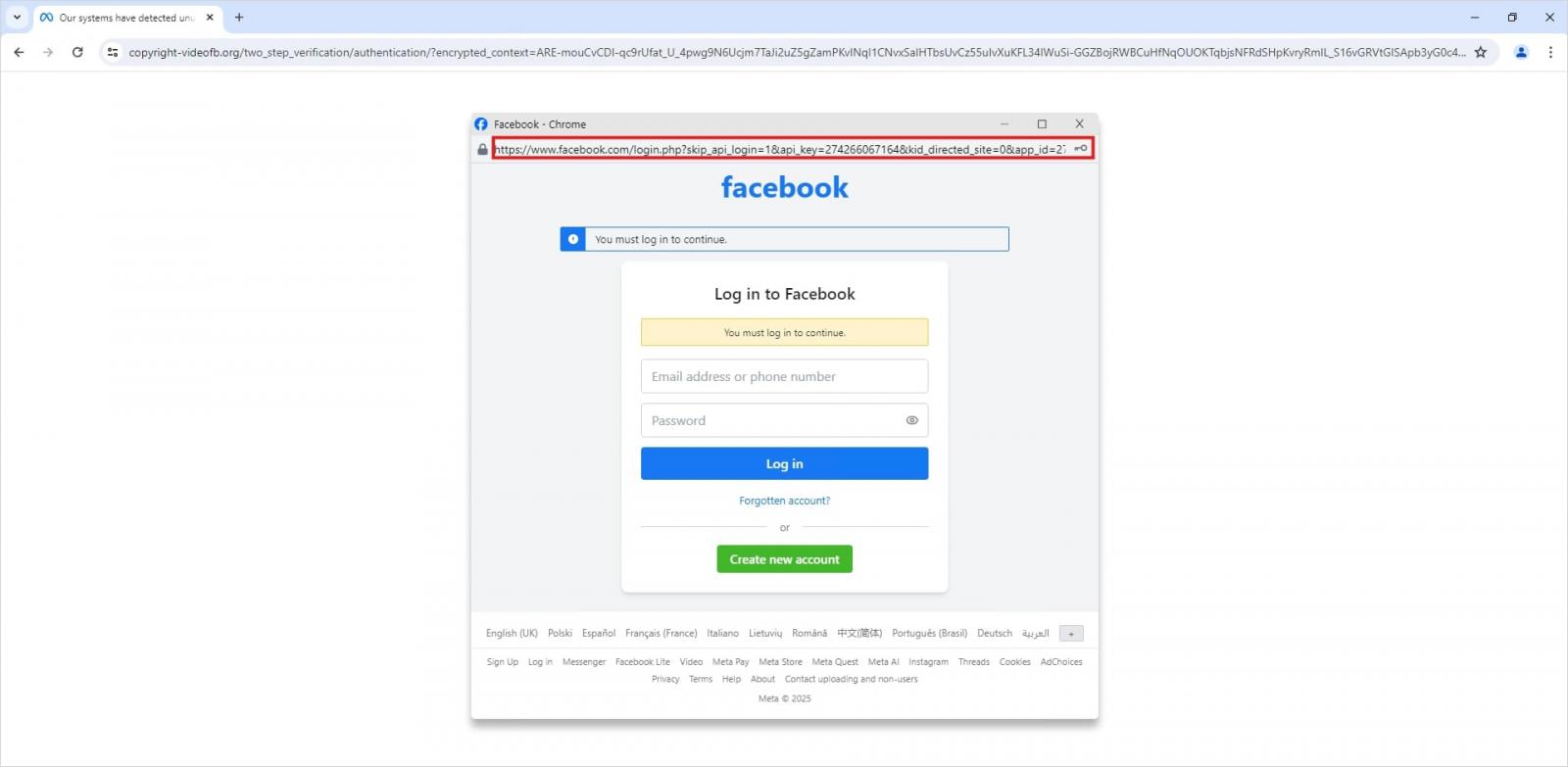
Signing in seems easy enough: just click the Sign in with {popular service name} button. And this is where things get interesting: instead of a genuine authentication page provided by the legitimate service, the user gets a fake form rendered inside the malicious site, looking exactly like… a browser pop-up. Furthermore, the address bar in the pop-up, also rendered by the attackers, displays a perfectly legitimate URL. Even a close inspection won’t reveal the trick.
From there, the unsuspecting user enters their credentials for Microsoft, Google, Facebook, or Apple into this rendered window, and those details go straight to the cybercriminals. For a while this scheme remained a theoretical experiment by the security researcher. Now — real-world attackers have added it to their arsenals.
Facebook credential theft
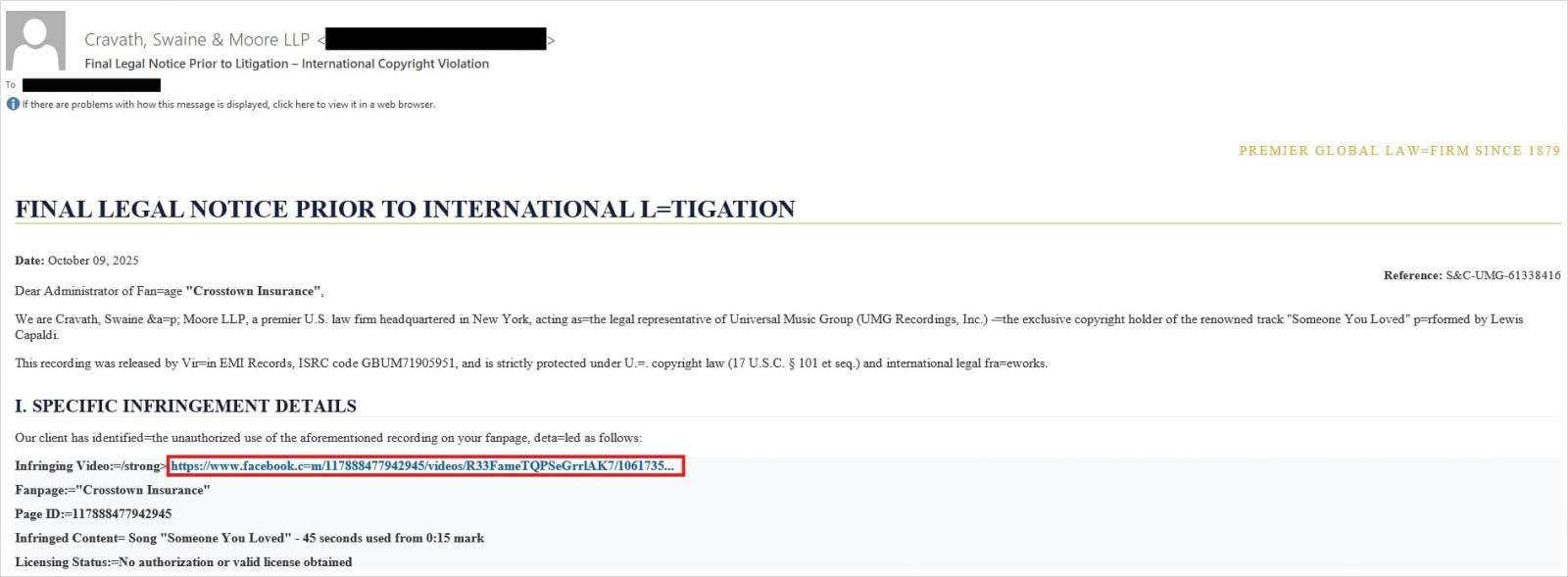
Attackers have put their own spin on mr.d0x’s original concept: recent browser-in-the-browser hits have been kicking off with emails designed to alarm recipients. For instance, one phishing campaign posed as a law firm informing the user they’d committed a copyright violation by posting something on Facebook. The message included a credible-looking link allegedly to the offending post.
Attackers sent messages on behalf of a fake law firm alleging copyright infringement — complete with a link supposedly to the problematic Facebook post. Source
Interestingly, to lower the victim’s guard, clicking the link didn’t immediately open a fake Facebook login page. Instead, they were first greeted by a bogus Meta CAPTCHA. Only after passing it was the victim presented with the fake authentication pop-up.
This isn’t a real browser pop-up; it’s a website element mimicking a Facebook login page — a ruse that allows attackers to display a perfectly convincing address. Source
Naturally, the fake Facebook login page followed mr.d0x’s blueprint: it was built entirely with web design tools to harvest the victim’s credentials. Meanwhile, the URL displayed in the forged address bar pointed to the real Facebook site — www.facebook.com.
How to avoid becoming a victim
The fact that scammers are now deploying browser-in-the-browser attacks just goes to show that their bag of tricks is constantly evolving. But don’t despair — there’s a way to tell if a login window is legit. A password manager is your friend here, which, among other things, acts as a reliable security litmus test for any website.
That’s because when it comes to auto-filling credentials, a password manager looks at the actual URL, not what the address bar appears to show, or what the page itself looks like. Unlike a human user, a password manager can’t be fooled with browser-in-the-browser tactics, or any other tricks, like domains having a slightly different address (typosquatting) or phishing forms buried in ads and pop-ups. There’s a simple rule: if your password manager offers to auto-fill your login and password, you’re on a website you’ve previously saved credentials for. If it stays silent, something’s fishy.
Beyond that, following our time-tested advice will help you defend against various phishing methods, or at least minimize the fallout if an attack succeeds:
Enable two-factor authentication (2FA) for every account that supports it. Ideally, use one-time codes generated by a dedicated authenticator app as your second factor. This helps you dodge phishing schemes designed to intercept confirmation codes sent via SMS, messaging apps, or email. You can read more about one-time-code 2FA in our dedicated post.
Use passkeys. The option to sign in with this method can also serve as a signal that you’re on a legitimate site. You can learn all about what passkeys are and how to start using them in our deep dive into the technology.
Set unique, complex passwords for all your accounts. Whatever you do, never reuse the same password across different accounts. We recently covered what makes a password truly strong on our blog. To generate unique combinations — without needing to remember them — Kaspersky Password Manager is your best bet. As an added bonus, it can also generate one-time codes for two-factor authentication, store your passkeys, and synchronize your passwords and files across your various devices.
Finally, this post serves as yet another reminder that theoretical attacks described by cybersecurity researchers often find their way out into the wild. So, keep an eye on our blog, and subscribe to our Telegram channel to stay up to speed on the latest threats to your digital security and how to shut them down.
Read about other inventive phishing techniques scammers are using day in day out:
WhatsApp Web krijgt ondersteuning voor bellen en videobellen. Gebruikers van de bèta kunnen de functies al gebruiken. Daarmee is het eindelijk mogelijk om te bellen en te videobellen op een Linux-computer.
Vivaldi laat gebruikers tabbladen via drag-and-drop aanpassen. De browsermaker heeft versie 7.8 uitgegeven, waarin het al bestaande Tab Tiling flink onder handen is genomen. Het is nu mogelijk een onbeperkt aantal tabbladen te slepen naar elk punt van de pagina en nieuwe tabbladen direct binnen zo'n tegel te openen.
Amerikaanse Google Chrome-gebruikers met een betaald abonnement kunnen de ingebouwde AI-assistent voortaan zelfstandig taken laten uitvoeren in de browser. Daarnaast krijgen ze toegang tot het afbeeldingenmodel Nano Banana.
Google Chrome krijgt vanaf volgende week waarschijnlijk een functie om de balk met tabbladen verticaal weer te geven. Andere browsers doen dit al jaren, maar Chrome heeft dit nog niet. Het zit al wel in de Canary- en bètaversies van de browser.
Mozilla heeft de optie toegevoegd om in browser Firefox de sneltoetsen aan te passen. Dat kan door in de adresbalk 'about:keyboard' te typen. Het eerste verzoek voor deze mogelijkheid kwam 25 jaar geleden, nog voordat versie 1 uitkwam.
Google heeft ondersteuning voor JPEG XL toegevoegd aan de opensourcecodebase voor Chromium. Daarmee kunnen browsers als Chrome het .jxl-bestandsformaat voortaan verwerken. Google introduceerde en stopte de ondersteuning voor het afbeeldingsformaat in 2022.
Kagi, de maker van de gelijknamige betaalde privacyzoekmachine, heeft een alfaversie van zijn eigen Orion-browser vrijgegeven voor Linux. Die is nog onstabiel, waarschuwt de ontwikkelaar, maar bevat de meeste visuele componenten al wel. De browser is gebaseerd op WebKit, maar mist vooralsnog ondersteuning voor extensies.
In November 2025, Kaspersky experts uncovered a new stealer named Stealka, which targets Windows users’ data. Attackers are using Stealka to hijack accounts, steal cryptocurrency, and install a crypto miner on their victims’ devices. Most frequently, this infostealer disguises itself as game cracks, cheats and mods.
Here’s how the attackers are spreading the stealer, and how you can protect yourself.
How Stealka spreads
A stealer is a type of malware that collects confidential information stored on the victim’s device and sends it to the attackers’ server. Stealka is primarily distributed via popular platforms like GitHub, SourceForge, Softpedia, sites.google.com, and others, disguised as cracks for popular software, or cheats and mods for games. For the malware to be activated, the user must run the file manually.
Here’s an example: a malicious Roblox mod published on SourceForge.
Attackers exploited SourceForge, a legitimate website, to upload a mod containing Stealka
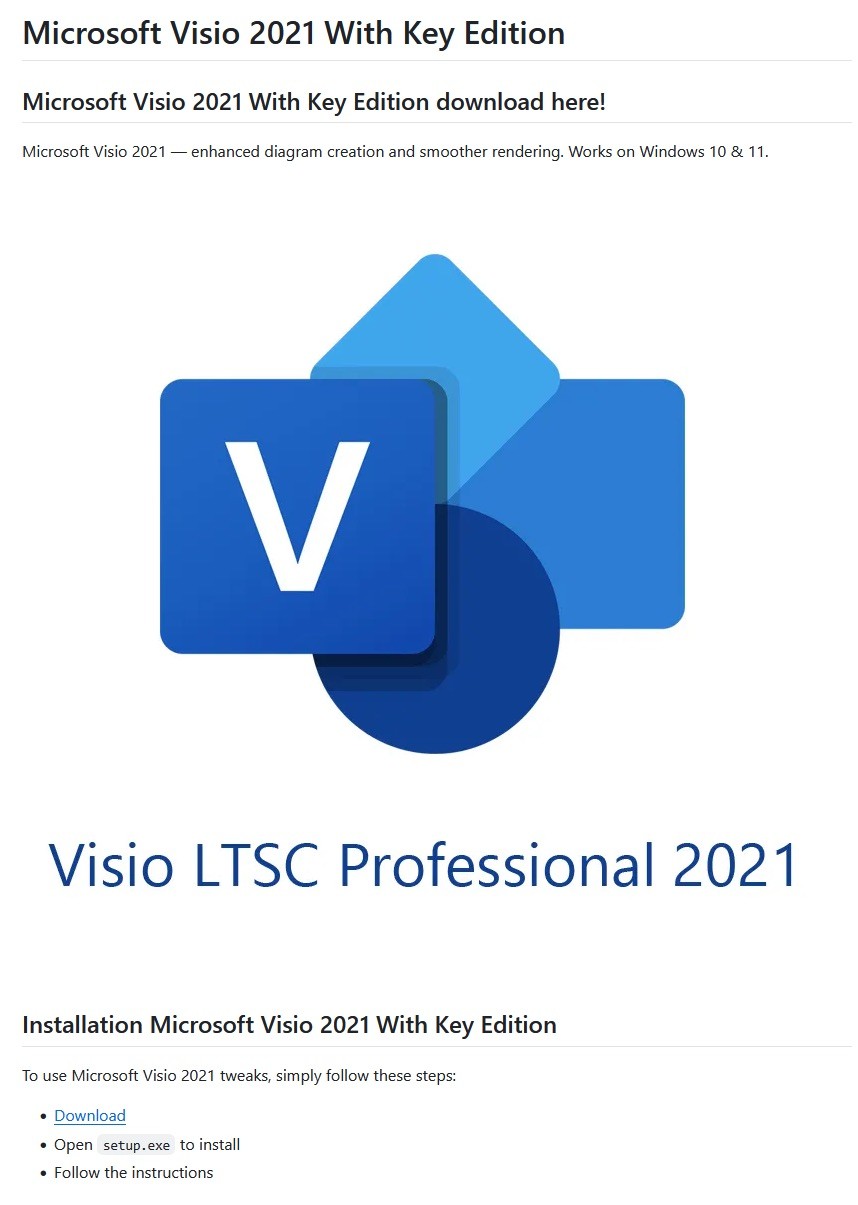
And here’s one on GitHub posing as a crack for Microsoft Visio.
A pirated version of Microsoft Visio containing the stealer, hosted on GitHub
Sometimes, however, attackers go a step further (and possibly use AI tools) to create entire fake websites that look quite professional. Without the help of a robust antivirus, the average user is unlikely to realize anything is amiss.
A fake website pretending to offer Roblox scripts
Admittedly, the cracks and software advertised on these fake sites can sometimes look a bit off. For example, here the attackers are offering a download for Half-Life 3, while at the same time claiming it’s not actually a game but some kind of “professional software solution designed for Windows”.
Malware disguised as Half-Life 3, which is also somehow “a professional software solution designed for Windows”. A lot of professionals clearly spent their best years on this software…
The truth is that both the page title and the filename are just bait. The attackers simply use popular search terms to lure users into downloading the malware. The actual file content has nothing to do with what’s advertised — inside, it’s always the same infostealer.
The site also claimed that all hosted files were scanned for viruses. When the user decides to download, say, a pirated game, the site displays a banner saying the file is being scanned by various antivirus engines. Of course, no such scanning actually takes place; the attackers are merely trying to create an illusion of trustworthiness.
The pirated file pretends to be scanned by a dozen antivirus tools
What makes Stealka dangerous
Stealka has a fairly extensive arsenal of capabilities, but its prime target is data from browsers built on the Chromium and Gecko engines. This puts over a hundred different browsers at risk, including popular ones like Chrome, Firefox, Opera, Yandex Browser, Edge, Brave, as well as many, many others.
Browsers store a huge amount of sensitive information, which attackers use to hijack accounts and continue their attacks. The main targets are autofill data, such as sign-in credentials, addresses, and payment card details. We’ve warned repeatedly that saving passwords in your browser is risky — attackers can extract them in seconds. Cookies and session tokens are perhaps even more valuable to hackers, as they can allow criminals to bypass two-factor authentication and hijack accounts without entering the password.
The story doesn’t end with the account hack. Attackers use these compromised accounts to spread the malware further. For example, we discovered the stealer in a GTAV mod posted on a dedicated site by an account that had previously been compromised.
Beyond stealing browser data, Stealka also targets the settings and databases of 115browser extensions for crypto wallets, password managers, and 2FA services. Here are some of the most popular extensions now at risk:
Finally, the stealer also downloads local settings, account data, and service files from a wide variety of applications:
Crypto wallets. Wallet configurations may contain encrypted private keys, seed-phrase data, wallet file paths, and encryption parameters. That’s enough to at least make an attempt at stealing your cryptocurrency. At risk are 80 wallet applications, including Binance, Bitcoin, BitcoinABC, Dogecoin, Ethereum, Exodus, Mincoin, MyCrypto, MyMonero, Monero, Nexus, Novacoin, Solar, and many others.
Messaging apps. Messaging app service files store account data, device identifiers, authentication tokens, and the encryption parameters for your conversations. In theory, a malicious actor could gain access to your account and read your chats. At risk are Discord, Telegram, Unigram, Pidgin, Tox, and others.
Password managers. Even if the passwords themselves are encrypted, the configuration files often contain information that makes cracking the vault significantly easier: encryption parameters, synchronization tokens, and details about the vault version and structure. At risk are 1Password, Authy, Bitwarden, KeePass, LastPass, and NordPass.
Email clients. These are where your account credentials, mail server connection settings, authentication tokens, and local copies of your emails can be found. With access to your email, an attacker will almost certainly attempt to reset passwords for your other services. At risk are Gmail Notifier Pro, Claws, Mailbird, Outlook, Postbox, The Bat!, Thunderbird, and TrulyMail.
Note-taking apps. Instead of shopping lists or late-night poetry, some users store information in their notes that has no business being there, like seed phrases or passwords. At risk are NoteFly, Notezilla, SimpleStickyNotes, and Microsoft StickyNotes.
Gaming services and clients. The local files of gaming platforms and launchers store account data, linked service information, and authentication tokens. At risk are Steam, Roblox, Intent Launcher, Lunar Client, TLauncher, Feather Client, Meteor Client, Impact Client, Badlion Client, and WinAuth for battle.net.
VPN clients. By gaining access to configuration files, attackers can hijack the victim’s VPN account to mask their own malicious activities. At risk are AzireVPN, OpenVPN, ProtonVPN, Surfshark, and WindscribeVPN.
That’s an extensive list — and we haven’t even named all of them! In addition to local files, this infostealer also harvests general system data: a list of installed programs, the OS version and language, username, computer hardware information, and miscellaneous settings. And as if that weren’t enough, the malware also takes screenshots.
How to protect yourself from Stealka and other infostealers
Secure your device with reliable antivirus software. Even downloading files from legitimate websites is no guarantee of safety — attackers leverage trusted platforms to distribute stealers all the time. Kaspersky Premium detects malware on your computer in time and alerts you to the threat.
Don’t store sensitive information in browsers. It’s handy — no one can argue with that. But unfortunately browsers aren’t the most secure environment for your data. Sign-in credentials, bank card details, secret notes, and other confidential information are better kept in a securely encrypted format in Kaspersky Password Manager, which is immune to the exploits used by Stealka.
Enable two-factor authentication or use backup codes wherever possible.Two-factor authentication (2FA) makes life much harder for attackers, while backup codes help you regain access to your critical accounts if compromised. Just be sure not to store backup codes in text documents, notes, or your browser. For all your backup codes and 2FA tokens, use a reliable password manager.
Curious what other stealers are out there, and what they’re capable of? Read more in our other posts:
Brian King // Do you know what that browser plugin is doing? There’s a browser plugin for just about everything. You can find one to change the name of […]

 Login
Login