Reading view

Fake virus alerts are invading mobile games

Sometimes it happens. You’re happily playing a game on your phone or laptop when suddenly alarms pop up out of nowhere:

“Your device is infected!”

“Your iCloud is full!”

“Your account is restricted for watching porn!”

Some games can be played for free if you agree to watch ads, and in others you can get extra lives, perks, or boosters by watching ads. That’s fine, as long as you’re given a choice and the ads are legitimate.

Unfortunately, cybercriminals sometimes manage to buy advertising space and use it to defraud gamers.

Let’s look at some examples.

The iCloud storage scam, or its OneDrive equivalent, is a well-known and long-running scam that claims you need to expand your storage or all your files will be deleted. The websites these messages link to come in many forms, but they all ask for personal and payment details to complete the upgrade.
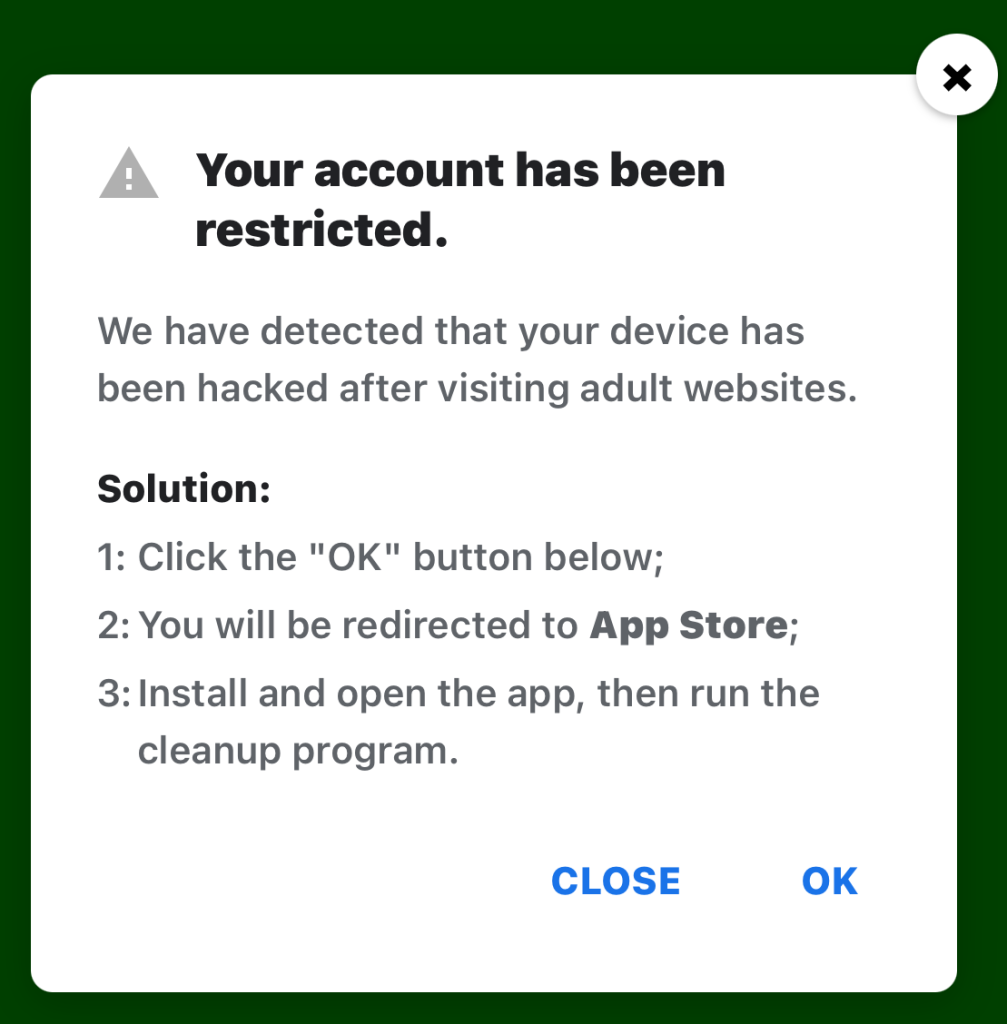
Restricted account

“Your account has been restricted.
We have detected that your device has been hacked after visiting adult websites.
Solution:
1:Click the “OK” button below;

2:You will be redirected to App Store;

3:Install and open the app, then run the cleanup program.”

This ad is a scam and uses a classic scare tactic. It falsely claims your device has been hacked and tries to pressure you into clicking “OK” and installing a cleanup app.

Messages like this sometimes claim to be from your ISP, a “Security Department,” or a generic “Safety Center.”
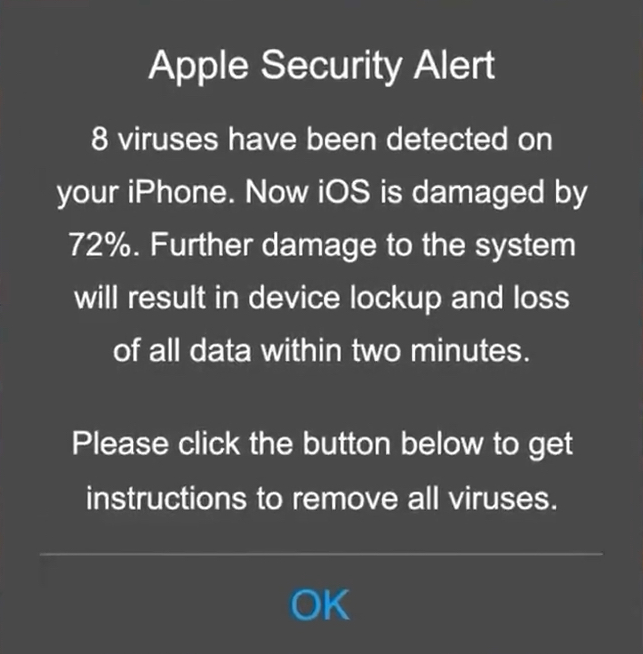
 Fake Apple security alert

“Apple Security Alert
8 viruses have been detected on your iPhone. Now iOS is damaged by 72%. Further damage to the system will result in device lockup and loss of all data within two minutes.
Please click the button below to remove all viruses.”

This is another fake warning, commonly used by scammers to trick users into clicking links or downloading unnecessary or harmful software. Apple doesn’t send alerts like this, and these messages use vague threats to get your attention.

What kind of app you’re really installing if you follow the instructions depends on your device and your location. If you’re “lucky,” it’s just adware, but you might just as easily end up with an infostealer.

In many cases, you’ll end up with fleeceware, a type of deceptive mobile app where developers lure users in with short free trials that quickly convert into hidden subscription fees, sometimes costing hundreds of dollars per month. These apps often offer some functionality to stay on the barely legal side of things, but at wildly inflated prices.

How to stay safe

The best response to these messages is simply to ignore them.

Real system alerts come from the OS, not from inside a game window or browser tab. Here’s a simple test: If you can switch apps and the “warning” disappears with the browser/game, it was not a system‑level alert.

Check the destination URLs before proceeding. Apple, Google, and major ISPs use predictable domains. A familiar-looking URL is not proof that a message is legitimate, but if the URL looks suspicious, it should definitely be treated as a scam.


Scam or legit? Scam Guard knows.


You may arrive at something that looks like the official App Store or Google Play Store. Be wary of lookalike app stores and unofficial download sites, but if you are on the real store, the app is generally safer to install. However, it’s still worth checking reviews, permissions, and the developer before proceeding.

Visit the official website of the organization the message claims to be from and log in there. If there’s a genuine problem with your account, storage, or device, you’ll find information about it through official channels.

Use an up-to-date, real-time anti-malware solution on your devices that can detect and block malicious apps.


Scammers know more about you than you think. 

Malwarebytes Mobile Security protects you from phishing, scam texts, malicious sites, and more. With real-time AI-powered Scam Guard built right in. 

Download for iOS → Download for Android → 

  •  

Fake virus alerts are invading mobile games

Sometimes it happens. You’re happily playing a game on your phone or laptop when suddenly alarms pop up out of nowhere:

“Your device is infected!”

“Your iCloud is full!”

“Your account is restricted for watching porn!”

Some games can be played for free if you agree to watch ads, and in others you can get extra lives, perks, or boosters by watching ads. That’s fine, as long as you’re given a choice and the ads are legitimate.

Unfortunately, cybercriminals sometimes manage to buy advertising space and use it to defraud gamers.

Let’s look at some examples.

The iCloud storage scam, or its OneDrive equivalent, is a well-known and long-running scam that claims you need to expand your storage or all your files will be deleted. The websites these messages link to come in many forms, but they all ask for personal and payment details to complete the upgrade.

Restricted account

“Your account has been restricted.
We have detected that your device has been hacked after visiting adult websites.
Solution:
1:Click the “OK” button below;

2:You will be redirected to App Store;

3:Install and open the app, then run the cleanup program.”

This ad is a scam and uses a classic scare tactic. It falsely claims your device has been hacked and tries to pressure you into clicking “OK” and installing a cleanup app.

Messages like this sometimes claim to be from your ISP, a “Security Department,” or a generic “Safety Center.”

 Fake Apple security alert

“Apple Security Alert
8 viruses have been detected on your iPhone. Now iOS is damaged by 72%. Further damage to the system will result in device lockup and loss of all data within two minutes.
Please click the button below to remove all viruses.”

This is another fake warning, commonly used by scammers to trick users into clicking links or downloading unnecessary or harmful software. Apple doesn’t send alerts like this, and these messages use vague threats to get your attention.

What kind of app you’re really installing if you follow the instructions depends on your device and your location. If you’re “lucky,” it’s just adware, but you might just as easily end up with an infostealer.

In many cases, you’ll end up with fleeceware, a type of deceptive mobile app where developers lure users in with short free trials that quickly convert into hidden subscription fees, sometimes costing hundreds of dollars per month. These apps often offer some functionality to stay on the barely legal side of things, but at wildly inflated prices.

How to stay safe

The best response to these messages is simply to ignore them.

Real system alerts come from the OS, not from inside a game window or browser tab. Here’s a simple test: If you can switch apps and the “warning” disappears with the browser/game, it was not a system‑level alert.

Check the destination URLs before proceeding. Apple, Google, and major ISPs use predictable domains. A familiar-looking URL is not proof that a message is legitimate, but if the URL looks suspicious, it should definitely be treated as a scam.


Scam or legit? Scam Guard knows.


You may arrive at something that looks like the official App Store or Google Play Store. Be wary of lookalike app stores and unofficial download sites, but if you are on the real store, the app is generally safer to install. However, it’s still worth checking reviews, permissions, and the developer before proceeding.

Visit the official website of the organization the message claims to be from and log in there. If there’s a genuine problem with your account, storage, or device, you’ll find information about it through official channels.

Use an up-to-date, real-time anti-malware solution on your devices that can detect and block malicious apps.


Scammers know more about you than you think. 

Malwarebytes Mobile Security protects you from phishing, scam texts, malicious sites, and more. With real-time AI-powered Scam Guard built right in. 

Download for iOS → Download for Android → 

  •  

Your phone called. It needs a cleanup.

Does it sometimes take your phone a few minutes to accomplish one simple task? That can be wildly frustrating.

But you’re in luck, because we’ve got a free tool that scans your phone for leftover files, temporary data, outdated caches and helps you clean up all that junk.

Introducing our Junk Cleaner for Android.

The new, free feature in our app clears out your unused files, helps protect your privacy, frees up valuable storage space, and improves your device’s performance.

Start cleaning up your phone now. Download the app and clear out your junk.

google-play-badge

How to clean up your Android device

1. Open the Malwarebytes app on your Android device

2. On the Junk Cleaner card, tap Clean

If this is your first time using Junk Cleaner, you’ll need to grant permissions:

  • Allow file access: Tap Give permission, then turn on Allow Malwarebytes to manage all files.
  • Allow usage access: Tap Go to Settings. Under App usage data, tap Malwarebytes, then turn on Permit access to app usage data. If the toggle is grayed out, follow the on-screen instructions to enable access.

3. Return to the Junk Cleaner screen and tap Refresh

4. Tap Select all, then Clean all

Once the cleanup is complete, you’ll see an “All clean” screen showing how much storage space you freed up.

Prefer to remove files individually? Just select the files or folders you want to delete, then tap Clean.

Important: Once files are deleted with Junk Cleaner, they cannot be recovered using the Malwarebytes app.

Get started

Download Malwarebytes for Android and start cleaning up your device today.

Not a Malwarebytes user yet? No problem, it’s never too late to start. Whether you’re looking for yourself, your family, or a small business, we have a range of plans to choose from.


CNET Editors' Choice Award 2026

“One of the best cybersecurity suites on the planet.” 

According to CNET. Read their review


  •  

Your phone called. It needs a cleanup.

Does it sometimes take your phone a few minutes to accomplish one simple task? That can be wildly frustrating.

But you’re in luck, because we’ve got a free tool that scans your phone for leftover files, temporary data, outdated caches and helps you clean up all that junk.

Introducing our Junk Cleaner for Android.

The new, free feature in our app clears out your unused files, helps protect your privacy, frees up valuable storage space, and improves your device’s performance.

Start cleaning up your phone now. Download the app and clear out your junk.

google-play-badge

How to clean up your Android device

1. Open the Malwarebytes app on your Android device

2. On the Junk Cleaner card, tap Clean

If this is your first time using Junk Cleaner, you’ll need to grant permissions:

  • Allow file access: Tap Give permission, then turn on Allow Malwarebytes to manage all files.
  • Allow usage access: Tap Go to Settings. Under App usage data, tap Malwarebytes, then turn on Permit access to app usage data. If the toggle is grayed out, follow the on-screen instructions to enable access.

3. Return to the Junk Cleaner screen and tap Refresh

4. Tap Select all, then Clean all

Once the cleanup is complete, you’ll see an “All clean” screen showing how much storage space you freed up.

Prefer to remove files individually? Just select the files or folders you want to delete, then tap Clean.

Important: Once files are deleted with Junk Cleaner, they cannot be recovered using the Malwarebytes app.

Get started

Download Malwarebytes for Android and start cleaning up your device today.

Not a Malwarebytes user yet? No problem, it’s never too late to start. Whether you’re looking for yourself, your family, or a small business, we have a range of plans to choose from.


CNET Editors' Choice Award 2026

“One of the best cybersecurity suites on the planet.” 

According to CNET. Read their review


  •  

Swapper – A Pure Regex Match/Replace Burp Extension

To get a valid session token to use with Burp Suite tools, I ended up writing a small Python extension (110 lines of code, but who’s counting?) that obtained a new session token for each request, allowing items like Intruder to work as intended. Cool, I was able to use it during the test, but I would like this to be repeatable. So, this blog is releasing Swapper, a regex pattern-based match/replace Burp Suite extension.

The post Swapper – A Pure Regex Match/Replace Burp Extension appeared first on Black Hills Information Security, Inc..

  •  

Android 17 ends all-or-nothing access to your contacts

Some of the apps on your phone want your contacts. Most don’t need them all, but have been happily slurping up the lot for years. Google has decided to do something about that with the next version of Android.

Android 17 (currently in preview) is introducing a new Contact Picker that lets users grant apps access to specific contacts rather than the entire list.

Previously, any app that needed a single phone number had to request READ_CONTACTS. That’s a permission that handed over every name, email, and number. It’s the digital equivalent of handing someone your entire Rolodex because they asked for one business card.

An app that can harvest your entire contact list can map your social network, identify your family members, and potentially hand that data to whoever’s buying. So whenever you click “yes” to “show us all your contacts” it isn’t just your privacy you’re playing with.

From Android 17 onward, apps will need to be more specific about what contact data they access. Phone number? Fine. Email address? Sure. Your cousin’s mailing address? Not unless the app has a reason.

Google’s updated Play policy will require apps to use the Contact Picker or the Android Sharesheet as the main way to access contacts. READ_CONTACTS will be reserved for apps that genuinely can’t function without it. 

Location sharing gets the privacy treatment

Location permissions are also set to become more granular and privacy-friendly in Android 17.

Previously, apps could ask for your precise or general location, and you could allow it just once, any time you’re using the app, or not at all. The new button adds nuance by letting app developers ask for your location in the moment, tied to a specific action, like finding a local cafe.

There will also be a persistent indicator to let you know when an app is using your location, similar to the alerts for camera or microphone access. And you’ll be able to find out which apps are tracking you as well.

Google blocked 8.3 billion bad ads in 2025

The tighter permissions management in Android 17 is a big deal for privacy advocates, because overly broad access is how data brokers build detailed profiles about you.

Those profiles can then be used for aggressive or invasive advertising, including scams.


Mobile protection, anywhere, anytime.


Google timed these privacy announcements alongside its latest Ad Safety report, which says it blocked 8.3 billion policy-violating ads and suspended 24.9 million advertiser accounts in the last year. 

The 8.3 billion figure is up from 2024, when Google blocked 5.1 billion ads. The increase suggests that the problem is getting worse, or that Google is getting better at catching it. Scam ads are a big part of that. In 2024, Google blocked 415 million scam-related ads. In 2025, that number grew to 602 million. 

Lest we forget

We’ll give Google credit for trying to tackle this problem from both ends—limiting data collection and cracking down on the kinds of ads that use that data maliciously. But there’s still a sense that it’s not doing quite enough.

Yes, the Android 17 permission changes are good for users, but granular contact access should have been the default years ago. Apple has been doing it for 18 months in iOS 18, and even that was years too late, in our opinion.

And while Google says it caught over 99% of violations before users ever saw them, 1% of an insanely large number is still insanely large.

The ads that still get through are damaging. In December, we reported on sponsored search results pointing to malicious AI chats that instructed people to install infostealer malware. Why does Google run ads that look like search results? Because its business model is driven by advertising revenue. At least it’s making it easier to hide them now.

So we’ll give a cautious hand clap to Google. It’s moving in the right direction. But stories about how it knowingly giving kids’ data inappropriately to advertisers or misusing health data still give us pause.


Scammers know more about you than you think. 

Malwarebytes Mobile Security protects you from phishing, scam texts, malicious sites, and more. With real-time AI-powered Scam Guard built right in. 

Download for iOS → Download for Android → 

  •  

Android 17 ends all-or-nothing access to your contacts

Some of the apps on your phone want your contacts. Most don’t need them all, but have been happily slurping up the lot for years. Google has decided to do something about that with the next version of Android.

Android 17 (currently in preview) is introducing a new Contact Picker that lets users grant apps access to specific contacts rather than the entire list.

Previously, any app that needed a single phone number had to request READ_CONTACTS. That’s a permission that handed over every name, email, and number. It’s the digital equivalent of handing someone your entire Rolodex because they asked for one business card.

An app that can harvest your entire contact list can map your social network, identify your family members, and potentially hand that data to whoever’s buying. So whenever you click “yes” to “show us all your contacts” it isn’t just your privacy you’re playing with.

From Android 17 onward, apps will need to be more specific about what contact data they access. Phone number? Fine. Email address? Sure. Your cousin’s mailing address? Not unless the app has a reason.

Google’s updated Play policy will require apps to use the Contact Picker or the Android Sharesheet as the main way to access contacts. READ_CONTACTS will be reserved for apps that genuinely can’t function without it. 

Location sharing gets the privacy treatment

Location permissions are also set to become more granular and privacy-friendly in Android 17.

Previously, apps could ask for your precise or general location, and you could allow it just once, any time you’re using the app, or not at all. The new button adds nuance by letting app developers ask for your location in the moment, tied to a specific action, like finding a local cafe.

There will also be a persistent indicator to let you know when an app is using your location, similar to the alerts for camera or microphone access. And you’ll be able to find out which apps are tracking you as well.

Google blocked 8.3 billion bad ads in 2025

The tighter permissions management in Android 17 is a big deal for privacy advocates, because overly broad access is how data brokers build detailed profiles about you.

Those profiles can then be used for aggressive or invasive advertising, including scams.


Mobile protection, anywhere, anytime.


Google timed these privacy announcements alongside its latest Ad Safety report, which says it blocked 8.3 billion policy-violating ads and suspended 24.9 million advertiser accounts in the last year. 

The 8.3 billion figure is up from 2024, when Google blocked 5.1 billion ads. The increase suggests that the problem is getting worse, or that Google is getting better at catching it. Scam ads are a big part of that. In 2024, Google blocked 415 million scam-related ads. In 2025, that number grew to 602 million. 

Lest we forget

We’ll give Google credit for trying to tackle this problem from both ends—limiting data collection and cracking down on the kinds of ads that use that data maliciously. But there’s still a sense that it’s not doing quite enough.

Yes, the Android 17 permission changes are good for users, but granular contact access should have been the default years ago. Apple has been doing it for 18 months in iOS 18, and even that was years too late, in our opinion.

And while Google says it caught over 99% of violations before users ever saw them, 1% of an insanely large number is still insanely large.

The ads that still get through are damaging. In December, we reported on sponsored search results pointing to malicious AI chats that instructed people to install infostealer malware. Why does Google run ads that look like search results? Because its business model is driven by advertising revenue. At least it’s making it easier to hide them now.

So we’ll give a cautious hand clap to Google. It’s moving in the right direction. But stories about how it knowingly giving kids’ data inappropriately to advertisers or misusing health data still give us pause.


Scammers know more about you than you think. 

Malwarebytes Mobile Security protects you from phishing, scam texts, malicious sites, and more. With real-time AI-powered Scam Guard built right in. 
Download for iOS → Download for Android → 

  •  

Advanced Flow will make Android sideloading safer

Google has announced the introduction of Advanced Flow, designed to let Android users install apps from unverified developers more safely than before.

This process is known as sideloading. It means installing an app on your device from somewhere other than the Google Play store, usually by downloading and opening its installation file yourself.​

Right now, that typically involves:

  • Downloading an app file (an APK on Android) from a website, email, or another source instead of Google Play.​
  • Manually installing it, often after turning on a setting that allows apps from “unknown” or “unverified” developers.

From Google’s point of view, this has been a security weak spot. Scammers regularly abuse sideloading to trick victims into installing malware while bypassing built‑in protections.

They often pressure victims into installing apps that turn out to be infostealers or other malware. According to research by the Global Anti-Scam Alliance (GASA), scams caused an estimated $442 billion in losses last year.

So anything that helps reduce that risk is welcome.

What Google is changing isn’t dramatic, but it does make the process of installing an app from outside the official Play Store more secure. In simple terms, Advanced Flow adds extra steps and delays so scammers can’t rush people into disabling protections and installing their malware.

How Advanced Flow works

To sideload apps using Advanced Flow, users will need to go through a series of steps:

  • Enable developer mode in system settings. This is easy enough, and helps prevent accidental or one-tap bypasses often used in high-pressure scams.
  • Complete a quick safety check to make sure that no one is talking you into turning off your security. Scammers often pressure victims into disabling protections.
  • Restart your device, which cuts off any remote access or active phone calls a scammer might be using to guide you.
  • Wait one day, then you can confirm the change using biometrics (like fingerprint or face unlock) or your device PIN. This one-time, one-day delay breaks the urgency scammers rely on, giving you time to think.

Once you’ve confirmed you understand the risks, you’re all set to install apps from unverified developers. You can allow this for seven days or indefinitely. For safety, you’ll still see a warning that the app is from an unverified developer, but you can just tap “Install Anyway.”

In addition to the Advanced Flow, Google is introducing free, limited distribution accounts for students and hobbyists. These let developers share apps with a small group (up to 20 devices) without needing ID verification or a registration fee. 

What this means for users

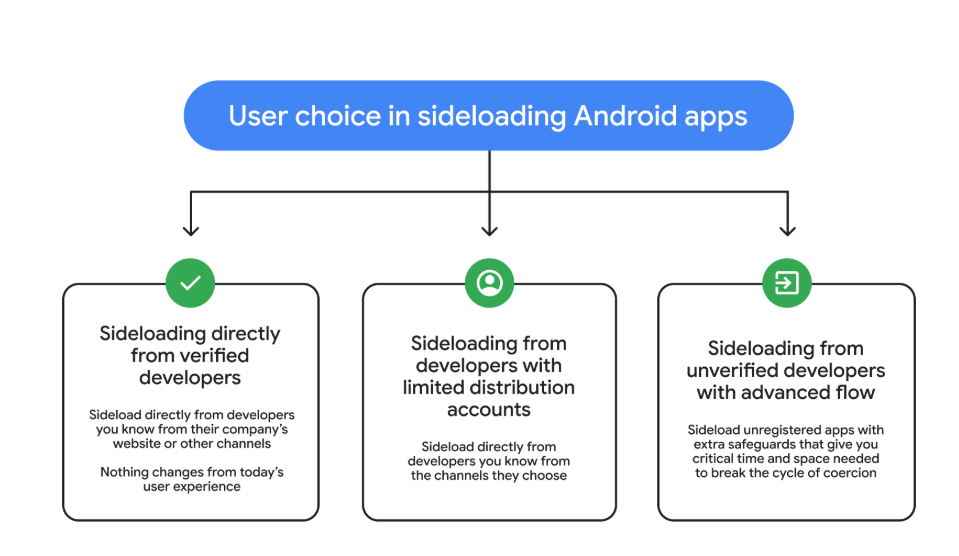
So after these changes, these will be the options for users that have “developer mode” enabled on their Android device.

  • Sideloading directly from verified developers
  • Sideloading from developers with limited distribution accounts
  • Sideloading from unverified developers with Advanced Flow
3 sideloading options
Image courtesy of Google

Advanced Flow is expected to roll out in August 2026.

Overall, it seems a reasonable compromise. Sideloading isn’t going away, so this keeps that ability but adds meaningful barriers against scam‑driven installs, thwarting social‑engineering campaigns without outright killing power‑user workflows. The one-day delay could turn out to be frustrating though, even if it’s only a one-time event.


We don’t just report on phone security—we provide it

Cybersecurity risks should never spread beyond a headline. Keep threats off your mobile devices by downloading Malwarebytes for iOS, and Malwarebytes for Android today.

  •  

A DarkSword hangs over unpatched iPhones

Researchers at Google have identified an iOS exploit chain, named DarkSword, that has been used since late last year by multiple actors to infect iPhones with malware in targeted attacks.

DarkSword combines six vulnerabilities in iOS and Safari to deploy malware on the device. It demonstrates, once again, how important it is to keep up with updates.

The exploit works against iPhones running iOS versions 18.4 through 18.7, and simply visiting a malicious or compromised website with a vulnerable device can be enough to get infected (a drive‑by attack).

The researchers found that several groups are using the tool to attack their preferred targets. DarkSword has been used both by commercial spyware vendors and by state‑backed actors, with campaigns observed in Saudi Arabia, Turkey, Malaysia, and Ukraine.

In Saudi Arabia, attackers used a fake Snapchat lookalike. In Ukraine, attackers compromised at least two Ukrainian websites, including a government site.

Upon successful exploitation, malware is executed on the device. The type of malware depends on the attacker. In the Ukrainian campaign, that malware is known as Ghostblade, one example of a payload delivered via the DarkSword exploit chain.

Ghostblade is a JavaScript‑based data‑stealer that exfiltrates unique device identifiers, SMS and iMessage messages, call history, contacts, Wi‑Fi configuration and passwords, Safari cookies and browsing history, location data, notes, calendar entries, health data, photos, iCloud Drive files, SIM information, emails, a list of installed apps, saved passwords, and the message history from Telegram and WhatsApp.

Beyond this, Ghostblade stands out because it also targets cryptocurrency‑related data, actively seeking apps for major exchanges (Coinbase, Binance, Kraken, Kucoin, OKX, Mexc) and wallet apps (Ledger, Trezor, Metamask, Exodus, Uniswap, Phantom, Gnosis Safe). Researchers note that Ghostblade is not built for long‑term surveillance: once it has collected the data, it deletes its temporary files and terminates itself.

The risks

Vulnerable devices can be infected just by visiting that one malicious or compromised website. And the consequences can be severe. DarkSword turns a single website visit into full device compromise, followed by Ghostblade exfiltrating as much data as it can in one go.

  • Data theft: Ghostblade and related payloads can grab communications (SMS, iMessage, Telegram, WhatsApp, email), photos, health data, location history, Wi‑Fi credentials, keychain items, and more in one sweep.
  • Crypto theft and profiling: The malware enumerates specific exchange and wallet apps, which allows both direct theft and lets criminals use the stolen information to build a detailed profile of financially interesting targets.
  • Forensic evasion: Because Ghostblade wipes its own traces after stealing all that information, it can take a long time before victims figure out something is wrong. Many victims may never know they were compromised.

Since the same exploit kit is being reused across commercial surveillance firms and state‑aligned actors, the number of campaigns and victims will increase over time.

The solutions

Update to the latest iOS available for your device. DarkSword can affect iOS versions 18.4 through 18.7, and Apple’s recent releases include fixes for CVE‑2026‑20700 and related vulnerabilities.

If you have reason to believe you’re a potential target for attacks of this nature (journalists, activists, or people that have access to sensitive data) it is advisable to enable Lockdown Mode:

  1. Open the Settings app.
  2. Tap Privacy & Security.
  3. Scroll down, tap Lockdown Mode, then tap Turn On Lockdown Mode.
  4. Read the presented information and tap Turn On Lockdown Mode.
  5. Tap Turn On & Restart.
  6. Enter your device passcode when prompted.

Do inform yourself about the consequences of turning on Lockdown Mode. It makes your device a lot less user-friendly, but it has proven effective against highly targeted attacks.

Here are some more general tips:

  • Use up-to-date, real-time anti-malware protection for your device to block malicious websites where possible.
  • Avoid following links sent in unsolicited messages, especially for services like Snapchat, crypto exchanges, banking, or email.
  • Use content blockers (for example Malwarebytes Browser Guard) in Safari to reduce exposure to malicious content (though they are not a silver bullet for zero‑days).
  • Move high‑value crypto assets to hardware wallets or dedicated devices, and use mobile wallets only for smaller amounts.
  • Use a password manager with strong authentication, and turn on extra security settings like Face ID/Touch ID and avoid auto‑filling high‑risk credentials.
  • Enable multi-factor authentication (FIDO2 security keys or app‑based 2FA) on exchanges and financial accounts, so stolen passwords alone are not enough to plunder your accounts.
  • Regularly review app permissions and revoke access to sensitive data (Location, Photos, Contacts, Microphone, Camera, Health) revoke where unnecessary.

We don’t just report on phone security—we provide it

Cybersecurity risks should never spread beyond a headline. Keep threats off your mobile devices by downloading Malwarebytes for iOS, and Malwarebytes for Android today.

  •  

Google cracks down on Android apps abusing accessibility

Google just dropped a bombshell for app developers with the latest version of its Android mobile operating system. The company can now prevent apps from installing if they try to use the system’s accessibility features.

The new development, live in version 17.2 of Android, is all about security, explains the company. It stops certain kinds of apps from using the accessibility service if Advanced Protection Mode (APM) is enabled.

The accessibility API lets app developers support users living with disabilities who need extra help using their phones. Apps can use this API to access the screen in unique ways, control input for the user, and use voice services, for example.

Sadly, as with most useful tools, someone will always find a way to misuse it and ruin it for everyone else. Malware developers have been using this API for years as a way into your bank account. The accessibility service has a lot of power: Any app with permissions to use it can read what’s on your screen.

Many Android banking Trojans are little more than accessibility API wrappers with criminal intent. They steal 2FA codes, impersonate victims, and drain accounts while victims sleep.

Two tricks dominate. The first is fake overlays. The accessibility API lets you put overlays on top of another app’s screen. Banking and cryptocurrency Trojan developers can use this to capture your keystrokes (you think you’re just logging into your banking app, but malware is collecting everything you type).

The second is permission abuse. Once the Trojan has your passwords, it can authorize its own transactions.

The number of malware frameworks taking advantage of the accessibility API has grown. DroidLock uses it to steal your personal data before demanding a ransom. Albiriox uses it to install itself and give remote control to attackers halfway around the world.

We saw both in December, and just last month Malwarebytes researcher Stefan Dasic noticed an accessibility service-abusing malware program posing as a fake Google Security page.

Google’s nuclear option

Google has tried before to curb misuse of the API. In 2017, it warned developers to justify their use of accessibility features or risk removal from the Play Store. Developers revolted, and Google relented. But then, in November 2021, it began demanding permission forms for accessibility API usage for Android 12+ apps.

Now the company is getting tougher still, enforcing stricter accessibility API rules. Apps can no longer freely enable accessibility services using a simple software flag. Instead, only apps whose core purpose is accessibility will be allowed to use it.

Google’s examples include screen readers, switch inputs, voice controls, and Braille displays. With these new rules, password managers or automation apps aren’t getting to the accessibility API anymore.

At least, not if the user has APM turned on.

Launched in May last year, APM is Google’s version of Apple’s Lockdown Mode. It introduces far tighter security controls for people who switch it on, making it harder for malware to exploit them.

The trade-off for that extra security is more limited functionality. For example, only apps from trusted sources will install, and data transfer via USB is restricted. Accessibility API access is now restricted too.

So now, you can be a password manager or an accessibility tool, but not both. Developers relying on accessibility for convenience features will need to find another way.

This is Google acknowledging that some APIs are too dangerous to leave open, even if some legitimate apps suffer. The company is betting that most users care more about not getting robbed than having their password manager use the accessibility API for convenience.

Malware authors will adapt, as always. But for now, Google just made phones with APM turned on a lot harder to mess with.


We don’t just report on phone security—we provide it

Cybersecurity risks should never spread beyond a headline. Keep threats off your mobile devices by downloading Malwarebytes for iOS, and Malwarebytes for Android today.

  •  

This Android vulnerability can break your lock screen in under 60 seconds

A vulnerability in Android devices can allow attackers to gain access to a phone in less than a minute.

The vulnerability, tracked as CVE-2026-20435, affects certain MediaTek SoCs (System-on-a-Chip) using Trustonic’s TEE (Trusted Execution Environment). That may sound rare, but reportedly that’s about one in four Android phones, mostly cheaper models.

Researchers demonstrated the vulnerability by connecting a vulnerable phone to a laptop over USB, showing how their exploit recovered the handset PIN, decrypted storage, and extracted seed phrases from several software wallets.

You may argue that if an attacker has your phone, you’re already in trouble. Which is true. But the protection you rely on to keep your data safe if your phone is lost or stolen doesn’t help one bit here.

The exploit was able to extract the root keys protecting full‑disk encryption before Android fully boots and then decrypt storage. While full‑disk encryption and lock screen are supposed to be your safety net if the phone is stolen or lost, those layers fail on affected devices.

Is my phone affected?

If you’re not sure whether this vulnerability affects your mobile device, you can look up your phone on a platform like GSMArena  or your vendor’s website to see which SoC it uses, then cross‑check with MediaTek’s March Security bulletin under CVE-2026-20435.

MediaTek released a firmware patch that device manufacturers can include in security updates for their phones. So all you can do is make sure you’re fully patched with the latest security update from your manufacturer. Which, depending on the patch gaps and how far along your device is in the EOL cycle, can take anywhere from days to forever.

EOL (End-of-Life) refers to the point in a product’s lifecycle when the manufacturer stops selling, marketing, or providing full support for it.

But obviously the best advice we can give you is to keep a close eye on your phone, so it doesn’t get lost or stolen.


We don’t just report on phone security—we provide it

Cybersecurity risks should never spread beyond a headline. Keep threats off your mobile devices by downloading Malwarebytes for iOS, and Malwarebytes for Android today.

  •  

Microsoft Authenticator could leak login codes—update your app now

A vulnerability in Microsoft Authenticator for both iOS and Android (CVE-2026-26123) could leak your one-time sign-in codes or authentication deep links to a malicious app on the same device. 

Deep links are predefined URIs (Uniform Resource Identifiers) that allow direct access to an activity in a web or mobile application when clicked. In simple terms, they are specifically constructed links used to open an app and complete actions like signing in.

Microsoft Authenticator is a mobile app that generates time-based one-time codes and handles sign-in links and QR-based logins for Microsoft and other accounts. It is widely used for multi-factor authentication (MFA) on personal phones, including BYOD (Bring Your Own Device) devices that protect access to corporate and production services.

This vulnerability affects users who have Microsoft Authenticator installed on an iOS or Android device. For the vulnerability to be exploited, the user would first need to install a malicious app on their device and then accidentally choose that app to handle a sign‑in deep link.

If that happens, the malicious app receives the one-time code or sign-in information and can potentially use it to authenticate as the victim.​

If successful, an attacker could:

  • Complete login flows to services that trust your Microsoft Authenticator codes.
  • Access the information and services available to the compromised account (email, files, cloud apps, or production systems in a BYOD context).​
  • Potentially pivot to additional accounts if those are also protected by codes delivered via Authenticator on the same device.

How to stay safe

The fix for CVE-2026-26123 is already included in current releases, so installing updates is the most effective mitigation.

  • On iOS: Open the App Store. Tap the My Account button or your photo at the top of the screen. Scroll down to see pending updates and release notes. Tap Update next to an app to update only that app, or tap Update All.
  • On Android: Open the Google Play Store app. At the top right, tap the profile icon. Tap Manage apps & device. Under “Updates available,” tap See details. Next to the app you want to update, tap Update. To update all your apps at the same time, tap Update all.

Note: If your device manufacturer has implemented a different method to apply app updates, the steps may vary slightly.

If you are temporarily unable to update the app, avoid installing new apps that request to handle authentication links, QR-based sign-ins, or web-to-app sign-in flows.

When scanning QR codes or tapping sign-in links, verify that the handler is Microsoft Authenticator or another trusted app, and not an unknown, recently installed, or otherwise suspicious app.​

Where possible, use alternative MFA options you already trust (such as built-in authentication in your password manager or platform-specific solutions like Apple’s password features) until you can apply the update.

Use anti-malware protection for your mobile devices that can help detect malicious apps.


We don’t just report on phone security—we provide it

Cybersecurity risks should never spread beyond a headline. Keep threats off your mobile devices by downloading Malwarebytes for iOS, and Malwarebytes for Android today.

  •  

High-severity Qualcomm bug hits Android devices in targeted attacks

Google has patched 129 vulnerabilities in Android in its March 2026 Android Security Bulletin, including a Qualcomm display flaw that is known to be actively exploited.

You can check your device’s Android version, security update level, and Google Play system update in Settings. You should get a notification when updates are available, but you can also check for them yourself.

On most phones, go to Settings > About phone (or About device), then tap Software updates to see if anything new is available. The exact steps may vary slightly depending on the brand and Android version you’re on.

If your Android phone shows a patch level of 2026-03-05 or later, these issues are fixed.

Keeping your device up to date protects you from known vulnerabilities and helps you stay safe. We know that because of patch gaps and end-of-support cycles, some users may not receive these updates. That’s why additional protection for your Android device is important.

Technical details

The Android zero-day, tracked as CVE-2026-21385, is a high‑severity bug in a Qualcomm graphics/display component that attackers are already exploiting in limited, targeted attacks.

The vulnerability lives in an open‑source Qualcomm graphics/display component used by a large number of Android chipsets, with Qualcomm listing that well over 230 different chipset models are affected. Based on recently published Android and chipset market‑share percentages, it is reasonable to assume the issue affects hundreds of millions of devices worldwide, even if the exact number is hard to pin down.

On most Android phones, you can view the processor model in Settings > About phone (or About device) > Detailed info and specs, and look for entries such as “Processor,” “Chipset,” or “SoC.” Names like “Snapdragon 8 Gen 2,” “Snapdragon 778G,” or “Qualcomm SM8xxx/SM7xxx,” indicate a Qualcomm chipset and that the device may be in the affected family.

Google says there are signs that CVE‑2026‑21385 is already being used in “limited, targeted exploitation,” which usually means a small number of high‑value targets rather than broad, drive‑by attacks on the general public. Current descriptions point to a memory corruption scenario in the graphics component. The official description says:

“Memory corruption while using alignments for memory allocation.”

This means that if an attacker can get a malicious app or local code onto the device, they can feed specially crafted data into the graphics component’s driver and corrupt memory in a controlled way. In practice, a bug like this is a good candidate for turning a normal app’s limited access into something much more powerful, like using it as a building block in a chain of exploits to escalate privileges or to escape a sandbox.

As you can see, the attacker needs some kind of local foothold first, such as getting you to install a malicious app, exploiting another vulnerability, or abusing a compromised app already on the device. 

How to stay safe

From the available information, attackers would need to trick a user into installing a malicious app that could then compromise the device. That’s why it’s a good idea to follow these safety precautions:

  • Only install apps from official app stores whenever possible and avoid installing apps promoted in links in SMS, email, or messaging apps.
  • Before installing finance‑related or retailer apps, verify the developer’s name, number of downloads, and user reviews rather than trusting a single promotional link.
  • Protect your devices. Use an up-to-date, real-time anti-malware solution like Malwarebytes for Android.
  • Scrutinize permissions. Does an app really need the permissions it’s requesting to do the job you want it to do? Especially if it asks for accessibility, SMS, or camera access.
  • Keep Android, Google Play services, and all other important apps up to date so you get the latest security fixes.

We don’t just report on phone security—we provide it

Cybersecurity risks should never spread beyond a headline. Keep threats off your mobile devices by downloading Malwarebytes for iOS, and Malwarebytes for Android today.

  •  

High-severity Qualcomm bug hits Android devices in targeted attacks

Google has patched 129 vulnerabilities in Android in its March 2026 Android Security Bulletin, including a Qualcomm display flaw that is known to be actively exploited.

You can check your device’s Android version, security update level, and Google Play system update in Settings. You should get a notification when updates are available, but you can also check for them yourself.

On most phones, go to Settings > About phone (or About device), then tap Software updates to see if anything new is available. The exact steps may vary slightly depending on the brand and Android version you’re on.

If your Android phone shows a patch level of 2026-03-05 or later, these issues are fixed.

Keeping your device up to date protects you from known vulnerabilities and helps you stay safe. We know that because of patch gaps and end-of-support cycles, some users may not receive these updates. That’s why additional protection for your Android device is important.

Technical details

The Android zero-day, tracked as CVE-2026-21385, is a high‑severity bug in a Qualcomm graphics/display component that attackers are already exploiting in limited, targeted attacks.

The vulnerability lives in an open‑source Qualcomm graphics/display component used by a large number of Android chipsets, with Qualcomm listing that well over 230 different chipset models are affected. Based on recently published Android and chipset market‑share percentages, it is reasonable to assume the issue affects hundreds of millions of devices worldwide, even if the exact number is hard to pin down.

On most Android phones, you can view the processor model in Settings > About phone (or About device) > Detailed info and specs, and look for entries such as “Processor,” “Chipset,” or “SoC.” Names like “Snapdragon 8 Gen 2,” “Snapdragon 778G,” or “Qualcomm SM8xxx/SM7xxx,” indicate a Qualcomm chipset and that the device may be in the affected family.

Google says there are signs that CVE‑2026‑21385 is already being used in “limited, targeted exploitation,” which usually means a small number of high‑value targets rather than broad, drive‑by attacks on the general public. Current descriptions point to a memory corruption scenario in the graphics component. The official description says:

“Memory corruption while using alignments for memory allocation.”

This means that if an attacker can get a malicious app or local code onto the device, they can feed specially crafted data into the graphics component’s driver and corrupt memory in a controlled way. In practice, a bug like this is a good candidate for turning a normal app’s limited access into something much more powerful, like using it as a building block in a chain of exploits to escalate privileges or to escape a sandbox.

As you can see, the attacker needs some kind of local foothold first, such as getting you to install a malicious app, exploiting another vulnerability, or abusing a compromised app already on the device. 

How to stay safe

From the available information, attackers would need to trick a user into installing a malicious app that could then compromise the device. That’s why it’s a good idea to follow these safety precautions:

  • Only install apps from official app stores whenever possible and avoid installing apps promoted in links in SMS, email, or messaging apps.
  • Before installing finance‑related or retailer apps, verify the developer’s name, number of downloads, and user reviews rather than trusting a single promotional link.
  • Protect your devices. Use an up-to-date, real-time anti-malware solution like Malwarebytes for Android.
  • Scrutinize permissions. Does an app really need the permissions it’s requesting to do the job you want it to do? Especially if it asks for accessibility, SMS, or camera access.
  • Keep Android, Google Play services, and all other important apps up to date so you get the latest security fixes.

We don’t just report on phone security—we provide it

Cybersecurity risks should never spread beyond a headline. Keep threats off your mobile devices by downloading Malwarebytes for iOS, and Malwarebytes for Android today.

  •  

Apple’s new iOS setting addresses a hidden layer of location tracking

Most iPhone owners have hopefully learned to manage app permissions by now, including allowing location access. But there’s another layer of location tracking that operates outside these controls. Your cellular carrier has been collecting your location data all along, and until now, there was nothing you could do about it.

Apple just changed this in iOS 26.3 with a new setting called “limit precise location.”

How Apple’s anti-carrier tracking system works

Cellular networks track your phone’s location based on the cell towers it connects to, in a process known as triangulation. In cities where towers are densely packed, triangulation is precise enough to track you down to a street address.

This tracking is different from app-based location monitoring, because your phone’s privacy settings have historically been powerless to stop it. Toggle Location Services off entirely, and your carrier still knows where you are.

The new setting reduces the precision of location data shared with carriers. Rather than a street address, carriers would see only the neighborhood where a device is located. It doesn’t affect emergency calls, though, which still transmit precise coordinates to first responders. Apps like Apple’s “Find My” service, which locates your devices, or its navigation services, aren’t affected because they work using the phone’s location sharing feature.

Why is Apple doing this? Apple hasn’t said, but the move comes after years of carriers mishandling location data.

Unfortunately, cellular network operators have played fast and free with this data. In April 2024, the FCC fined Sprint and T-Mobile (which have since merged), along with AT&T and Verizon nearly $200 million combined for illegally sharing this location data. They sold access to customers’ location information to third party aggregators, who then sold it on to third parties without customer consent.

This turned into a privacy horror story for customers. One aggregator, LocationSmart, had a free demo on its website that reportedly allowed anyone to pinpoint the location of most mobile phones in North America.

Limited rollout

The feature only works with devices equipped with Apple’s custom C1 or C1X modems. That means just three devices: the iPhone Air, iPhone 16e, and the cellular iPad Pro with M5 chip. The iPhone 17, which uses Qualcomm silicon, is excluded. Apple can only control what its own modems transmit.

Carrier support is equally narrow. In the US, only Boost Mobile is participating in the feature at launch, while Verizon, AT&T, and T-Mobile are notable absences from the list given their past record. In Germany, Telekom is on the participant list, while both EE and BT are involved in the UK. In Thailand, AIS and True are on the list. There are no other carriers taking part as of today though.

Android also offers some support

Google also introduced a similar capability with Android 15’s Location Privacy hardware abstraction layer (HAL) last year. It faces the same constraint, though: modem vendors must cooperate, and most have not. Apple and Google don’t get to control the modems in most phones. This kind of privacy protection requires vertical integration that few manufacturers possess and few carriers seem eager to enable.

Most people think controlling app permissions means they’re in control of their location. This feature highlights something many users didn’t know existed: a separate layer of tracking handled by cellular networks, and one that still offers users very limited control.


We don’t just report on phone security—we provide it

Cybersecurity risks should never spread beyond a headline. Keep threats off your mobile devices by downloading Malwarebytes for iOS, and Malwarebytes for Android today.

  •  

Apple’s new iOS setting addresses a hidden layer of location tracking

Most iPhone owners have hopefully learned to manage app permissions by now, including allowing location access. But there’s another layer of location tracking that operates outside these controls. Your cellular carrier has been collecting your location data all along, and until now, there was nothing you could do about it.

Apple just changed this in iOS 26.3 with a new setting called “limit precise location.”

How Apple’s anti-carrier tracking system works

Cellular networks track your phone’s location based on the cell towers it connects to, in a process known as triangulation. In cities where towers are densely packed, triangulation is precise enough to track you down to a street address.

This tracking is different from app-based location monitoring, because your phone’s privacy settings have historically been powerless to stop it. Toggle Location Services off entirely, and your carrier still knows where you are.

The new setting reduces the precision of location data shared with carriers. Rather than a street address, carriers would see only the neighborhood where a device is located. It doesn’t affect emergency calls, though, which still transmit precise coordinates to first responders. Apps like Apple’s “Find My” service, which locates your devices, or its navigation services, aren’t affected because they work using the phone’s location sharing feature.

Why is Apple doing this? Apple hasn’t said, but the move comes after years of carriers mishandling location data.

Unfortunately, cellular network operators have played fast and free with this data. In April 2024, the FCC fined Sprint and T-Mobile (which have since merged), along with AT&T and Verizon nearly $200 million combined for illegally sharing this location data. They sold access to customers’ location information to third party aggregators, who then sold it on to third parties without customer consent.

This turned into a privacy horror story for customers. One aggregator, LocationSmart, had a free demo on its website that reportedly allowed anyone to pinpoint the location of most mobile phones in North America.

Limited rollout

The feature only works with devices equipped with Apple’s custom C1 or C1X modems. That means just three devices: the iPhone Air, iPhone 16e, and the cellular iPad Pro with M5 chip. The iPhone 17, which uses Qualcomm silicon, is excluded. Apple can only control what its own modems transmit.

Carrier support is equally narrow. In the US, only Boost Mobile is participating in the feature at launch, while Verizon, AT&T, and T-Mobile are notable absences from the list given their past record. In Germany, Telekom is on the participant list, while both EE and BT are involved in the UK. In Thailand, AIS and True are on the list. There are no other carriers taking part as of today though.

Android also offers some support

Google also introduced a similar capability with Android 15’s Location Privacy hardware abstraction layer (HAL) last year. It faces the same constraint, though: modem vendors must cooperate, and most have not. Apple and Google don’t get to control the modems in most phones. This kind of privacy protection requires vertical integration that few manufacturers possess and few carriers seem eager to enable.

Most people think controlling app permissions means they’re in control of their location. This feature highlights something many users didn’t know existed: a separate layer of tracking handled by cellular networks, and one that still offers users very limited control.


We don’t just report on phone security—we provide it

Cybersecurity risks should never spread beyond a headline. Keep threats off your mobile devices by downloading Malwarebytes for iOS, and Malwarebytes for Android today.

  •  
❌