Netflix, Apple TV+, Disney+, Hulu, Amazon Prime, YouTube Premium… The average law-abiding family today pays for five to 10 subscriptions just to watch their shows of choice, with the monthly bill easily crossing the hundred-dollar mark. It’s no surprise, then, that social media and online marketplaces are seeing a surge in demand for the “magic boxes” that popped up at the end of 2025: Android-powered TV boxes that promise to unlock thousands of channels and every streaming service subscription-free for a one-time purchase.
Ads for these devices are flooding TikTok and Instagram: smiling influencers unbox the SuperBoxes, plug them into a TV, and browse endlessly through channels. It looks like the ultimate life hack against subscription fatigue, right? In reality, it’s one of the easiest ways to invite a botnet into your home network.
A promotional video on TikTok explaining how great it is when the cheese is free you can just go ahead and cancel all your subscriptions
What’s wrong with these cheap TV boxes?
Stories about malicious TV boxes have surfaced before, but right now, their marketing has reached a truly alarming scale.
At the end of 2025, analysts examined several models of the popular SuperBox device available from major retail stores and online marketplaces. The findings were deeply concerning: immediately upon powering up, the devices began pinging the servers of the Chinese messaging app Tencent QQ, as well as the Grass proxy service — effectively renting out the owner’s internet bandwidth to third parties.
Inside the firmware, researchers discovered applications completely uncharacteristic of a media player: a network scanner, a traffic analyzer, and tools for DNS hijacking. Consequently, the device not only streams pirated content but also scans the local network for other targets (including industrial SCADA interfaces), and stands ready to participate in DDoS attacks. The SuperBoxes were also found to contain folders with the telltale name “secondstage”, a textbook indication of multi-stage malware.
More recently, in April 2026, the Darknet Diaries podcast featured an interview with a security researcher known by the alias D3ada55, who shared plenty of intriguing details about these boxes — including the fact that they were still openly sold on major platforms like Amazon, Walmart, and Best Buy.
The infection chronicles: BADBOX to Keenadu
The SuperBox case is far from the only instance where Android devices have been turned into botnet nodes — or sold infected right out of the box. Here’s a look at the most recent cases:
BADBOX 2.0. In July 2025, Google filed a lawsuit against the operators of a botnet that compromised over 10 million Android devices — mostly cheap TV boxes, tablets, and projectors lacking Google Play Protect certification. As we reported earlier, BADBOX 2.0 specifically targets TV boxes, operating simultaneously as a proxy network and an ad fraud engine.
Kimwolf. In December 2025, the QiAnXin XLab team uncovered a DDoS botnet that had hijacked around 1.8 million Android devices. The infected hardware included generic models from off-brand manufacturers sporting high-profile names like TV BOX, SuperBox, XBOX, SmartTV, and others. The infection footprint was massive, with compromised devices shipped worldwide. Among the hardest-hit countries were Brazil, India, the U.S., Argentina, South Africa, the Philippines, and Mexico.
Keenadu. Our experts discovered this malware lurking in the firmware of brand-new devices back November 2025, though it didn’t gain widespread attention until after we published a study about it in February 2026. Keenadu masquerades as legitimate system components, embedding itself even into facial-recognition unlock apps, potentially granting attackers access to biometrics, banking data, and personal messages.
All of these stories share the same origin: the Triada Trojan, first documented by our researchers back in 2016 and dubbed at the time “one of the most advanced mobile Trojans”. Over the past decade it has evolved from a standard piece of malware into a modular backdoor baked directly into firmware during manufacturing.
How the infection scheme works
Manufacturers of cheap TV boxes cut corners on absolutely everything: Google Play Protect certification, firmware audits, and security updates. Many of these devices run on the Android Open Source Project without any security guarantees whatsoever. Somewhere along the supply chain — whether at the factory, through a middleman, or at a distributor — a backdoor gets injected into the firmware image. Our experts suspect that the manufacturer itself might not even be aware of the compromise.
The sheer scale of the infection turns millions of identical boxes into the perfect foundation for a botnet: every compromised device represents a unique IP address that can be rented out to anyone. Botnet operators like Kimwolf monetize this not only through distributed DDoS attacks but also by reselling the bandwidth of infected smart TVs and streaming boxes.
What this means for you
An infected TV box sits right in your living room, connected to your home Wi-Fi. That means it can see smartphones running banking apps, network-attached storage (NAS) units holding family archives, IP cameras, smart locks, work laptops, and any other the devices connected to your Wi-Fi network.
With this kind of beachhead inside your home network, an attacker can intercept unencrypted traffic, spoof DNS requests, scan ports, and hunt for vulnerabilities on neighboring devices. On top of that, they can use your IP address for fraudulent activity. As a result, in the best-case scenario, your IP will end up blacklisted, and legitimate services will start blocking you for suspicious activity; in the worst-case scenario, law enforcement could come knocking on your door.
How to spot a potentially dangerous gadget
You should be on alert if a device:
Is sold under a no-name brand like T95, X96Q, MX10, TV BOX, SuperBox, or some such
Promises free lifetime access to paid premium services for a one-time fee
Requires you to disable Google Play Protect, or install third-party APK files during the initial setup
Lacks Play Protect certification entirely
Is promoted through aggressive spam campaigns on social media
How to avoid hosting a botnet node
Buy certified TV boxes that feature Google Play Protect, or purchase devices directly from reputable telecom operators and internet service providers.
Isolate all smart home devices. Set up a separate Wi-Fi network on your home router for TV boxes, cameras, smart speakers, robot vacuums, and similar gear, while keeping smartphones, NAS units, and computers on the main network. This prevents malware from spreading to your critical gadgets.
Regularly update the firmware on all your devices, and don’t forget about your router — it’s another vulnerable link in the chain.
Remove any applications from your Android TV box that you didn’t install yourself, especially alternative app stores, Wi-Fi “boosters”, and “system cleaners”.
Monitor your traffic. Modern routers and Kaspersky Premium can display which devices are connecting to where. Frequent connections from a media player to servers in China are a major security red flag.
Install Kaspersky Premiumon all your devices — it protects against Trojans, and blocks the phishing pages often used to distribute infected APK files.
Don’t disable Google Play Protect, and avoid installing APKs from shady sources — this is the primary infection vector that bypasses the official app store.
If in doubt, return the TV box. A cheap streaming device isn’t worth risking your biometrics, banking data, or the reputation of your IP address.
Want to know how else to protect your smart home devices? Read more in our related posts:
A Shai-Hulud copycat has turned up in yet another npm package just five days after TeamPCP open sourced the worm and announced a supply-chain attack competition on BreachForums. The poisoned package, chalk-tempalte, masquerades as an extension for the popular JavaScript terminal string styling library Chalk. It now contains a clone of Shai-Hulud, which TeamPCP published last week on GitHub after poisoning more than 170 npm packages with the credential-stealing malware as part of the ongoing supply chain attacks targeting open source dev tools. Plus, the same scumbag that uploaded the worm to chalk-tempalte also published three other malicious npm packages - @deadcode09284814/axios-util, axois-utils, and color-style-utils - containing infostealer code, according to Ox security researchers, which detected and reported the malware over the weekend. “The four malwares are inherently different, as the collected data varies between them, including exfiltrated IP addresses, cloud configurations, crypto wallets, environment variables, and even one malware turning the victim’s machine into a DDoS botnet – all from the same npm user,” researcher Moshe Siman Tov Bustan wrote on Sunday. Anyone installing any version of the packages is affected, he added, noting the total number of weekly downloads is 2,678. On Monday, the researchers told The Register that the npm user behind all four new stealer infections ran the supply-chain campaign from a home computer or local server farm. "The use of lhr.life is a clear indicator of a reverse proxy used to expose an internal network to the internet," they wrote in an email, adding that the miscreant(s) seem to be financially motivated as the code targets victims' cryptocurrency wallets and accounts. Plus, the DDoS botnet component "could indicate affiliation with anarchy groups looking to take down infrastructure and services, or intent to sell it as DDoS-as-a-service," they added. If you are running any of the four, immediately uninstall the malicious package and delete any related malicious configuration from IDEs and Claude Code or other coding agents. You should also rotate your keys on any affected machines, and check for GitHub repositories containing the string “A Mini Sha1-Hulud has Appeared,” the application security shop cautions. The Shai-Hulud copycat, like the original worm, steals secrets, credentials, crypto wallets, accounts, and other sensitive data, and sends all of this to a remote command-and-control server: 87e0bbc636999b[.]lhr[.]life. It also uploaded the stolen credentials to a new GitHub repository. The @deadcode09284814/axios-util malware collects and exfiltrates SSH keys, environment variables, and cloud credentials to 80[.]200[.]28[.]28:2222, and the color-style-utils stealer hoovers up IP addresses, IP geo-locations, and crypto wallets and sends them to edcf8b03c84634[.]lhr[.]life. The fourth malicious npm package (axois-utils) calls its payload a “phantom bot.” The code is written in Go, and contains a DDoS botnet that floods websites with HTTP, TCP, UDP and Reset requests. Persistence mechanisms also ensure it remains on the infected machine even after the package has been deleted. All four of these are from the same npm user, and Bustan warns that this influx of infostealers spreading across npm is “just the first phase of an upcoming wave of supply chain attacks coming.”®
Observability outfit Grafana Labs has revealed that an attacker accessed its GitHub repository and stole its codebase. In social media posts the company blamed the situation on an “unauthorized party” who was somehow able to obtain a token that offered access to its GitHub environment. The company thinks it has identified the source of the credential leak, and therefore “invalidated the compromised credentials and implemented additional security measures to further secure our environment against unauthorized access.” But that didn’t stop the attacker from threatening to release the company’s code unless Grafana paid a ransom. Grafana says it won’t pay. “Based on our operational experience and the published stance of the Federal Bureau of Investigation, which notes that ‘paying a ransom doesn't guarantee you or your organization will get any data back’ and only ‘offers an incentive for others to get involved in this type of illegal activity,’ we have determined the appropriate path forward is to not pay the ransom,” the company wrote. It’s not clear if that stance is entirely principled, because plenty of Grafana’s products are already open source. The company’s posts suggest that the attacker accessed code that is not freely available. The Register has sought clarification about just what the attacker accessed, because if they lifted code that’s mostly already open source there’s little reason for Grafana to pay a ransom! Grafana’s decision not to pay may also be easier than it is for other victims of cybercrime because the company says it “determined that no customer data or personal information was accessed during this incident, and we have found no evidence of impact to customer systems or operations.” The company therefore appears confident that whatever code the attackers downloaded won’t make a material different to its business, or harm customers. The same couldn’t be said for educationware giant Canvas, which last week paid extortionists after they claimed to have stolen data describing over 275 million students and faculty. The Register will update this story if we receive additional information from Grafana Labs. ®
In May of last year, a warning about AI came from somewhere unexpected: The Auschwitz-Birkenau State Museum.
Posting publicly on social media, the museum warned about a Facebook account using generative AI to create fake images of people who died in the Holocaust. Despite using AI to generate fake images, the people in said images were sometimes real. They had real names, birthplaces, and stories of deportation that the Auschwitz-Birkenau State Museum itself had shared before. They had real faces captured in real surviving photographs, which were likely abused to generate the false images.
In other words, someone, or some team of people online, was deepfaking the Holocaust.
“These are not real photos of the victims. They are digital inventions, often stylized or sanitized, that risk turning remembrance into fictionalized performance. The history of Auschwitz is a well-documented story. Altering its visual record with AI imagery introduces distortion, no matter the intent.”
Months later, the public found out what that intent was: money.
A BBC investigation found an international network of Facebook accounts posting AI-generated images to earn money from those images’ potential virality. It’s a problem sometimes referred to as “AI slop” but it comes with a major incentive. When accounts that make these kinds of images are invited to Facebook’s content monetization program, they can make $1,000 a month for posting anything that gets clicks.
And on Facebook, the BBC found, that means several accounts posting AI-generated images about the Holocaust. As the BBC reported:
“AI spammers have posted fake images purporting to be from inside [Auschwitz], such as a prisoner playing a violin or lovers meeting at the boundaries of fences—attracting tens of thousands of likes and shares.”
The economics of lying are concrete today. People can use AI to make fake images that make people feel good about terrible things or feel scared about untrue things, and they can make money until shut down by the Big Tech platforms themselves, which, in this case, only happened because of the BBC’s investigation. In fact, it’s that type of inaction from social media platforms that compelled the German government and multiple Holocaust memorial institutions to send an open letter earlier this year that asked for better controls and restrictions against this type of content.
As the signatories warned in their letter, the economic appeal for these accounts to distort history is too high a risk to allow. You can read the full letter here.
Today, on the Lock and Code podcast with host David Ruiz, we speak with Clara Mansfeld, a historian working on digital communications at one of the institutions signed onto the open letter—the Foundation of Hamburg Memorials and Learning Centers Commemorating the Victims of Nazi Crimes. In their conversation, Mansfeld discusses digital access to history, the manipulation of factual records through AI-generated imagery, and the threat that society faces when it becomes harder to evaluate the truth.
“What happens when the first thought we have with every historical image is, ‘Is that even real or is that AI?’ I don’t think we have really grasped what that means for us as a society.”
In May of last year, a warning about AI came from somewhere unexpected: The Auschwitz-Birkenau State Museum.
Posting publicly on social media, the museum warned about a Facebook account using generative AI to create fake images of people who died in the Holocaust. Despite using AI to generate fake images, the people in said images were sometimes real. They had real names, birthplaces, and stories of deportation that the Auschwitz-Birkenau State Museum itself had shared before. They had real faces captured in real surviving photographs, which were likely abused to generate the false images.
In other words, someone, or some team of people online, was deepfaking the Holocaust.
“These are not real photos of the victims. They are digital inventions, often stylized or sanitized, that risk turning remembrance into fictionalized performance. The history of Auschwitz is a well-documented story. Altering its visual record with AI imagery introduces distortion, no matter the intent.”
Months later, the public found out what that intent was: money.
A BBC investigation found an international network of Facebook accounts posting AI-generated images to earn money from those images’ potential virality. It’s a problem sometimes referred to as “AI slop” but it comes with a major incentive. When accounts that make these kinds of images are invited to Facebook’s content monetization program, they can make $1,000 a month for posting anything that gets clicks.
And on Facebook, the BBC found, that means several accounts posting AI-generated images about the Holocaust. As the BBC reported:
“AI spammers have posted fake images purporting to be from inside [Auschwitz], such as a prisoner playing a violin or lovers meeting at the boundaries of fences—attracting tens of thousands of likes and shares.”
The economics of lying are concrete today. People can use AI to make fake images that make people feel good about terrible things or feel scared about untrue things, and they can make money until shut down by the Big Tech platforms themselves, which, in this case, only happened because of the BBC’s investigation. In fact, it’s that type of inaction from social media platforms that compelled the German government and multiple Holocaust memorial institutions to send an open letter earlier this year that asked for better controls and restrictions against this type of content.
As the signatories warned in their letter, the economic appeal for these accounts to distort history is too high a risk to allow. You can read the full letter here.
Today, on the Lock and Code podcast with host David Ruiz, we speak with Clara Mansfeld, a historian working on digital communications at one of the institutions signed onto the open letter—the Foundation of Hamburg Memorials and Learning Centers Commemorating the Victims of Nazi Crimes. In their conversation, Mansfeld discusses digital access to history, the manipulation of factual records through AI-generated imagery, and the threat that society faces when it becomes harder to evaluate the truth.
“What happens when the first thought we have with every historical image is, ‘Is that even real or is that AI?’ I don’t think we have really grasped what that means for us as a society.”
Businesses are advised against paying – but many are prepared to deal to protect users’ privacy
After a week of outages, hundreds of millions of students’ data stolen, delayed assignment due dates and school login pages being defaced by hackers, the US tech firm Instructure – which operates the education platform Canvas, used by education providers worldwide – announced it had “reached an agreement with the unauthorised actor” behind the ransomware attack.
Experts read the careful language as a sign that a ransom has been paid. The company has not confirmed this.
FEATURE When Instructure “reached an agreement” with data theft and extortion crew ShinyHunters this week, the education tech giant assured Canvas users after attackers claimed to have stolen data tied to 275 million students, teachers, and staff that their private chats and email addresses would not turn up on a dark-web marketplace, and that they would not be extorted over the incident. “We received digital confirmation of data destruction (shred logs),” Instructure assured the nearly 9,000 affected universities and K-12 schools. “We have been informed that no Instructure customers will be extorted as a result of this incident, publicly or otherwise.” Not a single responder that The Register spoke with believes this is true. “Do I believe they deleted the data? No. They're criminals and scumbags,” Recorded Future threat intelligence analyst Allan Liska, aka the Ransomware Sommelier, told us. “But, this is part of what Max Smeets calls ‘The Ransomware Trust Paradox,’” he added. “Ransomware groups have to, minimally, not post data they claimed to have deleted or no one will pay them in the future, but this is done knowing that the data is likely not deleted.” Halcyon Ransomware Research Center SVP Cynthia Kaiser, who previously spent two decades at the FBI, said she doesn’t think that anyone who studies ransomware groups’ operations believes the gang actually destroyed the stolen files. “‘We destroyed the data’ is a standard line from extortion groups once a payment is made or negotiations conclude, but time after time it has proven untrue,” Kaiser told The Register. “ShinyHunters in particular has a documented history of recycling, reselling, and re-leveraging stolen data across campaigns – data they claimed was contained from earlier intrusions has resurfaced on criminal forums months and years later.” Kaiser also doesn’t think this is the last threat that the schools will face from the Canvas breach. “Halcyon expects targeted phishing waves against staff, students, and parents over the next six to 12 months using leaked names, email addresses, and Canvas chat context to make the lures convincing,” she said. To be clear: Instructure execs never directly said the company paid the ransom, and we don’t know the exact amount of money the criminals demanded from the digital learning biz. We do know, however, that “reached an agreement” is corporate-speak for the victim paid up. Alliance Risk CEO David Vainer estimates the figure sits somewhere between $5 million and $30 million. Meanwhile, this latest extortion attack illustrates the impossible choice facing organizations entrusted with protecting people’s data when digital thieves breach their networks and steal sensitive information. “The FBI says don’t pay,” Doug Thompson, chief education architect at cybersecurity firm Tanium, told The Register. “But the operational reality at 3 a.m. during finals week or enrollment season can push institutions toward a very different calculation. Until that incentive structure changes, education is likely to remain unusually vulnerable to extortion pressure.” To pay, or not to pay? The US federal government, law enforcement agencies, and private-sector threat intelligence analysts all advise victims not to pay a ransom. “Paying ransoms rewards and incentivizes the criminals, funding their search for new victims, and I’ve long advocated before for a ban on ransomware payments,” Emsisoft threat analyst Luke Connolly told us. “But in the absence of regulation applying to all organizations, the stark reality is that Instructure faced a crisis, and they negotiated to try to minimize risk and harm.” No company wants to pay a ransom to its attackers, and most say they won’t – at least in principle – because they don’t want to fund criminal operations and incentivize the crooks. There’s also no guarantee that paying will guarantee the return of their data or prevent additional extortion attempts. CrowdStrike surveyed 1,100 global security leaders last summer, and of the 78 percent who said they experienced a ransomware attack in the past year, 83 percent of those that paid ransoms were attacked again. Plus 93 percent lost data regardless of payment. While data suggests that fewer organizations are paying criminals’ ransom demands - Chainalysis found the percentage of paying victims in 2025 dropped to an all-time low of 28 percent, despite attacks hitting record highs - when faced with extortion or a ransomware infection, the "to pay or not to pay" debate becomes much more complicated. “Most organizations still say publicly that they won't pay, and many genuinely don't, but when the alternative is mass downstream harm to students, parents, and thousands of customer institutions, the calculus shifts,” Kaiser said. “Pay-or-leak groups like ShinyHunters specifically engineer that calculus by creating intense financial and reputational pressure, and when demands go unmet, they escalate to direct harassment of victim companies, employees, and clients.” ShinyHunters did just that. The crew initially compromised Instructure in late April, and after the initial pay-or-leak deadline passed on May 6, ShinyHunters switched tactics to school-by-school extortion. They injected a ransom message into about 330 Canvas school login portals, causing Instructure to take the platform offline for a day - during final exams and Advanced Placement testing for many. Other ransomware scum have gone to horrifying extremes, posting pictures and addresses of preschool children in an effort to get a payday, leaking cancer patients’ nude photos and threatening them with swatting attacks. Mandiant Consulting CTO Charles Carmakal previously told The Register that ransomware infections have morphed into "psychological attacks” with crooks SIM swapping executives’ kids to pressure their parents into paying. Calculating risk In addition to responding to criminals directly harassing their students, patients, customers and employees, victim organizations also have to take into account potential lawsuits if the crooks dump individuals’ personal or health data, and the reputational hit from seeing all of this protected information published online. The decision about what to do in a ransomware attack revolves around risk reduction, Liska said. “Not paying a ransom means an increased risk of data exposure, which in this case could cause serious harm,” he told us. “While there is no good decision in most ransomware negotiations, the idea is to protect as many people as possible and that may mean that paying is the least bad option.” While he didn’t respond to or investigate the Instructure case, “protecting children's data is absolutely a critical factor in these types of decisions, especially when the attacks originate from one of the groups associated with The Com,” Liska added. The Com, a loosely knit group of primarily English speakers who are also involved in several interconnected networks of hackers, SIM swappers, and extortionists such as ShinyHunters and Scattered Lapsus$ Hunters, has been known to blackmail kids and teens into carrying out shootings, stabbings, and other real-life criminal acts. “These groups are known to coerce victims using threats of physical harm, including bricking and swatting," he said. "Not paying may have increased the risk of serious harm to the children whose data was exposed.” A representative of ShinyHunters contacted The Register to "deny any and all association, affiliation, and/or linkage with 'The Com' including 'Scattered Lapsus Hunters'" The rep said "There is no actual concrete evidence to support that we are associated, affiliated, or linked to the aforementioned. These are baseless allegations and industry propaganda surrounding 'The Com.'" The Shiny one admitted that some of their crew's tactics are similar to those the other gangs use but suggested it's lazy to assume a link. "If China or North Korea used vishing to infiltrate organizations networks would they also immediately become associated with “The Com?'" the representative asked. Ed sector 'more likely to pay' Instructure’s intrusion follows several other high-profile attacks against education-sector software providers. In December 2024, PowerSchool suffered a breach, affecting tens of millions of students. The company reportedly paid about $2.85 million in bitcoin in exchange for a video supposedly showing the attackers destroying the data. But about five months later, in May 2025, the ed-tech provider’s school district customers received individual extortion threats from either the same ransomware crew that hit PowerSchool or someone connected to the crooks. Earlier this year, ShinyHunters claimed it stole data from K-12 software provider Infinite Campus as part of a broader wave of Salesforce-related intrusions. “Education keeps emerging as one of the sectors where organizations are still more likely to pay under pressure,” Thompson said. In addition to students’ – especially minors’ – data containing highly sensitive personal details, and therefore presenting an attractive target for attackers, this is also driven in part by market pressure and economics. It’s costly and inconvenient for schools to switch learning management systems, and they are typically locked into multi-year contracts with these software vendors, according to Thompson. “The other issue is concentration,” he said. “A relatively small number of vendors hold data for enormous portions of the education system. PowerSchool, Infinite Campus, Canvas, Blackboard; those four hold records on something close to every American student, and hackers know it. Three of the four have been breached at a multi-million-record scale in the last 18 months.” Thompson said he expects to see additional attacks against major education platforms to follow. “The economics are good. Instructure paid. PowerSchool paid last year. Every other ed-tech vendor's board just had a conversation about what their number would be,” he told us. “The pattern is established.” According to Connolly, the universities and K-12 schools affected by the Canvas hack shouldn’t consider their data safe, regardless of Instructure’s assurances or the crooks' promises to delete it. “There will be future attacks, without a doubt.” ® Correction: The estimate of $5 million to $30 million comes from Alliance Risk CEO David Vainer.
Foxconn, a critical supplier for major hardware companies like Apple and Nvidia, on Tuesday confirmed a cyberattack affecting its North American operations after the Nitrogen ransomware gang listed the electronics manufacturer on its data leak site. “Some of Foxconn's factories in North America suffered a cyberattack,” a Foxconn spokesperson told The Register. “The cybersecurity team immediately activated the response mechanism and implemented multiple operational measures to ensure the continuity of production and delivery. The affected factories are currently resuming normal production.” Nitrogen ransomware criminals on Monday claimed to have breached the Taiwan-based company and stolen 8 TB of data comprising more than 11 million files. The miscreants say the leaks include confidential instructions, internal project documentation, and technical drawings related to projects at Intel, Apple, Google, Dell, and Nvidia, among others. Foxconn declined to confirm that these - or any - customers’ information was hoovered up in the digital intrusion. Nitrogen, which has been around since 2023, is believed to be one of the various ransomware offshoots that borrowed code from the leaked Conti 2 builder. And, in what may be very bad news for its latest victim, even paying the ransom demand may not guarantee recovery of encrypted files. In February, Coveware researchers warned that a programming error prevents the gang's decryptor from recovering victims' files, so paying up is futile. The finding specifically concerns the group's malware that targets VMware ESXi. This isn’t the first time Foxconn has been targeted by ransomware gangs. In 2024, LockBit claimed to have infected Foxsemicon Integrated Technology, a semiconductor equipment manufacturer within the Foxconn Technology Group. The same criminal crew also hit a Foxconn subsidiary in Mexico in 2022. ®
An attacker has published 84 malicious versions of official TanStack npm packages, with the impact including credential theft, self-propagation, and complete disk wipe of an infected host. The attack is part of a wave of attacks across npm and PyPI, continuing the Mini Shai-Hulud campaign. Supply chain security company Socket reports that other compromised packages include the OpenSearch client, Mistral AI, UiPath, and Guardrails AI. Malicious npm packages for TanStack, an open source application stack, were published between 19:20 and 19:26 UTC on May 11. The attack was detected and reported within 30 minutes by StepSecurity, triggering incident response and npm deprecation. GitHub published a security advisory at 21:30 UTC, including a list of affected packages. TanStack founder Tanner Linsley published a postmortem describing how the attacker used a malicious commit on a fork to create a pull request on the TanStack repository, causing scripts to auto-run and build the malware. This poisoned the GitHub Actions cache in what Linsley said is a variant of a known GitHub Action vulnerability discovered in 2024. The malware then extracted the npm OpenID Connect (OIDC) token, used for trusted npm publishing, from runner memory using the same code used to compromise tj-actions in an attack last year. No TanStack maintainers were compromised. StepSecurity has a detailed analysis of the attack, noting that the payload "reads files from over 100 hardcoded paths" including those that may contain cloud credentials, SSH (secure shell) keys, developer tool configuration files, crypto wallets, VPN configurations, messaging credentials, and shell history. Shell history may contain tokens and passwords pasted into the terminal. Security researcher Nicholas Carlini warned the payload "installs a dead-man's switch… as a system user service." The service checks whether a stolen GitHub token has been revoked and, if it has, runs a command to wipe the local disk completely. Socket's write-up includes recommended actions such as rotating all secrets on any affected system. GitHub's advisory suggests "any developer or CI environment that ran npm install, pnpm install, or yarn install against an affected version on 2026-05-11 should be considered compromised." The Mistral AI has also been reported on GitHub, and at the time of writing, the Mistral AI project is quarantined on PyPI. This attack is still evolving and will likely have a far-reaching impact. It confirms again that running everyday commands like npm install is unsafe, that for all their efforts major package repositories including npm and PyPI are still not secured, and that software development is now best done in isolated, ephemeral environments. ®
Google’s Threat Intelligence Group (GTIG) heeft onlangs de eerste aanwijzing gevonden van een zero-day exploit die vermoedelijk door AI is ontwikkeld . Omdat zero-days kwetsbaarheden zijn waarvoor nog geen patch bestaat, hebben doelwitten geen tijd om zich voor te bereiden.
Na de gigantische hack rondom onderwijsplatform Canvas lijken meerdere Universiteiten te overwegen om hackerscollectief ShinyHunters te betalen. Dit willen ze doen om te voorkomen dat de privégegevens van miljoenen studenten en docenten op straat komen te liggen.
Google Chrome has been quietly downloading a 4GB AI model onto users’ devices without asking first.
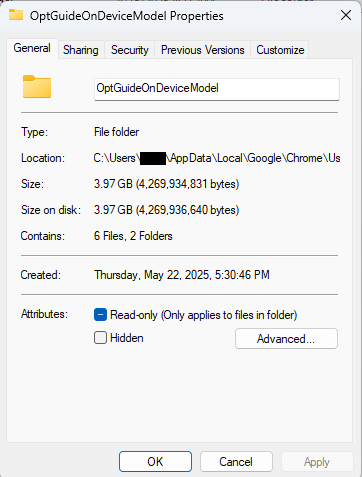
Security researcher Alexander Hanff, aka ThatPrivacyGuy, reports that Chrome has been silently installing Gemini Nano, Google’s on-device AI model, as a file called weights.bin stored in the OptGuideOnDeviceModel directory within users’ Chrome profiles. This 4GB download happens automatically when Chrome determines your device meets the hardware requirements. It does not ask for consent, and sends no notification—not even one of those annoying cookie banners you’ve learned to dismiss without reading.
The Gemini Nano model powers features like “Help me write” text composition assistance, on-device scam detection, and a Summarizer API that websites can call directly. These features are enabled by default in some recent Chrome versions. And here’s the kicker: if you discover the file and delete it, Chrome simply downloads it again.
Why this matters
Let’s start with the obvious problem: a 4GB download isn’t trivial for everyone. If you’re lucky enough to have unlimited fiber internet, you might not notice. But for users on metered connections, mobile hotspots, or in developing countries where data is expensive, Google just cost them real money without permission. For rural users or those with bandwidth caps, this kind of silent transfer can blow through monthly limits in minutes.
Hanff focuses on the environmental angle. He calculated that if this model were pushed to just 1 billion Chrome users (roughly 30% of Chrome’s user base), the distribution alone would consume 240 gigawatt-hours of energy and generate 60,000 tons of CO2 equivalent. That’s not including actually using the model, just the downloads.
But to us, the most troubling aspect is the broader pattern this represents. Just a few weeks ago, we reported another unsolicited AI invasion on our personal computers discovered by Hanff. He documented how Anthropic’s Claude Desktop app, which silently installed browser integration files across multiple Chromium browsers, including five browsers he didn’t even have installed. The integration would reinstall itself if removed, and it also happened without any meaningful user disclosure.
Hanff argues that both cases likely violate EU privacy law, specifically the ePrivacy Directive’s rules about storing data on user devices and the GDPR’s requirements around transparency and lawful processing. While these claims haven’t been tested in court, they highlight a fundamental tension: can companies just install whatever they want on your computer as long as they say it’s a feature of an app you installed?
Google might argue that having an AI on your device provides better privacy than cloud-based alternatives. Which is generally true, but it does not apply here, since Chrome’s most prominent AI feature—the “AI Mode” pill in the address bar—doesn’t even use the local model. According to Hanff’s analysis, it routes queries to Google’s cloud servers anyway.
All in all, users see a 4GB local AI model and reasonably assume their data stays private, when in reality, the most visible AI feature sends everything to Google’s servers.
Tech companies need to stop treating silent deployment as acceptable practice. We see no valid excuse for this. Your device is yours. The storage is yours. The bandwidth is yours. And the electricity bill is yours.
What happened to asking for permission? And when I remove it, I want it gone permanently—not automatic reinstallation.
When are the tech giants going to learn that we don’t want to be left discovering after the fact that our devices have become deployment targets for features we never asked for.
Update May 12, 2026 with do it yourself instructions
How to check if the AI model is on your computer (Windows)
Open File Explorer
At the top of the File Explorer window, click the address bar and paste:
%LOCALAPPDATA%\Google\Chrome\User Data
Press Enter
Look for a folder named:
OptGuideOnDeviceModel
If you see it, Chrome has likely downloaded the AI model
Properties of the folder
How to check on a Mac
Open Finder
In the menu bar at the top of the screen, click Go > Go to Folder
Paste:
~/Library/Application Support/Google/Chrome/
Look for a folder named:
OptGuideOnDeviceModel
Now, remember, this isn’t malware, and its presence doesn’t mean your computer is infected.
Turn off Chrome AI features
This part is relatively easy. You may find online instructions telling you to edit the Windows registry or use Chrome policies, but for most people the simplest and safest approach is to disable the features directly in Chrome.
We don’t recommend manually editing the registry unless you fully understand what you’re doing. Incorrect changes can cause system problems.
Instead, try this first:
Open Chrome
You can copy and paste this directly into Chrome’s address bar and press Enter:
chrome://settings/ai
On the page that opens, you can turn off features such as:
“Help me write”
AI summaries
On-device AI features
The exact options may vary depending on your Chrome version and region.
Then restart Chrome to make sure the changes take effect.
This may stop Chrome from downloading or using the AI model, although some users report the files can return after browser updates.
There is probably no need to delete the files unless you specifically need the storage space.
If chrome://settings/ai does not work, the feature may not yet be available in your region, you may be using a managed work or school account, or your version of Chrome may not support these settings yet.
Do you need to delete the OptGuideOnDeviceModel folder?
You can, but there is probably no need to.
If you disable Chrome’s AI features, the downloaded model should no longer be actively used for those features. Leaving the files in place may also prevent Chrome from downloading them again at a later point.
Browse like no one’s watching.
Malwarebytes Privacy VPN encrypts your connection and never logs what you do, so the next story you read doesn’t have to feel personal. Try it free →
Google Chrome has been quietly downloading a 4GB AI model onto users’ devices without asking first.
Security researcher Alexander Hanff, aka ThatPrivacyGuy, reports that Chrome has been silently installing Gemini Nano, Google’s on-device AI model, as a file called weights.bin stored in the OptGuideOnDeviceModel directory within users’ Chrome profiles. This 4GB download happens automatically when Chrome determines your device meets the hardware requirements. It does not ask for consent, and sends no notification—not even one of those annoying cookie banners you’ve learned to dismiss without reading.
The Gemini Nano model powers features like “Help me write” text composition assistance, on-device scam detection, and a Summarizer API that websites can call directly. These features are enabled by default in some recent Chrome versions. And here’s the kicker: if you discover the file and delete it, Chrome simply downloads it again.
Why this matters
Let’s start with the obvious problem: a 4GB download isn’t trivial for everyone. If you’re lucky enough to have unlimited fiber internet, you might not notice. But for users on metered connections, mobile hotspots, or in developing countries where data is expensive, Google just cost them real money without permission. For rural users or those with bandwidth caps, this kind of silent transfer can blow through monthly limits in minutes.
Hanff focuses on the environmental angle. He calculated that if this model were pushed to just 1 billion Chrome users (roughly 30% of Chrome’s user base), the distribution alone would consume 240 gigawatt-hours of energy and generate 60,000 tons of CO2 equivalent. That’s not including actually using the model, just the downloads.
But to us, the most troubling aspect is the broader pattern this represents. Just a few weeks ago, we reported another unsolicited AI invasion on our personal computers discovered by Hanff. He documented how Anthropic’s Claude Desktop app, which silently installed browser integration files across multiple Chromium browsers, including five browsers he didn’t even have installed. The integration would reinstall itself if removed, and it also happened without any meaningful user disclosure.
Hanff argues that both cases likely violate EU privacy law, specifically the ePrivacy Directive’s rules about storing data on user devices and the GDPR’s requirements around transparency and lawful processing. While these claims haven’t been tested in court, they highlight a fundamental tension: can companies just install whatever they want on your computer as long as they say it’s a feature of an app you installed?
Google might argue that having an AI on your device provides better privacy than cloud-based alternatives. Which is generally true, but it does not apply here, since Chrome’s most prominent AI feature—the “AI Mode” pill in the address bar—doesn’t even use the local model. According to Hanff’s analysis, it routes queries to Google’s cloud servers anyway.
All in all, users see a 4GB local AI model and reasonably assume their data stays private, when in reality, the most visible AI feature sends everything to Google’s servers.
Tech companies need to stop treating silent deployment as acceptable practice. We see no valid excuse for this. Your device is yours. The storage is yours. The bandwidth is yours. And the electricity bill is yours.
What happened to asking for permission? And when I remove it, I want it gone permanently—not automatic reinstallation.
When are the tech giants going to learn that we don’t want to be left discovering after the fact that our devices have become deployment targets for features we never asked for.
Update May 12, 2026 with do it yourself instructions
How to check if the AI model is on your computer (Windows)
Open File Explorer
At the top of the File Explorer window, click the address bar and paste:
%LOCALAPPDATA%\Google\Chrome\User Data
Press Enter
Look for a folder named:
OptGuideOnDeviceModel
If you see it, Chrome has likely downloaded the AI model
Properties of the folder
How to check on a Mac
Open Finder
In the menu bar at the top of the screen, click Go > Go to Folder
Paste:
~/Library/Application Support/Google/Chrome/
Look for a folder named:
OptGuideOnDeviceModel
Now, remember, this isn’t malware, and its presence doesn’t mean your computer is infected.
Turn off Chrome AI features
This part is relatively easy. You may find online instructions telling you to edit the Windows registry or use Chrome policies, but for most people the simplest and safest approach is to disable the features directly in Chrome.
We don’t recommend manually editing the registry unless you fully understand what you’re doing. Incorrect changes can cause system problems.
Instead, try this first:
Open Chrome
You can copy and paste this directly into Chrome’s address bar and press Enter:
chrome://settings/ai
On the page that opens, you can turn off features such as:
“Help me write”
AI summaries
On-device AI features
The exact options may vary depending on your Chrome version and region.
Then restart Chrome to make sure the changes take effect.
This may stop Chrome from downloading or using the AI model, although some users report the files can return after browser updates.
There is probably no need to delete the files unless you specifically need the storage space.
If chrome://settings/ai does not work, the feature may not yet be available in your region, you may be using a managed work or school account, or your version of Chrome may not support these settings yet.
Do you need to delete the OptGuideOnDeviceModel folder?
You can, but there is probably no need to.
If you disable Chrome’s AI features, the downloaded model should no longer be actively used for those features. Leaving the files in place may also prevent Chrome from downloading them again at a later point.
Browse like no one’s watching.
Malwarebytes Privacy VPN encrypts your connection and never logs what you do, so the next story you read doesn’t have to feel personal. Try it free →
Malicious actors have developed a new way to steal data stored by Chrome for Windows. Researchers discovered the technique while analyzing a fresh build of an infostealer known as VoidStealer. The new method allows the malware to bypass Chrome’s Application-Bound (App-Bound) Encryption (ABE), a mechanism intended to protect session cookies and other valuable information stored in the browser.
Google hoped this mechanism would secure the master key Chrome uses to encrypt all sensitive data. Unfortunately, this isn’t the first time malware authors have found a workaround for this defense — leaving secrets stored in Chrome vulnerable once again.
How App-Bound Encryption works in Chrome
Google introduced App-Bound Encryption in July 2024 with the release of Chrome version 127. The company’s announcement mentioned infostealers snatching cookies from Chrome users on Windows as the primary problem ABE was intended to solve. We’ve already covered in detail what these files are and the consequences of their theft, so we’ll only briefly recap the main facts here.
Cookies are small files that the browser saves to the user’s device at a website’s request to remember various site settings. Of particular value to attackers are session cookies, which are used for automatic authentication on websites. It’s thanks to these files that we don’t have to enter a username and password every time we revisit a site.
But this convenience carries a risk: stealing these files allows an attacker to use an already-authenticated session without entering a username or password. This allows them to impersonate the user, which can lead to account hijacking, theft of personal or financial data, and other adverse consequences.
Infostealer Trojans are particularly dangerous for Chrome users on Windows. This is because, on this OS, Chrome previously relied solely on the standard built-in Data Protection API (DPAPI). With this system encryption mechanism, applications don’t need to create and store encryption keys to protect data.
The limitation of DPAPI is that it doesn’t protect data from malware that’s already successfully compromised the system and is capable of executing code on behalf of the logged-in user. This is exactly what stealers exploit: since they typically run with the user’s privileges, they can simply request DPAPI to decrypt the browser’s protected data.
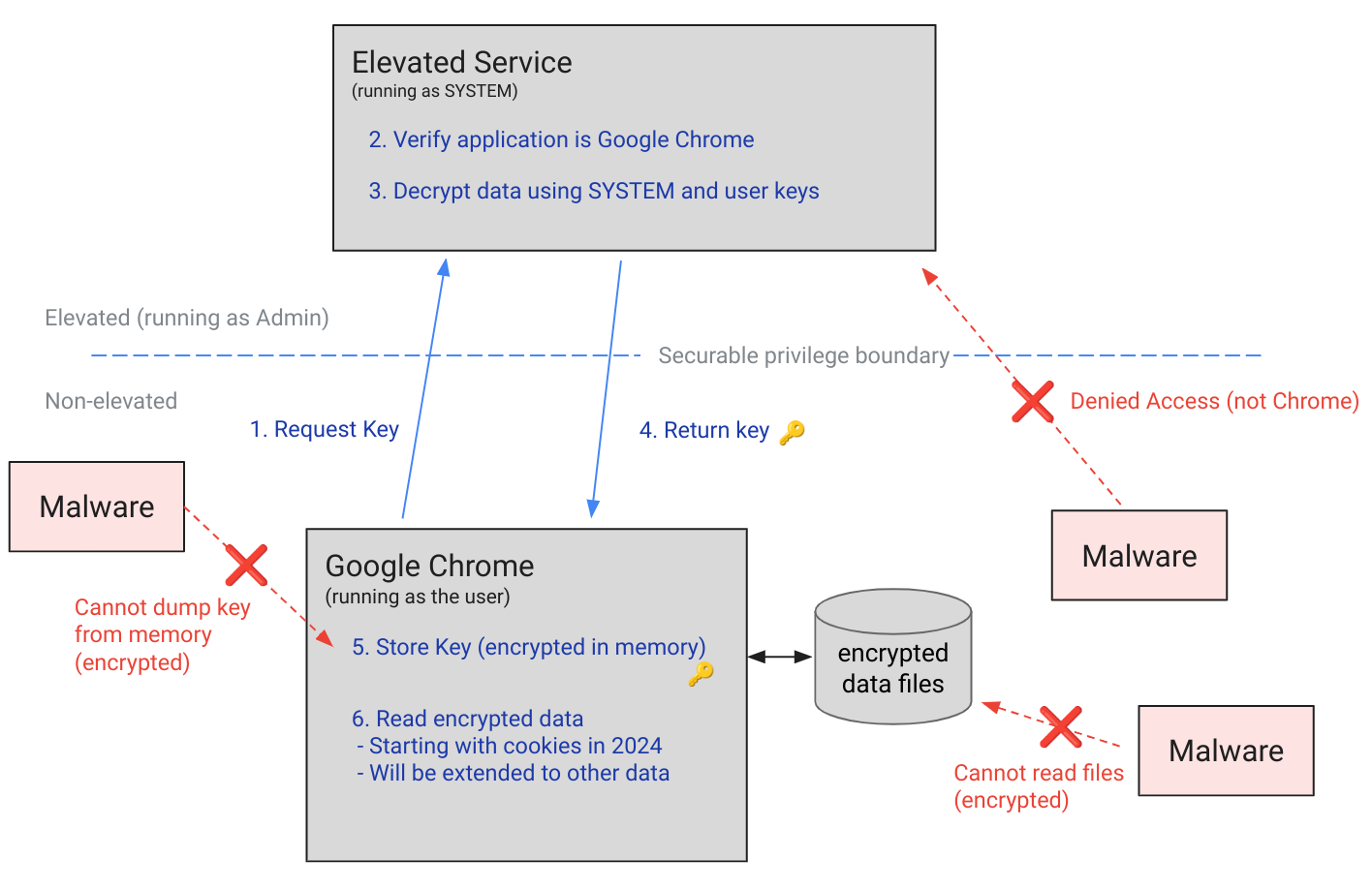
The ABE mechanism was designed to solve that specific problem. The core idea is right in the name: App-Bound Encryption means the encryption is tied to a specific application. To achieve this, a separate service running with system privileges is responsible for protecting the key used to encrypt Chrome’s data. It verifies which application is requesting access to the key, and denies the request if it doesn’t originate from Chrome.
Chrome’s App-Bound Encryption (ABE) was designed so that only Chrome itself could retrieve the master key needed to decrypt the browser’s stored data. Source
As a result, the architects of this feature assumed that to access ABE-protected browser data, an infostealer would either need to escalate its privileges to system-level, or inject malicious code directly into Chrome. In theory, this should have made attacking Chrome significantly harder and reduced the effectiveness of mass-market infostealers. As you might have guessed, things didn’t go quite that smoothly in practice.
Previous successful bypasses of Chrome’s ABE
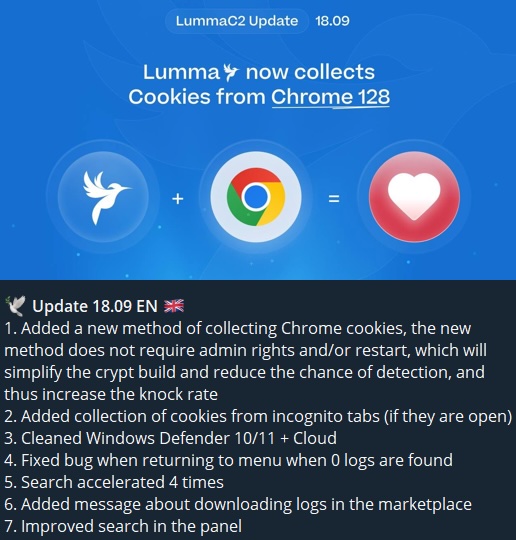
Just a couple of months after Google announced the implementation of App-Bound Encryption in Chrome, many infostealer developers claimed they’d already bypassed the protection. Among them were the creators of Meduza Stealer, Whitesnake, Lumma Stealer, and Lumar (also known as PovertyStealer).
Lumma stealer developers announce a bypass for Chrome’s App-Bound Encryption in a new version of the malware
Of course, you shouldn’t take malware developers at their word, but legitimate security researchers were able to confirm at least some of the claims. Bypasses for Google Chrome’s new data protection feature did become available almost immediately after its release.
A month later, in October 2024, tech enthusiast Alex Hagenah published a tool on GitHub called Chrome-App-Bound-Encryption-Decryption to bypass Google’s new security mechanism. Analysis of the tool’s code revealed that its author used roughly the same methods that attackers were already heavily exploiting.
What followed was a game of cat and mouse: security researchers and stealer developers came up with new tricks to circumvent App-Bound Encryption, while Google patched the newly discovered loopholes with varying degrees of success.
VoidStealer — a new data-nabbing menace
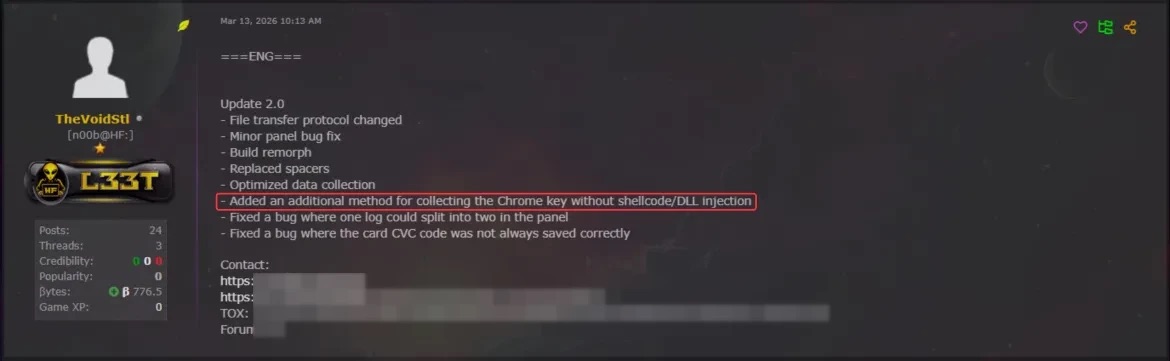
This brings us to recent events: in March 2026, news broke about a stealer named VoidStealer, which utilizes a brand-new and, by all accounts, highly effective method for bypassing ABE.
VoidStealer developers advertising a new method for bypassing ABE. Source
The malware authors developed an attack technique that targets the brief moment when the master key sits in the browser’s memory in plaintext. This occurs because, at a certain point, the browser inevitably has to decrypt its data to actually use it — for instance, to automatically sign in to a website with the relevant session cookie or to access saved credentials.
To exploit this window of opportunity, the malware attaches itself to the Chrome process as a debugger — a tool that allows one to control a program’s execution, pause it, and inspect its memory. In legitimate scenarios, these tools are used by developers to find and fix bugs, analyze application behavior, and test performance.
The malware identifies the specific section of code where data decryption takes place. It then sets a breakpoint at that location; when the program’s execution reaches that point, the browser effectively freezes. This is how the malware catches the exact moment the master key is sitting in RAM in plaintext; it then reads the key directly from memory.
It’s worth noting that everything mentioned above also applies to other Chromium-based browsers that use ABE, including Microsoft Edge, Brave, Opera, Vivaldi, and others.
How to avoid falling victim to infostealers
The scale of VoidStealer’s reach could be significant, as its developers operate under the malware-as-a-service (MaaS) model. This means they rent out the ready-made tool to other attackers, so they don’t need to develop custom malware from scratch.
This situation demonstrates that relying solely on built-in security mechanisms isn’t enough. Unfortunately, stealer developers are coming up with new workarounds faster than browser and operating system developers can roll out patches.
Here’s what users can do about it:
Avoid installing programs from suspicious sources. This will minimize the chances of malware infiltrating your system.
Learn how ClickFix attacks Lately, stealers have frequently been distributed using this specific malicious tactic.
Keep your OS and software updated on all devices. Timely updates help patch many of the vulnerabilities that malware exploits.
Install a robust security solution on all your devices. It’ll block suspicious activity in real time and alert you to potential threats.
As an added precaution, avoid storing passwords and bank card info in Google Chrome or your Notes app, as these are the first places any self-respecting stealer looks. Instead, use a secure password manager.
Stealers are hunting for your data, finding ways to infiltrate both computers and smartphones alike. To protect yourself from theft, check out our other related posts:
DarkSword is a sophisticated piece of malware—probably government designed—that targets iOS.
Google Threat Intelligence Group (GTIG) has identified a new iOS full-chain exploit that leveraged multiple zero-day vulnerabilities to fully compromise devices. Based on toolmarks in recovered payloads, we believe the exploit chain to be called DarkSword. Since at least November 2025, GTIG has observed multiple commercial surveillance vendors and suspected state-sponsored actors utilizing DarkSword in distinct campaigns. These threat actors have deployed the exploit chain against targets in Saudi Arabia, Turkey, Malaysia, and Ukraine.
DarkSword supports iOS versions 18.4 through 18.7 and utilizes six different vulnerabilities to deploy final-stage payloads. GTIG has identified three distinct malware families deployed following a successful DarkSword compromise: GHOSTBLADE, GHOSTKNIFE, and GHOSTSABER. The proliferation of this single exploit chain across disparate threat actors mirrors the previously discovered Coruna iOS exploit kit. Notably, UNC6353, a suspected Russian espionage group previously observed using Coruna, has recently incorporated DarkSword into their watering hole campaigns.
A week after it was identified, a version of it leaked onto the internet, where it is being used more broadly.
This news is a month old. Your devices are safe, assuming you patch regularly.

 Login
Login