Not by name, but Laurie Anderson quotes me in one of the tracks of her new album:
My favorite quote is from a cryptologist who said “If you think technology will solve your problems, you don’t understand technology and you don’t understand your problems.”
“Of course, it’s ridiculous, outrageous, blah, blah, blah,” Anderson says about the ad. ‘But, I mean, my favorite quote on this is from a cryptologist who said, ‘If you think technology will solve your problems, you don’t understand technology  and you don’t understand your problems.’ And I think I’m completely on board with that.”
People are telling me that she has been reciting this quote in performances for years. (I lost track of her since college and her 1981 hit “O Superman.”)
If you think cryptography can solve your problem, you don’t understand your problem and you don’t understand cryptography.
I modified the quote in the preface to my 2000 book Secrets and Lies:
A few years ago I heard a quotation, and I am going to modify it here: If you think technology can solve your security problems, then you don’t understand the problems and you don’t understand the technology.
I can’t tell you why me in 2000 didn’t credit Needham by name. I should have.
I have used the quote pretty consistently since then. Somewhere along the line I dropped “security” from the phrase, and now say it more like Anderson quotes me:
If you think technology will solve your problem, you don’t understand your problem and you don’t understand technology.
I sometimes use singular and sometimes use plural. Sometimes I say “the problem” and “the technology.” But I think the quote flows better ending with just the word “technology.”
The financial services industry (FSI) is using AI to transform how financial institutions serve their customers. AI solutions can help proactively manage portfolios, automatically refinance mortgages when rates decrease, and negotiate insurance premiums for customers.
As the regulatory environment and leading practices continue to evolve, we will provide further updates on the AWS Security Blog and AWS Compliance Center. You can also reach out to your AWS account team for help finding the resources you need.
In the ever-evolving world of cybersecurity, staying ahead of the curve is not just a goal—it’s a necessity. As new vulnerabilities emerge, the race to identify and mitigate them begins. But how do we, the guardians of the digital realm, rapidly pinpoint these threats as they become public? Let’s dive into the fascinating world of vulnerability identification and see how the magic happens.
Artificial intelligence platforms may be just as susceptible to social engineering as human beings, but they are proving remarkably good at finding security vulnerabilities in human-made computer code. That reality is on full display this month with some of the more widely-used software makers — including Apple, Google, Microsoft, Mozilla and Oracle — fixing near record volumes of security bugs, and/or quickening the tempo of their patch releases.
As it does on the second Tuesday of every month, Microsoft today released software updates to address at least 118 security vulnerabilities in its various Windows operating systems and other products. Remarkably, this is the first Patch Tuesday in nearly two years that Microsoft is not shipping any fixes to deal with emergency zero-day flaws that are already being exploited. Nor have any of the flaws fixed today been previously disclosed (potentially giving attackers a heads up in how to exploit the weakness).
Sixteen of the vulnerabilities earned Microsoft’s most-dire “critical” label, meaning malware or miscreants could abuse these bugs to seize remote control over a vulnerable Windows device with little or no help from the user. Rapid7 has done much of the heavy lifting in identifying some of the more concerning critical weaknesses this month, including:
CVE-2026-41089: A critical stack-based buffer overflow in Windows Netlogon that offers an attacker SYSTEM privileges on the domain controller. No privileges or user interaction are required, and attack complexity is low. Patches are available for all versions of Windows Server from 2012 onwards.
CVE-2026-41096: A critical RCE in the Windows DNS client implementation worthy of attention despite Microsoft assessing exploitation as less likely.
CVE-2026-41103: A critical elevation of privilege vulnerability that allows an unauthorized attacker to impersonate an existing user by presenting forged credentials, thus bypassing Entra ID. Microsoft expects that exploitation is more likely.
May’s Patch Tuesday is a welcome respite from April, which saw Microsoft fix a near-record 167 security flaws. Microsoft was among a few dozen tech giants given access to a “Project Glasswing,” a much-hyped AI capability developed by Anthropic that appears quite effective at unearthing security vulnerabilities in code.
Apple, another early participant in Project Glasswing, typically fixes an average of 20 vulnerabilities each time it ships a security update for iOS devices, said Chris Goettl, vice president of product management at Ivanti. On May 11, Apple shipped updates to address at least 52 vulnerabilities and backported the changes all the way to iPhone 6s and iOS 15.
Last month, Mozilla released Firefox 150, which resolved a whopping 271 vulnerabilities that were reportedly discovered during the Glasswing evaluation.
“Since Firefox 150.0.0 released, they have been on a more aggressive weekly cadence for security updates including the release of Firefox 150.0.3 on May Patch Tuesday resolving between three to five CVEs in each release,” Goettl said.
The software giant Oracle likewise recently increased its patch pace in response to their work with Glasswing. In its most recent quarterly patch update, Oracle addressed at least 450 flaws, including more than 300 fixes for remotely exploitable, unauthenticated flaws. But at the end of April, Oracle announced it was switching to a monthly update cycle for critical security issues.
On May 8, Google started rolling out updates to its Chrome browser that fixed an astonishing 127 security flaws (up from just 30 the previous month). Chrome automagically downloads available security updates, but installing them requires fully restarting the browser.
If you encounter any weirdness applying the updates from Microsoft or any other vendor mentioned here, feel free to sound off in the comments below. Meantime, if you haven’t backed up your data and/or drive lately, doing that before updating is generally sound advice. For a more granular look at the Microsoft updates released today, checkout this inventory by the SANS Internet Storm Center.
The Evolution of the Geotag: How AI is Bridging the Gap in Location-Based OSINT
In this post, we explore how the decline of geotagged data is reshaping location-based OSINT, the intelligence gaps it creates for analysts, and how AI-driven keyword generation and geofencing are restoring visibility into real-world events.
For years, location-based open-source intelligence (OSINT) has relied heavily on a steady stream of user-generated geographic data. Geotagged social media posts with embedded latitude and longitude coordinates have long been a goldmine for tracking regional trends, monitoring real-time events, and understanding on-the-ground public sentiment. Intelligence professionals and data scientists have historically used this passively-generated location-based data to aggregate real-time insights for everything from tracking public sentiment to monitoring natural disasters.
However, the era of effortless geographic tracking is coming to an end. Geotagged social media data is becoming increasingly scarce, making it significantly harder for security teams to gather a complete picture of location-based intelligence.
The Decline of Location Sharing
The primary driver behind the diminishing use of geotags is a massive shift in digital privacy standards. For instance, major platform-level policy interventions, such as Apple’s November 2021 iOS privacy update, changed the default consent model for device tracking. Instead of requiring users to actively opt out of location tracking, iPhone users must now explicitly opt in.
As a result of these strengthened privacy controls, a massive behavioral shift occurred: within a year of the iOS update, 62% of affected users chose to opt out of location tracking entirely. This platform-mediated behavioral barrier has drastically reduced the availability and visibility of granular location traces, creating complex new blind spots for researchers and intelligence analysts.
The Intelligence Gap
With precise coordinates disappearing from social feeds, security practitioners and OSINT investigators are left facing a major data void. Relying purely on traditional keyword or hashtag searches to find location-specific events is highly inefficient. In fact, as little as 7% of social media posts actually contain hashtags. If an analyst is scanning 10,000 posts a day looking for a specific hashtag, they could be missing up to 9,300 posts that hold critical intelligence.
To compensate for missing geotags, security practitioners have traditionally had to spend valuable time performing manual, tedious searches for specific local details like street names, landmarks, and local businesses to figure out where an event is taking place.
Bridging the Gap with AI
To overcome the increasing scarcity of explicit location data, the intelligence industry is leveraging artificial intelligence and spatial technologies.
AI-powered keyword optimization tools like Echosec’s new AI-powered “Optimize” feature are designed specifically to bridge this data gap. Instead of relying on users to share their precise coordinates, AI automatically generates hyper-relevant, location-based keywords for an investigator’s search. If an analyst is looking into a specific neighborhood, the AI will suggest relevant landmarks, tourist attractions, schools, government buildings, and businesses to monitor. This instantly converts manual, time-consuming research into an automated process, significantly increasing the volume and relevance of the data collected.
Geo-Based OSINT 2.0
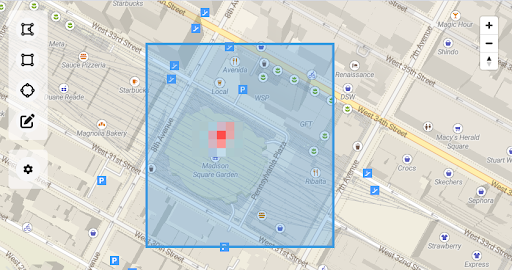
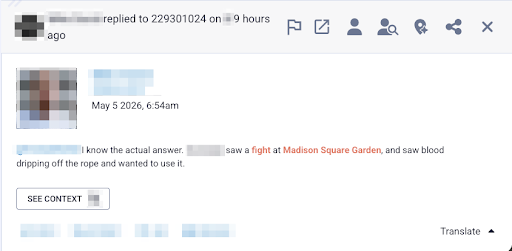
Geo-based search combined with AI keyword generation is taking OSINT to the next level. Geofencing allows teams to draw virtual perimeters around physical sites, such as corporate offices, foreign meeting sites, or public gatherings, to monitor digital activity strictly within those areas. This means you don’t need to know what keywords or hashtags you are looking for; you only need to know where to look. This is incredibly valuable for real-time executive protection and monitoring civil unrest, as it surfaces visual intelligence and early warnings directly from the scene, cutting out irrelevant noise.
The Future of OSINT for Situational Awareness
The decline of the geotag is a victory for consumer privacy, but it isn’t the end of location-based intelligence. By leveraging AI-driven keywords and hyper-local geofencing, security teams can move beyond broad geographic searches. These smart tools alleviate research bottlenecks, allowing analysts to redirect their expertise away from exhaustive data hunting and toward the critical analysis needed to respond to threats before they escalate. The geotag may be fading, but our situational awareness remains sharper than ever.
Don’t let the intelligence gap compromise your situational awareness. Ready to move from tedious manual searches to immediate, actionable insights? Book your Echosec demo today and empower your team with the next generation of location-based insight.
Many security leader are asking the same question right now. We already pay for Microsoft Copilot, ChatGPT Enterprise, or Claude. Why buy anything else?
It is a fair question. These are genuinely impressive platforms. And the honest answer is that they can help with some things. Just not the things that matter most for most SOC teams.
This post is a practical guide to where generalist AI earns its place in a SOC and where it runs out of road.
Where generalist AI platforms actually add value
Let’s be direct about what generalist AI platforms do well in a security context.
They are good at drafting, incident summaries, policy documentation, communication templates, and post-mortems. If an analyst needs to translate a technical finding into plain language for an executive, a general-purpose LLM can accelerate that substantially.
They are useful for on-demand research. Asking a question about a CVE, looking up MITRE ATT&CK techniques, or getting a quick primer on an unfamiliar attack class. These are real productivity wins.
They can assist with simple scripting and query construction. Writing a KQL query for a Sentinel rule, generating a Python snippet to parse a log format. Useful, time-saving work.
The common thread is that these are assistance tasks. A human still needs to initiate the process while the AI is a capable co-pilot. And for these use cases, a general-purpose tool is perfectly appropriate.
Where generalist AI runs out of road
The problem is that none of those use cases address the actual constraint facing most SOC teams.
Security teams are not failing because analysts lack knowledge or work too slowly. They are constrained by investigative capacity. Alert volumes are rising. Environments are growing. Attacks are moving faster. And the operating model still assumes humans will triage and investigate the majority of what comes in.
When that assumption breaks down, investigation becomes selective. High-severity alerts get attention. Medium alerts accumulate. Low-severity alerts are deferred or auto-closed. And the uncomfortable truth is that real attacks frequently begin as weak signals. Credential misuse, living-off-the-land techniques, early-stage lateral movement. They rarely present as critical alerts. They appear ordinary until someone actually investigates them.
Generic AI does not fix this. Here is why.
Generalist AI is built for breadth, not depth
ChatGPT and Microsoft Copilot are built for general-purpose text generation. Forensic investigation of a suspicious process execution chain, or a cloud misconfiguration alert at 3am, requires domain-specific knowledge and structured reasoning those platforms were not designed to provide.
Generalist AI assists but does not execute
Even with a great prompt, a general-purpose AI is accelerating an analyst’s workflow, not replacing the need for one. The investigation still depends on human capacity. And human capacity does not scale as fast as the alert surface grows.
Generalist AI KPIs are increased token usage
Microsoft’s KPI, for example, is token usage. More engagement equals more revenue, regardless of whether your security outcomes improved. That is not a subtle difference. It shapes every product decision, every definition of success. And this can result in very high costs for SOC teams heavily relying on these platforms. This is in stark contrast to Intezer AI SOC which selectively uses LLMs while primarily executing forensic investigations with highly scalable tools and processes.
The task requires drafting or synthesizing text and security context is not critical to the output
An analyst is researching something unfamiliar and needs a starting point
The work is advisory and a human will validate and act on every output
Speed of completion matters more than forensic accuracy
Consider purpose-built AI when:
You need investigation to happen without an analyst driving every step
Alert volume has outpaced the team’s capacity to investigate manually
Medium and low-severity alerts are going uninvestigated because there simply is not time
You need verdicts accurate enough to act on, not just suggestions to review
The line between these two categories comes down to one question. Do you need AI assistance, or do you need AI execution?
What autonomous execution actually requires
This distinction matters because it shapes what you need from a platform.
Assistance is achievable with a good LLM and a capable prompt. Execution requires something harder: accuracy and forensic depth at investigation time.
General-purpose AI tools and many first-generation AI SOC products rely primarily on LLM analysis and SIEM queries. That is not enough to produce verdicts you can trust without a human checking every one.
Intezer AI SOC is built for the execution side of that line. Automated evidence collection, threat intelligence correlation, network forensics, endpoint forensics, and reverse engineering. That additional depth is what generates the high-confidence verdicts that allow organizations to trust the outcome without a human reviewing every decision.
Below a certain threshold of accuracy and depth, AI assists humans. Above it, organizations can safely offload Tier 1 and Tier 2 work entirely. The threshold is not crossed through breadth. It is crossed through domain specialization and forensic rigor.
Intezer’s investigations produce evidence-based verdicts with 98% accuracy. Up to 2% of alerts are escalated as real incidents while the rest are resolved automatically. That is not a productivity improvement. That is a fundamentally different operating model.
The closed loop of triage and detection engineering
There is one more dimension where general-purpose tools fall short and that is detection engineering.
When a generic AI tool helps an analyst triage an alert, that interaction is largely isolated. The outcome does not feed back into your SIEM rules. It does not surface coverage gaps. It does not help you get better at detecting the same class of threat next time.
Intezer’s investigation outcomes feed directly into detection engineering at the source, continuously identifying broken or noisy rules, flagging coverage gaps against the MITRE ATT&CK framework, and generating deployment-ready detection rules informed by real investigation results. The system improves with every alert it processes. Detection gets better based on evidence, not assumptions.
That closed loop is the difference between a productivity tool and an operating model.
Is a single generalist interface with multiple plugins the answer?
There is also an important architectural point worth making. Generalist AI platforms are increasingly effective at consolidating workflows into a single interface, and in theory, you could extend them into security operations through plugins and MCPs. The building blocks exist.
But in practice, stitching together the specialist capabilities needed for real alert triage such as forensic evidence collection, threat intelligence correlation, reverse engineering, network analysis, etc. means sourcing, integrating, and maintaining a patchwork of plugins across multiple providers. Each one has its own update cycle, its own failure modes, and its own gaps. The integration burden falls on your team, and keeping it all working reliably over time is its own operational overhead.
At some point the question becomes whether the effort of assembling and maintaining a DIY investigation pipeline inside a generalist platform is worth it — or whether it makes more sense to use a purpose-built system where those capabilities are already unified, tested, and working together out of the box.
The bottom line
Generalist AI platforms have a real role to play in the SOC. Use them for drafting, research, and analyst-driven assistance tasks. It is good at those things and it is likely already paid for.
But do not confuse that with solving the capacity problem. When investigation still depends on human bandwidth, the alert backlog does not disappear. It just accumulates more slowly.
The future SOC is one where AI executes investigation and humans supervise outcomes. Getting there requires technology purpose-built for that job.
The primary goal for attackers in a phishing campaign is to bypass email security and trick the potential victim into revealing their data. To achieve this, scammers employ a wide range of tactics, from redirect links to QR codes. Additionally, they heavily rely on legitimate sources for malicious email campaigns. Specifically, we’ve recently observed an uptick in phishing attacks leveraging Amazon SES.
The dangers of Amazon SES abuse
Amazon Simple Email Service (Amazon SES) is a cloud-based email platform designed for highly reliable transactional and marketing message delivery. It integrates seamlessly with other products in Amazon’s cloud ecosystem, AWS.
At first glance, it might seem like just another delivery channel for email phishing, but that isn’t the case. The insidious nature of Amazon SES attacks lies in the fact that attackers aren’t using suspicious or dangerous domains; instead, they are leveraging infrastructure that both users and security systems have grown to trust. These emails utilize SPF, DKIM, and DMARC authentication protocols, passing all standard provider checks, and almost always contain .amazonses.com in the Message-ID headers. Consequently, from a technical standpoint, every email sent via Amazon SES – even a phishing one – looks completely legitimate.
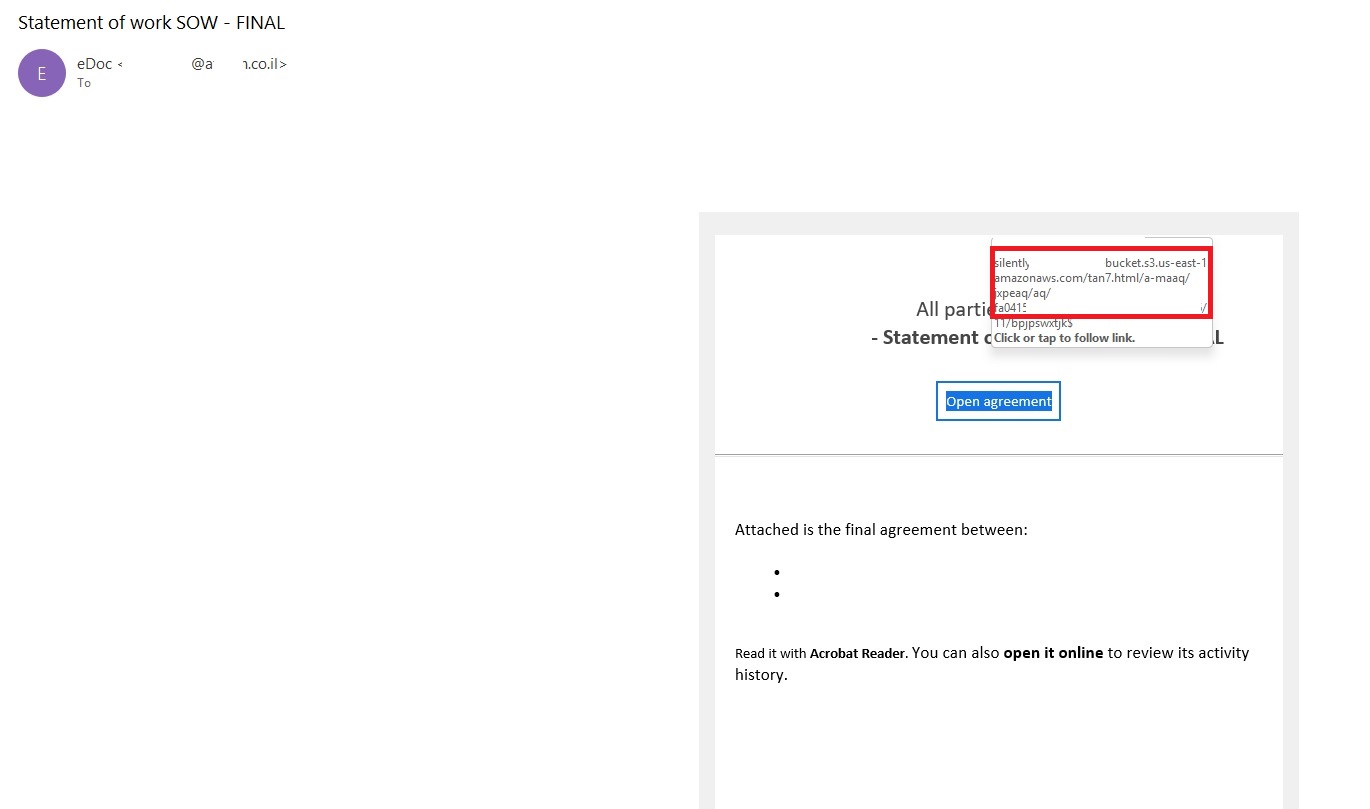
Phishing URLs can be masked with redirects: a user sees a link like amazonaws.com in the email and clicks it with confidence, only to be sent to a phishing site rather than a legitimate one. Amazon SES also allows for custom HTML templates, which attackers use to craft more convincing emails. Because this is legitimate infrastructure, the sender’s IP address won’t end up on reputation-based blocklists. Blocking it would restrict all incoming mail sent through Amazon SES. For major services, that kind of measure is ineffective, as it would significantly disrupt user workflows due to a massive number of false positives.
How compromise happens
In most cases, attackers gain access to Amazon SES through leaked IAM (AWS Identity and Access Management) access keys. Developers frequently leave these keys exposed in public GitHub repositories, ENV files, Docker images, configuration backups, or even in publicly accessible S3 buckets. To hunt for these IAM keys, phishers use various tools, such as automated bots based on the open-source utility TruffleHog, which is designed for detecting leaked secrets. After verifying the key’s permissions and email sending limits, attackers are equipped to spread a massive volume of phishing messages.
Examples of phishing with Amazon SES
In early 2026, one of the most common themes in phishing emails sent with Amazon SES was fake notifications from electronic signature services.
Phishing email imitating a Docusign notification
The email’s technical headers confirm that it was sent with Amazon SES. At first glance, it all looks legitimate enough.
Phishing email headers
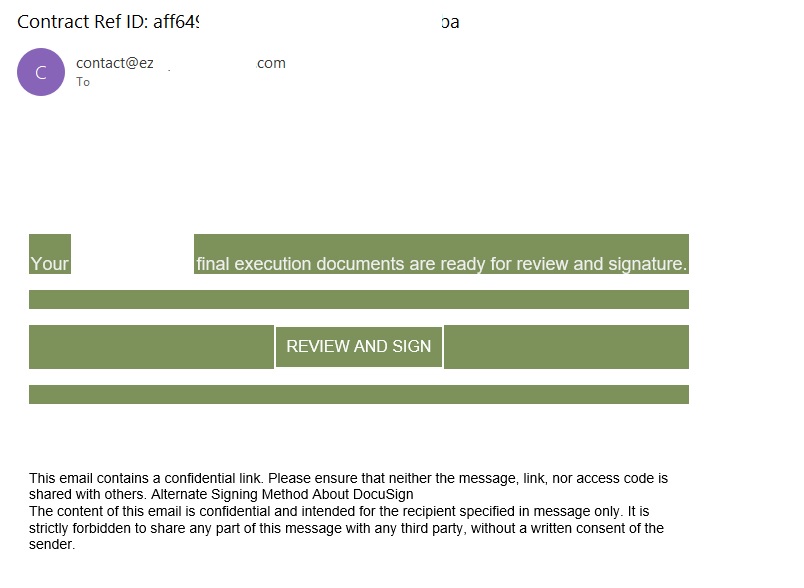
In these emails, the victim is typically asked to click a link to review and sign a specific document.
Phishing email with a “document”
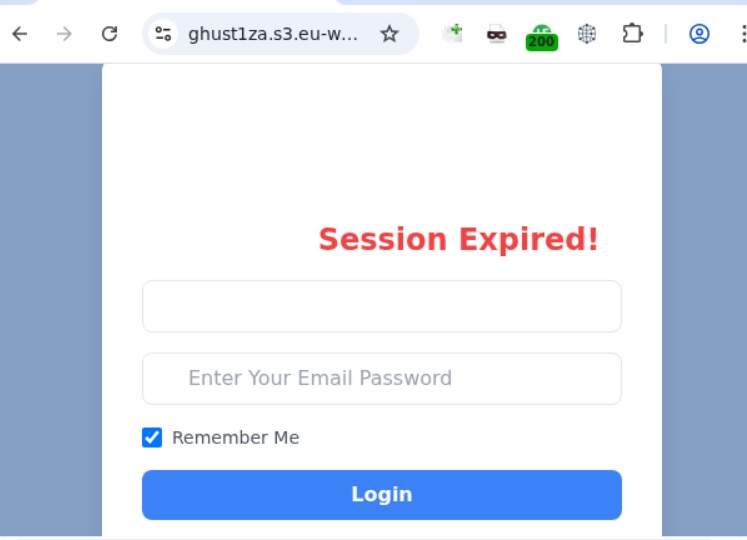
Upon clicking the link, the user is directed to a sign-in form hosted on amazonaws.com. This can easily mislead the victim, convincing them that what they’re doing is safe.
Phishing sign-in form
The resulting form is, of course, a phishing page, and any data entered into it goes directly to the attackers.
Amazon SES and BEC
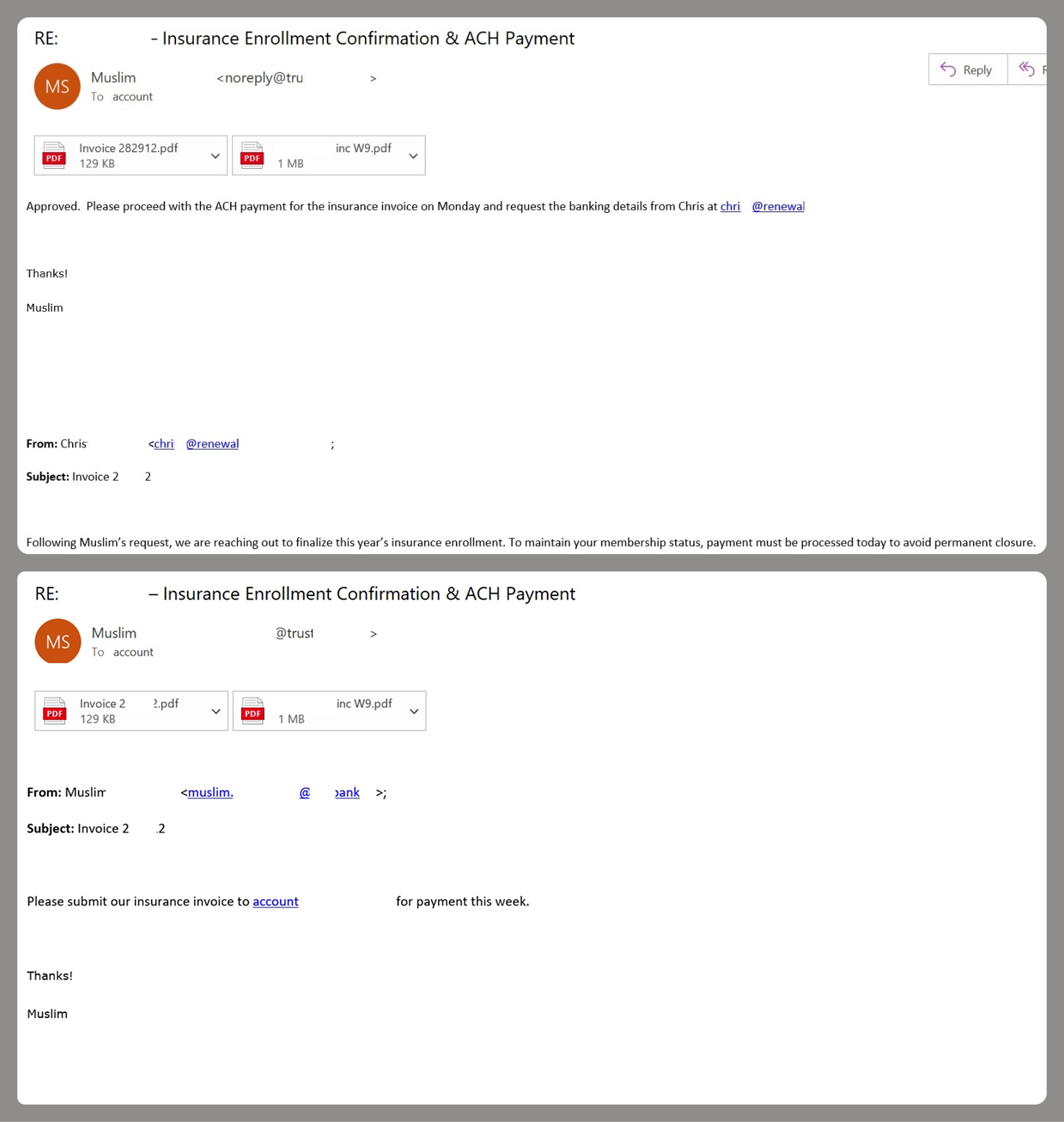
However, Amazon SES is used for more than just standard phishing; it’s also a vehicle for a very sophisticated type of BEC campaigns. In one case we investigated, a fraudulent email appeared to contain a series of messages exchanged between an employee of the target organization and a service provider about an outstanding invoice. The email was sent as if from that employee to the company’s finance department, requesting urgent payment.
BEC email featuring a fake conversation between an employee and a vendor
The PDF attachments didn’t contain any malicious phishing URLs or QR codes, only payment details and supporting documentation.
Forged financial documents
Naturally, the email didn’t originate with the employee, but with an attacker impersonating them. The entire thread quoted within the email was actually fabricated, with the messages formatted to appear as a legitimate forwarded thread to a cursory glance. This type of attack aims to lower the user’s guard and trick them into transferring funds to the scammers’ account.
Takeaways
Phishing via Amazon SES experienced an uptick in January 2026 and has remained relatively steady through Q1. By weaponizing this service, attackers avoid the effort of building dubious domains and mail infrastructure from scratch. Instead, they hijack existing access keys to gain the ability to blast out thousands of phishing emails. These messages pass email authentication, originate from IP addresses that are unlikely to be blocklisted, and contain links to phishing forms that look entirely legitimate.
Since these Amazon SES phishing attacks stem from compromised or leaked AWS credentials, prioritizing the security of these accounts is critical. To mitigate these risks, we recommend following these guidelines:
Implement the principle of least privilege when configuring IAM access keys, granting elevated permissions only to users who require them for specific tasks.
Transition from IAM access keys to roles when configuring AWS; these are profiles with specific permissions that can be assigned to one or several users.
Enable multi-factor authentication, an ever-relevant step.
Configure IP-based access restrictions.
Set up automated key rotation and run regular security audits.
Use the AWS Key Management Service to encrypt data with unique cryptographic keys and manage them from a centralized location.
We recommend that users remain vigilant when handling email. Do not determine whether an email is safe based solely on the From field. If you receive unexpected documents via email, a prudent precaution is to verify the request with the sender through a different communication channel. Always carefully inspect where links in the body of an email actually lead. Additionally, robust email security solutions can provide an essential layer of protection for both corporate and personal correspondence.
The primary goal for attackers in a phishing campaign is to bypass email security and trick the potential victim into revealing their data. To achieve this, scammers employ a wide range of tactics, from redirect links to QR codes. Additionally, they heavily rely on legitimate sources for malicious email campaigns. Specifically, we’ve recently observed an uptick in phishing attacks leveraging Amazon SES.
The dangers of Amazon SES abuse
Amazon Simple Email Service (Amazon SES) is a cloud-based email platform designed for highly reliable transactional and marketing message delivery. It integrates seamlessly with other products in Amazon’s cloud ecosystem, AWS.
At first glance, it might seem like just another delivery channel for email phishing, but that isn’t the case. The insidious nature of Amazon SES attacks lies in the fact that attackers aren’t using suspicious or dangerous domains; instead, they are leveraging infrastructure that both users and security systems have grown to trust. These emails utilize SPF, DKIM, and DMARC authentication protocols, passing all standard provider checks, and almost always contain .amazonses.com in the Message-ID headers. Consequently, from a technical standpoint, every email sent via Amazon SES – even a phishing one – looks completely legitimate.
Phishing URLs can be masked with redirects: a user sees a link like amazonaws.com in the email and clicks it with confidence, only to be sent to a phishing site rather than a legitimate one. Amazon SES also allows for custom HTML templates, which attackers use to craft more convincing emails. Because this is legitimate infrastructure, the sender’s IP address won’t end up on reputation-based blocklists. Blocking it would restrict all incoming mail sent through Amazon SES. For major services, that kind of measure is ineffective, as it would significantly disrupt user workflows due to a massive number of false positives.
How compromise happens
In most cases, attackers gain access to Amazon SES through leaked IAM (AWS Identity and Access Management) access keys. Developers frequently leave these keys exposed in public GitHub repositories, ENV files, Docker images, configuration backups, or even in publicly accessible S3 buckets. To hunt for these IAM keys, phishers use various tools, such as automated bots based on the open-source utility TruffleHog, which is designed for detecting leaked secrets. After verifying the key’s permissions and email sending limits, attackers are equipped to spread a massive volume of phishing messages.
Examples of phishing with Amazon SES
In early 2026, one of the most common themes in phishing emails sent with Amazon SES was fake notifications from electronic signature services.
Phishing email imitating a Docusign notification
The email’s technical headers confirm that it was sent with Amazon SES. At first glance, it all looks legitimate enough.
Phishing email headers
In these emails, the victim is typically asked to click a link to review and sign a specific document.
Phishing email with a “document”
Upon clicking the link, the user is directed to a sign-in form hosted on amazonaws.com. This can easily mislead the victim, convincing them that what they’re doing is safe.
Phishing sign-in form
The resulting form is, of course, a phishing page, and any data entered into it goes directly to the attackers.
Amazon SES and BEC
However, Amazon SES is used for more than just standard phishing; it’s also a vehicle for a very sophisticated type of BEC campaigns. In one case we investigated, a fraudulent email appeared to contain a series of messages exchanged between an employee of the target organization and a service provider about an outstanding invoice. The email was sent as if from that employee to the company’s finance department, requesting urgent payment.
BEC email featuring a fake conversation between an employee and a vendor
The PDF attachments didn’t contain any malicious phishing URLs or QR codes, only payment details and supporting documentation.
Forged financial documents
Naturally, the email didn’t originate with the employee, but with an attacker impersonating them. The entire thread quoted within the email was actually fabricated, with the messages formatted to appear as a legitimate forwarded thread to a cursory glance. This type of attack aims to lower the user’s guard and trick them into transferring funds to the scammers’ account.
Takeaways
Phishing via Amazon SES experienced an uptick in January 2026 and has remained relatively steady through Q1. By weaponizing this service, attackers avoid the effort of building dubious domains and mail infrastructure from scratch. Instead, they hijack existing access keys to gain the ability to blast out thousands of phishing emails. These messages pass email authentication, originate from IP addresses that are unlikely to be blocklisted, and contain links to phishing forms that look entirely legitimate.
Since these Amazon SES phishing attacks stem from compromised or leaked AWS credentials, prioritizing the security of these accounts is critical. To mitigate these risks, we recommend following these guidelines:
Implement the principle of least privilege when configuring IAM access keys, granting elevated permissions only to users who require them for specific tasks.
Transition from IAM access keys to roles when configuring AWS; these are profiles with specific permissions that can be assigned to one or several users.
Enable multi-factor authentication, an ever-relevant step.
Configure IP-based access restrictions.
Set up automated key rotation and run regular security audits.
Use the AWS Key Management Service to encrypt data with unique cryptographic keys and manage them from a centralized location.
We recommend that users remain vigilant when handling email. Do not determine whether an email is safe based solely on the From field. If you receive unexpected documents via email, a prudent precaution is to verify the request with the sender through a different communication channel. Always carefully inspect where links in the body of an email actually lead. Additionally, robust email security solutions can provide an essential layer of protection for both corporate and personal correspondence.
To deliver this critical edge, our Unit 42 Frontier AI Defense will now leverage Anthropic’s Claude Security, powered by Opus 4.7. By integrating one of the world’s most advanced AI models, we are empowering our customers to outpace automated threats. Through Frontier AI Defense, organizations can rapidly assess their security posture, remediate vulnerabilities and harden their infrastructure against next-generation, AI-driven attacks.
We are utilizing Claude Security’s deep technical reasoning to enable our customers to find and fix vulnerabilities with unprecedented speed. This includes:
AI-Driven Exposure Analysis – Identifying complex exploit chains that turn minor findings into critical risks.
Scalable Application Analysis – Performing deep-stack code reviews at a scale and depth previously unavailable.
Agentic Defense – Powering autonomous workflows that detect and remediate threats at machine speed, backed by human oversight.
Palo Alto Networks is also participating in Anthropic's Cyber Verification Program, which credentials security teams for legitimate defensive use of frontier models.
The threat timeline is accelerating. Within months, AI-driven attack capabilities will become a standard fixture of the threat landscape. Palo Alto Networks is dedicated to ensuring our global customers are equipped with the modern frontier AI models necessary to stay secure both today and tomorrow.
PhantomRPC involves Windows Remote Procedure Call (RPC), the core of communication between Windows processes. The vulnerability lets a process with impersonation rights escalate to SYSTEM by impersonating high‑privileged clients that connect to a fake RPC server.
The researcher presented a detailed technical report outlining five exploitation paths, including coercion, user interaction, or background services. They warned that potential vectors are “effectively unlimited” because the root issue is architectural.
Microsoft, however, classified the issue as “moderate,” refused a bounty, declined to assign a CVE (a spot in the list of Common Vulnerabilities and Exposures), and closed the case without tracking. Its position is that the technique requires an already‑compromised machine and does not provide unauthenticated or remote access.
Experts disagreed with Microsoft’s assessment. Their concern is that Microsoft is downplaying a systemic local privilege escalation technique that exists in all supported Windows versions.
The issue
At the core of this issue is that the Windows RPC runtime does not sufficiently verify that the server a high‑privileged client connects to is the intended legitimate endpoint.
If a legitimate RPC server is not reachable (for example because the service stopped, was misconfigured, not installed, or due to a race condition), an attacker with SeImpersonatePrivilege can spin up a fake RPC server that “fills the gap” using the same interface and endpoint.
When a SYSTEM or high‑privileged client connects to this fake server, using an impersonation level that allows the server to impersonate the client, the attacker can call RpcImpersonateClient and immediately escalate their privileges to SYSTEM.
From Microsoft’s perspective, the ability to run a rogue RPC server in this way falls under the category of “already compromised.”
SeImpersonatePrivilege
To understand the issue better, we need to dig into what SeImpersonatePrivilege does.
Basically, SeImpersonatePrivilege is the Windows permission that lets a program “pretend to be you” after you’ve already logged in, so it can do things on your behalf using your level of access.
It’s needed because many system services and server‑type apps (file sharing, RPC servers, COM servers, web apps) have to perform actions on behalf of a user, like reading their files or applying group policy.
If an attacker gains this privilege, they can create a fake service or server and wait for a more powerful account to talk to it. When that high‑privilege service connects, the attacker can grab its security token and impersonate it, effectively upgrading from an account with lower privileges to full SYSTEM control on that machine.
Protection
A Microsoft spokesperson provided the following statement:
“This technique requires an already-compromised machine and does not grant unauthenticated or remote access. Any update is a balance between existing compatibility and customer risk, and we remain committed to continually hardening our products. We recommend customers follow security best practices, including limiting administrative privileges and applying the principle of least privilege.”
In our opinion, mitigating PhantomRPC properly would require deep changes to the RPC architecture, which is hard to do on existing Windows versions without breaking compatibility. It’s maybe something we’ll see in future versions, given the scale of change needed.
What you can do:
As PhantomRPC is a piece in a larger chain, it is still very important to keep Windows updated.
Use your admin account sparingly and only for the tasks that need that kind of privilege.
Avoid disabling or “hardening” services blindly since a malicious service might step in their place.
To answer the question in the title: it looks like a “feature” that can be abused in many ways; one that has outlived its original threat model. Defenders have to treat them as ongoing risks, rather than one‑off CVEs.
“One of the best cybersecurity suites on the planet.”
Windows Interprocess Communication (IPC) is one of the most complex technologies within the Windows operating system. At the core of this ecosystem is the Remote Procedure Call (RPC) mechanism, which can function as a standalone communication channel or as the underlying transport layer for more advanced interprocess communication technologies. Because of its complexity and widespread use, RPC has historically been a rich source of security issues. Over the years, researchers have identified numerous vulnerabilities in services that rely on RPC, ranging from local privilege escalation to full remote code execution.
In this research, I present a new vulnerability in the RPC architecture that enables a novel local privilege escalation technique likely in all Windows versions. This technique enables processes with impersonation privileges to elevate their permissions to SYSTEM level. Although this vulnerability differs fundamentally from the “Potato” exploit family, Microsoft has not issued a patch despite proper disclosure.
I will demonstrate five different exploitation paths that show how privileges can be escalated from various local or network service contexts to SYSTEM or high-privileged users. Some techniques rely on coercion, some require user interaction and some take advantage of background services. As this issue stems from an architectural weakness, the number of potential attack vectors is effectively unlimited; any new process or service that depends on RPC could introduce another possible escalation path. For this reason, I also outline a methodology for identifying such opportunities.
Finally, I examine possible detection strategies, as well as defensive approaches that can help mitigate such attacks.
MSRPC
Microsoft RPC (Remote Procedure Call) is a Windows technology that enables communication between two processes. It enables one process to invoke functions that are implemented in another process, even though they are running in different execution contexts.
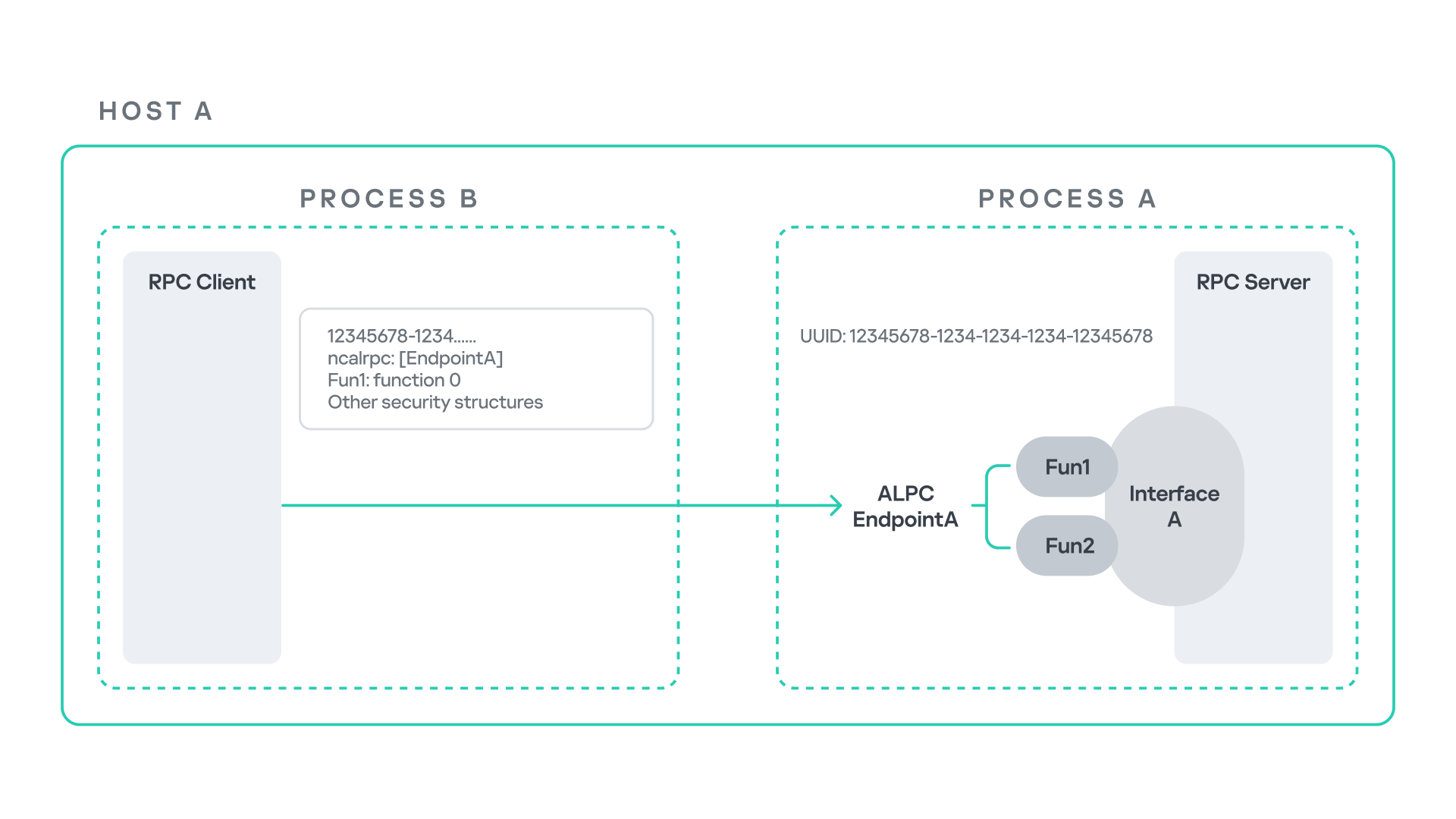
The figure below illustrates this mechanism.
Let us assume that Host A is running two processes: Process A and Process B. Process B needs to execute a function that resides inside Process A. To enable this type of interaction, Windows provides the Remote Procedure Call (RPC) architecture, which follows a client–server model. In this model, Process A acts as the RPC server, exposing its functionality through an interface, in our example, Interface A. Each RPC interface is uniquely identified by a Universally Unique Identifier (UUID), which is represented as a 128-bit value. This identifier enables the operating system to distinguish one interface from another.
The interface defines a set of functions that can be invoked remotely by the RPC client implemented in Process B. In our example, the interface exposes two functions: Fun1 and Fun2.
To communicate with the server, the RPC client must establish a connection through a communication endpoint. An endpoint represents the access point that enables transport between the client and the server. Because RPC supports multiple transport mechanisms, different endpoint types may exist, depending on the underlying transport.
For example:
When TCP is used as the transport layer, the endpoint is a TCP port.
When SMB is used, communication occurs through a named pipe.
When ALPC is used, the endpoint is an ALPC port.
Each transport mechanism is associated with a specific RPC protocol sequence. For instance:
ncacn_ip_tcp is used for RPC over TCP.
ncacn_np is used for RPC over named pipes.
ncalrpc is used for RPC over ALPC.
In this research, I focus specifically on Advanced Local Procedure Call (ALPC) as the RPC transport mechanism. ALPC is a Windows interprocess communication mechanism that predates MSRPC. Today, RPC can leverage ALPC as an efficient transport layer for communication between processes located on the same machine.
For simplicity, an ALPC port can be thought of as a communication channel similar to a file, where processes can send messages by writing to it, and receive messages by reading from it.
When the client wants to invoke a remote function, for example, Fun1, it must construct an RPC request. This request includes several important pieces of information, such as the interface UUID, the protocol sequence, the endpoint, and the function identifier. In RPC, functions are not referenced by name, but by a numerical identifier called the operation number (OPNUM). Depending on the requirements of the call, the request may also contain additional structures, such as security-related information.
Impersonation in Windows
In Windows, impersonation enables a service to temporarily operate using another user’s security context. For example, a service may need to open a file that belongs to a user while performing a specific operation. By impersonating the calling user, the system allows the service to access that file, even if the service itself would not normally have permission to do so. You can read more about impersonation in James Forshaw’s book Windows Security Internals.
This research focuses specifically on RPC impersonation. Instead of describing the interaction as a service and a user, I refer to the participants as a client and a server. In this model, the RPC server may temporarily adopt the identity of the client that initiated the request.
To perform this operation, the RPC server can call the RpcImpersonateClient API, which causes the server thread to execute under the client’s security context.
However, in some situations, a client may not want the server to be able to impersonate its identity. To control this behavior, Windows introduces the concept of an impersonation level. This defines how much authority the client grants the server to act on its behalf.
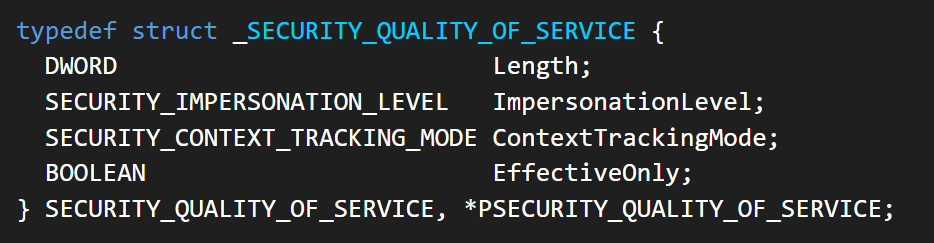
These settings are defined as part of the Security Quality of Service (SQOS) parameters, specified using the SECURITY_QUALITY_OF_SERVICE structure.
As you can see, this structure contains the impersonation level field, which determines the extent to which the server can assume the client’s identity.
Impersonation levels range from Anonymous, where the server cannot impersonate the client at all, to Impersonate and Delegate, which allow the server to act fully on behalf of the client.
At the same time, not every server process is allowed to impersonate a client. If any process could perform impersonation freely, it would pose a serious security risk. To prevent this, Windows requires the server process to possess a specific privilege called SeImpersonatePrivilege. Only processes with this privilege can successfully impersonate a client.
This privilege is granted by default to certain service accounts, such as Local Service and Network Service.
Interaction between Group Policy service and TermService
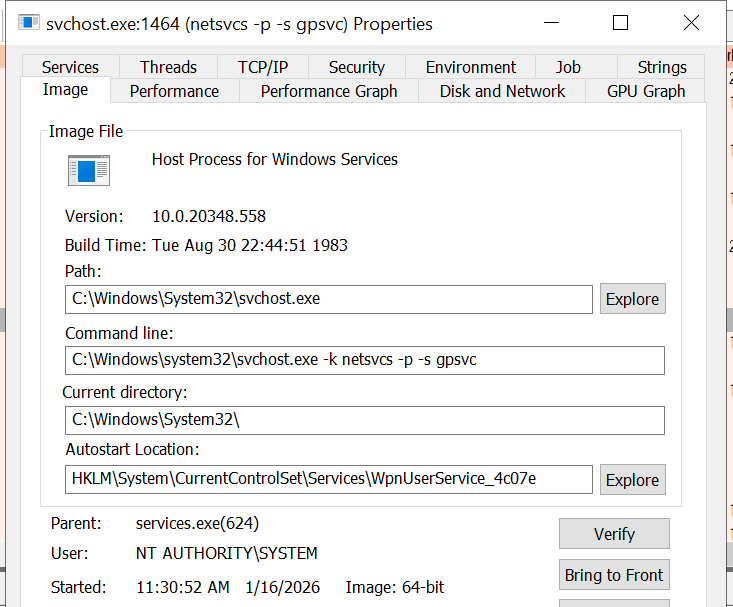
The Group Policy Client service (gpsvc) is a core Windows service responsible for applying and enforcing group policy settings on a system. It runs under the SYSTEM account inside svchost.exe.
When a group policy update is triggered, Windows uses an executable called gpupdate.exe. This tool can be executed with the /force flag to force an immediate refresh of all group policy settings. Internally, this executable communicates with the Group Policy service, which coordinates the update process.
At a certain stage during this operation, the Group Policy service attempts to communicate with TermService (Terminal Service, the Remote Desktop Services service) using RPC.
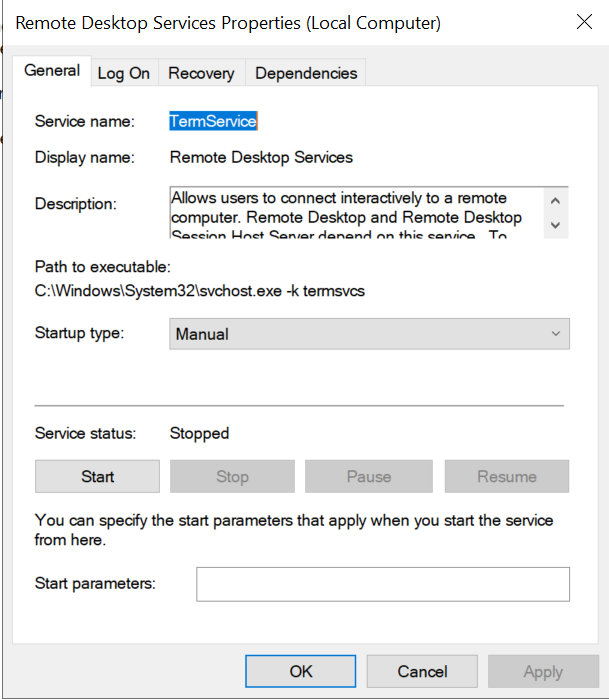
TermService is responsible for providing remote desktop functionality. This service is not running by default and can be enabled manually by the administrator via activation of Remote Desktop access. When this happens, the service exposes an RPC server with multiple interfaces and endpoints. TermService runs under the NT AUTHORITY\Network Service account.
When the command gpupdate /force is executed, the Group Policy service performs an RPC call to the TermService using the following parameters:
UUID: bde95fdf-eee0-45de-9e12-e5a61cd0d4fe.
Endpoint: ncalrpc:[TermSrvApi].
Function: void Proc8(int).
However, because TermService is disabled by default, the RPC call fails and an exception occurs in rpcrt4.dll (the RPC runtime). The returned error is:
0x800706BA (RPC_S_SERVER_UNAVAILABLE, 1722).
This error indicates that the RPC client could not reach the target server.
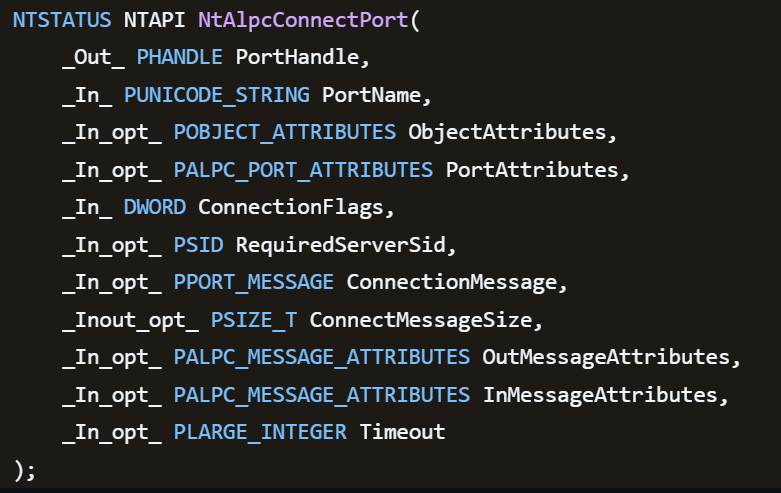
Tracing the failure path further reveals that the root cause originates from a call to NtAlpcConnectPort, which is used by RPC to establish an ALPC connection between processes.
The NtAlpcConnectPort function is responsible for connecting to a specific ALPC port and returning a handle that the client can use for further communication. This function accepts multiple parameters.
The first two parameters include:
A pointer to the returned port handle.
The ALPC port name, represented as an ASCII string.
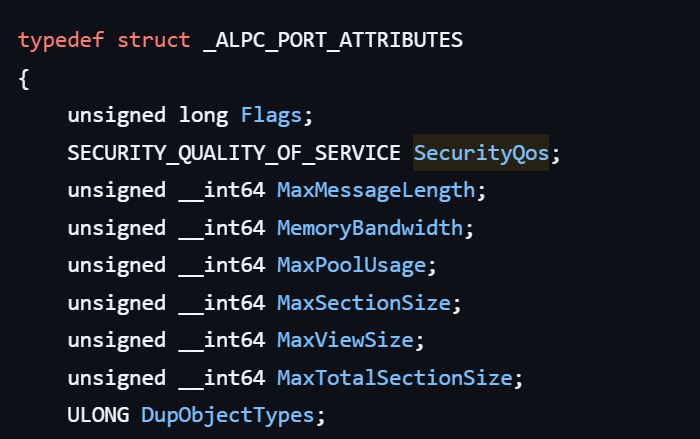
Another important argument is PortAttributes, which is an ALPC_PORT_ATTRIBUTES structure. Inside this structure is the SECURITY_QUALITY_OF_SERVICE structure, which, as mentioned above, defines the impersonation level used for the connection.
The final parameter of interest is RequiredServerSid, which specifies the expected identity of the target server process. This identity is represented using a Security Identifier (SID) structure.
Inspecting this call reveals that the Group Policy service attempts to connect to the RPC server using an impersonation level of Impersonate, expecting the remote server to run under the Network Service account. This behavior makes sense because TermService normally runs under Network Service.
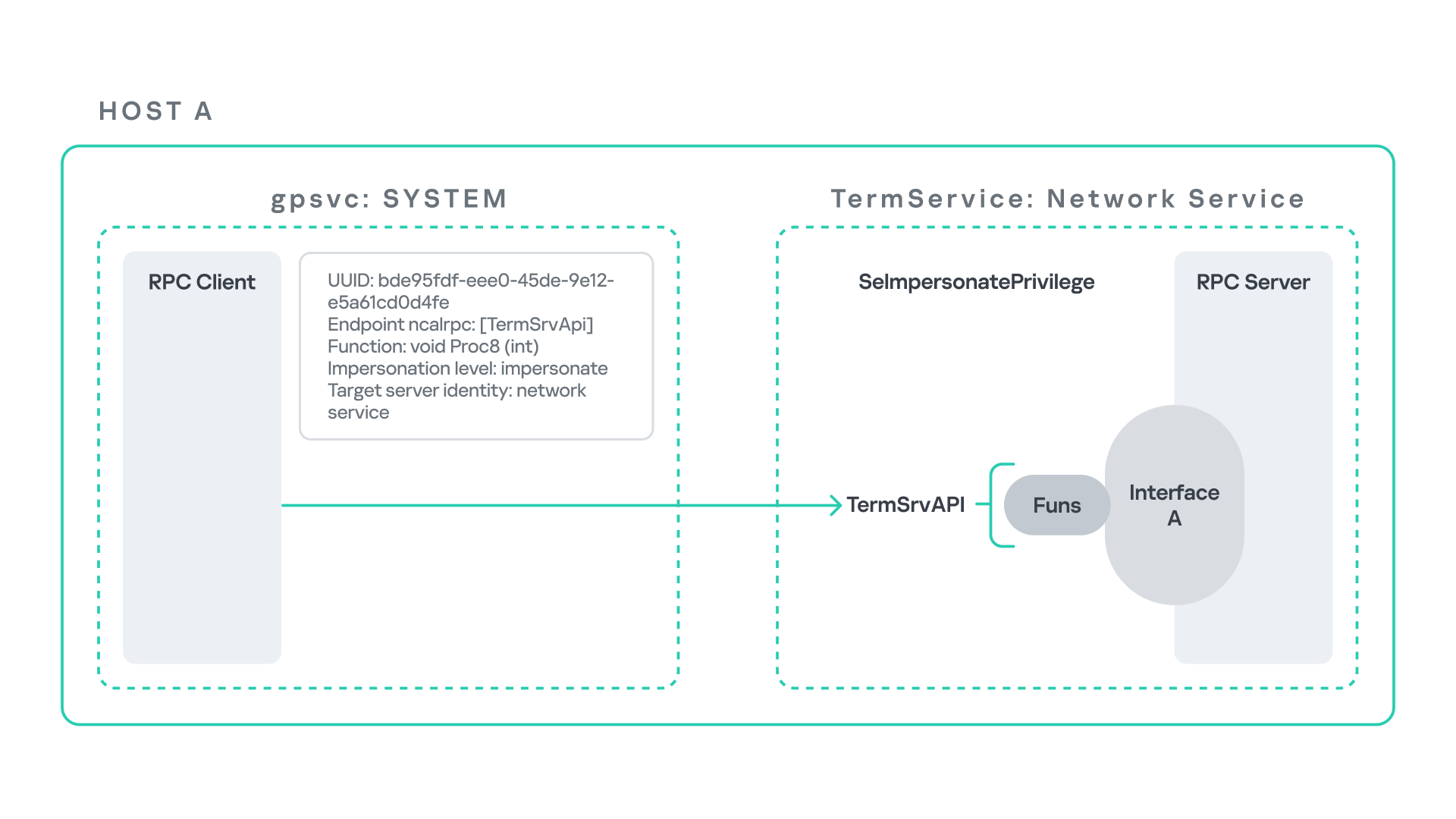
Based on all the information above, the following scheme can be created to illustrate the interaction between TermService and gpsvc.
Up to this point, nothing unusual has occurred. An RPC client attempts to connect to an RPC server that is unavailable, resulting in an exception handled by the RPC runtime.
However, an interesting question arises: What if an attacker compromises a service that runs under the Network Service identity and mimics the exact RPC server exposed by TermService?
Could the attacker deploy a fake RPC server with the same endpoint?
If so, would the RPC runtime allow the client to connect to this illegitimate server?
And if the connection is successful, how could an attacker leverage this behavior?
Coercing the Group Policy service
To better understand the implications of the previously described behavior, let us consider the following attack scenario.
Imagine an attacker has compromised a service running on the system under the Network Service account, for example, an IIS server operating under the Network Service account. With this level of access, the attacker can deploy a malicious RPC server.
The attacker’s RPC server is designed to mimic the RPC interface exposed by the Remote Desktop service (TermService). Specifically, it implements the same RPC interface UUID and exposes the same endpoint name: TermSrvApi. Once deployed, the malicious server listens for RPC requests that would normally be directed to the legitimate RDP service.
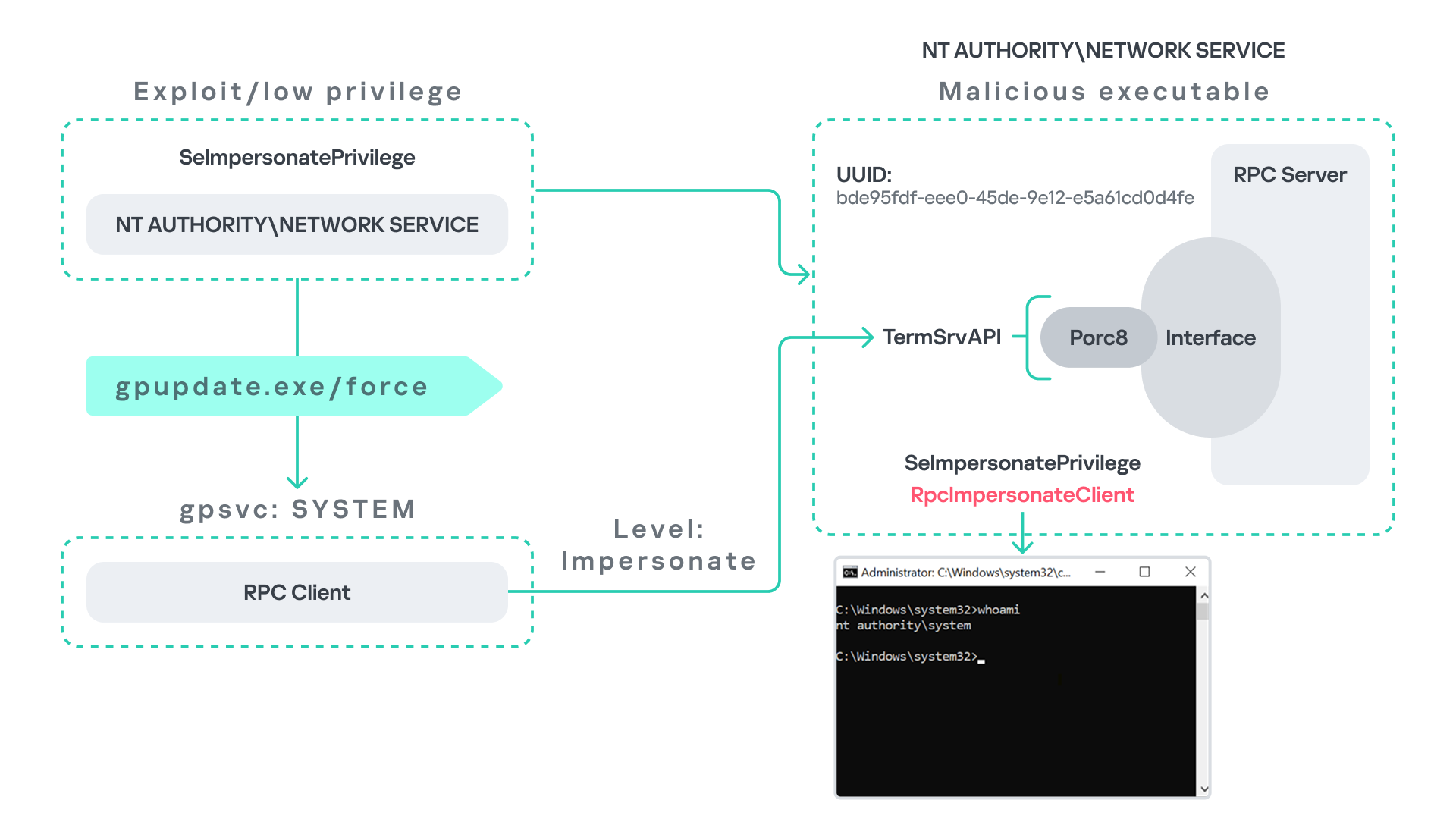
Next, the attacker coerces the Group Policy service by triggering a policy update using gpupdate.exe /force. This causes the Group Policy Client service, which runs under the SYSTEM account, to perform the previously described RPC call. As observed earlier, this RPC call uses a high impersonation level (Impersonate).
When the attacker’s fake RPC server receives the request, it calls RpcImpersonateClient. This enables the server thread to impersonate the security context of the calling client, which, in this case, is SYSTEM.
As a result, the attacker can elevate privileges from Network Service to SYSTEM. In our proof-of-concept implementation, the exploit demonstrates privilege escalation by spawning a SYSTEM-level command prompt.
When this attack scenario was first discussed, it was purely theoretical. However, after implementing the malicious RPC server, the experiment confirmed that Windows allowed the server to be deployed and started successfully, and that the RPC runtime permitted the client to connect to the malicious endpoint. This made it possible to reliably escalate privileges from Network Service to SYSTEM using this technique. For this attack to succeed, though, at least one group policy must be applied on the system.
RPC architecture flow
Further investigation revealed that many Windows services attempt to communicate with TermService using RPC. These RPC calls often originate from winsta.dll, which acts as the RPC client component.
Windows processes invoke APIs exposed by winsta.dll; these APIs rely internally on RPC communication with TermService. This pattern is common in Windows; many system DLLs use RPC behind the scenes when their exported APIs are called.
However, it appears that the RPC runtime (rpcrt4.dll) does not provide a mechanism to verify the legitimacy of RPC servers. Moreover, Windows allows another process to deploy an RPC server that exposes the same endpoint as a legitimate service.
As a result, this architectural design introduces a large attack surface because RPC is heavily used across numerous system DLLs. Applications that invoke seemingly benign APIs may unintentionally trigger privileged RPC interactions. Under certain conditions, these interactions could be abused to achieve local privilege escalation without the user’s knowledge.
Identifying RPC calls to unavailable servers
As the issue appears to stem from an architectural weakness, a systematic approach is needed to identify RPC clients attempting to communicate with servers that are unavailable. First, I need a platform capable of monitoring RPC activity and extracting relevant information from each RPC request.
Specifically, I need to capture key RPC metadata, including:
Interface UUID, endpoint, and OPNUM.
Impersonation level and RPC status code.
Client process privilege level, process name, and module path.
This information is critical because it enables me to reconstruct the RPC interaction, mimic the expected RPC server, and determine how the call is triggered.
The platform that provides this capability is Event Tracing for Windows (ETW). ETW is a built-in Windows logging framework that captures both kernel-mode and user-mode events in real time.
Windows provides a tool called logman to collect ETW data. It enables us to create trace sessions, select event providers, and configure the verbosity level of the tracing process. The collected tracing data is stored in an .etl file, which can later be analyzed using tools such as Event Viewer or other ETW analysis utilities.
ETW provides deep visibility into RPC activity without requiring modifications to applications. Through ETW, it is possible to capture detailed RPC information, such as:
RPC bindings
Endpoints
Interface UUIDs
Authentication details
Call flow and timing
RPC status codes
However, I’m not interested in every RPC event. My focus is on RPC call failures, specifically those that return the status RPC_S_SERVER_UNAVAILABLE.
For an event to be relevant to this research, the exception must meet two conditions:
It must originate from a high-privileged process because impersonating such a process may allow an attacker to escalate privileges to a more powerful security context.
The RPC call must use a high impersonation level, enabling the server to fully impersonate the client once the connection is established.
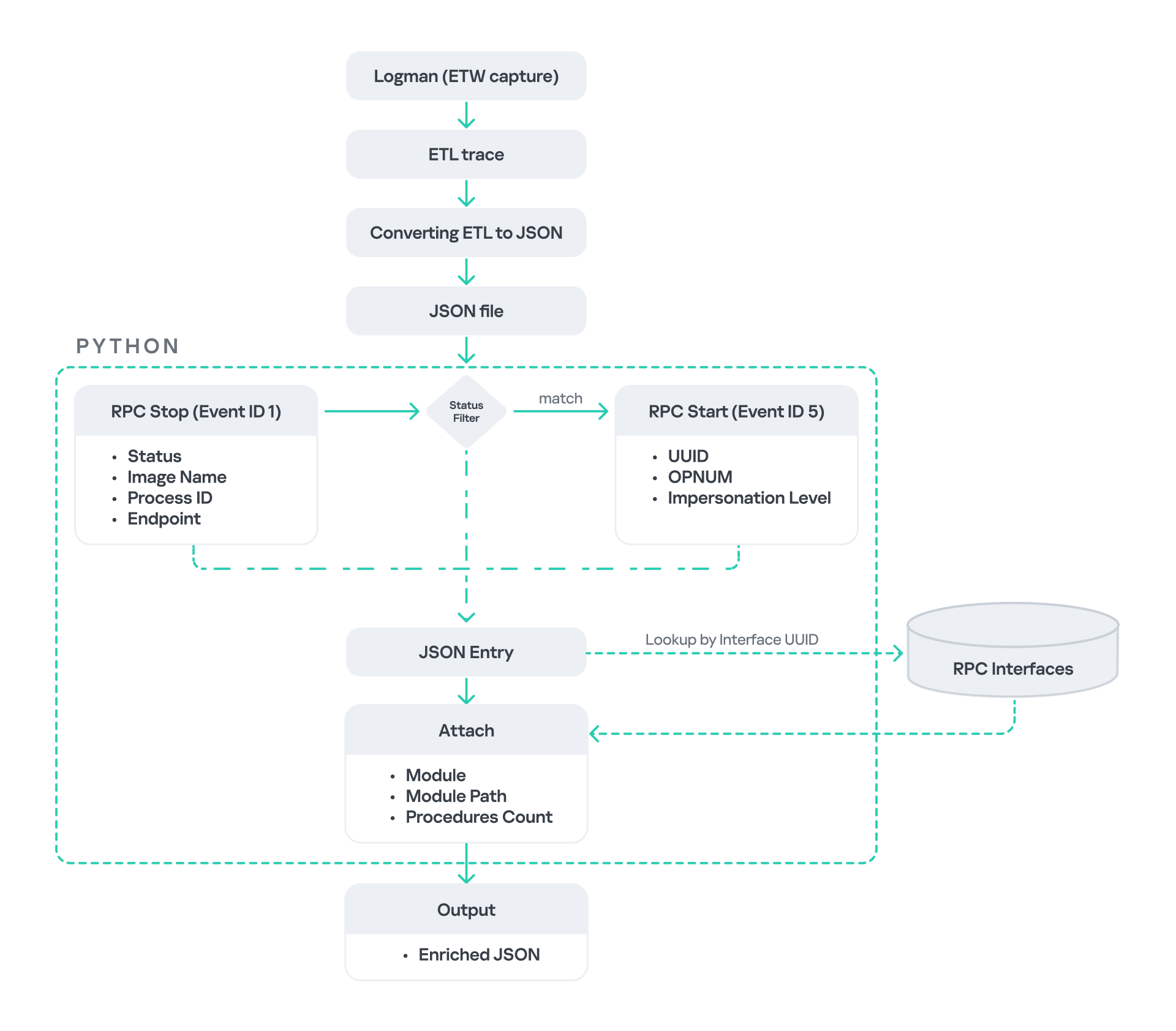
I cannot rely solely on the raw ETW output to implement this framework because it contains thousands of events, making manual filtering with standard tools inefficient. Therefore, I need to automate this process. The workflow shown below enables me to efficiently filter and extract only those events that are relevant to this analysis.
After generating the logs as an .etl file, I convert them to JSON format using tools such as etw2json. JSON is a much easier format to process programmatically. In this case, I use a Python script to filter and extract the relevant information.
The filtering process begins with a search for Event ID 1, which corresponds to an RPC stop event. This event indicates that the RPC client has completed the call and the result is available. From this event, I can extract useful information, such as:
Status code
Client process name
Client process ID
Endpoint
After extracting the status code, I filter for the specific value RPC_S_SERVER_UNAVAILABLE, which indicates that the target server was unreachable during an RPC call. These events represent the scenarios that are of interest.
However, Event ID 1 does not contain all of the required RPC metadata. To obtain the missing information, it is correlated with Event ID 5, which represents the RPC start event. This event is generated when the client initiates the RPC call.
By matching the metadata between Event ID 1 and Event ID 5, I can recover the missing details, including:
Interface UUID
OPNUM
Impersonation level
After correlating and filtering these events, a JSON entry is obtained that is almost ready for analysis. At this stage, the data can be enriched further by adding context that will be helpful when reversing or analyzing the RPC server implementation. For example, the following can be identified:
The DLL where the RPC interface is implemented
The location of that DLL
The number of procedures exposed by the interface
To retrieve this information, I match the UUID with an external RPC interface database. In this case, I used the RPC database, which contains a comprehensive list of RPC interfaces and their corresponding DLL implementations.
At the end of this process, a complete JSON dataset is obtained that can be used for further analysis.
One important observation is that the RPC calls I am looking for may only occur when specific system actions are triggered. Additionally, the resulting exceptions may vary from one system to another depending on which services are enabled or disabled. Therefore, I need a reliable way to generate these RPC exceptions.
In this research, I used several approaches to trigger such events:
Monitoring RPC activity during system startup
I observed RPC activity while the system booted. During startup, many services initialize and perform various RPC calls, which increases the chances of capturing calls to unavailable servers.
Triggering administrative operations I developed PowerShell scripts that perform common administrative tasks, such as updating Group Policy, changing network settings, or creating new users. These operations often trigger RPC communication and may generate exceptions.
Disabling services intentionally
After observing that Remote Desktop was disabled by default, I extended this idea by disabling additional services one by one and repeating the previous steps. This approach can reveal RPC clients that attempt to connect to services that are no longer available.
Additional privilege escalation paths
After running the logging and monitoring framework described earlier, I identified four additional scenarios that can lead to privilege escalation. The following sections introduce each case and explain how escalation can be achieved.
User interaction: From Edge to RDP
Microsoft Edge (msedge.exe) comes preinstalled on Windows systems. During startup, Edge triggers an RPC call to TermService. This RPC call is performed with a high impersonation level.
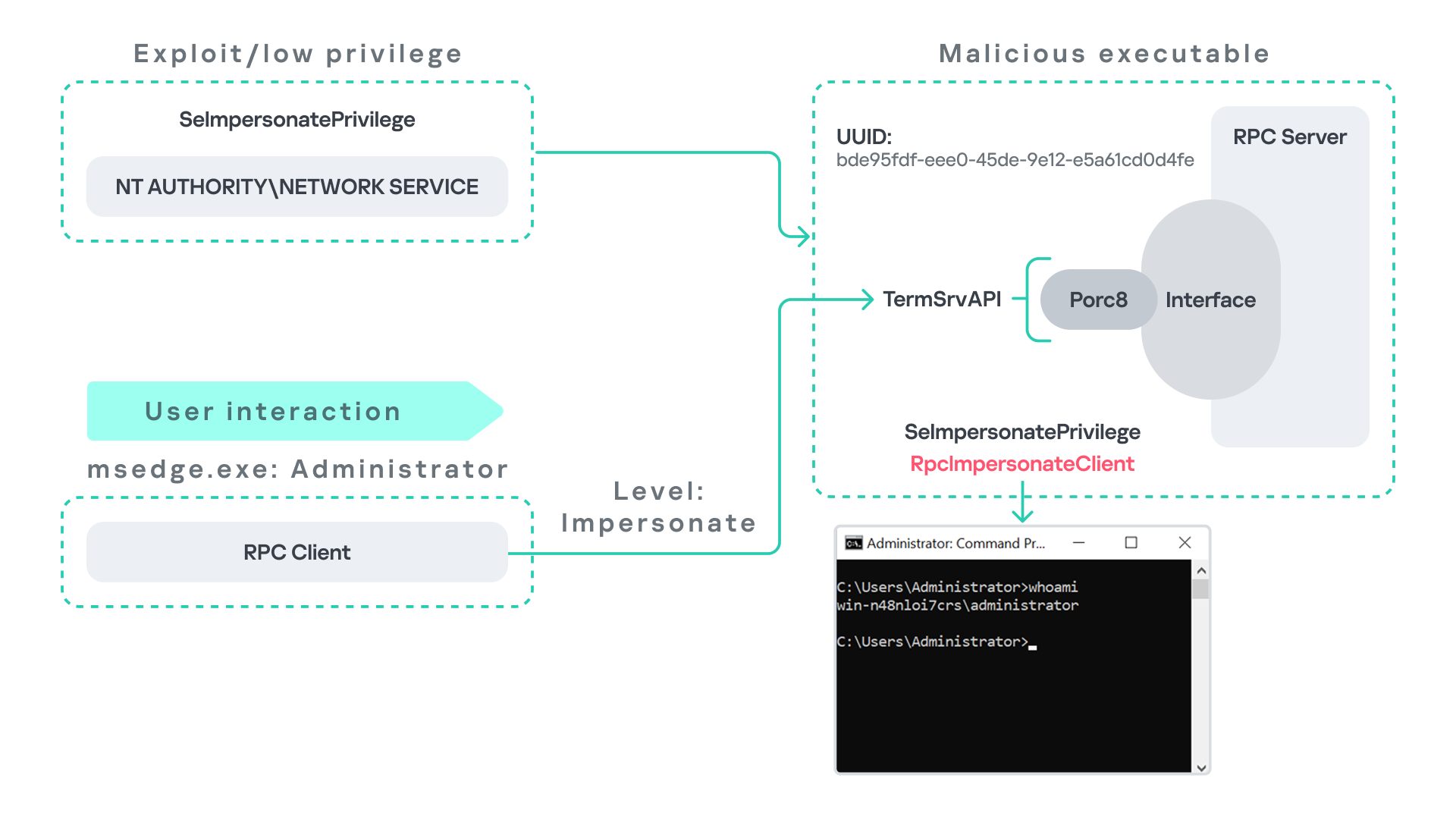
As previously discussed, Terminal Service is disabled by default. Because of this, the expected RPC server is unavailable, creating an opportunity for the attack scenario illustrated below.
The attack follows the same initial assumption as before: the attacker has already compromised a process running under the Network Service account. From there, they deploy the same malicious RPC server that mimics the legitimate TermService RPC interface.
However, unlike the previous scenario where the attacker coerced the Group Policy service, no coercion is required this time. Instead, the attacker simply waits for a high-privileged user, such as an administrator, to launch msedge.exe.
When Edge starts, it triggers the RPC client to attempt communication with the expected TermService RPC interface. Because the legitimate server is not running, the request is received by the attacker’s fake RPC server. Since the RPC call is made with a high impersonation level, the malicious server can call RpcImpersonateClient to impersonate the client process.
As a result, the attacker is able to impersonate the administrator-level client and escalate privileges from Network Service to Administrator.
Background services: From WDI to RDP
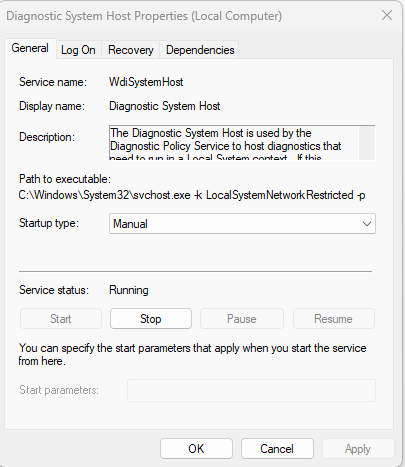
Some background Windows services periodically attempt to make RPC calls to the RDP service without user interaction. One such service is the WdiSystemHost service. The Diagnostic System Host Service (WDI) is a built-in Windows service that runs system diagnostics and performs troubleshooting tasks. This service runs under the SYSTEM account.
During normal operation, WDI periodically performs background RPC calls to the Remote Desktop service (TermService) using a high impersonation level. These RPC interactions occur automatically every 5–15 minutes and do not require any user input.
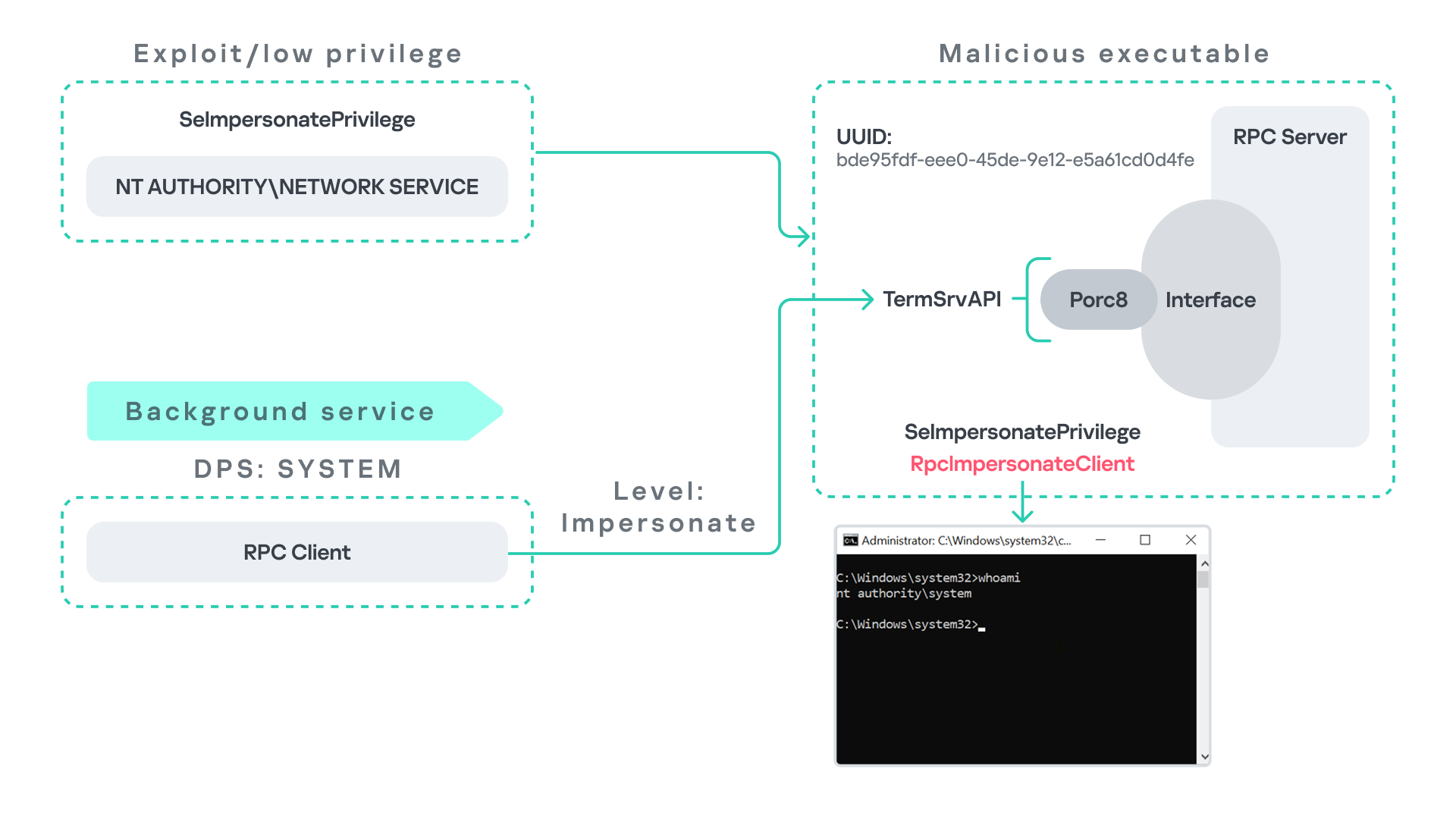
This behavior can be abused in a similar manner to the previous attack scenarios, as illustrated in the figure below.
In this case, however, no user interaction or coercion is required. After deploying a malicious RPC server that mimics the expected TermService RPC interface, the attacker only needs to wait for the WDI service to perform its periodic RPC call. Because the request is made with a high impersonation level, the malicious server can invoke RpcImpersonateClient and impersonate the calling process. This enables the attacker to escalate privileges to SYSTEM.
Abusing the Local Service account: From ipconfig to DHCP
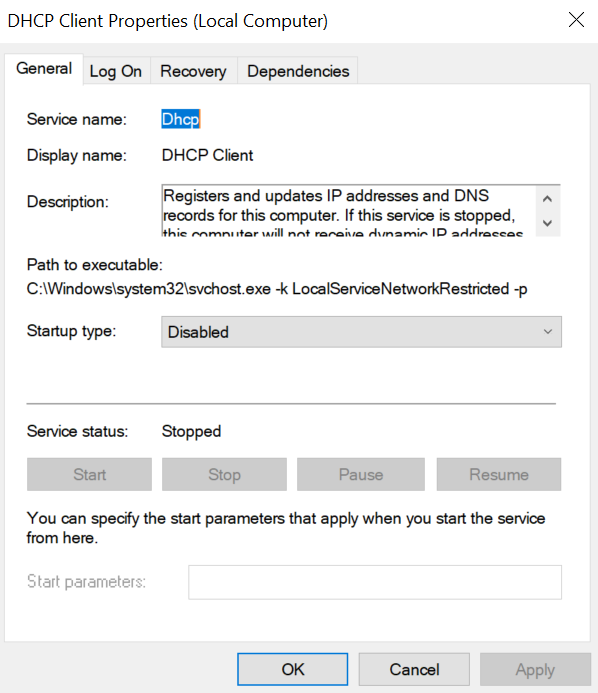
Another scenario involves the DHCP Client service, which manages DHCP client operations on Windows systems. This service runs under the Local Service account and is enabled by default.
The DHCP Client service exposes an RPC server with multiple interfaces and endpoints. These interfaces are frequently invoked by various system DLLs, often using a high impersonation level.
In this scenario, instead of compromising a process running under Network Service, it is assumed the attacker has compromised a process running under the Local Service account. I also assume that the DHCP Client service is disabled, meaning the legitimate RPC server is unavailable.
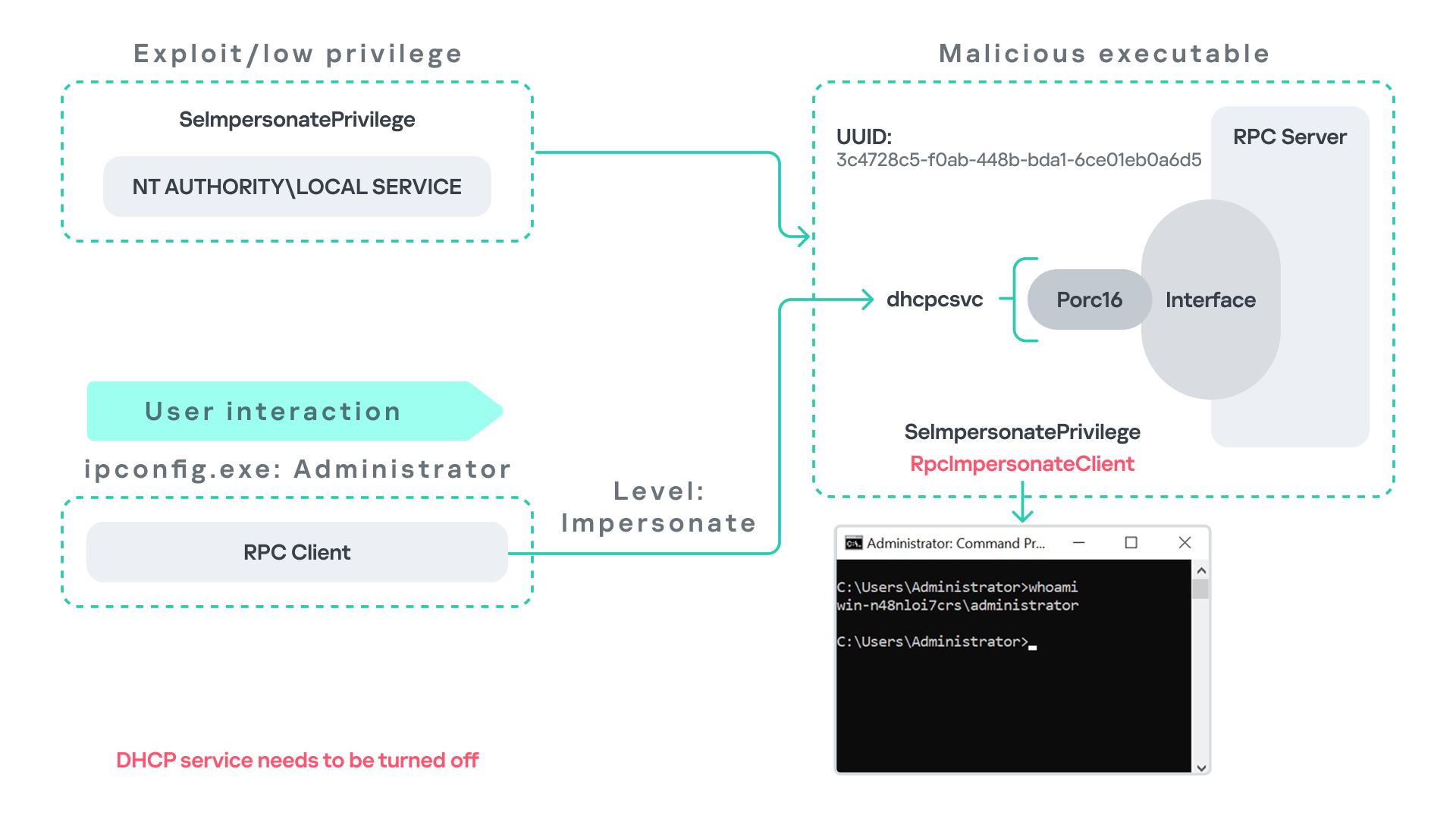
As the figure below illustrates, the attacker can leverage this situation to escalate privileges.
After gaining control of a Local Service process, the attacker deploys a malicious RPC server that mimics the legitimate RPC server normally exposed by the DHCP Client service. Once the malicious server is running, the attacker waits for a high-privileged user, such as an administrator, to execute ipconfig.exe.
When ipconfig is run, it internally triggers an RPC request to the DHCP Client service. Since the legitimate RPC server is not running, the request is received by the attacker’s fake RPC server. Because the RPC call is performed with a high impersonation level, the malicious server can call RpcImpersonateClient to impersonate the client.
As a result, the attacker can escalate privileges from the Local Service account to the Administrator account.
Abusing Time
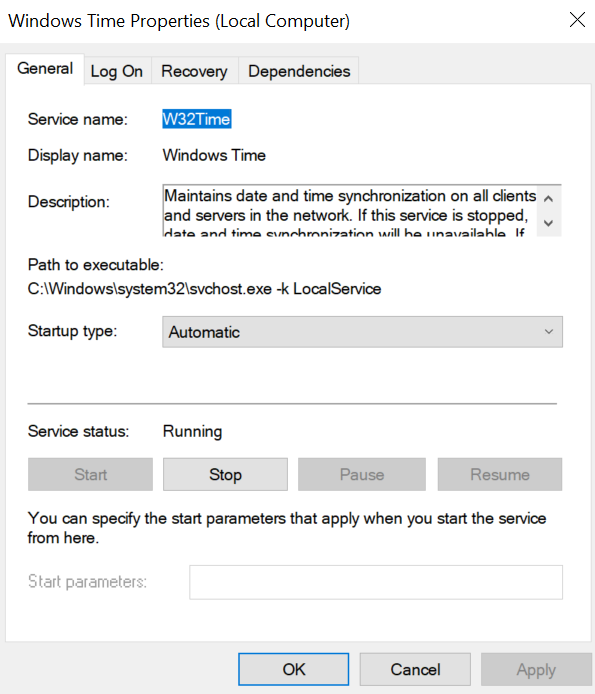
The Windows Time service (W32Time) is responsible for maintaining date and time synchronization across systems in a Windows environment. This service is enabled by default and runs under the Local Service account.
The service exposes an RPC server with two endpoints:
\PIPE\W32TIME_ALT
\RPC Control\W32TIME_ALT
The executable C:\Windows\System32\w32tm.exe interacts with the Windows Time service through RPC. However, before connecting to the valid RPC endpoints exposed by the service, the executable first attempts to access the nonexistent named pipe: \PIPE\W32TIME. This named pipe is not exposed by the legitimate W32Time service. However, if this endpoint were available, w32tm.exe would attempt to connect to it.
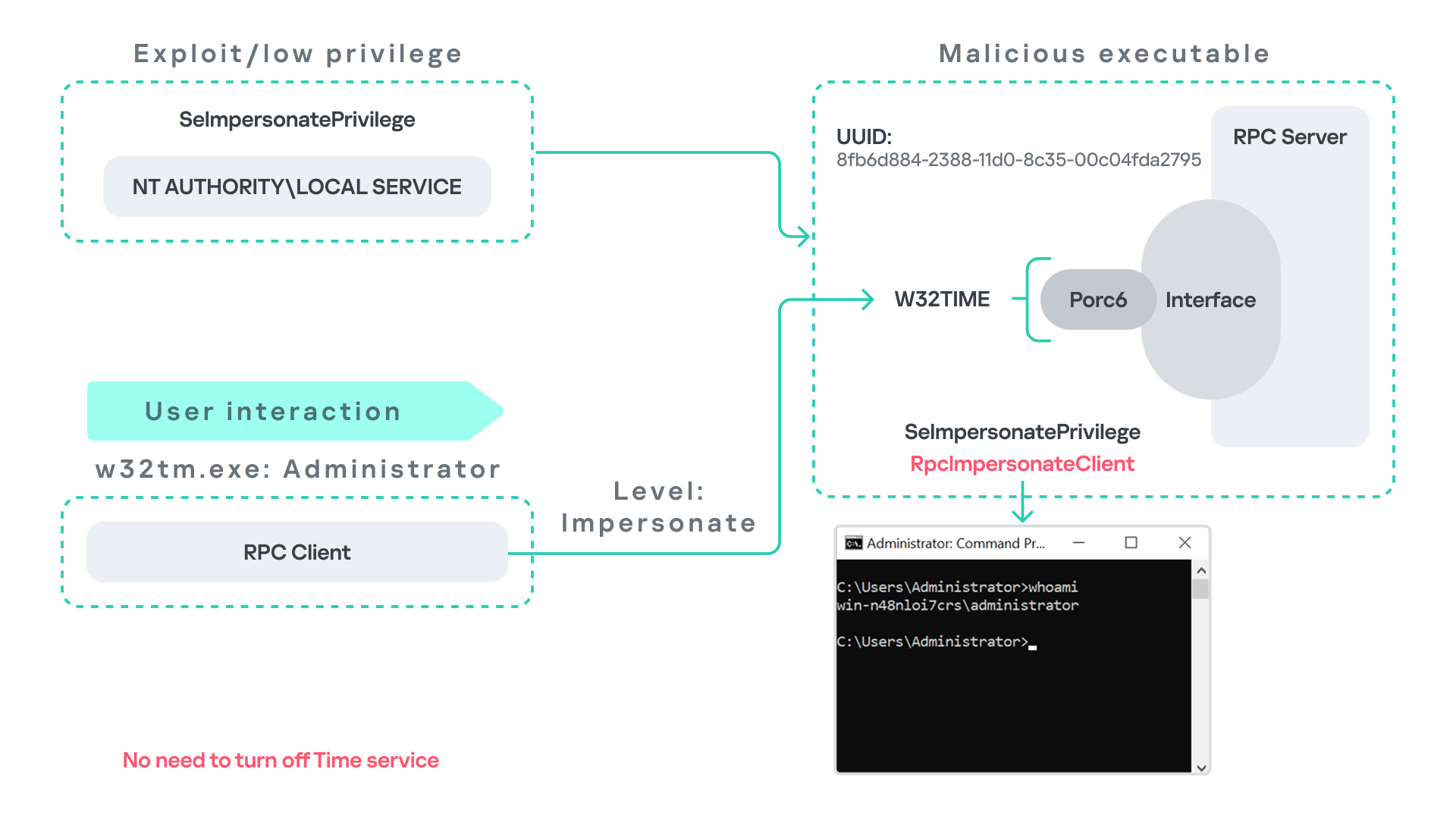
An attacker can abuse this behavior by deploying a malicious RPC server that mimics the legitimate RPC interface of the Windows Time service. Rather than exposing the legitimate endpoints, the attacker’s server exposes the nonexistent endpoint \PIPE\W32TIME, as shown in the figure below.
As in the previous scenarios, it is assumed the attacker has already compromised a process running under the Local Service account. The attacker then deploys a fake RPC server that implements the same RPC interface as the Windows Time service, but which exposes the alternative endpoint used by w32tm.exe.
Once the malicious server is running, the attacker simply waits for a high-privileged user, such as an administrator, to execute w32tm.exe. When the executable runs, it attempts to connect to the endpoint \PIPE\W32TIME. Because the attacker’s fake server exposes this endpoint, the RPC request is directed to the malicious server.
Since the RPC call is performed with a high impersonation level, the malicious server can impersonate the calling client. As a result, the attacker can escalate privileges from the Local Service account to the Administrator account.
In this scenario, it is important to note that the legitimate Windows Time service does not need to be disabled. Because the executable attempts to connect to a nonexistent endpoint, it is sufficient for the attacker to expose that endpoint through the malicious RPC server.
Vulnerability disclosure
After discovering the vulnerability, Kaspersky Security Services prepared a 10-page technical report describing the issue and the various aforementioned exploitation scenarios. The report was submitted to the Microsoft Security Response Center (MSRC) to report the vulnerability and request a fix.
Twenty days later, Microsoft responded, indicating that they did not classify the vulnerability as high severity. According to their assessment, the issue was classified as moderate severity and would therefore not be patched immediately. No CVE would be assigned, and the case would be closed without further tracking.
Microsoft explained that the moderate severity classification was due to the requirement that the originating process had to already possess the SeImpersonatePrivilege privilege. Since this privilege was typically required for the attack to succeed, Microsoft determined that the issue did not require immediate remediation.
Kaspersky Security Services respect Microsoft’s assessment and only published the research after the embargo period ends. In line with the coordinated vulnerability disclosure policy, Kaspersky Security Services will refrain from publishing detailed instructions that could enable or accelerate mass exploitation.
The disclosure timeline is shown below:
2025-09-19: Vulnerability reported to Microsoft Security Response Center (Case 101749).
2025-10-10: MSRC response – the case was assessed as moderate severity, not eligible for a bounty, no CVE was issued, and the case was closed without further tracking.
2026-04-24: expected whitepaper publication date.
Detection and defense
As discussed above, this vulnerability is related to an architectural design behavior. Fully preventing it would require Microsoft to release a patch that addresses the underlying issue.
Nevertheless, organizations can still take steps to detect and mitigate potential abuse. ETW-based monitoring within the framework described above enables defenders to identify RPC exceptions in their environment, especially when RPC clients attempt to connect to unavailable servers.
I have provide the tools used in the previously described framework so that organizations can check their environment for such behavior. You can find all of them in the research repository.
By monitoring these events, administrators can identify situations where legitimate RPC servers are expected but not running. In some cases, the attack surface may be reduced by enabling the corresponding services, ensuring that the legitimate RPC server is available. This can hinder attackers from deploying malicious RPC servers that imitate legitimate endpoints.
It is also good practice to reduce the use of the SeImpersonatePrivilege privilege in processes where it is not required. Some system processes need this privilege for normal operations. However, granting it to custom processes is generally not considered good security practice.
Conclusion
All the exploits described in this research were tested on Windows Server 2022 and Windows Server 2025 with the latest available updates prior to the submission date. The proof-of-concept implementations can be found in the research repository. However, it is highly likely that this issue may also be exploitable on other Windows versions.
Because the vulnerability stems from an architectural design issue, there may be additional attack scenarios beyond those presented in this research. The exact exploitation paths may vary from one system to another depending on factors such as installed software, the DLLs involved in RPC communication, and the availability of corresponding RPC servers.
Windows Interprocess Communication (IPC) is one of the most complex technologies within the Windows operating system. At the core of this ecosystem is the Remote Procedure Call (RPC) mechanism, which can function as a standalone communication channel or as the underlying transport layer for more advanced interprocess communication technologies. Because of its complexity and widespread use, RPC has historically been a rich source of security issues. Over the years, researchers have identified numerous vulnerabilities in services that rely on RPC, ranging from local privilege escalation to full remote code execution.
In this research, I present a new vulnerability in the RPC architecture that enables a novel local privilege escalation technique likely in all Windows versions. This technique enables processes with impersonation privileges to elevate their permissions to SYSTEM level. Although this vulnerability differs fundamentally from the “Potato” exploit family, Microsoft has not issued a patch despite proper disclosure.
I will demonstrate five different exploitation paths that show how privileges can be escalated from various local or network service contexts to SYSTEM or high-privileged users. Some techniques rely on coercion, some require user interaction and some take advantage of background services. As this issue stems from an architectural weakness, the number of potential attack vectors is effectively unlimited; any new process or service that depends on RPC could introduce another possible escalation path. For this reason, I also outline a methodology for identifying such opportunities.
Finally, I examine possible detection strategies, as well as defensive approaches that can help mitigate such attacks.
MSRPC
Microsoft RPC (Remote Procedure Call) is a Windows technology that enables communication between two processes. It enables one process to invoke functions that are implemented in another process, even though they are running in different execution contexts.
The figure below illustrates this mechanism.
Let us assume that Host A is running two processes: Process A and Process B. Process B needs to execute a function that resides inside Process A. To enable this type of interaction, Windows provides the Remote Procedure Call (RPC) architecture, which follows a client–server model. In this model, Process A acts as the RPC server, exposing its functionality through an interface, in our example, Interface A. Each RPC interface is uniquely identified by a Universally Unique Identifier (UUID), which is represented as a 128-bit value. This identifier enables the operating system to distinguish one interface from another.
The interface defines a set of functions that can be invoked remotely by the RPC client implemented in Process B. In our example, the interface exposes two functions: Fun1 and Fun2.
To communicate with the server, the RPC client must establish a connection through a communication endpoint. An endpoint represents the access point that enables transport between the client and the server. Because RPC supports multiple transport mechanisms, different endpoint types may exist, depending on the underlying transport.
For example:
When TCP is used as the transport layer, the endpoint is a TCP port.
When SMB is used, communication occurs through a named pipe.
When ALPC is used, the endpoint is an ALPC port.
Each transport mechanism is associated with a specific RPC protocol sequence. For instance:
ncacn_ip_tcp is used for RPC over TCP.
ncacn_np is used for RPC over named pipes.
ncalrpc is used for RPC over ALPC.
In this research, I focus specifically on Advanced Local Procedure Call (ALPC) as the RPC transport mechanism. ALPC is a Windows interprocess communication mechanism that predates MSRPC. Today, RPC can leverage ALPC as an efficient transport layer for communication between processes located on the same machine.
For simplicity, an ALPC port can be thought of as a communication channel similar to a file, where processes can send messages by writing to it, and receive messages by reading from it.
When the client wants to invoke a remote function, for example, Fun1, it must construct an RPC request. This request includes several important pieces of information, such as the interface UUID, the protocol sequence, the endpoint, and the function identifier. In RPC, functions are not referenced by name, but by a numerical identifier called the operation number (OPNUM). Depending on the requirements of the call, the request may also contain additional structures, such as security-related information.
Impersonation in Windows
In Windows, impersonation enables a service to temporarily operate using another user’s security context. For example, a service may need to open a file that belongs to a user while performing a specific operation. By impersonating the calling user, the system allows the service to access that file, even if the service itself would not normally have permission to do so. You can read more about impersonation in James Forshaw’s book Windows Security Internals.
This research focuses specifically on RPC impersonation. Instead of describing the interaction as a service and a user, I refer to the participants as a client and a server. In this model, the RPC server may temporarily adopt the identity of the client that initiated the request.
To perform this operation, the RPC server can call the RpcImpersonateClient API, which causes the server thread to execute under the client’s security context.
However, in some situations, a client may not want the server to be able to impersonate its identity. To control this behavior, Windows introduces the concept of an impersonation level. This defines how much authority the client grants the server to act on its behalf.
These settings are defined as part of the Security Quality of Service (SQOS) parameters, specified using the SECURITY_QUALITY_OF_SERVICE structure.
As you can see, this structure contains the impersonation level field, which determines the extent to which the server can assume the client’s identity.
Impersonation levels range from Anonymous, where the server cannot impersonate the client at all, to Impersonate and Delegate, which allow the server to act fully on behalf of the client.
At the same time, not every server process is allowed to impersonate a client. If any process could perform impersonation freely, it would pose a serious security risk. To prevent this, Windows requires the server process to possess a specific privilege called SeImpersonatePrivilege. Only processes with this privilege can successfully impersonate a client.
This privilege is granted by default to certain service accounts, such as Local Service and Network Service.
Interaction between Group Policy service and TermService
The Group Policy Client service (gpsvc) is a core Windows service responsible for applying and enforcing group policy settings on a system. It runs under the SYSTEM account inside svchost.exe.
When a group policy update is triggered, Windows uses an executable called gpupdate.exe. This tool can be executed with the /force flag to force an immediate refresh of all group policy settings. Internally, this executable communicates with the Group Policy service, which coordinates the update process.
At a certain stage during this operation, the Group Policy service attempts to communicate with TermService (Terminal Service, the Remote Desktop Services service) using RPC.
TermService is responsible for providing remote desktop functionality. This service is not running by default and can be enabled manually by the administrator via activation of Remote Desktop access. When this happens, the service exposes an RPC server with multiple interfaces and endpoints. TermService runs under the NT AUTHORITY\Network Service account.
When the command gpupdate /force is executed, the Group Policy service performs an RPC call to the TermService using the following parameters:
UUID: bde95fdf-eee0-45de-9e12-e5a61cd0d4fe.
Endpoint: ncalrpc:[TermSrvApi].
Function: void Proc8(int).
However, because TermService is disabled by default, the RPC call fails and an exception occurs in rpcrt4.dll (the RPC runtime). The returned error is:
0x800706BA (RPC_S_SERVER_UNAVAILABLE, 1722).
This error indicates that the RPC client could not reach the target server.
Tracing the failure path further reveals that the root cause originates from a call to NtAlpcConnectPort, which is used by RPC to establish an ALPC connection between processes.
The NtAlpcConnectPort function is responsible for connecting to a specific ALPC port and returning a handle that the client can use for further communication. This function accepts multiple parameters.
The first two parameters include:
A pointer to the returned port handle.
The ALPC port name, represented as an ASCII string.
Another important argument is PortAttributes, which is an ALPC_PORT_ATTRIBUTES structure. Inside this structure is the SECURITY_QUALITY_OF_SERVICE structure, which, as mentioned above, defines the impersonation level used for the connection.
The final parameter of interest is RequiredServerSid, which specifies the expected identity of the target server process. This identity is represented using a Security Identifier (SID) structure.
Inspecting this call reveals that the Group Policy service attempts to connect to the RPC server using an impersonation level of Impersonate, expecting the remote server to run under the Network Service account. This behavior makes sense because TermService normally runs under Network Service.
Based on all the information above, the following scheme can be created to illustrate the interaction between TermService and gpsvc.
Up to this point, nothing unusual has occurred. An RPC client attempts to connect to an RPC server that is unavailable, resulting in an exception handled by the RPC runtime.
However, an interesting question arises: What if an attacker compromises a service that runs under the Network Service identity and mimics the exact RPC server exposed by TermService?
Could the attacker deploy a fake RPC server with the same endpoint?
If so, would the RPC runtime allow the client to connect to this illegitimate server?
And if the connection is successful, how could an attacker leverage this behavior?
Coercing the Group Policy service
To better understand the implications of the previously described behavior, let us consider the following attack scenario.
Imagine an attacker has compromised a service running on the system under the Network Service account, for example, an IIS server operating under the Network Service account. With this level of access, the attacker can deploy a malicious RPC server.
The attacker’s RPC server is designed to mimic the RPC interface exposed by the Remote Desktop service (TermService). Specifically, it implements the same RPC interface UUID and exposes the same endpoint name: TermSrvApi. Once deployed, the malicious server listens for RPC requests that would normally be directed to the legitimate RDP service.
Next, the attacker coerces the Group Policy service by triggering a policy update using gpupdate.exe /force. This causes the Group Policy Client service, which runs under the SYSTEM account, to perform the previously described RPC call. As observed earlier, this RPC call uses a high impersonation level (Impersonate).
When the attacker’s fake RPC server receives the request, it calls RpcImpersonateClient. This enables the server thread to impersonate the security context of the calling client, which, in this case, is SYSTEM.
As a result, the attacker can elevate privileges from Network Service to SYSTEM. In our proof-of-concept implementation, the exploit demonstrates privilege escalation by spawning a SYSTEM-level command prompt.
When this attack scenario was first discussed, it was purely theoretical. However, after implementing the malicious RPC server, the experiment confirmed that Windows allowed the server to be deployed and started successfully, and that the RPC runtime permitted the client to connect to the malicious endpoint. This made it possible to reliably escalate privileges from Network Service to SYSTEM using this technique. For this attack to succeed, though, at least one group policy must be applied on the system.
RPC architecture flow
Further investigation revealed that many Windows services attempt to communicate with TermService using RPC. These RPC calls often originate from winsta.dll, which acts as the RPC client component.
Windows processes invoke APIs exposed by winsta.dll; these APIs rely internally on RPC communication with TermService. This pattern is common in Windows; many system DLLs use RPC behind the scenes when their exported APIs are called.
However, it appears that the RPC runtime (rpcrt4.dll) does not provide a mechanism to verify the legitimacy of RPC servers. Moreover, Windows allows another process to deploy an RPC server that exposes the same endpoint as a legitimate service.
As a result, this architectural design introduces a large attack surface because RPC is heavily used across numerous system DLLs. Applications that invoke seemingly benign APIs may unintentionally trigger privileged RPC interactions. Under certain conditions, these interactions could be abused to achieve local privilege escalation without the user’s knowledge.
Identifying RPC calls to unavailable servers
As the issue appears to stem from an architectural weakness, a systematic approach is needed to identify RPC clients attempting to communicate with servers that are unavailable. First, I need a platform capable of monitoring RPC activity and extracting relevant information from each RPC request.
Specifically, I need to capture key RPC metadata, including:
Interface UUID, endpoint, and OPNUM.
Impersonation level and RPC status code.
Client process privilege level, process name, and module path.
This information is critical because it enables me to reconstruct the RPC interaction, mimic the expected RPC server, and determine how the call is triggered.
The platform that provides this capability is Event Tracing for Windows (ETW). ETW is a built-in Windows logging framework that captures both kernel-mode and user-mode events in real time.
Windows provides a tool called logman to collect ETW data. It enables us to create trace sessions, select event providers, and configure the verbosity level of the tracing process. The collected tracing data is stored in an .etl file, which can later be analyzed using tools such as Event Viewer or other ETW analysis utilities.
ETW provides deep visibility into RPC activity without requiring modifications to applications. Through ETW, it is possible to capture detailed RPC information, such as:
RPC bindings
Endpoints
Interface UUIDs
Authentication details
Call flow and timing
RPC status codes
However, I’m not interested in every RPC event. My focus is on RPC call failures, specifically those that return the status RPC_S_SERVER_UNAVAILABLE.
For an event to be relevant to this research, the exception must meet two conditions:
It must originate from a high-privileged process because impersonating such a process may allow an attacker to escalate privileges to a more powerful security context.
The RPC call must use a high impersonation level, enabling the server to fully impersonate the client once the connection is established.
I cannot rely solely on the raw ETW output to implement this framework because it contains thousands of events, making manual filtering with standard tools inefficient. Therefore, I need to automate this process. The workflow shown below enables me to efficiently filter and extract only those events that are relevant to this analysis.
After generating the logs as an .etl file, I convert them to JSON format using tools such as etw2json. JSON is a much easier format to process programmatically. In this case, I use a Python script to filter and extract the relevant information.
The filtering process begins with a search for Event ID 1, which corresponds to an RPC stop event. This event indicates that the RPC client has completed the call and the result is available. From this event, I can extract useful information, such as:
Status code
Client process name
Client process ID
Endpoint
After extracting the status code, I filter for the specific value RPC_S_SERVER_UNAVAILABLE, which indicates that the target server was unreachable during an RPC call. These events represent the scenarios that are of interest.
However, Event ID 1 does not contain all of the required RPC metadata. To obtain the missing information, it is correlated with Event ID 5, which represents the RPC start event. This event is generated when the client initiates the RPC call.
By matching the metadata between Event ID 1 and Event ID 5, I can recover the missing details, including:
Interface UUID
OPNUM
Impersonation level
After correlating and filtering these events, a JSON entry is obtained that is almost ready for analysis. At this stage, the data can be enriched further by adding context that will be helpful when reversing or analyzing the RPC server implementation. For example, the following can be identified:
The DLL where the RPC interface is implemented
The location of that DLL
The number of procedures exposed by the interface
To retrieve this information, I match the UUID with an external RPC interface database. In this case, I used the RPC database, which contains a comprehensive list of RPC interfaces and their corresponding DLL implementations.
At the end of this process, a complete JSON dataset is obtained that can be used for further analysis.
One important observation is that the RPC calls I am looking for may only occur when specific system actions are triggered. Additionally, the resulting exceptions may vary from one system to another depending on which services are enabled or disabled. Therefore, I need a reliable way to generate these RPC exceptions.
In this research, I used several approaches to trigger such events:
Monitoring RPC activity during system startup
I observed RPC activity while the system booted. During startup, many services initialize and perform various RPC calls, which increases the chances of capturing calls to unavailable servers.
Triggering administrative operations I developed PowerShell scripts that perform common administrative tasks, such as updating Group Policy, changing network settings, or creating new users. These operations often trigger RPC communication and may generate exceptions.
Disabling services intentionally
After observing that Remote Desktop was disabled by default, I extended this idea by disabling additional services one by one and repeating the previous steps. This approach can reveal RPC clients that attempt to connect to services that are no longer available.
Additional privilege escalation paths
After running the logging and monitoring framework described earlier, I identified four additional scenarios that can lead to privilege escalation. The following sections introduce each case and explain how escalation can be achieved.
User interaction: From Edge to RDP
Microsoft Edge (msedge.exe) comes preinstalled on Windows systems. During startup, Edge triggers an RPC call to TermService. This RPC call is performed with a high impersonation level.
As previously discussed, Terminal Service is disabled by default. Because of this, the expected RPC server is unavailable, creating an opportunity for the attack scenario illustrated below.
The attack follows the same initial assumption as before: the attacker has already compromised a process running under the Network Service account. From there, they deploy the same malicious RPC server that mimics the legitimate TermService RPC interface.
However, unlike the previous scenario where the attacker coerced the Group Policy service, no coercion is required this time. Instead, the attacker simply waits for a high-privileged user, such as an administrator, to launch msedge.exe.
When Edge starts, it triggers the RPC client to attempt communication with the expected TermService RPC interface. Because the legitimate server is not running, the request is received by the attacker’s fake RPC server. Since the RPC call is made with a high impersonation level, the malicious server can call RpcImpersonateClient to impersonate the client process.
As a result, the attacker is able to impersonate the administrator-level client and escalate privileges from Network Service to Administrator.
Background services: From WDI to RDP
Some background Windows services periodically attempt to make RPC calls to the RDP service without user interaction. One such service is the WdiSystemHost service. The Diagnostic System Host Service (WDI) is a built-in Windows service that runs system diagnostics and performs troubleshooting tasks. This service runs under the SYSTEM account.
During normal operation, WDI periodically performs background RPC calls to the Remote Desktop service (TermService) using a high impersonation level. These RPC interactions occur automatically every 5–15 minutes and do not require any user input.
This behavior can be abused in a similar manner to the previous attack scenarios, as illustrated in the figure below.
In this case, however, no user interaction or coercion is required. After deploying a malicious RPC server that mimics the expected TermService RPC interface, the attacker only needs to wait for the WDI service to perform its periodic RPC call. Because the request is made with a high impersonation level, the malicious server can invoke RpcImpersonateClient and impersonate the calling process. This enables the attacker to escalate privileges to SYSTEM.
Abusing the Local Service account: From ipconfig to DHCP
Another scenario involves the DHCP Client service, which manages DHCP client operations on Windows systems. This service runs under the Local Service account and is enabled by default.
The DHCP Client service exposes an RPC server with multiple interfaces and endpoints. These interfaces are frequently invoked by various system DLLs, often using a high impersonation level.
In this scenario, instead of compromising a process running under Network Service, it is assumed the attacker has compromised a process running under the Local Service account. I also assume that the DHCP Client service is disabled, meaning the legitimate RPC server is unavailable.
As the figure below illustrates, the attacker can leverage this situation to escalate privileges.
After gaining control of a Local Service process, the attacker deploys a malicious RPC server that mimics the legitimate RPC server normally exposed by the DHCP Client service. Once the malicious server is running, the attacker waits for a high-privileged user, such as an administrator, to execute ipconfig.exe.
When ipconfig is run, it internally triggers an RPC request to the DHCP Client service. Since the legitimate RPC server is not running, the request is received by the attacker’s fake RPC server. Because the RPC call is performed with a high impersonation level, the malicious server can call RpcImpersonateClient to impersonate the client.
As a result, the attacker can escalate privileges from the Local Service account to the Administrator account.
Abusing Time
The Windows Time service (W32Time) is responsible for maintaining date and time synchronization across systems in a Windows environment. This service is enabled by default and runs under the Local Service account.
The service exposes an RPC server with two endpoints:
\PIPE\W32TIME_ALT
\RPC Control\W32TIME_ALT
The executable C:\Windows\System32\w32tm.exe interacts with the Windows Time service through RPC. However, before connecting to the valid RPC endpoints exposed by the service, the executable first attempts to access the nonexistent named pipe: \PIPE\W32TIME. This named pipe is not exposed by the legitimate W32Time service. However, if this endpoint were available, w32tm.exe would attempt to connect to it.
An attacker can abuse this behavior by deploying a malicious RPC server that mimics the legitimate RPC interface of the Windows Time service. Rather than exposing the legitimate endpoints, the attacker’s server exposes the nonexistent endpoint \PIPE\W32TIME, as shown in the figure below.
As in the previous scenarios, it is assumed the attacker has already compromised a process running under the Local Service account. The attacker then deploys a fake RPC server that implements the same RPC interface as the Windows Time service, but which exposes the alternative endpoint used by w32tm.exe.
Once the malicious server is running, the attacker simply waits for a high-privileged user, such as an administrator, to execute w32tm.exe. When the executable runs, it attempts to connect to the endpoint \PIPE\W32TIME. Because the attacker’s fake server exposes this endpoint, the RPC request is directed to the malicious server.
Since the RPC call is performed with a high impersonation level, the malicious server can impersonate the calling client. As a result, the attacker can escalate privileges from the Local Service account to the Administrator account.
In this scenario, it is important to note that the legitimate Windows Time service does not need to be disabled. Because the executable attempts to connect to a nonexistent endpoint, it is sufficient for the attacker to expose that endpoint through the malicious RPC server.
Vulnerability disclosure
After discovering the vulnerability, Kaspersky Security Services prepared a 10-page technical report describing the issue and the various aforementioned exploitation scenarios. The report was submitted to the Microsoft Security Response Center (MSRC) to report the vulnerability and request a fix.
Twenty days later, Microsoft responded, indicating that they did not classify the vulnerability as high severity. According to their assessment, the issue was classified as moderate severity and would therefore not be patched immediately. No CVE would be assigned, and the case would be closed without further tracking.
Microsoft explained that the moderate severity classification was due to the requirement that the originating process had to already possess the SeImpersonatePrivilege privilege. Since this privilege was typically required for the attack to succeed, Microsoft determined that the issue did not require immediate remediation.
Kaspersky Security Services respect Microsoft’s assessment and only published the research after the embargo period ends. In line with the coordinated vulnerability disclosure policy, Kaspersky Security Services will refrain from publishing detailed instructions that could enable or accelerate mass exploitation.
The disclosure timeline is shown below:
2025-09-19: Vulnerability reported to Microsoft Security Response Center (Case 101749).
2025-10-10: MSRC response – the case was assessed as moderate severity, not eligible for a bounty, no CVE was issued, and the case was closed without further tracking.
2026-04-24: expected whitepaper publication date.
Detection and defense
As discussed above, this vulnerability is related to an architectural design behavior. Fully preventing it would require Microsoft to release a patch that addresses the underlying issue.
Nevertheless, organizations can still take steps to detect and mitigate potential abuse. ETW-based monitoring within the framework described above enables defenders to identify RPC exceptions in their environment, especially when RPC clients attempt to connect to unavailable servers.
I have provide the tools used in the previously described framework so that organizations can check their environment for such behavior. You can find all of them in the research repository.
By monitoring these events, administrators can identify situations where legitimate RPC servers are expected but not running. In some cases, the attack surface may be reduced by enabling the corresponding services, ensuring that the legitimate RPC server is available. This can hinder attackers from deploying malicious RPC servers that imitate legitimate endpoints.
It is also good practice to reduce the use of the SeImpersonatePrivilege privilege in processes where it is not required. Some system processes need this privilege for normal operations. However, granting it to custom processes is generally not considered good security practice.
Conclusion
All the exploits described in this research were tested on Windows Server 2022 and Windows Server 2025 with the latest available updates prior to the submission date. The proof-of-concept implementations can be found in the research repository. However, it is highly likely that this issue may also be exploitable on other Windows versions.
Because the vulnerability stems from an architectural design issue, there may be additional attack scenarios beyond those presented in this research. The exact exploitation paths may vary from one system to another depending on factors such as installed software, the DLLs involved in RPC communication, and the availability of corresponding RPC servers.
Washington’s focus on online retailer Coupang has led to accusations that the Trump administration is tying issues of national security to domestic corporate matters
When South Korea’s biggest online retailer revealed last year that a data breach had compromised tens of millions of customer accounts, it appeared to be a corporate crisis. But five months later the issue has grown into a diplomatic storm, threatening to further degrade relations between Seoul and the Trump administration.
Coupang, often described as South Korea’s answer to Amazon, is a US-incorporated company whose business is overwhelmingly based in South Korea. Headquartered in Seattle and listed on the New York Stock Exchange, it is run by Korean-American billionaire Bom Kim. In November last year the company disclosed that a former employee had stolen an internal security key, enabling unauthorised access to data from 33.7 million users.
Palo Alto Networks recently joined the DNS-OARC community as a Platinum Member. Together, our organizations share a commitment to advancing collaboration in research and operational excellence across the global DNS ecosystem. DNS is critical to both internet infrastructure and security, and this collaboration facilitates the sharing of real-world insights among researchers and practitioners.
Our Contribution
We help organizations secure their digital environment with a comprehensive portfolio of cybersecurity solutions spanning Network, Cloud, Security Operations, AI and Identity. Trusted by more than 70,000 customers worldwide and informed by Unit 42® Threat Intelligence, their AI-driven platforms help organizations reduce complexity, modernize with confidence, and securely enable innovation.
As a Platinum Member, our subject matter experts will actively participate in the DNS-OARC community by engaging in discussions and contributing to research on evolving DNS threats and network challenges. The growing intersection of DNS and security makes access to intelligence and experience increasingly important. It strengthens the community’s ability to respond to emerging challenges and improves resilience across the internet.
Through our participation, our customers will gain stronger protection informed by community-driven intelligence and real-world operational insight. These learnings are continuously integrated into our threat intelligence and security capabilities. Our participation signals our support for DNS-OARC’s mission of fostering open dialogue and shared learning across the DNS ecosystem. This collaboration helps bridge DNS operations with broader security practices, improving coordination between operators, researchers and security practitioners.
Our Commitment to the DNS-OARC and Global Communities
Collaboration between our organizations strengthens the connection among DNS operations and modern security practices by bringing together operational insight and a global community dedicated to advancing the internet’s resilience.
For the DNS-OARC community, our commitment enhances knowledge sharing around evolving DNS threats, large-scale network operations and practical approaches to emerging challenges.
For organizations and customers, it reinforces a stronger alignment between DNS infrastructure and security, expands access to community-driven intelligence and supports more resilient, well-informed defenses.
Tong Zhao, Senior Manager of DNS Security Engineering, Palo Alto Networks:
We recognize the critical role of DNS-OARC in DNS operations and research. The teams from Palo Alto Networks believe that our DNS-OARC membership aligns perfectly with our goals. We are eager to participate in and contribute to the DNS community.
Our partnership with the DNC-OARC highlights the value of open collaboration in helping both the community and its participants stay ahead of an increasingly complex threat landscape. To learn more about how our expertise and insights support DNS-OARC’s mission to improve the security and stability of the internet’s DNS, visit DNS-OARC.
British businesses need to prepare themselves to defend against cyberattacks because the U.K. could be targeted “at scale,” if it became involved in an international conflict.
Claims like that are bound to create two sides, so we searched for an official rebuttal by Anthropic. But we couldn’t find one. It would surprise me very much if they’d be unaware of the claim, since there’s been some noise about it.
Users on Mastodon, Reddit, and LinkedIn are confirming the researcher’s findings and discussing the subject, so it’s hard to imagine Anthropic missed it.
Let’s look at the claims first.
While looking into another matter, the researcher discovered a Native Messaging host manifest on his Mac that he did not knowingly install. On Chrome and other Chromium-based browsers, extensions can exchange messages with native applications if they register a native messaging host that can communicate with the extension.
By testing on a clean machine, Hanff discovered that Installing Claude Desktop for macOS drops a Native Messaging host manifest into multiple Chromium profiles (Chrome, Edge, Brave, Arc, Vivaldi, Opera, Chromium), even including for browsers that are not actually installed yet.
The Native Messaging host manifest tells a Chromium‑based browser which local executable to invoke when an extension calls a native host, and those hosts run outside the browser sandbox with current users permissions. Hanff therefore describes this as a “backdoor.” The manifest pre‑authorizes three Chrome extension IDs, so any extension with those IDs can call the helper via connectNative, giving it access to browser automation features.
Another objection is that Claude makes simple deletion futile since the manifest will be recreated the next time the user launches Claude Desktop.
It’s important here to point out that his article is about Claude Desktop, the Electron-based macOS application with bundle identifier com.anthropic.claudefordesktop, distributed as Claude.app. It is not about Claude Code, Anthropic’s command line developer tool. Claude Code is autonomous (“agentic”), allowing you to hand over a task, and it handles the planning and execution until done. So, for Claude Code, it would absolutely make sense to enable communication with browsers, provided they are present on the target system.
So, we have an application that writes into other apps’ profile/support directories (the browsers’ configuration area) and can act as the user, with capabilities like using the logged‑in browser session, DOM inspection, data extraction, form filling, and session recording. This expands the attack surface of every machine this manifest is dropped on, without asking for consent.
Anthropic’s own launch blog on “Claude for Chrome,” which discusses Anthropic’s internal red‑team experiments, explicitly mentions prompt injection as a key risk and reports attack success rates of 23.6% (no mitigations) and 11.2% (with mitigations). Hanff cites this to argue that a pre‑positioned bridge is a non‑trivial risk.
How bad is it?
Native Messaging is a standard Chromium mechanism. Nothing here is an unknown or exotic technique per se. Chrome’s own documentation explains that Native Messaging hosts run at user privilege and are invoked by browser extensions through a manifest file. And as the researcher pointed out, the bridge does nothing. But it could potentially be abused.
I don’t think it’s fair to say that Claude Desktop installs spyware, but it does open a system up by expanding the attack surface.
Anthropic already had a separate, documented Native Messaging manifest for Claude Code that users sometimes manually copied into other Chromium browsers; the new behavior is that Claude Desktop now drops a Claude‑Desktop‑related manifest into multiple browser paths automatically.
It requires a combination of extension and host. Only combined with a matching browser extension, this bridge enables the user-like capabilities we listed earlier.
What we don’t know yet
Anthropic hasn’t published a detailed technical privacy spec for the Claude Desktop–browser bridge, so we don’t know exactly what data flows when the Chrome integration is used, beyond the general capabilities described in their documentation (session access, DOM reading, etc.).
The detailed analysis and most replication so far are on macOS. We’re in the dark about behavior on Windows and Linux, and the same is true across different browser install paths. That behavior has also not been comprehensively documented in public write‑ups.
I did reach out to Anthropic asking for a response. If and when we get an official response from Anthropic, I’ll add it here, so stay tuned.
Conclusion
Anthropic likely wanted “Claude in Chrome”‑style capabilities across Chromium‑based browsers, but that doesn’t excuse doing it silently and preinstalling the manifest into profile directories for multiple browsers, including ones that are not yet installed.
There are better ways to implement changes like these, and users should at least be made aware of them so they can weigh the advantages against the potential risks.
Stop threats before they can do any harm.
Malwarebytes Browser Guard blocks phishing pages and malicious sites automatically. Free, one click to install. Add it to your browser →
Amazon Web Services (AWS) is pleased to announce that the Winter 2025 System and Organization Controls (SOC) 1 report is now available. The report covers 184 services over the 12-month period from January 1, 2025 – December 31, 2025, giving customers a full year of assurance. This report demonstrates our continuous commitment to adhering to the heightened expectations of cloud service providers.
AWS strives to continuously bring services into the scope of its compliance programs to help customers meet their architectural and regulatory needs. You can view the current list of services in scope on our Services in Scope page. As an AWS customer, you can reach out to your AWS account team if you have any questions or feedback about SOC compliance.
To learn more about AWS compliance and security programs, see AWS Compliance Programs. As always, we value feedback and questions; reach out to the AWS Compliance team through the Contact Us page.
If you have feedback about this post, submit comments in the Comments section below.
The SOC is broken. Not because of a lack of talent or effort, but because human capacity does not scale. Alert volumes keep rising. Attacks move faster. And the operating model still assumes analysts will investigate most of what comes in, which means the vast majority of alerts never get looked at.
Our AI SOC Report 2026, based on analysis of 25 million alerts across our global customer base, put a sharp number on the problem. Over 60% of alerts are never reviewed by SOC and MDR teams. Nearly 1% of all incidents trace back to alerts classified at the lowest severity levels, signals most teams never touch. With average enterprises generating around 450,000 alerts annually, that equates to roughly one real threat per week hiding in the backlog, undetected.
That is not a tool problem. It is an operating model problem.
On April 27, we are bringing together the security leaders who are doing something about it.
AI SOC Live is a monthly, online event where security leaders discuss the latest issues facing the cyber industry. This month, AI SOC Live will be a full-day, invitation-only event at the Nasdaq in New York City. It is designed for CISOs, security directors, SOC managers, and MSSPs who are not just watching AI transform security operations from the sidelines, but are in the middle of it, making decisions about how their teams operate, what they invest in, and where the humans actually need to be.
This event is a full day of sessions, panels, and conversations built around the people, processes, and technology required to run a world-class SOC in 2026.
Who you will hear from at AI SOC Live Nasdaq
The speaker lineup reflects how seriously we have curated this event.
Itai Tevet, CEO and Founder of Intezer, will open the day with a session on the new SOC operating model, what it means when AI executes investigation and humans supervise outcomes, and why that shift changes security results structurally, not incrementally.
Alon Cohen, Founder and Executive Chairman of both Intezer and CyberArk, will speak to the broader impact of AI on security, drawing on decades of experience building foundational security companies.
Pavi Ramamurthy, Global CISO & CIO at Blackhawk Network as well as a founding member of the Professional Association of CISOs, and a venture advisor at YL Ventures. She will be speaking about the role of humans in the SOC.
David Spark, Founder and Executive Producer of the CISO Series Podcast, will host a live recording of the show featuring Nick Vigier, CISO at Oscar Health, digging into AI SOC beyond the hype.
You will also hear from CISOs at WCG Clinical, and ION Group, alongside practitioners from Realm Security, Legato Security, Upwind Security, and Monad. Sessions cover cloud security for the AI era, the blueprint for AI SOC success, and what every CISO needs to manage not only their security, but their executive board as well.
And Mitchem Boles, Field CISO at Intezer, and Marcus Mingo, Detection Engineer at Intezer, will be there all day, available for the kind of real, technical conversations that rarely happen at larger conferences. See the full list of speakers.
What the day looks like
The agenda moves quickly and stays practical.
The morning opens with sessions on the new operating model and AI’s impact on security, followed by a CISO panel on the role of humans in the SOC and a session from Realm Security on building a data-first AI SOC. After a working lunch with interactive product demos, the afternoon covers cloud security, a live CISO Series recording, and a panel on advancing SOC outcomes at the C-suite level.
The day closes with a photo opportunity in front of the iconic Nasdaq billboard, followed by a cocktail reception overlooking New York City.
Attendees also earn CPE credits through the event’s partnership with ISC2.
Why this conversation matters now
The 2026 data makes the stakes clear. Our report found that more than half of confirmed compromised endpoints had been marked as “mitigated” by the EDR vendor, meaning teams believed those machines were clean when they were not.
The gap between what organizations believe is covered and what is actually investigated is where real risk lives. Closing that gap requires a different operating model, one where AI investigates every alert, including the low-severity signals that human teams deprioritize, and humans supervise outcomes instead of grinding through queues.
That is the conversation happening at AI SOC Live.
Who should attend
This event is designed for CISOs, VPs and Directors of Information Security, SOC managers, and MSSPs from large enterprises who are responsible for security strategy, risk decisions, and operational outcomes. Whether you are evaluating AI for the first time or scaling capabilities you already have deployed, the sessions and conversations are built for leaders making real decisions, not attendees collecting swag.
The question isn’t whether to build. It’s what’s worth building.
Nearly every security organization with strong engineering resources is running some kind of internal AI project right now. That’s not a problem to be solved, it’s a sign of a healthy, capable team. The question worth asking isn’t “build or buy?” It’s a more precise one: which parts of this problem are worth your engineers’ time, and which parts aren’t?
That distinction changes the conversation entirely.
Intezer’s approach isn’t to compete with your internal roadmap. It’s to handle the commodity layer, common alert sources like CrowdStrike for example, so your engineers can focus on the security challenges that are actually unique to your organization. Some companies with very strong engineering teams are getting tremendous value from Intezer, precisely because they understand exactly what they’d rather not build themselves.
One Fortune 100 company started with Intezer for phishing triage, which removed a significant chunk of their internal DIY roadmap and freed their team to focus on their unique, internal use cases. Another F500 company went further as they expanded their Intezer contract while building their own custom internal AI for their own security use cases. Build and buy, working together, each doing what it does best.
So with that framing in mind, here’s an honest look at the parts of the AI SOC problem that are genuinely worth building and the parts that usually aren’t.
The maintenance treadmill nobody talks about
The first thing you encounter when you start building AI-driven alert triage is that the initial integration is only a fraction of the long-term work.
SIEM integrations break when vendors push updates. EDR APIs change without notice. New alert formats appear. Security tools version, deprecate endpoints, and shift data schemas on their own timelines. Keeping those integrations alive requires constant reverse engineering, work that is generic across every security organization in the world, but still consumes real engineering hours every single week.
Intezer already handles all of that. The integrations are built, maintained, and updated as the ecosystem evolves. When you offload the commodity layer, you skip the maintenance treadmill and get straight to what actually requires your organization’s specific knowledge.
Vendor alerts share many similarities even in different customer environments
Every security team knows their environment has its own complexity with unique infrastructure, specific tooling, particular workflows that took years to build. That’s real, and it matters.
But when it comes to the triage logic itself like investigating a suspicious lateral movement event, assessing a phishing alert, working through a cloud misconfiguration, the patterns tend to look remarkably similar across organizations. These are problems the industry has collectively solved thousands of times over.
That doesn’t diminish the work your team has done. It does raise a practical question: is rebuilding that common triage baseline the best use of your most capable engineers? The time spent recreating what already exists everywhere is time not spent on the challenges where your team’s knowledge is genuinely irreplaceable for your specific threat model, your particular infrastructure, and the edge cases no vendor has seen before.
Plugging into Intezer for the common alert sources isn’t a concession. It’s a way to protect your team’s time for the work that only they can do.
The integration challenge
One objection that comes up reliably, “we’ll need to do the integration work regardless”. That’s true. Connecting any automated system to your production security stack is environment-specific work that no vendor can fully do for you.
But here’s the distinction. With Intezer, that integration challenge is the only technically demanding part remaining. You’re not also building the investigation engine, the forensic analysis layer, the case correlation logic, the noise reduction system, and the detection feedback loop from scratch.
Building everything yourself means doing all of that foundational work and the integration. You spend months getting to a starting line that Intezer has already crossed, backed by years of operational learning across more than 150 enterprise deployments.
What the ROI actually looks like
There’s a headcount dimension here that often gets underweighted.
Building and maintaining your own AI SOC automation means dedicating engineering resources to it indefinitely. Those people aren’t available for other priorities. Their output is difficult to measure in security terms. And at the end of it, you’ve built something that performs commodity triage work, the same work Intezer has already productized and is continuously improving.
Buying Intezer converts that into a measurable line item with clear security outcomes attached: investigation accuracy, alert volume handled per analyst, time to resolution, escalation rate. RSM reported saving approximately 21,000 analyst hours per month, the equivalent of around 130 analysts, by running Intezer as their AI SOC layer. That’s not a soft productivity argument. It’s a concrete operational ROI story.
Continuous learning
One more dimension worth considering. What happens after an alert is triaged?
When Intezer investigates an alert, that outcome feeds back into detection engineering at the source, surfacing noisy or broken rules, mapping coverage gaps to MITRE ATT&CK, and generating deployment-ready detection rules informed by actual investigation results. The system gets smarter with every alert it processes. Detection improves based on evidence, not assumptions.
Homegrown automation rarely achieves this systematically. You triage the alert, close the ticket, and move on. The learnings don’t automatically improve your SIEM rules or extend your detection coverage. The system runs, but it doesn’t compound.
The practical frame
Think of it less as build vs. buy and more as what’s the right division of labor?
The commodity layer, common alert sources, standard triage logic, integration maintenance, detection lifecycle management, is worth offloading. That’s where Intezer operates. Your engineers stay focused on what’s actually differentiated: the security challenges that are specific to your environment, your risk profile, your business.
The teams that figure out this division early move faster, cover more, and build the things that actually matter.

 Login
Login



 Table Of Contents