Na de gigantische hack rondom onderwijsplatform Canvas lijken meerdere Universiteiten te overwegen om hackerscollectief ShinyHunters te betalen. Dit willen ze doen om te voorkomen dat de privégegevens van miljoenen studenten en docenten op straat komen te liggen.
Google Chrome has been quietly downloading a 4GB AI model onto users’ devices without asking first.
Security researcher Alexander Hanff, aka ThatPrivacyGuy, reports that Chrome has been silently installing Gemini Nano, Google’s on-device AI model, as a file called weights.bin stored in the OptGuideOnDeviceModel directory within users’ Chrome profiles. This 4GB download happens automatically when Chrome determines your device meets the hardware requirements. It does not ask for consent, and sends no notification—not even one of those annoying cookie banners you’ve learned to dismiss without reading.
The Gemini Nano model powers features like “Help me write” text composition assistance, on-device scam detection, and a Summarizer API that websites can call directly. These features are enabled by default in some recent Chrome versions. And here’s the kicker: if you discover the file and delete it, Chrome simply downloads it again.
Why this matters
Let’s start with the obvious problem: a 4GB download isn’t trivial for everyone. If you’re lucky enough to have unlimited fiber internet, you might not notice. But for users on metered connections, mobile hotspots, or in developing countries where data is expensive, Google just cost them real money without permission. For rural users or those with bandwidth caps, this kind of silent transfer can blow through monthly limits in minutes.
Hanff focuses on the environmental angle. He calculated that if this model were pushed to just 1 billion Chrome users (roughly 30% of Chrome’s user base), the distribution alone would consume 240 gigawatt-hours of energy and generate 60,000 tons of CO2 equivalent. That’s not including actually using the model, just the downloads.
But to us, the most troubling aspect is the broader pattern this represents. Just a few weeks ago, we reported another unsolicited AI invasion on our personal computers discovered by Hanff. He documented how Anthropic’s Claude Desktop app, which silently installed browser integration files across multiple Chromium browsers, including five browsers he didn’t even have installed. The integration would reinstall itself if removed, and it also happened without any meaningful user disclosure.
Hanff argues that both cases likely violate EU privacy law, specifically the ePrivacy Directive’s rules about storing data on user devices and the GDPR’s requirements around transparency and lawful processing. While these claims haven’t been tested in court, they highlight a fundamental tension: can companies just install whatever they want on your computer as long as they say it’s a feature of an app you installed?
Google might argue that having an AI on your device provides better privacy than cloud-based alternatives. Which is generally true, but it does not apply here, since Chrome’s most prominent AI feature—the “AI Mode” pill in the address bar—doesn’t even use the local model. According to Hanff’s analysis, it routes queries to Google’s cloud servers anyway.
All in all, users see a 4GB local AI model and reasonably assume their data stays private, when in reality, the most visible AI feature sends everything to Google’s servers.
Tech companies need to stop treating silent deployment as acceptable practice. We see no valid excuse for this. Your device is yours. The storage is yours. The bandwidth is yours. And the electricity bill is yours.
What happened to asking for permission? And when I remove it, I want it gone permanently—not automatic reinstallation.
When are the tech giants going to learn that we don’t want to be left discovering after the fact that our devices have become deployment targets for features we never asked for.
Update May 12, 2026 with do it yourself instructions
How to check if the AI model is on your computer (Windows)
Open File Explorer
At the top of the File Explorer window, click the address bar and paste:
%LOCALAPPDATA%\Google\Chrome\User Data
Press Enter
Look for a folder named:
OptGuideOnDeviceModel
If you see it, Chrome has likely downloaded the AI model
Properties of the folder
How to check on a Mac
Open Finder
In the menu bar at the top of the screen, click Go > Go to Folder
Paste:
~/Library/Application Support/Google/Chrome/
Look for a folder named:
OptGuideOnDeviceModel
Now, remember, this isn’t malware, and its presence doesn’t mean your computer is infected.
Turn off Chrome AI features
This part is relatively easy. You may find online instructions telling you to edit the Windows registry or use Chrome policies, but for most people the simplest and safest approach is to disable the features directly in Chrome.
We don’t recommend manually editing the registry unless you fully understand what you’re doing. Incorrect changes can cause system problems.
Instead, try this first:
Open Chrome
You can copy and paste this directly into Chrome’s address bar and press Enter:
chrome://settings/ai
On the page that opens, you can turn off features such as:
“Help me write”
AI summaries
On-device AI features
The exact options may vary depending on your Chrome version and region.
Then restart Chrome to make sure the changes take effect.
This may stop Chrome from downloading or using the AI model, although some users report the files can return after browser updates.
There is probably no need to delete the files unless you specifically need the storage space.
If chrome://settings/ai does not work, the feature may not yet be available in your region, you may be using a managed work or school account, or your version of Chrome may not support these settings yet.
Do you need to delete the OptGuideOnDeviceModel folder?
You can, but there is probably no need to.
If you disable Chrome’s AI features, the downloaded model should no longer be actively used for those features. Leaving the files in place may also prevent Chrome from downloading them again at a later point.
Browse like no one’s watching.
Malwarebytes Privacy VPN encrypts your connection and never logs what you do, so the next story you read doesn’t have to feel personal. Try it free →
DarkSword is a sophisticated piece of malware—probably government designed—that targets iOS.
Google Threat Intelligence Group (GTIG) has identified a new iOS full-chain exploit that leveraged multiple zero-day vulnerabilities to fully compromise devices. Based on toolmarks in recovered payloads, we believe the exploit chain to be called DarkSword. Since at least November 2025, GTIG has observed multiple commercial surveillance vendors and suspected state-sponsored actors utilizing DarkSword in distinct campaigns. These threat actors have deployed the exploit chain against targets in Saudi Arabia, Turkey, Malaysia, and Ukraine.
DarkSword supports iOS versions 18.4 through 18.7 and utilizes six different vulnerabilities to deploy final-stage payloads. GTIG has identified three distinct malware families deployed following a successful DarkSword compromise: GHOSTBLADE, GHOSTKNIFE, and GHOSTSABER. The proliferation of this single exploit chain across disparate threat actors mirrors the previously discovered Coruna iOS exploit kit. Notably, UNC6353, a suspected Russian espionage group previously observed using Coruna, has recently incorporated DarkSword into their watering hole campaigns.
A week after it was identified, a version of it leaked onto the internet, where it is being used more broadly.
This news is a month old. Your devices are safe, assuming you patch regularly.
AI-assistenten en autonome agenten worden een steeds groter onderdeel van ons leven, maar bescherming is op dat gebied nog schaars. Althans, dat is wat Norton VPN zag toen het besloot een speciale, en de allereerste, VPN voor Agenten te ontwikkelen.
When a major cyber incident hits, the first decisions aren’t technical—they’re human. Who takes the lead? How quickly can information be shared? When should governments step in, and how do you protect public trust while keeping essential services running?
These questions are at the heart of Microsoft’s Advancing Regional Cybersecurity (ARC) initiative, launched in 2025 to help governments strengthen cyber preparedness through practical, public-private collaboration. Today, we’re sharing the first tangible output of that work: the ARC Kenya Exercise Report & Toolkit, developed through a tabletop exercise held in Nairobi in December 2025.
Developed with Kenya’s National Computer and Cybercrime Coordination Committee (NC4) and RiskSight, the toolkit is a practical planning resource designed to help government and cross-sector leaders prepare for cyber crises before they occur. It is grounded in real conversations among leaders from government, regulators, critical infrastructure operators, law enforcement, academia, and the private sector working through what a serious cyber incident would demand of them, together.
Stress‑testing decisions before a crisis hits
The ambition of the “Silicon Savannah” makes Kenya a compelling setting for this work. Its digital economy is expanding rapidly—from mobile‑first financial services to cloud‑enabled public infrastructure—positioning the country as a regional technology leader. But rapid digital growth also brings increased exposure to more sophisticated cyber threats. As systems become more interconnected, a serious cyber incident can quickly disrupt essential services, undermine public trust, and threaten economic stability.
Kenya’s approach recognizes this reality and reflects a critical principle: cybersecurity is not separate from innovation; it is one of the conditions that allows digital transformation to scale safely. The ARC initiative embodies this philosophy and helps decision makers confront the practical realities of coordination, escalation, and response in this complex environment.
This is exactly what the ARC Kenya tabletop exercise was designed to do. The objective was not to test tools but to stress‑test decision making under pressure. Participants were challenged with complex scenarios—including AI‑enabled breaches, ransomware attacks, and infrastructure‑level disruptions. The focus was not on technical fixes but on leadership clarity, cross‑agency coordination, and real‑time decision making in high‑pressure environments.
The outcome was both a roadmap for the unknown and a clear recognition of the need for shared expectations before a crisis begins—particularly around leadership and authority, trusted information sharing channels, and agreed response frameworks. These gaps, identified by participants themselves, now form the backbone of the ARC Kenya Toolkit.
What the ARC Kenya toolkit delivers
The toolkit translates the lessons of the exercise into concrete actions that leaders can take now—before the next incident occurs. It also serves as a practical and specific 12‑month roadmap for strengthening Kenya’s cyber preparedness, moving from lessons identified to durable, institutional capability. Specifically, the toolkit provides recommendations to:
Clarify national leadership during major cyber incidents, enabling government, regulators, law enforcement, and critical infrastructure operators to coordinate more quickly, with fewer gaps and overlaps.
Establish practical, standards‑aligned incident response models for the entire country, including priority playbooks that teams can train on and execute consistently.
Strengthen operational readiness across sectors, with better coordination between security operations centers (SOCs), clearer escalation thresholds, and more reliable incident reporting pathways.
Deepen trusted information sharing and public‑private collaboration through common handling rules, safer “good‑faith” reporting mechanisms, and regular joint exercises to build muscle memory before a crisis.
Taken together, these elements enable leaders not only to respond more effectively to cyber incidents, but to institutionalize preparedness, coordination, and resilience across the national cyber ecosystem. For African countries more broadly, the model also offers a practical pathway to strengthen regional cyber cooperation—by aligning expectations around escalation, information sharing, and public‑private coordination before a cross‑border incident occurs. By translating high‑level principles into practical, repeatable approaches to crisis readiness, the toolkit underscores the value of trusted international partnerships and alignment with global norms for responsible state behavior in cyberspace.
Why Kenya’s approach matters beyond its borders
Many countries across the Global South are grappling with similar challenges: fragmented ownership of critical infrastructure, uneven cyber capacity across sectors, and the need to coordinate rapidly under pressure. While firmly grounded in Kenya’s national context, the lessons from ARC Kenya are therefore intentionally designed to resonate far beyond its borders and to be highly transferable.
Importantly, this work does not end in Kenya. We are already building on these lessons through ARC engagements in other regions, including a new workstream in Mexico, applying the same approach to strengthen preparedness, coordination, and resilience across different national contexts.
By design, the ARC initiative is not simply a record of a single exercise. It is a foundation others can build on—at a national or regional level—offering leaders a practical starting point to turn shared responsibility into sustained capability.
For more than a decade, the Microsoft Digital Crimes Unit (DCU) has persistently disrupted cybercrime and nation-state threats targeting people, organizations, and critical infrastructure. Explore major disruptions—and the ongoing cases and operations behind them here: Disrupting cyberthreats since 2008 | Microsoft
Half a million Britons signed up to help cure cancer. Their data ended up for sale on Alibaba.
The UK Biobank charity informed the British government of an incident concerning the medical data belonging to 500,000 British citizens being offered for sale on the Chinese e-commerce website Alibaba.
The National Data Guardian, Dr Nicola Byrne, said in a statement:
“People who generously share their health data to benefit others through medical research rightly expect it to be kept safe and for there to be accountability when things go wrong.”
Officials said the researchers downloaded the data under a legitimate contract, but its appearance on Alibaba shows how “approved” access can still turn into public exposure.
UK Biobank holds more than 15 million biological samples and detailed health records from volunteers recruited between 2006 and 2010, and researchers worldwide use it to study cancer, dementia, diabetes, and other chronic diseases.
UK Biobank normally signs contracts with vetted universities and private companies before it lets them access the data, but investigators traced the Alibaba listings to three research institutions. UK Biobank revoked their access and paused new data access while it strengthens security controls.
At least one listing reportedly contained data on all 500,000 volunteers, and Alibaba and Chinese authorities removed the adverts before anyone could confirm a sale.
The dataset comes from UK Biobank’s long‑running research cohort and includes genetic sequences, blood samples, medical imaging, and detailed lifestyle information used for global health research.
UK Biobank emphasizes that the data was “de‑identified,” meaning it didn’t include names, addresses, or NHS numbers. But it still contained granular demographics, such as gender, age, birth month/year, socioeconomic indicators, lifestyle details, and health measures. We have repeatedly seen that such data can be re‑linked to individuals by cross‑referencing with other public or commercial records.
Why China cares
US intelligence, policy reports, and academic work paint a consistent picture: China treats large, diverse human genomic and health datasets as a strategic resource for both economic and security reasons.
The US National Counterintelligence and Security Center (NCSC) explicitly states that the People’s Republic of China views bulk healthcare and genomic data as a “strategic commodity” to drive its biotech, AI, and precision medicine industries, and has invested billions in national genomics and precision‑medicine initiatives.
Large datasets from non‑Chinese populations are particularly valuable for building AI models and improving the global commercial competitiveness of Chinese pharma and biotech.
From an attacker’s or foreign intelligence perspective, UK Biobank is a “crown jewel” asset: It’s curated, high‑quality, population‑scale, and much more useful than random breach dumps. And because genetic data is immutable (unlike a password, it cannot be replaced), any compromise has very long‑term intelligence usefulness.
Last year, the Guardian reported that one in five successful UK Biobank access applications came from Chinese entities, including BGI, China’s flagship genomics company that was later placed on the US Entity List over concerns about its role in surveillance of minority populations.
China is not just stockpiling DNA for curiosity’s sake. It is building a global genomic map that covers adversaries as well as its own citizens.
Your genome data
There have been major concerns about genetic data ending up in the wrong hands, and for good reason. But I’m not going to say that volunteering your medical data for research is bad. Researchers often put the data to good use to help others.
But there are some good questions to ask before doing so.
Who runs the project and where is it based? Prefer non‑profit or academic biobanks with clear public‑interest mandates and strong oversight, rather than opaque commercial data brokers.
How do they store the collected data? Ask specifically about genomic data, raw sequencing files, links to medical records, and whether data is encrypted at rest and in transit.
Who can access the data and under what controls? Look for a formal access committee, strict contracts, and technical controls like secure analysis environments and limited export options, not “download CSV and walk away” models like the one that enabled the UK Biobank incident.
Are foreign entities allowed to access or copy the data? In light of US and UK government warnings about Chinese access to Western genomic data, it’s reasonable to ask whether data can be accessed, processed, or stored in jurisdictions with different security expectations.
How do they handle re‑identification risk? As we’ve discussed, “de‑identified” is not a magic word. Privacy experts and US intelligence have warned that health and genomic data can often be re‑identified when combined with other datasets.
If data containing your DNA is in someone else’s hands, you can’t put it back, but you can demand better governance, push institutions to treat genomic data as national‑security‑grade sensitive.
It also requires more skepticism of highly targeted scams. Attackers can use large combined datasets to craft convincing spear‑phishing or health‑related scams, for example, contacting you about a specific condition you or a family member has. Treat unsolicited health or DNA‑related emails, calls, and apps with extra suspicion.
What do cybercriminals know about you?
Use Malwarebytes’ free Digital Footprint scan to see whether your personal information has been exposed online.
If you use the internet, you’ve likely been affected by cybercrime in some way. Even when an attack is aimed at a company, the fallout usually lands on ordinary people.
The most obvious harm is stolen data. When attackers break into a business, it is usually customer information that ends up in criminal hands, and that can lead to identity theft, tax fraud, credit card fraud, and a long tail of scam attempts that can continue for months or years. For consumers, the breach itself is often just the start of the cleanup.
That work is annoying, time-consuming, and sometimes expensive. People may have to freeze credit, replace cards, change passwords, be on the lookout for suspicious transactions, and dispute charges. The Federal Trade Commission (FTC) specifically advises consumers to use IdentityTheft.gov after a breach and recommends steps like credit freezes and fraud alerts to reduce the chance of further abuse.
When sensitive data is exposed, the harm is not only financial. Medical, insurance, and other deeply personal records can be used to create more convincing phishing or extortion attempts, and the stress of knowing that private information is circulating among criminals can linger long after the technical incident is over. In other words, breach victims are not just cleaning up a data problem, they are dealing with a loss of trust.
Breaches happen every day. Don’t be the last to know.
Cybercrime also hits consumers through service disruption. Ransomware and intrusion campaigns can interrupt payment systems, telecom services, shipping, energy distribution, booking platforms, and other infrastructure people rely on every day. In those cases, the consumer impact is immediate: you may not be able to pay, travel, call, buy, or even work normally. The CSIS timeline and Canada’s cyberthreat assessment both show that these disruptions are increasingly tied to high-value targets and can be part of broader state or criminal campaigns.
Not all these incidents are driven by cybercriminals. Recently, Britain’s cybersecurity chief warned that the UK is handling 4 nationally significant cyberincidents every week, with the majority now traced back to foreign governments rather than cybercriminal groups.
Another cost is easy to overlook: disinformation and confusion. When attackers steal data, disrupt services, or impersonate trusted brands, they can also flood the public with fake support messages, scam calls, refund schemes, and phishing emails pretending to be the breached company. The breach becomes a launchpad for more fraud, and consumers are left trying to separate legitimate notifications from those sent by attackers.
Then there is the security backlash. After a breach, companies usually tighten access rules, add more multi-factor authentication prompts, force reauthentication, shorten sessions, and increase fraud checks. Those measures are often necessary, but they also make ordinary digital life more cumbersome. The consumer ends up paying with time and frustration for security problems they did not create.
That is why company-targeted cybercrime is not really only a business problem. It is a consumer issue, a public-trust issue, and sometimes even a national security issue. A single breach can leak data, trigger fraud, interrupt essential services, amplify scams, and make using the internet more frustrating for everyone else. The real cost is rarely confined to the company that got hit.
Knowing this, it’s worth thinking carefully about which companies to trust with your data and how much you’re willing to share . You cannot stop every attack against every company you deal with, but you can limit the fallout by being more selective. Some considerations:
Do they need all the information they are asking for?
Would it hurt anything if you leave some fields blank or give less specific answers?
Has this company been breached in the past, and how did they handle it?
How long will they store the data you provide?
Can you easily have your data removed at your request?
Your name, address, and phone number are probably already for sale.
Data brokers collect and sell your personal details to anyone willing to pay. Malwarebytes Personal Data Remover finds them and gets your information removed, then keeps watch so it stays that way.
Online pesten kan zo hoog oplopen, dat mensen er hulp bij nodig hebben om de schadelijke berichten offline te halen. Je zou denken dat als dat al deel uitmaakte van een verzekering, dat tot de zorgverzekering behoorde, maar nu gaat Univé het als eerste als speciale dekking op de inboedelverzekering zetten.
Have you ever been on a website when a pop-up suddenly asked for access to your camera, microphone, location, or notifications? Whether you clicked “allow,” dismissed it, or just wondered why it appeared, those permission requests aren’t always harmless. Some sites can abuse those permissions.
With Access Control, a new feature in Browser Guard, you decide exactly which websites can access your device and stop the rest. That means you choose which websites can:
Use your camera
Use your microphone
Access your location
Send you notifications
Further, not only can you control which websites have access to your devices, but you can also block websites or even require those specific sites to request permission every single time they try to gain access to your machines. You can always allow trusted sites to access your camera or location while blocking everything else.
Access Control is now available for Malwarebytes subscribers using Chrome and Edge browsers on a Windows device.
How to use Access Control
We designed Access Control to be both powerful and simple because we know every moment you spend getting set up is another moment you’re left unprotected.
How to use Access Control:
Install/Open Browser Guard: Click the Malwarebytes icon in your browser’s header
Access Dashboard: Click the Dashboard tab at the bottom of the extension panel.
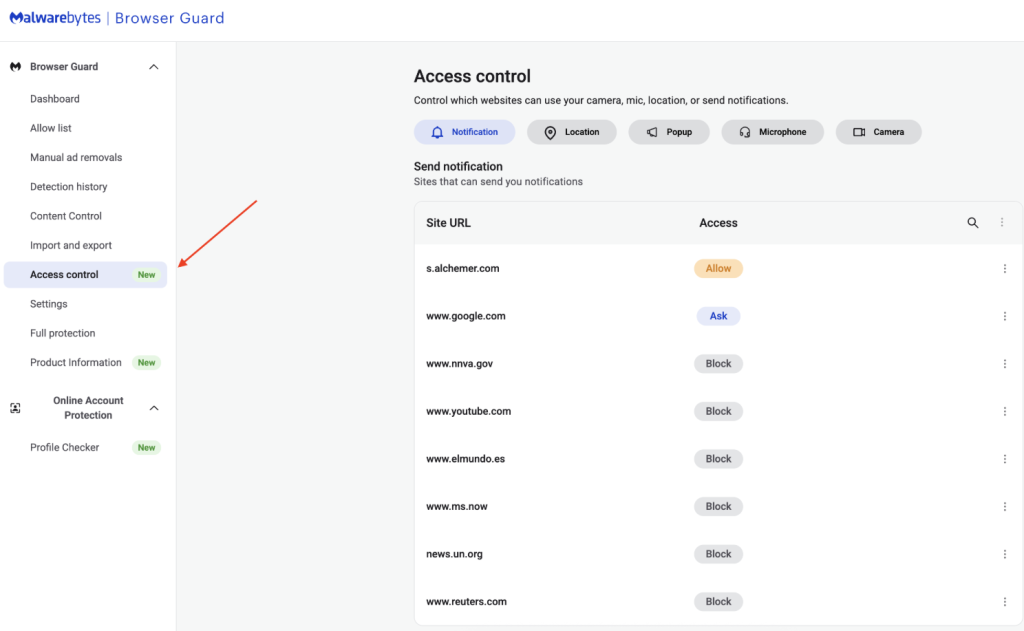
Navigate to Access Control: On the left sidebar of the web page, select Access Control.
Manage Permissions: See visited websites, click “Allow” to enable or disable Malwarebytes’ ability to see visited sites.
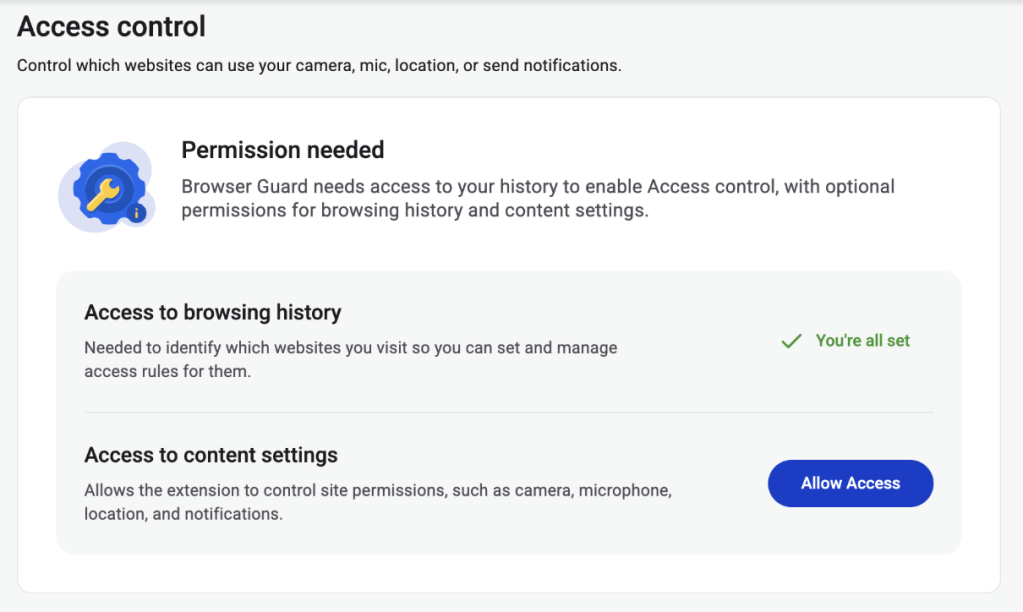
Access Control requires some access to your browsing to protect you online
Access Control lets you choose individual sites to block and allow
This feature is rolling out in beta first, so you might see improvements and updates as we refine it. Currently, the feature works across Chrome and Edge, but will roll out to other browsers soon.
Access Control is another step toward making privacy simple and accessible. Not a subscriber yet? Check out Malwarebytes’ plans today to unlock this feature and more.
We don’t just report on threats—we remove them
Cybersecurity risks should never spread beyond a headline. Keep threats off your devices by downloading Malwarebytes today.
Microsoft today pushed software updates to fix a staggering 167 security vulnerabilities in its Windows operating systems and related software, including a SharePoint Server zero-day and a publicly disclosed weakness in Windows Defender dubbed “BlueHammer.” Separately, Google Chrome fixed its fourth zero-day of 2026, and an emergency update for Adobe Reader nixes an actively exploited flaw that can lead to remote code execution.
Redmond warns that attackers are already targeting CVE-2026-32201, a vulnerability in Microsoft SharePoint Server that allows attackers to spoof trusted content or interfaces over a network.
Mike Walters, president and co-founder of Action1, said CVE-2026-32201 can be used to deceive employees, partners, or customers by presenting falsified information within trusted SharePoint environments.
“This CVE can enable phishing attacks, unauthorized data manipulation, or social engineering campaigns that lead to further compromise,” Walters said. “The presence of active exploitation significantly increases organizational risk.”
Microsoft also addressed BlueHammer (CVE-2026-33825), a privilege escalation bug in Windows Defender. According to BleepingComputer, the researcher who discovered the flaw published exploit code for it after notifying Microsoft and growing exasperated with their response. Will Dormann, senior principal vulnerability analyst at Tharros, says he confirmed that the public BlueHammer exploit code no longer works after installing today’s patches.
Satnam Narang, senior staff research engineer at Tenable, said April marks the second-biggest Patch Tuesday ever for Microsoft. Narang also said there are indications that a zero-day flaw Adobe patched in an emergency update on April 11 — CVE-2026-34621 — has seen active exploitation since at least November 2025.
Adam Barnett, lead software engineer at Rapid7, called the patch total from Microsoft today “a new record in that category” because it includes nearly 60 browser vulnerabilities. Barnett said it might be tempting to imagine that this sudden spike was tied to the buzz around the announcement a week ago today of Project Glasswing — a much-hyped but still unreleased new AI capability from Anthropic that is reportedly quite good at finding bugs in a vast array of software.
But he notes that Microsoft Edge is based on the Chromium engine, and the Chromium maintainers acknowledge a wide range of researchers for the vulnerabilities which Microsoft republished last Friday.
“A safe conclusion is that this increase in volume is driven by ever-expanding AI capabilities,” Barnett said. “We should expect to see further increases in vulnerability reporting volume as the impact of AI models extend further, both in terms of capability and availability.”
Finally, no matter what browser you use to surf the web, it’s important to completely close out and restart the browser periodically. This is really easy to put off (especially if you have a bajillion tabs open at any time) but it’s the only way to ensure that any available updates get installed. For example, a Google Chrome update released earlier this month fixed 21 security holes, including the high-severity zero-day flaw CVE-2026-5281.
For a clickable, per-patch breakdown, check out the SANS Internet Storm CenterPatch Tuesday roundup. Running into problems applying any of these updates? Leave a note about it in the comments below and there’s a decent chance someone here will pipe in with a solution.
Vannacht was het zover. Hackgroep Shinyhunters deelde de geclassificeerde informatie die zij wisten te stelen van Rockstar Games, de ontwikkelaar van Grand Theft Auto VI. Wie hoopte op een nieuwe trailer van de game, is waarschijnlijk teleurgesteld. Wel bracht de hack inzicht in hoe waanzinnig veel geld GTA Online nog oplevert.
Abstract: The rapid expansion of artificial intelligence (AI) is raising concerns about its potential to transform cybercrime. Beyond empowering novice offenders, AI stands to intensify the scale and sophistication of attacks by seasoned cybercriminals. This paper examines the evolving relationship between cybercriminals and AI using a unique dataset from a cyber threat intelligence platform. Analyzing more than 160 cybercrime forum conversations collected over seven months, our research reveals how cybercriminals understand AI and discuss how they can exploit its capabilities. Their exchanges reflect growing curiosity about AI’s criminal applications through legal tools and dedicated criminal tools, but also doubts and anxieties about AI’s effectiveness and its effects on their business models and operational security. The study documents attempts to misuse legitimate AI tools and develop bespoke models tailored for illicit purposes. Combining the diffusion of innovation framework with thematic analysis, the paper provides an in-depth view of emerging AI-enabled cybercrime and offers practical insights for law enforcement and policymakers.
Undisclosed number of names and contact and reservation details accessed in latest cybercrime attempt
The accommodation reservation website Booking.com has suffered a data breach with “unauthorised parties” gaining access to customers’ details.
The platform said it “noticed some suspicious activity involving unauthorised third parties being able to access some of our guests’ booking information”.
Apple heeft sinds 2022 een speciale lockdownmodus ingebouwd in zijn iPhones. Die is bedoeld voor wie mogelijk doelwit is van een geavanceerde cyberaanval. Volgens Apple werkt de modus zo goed, dat het nog geen hacker is gelukt om door de beveiliging heen te breken van iemand die de modus aan heeft staan.
Banks, governments and tech providers urged to upgrade security because current systems will soon be obsolete
Banks, governments and technology providers need to be prepared for quantum computer hackers capable of breaking most existing encryption systems by 2029, Google has warned.
The tech company said in a blogpost that quantum computers would pose a “significant threat to current cryptographic standards” before the end of the decade and urged other companies to follow its lead.

 Login
Login