Reading view

A practical guide to secure vibe-coding for small businesses | Kaspersky official blog

The entry barriers for app development have plummeted in recent times — with nearly anyone now able to build a professional website, personal news bot, or dashboard simply by giving a chatbot or AI agent a few instructions in natural English. Unfortunately, a massive gap exists between a slick prototype and a reliable, production-ready, secure application. To avoid becoming the subject of another AI fail story, or losing money and sensitive data, follow these straightforward tips. These are intended specifically for non-technical creators and very small teams. Larger enterprises should follow more sophisticated recommendations.

The primary risks of AI-generated code

While vibe coding can deliver a seemingly functional app in just a few hours, it will likely contain dangerous flaws. AI models are trained on code samples from across the internet, which often include suboptimal tutorials, buggy snippets, and outright junk. Sometimes this code simply fails to run, but more often the situation is subtler and more hazardous: the app appears to work, yet under the hood, it might rely on a crude imitation of the required logic or contain critical vulnerabilities. According to a study by the Cloud Security Alliance AI Safety Initiative, the following facts should be considered when using AI for coding:

  • At least 45% of AI-generated code contains dangerous vulnerabilities, such as failing to verify the user before granting access to sensitive data.
  • A professional developer using AI can write code three to four times faster, but may introduce 10 times as many vulnerabilities.
  • Twenty percent of AI-generated code attempts to use external libraries and modules that don’t actually exist.
  • Even when an application handles confidential data — such as payments, private messages, or documents — AI-generated code sometimes skips credential verification entirely. This can leave the app’s data open for anyone on the internet to read.
  • In other instances, the app might correctly prompt for a username and password but fail to enforce access controls, allowing any registered user to view everyone else’s data.
  • Access keys (tokens) for databases and AI services may be embedded directly into the source code, easy to steal, and difficult to rotate after a data breach or cyberattack.
  • Project code or critical build outputs are often deployed to servers without proper access restrictions, leaving both the application logic and sensitive access keys vulnerable to theft.
  • AI may implement insecure database access patterns, which can allow attackers to bypass the application to steal data or execute arbitrary code on the database server.
  • Apps that include API functionality often suffer from insecure API implementations, lacking both user permission checks and rate limiting.

Core principles of securing vibe code

Always verify. Treat AI-generated code as a rough draft. It should always be reviewed and rigorously tested. Ideally, professional developers should handle this; however, if none are available, the vibe-coder should at least test the application themselves, have friends or colleagues poke around the live app, and ask them to review key code snippets. It’s also possible to evaluate code integrity by submitting a separate prompt to the AI: “Review this code for secure development best practices and check for OWASP Top 10 vulnerabilities”.

Protect secrets. Never include passwords, API keys, or any other sensitive data in AI prompts. Instead, instruct the AI to write code that securely stores all secrets in environment variables (special hidden settings).

Prioritize efforts. The main risks emerge when an application is network-accessible to outsiders, processes valuable data, or runs on infrastructure that would be useful to attackers. The components of an app or system that meet these criteria are precisely what’s needed to be protected first. A static website composed of three HTML pages faces significantly lower risk than a loyalty program integrated into an online store.

Make security an explicit requirement. Even a simple, straightforward line in the prompt, like “Follow industry standards and security best practices when generating this code”, improves the output. Providing more specific requirements for critical code snippets makes the results even better.

Don’t trust default settings. Often, the danger in vibe coding lies in the configuration rather than the code itself. For example, an app processing sensitive company data might be deployed on a public vibe-coding platform (Lovable or the like), and remain accessible to the entire internet by default. Even if the code is flawless, making that information public is a critical security failure. Because of this, every component — from hosting and database settings to the deployment pipeline — must be manually reviewed and properly configured. If the purpose of a setting is unclear, consult a chatbot for the optimal values, specifying that its goal is to enhance security, and describing who the app is intended for.

Security is a continuous process. Securing the app should not be treated as a one-off task. Every time an application is updated, hosting providers are changed, or a project undergoes any other major shift, all steps in making it secure should be revisited, and the risks reassessed.

Tips for securing vibe code

It’s natural to want an app built from broad prompts like “Make me a beautiful, user-friendly, fast, reliable, and secure app for [use case].” However, for the results to actually be effective, each of those requirements needs to be fleshed out. Below, we’ve outlined recommendations for building standard components that will make vibe code more secure. It’s important to emphasize that “more secure” doesn’t mean “perfectly secure” — these approaches lower the risk, but that risk remains well above zero.

Demand security from the AI. When assigning a task to a neural network, be explicit: “write secure code, validate data, encrypt passwords”. Each type of task requires its own security prompt. For instance, don’t just ask to “build a login form”. Instead, ask for a “secure login form with credential validation, authentication and authorization (user permissions) controls, brute-force protection, password hashing according to modern standards, transmission strictly over HTTPS, and no hardcoded secrets”. It makes sense to use these secure requirement templates every time. It’s also helpful to keep a short cheat sheet of standard requirements for AI prompts: “validate all external data and user input before processing”, “no secrets in code”, “protect APIs from abuse”, “restrict user permissions”, and “secure default settings”.

Use off-the-shelf solutions. If an app needs a user management system, insist on using a popular, reputable library, such as NextAuth, Auth0, and so on, rather than inventing a new and vulnerable solution. This is the most common cause of data breaches. This applies to more than just login and registration; for other high-risk actions like file uploads and API call processing, it’s better to use established frameworks and libraries with built-in protections rather than building everything from scratch.

Don’t trust the AI blindly; verify open-source components. Neural networks often try to inject non-existent components and libraries into a project or suggest outdated versions. Always search for the suggested names online to ensure they are real, widely used, and secure — and make sure the latest versions are used.

Demand robust encryption. Explicitly state that modern industry standards must be used for both data transmission and storage: TLS 1.3 based on OpenSSL for network traffic; argon2 or bcrypt for hashing credentials; and so on.

Never trust user input. Always instruct the AI to include validation for any data entered by users, whether in forms or search bars. Use terms like “parameterization” and “sanitization” to emphasize that the app needs protection against malicious actors, not just users’ typos.

Set limits on user actions. Require the AI to implement rate limiting for login attempts or general requests. This will protect a project from automated attacks like DoS and brute-force password guessing.

Hide the system’s inner workings. If the site crashes, users should see a simple apology page rather than a detailed error report containing snippets of the code. That kind of information is a goldmine for hackers.

Remember that you’re a developer, and you need to protect development-related digital assets. All related accounts — such as access to GitHub, project hosting, and other resources — are prime targets for attackers. Be sure to enable two-factor authentication (2FA) on all work accounts.

Make backups. Regularly back up a project both locally and to the cloud to protect it against critical AI errors as well as cyberattacks. These backups should include both the application’s source code and its databases.

Set up a sandbox. Test new features and app versions in a secure environment using a clone of an active site or app and a copy of a database. Always run thorough tests before pushing an update live. This allows catching issues without putting users or their data at risk.

Update dependencies and scan them for vulnerabilities. A vibe-coded app will almost certainly rely on third-party libraries and components, known as dependencies. It’s wise to update these regularly by rebuilding an app with the latest versions, even if app’s code itself has not been changed. This process helps patch known security flaws in the used packages.

Check for secrets leaking into the repository. Use secrets scanners like TruffleHog to audit resulting code. Even with instructions, AI might slip up and include an API key or password in the source code. A scanner ensures that files containing keys and passwords don’t end up in Git or get published alongside the project.


  •  

My Website Is Hosting a Phishing Page – Now What?

My Website Is Hosting a Phishing Page – Now What?

Most phishing advice is written for the person staring at a suspicious email. This guide is for the other kind of victim: The website owner whose legitimate site has been quietly turned into the attacker’s weapon.

You didn’t send the message or build the fake login page. You just woke up to a browser warning, a suspended hosting account, or a polite note from someone’s security team asking why your domain is requesting Apple ID credentials.

Continue reading My Website Is Hosting a Phishing Page – Now What? at Sucuri Blog.

  •  

Protecting your secrets from tomorrow’s quantum risks

As outlined in the AWS post-quantum cryptography (PQC) migration plan, addressing the risk of harvest now, decrypt later (HNDL) attack is an important part of your post-quantum plan. Upgrading the client-side of your workloads to support quantum-resistant confidentiality is an important aspect of your side of the PQC shared responsibility model. Timelines to plan and execute your PQC upgrades vary by region and by industry and will depend on your own business risk profile. To learn more, see the AWS PQC frequently asked questions.

AWS Secrets Manager uses SSL/TLS to communicate with AWS resources, currently supporting TLS 1.2 and 1.3 in all AWS Regions. The service supports using TLS 1.3 with hybrid post-quantum key exchange for clients that support this capability. The hybrid post-quantum approach establishes TLS connections by combining traditional cryptography (such as X25519) with post-quantum algorithms (ML-KEM), and helps to protect your secrets against both current classical attacks and future quantum computer threats. Regardless of how your workload accesses Secrets Manager, this client-side software upgrade is the only action you need to take to address risk to secrets from HNDL. Your secrets at rest are already encrypted using keys managed by AWS Key Management Service (AWS KMS). Properly implemented symmetric encryption is considered quantum-resistant; asymmetric cryptography faces quantum threats. To learn more, watch AWS re:Inforce 2025 – Post-Quantum Cryptography Demystified.

To reduce builder effort for client-side upgrades, we’re pleased to announce the following Secrets Manager clients now enable and prefer post-quantum TLS when initiating connections to Secrets Manager: Secrets Manager Agent (v2.0.0 or later), the AWS Lambda extension (v19 or later) and the Secrets Manager CSI Driver (v2.0.0 or later). For SDK-based clients, hybrid post-quantum key exchange is available in supported AWS SDKs. Enablement requirements vary by language, version, and operating system. See the following table for your SDK client.

This launch is part of the ongoing commitment AWS has made to migrate systems to post-quantum cryptography and making it straightforward for our customers to do the same. See Post-Quantum Cryptography to learn more.

Client hybrid post-quantum key exchange requirements

The following table summarizes the behavior for each client. When the client is upgraded to support hybrid post-quantum key exchange, the Secrets Manager service endpoint automatically selects it during the TLS handshake. Upgrading to the versions listed in the table is the only action you need to take for your workload to begin using hybrid post-quantum key exchange when calling Secrets Manager APIs.

Client Requirements
Secrets Manager Agent Hybrid PQ key exchange in TLS preferred by default (v2.0.0 and later)
AWS Lambda extension Hybrid PQ key exchange in TLS preferred by default (Version 19 and later)
Secrets Manager CSI Driver Hybrid PQ key exchange in TLS preferred by default (v2.0.0 and later)
AWS SDK for Rust Hybrid PQ key exchange in TLS preferred by default (releases after August 29, 2025)
AWS SDK for Go Hybrid PQ key exchange in TLS preferred by default (Go v1.24 and later)
AWS SDK for Node.js Hybrid PQ key exchange in TLS preferred by default (Node.js v22.20 and v24.9.0 and later)
AWS SDK for Kotlin Hybrid PQ key exchange in TLS preferred by default on Linux (v1.5.78 and later)
AWS SDK for Python The AWS SDK for Python (boto3) uses the OS-provided OpenSSL for TLS.
Hybrid PQ key exchange in TLS requires running on a system with OpenSSL 3.5 or later installed.
AWS SDK for Java v2 AWS SDK for Java v2 requires an AWS CRT HTTP client that supports PQ TLS when configured using postQuantumTlsEnabled.
Secrets Manager caching clients The Secrets Manager caching libraries are built on the AWS SDKs and inherit their TLS behavior. Note for Java: The JDBC driver flag and Java Caching flag must be set to enable Hybrid PQ key exchange in TLS.

If you’re using the Secrets Manager Agent, the Lambda extension, or the CSI Driver, upgrade to the listed version to use hybrid post-quantum key exchange in TLS as the default. Customers using the AWS SDK for Rust, Go, or Node.js at the versions listed in the table are already upgraded and no additional action is required. The SDK will select the hybrid post-quantum key exchange for API calls. For customers using the AWS SDK for Python, hybrid post-quantum key exchange in TLS requires OpenSSL 3.5 or later to be present on the host system. Guidance on verifying and enabling this is available in the AWS Secrets Manager documentation. For customers using the AWS SDK for Java v2, hybrid post-quantum key exchange in TLS requires using the AWS CRT HTTP client. The postQuantumTlsEnabled(true) must be set on the CRT client to enable hybrid post-quantum key exchange in TLS.

After your client versions meet the requirements listed in the table, you can verify that your connections are actively using hybrid post-quantum key exchange.

How to verify your connection uses hybrid post-quantum key exchange

With hybrid post-quantum key exchange using ML-KEM now enabled by default for Secrets Manager clients (see the preceding table), most customers will not need ongoing monitoring to verify correct behavior or detect regressions. However, security teams and compliance officers might want to confirm that their Secrets Manager API calls are negotiating the hybrid key exchange. On the server side, you can confirm hybrid post-quantum key exchange in TLS by using AWS CloudTrail. On the client side, you can inspect TLS handshake details using a utility like Wireshark or by using developer tools built into major web browsers.

Verification is a two-step process: first, fetch a secret using your Secrets Manager client to generate a GetSecretValue API call, then confirm in AWS CloudTrail that the call negotiated hybrid post-quantum key exchange.

Fetch your secret using your Secrets Manager client

The following examples show how to retrieve your secret using the Secrets Manager Agent, Lambda extension, and CSI Driver—each of which will automatically negotiate hybrid post-quantum key exchange when calling the GetSecretValue API.

To verify hybrid post-quantum TLS with Secrets Manager Agent on EC2 instance:
Install the agent on your Amazon Elastic Compute Cloud (Amazon EC2) instance and use it as a client to fetch your secret.

  1. Follow the instructions for AWS Secrets Manager Agent.
  2. Ensure that your EC2 instance profile has the permission for secretsmanager:GetSecretValue to fetch the secret.
  3. Connect to your private EC2 instance.
  4. Install the agent on your EC2 instance.
  5. Use the agent to fetch your secret.
    curl -H “X-Aws-Parameters-Secrets-Token: $(</tmp/awssmatoken)” localhost:2773/secretsmanager/get?secretId=<YOUR-SECRET-ARN>
  6. Wait for about 5 minutes for CloudTrail to deliver the logs.
  7. Go to the CloudTrail event history and search for the event GetSecretValue.

To verify hybrid post-quantum TLS with Lambda extension:
Use the AWS parameters and Secrets Manager Lambda extension to create a Lambda function that will consume your secrets from Secrets Manager using direct API calls.

  1. Follow Using the AWS parameters and secrets Lambda extension to create the Lambda layer and the Lambda function.
  2. Select the latest extension version.
  3. Wait for about 5 minutes for CloudTrail to deliver the logs.
  4. Go to the CloudTrail event history and search for the event GetSecretValue.

To verify hybrid post-quantum TLS with CSI driver on Amazon EKS:
On your Amazon Elastic Kubernetes Service (Amazon EKS) cluster, use the AWS Secrets Store CSI Driver provider to fetch secrets from Secrets Manager in Kubernetes pods:

  1. Confirm the installed add-on version is 2.0.0 or later.
    eksctl get addon --cluster <CLUSTER-NAME> --name aws-secrets-store-csi-driver-provider
  2. Trigger a secret retrieval by restarting a pod that mounts a secret, or deploying a new one.
  3. Wait for about 5 minutes for CloudTrail to deliver the logs.
  4. Go to the CloudTrail event history and search for the event GetSecretValue.

Confirm hybrid post-quantum key exchange using CloudTrail

CloudTrail logs include a tlsDetails field for Secrets Manager API calls. When hybrid post-quantum key exchange in TLS is active, the keyExchange field in tlsDetails will show X25519MLKEM768. Each CloudTrail record includes a tlsDetails field that contains the cipher suite and, where available, the key exchange group negotiated during the TLS handshake.

You can work with CloudTrail event history using the AWS Management Console for CloudTrail or the AWS Command Line Interface (AWS CLI).

To look up CloudTrail events using the console:

  1. Verify you are in the correct AWS Region.
  2. Open the CloudTrail console and select Event History.
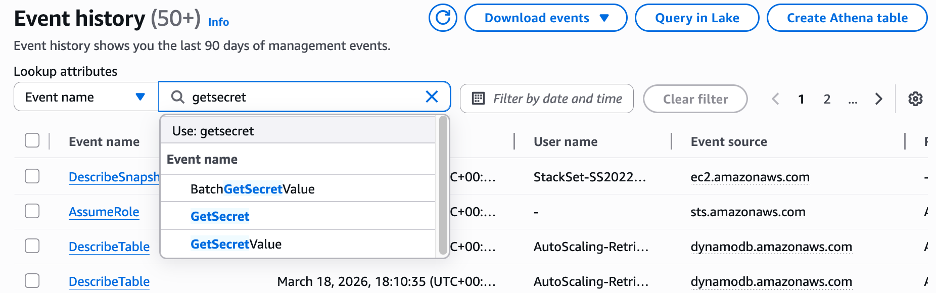
  3. Under Lookup attributes filter, select Event name and GetSecretValue.
    Figure 1: Search CloudTrail event history by event name

    Figure 1: Search CloudTrail event history by event name

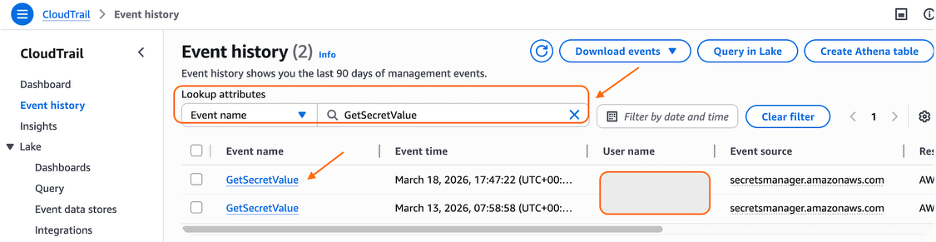
  4. Select your event.
    Figure 2: Select the event

    Figure 2: Select the event

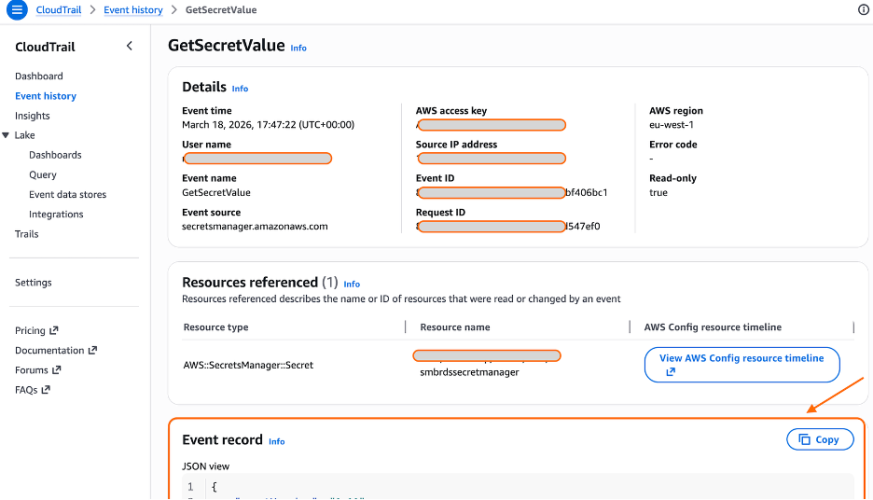
  5. View the output in the Event Record section of the page.
    Figure 3: CloudTrail - GetSecretValue event

    Figure 3: CloudTrail – GetSecretValue event

To look up CloudTrail events using AWS CLI :
Using AWS CLI, select the last events and look at the output.

aws cloudtrail lookup-events \
--lookup-attributes AttributeKey=EventName,AttributeValue=GetSecretValue \
--max-results 5 \
--region <YOUR-REGION> \
--query 'Events[0].CloudTrailEvent' \
--output text

Example of CloudTrail Event for GetSecretValue API call:

In the following example, the userAgent field reflects what it used as a client to connect to Secrets Manager.

Note: The userAgent value depends on the client you use.

{
    "eventVersion": "1.11",
    "userIdentity": {
        "type": "AssumedRole",
        "principalId": "AROA123456789EXAMPLE:i-0c1a23fc456b7ab89",
        "arn": "arn:aws:sts::111122223333:assumed-role/YOUR-EC2-INSTANCE-PROFILE/i-0c1a23fc456b7ab89",
        "accountId": "111122223333",
        "accessKeyId": "ASIAIOSFODNN7EXAMPLE",
        "sessionContext": {
            "sessionIssuer": {
                "type": "Role",
                "principalId": "AROA123456789EXAMPLE",
                "arn": "arn:aws:iam::111122223333:role/YOUR-EC2-INSTANCE-PROFILE",
                "accountId": "111122223333",
                "userName": "YOUR-EC2-INSTANCE-PROFILE"
            },
            "attributes": {
                "creationDate": "2026-03-27T17:08:37Z",
                "mfaAuthenticated": "false"
            },
            "ec2RoleDelivery": "2.0"
        },
        "inScopeOf": {
            "issuerType": "AWS::EC2::Instance",
            "credentialsIssuedTo": "arn:aws:ec2:eu-west-2:111122223333:instance/i-0c1a23fc456b7ab89"
        }
    },
    "eventTime": "2026-03-27T17:12:54Z",
    "eventSource": "secretsmanager.amazonaws.com",
    "eventName": "GetSecretValue",
    "awsRegion": "eu-west-2",
    "sourceIPAddress": "1.2.3.4",
    "userAgent": "aws-sdk-rust/1.3.14 os/linux lang/rust/1.94.1 aws-secrets-manager-agent/2.0.0",
    "requestParameters": {
        "secretId": "arn:aws:secretsmanager:eu-west-2:111122223333:secret:your-secret"
    },
    "responseElements": null,
    "requestID": "027507ea-f377-43d9-bf2f-646d4dc19223",
    "eventID": "f9c3ed0f-81f5-450b-a561-2b9e54fa9e73",
    "readOnly": true,
    "resources": [
        {
            "accountId": "111122223333",
            "type": "AWS::SecretsManager::Secret",
            "ARN": "arn:aws:secretsmanager:eu-west-2:111122223333:secret:your-secret"
        }
    ],
    "eventType": "AwsApiCall",
    "managementEvent": true,
    "recipientAccountId": "111122223333",
    "eventCategory": "Management",
    "tlsDetails": {
        "tlsVersion": "TLSv1.3",
        "cipherSuite": "TLS_AES_128_GCM_SHA256",
        "clientProvidedHostHeader": "secretsmanager.eu-west-2.amazonaws.com",
        "keyExchange": "X25519MLKEM768"
    }
}

If the keyExchange field shows X25519MLKEM768, then hybrid post-quantum key exchange in TLS is active. If it shows a traditional algorithm such as X25519, the client is not advertising ML-KEM support, and you should check the client version and configuration.

Troubleshooting

If your Secrets Manager API calls aren’t negotiating X25519MLKEM768 after updating your clients, check your SDK version, OpenSSL version (Python), and firewall or proxy configuration as shown in the Client Hybrid Post-Quantum Key Exchange Requirements section near the beginning of this post.

What’s next

This launch is one step in a broader migration. AWS is continuing to roll out ML-KEM support across AWS service HTTPS endpoints as part of Workstream 2 of the AWS PQC Migration Plan, with a target of full coverage across public AWS endpoints.

Support for CRYSTALS-Kyber, the pre-standardization predecessor to ML-KEM, is phasing out across AWS endpoints in 2026. Customers on older SDK versions that advertise only CRYSTALS-Kyber support will fall back gracefully to traditional TLS rather than negotiate the deprecated algorithm. To avoid this fallback, upgrade to the SDK versions listed in this post.

The journey of PQC migration extends beyond confidentiality of data in transit. To stay informed about the latest developments in the AWS PQC journey and your side of shared responsibility, follow the AWS Post-Quantum Cryptography page.

Conclusion

AWS Secrets Manager now enables hybrid post-quantum key exchange using ML-KEM by default to help protect your secrets and support your compliance efforts. This update requires no code changes or configuration updates for customers using the latest client versions.

This post covered how AWS Secrets Manager uses hybrid post-quantum cryptography to secure TLS connections, which clients support this capability, and how to verify that your connections are protected against harvest now, decrypt later attacks.

To benefit from this announcement today:

  • Upgrade your Secrets Manager client (Agent, Lambda extension, or CSI Driver) to the latest available versions to enable hybrid post-quantum key exchange using ML-KEM
  • If your workload uses the AWS SDK instead of a caching client, upgrade your AWS SDK and underlying dependencies to the minimum versions listed in this post
  • Verify hybrid post-quantum key exchange in TLS is active by checking the keyExchange field in CloudTrail tlsDetails for your Secrets Manager API calls
  • Test end-to-end hybrid post-quantum key exchange TLS connectivity in your environment, including network paths that traverse corporate firewalls or proxies

AWS will continue rolling out post-quantum cryptography support. For information about the broader migration effort, see the AWS PQC Migration Plan. Keep an updated cryptographic inventory of your broader environment to identify other uses of traditional public-key cryptography that will require migration. The CISA Quantum-Readiness guidance and the AWS PQC Migration Plan are good starting points.

Additional resources

If you have feedback about this post, submit comments in the Comments section below.

P. Stéphanie Mbappe

P. Stéphanie Mbappe

Stéphanie is a Security Consultant with Amazon Web Services. She delights in assisting her customers at any step of their security journey. Stéphanie enjoys learning, designing new solutions, and sharing her knowledge with others.

Tobias Nickl

Tobias Nickl

Tobias is a Security Consultant at Amazon Web Services, specializing in security architecture and cloud transformation. He partners with AWS customers to design and implement security architectures that address both current and emerging threats. Through his work, he helps organizations build security strategies that evolve with their cloud maturity.

  •  

How a simple consumer data breach spiralled into a national security crisis in US-South Korea relations

Washington’s focus on online retailer Coupang has led to accusations that the Trump administration is tying issues of national security to domestic corporate matters

When South Korea’s biggest online retailer revealed last year that a data breach had compromised tens of millions of customer accounts, it appeared to be a corporate crisis. But five months later the issue has grown into a diplomatic storm, threatening to further degrade relations between Seoul and the Trump administration.

Coupang, often described as South Korea’s answer to Amazon, is a US-incorporated company whose business is overwhelmingly based in South Korea. Headquartered in Seattle and listed on the New York Stock Exchange, it is run by Korean-American billionaire Bom Kim. In November last year the company disclosed that a former employee had stolen an internal security key, enabling unauthorised access to data from 33.7 million users.

Continue reading...

© Photograph: Anthony Wallace/AFP/Getty Images

© Photograph: Anthony Wallace/AFP/Getty Images

© Photograph: Anthony Wallace/AFP/Getty Images

  •  

WordPress DDoS Protection: How to Keep Your Site Online

WordPress DDoS Protection: How to Keep Your Site Online

WordPress powers over 40% of the web, which makes it one of the most attractive targets for Distributed Denial of Service (DDoS) attacks. If your site goes down for an hour, you lose revenue, search rankings, and visitor trust. If it goes down repeatedly, you lose much more.

A DDoS attack floods your website with fake traffic until it slows to a crawl or crashes entirely. Unlike hacks that steal data, DDoS attacks are about disruption.

Continue reading WordPress DDoS Protection: How to Keep Your Site Online at Sucuri Blog.

  •  
❌