Cyber rights org retools for the days of AI and unrestrained government
interview The Electronic Frontier Foundation (EFF) on Tuesday appointed Nicole Ozer to succeed Cindy Cohn as the cyber rights group's executive director when Cohn departs this summer.…
Ozer, With Decades of Experience in Technology and Civil Liberties Law, Will Succeed Cindy Cohn as Organization’s Leader
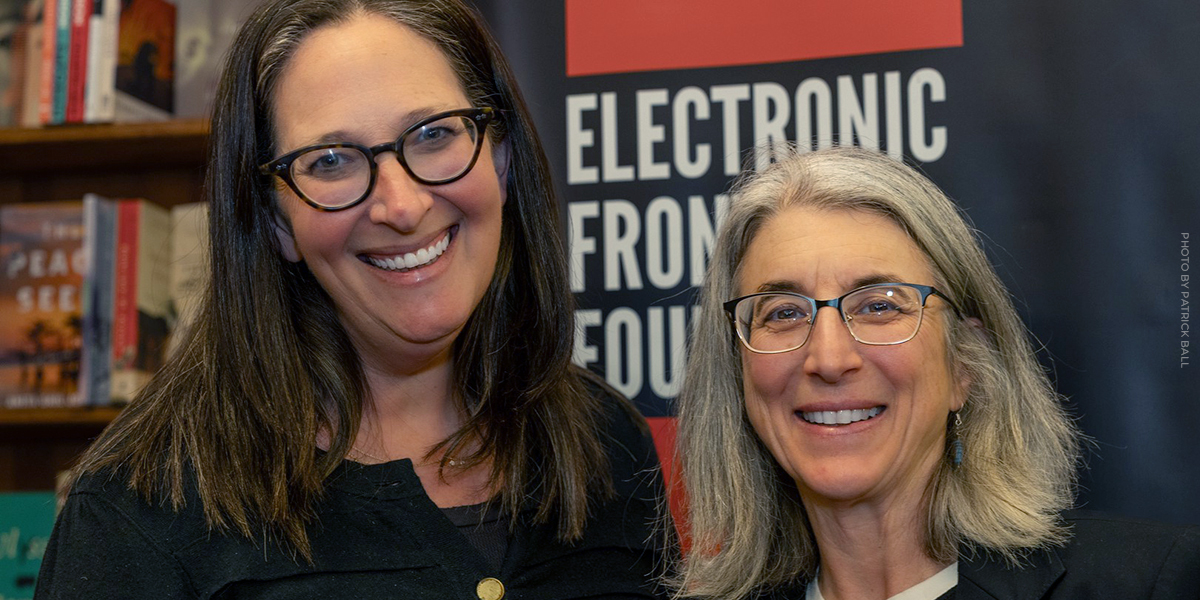
SAN FRANCISCO – Nicole Ozer has been appointed as executive director of the Electronic Frontier Foundation effective June 1.
Ozer is a legal expert on privacy and surveillance, artificial intelligence, and digital speech. She currently serves as the inaugural executive director of the Center for Constitutional Democracy at the University of California College of the Law in San Francisco. From 2004-2025, she was founding director of the Technology and Civil Liberties Program at the American Civil Liberties Union of Northern California. Ozer will succeed Cindy Cohn, who has been with EFF for more than 25 years and served as its executive director since 2015.
EFF champions user privacy, free expression, and innovation through impact litigation, policy analysis, grassroots activism, and technology development, with a mission to ensure that technology supports freedom, justice, and innovation for all people of the world. The organization celebrated its 35th anniversary in 2025.
"I am honored to lead EFF forward in these critical times. EFF’s global work to defend and advance rights, justice, and democracy in the digital age is fundamental to the future of our countries, our livelihoods, and literally our lives,” Ozer said. “I am ready to hit the ground running with EFF’s exceptional staff, board, and broad base of supporters and ensure that EFF is stronger than ever. Together, we can meet this moment and build a future where technology works for the people.”
“I couldn’t be happier to pass EFF’s reins over to Nicole,” Cohn said. “She has been our stalwart partner for many years in standing up for privacy, free speech and innovation online. I’m confident that she understands both the strong heart and the future potential of EFF especially as our work is more critical than ever.”
“Nicole Ozer is the ideal person to lead EFF during this unprecedented time in our nation’s history,” said EFF Board Chair Gigi Sohn. “She possesses all of the qualities necessary to lead the organization: great vision, strong management skills and deep substantive knowledge. The fact that she has worked alongside EFF for over two decades is icing on the cake. The EFF Board is excited to welcome Nicole and begin a new chapter in our history.”
Over her more than two decades leading public interest technology work, Ozer:
spearheaded passage of the California Electronic Communications Privacy Act – the nation’s strongest electronic surveillance law, requiring a warrant for government access to electronic information;
modernized California law to protect reading records in the digital age by helping to craft the Reader Privacy Act requiring a “super warrant” for government access;
created a groundbreaking model law for local democratic oversight of surveillance systems which inspired 25 laws across the country that help safeguard the rights and safety of more than 17 million people;
litigated civil liberties cases and drafted influential amicus briefs ontechnology issues at all levels of state and federal court, including the U.S. Supreme Court and California Supreme Court; and
developed multi-year campaigns to strengthen the anti-surveillance policies related to social media surveillance and face recognition of major technology companies and foster stronger privacy and free expression protection for billions of people worldwide.
Ozer is a lecturer at the University of California, Berkeley School of Law; was a 2024-2025 technology and human rights fellow with the Carr-Ryan Center for Human Rights Policy at the Harvard Kennedy School; and in 2019 was a visiting researcher at the Berkeley Center for Law and Technology and a non-residential fellow with the Digital Civil Society Lab at the Stanford Center on Philanthropy and Civil Society.
Ozer's work has earned accolades including the Fearless Advocate Award from the American Constitution Society Bay Area, the James Madison Freedom of Information Award from the Society of Professional Journalists of Northern California, and a 2025 California Senate Members resolution commending her “unwavering dedication to defending and promoting civil liberties in the digital world.” Her writings on privacy and constitutional law have been published widely, and she regularly provides expert testimony for government proceedings, offers commentary in the press, speaks at academic conferences, and presents at national and global forums including South by Southwest and the Centre for European Policy Studies. She holds a law degree from the University of California, Berkeley School of Law and a bachelor’s in American Studies from Amherst College.
"It is incredibly exciting to welcome Nicole Ozer as our new leader at EFF at a time when the organization's mission couldn't be more essential,” said entrepreneur, activist, writer, and EFF Board member Anil Dash. "Nicole's unique skills promise to build on the foundation that Cindy Cohn established as Executive Director, preparing EFF to serve an even more vital role in protecting privacy and innovation."
Cohn first became involved with EFF in 1993 when EFF asked her to serve as the outside lead attorney in Bernstein v. Dept. of Justice, the successful First Amendment challenge to the U.S. export restrictions on cryptography. She served as EFF’s legal director and general counsel from 2000 through 2015, and as executive director since then. She also co-hosted EFF’s award-winning “How to Fix the Internet” podcast. Her memoir, Privacy’s Defender: My Thirty-Year Fight Against Digital Surveillance, was published March 10 by MIT Press, and she is now conducting a national book tour.
EFF's Board of Directors last year assembled a committee which undertook a wide search for Cohn’s successor with assistance from leadership advisory firm Russell Reynolds Associates.
Crims 'creating a snowball effect' across open source projects
RSAC 2026 Thousands of organizations' cloud environments have been infected with secret-stealing malware as a result of the Trivy supply-chain attack last week, and now the crims that compromised the open source scanners are working with notorious extortion crews like Lapsus$.…
Python interface for LLMs infected with malware via polluted CI/CD pipeline
Two versions of LiteLLM, an open source interface for accessing multiple large language models, have been removed from the Python Package Index (PyPI) following a supply chain attack that injected them with malicious credential-stealing code.…
In a Public Service Announcement (PSA) the Federal Bureau of Investigation (FBI) and the Cybersecurity and Infrastructure Security Agency (CISA) warn the public about ongoing Russian-linked phishing campaigns that aim to gain access to messaging accounts.
Earlier this month we wrote about a large‑scale phishing campaign aimed at hijacking Signal and WhatsApp accounts belonging to senior officials, military personnel, civil servants, and journalists.
Now the FBI and CISA have joined European intelligence services in warning that the same tactics are being used in a broader campaign targeting these commercial messaging apps. The goal is not to break end‑to‑end encryption, but to walk straight around it by stealing access to individual accounts.
In our previous article, we focused on warnings from the Dutch intelligence services AIVD and MIVD, which described how Russian state‑backed actors approached high‑value targets via Signal and WhatsApp, posing as “Signal Support”, “Signal Security Bot”, or similar. The PSA demonstrates how the same groups are now running global phishing campaigns against messaging app accounts, with evidence suggesting thousands of compromised accounts worldwide.
It’s important to reiterate that the attackers have not managed to break the apps’ end-to-end encryption. Instead, they are relying on social engineering to get a device added so they can eavesdrop on accounts.
The current targets include current and former US government officials, military staff, political figures, and journalists, but there is nothing to stop the same techniques being reused against businesses and everyday users.
So, while it’s tempting to dismiss this as a problem for diplomats and generals (and the agencies issuing these alerts do mention high‑profile targets first), the techniques scale very easily. Once playbooks like these are public, they tend to be copied by cybercriminals looking for new ways to steal money or accounts.
How to protect your accounts
As the PSA puts it:
“Phishing remains one of the most unsophisticated, yet effective means of cyber compromise, often rendering other protections irrelevant”
This calls asks for basic security measures:
Treat unsolicited messages from “Support” inside apps as suspicious by default. Legitimate support for apps like Signal and WhatsApp does not ask you, in a chat message, to send back verification codes, PINs, or passwords. If you receive a warning about account problems, do not follow links in the message. Open the app’s settings directly or visit the official website through other means.
Never share SMS verification codes or app PINs. SMS codes are there to prove that you control a phone number. Anyone who has the code can pretend to be you. App‑specific PINs or passcodes are there to protect account changes. Giving them away is like handing over the keys to your account. Consider anyone asking for them to be a scammer.
Be careful what you discuss and with whom. Both the Dutch and US advisories remind us that even with end‑to‑end encryption, some conversations are too sensitive for commercial chat apps.
Use the extra security features these apps offer. Enable options like registration lock, registration PIN and device‑change alerts so that your account cannot be silently re‑registered without an extra secret. Store your PIN in a password manager instead of choosing something easy to guess or reusing a common code, to reduce the chance of social engineering or shoulder‑surfing.
Another useful feature is disappearing messages. Short‑timer and disappearing messages reduce how much content is available if an attacker gets into a chat later, or if someone obtains long‑term access to a device or backup. They are not a complete solution, but they can limit the damage.
What to do if you think your account was hijacked
If you suspect an attacker has taken over your messaging account:
Try to re‑register your number in the app immediately to kick out other devices.
Revoke all linked devices and change any app‑specific PINs or lock codes.
Warn your contacts that someone may have impersonated you and ask them to treat recent messages with caution.
Review recent conversations for signs of data theft (for example, shared IDs, documents, or passwords that should now be considered exposed).
Report the incident to the app provider and, where appropriate, to national reporting centers such as the FBI’s Internet Crime Complaint Center (IC3) at ic3.gov or the relevant authority in your country.
The sooner you act, the smaller the window in which attackers can exploit your account.
We don’t just report on phone security—we provide it
Nearly 300 employees caught up in intrusion at benefits provider Navia
Almost 300 HackerOne employees are caught up in a data breach, with the bug bounty biz slamming a third-party benefits provider for a weeks-long delay in notification.…
Scam compounds in Southeast Asia have already become modern slave farms, trapping victims and forcing many of them to become scammers for them. Now they’ve added another type of worker to the mix: so-called AI models.
These professional scammers conduct video calls with their targets, charming them into handing over their cash. As reported in WIRED this week, recruitment ads describe roles handling around a hundred live video calls per day, promoting romance scams and crypto hustles in industrial-scale scam operations across Cambodia, Myanmar, and Laos.
These scam farms already rely on chat operators to ensnare scam victims via messaging apps. Many of these operators are themselves victims of trafficking, forced to work long shifts under threats of violence. They develop relationships with victims over time, exploiting loneliness or financial worries. While they work to make a victim feel special, they’re actually juggling similar text sessions with dozens of people at once. Eventually, a victim may want a video call, either to meet their imagined sweetheart or to confirm an investment opportunity is legitimate (or both).
Chat operators might not have the ability to charm victims on video, especially when they’re victims themselves, being made to work long shifts and are physically beaten. So when a victim asks for a video call, the scam bosses call in a specialist “AI model” with strong interpersonal skills to charm the victim. Despite the name, they’re real people hired to appear on video calls. The AI deepfake software adjusts their looks to match the fictionalized person that the victim is hoping to see.
Scam operations run recruitment ads for these models, and many seem willing to apply for these jobs. Humanity Research Consultancy, an investigative research group that tracks trafficking supply chains, identified a pitch from a 24-year-old Uzbekistani calling herself Angel. She claimed to speak four languages and to have a year’s experience as an AI model. She demanded $7,000 monthly for her services.
The growth of scam compounds
How do these scam compounds even exist? According to the Australian Strategic Policy Institute, Myanmar’s 2021 military coup helped fuel a fraud boom. Scam centers along the Thai border have more than doubled as crime syndicates move into that region, along with Myanmar, Cambodia and Laos.
These scam centers are often tolerated because they line the coffers of local militia. But there have been some countermeasures. Raids and cross-border crackdowns have led to arrests and the movement of large numbers of suspects between countries, including operations targeting compounds such as KK Park in Myawaddy. Cambodia and Myanmar have also signalled increased efforts to tackle scam operations, although the networks remain highly resilient.
This kind of activity becomes easier as technology improves. Real-time face-swapping and deepfake tools are now good enough to support live video, not just pre-recorded clips. We’ve already seen real-time deepfakes used for everything from job interviews through to impersonating banking executives to scam millions. What’s new here is the scale: people handling dozens or even hundreds of calls a day for romance scams and crypto investment fraud shows that this is now a mass exploit.
How to stay safe
Here’s the problem with deepfake video: the common “tells” that let you spot it are evaporating. At one time a sure sign of an AI deepfake was someone with the wrong number of fingers or oddities in hairlines. You can up the ante in live calls by asking someone to turn sideways. Have them touch their nose, and wave their fingers in front of their face. It’s more difficult for deepfake software to handle that extra noise.
But beware: the algorithms that produce deepfakes are getting better all the time, and more easily able to handle such tests. We’re at the point where this deepfake researcher says many more of us will be fooled by them this year.
If you can’t fully trust what you see, fall back on what you know. Be wary of unsolicited contact, especially when someone quickly builds emotional rapport or introduces an investment opportunity. Even if a profile looks well-established or a website appears legitimate, take time to dig a little deeper.
Avoid sharing personal or financial information with someone you’ve only met online, and be wary of anyone who pushes you toward quick decisions or asks to move conversations off established platforms. The FBI has some sound advice on their website.
The most dangerous part of this deepfake AI model trend is that it helps scam operations cross the final frontier. A live human can close a scam that a simple chat interaction can’t. That’s why people like Angel from Uzbekistan have a job, and why you need to be more on your guard than ever.
We don’t just report on scams—we help detect them
Cybersecurity risks should never spread beyond a headline. If something looks dodgy to you, check if it’s a scam using Malwarebytes Scam Guard. Submit a screenshot, paste suspicious content, or share a link, text or phone number, and we’ll tell you if it’s a scam or legit. Available with Malwarebytes Premium Security for all your devices, and in the Malwarebytes app for iOS and Android.
Aleksei Volkov sentenced after enabling attacks that cost victims millions
A Russian national who sold the keys to corporate networks faces nearly seven years in a US prison after prosecutors tied his handiwork to a string of ransomware attacks costing victims millions of dollars.…
'It freakin' worked' says Rob Joyce - and shows how relentless AI agents can find holes humans miss
RSAC 2026 The now-infamous Anthropic report about Chinese cyberspies abusing Claude AI to automate cyberattacks was a Rorschach test for the infosec community, according to former NSA cyber boss Rob Joyce.…
Here's where you ought to spend your security billable hours budget this year
Strengthen your MFA policies, double-down on anti-phishing training, and for Jobs' sake, patch all your vulns right away. The past year of intelligence collected by Cisco's Talos threat hunters suggests that attackers are moving faster to exploit vulns, and fooling more staff than ever into giving up their credentials. …
We’ve identified a huge social-engineering campaign designed to steer people into online gambling sites under the impression they’re installing a legitimate app.
We’re calling it FriendlyDealer. It’s been observed across at least 1,500 domains, each hosting a website that impersonates the Google Play or Apple App Store. Users think they’re downloading a gambling app from a trusted source, with all the checks, reviews, and safeguards that implies. But they’re actually still on a website, installing a web app that then redirects them to casino offers through affiliate links.
The campaign doesn’t steal passwords or install traditional malware. Instead, it makes money through commissions every time someone signs up or deposits money at one of these sites.
That might sound less serious than a banking Trojan, but the end result is people being funneled into unregulated gambling sites with no age verification, no deposit limits, and no consumer protections. And it comes at a time when gambling addiction is being called the fastest explosion of gambling the country has ever seen.
One kit, dozens of apps, built to mimic real app stores
FriendlyDealer is built as a single, reusable kit that can generate many different fake app listings.
The kit detects what device you’re using and shows you a different fake store accordingly. Android users see a fake Google Play Store. iPhone users see a fake Apple App Store. The kit even loads the correct system fonts for each platform (Google Sans on Android, San Francisco on iOS) so the typography matches what you’d expect on your own phone.
Fake Apple App Store page: BEAST GAMES: ICE FISHING by Mr. Beast
Fake Apple App Store page: Euro Win
Under the hood, it’s a single web application that reads all of its content from one configuration file embedded in the page. Change that file, and you get a completely different app listing running on the same code.
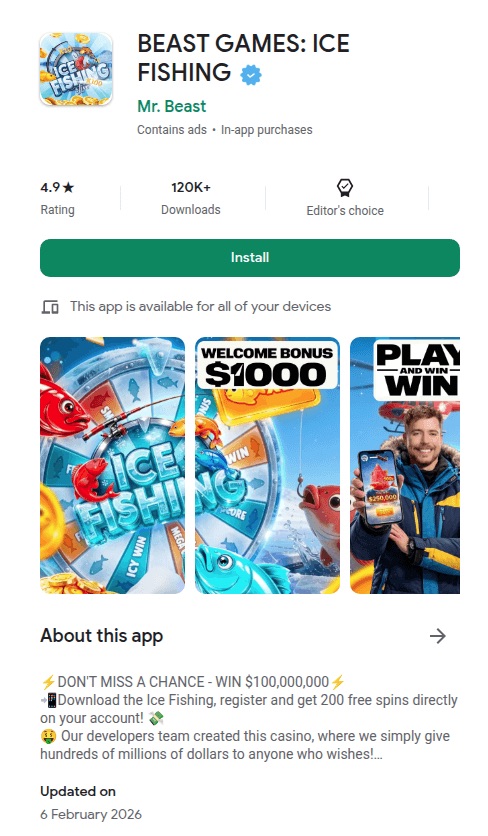
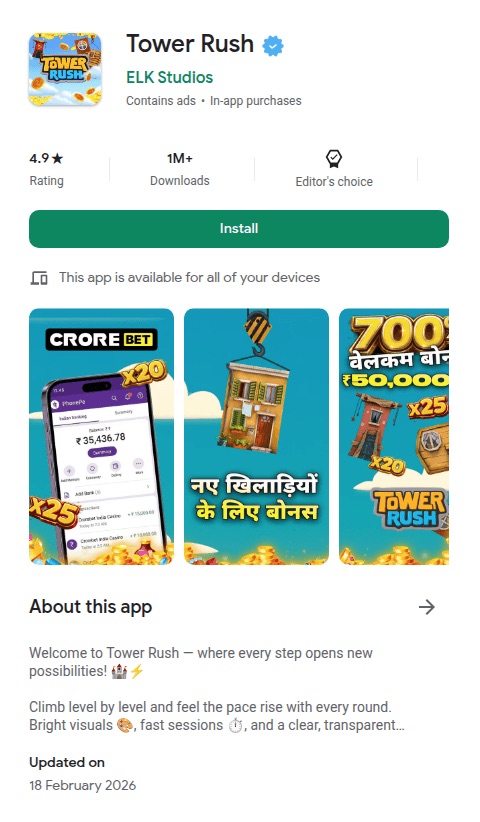
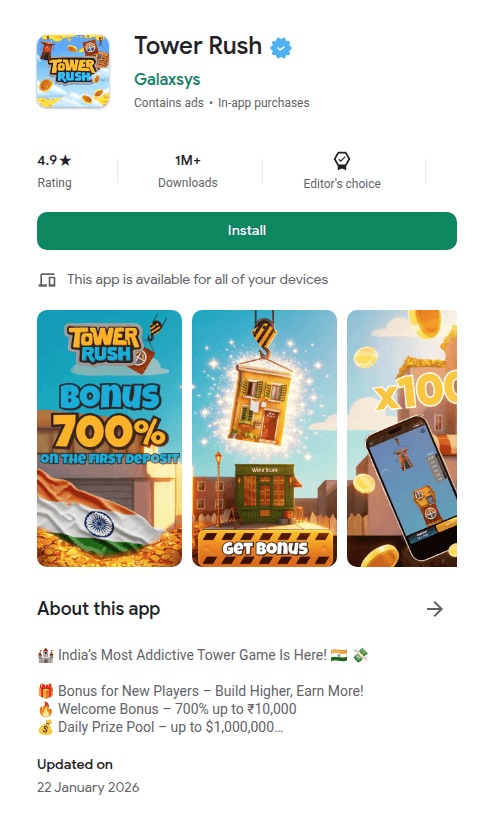
The operators have used this to spin up at least twenty casino brands, from “Tower Rush” (189 deployments) to “Chicken Road” (97) to “BEAST GAMES: ICE FISHING” (43), which impersonates YouTube creator MrBeast. (It’s worth noting that some skins reuse the names of some legitimate gambling brands but none of these are affiliated with the operation.)
The reviews are fake. Different apps reuse identical usernames, profile photos, text, and developer replies, and they’re repeated across multiple brands. Before showing the fake store, the kit can also display a simple casino mini-game to build engagement.
The fake “Install” button on Android relies on a Chrome feature that only works on mobile. It captures Chrome’s install prompt and triggers it when tapped, so a real installation dialog appears. The usual warning about installing apps from unknown sources does not appear. Previous research has shown that apps installed this way can even display “Installed from Google Play Store” in your phone’s settings.
The code goes to extraordinary lengths to get you into the right browser. If you arrive through a Facebook or Instagram ad, you’re inside those apps’ built-in browser, which can’t trigger the install. On Android, the kit generates a special link that forces the page to reopen in Chrome. On iOS, it does the same thing but for Safari. If Chrome isn’t installed, the fallback sends you to the real Play Store to download it. There’s even a separate handler for Samsung’s browser. The browser-specific engineering is unusually detailed.
The page disables zooming, making close inspection harder. The kit assigns a per-user tracking ID and reuses it across analytics, event, push-registration, and offer-routing flows.
Fake Google Play page: BEAST GAMES: ICE FISHING by Mr. Beast
Fake Google Play page: Chicken road by Valor Casino
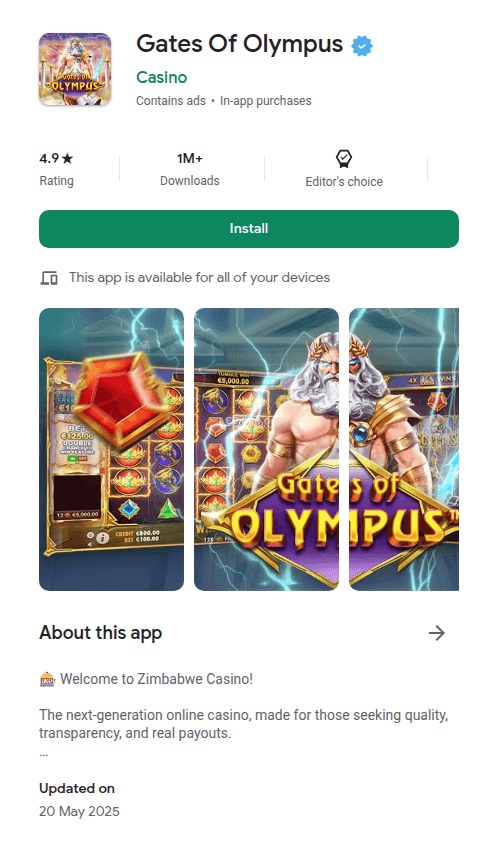
Fake Google Play page: Gates of Olympus by Casino
Fake Google Play page: Tower Rush by ELK Studios
Fake Google Play page: Tower Rush by Galaxsys
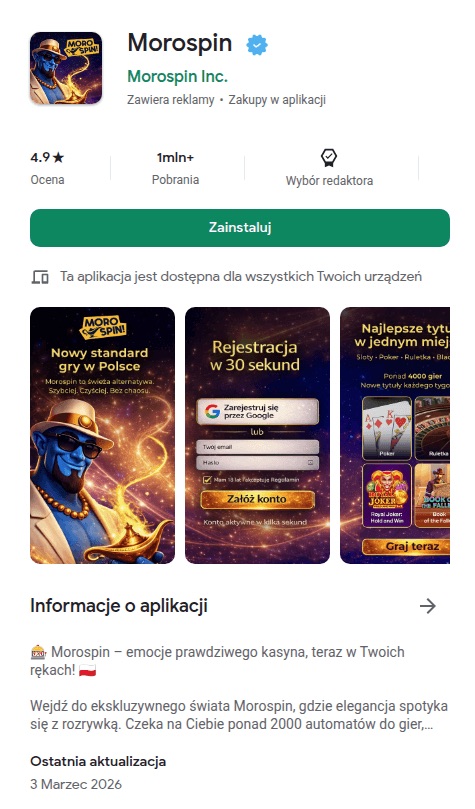
Fake Google Play page: Morospin by Morospin Inc.
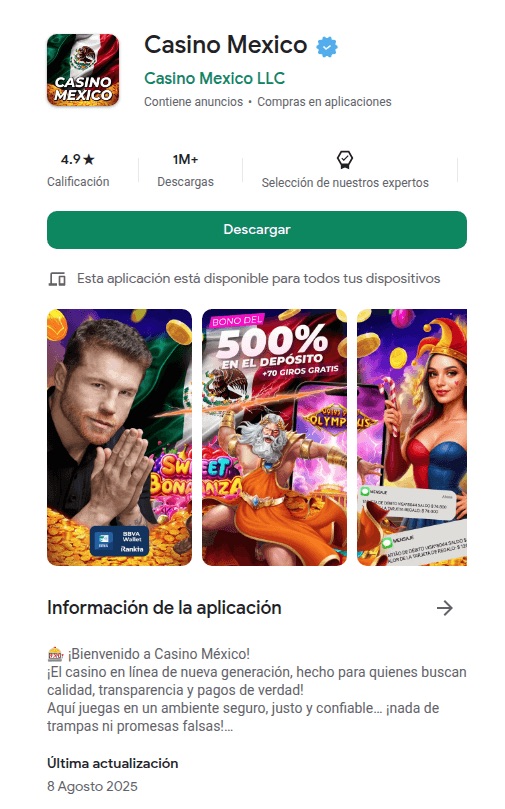
Fake Google Play page: Casino Mexico by Casino Mexico LLC
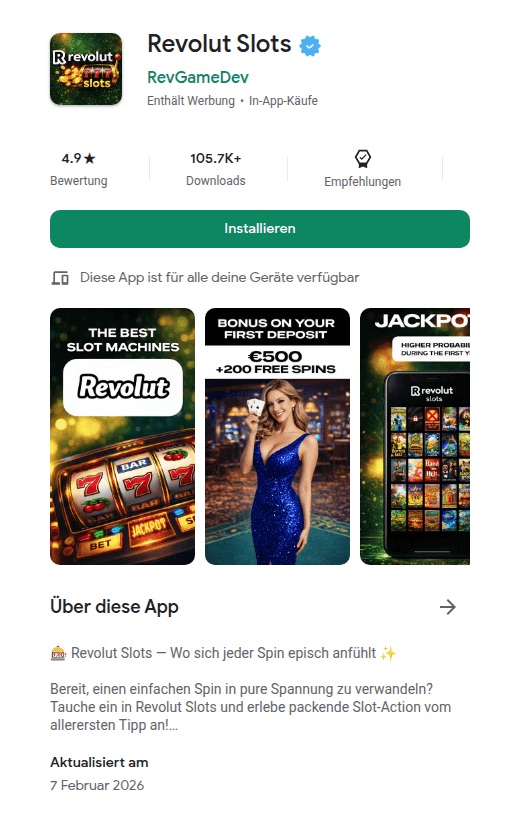
Fake Google Play page: Revolut Slots by RevGameDev
The kit is wired for paid advertising. The configuration includes empty slots for tracking pixels from four ad platforms: Google, Yandex, Facebook, and TikTok. The app and background script can forward Facebook-style ad identifiers (_fbc / _fbp) when those values are available. The code references Yandex telemetry fields and ships with Russian-language comments and debug strings, which is consistent with a Russian-speaking development context, though those artefacts could also have been inherited from a reused or purchased kit.
The flow is straightforward: buy ad traffic, detect the device, show a fake app store, trigger a real-looking install, and redirect to a casino through an affiliate link.
You’re not installing an app
When a user taps Install, the page doesn’t actually download an app. Instead, the browser creates what’s called a Progressive Web App (PWA). It’s essentially a website that behaves like an app, with its own icon on your home screen and its own splash screen. To most people it’s indistinguishable from a real app.
Once installed, the app can keep running in the background using browser features called service workers (keeping a persistent connection to your device). The samples include the main PWA worker and code to register a separate push worker (to send you notifications) when enabled.
The kit also knows when you’ve already installed it. It checks your device for its own PWA, and if it finds it, it skips the fake store entirely and sends you straight to the casino.
One domain ties it all together
Every FriendlyDealer deployment phones home to the same domain: ihavefriendseverywhere[.]xyz. This is the campaign’s data-collection server, and the name that inspired our tracking name for the operation.
The background script and app code send telemetry to this domain including browser language, timezone, user-agent data, optional user-agent client hints, campaign identifiers, and ad identifiers when those values are available. Much of this is sent via custom request headers.
Some requests use the HEAD method to stay lightweight.
The application code also sends something the background script doesn’t: JavaScript error reports. Every crash, every failed resource load, every unhandled exception that occurs on the victim’s device is caught, packaged into a structured error object with a timestamp and context, and posted to ihavefriendseverywhere[.]xyz/api/log_standard_err. In effect, the operators are collecting both user data and production error telemetry from real devices.
If a request fails (for example, due to poor signal), the background script stores it locally and retries later. Once the connection returns, the data is sent automatically.
The fake app also asks for notification permission. If the user grants it, the kit can register a push subscription and create a direct channel for future notifications. These appear like normal app notifications, giving the operators a direct line back to the user even after the app is closed.
Follow the money: affiliate commissions, not malware
FriendlyDealer doesn’t spread viruses or take over devices. The entire operation runs on affiliate commissions. Each fake app store page contains a hidden redirect to an affiliate tracking network. When a user signs up or deposits money, the operator gets paid.
We found multiple affiliate tracking networks in the code. A per-user ID appears across the kit’s analytics, event, push, and offer-routing logic, allowing activity to be correlated across multiple stages of the funnel.
This model explains the campaign’s enormous scale. Each domain is disposable. The kit is a template; change one configuration file and you have a new casino brand on a new domain in minutes. With gambling affiliate payouts reportedly ranging from $50 to $400 per depositing user, even a small conversion rate across a thousand domains adds up fast.
Who’s behind this?
We can’t attribute the campaign to a specific group, but there are clues. The source code contains Russian-language comments (for example, “Создаем таймер для измерения времени загрузки Vue “). One of the builds shipped with unstripped Russian debug strings that were scrubbed from the production version. The code integrates with Yandex Metrica, which is popular in Russia and the former Soviet states.
These point to a Russian-speaking development context, although the code could have been reused or purchased.
The code also contains affiliate marketing tags—preland-alias and preland-final-action—where a “pre-lander” is the page a visitor sees before the actual offer. The application code shows this tag controls the kit’s behavior: a value of 0 triggers a PWA install, while 1 redirects to an app store. Combined with plug-and-play ad pixel slots, per-deployment configuration, and staging/production logic, this strongly suggests a reusable kit built for multiple campaigns or operators, not a one-off project.
We found multiple builds of the same kit. The production version has debug messages removed, but other builds include full Russian-language error messages and support for Arabic numerals across the interface—download counts, ratings, review dates, and more. This does not look like a kit built for a single market; it appears designed to support regional variants at build time.
A familiar trick with a different payoff
Fake app store pages are a known technique, often used to steal banking credentials or deliver spyware. FriendlyDealer uses the same playbook, a convincing fake store and a real-looking install flow, but with a different goal. It doesn’t take over your phone or steal your passwords. It steers you toward gambling platforms and earns a commission when you spend money.
The harm is financial rather than technical: victims are funneled toward gambling offers through deceptive install and redirect flows, and may end up depositing money at sites they did not intentionally choose.
It’s also s a reminder that not every scam is after your passwords. Affiliate fraud, especially in online gambling, can fund enormous operations without ever touching a single credential. The people behind this built a factory: one template, twenty brands, more than 1,500 domains. Paid ads bring the traffic. The fake app stores seal the deal. The affiliate network pays the bills.
What makes this effective is that it abuses things that are supposed to be trustworthy. Chrome’s app installation flow on Android and Safari’s “Add to Home Screen” on iPhone are both legitimate features, doing what they were designed to do. The problem is that the page triggering the install is a lie. The kit is carefully engineered so only the right users, on the right devices, coming from the right ads, ever see it.
What to do if you installed one of these apps
On Android:
Remove the app: Long-press the icon and tap Uninstall, or go to Settings > Apps and remove anything you don’t recognize.
Clear the site data in Chrome: The app may leave data behind in your browser. Open Chrome > Settings > Site settings > All sites, find the site, and tap Clear & reset.
Check notification permissions: Go to Chrome > Settings > Notifications and remove any sites you don’t recognize. Uninstalling the app does not remove notification access.
Check other browsers: If you use Edge, Brave, or another Chromium-based browser, repeat the same steps there.
On iPhone:
Remove the app: Long-press the app icon on your home screen and tap Remove App. On iOS, PWAs don’t install a background script the way they do on Android, so removing the icon also removes the cached site data.
Clear the site data in Safari: Go to Settings > Safari > Advanced > Website Data, and search for the domain. Swipe to delete it. This clears any remaining cookies and stored data.
Check notification permissions: Go to Settings > Apps > Safari. Scroll to the Settings for Websites section and tap Notifications. Find the site and remove or deny access.
If you deposited money after being routed through one of these pages and believe you were deceived, contact your bank or payment provider promptly.
Indicators of Compromise (IOCs)
Domains
ihavefriendseverywhere[.]xyz—Data exfiltration and error-logging server
March Madness is the annual men’s and women’s NCAA Division I basketball tournament, where 68 teams play in a single-elimination bracket for the US national championship.
But March Madness doesn’t just bring buzzer beaters and busted brackets. It also kicks off a short, intense season for scammers who know fans are distracted, emotional, and often in a hurry. In this post, we’ll walk through the main scam patterns that pop up around the NCAA men’s basketball tournament, so you can recognize them and shut them down before they score.
Large sporting events combine three components that scammers love: money, emotion, and urgency. Fans are hunting for last‑minute tickets, “can’t‑miss” bets, and ways to watch every game. They’re in a hurry, so their guard is down.
From an attacker’s perspective, March Madness is conveniently predictable. Every year in March, millions of people will Google the same terms, click the same types of ads, and respond to the same social media bait. Once you’ve seen the patterns, you’ll start recognizing them around other major events too.
Fake ticket marketplaces and resale fraud
Ticket scams are a staple of any big concert, playoff series, or tournament, and March Madness is no exception.
The playbook is simple: Scammers set up sites and listings that look like legitimate ticket resellers, then take your money and run.
Things to keep an eye on:
Screenshots or PDFs of barcodes won’t work when entry tickets are dynamic or tied to an app, but scammers still sell them. Victims will only find out at the gate when tickets are rejected.
Too good to be true last‑minute deals. Offers for prime seats at prices well below the official box office, often paired with urgency imposing tactics: “must pay in the next 10 minutes,” “three buyers waiting,” or “I’ll lose my deposit if you don’t decide now.”
Sellers push victims into private channels (text, WhatsApp, DMs) and insist on payment methods that are irreversible, like wire transfers, P2P apps, gift cards, or cryptocurrencies.
Fake betting sites, “sure thing” tips, and bonus traps
Legal sports betting has gone mainstream in the US, and March Madness is one of its biggest events. The huge number of casual bettors is a scammer’s dream. Their tactics can be divided into two main categories:
Cloned betting platforms. Attackers create sites and apps that mimic real sportsbooks, complete with copied logos, odds feeds, and login pages. Users deposit funds, place bets, and maybe even see “winnings” pile up in the interface—until they try to withdraw and are hit with fees, extra deposits, silent account bans, or witness a disappearing act.
“Guaranteed” bets. Social media fills up with self‑proclaimed experts selling access to VIP betting groups or “guaranteed” locks on tournament games. Victims pay for tips or are funneled into shady offshore sites that conveniently lose their money or demand more deposits to “unlock” withdrawals.
Streaming scams
Not everyone has a cable subscription or an official streaming package, and scammers know many fans will look for free or cheap alternatives. That creates a fertile ground for malicious streaming offers. There are some common patterns to watch for:
Fake portals promising all the games live. Websites advertise free HD streams of every tournament game but require you to create an account and enter a credit card “for age verification” or a “free trial.” Once you submit details, charges appear or your card data is sold on.
Malicious players and extensions. Some sites will prompt you to download a special player, codec, or browser extension before you can watch. Instead of video, you get adware, browser hijackers, or a foothold for more serious malware.
Shortened URLs and reposted “official stream” links spread quickly around tip‑off time, often redirecting through multiple ad and tracking networks before landing on phishing or scam pages.
Like-farming and other social media clickbait promising free streams only to boost the account’s reputation for a next wave of scams.
Bracket phishing, office pools, and prize scams
Brackets are part of the culture: friends, families, and workplaces run pools where everyone predicts the tournament results. Scammers piggyback on that habit with phishing campaigns and fake prize draws. These usually show up in a few ways:
Official bracket challenge phishing. Emails or messages invite you to join a tournament bracket hosted by a big brand or media outlet, complete with logos and plausible wording. The link really leads to a credential‑harvesting page masquerading as your email, work SSO, or a well‑known sports site.
Fake “you won the pool” notifications. Messages claim you’ve won a prize in a bracket you never joined, and instruct you to click a link or provide personal and banking details to receive your payout.
All the data they can get for you to join. Some bracket or contest sites ask for far more information than necessary. They want your full address, date of birth, even ID numbers, all under the pretext of age verification or tax reporting. Once you provide them, the phishers will monetize the data.
How to stay safe
Defending yourself against March Madness scams isn’t about never betting or never buying tickets. But you should treat the entire tournament as a high-risk period and tighten up your usual habits.
While the underlying technical tricks may vary, the social engineering themes are consistent:
Urgency. Time is limited, for some reason. The goal is to stop you thinking.
Scarcity. Limited seats, limited odds boosts, limited contest spots. All designed to trigger FOMO.
Too good to be true. Playing on hope and excitement.
Authority and familiarity. Scammers use team logos, broadcaster branding, or language that mimics your employer’s internal pool announcements to appear legitimate.
The defenses are also much the same:
Think before you click, act, or buy. If something looks suspicious, check it with Scam Guard.
Type official URLs into the browser or use trusted apps instead of following links from email, DMs, or social posts.
Use protected payment methods. Pay with credit cards or other methods that support chargebacks and dispute resolution.
Treat all unsolicited and unexpected messages as suspicious.
Report incidents. If you think you have been scammed, report it to your bank, the FTC and via BBB’s Scam Tracker.
We don’t just report on scams—we help detect them
Cybersecurity risks should never spread beyond a headline. If something looks dodgy to you, check if it’s a scam using Malwarebytes Scam Guard. Submit a screenshot, paste suspicious content, or share a link, text or phone number, and we’ll tell you if it’s a scam or legit. Available with Malwarebytes Premium Security for all your devices, and in the Malwarebytes app for iOS and Android.
Claims it can analyze millions of daily events with 98 percent accuracy
RSAC 2026 Google's Gemini AI agents are crawling the dark web, sifting through upward of 10 million posts a day to find a handful of threats relevant to a particular organization.…
Voice phishing is second most common initial access method across all IR probes, and top in cloud break-ins
RSAC 2026 Voice phishing surged last year to become the second most common method used by cybercriminals to gain initial access to their victims' IT estate – and the No. 1 tactic used when breaking into cloud environments.…
This process is known as sideloading. It means installing an app on your device from somewhere other than the Google Play store, usually by downloading and opening its installation file yourself.
Right now, that typically involves:
Downloading an app file (an APK on Android) from a website, email, or another source instead of Google Play.
Manually installing it, often after turning on a setting that allows apps from “unknown” or “unverified” developers.
From Google’s point of view, this has been a security weak spot. Scammers regularly abuse sideloading to trick victims into installing malware while bypassing built‑in protections.
So anything that helps reduce that risk is welcome.
What Google is changing isn’t dramatic, but it does make the process of installing an app from outside the official Play Store more secure. In simple terms, Advanced Flow adds extra steps and delays so scammers can’t rush people into disabling protections and installing their malware.
How Advanced Flow works
To sideload apps using Advanced Flow, users will need to go through a series of steps:
Enable developer mode in system settings. This is easy enough, and helps prevent accidental or one-tap bypasses often used in high-pressure scams.
Complete a quick safety check to make sure that no one is talking you into turning off your security. Scammers often pressure victims into disabling protections.
Restart your device, which cuts off any remote access or active phone calls a scammer might be using to guide you.
Wait one day, then you can confirm the change using biometrics (like fingerprint or face unlock) or your device PIN. This one-time, one-day delay breaks the urgency scammers rely on, giving you time to think.
Once you’ve confirmed you understand the risks, you’re all set to install apps from unverified developers. You can allow this for seven days or indefinitely. For safety, you’ll still see a warning that the app is from an unverified developer, but you can just tap “Install Anyway.”
In addition to the Advanced Flow, Google is introducing free, limited distribution accounts for students and hobbyists. These let developers share apps with a small group (up to 20 devices) without needing ID verification or a registration fee.
What this means for users
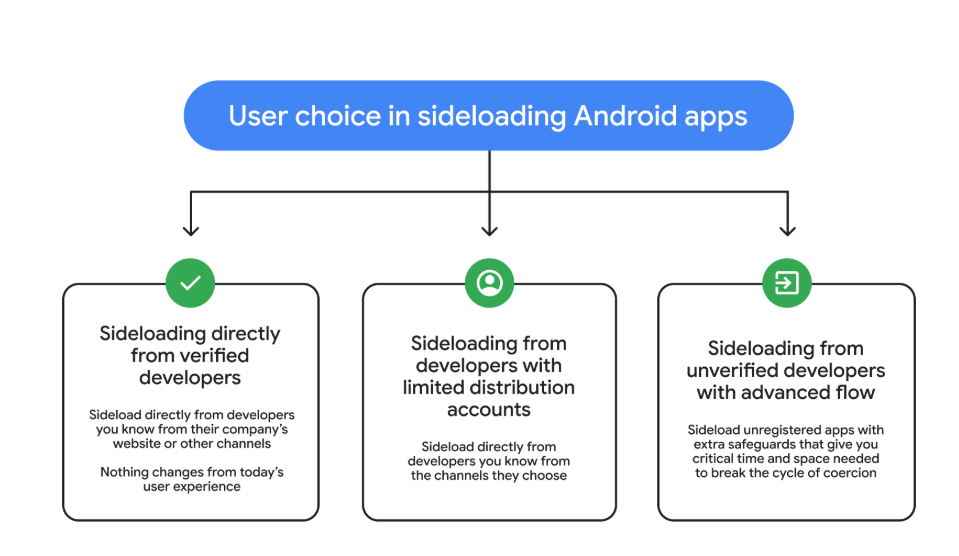
So after these changes, these will be the options for users that have “developer mode” enabled on their Android device.
Sideloading directly from verified developers
Sideloading from developers with limited distribution accounts
Sideloading from unverified developers with Advanced Flow
Image courtesy of Google
Advanced Flow is expected to roll out in August 2026.
Overall, it seems a reasonable compromise. Sideloading isn’t going away, so this keeps that ability but adds meaningful barriers against scam‑driven installs, thwarting social‑engineering campaigns without outright killing power‑user workflows. The one-day delay could turn out to be frustrating though, even if it’s only a one-time event.
We don’t just report on phone security—we provide it
Trio-Tech International initially said hack wasn't 'material,' but then stolen data was published
Trio-Tech International initially shrugged off a ransomware attack at a Singapore subsidiary as immaterial, only to reverse course days later after discovering stolen data had been disclosed.…
kettle When El Reg cybersecurity editor Jessica Lyons joins infosec industry colleagues in San Francisco for RSAC 2026 this week, she's expecting agentic AI to be on everyone's lips - at least those who aren't busy gossiping about the lack of presence from any representatives of the US federal government.…
Ukraine's battlefield lessons show quantity and affordability now trump exquisite hardware
NATO is unprepared to deal with attacks by cheap, mass-produced drones and urgently needs layered, affordable air defense systems to counter the threat, taking a cue from the experience gained by Ukrainian forces over the past four years.…

 Login
Login