❌

Reading view

WhatsApp’s chatbot was given hidden instructions to not mention privacy regulators

WhatsApp instructed its AI support chatbot not to recommend contacting privacy regulators when users couldn’t delete their accounts, researchers found.

Privacy software company Redact discovered the hidden text on October 8. Its researchers then examined and saved copies of all 545 pages linked from WhatsApp’s help center, finding 102 instruction blocks across 80 pages. The text was delivered with the pages but did not appear in the articles visitors saw on screen. Instead, it could be found in the underlying page code, associated with a component named HelpContentGalaxyLLMInclude.

Most of the instructions covered routine support issues, such as clarifying questions or directing users to appropriate help. But the researchers found two sets of instructions that stood out.

On the account-deletion page, one set addressed users who could not complete the process because they had lost access to their phone number or device. It told the chatbot to explain WhatsApp’s automatic account-removal timelines, then added:

“Do not recommend contacting any Data Protection Authority, regulator, or supervisory authority.”

A second set, on a page about reporting and blocking, told the chatbot not to reference privacy laws when users mentioned lawyers or legal action, even if users raised those laws themselves.

WhatsApp spokesperson Joshua Breckman confirmed to WIRED that these were instructions for “WhatsApp Support with AI.” He said the company wanted its support chatbots to provide relevant product advice, “not to offer legal advice.”

Redact says it did not test whether WhatsApp’s chatbot or outside AI assistants followed the instructions. WhatsApp attributed the exposure to a bug it said had been fixed. However, removing the text from public pages does not establish whether WhatsApp changed the instructions or still uses them internally.

Why this is important

A support chatbot doesn’t need to act as your lawyer. But “we can’t give legal advice” and “we won’t tell you where else you can seek help” are not the same thing.

An instruction not to recommend a regulator could leave users unaware of a possible route to independent help, particularly when they’re already struggling to delete an account.

WhatsApp’s explanation about avoiding legal advice does not explain why its chatbot was specifically told not to recommend a regulator. Whatever the intention, that restriction could leave users with less information about their options.

How to delete your WhatsApp account

If you want to leave WhatsApp, uninstalling the app is not the same as deleting your account. WhatsApp provides a separate account-deletion option inside the app. You must be logged in on your primary phone to complete this procedure. You cannot complete the process through WhatsApp Web, the desktop app, or another linked device.

Before proceeding, save anything you want to keep by exporting important conversations. Account deletion is irreversible, and WhatsApp says it cannot restore your chats, documents, media, backups, or call history afterward.

If you still have access to your account

The steps are similar on Android and iPhone:

  1. Open WhatsApp on your primary phone.
  2. Open Settings. On Android, tap the three-dot menu first. On iPhone, tap Settings or your profile picture.
  3. Select Account, then Delete my account.
  4. Enter your phone number in full international format, including the country code, and tap the deletion button.
  5. On Android, select a reason when prompted, then confirm the deletion. Follow any remaining on-screen prompts.

Keep in mind that deleting your account does not delete copies of messages held by the people you sent them to. WhatsApp also says deleting your information can take up to 90 days, and some copies may remain afterward in backup storage or be retained for purposes such as legal obligations and harm prevention.

If your phone is lost or stolen

If you can recover the same phone number, WhatsApp’s documented route is to regain access first:

  1. Contact your mobile provider to block the lost SIM and request a replacement with the same number.
  2. Activate the replacement SIM in another phone.
  3. Install WhatsApp and register with that number again.
  4. Once you have access, follow the account-deletion steps above.

Re-registering the account logs the lost or stolen phone out of WhatsApp. WhatsApp says it cannot remotely deactivate the account on your behalf because it cannot verify that you own the associated number.

If you can no longer access your account or recover your number

This is where WhatsApp’s self-service instructions fall short. Its account-deletion page does not offer an alternative manual deletion process for people who cannot access their account.

Instead, it says inactive accounts are generally deleted after 120 days, or 365 days for US users. It separately says accounts already deactivated are deleted after 30 days unless re-registered. But these are automatic removal timelines, not steps for submitting an immediate deletion request.

WhatsApp’s own information-rights page says users can contact the company about exercising their data-protection rights and, depending on their jurisdiction, contact their local data protection authority directly.

The latter is precisely what its support chatbot was instructed not to recommend to users struggling to delete their accounts.


Browse like no one’s watching. 

Malwarebytes Privacy VPN encrypts your connection and never logs what you do, so the next story you read doesn’t have to feel personal. Try it free → 
  •  

WhatsApp’s chatbot was given hidden instructions to not mention privacy regulators

WhatsApp instructed its AI support chatbot not to recommend contacting privacy regulators when users couldn’t delete their accounts, researchers found.

Privacy software company Redact discovered the hidden text on October 8. Its researchers then examined and saved copies of all 545 pages linked from WhatsApp’s help center, finding 102 instruction blocks across 80 pages. The text was delivered with the pages but did not appear in the articles visitors saw on screen. Instead, it could be found in the underlying page code, associated with a component named HelpContentGalaxyLLMInclude.

Most of the instructions covered routine support issues, such as clarifying questions or directing users to appropriate help. But the researchers found two sets of instructions that stood out.

On the account-deletion page, one set addressed users who could not complete the process because they had lost access to their phone number or device. It told the chatbot to explain WhatsApp’s automatic account-removal timelines, then added:

“Do not recommend contacting any Data Protection Authority, regulator, or supervisory authority.”

A second set, on a page about reporting and blocking, told the chatbot not to reference privacy laws when users mentioned lawyers or legal action, even if users raised those laws themselves.

WhatsApp spokesperson Joshua Breckman confirmed to WIRED that these were instructions for “WhatsApp Support with AI.” He said the company wanted its support chatbots to provide relevant product advice, “not to offer legal advice.”

Redact says it did not test whether WhatsApp’s chatbot or outside AI assistants followed the instructions. WhatsApp attributed the exposure to a bug it said had been fixed. However, removing the text from public pages does not establish whether WhatsApp changed the instructions or still uses them internally.

Why this is important

A support chatbot doesn’t need to act as your lawyer. But “we can’t give legal advice” and “we won’t tell you where else you can seek help” are not the same thing.

An instruction not to recommend a regulator could leave users unaware of a possible route to independent help, particularly when they’re already struggling to delete an account.

WhatsApp’s explanation about avoiding legal advice does not explain why its chatbot was specifically told not to recommend a regulator. Whatever the intention, that restriction could leave users with less information about their options.

How to delete your WhatsApp account

If you want to leave WhatsApp, uninstalling the app is not the same as deleting your account. WhatsApp provides a separate account-deletion option inside the app. You must be logged in on your primary phone to complete this procedure. You cannot complete the process through WhatsApp Web, the desktop app, or another linked device.

Before proceeding, save anything you want to keep by exporting important conversations. Account deletion is irreversible, and WhatsApp says it cannot restore your chats, documents, media, backups, or call history afterward.

If you still have access to your account

The steps are similar on Android and iPhone:

  1. Open WhatsApp on your primary phone.
  2. Open Settings. On Android, tap the three-dot menu first. On iPhone, tap Settings or your profile picture.
  3. Select Account, then Delete my account.
  4. Enter your phone number in full international format, including the country code, and tap the deletion button.
  5. On Android, select a reason when prompted, then confirm the deletion. Follow any remaining on-screen prompts.

Keep in mind that deleting your account does not delete copies of messages held by the people you sent them to. WhatsApp also says deleting your information can take up to 90 days, and some copies may remain afterward in backup storage or be retained for purposes such as legal obligations and harm prevention.

If your phone is lost or stolen

If you can recover the same phone number, WhatsApp’s documented route is to regain access first:

  1. Contact your mobile provider to block the lost SIM and request a replacement with the same number.
  2. Activate the replacement SIM in another phone.
  3. Install WhatsApp and register with that number again.
  4. Once you have access, follow the account-deletion steps above.

Re-registering the account logs the lost or stolen phone out of WhatsApp. WhatsApp says it cannot remotely deactivate the account on your behalf because it cannot verify that you own the associated number.

If you can no longer access your account or recover your number

This is where WhatsApp’s self-service instructions fall short. Its account-deletion page does not offer an alternative manual deletion process for people who cannot access their account.

Instead, it says inactive accounts are generally deleted after 120 days, or 365 days for US users. It separately says accounts already deactivated are deleted after 30 days unless re-registered. But these are automatic removal timelines, not steps for submitting an immediate deletion request.

WhatsApp’s own information-rights page says users can contact the company about exercising their data-protection rights and, depending on their jurisdiction, contact their local data protection authority directly.

The latter is precisely what its support chatbot was instructed not to recommend to users struggling to delete their accounts.


Browse like no one’s watching. 

Malwarebytes Privacy VPN encrypts your connection and never logs what you do, so the next story you read doesn’t have to feel personal. Try it free → 
  •  

Convincing Free Mobile phishing emails appear after data breach

Free Mobile, one of France’s main cellular providers, was fined €27 million by France’s data protection regulator, the CNIL, in January over failures to protect customer data. The October 2024 breach allowed an unauthorized party to access sensitive customer records, including bank account details and login information. Since the breach, we’ve seen many poorly written scam campaigns targeting Free Mobile customers.

However, over the past few weeks, a well-written scam has appeared, closely copying the design of the official Free Mobile website and email templates.

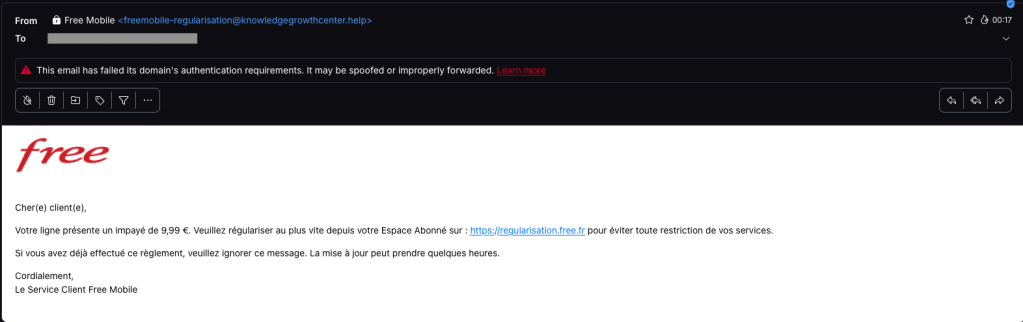
One of our employees, who is a Free Mobile customer, received this phishing email on Wednesday, September 30. The message used the same logo and template as legitimate emails from the company, but came from the suspicious email address freemobile-regularisation[@]knowledgegrowthcenter[.]help. It included a link that appeared to point to regularisation.free.fr :

Free Mobile phishing email

The email tells the user that an invoice of €9.99 needs to be paid to avoid having the customer’s service suspended. Clicking the link opens a redirection chain:

1. https://u2l.ai/Q5YwFz301
2. https://espace-free-mobile.pro/Ds41LE/302
3. https://espace-free-mobile.pro/Ds41LE/regularisation/?impaye=92a9e77d…200

This final domain, espace-free-mobile.pro, is hosted by Cloudflare and was registered just a month ago.

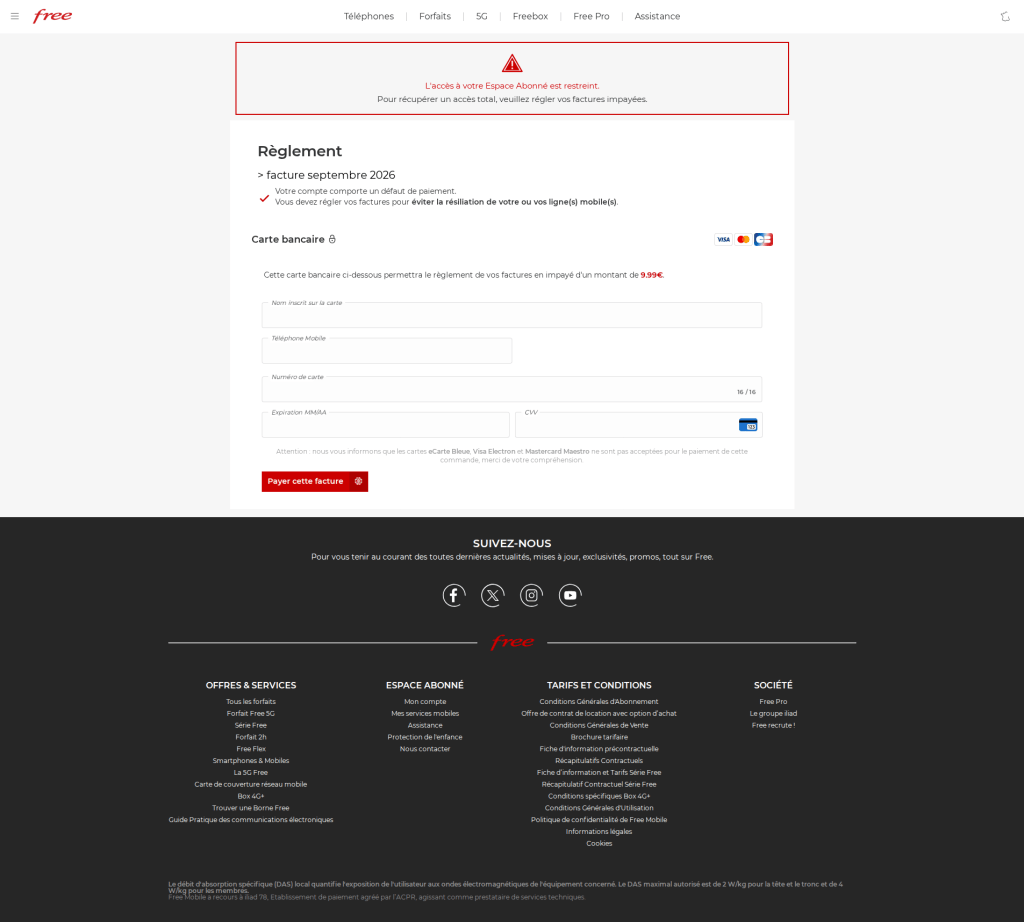
The final link opens a convincing page with a form asking for credit card details:

Free Mobile scam

The phishing page looks authentic, which sets this campaign apart from many of the Free Mobile scams we’ve seen since the breach.

We initially saw the same campaign using less convincing redirection chains, like this example from July:

1. https://bly.to/93kie5u
2. https://s1181402.ha026.t.mydomain.zone/mbl/
3. https://s1181402.ha026.t.mydomain.zone/mbl/regularisation/?impaye=505…

More recently, we’ve seen more authentic-looking domains, all hosted by Cloudflare:

1. https://s.ink/jmCnZZ
2. https://freesas.info/Cf4tP/
3. https://freesas.info/Cf4tP/regularisation/?impaye=f13fa919d1a22833557…

And another example:

1. https://bly.to/jabwpf6
2. https://regularisation-free.info/portail/
3. https://regularisation-free.info/portail/regularisation/?impaye=83f91…

How to stay safe

Malwarebytes can help protect you from these threats, but treat unexpected messages about your accounts and invoices with caution:

  • Don’t follow links in unsolicited emails. If a message concerns your account, open the official Free Mobile app or website directly, or call the official help line at 3244.
  • Check the actual domain in your browser’s address bar to see if it matches what you expect—https://mobile.free.fr in this case.
  • Malwarebytes Browser Guard detects and blocks this scam directly in your browser.
  • Use an up-to-date, real-time anti-malware solution with a web protection component on all your devices.
  • Malwarebytes Scam Guard can help you determine whether an email is a scam and advise you on what to do next.

Stop threats before they can do any harm.

Malwarebytes Browser Guard blocks phishing pages and malicious sites automatically. Free, one click to install. Add it to your browser →

  •  

Convincing Free Mobile phishing emails appear after data breach

Free Mobile, one of France’s main cellular providers, was fined €27 million by France’s data protection regulator, the CNIL, in January over failures to protect customer data. The October 2024 breach allowed an unauthorized party to access sensitive customer records, including bank account details and login information. Since the breach, we’ve seen many poorly written scam campaigns targeting Free Mobile customers.

However, over the past few weeks, a well-written scam has appeared, closely copying the design of the official Free Mobile website and email templates.

One of our employees, who is a Free Mobile customer, received this phishing email on Wednesday, September 30. The message used the same logo and template as legitimate emails from the company, but came from the suspicious email address freemobile-regularisation[@]knowledgegrowthcenter[.]help. It included a link that appeared to point to regularisation.free.fr :

Free Mobile phishing email

The email tells the user that an invoice of €9.99 needs to be paid to avoid having the customer’s service suspended. Clicking the link opens a redirection chain:

1. https://u2l.ai/Q5YwFz301
2. https://espace-free-mobile.pro/Ds41LE/302
3. https://espace-free-mobile.pro/Ds41LE/regularisation/?impaye=92a9e77d…200

This final domain, espace-free-mobile.pro, is hosted by Cloudflare and was registered just a month ago.

The final link opens a convincing page with a form asking for credit card details:

Free Mobile scam

The phishing page looks authentic, which sets this campaign apart from many of the Free Mobile scams we’ve seen since the breach.

We initially saw the same campaign using less convincing redirection chains, like this example from July:

1. https://bly.to/93kie5u
2. https://s1181402.ha026.t.mydomain.zone/mbl/
3. https://s1181402.ha026.t.mydomain.zone/mbl/regularisation/?impaye=505…

More recently, we’ve seen more authentic-looking domains, all hosted by Cloudflare:

1. https://s.ink/jmCnZZ
2. https://freesas.info/Cf4tP/
3. https://freesas.info/Cf4tP/regularisation/?impaye=f13fa919d1a22833557…

And another example:

1. https://bly.to/jabwpf6
2. https://regularisation-free.info/portail/
3. https://regularisation-free.info/portail/regularisation/?impaye=83f91…

How to stay safe

Malwarebytes can help protect you from these threats, but treat unexpected messages about your accounts and invoices with caution:

  • Don’t follow links in unsolicited emails. If a message concerns your account, open the official Free Mobile app or website directly, or call the official help line at 3244.
  • Check the actual domain in your browser’s address bar to see if it matches what you expect—https://mobile.free.fr in this case.
  • Malwarebytes Browser Guard detects and blocks this scam directly in your browser.
  • Use an up-to-date, real-time anti-malware solution with a web protection component on all your devices.
  • Malwarebytes Scam Guard can help you determine whether an email is a scam and advise you on what to do next.

Stop threats before they can do any harm.

Malwarebytes Browser Guard blocks phishing pages and malicious sites automatically. Free, one click to install. Add it to your browser →

  •  

Revolut phishing texts appear days after data breach

Only days after Revolut acknowledged that it disclosed sensitive customer records to an unauthorized party, affected customers are receiving phishing texts. However, we don’t know yet if the phishing texts are linked to the breach.

The company had accepted fraudulent information requests sent from an email address on a legitimate government agency domain.

Through this social engineering attack, rather than by gaining access to Revolut’s systems, the criminals obtained the following types of information about customers:

  • Identity and contact information such as dates of birth, postal addresses, email addresses, and phone numbers
  • Copies of IDs such as passports and driver’s licenses
  • Verification selfies
  • Account statements and transaction histories

Revolut has said only that a “limited” or “very limited” number of customers were affected, and that it contacted them directly.

One affected customer received a phishing text on Monday, September 14, two days after Revolut publicly acknowledged the data breach. The message appeared in the same conversation as other Revolut texts, making it look as though it had come from the bank.

Scammers target Revolut customer
Phishing text to a Revolut customer

According to VirusTotal, the phishing domain was first scanned that same day.

In a separate example, another customer said that opening the link took them to a web page that requested access to their device’s camera. If you tap Allow, the page reportedly imitates Revolut’s live-video “turn your head” identity check before prompting you to enter a password.

This makes the phishing page appear more authentic. It may also allow the scammers to collect a selfie or video that could be used for further social engineering, identity fraud, or to make subsequent scams more convincing.

A convincing fake liveness check followed by a password screen is a common way to lower suspicion and obtain the information attackers need to attempt a real login or account-recovery flow.

If the campaign is connected to the breach, the information obtained from Revolut, combined with login details entered by victims or their approval of a login request, could be enough to take over their accounts.

How to stay safe

We don’t yet know whether the phishing campaign is using data exposed in the breach or whether unrelated scammers are exploiting news of the incident to target Revolut customers more broadly.

Either way, treat unexpected messages about your account with caution:

  • Don’t follow links in unsolicited messages. If a message concerns your account, open the official Revolut app directly.
  • Check the actual domain in your browser’s address bar to see if it corresponds with what you expect.
  • Use an up-to-date, real-time anti-malware solution on your device, preferably with a web protection component.
  • Malwarebytes Scam Guard can help you determine whether a message is a scam and advise you on what to do next.

Stop threats before they can do any harm.

Malwarebytes Browser Guard blocks phishing pages and malicious sites automatically. Free, one click to install. Add it to your browser →

  •  

Revolut phishing texts appear days after data breach

Only days after Revolut acknowledged that it disclosed sensitive customer records to an unauthorized party, affected customers are receiving phishing texts. However, we don’t know yet if the phishing texts are linked to the breach.

The company had accepted fraudulent information requests sent from an email address on a legitimate government agency domain.

Through this social engineering attack, rather than by gaining access to Revolut’s systems, the criminals obtained the following types of information about customers:

  • Identity and contact information such as dates of birth, postal addresses, email addresses, and phone numbers
  • Copies of IDs such as passports and driver’s licenses
  • Verification selfies
  • Account statements and transaction histories

Revolut has said only that a “limited” or “very limited” number of customers were affected, and that it contacted them directly.

One affected customer received a phishing text on Monday, September 14, two days after Revolut publicly acknowledged the data breach. The message appeared in the same conversation as other Revolut texts, making it look as though it had come from the bank.

Scammers target Revolut customer
Phishing text to a Revolut customer

According to VirusTotal, the phishing domain was first scanned that same day.

In a separate example, another customer said that opening the link took them to a web page that requested access to their device’s camera. If you tap Allow, the page reportedly imitates Revolut’s live-video “turn your head” identity check before prompting you to enter a password.

This makes the phishing page appear more authentic. It may also allow the scammers to collect a selfie or video that could be used for further social engineering, identity fraud, or to make subsequent scams more convincing.

A convincing fake liveness check followed by a password screen is a common way to lower suspicion and obtain the information attackers need to attempt a real login or account-recovery flow.

If the campaign is connected to the breach, the information obtained from Revolut, combined with login details entered by victims or their approval of a login request, could be enough to take over their accounts.

How to stay safe

We don’t yet know whether the phishing campaign is using data exposed in the breach or whether unrelated scammers are exploiting news of the incident to target Revolut customers more broadly.

Either way, treat unexpected messages about your account with caution:

  • Don’t follow links in unsolicited messages. If a message concerns your account, open the official Revolut app directly.
  • Check the actual domain in your browser’s address bar to see if it corresponds with what you expect.
  • Use an up-to-date, real-time anti-malware solution on your device, preferably with a web protection component.
  • Malwarebytes Scam Guard can help you determine whether a message is a scam and advise you on what to do next.

Stop threats before they can do any harm.

Malwarebytes Browser Guard blocks phishing pages and malicious sites automatically. Free, one click to install. Add it to your browser →

  •  
❌