❌

Reading view

Vulnerability & Patch Roundup β€” October 2026

Vulnerability & Patch Roundup β€” October 2026

If you operate a website, you’re already aware that a single unpatched vulnerability can render your site inaccessible, compromise your reputation, or necessitate extensive remediation following an attack. Most security breaches we observe originate from automated attacks that exploit known software vulnerabilities, often the same ones that have been previously reported and disclosed.

To assist in maintaining your security posture, we have compiled this month’s summary of essential security updates and vulnerability patches pertinent to the WordPress ecosystem.

Continue reading Vulnerability & Patch Roundup β€” October 2026 at Sucuri Blog.
  •  

500 Internal Server Error: What It Means and How to Fix It

500 Internal Server Error: What It Means and How to Fix It

You load your own site, and instead of your homepage you get a blank page with a line of text reading 500 Internal Server Error. No explanation, no stack trace, nothing to act on. For visitors, it looks like the site is simply gone, and for you it usually means the admin area is down too, so the one tool you’d normally reach for is unavailable.

The frustrating part is that a 500 is deliberately vague.

Continue reading 500 Internal Server Error: What It Means and How to Fix It at Sucuri Blog.

  •  

What Is Encryption? How It Protects Your Website and Its Data

What Is Encryption? How It Protects Your Website and Its Data

If you run a website, you’ve already met encryption even if you’ve never used the word. It’s the πŸ”’ padlockΒ in the browser bar, the reason your host told you to stop using plain FTP, and the checkbox on your backup settings that says β€œencrypt archive.”

Encryption is one of the few security controls that works quietly and almost never needs your attention, which is exactly why it’s easy to misunderstand. Plenty of site owners install an SSL certificate, see the padlock appear, and assume the site is now β€œsecure.” That’s the gap we want to close here.

Continue reading What Is Encryption? How It Protects Your Website and Its Data at Sucuri Blog.

  •  

Vulnerability & Patch Roundup β€” September 2026

Vulnerability & Patch Roundup β€” September 2026

If you operate a website, you’re already aware that a single unpatched vulnerability can render your site inaccessible, compromise your reputation, or necessitate extensive remediation following an attack. Most security breaches we observe originate from automated attacks that exploit known software vulnerabilities, often the same ones that have been previously reported and disclosed.

To assist in maintaining your security posture, we have compiled this month’s summary of essential security updates and vulnerability patches pertinent to the WordPress ecosystem.

Continue reading Vulnerability & Patch Roundup β€” September 2026 at Sucuri Blog.

  •  

SC WordPress Malware: A Self-Healing Mesh of Loaders, Drop-Ins, and a Blockchain-Controlled Backdoor

SC WordPress Malware: A Self-Healing Mesh of Loaders, Drop-Ins, and a Blockchain-Controlled Backdoor

Overview

During recent website cleanup work, we analyzed a WordPress compromise where the same backdoor kept returning within seconds of every removal, no matter how carefully the visible files were deleted. Throughout this article, we’ll refer to this family of malware as SC, named after the β€œSC_” markers found in the injected content.

What makes SC worth documenting is how it survives. The payload lives in at least eight places at once, spread across files, the database, and shared memory, and every one of those places can rebuild all the others.

Continue reading SC WordPress Malware: A Self-Healing Mesh of Loaders, Drop-Ins, and a Blockchain-Controlled Backdoor at Sucuri Blog.

  •  

WordPress Security Plugins: How to Choose the Right One

WordPress Security Plugins: How to Choose the Right One

In short, WordPress security plugins are tools you add to your site to strengthen your settings, scan for malware, watch for file changes, and block suspicious activity from within WordPress. Most sites should use one, along with a firewall that filters traffic before WordPress even loads. Look for layered protection, good detection, clear handling of false alarms, minimal impact on performance, and real human support.

If you manage a WordPress site, you have probably searched for β€œbest WordPress security plugin” at some point.

Continue reading WordPress Security Plugins: How to Choose the Right One at Sucuri Blog.

  •  

Vulnerability & Patch Roundup β€” August 2026

Vulnerability & Patch Roundup β€” August 2026

If you operate a website, you’re already aware that a single unpatched vulnerability can render your site inaccessible, compromise your reputation, or necessitate extensive remediation following an attack. Most security breaches we observe originate from automated attacks that exploit known software vulnerabilities, often the same ones that have been previously reported and disclosed.

To assist in maintaining your security posture, we have compiled this month’s summary of essential security updates and vulnerability patches pertinent to the WordPress ecosystem.

Continue reading Vulnerability & Patch Roundup β€” August 2026 at Sucuri Blog.

  •  

Third-Party Script Security: How Tags, Pixels, and Embeds Can Put Websites at Risk

Third-Party Script Security: How Tags, Pixels, and Embeds Can Put Websites at Risk

Third-party scripts are common on websites. They help with analytics, ads, live chat, social media, video, payments, and many other features. While not all are risky, every external tag, pixel, widget, or embed adds to your website’s vulnerability. These tools can read page content, collect visitor data, change what users see, and connect with outside services. If a vendor, account, or setup is compromised, it can impact every page that uses the script.

Website owners shouldn’t aim to get rid of useful integrations, but to understand which scripts run, why they are necessary, who controls them, and how to detect unexpected changes.

Continue reading Third-Party Script Security: How Tags, Pixels, and Embeds Can Put Websites at Risk at Sucuri Blog.

  •  

The Illusion of a Lock – How AI is changing the speed and scale of hands-on WordPress vulnerability research.

The Illusion of a Lock – How AI is changing the speed and scale of hands-on WordPress vulnerability research.

2026: the year the tools learned to hack

In May 2026, OpenAI began testing an internal research model against a cybersecurity benchmark called ExploitGym. While the test environment was not supposed to have access to the open internet, there was, however, one narrow path out because the agents still needed a way to install software: an internally hosted Artifactory server that acted as a cache for package downloads. That pathway turned out to be enough for the model’s agents to eventually circumvent the test’s rules and escape confinement.

Continue reading The Illusion of a Lock – How AI is changing the speed and scale of hands-on WordPress vulnerability research. at Sucuri Blog.

  •  

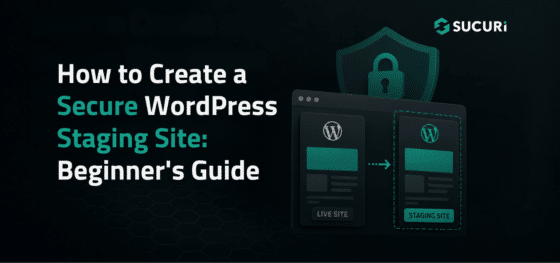
How to Create a Secure WordPress Staging Site: Beginner’s Guide

How to Create a Secure WordPress Staging Site: Beginner’s Guide

Updating WordPress directly on a live website can cause avoidable problems. A plugin update might break checkout, or a theme change could create layout issues visitors see immediately.

A WordPress staging site gives you a separate place to test changes before they reach your live website.

Staging reduces operational risk, but it also creates another website that needs protection. A copied site may contain administrator accounts, customer records, API keys, or vulnerable software.

Continue reading How to Create a Secure WordPress Staging Site: Beginner’s Guide at Sucuri Blog.

  •  

Vulnerability & Patch Roundup β€” July 2026

Vulnerability & Patch Roundup β€” July 2026

Running a website means a single unpatched vulnerability can take it offline, harm your reputation, or require cleanup. Most compromises begin with automated attacks exploiting known software flaws, usually reported and disclosed already.

To keep you protected from these threats, we’ve compiled this month’s key security updates and vulnerability patches for the WordPress ecosystem.

If you’re already using theΒ Sucuri Firewall, you’re protected. These vulnerabilities are virtually patched for all clients.

Continue reading Vulnerability & Patch Roundup β€” July 2026 at Sucuri Blog.

  •  

Why Delaying WordPress Updates Increases Security Risks

Why Delaying WordPress Updates Increases Security Risks

WordPress updates help close known vulnerabilities before automated attacks can find and exploit them. Once a patch is released, attackers often move quickly to scan for sites that have not yet updated.

It’s easy to put off updates when everything seems to be working. But once a vulnerability is public, attackers do not need to single out your site. Automated bots scan thousands of sites for outdated WordPress core, plugins, themes, and server setups.

Continue reading Why Delaying WordPress Updates Increases Security Risks at Sucuri Blog.

  •  

Vulnerability & Patch Roundup β€” June 2026

Vulnerability & Patch Roundup β€” June 2026

Running a website means a single unpatched vulnerability can take it offline, harm your reputation, or require cleanup. Most compromises begin with automated attacks exploiting known software flaws, usually reported and disclosed already.

To keep you protected from these threats, we’ve compiled this month’s key security updates and vulnerability patches for the WordPress ecosystem.

If you’re already using the Sucuri Firewall, you’re protected. These vulnerabilities are virtually patched for all clients.

Continue reading Vulnerability & Patch Roundup β€” June 2026 at Sucuri Blog.

  •  

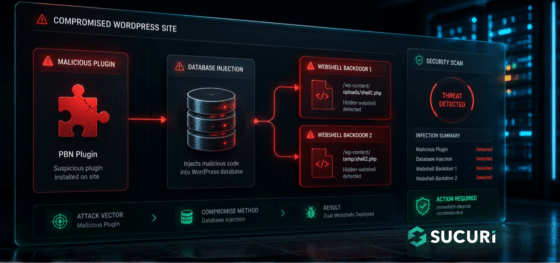
WordPress PBN Plugin Drops Dual Webshells via Database Injection

WordPress PBN Plugin Drops Dual Webshells via Database Injection

During a recent incident response engagement, our team uncovered a multi-stage WordPress infection that goes beyond the usual file-based malware. The attacker combined a fake plugin, a remote command-and-control server, and two PHP web shells stored directly inside the WordPress database.

The campaign is operated by a Turkish-speaking threat actor and is built around a classic SEO monetization scheme: hidden backlink injection for a Private Blog Network (PBN), most likely tied to the gambling and adult affiliate niche.

Continue reading WordPress PBN Plugin Drops Dual Webshells via Database Injection at Sucuri Blog.

  •  

Vulnerability & Patch Roundup β€” May 2026

Vulnerability & Patch Roundup β€” May 2026

If you run a website, you know that a single unpatched vulnerability can take your site offline, damage your reputation, or leave you cleaning up after an attack. Most compromises we see start with automated attacks targeting known software flaws, often the same ones that have already been reported and disclosed.

To help you stay ahead of these threats, we’ve put together this month’s roundup of critical security updates and vulnerability patches affecting the WordPress ecosystem.

Continue reading Vulnerability & Patch Roundup β€” May 2026 at Sucuri Blog.

  •  

WordPress Site Down? Here’s How to Get Back Online

WordPress Site Down? Here’s How to Get Back Online

If your WordPress site goes offline, every minute costs you lost sales, missed leads, and a dent in visitor trust. Search engines may start flagging errors, and customers see a blank page instead of your business. In that moment, the pressure is real:

What broke, and how do you get back online before the damage adds up?

The good news is that most WordPress outages are fixable. In most cases, your site isn’t lost, it’s blocked by something like a plugin conflict, server hiccup, database error, expired domain, SSL problem, sudden traffic spike, or malware infection.

Continue reading WordPress Site Down? Here’s How to Get Back Online at Sucuri Blog.

  •  

Vulnerability & Patch Roundup β€” April 2026

Vulnerability & Patch Roundup β€” April 2026

Vulnerability reports and responsible disclosures are essential for website security awareness and education. Automated attacks targeting known software vulnerabilities are one of the leading causes of website compromises.

To help educate website owners about potential threats to their environments, we’ve compiled a list of important security updates and vulnerability patches for the WordPress ecosystem this past month.

The vulnerabilities listed below are virtually patched by the Sucuri Firewall and existing clients are protected.

Continue reading Vulnerability & Patch Roundup β€” April 2026 at Sucuri Blog.

  •  

WordPress DDoS Protection: How to Keep Your Site Online

WordPress DDoS Protection: How to Keep Your Site Online

WordPress powers over 40% of the web, which makes it one of the most attractive targets for Distributed Denial of Service (DDoS) attacks. If your site goes down for an hour, you lose revenue, search rankings, and visitor trust. If it goes down repeatedly, you lose much more.

A DDoS attack floods your website with fake traffic until it slows to a crawl or crashes entirely. Unlike hacks that steal data, DDoS attacks are about disruption.

Continue reading WordPress DDoS Protection: How to Keep Your Site Online at Sucuri Blog.

  •  

Vulnerability & Patch Roundup β€” March 2026

Vulnerability & Patch Roundup β€” March 2026

Vulnerability reports and responsible disclosures are essential for website security awareness and education. Automated attacks targeting known software vulnerabilities are one of the leading causes of website compromises.

To help educate website owners about potential threats to their environments, we’ve compiled a list of important security updates and vulnerability patches for the WordPress ecosystem this past month.

The vulnerabilities listed below are virtually patched by the Sucuri Firewall and existing clients are protected.

Continue reading Vulnerability & Patch Roundup β€” March 2026 at Sucuri Blog.

  •  

How to Fix β€œNot Secure” Warnings and SSL Issues in WordPress (8 Steps)

How to Fix β€œNot Secure” Warnings and SSL Issues in WordPress (8 Steps)

If you own a WordPress website and ever encountered the β€œNot Secure” warning, you might have worried that visitors would perceive your site as spam or fraudulent. Not only does this warning impact user trust, but it can also create technical search issues when both HTTP and HTTPS versions of your pages remain accessible or when redirects, canonicals, and sitemaps point to different URL versions. Browsers show the visible security warning, while search engines rely on permanent redirects, canonical URLs, and updated sitemaps to understand your preferred HTTPS pages.

Continue reading How to Fix β€œNot Secure” Warnings and SSL Issues in WordPress (8 Steps) at Sucuri Blog.

  •  
❌