Two critical PHP vulnerabilities (CVE-2026-109618 and CVE-2026-109619) can allow unauthenticated attackers to execute code on affected web servers. Both carry a CVSS v4.0 score of 9.2, and exploitation attempts are already being observed in the wild.
PHP has released the following fixed versions:
PHP branch Fixed version
PHP 8.5
8.5.12
PHP 8.4
8.4.27
PHP 8.3
8.3.36
PHP 8.2
8.2.35
If you manage your own server or VPS, install the appropriate update immediately.
Microsoft’s October Patch Tuesday update stands out for two reasons. First, the total number of patches has reached four digits for the first time. Second, to help companies better understand the details of the vulnerabilities, Microsoft has decided to group them into risk cohorts. A cohort brings together vulnerabilities that are exploited under the same conditions and affect the same systems. They replace neither the severity rating, nor the individual bulletins for each CVE. While they’re unlikely to be suitable for comprehensive patch prioritization, they will help quickly assess which part of an infrastructure is currently most at risk.
Statistics corner
Of the 1,414 vulnerabilities addressed in the October Patch Tuesday release, 1,102 directly affect the Windows operating system, 134 — Microsoft Office, 36 — SharePoint Server, 22 — SQL Server, and seven — Exchange Server. The vast majority — 677 — lead to privilege escalation, 317 to remote code execution, 40 to security bypass, and 73 to denial of service (DoS).
There are 86 critical vulnerabilities on the list, of which 68 lead to RCE, 14 to privilege escalation, three to spoofing, and one to data leakage. In addition, two vulnerabilities were disclosed before being patched, and one is being exploited in real-world attacks.
CVE-2026-96951 — vulnerability in Windows Shell
The only zero-day vulnerability patched in the October update that attackers are already exploiting in real-world attacks is CVE-2026-96951 in Windows Shell (CVSS severity score: 8.8). Details on how it’s being exploited aren’t yet known; however, according to Microsoft’s description, it involves command injection that allows bypassing a security feature when accessing the system over a network. Microsoft credits experts at both Fujitsu and Anthropic for discovering the vulnerability, so it was likely found using neural networks.
CVE-2026-108398 and CVE-2026-92707: vulnerabilities disclosed before patches were released
Information about these two vulnerabilities was made public before the October update was released. In theory, this could mean that attackers attempted to exploit them ahead of time. These are:
CVE-2026-108398 — a vulnerability in the .NET Framework that allows bypassing WDAC protection;
CVE-2026-92707 — a vulnerability in the third-party MessagePack-CSharp serialization component, leading to a denial of service (DoS).
However, according to the security bulletins, neither has been observed in actual attacks yet.
What else to pay attention to
Several vulnerabilities patched by the latest update combine potentially serious consequences with relatively simple exploitation. Particular attention should be paid to three flaws that could potentially lead to arbitrary code execution:
Microsoft isn’t the only company that releases regular update packages for newly discovered vulnerabilities.
In its October update, Adobe fixed 174 defects in its products, including critical vulnerabilities (CVSS 10) in ColdFusion and Commerce/Magento. These systems are typically accessible from an external network, making them particularly attractive to attackers.
SAP’s October security bulletin lists 20 vulnerabilities, including CVE-2026-89111 — an SSRF vulnerability in the Cloud SDK for Python. This vulnerability, rated CVSS 10, allows attackers to steal OAuth tokens.
How to keep your company safe?
Recently, thanks to neural networks, the number of vulnerabilities detected and patched has been regularly breaking records. To avoid getting overwhelmed by the flood of patches, we recommend using an automated platform for tracking and assessing vulnerabilities . It helps not only identify and fix vulnerabilities, it also prioritizes them based on actual risks and automates the remediation process.
Microsoft today issued updates to fix more than 1,400 security vulnerabilities in its Windows operating systems and other software. Today’s epic patch batch dwarfs September’s record of nearly 1,000 fixes, which was already about ten times the normal monthly patch load from Redmond.
Just one of the weaknesses patched this week is considered a “zero day,” or already exploited in the wild. CVE-2026-96951 is a security feature bypass in the Windows Shell that affects Windows 10 and 11 systems, as well as some Server versions.
Windows 10 users might be wondering if they can still expect security updates after this month. Microsoft had been slated to stop shipping updates for Windows 10 systems in October 2025, but ended up adding another year of free updates after considerable pushback. A few months ago, Microsoft quietly extended that support for another year (until October 2027).
At least 78 of the flaws fixed this month are rated “critical,” meaning they could be exploited with little or no action by the user, and most of those critical bugs allow an attacker to execute code of their choice on the vulnerable system.
While Microsoft said there are no signs anyone is exploiting it yet, a security feature bypass in the .NET Framework (CVE-2026-108398) was publicly disclosed prior to today, potentially giving attackers advance time to work out how to exploit the bug.
Satnam Narang at Tenable said the number of flaws fixed this month far surpasses the previous record-setting year 2020, when Microsoft patched 1,261 CVEs.
“We’ve now crossed the 4,000 CVE mark with two months left to go,” he said.
Microsoft credits large language models for the high volume of bug discovery, and presumably AI gets credit for many of the patches used to fix these flaw. Meanwhile, security experts have been warning that these unusually large patch volleys from Microsoft are placing extra strain on corporate security teams, which often have to test individual updates before deploying them across a network to ensure the fixes don’t cause problems for other software.
Tyler Reguly, associate director of security research and development at Fortra, notes that just 26 Microsoft vulnerabilities appeared in the “Known Exploited Vulnerabilities” (KEV) catalog maintained by the U.S. Cybersecurity & Infrastructure Security Agency (CISA) so far this year, and security teams would do well to prioritize patching those 26 vulnerabilities first.
“Security leaders should focus on exploitable risk, and ask whether their teams have the clarity, capacity and support to act,” Reguly said.
Which vulnerabilities deserve the most scrutiny in your organization? The folks at Cisco Talos have a useful roundup of the more noteworthy flaws that Microsoft fixed today, and of course the SANS Internet Storm Center has a reliable roundup that indexes vulnerabilities by severity, CVE number and affected software.
On September 15 this year, Google published details of patches for 110 vulnerabilities in its own Google Pixel smartphones. Among all the disclosed flaws, CVE-2026-58704 stands out the most, for it appears that this zero-day is being exploited in targeted attacks.
In today’s post, we talk about what’s so special about the Google Pixel, and why these devices get security updates all of their own – separate from regular Android updates. We also cover the vulnerabilities addressed in this latest update, with a special focus on the mentioned, most dangerous one – CVE-2026-58704 – and wrap up with tips on how to both protect your device and avoid becoming a victim of cyberattack on it.
Why do Google Pixel phones get security updates separate from Android?
The reader might reasonably wonder: I’ve already installed this month’s Android security updates on my Google Pixel. Isn’t that the same thing? Google Pixel does run on Android and receives those security updates, which are detailed in the monthly Android Security Bulletin. However, manufacturers of Android-based devices use different sets of hardware and software components. That’s why, alongside vulnerabilities common to all Android devices, there are security issues specific to individual manufacturers’ devices.
For its own smartphones, Google publishes separate security updates, covered by a dedicated Pixel Update Bulletin. Rather than replacing the Android Security Bulletin, this document complements it by detailing vulnerabilities specific to devices manufactured by Google. Other Android smartphones also receive similar updates from their manufacturers.
The Pixel Update Bulletin for September 2026 clearly shows why Google needs separate updates for its smartphones in the first place. Many of the vulnerabilities it fixes affect specific Pixel hardware (or hardware-related) components: the modem, bootloader, GPU, fingerprint scanner components, and other parts of the device. On smartphones from other manufacturers, these features might rely on entirely different hardware and software components, so the fixes listed in the Pixel Update Bulletin don’t apply to those phones.
That said, these vulnerabilities could still be relevant for Pixel owners who’ve flashed their devices with custom ROMs. Switching to a different OS doesn’t alter the device’s hardware components, and may not replace the firmware. Therefore, the vulnerabilities themselves may persist, but whether patches are available, and how they’re installed, depends on the specific OS.
CVE-2026-58704: a zero-day vulnerability being actively exploited in the wild
Now let’s look closer at the specific vulnerabilities Google fixed in September. The most significant one is the above-mentioned CVE-2026-58704.
This vulnerability affects the Cellular Modem component, which handles the smartphone’s communication with cellular networks. It stems from a logic error in the code, which, under certain conditions, allows bypassing the intended permission check.
Successful exploitation of CVE-2026-58704 lets attackers escalate privileges on the smartphone to gain broader access to its functions and data. Note that the attack takes place over a cellular network and the threat actors need low-level privileges on the targeted device to start with.
In practice, this means attackers can’t exploit CVE-2026-58704 to attack a Pixel from just anywhere over the internet, as they’d apparently need to either compromise the cellular network the target smartphone is already connected to or, more likely, force it to connect to a malicious base station under their control.
Google hasn’t disclosed all the details of this vulnerability yet, and the related report is not publicly accessible. As a result, the technical details that would show how easy it is for attackers to exploit CVE-2026-58704 remain unknown pending installation of the patches on all devices.
Nevertheless, Google claims that there are signs of limited exploitation of CVE-2026-58704.
What we know about the other 109 vulnerabilities
Of the remaining 109 vulnerabilities found in Google Pixel devices, only one is rated moderate; the others are either high (62) or outright critical (46). Nine of these flaws fall into the RCE (remote code execution) category. This means that if an attacker successfully exploits one of these vulnerabilities, they can remotely force the device to run malicious code. The exact conditions for the attack depend on the specific vulnerability.
Another 88 vulnerabilities fall into the elevation of privilege (EoP) category. These let an attacker who’s already gained a certain level of access to the device expand their privileges. The CVE-2026-58704 vulnerability discussed above falls into this same category, which is why the September bulletin lists 89 EoP vulnerabilities in total.
Finally, 10 vulnerabilities can lead to information disclosure (ID), and two more to denial of service (DoS). In short, that’s a hefty list of flaws, so Google Pixel owners shouldn’t wait around to install the patches.
How to avoid becoming a victim
Google Pixel owners can install the update that fixes the vulnerabilities covered in this post by following this path: Settings → Security & privacy → System & updates → Security update → Install. Keep in mind that the phone will automatically restart to finish installing the update.
To keep your phone secure we recommend the following general measures:
Install security updates on your phone regularly and promptly – whether it’s a Google Pixel, an Android smartphone from a different manufacturer, or even an iPhone.
Avoid installing apps from questionable sources.
Read reviews before installing apps from official stores, since malware isn’t uncommon there too. Users who have already been burned will often sound the alarm in the reviews long before store moderators get around to removing the dangerous app.
Install a reliable security solution to keep you from downloading malware, and warn you about suspicious activity on your device.
Over the last few days, Google issued several different Chrome updates.
On September 22, Google released a Stable Channel Update for Desktop. This is the most important one for desktop users. It brings Chrome to version 154.0.8037.57 for Linux and versions 154.0.8037.57/.58 for Windows and Mac. The update includes 108 security fixes including 11 rated Critical.
It will roll out over the coming days and weeks.
One day later, Google released Chrome 155 for Android, version 155.0.8059.16, to a small percentage of users. It may not be available on Google Play for everyone yet, but keep an eye out for it. Google says it includes stability and performance improvements.
On top of these, Chrome 155 is also available in the Beta channel. The Android release is an Early Stable rollout, meaning Google sends it to a small share of users first, to spot unexpected compatibility or reliability issues before expanding it to everyone. Beta is a separate prerelease version for people who want to try upcoming features roughly four to six weeks before Stable. It is relatively polished but can still contain bugs, so it is best suited to testing rather than everyday use.
How to update Chrome
The easiest option is to allow Chrome to update automatically. But you can end up lagging behind on updates if you never close your browser or if something goes wrong, such as an extension preventing the update.
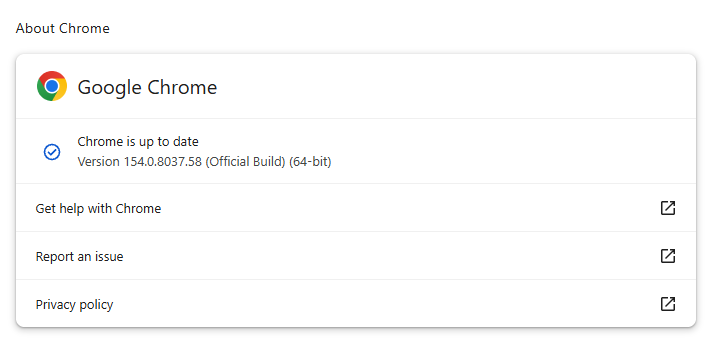
If you don’t want to wait for the rollout to reach you, manually updating is easy. open About Google Chrome from Chrome’s settings or Help menu. Chrome will check for updates. If one is available, click Relaunch to apply it.
Some of the desktop security fixes deserve a closer look.
Let’s start with CVE-2026-95350, a buffer overflow flaw in ANGLE, Chrome’s graphics-translation layer.
A buffer overflow is a bug in code that allows an attack to happen when a program puts more data into an area of memory than it can hold. Essentially, the attacker writes garbage data that fills up the memory, then writes code that overwrites existing code in adjoining memory, which later gets executed by the vulnerable process.
A crafted webpage could potentially trigger the flaw, which could lead to memory safety bugs, including browser crashes or possible code execution.
Another Critical buffer overflow bug in ANGLE is tracked as CVE-2026-95281. A malicious webpage could potentially reach vulnerable graphics-processing code, so the bug may enable serious impacts such as browser compromise, but Google has not provided exploitation details.
And then there is CVE-2026-95357, an out-of-bounds write in Chrome’s GPU component. This means a program could write data outside its intended area of memory.
The GPU component is the part of Chrome that handles how graphics work with your computer’s graphics processor.
Stop threats before they can do any harm.
Malwarebytes Browser Guard blocks phishing pages and malicious sites automatically. Free, one click to install. Add it to your browser →
Over the last few days, Google issued several different Chrome updates.
On September 22, Google released a Stable Channel Update for Desktop. This is the most important one for desktop users. It brings Chrome to version 154.0.8037.57 for Linux and versions 154.0.8037.57/.58 for Windows and Mac. The update includes 108 security fixes including 11 rated Critical.
It will roll out over the coming days and weeks.
One day later, Google released Chrome 155 for Android, version 155.0.8059.16, to a small percentage of users. It may not be available on Google Play for everyone yet, but keep an eye out for it. Google says it includes stability and performance improvements.
On top of these, Chrome 155 is also available in the Beta channel. The Android release is an Early Stable rollout, meaning Google sends it to a small share of users first, to spot unexpected compatibility or reliability issues before expanding it to everyone. Beta is a separate prerelease version for people who want to try upcoming features roughly four to six weeks before Stable. It is relatively polished but can still contain bugs, so it is best suited to testing rather than everyday use.
How to update Chrome
The easiest option is to allow Chrome to update automatically. But you can end up lagging behind on updates if you never close your browser or if something goes wrong, such as an extension preventing the update.
If you don’t want to wait for the rollout to reach you, manually updating is easy. open About Google Chrome from Chrome’s settings or Help menu. Chrome will check for updates. If one is available, click Relaunch to apply it.
Some of the desktop security fixes deserve a closer look.
Let’s start with CVE-2026-95350, a buffer overflow flaw in ANGLE, Chrome’s graphics-translation layer.
A buffer overflow is a bug in code that allows an attack to happen when a program puts more data into an area of memory than it can hold. Essentially, the attacker writes garbage data that fills up the memory, then writes code that overwrites existing code in adjoining memory, which later gets executed by the vulnerable process.
A crafted webpage could potentially trigger the flaw, which could lead to memory safety bugs, including browser crashes or possible code execution.
Another Critical buffer overflow bug in ANGLE is tracked as CVE-2026-95281. A malicious webpage could potentially reach vulnerable graphics-processing code, so the bug may enable serious impacts such as browser compromise, but Google has not provided exploitation details.
And then there is CVE-2026-95357, an out-of-bounds write in Chrome’s GPU component. This means a program could write data outside its intended area of memory.
The GPU component is the part of Chrome that handles how graphics work with your computer’s graphics processor.
Stop threats before they can do any harm.
Malwarebytes Browser Guard blocks phishing pages and malicious sites automatically. Free, one click to install. Add it to your browser →
Hi Everyone! The DFIR, OSINT, & Cybersecurity Community Listings site is now live! This new site replaces both the old Events Site and the Discounts page on the Training Site. You can find and...
Starting August 10, 2026, Sucuri will begin moving customer account logins to a new authentication platform designed to provide a stronger, more modern sign-in experience.
The rollout will happen gradually over the following few weeks, so not every account will transition at the same time.
For most users, there is nothing to do. Your password will remain the same, your current two-factor authentication setup will continue working, and existing bookmarks to the Sucuri dashboard login page will automatically redirect to the new sign-in page.
Learn how Red Canary engineered a super agent—blending ML, a rules engine, similarity, agentic AI, and LLMs—to classify phishing emails. With 94% accuracy, it makes the case for what a hybrid AI SOC can achieve.
By now, you’ve heard about the latest frontier AI models that are remarkably good at finding vulnerabilities in code and creating potential exploits. So good, in fact, that these models have been significantly limited from general use in an attempt to give defenders time to find and fix vulnerabilities before attackers find and exploit them.
For context, on April 7, 2026, we began testing Anthropic’s Claude Mythos model as a launch partner for Project Glasswing. Our conclusion was clear: The latest models are extraordinarily capable at finding vulnerabilities and changing them into critical exploit paths in near-real-time. In Defender's Guide to the Frontier AI Impact on Cybersecurity, I shared our early findings and recommendations.
Since then, we’ve continued testing the latest frontier AI models, including Anthropic’s Mythos and Claude Opus 4.7 and OpenAI’s GPT-5.5-Cyber as part of the Trusted Access for Cyber program. The big question just a few weeks ago was: “Are we overstating the model capabilities?” With more testing, I can confidently say we weren’t. In fact, these models are likely even better at finding vulnerabilities than we initially realized. Today, we’re providing an update on our ongoing research, our learnings uncovered in the process, and the approach we’re taking to protect our customers.
Find and Fix Before Attackers Find and Exploit
Today, we released our May “Patch Wednesday” security advisories, our monthly cadence of transparent vulnerability disclosure and remediation. This is the first time where the majority of findings were the result of frontier AI models scanning our code.
These are the results of the full, initial scan of over 130 products across all three platforms.
As of today, we’ve patched all important vulnerabilities in our SaaS delivered products, and all customer-operated products now have patches available.
Today’s advisory covers 26 CVEs (representing 75 issues) versus our usual volume (typically less than 5 CVEs in a month); none of which are being exploited in the wild. Note, this excludes CyberArk vulnerabilities, which are disclosed in their normal process.
It's important to understand this isn’t a one-and-done situation. We’re now rescanning, applying all our learnings about how to provide the right context and threat intelligence to the models. We intend to fix every vulnerability we find before advanced AI capabilities become widely available to adversaries.
While incredibly powerful, AI models aren’t simply magic. To achieve high-fidelity results, you need to build AI scanning harnesses, leverage context, guardrails and threat intelligence. We’ve also discovered a variance across models, due to variations in their training. A multimodel approach is required to identify the superset of vulnerabilities. And finally, while the immediate priority is finding and fixing the vulnerabilities that organizations currently have, the longer-term shift is incorporating these models directly into the software development lifecycle. This is the light at the end of the tunnel: A future where software is secure by design.
Four Steps Every Organization Needs to Take Immediately
Regardless of the current restricted access, we believe these capabilities will flow more broadly to other models. We now estimate a narrow three-to-five-month window for organizations to outpace the adversary before AI-driven exploits start to become the new norm. This impending vulnerability deluge demands urgency. Organizations that haven’t put appropriate safeguards in place will face an entirely new class of risk. Here’s what we recommend:
Find and Fix Vulnerabilities In Your Applications, Products and Code
Find and fix before attackers find and exploit.
Leverage AI models to identify vulnerabilities across all codebase.
Apply the same AI scanning to your open-source supply chain, and remediate or mitigate findings.
Run accelerated patching tightly coordinated with product and development teams.
Assess, Reduce and Remediate Your Exposure
Reduce what is reachable by attackers, secure what must be accessible, such as customer-facing applications.
Attack surface management products, like Cortex Xpanse®, have never been more critical for finding and reducing exposure.
The latest frontier AI models are very adept (with the right AI scanning harness) at evaluating exposures, understanding security misconfigurations and prioritizing attack-path reachability.
Audit your supply chain, including AI infrastructure, runtime environments and model dependencies.
Ensure Attack Protections
Vulnerability exploits are typically just one step of a multi-step attack lifecycle. Ensuring best-in-class protections is now even more important for preventing breaches.
Map current sensor coverage to identify critical blind spots in detection, prevention and telemetry.
Deploy best-in-class XDR everywhere with an emphasis on real-time ML-based detection and prevention of attacks with all hosts on-premises and cloud included.
Deploy Agentic Endpoint Security to secure wide-scale adoption of vibe coding and AI security across the enterprise (e.g. Prisma AIRS® and our recent acquisition of Koi are now a necessity for securing the agentic endpoint).
Secure enterprise browsers with AI-based security are a must have for securing where users now do their work.
Zero trust and Identity Security are foundational to securing every user and connection, extending to internal segmentation and outbound application connections.
Deploy Real-Time Security Operations
Autonomous AI-driven attacks will drive attack lifecycles to minutes requiring every SOC to achieve single-digit mean time to detect (MTTD) and mean time to respond (MTTR).
Attack detections must be AI/ML-driven to detect even frequently changing and novel attacks at scale.
These AI detections must operate against a wide range of first party and third party data sources. A best in class AI SOC must operate on ALL relevant data sources.
Automation, both natively integrated and throughout the SOC lifecycle, is necessary to achieve single-digit MTTR. This automation will increasingly be agentic.
This must be delivered as a platform to remove seams and gaps created by point solutions.
Assess and act as quickly as possible.
Fighting AI with AI — AI Frontier Security Innovations Coming Soon
So far, frontier AI models only find new attacks, not new attack techniques. This means that with the right innovations, we can expand our use of AI to solve the security challenges that organizations are facing, and deliver what our customers need to stay ahead of the ever-evolving threat landscape, including:
Reimagining virtual patching with proactive, high-fidelity content updates across network, endpoint and cloud security – We expect that across open source and technology suppliers there will be a deluge of patches, and virtual patching will provide a mitigation layer necessary to give your teams time to update. We expect to roll out the first phase of capabilities very soon.
Enhanced attack preventions, including cyber-LLM trained ML and small language models (SML) and behavior protections – Early testing with Cortex XDR® and our network security security services, such as WildFire® malware prevention, indicate high protection coverage from the types of attacks created using these new frontier AI models.
Using these models to scan our code, applications and even security configurations – Our intention is to productize these capabilities and incorporate them into our platforms.
Unit 42 — We’re Here to Help
We recognize that not everyone has the capacity and/or expertise to action all of the recommendations to effectively counter frontier AI-driven risks in the short timeframe mandated by AI innovation. Our Unit 42 Frontier AI Defense service is designed to discover and remediate your current exposure before attackers do, strengthen controls that reduce exposure and contain impact and modernize security operations so teams can detect and respond at machine speed.
This is a pivotal moment for our industry. While the scale of the challenge presented is real, I’m confident in our ability to solve it. We’re here to help our customers navigate this transition and ensure that as the landscape continues to evolve, the advantage remains with the defender.
Forward-Looking Statements
This blog contains forward-looking statements that involve risks, uncertainties and assumptions, including, without limitation, statements regarding the benefits, impact, or performance or potential benefits, impact or performance of our products and technologies or future products and technologies. These forward-looking statements are not guarantees of future performance, and there are a significant number of factors that could cause actual results to differ materially from statements made in this blog. We identify certain important risks and uncertainties that could affect our results and performance in our most recent Annual Report on Form 10-K, our most recent Quarterly Report on Form 10-Q, and our other filings with the U.S. Securities and Exchange Commission from time-to-time, each of which are available on our website at investors.paloaltonetworks.com and on the SEC's website at www.sec.gov. All forward-looking statements in this blog are based on information available to us as of the date hereof, and we do not assume any obligation to update the forward-looking statements provided to reflect events that occur or circumstances that exist after the date on which they were made.
David Fletcher// My wife and I recently purchased a 2016 Ford Flex to replace an aging version of the same make and model that met an untimely fate. During the […]
Beau Bullock // I’ve added in a few modules to MailSniper that will assist in remote attacks against organizations that are hosting an externally facing Exchange server (OWA or EWS). Specifically, […]

 Login