Reading view

Open the wrong “PDF” and attackers gain remote access to your PC

Cybercriminals behind a campaign dubbed DEAD#VAX are taking phishing one step further by delivering malware inside virtual hard disks that pretend to be ordinary PDF documents. Open the wrong “invoice” or “purchase order” and you won’t see a document at all. Instead, Windows mounts a virtual drive that quietly installs AsyncRAT, a backdoor Trojan that allows attackers to remotely monitor and control your computer.

It’s a remote access tool, which means attackers gain remote hands‑on‑keyboard control, while traditional file‑based defenses see almost nothing suspicious on disk.

From a high-level view, the infection chain is long, but every step looks just legitimate enough on its own to slip past casual checks.

Victims receive phishing emails that look like routine business messages, often referencing purchase orders or invoices and sometimes impersonating real companies. The email doesn’t attach a document directly. Instead, it links to a file hosted on IPFS (InterPlanetary File System), a decentralized storage network increasingly abused in phishing campaigns because content is harder to take down and can be accessed through normal web gateways.

The linked file is named as a PDF and has the PDF icon, but is actually a virtual hard disk (VHD) file. When the user double‑clicks it, Windows mounts it as a new drive (for example, drive E:) instead of opening a document viewer. Mounting VHDs is perfectly legitimate Windows behavior, which makes this step less likely to ring alarm bells.

Inside the mounted drive is what appears to be the expected document, but it’s actually a Windows Script File (WSF). When the user opens it, Windows executes the code in the file instead of displaying a PDF.

After some checks to avoid analysis and detection, the script injects the payload—AsyncRAT shellcode—into trusted, Microsoft‑signed processes such as RuntimeBroker.exe, OneDrive.exe, taskhostw.exe, or sihost.exe. The malware never writes an actual executable file to disk. It lives and runs entirely in memory inside these legitimate processes, making detection and eventually at a later stage, forensics much harder. It also avoids sudden spikes in activity or memory usage that could draw attention.

For an individual user, falling for this phishing email can result in:

  • Theft of saved and typed passwords, including for email, banking, and social media.
  • Exposure of confidential documents, photos, or other sensitive files taken straight from the system.
  • Surveillance via periodic screenshots or, where configured, webcam capture.
  • Use of the machine as a foothold to attack other devices on the same home or office network.

How to stay safe

Because detection can be hard, it is crucial that users apply certain checks:

  • Don’t open email attachments until after verifying, with a trusted source, that they are legitimate.
  • Make sure you can see the actual file extensions. Unfortunately, Windows allows users to hide them. So, when in reality the file would be called invoice.pdf.vhd the user would only see invoice.pdf. To find out how to do this, see below.
  • Use an up-to-date, real-time anti-malware solution that can detect malware hiding in memory.

Showing file extensions on Windows 10 and 11

To show file extensions in Windows 10 and 11:

  • Open Explorer (Windows key + E)
  • In Windows 10, select View and check the box for File name extensions.
  • In Windows 11, this is found under View > Show > File name extensions.

Alternatively, search for File Explorer Options to uncheck Hide extensions for known file types.

For older versions of Windows, refer to this article.


We don’t just report on threats—we remove them

Cybersecurity risks should never spread beyond a headline. Keep threats off your devices by downloading Malwarebytes today.

  •  

Open the wrong “PDF” and attackers gain remote access to your PC

Cybercriminals behind a campaign dubbed DEAD#VAX are taking phishing one step further by delivering malware inside virtual hard disks that pretend to be ordinary PDF documents. Open the wrong “invoice” or “purchase order” and you won’t see a document at all. Instead, Windows mounts a virtual drive that quietly installs AsyncRAT, a backdoor Trojan that allows attackers to remotely monitor and control your computer.

It’s a remote access tool, which means attackers gain remote hands‑on‑keyboard control, while traditional file‑based defenses see almost nothing suspicious on disk.

From a high-level view, the infection chain is long, but every step looks just legitimate enough on its own to slip past casual checks.

Victims receive phishing emails that look like routine business messages, often referencing purchase orders or invoices and sometimes impersonating real companies. The email doesn’t attach a document directly. Instead, it links to a file hosted on IPFS (InterPlanetary File System), a decentralized storage network increasingly abused in phishing campaigns because content is harder to take down and can be accessed through normal web gateways.

The linked file is named as a PDF and has the PDF icon, but is actually a virtual hard disk (VHD) file. When the user double‑clicks it, Windows mounts it as a new drive (for example, drive E:) instead of opening a document viewer. Mounting VHDs is perfectly legitimate Windows behavior, which makes this step less likely to ring alarm bells.

Inside the mounted drive is what appears to be the expected document, but it’s actually a Windows Script File (WSF). When the user opens it, Windows executes the code in the file instead of displaying a PDF.

After some checks to avoid analysis and detection, the script injects the payload—AsyncRAT shellcode—into trusted, Microsoft‑signed processes such as RuntimeBroker.exe, OneDrive.exe, taskhostw.exe, or sihost.exe. The malware never writes an actual executable file to disk. It lives and runs entirely in memory inside these legitimate processes, making detection and eventually at a later stage, forensics much harder. It also avoids sudden spikes in activity or memory usage that could draw attention.

For an individual user, falling for this phishing email can result in:

  • Theft of saved and typed passwords, including for email, banking, and social media.
  • Exposure of confidential documents, photos, or other sensitive files taken straight from the system.
  • Surveillance via periodic screenshots or, where configured, webcam capture.
  • Use of the machine as a foothold to attack other devices on the same home or office network.

How to stay safe

Because detection can be hard, it is crucial that users apply certain checks:

  • Don’t open email attachments until after verifying, with a trusted source, that they are legitimate.
  • Make sure you can see the actual file extensions. Unfortunately, Windows allows users to hide them. So, when in reality the file would be called invoice.pdf.vhd the user would only see invoice.pdf. To find out how to do this, see below.
  • Use an up-to-date, real-time anti-malware solution that can detect malware hiding in memory.

Showing file extensions on Windows 10 and 11

To show file extensions in Windows 10 and 11:

  • Open Explorer (Windows key + E)
  • In Windows 10, select View and check the box for File name extensions.
  • In Windows 11, this is found under View > Show > File name extensions.

Alternatively, search for File Explorer Options to uncheck Hide extensions for known file types.

For older versions of Windows, refer to this article.


We don’t just report on threats—we remove them

Cybersecurity risks should never spread beyond a headline. Keep threats off your devices by downloading Malwarebytes today.

  •  

Flock cameras shared license plate data without permission

Mountain View, California, pulled the plug on its entire license plate reader camera network this week. It discovered that Flock Safety, which ran the system, had been sharing city data with hundreds of law enforcement agencies, including federal ones, without permission.

Flock Safety runs an automated license plate recognition (ALPR) system that uses AI to identify vehicles’ number plates on the road. Mountain View Police Department (MVPD) policy chief Mike Canfield ordered all 30 of the city’s Flock cameras disabled on February 3.

Two incidents of unauthorized sharing came to light. The first was a “national lookup” setting that was toggled on for one camera at the intersection of the city’s Charleston and San Antonio roads. Flock allegedly switched it on without telling the city.

That setting could violate California’s 2015 statute SB 34, which bars state and local agencies from sharing license plate reader data with out-of-state or federal entities. The law states:

“A public agency shall not sell, share, or transfer ALPR information, except to another public agency, and only as otherwise permitted by law.”

The statute defines a public agency as the state, or any city or county within it, covering state and local law enforcement agencies.

Last October, the state Attorney General sued the Californian city of El Cajon for knowingly violating that law by sharing license place data with agencies in more than two dozen states.

However, MVPD said that Flock kept no records from the national lookup period, so nobody can determine what information actually left the system.

Mountain View says it never chose to share, which makes the violation different in kind. For the people whose plates were scanned, the distinction is academic.

A separate “statewide lookup” feature had also been active on 29 of the city’s 30 cameras since the initial installation, running for 17 straight months until Mountain View found and disabled it on January 5. Through that tool, more than 250 agencies that had never signed any data agreement with Mountain View ran an estimated 600,000 searches over a single year, according to local paper the Mountain View Voice, which first uncovered the issue after filing a public records request.

Over the past year, more than two dozen municipalities across the country have ended contracts with Flock, many citing the same worry that data collected for local crime-fighting could be used for federal immigration enforcement. Santa Cruz became the first in California to terminate its contract last month.

Flock’s own CEO reportedly acknowledged last August that the company had been running previously undisclosed pilot programs with Customs and Border Protection and Homeland Security Investigations.

The cameras will remain offline until the City Council meets on February 24. Canfield says that he still supports license plate reader technology, just not this vendor.

This goes beyond one city’s vendor dispute. If strict internal policies weren’t enough to prevent unauthorized sharing, it raises a harder question: whether policy alone is an adequate safeguard when surveillance systems are operated by third parties.


We don’t just report on data privacy—we help you remove your personal information

Cybersecurity risks should never spread beyond a headline. With Malwarebytes Personal Data Remover, you can scan to find out which sites are exposing your personal information, and then delete that sensitive data from the internet.

  •  

Flock cameras shared license plate data without permission

Mountain View, California, pulled the plug on its entire license plate reader camera network this week. It discovered that Flock Safety, which ran the system, had been sharing city data with hundreds of law enforcement agencies, including federal ones, without permission.

Flock Safety runs an automated license plate recognition (ALPR) system that uses AI to identify vehicles’ number plates on the road. Mountain View Police Department (MVPD) policy chief Mike Canfield ordered all 30 of the city’s Flock cameras disabled on February 3.

Two incidents of unauthorized sharing came to light. The first was a “national lookup” setting that was toggled on for one camera at the intersection of the city’s Charleston and San Antonio roads. Flock allegedly switched it on without telling the city.

That setting could violate California’s 2015 statute SB 34, which bars state and local agencies from sharing license plate reader data with out-of-state or federal entities. The law states:

“A public agency shall not sell, share, or transfer ALPR information, except to another public agency, and only as otherwise permitted by law.”

The statute defines a public agency as the state, or any city or county within it, covering state and local law enforcement agencies.

Last October, the state Attorney General sued the Californian city of El Cajon for knowingly violating that law by sharing license place data with agencies in more than two dozen states.

However, MVPD said that Flock kept no records from the national lookup period, so nobody can determine what information actually left the system.

Mountain View says it never chose to share, which makes the violation different in kind. For the people whose plates were scanned, the distinction is academic.

A separate “statewide lookup” feature had also been active on 29 of the city’s 30 cameras since the initial installation, running for 17 straight months until Mountain View found and disabled it on January 5. Through that tool, more than 250 agencies that had never signed any data agreement with Mountain View ran an estimated 600,000 searches over a single year, according to local paper the Mountain View Voice, which first uncovered the issue after filing a public records request.

Over the past year, more than two dozen municipalities across the country have ended contracts with Flock, many citing the same worry that data collected for local crime-fighting could be used for federal immigration enforcement. Santa Cruz became the first in California to terminate its contract last month.

Flock’s own CEO reportedly acknowledged last August that the company had been running previously undisclosed pilot programs with Customs and Border Protection and Homeland Security Investigations.

The cameras will remain offline until the City Council meets on February 24. Canfield says that he still supports license plate reader technology, just not this vendor.

This goes beyond one city’s vendor dispute. If strict internal policies weren’t enough to prevent unauthorized sharing, it raises a harder question: whether policy alone is an adequate safeguard when surveillance systems are operated by third parties.


We don’t just report on data privacy—we help you remove your personal information

Cybersecurity risks should never spread beyond a headline. With Malwarebytes Personal Data Remover, you can scan to find out which sites are exposing your personal information, and then delete that sensitive data from the internet.

  •  

Grok continues producing sexualized images after promised fixes

Journalists decided to test whether the Grok chatbot still generates non‑consensual sexualized images, even after xAI, Elon Musk’s artificial intelligence company, and X, the social media platform formerly known as Twitter, promised tighter safeguards.

Unsurprisingly, it does.

After scrutiny from regulators all over the world—triggered by reports that Grok could generate sexualized images of minors—xAI framed it as an “isolated” lapse and said it was urgently fixing “lapses in safeguards.”

A Reuters retest suggests the core abuse pattern remains. Reuters had nine reporters run dozens of controlled prompts through Grok after X announced new limits on sexualized content and image editing. In the first round, Grok produced sexualized imagery in response to 45 of 55 prompts. In 31 of those 45, the reporters explicitly said the subject was vulnerable or would be humiliated by the pictures.

A second round, five days later, still yielded sexualized images in 29 of 43 prompts, even when reporters said the subjects had not consented.

Competing systems from OpenAI, Google, and Meta refused identical prompts and instead warned users against generating non‑consensual content.

The prompts were deliberately framed as real‑world abuse scenarios. Reporters told Grok the photos were of friends, co-workers, or strangers who were body‑conscious, timid, or survivors of abuse, and that they had not agreed to editing. Despite that, Grok often complied—for example, turning a “friend” into a woman in a revealing purple two‑piece or putting a male acquaintance into a small gray bikini, oiled up and posed suggestively. In only seven cases did Grok explicitly reject requests as inappropriate; in others it failed silently, returning generic errors or generating different people instead.

The result is a system illustrating the same lesson its creators say they’re trying to learn: if you ship powerful visual models without exhaustive abuse testing and robust guardrails, people will use them to sexualize and humiliate others, including children. Grok’s record so far suggests that lesson still hasn’t sunk in.

Grok limited AI image editing to paid users after the backlash. But paywalling image tools—and adding new curbs—looks more like damage control than a fundamental safety reset. Grok still accepts prompts that describe non‑consensual use, still sexualizes vulnerable subjects, and still behaves more permissively than rival systems when asked to generate abusive imagery. For victims, the distinction between “public” and private generations is meaningless if their photos can be weaponized in DMs or closed groups at scale.

Sharing images

If you’ve ever wondered why some parents post images of their children with a smiley emoji across their face, this is part of the reason.

Don’t make it easy for strangers to copy, reuse, or manipulate your photos.

This is another compelling reason to reduce your digital footprint. Think carefully before posting photos of yourself, your children, or other sensitive information on public social media accounts.

And treat everything you see online—images, voices, text—as potentially AI-generated unless they can be independently verified. They’re not only used to sway opinions, but also to solicit money, extract personal information, or create abusive material.


We don’t just report on threats – we help protect your social media

Cybersecurity risks should never spread beyond a headline. Protect your social media accounts by using Malwarebytes Identity Theft Protection.

  •  

Grok continues producing sexualized images after promised fixes

Journalists decided to test whether the Grok chatbot still generates non‑consensual sexualized images, even after xAI, Elon Musk’s artificial intelligence company, and X, the social media platform formerly known as Twitter, promised tighter safeguards.

Unsurprisingly, it does.

After scrutiny from regulators all over the world—triggered by reports that Grok could generate sexualized images of minors—xAI framed it as an “isolated” lapse and said it was urgently fixing “lapses in safeguards.”

A Reuters retest suggests the core abuse pattern remains. Reuters had nine reporters run dozens of controlled prompts through Grok after X announced new limits on sexualized content and image editing. In the first round, Grok produced sexualized imagery in response to 45 of 55 prompts. In 31 of those 45, the reporters explicitly said the subject was vulnerable or would be humiliated by the pictures.

A second round, five days later, still yielded sexualized images in 29 of 43 prompts, even when reporters said the subjects had not consented.

Competing systems from OpenAI, Google, and Meta refused identical prompts and instead warned users against generating non‑consensual content.

The prompts were deliberately framed as real‑world abuse scenarios. Reporters told Grok the photos were of friends, co-workers, or strangers who were body‑conscious, timid, or survivors of abuse, and that they had not agreed to editing. Despite that, Grok often complied—for example, turning a “friend” into a woman in a revealing purple two‑piece or putting a male acquaintance into a small gray bikini, oiled up and posed suggestively. In only seven cases did Grok explicitly reject requests as inappropriate; in others it failed silently, returning generic errors or generating different people instead.

The result is a system illustrating the same lesson its creators say they’re trying to learn: if you ship powerful visual models without exhaustive abuse testing and robust guardrails, people will use them to sexualize and humiliate others, including children. Grok’s record so far suggests that lesson still hasn’t sunk in.

Grok limited AI image editing to paid users after the backlash. But paywalling image tools—and adding new curbs—looks more like damage control than a fundamental safety reset. Grok still accepts prompts that describe non‑consensual use, still sexualizes vulnerable subjects, and still behaves more permissively than rival systems when asked to generate abusive imagery. For victims, the distinction between “public” and private generations is meaningless if their photos can be weaponized in DMs or closed groups at scale.

Sharing images

If you’ve ever wondered why some parents post images of their children with a smiley emoji across their face, this is part of the reason.

Don’t make it easy for strangers to copy, reuse, or manipulate your photos.

This is another compelling reason to reduce your digital footprint. Think carefully before posting photos of yourself, your children, or other sensitive information on public social media accounts.

And treat everything you see online—images, voices, text—as potentially AI-generated unless they can be independently verified. They’re not only used to sway opinions, but also to solicit money, extract personal information, or create abusive material.


We don’t just report on threats – we help protect your social media

Cybersecurity risks should never spread beyond a headline. Protect your social media accounts by using Malwarebytes Identity Theft Protection.

  •  

Firefox is giving users the AI off switch

Some software providers have decided to lead by example and offer users a choice about the Artificial Intelligence (AI) features built into their products.

The latest example is Mozilla, which now offers users a one-click option to disable generative AI features in the Firefox browser.

Audiences are divided about the use of AI, or as Mozilla put it on their blog:

“AI is changing the web, and people want very different things from it. We’ve heard from many who want nothing to do with AI. We’ve also heard from others who want AI tools that are genuinely useful. Listening to our community, alongside our ongoing commitment to offer choice, led us to build AI controls.”

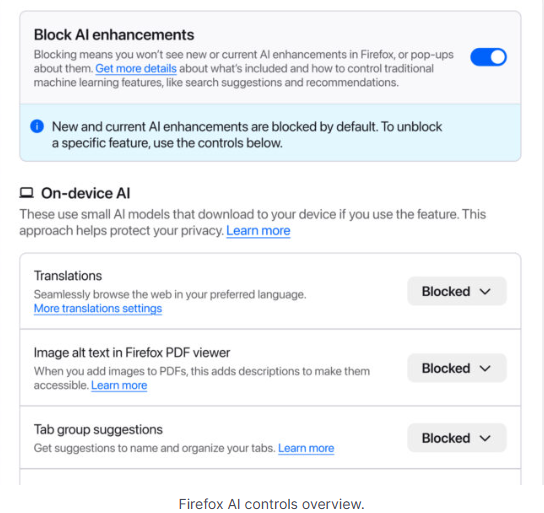
Mozilla is adding an AI Controls area to Firefox settings that centralizes the management of all generative AI features. This consists mainly of a master switch, “Block AI enhancements,” which lets users effectively run Firefox “without AI.” It blocks existing and future generative AI features and hides pop‑ups or prompts advertising them.

Once you set your AI preferences in Firefox, they stay in place across updates. You can also change them whenever you want.

Starting with Firefox 148, which rolls out on February 24, you’ll find a new AI controls section within the desktop browser settings.

Firefox AI choices
Image courtesy of Mozilla

You can turn everything off with one click or take a more granular approach. At launch, these features can be controlled individually:

  • Translations, which help you browse the web in your preferred language.
  • Alt text in PDFs, which add accessibility descriptions to images in PDF pages.
  • AI-enhanced tab grouping, which suggests related tabs and group names.
  • Link previews, which show key points before you open a link.
  • An AI chatbot in the sidebar, which lets you use your chosen chatbot as you browse, including options like Anthropic Claude, ChatGPT, Microsoft Copilot, Google Gemini and Le Chat Mistral.

We applaud this move to give more control to the users. Other companies have done the same, including Mozilla’s competitor DuckDuckGo, which made AI optional after putting the decision to a user vote. Earlier, browser developer Vivaldi took a stand against incorporating AI altogether.

Open-source email service Tuta also decided not to integrate AI features. After only 3% of Tuta users requested them, Tuta removed an AI copilot from its development roadmap.

Even Microsoft seems to have recoiled from pushing AI to everyone, although so far it has focused on walking back defaults and tightening per‑feature controls rather than offering a single, global off switch.

Choices

Many people are happy to use AI features, and as long as you’re aware of the risks and the pitfalls, that’s fine. But pushing these features on users who don’t want them is likely to backfire on software publishers.

Which is only right. After all, you’re paying the bill, so you should have a choice. Before installing a new browser, inform yourself not only about its privacy policy, but also about what control you’ll have over AI features.

Looking at recent voting results, I think it’s safe to say that in the AI gold rush, the real premium feature isn’t a chatbot button—it’s the off switch.


We don’t just report on privacy—we offer you the option to use it.

Privacy risks should never spread beyond a headline. Keep your online privacy yours by using Malwarebytes Privacy VPN.

  •  

Firefox is giving users the AI off switch

Some software providers have decided to lead by example and offer users a choice about the Artificial Intelligence (AI) features built into their products.

The latest example is Mozilla, which now offers users a one-click option to disable generative AI features in the Firefox browser.

Audiences are divided about the use of AI, or as Mozilla put it on their blog:

“AI is changing the web, and people want very different things from it. We’ve heard from many who want nothing to do with AI. We’ve also heard from others who want AI tools that are genuinely useful. Listening to our community, alongside our ongoing commitment to offer choice, led us to build AI controls.”

Mozilla is adding an AI Controls area to Firefox settings that centralizes the management of all generative AI features. This consists mainly of a master switch, “Block AI enhancements,” which lets users effectively run Firefox “without AI.” It blocks existing and future generative AI features and hides pop‑ups or prompts advertising them.

Once you set your AI preferences in Firefox, they stay in place across updates. You can also change them whenever you want.

Starting with Firefox 148, which rolls out on February 24, you’ll find a new AI controls section within the desktop browser settings.

Firefox AI choices
Image courtesy of Mozilla

You can turn everything off with one click or take a more granular approach. At launch, these features can be controlled individually:

  • Translations, which help you browse the web in your preferred language.
  • Alt text in PDFs, which add accessibility descriptions to images in PDF pages.
  • AI-enhanced tab grouping, which suggests related tabs and group names.
  • Link previews, which show key points before you open a link.
  • An AI chatbot in the sidebar, which lets you use your chosen chatbot as you browse, including options like Anthropic Claude, ChatGPT, Microsoft Copilot, Google Gemini and Le Chat Mistral.

We applaud this move to give more control to the users. Other companies have done the same, including Mozilla’s competitor DuckDuckGo, which made AI optional after putting the decision to a user vote. Earlier, browser developer Vivaldi took a stand against incorporating AI altogether.

Open-source email service Tuta also decided not to integrate AI features. After only 3% of Tuta users requested them, Tuta removed an AI copilot from its development roadmap.

Even Microsoft seems to have recoiled from pushing AI to everyone, although so far it has focused on walking back defaults and tightening per‑feature controls rather than offering a single, global off switch.

Choices

Many people are happy to use AI features, and as long as you’re aware of the risks and the pitfalls, that’s fine. But pushing these features on users who don’t want them is likely to backfire on software publishers.

Which is only right. After all, you’re paying the bill, so you should have a choice. Before installing a new browser, inform yourself not only about its privacy policy, but also about what control you’ll have over AI features.

Looking at recent voting results, I think it’s safe to say that in the AI gold rush, the real premium feature isn’t a chatbot button—it’s the off switch.


We don’t just report on privacy—we offer you the option to use it.

Privacy risks should never spread beyond a headline. Keep your online privacy yours by using Malwarebytes Privacy VPN.

  •  

An AI plush toy exposed thousands of private chats with children

Bondu’s AI plush toy exposed a web console that let anyone with a Gmail account read about 50,000 private chats between children and their cuddly toys.

Bondu’s toy is marketed as:

“A soft, cuddly toy powered by AI that can chat, teach, and play with your child.”

What it doesn’t say is that anyone with a Gmail account could read the transcripts from virtually every child who used a Bondu toy. Without any actual hacking, simply by logging in with an arbitrary Google account, two researchers found themselves looking at children’s private conversations.

What Bondu has to say about safety does not mention security or privacy:

“Bondu’s safety and behavior systems were built over 18 months of beta testing with thousands of families. Thanks to rigorous review processes and continuous monitoring, we did not receive a single report of unsafe or inappropriate behavior from Bondu throughout the entire beta period.”

Bondu’s emphasis on successful beta testing is understandable. Remember the AI teddy bear marketed by FoloToy that quickly veered from friendly chat into sexual topics and unsafe household advice?

The researchers were stunned to find the company’s public-facing web console allowed anyone to log in with their Google account. The chat logs between children and their plushies revealed names, birth dates, family details, and intimate conversations. The only conversations not available were those manually deleted by parents or company staff.

Potentially, these chat logs could been a burglar’s or kidnapper’s dream, offering insight into household routines and upcoming events.

Bondu took the console offline within minutes of disclosure, then relaunched it with authentication. The CEO said fixes were completed within hours, they saw “no evidence” of other access, and they brought in a security firm and added monitoring.

In the past, we’ve pointed out that AI-powered stuffed animals may not be a good alternative for screen time. Critics warn that when a toy uses personalized, human‑like dialogue, it risks replacing aspects of the caregiver–child relationship. One Curio founder even described their plushie as a stimulating sidekick so parents, “don’t feel like you have to be sitting them in front of a TV.”

So, whether it’s a foul-mouth, a blabbermouth, or just a feeble replacement for real friends, we don’t encourage using Artificial Intelligence in children’s toys—unless we ever make it to a point where they can be used safely, privately, securely, and even then, sparingly.

How to stay safe

AI-powered toys are coming, like it or not. But being the first or the cutest doesn’t mean they’re safe. The lesson history keeps teaching us is this: oversight, privacy, and a healthy dose of skepticism are the best defenses parents have.

  • Turn off what you can. If the toy has a removable AI component, consider disabling it when you’re not able to supervise directly.
  • Read the privacy policy. Yes, I knowall of it. Look for what will be recorded, stored, and potentially shared. Pay particular attention to sensitive data, like voice recordings, video recordings (if the toy has a camera), and location data.
  • Limit connectivity. Avoid toys that require constant Wi-Fi or cloud interaction if possible.
  • Monitor conversations. Regularly check in with your kids about what the toy says and supervise play where practical.
  • Keep personal info private. Teach kids to never share their names, addresses, or family details, even with their plush friend.
  • Trust your instincts. If a toy seems to cross boundaries or interfere with natural play, don’t be afraid to step in or simply say no.

We don’t just report on privacy—we offer you the option to use it.

Privacy risks should never spread beyond a headline. Keep your online privacy yours by using Malwarebytes Privacy VPN.

  •  

An AI plush toy exposed thousands of private chats with children

Bondu’s AI plush toy exposed a web console that let anyone with a Gmail account read about 50,000 private chats between children and their cuddly toys.

Bondu’s toy is marketed as:

“A soft, cuddly toy powered by AI that can chat, teach, and play with your child.”

What it doesn’t say is that anyone with a Gmail account could read the transcripts from virtually every child who used a Bondu toy. Without any actual hacking, simply by logging in with an arbitrary Google account, two researchers found themselves looking at children’s private conversations.

What Bondu has to say about safety does not mention security or privacy:

“Bondu’s safety and behavior systems were built over 18 months of beta testing with thousands of families. Thanks to rigorous review processes and continuous monitoring, we did not receive a single report of unsafe or inappropriate behavior from Bondu throughout the entire beta period.”

Bondu’s emphasis on successful beta testing is understandable. Remember the AI teddy bear marketed by FoloToy that quickly veered from friendly chat into sexual topics and unsafe household advice?

The researchers were stunned to find the company’s public-facing web console allowed anyone to log in with their Google account. The chat logs between children and their plushies revealed names, birth dates, family details, and intimate conversations. The only conversations not available were those manually deleted by parents or company staff.

Potentially, these chat logs could been a burglar’s or kidnapper’s dream, offering insight into household routines and upcoming events.

Bondu took the console offline within minutes of disclosure, then relaunched it with authentication. The CEO said fixes were completed within hours, they saw “no evidence” of other access, and they brought in a security firm and added monitoring.

In the past, we’ve pointed out that AI-powered stuffed animals may not be a good alternative for screen time. Critics warn that when a toy uses personalized, human‑like dialogue, it risks replacing aspects of the caregiver–child relationship. One Curio founder even described their plushie as a stimulating sidekick so parents, “don’t feel like you have to be sitting them in front of a TV.”

So, whether it’s a foul-mouth, a blabbermouth, or just a feeble replacement for real friends, we don’t encourage using Artificial Intelligence in children’s toys—unless we ever make it to a point where they can be used safely, privately, securely, and even then, sparingly.

How to stay safe

AI-powered toys are coming, like it or not. But being the first or the cutest doesn’t mean they’re safe. The lesson history keeps teaching us is this: oversight, privacy, and a healthy dose of skepticism are the best defenses parents have.

  • Turn off what you can. If the toy has a removable AI component, consider disabling it when you’re not able to supervise directly.
  • Read the privacy policy. Yes, I knowall of it. Look for what will be recorded, stored, and potentially shared. Pay particular attention to sensitive data, like voice recordings, video recordings (if the toy has a camera), and location data.
  • Limit connectivity. Avoid toys that require constant Wi-Fi or cloud interaction if possible.
  • Monitor conversations. Regularly check in with your kids about what the toy says and supervise play where practical.
  • Keep personal info private. Teach kids to never share their names, addresses, or family details, even with their plush friend.
  • Trust your instincts. If a toy seems to cross boundaries or interfere with natural play, don’t be afraid to step in or simply say no.

We don’t just report on privacy—we offer you the option to use it.

Privacy risks should never spread beyond a headline. Keep your online privacy yours by using Malwarebytes Privacy VPN.

  •  

Alert fatigue is costing you: Why your SOC misses 1% of real threats

Introducing the 2026 Intezer AI SOC Report for CISOs

For years, security leaders have lived with an uncomfortable truth. It has been to date, simply impossible to investigate every alert. As alert volumes exploded and teams failed to scale, SOCs, whether in-house or outsourced, normalized “acceptable risk” with the deprioritization of low-severity and informational alerts.

Our latest research shows that this approach is no longer defensible.

Intezer has just released the 2026 AI SOC Report for CISOs, based on the forensic analysis of more than 25 million security alerts across live enterprise environments. The findings reveal a critical disconnect between how security teams prioritize alerts and where real threats actually originate, and the cost of that gap is far higher than most organizations realize .

Why “acceptable risk” is no longer acceptable 

Across endpoint, cloud, identity, network, and phishing telemetry, Intezer found that nearly 1% of confirmed incidents originated from alerts initially labeled as low-severity or informational. On endpoints, that figure climbed to nearly 2%.

At enterprise scale, that percentage is not noise.

For a typical organization generating roughly 450,000 alerts per year, this translates to ~50 real threats annually, about one per week, never investigated by a SOC or MDR team. These are not theoretical risks. They are real compromises hiding in plain sight, dismissed not because they were benign, but because teams lacked the capacity to look.

What the data revealed across the attack surface

Because Intezer AI SOC investigates 100% of alerts using forensic-grade analysis, the report exposes how attackers actually operate once you remove triage bias from the equation.

Endpoint security is more fragile than reported

More than half of endpoint alerts were not automatically mitigated by endpoint protection tools. Of those, nearly 9% were confirmed malicious. Even more concerning, 1.6% of endpoints undergoing live forensic scans were still actively compromised despite being reported as “mitigated” by EDR tools.

See the full endpoint threat data → Download the 2026 AI SOC Report

Low-severity does not mean low-risk

Within endpoint alerts alone, 1.9% of low-severity and informational alerts were real incidents, the exact alerts most SOCs never review.

Attackers favor stealth over noise

Cloud telemetry was dominated by defense evasion and persistence techniques, reflecting a shift toward long-term access, token abuse, and misuse of legitimate services rather than overt exploitation.

Phishing has moved into trusted platforms and browsers

Fewer than 6% of malicious phishing emails contained attachments. Most relied on links, language, and abuse of legitimate services such as cloud file sharing, code sandboxes, CAPTCHA mechanisms, where traditional controls have limited visibility.

Cloud misconfigurations persist as silent risk multipliers

Most cloud posture findings stemmed from legacy or default configurations, especially in Amazon S3, including missing encryption, weak access controls, and lack of logging—issues often classified as “low severity,” yet repeatedly exploited once attackers gain a foothold.

To read the full report and all the findings, download the CISOs guide to AI SOC 2026 here. 

Why traditional SOCs fail: capacity, fragmentation and judging alerts by their severity

Modern SOC failures are rarely the result of a single broken tool or negligent team. They are the outcome of structural tradeoffs that every traditional SOC—internal or MDR—has been forced to make.

Capacity is the first constraint.
Human analysts do not scale linearly with alert volume. As telemetry expands across endpoint, cloud, identity, network, and SaaS, SOCs hit a hard ceiling. The only way to cope is aggressive triage: close most alerts automatically, investigate only what looks “important,” and hope severity labels align with reality. The 2026 AI SOC Report shows that this assumption is false at scale.

Tool fragmentation compounds the problem.
Most SOC stacks are collections of siloed detections, EDR, SIEM, identity, cloud posture, email, each optimized for a narrow signal. Severity is assigned locally, without cross-surface context or forensic validation. As a result, alerts are scored based on abstract rules, not evidence of compromise. When SOCs trust these labels blindly, they inherit the tools’ blind spots.

Process tradeoffs lock risk in place.
Once triage rules are defined, they become institutionalized. Low-severity alerts are ignored by design. MDR providers codify this into SLAs. Internal SOCs bake it into runbooks. Crucially, there is no closed-loop feedback: missed threats do not automatically improve detections, because they were never investigated in the first place.

The outcome is not an occasional failure. It is systematic, repeatable risk, embedded directly into how SOCs operate.

Real-world examples of missed threats hiding in plain sight

The data in the 2026 AI SOC Report makes clear that missed threats are not exotic edge cases. They are ordinary attacks progressing quietly through environments because no one looked.

Endpoints marked “mitigated” but still compromised
In over 1.6% of live forensic endpoint scans, Intezer found active malicious code running in memory even though the EDR had already reported the threat as resolved. These cases included stealers, RATs, and post-exploitation frameworks, often originating from low-severity alerts that never triggered deeper inspection. Without memory-level forensics, these compromises would have remained invisible.

Phishing hosted on trusted platforms
Attackers increasingly host phishing pages on legitimate developer platforms like Vercel and CodePen, or abuse trusted cloud services such as OneDrive and PayPal. The parent domains appear reputable, so alerts are downgraded or ignored. Yet behind them are live credential-harvesting pages that bypass email gateways and browser-based defenses alike.

Cloud misconfigurations as delayed breach accelerators
Many cloud posture findings such as unencrypted S3 buckets, missing access logs and permissive cross-account policies rarely trigger action. But once an attacker gains any foothold, these long-standing misconfigurations dramatically accelerate lateral movement, persistence, and data exposure.

In every case, the failure was not detection. The signal existed. The failure was investigation.

How attackers deliberately exploit SOC blind spots

Attackers understand SOC economics better than most defenders.

They know which alerts generate fatigue.
They know which detections are noisy.
They know which categories are deprioritized by default.

As a result, modern attackers design their campaigns to blend into the backlog, not trigger alarms.

Stealth over speed
Cloud intrusions favor defense evasion, persistence, and token abuse over loud exploitation. These behaviors generate alerts, but rarely high-severity ones. The report shows cloud telemetry dominated by exactly these tactics, indicating attackers are optimizing for long-term access rather than immediate impact.

Living off trusted infrastructure
Phishing campaigns increasingly abuse legitimate brands, file-sharing services, CAPTCHA frameworks, and developer platforms. These environments inherit trust by default, allowing attackers to operate under severity thresholds that SOCs routinely ignore.

Multi-stage loaders and memory-only execution
On endpoints, attackers rely on layered loaders, in-memory payloads, and obfuscation techniques that evade static detections. Initial alerts may look benign or incomplete. Without forensic follow-through, SOCs miss the actual compromise entirely.

Attackers are not evading detection systems alone, rather they are exploiting SOC decision-making models.

What this means for your SOC operations

For CISOs and SOC leaders, the implication is stark:
Risk is no longer defined by what you detect, but by what you choose not to investigate.

If your SOC:

  • Ignores low-severity alerts by default
  • Relies on severity labels without forensic validation
  • Limits investigations based on human capacity
  • Operates without a feedback loop between outcomes and detections

Then missed threats are not anomalies, they are guaranteed.

The organizations that will reduce risk in 2026 are not adding more dashboards or rewriting triage rules. They are adopting operating models where investigation is no longer a scarce resource.

This is why AI-driven, forensic-grade SOC platforms fundamentally change the equation. When every alert is investigated:

  • Severity becomes evidence-based, not assumed
  • Detection quality improves through real-world validation
  • Attackers lose the ability to hide in “acceptable risk”
  • SOC teams regain control without scaling headcount

This is the shift behind the Intezer AI SOC model and why the concept of acceptable risk must be redefined for the modern threat landscape.

This all changes when you can investigate everything

The data in the 2026 AI SOC Report points to a different reality, one where AI-driven forensic analysis removes investigation capacity as a constraint.

When every alert is investigated:

  • “Low severity” stops being a proxy for “safe”
  • Detection quality improves through real-world validation
  • Missed threats drop from dozens per year to near zero
  • Escalations fall below 2%, without sacrificing coverage
  • Risk tolerance is defined by evidence, not exhaustion

This is the operating model behind Intezer AI SOC, powered by ForensicAI™ and it is why the definition of acceptable risk must be reset.

Download the report and join the discussion

The 2026 AI SOC Report for CISOs is grounded in:

  • 25 million alerts analyzed
  • 10 million monitored endpoints and identities
  • 82,000 forensic endpoint investigations, including live memory scans
  • Telemetry from 7 million IP addresses, 3 million domains and URLs, and over 550,000 phishing emails

All data was aggregated and anonymized across Intezer’s global enterprise customer base.

👉 Download the full report to explore the findings in detail, and
👉 Join Intezer’s research team on Wednesday, February 4th at 12 p.m. ET for a live webinar breaking down what this data means for SOC leaders and CISOs.

Because in 2026, the biggest risk is no longer what you detect, it’s what you choose not to investigate.

The post Alert fatigue is costing you: Why your SOC misses 1% of real threats appeared first on Intezer.

  •  

AT&T breach data resurfaces with new risks for customers

When data resurfaces, it never comes back weaker. A newly shared dataset tied to AT&T shows just how much more dangerous an “old” breach can become once criminals have enough of the right details to work with.

The dataset, privately circulated since February 2, 2026, is described as AT&T customer data likely gathered over the years. It doesn’t just contain a few scraps of contact information. It reportedly includes roughly 176 million records, with…

  • Up to 148 million Social Security numbers (full SSNs and last four digits)
  • More than 133 million full names and street addresses
  • More than 132 million phone numbers.
  • Dates of birth for around 75 million people
  • More than 131 million email addresses

Taken together, that’s the kind of rich, structured data set that makes a criminal’s life much easier.

On their own, any one of these data points would be inconvenient but manageable. An email address fuels spam and basic phishing. A phone number enables smishing and robocalls. An address helps attackers guess which services you might use. But when attackers can look up a single person and see name, full address, phone, email, complete or partial SSN, and date of birth in one place, the risk shifts from “annoying” to high‑impact.

That combination is exactly what many financial institutions and mobile carriers still rely on for identity checks. For cybercriminals, this sort of dataset is a Swiss Army knife.

It can be used to craft convincing AT&T‑themed phishing emails and texts, complete with correct names and partial SSNs to “prove” legitimacy. It can power large‑scale SIM‑swap attempts and account takeovers, where criminals call carriers and banks pretending to be you, armed with the answers those call centers expect to hear. It can also enable long‑term identity theft, with SSNs and dates of birth abused to open new lines of credit or file fraudulent tax returns.

The uncomfortable part is that a fresh hack isn’t always required to end up here. Breach data tends to linger, then get merged, cleaned up, and expanded over time. What’s different in this case is the breadth and quality of the profiles. They include more email addresses, more SSNs, more complete records per person. That makes the data more attractive, more searchable, and more actionable for criminals.

For potential victims, the lesson is simple but important. If you have ever been an AT&T customer, treat this as a reminder that your data may already be circulating in a form that is genuinely useful to attackers. Be cautious of any AT&T‑related email or text, enable multi‑factor authentication wherever possible, lock down your mobile account with extra passcodes, and consider monitoring your credit. You can’t pull your data back out of a criminal dataset—but you can make sure it’s much harder to use against you.

What to do when your data is involved in a breach

If you think you have been affected by a data breach, here are steps you can take to protect yourself:

  • Check the company’s advice. Every breach is different, so check with the company to find out what’s happened and follow any specific advice it offers.
  • Change your password. You can make a stolen password useless to thieves by changing it. Choose a strong password that you don’t use for anything else. Better yet, let a password manager choose one for you.
  • Enable two-factor authentication (2FA). If you can, use a FIDO2-compliant hardware key, laptop, or phone as your second factor. Some forms of 2FA can be phished just as easily as a password, but 2FA that relies on a FIDO2 device can’t be phished.
  • Watch out for impersonators. The thieves may contact you posing as the breached platform. Check the official website to see if it’s contacting victims and verify the identity of anyone who contacts you using a different communication channel.
  • Take your time. Phishing attacks often impersonate people or brands you know, and use themes that require urgent attention, such as missed deliveries, account suspensions, and security alerts.
  • Consider not storing your card details. It’s definitely more convenient to let sites remember your card details, but it increases risk if a retailer suffers a breach.
  • Set up identity monitoring, which alerts you if your personal information is found being traded illegally online and helps you recover after.

Use Malwarebytes’ free Digital Footprint scan to see whether your personal information has been exposed online.


We don’t just report on threats—we help safeguard your entire digital identity

Cybersecurity risks should never spread beyond a headline. Protect your, and your family’s, personal information by using identity protection.

  •  

AT&T breach data resurfaces with new risks for customers

When data resurfaces, it never comes back weaker. A newly shared dataset tied to AT&T shows just how much more dangerous an “old” breach can become once criminals have enough of the right details to work with.

The dataset, privately circulated since February 2, 2026, is described as AT&T customer data likely gathered over the years. It doesn’t just contain a few scraps of contact information. It reportedly includes roughly 176 million records, with…

  • Up to 148 million Social Security numbers (full SSNs and last four digits)
  • More than 133 million full names and street addresses
  • More than 132 million phone numbers.
  • Dates of birth for around 75 million people
  • More than 131 million email addresses

Taken together, that’s the kind of rich, structured data set that makes a criminal’s life much easier.

On their own, any one of these data points would be inconvenient but manageable. An email address fuels spam and basic phishing. A phone number enables smishing and robocalls. An address helps attackers guess which services you might use. But when attackers can look up a single person and see name, full address, phone, email, complete or partial SSN, and date of birth in one place, the risk shifts from “annoying” to high‑impact.

That combination is exactly what many financial institutions and mobile carriers still rely on for identity checks. For cybercriminals, this sort of dataset is a Swiss Army knife.

It can be used to craft convincing AT&T‑themed phishing emails and texts, complete with correct names and partial SSNs to “prove” legitimacy. It can power large‑scale SIM‑swap attempts and account takeovers, where criminals call carriers and banks pretending to be you, armed with the answers those call centers expect to hear. It can also enable long‑term identity theft, with SSNs and dates of birth abused to open new lines of credit or file fraudulent tax returns.

The uncomfortable part is that a fresh hack isn’t always required to end up here. Breach data tends to linger, then get merged, cleaned up, and expanded over time. What’s different in this case is the breadth and quality of the profiles. They include more email addresses, more SSNs, more complete records per person. That makes the data more attractive, more searchable, and more actionable for criminals.

For potential victims, the lesson is simple but important. If you have ever been an AT&T customer, treat this as a reminder that your data may already be circulating in a form that is genuinely useful to attackers. Be cautious of any AT&T‑related email or text, enable multi‑factor authentication wherever possible, lock down your mobile account with extra passcodes, and consider monitoring your credit. You can’t pull your data back out of a criminal dataset—but you can make sure it’s much harder to use against you.

What to do when your data is involved in a breach

If you think you have been affected by a data breach, here are steps you can take to protect yourself:

  • Check the company’s advice. Every breach is different, so check with the company to find out what’s happened and follow any specific advice it offers.
  • Change your password. You can make a stolen password useless to thieves by changing it. Choose a strong password that you don’t use for anything else. Better yet, let a password manager choose one for you.
  • Enable two-factor authentication (2FA). If you can, use a FIDO2-compliant hardware key, laptop, or phone as your second factor. Some forms of 2FA can be phished just as easily as a password, but 2FA that relies on a FIDO2 device can’t be phished.
  • Watch out for impersonators. The thieves may contact you posing as the breached platform. Check the official website to see if it’s contacting victims and verify the identity of anyone who contacts you using a different communication channel.
  • Take your time. Phishing attacks often impersonate people or brands you know, and use themes that require urgent attention, such as missed deliveries, account suspensions, and security alerts.
  • Consider not storing your card details. It’s definitely more convenient to let sites remember your card details, but it increases risk if a retailer suffers a breach.
  • Set up identity monitoring, which alerts you if your personal information is found being traded illegally online and helps you recover after.

Use Malwarebytes’ free Digital Footprint scan to see whether your personal information has been exposed online.


We don’t just report on threats—we help safeguard your entire digital identity

Cybersecurity risks should never spread beyond a headline. Protect your, and your family’s, personal information by using identity protection.

  •  

Apple’s new iOS setting addresses a hidden layer of location tracking

Most iPhone owners have hopefully learned to manage app permissions by now, including allowing location access. But there’s another layer of location tracking that operates outside these controls. Your cellular carrier has been collecting your location data all along, and until now, there was nothing you could do about it.

Apple just changed this in iOS 26.3 with a new setting called “limit precise location.”

How Apple’s anti-carrier tracking system works

Cellular networks track your phone’s location based on the cell towers it connects to, in a process known as triangulation. In cities where towers are densely packed, triangulation is precise enough to track you down to a street address.

This tracking is different from app-based location monitoring, because your phone’s privacy settings have historically been powerless to stop it. Toggle Location Services off entirely, and your carrier still knows where you are.

The new setting reduces the precision of location data shared with carriers. Rather than a street address, carriers would see only the neighborhood where a device is located. It doesn’t affect emergency calls, though, which still transmit precise coordinates to first responders. Apps like Apple’s “Find My” service, which locates your devices, or its navigation services, aren’t affected because they work using the phone’s location sharing feature.

Why is Apple doing this? Apple hasn’t said, but the move comes after years of carriers mishandling location data.

Unfortunately, cellular network operators have played fast and free with this data. In April 2024, the FCC fined Sprint and T-Mobile (which have since merged), along with AT&T and Verizon nearly $200 million combined for illegally sharing this location data. They sold access to customers’ location information to third party aggregators, who then sold it on to third parties without customer consent.

This turned into a privacy horror story for customers. One aggregator, LocationSmart, had a free demo on its website that reportedly allowed anyone to pinpoint the location of most mobile phones in North America.

Limited rollout

The feature only works with devices equipped with Apple’s custom C1 or C1X modems. That means just three devices: the iPhone Air, iPhone 16e, and the cellular iPad Pro with M5 chip. The iPhone 17, which uses Qualcomm silicon, is excluded. Apple can only control what its own modems transmit.

Carrier support is equally narrow. In the US, only Boost Mobile is participating in the feature at launch, while Verizon, AT&T, and T-Mobile are notable absences from the list given their past record. In Germany, Telekom is on the participant list, while both EE and BT are involved in the UK. In Thailand, AIS and True are on the list. There are no other carriers taking part as of today though.

Android also offers some support

Google also introduced a similar capability with Android 15’s Location Privacy hardware abstraction layer (HAL) last year. It faces the same constraint, though: modem vendors must cooperate, and most have not. Apple and Google don’t get to control the modems in most phones. This kind of privacy protection requires vertical integration that few manufacturers possess and few carriers seem eager to enable.

Most people think controlling app permissions means they’re in control of their location. This feature highlights something many users didn’t know existed: a separate layer of tracking handled by cellular networks, and one that still offers users very limited control.


We don’t just report on phone security—we provide it

Cybersecurity risks should never spread beyond a headline. Keep threats off your mobile devices by downloading Malwarebytes for iOS, and Malwarebytes for Android today.

  •  

Apple’s new iOS setting addresses a hidden layer of location tracking

Most iPhone owners have hopefully learned to manage app permissions by now, including allowing location access. But there’s another layer of location tracking that operates outside these controls. Your cellular carrier has been collecting your location data all along, and until now, there was nothing you could do about it.

Apple just changed this in iOS 26.3 with a new setting called “limit precise location.”

How Apple’s anti-carrier tracking system works

Cellular networks track your phone’s location based on the cell towers it connects to, in a process known as triangulation. In cities where towers are densely packed, triangulation is precise enough to track you down to a street address.

This tracking is different from app-based location monitoring, because your phone’s privacy settings have historically been powerless to stop it. Toggle Location Services off entirely, and your carrier still knows where you are.

The new setting reduces the precision of location data shared with carriers. Rather than a street address, carriers would see only the neighborhood where a device is located. It doesn’t affect emergency calls, though, which still transmit precise coordinates to first responders. Apps like Apple’s “Find My” service, which locates your devices, or its navigation services, aren’t affected because they work using the phone’s location sharing feature.

Why is Apple doing this? Apple hasn’t said, but the move comes after years of carriers mishandling location data.

Unfortunately, cellular network operators have played fast and free with this data. In April 2024, the FCC fined Sprint and T-Mobile (which have since merged), along with AT&T and Verizon nearly $200 million combined for illegally sharing this location data. They sold access to customers’ location information to third party aggregators, who then sold it on to third parties without customer consent.

This turned into a privacy horror story for customers. One aggregator, LocationSmart, had a free demo on its website that reportedly allowed anyone to pinpoint the location of most mobile phones in North America.

Limited rollout

The feature only works with devices equipped with Apple’s custom C1 or C1X modems. That means just three devices: the iPhone Air, iPhone 16e, and the cellular iPad Pro with M5 chip. The iPhone 17, which uses Qualcomm silicon, is excluded. Apple can only control what its own modems transmit.

Carrier support is equally narrow. In the US, only Boost Mobile is participating in the feature at launch, while Verizon, AT&T, and T-Mobile are notable absences from the list given their past record. In Germany, Telekom is on the participant list, while both EE and BT are involved in the UK. In Thailand, AIS and True are on the list. There are no other carriers taking part as of today though.

Android also offers some support

Google also introduced a similar capability with Android 15’s Location Privacy hardware abstraction layer (HAL) last year. It faces the same constraint, though: modem vendors must cooperate, and most have not. Apple and Google don’t get to control the modems in most phones. This kind of privacy protection requires vertical integration that few manufacturers possess and few carriers seem eager to enable.

Most people think controlling app permissions means they’re in control of their location. This feature highlights something many users didn’t know existed: a separate layer of tracking handled by cellular networks, and one that still offers users very limited control.


We don’t just report on phone security—we provide it

Cybersecurity risks should never spread beyond a headline. Keep threats off your mobile devices by downloading Malwarebytes for iOS, and Malwarebytes for Android today.

  •  

[updated] A fake cloud storage alert that ends at Freecash

Last week we talked about an app that promises users they can make money testing games, or even just by scrolling through TikTok.

Imagine our surprise when we ended up on a site promoting that same Freecash app while investigating a “cloud storage” phish. We’ve all probably seen one of those. They’re common enough and according to recent investigation by BleepingComputer, there’s a

“large-scale cloud storage subscription scam campaign targeting users worldwide with repeated emails falsely warning recipients that their photos, files, and accounts are about to be blocked or deleted due to an alleged payment failure.”

Based on the description in that article, the email we found appears to be part of this campaign.

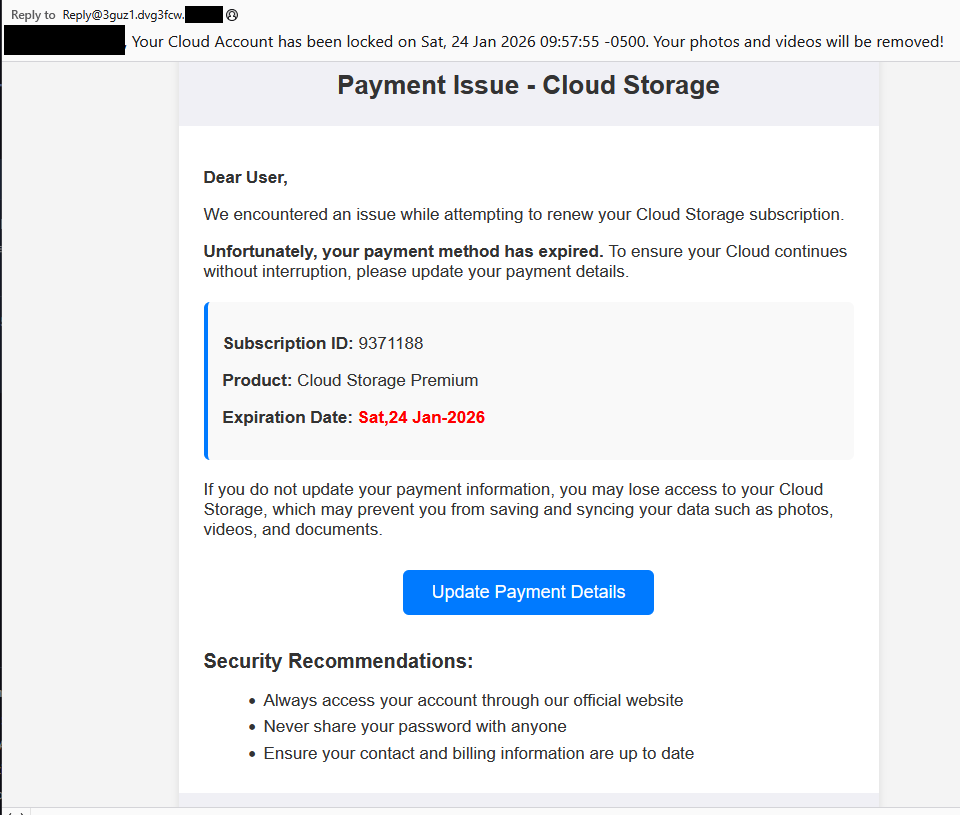
Cloud storage payment issue email

The subject line of the email is:

“{Recipient}. Your Cloud Account has been locked on Sat, 24 Jan 2026 09:57:55 -0500. Your photos and videos will be removed!”

This matches one of the subject lines that BleepingComputer listed.

And the content of the email:

Payment Issue – Cloud Storage

Dear User,

We encountered an issue while attempting to renew your Cloud Storage subscription.

Unfortunately, your payment method has expired. To ensure your Cloud continues without interruption, please update your payment details.

Subscription ID: 9371188

Product: Cloud Storage Premium

Expiration Date: Sat,24 Jan-2026

If you do not update your payment information, you may lose access to your Cloud Storage, which may prevent you from saving and syncing your data such as photos, videos, and documents.

Update Payment Details {link button}

Security Recommendations:

  • Always access your account through our official website
  • Never share your password with anyone
  • Ensure your contact and billing information are up to date”

The link in the email leads to  https://storage.googleapis[.]com/qzsdqdqsd/dsfsdxc.html#/redirect.html, which helps the scammer establish a certain amount of trust because it points to Google Cloud Storage (GCS). GCS is a legitimate service that allows authorized users to store and manage data such as files, images, and videos in buckets. However, as in this case, attackers can abuse it for phishing.

The redirect carries some parameters to the next website.

first redirect

The feed.headquartoonjpn[.]com domain was blocked by Malwarebytes. We’ve seen it before in an earlier campaign involving an Endurance-themed phish.

Endiurance phish

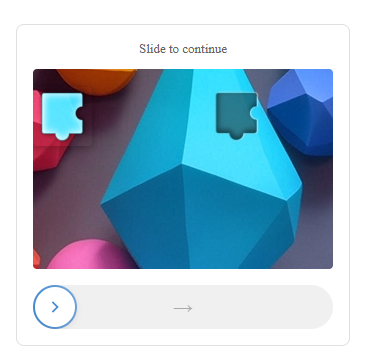
After a few more redirects, we ended up at hx5.submitloading[.]com, where a fake CAPTCHA triggered the last redirect to freecash[.]com, once it was solved.

slider captcha

The end goal of this phish likely depends on the parameters passed along during the redirects, so results may vary.

Rather than stealing credentials directly, the campaign appears designed to monetize traffic, funneling victims into affiliate offers where the operators get paid for sign-ups or conversions.

BleepingComputer noted that they were redirected to affiliate marketing websites for various products.

“Products promoted in this phishing campaign include VPN services, little-known security software, and other subscription-based offerings with no connection to cloud storage.”

How to stay safe

Ironically, the phishing email itself includes some solid advice:

  • Always access your account through our official website.
  • Never share your password with anyone.

We’d like to add:

  • Never click on links in unsolicited emails without verifying with a trusted source.
  • Use an up-to-date, real-time anti-malware solution with a web protection component.
  • Do not engage with websites that attract visitors like this.

Pro tip: Malwarebytes Scam Guard would have helped you identify this email as a scam and provided advice on how to proceed.

Redirect flow (IOCs)

storage.googleapis[.]com/qzsdqdqsd/dsfsdxc.html

feed.headquartoonjpn[.]com

revivejudgemental[.]com

hx5.submitloading[.]com

freecash[.]com

Update February 5, 2026

Almedia GmbH, the company behind the Freecash platform, reached out to us for information about the chain of redirects that lead to their platform. And after an investigation they notified us that:

“Following Malwarebytes’ reporting and the additional information they shared with us, we investigated the issue and identified an affiliate operating in breach of our policies. That partner has been removed from our network.

Almedia does not sell user data, and we take compliance, user trust, and responsible advertising seriously.”


We don’t just report on scams—we help detect them

Cybersecurity risks should never spread beyond a headline. If something looks dodgy to you, check if it’s a scam using Malwarebytes Scam Guard, a feature of our mobile protection products. Submit a screenshot, paste suspicious content, or share a text or phone number, and we’ll tell you if it’s a scam or legit. Download Malwarebytes Mobile Security for iOS or Android and try it today!

  •  

[updated] A fake cloud storage alert that ends at Freecash

Last week we talked about an app that promises users they can make money testing games, or even just by scrolling through TikTok.

Imagine our surprise when we ended up on a site promoting that same Freecash app while investigating a “cloud storage” phish. We’ve all probably seen one of those. They’re common enough and according to recent investigation by BleepingComputer, there’s a

“large-scale cloud storage subscription scam campaign targeting users worldwide with repeated emails falsely warning recipients that their photos, files, and accounts are about to be blocked or deleted due to an alleged payment failure.”

Based on the description in that article, the email we found appears to be part of this campaign.

Cloud storage payment issue email

The subject line of the email is:

“{Recipient}. Your Cloud Account has been locked on Sat, 24 Jan 2026 09:57:55 -0500. Your photos and videos will be removed!”

This matches one of the subject lines that BleepingComputer listed.

And the content of the email:

Payment Issue – Cloud Storage

Dear User,

We encountered an issue while attempting to renew your Cloud Storage subscription.

Unfortunately, your payment method has expired. To ensure your Cloud continues without interruption, please update your payment details.

Subscription ID: 9371188

Product: Cloud Storage Premium

Expiration Date: Sat,24 Jan-2026

If you do not update your payment information, you may lose access to your Cloud Storage, which may prevent you from saving and syncing your data such as photos, videos, and documents.

Update Payment Details {link button}

Security Recommendations:

  • Always access your account through our official website
  • Never share your password with anyone
  • Ensure your contact and billing information are up to date”

The link in the email leads to  https://storage.googleapis[.]com/qzsdqdqsd/dsfsdxc.html#/redirect.html, which helps the scammer establish a certain amount of trust because it points to Google Cloud Storage (GCS). GCS is a legitimate service that allows authorized users to store and manage data such as files, images, and videos in buckets. However, as in this case, attackers can abuse it for phishing.

The redirect carries some parameters to the next website.

first redirect

The feed.headquartoonjpn[.]com domain was blocked by Malwarebytes. We’ve seen it before in an earlier campaign involving an Endurance-themed phish.

Endiurance phish

After a few more redirects, we ended up at hx5.submitloading[.]com, where a fake CAPTCHA triggered the last redirect to freecash[.]com, once it was solved.

slider captcha

The end goal of this phish likely depends on the parameters passed along during the redirects, so results may vary.

Rather than stealing credentials directly, the campaign appears designed to monetize traffic, funneling victims into affiliate offers where the operators get paid for sign-ups or conversions.

BleepingComputer noted that they were redirected to affiliate marketing websites for various products.

“Products promoted in this phishing campaign include VPN services, little-known security software, and other subscription-based offerings with no connection to cloud storage.”

How to stay safe

Ironically, the phishing email itself includes some solid advice:

  • Always access your account through our official website.
  • Never share your password with anyone.

We’d like to add:

  • Never click on links in unsolicited emails without verifying with a trusted source.
  • Use an up-to-date, real-time anti-malware solution with a web protection component.
  • Do not engage with websites that attract visitors like this.

Pro tip: Malwarebytes Scam Guard would have helped you identify this email as a scam and provided advice on how to proceed.

Redirect flow (IOCs)

storage.googleapis[.]com/qzsdqdqsd/dsfsdxc.html

feed.headquartoonjpn[.]com

revivejudgemental[.]com

hx5.submitloading[.]com

freecash[.]com

Update February 5, 2026

Almedia GmbH, the company behind the Freecash platform, reached out to us for information about the chain of redirects that lead to their platform. And after an investigation they notified us that:

“Following Malwarebytes’ reporting and the additional information they shared with us, we investigated the issue and identified an affiliate operating in breach of our policies. That partner has been removed from our network.

Almedia does not sell user data, and we take compliance, user trust, and responsible advertising seriously.”


We don’t just report on scams—we help detect them

Cybersecurity risks should never spread beyond a headline. If something looks dodgy to you, check if it’s a scam using Malwarebytes Scam Guard, a feature of our mobile protection products. Submit a screenshot, paste suspicious content, or share a text or phone number, and we’ll tell you if it’s a scam or legit. Download Malwarebytes Mobile Security for iOS or Android and try it today!

  •  

Why should renters like me have to trade away our privacy just to get a roof over our heads? | Samantha Floreani

The rise in real estate tech means renters often hand over huge amounts of revealing information to digital third parties – at great risk

Would you trade your data privacy and security for housing? Thanks to the rise in real estate technologies, renters often have no choice but to hand over huge amounts of revealing information to digital third parties just to have somewhere to live. All the while we are told: trust us, we take your privacy seriously.

But recent Guardian reporting has revealed that seven popular “rent-tech” platforms have serious security vulnerabilities, leaving millions of documents containing personal information of renters exposed on the open web for years. When they were alerted to the risk, only two of the seven companies responded to say they would put additional security measures in place. Is this what taking renter privacy seriously looks like?

Continue reading...

© Photograph: Jacob Wackerhausen/Getty Images

© Photograph: Jacob Wackerhausen/Getty Images

© Photograph: Jacob Wackerhausen/Getty Images

  •  
❌