Modern web applications built on Amazon Web Services (AWS) often span multiple services to deliver scalable, performant solutions. However, customers encounter challenges when implementing a cohesive HTTP Strict Transport Security (HSTS) strategy across these distributed architectures.
Customers face fragmented security implementation challenges because different AWS services require distinct approaches to HSTS configuration, leading to inconsistent security postures.Applications using Amazon API Gateway for APIs, Amazon CloudFront for content delivery, and Application load balancers for web traffic lack unified HSTS policies, leading to complex multi-service environments. Security scanners flag missing HSTS headers, but remediation guidance is scattered across service-specific documentation, causing security compliance gaps.
HSTS is a web security policy mechanism that protects websites against protocol downgrade attacks and cookie hijacking. When properly implemented, HSTS instructs browsers to interact with applications exclusively through HTTPS connections, providing critical protection against man-in-the-middle issues.
This post provides a comprehensive approach to implementing HSTS across key AWS services that form the foundation of modern cloud applications:
- Amazon API Gateway: Secure REST and HTTP APIs with centralized header management
- Application Load Balancer: Infrastructure-level HSTS enforcement for web applications
- Amazon CloudFront: Edge-based security header delivery for global content
By following the implementation steps in this post, you can establish a unified HSTS strategy that aligns with AWS Well-Architected Framework security principles while maintaining optimal application performance.
Understanding HSTS security and its benefits
HTTP Strict Transport Security is a web security policy mechanism that helps protect websites against protocol downgrade attacks and cookie hijacking. When a web server declares HSTS policy through the Strict-Transport-Security header, compliant browsers automatically convert HTTP requests to HTTPS for the specified domain. This enforcement occurs at the browser level, providing protection even before the initial request reaches your infrastructure.
HSTS enforcement applies specifically to web browser clients. Most programmatic clients (such as SDKs, command line tools, or application-to-application communication) don’t enforce HSTS policies. For comprehensive security, configure your applications and infrastructure to only use HTTPS connections regardless of client type rather than relying solely on HSTS for protocol enforcement.
HTTP to HTTPS redirection enforcement on the server ensures future requests reach your applications over encrypted connections. However, it leaves a security gap during the initial browser request. Understanding this gap helps explain why client-side HSTS serves as an essential security layer in modern web applications.
For example, when users access web applications, the typical flow with redirects configured is as follows:
- User enters
example.com in their browser.
- Browser sends an HTTP request to
http://example.com.
- Server responds with HTTP 301/302 redirect to
https://example.com.
- Browser follows redirection and establishes HTTPS connection
The initial HTTP request in step 2 creates an opportunity for protocol downgrade issues. An unauthorized party positioned between the user and your infrastructure can intercept this request and respond with content that appears legitimate while maintaining an insecure connection. This technique, known as SSL stripping, can occur even when your server-side AWS infrastructure is properly configured with HTTPS redirects.
HSTS addresses this security gap by moving security enforcement to the browser level. After a browser receives an HSTS policy, it automatically converts HTTP requests to HTTPS before sending them over the network:
- User enters
example.com in browser.
- Browser automatically converts to HTTPS due to stored HSTS policy.
- Browser sends HTTPS request directly to
https://example.com.
- No initial HTTP request removes the opportunity for interception.
This browser-level enforcement provides protection that complements your AWS infrastructure security configurations, creating defense in depth against protocol downgrade issues.
Although current browsers warn about insecure connections, HSTS provides programmatic enforcement. This prevents unauthorized parties from exploiting the security gap because they can’t forge valid HTTPS certificates for protected domains.
The security benefits of HSTS extend beyond simple protocol enforcement. HSTS helps prevent protocol downgrade issues after HSTS policy is established in the browser. It mitigates against man-in-the-middle issues, preventing unauthorized parties from intercepting communications. It also helps prevent unauthorized session access to protect against credential theft and unintended session access.
HSTS requires HTTPS connections and removes the option to bypass certificate warnings.
This post focuses exclusively on implementing the HTTP Strict-Transport-Security header. Although the examples include additional security headers for completeness, detailed configuration of those headers is beyond the scope of this post.
Key use cases for HSTS implementation
HSTS protects scenarios that HTTP redirects miss. For example, when legacy systems serve mixed content, or when SSO flows redirect users between providers, HSTS keeps connections encrypted throughout.
Applications serving both modern HTTPS content and legacy HTTP resources face protocol downgrade risks. When users access example.com/app that loads resources from legacy.example.com, HSTS prevents browsers from making initial HTTP requests to any subdomain, eliminating the vulnerability window during resource loading.
SSO implementations redirecting users between identity providers and applications create multiple HTTP request opportunities. Due to HSTS, authentication tokens and session data remain encrypted throughout the entire SSO flow, preventing credential interception during provider redirects.
Microservices architectures using API Gateway often involve service-to-service communication and client redirects. HSTS protects API endpoints from protocol downgrade during initial client connections, which means that API keys and authentication headers are not transmitted over HTTP.
Applications using CloudFront with multiple origin servers face security challenges when origins change or fail over. HSTS prevents browsers from falling back to HTTP when accessing cached content or during origin failover scenarios, maintaining encryption even during infrastructure changes.
From an AWS Well-Architected perspective, implementing HSTS demonstrates adherence to the defense in depth principle by adding an additional layer of security at the application protocol level. This approach complements other AWS security services and features, creating a comprehensive security posture that helps to protect data both in transit and at rest.
Implementing HSTS with Amazon API Gateway
Amazon API Gateway lacks built-in features to enable HSTS for the API resources. There are several different ways to configure HSTS headers in HTTP APIs and REST APIs.
For HTTP APIs, you can configure response parameter mapping to set HSTS headers when it’s invoked using a default endpoint or custom domain.
To configure response parameter mapping:
- Navigate to your desired HTTP API’s route configuration in the AWS API Gateway console
- Access the route’s integration settings under Manage integrations tab.
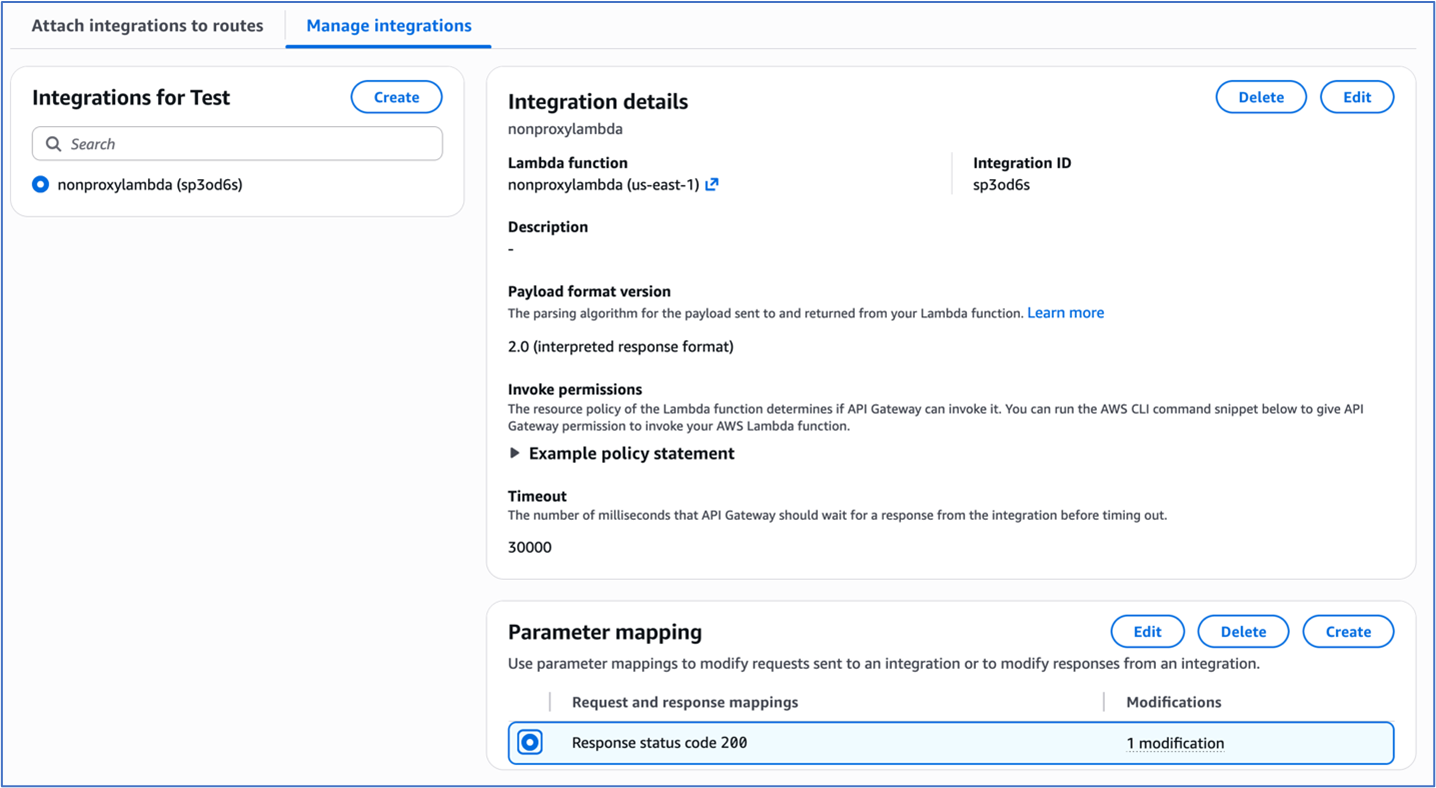
Figure 1: Integration settings of the HTTP Api
- To configure parameter mapping, under Response key, enter
200.
- Under Modification type, select Append in the dropdown menu.
- Under “Parameter to modify”, enter
header.Strict-Transport-Security
- Under Value, enter
max-age=31536000; includeSubDomains; preload.
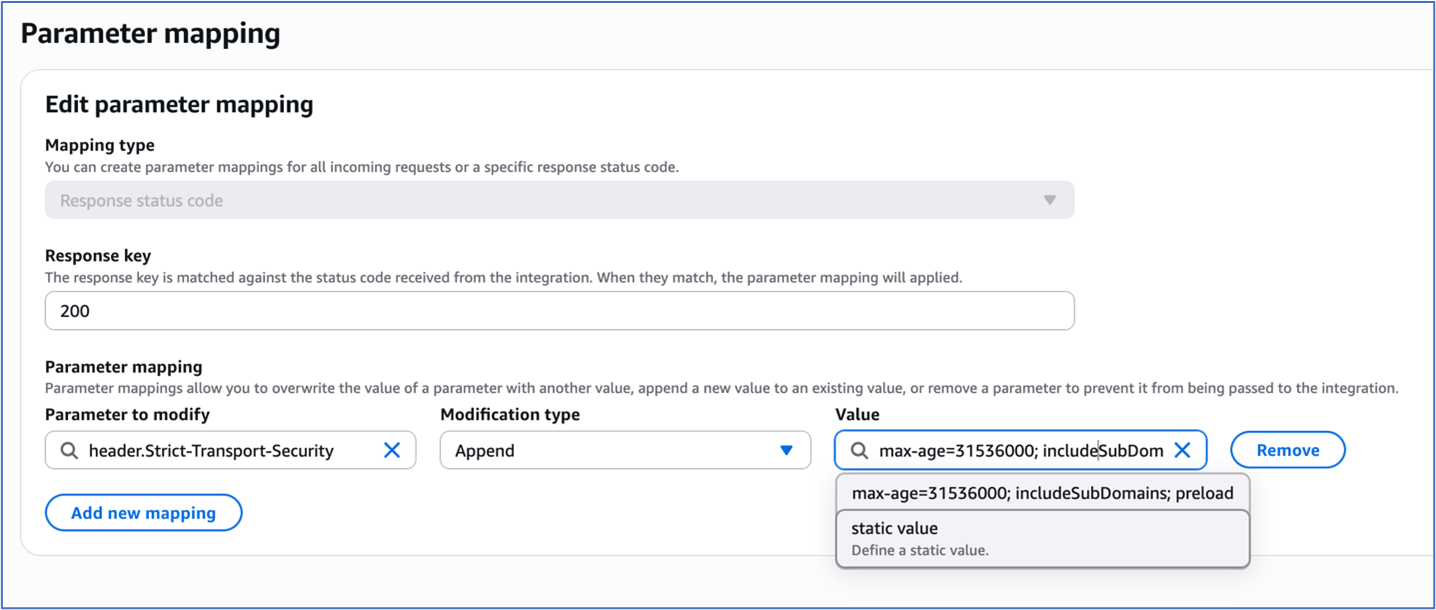
Figure 2: Parameter Mapping for the HTTP Api integration
REST APIs in Amazon API Gateway offer more granular control over HSTS implementation through both proxy and non-proxy integration patterns.
For proxy integrations, the backend service assumes responsibility for HSTS header generation. For example, an AWS Lambda proxy integration must return the HSTS headers in its response as shown in the following code example:
import json
def lambda_handler(event, context):
	return {
        'statusCode': 200,
        'headers': {
            'Strict-Transport-Security': 'max-age=31536000; includeSubDomains; preload'
        },
        'body': json.dumps('Secure response with HSTS headers')
    }
For non-proxy integrations, the HSTS headers must be returned by the Rest API by implementing one of two methods, either mapping templates or method response.
In the mapping templates method, the mapping template is used to configure the HSTS headers. The Velocity Template Language (VTL) for the mapping template is used for dynamic header generation. To implement this method:
- Navigate to the desired REST API and click on the method for the desired resource.
- Under the ‘Integration response’ tab, use the following mapping template to set the response headers:
$input.json("$")
#set($newValue = "$input.params().header.get('Host')")
#set($context.responseOverride.header.Strict-Transport-Security
= "max-age=31536000; includeSubDomains; preload")
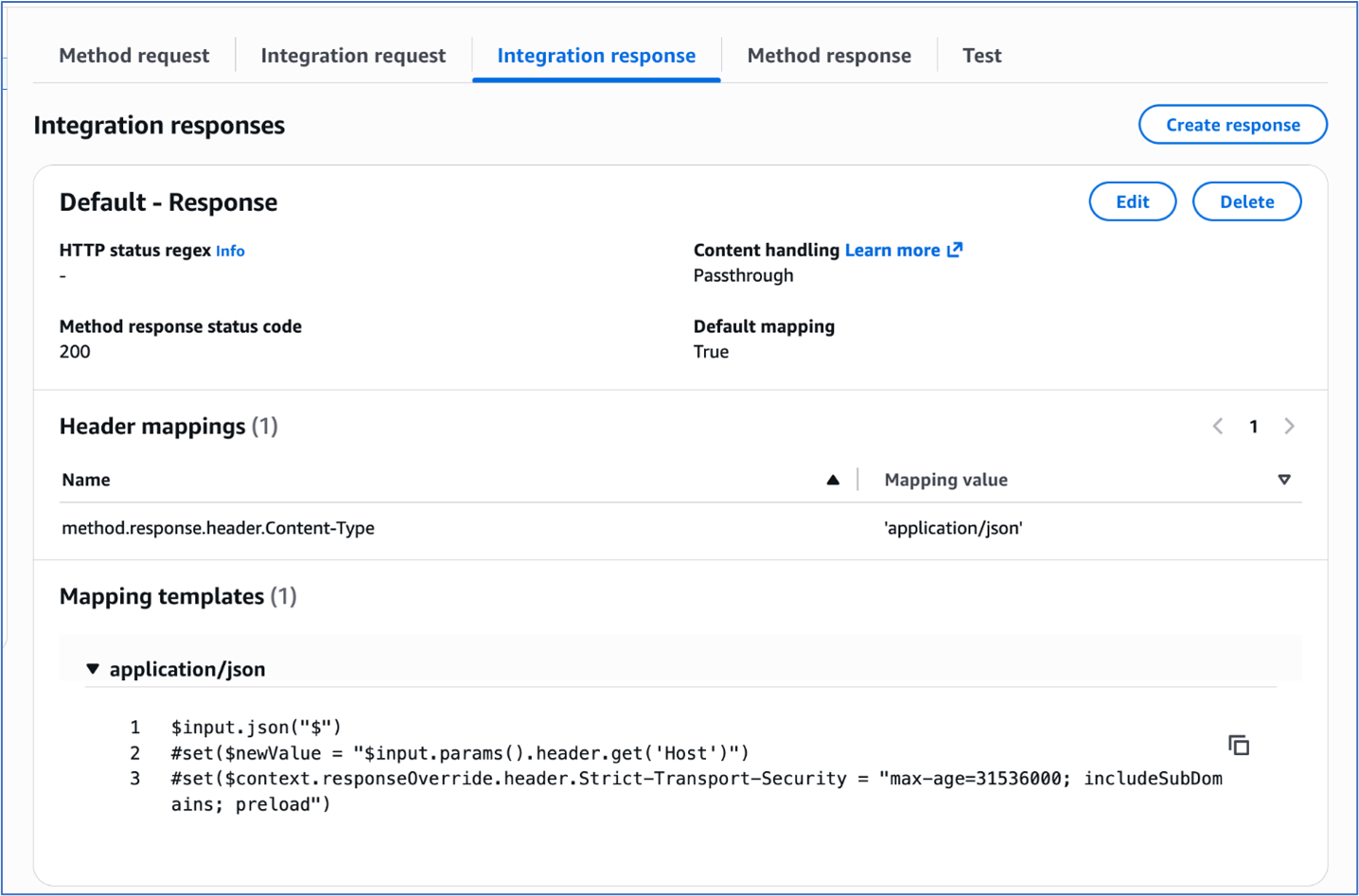
Figure 3: Adding mapping template to integration response of the Rest Api
The ‘Method response’ tab provides declarative configuration through explicit header mapping in the configuration. To implement this method:
- Navigate to your desired REST API and select the method for the desired resource.
- Choose Method response and under Header name, add the HSTS header
strict-transport-security.
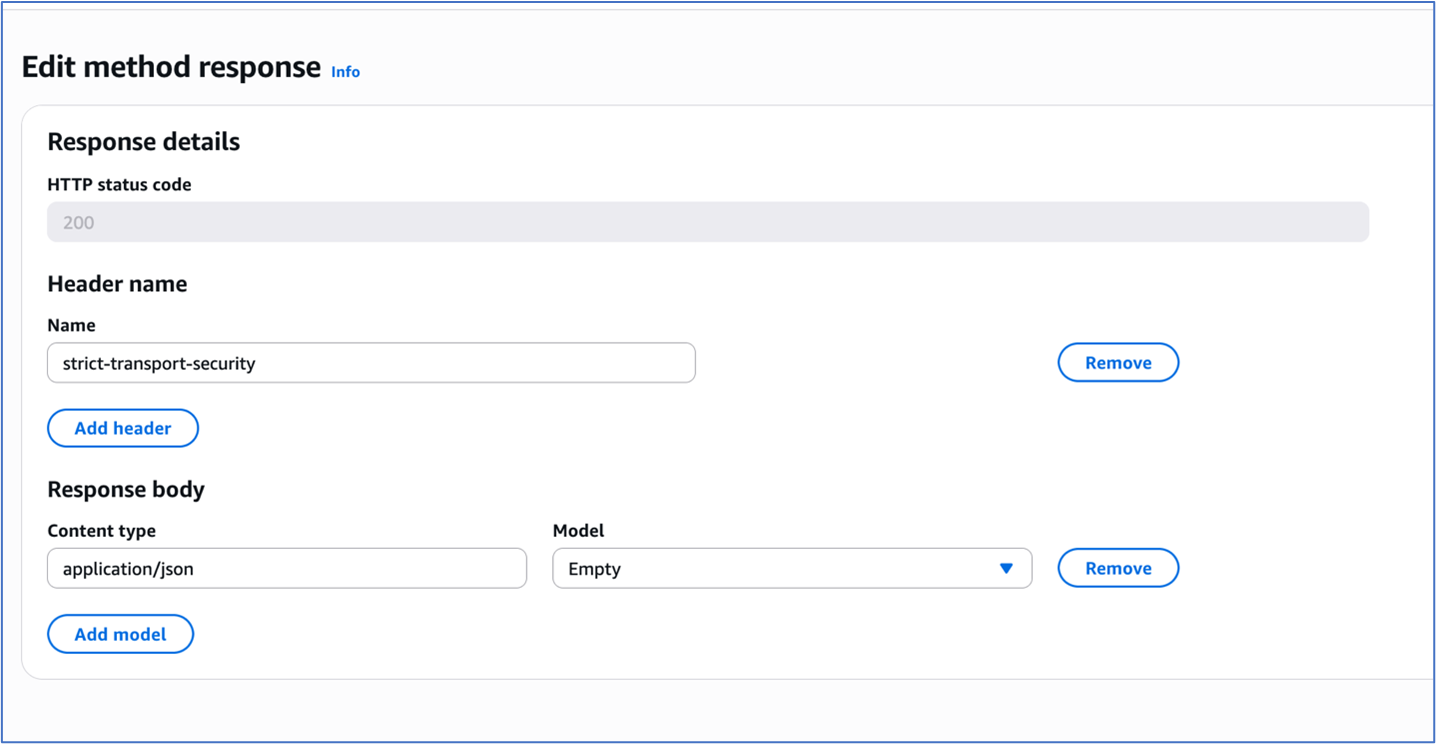
Figure 4: Method response of the Rest Api
3. Choose Integration response and under Header mappings, enter the HSTS header strict-transport-security. Add the Mapping value for the header as max-age=31536000; includeSubDomains; preload.
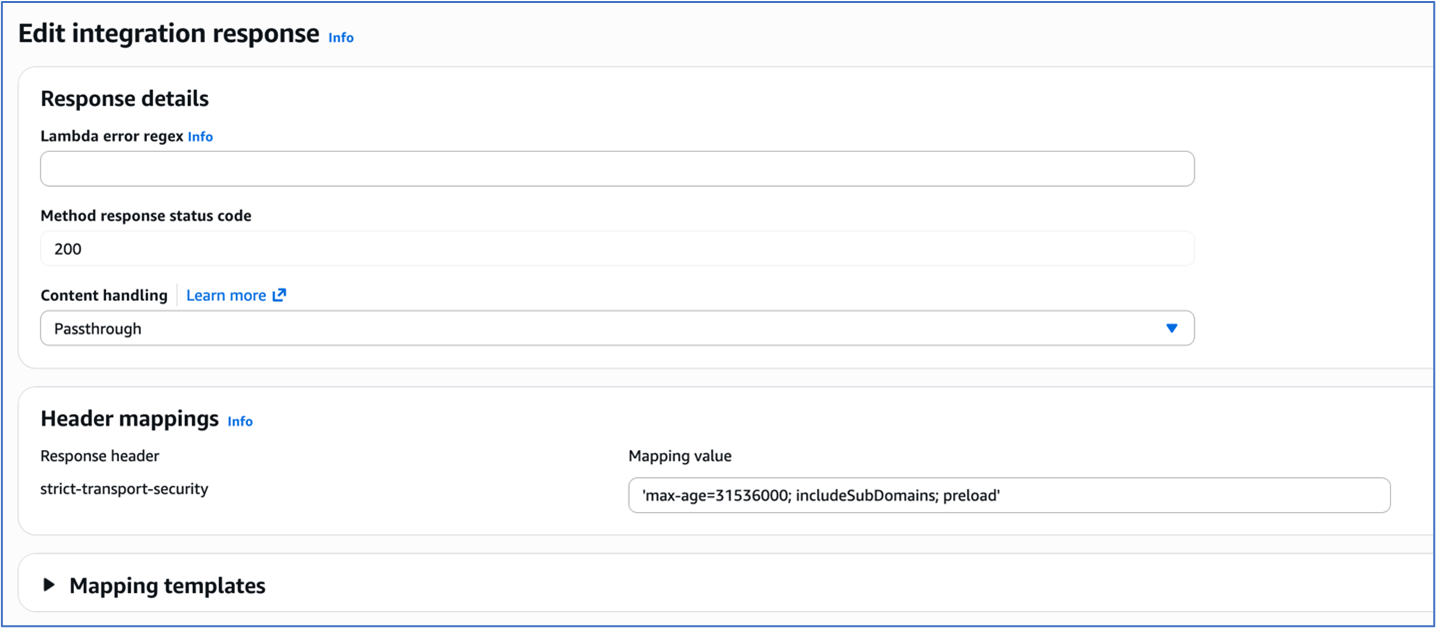
Figure 5: Integration response of the Rest Api
To test and validate, use the following command:
Verify HSTS implementation for both HTTP API and REST API using curl with response headers logged:
curl -i https://your-api-gateway-url.execute-
api.region.amazonaws.com/stage/resource
The expected response should include:
HTTP/2 200

date: Tue, 20 Sep 2025 16:34:35 GMT
content-type: application/json
content-length: 3
x-amzn-requestid: 76543210-9aaa-4bbb-accc-987654321012
strict-transport-security: max-age=31536000; includeSubDomains; preload
x-amz-apigw-id: ABCDEFGHIJKLMNO
Implementing HSTS with AWS Application Load Balancers
Application Load Balancers now provide built-in support for HTTP response header modification, including HSTS headers. This lets you enforce consistent security policies across all your services from a single point, reducing development effort and ensuring uniform protection regardless of which backend technologies you’re using.
Prerequisites and infrastructure requirements
Before implementing HSTS with load balancers, ensure your infrastructure meets these requirements:
- Functional HTTPS listener – The ALB listener must be configured with HTTPS correctly.
- Valid certificates – The ALB listener must have proper TLS certificate chain in AWS Certificate Manager and validation.
- Application Load Balancer – The header modification feature for the ALB must be enabled for the listener since it is turned off by default.
Application Load Balancers support direct HSTS header injection through the response header modification feature. This approach provides centralized security policy enforcement without requiring individual application configuration.
To enable HTTP header modification for your Application Load Balancer:
- Open the Amazon Elastic Compute Cloud (Amazon EC2) console and navigate to Load Balancers.
- Select your Application Load Balancer.
- On the Listeners and rules tab, select the HTTPS listener.
- On the Attributes tab, choose Edit.
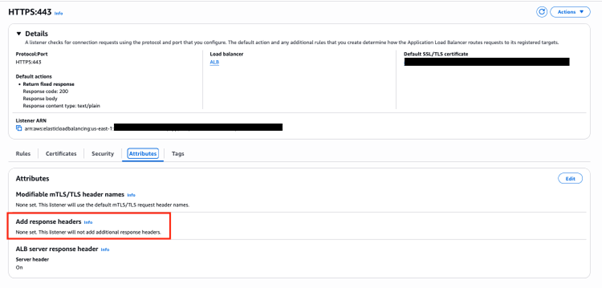
Figure 6: ALB HTTPS listener Attributes configuration
- Expand the Add response headers section.
- Select Add HTTP Strict Transport Security (HSTS) header.
- To configure the header value, enter
max-age=31536000; includeSubDomains; preload.
- Choose Save changes.
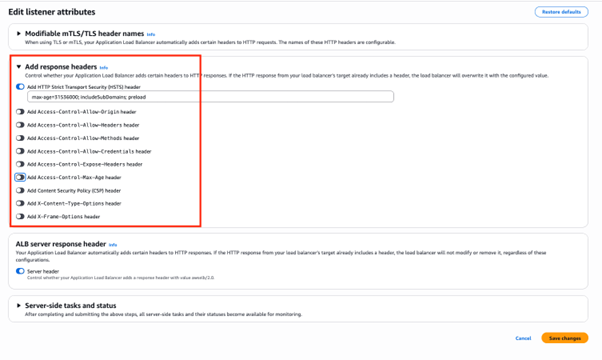
Figure 7: Add response headers in attributes configuration of the ALB HTTPS listener
Header modification behavior
When ALB header modification is enabled:
- Header addition – If the backend response doesn’t include the specified header, ALB adds it with the configured value
- Header override – If the backend response includes the header, ALB replaces the existing value with the configured value
- Centralized control – Responses from the load balancer include the configured security headers, ensuring consistent policy enforcement
To test and validate, use the following command:
curl -I https://my-loadbalancer-1234567890.us-west-2.elb.amazonaws.com
The following code example shows the expected response headers:
HTTP/2 200
date: Tue, 23 Sep 2025 16:34:35 GMT
strict-transport-security: max-age=31536000; includeSubDomains; preload
Header value constraints:
- Maximum header value size – 1 KB
- Supported characters – Alphanumeric (a-z, A-Z, 0-9) and special characters (_ :;.,/’?!(){}[]@<>=-+*#&`|~^%)
- Empty values revert to default behavior (no header modification)
When implementing header modifications, there are several operational considerations to keep in mind. Header modification must be explicitly enabled on each listener where you want the functionality to work. Once enabled, any changes you configure will apply to all responses that come from the load balancer, affecting every request processed through that listener. Application Load Balancer performs basic input validation on the headers you configure, but it has limited capability for header-specific validation, so you should ensure your header configurations follow proper formatting and standards.
This built-in Application Load Balancer capability significantly simplifies HSTS implementation by eliminating the need for backend application modifications while providing centralized security policy enforcement across your entire application infrastructure.
Implementing HSTS with Amazon CloudFront
Amazon CloudFront provides built-in support for HTTP security headers, including HSTS, through response headers policies. This feature enables centralized security header management at the CDN edge, providing consistent policy enforcement across cached and non-cached content.
Response headers policy configuration
You can use the CloudFront response headers policy feature to configure security headers that are automatically added to responses served by your distribution. You can use managed response headers policies that include predefined values for the most common HTTP security headers. Or, you can create a custom response header policy with custom security headers and values that you can add to the required CloudFront behavior.
To configure security headers:
- On the CloudFront console, navigate to Policies and then Response headers.
- Choose Create response headers policy.
- Configure policy settings:
- Name –
HSTS-Security-Policy
- Description – HSTS and security headers for web applications
- Under Security headers, configure:
- Strict Transport Security – Select
- Max age – 31,536,000 seconds (1 year)
- Preload – Select (optional)
- IncludeSubDomains – Select (optional)
-
Add additional security headers:
- X-Content-Type-Options
- X-Frame-Options – Select Origin as “SAMEORIGIN”
- Referrer-Policy – Select “strict-origin-when-cross-origin”
- X-XSS-Protection – Select “Enabled”, Tick “Block”
- Choose Create.

Figure 8: Configuring response header policy for the Cloudfront distribution
To attach the policy to the distribution:
- Navigate to your CloudFront distribution.
- Select the Behaviors tab.
- Edit the default behavior (or create a new one).
- Under Response headers policy, select your created policy.
- Choose Save changes.

Figure 9: Selecting the response headers policy
Header override behavior:
CloudFront response headers policies provide origin override functionality that controls how headers are managed between the origin and CloudFront. When origin override is enabled, CloudFront will replace existing headers that come from the origin server. Conversely, when origin override is disabled, CloudFront will only add the policy-defined headers if those same headers are not already present in the origin response, preserving the original headers from the source.
To test and validate, use the following command:
curl -I https://your-cloudfront-domain.cloudfront.net
The following code example shows the expected response headers:
HTTP/2 200
date: Tue, 23 Sep 2025 16:34:35 GMT
strict-transport-security: max-age=31536000; includeSubDomains; preload
x-content-type-options: nosniff
x-frame-options: SAMEORIGIN
referrer-policy: strict-origin-when-cross-origin
x-xss-protection: 1; mode=block
x-cache: Hit from cloudfront
Using CloudFront has several advantages. It offers consistent header application across all content types and centralized security policy management. Edge-level enforcement reduces latency, and no origin server modifications are required. AWS edge locations offer global policy distribution.
Security considerations and best practices
Implementing HSTS requires careful consideration of several security implications and operational requirements.
The max-age directive determines how long browsers will enforce HTTPS-only access. The duration guidelines are as follows:
- 300 seconds (5 minutes) – Safe for experimentation during initial testing phase.
- 86,400 seconds (1 day) – For short-term commitment such as development environments.
- 259,2000 seconds (30 days) – For medium-term validation such as staging environments.
- 31,536,000 seconds (1 year) – For long-term commitment such as production environments.
We recommend that you start with shorter max-age values during initial implementation and gradually increase them as you gain confidence in your HTTPS infrastructure stability.
The includeSubDomains directive extends HSTS enforcement to all subdomains. It offers several benefits, including comprehensive protection across the entire domain hierarchy, prevention of subdomain-based attacks, and simplified security policy management.
Requirements for using this directive include:
- Subdomains should support HTTPS to use this directive effectively.
- Subdomains should have valid SSL certificates.
- You must maintain a consistent security policy across domain hierarchy.
Consider implementing HSTS preloading for maximum security coverage:
Strict-Transport-Security: max-age=31536000; includeSubDomains; preload
Preloading benefits include protection for first-time visitors, browser-level enforcement before network requests, and maximizing security coverage.
The following are some preloading considerations:
- It requires submission to browser preload lists.
- It’s difficult to reverse because removal takes months.
- It requires long-term commitment to HTTPS infrastructure.
For more information, see:
Implementing HSTS across AWS services provides a robust foundation for securing web applications against protocol downgrade attacks and enabling encrypted communications. By using the built-in capabilities of API Gateway, CloudFront, and Application Load Balancers, organizations can create comprehensive security policies that align with AWS Well-Architected Framework principles.
If you have feedback about this post, submit comments in the Comments section below. If you have questions about this post, contact AWS Support.

 Login
Login