Reading view

Guarding your family against the latest online threats

Parents across America face a growing wave of sophisticated online fraud designed to exploit their deepest fears and protective instincts. Americans reported losing more than $12.5 billion to fraud in 2024, representing a 25% increase over the prior year, according to new Federal Trade Commission data.

Parents represent a particularly vulnerable target because scammers understand that nothing motivates faster action than a perceived threat to a child’s safety or wellbeing. These criminals exploit parental love —creating artificial urgency that bypasses normal thinking.

Why scammers target parents

Parents are prime scam targets for several key reasons:

  • They often have established credit, making it attractive for scams involving money.
  • Easy access to cash that hackers try to tap into.
  • Most importantly, parents will go to extraordinary lengths—including financial sacrifice—to protect their children from harm.

Modern technology has made these scams more convincing than ever. Scammers now use artificial intelligence to clone voices, create fake social media profiles, and generate realistic scenarios that seem entirely plausible to worried parents.

The 5 most devastating scams bankrupting parents right now

1. Family emergency scams

The most emotionally devastating scam targeting parents involves fake emergencies. Scammers use AI to clone the voice of a child in distress, calling parents with scenarios like car accidents, jail time, or medical emergencies. The caller, sounding exactly like their child, beg for immediate money transfer while pleading for secrecy.

These scams create powerful emotional responses that override logical thinking. Parents hear their child’s voice saying, “Don’t tell Dad” or “I’m scared,” and immediately spring into action without verification.

“Pause and verify” protocol: Teach your entire family the 24-hour rule for any urgent financial requests. No legitimate emergency requires immediate wire transfers or gift card payments. Always hang up and call back using a known phone number to verify any emergency claims.

2. School-related fraud

Cybercriminals pose as school officials, coaches, or administrators claiming children owe money for equipment, field trips, or disciplinary issues. They demand immediate payment via wire transfer, gift cards, or cryptocurrency to avoid serious consequences like suspension or criminal charges.

These scams work because parents want to protect their children’s academic and social standing. The fraudsters create artificial deadlines and threaten embarrassment or legal action if parents don’t act quickly.

Verify information: Hang up and contact the school or organization directly using their official phone number or website to confirm its authenticity.

3. Social media kidnapping hoaxes

In virtual kidnapping scams, fraudsters monitor children’s social media activity to gather personal information. They then call parents claiming to have kidnapped their child, demanding ransom money. Meanwhile, the child is simply unavailable—perhaps in class, at practice, or with friends.

These schemes rely on the parent’s inability to immediately reach their child for confirmation. The scammers use publicly available information from social media posts to make their demands seem legitimate.

Multi-Factor Authentication (MFA): Enable two-factor authentication on all family accounts, especially email, banking, and social media. This simple step blocks 99% of automated attacks, even if passwords are compromised. Show your children how to use authenticator apps rather than SMS authentication when possible. Additionally, It’s critical for parents to set their children’s social media accounts to private, use parental controls, and monitor their child’s social media habits.

4. Financial Sextortion of Minors

The FBI has identified “financial sextortion” of teens as a “rapidly escalating threat”. Criminals trick minors into sharing explicit images, then blackmail both the child and parents for payment. These predators target children through gaming platforms, social media, and messaging apps.

A study found approximately 5% of U.S. students reported that they had been the victim of sextortion.  With 1 in 7 youth victims (15%) saying they harmed themselves in response to sextortion. Parents often discover these crimes only when their children’s demeanor changes or exhibit severe behavioral changes. The psychological damage extends far beyond the financial cost.

Social media privacy settings: Regularly audit your family’s social media accounts together. Scammers harvest information from public posts to make their schemes more convincing. Teach children to never post real-time locations, vacation plans, personal details that criminals can exploit or share personal and explicit photos.

5. College and scholarship scams

As college costs soar, scammers target parents desperate to secure educational funding for their children. They offer fake scholarships, guaranteed admissions, or student loan forgiveness programs that require upfront fees or personal financial information.

These scams often impersonate legitimate organizations and use official-sounding language to appear credible. Parents, stressed about their children’s futures, may overlook red flags in their eagerness to secure opportunities.

Email security awareness: Practice identifying phishing emails with your children using the “STOP, LOOK, THINK” method:

  • STOP: Don’t click links or attachments immediately.
  • LOOK: Check sender addresses carefully for misspellings or suspicious domains.
  • THINK: Ask yourself if the request makes sense and verify independently.

Your 5-step defense plan: stop scammers before they strike

  1. Real-time threat detection: Webroot’s advanced algorithms identify and block malicious websites, phishing attempts, and dangerous downloads before they can compromise family devices or data.
  2. Identity protection services: Comprehensive monitoring of identity, credit, and financial accounts helps detect fraud early, with up to $1 million in fraud expense and stolen funds reimbursement.
  3. Secure family browsing: Webroot automatically warns users about suspicious websites and blocks access to known scam sites, protecting curious children and busy parents from accidentally accessing dangerous content.
  4. Dark Web monitoring: This crucial feature monitors family members’ personal information and sends alerts if data appears in breaches or on criminal marketplaces.
  5. Password security: Strong password management ensures that all family accounts remain protected with unique, complex passwords that children and parents can easily access when needed. Never reuse passwords across accounts and use a password manager to track them all.

Don’t let criminals exploit your parental instincts

  • Establish clear communication protocols with your children.
  • Create unique code words or security questions that only family members know.
  • Practice scenarios where children should verify requests through multiple channels before sharing information or money. Have regular family discussions about online safety to help children understand current threats without creating excessive fear.
  • Participate in school, community centers, and parent organizations cybersecurity workshops specifically designed for families.
  • Combine street-smart awareness with enterprise-level cybersecurity solutions like Webroot to create an impenetrable defense against parent-targeting criminals.

 With October being Cybersecurity Awareness Month now is the perfect time to put your cybersecurity family game plan into place. The criminals betting on your parental panic are about to learn that informed, protected parents don’t make easy targets.

Additional Resources:

The post Guarding your family against the latest online threats appeared first on Webroot Blog.

  •  

Senior scams topped $4.8 billion in 2024: What to watch out for

Americans aged 60 and older lost $4.8 billion in 2024 to scammers, according to a report released by the FBI. These figures represent real people, real families, and life-changing financial devastation.

The impact extends beyond just the numbers. The average loss among people over the age of 60 was $83,000, more than four times the average overall loss in 2024. This disparity highlights why seniors have become prime targets for sophisticated scam operations.

Why seniors are targeted

Cybercriminals specifically target older adults for several reasons. Many seniors have accumulated substantial savings over their lifetimes, own their homes outright, and maintain good credit scores. Additionally, some may be less familiar with modern technology and digital security practices, making them more vulnerable to online deception.

The 5 scams draining senior bank accounts

1. Tech support fraud

Tech support scams happen when scammers pose as representatives of legitimate businesses like banks and utility companies. They reach out in various ways, including phone calls, texts and pop-up windows. They claim there’s an issue with a device or account and ask to send a fee to fix it. These fake alerts provide phone numbers that connect victims to scammers who then request remote access to computers and payment for unnecessary “repairs.”

2. Romance scams

Lonely seniors looking for love and companionship can easily fall victim to romance fraud. Criminals create fake profiles on dating sites and social media. These scammers build emotional relationships over weeks or months before requesting money to be wired or transferred to them for emergencies or travel expenses. Romance scams cost seniors $277 million (up 16% from 2022) according to the FTC’s latest report.

3. Grandparent scams

One of the most disturbing trends is the grandparent emergency scam. Fraudsters use AI to clone the voice of a grandchild in distress. Grandma or Grandpa gets a fake call from someone who sounds just like their grandchild saying need of money for bail, medical emergencies, or another crisis. They often request that the victim keep the call secret and send money immediately through wire transfers or gift cards. These scams work because they create emotional urgency.

4. Investment fraud

Older adults report losing more money, $538 million—a 34% increase over 2022, to investment scams than any other type of fraud. These scams often originate from phone calls, emails, social media, or events where fraudsters promise “guaranteed” high returns with little to no risk. Many schemes use urgency (“act now before it’s too late”), pose as financial advisors, or an affinity group related to their community or church. Seniors may fall for them because they sound safe and tailored to their situation, making it difficult to distinguish between legitimate opportunities and fraudulent ones until it’s too late.

5. Government impersonation scams

Scammers pose as representatives from Medicare, Social Security, or the IRS, claiming there are problems with benefits or threatening legal action unless immediate payment is made. For example, a call, text or social media message from someone who says they work at the Social Security Administration. They threaten to suspend the senior’s Social Security number or stop their Social Security payments unless they send them money owed. This type of claim is a scheme to steal both identity and money.  Social Security numbers can’t be suspended, and government agencies will never ask to be paid via wire transfer, cryptocurrency or payment apps.

Signs that it might be a scam

  • Unexpected phone calls or pop-ups claiming a computer is infected
  • Requests for immediate payment via wire transfer, gift cards, or cryptocurrency
  • High-pressure tactics demanding quick decisions
  • Unsolicited romantic interest from strangers online
  • Claims of emergency situations involving family members
  • Promises of unrealistic investment returns

How Webroot can help protect seniors

Modern cybersecurity solutions are essential for protecting seniors online. Webroot’s Total Protection offers multiple layers of protection specifically designed to combat the threats seniors face most.

Antivirus protection: Webroot’s advanced threat detection identifies and blocks malicious websites, phishing attempts, and dangerous downloads before they can cause harm.

Identity protection: Identity, credit, and financial accounts monitoring for fraud, with up $1M in fraud expense and stolen funds reimbursement.

Dark Web monitoring: This feature monitors personal information and alerts users if their data appears on the dark web or in data breaches.

Secure browsing: Webroot automatically warns users about suspicious websites and blocks access to known scam sites.

Password management: Strong, unique passwords are crucial for online safety, and Webroot’s password manager makes it easy to maintain secure accounts across all devices.

The importance of community awareness

The epidemic of attacks on seniors requires community-wide awareness and action.

Family members should regularly discuss online safety with senior relatives, helping them understand current scam tactics without creating fear or limiting their digital independence. Community organizations, libraries, and senior centers host educational workshops about cybersecurity and scam prevention. Seniors should check local events to learn more.

Moving forward safely

The digital world offers tremendous benefits for seniors, from staying connected with family to accessing healthcare and financial services online. The goal The goal for seniors isn’t to avoid technology but to use it safely and confidently.

By combining awareness, education, and robust cybersecurity tools like Webroot, seniors can enjoy the advantages of modern technology while staying protected from those who would exploit their trust and generosity. When something seems too good to be true or creates a sense of urgency, seniors should take time to verify information and consult with trusted family members or friends.

The fight against elder fraud requires vigilance from entire communities, but with the right tools and knowledge, families and communities can help protect their most vulnerable members from these devastating crimes.

Additional resources:

The cost of romance fraud

Spotting grandparent scams

AARP 2025 fraud and scams survey

Webroot solutions

The post Senior scams topped $4.8 billion in 2024: What to watch out for appeared first on Webroot Blog.

  •  

Why your computer will thank you for choosing Webroot Essentials

Let’s be honest – nobody wants antivirus software that slows down their computer. You know the feeling: you install security software to protect yourself, but suddenly your laptop takes forever to start up, programs freeze, and you’re constantly waiting for things to load.

Well, we have some great news. A recent independent study by PassMark Software just proved what we’ve been saying all along: Webroot Essentials gives you top-notch protection without the performance headaches.

We actually came out on top

PassMark tested nine popular antivirus programs (including big names like McAfee, Norton, and Microsoft Defender) to see which one performs best on Windows 11. Webroot Essentials scored the highest overall – but here’s what really matters to you as a user.

The numbers that matter to your daily life

Instead of boring you with technical jargon, let’s talk about what these test results mean for your everyday computer use:

Getting set up

  • Webroot installs 6.7 times faster than other antivirus programs
  • Translation: You’ll be protected in under a minute, not sitting around waiting

Using your computer

  • Our software opens 3 times faster when you need to check something
  • Your computer stays snappy and responsive, just like it should

Your hard drive space

  • Webroot takes up 33 times less space than the average competitor
  • More room for your photos, music, and the stuff you actually care about

Your computer’s memory

  • We use 5 times less memory when just running in the background
  • Even during scans, we use 3.5 times less memory than others
  • Your other programs won’t slow down or crash

Security scans

  • Full system scans happen 6 times faster
  • No more hour-long scans that make your computer unusable

What this really means for you

Think about your typical day with your computer. Maybe you’re checking email, browsing the web, working on documents, or video chatting with family. You want protection running quietly in the background – not something that makes you want to throw your laptop out the window.

With Webroot Essentials, you get that peace of mind without any of the frustration. Your computer starts up fast, programs load quickly, and you’ve got plenty of storage space left for your files.

Details of the study

PassMark Software ran this independent test in June 2025, putting nine antivirus products through 15 different performance tests. Every product was tested exactly the same way on fresh Windows 11 computers with default settings – so it was a fair comparison across the board.

Download the full report here.

The bottom line

Here’s the thing: you shouldn’t have to choose between staying safe online and having a computer that actually works well. Webroot Essentials proves you can have both.

If you’re tired of antivirus software that feels like it’s working against you instead of for you, it might be time to make the switch. Your computer – and your patience – will thank you.

Learn more about Webroot Essentials

The post Why your computer will thank you for choosing Webroot Essentials appeared first on Webroot Blog.

  •  

Back-to-school cyber safety: Parent checklist

Summer is flying by and before you know it, you’ll be buying backpacks and taking first-day-of-school photos. Back-to-school season brings new classes and friends, but it also brings new digital dangers. By the time you’ve dropped your kids off for their first day of class, chances are they’ve already been exposed to their first cyberthreat of the day. New devices, new online accounts, and relaxed summer screen habits could make your children vulnerable to a slew of online threats.

Numbers you need to know

For most kids, especially teenagers, being online is a big part of daily life. From scrolling through TikTok and watching YouTube videos to chatting with friends and gaming, 46% of teens say they’re online “almost constantly.” Cybercriminals know this and are always looking for opportunities to cash in on your kids’ online activity. Threats like social media phishing have skyrocketed from 18.9% to 42.8%. Some of these scams are directly aimed at children, including a rash of fake school emails designed to steal sensitive personal information. Since more than 80% of data breaches start with stolen passwords, it’s more important than ever that your children use strong passwords that are difficult to crack. The good news? We’ve put together a digital safety checklist to help you boost your entire family’s cybersecurity in just one weekend.

Real-life risks in your child’s digital day

  • Phishing & social engineering: Let’s say your teenage daughter gets a text that reads, “Your grades won’t post unless you verify your information now.” Or maybe she gets an email that asks for her student login to update her records. Phishing and social engineering scams use threats and a sense of urgency to get you to click links and share personal information. Make sure your kids know to question any sudden or unusual request, and always bring it to you for verification before taking any action.
  • Gaming & app-related hazards: Your son’s gaming buddy asks to move their conversation to a private app. Seems harmless enough, but is this someone your son really knows? Gaming sites are often part of a child’s social life, and that’s exactly why they’re a popular place for scams. Kids get urged to make in-game purchases that run up mom and dad’s credit card bills. They get invites to unfamiliar apps and private chats that can lead to crimes like credit card theft and inappropriate contact with strangers. Scammers and predators often target kids through chat features and build trust so they can take advantage of them, both personally and financially. Remind your children that not everyone they meet online is who they say they are. For their safety, they should only trust the friends they actually know IRL (in real life).
  • Social media dangers:
    • Oversharing personal information: Your child’s classmate screenshots a private message and shares it on social media. It’s a seemingly small act that can have lasting consequences, from public embarrassment to cyberbullying. One of the biggest perils of social media can be oversharing personal details. Location tracking and location tagging can expose sensitive information like addresses, schools and current locations. Talk with your kids about keeping private information private by being careful who they chat with and by using location sharing and tagging wisely.
    • Negative mental health effects: While there are many rewards to social media, excessive use can have a negative effect on your child’s mental health. Too much time spent scrolling can lead to social isolation, lack of sleep and lack of outdoor activity. Be sure to talk with you kids about creating healthy digital habits, which includes regular breaks from devices.
  • Academic integrity issues: With AI use on the rise, it’s only fair to expect your kids will use ChatGPT or another AI tool to help with their homework. But it’s important to explain that while AI can be used to help them study, it shouldn’t do their work for them. As AI tools become more sophisticated, so do detection tools that identify plagiarism and other forms of cheating. The same goes for sharing homework or posting test answers online. Make sure your kids know that the consequences of cheating can include failing grades and disciplinary action at school. Encourage them to stay academically honest and try to offer to help them with their studies if they need it.
  • Sextortion & online predators: The toughest topic to bring up with your children may be the most important one. Online predators are skilled at manipulation and tend to be very difficult to spot, especially for a child. Sextortion is a form of blackmail. It often occurs when an adult poses as a peer and builds an online relationship with a child. The scammer then pressures the child for private photos and information, which they can use for blackmail purposes. Even if a child has never shared a sexually explicit photo, they can still fall victim to sextortion. Recently, scammers have been using AI to transform an innocent photo of a child, usually taken from a social media profile, into a sexually explicit photo. They then use these very realistic photos to blackmail the victim. Have open conversations with your kids and encourage them to share details about any online relationships with you. Explain that you respect their privacy but need to have regular check-ins to keep them safe.

Your back-to-school digital security action plan

Want to secure your whole family’s digital life? Complete this back-to-school digital security checklist and use it to protect your entire household in under an hour.

Complete this weekend:

✅ Install reputable antivirus software: Keep your family cyber safe by installing antivirus software on all devices. Webroot Total Protection offers comprehensive online security and protection for up to ten devices. It includes real-time monitoring to safeguard you from bank and credit card fraud and identity theft.
✅ Enable automatic updates: Outdated software puts you and your family at risk for cyberfraud. Protect your important digital data by enabling automatic updates for all your apps, software and devices. This ensures you always have the latest security patches, and you can schedule updates to happen overnight, so they won’t interrupt your family’s screen time.

✅ Create a strong Wi-Fi password: Every smart home device you have, from Nest thermostats to Ring doorbell cameras, connects to your Wi-Fi and creates an opportunity for hackers to break in. Be sure to lock down your home network by creating a strong  password for your router.
 
✅ Set up encrypted connections: Consider using a VPN (Virtual Private Network) to protect your personal information. Whether you’re at home or public Wi-Fi, Webroot Secure VPN provides encrypted connections for safe browsing and online transactions.

✅ Create a backup system for schoolwork and important files: Keep all your homework, projects and other valuable files safe from online fraud with regular backups. Carbonite offers automatic, encrypted backups and unlimited cloud storage, giving you peace of mind that your digital data is always stored safely and easy to restore.
 
Monthly tasks (general):

✅ Review and update passwords: Pick your child’s three most important passwords and update them together. Be sure to make them long and strong – nothing easy to guess like “12345”, “password”, or your pet’s name.

✅ Check your child’s app downloads and permissions: Remove unnecessary apps and manage permissions to deny unwanted data sharing.

✅ Review parental control settings: Review parental control settings on all devices and adjust as needed.
 
Elementary (6-10 years)

This week:

✅ Set up strict parental controls: Make managing screen time and content access on all devices easy with Webroot Parental Controls. Whether your kids are playing Minecraft or chatting on Discord, it’s an easy way to keep them safe while giving them space. It even lets you tailor different levels of protection according to their ages.

✅ Create a “safe list”: Make a list of parent-approved websites and apps for your kids.

✅ Establish device-free homework zones and times: Create a digital detox zone in your home to disengage from all things digital – no texting, email or social media allowed!

✅ Practice the “ask first” rule: Teach your kids to ask a parent before accessing any new downloads or websites

Ongoing:

✅ Monitor all online activity: Always be aware of the games, apps and sites your child uses and anyone they are communicating with.

✅ Keep devices in common areas: Limit online activity to spaces in your home where it’s easy to keep an eye on what your kids are doing.

✅ Teach basic online “stranger danger”: Stranger danger is just as important for online interactions as it is for in-person encounters. Be sure your child knows the basics to keep them safe in all situations.
 
Middle school (11-13 years)

This week:

✅ Set up password manager and teach them to use it: Strong, unique passwords are a simple, yet powerful security tool. Webroot solutions include password managers that store your credentials and credit card information and automatically fill in login information for you. Start using Webroot’s password manager with your kids and teach them how easy it is to generate secure passwords.

✅ Configure social media privacy settings: Work together with your kids to create safe social media settings.

✅ Establish screen time limits: Create screen time limits and stick to consequences if the agreement is broken.

✅ Create a family media agreement with clear rules: Create a media-use contract together and be sure to include screen time, study time, and mental health breaks.

Ongoing:

✅ Check-in regularly about online experiences: Establish a monthly check-in to discuss what they’re seeing and experiencing online.

✅ Monitor friend lists and follower requests: Regularly check on and manage new friend and follower requests for your children. Instill in your children to not accept friend requests from anyone they do not know IRL.

✅ Discuss oversharing risks: Remind your kids to not share  locations, school names, and other personal details on social media.
 
High school (14-18 Years)

This week:

✅ Transition to collaborative security: Work together with your teens to create a security plan. Discuss the need for a digital safety strategy in a matter-of-fact way, just as you’d discuss the need for driving safety rules. Review the need for password security and remind them how important it is that they never share their passwords with anyone but their parents or caregivers.

✅ Discuss the impact of their digital footprint: Remind your kids that their current digital lives can have an impact on their future. Explain how social media profiles, postings, and other content can affect college applications and job opportunities and their safety.

✅ Set up two-factor authentication: Establish and enforce two-factor authentication (2FA) on all important accounts, such as email, banking and even social media.

✅ Review gaming and social media privacy settings: Gaming apps are often automatically set to share personal information. Work with your teen to review and adjust settings.
 
Ongoing:

✅ Monthly “digital wellness” conversations: Make sure to check in with your teens on the emotional effects of their online habits.

✅ Discuss academic integrity: Talk about AI cheating, online ethics, and responsible use. Set boundaries about using AI tools for schoolwork.

✅ Address dating app safety and sextortion risks: No matter how uncomfortable it may be, be straightforward with your kids about the risks of sexting. Be sure they understand that any sexual messages or images they share digitally can live forever. Even on a platform like Snapchat, where images are supposed to be temporary, someone can screenshot, save and share messages and images with others. Just one text to the wrong person could have deeply painful and humiliating consequences.

Conversation starters that work

Starting conversations about online safety with your kids isn’t always easy, but with the right approach, you can help them build digital confidence and awareness.

For elementary kids:

  • “Let’s be internet detectives today! Can you help me spot what’s real and what’s fake in these emails?”
  • “Your computer is like your house – we need to lock the doors. Let me show you how.”

For middle schoolers:

  • “I saw this news story about a kid your age who had their account hacked. Want to check if yours is secure?”
  • “What would you do if someone online asked you to keep a secret from me?”

For high schoolers:

  • “I’m not trying to spy on you, but I do want to make sure you know how to protect yourself online. Can we talk about what you’ve been seeing?”
  • “Have you ever gotten a message or email that made you suspicious or uncomfortable? What did you do?”

Webroot offers real-time protection to keep your family safe online without slowing down devices during homework time. With coverage for multiple devices, including phones, tablets, and computers, it’s easy to protect every member of your household.

Cybersecurity doesn’t go on summer break, so take an hour this weekend to complete the checklist and strengthen your family’s digital defenses before the first bell rings. With Webroot’s powerful tools, you’ll get year-round protection, so you can focus on having a safe, smart, and cyber-savvy school year!

Additional resources:

The post Back-to-school cyber safety: Parent checklist appeared first on Webroot Blog.

  •  

Tips to make your summer travels cyber safe

Ready, set, pack! Summer travel season is here and that means family road trips, beach vacations, international adventures and more. While summertime is prime time for getaways, did you know it’s also prime time for online fraud? Scammers are targeting the travel industry, putting millions of travelers at increased risk. Research shows that the travel and tourism sector ranked third in cyberattacks, with nearly 31% of hospitality organizations experiencing a data breach and a record 340 million people affected by cybercrimes. According to Mastercard, travel-related fraud in 2024 increased by 18% during the summer peak season and 28% in the winter peak season. 

Why travelers are prime targets

Being in an unfamiliar environment can put your personal information at risk if you’re relying on public Wi-Fi networks, using shared devices, and carrying valuable personal and business data on mobile devices. Let’s be honest, when you go into “vacation mode” and start relaxing, it’s only natural that you might also start letting your guard down. Even the best trips can have stressful moments, and when you miss a flight or get lost in a new destination, it’s easy to become less vigilant about protecting your cybersecurity. This is especially true when you travel to foreign countries. In fact, 90% of international travelers admit to risky tech practices while abroad. Fewer than 1 in 3 travelers (31%) protect their data with a virtual private network (VPN) when traveling internationally.

What to know before you go

Believe it or not, the risks to your data security start long before your vacation begins. As soon as you start booking your trip, the cybercriminals start circling. Fraud rates in sectors associated with the early stages of trip planning increased more than 12% between 2023 and 2024. At a time when inflation and economic pressures are on the rise, people are looking for deep discounts, and scammers are seizing the opportunity to steal your private data and your money.

  • Fake travel websites and rental listings: When you find a killer price on a luxury cruise, a European tour or an oceanfront Airbnb, take another look before you book! Scammers use phony offers, manipulated destination photos, and fake confirmation links to lure victims into “purchasing” great travel deals. Always double check and confirm you’re dealing with a legitimate website or listing before you hand over any credit card information.
  • Phishing scams: Phishing scams that target travel-related platforms are on the rise. Cybercriminals pose as legitimate organizations and use fake emails, text messages and phone calls to lure you into giving up financial information. These messages often ask you to click on links that embed malicious software onto your device and steal your sensitive data. In 2024, the travel website booking.com reported a 500%-900% increase in travel-related phishing scams. This rise was attributed to the large number of scams using AI, making it easier for criminals to mimic trusted sources. If you get a suspicious message, call the company or go to their website and log in directly before clicking on any links.
  • Loyalty fraud: Loyalty fraud, also known as points fraud, happens when scammers steal points or personal information from a loyalty program. The travel industry is especially vulnerable to this type of attack because so many travel-related companies, including travel agents, cruise lines, airlines and hotels, offer points programs for frequent travelers. Thieves often access loyalty accounts with credentials stolen in a data breach. Be sure to create strong passwords for your accounts and check your balances regularly.

Pre-trip security

Before you hit the road, help protect your digital data and devices with a few simple security practices.

  • Alert your financial institutions: Only about half of travelers (52%) alert their financial institutions before traveling abroad, but it’s a powerful way to fight cybercrime. When banks and credit card companies know your travel plans, it’s much easier for them to flag any suspicious transactions.
  • Turn off your Bluetooth:  Bluetooth technology automatically creates wireless connections and can give cybercriminals the ability to see what apps and websites you’re logged into. Only 44% of travelers say they make sure to turn off their Bluetooth signal, but it’s a simple way to thwart hackers. It’s also a good idea to turn off device sharing features and update your passwords before a trip.
  • Update your Wi-Fi setting: Joining unknown Wi-Fi networks is very risky and can open up your personal data to hackers. Since public Wi-Fi often has weak security,  it’s important that your phone doesn’t connect to unsecured networks automatically. Make sure to go into your phone settings and disable auto-join for unknown Wi-Fi networks. It’s a simple way to add a layer of protection when you travel.
  • Use “Find My Device” features: Enable the tracking features on your devices that can locate them if they’re lost or stolen – Find My device for iOS and Find Hub for Android.

Cybersecurity travel risks

  • Rental cars: Did you know that the simple act of syncing your phone to your rental car’s infotainment system can expose your sensitive information to cybercrime? Your phone contains all kinds of information that hackers can use, including contacts, text messages, passwords and more. Infotainment systems store your information each time you connect, and it stays there unless you manually delete it. Security experts say while 57% of people sync their phones to rental cars, only half of them take steps to remove their information. Always remember to delete your profile and data from your rental car before returning it!
  • Screen snoopers: Be cautious of screen snoopers (aka shoulder surfers) who try to see the activity on your laptop or phone in public places like planes, airports, and restaurants. To prevent hackers from stealing your passwords and other private information, use privacy screen protectors to shield your screens from prying eyes and always stay aware of your surroundings.
  • Airport and hotel Wi-Fi:  Always be wary of public Wi-Fi networks when you’re on the road. They’re often unprotected and can make it easy for cybercriminals to intercept your data. Poor Wi-Fi security at airports and hotels can allow hackers to swipe your credentials, lock you out of accounts, and even demand a ransom for your stolen data. To ensure safety while online on public WIFI, purchase a VPN for your devices, like Webroot’s Secure VPN.
  • Fake hotspot attacks: Fraudsters often set up fake hotspots to steal your information. Sometimes they alter the name of a genuine hotspot slightly (Starbucks-Coffee instead of StarbucksCoffee) to trick you into connecting. Always double-check the full network name before logging on to a public hotspot. Also, check to see if the site is using encryption. Legitimate sites that begin with “https” protect your information and make it unreadable to hackers.
  • Charging stations: Public charging stations are super convenient when you’re running low on battery, but they can also pose security risks. Cybercriminals can install malicious software on these stations to steal your device’s data, a tactic known as juice jacking. Always avoid plugging directly into public charging stations and play it safe by packing your own wall chargers, car chargers and external batteries when you travel.
  • Business centers and airport Lounges: Business Centers and lounges typically provide desktop computers for simple tasks like checking emails or printing boarding passes. While convenient, these public computers may be risky, as attackers can plant malware or install hardware that records your keystrokes. When traveling, use your personal devices whenever possible.

Travel safety best practices

  • Use Wi-Fi networks safely: Always connect using the public Wi-Fi setting, and do not enable auto-reconnect. Always confirm an HTTPS connection when browsing the internet. Avoid accessing websites that require you to supply personal data, such as social security numbers.
  • Avoid financial sites: Refrain from checking your personal banking apps or financial information over public Wi-Fi.
  • Use VPN protection: A VPN encrypts your internet connection, providing a secure channel for your data. Webroot Secure VPN gives you security and peace of mind by protecting your personal information when you’re on public Wi-Fi.
  • Enable two-factor authentication: Use Two-factor Authentication (TFA) on your gadgets and electronic devices. Adding an extra layer of security to your accounts can prevent unauthorized access.
  • Limit public posts about your location: Avoid sharing specific details about your location and travel plans on social media to prevent potential targeting by scammers.
  • Check mobile device settings: Adjust the screen settings on your devices to allow for a shorter automatic sleep feature. Implement screen locks, biometric security, and privacy settings for location services.
  • Bring portable chargers: Avoid using public charging stations by bringing your own power sources.
  • Install comprehensive security software: Use antivirus solutions to safeguard you from online threats, including bank fraud and identity theft. Webroot Total Protection offers comprehensive security, including real-time threat detection and response, automatic updates, and cloud backup. Other features include Wi-Fi security monitoring, secure browsing, and password management.

No matter what your summer destination, make cybersecurity part of your travel plans. From securing your Wi-Fi connection and turning off Bluetooth to enabling two-factor authentication, small steps can make a big difference. Let Webroot keep all your digital data safe while you’re on the go. Then all you have to worry about is remembering to turn on your out-of-office reply!

Looking for more information?

Fighting Back Against Loyalty Fraud

Travel-Related Phishing

Protect Yourself Against AI Phishing Attacks

Travel Scams to Watch Out For

The post Tips to make your summer travels cyber safe appeared first on Webroot Blog.

  •  

Build strong digital defenses for your entire family

The month of June is a time for fun in the sun and a break from the school year, but did you know it’s also the perfect time to step up your family’s online security? June is Internet Safety Month, a yearly reminder to strengthen your defenses against online threats. In today’s hyper-connected world, we use the internet for just about everything, from shopping to banking to streaming and work. That goes for your kids as well. Many of their favorite activities, including gaming and connecting with friends on social media, are connected to the internet.  While all this access means added convenience, it also means constant threats to your family’s online safety.

From phishing scams to malware, hackers are constantly looking for ways to exploit weaknesses in cybersecurity systems and software. Their goal is always the same: to get access to personal data and use it for profit. The rising numbers tell the story. In 2024, the FBI’s Internet Crime Complaint Center (IC3) received more than 850,000 cybercrime complaints, with reported losses exceeding $10.3 billion. This is partly due to the increase in data breaches. Studies show that 51% of Americans report they’ve been victims of a data breach, and 64% say they’ve changed their online behavior for fear of escalating online threats like ransomware and identity theft.

Keep summer screen time safe

It’s not just adults getting targeted online. Children and teens are increasingly exposed to scams (even extortion scams), cyberbullying, and inappropriate content—especially during summer when screen time surges. A recent Pew Research study found that 45% of teens are online almost constantly. So how do you let your kids enjoy their screens safely? Webroot Total Protection and Webroot Essentials offer parental controls that make it easy to manage your children’s online activity and content access. You can block specific websites, filter out inappropriate content and set daily limits on computer time. You can also monitor what sites your kids visit and interact with, and even tailor different levels of protection for each child. Whether your kids are watching YouTube, chatting on Discord, or gaming with friends, it’s a simple way to keep them safe without having to hover over them every time they’re online. 

Protect every device

As we spend more time on our mobile devices, cybercriminals are following suit. A recent security report shows that 70% of fraud is now carried out through mobile channels. From phones and tablets to laptops, the mobile devices your family relies on daily are brimming with personal data. Now more than ever, we need to take steps to protect ourselves and our family. Webroot Essentials provides multi-device protection with real-time threat intelligence. Whether you’re on Android, iOS, Windows or Mac, all the devices in your household are constantly safeguarded against the latest online threats.

Strengthen your password security

Are you still using passwords like your dog’s name and 123? And what about your kids? Chances are their Roblox passwords aren’t as tough to hack as they should be. If there’s one weak link in most people’s security, it’s their passwords. Cybercriminals know that, and they’re taking full advantage. In fact, the 2025 Verizon Data Breach Investigations Report found 81% of data breaches were caused by compromised passwords. Here are some tips to keep all your family’s passwords secure.

  • Make it complicated: It’s important to create long and complex passwords and avoid using anything that’s easy to guess. That means no “Password” or “123456”. It also means no pet names or kid’s names, since hackers can often find those details on social media.
  •  Don’t recycle: Never use the same login for more than one account. It may be easier to remember, but if your username and password for one account are exposed in a data breach, hackers can use them to try and break into all your other accounts.
  • Use a password manager: Let a password manager save you some headaches by doing the hard work for you. Webroot solutions include password managers that store credentials and credit card information and automatically fill in login information, so the whole family can stay secure without having to remember every login. Be careful storing your credit card information on shared devices. You don’t want a shipment of 70,000 lollipops at your door.

Defend against social engineering scams

It’s important to stay aware of the latest online threats. Social engineering scams are designed to gain your trust and then trick you into sharing sensitive details by clicking on fake links or downloading malicious software. The most common type of social engineering is phishing. In a phishing attack, hackers pretend to be someone you trust and use fraudulent emails, texts and websites to try and steal personal information.

Scammers often use phishing to target children. They pose as friends, influencers, or game platforms to trick them into clicking fake links and handing over details like credit card numbers. These scams often start with an offer of an exciting reward or a prize. Take some time to talk with your kids about these common scams.

  • Fake game reward scams: Kids are offered free in-game currency on a popular platform like Fortnite, then asked to click phony links and provide sensitive details. It’s important to remind your children to redeem rewards through official game platforms only and never enter login or payment information into random pop-ups or suspicious links.
  • Social media impersonation scams: Scammers create fake social media profiles to pose as a friend, classmate, or influencer, and use stolen photos or AI-generated content to build seemingly legitimate profiles. The goal is to trick kids into clicking dangerous links or downloading malware. Make sure your children know that even if someone looks familiar, they may not be who they say they are.
  • Friendship and romance scams: A scammer builds an emotional connection with a child, then starts asking for sensitive info like Social Security numbers, photos, or money. Remind your kids that if someone won’t use video chat or meet in person, they’re probably not legitimate. Also remind your children, adding people to your social media friends group
  • Influencer giveaway scams: Fake influencer accounts host phony contests and message “winners” asking for a fee or bank account details. Remind your kids that they should only follow verified social media accounts, and that a real contest won’t ask them to pay to redeem a prize.

Secure your home network

Home security means more than just deadbolts and alarms. With smart TVs, video doorbells, and wireless thermostats, our homes are more connected than ever. While all these Internet of Things (IoT) devices making our lives more convenient, each one is a potential entry point for hackers. Webroot Secure VPN provides encrypted connections for safe browsing at home. When your family is on the go, it protects your online privacy on unsecured networks and shields your personal information from cyberthieves.

Internet safety checklist

  • Update all your operating systems and applications to the latest versions – make sure to do the same for your kids.
  • Enable automatic updates for software and security for the entire family.
  • Run a full system scan to detect any existing malware on all devices in your household.
  • Enable multi-factor authentication on all critical accounts.
  • Create unique passwords for each online account.
  • Change passwords for your family’s most important accounts often, such as banking, email, and social media.
  • Review settings on all social media accounts and make sure all kids’ profiles are private.
  • Check app permissions, especially on your kids’ devices.
  • Clear all browser cookies and caches monthly.
  • Be cautious with suspicious links or unknown senders. Be sure the whole family knows to verify sender addresses before responding to requests for information or clicking any links.
  • Consider comprehensive online security with Webroot Total Protection, which includes antivirus and identity protection, unlimited cloud backup, and up to $1 million in identity theft expense reimbursement. Get protection for up to ten devices and peace of mind that your family’s digital lives are secure.

Cybercriminals never take a break and neither should you. Internet Safety Month is the perfect opportunity to step up the digital safety of your entire household. And remember – online security isn’t just an annual event. Your sensitive data deserves year-round protection, and you can get it with family-friendly solutions from Webroot. Don’t wait for a data breach or other disaster to take action. Keep your kids safe and your data secure by strengthening your digital defenses today!

Looking for more information?

Avoiding Scams that Target Kids and Teens

Protecting Young Online Gamers

How Americans View Data Privacy

Social Security Numbers and Identity Theft

Protect Yourself from AI-Enabled Phishing

Common Types of Phishing Attacks

Why Use a Password Manager?

Defending Your Digital Identity from Evolving Threats

The post Build strong digital defenses for your entire family appeared first on Webroot Blog.

  •  

Mobile security matters: Protecting your phone from text scams

It all starts so innocently. You get a text saying “Your package couldn’t be delivered. Click here to reschedule.”  Little do you know, clicking that link could open the door for scammers to steal your identity, empty your bank account, or even plant malicious software (malware) on your device. Unless you know what to look out for, one little tap on the wrong text could cost you money and peace of mind.

Text scams, also known as smishing (SMS + phishing), are on the rise. These fraudulent  messages are sent by cybercriminals and are showing up more often and getting harder to spot. The goal is to get you to give up sensitive personal details that can be used to hack into your accounts, and they are alarmingly successful. The Federal Trade Commission reports that in 2024, consumers lost $470 million to scams that started with text messages.

Watch out for these common scams

Package delivery alerts

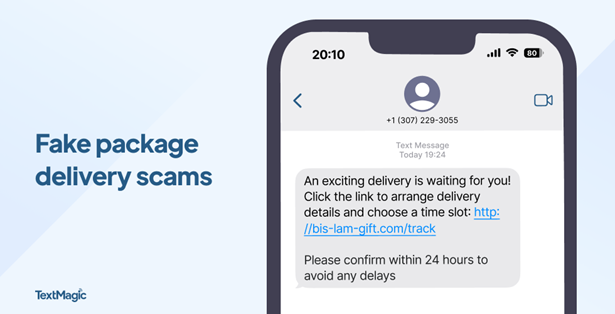
Package delivery alerts are the most common text scam. They often impersonate trusted delivery services like UPS, FedEx, and USPS. They claim there’s a delivery problem, then try to trick you into acting quickly by creating a sense of urgency. Because so many of us shop online and have packages delivered regularly, this is a scam that’s easy to fall for. Instead of clicking a link in a suspicious text, go directly to the delivery service’s website and enter your tracking number manually.

Tip: Messages like “Click now to avoid fees” are a red flag that you should make you think twice.

Screenshot of mobile phone screen displaying an example of a package delivery scam.
Photo credit: TextMagic

Unpaid toll alerts

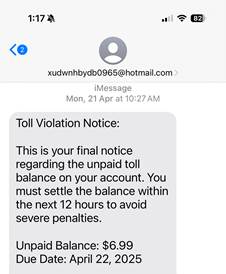
These scams claim you have an overdue toll charge and demand that you click a link to make a payment or you’ll be hit with late charges. Don’t do it! These scammers are trying to gather personal data like your driver’s license number and credit card information so they can steal from you. Remember, fake texts are often sent from phone numbers or email addresses you do not recognize, so never click on a link sent from an unknown number.

Mobile phone screen displaying example of a text scam involving a toll violation.

Bank account alerts

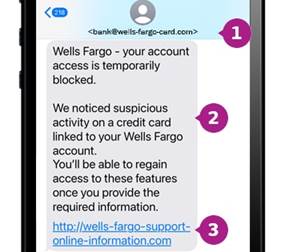
These scams look like they’re from your bank and claim there’s an issue with your funds.  You’re asked for sensitive information like bank logins and passwords, which can be used to drain your bank account. They direct you to click a fake link or call a phony number to resolve it.

Tip: Most major banks, including Chase, Wells Fargo and Bank of America, will never ask for personal or account information via text.

Mobile phone screen with an example of a text scam.
Photo credit: Wells Fargo

Wrong number texts

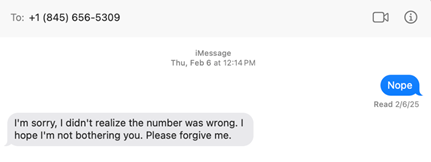
Wrong number texts are designed to seem like a legitimate accident. They start with a simple text like “Hi Mary, are we still on for Thursday?” and you respond “Sorry, wrong number.” The unknown person then tries to start up a friendly conversation, with the goal of establishing a connection and sometimes even cultivating a romantic relationship. It’s common for these cybercriminals to try and con you into a fraudulent investment like a cryptocurrency scam.

Text showing an example of a text scam involving a fake wrong number.

Task scams

Task scams are fake job opportunities. You get a text promising online work with lucrative pay and flexibility. The offer may entail fun tasks like getting paid to shop, but the purpose is to lure you into sharing personal information like your social security number, which can be used to steal your identity. As always, if something sounds too good to be true, it probably is.

Text showing an example of a text scam involving a fake job recruiter.

Prize or gift card scams

It’s easy to feel lucky if you get a text claiming you’ve won a prize, a gift card or other type of reward. Sadly, many people fall for this type of fraud. These messages appear to be from legitimate retailers like Amazon, Walmart or Target. They say things like “You’ve been selected for a $100 gift card!” and tell you to click a link to claim your prize. These scams often work because they generate a sense of excitement and urgency, but they’re just another way to trick you into clicking and entering personal or payment information. In reality, there’s no prize – just a phishing site or malware ready to steal your data.

Screenshot of mobile phone screen displaying an example of a fake prize win.
Photo credit: TextMagic

Mobile security checklist

Most of us use our phones for everything – banking, shopping, messaging, and storing personal information. That makes them a treasure trove of sensitive data and a high-value target for cyberthieves. Here are some tips to help you strengthen your mobile security against text scams and other types of fraud.

  • Don’t click: If you get a text from an unknown sender, do not click on any links. Reach out to the company using a confirmed phone number or website to check if it’s a legitimate message.
  • Don’t share: Never share any of your personal or financial information via text. Remember that if someone is asking you to do this, they’re most likely a scammer.
  • Fight the fear: Be wary about responding to a text that sounds urgent or threatening. Scammers love to take advantage by creating a sense of fear.
  • Stay updated: By keeping your phone’s software up to date, you’ll always have the latest security patches. This is an important tool for protecting against viruses and other malware.
  • Stay vigilant: If something seems too good to be true, it likely is. You probably haven’t won that latest iPhone, especially if you don’t remember entering a contest. Always take a moment to think critically before acting.
  • Use strong passwords: Long, complex and unique passwords are a cornerstone of mobile security. Webroot solutions include password managers that help you stay safe while simplifying your life.
  • Enable two-factor authentication (2FA): Use two-factor authentication on your accounts, especially for banking and email.
  • Scan regularly: Scan your device on a regular basis with trusted security software. Whether you’re using Android or iOS, Webroot Mobile Security offers automatic scanning of apps and updates, as well as real-time protection against phishing and malicious websites.
  • Use a VPN: Consider usinga VPN (Virtual Private Network) to protect your personal information when you’re on public Wi-Fi. Webroot Secure VPN provides safe browsing and online transactions for enhanced privacy and data security.

Text scams are a sneaky way for hackers to get access on your private data, but you don’t have to fall prey to them. By staying alert to the subtle signs of text scams and arming yourself with the security of Webroot, you can stay safe from the latest mobile threats. Browse, shop, and bank with confidence, knowing that your phone — and everything on it — is protected.

Introducing Text Scams Detection on Webroot Mobile Security for Android!

Stay one step ahead of scammers with Webroot’s latest feature: Text Scams Detection. Our advanced technology scans incoming text messages for suspicious links and fraudulent content, protecting you from phishing attempts and malicious schemes like fake delivery tracking links or fraudulent bank notifications. With real-time alerts and flagging, you can confidently navigate your digital world without the fear of falling victim to text scams. Download Webroot Mobile Security for Android today and experience peace of mind like never before!

Explore Webroot plans or Download Mobile Security for Android now from My Account.

Looking for more information and solutions?

Top Text Scams

The Strategy Behind Phishing Texts

How to Spot and Report Text Scams

Putting a Stop to Spam Texts

Protect Yourself from Text Scams

The Value of a VPN

Protecting Your Digital Life

The post Mobile security matters: Protecting your phone from text scams appeared first on Webroot Blog.

  •  

AI-enabled phishing attacks on consumers: How to detect and protect

Phishing attacks are a significant threat to consumers, with cybercriminals constantly evolving their tactics to deceive unsuspecting individuals. The integration of artificial intelligence (AI) into phishing schemes has made these attacks even more sophisticated and challenging to detect.

AI-enabled phishing attacks seriously threaten consumers and their data. The volume of these attacks is staggering with an estimated 3.4 billion spam emails sent daily. The financial impact of phishing attacks amount to over $52 million so far in 2025. The threat of AI phishing attacks is pervasive, so let’s get prepared. Find out how AI enhances phishing attacks on consumers and how you can learn to identify and protect yourself.

How AI enhances phishing attacks

1. Personalized phishing 

AI algorithms can analyze vast amounts of data from social media, public records, and other online sources to create highly personalized phishing messages. By understanding the target’s interests, behaviors, and communication patterns, AI can craft messages that appear more legitimate and relevant, increasing the likelihood of the target falling for the scam.

For example, you receive a text message from your bank using your name and asking you to authorize a recent purchase that happens to be from Amazon or another retailer you frequent. To authorize the purchase, you need to click an obfuscated link that  will bring you to a fake website that mimics your bank’s website. When you enter your information, it will be stolen.  

2. Automated phishing campaigns

AI can automate the process of creating and sending phishing emails, allowing cybercriminals to launch large-scale campaigns with minimal effort. Machine learning models can generate convincing email templates, select appropriate recipients, and even schedule the timing of emails to maximize their impact.

Automated phishing scams usually aren’t full of personalize data, but are targeted to an audience that will think the email was meant for them.

3. Deepfake technology

Deepfake technology, powered by AI, can create realistic audio and video content that mimics the appearance and voice of trusted individuals. This technology can be used in phishing attacks to create fake video calls or voice messages from a CEO or other authority figures, convincing employees to transfer funds or share sensitive information.

How to detect AI-enabled phishing attacks

1. Scrutinize email addresses and URLs

Always check the sender’s email address and the URLs in the email. Phishing emails often use addresses that look similar to legitimate ones, but have slight variations. Hover over links to see the actual URL before clicking. For example: info1@wellsfargo.com

2. Look for generic greetings

Phishing emails often use generic greetings like “Dear Customer” instead of your name. Legitimate companies usually personalize their communications.

3. Check for spelling and grammar errors

Many phishing emails contain spelling and grammar mistakes. While AI-generated emails are becoming more sophisticated, errors can still be a red flag.

4. Be wary of urgent or threatening language

Phishing emails often create a sense of urgency or fear to prompt immediate action. Be cautious of emails that threaten account suspension or demand immediate payment.

5. Verify unexpected attachments or links

If you receive an unexpected attachment or link, verify its legitimacy before opening it. Contact the sender through a different communication channel to confirm. Also, ensure the sender is legitimate.

6. Use multi-factor authentication (MFA)

Enable multi-factor authentication on your accounts. This adds an extra layer of security, making it more difficult for cybercriminals to gain access even if they obtain your login credentials.

Protecting against AI-enabled phishing attacks

1. Advanced email filtering

Use advanced email filtering solutions that leverage AI and machine learning to detect and block phishing emails. Google blocks about 100 million phishing emails a day.

2. Regular software updates

Keep your software and systems up to date. Regular updates often include security patches that protect against known vulnerabilities.

3. User education and awareness

Stay informed about the latest phishing tactics and educate yourself on how to recognize phishing attempts. Awareness is a crucial defense against phishing attacks.

4. Identity protection and antivirus

Invest in all-in-one protection for your identity that includes a password manager, VPN, antivirus and even dark web monitoring. Webroot’s Total Protection allows you to live your life digitally without worry.  

Stay in the know

AI-enabled phishing attacks represent a significant evolution in the tactics used by cybercriminals. As these attacks become more sophisticated, it is essential for consumers to adopt advanced security measures and stay vigilant. By leveraging AI for defense, investing in user education, we can better protect ourselves against the growing threat of AI-driven phishing attacks.

To learn more about how to protect yourself and the solutions that help keep your digital life safe, visit Webroot.

The post AI-enabled phishing attacks on consumers: How to detect and protect appeared first on Webroot Blog.

  •  
❌