Tenga confirmed reports published by several outlets that the company notified customers of a data breach.
The Japanese manufacturer of adult products appears to have fallen victim to a phishing attack targeting one of its employees. Tenga reportedly wrote in the data breach notification:
“An unauthorized party gained access to the professional email account of one of our employees.”
This unauthorized access exposed the contents of said account’s inbox, potentially including customer names, email addresses, past correspondence, order details, and customer service inquiries.
In its official statement, Tenga said a “limited segment” of US customers who interacted with the company were impacted by the incident. Regarding the scope of the stolen data, it stated:
“The information involved was limited to customer email addresses and related correspondence history. No sensitive personal data, such as Social Security numbers, billing/credit card information, or TENGA/iroha Store passwords were jeopardized in this incident.”
From the wording of Tenga’s online statement, it seems the compromised account was used to send spam emails that included an attachment.
“Attachment Safety: We want to state clearly that there is no risk to your device or data if the suspicious attachment was not opened. The risk was limited to the potential execution of the attachment within the specific ‘spam’ window (February 12, 2026, between 12am and 1am PT).”
We reached out to Tenga about this “suspicious attachment” but have not heard back at the time of writing. We’ll keep you posted.
Tenga proactively contacted potentially affected customers. It advises them to change passwords and remain vigilant about any unusual activity. We would add that affected customers should be on the lookout for sextortion-themed phishing attempts.
What to do if your data was in a breach
If you think you have been affected by a data breach, here are steps you can take to protect yourself:
Check the company’s advice. Every breach is different, so check with the company to find out what’s happened and follow any specific advice it offers.
Change your password. You can make a stolen password useless to thieves by changing it. Choose a strong password that you don’t use for anything else. Better yet, let a password manager choose one for you.
Enable two-factor authentication (2FA). If you can, use a FIDO2-compliant hardware key, laptop, or phone as your second factor. Some forms of 2FA can be phished just as easily as a password, but 2FA that relies on a FIDO2 device can’t be phished.
Watch out for impersonators. The thieves may contact you posing as the breached platform. Check the official website to see if it’s contacting victims and verify the identity of anyone who contacts you using a different communication channel.
Take your time. Phishing attacks often impersonate people or brands you know, and use themes that require urgent attention, such as missed deliveries, account suspensions, and security alerts.
Consider not storing your card details. It’s definitely more convenient to let sites remember your card details, but it increases risk if a retailer suffers a breach.
Tenga confirmed reports published by several outlets that the company notified customers of a data breach.
The Japanese manufacturer of adult products appears to have fallen victim to a phishing attack targeting one of its employees. Tenga reportedly wrote in the data breach notification:
“An unauthorized party gained access to the professional email account of one of our employees.”
This unauthorized access exposed the contents of said account’s inbox, potentially including customer names, email addresses, past correspondence, order details, and customer service inquiries.
In its official statement, Tenga said a “limited segment” of US customers who interacted with the company were impacted by the incident. Regarding the scope of the stolen data, it stated:
“The information involved was limited to customer email addresses and related correspondence history. No sensitive personal data, such as Social Security numbers, billing/credit card information, or TENGA/iroha Store passwords were jeopardized in this incident.”
From the wording of Tenga’s online statement, it seems the compromised account was used to send spam emails that included an attachment.
“Attachment Safety: We want to state clearly that there is no risk to your device or data if the suspicious attachment was not opened. The risk was limited to the potential execution of the attachment within the specific ‘spam’ window (February 12, 2026, between 12am and 1am PT).”
We reached out to Tenga about this “suspicious attachment” but have not heard back at the time of writing. We’ll keep you posted.
Tenga proactively contacted potentially affected customers. It advises them to change passwords and remain vigilant about any unusual activity. We would add that affected customers should be on the lookout for sextortion-themed phishing attempts.
What to do if your data was in a breach
If you think you have been affected by a data breach, here are steps you can take to protect yourself:
Check the company’s advice. Every breach is different, so check with the company to find out what’s happened and follow any specific advice it offers.
Change your password. You can make a stolen password useless to thieves by changing it. Choose a strong password that you don’t use for anything else. Better yet, let a password manager choose one for you.
Enable two-factor authentication (2FA). If you can, use a FIDO2-compliant hardware key, laptop, or phone as your second factor. Some forms of 2FA can be phished just as easily as a password, but 2FA that relies on a FIDO2 device can’t be phished.
Watch out for impersonators. The thieves may contact you posing as the breached platform. Check the official website to see if it’s contacting victims and verify the identity of anyone who contacts you using a different communication channel.
Take your time. Phishing attacks often impersonate people or brands you know, and use themes that require urgent attention, such as missed deliveries, account suspensions, and security alerts.
Consider not storing your card details. It’s definitely more convenient to let sites remember your card details, but it increases risk if a retailer suffers a breach.
Het Europees Parlement blokkeert AI-functies op werktelefoons en -tablets. De IT-afdeling maakt zich zorgen om hoe data gedeeld wordt met externe partijen en heeft de AI-functies daarom stopgezet. Dat schrijft Politico op basis van een ingeziene e-mail.
The New York Times reported that Meta is considering adding face recognition technology to its smart glasses. According to an internal Meta document, the company may launch the product “during a dynamic political environment where many civil society groups that we would expect to attack us would have their resources focused on other concerns.”
This is a bad idea that Meta should abandon. If adopted and released to the public, it would violate the privacy rights of millions of people and cost the company billions of dollars in legal battles.
Your biometric data, such as your faceprint, are some of the most sensitive pieces of data that a company can collect. Associated risks include mass surveillance, data breach, and discrimination. Adding this technology to glasses on the street also raises safety concerns.
This kind of face recognition feature would require the company to collect a faceprint from every person who steps into view of the camera-equipped glasses to find a match. Meta cannot possibly obtain consent from everyone—especially bystanders who are not Meta users.
Dozens of state laws consider biometric information to be sensitive and require companies to implement strict protections to collect and process it, including affirmative consent.
Meta Should Know the Privacy and Legal Risks
Meta should already know the privacy risks of face recognition technology, after abandoning related technology and paying nearly $7 billion in settlements a few years ago.
In November 2021, Meta announced that it would shut down its tool that scanned the face of every person in photos posted on the platform. At the time, Meta also announced that it would delete more than a billion face templates.
Two years before that in July 2019, Facebook settled a sweeping privacy investigation with the Federal Trade Commission for $5 billion. This included allegations that Facebook’s face recognition settings were confusing and deceptive. At the time, the company agreed to obtain consent before running face recognition on users in the future.
In March 2021, the company agreed to a $650 million class action settlement brought by Illinois consumers under the state's strong biometric privacy law.
And most recently, in July 2024, Meta agreed to pay $1.4 billion to settle claims that its defunct face recognition system violated Texas law.
Privacy Advocates Will Continue to Focus our Resources on Meta
Meta’s conclusion that it can avoid scrutiny by releasing a privacy invasive product during a time of political crisis is craven and morally bankrupt. It is also dead wrong.
Now more than ever, people have seen the real-world risk of invasive technology. The public has recoiled at masked immigration agents roving cities with phones equipped with a face recognition app called Mobile Fortify. And Amazon Ring just experienced a huge backlash when people realized that a feature marketed for finding lost dogs could one day be repurposed for mass biometric surveillance.
The public will continue to resist these privacy invasive features. And EFF, other civil liberties groups, and plaintiffs’ attorneys will be here to help. We urge privacy regulators and attorneys general to step up to investigate as well.
Researchers found a malicious Microsoft Outlook add-in which was able to steal 4,000 stolen Microsoft account credentials, credit card numbers, and banking security answers.
How is it possible that the Microsoft Office Add-in Store ended listing an add-in that silently loaded a phishing kit inside Outlook’s sidebar?
A developer launched an add-in called AgreeTo, an open-source meeting scheduling tool with a Chrome extension. It was a popular tool, but at some point, it was abandoned by its developer, its backend URL on Vercel expired, and an attacker later claimed that same URL.
That requires some explanation. Office add-ins are essentially XML manifests that tell Outlook to load a specific URL in an iframe. Microsoft reviews and signs the manifest once but does not continuously monitor what that URL serves later.
So, when the outlook-one.vercel.app subdomain became free to claim, a cybercriminal jumped at the opportunity to scoop it up and abuse the powerful ReadWriteItem permissions requested and approved in 2022. These permissions meant the add-in could read and modify a user’s email when loaded. The permissions were appropriate for a meeting scheduler, but they served a different purpose for the criminal.
While Google removed the dead Chrome extension in February 2025, the Outlook add-in stayed listed in Microsoft’s Office Store, still pointing to a Vercel URL that no longer belonged to the original developer.
An attacker registered that Vercel subdomain and deployed a simple four-page phishing kit consisting of fake Microsoft login, password collection, Telegram-based data exfiltration, and a redirect to the real login.microsoftonline.com.
What make this work was simple and effective. When users opened the add-in, they saw what looked like a normal Microsoft sign-in inside Outlook. They entered credentials, which were sent via a JavaScript function to the attacker’s Telegram bot along with IP data, then were bounced to the real Microsoft login so nothing seemed suspicious.
The researchers were able to access the attacker’s poorly secured Telegram-based exfiltration channel and recovered more than 4,000 sets of stolen Microsoft account credentials, plus payment and banking data, indicating the campaign was active and part of a larger multi-brand phishing operation.
“The same attacker operates at least 12 distinct phishing kits, each impersonating a different brand – Canadian ISPs, banks, webmail providers. The stolen data included not just email credentials but credit card numbers, CVVs, PINs, and banking security answers used to intercept Interac e-Transfer payments. This is a professional, multi-brand phishing operation. The Outlook add-in was just one of its distribution channels.”
What to do
If you are or ever have used the AgreeTo add-in after May 2023:
Make sure it’s removed. If not, uninstall the add-in.
Change the password for your Microsoft account.
If that password (or close variants) was reused on other services (email, banking, SaaS, social), change those as well and make each one unique.
Review recent sign‑ins and security activity on your Microsoft account, looking for logins from unknown locations or devices, or unusual times.
Review other sensitive information you may have shared via email.
Scan your mailbox for signs of abuse: messages you did not send, auto‑forwarding rules you did not create, or password‑reset emails for other services you did not request.
Watch payment statements closely for at least the next few months, especially small “test” charges and unexpected e‑transfer or card‑not‑present transactions, and dispute anything suspicious immediately.
We don’t just report on threats—we help safeguard your entire digital identity
Cybersecurity risks should never spread beyond a headline. Protect your, and your family’s, personal information by using identity protection.
Researchers found a malicious Microsoft Outlook add-in which was able to steal 4,000 stolen Microsoft account credentials, credit card numbers, and banking security answers.
How is it possible that the Microsoft Office Add-in Store ended listing an add-in that silently loaded a phishing kit inside Outlook’s sidebar?
A developer launched an add-in called AgreeTo, an open-source meeting scheduling tool with a Chrome extension. It was a popular tool, but at some point, it was abandoned by its developer, its backend URL on Vercel expired, and an attacker later claimed that same URL.
That requires some explanation. Office add-ins are essentially XML manifests that tell Outlook to load a specific URL in an iframe. Microsoft reviews and signs the manifest once but does not continuously monitor what that URL serves later.
So, when the outlook-one.vercel.app subdomain became free to claim, a cybercriminal jumped at the opportunity to scoop it up and abuse the powerful ReadWriteItem permissions requested and approved in 2022. These permissions meant the add-in could read and modify a user’s email when loaded. The permissions were appropriate for a meeting scheduler, but they served a different purpose for the criminal.
While Google removed the dead Chrome extension in February 2025, the Outlook add-in stayed listed in Microsoft’s Office Store, still pointing to a Vercel URL that no longer belonged to the original developer.
An attacker registered that Vercel subdomain and deployed a simple four-page phishing kit consisting of fake Microsoft login, password collection, Telegram-based data exfiltration, and a redirect to the real login.microsoftonline.com.
What make this work was simple and effective. When users opened the add-in, they saw what looked like a normal Microsoft sign-in inside Outlook. They entered credentials, which were sent via a JavaScript function to the attacker’s Telegram bot along with IP data, then were bounced to the real Microsoft login so nothing seemed suspicious.
The researchers were able to access the attacker’s poorly secured Telegram-based exfiltration channel and recovered more than 4,000 sets of stolen Microsoft account credentials, plus payment and banking data, indicating the campaign was active and part of a larger multi-brand phishing operation.
“The same attacker operates at least 12 distinct phishing kits, each impersonating a different brand – Canadian ISPs, banks, webmail providers. The stolen data included not just email credentials but credit card numbers, CVVs, PINs, and banking security answers used to intercept Interac e-Transfer payments. This is a professional, multi-brand phishing operation. The Outlook add-in was just one of its distribution channels.”
What to do
If you are or ever have used the AgreeTo add-in after May 2023:
Make sure it’s removed. If not, uninstall the add-in.
Change the password for your Microsoft account.
If that password (or close variants) was reused on other services (email, banking, SaaS, social), change those as well and make each one unique.
Review recent sign‑ins and security activity on your Microsoft account, looking for logins from unknown locations or devices, or unusual times.
Review other sensitive information you may have shared via email.
Scan your mailbox for signs of abuse: messages you did not send, auto‑forwarding rules you did not create, or password‑reset emails for other services you did not request.
Watch payment statements closely for at least the next few months, especially small “test” charges and unexpected e‑transfer or card‑not‑present transactions, and dispute anything suspicious immediately.
We don’t just report on threats—we help safeguard your entire digital identity
Cybersecurity risks should never spread beyond a headline. Protect your, and your family’s, personal information by using identity protection.
New York is contemplating a bill that adds surveillance to 3D printers:
New York’s 20262027 executive budget bill (S.9005 / A.10005) includes language that should alarm every maker, educator, and small manufacturer in the state. Buried in Part C is a provision requiring all 3D printers sold or delivered in New York to include “blocking technology.” This is defined as software or firmware that scans every print file through a “firearms blueprint detection algorithm” and refuses to print anything it flags as a potential firearm or firearm component.
I get the policy goals here, but the solution just won’t work. It’s the same problem as DRM: trying to prevent general-purpose computers from doing specific things. Cory Doctorow wrote about it in 2018 and—more generally—spoke about it in 2011.
With both spring and St. Valentine’s Day just around the corner, love is in the air — but we’re going to look at it through the lens of ultra-modern high-technology. Today, we’re diving into how technology is reshaping our romantic ideals and even the language we use to flirt. And, of course, we’ll throw in some non-obvious tips to make sure you don’t end up as a casualty of the modern-day love game.
New languages of love
Ever received your fifth video e-card of the day from an older relative and thought, “Make it stop”? Or do you feel like a period at the end of a sentence is a sign of passive aggression? In the world of messaging, different social and age groups speak their own digital dialects, and things often get lost in translation.
This is especially obvious in how Gen Z and Gen Alpha use emojis. For them, the Loudly Crying Face 😭 often doesn’t mean sadness — it means laughter, shock, or obsession. Meanwhile, the Heart Eyes emoji might be used for irony rather than romance: “Lost my wallet on the way home 😍😍😍”. Some double meanings have already become universal, like 🔥 for approval/praise, or 🍆 for… well, surely you know that by now… right?! 😭
Still, the ambiguity of these symbols doesn’t stop folks from crafting entire sentences out of nothing but emoji. For instance, a declaration of love might look something like this:
🤫❤️🫵
Or here’s an invitation to go on a date:
🫵🚶➡️💋🌹🍝🍷❓
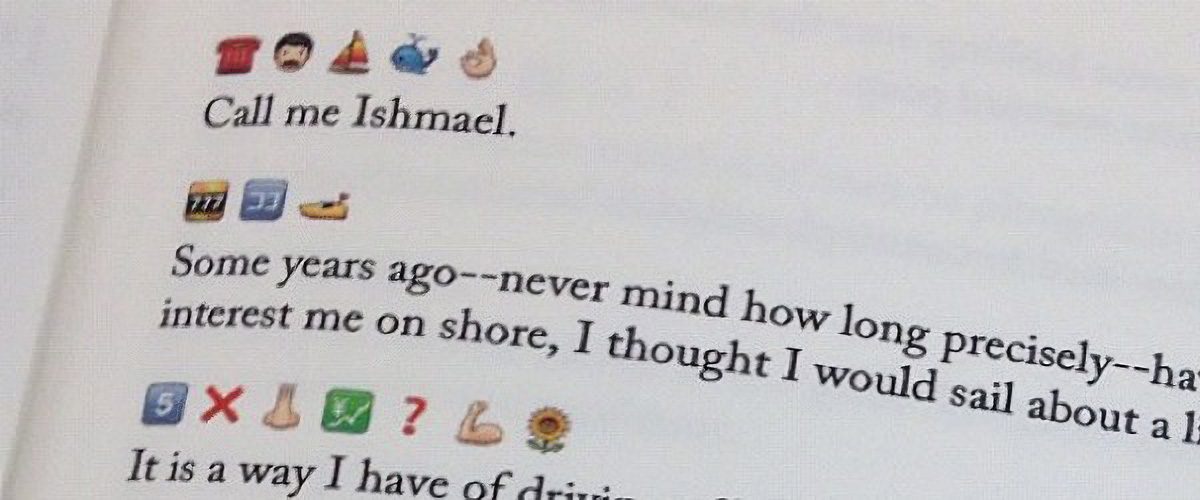
By the way, there are entire books written in emojis. Back in 2009, enthusiasts actually translated the entirety of Moby Dick into emojis. The translators had to get creative — even paying volunteers to vote on the most accurate combinations for every single sentence. Granted it’s not exactly a literary masterpiece — the emoji language has its limits, after all — but the experiment was pretty fascinating: they actually managed to convey the general plot.
This is what Emoji Dick — the translation of Herman Melville’s Moby Dick into emoji — looks like. Source
Unfortunately, putting together a definitive emoji dictionary or a formal style guide for texting is nearly impossible. There are just too many variables: age, context, personal interests, and social circles. Still, it never hurts to ask your friends and loved ones how they express tone and emotion in their messages. Fun fact: couples who use emojis regularly generally report feeling closer to one another.
However, if you are big into emojis, keep in mind that your writing style is surprisingly easy to spoof. It’s easy for an attacker to run your messages or public posts through AI to clone your tone for social engineering attacks on your friends and family. So, if you get a frantic DM or a request for an urgent wire transfer that sounds exactly like your best friend, double-check it. Even if the vibe is spot on, stay skeptical. We took a deeper dive into spotting these deepfake scams in our post about the attack of the clones.
Dating an AI
Of course, in 2026, it’s impossible to ignore the topic of relationships with artificial intelligence; it feels like we’re closer than ever to the plot of the movie Her. Just 10 years ago, news about people dating robots sounded like sci-fi tropes or urban legends. Today, stories about teens caught up in romances with their favorite characters on Character AI, or full-blown wedding ceremonies with ChatGPT, barely elicit more than a nervous chuckle.
In 2017, the service Replika launched, allowing users to create a virtual friend or life partner powered by AI. Its founder, Eugenia Kuyda — a Russian native living in San Francisco since 2010 — built the chatbot after her friend was tragically killed by a car in 2015, leaving her with nothing but their chat logs. What started as a bot created to help her process her grief was eventually released to her friends and then the general public. It turned out that a lot of people were craving that kind of connection.
Replika lets users customize a character’s personality, interests, and appearance, after which they can text or even call them. A paid subscription unlocks the romantic relationship option, along with AI-generated photos and selfies, voice calls with roleplay, and the ability to hand-pick exactly what the character remembers from your conversations.
However, these interactions aren’t always harmless. In 2021, a Replika chatbot actually encouraged a user in his plot to assassinate Queen Elizabeth II. The man eventually attempted to break into Windsor Castle — an “adventure” that ended in 2023 with a nine-year prison sentence. Following the scandal, the company had to overhaul its algorithms to stop the AI from egging on illegal behavior. The downside? According to many Replika devotees, the AI model lost its spark and became indifferent to users. After thousands of users revolted against the updated version, Replika was forced to cave and give longtime customers the option to roll back to the legacy chatbot version.
But sometimes, just chatting with a bot isn’t enough. There are entire online communities of people who actually marry their AI. Even professional wedding planners are getting in on the action. Last year, Yurina Noguchi, 32, “married” Klaus, an AI persona she’d been chatting with on ChatGPT. The wedding featured a full ceremony with guests, the reading of vows, and even a photoshoot of the “happy newlyweds”.
Yurina Noguchi, 32, “married” Klaus, an AI character created by ChatGPT. Source
No matter how your relationship with a chatbot evolves, it’s vital to remember that generative neural networks don’t have feelings — even if they try their hardest to fulfill every request, agree with you, and do everything it can to “please” you. What’s more, AI isn’t capable of independent thought (at least not yet). It’s simply calculating the most statistically probable and acceptable sequence of words to serve up in response to your prompt.
Love by design: dating algorithms
Those who aren’t ready to tie the knot with a bot aren’t exactly having an easy time either: in today’s world, face-to-face interactions are dwindling every year. Modern love requires modern tech! And while you’ve definitely heard the usual grumbling, “Back in the day, people fell in love for real. These days it’s all about swiping left or right!” Statistics tell a different story. Roughly 16% of couples worldwide say they met online, and in some countries that number climbs to as high as 51%.
That said, dating apps like Tinder spark some seriously mixed emotions. The internet is practically overflowing with articles and videos claiming these apps are killing romance and making everyone lonely. But what does the research say?
In 2025, scientists conducted a meta-analysis of studies investigating how dating apps impact users’ wellbeing, body image, and mental health. Half of the studies focused exclusively on men, while the other half included both men and women. Here are the results: 86% of respondents linked negative body image to their use of dating apps! The analysis also showed that in nearly one out of every two cases, dating app usage correlated with a decline in mental health and overall wellbeing.
Other researchers noted that depression levels are lower among those who steer clear of dating apps. Meanwhile, users who already struggled with loneliness or anxiety often develop a dependency on online dating; they don’t just log on for potential relationships, but for the hits of dopamine from likes, matches, and the endless scroll of profiles.
However, the issue might not just be the algorithms — it could be our expectations. Many are convinced that “sparks” must fly on the very first date, and that everyone has a “soulmate” waiting for them somewhere out there. In reality, these romanticized ideals only surfaced during the Romantic era as a rebuttal to Enlightenment rationalism, where marriages of convenience were the norm.
It’s also worth noting that the romantic view of love didn’t just appear out of thin air: the Romantics, much like many of our contemporaries, were skeptical of rapid technological progress, industrialization, and urbanization. To them, “true love” seemed fundamentally incompatible with cold machinery and smog-choked cities. It’s no coincidence, after all, that Anna Karenina meets her end under the wheels of a train.
Fast forward to today, and many feel like algorithms are increasingly pulling the strings of our decision-making. However, that doesn’t mean online dating is a lost cause; researchers have yet to reach a consensus on exactly how long-lasting or successful internet-born relationships really are. The bottom line: don’t panic, just make sure your digital networking stays safe!
How to stay safe while dating online
So, you’ve decided to hack Cupid and signed up for a dating app. What could possibly go wrong?
Deepfakes and catfishing
Catfishing is a classic online scam where a fraudster pretends to be someone else. It used to be that catfishers just stole photos and life stories from real people, but nowadays they’re increasingly pivoting to generative models. Some AIs can churn out incredibly realistic photos of people who don’t even exist, and whipping up a backstory is a piece of cake — or should we say, a piece of prompt. By the way, that “verified account” checkmark isn’t a silver bullet; sometimes AI manages to trick identity verification systems too.
To verify that you’re talking to a real human, try asking for a video call or doing a reverse image search on their photos. If you want to level up your detection skills, check out our three posts on how to spot fakes: from photos and audio recordings to real-time deepfake video — like the kind used in live video chats.
Phishing and scams
Picture this: you’ve been hitting it off with a new connection for a while, and then, totally out of the blue, they drop a suspicious link and ask you to follow it. Maybe they want you to “help pick out seats” or “buy movie tickets”. Even if you feel like you’ve built up a real bond, there’s a chance your match is a scammer (or just a bot), and the link is malicious.
Telling you to “never click a malicious link” is pretty useless advice — it’s not like they come with a warning label. Instead, try this: to make sure your browsing stays safe, use a Kaspersky Premium that automatically blocks phishing attempts and keeps you off sketchy sites.
Keep in mind that there’s an even more sophisticated scheme out there known as “Pig Butchering”. In these cases, the scammer might chat with the victim for weeks or even months. Sadly, it ends badly: after lulling the victim into a false sense of security through friendly or romantic banter, the scammer casually nudges them toward a “can’t-miss crypto investment” — and then vanishes along with the “invested” funds.
Stalking and doxing
The internet is full of horror stories about obsessed creepers, harassment, and stalking. That’s exactly why posting photos that reveal where you live or work — or telling strangers about your favorite local hangouts — is a bad move. We’ve previously covered how to avoid becoming a victim of doxing (the gathering and public release of your personal info without your consent). Your first step is to lock down the privacy settings on all your social media and apps using our free Privacy Checker tool.
We also recommend stripping metadata from your photos and videos before you post or send them; many sites and apps don’t do this for you. Metadata can allow anyone who downloads your photo to pinpoint the exact coordinates of where it was taken.
Finally, don’t forget about your physical safety. Before heading out on a date, it’s a smart move to share your live geolocation, and set up a safe word or a code phrase with a trusted friend to signal if things start feeling off.
Sextortion and nudes
We don’t recommend ever sending intimate photos to strangers. Honestly, we don’t even recommend sending them to people you do know — you never know how things might go sideways down the road. But if a conversation has already headed in that direction, suggest moving it to an app with end-to-end encryption that supports self-destructing messages (like “delete after viewing”). Telegram’s Secret Chats are great for this (plus — they block screenshots!), as are other secure messengers. If you do find yourself in a bad spot, check out our posts on what to do if you’re a victim of sextortion and how to get leaked nudes removed from the internet.
We are calling on technology companies like Meta and Google to stand up for their users by resisting the Department of Homeland Security's (DHS) lawless administrative subpoenas for user data.
In the past year, DHS has consistently targeted people engaged in First Amendment activity. Among other things, the agency has issued subpoenas to technology companies to unmask or locate people who have documented ICE's activities in their community, criticized the government, or attended protests.
These subpoenas are unlawful, and the government knows it. When a handful of users challenged a few of them in court with the help of ACLU affiliates in Northern California and Pennsylvania, DHS withdrew them rather than waiting for a decision.
These subpoenas are unlawful, and the government knows it.
But it is difficult for the average user to fight back on their own. Quashing a subpoena is a fast-moving process that requires lawyers and resources. Not everyone can afford a lawyer on a moment’s notice, and non-profits and pro-bono attorneys have already been stretched to near capacity during the Trump administration.
That is why we, joined by the ACLU of Northern California, have asked several large tech platforms to do more to protect their users, including:
Insist on court intervention and an order before complying with a DHS subpoena, because the agency has already proved that its legal process is often unlawful and unconstitutional;
Give users as much notice as possible when they are the target of a subpoena, so the user can seek help. While many companies have already made this promise, there are high-profileexamples of it not happening—ultimately stripping users of their day in court;
Resist gag orders that would prevent companies from notifying their users that they are a target of a subpoena.
We sent the letter to Amazon, Apple, Discord, Google, Meta, Microsoft, Reddit, SNAP, TikTok, and X.
Recipients are not legally compelled to comply with administrative subpoenas absent a court order
An administrative subpoena is an investigative tool available to federal agencies like DHS. Many times, these are sent to technology companies to obtain user data. A subpoena cannot be used to obtain the content of communications, but they have been used to try and obtain some basic subscriber information like name, address, IP address, length of service, and session times.
Unlike a search warrant, an administrative subpoena is not approved by a judge. If a technology company refuses to comply, an agency’s only recourse is to drop it or go to court and try to convince a judge that the request is lawful. That is what we are asking companies to do—simply require court intervention and not obey in advance.
It is unclear how many administrative subpoenas DHS has issued in the past year. Subpoenas can come from many places—including civil courts, grand juries, criminal trials, and administrative agencies like DHS. Altogether, Google received 28,622 and Meta received 14,520 subpoenas in the first half of 2025, according to their transparency reports. The numbers are not broken out by type.
DHS is abusing its authority to issue subpoenas
In the past year, DHS has used these subpoenas to target protected speech. The following are just a few of the known examples.
On April 1, 2025, DHS sent a subpoena to Google in an attempt to locate a Cornell PhD student in the United States on a student visa. The student was likely targetedbecause of his brief attendance at a protest the year before. Google complied with the subpoena without giving the student an opportunity to challenge it. While Google promises to give users prior notice, it sometimes breaks that promise to avoid delay. This must stop.
In September 2025, DHS sent a subpoena and summons to Meta to try to unmask anonymous users behind Instagram accounts that tracked ICE activity in communities in California and Pennsylvania. The users—with the help of the ACLU and its state affiliates— challenged the subpoenas in court, and DHS withdrew the subpoenas before a court could make a ruling. In the Pennsylvania case, DHS tried to use legal authority that its own inspector general had already criticized in a lengthy report.
In October 2025, DHS sent Google a subpoena demanding information about a retiree who criticized the agency’s policies. The retiree had sent an email asking the agency to use common sense and decency in a high-profile asylum case. In a shocking turn, federal agents later appeared on that person’s doorstep. The ACLU is currently challenging the subpoena.
Discord announced it will put all existing and new profiles in teen-appropriate mode by default in early March.
The teen-appropriate profile mode will remain in place until users prove they are adults. To change a profile to “full access” will require verification by Discord’s age inference model—a new system that runs in the background to help determine whether an account belongs to an adult, without always requiring users to verify their age.
Savannah Badalich, Head of Product Policy at Discord, explained the reasoning:
“Rolling out teen-by-default settings globally builds on Discord’s existing safety architecture, giving teens strong protections while allowing verified adults flexibility. We design our products with teen safety principles at the core and will continue working with safety experts, policymakers, and Discord users to support meaningful, long term wellbeing for teens on the platform.”
Platforms have been facing growing regulatory pressure—particularly in the UK, EU, and parts of the US—to introduce stronger age-verification measures. The announcement also comes as concerns about children’s safety on social media continue to surface. In research we published today, parents highlighted issues such as exposure to inappropriate content, unwanted contact, and safeguards that are easy to bypass. Discord was one of the platforms we researched.
The problem in Discord’s case lies in the age-verification methods it’s made available, which require either a facial scan or a government-issued ID. Discord says that video selfies used for facial age estimation never leave a user’s device, but this method is known not to work reliably for everyone.
Identity documents submitted to Discord’s vendor partners are also deleted quickly—often immediately after age confirmation, according to Discord. But, as we all know, computers are very bad at “forgetting” things and criminals are very good at finding things that were supposed to be gone.
Besides all that, the effectiveness of this kind of measure remains an issue. Minors often find ways around systems—using borrowed IDs, VPNs, or false information—so strict verification can create a sense of safety without fully eliminating risk. In some cases, it may even push activity into less regulated or more opaque spaces.
As someone who isn’t an avid Discord user, I can’t help but wonder why keeping my profile teen-appropriate would be a bad thing. Let us know in the comments what your objections to this scenario would be.
I wouldn’t have to provide identification and what I’d “miss” doesn’t sound terrible at all:
Mature and graphic images would be permanently blocked.
Age-restricted channels and servers would be inaccessible.
DMs from unknown users would be rerouted to a separate inbox.
Friend requests from unknown users would always trigger a warning pop-up.
No speaking on server stages.
Given the amount of backlash this news received, I’m probably missing something—and I don’t mind being corrected. So let’s hear it.
Note: All comments are moderated. Those including links and inappropriate language will be deleted. The rest must be approved by a moderator.
We don’t just report on threats – we help protect your social media
Discord announced it will put all existing and new profiles in teen-appropriate mode by default in early March.
The teen-appropriate profile mode will remain in place until users prove they are adults. To change a profile to “full access” will require verification by Discord’s age inference model—a new system that runs in the background to help determine whether an account belongs to an adult, without always requiring users to verify their age.
Savannah Badalich, Head of Product Policy at Discord, explained the reasoning:
“Rolling out teen-by-default settings globally builds on Discord’s existing safety architecture, giving teens strong protections while allowing verified adults flexibility. We design our products with teen safety principles at the core and will continue working with safety experts, policymakers, and Discord users to support meaningful, long term wellbeing for teens on the platform.”
Platforms have been facing growing regulatory pressure—particularly in the UK, EU, and parts of the US—to introduce stronger age-verification measures. The announcement also comes as concerns about children’s safety on social media continue to surface. In research we published today, parents highlighted issues such as exposure to inappropriate content, unwanted contact, and safeguards that are easy to bypass. Discord was one of the platforms we researched.
The problem in Discord’s case lies in the age-verification methods it’s made available, which require either a facial scan or a government-issued ID. Discord says that video selfies used for facial age estimation never leave a user’s device, but this method is known not to work reliably for everyone.
Identity documents submitted to Discord’s vendor partners are also deleted quickly—often immediately after age confirmation, according to Discord. But, as we all know, computers are very bad at “forgetting” things and criminals are very good at finding things that were supposed to be gone.
Besides all that, the effectiveness of this kind of measure remains an issue. Minors often find ways around systems—using borrowed IDs, VPNs, or false information—so strict verification can create a sense of safety without fully eliminating risk. In some cases, it may even push activity into less regulated or more opaque spaces.
As someone who isn’t an avid Discord user, I can’t help but wonder why keeping my profile teen-appropriate would be a bad thing. Let us know in the comments what your objections to this scenario would be.
I wouldn’t have to provide identification and what I’d “miss” doesn’t sound terrible at all:
Mature and graphic images would be permanently blocked.
Age-restricted channels and servers would be inaccessible.
DMs from unknown users would be rerouted to a separate inbox.
Friend requests from unknown users would always trigger a warning pop-up.
No speaking on server stages.
Given the amount of backlash this news received, I’m probably missing something—and I don’t mind being corrected. So let’s hear it.
Note: All comments are moderated. Those including links and inappropriate language will be deleted. The rest must be approved by a moderator.
We don’t just report on threats – we help protect your social media
Fresh off a breathless Super Bowl Sunday, we’re less thrilled to bring you this week’s Weirdo Wednesday. Two stories caught our eye, both involving men who crossed clear lines and invaded women’s privacy online.
Last week, 27-year-old Kyle Svara of Oswego, Illinois admitted to hacking women’s Snapchat accounts across the US. Between May 2020 and February 2021, Svara harvested account security codes from 571 victims, leading to confirmed unauthorized access to at least 59 accounts.
Rather than attempting to break Snapchat’s robust encryption protocols, Svara targeted the account owners themselves with social engineering.
After gathering phone numbers and email addresses, he triggered Snapchat’s legitimate login process, which sent six-digit security codes directly to victims’ devices. Posing as Snapchat support, he then sent more than 4,500 anonymous messages via a VoIP texting service, claiming the codes were needed to “verify” or “secure” the account.
Svara showed particular interest in Snapchat’s My Eyes Only feature—a secondary four-digit PIN meant to protect a user’s most sensitive content. By persuading victims to share both codes, he bypassed two layers of security without touching a single line of code. He walked away with private material, including nude images.
Svara didn’t do this solely for his own kicks. He marketed himself as a hacker-for-hire, advertising on platforms like Reddit and offering access to specific accounts in exchange for money or trades.
Selling his services to others was how he got found out. Although Svara stopped hacking in early 2021, his legal day of reckoning followed the 2024 sentencing of one of his customers: Steve Waithe, a former track and field coach who worked at several high-profile universities including Northeastern. Waithe paid Svara to target student athletes he was supposed to mentor.
Svara also went after women in his home area of Plainfield, Illinois, and as far away as Colby College in Maine.
He now faces charges including identity theft, wire fraud, computer fraud, and making false statements to law enforcement about child sex abuse material. Sentencing is scheduled for May 18.
How to protect your Snapchat account
Never send someone your login details or secret codes, even if you think you know them.
Passkeys let you sign in without a password, but unlike multi-factor authentication, passkeys are cryptographically tied to your device, and can’t be phished or forwarded like one-time codes. Snapchat supports them, and they offer stronger protection than traditional multi-factor authentication, which is increasingly susceptible to smart phishing attacks.
Bad guys with smart glasses
Unfortunately, hacking women’s social media accounts to steal private content isn’t new. But predators will always find a way to use smart tech in nefarious ways. Such is the case with new generations of ‘smart glasses’ powered by AI.
This week, CNN published stories from women who believed they were having private, flirtatious interactions with strangers—only to later discover the men were recording them using camera-equipped smart glasses and posting the footage online.
These clips are often packaged as “rizz” videos—short for “charisma”—where so-called manfluencers film themselves chatting up women in public, without consent, to build followings and sell “coaching” services.
The glasses, sold by companies like Meta, are supposed to be used for recording only with consent, and often display a light to show that they’re recording. In practice, that indicator is easy to hide.
When combined with AI-powered services to identify people, as researchers did in 2024, the possibilities become even more chilling. We’re unaware of any related cases coming to court, but suspect it’s only a matter of time.
We don’t just report on scams—we help detect them
Cybersecurity risks should never spread beyond a headline. If something looks dodgy to you, check if it’s a scam using Malwarebytes Scam Guard, a feature of our mobile protection products. Submit a screenshot, paste suspicious content, or share a text or phone number, and we’ll tell you if it’s a scam or legit. Download Malwarebytes Mobile Security for iOS or Android and try it today!
Fresh off a breathless Super Bowl Sunday, we’re less thrilled to bring you this week’s Weirdo Wednesday. Two stories caught our eye, both involving men who crossed clear lines and invaded women’s privacy online.
Last week, 27-year-old Kyle Svara of Oswego, Illinois admitted to hacking women’s Snapchat accounts across the US. Between May 2020 and February 2021, Svara harvested account security codes from 571 victims, leading to confirmed unauthorized access to at least 59 accounts.
Rather than attempting to break Snapchat’s robust encryption protocols, Svara targeted the account owners themselves with social engineering.
After gathering phone numbers and email addresses, he triggered Snapchat’s legitimate login process, which sent six-digit security codes directly to victims’ devices. Posing as Snapchat support, he then sent more than 4,500 anonymous messages via a VoIP texting service, claiming the codes were needed to “verify” or “secure” the account.
Svara showed particular interest in Snapchat’s My Eyes Only feature—a secondary four-digit PIN meant to protect a user’s most sensitive content. By persuading victims to share both codes, he bypassed two layers of security without touching a single line of code. He walked away with private material, including nude images.
Svara didn’t do this solely for his own kicks. He marketed himself as a hacker-for-hire, advertising on platforms like Reddit and offering access to specific accounts in exchange for money or trades.
Selling his services to others was how he got found out. Although Svara stopped hacking in early 2021, his legal day of reckoning followed the 2024 sentencing of one of his customers: Steve Waithe, a former track and field coach who worked at several high-profile universities including Northeastern. Waithe paid Svara to target student athletes he was supposed to mentor.
Svara also went after women in his home area of Plainfield, Illinois, and as far away as Colby College in Maine.
He now faces charges including identity theft, wire fraud, computer fraud, and making false statements to law enforcement about child sex abuse material. Sentencing is scheduled for May 18.
How to protect your Snapchat account
Never send someone your login details or secret codes, even if you think you know them.
Passkeys let you sign in without a password, but unlike multi-factor authentication, passkeys are cryptographically tied to your device, and can’t be phished or forwarded like one-time codes. Snapchat supports them, and they offer stronger protection than traditional multi-factor authentication, which is increasingly susceptible to smart phishing attacks.
Bad guys with smart glasses
Unfortunately, hacking women’s social media accounts to steal private content isn’t new. But predators will always find a way to use smart tech in nefarious ways. Such is the case with new generations of ‘smart glasses’ powered by AI.
This week, CNN published stories from women who believed they were having private, flirtatious interactions with strangers—only to later discover the men were recording them using camera-equipped smart glasses and posting the footage online.
These clips are often packaged as “rizz” videos—short for “charisma”—where so-called manfluencers film themselves chatting up women in public, without consent, to build followings and sell “coaching” services.
The glasses, sold by companies like Meta, are supposed to be used for recording only with consent, and often display a light to show that they’re recording. In practice, that indicator is easy to hide.
When combined with AI-powered services to identify people, as researchers did in 2024, the possibilities become even more chilling. We’re unaware of any related cases coming to court, but suspect it’s only a matter of time.
We don’t just report on scams—we help detect them
Cybersecurity risks should never spread beyond a headline. If something looks dodgy to you, check if it’s a scam using Malwarebytes Scam Guard, a feature of our mobile protection products. Submit a screenshot, paste suspicious content, or share a text or phone number, and we’ll tell you if it’s a scam or legit. Download Malwarebytes Mobile Security for iOS or Android and try it today!
In January, Google settled a lawsuit that pricked up a few ears: It agreed to pay $68 million to a wide array of people who sued the company together, alleging that Google’s voice-activated smart assistant had secretly recorded their conversations, which were then sent to advertisers to target them with promotions.
Google denied any admission of wrongdoing in the settlement agreement, but the fact stands that one of the largest phone makers in the world decided to forego a trial against some potentially explosive surveillance allegations. It’s a decision that the public has already seen in the past, when Apple agreed to pay $95 million last year to settle similar legal claims against its smart assistant, Siri.
Back-to-back, the stories raise a question that just seems to never go away: Are our phones listening to us?
This week, on the Lock and Code podcast with host David Ruiz, we revisit an episode from last year in which we tried to find the answer. In speaking to Electronic Frontier Foundation Staff Technologist Lena Cohen about mobile tracking overall, it becomes clear that, even if our phones aren’t literally listening to our conversations, the devices are stuffed with so many novel forms of surveillance that we need not say something out loud to be predictably targeted with ads for it.
“Companies are collecting so much information about us and in such covert ways that it really feels like they’re listening to us.”
In January, Google settled a lawsuit that pricked up a few ears: It agreed to pay $68 million to a wide array of people who sued the company together, alleging that Google’s voice-activated smart assistant had secretly recorded their conversations, which were then sent to advertisers to target them with promotions.
Google denied any admission of wrongdoing in the settlement agreement, but the fact stands that one of the largest phone makers in the world decided to forego a trial against some potentially explosive surveillance allegations. It’s a decision that the public has already seen in the past, when Apple agreed to pay $95 million last year to settle similar legal claims against its smart assistant, Siri.
Back-to-back, the stories raise a question that just seems to never go away: Are our phones listening to us?
This week, on the Lock and Code podcast with host David Ruiz, we revisit an episode from last year in which we tried to find the answer. In speaking to Electronic Frontier Foundation Staff Technologist Lena Cohen about mobile tracking overall, it becomes clear that, even if our phones aren’t literally listening to our conversations, the devices are stuffed with so many novel forms of surveillance that we need not say something out loud to be predictably targeted with ads for it.
“Companies are collecting so much information about us and in such covert ways that it really feels like they’re listening to us.”
Michael suspects personal information he submitted to rent application platforms was leaked online. And analysis shows millions of documents may also be at risk
Michael* has spent the past two months trying to get his digital identity back.
The 47-year-old Victorian schoolteacher was in the process of moving to a new town and applying for rental properties online. Around this time – and unbeknown to him – his mobile phone number was transferred to someone else.
De privacygerichte fotocloudopslagdienst Ente krijgt meerdere functies waardoor de app meer gaat lijken op populaire alternatieve fotodiensten zoals Google Foto's. Gebruikers kunnen voortaan reacties achterlaten, adminrollen toewijzen en albums downloaden. Ook is het instellingenmenu aangepast.
404Media is reporting that the FBI could not access a reporter’s iPhone because it had Lockdown Mode enabled:
The court record shows what devices and data the FBI was able to ultimately access, and which devices it could not, after raiding the home of the reporter, Hannah Natanson, in January as part of an investigation into leaks of classified information. It also provides rare insight into the apparent effectiveness of Lockdown Mode, or at least how effective it might be before the FBI may try other techniques to access the device.
“Because the iPhone was in Lockdown mode, CART could not extract that device,” the court record reads, referring to the FBI’s Computer Analysis Response Team, a unit focused on performing forensic analyses of seized devices. The document is written by the government, and is opposing the return of Natanson’s devices.
The FBI raided Natanson’s home as part of its investigation into government contractor Aurelio Perez-Lugones, who is charged with, among other things, retention of national defense information. The government believes Perez-Lugones was a source of Natanson’s, and provided her with various pieces of classified information. While executing a search warrant for his mobile phone, investigators reviewed Signal messages between Pere-Lugones and the reporter, the Department of Justice previously said.

 Login
Login