
Reading view

Microsoft Authenticator could leak login codes—update your app now

A vulnerability in Microsoft Authenticator for both iOS and Android (CVE-2026-26123) could leak your one-time sign-in codes or authentication deep links to a malicious app on the same device. 

Deep links are predefined URIs (Uniform Resource Identifiers) that allow direct access to an activity in a web or mobile application when clicked. In simple terms, they are specifically constructed links used to open an app and complete actions like signing in.

Microsoft Authenticator is a mobile app that generates time-based one-time codes and handles sign-in links and QR-based logins for Microsoft and other accounts. It is widely used for multi-factor authentication (MFA) on personal phones, including BYOD (Bring Your Own Device) devices that protect access to corporate and production services.

This vulnerability affects users who have Microsoft Authenticator installed on an iOS or Android device. For the vulnerability to be exploited, the user would first need to install a malicious app on their device and then accidentally choose that app to handle a sign‑in deep link.

If that happens, the malicious app receives the one-time code or sign-in information and can potentially use it to authenticate as the victim.​

If successful, an attacker could:

  • Complete login flows to services that trust your Microsoft Authenticator codes.
  • Access the information and services available to the compromised account (email, files, cloud apps, or production systems in a BYOD context).​
  • Potentially pivot to additional accounts if those are also protected by codes delivered via Authenticator on the same device.

How to stay safe

The fix for CVE-2026-26123 is already included in current releases, so installing updates is the most effective mitigation.

  • On iOS: Open the App Store. Tap the My Account button or your photo at the top of the screen. Scroll down to see pending updates and release notes. Tap Update next to an app to update only that app, or tap Update All.
  • On Android: Open the Google Play Store app. At the top right, tap the profile icon. Tap Manage apps & device. Under “Updates available,” tap See details. Next to the app you want to update, tap Update. To update all your apps at the same time, tap Update all.

Note: If your device manufacturer has implemented a different method to apply app updates, the steps may vary slightly.

If you are temporarily unable to update the app, avoid installing new apps that request to handle authentication links, QR-based sign-ins, or web-to-app sign-in flows.

When scanning QR codes or tapping sign-in links, verify that the handler is Microsoft Authenticator or another trusted app, and not an unknown, recently installed, or otherwise suspicious app.​

Where possible, use alternative MFA options you already trust (such as built-in authentication in your password manager or platform-specific solutions like Apple’s password features) until you can apply the update.

Use anti-malware protection for your mobile devices that can help detect malicious apps.


We don’t just report on phone security—we provide it

Cybersecurity risks should never spread beyond a headline. Keep threats off your mobile devices by downloading Malwarebytes for iOS, and Malwarebytes for Android today.
  •  

Sextortion “I recorded you” emails reuse passwords found in disposable inboxes

Our malware removal support team recently flagged a new wave of sextortion emails, with the subject line: “You pervert, I recorded you!”

If the message sounds familiar, that’s because it’s a variation of the long-running “Hello pervert” scam.

The email claims the target’s device has been infected by a “drive-by exploit,” which supposedly gave the extortionist full access to the device. To add credibility, the scammer includes a password that actually belongs to the target.

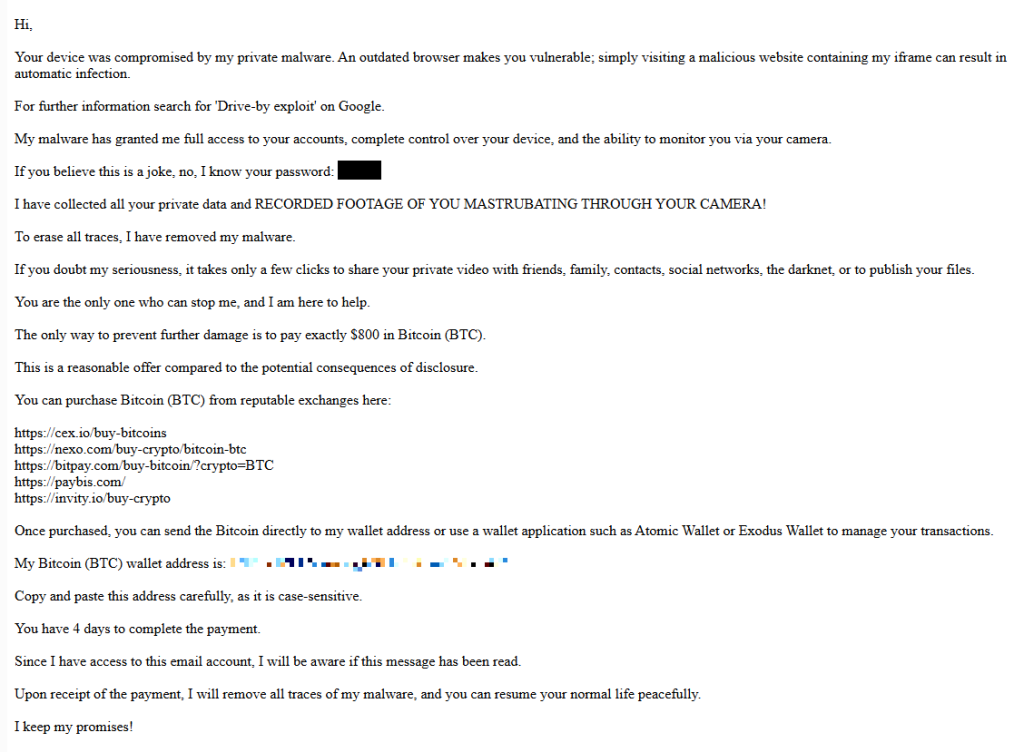
Here’s one of the emails:

screenshot of sextortion email

Your device was compromised by my private malware. An outdated browser makes you vulnerable; simply visiting a malicious website containing my iframe can result in automatic infection.
For further information search for ‘Drive-by exploit’ on Google.
My malware has granted me full access to your accounts, complete control over your device, and the ability to monitor you via your camera.
If you believe this is a joke, no, I know your password: {an actual password}
I have collected all your private data and RECORDED FOOTAGE OF YOU MASTRUBATING THROUGH YOUR CAMERA!
To erase all traces, I have removed my malware.
If you doubt my seriousness, it takes only a few clicks to share your private video with friends, family, contacts, social networks, the darknet, or to publish your files.
You are the only one who can stop me, and I am here to help.
The only way to prevent further damage is to pay exactly $800 in Bitcoin (BTC).
This is a reasonable offer compared to the potential consequences of disclosure.
You can purchase Bitcoin (BTC) from reputable exchanges here:
{list of crypto-currency exchanges}
Once purchased, you can send the Bitcoin directly to my wallet address or use a wallet application such as Atomic Wallet or Exodus Wallet to manage your transactions.
My Bitcoin (BTC) wallet address is: {bitcoin wallet which has received 1 payment at the time of writing}
Copy and paste this address carefully, as it is case-sensitive.
You have 4 days to complete the payment.
Since I have access to this email account, I will be aware if this message has been read.
Upon receipt of the payment, I will remove all traces of my malware, and you can resume your normal life peacefully.
I keep my promises!

The message is a bit contradictory. Early on, the sender claims they have already removed the malware to “erase all traces,” but later promises to remove it after receiving payment.

Where the password comes from

I found that one particular sender using the name Jenny Green and the Gmail address JennyGreen64868@gmail.com sent many of these emails to people that use the FakeMailGenerator service.

FakeMailGenerator is a free disposable email service that gives users a temporary, receive‑only inbox they can use instead of their real address, mainly to get around email confirmations or avoid spam.

As mentioned, the addresses are receive‑only, meaning they cannot legitimately send mail and the mailbox is not tied to a specific person. On top of that, there is no login. Anyone who knows the address (or guesses the inbox URL) can see the same inbox.

My guess is that the scammer searched these public inboxes for passwords and then reused those passwords in their sextortion emails.

So users of FakeMailGenerator and similar services should consider this a warning. Your inbox may be publicly accessible, show up in search results, and you may receive a lot more than what you signed up for. Definitely don’t use services like this for anything sensitive.

How to stay safe

Knowing these scams exist is the first step to avoiding them. Sextortion emails rely on panic and embarrassment to push people into paying quickly. Here are a few simple steps to protect yourself:

  • Don’t rush. Scammers rely on fear and urgency. Take a moment to think before reacting.
  • Don’t reply to the email. Responding tells the attacker that someone is reading messages at that address, which may lead to more scams.
  • Change your password if it appears in the email. If you still use that password anywhere, update it.
  • Use a password manager. If you’re having trouble generating or storing a strong password, have a look at a password manager.
  • Don’t open unsolicited attachments. Especially when the sender address is suspicious or even your own.
  • Don’t use disposable inboxes for important accounts. The mail in that inbox might be available for anyone to find.
  • For peace of mind, turn your webcam off or buy a webcam cover so you can cover it when you’re not using the webcam.

Pro tip: Malwarebytes Scam Guard immediately recognized this for what it is: a sextortion scam.


What do cybercriminals know about you?

Use Malwarebytes’ free Digital Footprint scan to see whether your personal information has been exposed online.

  •  
❌