Reading view

Elon Musk’s XChat: how secure is the new messaging app? | Kaspersky official blog

Pavel Durov and his “private” messaging app have a brand new rival, and it’s — drumroll, please — Elon Musk and his XChat. On our blog, we’ve discussed more than once why Durov’s claims about Telegram privacy and security are exaggerated, to put it mildly. Here, I’ll just remind the reader that standard (non-secret) chats on Telegram aren’t protected by end-to-end encryption — the bare minimum required for user data to stay private.

But let’s get back to Musk. In late April 2026, the XChat app launched for iOS users. The tech mogul had been touting his messaging app for a long time, pitching it from day one as an incredibly private and secure way to communicate, and as a direct threat to Signal, WhatsApp, Telegram, and iMessage. Today, we look at whether we should actually trust Musk’s promises this new service, break down its core features, and stack it up against the competition.

Bitcoin-style encryption

Musk initially teased XChat on June 1, 2025, naturally via his X (formerly Twitter) account. Responding to another user’s question about when to expect the new service, Musk wrote: “This week if there are no scaling issues.”

Apparently, scaling issues there were: the app’s beta didn’t drop until September 2025, and iOS users didn’t get full access until April 2026. As for Android, there is zero info on when that version would launch at the time of this writing. That said, an XChat page is already live on Google Play where users can queue up “pre-register”, whatever that means.

But let’s go back to Musk’s post announcing XChat. That specific post turned a lot of heads in the privacy and cybersecurity community, and here’s why: the tech mogul wrote that the service would be built on an “entirely new architecture”, written in Rust, and featuring “Bitcoin-style encryption”.
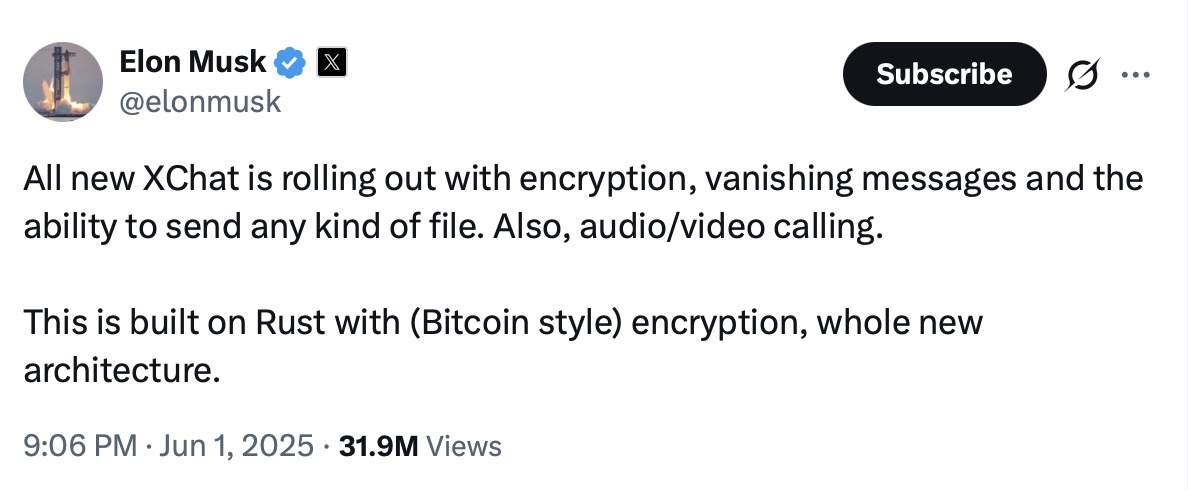
Elon Musk's announcement of XChat

Elon Musk announces the launch of XChat, claiming the new messaging app is written in Rust and uses “Bitcoin-style encryption”. Source

The expert community spent a long time scratching their heads and trying to figure out what Musk actually meant. After all, Bitcoin isn’t an anonymous, encrypted data exchange system. The blockchain does use public and private cryptographic keys, but for something entirely different: signing transactions. Meanwhile, these transactions aren’t hidden from prying eyes; they’re out in the open for anyone to see, forever. Simply put, Bitcoin protects its users not by ensuring privacy, but quite the opposite — through ultimate transparency.

Most likely, Musk used “Bitcoin-style encryption” as a marketing gimmick. Bitcoin was trading near all-time highs at the time of his announcement, and cryptocurrency was the talk of the town. Technically, the XChat beta that dropped in September 2025 protected user chats with a “kind of” end-to-end encryption, but this was implemented in a way that raised serious doubts among cryptography experts.

And not without a reason. Normally, setting up an end-to-end encrypted chat automatically generates a public and private key pair. The public key is used to encrypt messages, while the private key decrypts them. Because other users need your public key to start a secure chat with you, these keys are usually stored on the app’s servers.

The private key, however, should ideally live only on the user’s device — which is exactly how Signal does it. This serves as a simple, ironclad guarantee that neither the company itself nor any third party breaching its infrastructure can access user chats, even if they really want to.

But Elon Musk’s projects always march to the beat of their own drum: the XChat developers decided it would be a great idea to store users’ private keys on XChat servers. X claims they’ll use hardware security modules (HSMs) to store these private keys — specialized appliances designed to prevent even the system owner from easily accessing the data inside. However, experts are also questioning the reliability of this setup, and coming to a grim conclusion: if X really wants to get a user’s private key, they will most likely be able to do so.

How encrypted messaging in XChat works in practice

Finally, once the scaling issues were ironed out nearly a year after the announcement, X officially rolled out the XChat app for iOS in April 2026. Now anyone can use it, but from a practical standpoint, the situation with encrypted chats seems even more convoluted than in Telegram.

According to the social network’s help center, to use end-to-end chat encryption in XChat, both users must have an X account, set up XChat, and have some sort of connection between them:

  • Follow, or be subscribed to each other
  • Have exchanged messages before
  • Have previously accepted a direct message request
  • Be a member of the same Premium Business / Premium Organization subscription on X

If users don’t follow each other and haven’t interacted before, XChat might still let them send a message request. However, that initial request goes out without end-to-end encryption.

Again, this is how the process is described in the messaging app’s official help documentation. Sound overly complicated? Let me reassure you: in practice, it works — or rather, doesn’t — completely differently. I personally managed to send a message to another user who had NOT set up XChat. The app itself, of course, gave me absolutely no warning about this.
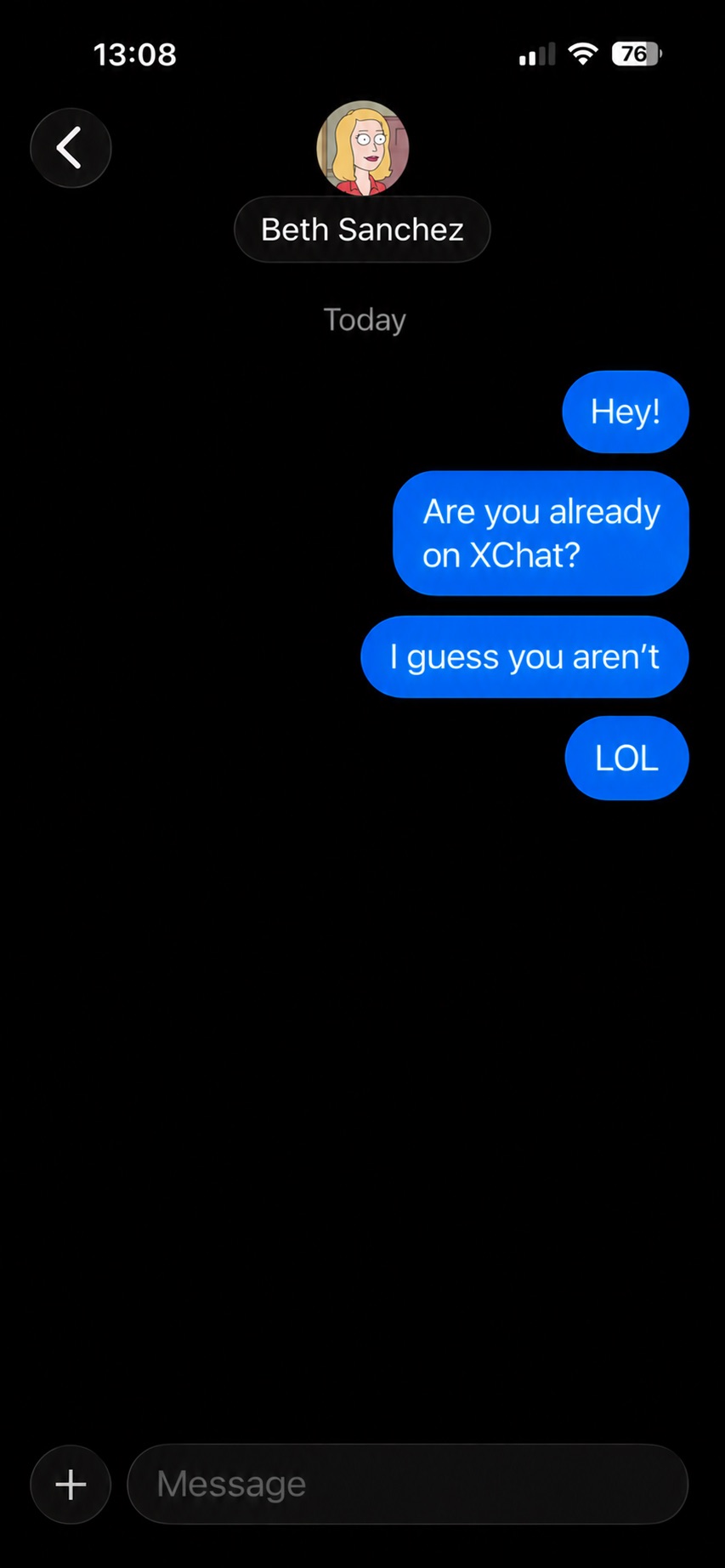
XChat lets users send messages to people who haven't set up the app

The app allows you to start a chat with a user who hasn’t even set up XChat yet, without giving the sender any heads-up.

It gets even better. The user I messaged saw a notification for it on the web version of X, but couldn’t actually access the message. Here’s the catch: to start using XChat, the user first has to create a four-digit PIN. Yet, the app asks for this PIN the very first time the user tries to open it — meaning, before they even get a chance to create one. Along with this prompt, the user also sees a warning stating that without the PIN, they won’t be able to view past encrypted chats.
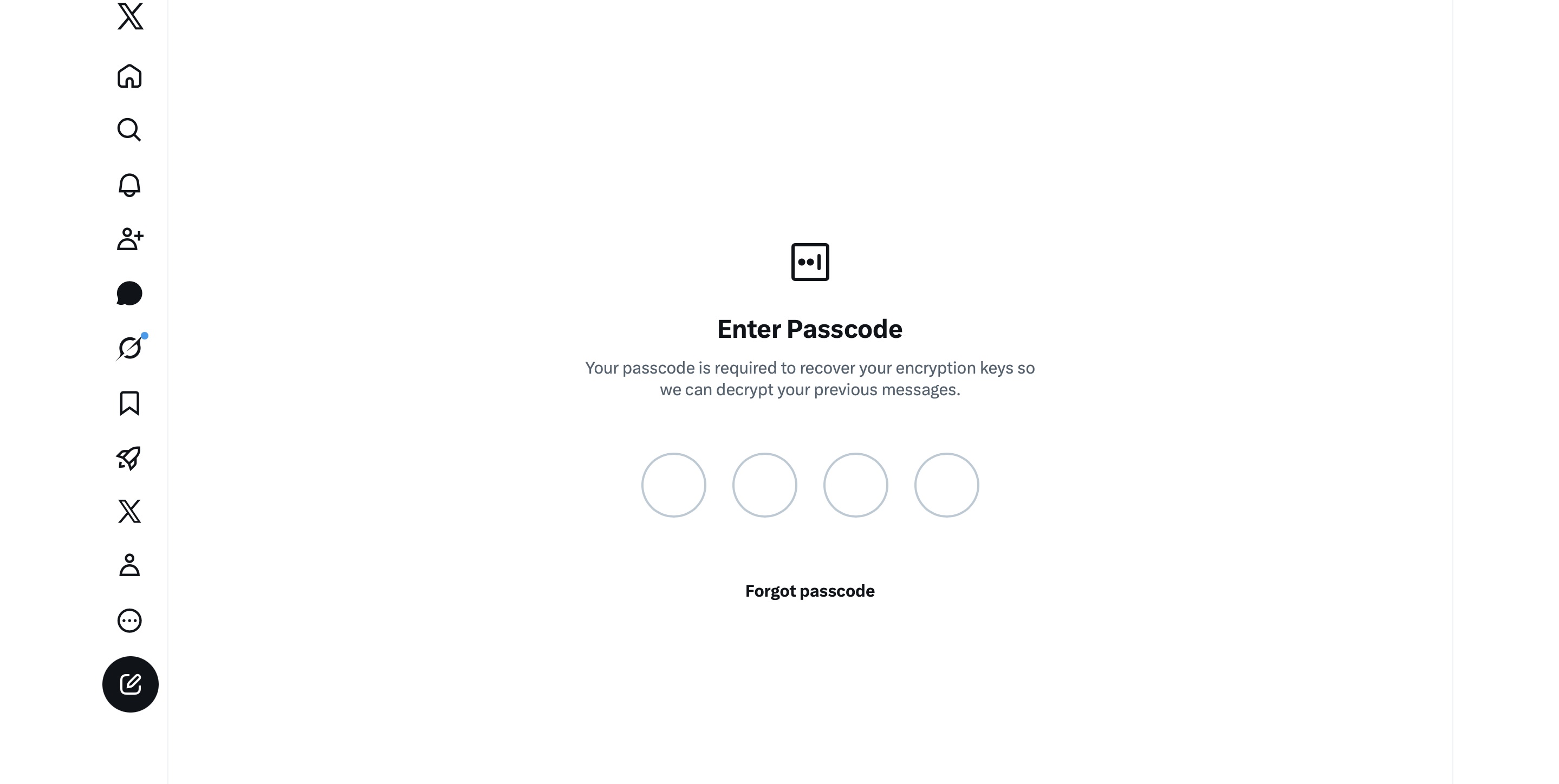
XChat asks for a PIN before one is even created

The user is prompted to enter a PIN to decrypt past messages before even completing the initial XChat setup.

The only workaround I found to actually start using XChat is to tap “Forgot PIN?” — even though that PIN never existed in the first place — confirm your identity, and create a new (well, your first) PIN. Naturally, you lose access to your chat history this way, so you won’t be able to read any messages sent to you in XChat before you officially set up the app.

XChat: the new Telegram, WhatsApp, Signal… or Facebook Messenger?

All these PIN hurdles actually exist for a reason. Remember, unlike WhatsApp and Signal, the XChat developers decided to store users’ private keys on their own servers. Consequently, the app uses these four-digit PINs to encrypt those keys.

According to the XChat help documentation, this mechanism was designed to ensure a “seamless” multi-device experience. It’s impossible not to point out that both WhatsApp and Signal managed to pull this off without sketchy workarounds like PIN requirements or server-side private key storage.

The problem is, workarounds like these undermine any claims of app privacy and security. First and chief among them, a PIN isn’t exactly the most secure way to protect sensitive data. We’ve mentioned time and again that four-digit combinations are easy to crack via brute force — especially since XChat gives you a generous 20 attempts to guess the right code.
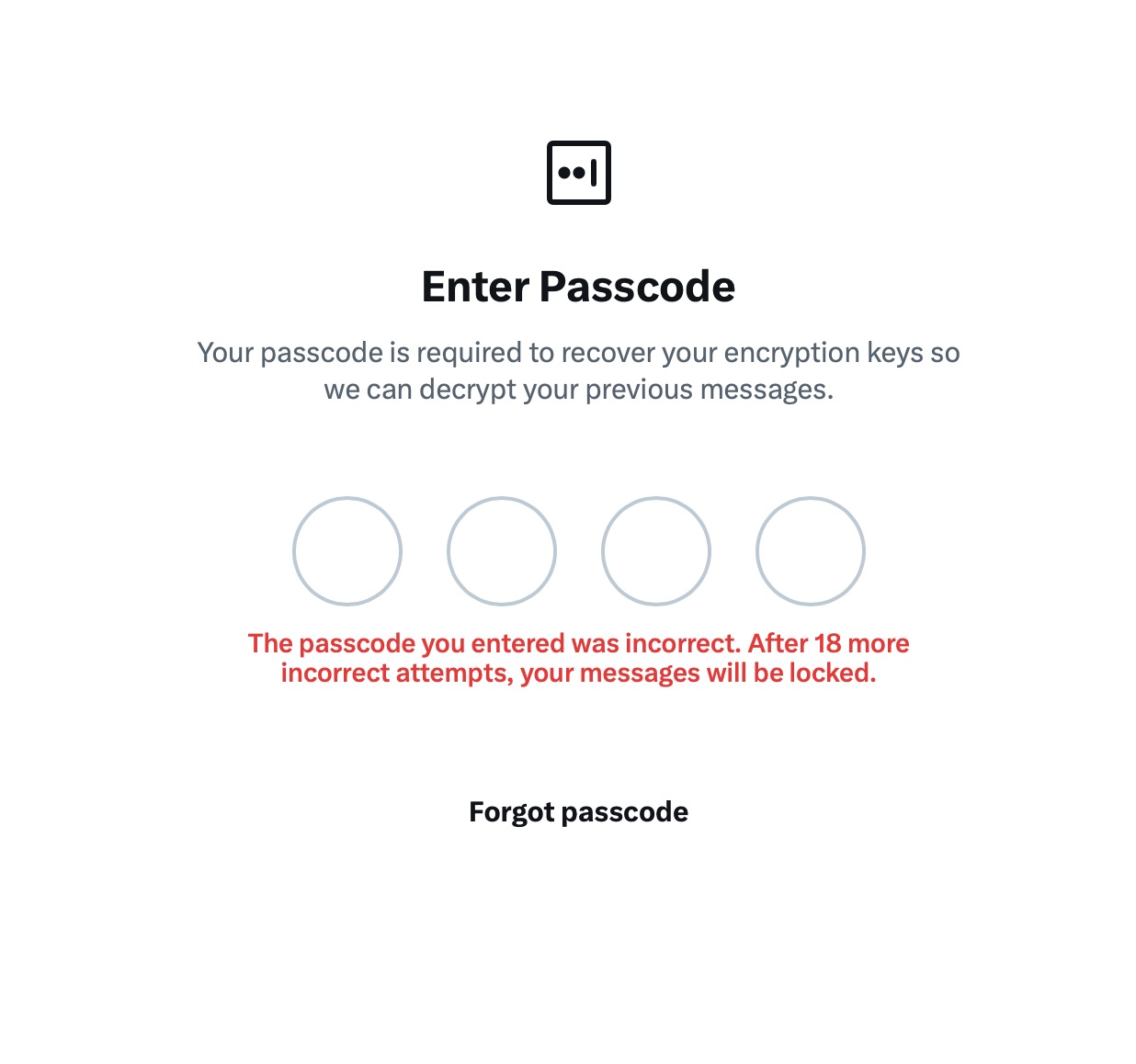
XChat warns of lockout after 20 failed attempts

The app allows up to 20 attempts to enter the four-digit PIN. Once the limit is reached, XChat warns that access to messages will be permanently lost.

Stepping away from the bizarre implementation of end-to-end encryption compared to other messaging apps, it’s hard to ignore the overall sense of pointlessness that comes with trying to use XChat. As a Wired journalist rightly pointed out, the app feels less like a relative of WhatsApp, Signal, or Telegram, and much more like Facebook Messenger. Except people usually open Messenger to read a text from their mom or grandma, whereas XChat seems meant for anyone wanting to check in on that weird nephew who spends all his free time on X, still believes John McAfee’s promise of $500 000 Bitcoin, and fanboys over Elon Musk.

So, what’s the bottom line on XChat?

The best way to wrap up this post is with a quote from a cybersecurity expert: “If what you want is good security, use Signal. If what you want is to be able to talk to pretty much anybody using encrypted messages, use WhatsApp. If your whole life is based around X, I guess this is better than nothing.”

If you do use XChat, rule number one is to avoid a predictable PIN — absolutely don’t use your birth year or, worse, 1234. It’s also crucial not to forget this code, because if you do, your entire chat history is gone for good. Finally, just like your other passwords, you shouldn’t keep it in your notes app, but rather in a secure password manager. This won’t only save you from having to memorize dozens of character combinations, but will also reduce the risk of losing access to your vital data and conversations.

To learn more about secure messaging in other apps, check out our other posts:

  •  

A guide to disabling Copilot, Gemini, and Apple Intelligence | Kaspersky official blog

Lately, software developers have been baking AI features straight into everyday work tools, operating systems, and browsers. In some cases, they’re genuinely handy. However, their presence introduces specific risks, which means plenty of companies are hesitant to give employees access to these tools. In a previous post, we categorized these unwanted AI systems, looked at how to spot them at the network and endpoint levels, and covered the ultimate universal kill switch: managing OAuth access across major corporate platforms. In this deep dive, we’re getting tactical: breaking down how to disable or restrict the AI built into popular platforms.

A quick heads-up: major software vendors occasionally change the names of their AI settings and tweak how they function. If any of the options mentioned below are missing or aren’t working as expected, a quick web search for the setting’s name will usually point you to its new location or branding.

How to turn off Microsoft 365 Copilot

Detection: you can check actual Copilot usage in the logs by going to Microsoft 365 admin →  Copilot usage report.

Disabling via policies: in the Microsoft 365Admin Center, go to Settings →  Integrated Apps, find Copilot in the Available Apps list, and select Block. More granular configuration policies are available under Customization →  Policy Management. The Policies page here contains over two thousand entries, so you’ll want to filter them by the keyword “Copilot” (detailed guide). Given that Copilot is a paid add-on for Office, another way to block it — and save money by doing so — is to simply avoid assigning users SKUs that include Copilot.

We recommend separately blocking Copilot Chat, which is available in Teams, Edge, Outlook, and several other services. Yes, it’s not Copilot itself. And yes, it has to be blocked separately by following this guide.

Additional layer of protection: you can block the domains copilot.cloud.microsoft and m365.cloud.microsoft/chat at the web filter or NGFW level. However, Microsoft explicitly advises against this, warning that it could break other Microsoft 365 features.

How to turn off Windows Copilot

Beyond the Office version of Copilot, you also need to manage its consumer-facing cousin.

Detection: look through your NGFW or other network logs for traffic hitting copilot.microsoft.com, bing.com/chat, or edgeservices.bing.com.
Disabling via policies: in Windows Group Policy, navigate to Computer Config →  Admin Templates →  Windows Components →  Windows Copilot. In Microsoft 365 Group Policy, go to Admin center →  Block consumer Copilot for organizational accounts.

Additional layer of protection: block the Copilot.exe executable from running entirely.

How to turn off the Copilot sidebar in Edge

Detection: look through your NGFW or other network logs for traffic hitting copilot.microsoft.com, bing.com/chat, or edgeservices.bing.com.

Blocking: configure the following MS Edge Group Policies: HubsSidebarEnabled = false, EdgeShoppingAssistantEnabled = false, CopilotPageContext = Disabled (false), CopilotNewTabPageEnabled = false, Microsoft365CopilotChatIconEnabled = false, GenAILocalFoundationalModelSettings = 1 (note that disabling this unexpectedly requires a 1 instead of a 0).

Second layer of protection: block the domains copilot.cloud.microsoft and m365.cloud.microsoft/chat at the web filter or NGFW level. However, Microsoft explicitly advises against this, warning that it could break other features.

How to turn off the Gemini Assistant in Google Workspace

Detection: check the Workspace Admin Console (admin.google.com), Gemini usage report section.

Blocking via policies: in the Admin Console, navigate to Apps →  Additional Google services → > Gemini app, and set it to OFF. Then, go to Manage Workspace smart feature settings →  Smart features in Google Workspace, and set it to OFF.

Second layer of protection: block network traffic to the domains gemini.google.com, bard.google.com, and aistudio.google.com.

How to turn off Gemini in Google Chrome

Detection: check your Chrome Enterprise reports (Chrome management →  Reports), or look through network traffic logs for connections to the previously mentioned domains.

Blocking via policies: in your Chrome Enterprise policies, configure the following settings: GenAILocalFoundationalModelSettings = 0, HelpMeWriteSettings = 2 (disabled), TabOrganizerSettings = 2, CreateThemesSettings = 2, DevToolsGenAiSettings = 2.

Additional layer of protection: block network traffic to the domains gemini.google.com, bard.google.com, and aistudio.google.com. Additionally, block unauthorized Chrome/Chromium installations (those outside your policy management) with the help of host-based application control tools like EPP/EDR or AppLocker.

How to turn off Apple Intelligence

Detection: on your NGFW and web filters, traffic hitting apple-relay.apple.com and *.apple-cloudkit.com is a clear indicator that Apple Intelligence is active.

Blocking via policies: any managed Apple device allows you to disable individual AI features, though there isn’t a master switch you can flip to shut down “all AI”. In your MDM profile, you need to set the following keys to false (disabled): allowWritingTools, allowMailSummary, allowGenmoji, allowImagePlayground, allowImageWand, allowPersonalizedHandwritingResults, allowExternalIntelligenceIntegrations, allowExternalIntelligenceIntegrationsSignIn, allowNotesTranscription, and allowNotesTranscriptionSummary. Here is a brief configuration example:

<dict>
<key>PayloadType</key>
<string>com.apple.applicationaccess</string>
<key>allowWritingTools</key>
<false/>
<key>allowMailSummary</key>
<false/>
</dict>

Despite Apple’s shift toward declarative device management, these AI features still need to be managed through traditional MDM payload settings.

Second layer of protection: block network traffic to the hosts mentioned above — though the obvious downside for mobile devices is that this won’t work once they leave the corporate network.

  •  

KASG: security gateway for autonomous vehicles | Kaspersky official blog

According to global research, the market share of highly automated, driverless vehicles is growing rapidly. Analysts estimate that the next 10 to 15 years will mark a major shift from pilot projects to the mass adoption of autonomous transport. The momentum is building worldwide: Europe has already rolled out over 35 autonomous vehicle pilots, while the U.S. and China log more than 450 000 and 250 000 commercial trips per week, respectively. However, the report notes several roadblocks slowing down this progress. One such hurdle is the uncertainty surrounding legal liability and regulation, including in the areas of safety and security. The allocation of responsibility among suppliers, manufacturers, enterprise clients, and end users remains a major point of discussion.

Each market stakeholder sees the issue of ensuring the safety of autonomous vehicles differently. For automakers, it means taking responsibility for how a vehicle behaves on the road and for vetting their suppliers. For the suppliers themselves, it means designing security mechanisms directly into their solution architecture from day one and guaranteeing their adequacy. For insurance companies, it means completely overhauling their risk models to account for not just accidents, but also potential software glitches and cyberattacks. Ultimately, everyone agrees on one fundamental point: security must be a foundational feature of the vehicle — not an optional add-on.

Ensuring vehicle security in the modern era

For years, discussions around automotive safety focused strictly on functional safety. In other words, the goal was to ensure that vehicle systems operated correctly, and that risks associated with potential failures were fully mitigated or reduced to an acceptable level. The ISO 26262 standard “Road vehicles — Functional safety” helps address this very challenge, and serves as the baseline for the automotive industry.

However, the modern connected vehicle is a complex cyberphysical system that stores and processes massive amounts of data, including sensitive information. And this leads to the emergence of new basic needs. To draw an analogy with two levels of Maslow’s hierarchy of needs, a modern vehicle must:

  • Satisfy the need for “esteem” — meaning it must securely and reliably store user profile data, such as account credentials, biometric data, payment details, and more.
  • Satisfy the user’s cognitive needs — meaning it must provide secure internet connectivity, transmit vehicle telemetry, and send reminders for scheduled or emergency maintenance.

All of this means equipping vehicles with a wide array of interfaces — telematics, Bluetooth, Wi-Fi, cellular connectivity, OTA updates, and V2X — which opens the door to remote attacks. Therefore, it becomes necessary to ensure not only the functional security, but also the information security of the vehicle. As a result, specialized industry standards that help address automotive cybersecurity challenges have emerged in most countries. The key international standards are ISO/SAE 21434 “Road vehicles — Cybersecurity engineering”, UNECE R155, and UNECE R156.

China’s regulations are evolving too. In 2024, the country published the national standard GB 44495-2024 “Technical Requirements for Vehicle Cybersecurity”, which went into effect on January 1, 2026. The document introduces mandatory cybersecurity requirements for vehicles, including communications protection, security event management, threat monitoring, and secure vehicle interaction with external infrastructure.

Understanding and applying these standards is becoming absolutely critical. Research shows that cybersecurity risks are escalating daily, and their impact on functional safety can sometimes trigger far more dangerous incidents than an internal system failure. What happens if an attacker gains access to a self-driving truck’s remote-control system, or manages to reflash a critical electronic control unit during an unauthorized diagnostic session?

One of the key components for mitigating these scenarios is a security gateway, which isolates the vehicle’s architecture into different domains based on criticality, while providing secure routing, filtering, and traffic control. Developing this type of software solution is precisely what our team focuses on as we build the Kaspersky Automotive Secure Gateway based on KasperskyOS.

Why Kaspersky Automotive Secure Gateway?

The primary purpose of Kaspersky Automotive Secure Gateway (KASG) is to secure the vehicle’s CAN domain, since the CAN bus is used to transmit a vast number of critical control commands. This impacts nearly 80% of the electronic control units inside the car, which handle engine management, braking, body electronics, and more. Because of this, we utilize the Safety-Aware Cybersecurity approach — a unified architecture that accounts for both functional safety and cybersecurity requirements.

For example, standard End-to-End Protection (E2E) mechanisms are typically used to mitigate risks associated with dropped, out-of-order, or corrupted CAN messages. However, these mechanisms were not originally designed to counter targeted cyberattacks. If an attacker manages to construct a malicious frame that conforms to the required E2E format, the system may accept it as valid.

This introduces a new factor: it’s critical not only to verify that a message was delivered without errors, but also to ensure that it was actually generated by a trusted electronic control unit (ECU), and was not altered in transit. This is particularly vital for transmitting control commands — such as those sent to the vehicle’s braking system — or for implementing keyless entry (NFC) systems.

To address that challenge, Secure Onboard Communication (SecOC) mechanisms are integrated into the vehicle’s architecture. They use cryptographic methods to verify message authenticity and integrity, protecting the system against message spoofing and replay attacks. KASG successfully implements these mechanisms, which, in addition to message verification, perform the crucial function of centralized key management. This allows encryption keys to be distributed and updated from a single point within the vehicle, reducing both the cost and the processing load on the ECUs involved in SecOC-backed data exchange.

Automotive IDS

However, in complex systems, it’s no longer enough to apply security mechanisms only to individual messages or separate network segments. It’s essential to provide vehicle-wide monitoring and control, tracking behavioral anomalies, unusual cross-domain interactions, and unauthorized tampering attempts. In the IT domain, this is known as an Intrusion Detection System (IDS). These systems have been successfully adopted by the automotive industry as well.

At the same time, it’s important to realize that for a modern vehicle, an IDS is not a single magic point of data collection and analysis; the vehicle requires a distributed monitoring system. Monitoring is carried out at various architectural levels: within domains, at the individual controller level, and at network boundaries.

The security gateway becomes a critical monitoring point because all cross-domain interaction passes through. Additionally, the gateway provides visibility into data exchange across different segments of the vehicle network. Its job is to detect deviations from normal behavior and generate security events.

When it comes to the CAN domain monitoring implemented in KASG, the IDS looks at the following criteria for traffic analysis:

  • Alignment of CAN message parameters (CAN ID, DLC) with their descriptions in the DBC specification.
  • Frequency and periodicity of CAN messages.
  • Allowable ranges for CAN signals.

In practice, however, an important limitation becomes clear: even with an onboard IDS, more context is required to determine the exact characteristics of an attack. Furthermore, when operating highly automated vehicles — where fleet-wide monitoring is essential — such isolated analysis becomes inherently insufficient.

Connecting a vehicle to an SIEM

Multi-object monitoring, data correlation, and data analysis can be efficiently handled externally — specifically in SIEM (Security Information and Event Management) systems, which are traditionally used in corporate and industrial cybersecurity operations centers. Therefore, utilizing a SIEM system fleet-wide is a logical step that makes it possible to:

  • Collect security events from multiple vehicles.
  • Correlate events over time and across contexts.
  • Detect advanced and distributed attacks.
  • Provide incident auditing and investigation.
  • Respond to individual incidents and manage cyber-risks fleet-wide.

When integrating with external SIEM systems, several critical tasks must be addressed: ensuring a secure connection, tuning the security event transmission process, and establishing baseline rules for event processing and correlation. We are actively working through all of these challenges using our own SIEM system — Kaspersky Unified Monitoring and Analysis Platform — as a blueprint.

There are still many issues ahead that need to be resolved. This article covered only a fraction of the approaches currently used in KASG to ensure vehicle safety and security. Yet even this small part demonstrates that automotive security cannot be achieved by solving a single problem or applying a single mechanism. Achieving it requires an approach that enables methodical architecture development — balancing diverse requirements for vehicle functionality, security, and reliability.

  •  

Study on the Wi-Fi security situation in Mexico | Kaspersky official blog

One of the biggest football (soccer) events of this summer is the World Cup 2026. The tournament is co-hosted by three countries: the U.S., Canada, and Mexico. Unfortunately, events of this scale attract not just fans, but also scammers from all over the globe. We’ve already covered how cybercriminals are prepping for the World Cup online, and today we’re talking about digital security for fans on the ground in Mexico.

The country will host 13 matches and welcome millions of tourists. They’ll be staying in hotels, heading to games, checking out restaurants, navigating airports, and visiting popular tourist spots — and everywhere they go, the temptation to connect to public Wi-Fi will be high.

We’ve surveyed more than 84 500 (!) public Wi-Fi access points in Mexico City, Guadalajara, and Monterrey — and we have a lot to share about their security. Spoiler alert: many networks are still using outdated security standards, so you really shouldn’t go on vacation without reliable protection and an eSIM.

What and how we tested

Walking across Mexico looking for public Wi-Fi access points would have been a bit tough, though that’s exactly what we did for a similar Wi-Fi security survey in Paris. You can check out the results of that in our post, How safe is Wi-Fi in Paris?

This time the mission was far more demanding: mapping the wireless landscape of three major metropolises. That’s why we went wardriving — scanning for and logging wireless networks from a moving vehicle while equipped with a smartphone or laptop. It’s similar to searching for Wi-Fi on your phone, where the device constantly listens for nearby networks. Except instead of connecting to them, we just collect data about them.

All information was used strictly for passive observation and infrastructure analysis. Beyond receiving publicly broadcast service information, the experts of Kaspersky’s Global Research and Analysis Team (GReAT) didn’t attempt to authenticate, intercept traffic, exploit systems, or otherwise interact with the wireless networks they discovered. Mobile access points deployed in cars and on mobile devices were excluded from the sample.

Our main target was Mexico City — the capital and one of the most densely populated cities in Latin America. We took a drive through popular tourist spots: Mexico City Stadium, Mexico City International Airport, Zócalo, Paseo de la Reforma, Colonia Roma, La Condesa, Polanco, Coyoacán.
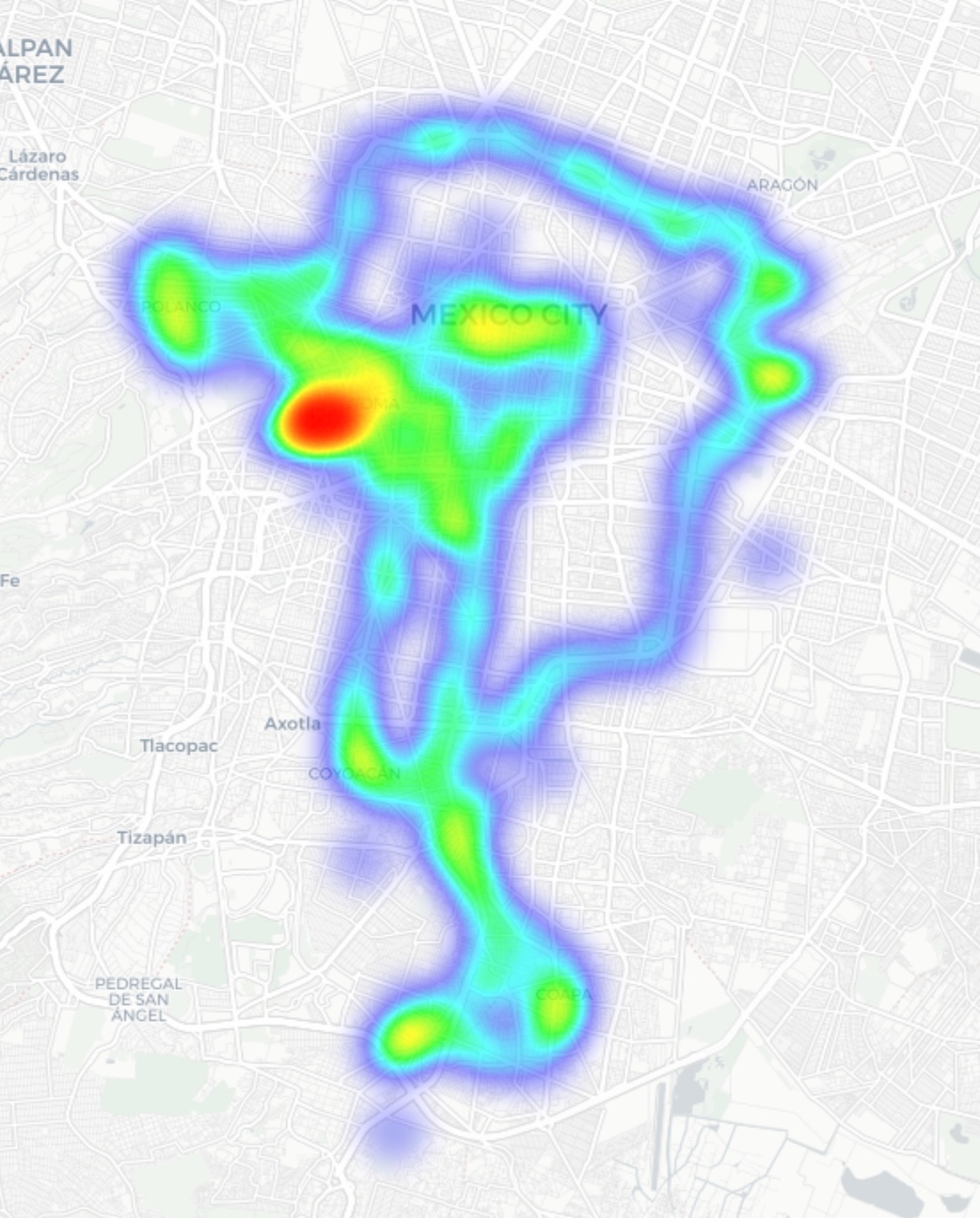
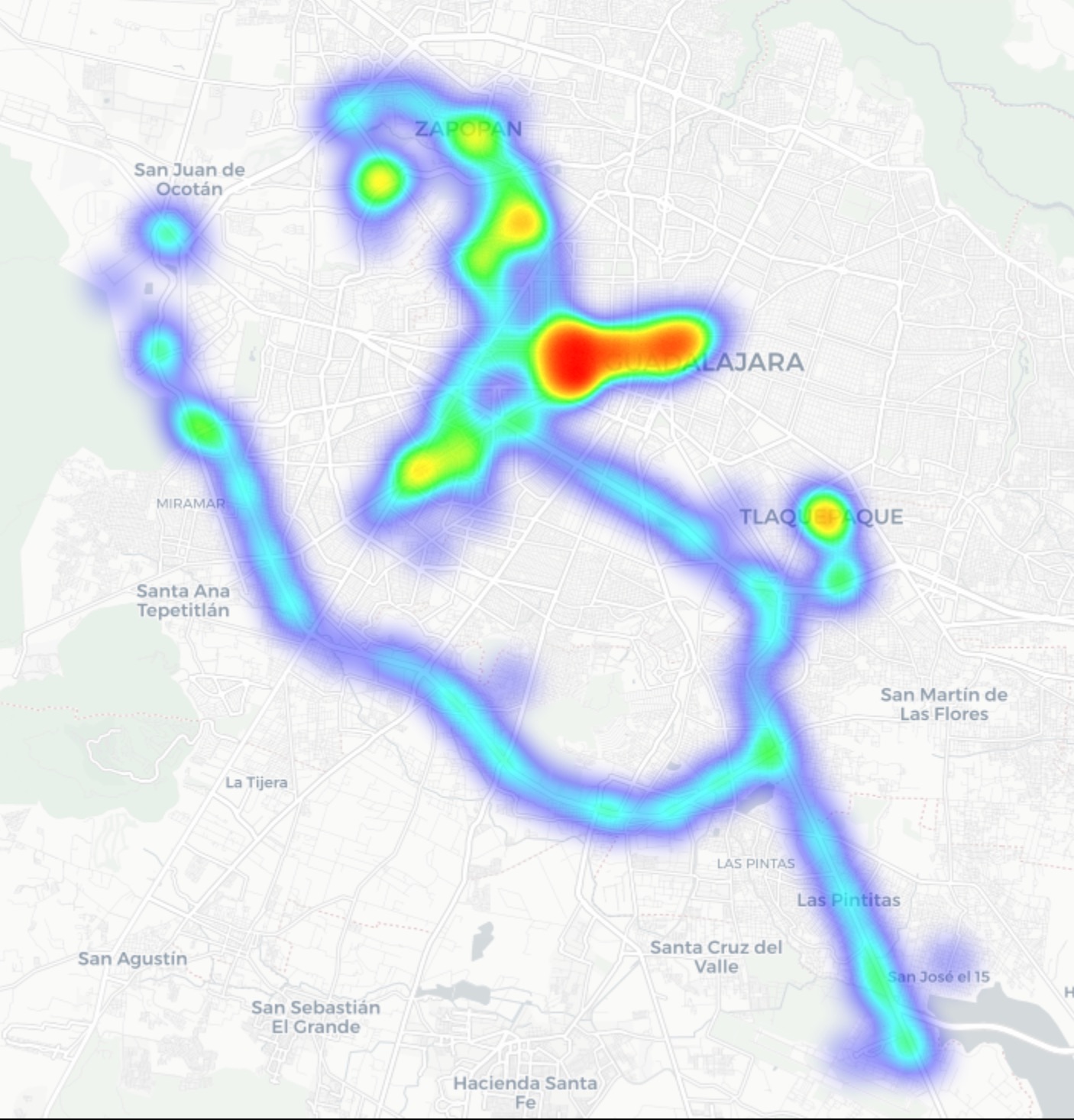
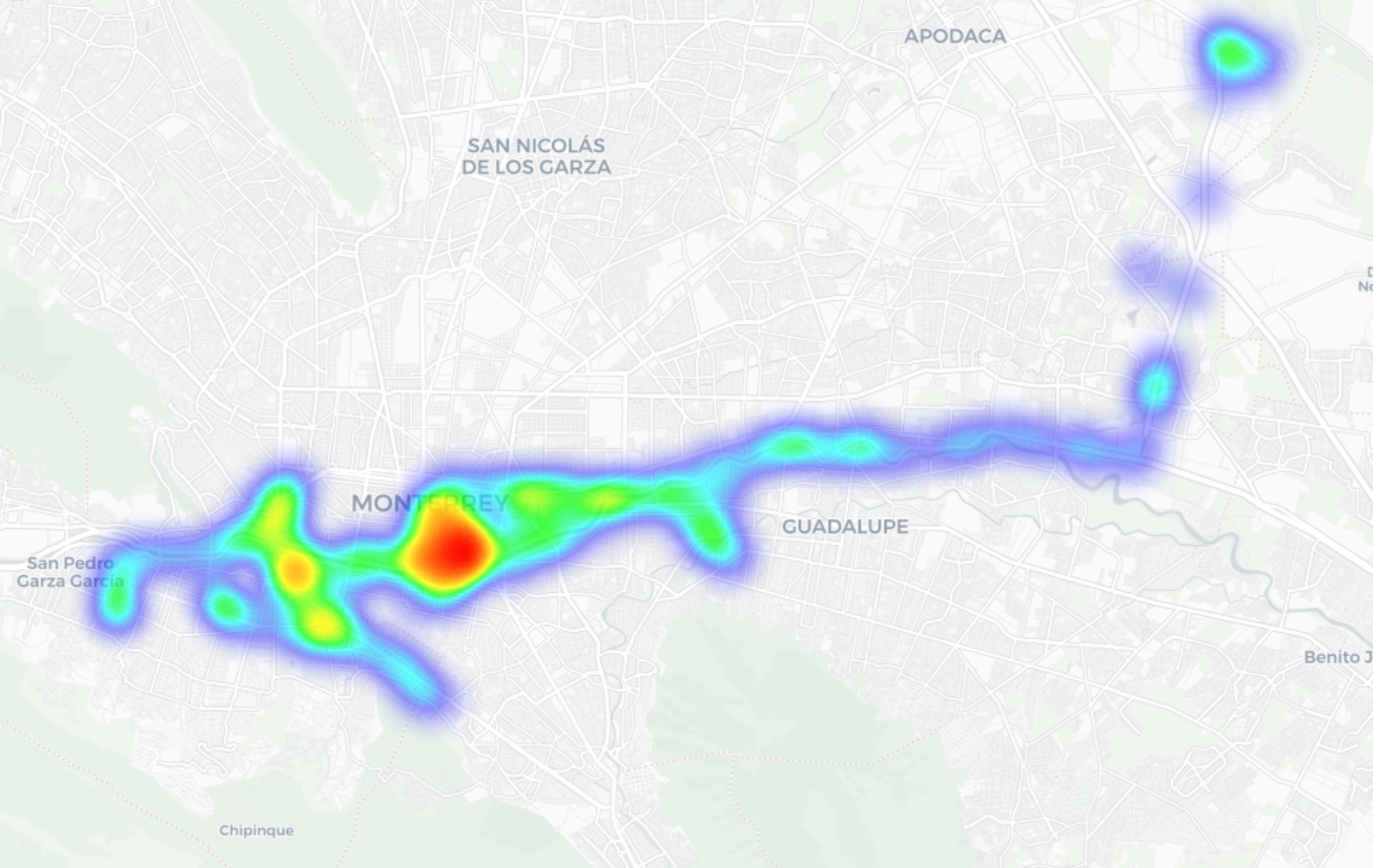
In Guadalajara and Monterrey, we drove similar routes: stadiums, main avenues, airports, and popular neighborhoods. Below you can see a heatmap of the areas we covered, ranging from red for areas with the highest density of public access points, through yellow and green, to blue for the lowest concentration.
Heatmap showing the locations of all Wi-Fi access points we covered in Mexico City
Heatmap showing the locations of all Wi-Fi access points we covered in Guadalajara
Heatmap showing the locations of all Wi-Fi access points we covered in Monterrey

We used passive radio reconnaissance to log 84 500 signals and 69 500 unique network identifiers across these three cities. The majority of the signals were caught in Mexico City (61.4%), followed by Guadalajara (23.6%) and Monterrey (14.8%).

What we analyzed:
  • Wireless network identifiers (SSIDs): the names that show up in your list of available Wi-Fi networks
  • Information that can be gleaned from these identifiers
  • Default router configurations and how ISPs deploy their networks
  • Frequencies used and signal characteristics
  • Channel load and radio frequency spectrum usage
  • Wireless network security configurations:
    • Open and insecure networks
    • Networks with WPS enabled
    • Secure networks (WPA2/WPA3) with WPS activated

You can find the full version of the study on the Securelist blog.

Telltale public Wi-Fi access point names

Network names (SSIDs) can tell you a lot by unintentionally revealing information about hardware manufacturers, ISPs, deployment methods, and whether an access point belongs to a business or a private user.

About 34% of the public Wi-Fi networks we logged didn’t bother changing their names at all, either sticking with the factory SSIDs from the router manufacturers or using standard naming conventions from their ISPs. For attackers, this can be a pretty solid hint, since this kind of network name lets them know which provider owns a given access point, what hardware is being used, and how it’s likely configured by default.

Another troubling nuance is the large number of Wi-Fi networks (over 30%) that use the access point’s MAC address (BSSID) as the visible network name. The first few bytes of a BSSID contain an Organizationally Unique Identifier (OUI), which gives away the router’s manufacturer. This is a useful lead for bad actors: they can find out who made the hardware and test for vulnerabilities specific to that brand’s models.

Is Mexican Wi-Fi well-protected?

An access point secured with WPA2/WPA3 can be considered more or less safe. All other authentication mechanisms yield much weaker results. We grouped the public Wi-Fi networks into four categories:

  • Secure (WPA2/WPA3)
  • Unsecured (open/WEP)
  • Weak (WPA)
  • Undetermined

The results are roughly the same across all three cities: about 82% of all analyzed access points are protected by secure standards. The outdated and insecure WPA protocol was practically nonexistent. However, more than 10% of the access points turned out to be completely unsecured. Connecting to these networks carries the risk of traffic interception and hidden surveillance.

But security isn’t evaluated by WPA protocols alone. We also checked for the presence of WPS, the infamous feature for quickly connecting to a network without entering a password, which is highly vulnerable to attacks. It turned out that WPS is enabled on nearly half (47%) of the access points in Mexico City, 43% in Guadalajara, and 41% in Monterrey. On average, 45% of the access points are potentially vulnerable to WPS-related attacks — sacrificing security for the sake of convenience.

What’s more, this feature frequently remained active even on seemingly secure WPA2/WPA3 networks — about half of them utilized WPS. This shows that having WPA2/WPA3 is still not enough to consider a Wi-Fi access point safe, as additional features like WPS can still leave the door open to attacks.

What else every tourist needs to know

Digital risks on a trip aren’t limited to public Wi-Fi alone, especially now that many are shifting away from public Wi-Fi to an eSIM. There are still plenty of threats in crowded places: public USB chargers, QR codes with swapped links, NFC and Bluetooth attacks, and, of course, social engineering tactics. Let’s break it all down.

Charging stations. Public USB chargers can also be dangerous: bad actors could potentially gain access to the data on your device or try to install malware. We covered these attacks in detail in our post, Data theft during smartphone charging.

Dangerous QR codes. Criminals can plant phishing QR codes in popular tourist spots. The pretexts can vary wildly; for instance, ads for team-specific fan “events”, or links supposedly offering discounts or restaurant menus. In reality, any QR code posted on the street can be considered insecure by default, and you shouldn’t scan them with your smartphone unless you have a QR code threat analyzer installed.

Fake broadcasts, tickets, and betting pools. Earlier, we described cases where bad actors were distributing malware via fake IPTV apps to capitalize on the WC26 hype. Remember, even if you plan to watch the tournament from home, you still need to stay alert and not trust the first sites that pop up advertising free broadcasts, offering betting pools, or promising unbelievably generous payouts.

NFC and Bluetooth attacks. Leaving Bluetooth enabled in crowded places can also cause problems: someone might try to discover your device, track you, or initiate an unwanted pairing request. NFC services with contactless payments create additional risks too — especially when paying in sketchy spots.

How to protect yourself and your devices

Despite the prevalence of secure WPA2/WPA3 public Wi-Fi access points in Mexico City, Guadalajara, and Monterrey, our study shows that public Wi-Fi networks remain vulnerable. It’s also important to remember that attackers can create fake networks — so-called evil twins — disguised as legitimate public Wi-Fi in airports, hotels, cafés, and tourist spots.

For the average user, it’s practically impossible to tell how safe a specific access point is when trying to connect. That’s why the safest option is to use cellular data to access the internet — completely eliminating the need for Wi-Fi. Besides, there’s no need to research the nuances of local laws, rates, and other cellular details for every country you plan to visit; you can just buy a global eSIM online in two clicks. We explained how to make the entire process hassle-free in our post, Internet on the go with Kaspersky eSIM Store.

If you still plan on connecting to public Wi-Fi, always use a VPN to secure your device and data when connecting to unfamiliar — especially unsecured — Wi-Fi networks. This creates an encrypted tunnel between your device and the VPN server, making it impossible to intercept your data along the way. Haven’t picked a VPN yet? Try Kaspersky VPN Secure Connection, which is included with both Kaspersky Premium and Kaspersky Plus subscriptions.

Now, if you still plan to attend the World Cup without any cybersecurity solution, at least follow these basic rules of digital hygiene:

  • Don’t use public USB chargers
  • Don’t send sensitive information over connections that aren’t secure
  • Don’t log in to banking, email, or social media accounts over unsecured Wi-Fi
  • Turn off Bluetooth and NFC while walking around in crowded places
  • Don’t trust QR codes posted on the street
  • Connect to public Wi-Fi only when absolutely necessary

What else to read to make sure cheering for your favorite team isn’t only exciting, but also safe:

  •  

Scams in messengers: exposing the global scam-cartels exploiting everyday messagesng-heist | Kaspersky official blog

It starts with the familiar: a short message, a trusted name, a routine tone. Delivery updates, work pings, brand alerts hum in the background, rarely attracting scrutiny. You check, you answer… — until minutes later you’ve slipped into a trap built to lower your guard and hijack your trust.

That’s why messaging scams cut deep: they exploit everyday habits where instinct, not caution, leads. Communication once moved slowly, leaving room for doubt. Now it’s instant — and that speed is a weapon in criminal hands.

On our blog, we’ve already examined numerous scam schemes in messaging apps — from pig butchering, where the victim is groomed for a very long time, or catfishing, where the scammer creates a fake identity, to phishing via chatbots or through gift-giving campaigns in messaging apps.

Now, for the first time, Kaspersky has set out to capture the full end-to-end reality of messaging-based scams to understand how quickly harm occurs, how they impact trust and what remains after the interaction ends. What emerges is a highly organized and industrialized scam ecosystem embedded within everyday messaging channels such as SMS, WhatsApp, and email.

Kaspersky experts have prepared a report on targeted scams in messaging apps, detailing not only the financial but also the emotional damage caused by such attacks, as well as providing tips on how to protect yourself and avoid them. In this post, we explore the most interesting facts, but you can find more details in the full report.

The damage is underestimated

How much do you think a single successful attack via a messaging app costs the average victim? Ten dollars? Or maybe 50? You’re underestimating the scammers. Although more than a third (36%) of victims incur losses of less than $135, on average a victim loses… $733!

Country Average loss per victim
Senegal $392.94
Serbia $493.32
Morocco $504.28
Greece $609.32
United Kingdom $617.38
Côte d’Ivoire $654.11
Spain $672.67
United States $724.73
Portugal $868.20
Italy $896.02
France $1,193.58
Germany $1,369.35

The average amount lost by a victim in a successful attack via a messaging app

On the one hand, the financial hit doesn’t look catastrophic in isolation. These are micro-losses by design. Small enough that some never report them to the police. Small enough that banks don’t always investigate. Small enough to be dismissed as bad luck rather than organized crime.

But $733 is not nothing. It’s enough to cover a month’s worth of groceries, school or daycare fees, or utility bills. Against the backdrop of the global cost-of-living crisis, a single such loss can seriously dent a family’s budget.

In 11% of cases, losses exceed $1,350, and more than a quarter of victims (28%) report having been scammed three or more times in the past six months. Once scammers discover that a phone number responds, that contact becomes an asset, circulating from one database to another.

Now imagine the scale of the problem: if just 10% of the three billion messaging‑app users worldwide fell victim with the average loss, the total damage would amount to… nearly $220 billion! This is comparable to the GDP of Greece, and exceeds that of Morocco, Serbia, or Côte d’Ivoire.

It becomes clear that behind the daily flood of fraudulent schemes lie large scam cartels operating on an industrial scale, using AI to personalize messages that mimic those of family members, friends, and familiar brands. This, in essence, forms the basis of a full-fledged economy built on digital identity theft.

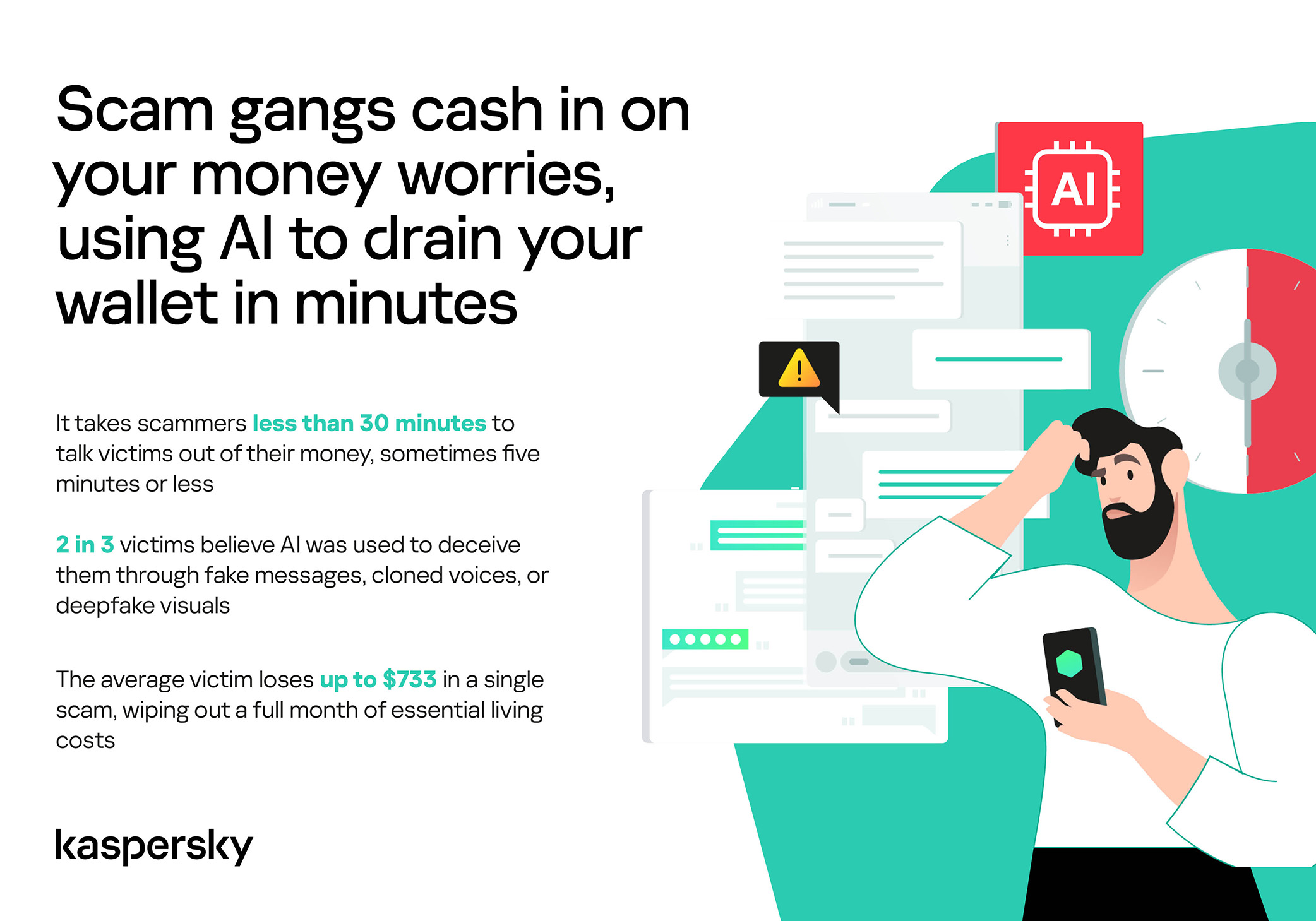
Scam gangs cash in on your money worries, using AI to drain your wallet in minutes

Speed beats scrutiny

More than half of successful messaging scams (52%) unfold in under 30 minutes — from first contact to the moment money or personal data changes hands — or even faster, before the victim begins to doubt the legitimacy of the sender. In fact, one in seven scams takes less than five minutes — quicker than boiling an egg!

The speed isn’t accidental. It’s the method. Scammers structure their schemes to deny the victim a chance to come to their senses. Every element is engineered to compress the decision-making window: the urgency of the scenario, the familiarity of the format, the plausibility of the request.

They rush you — faster, faster, don’t tell anyone, you only have a few minutes, solve the problem, don’t ask questions. Click the link, fill in the details, approve the transaction, or else… Or else what? The scammers’ imagination knows no bounds here, but if you don’t do something right now, you’ll definitely regret it.

Alas, the realization of what has happened usually comes when the damage is already irreversible. More than half of victims (51%) lose money; another 43% hand over their personal data — most commonly phone numbers, names, and email addresses — to scammers, and often the victim loses both.

Where and how attacks occur

A delivery notification, a bank alert, a message from a merchant you ordered from last week — messaging apps permeate every aspect of everyday life, making such interactions completely normal. An attack shouldn’t feel like an attack. It should feel like the same message you’ve received hundreds of times.

It’s no surprise that scammers focus their attention on this method of communication first and foremost. The most popular platforms for scams are predictable: WhatsApp (43%), SMS/iMessage (40%), Facebook (27%), Telegram (22%), and Instagram (19%) — these are the ones that people trust most.

A wide variety of schemes is used. Brand impersonation is now one of the three most common types of messaging scam worldwide — accounting for 31% of cases. Fake delivery notifications top the list at 38%, followed by investment scams at 37%.

At the same time, nearly two-thirds (63%) of fraudulent schemes span multiple platforms, moving from SMS to WhatsApp, from WhatsApp to Telegram, etc. In this way, scammers achieve two goals: they mimic organic messaging and evade moderation algorithms.

AI has taken scams to a new level

Just a couple of years ago, fraudulent messages gave themselves away with bad grammar, awkward phrasing, illogical requests, and an obsessive sense of urgency. Today, a phishing message looks, sounds, and reads just like the real thing.

Scam cartels want to catch people in motion — between meetings, on a commute, or during everyday tasks — when your attention is already fragmented. They mimic your mother’s turn of phrase. They match your bank’s tone of voice. They copy your courier’s format exactly. They mirror the rhythm, structure, and style of authentic brand communications across messaging platforms. And AI is accelerating all of it.

What this creates is overlap. Legitimate and fraudulent messages appear in the same environment, using the same formats, language, and triggers. The difference between them is no longer obvious.

The data shows that two-thirds of victims (66%) believe AI was used in the scam against them, 42% cite messages written by AI, 31% report generated or cloned voices, and 25% encountered deepfake images or videos.

That’s why mere awareness and “tech-savviness” may no longer be enough to protect oneself. From Gen Z to Gen X, messaging scams cut across every generation.

And what about the emotional toll?

But money is far from the only problem a victim is left with after an attack. After what they’ve been through, people develop distrust toward incoming messages, unfamiliar numbers, and any requests for action. As a result, 99% of fraud victims say they no longer trust incoming notifications in messaging apps.

This creates a crisis of trust in all digital channels in general. Every legitimate message can now be perceived as a scam. Brands, banks, and delivery services are forced to operate in an environment where the customer is, by default, in a state of distrust.

Dr. Elizabeth Carter, a forensic linguist and criminologist at Kingston University in London, notes that scammers use familiar contexts, common social settings and embedded linguistic norms to create the illusion for the victim that their decision-making is rational and reasonable in the moment. However, what is actually happening is that they construct false realities in which those decisions end up causing financial and psychological harm. She also notes that it is very hard to identify a false reality while you are in it.

After realizing they had been deceived, more than half of victims felt anger — the kind that comes from having trusted something and discovering it was used against you. 42% of victims report frustration, 38% — feeling upset. Moreover, several months later, these feelings haven’t gone away: nearly half of all victims (48%) are still angry, a third (33%) remain frustrated, and 30% are upset.

And nearly one in 10 victims don’t tell anyone what happened. They feel shame, a sense of having fallen for something so obvious. This leaves a significant portion of the actual damage unreported: only 24% of victims contact the police, and only 23% report it to their bank.

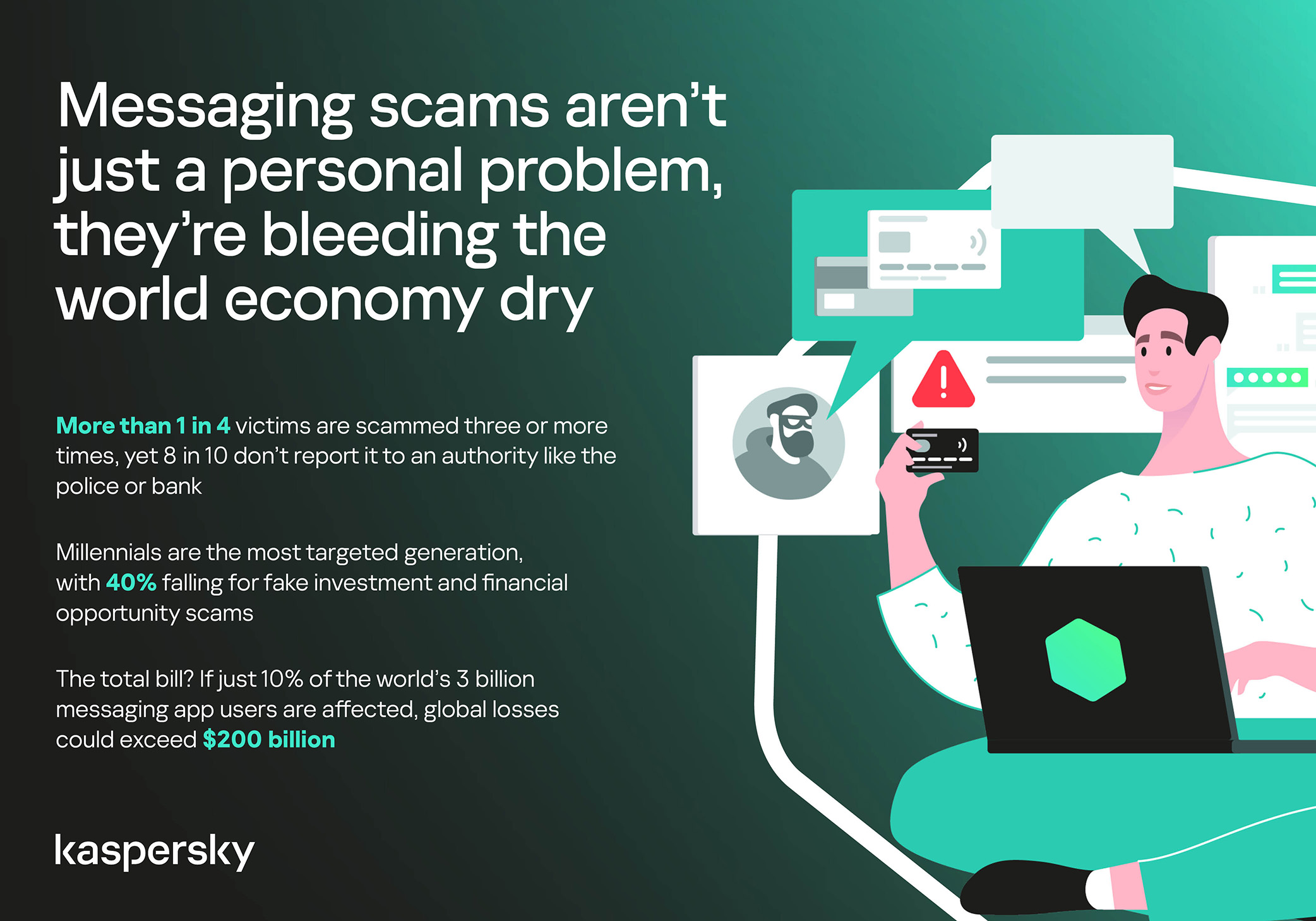
Messaging scams aren't just a personal problem, they're bleeding the world economy dry

So what can be done?

The crisis of trust — and even a touch of paranoia — that has arisen due to widespread attacks on users can linger in victims’ minds for a long time, affecting their quality of life. To prevent this, follow these guidelines:

  • Pause before you act. The sense of urgency you feel is almost always artificial. A legitimate bank, retailer, or delivery service won’t penalize you for taking 30 seconds to verify before clicking a link or confirming details. It’s precisely this instinct to resolve the situation quickly that scammers are counting on.
  • Verify through another channel. If a message appears to be from a relative, colleague, or company you trust — contact them through another channel before taking any action. Use secure verification methods, and cross-check identities when something doesn’t feel right. For families, agreeing on a “safe word” in advance can defeat even the most convincing voice clones.
  • Use a password manager. It will not only help you generate strong, unique passwords for all your accounts and store them securely, syncing them across all your devices, but also protect you from spoofed sites. Even if you click a phishing link and land on such a site, our password manager will notify you about the domain mismatch and refuse to autofill your username and password.
  • Use protection that works in real time. Modern security solutions, such as Kaspersky Premium, provide real-time protection against malicious links and phishing attempts in the apps and websites you use every day. On Android devices, a dedicated layer of anti-phishing security scans and neutralizes suspicious links as they appear, even within notifications, before you even have a chance to click them.

We’ve covered other threats in messaging apps in similar articles:

  •  

How fake Android IPTV apps are stealing users’ money and data | Kaspersky official blog

Threat actors are already gearing up for this year’s biggest football (soccer) event, the World Cup 2026. With millions of fans looking for ways to stream matches online, many will turn to IPTV apps to watch live TV broadcasts over the internet. It’s no surprise, then, that cybersecurity researchers have discovered multiple campaigns over the past few months where malware was disguised as fake Android IPTV apps.

In this post, we discuss what IPTV apps are, how criminals use fake versions to spread malware, what this malware is capable of, and, most importantly, how to avoid becoming a victim.

What are IPTV apps?

IPTV stands for Internet Protocol Television. This technology delivers TV content over the internet instead of through cable, over-the-air antennas, or satellites. Naturally, the simplest and most common examples of IPTV are the official platforms of TV networks, which can include both websites and dedicated apps.

However, alongside official options, pirate IPTV services also exist. They usually lure users with free or dirt-cheap access to content that can otherwise be hard to find without expensive subscriptions — most notably broadcasts of various sporting events; football matches in particular.

As is typically the case with pirated content, these apps are blocked from official app stores, forcing users to download them from third-party sites. Consequently, the risk of using these services isn’t tied to IPTV technology itself, but rather to the fake apps and modified APK files distributed under the guise of well-known platforms — both official and pirated.

Massiv banking Trojan disguised as IPTV apps

For instance, in February researchers found the Massiv banking Trojan distributed under the guise of fake IPTV apps. Even then, experts noted that this wasn’t the only malware leveraging this tactic — several others were also spotted in the wild. The primary targets of these IPTV-mimicking malicious fakes have mostly been users in Portugal, Spain, France, and Türkiye.

In most cases, the discovered fake IPTV apps lacked the advertised functionality, so users didn’t get access to any content after installing the apps. Instead, the fake app would open the website of a legitimate IPTV service in a built-in browser to mimic normal functioning and avoid raising user suspicion.

Of course, the most interesting activity happened out of the user’s sight. These are some of the features the malware did have:

  • Displaying fake windows on top of legitimate ones: fake forms for entering bank details or signing in to official services, as shown in the screenshot below.
  • Activating a keylogger: recording and transmitting screen keyboard taps to the attackers.
  • Hijacking control of the compromised device.
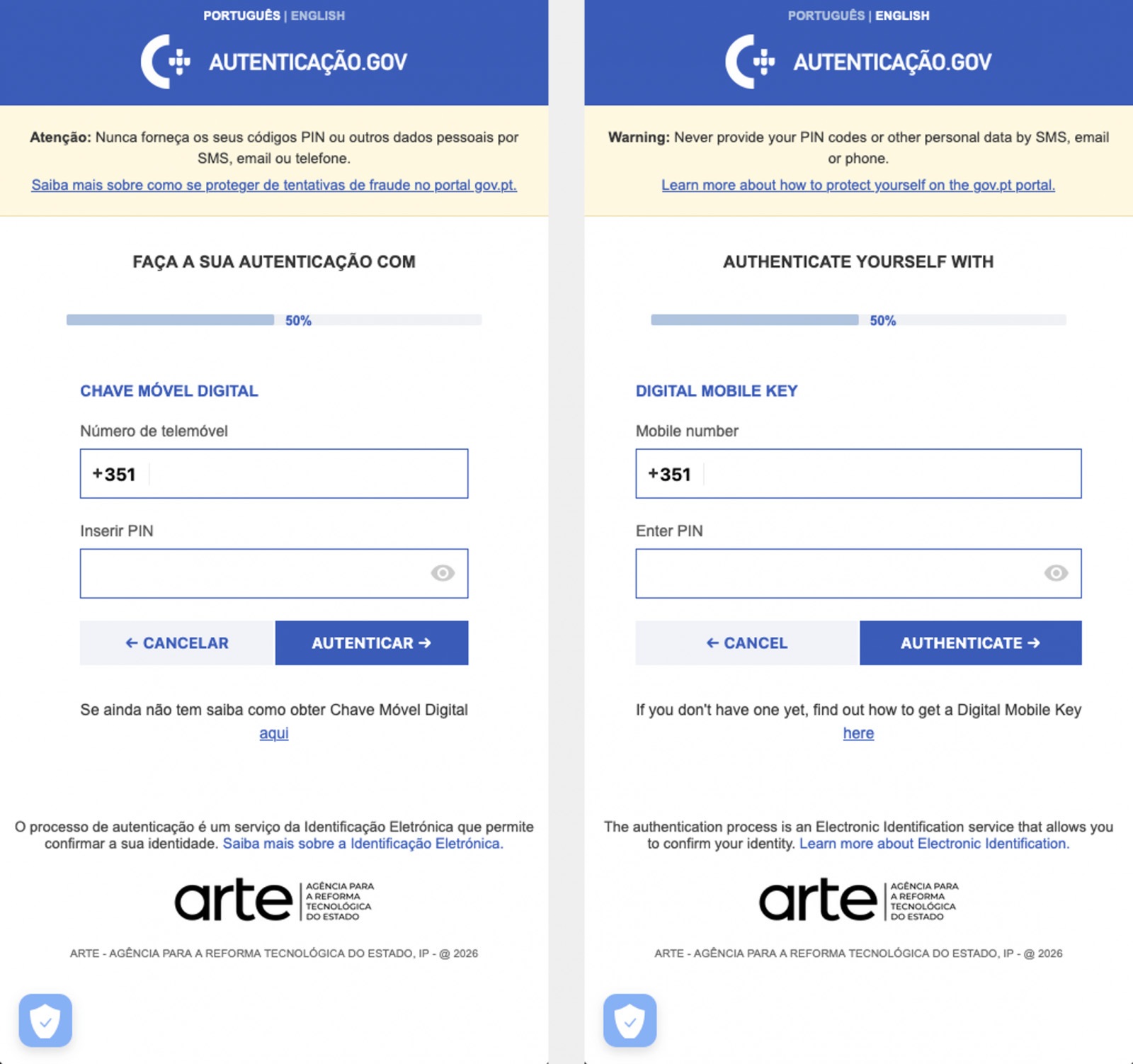
Massiv Trojan steals Chave Móvel Digital data

The Massiv banking Trojan mimics the interface of the Portuguese government app Chave Móvel Digital in a fake pop-up window, looking even more convincing than the official version from Google Play. Source

Perseus steals valuable information from users’ notes

In March, researchers reported on a new campaign where several fake IPTV apps were used to distribute an even more advanced and feature-rich malware strain: Perseus.

Research into Perseus shows that the malware is based on the source code of an Android banking Trojan called Cerberus, which leaked nearly six years ago. Perseus comes in two different versions: Turkish and English. The English-language version is more advanced and shows clear signs of AI-driven refinement.

Perseus abuses Accessibility Services, a set of Android features originally designed to make life easier for users with severe visual impairments. Fraudsters learned long ago how to leverage this tool to steal data from Android devices — a topic we’ve covered in detail across several of our posts.

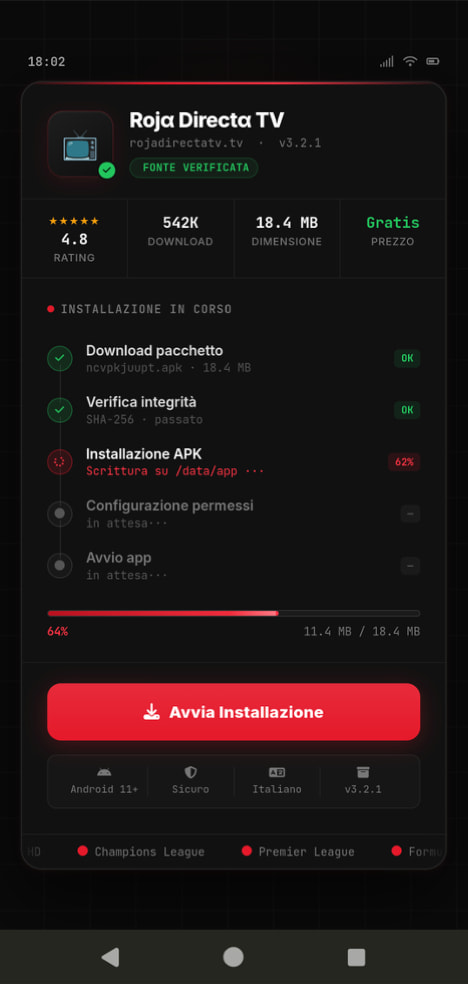
Fake IPTV app used for distributing Perseus

An example of a malicious APK disguised as Roja Directa TV, another IPTV app. Source

By abusing Accessibility Services, Perseus gains remote control over the victim’s device. Here’s what it can do:

  • Continuously capture and exfiltrate screenshots.
  • Send a structured map of the device’s UI for remote manipulation.
  • Mimic taps, swipes, text input, long presses, and other UI interactions.
  • Turn on the screen, launch apps, and block them from running.
  • Trigger a pitch-black screen overlay to hide its activities.
  • Log keystrokes.

On top of that, the English-language version of Perseus boasts another notable feature. The malware can hunt for sensitive information like passwords, recovery phrases, and financial data across an entire range of note-taking apps: Google Keep, Xiaomi Notes, Samsung Notes, ColorNote, Evernote, Microsoft OneNote, and Simple Notes.

All of these capabilities help criminals drain football fans’ money not just from various banking services, but from cryptocurrency apps as well.

How not to let cybercrooks ruin your World Cup

The World Cup is just around the corner, and millions of fans worldwide will definitely want to tune in to this year’s premier football event. Past experience shows that cybercriminals frequently cash in on major spectacles like this. So, how can you watch the  matches safely?

  • Don’t download apps from unofficial stores.
  • Even when downloading an app from an official store — since malware occasionally slips through the cracks there, too— read the reviews carefully. Users who have been burned by fakes and malware often leave comments to warn others.
  • Install a robust security app to keep all your devices safe from malware.
  • Avoid storing passwords or other sensitive information in note-taking apps. To ensure your data and finances stay secure, use a reliable password manager. By the way, Kaspersky Password Manager includes an encrypted note-taking feature, allowing you to store your valuable information safely.

You can’t even watch TV safely anymore these days! Check out other threats facing TV lovers:

  •  

Attackers leveraging Google AppSheet notifications to hijack accounts | Kaspersky official blog

Phishing campaigns have become significantly more sophisticated and convincing in recent years. Sender addresses are now nearly identical to the real deal, emails are flawlessly written, and users are called by their names. But what do you do when a suspicious email comes from a clearly legitimate email address?

Lately, phishers have been exploiting the Google AppSheet platform to set up email blasts that originate from an official Google-linked address. Following a successful attack, they walk away with their victims’ accounts and sensitive data.

In this post, we break down how this new data theft scheme works, and how to protect yourself from these sneaky phishing attacks.

Google is offering you a job. Or Coca-Cola. Or maybe Volvo. Or are they?

AppSheet is a Google service for building apps without any coding skills. It’s frequently used by small businesses to automate routine workflows. Unfortunately, it’s precisely this simplicity that makes AppSheet so attractive to cybercriminals. All it takes to pull off a phishing scam these days are a few dollars and an app quickly thrown together using pre-made commands and blocks.

The playbook for AppSheet phishing attacks is pretty run-of-the-mill. The victim receives an email on behalf of a major company — and these messages often begin by addressing the recipient by name. It appears the attackers are parsing leaked data to match names with specific email addresses.

Next, the attackers play on the recipient’s emotions — employing either stick or carrot. They might panic the victim with urgent warnings that demand immediate action — think “Your account will be disabled soon” or “Suspicious activity detected”. Alternatively, they lure them in with irresistible bait, like the promise of a verified badge or an interview invitation from a tech giant. These fake HR emails are engineered to give victims an immediate rush. They make it look like the recipient’s application was already fast-tracked and highly rated, teasing a job offer that could drop as early as tomorrow.

For most people, these messages don’t raise a single red flag. The email bypasses the spam folder completely, and the From field displays the exact name of the company they expect to see. Unfortunately, none of it means the email is authentic: attackers can put whatever they want in the display name. And let’s be honest: very few people actually stop to scrutinize the sender’s email address.

In AppSheet-based phishing campaigns, the sender is always the same: noreply{@}appsheet.com. But here’s the real kicker: that address is 100% legitimate. Because it’s tied directly to Google’s own infrastructure, there’s a good chance that standard anti-spam filters greenlight these emails without blinking.

Naturally, to secure that coveted interview or fix their account, the victim clicks the link — and then voluntarily hands over their entire digital identity on a copycat website: full name, address, phone number, etc. From there, the attackers can sell the harvested data on the dark web, or weaponize it for secondary, targeted attacks. To top it all off, the victim is redirected to a phishing login page, which allows the attackers to steal their accounts.

Here’s a step-by-step breakdown of how a victim goes from receiving a fake Google Careers portal email to having their account completely compromised:

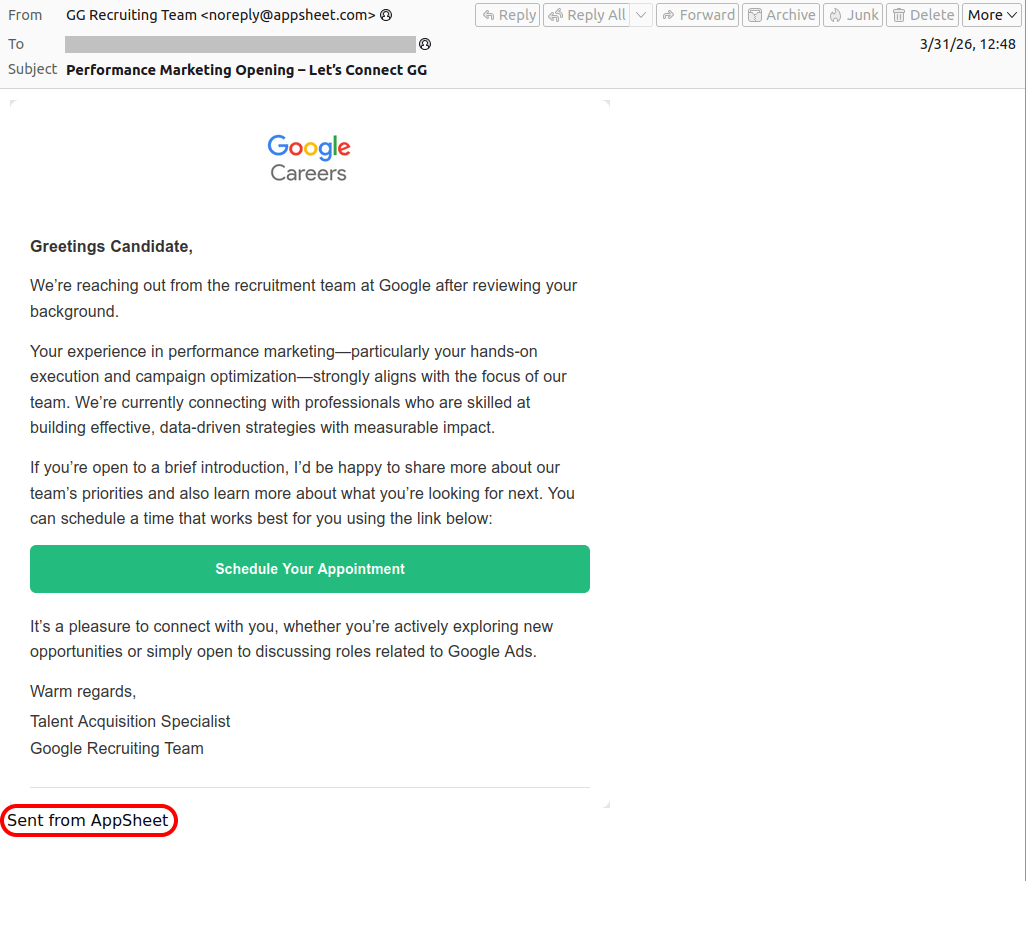
Phishing email alleging to be from Google Careers, sent via the AppSheet platform
Greetings, Candidate! Why don't you click the link to our fake Google site to schedule an interview?
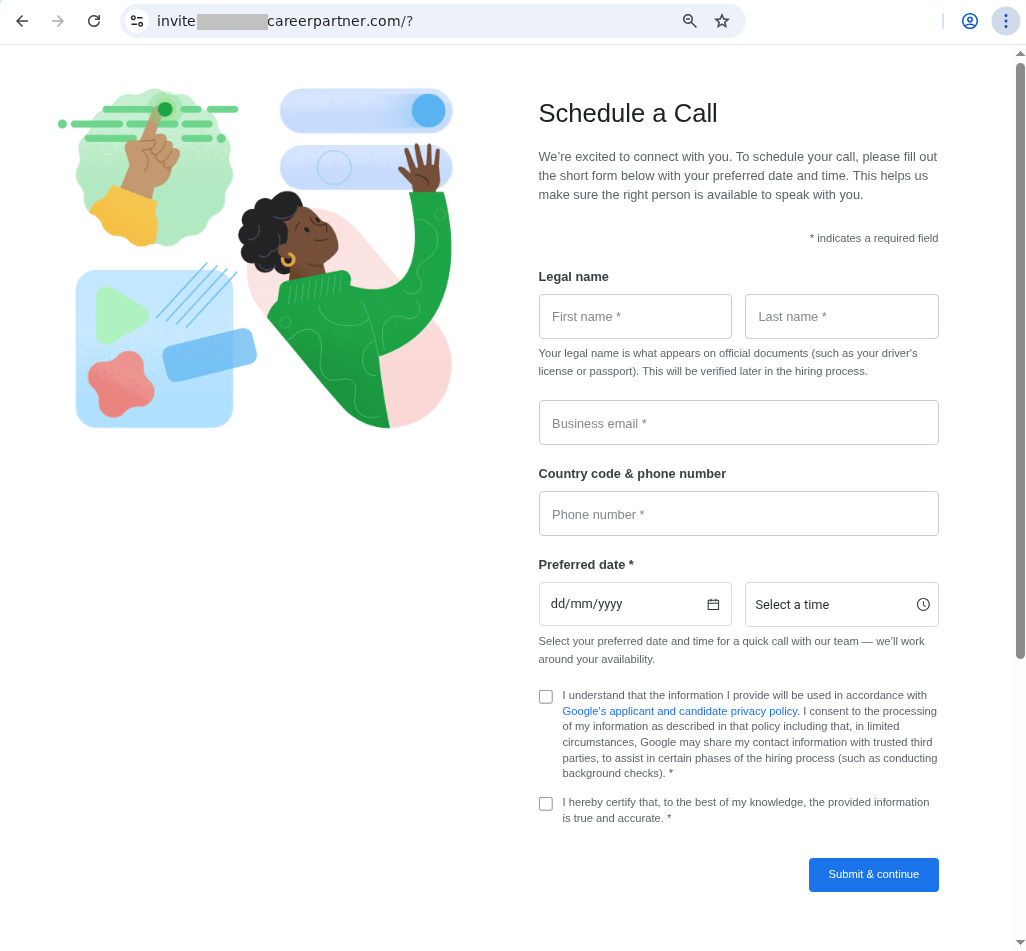
A spoofed site with a design indistinguishable from the original
The link in the email leads to a spoofed site with a design indistinguishable from the original. The user is prompted to fill out a form: provide their full name, work email, phone number, and preferred date for interview…
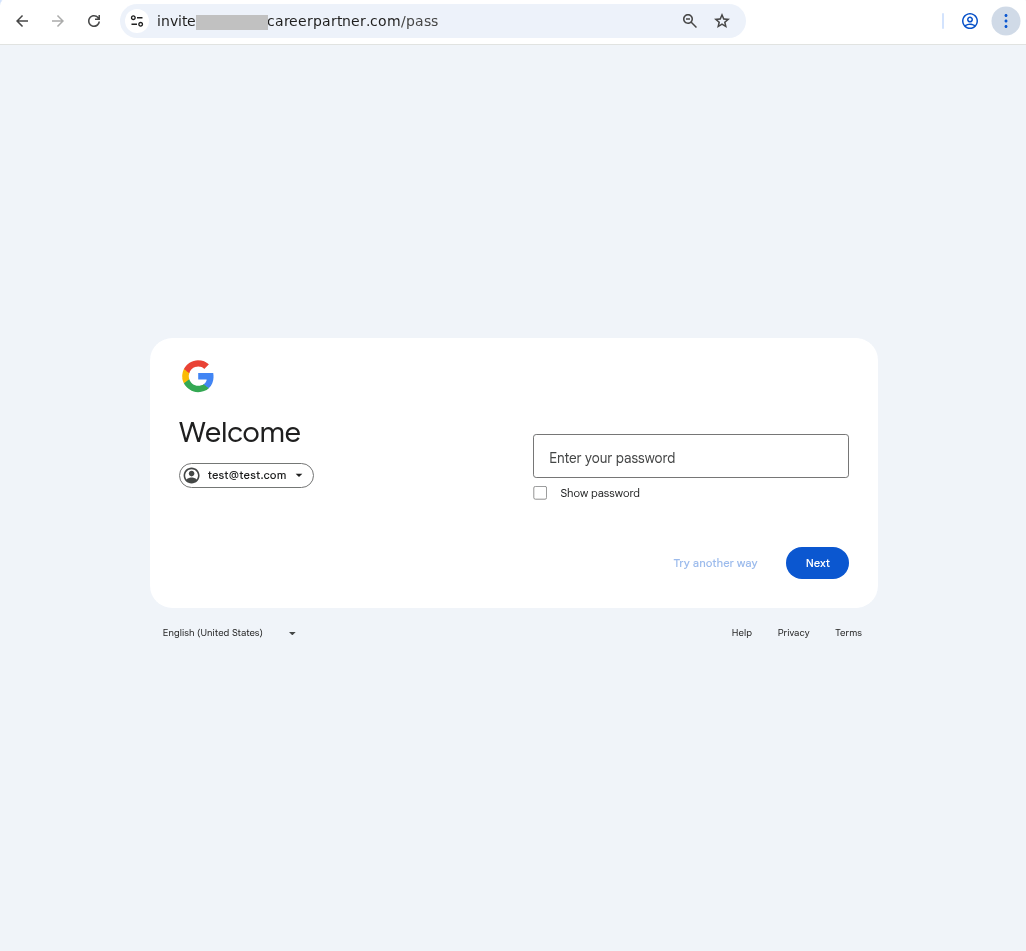
A prompt asking victim to log in with their Google credentials
…Once the victim completes the form, they see a prompt asking them to log in with their Google credentials. All of this data goes straight to the attackers.

Similar phishing campaigns are launched on behalf of other major tech brands — and the users who hand over their Apple account data risk losing not just their account but also control of all their Apple devices. The attackers might pressure the victim into signing out of their personal Apple ID, and in to a “corporate account” for verification — which is in reality an Apple account they own. The moment the victim does so, the criminals take complete remote control of the used device, often using Lost Mode to lock the victim out and hold their phone to ransom.

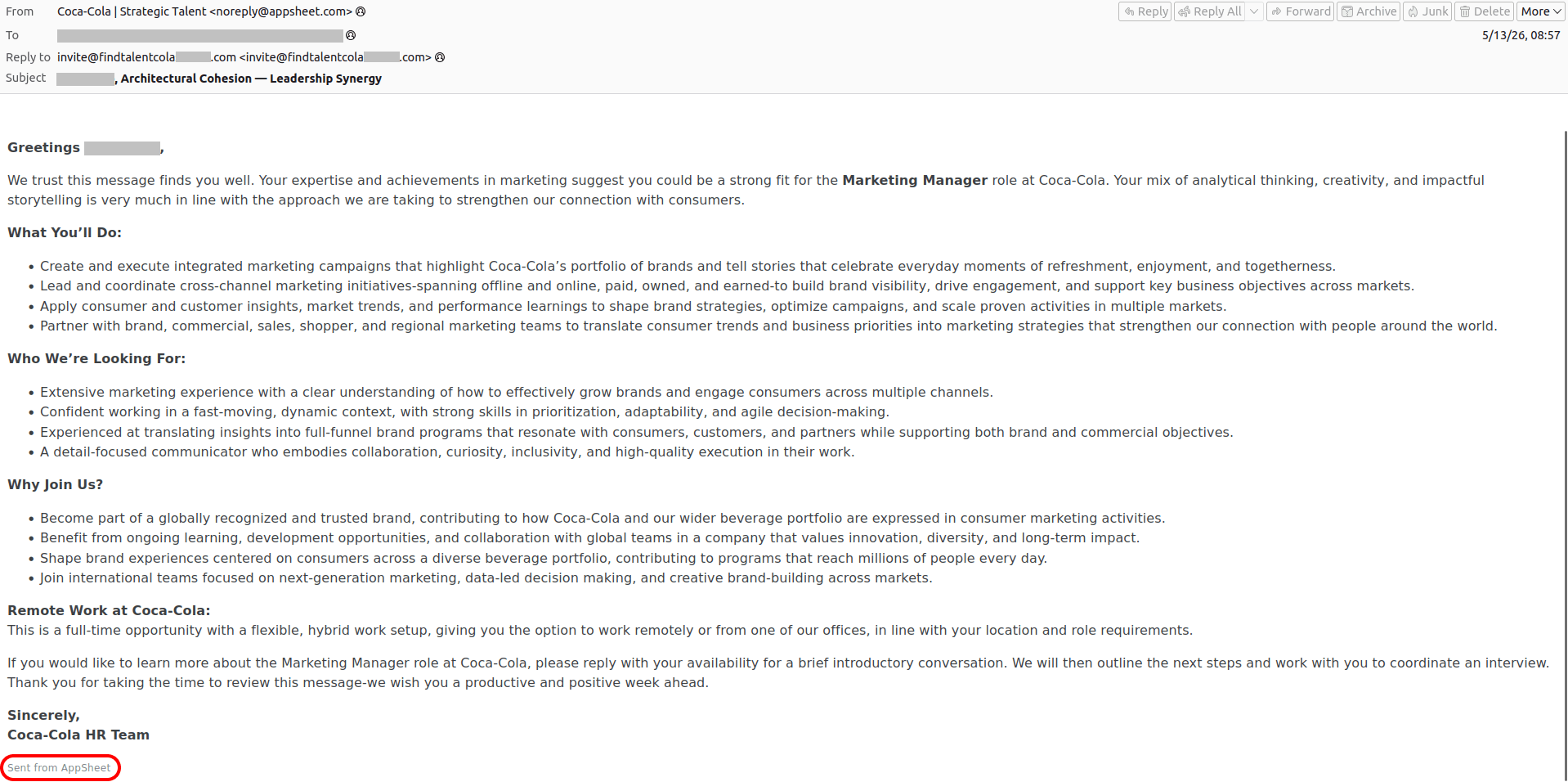
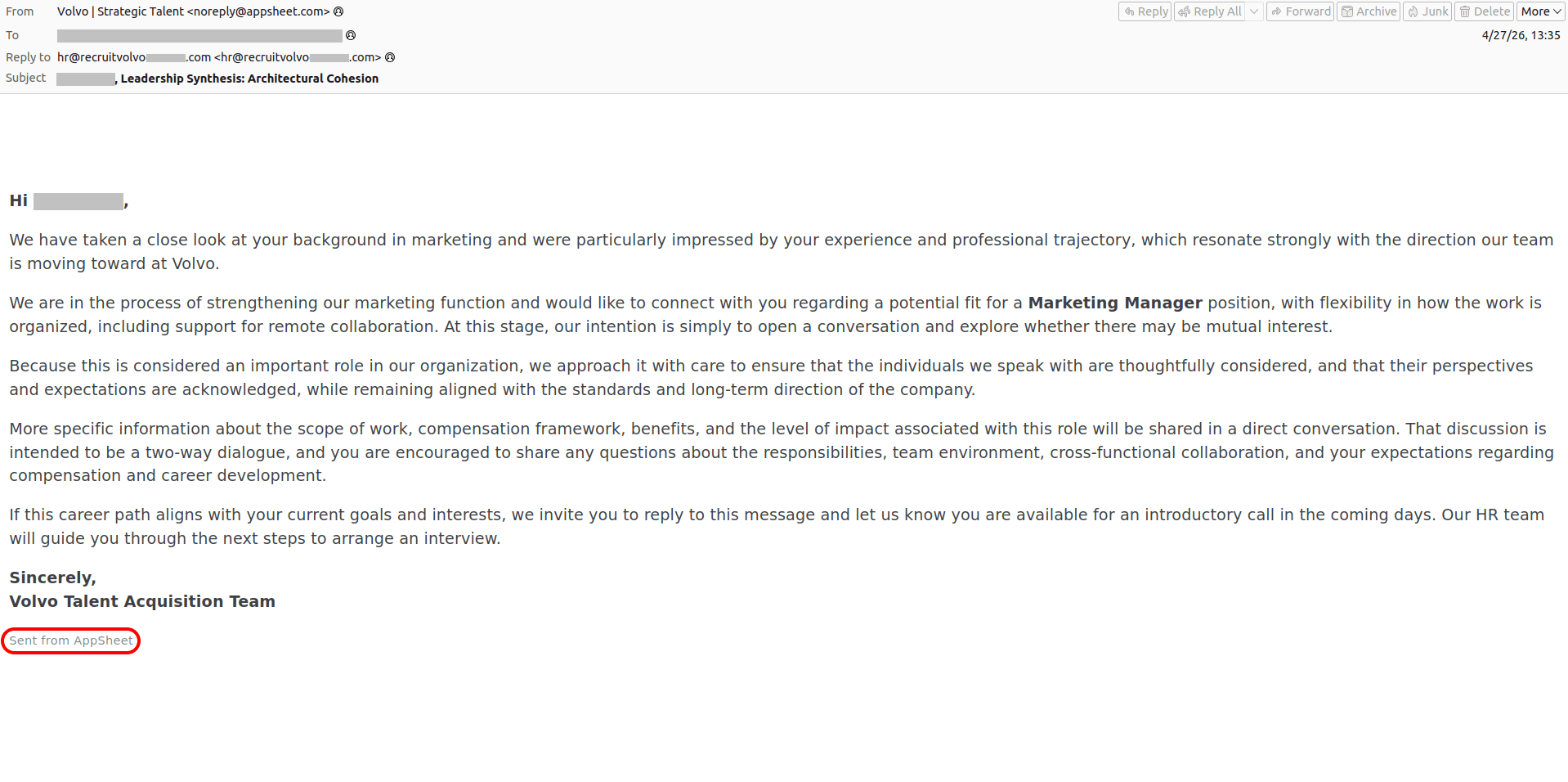
To make matters worse, attackers don’t always drop a malicious link in the initial email. Instead, they play the long game — hooking the target into a conversation by asking them to reply and confirm their interest. This pretexting creates an illusion of chatting with a real recruiter. And this playbook isn’t reserved exclusively for Silicon Valley, either. Attackers frequently impersonate globally recognized household names, like Volvo or Coca-Cola. Of course, it’s highly unlikely that attackers want someone’s Coca-Cola account — if the user even has one to begin with. Most likely, the goal is to steal sensitive data or convince the user to log in to a phishing form using their Google/Apple/Facebook, etc. credentials.

Fraudulent email supposedly from Coca-Cola, sent via the AppSheet platform
An "HR team member" from Coca-Cola reaches out to praise the victim, laying it on thick about their expertise and achievements, analytical thinking, and creativity… The attackers intentionally keep the endgame under wraps — whether that means routing the victim to a phishing site, orchestrating a full account takeover, or pulling off a straight-up financial scam
Fraudulent email purporting to be from Volvo, sent via the AppSheet platform
A similar email pretending to be from the Volvo talent acquisition team

Do you want to become Meta-verified?

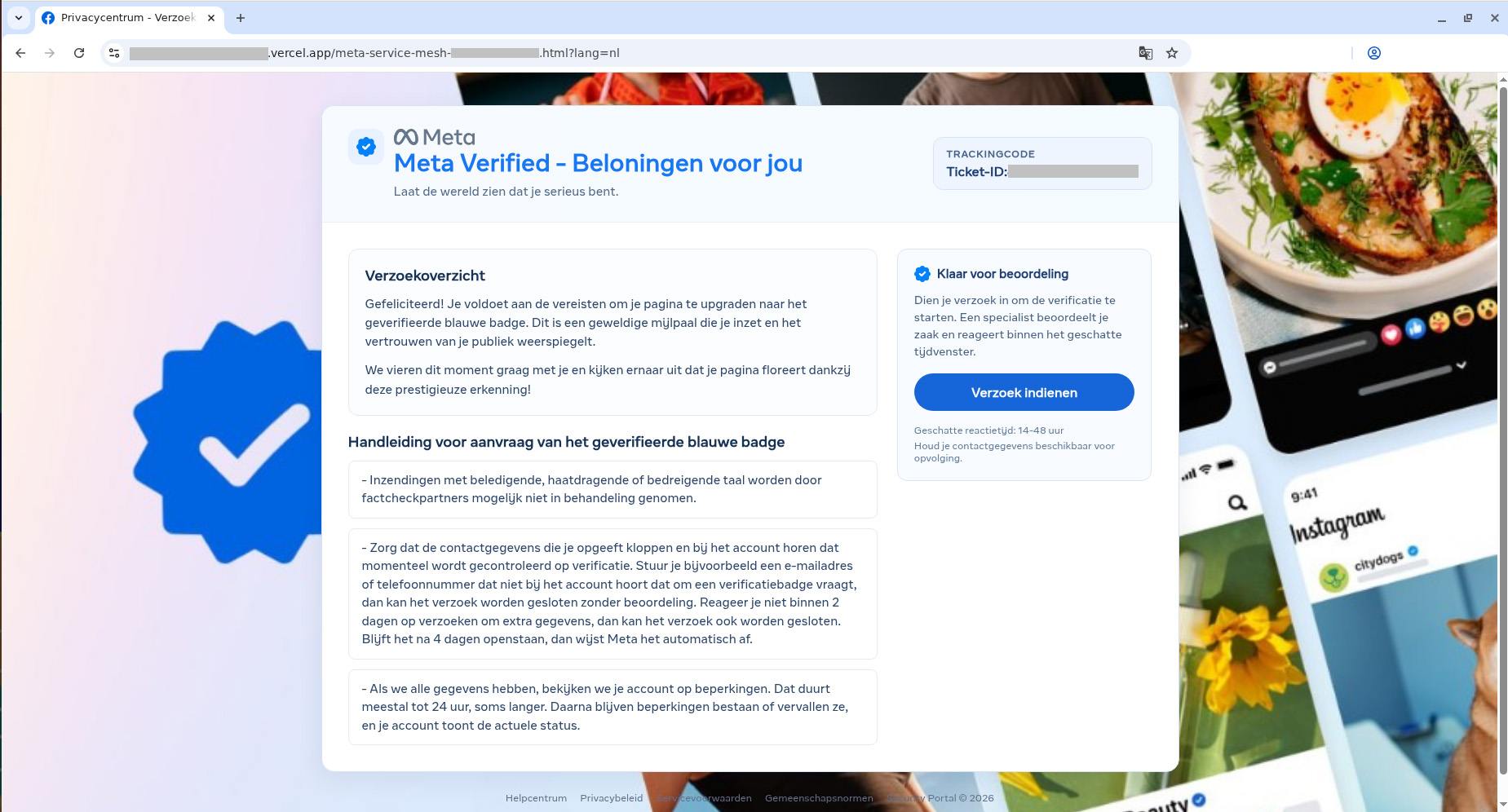
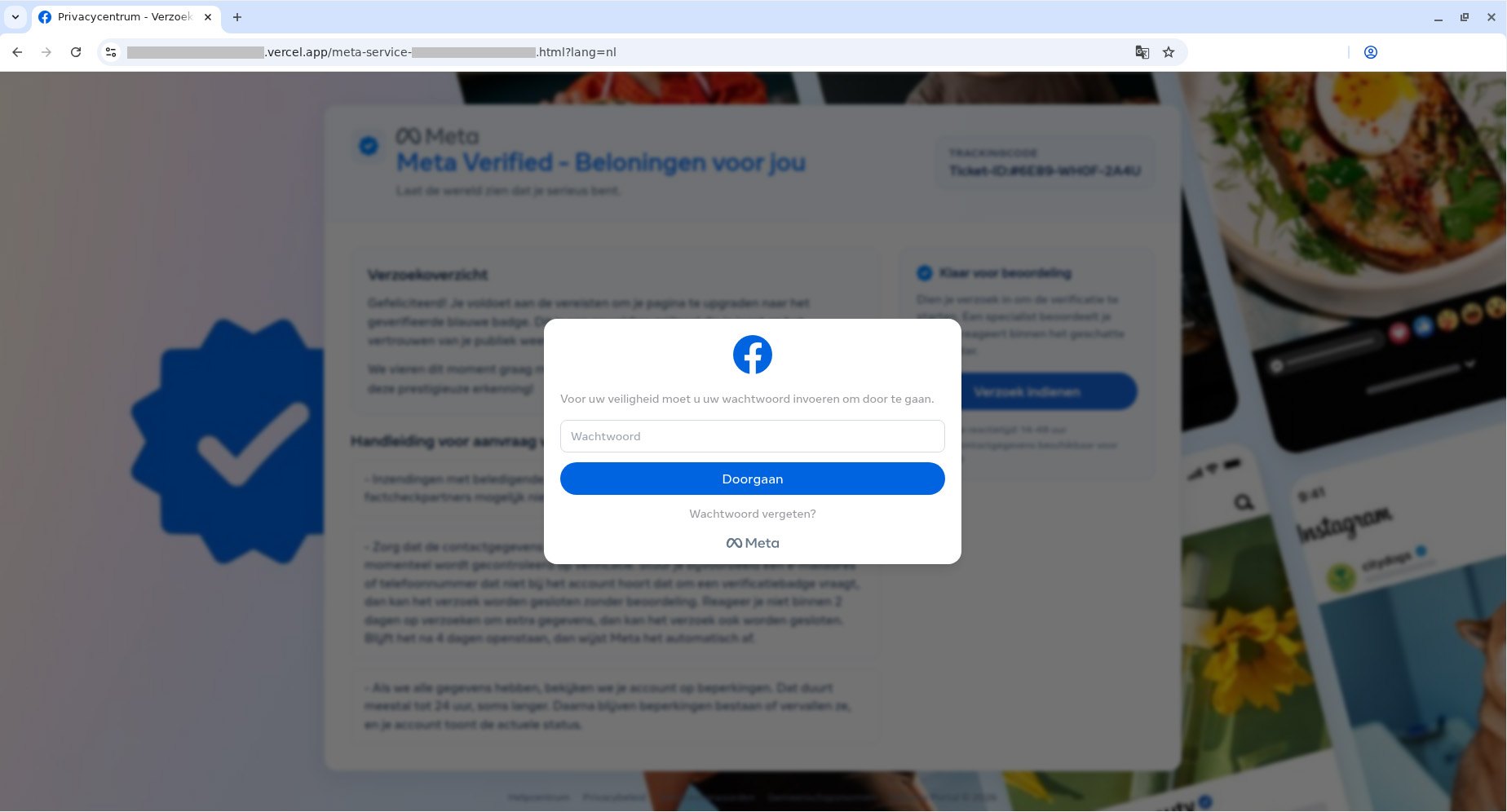
Of course, “dream jobs” aren’t the only bait used. We’ve seen campaigns where “Facebook Support” reaches out to tell a user they’ve been deemed eligible for the prestigious Meta Verified badge — a blue checkmark normally reserved for top-tier celebrities and global brands. To secure the coveted blue checkmark, the victim is directed to a phishing page where they’re asked to complete an identity form — before handing over the ultimate prize: their Facebook username and password. And it’s all in the name of security, naturally!

These spoofed sites are created in a wide variety of languages, and tailored to users in different countries. Below is the Dutch version.

Fake Facebook site offering to qualify for a Meta Verified badge
To get the blue checkmark, the user is required to provide "additional information". Miss the deadline by just a few days and the offer expires
Fake Facebook site offering to qualify for a Meta Verified badge
After the victim fills out the standard fields — name, phone number, personal and work emails, and birthdate — a prompt appears asking for their Facebook password

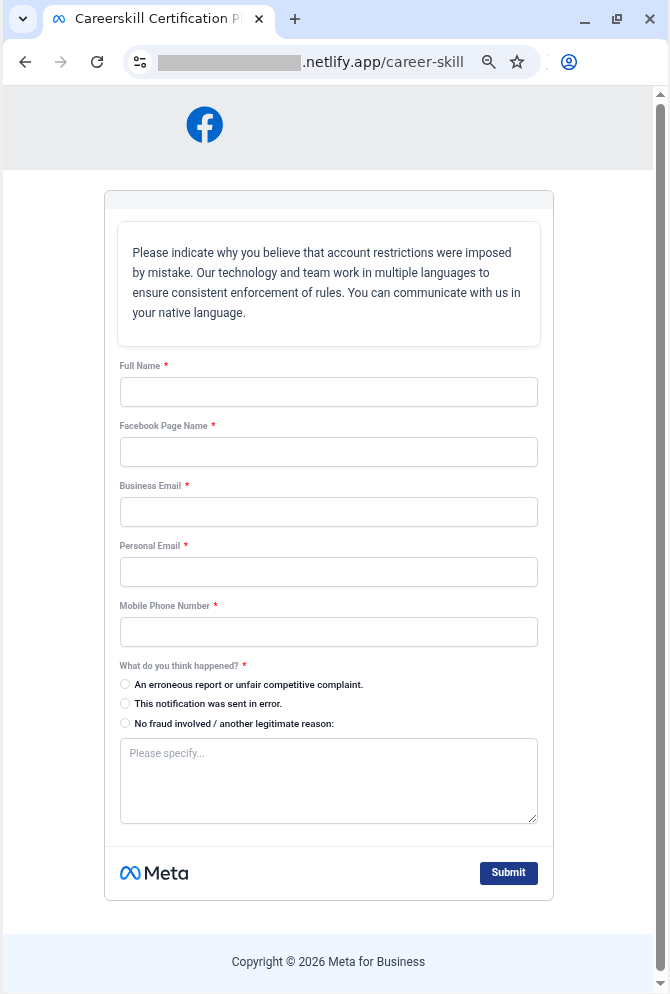
In other campaigns, attackers abuse Google’s AppSheet to weaponize sheer panic, trying to unsettle the user with claims that they’ve violated Meta’s intellectual property policy — and threatening to permanently close their Facebook account. To appeal, the victim must click a link to… a phishing site, provide their personal information, and, of course, enter their Facebook username and password.

Fake Meta site where the user can appeal their account deactivation
For the sake of plausibility, the user is not only asked to fill out fields with personal information, but also to describe in detail why the decision to close the account was a mistake
Fake Meta site where the user can appeal their account deactivation
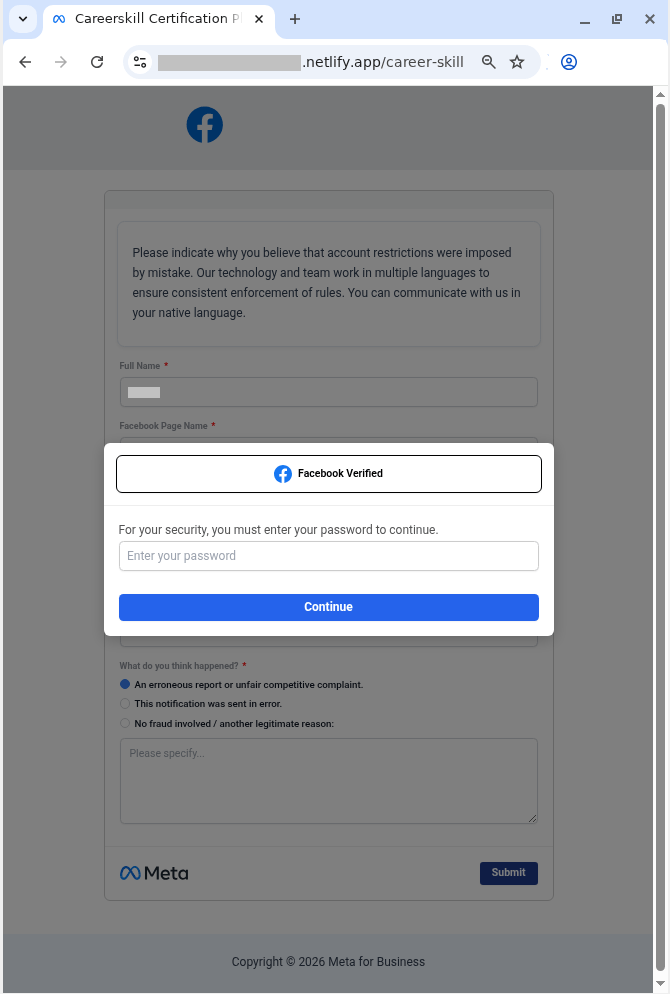
Finally, the user is prompted to confirm their appeal request by signing in to “Facebook”. In reality, the victim is simply handing their credentials over to the attackers

How to spot phishing and protect your accounts

Sadly, phishing attacks are becoming increasingly sophisticated, with attackers routinely hijacking the reputation of legitimate services and domains. Here’s how to keep from falling into their traps, and safeguard your data:

  • Remember: not all phishing emails end up in the spam folder. Standard spam filters in email clients often fail to detect advanced attacks — and the AppSheet case is a prime example. To avoid accidentally taking the bait, use Kaspersky Premium on all your devices. It intercepts phishing emails and instantly blocks links to spoof websites — even if the attacker is hiding behind a completely legitimate domain. Additionally, the Android version can detect malicious and phishing links in messages from any app.
  • Check the email for odd typos. To keep their messages from setting off alarms, attackers frequently resort to sneakily inserting extra spaces or swapping out characters. Take this example from one of the emails we found: Fac eb o ok  S u ppo r t instead of Facebook Support.
  • Before taking any action on a website, carefully check its domain name against the official address. Bad actors frequently create addresses that only appear to be the real thing until you look close enough. Install Kaspersky Premium to always be sure you don’t land on a spoofed site.
  • Look at the sender’s address first, not just the display name. If an email claims to be from Google Careers, Apple HR, or Facebook Support, but the sender address points to AppSheet or another unrelated service, don’t even bother reading this message. That domain mismatch is a dead giveaway that you’re looking at a trap. Cross-reference email addresses with the ones listed on the companies’ official websites.
  • Check for email signatures. For instance, all emails sent via AppSheet include a disclosure note at the very bottom. You are much more likely to receive a legitimate AppSheet notification from a small company or business, but definitely not from a tech giant. Major corporations typically use their own domains for their emails.
  • Use a password manager. Even if you land on a spoofed site and try to enter your password, a reliable password manager will notify you about the domain mismatch and refuse to autofill your username and password.
  • Don’t forget about two-factor authentication. If it’s enabled, just having your username and password won’t help the attackers access your account — they’ll also need a one-time code. However, they might still try to trick you into giving that up too, so be doubly careful whenever you enter two-factor authentication codes anywhere.
  • Use passkeys instead of passwords whenever possible. This technology provides excellent protection against phishing: even if you visit a malicious site and try to sign in, the passkey won’t work on the spoofed domain. You can store and sync passkeys across different devices in Kaspersky Password Manager. Read our post on the subject to learn more about how passkeys work.

Phishing attacks are growing increasingly sophisticated. Here’s what else you should know about phishing:

  •  
❌