❌

Reading view

Automating post-quantum cryptography readiness using AWS Config

Migrating your TLS endpoints to Post-quantum cryptography (PQC) starts with understanding your current TLS endpoint inventory and posture. This post introduces the PQC Readiness Scanner β€” an automated tool that inventories your Application Load Balancer (ALB), Network Load Balancer (NLB), and Amazon API Gateway endpoints and continuously monitors their TLS configurations for PQC readiness. The scanner classifies each endpoint into a three-tier framework that helps prioritize and plan PQC migration.

As quantum computing advances, you need to migrate to quantum-resistant cryptography to protect your data long-term. The PQC Readiness Scanner helps you identify which endpoints to migrate first and tracks your progress across accounts. For web traffic, PQC key exchange algorithms are negotiated only within TLS 1.3. This means quantum-resistant connections require endpoints that support TLS 1.3 and PQC key exchange.

Under the AWS Shared Responsibility Model, AWS secures the infrastructure and enables PQC support across its services. Customers are responsible for configuring their resources to use PQC-capable TLS policies. For AWS-terminated TLS connectionsβ€”such as those on Application Load Balancer (ALB), Network Load Balancer (NLB), Amazon API Gateway, and Amazon CloudFrontβ€”customers choose the security policy (an AWS-managed configuration defining supported TLS protocol versions and cipher suites for a listener) that determines TLS version and cipher suite, key exchange, and authentication algorithm support.

The automated PQC Readiness Scanner for AWS-terminated TLS endpoints is built using AWS Config conformance packs. A conformance pack is a collection of AWS Config rules and remediation actions that can be deployed as a single entity in an account and a Region or across an organization in AWS Organizations.

Solution overview

The PQC Readiness Scanner deploys AWS Config rules using a conformance pack to evaluate the security policy on each endpoint. Based on the evaluation, each resource is classified into a three-tier readiness framework that prioritizes migration actions needed to achieve PQ-ready TLS.

The PQC Readiness Scanner performs two checks per resource:

  1. Does the endpoint use a PQ-ready security policy?
  2. Does the endpoint support legacy TLS 1.0 or 1.1?

Each check returns COMPLIANT or NON_COMPLIANT status with specific policy recommendations.

PQC requires endpoints to support TLS 1.3 and use PQC key exchange algorithms. The three-tier framework helps you interpret findings and prioritize fixes. The goal is to have TLS 1.3 with PQC key exchange enabled on the endpoints. However, achieving this requires maintaining backward compatibility with clients.

Tier

Readiness level

TLS protocols

PQC status

Migration priority

Tier 1

PQ-ready (strongest posture)

TLS 1.3 only with PQC key exchange

PQ-ready

None

Tier 2

PQ-ready (backward compatible)

TLS 1.2 and 1.3 with PQC key exchange

PQ-ready

Low

Tier 3

Not PQ-ready

No PQC key exchange

Not PQ-ready

High

How to prioritize your migrations

  • Tier 1 represents the strongest security using only TLS 1.3 with PQC key exchange. These resources already meet the target state.
  • Tier 2 represents a backward-compatible PQ-ready configuration. Endpoints support both TLS 1.2 and TLS 1.3, with PQC key exchange negotiated on TLS 1.3 connections. Migration priority is low because these resources already provide quantum-resistant protection for clients that support TLS 1.3, while maintaining TLS 1.2 compatibility for legacy clients. Migrate to Tier 1 when client-side analysis confirms that the connecting clients support TLS 1.3 with PQC key exchange.
  • Tier 3 covers resources that aren’t PQ-ready. This includes endpoints without TLS 1.3 support, endpoints with TLS 1.3 but without PQC key exchange policies. These resources require immediate attention.

Assessment scope

The scanner evaluates the following AWS edge services that terminate TLS connections on behalf of your applications.

  • Edge services:
    • Application Load Balancer (ALB), Network Load Balancer (NLB) listeners with HTTPS, TLS, and TCP SSL protocols are evaluated.
    • API Gateway REST APIs are evaluated for AWS Regional and private endpoints along with API Gateway HTTP APIs (v2) and WebSocket APIs (v2).
  • Excluded edge services:
    • CloudFront distributions are excluded from the PQC readiness scope because TLS 1.3 with hybrid post-quantum key exchange is automatically enabled across existing CloudFront TLS security policies for viewer-to-edge connections. No customer action is required for inbound (viewer-facing) PQC on CloudFront.
  • Recommended approach for Classic load balancer:
    • For Classic Load Balancers, AWS recommends migrating to ALB or NLB. Classic Load Balancers don’t support TLS 1.3 or PQC key exchange and can’t be made PQ-ready.

How the solution works

AWS Config enables continuous monitoring and evaluation. Conformance packs enable organization-wide deployment. AWS Lambda is a serverless compute service that runs code to perform security policy evaluation based on the AWS Config rules. AWS Serverless Application Model (AWS SAM) is an open source framework used for deploying the AWS Lambda functions.
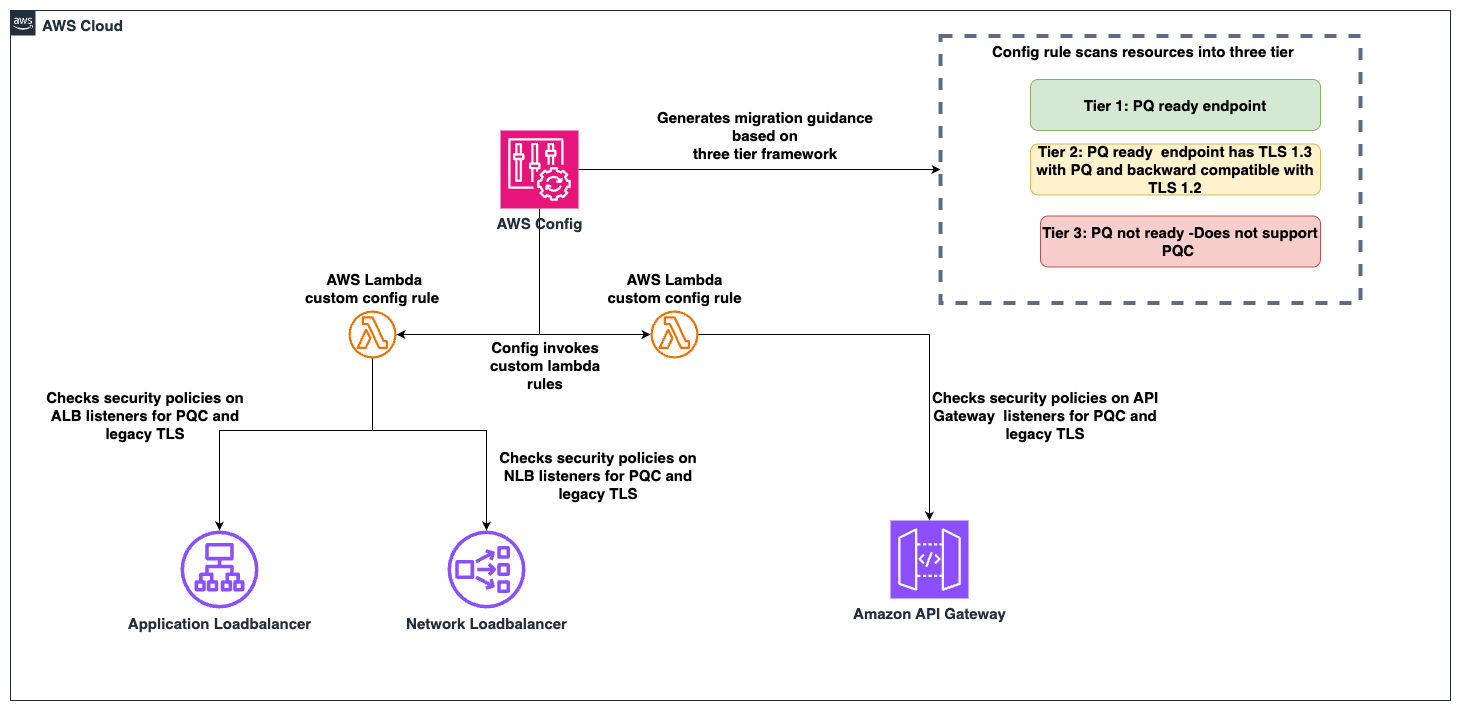
Figure 1: PQC readiness solution architecture

Figure 1: PQC readiness solution architecture

The PQC Readiness Scanner conformance pack implements four custom AWS Config rules powered by two Lambda functions:

Rule

What it checks

Non-compliant result

ELB PQ-ready

Load balancer listeners use security policies that support TLS 1.3 with PQC key exchange algorithms

Policy doesn’t include PQC support, the resource is marked with a recommended upgrade policy

ELB legacy TLS

Load balancer listeners allow TLS 1.0 or 1.1 connections

Legacy protocols are configured, the resource is flagged.

API Gateway PQ-ready

API Gateway endpoints use security policies that support TLS 1.3 with PQC key exchange algorithms

Policy doesn’t include PQC support, the resource is marked with a recommended upgrade policy

API Gateway legacy TLS

API Gateway endpoints allow TLS 1.0 or 1.1

Legacy protocols are configured, the resource is flagged.

Prerequisites

Before deploying the solution, you need:

  • AWS Command Line Interface (AWS CLI) configured with appropriate permissions
    aws configure
    aws sts get-caller-identity  # Verify

  • Python 3.12 installed. The Lambda runtime requires this version.
    python3 --version  # Should show 3.12.x

  • AWS SAM CLI installed (Installation Guide)
    pip install aws-sam-cli
    
    # Verify
    sam --version

  • AWS Config enabled in your target AWS Region.
    • Configure it to record (This step is not needed if your accounts are recording all resources by default)
      • AWS::ElasticLoadBalancingV2::LoadBalancer
      • AWS::ApiGateway::RestApi
      • AWS::ApiGatewayV2::Api resource types.
    • Enable via AWS Config Console β†’ Recorder β†’ Recording Strategy β†’ Select specific resource types (Follow the steps in manual setup for AWS Config recording strategy for specific resource types)

Steps to deploy the PQC Readiness Scanner

Deploy the PQC Readiness Config Scanner in three phases. Complete deployment commands and configuration details are available in the GitHub repository. The Lambda functions must be deployed first because the conformance pack references their ARNs as parameters. See the GitHub repository for details.

Deploy to single account:

  1. Clone and Build:
    git clone https://github.com/aws-samples/sample-PQC-Readiness-using-AWS-Config.git
    
    cd sample-PQC-Readiness-using-AWS-Config/installation
    
    sam build

  2. Deploy to One or More Regions:
    # Make script executable (first time only)
    chmod +x deploy-per-regions.sh
    
    # Deploy to a single region
    ./deploy-per-regions.sh us-east-1
    
    # Deploy to multiple regions
    ./deploy-per-regions.sh us-east-1 us-west-2 eu-west-1

    Type y and continue if you have enabled AWS Config recording for these resources or its by default recording all resources.

    Figure 2: Type y and continue if you have enabled AWS Config recording for these resources or its by default recording all resources.

  3. The script automatically:
    • Deploys Lambda functions via SAM
    • Deploys conformance pack (creates Config rules)
    • Verifies deployment success
    • Provides clear status messages

The deployment creates two Lambda functions that perform PQ-ready and legacy TLS checks. It provisions IAM roles with least-privilege permissions for ELB, ALB, NLB, and API Gateway describe operations. Lambda permissions allow AWS Config to invoke the functions.
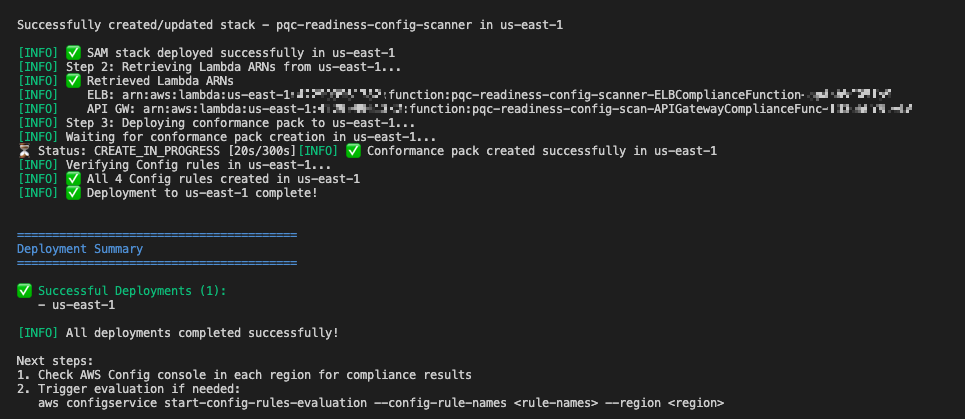
Example screen-print of how a successful deployment looks like.

Figure 3: Example screen-print of what a successful deployment looks like.

Multi-account deployment (Organizations):

For organization-wide deployment across multiple AWS accounts, use CloudFormation StackSets to deploy Lambda functions to each account.

Important Constraint: AWS Config CUSTOM_LAMBDA rules require the Lambda function to exist in the same account as the Config rule. You cannot use a centralized Lambda in one account to evaluate resources in other accounts.

Prerequisite: Shared S3 Bucket

Before packaging, create an S3 bucket accessible by each target account in your organization. This bucket will host the Lambda deployment artifacts that CloudFormation StackSets pulls into each member account.

# Create the shared S3 bucket (run from management/central account)
aws s3 mb s3://<your-org-shared-bucket> --region us-east-1

Grant read access to the target accounts using one of the following options:

aws s3api put-bucket-policy \
  --bucket <your-org-shared-bucket> \
  --policy '{
    "Statement": [
      {
        "Sid": "BucketOwnerFullAccess",
        "Effect": "Allow",
        "Principal": {
          "AWS": "arn:aws:iam::<bucket-owner-account-id>:root"
        },
        "Action": "s3:*",
        "Resource": [
          "arn:aws:s3:::<your-org-shared-bucket>",
          "arn:aws:s3:::<your-org-shared-bucket>/*"
        ]
      },
      {
        "Sid": "CrossAccountReadAccess",
        "Effect": "Allow",
        "Principal": {
          "AWS": [
            "arn:aws:iam::<account-id-1>:root",
            "arn:aws:iam::<account-id-2>:root"
          ]
        },
        "Action": ["s3:GetObject", "s3:ListBucket"],
        "Resource": [
          "arn:aws:s3:::<your-org-shared-bucket>",
          "arn:aws:s3:::<your-org-shared-bucket>/*"
        ]
      }
    ]
  }'

Replace <account IDs> with the AWS account IDs where StackSets will deploy the Lambda functions.

Note: The bucket must be in the same region as the StackSet deployment regions. For multi-region deployments, create one bucket per region and run sam package separately for each.

Step 1: Build and Upload Lambda Packages to S3

Run the packaging script from the installation/ directory:

cd installation

# Make script executable (first time only)
chmod +x deploy-stacksets.sh

# Build, package, upload to S3, and generate resolved template
./deploy-stacksets.sh <your-org-shared-bucket>

This script automatically:

  • Builds Lambda functions using SAM
  • Creates ZIP packages
  • Uploads ZIPs to the shared S3 bucket
  • Generates packaged-template.yaml with S3 values baked in (no parameters needed at deploy time)
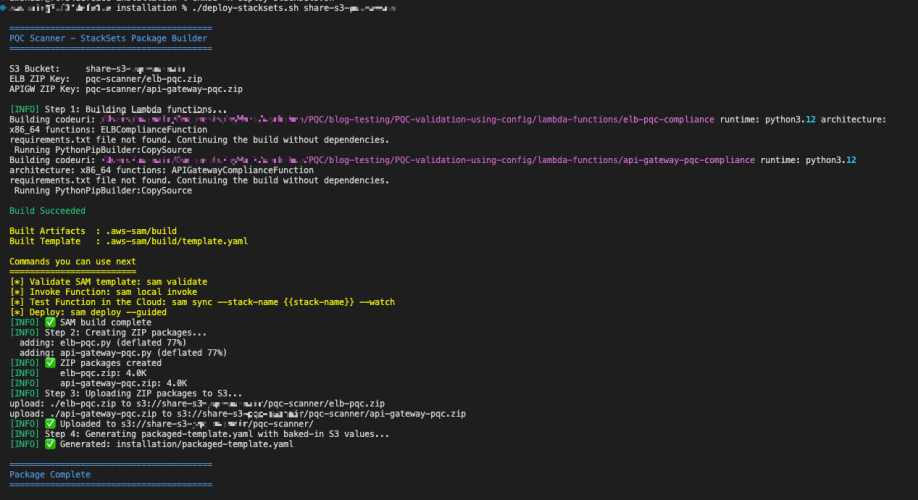
Sample script output of successful upload of the lambda packages to S3 bucket

Figure 4: Sample script output of successful upload of the lambda packages to S3 bucket

Step 2: Deploy Lambda Functions via StackSets

Run the following from the management account (or delegated admin account):

# Create StackSet (--region sets the StackSet "home region" where it is managed)
aws cloudformation create-stack-set \
  --stack-set-name pqc-readiness-lambda-functions \
  --template-body file://packaged-template.yaml \
  --capabilities CAPABILITY_IAM \
  --permission-model SERVICE_MANAGED \
  --auto-deployment Enabled=true,RetainStacksOnAccountRemoval=false \
  --region us-east-1

# Deploy stack instances to member accounts
# --regions = target regions where Lambda functions are deployed in member accounts
# --region  = must match the StackSet home region above
aws cloudformation create-stack-instances \
  --stack-set-name pqc-readiness-lambda-functions \
  --deployment-targets OrganizationalUnitIds=ou-xxxx-xxxxxxxx \
  --regions us-east-1 \
  --region us-east-1

Important β€” StackSet home region vs deployment regions:

  • --region (on each CLI command) = the StackSet home region where the StackSet resource lives. Subsequent operations (describe, update, delete) must specify this same region.
  • --regions (on create-stack-instances) = the deployment target region(s) where stack instances are created in member accounts.
  • These are independent values. Specify --region explicitly to avoid accidental deployment to your CLI’s default region.

Note: SERVICE_MANAGED StackSets must be created from the management or delegated admin account. The management account itself is excluded from stack instance deployments β€” use deploy-per-regions.sh separately if you need the scanner in the management account.

Step 3: Deploy Organization Conformance Pack

aws configservice put-organization-conformance-pack \
  --organization-conformance-pack-name pqc-legacy-tls-compliance \
  --template-body file://conformance-packs/pqc-legacy-tls-conformance-pack.yaml

This creates Config rules in each member account that reference their local Lambda functions.

    Migration guidance and prioritization

    The three-tier system provides PQC migration priorities:

    High priority – Tier 3 (not PQ-ready):

    • Target: Resources without PQC support. This includes endpoints not using PQ-ready security policies, endpoints that still allow TLS 1.0 or 1.1.
    • Action: Upgrade to a PQ-ready policy containing PQ in its name, such as those ending with -PQ-2025-09 (see Elastic Load Balancing security policies documentation for the full list).
    • Important: Before upgrading to a PQ-ready policy, audit your client TLS versions. PQ-ready policies require TLS 1.3 support; legacy clients that only support TLS 1.2 or earlier will fail to negotiate a connection. Start with a Tier 2 backward-compatible policy (which supports both TLS 1.2 and 1.3 with PQC), monitor connection logs for TLS negotiation failures, and only move to a Tier 1 TLS 1.3-only policy after confirming that your clients support TLS 1.3 with PQC key exchange.
    • Risk: Endpoints don’t support post-quantum cryptography for data in transit. Legacy TLS protocols are vulnerable to current cryptographic attacks.

    Low priority – Tier 2 (PQ-ready, backward compatible):

    • Target: Resources using TLS 1.3 + PQ-ready policies that also support TLS 1.2 for backward compatibility.
    • Action: Consider TLS 1.3-only policies when client compatibility analysis confirms connecting clients support TLS 1.3.
    • Risk: Minimal. These resources already support PQ-TLS with TLS 1.3 connections. TLS 1.2 and earlier fallback maintains backward compatibility, which might indicate some clients aren’t negotiating in PQ-TLS. Remediation is to monitor logs, identify the volume of these connections and clients and plan migration for these clients to use TLS 1.3 with PQ-TLS.

    No action – Tier 1 (PQ-ready, optimal):

    • Target: Resources using TLS 1.3 only with PQC key exchange: These resources meet the target state. No migration needed.

    Viewing the results

    In each member account, navigate to AWS Config Console in the deployed region.

    Conformance Pack View

    Go to AWS Config β†’ Conformance packs and look for:

    OrgConformsPack-pqc-legacy-tls-compliance-

    Note: Organization conformance packs are prefixed with OrgConformsPack- and have a random suffix appended (e.g., OrgConformsPack-pqc-legacy-tls-compliance-gyv22je0).
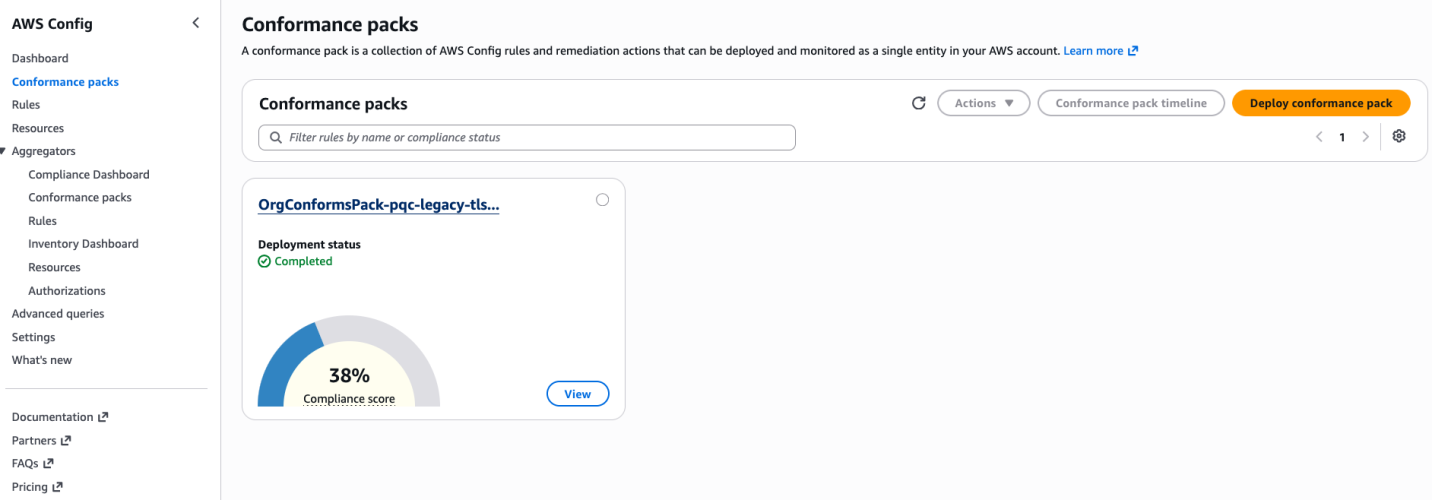
    PQC Conformance Pack Compliance Score is the percentage of the number of compliant rule-resource

    Figure 5: PQC Conformance Pack Compliance Score is the percentage of the number of compliant rule-resource

    Click the conformance pack to see an overall compliance summary across all 4 rules.

    Individual Rules View

    Go to AWS Config β†’ Rules and find 4 rules with prefix pqc-:

    • pqc-elb-pqc-compliance-conformance-pack-
    • pqc-elb-legacy-tls-conformance-pack-
    • pqc-apigateway-pqc-compliance-conformance-pack-
    • pqc-apigateway-legacy-tls-conformance-pack-

    Click any rule to view:

    • Compliant vs non-compliant resource counts
    • Detailed annotations for each resource
    • Resource ARNs and current security policy configurations
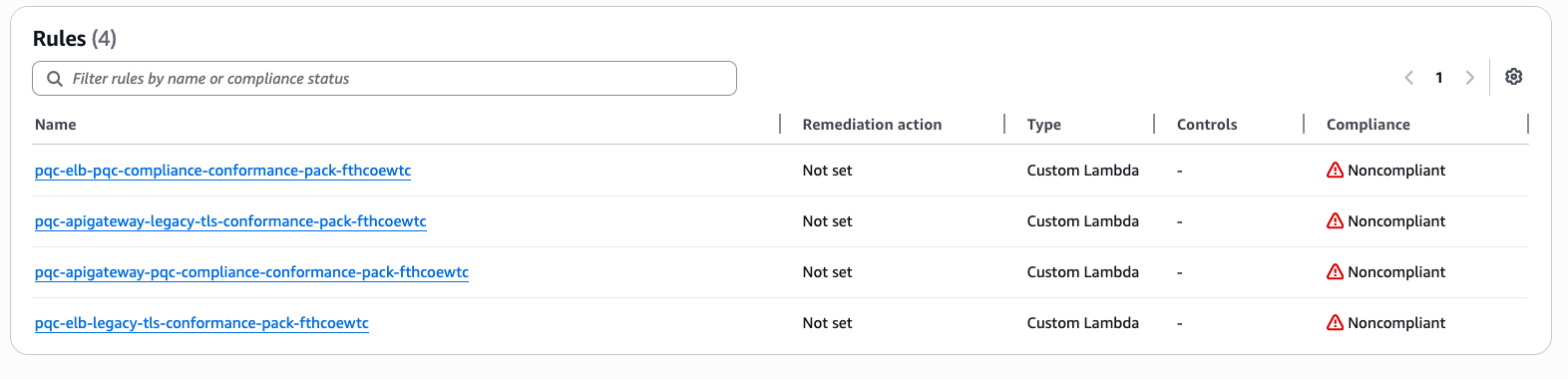
    Visibility into Config rules status inside the conformance pack
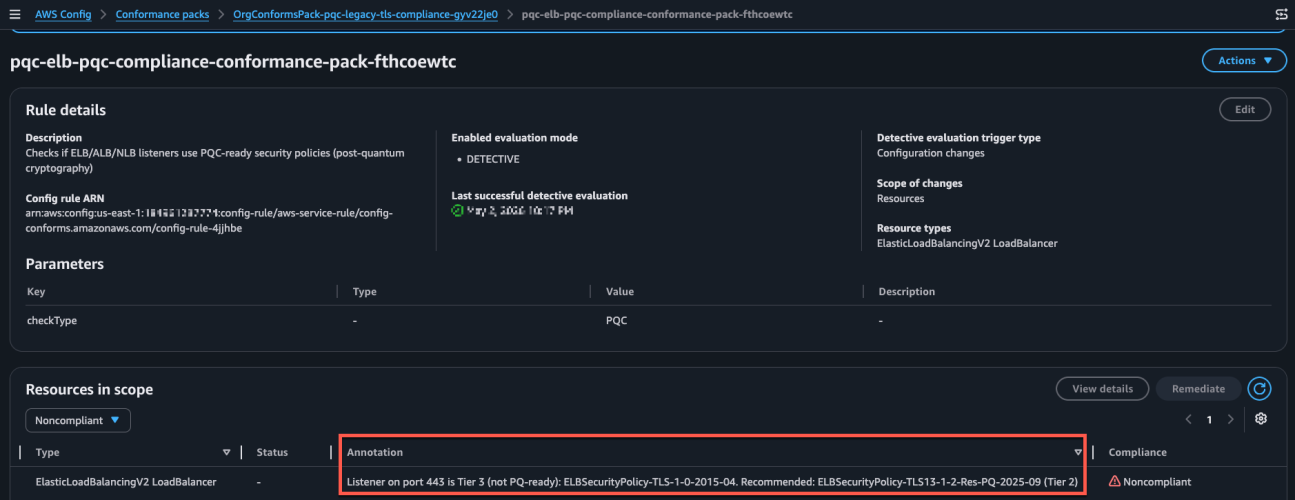
    Figure 6: Visibility into Config rules status inside the conformance pack

    Sample image of the config rule findings and annotation describing the migeration guidance based on 3-tier classification.

    Figure 7: Sample image of the config rule findings and annotation describing the migration guidance based on 3-tier classification.

    Conclusion

    After deploying the PQC Readiness Scanner, you gain visibility into TLS posture across AWS edge services, which reduces manual configuration reviews. The tier system provides specific upgrade recommendations so teams can understand next steps without cryptographic expertise. The scanner automatically detects configuration changes to help new deployments maintain readiness standards. Built-in AWS Config reporting supports audit requirements and demonstrates measurable progress toward PQC readiness.

    Deploy the PQC Readiness Scanner and review your results with PQC Readiness Scanner. Start migration with high priority Tier 3 resources and monitor progress across your accounts using AWS Config aggregators.

    Additional resources

    If you have feedback about this post, submit comments in the Comments section below. If you have questions about this post, start a new thread on AWS Config re:Post or contact AWS Support.
    Pravin Nair

    Pravin Nair

    Pravin is a Senior Security Solutions Architect specializing in data protection and privacy at AWS. He partners with customers to architect secure, scalable cloud solutions that address complex security challenges across encryption, infrastructure protection, and privacy engineering. His expertise spans encryption at rest and in transit, infrastructure security, privacy-based architectures, and emerging security domains including generative AI security and post-quantum cryptography.

    •  

    Protecting your secrets from tomorrow’s quantum risks

    As outlined in the AWS post-quantum cryptography (PQC) migration plan, addressing the risk of harvest now, decrypt later (HNDL) attack is an important part of your post-quantum plan. Upgrading the client-side of your workloads to support quantum-resistant confidentiality is an important aspect of your side of the PQC shared responsibility model. Timelines to plan and execute your PQC upgrades vary by region and by industry and will depend on your own business risk profile. To learn more, see the AWS PQC frequently asked questions.

    AWS Secrets Manager uses SSL/TLS to communicate with AWS resources, currently supporting TLS 1.2 and 1.3 in all AWS Regions. The service supports using TLS 1.3 with hybrid post-quantum key exchange for clients that support this capability. The hybrid post-quantum approach establishes TLS connections by combining traditional cryptography (such as X25519) with post-quantum algorithms (ML-KEM), and helps to protect your secrets against both current classical attacks and future quantum computer threats. Regardless of how your workload accesses Secrets Manager, this client-side software upgrade is the only action you need to take to address risk to secrets from HNDL. Your secrets at rest are already encrypted using keys managed by AWS Key Management Service (AWS KMS). Properly implemented symmetric encryption is considered quantum-resistant; asymmetric cryptography faces quantum threats. To learn more, watch AWS re:Inforce 2025 – Post-Quantum Cryptography Demystified.

    To reduce builder effort for client-side upgrades, we’re pleased to announce the following Secrets Manager clients now enable and prefer post-quantum TLS when initiating connections to Secrets Manager: Secrets Manager Agent (v2.0.0 or later), the AWS Lambda extension (v19 or later) and the Secrets Manager CSI Driver (v2.0.0 or later). For SDK-based clients, hybrid post-quantum key exchange is available in supported AWS SDKs. Enablement requirements vary by language, version, and operating system. See the following table for your SDK client.

    This launch is part of the ongoing commitment AWS has made to migrate systems to post-quantum cryptography and making it straightforward for our customers to do the same. See Post-Quantum Cryptography to learn more.

    Client hybrid post-quantum key exchange requirements

    The following table summarizes the behavior for each client. When the client is upgraded to support hybrid post-quantum key exchange, the Secrets Manager service endpoint automatically selects it during the TLS handshake. Upgrading to the versions listed in the table is the only action you need to take for your workload to begin using hybrid post-quantum key exchange when calling Secrets Manager APIs.

    Client Requirements
    Secrets Manager Agent Hybrid PQ key exchange in TLS preferred by default (v2.0.0 and later)
    AWS Lambda extension Hybrid PQ key exchange in TLS preferred by default (Version 19 and later)
    Secrets Manager CSI Driver Hybrid PQ key exchange in TLS preferred by default (v2.0.0 and later)
    AWS SDK for Rust Hybrid PQ key exchange in TLS preferred by default (releases after August 29, 2025)
    AWS SDK for Go Hybrid PQ key exchange in TLS preferred by default (Go v1.24 and later)
    AWS SDK for Node.js Hybrid PQ key exchange in TLS preferred by default (Node.js v22.20 and v24.9.0 and later)
    AWS SDK for Kotlin Hybrid PQ key exchange in TLS preferred by default on Linux (v1.5.78 and later)
    AWS SDK for Python The AWS SDK for Python (boto3) uses the OS-provided OpenSSL for TLS.
    Hybrid PQ key exchange in TLS requires running on a system with OpenSSL 3.5 or later installed.
    AWS SDK for Java v2 AWS SDK for Java v2 requires an AWS CRT HTTP client that supports PQ TLS when configured using postQuantumTlsEnabled.
    Secrets Manager caching clients The Secrets Manager caching libraries are built on the AWS SDKs and inherit their TLS behavior. Note for Java: The JDBC driver flag and Java Caching flag must be set to enable Hybrid PQ key exchange in TLS.

    If you’re using the Secrets Manager Agent, the Lambda extension, or the CSI Driver, upgrade to the listed version to use hybrid post-quantum key exchange in TLS as the default. Customers using the AWS SDK for Rust, Go, or Node.js at the versions listed in the table are already upgraded and no additional action is required. The SDK will select the hybrid post-quantum key exchange for API calls. For customers using the AWS SDK for Python, hybrid post-quantum key exchange in TLS requires OpenSSL 3.5 or later to be present on the host system. Guidance on verifying and enabling this is available in the AWS Secrets Manager documentation. For customers using the AWS SDK for Java v2, hybrid post-quantum key exchange in TLS requires using the AWS CRT HTTP client. The postQuantumTlsEnabled(true) must be set on the CRT client to enable hybrid post-quantum key exchange in TLS.

    After your client versions meet the requirements listed in the table, you can verify that your connections are actively using hybrid post-quantum key exchange.

    How to verify your connection uses hybrid post-quantum key exchange

    With hybrid post-quantum key exchange using ML-KEM now enabled by default for Secrets Manager clients (see the preceding table), most customers will not need ongoing monitoring to verify correct behavior or detect regressions. However, security teams and compliance officers might want to confirm that their Secrets Manager API calls are negotiating the hybrid key exchange. On the server side, you can confirm hybrid post-quantum key exchange in TLS by using AWS CloudTrail. On the client side, you can inspect TLS handshake details using a utility like Wireshark or by using developer tools built into major web browsers.

    Verification is a two-step process: first, fetch a secret using your Secrets Manager client to generate a GetSecretValue API call, then confirm in AWS CloudTrail that the call negotiated hybrid post-quantum key exchange.

    Fetch your secret using your Secrets Manager client

    The following examples show how to retrieve your secret using the Secrets Manager Agent, Lambda extension, and CSI Driverβ€”each of which will automatically negotiate hybrid post-quantum key exchange when calling the GetSecretValue API.

    To verify hybrid post-quantum TLS with Secrets Manager Agent on EC2 instance:
    Install the agent on your Amazon Elastic Compute Cloud (Amazon EC2) instance and use it as a client to fetch your secret.

    1. Follow the instructions for AWS Secrets Manager Agent.
    2. Ensure that your EC2 instance profile has the permission for secretsmanager:GetSecretValue to fetch the secret.
    3. Connect to your private EC2 instance.
    4. Install the agent on your EC2 instance.
    5. Use the agent to fetch your secret.
      curl -H β€œX-Aws-Parameters-Secrets-Token: $(</tmp/awssmatoken)” localhost:2773/secretsmanager/get?secretId=<YOUR-SECRET-ARN>
    6. Wait for about 5 minutes for CloudTrail to deliver the logs.
    7. Go to the CloudTrail event history and search for the event GetSecretValue.

    To verify hybrid post-quantum TLS with Lambda extension:
    Use the AWS parameters and Secrets Manager Lambda extension to create a Lambda function that will consume your secrets from Secrets Manager using direct API calls.

    1. Follow Using the AWS parameters and secrets Lambda extension to create the Lambda layer and the Lambda function.
    2. Select the latest extension version.
    3. Wait for about 5 minutes for CloudTrail to deliver the logs.
    4. Go to the CloudTrail event history and search for the event GetSecretValue.

    To verify hybrid post-quantum TLS with CSI driver on Amazon EKS:
    On your Amazon Elastic Kubernetes Service (Amazon EKS) cluster, use the AWS Secrets Store CSI Driver provider to fetch secrets from Secrets Manager in Kubernetes pods:

    1. Confirm the installed add-on version is 2.0.0 or later.
      eksctl get addon --cluster <CLUSTER-NAME> --name aws-secrets-store-csi-driver-provider
    2. Trigger a secret retrieval by restarting a pod that mounts a secret, or deploying a new one.
    3. Wait for about 5 minutes for CloudTrail to deliver the logs.
    4. Go to the CloudTrail event history and search for the event GetSecretValue.

    Confirm hybrid post-quantum key exchange using CloudTrail

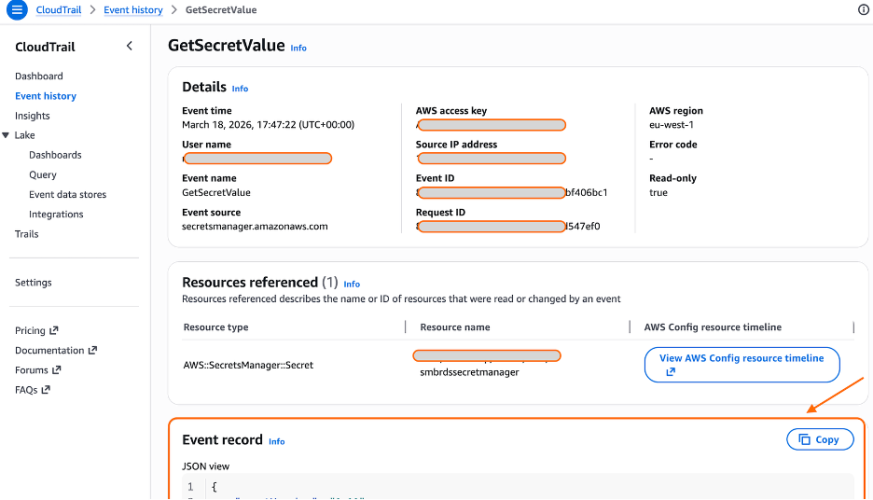
    CloudTrail logs include a tlsDetails field for Secrets Manager API calls. When hybrid post-quantum key exchange in TLS is active, the keyExchange field in tlsDetails will show X25519MLKEM768. Each CloudTrail record includes a tlsDetails field that contains the cipher suite and, where available, the key exchange group negotiated during the TLS handshake.

    You can work with CloudTrail event history using the AWS Management Console for CloudTrail or the AWS Command Line Interface (AWS CLI).

    To look up CloudTrail events using the console:

    1. Verify you are in the correct AWS Region.
    2. Open the CloudTrail console and select Event History.
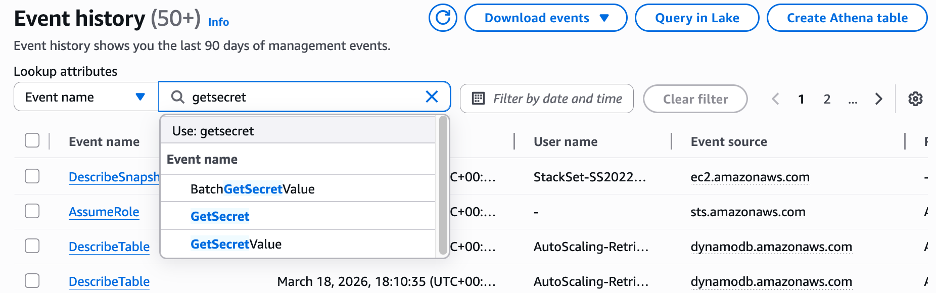
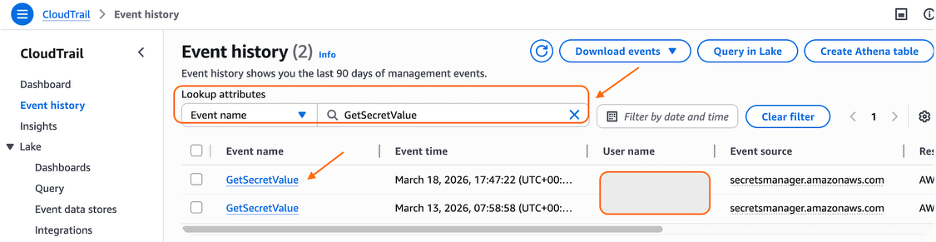
    3. Under Lookup attributes filter, select Event name and GetSecretValue.
      Figure 1: Search CloudTrail event history by event name

      Figure 1: Search CloudTrail event history by event name

    4. Select your event.
      Figure 2: Select the event

      Figure 2: Select the event

    5. View the output in the Event Record section of the page.
      Figure 3: CloudTrail - GetSecretValue event

      Figure 3: CloudTrail – GetSecretValue event

    To look up CloudTrail events using AWS CLI :
    Using AWS CLI, select the last events and look at the output.

    aws cloudtrail lookup-events \
    --lookup-attributes AttributeKey=EventName,AttributeValue=GetSecretValue \
    --max-results 5 \
    --region <YOUR-REGION> \
    --query 'Events[0].CloudTrailEvent' \
    --output text

    Example of CloudTrail Event for GetSecretValue API call:

    In the following example, the userAgent field reflects what it used as a client to connect to Secrets Manager.

    Note: The userAgent value depends on the client you use.

    {
        "eventVersion": "1.11",
        "userIdentity": {
            "type": "AssumedRole",
            "principalId": "AROA123456789EXAMPLE:i-0c1a23fc456b7ab89",
            "arn": "arn:aws:sts::111122223333:assumed-role/YOUR-EC2-INSTANCE-PROFILE/i-0c1a23fc456b7ab89",
            "accountId": "111122223333",
            "accessKeyId": "ASIAIOSFODNN7EXAMPLE",
            "sessionContext": {
                "sessionIssuer": {
                    "type": "Role",
                    "principalId": "AROA123456789EXAMPLE",
                    "arn": "arn:aws:iam::111122223333:role/YOUR-EC2-INSTANCE-PROFILE",
                    "accountId": "111122223333",
                    "userName": "YOUR-EC2-INSTANCE-PROFILE"
                },
                "attributes": {
                    "creationDate": "2026-03-27T17:08:37Z",
                    "mfaAuthenticated": "false"
                },
                "ec2RoleDelivery": "2.0"
            },
            "inScopeOf": {
                "issuerType": "AWS::EC2::Instance",
                "credentialsIssuedTo": "arn:aws:ec2:eu-west-2:111122223333:instance/i-0c1a23fc456b7ab89"
            }
        },
        "eventTime": "2026-03-27T17:12:54Z",
        "eventSource": "secretsmanager.amazonaws.com",
        "eventName": "GetSecretValue",
        "awsRegion": "eu-west-2",
        "sourceIPAddress": "1.2.3.4",
        "userAgent": "aws-sdk-rust/1.3.14 os/linux lang/rust/1.94.1 aws-secrets-manager-agent/2.0.0",
        "requestParameters": {
            "secretId": "arn:aws:secretsmanager:eu-west-2:111122223333:secret:your-secret"
        },
        "responseElements": null,
        "requestID": "027507ea-f377-43d9-bf2f-646d4dc19223",
        "eventID": "f9c3ed0f-81f5-450b-a561-2b9e54fa9e73",
        "readOnly": true,
        "resources": [
            {
                "accountId": "111122223333",
                "type": "AWS::SecretsManager::Secret",
                "ARN": "arn:aws:secretsmanager:eu-west-2:111122223333:secret:your-secret"
            }
        ],
        "eventType": "AwsApiCall",
        "managementEvent": true,
        "recipientAccountId": "111122223333",
        "eventCategory": "Management",
        "tlsDetails": {
            "tlsVersion": "TLSv1.3",
            "cipherSuite": "TLS_AES_128_GCM_SHA256",
            "clientProvidedHostHeader": "secretsmanager.eu-west-2.amazonaws.com",
            "keyExchange": "X25519MLKEM768"
        }
    }


    If the keyExchange field shows X25519MLKEM768, then hybrid post-quantum key exchange in TLS is active. If it shows a traditional algorithm such as X25519, the client is not advertising ML-KEM support, and you should check the client version and configuration.

    Troubleshooting

    If your Secrets Manager API calls aren’t negotiating X25519MLKEM768 after updating your clients, check your SDK version, OpenSSL version (Python), and firewall or proxy configuration as shown in the Client Hybrid Post-Quantum Key Exchange Requirements section near the beginning of this post.

    What’s next

    This launch is one step in a broader migration. AWS is continuing to roll out ML-KEM support across AWS service HTTPS endpoints as part of Workstream 2 of the AWS PQC Migration Plan, with a target of full coverage across public AWS endpoints.

    Support for CRYSTALS-Kyber, the pre-standardization predecessor to ML-KEM, is phasing out across AWS endpoints in 2026. Customers on older SDK versions that advertise only CRYSTALS-Kyber support will fall back gracefully to traditional TLS rather than negotiate the deprecated algorithm. To avoid this fallback, upgrade to the SDK versions listed in this post.

    The journey of PQC migration extends beyond confidentiality of data in transit. To stay informed about the latest developments in the AWS PQC journey and your side of shared responsibility, follow the AWS Post-Quantum Cryptography page.

    Conclusion

    AWS Secrets Manager now enables hybrid post-quantum key exchange using ML-KEM by default to help protect your secrets and support your compliance efforts. This update requires no code changes or configuration updates for customers using the latest client versions.

    This post covered how AWS Secrets Manager uses hybrid post-quantum cryptography to secure TLS connections, which clients support this capability, and how to verify that your connections are protected against harvest now, decrypt later attacks.

    To benefit from this announcement today:

    • Upgrade your Secrets Manager client (Agent, Lambda extension, or CSI Driver) to the latest available versions to enable hybrid post-quantum key exchange using ML-KEM
    • If your workload uses the AWS SDK instead of a caching client, upgrade your AWS SDK and underlying dependencies to the minimum versions listed in this post
    • Verify hybrid post-quantum key exchange in TLS is active by checking the keyExchange field in CloudTrail tlsDetails for your Secrets Manager API calls
    • Test end-to-end hybrid post-quantum key exchange TLS connectivity in your environment, including network paths that traverse corporate firewalls or proxies

    AWS will continue rolling out post-quantum cryptography support. For information about the broader migration effort, see the AWS PQC Migration Plan. Keep an updated cryptographic inventory of your broader environment to identify other uses of traditional public-key cryptography that will require migration. The CISA Quantum-Readiness guidance and the AWS PQC Migration Plan are good starting points.

    Additional resources

    If you have feedback about this post, submit comments in the Comments section below.

    P. StΓ©phanie Mbappe

    P. StΓ©phanie Mbappe

    StΓ©phanie is a Security Consultant with Amazon Web Services. She delights in assisting her customers at any step of their security journey. StΓ©phanie enjoys learning, designing new solutions, and sharing her knowledge with others.

    Tobias Nickl

    Tobias Nickl

    Tobias is a Security Consultant at Amazon Web Services, specializing in security architecture and cloud transformation. He partners with AWS customers to design and implement security architectures that address both current and emerging threats. Through his work, he helps organizations build security strategies that evolve with their cloud maturity.

    •  
    ❌