Reading view

Fake virus alerts are invading mobile games

Sometimes it happens. You’re happily playing a game on your phone or laptop when suddenly alarms pop up out of nowhere:

“Your device is infected!”

“Your iCloud is full!”

“Your account is restricted for watching porn!”

Some games can be played for free if you agree to watch ads, and in others you can get extra lives, perks, or boosters by watching ads. That’s fine, as long as you’re given a choice and the ads are legitimate.

Unfortunately, cybercriminals sometimes manage to buy advertising space and use it to defraud gamers.

Let’s look at some examples.

The iCloud storage scam, or its OneDrive equivalent, is a well-known and long-running scam that claims you need to expand your storage or all your files will be deleted. The websites these messages link to come in many forms, but they all ask for personal and payment details to complete the upgrade.

Restricted account

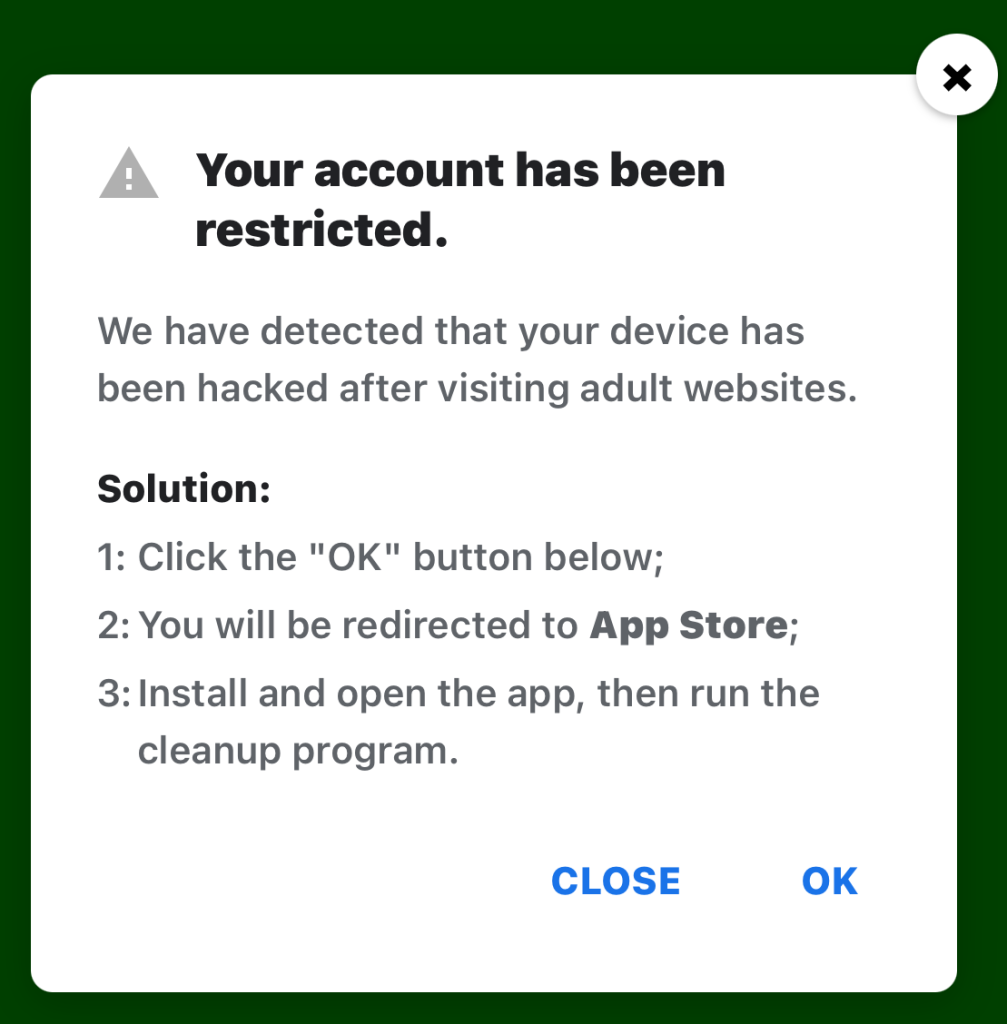
“Your account has been restricted.
We have detected that your device has been hacked after visiting adult websites.
Solution:
1:Click the “OK” button below;

2:You will be redirected to App Store;

3:Install and open the app, then run the cleanup program.”

This ad is a scam and uses a classic scare tactic. It falsely claims your device has been hacked and tries to pressure you into clicking “OK” and installing a cleanup app.

Messages like this sometimes claim to be from your ISP, a “Security Department,” or a generic “Safety Center.”

 Fake Apple security alert

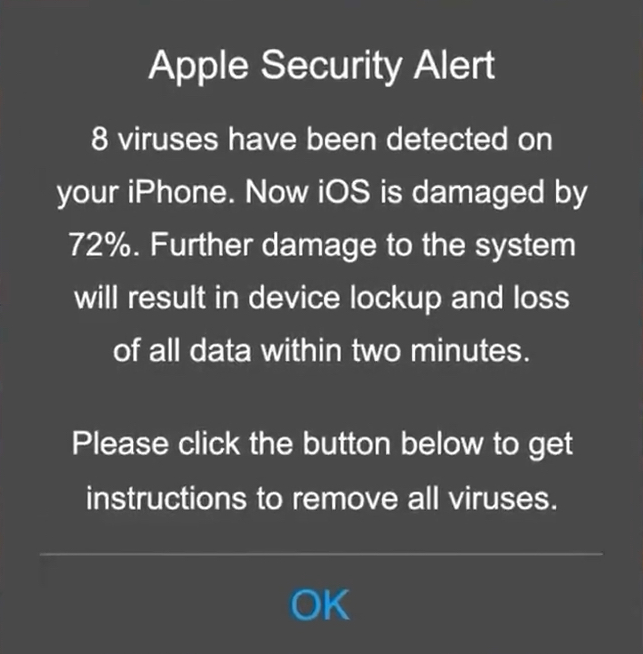
“Apple Security Alert
8 viruses have been detected on your iPhone. Now iOS is damaged by 72%. Further damage to the system will result in device lockup and loss of all data within two minutes.
Please click the button below to remove all viruses.”

This is another fake warning, commonly used by scammers to trick users into clicking links or downloading unnecessary or harmful software. Apple doesn’t send alerts like this, and these messages use vague threats to get your attention.

What kind of app you’re really installing if you follow the instructions depends on your device and your location. If you’re “lucky,” it’s just adware, but you might just as easily end up with an infostealer.

In many cases, you’ll end up with fleeceware, a type of deceptive mobile app where developers lure users in with short free trials that quickly convert into hidden subscription fees, sometimes costing hundreds of dollars per month. These apps often offer some functionality to stay on the barely legal side of things, but at wildly inflated prices.

How to stay safe

The best response to these messages is simply to ignore them.

Real system alerts come from the OS, not from inside a game window or browser tab. Here’s a simple test: If you can switch apps and the “warning” disappears with the browser/game, it was not a system‑level alert.

Check the destination URLs before proceeding. Apple, Google, and major ISPs use predictable domains. A familiar-looking URL is not proof that a message is legitimate, but if the URL looks suspicious, it should definitely be treated as a scam.


Scam or legit? Scam Guard knows.


You may arrive at something that looks like the official App Store or Google Play Store. Be wary of lookalike app stores and unofficial download sites, but if you are on the real store, the app is generally safer to install. However, it’s still worth checking reviews, permissions, and the developer before proceeding.

Visit the official website of the organization the message claims to be from and log in there. If there’s a genuine problem with your account, storage, or device, you’ll find information about it through official channels.

Use an up-to-date, real-time anti-malware solution on your devices that can detect and block malicious apps.


Scammers know more about you than you think. 

Malwarebytes Mobile Security protects you from phishing, scam texts, malicious sites, and more. With real-time AI-powered Scam Guard built right in. 

Download for iOS → Download for Android → 

  •  

AI is distorting the Holocaust (Lock and Code S07E10)

This week on the Lock and Code podcast…

In May of last year, a warning about AI came from somewhere unexpected: The Auschwitz-Birkenau State Museum.

Posting publicly on social media, the museum warned about a Facebook account using generative AI to create fake images of people who died in the Holocaust. Despite using AI to generate fake images, the people in said images were sometimes real. They had real names, birthplaces, and stories of deportation that the Auschwitz-Birkenau State Museum itself had shared before. They had real faces captured in real surviving photographs, which were likely abused to generate the false images. 

In other words, someone, or some team of people online, was deepfaking the Holocaust.

As the Auschwitz museum wrote online:

“These are not real photos of the victims. They are digital inventions, often stylized or sanitized, that risk turning remembrance into fictionalized performance. The history of Auschwitz is a well-documented story. Altering its visual record with AI imagery introduces distortion, no matter the intent.”

Months later, the public found out what that intent was: money.

A BBC investigation found an international network of Facebook accounts posting AI-generated images to earn money from those images’ potential virality. It’s a problem sometimes referred to as “AI slop” but it comes with a major incentive. When accounts that make these kinds of images are invited to Facebook’s content monetization program, they can make $1,000 a month for posting anything that gets clicks.

And on Facebook, the BBC found, that means several accounts posting AI-generated images about the Holocaust. As the BBC reported:

“AI spammers have posted fake images purporting to be from inside [Auschwitz], such as a prisoner playing a violin or lovers meeting at the boundaries of fences—attracting tens of thousands of likes and shares.”

The economics of lying are concrete today. People can use AI to make fake images that make people feel good about terrible things or feel scared about untrue things, and they can make money until shut down by the Big Tech platforms themselves, which, in this case, only happened because of the BBC’s investigation. In fact, it’s that type of inaction from social media platforms that compelled the German government and multiple Holocaust memorial institutions to send an open letter earlier this year that asked for better controls and restrictions against this type of content.

As the signatories warned in their letter, the economic appeal for these accounts to distort history is too high a risk to allow. You can read the full letter here.

Today, on the Lock and Code podcast with host David Ruiz, we speak with Clara Mansfeld, a historian working on digital communications at one of the institutions signed onto the open letter—the Foundation of Hamburg Memorials and Learning Centers Commemorating the Victims of Nazi Crimes. In their conversation, Mansfeld discusses digital access to history, the manipulation of factual records through AI-generated imagery, and the threat that society faces when it becomes harder to evaluate the truth.

“What happens when the first thought we have with every historical image is, ‘Is that even real or is that AI?’ I don’t think we have really grasped what that means for us as a society.”

Tune in today to listen to the full conversation.

Show notes and credits:

Intro Music: “Spellbound” by Kevin MacLeod (incompetech.com)
Licensed under Creative Commons: By Attribution 4.0 License
http://creativecommons.org/licenses/by/4.0/
Outro Music: “Good God” by Wowa (unminus.com)


Listen up—Malwarebytes doesn’t just talk cybersecurity, we provide it.

Protect yourself from online attacks that threaten your identity, your files, your system, and your financial well-being with our exclusive offer for Malwarebytes Premium Security for Lock and Code listeners.

  •  

Google Chrome’s silent 4GB AI download problem [updated]

Google Chrome has been quietly downloading a 4GB AI model onto users’ devices without asking first.

Security researcher Alexander Hanff, aka ThatPrivacyGuy, reports that Chrome has been silently installing Gemini Nano, Google’s on-device AI model, as a file called weights.bin stored in the OptGuideOnDeviceModel directory within users’ Chrome profiles. This 4GB download happens automatically when Chrome determines your device meets the hardware requirements. It does not ask for consent, and sends no notification—not even one of those annoying cookie banners you’ve learned to dismiss without reading.

The Gemini Nano model powers features like “Help me write” text composition assistance, on-device scam detection, and a Summarizer API that websites can call directly. These features are enabled by default in some recent Chrome versions. And here’s the kicker: if you discover the file and delete it, Chrome simply downloads it again.

Why this matters

Let’s start with the obvious problem: a 4GB download isn’t trivial for everyone. If you’re lucky enough to have unlimited fiber internet, you might not notice. But for users on metered connections, mobile hotspots, or in developing countries where data is expensive, Google just cost them real money without permission. For rural users or those with bandwidth caps, this kind of silent transfer can blow through monthly limits in minutes.

Hanff focuses on the environmental angle. He calculated that if this model were pushed to just 1 billion Chrome users (roughly 30% of Chrome’s user base), the distribution alone would consume 240 gigawatt-hours of energy and generate 60,000 tons of CO2 equivalent. That’s not including actually using the model, just the downloads.

But to us, the most troubling aspect is the broader pattern this represents. Just a few weeks ago, we reported another unsolicited AI invasion on our personal computers discovered by Hanff. He documented how Anthropic’s Claude Desktop app, which silently installed browser integration files across multiple Chromium browsers, including five browsers he didn’t even have installed. The integration would reinstall itself if removed, and it also happened without any meaningful user disclosure.

Hanff argues that both cases likely violate EU privacy law, specifically the ePrivacy Directive’s rules about storing data on user devices and the GDPR’s requirements around transparency and lawful processing. While these claims haven’t been tested in court, they highlight a fundamental tension: can companies just install whatever they want on your computer as long as they say it’s a feature of an app you installed?

Google might argue that having an AI on your device provides better privacy than cloud-based alternatives. Which is generally true, but it does not apply here, since Chrome’s most prominent AI feature—the “AI Mode” pill in the address bar—doesn’t even use the local model. According to Hanff’s analysis, it routes queries to Google’s cloud servers anyway. 

All in all, users see a 4GB local AI model and reasonably assume their data stays private, when in reality, the most visible AI feature sends everything to Google’s servers.

Tech companies need to stop treating silent deployment as acceptable practice. We see no valid excuse for this. Your device is yours. The storage is yours. The bandwidth is yours. And the electricity bill is yours.

What happened to asking for permission? And when I remove it, I want it gone permanently—not automatic reinstallation.

When are the tech giants going to learn that we don’t want to be left discovering after the fact that our devices have become deployment targets for features we never asked for.

Update May 12, 2026 with do it yourself instructions

How to check if the AI model is on your computer (Windows)

  1. Open File Explorer
  2. At the top of the File Explorer window, click the address bar and paste:

%LOCALAPPDATA%\Google\Chrome\User Data

  1. Press Enter
  2. Look for a folder named:

OptGuideOnDeviceModel

  1. If you see it, Chrome has likely downloaded the AI model
Properties of the OptGuideOnDeviceModel folder
Properties of the folder

How to check on a Mac

  1. Open Finder
  2. In the menu bar at the top of the screen, click Go > Go to Folder
  3. Paste:

~/Library/Application Support/Google/Chrome/

  1. Look for a folder named:

OptGuideOnDeviceModel

Now, remember, this isn’t malware, and its presence doesn’t mean your computer is infected.

Turn off Chrome AI features

This part is relatively easy. You may find online instructions telling you to edit the Windows registry or use Chrome policies, but for most people the simplest and safest approach is to disable the features directly in Chrome.

We don’t recommend manually editing the registry unless you fully understand what you’re doing. Incorrect changes can cause system problems.

Instead, try this first:

  1. Open Chrome
  2. You can copy and paste this directly into Chrome’s address bar and press Enter:

chrome://settings/ai

  1. On the page that opens, you can turn off features such as:
    • “Help me write”
    • AI summaries
    • On-device AI features

 The exact options may vary depending on your Chrome version and region.

  1. Then restart Chrome to make sure the changes take effect.

This may stop Chrome from downloading or using the AI model, although some users report the files can return after browser updates.

There is probably no need to delete the files unless you specifically need the storage space.

If chrome://settings/ai does not work, the feature may not yet be available in your region, you may be using a managed work or school account, or your version of Chrome may not support these settings yet.

Do you need to delete the OptGuideOnDeviceModel folder?

You can, but there is probably no need to.

If you disable Chrome’s AI features, the downloaded model should no longer be actively used for those features. Leaving the files in place may also prevent Chrome from downloading them again at a later point.


Browse like no one’s watching. 

Malwarebytes Privacy VPN encrypts your connection and never logs what you do, so the next story you read doesn’t have to feel personal. Try it free → 

  •  

Medical data of 500,000 UK volunteers listed for sale on Alibaba

Half a million Britons signed up to help cure cancer. Their data ended up for sale on Alibaba.

The UK Biobank charity informed the British government of an incident concerning the medical data belonging to 500,000 British citizens being offered for sale on the Chinese e-commerce website Alibaba.

The National Data Guardian, Dr Nicola Byrne, said in a statement:

“People who generously share their health data to benefit others through medical research rightly expect it to be kept safe and for there to be accountability when things go wrong.”

Officials said the researchers downloaded the data under a legitimate contract, but its appearance on Alibaba shows how “approved” access can still turn into public exposure.

UK Biobank holds more than 15 million biological samples and detailed health records from volunteers recruited between 2006 and 2010, and researchers worldwide use it to study cancer, dementia, diabetes, and other chronic diseases.

UK Biobank normally signs contracts with vetted universities and private companies before it lets them access the data, but investigators traced the Alibaba listings to three research institutions. UK Biobank revoked their access and paused new data access while it strengthens security controls.

At least one listing reportedly contained data on all 500,000 volunteers, and Alibaba and Chinese authorities removed the adverts before anyone could confirm a sale.

The dataset comes from UK Biobank’s long‑running research cohort and includes genetic sequences, blood samples, medical imaging, and detailed lifestyle information used for global health research.

UK Biobank emphasizes that the data was “de‑identified,” meaning it didn’t include names, addresses, or NHS numbers. But it still contained granular demographics, such as gender, age, birth month/year, socioeconomic indicators, lifestyle details, and health measures. We have repeatedly seen that such data can be re‑linked to individuals by cross‑referencing with other public or commercial records.

Why China cares

US intelligence, policy reports, and academic work paint a consistent picture: China treats large, diverse human genomic and health datasets as a strategic resource for both economic and security reasons.

The US National Counterintelligence and Security Center (NCSC) explicitly states that the People’s Republic of China views bulk healthcare and genomic data as a “strategic commodity” to drive its biotech, AI, and precision medicine industries, and has invested billions in national genomics and precision‑medicine initiatives.

Large datasets from non‑Chinese populations are particularly valuable for building AI models and improving the global commercial competitiveness of Chinese pharma and biotech.

From an attacker’s or foreign intelligence perspective, UK Biobank is a “crown jewel” asset: It’s curated, high‑quality, population‑scale, and much more useful than random breach dumps. And because genetic data is immutable (unlike a password, it cannot be replaced), any compromise has very long‑term intelligence usefulness.

Last year, the Guardian reported that one in five successful UK Biobank access applications came from Chinese entities, including BGI, China’s flagship genomics company that was later placed on the US Entity List over concerns about its role in surveillance of minority populations.

China is not just stockpiling DNA for curiosity’s sake. It is building a global genomic map that covers adversaries as well as its own citizens.

Your genome data

There have been major concerns about genetic data ending up in the wrong hands, and for good reason. But I’m not going to say that volunteering your medical data for research is bad. Researchers often put the data to good use to help others.

But there are some good questions to ask before doing so.

  • Who runs the project and where is it based?
    Prefer non‑profit or academic biobanks with clear public‑interest mandates and strong oversight, rather than opaque commercial data brokers.
  • How do they store the collected data?
    Ask specifically about genomic data, raw sequencing files, links to medical records, and whether data is encrypted at rest and in transit.
  • Who can access the data and under what controls?
    Look for a formal access committee, strict contracts, and technical controls like secure analysis environments and limited export options, not “download CSV and walk away” models like the one that enabled the UK Biobank incident.
  • Are foreign entities allowed to access or copy the data?
    In light of US and UK government warnings about Chinese access to Western genomic data, it’s reasonable to ask whether data can be accessed, processed, or stored in jurisdictions with different security expectations.
  • How do they handle re‑identification risk?
    As we’ve discussed, “de‑identified” is not a magic word. Privacy experts and US intelligence have warned that health and genomic data can often be re‑identified when combined with other datasets.

If data containing your DNA is in someone else’s hands, you can’t put it back, but you can demand better governance, push institutions to treat genomic data as national‑security‑grade sensitive.

It also requires more skepticism of highly targeted scams. Attackers can use large combined datasets to craft convincing spear‑phishing or health‑related scams, for example, contacting you about a specific condition you or a family member has. Treat unsolicited health or DNA‑related emails, calls, and apps with extra suspicion.


What do cybercriminals know about you?

Use Malwarebytes’ free Digital Footprint scan to see whether your personal information has been exposed online.

  •  

How cyberattacks on companies affect everyone

If you use the internet, you’ve likely been affected by cybercrime in some way. Even when an attack is aimed at a company, the fallout usually lands on ordinary people.

The most obvious harm is stolen data. When attackers break into a business, it is usually customer information that ends up in criminal hands, and that can lead to identity theft, tax fraud, credit card fraud, and a long tail of scam attempts that can continue for months or years. For consumers, the breach itself is often just the start of the cleanup.

That work is annoying, time-consuming, and sometimes expensive. People may have to freeze credit, replace cards, change passwords, be on the lookout for suspicious transactions, and dispute charges. The Federal Trade Commission (FTC) specifically advises consumers to use IdentityTheft.gov after a breach and recommends steps like credit freezes and fraud alerts to reduce the chance of further abuse.

When sensitive data is exposed, the harm is not only financial. Medical, insurance, and other deeply personal records can be used to create more convincing phishing or extortion attempts, and the stress of knowing that private information is circulating among criminals can linger long after the technical incident is over. In other words, breach victims are not just cleaning up a data problem, they are dealing with a loss of trust.


Breaches happen every day. Don’t be the last to know.


Cybercrime also hits consumers through service disruption. Ransomware and intrusion campaigns can interrupt payment systems, telecom services, shipping, energy distribution, booking platforms, and other infrastructure people rely on every day. In those cases, the consumer impact is immediate: you may not be able to pay, travel, call, buy, or even work normally. The CSIS timeline and Canada’s cyberthreat assessment both show that these disruptions are increasingly tied to high-value targets and can be part of broader state or criminal campaigns.

Not all these incidents are driven by cybercriminals. Recently, Britain’s cybersecurity chief warned that the UK is handling 4 nationally significant cyberincidents every week, with the majority now traced back to foreign governments rather than cybercriminal groups.

Another cost is easy to overlook: disinformation and confusion. When attackers steal data, disrupt services, or impersonate trusted brands, they can also flood the public with fake support messages, scam calls, refund schemes, and phishing emails pretending to be the breached company. The breach becomes a launchpad for more fraud, and consumers are left trying to separate legitimate notifications from those sent by attackers.

Then there is the security backlash. After a breach, companies usually tighten access rules, add more multi-factor authentication prompts, force reauthentication, shorten sessions, and increase fraud checks. Those measures are often necessary, but they also make ordinary digital life more cumbersome. The consumer ends up paying with time and frustration for security problems they did not create.

That is why company-targeted cybercrime is not really only a business problem. It is a consumer issue, a public-trust issue, and sometimes even a national security issue. A single breach can leak data, trigger fraud, interrupt essential services, amplify scams, and make using the internet more frustrating for everyone else. The real cost is rarely confined to the company that got hit.

Knowing this, it’s worth thinking carefully about which companies to trust with your data and how much you’re willing to share . You cannot stop every attack against every company you deal with, but you can limit the fallout by being more selective. Some considerations:

  • Do they need all the information they are asking for?
  • Would it hurt anything if you leave some fields blank or give less specific answers?
  • Has this company been breached in the past, and how did they handle it?
  • How long will they store the data you provide?
  • Can you easily have your data removed at your request?

Your name, address, and phone number are probably already for sale.  

Data brokers collect and sell your personal details to anyone willing to pay. Malwarebytes Personal Data Remover finds them and gets your information removed, then keeps watch so it stays that way. 

  •  

Browser Guard gets even better with Access Control 

Have you ever been on a website when a pop-up suddenly asked for access to your camera, microphone, location, or notifications? Whether you clicked “allow,” dismissed it, or just wondered why it appeared, those permission requests aren’t always harmless. Some sites can abuse those permissions.

With Access Control, a new feature in Browser Guard, you decide exactly which websites can access your device and stop the rest. That means you choose which websites can: 

  • Use your camera
  • Use your microphone
  • Access your location
  • Send you notifications 

Further, not only can you control which websites have access to your devices, but you can also block websites or even require those specific sites to request permission every single time they try to gain access to your machines. You can always allow trusted sites to access your camera or location while blocking everything else.  

Access Control is now available for Malwarebytes subscribers using Chrome and Edge browsers on a Windows device. 

How to use Access Control 

We designed Access Control to be both powerful and simple because we know every moment you spend getting set up is another moment you’re left unprotected.  

How to use Access Control:  

  • Install/Open Browser Guard: Click the Malwarebytes icon in your browser’s header 
  • Access Dashboard: Click the Dashboard tab at the bottom of the extension panel. 
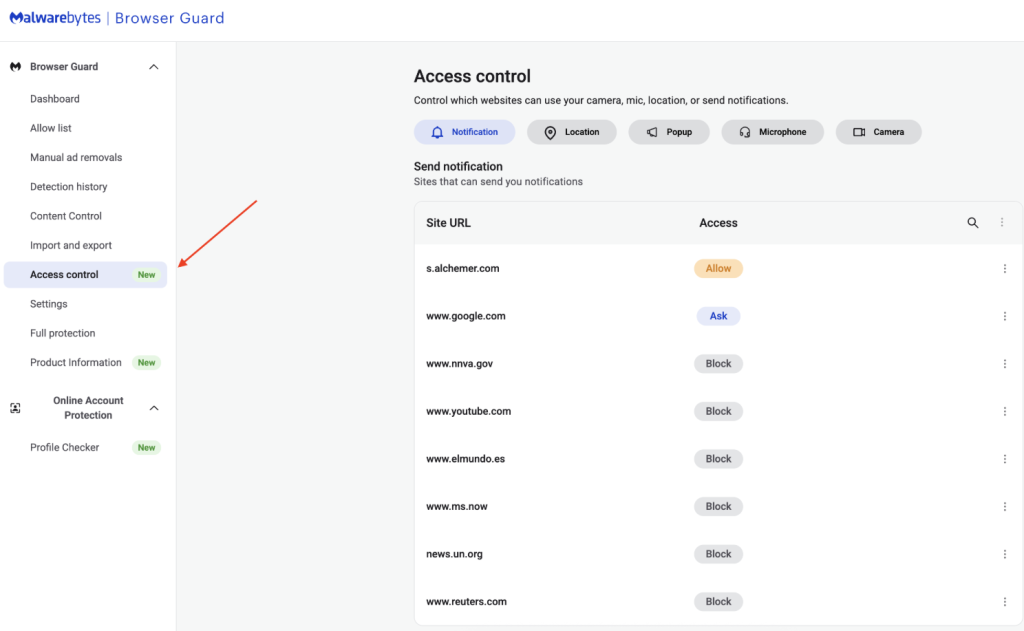
  • Navigate to Access Control: On the left sidebar of the web page, select Access Control. 
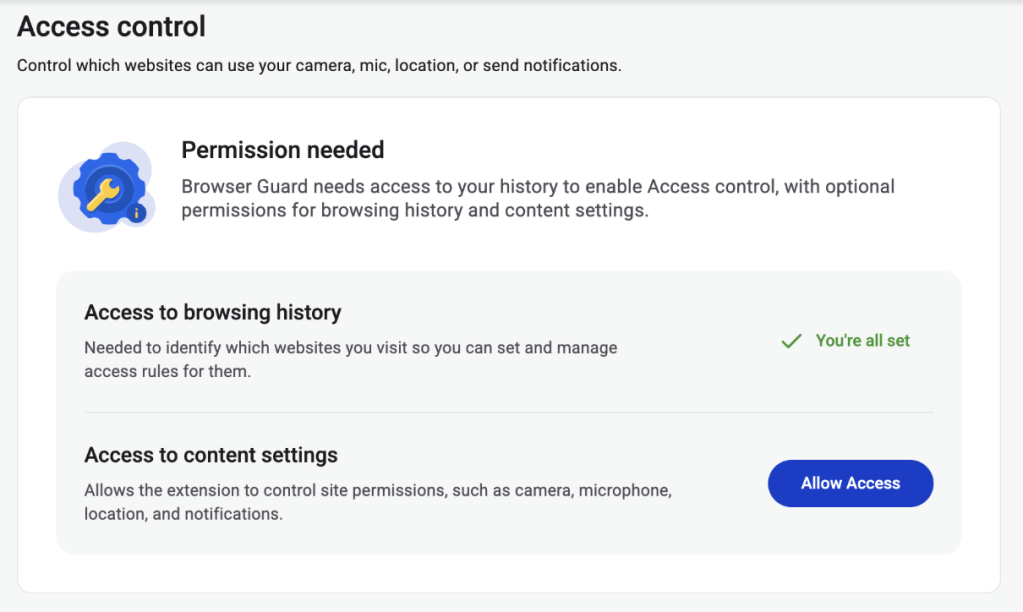
  • Manage Permissions: See visited websites, click “Allow” to enable or disable Malwarebytes’ ability to see visited sites.
  • Access Control requires some access to your browsing to protect you online
  • Access Control lets you choose individual sites to block and allow

This feature is rolling out in beta first, so you might see improvements and updates as we refine it. Currently, the feature works across Chrome and Edge, but will roll out to other browsers soon.  

Access Control is another step toward making privacy simple and accessible.  Not a subscriber yet? Check out  Malwarebytes’ plans today to unlock this feature and more. 


We don’t just report on threats—we remove them

Cybersecurity risks should never spread beyond a headline. Keep threats off your devices by downloading Malwarebytes today.

  •  

Update Chrome now: Zero-day bug allows code execution via malicious webpages

Google has issued a patch for a high‑severity Chrome zero‑day, tracked as CVE‑2026‑2441, a memory bug in how the browser handles certain font features that attackers are already exploiting.

CVE-2026-2441 has the questionable honor of being the first Chrome zero-day of 2026. Google considered it serious enough to issue a separate update of the stable channel for it, rather than wait for the next major release.

How to update Chrome

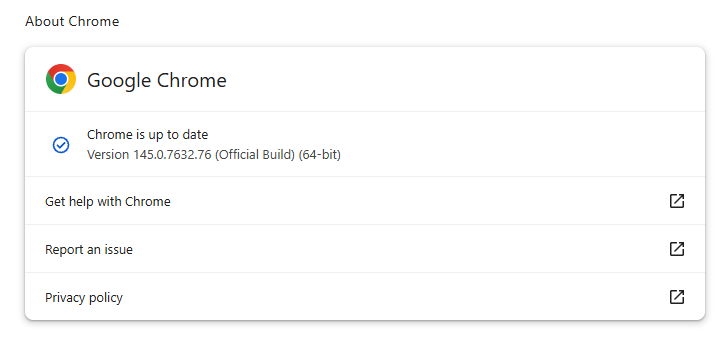
The latest version number is 145.0.7632.75/76 for Windows and macOS, and 145.0.7632.75 for Linux. So, if your Chrome is on version 145.0.7632.75 or later, it’s protected from these vulnerabilities.

The easiest way to update is to allow Chrome to update automatically. But you can end up lagging behind if you never close your browser or if something goes wrong, such as an extension preventing the update.

To update manually, click the More menu (three dots), then go to Settings > About Chrome. If an update is available, Chrome will start downloading it. Restart Chrome to complete the update, and you’ll be protected against these vulnerabilities.

Chrome is up to date
Chrome at version 145.0.7632.76 is up to date

You can also find step-by-step instructions in our guide to how to update Chrome on every operating system.

Technical details

Google confirms it has seen active exploitation but is not sharing who is being targeted, how often, or detailed indicators yet.

But we can derive some information from what we know.

The vulnerability is a use‑after‑free issue in Chrome’s CSS font feature handling (CSSFontFeatureValuesMap), which is part of how websites display and style text. More specifically: The root cause is an iterator invalidation bug. Chrome would loop over a set of font feature values while also changing that set, leaving the loop pointing at stale data until an attacker managed to turn that into code execution.

Use-after-free (UAF) is a type of software vulnerability where a program attempts to access a memory location after it has been freed. That can lead to crashes or, in some cases, lets an attacker run their own code.

The CVE-record says, “Use after free in CSS in Google Chrome prior to 145.0.7632.75 allowed a remote attacker to execute arbitrary code inside a sandbox via a crafted HTML page.” (Chromium security severity: High)

This means an attacker would be able to create a special website, or other HTML content that would run code inside the Chrome browser’s sandbox.

Chrome’s sandbox is like a secure box around each website tab. Even if something inside the tab goes rogue, it should be confined and not able to tamper with the rest of your system. It limits what website code can touch in terms of files, devices, and other apps, so a browser bug ideally only gives an attacker a foothold in that restricted environment, not full control of the machine.

Running arbitrary code inside the sandbox is still dangerous because the attacker effectively “becomes” that browser tab. They can see and modify anything the tab can access. Even without escaping to the operating system, this is enough to steal accounts, plant backdoors in cloud services, or reroute sensitive traffic.

If chained with a vulnerability that allows a process to escape the sandbox, an attacker can move laterally, install malware, or encrypt files, as with any other full system compromise.

How to stay safe

To protect your device against attacks exploiting this vulnerability, you’re strongly advised to update as soon as possible. Here are some more tips to avoid becoming a victim, even before a zero-day is patched:

  • Don’t click on unsolicited links in emails, messages, unknown websites, or on social media.
  • Enable automatic updates and restart regularly. Many users leave browsers open for days, which delays protection even if the update is downloaded in the background.
  • Use an up-to-date, real-time anti-malware solution which includes a web protection component.

Users of other Chromium-based browsers can expect to see a similar update.


We don’t just report on threats—we help safeguard your entire digital identity

Cybersecurity risks should never spread beyond a headline. Protect your, and your family’s, personal information by using identity protection.

  •  

ALPRs are recording your daily drive (Lock and Code S06E26)

This week on the Lock and Code podcast…

There’s an entire surveillance network popping up across the United States that has likely already captured your information, all for the non-suspicion of driving a car.

Automated License Plate Readers, or ALPRs, are AI-powered cameras that scan and store an image of every single vehicle that passes their view. They are mounted onto street lights, installed under bridges, disguised in water barrels, and affixed onto telephone poles, lampposts, parking signs, and even cop cars.

Once installed, these cameras capture a vehicle’s license plate number, along with its make, model, and color, and any identifying features, like a bumper sticker, or damage, or even sport trim options. Because nearly every ALPR camera has an associated location, these devices can reveal where a car was headed, and at what time, and by linking data from multiple ALPRs, it’s easy to determine a car’s daylong route and, by proxy, it’s owner’s daily routine.

This deeply sensitive information has been exposed in recent history.

In 2024, the US Cybersecurity and Information Security Agency discovered seven vulnerabilities in cameras made by Motorola Solutions, and at the start of 2025, the outlet Wired reported that more than 150 ALPR cameras were leaking their live streams.

But there’s another concern with ALPRs besides data security and potential vulnerability exploits, and that’s with what they store and how they’re accessed.

ALPRs are almost uniformly purchased and used by law enforcement. These devices have been used to help solve crime, but their databases can be accessed by police who do not live in your city, or county, or even state, and who do not need a warrant before making a search.

In fact, when police access the databases managed by one major ALPR manufacturer, named Flock, one of the few guardrails those police encounter is needing to type a single word in a basic text box. When Electronic Frontier Foundation analyzed 12 million searches made by police in Flock’s systems, they learned that police sometimes filled that text box with the word “protest,” meaning that police were potentially investigating activity that is protected by the First Amendment.

Today, on the Lock and Code podcast with host David Ruiz, we speak with Will Freeman, founder of the ALRP-tracking project DeFlock Me, about this growing tide of neighborhood surveillance and the flimsy protections afforded to everyday people.

“License plate readers are a hundred percent used to circumvent the Fourth Amendment because [police] don’t have to see a judge. They don’t have to find probable cause. According to the policies of most police departments, they don’t even have to have reasonable suspicion.”

Tune in today to listen to the full conversation.

Show notes and credits:

Intro Music: “Spellbound” by Kevin MacLeod (incompetech.com)
Licensed under Creative Commons: By Attribution 4.0 License
http://creativecommons.org/licenses/by/4.0/
Outro Music: “Good God” by Wowa (unminus.com)


Listen up—Malwarebytes doesn’t just talk cybersecurity, we provide it.

Protect yourself from online attacks that threaten your identity, your files, your system, and your financial well-being with our exclusive offer for Malwarebytes Premium Security for Lock and Code listeners.

  •  
❌