❌

Reading view

LinkedIn adds new checks for fake profiles and work histories

LinkedIn is adding trust and verification features aimed at making fake professional identities, invented work histories, and company impersonation harder to pull off.

The company is responding to an environment in which generative AI enables imposters to create an entirely made-up professional persona. It reduces the cost of creating convincing headshots, biographies, résumés, outreach messages, and recommendations.

LinkedIn’s new features use verified people and company Pages to help check other users’ claims.

Colleague and classmate vouching: People can confirm that they worked or studied with someone during the period listed on that person’s profile. This confirms an affiliation; it does not rate the person’s ability or recommend them.

Employer control over false affiliations: Admins of verified company Pages can remove people who falsely claim to work there from the company’s associated people and search results. This doesn’t remove the person’s profile or erase the claim from it.

Workplace verification requirement (in testing): LinkedIn is testing a setting that would require people who want to associate themselves with a company Page to verify their workplace, for example, through a work email address.

Verified identity beyond LinkedIn: LinkedIn is extending partnerships that let users display their LinkedIn-verified identity elsewhere. New partners include Truecaller and PeerSpot, alongside Adobe and UserTesting.

LinkedIn hopes that multiple visible signals such as identity verification, workplace verification, peer corroboration, and company Page controls will make a fabricated profile less persuasive. It says its existing verification tools have verified 115 million members and more than 700,000 companies.

LinkedIn VP of Product Oscar Rodriguez told TechCrunch:

“We’ve been invested in [verification] because we believe that authenticity will be the single most valuable currency on the internet.”

These new affiliation checks cannot tell a job seeker whether an opportunity is genuine. A scammer does not always need to impersonate a major employer. They can invent a convincing startup, build a polished company Page, and use fake job listings or recruiters to lure applicants. The checks may be less helpful if the supposed employer itself is part of the scam.

As we’ve seen in recent research, criminals pose as both well-known companies and appealing new ventures offering the kind of role a job seeker hopes to find. The new checks may help someone determine whether a supposed recruiter is affiliated with a company they recognize. They may be less helpful when the company itself is part of the scam.

Verification is therefore a useful signal, not a guarantee. Job seekers should still be wary of unsolicited approaches, pressure to move conversations off LinkedIn, requests to install software or share identity documents, and job offers that arrive before a credible interview process. Check a recruiter’s affiliation, visit the employer’s website independently, and confirm that its contact details and job listing match.

LinkedIn’s changes acknowledge a growing problem: AI can make a fake professional identity look remarkably polished. Verified accounts, workplace affiliations, and colleague confirmations may become more valuable to criminals, too. They may try to exploit those signals through stolen accounts, manipulated verification, or carefully constructed networks of fraudulent profiles. Verification can raise the cost of deception, but it cannot replace healthy skepticism.


Scammers don’t need to hack you. They just need you to click once. 

Malwarebytes Identity Theft Protection catches suspicious activity before it becomes a problem.
  •  

Firefox is giving users the AI off switch

Some software providers have decided to lead by example and offer users a choice about the Artificial Intelligence (AI) features built into their products.

The latest example is Mozilla, which now offers users a one-click option to disable generative AI features in the Firefox browser.

Audiences are divided about the use of AI, or as Mozilla put it on their blog:

“AI is changing the web, and people want very different things from it. We’ve heard from many who want nothing to do with AI. We’ve also heard from others who want AI tools that are genuinely useful. Listening to our community, alongside our ongoing commitment to offer choice, led us to build AI controls.”

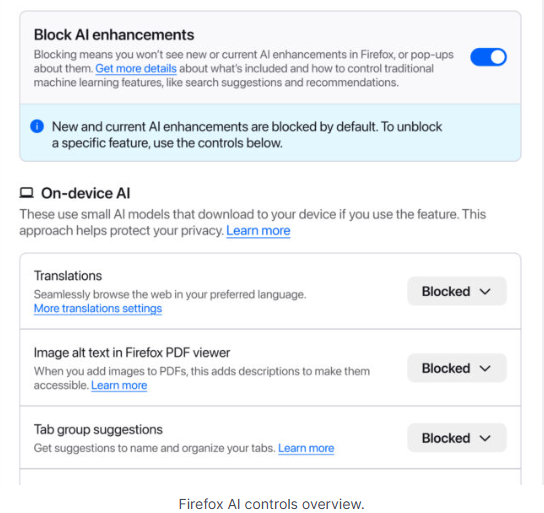
Mozilla is adding an AI Controls area to Firefox settings that centralizes the management of all generative AI features. This consists mainly of a master switch, “Block AI enhancements,” which lets users effectively run Firefox “without AI.” It blocks existing and future generative AI features and hides pop‑ups or prompts advertising them.

Once you set your AI preferences in Firefox, they stay in place across updates. You can also change them whenever you want.

Starting with Firefox 148, which rolls out on February 24, you’ll find a new AI controls section within the desktop browser settings.

Firefox AI choices
Image courtesy of Mozilla

You can turn everything off with one click or take a more granular approach. At launch, these features can be controlled individually:

  • Translations, which help you browse the web in your preferred language.
  • Alt text in PDFs, which add accessibility descriptions to images in PDF pages.
  • AI-enhanced tab grouping, which suggests related tabs and group names.
  • Link previews, which show key points before you open a link.
  • An AI chatbot in the sidebar, which lets you use your chosen chatbot as you browse, including options like Anthropic Claude, ChatGPT, Microsoft Copilot, Google Gemini and Le Chat Mistral.

We applaud this move to give more control to the users. Other companies have done the same, including Mozilla’s competitor DuckDuckGo, which made AI optional after putting the decision to a user vote. Earlier, browser developer Vivaldi took a stand against incorporating AI altogether.

Open-source email service Tuta also decided not to integrate AI features. After only 3% of Tuta users requested them, Tuta removed an AI copilot from its development roadmap.

Even Microsoft seems to have recoiled from pushing AI to everyone, although so far it has focused on walking back defaults and tightening per‑feature controls rather than offering a single, global off switch.

Choices

Many people are happy to use AI features, and as long as you’re aware of the risks and the pitfalls, that’s fine. But pushing these features on users who don’t want them is likely to backfire on software publishers.

Which is only right. After all, you’re paying the bill, so you should have a choice. Before installing a new browser, inform yourself not only about its privacy policy, but also about what control you’ll have over AI features.

Looking at recent voting results, I think it’s safe to say that in the AI gold rush, the real premium feature isn’t a chatbot button—it’s the off switch.


We don’t just report on privacy—we offer you the option to use it.

Privacy risks should never spread beyond a headline. Keep your online privacy yours by using Malwarebytes Privacy VPN.

  •  

Meta confirms it’s working on premium subscription for its apps

Meta plans to test exclusive features that will be incorporated in paid versions of Facebook, Instagram, and WhatsApp. It confirmed these plans to TechCrunch.

But these plans are not to be confused with the ad-free subscription options that Meta introduced for Facebook and Instagram in the EU, the European Economic Area, and Switzerland in late 2023 and framed as a way to comply with General Data Protection Regulation (GDPR) and Digital Markets Act requirements.

From November 2023, users in those regions could either keep using the services for free with personalized ads or pay a monthly fee for an ad‑free experience. European rules require Meta to get users’ consent in order to show them targeted ads, so this was an obvious attempt to recoup advertising revenue when users declined to give that consent.

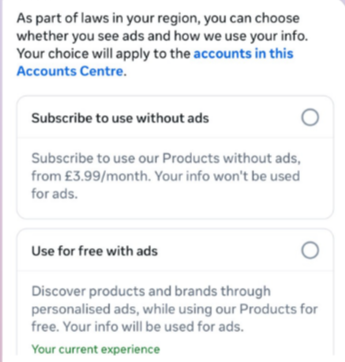
This year, users in the UK were given the same choice: use Meta’s products for free or subscribe to use them without ads. But only grudgingly, judging by the tone in the offer… “As part of laws in your region, you have a choice.”

As part of laws in your region, you have a choice
The ad-free option that has been rolling out coincides with the announcement of Meta’s premium subscriptions.

That ad-free option, however, is not what Meta is talking about now.

The newly announced plans are not about ads, and they are also separate from Meta Verified, which starts at around $15 a month and focuses on creators and businesses, offering a verification badge, better support, and anti‑impersonation protection.

Instead, these new subscriptions are likely to focus on additional features—more control over how users share and connect, and possibly tools such as expanded AI capabilities, unlimited audience lists, seeing who you follow that doesn’t follow you back, or viewing stories without the poster knowing it was you.

These examples are unconfirmed. All we know for sure is that Meta plans to test new paid features to see which ones users are willing to pay for and how much they can charge.

Meta has said these features will focus on productivity, creativity, and expanded AI.

My opinion

Unfortunately, this feels like another refusal to listen.

Most of us aren’t asking for more AI in our feeds. We’re asking for a basic sense of control: control over who sees us, what’s tracked about us, and how our data is used to feed an algorithm designed to keep us scrolling.

Users shouldn’t have to choose between being mined for behavioral data or paying a monthly fee just to be left alone. The message baked into “pay or be profiled” is that privacy is now a luxury good, not a default right. But while regulators keep saying the model is unlawful, the experience on the ground still nudges people toward the path of least resistance: accept the tracking and move on.

Even then, this level of choice is only available to users in Europe.

Why not offer the same option to users in the US? Or will it take stronger US privacy regulation to make that happen?


We don’t just report on threats – we help protect your social media

Cybersecurity risks should never spread beyond a headline. Protect your social media accounts by using Malwarebytes Identity Theft Protection.

  •  
❌