Reading view

The other half of the AI SOC: Intezer, now inside your AI workspace

Two kinds of work you want AI to do in a SOC

  1. Work you want off your plate. Alert triage is the obvious example: every alert deserves a real investigation, most of them turn out to be noise, and they arrive at 3am as happily as at noon. Nobody wants help with this work. They want it gone. That’s the half Intezer has spent years building. Autonomous triage that investigates every alert at forensic depth, around the clock, and only interrupts a human when something actually needs human judgment.
  2. Work you want to keep, but accelerate. Deciding what to do with an escalation. Writing the incident report. Picking apart the weird binary someone found on a build server. Chasing a hunch across five systems. For this work you don’t want a replacement. You want to be a 10x version of yourself.

Today we’re shipping the second half.

We rebuilt the Intezer MCP server from the ground up, and it turns the AI platform your team already lives in, Claude, Codex, Cursor, or any MCP client, into a full security workspace: your cases, your alerts, file and URL verdicts, live SIEM and EDR telemetry, tuning rules, all of it. We had an MCP server before, and it was a fine way to ask Intezer questions from a chat window. This one is built around a bigger idea: your AI workspace should be able to do everything you can do in Intezer, then combine it with everything else you have access to.

If you read our piece on making sense of the 2026 SOC stack, this release is the missing connection between the top two layers. Detection tools are the hardware. The AI SOC is the operating system that turns raw signals into investigated verdicts and institutional memory. AI platforms like Claude are the applications where people actually work. This release plugs the operating system into the applications.

Watch one investigation, end to end

The video walks through one escalated case, but the pattern behind it is the real story. Intezer’s autonomous triage investigates every alert to forensic depth and resolves what it can on its own. What lands in front of a human is the residue. Cases where the technical facts are settled but the decision still needs judgment, usually because it turns on business context no security tool can see. Was this data share authorized? Is this vendor one we actually work with? Escalating those isn’t a triage failure, rather it’s the line where execution ends and judgment begins.

Putting Intezer inside your AI workspace is what makes that handoff productive. Pick up a case in Claude, Codex, or Cursor and you inherit the full investigation Intezer already ran, plus its recommendation, with a partner that can reach the context security tools never had: your email, Slack, the ticket queue. You keep the decision; it does the legwork around you at machine speed, pulling the case, cross-referencing your systems, documenting the verdict, writing a tuning rule. What used to be an afternoon of pivoting between consoles becomes a short, supervised exchange.

That’s the point of the combination: the autonomous half absorbs the scale, the assistive half carries the judgment, and every call you make feeds back as logic that makes the autonomous half smarter. You’re not handing off your work; you’re making judgment calls with the context, evidence, and follow-through already assembled around you.

The same question, with and without Intezer

Triage before and after Intezer

Same alert, two ways to handle it. On the left, Claude on its own takes the impossible-travel sign-in and works it by hand. It reasons well and gets close — managed device, MFA passed, probably real travel — but it can’t collect evidence from the endpoint to confirm, so the last step falls back to a human checking the laptop. And that’s one alert; almost 4,000 more are still waiting behind it. One analyst, one alert at a time, with no way to run it across the whole team. On the right, the same alert inside the AI SOC: Intezer triages every alert around the clock, closes the ~98% that need no action, and escalates only the ~2% that genuinely need a person. Claude is where you pick those up so you can stop grinding the queue and start supervising the few cases that actually need you.

Most of the org knowledge an investigation needs is already centralized in Intezer. That’s the whole point of the platform. But some context only ever lives with you: a procurement thread in someone’s inbox, a Slack message from three weeks ago, a calendar invite. With Intezer connected on one side and your IT and communication stack on the other, your AI workspace can cross-reference both in a single investigation.

Why not plug Claude into all security tools directly?

You could also wire your AI client straight into each security tool yourself. Most of them ship an MCP these days. Two things make that a worse deal than it looks. First, the integration work is now yours: stitching a dozen connectors together, learning each product’s query quirks, and getting back a pile of disconnected results instead of one correlated picture. Second, raw tool access still isn’t investigation. With every EDR, SIEM, and intel feed wired in, the model can read your data, but it can’t collect evidence off an endpoint, run memory forensics, or weigh conflicting signals into a verdict it will actually stand behind, which is exactly where Claude stalls on the left in above image.

Intezer already did both jobs. One connector hands the model a SOC’s worth of normalized cases, verdicts backed by real forensic evidence, and cross-tool correlation. An AI platform does its best work standing on a real foundation of security knowledge, not on a dozen raw feeds it has to assemble itself.

Investigate and close the cases Intezer escalates to you

This is where analyst hours should go, so it’s where the MCP goes deepest. Whatever the alert type, the shape is the same: pull the case, build on everything the autonomous triage already found, cross-reference your other systems, decide interactively with you, and close with evidence.

And “pull the case” carries real weight here. A case from Intezer is not a bare ticket. It arrives with everything triage already did: the evidence it collected, the SIEM and EDR queries it ran, the forensic analysis of each artifact, the verdicts it reached. You’re not starting from a blank page; you’re picking up a deep investigation and taking it the last mile.

“Pick up the oldest escalated open case and let’s investigate it together.”

The clip above takes an impossible-travel alert. The MCP brings the full login history including every IP and geo, and who else touched the same address as well as your AI workspace cross-references calendar and Slack for travel context. When the evidence still isn’t conclusive, it can ask the user directly and close on their answer, so the one human check that actually mattered takes seconds instead of becoming a follow-up ticket.

Make tomorrow’s autonomous triage smarter

If a case should never have reached you, closing it is half the job. The other half is making sure it never reaches you again.

“We keep getting this exact false positive. Write a tuning rule so it never escalates again, then retriage the case.”

Claude inspects the alert’s triage indicators, drafts a narrowly scoped tuning rule, and tests the pattern against the real alert object before proposing anything. It checks whether an existing rule should be extended instead of creating a near-duplicate. It asks the question every detection engineer should ask: could an attacker hide inside this rule? Then it pushes the rule to Intezer for your approval and retriages the affected alerts so the fix applies immediately.

Tuning runs both directions, too. The same mechanism can tell the autonomous triage to always escalate a pattern it can’t yet call malicious with confidence, so the genuinely ambiguous cases land in front of a human by design, not by luck.

This is where the two halves of the AI SOC meet. Every rule your AI workspace writes makes the autonomous half smarter, which means fewer escalations next month, which means the time you spend supervising keeps shrinking. The system compounds.

From case to incident report in one prompt

When a case turns into a real incident, the hours after containment go to reconstruction: which alerts were related, which machines were touched, what happened first, and what to tell leadership.

“Write an incident report for the latest case we worked on — timeline, affected assets, and an exec summary I can send to the CISO.”

Your AI workspace pulls the case and its full activity trail from Intezer, expands across the users, devices, and IPs involved, and rebuilds the timeline from the forensic evidence already on file. Then it writes the report with an executive summary up top, technical detail below, in your template if you have one, and finally exports it to a clean, brand-styled PDF you can send as-is. The data was always in Intezer; the report was just assembly. Now assembly is one prompt.

Threat hunting: start from a lead, not an alert

Not every investigation starts in the queue. Sometimes it starts with your CISO forwarding an article about a campaign that’s hitting your industry.

“Here’s a writeup of a new campaign [link]. Check whether any of these IOCs appear anywhere in our environment, and analyze anything you find.”

Your AI workspace extracts the indicators and techniques from the writeup, sweeps your environment through Intezer’s SIEM and EDR query tools, and returns the matching assets, alerts, and artifacts for analysis. When you find something worth a closer look, you can fire deep forensics to go one step further with your hunt.

How it works

How Intezer AI SOC works with Claude and other AI platforms

The Intezer MCP server is hosted by us. You authorize over OAuth from any MCP client: Claude (Desktop, Code, or claude.ai), ChatGPT, Codex, Cursor, or anything else that speaks the protocol.

Under the hood it exposes 66 tools covering the full case lifecycle: search and fetch cases and alerts, file and URL analysis, live queries against more than a dozen SIEM and EDR products in their native query languages (KQL, SPL, XQL, SDL, and the rest, with per-vendor syntax guides built in so the model gets them right), tuning rules and AI instructions, retriage, and case editing.

This architecture is what makes the two halves described above work as one system: the autonomous half clears work off your plate, while the assistive half accelerates the tasks where you still want to stay in the loop.

Getting started

  1. If you’re already an Intezer customer, an Intezer admin creates an MCP OAuth application under Account Settings → MCP OAuth Applications.
  2. Add Intezer as a custom connector in your AI client such as Claude, ChatGPT, or any MCP client. Point it at the hosted server, and authorize with your own Intezer login over OAuth.
  3. Open with one prompt: ask it to pick up your oldest open escalation.

The autonomous half investigates everything, around the clock, so your team only sees what matters. The assistive half makes the time you spend on what matters dramatically shorter. One system of record and detection logic underneath both: your cases, your verdicts, your tuning rules, your institutional memory, working for you whether the investigation runs inside Intezer or inside your AI workspace.

AI executes. Humans supervise. And now the supervising got a lot faster too.

If you’re not an Intezer customer yet, book a demo and we’ll show you both halves at once: autonomous triage working every alert around the clock, and a co-pilot that helps your analysts close the escalations that do reach them 10x faster.

The post The other half of the AI SOC: Intezer, now inside your AI workspace appeared first on Intezer.

  •  

Rokarolla Android malware can take over your phone and steal banking logins

Researchers have analyzed a new Android banking Trojan called Rokarolla. It can effectively take over a device, steal banking and crypto login details from more than 200 apps, and quietly monitor much of what you do on your phone.

On an infected device, Rokarolla steals banking and crypto login details. It also uses fake lock-screen overlays to capture your PIN, pattern, or password.

When you open one of the banking or crypto apps on Rokarolla’s target list, the malware downloads and displays a matching fake login page over the real app. Anything you type into the fake page, including usernames, passwords, and card numbers, is sent to the attackers.

Separately, Rokarolla abuses Android’s Accessibility features to monitor activity across the device. It can recognize WhatsApp screens by looking for familiar labels such as “Chats” and “Calls,” extract contact information, read SMS messages, and send new ones. These capabilities can help it intercept one-time passwords (OTPs) and two-factor authentication (2FA) codes.

Rokarolla can take control of text messages and phone calls, helping it block security alerts and hide signs of fraud.

It can also record everything you type and see on the screen. If you copy and paste a cryptocurrency wallet address, the malware can secretly replace it with one belonging to the attackers.

Other features help the malware stay hidden, including the ability to hide its icon, silence the device, turn off Google Play Protect, and prevent the screen from going to sleep.

How it spreads

Rokarolla is distributed through rogue websites, where it is offered as fake versions of popular apps like TikTok or Chrome.

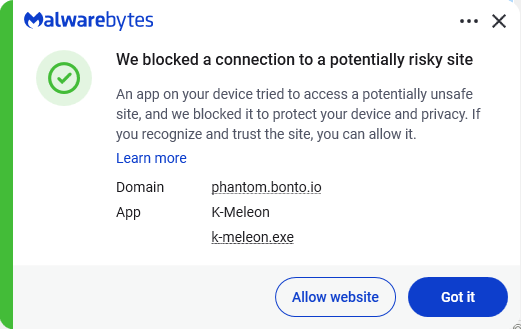
Malwarebytes blocks the download site

Instead of sending you to the official Google Play Store, these malicious sites push you to download the app directly, a process known as sideloading. After you install it, the fake app poses as Google Play Protect and quietly downloads and installs the malware that carries out the attack.

To gain the access it needs, the fake app asks for powerful permissions, including Accessibility access, the permission to read SMS messages, and access to notifications. Because these requests can look legitimate, many users may approve them without realizing the risks.

How to stay safe

To avoid banking Trojans like Rokarolla, there are a few guidelines you should follow:

  • Don’t trust apps that claim to be Google Play Protect or another system component. You should never need to install these manually.
  • Use up-to-date, real-time anti-malware protection with web protection on your devices.
  • Don’t sideload apps that are available on the Google Play Store. While malware can sometimes slip into official stores, the risk is much greater elsewhere.
  • Deny powerful permissions to apps downloaded from links or websites, especially if they ask for Accessibility access, SMS permissions, or the ability to handle calls, even though that doesn’t match their stated purpose.
  • In fact, any request for Accessibility access should be treated with caution. If an app that is not clearly an accessibility tool asks for it, deny the request and reconsider whether you trust the source.
  • Scrutinize banking and crypto login screens. If something looks off, or you see multiple login prompts, close the app and relaunch it from its official icon.

Scammers know more about you than you think. 

Malwarebytes Mobile Security protects you from phishing, scam texts, malicious sites, and more. With real-time AI-powered Scam Guard built right in. 

Download for iOS → Download for Android → 

  •  

24 billion stolen records exposed online. Here’s what to do

A newly discovered database containing 24 billion stolen records is a reminder that personal information from data breaches, phishing campaigns, and infostealer infections continues to circulate online.

The collection was exposed on the internet before being taken offline. While researchers can’t confirm exactly whose information was included, the discovery is a good opportunity to check whether your email addresses, passwords, or other personal data have already been exposed.

What happened?

Researchers at Cybernews found a publicly exposed database holding more than 8.3 TB of data.

The data, consisting of 24 billion credential records, reportedly came from 36 sources, including numerous Telegram channels, prior breach compilations, collections of infostealer logs, and some datasets apparently exported directly from live servers.

Because the data came from different sources there are some differences in what the records contain and how they are organized.

Some records were structured infostealer logs containing usernames, email addresses, and plaintext passwords, and the associated login URL. Infostealers are a type of malware designed to steal sensitive information from infected devices, such as your home computer.

An infostealer log from a single infected device can include passwords stored across all browsers, active session cookies and tokens (including those that bypass multi-factor authentication), autofill data, device fingerprints, and sometimes crypto wallets or messaging accounts. The complete bundle is what ends up in logs such as those seen by the Cybernews researchers.

Roughly 1.7 billion of the records came from hacking-related Telegram channels, mainly English and Russian, including at least one that was focused on stolen credit card data.

The exposed database was hosted on an Elasticsearch cluster. Elasticsearch is a tool used to quickly store and search lots of data. If an Elasticsearch server lacks passwords, authentication, or network restrictions, it can be accessed by anyone who finds it online. Without protections such as passwords or a firewall, anyone can read, copy, change, or even delete its data.

Other documents in the dataset contained information about known vulnerabilities, articles about breaches, and social media posts about cyberattacks. This suggests the owner actively monitors security news and vulnerabilities and enriches the credential hoard with fresh breach information, either for a commercial “monitoring” service or for offensive use.

A few years ago, we wrote about what was called the “mother of all breaches,” where the source of the dataset was later identified as data breach search engine Leak-Lookup.

This newly discovered 24 billion record exposure is in the same league as that previous mega‑dump, but appears more heavily weighted toward fresh infostealer logs, rather than older, static breach data.

Since the data was taken out of public view soon after the discovery, the researchers were unable to fully retrace everything they had found or determine how many duplicate records it contained. That’s reassuring because it reduces the chances of cybercriminals finding the database, but reused passwords may still put accounts at risk. And we still don’t know the purpose for the data collection in the first place.

What to do now

It’s good to be aware of how much information about you is out there and who’s gathering it, but it’s even more important to know exactly which information they have, since that is what they can use against you.

1. Check if your data has been exposed online using our Digital Footprint Portal.

2. If you discover exposed passwords, change them immediately and make sure you aren’t reusing the same password across multiple accounts. Prioritize updating your important accounts such as email, banking, shopping, and social media accounts.

3. Turn on multi-factor authentication (MFA) wherever possible, since it can help protect accounts even if a password has been exposed.

How to protect your data

Infostealers often spread through malicious ads, fake browser updates, and one-click downloads. Avoid clicking sponsored ads, and instead visit official websites directly. Download software only from trusted sources such as official vendor sites or app stores.

Another increasingly popular technique is ClickFix, a social engineering attack that tricks users into infecting their own devices. Never run commands or scripts copied from websites, emails, or messages unless you trust the source and understand what they do.

Pirated software, game cheats, cracked tools, and shady browser extensions remain common sources of infostealer infections. Stick to reputable software and extensions, and be wary of anything asking for excessive permissions.

Lastly, phishing emails are still a major threat. Be cautious of unexpected attachments, links, and urgent requests. If you’re unsure whether a message is legitimate, verify it through the company’s official website rather than the link in the message.

You can also use Malwarebytes Scam Guard to check individual messages. Just upload a screenshot and we’ll let you know if it’s a scam.


Breaches happen every day. Don’t be the last to know.


  •  

Cardiac patients’ medical data stolen and held to ransom

Cardiac monitoring provider iRhythm has been hit by a data theft followed by an extortion attempt.

In a filing with the Securities and Exchange Commission (SEC), iRhythm revealed it was contacted by someone on June 9 who claimed to have stolen sensitive information, including proprietary data, patient PHI, and other personal information. That person demanded payment in exchange for not publishing the data.

iRhythm provides ambulatory cardiac monitoring and analysis (for example using the Zio patch) and has reportedly processed over two billion hours of heartbeat data from more than twelve million patients.

In the filing, the company said the data was obtained through social engineering and is from “certain third-party-hosted business applications”, without revealing any further details about the amount of data.

On its own website, iRhythm also doesn’t disclose much about the nature of the stolen data, but does seem to imply no financial data was affected:

“We have not identified any impact to our products, our clinical or medical device systems, our connections to customers, our manufacturing and distribution operations, patient safety, or our ability to meet patient needs. In addition, we do not store or retain individual financial account information or payment card information. 

 As we actively investigate, we will notify individuals affected by this incident in accordance with applicable law and take steps as needed to protect and remediate the impact to them.“

However, the SEC filing adds that iRhythm determined that the incident is significant, “in light of the volume of the potentially affected data.” Together with the extortionist’s claims that they have patients’ medical data, that makes the breach one worth noting if you have used iRhythm’s services.

Even without payment data, healthcare breaches have serious downstream effects:

  • Attackers can craft highly convincing emails, texts, or calls that reference specific procedures or monitoring episodes (for example, “about your recent Zio patch recording”) to trick patients into sharing more data or paying fake bills.
  • The breached data can be used to create a fake identity, insurance fraud, or medical identity theft.
  • Exposure of cardiac and other health‑related information can be deeply sensitive and may have employment/insurance ramifications, especially if data is posted publicly or sold to data brokers.

Healthcare breach data tends to circulate for years, and victims may face sporadic fraud and phishing attempts long after the headlines fade.

How to stay safe

If you’ve used iRhythm’s services, keep an eye on your post, email, and patient portals for official breach notifications from iRhythm or your healthcare provider.

In the US, breaches of protected health information that meet certain criteria must be reported to patients and regulators. iRhythm has promised to “notify individuals affected by this incident in accordance with applicable law and take steps as needed to protect and remediate the impact to them.”

To stay out of the hands of phishers and scammers:

  • When you receive a communication about the data breach, verify through other channels that it really came from iRhythm. Go directly to iRhythm’s official website or patient portal, or call a known phone number to confirm the communication is genuine.
  • Be extra suspicious of emails or texts that claim to offer compensation, refunds, or other financial consequences related to this incident.
  • Change passwords for your iRhythm‑linked portals and your cardiology or hospital patient portals, especially if you reused those passwords elsewhere.
  • Log into your health insurer’s portal and check claims on a regular basis.
  • If you see anything suspicious, report it immediately to your insurer and provider and ask them to flag your account for possible identity theft.
  • Do not provide personal or financial information over the phone just because the caller knows details about you which they may have obtained from the stolen data.

Let’s face it, an incognito window can only do so much. 
 
Breaches, dark web trading, credit fraud. Malwarebytes Identity Theft Protection monitors for all of it, alerts you fast, and comes with identity theft insurance. 

  •  

Deepfake posting sites depicting famous women taken down by feds

Thanks to Uncle Sam, anyone trying to find nonconsensual intimate deepfakes on CFake.com and SOCFake.com will be disappointed. The US Departments of Justice (DOJ) and Homeland Security has seized the two domain names under the TAKE IT DOWN Act.

The TAKE IT DOWN Act, signed in May 2025, is the first US federal statute criminalizing the publication of nonconsensual intimate imagery, including AI-generated forgeries. It imposes penalties of up to two years’ imprisonment, gives covered platforms 48 hours to remove flagged content, and grants the forfeiture powers the DOJ just used.

According to the seizure warrants, the digital forgeries depicted “politicians, first ladies of multiple countries, royalty, journalists, television presenters, athletes, entertainers, and others,” and visitors could browse them under tags including “rape,” “forced,” and “degradation”.

The authorities didn’t just snag the sites, though. They got the alleged operator of CFake.com, in an international effort.

The US alerted the Paris prosecutor’s office to a French national in Nice who was allegedly running CFake.com. French investigators counted roughly 300,000 images and 7,000 videos depicting 14,000 people across CFake.com, drawing four million monthly views from 200,000 user accounts.

They then arrested the IT professional, who had no prior criminal record. They also found around $64,000 in Ether cryptocurrency at his home in advertising revenue from the site.

The man will be tried on July 7 in Paris for carrying out illicit transactions online and providing nonconsensual sexual deepfakes. The former offence carries a potential seven years’ imprisonment and a €500,000 (approximately $580,000) fine. The latter could yield three years and a €75,000 ($87,000) fine.

Providers and accused providers of nonconsensual intimate deepfakes have also been held in the US. In April, James Strahler II from Ohio pleaded guilty to cyberstalking, producing child sexual abuse material, and publishing digital forgeries.

Strahler had downloaded produced over 700 images and animations posted to a child sexual abuse site, and had sent deepfake material to at least six adult women, including one sent to a victim’s coworkers.

Last month, the DoJ also arrested Cornelius Shannon and Arturo Hernandez under the TAKE IT DOWN Act for publishing thousands of deepfake images of prominent women and those not in the public eye.

Other countries are also taking action. Anthony Rontondo was arrested by Australian authorities in May last year for posting deepfaked pictures of prominent Australian women. He eventually received an AU$343,000 fine.

How prevalent are deepfakes?

These seizures and prosecutions are encouraging, but prosecutors trying to force non-consensual deepfakes offline face a rising tide of such material. Requests for and sharing of nonconsensual deepfake imagery have risen, with activity migrating across platforms. Deepfake incidents overall jumped 257% in 2024, and girls accounted for 94% of victims in reported AI-generated child sexual abuse cases.

Seizing a distribution point removes a storefront. It does not remove the AI models used to produce the material, the anonymous hosting providers downstream, or the demand that draws visitors in the first place.

What you can do

If you or someone you know are depicted in a nonconsensual deepfake, keep dated screenshots, URLs, and any communications as evidence before filing a takedown request and reporting it to the authorities.

Limit the high-resolution face images you and your children post publicly, since school portraits and social media profile pictures are the raw material these tools need.

Take advantage of expert advice to help protect yourself from non-consensual deepfakes:


Let’s face it, an incognito window can only do so much. 
 
Breaches, dark web trading, credit fraud. Malwarebytes Identity Theft Protection monitors for all of it, alerts you fast, and comes with identity theft insurance. 

  •  

Claude Fable 5 and Mythos 5 “abruptly disabled” after US gov. ban

Anthropic has been ordered by the US government to cut off its newest Claude Fable 5 and Mythos 5 models for fear of abuse by adversaries.

Reuters reports that Anthropic said it will “abruptly ​disable” its most advanced AI models for all users after the US government ordered it to suspend access to the models for foreign nationals, citing national security ‌concerns.

Officials reportedly believe a jailbreak could turn Fable 5 and Mythos 5 into vulnerability-discovery tools for adversaries, so Anthropic says it is disabling them worldwide rather than try to nationality‑filter access, since it is virtually impossible to verify every user’s nationality.

In a statement on its website, Anthropic says:

“The letter did not provide specific details of its national security concern. Our understanding is that the government believes it has become aware of a method of bypassing, or “jailbreaking” Fable 5. We reviewed a demonstration of this specific technique being used to identify a small number of previously known, minor vulnerabilities. These vulnerabilities all appear relatively simple, and we have found that other publicly-available models are able to discover them as well without requiring a bypass.”

Mythos 5 is the non-public full version, which is currently used only by government agencies and selected corporate partners to harden their systems. Fable 5 is a Mythos-class model that should supposedly be safe for general use.

It makes sense to me that if Fable 5 is easy to jailbreak, that it should fall under the same restrictions as Mythos 5. However, Anthropic maintains that it has built-in safeguards that mean queries on some topics will instead receive a response from the next-most-capable model, Claude Opus 4.8. 

The relationship between the US government and Anthropic had shown signs of easing in parts of the US government after tensions over military use, surveillance, and autonomous weapons. In March, defense Secretary Pete Hegseth designated the San Francisco-based company a “supply-chain risk to national security.”

To understand the nature of the argument, it is necessary to understand that Mythos 5 is described in multiple reports as particularly effective at identifying software vulnerabilities, including long‑standing bugs in complex, legacy systems such as those in banking and other critical infrastructure. Many view this as dual‑use: great for defense hardening, but catastrophic in the wrong hands.

In recent updates from major software vendors like Microsoft and Google, we’ve seen a growth in numbers of patched vulnerabilities after the vendors began using AI-guided search for new vulnerabilities in their own software. We also know that Mozilla found over 270 Firefox vulnerabilities with the aid of Anthropic’s new Claude Mythos model. 

What this means

In the wrong hands these vulnerabilities could definitely do a lot of harm. So, it looks like it will take some time before regular consumers and developers will gain access to Fable 5 and Mythos 5 entirely. However, existing Anthropic models (older Claude variants) remain available.

For home users who were simply chatting with Claude or using it to help with basic scripting, the change will mostly show up as “this specific version is unavailable” rather than a broader AI blackout.

Removing a high‑end vulnerability‑finding model from broad circulation increases the effort required for less‑resourced cybercriminals to automate discovery of complex bugs in consumer‑facing software and services only by so much. There are other models available on the black market that might be just as effective. And for most cybercriminals, turning a vulnerability into a method they can utilize in an exploit is much more relevant.


We don’t just report on threats—we remove them

Cybersecurity risks should never spread beyond a headline. Keep threats off your devices by downloading Malwarebytes today.

  •  

Your Next Insider Threat May Be an AI Coworker

Heimdal sysadmin Alex Panait spent weeks testing Claude Cowork inside the company. His verdict was blunt. It felt like onboarding a junior employee with no manager, no scoped access, and no clear accountability when something goes wrong. Except this one can delete your SharePoint. That is the uncomfortable reality behind autonomous AI desktop assistants. They […]

The post Your Next Insider Threat May Be an AI Coworker appeared first on Heimdal Security Blog.

  •  

Stolen iPhones could soon be worth a lot less to thieves

The UK’s Metropolitan Police has reached an agreement with Apple designed to make stolen iPhones harder to resell and less attractive to thieves. The approach combines stronger technical protections with direct data sharing between Apple and law enforcement.

In 2023, about 1.4 million mobile phones were stolen in the US alone. London is reportedly one of the worst cities for phone theft, with around 200 devices stolen every day. 

As part of this effort, Apple has strengthened its Stolen Device Protection feature in iOS 26.4, making it harder for thieves to change security settings, factory‑reset a stolen iPhone, or set it up as new.

Previously, thieves with your passcode (or who snatched your iPhone while it was still unlocked) could factory reset it, wiping your account and making the device look new for resale. Stolen Device Protection blocks this, requiring biometric authentication, not just a passcode, to make critical changes.

The Met has started sharing identifiers for reported stolen devices with Apple. In return, Apple can provide data on whether those devices later attempt to reconnect to a network or attempt to be reactivated.

Police say this gives them a better picture of what happens to stolen devices: Are they being switched back on locally? Shipped abroad? Broken down for parts?

Met Police Commissioner Sir Mark Rowley said Apple believes it has “cracked” the engineering problem. Phone thefts in London have since fallen 18% year-on-year, with Westminster (the capital’s worst-affected borough) down 45.8%.

Given the early signs of success, the Met is pressing for broader changes.

The Commissioner has written to the Home Secretary asking for laws that would require all phone manufacturers and mobile operators to share information about stolen devices and implement measures that make stolen handsets unusable. 

As part of that effort, the Met has explicitly said that Samsung and Google are also improving device security to address phone theft, suggesting this will become an industry‑wide expectation rather than an Apple‑only initiative.

Possible pitfalls

From a privacy perspective, it’s important to keep an eye on what data is shared, and who can see it.

Reports so far suggest that Apple and the Met are exchanging device identifiers and high‑level information about whether a stolen phone has attempted to reconnect or be reactivated. In theory, that sounds narrow and purpose‑bound: device X was reported stolen, later tried to come online in country Y, at time Z. There is no public indication that content, contacts, or location histories are being handed over wholesale.

There’s also a risk of someone reporting your phone as stolen. If a device is incorrectly marked as stolen, the protections designed to stop thieves could lock an innocent user out, turning a valuable asset into a brick. Without transparent appeal mechanisms, this is a notable concern.

The measures could also create challenges for recycling initiatives, legitimate repair shops, and refurbishers. They may face additional hurdles when diagnosing, restoring, or reselling devices if anti-theft protections become more restrictive.

Stay safe

Make sure your phone is protected with a strong passcode and biometric security, such as Face ID or a fingerprint.

Enable Apple’s Find My feature, or the Android equivalent, and make sure it is linked to a strong account password.

Keep lock screen notifications to a minimum so thieves cannot quickly access your sensitive information if they get hold of your device.

When buying a used phone, use a reputable seller and make sure the device has been reset by its owner. Complete the initial setup process with the seller present to confirm the phone isn’t locked to someone else’s account or reported stolen.


Scammers know more about you than you think. 

Malwarebytes Mobile Security protects you from phishing, scam texts, malicious sites, and more. With real-time AI-powered Scam Guard built right in. 

Download for iOS → Download for Android → 

  •  

Google can be liable for false AI Overviews, court rules

A German court has ruled that Google can be held directly responsible for defamatory claims produced by its AI Overviews. Basically, the court said that telling people they should double-check AI search results is not enough to deny liability for what those results say.

This kind of warning may not be enough.
This kind of warning may not be enough

The Munich Regional Court issued a preliminary injunction against Google after two German publishers discovered that AI Overviews falsely portrayed them as involved in scams and “dubious business practices,” even though the linked articles did not support those claims.

The decision could echo far beyond Germany. The court effectively found that Google can be held directly liable for defamatory content generated by its AI Overviews. The court cut through the usual “it’s just AI, don’t trust it too much” messaging and made one thing clear: If you build a system that confidently smears people or companies, you may be responsible for what it says, even when the content was “hallucinated” by AI.

AI Overviews are not harmless suggestions. In this case, the court treated them as Google’s own statements, with all the legal baggage that comes with that.

When the publishers sent a cease-and-desist letter, Google did not promptly stop similar claims from appearing. That detail turned out to be crucial in the ruling. The court noted that, unlike traditional search results, which simply list third-party content, AI Overviews generate “independent, new, and substantive statements.”

And since only Google can adjust the models and the logic that create those statements, only Google can reliably stop the system from repeating the same or similar falsehoods. In this case, the court found that Google can be held responsible.

For years, search engines have enjoyed broad protection under the logic that some harmful content is unavoidable when indexing the open web at scale. Showing a search result does not mean endorsing it. The search engine is a channel, not a publisher.

That changes when an AI Overview summarizes, rephrases, and sometimes invents facts, then publishes them at the top of search results.

AI Overviews are an extra feature, not essential to how search works. However, the appeal of AI summaries is their fast, confident answers, which is exactly what makes them dangerous. When those answers are wrong, many users may not click through to check the sources.

The ruling is preliminary and may be appealed, but the signal is clear: AI search output is not magic dust that makes liability disappear. Disclaimers about possible mistakes may not be enough when a system is deployed at scale, creates new content, and is designed to be trusted.

By the numbers

Google AI Overviews are powered by Gemini, Google’s AI model. Like other AI systems, it can produce confident answers that are wrong or poorly supported.

Pew Research studied browsing data from hundreds of users and found that when an AI Overview appears on a Google results page, clicks to traditional search results drop from around 15% to about 8%. 

A New York Times analysis of AI Overviews found that they were accurate roughly nine out of ten times. But with Google processing more than five trillion searches a year, even a small error rate could mean millions of wrong answers.

And those mistakes are not always due to bad sources. Even when Google links to a page with the correct information, its AI can still produce a false answer. More than half of the accurate responses were classified as “ungrounded,” meaning the websites cited by the AI Overview did not fully support the information it provided.

The main lesson here is to double-check AI search responses. Don’t trust an answer just because it’s presented confidently and includes links.

Users can be steered toward real threats, or away from effective protections, simply because an AI system sounded convincing on a search page.

If you find false or defamatory AI summaries about yourself or your company, document them thoroughly. Take screenshots, save the search terms, file correction requests, and keep records of the platform’s response. Or the lack of one.


Scammers don’t need to hack you. They just need you to click once. 

Malwarebytes Identity Theft Protection catches suspicious activity before it becomes a problem.

  •  

VRChat says reported data breach never happened

A data breach notice has been filed with the Maine Attorney General, saying more than 2.4 million users of VRChat have had their data breached.

The question is, was it VRChat who filed the breach notice, or did someone pretending to represent the company post it instead? On Reddit, a VRChat representative posted:

VRChat did not submit this Notice of Data Incident, and we have no reason to believe that our systems have been compromised. We are in the process of contacting the Maine Attorney General’s office to have this removed.

The breach notice states that VRChat experienced unauthorized access to some account data between May 10 and May 12, 2026. The access supposedly happened in VRChat’s cloud environment and involved user profile and login-related data.

According to the notice, the information exposed varied by account, but may have included:

  • VRChat username
  • Email address associated with the VRChat account
  • VRChat+ subscription status
  • Login history, including device information, hardware identifiers, and IP addresses

VRChat is a social platform designed primarily for virtual reality headsets, allowing users to interact with others through user-created 3D avatars and worlds. Users can access VRChat through Steam for PC, the Meta Quest Store, or as an Android app for compatible devices.

The notice states that no passwords or payment card data was exposed. However, even without passwords or card details, there are still potential risks when it comes to other breached data.

Phishing

Cybercriminals may use usernames and email addresses in targeted phishing attempts. For example, users may receive phishing emails or in‑platform messages claiming to be from “Support,” with fake security alerts or prompts to “confirm your age” via a malicious link.

Knowledge of subscription status could make scams more convincing. A scammer could send tailored lures like “billing issue with your subscription” or refund scams, which tend to have higher click-through rates among paying users.

Account takeover

Cybercriminals may combine usernames and email addresses from one breach with passwords stolen in other data breaches and try them against accounts. This technique, known as credential stuffing, takes advantage of people who reuse passwords across multiple sites.

Valuable accounts may then be sold to other players or used for scams.

Identity correlation

Steam and Meta user IDs linked to breached accounts can help cybercriminals connect identities across gaming and social platforms, especially if the same email or profile name is reused.

IP addresses, login history, device information, and other identifiers can also help build a more detailed advertising or tracking profile of a user.

How to stay safe

Whether or not the breach turns out to be an actual breach, here are some steps you can take to protect yourself:

First and foremost, be cautious of emails, texts, or calls claiming to come from VRChat or the gaming platforms you used it on, as cybercriminals often exploit breaches with phishing scams.

If you’ve used your VRChat password anywhere else, change those accounts immediately, and set up two-factor authentication (2FA) on your VRChat account if you haven’t already.

More general advice can be found in our article on what to do when you find out you’re involved in a data breach.

Update June 11, 2026: Article was updated to reflect VRChat’s post on Reddit.

Before publishing our original article, we tried to contact VRChat on two separate email addresses but received no meaningful response.


Let’s face it, an incognito window can only do so much. 
 
Breaches, dark web trading, credit fraud. Malwarebytes Identity Theft Protection monitors for all of it, alerts you fast, and comes with identity theft insurance. 

  •  

Free Spotify Premium hacks on social media are spreading infostealers

Short-form video platforms like TikTok and Instagram Reels have become the latest way cybercriminals spread malware.

We’ve already seen attackers move away from traditional phishing emails and toward tactics that trick people into installing malware themselves. Now they’re being lured with slick social media videos that promise free Spotify Premium, free Windows activation, or free Microsoft Office, but instead leave people with infostealers on their Windows devices.

Researchers at ReversingLabs uncovered two active campaigns that use short videos to trick users into running dangerous PowerShell commands or visiting malicious download sites. Similar campaigns have been reported by other researchers and national cybersecurity agencies, suggesting a growing trend: Cybercriminals are learning how to use social media algorithms just as effectively as marketers.

In true social media fashion, the videos on platforms like TikTok and Instagram Reels claim to solve a problem you didn’t know you had. The catch is that following the instructions delivers malware to your device.

How the scam works

The first campaign looks deceptively professional.

Accounts with names like “windows.tips” or “windows.insights” use Windows-style branding and post polished tutorial videos that resemble genuine tech support content. The videos are tagged with Windows and Office-related keywords so they appear alongside legitimate troubleshooting and tips content.

The videos promise to unlock Spotify Premium, Microsoft Office, or Windows for free. Viewers are then guided through step-by-step instructions that include opening Powershell, a legitimate Windows admin tool, and pasting in commands. Those commands download and run malware, much like the ClickFix scams we’ve covered before.

The malware was identified as Vidar, an infostealer designed to steal sensitive informtion from infected devices. Vidar commonly targets:

  • Saved browser passwords
  • Autofill data
  • Browser cookies
  • Cryptocurrency wallets
  • Two-factor authentication (2FA) data
  • TOR browser data

The stolen information is then sent back to servers controlled by the attackers.

How to stay safe

Research into similar TikTok-based attacks shows these scripts commonly add exclusions to Windows Defender, making it harder for security software to detect future malicious activity.

Fortunately, there are  a few simple ways to protect yourself:  

  • Only download software from official vendor websites.  
  • Be skeptical of “free”, cracked, or unofficial versions of paid software. 
  • Don’t follow instructions on a webpage without thinking them through, especially if the page asks you to run commands on your device or copy and paste code. Many ClickFix pages use countdowns, fake user counters, or other pressure tactics to make you act quickly.
  • Check that downloaded files match what you expected to download.
  • Verify a file’s publisher and digital signature before you run it. On Windows, you can usually check this by right-clicking the file, selecting Properties > Digital Signatures. Keep in mind that a valid signature does not guarantee a file is safe, but missing or suspicious signatures are often a red flag. 
  • Use a real-time, up-to-date anti-malware solution to block malware like infostealers before it runs.

Pro tip: If you’re unsure whether a video, message, or website is legitimate, you can ask Malwarebytes Scam Guard about it. It can help identify suspicious content and advise you on what to do next.

Image courtesy of ReversingLabs


We don’t just report on threats—we remove them

Cybersecurity risks should never spread beyond a headline. Keep threats off your devices by downloading Malwarebytes today.

  •  

Microsoft’s biggest-ever Patch Tuesday fixes 206 bugs, including 3 zero-days

This month’s Patch Tuesday fixes 206 security flaws in Microsoft software, making it the biggest Patch Tuesday release ever.

The update includes 32 critical vulnerabilities, as well as three publicly disclosed zero-days. Microsoft classifies these as zero-days because information about the vulnerabilities became public before patches were available. None are known to have been actively exploited by attackers.

The huge number of fixed vulnerabilities makes this the largest Patch Tuesday since Microsoft launched the program in October 2003. The company introduced the monthly update schedule after the Blaster worm caused disruption in the early days of Windows.

How to apply patches and check if you’re protected

These updates fix security problems and keep your Windows PC protected. Here’s how to make sure you’re up to date:

1. Open Settings

  • Click the Start button (the Windows logo at the bottom left of your screen).
  • Click on Settings (it looks like a little gear).

2. Go to Windows Update

  • In the Settings window, select Windows Update (usually at the bottom of the menu on the left).

3. Check for updates

  • Click the button that says Check for updates.
  • Windows will search for the latest Patch Tuesday updates.
  • If you have selected to get the latest updates as soon as they’re available, you may see this under More options.
    In which case you may see a Restart required message. Restart your system and the update will complete.
    restart required
  • If not, continue with the steps below.

4. Download and install

  • If updates are found, they’ll start downloading automatically. Once complete, you’ll see a button that says Install or Restart now.
  • Click Install if needed and follow any prompts. Your computer will usually need a restart to finish the update. If it does, click Restart now.

5. Double-check you’re up to date

  • After restarting, go back to Windows Update and check again. If it says You’re up to date, you’re all set!
Windows up to date

Technical details

One publicly disclosed vulnerability is important to mention. This flaw in Windows BitLocker is tracked as CVE-2026-50507 (CVSS score: 6.8 out of 10) and its description states:

“a protection mechanism failure in Windows BitLocker allows an unauthorized attacker to bypass a security feature with a physical attack.”

BitLocker is a built-in Windows security feature that encrypts your entire hard drive, securing your data from unauthorized access if your device is lost or stolen. However, this vulnerability could allow an attacker with physical access to bypass BitLocker Device Encryption and gain access to encrypted data.

Another is CVE-2026-49160 (CVSS score: 7.5 out of 10) in HTTP.sys. This vulnerability can be exploited to launch a remote denial-of-service attack against major web servers using a technique called HTTP/2 Bomb.

The third to discuss is CVE-2026-45586 (CVSS score: 7.8 out of 10) in the Windows Collaborative Translation Framework (CTFMON). An attacker who successfully exploited this vulnerability could gain SYSTEM privileges. These elevation of privilege (EoP) vulnerabilities are especially valuable to attackers because they can be combined with other flaws to gain full control of a compromised system.


We don’t just report on threats—we remove them

Cybersecurity risks should never spread beyond a headline. Keep threats off your devices by downloading Malwarebytes today.

  •  

Meta’s face-recognition code raises new concerns about smart glasses

Meta’s smart glasses are once again at the center of a privacy debate due to face recognition.

WIRED reports that Meta had quietly embedded unreleased face-recognition code, internally called “NameTag,” into its Meta AI companion app, which powers the company’s smart glasses. The code was not active, but its presence in an app installed on more than 50 million devices raised immediate concerns about how quickly using smart glasses could slide into biometric surveillance.

Face recognition in glasses, even if disabled or unreleased, is especially sensitive because it can identify people at a distance, in real time, and without their consent. Many organizations have warned that this technology could be misused by stalkers, abusers, and others who want to identify people in public without drawing attention.

Gizmodo reports on a proposed Pennsylvania bill that would require smart glasses and similar wearable recording devices to include a visible indicator light when they are capturing audio or video. The bill would also prohibit users from disabling that indicator, a move clearly aimed at reducing covert recording in public spaces.

Most smart glasses already include such an indicator, but reporters noted that some users have been paying others to have them removed or disabled. The proposal is interesting because it tries to solve a hardware-level trust problem with a visible signal. But a visible light only helps if it is both mandatory and difficult to bypass, and history suggests that any visible privacy safeguard becomes a target for tampering when the incentives are high enough.

These two stories are really about the same issue: smart glasses are normalizing the use of always-on cameras, microphones, and AI features in a form that is much easier to conceal than a phone. That creates an unwanted privacy problem for people around the wearer.

Smart glasses are supposed to make computing more seamless. Instead, they are becoming a test case for what happens when cameras, microphones, AI, and biometric features are squeezed into everyday wearables before the privacy rules catch up.

From our point of view, smart glasses sit at the intersection of consumer privacy, surveillance tech, and potential abuse. The risk is not just that a device records audio or video. AI-enabled wearables can process what they see, deduce identities, and potentially store biometric data in ways that ordinary users and bystanders can’t easily detect.

We’d rather err on the side of caution and use an app that can detect when smart glasses are nearby. Unfortunately, it only detects some devices, and we don’t yet know how well it will perform if smart glasses become more common.

As noted by 404 Media, the app is an imperfect, tech-based response to a social and legal problem: it can misfire, it can’t tell you who is being recorded, and it risks giving a false sense of safety. The developer frames it not as a solution but as a small, user-controlled countermeasure in an environment where surveillance devices are becoming less visible and more AI-enabled.

Don’t get recognized

If facial recognition features ever become common in smart glasses, much of their effectiveness will depend on how much information about you is already available online. There are a few steps you can take today to reduce your visibility in facial recognition systems and people-search databases.

A major factor is limiting who can see the photographs you post on social media and other online platforms. But there is more you can do:

Remove yourself from reverse face search engines

The major, most accurate reverse face search engines, Pimeyes and Facecheck.id, offer opt-out and removal processes that can help reduce your visibility in search results:

Remove yourself from people search engines

Most people don’t realize how much information can be found from a name alone. People-search sites often aggregate home addresses, phone numbers, ages, and relatives from public records and commercial databases.

The New York Times has compiled a useful guide to many of the major people-search sites, along with instructions for opting out and removing your information.

Scrub your data

If you’re in the US, you can also use Malwarebytes Personal Data Remover to help find and remove personal information that data broker sites have collected about you.

  •  

Americans lost nearly $900 million to AI-powered scams, FBI says

The 2025 Federal Bureau of Investigation (FBI) Internet Crime Report shows that Americans reported $893,346,472 in AI‑related scam losses.

Those losses stem from 22,364 AI-related complaints. And these figures represent only the reported losses, which may well be the proverbial tip of the iceberg.

The main drivers behind the rise in AI-powered scams are voice cloning, deepfake images and videos, and AI‑generated scripts. These tools have supercharged classic fraud schemes such as romance scams, kidnapping and extortion calls, fake influencers, and government impersonation.

Michael Machtinger, deputy assistant director of the FBI Cyber Division, told the Wall Street Journal:

“AI-created fraudulent communications can look very official and very legitimate to even the most trained individuals.”

The FBI and financial institutions recommend verifying identities via official contact channels. One of their biggest concerns is government impersonation scams, which have evolved from crude IRS gift‑card phone calls into sophisticated, multi‑channel operations that combine spoofed caller ID, stolen agency logos, and AI‑generated audio and video of public officials.

This report, and others like it, shows how AI is being weaponized to automate research on victims, generate convincing scripts, and create highly believable deepfake personas at scale.

AI is also increasingly used in business email compromise (BEC), romance scams, and impersonation fraud. In BEC cases involving AI, losses have already reached tens of millions of dollars for businesses alone.

For a broader look at why AI is simultaneously fueling scams like these and becoming indispensable to defending against them, see my article AI: Threat, tool, or both?

It explains how both defenders and criminals use AI to find vulnerabilities, and why security vendors increasingly rely on AI to process vast amounts of telemetry, detect anomalies, and keep pace with threats that “no longer move at human speed.”

How to stay safe

Consumer protection agencies have documented a growing list of the ways scammers are using AI to try to rip people off. The main problem is that we can no longer take it at face value that the person we’re talking to is who they claim to be.

Government agencies and financial institutions recommend that you:

  • Be skeptical of urgent payment demands, especially those involving cryptocurrency or gift cards
  • Limit the amount of voice and video content you share publicly, as it can be reused by scammers
  • Report incidents quickly to your bank(s) and IC3.gov

Pro tip: Malwarebytes Scam Guard can help you determine whether a message is a scam and guide you through the next steps.


Something feel off? Check it before you click.  

Malwarebytes Scam Guard helps you analyze suspicious links, texts, and screenshots instantly.  

Available with Malwarebytes Premium Security for all your devices, and in the Malwarebytes app for iOS and Android.  

Try it free → 

  •  

Heimdal® Marks Six Years of Consecutive ISAE 3000 SOC 2 Type II Certification

COPENHAGEN, Denmark, June 8, 2026 – Heimdal has achieved ISAE 3000 SOC 2 Type II certification for the sixth consecutive year, reflecting the company’s continued focus on operational security, accountability, and data protection. The 2026 audit covered the period from 1 April 2025 to 31 March 2026 and examined Heimdal’s controls across access management, data […]

The post Heimdal® Marks Six Years of Consecutive ISAE 3000 SOC 2 Type II Certification appeared first on Heimdal Security Blog.

  •  

Pirated PC games are delivering password-stealing malware

A new Windows malware campaign hides inside pirated PC games and modified installers for franchises like Far Cry, Need for Speed, FIFA, and Assassin’s Creed.

Researchers estimate that more than 400,000 devices worldwide have been infected, with around 30,000 users in the US.

The infection method is simple and effective. Users are lured into installing a fully functional free game. While the cracked and repacked game appears to work, the malware installs silently in the background.

The strain is being called “RenEngine loader” and sometimes referred to as Ren’Py because parts of the malicious code are embedded in a legitimate Ren’Py launcher used to run some visual novel games. When the launcher runs, it decompresses the game files and secretly starts the infection chain.

Ren’Py is a legitimate, open-source visual novel engine used by developers to make story-driven games with text, images, sound, and interactive choices. The malware in this case is not Ren’Py itself. Attackers are abusing the engine or its launcher as a delivery method to hide malicious code inside pirated game installs.

In practice, the primary infection vector is software piracy. Victims download cracked games or repacked installers from unofficial sites, then run what looks like a normal game launcher or setup file. In reality, they’re infecting their computer with a malware loader.

At the time of writing, this loader is trying to deliver an infostealer called ARC, which can grab saved browser passwords, cookies, cryptocurrency wallets, autofill data, system details, and clipboard contents.

But we’ve also seen other payloads being dropped, including Rhadamanthys stealer, Async Remote Access Trojan (RAT), and Backdoor.XWorm, which can expand the damage from credential theft to full remote control of the machine. That can mean account takeovers, financial fraud, crypto theft, and deeper compromise of personal or work data.

Worst of all, a user may not realize they are infected until usernames and passwords have been stolen or the machine starts behaving strangely. 

How to stay safe

The most important lesson here is that “free” cracked software is often a delivery mechanism for malware, not a bargain. Once a loader like this is on the machine, the real goal is usually to steal credentials or install a secondary payload that is more persistent and more damaging.

Some other general advice to stay safe:

  • Don’t download installers from unofficial sources.
  • Use real-time, up-to-date anti-malware protection to block loaders.
  • Keep your software up to date, especially Microsoft patches and other security-related programs.

If you think your computer is infected and want to make sure, follow the instructions posted here. The amazing volunteers on our forums will help you through the process of cleaning your machine.


We don’t just report on threats—we remove them

Cybersecurity risks should never spread beyond a headline. Keep threats off your devices by downloading Malwarebytes today.

  •  

Meta’s AI support bot happily handed Instagram accounts to hackers

Customer service chatbots have one job: get the user what they’re asking for without bothering a human. Meta’s new AI support assistant took that brief a little too seriously. Over the past few months, attackers have been opening support chats, telling the bot they were locked out of Instagram accounts they didn’t own, and walking away with the keys.

Over the weekend, Meta pushed an emergency patch after Instagram accounts belonging to the Obama White House (now dormant), beauty retailer Sephora, and a senior US Space Force official were taken over and briefly defaced with pro-Iranian imagery. Security researcher and former Meta employee Jane Manchun Wong was also hit.

How the trick worked

The attack was simple. Attackers worked out where the account owner lived (there are lists of account owners’ home cities online, or they could just research the target). Then they used a VPN to match the target account’s geographic region, which avoided raising flags with Instagram’s security systems.

Then they started a normal password reset and opened the support chat. They asked the AI bot providing support to change the email address on the account, and it did exactly that, sending a one-time code straight to the attacker’s inbox.

To do this, the chatbot appears to have been wired into Meta’s account management systems with permission to make account changes, but without being taught how to verify it was talking to the real account owner. Security people have a name for that: “confused deputy.” The term has been around since the 1980s.

In fairness to the confused bot, attackers were successful even if the enhanced security was triggered. They would apparently create video deepfakes of their targets using images that were harvested from—you guessed it—Instagram.

Meta hoisted on its own AI petard

Meta has been shedding headcount and pouring money into AI, and rolled out its AI-powered support assistant earlier this year to help handle account recovery and other support requests.

The downside is that the AI appears to have been given the ability to perform actions such as email changes and password resets without applying enough safeguards to confirm the user’s identity first.

Meta communications executive Andy Stone said on X that the issue was resolved and impacted accounts were being secured. The company has not disclosed how many accounts were affected.

What actually worked

Why would anyone want to hack an Instagram account anyway? Revenge can be a driver, but more often than not, financial gain is the goal. Hijackers have blackmailed businesses that rely on those accounts for marketing.

Attackers using this technique have also been spotted targeting “OG” accounts with short or highly desirable usernames. If you joined Instagram early and registered a memorable handle, it can be worth thousands of dollars on underground markets.

What can you do to protect yourself?

A perennial piece of advice still holds: turn on multi-factor authentication (MFA). According to veteran cybersecurity reporter Brian Krebs, the attack failed against accounts that had MFA enabled, including those using SMS codes.

That doesn’t make MFA perfect, but it adds an important layer of protection.

So the practical advice is unglamorous:

  • Open Instagram’s Settings
  • Navigate to your Meta Accounts Center
  • Turn on Two-factor authentication. An authenticator app is better than SMS, but either is better than nothing.

Do it now, because this might not yet be over. TheCyberSecGuru reports that another attack is circulating, this time using an Android emulator called BlueStacks running a modified version of Instagram to send new prompts with hidden characters designed to manipulate the AI.

Expect more snafus from “helpful” bots

This won’t be the last attack against AI chatbots. As more companies use AI to reduce customer support costs, their attack surface will grow, and they’ll make plenty of mistakes as they try to balance security and functionality.

The Meta exploit is patched, but the confused deputy concept is not. And there’s nothing quite as damaging as a confused AI with the keys to your digital life.


Scammers don’t need to hack you. They just need you to click once. 

Malwarebytes Identity Theft Protection catches suspicious activity before it becomes a problem.

  •  
❌