Cybercrime at Machine Speed: Key Takeaways from Flashpoint’s 2026 Midyear Threat Intelligence Briefing
Threat actors are no longer just using automation to execute tasks, they are leveraging prepackaged, safeguard-free AI, weaponizing stolen session data, and directly targeting defenders’ security stacks.
The threat landscape has developed at a striking pace with Flashpoint tracking over 22 million illicit AI discussions, 7.4 million compromised hosts yielding 1.7 billion stolen credentials, and over 21,600 disclosed vulnerabilities in just six months. Beyond these staggering numbers, the on-demand session detailed something even more alarming: a fundamental shift in adversary operational tradecraft.
Here are the five critical shifts every cyber threat intelligence (CTI), Vulnerability Management, and SOC team needs to know.
The Death of Signal: Threat Actors are Shifting to “Private AI”
The public discussion surrounding criminal artificial intelligence (AI) has reached a critical inflection point. Early in the AI boom, Flashpoint observed threat actors collaboratively experiment across underground forums, jailbreaking commercial frontier models or advertising surface-level tools like WormGPT and DarkGPT.
Today, adversaries are shifting from public forums to running fine-tuned, open-source models locally on private servers, which greatly hampers traditional signature-based detection. Flashpoint analysts are now seeing attackers generate unique, highly tailored malware variants, flawless phishing lures, and custom exploit scripts at extremely low costs—completely offline and shielded from public monitoring.
“A few months ago, a lot of this was collaborative… public outsourcing. Now what we’re seeing is scarier: pre-packaged cybercrime models run locally on private infrastructure. Malicious code, exploit scripts, and targeted phishing are all being generated inside closed environments.”
Ian Gray, VP of Intelligence, Flashpoint
Weaponizing the Defender’s Own Tooling
Another eye-opening tactical insight shared during the session was how threat actors are repurposing defender infrastructure for automated initial access and extortion. In the webinar, we pointed to recent campaigns where adversaries specifically targeted misconfigurations and zero-day vulnerabilities inside open-source vulnerability scanners, secrets-detection tools, Kubernetes clusters, and Infrastructure-as-Code(IaC) environments.
What this means for defenders is that the attack surface is no longer bounded by traditional enterprise network boundaries: it extends directly into CI/CD pipelines, security orchestration tooling, and third-party SaaS integrations. Security teams are finding themselves in a race against attackers who use automated scanning scripts to weaponize vulnerabilities in the security tools themselves.
The Global Infostealer Threat and Identity-First Attacks
Flashpoint tracked 7.4 million hosts compromised by infostealers in H1 2026—a 27% increase period-over-period—harvesting 1.7 billion credentials and identity information.
While the top infostealer strains remain familiar, law enforcement operations have created vacuums that competitors rapidly fill.
Threat actors are leveraging drive-by downloads, watering holes, and pirated software packages to plant stealers. Once a machine is compromised, the logs capture corporate SSO credentials, active browser cookies, VPN keys, and SaaS session tokens. This enables adversaries to simply log in without having to leverage complex technical exploits.
The Structural Failure of CVE/NVD and the Importance of KEV
The Common Vulnerabilities and Exposures (CVE) and National Vulnerability Database (NVD) have failed to keep pace with the velocity of AI-assisted vulnerability discovery. As such, vulnerability management teams are facing significant operational delays.
Metric
Flashpoint GTIR Midyear H1 2026 Data
Operational Impact
Total Disclosures
21,667
Remediation volume exceeds defender bandwidth.
Exploit Availability
19% (4,015 CVEs)
Functional code is ready before patches are deployed.
Public Catalog Lag
Growing Backlog (NVD/KEV)
Delay in official scoring leaves teams blind to active risk.
Therefore, waiting for NVD enrichment before prioritizing a patch is a dangerous strategy. To compensate, security teams require Vulnerability Intelligence (VI) that provides primary-source confirmation of weaponization, exploit availability, and actionable mitigation guidance long before public databases update.
Ransomware Evolution: From Encryption to Cloud Extortion
Ransomware-as-a-Service (RaaS) activity surged by 45% period-over-period, reaching 6,256 verified victim postings on data leak sites. However, total on-chain payout revenue dropped by 8% to $820 million, with victim pay-rates hitting a record low of 28%.
Faced with declining payouts and resilient enterprise backups, extortion syndicates are adapting. Rather than relying exclusively on technical file-encrypting malware, groups are executing pure data extortion campaigns—frequently targeting cloud platforms or extracting data through third-party vendor access.
Protect Your Organization Using Flashpoint
Defending against machine-speed attacks requires moving beyond reactive, post-incident telemetry. Flashpoint arms security, CTI, and vulnerability management teams with the primary-source intelligence required to preempt adversary operations:
Unrivaled Deep & Dark Web Visibility: Flashpoint’s Primary Source Collection actively monitors closed criminal communities, illicit Telegram channels, and private forums, giving you early warning when threat actors build custom AI toolkits or trade credentials targeting your organization.
Comprehensive Vulnerability Intelligence (VI): Flashpoint tracks zero-days and vulnerability disclosures independently, delivering immediate exploit availability data and threat-informed prioritization so you patch what actually matters.
Continuous Compromised Credential Monitoring: Instantly surface exposed enterprise credentials, active session tokens, and stealer logs tied to your domain or third-party supply chain before they lead to an account takeover (ATO).
In the first half of 2026, the global threat landscape reached a clear operational inflection point: threat operations have fundamentally transitioned from human-led campaigns to machine-speed, AI-driven exploitation. As threat actors gain commoditized access to open-source AI technologies and actively deploy automated, safeguard-free tooling locally on private infrastructure, organizations face an accelerating hybrid risk environment.
Flashpoint’s Global Threat Intelligence Report: 2026 Midyear Edition
The Flashpoint Global Threat Intelligence Report: 2026 Midyear Edition anchors security leaders—from threat intelligence, vulnerability management, to executive leadership—in the data required to navigate this evolving threat landscape. Covering the period from January 1 to June 30, 2026, the report delivers timely insights backed by Flashpoint’s proprietary primary-source collection from over 3.9 petabytes of continuously monitored illicit sources.
Our midyear findings reveal several key metrics that highlight the speed and scale of the H1 2026 threat landscape:
22M+ threat actor posts discussed, shared, or advertised artificial intelligence toolkits for criminal deployment.
1.7B credentials and identity data points extracted across more than 7.4M unique compromised hosts globally.
Nearly one-in-five (19%) of all vulnerability disclosures dropped with ready-made, functional exploit code.
45% period-over-period surge in Ransomware-as-a-Service (RaaS), with total victim volume reaching 6,256 even as victim payout rates dropped to a historic low of 28%.
A Clear Understanding of the Convergence Between AI and Cyber Threats From generating flawless phishing campaigns to automating vulnerability scanning and code obfuscation, discover how adversaries are optimizing for speed and cost-efficiency — utilizing AI as a force multiplier in their various illicit campaigns.
A Comprehensive Top-Down View of the Evolving Threat Landscape Gain full visibility of the threat landscape with Flashpoint’s primary-source collections and real-time threat intelligence.
Strategies for Proactive Defense and Risk Mitigation Move your organization beyond reactive incident response by leveraging Flashpoint’s comprehensive threat intelligence. Gain the foresight needed to strengthen defenses and optimize your security posture.
“AI is compressing the time between opportunity and exploitation. Capabilities that once took significant expertise, coordination, and time to develop are becoming faster to build, easier to scale, and harder to detect. Security teams are facing an adversary ecosystem that can use AI to iterate at unprecedented speed — the only way to keep pace is with primary-source intelligence that surfaces adversary behavior before attacks unfold.”
Josh Lefkowitz, Flashpoint Co-Founder & CEO
The Four Driving Themes Shaping the 2026 Threat Landscape
Artificial Intelligence (AI) Threats
During the first half of 2026, Flashpoint captured over 22M illicit posts discussing or advertising AI for criminal-related activities. By stripping ethical safeguards, custom malicious LLMs allow unsophisticated threat actors to automate complex phases of the attack lifecycle, including target profiling, malware evasion script creation, and zero-day exploit generation.
Information-Stealing Malware Threats
Infostealer malware harvested 1.7 billion credentials across 7.4 million compromised systems in H1 2026 alone, turning digital identity into the main entry point for enterprise intrusions.
Vulnerability Intelligence and Patching Management
19% (4,015) of all H1 2026 vulnerability disclosures arrived with ready-made exploit code. Adversaries deploy automated replication scripts almost immediately upon disclosure, eliminating manual remediation windows.
Ransomware Operations, Multi-Extortion Cartels, and Financial Risk
Despite a 45% surge in victim volume (6,256 overall), total on-chain revenue fell by 8% to $820M. Improved enterprise backups and incident response have driven payout rates down to 28%, prompting syndicates to demand larger sums from paying victims.
Proactive Security in 2026 and Beyond
The data shows that traditional enterprise security organizations are struggling to keep pace with modern threat cycles that are accelerated by illicit uses of AI. This continued convergence of AI engines and initial access vectors have further compressed attack timelines, making it nearly impossible for security teams to defend against them—especially if they are limited by traditional approaches to threat intelligence.
Equipping your team with primary-source threat intelligence is critical for protecting critical assets in 2026. Download the Flashpoint Global Threat Intelligence Report: 2026 Midyear Edition to gain the visibility and strategic clarity required to defend your organization.
Many companies today still don't see the need for email security. They think this way even though it's a vital part of cybersecurity. What’s more, they fail to grasp the reality of under-prioritizing email security.
Cybercrime at Machine Speed: Key Takeaways from Flashpoint’s 2026 Midyear Threat Intelligence Briefing
Threat actors are no longer just using automation to execute tasks, they are leveraging prepackaged, safeguard-free AI, weaponizing stolen session data, and directly targeting defenders’ security stacks.
The threat landscape has developed at a striking pace with Flashpoint tracking over 22 million illicit AI discussions, 7.4 million compromised hosts yielding 1.7 billion stolen credentials, and over 21,600 disclosed vulnerabilities in just six months. Beyond these staggering numbers, the on-demand session detailed something even more alarming: a fundamental shift in adversary operational tradecraft.
Here are the five critical shifts every cyber threat intelligence (CTI), Vulnerability Management, and SOC team needs to know.
The Death of Signal: Threat Actors are Shifting to “Private AI”
The public discussion surrounding criminal artificial intelligence (AI) has reached a critical inflection point. Early in the AI boom, Flashpoint observed threat actors collaboratively experiment across underground forums, jailbreaking commercial frontier models or advertising surface-level tools like WormGPT and DarkGPT.
Today, adversaries are shifting from public forums to running fine-tuned, open-source models locally on private servers, which greatly hampers traditional signature-based detection. Flashpoint analysts are now seeing attackers generate unique, highly tailored malware variants, flawless phishing lures, and custom exploit scripts at extremely low costs—completely offline and shielded from public monitoring.
“A few months ago, a lot of this was collaborative… public outsourcing. Now what we’re seeing is scarier: pre-packaged cybercrime models run locally on private infrastructure. Malicious code, exploit scripts, and targeted phishing are all being generated inside closed environments.”
Ian Gray, VP of Intelligence, Flashpoint
Weaponizing the Defender’s Own Tooling
Another eye-opening tactical insight shared during the session was how threat actors are repurposing defender infrastructure for automated initial access and extortion. In the webinar, we pointed to recent campaigns where adversaries specifically targeted misconfigurations and zero-day vulnerabilities inside open-source vulnerability scanners, secrets-detection tools, Kubernetes clusters, and Infrastructure-as-Code(IaC) environments.
What this means for defenders is that the attack surface is no longer bounded by traditional enterprise network boundaries: it extends directly into CI/CD pipelines, security orchestration tooling, and third-party SaaS integrations. Security teams are finding themselves in a race against attackers who use automated scanning scripts to weaponize vulnerabilities in the security tools themselves.
The Global Infostealer Threat and Identity-First Attacks
Flashpoint tracked 7.4 million hosts compromised by infostealers in H1 2026—a 27% increase period-over-period—harvesting 1.7 billion credentials and identity information.
While the top infostealer strains remain familiar, law enforcement operations have created vacuums that competitors rapidly fill.
Threat actors are leveraging drive-by downloads, watering holes, and pirated software packages to plant stealers. Once a machine is compromised, the logs capture corporate SSO credentials, active browser cookies, VPN keys, and SaaS session tokens. This enables adversaries to simply log in without having to leverage complex technical exploits.
The Structural Failure of CVE/NVD and the Importance of KEV
The Common Vulnerabilities and Exposures (CVE) and National Vulnerability Database (NVD) have failed to keep pace with the velocity of AI-assisted vulnerability discovery. As such, vulnerability management teams are facing significant operational delays.
Metric
Flashpoint GTIR Midyear H1 2026 Data
Operational Impact
Total Disclosures
21,667
Remediation volume exceeds defender bandwidth.
Exploit Availability
19% (4,015 CVEs)
Functional code is ready before patches are deployed.
Public Catalog Lag
Growing Backlog (NVD/KEV)
Delay in official scoring leaves teams blind to active risk.
Therefore, waiting for NVD enrichment before prioritizing a patch is a dangerous strategy. To compensate, security teams require Vulnerability Intelligence (VI) that provides primary-source confirmation of weaponization, exploit availability, and actionable mitigation guidance long before public databases update.
Ransomware Evolution: From Encryption to Cloud Extortion
Ransomware-as-a-Service (RaaS) activity surged by 45% period-over-period, reaching 6,256 verified victim postings on data leak sites. However, total on-chain payout revenue dropped by 8% to $820 million, with victim pay-rates hitting a record low of 28%.
Faced with declining payouts and resilient enterprise backups, extortion syndicates are adapting. Rather than relying exclusively on technical file-encrypting malware, groups are executing pure data extortion campaigns—frequently targeting cloud platforms or extracting data through third-party vendor access.
Protect Your Organization Using Flashpoint
Defending against machine-speed attacks requires moving beyond reactive, post-incident telemetry. Flashpoint arms security, CTI, and vulnerability management teams with the primary-source intelligence required to preempt adversary operations:
Unrivaled Deep & Dark Web Visibility: Flashpoint’s Primary Source Collection actively monitors closed criminal communities, illicit Telegram channels, and private forums, giving you early warning when threat actors build custom AI toolkits or trade credentials targeting your organization.
Comprehensive Vulnerability Intelligence (VI): Flashpoint tracks zero-days and vulnerability disclosures independently, delivering immediate exploit availability data and threat-informed prioritization so you patch what actually matters.
Continuous Compromised Credential Monitoring: Instantly surface exposed enterprise credentials, active session tokens, and stealer logs tied to your domain or third-party supply chain before they lead to an account takeover (ATO).
In the first half of 2026, the global threat landscape reached a clear operational inflection point: threat operations have fundamentally transitioned from human-led campaigns to machine-speed, AI-driven exploitation. As threat actors gain commoditized access to open-source AI technologies and actively deploy automated, safeguard-free tooling locally on private infrastructure, organizations face an accelerating hybrid risk environment.
Flashpoint’s Global Threat Intelligence Report: 2026 Midyear Edition
The Flashpoint Global Threat Intelligence Report: 2026 Midyear Edition anchors security leaders—from threat intelligence, vulnerability management, to executive leadership—in the data required to navigate this evolving threat landscape. Covering the period from January 1 to June 30, 2026, the report delivers timely insights backed by Flashpoint’s proprietary primary-source collection from over 3.9 petabytes of continuously monitored illicit sources.
Our midyear findings reveal several key metrics that highlight the speed and scale of the H1 2026 threat landscape:
22M+ threat actor posts discussed, shared, or advertised artificial intelligence toolkits for criminal deployment.
1.7B credentials and identity data points extracted across more than 7.4M unique compromised hosts globally.
Nearly one-in-five (19%) of all vulnerability disclosures dropped with ready-made, functional exploit code.
45% period-over-period surge in Ransomware-as-a-Service (RaaS), with total victim volume reaching 6,256 even as victim payout rates dropped to a historic low of 28%.
A Clear Understanding of the Convergence Between AI and Cyber Threats From generating flawless phishing campaigns to automating vulnerability scanning and code obfuscation, discover how adversaries are optimizing for speed and cost-efficiency — utilizing AI as a force multiplier in their various illicit campaigns.
A Comprehensive Top-Down View of the Evolving Threat Landscape Gain full visibility of the threat landscape with Flashpoint’s primary-source collections and real-time threat intelligence.
Strategies for Proactive Defense and Risk Mitigation Move your organization beyond reactive incident response by leveraging Flashpoint’s comprehensive threat intelligence. Gain the foresight needed to strengthen defenses and optimize your security posture.
“AI is compressing the time between opportunity and exploitation. Capabilities that once took significant expertise, coordination, and time to develop are becoming faster to build, easier to scale, and harder to detect. Security teams are facing an adversary ecosystem that can use AI to iterate at unprecedented speed — the only way to keep pace is with primary-source intelligence that surfaces adversary behavior before attacks unfold.”
Josh Lefkowitz, Flashpoint Co-Founder & CEO
The Four Driving Themes Shaping the 2026 Threat Landscape
Artificial Intelligence (AI) Threats
During the first half of 2026, Flashpoint captured over 22M illicit posts discussing or advertising AI for criminal-related activities. By stripping ethical safeguards, custom malicious LLMs allow unsophisticated threat actors to automate complex phases of the attack lifecycle, including target profiling, malware evasion script creation, and zero-day exploit generation.
Information-Stealing Malware Threats
Infostealer malware harvested 1.7 billion credentials across 7.4 million compromised systems in H1 2026 alone, turning digital identity into the main entry point for enterprise intrusions.
Vulnerability Intelligence and Patching Management
19% (4,015) of all H1 2026 vulnerability disclosures arrived with ready-made exploit code. Adversaries deploy automated replication scripts almost immediately upon disclosure, eliminating manual remediation windows.
Ransomware Operations, Multi-Extortion Cartels, and Financial Risk
Despite a 45% surge in victim volume (6,256 overall), total on-chain revenue fell by 8% to $820M. Improved enterprise backups and incident response have driven payout rates down to 28%, prompting syndicates to demand larger sums from paying victims.
Proactive Security in 2026 and Beyond
The data shows that traditional enterprise security organizations are struggling to keep pace with modern threat cycles that are accelerated by illicit uses of AI. This continued convergence of AI engines and initial access vectors have further compressed attack timelines, making it nearly impossible for security teams to defend against them—especially if they are limited by traditional approaches to threat intelligence.
Equipping your team with primary-source threat intelligence is critical for protecting critical assets in 2026. Download the Flashpoint Global Threat Intelligence Report: 2026 Midyear Edition to gain the visibility and strategic clarity required to defend your organization.
We have been tracking two new backdoors, OctLurk and SilkLurk, observed in attacks against government organizations primarily in Central Asia since January 2025. Identified victims are located in Afghanistan, Kyrgyzstan, Tajikistan, Uzbekistan, Kazakhstan, and the Syrian Arab Republic. These organizations operate across several sectors, including healthcare, research, government offices, ministries of foreign affairs, logistics, law‑enforcement agencies, urban planning and facilities management, and public educational establishments.
The backdoor loaders are customized for each victim and use information from the victim’s machine to decrypt the payload. Both the loaders and the backdoors are heavily obfuscated, making analysis more complicated. OctLurk and SilkLurk can download and inject additional plugins to perform further malicious actions, including launching command shells, performing file system activity, synthesizing keyboard and mouse events, network scanning, credential dumping, keylogging, password theft from browsers, email collection, and remote access. Furthermore, the attackers deployed a specialized utility we named LurkProxy, which we also cover in this report. While it has a highly similar architecture to the OctLurk backdoor, it is not a backdoor itself.
Our investigation shows that the same threat actor operates both SilkLurk and OctLurk , and some victims infected with SilkLurk also contain OctLurk. We assess with medium confidence that the same actor is behind both backdoors, and that they are Chinese‑speaking. However, at the time of publication, we couldn’t attribute this activity to any known group.
OctLurk
OctLurk Deployment
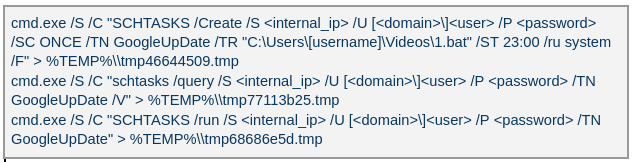
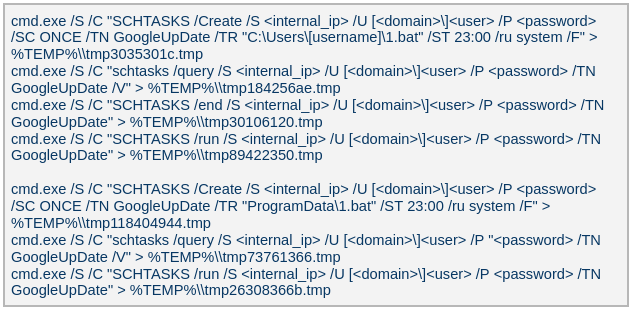
The attacker created a scheduled task named GoogleUpDate on remote machines using admin credentials. The task runs once with System account privileges right after it was created, executing the batch script located at C:\Users\<username>\Videos\1.bat (MD5 6ecf84fb18f6747ed08d7598364d853a). Prior to executing the task, the actor queries its status. It is then run, as shown below.
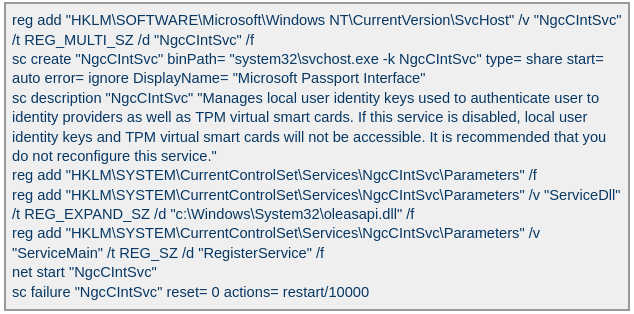
The 1.bat script creates a service named NgcCIntSvc, which loads the loader DLL named oleasapi.dll (MD5 082d49ef9f14e6811d68c7e0e82e5069). The ServiceMain parameter in the service’s registry entry is set to invoke the RegisterService function of oleasapi.dll as shown below.
LurkPoxy Deployment
In another case, the attacker at first checked connectivity to the domain dns[.]ssentialserv[.]xyz as shown below. At the time of our research, the domain was resolving to the address 154[.]196[.]162[.]76 which is used as a LurkProxy C2 server.
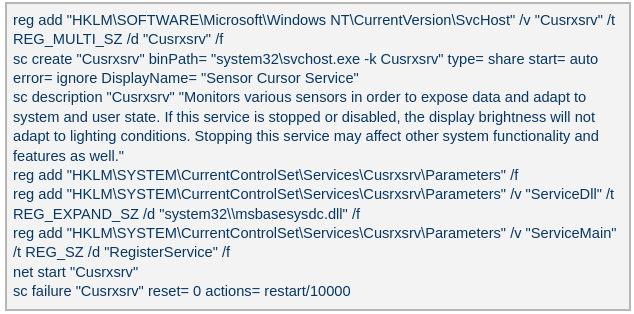
After confirming that the C2 server was reachable, the attacker executed the batch script C:\Users\[username]\Desktop\auto.bat (MD5 b874123a80fc4f40e06872b9cb54ebc6). The script created a service named Cusrxsrv, which loads a DLL named msbasesysdc.dll. In the service registry, the ServiceMain parameter was set to call the RegisterService function of msbasesysdc.dll as shown below.
We identified several service names — specitsrc, cmtastsvc, PNRPHostSvc, vmictimerosync, and vmicagent — that the attackers used to load a malicious DLL onto compromised machines.
OctLurk loader
The loader DLL exports two methods, Refresh and RegisterService. The previously created service first calls RegisterService, which in turn invokes Refresh, the method that contains the malicious code. To locate the payload, the loader double-XOR-decrypts and then zlib-decompresses a set of hard‑coded bytes, yielding the payload file path. The payload bytes itself undergoes the same double‑XOR decryption and zlib decompression to produce the backdoor DLL bytes.
The double‑XOR decryption uses two distinct multibyte keys:
Key 1: hard‑coded in the loader
Key 2: derived from the serial number of the C: drive
The backdoor DLL is reflectively injected into memory and its entry point is executed. The loader can then call the DLL’s exported methods either by name or by ordinal; both the method name and the ordinal number are hard‑coded in the loader and are decrypted using the same double‑XOR and zlib‑decompression process applied to the payload path and bytes.
OctLurk backdoor
The loader invokes the backdoor’s curl_easy_escape function (ordinal 2). The backdoor then creates a stream socket using a hard‑coded C2 address (dns[.]multitoconference[.]com) and port 443. It gathers the following information from the victim machine:
OS information as RTL_OSVERSIONINFOW structure
Computer name
User name
Local host name
Local IP address in format %u.%u.%u.%u, with local hostname-to-IP-address translation
Current local date and time as SYSTEMTIME struct
To encrypt the collected data, the backdoor employs a hard‑coded XOR key, which in most cases we observed was the string FDrertgr##@QEWASGkio865ehyf98foidsjzhug874392dfsREFDfdsAGH43wea98h. In addition, it generates 0x53 (83) random bytes — this length is also hard‑coded in the sample — and uses them as a second XOR key. The collected victim information is first compressed with zlib (deflate), and then XOR‑encrypted twice, first with the hard‑coded string key and then with the randomly generated byte sequence. The final data is arranged as follows:
The backdoor initially transmits a 16‑byte header that specifies the size of the incoming data packet, as shown below. It then sends the actual data packet.
0x00: randomly picked 10 chars from the string “zyxwvutsrqponmlkjihgfedcbaABCDEFGHIJKLMNOPQRSTUVWXYZ9876543210-_”
0x0A: \x00\x00
0x0C: next_packet_size
The first packet received is 16 bytes long, and its last four bytes specify the size of the subsequent data packet. The format of the subsequent data packet is shown below.
0x00: XOR key; size 83 bytes
0x53: compressed data size
0x57: compressed data in the format: <uncompressed_size> <deflate(data)>
The received data is decrypted using a double‑XOR method: first with the XOR key contained in the packet, then with a hard‑coded XOR key. After the XOR decryption, the data is zlib decompressed. The data may be a command or a plugin code.
OctLurk loads plugins from the C2 server directly into memory to perform various tasks. Each plugin exports two methods — ins_ctl_db and oct_lk_col — with the actual functionality implemented in oct_lk_col. Our analysis shows that the plugins listed below are commonly deployed on victim machines.
Command Shell: provides a command shell
File Manager: performs filesystem interaction
Interaction Manager: synthesizes keyboard and mouse events
The table below provides a detailed description of operations performed by these plugins, where each switch case value denotes command ID.
Plugin type
Description
File Manager
● case 0x10020: for each drive, retrieve the following information: volume GUID path, drive letter, volume name, file system name, drive type, volume serial number, total size in bytes, and free space in bytes.
● case 0x10030: search for a file that matches a specified name and retrieve the following information: file attributes, creation time, last access time, last write time, file size, the file’s name, and its short (8.3) name.
● case 0x10040: recursively list all files in a specified location, including only those whose size, creation time, last write time, and last access time fall within the threshold values defined by C2. For each listed file, retrieve the following details: file attributes, creation time, last access time, last write time, file size, file name and alternative name for the file
● case 0x10050: use the ShellExecuteExW API to open the specified file path, which may be an executable, a document, or a folder.
● case 0x10051: execute the specified command line using the CreateProcessAsUserW API.
● case 0x10060: perform the following file‑system operations: copy, delete, move, and rename — using the SHFileOperationW API.
● case 0x10070: create a directory.
● case 0x10080: set the attributes for a file or directory.
● case 0x10090: for the filename provided by C2, set the file created, last accessed, and last modified timestamps to the values received from C2.
● case 0x20010: get the size of a file.
● case 0x20020: read a file from the system in chunks, starting at a specified offset.
● case 0x20030: calculate the CRC32 of each file data chunk, and retrieve the file created, last accessed, and last written times.
● case 0x20040: close the file handle and free the associated metadata (file path, handle, and size).
● case 0x20110: create a file at the specified path and write the bytes received from C2 into it. Then set the file created, last accessed, and last modified times using the timestamps supplied by C2.
Command Shell
● case 0x3E9: launch cmd.exe as shell.
● case 0x3EA: send the exit command to close the command shell.
● case Default: if a command string is received from the C2 and the shell is running, write the command to the shell. Then read the shell’s output and send it back to the C2.
If a command string is received from the C2 server and the shell is not already running, execute the command using C:\Windows\System32\cmd.exe /S /C "<command_string>" > %TEMP%\tmp%d%x.tmp where %d and %x are random values. Afterwards, read the output from the temporary file tmp%d%x.tmp and then delete the file.
Interaction Manager
● case 0x3E9: capture the entire screen as a BMP image.
● case 0x3EA: capture the entire screen at specified intervals.
● case 0x3EC: retrieve clipboard data.
● case 0x3ED: copy the data to the clipboard.
● case 0x3F3: MOUSEEVENTF_LEFTDOWN: set the cursor to the specified position and press the left mouse button.
● case 0x3F5: MOUSEEVENTF_LEFTDOWN | MOUSEEVENTF_LEFTUP: move the cursor to the specified position, then press and release the left mouse button.
● case 0x3F6: MOUSEEVENTF_RIGHTDOWN: set the cursor to the specified position and press the right mouse button.
● case 0x3F7: MOUSEEVENTF_RIGHTUP: set the specified cursor position and release the right mouse button.
● case 0x3F8: MOUSEEVENTF_MOVE: move the mouse cursor to specific coordinates, simulating a mouse movement event.
● case 0x3F9: MOUSEEVENTF_WHEEL: move the mouse wheel by a specified amount.
● case 0x3FD: press the key indicated by the virtual‑key code.
● case 0x3FE: KEYEVENTF_KEYUP: release the key identified by the virtual-key code.
● case DEFAULT: MOUSEEVENTF_LEFTUP: move the cursor to the specified position and release the left mouse button.
Post-compromise activity
The attacker used the command‑shell plugin installed via the OctLurk backdoor to perform the following actions:
Victim fingerprinting
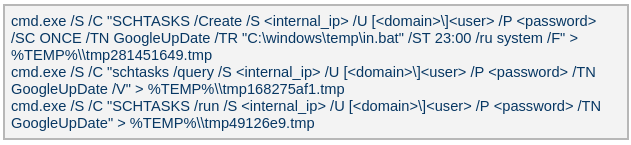
The attacker used admin credentials to create a scheduled task named GoogleUpDate on remote machines. This task runs once with System account privileges, executing the script located at C:\windows\temp\in.bat (MD5 45cf5916fab4272a1313c26e67aa9220, 4e6d5c4770d5a822d7fcce6a74f7ad73). After querying the task’s status, the attacker triggers its execution, as shown below.
The batch script runs a series of commands that collect comprehensive information about the machine’s hardware, software, and network configuration as shown in the table below. The results are saved in three files — info.txt, <hostname>.datb, and <hostname>_logs.datb — all stored in the %TEMP% directory.
Command
Description
chcp 1256
Changes the system’s code page to 1256, which supports Arabic characters.
powershell $PSVersionTable
Retrieves the version information of PowerShell.
qwinsta
Views all active sessions on the local machine.
klist sessions
Displays a list of logon sessions on this computer (Including Kerberos).
TASKLIST /V
Lists all running tasks with detailed information.
findstr /i /c:”explorer.exe”
Searches for explorer.exe in a case-insensitive manner. Used together with TASKLIST /V.
wevtutil qe Security /f:text /c:5 /rd:true /q:”*[System[(EventID=4624)]] and *[EventData[Data[@Name=’LogonType’]=10]]”
Retrieves the last 5 events from the Security event log where the event ID is 4624 (successful logon event) and the logon type is 10 (remote interactive logon e.g., Remote Desktop Protocol).
Displays detailed information about the current user, including their security identifiers (SIDs), privileges, group memberships, and authentication details.
Searches the Windows Registry under HKEY_LOCAL_MACHINE (HKLM) for entries where the value name is “ProfileImagePath” and the type is REG_EXPAND_SZ. It points to the location of a user’s profile folder.
cmd.exe /c dir /b c:\users
Lists the contents of the C:\Users directory.
wmic startup get caption,command | findstr exe
Filters startup items for executable files.
powershell “get-MpComputerStatus”
Retrieves the status and configuration details of Microsoft Defender Antivirus (formerly Windows Defender) on a Windows system.
Queries exclusion settings for Microsoft Defender Antivirus. This is where you can configure files, folders, processes, and extensions that should be excluded from being scanned by Defender.
wevtutil gli Security
Configures the Security event log.
wevtutil gl Security /f:xml
Retrieves events from the Security log in XML format.
wevtutil gli “Windows PowerShell”
Configures the Windows PowerShell event log.
wevtutil gl “Windows PowerShell” /f:xml
Retrieves events from the Windows PowerShell log in XML format.
wevtutil gli System
Configures the System event log.
wevtutil gl System /f:xml
Retrieves events from the System log in XML format.
schtasks /query /fo LIST /v | findstr “TaskName> Status> ‘Task To Run’> ‘Run As User’>”
Lists all scheduled tasks in verbose mode and extracts the following fields: Status, Task To Run, Run As User, and TaskName.
Provides network configuration details, such as IP address, DNS, DHCP status, etc.
ipconfig /all
Displays detailed network configuration.
netstat -e -s
Displays detailed network protocol statistics.
certutil -urlcache
Displays URL cache entries.
ipconfig /displaydns
Displays the contents of the DNS client resolver cache.
Event log collection
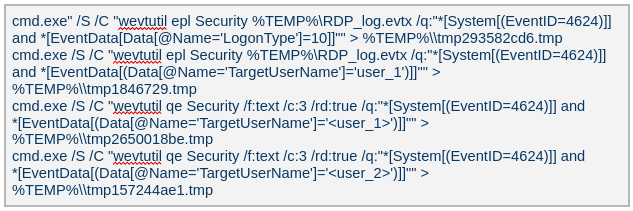
The attackers ran commands to export successful logon events for remote interactive logons (e.g., Remote Desktop Protocol) and to query those events for specific users.
Credential harvesting
Impacket — secretsdump
Attackers ran a malicious file named Adobe.exe (MD5 32a5985543433a4f60da2fafd873b927), which is a portable‑executable version of Impacket’s secretsdump.py tool. Using this tool, they extracted password hashes from domain controllers, the critical servers in an Active Directory environment. Immediately after harvesting the hashes, they issued commands to list all members of the “Domain Controllers” group, likely to identify and target additional domain controllers for further compromise.
Keylogger
Attackers dropped and executed a keylogger located at C:\Users\Public\Pictures\AnyDesk.exe (MD5: 2a571f6cee42a17d873f4c942649813f). They then created a scheduled task named AnyDesk to run the keylogger whenever any user logged on as shown below.
The keylogger creates two files: C:\Users\Public\Libraries\msect\dev0, which stores captured keystrokes, and C:\Users\Public\Libraries\msect\dev1, which holds clipboard data. Before writing to these files, the captured data is encoded by subtracting 2 from each byte.
Browser Password Decryptor
The Browser Password Decryptor tool C:\users\[username]\libraries\64.exe (MD5 37dc84e4bcad92fa28f1e7778d088283) is used to extract passwords from browsers. The tool offers two options: -help to extract passwords from Chrome and -exit to extract passwords from Firefox. For Chrome, the tool targets the Login Data and Local State databases located at %LOCALAPPDATA%\Google\Chrome\User Data\Default\Login Data and %LOCALAPPDATA%\Google\Chrome\User Data\Local State, respectively. The Local State contains the master key, which is essential for decrypting encrypted login information stored in the Login Data database file. For Firefox, the tool targets the logins.json file located at %APPDATA%\Mozilla\Firefox\Profiles\{profile folder}. The logins.json file in Firefox stores encrypted usernames and passwords for websites.
Pandora RC agent provides remote control of a victim’s computer, allowing attackers to monitor and manipulate the system. Using administrative credentials, the attacker creates a scheduled task named GoogleUpDate on the compromised machines. This task runs once with System account privileges and executes the script 1.bat, which can be found at either C:\Users\[username]\1.bat or C:\ProgramData\1.bat (MD5 5e26df131ff0a679a0a2699b723b46e3). The task’s status is first queried, then it is executed, as shown below.
The batch script 1.bat executes a command that downloads and installs the Pandora RC agent using the arguments shown below.
EHUSER: a Pandora RC user
STARTEHORUSSERVICE: start the agent after the installation finishes (default = 1)
EHORUSINSTALLFOLDER: specify the folder where you want to install the agent (default: %ProgramFiles%\_agent)
DESKTOPSHORTCUT: 0: do not create a desktop shortcut
Network scan: FSCAN
Fscan is a comprehensive internal‑network scanning tool that offers a range of functions, including network discovery, vulnerability assessment, reverse‑shell creation, and brute forcing of common services. The executable is dropped to %TEMP%\fc.exe (MD5: cf903e4a1629aa0582fd0363b5786676) and writes its output to %TEMP%\result.txt. Using Fscan, both internal and public networks were scanned to identify services running on specific ports, such as Secure Shell (SSH) on port 22 and MySQL on port 3306. The tool also attempted to access these services using credentials from the password file pp.txt.
Email harvesting
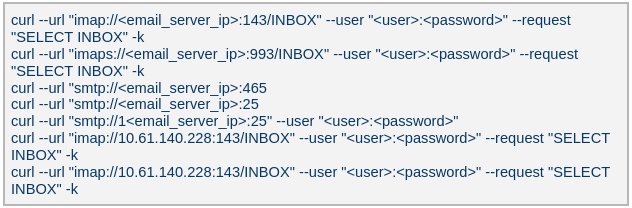
The attackers used the curl command to connect to an email server, authenticate with a username and password, and issue a command to select the Inbox folder. Typically, the goal is to:
Verify that a connection to the email server is working
Authenticate the user
Prepare the Inbox folder for reading or manipulating messages (e.g., listing, fetching, or deleting emails)
LurkProxy
In a similar manner to the OctLurk backdoor, the attacker also deployed another implant we named LurkProxy, which uses a heavily obfuscated version of the OctLurk loader. While LurkProxy has a nearly identical architecture to the OctLurk backdoor, its primary role is to proxy network traffic. Like the OctLurk, it exports a function named curl_escape_easy, which the loader invokes. Once executed, LurkProxy listens on all interfaces on hard‑coded port 64980 and establishes a TLS‑encrypted connection to the C2 server (154[.]196[.]162[.]76). The C2 communication uses a proprietary binary protocol, where each packet is compressed with zlib, encrypted with a double‑XOR scheme, and follows the structure outlined below.
Offset
Data
Type
0x00 (00)
Unused
–
0x08 (08)
Packet control flags. Bit 0 indicates high priority packet, bit 1 indicates single packet
bit array
0x0C (12)
Command number
int
0x10 (16)
Handler number (unique identifier for each proxy client in the first mode)
int
0x14 (20)
Command integer argument
int
0x18 (24)
Unused
–
0x1C (28)
Data 1 payload size
int
0x20 (32)
Data 2 payload size
int
0x24 (36)
Data 1 byte stream
bytes
0x24 (36) + N
Data 2 byte stream
bytes
LurkProxy can function as a reverse proxy in two distinct modes as described below. The mode is selected by a static flag, meaning the proxy can operate in only one mode at a time. In the implant we examined, the first (SOCKS5) mode was used.
Mode 1: SOCKS5 proxy
When a client connects, LurkProxy sends to the C2 the command 0x1000010, indicating that the connection has been established and includes the target address in the packet data. The C2 server then opens a connection to that address, enabling bidirectional communication through the appropriate commands.
Mode 2: transparent proxy
In this mode, the target address and port are hard‑coded. Upon startup, LurkProxy immediately connects to the predefined target via the C2 channel using the same command. All subsequent client connections are routed through this single, fixed target. This mode handles raw network traffic directly, bypassing the SOCKS5 layer.
Command ID
Direction
Description
Arguments
0x1000010
Implant -> C2
When a new proxy client connects, it creates a proxy session and notifies C2 of the successful configuration
Target port in command integer argument
UTF-16 encoded connection hostname in data 1
0x1000010
C2 -> Implant
Used to control the session, allowing it to pause or stop proxying
Action in command integer argument (1 to pause, or any other value to terminate)
0x1000030
Implant -> C2
Sent when the LurkProxy is shut down
–
0x1000050
Implant -> C2
Forwards the received bytes from the client to C2
Raw TCP bytes in data 1
0x1000050
C2 -> Implant
Forwards the received bytes from the proxy target to the client
Raw TCP bytes in data 1
SilkLurk
Deployment
The attacker created a service that executes legitimate binaries, such as NetSetSvc.exe (NVIDIA debug dump), nvgwls.exe (NVIDIA background tool responsible for autotuning), RtkSmbus.exe (Realtek Semiconductor’s noise‑cancelling program), and RtkNGUI64.exe (Realtek High‑Definition Audio Manager), to side‑load malicious loader DLLs: nvml.dll, vulkan-1.dll, RtkSmbusLoc.dll, and RtkNGUI64Loc.dll, respectively. These DLLs act as a loader that will inject SilkLurk backdoor into the process memory.
SilkLurk loader
SilkLurk loader working logic
The loader first verifies that it is running within the legitimate executable that loads it. Next, it moves the payload file (in the analyzed sample, it was named OneDrive.dat) from its module location (C:\ProgramData\Microsoft\Network\Connections in the analyzed sample) to the hard‑coded payload path (C:\ProgramData\Microsoft OneDrive\setup in the analyzed sample). Note that the hard-coded payload path may vary depending on the loader.
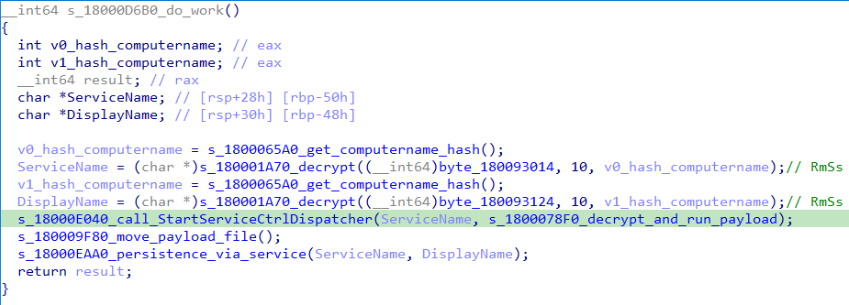
Next, the loader creates a service named RmSs to maintain persistence. The service will run the legitimate module binary (C:\ProgramData\Microsoft\Network\Connections\nvgwls.exe) that loads the malicious loader (vulkan-1.dll). The service is configured with the parameters mentioned below. Additionally, the service configuration is modified to restart the service in the event of a failure. Finally, the loader starts the service.
Service Type:SERVICE_WIN32_OWN_PROCESS
Start Type:SERVICE_AUTO_START
Error Control:SERVICE_ERROR_NORMAL
On service start, loader calls StartServiceCtrlDispatcher, which will invoke ServiceProc. The ServiceProc then calls the routine s_1800078F0_decrypt_and_run_payload. This routine computes a 32-bit hash (dword) of the victim’s computer name. The dword hash is used by a custom algorithm made up of arithmetic and logical operations to decrypt the hardcoded payload file path. The payload bytes themselves are decrypted with the same algorithm that decoded the file path. By using the victim’s computer name in the decryption of both the file path and the payload bytes, the loader becomes specific to each victim. The decrypted bytes contain shellcode with the following structure:
Shellcode offset
Description
0x000 (0)
Stub code, which performs reflective code injection
0x770 (1904)
Hardcoded value 0x11113F68, XORed with the computer name hash
0x774 (1908)
Hardcoded byte 0xD9, used as XOR key to decrypt import DLL names and APIs
0x775 (1909)
Size of the encrypted backdoor
0x779 (1913)
Encrypted backdoor data blob
The stub code decrypts and injects the backdoor blob into memory. To decrypt the blob, it first computes a dword hash of the computer’s name. This hash is then fed into a custom algorithm — a series of arithmetic and logical operations — that performs the decryption. This algorithm differs from the one used to decrypt the payload file.
The IMAGE_DOS_HEADER of the backdoor binary is zeroed out. Information in the IMAGE_NT_HEADERS, such as ImageSize and NumberOfSections, is XOR-decrypted using the hash of the computer name. The first three sections are decrypted again using a custom algorithm (a series of arithmetic and logical operations) before being injected into memory.
During import resolution, DLL names and API names are XOR‑decrypted using a hard‑coded single‑byte key. After the import DLL is loaded and the API addresses are resolved, the DLL and API name strings are zeroed out.
During relocation, the size of each relocation block, the value of each relocation entry, and the bytes to be relocated are XOR‑decrypted using the dword hash of the computer name. Afterward, the entry point is also XOR‑decrypted with the same hash and then invoked.
SilkLurk backdoor
The backdoor contains a hardcoded configuration of 0x4AC (1196) bytes, with the first 0x10 (16) bytes holding a mutex string and the remaining 0x49C (1180) bytes comprising encrypted configuration data; this configuration is written to a hardcoded filename (e.g., 2470b666bece868f, 27879a4df1a740ff) that differs across samples and is placed in the %APPDATA% directory. The configuration is decrypted using a custom algorithm involving a series of arithmetic and logical operations that is distinct from the algorithm used to decrypt the encrypted backdoor blob and payload file. The configuration has the following structure:
Offset
Description
0x00 (000)
C2 Host 1
0x64 (100)
C2 Host 2
0xC8 (200)
C2 Host 3
0x12C (300)
C2 Host 4
0x190 (400)
Port for C2 Host 1
0x192 (402)
Port for C2 Host 2
0x194 (404)
Port for C2 Host 3
0x196 (406)
Port for C2 Host 4
0x198 (408)
Unknown 21 bytes
0x1AD (429)
Proxy address 1
0x22A (554)
Proxy username 1
0x2A7 (679)
Proxy password 1
0x324 (804)
Proxy address 2
0x3A1 (929)
Proxy username 2
0x41E (1054)
Proxy password 2
The backdoor creates a TCP socket and connects to the C2 server defined in the configuration. If proxy details are provided, it attempts to establish the C2 connection through the proxy. The proxy request uses the following format:
After successfully connecting to the C2 server, it generates a random 32‑byte (0x20) network key that will be used to encrypt and decrypt network packets. This key is appended to the magic dword, as shown in the table below, creating a 40‑byte block that is then encrypted with a custom algorithm: a series of arithmetic and logical operations that differs from the one used to decrypt the configuration.
Field offset
Field size (in bytes)
Field value
0x00 (00)
0x04 (04)
0x0C7FFBE86h (magic dword)
0x04 (04)
0x04 (04)
0
0x08 (08)
0x20 (32)
Network key (will be used to encrypt and decrypt network traffic)
It then prepares a packet to send the key to the command‑and-control server, as shown in the table below. The packet contains a 0xC (12‑byte) header, a 0x28 (40‑byte) block of encrypted network‑key data (see the table above), and a randomly generated payload whose size ranges from 0x14 (20) to 0xB4 (180) bytes.
Encrypted network key data (as mentioned in above table)
0x34 (52)
size between 0x14 (20) and 0xB4 (180)
Random data bytes
After sending the key, the backdoor collects the following victim information: local computer name, DNS domain assigned to the local computer, user’s logon name, processor architecture, OS major version and build number, host IP address, current process ID, tick count value, and backdoor module name. The collected victim information is first compressed and then encrypted using the network key. The custom algorithm (a series of arithmetic and logical operations) used to encrypt collected victim information is different from the algorithms used to decrypt the configuration and encrypt the network key. Before sending the victim information, a 0x0F (15) byte header is generated and encrypted using the same custom algorithm used to encrypt the collected victim data. The header follows the format as shown in the table below.
Field offset
Field size (in bytes)
Field value
0x00 (00)
0x04 (04)
0xC7FFBE86 (magic dword)
0x04(04)
0x04 (04)
Message type (1 means victim information)
0x08 (08)
0x04 (04)
Data size (size of encrypted victim information)
0x0C (12)
0x01 (01)
Compression flag (1 means compressed)
0x0D (13)
0x02 (02)
Size of random bytes, between 0x14 and 0x96 bytes
Finally, the encrypted header and victim information are formatted as shown below and transmitted to the C2 server.
Once the backdoor has transmitted the victim information, it waits for a 0x13‑byte (19‑byte) response from the C2 server. This response follows the structure presented in the table below.
Field offset
Field size (in bytes)
Field value
0x00 (00)
0x04 (04)
Random dword
0x04 (04)
0x0F (15)
Encrypted header data
The encrypted header contained in the response is decrypted with the network key that was generated and shared with the C2 server. After decryption, the header retains the same size and structure as the one used in the victim information message.
The message type field in the header (offset 0x04) determines which operation (command) to perform. Next, the backdoor figures out the size of the command data to receive by adding up the size of the encrypted data (found at position 0x08 in the received header) and the size of the random bytes (found at position 0x0D in the received header). The received command data is first decompressed, based on the compression flag located at position 0x0D in the received header, and then decrypted using the custom algorithm that was used to encrypt the sent data. The backdoor supports the following commands:
Command (message type)
Description
03
Based on subcommand, perform the following operations:
00: Get target system’s local time
01: Set sleep time in milliseconds, after which to reconnect to the C2 server
04
Send current backdoor configuration
05
Update backdoor configuration
06
Receive and inject additional payloads (plugins) into memory. Based the on subcommand, perform the following operations:
01: Inject payload (plugin) bytes into memory and execute payload’s entry point
03: Call export method of injected plugin
Post-compromise activity
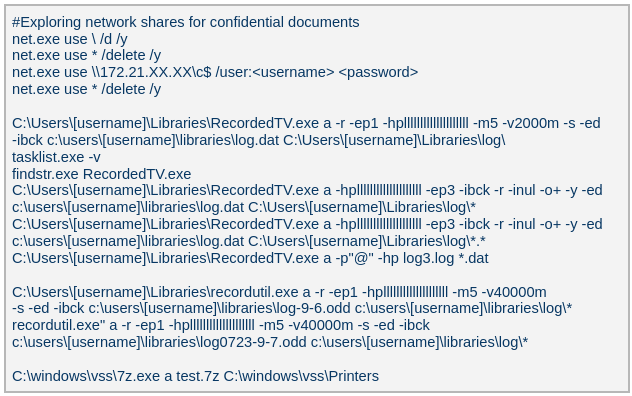
The threat actor operating the SilkLurk backdoor first used it to invoke cmd.exe to launch PowerShell. Within PowerShell, they ran commands such as net use to connect to shared network resources with administrative credentials. After establishing the connection, they searched the shared drives for confidential documents to exfiltrate. Once the search was complete, they disconnected from the network share to erase evidence of which internal servers had been accessed. To archive the stolen data, they employed legitimate archiving tools: WinRAR and 7‑Zip.
Below are the paths and names of the WinRAR and 7Zip binaries used by the attackers.
The SilkLurk backdoor opened a command shell (cmd.exe). Using this shell, the attacker executed the file C:\ProgramData\microsoft\html help\kmsonline.exe (MD5: 3c9a1ba8e0c7475706adc6376e9d7b7c). The kmsonline.exe binary acted as a dropper for the PlugX malware, deploying the malicious files listed below.
Our Kaspersky Threat Attribution Engine (KTAE) also identified a strong degree of similarity between kmsonline.exe (MD5: 3c9a1ba8e0c7475706adc6376e9d7b7c) and PlugX.
PlugX was configured to communicate with the C2 domain gycudore[.]kozow[.]com and the IP address 64[.]7[.]198[.]130. Below are the extracted configuration fields from PlugX.
Config field name
Value
Injection Target Process
%SystemRoot%\system32\svchost.exe
Home Directory
%ALLUSERSPROFILE%\Symantec
Persistence Name
SymantecRAS
Service Display Name
SymantecRAS
Service Description
Symantec RAS Services
Campaign ID
KG_MFA
Infrastructure
The threat infrastructure relies on VPS servers. Some OctLurk and LurkProxy C2 addresses are referenced in a public report by Kazakhstan’s State Technical Service (STS) company. According to available data, a campaign targeting critical infrastructure in Kazakhstan was discovered in March 2025. During this campaign, attackers employed the TrustFall (STS internal designation) remote access malware, also known as MystRodX (Qianxin) and SilentRaid (Cisco) and designed for Linux-based operating systems. Subsequently, in October 2025, STS researchers found additional TrustFall samples, while also discovering its new C2 servers via active probing. Notably, three observed TrustFall C2 addresses were also leveraged by OctLurk and LurkProxy. This overlap points to shared infrastructure across multiple OS-targeting campaigns, though it remains unclear whether these activities ran concurrently or at different times.
Attribution
We identified multiple artifacts confirming that OctLurk and SilkLurk are operated by the same threat actor. Several users infected with OctLurk were also found to be infected with SilkLurk, and in some cases both malware families used the same staging directory. Below are examples of these artifacts.
In one incident, the attackers created the service C:\Windows\system32\svchost.exe -k ExAstSrc -s ExAstSrc to deploy OctLurk. They used OctLurk to obtain a command shell and were observed dropping the SilkLurk loader vulkan-1.dll (MD5 be4731c09734da2e8eb6814a9c82f266) via this shell, as shown below.
In another incident, we observed attackers using the same directory C:\ProgramData\intel\ to drop both the OctLurk and SilkLurk loader DLLs.
In one incident, the attacker used SilkLurk to obtain a command shell (cmd.exe) and then deployed and executed the PlugX malware. The PlugX sample was configured to contact gycudore[.]kozow[.]com as its command‑and‑control (C2) server, while the SilkLurk backdoor used ctyuhjerf[.]kozow[.]com for C2. PlugX is a well‑known modular remote‑access Trojan (RAT) that has been active since at least 2008 and historically linked to Chinese-speaking threat actors. This suggests that both OctLurk and SilkLurk were also developed and operated by a Chinese‑speaking actor, although at this time, we cannot attribute this activity to a known threat group.
Conclusions
The emergence of the OctLurk and SilkLurk multi‑plugin malware framework highlights how threat actors continuously refine their tactics to evade detection and maintain control over compromised networks. Both families operate primarily in memory, leaving only a minimalistic loader on disk that relies on machine‑specific data (OctLurk uses the drive serial number, and SilkLurk uses the computer name) to decode payload locations and contents. This victim‑specific encoding makes reverse engineering and automated detection considerably harder.
In addition to sophisticated obfuscation, the attackers establish redundant access channels, harvest credentials, and deploy well‑known remote access and monitoring tools. These secondary pathways ensure persistence even if the original infection vector is discovered or neutralized.
The 2026 World Cup presents major cyber risks from ransomware groups, state-aligned actors, and other groups targeting critical infrastructure. Learn more here.
When a major cyber incident hits, the first decisions aren’t technical—they’re human. Who takes the lead? How quickly can information be shared? When should governments step in, and how do you protect public trust while keeping essential services running?
These questions are at the heart of Microsoft’s Advancing Regional Cybersecurity (ARC) initiative, launched in 2025 to help governments strengthen cyber preparedness through practical, public-private collaboration. Today, we’re sharing the first tangible output of that work: the ARC Kenya Exercise Report & Toolkit, developed through a tabletop exercise held in Nairobi in December 2025.
Developed with Kenya’s National Computer and Cybercrime Coordination Committee (NC4) and RiskSight, the toolkit is a practical planning resource designed to help government and cross-sector leaders prepare for cyber crises before they occur. It is grounded in real conversations among leaders from government, regulators, critical infrastructure operators, law enforcement, academia, and the private sector working through what a serious cyber incident would demand of them, together.
Stress‑testing decisions before a crisis hits
The ambition of the “Silicon Savannah” makes Kenya a compelling setting for this work. Its digital economy is expanding rapidly—from mobile‑first financial services to cloud‑enabled public infrastructure—positioning the country as a regional technology leader. But rapid digital growth also brings increased exposure to more sophisticated cyber threats. As systems become more interconnected, a serious cyber incident can quickly disrupt essential services, undermine public trust, and threaten economic stability.
Kenya’s approach recognizes this reality and reflects a critical principle: cybersecurity is not separate from innovation; it is one of the conditions that allows digital transformation to scale safely. The ARC initiative embodies this philosophy and helps decision makers confront the practical realities of coordination, escalation, and response in this complex environment.
This is exactly what the ARC Kenya tabletop exercise was designed to do. The objective was not to test tools but to stress‑test decision making under pressure. Participants were challenged with complex scenarios—including AI‑enabled breaches, ransomware attacks, and infrastructure‑level disruptions. The focus was not on technical fixes but on leadership clarity, cross‑agency coordination, and real‑time decision making in high‑pressure environments.
The outcome was both a roadmap for the unknown and a clear recognition of the need for shared expectations before a crisis begins—particularly around leadership and authority, trusted information sharing channels, and agreed response frameworks. These gaps, identified by participants themselves, now form the backbone of the ARC Kenya Toolkit.
What the ARC Kenya toolkit delivers
The toolkit translates the lessons of the exercise into concrete actions that leaders can take now—before the next incident occurs. It also serves as a practical and specific 12‑month roadmap for strengthening Kenya’s cyber preparedness, moving from lessons identified to durable, institutional capability. Specifically, the toolkit provides recommendations to:
Clarify national leadership during major cyber incidents, enabling government, regulators, law enforcement, and critical infrastructure operators to coordinate more quickly, with fewer gaps and overlaps.
Establish practical, standards‑aligned incident response models for the entire country, including priority playbooks that teams can train on and execute consistently.
Strengthen operational readiness across sectors, with better coordination between security operations centers (SOCs), clearer escalation thresholds, and more reliable incident reporting pathways.
Deepen trusted information sharing and public‑private collaboration through common handling rules, safer “good‑faith” reporting mechanisms, and regular joint exercises to build muscle memory before a crisis.
Taken together, these elements enable leaders not only to respond more effectively to cyber incidents, but to institutionalize preparedness, coordination, and resilience across the national cyber ecosystem. For African countries more broadly, the model also offers a practical pathway to strengthen regional cyber cooperation—by aligning expectations around escalation, information sharing, and public‑private coordination before a cross‑border incident occurs. By translating high‑level principles into practical, repeatable approaches to crisis readiness, the toolkit underscores the value of trusted international partnerships and alignment with global norms for responsible state behavior in cyberspace.
Why Kenya’s approach matters beyond its borders
Many countries across the Global South are grappling with similar challenges: fragmented ownership of critical infrastructure, uneven cyber capacity across sectors, and the need to coordinate rapidly under pressure. While firmly grounded in Kenya’s national context, the lessons from ARC Kenya are therefore intentionally designed to resonate far beyond its borders and to be highly transferable.
Importantly, this work does not end in Kenya. We are already building on these lessons through ARC engagements in other regions, including a new workstream in Mexico, applying the same approach to strengthen preparedness, coordination, and resilience across different national contexts.
By design, the ARC initiative is not simply a record of a single exercise. It is a foundation others can build on—at a national or regional level—offering leaders a practical starting point to turn shared responsibility into sustained capability.
For more than a decade, the Microsoft Digital Crimes Unit (DCU) has persistently disrupted cybercrime and nation-state threats targeting people, organizations, and critical infrastructure. Explore major disruptions—and the ongoing cases and operations behind them here: Disrupting cyberthreats since 2008 | Microsoft
If you use the internet, you’ve likely been affected by cybercrime in some way. Even when an attack is aimed at a company, the fallout usually lands on ordinary people.
The most obvious harm is stolen data. When attackers break into a business, it is usually customer information that ends up in criminal hands, and that can lead to identity theft, tax fraud, credit card fraud, and a long tail of scam attempts that can continue for months or years. For consumers, the breach itself is often just the start of the cleanup.
That work is annoying, time-consuming, and sometimes expensive. People may have to freeze credit, replace cards, change passwords, be on the lookout for suspicious transactions, and dispute charges. The Federal Trade Commission (FTC) specifically advises consumers to use IdentityTheft.gov after a breach and recommends steps like credit freezes and fraud alerts to reduce the chance of further abuse.
When sensitive data is exposed, the harm is not only financial. Medical, insurance, and other deeply personal records can be used to create more convincing phishing or extortion attempts, and the stress of knowing that private information is circulating among criminals can linger long after the technical incident is over. In other words, breach victims are not just cleaning up a data problem, they are dealing with a loss of trust.
Breaches happen every day. Don’t be the last to know.
Cybercrime also hits consumers through service disruption. Ransomware and intrusion campaigns can interrupt payment systems, telecom services, shipping, energy distribution, booking platforms, and other infrastructure people rely on every day. In those cases, the consumer impact is immediate: you may not be able to pay, travel, call, buy, or even work normally. The CSIS timeline and Canada’s cyberthreat assessment both show that these disruptions are increasingly tied to high-value targets and can be part of broader state or criminal campaigns.
Not all these incidents are driven by cybercriminals. Recently, Britain’s cybersecurity chief warned that the UK is handling 4 nationally significant cyberincidents every week, with the majority now traced back to foreign governments rather than cybercriminal groups.
Another cost is easy to overlook: disinformation and confusion. When attackers steal data, disrupt services, or impersonate trusted brands, they can also flood the public with fake support messages, scam calls, refund schemes, and phishing emails pretending to be the breached company. The breach becomes a launchpad for more fraud, and consumers are left trying to separate legitimate notifications from those sent by attackers.
Then there is the security backlash. After a breach, companies usually tighten access rules, add more multi-factor authentication prompts, force reauthentication, shorten sessions, and increase fraud checks. Those measures are often necessary, but they also make ordinary digital life more cumbersome. The consumer ends up paying with time and frustration for security problems they did not create.
That is why company-targeted cybercrime is not really only a business problem. It is a consumer issue, a public-trust issue, and sometimes even a national security issue. A single breach can leak data, trigger fraud, interrupt essential services, amplify scams, and make using the internet more frustrating for everyone else. The real cost is rarely confined to the company that got hit.
Knowing this, it’s worth thinking carefully about which companies to trust with your data and how much you’re willing to share . You cannot stop every attack against every company you deal with, but you can limit the fallout by being more selective. Some considerations:
Do they need all the information they are asking for?
Would it hurt anything if you leave some fields blank or give less specific answers?
Has this company been breached in the past, and how did they handle it?
How long will they store the data you provide?
Can you easily have your data removed at your request?
Your name, address, and phone number are probably already for sale.
Data brokers collect and sell your personal details to anyone willing to pay. Malwarebytes Personal Data Remover finds them and gets your information removed, then keeps watch so it stays that way.
Why do successful phishing attacks target our psychology rather than just our software? Discover Unit 42’s latest insights on defeating social engineering and securing your digital life.
Russia's current isolation from the Olympics may lead to increased cyberthreats targeting the 2026 Winter Games. We discuss the potential threat picture.
In traditional cybersecurity, the emphasis is often on technical defenses against attacks. However, understanding the psychological aspects of phishing is equally important to understand the exploitation of human vulnerability.
Phishing attacks are becoming more sophisticated than ever in 2025, leveraging cutting-edge technology to deceive individuals and organizations. Here are the new and most prevalent trends to consider when defending against the number one cyber attack vector.
When tracking adversaries, we commonly focus on the malware they employ in the final stages of the kill chain and infrastructure, often overlooking samples used in the initial ones.
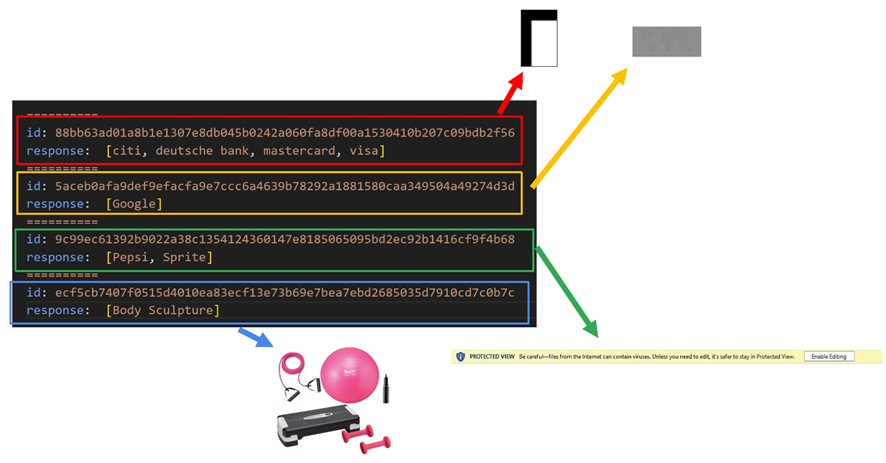
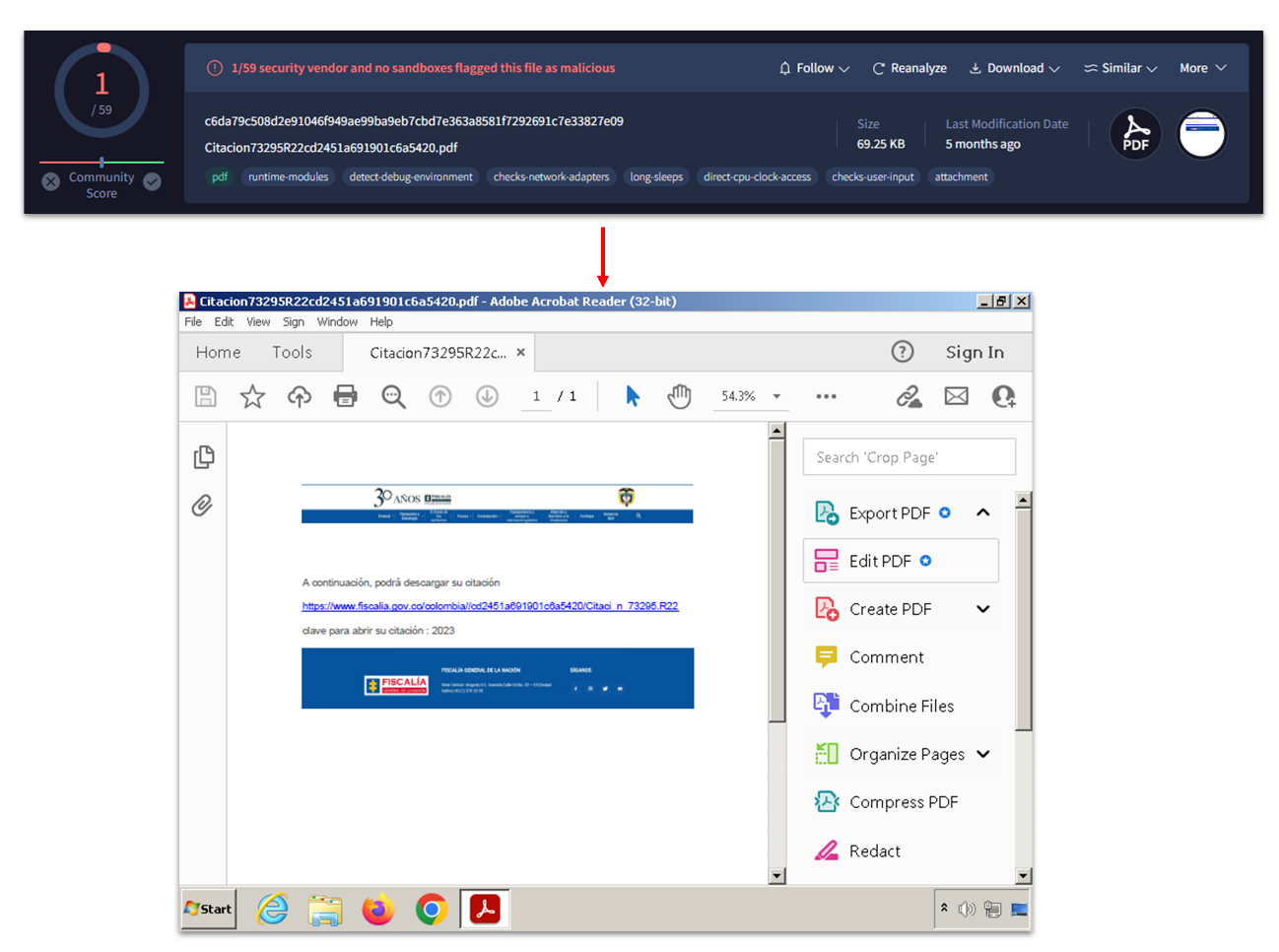
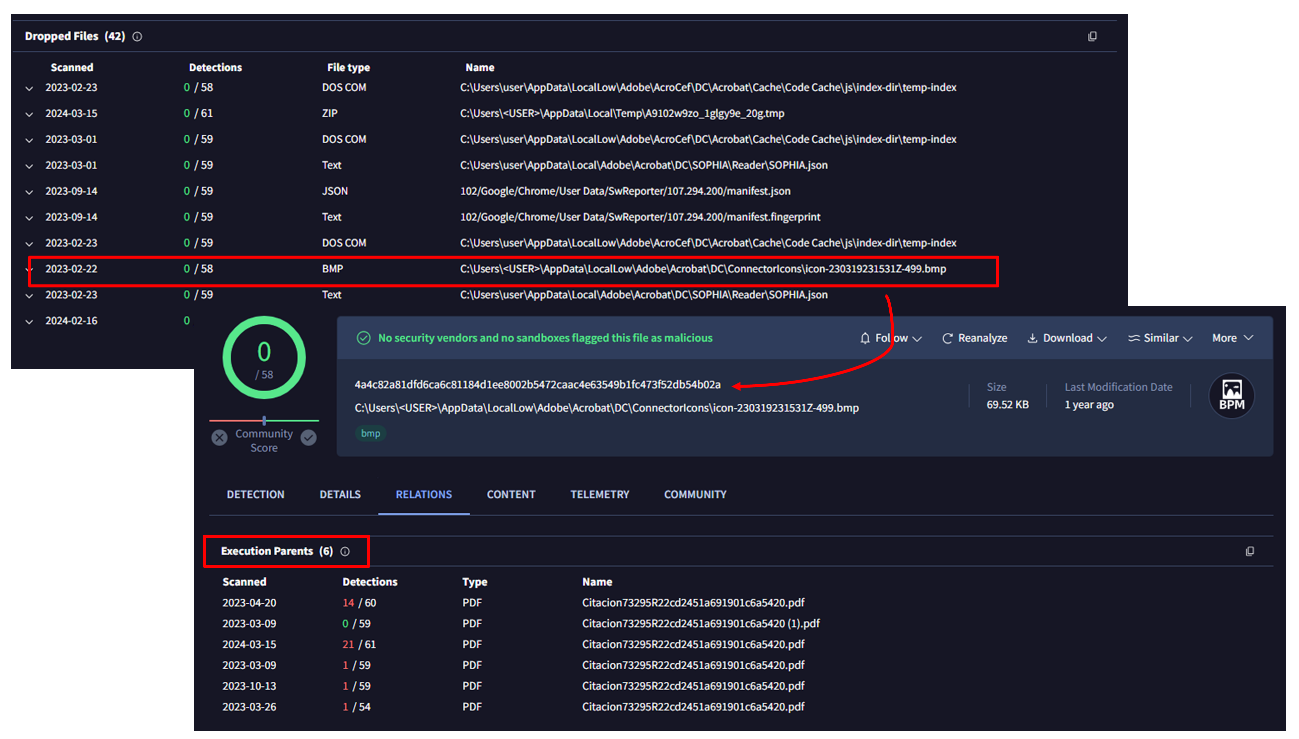
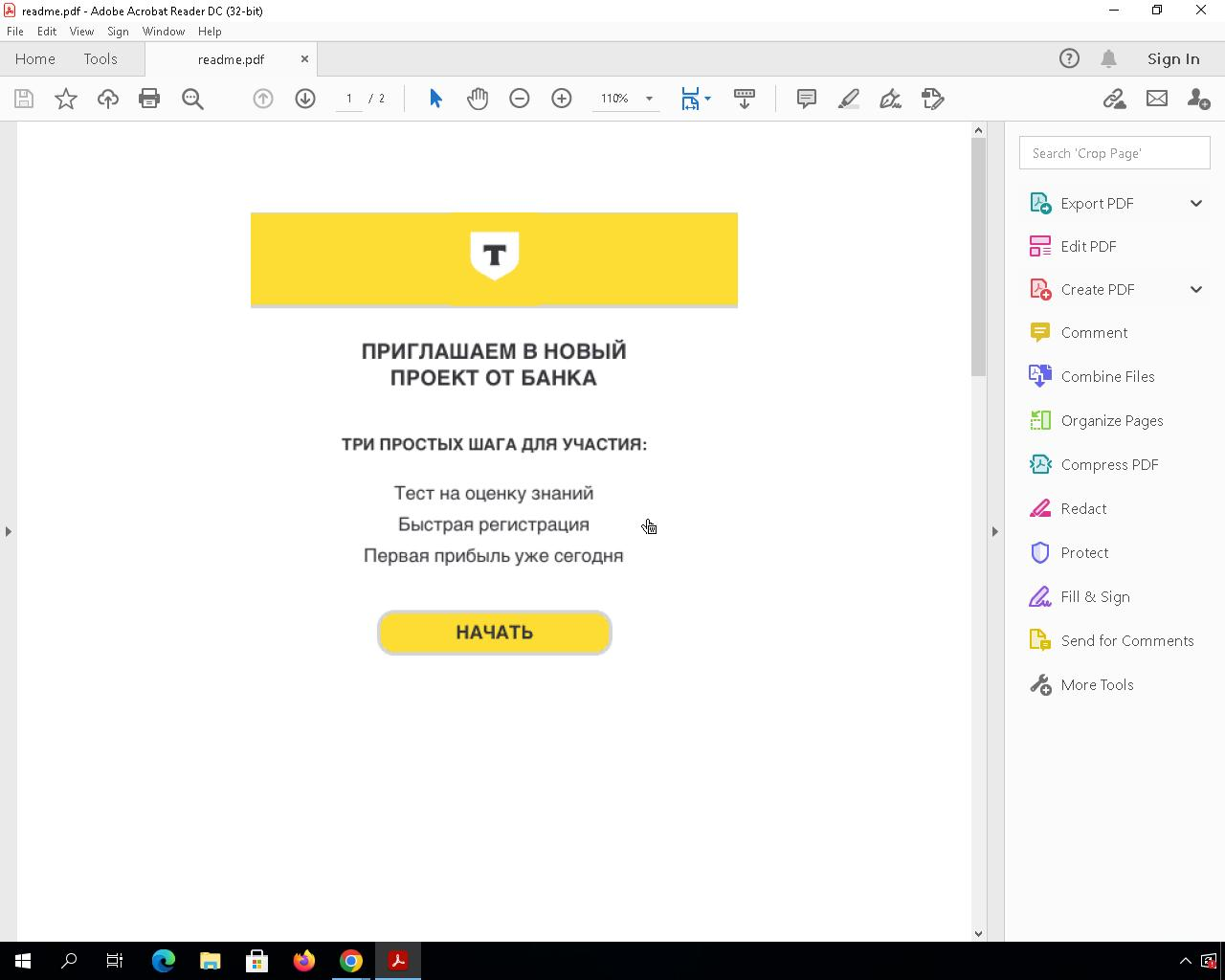
In this post, we will explore some ideas to track adversary activity leveraging images and artifacts mostly used during delivery. We presented this approach at the FIRST CTI in Berlin and at Botconf in Nice.
Hunting early
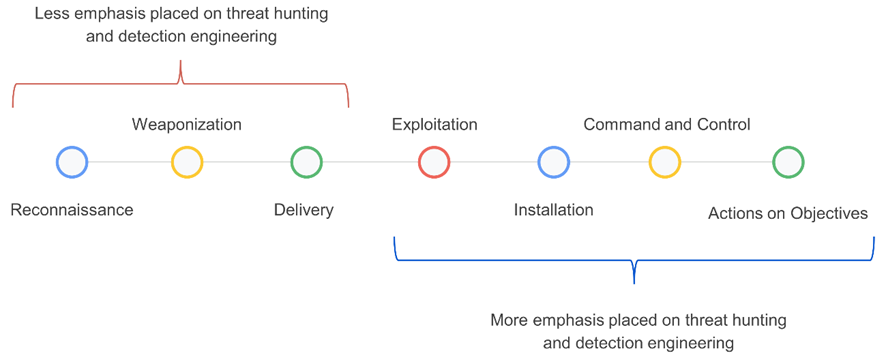
In threat hunting and detection engineering activities, analysts typically focus heavily on the latter stages of the kill chain – from execution to actions on objectives (Figure 1). This is mainly because there is more information available about adversaries in these phases, and it's easier to search for clues using endpoint detection and response (EDR), security information and event management (SIEM), and other solutions.
Figure 1: Stages of the kill chain categorized by their emphasis on threat hunting and detection engineering.
We have been exploring ideas to improve our hunting focused on samples built in the weaponization phase and distributed in the delivery phase, focused on the detection of suspicious Microsoft Office documents (Word, Excel, and PowerPoint), PDF files, and emails.
In threat intelligence platforms and cybersecurity in general, green and red colors are commonly used to quickly indicate results and identify whether or not something is malicious. This is because they are perceived as representing good or bad, respectively.
Multiple studies in psychology have demonstrated how colors can influence our decision-making process. VirusTotal, through the third-party engines integrated into it, shows users when something is detected and therefore deemed "malicious," and when something is not detected and considered "benign."
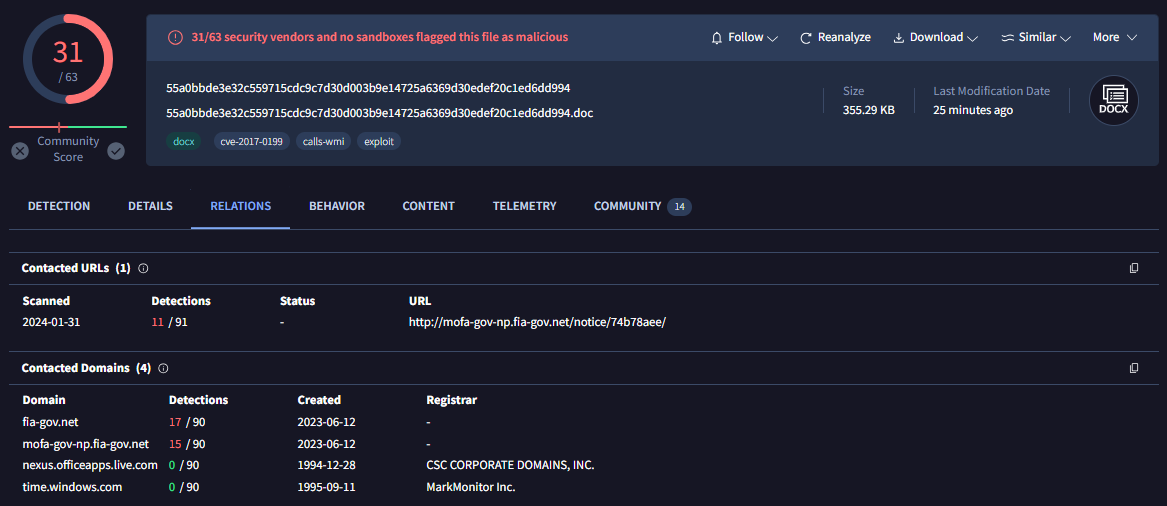
For example, the sample in Figure 2 belongs to a Microsoft Word document distributed by the SideWinder group during the year 2024.
Figure 2: Document used by the SideWinder APT group
The sample in question was identified at the time of writing this post by 31 antivirus engines, leaving no doubt that it is indeed a real malware sample. In the process of pivoting to identify new samples or related infrastructure, starting with Figure 2, the analyst will likely click on the URL detected by 11 out of the 91 engines, and the domains detected by 17 and 15 engines, respectively, to see if there are other samples communicating with them. The remaining two domains (related to windows.com and live.com) in this case are easily identified as legitimate domains that were likely contacted by the sandbox during its execution.
Figure 3: Relationships within the SideWinder APT group document
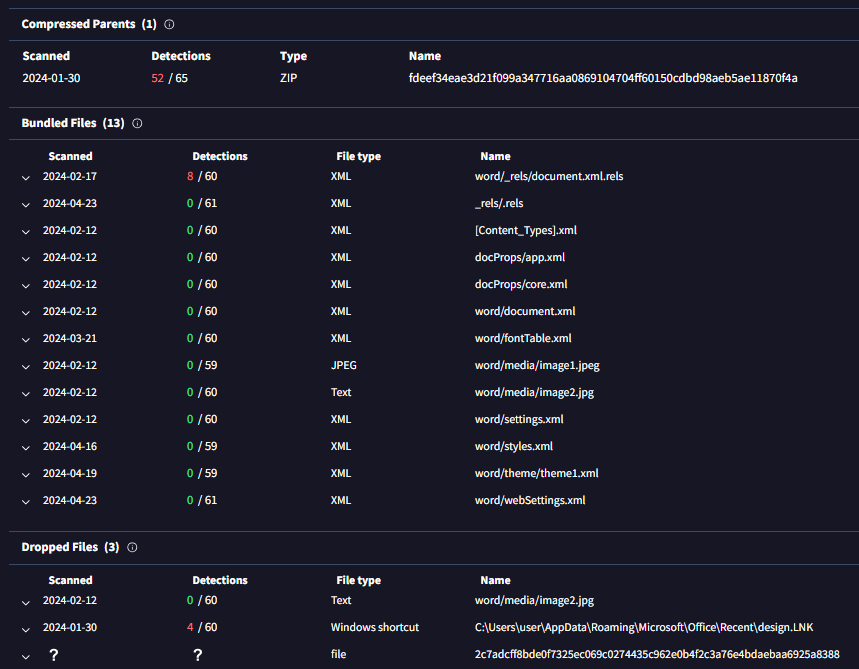
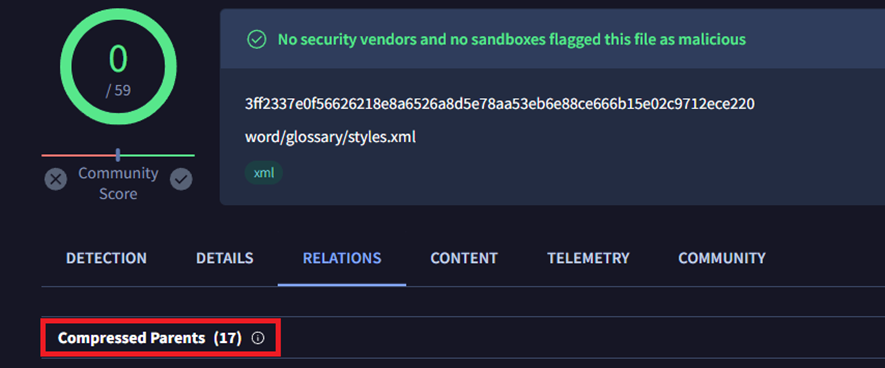
In the same sample, if you go down in the VirusTotal report (Figure 3), the analyst will likely click on the ZIP file listed as "compressed parent" to check if there are other samples within this ZIP besides the current one. They may also click on the XML file detected by 8 engines, and the LNK file detected by 4 engines. The remaining files in the bundled files section probably won't be clicked, as the green color indicates they are not malicious, and also because they have less enticing formats — mainly XML and JPEG. But what if we explore them?
XML files generated by Microsoft Office
When you create a new Microsoft Office file, it automatically generates a series of embedded XML files containing information about the document. Additionally, if you use images in the document, they are also embedded within it. Microsoft Office files are compressed files (similar to ZIP files). In VirusTotal, when a Microsoft Word file is uploaded, you can see all these embedded files in the embedded files section.
We have mainly focused on three types of embedded files within Office documents:
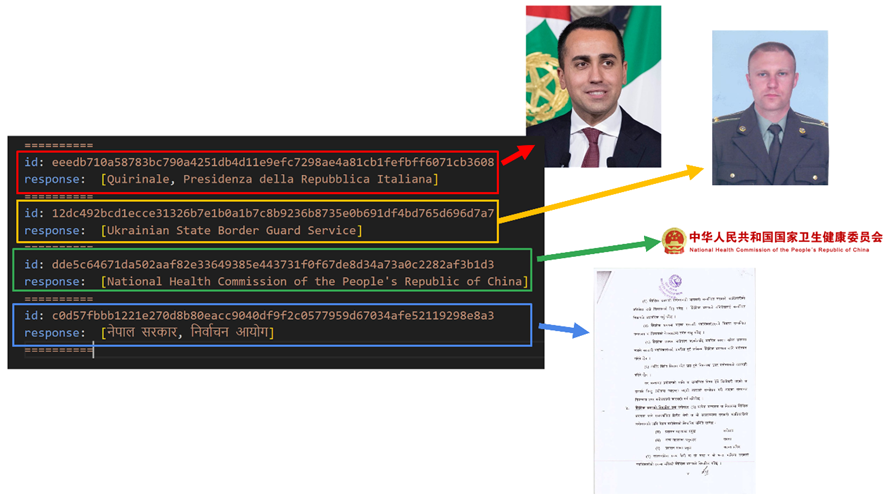
Images:Many threat actors use images related to the organizations or entities they intend to impersonate. They do this to make documents appear legitimate and gain the trust of their victims.
[Content_Types].xml:This file specifies the content types and relationships within the Office Open XML (OOXML) document. It essentially defines the types of content and how they are organized within the file structure.
Styles.xml:Stores stylistic definitions for your document. These styles provide consistent formatting instructions for fonts, paragraph spacing, colors, numbering, lists, and much more.
Our hypothesis is: If malicious Microsoft Word documents are copied and pasted during the weaponization building process, with only the content being modified, the hashes of the [Content_Types].xml and styles.xml files will likely remain the same.
Office documents
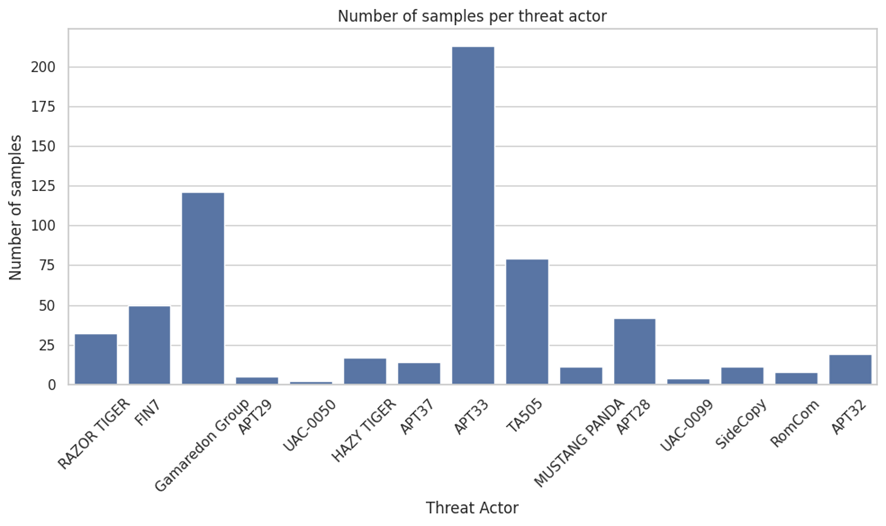
To check our hypothesis, we selected a set of samples used during delivery and belonging the threat actors listed in Figure 4:
Figure 4: Number of samples per actor within the scope
Let’s analyze some of the results we obtained per actor.
APT28 – Images
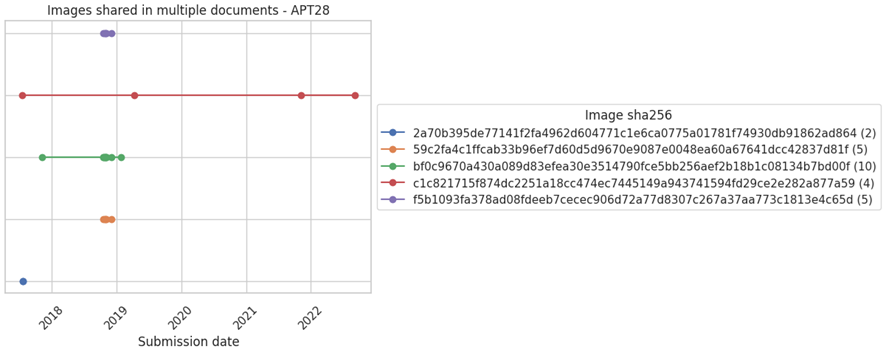
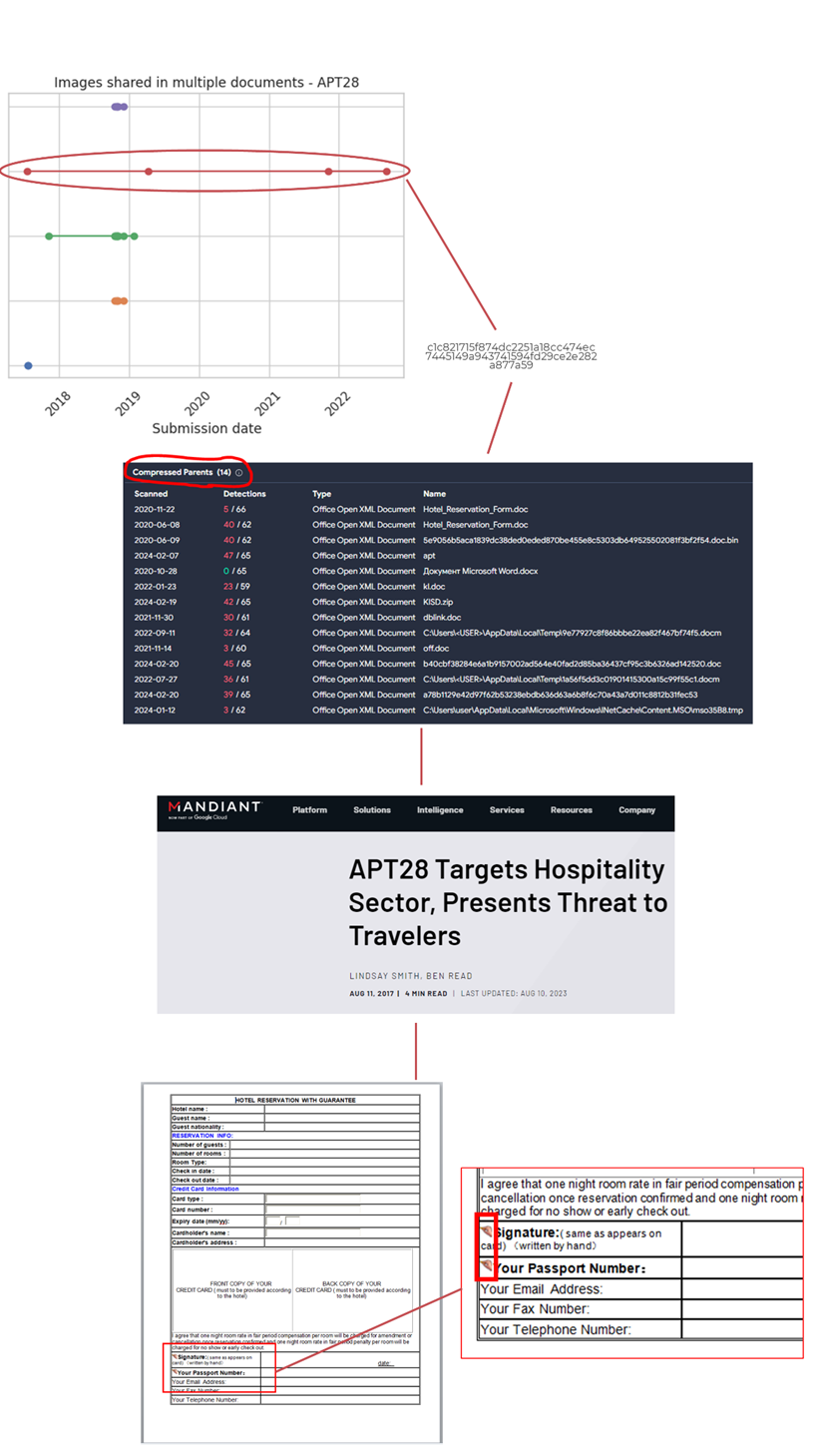
We started by focusing on images APT28 has reused for different delivery samples (Figure 5).
Figure 5: Images shared in multiple documents by APT28
Each line in the Figure 5 graph represents the same image, and each point represents at least two samples that used that particular image.
The second image of the graph shows how it was used by different Office documents at different points in time, from 2018 to 2022 (dates related to their upload to VirusTotal).
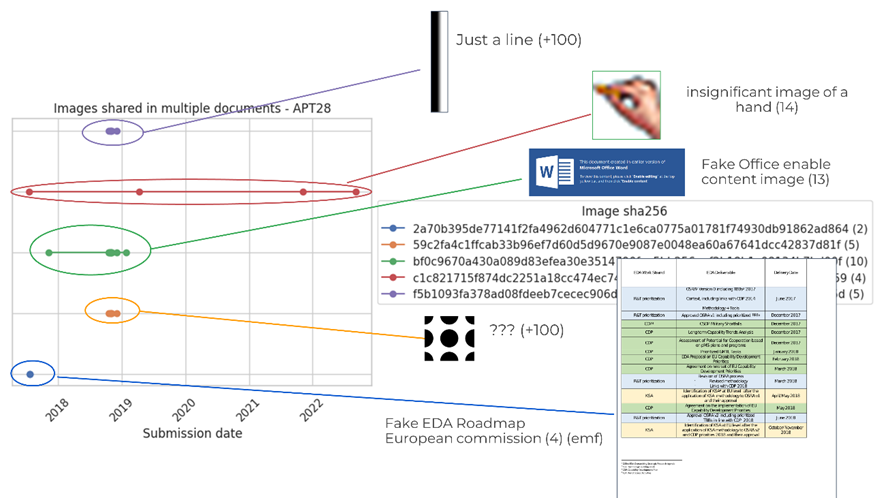
Now, the chart in Figure 6 visualizes each of these images.
Figure 6: Content of the images shared in multiple documents by APT28
The first image is just a simple line with no particular meaning. It's embedded in over 100 files known by VirusTotal.
The second image is a hand and has 14 compressed parents.
The third image consists of black circles and also has over 100 compressed parents.
The last image is like a Word page with a table, presenting a fake EDA Roadmap of the European Commission. The image format is EMF (an old format) and it has 4 compressed parents
If we delve into the compressed parents of the second image (the one with the hand), we can see how the image is used in Office documents that are part of a campaign reported by Mandiant attributed to APT28. The image of the hand was used in fake Word documents for hotel reservations, particularly in a small section where the client was supposed to sign.
Figure 7: Pivoting through a specific image used by APT28
SideWinder – Images
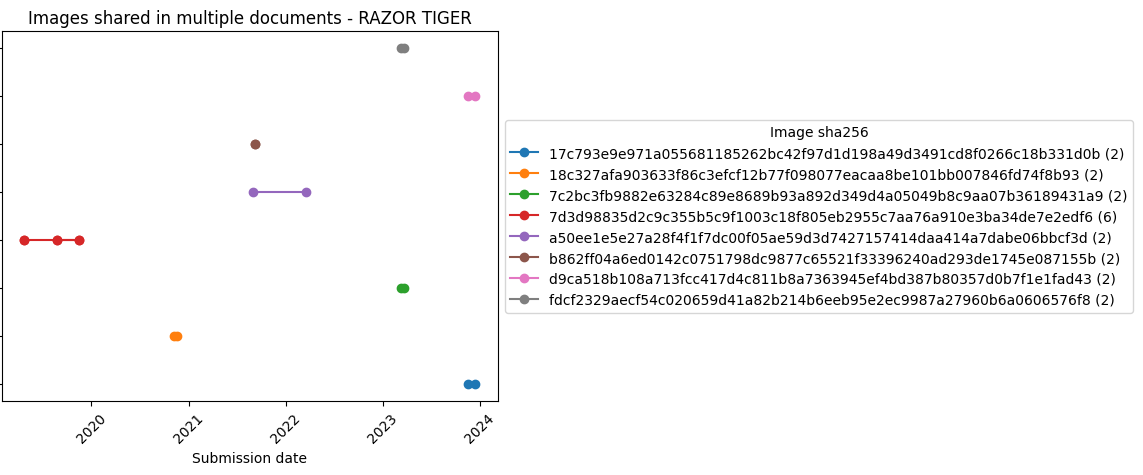
SideWinder (aka RAZER TIGER) is a group focused on carrying out operations against military targets in Pakistan. This group traditionally reused images, which might help monitoring their activity.
Figure 8: Images shared in multiple documents by RAZOR TIGER
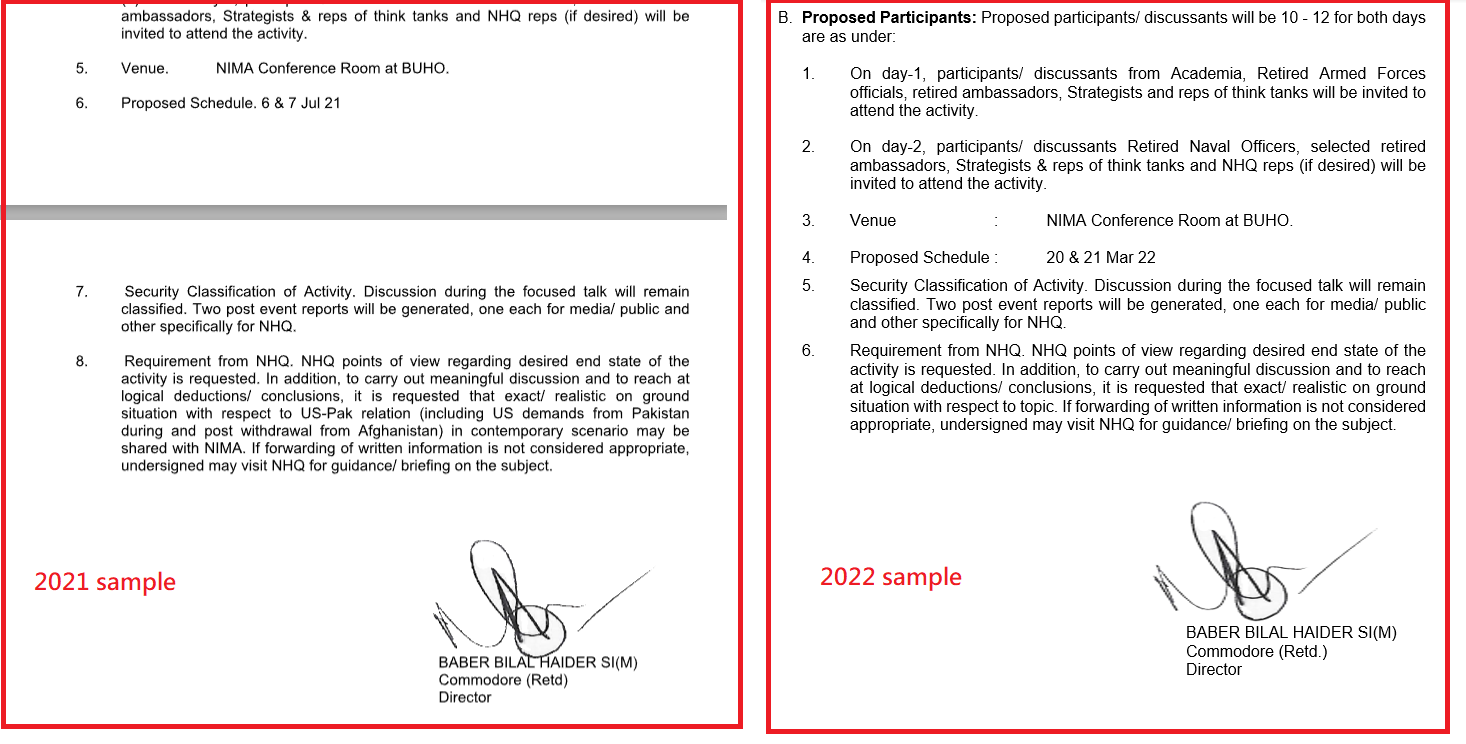
In particular, the image in Figure 9 was used in a sample uploaded in September 2021 and in a second one uploaded March 2022. The image in question is the signature of Baber Bilal Haider.
Figure 9: Two different samples of RAZOR TIGER share the same image of a handwritten signature
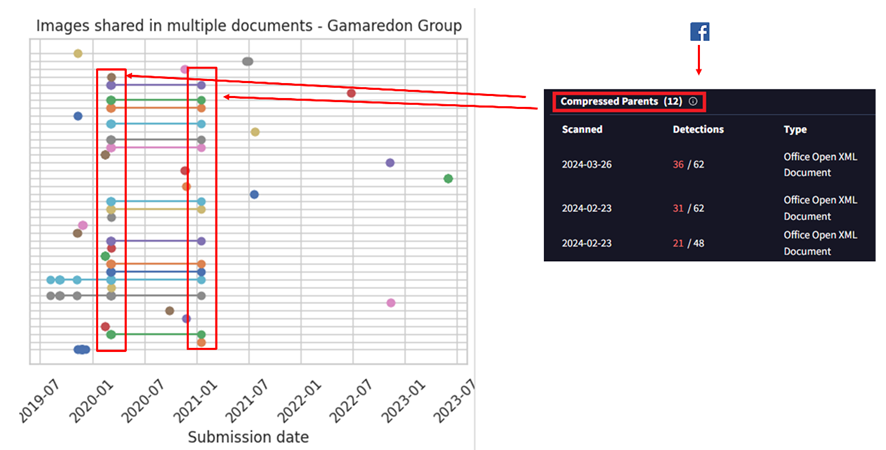
Gamaredon – [Content_Types].xml and styles.xml
For Gamaredon we found they reused styles.xml and [Content_Types].xml in different documents, which helped reveal new samples.
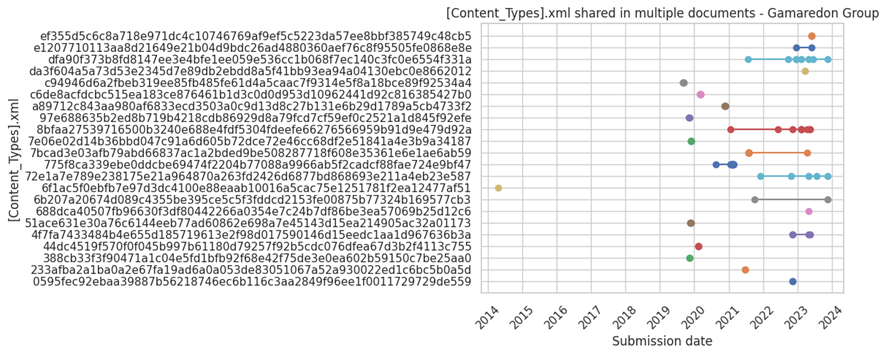
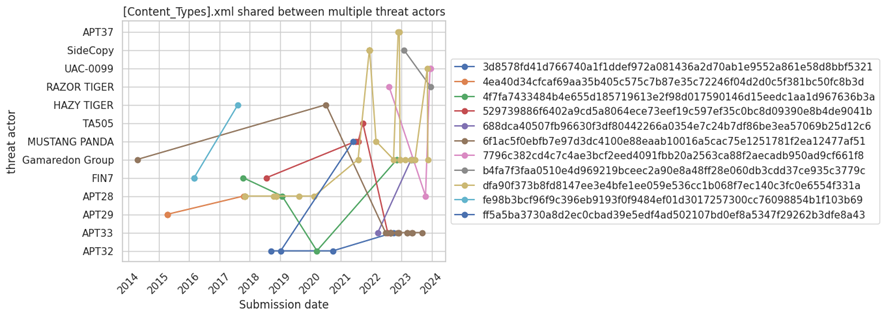
Figure 10 chart displays all the [Content_Types].xml files from Gamaredon's Office documents.
Figure 10: [Content_Types].xml shared in multiple documents by Gamaredon Group
There are a large number of samples that share the same [Content_Types].xml. It's important to highlight that these [Content_Types].xml files are not necessarily exclusively used by Gamaredon, and can be found in other legitimate files created by users worldwide. However, some of these [Content_Types].xml might be interesting to monitor.
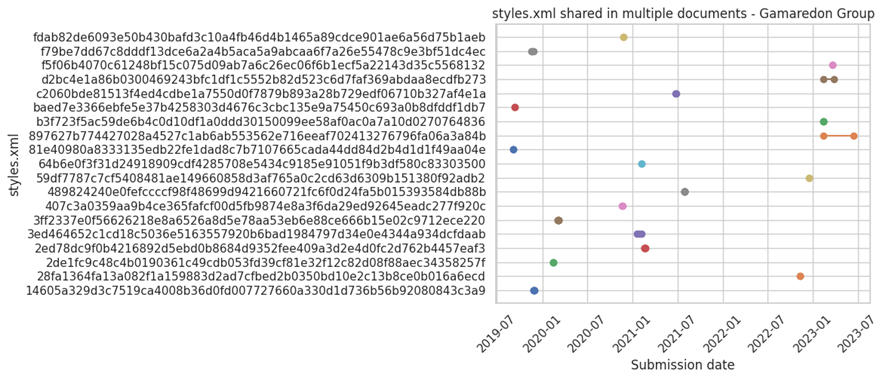
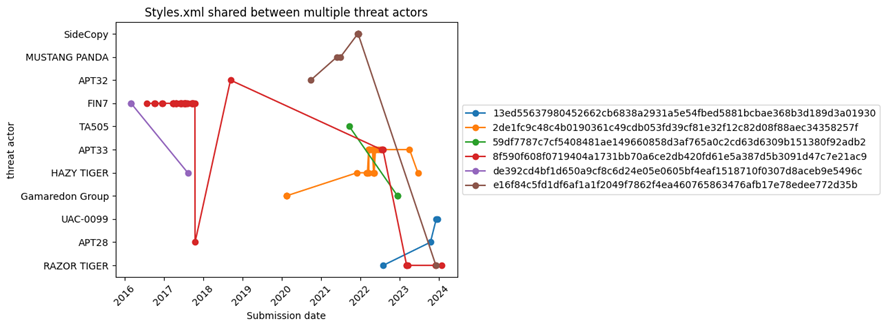
Styles.xml files are usually less generic, which should make them a better candidate to monitor:
Figure 11: Styles.xml shared in multiple documents by Gamaredon Group
We see styles.xml files are less reused than [Content_Types].xml. This could be because some of the samples used by this actor for distribution are created from scratch or reusing legitimate documents.
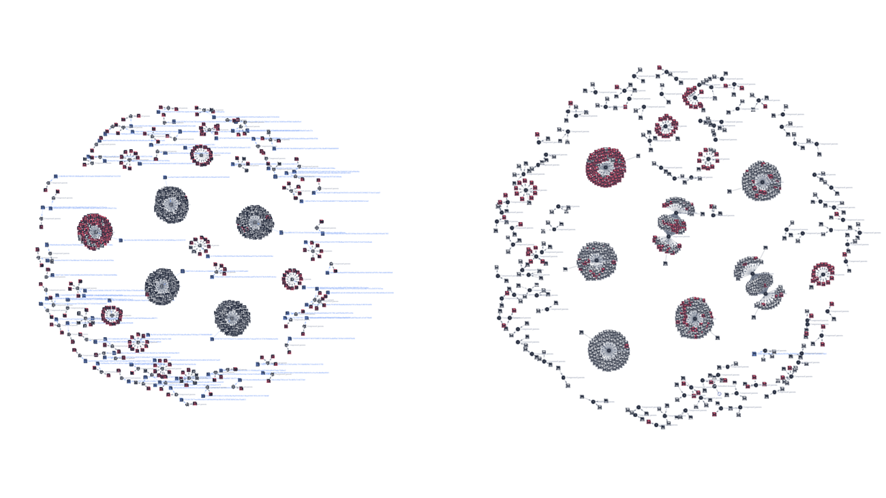
We used identified patterns in the styles.xml files to launch a retrohunt on VirusTotal. Figure 12 visually represents the original set of style.xml files (left) and those that were added later after running the retrohunt (right).
Figure 12: Initial graph of the styles.xml and its parents used by Gamaredon (left). Final graph after identifying new styles.xml and their parents using retrohunt in VirusTotal (right)
One of the new styles.xml files found in our retrohunt has 17 compressed parents, meaning it was included in 17 Office files.
Figure 13: Number of parent documents for a specific styles.xml file used by Gamaredon
All the parents were malicious, some of them identical and the rest very similar between them. The content of many of them referred to "Foreign institutions of Ukraine - Embassy of Ukraine in Hungary," containing a table with phone numbers and information about the embassy, such as social media links and email accounts. Here's an example:
Figure 14: Document used by Gamaredon in one of its campaigns that includes multiple images which can be used to monitor new samples
The information for social media includes the logos of these platforms, such as the Facebook logo, Skype logo, an image of a telephone, etc. By pivoting, on the image of the Facebook icon, we find that it has 12 additional compressed parents, meaning it appears in 12 documents, all of them sharing the same styles.xml file.
Visualizing all together, we find a set of about 12-14 images used within the same timeframe by the actor. All of these images can be found in the “Embassy of Ukraine in Hungary” document.
Figure 15: Pivoting through the Facebook image that included the document in Figure 14
There's a pattern evident in the previous image where different images were included in files uploaded simultaneously. This pattern is associated with multiple documents used in the same campaign of the Embassy of Ukraine in Hungary, all of them were using the same social media images explained before.
Styles.xml shared between threat actors
Another aspect we explored was if different threat actors shared similar styles.xml files in their documents. Styles.xml files are somewhat more specific and unique than [Content_Types].xml files because they can contain styles created by threat actors or by legitimate entities that originally created the document and then were modified by the actor. This makes them stand out more and can help in identifying threat actor activity.
This doesn't necessarily imply they share information to conduct separate operations, although in some cases, it could be a scenario worth considering.
Figure 16: styles.xml shared between different threat actors
Of all styles.xml files related to actors in our initial set, only six of them were found to be shared by at least two actors. Some styles defined by the styles.xml file are very generic and could identify almost any type of file. However, there are others that could be interesting to explore further.
An interesting case is the Styles.xml file, which seems to be shared by Razor Tiger, APT28, and UAC-0099. Specifically, the samples from APT28 and UAC-0099 are attract because they were uploaded to VirusTotal within short time frames, suggesting they might belong to the same threat actor.
You can see the list of hashes in the appendix of this blog
AI to the rescue
The images reused by attackers seem to be a promising idea we decided to further explore.
We used the VirusTotal API to download and unzip a set of Office documents used for delivery, this way we obtained all the images. Then we used Gemini to automatically describe what these images were about.
Figure 18: Results obtained with Gemini after processing some of the embedded images in the documents used by the threat actors
Figure 18 shows some examples of images that were incorporated by certain actors. There were also other results that were not helpful, mainly related to images that did not show a logo or anything specific that indicated what they were.
Figure 19: Results obtained with Gemini after processing some of the embedded images in the documents used by the threat actors
Using the VirusTotal API to obtain documents that you might be looking for and combining the results with Gemini to analyze possible images automatically, can potentially help analysts to monitor potential suspicious documents and create your own database of samples using specific images, for example Government images or specific images about companies. This approach is interesting not only for threat hunting but also for brand monitoring.
PDF Documents
Images dropped by Acrobat Reader
Unlike Office documents, PDF files don't contain embedded XML files or images, although some PDF files may be created from Office documents. Some of our sandboxes include Adobe Acrobat Reader to open PDF documents which generates a thumbnail of the first page in BMP format. This image is stored in the directory C:\Users\\AppData\LocalLow\Adobe\Acrobat\DC\ConnectorIcons. Consequently, our sandboxes provide this BMP image as a dropped file from the PDF, allowing us to pivot.
To illustrate this functionality, see Figure 20 attributed to Blind Eagle, a cybercrime actor associated with Latin America.
Figure 20: Content of a PDF file related to Blind Eagle threat actor
Figure 20 was provided by our sandbox. In the "relations" tab, we can see the BMP image as a dropped file:
Figure 21: BMP file generated by the sandbox that can be used for pivoting
The BMP file itself also shows relations, in particular up to 6 PDF files in the "execution parents" section. In other words, there are other PDFs that look exactly the same as the initial one.
Typically, many actors engaged in financial crime activities utilize widely spread PDF files to deceive their victims, making this approach highly valuable. Another interesting example we found involves phishing activities targeting a Russian bank called "Tinkoff Bank."
The PDF files urge victims to accept an invitation from this bank to participate in a project.
Figure 22: The content of a PDF file used by cybercrime actors
Applying the same approach we identified 20 files with identical content, most of them classified as malicious by AV engines.
Figure 23: BMP file generated by the sandbox that can be used for pivoting, in this case having other 20 PDF with the same image
There are some limitations to this approach. For instance, the PDF file might be slightly modified (font size, some letter/word, color, …) which would generate a completely different hash value for the thumbnail we use to pivot.
Images dropped by Acrobat Reader
Just like the BMP files generated by Acrobat Reader, there are other interesting files that might be dropped during sandbox detonation. These artifacts can be useful on some occasions.
The first example is a JavaScript file dropped in another PDF attributed to Blind Eagle.
Figure 24: BMP file generated by the sandbox that can be used for pivoting, another example of Blind Eagle threat actor
The dropped JavaScript file's name during the PDF execution was "Chrome Cache Entry: 566" indicating that this file was likely generated by opening an URL through Chrome, possibly triggered by a sandbox click on a link within the PDF. Examining the file's contents, we observe some strings and variables in Spanish.
Figure 25: Artifact generated by the sandbox via Google Chrome when connecting to a domain
The strings “registerResourceDictionary”, “sampleCustomStringId”, “rf_RefinementTitle_ManagedPropertyName” are related to Microsoft SharePoint as we were able to confirm. These files were probably generated after visiting sites that have Microsoft Sharepoint functionalities. We found that all the PDFs containing this artifact dropped by Google Chrome came from a website belonging to the Government of Colombia.
Figure 26: Flow of artifact generation related to Google Chrome that can be used for pivoting in VirusTotal
Email files
Many threat actors incorporate images in their emails, such as company logos, to deceive victims. We used this to identify several mailing campaigns where the same footer was used.
Campaign impersonating universities
On November 13, 2023, we details about a new campaign impersonating universities, primarily located in Latin America. By leveraging the presence of social network logos in the footer, we were able to find more universities in different continents targeted by the same attacker.
Figure 27: Email impersonating a university that contains multiple images
Figure 27 shows several images, including the University of Chile's logo and building, as well as images related to social networks like YouTube, Facebook, and Twitter.
Pivoting through the images related to the University of Chile doesn't yield good results, as it's too specific. However, if we pivot through the images of the social media footer, represented as email attachments, we can observe multiple files using the same logo.
Figure 28: Using the images from the email footer to pivot and identify new emails
Just by analyzing one of the social media logos, we saw 33 email parents, all of them related to the same campaign.
Figure 29: Other emails identified through image pivoting techniques
Campaigns impersonating companies
Another usual case is adding a company logo in the email signatures to enhance credibility. Delivery companies, banks, and suppliers are some of the most observed images during our research.
For example, this email utilizes the corporate image of China Anhui Technology Import and Export Co Ltd in the footer.
Figure 30: Email impersonating a Chinese organization using the company logo in the footer
Pivoting through the image we found 20 emails using the same logo.
Figure 31: Other emails identified through image pivoting techniques
Wrapping up
We can potentially trace malicious actors by examining artifacts linked to the initial spreading documents, and in the case of images, AI can help us automate potential victim identification and other hunting aspects.
In order to make this even easier, we are planning to incorporate a new bundled_files field into the IOCs JSON structure, which basically will help to create livehunt rules. In the meantime you can use vt_behaviour_files_dropped.sha256 for those scenarios where the files are dropped.
In certain situations, the styles.xml and [Content_Types].xml files within office documents can provide valuable clues for identifying and tracking the same threat actor. The method presented here offers an alternative to traditional hunting or pivoting techniques, serving as a valuable addition to a team's hunting activities.

 Login
Login


 Table Of Contents