❌

Normal view

Big Tech sues over California plan to limit kids’ scrolling

6 November 2026 at 16:06
.kadence-column485324_750a90-49 > .kt-inside-inner-col{padding-top:20px;padding-right:20px;padding-bottom:10px;padding-left:20px;}.kadence-column485324_750a90-49 > .kt-inside-inner-col{column-gap:var(--global-kb-gap-sm, 1rem);}.kadence-column485324_750a90-49 > .kt-inside-inner-col{flex-direction:column;}.kadence-column485324_750a90-49 > .kt-inside-inner-col > .aligncenter{width:100%;}.kadence-column485324_750a90-49 > .kt-inside-inner-col{background-color:rgba(255, 229, 229, 0.83);}.kadence-column485324_750a90-49 > .kt-inside-inner-col:before{opacity:0.3;}.kadence-column485324_750a90-49{position:relative;}@media all and (max-width: 1024px){.kadence-column485324_750a90-49 > .kt-inside-inner-col{flex-direction:column;justify-content:center;}}@media all and (max-width: 767px){.kadence-column485324_750a90-49 > .kt-inside-inner-col{flex-direction:column;justify-content:center;}}

In this article

  • California wants to switch off autoplay and personalized feeds for under-16s.
  • Google, Meta, and TikTok are suing to stop the restrictions.
  • Age checks could raise privacy concerns for adults, too.

Google, Meta, and TikTok filed separate federal lawsuits on November 4, challenging Assembly Bill 1709, which Governor Gavin Newsom signed in September.

The companies argue that the law, due to take effect in 2027, interferes with free speech, overrides parents’ decisions, and conflicts with federal protections for online platforms.

AB 1709 prohibits covered platforms from providing California users under 16 certain

“psychologically exploitative features intended to maximize engagement that foreseeably lead to compulsive use.”

The law specifically includes personalized “addictive feeds” and autoplay. It also allows the attorney general to define additional features through regulations.

It would not ban children from using the platforms. They can keep their accounts if the platform removes the restricted features. Otherwise, the platform must delete the account and associated personal information.

The law also requires age verification before providing the restricted features. The law doesn’t stop children from searching for videos, following creators, or communicating privately. It makes exceptions for certain search-based results, content that a user explicitly requests, and direct private messages, subject to conditions.

California’s argument is that harm is not limited to what children see. It can also arise from how a service encourages them to keep using it, through personalized recommendations and features such as autoplay.

The idea behind the law is straightforward: Instead of relying entirely on teenagers to recognize when to stop, require platforms to remove some of the mechanisms designed to keep them engaged.

The companies’ objections

The companies’ objections fall into several related categories.

Meta argues that deciding which posts to show, and how to arrange them, is protected editorial judgment under the First Amendment. Its complaint accuses California of attempting to appoint itself the

“editor, curator, and controller of online speech.”

TikTok makes a similar argument about its For You feed. It says selecting and arranging videos creates a curated product protected by free-speech rights, not merely a mechanism that the state can redesign at will.

Google likewise argues that YouTube’s recommendations help users find relevant, appropriate material among its vast collection of videos. It also defends autoplay as useful for watching content intended to be viewed in sequence.

The central disagreement is whether these are harmful product features that California can regulate, or editorial decisions protected by free-speech rights. California describes them as potentially harmful product design; the companies describe them as protected decisions about publishing speech.

The companies also raise parental control. Google says parents are best placed to decide what is appropriate for their families. TikTok points to its existing teen-account safeguards and Family Pairing controls, arguing that the law restricts free expression while taking decisions away from parents. Meta adds that personalized features can help deliver age-appropriate experiences.

The business model

There is also a commercial interest at stake: engagement. How often people return, how long they stay, and how much they interact all matter to the platforms’ businesses.

Meta’s annual report says it generates substantially all its revenue from advertising. It also says that changes to its content displays and product features can affect time spent, user engagement, and financial results. That doesn’t establish why the companies sued, but it helps explain why restrictions on recommendations and autoplay could have financial consequences.

If removing these features leads people to spend less time on a service, it could mean fewer opportunities to show ads. Compliance would also require product and operational changes, such as checking users’ ages and providing a different experience to those under 16.

Youth is the future. Big Tech is very much aware of this. Meta’s annual report identifies youth as an investment priority and describes attracting and retaining users as a competitive objective. Restrictions affecting how young people join and use a platform could affect its longer-term audience strategy, too.

What the future will bring

California is challenging an important part of the attention-based business model. Meta’s annual report warns investors that regulation affecting how it displays content or serves younger users could affect user growth, engagement, and financial results.

And then there’s the matter of age verification. The required age checks could affect adults as well as children: a service must verify users’ ages before providing the restricted features. Depending on how the checks work, this could involve sharing age-related information, raising privacy concerns and creating another opportunity for sensitive data to be exposed in a breach.

If it were up to me, platforms would stop designing for compulsive use, whatever the user’s age. Adults deserve a healthier online experience too. Applying those protections to everyone would also remove the need to check someone’s age before deciding whether they can use these features. Platforms might lose some advertising opportunities, but time spent online should not be the only measure of a successful service.


Scammers don’t need to hack you. They just need you to click once. 

Malwarebytes Identity Theft Protection catches suspicious activity before it becomes a problem.

Attacks on supermarket and blood storage systems prompt US warning

6 November 2026 at 13:02

Attackers don’t have to steal information to cause serious harm. Sometimes, changing a temperature setting is enough.

On November 5, the US Cybersecurity and Infrastructure Security Agency (CISA), Federal Bureau of Investigation (FBI), and three other federal agencies issued a warning urging operators to secure industrial refrigeration and cold-chain monitoring systems.

The warning follows cyberattacks on supermarket refrigeration systems across Europe. Separately, France’s national blood service confirmed that the monitoring and control systems at three of its cold-storage sites had been affected. Staff intervened before any blood products or samples were compromised. The incident showed how a connected cooling system can put essential supplies at risk.

On October 13, after the first attacks in France, refrigeration supplier Danfoss advised its Dutch customers to disconnect their systems from the public internet and reconnect only through a secure network.

A Danfoss spokesperson told NOS that most stores followed the advice. When similar attacks reached the Netherlands on November 2, major supermarket chains were reportedly unaffected. At least 17 businesses, mainly butcher shops and small neighborhood stores, had their refrigeration systems compromised.

Danfoss said that the affected systems were still accessible through unsecured connections and used default passwords. The spokesperson said the attacks could have been prevented if the recommended precautions had been taken.

CISA and its partners warned that attackers may exploit authentication bypass flaws, code-injection vulnerabilities, or weak configurations in refrigeration controllers. Successful attacks could let them change temperatures or force equipment into continuous heating or defrost cycles.

The agencies recommend reducing that risk by keeping control panels off the public internet, isolating operational equipment from business networks, changing default passwords, using strong authentication, patching firmware, and replacing unsupported devices. They also recommend setting safe operating limits and alerts for temperature changes outside those limits.

What about home appliances?

You don’t need an industrial refrigeration unit to adopt some of these precautions.

  • Check whether you need remote access. If you never use a device while away from home, disable that feature. Check the manufacturer’s instructions first; disabling remote access may also affect alerts or smart-home integrations.
  • Check who can access the appliance, including suppliers, and how that access is protected.
  • Change default passwords and secure the associated account. Use a strong password and enable two-step verification wherever the appliance or app supports it. Protecting the app account matters as well as protecting the appliance itself.
  • Keep firmware and apps updated. Turn on automatic updates where available, and don’t ignore manual update prompts.

CNET Editors' Choice Award 2026

“One of the best cybersecurity suites on the planet.” 

According to CNET. Read their review →


NIKKE PC launcher compromise put players’ passwords and personal files at risk

5 November 2026 at 23:06

Players of Goddess of Victory: NIKKE are being urged to check their PCs after attackers tampered with files used by the game’s Windows launcher. Opening the launcher could allow malicious software to run, potentially exposing much more than a player’s game account.

The incident occurred as part of a supply-chain attack, where services or software used by the company in question is compromised. In practice, this meant that instead of persuading players to download a fake game or install a suspicious add-on, the attackers compromised resources used by the legitimate launcher. Players could therefore encounter the threat simply by opening software they already trusted.

Game publisher Level Infinite has released fixes and added a malware-checking feature to the official PC client. However, fixing the delivery mechanism does not undo an infection, nor does it recover passwords and other information that may have been stolen.


Breaches happen every day. Don’t be the last to know.


Independent researcher MotherSphere identified malicious code in four JavaScript files hosted on Level Infinite’s official content delivery network (CDN).

Players should be aware of a discrepancy in the published timelines. Level Infinite says malicious-program distribution began on October 30, while MotherSphere reports evidence of the remote-control agent running as early as October 23.

According to the researcher’s analysis, the distributed remote-control agent supported commands to:

  • Run programs and system commands.
  • Browse folders and download files.
  • Take screenshots.
  • Retrieve saved NIKKE login credentials.
  • Collect browser passwords and cookies.
  • Search for developer credentials, API tokens, and other secrets.
  • Collect cryptocurrency wallet-extension data.

The number of compromised PCs and the full extent of any data theft remain unclear.

How to stay safe

Mobile-only players are not affected, according to Level Infinite, so they do not need to take any additional security measures.

Level Infinite says it replaced three abnormal script files early on November 4, then refreshed the CDN’s cache for the remaining file later that day. MotherSphere subsequently reported that all four files were clean on the four CDN servers checked.

If you opened the Windows launcher during the period identified above, take the following steps.

  • Close the launcher and check your PC. MotherSphere’s report includes user-reported Malwarebytes detections for traces associated with the attack.
  • Follow the removal instructions published by NIKKE carefully.
  • Secure your accounts from a clean device. Do not change passwords on a computer that may still be compromised.
  • If a cryptocurrency wallet or its recovery phrase may have been exposed, use a clean device to move funds to a newly created wallet with a new recovery phrase.
  • Level Infinite asks players who believe they were affected, including those experiencing problems with external accounts or financial losses, to contact its customer support team, so keep relevant records without handing over personal information.

Please note that the NIKKE wiki’s unofficial cleanup guidance recommends scanning with Malwarebytes. Although the guide describes this as a one-time free option, Malwarebytes Free lets you continue running manual scans and removing detected malware after the Premium trial ends. The trial provides additional features, including real-time protection, so decide what is best for you.


From reporting threats to removing them.

Cybersecurity risks should never spread beyond a headline. Keep threats off your devices by downloading Malwarebytes today.

Vizio, Samsung smart TVs seem to ignore tracking opt outs

5 November 2026 at 13:10
.kadence-column484998_59baca-d5 > .kt-inside-inner-col{padding-top:20px;padding-right:20px;padding-bottom:10px;padding-left:20px;}.kadence-column484998_59baca-d5 > .kt-inside-inner-col{column-gap:var(--global-kb-gap-sm, 1rem);}.kadence-column484998_59baca-d5 > .kt-inside-inner-col{flex-direction:column;}.kadence-column484998_59baca-d5 > .kt-inside-inner-col > .aligncenter{width:100%;}.kadence-column484998_59baca-d5 > .kt-inside-inner-col{background-color:rgba(255, 229, 229, 0.83);}.kadence-column484998_59baca-d5 > .kt-inside-inner-col:before{opacity:0.3;}.kadence-column484998_59baca-d5{position:relative;}@media all and (max-width: 1024px){.kadence-column484998_59baca-d5 > .kt-inside-inner-col{flex-direction:column;justify-content:center;}}@media all and (max-width: 767px){.kadence-column484998_59baca-d5 > .kt-inside-inner-col{flex-direction:column;justify-content:center;}}

In this article

  • Automatic Content Recognition (ACR) sends viewing data from your smart TV to third parties.
  • Vizio and Samsung TVs both appeared to send this data even when researchers opted out of ACR.
  • Only four out of eight smart TVs appeared to completely honor ACR opt-out.

If you thought that opting out of surveillance on your smart TV would give you your privacy back, think again.

A study by researchers at Northeastern University found that some smart TVs still seem to send information about what you’re watching to third parties, even after you pressed the opt-out button.

The study, ‘Watching the watchers‘, tested twelve smart TVs from ten manufacturers to find out how well they respected opt-outs from automatic content recognition (ACR). ACR is a TV feature that captures audio and/or video content from smart TVs and uploads it to a third party (typically the TV manufacturer).

The third party converts this content into digital fingerprints to understand what you’re watching, and can then use it to send targeted advertising or allow others to do the same. It’s on most if not all smart TVs, and 82% of US households had a smart TV as of last year.

The test took in the eight operating systems behind roughly 95% of US smart TVs, and ran ten viewing scenarios on each of them. These ranged from viewing antenna TV through to viewing via screen mirroring from another device. The researchers tested viewing the first-party streaming services provided free with the manufacturers’ operating systems, along with sessions using third-party streaming apps. And they tested sessions where the TV was connected to another device via its HDMI port.

The study ran all of its tests both with ACR left on, and with the opt-out setting selected. The whole test involved over 5,000 automated sessions.

Vizio continued to send 100% of what looked like traffic when viewing its first-party streaming services and antenna-based TV services, even after people had opted out, the study said. It also sent the same amount of traffic when idle. However it didn’t send any ACR traffic for third-party streaming data, according to the report.

Samsung did appear to leak some traffic from third-party streaming services after the researchers opted out of its ACR function. They tested 30 runs of Samsung’s built-in streaming service after opting out of ACR, and found that it still showed traffic “consistent with ACR”.

After opt-out, the Samsung TV’s Tizen OS seemed to send ACR-related traffic about Netflix in 7% of runs, YouTube in 10% of runs, and Tubi TV in 20%. It sent ACR 60% of the time from HDMI sessions. Like the Vizio TV, it also sent ACR traffic for all of its first-party streaming sessions.

Late last month, a researcher reverse-engineered a Samsung Smart TV and cast doubt on whether disabling ACR worked on the device.

There was good news, though. Four smart TV operating systems went completely silent after the researchers turned off ACR: LG’s WebOS, Sony’s Google TV OS, Amazon’s FireTV OS, and Supersonic’s VIDAA OS.

Encryption is a research challenge

Vizio agreed to pay $2.2 million in a 2017 FTC settlement over charges that it collected viewing histories on eleven million smart TVs without user consent. At the time, it agreed to allow people to opt out of ACR.

The Vizio TV that the researchers tested sent traffic to Kinesis, an Amazon-run data ingestion service that the manufacturer uses to analyze data from its smart TVs. The researchers noticed no dip in traffic to this domain when they opted out of ACR on a Vizio TV. They said:

“The opt-out setting has no observable effect on traffic sent to this endpoint. However, we cannot inspect the payload due to encryption so we cannot confirm whether this violates the FTC settlement.”

That’s a challenge to this research because most smart TVs encrypt their ACR traffic, including Samsung. So the researchers had to infer that this was ACR traffic based on signals such as where it was being sent, along with timing, volume, and protocol details.

One exception was Supersonic’s VIDAA OS, which sent ACR data to servers unencrypted. The servers responded unencrypted with a genre for what they recognized. Anyone watching the network could see it all, they warned. And because the servers didn’t require a login at the time of the test, over 57 million ACR detection results from other people’s TVs were accessible.

Vizio’s first-party streaming service WatchFree+ also dropped unencrypted titles of any show or channel being watched into online communications with the free TV service provider. There’s no way to turn that off, the researchers warned.

Walmart acquired Vizio for $2.3 billion in 2024, partly to help “advertisers to meaningfully connect with customers at scale and boost product discovery”.

The retailer also runs Walmart Connect, a retail media business that uses its customers’ data to help other businesses target them with ads.

Walmart was particularly interested in Vizio’s advertising business it, said at the time:

“Pairing it with Walmart Connect will be impactful and allow us to invest in our business even further on behalf of our customers.”

What smart TV owners can do

What can you do to protect yourself from a smart TV that might be sending your viewing data elsewhere? The researchers have some suggestions:

  • WebOS (LG), Fire TV OS, Google TV on Sony, and VIDAA OS on Supersonic all appeared to honor ACR opt-out, so selecting it on these TVs should be safe.
  • Disconnect the TV from the internet and use an external streaming device. That way the TV can’t send back data, even if it picks it up from the HDMI connection.
  • Use a blocklist. This takes a little more technical knowledge. If you run an internet router that can accept blocklists, then you can add a list of known ACR endpoints that will stop your TV’s traffic reaching them. The researchers provide one here.

Stop threats before they can do any harm.

Malwarebytes Browser Guard blocks phishing pages and malicious sites automatically. Free, one click to install. Add it to your browser →

mSecure tells users to change passwords but won’t say why [updated]

4 November 2026 at 18:02

Password manager mSecure has warned current and former customers to protect the confidential information stored in its app after detecting “suspicious activity.”

But its advice about what users should do comes without an explanation of what happened or whose information might be at risk.

The warning leaves users to decide whether to replace credentials—and whether it’s safe to store replacements in mSecure.

While those are perfectly reasonable questions, mSecure’s warning does not answer them.

In an email published by The Hacker News and sent to customers on November 3, mSecure’s developer, mSeven Software, said:

“mSeven Software (‘mSeven’) recently learned of suspicious activity associated with the mSecure password management application. In response, mSeven quickly launched an investigation, took steps to mitigate the issue, and engaged external cybersecurity experts to assist.”

The notice recommends that customers “immediately take steps to protect all confidential information” stored in mSecure. Those steps:

“may include changing passwords, resetting or re-enrolling two-factor authentication methods, or removing existing passkeys.”

But the notice does not identify the suspicious activity, when it occurred, which systems were involved, or whether anyone accessed customers’ stored information. The Register, which also reviewed the email, noted that the company had not explained whether customers’ secrets were exposed.

How to be safe

Because the scope of the incident is unknown, we recommend prioritizing your most important accounts while mSeven investigates.

Changing your mSecure password alone may not be enough if someone has already accessed your account. mSecure’s documentation explicitly warns that someone may already have made a backup of its contents. That guidance does not establish what happened in this incident.

Users should not have to wait for a completed forensic investigation before receiving useful guidance. They need to know who should act, which credentials need attention, and whether the tool they would normally use to manage those changes remains safe to use.

Until mSeven provides those answers, our advice is to prioritize your most important accounts, replace the relevant credentials through official services, and avoid destructive account resets:

  • Change passwords through each service’s official website or app, beginning with your primary email, financial accounts, work accounts, and accounts used to recover access to other services. Use a new, different, strong password for each.
  • Review two-factor authentication stored in the vault. If that could be compromised by unauthorized access, consider re-enrolling that account’s authenticator through the service’s security settings.
  • For passkeys stored in mSecure, use each website or app’s account-security settings to remove the old registration and create a replacement with a different provider as a precaution. But make sure another working sign-in method is available first.
  • Think carefully about where replacement credentials go. The notice does not establish whether saving new credentials in mSecure is safe. For users rotating important accounts now, using a different password manager temporarily is a reasonable precaution.

We’ll keep you posted if we learn more about this incident, so stay tuned.

Update November 6, 2026

According to follow-up messages attributed to mSecure support and reproduced by multiple customers on the company’s forum, the incident affects only users who synchronized with mSecure Cloud. We have not located a directly published company statement confirming that scope.


Let’s face it, an incognito window can only do so much. 
 
Breaches, dark web trading, credit fraud. Malwarebytes Identity Theft Protection monitors for all of it, alerts you fast, and comes with identity theft insurance. 

Chrome 157 fixes 213 security issues, including 7 critical flaws

4 November 2026 at 13:16

On November 3, Google issued Chrome 157 to the stable channel for Windows, Mac and Linux. The update is rolling out over the coming days and weeks.

Most users are on Chrome’s Stable channel. The desktop update brings Chrome to versions 157.0.8103.38/.39 for Windows and Mac and 157.0.8103.38 for Linux. It includes 213 security fixes, including seven vulnerabilities rated Critical by Google.

Chrome for Android was also updated to 157.0.8103.38. It will become available on Google Play over the coming days.

How to update Chrome

The easiest option is to allow Chrome to update automatically. But you can end up lagging behind on updates if you never close your browser or if something goes wrong, such as an extension preventing the update.

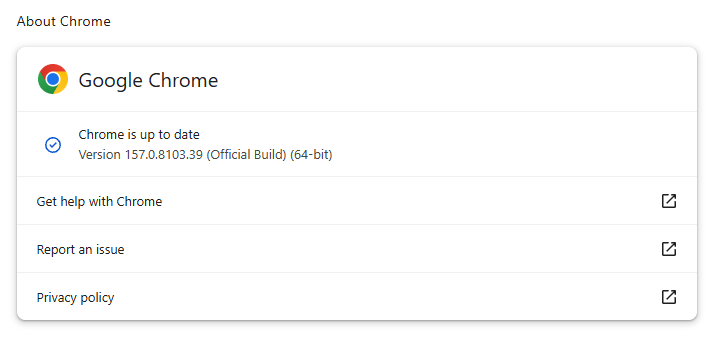
If you don’t want to wait for the rollout to reach you, you can update manually. Open About Google Chrome from Chrome’s settings or Help menu. Chrome will check for updates. If one is available, click Relaunch to apply it.

Chrome 157.0.8103.39 is up to date

You can find an explanation of the version numbering system and step-by-step instructions in our guide: How to update Chrome on every operating system.

Technical details

Some of the security fixes deserve a closer look.

Google rates seven vulnerabilities in the update as Critical. One, a memory corruption flaw in ANGLE, affects Chrome for Android. It could potentially allow a remote attacker to run code outside the sandbox through a specially crafted HTML page.


Mobile protection, anywhere, anytime.

.wp-block-kadence-advancedbtn.kb-btns400740_ab89fd-c4{gap:var(--global-kb-gap-xs, 0.5rem );justify-content:center;align-items:center;}.kt-btns400740_ab89fd-c4 .kt-button{font-weight:normal;font-style:normal;}.kt-btns400740_ab89fd-c4 .kt-btn-wrap-0{margin-right:5px;}.wp-block-kadence-advancedbtn.kt-btns400740_ab89fd-c4 .kt-btn-wrap-0 .kt-button{color:#555555;border-color:#555555;}.wp-block-kadence-advancedbtn.kt-btns400740_ab89fd-c4 .kt-btn-wrap-0 .kt-button:hover, .wp-block-kadence-advancedbtn.kt-btns400740_ab89fd-c4 .kt-btn-wrap-0 .kt-button:focus{color:#ffffff;border-color:#444444;}.wp-block-kadence-advancedbtn.kt-btns400740_ab89fd-c4 .kt-btn-wrap-0 .kt-button::before{display:none;}.wp-block-kadence-advancedbtn.kt-btns400740_ab89fd-c4 .kt-btn-wrap-0 .kt-button:hover, .wp-block-kadence-advancedbtn.kt-btns400740_ab89fd-c4 .kt-btn-wrap-0 .kt-button:focus{background:#444444;}
ul.menu .wp-block-kadence-advancedbtn .kb-btn400740_68fb6a-2d.kb-button{width:initial;}.wp-block-kadence-advancedbtn .kb-btn400740_68fb6a-2d.kb-button{color:var(--color-neutral-10);background:var(--color-brand-blue-60);border-top-left-radius:40px;border-top-right-radius:40px;border-bottom-right-radius:40px;border-bottom-left-radius:40px;padding:var(--kb-btn-padding);margin:var(--kb-btn-margin);box-shadow:1px 1px 2px 0px rgba(0, 0, 0, 0.2);}.wp-block-kadence-advancedbtn .kb-btn400740_68fb6a-2d.kb-button:hover, .wp-block-kadence-advancedbtn .kb-btn400740_68fb6a-2d.kb-button:focus{box-shadow:0px 4px 0px 0px var(--color-brand-blue-90);}Try it now

CVE-2026-121229: Memory corruption in ANGLE, which could allow a remote attacker to potentially execute arbitrary code outside the sandbox via a crafted HTML page.

ANGLE is Chrome’s graphics translation layer. A buffer overflow occurs when a program puts more data into an area of memory than it can hold, overwriting data in adjoining memory. An attacker can exploit this to make the vulnerable process run malicious code.

Chrome vulnerabilities that enable remote code execution outside the browser sandbox are particularly valuable to attackers because they can turn a visit to a malicious or compromised website into direct code running on the underlying operating system, often without requiring additional exploitation steps.

CVE-2026-121035: Use-after-free in Prerender.

Chrome’s Prerender component helps pages open faster by loading and preparing a page in the background before you navigate to it. If you then visit that page, Chrome can display the prepared version almost instantly instead of loading it from scratch.

This goes beyond just downloading content: Chrome also starts rendering the page and running its JavaScript.

A use-after-free vulnerability occurs when a program attempts to access a memory location after it has been freed. That can cause crashes or, in some cases, allow an attacker to run their own code.

CVE-2026-121156: Buffer overflow in Dawn.

Dawn powers WebGPU in Chrome, allowing websites to use a device’s graphics processor for rendering and computational tasks. It checks and translates WebGPU instructions into commands that the device’s underlying graphics system can understand.

A buffer overflow occurs when a program writes more data to a block of memory than it can hold. This can cause a crash or, in some cases, allow an attacker to run code.


Stop threats before they can do any harm.

Malwarebytes Browser Guard blocks phishing pages and malicious sites automatically. Free, one click to install. Add it to your browser →

A hidden backdoor put 1.3 million TV boxes to work for criminals

3 November 2026 at 15:11
.kadence-column484175_1ef361-88 > .kt-inside-inner-col{padding-top:20px;padding-right:20px;padding-bottom:10px;padding-left:20px;}.kadence-column484175_1ef361-88 > .kt-inside-inner-col{column-gap:var(--global-kb-gap-sm, 1rem);}.kadence-column484175_1ef361-88 > .kt-inside-inner-col{flex-direction:column;}.kadence-column484175_1ef361-88 > .kt-inside-inner-col > .aligncenter{width:100%;}.kadence-column484175_1ef361-88 > .kt-inside-inner-col{background-color:rgba(255, 229, 229, 0.83);}.kadence-column484175_1ef361-88 > .kt-inside-inner-col:before{opacity:0.3;}.kadence-column484175_1ef361-88{position:relative;}@media all and (max-width: 1024px){.kadence-column484175_1ef361-88 > .kt-inside-inner-col{flex-direction:column;justify-content:center;}}@media all and (max-width: 767px){.kadence-column484175_1ef361-88 > .kt-inside-inner-col{flex-direction:column;justify-content:center;}}

In this article

  • Google says Videostrong backdoored 1.3 million certified Android TV boxes and sold criminals access to the botnet.
  • The takedown disrupted the botnet, but the backdoor remains in infected boxes’ firmware.
  • Suspect your box? Disconnect it and ask the seller about a fix or replacement.

Most malware needs you to click something. This one came in the box.

Google’s Threat Intelligence Group (GTIG) says it has high confidence that Android device maker Videostrong Technology built and ran the XCPE backdoor for financial gain. Videostrong sold access to criminal affiliates, who loaded their own malware modules onto the boxes.

GTIG found that the backdoor, called x.cpe (or com.oemservice in some builds), sits in the firmware with system-level privileges. If someone uninstalls it, it reinstalls itself from the /oem/ partition when the device reboots. It could also switch off Google Play Protect app verification, allowing it to install more software without asking.

Google says Videostrong got past its compatibility and security tests by loading the malicious code after the device’s first boot. This allowed the devices to remain part of the residential proxy network.

Residential proxy networks rent out ordinary home IP addresses to customers. That makes their traffic appear to come from a legitimate consumer connection rather than a data center. This can help cybercriminals evade IP-based fraud controls and reputation systems.

The problem for users

Here’s what the backdoored set-top boxes could mean for their owners:

  • Your home internet connection could be used by others. Residential proxy modules routed other people’s traffic through infected boxes and their owners’ home IP addresses.
  • Ad fraud. Modules generated fake ad views and clicks in the background.
  • Spying and remote access to your device. Google observed operators capturing live screenshots, injecting keystrokes, collecting account and device information, and opening reverse shells.
  • More malware. Some affiliate modules were backdoors that could load further modules.
  • Your IP address could be linked to activity you didn’t start. Proxy traffic can include attempts to guess account passwords, for example, and may make your home IP address appear in connection with that activity.

How to stay safe

Google and its partners took legal action to take down the domains and servers Videostrong used to control the botnet. Google says it has banned Videostrong and its future subsidiaries and affiliates from making certified Android devices, and strengthened firmware integrity checks for certified Android TV devices.

The takedown only cuts the current connection to the malicious servers. It doesn’t remove the backdoor from infected devices, and can potentially be exploited by other criminals. If you think your box may be affected, disconnect it and contact the seller or manufacturer to ask for clean firmware or a replacement. Uninstalling the app won’t remove the backdoor from the firmware.

Google hasn’t published a complete list of affected models, so owners may not be able to tell from the model name alone whether their box is infected. If you decide to replace your box:

  • Buy from a reputable manufacturer.
  • Be cautious about “free TV” boxes. We’ve previously reported on Superbox and similar devices.
  • Be cautious about apps that pay you to share your bandwidth. They can route other people’s traffic through your internet connection.
  • Stick to trusted app stores and keep Google Play Protect switched on.
  • Isolate the box. Put TV boxes and other IoT gear on a separate network or VLAN with restricted outbound access. This doesn’t keep the devices themselves safe, but it does keep other devices separate.

Scammers know more about you than you think. 

Malwarebytes Mobile Security protects you from phishing, scam texts, malicious sites, and more. With real-time AI-powered Scam Guard built right in. 

.wp-block-kadence-advancedbtn.kb-btns97520_6de029-2f{gap:var(--global-kb-gap-xs, 0.5rem );justify-content:flex-start;align-items:center;}.kt-btns97520_6de029-2f .kt-button{font-weight:normal;font-style:normal;}.kt-btns97520_6de029-2f .kt-btn-wrap-0{margin-right:5px;}.wp-block-kadence-advancedbtn.kt-btns97520_6de029-2f .kt-btn-wrap-0 .kt-button{color:#555555;border-color:#555555;}.wp-block-kadence-advancedbtn.kt-btns97520_6de029-2f .kt-btn-wrap-0 .kt-button:hover, .wp-block-kadence-advancedbtn.kt-btns97520_6de029-2f .kt-btn-wrap-0 .kt-button:focus{color:#ffffff;border-color:#444444;}.wp-block-kadence-advancedbtn.kt-btns97520_6de029-2f .kt-btn-wrap-0 .kt-button::before{display:none;}.wp-block-kadence-advancedbtn.kt-btns97520_6de029-2f .kt-btn-wrap-0 .kt-button:hover, .wp-block-kadence-advancedbtn.kt-btns97520_6de029-2f .kt-btn-wrap-0 .kt-button:focus{background:#444444;}
ul.menu .wp-block-kadence-advancedbtn .kb-btn97520_074a67-a8.kb-button{width:initial;}.wp-block-kadence-advancedbtn .kb-btn97520_074a67-a8.kb-button{color:var(--color-neutral-10);background:var(--color-brand-blue-60);border-top-left-radius:40px;border-top-right-radius:40px;border-bottom-right-radius:40px;border-bottom-left-radius:40px;padding:var(--kb-btn-padding);margin:var(--kb-btn-margin);box-shadow:1px 1px 2px 0px rgba(0, 0, 0, 0.2);}.wp-block-kadence-advancedbtn .kb-btn97520_074a67-a8.kb-button:hover, .wp-block-kadence-advancedbtn .kb-btn97520_074a67-a8.kb-button:focus{box-shadow:0px 4px 0px 0px var(--color-brand-blue-90);}Try it now

Hackers put porn on public billboards and claim it was “far too easy”

3 November 2026 at 13:01

While digital billboards are supposed to grab your attention, recent reports from Egypt, Malaysia, and Brazil described them doing so with explicit footage.

The cyberattacks were claimed by a group called Leakers$, which said it exploited software used to send content to LED displays.

The group said it did not hack into individual billboards to show the pornographic footage, but that it accessed the software used to send the content.

For example, on October 29, explicit footage appeared on a large billboard overlooking one of Egypt’s busiest highways. Videos circulating online showed the attackers’ aliases and a Telegram channel address overlaid on the footage. Some motorists stopped to record it.

Egyptian authorities said the billboard’s operator suffered a website compromise, resulting in unauthorized footage appearing in several countries simultaneously. Similar events were reported in Malaysia and Brazil. The attackers also claimed access to systems in Iraq and China, but those claims are less firmly corroborated.

Speaking to The Cairo Report, a representative of Leakers$ claimed the group found thousands of exposed systems during roughly two hours of automated scanning. The representative described a vulnerability in content-transmission software and weaknesses accessible through the systems’ own web pages and interfaces.

That is the group’s account, but if it is accurate, it helps explain the apparent ease and reach of the attack:

  • Internet exposure makes targets discoverable. Attackers can scan for reachable management systems rather than physically approach individual screens.
  • Repeated software weaknesses can scale. Finding a flaw in software used across multiple installations can create opportunities far beyond one billboard.
  • Content-management access is the prize. Someone who gains control of the system that publishes advertisements may be able to replace legitimate content without touching the display itself.

This is another example of how convenient remote management can expose systems to attack. Recent attacks on refrigerated systems in European supermarkets demonstrated a similar risk. The cooling systems are internet-connected, so mechanics can remotely diagnose and fix problems.

What should be done

The risk of food waste or dangerous traffic situations should be a warning to review what organizations need to do to prevent their systems from being hacked and abused.

Regarding digital billboards, the Out of Home Advertising Association of America’s security guidelines tell operators not to rely on manufacturers’ default passwords or reuse passwords across displays. They also recommend restricting access to management services, using multifactor authentication, and protecting remote connections with a VPN.

But the practical response is less about protecting a giant television and more about securing a remotely managed computer system:

  • Restrict management access rather than leaving it open to the public internet.
  • Replace default and reused passwords and enable multifactor authentication.
  • Keep signage software, controllers, and networking equipment updated.
  • Check who has access, including suppliers, and how that access is protected.
  • Monitor systems and rehearse a way to stop unauthorized access quickly.

These same basic rules can be applied to smart household appliances.


What do cybercriminals know about you?

Use Malwarebytes’ free Digital Footprint scan to see whether your personal information has been exposed online.

Applebee’s customer data exposed by password left in app

2 November 2026 at 15:22

Applebee’s has fixed a security flaw that exposed customers’ personal information after a researcher discovered a database password embedded in the restaurant chain’s Android app.

The researcher, Robert Wiggins, found the password with help from AI. It gave him access to an internal Applebee’s customer database. A password written directly into an app’s code or configuration is known as a hardcoded credential. Anyone who extracts it may be able to use it to access the system.

The exposed database contained:

  • Names, email addresses, and email-verification status
  • Dates of birth, phone numbers, and ZIP codes
  • Veteran status
  • Account-creation dates and login counts
  • IP addresses from customers’ most recent logins, which can indicate their approximate location

TechCrunch independently checked Wiggins’ findings. It created an Applebee’s account with dummy information, which Wiggins successfully retrieved from the database.

According to TechCrunch, Wiggins could not find a suitable way to report the issue to Applebee’s or its parent company, Dine Brands, so he asked the publication to help contact them. TechCrunch held its story until the fix was confirmed. Applebee’s confirmed on October 29 that it had addressed the issue.

It’s unclear how many customers’ records were in the database. Dine Brands says it has not found evidence of unauthorized access, but its investigation is ongoing.

How to stay safe

The database fields described by TechCrunch did not include payment card details or account passwords. That does not tell us whether anyone accessed the database before the fix, so customers should watch for targeted scams.

Names, email addresses, phone numbers, and other personal details could help scammers make messages look relevant and convincing.

  • Be wary of unexpected Applebee’s-themed emails, texts, or calls. Be especially skeptical of messages offering refunds or compensation, warning that your account will be closed, or asking you to “verify” payment details.
  • Check security notices through a route you trust. Open the app directly or visit Applebee’s website yourself rather than following a link in an unexpected message. If necessary, contact the company using details you find independently.
  • Unsure whether a message is a scam? Check it with Malwarebytes’ Scam Guard for an assessment and advice on what to do next.
  • When sharing personal information, consider why the company needs it and whether you trust it to keep the information safe.

Link Checker

Unsure where a link goes? We’ll check it.


Fake PDF and search tools hijacked searches for 13.4 million Chrome users

30 October 2026 at 16:25

Ads promoted browser extensions as tools to find manuals, convert PDFs, or make searches safer. But many of these extensions sent users’ search queries through servers controlled by their operators.

Socket researcher John Tuckner identified 319 extensions with an estimated 13.4 million installs over a decade. The extensions hijacked users’ default search settings and routed their searches through servers controlled by the operators before sending them to Yahoo or Bing. This gave the operators access to users’ queries and let them earn referral payments.

Socket says the extensions were promoted through ads on networks including Google Ads, promoting tools such as “manual finders,” “PDF converters,” “safe search,” and “AI search.”

The extensions were listed in Google’s official store, but most were unlisted. That means people with a direct link could visit a listing and install an extension, while ordinary searches in the store would not show it. An ad offered help with an immediate task, a landing page encouraged installation, and the official store provided a familiar place to complete it.

Search hijacking

The main risk was that operators could see what users searched for. Searches can reveal health worries, financial problems, workplace interests, or other personal matters. Socket says queries were often associated with a unique identifier, which could let the operators link a user’s searches over time.

The proxy could also choose where to send a search. Socket says this could potentially direct users to phishing or malware pages, but it did not find evidence that the extensions had done so.

What should users do?

If your searches start going astray, or you installed a search, PDF-converter, manual-finder, or security extension after clicking an ad, check what’s installed.

  • Review your extensions. Enter chrome://extensions in Chrome’s address bar. Remove extensions you don’t recognize, no longer use, or don’t trust. To remove one, select Remove and confirm. If you’re unsure about an extension, check it against the list at the end of Socket’s blog.
  • Check your search settings. In Chrome, at the top right, select More (the three-dot menu), then Settings > Search engine. If Chrome says an extension is controlling a setting, review or remove that extension. The absence of this notice doesn’t confirm that all your extensions are safe.
  • Run a Malwarebytes scan to check for malicious extensions and other malware that could be affecting your device.

From reporting threats to removing them.

Cybersecurity risks should never spread beyond a headline. Keep threats off your devices by downloading Malwarebytes today.

Photo ID, bank checks, face scan? The UK’s age-check options

30 October 2026 at 14:00

As preparation for the UK’s planned social media ban, Ofcom has set out four ways social media platforms could check whether users are aged 16 or over. The government and Parliament will decide how the ban works in practice.

Ofcom is the regulator for the communications services in the UK. The BBC reports that Ofcom identified four ways to check someone’s age that it considers “highly effective.”

Here’s what those checks would involve:

  • Photo ID matching: Comparing a live image of you with the photo on an identity document, such as your passport, and checking the age information on that document.
  • Bank-based checks: Using age information your bank already holds about you, with your consent.
  • Facial age estimation: Using technology to estimate your age from your face. Ofcom says this technology has improved recently.
  • Digital ID services: Using a digital identity service to prove your age, rather than presenting a physical document.

Let’s think through what those checks could mean.

Challenges

The challenge isn’t simply checking someone’s age. It’s doing so without turning everyday internet use into an identity check.

Photo ID matching brings highly sensitive documents and facial images into the process, which raises questions about how that information is handled and protected. The risks aren’t hypothetical: as I reported last year, a breach at a third-party support provider for Discord exposed government ID images belonging to around 70,000 users.

Banking-based checks can be more privacy-preserving if they return only confirmation that someone meets the age threshold, rather than exposing financial information. But the important questions are what information each party receives, what gets retained, and whether the check can be linked to someone’s activity.

Facial age estimation can avoid uploading an identity document, but it still processes a sensitive image and makes an imperfect prediction. Ofcom acknowledges that some technologies can be wrong by a few years around age 16, so people near the threshold may face an additional verification check.

I would expect these checks to stop some underage access but not eliminate it.

Previous restrictions have been followed by workarounds, including increased VPN use, borrowed credentials, and migration to services outside the restrictions. The danger is treating a successful age gate as proof that children are now safe, when it might push them into less regulated spaces.

The effectiveness depends on how the checks are implemented. A VPN may help someone avoid a check triggered by their apparent location; it won’t, by itself, bypass an identity or facial check that is still required.

Similarly, Ofcom says matching a live image to an ID is intended to make it harder to borrow someone else’s document. We shouldn’t assume every workaround defeats every method. But Ofcom accepts that some motivated children will get through. The meaningful test is how much harm these measures prevent, weighed against the privacy risks and barriers they introduce— not whether every user has completed a check.

My personal preference is double-blind verification: a provider confirms that you meet the age requirement without learning which service you’re accessing, while the service receives proof of age without learning your identity. Proving you’re old enough shouldn’t mean revealing who you are.


Scammers don’t need to hack you. They just need you to click once. 

Malwarebytes Identity Theft Protection catches suspicious activity before it becomes a problem.

Binance hit by largest-ever crypto theft, with $6.3 billion stolen

30 October 2026 at 13:24
.kadence-column482616_9de20c-07 > .kt-inside-inner-col{padding-top:20px;padding-right:20px;padding-bottom:10px;padding-left:20px;}.kadence-column482616_9de20c-07 > .kt-inside-inner-col{column-gap:var(--global-kb-gap-sm, 1rem);}.kadence-column482616_9de20c-07 > .kt-inside-inner-col{flex-direction:column;}.kadence-column482616_9de20c-07 > .kt-inside-inner-col > .aligncenter{width:100%;}.kadence-column482616_9de20c-07 > .kt-inside-inner-col{background-color:#ffe5e5;}.kadence-column482616_9de20c-07 > .kt-inside-inner-col:before{opacity:0.3;}.kadence-column482616_9de20c-07{position:relative;}@media all and (max-width: 1024px){.kadence-column482616_9de20c-07 > .kt-inside-inner-col{flex-direction:column;justify-content:center;}}@media all and (max-width: 767px){.kadence-column482616_9de20c-07 > .kt-inside-inner-col{flex-direction:column;justify-content:center;}}

In this article

  • Attackers stole $6.3 billion from the Binance cryptocurrency exchange
  • Binance says user funds are safe, but watch out for fake support or recovery offers from scammers
  • Users should check their accounts and use official Binance channels.

Binance says a security incident affected approximately $6.3 billion in cryptocurrency. Its initial investigation points to a compromised DevOps engineer’s laptop as a possible entry point.

The exchange says it has frozen around $3 billion with help from blockchain partners. It has promised to cover all losses using its emergency fund and company funds. Binance is reportedly the largest cryptocurrency exchange by daily trading volume.

What happened?

In an update on October 30, Binance said attackers may have used a compromised laptop belonging to a DevOps engineer to access a service container and submit unauthorized withdrawal transactions. The company said:

“We have found no evidence of any wallet private key leak.”

This doesn’t mean that one employee could simply transfer billions of dollars. Binance co-CEO Richard Teng told BleepingComputer the attacker did not simply use one engineer’s permissions. The incident involved a more complex process, rather than a single “one-click” action. Binance also said investigators had identified additional breach points.

Blockchain intelligence firms TRM Labs and Chainalysis have linked the theft to TraderTraitor, a North Korean hacking group associated with previous cryptocurrency thefts. TRM Labs estimates that about $6.36 billion left Binance wallets across ten blockchains, with most of it moving within about 20 minutes.

What should Binance users do?

Binance says approximately $3 billion has been frozen on-chain, while blockchain analysts have reported somewhat different totals. For now, those figures should be treated as developing estimates rather than a final accounting of recovered funds or the exchange’s ultimate losses.

Binance.com users (Binance.US was not affected) should check their accounts, avoid follow-up scams, and respond quickly if they spot signs of a separate compromise.

  • Go directly to official updates. Open the Binance app or navigate to its support site yourself. Avoid logging in through unexpected messages claiming that you must urgently verify your account or claim compensation. Binance has asked customers to rely on official channels.
  • Review your account and report anything unexpected. Check your transaction history and account security settings. If you find activity you do not recognize, contact Binance through its official support service. Binance’s support center includes options to disable an account and reset a password or two-factor authentication.
  • Never give anyone your authentication codes. Treat requests for login codes as a warning sign, even if the person claims to be helping with the incident.
  • Be wary of anyone promising to recover cryptocurrency. The FBI published a warning in 2023 that fake recovery services target people who have already lost cryptocurrency.
  • Preserve evidence if you lose money to a related scam. Keep messages, wallet addresses, transaction details, and information about anyone offering recovery services.

Pro tip: Unsure whether a message is a scam? Check it with Malwarebytes’ Scam Guard for an assessment and advice on what to do next.


Link Checker

Unsure where a link goes? We’ll check it.


Malicious Firefox extensions impersonate popular crypto wallets

29 October 2026 at 15:06

Socket’s threat researchers found three malicious Firefox extensions that impersonated the Phantom, Jupiter, and Bitget crypto wallets.

Once installed, the malicious extensions stole recovery phrases and private keys, which would provide the attacker with full control of a wallet.

A crypto wallet is an app, browser extension, or physical device that lets you manage cryptocurrency such as Bitcoin. Despite its name, it doesn’t actually hold your coins. Those are recorded on a blockchain, a shared digital record of transactions. Instead, the wallet manages the secret digital keys that let you access and spend them.

When you create a wallet, you may be given a recovery phrase: a list of words you can use to restore access. Write it down and store it offline. It’s a backup of your keys, not just an ordinary password. Anyone who gets hold of it can take control of your funds, which is why fake wallet extensions try to steal it.

Cybercriminals listed three fake wallet extensions on Firefox Add-ons, impersonating Phantom, Jupiter, and Bitget. The genuine wallets offer extensions for other browsers: Jupiter lists Chrome, Brave, and Edge; Bitget’s extension is for Chrome; and Phantom says its Firefox extension is no longer supported.

The malicious extensions looked for 12-, 15-, 18-, and 24-word recovery phrases, as well as Ethereum and Solana private keys. They could read input fields, detect pasted text, and scan screens displaying recovery phrases.

A recovery phrase or private key is a bearer secret: whoever holds it controls the wallet and can move its assets. The Phantom variant’s backend logged captured secrets, sent them to a Telegram bot, and automatically moved funds to hardcoded payout addresses. Those addresses covered Ethereum, BSC, Polygon, Arbitrum, Optimism, Base, Avalanche, Solana, and Bitcoin. The Phantom variant could read a phrase both when it was typed during import and when it was displayed on a reveal screen.

How to stay safe

Socket says all three listings were live on Firefox Add-ons during its analysis and have since been removed. But if you find one of these extensions in your Firefox browser, you should:

  • Remove the extension. Use the three-dot menu next to it and choose Remove.
  • If you ever entered a phrase or key, create a new wallet on a clean device and move your assets immediately. Treat the old wallet as compromised.
  • In the future, install wallets only from the vendor’s official website link, not from store search results.
  • The fake Phantom listing asked to access data on all websites and had no privacy policy. These are warning signs to look out for.
  • Use an up-to-date, real-time anti-malware solution that blocks malicious websites.
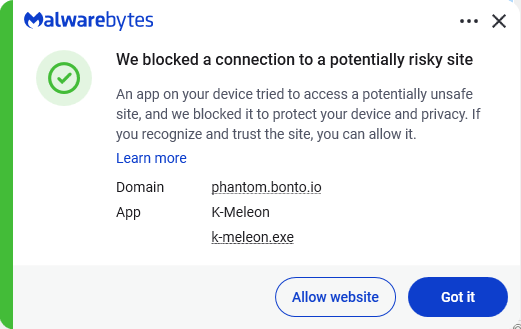
Malwarebytes blocks phantom.bonto.io
Malwarebytes blocks bonto.io subdomains

Never enter your recovery phrase on a website. Enter it only in the official wallet app when restoring. Wallet support will never ask for it.

IOCs

The malicious extensions:

  • Phantom impersonator: add-on ID 3092199
  • Jupiter impersonator: add-on ID 3092666
  • Bitget impersonator: add-on ID 3092059

Subdomains:

  • bonto[.]io
  • phantom[.]bonto[.]io
  • jupiter[.]bonto[.]io
  • bitget[.]bonto[.]io
  • coinbase[.]bonto[.]io
  • exodus[.]bonto[.]io

IP addresses:

  • 104.21.34[.]69
  • 172.67.155[.]198

From reporting threats to removing them.

Cybersecurity risks should never spread beyond a headline. Keep threats off your devices by downloading Malwarebytes today.

❌