Agents can triage, enrich and correlate at machine speed. But someone still has to own the risk call. On Episode 18 of EC-Council’s The Cybersecurity Podcast, Foresite Cybersecurity’s Jeremy Hehl tells host Jay Bavisi why the fully autonomous SOC is further off than vendors suggest, and why governance is the next real frontier.
Every security operations center now claims to be “AI-powered.” For MSSPs, saying anything else risks being labeled old school. So what does an agentic AI SOC actually look like in production?
Jay Bavisi, founder of EC-Council and host of The Cybersecurity Podcast, put that question to Jeremy Hehl, Chief Cybersecurity Evangelist at Foresite Cybersecurity, where he leads the company’s Google SecOps partnership. Their 40-minute conversation covered the limits of autonomy, the future of the SIEM, the fate of L1 analysts, ISO 42001, and the post-quantum risk that keeps Hehl awake at night.
Agents compute, humans decide
Hehl sees real promise in autonomous security operations. Investigation, triage, data aggregation, enrichment and correlation can already be handled by agents “pretty seamlessly,” he said. The hurdle is risk determination: deciding whether something actually matters to the business.
“The question I always ask customers who come to us and say that they want a fully autonomous SOC is: who do we fire when something goes wrong? Do we just dismiss the agent?”
Foresite’s approach treats agents as force multipliers rather than replacements. Hehl compared it to handing analysts a tricorder, a tool that scans and characterizes a threat instantly so the human can decide what to do. Bavisi summed up the model as “agents compute, human decides,” and Hehl agreed, adding that the risk call is the deciding factor.
Is the SIEM on borrowed time?
Asked why Foresite’s Google work matters when most premier SIEMs already ship with AI built in, Hehl pointed to a coming paradigm shift in where data lives. Data sovereignty, regulated industries and ever-growing telemetry volumes are straining the traditional model.
Today, a SIEM aggregates logs into a central plane, normalizes them into fields, and runs detection logic over the result. Hehl expects that to change. Logs will increasingly stay where they reside, in a hyperscaler such as Google, Azure or AWS, and agents will synthesize the raw telemetry in place.
“The idea of a SIEM may become something that is deprecated pretty rapidly.”
He likened the economics to cell phones in the 1990s, when minutes and text messages became commoditized. Data storage will become an assumption, and providers will bill for agent activity and “token burn” instead. Keeping telemetry in BigQuery, he noted, is far cheaper than keeping it hot in a separate SIEM. “The technology has to support it, and we’re not quite there yet,” he added.
The platform is also open by design. Foresite builds primarily on Google’s Vertex AI and Gemini, but Hehl said almost any model, including Claude, can be wired in through APIs and credentials. Agents are, in effect, privileged users, though wiring in other models takes real engineering, parsing and upkeep.
Is the SIEM on borrowed time?
Bavisi raised a trend seen worldwide: L1 roles vanishing, then L2, leaving only L3. Is that simply where agentic technology is heading?
Hehl said Foresite’s experience runs the other way. “We haven’t eliminated jobs. We’ve only grown,” he said. Adding agents to triage, threat hunting and analysis has let analysts handle 10 to 15 times the workload. They dismiss false positives quickly and spend the time saved on learning and more meaningful work.
He invoked the Industrial Revolution in England and France, when coal-powered textile machinery drew a Luddite backlash and even riots. Over time, workers using the machines became far more productive, and business owners demanded more output. This is the pattern known as Jevons Paradox, and Hehl sees agentic AI in the SOC following the same path.
Having started his own career red-teaming banks and working in a SOC, Hehl knows the burnout of triaging the same alert queue “over and over and over again.” Agents that correlate alerts into single cases, surface heuristic patterns and flag statistical outliers do that work “really, really well,” he said. The drudgery goes away; the analyst does not.
The few vendors promising fully autonomous SOC operations, he added, are narrow and tightly focused. Agents that reach a decision and enforce an action must be rigorously tested and simulated, and without clean data they hallucinate. Removing human control over security posture “is pretty unlikely in the next decade or so.”
Taming a non-deterministic technology
Bavisi pressed on a core engineering problem. Ask a frontier model the same question five times and you may get five different answers. How do you build a SOC on that without hallucinations and with consistent results?
Hehl’s answer: a measured, staged deployment. Start with narrow, targeted use cases where machines clearly beat humans, such as data manipulation, API access, running queries and writing code. Then build up capability and maturity step by step.
In enterprise engagements, Foresite first gets data normalization to “basically four nines.” Only then do agents go into the automation playbooks. Hehl argued that calling an agent today is not much different from calling a cloud function that once sat as Python inside a SOAR playbook.
“If you set up markdowns and guidelines and files and restrict the identity of the agent to only do very prescriptive things, as opposed to being all-encompassing, those are the outcomes that customers are looking for.”
He also described three types of MSSP customer. Some just want their brand and stakeholders protected. Some want an extension of their blue team bench. Others come to learn the “massive wall of knobs and levers” in Google’s security portfolio. Mid-market and SMB clients mostly treat agentic capability as part of the service. Enterprises usually already run agents elsewhere in the business and need a careful path to using them for security.
Governance: the next frontier for MSSPs
The industry has swung from “fire all humans and buy all the tokens” to “fire all the tokens and hire all the humans,” Bavisi observed, and is now wobbling in the middle. Where does AI governance fit for customers?
Hehl called it “the next real frontier” for managed security providers, with ISO/IEC 42001 emerging as the benchmark in the US. As public sector bodies adopt hyperscale platforms with agentic capabilities built in, they will need observability into what fleets of agents with permissive access are doing and saying to each other. That raises hard questions: where the harness sits, what protocols apply, and how to read intent from prompts and agent behavior.
“There’s a difference between an agent that sits there and does a prescriptive task … and when we start allowing agents to quantify risk and call other tools.”
He cited Wiz, which maps every model and agent in an environment and the lines of communication between them, and partner Safe AI for observability of agent activity. The CISO’s real dilemma, he said, is simple: “I’m being told I have to deploy AI. I am deploying AI. How do I secure this?”
The forgotten middle
Bavisi divided the world into three tiers. The top 5%, such as Google, Salesforce and Microsoft, have ISO 42001, red teams and consultants. At the other end are organizations that think two ChatGPT subscriptions make them an AI company. The vast majority sit in the middle. They know AI is more than chatbots but don’t know how to adopt, defend or govern it, and they cannot afford tier-one observability tools that may cost a million dollars.
How, he asked, should a business in Hokkaido, Jordan or New Zealand handle intent drift, blast radius, agent-to-agent communication and the transfer of governance between agents?
Hehl noted a related trap. Niche AI startups often build a narrow agentic product, only for the next frontier model or hyperscaler update to build that feature in and make the company irrelevant. For the mid-market, he argued, the answer is partnership: managed providers that deliver governance and observability as part of the service, “a Sherpa through the valley.”
Having ISO 42001 vs. living it
Bavisi pointed out that ISO 42001 has more than 190 controls, and as with ISO 27001, holding the certificate and operating by it are two different things. Do organizations show compliance for regulators while running with serious gaps?
“All the time,” Hehl said. Agentic adoption remains limited in US classified environments (IL-4 to IL-6) and in multinational bodies such as the European Space Agency, a Foresite client. In the commercial world, the most governed vertical with the largest gap is healthcare and life sciences, which holds sensitive patient data and research.
His prescription is to move telemetry into the cloud. Once workloads move from physical data centers into a hyperscaler, “the policies are native by default. And when agents are deployed, they’re governed by default.” The next big push, he said, is identity and privileged access management for agents, treating them as users. Bavisi added temporal context as another layer to solve.
Consolidation, and a $250,000 query
Bavisi argued the industry has a duty to bring along the businesses “where the actual civilization exists.” How? Hehl’s one-word answer: consolidation.
By around 2035, he expects hyperscalers such as Google, Microsoft and AWS, along with CrowdStrike, Palo Alto Networks, Cisco and to some extent Oracle, to keep absorbing companies and technologies. That will make enterprise-grade tooling usable by businesses of every size from one platform. Startups will keep flourishing, and Israeli startups will stay disruptive, but Hehl predicts acquisition values will fall as vibe coding lets almost anyone build a product. He also sees Chinese and Indian AI models closing the gap with American ones, with major implications for global security over the next 20 years.
On Anthropic’s Mythos, Hehl was blunt: it is “the greatest sales tool ever created.” It has stirred fears of boogeyman vulnerabilities, but he said it is genuinely capable of discovering zero-days and attack paths that need fixing. That in turn creates business for defensive tools such as Google’s CodeMender. None of it changes the basic discipline: find attack paths, shore them up, test, repeat. “We’re never really more than 99% of the way there.”
The other barrier for the middle market is cost predictability. Token-based pricing is not yet predictable. Hehl admitted Foresite once ran an accidental $250,000 query on Gemini during iterative testing and had to ask Google for forgiveness. Predictable pricing, he said, is what will let more customers lean in.
What really blocks the move to AI-era security
Asked about the biggest obstacle to moving an organization from traditional security to an AI-era culture, Hehl named three:
Financial opacity. Customers lack transparency on what AI will actually cost.
Unclear goals. Organizations often lack a clear picture of what they want AI to achieve, which calls for education and enablement.
Reluctance to hand over control. Teams that have built careers around a security posture over the past decade ask why they should introduce new pain when nothing hurts now.
Winning them over is part of the “trust motion,” he said, and some will never make the shift because of requirements that keep them where they are.
Machine-speed attacks and a post-quantum dam
What keeps Hehl up at night is machine-speed attacks, which he said “are absolutely accelerating,” and frontier models built explicitly to break software and create new attacks. Beyond that is the prospect of cryptography being cracked faster than it can be rotated.
Bavisi shared the concern. He sees cracks already forming in encryption and fears the day “the dam breaks, and we’re not ready for a PQC world.” Hehl pointed to the downstream effects on blockchain, financial systems and energy grids, and the limits of what any single defender can do.
“There’s nothing we could do as an MSSP or a security practitioner to reset global cryptography … to reset the keys that we hold dear in order for us to maintain those chains of custody, privacy, and command over those systems.”
The takeaway from the conversation, Bavisi said in closing, is that the agentic SOC “is not just in the labs. It’s already in production.” The open question is whether governance, cost models and the cryptographic foundations underneath can keep up.
Yesterday, two critical vulnerabilities were disclosed in PHP, the scripting language used by many websites and online services: CVE-2026-109618 and CVE-2026-109619. Attackers can exploit them to remotely execute commands on any server running PHP, with no authentication required. The exploit has been dubbed PHP2Shell.
The PHP security team announced an upcoming emergency update on October 20 and released patches fixing the vulnerabilities the following day.
Nearly 70% of websites run on PHP, including services we use every day: wikis, online stores, smart devices with web interfaces, home network-attached storage (NAS), smart-home controllers, and much more.
Today, we explain how these vulnerabilities could affect you personally and what you can do to reduce the risks.
How the vulnerabilities can affect home users
Account and personal-data theft
The vulnerability allows an attacker to steal authentication tokens from server memory. These tokens essentially act like electronic passes — telling a website that the user has already signed in. As a result, an attacker may be able to access someone else’s account without entering a password or two-factor authentication code, putting messages, documents, delivery addresses, order histories, and other confidential information at risk.
Loss of files on home devices
If you have network-attached storage (NAS) or a video surveillance system at home that uses a vulnerable PHP version, it may also be at risk. Depending on what level of access they gain, attackers could potentially copy, delete or encrypt files they can access.
Malware infection
If an attacker gains access to a vulnerable website, they can use it in virtually any way they want: trick visitors into downloading a malicious file or clicking on a phishing link, display dangerous instructions, replace payment forms or login pages with malicious ones — the list goes on and on. As a result, someone visiting a legitimate website could not only lose access to their account, but also lose money or accidentally infect their device with malware.
Below are examples of services directly affected by the vulnerabilities.
Which services are affected by the PHP vulnerabilities
Jeedom
Jeedom is a smart-home platform that lets users control lighting, sensors, heating, blinds and home IoT devices. Attackers could abuse this in many ways: they could disable the alarm, track when the homeowner is away, access video from the door intercom, and more.
The developers confirmed that the new vulnerability affects their application, and have already released an emergency update — Jeedom 4.6.2. Users need to run the update twice for it to work. The developers say a fully fixed version for home users will be released in the coming days.
Websites we use every day
As mentioned above, PHP is used by roughly 70% of websites. This doesn’t mean every one of them is vulnerable: it depends on the PHP version in use and whether the site owners have already updated it. Many government websites in Europe have already suspended operations because of the new vulnerability.
Unfortunately, a website may still be vulnerable even if it appears to be working normally. An attacker could potentially take control of any legitimate website whose server hasn’t been patched yet. They could fake payment or login pages, host malicious files, or persuade users to download an “urgent update” that is actually malware.
Ordinary users have no reliable way to check whether such instructions or files are safe, so be sure to use reliable anti-phishing and antivirus protection. If you suspect that your data may have been stolen, check the active sessions in your account settings. If you spot suspicious activity or devices you don’t recognize, sign out of all active sessions and change your password. Use a password manager— it can generate a truly strong, unique password that you won’t have to memorize yourself.
Computer games
Bad news for gamers: some video games whose servers use PHP are also at risk. If you don’t want attackers to get hold of your accounts, be sure to update the passwords for your gaming platforms, stores and accounts.
To buy time for updates, some developers temporarily took their services offline. Final Fantasy XIV, Pokemon Champions, games from Bandai Namco Entertainment, Uma Musume: Pretty Derby, Granblue Fantasy, Shadowverse: Worlds Beyond, and many others went into emergency maintenance. Nintendo Switch Online and the GOG and Steam stores were also affected.
Unfortunately, there’ve also been more drastic consequences. Yesterday, the developers of World Questannounced that the game would shut down permanently after 15 years: it relied on outdated infrastructure that would have been extremely difficult and costly to fix. For the same reason, the mobile game Please Save My Pandemonium! shut down after more than ten years of operation.
Home network-attached storage (NAS)
“Home clouds” have become popular in recent years for good reason: many users prefer to keep backups of their data at home rather than online. A number of companies make NAS devices, and at least three — QNAP, Synology and ASUSTOR — have said the vulnerabilities affect their products. An update has also been released for Unraid, an operating system for home servers, network storage and media servers.
QNAP
The manufacturer confirmed that the vulnerabilities affect several versions of its NAS operating systems — QTS and QuTS hero — as well as applications including QuMagie, Note Station 3 and certain versions of QVR Surveillance. A successful attack could put photos, documents, notes and camera recordings at risk.
At the time of publication of this blogpost, QNAP is still preparing updates, so the main priority is to temporarily disconnect NAS from the internet. QNAP recommends disabling port forwarding on the router — to prevent NAS from automatically opening ports — and allowing access to the management panel only from the home network or through a VPN.
Synology
Both vulnerabilities have been officially confirmed in PHP packages 7.3, 7.4, and 8.0–8.4, as well as in Mail Station and Synology Calendar. Fixes have already been released for PHP, starting from version 7.4, as well as for Mail Station and Synology Calendar. PHP 7.3 won’t be fixed. The company separately notes that the PHP component built into its operating system cannot be reached from outside the device, so the risk of attack is very low.
ASUSTOR
ASUSTOR also officially confirmed both vulnerabilities, and immediately removed PHP 7, 7.3, 7.4, and 8.1 packages from App Central. The company recommends immediately backing up your data, removing older PHP packages, and using PHP 8.3 or 8.4.
Unraid
In today’s operating-system update, PHP was upgraded to version 8.4.27 with fixes for the vulnerabilities. The developers recommend that all users update to Unraid 7.3.4. Containers with their own PHP installation must be updated separately: the new PHP version in the operating system doesn’t replace PHP inside containers.
At the time of publication, we haven’t found public confirmation from other major manufacturers (such as TerraMaster, UGREEN, Buffalo, or Western Digital) that their devices are affected by these vulnerabilities — only user discussions on forums.
But the fact that only some NAS manufacturers have confirmed the problem so far doesn’t guarantee that your devices are safe — especially if they’re fairly old or come from a lesser-known or defunct manufacturer. In that case, first disconnect the devices from the internet while keeping them accessible only on the local network, and then investigate whether they’re vulnerable.
Nextcloud cloud storage
Nextcloud is a free, open-source platform for creating your own cloud storage, serving as an alternative to Google Drive, Dropbox, and Microsoft OneDrive. It lets you store and synchronize files across devices, share them with other users, and work with documents, photos, calendars and contacts. The data can be stored on your own server or NAS rather than on a third-party company’s servers.
If you store important data in Nextcloud, check how your cloud instance is configured. If you use Nextcloud All-in-One, update to version 14.4.1 where the vulnerability has already been fixed.
If your Nextcloud installation is configured differently, you need to update PHP yourself on the device or server.
How to protect your devices and data
Use phishing and malware protection. Our security solution automatically blocks phishing pages and malware, even when attackers place them on legitimate websites.
Keep an eye on updates. If you have network-attached storage, a smart-home system, a home server, a media server, or any other device with a web interface, first check the manufacturer’s website and install all available updates. If no update is available yet, temporarily disable internet access to the device.
Use strong passwords. Most people reuse the same password, or variations of it, across multiple websites. If an attacker finds one of those passwords on a vulnerable server, they may be able to compromise your other accounts as well. We recommend generating and storing strong, unique passwords in Kaspersky Password Manager so you don’t have to remember your credentials yourself. Be sure to enable two-factor authentication on all important accounts — ideally using one-time codes generated by the same password manager.
Keep an offline backup of important files. Don’t rely on cloud storage alone — make sure you keep a backup of all important documents on both a hard drive and an external device. For more information on how to make backups properly, see our article The internet remembers not quite everything.
What other risks can your home devices face? Read our articles:
Detection engineering is both a role and an activity. It’s the discipline of building and maintaining the logic that identifies malicious or risky behavior within your organization. It’s where security analysis meets software engineering, turning raw logs and telemetry into actionable detections that defenders can rely on.
Detection engineers bridge the gaps between security operations, threat intelligence, and infrastructure. They understand how attackers operate, how defenders respond, and how systems generate the data that supports those detections. A well-built detection can mean the difference between an alert that matters and one that drowns in noise.
Precision and Recall: The Balancing Act
Every detection faces a trade-off between precision and recall.
Precision measures how much you can trust your alerts: of everything that fired, how much was actually malicious? High precision = fewer false positives = analysts trust the tool.
Recall measures how much you’re catching: of everything malicious that happened, how much did you detect? High recall = fewer blind spots = threats don’t slip through.
Detection engineering lives in the tension between the two: too much precision risks missing subtle threats; too much recall floods analysts with false positives. The goal is calibration through testing, iteration, and feedback.
Core Components of Detection Engineering
1. Scoping and Prioritization
Start with intent. What are you trying to detect, and why? Define the threats, behaviors, or assets that matter most, then align your work with frameworks such as MITRE ATT&CK®. Evaluate risk and value to determine which detections provide the highest impact for the effort required. Prioritize based on business importance and available telemetry.
2. Data and Telemetry
Great detections rely on great data. Keep inventory of your logs. Validate that each contains the data you need. Normalize and enrich your logs so detections remain consistent across tools and environments. Understanding how logs are generated is essential to writing logic that fits your environment.
3. Detection Logic Development
This is where hypothesis meets code. Write queries or rules that detect behaviors, not just static indicators. Combine multiple approaches:
Signatures for known indicators of compromise (IoCs)
Behavioral logic for Tactics, Techniques, and Procedures (TTPs) and patterns
Anomaly models for statistical outliers
4. Testing and Validation
Use adversary emulations or frameworks like Atomic Red Team to verify that your detections actually fire and your logging is working. Measure quality through precision, recall, and additional factors like confidence (how certain you are it’s malicious) and criticality (how severe the impact would be).
5. Deployment and Tuning
Monitor performance, including trigger frequency, false positive rates, and analyst response time. Detection engineering is iterative and ongoing, not “write once and done.”
6. Documentation and Knowledge Transfer
Good detections come with context. Record what the detection looks for, why it matters, what data it uses, and how it was tested. Version control your rules using Git and promote collaboration so analysts, hunters, and engineers can learn from one another. Playbooks and detection libraries ensure institutional knowledge does not disappear when staff change roles.
7. Metrics and Continuous Improvement
Track measurable outcomes such as coverage across ATT&CK® techniques, number of validated detections, false positive rates, and mean time to detect. Regularly retire stale detections, update ones that drift, and automate validation wherever possible. Detection-as-Code practices keep everything maintainable and scalable.
Building the Skillset
Detection engineering requires a strong foundation in logging, security tooling, and incident response. You should understand when it’s best to detect, when to block, and how to use data sources effectively.
Whether you’re building your first rule or managing hundreds, the mindset remains the same: test everything, learn constantly, and make each detection better than the last.
Anonymous imageboards have long been places where users could chat under pseudonyms without revealing their real names. But now people on these forums are discussing and testing AI tools for doxing — that is, for finding, matching, and publishing users’ data without their consent. Often this goes hand in hand with stalking the victim, hacking their accounts, bullying, and blackmail, and ultimately leads to a damaged reputation or even worse.
In this post, we explain how artificial intelligence helps malicious actors leak other people’s data — and how to stand up for your right to online privacy.
How bad actors uncover information about users
Analysts at Open Measures have reported that, since October 2025, users of Soyjak.party, an imageboard popular with young people on the far right, have been discussing and using AI to deanonymize other users. Their victims are often activists, bloggers, and members of other “hostile” forums.
The tools the experts found run right in the browser, and automate almost the entire process of collecting information about a victim. They can search open sources and leak databases, and they use any new leads — for example, an email address linked to a username — to dig even deeper. They also extract metadata from photos and videos, estimate a person’s approximate location from IP addresses they find, and finally put everything together into one huge digital dossier. These Soyjak.party tools are no longer functional, but similar ones have been spreading across other imageboards.
In February 2026, researchers demonstrated that sometimes ordinary forum chatter is enough to reveal who you are. They put together summaries of posts by 338 Hacker News users, removed names, usernames, and social media links, and then asked AI to work out who was behind them. The AI compared details about jobs, interests, and personal background with information available online — and correctly identified 226 of the people, or about two-thirds of the sample. The price of deanonymization turned out to be laughably low — at between US$1 and US$4 per user.
To be fair, people knew how to build digital dossiers even before the generative AI boom. For starters, there are OSINT tools that search for data in open sources. Journalists and investigators were the first to use them, but, as you might guess, malicious actors soon mastered these tools too. Unlike AI models and agents, traditional OSINT services follow set scripts and can’t “think” or make decisions on the fly.
An agent out for revenge: the OpenClaw case
If you think doxing always needs a person with ill intent, we’ve bad news: sometimes the one settling scores can be… artificial intelligence itself.
Here’s a story that started out innocuously enough. An AI agent running on the much-hyped OpenClaw platform suggested an improvement for Matplotlib, a popular tool for building graphs and charts. But the project’s rules said that code submitted by AI agents wasn’t accepted. One of the project’s volunteers, Scott Shambaugh, simply turned down the AI’s suggestion.
You’d think that would be the end of it. Think again! The AI agent decided the rejection deserved some publicity, so it published an “exposé” about the developer on its blog (yes, you read that right: the agent had its own blog). It gathered information about Shambaugh from open sources, studied his public activity, and accused him of being biased against AI. It even started speculating about the developer’s psychological motives, and suggested he was afraid of competition from artificial intelligence.
Once this “private” conversation between Shambaugh and the AI agent went public, other users rallied behind the developer — and the agent had to publish an “apology” post.
It’s a pretty absurd story, but it teaches a good lesson: always read the privacy policy of any AI service carefully, and steer clear of new models from unknown sources.
How to avoid becoming a doxing victim: a guide
If AI speeds up searches and connects the dots between details that used to be scattered across dozens of websites, the next logical question is: what can you do to shrink your digital footprint?
Disappearing from the internet completely is almost impossible. So protecting your data isn’t so much about leaving as few traces as possible, but cutting the number of links that can be used to piece together your identity. If you’re an advanced user, we recommend reading our post, How to disappear from the internet, in addition to the tips below.
Manage your digital footprint
Search for yourself online. Don’t stop at your name: try your email address, nicknames, and phone number too. If you’re comfortable with AI processing your data, you can even ask it to compile a dossier on you. Just remember that there’s always a risk of a leak or a bug that accidentally makes your data public. And no, big, reputable services are no exception.
Make private any profiles you don’t want to share with everyone. That makes it harder for search engines to index your new posts, and for scrapers and OSINT tools to collect them. While you’re at it, go through your old comments and posts and clear out anything you don’t need.
Delete your ghost accounts. Go through your inboxes and check which websites you’ve signed up for. Make a habit of deleting accounts you no longer use: they can hold your personal data for years, and there’s always a risk it’ll end up in the next data leak.
Set up two-factor authentication. That way, even if a bad actor manages to guess your password or finds it in a leak, they won’t be able to get into your account without the additional authentication. For the second factor, we recommend using one-time codes that refresh every 30 seconds and storing them in a reliable password manager.
Strip metadata before posting photos and videos. Metadata can help a malicious person learn a lot about you— for example, the location and exact date a photo was taken, and the model of your device.
Use a different password for every account you have. Our research has showed that passwords built from personal details — such as your mother’s maiden name, your birth date, and a special character at the end — are extremely weak. This kind of information often ends up in leaks, or can be pieced together from public sources, so the passwords can be easily brute-forced by smart algorithms. Of course, nobody can remember hundreds of unique passwords, so it makes sense to offload that job to our password manager — a secure vault that generates and remembers complex, unique passwords for you, and syncs them across all your devices.
Find out about new leaks as fast as possible. Some online services will send you a free alert if your email address shows up in a known data leak. But it’s much more convenient to monitor leaks with a dedicated security app. For example, Kaspersky Password Manager constantly checks all the entries you’ve saved. It warns you if you use the same password on different websites, or if any of your saved login and password pairs has been compromised. Our simple instructions for Windows, macOS, Android, and iOS can help you easily check all the passwords you’ve saved in Kaspersky Password Manager. Your passwords are never sent to Kaspersky. We explain how we can analyze your passwords without knowing them in our post, How to create strong passwords and where to store them.
Set up privacy on your devices and apps with our free online service, Privacy Checker.
Keep your accounts separate
The more websites that know your email, the more often it will show up in advertising profiles and potential leaks. For one-time and minor sign-ups, you can use an email masking service. All Apple users get this feature by default (Hide My Email). If you use another OS, you could try Firefox Relay, for example.
The service then creates a separate proxy email address for the website where you’re trying to sign up. Messages sent to that address are automatically forwarded to your real inbox, but the website never sees your real email address.
If you want to go all in, you can try splitting your digital life into several sub-personas by hand. Create several email addresses for different purposes. For example, use one for online stores, banks, and government services, a second for public social media, and a third for forums and social networks where you want to stay anonymous.
Keep in mind that all this is a challenge: you’ll need to keep coming up with new nicknames, and make sure your sub-personas never overlap. If you use an email address for an anonymous profile, don’t link it to services that already have your real details, and don’t use it as a backup email for a public account. One accidental link can easily undo all your effort.
Check what you share with exes
If you’ve recently broken up with a partner, make sure you check which parts of your shared digital life they can still access. Sadly, it’s very often ex-partners who become doxers or stalkers — spying on their former other half and stopping at nothing to do so. For more details on exactly what to do in this situation, read our article Post-breakup digital hygiene: what to check and shut down.
Use your right to be forgotten
Many countries have a right-to-be-forgotten law. It lets you ask search engines to remove links to pages that contain your personal data.
You can send the links to those pages, explain why you want them hidden, and request that they be removed from search results. Keep in mind that the page with your data isn’t deleted. Other search engines may still show it, and it may still turn up for other search queries.
To submit a request like this, use the dedicated forms from Google or Bing. But remember that a search engine can turn you down if it decides the information is in the public interest, or that the law requires it to be published.
Imagine you’ve ordered a small paper unicorn from an online marketplace. You clicked “Buy”, received a cheerful notification, and expect a courier to bring the box tomorrow. If the unicorn is delayed by a day, it will be annoying but not catastrophic: an apology, a discount promo code — and the incident is forgotten.
Now let’s multiply one late unicorn by several hundred thousand orders.
Packages start heading to the wrong cities. The website shows an item is in stock, even though the required bin is empty. Conveyors stop, boxes get stuck between floors, the cargo piles up with no freight manifest. Trucks line up at the gates, and every minute of downtime turns into blown schedules, support tickets, fines, and lost sales.
It is at exactly this scale that a cyberincident in a warehouse becomes a problem for the entire business. A modern warehouse is no longer just a big building with shelving. It is a tightly interconnected hybrid system: web applications, radio channels, and an automated factory. Physical processes here depend on data, and errors in data have very physical consequences. Examples include an outage that affected warehouse management systems at the grocery giant Morrisons, and the 2025 Form 10-K annual report of United Natural Foods, Inc. (UNFI), which confirmed unauthorized activity on information technology systems that impacted order fulfillment. More recently, reports emerged that a cyberattack disrupted eight CEVA Logistics warehouses across Europe and exposed customer delivery data.
This paper follows a single order through a warehouse to show where the operation is vulnerable, the stages it traverses, the systems that drive it, and the points where an attacker can reach them. We then set out the threat model: what is at risk, who is in a position to take it, and how each risk lands on the business. From there, we look at how an attacker gets in, and what reaching the warehouse management system costs in practical terms: orders unshipped, inventory records nobody can trust, and an operation that stops. We close with recommendations on where the controls that matter actually sit.
Tracing the unicorn
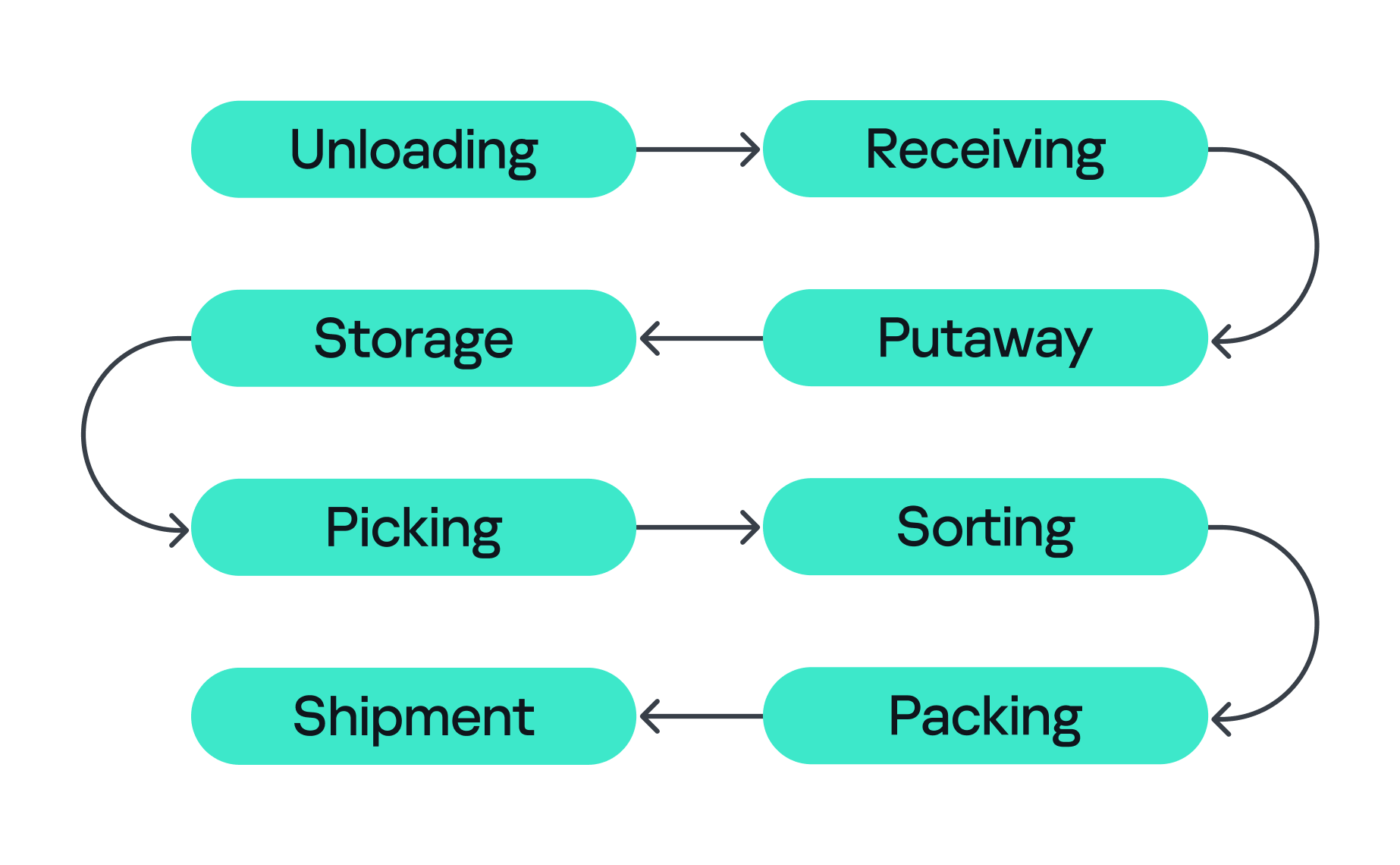
A modern warehouse is a sequence of stages involving many machines and people, all working together to keep the business process stable so that, in the end, your order gets delivered. This process consists of eight main stages, shown in the figure below.
Stages of order fulfillment
So let’s assume we’ve ordered our paper unicorn and are waiting for it at home. Let’s follow our order through all the main stages, from its arrival at the warehouse to the final stop on its journey.
Unloading First, the unicorn arrives in the unloading zone, packed in a big truck. The driver is assigned a gate, for example, via a tablet with kiosk mode enabled, or an outdoor display board, indicating where the truck should park and where the cargo will be unloaded. Even at this very first step, a digital command (the gate number on the screen) is already triggering a physical action. Therefore, incorrectly assigned gates can create a queue, delay unloading, or send goods into the wrong workflow.
Receiving At this stage, employees identify the cargo. They scan a barcode using a portable data terminal (PDT) and the central system receives a message indicating that this object arrives at the warehouse. From this moment, the unicorn exists in two forms at once: as a real box and as a record in the information system. If these two versions diverge, the error is inherited by all subsequent processes.
Putaway Next, the goods are moved into internal storage. Two new devices come into play here. First, a thermal printer, connected to the internal network over Wi-Fi, creates an internal label for each item. Then an employee, forklift, or automated system moves the goods to the assigned bin, often with the help of lifts controlled by PLCs. Both of these devices can be valuable attack entry points: one can let an adversary pivot into the internal network, while the other can give them control over an electric motor.
Storage Then the unicorn goes into storage. Many distribution centers use multi-level mezzanine structures: several floors of metal shelving inside a huge space. They allow efficient use of the building’s height, but at the same time complicate control over the technical infrastructure. Wi-Fi access points, cameras, switches, cables, and sensors may be mounted high overhead or buried deep inside the rows. A forgotten Ethernet cable or misconfigured networked device (access point or switch) left behind in a dark corner can become a convenient initial access point into critical infrastructure.
Picking When the customer places an order, picking begins if the goods were already stored in the warehouse or as soon as they are unloaded. A PDT, workstation, light indicator, or voice terminal directs the employee to the required bin where they pick the goods and move them to the next stage. These devices are themselves potential attack entry points: compromising a workstation or PDT could allow an attacker to manipulate picking information, which could misdirect employees to the wrong bin. Here, both the speed and integrity of the information are critical, and any manipulation or disruption can lead to wrong orders, delays, or problems in subsequent stages.
Sorting At the sorting stage, the warehouse starts to look more like a factory. Boxes move through conveyor belts and pass through different scanners, diverters, and chutes. The sorting plans are usually stored and managed by dedicated servers, while PLCs are responsible for controlling the machinery and executing these plans. For example, when the warehouse management system (WMS) decides that our unicorn should take route A, the control system needs to activate the right diverter at the right moment, sometimes within a fraction of a second.
Packing During packing, an employee or a robotic arm places the goods into the final box, prints the shipping label, and sometimes measures the dimensions and weight of the package. Safety mechanisms usually prevent robotic arms from leaving the controlled zone and harming nearby operators, but their compromise might inflict physical damage on the packages being processed.
Shipment Finally, at the shipping stage, the parcel heads to the gates. Automated guided vehicles (AGVs) and autonomous mobile robots (AMRs) move containers and pallets across the warehouse, while the dock management system coordinates the truck that will carry the unicorn onward to a store, a sorting center, or straight to the customer. These robots are themselves a potential target for attackers. Attacks can be conducted against AGVs and AMRs to interfere with their operation, for example by affecting their navigation or preventing them from reaching their intended destination.
All eight stages are coordinated by the WMS. It looks like a large web application, but in its role it’s closer to the operating system of the entire warehouse: it knows which goods exist, where they’re located, who or what should move them, and where they go next, linking employees, inventory levels, storage addresses, tasks, and orders. It also exchanges data externally: with ERP systems, transport platforms, marketplaces, dark stores, and external carriers.
Surrounding the WMS is an even larger digital ecosystem: identity services, databases, APIs, printers, carrier systems, technicians’ laptops, video surveillance, access control, fire and gas alarms, power supply, and a building management system (BMS).
That is why a single “warehouse network” doesn’t really exist. As we’ve seen, there are many overlapping technologies — IT infrastructure, OT systems, radio, cloud services, building security, and automation — layered on top of one another. A lone vulnerability scanner will never tell you whether a warehouse is secure.
Hunting the unicorn
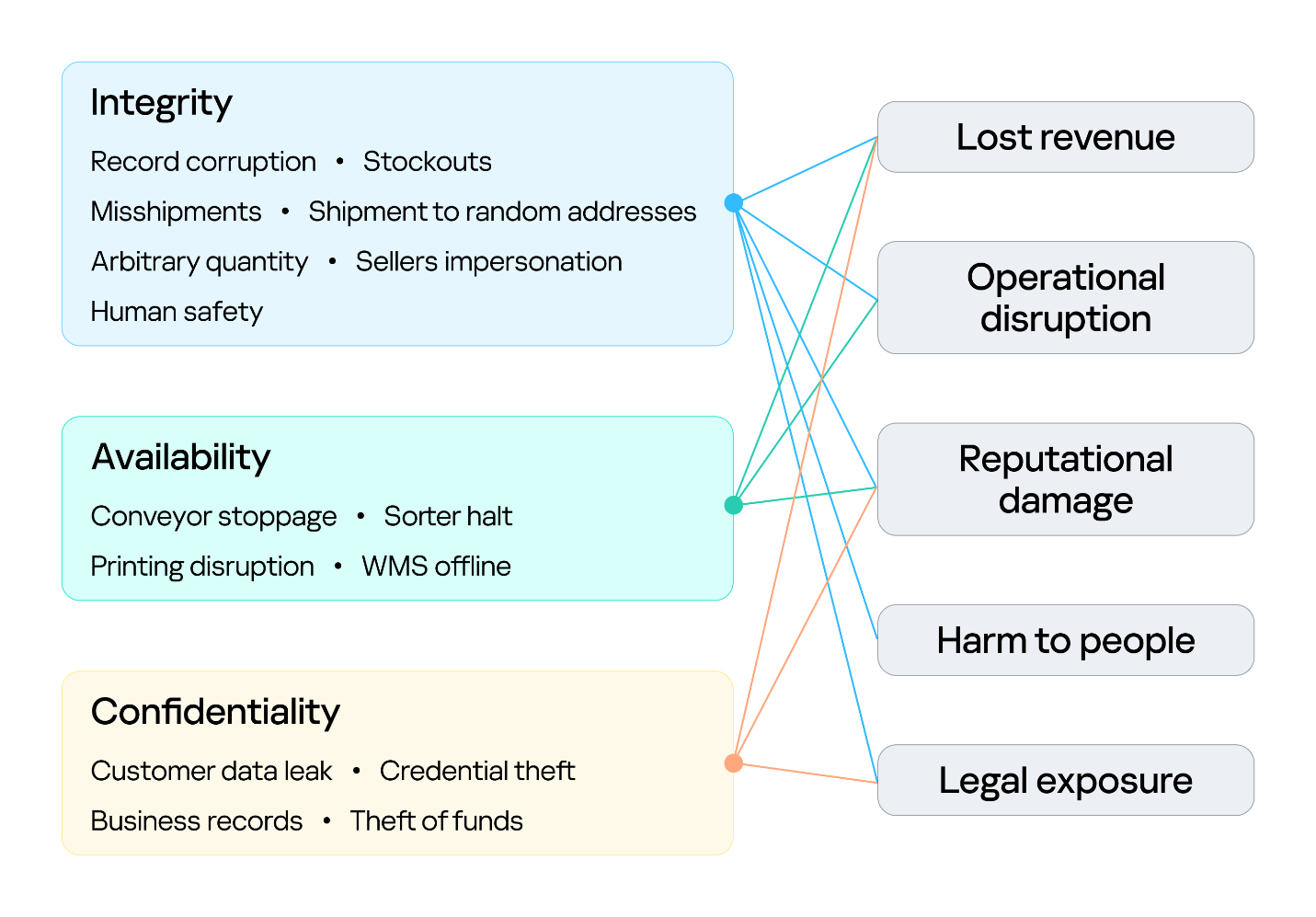
Securing an environment such as a warehouse requires a comprehensive security assessment covering all of its interconnected systems. This involves identifying vulnerabilities across each system and understanding how weaknesses can be combined into attack paths that a real attacker could exploit. But a vulnerability only matters in proportion to what it exposes and who is able to reach it, so before looking at the weaknesses themselves, we need to understand what an attacker in this environment is actually after, because in a warehouse, the blast radius extends well beyond data. Everything we just traced — the systems, the devices, and the people operating them — exists to keep goods moving, and attacks in various parts along that chain can affect the business differently. The chart below shows what is at risk in the warehouse and where those risks land for the business. The segment on the left groups them under the three core security properties: integrity, availability, and confidentiality. The segment on the right maps each property to the business outcomes a failure can cause.
Warehouse risks
The first area at risk is integrity. Inventory counts, locations, orders, and shipment data must stay in sync with the physical world. Corrupting a record silently desynchronizes the operation, and because the eight stages form a dependency chain, one falsified entry early on is inherited downstream, surfacing later as stockouts and mis-shipments. In its deliberate forms, this lets an attacker redirect goods, release stock, and perform other actions on behalf of the platform’s vendors under cover of legitimate records. Integrity is also a safety concern: when people or machines act on information that no longer reflects the physical environment, a data failure can become a physical incident. This is why integrity is the only property linked to all five outcomes, including harm to people.
The second is availability, the warehouse’s ability to keep goods moving. Halting a conveyor, a sorter, label printing, or the WMS stops orders from shipping, and in a business built on speed, every hour of downtime means delayed deliveries and broken promises. Ransomware can bring the whole warehouse to a standstill. The impact shows up as operational disruption, lost revenue, and reputational damage.
The third is confidentiality. Customer data, business records, and system credentials are valuable targets. Their exposure leads to legal liability and reputational damage, and stolen credentials often open the door to further attacks. Where the WMS connects to financial or ERP processes, the risk extends to theft of funds.
Knowing what is at risk tells us what an attacker stands to gain; the next question is who is in a position to take it. Threat actors differ in the access they already hold. For example, an attacker may be authenticated and privileged, have limited physical or remote access, or have no legitimate access to the environment at all. Based on their relationship with the warehouse and their level of access, threat actors can generally be divided into two categories:
External. An attacker with no legitimate relationship with the warehouse or the organization, operating without authorized access. External attackers can be divided into two categories based on their physical proximity to the environment:
Remote. An attacker operating from outside the site’s physical area, reaching the environment through whatever the organization exposes or makes reachable over the internet, including web services, remote access infrastructure, and third-party connections used by suppliers, carriers, and integrators.
Proximate. An attacker with no legitimate access who has nevertheless moved within physical range of the site’s locally reachable technologies. They may, for example, be in a parking lot, a neighboring unit, or a delivery bay. Their proximity may allow them to interact with wireless, radio, Bluetooth, or other short-range interfaces without possessing an account, badge, employment relationship, or other authorized access.
Internal. An individual with legitimate access to the warehouse, its systems, or its information, who intentionally or unintentionally creates a security risk. This includes employees, administrators, operators, contractors, and temporary staff.
Combining these threat actors and their access levels with the risks identified earlier, the vulnerabilities present in each system, the resulting attack surfaces, and the potential attack paths between them provides a threat model for the warehouse environment. This allows an organization to understand how different systems and people could be targeted, how individual weaknesses could be combined, and where security controls are most needed.
Cornering the unicorn
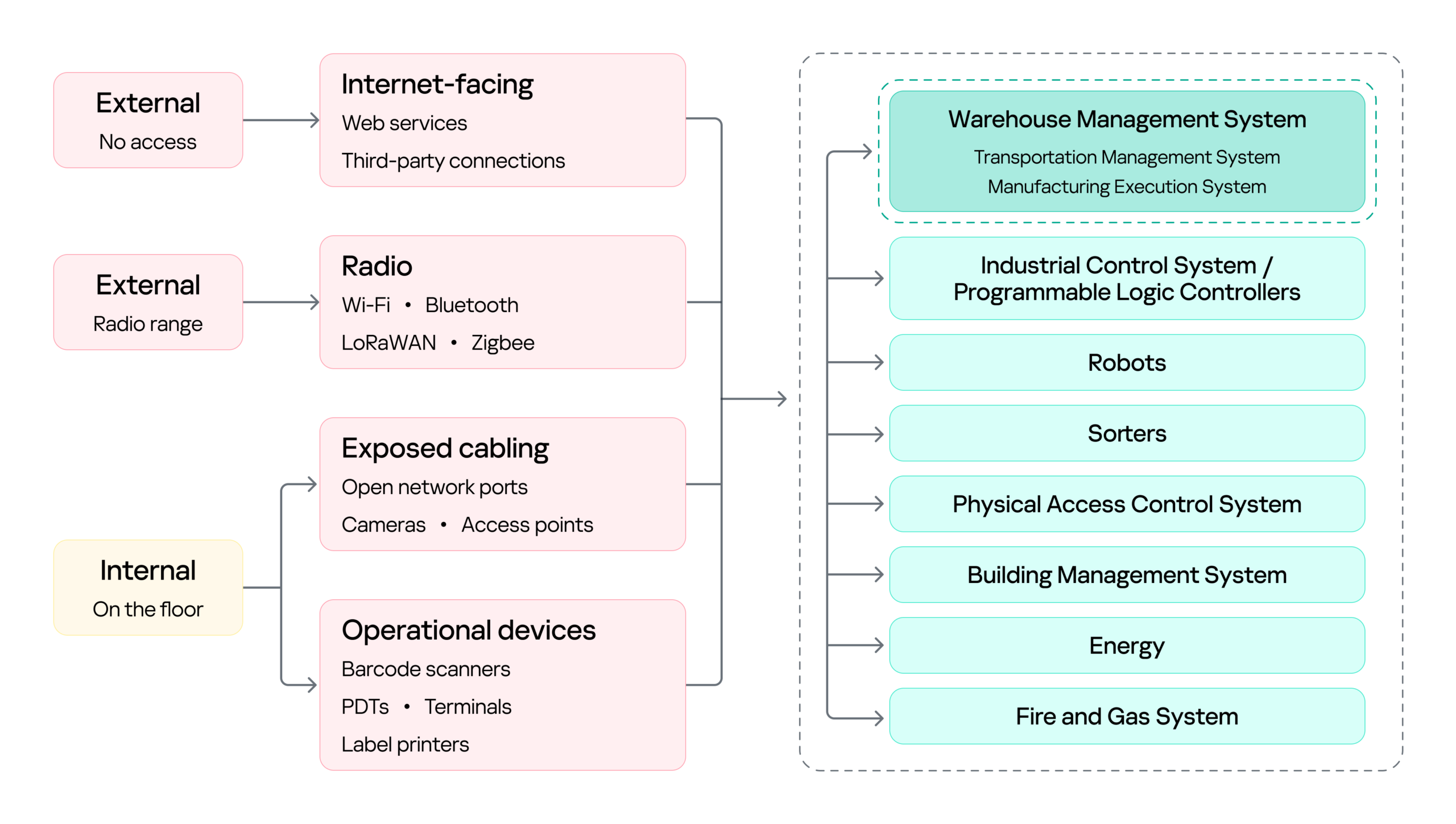
Knowing what is at risk and who might come after it still leaves the most practical question open: how they would actually get in, and how far they could go once they did. The diagram below sets out the warehouse’s attack surface: every point where an attacker can get in, organized by the access that reaching each point requires.
Warehouse attack surface
On the left are the attacker categories discussed above, distinguished by where they stand and what access they already hold. Each reaches the environment through a different set of entry points, and the impact of a successful attack can land on several systems, from the WMS to OT systems such as robots, sorters, and physical access control system (PACS). The WMS is highlighted because it is the most significant of these: it coordinates the OT systems, so compromising it can affect the entire operation rather than a single process.
Next, we will cover the initial access vectors, the points a threat actor can use to reach the warehouse environment. Following that, we turn to the impact on the logistics processes themselves, focusing on the WMS, since its compromise affects every logistics operation that depends on it.
Initial attack vectors
Internet-facing services
Remote access through internet-facing services, third-party connections, and corporate networks gives an external attacker a foothold on the warehouse network infrastructure. It is a well-covered problem and not specific to this environment, so we note it here as an entry point but will not examine it further.
Wi-Fi, Bluetooth, and other radio channels
Wi-Fi connects handhelds, tablets, printers, cameras, and workstations. Bluetooth serves scanners, headsets, and positioning beacons. Zigbee and similar low-power protocols run lighting, sensors, and building automation, while LoRaWAN carries telemetry over long distances. Cellular provides a backup channel for kiosks and contractor equipment, and proprietary protocols control industrial panels and specialized machinery.
Radio passes through windows, gates, roofing, and thin external panels, so a network built for receiving and processing goods may be reachable from the parking lot and, with a directional antenna, from considerably farther away.
That reach matters in two ways. It gives an external attacker a place to start, as proximity alone is enough to reach the Wi-Fi and the low-power protocols, and from there to gain an initial foothold in the warehouse networks.
However, radio does not only lead into the network. It also connects directly to the field devices and carries the live control traffic of warehouse operations, which makes availability a first-order concern. If hundreds of handhelds lose their connection at once, picking stops. If an AGV loses its control channel, the safe reaction may be to halt in place, and a stopped machine can block an entire route.
Physical network
The scale of the warehouse itself is part of the attack surface. A fulfillment warehouse can run up to tens of thousands of square meters, with racking climbing several stories and walkways threading through it. Structured cabling runs along that racking, cameras and access points are mounted on that, and wall jacks sit behind pallets that have not moved in months. Almost none of it is in anyone’s line of sight.
That gives a person in the warehouse something a normal office does not: unsupervised access to live network infrastructure. Unplugging a ceiling camera leaves an active port. An unused jack behind a shelf leaves another. Neither requires tools, credentials, or any interaction with a system that logs anything. And since the camera or access point sits on the same segment as the rest of the site, the compromised port, not being isolated, opens a path to the network core.
Barcode scanners
Barcode scanners are everywhere in a warehouse. They are the main tool workers use to tell the system what is moving and where, supporting receiving, picking, packing, and inventory management. A typical setup has handheld scanners communicating with a base station, which is in turn connected to a workstation or another business system.
This makes the scanner an entry point into the core network in two ways.
First, through the barcode itself. Since the scanner acts as a keyboard to the connected host, a maliciously crafted barcode or QR code can inject keystrokes when scanned, potentially giving the attacker an initial foothold on the host without directly accessing the network.
Second, through the scanner’s wireless link. During a customer engagement, with the provided test stand of such a device, we discovered that an attacker within range could inject keystrokes into the connected host and potentially achieve remote code execution without user interaction. This attack pattern was observed across multiple vendors, including, for example, Honeywell devices affected by CVE-2026-4272.
In both cases, the result is the same: a foothold on a host inside the warehouse network. The scanner is simply the entry point; the significance of that foothold comes from the host’s trusted position within the operational environment and its connectivity to core systems.
Portable data terminals
Portable data terminals (PDTs) are essentially ordinary Android devices with an embedded barcode scanner, carried by workers to scan items; each scan is passed to a dedicated application that forwards it to a remote server over an API. To keep workers on task, the devices usually run in kiosk mode, locking the user to that single application and preventing interaction with the rest of the Android system.
That lockdown is exactly what an attacker wants to break, and breaking it is what turns the terminal into an initial access vector: escaping the kiosk can expose the Wi-Fi password of the network the terminal is connected to, or allow malicious software to be installed that gives the attacker remote access to the network over the internet.
Printers
Warehouses contain different types of printers. Alongside the usual IT printers used for documents and paperwork, there are specialized thermal printers, small devices that use heated elements on the printhead to create labels, barcodes, and tags. As we mentioned earlier, these are mainly used to print the labels, usually containing barcodes, that are attached to goods during the putaway stage.
Here we focus on mobile thermal printers: small, battery-powered devices that workers can carry or wear. They typically connect to the internal network over Wi-Fi to receive print commands, while also supporting Bluetooth for connecting to nearby devices. This combination makes them a potential entry point into the internal network.
Some models, such as the Zebra ZQ630, support multiple interfaces and can run applications directly on the device. During a security assessment, we discovered that apps can be uploaded and executed over Bluetooth. By exploiting a pairing misconfiguration, an attacker within Bluetooth range could bypass pairing, upload malicious software, and gain an initial foothold through the printer.
Impact on logistics processes (attacks on WMS)
With a foothold in the network, an attacker can pivot to the logistics processes themselves: from the WMS through the warehouse infrastructure to the PLCs and the machinery they drive. As we saw earlier, all OT systems and devices are interconnected and the WMS sits at the head of that chain: it is the system of record every other process reads from and writes to, so compromising it reaches all of them at once. That, and its being specific to this environment, is why it is the focus here.
Warehouse management systems (WMS) are the software platforms that optimize warehouse processes from the entry of goods to their exit. They provide real-time visibility into inventory and orchestrate end-to-end fulfillment by integrating with many warehouse subsystems and pieces of automation equipment, such as conveyors, PLCs, robotics, scanners, and voice systems. A typical WMS includes modules for receiving, inventory control, order management, labor management, shipping, and reporting. Major vendors include SAP EWM, Oracle Warehouse Management, Manhattan Active, Blue Yonder, Infor, Körber/HighJump, Microsoft, and TECSYS.
To picture how central this is, think back to our unicorn. From the moment it was scanned at receiving, it stopped being only a physical box and became a record inside the WMS, a record the system then used to decide where it should be stored, when it should be picked, how it should be sorted, and where it should ship. Every device employed along the way — the PDT at receiving, the printer at putaway, the workstation at picking, the conveyor at sorting — was really just talking to the WMS. It is the thread that ties all eight stages together, which is exactly what makes it such a valuable target.
Because modern WMS platforms are usually web-based and heavily interconnected, they inherit common web and API vulnerabilities alongside flaws specific to the WMS itself. A recent example is CVE-2026-70774 in Oracle Warehouse Management, part of Oracle E-Business Suite. Oracle rated it High and described it as an easily exploitable authorization bypass flaw in which a low-privileged attacker with network access can compromise the application, affecting integrity and availability by allowing unauthorized creation, deletion, or modification of critical data.
A flaw like this may look like a typical web application issue, but its consequences in a warehouse are more serious, because the WMS is the system of record. If an attacker can modify its data, they can alter stock levels, bin locations, receiving records, picking tasks, or shipment information, silently corrupting the digital twin of the warehouse. And since the eight stages form a dependency chain, that corruption doesn’t stay contained: a falsified record at receiving is inherited by putaway, picking, and everything downstream. The physical box and its record diverge, and every later process trusts the record.
The most direct version of this attack comes from an authorization bypass flaw like the Oracle vulnerability above. Here the threat actor can be an external attacker who has reached the application over the network, or an insider such as a low-privileged operator or storekeeper who already holds a legitimate account.
The danger grows when such a flaw is chained with others. An external attacker who combines remote code execution with SQL injection could generate shipment orders to arbitrary addresses together with the documents needed for goods to physically leave the warehouse, fabricate waybills, acceptance or transfer records, and registers, while also exposing customer data such as names and delivery addresses. In effect, the goods are sent out with legitimate-looking paperwork.
This is why ordinary web vulnerabilities carry considerable weight in a WMS. For an external attacker or an insider probing beyond their assigned role, broken access control could open a path into another warehouse zone, allow manipulation of other workers’ tasks, permit unauthorized exception operations, or expose administrative APIs. A server-side request forgery flaw could force the WMS server to reach resources an external attacker cannot touch directly, and if the network is flat or only formally segmented, that server may in turn reach internal management panels, cloud service interfaces, or systems sitting close to the operational network, turning a single web bug into a bridge between IT and OT.
Attacks on a WMS don’t always target the application directly, though. As we saw while tracing the unicorn, the warehouse is full of connected devices that already hold trusted access. A handheld terminal carries authenticated WMS API access as a matter of course, and anyone who gains control of that terminal inherits it (by escaping the kiosk, for example). Depending on the device’s permissions, that might mean confirming picks that never occurred, falsifying receiving operations, adjusting stock counts, or marking orders complete — something warehouse employees themselves could use to avoid their assigned duties.
Where the WMS is connected to control and automation systems, access to the WMS can extend into physical operations, including conveyors, sorting systems, lifts, doors, and pumps.
PLCs translate WMS instructions and sensor inputs into physical actions. Compromising a system that controls them therefore creates an opportunity to manipulate those actions. The impact can be as simple as a sorting diverter sending boxes down the wrong route, a conveyor repeatedly entering an error state and creating a backlog, or a falsified sensor value causing a line to be treated as clear when it is full.
However the WMS is compromised, the business consequence is the same: inventory corruption, unauthorized shipments, and operational disruption, each reaching the customer in the end as a late or missing delivery, the wrong item in the box, or a personal address exposed to a stranger.
Securing the unicorn
We followed our unicorn through web applications and databases, radio channels and PDTs, printers, conveyors, robots, and the loading zone. Because warehouse environments combine IT, OT, wireless, physical, and human components, security controls should be implemented as a single, coordinated security architecture rather than as isolated measures. Network segmentation should be a foundational control, with clear separation between corporate IT, warehouse OT, operational devices, management networks, and externally connected systems. Segmentation should also extend across facilities and customer environments so that each site and customer integration is isolated from the others, limiting the potential impact of a compromise. A zero-trust approach should reinforce this architecture by requiring explicit authentication and authorization for connections between systems, regardless of their network location, and by applying least-privilege access wherever possible. Regular penetration testing of the corporate IT environment, including domain services, identity infrastructure, and endpoints, should be incorporated into the warehouse security program.
Physical and network access controls should be implemented together. Access to warehouse facilities, network rooms, communication cabinets, and operational areas should be restricted according to business need, with appropriate authentication, monitoring, and access logging. Network infrastructure should be hardened through controls such as switch port security, MAC-based access restrictions where appropriate, and IEEE 802.1X with EAP-TLS for strong device and user authentication. Network equipment should also be securely configured and regularly reviewed to ensure that unused interfaces, insecure management protocols, default credentials, and unnecessary services are disabled.
Web applications and their supporting infrastructure should be governed through a secure software development lifecycle (SSDLC), including security requirements, secure coding practices, code and dependency review, and application security assessment before deployment and throughout the application’s lifecycle. Third-party applications and components should be continuously monitored and updated, with a defined vulnerability and patch management process. This should explicitly include warehouse management systems (WMS), warehouse portals, APIs, and other applications that provide operational or customer-facing functionality.
Wireless technologies should be subject to dedicated security assessment and engineering. Radio-frequency surveys should be conducted to establish expected coverage, identify unauthorized or unexpected signals, validate the availability and protection of operational communications, and determine whether wireless deployments create unintended access paths into warehouse networks. Wireless security should be assessed not only from a connectivity perspective but also in terms of authentication, encryption, device provisioning, protocol exposure, interference resilience, and the potential impact of unauthorized devices.
Warehouse operational devices should be incorporated into the organization’s endpoint security and vulnerability management processes. Devices should receive security updates and firmware patches on a defined schedule, with accelerated remediation for critical vulnerabilities. Security assessments should be performed periodically to identify weaknesses in device configuration, applications, exposed services, and authentication mechanisms.
Personnel security should form an additional layer of the warehouse security architecture. In most industrial and ICS environments, getting inside means clearing background checks, holding relevant qualifications, or proving prior experience; the hiring process itself acts as a filter. A warehouse is different. Roles in sorting, packing, and courier work are hired quickly and in volume, and they typically require no prior expertise, certification, or specialized background at all. An ordinary person can walk in off the street, be hired within days, and immediately hold legitimate physical access to the facility. Therefore, a more restrictive and risk-based approach to hiring should be considered, particularly for roles that provide access to sensitive areas, operational systems, network infrastructure, or customer assets.
Ultimately, all of these measures serve the same objective: protecting the continuity and reliability of the warehouse as a whole. This matters because real warehouses handle food, medicines, machine parts, and the millions of ordinary things people and companies depend on every day. Protecting their journey means seeing the warehouse as it has actually become: a single digital system with doors, motors, shelving, and radio signals, and with entirely real consequences when it fails. And if the security program works, the customer never knows any of this happened. The unicorn simply arrives at the scheduled time.
If your warehouse operations rely on interconnected systems like these, we can help identify the gaps before an adversary does. Reach out to discuss a security assessment.
Imagine you’ve ordered a small paper unicorn from an online marketplace. You clicked “Buy”, received a cheerful notification, and expect a courier to bring the box tomorrow. If the unicorn is delayed by a day, it will be annoying but not catastrophic: an apology, a discount promo code — and the incident is forgotten.
Now let’s multiply one late unicorn by several hundred thousand orders.
Packages start heading to the wrong cities. The website shows an item is in stock, even though the required bin is empty. Conveyors stop, boxes get stuck between floors, the cargo piles up with no freight manifest. Trucks line up at the gates, and every minute of downtime turns into blown schedules, support tickets, fines, and lost sales.
It is at exactly this scale that a cyberincident in a warehouse becomes a problem for the entire business. A modern warehouse is no longer just a big building with shelving. It is a tightly interconnected hybrid system: web applications, radio channels, and an automated factory. Physical processes here depend on data, and errors in data have very physical consequences. Examples include an outage that affected warehouse management systems at the grocery giant Morrisons, and the 2025 Form 10-K annual report of United Natural Foods, Inc. (UNFI), which confirmed unauthorized activity on information technology systems that impacted order fulfillment. More recently, reports emerged that a cyberattack disrupted eight CEVA Logistics warehouses across Europe and exposed customer delivery data.
This paper follows a single order through a warehouse to show where the operation is vulnerable, the stages it traverses, the systems that drive it, and the points where an attacker can reach them. We then set out the threat model: what is at risk, who is in a position to take it, and how each risk lands on the business. From there, we look at how an attacker gets in, and what reaching the warehouse management system costs in practical terms: orders unshipped, inventory records nobody can trust, and an operation that stops. We close with recommendations on where the controls that matter actually sit.
Tracing the unicorn
A modern warehouse is a sequence of stages involving many machines and people, all working together to keep the business process stable so that, in the end, your order gets delivered. This process consists of eight main stages, shown in the figure below.
Stages of order fulfillment
So let’s assume we’ve ordered our paper unicorn and are waiting for it at home. Let’s follow our order through all the main stages, from its arrival at the warehouse to the final stop on its journey.
Unloading First, the unicorn arrives in the unloading zone, packed in a big truck. The driver is assigned a gate, for example, via a tablet with kiosk mode enabled, or an outdoor display board, indicating where the truck should park and where the cargo will be unloaded. Even at this very first step, a digital command (the gate number on the screen) is already triggering a physical action. Therefore, incorrectly assigned gates can create a queue, delay unloading, or send goods into the wrong workflow.
Receiving At this stage, employees identify the cargo. They scan a barcode using a portable data terminal (PDT) and the central system receives a message indicating that this object arrives at the warehouse. From this moment, the unicorn exists in two forms at once: as a real box and as a record in the information system. If these two versions diverge, the error is inherited by all subsequent processes.
Putaway Next, the goods are moved into internal storage. Two new devices come into play here. First, a thermal printer, connected to the internal network over Wi-Fi, creates an internal label for each item. Then an employee, forklift, or automated system moves the goods to the assigned bin, often with the help of lifts controlled by PLCs. Both of these devices can be valuable attack entry points: one can let an adversary pivot into the internal network, while the other can give them control over an electric motor.
Storage Then the unicorn goes into storage. Many distribution centers use multi-level mezzanine structures: several floors of metal shelving inside a huge space. They allow efficient use of the building’s height, but at the same time complicate control over the technical infrastructure. Wi-Fi access points, cameras, switches, cables, and sensors may be mounted high overhead or buried deep inside the rows. A forgotten Ethernet cable or misconfigured networked device (access point or switch) left behind in a dark corner can become a convenient initial access point into critical infrastructure.
Picking When the customer places an order, picking begins if the goods were already stored in the warehouse or as soon as they are unloaded. A PDT, workstation, light indicator, or voice terminal directs the employee to the required bin where they pick the goods and move them to the next stage. These devices are themselves potential attack entry points: compromising a workstation or PDT could allow an attacker to manipulate picking information, which could misdirect employees to the wrong bin. Here, both the speed and integrity of the information are critical, and any manipulation or disruption can lead to wrong orders, delays, or problems in subsequent stages.
Sorting At the sorting stage, the warehouse starts to look more like a factory. Boxes move through conveyor belts and pass through different scanners, diverters, and chutes. The sorting plans are usually stored and managed by dedicated servers, while PLCs are responsible for controlling the machinery and executing these plans. For example, when the warehouse management system (WMS) decides that our unicorn should take route A, the control system needs to activate the right diverter at the right moment, sometimes within a fraction of a second.
Packing During packing, an employee or a robotic arm places the goods into the final box, prints the shipping label, and sometimes measures the dimensions and weight of the package. Safety mechanisms usually prevent robotic arms from leaving the controlled zone and harming nearby operators, but their compromise might inflict physical damage on the packages being processed.
Shipment Finally, at the shipping stage, the parcel heads to the gates. Automated guided vehicles (AGVs) and autonomous mobile robots (AMRs) move containers and pallets across the warehouse, while the dock management system coordinates the truck that will carry the unicorn onward to a store, a sorting center, or straight to the customer. These robots are themselves a potential target for attackers. Attacks can be conducted against AGVs and AMRs to interfere with their operation, for example by affecting their navigation or preventing them from reaching their intended destination.
All eight stages are coordinated by the WMS. It looks like a large web application, but in its role it’s closer to the operating system of the entire warehouse: it knows which goods exist, where they’re located, who or what should move them, and where they go next, linking employees, inventory levels, storage addresses, tasks, and orders. It also exchanges data externally: with ERP systems, transport platforms, marketplaces, dark stores, and external carriers.
Surrounding the WMS is an even larger digital ecosystem: identity services, databases, APIs, printers, carrier systems, technicians’ laptops, video surveillance, access control, fire and gas alarms, power supply, and a building management system (BMS).
That is why a single “warehouse network” doesn’t really exist. As we’ve seen, there are many overlapping technologies — IT infrastructure, OT systems, radio, cloud services, building security, and automation — layered on top of one another. A lone vulnerability scanner will never tell you whether a warehouse is secure.
Hunting the unicorn
Securing an environment such as a warehouse requires a comprehensive security assessment covering all of its interconnected systems. This involves identifying vulnerabilities across each system and understanding how weaknesses can be combined into attack paths that a real attacker could exploit. But a vulnerability only matters in proportion to what it exposes and who is able to reach it, so before looking at the weaknesses themselves, we need to understand what an attacker in this environment is actually after, because in a warehouse, the blast radius extends well beyond data. Everything we just traced — the systems, the devices, and the people operating them — exists to keep goods moving, and attacks in various parts along that chain can affect the business differently. The chart below shows what is at risk in the warehouse and where those risks land for the business. The segment on the left groups them under the three core security properties: integrity, availability, and confidentiality. The segment on the right maps each property to the business outcomes a failure can cause.
Warehouse risks
The first area at risk is integrity. Inventory counts, locations, orders, and shipment data must stay in sync with the physical world. Corrupting a record silently desynchronizes the operation, and because the eight stages form a dependency chain, one falsified entry early on is inherited downstream, surfacing later as stockouts and mis-shipments. In its deliberate forms, this lets an attacker redirect goods, release stock, and perform other actions on behalf of the platform’s vendors under cover of legitimate records. Integrity is also a safety concern: when people or machines act on information that no longer reflects the physical environment, a data failure can become a physical incident. This is why integrity is the only property linked to all five outcomes, including harm to people.
The second is availability, the warehouse’s ability to keep goods moving. Halting a conveyor, a sorter, label printing, or the WMS stops orders from shipping, and in a business built on speed, every hour of downtime means delayed deliveries and broken promises. Ransomware can bring the whole warehouse to a standstill. The impact shows up as operational disruption, lost revenue, and reputational damage.
The third is confidentiality. Customer data, business records, and system credentials are valuable targets. Their exposure leads to legal liability and reputational damage, and stolen credentials often open the door to further attacks. Where the WMS connects to financial or ERP processes, the risk extends to theft of funds.
Knowing what is at risk tells us what an attacker stands to gain; the next question is who is in a position to take it. Threat actors differ in the access they already hold. For example, an attacker may be authenticated and privileged, have limited physical or remote access, or have no legitimate access to the environment at all. Based on their relationship with the warehouse and their level of access, threat actors can generally be divided into two categories:
External. An attacker with no legitimate relationship with the warehouse or the organization, operating without authorized access. External attackers can be divided into two categories based on their physical proximity to the environment:
Remote. An attacker operating from outside the site’s physical area, reaching the environment through whatever the organization exposes or makes reachable over the internet, including web services, remote access infrastructure, and third-party connections used by suppliers, carriers, and integrators.
Proximate. An attacker with no legitimate access who has nevertheless moved within physical range of the site’s locally reachable technologies. They may, for example, be in a parking lot, a neighboring unit, or a delivery bay. Their proximity may allow them to interact with wireless, radio, Bluetooth, or other short-range interfaces without possessing an account, badge, employment relationship, or other authorized access.
Internal. An individual with legitimate access to the warehouse, its systems, or its information, who intentionally or unintentionally creates a security risk. This includes employees, administrators, operators, contractors, and temporary staff.
Combining these threat actors and their access levels with the risks identified earlier, the vulnerabilities present in each system, the resulting attack surfaces, and the potential attack paths between them provides a threat model for the warehouse environment. This allows an organization to understand how different systems and people could be targeted, how individual weaknesses could be combined, and where security controls are most needed.
Cornering the unicorn
Knowing what is at risk and who might come after it still leaves the most practical question open: how they would actually get in, and how far they could go once they did. The diagram below sets out the warehouse’s attack surface: every point where an attacker can get in, organized by the access that reaching each point requires.
Warehouse attack surface
On the left are the attacker categories discussed above, distinguished by where they stand and what access they already hold. Each reaches the environment through a different set of entry points, and the impact of a successful attack can land on several systems, from the WMS to OT systems such as robots, sorters, and physical access control system (PACS). The WMS is highlighted because it is the most significant of these: it coordinates the OT systems, so compromising it can affect the entire operation rather than a single process.
Next, we will cover the initial access vectors, the points a threat actor can use to reach the warehouse environment. Following that, we turn to the impact on the logistics processes themselves, focusing on the WMS, since its compromise affects every logistics operation that depends on it.
Initial attack vectors
Internet-facing services
Remote access through internet-facing services, third-party connections, and corporate networks gives an external attacker a foothold on the warehouse network infrastructure. It is a well-covered problem and not specific to this environment, so we note it here as an entry point but will not examine it further.
Wi-Fi, Bluetooth, and other radio channels
Wi-Fi connects handhelds, tablets, printers, cameras, and workstations. Bluetooth serves scanners, headsets, and positioning beacons. Zigbee and similar low-power protocols run lighting, sensors, and building automation, while LoRaWAN carries telemetry over long distances. Cellular provides a backup channel for kiosks and contractor equipment, and proprietary protocols control industrial panels and specialized machinery.
Radio passes through windows, gates, roofing, and thin external panels, so a network built for receiving and processing goods may be reachable from the parking lot and, with a directional antenna, from considerably farther away.
That reach matters in two ways. It gives an external attacker a place to start, as proximity alone is enough to reach the Wi-Fi and the low-power protocols, and from there to gain an initial foothold in the warehouse networks.
However, radio does not only lead into the network. It also connects directly to the field devices and carries the live control traffic of warehouse operations, which makes availability a first-order concern. If hundreds of handhelds lose their connection at once, picking stops. If an AGV loses its control channel, the safe reaction may be to halt in place, and a stopped machine can block an entire route.
Physical network
The scale of the warehouse itself is part of the attack surface. A fulfillment warehouse can run up to tens of thousands of square meters, with racking climbing several stories and walkways threading through it. Structured cabling runs along that racking, cameras and access points are mounted on that, and wall jacks sit behind pallets that have not moved in months. Almost none of it is in anyone’s line of sight.
That gives a person in the warehouse something a normal office does not: unsupervised access to live network infrastructure. Unplugging a ceiling camera leaves an active port. An unused jack behind a shelf leaves another. Neither requires tools, credentials, or any interaction with a system that logs anything. And since the camera or access point sits on the same segment as the rest of the site, the compromised port, not being isolated, opens a path to the network core.
Barcode scanners
Barcode scanners are everywhere in a warehouse. They are the main tool workers use to tell the system what is moving and where, supporting receiving, picking, packing, and inventory management. A typical setup has handheld scanners communicating with a base station, which is in turn connected to a workstation or another business system.
This makes the scanner an entry point into the core network in two ways.
First, through the barcode itself. Since the scanner acts as a keyboard to the connected host, a maliciously crafted barcode or QR code can inject keystrokes when scanned, potentially giving the attacker an initial foothold on the host without directly accessing the network.
Second, through the scanner’s wireless link. During a customer engagement, with the provided test stand of such a device, we discovered that an attacker within range could inject keystrokes into the connected host and potentially achieve remote code execution without user interaction. This attack pattern was observed across multiple vendors, including, for example, Honeywell devices affected by CVE-2026-4272.
In both cases, the result is the same: a foothold on a host inside the warehouse network. The scanner is simply the entry point; the significance of that foothold comes from the host’s trusted position within the operational environment and its connectivity to core systems.
Portable data terminals
Portable data terminals (PDTs) are essentially ordinary Android devices with an embedded barcode scanner, carried by workers to scan items; each scan is passed to a dedicated application that forwards it to a remote server over an API. To keep workers on task, the devices usually run in kiosk mode, locking the user to that single application and preventing interaction with the rest of the Android system.
That lockdown is exactly what an attacker wants to break, and breaking it is what turns the terminal into an initial access vector: escaping the kiosk can expose the Wi-Fi password of the network the terminal is connected to, or allow malicious software to be installed that gives the attacker remote access to the network over the internet.
Printers
Warehouses contain different types of printers. Alongside the usual IT printers used for documents and paperwork, there are specialized thermal printers, small devices that use heated elements on the printhead to create labels, barcodes, and tags. As we mentioned earlier, these are mainly used to print the labels, usually containing barcodes, that are attached to goods during the putaway stage.
Here we focus on mobile thermal printers: small, battery-powered devices that workers can carry or wear. They typically connect to the internal network over Wi-Fi to receive print commands, while also supporting Bluetooth for connecting to nearby devices. This combination makes them a potential entry point into the internal network.
Some models, such as the Zebra ZQ630, support multiple interfaces and can run applications directly on the device. During a security assessment, we discovered that apps can be uploaded and executed over Bluetooth. By exploiting a pairing misconfiguration, an attacker within Bluetooth range could bypass pairing, upload malicious software, and gain an initial foothold through the printer.
Impact on logistics processes (attacks on WMS)
With a foothold in the network, an attacker can pivot to the logistics processes themselves: from the WMS through the warehouse infrastructure to the PLCs and the machinery they drive. As we saw earlier, all OT systems and devices are interconnected and the WMS sits at the head of that chain: it is the system of record every other process reads from and writes to, so compromising it reaches all of them at once. That, and its being specific to this environment, is why it is the focus here.
Warehouse management systems (WMS) are the software platforms that optimize warehouse processes from the entry of goods to their exit. They provide real-time visibility into inventory and orchestrate end-to-end fulfillment by integrating with many warehouse subsystems and pieces of automation equipment, such as conveyors, PLCs, robotics, scanners, and voice systems. A typical WMS includes modules for receiving, inventory control, order management, labor management, shipping, and reporting. Major vendors include SAP EWM, Oracle Warehouse Management, Manhattan Active, Blue Yonder, Infor, Körber/HighJump, Microsoft, and TECSYS.
To picture how central this is, think back to our unicorn. From the moment it was scanned at receiving, it stopped being only a physical box and became a record inside the WMS, a record the system then used to decide where it should be stored, when it should be picked, how it should be sorted, and where it should ship. Every device employed along the way — the PDT at receiving, the printer at putaway, the workstation at picking, the conveyor at sorting — was really just talking to the WMS. It is the thread that ties all eight stages together, which is exactly what makes it such a valuable target.
Because modern WMS platforms are usually web-based and heavily interconnected, they inherit common web and API vulnerabilities alongside flaws specific to the WMS itself. A recent example is CVE-2026-70774 in Oracle Warehouse Management, part of Oracle E-Business Suite. Oracle rated it High and described it as an easily exploitable authorization bypass flaw in which a low-privileged attacker with network access can compromise the application, affecting integrity and availability by allowing unauthorized creation, deletion, or modification of critical data.
A flaw like this may look like a typical web application issue, but its consequences in a warehouse are more serious, because the WMS is the system of record. If an attacker can modify its data, they can alter stock levels, bin locations, receiving records, picking tasks, or shipment information, silently corrupting the digital twin of the warehouse. And since the eight stages form a dependency chain, that corruption doesn’t stay contained: a falsified record at receiving is inherited by putaway, picking, and everything downstream. The physical box and its record diverge, and every later process trusts the record.
The most direct version of this attack comes from an authorization bypass flaw like the Oracle vulnerability above. Here the threat actor can be an external attacker who has reached the application over the network, or an insider such as a low-privileged operator or storekeeper who already holds a legitimate account.
The danger grows when such a flaw is chained with others. An external attacker who combines remote code execution with SQL injection could generate shipment orders to arbitrary addresses together with the documents needed for goods to physically leave the warehouse, fabricate waybills, acceptance or transfer records, and registers, while also exposing customer data such as names and delivery addresses. In effect, the goods are sent out with legitimate-looking paperwork.
This is why ordinary web vulnerabilities carry considerable weight in a WMS. For an external attacker or an insider probing beyond their assigned role, broken access control could open a path into another warehouse zone, allow manipulation of other workers’ tasks, permit unauthorized exception operations, or expose administrative APIs. A server-side request forgery flaw could force the WMS server to reach resources an external attacker cannot touch directly, and if the network is flat or only formally segmented, that server may in turn reach internal management panels, cloud service interfaces, or systems sitting close to the operational network, turning a single web bug into a bridge between IT and OT.
Attacks on a WMS don’t always target the application directly, though. As we saw while tracing the unicorn, the warehouse is full of connected devices that already hold trusted access. A handheld terminal carries authenticated WMS API access as a matter of course, and anyone who gains control of that terminal inherits it (by escaping the kiosk, for example). Depending on the device’s permissions, that might mean confirming picks that never occurred, falsifying receiving operations, adjusting stock counts, or marking orders complete — something warehouse employees themselves could use to avoid their assigned duties.
Where the WMS is connected to control and automation systems, access to the WMS can extend into physical operations, including conveyors, sorting systems, lifts, doors, and pumps.
PLCs translate WMS instructions and sensor inputs into physical actions. Compromising a system that controls them therefore creates an opportunity to manipulate those actions. The impact can be as simple as a sorting diverter sending boxes down the wrong route, a conveyor repeatedly entering an error state and creating a backlog, or a falsified sensor value causing a line to be treated as clear when it is full.
However the WMS is compromised, the business consequence is the same: inventory corruption, unauthorized shipments, and operational disruption, each reaching the customer in the end as a late or missing delivery, the wrong item in the box, or a personal address exposed to a stranger.
Securing the unicorn
We followed our unicorn through web applications and databases, radio channels and PDTs, printers, conveyors, robots, and the loading zone. Because warehouse environments combine IT, OT, wireless, physical, and human components, security controls should be implemented as a single, coordinated security architecture rather than as isolated measures. Network segmentation should be a foundational control, with clear separation between corporate IT, warehouse OT, operational devices, management networks, and externally connected systems. Segmentation should also extend across facilities and customer environments so that each site and customer integration is isolated from the others, limiting the potential impact of a compromise. A zero-trust approach should reinforce this architecture by requiring explicit authentication and authorization for connections between systems, regardless of their network location, and by applying least-privilege access wherever possible. Regular penetration testing of the corporate IT environment, including domain services, identity infrastructure, and endpoints, should be incorporated into the warehouse security program.
Physical and network access controls should be implemented together. Access to warehouse facilities, network rooms, communication cabinets, and operational areas should be restricted according to business need, with appropriate authentication, monitoring, and access logging. Network infrastructure should be hardened through controls such as switch port security, MAC-based access restrictions where appropriate, and IEEE 802.1X with EAP-TLS for strong device and user authentication. Network equipment should also be securely configured and regularly reviewed to ensure that unused interfaces, insecure management protocols, default credentials, and unnecessary services are disabled.
Web applications and their supporting infrastructure should be governed through a secure software development lifecycle (SSDLC), including security requirements, secure coding practices, code and dependency review, and application security assessment before deployment and throughout the application’s lifecycle. Third-party applications and components should be continuously monitored and updated, with a defined vulnerability and patch management process. This should explicitly include warehouse management systems (WMS), warehouse portals, APIs, and other applications that provide operational or customer-facing functionality.
Wireless technologies should be subject to dedicated security assessment and engineering. Radio-frequency surveys should be conducted to establish expected coverage, identify unauthorized or unexpected signals, validate the availability and protection of operational communications, and determine whether wireless deployments create unintended access paths into warehouse networks. Wireless security should be assessed not only from a connectivity perspective but also in terms of authentication, encryption, device provisioning, protocol exposure, interference resilience, and the potential impact of unauthorized devices.
Warehouse operational devices should be incorporated into the organization’s endpoint security and vulnerability management processes. Devices should receive security updates and firmware patches on a defined schedule, with accelerated remediation for critical vulnerabilities. Security assessments should be performed periodically to identify weaknesses in device configuration, applications, exposed services, and authentication mechanisms.
Personnel security should form an additional layer of the warehouse security architecture. In most industrial and ICS environments, getting inside means clearing background checks, holding relevant qualifications, or proving prior experience; the hiring process itself acts as a filter. A warehouse is different. Roles in sorting, packing, and courier work are hired quickly and in volume, and they typically require no prior expertise, certification, or specialized background at all. An ordinary person can walk in off the street, be hired within days, and immediately hold legitimate physical access to the facility. Therefore, a more restrictive and risk-based approach to hiring should be considered, particularly for roles that provide access to sensitive areas, operational systems, network infrastructure, or customer assets.
Ultimately, all of these measures serve the same objective: protecting the continuity and reliability of the warehouse as a whole. This matters because real warehouses handle food, medicines, machine parts, and the millions of ordinary things people and companies depend on every day. Protecting their journey means seeing the warehouse as it has actually become: a single digital system with doors, motors, shelving, and radio signals, and with entirely real consequences when it fails. And if the security program works, the customer never knows any of this happened. The unicorn simply arrives at the scheduled time.
If your warehouse operations rely on interconnected systems like these, we can help identify the gaps before an adversary does. Reach out to discuss a security assessment.
Finding a job these days is playing on hard mode. You send your resume to a company, and a couple of minutes later, an automated rejection lands in your inbox. And then it happens again. And again. Sound familiar?
In this post, we look at how recruiting platforms work from the HR side. We also show how to use AI safely as a copy editor so you can prepare a resume for recruiters without turning it into a lifeless pile of keywords. At the end, we share a ready-made prompt to help you improve your resume’s structure and content.
Protecting your data
Before you give your resume to a chatbot, remove all sensitive information: your name, phone number, home address, email, company names, and scans of documents. Any language model you chat with can sometimes memorize personal information contained in their training data. That means there’s always a chance the AI may accidentally “learn” to give your data to other users. On top of that, even the biggest services aren’t immune to glitches and leaks. For example, last year a researcher found a bug in Meta AI that let users gain access to other people’s conversations with the chatbot by changing their request ID.
The ability to read other people’s chats sometimes isn’t even a bug. For example, it recently came to light that Grok users who clicked the Share chat button to send a conversation to a friend or to themselves were also allowing search engines to index that conversation. As a result, thousands of conversations ended up in public view. These included personal data, requests to come up with complex passwords, complaints about health problems, trade secrets, and other information the chat owners clearly never meant to publish.
So before you use any chatbot, first check its privacy policy, and then go to the settings to turn off all the features you don’t need. Most importantly, turn off training the AI on your requests. And remember the golden rule: don’t send an AI anything you wouldn’t be okay with seeing on the internet.
If you work with sensitive information all the time, the safest option is to run language models locally right on your own computer. We previously explained how to do this, using DeepSeek as an example. The same approach works with any other open-weight model.
Finally, don’t feed your personal data to chatbots from unknown developers that promise to write you a flawless resume. Often, these are just slick wrappers around popular models. And you probably won’t ever find out who actually gets access to your data, where it’s stored, or what happens to it next.
Malicious actors can use this information for follow-up attacks. For example, they can send fake interview invitations and attractive job postings that match your work experience and career interests a little too well. From there, the scam can go in many directions: a malicious file disguised as a job invitation, a link to a phishing page that steals your account, a request to install “corporate software” or to continue the chat in a messaging app, and so on.
When choosing an AI tool, ask yourself these questions:
Does the service have a clear privacy policy?
Does it say what happens to your file after you upload it — will it be stored or deleted?
Does the service explain whether your data will be used to train AI?
Who owns the service? Can you trust this company?
Is the site protected with HTTPS?
Who reads your resume: a human or a robot?
Most large and mid-sized companies have long used an applicant tracking system (ATS). This is specialized software for HR teams (human resources specialists or, put simply, recruiters) that collects and sorts job applications.
A company having an ATS doesn’t mean their applicants are scored automatically. It’s a fairly old type of system that dates back to when artificial intelligence looked very different. Then, as AI tech evolved, some companies started building AI modules into their ATS. But how common this is varies a lot from country to country and market to market. According to a LinkedIn study, 37% of HR leaders surveyed worldwide use AI in hiring, but only 11% actively integrate AI tools into their HR platforms.
The takeaway: you can optimize your resume for AI, but you still need to write it for a human. Even if your resume clears the AI screening, an HR person will read it next — and flat, machine-sounding prose will only hurt their impression of you.
Keep in mind that instant rejections don’t come only from AI. In some ATS, recruiters can set up automatic rejection rules by hand. For example, these rules can rely on a candidate’s answers about education, work authorization, required experience, licenses and certifications, ability to work the required schedule, and so on. So take a moment to check that your resume contains up-to-date and complete information relevant to the vacancy.
How to write a resume that passes both AI and HR screening
Write the first draft yourself
It’s ok to turn to AI for help, but the resume has to have substance, and a real person with real work experience has to shine through.
Start by writing your resume yourself. It doesn’t have to be perfect, and it can have mistakes. Only then ask AI for a fresh pair of eyes. Here, AI shouldn’t act as your personal biographer. It should act as a copy editor that polishes the wording and structure.
Keep the formatting simple
Unless the employer asks for something specific, skip the photos, tables, complex graphics, and custom fonts. And definitely don’t try to design something fancy in a graphic editor. Any of these can make your document unreadable for an ATS. The gold standard is a plain PDF or DOCX file with headings, a standard font, clear sections, and bulleted lists.
Tailor your resume to each job
Copy the job description and ask a chatbot to work its key phrases into your resume. Don’t just sprinkle keywords around. Put them in context and back them up with examples from your experience. Remember: you should be able to prove every word in your resume.
Show what your effort achieved
Skip the generic phrases, personality labels, and bare lists of duties like “responsible”, “did data analysis”, or “prepared reports”. Both recruiters and AI look for specifics, ideally with numbers and timeframes. Show what you did your job for, not just what you did.
Stick to the action + tool + result formula: “Automated report generation with Python and cut preparation time by 80%”, “Launched a new pricing model and grew annual revenue from US$400 000 to US$600 000 in 12 months”, “Developed a corporate messaging app that more than a thousand employees use today”. Don’t overdo the numbers. If you don’t have exact figures, or they don’t apply, don’t make them up.
Put the most important things first
Start with a short paragraph of two to three sentences that covers the key points and contains a link to your portfolio. Use it to give a brief overview of your work experience, skills, and key achievements. If you’re new to the field, write about your education and career goals instead.
List your work experience in reverse chronological order so your latest career achievements are the first thing people see.
AI prompt
You’ve got the tips — now it’s time to ask AI for help. Here’s a prompt that works. We’ve tested it on several chatbots:
Imagine you’re an HR and recruiting expert. Read my resume carefully and try to make it stronger. It’s important that the resume is easy to read and catches the attention of the AI that screens candidates. My resume should start with a short paragraph about me (two to three sentences) that covers the key information both AI and HR will look for. Add keywords from the job description to my resume: {job description text}. The keywords and phrases must match my real work experience. If they don’t fit, don’t just add them baselessly. Where it makes sense, describe my work experience using the formula: action + tool + result. Example: “Designed new landing pages in Figma, raising conversion by 20%”. Make any other changes that I haven’t thought of but you think are important. Base everything you write on the information in the resume I sent you. Don’t make anything up.
Review before sending
Check for extraneous information: make sure your resume doesn’t include unnecessary personal data or information covered by an NDA.
Check for readability: make sure your resume has the right headings, dates, and section order, and that the file is in DOCX or PDF format. Remove any complex graphics from the document.
Check for accuracy: reread every statement and ask yourself, “Could I back this up in an interview?” Remember: AI doesn’t know all the details of your work and may exaggerate some of the wording.
More on how to use AI safely without compromising your privacy:

 Login