❌

Normal view

Five election scams to watch out for

27 October 2026 at 16:36

Elections give scammers plenty to work with: urgent deadlines, familiar faces, passionate supporters, and messages asking people to take action.

Some want you to “fix” your voter registration. Others want a donation, an answer to a survey, or payment for merchandise supposedly endorsed by your favorite politician. The details change, but the objective stays the same: get your money, your personal information, or both.

Here are five election-themed scams to watch out for.

Scam 1. “We’ll help you vote”

Not every election-themed lure starts with a threat. Some offer to make voting easier.

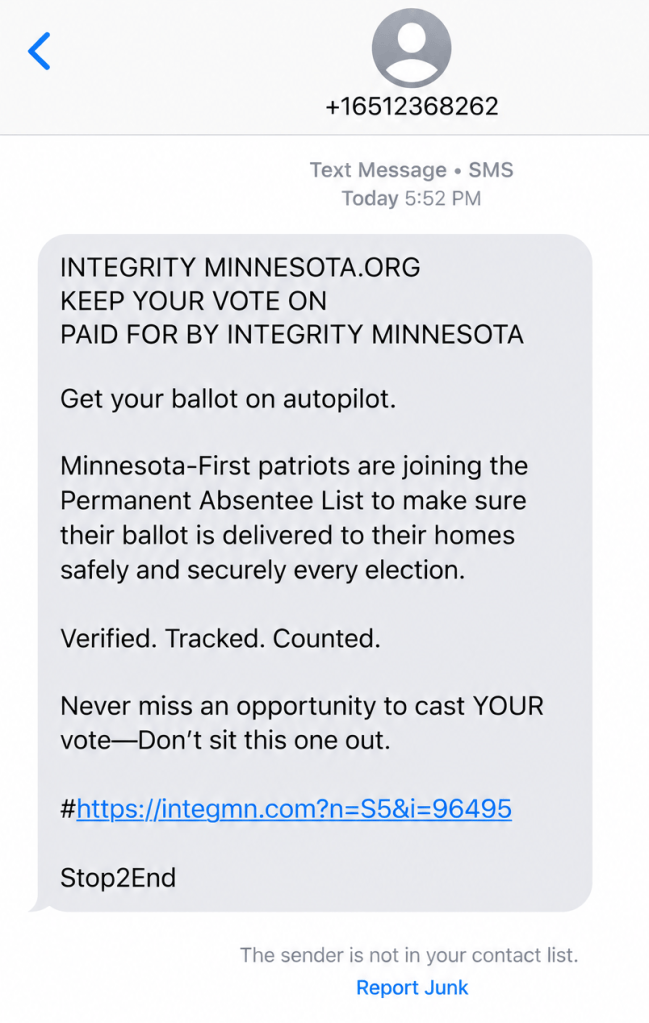
“Get your ballot on autopilot,” reads one text message we reviewed. It encourages recipients to join a permanent absentee list so their ballots arrive at home for every election, adding the reassuring words: “Verified. Tracked. Counted.”

A voting-assistance text message reviewed by Malwarebytes. Reconstructed from the message text.
A voting-assistance text message reviewed by Scam Guard

The message is a scam, though it borrows the language of a real Minnesota voting service. Minnesota does have a permanent absentee voter list, but the link in this text is fraudulent. To check or sign up, go directly to your election authority’s official website.

Other messages take the opposite approach: instead of offering convenience, they warn that you could lose your chance to vote.

A message might say you are not registered to vote, your details are incomplete, or your registration is about to be cancelled. Then it offers a link to sort everything out.

The FBI recently warned about messages that send recipients to fraudulent voter-registration pages. Instead of helping people vote, these sites collect personal information that criminals can use for further fraud.

In Brazil, scammers used a fake WhatsApp account with the Superior Electoral Court’s logo. It claimed to be the court’s “Customer Service Department” (which doesn’t exist) and told people to download an app called “Soluciona Pendência,” roughly translated as “Resolve an outstanding issue.” The message falsely warned that people could lose access to banking or government services.

Scam 2. “Donate now to help your candidate win”

A fundraising appeal arrives just as an election reaches a critical moment. It uses the candidate’s photograph, familiar campaign language, and an urgent request for money.

That does not necessarily mean the campaign sent it.

The FBI warns that scammers impersonate candidates and political fundraising organizations to collect supposed campaign contributions. Victims believe they are supporting a legitimate organization, but the money goes to criminals instead.

Before donating, find the campaign or organization’s official website yourself and check who will receive the payment. Don’t let a countdown, a matching-donation claim, or a message about an impending defeat rush your decision. The Better Business Bureau (BBB) advises researching political fundraising requests and resisting pressure to act immediately.

Scam 3. “Take our political survey and claim your reward”

Not every political poll is suspicious. But a request for your opinion can also be an opening for a scam.

The BBB warns about fraudulent polling calls that promise a prize in exchange for answering questions. After the “survey,” the caller asks for credit card information to cover shipping, taxes, or other costs associated with the supposed reward.

At that point, the questions about candidates have served their purpose: keeping you engaged long enough to introduce a payment request.

Other election-themed messages ask people to complete surveys through links. Treat those links with the same caution you would an unexpected donation or registration request. A familiar political organization’s name does not establish who operates the website.

You can decline an unsolicited poll. You should not need to hand over payment details simply to share your political views or claim a surprise reward.


Link Checker

Unsure where a link goes? We’ll check it.


Scam 4. “Pay this electoral fine” or “Report for election duty”

Few things make a message feel urgent quite like an official-looking demand backed by a possible penalty.

Brazil’s Superior Electoral Court (TSE) has warned about messages falsely claiming people had an unresolved voting issue. The messages link to fake government websites designed to steal personal information or trick people into paying.

Brazil does have legitimate electoral fines, which can be paid through official channels, including Pix. So a fine or Pix request alone doesn’t prove a message is a scam. If a message says you owe money or must perform election duty, check with the relevant authority using contact details from its official website. Don’t use the message’s phone number, link, or QR code.

Scam 5. Your favorite politician “wants you to buy this”

A politician’s name can be used to sell more than a political message.

Criminals use candidates’ names, photographs, logos, and slogans to advertise merchandise that never arrives. What looks like a way to support a candidate becomes an ordinary shopping scam wrapped in campaign branding.

Apply the same skepticism to a “commemorative,” “patriotic,” or supposedly collectible product advertised using a politician’s name. Before buying, ask:

  • Is the seller actually affiliated with the politician or campaign?
  • What, exactly, are you buying?
  • Is there evidence for claims about the product’s quality, usefulness, or future value?
  • What are the total price, refund terms, and any recurring charges?

A product does not become useful, valuable, or a sound investment because an ad places it beside a politician’s photograph. Nor does a photograph prove that the politician endorsed it.

There is also a difference between a product you consider poor value and a fraudulent offer. A product being poor value doesn’t automatically make it a scam. Look for clear deception: a fake endorsement, false claims, hidden fees, or an order that never arrives.

How to stay safe from election scams

You don’t need to work out every detail of a suspicious message before deciding whether to act on it. Verify the message through a route the sender does not control.

  • Go directly to official election websites to check registration, voting requirements, deadlines, and alleged penalties.
  • Verify donation requests independently. Find the campaign or organization yourself and confirm where your money will go.
  • Keep payment details out of unsolicited surveys. A political poll that turns into a request to pay for a prize is a red flag.
  • Check sellers before buying political merchandise. A candidate’s name or logo does not authenticate the shop.
  • Don’t mistake personal details for proof. A message can contain accurate information about you and still be a scam.
  • Keep political choices separate from requests for money or personal information. You can support a cause without responding to an unexpected message.
  • Use real-time web protection to help block known malicious websites.
Malwarebytes blocks integmn.com

Pro tip: Unsure whether a message is a scam? Check it with Malwarebytes’ Scam Guard for an assessment and advice on what to do next.


Something feel off? Check it before you click.  

Malwarebytes Scam Guard helps you analyze suspicious links, texts, and screenshots instantly.  

Available with Malwarebytes Premium Security for all your devices, and in the Malwarebytes app for iOS and Android.  

Try it free → 

Five election scams to watch out for

27 October 2026 at 16:36

Elections give scammers plenty to work with: urgent deadlines, familiar faces, passionate supporters, and messages asking people to take action.

Some want you to “fix” your voter registration. Others want a donation, an answer to a survey, or payment for merchandise supposedly endorsed by your favorite politician. The details change, but the objective stays the same: get your money, your personal information, or both.

Here are five election-themed scams to watch out for.

Scam 1. “We’ll help you vote”

Not every election-themed lure starts with a threat. Some offer to make voting easier.

“Get your ballot on autopilot,” reads one text message we reviewed. It encourages recipients to join a permanent absentee list so their ballots arrive at home for every election, adding the reassuring words: “Verified. Tracked. Counted.”

A voting-assistance text message reviewed by Malwarebytes. Reconstructed from the message text.
A voting-assistance text message reviewed by Scam Guard

The message is a scam, though it borrows the language of a real Minnesota voting service. Minnesota does have a permanent absentee voter list, but the link in this text is fraudulent. To check or sign up, go directly to your election authority’s official website.

Other messages take the opposite approach: instead of offering convenience, they warn that you could lose your chance to vote.

A message might say you are not registered to vote, your details are incomplete, or your registration is about to be cancelled. Then it offers a link to sort everything out.

The FBI recently warned about messages that send recipients to fraudulent voter-registration pages. Instead of helping people vote, these sites collect personal information that criminals can use for further fraud.

In Brazil, scammers used a fake WhatsApp account with the Superior Electoral Court’s logo. It claimed to be the court’s “Customer Service Department” (which doesn’t exist) and told people to download an app called “Soluciona Pendência,” roughly translated as “Resolve an outstanding issue.” The message falsely warned that people could lose access to banking or government services.

Scam 2. “Donate now to help your candidate win”

A fundraising appeal arrives just as an election reaches a critical moment. It uses the candidate’s photograph, familiar campaign language, and an urgent request for money.

That does not necessarily mean the campaign sent it.

The FBI warns that scammers impersonate candidates and political fundraising organizations to collect supposed campaign contributions. Victims believe they are supporting a legitimate organization, but the money goes to criminals instead.

Before donating, find the campaign or organization’s official website yourself and check who will receive the payment. Don’t let a countdown, a matching-donation claim, or a message about an impending defeat rush your decision. The Better Business Bureau (BBB) advises researching political fundraising requests and resisting pressure to act immediately.

Scam 3. “Take our political survey and claim your reward”

Not every political poll is suspicious. But a request for your opinion can also be an opening for a scam.

The BBB warns about fraudulent polling calls that promise a prize in exchange for answering questions. After the “survey,” the caller asks for credit card information to cover shipping, taxes, or other costs associated with the supposed reward.

At that point, the questions about candidates have served their purpose: keeping you engaged long enough to introduce a payment request.

Other election-themed messages ask people to complete surveys through links. Treat those links with the same caution you would an unexpected donation or registration request. A familiar political organization’s name does not establish who operates the website.

You can decline an unsolicited poll. You should not need to hand over payment details simply to share your political views or claim a surprise reward.


Link Checker

Unsure where a link goes? We’ll check it.


Scam 4. “Pay this electoral fine” or “Report for election duty”

Few things make a message feel urgent quite like an official-looking demand backed by a possible penalty.

Brazil’s Superior Electoral Court (TSE) has warned about messages falsely claiming people had an unresolved voting issue. The messages link to fake government websites designed to steal personal information or trick people into paying.

Brazil does have legitimate electoral fines, which can be paid through official channels, including Pix. So a fine or Pix request alone doesn’t prove a message is a scam. If a message says you owe money or must perform election duty, check with the relevant authority using contact details from its official website. Don’t use the message’s phone number, link, or QR code.

Scam 5. Your favorite politician “wants you to buy this”

A politician’s name can be used to sell more than a political message.

Criminals use candidates’ names, photographs, logos, and slogans to advertise merchandise that never arrives. What looks like a way to support a candidate becomes an ordinary shopping scam wrapped in campaign branding.

Apply the same skepticism to a “commemorative,” “patriotic,” or supposedly collectible product advertised using a politician’s name. Before buying, ask:

  • Is the seller actually affiliated with the politician or campaign?
  • What, exactly, are you buying?
  • Is there evidence for claims about the product’s quality, usefulness, or future value?
  • What are the total price, refund terms, and any recurring charges?

A product does not become useful, valuable, or a sound investment because an ad places it beside a politician’s photograph. Nor does a photograph prove that the politician endorsed it.

There is also a difference between a product you consider poor value and a fraudulent offer. A product being poor value doesn’t automatically make it a scam. Look for clear deception: a fake endorsement, false claims, hidden fees, or an order that never arrives.

How to stay safe from election scams

You don’t need to work out every detail of a suspicious message before deciding whether to act on it. Verify the message through a route the sender does not control.

  • Go directly to official election websites to check registration, voting requirements, deadlines, and alleged penalties.
  • Verify donation requests independently. Find the campaign or organization yourself and confirm where your money will go.
  • Keep payment details out of unsolicited surveys. A political poll that turns into a request to pay for a prize is a red flag.
  • Check sellers before buying political merchandise. A candidate’s name or logo does not authenticate the shop.
  • Don’t mistake personal details for proof. A message can contain accurate information about you and still be a scam.
  • Keep political choices separate from requests for money or personal information. You can support a cause without responding to an unexpected message.
  • Use real-time web protection to help block known malicious websites.
Malwarebytes blocks integmn.com

Pro tip: Unsure whether a message is a scam? Check it with Malwarebytes’ Scam Guard for an assessment and advice on what to do next.


Something feel off? Check it before you click.  

Malwarebytes Scam Guard helps you analyze suspicious links, texts, and screenshots instantly.  

Available with Malwarebytes Premium Security for all your devices, and in the Malwarebytes app for iOS and Android.  
Try it free → 

Scammers are finding new ways to target your phone. Here are 5 ways to protect yourself

22 October 2026 at 16:14

The warnings are everywhere these days. Don’t click this. Don’t open that. Don’t scan this. Don’t download that. These messages of caution, however well-intended, are so ubiquitous and constant that it should come as no surprise that some people have started to tune them out.

How many people? About one in three, according to our recent study.

Keeping up with every warning can feel exhausting. Meanwhile, scammers are finding new ways to target people and phones give them plenty of opportunities.

Mobile phones give scammers multiple ways to reach people, from text messages and calls to social media posts. According to a 2022 Federal Communications Commission report cited by the Federal Trade Commission (FTC), texting is a more common communication method than voice or email.

Criminals appear to be taking advantage of that fact. Consumers reported losing $470 million to text scams in 2024, up 26% from $373 million the year before and more than five times the amount reported in 2020. The FTC cites estimates that text message open rates run as high as 98%, compared to just 20% for email. People’s tendency to open and read their texts helps explain their appeal to scammers.

Meanwhile, AI is making scams harder to detect, but better at impersonating people and companies to steal money, passwords, and identities.

Voice phishing, or “vishing,” was a vanishingly small category of crime just a few years ago, but AI has made it considerably more convincing. Vishing doubled in the first half of 2026, according to CrowdStrike’s 2026 Threat Hunting Report. Meanwhile, 16% of adults in the Malwarebytes survey said they had received a voice-cloned phone call impersonating someone they knew in the past year.

Our data also shows how difficult people find it to recognize scams: 85% of survey respondents said it’s hard to tell a scam from the real thing, up from 66% a year ago. And 84% said convincing video evidence no longer feels like the rock-solid proof it once was.

Here are five ways to protect yourself

1. Treat unexpected texts and social media posts with suspicion

 Legitimate institutions generally won’t ask for payment or personal information through unsolicited texts. And if the message is marked “urgent,” all the more reason to pause. Instead, go directly to the company’s official website and inquire there.

AI-generated images and videos are making it harder to tell what’s real online, so don’t rely on what you see as proof that a request is legitimate. If the content involves someone you know, contact them directly using a number you already trust.

2. Keep your operating system updated

This is one of the most effective things you can do to keep your phone safe. Security updates patch vulnerabilities that malware takes advantage of. Malwarebytes’ threat research found Android malware detections rose 151% in the first half of 2025. On both iPhone and Android, automatic updates help decrease risk.

3. Protect your accounts

Use a strong, unique password for every account. A password manager can create and store them for you. Where available, use a passkey—a way to sign in using your device, often with your fingerprint, face, or PIN—that resists phishing.

Turn on two-factor authentication, also called 2FA, for all your apps that allow it. This one step makes it harder for criminals who have your password to gain access to accounts on your phone.

4. Be skeptical of voice calls, even from your mom

This can be the hardest one to get your head around, but also one of the most dangerous and fastest-growing. AI-synthesized audio fraud has made it easier for scammers to sound convincingly like a loved one in trouble. Agree on a private code word with family members and friends in case of doubt or emergency. If you’re unsure, hang up and call the person on a number you already have. If the caller claims to be your bank, hang up and call back on a number you look up independently.

5. Check links before you tap, including links in QR codes

Before opening a link in a text, email, or social media post, check the web address for misspellings or an unfamiliar domain. You can also copy it into the free Malwarebytes Scam Link Check for help assessing it.

QR codes can hide suspicious links, too. Scammers sometimes place fake sticker overlays on top of legitimate QR codes in public spaces, and QR code phishing is morphing so fast that the FBI issued an alert in January about North Korean hackers using QR codes to target think tanks and government officials. Look for signs of tampering and check the web address your phone displays before opening it. If you’re not sure, don’t open the link. Instead, go directly to the organization’s official website or app.

Scammers rely on speed and pressure, so the best defense is to slow down. If a message or call feels off, step away and check it through a channel you already trust.


CNET Editors' Choice Award 2026

“One of the best cybersecurity suites on the planet.” 

According to CNET. Read their review →


Scammers are finding new ways to target your phone. Here are 5 ways to protect yourself

22 October 2026 at 16:14

The warnings are everywhere these days. Don’t click this. Don’t open that. Don’t scan this. Don’t download that. These messages of caution, however well-intended, are so ubiquitous and constant that it should come as no surprise that some people have started to tune them out.

How many people? About one in three, according to our recent study.

Keeping up with every warning can feel exhausting. Meanwhile, scammers are finding new ways to target people and phones give them plenty of opportunities.

Mobile phones give scammers multiple ways to reach people, from text messages and calls to social media posts. According to a 2022 Federal Communications Commission report cited by the Federal Trade Commission (FTC), texting is a more common communication method than voice or email.

Criminals appear to be taking advantage of that fact. Consumers reported losing $470 million to text scams in 2024, up 26% from $373 million the year before and more than five times the amount reported in 2020. The FTC cites estimates that text message open rates run as high as 98%, compared to just 20% for email. People’s tendency to open and read their texts helps explain their appeal to scammers.

Meanwhile, AI is making scams harder to detect, but better at impersonating people and companies to steal money, passwords, and identities.

Voice phishing, or “vishing,” was a vanishingly small category of crime just a few years ago, but AI has made it considerably more convincing. Vishing doubled in the first half of 2026, according to CrowdStrike’s 2026 Threat Hunting Report. Meanwhile, 16% of adults in the Malwarebytes survey said they had received a voice-cloned phone call impersonating someone they knew in the past year.

Our data also shows how difficult people find it to recognize scams: 85% of survey respondents said it’s hard to tell a scam from the real thing, up from 66% a year ago. And 84% said convincing video evidence no longer feels like the rock-solid proof it once was.

Here are five ways to protect yourself

1. Treat unexpected texts and social media posts with suspicion

 Legitimate institutions generally won’t ask for payment or personal information through unsolicited texts. And if the message is marked “urgent,” all the more reason to pause. Instead, go directly to the company’s official website and inquire there.

AI-generated images and videos are making it harder to tell what’s real online, so don’t rely on what you see as proof that a request is legitimate. If the content involves someone you know, contact them directly using a number you already trust.

2. Keep your operating system updated

This is one of the most effective things you can do to keep your phone safe. Security updates patch vulnerabilities that malware takes advantage of. Malwarebytes’ threat research found Android malware detections rose 151% in the first half of 2025. On both iPhone and Android, automatic updates help decrease risk.

3. Protect your accounts

Use a strong, unique password for every account. A password manager can create and store them for you. Where available, use a passkey—a way to sign in using your device, often with your fingerprint, face, or PIN—that resists phishing.

Turn on two-factor authentication, also called 2FA, for all your apps that allow it. This one step makes it harder for criminals who have your password to gain access to accounts on your phone.

4. Be skeptical of voice calls, even from your mom

This can be the hardest one to get your head around, but also one of the most dangerous and fastest-growing. AI-synthesized audio fraud has made it easier for scammers to sound convincingly like a loved one in trouble. Agree on a private code word with family members and friends in case of doubt or emergency. If you’re unsure, hang up and call the person on a number you already have. If the caller claims to be your bank, hang up and call back on a number you look up independently.

5. Check links before you tap, including links in QR codes

Before opening a link in a text, email, or social media post, check the web address for misspellings or an unfamiliar domain. You can also copy it into the free Malwarebytes Scam Link Check for help assessing it.

QR codes can hide suspicious links, too. Scammers sometimes place fake sticker overlays on top of legitimate QR codes in public spaces, and QR code phishing is morphing so fast that the FBI issued an alert in January about North Korean hackers using QR codes to target think tanks and government officials. Look for signs of tampering and check the web address your phone displays before opening it. If you’re not sure, don’t open the link. Instead, go directly to the organization’s official website or app.

Scammers rely on speed and pressure, so the best defense is to slow down. If a message or call feels off, step away and check it through a channel you already trust.


CNET Editors' Choice Award 2026

“One of the best cybersecurity suites on the planet.” 

According to CNET. Read their review →


Fake Amazon Music x YouTube deal lures creators into a Google login trap

21 October 2026 at 14:45
.kadence-column476672_104e78-a1 > .kt-inside-inner-col{padding-top:20px;padding-right:20px;padding-bottom:10px;padding-left:20px;}.kadence-column476672_104e78-a1 > .kt-inside-inner-col{column-gap:var(--global-kb-gap-sm, 1rem);}.kadence-column476672_104e78-a1 > .kt-inside-inner-col{flex-direction:column;}.kadence-column476672_104e78-a1 > .kt-inside-inner-col > .aligncenter{width:100%;}.kadence-column476672_104e78-a1 > .kt-inside-inner-col{background-color:var(--color-red-10);}.kadence-column476672_104e78-a1 > .kt-inside-inner-col:before{opacity:0.3;background-color:var(--color-red-10);}.kadence-column476672_104e78-a1{position:relative;}@media all and (max-width: 1024px){.kadence-column476672_104e78-a1 > .kt-inside-inner-col{flex-direction:column;justify-content:center;}}@media all and (max-width: 767px){.kadence-column476672_104e78-a1 > .kt-inside-inner-col{flex-direction:column;justify-content:center;}}

In this article

  • Fake Amazon Music deals use real YouTube stats as bait.
  • Fake verification steals Google sign-in details, risking account takeovers.
  • Make sure to verify offers independently and check the browser address before signing in.
  • Already entered your details? Change your password and check account activity and channel permissions.

On August 27, YouTube announced that Amazon had joined its Shopping Affiliate Program. Eligible creators can now tag Amazon products in their videos and earn a commission on sales.

Weeks later, we found a wave of sites offering YouTube creators what looks like another Amazon opportunity: an invite-only advertising deal with Amazon Music. The site shows creators their own channel stats, then asks them to “verify” their channel with Google before it reveals a personalized offer.

That verification step is a phishing attempt designed to steal Google sign-in details, putting the creator’s account and YouTube channel at risk.

If you receive one of these offers, don’t enter your Google password or verification codes. If you already have, secure your Google account immediately using the steps below.

What the real Amazon and YouTube partnership looks like

The real partnership lets eligible creators in the YouTube Partner Program and YouTube Shopping affiliate program tag Amazon products in their videos, Shorts, and livestreams, and earn a commission when viewers buy. YouTube’s setup guidance also describes linking Amazon and YouTube accounts, with a notification in YouTube Studio once tagging is enabled.

The real program does include a step where you connect and verify your channel. But it happens inside an Amazon account you already have, on Amazon’s own site, and YouTube confirms it in YouTube Studio. It doesn’t involve invite-only Amazon Music ad campaigns, payout calculators, or a third-party “creator portal.”

An invite-only deal that doesn’t exist

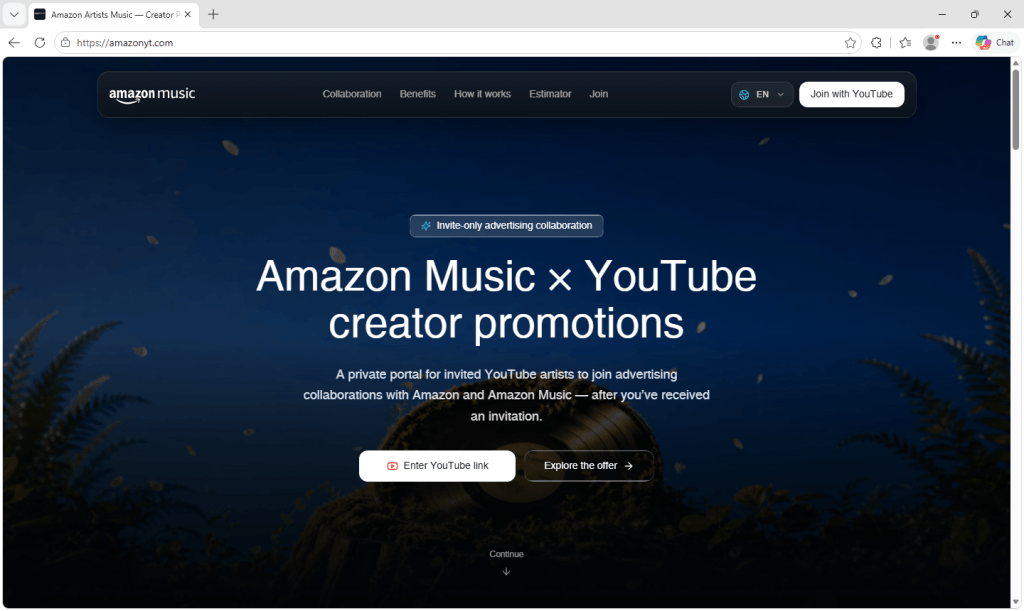
The site, hosted at amazonyt[.]com, calls itself the “Amazon Artists Music — Creator Portal.” The name resembles Amazon’s real Amazon Music for Artists service, helping it feel familiar at first glance.

It promises “advertising collaborations with Amazon and Amazon Music,” describes the program as invitation-only, and tells visitors to use “the link from your Amazon Music Artists outreach email.”

Fake Amazon Music x YouTube creator promotions website

There’s even an earnings calculator. You pick one of four packages (a Shorts package, an integration in a planned video, a dedicated video, or a “full campaign package”), set your average views, add “boosters” like extra Shorts or a livestream mention, and choose how exclusive the deal should be. The page then shows an “estimated payout” and compares it with the “endless back-and-forth and delayed payments” of ordinary brand outreach.

The calculator does real math on the numbers you enter. But a working calculator doesn’t make the payout real. The estimates give creators a reason to keep going before the site asks for their sign-in details.

The site is available in nine languages: English, Spanish, Indonesian, Portuguese, Russian, Urdu, Arabic, Hindi, and Thai, suggesting the operators are targeting creators across multiple countries.

Your own channel, used as bait

Next, the site asks for your YouTube channel link.

Once you paste it, a dashboard displays your real channel data: subscriber count, total views, recent and top-performing uploads, playlists, topics, and thumbnails. Seeing your own data on an Amazon-branded page makes the offer feel tailored to you.

Fake Amazon Music x YouTube creator promotions website

To pull this data, the site queries YouTube’s own public API directly from your browser. The code includes 20 Google API keys and automatically switches to the next one if a key hits its usage limit or is rejected.

This data is public, so looking it up isn’t theft in itself. What it buys the criminals is credibility. A site that knows your subscriber count and your latest upload can look as though someone has already assessed your channel for a deal.

The offer itself stays locked until you “verify” your channel.

The fake “Continue with Google” button

To unlock it, you have to “complete the required step: Verify Your Channel.” The page says you need to sign in with Google to confirm you own the channel and “unlock your Amazon Music collaboration brief,” and shows a familiar white button with the colored Google logo: Continue with Google.

The site does contain genuine Google sign-in code, the same kind legitimate sites use. But it’s inactive: the setting that would connect it to Google is empty, so it never runs.

Instead, clicking the button opens a full-screen frame on top of the page. The frame loads content from a second domain, youtubechannelverification[.]com. Its background is almost completely transparent, so whatever the second site draws appears to sit over the Amazon page. Meanwhile, your browser’s address bar still shows amazonyt[.]com.

Fake Amazon Music x YouTube creator promotions website

This is similar to what we described in our recent look at a fake Claude Max giveaway: when the sign-in window lives inside the page, the criminals control nearly everything you see.

The second-stage code shows what it’s after. In the version we analyzed, it sent the email address and password entered into the form to its own server, and it supported steps for multi-factor authentication (MFA) challenges. In other words, it’s built to collect not just your password but also verification codes that could help the criminals get past an additional layer of account protection.

A fake offer to keep you reassured

What happens next depends on how the second stage responds.

The fake window has no close button of its own. It closes only when the second-stage site tells it to. When that happens, the page displays, “Verification failed. Please try again.”

However, the second-stage configuration we analyzed also pointed to a “success” address back on amazonyt[.]com. Visiting that page marks your channel as verified and returns you to the dashboard, where the offer is now unlocked: a fit score, campaign tier, budget band, estimated reach, and a pitch that quotes your recent average views back to you.

Fake Amazon Music x YouTube creator promotions website

You can even negotiate. A counter-offer editor lets you choose deliverables, toggle social media usage rights, and leave a note for “Amazon Music.” When you click Request this collaboration or submit your counter-offer, a “Request received” screen says the Amazon Music partnership team will review your channel and reach out with next steps.

Fake Amazon Music x YouTube creator promotions website

For the creator who reaches this screen, everything appears to have worked. They verified their channel, saw a convincing offer, and sent a request. That reassuring ending may give the criminals more time before the victim suspects anything.

Why this campaign stands out

Fake sponsorship offers have targeted creators for years. This one combines several features that make the trap more convincing:

  • The password collection happens on a second domain. The amazonyt[.]com page itself doesn’t contain the sign-in form. That form is loaded from youtubechannelverification[.]com only after you click. A split like this can make the first page look cleaner to anyone checking it, and it lets the operators change the second stage without touching the lure.
  • The success page is designed to evade suspicion. Victims who hand over their details aren’t left at an error page. They’re returned to an unlocked offer and a “Request received” confirmation, giving them a reason to wait for a reply.
  • Personalization is automatic. Every visitor gets a dashboard and offer built from their own channel’s real numbers.
  • It may be part of a reusable kit. The code contains leftover error messages that have nothing to do with this site, like “Please enter the product ID” and “This channel is not in the list, please connect the invited channel.” The link to the second stage also carries a ref value, which the second-stage code we analyzed stored as a workerCode. That could mean more than one person sends traffic to it, though we can’t confirm how the kit is shared.

Why criminals want YouTube channels

YouTube creators have been a target for years. In 2021, Google’s Threat Analysis Group described a campaign that lured creators with fake collaboration offers, used malware to take over their channels, and then sold them on or used them to broadcast cryptocurrency scams.

A hijacked channel comes with an audience that already trusts it. That gives criminals a ready-made platform for reaching potential victims.

How to spot a fake sponsorship offer

  • Treat “verify your channel” requests with caution. Legitimate services may use Google’s official sign-in to confirm channel ownership. The important distinction is where you sign in: Your Google password and verification codes belong on Google’s genuine sign-in page.
  • Check the browser’s real address bar. If you’re asked for your Google password, the actual browser tab or separate browser window should show accounts.google.com. An address bar drawn inside the webpage can be faked.
  • Check the domain, not the logo. The domains amazonyt[.]com and youtubechannelverification[.]com are part of this phishing campaign. Familiar branding and accurate channel stats don’t make them official.
  • Know what the real program offers. The Amazon and YouTube Shopping partnership lets eligible creators earn commissions on tagged products. A supposed Amazon Music sponsorship needs to be verified separately.
  • Verify the offer independently. Contact the company through its official website, using contact details you find yourself rather than those supplied in the message.

If you already entered your details

Change your Google password through Google’s official site. Review your devices and sign out of unfamiliar sessions in your Google Account security settings, and remove any third-party apps you don’t recognize. Also check that your recovery email address and phone number haven’t changed.

If you entered an MFA code or approved a sign-in prompt, treat your account as potentially compromised.

In YouTube Studio, check Settings > Permissions for anyone you didn’t add. If your channel is connected to a Brand Account, check that account’s permissions too. If you’ve lost access, follow YouTube’s guidance for recovering a hacked channel, starting with the Google account associated with it.

How Malwarebytes spots scams like this

Once a phishing page loads, the criminals control almost everything you see, which is why it’s best to stop it before it opens. 

Malwarebytes Browser Guard blocks phishing and scam domains before the page can load. If you’re unsure about a sponsorship offer, you can ask Malwarebytes Scam Guard to check it before you reply or click anything.

Indicators of compromise

  • amazonyt[.]com
  • youtubechannelverification[.]com

Stop threats before they can do any harm.

Malwarebytes Browser Guard blocks phishing pages and malicious sites automatically. Free, one click to install. Add it to your browser →

Fake Amazon Music x YouTube deal lures creators into a Google login trap

21 October 2026 at 14:45
.kadence-column476672_104e78-a1 > .kt-inside-inner-col{padding-top:20px;padding-right:20px;padding-bottom:10px;padding-left:20px;}.kadence-column476672_104e78-a1 > .kt-inside-inner-col{column-gap:var(--global-kb-gap-sm, 1rem);}.kadence-column476672_104e78-a1 > .kt-inside-inner-col{flex-direction:column;}.kadence-column476672_104e78-a1 > .kt-inside-inner-col > .aligncenter{width:100%;}.kadence-column476672_104e78-a1 > .kt-inside-inner-col{background-color:var(--color-red-10);}.kadence-column476672_104e78-a1 > .kt-inside-inner-col:before{opacity:0.3;background-color:var(--color-red-10);}.kadence-column476672_104e78-a1{position:relative;}@media all and (max-width: 1024px){.kadence-column476672_104e78-a1 > .kt-inside-inner-col{flex-direction:column;justify-content:center;}}@media all and (max-width: 767px){.kadence-column476672_104e78-a1 > .kt-inside-inner-col{flex-direction:column;justify-content:center;}}

In this article

  • Fake Amazon Music deals use real YouTube stats as bait.
  • Fake verification steals Google sign-in details, risking account takeovers.
  • Make sure to verify offers independently and check the browser address before signing in.
  • Already entered your details? Change your password and check account activity and channel permissions.

On August 27, YouTube announced that Amazon had joined its Shopping Affiliate Program. Eligible creators can now tag Amazon products in their videos and earn a commission on sales.

Weeks later, we found a wave of sites offering YouTube creators what looks like another Amazon opportunity: an invite-only advertising deal with Amazon Music. The site shows creators their own channel stats, then asks them to “verify” their channel with Google before it reveals a personalized offer.

That verification step is a phishing attempt designed to steal Google sign-in details, putting the creator’s account and YouTube channel at risk.

If you receive one of these offers, don’t enter your Google password or verification codes. If you already have, secure your Google account immediately using the steps below.

What the real Amazon and YouTube partnership looks like

The real partnership lets eligible creators in the YouTube Partner Program and YouTube Shopping affiliate program tag Amazon products in their videos, Shorts, and livestreams, and earn a commission when viewers buy. YouTube’s setup guidance also describes linking Amazon and YouTube accounts, with a notification in YouTube Studio once tagging is enabled.

The real program does include a step where you connect and verify your channel. But it happens inside an Amazon account you already have, on Amazon’s own site, and YouTube confirms it in YouTube Studio. It doesn’t involve invite-only Amazon Music ad campaigns, payout calculators, or a third-party “creator portal.”

An invite-only deal that doesn’t exist

The site, hosted at amazonyt[.]com, calls itself the “Amazon Artists Music — Creator Portal.” The name resembles Amazon’s real Amazon Music for Artists service, helping it feel familiar at first glance.

It promises “advertising collaborations with Amazon and Amazon Music,” describes the program as invitation-only, and tells visitors to use “the link from your Amazon Music Artists outreach email.”

Fake Amazon Music x YouTube creator promotions website

There’s even an earnings calculator. You pick one of four packages (a Shorts package, an integration in a planned video, a dedicated video, or a “full campaign package”), set your average views, add “boosters” like extra Shorts or a livestream mention, and choose how exclusive the deal should be. The page then shows an “estimated payout” and compares it with the “endless back-and-forth and delayed payments” of ordinary brand outreach.

The calculator does real math on the numbers you enter. But a working calculator doesn’t make the payout real. The estimates give creators a reason to keep going before the site asks for their sign-in details.

The site is available in nine languages: English, Spanish, Indonesian, Portuguese, Russian, Urdu, Arabic, Hindi, and Thai, suggesting the operators are targeting creators across multiple countries.

Your own channel, used as bait

Next, the site asks for your YouTube channel link.

Once you paste it, a dashboard displays your real channel data: subscriber count, total views, recent and top-performing uploads, playlists, topics, and thumbnails. Seeing your own data on an Amazon-branded page makes the offer feel tailored to you.

Fake Amazon Music x YouTube creator promotions website

To pull this data, the site queries YouTube’s own public API directly from your browser. The code includes 20 Google API keys and automatically switches to the next one if a key hits its usage limit or is rejected.

This data is public, so looking it up isn’t theft in itself. What it buys the criminals is credibility. A site that knows your subscriber count and your latest upload can look as though someone has already assessed your channel for a deal.

The offer itself stays locked until you “verify” your channel.

The fake “Continue with Google” button

To unlock it, you have to “complete the required step: Verify Your Channel.” The page says you need to sign in with Google to confirm you own the channel and “unlock your Amazon Music collaboration brief,” and shows a familiar white button with the colored Google logo: Continue with Google.

The site does contain genuine Google sign-in code, the same kind legitimate sites use. But it’s inactive: the setting that would connect it to Google is empty, so it never runs.

Instead, clicking the button opens a full-screen frame on top of the page. The frame loads content from a second domain, youtubechannelverification[.]com. Its background is almost completely transparent, so whatever the second site draws appears to sit over the Amazon page. Meanwhile, your browser’s address bar still shows amazonyt[.]com.

Fake Amazon Music x YouTube creator promotions website

This is similar to what we described in our recent look at a fake Claude Max giveaway: when the sign-in window lives inside the page, the criminals control nearly everything you see.

The second-stage code shows what it’s after. In the version we analyzed, it sent the email address and password entered into the form to its own server, and it supported steps for multi-factor authentication (MFA) challenges. In other words, it’s built to collect not just your password but also verification codes that could help the criminals get past an additional layer of account protection.

A fake offer to keep you reassured

What happens next depends on how the second stage responds.

The fake window has no close button of its own. It closes only when the second-stage site tells it to. When that happens, the page displays, “Verification failed. Please try again.”

However, the second-stage configuration we analyzed also pointed to a “success” address back on amazonyt[.]com. Visiting that page marks your channel as verified and returns you to the dashboard, where the offer is now unlocked: a fit score, campaign tier, budget band, estimated reach, and a pitch that quotes your recent average views back to you.

Fake Amazon Music x YouTube creator promotions website

You can even negotiate. A counter-offer editor lets you choose deliverables, toggle social media usage rights, and leave a note for “Amazon Music.” When you click Request this collaboration or submit your counter-offer, a “Request received” screen says the Amazon Music partnership team will review your channel and reach out with next steps.

Fake Amazon Music x YouTube creator promotions website

For the creator who reaches this screen, everything appears to have worked. They verified their channel, saw a convincing offer, and sent a request. That reassuring ending may give the criminals more time before the victim suspects anything.

Why this campaign stands out

Fake sponsorship offers have targeted creators for years. This one combines several features that make the trap more convincing:

  • The password collection happens on a second domain. The amazonyt[.]com page itself doesn’t contain the sign-in form. That form is loaded from youtubechannelverification[.]com only after you click. A split like this can make the first page look cleaner to anyone checking it, and it lets the operators change the second stage without touching the lure.
  • The success page is designed to evade suspicion. Victims who hand over their details aren’t left at an error page. They’re returned to an unlocked offer and a “Request received” confirmation, giving them a reason to wait for a reply.
  • Personalization is automatic. Every visitor gets a dashboard and offer built from their own channel’s real numbers.
  • It may be part of a reusable kit. The code contains leftover error messages that have nothing to do with this site, like “Please enter the product ID” and “This channel is not in the list, please connect the invited channel.” The link to the second stage also carries a ref value, which the second-stage code we analyzed stored as a workerCode. That could mean more than one person sends traffic to it, though we can’t confirm how the kit is shared.

Why criminals want YouTube channels

YouTube creators have been a target for years. In 2021, Google’s Threat Analysis Group described a campaign that lured creators with fake collaboration offers, used malware to take over their channels, and then sold them on or used them to broadcast cryptocurrency scams.

A hijacked channel comes with an audience that already trusts it. That gives criminals a ready-made platform for reaching potential victims.

How to spot a fake sponsorship offer

  • Treat “verify your channel” requests with caution. Legitimate services may use Google’s official sign-in to confirm channel ownership. The important distinction is where you sign in: Your Google password and verification codes belong on Google’s genuine sign-in page.
  • Check the browser’s real address bar. If you’re asked for your Google password, the actual browser tab or separate browser window should show accounts.google.com. An address bar drawn inside the webpage can be faked.
  • Check the domain, not the logo. The domains amazonyt[.]com and youtubechannelverification[.]com are part of this phishing campaign. Familiar branding and accurate channel stats don’t make them official.
  • Know what the real program offers. The Amazon and YouTube Shopping partnership lets eligible creators earn commissions on tagged products. A supposed Amazon Music sponsorship needs to be verified separately.
  • Verify the offer independently. Contact the company through its official website, using contact details you find yourself rather than those supplied in the message.

If you already entered your details

Change your Google password through Google’s official site. Review your devices and sign out of unfamiliar sessions in your Google Account security settings, and remove any third-party apps you don’t recognize. Also check that your recovery email address and phone number haven’t changed.

If you entered an MFA code or approved a sign-in prompt, treat your account as potentially compromised.

In YouTube Studio, check Settings > Permissions for anyone you didn’t add. If your channel is connected to a Brand Account, check that account’s permissions too. If you’ve lost access, follow YouTube’s guidance for recovering a hacked channel, starting with the Google account associated with it.

How Malwarebytes spots scams like this

Once a phishing page loads, the criminals control almost everything you see, which is why it’s best to stop it before it opens. 

Malwarebytes Browser Guard blocks phishing and scam domains before the page can load. If you’re unsure about a sponsorship offer, you can ask Malwarebytes Scam Guard to check it before you reply or click anything.

Indicators of compromise

  • amazonyt[.]com
  • youtubechannelverification[.]com

Stop threats before they can do any harm.

Malwarebytes Browser Guard blocks phishing pages and malicious sites automatically. Free, one click to install. Add it to your browser →

❌