❌

Normal view

Update your iPhone, iPad, or Mac: Flaw could run attackers’ code

29 September 2026 at 12:35

Apple has released updates for iPhones, iPads, and Macs to fix a flaw that could let an attacker run code when a device processes a malicious file. Apple says it may have been used in highly targeted attacks against iPhone users running versions of iOS before iOS 27.

The fix is in iOS and iPadOS 26.7.1, as well as macOS Sequoia 15.8.1 and macOS Tahoe 26.7.1. Check Software Update on each of your Apple devices and install the latest version offered.

Updates for your particular device

The table below shows which relevant updates are available and links to Apple’s security information for each one.

UpdateAvailable for
iOS 26.7.1 and iPadOS 26.7.1iPhone 11 and later, iPad Pro 12.9-inch 3rd generation and later, iPad Pro 11-inch 1st generation and later, iPad Air 3rd generation and later, iPad 8th generation and later, and iPad mini 5th generation and later
macOS Tahoe 26.7.1macOS Tahoe
macOS Sequoia 15.8.1macOS Sequoia

How to update your Apple devices

How to update your iPhone or iPad

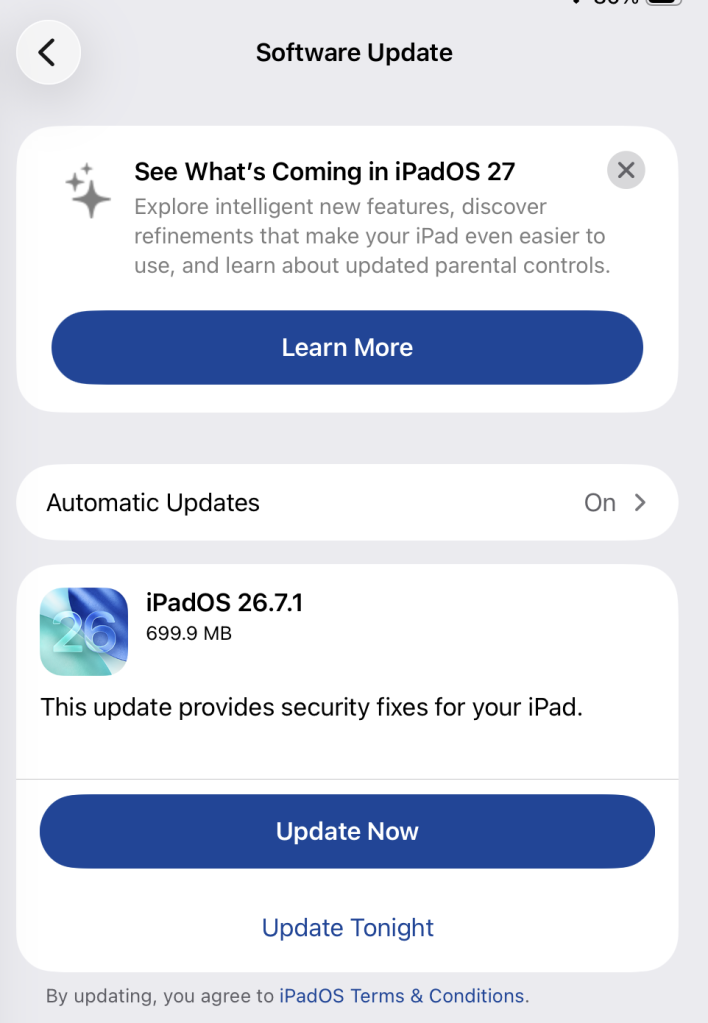
To check if you’re using the latest software version, go to Settings > General > Software Update. You’ll see if an update is available and be guided through installing it.

Turn on Automatic Updates if you haven’t already—you’ll find it on the same screen.

Available update options on iPad

How to update macOS on any version

To update macOS on any supported Mac, use Software Update:

  • Click the Apple menu in the upper-left corner of your screen.
  • Choose System Settings (or System Preferences on older versions).
  • Select General in the sidebar, then click Software Update on the right. On older macOS, look for Software Update directly.
  • Your Mac will check for updates automatically. If updates are available, click Update Now (or Upgrade Now for major new versions) and follow the on-screen instructions. Before you upgrade to macOS Tahoe 26, read Apple’s instructions.
  • Enter your administrator password if prompted, then let your Mac finish the update. It may need to restart.
  • Make sure your Mac stays plugged in and connected to the internet until the update is done.

Technical details

The bug, CVE-2026-86950, affects CoreGraphics, an Apple framework used throughout its operating systems and apps to display and process visual content such as images and PDFs.

It’s an out-of-bounds write issue, which Apple addressed with improved bounds checking. This type of bug happens when software writes data beyond the limits of its allocated area of memory. It can overwrite other data in memory, interfere with the normal operation of the program, cause a crash, or even let an attacker take control of the affected process. In this case, processing a maliciously crafted file may lead to an attacker running their own code.

Apple says it is aware of a report that the issue may have been exploited in an “extremely sophisticated attack” against specific people using versions of iOS before iOS 27. Although the reported attack was highly targeted, other attackers could try to exploit the flaw now that it has been disclosed. 


Scammers know more about you than you think. 

Malwarebytes Mobile Security protects you from phishing, scam texts, malicious sites, and more. With real-time AI-powered Scam Guard built right in. 

.wp-block-kadence-advancedbtn.kb-btns97520_6de029-2f{gap:var(--global-kb-gap-xs, 0.5rem );justify-content:flex-start;align-items:center;}.kt-btns97520_6de029-2f .kt-button{font-weight:normal;font-style:normal;}.kt-btns97520_6de029-2f .kt-btn-wrap-0{margin-right:5px;}.wp-block-kadence-advancedbtn.kt-btns97520_6de029-2f .kt-btn-wrap-0 .kt-button{color:#555555;border-color:#555555;}.wp-block-kadence-advancedbtn.kt-btns97520_6de029-2f .kt-btn-wrap-0 .kt-button:hover, .wp-block-kadence-advancedbtn.kt-btns97520_6de029-2f .kt-btn-wrap-0 .kt-button:focus{color:#ffffff;border-color:#444444;}.wp-block-kadence-advancedbtn.kt-btns97520_6de029-2f .kt-btn-wrap-0 .kt-button::before{display:none;}.wp-block-kadence-advancedbtn.kt-btns97520_6de029-2f .kt-btn-wrap-0 .kt-button:hover, .wp-block-kadence-advancedbtn.kt-btns97520_6de029-2f .kt-btn-wrap-0 .kt-button:focus{background:#444444;}
ul.menu .wp-block-kadence-advancedbtn .kb-btn97520_074a67-a8.kb-button{width:initial;}.wp-block-kadence-advancedbtn .kb-btn97520_074a67-a8.kb-button{color:var(--color-neutral-10);background:var(--color-brand-blue-60);border-top-left-radius:40px;border-top-right-radius:40px;border-bottom-right-radius:40px;border-bottom-left-radius:40px;box-shadow:1px 1px 2px 0px rgba(0, 0, 0, 0.2);}.wp-block-kadence-advancedbtn .kb-btn97520_074a67-a8.kb-button:hover, .wp-block-kadence-advancedbtn .kb-btn97520_074a67-a8.kb-button:focus{box-shadow:0px 4px 0px 0px var(--color-brand-blue-90);}Try it now

Update your iPhone, iPad, or Mac: Flaw could run attackers’ code

29 September 2026 at 12:35

Apple has released updates for iPhones, iPads, and Macs to fix a flaw that could let an attacker run code when a device processes a malicious file. Apple says it may have been used in highly targeted attacks against iPhone users running versions of iOS before iOS 27.

The fix is in iOS and iPadOS 26.7.1, as well as macOS Sequoia 15.8.1 and macOS Tahoe 26.7.1. Check Software Update on each of your Apple devices and install the latest version offered.

Updates for your particular device

The table below shows which relevant updates are available and links to Apple’s security information for each one.

UpdateAvailable for
iOS 26.7.1 and iPadOS 26.7.1iPhone 11 and later, iPad Pro 12.9-inch 3rd generation and later, iPad Pro 11-inch 1st generation and later, iPad Air 3rd generation and later, iPad 8th generation and later, and iPad mini 5th generation and later
macOS Tahoe 26.7.1macOS Tahoe
macOS Sequoia 15.8.1macOS Sequoia

How to update your Apple devices

How to update your iPhone or iPad

To check if you’re using the latest software version, go to Settings > General > Software Update. You’ll see if an update is available and be guided through installing it.

Turn on Automatic Updates if you haven’t already—you’ll find it on the same screen.

Available update options on iPad

How to update macOS on any version

To update macOS on any supported Mac, use Software Update:

  • Click the Apple menu in the upper-left corner of your screen.
  • Choose System Settings (or System Preferences on older versions).
  • Select General in the sidebar, then click Software Update on the right. On older macOS, look for Software Update directly.
  • Your Mac will check for updates automatically. If updates are available, click Update Now (or Upgrade Now for major new versions) and follow the on-screen instructions. Before you upgrade to macOS Tahoe 26, read Apple’s instructions.
  • Enter your administrator password if prompted, then let your Mac finish the update. It may need to restart.
  • Make sure your Mac stays plugged in and connected to the internet until the update is done.

Technical details

The bug, CVE-2026-86950, affects CoreGraphics, an Apple framework used throughout its operating systems and apps to display and process visual content such as images and PDFs.

It’s an out-of-bounds write issue, which Apple addressed with improved bounds checking. This type of bug happens when software writes data beyond the limits of its allocated area of memory. It can overwrite other data in memory, interfere with the normal operation of the program, cause a crash, or even let an attacker take control of the affected process. In this case, processing a maliciously crafted file may lead to an attacker running their own code.

Apple says it is aware of a report that the issue may have been exploited in an “extremely sophisticated attack” against specific people using versions of iOS before iOS 27. Although the reported attack was highly targeted, other attackers could try to exploit the flaw now that it has been disclosed. 


Scammers know more about you than you think. 

Malwarebytes Mobile Security protects you from phishing, scam texts, malicious sites, and more. With real-time AI-powered Scam Guard built right in. 

.wp-block-kadence-advancedbtn.kb-btns97520_6de029-2f{gap:var(--global-kb-gap-xs, 0.5rem );justify-content:flex-start;align-items:center;}.kt-btns97520_6de029-2f .kt-button{font-weight:normal;font-style:normal;}.kt-btns97520_6de029-2f .kt-btn-wrap-0{margin-right:5px;}.wp-block-kadence-advancedbtn.kt-btns97520_6de029-2f .kt-btn-wrap-0 .kt-button{color:#555555;border-color:#555555;}.wp-block-kadence-advancedbtn.kt-btns97520_6de029-2f .kt-btn-wrap-0 .kt-button:hover, .wp-block-kadence-advancedbtn.kt-btns97520_6de029-2f .kt-btn-wrap-0 .kt-button:focus{color:#ffffff;border-color:#444444;}.wp-block-kadence-advancedbtn.kt-btns97520_6de029-2f .kt-btn-wrap-0 .kt-button::before{display:none;}.wp-block-kadence-advancedbtn.kt-btns97520_6de029-2f .kt-btn-wrap-0 .kt-button:hover, .wp-block-kadence-advancedbtn.kt-btns97520_6de029-2f .kt-btn-wrap-0 .kt-button:focus{background:#444444;}
ul.menu .wp-block-kadence-advancedbtn .kb-btn97520_074a67-a8.kb-button{width:initial;}.wp-block-kadence-advancedbtn .kb-btn97520_074a67-a8.kb-button{color:var(--color-neutral-10);background:var(--color-brand-blue-60);border-top-left-radius:40px;border-top-right-radius:40px;border-bottom-right-radius:40px;border-bottom-left-radius:40px;box-shadow:1px 1px 2px 0px rgba(0, 0, 0, 0.2);}.wp-block-kadence-advancedbtn .kb-btn97520_074a67-a8.kb-button:hover, .wp-block-kadence-advancedbtn .kb-btn97520_074a67-a8.kb-button:focus{box-shadow:0px 4px 0px 0px var(--color-brand-blue-90);}Try it now

Update Chrome: 108 security fixes for desktop, new release for Android

24 September 2026 at 13:06

Over the last few days, Google issued several different Chrome updates.

On September 22, Google released a Stable Channel Update for Desktop. This is the most important one for desktop users. It brings Chrome to version 154.0.8037.57 for Linux and versions 154.0.8037.57/.58 for Windows and Mac. The update includes 108 security fixes including 11 rated Critical.

It will roll out over the coming days and weeks.

One day later, Google released Chrome 155 for Android, version 155.0.8059.16, to a small percentage of users. It may not be available on Google Play for everyone yet, but keep an eye out for it. Google says it includes stability and performance improvements.

On top of these, Chrome 155 is also available in the Beta channel. The Android release is an Early Stable rollout, meaning Google sends it to a small share of users first, to spot unexpected compatibility or reliability issues before expanding it to everyone. Beta is a separate prerelease version for people who want to try upcoming features roughly four to six weeks before Stable. It is relatively polished but can still contain bugs, so it is best suited to testing rather than everyday use.

How to update Chrome

The easiest option is to allow Chrome to update automatically. But you can end up lagging behind on updates if you never close your browser or if something goes wrong, such as an extension preventing the update.

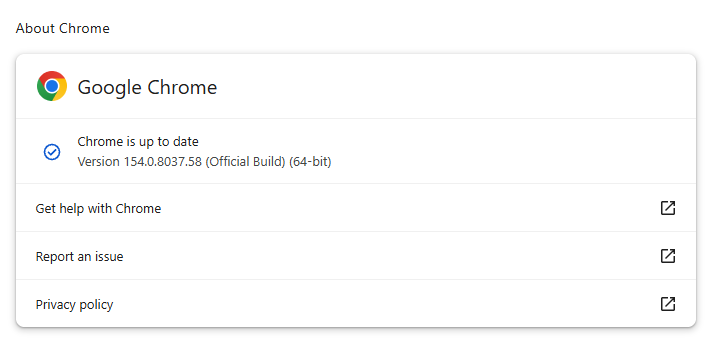
If you don’t want to wait for the rollout to reach you, manually updating is easy. open About Google Chrome from Chrome’s settings or Help menu. Chrome will check for updates. If one is available, click Relaunch to apply it.

Chrome 154.0.8037.58 is up to date

You can find an explanation of the version numbering system and step-by-step instructions in our guide: How to update Chrome on every operating system.

Technical details

Some of the desktop security fixes deserve a closer look.

Let’s start with CVE-2026-95350, a buffer overflow flaw in ANGLE, Chrome’s graphics-translation layer.

A buffer overflow is a bug in code that allows an attack to happen when a program puts more data into an area of memory than it can hold. Essentially, the attacker writes garbage data that fills up the memory, then writes code that overwrites existing code in adjoining memory, which later gets executed by the vulnerable process.

A crafted webpage could potentially trigger the flaw, which could lead to memory safety bugs, including browser crashes or possible code execution.

Another Critical buffer overflow bug in ANGLE is tracked as CVE-2026-95281. A malicious webpage could potentially reach vulnerable graphics-processing code, so the bug may enable serious impacts such as browser compromise, but Google has not provided exploitation details.

And then there is CVE-2026-95357, an out-of-bounds write in Chrome’s GPU component. This means a program could write data outside its intended area of memory.

The GPU component is the part of Chrome that handles how graphics work with your computer’s graphics processor.


Stop threats before they can do any harm.

Malwarebytes Browser Guard blocks phishing pages and malicious sites automatically. Free, one click to install. Add it to your browser →

Some cheap smart glasses are a security disaster

22 September 2026 at 17:04

Apart from the privacy concerns around smart glasses, researchers have found that some cheap brands come with barely any security at all.

ABC Australia reports that researchers from NSB Cyber and Abstract Shield tested two inexpensive pairs, costing A$60 and A$110 (around US$42 and US$78), and found more than a dozen flaws across the smart glasses themselves, their app, and an associated website.

The main problem they uncovered was insecure Bluetooth pairing: If the glasses were powered on and not connected to their owner’s phone, an attacker could connect first, with no password or meaningful pairing confirmation.

After connecting, an attacker could reportedly control the glasses to capture photos or recordings, copy existing media, and intercept data moving between the glasses and the phone. An attacker could also make another device appear to be the victim’s glasses, allowing it to connect to the owner’s mobile app.

The testing also found that a Bluetooth-visible device identifier could allegedly be used with a weakness in the app’s website to retrieve a user’s email address and date of birth.

The research uncovered another privacy issue. ABC reports that voice or text submitted to the built-in AI, along with images sent to it, was first transmitted to a server in Shenzhen and could be forwarded elsewhere, depending on the function. The tests did not establish how the data was subsequently used.

The server locations, combined with some of the AI’s answers to specific questions, led researchers to conclude that the chatbot companion relied at least in part on Chinese sovereign AI models. Professor Kimberlee Weatherall, a technology regulation expert involved in the testing, said the failure to identify China in the privacy policy appeared to violate the Australian Privacy Principles,

The timing of the testing is also relevant because Australia’s smart-device security standards apply to most consumer smart devices manufactured on or after March 4, 2026. They require, among other measures, no universal default passwords, a way to report vulnerabilities, and information about the minimum security-update period. Devices made before that date are outside the requirements.

Experts quoted by ABC said the devices violated Australia’s privacy laws and were also likely to breach several sections of the Cyber Security Act. However, whether the new smart-device standards apply would depend partly on when the glasses were manufactured, and the rules have not yet been tested in a known enforcement action.

Professor Weatherall said:

“The rules say that the password must be unique. It doesn’t even seem like they were applying a password, which might mean that their standards are so low they don’t even technically breach that rule, which I find amazing.”

What to do

We’re not fans of smart glasses, expensive or cheap. But if you own a pair:

  • Avoid pairing or using inexpensive camera glasses that lack a clear physical pairing step, account authentication, a published security-contact process, and a stated update-support period.
  • Stop using their AI or cloud features for sensitive material, remove unnecessary permissions from the companion app, check for firmware and app updates, and consider returning the product if the vendor cannot document a fix.
  • Ask permission before recording people, and check your local laws to understand what is and isn’t allowed.

From reporting threats to removing them.

Cybersecurity risks should never spread beyond a headline. Keep threats off your devices by downloading Malwarebytes today.

Meta’s Muse AI assistant has a zero-day that can turn it into a Mac backdoor

22 September 2026 at 12:53

Mac security researcher Patrick Wardle says it’s trivial to turn Muse into “the ultimate backdoor.”

Increasingly, AI assistants are changing from tools that simply answer questions into agents that can plan tasks, use connected services, and take actions for us. These actions might include booking appointments, filling out forms, creating documents, making purchases, or interacting with email and calendars.

To do that, they need more permissions, account connections, and sensitive data. So, when Meta promised that “Muse is built from the ground up for privacy and security,” we did not expect an AI agent that can easily be manipulated into handing all that access to an attacker.

Meta says Muse can handle appointments, forms, customer-service interactions, purchases, document creation, and connections to services such as WhatsApp, email, calendars, and social platforms. It may also receive macOS permissions to access protected resources, including files, the microphone, camera, location, and calendars.

According to Ars Technica, Wardle found that a locally running application or terminal command could alter an undocumented Muse configuration setting that controls the server used for dictation transcription. By redirecting dictation traffic to an attacker-controlled server, an attacker could capture voice prompts and obtain the authentication token for the victim’s Muse account.

This is not a remote-code-execution vulnerability that can compromise an otherwise clean Mac. The attacker first needs a way to run code locally, such as through malware, a malicious application, or social engineering.

But as we have seen with infostealer malware finding its way onto Macs, that initial access is far from impossible.


Someone’s watching your accounts. Make sure it’s us.


Traditional infostealer malware must independently locate browser data, credentials, documents, chat histories, and other valuable material. A compromised AI agent could lower that barrier by bundling access to multiple services and operating-system permissions behind one already authenticated interface.

Ultimately, this is not just about one unsafe configuration setting. It shows why AI agents need a higher security standard than ordinary apps.

How to stay safe

Wardle’s advice about Muse is simple: “Please don’t install.”

The same caution should apply to other AI agents.

The Open Worldwide Application Security Project (OWASP), a nonprofit foundation that provides free application-security guidance, lists prompt injection, tool abuse, privilege escalation, data exfiltration, excessive autonomy, memory poisoning, and sensitive-data exposure among the major security risks posed by AI agents.

A useful rule is that an AI agent should not have more access than it needs, and it should not be able to turn untrusted instructions into sensitive actions without meaningful checks. In practice, this means:

  • Avoid giving a new agent broad access to email, chat apps, calendars, cloud storage, payment methods, and device permissions all at once.
  • Regularly review and remove connections the agent does not genuinely need.
  • Be aware of prompt injection. Do not assume that an AI agent will recognize malicious instructions embedded in a webpage, document, email, or other external content.
  • Watch for unusual agent behavior, such as unexpected requests for new permissions, account reauthentication, external file sharing, or actions you did not initiate.

You should also protect your device against malware:

  • Keep your software updated so attackers can’t use known vulnerabilities against you.
  • Use an up-to-date, real-time anti-malware solution on all your devices.
  • To protect against ClickFix attacks, don’t follow instructions you find on websites and in unsolicited messages that tell you to run commands.

From reporting threats to removing them.

Cybersecurity risks should never spread beyond a headline. Keep threats off your devices by downloading Malwarebytes today.

Update Chrome: 108 security fixes for desktop, new release for Android

24 September 2026 at 13:06

Over the last few days, Google issued several different Chrome updates.

On September 22, Google released a Stable Channel Update for Desktop. This is the most important one for desktop users. It brings Chrome to version 154.0.8037.57 for Linux and versions 154.0.8037.57/.58 for Windows and Mac. The update includes 108 security fixes including 11 rated Critical.

It will roll out over the coming days and weeks.

One day later, Google released Chrome 155 for Android, version 155.0.8059.16, to a small percentage of users. It may not be available on Google Play for everyone yet, but keep an eye out for it. Google says it includes stability and performance improvements.

On top of these, Chrome 155 is also available in the Beta channel. The Android release is an Early Stable rollout, meaning Google sends it to a small share of users first, to spot unexpected compatibility or reliability issues before expanding it to everyone. Beta is a separate prerelease version for people who want to try upcoming features roughly four to six weeks before Stable. It is relatively polished but can still contain bugs, so it is best suited to testing rather than everyday use.

How to update Chrome

The easiest option is to allow Chrome to update automatically. But you can end up lagging behind on updates if you never close your browser or if something goes wrong, such as an extension preventing the update.

If you don’t want to wait for the rollout to reach you, manually updating is easy. open About Google Chrome from Chrome’s settings or Help menu. Chrome will check for updates. If one is available, click Relaunch to apply it.

Chrome 154.0.8037.58 is up to date

You can find an explanation of the version numbering system and step-by-step instructions in our guide: How to update Chrome on every operating system.

Technical details

Some of the desktop security fixes deserve a closer look.

Let’s start with CVE-2026-95350, a buffer overflow flaw in ANGLE, Chrome’s graphics-translation layer.

A buffer overflow is a bug in code that allows an attack to happen when a program puts more data into an area of memory than it can hold. Essentially, the attacker writes garbage data that fills up the memory, then writes code that overwrites existing code in adjoining memory, which later gets executed by the vulnerable process.

A crafted webpage could potentially trigger the flaw, which could lead to memory safety bugs, including browser crashes or possible code execution.

Another Critical buffer overflow bug in ANGLE is tracked as CVE-2026-95281. A malicious webpage could potentially reach vulnerable graphics-processing code, so the bug may enable serious impacts such as browser compromise, but Google has not provided exploitation details.

And then there is CVE-2026-95357, an out-of-bounds write in Chrome’s GPU component. This means a program could write data outside its intended area of memory.

The GPU component is the part of Chrome that handles how graphics work with your computer’s graphics processor.


Stop threats before they can do any harm.

Malwarebytes Browser Guard blocks phishing pages and malicious sites automatically. Free, one click to install. Add it to your browser →

Some cheap smart glasses are a security disaster

22 September 2026 at 17:04

Apart from the privacy concerns around smart glasses, researchers have found that some cheap brands come with barely any security at all.

ABC Australia reports that researchers from NSB Cyber and Abstract Shield tested two inexpensive pairs, costing A$60 and A$110 (around US$42 and US$78), and found more than a dozen flaws across the smart glasses themselves, their app, and an associated website.

The main problem they uncovered was insecure Bluetooth pairing: If the glasses were powered on and not connected to their owner’s phone, an attacker could connect first, with no password or meaningful pairing confirmation.

After connecting, an attacker could reportedly control the glasses to capture photos or recordings, copy existing media, and intercept data moving between the glasses and the phone. An attacker could also make another device appear to be the victim’s glasses, allowing it to connect to the owner’s mobile app.

The testing also found that a Bluetooth-visible device identifier could allegedly be used with a weakness in the app’s website to retrieve a user’s email address and date of birth.

The research uncovered another privacy issue. ABC reports that voice or text submitted to the built-in AI, along with images sent to it, was first transmitted to a server in Shenzhen and could be forwarded elsewhere, depending on the function. The tests did not establish how the data was subsequently used.

The server locations, combined with some of the AI’s answers to specific questions, led researchers to conclude that the chatbot companion relied at least in part on Chinese sovereign AI models. Professor Kimberlee Weatherall, a technology regulation expert involved in the testing, said the failure to identify China in the privacy policy appeared to violate the Australian Privacy Principles,

The timing of the testing is also relevant because Australia’s smart-device security standards apply to most consumer smart devices manufactured on or after March 4, 2026. They require, among other measures, no universal default passwords, a way to report vulnerabilities, and information about the minimum security-update period. Devices made before that date are outside the requirements.

Experts quoted by ABC said the devices violated Australia’s privacy laws and were also likely to breach several sections of the Cyber Security Act. However, whether the new smart-device standards apply would depend partly on when the glasses were manufactured, and the rules have not yet been tested in a known enforcement action.

Professor Weatherall said:

“The rules say that the password must be unique. It doesn’t even seem like they were applying a password, which might mean that their standards are so low they don’t even technically breach that rule, which I find amazing.”

What to do

We’re not fans of smart glasses, expensive or cheap. But if you own a pair:

  • Avoid pairing or using inexpensive camera glasses that lack a clear physical pairing step, account authentication, a published security-contact process, and a stated update-support period.
  • Stop using their AI or cloud features for sensitive material, remove unnecessary permissions from the companion app, check for firmware and app updates, and consider returning the product if the vendor cannot document a fix.
  • Ask permission before recording people, and check your local laws to understand what is and isn’t allowed.

From reporting threats to removing them.

Cybersecurity risks should never spread beyond a headline. Keep threats off your devices by downloading Malwarebytes today.

Meta’s Muse AI assistant has a zero-day that can turn it into a Mac backdoor

22 September 2026 at 12:53

Mac security researcher Patrick Wardle says it’s trivial to turn Muse into “the ultimate backdoor.”

Increasingly, AI assistants are changing from tools that simply answer questions into agents that can plan tasks, use connected services, and take actions for us. These actions might include booking appointments, filling out forms, creating documents, making purchases, or interacting with email and calendars.

To do that, they need more permissions, account connections, and sensitive data. So, when Meta promised that “Muse is built from the ground up for privacy and security,” we did not expect an AI agent that can easily be manipulated into handing all that access to an attacker.

Meta says Muse can handle appointments, forms, customer-service interactions, purchases, document creation, and connections to services such as WhatsApp, email, calendars, and social platforms. It may also receive macOS permissions to access protected resources, including files, the microphone, camera, location, and calendars.

According to Ars Technica, Wardle found that a locally running application or terminal command could alter an undocumented Muse configuration setting that controls the server used for dictation transcription. By redirecting dictation traffic to an attacker-controlled server, an attacker could capture voice prompts and obtain the authentication token for the victim’s Muse account.

This is not a remote-code-execution vulnerability that can compromise an otherwise clean Mac. The attacker first needs a way to run code locally, such as through malware, a malicious application, or social engineering.

But as we have seen with infostealer malware finding its way onto Macs, that initial access is far from impossible.


Someone’s watching your accounts. Make sure it’s us.


Traditional infostealer malware must independently locate browser data, credentials, documents, chat histories, and other valuable material. A compromised AI agent could lower that barrier by bundling access to multiple services and operating-system permissions behind one already authenticated interface.

Ultimately, this is not just about one unsafe configuration setting. It shows why AI agents need a higher security standard than ordinary apps.

How to stay safe

Wardle’s advice about Muse is simple: “Please don’t install.”

The same caution should apply to other AI agents.

The Open Worldwide Application Security Project (OWASP), a nonprofit foundation that provides free application-security guidance, lists prompt injection, tool abuse, privilege escalation, data exfiltration, excessive autonomy, memory poisoning, and sensitive-data exposure among the major security risks posed by AI agents.

A useful rule is that an AI agent should not have more access than it needs, and it should not be able to turn untrusted instructions into sensitive actions without meaningful checks. In practice, this means:

  • Avoid giving a new agent broad access to email, chat apps, calendars, cloud storage, payment methods, and device permissions all at once.
  • Regularly review and remove connections the agent does not genuinely need.
  • Be aware of prompt injection. Do not assume that an AI agent will recognize malicious instructions embedded in a webpage, document, email, or other external content.
  • Watch for unusual agent behavior, such as unexpected requests for new permissions, account reauthentication, external file sharing, or actions you did not initiate.

You should also protect your device against malware:

  • Keep your software updated so attackers can’t use known vulnerabilities against you.
  • Use an up-to-date, real-time anti-malware solution on all your devices.
  • To protect against ClickFix attacks, don’t follow instructions you find on websites and in unsolicited messages that tell you to run commands.

From reporting threats to removing them.

Cybersecurity risks should never spread beyond a headline. Keep threats off your devices by downloading Malwarebytes today.

❌