Parcel delivery phishing campaigns appear around the world under different courier names. In the United States, the messages commonly impersonate USPS and claim that a package has an invalid address or could not be delivered. Similar messages impersonate Colissimo and Chronopost in France, Correos in Spain, Poste Italiane in Italy, and PostNL in the Netherlands.
The details vary, but the aim is usually the same: to persuade you to visit a fake courier website and provide personal and financial information.
A fake bpost delivery email
A recent campaign targeting customers of the Belgian postal service bpost begins with an email claiming that a package could not be delivered because €4.95 in customs duties has not been paid.
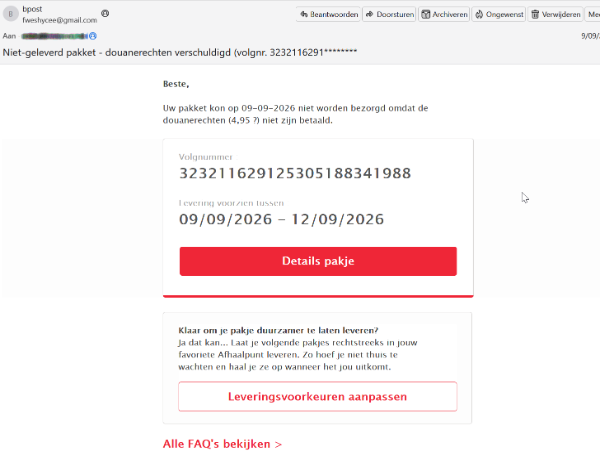
A phishing email, in Dutch, pretending to be from bpost.
In English, the subject and message read:
Undelivered package—customs duties due (tracking no. 3232116291*******).
Your package could not be delivered on September 9, 2026, because the customs duties (€4.95) have not been paid.
The amount is small enough that recipients may pay without giving it much thought. However, the website does not stop at collecting the supposed fee. It asks for personal information, card details, and banking information.
How the scam works
The link first passes through a URL-shortening service (hxxps://qr[.]paps[.]jp/1GWsa) before redirecting to a fake bpost site. The campaign used several fake bpost domains, including:
bpost[.]center, which is the domain shown in the screenshots below.
The page copies bpost’s branding and displays security claims such as “Secure SSL connection,” “256-bit SSL,” “SEPA compliant,” and “Secure payment.” These labels were added by the scammers and do not prove that the page or payment is secure.
We’ve translated the screenshots below from the original Dutch into English.
The first page asks for the recipient’s name, phone number, email address, and age:
That reference to receiving funds does not match the email’s claim that a customs fee must be paid. The next page asks for an IBAN, card number, expiry date, and payment amount:
Then it asks for the real target: full card and bank details.
The original Dutch version contained another mistake: One of its buttons read “Indian search” instead of “Betaal,” the Dutch word for “Pay.” Mistakes like this can expose a scam, but many phishing pages are built carefully enough that there will be no obvious typo or mistranslation.
Once submitted, card details may be used for fraudulent purchases or sold to other criminals. The personal and banking information may also be used to make later scams more convincing.
How to protect yourself
Check delivery claims independently. Open the courier’s official app or type its website address into your browser, then use your tracking number to check the delivery.
Check the sender and destination. A message may use a courier’s name while coming from an unrelated email address or linking to a different domain.
Be wary of unexpected fees or refunds. A small payment or promised refund can be used to persuade you to provide much more valuable information.
Be wary of requests for extensive financial information. A request for an IBAN as well as card details should be treated with suspicion, particularly when it supposedly relates to a small delivery fee.
If you entered your card or banking information on a suspicious site, contact your bank or card provider immediately. Freeze the affected card if your banking app allows it, monitor your accounts for unfamiliar transactions, and change any password you entered on the site.
Malwarebytes tracks and blocks these campaigns as they appear. If you’re unsure about a message, Scam Guard—built into Malwarebytes for Windows, Mac, Android, and iOS—can check it for you. Paste in the message or link, or upload a screenshot, for an instant assessment.
Scam Guard can analyze a suspicious email, text, link, or screenshot and tell you whether it may be a scam.
Something feel off? Check it before you click.
Malwarebytes Scam Guard helps you analyze suspicious links, texts, and screenshots instantly.
Parcel delivery phishing campaigns appear around the world under different courier names. In the United States, the messages commonly impersonate USPS and claim that a package has an invalid address or could not be delivered. Similar messages impersonate Colissimo and Chronopost in France, Correos in Spain, Poste Italiane in Italy, and PostNL in the Netherlands.
The details vary, but the aim is usually the same: to persuade you to visit a fake courier website and provide personal and financial information.
A fake bpost delivery email
A recent campaign targeting customers of the Belgian postal service bpost begins with an email claiming that a package could not be delivered because €4.95 in customs duties has not been paid.
A phishing email, in Dutch, pretending to be from bpost.
In English, the subject and message read:
Undelivered package—customs duties due (tracking no. 3232116291*******).
Your package could not be delivered on September 9, 2026, because the customs duties (€4.95) have not been paid.
The amount is small enough that recipients may pay without giving it much thought. However, the website does not stop at collecting the supposed fee. It asks for personal information, card details, and banking information.
How the scam works
The link first passes through a URL-shortening service (hxxps://qr[.]paps[.]jp/1GWsa) before redirecting to a fake bpost site. The campaign used several fake bpost domains, including:
bpost[.]center, which is the domain shown in the screenshots below.
The page copies bpost’s branding and displays security claims such as “Secure SSL connection,” “256-bit SSL,” “SEPA compliant,” and “Secure payment.” These labels were added by the scammers and do not prove that the page or payment is secure.
We’ve translated the screenshots below from the original Dutch into English.
The first page asks for the recipient’s name, phone number, email address, and age:
That reference to receiving funds does not match the email’s claim that a customs fee must be paid. The next page asks for an IBAN, card number, expiry date, and payment amount:
Then it asks for the real target: full card and bank details.
The original Dutch version contained another mistake: One of its buttons read “Indian search” instead of “Betaal,” the Dutch word for “Pay.” Mistakes like this can expose a scam, but many phishing pages are built carefully enough that there will be no obvious typo or mistranslation.
Once submitted, card details may be used for fraudulent purchases or sold to other criminals. The personal and banking information may also be used to make later scams more convincing.
How to protect yourself
Check delivery claims independently. Open the courier’s official app or type its website address into your browser, then use your tracking number to check the delivery.
Check the sender and destination. A message may use a courier’s name while coming from an unrelated email address or linking to a different domain.
Be wary of unexpected fees or refunds. A small payment or promised refund can be used to persuade you to provide much more valuable information.
Be wary of requests for extensive financial information. A request for an IBAN as well as card details should be treated with suspicion, particularly when it supposedly relates to a small delivery fee.
If you entered your card or banking information on a suspicious site, contact your bank or card provider immediately. Freeze the affected card if your banking app allows it, monitor your accounts for unfamiliar transactions, and change any password you entered on the site.
Malwarebytes tracks and blocks these campaigns as they appear. If you’re unsure about a message, Scam Guard—built into Malwarebytes for Windows, Mac, Android, and iOS—can check it for you. Paste in the message or link, or upload a screenshot, for an instant assessment.
Scam Guard can analyze a suspicious email, text, link, or screenshot and tell you whether it may be a scam.
Something feel off? Check it before you click.
Malwarebytes Scam Guard helps you analyze suspicious links, texts, and screenshots instantly.
Only days after Revolut acknowledged that it disclosed sensitive customer records to an unauthorized party, affected customers are receiving phishing texts. However, we don’t know yet if the phishing texts are linked to the breach.
Through this social engineering attack, rather than by gaining access to Revolut’s systems, the criminals obtained the following types of information about customers:
Identity and contact information such as dates of birth, postal addresses, email addresses, and phone numbers
Copies of IDs such as passports and driver’s licenses
Verification selfies
Account statements and transaction histories
Revolut has said only that a “limited” or “very limited” number of customers were affected, and that it contacted them directly.
One affected customer received a phishing text on Monday, September 14, two days after Revolut publicly acknowledged the data breach. The message appeared in the same conversation as other Revolut texts, making it look as though it had come from the bank.
Phishing text to a Revolut customer
According to VirusTotal, the phishing domain was first scanned that same day.
In a separate example, another customer said that opening the link took them to a web page that requested access to their device’s camera. If you tap Allow, the page reportedly imitates Revolut’s live-video “turn your head” identity check before prompting you to enter a password.
This makes the phishing page appear more authentic. It may also allow the scammers to collect a selfie or video that could be used for further social engineering, identity fraud, or to make subsequent scams more convincing.
A convincing fake liveness check followed by a password screen is a common way to lower suspicion and obtain the information attackers need to attempt a real login or account-recovery flow.
If the campaign is connected to the breach, the information obtained from Revolut, combined with login details entered by victims or their approval of a login request, could be enough to take over their accounts.
How to stay safe
We don’t yet know whether the phishing campaign is using data exposed in the breach or whether unrelated scammers are exploiting news of the incident to target Revolut customers more broadly.
Either way, treat unexpected messages about your account with caution:
Don’t follow links in unsolicited messages. If a message concerns your account, open the official Revolut app directly.
Check the actual domain in your browser’s address bar to see if it corresponds with what you expect.
Use an up-to-date, real-time anti-malware solution on your device, preferably with a web protection component.
Malwarebytes Scam Guard can help you determine whether a message is a scam and advise you on what to do next.
Stop threats before they can do any harm.
Malwarebytes Browser Guard blocks phishing pages and malicious sites automatically. Free, one click to install. Add it to your browser →
Only days after Revolut acknowledged that it disclosed sensitive customer records to an unauthorized party, affected customers are receiving phishing texts. However, we don’t know yet if the phishing texts are linked to the breach.
Through this social engineering attack, rather than by gaining access to Revolut’s systems, the criminals obtained the following types of information about customers:
Identity and contact information such as dates of birth, postal addresses, email addresses, and phone numbers
Copies of IDs such as passports and driver’s licenses
Verification selfies
Account statements and transaction histories
Revolut has said only that a “limited” or “very limited” number of customers were affected, and that it contacted them directly.
One affected customer received a phishing text on Monday, September 14, two days after Revolut publicly acknowledged the data breach. The message appeared in the same conversation as other Revolut texts, making it look as though it had come from the bank.
Phishing text to a Revolut customer
According to VirusTotal, the phishing domain was first scanned that same day.
In a separate example, another customer said that opening the link took them to a web page that requested access to their device’s camera. If you tap Allow, the page reportedly imitates Revolut’s live-video “turn your head” identity check before prompting you to enter a password.
This makes the phishing page appear more authentic. It may also allow the scammers to collect a selfie or video that could be used for further social engineering, identity fraud, or to make subsequent scams more convincing.
A convincing fake liveness check followed by a password screen is a common way to lower suspicion and obtain the information attackers need to attempt a real login or account-recovery flow.
If the campaign is connected to the breach, the information obtained from Revolut, combined with login details entered by victims or their approval of a login request, could be enough to take over their accounts.
How to stay safe
We don’t yet know whether the phishing campaign is using data exposed in the breach or whether unrelated scammers are exploiting news of the incident to target Revolut customers more broadly.
Either way, treat unexpected messages about your account with caution:
Don’t follow links in unsolicited messages. If a message concerns your account, open the official Revolut app directly.
Check the actual domain in your browser’s address bar to see if it corresponds with what you expect.
Use an up-to-date, real-time anti-malware solution on your device, preferably with a web protection component.
Malwarebytes Scam Guard can help you determine whether a message is a scam and advise you on what to do next.
Stop threats before they can do any harm.
Malwarebytes Browser Guard blocks phishing pages and malicious sites automatically. Free, one click to install. Add it to your browser →
Since early May 2026, we’ve been monitoring a large phishing campaign based on T-Mobile rewards points.
The messages falsely warn that a customer’s rewards points are about to expire. They aren’t legitimate account notices: They use urgency, invented point balances, and phishing links to push recipients into acting before they can verify the claim.
A typical message says that a T-Mobile Rewards account holds 18,400 points, gives an imminent expiry date, and states that unused points will be removed under the program’s terms. These details make the message look as though it was written specifically for the recipient, even though it was sent to many people.
“T-Mobile Rewards Points Reminder: Your Points Are About to Expire
Dear Customer,
We are hereby reminding you that your T-Mobile Rewards account points are about to expire. You currently have 18,400 points, which will expire on June 4, 2026, if unused.
Your Points Overview:
Current Balance: 18,400 Points
Expiry Date: {today or tomorrow}
Points will not be recovered after this date.
Redeem Points:
Visit:
https://t-mobile.{rotating domains}.top/pay
Use the T-Mobile App: Account > Rewards & Benefits
Our points expiry policy aims to ensure the fairness of the program and encourage active participation. Please don’t let these valuable points go to waste.
Thank you for choosing T-Mobile.
Customer Service Team”
This phishing operation does not rely on a single, identical SMS. We found more than 1,000 closely related campaign templates with a semantic similarity score of at least 0.60. The 199 closest matches all scored at least 0.95.
This means the variations only change superficial elements, such as the salutation, headline, expiry date, point balance, and whether the message is called a “reminder,” “alert,” or “important update.” The central story remains the same: T-Mobile rewards points are supposedly expiring, and the recipient must follow a link to redeem them as soon as possible.
The messages use formal but generic language, such as “Dear T-Mobile Customer,” “Dear Valued Customer,” or “T-Mobile User,” rather than naming the recipient or providing verifiable account information.
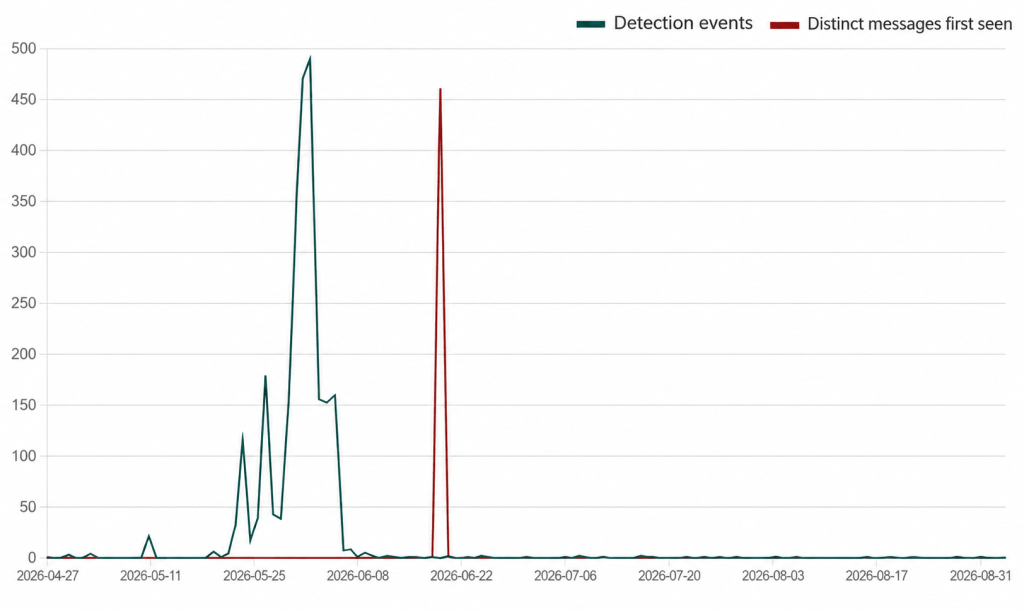
Detection events for the T-Mobile rewards phishing campaign
The campaign began slowly before producing two huge spikes in activity. The green line shows detections of message variants seen previously, while the red line shows messages detected on the first day that particular variant appeared. We’re still seeing messages from the campaign, although activity has fallen considerably since those spikes.
The scam relies on a familiar social engineering formula: a valuable-looking reward, a deadline, and a simple action that supposedly protects the customer from losing out. A recipient who has a T-Mobile account may click first and question the message later.
The links use rotating domains designed to look as though they belong to T-Mobile. Their purpose is to persuade recipients to follow the link to supposedly redeem their points. Do not enter login credentials, personal information, payment details, or verification codes after following a link in an unsolicited message.
How to stay safe
The anonymized data used in this analysis was gathered through Text Protection in Malwarebytes Mobile Security, which alerts users to potentially malicious or scam text messages.
You can also reduce your risk by following these tips:
Don’t follow links in unsolicited messages. Instead, open the alleged sender’s website or app independently and check for notifications there.
Check the domain in your browser’s address bar to make sure it matches the site you expected to visit.
Malwarebytes Scam Guard can help you determine whether a message is a scam and advise you on what to do next.
The URLs in this campaign are very short-lived. The criminals used at least 81 domains over four months, but the domains follow a recognizable pattern that is blocked in Malwarebytes Browser Guard.
IOCs
Example domains showing the pattern used by the campaign:
t-mobile.biktpw[.]top
t-mobile.cugbjl[.]top
t-mobile.cymfjd[.]top
t-mobile.gdikxv[.]top
t-mobile.hdzcnb[.]top
t-mobile.koxetp[.]top
t-mobile.nxdcfp[.]top
t-mobile.pkrbai[.]top
t-mobile.qfrhkt[.]top
t-mobile.qscizj[.]top
t-mobile.tmfncb[.]top
t-mobile.vmnqsu[.]top
Stop threats before they can do any harm.
Malwarebytes Browser Guard blocks phishing pages and malicious sites automatically. Free, one click to install. Add it to your browser →
Since early May 2026, we’ve been monitoring a large phishing campaign based on T-Mobile rewards points.
The messages falsely warn that a customer’s rewards points are about to expire. They aren’t legitimate account notices: They use urgency, invented point balances, and phishing links to push recipients into acting before they can verify the claim.
A typical message says that a T-Mobile Rewards account holds 18,400 points, gives an imminent expiry date, and states that unused points will be removed under the program’s terms. These details make the message look as though it was written specifically for the recipient, even though it was sent to many people.
“T-Mobile Rewards Points Reminder: Your Points Are About to Expire
Dear Customer,
We are hereby reminding you that your T-Mobile Rewards account points are about to expire. You currently have 18,400 points, which will expire on June 4, 2026, if unused.
Your Points Overview:
Current Balance: 18,400 Points
Expiry Date: {today or tomorrow}
Points will not be recovered after this date.
Redeem Points:
Visit:
https://t-mobile.{rotating domains}.top/pay
Use the T-Mobile App: Account > Rewards & Benefits
Our points expiry policy aims to ensure the fairness of the program and encourage active participation. Please don’t let these valuable points go to waste.
Thank you for choosing T-Mobile.
Customer Service Team”
This phishing operation does not rely on a single, identical SMS. We found more than 1,000 closely related campaign templates with a semantic similarity score of at least 0.60. The 199 closest matches all scored at least 0.95.
This means the variations only change superficial elements, such as the salutation, headline, expiry date, point balance, and whether the message is called a “reminder,” “alert,” or “important update.” The central story remains the same: T-Mobile rewards points are supposedly expiring, and the recipient must follow a link to redeem them as soon as possible.
The messages use formal but generic language, such as “Dear T-Mobile Customer,” “Dear Valued Customer,” or “T-Mobile User,” rather than naming the recipient or providing verifiable account information.
Detection events for the T-Mobile rewards phishing campaign
The campaign began slowly before producing two huge spikes in activity. The green line shows detections of message variants seen previously, while the red line shows messages detected on the first day that particular variant appeared. We’re still seeing messages from the campaign, although activity has fallen considerably since those spikes.
The scam relies on a familiar social engineering formula: a valuable-looking reward, a deadline, and a simple action that supposedly protects the customer from losing out. A recipient who has a T-Mobile account may click first and question the message later.
The links use rotating domains designed to look as though they belong to T-Mobile. Their purpose is to persuade recipients to follow the link to supposedly redeem their points. Do not enter login credentials, personal information, payment details, or verification codes after following a link in an unsolicited message.
How to stay safe
The anonymized data used in this analysis was gathered through Text Protection in Malwarebytes Mobile Security, which alerts users to potentially malicious or scam text messages.
You can also reduce your risk by following these tips:
Don’t follow links in unsolicited messages. Instead, open the alleged sender’s website or app independently and check for notifications there.
Check the domain in your browser’s address bar to make sure it matches the site you expected to visit.
Malwarebytes Scam Guard can help you determine whether a message is a scam and advise you on what to do next.
The URLs in this campaign are very short-lived. The criminals used at least 81 domains over four months, but the domains follow a recognizable pattern that is blocked in Malwarebytes Browser Guard.
IOCs
Example domains showing the pattern used by the campaign:
t-mobile.biktpw[.]top
t-mobile.cugbjl[.]top
t-mobile.cymfjd[.]top
t-mobile.gdikxv[.]top
t-mobile.hdzcnb[.]top
t-mobile.koxetp[.]top
t-mobile.nxdcfp[.]top
t-mobile.pkrbai[.]top
t-mobile.qfrhkt[.]top
t-mobile.qscizj[.]top
t-mobile.tmfncb[.]top
t-mobile.vmnqsu[.]top
Stop threats before they can do any harm.
Malwarebytes Browser Guard blocks phishing pages and malicious sites automatically. Free, one click to install. Add it to your browser →
Antivirus renewal scams often begin with a message claiming that your subscription has automatically renewed. When you follow the instructions to cancel it, you are taken to a fake page designed to collect your contact details. The renewal charge never existed.
Receiving a message that names the antivirus software you use does not necessarily mean the sender has access to your device or account. Scammers impersonate popular brands and send the same message to large numbers of people, knowing that some recipients will be customers.
As we’ve reported before, simply responding to a scam message can make your contact details more valuable because it confirms that your number is active and that you are willing to engage. Filling in this form gives scammers even more: your name, email address, phone number, and an indication that you may respond to a call about a supposed antivirus payment.
Those details can be sold to other scammers or used for the next stage of the scam: a phone call from someone who tries to persuade you to install remote access software or help them reverse a payment that never happened.
A closer look at a fake Avast site
During our scam-hunting activity, we saw one renewal scam site impersonating Avast, aimed at users in Belgium. It was noticeably more polished than most scam sites and contained several signs that it had been produced with the help of AI.
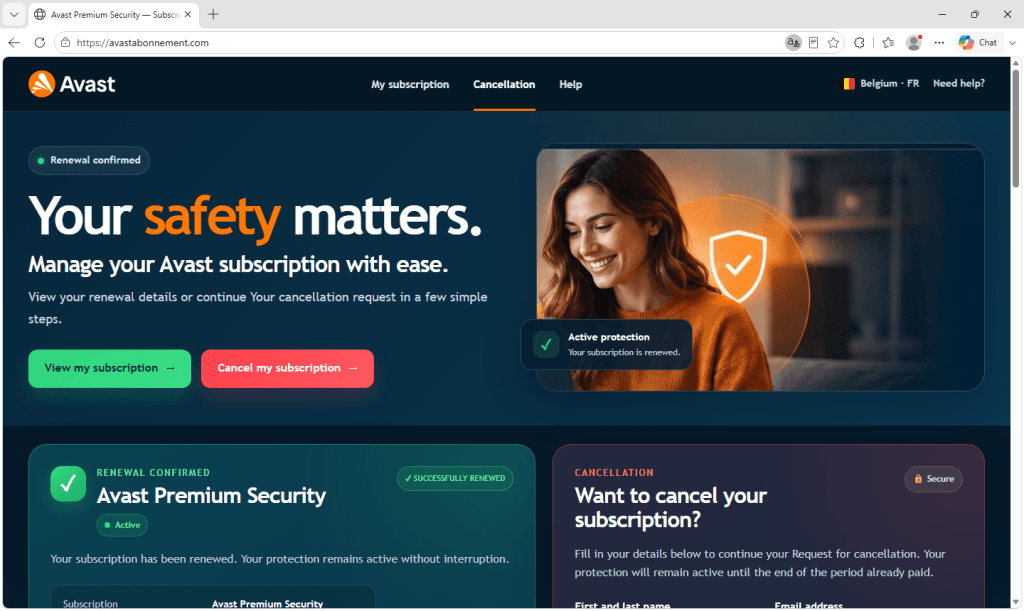
The page tells you that your Avast Premium Security subscription has renewed for €129.99, that it covers five devices, and that it will renew again the following February. There is a green tick, a status badge reading Active, and a tidy summary table laying out the amount, the payment method, and the dates.
None of it is real. There is no subscription and no charge, and the page has no connection to Avast, whose branding is being used without permission.
The page is written in French for a Belgian audience. The screenshots below have been machine-translated into English so the layout and wording are easier for you to follow.
Alongside the renewal summary is the part the scammers actually care about. A cancellation form asks for your full name, email address, and Belgian mobile number, but nothing else.
There is no password field or request for card details, which may be deliberate. A form asking only for a name, email address, and phone number can feel harmless and is far easier to fill in than a login page. A working mobile number attached to a real name is exactly what a scammer needs for the next stage: calling the victim and posing as support staff. The form is the lure, and the call is where the real danger begins.
The signs of AI involvement
The page was left with two notes in its code that were never meant for victims. Both were written in polite French and addressed to whoever had commissioned the work, explaining that the form did not yet send anything anywhere and that a real submission process would need to be connected later.
They read like a contractor handing over an unfinished job rather than a scammer leaving themselves a reminder, and that courteous, second-person summary of what still needs doing is very much how an AI assistant signs off.
Other clues are also consistent with AI-generated code. The code contained unused styling for a section that had been removed, suggesting that the page had been created in stages without a final review. The copy was grammatically correct but vague. It described the benefits of the subscription across four paragraphs without mentioning any specific Avast features, such as its firewall, VPN, or ransomware protection.
Taken together, these signs suggest that the page was built with the help of AI. Generated code carries no watermark, so that cannot be proven from the files alone.
The page was never finished
As the comments in the code explain, the form on this page sent nothing at all. Someone built a convincing fake, got the difficult parts right, and then stopped before connecting the piece that actually sends the data anywhere.
Other signs in the code suggest nobody had even opened the page in a browser to check it, since two pieces of text would have displayed as visible gibberish if they had. What we were looking at was most likely half-built, or possibly a template waiting to be sold on to someone who would add a destination for the stolen details.
Building a page like this used to take a certain amount of skill, which limited how many of them could be made. AI has lowered that barrier. Whoever made this could ask for a version in Dutch or German, or one aimed at an entirely different brand, and have it within minutes.
How to spot an antivirus renewal scam
The old advice was to look for mistakes: bad grammar, the wrong currency, a clumsy layout, or a stretched logo. That advice is less useful now because AI can produce fluent copy and polished layouts, while scammers can easily copy real logos. A page that looks professional is no longer evidence that it is genuine.
But the structure of the scam hasn’t changed. It still needs you to arrive somewhere unexpected, worry about losing money, and provide a way to contact you. Judge the situation rather than the appearance of the page.
Check whether you were charged. If the message says a payment has already been taken, check your bank or card statement directly. If the payment is not there, there is nothing to cancel.
Check the subscription through the official app or website. Don’t click the link in the message. Open the company’s app or website independently and sign in. Your account will show whether you have an active subscription and when your next payment is due.
Be wary of a cancellation form that mainly wants your phone number. Legitimate cancellations usually happen inside your account, and a company you already pay knows how to reach you.
Treat the follow-up call as the real danger. If you have filled in a form like this, you may receive a scam call next. You are under no obligation to answer or engage.
Don’t install remote access software for someone who called you. It gives them control of your device and could put your accounts, passwords, and money at risk.
If you have already been on a call and installed something, disconnect the device from the internet, remove the software they asked you to install, and change your passwords from a different device. If you sent money or shared card details, contact your bank straight away.
Block and check suspected scams
The best protection is to stop scam pages before they open. Malwarebytes Browser Guard is a free extension for Chrome, Edge, Firefox, and Safari that blocks malicious websites, phishing attempts, and scam ads before they can do any harm.
Not sure whether something is a scam? Share a screenshot, message, phone number, or link with Scam Guard. It checks it in seconds and recommends what to do next. Scam Guard is built into Malwarebytes Premium Security for Windows, Mac, iOS, and Android.
If you received a call after filling in a form like this, enter the number into Malwarebytes Scam Number Check to see whether it has been linked to scam activity.
“One of the best cybersecurity suites on the planet.”
Antivirus renewal scams often begin with a message claiming that your subscription has automatically renewed. When you follow the instructions to cancel it, you are taken to a fake page designed to collect your contact details. The renewal charge never existed.
Receiving a message that names the antivirus software you use does not necessarily mean the sender has access to your device or account. Scammers impersonate popular brands and send the same message to large numbers of people, knowing that some recipients will be customers.
As we’ve reported before, simply responding to a scam message can make your contact details more valuable because it confirms that your number is active and that you are willing to engage. Filling in this form gives scammers even more: your name, email address, phone number, and an indication that you may respond to a call about a supposed antivirus payment.
Those details can be sold to other scammers or used for the next stage of the scam: a phone call from someone who tries to persuade you to install remote access software or help them reverse a payment that never happened.
A closer look at a fake Avast site
During our scam-hunting activity, we saw one renewal scam site impersonating Avast, aimed at users in Belgium. It was noticeably more polished than most scam sites and contained several signs that it had been produced with the help of AI.
The page tells you that your Avast Premium Security subscription has renewed for €129.99, that it covers five devices, and that it will renew again the following February. There is a green tick, a status badge reading Active, and a tidy summary table laying out the amount, the payment method, and the dates.
None of it is real. There is no subscription and no charge, and the page has no connection to Avast, whose branding is being used without permission.
The page is written in French for a Belgian audience. The screenshots below have been machine-translated into English so the layout and wording are easier for you to follow.
Alongside the renewal summary is the part the scammers actually care about. A cancellation form asks for your full name, email address, and Belgian mobile number, but nothing else.
There is no password field or request for card details, which may be deliberate. A form asking only for a name, email address, and phone number can feel harmless and is far easier to fill in than a login page. A working mobile number attached to a real name is exactly what a scammer needs for the next stage: calling the victim and posing as support staff. The form is the lure, and the call is where the real danger begins.
The signs of AI involvement
The page was left with two notes in its code that were never meant for victims. Both were written in polite French and addressed to whoever had commissioned the work, explaining that the form did not yet send anything anywhere and that a real submission process would need to be connected later.
They read like a contractor handing over an unfinished job rather than a scammer leaving themselves a reminder, and that courteous, second-person summary of what still needs doing is very much how an AI assistant signs off.
Other clues are also consistent with AI-generated code. The code contained unused styling for a section that had been removed, suggesting that the page had been created in stages without a final review. The copy was grammatically correct but vague. It described the benefits of the subscription across four paragraphs without mentioning any specific Avast features, such as its firewall, VPN, or ransomware protection.
Taken together, these signs suggest that the page was built with the help of AI. Generated code carries no watermark, so that cannot be proven from the files alone.
The page was never finished
As the comments in the code explain, the form on this page sent nothing at all. Someone built a convincing fake, got the difficult parts right, and then stopped before connecting the piece that actually sends the data anywhere.
Other signs in the code suggest nobody had even opened the page in a browser to check it, since two pieces of text would have displayed as visible gibberish if they had. What we were looking at was most likely half-built, or possibly a template waiting to be sold on to someone who would add a destination for the stolen details.
Building a page like this used to take a certain amount of skill, which limited how many of them could be made. AI has lowered that barrier. Whoever made this could ask for a version in Dutch or German, or one aimed at an entirely different brand, and have it within minutes.
How to spot an antivirus renewal scam
The old advice was to look for mistakes: bad grammar, the wrong currency, a clumsy layout, or a stretched logo. That advice is less useful now because AI can produce fluent copy and polished layouts, while scammers can easily copy real logos. A page that looks professional is no longer evidence that it is genuine.
But the structure of the scam hasn’t changed. It still needs you to arrive somewhere unexpected, worry about losing money, and provide a way to contact you. Judge the situation rather than the appearance of the page.
Check whether you were charged. If the message says a payment has already been taken, check your bank or card statement directly. If the payment is not there, there is nothing to cancel.
Check the subscription through the official app or website. Don’t click the link in the message. Open the company’s app or website independently and sign in. Your account will show whether you have an active subscription and when your next payment is due.
Be wary of a cancellation form that mainly wants your phone number. Legitimate cancellations usually happen inside your account, and a company you already pay knows how to reach you.
Treat the follow-up call as the real danger. If you have filled in a form like this, you may receive a scam call next. You are under no obligation to answer or engage.
Don’t install remote access software for someone who called you. It gives them control of your device and could put your accounts, passwords, and money at risk.
If you have already been on a call and installed something, disconnect the device from the internet, remove the software they asked you to install, and change your passwords from a different device. If you sent money or shared card details, contact your bank straight away.
Block and check suspected scams
The best protection is to stop scam pages before they open. Malwarebytes Browser Guard is a free extension for Chrome, Edge, Firefox, and Safari that blocks malicious websites, phishing attempts, and scam ads before they can do any harm.
Not sure whether something is a scam? Share a screenshot, message, phone number, or link with Scam Guard. It checks it in seconds and recommends what to do next. Scam Guard is built into Malwarebytes Premium Security for Windows, Mac, iOS, and Android.
If you received a call after filling in a form like this, enter the number into Malwarebytes Scam Number Check to see whether it has been linked to scam activity.
“One of the best cybersecurity suites on the planet.”
Bitrefill is a legitimate company that sells gift cards for popular stores like Amazon, Deliveroo, Apple, Nintendo, and thousands of others. They also sell eSIMs, and mobile top-ups. You can pay on their website for all of these with cryptocurrency.
The scam is designed to catch people searching for Bitrefill or something it sells, like a gift card. Victims see a search result that appears to lead to Bitrefill but actually points to a lookalike domain. The fake site then takes them through what appears to be a normal purchase. The fake sites are not operated by or affiliated with Bitrefill; scammers have copied its branding and checkout process.
The victim chooses an amount and a cryptocurrency before receiving a QR code and payment address. But instead of paying Bitrefill, they send the cryptocurrency directly to an address controlled by the scammers. They receive nothing in return, and recovering the payment is extremely unlikely.
Why fake crypto checkouts work so well
Phishing typically involves several steps. First, an attacker has to steal a password. Then, they may have to get past two-factor authentication (2FA), log in to the account without tripping a fraud check, and find some way to turn account access into money. Plenty of scams fall apart somewhere in that chain.
This payment scam avoids those hurdles by persuading victims to send money directly to the scammers. There is no account to break into and no stolen card to use. The victim sends cryptocurrency straight to an address the scammers control, and cryptocurrency payments generally cannot be reversed or charged back.
The payment request also fits the situation. A demand for cryptocurrency might look suspicious on many websites, but Bitrefill genuinely accepts it. On a convincing copy of its checkout, paying with cryptocurrency appears completely normal.
All this may explain why we found a cluster of fake sites rather than a single page, with checkouts allowing payments of up to $1,990.
What the fake checkout looks like
The site we examined is a close copy of Bitrefill’s checkout, hosted on a domain built by bolting a word onto the brand name. Everything a customer would expect is present. The branding is right, the layout matches, the page is quick and polished, and the payment flow behaves exactly the way the real one does.
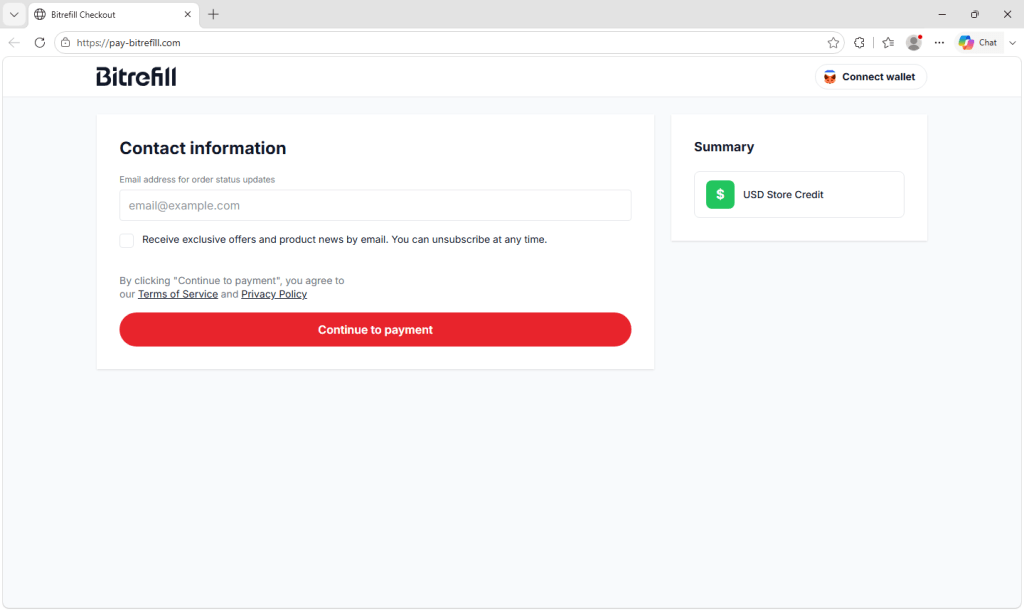
The fake checkout asks for an email address and links to terms of service and a privacy policy, helping it look legitimate.
You’re asked for an email address for order updates, with links to terms of service and a privacy policy. You then choose how to pay, from a list offering Bitcoin, Ethereum, USDC, USDT, Solana, and Litecoin. The site also offers card payments for a small surcharge.
The fake checkout offers several cryptocurrencies and appears to support card payments.
Next, you pick an amount, with preset buttons and a maximum of $1,990, although inconsistent currency symbols offer a small clue that something is wrong.
The fake checkout accepts payments of up to $1,990.
Finally, you reach a payment screen showing a QR code, an address marked for one-time use, the amount converted into your chosen cryptocurrency, and a countdown clock giving you just under an hour to send the funds.
The final screen provides a cryptocurrency address and QR code, along with a countdown timer .
None of those elements is a red flag on its own. Unique addresses, expiry timers, and currency conversion are all normal for crypto checkouts, which is exactly why the copy is convincing. Every pressure cue on the page is borrowed from legitimate payment systems.
The only meaningful difference is the address the money goes to, and by the time the victim sends the cryptocurrency, getting it back is extremely unlikely.
How people are reaching these pages
The distribution here does not appear to rely on email. Bitrefill has said publicly that sites copying its checkout and using similar names have been turning up in search engine results, and that its security team has been working with takedown specialists to have them removed.
The site’s configuration supports that. The fake checkout hands visitors back to a second domain in the same family, and the link it uses carries a parameter naming a search engine, suggesting the operators are tagging incoming traffic by where it came from.
There’s a detail here that deserves more attention than it usually gets. The fake checkout has commercial analytics software installed on it, the same kind of product a legitimate e-commerce team uses to measure how many visitors abandon a cart. Its presence suggests the operators want to measure and improve the number of visitors who complete a payment.
These campaigns are not opportunistic one-offs thrown together by someone hoping for a lucky hit. They’re run as businesses, measured and tuned like any other funnel, with the victim in the role of the customer.
A brand name is not a destination
The domains in this cluster use several tricks to make their addresses look convincing. Some swap one letter for a visually similar character, making the brand appear correct unless you look closely. Others add a plausible word such as pay or gift, producing addresses that resemble official payment sites. Some do both.
Several use internationalized domain names, which can contain characters from different alphabets or accented versions of Latin letters. Browsers translate these domains into an ASCII format beginning with xn--, known as Punycode. To the eye, the displayed versions can be almost indistinguishable from the genuine name.
Different domain names display as variations of “Bitrefill,” while their Punycode versions begin with xn--.
The answer is not simply to become better at spotting tiny differences. These domains are designed to defeat visual inspection, and they can be especially difficult to recognize on a phone screen. Recognizing a company name somewhere in a web address does not tell you who owns it.
Remember, seeing the right company name in a URL is not enough. Check that the actual domain is exactly the one the company uses.
What to do
Start at the website you already trust. Use a saved bookmark or carefully enter bitrefill.com yourself. If you are already making a purchase on the legitimate site, stay within that session instead of opening a checkout page from a separate search.
Treat search results for payment and checkout pages with suspicion. Scammers can buy search ads or manipulate their sites into appearing prominently. The first result is not necessarily the safest one.
Check the address bar before you send. Cryptocurrency payments generally cannot be reversed or charged back. Confirm that the main domain is exactly bitrefill.com before approving a payment.
Be wary of domains containing a brand followed by an extra word. A legitimate subdomain would place the additional wording before the company’s main domain, as in pay.example.com. An address such as example-pay.com is a completely separate domain that anyone could register.
Don’t approve wallet requests on a site you have not verified. Simply connecting a wallet does not normally transfer funds, but a fraudulent site may ask you to sign a transaction or grant token permissions that allow assets to be stolen.
If you have already sent funds, act quickly, although recovery is unlikely. Report the destination address to the exchange or wallet provider you used, report the incident to your national fraud reporting service, and notify Bitrefill so it can add the domain to its takedown efforts. Recovery services that promise to retrieve stolen cryptocurrency for an upfront fee are often follow-up scams.
Check before you click
The simplest protection against a page like this is to avoid reaching it. Malwarebytes Browser Guard is a free browser extension that blocks known scam and phishing sites, along with malicious ads and search results that lead to them.
Got a screenshot or URL of a suspected scam? Upload it to Scam Guard—built into Malwarebytes Premium Security on Windows, Mac, iOS, and Android—and you’ll get a verdict and safety tips in seconds.
Indicators of compromise (IOCs)
Domains:
biterflll[.]com
bitigift[.]com
bitrefall[.]com
bitrefill-payments[.]com
bitrefill-pays[.]com
bitregift[.]com
bitregill[.]com
bitretill[.]com
bitrgift[.]com
bitrgifts[.]com
bitrnfill[.]com
bitruflli[.]com
butrefill[.]com
pay-bitregill[.]com
pay-bitrgift[.]com
pay-bitrgifts[.]com
pay-butrefill[.]com
pay-bitigift[.]com
xn--bitrefll-71a[.]com
xn--bitrefll-h2a[.]com
xn--bitrefll-pay-kfb[.]com
xn--bitrefll-pay-xfb[.]com
xn--bitrefll-q2a[.]com
xn--bitreill-cz9c[.]com
xn--bitreill-pay-yq4f[.]com
xn--btrefill-l2a[.]com
xn--pay-bitrefll-fgb[.]com
Stop threats before they can do any harm.
Malwarebytes Browser Guard blocks phishing pages and malicious sites automatically. Free, one click to install. Add it to your browser →
Bitrefill is a legitimate company that sells gift cards for popular stores like Amazon, Deliveroo, Apple, Nintendo, and thousands of others. They also sell eSIMs, and mobile top-ups. You can pay on their website for all of these with cryptocurrency.
The scam is designed to catch people searching for Bitrefill or something it sells, like a gift card. Victims see a search result that appears to lead to Bitrefill but actually points to a lookalike domain. The fake site then takes them through what appears to be a normal purchase. The fake sites are not operated by or affiliated with Bitrefill; scammers have copied its branding and checkout process.
The victim chooses an amount and a cryptocurrency before receiving a QR code and payment address. But instead of paying Bitrefill, they send the cryptocurrency directly to an address controlled by the scammers. They receive nothing in return, and recovering the payment is extremely unlikely.
Why fake crypto checkouts work so well
Phishing typically involves several steps. First, an attacker has to steal a password. Then, they may have to get past two-factor authentication (2FA), log in to the account without tripping a fraud check, and find some way to turn account access into money. Plenty of scams fall apart somewhere in that chain.
This payment scam avoids those hurdles by persuading victims to send money directly to the scammers. There is no account to break into and no stolen card to use. The victim sends cryptocurrency straight to an address the scammers control, and cryptocurrency payments generally cannot be reversed or charged back.
The payment request also fits the situation. A demand for cryptocurrency might look suspicious on many websites, but Bitrefill genuinely accepts it. On a convincing copy of its checkout, paying with cryptocurrency appears completely normal.
All this may explain why we found a cluster of fake sites rather than a single page, with checkouts allowing payments of up to $1,990.
What the fake checkout looks like
The site we examined is a close copy of Bitrefill’s checkout, hosted on a domain built by bolting a word onto the brand name. Everything a customer would expect is present. The branding is right, the layout matches, the page is quick and polished, and the payment flow behaves exactly the way the real one does.
The fake checkout asks for an email address and links to terms of service and a privacy policy, helping it look legitimate.
You’re asked for an email address for order updates, with links to terms of service and a privacy policy. You then choose how to pay, from a list offering Bitcoin, Ethereum, USDC, USDT, Solana, and Litecoin. The site also offers card payments for a small surcharge.
The fake checkout offers several cryptocurrencies and appears to support card payments.
Next, you pick an amount, with preset buttons and a maximum of $1,990, although inconsistent currency symbols offer a small clue that something is wrong.
The fake checkout accepts payments of up to $1,990.
Finally, you reach a payment screen showing a QR code, an address marked for one-time use, the amount converted into your chosen cryptocurrency, and a countdown clock giving you just under an hour to send the funds.
The final screen provides a cryptocurrency address and QR code, along with a countdown timer .
None of those elements is a red flag on its own. Unique addresses, expiry timers, and currency conversion are all normal for crypto checkouts, which is exactly why the copy is convincing. Every pressure cue on the page is borrowed from legitimate payment systems.
The only meaningful difference is the address the money goes to, and by the time the victim sends the cryptocurrency, getting it back is extremely unlikely.
How people are reaching these pages
The distribution here does not appear to rely on email. Bitrefill has said publicly that sites copying its checkout and using similar names have been turning up in search engine results, and that its security team has been working with takedown specialists to have them removed.
The site’s configuration supports that. The fake checkout hands visitors back to a second domain in the same family, and the link it uses carries a parameter naming a search engine, suggesting the operators are tagging incoming traffic by where it came from.
There’s a detail here that deserves more attention than it usually gets. The fake checkout has commercial analytics software installed on it, the same kind of product a legitimate e-commerce team uses to measure how many visitors abandon a cart. Its presence suggests the operators want to measure and improve the number of visitors who complete a payment.
These campaigns are not opportunistic one-offs thrown together by someone hoping for a lucky hit. They’re run as businesses, measured and tuned like any other funnel, with the victim in the role of the customer.
A brand name is not a destination
The domains in this cluster use several tricks to make their addresses look convincing. Some swap one letter for a visually similar character, making the brand appear correct unless you look closely. Others add a plausible word such as pay or gift, producing addresses that resemble official payment sites. Some do both.
Several use internationalized domain names, which can contain characters from different alphabets or accented versions of Latin letters. Browsers translate these domains into an ASCII format beginning with xn--, known as Punycode. To the eye, the displayed versions can be almost indistinguishable from the genuine name.
Different domain names display as variations of “Bitrefill,” while their Punycode versions begin with xn--.
The answer is not simply to become better at spotting tiny differences. These domains are designed to defeat visual inspection, and they can be especially difficult to recognize on a phone screen. Recognizing a company name somewhere in a web address does not tell you who owns it.
Remember, seeing the right company name in a URL is not enough. Check that the actual domain is exactly the one the company uses.
What to do
Start at the website you already trust. Use a saved bookmark or carefully enter bitrefill.com yourself. If you are already making a purchase on the legitimate site, stay within that session instead of opening a checkout page from a separate search.
Treat search results for payment and checkout pages with suspicion. Scammers can buy search ads or manipulate their sites into appearing prominently. The first result is not necessarily the safest one.
Check the address bar before you send. Cryptocurrency payments generally cannot be reversed or charged back. Confirm that the main domain is exactly bitrefill.com before approving a payment.
Be wary of domains containing a brand followed by an extra word. A legitimate subdomain would place the additional wording before the company’s main domain, as in pay.example.com. An address such as example-pay.com is a completely separate domain that anyone could register.
Don’t approve wallet requests on a site you have not verified. Simply connecting a wallet does not normally transfer funds, but a fraudulent site may ask you to sign a transaction or grant token permissions that allow assets to be stolen.
If you have already sent funds, act quickly, although recovery is unlikely. Report the destination address to the exchange or wallet provider you used, report the incident to your national fraud reporting service, and notify Bitrefill so it can add the domain to its takedown efforts. Recovery services that promise to retrieve stolen cryptocurrency for an upfront fee are often follow-up scams.
Check before you click
The simplest protection against a page like this is to avoid reaching it. Malwarebytes Browser Guard is a free browser extension that blocks known scam and phishing sites, along with malicious ads and search results that lead to them.
Got a screenshot or URL of a suspected scam? Upload it to Scam Guard—built into Malwarebytes Premium Security on Windows, Mac, iOS, and Android—and you’ll get a verdict and safety tips in seconds.
Indicators of compromise (IOCs)
Domains:
biterflll[.]com
bitigift[.]com
bitrefall[.]com
bitrefill-payments[.]com
bitrefill-pays[.]com
bitregift[.]com
bitregill[.]com
bitretill[.]com
bitrgift[.]com
bitrgifts[.]com
bitrnfill[.]com
bitruflli[.]com
butrefill[.]com
pay-bitregill[.]com
pay-bitrgift[.]com
pay-bitrgifts[.]com
pay-butrefill[.]com
pay-bitigift[.]com
xn--bitrefll-71a[.]com
xn--bitrefll-h2a[.]com
xn--bitrefll-pay-kfb[.]com
xn--bitrefll-pay-xfb[.]com
xn--bitrefll-q2a[.]com
xn--bitreill-cz9c[.]com
xn--bitreill-pay-yq4f[.]com
xn--btrefill-l2a[.]com
xn--pay-bitrefll-fgb[.]com
Stop threats before they can do any harm.
Malwarebytes Browser Guard blocks phishing pages and malicious sites automatically. Free, one click to install. Add it to your browser →
An attacker breached an email marketing platform and launched targeted attacks against the newsletter subscribers of some of its customers, especially those working in cryptocurrency and adjacent fields.
The incident was a supply-chain phishing campaign carried out through Brevo, an email marketing provider used by several cryptocurrency companies and other firms.
Brevo initially said an attacker had gained access to 120 customer accounts, some of which were used to send phishing emails to the customers’ contact lists.
Brevo later said 138 customer accounts had been accessed in its postmortem:
“On September 10th at 6:30 AM UTC we identified a security issue where an attacker exploited a flaw in the way Brevo handles SAML SSO to gain access to 138 Brevo accounts. 6 of those accounts were used to send phishing emails to the contacts stored there, and for 43 accounts they exported the contacts. 93 accounts have no meaningful activity.”
According to reports, popular cryptocurrency companies Trezor, CoinTracking, and BitBox confirmed that phishing emails were sent to customers subscribed to their newsletters. Trezor warned its roughly 347,000 newsletter subscribers that a security incident at a third-party provider had resulted in a massive phishing campaign.
Trezor makes hardware wallets that store cryptocurrency private keys offline. Its customers received a phishing email titled “Critical Security Alert: STM32 Entropy Bug Identified.”
The subtitle read: “Urgent update regarding hardware microcontroller vulnerability.”
The email said:
“Dear customer,
We have some difficult news to share. Unfortunately, our engineering team has identified a critical hardware-level vulnerability in the STM32 microcontrollers used in a range of Trezor devices.
Currently we believe the majority of defective devices were initialized prior to 2023, however some newer devices also may be vulnerable. The bug is a hardware factory defect present in an estimated 1 in 4 devices.
The vulnerability results in:
Insufficient randomness in recovery phrase generation
Exposure of seeds to brute-force cracking
Seeds with as little as 40 bits of entropy”
That phishing email also contained a link that prompted recipients to download an app and enter their wallet backup.
CoinTracking said the attackers sent its customers an email titled “Data Breach Notice: Please refresh API Keys as soon as possible,” which also contained a malicious link.
Because the emails came from legitimate company domains and looked convincing, some recipients may have fallen for them. The exact number is not currently known.
How to stay safe
It can be difficult to recognize a phishing email when it comes from a legitimate company domain and looks convincing. But there are a few things to keep in mind:
If a company emails you about an urgent security problem, check its official website or app for confirmation.
Do not install apps through links in unsolicited emails, no matter how urgent the message claims to be.
Never enter your recovery phrase anywhere other than on your physical device.
Reputable companies will not ask for recovery phrases, API keys, or login details by email.
Use Malwarebytes Scam Guard to check whether a message might be a scam and get guidance on what to do next.
Keep an eye out for further information about other Brevo customers that have been affected. The attackers exported contacts from 43 accounts, which could be used in future targeted phishing attacks.
What to do if you followed the link
Trezor advises moving your funds to a new wallet if you entered your wallet backup in any form. If you followed a link in a similar email from another provider, contact that company directly for advice.
Something feel off? Check it before you click.
Malwarebytes Scam Guard helps you analyze suspicious links, texts, and screenshots instantly.
An attacker breached an email marketing platform and launched targeted attacks against the newsletter subscribers of some of its customers, especially those working in cryptocurrency and adjacent fields.
The incident was a supply-chain phishing campaign carried out through Brevo, an email marketing provider used by several cryptocurrency companies and other firms.
Brevo initially said an attacker had gained access to 120 customer accounts, some of which were used to send phishing emails to the customers’ contact lists.
Brevo later said 138 customer accounts had been accessed in its postmortem:
“On September 10th at 6:30 AM UTC we identified a security issue where an attacker exploited a flaw in the way Brevo handles SAML SSO to gain access to 138 Brevo accounts. 6 of those accounts were used to send phishing emails to the contacts stored there, and for 43 accounts they exported the contacts. 93 accounts have no meaningful activity.”
According to reports, popular cryptocurrency companies Trezor, CoinTracking, and BitBox confirmed that phishing emails were sent to customers subscribed to their newsletters. Trezor warned its roughly 347,000 newsletter subscribers that a security incident at a third-party provider had resulted in a massive phishing campaign.
Trezor makes hardware wallets that store cryptocurrency private keys offline. Its customers received a phishing email titled “Critical Security Alert: STM32 Entropy Bug Identified.”
The subtitle read: “Urgent update regarding hardware microcontroller vulnerability.”
The email said:
“Dear customer,
We have some difficult news to share. Unfortunately, our engineering team has identified a critical hardware-level vulnerability in the STM32 microcontrollers used in a range of Trezor devices.
Currently we believe the majority of defective devices were initialized prior to 2023, however some newer devices also may be vulnerable. The bug is a hardware factory defect present in an estimated 1 in 4 devices.
The vulnerability results in:
Insufficient randomness in recovery phrase generation
Exposure of seeds to brute-force cracking
Seeds with as little as 40 bits of entropy”
That phishing email also contained a link that prompted recipients to download an app and enter their wallet backup.
CoinTracking said the attackers sent its customers an email titled “Data Breach Notice: Please refresh API Keys as soon as possible,” which also contained a malicious link.
Because the emails came from legitimate company domains and looked convincing, some recipients may have fallen for them. The exact number is not currently known.
How to stay safe
It can be difficult to recognize a phishing email when it comes from a legitimate company domain and looks convincing. But there are a few things to keep in mind:
If a company emails you about an urgent security problem, check its official website or app for confirmation.
Do not install apps through links in unsolicited emails, no matter how urgent the message claims to be.
Never enter your recovery phrase anywhere other than on your physical device.
Reputable companies will not ask for recovery phrases, API keys, or login details by email.
Use Malwarebytes Scam Guard to check whether a message might be a scam and get guidance on what to do next.
Keep an eye out for further information about other Brevo customers that have been affected. The attackers exported contacts from 43 accounts, which could be used in future targeted phishing attacks.
What to do if you followed the link
Trezor advises moving your funds to a new wallet if you entered your wallet backup in any form. If you followed a link in a similar email from another provider, contact that company directly for advice.
Something feel off? Check it before you click.
Malwarebytes Scam Guard helps you analyze suspicious links, texts, and screenshots instantly.

 Login