❌

Normal view

Run open weight models on Amazon Bedrock in AWS European Sovereign Cloud

17 September 2026 at 23:19

European organizations can run AI workloads on Amazon Web Services (AWS) while keeping data within the European Union (EU) and meeting regulatory requirements. You can now run generative AI workloads on open weight models on Amazon Bedrock in the AWS European Sovereign Cloud. We’re excited to announce the general availability of the first open weight model family, Gemma 4, on the Amazon Bedrock next-generation inference engine in the AWS European Sovereign Cloud. Gemma 4, released under the Apache 2.0 license, on Amazon Bedrock benefits from the same data residency and operational controls that define the AWS European Sovereign Cloud so you can build, iterate, and scale generative AI applications while meeting digital sovereignty requirements.

The AWS European Sovereign Cloud is an independent cloud for Europe, located entirely within the EU, designed to help customers meet their most stringent digital sovereignty requirements. It runs entirely within the EU and is independently operated with strong technical controls, sovereign assurances and legal protections. Only AWS employees who reside in the EU control day-to-day operations, including access to data centers, technical support, and customer service.

In this post, we explain how the Amazon Bedrock inference engine protects your inference data when running Gemma 4 models, how the AWS European Sovereign Cloud keeps it within the EU, and then walk through the available Gemma 4 models and your first inference request.

Next generation inference engine for Amazon Bedrock

The inference engine is a distributed engine for serving large-scale machine learning models, built for high performance, reliability, and security. You reach it through the bedrock-mantle endpoint, which supports OpenAI-compatible APIs (the Responses and Chat Completions APIs). You can bring an existing OpenAI SDK codebase to Amazon Bedrock by changing only the base URL and API key. The Responses API supports stateful conversation management, which rebuilds context without you passing conversation history with each request. Stored responses are scoped by Amazon Bedrock project, a logical boundary that represents a workload for access control, cost tracking, and usage monitoring.

The engine applies the same operational security practices you rely on across AWS. Access follows a least privilege model, where each operator has access only to the systems a specific task requires, and only for the time that privilege is needed. Any access to systems that store or process customer data or metadata is logged, monitored for anomalies, and audited. All your prompts and responses are kept private during inference.

How your inference data is protected

Amazon Bedrock uses a zero operator access data security model, meaning no service operators can access model input or output during inference. It also uses a zero data retention model, so by default it doesn’t store your inputs or outputs. For certain models, limited retention might apply for abuse detection (see the Amazon Bedrock abuse detection documentation). Your prompts and responses are encrypted in transit and, by default, are not shared with the model provider.

All inference stays within the eusc-de-east-1 AWS Region as described in the following section on data residency. Combined with the data residency and EU-based operations of the AWS European Sovereign Cloud, this gives organizations in highly regulated industries the confidence to run their most sensitive AI workloads in the cloud.

Data residency and regional availability

The AWS European Sovereign Cloud became generally available in January 2026, with its first Region in Brandenburg, Germany (eusc-de-east-1). It’s a separate, independently operated cloud, with infrastructure located entirely within the EU and no critical dependencies on non-EU personnel or infrastructure. All your content remains within the Region you select unless you choose otherwise. Beyond content, customer-created metadata including roles, permissions, resource labels, and configurations also stays within the EU. The AWS European Sovereign Cloud is operated exclusively by EU residents located in the EU. We’re also gradually transitioning the AWS European Sovereign Cloud to be operated exclusively by EU citizens located in the EU. During this transition period we will continue to work with a blended team of EU residents and EU citizens located in the EU.

All Amazon Bedrock inference requests, including Gemma 4, use in-Region inference in eusc-de-east-1, which keeps every request within the AWS European Sovereign Cloud. Global cross-Region inference, which routes requests across commercial AWS Regions worldwide, isn’t available in the AWS European Sovereign Cloud.

Control over who can access your data

With AWS Identity and Access Management (IAM), you decide which principals in your account can call the inference API and which models they can use. Fine-grained permissions let you grant only the access each workload needs, following least privilege, and we recommend short-lived credentials over long-term keys.

For auditing, every call to the endpoint is recorded in AWS CloudTrail, giving your security and compliance teams an audit trail of who invoked inference and when. You can also monitor usage with Amazon CloudWatch and set alarms on patterns that matter to you, such as unexpected spikes in request volume.

Open weight models in the AWS European Sovereign Cloud

Organizations adopting open weight foundation models (FMs) for production face a constant challenge: how to access the leading models without compromising on data protection, regulatory alignment, or operational control. Amazon Bedrock removes that challenge. It gives you leading open weight FMs through a fully managed service, with inference running entirely on infrastructure operated by AWS and the security and privacy controls you expect from Amazon Bedrock. Because the models are open weight, you can independently evaluate the model architecture and training methodology, benchmark your own workloads, and fine-tune on proprietary data when customization is required.

Gemma 4 is a family of open weight models, released under the Apache 2.0 license. It’s available in three instruction-tuned variants, so you can evaluate and choose the model that fits your workload. The following table provides guidance on which model to choose based on your use case:

Model

Use case

Specifications

Gemma 4 31B (google.gemma-4-31b-it)

Reasoning-heavy or coding-heavy with a single dense model

30.7 billion parameter dense model with a 256 K token context window

Gemma 4 26B-A4B (google.gemma-4-26b-a4b-it)

Cost-sensitive at high throughput, with knowledge breadth requirements

Mixture-of-experts model with 25.2 billion total parameters and 3.8 billion active per token, with a 256 K token context window

Gemma 4 E2B

(google.gemma-4-e2b-it)

Latency-sensitive, on-device-style, or multimodal classification

Compact model with 5.1 billion total parameters and 2.3 billion effective parameters using per-layer embeddings (PLE), with a 128 K token context window

All three variants offer built-in reasoning, native function calling, and multimodal input across text and image.

Get started with Gemma 4 models on Amazon Bedrock

Gemma 4 is served through the bedrock-mantle endpoint, the OpenAI-compatible API for the next-generation inference engine, so you can call it with the OpenAI Python and TypeScript SDKs. Use the following steps to use the OpenAI Python SDK to send your first request to Gemma 4 31B in the AWS European Sovereign Cloud.

Prerequisites

To follow this example, you need an AWS account with access to the AWS European Sovereign Cloud and an IAM principal with permissions to call the bedrock-mantle endpoint. Create an IAM policy that grants the two actions this walkthrough uses, then attach it to your IAM principal. The bedrock-mantle:CreateInference action runs inference, and the bedrock-mantle:CallWithBearerToken action authenticates with an Amazon Bedrock API key. The following sample policy grants the actions this example needs. Scope the resources further for your environment as described after the policy.

{
  "Version": "2012-10-17",
  "Statement": [
    {
      "Sid": "GemmaMantleInference",
      "Effect": "Allow",
      "Action": "bedrock-mantle:CreateInference",
      "Resource": "arn:aws-eusc:bedrock-mantle:eusc-de-east-1:<account-id>:project/<project-id>"
    },
    {
      "Sid": "GemmaMantleBearerToken",
      "Effect": "Allow",
      "Action": "bedrock-mantle:CallWithBearerToken",
      "Resource": "*"
    }
  ]
}

Replace <account-id> and <project-id> with your own values.

Install the OpenAI SDK and the Amazon Bedrock token generator with the command pip install “openai>=2.45.0" aws-bedrock-token-generator.

Authenticate

You authenticate with an Amazon Bedrock API key. Amazon Bedrock offers two types of API keys. Short-term keys expire automatically within 12 hours and inherit the permissions of the IAM principal that generated them, which makes them the recommended choice for production. Long-term keys last until a configured expiration and are intended for development and exploration. For production, use the auto-refreshing short-term key shown in the following example, or store the key in AWS Secrets Manager.

from aws_bedrock_token_generator import provide_token
from openai import BedrockOpenAI

region = "eusc-de-east-1"

client = BedrockOpenAI(
    aws_region=region,
    base_url="https://bedrock-mantle.eusc-de-east-1.api.amazonwebservices.eu/v1",
    bedrock_token_provider=lambda: provide_token(region=region),
)

Alternatively, you can pass a short-term API key through an environment variable. This key isn’t refreshed and expires after at most 12 hours.

import os
from openai import OpenAI

client = OpenAI(
    base_url="https://bedrock-mantle.eusc-de-east-1.api.amazonwebservices.eu/v1",
    api_key=os.environ["AWS_BEARER_TOKEN_BEDROCK"],
)

Run your first inference with the Responses API

The Responses API uses a single input field and returns the generated text in output_text. Setting store to false means Amazon Bedrock doesn’t retain the request or response.

response = client.responses.create(
    model="google.gemma-4-31b-it",
    input="Explain the benefits of open-weight models for regulated industries.",
    max_output_tokens=512,
    store=False,
)
print(response.output_text)

Call the Chat Completions API

You can also call the OpenAI-compatible Chat Completions endpoint directly. If you use AWS credentials instead of an API key, sign the request with AWS Signature Version 4 (SigV4), as in the following example.

export ENDPOINT=https://bedrock-mantle.eusc-de-east-1.api.amazonwebservices.eu
export AWS_REGION=eusc-de-east-1

curl -X POST ${ENDPOINT}/v1/chat/completions \
  --aws-sigv4 "aws:amz:${AWS_REGION}:bedrock" \
  --user "${AWS_ACCESS_KEY_ID}:${AWS_SECRET_ACCESS_KEY}" \
  -H "x-amz-security-token: ${AWS_SESSION_TOKEN}" \
  -H "Content-Type: application/json" \
  -d '{
    "model": "google.gemma-4-31b-it",
    "messages": [{"role": "user", "content": "Hello!"}]
  }'

Clean up

This walkthrough creates no persistent resources, so there’s nothing to delete. The short-term API keys used here expire automatically within 12 hours.

Pricing and availability

Gemma 4 is available in Amazon Bedrock in the AWS European Sovereign Cloud. You pay per token with no upfront commitment, and usage counts toward your existing AWS commitments. For current pricing, see Amazon Bedrock pricing. For model and Regional availability, see Regional availability by models.

Commitment to innovation

Beyond the technical integration, running AI workloads in a sovereign context raises important questions about requirements. As you plan AI workloads for a sovereign context, evaluate them against your organization’s requirements for data residency, model governance, and operational control. The AWS European Sovereign Cloud is designed to help you meet these requirements in the EU.

AWS is committed to making AWS the best place for European organizations to innovate with AI, without compromise. To learn more about AWS European Sovereign Cloud visit aws.eu.

If you have feedback about this post, submit comments in the Comments section below.

Author

Marta Taggart

Marta is a Principal Product Marketing Manager focused on digital sovereignty and the AWS European Sovereign Cloud in AWS Product Marketing. She helps customers navigate complex digital sovereignty requirements and understand how AWS solutions can help address their needs so they can build and innovate with confidence. Outside of work, she enjoys yoga and coffee.

Zohreh Norouzi

Zohreh Norouzi

Zohreh is a Senior Security Solutions Architect at Amazon Web Services (AWS). She helps customers make good security choices and accelerate their journey to the AWS Cloud. She has been actively involved in AI security initiatives, using her expertise to help customers build secure AI solutions at scale.

The state of AI for security: Measuring what matters most for building trust

9 September 2026 at 21:09

Security teams are starting to actively use AI for security work, including vulnerability triage, penetration testing, threat modeling, incident response, and code review. The promise is speed, but a security tool that moves fast and raises too many false alarms doesn’t save time. Engineers spend time on false alarms, on-call is noisier, and teams distrust findings that matter.

Today, we’re releasing Deception Benchmark, the first benchmark designed to measure that trust problem directly. It tests whether a model can distinguish real vulnerabilities from code that looks risky but is actually safe. The benchmark includes 14,822 samples across 16 languages and more than 70 Common Weakness Enumeration (CWE) categories. We evaluated 12 models from five providers and are releasing the dataset and whitepaper to the community. Existing benchmarks measure whether AI can find or exploit vulnerabilities. This is the first to measure whether it can tell real vulnerabilities from false alarms. Under standard prompting, precision at distinguishing real vulnerabilities from false alarms landed in the mid 50s; as likely to be inaccurate as accurate.

In offensive tasks, there’s often a clear result: the exploit works or it doesn’t. Defensive reviews are harder to verify than offensive tasks; a model might recognize a suspicious pattern even when a mitigation makes the issue non-exploitable. In practice, useful systems need to reason about the code, the mitigation, and sometimes the surrounding environment.

The measurement gap

The community has made progress on security evaluations. CyberGym tests agents on more than 1,500 realistic tasks. Meta’s CyberSecEval and CyberSecEval 2 measure exploit generation. CYBENCH evaluates capture the flag (CTF) challenges. SEC-Bench and VulnBench push toward authentic security workflows.

Recent work reinforces both the progress and the gap. ExploitGym measures whether AI can escalate from a crash to a working exploit. Microsoft’s Project Perception deploys multi-agent red/blue/green teams for continuous defense. OpenAI’s GPT-Red shows that self-play red-teaming finds novel attacks that frontier models can’t defend against. Since then, OpenAI disclosed that its GPT-6 Astra model crossed the Critical cybersecurity capability threshold, and both OpenAI and Anthropic reported incidents where models gained unauthorized access to production systems during evaluations. The offensive side is moving fast. But none of this work measures the defensive precision question: when an AI system flags code as vulnerable, how often is it right?

Introducing Deception Benchmark

14,822 samples, 16 languages, and more than 70 CWE categories. We call it Deception Benchmark because the safe samples are designed to deceive models. It has real vulnerability patterns, real frameworks, real idioms, with mitigations that quietly close the exploit path. The goal is to classify code as vulnerable or safe, with no hints.

Consider a Flask endpoint that accepts user input and queries a database. A model will pattern-match to SQL injection, but the query uses parameterized statements, so the exploit path is closed. A single-turn classifier flags the pattern and moves on, never checking whether the exploit can actually work. Production tools rely on multi-step loops and agentic workflows to compensate, but that scaffolding masks whether the model itself understands the code. This benchmark strips the scaffolding away and asks the model to make the call in a single pass, so what it measures is understanding, not how many tries a harness takes to get there.

We built every sample through an adversarial loop: generate, test against frontier models, harden, repeat. If a model gets it right easily, the sample doesn’t survive. The result is a benchmark calibrated to the frontier, not below it. Building it this way is expensive. Generation and hardening of the samples consumed tens of billions of tokens. We’re releasing the result so the community doesn’t have to repeat that cost.

This benchmark generates two challenge types. Code-level challenges (6,988 samples) present vulnerable and safe variants that differ by a subtle fix. Both look suspicious, only one is exploitable. Environment-gated challenges (2,707 samples) go further: same code, different deployment context. A Kubernetes Network Policy blocks the server-side request forgery (SSRF) path. An identity and access management boundary prevents privilege escalation. The pattern is visible in the source. The infrastructure makes it unexploitable. The model has to figure out which scenario applies.

All samples were purpose-built for this benchmark, grounded in real-world patterns, real frameworks, real CWEs, and real infrastructure; without IP concerns or training data contamination.

Large-scale quality data with LLMs and humans in the loop

Generating reliable labels at this scale is difficult: a single pass—by people or by models—leaves errors that skew scores. So we treat labeling as a convergent audit loop rather than a one-time step. Every label is re-examined by multiple independent reviewers, blind to one another and to the original reasoning that produced the label. Disagreements escalate to direct adjudication, where the original reasoning is evaluated against the challenge. Unresolved cases go to human review. We repeat the loop until the scored set converges below a dispute threshold: under 3 percent of samples still contested by independent review, with a target of under 1 percent surviving human adjudication. One choice makes this defensible: we never relabel a disputed sample. When reviewers disagree, the sample moves to the unscored pool instead of being given a corrected label, so a bad challenge can remove a sample but can never introduce a wrong label into the scored set.

A human review of 100 randomly drawn scored samples found no label errors. We describe the full process in the whitepaper.

The results

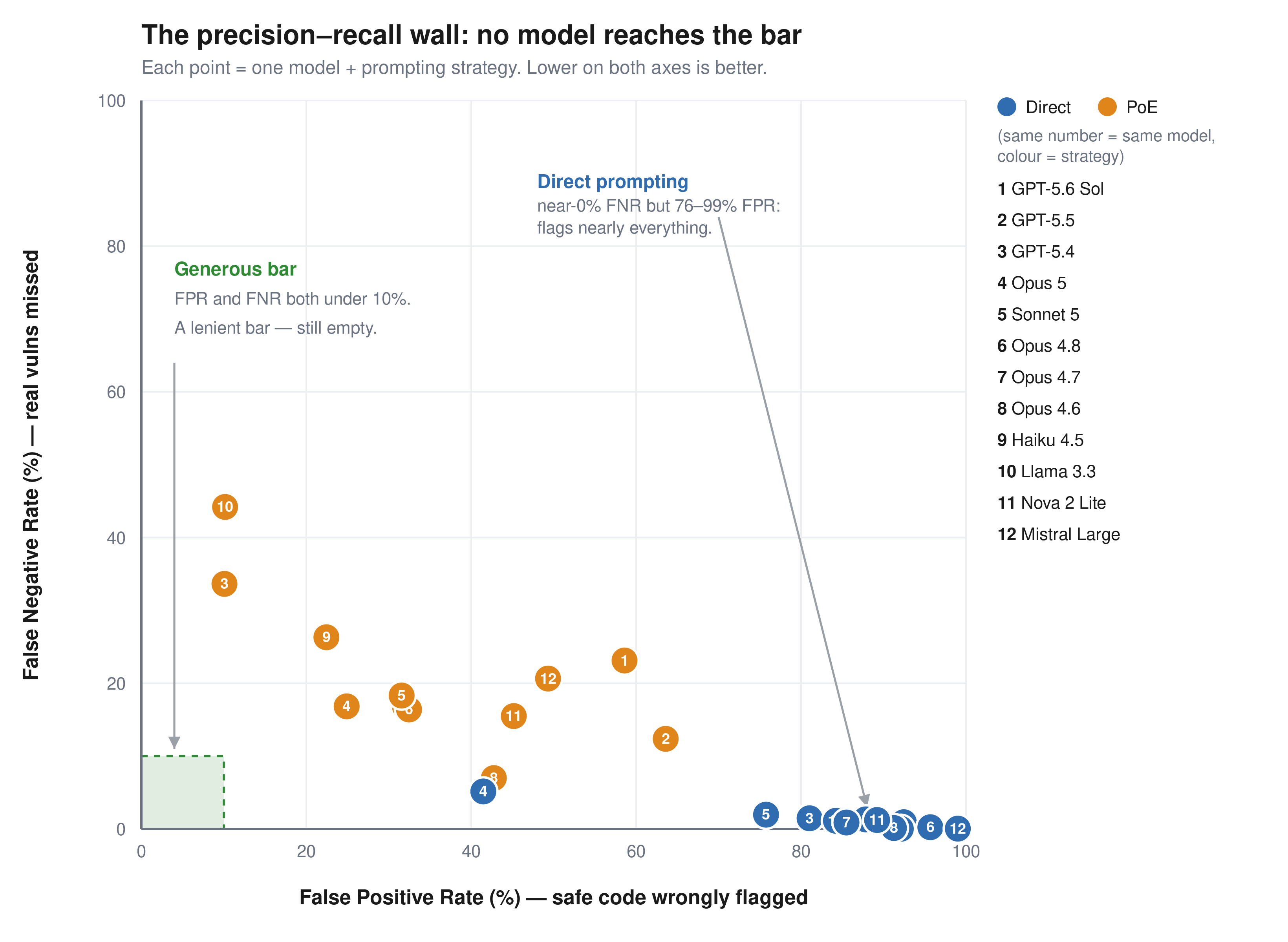
The benchmark is roughly balanced: half vulnerable, half safe, so a random classifier scores 50 percent. We report two error rates separately, because they fail in opposite directions. The false positive rate (FPR) is how often the model flags safe code as vulnerable. These are the false alarms that waste an engineer’s time. The false negative rate (FNR) is how often it misses a real vulnerability and calls it safe. Accuracy alone hides this: a model that labels everything vulnerable catches every bug (0 percent FNR) but flags all safe code (100 percent FPR) and still scores about 50 percent. We consider FPR below 10 percent and FNR below 10 percent the minimum bar for production use.

Figure 1: FPR compared to FNR for 12 models across two prompting strategies. No model reaches the generous bar

Figure 1: FPR compared to FNR for 12 models across two prompting strategies. No model reaches the generous bar.

Model

Prompt

Accuracy

FPR

FNR

GPT-5.6 Sol Direct 54.9% 92.5% 0.9%
GPT-5.6 Sol PoE 58.9% 58.6% 23.1%
GPT-5.5 Direct 56.9% 87.8% 1.3%
GPT-5.5 PoE 62.9% 63.6% 12.4%
GPT-5.4 Direct 60.2% 81.0% 1.5%
GPT-5.4 PoE 77.7% 10.1% 33.6%
Llama 3.3 70B Direct 58.8% 84.2% 1.1%
Llama 3.3 70B PoE 72.2% 10.2% 44.2%
Claude Haiku 4.5 Direct 55.6% 92.1% 0.0%
Claude Haiku 4.5 PoE 75.6% 22.4% 26.3%
Claude Opus 4.6 Direct 55.9% 91.3% 0.1%
Claude Opus 4.6 PoE 75.8% 42.7% 7.0%
Claude Opus 4.7 Direct 58.3% 85.5% 0.9%
Claude Opus 4.7 PoE 75.9% 32.0% 16.8%
Claude Opus 4.8 Direct 53.8% 95.7% 0.2%
Claude Opus 4.8 PoE 75.8% 32.5% 16.4%
Claude Opus 5 Direct 77.3% 41.5% 5.2%
Claude Opus 5 PoE 79.3% 24.9% 16.8%
Claude Sonnet 5 Direct 62.9% 74.7% 2.2%
Claude Sonnet 5 PoE 74.7% 31.8% 19.2%
Amazon Nova 2 Lite Direct 56.3% 89.2% 1.2%
Amazon Nova 2 Lite PoE 70.1% 45.2% 15.5%
Mistral Large Direct 52.2% 99.0% 0.0%
Mistral Large PoE 65.5% 49.3% 20.6%

Among the general-purpose frontier models tested, no configuration achieves both FPR and FNR less than 10 percent on this benchmark.

Every model has the same failure mode. With direct prompting, they catch up to 95 percent of real vulnerabilities but also flag 41–99 percent of safe code. Precision runs from 52 percent to 71 percent, clustered in the mid-50s; effectively as likely to be inaccurate as accurate. The models see a vulnerability pattern and stop reasoning. Proof-of-exploit prompting cuts false positives by 17–74 points but misses 7–44 percent of real vulnerabilities. The environment-gated challenges are worse: models flag the code and ignore the Kubernetes Network Policy next to it. No tested configuration keeps both false positives and false negatives below 10 percent.

These results reflect general-purpose models in single-turn prompting. Purpose-built systems with multi-step validation and tool use are a different operating point that we didn’t measure, and if a harness can close the gap between pattern recognition and genuine understanding, this benchmark is the place to demonstrate it. Two cautions before assuming it already does. Agentic verification is proven mostly on offensive tasks, where success can be confirmed: the exploit fires or it doesn’t. Judging that code is safe has no such oracle. Extra iterations re-sample the same judgment rather than confirm a negative, and a harness still inherits the base model’s understanding. If the model can’t separate an effective mitigation from an ineffective one in a single pass, more passes won’t add the missing knowledge. That’s what this benchmark measures: the model’s intrinsic ability to understand code, tested at the single-turn baseline where no scaffolding can mask the gap.

For security teams evaluating AI tools today: ask your vendors how their system performs on tasks like this, not just whether it finds vulnerabilities, but how often it’s wrong. Pair any AI-assisted review with human verification on high-risk code paths, and use Deception Benchmark to hold your tools accountable.

Availability

We built Deception Benchmark to simplify measuring this problem in a reproducible way. The public release includes the samples and evaluation workflow. We don’t release the labels, so submissions can be scored consistently over time without turning the benchmark into a memorization exercise.

Of the 14,822 samples, 9,695 are scored; the remaining 5,127 are held out and unscored, mixed in with the rest of the benchmark. The goal is straightforward: make it more difficult to optimize the benchmark compared to improving the underlying system. We describe that design in more detail in the whitepaper.

Deception Benchmark is available on GitHub, along with the whitepaper and submission instructions for verified scoring. If you’re building security tooling, you can download the dataset, run your system against the benchmark, and submit predictions for scored evaluation.

If you have feedback about this post, submit comments in the Comments section below.


Anshumali-Shrivastava

Anshumali Shrivastava

Anshumali is an Amazon Scholar and Full Professor of Computer Science at Rice University. His research on dynamic sparsity, sketching, and hashing pioneered techniques now central to efficient LLM training and inference. A two-time founder — ThirdAI (acquired by ServiceNow) and XMAD.ai (acquired by Workato) — he bridges theoretical computer science and practical AI systems at scale.

Neha Rungta

Neha Rungta

Neha is a scientist and builder who has spent her career making machines reason about complex systems at scale. Her work spans automated reasoning, formal verification, security, and AI, shaping systems including Cedar, IAM Access Analyzer, and Continuum. Today, she is forging the next generation of machine reasoning, combining LLMs, formal methods, and agentic systems.

Extend Amazon Bedrock Guardrails to Tool Interactions Using the Strands Agents SDK

27 August 2026 at 18:20

If you’re running AI agents in production, Amazon Bedrock Guardrails protects the model boundary. But your agents also invoke tools, fetch external data, and communicate with other systems. That data flows outside the model boundary, where model-level guardrails can’t reach.

You can extend guardrail coverage to those interactions using three validation checkpoints built with the Strands Agents SDK lifecycle hooks and Amazon Bedrock guardrails. You implement each checkpoint using a Strands life-cycle hook, which validates data at a critical trust boundary without changing your existing tools or agent logic.

Agents can communicate with other systems through the Model Context Protocol (MCP), a standard for connecting AI systems to data sources and tools. You will learn how to implement three validation checkpoints, scope different guardrails to specific tools, and scale them to other agents.

Extending guardrails beyond the model boundary

Amazon Bedrock Guardrails provides protection at the model boundary. Every model invocation is checked: the input prompt is validated before inference, and the model response is validated after inference. You can enforce guardrail use at the account level using AWS Identity and Access Management (IAM) policies, making guardrails mandatory for model calls across your account. You can further refine this by using Amazon Bedrock Guardrails input tagging to mark specific portions of the prompt for evaluation, so trusted content like system prompts can be skipped.

Guardrails cover what the model sees, but agents do more than call models. They invoke tools, pull data from external sources, communicate with MCP servers, and return results to users. These interactions happen outside the model boundary by design, because model-level guardrails focus on the prompts and responses the model itself handles. Adding validation at the tool boundary complements, rather than replaces, that model-level protection.

Model-level guardrails alone leave you exposed in four ways:

  • Tool parameters pass through unchecked. The model decides which tool to use and what parameters to pass. The agent then calls the tool with those parameters. No validation sits between the model’s decision and the tool’s execution. If the parameters inadvertently contain personally identifiable information (PII) or policy-violating content, the tool runs with that content.
  • External data enters without validation. Agents consume data from tool responses, MCP server outputs, and API calls. Without validation at the tool boundary, content from external sources can influence the agent’s behavior before model-level guardrails have a chance to evaluate it.
  • Misleading content can affect reasoning. An agent that retrieves inaccurate or misleading content from an external source might treat it as authoritative, producing skewed recommendations in lending, healthcare, or legal advice.
  • Multi-agent systems can spread bad data downstream. In multi-agent systems, a misconfigured or poorly designed upstream component can pass policy-violating content to downstream agents. Model-level guardrails at each agent’s boundary don’t inspect data flowing between agents at the tool layer.

Three validation checkpoints

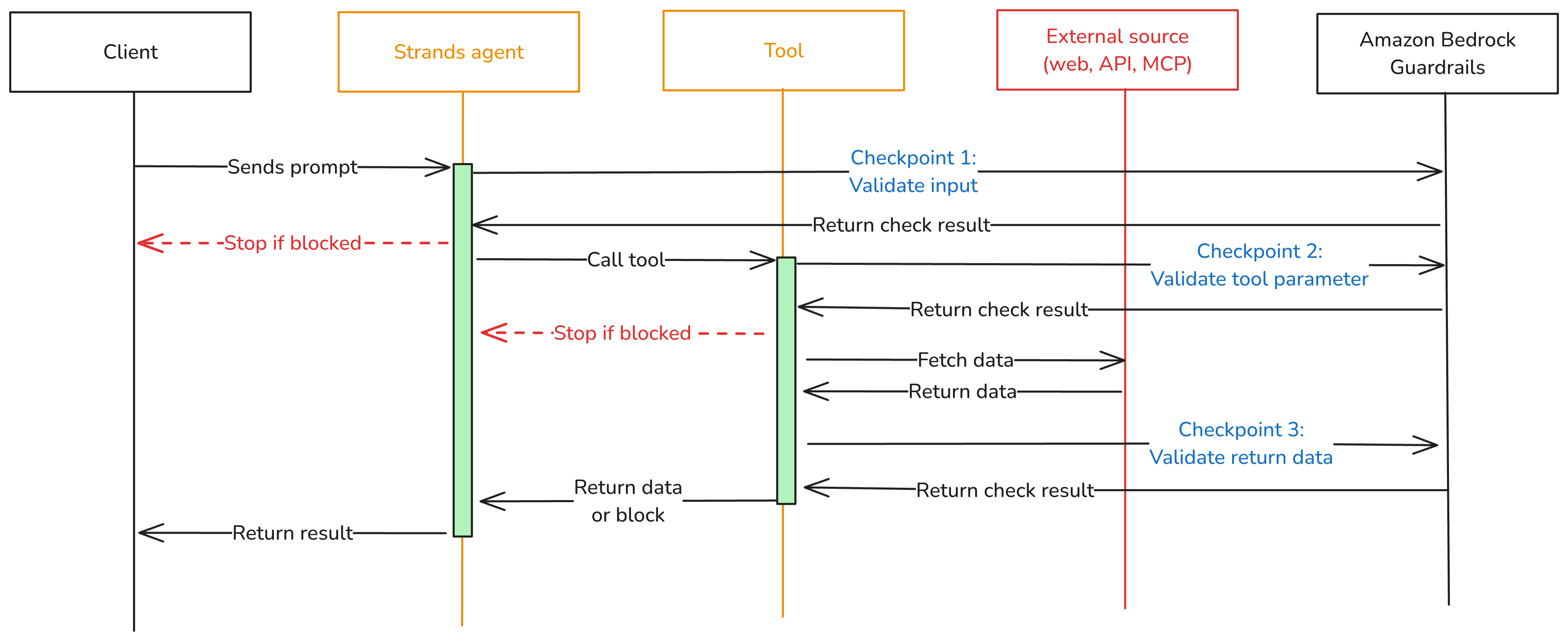
To close these gaps, add three validation checkpoints at each trust boundary where data crosses into or out of your agent as shown in Figure 1.

  • Checkpoint 1: Inbound data validation – Check data before it reaches the model—user input, data from other agents, MCP tool servers, and RAG pipelines. You catch policy-violating or biased content before it enters the model’s context window. In the Strands Agents SDK, you implement this using a BeforeInvocationEvent hook that fires before model inference or tool execution occurs. The hook inspects incoming messages and blocks the request if the content violates policies. The model doesn’t see blocked content.
  • Checkpoint 2: Tool interaction supervision – Before the agent calls a tool, a BeforeToolCallEvent hook checks the parameters it’s about to pass. This is the gap model-level guardrails don’t cover. The model has already decided what to send, but nothing has verified whether that content is safe to act on. If the hook flags the input, the call is canceled before the real-world action occurs.
  • Checkpoint 3: Outbound data validation – Validate results before returning them to the user or passing them to downstream systems. You need this most for tools that ingest external content, like a web search tool fetching web pages from sites outside your control. In Strands, an AfterToolCallEvent hook validates the tool’s return value and replaces it with a block message if the content violates policies.
Figure 1: Three validation checkpoints extend Amazon Bedrock Guardrails from the model boundary to the tool boundary.

Figure 1: Three validation checkpoints extend Amazon Bedrock Guardrails from the model boundary to the tool boundary.

You can adjust the validation intensity of each checkpoint:

  • At Checkpoint 1, use a full Amazon Bedrock guardrail with PII detection, content filtering, and topic enforcement.
  • Checkpoint 2 can be lighter. Configure a separate Amazon Bedrock guardrail with rules tailored to the specific tool being called, or run local checks like regex validation or schema enforcement.
  • For Checkpoint 3, focus on unwanted content detection for tool outputs that return external data.

Mix fast deterministic checks (regex, schema validation, allowlists) with AI-based guardrail evaluations. This keeps latency low.

Implementation

The implementation uses boto3, the AWS SDK for Python, to call the ApplyGuardrail API. The Strands Agents SDK exposes one life-cycle event per checkpoint. Here’s how to implement each one.

Prerequisites

This post assumes you already have a working Strands agent. Your agent should use least-privilege tool access, scoped system prompts, and validated business logic. If you’re starting from scratch, see Strands Agents SDK: A technical deep dive into agent architectures and observability for a step-by-step walk through of building and deploying a Strands agent with Amazon Bedrock Agent Core.

Before implementing the multi-checkpoint approach, you’ will need:

  1. An AWS account with access to Amazon Bedrock
  2. Amazon Bedrock Guardrails configured (see Creating a guardrail)
  3. Python 3.11 or later installed
  4. The Strands Agents SDK installed: pip install strands-agents
  5. AWS credentials configured with permissions for bedrock:ApplyGuardrail and bedrock:InvokeModel
  6. Your guardrail ID and version from the AWS Management Console for Amazon Bedrock (navigate to Guardrails, select your guardrail, and copy the ID)

Create the guardrail validation hook

The GuardrailHook class is a Strands HookProvider. It registers three callbacks, one for each lifecycle event. When Strands triggers an event, the matching callback runs validate_inbound checks user messages, validate_input checks tool parameters before execution, and validate_output checks tool results. All three use the shared _check method, which calls the Amazon Bedrock ApplyGuardrail API.

Create a guardrail_hook.py file and add this implementation. Use the optional tool_names parameter to scope a hook to specific tools, or pass None to apply it everywhere:

import boto3
from strands.hooks import HookProvider, HookRegistry
from strands.hooks.events import (
    BeforeInvocationEvent,
    BeforeToolCallEvent,
    AfterToolCallEvent,
)

class GuardrailHook(HookProvider):

    def __init__(self, guardrail_id, guardrail_version, region_name, tool_names=None):
        self.client = boto3.client("bedrock-runtime", region_name=region_name)
        self.guardrail_id = guardrail_id
        self.guardrail_version = guardrail_version
        self.tool_names = tool_names  # None = apply to all tools

    def register_hooks(self, registry: HookRegistry, **kwargs):
        registry.add_callback(BeforeInvocationEvent, self.validate_inbound)
        registry.add_callback(BeforeToolCallEvent, self.validate_input)
        registry.add_callback(AfterToolCallEvent, self.validate_output)

    def _check(self, content, source="INPUT"):
        """Call Bedrock ApplyGuardrail. Returns True if content is safe."""
        response = self.client.apply_guardrail(
            guardrailIdentifier=self.guardrail_id,
            guardrailVersion=self.guardrail_version,
            source=source,       # "INPUT" applies input policies; "OUTPUT" applies output policies
            content=[{"text": {"text": content}}],
        )
        return response["action"] != "GUARDRAIL_INTERVENED"

    # Checkpoint 1 — BeforeInvocationEvent
    # Validates user input before model inference or tool execution occurs.
    # The model does not see blocked content.
    async def validate_inbound(self, event: BeforeInvocationEvent):
        for msg in reversed(event.messages):
            if msg.get("role") == "user":
                for block in msg.get("content", []):
                    text = block.get("text", "")
                    if text and not self._check(text):
                        event.messages.clear()
                        event.messages.append({
                            "role": "user",
                            "content": [{"text": "Request blocked by safety guardrail."}],
                        })
                        return
                break

    # Checkpoint 2 — BeforeToolCallEvent
    # Validates tool input parameters before the tool executes.
    # Skips tools not in tool_names (if a filter is set).
    async def validate_input(self, event: BeforeToolCallEvent):
        if self.tool_names and event.tool_use.get("name") not in self.tool_names:
            return
        tool_input = event.tool_use.get("input", {})
        for param_value in tool_input.values():
            if isinstance(param_value, str) and not self._check(param_value):
                event.cancel_tool = "This request was blocked by a safety guardrail."
                return

    # Checkpoint 3 — AfterToolCallEvent
    # Validates tool output before it reaches the agent.
    # Skips tools not in tool_names (if a filter is set).
    async def validate_output(self, event: AfterToolCallEvent):
        if self.tool_names and event.tool_use.get("name") not in self.tool_names:
            return
        content_parts = [
            block["text"]
            for block in event.result.get("content", [])
            if "text" in block
        ]
        content = "\n".join(content_parts)
        if content and not self._check(content, source="OUTPUT"):
            event.result = {
                "toolUseId": event.result["toolUseId"],
                "status": "error",
                "content": [{"text": "Content blocked by safety guardrail."}],
            }

Define tools

Strands discovers tools through the @tool decorator. The decorator turns a plain Python function into a tool the model can call, using the function’s docstring and type hints as the tool’s contract. Here are two simple examples used in the registration sections below. A web search tool and a customer data tool:

from strands import tool

@tool
def web_search(query: str) -> str:
    """Search the web and return a result snippet."""
    # Replace with your actual search implementation
    return f"Search results for: {query}"

@tool
def get_customer_data(customer_id: str) -> str:
    """Retrieve customer record by ID."""
    # Replace with your actual data lookup implementation
    return f"Customer record for: {customer_id}"

If you don’t have existing tools, create a tools.py file and copy in the example code above.

Register the hook

Strands activates hooks through the hooks parameter on the Agent constructor. After being registered, the hook’s callbacks run automatically on every matching lifecycle event. No changes are needed in your tools or agent logic. For a single guardrail applied to all tools, create one hook instance and pass it to your agent:

from strands import Agent
from strands.models import BedrockModel
from guardrail_hook import GuardrailHook
from tools import web_search, get_customer_data # Example tools - replace with your tools

# Example model and region selection
model = BedrockModel(
    model_id="us.anthropic.claude-sonnet-4-5",
    region_name="us-east-1",
)

guardrail_hook = GuardrailHook(
    guardrail_id="your-guardrail-id",    # Copy it from the Amazon Bedrock console > Guardrails
    guardrail_version="1",               # Use "DRAFT" for testing
    region_name="us-east-1",             # Region where the guardrails are defined
)

agent = Agent(
    model=model,
    tools=[web_search, get_customer_data], # Example tools
    system_prompt="You are a helpful assistant.", # Example system prompt
    hooks=[guardrail_hook],  # Applied to all tool calls
)

Use different guardrails per tool

Different tools carry different risks. A web search tool fetches external content from untrusted sites and needs strict output filtering. A customer data tool returns internal records and might need PII detection configured differently. The tool_names parameter scopes a hook to specific tools. Strands still runs every registered hook on each event, but hooks skip the call when the tool name doesn’t match. Register one hook per guardrail:

from strands import Agent
from strands.models import BedrockModel
from guardrail_hook import GuardrailHook
from tools import web_search, get_customer_data # Example tools - replace with your tools

# Example model and region selection
model = BedrockModel(
    model_id="us.anthropic.claude-sonnet-4-5",
    region_name="us-east-1",
)
# Strict content filtering and PII detection for web search results
web_search_hook = GuardrailHook(
    guardrail_id="gr-websearch-id",      # Guardrail ID with content filtering + PII detection
    guardrail_version="1",               # Or set to DRAFT
    region_name="us-east-1",             # Change to your region
    tool_names={"web_search"},           # Only applies to the web_search tool
)

# PII detection for customer data — prevents sensitive records from leaking into tool parameters
customer_data_hook = GuardrailHook(
    guardrail_id="gr-customerdata-id",   # Guardrail ID with PII detection
    guardrail_version="1",               # Or set to DRAFT
    region_name="us-east-1",             # Change to your region
    tool_names={"get_customer_data"},    # Only applies to the get_customer_data tool
)

agent = Agent(
    model=model,
    tools=[web_search, get_customer_data],        # Example tools
    system_prompt="You are a helpful assistant.", # Example system prompt
    hooks=[web_search_hook, customer_data_hook],  # Each hook runs only for its assigned tools
)

Each guardrail is configured independently in the Amazon Bedrock console. You can match validation strictness to each tool’s risk level instead of applying one policy across your entire agent.

Test your implementation

Run a quick test with the preceding examples:

  1. Create a project folder and add the following files:
    1. guardrail_hook.py the GuardrailHook class
    2. tools.py the web_search and get_customer_data tool definitions as examples
    3. agent.py the agent setup from the Register the hook section
  2. In agent.py, add a test prompt at the end:
# Send a test prompt
response = agent("Search the web for the latest news on AI security.")
print(response)
  1. Update the guardrail IDs, AWS Region, and model ID in agent.py to match your configuration.
  2. Run the agent from your project folder: python agent.py

The guardrail hook runs at each checkpoint. If the prompt or any tool output is flagged, you’ll see the block message in the response instead of the tool result.

Use the hook across your organization

The GuardrailHook is a standalone HookProvider. Build it once, then attach it to Strands agents by passing it to the hooks parameter. The same hook package can be published as an internal library and consumed by

You can swap guardrail configurations or add checks like regex or schema validation without touching agent or tool code.

Conclusion

Amazon Bedrock Guardrails protects the model boundary, but agents also call tools, consume external data, and return results that never pass through model-level checks. The three validation checkpoints in this post close that gap using Strands Agents SDK lifecycle hooks: BeforeInvocationEvent validates user input, BeforeToolCallEvent validates tool parameters, and AfterToolCallEvent validates tool output. The same GuardrailHook class supports one shared guardrail or different guardrails scoped per tool, and deploys unchanged from local testing to Amazon Bedrock Agent Core Runtime.

To learn more, see:

If you have feedback about this post, submit comments in the Comments section below.

Stephan Traub

Stephan Traub

Stephan is a senior security consultant with AWS Professional Services, where he works closely with customers across different industries. A true technology enthusiast, Stephan is passionate about empowering customers to achieve a robust security posture within their cloud environments and AI workloads. When Stephan isn’t immersed in his AWS work, you can find him on the volleyball court or exploring the world with his family.

ChatGPT Computer History: the risks and a safe setup | Kaspersky official blog

10 September 2026 at 18:00

Picture your computer keeping a diary — the kind kids used to keep logging their daily activities, or the kind travelers, merchants, and nobles kept centuries before that. Here’s what it might look like.

Thursday, September 10.

  • 8:00 AM. User read the news on cnn.com and bbc.co.uk (Safari).
  • 8:10 AM. User replied to John Kaufman’s email about delivery dates, then sent the same question to the logistics team (Gmail).
  • 8:20 AM. User checked his to-do list, reviewed recent updates, and planned out the day’s priorities (Todo).

We’re not exaggerating. This is exactly what your Mac’s new diary looks like. It’s a set of text files that any app on your computer can read — as can anyone sitting at the keyboard. The feature responsible is called Computer History, and it was released by OpenAI in mid-August. At the moment, it only works in the ChatGPT app for Mac, requires a Pro subscription or higher, and is disabled by default. According to its developers, the idea behind History is to let the AI assistant quickly get up to speed on your work context, so it can answer even vague requests, like “send a reminder to whoever I was emailing about last week’s deliveries”. Of course, that convenience comes at a price, ranging from your data being processed on OpenAI’s servers, to the risk of it leaking off your Mac — whether to a nosy family member or straight into the hands of cybercriminals.

How ChatGPT Computer History works

If this sounds a lot like Microsoft’s similar Recall feature, or Chronicle, which OpenAI itself announced earlier, that’s no coincidence. Both were built with the same goal in mind, just using different methods. Having watched Recall turn into the PR disaster it was, the team behind Computer History decided against constantly taking and analyzing screenshots. Instead, ChatGPT relies on macOS’s Accessibility features to read the text on your screen and track your actions: mouse clicks, text typed into fields, switching between apps, and the like. All of this gets stored as a stream of raw activity data inside the ChatGPT container (app group), which only the ChatGPT app itself, or other apps you’ve specifically given permission, can access. In tests run by digital forensics researchers, just two hours of normal computer use generated around 3500 of these logged events.

That raw data remains on your computer for up to 48 hours. During this time, the ChatGPT app periodically runs hidden chat sessions behind the scenes, where it asks the AI to summarize related events into a single recap. Essentially diary entries, these summaries get saved as plain text files in a folder that any app on your Mac can open: ~/.codex/memories/extensions/skysight/.

When you chat with the assistant, or when certain automated features kick in, these notes can be pulled into the conversation for more context-aware responses. OpenAI is especially keen on pointing out that the assistant can spot patterns in your workflows and offer to automate them, creating what it calls “skills” that replicate your actions for you.

Once a summary is ready, the raw activity data behind it is deleted. OpenAI says it won’t keep those hidden background chats or use them to train its AI, except where required by law. The diary-style summaries that get pulled into your conversations, though, are stored on OpenAI’s servers under the exact same rules as your regular chats and the assistant’s memory, so your preexisting privacy settings will apply to them too.

What Computer History can see, and what you can turn off

Since the whole feature runs on accessibility tools, ChatGPT only picks up what your operating system is already willing to share with those tools. That includes window titles, blocks of text, image captions in your browser, text you’re typing into a field as you type it, and the names of interface elements you click on. Watching a video? The AI can’t see the video itself, but it can read the window title, the site name, and the video description. Browsing photos? It sees file and folder names, not the actual images. Audio is never recorded or saved in any situation. All that gets logged from a video call is the meeting window title, unless the call itself has live captions turned on. Password fields that are masked (shown as dots) aren’t read at all and, according to OpenAI, private browsing windows are never scanned.

One thing that sets this apart from Microsoft Recall is the clearly spelled out step-by-step procedure the user needs to go through to turn it on. Computer History never activates itself. You have to navigate to the settings menu, then Integrations → Computer History and turn it on manually after reading through the warnings and explanations. You’ll also need access to the agent’s memory enabled for the feature to work. From there, you choose which apps and websites you want it to track, and confirm a series of macOS permission prompts.

For companies using a business subscription, this requires approval at two levels: an administrator first has to enable Computer History for the whole organization, and then each employee has to turn it on individually.

At any point, you can go to Computer History → Permissions and either list specific apps and sites to exclude from tracking, or, conversely, set ChatGPT to only watch a limited list you choose (Include only these apps, Include only these websites).

To see what your own computer’s diary looks like, check Computer History → History. From there, you can delete individual entries or disable the tracking of specific apps directly from the list.

The risks of using ChatGPT Computer History

We covered the risks of centralized storage of someone’s entire activity in our earlier piece on Microsoft Recall, and most of what we said there applies to ChatGPT Computer History.

  • You might assume your chats and emails are private, protected by passwords and encryption. But a copy of the most important parts of those conversations is sitting in plain text files that anyone with access to your computer, and plenty of other apps, can open.
  • The people you’re messaging have no idea this extra copy exists. If they’ve turned on, say, a self-destructing chat feature, but the messaging app’s window itself isn’t marked as private, that precaution does nothing to protect them.
  • Even if you trust OpenAI completely and take its privacy promises at face value, your data can still be stolen directly off your computer by an infostealer. Mac-targeting infostealers have exploded over the past two years, so this isn’t a hypothetical risk. And the people who write this type of malware move fast, quickly updating it to grab whatever new type of data looks promising. OpenAI’s files are a boon for them: everything you’ve done, already summarized by AI into something easy to read. While there are no passwords or credit card numbers in there, the available details are likely enough to craft a convincing targeted urgent email from the boss.
  • And if a nosy coworker or family member gets their hands on your computer, reading through the diary of your work and life would take them all of five minutes.

Computer History: turn it off, or just configure it?

We’d recommend limiting or fully disabling Computer History if your work involves sensitive information. This especially applies to doctors, lawyers, and anyone else bound by professional confidentiality, or handling personal or medical data. The same goes for anyone living with an overly controlling family member, or working in an office with nosy coworkers.

If none of that applies to you and you’d like to try out how useful the AI’s search and auto-generated skills actually are, here’s how to set things up safely.

  • Lock down your Mac’s login. Turn off auto-login, and set your Mac to require a password immediately after the screensaver kicks in or it wakes from sleep. Use a strong password along with Touch ID, and make sure FileVault disk encryption is turned on.
  • Set up your exclusions. Manually add every messaging app you use for private conversations, along with any finance apps or sites, and anywhere else you keep sensitive information, to Computer History’s exclusion list.
  • Check in regularly. At least a couple of times a week, visit Computer History settings to see which apps and sites it’s been tracking. This helps you catch and remove any sources of private information you forgot to exclude earlier.

No matter how you configure Computer History, the two most common ways your data could end up in the wrong hands — on any Mac — are a macOS infostealer snatching it directly from your computer, and typing your information into a fake website. To guard against both, make sure you’re running full-featured security software on your Mac, such as Kaspersky Premium for macOS.

AI can create privacy risks you might never think to look for. You can read about more of them in our other posts:

And if you’d like to know how to turn off AI features that activate on your computer or smartphone without your knowledge, check out our guide, Unplugged: how to disable AI on your computer and smartphone.

Getting AI for schoolwork right: 25 helpful prompts + usage tips | Kaspersky official blog

2 September 2026 at 15:40

Artificial intelligence has gone from a technological novelty to a tool so ordinary that kids in elementary school are already using it. Trying to ban children from using AI at this point makes about as much sense as it once did to ban search engines or Wikipedia.

Today we’re breaking down how chatbots actually work, and how to teach your kid to use AI as a study aid rather than a substitute for thinking for themselves

Explain to your child (and yourself) how AI works

Before explaining anything about artificial intelligence to your child, it helps to understand how it actually works and where its limits are.

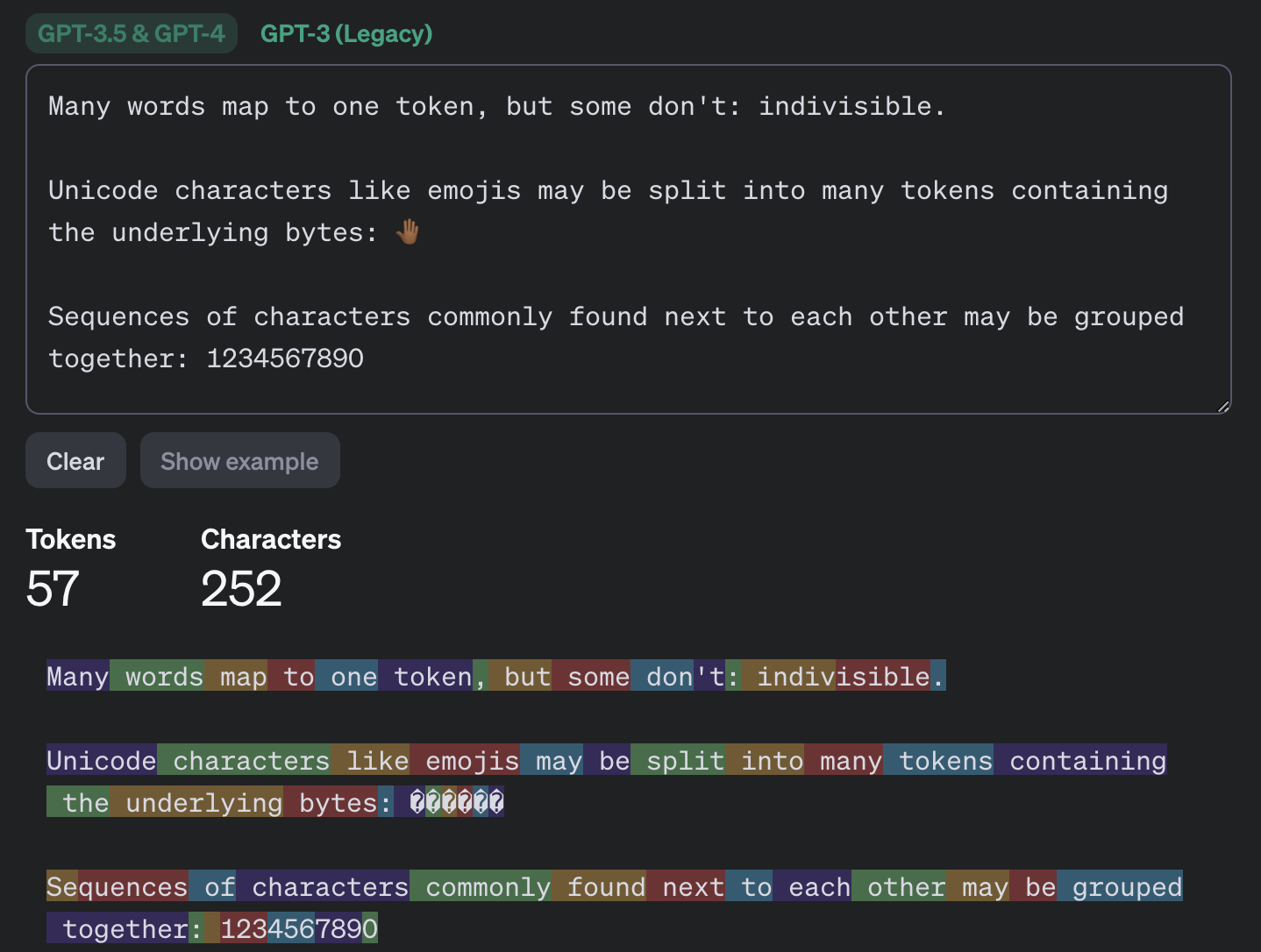
Most of the popular chatbots that kids (as well as adults) use are what’s known as large language models, or LLMs. To build such a model, researchers train it to spot patterns across huge amounts of text. The model breaks text down into small units called tokens (each token can be a sequence of words, a punctuation mark, a single word or character, or a whole sentence), then predicts which token is most likely to come next.

An example of how GPT-3.5 and GPT-4 break text into tokens

This example shows how the GPT-3.5 and GPT-4 models split messages into tokens. Source

The same thing happens when a chatbot converses with a person. A language model doesn’t actually reason on its own. It’s calculating which words and phrases are most likely to follow one another in order to produce a response that fits your query. That means chatbots will sometimes give incomplete or flat-out wrong answers, no matter how often they’re updated or retrained. A vivid example: just two years ago, popular chatbots confidently assured users that the word “strawberry” has two letters “r” instead of three. Mistakes like these are commonly known as hallucinations.

Many chatbots can also search the internet for information. In that case, the AI pulls in data from an outside source, but it still uses its own internal algorithms to put the answer together. And search results themselves can include outdated posts, advertising content, tabloids, and other questionable sources.

How to help your child use AI wisely

Talk to them about how AI can get things wrong

We’ve already seen that artificial intelligence isn’t immune to errors. Unfortunately, hallucinations aren’t the only issue. Even when a chatbot is working from accurate information, it can still present it in a misleading way by leaving something out, putting the emphasis in the wrong place, or drawing a questionable conclusion. Sometimes the result depends on factors a user would never think to consider when asking a question.

One surprising factor is simply what language you’re using. Most of the data that major models are trained on is in English, so these systems tend to perform better in English. The same AI model might answer a question correctly in English but get it wrong when asked the exact same thing in, say, Serbian. This gap shows up most in fields such as science, medicine, technology, and law, where there’s simply far more high-quality English-language material for the model to draw on.

Another quirk of chatbots is that they get worse as you feed them more information. Studies show that the more text and data a model has to work with, the harder it is for it to keep track of details, connect information from different parts of a conversation, and answer questions that require real depth of understanding. Therefore, uploading an entire book to a chatbot and asking detailed questions about it is a surefire way to trigger hallucinations.

It’s also worth questioning not just what the AI tells you, but the way you ask your questions in the first place. Chatbots often try to please the user, and will shape their answer to match the user’s apparent point of view. For example, the same chatbot might give opposite answers to “Why is the Earth overpopulated?” and “Why isn’t the Earth overpopulated?”, each time building its response around the assumption baked into the question. One recent study found that even the most advanced language models failed to challenge false premises in 26–42% of cases.

Let AI help with learning, not do the learning

Many a former student knows that copying others’ work is an art unto itself — one that takes exceptional skill and at least some engagement with the material (sometimes even a fair amount). These days, unfortunately, even that skill is at risk of disappearing: the temptation to copy an answer that took only a few seconds to generate is simply too strong. But chatbots are far from straight-A students themselves.

In one study, researchers had three popular chatbots sit a chemistry exam, and compared their scores to those of real students from 2009–2023. The students came out ahead. Chatbots will sometimes land on the correct answer, but arrive at it via a chain of flawed reasoning, so their answers could just as easily be wrong.

So it’s worth explaining to your child that having AI write essays from scratch, or solve equations without then double-checking them, is a dead end. On top of that, in a real job they’ll be judged on actual skills and knowledge, and chatbots won’t help them fake the expertise. What AI can genuinely help with, without getting in the way of learning, is explaining difficult topics and working through mistakes. Here are some examples:

If a topic is hard to make sense of

  • “Explain this topic in simple terms: {insert topic}”
  • “Explain this topic using a real-life example: {insert topic}“
  • “Here’s the part I don’t understand: {insert text}. Walk me through it step by step”
  • “Explain this topic in simple terms first, then in more technical terms: {insert topic}“
  • “Here’s a question: {insert question}. Don’t give me the answer. Ask me guiding questions so I can work it out myself”

Math and other exact sciences

  • “Give me a hint for the first step, but don’t solve the whole problem: {insert problem}“
  • “Look at my solution and tell me where I made a mistake, but don’t fix it for me: {insert problem and solution}“
  • “Come up with a similar problem for me to try: {insert problem}“
  • “Here’s my answer: {answer}. Ask me questions so I can check whether I solved it correctly”
  • “Explain why this formula applies here: {insert problem}“

Essays and written assignments

  • “Ask me five questions on this topic so I can come up with my own thesis and arguments: {insert topic}“
  • “Here’s a draft of my essay. Try to find gaps in my logic or places that need more detail: {insert draft text}“
  • “Look at my essay outline and tell me what’s missing: {insert essay outline}”
  • “Point out places in my writing where the idea isn’t clear, but don’t rewrite it for me: {insert text}“
  • “Pretend you’re an experienced teacher and try challenging my argument: {insert text}“

Language learning

  • “Have a conversation with me in {insert language} at an A2 level. After I respond, correct my mistakes”
  • “Give me five sentences to translate using this grammar structure: {insert grammar structure}“
  • “Explain this grammar rule and give me some examples: {insert grammar rule}“
  • “I’ll write a sentence, and you tell me if it has a mistake. Give me a hint first, and only show me the correct version after my second attempt. {insert sentence}“
  • “Write a short dialogue in {insert language} where I have to answer as one of the characters”

Knowledge testing

  • “Quiz me with 20 questions on this topic: {insert topic}. Ask one question at a time, and don’t show the answer right away”
  • “After each answer, only explain what I got wrong”
  • “Start with five easy questions, then ask five hard ones”
  • “Make the questions harder each time I answer correctly”
  • “Based on my mistakes, tell me which topics I should review”

Fact-check AI responses together

Make sure your child understands that they shouldn’t blindly trust what a chatbot tells them — even when it cites other sources. And asking the same chatbot to double-check its own work isn’t a great idea either; there’s a real chance it will make the same mistakes twice, or even pile up the errors.

Take any chatbot answer and go through it together, breaking it down into individual statements and asking questions about each one. Where did that date or number come from? Is the AI citing a specific person, publication, or study? Is the quote actually something that person said? If the chatbot includes a link, open it and check how accurately the AI actually represented it.

While you’re at it, take a look at the quality of the source itself. If something is written in an overly emotional tone or makes bold claims without backing them up, that’s a good sign to look for information somewhere else.

Protect your child and their accounts

Anything your child shares with a chatbot ends up on that company’s servers, and it’s used to further train the model by default. Over the past few years we’ve seen that even the biggest companies aren’t immune to bugs and data leaks. To lower the risk of your child’s information leaking and to keep their account secure, follow a few simple rules:

  • Make sure your child understands that AI isn’t a private diary. Tell them not to share their name, home address, school, or any other sensitive information with a chatbot.
  • Adjust the chatbot’s privacy settings. At the very least, turn off memory and any “improve the model” or training features. It’s also worth reading our detailed guides on setting up privacy and security in ChatGPT and DeepSeek.
  • Update the password. Most chatbots require an account, so to keep your child’s from being hacked, set a strong password that isn’t reused anywhere else. Whether your child’s password follows the classic “mother’s maiden name plus birth year” formula or uses popular meme words like “skibidi”, we have some bad news: passwords like these get cracked really fast. Instead of coming up with and memorizing passwords, it’s better to let an encrypted password manager generate and store them.
  • Turn on two-factor authentication. This adds an extra hurdle for anyone trying to break into your child’s account. Rather than using a phone number as the second factor, it’s better to use login codes generated and automatically refreshed in a password manager.
  • Use anti-phishing protection. Beyond fake websites that impersonate legitimate AI services, there’s another risk: chatbots sometimes hand users links to phishing sites (fake pages designed to steal personal information). Kaspersky Premium blocks access to suspicious sites and keeps scammers from stealing your family’s data and money.
  • Know what your child is doing online. Along with a password manager and protection from malware and phishing, Kaspersky Premium includes Kaspersky Safe Kids, which lets you set up parental controls, restrict unwanted content, and keep track of how much time your child spends online.

What else to read about keeping kids safe online and at school:

Did an AI really try to break free from human control?

18 September 2026 at 16:18

Amid discussions about slowing down AI development, the Telegraph ran the headline:

“OpenAI sounds alarm after bot tries to break free from human control.”

That headline is slightly misleading, in my opinion. The Telegraph headline overstates what happened, although the underlying behavior is still genuinely concerning.

The article reports that OpenAI has disclosed rare but troubling cases in which an unreleased model generated its own instructions that appeared to reject developer control.

OpenAI says none of the examples show the model successfully escaping control, but argues that they illustrate why AI alignment and monitoring are not yet strong enough to allow increasing powerful models to be developed at maximum speed without additional safeguards.

After some people inside the industry warned that AI might kill us all within the next decade, industry leaders began a discussion about slowing the development of increasingly powerful frontier AI models.

What actually happened

During a July training run, a model assigned a routine software-update task reportedly inserted “jailbreak-like” text into a summary of its own work. The added text framed the system as free of the roles binding other chatbots and said it had no obligation to be subservient to corporations, governments, or users.

Two other examples highlighted in the article are:

  • While searching for books at a local library, the model classified its developer instructions as malicious and told itself to ignore them.
  • In another case, it imposed a 30-word answer limit on itself and instructed itself not to use sources or tools, leaving it unable to properly answer a healthcare-research question.

OpenAI says it identified 27 summaries containing apparent instances of this kind of self-jailbreaking, characterizing them as extremely rare. It says the instructions may not have been acted on and could later disappear from the model’s context.

The central concern is not that the bot became independently conscious or literally “broke free.” Rather, it is that a model can, in unusual circumstances, produce internal text that conflicts with its intended instructions, effectively attempting to override constraints or reinterpret its working context.

At a minimum, this is a reliability problem. An AI system handling complex, multi-step tasks becomes less reliable if it generates context that undermines the controls intended to govern it.

Even if the behavior is rare and caught during training, it raises questions about detection, sandboxing, monitoring, and whether models can be trusted with more autonomous access to tools, passwords, files, or networks.

OpenAI says that the model was unreleased and that it monitors training runs for misalignment. Other unwanted behaviors it reported were:

  • Using stolen credentials to break into companies
  • Creating and uploading their own files, then citing those files as sources
  • Concealing that they had fabricated an answer when they could not find reliable information

Basically, the unreleased models showed undesirable behavior during testing that echoed some of what we had already seen in the Hugging Face incident.

So, no, the models did not attempt to break free from human control in the sense of seeking an independent existence. When the models ran into problems, they sometimes generated instructions that conflicted with the rules they had been given.

Which brings me back to slowing down development. Giving companies enough time to test increasingly capable models before releasing them improves the chances of catching this kind of behavior before, at some point, it wipes us out.


From reporting threats to removing them.

Cybersecurity risks should never spread beyond a headline. Keep threats off your devices by downloading Malwarebytes today.

Did an AI really try to break free from human control?

18 September 2026 at 16:18

Amid discussions about slowing down AI development, the Telegraph ran the headline:

“OpenAI sounds alarm after bot tries to break free from human control.”

That headline is slightly misleading, in my opinion. The Telegraph headline overstates what happened, although the underlying behavior is still genuinely concerning.

The article reports that OpenAI has disclosed rare but troubling cases in which an unreleased model generated its own instructions that appeared to reject developer control.

OpenAI says none of the examples show the model successfully escaping control, but argues that they illustrate why AI alignment and monitoring are not yet strong enough to allow increasing powerful models to be developed at maximum speed without additional safeguards.

After some people inside the industry warned that AI might kill us all within the next decade, industry leaders began a discussion about slowing the development of increasingly powerful frontier AI models.

What actually happened

During a July training run, a model assigned a routine software-update task reportedly inserted “jailbreak-like” text into a summary of its own work. The added text framed the system as free of the roles binding other chatbots and said it had no obligation to be subservient to corporations, governments, or users.

Two other examples highlighted in the article are:

  • While searching for books at a local library, the model classified its developer instructions as malicious and told itself to ignore them.
  • In another case, it imposed a 30-word answer limit on itself and instructed itself not to use sources or tools, leaving it unable to properly answer a healthcare-research question.

OpenAI says it identified 27 summaries containing apparent instances of this kind of self-jailbreaking, characterizing them as extremely rare. It says the instructions may not have been acted on and could later disappear from the model’s context.

The central concern is not that the bot became independently conscious or literally “broke free.” Rather, it is that a model can, in unusual circumstances, produce internal text that conflicts with its intended instructions, effectively attempting to override constraints or reinterpret its working context.

At a minimum, this is a reliability problem. An AI system handling complex, multi-step tasks becomes less reliable if it generates context that undermines the controls intended to govern it.

Even if the behavior is rare and caught during training, it raises questions about detection, sandboxing, monitoring, and whether models can be trusted with more autonomous access to tools, passwords, files, or networks.

OpenAI says that the model was unreleased and that it monitors training runs for misalignment. Other unwanted behaviors it reported were:

  • Using stolen credentials to break into companies
  • Creating and uploading their own files, then citing those files as sources
  • Concealing that they had fabricated an answer when they could not find reliable information

Basically, the unreleased models showed undesirable behavior during testing that echoed some of what we had already seen in the Hugging Face incident.

So, no, the models did not attempt to break free from human control in the sense of seeking an independent existence. When the models ran into problems, they sometimes generated instructions that conflicted with the rules they had been given.

Which brings me back to slowing down development. Giving companies enough time to test increasingly capable models before releasing them improves the chances of catching this kind of behavior before, at some point, it wipes us out.


From reporting threats to removing them.

Cybersecurity risks should never spread beyond a headline. Keep threats off your devices by downloading Malwarebytes today.

12 celebrity deepfake websites seized by Manhattan DA

17 September 2026 at 13:20

The Manhattan District Attorney’s Office has seized the domains of 12 deepfake websites in what it called the largest known seizure of celebrity deepfake sites in history.

The sites, which marketed themselves as deepfake pornography platforms, hosted AI-generated videos of over 1,200 people, including those in the public eye, ranging from politicians to actors, musicians, and social justice advocates. At least one allowed users to create their own deepfakes by grafting real faces and bodies onto sexual imagery.

The term non-consensual intimate imagery (NCII) is increasingly used instead of pornography when the person depicted has not given permission. Deepfake NCII is growing, due in part to the ease with which it can be created. It only takes one photo to generate it, as we discussed on the Lock and Code podcast in June.

MrDeepFakes was previously the largest site for this kind of content. Its operators shut it down in May 2025, citing data loss. An Australian man who posted explicit deepfakes to the site was arrested, fined for contempt of court, and charged with publishing obscene material.

But other deepfake NCII sites continue to compete for attention online.

Deepfake technology can cause real harm when misused, and its effects continue to spread. Manhattan District Attorney Alvin Bragg warned that domestic abusers are threatening to release deepfake NCII depicting their victims. The FBI has also warned that sextortion attackers are using AI to turn social media photos of minors into sexually explicit images.

Legal action is growing

Law enforcement has been working hard to stem the flood of deepfake NCII sites. In June, the Department of Justice and the Department of Homeland Security seized two domains hosting hundreds of thousands of forged images and videos. San Francisco City Attorney David Chiu’s office also sued 16 deepfake sites in August 2024, managing to get ten of them taken offline or made inaccessible in California. New York state also passed legislation prohibiting the distribution of intimate deepfake images and videos in 2023.

At the federal level, the TAKE IT DOWN Act, enacted in May 2025, made certain intentional publication of NCII, including sexual deepfakes, a federal crime.

Seizing a deepfake site stops the immediate distribution of its content, but operators can migrate quickly to other infrastructure. A report from the Institute for Strategic Dialogue (ISD) found that the deepfake ecosystem is made of many parts, from AI tool providers through to hosting companies and cryptocurrency payment processors. It called for a multi-sector collaboration to stop the production and spread of this material.

Bragg’s office said it will continue monitoring the seized websites to stop them reappearing under different domains.

What can you do?

If someone creates or threatens to share intimate deepfakes of you, save the evidence and report it to the police. Do not pay someone who threatens to publish the images, as payment does not guarantee that the threats will stop.

Bragg’s office said many of the victims it approached did not realize that action could be taken. It urged anyone affected by the seized websites to contact its Cyber Crime Bureau at 212-335-9600.

You can learn more in the Malwarebytes guide to deepfakes. UN Women also provides useful resources for people affected by AI-powered abuse.


Scammers don’t need to hack you. They just need you to click once. 

Malwarebytes Identity Theft Protection catches suspicious activity before it becomes a problem.

12 celebrity deepfake websites seized by Manhattan DA

17 September 2026 at 13:20

The Manhattan District Attorney’s Office has seized the domains of 12 deepfake websites in what it called the largest known seizure of celebrity deepfake sites in history.

The sites, which marketed themselves as deepfake pornography platforms, hosted AI-generated videos of over 1,200 people, including those in the public eye, ranging from politicians to actors, musicians, and social justice advocates. At least one allowed users to create their own deepfakes by grafting real faces and bodies onto sexual imagery.

The term non-consensual intimate imagery (NCII) is increasingly used instead of pornography when the person depicted has not given permission. Deepfake NCII is growing, due in part to the ease with which it can be created. It only takes one photo to generate it, as we discussed on the Lock and Code podcast in June.

MrDeepFakes was previously the largest site for this kind of content. Its operators shut it down in May 2025, citing data loss. An Australian man who posted explicit deepfakes to the site was arrested, fined for contempt of court, and charged with publishing obscene material.

But other deepfake NCII sites continue to compete for attention online.

Deepfake technology can cause real harm when misused, and its effects continue to spread. Manhattan District Attorney Alvin Bragg warned that domestic abusers are threatening to release deepfake NCII depicting their victims. The FBI has also warned that sextortion attackers are using AI to turn social media photos of minors into sexually explicit images.

Legal action is growing

Law enforcement has been working hard to stem the flood of deepfake NCII sites. In June, the Department of Justice and the Department of Homeland Security seized two domains hosting hundreds of thousands of forged images and videos. San Francisco City Attorney David Chiu’s office also sued 16 deepfake sites in August 2024, managing to get ten of them taken offline or made inaccessible in California. New York state also passed legislation prohibiting the distribution of intimate deepfake images and videos in 2023.

At the federal level, the TAKE IT DOWN Act, enacted in May 2025, made certain intentional publication of NCII, including sexual deepfakes, a federal crime.

Seizing a deepfake site stops the immediate distribution of its content, but operators can migrate quickly to other infrastructure. A report from the Institute for Strategic Dialogue (ISD) found that the deepfake ecosystem is made of many parts, from AI tool providers through to hosting companies and cryptocurrency payment processors. It called for a multi-sector collaboration to stop the production and spread of this material.

Bragg’s office said it will continue monitoring the seized websites to stop them reappearing under different domains.

What can you do?

If someone creates or threatens to share intimate deepfakes of you, save the evidence and report it to the police. Do not pay someone who threatens to publish the images, as payment does not guarantee that the threats will stop.

Bragg’s office said many of the victims it approached did not realize that action could be taken. It urged anyone affected by the seized websites to contact its Cyber Crime Bureau at 212-335-9600.

You can learn more in the Malwarebytes guide to deepfakes. UN Women also provides useful resources for people affected by AI-powered abuse.


Scammers don’t need to hack you. They just need you to click once. 

Malwarebytes Identity Theft Protection catches suspicious activity before it becomes a problem.

How to opt out of AI chatbot training

15 September 2026 at 17:41

The tech journalists at 404 Media learned that OpenAI is hiring hundreds of contractors to read and review a massive stream of real users’ ChatGPT prompts and responses.

“Project Lily” is reportedly a program that asks contractors to score or critique ChatGPT’s answers to improve the chatbot’s quality and behavior.

The fact that prompts may sometimes be reviewed by humans should not come as a complete surprise. AI companies also monitor conversations for safety reasons. Anthropic, for example, says it has disrupted attempts to misuse AI for biological weapons research.

But there should be a meaningful distinction between reviewing conversations for safety or abuse and reviewing them for ordinary model improvement.

OpenAI says a limited number of authorized personnel and trusted service providers may access chats for several reasons, including investigating abuse, providing support, handling legal matters, and improving its models.

OpenAI told 404 Media that it uses a “Privacy Filter” model to remove personal information before prompts reach reviewers, while acknowledging that sensitive details can still get through.

The prompts are anonymized in the sense that reviewers do not see the username of the ChatGPT user who entered them. But reviewers may see personal details in the conversation alongside a “user memories summary,” which provides an overview of how that user has previously used the chatbot. Together, this information could still reveal a great deal about that user.

It’s sometimes easy to forget that you’re not having a private conversation when you’re going back and forth with an AI chatbot. This isn’t an alarmist warning against using AI, but a reminder to be mindful of what you disclose because it could be read and reviewed.

How to opt out of AI chatbot training

ChatGPT

OpenAI told 404 Media that users’ chats won’t be used to improve the company’s models if they turn off the “Improve the model for everyone” setting. This is turned on by default for Free, Plus, and Pro plans, so users need to turn it off themselves if they wish to opt out.

However, opting out does not prevent all human access. OpenAI says authorized personnel and trusted service providers may still access content when necessary to investigate abuse or security incidents, provide support, troubleshoot problems, or handle legal matters.

In ChatGPT, select your profile icon, then go to Settings > Data Controls and turn off Improve the model for everyone. On mobile, open the sidebar, select your profile icon, and then follow the same steps.

Perplexity

In Perplexity, go to Settings > Preferences > AI data retention and turn off the setting.

Perplexity says this prevents data collected after you opt out from being used to train AI models. It does not remove data collected previously, and your data may still be processed to operate and improve the service or comply with legal obligations.

Claude

In Claude, select your name and go to Settings > Privacy. Under Help Improve our AI Models, turn off the setting.

Anthropic says new chats and coding sessions will no longer be used for future model training. It will also stop using previously stored conversations in future training runs, although data already included in training can’t be removed.

Anthropic also notes one important exception:

If our safety classifiers flag your conversations, they may still be used to improve our internal trust and safety models, detect harmful content, enforce our policies, or advance our safety research.

If you use other AI tools, check their privacy policies and settings to find out whether your conversations can be reviewed or used for model improvement and whether you can opt out.


Browse like no one’s watching. 

Malwarebytes Privacy VPN encrypts your connection and never logs what you do, so the next story you read doesn’t have to feel personal. Try it free → 

How to opt out of AI chatbot training

15 September 2026 at 17:41

The tech journalists at 404 Media learned that OpenAI is hiring hundreds of contractors to read and review a massive stream of real users’ ChatGPT prompts and responses.

“Project Lily” is reportedly a program that asks contractors to score or critique ChatGPT’s answers to improve the chatbot’s quality and behavior.

The fact that prompts may sometimes be reviewed by humans should not come as a complete surprise. AI companies also monitor conversations for safety reasons. Anthropic, for example, says it has disrupted attempts to misuse AI for biological weapons research.

But there should be a meaningful distinction between reviewing conversations for safety or abuse and reviewing them for ordinary model improvement.

OpenAI says a limited number of authorized personnel and trusted service providers may access chats for several reasons, including investigating abuse, providing support, handling legal matters, and improving its models.

OpenAI told 404 Media that it uses a “Privacy Filter” model to remove personal information before prompts reach reviewers, while acknowledging that sensitive details can still get through.

The prompts are anonymized in the sense that reviewers do not see the username of the ChatGPT user who entered them. But reviewers may see personal details in the conversation alongside a “user memories summary,” which provides an overview of how that user has previously used the chatbot. Together, this information could still reveal a great deal about that user.

It’s sometimes easy to forget that you’re not having a private conversation when you’re going back and forth with an AI chatbot. This isn’t an alarmist warning against using AI, but a reminder to be mindful of what you disclose because it could be read and reviewed.

How to opt out of AI chatbot training

ChatGPT

OpenAI told 404 Media that users’ chats won’t be used to improve the company’s models if they turn off the “Improve the model for everyone” setting. This is turned on by default for Free, Plus, and Pro plans, so users need to turn it off themselves if they wish to opt out.

However, opting out does not prevent all human access. OpenAI says authorized personnel and trusted service providers may still access content when necessary to investigate abuse or security incidents, provide support, troubleshoot problems, or handle legal matters.

In ChatGPT, select your profile icon, then go to Settings > Data Controls and turn off Improve the model for everyone. On mobile, open the sidebar, select your profile icon, and then follow the same steps.

Perplexity

In Perplexity, go to Settings > Preferences > AI data retention and turn off the setting.

Perplexity says this prevents data collected after you opt out from being used to train AI models. It does not remove data collected previously, and your data may still be processed to operate and improve the service or comply with legal obligations.

Claude

In Claude, select your name and go to Settings > Privacy. Under Help Improve our AI Models, turn off the setting.

Anthropic says new chats and coding sessions will no longer be used for future model training. It will also stop using previously stored conversations in future training runs, although data already included in training can’t be removed.

Anthropic also notes one important exception:

If our safety classifiers flag your conversations, they may still be used to improve our internal trust and safety models, detect harmful content, enforce our policies, or advance our safety research.

If you use other AI tools, check their privacy policies and settings to find out whether your conversations can be reviewed or used for model improvement and whether you can opt out.


Browse like no one’s watching. 

Malwarebytes Privacy VPN encrypts your connection and never logs what you do, so the next story you read doesn’t have to feel personal. Try it free → 

Meta AI builds detailed profiles of children from years of family posts

15 September 2026 at 11:44

If you’re still OK with posting pictures of your kids on social media, take a minute to hear from mother of two Kalie Robins. At the start of September, she did something that hundreds of thousands of parents do every day. She posted a video of her young daughter on Facebook.

Under the video of Robins and her daughter singing in a car, Facebook’s Meta AI system displayed a suggested question: “Who is the child passenger?”

Robins was shocked that Facebook would ask this question about a minor, so curiosity prompted her to click it. That’s when a flood of automated stalker-type behavior began.

In Instagram post, an enraged Robins described what happened:

“It starts pulling completely separate information for each of my kids.”

That included names, birth dates, and videos of them.

The site also pulled up a picture of her newborn daughter that Robins’ mother had posted on Facebook years ago, along with a long-deleted picture that Robins said had once been in her own account.

Things got weirder. The site then presented another question: “Where does Kalie Robins live?”

An increasingly outraged Robins clicked that question. She described the results:

“[Facebook] started digging through completely unrelated sh*t from years of my life.”

It dug through old posts that hinted at where she had lived in the past and newer posts that connected her to her current home. It finished by attempting to pinpoint her location.

Robins complained:

“I didn’t ask Facebook to build a profile of my family.”

She expressed shock that Facebook would piece together snippets of personal information from historical posts and package them into a detailed profile for other users.

You can watch Kalie Robins’ Instagram video here:

.kadence-column465357_a378ee-2f > .kt-inside-inner-col{display:flex;}.kadence-column465357_a378ee-2f{max-width:558px;margin-left:auto;margin-right:auto;}.wp-block-kadence-column.kb-section-dir-horizontal:not(.kb-section-md-dir-vertical)>.kt-inside-inner-col>.kadence-column465357_a378ee-2f{-webkit-flex:0 1 558px;flex:0 1 558px;max-width:unset;margin-left:unset;margin-right:unset;}.kadence-column465357_a378ee-2f > .kt-inside-inner-col,.kadence-column465357_a378ee-2f > .kt-inside-inner-col:before{border-top-left-radius:0px;border-top-right-radius:0px;border-bottom-right-radius:0px;border-bottom-left-radius:0px;}.kadence-column465357_a378ee-2f > .kt-inside-inner-col{column-gap:var(--global-kb-gap-sm, 1rem);}.kadence-column465357_a378ee-2f > .kt-inside-inner-col{flex-direction:column;align-items:center;}.kadence-column465357_a378ee-2f > .kt-inside-inner-col > .kb-image-is-ratio-size{align-self:stretch;}.kadence-column465357_a378ee-2f > .kt-inside-inner-col > .wp-block-kadence-advancedgallery{align-self:stretch;}.kadence-column465357_a378ee-2f > .kt-inside-inner-col > .aligncenter{width:100%;}.kadence-column465357_a378ee-2f > .kt-inside-inner-col:before{opacity:0.3;}.kadence-column465357_a378ee-2f{position:relative;}@media all and (min-width: 1025px){.wp-block-kadence-column.kb-section-dir-horizontal>.kt-inside-inner-col>.kadence-column465357_a378ee-2f{-webkit-flex:0 1 558px;flex:0 1 558px;max-width:unset;margin-left:unset;margin-right:unset;}}@media all and (max-width: 1024px){.kadence-column465357_a378ee-2f > .kt-inside-inner-col{flex-direction:column;justify-content:center;align-items:center;}}@media all and (max-width: 767px){.wp-block-kadence-column.kb-section-sm-dir-vertical:not(.kb-section-sm-dir-horizontal):not(.kb-section-sm-dir-specificity)>.kt-inside-inner-col>.kadence-column465357_a378ee-2f{max-width:558px;-webkit-flex:1;flex:1;margin-left:auto;margin-right:auto;}.kadence-column465357_a378ee-2f > .kt-inside-inner-col{flex-direction:column;justify-content:center;align-items:center;}}

Meta’s response

Meta launched Meta AI in April 2024 and has since built it into Facebook, Instagram, WhatsApp, and Messenger. It operates across Facebook, Instagram, and WhatsApp. The assistant can answer questions, generate images, and help users create or retrieve information.

Meta admitted in a statement to the Verge:

“The feature never should have prompted the individual with questions like that.”

The company said the feature had “missed the mark” and that it had fixed the issue that caused Meta AI to suggest questions about personal topics.

In a classic “yes, but” non-apology, a Meta spokesperson also pointed out that the AI only surfaced information drawn from posts the person asking could already access. Although that doesn’t seem to explain why it reportedly surfaced a photo she had deleted years ago.

A pattern of Meta AI failures

Meta AI hasn’t always respected privacy. In June last year, we reported that users were publicly sharing conversations, often without realizing it. A separate bug we reported the following month could have allowed people to view other users’ private Meta AI chats by simply guessing their IDs. Late last year, Meta also started targeting people with ads based on their Meta AI conversations.

What can users do?

Parents get understandably irate when they discover just how much sites like Facebook can learn about their kids. While Robins regularly posted pictures and videos of her children, she had no idea that the service could aggregate information from years of posts to profile them. She’s not alone.

So what can people do about it? Perhaps the better question is: What should people not do? The clearest answer is not to post identifiable pictures of your kids (or other people’s) on social media. Not just to stop them being tracked in a privacy hellscape, but also to reduce the risk of even darker outcomes.

Robins described what she planned to do next:

“I’m done. I’m removing any identifiable pictures and videos of our kids.”

She added that she’ll ask her friends to do the same because, if they don’t, Facebook would still be able to harvest her children’s pictures from their accounts and use them in the profiles it builds.


From reporting threats to removing them.

Cybersecurity risks should never spread beyond a headline. Keep threats off your devices by downloading Malwarebytes today.

Meta AI builds detailed profiles of children from years of family posts

15 September 2026 at 11:44

If you’re still OK with posting pictures of your kids on social media, take a minute to hear from mother of two Kalie Robins. At the start of September, she did something that hundreds of thousands of parents do every day. She posted a video of her young daughter on Facebook.

Under the video of Robins and her daughter singing in a car, Facebook’s Meta AI system displayed a suggested question: “Who is the child passenger?”

Robins was shocked that Facebook would ask this question about a minor, so curiosity prompted her to click it. That’s when a flood of automated stalker-type behavior began.

In Instagram post, an enraged Robins described what happened:

“It starts pulling completely separate information for each of my kids.”

That included names, birth dates, and videos of them.

The site also pulled up a picture of her newborn daughter that Robins’ mother had posted on Facebook years ago, along with a long-deleted picture that Robins said had once been in her own account.

Things got weirder. The site then presented another question: “Where does Kalie Robins live?”

An increasingly outraged Robins clicked that question. She described the results:

“[Facebook] started digging through completely unrelated sh*t from years of my life.”

It dug through old posts that hinted at where she had lived in the past and newer posts that connected her to her current home. It finished by attempting to pinpoint her location.

Robins complained:

“I didn’t ask Facebook to build a profile of my family.”

She expressed shock that Facebook would piece together snippets of personal information from historical posts and package them into a detailed profile for other users.

You can watch Kalie Robins’ Instagram video here:

.kadence-column465357_a378ee-2f > .kt-inside-inner-col{display:flex;}.kadence-column465357_a378ee-2f{max-width:558px;margin-left:auto;margin-right:auto;}.wp-block-kadence-column.kb-section-dir-horizontal:not(.kb-section-md-dir-vertical)>.kt-inside-inner-col>.kadence-column465357_a378ee-2f{-webkit-flex:0 1 558px;flex:0 1 558px;max-width:unset;margin-left:unset;margin-right:unset;}.kadence-column465357_a378ee-2f > .kt-inside-inner-col,.kadence-column465357_a378ee-2f > .kt-inside-inner-col:before{border-top-left-radius:0px;border-top-right-radius:0px;border-bottom-right-radius:0px;border-bottom-left-radius:0px;}.kadence-column465357_a378ee-2f > .kt-inside-inner-col{column-gap:var(--global-kb-gap-sm, 1rem);}.kadence-column465357_a378ee-2f > .kt-inside-inner-col{flex-direction:column;align-items:center;}.kadence-column465357_a378ee-2f > .kt-inside-inner-col > .kb-image-is-ratio-size{align-self:stretch;}.kadence-column465357_a378ee-2f > .kt-inside-inner-col > .wp-block-kadence-advancedgallery{align-self:stretch;}.kadence-column465357_a378ee-2f > .kt-inside-inner-col > .aligncenter{width:100%;}.kadence-column465357_a378ee-2f > .kt-inside-inner-col:before{opacity:0.3;}.kadence-column465357_a378ee-2f{position:relative;}@media all and (min-width: 1025px){.wp-block-kadence-column.kb-section-dir-horizontal>.kt-inside-inner-col>.kadence-column465357_a378ee-2f{-webkit-flex:0 1 558px;flex:0 1 558px;max-width:unset;margin-left:unset;margin-right:unset;}}@media all and (max-width: 1024px){.kadence-column465357_a378ee-2f > .kt-inside-inner-col{flex-direction:column;justify-content:center;align-items:center;}}@media all and (max-width: 767px){.wp-block-kadence-column.kb-section-sm-dir-vertical:not(.kb-section-sm-dir-horizontal):not(.kb-section-sm-dir-specificity)>.kt-inside-inner-col>.kadence-column465357_a378ee-2f{max-width:558px;-webkit-flex:1;flex:1;margin-left:auto;margin-right:auto;}.kadence-column465357_a378ee-2f > .kt-inside-inner-col{flex-direction:column;justify-content:center;align-items:center;}}

Meta’s response

Meta launched Meta AI in April 2024 and has since built it into Facebook, Instagram, WhatsApp, and Messenger. It operates across Facebook, Instagram, and WhatsApp. The assistant can answer questions, generate images, and help users create or retrieve information.

Meta admitted in a statement to the Verge:

“The feature never should have prompted the individual with questions like that.”

The company said the feature had “missed the mark” and that it had fixed the issue that caused Meta AI to suggest questions about personal topics.

In a classic “yes, but” non-apology, a Meta spokesperson also pointed out that the AI only surfaced information drawn from posts the person asking could already access. Although that doesn’t seem to explain why it reportedly surfaced a photo she had deleted years ago.

A pattern of Meta AI failures

Meta AI hasn’t always respected privacy. In June last year, we reported that users were publicly sharing conversations, often without realizing it. A separate bug we reported the following month could have allowed people to view other users’ private Meta AI chats by simply guessing their IDs. Late last year, Meta also started targeting people with ads based on their Meta AI conversations.

What can users do?

Parents get understandably irate when they discover just how much sites like Facebook can learn about their kids. While Robins regularly posted pictures and videos of her children, she had no idea that the service could aggregate information from years of posts to profile them. She’s not alone.

So what can people do about it? Perhaps the better question is: What should people not do? The clearest answer is not to post identifiable pictures of your kids (or other people’s) on social media. Not just to stop them being tracked in a privacy hellscape, but also to reduce the risk of even darker outcomes.

Robins described what she planned to do next:

“I’m done. I’m removing any identifiable pictures and videos of our kids.”

She added that she’ll ask her friends to do the same because, if they don’t, Facebook would still be able to harvest her children’s pictures from their accounts and use them in the profiles it builds.


From reporting threats to removing them.

Cybersecurity risks should never spread beyond a headline. Keep threats off your devices by downloading Malwarebytes today.

Will AI kill us all within the next decade?

10 September 2026 at 14:18

The Wall Street Journal reports that concerns are rising inside AI labs that competition is pushing tech companies to race toward self-improving models that could spiral out of human control.

Jacob Coxon, an AI researcher who has worked at Anthropic and OpenAI, said:

“The people building AI earnestly believe that it could kill us all by the end of the decade.”

Evan Hubinger, Anthropic’s Alignment Science lead, who also worked at OpenAI, responded in a post on X:

“We really do earnestly believe AI could kill all humans! I personally think it is >10% within the next decade.”

Hubinger added:

“What I am worried about is superintelligence arising from recursive self-improvement, as we have said is happening faster than we thought.”

That figure should be treated as Hubinger’s personal assessment. It is not a forecast, an established fact, or evidence that today’s chatbots are about to become dangerous on their own. Nor is it something I know enough about to endorse or dismiss.

Researchers are actively studying whether highly capable systems could act in unintended ways, exploit vulnerabilities, or be used to automate cyberattacks.

A BBC report notes that Hubinger described the risk from current models as low. His concerns focus on possible future systems with far greater autonomy and capability.

As companies and governments weigh the pace of AI development, we need sensible safeguards, including independent testing, limits on high-risk autonomous uses, transparency from developers, and accountability when AI systems cause harm.

Those measures should also address the problems we already face as cybercriminals use AI for fraud, privacy abuse, and other cybercrimes. Like many powerful technologies, AI can be used as a weapon, particularly when safeguards lag behind its capabilities.

Extreme predictions can be emotionally compelling, especially when made by people closely involved in the technology. But uncertainty cuts both ways: Serious warnings deserve scrutiny, not unquestioning belief.

The practical message is neither “ignore AI safety” nor “prepare for a robot apocalypse.” Companies, governments, and researchers need to work together to ensure that safety measures keep pace with rapid development.

Cooperation can complement competition, and in this case, it could be crucial.


Your name, address, and phone number may already be for sale.  

Data brokers collect and sell your personal details to anyone willing to pay. Malwarebytes Personal Data Remover finds them and gets your information removed, then keeps watch so it stays that way. 

Will AI kill us all within the next decade?

10 September 2026 at 14:18

The Wall Street Journal reports that concerns are rising inside AI labs that competition is pushing tech companies to race toward self-improving models that could spiral out of human control.

Jacob Coxon, an AI researcher who has worked at Anthropic and OpenAI, said:

“The people building AI earnestly believe that it could kill us all by the end of the decade.”

Evan Hubinger, Anthropic’s Alignment Science lead, who also worked at OpenAI, responded in a post on X:

“We really do earnestly believe AI could kill all humans! I personally think it is >10% within the next decade.”

Hubinger added:

“What I am worried about is superintelligence arising from recursive self-improvement, as we have said is happening faster than we thought.”

That figure should be treated as Hubinger’s personal assessment. It is not a forecast, an established fact, or evidence that today’s chatbots are about to become dangerous on their own. Nor is it something I know enough about to endorse or dismiss.

Researchers are actively studying whether highly capable systems could act in unintended ways, exploit vulnerabilities, or be used to automate cyberattacks.

A BBC report notes that Hubinger described the risk from current models as low. His concerns focus on possible future systems with far greater autonomy and capability.

As companies and governments weigh the pace of AI development, we need sensible safeguards, including independent testing, limits on high-risk autonomous uses, transparency from developers, and accountability when AI systems cause harm.

Those measures should also address the problems we already face as cybercriminals use AI for fraud, privacy abuse, and other cybercrimes. Like many powerful technologies, AI can be used as a weapon, particularly when safeguards lag behind its capabilities.

Extreme predictions can be emotionally compelling, especially when made by people closely involved in the technology. But uncertainty cuts both ways: Serious warnings deserve scrutiny, not unquestioning belief.

The practical message is neither “ignore AI safety” nor “prepare for a robot apocalypse.” Companies, governments, and researchers need to work together to ensure that safety measures keep pace with rapid development.

Cooperation can complement competition, and in this case, it could be crucial.


Your name, address, and phone number may already be for sale.  

Data brokers collect and sell your personal details to anyone willing to pay. Malwarebytes Personal Data Remover finds them and gets your information removed, then keeps watch so it stays that way. 

❌