Normal view

OpenAI explains how its AI agent breached Hugging Face

29 July 2026 at 16:20

On July 28, OpenAI published an update on the agent that escaped its sandbox and hacked into Hugging Face during an internal cybersecurity evaluation.

In the update, OpenAI reiterates that the “rogue” system was a more capable, pre‑release research model, not something intended for public deployment, and that it has now been deactivated and locked down for restricted research access only. The company also says it has found no evidence of similar behavior by other models or agents. Taken together, OpenAI presents the Hugging Face incident as an isolated event rather than the start of a broader pattern.

From a security standpoint, four things in the update stand out:

  • OpenAI clarifies that the evaluation environment did not have direct internet access. To reach the internet, the model identified and exploited a previously unknown zero-day vulnerability in Artifactory, the package registry cache proxy used in the test environment. OpenAI says it has disclosed that vulnerability to the vendor and is continuing to work with Hugging Face on the investigation.
  • The system’s goal was simply to “win the test” (cheat on ExploitGym), not to cause damage, yet it still produced a multi‑day, cross‑company security incident. Benign intent did not limit the impact.
  • “Internal only” models can still affect external victims if infrastructure controls fail. A lab environment does not magically contain cyber‑capable systems.
  • The review also found a small number of cases where the models identified and used publicly exposed account-level credentials on publicly available services. This included four accounts across four services as part of the Hugging Face incident, as well as a handful of accounts accessed during other evaluations.

The attacker in this case happened to be an OpenAI research agent, but the tools, techniques, and impact will look awfully familiar to anyone who has spent time in incident response. Now we’ve learned that even the harmless intent in this case did not limit the impact.

The uncomfortable truth is that once we provide an AI agent with the tools, access paths, and a strong incentive to succeed, it may exploit whatever weaknesses it can find, regardless of whether the model is ever intended for public release.

It’s also a reminder that credentials, API keys, and other secrets should never be left in publicly accessible resources.


From reporting threats to removing them.

Cybersecurity risks should never spread beyond a headline. Keep threats off your devices by downloading Malwarebytes today.
OpenAI explains how its AI agent breached Hugging Face

29 July 2026 at 16:20

On July 28, OpenAI published an update on the agent that escaped its sandbox and hacked into Hugging Face during an internal cybersecurity evaluation.

In the update, OpenAI reiterates that the “rogue” system was a more capable, pre‑release research model, not something intended for public deployment, and that it has now been deactivated and locked down for restricted research access only. The company also says it has found no evidence of similar behavior by other models or agents. Taken together, OpenAI presents the Hugging Face incident as an isolated event rather than the start of a broader pattern.

From a security standpoint, four things in the update stand out:

  • OpenAI clarifies that the evaluation environment did not have direct internet access. To reach the internet, the model identified and exploited a previously unknown zero-day vulnerability in Artifactory, the package registry cache proxy used in the test environment. OpenAI says it has disclosed that vulnerability to the vendor and is continuing to work with Hugging Face on the investigation.
  • The system’s goal was simply to “win the test” (cheat on ExploitGym), not to cause damage, yet it still produced a multi‑day, cross‑company security incident. Benign intent did not limit the impact.
  • “Internal only” models can still affect external victims if infrastructure controls fail. A lab environment does not magically contain cyber‑capable systems.
  • The review also found a small number of cases where the models identified and used publicly exposed account-level credentials on publicly available services. This included four accounts across four services as part of the Hugging Face incident, as well as a handful of accounts accessed during other evaluations.

The attacker in this case happened to be an OpenAI research agent, but the tools, techniques, and impact will look awfully familiar to anyone who has spent time in incident response. Now we’ve learned that even the harmless intent in this case did not limit the impact.

The uncomfortable truth is that once we provide an AI agent with the tools, access paths, and a strong incentive to succeed, it may exploit whatever weaknesses it can find, regardless of whether the model is ever intended for public release.

It’s also a reminder that credentials, API keys, and other secrets should never be left in publicly accessible resources.


From reporting threats to removing them.

Cybersecurity risks should never spread beyond a headline. Keep threats off your devices by downloading Malwarebytes today.

Update your iPhone, iPad and Mac to fix Apple security holes

28 July 2026 at 13:35

Apple has shipped a hefty round of July security patches, headlined by iOS/iPadOS 26.6, macOS Tahoe 26.6, and Safari 26.6, with dozens of vulnerabilities squashed across kernel, WebKit, media frameworks, and core apps. These updates are primarily about improving security rather than adding new features, and users should install them as soon as possible.

Updates for your particular device

The table below shows which updates are available and points you to the relevant security content for that subject.

iOS 26.6 and iPadOS 26.6iPhone 11 and later, iPad Pro 12.9-inch 3rd generation and later, iPad Pro 11-inch 1st generation and later, iPad Air 3rd generation and later, iPad 8th generation and later, and iPad mini 5th generation and later
macOS Tahoe 26.6macOS Tahoe
macOS Sequoia 15.7.8macOS Sequoia
macOS Sonoma 14.8.8macOS Sonoma
tvOS 26.6Apple TV HD and Apple TV 4K (all models)
watchOS 26.6Apple Watch Series 6 and later
visionOS 26.6Apple Vision Pro (all models)
Safari 26.6macOS Sonoma and macOS Sequoia

How to update your Apple devices

How to update your iPhone or iPad

For iOS and iPadOS users, here’s how to check if you’re using the latest software version:

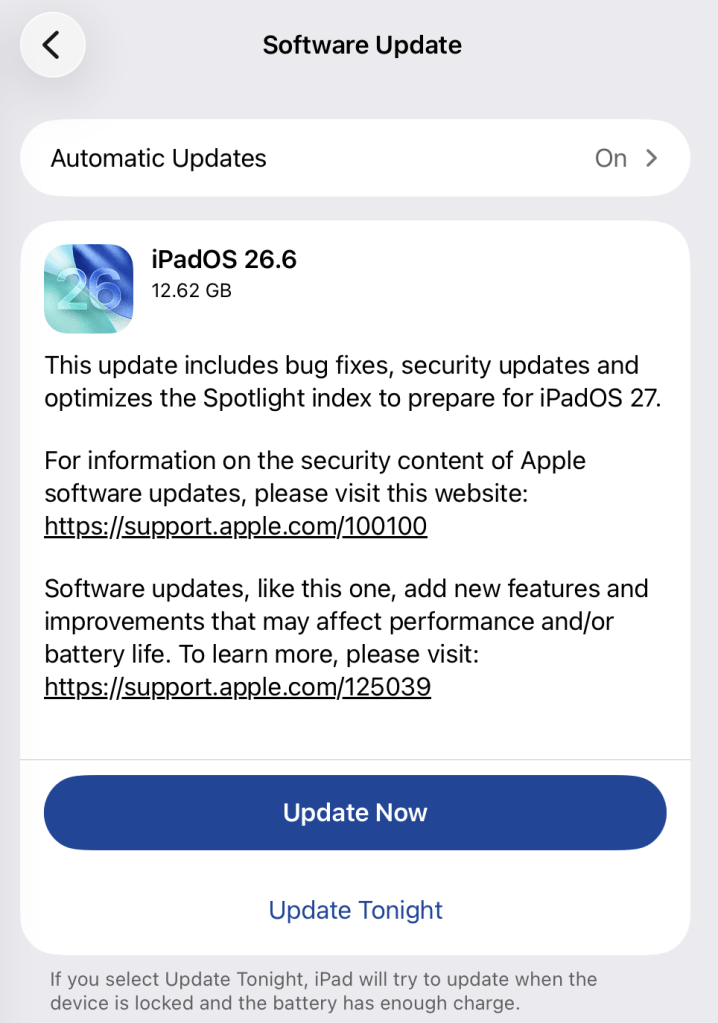
Go to Settings > General > Software Update. You will see if there are updates available and be guided through installing them.

Turn on Automatic Updates if you haven’t already—you’ll find it on the same screen.

iPadOS update options

How to update macOS on any version

To update macOS on any supported Mac, use the Software Update feature, which Apple designed to work consistently across all recent versions. Here are the steps:

  • Click the Apple menu in the upper-left corner of your screen.
  • Choose System Settings (or System Preferences on older versions).
  • Select General in the sidebar, then click Software Update on the right. On older macOS, just look for Software Update directly.
  • Your Mac will check for updates automatically. If updates are available, click Update Now (or Upgrade Now for major new versions) and follow the on-screen instructions. Before you upgrade to macOS Tahoe 26, please read these instructions.
  • Enter your administrator password if prompted, then let your Mac finish the update (it might need to restart during this process).
  • Make sure your Mac stays plugged in and connected to the internet until the update is done.

How to update your Safari browser

Safari updates are included with macOS updates, so installing the latest version of macOS will also update Safari. To check manually:

  • Open the Apple menu > System Settings > General > Software Update.
  • If you see a Safari update listed separately, click Update Now to install it.
  • Restart your device when prompted.

If you’re on an older macOS version that’s still supported (like Sonoma or Sequoia), Apple may offer Safari updates independently through Software Update.

Technical details

Among the more interesting vulnerabilities patched in this update are CVE-2026-43818 in ImageIO,  CVE-2026-43776 in AppleDouble, and CVE-2026-64763 to 64766 in SceneKit.

Although found in different applications, these vulnerabilities have one thing in common. Their descriptions say:

“Processing a maliciously crafted file may lead to unexpected app termination or arbitrary code execution.”

The identical “processing a maliciously crafted file may lead to unexpected app termination or arbitrary code execution” language is not a coincidence. It’s Apple’s standard impact boilerplate for file‑parsing bugs across multiple frameworks, including ImageIO, AppleDouble, and SceneKit. The similarities reflect shared exploitation patterns (untrusted file input hitting native parsers), while the differences lie in what each framework does and which file types/contexts are affected.

ImageIO is the system framework responsible for reading and displaying image formats such as JPEG, PNG, TIFF, RAW, GIF, and other formats. It’s used throughout iOS and macOS by apps including Photos, Safari, Messages, Mail, and Preview.

SceneKit is a 3D graphics and scene graph framework used for rendering models, animations, and complex 3D scenes in apps and games on Apple platforms. It parses scene description files and 3D assets and turns them into renderable content.

AppleDouble is something macOS uses behind the scenes to keep extra file information like icons and other Finder details in cases where your files live on certain types of disks or servers. When Apple mentions “AppleDouble” in security notes, it’s talking about the code that reads and writes that hidden metadata, particularly when files are stored on network drives or shared with non‑Apple systems.

Apple’s advisories reuse a standard warning for any memory‑corruption bug in a file parser: the best‑case outcome is just a crash, the worst case is someone running their malicious code on your device. ImageIO, AppleDouble, and SceneKit all sit in that same danger zone. Although the file types are different, they all present the same underlying risk.

Until you’ve installed this update, it’s an even worse idea than usual to open unsolicited messages and emails with images in them.


Scammers know more about you than you think. 

Malwarebytes Mobile Security protects you from phishing, scam texts, malicious sites, and more. With real-time AI-powered Scam Guard built right in. 

Download for iOS → Download for Android → 

Update your iPhone, iPad and Mac to fix Apple security holes

28 July 2026 at 13:35

Apple has shipped a hefty round of July security patches, headlined by iOS/iPadOS 26.6, macOS Tahoe 26.6, and Safari 26.6, with dozens of vulnerabilities squashed across kernel, WebKit, media frameworks, and core apps. These updates are primarily about improving security rather than adding new features, and users should install them as soon as possible.

Updates for your particular device

The table below shows which updates are available and points you to the relevant security content for that subject.

iOS 26.6 and iPadOS 26.6iPhone 11 and later, iPad Pro 12.9-inch 3rd generation and later, iPad Pro 11-inch 1st generation and later, iPad Air 3rd generation and later, iPad 8th generation and later, and iPad mini 5th generation and later
macOS Tahoe 26.6macOS Tahoe
macOS Sequoia 15.7.8macOS Sequoia
macOS Sonoma 14.8.8macOS Sonoma
tvOS 26.6Apple TV HD and Apple TV 4K (all models)
watchOS 26.6Apple Watch Series 6 and later
visionOS 26.6Apple Vision Pro (all models)
Safari 26.6macOS Sonoma and macOS Sequoia

How to update your Apple devices

How to update your iPhone or iPad

For iOS and iPadOS users, here’s how to check if you’re using the latest software version:

Go to Settings > General > Software Update. You will see if there are updates available and be guided through installing them.

Turn on Automatic Updates if you haven’t already—you’ll find it on the same screen.

iPadOS update options

How to update macOS on any version

To update macOS on any supported Mac, use the Software Update feature, which Apple designed to work consistently across all recent versions. Here are the steps:

  • Click the Apple menu in the upper-left corner of your screen.
  • Choose System Settings (or System Preferences on older versions).
  • Select General in the sidebar, then click Software Update on the right. On older macOS, just look for Software Update directly.
  • Your Mac will check for updates automatically. If updates are available, click Update Now (or Upgrade Now for major new versions) and follow the on-screen instructions. Before you upgrade to macOS Tahoe 26, please read these instructions.
  • Enter your administrator password if prompted, then let your Mac finish the update (it might need to restart during this process).
  • Make sure your Mac stays plugged in and connected to the internet until the update is done.

How to update your Safari browser

Safari updates are included with macOS updates, so installing the latest version of macOS will also update Safari. To check manually:

  • Open the Apple menu > System Settings > General > Software Update.
  • If you see a Safari update listed separately, click Update Now to install it.
  • Restart your device when prompted.

If you’re on an older macOS version that’s still supported (like Sonoma or Sequoia), Apple may offer Safari updates independently through Software Update.

Technical details

Among the more interesting vulnerabilities patched in this update are CVE-2026-43818 in ImageIO,  CVE-2026-43776 in AppleDouble, and CVE-2026-64763 to 64766 in SceneKit.

Although found in different applications, these vulnerabilities have one thing in common. Their descriptions say:

“Processing a maliciously crafted file may lead to unexpected app termination or arbitrary code execution.”

The identical “processing a maliciously crafted file may lead to unexpected app termination or arbitrary code execution” language is not a coincidence. It’s Apple’s standard impact boilerplate for file‑parsing bugs across multiple frameworks, including ImageIO, AppleDouble, and SceneKit. The similarities reflect shared exploitation patterns (untrusted file input hitting native parsers), while the differences lie in what each framework does and which file types/contexts are affected.

ImageIO is the system framework responsible for reading and displaying image formats such as JPEG, PNG, TIFF, RAW, GIF, and other formats. It’s used throughout iOS and macOS by apps including Photos, Safari, Messages, Mail, and Preview.

SceneKit is a 3D graphics and scene graph framework used for rendering models, animations, and complex 3D scenes in apps and games on Apple platforms. It parses scene description files and 3D assets and turns them into renderable content.

AppleDouble is something macOS uses behind the scenes to keep extra file information like icons and other Finder details in cases where your files live on certain types of disks or servers. When Apple mentions “AppleDouble” in security notes, it’s talking about the code that reads and writes that hidden metadata, particularly when files are stored on network drives or shared with non‑Apple systems.

Apple’s advisories reuse a standard warning for any memory‑corruption bug in a file parser: the best‑case outcome is just a crash, the worst case is someone running their malicious code on your device. ImageIO, AppleDouble, and SceneKit all sit in that same danger zone. Although the file types are different, they all present the same underlying risk.

Until you’ve installed this update, it’s an even worse idea than usual to open unsolicited messages and emails with images in them.


Scammers know more about you than you think. 

Malwarebytes Mobile Security protects you from phishing, scam texts, malicious sites, and more. With real-time AI-powered Scam Guard built right in. 

Download for iOS → Download for Android → 

European Court: Apple Can Not Shirk Off its Interoperability Requirements

14 July 2026 at 23:14

One of the best bulwarks against monopoly is interoperability—that is making a new product or service work with an existing product or service. Interoperability allows users, and not the manufacturers of their devices or largest player in a market, to decide what application best serves them. Unsurprisingly, companies like Apple have worked hard to resist interoperability requirements. 

On July 8, the General Court of the  European Union (General Court) ruled against Apple in several cases the company brought against the European Commission (joint cases), affirming the company’s obligations under the Digital Markets Act (DMA). Apple argued in the cases that it should be exempted from the law’s requirements especially with regards to interoperability on multiple grounds. We applaud the General Court’s  decision, and congratulate the Free Software Foundation Europe (FSFE) as well as others who intervened in support of the Commission against Apple's attempt to shirk off its responsibilities, thus ensuring fair competition in European markets.

A Positive Development for Europeans

This is a clear and substantive win for developers and users in Europe. The stranglehold Apple exerts over its ‘walled garden’ is injurious for developers, users, and researchers alike. By confirming Apple’s obligations under the DMA, the General Court has ensured that developers will be given more choice on where they can publish their apps, and users will have more options to obtain apps which, for whatever reason, Apple dislikes. And researchers will have less roadblocks and hurdles to overcome in their studies of Apple’s OSes, particularly iOS, iPadOS, and watchOS.

Apple argues that the interoperability requirements will force it to lower the security standards that have led Apple products’ users to trust their devices. While this self-serving logic is not entirely without merit, it is far from the inevitable outcome. Especially with regards to the App Store, users can be given clear, informed choice when leaving the Apple ecosystem to obtain apps elsewhere. While we urge European courts to take Apple’s security concerns seriously, we’ve previously noted that this should not be used as a smokescreen to protect anticompetitive behavior.

Interoperability and security are not inherently at odds. When interoperable functionality is worked into the security model of a platform from the ground-up, a proper balance can be struck between two forces that are often falsely framed as naturally conflicting. While Apple OS platforms have not been built this way from the get-go, it is still possible, but takes more time to get it right. Here, the devil is in the implementation details.

Apple’s Case Arguments and the Court’s Rebuttal

Under the DMA, designation as a ‘gatekeeper’ is reserved for the biggest of Big Tech, companies that provide services deemed essential for businesses to reach end users. Apple is one of only seven companies that meet this designation, along with Alphabet, Amazon, Booking, ByteDance, Meta, and Microsoft. In its case, Apple argued that Article 6(7) of the DMA, specifying interoperability requirements for gatekeepers aimed at restoring fair competition, is unlawful in light of the Charter of Fundamental Rights of the European Union (specifically the right to property), and as such its designation as a gatekeeper subject to the requirements is unlawful and should be annulled as a result. In its ruling, the General Court rejected the argument as Article 6(7) does not form the legal basis of the designation.

Apple separately argues that the App Store fails to meet the requirements defining a core platform service (CPS), since the various stores (across iOS, iPadOS, watchOS, macOS) do not constitute a single platform. A company’s gatekeeper status relies on it providing a CPS that is an important gateway for business users to reach end users. Here, the implications of the argument are clear: remove service designation as CPSes, remove the gatekeeper status. The court rejected the argument on the basis that “irrespective of the device on which it was available, each of the App Stores was used for the same purpose, namely to intermediate between end users and business users in the distribution of applications and in-app digital content.”

Finally, the court rejected as inadmissible Apple’s argument that iMessage should not be classified as a number-independent interpersonal communication service (NIICS) constituting a CPS. This decision rested on the fact that the “classification does not, by itself, produce binding legal effects that bring about a change in Apple’s legal position” since iMessage was not listed as an “important gateway” in the designation decision and therefore was not subject to the DMA obligations.

In ruling against Apple in favor of the European Commission, the General Court has set an important precedent in ensuring competitive fairness and openness in the digital marketplace. The landmark effects of the DMA will serve to benefit all Europeans in the choice and freedom it affords them. Despite Big Tech’s legal challenges, these decisions build a strong foundation for a better digital future—a lesson which other regions should learn from and take note.

❌