Apple heeft macOS 27 Golden Gate aangekondigd. De nieuwe versie richt zich volgens Apple vooral op verbeteringen aan bestaande functies, zoals het kunnen terugschroeven van transparantie in het ontwerp en het oplossen van de hoeken van vensters.
WhatsApp has detected and stopped spear-phishing campaigns allegedly conducted by the NSO Group after investigating user reports of social engineering attacks. [...]
Apple zegt dat oudere iPhones sneller en zuiniger worden met iOS 27. De upgrade krijgt een nieuwe cpu-scheduler. Bovendien krijgen alle telefoons die iOS 26 draaien, vanaf de iPhone 11 uit 2019, een upgrade naar iOS 27.
Apple heeft een nieuwe versie van zijn assistent Siri en Apple Intelligence aangekondigd. De nieuwe versie heet Siri AI en kan onder meer begrijpen wat er op het scherm staat. Ook heeft Siri AI toegang tot persoonlijke gegevens. De assistent werkt voorlopig niet in Europa.
Check Point released an emergency fix on Monday for a critical authentication bypass vulnerability affecting its Remote Access VPN and Mobile Access deployments - but attackers, including ransomware criminals, got a month-long head start. Attacks against the bug, tracked as CVE-2026-50751, began on May 7, according to Check Point VP of research Lotem Finkelstein, and picked up in early June. The security software vendor spotted suspicious activity and began investigating the zero-day on June 4, Finkelstein said in a Monday blog. “We have observed indications that exploitation has been limited to a relatively small number of targeted organizations (several dozen globally), primarily over the past few days,” Finkelstein wrote, adding that, in at least one case, investigators observed post-compromise activity associated with a Qilin ransomware affiliate. This same ransomware scum is also likely exploiting other VPN-related vulnerabilities in Palo Alto Networks, Fortinet, and F5 products, Finkelstein said. CVE-2026-50751 is due to a logic-flow weakness in the Remote Access and Mobile Access certificate validation process, and it allows remote attackers to bypass authentication and establish a remote access VPN connection without a user password. It affects Mobile Access/SSL VPNs, Remote Access VPNs, and Spark Firewalls configured to use the deprecated IKEv1 key exchange protocol. While investigating CVE-2026-50751 and affected VPN components, Check Point found another vulnerability, CVE-2026-50752, in its Security Gateways and Spark Firewall products. It’s due to a bug in the certificate validation logic of the deprecated IKEv1 key exchange method, and can lead to man-in-the-middle attacks on the VPN site-to-site configuration. Check Point says that it hasn’t received any reports of in-the-wild exploitation of CVE-2026-50752. Check Point urges customers running vulnerable gateways and firewalls to apply the hotfixes, and the vendor also provided alternative mitigation options with instructions in the security advisories. The software provider also published a list of indicators of compromise, including attacker IPs, and recommends customers search Check Point SmartConsole logs for possible VPN certificate authentication attempts associated with observed attacker infrastructure and certificate subject names for at least May 7 through June 5. ®
Meta on Monday said it detected and blocked spear-phishing attempts linked to Israeli spyware vendor NSO Group.
In addition, the tech giant said it's filing a federal court contempt order against the company for violating a permanent injunction that barred it from targeting WhatsApp and its users.
"They tried to trick people into clicking on malicious links to drive them to external websites
If you’re a user—owner?—of this cryptocurrency, this is important:
On May 29, the security researcher Taylor Hornby found a critical vulnerability in Zcash Orchard privacy pool using Claude Opus 4.8. The Zcash team hired Hornby specifically to look for this kind of issue. He found one fast enough to be embarrassing.
The Orchard pool is the newest and most advanced shielded transaction system in the cryptocurrency Zcash. Introduced in 2022, it allows users to send and receive ZEC while keeping transaction details private. It uses zero-knowledge proofs to validate transactions without revealing amounts or participants. The bug: a specific check that was supposed to validate transaction inputs wasn’t actually enforcing the rules it appeared to enforce. An attacker could have exploited the flaw to feed false inputs into that check and generate ZEC from nothing, with the zero-knowledge proof system blessing the fraudulent transaction as valid.
It’s fixed; that’s the good news. The bad news is that there’s no way of knowing if anyone exploited the vulnerability to steal money. And this fragility is the fundamental problem that makes blockchain such a bad idea.
De KPN-joint venture Glaspoort mag een deel van het glasvezelnetwerk van Delta Fiber niet overnemen, zo zegt de Nederlandse toezichthouder Autoriteit Consument en Markt. De overname zou de concurrentie op het gebied van glasvezel beperken.
Het aantal klachten over privacyschendingen dat de Nederlandse Autoriteit Persoonsgegevens kreeg, verdubbelde bijna in 2025. In een derde van de gevallen stuurde de autoriteit een berisping of brief naar de overtreder.
Samsung zou een deel van de Z Flip8-exemplaren voorzien van een Qualcomm-soc. Alle Z Flip7's hebben een Samsung Exynos-soc aan boord. In Europa en Zuid-Korea krijgt de Flip8 wel weer een Exynos-soc, volgens het gerucht.
Gogs has patched a critical security zero-day flaw that can allow attackers to compromise Internet-facing instances and access any repositories (including private ones). [...]
Enabling security tooling is the starting point. Making it operational—where findings drive decisions, response times are measurable, and your security posture improves week over week—is where most organizations struggle.
This blog post provides a phased maturity roadmap for organizations that have already enabled AWS Security Hub and Amazon GuardDuty. These two services form the foundation of a cloud-centered security operations capability on AWS. Security Hub provides centralized security posture management and aggregates findings from multiple AWS security services, while GuardDuty provides intelligent threat detection by continuously monitoring for malicious activity and unauthorized behavior. For any production or enterprise AWS environment, having both services enabled across all accounts and AWS Regions is a baseline expectation; not because they’re optional add-ons, but because effective security operations require both the ability to detect threats and the ability to understand your overall security posture. If you haven’t yet enabled them, the Security Hub documentation and GuardDuty documentation provide setup guidance, including multi-account deployment with AWS Organizations.
Customers consistently tell us that while individual AWS security service documentation is thorough, what’s missing is a consolidated operational playbook—one resource that ties the services together into a working security operations practice with clear phases, progression criteria, and an operational cadence. That’s the gap this post fills. Rather than covering how each feature works (the documentation does that well), this post focuses on when and why to use each capability, and how to build the organizational habits that make them effective.
What follows is a six-phase roadmap for moving from these services are active to these services are driving our security operations. Each phase builds on the previous one, and each is designed to deliver tangible, measurable improvement.
Phase 0: Assess your current state
Goal: Understand what’s working before changing anything.
Estimated timeline: 1–2 weeks
Move to Phase 1 when: You have a documented current-state assessment covering all the following items.
Before introducing new processes or automation, establish a clear picture of the current environment. This assessment informs every decision that follows.
Actions:
Findings inventory: Review existing active GuardDuty findings to determine how many there are, the severity distribution, and how old the oldest findings are. A large backlog of untouched HIGH or CRITICAL findings that have been sitting for weeks is a strong signal about where to focus first.
Security Hub score baseline: Determine your current compliance score against AWS Foundational Security Best Practices (FSBP) and The CIS AWS Foundations Benchmark. Check to see which standards are enabled; if multiple standards are enabled, review for overlapping standards (creating noise) or unused standards.
Multi-account and multi-Region check: Look to see if GuardDuty is enabled in every account and every Region, or only in Regions with active workloads. Threat actors frequently operate in Regions that organizations don’t actively monitor. Also check to see if Security Hub aggregation is configured with a delegated administrator account or if each account is being managed independently.
Integration check: Determine if GuardDuty findings are flowing into Security Hub and if Amazon Inspector and Amazon Macie are enabled and feeding findings in. Without integration, Security Hub might be only surfacing its own compliance checks.
Notification check: See if there’s an Amazon EventBridge rule configured for notifications and if so, how findings are being routed and to whom. Know if notifications are being sent using an Amazon Simple Notification Service (Amazon SNS) topic or a chat channel integration. Without a clear notification and response workflow, findings can accumulate silently in the console with no one looking at them.
Deliverable: A one-page current state assessment that identifies what’s enabled, what’s flowing where, who’s looking at it, and what’s in the existing backlog.
Phase 1: Reduce the noise
Goal: Make the signal meaningful before asking anyone to act on it.
Estimated timeline: 2–3 weeks
Move to Phase 2 when: Remaining findings represent items requiring real decisions, compliance scores reflect actual posture, and you can articulate why every suppression rule and disabled control exists.
This is the single most important phase. If this step is skipped in favor of jumping straight to automation, the result is automated chaos. Alert fatigue is the primary reason security tooling is ignored, and addressing it first is what makes everything that follows sustainable.
GuardDuty tuning:
Create suppression rules for known-benign findings. The goal is to suppress activity you’ve already evaluated and accepted—such as expected traffic from corporate egress IPs (based on trusted IP lists), internal tools that trigger DNS-based findings, or internet-facing resources that naturally receive port scanning. The principle: if you’ve investigated a finding and it’s expected, suppress it so your team can focus on what matters.
Triage every active HIGH and CRITICAL finding into three categories: needs immediate investigation (real threat, not yet reviewed), true positive, already addressed (archive using workflow status), or false positive or expected behavior (create a suppression rule). Every finding must be categorized into one of these three states.
Review GuardDuty protection plans and enable any that are relevant but not yet active. Organizations that enabled GuardDuty years ago might not have activated protection plans released since then (such as Runtime Monitoring, Malware Protection, RDS Protection, and Lambda Protection). Evaluate each against your workload profile and enable what applies.
Security Hub tuning:
Disable controls that aren’t relevant to the environment. This is the highest-value quick win. If a service isn’t in use, disable its controls. If a control is addressed by an alternative solution, disable it. A 47% compliance score where half the failures are irrelevant trains teams to ignore the dashboard entirely. See the Security Hub controls reference for the full list.
Choose a primary standard. AWS Foundational Security Best Practices is a strong default. The CIS AWS Foundations Benchmark adds value when there’s a specific compliance mandate. Avoid enabling PCI DSS or NIST 800-53 standards unless there’s a reporting requirement—they add significant volume without proportional signal for most organizations.
Configure cross-Region aggregation to the delegated administrator account if not already in place. A single aggregated view eliminates the need to check findings across multiple Regional consoles.
Use the workflow status field operationally. Findings should progress from NEW to NOTIFIED to RESOLVED or SUPPRESSED. If everything remains in NEW indefinitely, the system carries no operational meaning.
Deliverable: A tuned environment where remaining findings represent items that require real decisions. Compliance scores should now reflect your organization’s actual security posture rather than noise.
Phase 2: Build the notification and routing layer
Goal: Get the right findings to the right people at the right time.
Estimated timeline: 2–3 weeks
Move to Phase 3 when: CRITICAL and HIGH findings reach the security team within minutes, MEDIUM findings create tracked tickets, and notifications include enriched context. No action is taken until a person or an automation is informed that something needs attention.
Architecture: Security Hub to EventBridge rule to routing logic to destination
Tiered notification strategy:
CRITICAL
Page on-call immediately
PagerDuty or Opsgenie
15 minutes
HIGH
Alert security team channel
Slack or Teams channel and ticket creation
4 hours
MEDIUM
Create ticket for review
Jira or ServiceNow
48 hours
LOW or INFORMATIONAL
Batch digest
Weekly email summary or dashboard review
Next review cycle
Key design decisions:
Route from Security Hub, not individual services. Because findings from GuardDuty, Inspector, Macie, and Security Hub compliance checks all aggregate in Security Hub, build your EventBridge rules there for centralized management.
Create a fast path for the most dangerous finding types. Certain GuardDuty findings, particularly those involving credential exfiltration, cryptocurrency activity, trojans, and active compromises, warrant a separate, faster routing path that bypasses normal triage. Identify these based on your threat model and the GuardDuty finding types reference.
Enrich notifications before delivery. A raw JSON finding in a chat channel provides little actionable context. Use an AWS Lambda function to format notifications with the information responders need: account alias, Region, Amazon Resource Name (ARN), finding type, severity, a console deep link, and a plain-language description. The Security Hub CloudWatch Events integration guide describes the event format.
Deliverable: A working notification pipeline where CRITICAL and HIGH findings reach the security team within minutes, MEDIUM findings create tracked work items, and LOW and INFORMATIONAL findings are batched for periodic review.
Phase 3: Build automated remediation for high-confidence findings
Goal: For findings where the correct response is deterministic, remove the human from the loop.
Estimated timeline: 3–4 weeks
Move to Phase 4 when: At least 3–5 high-confidence finding types have automated responses deployed with audit trails, and the team has established a process for evaluating new auto-remediation candidates.
The guiding principle: Only auto-remediate when all three conditions are met: the finding is high-confidence, the response is deterministic, and the blast radius of the automated action is limited. Automated remediation must not create the risk of a production outage.
Decision framework:
Confidence level
High – no false positive risk
Medium – context-dependent
Low – requires investigation
Response complexity
Single, well-defined action
Multiple steps or judgment calls
Requires forensic analysis
Blast radius
Limited to one resource
Could affect dependent services
Production-wide impact
Rollback difficulty
Straightforward to reverse
Moderate effort to reverse
Difficult or impossible to reverse
Common auto-remediation categories:
Instance isolation for confirmed compromise findings (cryptocurrency mining, malware, and trojans): Replace the security group, snapshot volumes for forensics, and notify.
Credential revocation for confirmed credential compromise: Attach deny-all policies, revoke sessions, and deactivate access keys as appropriate to the credential type.
Compliance drift correction for deterministic misconfigurations: Re-enable Amazon Simple Storage Service (Amazon S3) Block Public Access, revoke overly permissive security group rules, and re-enable AWS CloudTrail logging.
Notification-only escalation for findings that require human judgment before action: Amazon Elastic Block Store (Amazon EBS) encryption gaps (require migration) and access key rotation (requires coordination with the key owner).
For implementation, AWS provides Security Hub Automated Response and Remediation (SHARR), a solution that includes pre-built remediation playbooks deployed as AWS Step Functions workflows triggered by EventBridge. This is a strong starting point—evaluate the provided playbooks, enable the ones that fit, and extend with custom remediations as needed.
Note: For findings that recur because the environment lacks preventive guardrails, the best long-term response is often a service control policy (SCP) that prevents the misconfiguration from occurring in the first place. Phase 5 covers this preventive controls layer.
Deliverable: A library of automated and semi-automated remediation runbooks with full audit trails, and a documented decision framework the team uses to evaluate new auto-remediation candidates.
Phase 4: Build the operational rhythm
Goal: Turn security findings management into a sustained organizational practice, not a one-time cleanup.
Estimated timeline: 4–6 weeks to establish, then ongoing
Move to Phase 5 when: The weekly cadence has been running consistently for at least 8 weeks, monthly metrics show positive trends, and the first quarterly review has been completed.
This is where many organizations stall, and it’s the most important phase in the entire roadmap. The technology is working, the notifications are flowing, automated remediations are firing, but there’s no organizational habit built around it. Without this phase, everything you’ve built in Phases 0–3 will gradually decay. Suppression rules will go stale, new team members won’t know the system exists, and findings will start accumulating again. The operational rhythm is what converts a security tooling deployment into a security operations practice.
Weekly security review (30 minutes)
Attendees: Security team lead, cloud platform team representative, rotating engineering lead from an application team
Why the rotating engineering lead matters: Security findings don’t exist in a vacuum; they’re generated by workloads that engineering teams own. Rotating an engineering representative through this meeting accomplishes three things: it builds security awareness across the organization, ensures findings are routed to people with the context to resolve them, and creates organizational accountability beyond the security team.
Agenda template:
5 minutes
Compliance score trend – Review Security Hub scores by account and standard. Is the trend improving, declining, or flat? If declining, why?
Security lead
Identified regression areas
5 minutes
Critical and high findings review – Walk through new HIGH and CRITICAL GuardDuty findings from the past week. Are there any that need immediate escalation?
Security lead
Escalation actions assigned
10 minutes
Top five failing controls – Identify the five Security Hub controls with the most failures. Assign an owner and a target date for each.
Platform lead
Owners and dates documented
5 minutes
Automation review – Did any auto-remediations fire this week? Did they work correctly? Were there any false triggers?
Security lead
Automation adjustments queued
5 minutes
Tuning decisions – Are new suppression rules needed based on this week’s findings? Are any new finding types candidates for auto-remediation?
All
Tuning backlog updated
Running the meeting effectively:
Keep a running document (such as a wiki page or shared document) that captures decisions and action items week over week. This becomes your institutional memory.
If the compliance score hasn’t moved in over 3 weeks, that’s a signal. Either the assigned work isn’t happening, or the remaining findings are genuinely difficult to address. Both need to be discussed.
Track action items from previous weeks. A review that generates action items but never follows up on them will lose credibility and attendance quickly.
Escalation procedures
Define clear escalation paths before they’re needed:
CRITICAL finding not acknowledged within the SLA
Auto-escalate to security team manager
15 minutes after SLA breach
HIGH finding not resolved within the SLA
Escalate to finding owner’s manager
4 hours after SLA breach
Compliance score drops more than 5 points in a week
Escalate to cloud platform team lead for investigation
Next business day
Auto-remediation failure
Page security on-call
Immediate
New finding type not covered by existing runbooks
Add to weekly review agenda for triage and runbook development
Next weekly review
Monthly metrics report
Compile these metrics monthly and review them with security and engineering leadership. The goal is to tell a story about whether the organization’s security posture is improving, stable, or degrading, and why.
Mean time to acknowledge (MTTA) for CRITICAL findings
Are findings being seen promptly?
Decreasing month over month
Mean time to resolve (MTTR) for CRITICAL and HIGH findings
Are findings being acted on?
Decreasing month over month
Security Hub compliance score by standard, by account
What is the posture trend over time?
Increasing month over month
Number of active GuardDuty findings by severity
Is the backlog growing or shrinking?
Decreasing for HIGH and CRITICAL
Findings auto-remediated compared to manually resolved
Is automation delivering value?
Auto-remediation ratio increasing
Number of suppressed findings (with quarterly justification review)
Is noise being managed, or are problems being hidden?
Stable or decreasing
New findings introduced compared to resolved this month
Is the organization getting ahead or falling behind?
More finding resolved than introduced
SLA adherence rate by severity
Are response commitments being met?
More than 95% for CRITICAL, and more than 90% for HIGH
Building the dashboard: Use Amazon CloudWatch dashboards for real-time operational visibility or Amazon QuickSight connected to Security Hub findings through Amazon Security Lake for historical trend analysis and executive reporting. The dashboard should be visible to—and regularly viewed by—everyone in the weekly review, not locked in a security team tool.
Quarterly reviews
The quarterly review is a deeper inspection of the system itself; not just the findings, but the machinery processing them.
Quarterly review checklist:
Suppression rules audit: Review every active suppression rule to determine if the underlying condition is still present and the suppression is still justified. Document the review outcome for each rule.
Disabled controls audit: Review every disabled Security Hub control. Check that the justification is still valid and if the environment changed (for example, a service that wasn’t in use is now in use).
Automation audit: Review AWS Identity and Access Management (IAM) roles used by remediation functions and verify least privilege. Review execution logs for any anomalies or failures that weren’t caught.
New capabilities review: Evaluate newly released GuardDuty protection plans and Security Hub controls from that quarter. AWS releases new detection and compliance capabilities regularly. If you’re not reviewing them quarterly, you’re accumulating blind spots.
Process effectiveness review: Determine if the weekly meeting is well-attended and if action items are being completed. Make sure SLAs are being met. If attendance, action item completion, and SLA compliance aren’t where they should be, explore structural changes to address the gaps.
Operational maturity scoring
Use this rubric to assess the maturity of your operational rhythm itself. Score each dimension 1–3 and use the total to track progress over time.
Review cadence
One time reviews when someone remembers
Weekly review happens, but attendance is inconsistent
Weekly review is consistently attended with documented outcomes
Metrics tracking
No metrics captured
Metrics are collected monthly but not acted on
Metrics drive decisions and declining trends trigger specific actions
Finding ownership
Findings sit in queue with no owner
Findings are assigned to teams but SLAs aren’t tracked
Every finding has an owner, SLAs are tracked, and breaches are escalated
Automation management
Set-and-forget automations
Automation logs are reviewed periodically
Automation is reviewed weekly, and new candidates are evaluated continuously
Tuning lifecycle
Suppression rules created but never reviewed
Annual review of suppressions and disabled controls
Quarterly reviews with documented justification for every rule
Cross-team engagement
Security team works in isolation
Platform team participates
Engineering teams actively participate and own remediation
Scoring (revisit quarterly):
Beginning: 6–9
Established: 10–14
Optimized: 15–18
Deliverable: A documented operational cadence with clear ownership (consider a RACI matrix), metrics dashboards, escalation procedures, and a continuous improvement loop. The cadence should survive team member turnover—if it depends on one person remembering to run it, it’s not yet operational.
Phase 5: Mature the architecture
Goal: Fill remaining gaps and build toward a comprehensive security operations capability. Estimated timeline: Ongoing. Prioritize based on organizational risk profile and compliance requirements.
Amazon Inspector integration: Enable Amazon Inspector for Amazon Elastic Compute Cloud (Amazon EC2) instances, Lambda functions, and Amazon Elastic Container Registry (Amazon ECR) container images. Findings flow into Security Hub automatically, adding vulnerability management alongside threat detection and posture management. Prioritize this if you have Amazon EC2 or container workloads without an existing vulnerability scanning solution.
Amazon Macie: Enable Amazon Macie for S3 buckets containing potentially sensitive data. Particularly important for organizations with compliance requirements around personally identifiable information (PII), protected health information (PHI), or Payment Card Industry (PCI) data. Configure automated sensitive data discovery and route findings to Security Hub.
Amazon Security Lake: Amazon Security Lake centralizes security-relevant logs in OCSF format for long-term retention, forensic investigation, and threat hunting. This is valuable when you need historical analysis beyond the Security Hub retention window, or when feeding a third-party Security Information and Event Management (SIEM) tool.
Preventive controls layer: Convert recurring detective findings into preventive policies. Use SCPs to prevent disabling GuardDuty, Security Hub, and CloudTrail, IAM permission boundaries on developer roles, AWS WAF on public endpoints, and AWS Network Firewall for VPC traffic inspection. The pattern is to make recurring misconfigurations impossible to introduce.
Incident response readiness: Have incident response playbooks referencing specific GuardDuty finding types, pre-built forensics infrastructure (isolated VPC, forensic AMIs, and pre-configured IAM roles), regular tabletop exercises, and AWS CloudFormation templates to deploy isolation infrastructure on demand. See the AWS Security Incident Response Guide for a comprehensive framework.
Conclusion
In this post, I provided a six-phase roadmap for operationalizing Security Hub and GuardDuty and showed that it isn’t a single project, but a progression. Phase 0 and Phase 1 can typically be completed in 3–5 weeks and deliver immediate clarity. Phases 2 and 3 build the response infrastructure that turns findings into action over the following 5–7 weeks. Phase 4 is what makes everything sustainable and is where you should invest the most attention. And Phase 5 expands the aperture from Security Hub and GuardDuty into a comprehensive security operations capability.
If you walked away from this post and did one thing, run the Phase 0 assessment this week. That single deliverable tells you exactly where to focus next. Use the following self-assessment checklist to identify your current phase, then focus on the next one. A tuned environment with working notifications and a weekly review cadence is dramatically more effective than a fully featured but neglected deployment. Start where you are, reduce the noise, build the habits, and iterate. To learn more, explore the AWS Security Hub User Guide, the Amazon GuardDuty User Guide, and the AWS Security Incident Response Guide. If you’ve implemented a similar operational cadence, or have questions about any phase, share your experience in the comments.
Self-assessment checklist
Phase 0
We know how many active GuardDuty findings exist across all accounts
☐
We know our current Security Hub compliance score
☐
We know whether GuardDuty is enabled in every account and region
☐
We know who (if anyone) is reviewing findings today
☐
Phase 1
GuardDuty suppression rules exist for known-benign activity
☐
Irrelevant Security Hub controls have been disabled with documented justification
☐
All active HIGH and CRITICAL findings have been triaged
☐
Security Hub compliance scores reflect actual posture, not noise
☐
Phase 2
HIGH and CRITICAL findings generate real-time notifications to the security team
☐
MEDIUM findings automatically create tracked work items
☐
Notifications include enriched context (account alias, resource ARN, and console link)
☐
Phase 3
At least three high-confidence finding types trigger automated remediation
☐
Auto-remediation actions have full audit trails
☐
Remediation runbooks are documented and version-controlled
☐
Phase 4
A weekly security review meeting occurs with defined attendees and agenda
☐
MTTA and MTTR are tracked monthly for CRITICAL and HIGH findings
☐
Suppression rules and disabled controls are reviewed quarterly
☐
Security metrics trend positively over the past 3 months
☐
Phase 5
Amazon Inspector, Macie, or Security Lake are integrated
As threat actors operationalize AI to accelerate attacks, they are also leveraging the wider global interest around AI itself as a social engineering lure. In recent months, Microsoft Threat Intelligence has observed a growing number of campaigns that impersonate the branding of popular AI platforms such as ChatGPT, Microsoft Copilot, DeepSeek, and Anthropic’s Claude as lures. These campaigns, which don’t represent compromise of services, span phishing, malvertising, and search engine optimization (SEO)-driven attacks that ultimately lead to credential theft, financial fraud, or malware infection.
Threat actors are quick to capitalize on highly anticipated launches or emerging trends, leveraging trusted branding and exploiting user curiosity to improve the success rates of their campaigns. Despite the AI-themed lures, however, these campaigns combine longstanding tactics, such as urgency-driven messaging, abuse of trusted services, and multi-stage redirection chains that require user interaction to evade detection.
While traditional lures like invoices, payment notifications, or delivery alerts remain effective and continue to be widely used, AI-themed lures reflect a shift in social engineering that is likely to persist as a long-term tactic used by threat actors, from cybercriminal groups to nation states. Notably, Microsoft Threat Intelligence has observed the initial access broker Storm-3075 employing AI-themed malvertising to deliver payloads, including malware signed by the malware-signing-as-a-service (MSaaS) offering attributed to the financially motivated threat actor Fox Tempest, on behalf of multiple downstream actors.
This blog details several of the campaigns observed by Microsoft Threat Intelligence in the past few months that used AI brands and references as lures, and provides guidance to help users and organizations detect, mitigate, and respond to these threats. Importantly, Microsoft believes that the activity noted in this blog is purely abuse of AI brand names as lures, not reflecting a compromise of any referenced vendor. As threat actors scale their operations with AI, organizations should leverage AI-powered security capabilities to enhance visibility, automate detection, and accelerate response across email, identity, and endpoint surfaces.
ChatGPT-themed lure leads to phishing kit collecting credit card data
On May 5, 2026, Microsoft detected a ChatGPT-themed phishing attack that delivered malicious URLs leading to phishing pages that collected credit card and personal information such as names and addresses. This phishing activity, which consisted of 4,500 emails sent to targets in South Africa (97%), was part of a broader campaign using similar themes and infrastructure. We also observed this campaign delivering as much as 100,000 emails on a single day to targets in Switzerland, Austria, and South Africa affecting a broad range of industries, including higher education and professional services.
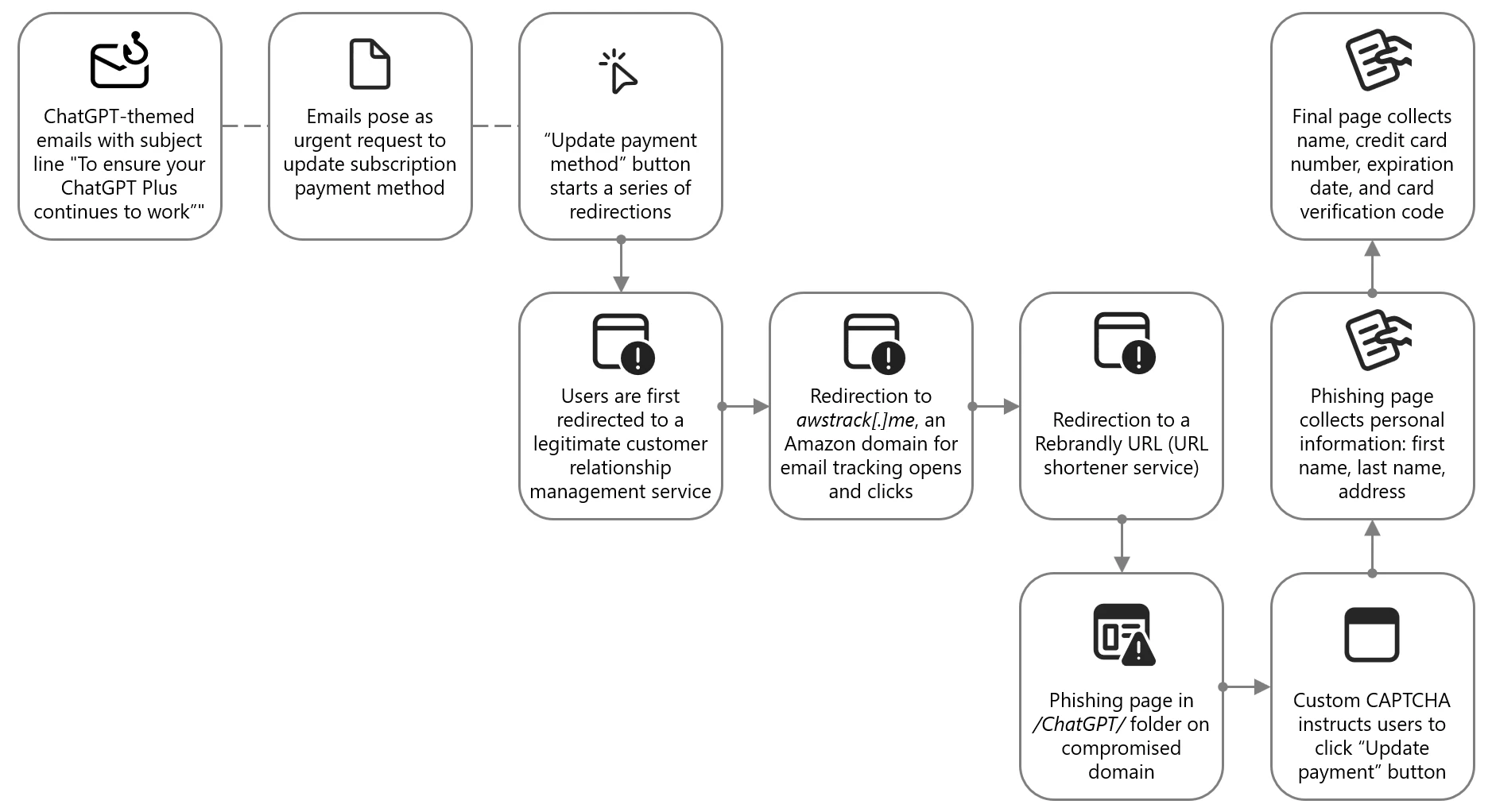
The emails used the sender display name ChatGPT and the subject “To ensure your ChatGPT Plus continues to work – please update your payment method”. The emails posed as an urgent request to update the ChatGPT Plus subscription payment method. They warned the recipient that if a new payment method was not provided within seven days, the account would be downgraded to a free plan. A ChatGPT logo was prominently displayed at the top of the email body.
Figure 1. Attack chain of ChatGPT-themed lure leading to phishing kit
The phishing email contained a clickable Update payment method button, which did not directly send users to the attacker-controlled site. Instead, users were redirected through a series of legitimate and abused redirector hops. This is a common technique used by threat actors to exploit the reputation of trusted domains and bypass email filters, evade detection, and track victim engagement.
Figure 2. Snippet of the top portion of the email impersonating ChatGPT and enticing users to click on the link
Targets were first directed to grupoconstat[.]bitrix24[.]com[.]br (a legitimate customer relationship management (CRM) service), which redirected to awstrack[.]me (an Amazon domain used for tracking email opens and clicks), which in turn redirected to a Rebrandly URL (a legitimate but often abused URL shortener service). Targets were finally sent to a likely legitimate but compromised domain legendarytrendsbay[.]shop where the threat actor had placed the phishing page in the /ChatGPT/ folder.
The landing page did not immediately display the phishing content. It first required visitors to pass a custom CAPTCHA, which was a simple Update payment button. If they clicked this button, users were sent to the next page where personal information, including first name, last name, and address was collected. The final page then collected the name, credit card number, expiration date, and card verification code.
Figure 3. Phishing landing page collecting name and addressFigure 4. Phishing landing page collecting credit card information
Claude-themed phishing campaign collected credentials and access tokens
From April 20 to 22, 2026, Microsoft observed a phishing campaign impersonating Anthropic-branded services to target users with account-related lures tied to the Claude AI platform. The campaign sent phishing emails to targets across more than 2,000 organizations, primarily in the United States (62%), the United Kingdom (18%), and India (9%). While this campaign impacted a broad range of industries, it was most notably focused on information technology (56%), other business entities (21%), and financial services (8%).
The campaign used enforcement-themed messaging claiming that the recipient’s account was in violation of acceptable use policies and required immediate action. The emails impersonated Anthropic’s popular AI service Claude using the display names Anthropic Teams and Anthropic PBC, masquerading as legitimate account-related communications. Subject lines followed a consistent structure of “Claude Appeal Request” combined with date elements.
Figure 5. Attack chain of Claude-themed phishing campaign leading to AiTM
The email body was delivered as HTML and included Anthropic and Claude branding. The message informed recipients that their account was violating “AUP (Account Usage Policy)” and that Anthropic had “initiated an appeal procedure”. The message instructed recipients to review the attached material to access their appeal and indicated that Claude features would be limited pending review.
Figure 6. Email impersonating Anthropic’s Claude, prompting users to open the attachment
The email attachment was a PDF named Fill and Sign Claude Appeal Form.pdf, which was designed to resemble an official process tied to Claude account enforcement. The document presented an appeal workflow, prompting users to copy an appeal ID and click the “Claude Appeal” link, which initiated the credential harvesting process.
Figure 7. PDF attachment providing instructions on how recipients can appeal the supposed Account Usage Policy (AUP) violation
When clicked, the link embedded in the PDF directed users to an attacker-controlled domain, dash.awaydouble[.]org. The initial landing page displayed a Cloudflare verification prompt, presented as confirming the user was arriving from a “legitimate session”. This step likely served as a gating mechanism to impede automated analysis and sandbox detonation.
Figure 8. CAPTCHA-gated landing page with Claude branding
Users who completed the verification were redirected to another Claude-themed landing page hosted on servicing.pureplantcravings[.]com. This page was named “Account Appeal Notice” and contained “Account Security & Compliance” message informing users that their account had been flagged for repeated violations of usage policies. The page provided a reference date and a one-time access code, prompting users to copy the code and continue.
Figure 9. Intermediate landing page displaying the Claude logo, referencing the usage policy violation and providing an access code
Clicking “Continue” redirected users to the final page, which was not available at the time of analysis. Source code revealed conditional redirect logic that routed users to one of two final landing pages, depending on whether the site was accessed through mobile device or a desktop system.
Figure 10. Redirect logic identified in landing page source code, differentiating between mobile device and desktop systems
While the final redirect destination was no longer active at the time of analysis, infrastructure overlap, including shared intermediate domains and consistent redirect logic, strongly suggested that users were ultimately presented with a Microsoft sign-in experience. This final stage is consistent with adversary-in-the-middle (AiTM) tactics designed to intercept authentication tokens and facilitate account compromise.
“Awesome AI Windows Plugin” malvertising deploys Vidar stealer
Since at least early 2026, Microsoft Threat Intelligence has observed malvertising campaigns that use AI-themed terms such as “Awesome AI Windows Plugin” and “Flux Pro AI” in social engineering lures in malicious popups, in malware executable names, and GitHub repository and folder names throughout the attack chain. These campaigns are notable for their scale and velocity, moving from launch to mass impact within hours and infecting tens to hundreds of thousands of endpoints. The malware delivered in these campaigns is frequently code-signed, lending an additional layer of perceived trust to both the operating system and the user.
Microsoft attributes this malvertising activity to an initial access broker and malware distributor tracked as Storm-3075. We assess that Storm-3075 delivers final payloads on behalf of multiple downstream actors. While the example campaign described in this section delivered Vidar Stealer, we have also observed this campaign distributing Lumma Stealer, Hijack Loader, and Oyster.
Figure 11. Attack chain for “Awesome AI Windows plugin” malvertising leading to Vidar
On March 13, 2026, a single campaign run targeted over 66,000 devices. Microsoft has revoked the related signing certificate and GitHub has taken down the associated repository, helping to prevent tens of thousands of additional infections. Given the nature of the attack source, majority of impacted devices were likely consumer rather than enterprise endpoints. Telemetry showed global distribution, with the top affected countries being Japan, South Africa, the United States, and France.
Analysis of the redirection chain determined that the attack likely originated from free movie streaming sites. Infections on such sites typically begin when users interact with embedded movie players or click popups. Malvertising embedded in such sites can redirect users to a range of unwanted content, including malware. In this campaign, users were redirected to a page advertising a download for an “Awesome AI Windows plugin”, a fictitious product name. The plugin purported to help users watch free, high-quality videos, a lure aligned with the context of users already streaming free or pirated content.
Figure 12. Screenshot of malvertising redirecting users to a purported download for an “Awesome AI Windows plugin”
Clicking the download button retrieved an executable named ProFluxeFlowAi-win-Setup.exe, which the user then had to manually launch. The file name mimicked a legitimate product with a similar name, Flux Pro AI, which supports text, image, and video creation. This lure reinforced the perceived legitimacy of the executable within the streaming of free movies context. The executable itself was hosted on GitHub in a repository named shippingtechnologymovie under a folder named AI-techVideos, both tailored to the AI video helper narrative.
Figure 13. Malware hosted on a GitHub repository “shippingtechnologymovie”, in a folder “AI-techVideos”
The malware executable was signed with a fraudulently obtained Microsoft-issued code-signing certificate obtained through Artifact Signing (certificate thumbprint: 4f5c5b3ef45cfff7721754487a86aeff9a2e6e32). Microsoft attributes the signing service used by the threat actor to Fox Tempest, a financially motivated threat actor operating a malware-signing-as-a-service (MSaaS) offering used by other threat actors. Microsoft has revoked over one thousand code signing certificates attributed to Fox Tempest. In May 2026, Microsoft’s Digital Crimes Unit (DCU), in partnership with Resecurity, facilitated a disruption of Fox Tempest infrastructure and access model.
Signing malware through such a service is expensive; however, for a threat actor targeting tens or hundreds of thousands of infections, the cost can be justified by the additional level of trust signed binaries imply to both the operating system and the user. Signed malware also tends to exhibit lower detection rates early in the infection lifecycle, extending the window of effective distribution.
Another notable feature of the malware is that, immediately after launch, it displays a window with a “Continue” checkmark and does not proceed until the box is clicked. This extra user interaction step is uncommon. We assess that this technique is intended to hide the malicious functionality from sandboxes and automated analysis environments that cannot dynamically perform the click. Until the user clicks “Continue,” the malware performs no suspicious activity on the operating system. This technique is functionally analogous to the CAPTCHAs frequently seen in phishing attacks.
Figure 14. CAPTCHA-like “Continue” check mark displayed to the users if they launch the malware, requiring them to click before the malware continues executing.
Once the user clicks “Continue”, the executable drops and runs a malicious Python-based downloader. Both the Python interpreter and the downloader script are saved in the \AppData\Local\ folder as pythonw.exe and LICENSE.txt, respectively. The malicious script runs shellcode that loads the next-stage malware from the command-and-control (C2) domain brokeapt[.]com. The final payload observed in this campaign was Vidar infostealer.
Fake DeepSeek V4 installers on GitHub delivered Vidar Stealer
In April 2026, Microsoft identified a social engineering campaignsocial-engineering campaign that leveraged interest in the newly released DeepSeek V4 by impersonating it through a fraudulent GitHub repository and organization. The campaign abused GitHub’s release-asset infrastructure to deliver information-stealing malware such as Vidar stealer. Search engines increased the exposure of the malicious repository, exacerbated by the fact that DeepSeek did not publish an official V4 repository on GitHub.
Our investigation shows the DeepSeek lure is one identity in a broader rotating brand-abuse ecosystem that recycles whichever AI tool is trending into a fresh malware download experience. After discovering this activity, Microsoft shared the details with GitHub, and GitHub has since taken down the malicious organization, repository, and operator account.
Figure 15. Fake DeepSeek V4 campaign timeline and attack chain
On April 24, 2026, within hours of DeepSeek officially previewing its new V4 frontier model, a threat actor initiated the attack chain that can be summarized as:
Resource development on GitHub, all within roughly 45 minutes: A new GitHub organization (DeepSeek-V4), a single repository (deepseek-V4), and a release tag (deepseek-V4). The repository was decorated with stolen DeepSeek branding, real benchmark data, and SEO-optimized topics.
Search-driven discovery: Users found the repository through GitHub repository search, search engines, social sharing, and AI-assisted search results pointing to the lure page. The repository’s llms.txt and topic taxonomy were designed to be discovered by both classical search engines and large-language-model-powered search; observed top-rank results on search engines are consistent with that design, though we did not observe paid advertising and therefore do not assess this as malvertising.
Archive download from GitHub’s release-asset CDN: The release page hosted two archives, deepseek-v4-pro_x64.7z and deepseek-v4-flash_x64.7z.
User extraction: Users needed to extract the executable from the archive using common Windows archive tools.
Payload execution: The archives contained a heavyweight Win32 PE that masqueraded as the DeepSeek installer. At least one confirmed victim endpoint revealed the extracted payload landed at: C:\Users\<user>\Downloads\Programs\IA DeepSeek-V4\deepseek-v4-flash_x64.exe.
Active payload rotation: The threat actor actively rotated archive content while preserving file names and the release page. We observed at least three distinct archive hash generations in three days.
Microsoft Defender telemetry observed the first victim download approximately four hours later. The threat actor’s operational tempo on April 24, 2026, is consistent with a prepared, rehearsed workflow. The repository was designed to be convincing at a glance. It accumulated 91 stars and 27 forks within four days, though the proportion of organic versus inflated engagement is not independently confirmed. The attacker invested in several credibility-building elements:
Stolen branding: The repository’s README and assets folder embedded the legitimate DeepSeek whale logo, copied from the real deepseek-ai/DeepSeek-V2 repository.
Real benchmark data as lure: The release notes displayed authentic DeepSeek V4 benchmark scores against Claude Opus 4.6, GPT-5.4, and Gemini 3.1 Pro, copied from the official release announcement.
Action-oriented SEO topics: The repository was tagged with deepseek-v4, deepseek-v4-download, deepseek-v4-downloader, deepseek-v4-install, and deepseek-v4-installer, which are queries users are expected to use when intent-shopping for an installer.
LLM-aware discoverability: A top-level llms.txt file repeated the same SEO copy in a format aimed at AI-assisted search engines.
On closer inspection, the staging gives the operation away: the repository contained only a README, LICENSE, llms.txt, and stub assets/ and inference/ directories with no real model code; all nine commits were made in a single burst on April 24, 2026 by a single author; the README claimed an MIT license while repository metadata specified Apache 2.0.
Figure 16. The malicious DeepSeek-V4/deepseek-V4 repository contains stolen DeepSeek logo, SEO tags targeting install and download queries, sole-contributor “graphrtest” burner account, and 91 stars accumulated in four days.Figure 17. The fake release page had real DeepSeek V4 benchmark chart used as a credibility lure, two 102 MB .7z archives, hashes rotated three times in three days.
Once the lure was live, search engines increased the exposure of the malicious repository. We tested the queries an interested user would naturally try when looking for DeepSeek V4 on GitHub or the open web. In a snapshot captured on April 28, 2026, the results were as follows (search results are volatile and may differ at the time of reading):
Platform
Query
Result
GitHub
DeepSeek-V4 installer
1 result — the malicious repository (only result on GitHub)
GitHub
DeepSeek V4 install
1 result — the malicious repository (only result on GitHub)
GitHub
DeepSeek V4
The malicious repository ranked #2 of 169 results
Bing
Deepseek v4 weights github
The malicious repository ranked #1, above the official Hugging Face page
Google
DeepSeek v4 weights github
The malicious repository and two of its forks occupied three of the top four positions, including a top result with rich sitelinks
The 7z archives hosted on GitHub contained a loader executable such as SHA-256: 5455341ed1bbe75a664fca2dd0794c508e1874f75360253a7ff5bc119bc92d80. The loader was observed downloading and installing Vidar stealer and potentially additional malware.
Lastly, Microsoft observed that the DeepSeek-themed payloads share infrastructure with a much larger rotating fake-AI / fake-tool ecosystem. The same shared loader hash (SHA-256 5455341…) appeared under file names impersonating GPT-5.5, Claude Code, Kimi, Seedance, Gemma, GrokCLI, Manus AI, FraudGPT, and others (see table below). Public research from Trend Micro, Zscaler ThreatLabz, and Huntress describe the same broader ecosystem, with TradeAI.exe, OpenClaw_x64.7z, WormGPT_x64.7z, and DeepSeekAI_agent_x64.7z appearing as sibling lures and the downstream payload set documented as Vidar plus GhostSocks.
Lure name
Fake GitHub organization (observed or sibling pattern)
To defend against social engineering campaigns that leverage AI brands as lures, Microsoft recommends the following mitigation measures:
Configure automatic attack disruption in Microsoft Defender XDR. Automatic attack disruption is designed to contain attacks in progress, limit the impact on an organization’s assets, and provide more time for security teams to remediate the attack fully.
Enforce multifactor authentication (MFA) on all accounts, remove users excluded from MFA, and strictly require MFA from all devices in all locations at all times.
Enable Zero-hour auto purge (ZAP) in Office 365 to quarantine sent mail in response to newly acquired threat intelligence and retroactively neutralize malicious phishing, spam, or malware messages that have already been delivered to mailboxes.
Configure Microsoft Defender for Office 365 Safe Links to recheck links on click. Safe Links provides URL scanning and rewriting of inbound email messages in mail flow and time-of-click verification of URLs and links in email messages, other Microsoft Office applications such as Teams, and other locations such as SharePoint Online. Safe Links scanning occurs in addition to the regular anti-spam and anti-malware protection in inbound email messages in Microsoft Exchange Online Protection (EOP). Safe Links scanning can help protect your organization from malicious links that are used in phishing and other attacks.
Invest in advanced anti-phishing solutions that monitor and scan incoming emails and visited websites. For example, organizations can leverage web browsers like Microsoft Edge that automatically identify and block malicious websites, including those used in this phishing campaign, and solutions that detect and block malicious emails, links, and files.
Encourage users to use Microsoft Edge and other web browsers that support Microsoft Defender SmartScreen, which identifies and blocks malicious websites, including phishing sites, scam sites, and sites that host malware.
Enable network protection to prevent applications or users from accessing malicious domains and other malicious content on the internet.
Microsoft Defender detections
Microsoft Defender customers can refer to the list of applicable detections below. Microsoft Defender coordinates detection, prevention, investigation, and response across endpoints, identities, email, apps to provide integrated protection against attacks like the threat discussed in this blog.
Tactic
Observed activity
Microsoft Defender coverage
Initial access
Phishing emails
Microsoft Defender for Office 365 – A potentially malicious URL click was detected – Email messages containing malicious URL removed after delivery – Email messages removed after delivery – A user clicked through to a potentially malicious URL – Suspicious email sending patterns detected Email reported by user as malware or phish
Persistence
Threat actors distribute malware Threat actors sign in with stolen valid entities
Microsoft Security Copilot is embedded in Microsoft Defender and provides security teams with AI-powered capabilities to summarize incidents, analyze files and scripts, summarize identities, use guided responses, and generate device summaries, hunting queries, and incident reports.
Security Copilot is also available as a standalone experience where customers can perform specific security-related tasks, such as incident investigation, user analysis, and vulnerability impact assessment. In addition, Security Copilot offers developer scenarios that allow customers to build, test, publish, and integrate AI agents and plugins to meet unique security needs.
Threat intelligence reports
Microsoft Defender XDR customers can use the following threat analytics reports in the Defender portal (requires license for at least one Defender XDR product) to get the most up-to-date information about the threat actor, malicious activity, and techniques discussed in this blog. These reports provide the intelligence, protection information, and recommended actions to prevent, mitigate, or respond to associated threats found in customer environments.
Microsoft Security Copilot customers can also use the Microsoft Security Copilot integration in Microsoft Defender Threat Intelligence, either in the Security Copilot standalone portal or in the embedded experience in the Microsoft Defender portal to get more information about this threat actor.
To hear stories and insights from the Microsoft Threat Intelligence community about the ever-evolving threat landscape, listen to the Microsoft Threat Intelligence podcast.
Attackers can chain three already fixed vulnerabilities in the Ubiquiti UniFi OS server to execute remote code with root privileges and without authentication. [...]
An Illinois high school won't reopen until Wednesday at the earliest after suffering a ransomware attack on Sunday, June 7. Evanston Township High School (ETHS), located 14 miles north of Chicago, said it would be closed today and tomorrow, and that the closure also affected summer school, sports camps, and on-campus activities, which are all canceled. "Upon discovering the incident, we immediately activated our incident response procedures and engaged external cyber breach attorneys and cybersecurity forensic experts to assist with the investigation and recovery process," ETHS said in a statement issued via a dedicated information page. "We are working with these specialists to determine precisely what information may have been accessed or acquired and to restore normal systems operations as quickly as possible. The district is cooperating with the Federal Bureau of Investigation (FBI) as part of the ongoing investigation." It said that phone systems are down and staff have limited access to emails. Children and their families may also not be able to access certain online resources, all of which suggests the institution may still be in the containment phase of remediation. Among the online resources currently offline is Home Access Center, which is powered by PowerSchool. PowerSchool itself was was at the center of a cybersecurity disaster in late 2024. However, ETHS has not linked the platform to the ransomware attack. All staff other than safety and operations workers were told to work from home, although their work will be limited since, for the time being, they're locked out of the district's Google accounts and "other network systems, including eSchool." "We understand this situation is disruptive and appreciate your patience and flexibility," ETHS went on to say. "Additional updates and instructions will be provided as they become available." No major ransomware group has claimed responsibility for the intrusion at the high school yet. Education under attack The ETHS incident follows a separate attack on the education sector disclosed on June 4 that affected 13 schools in Powys, Wales. Powys Council set up its own information page about the attack, although it has not revealed much, saying it is awaiting the outcome of investigations by external specialists. However, it said the attack has affected "some school systems" and personal data belonging to both staff and pupils was accessed. The council identified 13 affected schools, although the compromised data only appears to have been taken from one of these, according to current information. Its information page repeatedly uses the phrase "because of the sensitive nature of the data." The council cites this as the reason for not revealing information such as which schools were affected, how many individuals are affected, what types of data have been accessed, and whether this included sensitive or safeguarding-related data. It also refused to say whether the attack involved ransomware or who was responsible for it. However, it said the risk of identity fraud would vary by individual, hinting that different types of personal data may have been accessed. Powys Council confirmed that all schools across the region remain open, and the cyberattack does not affect their day-to-day safety or operations. Education remains a strong target for cybercriminals. Given the sensitivity of the data these organizations store, it makes the sector one of the most attractive for financially motivated criminals looking for an extortion payment. In the UK, the Information Commissioner's Office said that between 2022 and 2024, pupils were responsible for 57 percent of 214 school data breaches, often using stolen login details. ®
Microsoft heeft een functie uitgesteld waarmee gebruikers de camera en microfoon kunnen testen voordat ze een vergadering binnenkomen. Die had er eigenlijk al moeten zijn, maar de release vindt nu plaats van eind juni tot half juli.
Nintendo heeft een boete van 35 miljoen euro gekregen van de Franse consumententoezichthouder. Het bedrijf zou klanten te laat hebben geïnformeerd over problemen met de Joy-Con-controllers van de Nintendo Switch. Vooral de controllersticks vertonen snel kuren.

 Login
Login