Login
Login


Nearly half of the world’s passwords can be cracked in under a minute | Kaspersky official blog
Every year, hundreds of millions of real user passwords leak onto the dark web. We analyzed 231 million unique passwords from dark-web leaks between 2023 and 2026, and the conclusions are bleak: the vast majority are extremely weak. To crack 60% of these passwords, a hacker needs only an hour and a few dollars in their pocket. Furthermore, password cracking is accelerating by the year; in our similar 2024 study, the percentage of vulnerable passwords was lower.
Today we’re looking at just how reliable the average password is (spoiler: not really), and how you can secure your data and accounts using more robust methods. At the same time, we’ll highlight the patterns most commonly found in actual user passwords.
How passwords are cracked
In our previous study, we detailed the methods for storing and cracking passwords, but here’s a quick refresher on the essentials.
These days, passwords are almost never stored in plain text. For instance, if you create an account with the password “Password123!”, the server won’t store it as-is. Instead, the password is hashed using specific algorithms, turning it into a fixed-length string of letters and numbers (a hash) which is what actually stays on the server. For example, here’s what the MD5 hash for “Password123!” looks like:
2c103f2c4ed1e59c0b4e2e01821770fa.
Every time the user enters their password, it’s converted into a hash and compared against the one stored on the server; if the hashes match, the password is correct. If an attacker gets their hands on this hash, they have to decrypt it to recover the original password — this is what’s known as “password cracking”. This is typically done using owned or rented GPUs, and several methods can be employed for the crack:
- Exhaustive enumeration (brute force). The computer tries every possible combination of characters, calculating the hash for each one. This method is the easiest way to crack short passwords, or those consisting of a single character set (such as digits only).
- Rainbow tables. A total nightmare for anyone with a simple password, this is essentially a “phone book” for passwords whose hashes have already been cracked via brute force or smart algorithms. All an attacker has to do is find a matching hash and see which password corresponds to it.
- Smart cracking. These algorithms are trained on databases of leaked passwords. They understand the frequency of different character combinations, and run their checks from the most likely to the least popular sequences. They account for dictionary words, character substitutions (a → @ or s → $), and consider common password structures like “dictionary word + number + special character”, while checking hashes against rainbow tables. Combining these methods significantly accelerates the cracking process.
Beyond that, attackers can also intercept passwords in plain text. There are numerous ways to do this, ranging from phishing (where a victim is lured to a fake web page and enters their password voluntarily) and keyloggers that capture keystrokes, to stealers or Trojans that swipe documents, cookies, clipboard data, and more. Unfortunately, many users keep their passwords as plain text in notes, messaging apps, and documents, or save them in browsers where attackers can extract them in seconds.
Every year, we track around a hundred million plain-text password leaks. We use these databases to warn Kaspersky Password Manager users if their data has been compromised. To address the most frequent question we get on this: no, we don’t know our users’ passwords. We’ve explained in non-techie language exactly how we compare your passwords to leaked ones without actually knowing them — and why neither your passwords stored in Kaspersky Password Managernor even their hashes ever leave your device — in our overviews of our leak analysis technology and our password manager’s internal architecture. Give them a read; you’ll be surprised by just how elegant the design is.
60% of passwords are cracked in under an hour
We expanded the database from our previous study by an additional 38 million real passwords posted by attackers on dark-web forums and compared the results. Testing was conducted using a single RTX 5090 GPU for passwords hashed with the MD5 algorithm. The data for the analysis was obtained from our Digital Footprint Intelligence service. You can review the algorithm we used to assess password strength in our article on Securelist.
Unfortunately, passwords remain as weak as ever, while cracking them becomes faster and easier with every year. Today, 60% of passwords can be cracked in less than an hour; two years ago, that figure was 59%. But the truly frightening part is something else: nearly half of all passwords (48%) are cracked in less than a minute!
| Cracking time | Percentage of passwords crackable within this time in 2024 | Percentage of passwords crackable within this time today |
| Less than a minute | 45% | 48% |
| Less than an hour | 59% (+14%) | 60% (+12%) |
| Less than 24 hours | 67% (+8%) | 68% (+8%) |
| Less than a month | 73% (+6%) | 74% (+6%) |
| Less than a year | 77% (+4%) | 77% (+3%) |
| More than a year | 23% | 23% |
Password cracking time: two years ago and today
Attackers owe this boost in speed to graphics processors, which grow more powerful every year. While an RTX 4090 in 2024 could brute-force MD5 hashes at a rate of 164 gigahashes (billion hashes) per second, the new RTX 5090 has increased that speed by 34% — reaching 220 gigahashes per second.
And although a high-end video card like that currently retails for several thousand dollars, the price tag isn’t much of a barrier: there are plenty of cheap cloud services available for renting GPU computing power. Depending on the configuration and the model, rental costs range from a few cents to a few dollars per hour. As we’ve seen, one hour is all an attacker needs to crack three out of every five passwords they’ve found in a leak. Plus, depending on the scale of the task, they can always rent ten or even a hundred GPUs instead of just one…
It’s worth noting that cracking every password in a dataset doesn’t take much longer than cracking a single one. During each iteration, once the attacker calculates a hash for a specific character combination, they check if that same hash exists anywhere in the dataset — and the larger the dataset, the easier it is to find a match. If a match is found, the corresponding password is flagged as “cracked”, and the algorithm moves along to the next one.
Which passwords are vulnerable?
The strength of any password depends on its length, content variety, and the randomness of that content. Passwords created by humans turn out to be the least resilient — unfortunately, humans are quite predictable. We use dictionary words and character combinations that smart algorithms have long since mastered, we avoid long random strings, and patterns can be found even in keystrokes we believe are random. Interestingly enough, passwords generated by AI still carry the fingerprints of a human approach; we covered this in a separate post on how to create a strong yet memorable password.
Password length is the primary factor affecting cracking time. As you can see from the table below, it takes less than 24 hours to crack almost any eight-character password.
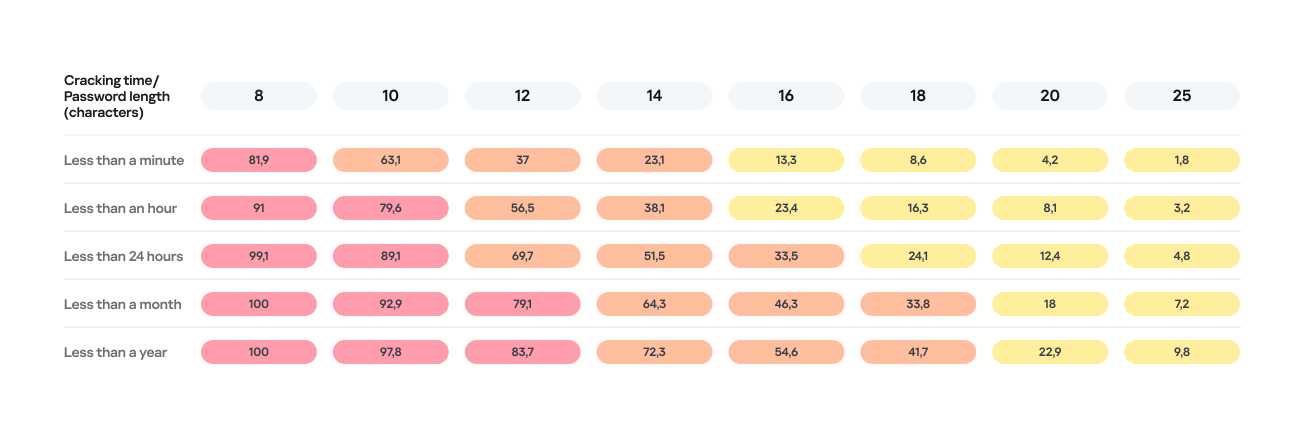
Percentage of varying password lengths crackable within a given timeframe
But the predictability of your password is just as important. Think you’re boosting security by adding a number or a special character to a memorable word? You are, but only slightly. The patterns people use to create passwords are easily predictable and, at times, pretty amusing — though this is no laughing matter.
What we learned about password patterns
Analysis of over 200 million passwords revealed characteristic patterns that allow smart algorithms to crack user passwords with ease.
Pick a number
More than half of all passwords (53%) end with one or more digits, while nearly one in six (17%) starts with a number. Every eighth password (12%) contains sequences that look a lot like years — ranging from 1950 to 2030 — and one in ten (10%) specifically falls between 1990 and 2026. This most likely happens because folks add their birth year (or that of someone close), some other significant year, or the year they created the password or account. Fun fact: based on the distribution of these dates, it suggests that the most active internet users were born between 2000 and 2012.
However, among all numeric combinations, the most popular turned out to be… you guessed it: “1234”. Overall, patterns involving sequential keyboard presses (“qwerty, ,”ytrewq”, and the like) appear in 3% of passwords.
Special characters aren’t a silver bullet
Most password policies in recent years require at least one special character. The absolute winner in this category is the @ symbol: it appears in one out of every 10 passwords. The period (.) comes in second, followed by the exclamation point (!) in third.
Love rules the world… and Skibidi Toilet does too
Emotionally charged words often form the foundation of a password, and despite everything, positive words are more common. Frequently occurring examples include “love”, “angel”, “team”, “mate”, “life”, and “star”. That said, negativity pops up too — mostly in the form of common English swear words.
Interestingly, viral memes are reflected in passwords as well. Between 2023 and 2026, the use of the word Skibidi in passwords skyrocketed 36-fold! Naturally (see the link if it doesn’t seem natural), “toilet” saw a boost too, though to a lesser extent.
Users tend to keep their passwords unchanged for years
More than half of the passwords (54%) we identified in recent leaks have surfaced before. Part of this can be explained by the same data migrating from one dataset to another. However, there’s a much more troubling reason too: many users simply haven’t changed their passwords in years.
Analyzing the dates found within passwords shows that combinations containing the years from 2020 through 2024 remain popular. It seems people add the current year to their password when they create it — and then forget about it for several years. This actually allows us to calculate the average lifespan of a password: about three to five years.
This is a dangerous trend. For one, smart algorithms can crack much more complex passwords over that kind of timeframe. Secondly, the longer your password remains unchanged, the higher the probability it will leak — whether through a breach, malware infection, or a phishing attack.
The situation gets even worse when the same password is used across multiple accounts. In this case, attackers don’t even need to crack anything; they just need to find your password in a single leak and plug it into other sites.
How to protect your passwords and accounts
If you’ve realized while reading this post that your own passwords are among those easily crackable — don’t panic. We’ve put together a list of simple but essential tips for you.
Use a password manager
The weakest passwords are the ones people come up with themselves. Creating and memorizing hundreds of sequences of 16–20 random characters (since every site requires a unique, long password) is a daunting, unrealistic task.
That’s why you should delegate password generation and storage to our password manager. It doesn’t just create and store complex, randomized passwords in an encrypted format; it also syncs them across all your devices. To decrypt your vault, you only need to remember one main password that no one knows but you — our guide on mnemonic passwords can help you with that.
Don’t store passwords as plain text
Whatever you do, never write down passwords in files, messages, or documents. They lack the robust encryption provided by a password manager. Furthermore, these kinds of notes fall into the hands of attackers instantly if you happen to pick up a Trojan or an infostealer.
Don’t store passwords in your browser
Many users save their passwords in their browsers — especially since they conveniently offer to do it automatically. Unfortunately, research shows that malware has evolved to extract these passwords from all popular browsers almost instantly. Kaspersky Password Manager can help you import saved passwords from your favorite browser — just follow our simple, three-step guide. Most importantly, don’t forget to clear the browser’s password storage once the import is complete.
Switch to passkeys
Wherever possible, use passkeys — a cryptographic replacement for passwords. In this setup, the service stores a public key, while the private key remains on your device and is never transmitted. During login, the device simply signs a one-time request. Additionally, passkeys are tied to a specific domain, meaning phishing attacks using spoofed addresses won’t work. Kaspersky Password Manager allows you to store both passwords and passkeys, solving the problem of syncing them across different ecosystems, including Windows, Android, macOS, and iOS.
Set up two-factor authentication
Enable two-factor authentication wherever possible. Even if your password is compromised, a properly configured 2FA setup makes it extremely difficult for the attacker to access your account. For maximum security, skip the one-time codes sent via SMS and use authenticator apps instead — and yes, Kaspersky Password Manager comes in handy here, too.
Practice good digital hygiene
Remember, storing your passwords correctly is only half the battle. It’s crucial to follow the rules of digital hygiene: avoid downloading unverified files, pirated software, cheats, or cracks, and don’t click on random links. The number of infostealer attacks has been steadily rising in recent years, which means you need a robust security solution for full protection. We recommend Kaspersky Premium — it protects all your devices from Trojans, phishing, and other threats. Besides, the subscription includes our password manager.
For those serious about account security, check out our collection of posts on passwords, passkeys, and two-factor authentication: