
Normal view

Browser Guard gets even better with Access Control 

16 April 2026 at 14:40

Have you ever been on a website when a pop-up suddenly asked for access to your camera, microphone, location, or notifications? Whether you clicked “allow,” dismissed it, or just wondered why it appeared, those permission requests aren’t always harmless. Some sites can abuse those permissions.

With Access Control, a new feature in Browser Guard, you decide exactly which websites can access your device and stop the rest. That means you choose which websites can: 

  • Use your camera
  • Use your microphone
  • Access your location
  • Send you notifications 

Further, not only can you control which websites have access to your devices, but you can also block websites or even require those specific sites to request permission every single time they try to gain access to your machines. You can always allow trusted sites to access your camera or location while blocking everything else.  

Access Control is now available for Malwarebytes subscribers using Chrome and Edge browsers on a Windows device. 

How to use Access Control 

We designed Access Control to be both powerful and simple because we know every moment you spend getting set up is another moment you’re left unprotected.  

How to use Access Control:  

  • Install/Open Browser Guard: Click the Malwarebytes icon in your browser’s header 
  • Access Dashboard: Click the Dashboard tab at the bottom of the extension panel. 
  • Navigate to Access Control: On the left sidebar of the web page, select Access Control. 
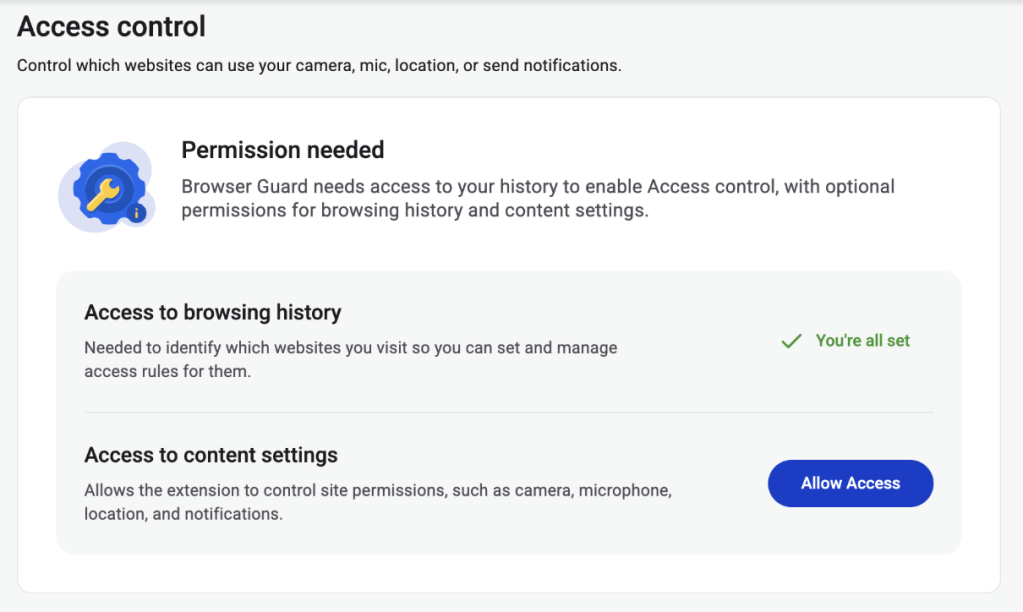
  • Manage Permissions: See visited websites, click “Allow” to enable or disable Malwarebytes’ ability to see visited sites.
  • Access Control requires some access to your browsing to protect you online
  • Access Control lets you choose individual sites to block and allow

This feature is rolling out in beta first, so you might see improvements and updates as we refine it. Currently, the feature works across Chrome and Edge, but will roll out to other browsers soon.  

Access Control is another step toward making privacy simple and accessible.  Not a subscriber yet? Check out  Malwarebytes’ plans today to unlock this feature and more. 


We don’t just report on threats—we remove them

Cybersecurity risks should never spread beyond a headline. Keep threats off your devices by downloading Malwarebytes today.

Browser Guard gets even better with Access Control 

16 April 2026 at 14:40

Have you ever been on a website when a pop-up suddenly asked for access to your camera, microphone, location, or notifications? Whether you clicked “allow,” dismissed it, or just wondered why it appeared, those permission requests aren’t always harmless. Some sites can abuse those permissions.

With Access Control, a new feature in Browser Guard, you decide exactly which websites can access your device and stop the rest. That means you choose which websites can: 

  • Use your camera
  • Use your microphone
  • Access your location
  • Send you notifications 

Further, not only can you control which websites have access to your devices, but you can also block websites or even require those specific sites to request permission every single time they try to gain access to your machines. You can always allow trusted sites to access your camera or location while blocking everything else.  

Access Control is now available for Malwarebytes subscribers using Chrome and Edge browsers on a Windows device. 

How to use Access Control 

We designed Access Control to be both powerful and simple because we know every moment you spend getting set up is another moment you’re left unprotected.  

How to use Access Control:  

  • Install/Open Browser Guard: Click the Malwarebytes icon in your browser’s header 
  • Access Dashboard: Click the Dashboard tab at the bottom of the extension panel. 
  • Navigate to Access Control: On the left sidebar of the web page, select Access Control. 
  • Manage Permissions: See visited websites, click “Allow” to enable or disable Malwarebytes’ ability to see visited sites.
  • Access Control requires some access to your browsing to protect you online
  • Access Control lets you choose individual sites to block and allow

This feature is rolling out in beta first, so you might see improvements and updates as we refine it. Currently, the feature works across Chrome and Edge, but will roll out to other browsers soon.  

Access Control is another step toward making privacy simple and accessible.  Not a subscriber yet? Check out  Malwarebytes’ plans today to unlock this feature and more. 


We don’t just report on threats—we remove them

Cybersecurity risks should never spread beyond a headline. Keep threats off your devices by downloading Malwarebytes today.

Patch Tuesday, April 2026 Edition

14 April 2026 at 23:47

Microsoft today pushed software updates to fix a staggering 167 security vulnerabilities in its Windows operating systems and related software, including a SharePoint Server zero-day and a publicly disclosed weakness in Windows Defender dubbed “BlueHammer.” Separately, Google Chrome fixed its fourth zero-day of 2026, and an emergency update for Adobe Reader nixes an actively exploited flaw that can lead to remote code execution.

A picture of a windows laptop in its updating stage, saying do not turn off the computer.

Redmond warns that attackers are already targeting CVE-2026-32201, a vulnerability in Microsoft SharePoint Server that allows attackers to spoof trusted content or interfaces over a network.

Mike Walters, president and co-founder of Action1, said CVE-2026-32201 can be used to deceive employees, partners, or customers by presenting falsified information within trusted SharePoint environments.

“This CVE can enable phishing attacks, unauthorized data manipulation, or social engineering campaigns that lead to further compromise,” Walters said. “The presence of active exploitation significantly increases organizational risk.”

Microsoft also addressed BlueHammer (CVE-2026-33825), a privilege escalation bug in Windows Defender. According to BleepingComputer, the researcher who discovered the flaw published exploit code for it after notifying Microsoft and growing exasperated with their response. Will Dormann, senior principal vulnerability analyst at Tharros, says he confirmed that the public BlueHammer exploit code no longer works after installing today’s patches.

Satnam Narang, senior staff research engineer at Tenable, said April marks the second-biggest Patch Tuesday ever for Microsoft. Narang also said there are indications that a zero-day flaw Adobe patched in an emergency update on April 11 — CVE-2026-34621 — has seen active exploitation since at least November 2025.

Adam Barnett, lead software engineer at Rapid7, called the patch total from Microsoft today “a new record in that category” because it includes nearly 60 browser vulnerabilities. Barnett said it might be tempting to imagine that this sudden spike was tied to the buzz around the announcement a week ago today of Project Glasswing — a much-hyped but still unreleased new AI capability from Anthropic that is reportedly quite good at finding bugs in a vast array of software.

But he notes that Microsoft Edge is based on the Chromium engine, and the Chromium maintainers acknowledge a wide range of researchers for the vulnerabilities which Microsoft republished last Friday.

“A safe conclusion is that this increase in volume is driven by ever-expanding AI capabilities,” Barnett said. “We should expect to see further increases in vulnerability reporting volume as the impact of AI models extend further, both in terms of capability and availability.”

Finally, no matter what browser you use to surf the web, it’s important to completely close out and restart the browser periodically. This is really easy to put off (especially if you have a bajillion tabs open at any time) but it’s the only way to ensure that any available updates get installed. For example, a Google Chrome update released earlier this month fixed 21 security holes, including the high-severity zero-day flaw CVE-2026-5281.

For a clickable, per-patch breakdown, check out the SANS Internet Storm Center Patch Tuesday roundup. Running into problems applying any of these updates? Leave a note about it in the comments below and there’s a decent chance someone here will pipe in with a solution.

❌